#helpdesk-twitch
1 messages · Page 957 of 1
 mild glen
 azure salmon
can someone finish my problem?
 formal niche
Hello
 red trout
So, my chatbot won't work anymore
It's been two streams and it's not displaying timers, won't work with custom or built in chat commands
 strange gyro
Hey guys, Having an issue with my merch store https://store.streamelements.com/error/store
1 sec wrong link
 crude pecanBOT
@red trout ⤵️
Go to the Dashboard > Right side > Part channel > Join channel (https://streamelements.com/dashboard) https://i.imgur.com/uYVb8OK.png
 nimble dune
@strange gyro #helpdesk-merch
strange gyro
ty
red trout
Failed to join bot
nimble dune
red trout
Failed to join bot
Please part the bot from your dashboard > logout of StreamElements at https://streamelements.com/logout > log in again > re-invite the bot > mod it (make sure it's not muted).
red trout
"Please part the bot from your dashboard" by clicking part channel?
 ebon forum
Yes
red trout
ty
ebon forum
Dashboard - part channel - log out from StreamElements - Log back in with your Twitch - join channel
that should do the trick
red trout
failed to join bot :/
It says succesful, but then says it's not in channel, then I click join again and it says failed
ebon forum
Can you give us your twitch channel name? No links please, just the name
red trout
throlashgaming
also, when I don't have obs running on PC the chat bot works
just noticed that
ebon forum
ok, i know what's up
the bot is working when OBS.Live is down - so this means you have the custom bot name set up in OBS
crude pecanBOT
@red trout ⤵️
If your commands recently stopped working and you're using OBS.Live and a custom bot name do the following:
- In OBS.Live, click on the hamburger menu (three stripes) at the top left of your activity feed
- Click on Stream Settings > Custom bot name
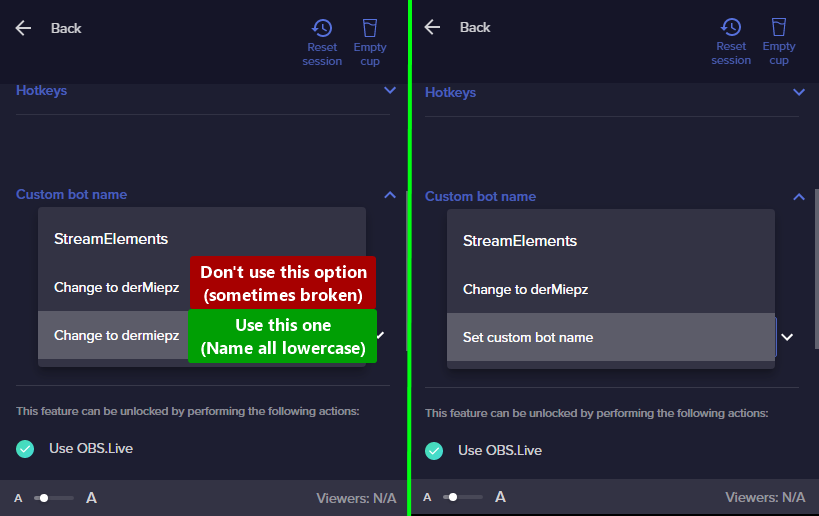
- In the Custom bot name field select Set custom bot name, not your already existing username (with capital letters). Note: If you already connected an account that way, the third entry will show as the account name (see image https://i.imgur.com/re4theQ.png).
- Scroll a bit down and click on the purple Connect Custom Bot Account button
- Log in as usual and Authorize the custom bot name
- Back in the Activity feed, click on the Send Test Message button and check if your custom bot name starts working again
ebon forum
As with everything custom, the custom bot name can break sometimes, so this should get you back to the default bot name.
red trout
bold of you to assume I remember that password 😉 I'll get on reconnecting that and get back to you
ok, still doesn't like the custom bot. For now I'll use streamelements as I'm 15 min late to stream. thanks folks!!
ebon forum
Sounds good. Have a nice stream and an amazing weekend @red trout
And reach out to us to fix the custom bot part later.
red trout
Thanks!@
 spice schooner
Posting again, cus my request has so far been ignored. I would like to have the custom name option for my streamelements bot enabled.
ebon forum
spice schooner
Posting again, cus my request has so far been ignored. I would like to have the...
The custom bot name is enabled by default if you use OBS.Live.
- In OBS.Live, click on the hamburger menu (three stripes) at the top left of your activity feed
- Click on Stream Settings > Custom bot name
- In the Custom bot name field select Set custom bot name, not your already existing username (with capital letters). Note: If you already connected an account that way, the third entry will show as the account name (see image https://i.imgur.com/re4theQ.png).
- Scroll a bit down and click on the purple Connect Custom Bot Account button
- Log in as usual and Authorize the custom bot name
- Back in the Activity feed, click on the Send Test Message button and check if your custom bot name starts working again
Those are the steps to connect it
 spice schooner
I know, that is not the point. It says on the support page that if I'm using anything but obs live I should ask for it to be enabled on the support page.
ebon forum
The other tool that allows you to rename the bot would be Ground Control.
But it is outdated and we are no longer recommending it
spice schooner
Yes. Wich I have.
ebon forum
Ok, i can turn it on for you, give me your Twitch channel name please.
spice schooner
Xikeyba. Thank you very much.
ebon forum
Restart your Ground Control
You should see the custom bot name option in the settings now
spice schooner
Booting it up.
Thank you again. Sorry for the inconvenience, I know obs live has it enabled by default, but I didn't get acquainted with it yet. Maybe in the future.
The option is now showing up. Thank you kindly.
ebon forum
spice schooner
Booting it up.
Thank you again. Sorry for the inconvenience, I know obs live has...
Do not worry. You can keep using Ground Control, but for your information - it is outdated and no longer maintained, so essentially it is "use at your own risk" software at this point. OBS.Live is kept up2date of course, so switching in the long run is recommended and we can assist with it.
spice schooner
Will come back on that offer in the future then 👍
 junior loom
Hi everyone. I have a 404 on my Chatstat page. No other user name before. I can find my user name (same as discord name) in Chatstat page but it shows the 404. Need an admins help to reset the page. Thank you so much.
 static light
can anyone make alerts?
ebon forum
junior loom
Hi everyone. I have a 404 on my Chatstat page. No other user name before. I c...
Hi. Did you rename your channel recently? If yes, we need old + new name to fix it. If now - just the current channel name.
junior loom
it's just the current channel name @ebon forum . It's uropsalis . I have had this name for many years.
ebon forum
junior loom
it's just the current channel name <@!149255081194160129> . It's uropsalis . I...

StreamElements
Description Chat Stats tracks emote usage on Twitch in real time. See which emotes are the most popular on every Twitch channel
junior loom
All good. Thank you!!
spice schooner
... I might have to come back on the obs live offer now.
ground control custom name didn't work anyway and it spammed every line 4 times. So I decided to check out obs live. Did every step in that post of yours aaaaaand....
I still don't know how to set up a proper custom name. And I mean a name that I get to choose, not my account name in lowercase.
Do I have to create a new twitch profile for that or what does it want me to do?
 ionic kelp
You can either use your actual account or you'd have to have the login info for another account should you want something else.
spice schooner
So I do have to create another account. Man why is stuff like that not mentioned on the support page. "set custom name" sounds kinda misleading now.
Anyway, I'm off to do just that then. Thank you.
 peak lion
Can somebody help me? iam having a problem with !sr
ive enabled viewer request and the !songrequest bot but it doenst work...
 distant kiln
I need the StreamElements Socket API Token as well as the API Access token, which are not accessible via the website
I know where my JWT Token and Overlay Tokens are, those aren't what I'm looking for
ionic kelp
@distant kiln Any particular reason why?
 proven gyro
my bot didn't work
distant kiln
ionic kelp
<@!499663537313021982> Any particular reason why?
working on a project
ionic kelp
 cedar mist
I recently went through a rebrand and switched my name on twitch from SusanooTheDeity to SusanooFX. Once I changed my name on twitch. My StreamElements stopped working. I've tried signing out, I have disconnected my account and connected it again but nothing works. Can you please help?
crude pecanBOT
@cedar mist ⤵️
If you changed your name on Twitch, please follow these steps:
- Visit https://streamelements.com/logout and then log in again by connecting with Twitch.
- On the right side of the dashboard page that opens, select Join under bot settings. If it says Part select that and then select Join to send the bot to the chat. Don't forget to mod the bot by typing /mod streamelements in your channel if you have not already.
- Post your old and your new name here so that we can update your channel's chatstats tracking (must be done by staff).
cedar mist
Step number two is nowhere to be found.
 drowsy egret
cedar mist
Step number two is nowhere to be found.
drowsy egret
cedar mist
Step number two is nowhere to be found.
it's this:

 knotty siren
so I'm tryign to enable the loyalty points system. I checked the box that says disabled so I could edi tmy stuff. I have it edited, so now do I uncheck the disabled check box? and how will I know it's working?
 inner sedge
hey so i try to set up the stream sore for things like stay hydrated en stuff like that butt when i create 1 its always say somthing whent wrong i cant fix it
stream store**
crude pecanBOT
@knotty siren ⤵️
Please provide a proper screenshot with the issue visible. If not sure how to take a screenshot, you can check here: https://www.take-a-screenshot.org
drowsy egret
inner sedge
hey so i try to set up the stream sore for things like stay hydrated en stuff li...
make sure the images you're using for the items have a file extension (.jpg/.png, etc)
 wild plover
Hello. StreamElements is not showing any data for my streams in the dashboard. I did part the bot and rejoin it to see if that would help. Would that erase my data also?
drowsy egret
wild plover
Hello. StreamElements is not showing any data for my streams in the dashboard. I...
data is not erased, did you see data there before?
wild plover
No, I've only done two streams but it has never showed any data even though I've had people follow
crude pecanBOT
@wild plover ⤵️
Please provide your account ID found at the top of this page: https://streamelements.com/dashboard/account/channels This ID is public info and safe to share here.
wild plover
5ffa9d37fa5520681dad012a
drowsy egret
wild plover
5ffa9d37fa5520681dad012a
I've refreshed your connection, new data should appear now
 light horizon
I just hit Affiliate, and im trying to figure out why my !roulette isnt working. Can someone help??
wild plover
drowsy egret
I've refreshed your connection, new data should appear now
It is showing your follow and stream store redemptions. The follows from today and earlier in the week are not there. Is that normal? I'm sorry, the store redemptions were there before you refreshed the connection, just no follower data except yours.
drowsy egret
wild plover
It is showing your follow and stream store redemptions. The follows from today a...
yeah, that's normal, we can't get past data, it will only track future events
wild plover
drowsy egret
yeah, that's normal, we can't get past data, it will only track future events
Perfect. Thank you for the assistance. Have a great weekend.
 tawny bay
Regarding sponsorships. What directory do we stream to? Clawee doesn't have one
Maybe "Just Chatting"?
drowsy egret
tawny bay
Maybe "Just Chatting"?
yeah, you can use just chatting
 toxic marsh
I talked with a mod for Masayoshi who set up his !song command, and they were kind enough to give me the link. Dunno if I’m allowed to post it or anything but the command includes a spotify link to whatever song you’re playing. I can send the details word for word if anyone wants to use it  👍
👍
crude pecanBOT
@toxic marsh ⤵️
Welcome to the helpdesk! Please let us know how we can assist you today and a support volunteer or staff member will assist you as soon as they are available. Thank you for your patience.
 lament blade
@crude pecan
 tepid kestrel
smone can teach me how to wrk whit stream elemtnes ?
 visual cairn
Does anyone know if its possible to make kappagen emotes fade in -> "float" in random directions -> fade out. I would do it myself with css but I can't find any option to do so...
 cedar snow
Does anyone know why i can only use paypal as a payment method? I want to add more methods like sms etc. I hope someone will help me.
 runic notch
why cant i use commands like !setgame even though i have been given all perms
 rustic karma
Myself and other streamers I mod for are still having an issue where Store sound redeems are coming through as the streamer instead of the user. It also means the users are inadvertently using the streamers loyalty points.
Is this being worked on? It's been quite a while now
 deft shard
Hello, I changed my name on Twitch now Streamelements no longer wants to function as a mod. In the user management, the old name is still there as broadcaster. Can I change that myself or do you guys do it?
Old name: animeillusiongermany
new name: ai_gamez
 green flame
Hi Team - I have asked about this multiple times and no luck. How do you get the twitter module to work for stream elements or is it just broken?
crude pecanBOT
@deft shard ⤵️
Please logout of StreamElements at https://streamelements.com/logout and then login again to your account (Twitch/YouTube/Facebook).
 dry hare
Try this first and reconnect the bot to your channel again
crude pecanBOT
Go to the Dashboard > Right side > Part channel > Join channel (https://streamelements.com/dashboard) https://i.imgur.com/uYVb8OK.png
dry hare
green flame
Hi Team - I have asked about this multiple times and no luck. How do you get the...
Is that the thing that tweets you are live?
green flame
dry hare
Is that the thing that tweets you are live?
Nah its the one that monitors a tweeter account and when a tweet is made it post it in your chat.
dry hare
Oh I don’t know about that one
green flame
dry hare
Oh I don’t know about that one
Yeah seems like a rare use case
deft shard
crude pecan
<@747107083882856459> ⤵️
In User Management, the old name, animeillusiongermany, is still shown under Broadcaster, but the new name (ai_gamez) is shown in the profile for owner. Therefore the bot commands do not work.
 covert axle
Any ways to pull either how many times and when a custom command was used, alternatively all chatlogs through the dashboard?
dry hare
deft shard
In User Management, the old name, animeillusiongermany, is still shown under Bro...
Give it a few minutes
 wooden blaze
good evening when will i be able to take my money to the bank account? since there is only a paypal option
hm
why don't i see sepay when choosing options?
oh sorry
 kindred lodge
i am modding for a streamer, and his watchtime is bugged. we loyalty points enabled but they arent working. watchtime is stuck at 0 seconds and i have tried numerous watchtime commands and nothing is working, could someone please giev us some help, cheers
 woeful violet
How do I change the Start Stream settings? I'm trying to go live on Twitch but it keeps opting for my Facebook channel instead
crude pecanBOT
@woeful violet ⤵️
StreamElements menu, on top of OBS > Logout > Login
 hardy hamlet
simple question how do I resize my overlays if im streaming at 720p instead of 1080p?
 light kraken
is there anyway to disable the default !ping command of se bot?
lament blade
i have issuess with paycheck when i try 2 place my passport doesnt allow me 2 replace the picture.
crude pecanBOT
@lament blade ⤵️
Please contact us via email for support with SE.Pay. You can use our contact form here: https://streamelements.com/contact Thank you.
ionic kelp
@light kraken I'm not seeing anything that would have that even in defaults. Sure it's not a custom one?
light kraken
ionic kelp
<@397882413155483648> I'm not seeing anything that would have that even in defau...
just try it at a channel your moderator. only "source" i found it: https://streamelements.com/streamelements/commands if you create a custom command "!ping" it will react with the ping message (" streamelements has been running for XX hours XX mins!") and sends a next message with the answer of the custom ping command
ionic kelp
FFS
Unfortunately this is most likely one that it can't be done to.
And thank you for making me aware of another hidden command 
light kraken
ionic kelp
Unfortunately this is most likely one that it can't be done to.
yes thats what I thought too after I couldnt find it.
light kraken
ionic kelp
And thank you for making me aware of another hidden command <:GuraNotLikeThis:75...
no problem 😄
 unkempt wagon
Were there any issues in the last couple of days with notifications? I am not seeing my subs show up in my overlay or on the Streamelements dashboard or activity feed or in OBS.live
 fallow yoke
Hello, I am having issues with the animated super themes. The animated portions are incredibly laggy. 1 frame per 5 seconds or so. I have tried a couple. They have worked in the past with no issues. I am using OBS studios.
 feral creek
I can't get OBS.Live to connect to my bot account :/
Everytime I login and authorize it, it just keeps saying to login and the option to send a test message is greyed out
crude pecanBOT
@feral creek ⤵️
StreamElements menu, on top of OBS > Logout > Login
feral creek
It's still doing the same thing after logging out and back in in OBS Live
I'm never able to send a test message, it just wants me to keep connecting the bot account
crude pecanBOT
@feral creek ⤵️
If your commands recently stopped working and you're using OBS.Live and a custom bot name do the following:
- In OBS.Live, click on the hamburger menu (three stripes) at the top left of your activity feed
- Click on Stream Settings > Custom bot name
- In the Custom bot name field select Set custom bot name, not your already existing username (with capital letters). Note: If you already connected an account that way, the third entry will show as the account name (see image https://i.imgur.com/re4theQ.png).
- Scroll a bit down and click on the purple Connect Custom Bot Account button
- Log in as usual and Authorize the custom bot name
- Back in the Activity feed, click on the Send Test Message button and check if your custom bot name starts working again
 prisma relic
have you tried this? see the image and use the bottom option.
feral creek
that's exactly what I am doing. I can get it to work as my own name, but it will not let me connect my own custom bot account
prisma relic
alright; that works most of the time. but when it doesn't it needs a full reset.
crude pecanBOT
- Right-click your OBS desktop shortcut (not the OBS.Live shortcut) and navigate to Properties
- In the Target field, add the following to the very end:
--remote-debugging-port=40404(don't forget to add a space before the current path)
https://streamelements.is-serious.business/6ihr2EL.jpg - Open OBS (or restart if it was open)
- Open your web browser and type in:
localhost:40404(try127.0.0.1:40404if you see issues - https://streamelements.is-serious.business/3EGPQFJ.jpg) - Click on StreamElements - Activity feed - https://streamelements.is-serious.business/2kJYt2b.jpg
- Type the following into the console and hit enter:
store.customBot.removeCustomBotIntegration() - Try setting the custom bot name, make sure you follow https://strms.net/custombotname
- Remove the flag added in step 2 from your shortcut properties
feral creek
I can't get the local host thing to work
oh nvm
am I supposed to get this when I do number 6?
 prisma relic
hmmm; i've not seen that happen before.
did you get a message in the browser console when you did it?
feral creek
no, it just went to this
prisma relic
can you send a screen shot of where you typed in step 6?
 prisma relic

on the Upper right in your image where it says Console
but you will need to go back and reload the page first.
 raw talon
Hey guys. I'm currently about to start. Sponsored stream threw stream elements. But the goal widget has bugged out and stopped updating. Is there anyone here I can speak to about this? Kinda time sensitive planned to start in 30mins.
prisma relic
The goal widget for the sponsored stream?
raw talon
YEAH.
I've had several people from chat finish it. And it not update. Then one of my mods also did it. Still no update to the goal.
That instant feedback is a fair chunk of the hype. Having this alert working is very very important. It's not on my end as I have had the widget for days. And it was working at some point but no longer is. I've also tested it in the stream elements website and test alerts go fine. It's just not tracking anymore.
feral creek
ok, so I had to close OBS and reopen it, but once I did that and went back, I pasted the info into the correct spot and I was able to sign into my bot account! Thank you so much!
prisma relic
feral creek
ok, so I had to close OBS and reopen it, but once I did that and went back, I pa...
awesome!
feral creek
So now I just remove that extra stuff in properties correct?
 keen wigeon
Hi there! if you believe that there are missing users from the widget, there are ways to look into that. First of all, mobile users are delayed. Second, we've had some temporary (albeit rare) hiccups recently that caused the alerts to be delayed by a few hours. If this was happening for one stream, I recommend trying it out again and seeing what happens.
Thirdly, if there is still an issue, it's best to solve this by opening a ticket with us. We might be able to help, provided we have some details from you.
prisma relic
yup yup; i don't think there is an issue with leaving it in there but the bot says to remove in the last step. @feral creek
crude pecanBOT
@raw talon ⤵️
Please contact us via email for support with your campaign or sponsorship. You can use our contact form here: https://streamelements.com/contact Thank you.
feral creek
prisma relic
yup yup; i don't think there is an issue with leaving it in there but the bot sa...
Perfect, thank you so much for your help!
 tired atlas
what to do so that the moderator could add commands to stream elements
prisma relic
tired atlas
what to do so that the moderator could add commands to stream elements
via chat commands or using the website?
prisma relic
go to https://streamelements.com/dashboard/bot/commands/default and look for !command and check the level that it set at
raw talon
Turns out its not just the widget. The Champaign isnt tracking at all ><
tired atlas
 prisma relic
🙂

 prisma relic
👍 it should work now
tired atlas
is good?
tired atlas
prisma relic
👍 it should work now
thanks ❤️
prisma relic
no problem; give it a check and if it's not working let me know
tired atlas
Still does not work
prisma relic
what is your channel name?
tired atlas
however, it only works you have to write fully does not work !cmd only !command
prisma relic
you have a 3 minute cooldown set
 stable oyster
is there a way to give points to a user during a timeframe they will use an certain emote? for example something happens on stream and you want to give points to all who ONLY type in that specific emote?
tired atlas
I have to give at zero?
prisma relic
i would give it 0 and try again @tired atlas
prisma relic
stable oyster
is there a way to give points to a user during a timeframe they will use an cert...
you would need to look into some custom code for this.
stable oyster
@prisma relic it appears streamelements would need to be able to call commands within commands..i tried creating a new command and adding !addpoints inside of it..setting streamelements as supermod..but the command wont fire
prisma relic
something like this: #widget-share message ; but would need to first add a timer and also add a collector to get all the users that used it in the time and give them all points.
correct; the commands cannot call other commands.
stable oyster
ohh this may be it @prisma relic ! let me read into it you are a hjero
hero
ohh this is just a counter hmm
prisma relic
...ya; it's a counter; so you would need to add timer and collector to give points at the end
stable oyster
makes sense
so im guessing this little timer currently does that at least
counter rather
actualy it may only be the counter not necessarily a timer here
prisma relic
i've not seen an widget like that; but it is interesting.
stable oyster
you get the concept im aiming for at least..just want to award all users who type in the emote in that window
tired atlas
thx
prisma relic
stable oyster
you get the concept im aiming for at least..just want to award all users who typ...
ya. you would need to add some code in there to 1st) enable it on a !command for you to start 2) set a timer to turn it off 3) collect a list of users that use the emote and then 4) give them all points at the end.
 arctic scaffold
Heyo im getting a weird error that I've never had before.. Video drivers are updated

Anyone available to help out?
crude pecanBOT
@arctic scaffold ⤵️
Obs.live is a plugin for OBS Studio for the best OBS support, please join their Official Discord @ https://discord.gg/obsproject
lament blade
Good Morning everyone, I am admin for a few Medium-Big Twitch channels and I wonder if there is a tool like this one from Nightbot for Discord but with our Streamelements.

It literally drops same commands on discord that you have on the Twitch Channel.
ionic kelp
We have no discord integration.
 shadow marten
watchtime command say 0 seconds, cant get it to work
crude pecanBOT
@shadow marten ⤵️
The !watchtime command is directly tied to the Loyalty system. The Loyalty system must be enabled for viewers' watchtime to count up.
To enable Loyalty, please go to the Loyalty section of your account: https://streamelements.com/dashboard/loyalty
Watchtime counts up every 10 minutes alongside Loyalty points, and only while the stream is live. Reruns will not be counted.
Please note that watchtime is not tracked by Twitch and there is no way to retroactively apply past watchtime to viewers.
shadow marten
cheers
 wispy eagle
how do i set up steam eles to post my discord server link in chat while streaming ?
keen wigeon
wispy eagle
how do i set up steam eles to post my discord server link in chat while streamin...
Chat bot -> Timers
 compact current
Can someone help me? Whats the minimum withdrawal balance on SE.Pay? i tried withdrawing some of my revenue but it said not minimum transaction
crude pecanBOT
@compact current ⤵️
Please contact us via email for support with SE.Pay. You can use our contact form here: https://streamelements.com/contact Thank you.
inner sedge
can i let people use loyalty points without gettin partner or aff
prisma relic
yup @inner sedge. the SE loyality is based on the watchtime
inner sedge
okey becaus my vieuwers dont earn it even i put the points en stuff
prisma relic
make sure that you have it enabled in your loyalty settings.
...and it only counts in 10 minute increments
inner sedge
i did butt it is enabled like a few weeks now
 sharp notch
I have supermod permissions. can I edit the chatstats somehow ? because if someone changes their name then message stats starts with the new one. it's not good 😕
unkempt wagon
I posted this last night, but any idea why my subs are not showing on my Streamelements dashboard? They show on Twitch dashboard. But it says 0 in Streamelements both on the dashboard and in any notifications or event list etc.
crude pecanBOT
@unkempt wagon ⤵️
Please logout of StreamElements at https://streamelements.com/logout and then login again to your account (Twitch/YouTube/Facebook).
 placid raptor
that usually fixes it after a few minutes. if it's not autofixed, after the relog give it 10-15 mins and then navigate to activity feed > widget data > totals > and press 'reset session'
unkempt wagon
OK, done that. I'll wait and see.
placid raptor
I was just reading that other message about the overlays and OBS,
who posted that? did you delete it cuz it was solved? 
placid raptor
sharp notch
I have supermod permissions. can I edit the chatstats somehow ? because if someo...
you can't edit individual entries within a channel's chatstats page
to be honest neither can we
we can update a chatstats page for a channel if it went through a name change. but not individual entries
unkempt wagon
So I've reset the session, logged in and out several times. Still nothing is showing on the streamelements dashboard. Just to be clear, these were Twitch Prime subs. Neither the bot in chat said anything about them like it usually does, or the notifications / overlay at the time. I saw I had subs after my stream was over but Streamelements seems to still see nothing at all.
And to be clear again, it shows my previous subs from other days.
sharp notch
placid raptor
you can't edit individual entries within a channel's chatstats page
it's so sad. I hope you will add such features in the future 😦
unkempt wagon
What's weird is that in the widget data it shows I have the sub count in "Totals" but under "Labels" it doesn't show the latest subscribers correctly under "Recent Subscribers". Like some are missing.
 bright merlin
Hi, when I try to view my chatstats, I get a 404 error. While looking around for solutions, the only reason I could find for the error is changing your twitch username. My old username is: krolmacioos1 , new one: maacioooo
Can some help me fix it? Please 🙂
 untold crest
stable oyster
<@!229122038294380545> it appears streamelements would need to be able to call c...
untold crest
stable oyster
<@!229122038294380545> it appears streamelements would need to be able to call c...
You can use this one: https://streamelements.helprace.com/i519-provide-an-addpoints-variable#item_comment_block_59866 (Few posts below there's a description of additional get parameters for altering output)
crude pecanBOT
@deft shard ⤵️
StreamElements menu, on top of OBS > Logout > Login
dry hare
Try this as well
 hot niche
Hey! how can i edit my gifted sub alertbox so it doesnt spam and name everyone who got gifted?
placid raptor
hot niche
Hey! how can i edit my gifted sub alertbox so it doesnt spam and name everyone w...
use the community gift variation 🙏 it will show giftbombs as one alert instead of individual ones
hot niche
placid raptor
use the community gift variation 🙏 it will show giftbombs as one alert instead ...
Thanks for the help! but i cant find it in the variation options :/
deft shard
Same problem after changing the Names:
In User Management, the old name, animeillusiongermany, is still shown under Broadcaster, but the new name (ai_gamez) is shown in the profile for owner. Therefore the bot commands do not work.
i mean the Website, i use OBS Studio and there is nothing from Streamelements.
 vocal mantle
After not streaming for a couple months (last stream was in July I think), I came back and updated everything. My Twitch is connected but every time I try to go live it pops up an empty window saying "Start Streaming to Mixer". The only settings I changed were some bitrate and video output settings.
placid raptor
deft shard
Same problem after changing the Names:
In User Management, the old name, animei...
can u hop in to ur twitch chat real quick?
crude pecanBOT
@vocal mantle ⤵️
StreamElements menu, on top of OBS > Logout > Login
placid raptor
and with the above 👆 also make sure your correct account is connected in OBS > settings > stream @vocal mantle
vocal mantle
Will do. Ill be back if that doesnt work. thank you
placid raptor
deft shard
Same problem after changing the Names:
In User Management, the old name, animei...
nevermind, no need to meet in chat. this should be fixed. old username is gone from user management and current name is set to broadcaster
the current broadcaster name should not show up in user management, that's intended
deft shard
placid raptor
nevermind, no need to meet in chat. this should be fixed. old username is gone f...
thanks for your help

placid raptor
👍
 ripe fox
Hello, I would like to deactivate a StreamElements account to activate another but I do not know how to do it, please help me
bright merlin
bright merlin
Can some help me fix it? Please 🙂
Can some1 from support team is able to help me? 🙂
 tame grove
Hello, quick question.
I'm trying to make the giveaway system work on my twitch but for some reason it doesn't work.
The bot is in the channel I've set up the giveaway as it should be and when I enter the stream none of the following commands work "!enter, !ticket, !giveaways" etc.
Also for some reason viewers can't earn points by watching the stream.
Any idea how to fix that?
placid raptor
hot niche
Thanks for the help! but i cant find it in the variation options :/
You can simply select it from the variation dropdown after creating a new variation.
crude pecanBOT
@bright merlin ⤵️
Please provide your account ID found at the top of this page: https://streamelements.com/dashboard/account/channels This ID is public info and safe to share here.
There is no easy way to unlink 2 owner-type accounts from each other. The only way is to make a closure request from here: https://streamelements.com/dashboard/account/security
WARNING: In submitting a closure request, all linked channels within the account will be deleted and you will lose all associated data. This includes overlays, custom commands, timers and past data (tips, subs, etc). You can still reconnect with the deleted account, but you are essentially starting fresh.
placid raptor
@ripe fox  is for you
placid raptor
tame grove
Any idea how to fix that?
no need to post in #general-chat as questions should be posted in the helpdesks, please delete it from the general channel
did you enable the loyalty system? is the bot a moderator in your account?
placid raptor
 opaque marlin
i cant connect my stream
opaque marlin
i cant connect my stream
please elaborate on the issue. what do you see on your side and when exactly does this issue happen?
unkempt wagon
Any idea about my issue I've asked about a couple times? Seems like nobody has any clue but it's highly frustrating.
placid raptor
unkempt wagon
Any idea about my issue I've asked about a couple times? Seems like nobody has a...
what's the name of the subscriber?
tame grove
@placid raptor Done. And yes, the loyalty system is enabled and the bot is a moderator on the stream.
unkempt wagon
placid raptor
what's the name of the subscriber?
fractalshadow7
tame grove
placid raptor
no need to post in <#370226812669788161> as questions should be posted in the he...

 placid raptor
check !enter or !ticket without the number @tame grove
crude pecanBOT
@unkempt wagon ⤵️
Please provide your account ID found at the top of this page: https://streamelements.com/dashboard/account/channels This ID is public info and safe to share here.
placid raptor
can you also take a screenshot of your twitch activity feed showing that sub event @unkempt wagon ?
tame grove
placid raptor
check !enter or !ticket without the number <@!159756719264759810>
Nothing happens.
 remote badge
I've created my Twitch alerts, but they do not show up in OBS when I do the emulation. I have it created under Browser as a Source and have it at the top of the list, but nothing is showing up for me when I test in on my PC offline. Help?
unkempt wagon
placid raptor
can you also take a screenshot of your twitch activity feed showing that sub eve...
5963d19377a89871ac683062 account id
placid raptor
tame grove
Nothing happens.
check the giveaway page to see if an entry was ingested @tame grove
placid raptor
remote badge
I've created my Twitch alerts, but they do not show up in OBS when I do the emul...
you get sound in OBS but no visuals?
remote badge
yes, I got sound twice last night during my stream, but none of the art or text.
crude pecanBOT
@remote badge ⤵️
The default resolution for StreamElements overlays (theme and custom) is 1920x1080. Please add them in OBS at their full resolution and use CTRL+F to fit to screen if necessary. You can then downscale your stream in OBS settings > Video if you'd like https://i.imgur.com/6bWXxjR.png
placid raptor
overlay and browser source dimensions should both be 1920x1080
if that doesn't help try this 👇
remote badge
ok, let me try that
crude pecanBOT
@remote badge ⤵️
OBS > Settings > Advanced > Scroll down > Enable or disable Browser Source Hardware Acceleration, depending on its current state > Restart OBS
https://i.imgur.com/ggMe9ZE.png
placid raptor
remote badge
yes, I got sound twice last night during my stream, but none of the art or text.
for double sounds make sure that you mute the tab for the editor so you don't get the emulation sound from the browser + sound from OBS
if that's not the case, make sure that all your browser sources that have the alertbox are set to 'shutdown when not visible' within OBS (right click > properties > scroll down)
unkempt wagon
placid raptor
can you also take a screenshot of your twitch activity feed showing that sub eve...
The activity feed shows nothing. The stream summary shows the sub on Twitch. The channel analytics shows the sub, the "download my subscriber list" shows it. The revenue shows it. It's just not in the activity feed.
placid raptor
unkempt wagon
The activity feed shows nothing. The stream summary shows the sub on Twitch. The...
we talking about the twitch activity feed, not SE one. the sub doesn't show in both?
unkempt wagon
placid raptor
we talking about the twitch activity feed, not SE one. the sub doesn't show in b...
Yes correct. It doesn't show in both. Streamelements shows that I have 1 sub on the widget data > totals. The widget data > labels doesn't show the name under recent subscribers. Streamelements also shows 0 subs for that date on the dashboard.
placid raptor
and you mentioned in your ticket that SL also doesn't show it, correct?
is that a new sub or a resub?
remote badge
the dimensions fixed it! THANKS SO MUCH!
unkempt wagon
I think it's a resub from someone a couple of months ago. Does SL and SE not show resubs?
placid raptor
no it's not that. they must share their resub in chat for it to appear anywhere
unless they do that, the event is not ingested, but the data of you having a sub in your channel will update since twitch see that count
when u resub in any channel you get like a 'share' button showing up in chat
and if you don't share it - the event isn't triggered
unkempt wagon
Ahh, OK well darn, that is kinda stupid but thanks for pointing it out.
placid raptor
👍
 umbral inlet
How do I get StreamElements Leaderboards to show the audience's own POINTS instead of the live host?
Store Items consumes points from the live host, not the audience
 crisp hedge
Good afternoon I need some help with the Streamelements BOT! if possible in portuguese
 drowsy linden
crisp hedge
Good afternoon I need some help with the Streamelements BOT! if possible in port...
drowsy linden
crisp hedge
Good afternoon I need some help with the Streamelements BOT! if possible in port...
Oi, use este canal: #🇵🇹︱português
 dry urchin
Hey! 😄
I have a friend of mine asking for the Channel's stats to be changed from bill4_ to Billzo
(For stats page to be from
https://stats.streamelements.com/c/bill4_
to https://stats.streamelements.com/c/billzo )
 cedar nimbus
hey friends 🙂 My Chatstats dont work anymore and gifted Sub number also not... I changed my Name maybe thats why, but can someone help me please?
my name was SenseiZorn and now it is MegureLive , would love to get help
 native kraken
Hiyo, I'm trying to set the custom bot name via the activity feed widget (under custom bot name) and I've tried connecting bot account - it logs in successfully after granting permissions, but doesn't show me the account I've just added to use
Solved using this: #helpdesk-selive message
crude pecanBOT
@night shuttle, posting suspicious links will result in not being able to post again.
drowsy linden
@dry urchin @cedar nimbus both chatstats page fixed! 
 glass crystal
the top gifters list is STILL broken.. any update on this?
drowsy egret
glass crystal
the top gifters list is STILL broken.. any update on this?
not yet, but our devs are aware of it and we are hoping to get that fixed soon
 rare elk
Hi. I'm trying to test alerts but when I emulate one I get this message "Emulation sent, but alerts are paused in the activity feed"
Account ID: 5c2ec43e75d25f38ad689f07
 cloud patrol
My chatstats are broken user is FlopFox
 vague sparrow
I changed my Twitch name and Chatbot still says my Broadcaster name is my old one (even after reset). Testing custom commands in OBS and theyre working so far. Please adviiiise :x
drowsy egret
rare elk
Hi. I'm trying to test alerts but when I emulate one I get this message "Emulati...
check your activity feed, there's an icon to resume alerts
 drowsy egret
cloud patrol
My chatstats are broken user is FlopFox
drowsy egret
cloud patrol
My chatstats are broken user is FlopFox
have you changed your username recently?
cloud patrol
drowsy egret
have you changed your username recently?
I have not changed it at all
crude pecanBOT
@cloud patrol ⤵️
Please provide your account ID found at the top of this page: https://streamelements.com/dashboard/account/channels This ID is public info and safe to share here.
rare elk
drowsy egret
check your activity feed, there's an icon to resume alerts
dumb question... where is the activity feed?
drowsy egret
rare elk
dumb question... where is the activity feed?
rare elk
ty 🙂
cloud patrol
crude pecan
<@183426971236171776> ⤵️
604790e06a48c1220dda5ead
drowsy egret
cloud patrol
604790e06a48c1220dda5ead
I created a new chat stats page for your account
cloud patrol
drowsy egret
I created a new chat stats page for your account
okay thanks ❤️
 late loom
chat stats page is 404 error page, how to fix? 🙂
can u rename streamelements chatbot to custom name without using obslive?
lament blade
can i get a help pls my streamelements was active in my pass streams now i streamed and i saw that it was inactive

 stark tartan
any ideas? day 2 of the edit widgets data window not working.. tried logging in and out of stream elements on OBS. Didnt work, restarting obs multiple time's also didnt work..
 lament blade
late loom
chat stats page is 404 error page, how to fix? 🙂
lament blade
late loom
chat stats page is 404 error page, how to fix? 🙂
did you change your username recently?
lament blade
stark tartan
any ideas? day 2 of the edit widgets data window not working.. tried logging in ...
are you able to edit the widget data through the website?
stark tartan
lament blade
are you able to edit the widget data through the website?
i ended up googling to find it. the site didnt have a place to navigate to it.
 narrow wharf
it's been broken for me past few days, too. Any resolution for you?
lament blade
please explain the issue, we'd love to help
 clear elm
excuse me but the chatbox is not showing the FFZ and bttv emote
but the plugin do show the emote

any idea about how to fix it?
lament blade
how do i grow
 slow knot
I can, it's just an issue with the new twitch widget
 summer lantern
hey guys , can someone assist me with adding overlays from steamelements to obs? 🙂
crude pecanBOT
@summer lantern ⤵️
To add your overlays to OBS, add a new browser source in your scene. Paste your overlay URL in the browser source properties, set the dimensions to 1920x1080 (unless you changed them on the website) and check Shutdown source when not visible. https://youtu.be/KDvLynUqXI4
summer lantern
did that , but there is no overlay showing? meaning black screen with red frames.
crude pecanBOT
OBS > Settings > Advanced > Scroll down > Enable or disable Browser Source Hardware Acceleration, depending on its current state > Restart OBS
https://i.imgur.com/ggMe9ZE.png
summer lantern
still not helping.
summer lantern
how can I add [ now playing + the current track from lets say spotify ] in the overlay?
 fleet wolf
is there any issue with alerts? we can't see alerts on stream
 worldly escarp
fleet wolf
is there any issue with alerts? we can't see alerts on stream
worldly escarp
fleet wolf
is there any issue with alerts? we can't see alerts on stream
Can you hear them?
fleet wolf
nop either
worldly escarp
fleet wolf
nop either
can you see them when you emulate an alert?
 charred shuttle
Hello, I have been trying to use the chat stats for some time but I get the 404 error. I already changed my username a while ago: "heltonrossi" to "heltuROX"... Can anyone help me with this?
worldly escarp
charred shuttle
Hello, I have been trying to use the chat stats for some time but I get the 404 ...
one sec
charred shuttle
worldly escarp
one sec
Oh, thx!
fleet wolf
worldly escarp
can you see them when you emulate an alert?
on editor, when you emulate, the alerts appar
appear
but on the overlay don't
the consolo throws an error
https://kvstore.streamelements.com/v2/channel/5cd[....]579/alerts
{"statusCode":401,"error":"Unauthorized","message":"token is missing"}
try now
charred shuttle
worldly escarp
try now
Now it is opening the page normally, thank you very much!
worldly escarp
fleet wolf
still giving the error
let me check something
 wooden bone
chatstats not working for twitch username kookrillzz
fleet wolf
it's only the alertbos widget what it's not working
but not completeley
it's courious bc when emulating nothing apperas
on bits appear a previous image and video i had and you can hear the TTS, but not when emulating the cheering
summer lantern
is it possible to use a panel Snippet [ with spotify ] + SteamElement ?
worldly escarp
fleet wolf
it's only the alertbos widget what it's not working
try checking your alert's variations
fleet wolf
what do you need me to check?
worldly escarp
fleet wolf
what do you need me to check?
which overlay are you using?
worldly escarp
fleet wolf
im managing other streamer account
I see, Can you provide his account id?
worldly escarp
fleet wolf
cactusconflor
it appears to be working, both alert and emotes
wooden bone
wooden bone
chatstats not working for twitch username kookrillzz
what do i do?
worldly escarp
wooden bone
what do i do?
have you changed your name lately?
fleet wolf
on editor you can see alerts working, but it's not working with the URL
wooden bone
worldly escarp
have you changed your name lately?
its a channel am moderating for
But according to them they've never changed their username
And I dotn think we can check if they have a name history
wooden bone
wooden bone
its a channel am moderating for
But according to them they've never changed thei...
I do have full access to their dashboard
worldly escarp
wooden bone
I do have full access to their dashboard
try now
fleet wolf
@worldly escarp whenever you can, it's not working yet. thx for your help
wooden bone
worldly escarp
try now
tysm <3
worldly escarp
fleet wolf
<@!689904735917965342> whenever you can, it's not working yet. thx for your help
try reloading the overlay
fleet wolf
done 😦 still not working
try in another browser and alerts don't work. emotes work
still giving the error on console

i dont know if it's important
but seems that emulation is not working. on stream if you throw bits, they appear on the alerts overlay
but get stuck
lament blade
hey guys i've got a problem

only in this tab
there is no data
other tabs works perfect
i tried reseting, reinstalling etc
ebon forum
lament blade
hey guys i've got a problem
This is a known issue, developers are working on a fix already.
 regal lotus
Video on Command Widget. How do I get the video and audio to trigger via 1 command (the same command)?
lament blade
ebon forum
This is a known issue, developers are working on a fix already.
thank you for ansver
 candid token
Hello, little question, is it possible to add a !kappagen emotes limitation number ?
 deep kernel
Hi im still waiting for help with my chatstats after changing my twitch name
dry hare
deep kernel
Hi im still waiting for help with my chatstats after changing my twitch name
Old name/new name?
 vast vault
Hey
I have a problem with OBS.Live that if I press Start Streaming I am told that I am live, but I stay offline on Twitch. Anyone have an idea what I can do there?
dry hare
vast vault
Hey
I have a problem with OBS.Live that if I press Start Streaming I am told tha...
Just in the dashboard?
Is your channel actually live on twitch?
vast vault
dry hare
Is your channel actually live on twitch?
No i try to get live but Twitch says I am Offline
vast vault
dry hare
Is your channel actually live on twitch?
and OBS.Lve says i am LIve
dry hare
vast vault
and OBS.Lve says i am LIve
So your channel never actually goes live on twitch?
vast vault
dry hare
So your channel never actually goes live on twitch?
Yes
vast vault
dry hare
So your channel never actually goes live on twitch?
It stays offline
dry hare
So if you go live, wait 2 minutes, and navigate to your twitch page on your phone you aren’t live?
lament blade
any one have experiance with lag spikes in stream of StreamElements? when i open GameCapture HD i dont have this problem
vast vault
dry hare
So if you go live, wait 2 minutes, and navigate to your twitch page on your phon...
I did what you say and Twitch still says I am Offline but obs says I am streaming
dry hare
vast vault
I did what you say and Twitch still says I am Offline but obs says I am streamin...
Go into obs settings > stream and disconnect/reconnect to twitch
vast vault
dry hare
Go into obs settings > stream and disconnect/reconnect to twitch
I did that before I asked for help and nothing changed
dry hare
vast vault
I did that before I asked for help and nothing changed
What is your bitrate set at?
vast vault
dry hare
What is your bitrate set at?
My Aspect Ration is 16:9 if you mean that
dry hare
vast vault
My Aspect Ration is 16:9 if you mean that
Bitrate. Should be in obs settings > output
vast vault
dry hare
Bitrate. Should be in obs settings > output
MY Bitrate is 5000 Kbps
dry hare
Try lowering it
vast vault
dry hare
Try lowering it
I put it down to 4000Kbps and nothing changed should I go lower
dry hare
What resolution are you streaming at?
vast vault
dry hare
What resolution are you streaming at?
with 5120x2880
dry hare
vast vault
with 5120x2880
Try streaming at something like 1080
Or 720
No platform allows for higher than 1080
vast vault
dry hare
Or 720
ok
 unborn bone
Guys can u please help me. I wanted to switch from another mobile app to streamelements for various reasons. The problem is than on my mobile on audince view my camera is black. On the other 2 views camera is fine. I've tried everything, reinstallins, deleting cache and memory, deleting overlay. There is no problem on Streamlabs but i would like to switch to Streamelements. My phone is Poco x3 pro. Thanks
 nimble dune
@unborn bone #helpdesk-mobile
unborn bone
ok thanks
vast vault
dry hare
Try streaming at something like 1080
It work Thank You
deep kernel
dry hare
Old name/new name?
old: JxydenHG, new: vJxyden
 hot furnace
hello i did import my overlays from streamlabs to obs studio with streamelemnts how can i add them ?
 solemn panther
how do i change a size of part of my overlay
ebon forum
solemn panther
how do i change a size of part of my overlay
You need to edit the overlay in our editor first to it has the correct dimensions that you want and then adjust the browser source settings if the total dimensions changed
solemn panther
ebon forum
You need to edit the overlay in our editor first to it has the correct dimension...
when i go on position,size and style it has hieght and with
but thats just where it is
ebon forum
solemn panther
when i go on position,size and style it has hieght and with
Yes that sounds like you change the widget size. The overlay itself also has the canvas size in the overlay properties
 solemn panther
ebon forum
Yes that sounds like you change the widget size. The overlay itself also has the...
solemn panther
ebon forum
Yes that sounds like you change the widget size. The overlay itself also has the...
thats not a widget
ebon forum
solemn panther
thats not a widget
Everything inside the overlay is what we call widget. The overlay itself has a separate dimension settings as explained.
lament blade
Dutch??
lament blade
can some one help me
if i try to stream and press start streaming i get this messege
 ebon forum
lament blade
ebon forum
lament blade
Looks like an issue with the stream key - we can't read that exactly, but from what i can understand - you need to check the stream key and update it, we would recommend resetting it just in case.
lament blade
ebon forum
Looks like an issue with the stream key - we can't read that exactly, but from w...
Thank you i fixed it! ❤️
could you help me with one more thing, i have this issue for a while now and it seems that internet cable was the solving the problem until i went streaming and it came back (spike lag in stream) and now it doesnt go away anymore...
every 10 seconds there is like a frame drop
 plucky wraith
I am unable to stream to twitch using obs. I previously had tested streaming on YouTube, and that worked fine. I entered in the twitch stream key and click "start streaming" it popped up a page indicating that its still attempting to stream to YouTube. Is there a fix for this?
crude pecanBOT
@plucky wraith ⤵️
StreamElements menu, on top of OBS > Logout > Login
 lavish mural
Hey, i'm not able to change any of the sound alerts for anything besides followers. Has anybody else had this issue and is there a way to fix it? Thank you
 void lantern
wont let me stream???
lament blade
can some one please help 😦
crude pecanBOT
@lament blade ⤵️
Dropped Frames means that you have a bad connection between your device and the streaming platform and most likely something related to your ISP not handling the connection properly.
Speed tests usually cannot help solve this problem and its best to use this guide: https://obsproject.com/wiki/Dropped-Frames-and-General-Connection-Issues
If you stream to twitch, use the !twitchtest command and do a connection test to your regional servers.
 untold badger
Question! Is there a way to view the info from the StreamElements Leaderboards widget without using it as a panel? https://dashboard.twitch.tv/extensions/uaw3vx1k0ttq74u9b2zfvt768eebh1-0.4.2
I love the info I get from it, but I don't want it as a Twitch panel.
ebon forum
untold badger
Question! Is there a way to view the info from the StreamElements Leaderboards w...
Hi. Yes, depends on what information you want. In general all that data is available on our site in various places and some of it even can be displayed on stream with a widget.
For the leaderboard directly:
https://streamelements.com/dashboard/leaderboard/current
untold badger
Excellent! Any reason why it says no data is available? https://streamelements.com/davidvkimball/leaderboard

The widget itself does have data, I checked

 coarse relic
untold badger
coarse relic
untold badger
This shows you the loyalty point leaderboard, so if you have the loyalty points disabled it won't have anything to display
untold badger
Good to know, is there any way to display non-points-related stuff like top subs, gifts, cheers, and chat stats?
ebon forum
untold badger
Different data. The leaderboard is for points, not subscribers. Loyalty points. And you do not have any for your viewers.
Check the left menu, you will find the chatstats etc. there
coarse relic
Would it be possible to get my chat stats updated? I'm getting a 404 error as though I've changed my usename but I can't remember ever doing so.
My account is 8 years old so it's possible but idk
ebon forum
And for the data - if you just want to view it:
https://streamelements.com/dashboard/activity
Click on Widget Data here.
And if you want to display it, you need to use the corresponding widgets in your overlays.
ebon forum
coarse relic
Would it be possible to get my chat stats updated? I'm getting a 404 error as th...
This can be fixed, what is your channel name?
coarse relic
ebon forum
This can be fixed, what is your channel name?
DeDumChee
untold badger
ebon forum
And for the data - if you just want to view it:
https://streamelements.com/dashb...
But there's no leaderboard there 😦 Looks like there's no way to just get a permalink to a leaderboard like what I can find on the panel. So odd! I would have assumed there's a URL I can use to access what would be the widget / panel.
coarse relic
ebon forum
Fixed:
Thank you so much! 💜
ebon forum
untold badger
But there's no leaderboard there 😦 Looks like there's no way to just get a perm...
We do not have it like that. We do have a bunch of separate widgets that display you things like the total subs, top gifters and top cheers and stuff but those are designed to be integrated into your livestream as browser sources.
And all of them are separate, we do not have a quick and dirty way to pull up a panel - only the extension can do it.
untold badger
Alright. Thanks anyway!
 glad hornet
So would this be the channel to ask about streamelements giving me a 404 for my twitch pages stats? It's the same as my discord username
 coarse carbon
Can you be afk and earn streamelements points? If so is there an active check so let say you got to talk every 30mins to get points
ebon forum
coarse carbon
Can you be afk and earn streamelements points? If so is there an active check so...
Viewers earn points by watching the stream. They have to be watching and be logged on Twitch to earn points. We do not provide AFK checks for this.
ebon forum
glad hornet
So would this be the channel to ask about streamelements giving me a 404 for my ...
The chatstats page is now fixed:
https://stats.streamelements.com/c/MrMightyMouse_
glad hornet
Thanks 
 topaz sedge
any reason why I can't access SE dashboard site? it logs me in and i go to my dashboard to be met with an infinite loading screen. i have had this problem for the past few days and everything else works fine on other sites
 spare delta
Hi all got a question can a mod make a command for a counter for stream in chat?
 fringe garden
err hey, i needed some help with my stream store, i've got a few things messing up
Can someone point me in the right direction? Thank you
Basically anything that i create disappears. I literally just created a sound alert and it doesnt show up. I've made custom commands and get an error that my store is empty. I have 2 stream perks that i created last week
 ionic kite
hey could a mod help me please with a sponsor having problems with it - world of tanks sposnor
crude pecanBOT
@topaz sedge ⤵️
Please logout of StreamElements at https://streamelements.com/logout and then login again to your account (Twitch/YouTube/Facebook).
@spare delta ⤵️
You can add, remove and make changes to custom commands in chat with !command/!cmd flags:
!command add (commandname) (commandresponse) - allows you **to add **a new custom command
!command remove (commandname) - allows you to delete a custom command
!command edit (commandname) (commandresponse) - allows you to edit an existing custom command
!command show (commandname) - allows you to see the raw response of a command before variables are used
!command options (commandname) -(flag) - allows you to change settings for an existing custom command
More information here: #helpdesk-twitch message
 abstract hemlock
and these are the variables for counters

@fringe garden you're using google chrome?
@ionic kite i saw that you sent a ticket about it, we appreciate your patience.
fringe garden
I'm using firefox
ionic kite
@abstract hemlock ty
abstract hemlock
fringe garden
I'm using firefox
let's try google chrome 🙏🏼
spare delta
Sorry could you just explain, how would I add the command if say when the streamer forgets to reload I want chat to put !reload and it says how many times he has forgotten to reload
fringe garden
abstract hemlock
let's try google chrome 🙏🏼
Ok I just tried it in chrome and it ate my alert again. My stream store is also empty when i go to "open store" button
Just the 2 perks i created last week show up. The alert i just made didn't show up after hitting save and "something went wrong" showed up on the bottom right
abstract hemlock
spare delta
Sorry could you just explain, how would I add the command if say when the stream...
!reload = XXXX forgot to reload ${count reload} times that will result in XXXX forgot to reload 1 times and everytime someone trigger the command will add 1 (2 times, 3 times, 4 times, etc)
spare delta
abstract hemlock
!reload = `XXXX forgot to reload ${count reload} times` that will result in `XXX...
Hero ☝️thanks so much for the help
abstract hemlock
fringe garden
Just the 2 perks i created last week show up. The alert i just made didn't show ...
weird, please DM me the asset and your account ID
crude pecanBOT
@fringe garden ⤵️
Please provide your account ID found at the top of this page: https://streamelements.com/dashboard/account/channels This ID is public info and safe to share here.
 weak kernel
Tryna get all my stuff ready for streams and nothings working lol
When I start cant bring myself to do it again
 celest laurel
I need help
crude pecanBOT
@celest laurel ⤵️
Please ask your question in one helpdesk channel only. A support volunteer or StreamElements staff member will assist you as soon as they are available. Asking in multiple places will only result in confusion, not faster answers. Thank you for your patience.
celest laurel
isnt this a helpdesk channel ? '-
 timid flame
hey everyone i have a few questions regarding my stream
crude pecanBOT
If you would like help from the StreamElements support volunteers/staff, please post your question in one of the helpdesk channels and someone will assist you as soon as they are available #helpdesk-twitch | #helpdesk-youtube | #helpdesk-facebook | #helpdesk-mobile | #helpdesk-selive | #helpdesk-merch
Helpdesk channels are only for requesting support! Thank you for being patient.
 tame hamlet
hello beautiful people. I can't seem to get my BTTV gif emotes to be animated on Kappagen. My friend uses kappagen too and she has moving gifs (mine only move in the onscreen chat)

 meager token
Hello Everyone - I'm trying to great a long wall of continuous scrolling text (vertical) for end of stream which should include e.g. followers, subs, etc.
I'm currently facing two issues - I've managed to create separate scrolling texts via the corresponding labels, but cannot merge all of them into one "big wall" - they're all moving independently from each other.
Second issue is that it seems the widget size doesn't impact the actual scrolling size, it seems there's a fixed height set for the label scrolls:

Chopped it of for privacy reason but the text basically scrolls only till the position of the "k" no matter the height of the widget, this is also visible when simulating it in a browser
Thanks a lot in advance already!
dry hare
meager token
Hello Everyone - I'm trying to great a long wall of continuous scrolling text (v...
So like the credit roll widget thing in the widget section of the website?
meager token
dry hare
So like the credit roll widget thing in the widget section of the website?
I'm a numbnut....thanks a ton
This is exactly what I've been searching for
dry hare
No problem
green flame
Hey all - So the twitter bot module (Where it posts tweets in your chat) still appears to be broken - It worked twice (Without me changing anything) and it stopped again. Anything we can do?
 verbal abyss
I'm Spanish and I don't understand anything they say xd
tame hamlet
#🇪🇸︱español ???
 digital lotus
How to make somebody editor on sound alerts
glass crystal
Any update on the Top Gifters List????
tame hamlet
tame hamlet
hello beautiful people. I can't seem to get my BTTV gif emotes to be animated on...
i still need help with this. a search on google only reveals some others having the same issue with no fix 
 topaz veldt
is this the place where I can ask about stream elements kappagen alert? the emotes are not selectable when I make an overlay
 ancient falcon
i can't !rename for some reason
channel is BuckyBarrTV, old name swetingTTV, new name notsweting
crude pecanBOT
Currently renaming the bot fully works with OBS.Live. You can follow this video guide to set it up: https://discordapp.com/channels/141203863863558144/494513233416421386/561516184718278676
ancient falcon
!re name just doesnt do anything
 warm forge
 ember violet
i'm with a problem, my live events doesn't appear in dashboard, and because of it alerts doesn't works too, commands works, but the bot doesn't notify in the chat too, even with the option marked
 ripe elk
why does it show " prevented by betterttv when i type clear chat?
 smoky palm
hi, i created an alertbox in streamelements to use as a browser source elsewhere. i copied the overlay link but the link takes me to a page that is just white. is this a permission issue? or something else <@&382267076632379392>
(also sorry in advance if we're not allowed to @ support)
tame hamlet
ripe elk
why does it show " prevented by betterttv when i type clear chat?
You have the setting on that says "don't clear chat" when a mod uses purge.
 weak delta
smoky palm
hi, i created an alertbox in streamelements to use as a browser source elsewhere...
weak delta
smoky palm
hi, i created an alertbox in streamelements to use as a browser source elsewhere...
If you're opening it in Chrome or something then yeah, that's normal.
tame hamlet
In your bttv
weak delta
You need to take the link and put it into OBS Studio.
smoky palm
right sorry, it's just a bit confusing cause im using twitch studio
weak delta
It will show whatever you have in that overlay and since alert boxes aren't persistent assets, you just see white.
If you were to test an alert, you would see that alert play in that white space.
smoky palm
weak delta
If you were to test an alert, you would see that alert play in that white space.
yeah i tried pressing the emulate button on that page but nothing happened there
let me just test it again
yeah it didnt show up there
weak delta
It could be a number of reasons as to why it didn't show up but it's best to test the emulation while in the editor window for the overlay and then in OBS (or in your case Twitch studio)
smoky palm
yeah it's not working in twitch studio either
weak delta
Will be honest, I have never used Twitch studio so I couldn't tell you exactly how to add the overlay to it.
 narrow moon
hi, top tippers list still works but top sub gifters stopped working and shows no names or numbers. can i get help with this? user id 601090c73015226ad94a9050
i already reset the session by the way, didn't work
 weak delta
I'll see if anybody else has any advice. If you're seeing it in the overlay editor then that's the right path but having never used Twitch Studio, I would be hard pressed to say exactly what you might be able to do.
 dry hare
If I remember correctly, Twitch Studio doesn't display StreamElements overlays correctly.
smoky palm
hmm
weak delta
I asked around and will let you know if anybody has some ideas. You're the first person I've ever met who uses Twitch studio. Maybe a sizing, resolution, transform issue?
smoky palm
lolol maybe i should switch to obs
weak delta
Make sure it's sized to 1080p for that source? That's a common issue in OBS, maybe in Studio as well.
smoky palm
yeah i think it might be a sizing issue
weak delta
The overlay is 1080p by default so just make sure that source sizing matches in Studio.
dry hare
smoky palm
i think i have it set for 1080p
this is what your size & position settings should look like
 smoky palm
okok let me check
yeah i have it set to that
maybe i messed up in stream elements? cause it still doesnt show anything in browser when i test the alerts
(the way to test alerts is the emulate button right cause thats what ive been using)
oh omg i think i figured it out
it shows up like weirdly cut out on the side so i think it is a sizing issue
not sure how to fix that though
dry hare
can you screenshot your overlay editor?
weak delta
Cut out in the side in Studio?
dry hare
minus the address bar?
 cursive mist
Maybe I'm crazy but I don't see an option to update my bank info in SEPay
But I'm quite sleepy so I'm sure I've missed something.
smoky palm
@dry hare @weak delta okay so i realized the problem. after i set it to the full 1920, 1080 res, i can see the alert pop up in the center, but when i try to size the box, it messes up so i think the issue is with twitch studio but i can bypass the problem by making it smaller in se and moving the box
so thank you guys for helping me figure it out 
dry hare
you need to resize the alert widget in the overlay editor in your StreamElements dashboard
crude pecanBOT
@cursive mist ⤵️
Please contact us via email for support with SE.Pay. You can use our contact form here: https://streamelements.com/contact Thank you.
dry hare
don't forget to click save once you've made changes in the overlay editor 😄
smoky palm
yep, ty 
cursive mist
Emailed! Thanks.
tame hamlet
tame hamlet
hello beautiful people. I can't seem to get my BTTV gif emotes to be animated on...
Someone will help me with this soon 
 hoary otter
Hi, is it possible to change bank information on SE.Pay?
crude pecanBOT
@hoary otter ⤵️
Please contact us via email for support with SE.Pay. You can use our contact form here: https://streamelements.com/contact Thank you.
hoary otter
thank you
 high yacht
Any ideas why the Top Gifters part of the StreamElements Leaderboards Twitch Extension is showing no data? Top Subs are showing, but Top Gifters is showing no data...
 gaunt anchor
So my OBS keeps crashing during stream and I don't know why. I definitely have good internet.
ripe elk
@tame hamlet how I turn that settings off
I noticed it said that but it still clear chat
worldly escarp
gaunt anchor
So my OBS keeps crashing during stream and I don't know why. I definitely have g...
can you please elaborate?
 slate spire
hey there... I use twitch studio and the overlay does not send sound to the stream (on alerts and so on) is there any known error?
 hardy fable
SO this isnt exactly a twitch question, but when someone and myself try to access my tip page from my twitch page, the tip button does not appear. In addition I went to streamelements website in order to investigate and i show logged in, but cannot access dashboard, settings or any page, it keeps refreshing back to the splash page
crude pecanBOT
@hardy fable ⤵️
Please logout of StreamElements at https://streamelements.com/logout and then login again to your account (Twitch/YouTube/Facebook).
 uncut quarry
Is there a way to limit the ammount of the TTS will say an emote?
 glacial sonnet
Is there a way to change that bot message? Especially that "elementsS" thing.

 midnight burrow
Hi all! I'm working on redesigning a stream. There's a video that's supposed to be looping, but it freezes on the last frame. It's set to loop in the SE overlay editor, but refuses to do so. Does anyone know how to fix it?
lament blade
uncut quarry
Is there a way to limit the ammount of the TTS will say an emote?
Not at the moment, no
lament blade
glacial sonnet
Is there a way to change that bot message? Especially that "elementsS" thing.
this is a default message, so I do not think so, no
ionic kelp
@midnight burrow intended. Only GIFs loop.
 dull python
Hi! One of the streamers I mod for is having issues with audio from his SE alerts and redemptions not coming through for him, but on stream we can hear everything perfectly. When he first started out streaming he could hear everything, so I'm not sure what changed. I'm suspecting the issue lies within OBS, but not sure where. Any ideas?
midnight burrow
ionic kelp
<@397855895687528452> intended. Only GIFs loop.
It's a webm file, and it's looping perfectly in other overlays, but in a different size. Just this ones not working.
high yacht
Any ideas why the Top Gifters part of the StreamElements Leaderboards Twitch Extension is showing no data? Top Subs are showing, but Top Gifters is showing no data...
lament blade
hello... i got a question... i am a affiliate sinds a couple of days and some ppl are ubbed so they get a present behind theire name... but sinds yesterday those things a gone... i got my loyalty settings enabled... so how can i fix this ?
 sudden shuttle
Hi, I have the StreamElements extension on my twitch and it's showing 'no data' for gifted subs, everything else is fine just the gifted subs part. Is there any fix? I have tried to uninstall and reinstall whilst doing a log out and in on SE website
ebon forum
sudden shuttle
Hi, I have the StreamElements extension on my twitch and it's showing 'no data' ...
This is a known issue, our developers are already working on it
 cold jolt
Hey my SE pay says my photo ID is invalid and to contact support.
 proven solstice
@cold jolt Hey! Please contact us via email for this: https://streamelements.com/contact
 hexed fern
is there still no fix for gifted subs list?
proven solstice
Not yet, sorry 😦 
hexed fern
hmmm that sucks, cause im losing revenue because of it, ppl used to fight to be the top one
tame hamlet
Can someone please help me with kappagen not animating my gif emotes?
i still havent had any help with it :[
im not the only one with the issue but theres no solution
 compact jolt
Hello! I'm not sure if this is a StreamElements issue or an OBS issue but I am using a Logitech G533 Wireless Headset/Microphone combo and when I initially put in my USB stick, my microphone and headset works properly. My headset continues to pick up audio but my microphone stops getting picked up by OBS during gameplay (the game does not use a mic) and I can't figure out why. Using Windows 11.
ebon forum
compact jolt
Hello! I'm not sure if this is a StreamElements issue or an OBS issue but I am u...
Weird. In general we do not recommend plugging things out or in during the livestream, but you can also check if the audio settings change in both Windows and OBS once you do it.
high yacht
ebon forum
This is a known issue, our developers are already working on it
@sudden shuttle ty for asking because I have asked multiple times and had no response... glad to hear at least they know about the issue and hopefully a fix will be out soon 🙂
lament blade
i have a problem, cant seem to find text color in the chat widget?

any help
found it
ebon forum
lament blade
i have a problem, cant seem to find text color in the chat widget?
There are 2 color fields, the circles.
lament blade
ebon forum
There are 2 color fields, the circles.
appreciate ur reply tho
candid token
candid token
Hello, little question, is it possible to add a !kappagen emotes limitation numb...
Any news about this ?
ebon forum
candid token
Any news about this ?
Hi. We do not have such a limiter.
candid token
ebon forum
Hi. We do not have such a limiter.
Okay Thanks, sad for my PC 😅
 normal mountain
the streamelements alerts are lagging my stream, what can i do?
 pulsar gulch
Hello, I've tried to add a sub goal text but for some reason when I save on SE web it's not showing the font on OBS only the normal one 
oh nevermind, it got fixed somehow 
ebon forum
normal mountain
the streamelements alerts are lagging my stream, what can i do?
Just the alerts? Everything else is working fine?
 violet viper
ive been having an encoding issue it seems, whats the best thing i can correct, my stream seems to be lagging a lot recently, halo or cod anytime the game is loading a match pretty much.
normal mountain
ebon forum
Just the alerts? Everything else is working fine?
yeah, just the alerts
when someone follow or donate, the alert lags my stream
ebon forum
normal mountain
when someone follow or donate, the alert lags my stream
Do you see a specific error like "ecoding overloaded"`?
That would indicate that your PC can't handle the load when the alert is fired
normal mountain
ebon forum
Do you see a specific error like "ecoding overloaded"`?
no man, nothing
ebon forum
normal mountain
no man, nothing
Does it lag on stream or just in the preview in OBS?
normal mountain
lag on thw stream
ebon forum
normal mountain
lag on thw stream
We need to know what happens to figure out of that is based on a hardware issue, encoder issue or a bandwith issue etc. Can you check the OBS for dropped frames?
normal mountain
just when the alert apears
ebon forum
normal mountain
just when the alert apears
And what is the error that OBS shows when that happens? We need the information in that case.
ebon forum
normal mountain
when the alert apears the frames go down and no error, nothing
Can you provide an OBS log from a stream that had this issue so we can check for errors there?
normal mountain
obs log? what is that sorry?
crude pecanBOT
@normal mountain ⤵️
Please provide a log from your last stream. To do this, in OBS go to Help > Log Files > Upload Current Log File and paste the link to the log file here.
ebon forum
Yes but that log does not show a stream attempt and also you have multiple OBS clients open - please close them and leave only one active
on top of that this is an Apple M1 machine and we are not too familiar with those
normal mountain
multiple obs clients open?
ebon forum
Yes, the log says that you have OBS open multiple times
late loom
lament blade
did you change your username recently?
Yes
normal mountain
how can i close them?
late loom
Can someone fix a chat stats page after changing names
normal mountain
normal mountain
ebon forum
Yes, the log says that you have OBS open multiple times
that log is good?
ebon forum
A bit better. Can you turn on the browser acceleration in the OBS advanced settings?
Output 'adv_stream': Number of lagged frames due to rendering lag/stalls: 50640 (7.1%)
00:10:34.512: Video stopped, number of skipped frames due to encoding lag: 4197/710931 (0.6%)
Those are the 2 issues from the log. Essentially your hardware is overloaded.
The browser acceleration will help with it, but you might need to tune the settings down
The M1 chip is good, but not that good for heavy workload like a big desktop CPU.
ebon forum
normal mountain
settings down like resolution?
Test it with browser acceleration on first please.
normal mountain
ebon forum
Test it with browser acceleration on first please.
ok, but how can i close the clients?
 tiny rover
Guys i haven’t found a way to fix this yet but this is showing every time I go live

Any help would be greatly appreciated
ebon forum
Hi. Where do you see that text?
 white olive
in my cmd
Oh My GAWSH, for get it, i found the issue... epic facepalm i copy-pasted the filepath but accidently copied the "type in" in front of the filepath aswell 😄
ebon forum

white olive
nevertheless the bot is still not saving any changes made in the media request settings
ebon forum
Can you try to change the settings on the website?
white olive
i need to change the backup playlist... i can do such changes on the webite? never knew, gotta give it a shot
you have a link by any chance?
ebon forum
white olive
you have a link by any chance?
StreamElements
The Ultimate All in One Platform for Streamers
Would be here in the settings.
white olive
changes saved, even transfered in real time into my bot. bookmarked this link, thanks a lot
had to delete my first message cuz it was showing my token
 fallen heath
Does anyone know how to fix , my bot doesn’t work in my chat when I try use it or my viewers. It maybe because recently I’ve changed my name to something else and it still comes up as my old one on user management. I’ve read the chat bot overview and guide but nothing changes still the same old user name.
 crude pecanBOT
@fallen heath ⤵️
If you changed your name on Twitch, please follow these steps:
- Visit https://streamelements.com/logout and then log in again by connecting with Twitch.
- On the right side of the dashboard page that opens, select Join under bot settings. If it says Part select that and then select Join to send the bot to the chat. Don't forget to mod the bot by typing /mod streamelements in your channel if you have not already.
- Post your old and your new name here so that we can update your channel's chatstats tracking (must be done by staff).
 formal warren
I have a user who is creating multiple screen names to be derogatory towards myself who is trans and others in our space how can i stop this from happening over 25 names have been created to harass.
 formal pine
Does anyone have the StreamElements default Sub alert sound ?
ionic kelp
@formal warren@formal pine Pinned messages. Pixel's is towards the bottom while Gurl's is mine with the gif. That'll handle the alertbox.
formal pine
Thank you very much
formal warren
i dont get it
ionic kelp
This will handle any alerts that they try to trigger. #helpdesk-twitch message
Not just tips.
Chat on the other hand will require manual work if they chat.
fallen heath
crude pecan
<@430514494121312266> ⤵️
Old name = xoTactical
New Name = Montified
ebon forum
fallen heath
Old name = xoTactical
New Name = Montified
Fixed this for you.
 echo prawn
crude pecan
<@430514494121312266> ⤵️
echo prawn
crude pecan
<@430514494121312266> ⤵️
Old name = ssylvia_
New name = sylvla
ebon forum
echo prawn
Old name = ssylvia_
New name = sylvla
Fixed
feral creek
formal warren
I have a user who is creating multiple screen names to be derogatory towards mys...
Do you have the email or phone verification settings set up in your twitch account?
deep kernel
been asking for help with my chatstats, they still dont work old name: JxydenHG new name: vJxyden
fallen heath
ebon forum
Fixed this for you.
it's fixed slightly , now the default commands work but the custom ones don't and on my screen my old name is still the broadcaster.
ebon forum
deep kernel
been asking for help with my chatstats, they still dont work old name: JxydenHG ...
They have been fixed earlier today:
https://stats.streamelements.com/c/vJxyden
StreamElements
Description Chat Stats tracks emote usage on Twitch in real time. See which emotes are the most popular on every Twitch channel
deep kernel
ah thank you so much!
 tribal prism
My SE Pay can't be completed with all the correct information
crude pecanBOT
@tribal prism ⤵️
Please contact us via email for support with SE.Pay. You can use our contact form here: https://streamelements.com/contact Thank you.
formal warren
ionic kelp
<@!827024059983724594><@!145614790922993664> Pinned messages. Pixel's is towards...
I've added both of those features today. I didn't want to have to do it
 zenith glen
2 weeks later.. and some of the TTS voices are still not working..
Dunno if i missed a memo where was announced that voices are discontinued.. or that some voices have an error... 😄 😉
Just wondering if i need to chance loads of alerts to a different voice? or that there will be a fix for it.. maybe soon?? hopefully.
maybe @lament blade knows??
 cedar nexus
So if someone has had a name change on Twitch, is there anyway to link together how many Subs they have gifted or the amount of months they have done?
 viral egret
Easy question that I probably just missed the right settings: I want to have certain sounds okay when someone cheers a specific amount, but I also want a sound to play for the other amounts. I'm getting both sounds playing, though.
So if someone cheers any amount i want sound a to play, but if they cheer 100 bits I want sound b to play. But right now if someone cheers 100 bits both sound a and b are playing
 solar ingot
Hi all, I have a question but not sure where to post. It's regarding Switch audio while streaming. Could someone lend a hand. I'm so close to getting my stream set up.
 brazen drum
#helpdesk-twitch Hi all! Hopefully a simple question here - is there lead time in StreamElements picking up info like follower count, etc. from Twitch? I just connected my account about 30 minutes ago and it is still not pulling community/activity stats.
 cosmic pine
im trying to get the stream overlays for my twitch channel but i don't know how i tried to watch a video but its still confusing i was if anyone could help me if i were to screen share #helpdesk-twitch
 torn whale
i mean to open to my stream store?
 sand tide
I need help with a Sponsorship campaign urgently. Who should I contact? Chat seems to be down
 rustic vine
Hey team, my chat commands arent working and I have tried about everything, any help
sand tide
Is pinging a staff member against the rules?
Welp here goes, @drowsy egret you have me responded in a current ticket and with 4h remaining on my sponsorship I'd like to get it resolved or at least get a couple days extension on fixing these issues.
drowsy egret
sand tide
Welp here goes, <@!131420870244564992> you have me responded in a current ticket...
just replied to your ticket
sand tide
drowsy egret
just replied to your ticket
Thanks for the response
 outer stream
Hi there, I'm having some issues regarding an offered/in progress sponsorship and I would appreciate some help :) I did put a request in online, thank you in advance.
 mild coral
Hello, few time ago i changed my nick on Twitch. Few things on StreamElements updated but not all for example on merch or tipping settings it still shows my old nick. New nick - Raen old nick - Raen881
 lament blade
how do i use !Nuke and what is it for?
tame hamlet
Relog on the stream elements page @mild coral
!name
reconnect with twitch I mean
Can someone help me with Kappagen (emote overlays) I've been asking for 2 days now. Mybttv gifs aren't animated in any of the emotesplosions etc.
 autumn saffron
how do I so that whenever someone redeems something in the store I receive an audible warning?
 weak tide
hello is there a way for a command to have 2 effects? such as /timeout someone and then sending a message in chat?
 pseudo jewel
weak tide
hello is there a way for a command to have 2 effects? such as /timeout someone a...
pseudo jewel
weak tide
hello is there a way for a command to have 2 effects? such as /timeout someone a...
Not possible. Each command generates only one response on chat (which could either be /timeout user or a normal message)
pseudo jewel
autumn saffron
how do I so that whenever someone redeems something in the store I receive an au...
You have to add a Merchandise Alert Box in your overlay.
 pseudo jewel
tame hamlet
Can someone help me with Kappagen (emote overlays) I've been asking for 2 days n...
pseudo jewel
tame hamlet
Can someone help me with Kappagen (emote overlays) I've been asking for 2 days n...
Are the animated gifs at least appearing on the list "BTTV Channel Emotes" when you click on "Select Emotes" in the Kappagen alert box widget?
autumn saffron
pseudo jewel
You have to add a Merchandise Alert Box in your overlay.
where do i find it
on the stream elements website itself?
pseudo jewel
autumn saffron
on the stream elements website itself?
Yeah, Streamelements website dashboard.
Go to Streaming Tools > My Overlays
Click **Edit **on the overlay you want to have the alert added and then add the alert
 red pulsar
Hello where can I go to get help with SE Ground Control?
Trying to setup a custom bot name but the option is missing from Stream Settings
dry hare
In the obs.live activity feed panel?
tawny bay
Is there a delay to new items added to stream store showing on store? added 6 items, but they are not appearing despite being in stock
dry hare
If you’re using obs.live the custom bot name is there already
dry hare
tawny bay
Is there a delay to new items added to stream store showing on store? added 6 it...
Loyalty store or merch store?
red pulsar
No it's SE Ground Control
tawny bay
dry hare
Loyalty store or merch store?
Loyalty
red pulsar
It's like the bot in OBS.Live without OBS.Live
red pulsar
that or OBS.Live
strange gyro
Ah that's a shame
dry hare
strange gyro
Do you still need ground control for custom bot name?
Ground control isn’t still in active development. Best option is to use obs.live
red pulsar
SLOBS has SL Chatbot
dry hare
And?
strange gyro
Wonder if they plan on slobs integration in not switching my entire streaming platform for a bot name lol
red pulsar
dry hare
And?
I was responding to Joshie
but no I won't use OBS.live it's more resource heavy than OBS studio unfortunately
there's a way to fix it but all answers say "Oh it's back now"
dry hare
red pulsar
but no I won't use OBS.live it's more resource heavy than OBS studio unfortunate...
It’s less resource intensive than slobs, and if configured correctly doesn’t have an impact on cpu. I barely hit 7% use encoding on my CPU
red pulsar
I'm asking a specific question man I'm not explaining myself
So anyways can anyone help me with the bot settings in SE Ground Control having disappeared?
dry hare
Custom bot name is supported only via obs.live
red pulsar
Since when?
dry hare
Since last year at least
red pulsar
How do you know this? 🤔
From my search this is a common problem people run into after having setup Ground Control
dry hare
That post is 2 years old
red pulsar
In this guide it's mentioned that after setup, the bot settings would be missing and one would have to setup the tipping options before the settings appeared
sure but it's still the same issue
I already have all my streamelements settings configured
even in the OBS.Live bot tweet, someone asks if the feature had been removed from Ground Control and the answer was to "please try again"
that's 2020 🤷♂️
Link to SE guy saying the feature is in Ground Control: https://twitter.com/SE_Legendary/status/1219715105195200515
Welp I'll try it out with OBS.Live and see how it goes @dry hare sorry to be a bother
I had tried with OBS.live previously and was hitting a higher cpu usage than my current setup but it seems about the same now
dry hare
2%
One sec
It’s uploading
5G is crap
Gimmick
That’s mine

1080p60
Cpu encoding
red pulsar
Yeah I'm working with an older processor so just minimizing as much as I can
red pulsar
well morelike 15 to 20%
basically trying to keep the overall CPU usage to 30% before a game is added on top
it's a balancing game

 hexed falcon
is there a way to have a sub count label display the {count} variable as as {count + 1}, as in if my current count is 50 i could have the widget display 51
dry hare
hexed falcon
is there a way to have a sub count label display the {count} variable as as {cou...
Use the total subs widget label
hexed falcon
thats what im using rn
im basically trying to have it be able to display "total sub count / total sub count + 1"
dry hare
Are you using a goal or a counter?
dry hare
A counter will reflect current subs
hexed falcon
yeah, i want it to be able to live update
so when subcount goes up, both the count and goal increase by 1
dry hare
If the bot is a moderator in your channel the widget should live update. The only reason it would not necessarily update would be a recent name change
hexed falcon
my question isn't that its rather how could i set it up so that the goal was an increment of the current count
i don't know how to get {count} + 1 to display as a single number
i apologize if the phrasing was unclear btw
dry hare
So the counters and goals update based on whatever is reflected on your channel. If someone gifts 5 subs it’s going to increase by 5
There’s not really a way to increase by 1 if someone gifts 5
hexed falcon
yeah i know
dry hare
It will increase by 1 assuming each sub is individually done
strange gyro
XD poor voids question is just going over your head
hexed falcon
i want the goal to read 50/51 and then if i get a sub increases to 51/52
dry hare
Ah, you want to goal to move?
hexed falcon
ye ye
hexed falcon
kinda both since the goal is literally just the count + 1 regardless
strange gyro
Yeah so there count is their sub goal but 1 more
 dense pier
Hi i need some help! my friends stream elements is not working after she change her username, anybody know what to do
the commands not working
dry hare
I asked my magic person to see what they can do
dry hare
dense pier
Hi i need some help! my friends stream elements is not working after she change ...
Need the old name and new name
strange gyro
So they need sub goal + 1 I think it can be done easily.
dense pier
can i provide it here? @dry hare
dry hare
hexed falcon
sorry for the confusing question lol
All good! It might be a custom widget, but I’m not sure if the widget can be updated like that….so I have asked someone to investigate
dry hare
Also have them part the bot from their channel / rejoin the bot, and they may need to log out of obs.live and relog in
crude pecanBOT
Go to the Dashboard > Right side > Part channel > Join channel (https://streamelements.com/dashboard) https://i.imgur.com/uYVb8OK.png
dry hare
That should fix it?
Also make sure they logout of the website and back in before parting it
All of those should be able to be done while live
dense pier
okok thank you so much!
dry hare
You’re welcome!
 oblique flax
Hey everyone, I'm using some simple sub alerts through SE and sometimes the text for usernames is extremely blurry in OBS
it's not every time, and doesn't depend on username length. Seemingly random. Any ideas?
I can send a custom alert with the same name multiple times and sometimes it'll be blurry others it wont
Okay I just removed the text animation and it's fixed...weird
hexed falcon
@dry hare any updates yet or nah
lament blade
hi i am new i hope i post it the the right category i try streamelements serious request YT i have all set it up and enabled in chat command i get a message i need to enable the module but i dint see that in the list on the modules section my account for YT request someone know how ?
dry hare
hexed falcon
<@!128166843360739328> any updates yet or nah
Not yet
hexed falcon
okey ty
 wispy jay
lament blade
hi i am new i hope i post it the the right category i try streamelements serio...
wispy jay
lament blade
hi i am new i hope i post it the the right category i try streamelements serio...
Are you using Streamelements for Youtube streaming? Or Twitch? If it's Youtube, probably better to ask in #helpdesk-youtube
viral egret
Easy question that I probably just missed the right settings: I want to have certain sounds okay when someone cheers a specific amount, but I also want a sound to play for the other amounts. I'm getting both sounds playing, though.
So if someone cheers any amount i want sound a to play, but if they cheer 100 bits I want sound b to play. But right now if someone cheers 100 bits both sound a and b are playing
 robust pelican
Hello, can anyone help with the bug, the Kappagen "Select Emotes" not showing up? it used to show my TTV emotes, BTTV emotes etc, now its blank. I tried remaking the kappagen and logging out and all but no luck 😦
lament blade
@wispy jay i use streamelements on Twitch i stream on Twitch
 loud urchin
can anyone in here tell me if there is a way to get SE to send an alert for when someone joins patreon?
Sorry if thats a question that has been asked before or if its a stupid question
dry hare
loud urchin
can anyone in here tell me if there is a way to get SE to send an alert for when...
Check #widget-share
brazen drum
Hi again, is it expected behavior that when integrating your Twitch account for the first time that all activity/followers/etc that came before SE do not show?
ionic kelp
Correct.
brazen drum
ionic kelp
Correct.
bummer, thanks - I feel like that should be clearer
 restive jolt
Hey, anyone available, I have a technical issue
Despite connecting to streamelements, it isn't pulling any data from my twitch, making the whole thing pretty useless
 ionic kelp
When did you join?
If you joined recently it does not retroactively retrieve data from before the join.
restive jolt
Oh, like 15 minutes ago
ionic kelp
Yeah. That would be why.
restive jolt
Is that seriously it?
ionic kelp
Once you have new events appear it'll update with the information.
restive jolt
and that doesnt apply to tips huh
for some reasoin
cause my tips all came in retroactive
ionic kelp
That is an exception to the case.
restive jolt
weird
okay
thanks, I'll figure out the rest of the overlay stuff on my own
one more question though
What does the chatbot actually do?
ionic kelp
At the base of it there's the commands both default and custom you can use along with timers and then there's these here https://streamelements.com/dashboard/bot/modules
restive jolt
I assume its also what scrapes the data for the donation stuff?
ionic kelp

restive jolt
after today, had to find something other than streamlabs and you've given me a great first impression, thank you
 alpine igloo
Would it be possible to get my chat stats updated? I'm getting a 404 error as though I've changed my usename but I can't remember ever doing so. My username is 2hyru
ionic kelp
Hold 1
alpine igloo
ok
 ebon lance
Hi all, sorry if this is the wrong place, I am new to using the overlay builder (coming from SL), and for some reason text for followers etc. do not show up when I set the text to appear on top of the alert video
crude pecanBOT
Text not showing up over your alerts? Go to the Advanced Text Settings and set the top margin to 50, you can work your way to the right position from there.
 frigid otter
Ok So if I already have OBS installed can i just ad Stream elements onto the software?
 fresh cobalt
Yeah you can! I think there is a tutorial from Stream Elements on how to install their thing onto OBS.
nimble dune
frigid otter
Ok So if I already have OBS installed can i just ad Stream elements onto the sof...
You can download the OBS.Live plugin here: https://streamelements.com/obslive


 carmine talon
Can anyone tell me which is the right place to ask some questions regarding the donation page?
ionic kelp
If you're on twitch then here.
carmine talon
Brilliant :) I'm just wondering if I can integrate the donation page with my own domain?
I'm looking at migrating from slobs for obvious reasons
My current donation page with slobs is all running through my domain
ionic kelp
Unfortunately you'd have to use the domain as a redirect.
carmine talon
Hmm, not the end of the world
I guess it isn't so bad just using slobs for a donation page for now?
ionic kelp
¯_(ツ)_/¯
carmine talon
In which case is there a guide for triggering the alerts on to obs?
carmine talon
So if someone donates on the slobs donation page it triggers on my stream which will be on obs, using streamelements
ionic kelp
Ah
Can't work.
2 different companies 2 different systems.
You'd need their alertbox.
carmine talon
How comes I know other streamers that use obs with a streamlabs donation and it alerts on their stream still?
Can it not be triggered through browser sources?
ionic kelp
Because they have an overlay with SL alertbox.
carmine talon
I guess that could work
I'd have to look into it all more once I've finished workc
 scenic bolt
Hey im trying to add alerts from streamelements to my stream because SLOBS got outed as being bad people. But when i try to find the link to get the alerts im sent into a loop by the dashboard buttons just sending me to the frontpage again
 elfin river
Hi there, I'm trying to get my chat stats to work but I get an error 404 code, I've never changed my twitch name and all my other streamelements pages work fine, but chat stats will not work at all!
ionic kelp
loque95?
elfin river
ionic kelp
`loque95`?
Yes!
ionic kelp
1 sec.
worldly escarp
on it
worldly escarp
elfin river
Yes!
should be working now
elfin river
worldly escarp
should be working now
Thank you! 🙂
scenic bolt
scenic bolt
Hey im trying to add alerts from streamelements to my stream because SLOBS got o...
This also happens if i try to activate SE.Pay
 blissful palm
Hi, I ve donated money via streamelements. I was charged but the money was not deposited to the streamer account. I've sent you message via contact form with reference ID of the transaction (card transaction). Do you have some more specific support channels for troubles with donations? Or what should I do?
ionic kelp
@blissful palmFor privacy reasons this is entirely handle via website chat/email.
blissful palm
@ionic kelp Is it any specific support section for that? Because I had problem to find it. All articles about SE.Pay are strongly streamer-sided. And from tip page, there is also missing link to the support. 🙁
nimble dune
ionic kelp
It applies for both streamer/viewer. Only staff can handle that info and I don't think discord is the best place to discuss it.
blissful palm
ok, lets hope for quick reply from support.
ionic kelp
Due note due to todays dumpster fire from twitter it's a little hectic but I promise you will get a response.
 severe roost
I need help with my StreamElements overlay not working with OBS when created has a browser source scene.
ionic kelp
Lets do these first
crude pecanBOT
The default resolution for StreamElements overlays (theme and custom) is 1920x1080. Please add them in OBS at their full resolution and use CTRL+F to fit to screen if necessary. You can then downscale your stream in OBS settings > Video if you'd like https://i.imgur.com/6bWXxjR.png
severe roost
Hrm. Nope, it's coming in all squashed.
Also, my condolences. With the whole OBS and Streamlabs fiasco I am sure you guys are getting slammed.
 buoyant salmon
Anyone know how I connect my logitec c922 to my Lenovo M10 tablet android
severe roost
Wait! Wait.... I might've figured it out.
for some reason my video ratio had been changed.
ionic kelp
That's what it was sounding like.
severe roost
Alright, one final question. Can I live edit the overlay?
ionic kelp
Within OBS that requires OBS.Live
 charred fractal
Hello, my host alert doesn't work, I've tried a lot, but it just doesn't show up in the stream.

 ionic kelp
Otherwise any changes you do via the editor on the site will reflect live.
severe roost
ionic kelp
Within OBS that requires OBS.Live
That a separate plugin I am assuming?
crude pecanBOT
Due to changes to Twitch API, we have filtered out hosts and will only show these ones on your activity feed:
- All hosts coming from an online channel with at least 1+ viewer
- Auto host events with at least 1 viewer - only from a channel that just went offline
Note: If you see X channel has hosted you with no viewers on the back, that is considered an offline host or a host with 0 viewers, we do not show these.
OBS.Live is a Plugin for OBS created by StreamElements. You can download OBS.Live here: https://streamelements.com/obslive
Please make sure you have the latest version of OBS installed, Current Version: 26.1.1. You can install OBS here: https://obsproject.com/
ionic kelp
Disregard that version number.
severe roost
I think I might already have it.
ionic kelp
So you have streamelements in the menu up top?
severe roost
Correct, near the 'Help'' tab?
ionic kelp
Yes