#command-share
1 messages · Page 1 of 1 (latest)
 opaque wigeon
opaque wigeon
opaque wigeon
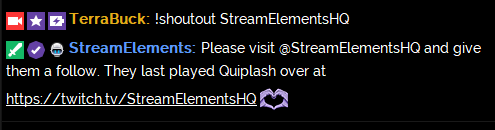
' Shoutout '
!cmd add !shoutout Check out ${1}, they're streaming ${game ${1}} at https://twitch.tv/${channel ${1}}
OR
!cmd add !shoutout ${1} is awesome and deserves a follow. Check them out at https://twitch.tv/${channel ${1}} where they were last seen playing ${game ${1}}
OR
!cmd add !shoutout Follow ${1} at https://twitch.tv/${channel ${1}}. They were last streaming ${game ${1}}.
OR
!cmd add !shoutout Hi, I think you'll enjoy watching ${1} stream at https://twitch.tv/${channel ${1}} [Last playing: ${game ${1}}]
ㅤ
https://i.imgur.com/f2m0D8L.png
 opaque wigeon
' Count commands '
Part 1
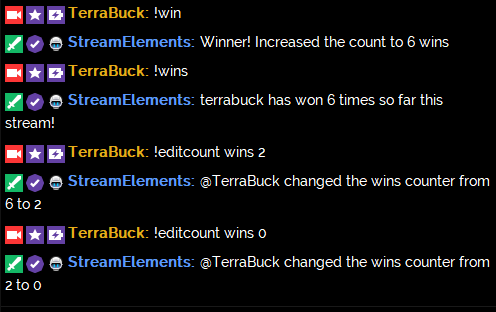
!cmd add !win Winner! Increased the count to $(count wins) wins
Part 2
!cmd add !wins $(channel) has won $(getcount wins) times so far this stream!
Editing/Resetting the counter with !editcount (Default command)
!editcount wins 2 => sets wins counter to 2
!editcount wins +3/-3 => adds or subtracts 3 to the wins counter
!editcount wins 0 => resets the wins counter to 0
*Important note: Whatever name you choose for your counter ("wins" in this case), $(count) $(getcount) and !editcount must use that same name*
ㅤ
https://i.imgur.com/4us7DfT.png
' Steam game hours played '
Command: !hoursplayed
Response: $(channel) has played $(customapi.https://decapi.me/steam/hours/STEAM_ID/APP_ID) of InsertGameName.
STEAM ID: Use https://steamid.co/ to find your Steam 64 ID - Search for your username and copy the Steam 64 ID
APP ID: Visit the steam store page for the game you want to get your hours for. Grab the 6-number string in the middle of the URL
Example: store.steampowered.com/app/578080/PLAYERUNKNOWNS_BATTLEGROUNDS
ㅤ
ㅤ
ㅤ
' Stream Status '
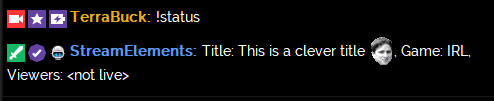
Command: !status
Response: ${channel} has been live for ${uptime}. Current title: ${title}, Current game: ${game}, Viewers: ${channel.viewers}
 opaque wigeon
' Latest tweet (Option A) '
Command: !tweet
Response: Last tweet from $(channel) $(lasttweet USERNAME)
Notes: Replace USERNMAME with the twitter handle
ㅤ
ㅤ
ㅤ
ㅤ
' Latest tweet (Option B) '
Credit: @coral igloo
Command: !tweet
Response: Latest tweet: ${customapi.https://4head.xyz/tweets/?name=USERNAME}
Notes: Replace USERNAME with the twitter handle. This API posts the most recent tweet and a link to the tweet from specified account: https://www.cuda.live/s/vpvvxe4y.png
ㅤ
ㅤ
ㅤ
ㅤ
' Latest Tweet (advanced) '
Command: !tweet
Response: Last tweet from $(channel): $(customapi.https://api.crunchprank.net/twitter/latest/USERNAME)
Optional Parameters:
◾ no_rts - If specified, retweets will not be included.
◾ include_replies - If specified at all, this includes replies from the specified user to other users as well.
◾ no_exclude_replies - Works similarly to include replies, except this query string cannot be specified as just empty unlike include replies.
◾ search - Goes through each of the latest tweets (up to 200) and then searches with the specified string (case-insensitive). If this is not specified, it will just return the latest tweet.
◾ strict - This is used together with search. If specified, it will do a case-sensitive search.
◾ url If specified, the URL of the tweet will be appended to the result.
◾ shorten - Used together with url. Shortens the URL using TinyURL.
◾ howlong - Includes the time since the tweet was posted.
ㅤ
ㅤ
ㅤ
ㅤ
opaque wigeon
' Run a Twitch commercial break (Twitch Partners only and StreamElements must be added as a channel editor from the Twitch dashboard) '
Credit: @lofty furnace
Command: !ad
Response: /commercial X
Notes: Replace X with 30, 60, 90, 120, 150, or 180 to set the commercial break length
_ _
_ _
_ _
_ _
opaque wigeon
' Love '
Credit: @molten hedge
Command: !love
Response: ${sender} and ${1:} are ${random.1-100}.${random.1-9}% in love <3
Example:
!love dank memes
TerraBuck and dank memes are 69.9% in love <3
Notes: Displays a random amount of love between the command sender and someone or something (a target must be specified)
https://i.imgur.com/aWSRDSM.png
_ _
_ _
_ _
_ _
 opaque wigeon
' Create a Multi Stream link '
Credit: @robust sandal
Add from Chat
!cmd add !multi Check out the multi stream: https://multistre.am/$(channel)/$(1:)
OR
!cmd add !multi Check out the multi stream: https://multitwitch.tv/$(channel)/$(1:)
OR
!cmd add !multi Check out the multi stream: https://kadgar.net/live/$(channel)/$(1:)
Add from Dashboard
Command: !multi channel2/channel3/channel4
Response: Check out the multi stream: https://multistre.am/$(channel)/$(1:) => multistre.am
or
Command: !multi channel2/channel3/channel4
Response: Check out the multi stream: https://multitwitch.tv/$(channel)/$(1:) => multitwitch.tv
or
Command: !multi channel2/channel3/channel4
Response: Check out the multi stream: https://kadgar.net/live/$(channel)/$(1:) => kadgar.net
Notes:
- The channel creating the command is already included in the link. Make sure to separate the additional streamers with
/. - This command only generates the multi-stream link. If you want a command that viewers can use to get the multistream link then create a !multi command with
!cmd add multifollowed by pasting the link that was generated. Once the !multi command is created you can edit it with!cmd edit multi
https://i.imgur.com/2Brapa0.png
_ _
_ _
_ _
 opaque wigeon
' Weather Lookup (exlux) '
Credit: @fervent ember
Add from Chat
!cmd add !weather @${customapi.http://twi.exlux.co/weather/${sender}/${1:}}
Add from Dashboard
Command: !weather
Response: @${customapi.http://twi.exlux.co/weather/${sender}/${1:}}
' Weather Lookup scorpstuff '
Add from Chat
!cmd add !weather ${customapi.http://api.scorpstuff.com/weather.php?units=metric&city=${pathescape ${1:}}}
Add from Dashboard
Command: !weather
Response: ${customapi.http://api.scorpstuff.com/weather.php?units=metric&city=${pathescape ${1:}}}
opaque wigeon
' Where are we dropping? (Fortnite Battle Royale) '
Credit: @subtle shadow
Add from Chat
!cmd add !drop ${sender} suggests dropping at: ${random.pick 'TILTED' 'PARADISE' 'SALTY' 'LUCKY' 'DUSTY' 'PLEASANT' 'LAZY' 'SHIFTY' 'FATAL' 'RETAIL' 'TOMATO' 'JUNK' 'FLUSH' 'RACE TRACK' 'GREASY' 'SNOBBY' 'LONELY' 'HAUNTED' 'WAILING' 'RISKY' 'VIKING'}
Add from Dashboard
Command: !drop
Response: ${sender} suggests dropping at: ${random.pick 'TILTED' 'PARADISE' 'SALTY' 'LUCKY' 'DUSTY' 'PLEASANT' 'LAZY' 'SHIFTY' 'FATAL' 'RETAIL' 'TOMATO' 'JUNK' 'FLUSH' 'RACE TRACK' 'GREASY' 'SNOBBY' 'LONELY' 'HAUNTED' 'WAILING' 'RISKY' 'VIKING'}
_ _
_ _
_ _
opaque wigeon
' Where are we dropping? (PUBG - Erangel) '
Credit: @lost bay
Add from Chat
!cmd add !drop ${sender} suggests dropping at: ${random.pick 'Pochinki' 'Gatka' 'Quarry' 'Primorsk' 'Ferry Pier' 'Military Base' 'Novorepnoye' 'Mylta' 'Mylta Power' 'Farm' 'School' 'Ruins' 'Hospital' 'Georgopol' 'Shelter' 'Rozhok' 'Yasnaya Polyana' 'Mansion' 'Prison' 'Lipovka' 'Zharki' 'Severny' 'Shooting Range' 'Stalber' 'Kameshki' 'Water Town' 'Factory'}
Add from Dashboard
Command: !drop
Response: ${sender} suggests dropping at: ${random.pick 'Pochinki' 'Gatka' 'Quarry' 'Primorsk' 'Ferry Pier' 'Military Base' 'Novorepnoye' 'Mylta' 'Mylta Power' 'Farm' 'School' 'Ruins' 'Hospital' 'Georgopol' 'Shelter' 'Rozhok' 'Yasnaya Polyana' 'Mansion' 'Prison' 'Lipovka' 'Zharki' 'Severny' 'Shooting Range' 'Stalber' 'Kameshki' 'Water Town' 'Factory'}
_ _
_ _
_ _
_ _
' Where are we dropping? (Realm Royale) '
Credit: @faint hamlet @azure ivy
Add from Chat
!cmd add !drop ${sender} suggests dropping at: ${random.pick 'GOBLIN GULCH' 'NORTHPORT' 'GUN TOWN' 'CROSSING' 'UNDERPASS' 'ICEHAVEN' 'OUTPOST' 'LUMBERFALL' 'COLDMIST VILLAGE' 'VALLEY' 'JAGUARS CLAWS' 'FUNGAL FOREST' 'TRINITY HILLS' 'FORBIDDEN SWAMP' 'JADE GARDENS' 'LOST FORGE' 'AUTUMN FIELDS' 'SENTINEL HOLD'}`
Add from Dashboard
Command: !drop
Response: ${sender} suggests dropping at: ${random.pick 'GOBLIN GULCH' 'NORTHPORT' 'GUN TOWN' 'CROSSING' 'UNDERPASS' 'ICEHAVEN' 'OUTPOST' 'LUMBERFALL' 'COLDMIST VILLAGE' 'VALLEY' 'JAGUARS CLAWS' 'FUNGAL FOREST' 'TRINITY HILLS' 'FORBIDDEN SWAMP' 'JADE GARDENS' 'LOST FORGE' 'AUTUMN FIELDS' 'SENTINEL HOLD'}`
_ _
_ _
_ _
_ _
opaque wigeon
' Latest YouTube video upload '
Add from Chat
!cmd add !newvid Here is my latest YouTube video: $(customapi.https://beta.decapi.me/youtube/latest_video?id=YOUTUBECHANNELID)
Add from Dashboard
Command: !newvid
Response: Here is my latest YouTube video: $(customapi.https://beta.decapi.me/youtube/latest_video?id=YOUTUBECHANNELID)
Notes: Replace YOUTUBECHANNELID with your Channel ID found on this page https://www.youtube.com/account_advanced
opaque wigeon
' Russian Roulette '
Add from chat
Command: !cmd add !russian $(sender) pulls the trigger and ..... $(random.pick 'Click Kreygasm' 'Click Kreygasm' 'Click Kreygasm' 'Click Kreygasm' 'Click Kreygasm' 'BOOM riPepperonis')
_ _
Add from dashboard
Command: !russian
Response: $(sender) pulls the trigger and ..... $(random.pick 'Click Kreygasm' 'Click Kreygasm' 'Click Kreygasm' 'Click Kreygasm' 'Click Kreygasm' 'BOOM! riPepperonis')
_ _
' Russian Roulette with death Time-Out '
Add from chat
Command: !cmd add !russian $(random.pick '$(sender) pulls the trigger and ..... Click Kreygasm''$(sender) pulls the trigger and ..... Click Kreygasm''$(sender) pulls the trigger and ..... Click Kreygasm' 'Click Kreygasm''$(sender) pulls the trigger and ..... Click Kreygasm''/timeout $(sender.name) 60 BOOM RIP')
_ _
Add from dashboard
Command: !russian
Response: $(random.pick '$(sender) pulls the trigger and ..... Click Kreygasm''$(sender) pulls the trigger and ..... Click Kreygasm''$(sender) pulls the trigger and ..... Click Kreygasm' 'Click Kreygasm''$(sender) pulls the trigger and ..... Click Kreygasm''/timeout $(sender.name) 60 BOOM RIP')
_ _
_ _
_ _
opaque wigeon
' Spotify: Now Playing '
Credit: @vague vigil
Notes: First, visit https://spotify.aidenwallis.co.uk/ and connect with your spotify. You will then receive the userID that you can replace XXXXXXXXXXXXXXXXX with below ⬇️. You'll also find a StreamElements command on the site that you can copy/paste in chat to add the command but do not name this command !song unless you have disabled the default StreamElements !song command as there will be a conflict. Instead, use !spotify, !currentsong, or !nowplaying.
If you get a 429 error from the bot when using the command it means that the command is being used too often so set the command cooldown higher. Spotify have strict rate limiting.
_ _
Add from chat
Command: !cmd add !spotify Current Song: ${customapi.https://spotify.aidenwallis.co.uk/u/XXXXXXXXXXXXXXXXX}
_ _
Add from dashboard
Command: !spotify
Response: Current Song: ${customapi.https://spotify.aidenwallis.co.uk/u/XXXXXXXXXXXXXXXXX}
_ _
_ _
_ _
opaque wigeon
' Multi-Stream (Advanced) - supports Kadgar, Multistre.am, multitwitch, and raredrop '
Credit: @loud pike
Setup Instructions:
1⃣
Visit https://api.thefyrewire.com/twitch/multi/generate. You will receive 3 command responses on this page:
!multisetresponse which should be restricted to moderators only and will create the multi-stream link that will be output in!multi!multiresponse which will link viewers to the multi-stream site of your choosing choose 1 of the 4 options!multioffwhich should be restricted to moderators only and will set the!multiresponse to "Currently not multi-streaming!"
Since 2 of these commands should be set to moderator level the easiest way to add them is on your dashboard https://streamelements.com/dashboard/bot/commands/custom
2⃣
Copy the full customapi variable given under MULTISET COMMAND
Add a new custom command !multiset from the StreamElements dashboard and paste the customapi in the response. Change the user level to moderator
Example
!multiset
$(customapi.https://api.thefyrewire.com/twitch/multi/set/F830578FGR256?query=$(1:))
3⃣
Choose your preferred multi-stream site (kadgar, multistream, multitwitch, or raredrop) and copy the full customapi variable given below your chosen site
Add a new custom command !multi from the StreamElements dashboard and paste the customapi in the response.
Example
!multi
$(customapi.https://api.thefyrewire.com/twitch/multi/F830578FGR256/$(channel)?platform=multistream)
4⃣
Copy the full customapi variable given under MULTIOFF COMMAND
Add a new custom command !multioff from the StreamElements dashboard and paste the customapi in the response. Change the user level to moderator
Example
!multioff
$(customapi.https://api.thefyrewire.com/twitch/multi/off/F830578FGR256?msg=Currently not multi-streaming!)
_ _
https://i.imgur.com/2wZuyM2.png
 opaque wigeon
' Last VOD '
Notes
This command will provide the title and URL for the most recent broadcast on the channel specified. Be sure to replace CHANNELNAME with the actual channel name.
Add from chat
Command: !cmd add !vod Last broadcast: $(customapi.https://decapi.me/twitch/videos/CHANNELNAME)
Add from dashboard
Command: !vod
Response: Last broadcast: $(customapi.https://decapi.me/twitch/videos/CHANNELNAME)
_ _
_ _
opaque wigeon
' Tweet Generator - Single Tweet '
Credit: @loud pike
Command: !tweet - generates a click-to-tweet link that lets your viewers tweet out the stream.
Add from chat
!cmd add !tweet $(customapi.https://api.thefyrewire.com/twitch/tweet?msg=$(queryencode "TWEET TEXT HERE"))
or
Add from dashboard
Command: !tweet
Response: $(customapi.https://api.thefyrewire.com/twitch/tweet?msg=$(queryencode "TWEET TEXT HERE"))
Be sure to replace "TWEET TEXT HERE" with the text that you would like to pre-fill when a viewer clicks on your link.
To add your current game include: $(game)
To add your current title include: $(title)
Example response:
Want to help the stream in another way? Maybe tweet us out! $(customapi.https://api.thefyrewire.com/twitch/tweet?msg=$(queryencode "Hey, @MikeyHay just went live playing $(game)! Come check him out! twitch.tv/thefyrewire"))
opaque wigeon
' Random Tweet Generator (Advanced) '
Credit: @loud pike
Command: !tweet - generates a click-to-tweet link that lets your viewers tweet out the stream (using Pastebin, the tweet text is randomly selected each time the command is used).
Setup:
- Go to https://pastebin.com
- Make a free account or log in if you already have one (allows you to edit the paste later)
- Create a new paste - on each line, type a different possible tweet. To specify the game, use $(args.1) in your paste lines which will be replaced with the current game
- Note the paste key (the alphanumeric string in the paste link)
- Add a new command as below and replace "PASTE_KEY" with your own. A random line from your paste will be selected
Add from chat
!cmd add !tweet $(customapi.https://api.thefyrewire.com/twitch/tweet?msg=$(queryencode $(customapi.https://api.thefyrewire.com/twitch/pastebin/PASTE_KEY?args=$(queryencode $(game)))))
Add from dashboard
Command: !tweet
Response: $(customapi.https://api.thefyrewire.com/twitch/tweet?msg=$(queryencode $(customapi.https://api.thefyrewire.com/twitch/pastebin/PASTE_KEY?args=$(queryencode $(game)))))
Example paste (3 different tweets):
Oh, so @MikeyHay just wanted me to let you know that he's currently doing some $(args.1) rn :D twitch.tv/thefyrewire
This is definitely not @MikeyHay forcing me to tweet that he's live now playing $(args.1) o_o (help me) :D twitch.tv/thefyrewire```

*Example response:*
```Want to help the stream in another way? Maybe tweet us out! $(customapi.https://api.thefyrewire.com/twitch/tweet?msg=$(queryencode $(customapi.https://api.thefyrewire.com/twitch/pastebin/TQQ7VA7E?args=$(queryencode $(game)))))```' DJKhaled 🔑s to Success '
Add from chat
!cmd add !key $(customapi https://api.thefyrewire.com/twitch/pastebin/k6cu5aHg)
_ _
Add from dashboard
Command: !key
Response: $(customapi https://api.thefyrewire.com/twitch/pastebin/k6cu5aHg)
opaque wigeon
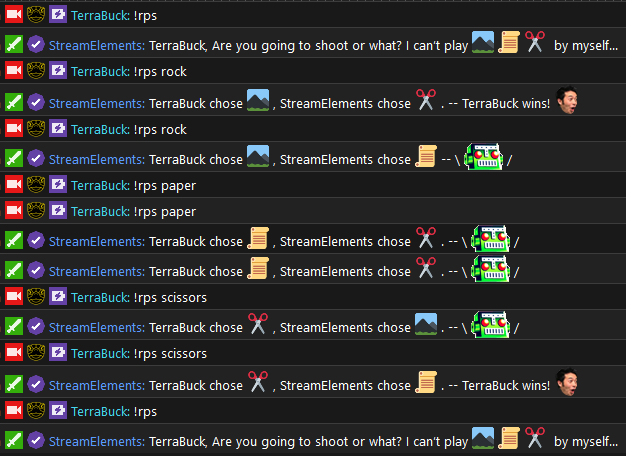
' Rock Paper Scissors '
Add from chat
!cmd add !rps $(customapi.https://api.thefyrewire.com/twitch/pastebin/KkKhYZx0?filter=$(1|' ')&user=$(sender))
_ _
Add from dashboard
Command: !rps
Response: $(customapi.https://api.thefyrewire.com/twitch/pastebin/KkKhYZx0?filter=$(1|' ')&user=$(sender))


 opaque wigeon
' StrawPoll '
Credit: @loud pike
Setup from chat
!cmd add !poll $(customapi.https://api.thefyrewire.com/twitch/poll/$(1|poll)?user=$(sender)&query=$(queryencode $(2:|null)))
_ _
Setup from dashboard
Command: !poll
Response: $(customapi.https://api.thefyrewire.com/twitch/poll/$(1|poll)?user=$(sender)&query=$(queryencode $(2:|null)))
Commands
◽ Create a new poll: !poll new Write your question here | Option 1 | Option 2 | Option 3 up to 30 options
◽ Show results from the latest poll: !poll results
◽ Show info about the latest poll: !poll info
◽ Show results for any poll: !poll lookup [strawpoll ID]
◽ Show possible commands: !poll help
Optional parameters when creating a poll
-multi Allows multi voting
-captcha Requires users to complete captcha when voting
!poll new -multi Which animals do you like? | Cats | Dogs | All
!poll new -captcha Are you a robot? | Yes | No
!poll new -multi -captcha Is this a poll with both multi voting and captchas? | Yes | Definitely | Absolutely
opaque wigeon
' Google Search '
Credit: @yssandra#7274
Setup from chat
!cmd add !google $(sender), your google search: https://google.com/search?q=$(queryencode $(1:))
_ _
Setup from dashboard
Command: !google
Response: $(sender), your google search: https://google.com/search?q=$(queryencode $(1:))
Image Search
Replace the link above with https://www.google.com/search?q=$(queryencode $(1:))&source=lnms&tbm=isch
opaque wigeon
' Google Sheet To-Do List '
Credit: @devout arch
_ _
Setup from dashboard
Command: !todo
Response: ${customapi.https://script.google.com/macros/s/YOUR_WEB_APP_URL/exec?todo=$(queryencode $(1:))}
Setup Instructions from @devout arch
If anyone else ends stream and just completely forgets everything like I do (streamnesia!) this will allow chatters/mods to add future stuff to do to a google sheet! It requires a google account and a bit of setup:
In Google Sheets create a new blank sheet then go Tools -> Script Editor and paste this code over what's there:
function doGet(request) {
  var todo = (request.parameter.todo || "").trim();

  if (todo == '') {
    return ContentService.createTextOutput('you need to give me something to do!');
  }

  SpreadsheetApp.getActiveSheet().appendRow([todo]);

  return ContentService.createTextOutput('thanks! This will get done later (hopefully)');
}
Then go to Publish -> Deploy as web app and change Who has access to the app to Anyone, even anonymous. Publish it, review the permissions and allow the app when it says it's not trusted then when that's done, copy the Current web app URL (eg. https://script.google.com/macros/s/abc123/exec)
Then in StreamElements, add a custom !todo command with the response, substituting in your web app URL from earlier, eg.
${customapi.https://script.google.com/macros/s/abc123/exec?todo=$(queryencode $(1:))}
The new todo's will be added to the bottom of the Google sheet!
_ _
_ _
' Current Stream Stats '
Credit: BordeauxPrime
_ _
Setup from dashboard
Command: !stats
Response: We currently have ${channel.viewers} viewers, ${channel.followers} followers, ${channel.views} views & ${channel.subs} subscribers! PogChamp
Setup from chat
!cmd add !stats We currently have ${channel.viewers} viewers, ${channel.followers} followers, ${channel.views} views & ${channel.subs} subscribers! PogChamp
_ _
_ _
' DuckDuckGo Search '
Credit: r00t_t
_ _
Setup from dashboard
Command: !duckduckgo
Response: $(sender), your DuckDuckGo search results: https://duckduckgo.com/?q=${queryencode $(1:)}
Setup from chat
!cmd add !duckduckgo $(sender), your DuckDuckGo search results: https://duckduckgo.com/?q=${queryencode $(1:)}
_ _
_ _
' Last message '
Credit: @lofty furnace
_ _
Setup from dashboard
Command: !lastmessage
Response: ${sender}, ${user} last wrote in the channel ${user.lastactive} ago. Message: " ${user.lastmessage} "
Setup from chat
!cmd add !lastmessage ${sender}, ${user} last wrote in the channel ${user.lastactive} ago. Message: " ${user.lastmessage} "
Example:: !lastmsg Benno
Response: Nanito, Benno last wrote in this chat 4 months 19 days 22 hours ago. Message: " xD "
 long bone
[Hugs in Chat (Can be changed to match other actions)]
Credit: @PhonyLlama#4718
Setup from dashboard
Command: !hug
Response: ${sender} just hugged ${touser}. This user has been hugged ${count "${touser}hug"} times.
Setup from chat
!cmd add !hug ${sender} just hugged ${touser}. This user has been hugged ${count "${touser}hug"} times.
Example: !hug PhonyLlama
Response: StreamElements just hugged PhonyLlama. This user has been hugged 1 times.
long bone
[Holiday/Day Count Down]
Credit: @flint knoll
Setup from dashboard
Command: !daysTill
Response: ${customapi.https://api.scorpstuff.com/daysuntil.php?mydate=2021-12-25} days until Christmas!
Setup from chat
!cmd add !daysTill ${customapi.https://api.scorpstuff.com/daysuntil.php?mydate=2021-12-25} days until Christmas!
Example: !daysTill
Response: 233 days until Christmas!
Note: You can change this up to whatever date you want (New Year, Birthday, and so on). Be sure to adjust the command name to match, as well as the year!
long bone
[Time (Adjustable)]
Credit: @sturdy cobalt
Setup from dashboard
Command: !time
Response: Current Time: ${customapi https://seapitest.pjonp.repl.co/api/date?locale=en-US&timeObj=$(queryencode ' {"timeZone": "America/New_York" , "hour12": true, "hour": "numeric", "minute": "2-digit", "timeZoneName": "short"}')}
Setup from chat
!cmd add !time Current Time: ${customapi https://seapitest.pjonp.repl.co/api/date?locale=en-US&timeObj=$(queryencode ' {"timeZone": "America/New_York" , "hour12": true, "hour": "numeric", "minute": "2-digit", "timeZoneName": "short"}')}
Example: !time
Response: Current Time: 6:19 PM EDT
Notes: #general-chat message
long bone
[Shout Out]
Credit: @long bone
Setup from dashboard
Command: !shoutout
Response: $(sender) says Check out ${1}, they are playing ${game ${1}} at https://twitch.tv/${channel ${1}}
Setup from chat
!cmd add !shoutout $(sender) says Check out ${1}, they are playing ${game ${1}} at https://twitch.tv/${channel ${1}}
Example: !shoutout <@&404019034409926667>
Response: TraffyDLaw says Check out <@&404019034409926667>, they are playing Creative at https://twitch.tv/streamelements