#🔀┃art-asset-workflow
1 messages · Page 24 of 1
 fluid oak
 outer pewter
has anyone succesfully used FBX exporter to get FBX files out of Unity? I bought an animation package in the asset store but I need to use them in Blender, etc
I tried using Unity FBX Exporter package and it creates an FBX with no animations in it
 glad quail
hiya! im working on a game asset, but when i created the material and assigned the textures, i get this:

i see diagonal lines going across the texture and moire effect on the face im not directly looking at
 gritty raft
is this a new scene? is there any post-processing? are you familiar with the Filtering settings for the Textures? is this an asset you made, or someone elses?
i mean, it looks almost like you have a CRT post process effect going (to mimic older computer screens)
glad quail
this is an asset i made in a fresh project (samplescene)... am i supposed to do something differnet?
gritty raft
how big is the cube supposed to be? no, using the sample scene is fine. when you imported the textures, they have import settings. what does the inspector of that look like?
glad quail
gritty raft
how big is the cube supposed to be? no, using the sample scene is fine. when y...

the cube is just 1x1
texture sizes are 512x512
gritty raft
it may be high frequency noise. go ahead and enable Generate MipMaps
glad quail
hm interesting thats what i was thinking but no difference
 gritty raft
change mipmap filtering, perhaps
glad quail
i fear it did not change anything
gritty raft
is it the Unity cube, or one from blender (or something)
glad quail
gritty raft
is it the Unity cube, or one from blender (or something)
unity cube
gritty raft
well, crap.
glad quail
its using a shader that is applied to the material
gritty raft
show the shader inspector


 gritty raft
oh, ok. i am not familiar with that custom shader. are you using that intentionally, or out of .. not understanding?
glad quail
gritty raft
oh, ok. i am not familiar with that custom shader. are you using that intent...
sorry i dont seem to be getting you? its a shader i created
gritty raft
Ok, and what happens if you just use the built in unlit shader with only one texture, to test?
glad quail
sure lemme try that
yeah seems to work now 👍
only problem is its only one texture 😅
gritty raft
Ok, at this point, i'd suggest you talk to the guys in #archived-shaders . you are out of my realm now 🙂
 waxen flare
why in my .aseprite my art has blue eyes and when i import to unity it has grey eyes?
The video shows MC.png in unity(its suposed to hav the white dot near the eyes, then IdleMC.aseprite in unity(grey eyes) and finally the IdleMC.aseprite, inside the aseprite(white dot near the eye and the eye with his genuine color, blue).
and how can i put the animation like ground lvl, im saying it bc the 3rd frame it has 1 pixel higher than other and in aseprite it has not
 dense oar
Is there a setting somewhere in unity to keep it from prematurely culling geometry?
My shader has pushed this tree/bush's poly faces outward, but now because its larger than it 'really' is, unity culls it too soon

 grave garnet
dense oar
Is there a setting somewhere in unity to keep it from prematurely culling geomet...
grave garnet
dense oar
Is there a setting somewhere in unity to keep it from prematurely culling geomet...
Pretty sure you need to modify the bounds of the mesh renderer
https://docs.unity3d.com/6000.2/Documentation/ScriptReference/Renderer-bounds.html
Assuming you are using mesh renderers
glad quail
dense oar
Is there a setting somewhere in unity to keep it from prematurely culling geomet...
Heh Fortnite bush
 tawdry valley
add a frame or a deep vignette as UI 🤣 problem solved 🩹
 pallid yarrow
Helloo
Im currently running into an issue regarding generic/humanoid animations
So I'm currently trying out BR200 project from photon fusion
And the model of the character they are using is set to generic. So when I'm using humanoid animations, it ofcourse doesn't work. But when I'm marking the animations as generic and then trying them , it's still not working
But if I do it the other way around (mark both the model and the animations as humanoid) then it's working.
What can I do to fix this and use the animations as generic?
fluid oak
pallid yarrow
Helloo
Im currently running into an issue regarding generic/humanoid animations...
The whole point of the humanoid system is to let you use any humanoid animation with any humanoid character. Generic animations will only work for hierarchies that exactly match the one they were made for and include no retargeting.
 wintry canyon
i was wondering if anyone could share their workflow relating to adding grunge and other similar details to modular assets? at first i commited to using decals solely, but quickly realised that this method was pretty bad for large grunge (as well as having to use some pretty jank rendering layer tweaking for my tiles). in other (smaller) projects where I haven't used modular environmental tiles, i've simply baked out the texture of a model and then added layers of grunge, grime, rust, etc. in Krita, but obviously for a modular tile kit that'd look pretty bad. any ideas?
 unique atlas
why my tire looks fine in blender but after i import it to unity it looks like this

 wintry canyon
normals issue i think?
unique atlas
yeah ok i look it up
 onyx dagger
guys im trying to use these assets for my game but their quality is really eurgh inside unity. Is the file quality naturally low or I'm doing smth wrong?
 grave garnet
onyx dagger
guys im trying to use these assets for my game but their quality is really eurgh...
grave garnet
onyx dagger
guys im trying to use these assets for my game but their quality is really eurgh...
Try changing the compression in the texture's import settings
And if you want "sharp" pixels, set Filter Mode to Point
onyx dagger
the filter mode thing worked, tysm

 misty lantern
 mortal lotus
What does this green plus icon mean?
mortal lotus
What does this green plus icon mean?
That gameobject is added as a local override to a prefab hierarchy
Which means it's not a part of the original prefab unless you apply the override
 abstract sage
Hello, this is a repost from #🛠️┃probuilder cause it’s been 3 days since I posted and haven’t gotten a response. I was recommended to move the question here.
i'm having some issues with probuilder - whenever i press probuilderize, the model's textures seem to bug out (notice the stripes here and there). Anyone know what's going on?


 jagged obsidian
is the numberlock look good?


is the door look good?
the enviroment is dusty-old
i will love an honest feedbeck
 pastel saddle
Whenever i parent the Button to ButtonPanel the mesh transforms itself in an unexpected way. How can i circumvent this? In the photo, the objects on the left are not parented and transform is ideal where in the right I parented the objects and transforms oddly


Nvm i just remember i can just parent them both to an empty object and will work fine
 paper breach
Hi!, i dont know if this belongs here, but i am trying to create a font out of a pixelart PNG, but when using TMP Font creator, it fails all the time.


 paper breach
ok Solved it my self, The Converter i was using spits out faulty ttf files but otf worked
 icy urchin
I just wanna paint with the tile inside the square, but some of the stuff on the side is sticking with it T-T, I sliced the tiles correctly and the other tiles are working as usual, but some of the tiles are doing this

 prime star
I see a lot of tutorials on creating an UI inside Unity, but I barely see anything about drawing your own UI outside of Unity to put inside Unity. I can draw, but I have no idea about dimensions or what to watch out for. ANyone got more experience with this?
abstract sage
abstract sage
Hello, this is a repost from <#892763390563467326> cause it’s been 3 days since ...
^?
misty lantern
abstract sage
^?
Why do you need to "probuilderize" it?
It doesn't look like a mesh that you could practically edit with probuilder
abstract sage
misty lantern
Why do you need to "probuilderize" it?
It doesn't look like a mesh that you coul...
I didn’t make it myself and it’s actually 2 objects in the same mesh and pro builder seemed like the easiest way to separate them cause I don’t have any 3d modeling software
misty lantern
abstract sage
I didn’t make it myself and it’s actually 2 objects in the same mesh and pro bui...
On a limb I'd say you'd be better off doing that in blender
Assuming you have to select and separate geometry based on some parameter, I doubt probuilder has tools for that
abstract sage
misty lantern
On a limb I'd say you'd be better off doing that in blender
Assuming you have to...
It does I was really easily able to separate I just highlighted the other model and deleted it, only issue is the texture gets screwed up as soon as I probuilderize
misty lantern
abstract sage
It does I was really easily able to separate I just highlighted the other model ...
If the models are separate to begin with, shouldn't they appear (and be usable as) as distinct meshes inside the imported mesh asset in Project window?
abstract sage
misty lantern
If the models are separate to begin with, shouldn't they appear (and be usable a...
Let me send a ss of the model
abstract sage
misty lantern
If the models are separate to begin with, shouldn't they appear (and be usable a...

when i select one it selects both and in the assets menu u can see they're connected
misty lantern
No way around it then
abstract sage
misty lantern
No way around it then
So is it like a pro builder bug?
misty lantern
Probably, but could be anything
The UV data seems to get fully reset for the other triangle forming the affected quad face
A clue but maybe not a useful one
I'd rather do it in blender than hunt for bugs
Worth learning it in the long run since it's quite a multitool
 onyx tapir
abstract sage
onyx tapir
abstract sage
off topic but it looks like plants vs zombies chomper haha
 raven elm
Im trying to get the exact same effect as this one inside of Unity

But this is the result

I created the above texture in substance painter
How can I get the same effect in Unity URP?
misty lantern
raven elm
How can I get the same effect in Unity URP?
Looks like you baked the texture at a too low resolution (honestly you could do with a smaller tiled texture instead)
Then you possibly didn't export or assign the PBR maps
Additionally the lighting appears different between the two, so reflections naturally will be different as well
 misty lantern
mortal lotus
Unity made the texture direction wrong, is it possible to rotate them?
misty lantern
mortal lotus
Unity made the texture direction wrong, is it possible to rotate them?
"Made" it wrong how?
Not spontaneously I'd assume
mortal lotus
misty lantern
"Made" it wrong how?
Not spontaneously I'd assume
There were situations, when wood textures were horisontal in Bledner, but in Unity they were vertical
misty lantern
mortal lotus
There were situations, when wood textures were horisontal in Bledner, but in Uni...
So, at the moment of exporting it from blender
Not necessarily something that happened on unity side
mortal lotus
misty lantern
Not necessarily something that happened on unity side
But, still, I see in URP shader I am not able to rotate the UVs.
Can I edit the URP shader? But for one project only.
misty lantern
Blender's material nodes can't be exported, so if you have some specific Texture Coordinates or Mapping, they will be ignored
When modeling you'd rather rotate the mesh UVs rather than texture coordinates
In unity you can make a Lit material with a negative Tiling property to flip it on either axis
But not rotate without making a custom shader
Preferably you'd likely be editing the mesh instead
fluid oak
You could also edit the UVs by script.
 frank carbon
How to bring blender's geometry nodes to unity
 lime pollen
frank carbon
How to bring blender's geometry nodes to unity
lime pollen
frank carbon
How to bring blender's geometry nodes to unity
You don't
 lime pollen
frank carbon
Their must be some way
lime pollen
frank carbon
Their must be some way
Google gives this https://github.com/unity3d-jp/MeshSync but don't expect full functionality

GitHub
A package for synchronizing meshes/models editing in DCC tools into Unity in real time. - unity3d-jp/MeshSync
misty lantern
I don't think there's any plugin out there that does that fully, and very few that do it partially
It'd be a monumental task to create a conversion for every node, for a given render pipeline, and maintain it on both unity and blender side
And even then there's incompatible nodes because the rendering engines are different
frank carbon
misty lantern
It'd be a monumental task to create a conversion for every node, for a given ren...
houdini has a plugin for unity
misty lantern
frank carbon
houdini has a plugin for unity
Houdini is a toolset focused on simulation and procedural geometry, as far as I know it doesn't have a shader editor like Blender does so its exporter only needs to worry about one shader
Not an arbitrary number of shaders made of potentially dozens of nodes
A node to node converter is possible, with nodes that aren't fully incompatible anyhow, but that's a lot more work
Some have attempted
https://discussions.unity.com/t/beta-blender-nodes-in-unity/873995
But considering Houdini costs hundreds or thousands, has a much simpler rendering engine and no shader editor as far as I can tell, it's not a big mystery why Blender plugins for the analoguous task are not beyond the proof of concept level
frank carbon
misty lantern
But considering Houdini costs hundreds or thousands, has a much simpler renderin...
Houdini non commercial is free
misty lantern
frank carbon
Houdini non commercial is free
Doesn't change the fact the company has more resources
frank carbon
Compared to blender
misty lantern
Yes
 kindred sundial
how can I make a dismemberment system for rigged meshes? Like how dead space and ninja gaiden 2 has the enemies play differently without a limb and the player can freely dismember any another limb.
Here is how I'm thinking of doing it from blender. Stop me if there are issues with the process:
Make a whole body mesh called "MasterModel." then set vertex groups for each limb. Duplicate the MasterModel and call it the body part for each one (I'll just refer to one of the many parts as "RightArmModel.").
Give the RightArmModel a mask modifier which removes all the body parts except for the right arm. Then at the MasterModel, mask away all the limbs except for the core torso. Then pair the Right arm model and the masterModel to the bone rig.
That way, Unity can have at least 5-6 meshes to work with (the torso the 4 limbs, and the head). What's left is to set rigidbody for the mesh of fallen parts.
 half field
Hi I'm not sure where this goes but I am looking for tools that will take a small texture and turn it into a bigger, less repetitive image. e.g. I have some wood samples but they are not of a large enough area. The alternative is I just use a tool to generate wood textures close enough to the samples (I have filter forge, a lesser known useful generation tool).
misty lantern
half field
Hi I'm not sure where this goes but I am looking for tools that will take a smal...
You're looking for "texture synthesis"
First result from google:
https://github.com/EmbarkStudios/texture-synthesis
This particular tool looks good, though when I used texture synthesis tools some years ago it wasn't automatically better than doing the process by hand
Only because algorithms can't detect what patterns we perceive as repetitive, even if the result was seamless
half field
misty lantern
You're looking for "texture synthesis"
First result from google:
<https://githu...
Ah thank you I knew I had seen some technique - these days its wall to wall AI tools which are hard to wade through!
has Gimp -plugins...
misty lantern
Many of the AI generators aim to accomplish this task as well, but their main disadvantage is that they rely on their training data so when they have to improvise patterns the distinct AI generated look can worm its way into the image
half field
yes I am sure there is overlap but they are too do-all with random issues!
 shut yew
 outer halo
Because your parent object is not uniform scale.
 summer pollen
 tribal gorge
anyobdy know why the crate mesh only appears in specific camera angles?
 glacial vector
tribal gorge
anyobdy know why the crate mesh only appears in specific camera angles?
glacial vector
tribal gorge
anyobdy know why the crate mesh only appears in specific camera angles?
Your mesh normals are facing the wrong way, fix it my inverting th eface normals
 idle quartz
hi, could anyone help me with a probably very easy animation problem?

 sullen plank
idle quartz
hi, could anyone help me with a probably very easy animation problem?
sullen plank
idle quartz
hi, could anyone help me with a probably very easy animation problem?
If it's animation specific then use #🏃┃animation and don't ask to ask, ask the full question.
idle quartz
sullen plank
If it's animation specific then use <#502171313201479681> and don't ask to ask, ...
bruh it was you who first told me to go here
sullen plank
idle quartz
bruh it was you who first told me to go here
Only you know the question, and you keep asking to ask.
So if it's about animation, provide all the relevant screenshots about the problem and ask in full what the problem is
 umbral garnet
 dire pumice
how the hell do i made this like the valorant character movement
dire pumice
how the hell do i made this like the valorant character movement
What do you mean?
dire pumice
umbral garnet
What do you mean?
alr fixed it


 solemn plinth
is grass with alpha map and face count of maybe 4 compared to a grass without alpha with maybe 16 faces more expensive in system?
misty lantern
solemn plinth
is grass with alpha map and face count of maybe 4 compared to a grass without al...
Either could be, impossible to say outright
 late finch
Hey all, I'm sure this question probably gets asked a bunch but was just wondering what the issue is with the pixel art here? Left side is what I imported and how its viewed in the editor, right side is the game mode. As you can see there's some issues with the overall layout of the pixels.
Also here are the settings on my inspector, cheers!


Hmm, seems like a pixel perfect camera component was all that was needed
 abstract stratus
Hey in my game i am working on, the main character would look like a blob which would act how ferrofluid acts when it's near a magnet while moving. I'm not sure if I'm clear with the request. Could someone pin some resources I could read to achieve this? I have no idea where to start
 hidden flicker
does anyone know why exporting a .fbx from blender to unity absolutely messes up the UVs?
first picture is blender, second one is unity

 hidden flicker
Also how can i fix it?
fluid oak
hidden flicker
first picture is blender, second one is unity
Do you actually have correct UVs assigned?
fluid oak
abstract stratus
Hey in my game i am working on, the main character would look like a blob which ...
If it is strictly visual, you can probably manage it with #archived-shaders pretty easily. Probably could make a suitable pattern using a technique similar to how you'd generate a halftoned pattern, but running a noise through it.
hidden flicker
fluid oak
Do you actually have correct UVs assigned?
Not sure, how do i even do that?
fluid oak
I'm not really a blender user so not sure how you'd do it there.
hidden flicker
nevermind i fixed it, some sort of mapping issue it seems
hidden flicker
looks like this in unity now

 deep temple
Anyone know what could be causing this issue with my skinned mesh renderer? Nearly half of the polygons dont want to render. It only happens sometimes and turning the game object och skinned mesh renderer off/on seems to solve the issue
What it looks like vs what its supposed to look like


It only happens for 2 of my meshes as well, the rest dont seem to be affected
And when I say sometimes, maybe once every 100 times this mesh spawns into the game. But once one of them get this bug, others follow.
grave garnet
deep temple
It only happens for 2 of my meshes as well, the rest dont seem to be affected
Hmm.. How many vertices do those meshes have?
raven elm
This is a screenshot of a texture in Substance painter

This is the screenshot of the same texture with the same maps in Unity URP. How do I get the same effect as above inside Unity?
 grave garnet
Not sure what I'm looking at here, like what is part of the lighting/model and what is part of the texturing
Make sure your non-color maps (roughness/metallic/AO) are not marked as sRGB in the texture import settings
grave garnet
raven elm
Where can I see that option?
Select the texture and look at the inspector
In unity
raven elm
Found it. Unchecked the sRGB box, yet no change
 grave garnet
I still can't tell if the smoothness/roughness is scaled incorrectly here or what
In any case the lighting is going to make a huge difference here, especially with shiny surfaces
Your firsts two screenshots look pretty similiar, just different lighting.
raven elm
The first one is from Substance painter
grave garnet
I know
raven elm
I chose the Unity URP metallic standard preset while exporting the textures to Unity
Should I choose a different preset?
grave garnet
I don't know about URP, but use whatever matches your shader/material on the unity side
Show the unity material?
raven elm
Its a standard URP lit shader
 grave garnet
raven elm
Its a standard URP lit shader
grave garnet
raven elm
Its a standard URP lit shader
Oh you don't have a smoothness map at all
Adjust the smoothness down a bit, should make it match your substance painter screenshot a bit better
raven elm
Lowering the smoothness will make it less shiny
misty lantern
raven elm
This is a screenshot of a texture in Substance painter
It's lit here by a strong light
You also need one in Unity
fluid oak
Can't see it in the screenshot here but substance usually uses an hdri for lighting
grave garnet
raven elm
Lowering the smoothness will make it less shiny
Then I don't know what you want if it's not that or lighting.
sullen plank
@timid sentinel #1180170818983051344
 tribal pivot
grave garnet
Make sure your non-color maps (roughness/metallic/AO) are not marked as sRGB in ...
tribal pivot
grave garnet
Make sure your non-color maps (roughness/metallic/AO) are not marked as sRGB in ...
i've heard that this doesnt actually change anything, or does it?
 random stag
why is the asset turning pink the moment i enter play mode?

 grave garnet
tribal pivot
i've heard that this doesnt actually change anything, or does it?
grave garnet
tribal pivot
i've heard that this doesnt actually change anything, or does it?
It changes the texture from gamma to linear color space, which is what you want for these non-color textures
A 0.5 gray in linear would be like 0.75 in gamma
The only case where it would not matter is if you have a full black (0) or white (1) texture
tribal pivot
interesting, that's good to know
 fathom canopy
what can cause this kind of shimmering on a white texture?
grave garnet
fathom canopy
what can cause this kind of shimmering on a white texture?
Lack of mip maps perhaps?
Anti aliasing might help too
fluid oak
Point filtering is another possibility. Or some combo of each.
 wet grove
Do someone know if its possible to get cubeworld character assets?
it is because I want to make a game with those kind of graphics but I will make the assets in the end
tribal pivot
wet grove
Do someone know if its possible to get cubeworld character assets?
discussing ripping assets from another game is not allowed here
deep temple
grave garnet
Hmm.. How many vertices do those meshes have?
14250 (i know its a lot, im no 3d artist and havent optimized it unless i have to 😛 ). Do we think this could be the cause of the issue?
grave garnet
deep temple
14250 (i know its a lot, im no 3d artist and havent optimized it unless i have t...
Nah thats not an issue then, was just a thought
deep temple
Pretty difficult to debug sadly since its such a rare occurance
fluid oak
random stag
why is the asset turning pink the moment i enter play mode?
Check the warning messages in the mesh renderer; it seems that you have extra materials, some of which might not be properly set up.
 subtle crane
Im working on a game where I need good resolution for my art. I made a car in 1080 * 1080 and I added it to Unity as a 2d sprite.
somehow the art becomes pixelated whenever I rotate the object its attatched to.
Is the camera the problem? Im not to familiar with this.
It shouldnt be pixel art, I want solid smooth art.
abstract stratus
is there any way to use 2d assets but make it look like 3d if we lock the camera at a certain angle? is it possible or will it look too unreal
tribal pivot
abstract stratus
is there any way to use 2d assets but make it look like 3d if we lock the camera...
it has been done in games before but it depends what kind of look you're going for
fluid oak
subtle crane
Im working on a game where I need good resolution for my art. I made a car in 10...
What are your import settings?
If you plan to scale or rotate you probably want filtering and mips enabled, and a max size large enough.
frank carbon
is there some way to export keyframed animation of geometry nodes from blender to unity?
i am able to export geometry but not the animation of geometry nodes parameters
fluid oak
frank carbon
is there some way to export keyframed animation of geometry nodes from blender t...
Keyframed, no. You could probably do a pointcache or vat animation though.
frank carbon
fluid oak
Keyframed, no. You could probably do a pointcache or vat animation though.
And how do I do that
fluid oak

GitHub
Vertex Animation Texture Tool. Contribute to liamlangli/vat development by creating an account on GitHub.
 sonic bramble
does anyone know what pixel x pixel the celeste characte ris
 reef dock
anybody have a clue on why this is appearing here in Unity, but not in blender?

 fluid oak
reef dock
anybody have a clue on why this is appearing here in Unity, but not in blender?
fluid oak
reef dock
anybody have a clue on why this is appearing here in Unity, but not in blender?
Because that is a degenerate/nonplanar quad
Triangulate it properly before export
 versed pawn
I create texture on substance also the specular map to have reflections.
When I import in a Unity Scene I notice the skybox flat every reflection I did in the specular, the result I want to achieve is the view I have in the Unlit Draw Mode (picture attached)
I'm building for Meta Quest and for performance I dont want use directional light, there is a way to achieve the result I obtain with Unlit Draw Mode and build it?


 gusty pasture
versed pawn
I create texture on substance also the specular map to have reflections.
When I ...
gusty pasture
versed pawn
I create texture on substance also the specular map to have reflections.
When I ...
Pretty sure "unlit" mode is just a directional light that rotates with the camera
If you want no lighting you can use unlit shaders. If you want cheaper lighting you could use legacy shaders like diffuse. But using the default PBR shaders without a light is kinda silly.
 grave garnet
 blazing marten
i literally dont konw what else to ask
blazing marten
i literally dont konw what else to ask
#archived-lighting Looks like "light bleeding"
gusty pasture
blazing marten
You can apply a bit of shadow bias to fix that IIRC.
sonic bramble
im haviung trouble making this tilemap work

specifically the 4th item is supposed to apply
when it's right under the top layer
since it's shadowed, but I can't figure out how to get it
and then the rest will be the last one
which is my general fill
misty lantern
sonic bramble
im haviung trouble making this tilemap work
Don't crosspost please, this belongs in #🖼️┃2d-tools
blazing marten
grave garnet
<#497873729578336276> Looks like "light bleeding"
hm ok ill ask there 🤞
blazing marten
gusty pasture
You can apply a bit of shadow bias to fix that IIRC.
tried that and it fixed it, imma read up on it now so it actually makes sense to me 👌
 midnight solar
Hi guys should I use Cycles or Eevee render engine for my game assets in blender?
lime pollen
midnight solar
Hi guys should I use Cycles or Eevee render engine for my game assets in blender...
doesn't matter unless you're actually rendering out the images for some reason
midnight solar
lime pollen
doesn't matter unless you're actually rendering out the images for some reason
Oh so evee is enough for game assets
lime pollen
midnight solar
Oh so evee is enough for game assets
its more like it's not something to worry about at all because your assets will inevitably look different in engine
using eevee is basically pointless
midnight solar
lime pollen
its more like it's not something to worry about at all because your assets will ...
it'll look different even my asset rendered with cycle or eevee?
lime pollen
rendering just produces the 2d image. It does not represent how your asset will look in Unity
midnight solar
lime pollen
rendering just produces the 2d image. It does not represent how your asset will ...
i get it now, i can export instead of rendering stuff
prime star
Hello everyone! Happy easter! I'm done with the inventory part of my UI (see here: https://www.youtube.com/watch?v=reW17EALIwg) but now I want to implement my character (current in the video is placeholder) along with equipment swapping.
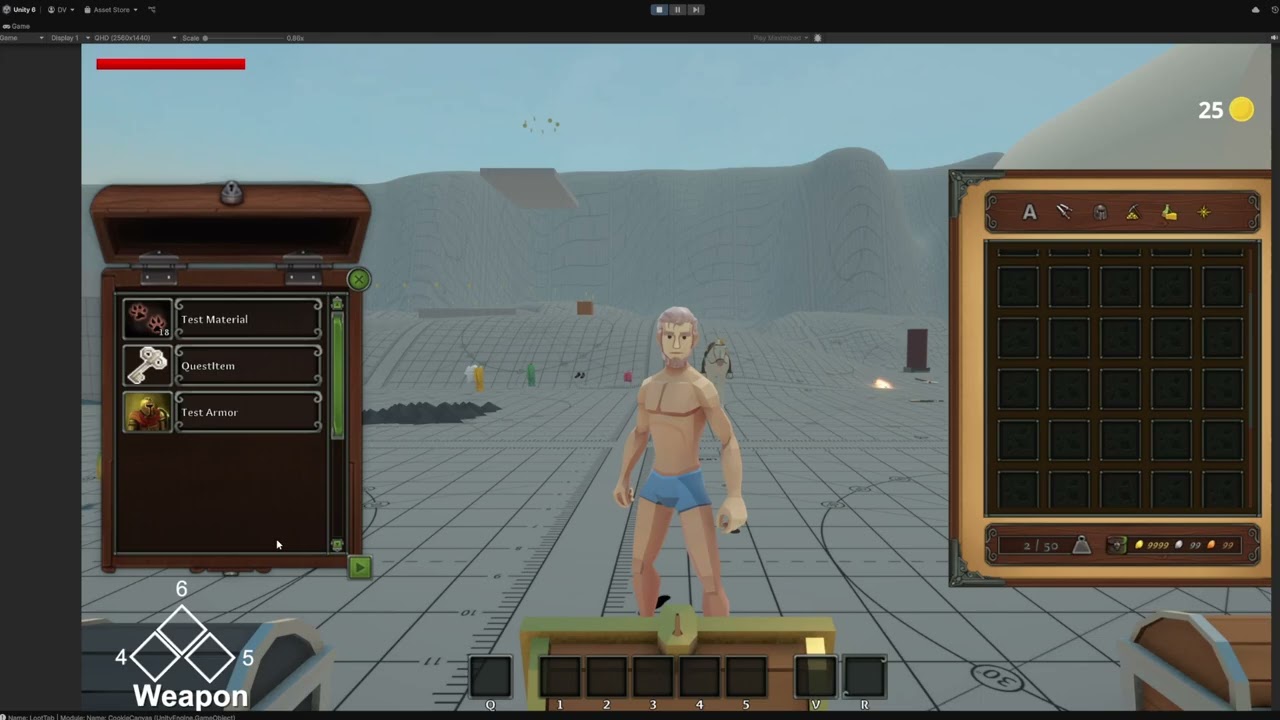
And I'm kind of wondering how to go about it, what's considered the best way to do so. I know there's ways to do it with seperate fbx files attaching to the character, or just put all armor, hairstyles, etc. in one .fbx file and enable/disable it with scriptable objects.
Was hoping you guys would know.
 hoary zephyr
The reference photo is in the back. Im never touching blender again. This is a war crime  💀
💀


 tranquil carbon
hi everyone, sorry if this is the wrong place to ask this, but im trying to import a sketchup skp file into unity, but i think unity only supports sketchup files up to 2017(?). does anyone here have sketchup and would be willing to export an fbx version of my file? 😭 i bought the model but dont have sketchup >.< (apologies again if this is a bad place to ask this)
tranquil carbon
have been trying to use these for hours but none of them seem to support 100mb+ sized files 
misty lantern
tranquil carbon
have been trying to use these for hours but none of them seem to support 100mb+ ...
Sounds a bit unlikely to me that a 100mb sketchup mesh will be usable in any game engine even after converting
How's that even possible
 teal cove
somewhere along my blender to unity export my models got this wierd greying thing. Any ideas what it can be caused by?
 misty lantern
teal cove
somewhere along my blender to unity export my models got this wierd greying thin...
misty lantern
teal cove
somewhere along my blender to unity export my models got this wierd greying thin...
What do you refer to by "greying"?
The grainy noise, or something else
misty lantern
Screen space ambient occlusion
teal cove
hmm... do i need to dig somewhere in unity settings and turn that off for now? btw how can i make it ssao friendly if i want that in the future?
misty lantern
teal cove
hmm... do i need to dig somewhere in unity settings and turn that off for now? b...
In URP it's in your URP asset for the active quality level
Reference to the asset can be found in Project Settings > Quality
misty lantern
Export the mesh without the text, replace with Unity's text
misty lantern
Yes
How "perfect" would it have to be
You can use the same font, same positioning and match the size
fluid oak
Well, do you need dynamic text?
You could of course write a script to match a textmeshpro object to the bounds of the mesh from blender.
 flint sentinel
Is there a way to preserve pivot points in the fbx export from blender?
I am aware I can just export the cannon and wheels separately but it feels like a workaround, not a solution.


please @ me
fluid oak
flint sentinel
Is there a way to preserve pivot points in the fbx export from blender?
I am awa...
Upper left corner of the viewport, switch from 'center' to 'pivot.'
Of course, that is only if you set pivots in the file.
flint sentinel
fluid oak
Upper left corner of the viewport, switch from 'center' to 'pivot.'
Thanks, I thought it was the dropdown next to that 🤦♂️
 wide yew
I had the worst character in mind to make, i still end up with something even worse than that lol.
 fluid oak
I can't actually tell whether it is good or bad because I have no idea what it is.
gusty pasture
Potato pirate, obviously
 tawdry mulch
Hi! Does anyone have experience in rendering a photorealistic scene in Build-in ? It's an assignment I have and I kinda struggle to make my scene look great (with all the package choice and stuff), if someone is willing to help me with that I will be eternally grateful!! Thank you so much in advance!!
misty lantern
tawdry mulch
Hi! Does anyone have experience in rendering a photorealistic scene in Build-in ...
To make a scene look "photorealistic" you'll need assets that are photorealistic to begin with, or as close to it as possible with correct PBR materials
Then you need a type of lighting that is real world accurate, like a HDRi and probes for ambient light and baked lightmapping for realistic light bouncing
BiRP's quadratic light falloff is not "realistic" but I think it's possible to change it to inverse square
Thirdly you must have colors and post processing set up right, mainly linear color space, HDR rendering and a tonemapping profile
Controlling exposure, adjusting colors and some effects like DoF or SSR may also be important there
tawdry mulch
misty lantern
To make a scene look "photorealistic" you'll need assets that are photorealistic...
Thank you so much!! I will look into all of that!! If I have a specific question about something listed here, can I send you a private message? No worries if not I completely understand!!
misty lantern
tawdry mulch
Thank you so much!! I will look into all of that!! If I have a specific question...
No, you can ask on this server
tawdry mulch
misty lantern
No, you can ask on this server
Okay noted!! Thank you so much again!!
 snow pewter
Hey guys, it's my first time drawing my own assets for my game, how do you know what canvas size to go for ?
mortal lotus
IS there a good way to decimate models polygon count without affecting the UV inside Unity?
misty lantern
mortal lotus
IS there a good way to decimate models polygon count without affecting the UV in...
Decimate 'without affecting UVs inside unity' or 'decimate within Unity' without affecting UVs?
mortal lotus
misty lantern
Decimate 'without affecting UVs inside unity' or 'decimate within Unity' without...
Both.
So I can increase performance.
misty lantern
snow pewter
Hey guys, it's my first time drawing my own assets for my game, how do you know ...
Big enough that you won't see the pixels of the image when it's viewed at maximum possible size by a user with a 4K screen (or as big as you care about)
It always mainly depends on how much space the image will take on the screen
Source images can always be bigger than needed, so you can decide later which resolutions of the asset you ship with the application
misty lantern
mortal lotus
Both.
Unity doesn't have a LOD generator or other ways to decimate built in but there are third party assets for it I'm sure
UVs are vertex data so it's not technically possible to remove any vertex without affecting the UVs
Blender's decimate modifier interpolates vertex data of the remaining geometry so UVs are as preserved as they can be
If you have the source mesh with quad topology it's also possible to dissolve edge loops (which aren't UV seams) to keep UV islands totally intact, if needed for some reason (but what you can do with it is usually limited)
prime star
Anyone here got experience with setting up modular characters / meshes and modular character equipment?
I am just wondering if the best practice is to set up seperate .fbx files for each piece of clothing, hairstyle, etc. or if I should combine everything into one single mesh and unload seperate mesh pieces depending on what equipment is worn or hair is chosen by the player.
I remember in UnrealEngine 4 I used seperate meshes. But I don't know if Unity has some kind of limitation in that regard.
misty lantern
prime star
I am just wondering if the best practice is to set up seperate .fbx files for ea...
I wish there was a best practice
But there are many, and combinations of them, each with significant tradeoffs
The way you implement worn items determines what items they can be, and what items you have will determine how they have to be implemented
So it can be hard to even decide on what to commit to
prime star
misty lantern
I wish there was a best practice
But there are many, and combinations of them, e...
Thanks! I guess I will go for seperate ones, and do it like I did with the game I was modding in UE4
prime star
Are bone sliders a thing in Unity? For example, if I want to make the arms bigger / muscled, to use that bone to increase the mesh size? I'd rather not use shape keys from Blender, simply because it'd require me to do it for every single armor piece.
random stag
why do the book not fall? even though i add a rigid body to it?

 woven dome
It's marked static. And don't cross-post
misty lantern
prime star
Are bone sliders a thing in Unity? For example, if I want to make the arms bigge...
You can make a system to scale bones
Just note that Humanoid Avatars don't support bone scaling afaik
prime star
misty lantern
You can make a system to scale bones
Just note that Humanoid Avatars don't suppo...
Ow. Damn 😦 I use humanoid because I use the Malbers Animal Controller asset for my humanoid characters
Shape keys will be horrible, since making modular characters I'd need to do it for every single armor piece lol
 signal coral
Just picked up substance painter, never touched it before now. Is it easy enough to set seams and UV unwrap or should I do all that in blender first?
Also would you do SP as a final stage after rigging, while it’s still high poly?
 topaz matrix
Sorry if this isnt the right place to post this but I am having trouble with my tilemaps. As you can see my tilemap is behind another and I'm sure it has something to do with their position or even layer but I'm not sure what to do to get the Islands tilemap visible to both my scene and game. Sometimes I appears but when I press play it disappears all over again
 misty lantern
signal coral
Just picked up substance painter, never touched it before now. Is it easy enoug...
misty lantern
signal coral
Just picked up substance painter, never touched it before now. Is it easy enoug...
SP has capable automatic unwrapping, at least better than Blender
Though a proficient by hand unwrap is always better if it needs to be done in a specific way
SP materials can be applied to high poly meshes and baked to low-poly, once the models are complete
Rigging is an unrelated process
misty lantern
topaz matrix
Sorry if this isnt the right place to post this but I am having trouble with my ...
Tilemaps like other 2D renderers use 2D sorting
https://docs.unity3d.com/Manual/2d-renderer-sorting.html
If they swap randomly, that indicates they have the exact same sorting priority
signal coral
misty lantern
SP has capable automatic unwrapping, at least better than Blender
Though a profi...
thx
signal coral
misty lantern
SP has capable automatic unwrapping, at least better than Blender
Though a profi...
does SP have built in baking features or would it be better to make the texture maps in SP and then ship back to blender to use SimpleBake?
and seaming too, i'm used to doing my seams in blender so idk what SP adds there too
misty lantern
signal coral
does SP have built in baking features or would it be better to make the texture ...
It has baking, that's how SP materials are converted into a form usable by other engines
It only has automatic unwrap, I believe, no tools for manual seams
topaz matrix
misty lantern
Tilemaps like other 2D renderers use 2D sorting
<https://docs.unity3d.com/Manual...
tyyy
 drowsy badger
my models head came in like this when it is supposed to be a full block like the torso. any help?
 tribal pivot
drowsy badger
my models head came in like this when it is supposed to be a full block like the...
tribal pivot
drowsy badger
my models head came in like this when it is supposed to be a full block like the...
you have inverted faces
prime star
I got this character. And it has two different UV maps, one for a color map, which has every different colored bit of the mesh seperated in pieces..
On top of that, I have another UV map which is unwrapped as more of a traditional game character UV unwrap.
Since I want to add sliders for eye color, skin color, lip color, etc. I thought it best to use the traditional game char uv unwrap.. so I tried baking the character as you see it into the into the character UV unwrap so I am no longer depnding on this 64bit colormap.
But this baking isn't working. Anbody else got any advice on how I could potentially handle this?


 ancient inlet
Yo guys ive been trying to fix this from yesterday but to no avail

When i export to fbx with the fbx exporter is turns into a jumbled mess
 sacred grotto
Hi all. This is heavily related to blender. Is there a workflow/tips to make a unity side importer to interpret blender stuff in unity?
So the blender asset as prefab can maintain the connection, and the importer can also find certain objects/bounds defined in blender, and unity side will add or refer certain components accordingly?
I read that blender's collections don't transfer to unity whatsoever. Is there really no way to define some kind of hierarchy in blender that unity can understand?
I'm looking to define the level, gameplay collider shape, shapes of buildings and its location, defining some spawnpoint and maybe some object spawners etc
Currently i can only think of using naming conventions in blender. Is there any other things in blender (like tag or some metadata) that unity can see/use?
 kind vapor
Brand new to unity. I'm trying to import a texture pack onto a VRChat model. But I have no idea how to do it
 digital mantle
sacred grotto
Currently i can only think of using naming conventions in blender. Is there any ...
digital mantle
sacred grotto
Currently i can only think of using naming conventions in blender. Is there any ...
this might be interesting reading for you: https://unity.com/blog/games/rapid-design-iteration-in-breachers-using-assetpostprocessor-and-blender I just tried custom properties in Blender and they aren't picked up automatically like the article implies so there might need to be some more work done there, like parsing fbx node data, if that isn't some kind of bug on Blender's part. I have a need for something similar in the future, too
fluid oak
One of the problems with any solution in unity's end us that blender immediately seems to update and break stuff.
That's why they moved to using fbx as the preferred transfer method.
sacred grotto
fluid oak
That's why they moved to using fbx as the preferred transfer method.
Who's "they"?
fluid oak
Unity, when they depreciated support for using blender files directly.
sacred grotto
Ok so the importer unity has for .blend, is actually turning it into fbx?
But this default importer unity has, doesn't import the custom properties?
I did find this
https://github.com/mrven/Blender-Asset-Creation-Toolset/issues/31
Which i haven't tried

GitHub
Blender can store many variables into an FBX via it's Custom Properties, theses can be later picked up in-engine after being imported with the AssetPostprocessor. This feature would greatly str...
I guess this is just a batch exporter from blender to fbx. But does this imply that a normal default blender export fbx does not export custom prop?
digital mantle
it should, and the data exists in the file with export custom props checked. I tried with Unity (6000.0.39f1) and Blender 4.4.0. Tried custom postprocessor https://docs.unity3d.com/6000.0/Documentation/ScriptReference/AssetPostprocessor.OnPostprocessGameObjectWithUserProperties.html
Some fbx's do have this info, and the docs mention 3dsmax/maya specifically so it might be Unity not importing it correctly or Blender not exporting it in the expected way (and so maybe something like your link would fix it)
here's the commit that added the functionality your github link mentioned so I'm hopeful that might work: https://github.com/mrven/Blender-Asset-Creation-Toolset/commit/b002776e2394d170b368e52db62b8be4cb06ca3e
sacred grotto
Yes i just tried OnPostprocessGameObjectWithUserProperties and it can find my custom prop, in my blend file (no need to export as fbx)
digital mantle
I was exporting as fbx from Blender directly so now I have to go test your way :)
still does not work for me. Can I ask Unity and Blender version?
sacred grotto
This is good stuff im glad it works directly on .blend file
sacred grotto
digital mantle
still does not work for me. Can I ask Unity and Blender version?
Unity 2022.3
Blender 4.2.8
I'm trying to figure out how to... replace or instantiate prefab and parent to the gameobject being processed. But how should i refer to the prefab from this postprocess phase?
Please note that the GameObjects and Meshes only exist during the import and will be destroyed immediately afterwards. This function is called before the final Prefab is created and before it is written to disk, thus you have full control over the generated game objects and components. Any references to game objects or meshes will become invalid after the import has been completed. Thus it is not possible to create a new Prefab in a different file from OnPostprocessGameObjectWithUserProperties that references meshes in the imported fbx file.
I'm also trying to understand this
I guess with AssetDatabase and pass in path?
Cool works
sacred grotto
Ok so it works, but if i wanna do some assigning references between multiple objects inside the fbx prefab hierarchy, i can't do it within OnPostprocessGameObjectWithUserProperties bcoz this thing only processes 1 GO at a time
Is there a step where i have access to the fbx parent, so i can do find child all and manage references on this step?
If i'm defining the ref links by what's defined in blender custom prop, then i'll have to store this temporarily during OnPostprocessGameObjectWithUserProperties, for the next step to read again for the ref linking step
sacred grotto
OnPostprocessModel
 lofty gorge
Any leads or terminologies to look at on how to fix these? The trees are becoming dark when baking

 misty lantern
lofty gorge
Any leads or terminologies to look at on how to fix these? The trees are becomin...
misty lantern
lofty gorge
Any leads or terminologies to look at on how to fix these? The trees are becomin...
"Overlapping UVs" are a clue potentially
lofty gorge
misty lantern
"Overlapping UVs" are a clue potentially
The UVs are good
 misty lantern
lofty gorge
The UVs are good
misty lantern
lofty gorge
The UVs are good
If you look at what lighting is drawn on that UV island it's just blocks
So that could indicate overlap, or maybe texel invalidity though less likely
It's best to enable Generate Lightmap UVs for every mesh in import settings
If that's not enabled and the geometry re-uses UV space across different leaves, they are overlapping
lofty gorge
Wait, I'll try something, I kinda remember something from what u said
lofty gorge
misty lantern
It's best to enable Generate Lightmap UVs for every mesh in import settings
I'm trying to avoid it, but I might do it just on the leaves
misty lantern
It's also possible that they're now reflecting the ground rather than the sky since looks like you baked a reflection probe, but not reflecting it correctly
But it could be a separate issue
If a shader is "two sided" it does not ensure correct normals, it just renders the other side too with negative normal value that messes up the ambient light calculation
misty lantern
lofty gorge
I'm trying to avoid it, but I might do it just on the leaves
Why avoid it?
lofty gorge
Sometimes it's not optimized, so I'd rather place them manually
misty lantern
lofty gorge
Sometimes it's not optimized, so I'd rather place them manually
Sometimes manual is better, but you have to be very particular about the process so it works right
lofty gorge
Maybe my workflow is not working on this one. I put the leaves inside Unity using modular leaves. I probably should've built it inside the 3D software so they would share the same sphere normal data
misty lantern
lofty gorge
Maybe my workflow is not working on this one. I put the leaves inside Unity usin...
It depends on the shader (or mesh) how it handles two-sidedness
Unity's default way in my experience is flawed since it doesn't flip the normal
A custom shader could flip it based on viewing angle, but at the same time it may be even more practical to duplicate and flip the geometry itself while using a one sided shader
Assuming that is related to the issue we're seeing, I'd do some simple tests, just assigning the material to a quad and spinning it around to see if the lighting is not the same on both sides
If you're sure you are better off using your own provided lightmap UVs, you have to follow all the steps: https://docs.unity3d.com/Manual/LightingGiUvs-GeneratingLightmappingUVs.html
Usually the inefficiency of auto-generated UVs is a small tradeoff for guaranteeing they work right, regardless of bake resolution
lofty gorge
Even after I use auto-generate, the shadow is still there, so I'm testing it from scratch to fix it. I'm using Built-in RP right now before I'm using URP and I didn't encounter this problem.
Thanks for the explanation!
misty lantern
lofty gorge
Even after I use auto-generate, the shadow is still there, so I'm testing it fro...
Whenever in doubt I find it always helps to try to reproduce the issue in a new scene
Sometimes even in a new project but this looks like we may have some issues from shaders and/or some from meshes but just can't clearly see which
Or something more baking related, possibly
 brazen mauve
question: how to go about animating a "skidding to a stop" movement? any technical aspects down the road to keep in mind with implementing it
 fierce rivet

 vast spindle
i have a video player with the render mode set to material override, and i have that applied to a plane, im wondering how i can crop the video so only parts of it display on the plane
 prime star
I'm a little stuck. Anyone have any idea how to make a lightmap for a low poly chacter that uses a 64 by 64 color map? Image shows the example.
I need to make a lightmap and albedo map for my toonshader

 lucid anchor
Hey folks. I need a bit of feedback please!
I try to upgrade my art asset i'm selling in the Unity Asset Store (https://assetstore.unity.com/packages/3d/vehicles/sea/galleon-style-sailing-ship-295495) with colliders!
But i actually have never done it on this level of complexity, and i'm quite unsure if i did it right or can even improve it.
Basically, it's a convex collider setup, to make it work with Rigidbody. It consists of mostly of capsules and boxes, but the main hull is made from 10 convex mesh colliders to provide the curvature of the ship.
Collision is not 100% accurate, stairs are represented as ramps and the bars of the crow's nest are one big collider. Generally, i tried to use as little colliders as possible, and primitives over mesh colliders whenever possible.
The goal was to enable players to import the ship, shoot at it and get the shots registered, walk around on it or let Unity's Physics Engine take care of swimming on water via Rigidbody.


Elevate your workflow with the Galleon-Style Sailing Ship asset from Lix3D. Find this & other Sea options on the Unity Asset Store.
misty lantern
lucid anchor
Hey folks. I need a bit of feedback please!
I try to upgrade my art asset i'm s...
Yeah that's usually the best compromise you can do
But there's no one right answer
Whether it's more efficient to use more primitives, or convexes for a specific shape depends on the shape
How much detail vs performance you need to have is also very subjective
lucid anchor
misty lantern
Yeah that's usually the best compromise you can do
But there's no one right answ...
Ah, okay. Thank you very much for the feedback! 😀
lofty gorge
misty lantern
Whenever in doubt I find it always helps to try to reproduce the issue in a new ...
I just got back from vacation and finally understand what I did wrong, I baked the 1st one instead of the huge circle on B


I also reduced the normal strength
mortal lotus
Is it possible to make an object which won’t be visible but still will cast shadows?
 hoary kindle
mortal lotus
Is it possible to make an object which won’t be visible but still will cast shad...
hoary kindle
mortal lotus
Is it possible to make an object which won’t be visible but still will cast shad...
Cast Shadows option on the mesh renderer
mortal lotus
hoary kindle
`Cast Shadows` option on the mesh renderer
Thanks
 vale cove
I used a fbx to png converter before so that I can use models as png for the ui but I can't find it anymore the ones I find convert without color. Does someone know what can I do to have a png with color of a fbx?
hoary kindle
vale cove
I used a fbx to png converter before so that I can use models as png for the ui ...
Obviously images and 3D models are not interchangeable. You can render images from 3D models but you cannot just press a button and expect this "conversion" to happen correctly. What angle should the image be captured from? What type of lighting should be applied? What camera settings (field of view, projection type etc.)? I personally use Blender to work with my 3D models, Blender like many other 3D softwares include rendering engines you can use to render the models however you like with highly customizable setup. There sure might be some online tool that can do the renderings very easily, but I have not used one so can't really help you with that
 fast tapir
I want to add water plane to my game scene should I use one big plane or multiple smaller planes?, i've had experiences high cpu usage while having one big plane even it is not visible.
tawdry valley
fast tapir
I want to add water plane to my game scene should I use one big plane or multipl...
depends on the scales we're talking and how far u can see.. best way imo is using mutliple planes / infinite floor using a radius from the center.. (you can recycle pieces in a pooling system) and have it worked out in a ratio that fits ur material/tiling or w/e
then u just track the player/camera for the position
fast tapir
tawdry valley
depends on the scales we're talking and how far u can see.. best way imo is usin...
Good idea, thank you 🙂
gritty raft
hoary kindle
Obviously images and 3D models are not interchangeable. You can render images fr...
there are several tools, and even tutorials to write you own in this quick search
https://www.google.com/search?client=firefox-b-1-d&q=unity+3d+models+to+icons
mortal lotus
Is there a way to set the light color with Kelvins?
tawdry valley
mortal lotus
Is there a way to set the light color with Kelvins?
tannerhelland.com
While working on a “Color Temperature” tool for PhotoDemon, I spent an evening trying to track down a simple, straightforward algorithm for converting between temperature (in Kelvin) and RGB values. This seemed like an easy algorithm to find, since many photo editors provide tools for correcting an image’s color temperature in post-product...
URP and HDRP have color temp irrc
raven elm
Hey all! I created a few fantasy themed melee weapons for a mobile game I am working on. The avg poly count for each of those weapons is anywhere between 6k to 12k & texture maps are all in 2k. Is that an optimal poly count for a mobile asset?
misty lantern
raven elm
Hey all! I created a few fantasy themed melee weapons for a mobile game I am wo...
That depends on how many textures and meshes of those sizes you are storing/loading/rendering at once
You have to pick a minimum spec device for your game and test the performance on that
raven elm
It's a single player game with only the player using those weapons.
misty lantern
raven elm
It's a single player game with only the player using those weapons.
Regardless of what kind of game it is you have to test and optimize the performance
 final cobalt
How do i make this panel in the middle not reflect sunlight
 misty lantern
final cobalt
How do i make this panel in the middle not reflect sunlight
misty lantern
final cobalt
How do i make this panel in the middle not reflect sunlight
Kinda depends how you want it to "not reflect" it
You can disable "specular highlights" from the material properties, for one
 safe birch
 misty lantern
safe birch
misty lantern
safe birch
Preset manager lets you define default presets for assets of any type
https://docs.unity3d.com/Manual/class-PresetManager.html
safe birch
pretty sure preset manager doesnt take material presets unless im wrong
 misty lantern
safe birch
pretty sure preset manager doesnt take material presets unless im wrong
misty lantern
safe birch
pretty sure preset manager doesnt take material presets unless im wrong
Ah indeed native assets cannot have default presets via the preset manager
Might be possible some way, but I don't know how
Maybe doing it by folder or in some involved way with scripts
@safe birch Why do you need to have offset values for every material though?
safe birch
small textures
tile way too much
so tilling was the first thing that came to mind for me
misty lantern
safe birch
tile way too much
In what kind of situation?
safe birch
the textures are 96x96 iirc and when i drop them on a object they tile a lot to a point where you can barely see the texture
misty lantern
safe birch
the textures are 96x96 iirc and when i drop them on a object they tile a lot to ...
What kind of object
misty lantern
Ordinarily it's the mesh that determines how much the texture should tile via its UV map
If you have many materials that need specific tiling or offset properties, you can also multi-select them to edit them all at once
 dire ruin
Hi everyone! I'm hoping someone can help me... 😭 Sorry if this is a very novice problem to have, but I haven't been able to find a solution so far. Why does my trash basket's wire not come off as convincingly as it does in substance painter? The mesh has to material groups, one is set to being transparent with the opacity map + normal map.

 misty lantern
dire ruin
Hi everyone! I'm hoping someone can help me... 😭 Sorry if this is a very novic...
misty lantern
dire ruin
Hi everyone! I'm hoping someone can help me... 😭 Sorry if this is a very novic...
Many things can contribute to it
If the texture is not imported with "alpha is transparency", it's possible color values leak from the transparent space and cause some shimmering
If the material has "preserve specular" enabled, it will reflect even on transparent areas, though it's a bit hard to see from this far away
Also, it looks like the wire texture itself might be semi-transparent
Ensuring it's correctly 0% alpha on the gaps and 100% alpha on the wires might improve it
But instead of that it could be better to just use an opaque material with alpha clipping
Opaque material will pre-emptively fix the transparency sorting problems you would get if you make a transparent concave object's material two-sided (or duplicate and flip its geometry to ensure two-sidedness)
Lastly your lighting in that part of the room doesn't look entirely right
The environment reflections seem too bright, maybe ambient light as well
If it's an interior, it should have its own reflection probe, and ideally baked lighting with light probes to ensure correct ambient light
But that's assuming your environment is static enough to allow for static lighting
 gloomy roost
anyone know how to properly export fbx files to unity? cuz blender ain’t doing it properly
dire ruin
misty lantern
Many things can contribute to it
If the texture is not imported with "alpha is t...
Thank you!! I actually managed to fix it and now it looks way better. Yeah the ambient fog effect in the room was messing it up a bit so I removed it. It still has a bit of that sheen on the sides, but if I take it away the metal will have no not reflect anymore.
 misty lantern
dire ruin
Thank you!! I actually managed to fix it and now it looks way better. Yeah the a...
misty lantern
dire ruin
Thank you!! I actually managed to fix it and now it looks way better. Yeah the a...
How did you "take it away" that time
I see the sheen in the transparent areas
That should be fixed by disabling "preserve specular lighting"
That's a different setting from toggling "specular highlights" entirely
There is a depth sorting problem, the far side of the bin is visible over the near side
But if you don't notice it, it's not a big concern
dire ruin
misty lantern
How did you "take it away" that time
I see the sheen in the transparent areas
Th...
I meant the environment lighting, you mentioned it in your original reply.
I disabled preserve specular lighting and it took away the sheen effect
The far side is still visible through the near side although I'm not sure what can be done about that... But its a prop that cant be seen from close up so it shouldnt matter much either way
 misty lantern
dire ruin
I meant the environment lighting, you mentioned it in your original reply.
I di...
misty lantern
dire ruin
I meant the environment lighting, you mentioned it in your original reply.
I di...
You can switch from transparent to opaque and enable alpha clipping
Whether to use transparent or opaque alpha clipped materials is situational
With no semitransparent areas the result can be very similar, except opaques depth sort better, but might not appear as smooth
dire ruin
misty lantern
You can switch from transparent to opaque and enable alpha clipping
Oh yeah, you're absolutely right. Opaque and alpha clipping resolves the issue. And the detail for the wire does not have to be that high at all, pretty much the goal is just to have it be see through without any of the strange effects.
Thank you so much, your help has been wonderful! 🙏

 quasi tundra
How do people create modular characters and first person animations for different weapons equipped
 woven aspen
if I want to enable read / write on a mesh can I do it to a submesh in a .fbx?
I have one fbx with many meshes but I can only change the settings of the fbx not any submeshes
Image

I have a bunch of meshes as part of one big model and i cant really change the export settings for a specific mesh only everything
 misty lantern
woven aspen
if I want to enable read / write on a mesh can I do it to a submesh in a .fbx?
I...
misty lantern
woven aspen
if I want to enable read / write on a mesh can I do it to a submesh in a .fbx?
I...
These are not submeshes technically, but they still share import settings because they're imported as one file
Import meshes separately if you want to change their import settings
 inland thorn
Why the sprite on editor has no border whatsoever, but while actually rendering it in game has that ugly white saw teeth around it?


 winter light
just finished my first group of building blocks 
I liked the way using blender because i could only model with scripts because im not too good at modelling XD
If someone has any tipps or good guides to improve? - beacause if i move on to roudn shapes it wont be that easy...


 outer halo
Press F. You're probably very far from it.
 timid flower
ok
misty lantern
timid flower
my model is gone, didnt delete it
The crossed out eye icons in your hierarchy are buttons to temporarily hide/unhide objects in your scene view
raven elm
I want to take a render of an asset I made for Unity inside of Maya. The issue is that I don't know how to correctly map the MetallicSmoothness map to the respective & metallic & roughness channels of the aistandard surface shader. Does anyone have a solution?
 finite bloom
hey guys i need your help. im trying to add a new meterial to a object but it wont let me
 abstract talon
Hello Guys !!! I have more than a thousand models in a blender scene and I want to export them into unity in fbx format, each 1 individually. And doing it manually is a PAIN . Do any 1 know how can I do that ? I tried asking GPT for a script for blender to do this but didnt work, objects are getting exported individually but their scale and rotation isnt set to 1 and 0. I also tried using a plugin but encountered the same issue.
Any suggestions would be highly appreciated !
T H A N K Y O U !!!
P E A C E !!!
gusty pasture
abstract talon
Hello Guys !!! I have more than a thousand models in a blender scene and I want ...
!blender
 lilac edgeBOT
A supportive community for Blender artists of all levels. Share your work, ask for help, and learn from others! https://discord.com/invite/blender
gusty pasture
Definitely possible to automate this
abstract talon
gusty pasture
Definitely possible to automate this
Do u have any possible solution??
gusty pasture
Ask in the Blender server, they'll know.
abstract talon
Ok thank you
final cobalt
Hello! I have a problem with probably very easy solution
I want an 3d object to be part of the canvas
but it remains in world space even after i drag it here
misty lantern
final cobalt
Hello! I have a problem with probably very easy solution
There are some solutions but not any very easy ones
Try asking in #📲┃ui-ux
 stone tusk
Hello! I was wondering if anyone might be able to help me troubleshoot this issue.
I’m skinning a mesh to an existing skeleton in Maya, and everything looks fine when I test the deformation there. But when I bring the mesh into Unity and run a skinning test, the chest area blows up every time the upper body bends backward.
I’ve painted clean skin weights, and I don’t see the same issue in Maya — the deformation looks normal there. I’m also using a Mesh Baker tool in Unity, in case that’s helpful context.
Here’s a screenshot of the issue:
 misty lantern
stone tusk
Hello! I was wondering if anyone might be able to help me troubleshoot this issu...
misty lantern
stone tusk
Hello! I was wondering if anyone might be able to help me troubleshoot this issu...
One common cause is that by default Unity limits the maximum bone weights in quality settings for performance reasons, whereas modeling programs do not
frank carbon
i have a rigged character in blender which i import using fbx export in blender to unity. i made some logic to control the animation in blender. now i have decided i have to add some more animations. how do i do that
how do i reimport it with the existing animator controller and animation logic without without the hassle of setting it up each time i make a change in blender
frank carbon
Also is it supposed to be so complicated importing characters from blender?
frank carbon
where is everyone gone
misty lantern
frank carbon
how do i reimport it with the existing animator controller and animation logic w...
Animator controller is a separate thing, it remains unchanged even if you change the imported mesh
But if you change around the animation clips in the mesh, you have to ensure the animation list in import settings is updated manually to reflect the changes so the animator can find them still
Or you have had to duplicate the clips out of the imported mesh asset into their individual assets
misty lantern
frank carbon
i have a rigged character in blender which i import using fbx export in blender ...
It may be important to know what "logic to control" means exactly
misty lantern
frank carbon
Also is it supposed to be so complicated importing characters from blender?
"Supposed" is relative
frank carbon
misty lantern
It may be important to know what "logic to control" means exactly
Animator.play("walk");
Sorry for not using the coding format I forgot about it
frank carbon
Ded chat
misty lantern
frank carbon
Animator.play("walk");
In blender?
misty lantern
frank carbon
In unity c#
In that case also the states in the animator reference animation assets or animations imported inside a mesh
Like I said the reference is maintained in mesh import settings' animation tab, or by separating animation clips into assets
 thin lynx
Hey I have a texture thats supposed to repeat itself. I set Wrap mode to repeat in the import settings and applied it as Sprite to an image. It doesnt repeat over the image but rather stretches itself along, what am I missing here?
heres my settings

 misty lantern
thin lynx
Hey I have a texture thats supposed to repeat itself. I set Wrap mode to repeat ...
misty lantern
thin lynx
Hey I have a texture thats supposed to repeat itself. I set Wrap mode to repeat ...
With the image component the Image Type property determines that
 placid dawn
can someone help me fix this broken shop model idk what im doing

 misty lantern
placid dawn
can someone help me fix this broken shop model idk what im doing
misty lantern
placid dawn
can someone help me fix this broken shop model idk what im doing
Check "inverted normals" in pinnes messages
The material should not be transparent
You may have import warnings about self-intersecting polygons so if you have those or any weird n-gons you'll have to at least triangulate them before exporting
frank carbon
misty lantern
Check "inverted normals" in pinnes messages
The material should not be transpare...
One unrelated question is that a cat on your pfp ?
fluid oak
You don't have to be a cat to post here, but it helps!
 fair birch
Hi, I didn't know where to ask a question about creating a skybox/panoramic texture, so if anyone here can check it up in #🥽┃virtual-reality 🙏
tawdry mulch
Hiii!!
Thanks to everyone that helped here (especially Spazi), I've made great progress on my scene ! I just have one last small question : I'm using Build In and I've put a post procress v2 with a SMAA Anti-Aliasing in High Quality, it help but it's still not perfect. Does anyone know a good asset for Anti-Aliasing for Build-In ? I can pay for it I don't mind !
Thank you so much in advance!
 gusty pasture
tawdry mulch
Hiii!!
Thanks to everyone that helped here (especially Spazi), I've made great ...
gusty pasture
tawdry mulch
Hiii!!
Thanks to everyone that helped here (especially Spazi), I've made great ...
Supposedly there's TAA in the official post processing package
tawdry mulch
gusty pasture
Supposedly there's TAA in the official post processing package
I've tried it but it actually make things worst for me
gusty pasture
Strange. That is the most common high-end solution (barring MLAA by using DLSS at 100% resolution)
tawdry mulch
gusty pasture
Strange. That is the most common high-end solution (barring MLAA by using DLSS a...
Oh it's because it works only on play mode contriary to the others, it's indeed better, thank you so much!!!
gusty pasture
It uses multiple frames to converge so I can imagine built-in doesn't have support for it in the scene view.
signal coral
does it make sense to do a high->low normal bake for plain old LOD models? or is that just a trick for reducing poly count and keeping close up details?
in this case, i have a 28k tri (4k texture) model, a 6k tri (2k) and a 2k (1k), just for different camera distance. i can't get the high poly detail to bake and i suspect it's because i'm just not supposed to use it that way
misty lantern
signal coral
in this case, i have a 28k tri (4k texture) model, a 6k tri (2k) and a 2k (1k), ...
I guess you can but normally no, all LODs would use the same textures even if they don't perfectly match the reduced poly mesh
The idea is that since they're being viewed from further away it'd make less of a difference
If you have sets of PBR maps with mip maps for every lod level that's a bonkers amount of textures
signal coral
misty lantern
If you have sets of PBR maps with mip maps for every lod level that's a bonkers ...
just for the player characters in this case. they're the only models that have variable perspective views. so i'm making 4k, 2k, and 1k versions. its just the same model with lots of edges dissolved and then baked from 4k textures per component down toa 2k or 1k atlas
the enemy models are at 512 lol
misty lantern
If you think it's necessary, but I'd expect little to no gain for the cost
signal coral
misty lantern
If you think it's necessary, but I'd expect little to no gain for the cost
how would you go about it?
misty lantern
Adjust lod bias for high priority characters if needed
signal coral
misty lantern
Adjust lod bias for high priority characters if needed
i dont need different poly count models to do that?
misty lantern
You do
You can control precisely how quickly the lod models are swapped to (or crossfaded to if you use that)
With good lods the player should not be able to notice the change
Since the change happens over distance details will become less relevant quickly
signal coral
misty lantern
With good lods the player should not be able to notice the change
Since the chan...
How long does it usually take you to make a reasonably detailed high/low poly character?
Including texturing, rigging animation, basically from scratch to when it’s what your considered “done” - in Unity and ready to go (excluding revisions)
misty lantern
signal coral
Including texturing, rigging animation, basically from scratch to when it’s what...
That really varies by the requirements of the task, by like orders of magnitude
 pale wharf
Looking for assistance for getting the mesh replaced onto the rig 🙏🏾
 fluid oak
pale wharf
Looking for assistance for getting the mesh replaced onto the rig 🙏🏾
fluid oak
pale wharf
Looking for assistance for getting the mesh replaced onto the rig 🙏🏾
Can you be more specific?
pale wharf
fluid oak
Can you be more specific?
I would like to get the mesh I imported on the right to stand and function as normal as the one on the left
The body is there but it’s sideways on the rig
fluid oak
Just so I understand what you did, did you replace the mesh in unity, or in the model file itself?
pale wharf
fluid oak
Just so I understand what you did, did you replace the mesh in unity, or in the ...
The model file it’s self with UBAE
Exported mesh from Unity (Built a new asset file)
Then replaced original raw and dump
misty lantern
pale wharf
The model file it’s self with UBAE
Server's not for modding
pale wharf
Aaah sorry
 shy pebble
I kinda wanted to know the answer to that as well. I know the servers not for modding but essentially it’s not a modding question. It’s essentially a rig and bone inquiry. And I didn’t see it being against TOS , but if I’m wrong please let me know 😂 i don’t want to be “that guy”
misty lantern
shy pebble
I kinda wanted to know the answer to that as well. I know the servers not for mo...
Vertex groups of the mesh must match the armature's bone names
 arctic kettle
Has anyone tried rendering isometric tilesets from something like 3d objects from blender for a 2d game? Asking if theres an angle to this so I can get them to line up (I'm new to handling tiles/etc). I rendered them at the angles above, pulled them in, but they don't seem to line up in the tile palette. I'm rendering a bunch of other 3d objects so thought I would give this a go as an easy way to make tiles... just need a little help or push in the direction of understanding haha.


Rendered at 512 resolution.. the sprite settings were unchanged on pulling it into the tile palette. I played with it a few times but consistently get overlap issues
pale wharf
misty lantern
Vertex groups of the mesh must match the armature's bone names
Thank you!
 hollow grove
trying to export this into Blender as an FBX but it looks like this?


"The source object contains a reference to a texture file. As a consequence, the exported FBX will contain an absolute reference to this texture file" is the only warning.... and that is only shown for like one texture I think?
 misty lantern
hollow grove
trying to export this into Blender as an FBX but it looks like this?
misty lantern
hollow grove
trying to export this into Blender as an FBX but it looks like this?
What's the "this"?
If you believe it's a texture issue, import your texture, make a material that uses it and assign it to your mesh in scene
fluid oak
shy pebble
I kinda wanted to know the answer to that as well. I know the servers not for mo...
It is a modding question inasmuch as there may be totally unexpected issues due to it being modding and not just a stock unity scene where the variables are more controlled.
 wild night
hi guys, Im trying to setup a PBR material in Unity 6 URP.
so far I'm able to wire up correctly base (albedo), normal and AO maps.
what about height map? which texture should I use from my PBR textures? I have Displacement for example, but when I put it, it behaves weird
what is the standard way to setup this?
this is how the displacement texture looks

 cerulean walrus
Hi guys! I'm looking for some help regarding if there is a more efficient way to make prefabs (I don't entirely know if this is the right term) in my world.
My problem is fairly simple, I have a bunch of assets, I want to use a select number of specific assets to build something, that in the end I'll make into a prefab, and I'll be able to place that thing down multiple times, fairly simple, however right now the way I go about this is that I put down the things manually somewhere in the world, since I want to be pixel perfect making things pixel perfect gets very annoying when the coordinates are in the numbers such as [4252, 0, 1783], its just annoying to make the fine adjustments, is there a way for me to easily get into some new space, and be able to build whatever I want basically in a vacuum that doesn't affect my main scene or world? Or any tricks that you don't mind sharing with me regarding how you work with assets that you would have loved to know when you started out andd you think everyone should be using that. (This last part is just knowledge farming from my pov, sorry)
misty lantern
wild night
hi guys, Im trying to setup a PBR material in Unity 6 URP.
so far I'm able to w...
I believe displacement maps are for displacement when you're tessellating a mesh, and wouldn't work as height/parallax maps
Or they might but parallax mapping is situational at best so you rarely need anything in the height map slot
raven elm
I created this clearcoat material in Substance Painter which I want to bring into Unity URP. How can I do that? I can't see an option to export a clearcoat map
 misty lantern
raven elm
I created this clearcoat material in Substance Painter which I want to bring int...
misty lantern
raven elm
I created this clearcoat material in Substance Painter which I want to bring int...
Even if there's no export template, you can still export maps manually
The urp complex lit shader is otherwise the same as lit but it also takes a red/green mask map for clearcoat
 minor seal
Does Unity work well theses days with substance 3D? Teaching myself substance 3D now and my plan is procedural textures created in substance designer, applied in substance painted on stuff I model from blender. Heard mixed things about using the substance plug in with Unity
gusty pasture
The old plugin was shit. There’s a new one I haven’t tried yet
You could always just export as PNG though
minor seal
gusty pasture
You could always just export as PNG though
My gut just tells me to avoid it even though the idea of it is nice, I’ll probably just go the PNG route
gusty pasture
The only nice thing about the plugin is that you can generate variations within the Unity editor
There’s no difference at runtime
minor seal
gusty pasture
The only nice thing about the plugin is that you can generate variations within ...
That does sound nice
 proven cedar
guys can someone tell me the reason of this pixlated look on the model as i changed the material and still this effect appear on the model
misty lantern
proven cedar
guys can someone tell me the reason of this pixlated look on the model as i chan...
SSAO
misty lantern
proven cedar
but not to look like that
Tweak the settings of the renderer feature until it looks better
Smaller radius may help
 thorny lion
Hey guys, I've been trying to get better at 3D modelling (i'm a software dev 😅 ), Does anyone know why my tree model looks bad? What can I do to make a better tree next time?

(other than the leaves transparency issue, not sure how to fix that)
misty lantern
thorny lion
(other than the leaves transparency issue, not sure how to fix that)
"Preserve Specular Lighting" next to transparency settings in the material
proven cedar
misty lantern
Tweak the settings of the renderer feature until it looks better
Smaller radius ...
TY mr Spazi for the help , I'm Grateful to you
gusty pasture
thorny lion
Hey guys, I've been trying to get better at 3D modelling (i'm a software dev 😅 ...

 thorny lion
gusty pasture
thorny lion
gusty pasture
Thank you! I’ll look into this
 crystal seal
Guys, how do you change multiple sprite pivots at once? I imported hundreds into Unity and can not find it for the life of me.
 olive shale
I have a simple object, created in Blender and exported as a .fbx file that I intend to use as a mesh for a particle effect. But for some reason the particle system won't accept this object as a mesh. Can someone explain why?
 fluid oak
crystal seal
Guys, how do you change multiple sprite pivots at once? I imported hundreds into...
fluid oak
crystal seal
Guys, how do you change multiple sprite pivots at once? I imported hundreds into...
Sounds like a job for a script!
fluid oak
olive shale
I have a simple object, created in Blender and exported as a .fbx file that I in...
Are you dragging in the prefab or the actual mesh from inside it? (You can expand a prefab with the little arrow button on the side)
olive shale
fluid oak
Are you dragging in the prefab or the actual mesh from inside it? (You can expan...
Oh wow. I didn't know that arrow did anything. Thanks!
crystal seal
fluid oak
Sounds like a job for a script!
Is that really not something that a lot of people need during development? I realize that when you draw your own art - you can maintain consistent ones where you need them, but the Unity Asset Store exists for a reason.
fluid oak
There are lots of useful features that unity doesn't have, but which can be added with scripting.
 cursive spruce
Hey everyone,
I’m really stuck with creating a tilemap or tileset. Like i know how to work with the tools but I bought some assets and they feel way off.
Is there someone who is willing to help me with this? I really need some live help where I can share my screen and get some guidance through that.
Maybe I’m doing something wrong or idk…
Please dm me if you can help me
 mighty talon
glacial vector
mighty talon
mighty talon
glacial vector
mighty talon
You can't change the pivot of a mesh. To do what you want, use an empty transform as a parent of the cube and rotate that
mighty talon
glacial vector
You can't change the pivot of a mesh. To do what you want, use an empty transfor...
im trying to use a cube as the pivot but its not working
wait what?
i need a parent of a parent to do it?
glacial vector
So the castle is a child of the cube, and you want to rotate the castle, but with the pivot at the cube's origin?
mighty talon
glacial vector
So the castle is a child of the cube, and you want to rotate the castle, but wit...
yes!
glacial vector
Yeah it's what I would do at least
Cube
CastlePivot (with position 0,0,0)
CastleMesh (With the offset you want)
Then you rotate the pivot object
mighty talon
glacial vector
Yeah it's what I would do at least
Cube
CastlePivot (with position 0,0,0)
...
i must be confused cause its not working. cube is at the position i want, then empty with 0,0,0, then the castle is positioned so its at the middle of the cube so it can nicely rotate around it. but the pivot is still at the castles origin.
glacial vector
Did you make an empty object between them in the hierarchy?
 glacial vector
And you rotate the pivot object?
mighty talon
yea, its at the castles origin instead of the cubes, and im pretty sure we want it to be at the cubes.
okay that sentence was worded like an idiot
glacial vector
No, it should be at the cube origin. So you can rotate it with the same pivot as the cube but without the cube rotating
mighty talon
yea thats what we want
i dont know why all objects go to the bottom childs origin.
i could fix the origin in blender but i really dont want to have to constantly import and export back and forth to hit the perfect point
glacial vector
mighty talon
i could fix the origin in blender but i really dont want to have to constantly i...
What's not working with the hierarchy approach?
mighty talon
glacial vector
What's not working with the hierarchy approach?
both the pivot and the cube use the origin of the castle
if the castle moves the parents origins move with it somehow?
 glacial vector
Well it should be pivot, not center
 glad thorn
Are there any tools to convert sprite to masktextured sprite?


 sour pier
Hello,
I have been creating some 3D Models for University using Photogrammetry. The goal is to create game-ready photorealistic asset workflow. Right now I am looking for industry professional feedback on these models, to see what could be improved or changed in the workflow. The end of the Form also contains the full workflow I created and used. I would be very greatful if you could check out the models and give me honest feedback.


Google Docs
Hello!
As a part of a university project I have created three photorealistic 3D models using photogrammetry and have tried my best to optimize them for use in Unity HDRP. I'm looking for feedback from industry professionals on the game readines of these assets. Your feedback and comments are greatly appreciated.
All the models and textures wil...
 viscid aspen
How do you reccomend making meshes & textures for level geometry?
fluid oak
glad thorn
Are there any tools to convert sprite to masktextured sprite?
In most cases, you just draw the masks...
 fluid oak
sour pier
Hello,
I have been creating some 3D Models for University using Photogrammetry. ...
fluid oak
sour pier
Hello,
I have been creating some 3D Models for University using Photogrammetry. ...
Did you really need a different material and set of textures for each LOD?
sour pier
fluid oak
Did you really need a different material and set of textures for each LOD?
That's one of the feedback i got from someone else too and it's good feedback to have! So thanks, I will have to look into that more! 🙂
(If there is any chance you could fill in the entire form I would mega appreciate it, but if not all good)
fluid oak
I'll not be able to right now, since I'm on mobile and can't actually inspect the objects.
Are there colliders?
sour pier
fluid oak
Are there colliders?
No colliders, right now i'm just looking at the modeling part of the process, trying to figure out what I need to change in this workflow. After I have the modeling part down I will look into colliders.
fluid oak
Those poly counts serm pretty extreme, though on my tiny phone I can't really see if the detail justifies it.
 white hamlet
i made a flat plane model in blender and exported it as fbx. importing it into unity made it a prefab but when i double click the prefab it opens the windows paint 3d app. how can i fix this?
sour pier
fluid oak
Those poly counts serm pretty extreme, though on my tiny phone I can't really se...
Yap, they are likely too extreme and it's something i have to look into in the future. Do you have any good suggestions on how to judge the appropriate poly count, or is it just a skill you get the more you make the models?
white hamlet
white hamlet
i made a flat plane model in blender and exported it as fbx. importing it into u...
nvm i fixed it by manually making a prefab instead of using the prefab that was made when i imported the model
fluid oak
A good rule if thumb is to look at the silhouette: any point that can be removed without changing the silhouette visibly at the intended on-screen resolution is useless. (Unless it is there as a uv seam or something, of course. )
If your lod0 and lod3 produce the same pixels in game, you are too high.
If course higher point counts might be useful if you are doing vertex animation or something, but that is rare.
I noticed that you left out the mask and normal generation from your workflow?
Is it just a bake off the high poly in painter?
You seem to be using entirely automatic decimation? A decimation tool that takes curvature into account might help.
sour pier
fluid oak
Is it just a bake off the high poly in painter?
Yap, more or less... I clean up the high-poly a tiny bit and just bake all the textures in substance painter.
fluid oak
I do notice that you have so much unused space in your lod0 texture that you could probably pack the lod1-3 textures in the unused space
And then just use a single material/texture set
 wide wasp
sour pier
Hello,
I have been creating some 3D Models for University using Photogrammetry. ...
wide wasp
sour pier
Hello,
I have been creating some 3D Models for University using Photogrammetry. ...
One thing I immediately notice on opening up the package is that it just dumps the files into a models/ folder in my main project assets instead of having a proper root directory.
I also can't help but think that the scale is slightly off. (banana for scale)

The normals on the banana could use a lot of work, and the surface in general
(Also, you misspell banana in the asset. Not the worst thing, but for a school project best to be polished in stuff like that.)
sacred grotto
Hi
Anyone have tips with working with Unity, managing 3d model/materials etc asset, using Blender asset browser?
Can blender asset browser point to a relative path, to the unity project folder?
 cobalt moss
 deft pasture
Im New To Blender And Made This!!
deft pasture
Im New To Blender And Made This!!
that looks sick m8
I'm a big sw fan so you got me right in the bias

 dim ginkgo
Hey, can anyone venture a guess whether manually vertex painting in your 3d software is better than vertex painting in unity itself? Does unity's solution take up more space or something?
 molten dagger
Hello! I was wondering if anyone could give me the best Blender course tutorial to full utilize and learn all of Blender.
fluid oak
dim ginkgo
Hey, can anyone venture a guess whether manually vertex painting in your 3d soft...
It should result in identical data in the build, because imported meshes are converted to the same format.
tribal pivot
molten dagger
Hello! I was wondering if anyone could give me the best Blender course tutorial ...
!blender
lilac edgeBOT
A supportive community for Blender artists of all levels. Share your work, ask for help, and learn from others! https://discord.com/invite/blender
 next sundial
HELP! Just starting a Unity project after not using Unity for a few years and I'm downloading a few asset packs. Even though the asset packs say they're good for version 6+, all the assets show up pink. I've tried two different packs so far. Normally I'd say it's because it can't find the textures/materials, but they seem to be loading (mostly) fine. What am I missing or doing wrong? Thanks.
 lime pollen
next sundial
HELP! Just starting a Unity project after not using Unity for a few years and I'...
lime pollen
next sundial
HELP! Just starting a Unity project after not using Unity for a few years and I'...
You want to make sure they're compatible with the render pipeline youre using, built in/URP/HDRP
next sundial
It says it is.
I'm getting this error, don't know if it's related...
"Lighting data asset ‘LightingData’ is incompatible with the current Unity version because the scene it was baked for was not serialized. Please use Generate Lighting to rebuild the lighting data, or assign the target scene to the Lighting Data Asset in the inspector."
next sundial
Still having this issue if anyone can shed some light on it.
misty lantern
next sundial
Still having this issue if anyone can shed some light on it.
Which render pipeline are you using and what asset is it
sacred grotto
Hi. What's the proper way to parent objects in blender, so that it gets parented in unity too?
misty lantern
sacred grotto
Hi. What's the proper way to parent objects in blender, so that it gets parented...
Just parenting ordinarily
sacred grotto
SOrry yes. Something else was the problem
next sundial
misty lantern
Which render pipeline are you using and what asset is it
URP and it's a couple of the Nature Manufacture asset packs. The Dynamic Nature Mountain Tree pack is the one I've got loaded right now.
misty lantern
next sundial
URP and it's a couple of the Nature Manufacture asset packs. The Dynamic Natur...
The assets for URP are contained as a .unitypackage within the asset, it's not automatically compatible
The lighting warning is not related, and not serious
next sundial
So what do I need to do to get it to work? If the asset pack lists that it's compatible, should it not be automatically compatible?
 misty lantern
next sundial
So what do I need to do to get it to work? If the asset pack lists that it's com...
misty lantern
next sundial
So what do I need to do to get it to work? If the asset pack lists that it's com...
 next sundial
Seems like a very weird process. But it looks like its working now. Thanks.
raven elm
How can I do lighting similar to this?
 gusty pasture
raven elm
How can I do lighting similar to this?
gusty pasture
raven elm
How can I do lighting similar to this?
There’s no lighting there, just gradients
raven elm
So, do I just remove any lights in the scene?
gusty pasture
Yes and use unlit shaders
raven elm
Ah, so unlit shaders are the key, understood
misty lantern
raven elm
Ah, so unlit shaders are the key, understood
Other half of it is to basically draw the shadowing into the textures of the models
next sundial
misty lantern
Is there a way I can pull one of these tree assets out of Unity to edit in Blender while keeping the textures intact?
next sundial
Loading assets, the textures seem to be loading fine and being assigned correctly, yet the material an object are still rendering pink. This one doesn't have a nice handy little URP updater scene so what else can I do to make this render properly?
 lime pollen
next sundial
Loading assets, the textures seem to be loading fine and being assigned correctl...
lime pollen
next sundial
Loading assets, the textures seem to be loading fine and being assigned correctl...
that's the standard built in material, you'll have to replace it with the URP equivalent, which I think is URP/Lit
next sundial
Ah! I see! Thanks!
 fallen dove
Anyone have a good workflow for creating a motion vector map for a flipbook? I've never made one before. I have access to all Adobe tools if that's helpful.
 late storm
JangaFX have good tools; they used to have VectorayGen which made it super simple but it got deprecated (though it's still on the asset store).
 dusty tinsel
Currently doing some tutorials, and suddenly the objects in the Scene look like this, is there any way to fix it, and do you know why it happened?
 misty lantern
dusty tinsel
Currently doing some tutorials, and suddenly the objects in the Scene look like ...
misty lantern
dusty tinsel
Currently doing some tutorials, and suddenly the objects in the Scene look like ...
Referring to what problem specifically
The pixelated edges?
dusty tinsel
Yeah
misty lantern
dusty tinsel
Yeah
First I'd try restarting the editor
What'd you do when it happened?
dusty tinsel
Even in Game view I have the same issue, but when I changed it from Free Aspect to Full HD, the problem goes away. Is there any way to do the same in the Scene view? Does it need more performance or something? Btw, I didn’t do anything, like, the problem just showed up one day when I turned on the PC, It’s been like that for a few days now
misty lantern
dusty tinsel
Even in Game view I have the same issue, but when I changed it from Free Aspect ...
Does it occur in a newly created project of the same version? On other projects with different versions?
dusty tinsel
Yeah, it's the same version and same project
misty lantern
dusty tinsel
Yeah, it's the same version and same project
That's not what I asked exactly
dusty tinsel
I mean, I have no clue, this is the only project I have 
misty lantern
Then I'd make a new one to test
At this point you could go poking around your project settings, turning off and on post processing, rendering features and resident drawer (if applicable)
But ultimately you need to determine whether the issue seems to be contained in your project's assets, project's temporary files, the editor itself, or more than one project with more than one editor version
Not as daunting as it sounds
If a new project with the same version doesn't have the same issue, you know it's something in this project and nowhere else
dusty tinsel
I’ll see what helps, thanks
onyx dagger
guys what can I do for my game if I have 0 talent for drawing (pixel art)? I have a lot of stuff done to my game mainly at coding and like 80% of the stuff I need to finish it is drawing the assets and similar stuff, but I just cant. What u guys suggest me to do? (considering I cant pay for someone to do everything needed)
outer halo
You use free assets online and accept they won't match or make your game look professional. Or you change your art style to something you can do or find more assets for.
There is no solution here where you end up with a nice, cohesive, unique looking, game.
 polar glade
onyx dagger
guys what can I do for my game if I have 0 talent for drawing (pixel art)? I hav...
polar glade
onyx dagger
guys what can I do for my game if I have 0 talent for drawing (pixel art)? I hav...
The thing is you don't need talent for art, only hard work
You pick up the (drawing tool) and draw
Start small like you did when coding and build yourself up from there
You can get something quite decent and unique in a short time if you put the work into it
gritty raft
pretty sure it won't matter @delicate granite . i will screenshot some rotations in my armature in a rest pose, from blender to Unity


as you can see, the rotations are all over the place, but the armature is in rest position. i animate this all day long with no issues at all
 delicate granite
gritty raft
as you can see, the rotations are all over the place, but the armature is in res...
delicate granite
gritty raft
as you can see, the rotations are all over the place, but the armature is in res...
wow okay, I guess maybe something else is causing my issue.
Because this 1 problem is part of a bigger problem im having. I have 2 horses
1 old prefab asset and 1 new fbx asset,
I copied the components from the old prefab asset using a script over to the new fbx asset but the colliders are incredibly small even though the scales and everything are 1:1 for both models.
when I update the collider size values the collider re-draws and then becomes visible.
old asset - new asset


I was thinking this was possibly due to import error but maybe I was wrong in that assumption
gritty raft
colliders are visible sometimes, in Scene view, depending on settings.. if they are visible in Game View, that can also be a setting. if they are visible in a Build, that is a problem
delicate granite
above view was scene view
gritty raft
so far, this just all sounds like new user confusion, not issues. have you done the Pathways on the !learning site?
lilac edgeBOT
:teacher: Unity Learn ↗
Over 750 hours of free live and on-demand learning content for all levels of experience!
gritty raft
it is also possible that i am not grasping the issue
delicate granite
gritty raft
so far, this just all sounds like new user confusion, not issues. have you done...
yes I have done some, though its also been some time. I dont see how this could be due to user confusion.
the objects are essentially the same, all im doing is copying components from one to another using a script, but when I paste those components using the script the collider is incredibly small/non-existent even though it uses the same values the previous collider used.
gritty raft
the scale on the imported FBX does not match the original. this is what i have seen in my many experiments. but, what is the issue? resize the colliders and be done, or is there something else?
delicate granite
gritty raft
the scale on the imported FBX does not match the original. this is what i have ...
the issue is theres like 20 colliders here,
I dont want to have to re-size them again when they already match quite well
scales on both of my objects are 1 : 1 and the dimensions arent different at all.
the horse in the back has the same collider components on it, but the colliders on the horse in the back are incredibly small even though they use the same collider size values for the one in the front.

back horse transform

front horse transform
 gritty raft
show the root object of both


 gritty raft
ok, show the Hierarchy of both
oh, it is showing.. ok
in the Project, when you click the Imported FBX, and select Model, what does it show?
 delicate granite
convert units is on
 gritty raft
does it change when you turn it off?
delicate granite
yes itll scale really large I believe, let me try again
nvm nope convert units has no effect
gritty raft
ok, now what is the Scale under the Armature of horse2?
delicate granite
gritty raft
ok, now what is the Scale under the Armature of horse2?
I am screaming

 gritty raft
that is what i meant with the scale issue on import
delicate granite
gritty raft
that is what i meant with the scale issue on import
you're so right and I apologize, I swear I had everything imported properly
gritty raft
i got so frustrated with it all that i ended up buying (better FBX Importer)
delicate granite
thank you!
delicate granite
gritty raft
i got so frustrated with it all that i ended up buying (better FBX Importer)
THIS, THIS was litterally my next step lol
gritty raft
delicate granite
you're so right and I apologize, I swear I had everything imported properly
no worries, it is not you.. it is a strange issue
delicate granite
what FBX importer do you use?
gritty raft
i totally recommend it
delicate granite
if there is something better than this I will highly consider it, if it doesnt cost an arm n leg.
gritty raft
i just use that "Better FBX Importer/Exporter" on Blender side, but i just use the Unity standard Importer on Unity sde
it is still a bit tricky, but with 'better fbx' you can tell it to ignore armature node, and get it to work. it took me a while to figure out the flow, and i just got finished moving, so i have not done it for a while (can't recite it) but it is possible
delicate granite
gritty raft
it is still a bit tricky, but with 'better fbx' you can tell it to ignore armatu...
I am going to have a look into this, it seems very helpful!
https://www.youtube.com/watch?v=O5s1pW6SVIU
I saw someone mentioning there could be a trojan in Better FBX, but that was a reddit user so take that as you will.
https://www.reddit.com/r/blender/comments/1dzsjfi/is_there_a_trojan_in_the_better_fbx_importer/

Better FBX Importer & Exporter for Blender v5.0 can export game friendly 3d models for Rigify Auto-Rigging System, including humanoid, quadrupled, and any user-defined armatures.
https://www.mesh-online.net/

Reddit
Explore this post and more from the blender community
gritty raft
i will run it through VirusTotal.com, but i am pretty sure if they say anything, it was a false positive
delicate granite
gritty raft
i will run it through VirusTotal.com, but i am pretty sure if they say anything,...
curious what your results are 🙂
Im still going to do some research on whether It will speed up my workflow, if it will then i'll look into implementing it further.
gritty raft
delicate granite
curious what your results are 🙂
Im still going to do some research on whether...
4 out of 71 found similar code to a trojan. those statistics suggest false positive
delicate granite
gritty raft
4 out of 71 found similar code to a trojan. those statistics suggest false posi...
Thankfully I only use magnums
aww dang no gifs
well anyways thank you again @gritty raft!
 raw crypt
Howdy! Made my first model in blender and attempting to drag the FBX into unity gives me this

 gritty raft
your normals need direction fixing. use blender for this.
you need to copy the textures over too. if your material is complex, you will need to remake the graph in Unity
raw crypt
but how do I know which normals to fix if it looks fine in blender lol
Just followed a tutorial and the guy is 'fixing' the clearly broken normals in blender when my model looks fine
gritty raft
google how to show face direction in blender. where it is red, reverse it. it is almost automatic in most cases in blender
raw crypt
Oh yeah wow the whole thing is red
besides the handle
When I flip the normals it still shows red oddly
gritty raft
did you flip or 'recalculate outside?
raw crypt
So this is 'showing face direction'

Then I do
mesh > normals > flip

And is still red
gritty raft
i stated the term to utilize..
 gritty raft
if that does not work, you'll need to talk to the !blender server
lilac edgeBOT
A supportive community for Blender artists of all levels. Share your work, ask for help, and learn from others! https://discord.com/invite/blender
gritty raft
or perhaps figure out how to select certain faces, and manually do it
you might also have double geometry. the blender server should know
raw crypt
gritty raft
or perhaps figure out how to select certain faces, and manually do it
Turns out if you dont select the faces you're an idiot like me

gritty raft
i honestly think 99.9% of us did that at least once in the early days
raw crypt
Yeah it's all fixed now

Dont suppose you know how I would export the textures I need?

It's just the black material and the image
It's exported cupmaterial but it's gray not black

So my friend did this earlier and he sent me an FBX and it just worked so what is he doing that I didnt lol
 gritty raft
during the Export, he either Copied and sent them, or Embedded them
raw crypt
He must have embedded, I tried doing the whole extract textures in unity but that doesnt work with blender made mats/textures
gritty raft
ok, there are 1000 tutorials on this, so you should be able to google one pretty quickly
raw crypt
Embedding brings up tutorials on the kinda thing I just tried to do. pack them into the fbx
Am i looking for like baking textures?
gritty raft
 raw crypt
Yeah following that exactly
He drops the shield into unity and its textured
I get to that point and mine isnt
gritty raft
then the textures are not being copied over. perhaps manually copy them into a /Textures folder, under the folder the Model is in (in Unity)
If you cannot find the textures, that is a big part of the issue. you need to save them as files, instead of just being embedded in a Blender file.
if that particular tutorial is not working for you, do another. Imphenzia probably covers it
 old steppe
how can i improve my unlit shader for map ?

 placid oar
Anyone that can DM me to quickly explain some concepts of Tile Manager ?
fluid oak
No, but you can ask whatever questions you have here and people might answer if they know the answers.
 sleek radish
I remember there was a website where you could create your own 2d icons from presets then change the colors, thickness etc. and download it, but I have forgotten the name.
Anyone here knows about the website or a similar one?
next sundial
Can I set a model to have a double sided faces in Unity? When I export from Blender and bring into Unity the faces are all flipped.
 potent wraith
next sundial
Can I set a model to have a double sided faces in Unity? When I export from Blen...
potent wraith
next sundial
Can I set a model to have a double sided faces in Unity? When I export from Blen...
In URP(and probably hdrp), you can make the blackface render, but the face would still only have 1 normal. You can configure that in a shader. So it would only look decent for unlit objects probably.
next sundial
What about just flipping the faces?
potent wraith
next sundial
What about just flipping the faces?
Yes, you can do that. In fact, if you don't need the backfaces, flipping the normals is the most correct approach. You'll need to do it in your 3d editing software through.
next sundial
But they're already correct in Blender. As far as I can tell.
next sundial
Figured it out.
 carmine burrow
Can someone tell me why materials wont get applied to the wall on the right? It only accepts the main color. Model was made in SketchUp. Applying materials worked in unreal when i tried it there.
 misty lantern
carmine burrow
Can someone tell me why materials wont get applied to the wall on the right? It...
misty lantern
carmine burrow
Can someone tell me why materials wont get applied to the wall on the right? It...
Looks like it has no valid UVs on those faces
If sketchup can do UV unwrapping you should do that in the application
If not you can also use blender or probuilder
Or use a triplanar projection shader that does not require any UVs
carmine burrow
I'll look into it thanks
next sundial
Why is exporting from Blender to Unity/Unreal not a super sweet and smooth process these days? They've all had like 20 years to figure this out.
misty lantern
next sundial
Why is exporting from Blender to Unity/Unreal not a super sweet and smooth proce...
Didn't really feel up to it
File formats progress slower than the modeling programs and engines do so it's easy to get left in the dust, especially when formats have to remain compatible
From what I've read is the problem is mostly who owns the formats and how they're managed
Mainly that FBX is not developed and requires licensing to even use afaik
But the solution you're looking for is potentially .USD
It's becoming viable on both game engine and modeling program sides of importing/exporting right about now apparently
next sundial
I would think that would make it easier to develop an easy and mostly seamless process. Fewer changes to keep up with.
.usd might work for me at the moment. I'll try it out.
misty lantern
next sundial
I would think that would make it easier to develop an easy and mostly seamless p...
On one hand yes but also it makes it seem like inefficient and potentially soon obsolete work to put into it
Especially when they've been putting work and planning into the newer format for years by then already
next sundial
Unity doesn't seem to like the .usd format. Does it need an addon or something?
misty lantern
next sundial
Unity doesn't seem to like the .usd format. Does it need an addon or something?
Hm, no multiple UV sets and no blend shapes yet apparently
next sundial
Ah, so .fbx still...or glTF?
misty lantern
I'm not familiar with glTF to know of practical advantages or disadvantages
Except runtime import/export feature
Which really won't work good with fbx due to its destructive nature
Fbx is good enough if you can deal with the axis orientation mixup, and accept that it's a one way process
Scripts and plugins for modeling software usually can make the exporting part pretty smooth
next sundial
I dunno. I've gone through a dozen YouTube videos covering this and none of them are working for what seems to be a super basic need. I have this crappy branch with a leaf. I got the UVs unwrapped nicely. Baked a few nice textures. Everything looks good in Blender. But once in Unity only the leaf is good. I can't figure out how to get the branch part of the texture to work...
 misty lantern
next sundial
I dunno. I've gone through a dozen YouTube videos covering this and none of them...
misty lantern
next sundial
I dunno. I've gone through a dozen YouTube videos covering this and none of them...
"Work"?
next sundial
yeah, in Unity the branch part is just black.
misty lantern
next sundial
yeah, in Unity the branch part is just black.
Did you assign a material with the texture onto it?
Which nodes are you using in blender for the branch material?
 misty lantern
next sundial
misty lantern
next sundial
Everything looks allright here
There should be nothing to it
If the branch mesh has a material with the same branch texture in unity as it does in blender it should map to the same UVs and everything
Unless the branch is using some other than the first UV channel
next sundial
Hmmm....There does seem to be a second one somehow...
misty lantern
Indeed the UV texture coordinate input uses whichever you've selected as active UV
The UVs are exported but Unity's shaders only use the first one for the base texture
next sundial
Okay! that's got me some progress! Thanks. Still some weirdness and all the material controls are greyed out, but it's progress...
misty lantern
next sundial
Okay! that's got me some progress! Thanks. Still some weirdness and all the mate...
Embedded materials cannot be modified because they're stored in the file format itself
Which is why you want to create and assign new ones
next sundial
Makes sense!
 thin cobalt
hello is this where I would ask for help with building asset bundle... i think i got the right code but nothing is happening.
i have looked at the manual and tried to look up help online but nothing is helping.
misty lantern
thin cobalt
hello is this where I would ask for help with building asset bundle... i think i...
It's not the right place
This is for asset creation
Asset bundles are a code thing I believe, or a general topic for unity-talk
thin cobalt
@misty lantern oh ty
misty lantern
For others to be able to help you'll have to provide useful information like background of what and how you're precisely trying to do, and where are you stuck if you're following specific instructions
thin cobalt
im super new to all of this and its super confusing but im trying to create an asset bundle to import into table top sim for a dnd campaign
misty lantern
thin cobalt
im super new to all of this and its super confusing but im trying to create an a...
Then you may have better luck asking in a community that's for the tabletop simulator
thin cobalt
well its dealing with coding for the unity side
misty lantern
Really hard to help someone use unity who doesn't know the basics of unity, to make something for a game's systems we're not familiar with
 thin cobalt
oh
misty lantern
For a question I mean
Like I said they need to know what you're working with and where you got stuck with the instructions
thin cobalt
from my understanding it should have been simple since this is just to make a button to then do the asset bundle process.
ok well thank you
misty lantern
Maybe it is that simple
I don't really know
thin cobalt
same lol
 proud raven
so i've been struggling with this issue where i get a sort of "bleed" of sorts that comes through when im importing assets that are perfectly aligned in aseprite into unity. (see 2nd and 3rd image, 2nd unity 3rd aseprite). i've also included my settings for importing this tilesheet. i've been at this for 2 days already and im at my limit with this lol


 misty lantern
proud raven
so i've been struggling with this issue where i get a sort of "bleed" of sorts t...
misty lantern
proud raven
so i've been struggling with this issue where i get a sort of "bleed" of sorts t...
Problem is they're too perfectly aligned
Because the sampling is inaccurate at precise edges between two pixels there should be one pixel of padding/dilation
Probably the best way to introduce it is to add your sprites to unity's sprite atlas, which has the option to apply padding
Could do it in an external program as well, but sprite atlas is automatic and non-destructive
proud raven
i've tried the atlas before but i'll give it another go and i'll let you know how it goes! thank you very much my friend
proud raven
misty lantern
Probably the best way to introduce it is to add your sprites to unity's sprite a...
i gave it a shot with the best settings i could look up, it's still happening, i linked my settings for everything.. any ideas?


 misty lantern
proud raven
i gave it a shot with the best settings i could look up, it's still happening, i...
misty lantern
proud raven
i gave it a shot with the best settings i could look up, it's still happening, i...
It's blurry, which suggests the max size is not enough and it's being shrunk which causes pixels to smear across tiles
proud raven
you are a god
proud raven
misty lantern
It's blurry, which suggests the max size is not enough and it's being shrunk whi...
thank you SO much friend
 light hazel
hi, not sure if this is the right channel, but i can't find anything more appropriate...
i have this grid-like texture, and it looks fine up close, but as it gets farther away the grid line gets "stretched" in this weird way. how can i make it look thin?

same thing happens in the editor 🤔

ok just had to change the import settings to include filtering
 novel garden
I have some layered transparent images I need to export to PNG in photoshop. How do I make them... actually look correct?
fluid oak
novel garden
I have some layered transparent images I need to export to PNG in photoshop. How...
Can you be more specific
 glad flare
Does anyone know how to create an animated cone? Like you see on the video, when I scan it shows a nice scanning beam coming out and I want something similar to that, but I can't find any tutorials.
Or something similar to this beam/projection effect coming out of this watch
 outer halo
That first video is a mesh that is turned on with a custom shader on it scrolling a texture and rotating the mesh, probably mixed with some particles.
next sundial
Is anyone around who can help me get post processing working in URP? I've gone through a few videos but either they're old and things have changed, or they aren't doing things in a way that I'm set up for...Everything I've tried on my own hasn't worked either.
lime pollen
next sundial
Is anyone around who can help me get post processing working in URP? I've gone t...
#💥┃post-processing and actually post the details of your issue
 snow jetty
heyyo, i'm coming from unreal and wanna learn some basics. In unreal i would double click the asset to give the object a material so i can drag and drop from the browser and have it already use the correct material in the viewport. But i see unity is different. I have a texture and material using that texture that has to be applied to each of the 3 meshes making up this object. How can i do that?

 lilac sphinx
snow jetty
heyyo, i'm coming from unreal and wanna learn some basics. In unreal i would dou...
lilac sphinx
snow jetty
heyyo, i'm coming from unreal and wanna learn some basics. In unreal i would dou...
Applying Mat and Textures....
Your Object Have them all organized in one place....
If you open the right arrow you can see the mats.
for extracting mats you can duplicate the mat you want using Ctrl+D
or simply click on object and in inspector click external material and extract them in place you want like alongside the file
next sundial
Hey all, anyone around who could potentially help me with a little Blender->Unity material issue? I have this dead tree branch asset I'm working on and everything looks good-ish in Blender (it's a crap asset, I admit, still new and learning), but when I bring it into Unity. the texture is all stretched out. When I made the model I did do the step of Applying all Transforms. I'm not sure how else to possibly fix this issue.


 glacial vector
next sundial
Hey all, anyone around who could potentially help me with a little Blender->Unit...
glacial vector
next sundial
Hey all, anyone around who could potentially help me with a little Blender->Unit...
Make sure you don't have multiple UV maps on the object in blender, that might be it
finite bloom
hey guys im trying to find some help in adding image texture to a plain. i imported a fbx file and was able to add the new material. how ever they are planks and i want them to face side ways not vertical is anyone able to help?
im trying to get the planks to face side on not vertical

nm i got it
next sundial
glacial vector
Make sure you don't have multiple UV maps on the object in blender, that might b...
Oh! Thanks. I'll check that!
next sundial
glacial vector
Make sure you don't have multiple UV maps on the object in blender, that might b...
That was it! Thanks!
 copper needle
I'm working on a racing game and I'm trying to sync the my wheels rotation with the rotation of the wheel collider. It's rotation is spinning on the x turns on the y but my model is importing differently with having x be the spin y be the turn but needs to be 90 for straight and z needs to be 90 which is breaking the system how can I fix the rotation in blender to match with unity
 near apex
So i got some assets from unity store, i have this ground asset, i want to paint on my terrain, how do i do that?

 solar delta
can someone please make me a new player skin, this one was just a placeholder, and i'm not very good at aseprite, if you could, that would be much appreciated


 acoustic stump
does any of u know a plug in, or a way to rotate my thumbnail preview in the project folder ?
the preview is top down, and it's a bit (much) of an annoyance

 native inlet
Hello i got this spider but the tip of the bone in unity is not being imported and i also got a massive bone just hanging around any idea what's going on


 fluid oak
native inlet
Hello i got this spider but the tip of the bone in unity is not being imported a...
fluid oak
native inlet
Hello i got this spider but the tip of the bone in unity is not being imported a...
Bones are just a transform, the connective bits need two transforms to be drawn between.
 late vale
i made this UI, pretty much finished! does it looks usable? any suggestions, like things that developers use a lot with UI?
 fluid oak
late vale
i made this UI, pretty much finished! does it looks usable? any suggestions, lik...
fluid oak
late vale
i made this UI, pretty much finished! does it looks usable? any suggestions, lik...
Fast forward (double arrow)
A stop (square) might be good too.
late vale
fluid oak
Fast forward (double arrow)
oh yeah good idea
fluid oak
An undo button perhaps (circle tailed arrow pointing back)
finite bloom
hi guys can someone help me in making a plane into terain?
 granite prairie
Need help.
I downloaded these house models from the internet but cannot see them in unity. What should I do?
 misty lantern
granite prairie
Need help.
I downloaded these house models from the internet but cannot see them...
misty lantern
granite prairie
Need help.
I downloaded these house models from the internet but cannot see them...
What do you mean you can't see them
Invisible in the scene view?
Or they appear in scene view but not in project?
granite prairie
misty lantern
What do you mean you can't see them
Invisible in the scene view?
Or they appear ...
NVM, FIXED IT.
Those texures didn't get imported.
granite prairie
Help with the blackface!
When I made it in blender, it didn't had this!
 native inlet
fluid oak
Bones are just a transform, the connective bits need two transforms to be drawn ...
native inlet
fluid oak
Bones are just a transform, the connective bits need two transforms to be drawn ...
not gonna pretend i understood what you said lol but thank you i appreciate your response is there a rigging tutorial i can follow from blender to unity for best practices and for everything to work as intended it would be better if it was for spider like rigs thanks again
fluid oak
native inlet
not gonna pretend i understood what you said lol but thank you i appreciate your...
Bones in blender are lines, bones in unity are dots. The bone renderer in unity draws between two bones, but since there is no bone at the tip of the leg there is no line drawn there.
native inlet
fluid oak
Bones in blender are lines, bones in unity are dots. The bone renderer in unity ...
ah now i understand what you mean i see
fluid oak
You can add an empty transform to the tips and add those to the bone renderer if you want.
 nocturne summit
Hey guys. I modeled a full house for our game in blender but I’m not sure exactly how to export the pieces for Unity. Mainly because of snapping. Where should the origin point be, and what snapping options (if any) are available in Unity? Blender has snap to face, edge, vertice, grid, and so many others so it’s easy getting things in place perfectly. Idk what Unity has
nocturne summit
I made each wall and door separately. I already put a door in each doorway just for visual sake in blender but I know in unity I would just export one and he would place them all. But I’m not sure how exactly he can place them all perfectly
mortal lotus
Is there a way to add an array modifier like in Blender in Unity 6?
hoary kindle
mortal lotus
Is there a way to add an array modifier like in Blender in Unity 6?
I don't think there is such feature built in. What exactly would you need that for?
mortal lotus
hoary kindle
I don't think there is such feature built in. What exactly would you need that f...
To array objects inside unity, like cup stacks
So I won't have to make them as separated meshes
Plus light baking shouldn't suffer.
hoary kindle
mortal lotus
To array objects inside unity, like cup stacks
You would either have to apply the modifier in blender or use multiple meshes to achieve the same effect
mortal lotus
hoary kindle
You would either have to apply the modifier in blender or use multiple meshes to...
Huh, but wont it affect negativley on the performance?
hoary kindle
mortal lotus
Huh, but wont it affect negativley on the performance?
How so? Any equivalent feature to array modifier would obviously affect performance too, you cannot render more objects and expect it to take the same time
The most lightweight way would likely be to render them via GPU instancing (though wouldn't be very helpful with relatively small amount of copies) but I assume that would not work well together with light baking
fluid oak
Do small objects like that need baking? Just use probes.
 dense drum
I dont know where to post this so ill do it here, I have a greyscale texture that is around 70 kilobytes, when I import into unity it jumps to 1.3 megabytes, what settings do I use to minimize file size while preserving quality

Its important to note this texture is greyscale so no color data is needed
fluid oak
dense drum
I dont know where to post this so ill do it here, I have a greyscale texture tha...
So you can set it to a grayscale+alpha format using the 'format' dropdown. You also are creating mipmaps, which will increase file size. So if you don't need those that can be disabled as well. (and if you do need them, you just need to eat that size cost)
 carmine nexus
does anyone have any good resources for ai asset generation, specificly textures, sprites?
gritty raft
carmine nexus
does anyone have any good resources for ai asset generation, specificly textures...
Unity 6.2 Beta has Ai built in. it is free during this Beta period
fluid oak
gritty raft
Unity 6.2 Beta has Ai built in. it is free during this Beta period
They said a GOOD resource.
signal coral
why might my animations not be importing? they're very clearly on the armature

 signal coral
huh. i guess it really doesn't like having multiple armatures in one file
nvm solved. separated it out into a different file since it had different bones but similar animations
carmine burrow
does anyone know why there's noise showing up on my game? I got the model from sketchup if that helps narrow things down
 misty lantern
carmine burrow
does anyone know why there's noise showing up on my game? I got the model from s...
misty lantern
carmine burrow
does anyone know why there's noise showing up on my game? I got the model from s...
Try disabling SSAO renderer feature first
It looks like inverted SSAO as the corners are less shadowed when they should be more
So you may have inverted normals
When a material does not cull backfaces, it does not have front facing normals so light calculations can get messed up
gusty pasture
It's in the material preview too
Even though these do look like ray tracing fireflies 
misty lantern
Raytracing noise or raymarching noise
Not sure what else it could be
gusty pasture
Yeah but it's here too

And the weird dithering in the transition. What is this shader?
misty lantern
gusty pasture
Yeah but it's here too
SSAO does show up in the preview window, though this is really excessive
The dithered transition looks just like an APV, though pretty weird that it shows up in the preview too
 autumn beacon
anyone know how to get objects made with blender geometry nodes to work in unity?
misty lantern
autumn beacon
anyone know how to get objects made with blender geometry nodes to work in unity...
As long as apply modifiers is enabled they can be exported like any mesh
autumn beacon
misty lantern
As long as apply modifiers is enabled they can be exported like any mesh
alright so i that was the issue i guess
but the problem now is applying the nodes seems to remove some meshes or change some of the variables in the node because certain parts of the object disappear
i think it's the instances
misty lantern
autumn beacon
i think it's the instances
With instances normally you need Make Instances Real operation
Geometry nodes might've had a node for that, or the same operation could work, but I don't recall exactly
autumn beacon
misty lantern
With instances normally you need Make Instances Real operation
Geometry nodes mi...
it was 'realize instances'
 gusty badger
hey team, do you guys know a good way to convert a unity package's meshes, .meta, .asset, etc, into a .fbx file? I hear that there is an fbx converter in the unity package manager, but I don't know how to find/use it. How do I use it/ work around my problem
misty lantern
gusty badger
hey team, do you guys know a good way to convert a unity package's meshes, .meta...
What is your problem exactly? An FBX file would not contain those types of assets
gusty badger
right, how do i convert the .meta/.asset to the fbx?
misty lantern
gusty badger
right, how do i convert the .meta/.asset to the fbx?
You don't
So what is it that you believe you need to do that for?
gusty badger
I'm trying to take a mesh that I downloaded from a .unitypackage and i'd like to be able to put it into blender
is there no way to download some part of the mesh and convert it into a file that I can run in blender?
misty lantern
gusty badger
I'm trying to take a mesh that I downloaded from a .unitypackage and i'd like to...
Normally packages should have FBX files to begin with
Only editor-generated or decompiled assets use the .asset format in my experience
Unity's FBX Exporter package may be able to convert those to FBX
Meta files are just for the editor and wouldn't be included in an FBX anyway
gusty badger
how do I use the fbx exporter? its in the package manager right?
misty lantern
gusty badger
how do I use the fbx exporter? its in the package manager right?
Yes
And it has documentation
 gusty roost
Day 135: Daily Art Practice
 misty lantern
gusty roost
Day 135: Daily Art Practice
misty lantern
gusty roost
Day 135: Daily Art Practice
You can show off Unity work in #1180170818983051344
Not the place to just promote your art
 safe fractal
misty lantern
You can show off Unity work in <#1180170818983051344>
Not the place to just pro...
safe fractal
misty lantern
You can show off Unity work in <#1180170818983051344>
Not the place to just pro...
Unity discord needs a separate channel to just show off random smaller stuff tbh
 lusty beacon
Why can't I hide wireframe on terrain? It makes it hard to edit.
Yes, it's in shaded mode and yea, I tried ctrl+h. Is this just a bug?
 misty lantern
lusty beacon
Why can't I hide wireframe on terrain? It makes it hard to edit.
Yes, it's in s...
misty lantern
lusty beacon
Why can't I hide wireframe on terrain? It makes it hard to edit.
Yes, it's in s...
It's the collider
If you disable all gizmos it should also be gone
Or you can temporarily disable the component, or toggle gizmo visibility just for mesh colliders
lusty beacon
Ah, of course
Stupido
Forgot it's the collider because it follows the wireframe, because of course it does lol
gusty pasture
Does terrain use mesh colliders internally? I thought it was a heightfield collider
lusty beacon
gusty pasture
Does terrain use mesh colliders internally? I thought it was a heightfield colli...
I use a mesh for terrain in any case
gusty pasture
Ah
 tribal pivot
 dim laurel
does anyone know why my plants here look so terrible?
dim laurel
does anyone know why my plants here look so terrible?
maybe because of the shader?
dim laurel
tribal pivot
maybe because of the shader?
it was because my ambient lighting was way to strong!
it was like a daylight kind of thing but that was to much here
made it more greyish
 idle prism
hey, i have this image on a plane and its transparent and has alpha so the background is indeed transparent, however there is still a slight light distortion and i want it to be fully invisible, how do i do that in unity?

nevermind i found the alpha clipping option
 void aspen
So I am wondering if anyone can help me with a certain issue.
I am importing some blockbench models converted to a OBJ into unity, the textures for these models inclube some transparent parts, however upon importing the texture as a material to the model in Unity, the areas that should be tranparent appear black, is there an easy way to make these parts of the model transparent? I search up the issue but all I get is info on making the entire model transparent.

It is a rather big problem for me as several of my models I want to import have large parts invisible
but will show up like this
mortal lotus
How can I import the object into the scene so it will be put right on the desk.
 idle prism
void aspen
So I am wondering if anyone can help me with a certain issue.
I am importing so...
idle prism
void aspen
So I am wondering if anyone can help me with a certain issue.
I am importing so...
hey, did you check the UV map? maybe it has screwed up when converting to FBX? thats why my model didnt have any texture at all, though i am very unfamiliar with modelling and texturing
 serene sleet
could someone please help me understand the difference between these two files? the Copy one cannot be read by unitys import, but the first one can. the 2 are perfect copys of one another when using a diff / compare
ImportFBX Errors:
Couldn't read file C:/Users/first/PluginDevEnviroment/Assets/pluginDev/boat_2Copy.fbx.
None of the registered readers can process the file
how can they be perfect diff copies when their sizes are different?
serene sleet
your right, that is super wierd. a diff editor says they are the same file, but my copy takes up more space. could be difference between '\r' and '\n', or something im not thinking of
serene sleet
figured it out. Used UTF8 Encoding, rather then ASCII encoding for the output. UTF8 is backwards compatible, but my code must have inserted a UTF8 only character somewhere in my code
void aspen
idle prism
hey, did you check the UV map? maybe it has screwed up when converting to FBX? t...
I think when I import the texture file into unity all the empty space is replaced by black
idle prism
void aspen
I think when I import the texture file into unity all the empty space is replace...
thats... odd, where did you make this texture?
void aspen
this is it in unity, but the file from bb here has no black (that is just viewer background)


I am making the models and textures in blockbench
and then exporting the blockbench as an obj
I have to manually add the texture back in unity
idle prism
mhmm
interesting... double check if obj supports alpha transparency?
maybe its like jpeg where it cant hold alpha values or at least doesnt see them as transparent
void aspen
would I be able to manually re apply those alpha tranparencies to the parts that need them?
I am quite new to unity. All I have been doing is using it to mod repo (hence the model imports from bb)
misty lantern
idle prism
nevermind i found the alpha clipping option
The option you're looking for is "preserve specular" if you're using a transparent material
Alpha clipping should instead be used with opaque materials
misty lantern
void aspen
would I be able to manually re apply those alpha tranparencies to the parts that...
Unity's inspector shows the texture without alpha even if it has it
Unity's materials will not use alpha unless you've enabled transparency or alpha clipping in material properties
You can enable "alpha is transparency" in import settings that will make the inspector's preview display the alpha, but it will not affect how the alpha channel is used in any other context, rather it just replaces the black you have behind the alpha with dilated colors
void aspen
So if I change that import setting it should work? Or would there be further steps?
And the material properties
misty lantern
void aspen
And the material properties
Mainly the material properties
How it shows up in the inspector preview is not that important
void aspen
Ah alright
Thankyou for the help, it would just be when I select material in the options on the right?
void aspen
ah the cutout mode seems to have worked
void aspen
I dont actually see the specific settings you named though?

is the mode the equivalent
misty lantern
void aspen
I dont actually see the specific settings you named though?
Since this is the built-in render pipeline, "cutout" means opaque with alpha clipping, "fade" is transparent for semi-transparency
Iirc "transparent" in that shader would mean "transparent with preserve specular"
lusty beacon
my particle system panel (for playing, restarting, etc) has disappeared and I don't know how to get it back
sullen plank
@manic prawn #1180170818983051344
 manic prawn
my bad bro
lusty beacon
lusty beacon
my particle system panel (for playing, restarting, etc) has disappeared and I do...
I deleted that project and opened a fresh one and same problem. WTF
sullen plank
lusty beacon
my particle system panel (for playing, restarting, etc) has disappeared and I do...
Reset layout, top right corner.
lusty beacon
sullen plank
Reset layout, top right corner.
doesn't work
as I said, I started a NEW project and it started without the particle system player
sullen plank
lusty beacon
as I said, I started a NEW project and it started without the particle system pl...
Make sure you didn't drag it away somewhere
lusty beacon
sullen plank
Make sure you didn't drag it away somewhere
yes yes but resetting the layout and certainly deleting and starting a new project would fix that
sullen plank
no
lusty beacon
how no
sullen plank
Pretty sure it uses last used layout for the new project.
Did you actually try resetting layout?
lusty beacon
yes, of course
and tried all the "default" layout presets
Here's after clicking on reset all layouts and then on the particle system
 sullen plank
lusty beacon
Here's after clicking on reset all layouts and then on the particle system
sullen plank
lusty beacon
Here's after clicking on reset all layouts and then on the particle system
Now check out the last part of my video and locate the bar on your panel.
lusty beacon
sullen plank
Now check out the last part of my video and locate the bar on your panel.
Oh god, thank you
I paused right before you did that
 random hemlock
I have this grassblade from blender but as soon as I use it as a mesh detail for terrain the size gets all messed up does anyone have any idea why

 misty lantern
random hemlock
I have this grassblade from blender but as soon as I use it as a mesh detail for...
misty lantern
random hemlock
I have this grassblade from blender but as soon as I use it as a mesh detail for...
You have scaled the object in blender, not the mesh
Unless applied into the mesh, object scales will be reverted
random hemlock
misty lantern
Unless applied into the mesh, object scales will be reverted
I'm new to blender but another guy just told me to apply scale and rotation that should fix the mesh right?