#🖼️┃2d-tools
1 messages · Page 71 of 1
 lost cedar
two stencil shaders actually
and rewrite the sprite-lit-default shader to accept the stencil
and then apply to it to all the tilemaps
so it's alot of work, but simple
 timid dune
So I have a bloom effect
that is present in the scene window
but in the game window it isn't
Scene window

game window

how do I make it so that it is in both?
 elfin sandal
Mmm shot in the dark but they setting it to 16:9
Or enable post processing on your main cam
💁
timid dune
well im importing this into another game via unity
so I don't have access to that camera
like to change it
elfin sandal
🤷
timid dune
Do you know any other way other than post processing to make bloom?
elfin sandal
No
 modest cargo
timid dune
Do you know any other way other than post processing to make bloom?
modest cargo
timid dune
Do you know any other way other than post processing to make bloom?
You can fake it with emissive / additive sprites or particles, but it won't be "bloom"
timid dune
is there any tutorial on how to do that?
 wind hedge
I have 2 pngs with the same resolutions and I want the second png to be sliced the same way in Sprite Editor as the first one, copying the position coordinates(and size) on every slice would be too much time consuming. Is there a fast way to do this
waits
modest cargo
wind hedge
I have 2 pngs with the same resolutions and I want the second png to be sliced t...
I don't think you can, unless you figure out how to modify sprite metadata with a script directly to copy the slicing information from another sprite
However, usually when working with sprite sheets it's good practice to always use specific sprite dimensions, so you can just slice by sprite count / size
 solemn latch
wind hedge
I have 2 pngs with the same resolutions and I want the second png to be sliced t...
solemn latch
wind hedge
I have 2 pngs with the same resolutions and I want the second png to be sliced t...
Duplicate the first Sprite inside unity, then outside of unity overwrite the Sprite file with the second.
That will give you the second Sprite wuth the metadata if the first one
 eternal moth
can anyone help me with this prob plz i can't see my editor workspace icons

plz anyone
 still tendon
I set up a new 2D project and add a player sprite to scene. All good until I add tiles to a tilemap. Then my player object becomes unresponsive for some reason and can't be clicked on within scene. Is this a bug that was never fixed?
Deleting the Grid and Tilemap make the player sprite clickable again within the scene. Flaky!
 rain plaza
still tendon
I set up a new 2D project and add a player sprite to scene. All good until I add...
rain plaza
still tendon
I set up a new 2D project and add a player sprite to scene. All good until I add...
Just in the scene view?
still tendon
Yes. I can still select player in hierarchy, but nothing is highlighted in scene.
rain plaza

You can press the finger icon in the heirarchy to make objects unselectable in the scene view
still tendon
Ok. I have the opposite problem, I am unable to select the object (or move it)
rain plaza
still tendon
Ok. I have the opposite problem, I am unable to select the object (or move it)
Oh it's not that you select the tilemap instead?
still tendon
That could be what is happening. It is like the player object isn't there
rain plaza
still tendon
That could be what is happening. It is like the player object isn't there
Just checking but what is highlighted in this menu?
 still tendon
There was nothing highlighted, when I highlighted the "four arrows" next to the hand, I can move player object using green and red arrows. Is this how it is supposed to work? No more drag and drop style moves?
rain plaza
still tendon
There was nothing highlighted, when I highlighted the "four arrows" next to the ...
For drag style moves you can click on the small square between the arrows if I recall correctly
Did highlighting the four arrow icon solve the selection problem?
still tendon
Yeah I noticed that. As you can see this is my first project. Thanks for your help anyway, I think you have confirmed that the problem is me, not Unity!
 frail halo
Is there ANY way to access variables on scriptable tiles via code?
 cerulean condor
is there a way to set a sprite sort point for a sprite group?
solemn latch
For a group? I don't believe so, but if there is that would be handy
cerulean condor
oh...
 light relic
is OpenToonz a good program to make non-pixelart 2D assets?
solemn latch
I've heard good things about it but haven't used it myself.
Probably depends a lot on the sort of assets(and style) you want to produce.
 slender trellis
Anyone got any good examples of normal maps on pixel art? I am messing around and wondering if they'll look good or are even worth making
cerulean condor
slender trellis
Anyone got any good examples of normal maps on pixel art? I am messing around a...
 light relic
solemn latch
Probably depends a lot on the sort of assets(and style) you want to produce.
light relic
solemn latch
Probably depends a lot on the sort of assets(and style) you want to produce.
like say, Paper Mario's characters?
cerulean condor
i'm trying to wrap my head on making sprite sort points with sorting group, has anyone gotten a good solution to making the sorting point between two sprite groups placed at a custom location?
cerulean condor
i guess to specify my problem
i want the sprite groups to sort bottom center but it appears to sort by regular center, is there some way of having bottom center sorting for sprite groups?
cerulean condor
why none of y'all tell me about this?
 cerulean condor
solemn latch
For a group? I don't believe so, but if there is that would be handy
cerulean condor
solemn latch
For a group? I don't believe so, but if there is that would be handy
sorry to ping you but i found the solution
 sly shore
hey does anyone know the best free software for creating 2D sprites
solemn latch
cerulean condor
why none of y'all tell me about this?
Oh, I guess they added that later; I haven't updated my 2d animation past 5.x because of other changes.
solemn latch
Though if Ted Wikman takes my feedback to heart maybe that will change...
solemn latch
sly shore
hey does anyone know the best free software for creating 2D sprites
Depends on the sort of sprites, and your tolerance for compiling...
sly shore
Just a simple 2d sprite for a 2d tile game
solemn latch
Probably can't go wrong with Gimp then, though it is largely a matter of taste.
cerulean condor
solemn latch
Oh, I guess they added that later; I haven't updated my 2d animation past 5.x be...
maybe? but i guess when
 neon matrix
so i have the following image

i want to slice it without the top black & white part
is it possible?
solemn latch
Just slice it and don't use the top bits?
 pure vault
neon matrix
pure vault
neon matrix
what program can you use to create something like this?
neon matrix
solemn latch
Just slice it and don't use the top bits?
idk, it makes me kind of uncomfortable with all the extraneous stuff it produces
modest cargo
neon matrix
i want to slice it without the top black & white part
Slice and delete the top slices? Or don't have the parts on the texture at all
neon matrix
how would i delete the top slices?
modest cargo
neon matrix
how would i delete the top slices?
Click to select them and hit delete in sprite editor
 dreamy turret
i'm trying to use the line renderer, and have it be thicker in the middle and thinner at the ends, but for some reason only the end values are changing?

the whole line is a linear size

loop kinda fixes it, but it causes it to render weirdly
 hollow crown
dreamy turret
i'm trying to use the line renderer, and have it be thicker in the middle and th...
hollow crown
dreamy turret
i'm trying to use the line renderer, and have it be thicker in the middle and th...
If you didn't figure it out, you need to add more subdivisions to the line
neon matrix
how do i make a prefab brush?
i don't see it anywhere in the menu
even though i do have the tilemap extra package thing installed
elfin sandal
you see where it says default brush?
 outer owl
im begginer what i do to put the house with the green in the background?

 abstract olive
Use another tilemap above the ground and put the house on that instead.
 dreamy turret
hollow crown
If you didn't figure it out, you need to add more subdivisions to the line
dreamy turret
hollow crown
If you didn't figure it out, you need to add more subdivisions to the line
how do i do that?
 modest cargo
neon matrix
modest cargo
neon matrix
I think this bug was fixed in 2021.3.5
neon matrix
lol
hollow crown
dreamy turret
how do i do that?
Add more points to the line in the inspector or via code

 dark mason
how do i make it so a sprite is at the end of a rope
 jovial sail
modest cargo
I think this bug was fixed in 2021.3.5
jovial sail
modest cargo
I think this bug was fixed in 2021.3.5
it happens in fresh unity installs right now
friend downloaded unity yesterday and has that. Any idea how to get that patch?
modest cargo
jovial sail
friend downloaded unity yesterday and has that. Any idea how to get that patch?
Unity Hub should recommend the newest LTS editor it in the installs section
What versions are you using?
jovial sail
hub 3.1.2
unity 2021.3.4f1
That last number seems to be an issue
but why would a fresh install of unity not be the most up to date?
modest cargo
jovial sail
but why would a fresh install of unity not be the most up to date?
You can install any version of unity "fresh", I suppose
Though the Hub should recommend the newest LTS editor

 abstract olive
@jovial sail Click the Install Editor button
What you're looking at is the current version you have installed
 modern thicket
is it expected for the sprite preview in the inspector to show a non-zoomable preview? making it quite hard to see which sprite is which

 remote sapphire
Hello I have a question about unity 2d endless runner platform spawning... I made most of this things from a youtube tutorial (https://www.youtube.com/watch?v=NtY_R0g8L8E&t=684s)
When I start the game all of the platforms are spawning correctly but only a certain amount and they don't spawn when I get to the end of another platform ... It looks like just at the beginning of the script platforms are being spawned ): I tried all things I believe that could be the reason but NOTHING worked
Anyone know how to fix that?
CODE:
using System.Collections;
using System.Collections.Generic;
using UnityEngine;

public class TESTGAMEMANAGER : MonoBehaviour
{
    private const float PLAYER_DISTANCE_SPAWN_LEVEL_PART = 50f;

    [SerializeField] private Transform levelPart_Start;
    [SerializeField] private List<Transform> levelPartList;
    [SerializeField] private PlayerScript player;

    private Vector3 lastEndPosition;

    private void Awake()
    {
        lastEndPosition = levelPart_Start.Find("EndPoint").position;

        int startingSpawnLevelParts = 5;
        for (int i = 0; i < startingSpawnLevelParts; i++)
        {
            SpawnLevelPart();
        }
    }

    private void Update()
    {
        if (Vector3.Distance(player.transform.position(), lastEndPosition) < PLAYER_DISTANCE_SPAWN_LEVEL_PART)
        {
            // Spawn another level part
            SpawnLevelPart();
        }
    }

    private void SpawnLevelPart()
    {
        Transform chosenLevelPart = levelPartList[Random.Range(0, levelPartList.Count)];
        Transform lastLevelPartTransform = SpawnLevelPart(chosenLevelPart, lastEndPosition);
        lastEndPosition = lastLevelPartTransform.Find("EndPoint").position;
    }

    private Transform SpawnLevelPart(Transform levelPart, Vector3 spawnPosition)
    {
        Transform levelPartTransform = Instantiate(levelPart, spawnPosition, Quaternion.identity);
        return levelPartTransform;
    }

}


Let's create a Level Generator to make levels for a Infinite Endless Runner in Unity 2D.
✅ Get the Project files and Utilities at https://unitycodemonkey.com/video.php?v=NtY_R0g8L8E
Endless Runner Level Generator (Difficulty + Highscores) in Unity https://www.youtube.com/watch?v=gsDSEUOLGHE
Simple Jump in Unity 2D
https://www.youtube.com/watch...
Pls ping for answers or questions about infomation needed
 woven pulsar
So how would I stich the characters limbs back together in my sprite for use in the skinning editor
 spiral monolith
outer owl
spiral monolith
outer owl
layer above it
why do these lines appear when i stand on a spot it disappears when im lower or slightly above where i am standing

 tawdry fractal
Is there a way to make a 2d sprite 3d so that when I rotate it, its not flat
neon matrix
so uh
i have a 12x12 16 ppu sprite
and i'm printing this out
        Bounds bounds = _sr.bounds;
        float width = bounds.size.x;
        float height = bounds.size.y;
the width & height

well
i found a stupid workaround
        float width = s.rect.width / s.pixelsPerUnit;
        float height = s.rect.height / s.pixelsPerUnit;
with s as the sprite object
tawdry fractal
How would I be able to create fake 2d depth in sprites?
still tendon
Hi, i Need help…anyone there and know where can i ask my question?
neon matrix
well what's your question?
still tendon
Oh thank you. Can i Send u a pic?
modest cargo
still tendon
Oh thank you. Can i Send u a pic?
You can just ask your question
It can include pictures
 radiant cedar
Hey guys, I imported various images, and it seems to create 2 assets for each; a texture + sprite.
I want to create an atlas from a bunch of them, and I seem to be able to select both.
Which one should I choose and why?
elfin sandal
tawdry fractal
How would I be able to create fake 2d depth in sprites?
Each sprite would need a displacent map
Then youd need a shader to tessalate and protrude vertices within the displacement range
still tendon
I asked many people on unity forum and send them many queries but no one answered. I also faced the unity support team via email. Even the technical service couldn’t help me through my errors listed up below. Hopefully one of you can help me out.
 abstract olive
still tendon
abstract olive
still tendon
This is unreadable.
 modest cargo
still tendon
modest cargo
still tendon
It's always helpful to describe what you were trying to do when you encountered the error, though it does look like you were trying to make a build for android
In your position I'd google the errors and try the suggested fixes
Another thing is to make test builds with a new empty project or a different computer entirely, to eliminate unknown variables
still tendon
modest cargo
It's always helpful to describe what you were trying to do when you encountered ...
Thank you. I was trying to Fix the bugs with YouTube Bit it didnt work. Yes right for android.
radiant cedar
radiant cedar
Hey guys, I imported various images, and it seems to create 2 assets for each; a...
anyone?
still tendon
There is also written that i implemented two same plugins in the main folder.
But i dont know to delete on. Imac
 low sand
radiant cedar
anyone?
low sand
radiant cedar
anyone?
Not sure if i understand the question right but if you need to choose between using your images as textures or sprites, I would say sprites because you want to make an atlas.
The reason (I think, I didn't research this) is that textures are supposed to be applied to a 3d object, while sprites are made to simply be a flat surface somewhere in your 2d or 3d space
radiant cedar
@low sand
1st screenshot:
The red is a texture.
The blue is a sprite.
2nd screenshot: I can choose either one when adding to an atlas


but I guess your answer still applies. Thanks!
low sand
I didn't realize the red item was a texture and the blue one was a sprite. 🤔 I may have said something wrong before.
From my own experience the red item contains the blue one. For example, you can have a spritesheet file which you divide into the individual sprites. If you do that you will have the red item being the full spritesheet and it will contain all of the individual sprites in place of the blue one. I would think that means the spritesheet is considered a texture in that way
And sadly I don't know what's going on in the second screenshot 😅
Sorry
radiant cedar
the red item does seem to contain the blue one, sort of. I mean they're together, but I didn't create them - it happens automatically when I dragged a .png from a directory to unity.
2nd screenshot is just the sprite atlas property for selecting the objects

 limber pagoda

Hello,
How is everyone?
I need your help for a 2D game.
What I want to is when I resize the game window, the game to fit in a 16:9 ratio in a way that the entire content is always visible.
Possible lead to a solution:
I have managed to achieve this for the menu by fitting it all inside a Canvas with a "Canvas Scaler" component.
Question:
Is the best possible solution to try to fit all the game sprites inside a Canvas with the same component, or is there a more simple / more professional way of doing it?
Thank you for reading my question 
 crimson smelt
I have made 2 prefabs. a vertical and a horizontal wall "tile". They are game objects with hitboxes and rigidbodies. How do i line them up properly?
if i just click-drag, then they overlap or have small gaps
Did i do something fundementally wrong with making a wall? They have a monobehavior and stuff to dictate HP (for breakability). my game is top-down
 dusky jacinth
I keep getting null reference exceptions after applying the skinning editor but I have no clue why that might be
NullReferenceException: Object reference not set to instance of an object UnityEditor.U2D.Sprites.SpriteEditorWindow.DoApply () (at LibraryPackageCache/com.unity.2d.sprite@1.0.0/Editor/SpriteEditor/SpriteEditorWindow.cs:912)
 crisp pond
I have made a different tile map on Grid there is a water tile map at which I don't want my player to move. I have attached a TileMap collider on the water tile map object but my player is now not able to walk at all. The collider covers the whole area although I just attached it on the water tile object
 spiral monolith
crisp pond
I have made a different tile map on Grid there is a water tile map at which I d...
spiral monolith
crisp pond
I have made a different tile map on Grid there is a water tile map at which I d...
are the ladders and some of the stuff blurry in the game if they are u can fix it its easier just to see a tutorial than to explain it its rlly simple tho
crisp pond
spiral monolith
are the ladders and some of the stuff blurry in the game if they are u can fix i...
The ladder and other stuff are sprites they are separate the problem is with water tiles which have been created through Pallete
spiral monolith
so u dont want to be able to move when ur on the water correct?
crisp pond
spiral monolith
so u dont want to be able to move when ur on the water correct?
Actually when I put collider on the water tile object it just cover the whole scene instead of just water tiles because it's on the base layer
spiral monolith
cant u just create a empty object put the collider on that and just resize it
 sleek pivot
Hey there, I'm using sprite masks and was wondering why the Rendering Layer Masks aren't working (i think?)
I put both frames into different Rendering Layers, but it's still treated as if it's all on Layer1, anyone know why? I'm probably missing something here

(the red box in the left frame is from the background texture from the right frame)
solemn latch
sleek pivot
Hey there, I'm using sprite masks and was wondering why the Rendering Layer Mask...
What are your masking settings like? And these are sprites, not UI? You have sorting layer groups set?
sleek pivot
solemn latch
What are your masking settings like? And these are sprites, not UI? You have sor...
You mean these masking settings? Or is there also something else? And yes they're sprites not UI

How does the sorting layer play into this if you don't use a custom range?
solemn latch


You'll probably want to use custom ranges. Otherwise it doesn't only affect the chosen layer, but rather 'that layer and below'
sleek pivot
Ayyy i think it worked! Thank youuuu! (:
still tendon
What can I do if Build grandle failt?
modest cargo
still tendon
What can I do if Build grandle failt?
Did my previous advice yield any results?
solemn latch
still tendon
What can I do if Build grandle failt?
#📱┃mobile probably, assuming you're attempting to build android with gradle?
still tendon
Hey, I have my sprites in a palette and tried drawing some random thing but the camera is blue and doesn’t show it, sorry if it is a stupid question
solemn latch
still tendon
Hey, I have my sprites in a palette and tried drawing some random thing but the ...
Technically it isn't even a question at all.
still tendon
Good point, is there anyway to show my sprites instead of the blue?
still tendon
solemn latch
<#534632293520769024> probably, assuming you're attempting to build android with...
Yap Right
solemn latch
still tendon
Good point, is there anyway to show my sprites instead of the blue?
No idea what you mean by 'blue.'
still tendon
Right now a background is displaying, blue, instead of the sprites I placed in the camera
still tendon
What should be changed in my main camera to fix this?
still tendon
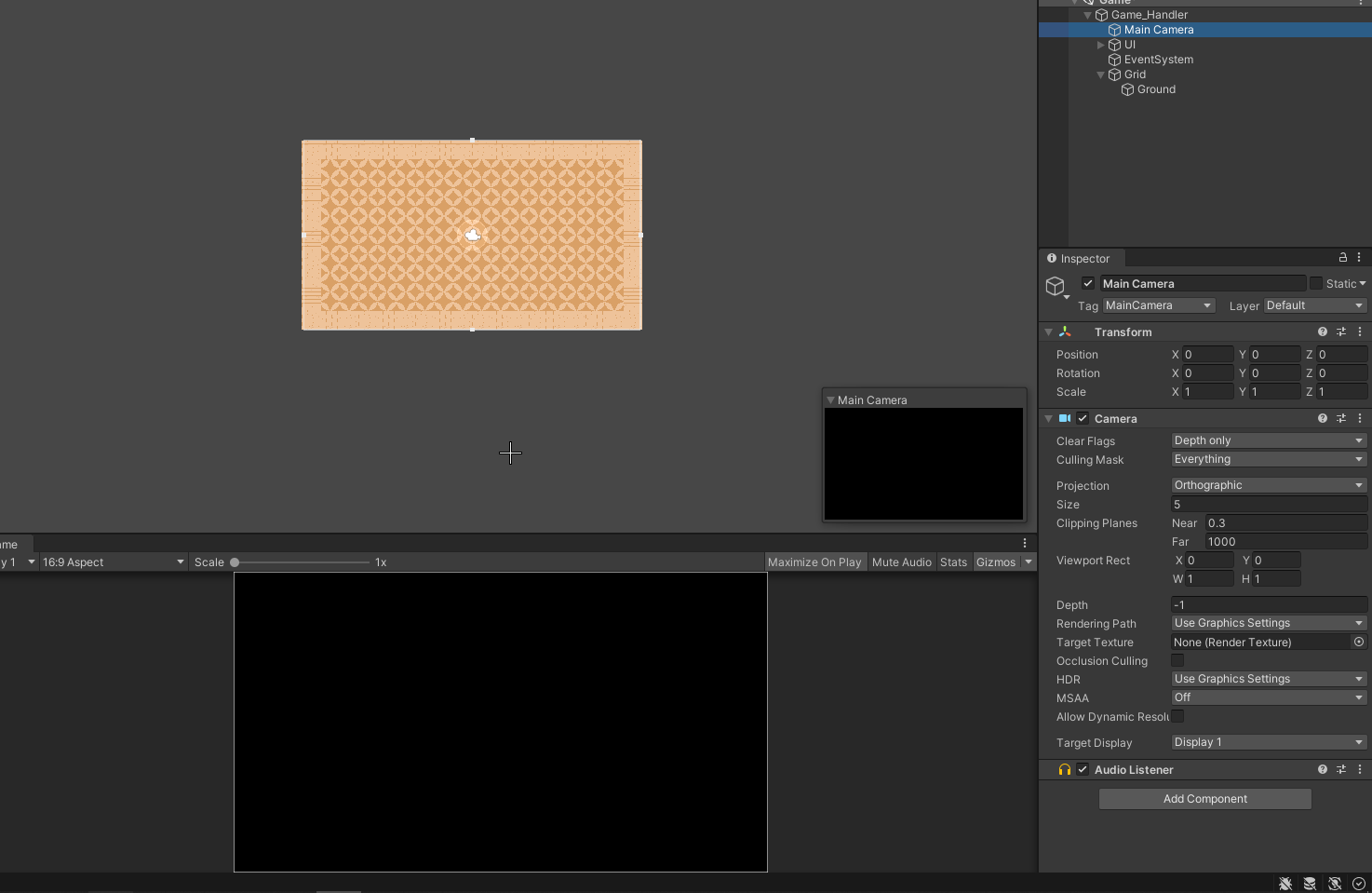
I have these sprites placed in my camera but they don't seem to show, here are my camera properties as well. https://i.imgur.com/AyqHGbu.png
 elfin sandal
move your cam back a few points
solemn latch
still tendon
I have these sprites placed in my camera but they don't seem to show, here are m...
The near clip of your camera is .3, so anything closer than .3 to it will not be rendered.
still tendon
elfin sandal
move your cam back a few points
Not sure what you mean
Is the near clip being on 0 okay?
elfin sandal
it means exactly what i said
solemn latch
still tendon
Is the near clip being on 0 okay?
Just move the transform of your camera back so that the things you want rendered are inside the frustum.
still tendon
solemn latch
Just move the transform of your camera back so that the things you want rendered...
No matter what I move it doesn't seem to change
spiral monolith
how to fix this
 spiral monolith
still tendon
No matter what I move it doesn't seem to change
spiral monolith
still tendon
No matter what I move it doesn't seem to change
try changing the depth
modest cargo
spiral monolith
how to fix this
It looks like a pixel of color is bleedning over from the adjacent tile
Tilemaps should have margins that extend the color a couple of pixels for this reason (though pixel perfect rendering may fix this as well, I don't recall)
Generating a sprite atlas is a quick and automated way to add margins to sprites
 neon spear
The move selection in tile palette doesn't work for me. Anyone knows why?
 elfin sandal
do you have pixel perfect camera?
still tendon
neon matrix
i dont understand the issue


 proud zenith
forgot to turn of compression 🤦♂️
 blissful ocean
proud zenith
forgot to turn of compression 🤦♂️
blissful ocean
proud zenith
forgot to turn of compression 🤦♂️
you can also turn format on RGBA 32 bit
it can fix some artifacts
 dire isle
if i have multiple objects with shadows casters is there a way to not have them affect one another and act like one big caster

 quiet zenith
guys what size should the pixel sprites be? That main camera is playing w me nerves.
 rich iron
This keeps popping up every time I edit a tilemap in a prefab variant. Very annoying. Clicking preferences doesn't bring me to any setting to fix it.

How do I stop it from popping up?
modest cargo
rich iron
This keeps popping up every time I edit a tilemap in a prefab variant. Very anno...
Would this be the setting?

 icy jungle
#↕️┃editor-extensions message can anyone help me with this, I'm really stuck on it
still tendon
Hi, how do I solve following erros it appears due to building an Apk gradle for google. Meanwhile I asked the technical support of unity but they are not permitted to help me through cause im not upgraded.
 still tendon
In most cases you need to change one thing Right to solve several errors
 clear steeple
Why is my sprite appearing stretched? Any help is appreciated

 still tendon
clear steeple
Why is my sprite appearing stretched? Any help is appreciated
still tendon
clear steeple
Why is my sprite appearing stretched? Any help is appreciated
Just use the fix transform right.
clear steeple
still tendon
Just use the fix transform right.
thanks
 solemn latch
icy jungle
why cant this fit around my sprites?
solemn latch
icy jungle
why cant this fit around my sprites?
What do you mean?
rich iron
modest cargo
Would this be the setting?
That's the one!

Found a bug then I guess...
The search bar doesn't search in sub-categories
Or actually it does but not Tile Palette
icy jungle
solemn latch
What do you mean?
i tried tehe auto geometry but the mesh thing won't go sround each diferent body part
solemn latch
icy jungle
i tried tehe auto geometry but the mesh thing won't go sround each diferent body...
So don't use auto geometry.
Or increase the detail settings.
icy jungle
solemn latch
So don't use auto geometry.
I didn't use auto geometry now but by following this tutorial it still should be showing me the weights of each bone on the sprites around it but it doesn't, and I'm really confused
abstract olive
 whole copper
can i get some help on my topdown shooter game
whole copper
can i get some help on my topdown shooter game
#854851968446365696 on how to ask questions here
solemn latch
icy jungle
I didn't use auto geometry now but by following this tutorial it still should be...
I can't speak for 'this tutorial' but you might need to manually add weights. (Or you might just have the visualization of the weights turned off.)
icy jungle
yes i have manually added weights now, thanks, I think it was my error
rich iron
Is there a way to change the way tiles overlap eachother?

Currently tiles that are higher overlap the ones under them, I need it the other way around.
(Using URP)
elfin sandal
i dont see any overlap
 rich iron
the shadow is fake, just part of the sprite
elfin sandal
i don't think it can be fixed then


 proven badge
dont know where i should ask this. theres a thing in my 2D game that points toward the mouse and i want the rotation to be directly on the handle but its a little off. is there any way i can change the rotation point of this object?
elfin sandal
proven badge
dont know where i should ask this. theres a thing in my 2D game that points towa...
look up sprite pivot
it's in the sprite editor
proven badge
ok
 woeful narwhal
hi, im trying to make a pixel game but the main camera doesnt line up with the gridf
solemn latch
woeful narwhal
hi, im trying to make a pixel game but the main camera doesnt line up with the g...
Are you using pixel perfect camera?
woeful narwhal
solemn latch
Are you using pixel perfect camera?
nope, just changed aspect ratio to 2:1 for game window camera
 thorny laurel
how does one make a roof look more like a roof rather than just an extension to a wall lol

how do you add depth
 plain ginkgo
i made a floor (2d art) but im wondering how i can add shaders to it 🤔 cus the option is grey in my editor

 lean estuary
plain ginkgo
i made a floor (2d art) but im wondering how i can add shaders to it 🤔 cus the ...
lean estuary
plain ginkgo
i made a floor (2d art) but im wondering how i can add shaders to it 🤔 cus the ...
When you drop something on the scene it uses default material. If you want to make changes (beyond Material Property Block properties) you need to create your own material, assign it and then you can change the shader, etc.
plain ginkgo
Okay
elfin sandal
thorny laurel
how do you add depth
You dont
 little jay
Hey, we are currently working on a 2D game where we use Tilemaps. Now we got the problem, that in Unity for one of us there are vertical lines but not for the other. In a Build the lines arent there. This was the case after we added a Material on our Tilemaps with Pixel Snap enabled to fix flickering lines. Does anybody have an idea by what the differences are caused?
elfin sandal
do you have pixel perfect?
thorny laurel
elfin sandal
You dont
There's no better way of adding the illusion of depth than exactly what I'm doing?
elfin sandal
not that I know of, by itself
if you have other things in the environment it would help
look at how other games do it
 lament saffron
is there a way to directly turn separate layers of a .psd document into sprites? rather than saving each layer as a separate image or creating a sprite sheet.
icy jungle
see with the head here, is there a way to make those lines straight when it's rotated, the lines are like jagged? i can eplain better if this is confusing
 icy jungle
ik bilinear filter fixes this but it looks way too bad
elfin sandal
use anti aliasing
 upper briar
I think this may be a bit of an open-ended question, but basically I'm stuck with a little dilemma here...
Using 2D stuff / Tilemaps, and I need to create an object that can move within the game (basically a pre-animated vehicle)
I made a test version, where a Tilemap is moving and rotating along a path, and this technically works - if I use a Tilemap I can create the vehicle using modular segments, which works nicely, and for props within the vehicle I can just add any non-grid-aligned sprites as children.
However, this means that I have to have each of these vehicles as a separate Tilemap, which is confusing for editing them, and I cannot use just one Tilemap, as they will all move when I only want a single one to move
Is there any alternative to creating something like this?
P.s. apologies if I haven't explained this well enough, I can't think of any examples from pre-existing games!
I don't think it would be that efficient to make one very large sprite for this, but I suppose that is one alternative
elfin sandal
why would you move the tilemap
upper briar
Ok so vehicle is basically a train (shoulda said it before but idk, trying to keep project under wraps I guess)
-
The base sprites of the train are modular tiles, implying that a Tilemap would be the solution
-
The train needs to move
-
I don't want to hand place modular tiles outside of Tilemap as that would painstakingly fiddly
I am considering making it one sprite but that doesn't lend itself to flexibility in terms of detailing each train separately, or having many carriage variations (because it would mean quite a few large-sized train sprites instead of a few small, repeatable modular sprites)
solemn latch
thorny laurel
how does one make a roof look more like a roof rather than just an extension to ...
foreshortening
solemn latch
little jay
Hey, we are currently working on a 2D game where we use Tilemaps. Now we got the...
One common cause is the game view being zoomed and/or not locked to a specific size
solemn latch
lament saffron
is there a way to directly turn separate layers of a .psd document into sprites?...
the PSD importer package is designed to do exactly that
elfin sandal
upper briar
Ok so vehicle is basically a train (shoulda said it before but idk, trying to ke...
this is really confusing
upper briar
I understand, I don't have a great way to explain it lol
I'll try
solemn latch
upper briar
Ok so vehicle is basically a train (shoulda said it before but idk, trying to ke...
The solution is probably to code your own train system with 'slots' for modular pieces.
elfin sandal
you could also extend the tilemap API
upper briar
it works ok, but it is limited by the tilemaps

i guess maybe just one base sprite for the train carriage could work and everything else detail-wise is separate gameobjects
solemn latch
I suggest figuring out exactly what you do and don't need and THEN deciding how to tackle it
upper briar
Fair point
I'll have a go later at deciding upon a set of rules it needs to obey
 wooden star
crisp pond
I have made a different tile map on Grid there is a water tile map at which I d...
wooden star
crisp pond
I have made a different tile map on Grid there is a water tile map at which I d...
Just wanted to say i really love the art style and colour pallet choice, the slightly muted background works great
 reef stratus
anyone able to help me, im a beginner unity user and am learning how to use sprites for player movement and was wondering how i can make this sprite hd but keep the size

or do you think its not that big of a problem?
still tendon
heppp!!!! Why can't I overlap with the same background of the ground
reef stratus
im trying to make the walk animation play when a horizontal key is pressed but im being bombarded by these error messages and not sure how to solve it

this is the playerscript
 still tendon
reef stratus
im trying to make the walk animation play when a horizontal key is pressed but i...
still tendon
reef stratus
im trying to make the walk animation play when a horizontal key is pressed but i...
Could be wrong but I'm pretty sure either you need stop it playing and than start it again if you changed script while it was playing ( that's one reason I get that error )
Or could just be that you forgot to put it in
I'm new ish myself haven't dabbled in animation yet
 reef stratus
i was able to fix it, i forgot to put a getcomponent code in the awake function
appreciate the help though
 flat agate
still tendon
heppp!!!! Why can't I overlap with the same background of the ground
flat agate
still tendon
heppp!!!! Why can't I overlap with the same background of the ground
Just to be clear - You want the floor(purple) background to show under your chest? So you want the gray floor transparent in your chest sprite?
 latent island
I can't set a sprite texture on this for some reason?
 solemn latch
latent island
I can't set a sprite texture on this for some reason?
solemn latch
latent island
I can't set a sprite texture on this for some reason?
Sprite texture is set by the sprite renderer.
still tendon
Hi, how do I solve following erros it appears due to building an Apk gradle for google. Meanwhile I asked the technical support of unity but they are not permitted to help me through cause im not upgraded.
 still tendon
thorny laurel
how does one make a roof look more like a roof rather than just an extension to ...
still tendon
thorny laurel
how does one make a roof look more like a roof rather than just an extension to ...
maybe make the roof look like it's over the door and windows , because at the moment it looks like the door goes over it , and maybe make the roof a bit wider than the house
still tendon
 jolly narwhal
Show the full errors in <#534632293520769024>
jolly narwhal
Show the full errors in <#534632293520769024>
Thank you i send it there
 feral talon
still tendon
heppp!!!! Why can't I overlap with the same background of the ground
feral talon
still tendon
heppp!!!! Why can't I overlap with the same background of the ground
you need to create a new tilemap that sits on top of the ground tilemap
 short grove
I'm new to unity and I was wondering why the blue box doesn't appear when I run my game
 elfin sandal
Z position probably
short grove
elfin sandal
Z position probably
ty so much!
 fierce flame
guys this is so bad


 vernal ermine
Anyone know why my sprite's colors get messed up when I import it into unity?

Nvm setting the compression to None fixed it

 turbid kayak
How can I make ring in unity 2D that I can set both outside radius and inside radius?
 chrome grove
Using the Pixel Perfect Camrea with Pixel Snap causes stuttering, anyone know why?
reef stratus
guys im a beginner to unity and i have setup so when you press space it jumps but many times it does not register, does anyone know how i can solve this problem
void jumpPlayer()
{
if (Input.GetButtonDown("Jump") && isGrounded == true)
{
isGrounded = false;
myBody.AddForce(new Vector2(0f, jumpForce), ForceMode2D.Impulse);
}
}
that is the script
chrome grove
reef stratus
guys im a beginner to unity and i have setup so when you press space it jumps bu...
Its probably something to do with your isGrounded portion. Also #💻┃code-beginner Might be the better location.
fierce flame
guys
is there any effective way?
i dont wanna do it one by one
 fierce flame
ok thanks i will try it
 silk basin
@fierce flame What kinda game are you working on?
fierce flame
silk basin
<@471662446374027274> What kinda game are you working on?
tarkov rip off
for low end pc
use stalker anomaly animation and they mods
free 👍
silk basin
@fierce flame Did you make the art?
fierce flame
silk basin
<@471662446374027274> Did you make the art?
no
i cant xd
im bad at art
silk basin
fierce flame
no
Me too. but I am learning tho
fierce flame
i dont want to learn creating art xd
i only can draw stick man
fierce flame
guys anyway to select whole place in sprite editor?
or delete empty sprite in sprite editor
i have a lots of empty space xd
 elfin sandal
no
modest cargo
fierce flame
i have a lots of empty space xd
When you slice by cell size or count there's an option for keeping/discarding empty rects
fierce flame
i dont know why
 hot mauve
Hey all, I'm trying to import a package into unity that has a button with a sprite-swap animation.. but whenever I import it to a new scene the sprite-swap doesn't work
it shows as connected and all the assets are there.. but it simply doesn't change when clicked
tried exporting and importing a few times and simply doesn't work
like the sprite-swap gets broken
 old skiff
can someone help me make a 2d sprite
abstract olive
old skiff
can someone help me make a 2d sprite
This discord isn't for recruitment or job postings. You can use the forums for that, #📖┃code-of-conduct
old skiff
oh
solemn latch
fierce flame
i dont want to learn creating art xd
i only can draw stick man
You have plenty of time complaining that you could use learning.
 eternal hamlet
what is Unity like with importing vector art? does it work enough to consider doing?
 tender willow
hi, i am brand new to unity. I'm trying to make an isometric tilemap for like terrain. The issue is the sprite I found only is just a flat square (like you're looking at it orthogonally head-on). How can I transform this sprite when painting my tilemap?
I checked some unity guides but idk they didn't feel very helpful in this respect
solemn latch
eternal hamlet
what is Unity like with importing vector art? does it work enough to consider do...
They have a halfassed svg importer package but you're probably better off converting in your art software.
fierce flame
yay after 2h i deleted all unnecessery thing

 mystic pivot
I am new to unity what is the best program to use for 2D art?
solemn latch
There's no single answer there, really.
 grand turret
How do I get the tile size to match the grid size?
 modest cargo
grand turret
How do I get the tile size to match the grid size?
modest cargo
grand turret
How do I get the tile size to match the grid size?
Use a PPU value in import settings that suits the sprite resolution
grand turret
thanks
still tendon
Guys it is only me who can't use imported PSB sprites in materials?
solemn latch
still tendon
Guys it is only me who can't use imported PSB sprites in materials?
Probably, since I can do it just fine. What exactly is the problem you are having with doing it?
still tendon
And won't show if I search for it
If I export it as PNG it works fine
Like this fence PSB
solemn latch
I'm confused; if the thing you are using it for takes a texture2d, then a psb will use the generated spritesheet, not an individual sprite.
still tendon
solemn latch
I'm confused; if the thing you are using it for takes a texture2d, then a psb w...
Can't I use a sprite generated from the sprite sheet as texture2d?
solemn latch
still tendon
Can't I use a sprite generated from the sprite sheet as texture2d?
No, because it isn't a texture2d.
You can't just dump it into something expecting a texture2d, because it is not a texture2d.
Generally, to use a sprite in a material what you do it to have a sprite renderer component feed a _MainTex into the material.
Which actually feeds it the base spritesheet generated from the psb plus the UV coords of that specific sprite
modest cargo
Indeed, the sprites aren't "generated" from a sprite sheet
Rather the sprite renderer gets data from the sheet to display only specific parts of it
solemn latch
 still tendon
modest cargo
Indeed, the sprites aren't "generated" from a sprite sheet
Rather the sprite ren...
still tendon
modest cargo
Indeed, the sprites aren't "generated" from a sprite sheet
Rather the sprite ren...
Oh i see, I thought unity chopped the PNGs and made separate images
solemn latch
You CAN drag the sprite sheet directly into your material and change the tiling/offset but that is a pain.
You could also write a script to perform the same function as the sprite renderer(or just use a sprite renderer)
Sprite renderers aren't perfect(they don't generate correct tangents, etc) but they are still 3d objects that can have materials applied.
spiral monolith
if i wanted to make something disappear when its behind something in 2d top down view and if i had a tree would i make the pivot higher or lower if i wanted to make the character disappear closer to the trunk?
solemn latch
Compare the pivots of the two objects.
solemn latch
Do you have axis sorting enabled?
spiral monolith
ye i just had my sorting thing to center instead of pivot
i prob didnt save my project last night
 lament spire
So I found this 8 colors palette that I like, but i'm really struggling to make my game work with only these colors, so I was wondering if there was a way to extrapolate colors to make it like a 12 colors palette that still fits together
https://lospec.com/palette-list/dead-weight-8 this palette btw

Download this palette for free as a PNG, PAl, ASE, TXT, GPL or HEX file.
solemn latch
lament spire
So I found this 8 colors palette that I like, but i'm really struggling to make ...
You can just... add whatever colors you want?
lament spire
solemn latch
You can just... add whatever colors you want?
but I know nothing of color theory, and I know its based on some mathematical basis
modest cargo
lament spire
but I know nothing of color theory, and I know its based on some mathematical ba...
Almost all the palettes you find are just picked based on what looks nice
https://color.adobe.com/ There's this tool which can help you find related colors and interesting gradients
But don't worry about it too much, colors are not an exact science
lament spire
From experience I can't make something look good without a palette, i'll try that adobe stuff
 ember oar
there is any other way to open TilePalette window for micro game tutorials?
there is no 2D option under (MENU) windows ->
 spiral monolith
how would i make it go behind the hand just the hand
 spiral monolith
why is it when i delete something in materials everything goes pink
abstract olive
If you're deleting materials which are being used on something, it's going to turn pink.
spiral monolith
i wasnt using sky now everythings pink how do i fix it
 short crypt
alr, so I have a PSB file I imported into Unity, and for some reason this coloring became distorted and now looks like this. Odd thing is, if I open this exact file back up in my art program, there is no discoloration to it at all. Any ideas what my be wrong?
 solemn latch
spiral monolith
how would i make it go behind the hand just the hand
solemn latch
spiral monolith
how would i make it go behind the hand just the hand
You'll need to provide more info, that just looks like Mondrian had a red and brown period to me.
solemn latch
short crypt
alr, so I have a PSB file I imported into Unity, and for some reason this colori...
Your compression settings and/or maximum scale for your build platform
short crypt
solemn latch
Your compression settings and/or maximum scale for your build platform
So a fix would be?
 wind oar
Hi, I am trying to get shadows onto my pixel art and I am having a couple issues. When casting the shadows there is this very thin outline (circled in red) around all of my pixels under the shadow. I have messed with the import settings on the sprite to see if there were any issues that could fix it, but nothing that I could see. Is there any way to fix this?
 short crypt
solemn latch
Your compression settings and/or maximum scale for your build platform
short crypt
solemn latch
Your compression settings and/or maximum scale for your build platform
Where can I change those settings?
solemn latch
short crypt
Where can I change those settings?
Image import inspector and project quality settings
solemn latch
wind oar
Hi, I am trying to get shadows onto my pixel art and I am having a couple issues...
These are using urp 2d lights, or...?
short crypt
solemn latch
Image import inspector and project quality settings
Thanks!
short crypt
solemn latch
Image import inspector and project quality settings
So, I managed to fix it by going into the image import inspector from Automatic to RGBA 32 bit. Do you know of any way to set this to the default so I don’t have to manually change the compression level every time I import a new texture?
short crypt
Thanks
wind oar
solemn latch
These are using urp 2d lights, or...?
Yes, they are 2d urp lights. I am using a light to simulate sunlight.