
#📲┃ui-ux
1 messages · Page 67 of 1
 green spear
 frigid cobalt
Yeah, you will have to scroll out quite a bit to see the canvas and it's components.
Or select your canvas and press F in the Edit view
green spear
whenever i scroll out a little bit its way to far out where i cant see anything

any further its invisible
nevermind
i fixed it
but the image thing
is still messed up
frigid cobalt
I can't see the button on your canvas, so I can't tell why the images aren't working
You should see your components in the white rectangle (Canvas) like this:

Your Canvas is using Screenspace, not Worldspace I presume?
 frigid cobalt
Whats the size of your button? It looks very small.
 frigid cobalt
Ok, that looks good. If you select one of your images and then check the Image component, click on the Colour picker and check that the alpha isn't set to 0. It should be 255 to make is visible.
It might not be this, but it's worth a check.
green spear
its set to 255
frigid cobalt
Do have another image you can experiement with, one without an alpha component. Just to see if it's a problem with the Sprite, rather than the UI setup.

 frigid cobalt
Ah, never used the 2D object. Use UI > Image instead. That is what always works for me.
frigid cobalt
Just did some googling and it looks like the 2D sprite uses a different rendering order to UI components and 2D sprites are rendered behind the UI. So that'll be why you couldn't see them 🙂
green spear
ohh ok
 low pike
green spear
ohh ok
low pike
green spear
ohh ok
Use the UI tool when working with UI (press T to swap to it, W to go back to the transform tool).
Don't drag and drop sprites from the Project Window -> hierarchy for UI. Doing this drag/drop creates a SpriteRenderer, which is for game stuff, not UI.
 golden anchor


Hey there,
I'm having a little problem with UI stuff moving around weirdly in split screen. When split screen is activated (using new input system), the reticule moves down for some reason. If I swap their anchor points then the text moves up instead.
When they are not made children of the Gameplay_UI object they don't exhibit this behaviour (but I need them as children so I can turn them off together when players pause ect). I do have the canvas set to Scale With Screen Size.
Any ideas?
 hushed relic
Guys,
whenever I disable my UI using SetActive(false);
it kinda disabled my entire screen and I am unable to press other UI elements
any ideas of why ?
hushed relic
hushed relic
Guys,
whenever I disable my UI using SetActive(false);
it kinda disabled my ent...
I was disabling a child object ( event manager ) by mistake too
so detaching them fixed it
 north tendon
how can I make text grow from only one side if I add/remove numbers?


I want it to be constrained to the left, I already added to it a content size fitter so the "Online" will move if it grows
but it grows from the middle rather than the left, and changing anchor doesn't help
 floral crow
pivot?
 obsidian geode
i have a prefab object and want to display its health on top of it
how do i do this?
im lost haha
i tried adding a textmesh to the object
couldnt figure it out
okay so ive added a textmeshpro - text
to my prefab
but it looks like its behind the prefab
i set the Z axis to -10 but it still looks behind
also, the text isnt showing on the object in-game
 toxic pasture
guys where can i set interactable button?

 ionic beacon
It's the first option in the component
 native aspen
Hello! I am having some difficulties with tracking objects in the 3d environment. That "Armory" icon should not be on the ground once the player looks away, whats causing that? thx!
 mortal robin
native aspen
Hello! I am having some difficulties with tracking objects in the 3d environment...
mortal robin
native aspen
Hello! I am having some difficulties with tracking objects in the 3d environment...
no idea, you haven't explained how that icon works
native aspen
mortal robin
no idea, you haven't explained how that icon works
Right, so there is a object on top of the armory, and the UI object should be tracking it. It works fine, until we look away, because thats when the UI object appears on the ground.
Thats the code

What do you think?
mortal robin
native aspen
Thats the code
well you're ignoring the z position it gave you
native aspen
Ohhhh right
mortal robin
I'd guess it's probably negative or somethign when you turn around
you should probably hide the thing if z is negative
native aspen
Yessss correct
mortal robin
so add this:
iconSprite.SetActive(screenPos.z >= 0);```nice, lemme try that!
native aspen
mortal robin
so add this:
```cs
iconSprite.SetActive(screenPos.z >= 0);```
It worked. Thanks a ton!
 empty rune
hello! i am wondering why is my canvas not scaling correctly,
when it should be looking like this

and when i export it
it looks like this

here is my canvas scaler

 surreal oxide
Hi all,
In my game players can create actionbars (like an MMO) and can choose the amount of buttons on each bar. Each bar on the canvas contains as many as 20 buttons & each button contains several UI elements (images, text, etc).
When creating a new bar, my FPS drops approx 10-20 per bar created.
i've tried separating the bars into their own canvas, removing the logic script controlling the bars, removing the grid layout group of each bar, etc, nothing seems to stop the fps tanking when creating a bar.
Is it just not possible to have this many UI elements on screen at once or am i missing something?
The profiler suggests this is caused by UGUI.Rendering.RenderOverlays & Canvas.RenderOverlays
 sterile wedge
empty rune
here is my canvas scaler
sterile wedge
empty rune
here is my canvas scaler
Set the correct reference resolution. Use what you were using when making the game
 crisp wren
I need a second opinion, how is this UI looking so far? Any tips? Not the best at visual design.

 violet sandal
crisp wren
I need a second opinion, how is this UI looking so far? Any tips? Not the best a...
violet sandal
crisp wren
I need a second opinion, how is this UI looking so far? Any tips? Not the best a...
Try to use as few font sizes as possible. And your white buttons have different heights, what makes it look messy
crisp wren
Ok, fixed the button heights
 broken sedge
guys how can i apply material on ui , i never used mat on ui, and i also don't know why its black

idk why its black
violet sandal
broken sedge
guys how can i apply material on ui , i never used mat on ui, and i also don't k...
Where? How should it look like?
broken sedge
do i have to change the shader type

its should look like this , like bloom/emission effect

okay figured out , ui shader don't have emission , and i was using wrong shader type thats why it was black
 jovial yacht
I'm trying to use a font on UI with TextMeshPro but I got some white squares on it.
I found only that the key could be the ratio between the padding and the sampling size but I can't figure out how to solve that.
 frigid cobalt
jovial yacht
I'm trying to use a font on UI with TextMeshPro but I got some white squares on ...
frigid cobalt
jovial yacht
I'm trying to use a font on UI with TextMeshPro but I got some white squares on ...
This happened to me when I used the Textmesh Pro Font Creator tool and set the resolution to anything but 512. If I generate a font with 1024x1024 atlas resolution, I would always get those boxes around the font. If I set the resolution to 512x512, those boxes go away.
violet sandal
broken sedge
do i have to change the shader type
You should insert the image in the „source image“ tab there. Normally you dont do it with a material.
violet sandal
jovial yacht
I'm trying to use a font on UI with TextMeshPro but I got some white squares on ...
It’s a setting in the font you generated with the TMP font creator. I am not sure which, because im@ it on my computer right now, but you can change some values there to fix it.
broken sedge
violet sandal
You should insert the image in the „source image“ tab there. Normally you dont d...
but emission is possible in built in renderer
toxic pasture
i dont know how ui button work
i has event system
raycast target enabled then i still cant click button
yesterday its still work fine af but today its a sheat
sterile wedge
I don't see that it's a button
Doesn't matter if the parent is raycast target
You didn't show the inspector of the actual slot
mortal robin
toxic pasture
your video clearly shows your input module is wrong
looks like you switched to the new input system, but didn't change your input module

you just need to press this button
 limpid shale
what is the best way to deal with toggles and their firing order?
I have a group of toggles that control what is being displayed on a menu
toxic pasture
mortal robin
your video clearly shows your input module is wrong
Im using both input system
sterile wedge
toxic pasture
Im using both input system
I don't think you can
frigid cobalt
sterile wedge
I don't think you can
Yep, you can. It's an option in the player settings.
sterile wedge
frigid cobalt
Yep, you can. It's an option in the player settings.
To use both at once?
limpid shale
is there a way to check if a toggle is in a toggle group?
 thorny tartan
https://gyazo.com/2ca2251f876c0423dd39601725c937f9
I'm running into this really strange error where both buttons function, but the one on the left steals the highlight/color info
 sterile wedge
limpid shale
is there a way to check if a toggle is in a toggle group?
sterile wedge
limpid shale
is there a way to check if a toggle is in a toggle group?
Maybe check if the toggleGroup property is null?
 clear geyser
Question: Trying to add a point counter to my screen. I've added a UI, TextMeshPro to my heirachy and when I click TextMeshPro and set the anchor (Top Left) it doesn't move. I have rect tool selected while I am doing this. What am I doing wrong?
low pike
clear geyser
Question: Trying to add a point counter to my screen. I've added a UI, TextMeshP...
This doesn't move it, it just sets the anchors to top left.
You'll notice the position values change when you change the anchors
clear geyser
low pike
This doesn't move it, it just sets the anchors to top left.
So I accidentally solved my problem because I noticed it says Alt: Also set position. So what would be the use of setting the anchors? I don't fully understand that bit.
low pike
the anchor defaults to the center of the canvas, this is not good for elements you want around the edges. 1000 pixels from the center is 1000 pixels no matter how big the canvas is, a resolution change will hide UI elements off screen.
Set the anchor to top left, and 100 pixels is always 100 pixels from top left, regardless of screen size.. it will move when the resolution changes.
clear geyser
AH! Thanks so much, so Anchor top left and setting it 0,0 would mean its always there no matter the size of the screen
 river pumice
Hey guys, IDK if this is the right place but I have a problem with GUI Images when the canvas is set to "Screen space - Camera". The image gets a little darker than it is. Imagine a white jpg which becomes light gray. This does not happen when I set the camera to "Screen space - Overlay" - than it's white as I wish. I also tried an own UnlitMaterial for the image - same result 😦
Looks like "Screen space - Camera" changes the color range of the image. Super strange. Maybe it's a problem of my HDRP-Setup?
mortal robin
river pumice
Hey guys, IDK if this is the right place but I have a problem with GUI Images wh...
prorbably a problem of postprocessing
fog or something
low pike
@elfin rain
#💻┃unity-talk message
Your anchors aren't setup correctly to change with screen size
 trail matrix
How do I add a material to a UI element while still maintaining alpha?


With the material; without the material
mortal robin
trail matrix
How do I add a material to a UI element while still maintaining alpha?
your shader needs to be made for UI
 cunning niche
Layout update does not happen in awake/start. I tried using LayoutRebuilder.ForceRebuildLayoutImmediate but couldnt make it work. Is there any other solution to this?
trail matrix
mortal robin
your shader needs to be made for UI
Thanks, I try to maybe tweak the shader Ive got
low pike
cunning niche
Layout update does not happen in awake/start. I tried using LayoutRebuilder.Forc...
make the forcerebuild work
cunning niche
I need to call it for each layoutgroup right?
public static void RefreshLayoutGroupsImmediateAndRecursive(GameObject root)
  {
    var componentsInChildren = root.GetComponentsInChildren<LayoutGroup>(true);
    foreach (var layoutGroup in componentsInChildren)
    {
      LayoutRebuilder.ForceRebuildLayoutImmediate(layoutGroup.GetComponent<RectTransform>());
    }

    var parent = root.GetComponent<LayoutGroup>();
    LayoutRebuilder.ForceRebuildLayoutImmediate(parent.GetComponent<RectTransform>());
}```any idea why this doesnt work?
low pike
This is all I do
private void RebuildLayouts()
{
  if (gameObject.activeInHierarchy == false) { return; }
  rects.ForEach(rect =>
  {
    LayoutRebuilder.ForceRebuildLayoutImmediate(rect);
  });
}```what is rects?
you just get all RectTransform?
low pike
rects is a list of RectTransform
it's not all of them.. it's all the ones I want to rebuild
cunning niche
public static void RefreshLayoutGroupsImmediateAndRecursivee(GameObject root)
  {
    RectTransform[] componentsInChildren = root.GetComponentsInChildren<RectTransform>();

    for (int i = componentsInChildren.Length - 1; i >= 0; i--)
    {
      LayoutRebuilder.ForceRebuildLayoutImmediate(componentsInChildren[i]);
    }

    // foreach (var layoutGroup in componentsInChildren)
    // {
    //   LayoutRebuilder.ForceRebuildLayoutImmediate(layoutGroup);
    //   Debug.Log("layoutGroup: " + layoutGroup.name);
    // }
}```I tried calling it for all but still doesnt work e.e
btw I am calling this from awake/start
is that a problem?
trail matrix
mortal robin
your shader needs to be made for UI
Is there a way I can alter my shader so that it discards anything below a certain alpha?
I've looked at some documentation for it but I don't think I'm using it right.
oh wait theres a shader channel lol
 merry scarab
Hello, is there any way to add guides (like in photoshop) to the Unity UI system? And if so can you do it through editor code?
 rapid ferry
Hi. I am adding Entries to the Scroll View but Unity keeps settings the z-value to -994.0981. Does someone know why it sets the z value so weirdly and how to fix it?

This is my code for instantiating these Entries```cs
GameObject createdItem = Instantiate(lobbyDataItemPrefab);
createdItem.GetComponent<LobbyDataEntry>().lobbyID = (CSteamID)lobbyIDs[i].m_SteamID;
createdItem.GetComponent<LobbyDataEntry>().lobbyName =
SteamMatchmaking.GetLobbyData((CSteamID)lobbyIDs[i].m_SteamID, "name");
createdItem.GetComponent<LobbyDataEntry>().SetLobbyData();
createdItem.transform.SetParent(lobbyListContent.transform);
createdItem.transform.localScale = Vector3.one;
listOfLobbies.Add(createdItem);
And this is the Entry Prefab's Transform

And this is the Entry Prefab's Image Rect Transform
 mortal robin
rapid ferry
This is my code for instantiating these Entries```cs
GameObject createdItem = In...
mortal robin
rapid ferry
This is my code for instantiating these Entries```cs
GameObject createdItem = In...
the parent or one of the parents along the line has a position of + 994 or something like that
ytou can always just do this instead of setting the parent after instantiating:
GameObject createdItem = Instantiate(lobbyDataItemPrefab, lobbyListContent.transform);
And while we're at it, you could save yourself a lot of unecessary calls to GetComponent<LobbyDataEntry>() if you change the type of lobbyDataItemPrefab from GameObject to LobbyDataEntry
e.g.
public LobbyDataEntry lobbyDataItemPrefab;

// then later...
LobbyDataEntry createdItem = Instantiate(lobbyDataItemPrefab);```then you won't need any GetComponent calls
rapid ferry
Okay thanks for the help! I will now try to fix those errors ^^
rapid ferry
mortal robin
the parent or one of the parents along the line has a position of + 994 or somet...
Thank you so much! Yeah I maybe should have looked into my old projects, because I used the Instantiate method there like that too. Completely forgot this method was polymorphis (I don't exactly know what the correct formulation is)
 raw river
I was wondering if someone could help me with a Canvas scaling issue? My issue is that the canvas that I have named "Canvas" in the scene, is extending its width past 1920 for some reason. I can't scale the canvas manually and I have set its canvas scaler to the proper specs that I would like from what I can tell. The red line that I've drawn in the photo marks the difference from where the canvas is, and where the actual screen reference is (the canvas being the outer most box)
 frigid cobalt
raw river
I was wondering if someone could help me with a Canvas scaling issue? My issue i...
frigid cobalt
raw river
I was wondering if someone could help me with a Canvas scaling issue? My issue i...
Click on the Game tab and see if you have the Display set to anything other than 1920x1280.
raw river
frigid cobalt
Click on the Game tab and see if you have the Display set to anything other than...
here, correct?

that seemed to do the trick for the building of the game, although I'm not entirely sure how/why? thank you again @frigid cobalt. I greatly appreciate the help!
frigid cobalt
raw river
that seemed to do the trick for the building of the game, although I'm not entir...
Also, if you adjust the slider for 'Match Screen Height or Width' to be just Width, that will change that outside-the-limits issue.
raw river
frigid cobalt
Also, if you adjust the slider for 'Match Screen Height or Width' to be just Wid...
appreciate it! I guess I was wrong in my assumption that the display settings on a unity scene would be separate from the canvas scaling to my build of the game
 undone lichen
If I wanted a thin frame for my game (in the overlay, something like a picture frame on which to put my buttons) are there any good assets in the store for this? I can only find square frames...
sterile wedge
What are you looking for? Do you have an example @undone lichen
undone lichen
well I was gonna say something like this but rectangle
https://assetstore.unity.com/packages/2d/gui/icons/stylized-avatar-borders-176332#reviews
but on second thought I can just put this square frame around my game pieces in the middle and just have buttons outside of it. should be fine.

Elevate your workflow with the Stylized Avatar Borders asset from Maya Pantic. Browse more 2D GUI on the Unity Asset Store.
mortal robin
undone lichen
well I was gonna say something like this but rectangle
https://assetstore.unity...
you're supposed to 9-slice the sprite so the shape doesn't matter
it can work for any rectangle
undone lichen
well let me get on googlin 9 slicing
thanks @mortal robin
sounds like an idiot cutting a pizza


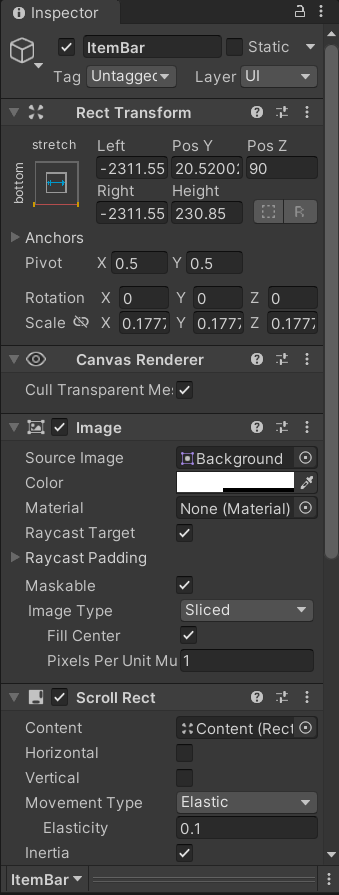 sterile wedge
Keep the scale at 1. set the left and right to 0
 half thorn
THANK YOU
rapid ferry
I'm going to assume this is the channel to ask this. So I'm having a bit of an issue with TextMeshPro at the moment. I basically made a font asset for my game using these settings, and I used the exact same settings for a different project and it worked fine. But for some reason, in this project, it ended up looking like uhh... this. I don't get how this could happen, since I used the EXACT SAME FONT and the EXACT SAME TMP SETTINGS for this as the other one. (Pic 1 is the settings, pic 2 is this text.)

 frigid cobalt
rapid ferry
I'm going to assume this is the channel to ask this. So I'm having a bit of an i...
frigid cobalt
rapid ferry
I'm going to assume this is the channel to ask this. So I'm having a bit of an i...
Not sure what it could be, but here are the settings I use to create fonts. Changing anything here will create crap fonts, so maybe try these.
 rapid ferry
Just tried, didn't have the look I wanted (the pixely style in the photo), plus the whole thing I was trying to figure out was why the settings (which worked for a previous project) DON'T work for this one, and how I can get them to.
I replaced the TMP assets in the new project with the one that worked and it fixed it.
rapid ferry
Anyone got any good ideas for a time limit countdown sort of thing for the UI? Id like not to have any numbers, what I have as a placeholder is based on Pikmins day timer but its a bit too large for what Id like

 low pike
rapid ferry
figured it out nvm
low pike
rapid ferry
figured it out nvm
Was it a sprite renderer?
You can’t drag n drop sprites from the project window -> hierarchy to use them in UI
rapid ferry
i got it lmao
low pike
What’s funny? 🤔
I know you got it, I replied to your msg saying you figured it out 😉
It helps to say what the problem/ fix was, for others..
rapid ferry
i put the sprite directily into the canvas, i just put a raw image into the canvas then put the sprite into the canvas to fix
 modest rover
@low pike
thanks can i ask for this part, if we set the parent object as a canvas, the children not necessarily will have a canvas component? we need to the canvas component ourselves?
if the children arent canvases, do u mean if we change the child, the parent wouldn't update?
what do u mean by the parent would update, if the child gets updated?
do u mean like if the child shifts position, the parent would be shifted too
Adding additional canvases as children is an optimisation. if you change L from that tree, EVERYTHING above it updates until the first canvas is hit. Put a canvas on 3.txt and 3 or 4 things get updated.. don't and you update 12
i dont rly get the update part
low pike
Watch this entire video, but I've linked directly to the relevant part about UI
https://www.youtube.com/watch?v=_wxitgdx-UI
Mark and Ian from Unity's Enterprise Support team run through performance best practices drawn from real-world problems. Learn the underlying architecture of Unity's core systems to better understand how to push Unity to its absolute limits.
For more information on Unite Europe and future Unite events visit this page. https://unite.unity.com/
...
half thorn
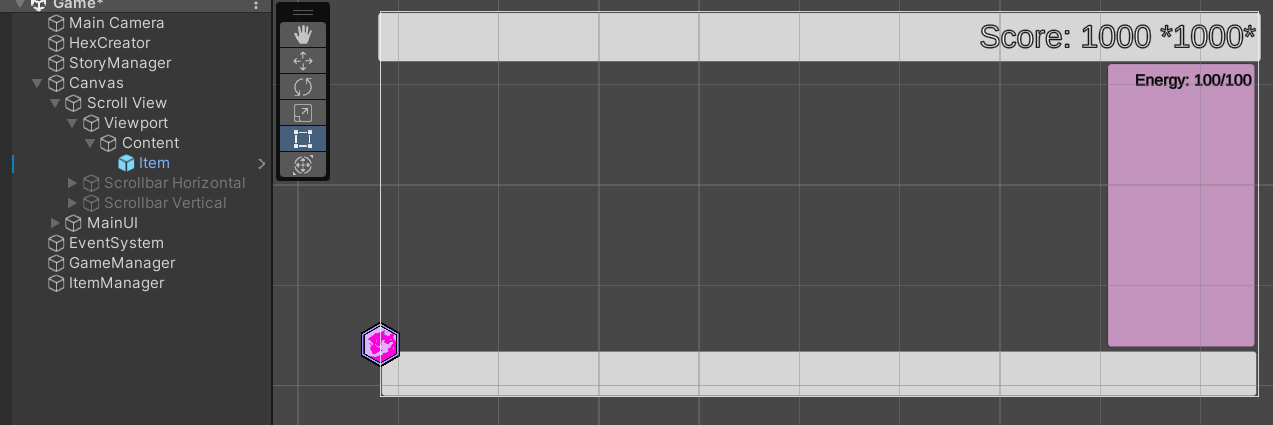
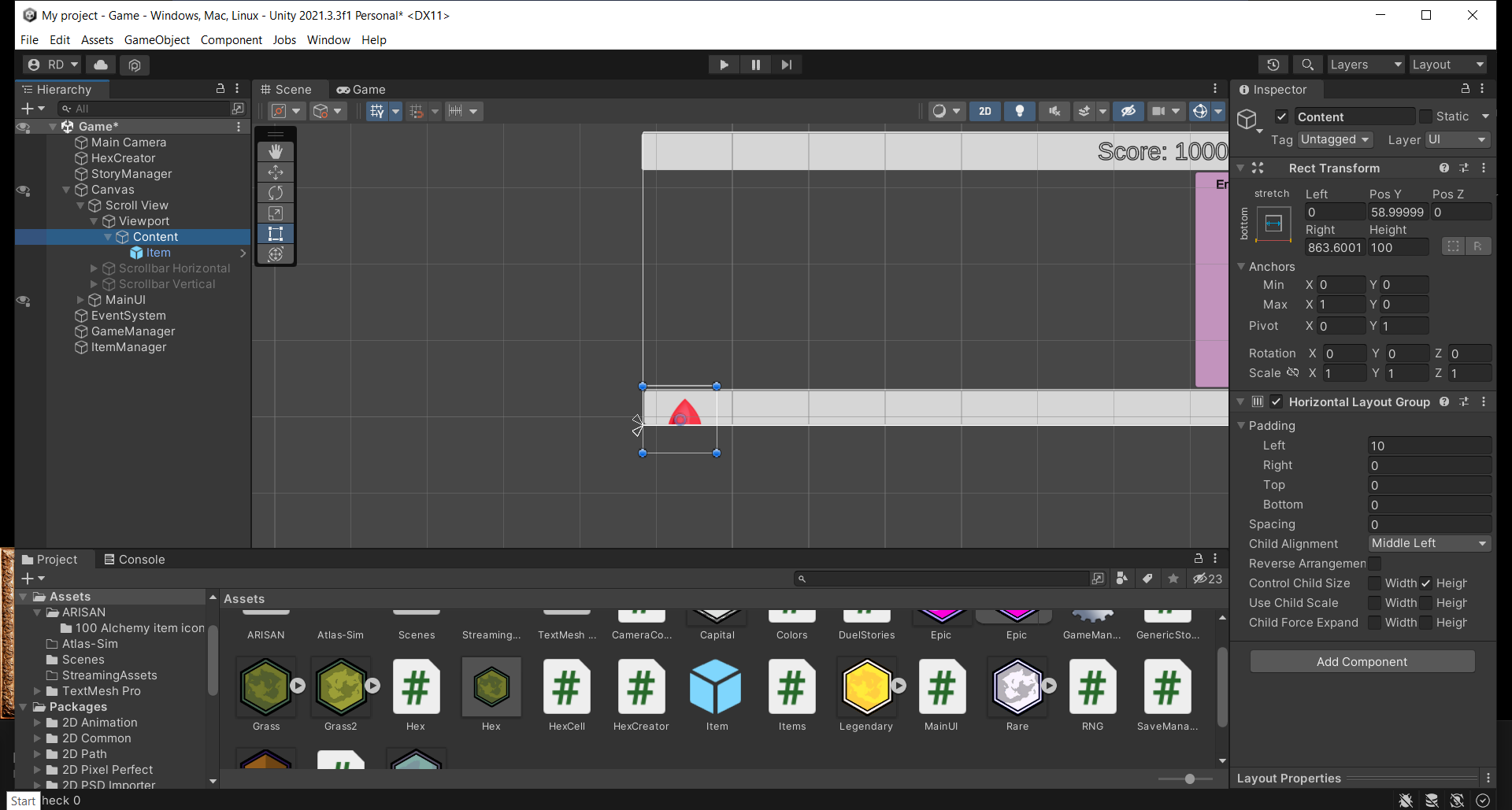
i want it so that the purple hex is centered left on the bottom bar instead of hanging out at the corner
the bottom bar is the scroll view. i tried using content size fitter and horizontal layout group but it still stays there and doesnt work as i want it to
 low pike
The pivot of the image is set to it's center.
The anchor point of the image is set to top left.
Change these on the image, not the scroll
half thorn
the prefab?
oh wait
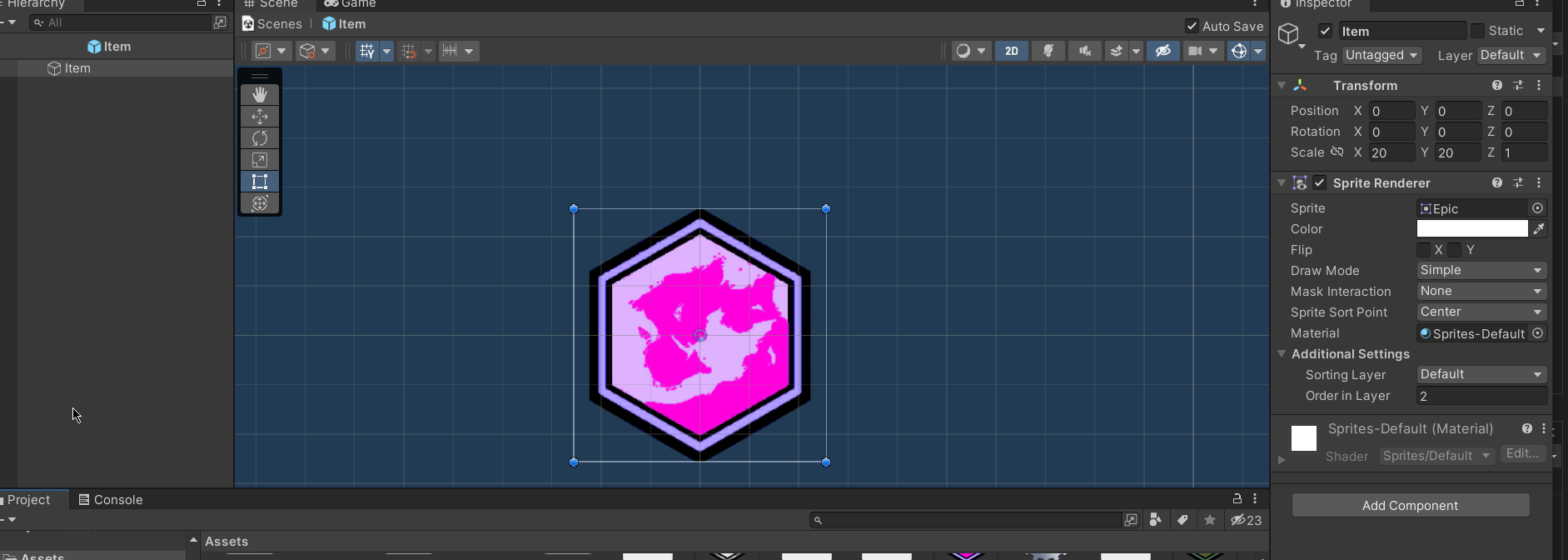
where do i edit the pivot and anchor point?
sorry if its obvious
low pike
You don't want to use a sprite renderer for something that's on the UI
 azure flame
oof, I've missed where we are, yea, UI components have own achors
half thorn
ok so i found out how to edit the pivot and anchor but im still not sure what i should set the values to. ive been mixing and matching
this is what its like rn and it doesnt seem to want to change

 rare gulch
How can I add some blur to my image inside a canvas?
low pike
half thorn
ok so i found out how to edit the pivot and anchor but im still not sure what i ...
I think you might be making lots of mistakes here.
First - the bottom bar, why is it a scrollview?
half thorn
i just assumed thats what it needed to be
low pike
Are you going to scroll that section?
 low pike
half thorn
i just assumed thats what it needed to be
low pike
half thorn
i just assumed thats what it needed to be
right, so that's the answer .. not this ^
How did you create the scroll view?
 low pike
good
half thorn
i tried doing it by scratch too going off of what youtube videos tell me and it still didnt work
 low pike
and then on Content add a Horizontal Layout
 low pike
ok, so now the only problem is they're off the screen
so, you need to make them smaller (more than one way..)
Or make the bar taller
half thorn
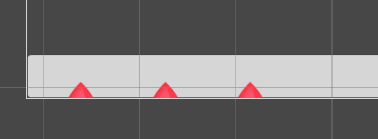 low pike
If you're going to make them smaller, click the Control Child Size

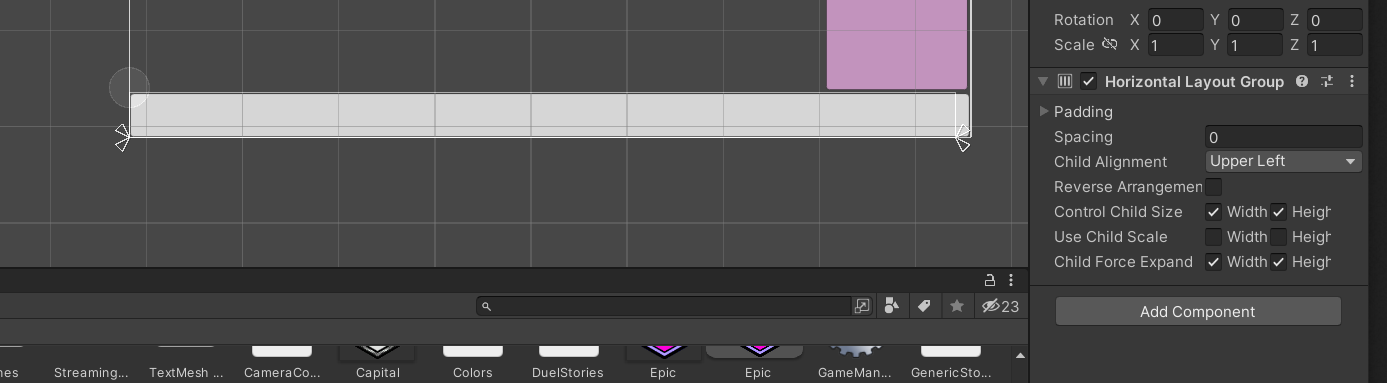 low pike
right, so your image has an empty parent
- empty gameobject
-- image
so the gameobject has nothing to resize, and sizes to 0
 low pike
No, I did not say to DO that
What I was saying is that is how you have it setup
Look at your item
where's the image?
low pike
that doesn't explain clearly what I'm asking
and that doesn't show where it is because you cut out the hierarchy 😄
half thorn

 storm nexus
Guys how do I make my normal font file work for a TextMeshPro ?
half thorn
yeah sorry i realized
low pike
ok, so it's not set how I thought. However, keep ALL UI elements with a scale of 1,1,1. Use the height/ width to resize
low pike
storm nexus
Guys how do I make my normal font file work for a TextMeshPro ?
You have to create a font asset, docs are linked in the pinned msgs
storm nexus
low pike
You have to create a font asset, docs are linked in the pinned msgs
Isn't there an easier way like grabbing it there ?
 storm nexus
low pike
You have to create a font asset, docs are linked in the pinned msgs
storm nexus
low pike
You have to create a font asset, docs are linked in the pinned msgs
which exact message please ?
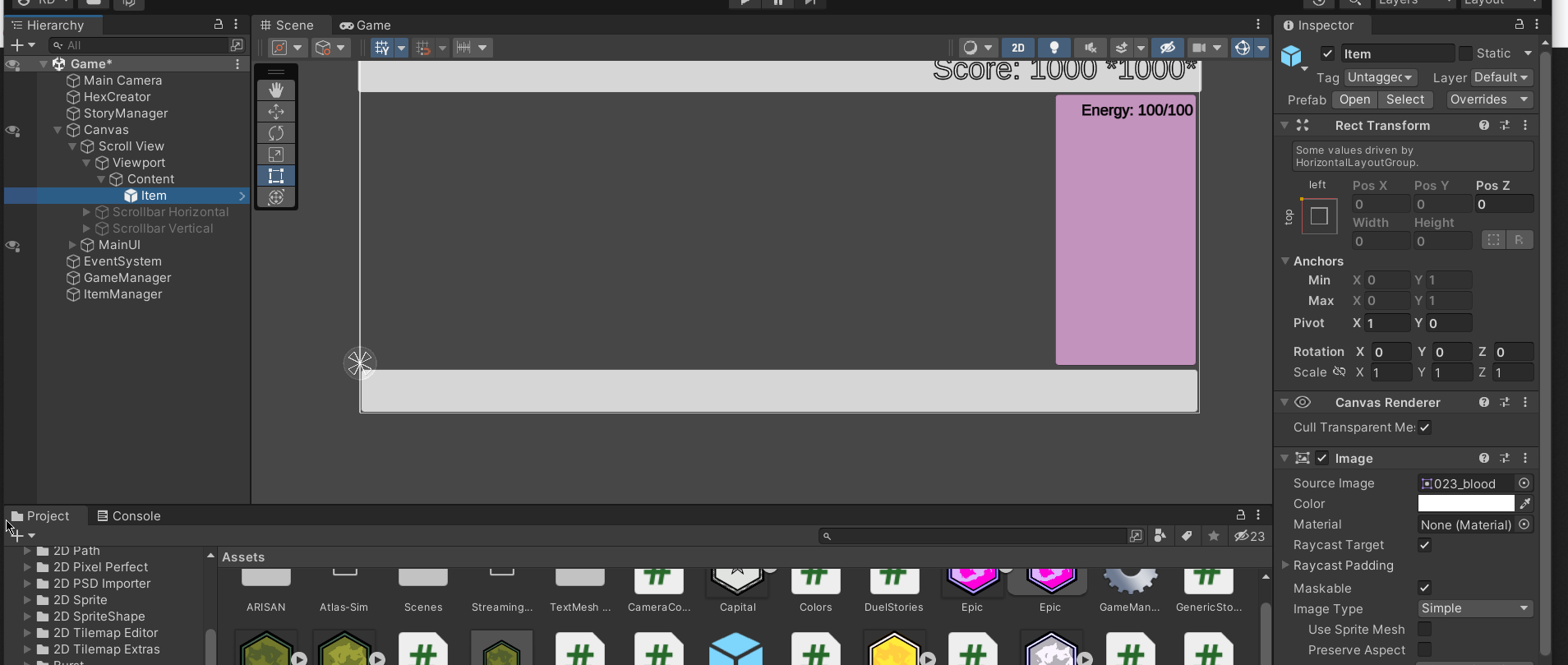 low pike
Yeah, the scale wasn't going to fix that.. but it was a change that needed doing
half thorn
ah
low pike
send a screenshot with the content object selected, full screen
half thorn
 low pike
your height of this is 0

 low pike
Set left and right to 0 too. Atm it is a thin line
 low pike
You want a content size fitter on this object too. with the width set to 'prefered'
untick width on the horizontal group control child size
half thorn
 low pike
untick child froce expand

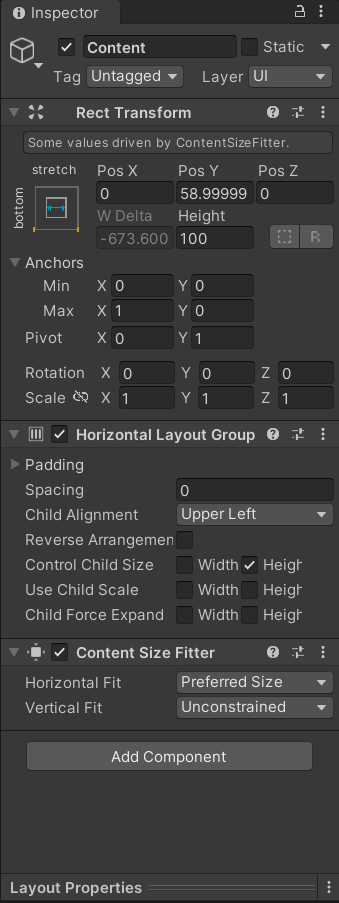 low pike

 low pike
put the contentsize fitter back on
I just didn't have it on mine because it's not needed for the image size
 low pike
The content size fitter resizes the RectTransform that it is on. You want the Content rect to change with the size of the child so it scrolls correctly
half thorn
ooooh
storm nexus
How do I make the text follow the pressed image down ?

 low pike
Have it as a child of the object that moves
but you're not moving it, looks like you're swapping between sprites
oh, maybe you're swapping sprites and moving?
storm nexus
low pike
but you're not moving it, looks like you're swapping between sprites
I am swaping yes
storm nexus
low pike
but you're not moving it, looks like you're swapping between sprites
this is what I am doing

"Play" is the text
how do I make it go up and down
low pike
right, so you'll have to write a class to move the text a bit
storm nexus
low pike
right, so you'll have to write a class to move the text a bit
well maybe I should let it as is then lol
low pike
or learn a new skill (☞゚ヮ゚)☞
half thorn

yeah still not working
i thought maybe making the scroll view freakishly big might help but

also tried playing around with the content settings and still nothing
and changing the pivot on the original image isnt doing anything
low pike
Your layout is set to this, but the image pivot is top left. You need to change the pivot to the left

change to 0.5
 low pike
half thorn
and changing the pivot on the original image isnt doing anything
low pike
half thorn
and changing the pivot on the original image isnt doing anything
the pivot of the original image (the file..) won't affect UI at all. The pivot is on the RectTransform
storm nexus
is it better to use "Quit" or "Exit" as a button name for closing the game ?
half thorn
https://i.imgur.com/aFsgbqs.png i have a simple tooltip system set up but it only works when the object being tooltipped is not in front of any other gameobjects (the hexes)
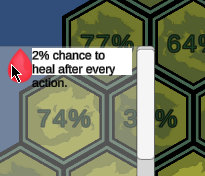

i tried googling but couldnt find the issue
 low pike
UI doesn't need colliders
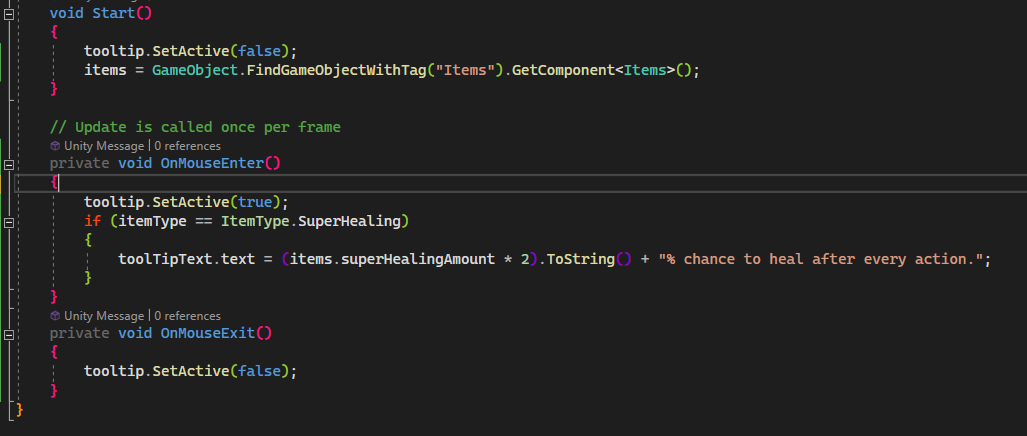 low pike
https://docs.unity3d.com/2018.2/Documentation/ScriptReference/EventSystems.IPointerEnterHandler.html

 chilly oar
why cant i change the size of this canvas?
 low pike
because it's screen space - overlay
chilly oar
oh yea forgot to change that thx
 misty silo
How expensive is it making Animations for UI and is it even something that would do something towards the performance for example a hover over animation etc?
- You are allowed to ping me, so please do that if you are answering my question :)
https://www.youtube.com/watch?v=Ll3yujn9GVQ got it from this video about making Animations on UI is expensive to the performance

In this video we take a look at why you shouldn't animate your UI and why instead, you should be using a Tweening Library like Lean Tween!
Lean Tween - https://assetstore.unity.com/packages/tools/animation/leantween-3595
Unite Europe 2017 - Squeezing Unity: Tips for Raising Performance - https://www.youtube.com/watch?v=_wxitgdx-UI
Be sure to ...
low pike
Depends how much UI you have
low pike
low pike
Watch this entire video, but I've linked directly to the relevant part about UI
...
watch this
misty silo
👌 I'll watch it
 stable girder
Hi, all! Does anyone know how to use the Sprite Swap feature of Dropdowns? I want a certain sprite to appear after i click it and remain there until i close the dropdown. But for some reason, it's doing the opposite for me. It only appears when the dropdown is closed.


 scarlet owl
Why does my button get clicked even if my mouse is slightly outside? What could be wrong?
violet sandal
scarlet owl
Why does my button get clicked even if my mouse is slightly outside? What could ...
Turn on Gizmos and have a look if something of the button is bigger as the visible part
scarlet owl
violet sandal
Turn on Gizmos and have a look if something of the button is bigger as the visib...
ahhh, I knew I was looking for something like gizmos!
 sand granite
does anyone have any idea why this happens?

its a world space canvas that I have ontop of an item to display its ammo left
and for some reason its going transparent and showing the insides of the mesh
this only seems to happen when the canvas is on the player layer though
and I have tweaked with the render features before for the player layer
heres a screenshot of the canvas

 harsh cradle
Hey all, I'm wanting to make a post for hiring a fully remote developer/designer for a UI implementation role for our game Last Epoch. Do you guys have any advice for where I may want to post for something like this?
sterile wedge
harsh cradle
Hey all, I'm wanting to make a post for hiring a fully remote developer/designer...
See #📖┃code-of-conduct for links to forums
Or another unity community discord. They don't allow collaboration posts here
storm nexus
guys how do I hide these two Icons ?
 mortal robin
storm nexus
guys how do I hide these two Icons ?
mortal robin
storm nexus
guys how do I hide these two Icons ?
they're gizmos
disable those particular gizmo icons
storm nexus
mortal robin
they're gizmos
oh
storm nexus
mortal robin
disable those particular gizmo icons
if I don't disable them and build will they appear in my game ?
mortal robin
storm nexus
if I don't disable them and build will they appear in my game ?
gizmos will never appear in your built game
storm nexus
mortal robin
gizmos will never appear in your built game
ok thx
modest rover
asking my qn here again, i was creating a login page, could i ask why when i changed the screen size to 16:9, my cursor would not be able to blink in the input field, (mouse raycast no longer work)
how can i fix this
undone lichen
what would be a good color for this font
 low pike
White
 scenic stream
All of my sprites are really pixelated, how do I fix that
sterile wedge
scenic stream
All of my sprites are really pixelated, how do I fix that
Show a picture of what you mean at least..


 scenic stream
ok
sterile wedge
I think it's called generate mipmaps
scenic stream
wait, in the sprite inspector, or the button image inspector
sterile wedge
In the texture of the waving man
scenic stream
so the sprite
scenic stream
how do enable mipmaps
sterile wedge
You either take a screenshot of the inspector, or you Google that
I'm assuming you're googling it. Bye
If it doesn't work, try asking in #🔀┃art-asset-workflow instead
scenic stream
i couldnt find anything
sterile wedge
At least show where you looked or how you tried...
scenic stream
idk. I looked up something about mipmaps and it mentioned trying to disable it, but there were no options with unity
sterile wedge
Did you actually search with the unity keyword
scenic stream
yea
sterile wedge
Did you actually read where I told you it'd be
And did you actually do as I said when you asked how to enable it
I said show a screenshot
scenic stream
i think it doesnt have to do with the texture, cause its the image rendering it wrong
sterile wedge
Of the inspector
Oh now you're full of ideas
I don't have time for this sorry, bye
scenic stream
cool... thx
sterile wedge
Could've been possibly solved faster if you just showed the inspector you were looking at so I could correct you or point it out
 undone depot
Hey guys ,sorry to bother. Do you have any unity tutorial recommended for ux designer? Because most tutorials are about coding which makes me lost too much hairs😩
toxic pasture
guys how can i move inventory tab like 0:14?
https://youtu.be/PrSMGYV4VC0
A hobby project that I am working on. Working on it for nealy 2 months. I tried to combine two things I like most in games.
Low poly art & RPG elements.
I hope I can complete it one day. Never imagined that game development could be this hard. Good thing that Unity Asset Store is amazing.
Low poly character model is from Synty Studios:
https...
violet sandal
toxic pasture
guys how can i move inventory tab like 0:14?
https://youtu.be/PrSMGYV4VC0
looks good. Got no idea right now to improve