#🛠️┃probuilder
1 messages · Page 6 of 1
 sleek yoke
 indigo hawk
Hello.
How can I have 2 faces use the same UV?
I have 2 faces that will have the exact same texture, so instead of having separate UV for them I just want to use the same

I appreciate any help
 rapid totem
(i couldnt find another place to say this) how do i invert an object for making stuff like an untransparent glass?
rapid totem
dead chat
 torn basin
rapid totem
(i couldnt find another place to say this) how do i invert an object for making ...
torn basin
rapid totem
(i couldnt find another place to say this) how do i invert an object for making ...
wdym by "invert" an object?
rapid totem
torn basin
wdym by "invert" an object?
like for outlining and stuff
indigo hawk
indigo hawk
Hello.
How can I have 2 faces use the same UV?
I have 2 faces that will have th...
Anybody some help with this?

 woeful drum
what does these yellow lines mean with the triangle?

 clever jay
Light probe
 ripe condor
Hi, I get a few of these light 'leaks' in corners of walls whenever I use directional lights with probuilder, anyone know a workaround for this?

Ok, I managed to fix it by using polybrush to smooth out the corners
Although that technique probably shouldnt be used with textures such as wood
 median nimbus
any idea if you can extract mesh from pro builder/

?
All I need is to reference it into other script
 forest vortex
ProBuilder can export to .obj files
median nimbus
forest vortex
ProBuilder can export to .obj files
and how to export mesh from .obj?
forest vortex
.obj works the same way as FBX
Without exporting to obj asset your mesh can only exist on the scene, and only while ProBuilder package is installed.
median nimbus
I can't have custom .mesh objects?
forest vortex
What do you mean by that
median nimbus
forest vortex
What do you mean by that
I mean, exported from ProBuilder besides mesh it also contains material and game object prefab which I don't really need
forest vortex
it just contains material. There might be an option to exclude them as well
ripe condor
Have you tried turning it into a polybrush mesh? You can then export as the .mesh asset you were talking about

 drifting ferry
Hi! I'm new to ProBuilder and I have a question. I've modelled a quick room and have tried to use my wall material. For some reason, this happens. I have looked everywhere with no result. The first image is the result, and the second is my texture (that I want it to show)


Im using the "quick material" tool on probuilder
I probably sound really dumb, sorry lol
 marble gulch
hello, can I use such tool to create a 3d isometric game like FFTactics but "dress" it with 2d sprites?
drifting ferry
drifting ferry
I probably sound really dumb, sorry lol
I solved it by editing tiling, sorry lol
 wind geyser
speaking of tiling i'm using probuilder and I can't get the grid texture to tile anybody know how? i'm still pretty new to unity
also how can i make it so it automatically tiles with the size of the object
like if i change it from a 1x1 cube to a 2x2 cube it will fit the tiles accordingly
please help


 barren oasis
drifting ferry
Hi! I'm new to ProBuilder and I have a question. I've modelled a quick room and ...
barren oasis
drifting ferry
Hi! I'm new to ProBuilder and I have a question. I've modelled a quick room and ...
What’s happening there is tiling
Check your settings for how the material is being applied
(I don’t use pro builder so I’m not entirely sure how it’s configured)
But you should see an option for texture tiling somewhere, either on your material or on the object
barren oasis
marble gulch
hello, can I use such tool to create a 3d isometric game like FFTactics but "dre...
Could you send some photos of what you’re looking for so people can help a bit easier?
barren oasis
wind geyser
speaking of tiling i'm using probuilder and I can't get the grid texture to tile...
You and @drifting ferry seem to be having opposite problems 
wind geyser
it seems to only tile when i resize the faces but when i resize the object it stretches
i figured out how to tile it
i have to do the scaling beforehand when i create the object
if i don't then it stretches the texture
 rich lily
wind geyser
like if i change it from a 1x1 cube to a 2x2 cube it will fit the tiles accordin...
rich lily
wind geyser
like if i change it from a 1x1 cube to a 2x2 cube it will fit the tiles accordin...
If you alt click the add object button in probuilder you can set the dimensions from there, it will tile accordingly
 open summit
I LOADED INTO MY PROJECT AND THIS HAPPENED- Probuilder & Playmaker windows are missing and all my textures are broken???
Image:
 wind geyser
rich lily
If you alt click the add object button in probuilder you can set the dimensions ...
wind geyser
rich lily
If you alt click the add object button in probuilder you can set the dimensions ...
thank you thank you it worked
open summit
open summit
I LOADED INTO MY PROJECT AND THIS HAPPENED- Probuilder & Playmaker windows are m...
???????
rich lily
wind geyser
thank you thank you it worked
Your welcome
marble gulch
hiho can anyone help me out on maybe clearing if it's possible to modify the progrid angle??
 strong shadow
open summit
***???????***
strong shadow
open summit
***???????***
It depends on your current project. Is it in HDRP?
 delicate beacon
how can i turn a 3d prefab into a mesh that i can use as a tree in the terrain editor for example ?
because, when i try to use one of my pro builder prefab as a tree it tells me that

 wary prawn
delicate beacon
how can i turn a 3d prefab into a mesh that i can use as a tree in the terrain e...
wary prawn
delicate beacon
how can i turn a 3d prefab into a mesh that i can use as a tree in the terrain e...

Google real quick if you had to, you'll find tons of tutorials regarding that
 strong shadow
Guys, I need your help on the probuilder using UV Editor. Is there a way to change the Yellow highlight color so I can adjust the wall texture visibility better?

As you can see in the picture, it is really bright on my monitor to the point I can't see any textures on it.
 ripe sedge
strong shadow
Guys, I need your help on the probuilder using UV Editor. Is there a way to chan...
ripe sedge
strong shadow
Guys, I need your help on the probuilder using UV Editor. Is there a way to chan...
https://forum.unity.com/threads/how-do-i-change-the-face-selection-color.586867/ google is your friend
Unity Forum
When I select a face in the editor, it turns bright yellow, and I can no longer see any of the detail of the face. This makes it hard to work with the...
How do I edit hitboxes? I don't seem to be able to go through the vent i made
ripe sedge
ripe sedge
https://forum.unity.com/threads/how-do-i-change-the-face-selection-color.586867/...
oh and since it doesnt show where on the post, it's in edit>preferences>probuilder
scroll down and you should find the option
by default if you uncheck it it becomes blue, but you can just change that
 strong shadow
ripe sedge
https://forum.unity.com/threads/how-do-i-change-the-face-selection-color.586867/...
strong shadow
ripe sedge
https://forum.unity.com/threads/how-do-i-change-the-face-selection-color.586867/...
Thank you so much and yes, I could have googled it. I couldn't find it on google is because I wasn't sure which keyword to use 🥲.
ripe sedge
yeah I assumed you didn't find the correct keywords, but yes it is possible to change it
barren oasis
Hi, is it possible to make a cube point two different directions?
This is not really looking so good..
https://i.gyazo.com/21470f9d7dce7083d1f103c6ac252af0.png
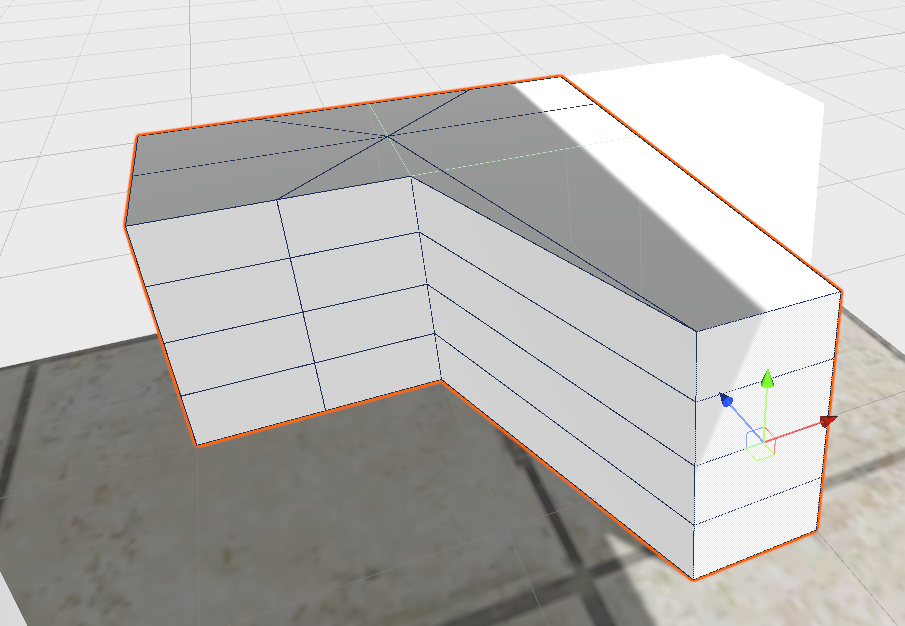
Trying to make it like this:
(3 cubes)
https://gyazo.com/717d1c637f8f742d2bd24a2efbda9cab

 twin aspen
Select Points> Shift drag to extend until where you want
you can also simply make 3 cubes and merge them together and delete faces on connected edges

 old raven
Where does the object get its center point to rotate?
I want it to rotate where it is.
Oh lord. There's a center pivot button.
Disregard
 wicked hull
Hello, I probuilder does not show the shape tool
 jolly bison
Hey guys... I've been asked to check out ProBuilder for a quick solution to prototype levels... What are the pros to using it over prototyping in your 3D app other than you don't have to import / export the meshes? Is there any really cool / useful stuff you can only do with Pro Builder? is it integrated with any other tools etc? The people designing our levels are alraady artists familiar with 3D apps so there's no obvious reason for us to use this ATM... i just want to be sure I'm not missing something.
jolly bison
Anyone have any opinions on the above question? anyone here used ProBuilder in a production environment? I've been playing with it for the best part of a day now and I can't really see how it would fit into an art pipeline. I feel like I must be missing something tho, as it seems like a lot of internet people like it..... is there something that will make me realise that actually this is a really useful tool?. My opinion of it at the minute is that it's a very bare bones modeller who's pitfalls far outweigh the convenience of having an in-editor 3d modeller.
 deep rampart
is there a way to have instanced copies of the same probuilder mesh without making it into an asset first and losing probuilder editability?
 finite temple
I am having troubles applying the material color to ProBuilder, is that normal?

 soft marsh
Hey! I'm wondering if it's possible to create the stairs, but orient them in the other axis? At the moment whenever I make stairs they are oriented in the same direction. I want to create stairs that follow the walls of a room. Thanks!

 prime oracle
soft marsh
Hey! I'm wondering if it's possible to create the stairs, but orient them in the...
prime oracle
soft marsh
Hey! I'm wondering if it's possible to create the stairs, but orient them in the...
just rotate them
soft marsh
prime oracle
just rotate them
Yeah, sure. I did that, it it isn't really what I'm asking about though. Thanks anyway!
 vestal nimbus
When using "Subdivide Faces" I keep getting this strange artefacting instead of having the face split up into a series of rectangles

Anyone know how to solve this?
 upbeat igloo
Are 50K polygons normal for a character intended for medium PCs?
 south gazelle
Hey guys, I am pretty new to probuilder and I am having a little bit of trouble understanding how to cut things out.
I've been trying to follow a video on YouTube about how to build a house but the issue is, it's not up to date, and I have no idea what settings he has. Essentially, he grabs the top face and bottom face, scales it down holding shift (which MAGICALLY snaps for him), scales the other axis, snaps it to the middle (again, MAGICALLY, since CTRL snaps it crudely), and then he MAGICALLY fixes everything up.
https://i.imgur.com/AlFBFfl.png

http://www.youtube.com/watch?v=CBa_opm3_GM&t=3m20s Can someone please explain it to me?

The full editions of ProBuilder and Polybrush are becoming part of Unity feature roadmap. Learn more: https://blogs.unity3d.com/2018/02/15/probuilder-joins-unity-offering-integrated-in-editor-advanced-level-design/
3:20
This starts happening for me, essentially. https://i.imgur.com/769JpLQ.png

And the snapping is really off too..
south gazelle
Nevermind, I got it. Apparently the oddly grayed out grid snapping you can't press when in these modes can be force enabled/disabled using \
 zealous swallow
I'm a beginner. I use Unity 2019.4.36f1 Personal, 64bit. When I drag a cube around with ProGrids snapping disabled, it moves normally. But when I drag a vertices, face, or edge around with ProGrids snapping disabled, it still snaps to the grid. It doesn't matter what I set the Tool Handle Rotation to. I can't click the "Toggle Grid snapping on and off" button. I must be missing something.
Has anyone had this issue?
 zealous swallow
I’ve had to close ProGrids via the tools tab so that snapping doesn’t occur. It’s not a good solution though.
Also, I’ve scrolled up and seen that the ProBuilder channel doesn’t get many answers to users’ questions. Do not many people like to use ProBuilder or is the focus of the Discord just generally elsewhere?
 mystic surge
how do i anchor in unity
 dire cliff
upbeat igloo
Are 50K polygons normal for a character intended for medium PCs?
dire cliff
upbeat igloo
Are 50K polygons normal for a character intended for medium PCs?
Hey, you ever find this out? Im wanting to know the same thing. Im making a 3d gane for low end devices like an Nintendo switch
upbeat igloo
dire cliff
Hey, you ever find this out? Im wanting to know the same thing. Im making a 3d g...
I found that 50k polygons is not so much for a game for average computers but it's still pretty much just that I want the character to be quite detailed and to be able to animate it well because when I animate it the meshes are most visible. And for you is exaggerated if you want to meke a third person game but a high contrast between the objects meshes density looks ugly but you have to keep in mind that many objects cannot exist without a large number of meshes. I think that for your character 7k mesh is perfect but if you have many 5k characters we would be more suggested but that depends a lot on the character and you have to decide but a tip if you optimize a character in the area between the bones keep a high number mesh to have good animations.
dire cliff
upbeat igloo
I found that 50k polygons is not so much for a game for average computers but it...
Yeah, thanks mate
 tacit temple
Is it possible to export several Probuilder and Polybrush models into one FBX file?
So you can use it as reference in a modeling program like Blender
 wanton sail
Yep, there's an fbx export add on in the unity registry @tacit temple
tacit temple
wanton sail
Yep, there's an fbx export add on in the unity registry <@234003311999582208>
Gonna check it out, thanks
barren oasis
I think probuilder should be a default part of unity
torn basin
barren oasis
I think probuilder should be a default part of unity
It is kinda
you just have to add it as a package
barren oasis
yeah i know, but it would be nice if it was already there, no adding
twin aspen
this would go for so many other packages
 devout summit
Like postprocess
wanton sail
2d folks don't need it so I'm assuming that's why its not included by default
torn basin
barren oasis
yeah i know, but it would be nice if it was already there, no adding
but then all the projects that don't want to use it have to import it uselessly
It's better for things to be modular. You can make your own project template(s) with it
tacit temple
torn basin
It's better for things to be modular. You can make your own project template(s) ...
You can?
As in, copying and pasting an existing base project, or actual templates in the hub?
Also, can you still not delete vertices in Probuilder
torn basin
tacit temple
You can?
Yes look it up
 outer whale
Hello, I'm trying to make an indoor level thats quite big and was wondering if its possible to paint textures onto obj similar to terrain but for just interiors?
tacit temple
I think you can assign materials to individual faces
Maybe you can edit UVs to have a single material with multiple textures, not sure
outer whale
Ive heard polybrush might be what Im looking for
tacit temple
Oh yeah, polybrush lets you paint textures
Assuming you use a material with one of the polybrush shaders that support it
It even lets you have gradual transitions between textures (I think it’s vertex-based), but there’s a limit to how many a material can have
tacit temple
If you want the dirt/moss to realistically form around cracks in the concrete, you’re gonna need a more advanced shader
outer whale
decals can be used too
tacit temple
tacit temple
If you want the dirt/moss to realistically form around cracks in the concrete, y...
One that takes a height map for each color texture and shows whichever is highest
tacit temple
outer whale
decals can be used too
That too, whatever works for your needs
outer whale
what would you suggest?
 abstract dust
so i designed a building floor in probuilder and it took me days to it.
is it possible to export the entire design with the mesh and use it in different project??
please excuse my ignorance as im new to pro builder and unity but im seeking your help 😄
 glass smelt
is progrids gone? what can I eventually use instead?
wanton sail
its still in experimental
you need to enable whatever that "allow experimental" option for the packagemanager if that's what you mean
abstract dust
glass smelt
is progrids gone? what can I eventually use instead?
you can import it to your project using the the following link com.unity.progrids
 humble knoll
hi
im new to new pro builder
how do i build an object with parameters i set in?
pls help
forest vortex
It has pretty wide coverage with tutorials on youtube.
humble knoll
i didnt find any
forest vortex
Very hard to believe that.
humble knoll
i meaan any actual
forest vortex
It has coverage doing every single thing in the ProBuilder, just need to actually watch it.
humble knoll
i know
but nerly all are with old one
i mean the old ui
bcz this is complicated

thats ui i understand
 humble knoll
bcz this is complicated
humble knoll
humble knoll
bcz this is complicated
like i set some parameters and what next
where is build button?
tacit temple
Custom project template issues
 nimble iron
Quick lazy question, lads, anybody know if ProBuilder use texture atlases? And if not, is there any shader/programming trickery going on to help with material batching etc?
marble gulch
hello anyone experienced with probuilder with grid?
wanton sail
It works with progrids (though can be a bit flakey) @marble gulch
marble gulch
wanton sail
It works with progrids (though can be a bit flakey) <@406825430369173504>
the Progrid works togheter with the Probuilder right?
that's what I'm trying to find out
marble gulch
wanton sail
It works with progrids (though can be a bit flakey) <@406825430369173504>
but can't seem to find advanced tutorials on it
wanton sail
It's worked for me in the past. It can be finicky though. I'm not sure what advanced tutorials would have in it regarding progrids 😉
marble gulch
wanton sail
It's worked for me in the past. It can be finicky though. I'm not sure what adva...
I'm trying to create a game ala tibia and ultima and I wanted to make the z-axis in a more bent angle (45 degrees specifically) not sure how I can achieve it
 nimble iron
Anybody know if it's possible to lose structures made with Probuilder when updating Unity/Probuilder?
wanton sail
If you're worried, you can export them as fbx. Probably not the answer you're looking for though (I'm not sure)
nimble iron
In the end, that's probably the best solution. Or just never update anything after I start using Probuilder...
 subtle nest
while im trying to use probuilder the moment i activate gravity and hit play my character jitters out and just turns sideways does this happen to anyone else
 plush crypt
subtle nest
while im trying to use probuilder the moment i activate gravity and hit play my ...
plush crypt
subtle nest
while im trying to use probuilder the moment i activate gravity and hit play my ...
doesn't sound like a probuilder problem, post your player script in #💻┃code-beginner to get better help
nimble iron
I'm really enjoying using Probuilder atm, folks, but was wondering... How should I deal with faces on brushes that players won't see? For example, in the attached picture, consider the sides of the columns that are facing the walls, or the undersides of the free-standing columns, etc. In Source, these would be culled during the map compiling process, and in a lot of static-mesh-based construction you'd just build the columns without back faces. Is there a similar culling method in Probuilder, or do most people just replace Probuilder 'decoration' meshes with standard Unity static meshes? https://cdn.discordapp.com/attachments/892763390563467326/953508972088926218/unknown.png
 barren oasis
How do i get probuilder coz im new to unity
barren oasis
Thx
 visual niche
I flipped my mesh so I could have a little room without making 6 blocks but whenever I raycast it's always hitting the room when inside it even when airborne
How could I fix this?
 royal garnet
How do I slide this edge alongst its face?

nvm I figured it out, its under Tools > Probuilder > Interaction > Toggle Orientation Handle
how do I turn of probuilder grid snapping? i dont have it enabled in unity
nvm I figured it out too although its a bit weird. I have to ctrl + click on the axis handle then let go of ctrl...
wanton sail
Yeah, that is a weird one. Glad you found a solution to desnap though!
royal garnet
ya its a bit weird but I also found you can set it global and then it works w/o holding control
does anyone know how to snap vertices to another vertex? In unity its v but its not doing anything when using it
lol its a bug with 2020.3. found the fix: https://forum.unity.com/threads/probuilder-feedback-holding-v-key-should-snap-vertex-to-vertex-in-vertex-mode.832009/#post-6783929
Unity Forum
Just started using Probuilder today and was very surprised that holding the V key in vertex mode did not snap vertices to other vertices, unless i'm...
 hollow gust
Any quick way of cutting shapes out of other shapes like a subtract brush?
 ocean furnace
you can with experimental features enabled
but it my experience it doesnt work well at all, my brushes started becoming invisible when viewed from certain angles
hollow gust
ocean furnace
but it my experience it doesnt work well at all, my brushes started becoming inv...
Yeah, I tried the Boolean tool before, but it makes the geometry really messy and has a tendency to crash
 silent spindle
I'm having a problem where I can not use any of the transformation tools(move, rotate, and scale) while the probuilder tab is opem
open
plush crypt
silent spindle
I'm having a problem where I can not use any of the transformation tools(move, r...
are you sure you're under Object mode when probuilder is open?
 silent spindle
i wasn't
 high nova
Hi I have a ridicul issue, it doesnt allow me to select only one face , can you help ?

 compact plinth
I am completely new to unity however I have messed with blender before and I am realizing that at some angles my mesh will not render and I saw online that I have to check a box that says update while offscreen and I can not find it anywhere
 dusk turret
I'm trying to Extrude Edges so I can then bridge the two edges to create a rectangle, but it's not extruding normally at this point. It's still pulling the other edge with it (as seen in the screenshot) what am I doing wrong

 lone lark
i'm still learning probuilder and everything, can someone tell me how can i extend specific parts of a face like this?

hope the image helps
plush crypt
lone lark
i'm still learning probuilder and everything, can someone tell me how can i exte...
ideally place some Edge loops make the cut in the door then you can select face and extrude

 solar pumice
 north quest
why my map suddenly looks like this
north quest
why my map suddenly looks like this
Click an object in the scene and press F to focus on it. Your scene camera is too far away.
 split pond
how could I go about adding edges like the drawing here? trying to extrude a bridge out

 primal citrus
i was playing around with pro builder for the first time and accidently created a whole ton of loop cuts ( i think its called ) and now its been stuck loading for a long time, what do i do?

i waited a bit and was able to undo all of them lol
plush crypt
primal citrus
i was playing around with pro builder for the first time and accidently created ...
delete the mesh.. probably created an invalid geometry
primal citrus
how do i remove the big floor

of course i figured it out right after i ask for help

 torn basin
barren oasis
torn basin
barren oasis
culled by the camera near clipping plane probably?
barren oasis
torn basin
culled by the camera near clipping plane probably?
No no it just instantly disappears
torn basin
something weird with the bounds probably then
causing it to get frustum culled incorrectly
 fallen furnace
How would I make the tiling of a material change based on the size of a face? I'm using probuilder and I just don't want it to stretch
torn basin
when you edit meshes in probuilder it adjusts the UVs automatically for you
 median shadow

is this normal when creating edge loops?
it's adding faces even when i make edge loops inside the shape, so the resulting shape has a bunch of overlapping faces which makes it hard to select the right faces later on
fallen furnace
torn basin
when you edit meshes in probuilder it adjusts the UVs automatically for you
this is not what i desired

 vivid kindle
how do I find probuilder on the asset store?
 stone scroll
vivid kindle
how do I find probuilder on the asset store?
stone scroll
vivid kindle
how do I find probuilder on the asset store?
its comes in package manager.
vivid kindle
how do I NOT make an arch?
The plus button is gone for me
Nvm Im just dumb
However the plus button is still gone in 2021 version
barren oasis
torn basin
causing it to get frustum culled incorrectly
I found out why lol, it only happens if you dont color the object
 unborn blaze
I find probuilder 5.0.3 totally unusable. Like how do you create just a simple cube? I don't want to drag it out in scene view - I want the starting vertex to be at the origin which is not possible when drawing the shape with a mouse (like, how do you even?!)
Even if you change the size manually to 1x1x1, it's still not at the origin. This is incredibly frustrating.
 plush crypt
unborn blaze
I find probuilder 5.0.3 totally unusable. Like how do you create just a simple c...
plush crypt
unborn blaze
I find probuilder 5.0.3 totally unusable. Like how do you create just a simple c...
you could've just held down the Shift key and it creates the default 1x1 cube, there is also a window box you can change that setting.
unborn blaze
plush crypt
you could've just held down the Shift key and it creates the default 1x1 cube, t...
The shift key copies the last setting though. And filling the size manually in the window box didn't place the first vertex at the origin.
But the way I got around that was that I just enabled snapping to grid
median shadow
Anyone had issues with Probuilderize being greyed out? even though the object is seletec
median shadow
if i select any other object it works, it's odd
 still wing
hi guys, i made a cube 10x10 with probuilder , it's possible to pick a single face of it? cause i'm making a water pool
torn basin
In face mode
plush crypt
median shadow
Anyone had issues with Probuilderize being greyed out? even though the object is...
can u show a screenshot? usually grayed out if it's already probuilderized
 fast roost
how do I get my probuilder objects to line up together and snap to grid properly?
also is there something like this that I can use to get everything aligned without having to move the camera all the time?

basically multiple 2d viewports with a grid on them so i can get things lined up
every time I make a cube or plane it has a float value for scale and position instead of being on a convenient number
plush crypt
fast roost
also is there something like this that I can use to get everything aligned witho...
hello fellow jackhammer/ hammer user 🙂 You can use Progrids for better grids in probuilder. if you are on 2021 and above you simply add package by name com.unity.progrids
@fast roost if you want a 4 window layout, go to **Window -- Layouts -- 4 Split **
fast roost
Im not really a hammer user I have just done a bit of gmod mapping and I found the map editor way easier to use than any of unity's tools.
Is the proper way of designing levels in unity to create rooms and areas in an external editor like blender and then snap them together in the scene view?
I got 4 split working now
is there a way of saving my own window layout and then switching between them quickly depending on what I need?
wait there is
I didnt need to ask that
this has become easy now thanks for the help
plush crypt
no problem. and as a OG hammer BSP/ unreal brush based mapper , Unity's probuilder was literally haven sent. Best purchase they made so far. tbh
 raven steppe
Hey there, so I'm trying to make a tile map, and I got my picture 384 x 384.
How can I set the Pixels Per Unit correct?

 median shadow
plush crypt
can u show a screenshot? usually grayed out if it's already probuilderized
median shadow
plush crypt
can u show a screenshot? usually grayed out if it's already probuilderized
Hey thanks for responding. You were right, I was being an idiot and thought I was using a regular cube.
 undone geode
I have a issue with a special mesh of one of mine pro builder meshes.
This caused me a lot of troubles with the "Generate Lighting" I just found it out, because I tried to export it as a .obj but this endet up with a:
OverflowException: Value was either too large or too small for an Int32.
System.Convert.ToInt32 (System.Double value) (at <695d1cc93cca45069c528c15c9fdd749>:0)
I fixed it with deleting it and making it new, but I still would like to know, why such a error was even able to appear...
forest vortex
Likely some anomaly, like inverted normal somewhere messing with lighting generation.
still wing
Guys i have to subdivide 1 smaller cube from a bigger one to make an empty pool , but how i do it? i'm new to pro builder, i tried deleting the figure and then fill empty spaces with bridge edges but it dont let me
 leaden junco
Hey peeps. I'm currently working on my first model using pro builder. After creating the layout of the building I want to create I asked myself if it wouldn't be easier modelling the whole thing on blender. So what's your opinion on that?
 torn bison
How would I go about making a circular room? 🤔
Something with a ceiling / roof like this, basically
 forest vortex
If you invert faces they will become insides of the room
There's a lot of level design videos for different tools. General methods and practices are applicable across different applications.
torn basin
leaden junco
Hey peeps. I'm currently working on my first model using pro builder. After crea...
Blender is significantly more powerful and user friendly than ProBuilder
ProBuilder's main draw is that you never have to leave the confines of the Unity Editor
Personally I avoid ProBuilder except for rapid prototyping
leaden junco
@torn basin thanks ^^
fast roost
How do I do boolean operations in the latest version of probuilder?
 bitter trail

sorry I'm new to unity
but is there any chance to add mesh collider for object at once ?
 patent monolith
bitter trail
but is there any chance to add mesh collider for object at once ?
patent monolith
bitter trail
but is there any chance to add mesh collider for object at once ?
pretty sure if you just ctrl + click on each object you want on the hierarchy and then in the inspector if you go to add component i think it should add a mesh collider to each object
bitter trail
patent monolith
pretty sure if you just ctrl + click on each object you want on the hierarchy an...
I'm literally dumb 🤦♂️
and I just recall I've did backdays
man thank you very much 🍻
patent monolith
np
bitter trail
patent monolith
np
wait, if I have a single mesh .fbx
does PB be able to break it down ? or do I need to conver it first
or I just need to go to blender
patent monolith
bitter trail
wait, if I have a single mesh .fbx
does PB be able to break it down ? or do I n...
are you able to elaborate on this more?
bitter trail
I have an .fbx model not as a modular object,
but like window, walls, the doors
are just attached as a single mesh
patent monolith
if you select the faces applicable to the ones you want to seperate you have the option to "detach faces" and it should cut those faces out of the object and also take/cut the meshes along with them
this one step is detached from the rest of the stairs so there is a hole in the mesh where they previously were
 bitter trail
I might need to try to enter the Pro Builder mode first
patent monolith
ya, youll have to pro builderize any objects not made using pro builder
bitter trail

wdym pro builderize ?
I just enter the PB window, but can't select the polygon still
I might not to modify the shape I just need to change it's material
patent monolith

once thats doen youll be able to select edges, verts and faces to modify normally like any other pro builder object
you could then select the desired faces and drag the materials to them
bitter trail
patent monolith
thanks man it definitely looks like convert to editable mesh lovely
will try on it by now

I think I'll go blender instead XD
I can't make material ID here
or I need to detach maybe ?
 autumn pewter
Hello! im having this weird issues while using probuilder
UnityEditor.ProBuilder.ProBuilderEditor:OnEnable () (at Library/PackageCache/com.unity.probuilder@4.5.2/Editor/EditorCore/ProBuilderEditor.cs:331)
trying to subdivide 2 objects and receiving a "stack overflow" error
How can i solve it? or its a generic error?
 astral sand
random question, it is possible to move the probuilders object/vertex/face selector to somewhere else haha?
 astral sand
huh
is there anything I am missing here
I thought probuilder handled UVS by default
why it breaks apart when using a custom material
this happens even when using builtin shaders
plush crypt
astral sand
is there anything I am missing here
if u resize probuilder obj with the Scale tool instead of the Probuilder it will not preserve the UV scaling properly. you can just select them in UV edit facemode and reset them
plush crypt
astral sand
I dont think i scaled the obj
idk that custom shader maybe messing with it ?
astral sand
ITS JUST THE STANDARD UNITY BUILT IN
*caps lock
lol
yeah, its working weirdly
I cant even tile them
plush crypt
astral sand
ITS JUST THE STANDARD UNITY BUILT IN
irc probuilder has its own shader you gotta use
astral sand
ughhh
Kinda using my own shader setup
seems Like I will have to map the uvs for everything lol
unity seems like such a disconnected product sometimes
plush crypt
astral sand
unity seems like such a disconnected product sometimes
not sure, i could be off with that. probuilder is better for prototyping , anything else is usually done in blender
astral sand
I am working on a 3d game that will use mostly sprites and be mapped as tiles so probuilder kinda works for me lol
patent monolith
would freezing the transform on static items that arent going to move from there position help increase performance?
or what is the purpose of using freeze transform?
patent monolith
nvm, if it did it would be so insignificant compared to making an item static for batching
 wicked urchin
is there anyone who's proficient with Probuilder? i need help on how to attach two separate objects or how to make an arch for a doorway, as the arch isn't connecting to the hallway.
patent monolith
wicked urchin
is there anyone who's proficient with Probuilder? i need help on how to attach t...
are you able to send a screenshot of what your trying to do/have? so i can get a better understanding
 wicked urchin
patent monolith
are you able to send a screenshot of what your trying to do/have? so i can get a...
wicked urchin
patent monolith
are you able to send a screenshot of what your trying to do/have? so i can get a...
do you know what i could do?
patent monolith
so your wanting all of the hallway to take that shape?
if so your probably better off creating a copy of the arch and then extruding it to the length of the hall and applying the wall texture you want. that way it will be the exact shape but also a sperate object if you want to add a trim or something to it. thats how i would approach it at least
wicked urchin
yeah
i want the edges to attach as well so it looks seamless
but it looks weird when i try attaching it
like the wall looks lighter than the rest of it
patent monolith
as for this part in green you could probably get away with merging the trim into the side wallsand then bridging the edges or filling the whole since it will be considered 1 object

 patent monolith
are they the same material?
wicked urchin
patent monolith
are they the same material?
yeah
patent monolith
thats a uv issue. im not entirely how to fix them but using the uv editor i think there is an option to reset or normalize the uv's (not the normals) youll have to use that to fix it because its the same material but its a smaller scale more tiled version which is giving the illusion of it being lighter. despite it being the same material its not to the same scale/placement as the rest so it needs to be uv corrected
wicked urchin
okie
thanks
also do you know how to make rounded edges? like at the bottom of the wall. ive seen someone use a cylinder to do it but idk how it works.
patent monolith
idk if its how others do it but ya id make a cylinder, delete 75% of it so im left with just a quarter of it and then invert the normals and position it as needed
wicked urchin
patent monolith
idk if its how others do it but ya id make a cylinder, delete 75% of it so im le...
how would i attach it to the rest of the room?
patent monolith
merge option
wicked urchin
okie ill try that
how do i undo a bevel? i cant use the undo button because i have done other things.
patent monolith
i dont think you can afaik
besides just manually shifting the edges back to where they were
wicked urchin
so after i merge faces i cant make a loop on the face that i merged. how do i fix this?
also why is only one side moving then i have both sides selected? @patent monolith
 nimble iron
Hey folks. Currently looking to apply some textures to Probuilder geo, looking to line up textures on a bunch of cubes with different sizes. Ideally I'd be able to use something like the Justify tools in Hammer's texture options (see pictured) - What's the equivalent in Probuilder?

Also, when I lock the sceneview tools to UV manipulation mode, the yellow highlight on the selected faces remains, making it impossible to see the texture I'm trying to align. Is there a way to fix this?
Here are the areas I'm trying to align - all the wall faces use the same material/texture, but the pieces over the windows aren't aligned to the top of the texture, unlike the adjacent wall pieces.
 still wing
guys its possible with pro builder make the edges of a cube , rounded?
i mean, corners
 sullen oracle
Hey friends, every time I try to install probuilder it gives me an error that the FacePicker, EdgePicker, and VertexPicker materials are not loaded. I have tried reinstalling but get these errors every time. Is there something I can do to get ProBuilder working again?
I reinstalled twice more, manually deleting the Probuilder folders from Library/PackageCache and those errors have not come up this time. However, the reason for my first reinstall was that I cannot select anything on newly created ProBuilder shapes in my project. I use ProBuilder throughout my project so if anyone has suggestions regarding the selection issue I would greatly appreciate it.
 lapis quarry
Is there a way to make fake walls with probuilder?
basically a wall with no collision
basically the opposite of an invisible wall
Im not sure if it's a good solution, but detaching the face and disabling the collider works
 true flint
 patent rune
i cannot find progrids in the package manager?
patent rune
i cannot find progrids in the package manager?
may I ask how did you resolved it? I have been unable to find it.
Quick quesiton regarding pro builders - I have been having an issue with materia tiling in my pro buildings how do I stop it? I did one building and its not tiling but everything else I try doesnt work. Any ideas?
patent rune
wrong file
just go to project settings-package manager and activate preview Packages under Advanced dropdown
patent rune
true flint
may I ask how did you resolved it? I have been unable to find it.
and there you go. Sorry if it took me so long to respond
true flint
patent rune
and there you go. Sorry if it took me so long to respond
is ok. Since I got 2021 PROGrids is no longer supported.
 torpid oak
how can I delete probuilders materials from resources? I don't need the probuilder materials in my build, and the texture files are over 300kb
i have 6 probuilder objects in my scene, but they aren't using any pb materials
barren oasis
still wing
guys its possible with pro builder make the edges of a cube , rounded?
Bevel
barren oasis
lapis quarry
Im not sure if it's a good solution, but detaching the face and disabling the co...
Just disable the mesh collider
 serene quail
how do I subdivide only one face on a model using probuilder
its just a square. when I click the subdivide button it subdivides the whole shape not just the face

 surreal saffron
I have this shape which is supposed to have a few different materials assigned to it. However it seems like the material isn't applying correctly on some faces. Why would that be?

 somber nebula
BOOLEANS! Why don't they work???? Crashing! Any time and evertime they're used! Ugh!
patent monolith
surreal saffron
I have this shape which is supposed to have a few different materials assigned t...
Youll have to adjust the uv maps using probuilder and correct them
 void hollow
Anyone know how to align textures with probuilder...?
I tried using the uv editor and grouped the selected faces... But it still doesnt look aligned..


 void hollow

Hello people! Welcome to my new series! This is going to be a long one, because I'm not going to increase the speed of the video. And also because of that, I won't be adding subtitles to this video. I'll just write the details here in the description box. If you have any further question, feel free to write it in the comment box below. I'll try ...
What was the tool used after he extruded the faces at 6:09..?
solar pumice
You mean the clearly labeled Extrude tool that they click on?
 still topaz
i need help. When i use vertex selection, it snaps in like a grid snap and not smoothly. How can i fix this. It used to not do this but i think i pressed a button accident and now it does it
 sinful nacelle
Hello! I am using pro builder on my macbook air and I have only managed to add a new shape 2 times before but in general I keep trying to do whatever is in my ability and nothing happens.. does anyone know if this is a macbook related issue? I just can't seem to add new shapes
forest vortex
There's documentation pinned in this channel it has usage guides. And original manual has wealth of tutorials as well. https://unity-technologies.github.io/procore-legacy-docs/probuilder/probuilder2-gh-pages/
Following one should make it clear if it's a platform problem.
sinful nacelle
Ah yes thank you! I already tried following a tutorial somehow I just can't add a new shape it's very weird
I'll try again maybe I'll figure it out
 languid briar
it seems polybrush really doesn't like painting detail objects onto scaled meshes. Is there anyway to get around this?
languid briar
what i mean by this is like, you'll brush over one place, and it will place objects on like the opposite side of the mesh, and you're just unable to reach some parts
also, when polybrush sets the parent as the object you're painting on, the objects you paint on are scaled incorrectly
 cunning valve
I just got back into unity, and have been trying to use probuilder again, the new UI is however, awful, and I can't stand it. Is there any way to change it back?
 static lava
I keep running into a bug where if I have the probuilder windows as tabs in the same spot as the inspector, then eventually it blocks me from being able to select any other tab in that spot
This is how I have the tabs on the right side of my editor. After an hour or so of editing, it will eventually lock that spot to probuilder and I won't be able to click on Inspector or Shape Tool. Closing tabs in the ... button does nothing, that entire window is just locked, and the only solution is to restart Unity. Anyone else encountered this?
 barren oasis
 jagged zephyr
how do i make a collider for this
jagged zephyr
how do i make a collider for this
There’s an automatic mesh collider
If you want it to be a rigidbody you have to mark it as Convex
 viral nexus
https://gyazo.com/afb16d3170e792e6c4e015fd8fe1199b Sometimes when I subdivide faces, they all divide from center. I dont do it on purpose, what makes that happen?

And how to make it not to xD
 pallid mason
how do i make oclusion culling work with pro builder meshes?
do i need to seperate my rooms into sperate planes for it to work?
because right now it is rendering a wall that the player is unable to see
nimble iron
Hey folks. Currently looking to apply some textures to Probuilder geo, looking to line up textures on a bunch of cubes with different sizes. Ideally I'd be able to use something like the Justify tools in Hammer's texture options (see pictured) - What's the equivalent in Probuilder?

Also, when I lock the sceneview tools to UV manipulation mode, the yellow highlight on the selected faces remains, making it impossible to see the texture I'm trying to align. Is there a way to fix this?
Here are the areas I'm trying to align - all the wall faces use the same material/texture, but the pieces over the windows aren't aligned to the top of the texture, unlike the adjacent wall pieces.

 royal terrace
nimble iron
Hey folks. Currently looking to apply some textures to Probuilder geo, looking t...
royal terrace
nimble iron
Hey folks. Currently looking to apply some textures to Probuilder geo, looking t...
 nimble iron
I'm sorry, @royal terrace , I may be extremely dumb with this - what's the equivalent of the 'Justify (L / R / Fit / T / B / C)' in the Hammer dialogue? I'm also still having trouble with the yellow highlight on the faces in question, which means that when the face is chosen, I can't see the effect of the changes I'm trying to make to it. Any clues on solving this would be appreciated!
 muted egret
or anyone have tutorial video about make building or house in unity?, i will appreciate
 topaz copper
I'm having an issue with the probuilder tool, as I have installed it but it doesn't appear under the tools section. does anyone know what the issue is?
 wicked topaz
topaz copper
I'm having an issue with the probuilder tool, as I have installed it but it does...
wicked topaz
topaz copper
I'm having an issue with the probuilder tool, as I have installed it but it does...
Is this what you are looking for Tools/ProBuilder/ProBuilder Window ?
topaz copper
pro builder doesnt appear under tools but it is installed
wicked topaz
topaz copper
pro builder doesnt appear under tools but it is installed
can you take a screenshot inside the package manager?
topaz copper
 wicked topaz
Restart Unity Editor ?
 wicked topaz
I don't even have the same unity editor UI as you 😓
topaz copper
sad
 daring bloom
topaz copper
daring bloom
topaz copper
i also get this multiple times did you find any solution for this?
somber nebula
Does anyone have a workflow to bring a probuilder object out of Unity to work on its textures in Substance Painter?
daring bloom
somber nebula
Does anyone have a workflow to bring a probuilder object out of Unity to work on...
i think there is way to export those as 3d models but i dont remember that
topaz copper
so enter safe mode then look at the red text, you should have an error code in ther which is specific to what has went wrong in your project. search up the error code and check the forums for it. they usually have specific solutions you can try
daring bloom
topaz copper
so enter safe mode then look at the red text, you should have an error code in t...
oh thanks will try that
 onyx palm
Can I split a mesh into other meshes?
 civic sequoia
guys
my probuilder is doing this weird texture stretching

and this is what it looks normally

i'm testing prerendered backgrounds and collisions
and while the collisions work either way, object oclusion only works when mesh renderer is visible
but i dont want this insane look LOL
actually, now that i look at it, only the house really looks weird and it's probably because of the projection i'm using. but still ideally i would like not to have this
i think i know what the issue is. It's the projector that's painting everything with ff7
you can also see a cube there that only gets white (it's original color) when it gets away from the range of the projector. Anyone knows a fix?
as you can see, when i raise a pillar outside the range of the projector, it's white, as well as the block...i guess the real question is how to make certain things immune to projection

okay nevermind i got it
but now they're all white and the issue kinda remains , instead of blurry textures it's a white wall
civic sequoia
Fixed it
plush crypt
civic sequoia
Fixed it
post solution for anyone who reads it in the future
civic sequoia
My camera and my projector werent aligned. They have to have the same transform values, so you just copy the copy the projector values to the camera. And now the the Textures wont have this weird mesh look
The collisions werent 100% accurate, i was gonna make better probuilder shapes to better fit It, but my pc froze and i have to send It to support heh
 orchid otter
can someone explain why my probuilder object's collision is like this
its in some of my other projects too and its pretty annoying
barren oasis
orchid otter
can someone explain why my probuilder object's collision is like this
The mesh isn’t marked as convex right?
barren oasis
Don’t use convex for building just saying
But try with a different mesh? I had some glitches in the past the the player fell through the floor when touched something
orchid otter
Alright thanks
orchid otter
barren oasis
Don’t use convex for building just saying
But try with a different mesh? I had ...
it didnt work ( i just got home thats why it took so long for me to try)
any ideas?
barren oasis
Yeahhhhh I don’t know
 charred dome
Hello,
I have a little problem.
I am creating a video game and have set it to multiple scenes starting from the main menu.
when i start the game, after entering the scenes in the build settings, only the main menu is shown.
when I choose the "race", the spawn is in the void because the other scenes with the map are not loaded to me.
because?
Thks in advance
patent monolith
charred dome
Hello,
I have a little problem.
I am creating a video game and have set it to m...
Have you added the other scenes into the list in build settings?
charred dome
patent monolith
Have you added the other scenes into the list in build settings?
Yes. 1 Main Menù
2 Map
3 map
4 Map...
7 scenes in build settings...
later i will send you a video so you can see well.


 forest vortex
There are extensive tutorial on ProBuilder. some pinned here more on the original documents page.
 tame surge
thanks , i am checking :))
tame surge
uv editor is not able to fit the texture
tame surge
guys is there a way to get this shape tool widow in latest version of pro builder
 tame surge
both are good i guess right one with boolean , and this black hole with cut
 barren oasis
How to install probuilder on Unity 2018
 lofty crystal
Question, why does my probuilder UI not have a 'build' button?
It did have it on another project I have, but not in the one I'm currently working on
 tame surge
barren oasis
How to install probuilder on Unity 2018
tame surge
barren oasis
How to install probuilder on Unity 2018
go to package manager and type pro builder if not visible then enable preview package
tame surge
lofty crystal
its new ui , now you don't need to do extra button to click
guys how can i delete vertices
barren oasis
tame surge
go to package manager and type pro builder if not visible then enable preview pa...
ok
lofty crystal
tame surge
its new ui , now you don't need to do extra button to click
In the case that I want to spawn an object with specific parameters, how would I do that then?
tame surge
lofty crystal
In the case that I want to spawn an object with specific parameters, how would I...
if you want to edit then in inspector there is edit shape option
lofty crystal
tame surge
if you want to edit then in inspector there is edit shape option
Ahhh, thanks
tame surge
idk why its become full black and after adding texture it not rendering

 warm grail
so ive been messing around with probuilder should i make big structures with multiple small objects one object or leave the various small objects just as child's of one object
barren oasis
will my probuilder meshes get lost if i reinstall probuilder?
 desert crater
Hi, i'm new to probuilder and i'm wondering how you can only extrude the outlined face?
 plush crypt
desert crater
Hi, i'm new to probuilder and i'm wondering how you can only extrude the outline...
plush crypt
desert crater
Hi, i'm new to probuilder and i'm wondering how you can only extrude the outline...
use gizmo holding shift in face mode after you've added some cuts/edge loops
desert crater
plush crypt
use gizmo holding shift in face mode after you've added some cuts/edge loops
thank you, but edges seem to appear when i do that. how can i remove them?
 plush crypt
desert crater
thank you, but edges seem to appear when i do that. how can i remove them?
plush crypt
desert crater
thank you, but edges seem to appear when i do that. how can i remove them?
I'm not sure I understand
patent monolith
desert crater
Hi, i'm new to probuilder and i'm wondering how you can only extrude the outline...
are you trying to essentially cut a hole where the outline is?
desert crater
patent monolith
are you trying to essentially cut a hole where the outline is?
i'm trying to extrude the area of the outline
patent monolith
desert crater
thank you, but edges seem to appear when i do that. how can i remove them?
if thats the case then i am also confused as to what the issue with this is?
desert crater
sorry, i'm new to probuilder. just wasnt sure if that's meant to happen
 vocal flint
How do I use the Probuilder to make it so materials repeat themselves instead of just stretching out? everything I find online isn't making sense
 chrome barn
I have a very old face texture of my game model, but I want to replace it with a much nicer and improved face. The head mesh of my game model is separate. So I would like to get a suggestion to create a face for it.
https://cdn.discordapp.com/attachments/763495187787677697/986076135643316284/unknown.png

 woven lake
chrome barn
I have a very old face texture of my game model, but I want to replace it with a...
woven lake
chrome barn
I have a very old face texture of my game model, but I want to replace it with a...
Not really a probuilder question, but can't you simply paint over the existing one?
 drowsy saffron
Hey, does anyone know how to make a probuilder mesh from a unity mesh. I am sure its been done but I can't find out how online
plush crypt
drowsy saffron
Hey, does anyone know how to make a probuilder mesh from a unity mesh. I am sure...
 tardy eagle


i have a stick i made with probuilder, i want to put it in empty object which is on the bottom of the stick, but when i put the stick inside the empty takes the same location as the stick, how can i avoid that
plush crypt
tardy eagle
i have a stick i made with probuilder, i want to put it in empty object which is...
dont forget to set ur pivot to Local & Pivot , not center
plush crypt
tardy eagle
i have a stick i made with probuilder, i want to put it in empty object which is...
 tardy eagle
plush crypt
tardy eagle
plush crypt
Thanks alot man
drowsy saffron
plush crypt
https://docs.unity3d.com/Packages/com.unity.probuilder@4.0/manual/Object_ProBuil...
Yes, I saw that, but how do I execute something like that through code?
Also thanks for the response!
 grave briar
Hello, I'm working with the shape generator and am having some trouble with UV mapping. I'm making an arch, and the UV map is just projecting the curve onto a plane, so the texture looks quite messed up in 3d space. Does anyone know of a quick way to fix this besides manually resizing the UVs?


 young charm
is there a way to force the probuilder texture to like anchor its UV to the origin corner?
like this works if i click close to an integer world point and resolve to a whole number dimension. but if i don't, it looks like this


 jade zinc
Can you build like.... Walls and door prefabs with pro builder?
solar pumice
You can model whatever you want.
jade zinc
I meant more so like, I have a prefab made that wasn't made in probuilder, that is a wall and a door, and I'd like to be able to easily place them similar to that of probuilder.
I'll assume not
patent monolith
jade zinc
I meant more so like, I have a prefab made that wasn't made in probuilder, that ...
You can "probuilderize" outside objects not made with pro builder and once you do so they will behave like pro builder options. If your looking for being able to "save" the objects to be quickly added to scenes later than just making them into a prefab to drag and drop into scenes will be the best way (can still prefab objects whether they are pro builder objects or not)
 flint quarry
Is there no way to choose direction on axis when mirroring an object?
flint quarry
flint quarry
Is there no way to choose direction on axis when mirroring an object?
Figured a work around
One more question: Does Probuilder have a way to set Texel Density the way you can in Maya or Blend when working with UVs?
 storm path
It's being like 2 week since i start using unity and after learning i made this within 4-5 hour and i look to ask is this good enough for endless zombie killing game?
 plush crypt
tardy eagle
plush crypt
tardy eagle
clear it. it shouldnt come back
tardy eagle
unity restart fixed it
 dusk tendon
What happened to ProGrids I used to use it all the time but now after a break i cant find it from the package manager not even as a preview
barren oasis
storm path
It's being like 2 week since i start using unity and after learning i made this ...
I like the lighting and textures, nice level
dusk tendon
thanks
 lofty dune
I’m new to 3D level design, what advantages does probuilder have over just using normal unity boxes and spheres and such?
(I don’t really know anything about probuilder)
solar pumice
lofty dune
I’m new to 3D level design, what advantages does probuilder have over just using...
You can model with it.
lofty dune
Will the stairs function or would I have to code that in?
lofty dune
Oh ok
For now I’m using the fps microgame’s fps controller. I’m gonna change it later, but for now do you know where I can find and change the step height there?
lofty dune
Ok thanks!
 slim gyro

I cannot use the New Poly Shape tool in 2D mode
I have the tool up
but when I click it doesn't make verts
any idea what's going on?
 calm gulch
i wonder if probuilder has a built in shape editor in it?

like if i wanted to manually change the edges of this cube for example
and make it not so much a cube but something different
i tried material editor and smoothing but i don't think thats it
kinda like blender i guess?
working with strict preterdemined shapes is kinda hard
 tardy elm
calm gulch
i wonder if probuilder has a built in shape editor in it?
tardy elm
calm gulch
i wonder if probuilder has a built in shape editor in it?
The second button in the center tool bars lets you select vertices (then edges and faces in following buttons) which you can then move with the transform tool if that’s what you’re looking for
 young vapor
any way to get rid of the Yellow or make it more transparent or something better to see texture in FACE SELECTION MODE ? It's hard to see how changing the texture in UV editor mode is happening...
 tame surge
guys how can we make curve of road using probuilder
plush crypt
tame surge
guys how can we make curve of road using probuilder
make a quarter of a circle, use the arch tool for this
 tame surge
wow nice
but as i was so running out of time , i download easy3d road :((
its very easy to use and its free
plush crypt
oki
tame surge
thanks
orchid otter
hey guys im working with probuilder rn and i have some weird geometry that i dont know how to fix

 topaz solar



 long bough
How to instal probuilder?
 loud walrus
long bough
How to instal probuilder?
loud walrus
long bough
How to instal probuilder?
Go to Window, Package manager, Then search for probuilder
long bough
Its a extencion? O its a externao tool?
 steady monolith
long bough
Its a extencion? O its a externao tool?
steady monolith
long bough
Its a extencion? O its a externao tool?


 long bough
thanks