#world-quest
1 messages · Page 2 of 1
 twilit shard
So the video player just has a white emission so you can see the video but looks like it didn't load the video as expected
 terse wing
I’ll make sure to try it out in a bit !
twilit shard
okey, i'm going to go look into this video player code
Do you remember what song you chose? On my PC side it seems to be specific videos erroring
twilit shard
terse wing
I’ll make sure to try it out in a bit !
When you get the time to try it, could you select the song "Barracuda - Heart" as the first song? if it works then all good I can fix this as it's just certain YouTube videos it doesn't like
terse wing
Oki
terse wing
twilit shard
When you get the time to try it, could you select the song "Barracuda - Heart" a...
It works I love it!!!
twilit shard
terse wing
It works I love it!!!
Hurraaaayyyy! thank you for the help 😄
I think in Unity Editor I can see all the unsupported videos cause I also get the white screen so I'll just go ger replacements
twilit shard
Hey again, so I think I've fixed all the youtube links, everything should be good now! Once again thank you very much for helping me test ❤️
 coarse grail
okay the video player is working now on Quest
twilit shard
Hurray!
 undone onyx
coarse grail
okay the video player is working now on Quest
undone onyx
coarse grail
okay the video player is working now on Quest
pro tv?
coarse grail
undone onyx
pro tv?
I don't know as I didn't make the map
undone onyx
coarse grail
I don't know as I didn't make the map
oh ok, so i have pro tv on my map and i dont know if its compatible with quest...
coarse grail
basically it's more about the URLs itself than the video player choice
undone onyx
coarse grail
basically it's more about the URLs itself than the video player choice
can u explain me that?
coarse grail

VRChat Ask
Misc Notes Understanding URLs in VRChat All video players, generally speaking, work on Quest. Just gonna get that answer out of the way. What doesn’t always work on Quest is the urls themselves. There are a few points to make regarding this: The urls that people are most used to aren’t actually urls for media but for websites. Most commonly...
undone onyx
coarse grail
https://ask.vrchat.com/t/protv-by-architechanon-usage-guides-and-walkthroughs/70...
i understand nothing tbh... can i use pro tv on quest or not? xD
terse wing
Well it does state, “understanding URLs in Vrchat all video players, generally speaking, work on Quest.”
undone onyx
terse wing
^^
thanks 😄 sry english is not my main language.. hard to understand some things sometimes :/
terse wing
undone onyx
thanks 😄 sry english is not my main language.. hard to understand some things s...
No no don’t worry no need to apologize
undone onyx
terse wing
No no don’t worry no need to apologize
but thanks for ur short answer 😄
terse wing
No problem :3
coarse grail
undone onyx
i understand nothing tbh... can i use pro tv on quest or not? xD
basically it's more about the URLs you give to the video player as far as if it's going to work on Quest or not
the component that vrchat uses to turn YouTube links into usable videos for some reason is unavailable on Quest
 lament onyx
I wanted to use a minimal amount of Transparency in my World Project. I plan on making a Tree with Transparent leaves and I was wondering how I should set up the Alpha Map so it won't eat away on frames? Is there an Easy way to compress an Alpha Map without compromising on Performance?
I read on a Site that Additive Blending could be a good substitute, yet I'm not sure if that might work
 deep vault
lament onyx
I wanted to use a minimal amount of Transparency in my World Project. I plan on ...
deep vault
lament onyx
I wanted to use a minimal amount of Transparency in my World Project. I plan on ...
For static objects in worlds it's not that big of a deal. there are quite a few glass shaders out there that are very light weight. Transparency only really is an issue on Avatars as quest can't see transparency on avatars.
terse wing
twilit shard
Hurraaaayyyy! thank you for the help 😄
Hey I tried out your world again today and the Audio and videos aren’t working
I’ve tried a couple of songs and it hasn’t worked
 atomic merlin
terse wing
Hey I tried out your world again today and the Audio and videos aren’t working
atomic merlin
terse wing
Hey I tried out your world again today and the Audio and videos aren’t working
They are using nextnex which appears to have stopped working, at least for now.
terse wing
atomic merlin
They are using nextnex which appears to have stopped working, at least for now.
Ah dang oki thanks for letting me know
twilit shard
atomic merlin
They are using nextnex which appears to have stopped working, at least for now.
Yeaaaaaaaah 😭
I'm looking into alternatives, i don't really want to host my own YouTube to video site
atomic merlin
twilit shard
I'm looking into alternatives, i don't really want to host my own YouTube to vid...
Literally the only other public alternative I know of is https://shay.loan/
Can however say, as someone who has been running a vroxy instance (https://github.com/techanon/vroxy) for more than half a year at this point, that it is really not that complicated and can easily run on a oracle free tier server.
 inland hamlet
Hey
coarse grail

◆Notice of the termination of the Jinnai system ◆
The Jinnai system (http://nextnex.com) will be suspended indefinitely.
The domain will be maintained and only redirected to YouTube.
In other words, you will be able to watch it on your PC, but not on Quest.
Thank you !
💖 1
 versed stratus
Just made that today, if that can help some people, another alternative I guess.
Using yt2quest allow you to play videos from youtube on quest ! Best used with ProTV ! :)
 quick quarry
is there any reason why the floor textures are shiny? it isnt like this in desktop mode

 summer geode
Hey there I’m looking for worlds that have a similar vibe to these pics for quest can anyone suggest any?


 brisk sparrow
hey anyone know like a synthwave/retro wave type world? Been looking for one.
 grave radish
does anyone have quest compatible fire here?
 kindred mortar
Does anyone know a good world to meet ppl on
 restive ruin
i need help with my world theres a light issue
 terse wing
kindred mortar
Does anyone know a good world to meet ppl on
terse wing
kindred mortar
Does anyone know a good world to meet ppl on
No time to talk, Omegle, murder 4
Just go to game worlds
 obtuse moth
Hey! So I'm porting a world I'm making to the quest and I've noticed that standalone vrchat's colors seem way off. Like everything is just hue shifted a bit, so my sand looks redder, the vrchat loading screen is greenish instead of the blue it is on pc, etc. Is that just how quest 2 vrchat standalone colors are or?
I'm borrowing my sisters quest for a bit and haven't really tried quest vrchat so! Not sure if that's a thing I should plan around in my world design or just kind of leave it
 worldly hill
Does anyone have any good worlds for pictures
 bitter glacier
does anybody know how to fix this issue with the mirror?

 floral acorn
Anyone here makes fonts? I've made one and i need help with something
 dense anvil
anyone know of a world that has a portal in it. not like a portal to another world but like a magic looking portal if that makes sense.
 orchid cape
does quest support any kind of volumetrics?:
i am using a mix of unity's built in fog and half-transparent planes to fake it, but it doesn't look good when i need actually dense fog really close to the player
 royal plank
orchid cape
does quest support any kind of volumetrics?:
royal plank
orchid cape
does quest support any kind of volumetrics?:
quest can do volumetrics, question is would vrc allow it and I lean towards no
but I suppose if you wanna give it a shot
there are some volumetric solutions you could try, but chances are they will be too expensive to do on a VRC quest world
coarse grail
GitHub
A work in progress graphics solution for completely baked volumetric lighting, meant to be very lightweight and inexpensive. - GitHub - frostbone25/Unity-Baked-Volumetrics: A work in progress graph...
GitHub
World of Warcraft inspired Volumetrics that hold up well in VR with small cost to performance. (You have to not be dumb when placing it though :P) - GitHub - Xiexe/XSVolumetrics: World of Warcraft ...
royal plank
coarse grail
https://github.com/frostbone25/Unity-Baked-Volumetrics
from what your asking, mine would fit what you are seeking but overall these solutions are likely too expensive to do anyway again within vrc quest
 opaque epoch
anyone down the play
 terse wing
 outer steppe
someone help me dawg
outer steppe
someone help me dawg
If you need help specify what it is you need help with don’t just say “someone help” just say what you need


 surreal lake
What could even cause that
 vital lance
surreal lake
What could even cause that
vital lance
surreal lake
What could even cause that
Losing connection when loading a world then regaining the connection (not getting kicked off). Bad connection in general. Stuff like that.

 honest wasp
I know this is frowned upon but who can I pay to help me make my world quest compatible like we jump on a discord call and just go through it
 sharp mortar
 maiden imp
forgive me if this aint the right channel im new but does anyone know any good horror games ?
 mental crescent

 tiny tangle
How do I make AVpro video player have a string like https://u2b.cx/ already in the URL search when you click the search bar? It's for Quest.

Watch YouTube on Quest VRChat (and PC too!)
 nocturne maple
I keep crashing please fix this I get a lost connection sign and if I play on PC it's just fine I don't know why it's doing to me
 unreal willow
Help, I keep trying to upload a world but whenever I switch to android to upload it to quest it wants to upload it as a separate quest world rather then the same PC world. Idk what to do. 
Can anyone help? I was planning on hanging with some friends after uploading it & I'd like to be able to finish this up preferably before midnight.
unreal willow
Nvm, after a bunch of trial & error I somehow got it working.

 wintry rune
unreal willow
Nvm, after a bunch of trial & error I somehow got it working.
wintry rune
unreal willow
Nvm, after a bunch of trial & error I somehow got it working.
howd you get it to work? i had the same issue
unreal willow
wintry rune
howd you get it to work? i had the same issue
You gotta detach then reattach it using the ID of the thing your downloading it onto. Then just copy & paste the ID back & reattach it.


You'll know it worked if you have the name of the project here along with the other info about it.

 gray venture
Bus
 crisp badger
Does anybody know any good le mans/endurance racing-ish worlds?
 rare cove
whats the chance of the enough amount of people (200) joining a new vrchat world that's in community labs yet to get it out of it within 10 days? around 200 visits needed and whatever amount of favourites
rare cove
crisp badger
Does anybody know any good le mans/endurance racing-ish worlds?
maybe varneon's udon vehicles
crisp badger
The time trials?
crisp badger
Not quite I'm just looking for something to do a long race on
Something like Autopolis
rare cove
crisp badger
Something like Autopolis
there are definitely worlds like this, i could give some world names but i dont remember them
i forgot to favorite them
crisp badger
oof
 wary stag
trying to fix world issue on quest but when re-joining the world its not downloading the new version just using the old one, tried clearing cache and restarting the game but its still not using the new one
dunno what I can do about it, the world is almost unusable on quest atm because of broken shaders but I cant fix it
Nvm found this
https://feedback.vrchat.com/bug-reports/p/reloading-instance-does-not-grab-latest-version-of-world
Ugh

 distant robin
Does anybody know of any police car maps
brisk sparrow
hey anyone know like a synthwave/retro wave type world? Been looking for one.
 floral wing
family guy
 tired vortex
hey guys does anyone know of any stoner chats that are active?
 lunar sail
Be clean
 exotic field
whats the biggest quest avatar world?
so like has lots of anime, game, film and other avatars and also has more than lets say 5 to 10 rows for each
i know of avatar world search engine worlds but there hit and miss sometimes
 hallow fractal
Hey, I asked a few times in #world-development already with no answers, but trying here since it's a quest issue:
I have a camera with an RT that records players. Is there a reason why some of them appear to have no meshes?
Aka, no clothes and they appear naked because some people don't cut out sensitive body parts >_>
rare cove
my avatar world doesnt go beyond 350 visits and 25 favourites. 3 days passed, 7 left to get out of community labs, or else it will be stuck in there for a long time. what should i do?
i thought it would gradually gain visits but it stopped fuck
how are people supposed to upload and have a normal world?
is that a normal process? am i fine too?
 undone karma
That's all confusing to understand. But I will assume you mean you stopped getting visits during your lab phase. Your world might of popped into the recently updated world category.
Lab's stays for whatever amount of time, I've notice its not really a fixed duration sometimes.
floral acorn
Anyone got an explanation to why PC features work through the quest camera but not on the platform itself???…
 terse wing
floral acorn
Anyone got an explanation to why PC features work through the quest camera but n...
terse wing
floral acorn
Anyone got an explanation to why PC features work through the quest camera but n...
They shouldn’t?
floral acorn
Surprisingly it does, I’ve installed Godrays on PC and left them enabled for the quest version as it doesn’t render anyways, although as seen in the photo I took it seems to work just fine
No frame drops or anything
 winter quest
floral acorn
Anyone got an explanation to why PC features work through the quest camera but n...
winter quest
floral acorn
Anyone got an explanation to why PC features work through the quest camera but n...
The quest's camera sees everything without restrictions, but the quest's GPU can't do a lot of things that are on the PC.
 fluid quail
I am having an issue with my recent world. Whenever I put a playlist into the video player, it crashes on Quest. I thought it was a shader but it wasn’t. Anyone know of a fix? I am using ProTv.
winter quest
fluid quail
I am having an issue with my recent world. Whenever I put a playlist into the vi...
Make a playlist of direct links to mp4 files, and it won't crash.
fluid quail
Alrighty
 paper hawk
On a similar note -- I was hoping to update some worlds/protv setups for Quest but I'm really stuck on [Video Error] Unable to load video... I figured it was just something I was doing wrong, but I visited a few other worlds (in stand-alone quest), tried using their media players and got the same problem, even when using resolver urls (which I shouldn't need anymore).
on occasion, a shorter video would load, but it was hit and miss. Best guess I have is that maybe my wifi isn't strong enough for a good reply, so it fails? ... Has anyone else run into this problem since the quest video resolver update?
note: all testing has been doing with youtube urls
paper hawk
hmm... 3.2.3 is out, maybe that'll help
edit: it didn't
 jagged crown
Yeah, I've been noticing the same thing. The resolver works... sometimes
I've had some 30+ minute videos play as well
paper hawk
yea... further testing has been iffy regardless of the video length. Sometimes a link works fine in one session, but fails in the next... Glad it's not just me, but I do hope we're not the only two XD
 blazing fossil
i'm also seeing similar issues, across multiple different users/devices/networks. seems essentially random if it works or not
last i tested was when the feature was still in open beta and it seemed reliable back then
orchid cape
i feel like quest resolver is really slow to kick in, is it true or just the people i am testing with have bad internet/other reasons why its barely loading sometimes?:
 zinc bridge
orchid cape
i feel like quest resolver is really slow to kick in, is it true or just the peo...
zinc bridge
orchid cape
i feel like quest resolver is really slow to kick in, is it true or just the peo...
it’s just slow
quest resolvers have always been slow
orchid cape
i mean, before it at least started in <10sec
now it can be hanging for like 30sec
and everyone is waiting for the owner to load it so it can sync the video
idk, its not always the case, but pretty often
 orchid cape
does it load the entire video before actually playing it?:
short videos seem to load really fast, when loing ones take quite some time
terse wing
orchid cape
does it load the entire video before actually playing it?:
short videos seem to ...
It most likely does
orchid cape
and most of the videos on my map are like 1hr+
well
doesn't do it all the time tho
sus
paper hawk
Does anyone know how it works? I'm not sure if that's super secret insider knowledge.... If vrc is basically hosting their own resolver service to parse urls, maybe it's simply being overloaded since going live?
 odd mural
I'm going to guess it's just being overloaded, but I'm going to have to add a disclaimer to my world until they scale it up 
 copper edge
paper hawk
Does anyone know how it works? I'm not sure if that's super secret insider knowl...
copper edge
paper hawk
Does anyone know how it works? I'm not sure if that's super secret insider knowl...
Looks like Quest just got the PC treatment, with yt-dlp being included with the Quest build. So the resolving is happening locally on the device. #open-beta-discussion message
paper hawk
cool -- though that scratches off my theory about it being overloaded on a server somewhere 😛
 turbid zealot
anyone know a quest compatible pool table
odd mural
paper hawk
cool -- though that scratches off my theory about it being overloaded on a serve...
please lmk if you find any solutions to the delay
It's driving me crazy
turbid zealot
are there any quest compatible videoplayers that are free
turbid zealot
zinc bridge
as long as the links work, the player should too
ohh really i thought only specific ones worked for quest, did they change that
coarse grail
Technically all video players worked with the quest it was more about the links they made a recent change so YouTube links work correctly
vital lance
He** yah
 open isle
Anyone got any tips for building/uploading for Quest that doesn't take very long and is non-destructive to the project files?
Right now the way I do it is I work on my update on the PC build, then at the end of that I duplicate my whole project, swap to Quest build on the duplicated project and make any Quest-specific changes I need to make then upload them simultaneiously, but this takes FOREVER (because I have to recompile shaders and such in the new project).
 autumn pendant
What was destructive for you the previous times ?
Are you using EasyQuestSwitch ?
orchid cape
coarse grail
Technically all video players worked with the quest it was more about the links ...
i wish so, getting like a lot of complaints atm
about quest loading video for like 2min
people think that loading animation is just stuck and the videoplayer is broken lol
but it actually just takes veeeeery long to load videos sometimes
well, more often than not actually in my experience
vital lance
Hi everyone, i was wondering if someone can help about one small issue i have with my world.
You see, i use occlusion culling for optimization, on PC everything's fine, no issue at all.
But, for the Quest user, it's not working correctly, depending on where you look at a picture she sometime disappears leaving just the shadow behind it.
Everything that is a static object have this issue, i even try to bake again just for the Quest version of the world and nothing changed.
If you have any idea on how to fix this, i would be glad to hear it, thank you for your time reading this.
EDIT : Should i just delete the occlusion culling for the quest user ?
autumn pendant
vital lance
Hi everyone, i was wondering if someone can help about one small issue i have wi...
What are your occlusion settings and what does the world look like ?
vital lance
autumn pendant
What are your occlusion settings and what does the world look like ?
Hi, i just learn today about that "static" can activate 8 things, i'm new on Unity and i activate it on everything that does not move except the games i add.
For PC it work just fine, but for quest it's not working for some reason, someone name Enverex here try to help me explaining things about the static.
The world look like this :
 autumn pendant
Have you tried merging most objects in each room ? If polygon is reasonably low, then having less individual objects would solve a lot of occlusion issues
vital lance
autumn pendant
Have you tried merging most objects in each room ? If polygon is reasonably low,...
Merging.? I'm sorry but i have no idea how to do that, i didn't even know that was possible
autumn pendant
You'd most likely have to export the world to Blender to actually do optimization, so if that's not an option then proper occlusion might be the best path forward
I assume you already messed with the occlusion settings
vital lance
honestly i just push the "static" on everything that does not move and bake the occlusion culling that's it
but like i said on pc, no issue at all
only for the quest user, which is annoying for them of course.
autumn pendant
I'd suggest looking into occlusion areas/walls, which might solve your problem
vital lance
Occlusion areas .?
I'm very sorry, like i said, i'm new on unity i don't really know much to be honest.
coarse grail
vital lance
Occlusion areas .?
 vital lance
coarse grail
https://docs.unity3d.com/2019.4/Documentation/Manual/class-OcclusionArea.html
vital lance
coarse grail
https://docs.unity3d.com/2019.4/Documentation/Manual/class-OcclusionArea.html
thank you i will look at that
Again, i'm sorry, i really don't know much about all of this.
coarse grail
occlusion walls could refer to using editor only cubes for giving a bit more control over the occlusion culling

GitLab
A surface shader for Unity providing cel-shading. (Forward rendering only)
vital lance
Well, i will read all of this and try new things on my world, hoping that will resolve the problem
Edit : i will try new things tomorrow, it's almost 3am for me 
open isle
autumn pendant
What was destructive for you the previous times ?
Pretty sure under weird circumstances, switching build target of a world back and forth over and over can cause irrepairable damage to the project
I've had many occasions in the past where I had to create a new project from scratch and reimport the world after switching build targets
Because it'd break stuff
Since the like 5th time that's happened, I've started just duplicating my project files when I go to upload for the Quest build
But like I said this takes several hours because of textures needing to be reimported and shaders being recompiled and such
autumn pendant
open isle
Pretty sure under weird circumstances, switching build target of a world back an...
I have never heard of that  That does sound extremely frustrating though. I'm not sure I have a solution given how specific this seems, but if you knew what actually broke, or if you have console errors, I would be interested!
open isle
It's alright it's not a super big deal anyways, moreso just curious how other people go about building and publishing for both PC and Quest for updates and how it compares to the way I do things lol
I think a big factor is the fact I use (and heavily modify) a prefab made by someone else, and it's pretty hefty (It's the SaccFlight and Vehicles prefab by Sacchan), so it's super easy to break things unfortunately
autumn pendant
Are the modifications continuous ? Or do you edit it once and it will eventually not survive the platform change ?
open isle
I don't update the world as often as I used to, but I used to update at least once a month (but usually much more frequently than this). It would be fine most of the time but eventually it would randomly break the whole project and I'd have to start with a fresh project to solve the issue.
I should probably delete a few of these since they're not all used 🤣
 autumn pendant

vital lance
autumn pendant
<:sadcatThumbUp:845884454664929321>
Hi ! i just wanted to let you know, all the issues for the quest users has been fixed~
Fun fact, in the end it had nothing to do with a occlusion culling problem, it was just some picture and other things too close from wall for the quest apparently.
(A quest user share their screen with me so i could correctly see the issue.)
Now everything is working just fine, but in the end i still learn new things about the Occlusion culling with the people here that try to help me.
So i wanted to say, thank you.
autumn pendant
Oh, so Z-fighting was your issue, understandable
orchid cape
what's up with the quest's resolver btw, its barely working/takes like 2+min to load a single video, is there anything that needs to be changed for it to work normally?
 woeful pecan
orchid cape
what's up with the quest's resolver btw, its barely working/takes like 2+min to ...
woeful pecan
orchid cape
what's up with the quest's resolver btw, its barely working/takes like 2+min to ...
you don't need a quest resolver anymore since VRChat added support for youtube links on quest
orchid cape
woeful pecan
you don't need a quest resolver anymore since VRChat added support for youtube l...
and it barely works without external resolver, that is what I am saying
woeful pecan
ooh whoops I read it wrong sorry
orchid cape
I started using straight YouTube links in the playlists since they are supported now, but it takes up to 2 min for questies to load them
and it basically never works :<
woeful pecan
that sucks, guess I'll have to stay on discord urls with my world too then
orchid cape
and I don't want to force people to allow untrusted URLs since a lot of trolls abuse that in publics
nearly every single public instance of my world has some sus links in the videoplayer's history
so building a content filter now, but for it I need to be able to distinguish publics and privates somehow
woeful pecan
you can't 😅, I have a popup in my world asking the first person that joins to say if it's a public or private world to configure the default settings, but that's not really a good option for most worlds lol
orchid cape
yeah, planning on using something similar
woeful pecan
prepare for people to lie on there then, have seen that plenty of times lol
orchid cape
except asking every new person until someone says that it is public, then turn on the filter and lock it in
to account for liars
it will fail only if everyone will lie, don't think that is possible
woeful pecan
that's true, but you're also gonna have confused users that just click a button
but yeah will be less common than people in public saying it's private probably
orchid cape
then if they will try to turn on something sus they will get a message telling them that instance has been set to public and asking them to create private to watch sus links
well, gonna be confusing either way honestly
woeful pecan
true
https://feedback.vrchat.com/vrchat-udon-closed-alpha-feedback/p/request-instance-type-nodes would recommend upvoting this canny
hopefully they'll add a way to tell the instance type someday
orchid cape
will do, hopefully they will
I am tired of kicking people for turning on inappropriate stuff in publics
might as well automate it
 stiff seal
Are there any tutorials any1 can would suggest? im new to making worlds and all the tutorials im finding seem outdated
 balmy raptor
stiff seal
Are there any tutorials any1 can would suggest? im new to making worlds and all ...
balmy raptor
stiff seal
Are there any tutorials any1 can would suggest? im new to making worlds and all ...
creator docs is probably best place to start https://creators.vrchat.com
Learn, create and share using our tools and documentation.
stiff seal
oki
vital lance
Cool I've been waiting 1 hour for unity to switch platform on Android, all of this for the SDK to tell me that the texture compression isn't on ASTC and I have to wait another hour. Why aren't you updating the SDK to set ASTC BEFORE the platform switch
 severe minnow
Is this the place to ask about worlds in general? I'm just wondering what are some good general social worlds? (other than the chaos that is the black cat)
 flint swift
shadows not working on quest, i have shadows in my scene and when i upload it theyre entirely gone
theyve worked before so idk what the problem is
how it looks in unity vs how it looks in game

 winter quest
Do not use realtime light for the quest.
 lean fossil
flint swift
shadows not working on quest, i have shadows in my scene and when i upload it th...
lean fossil
flint swift
shadows not working on quest, i have shadows in my scene and when i upload it th...
Please don't use real time lights in android builds
 tranquil lake
is there an area where I can put worlds search bc I can't find a certain world
 civic verge
Is there any way/optimization to prevent Unity from reimporting and compressing literally every texture and asset when I do anything in the editor while under Android build target?

like this is actually ridiculous
 coarse grail
Nope there's not really anything can do about that as they actually have to be stored in a different format for rendering on Android
lean fossil
civic verge
Is there any way/optimization to prevent Unity from reimporting and compressing ...
I was under the impression that it only had to reimport new or changed assets when changing platform.
Are you sure it's actually reimporting everything every time?
civic verge
pretty much, it is yes
 rich finch
Does anyone know why there is nothing in Asset when I created a new project by selecting the world in VCC? qwq
winter quest
rich finch
Does anyone know why there is nothing in Asset when I created a new project by s...
Because for a long time everything is not in assets, but in packages.
rich finch
winter quest
Because for a long time everything is not in assets, but in packages.
However, the packages could not find the VRCWorld prefap required to configure the world..
winter quest
rich finch
However, the packages could not find the VRCWorld prefap required to configure t...
 rich finch
winter quest
rich finch
winter quest
Omg I couldn't find it because it didn't come out by searching.. You are an angel. Thank you!!
winter quest
rich finch
Omg I couldn't find it because it didn't come out by searching.. You are an ange...
When looking click what you are looking for in packages.
By default, search only in assets.

 signal matrix
with quest avatars you can only use the vrchat issue mobile shaders, is this also true for quest worlds?
lean fossil
signal matrix
with quest avatars you can only use the vrchat issue mobile shaders, is this als...
You can use some non mobile shaders for worlds but they will perform worse
atomic merlin
signal matrix
with quest avatars you can only use the vrchat issue mobile shaders, is this als...
You can in theory use whatever shader you want, but some shaders just don't work on the hardware/Unity version and some shaders will perform worse than expected, shaders with any sort of transparency, for example, are very costly on Quest for hardware reasons.
So just be aware that if you use any shader not written with Quest in mind then you should really make sure to test it in game, on Quest, before publishing it.
signal matrix
@lean fossil @atomic merlin ok cool, i can optimize, but it doesnt block you from uploading your own then?
atomic merlin
signal matrix
<@470981561089654794> <@212336574321524736> ok cool, i can optimize, but it doe...
The only hard limitation, when it comes to worlds, on Quest, is that you cannot have post processing.
But you don't know if the shaders you are using will work unless you test them on Quest, they will upload, but unless you know, testing the shaders in game is the only way.
lean fossil
signal matrix
<@470981561089654794> <@212336574321524736> ok cool, i can optimize, but it doe...
You can upload your own!
signal matrix
ok thanks!
balmy raptor
Hi friends. My world works great on mobile, but I got a Q2 recently and lots of parts are just black or only render when I angle my head in very certain ways on VRC standalone. When I manage to get "the angle" everything renders perfectly and my framerate skyrockets to 60 or higher, I've been able to confirm that everything is actually rendering by using the in-game camera, but as soon as I move my head out of the sweet spot everything turns black and my framerate tanks again. Any ideas?
https://vrchat.com/home/world/wrld_b8f3bd7c-8656-4e56-8471-2d10458f31f9

We are here in the house now together
lean fossil
balmy raptor
Hi friends. My world works great on mobile, but I got a Q2 recently and lots of ...
Maybe you have an incompatible shader somewhere?
It sounds similar to an issue I had
balmy raptor
lean fossil
It sounds similar to an issue I had
Do you remember what shader it would have been? If it's an incompatible shader I would expect it to not render anything at all, but in my case I can get everything to render
lean fossil
That's odd
balmy raptor
when everything is rendering performance is excellent
I'm running into a new oddity now, everything is flickering back and forth, things that don't usually render one frame and then everything that is 'hidden' the next
I'm trying to get casting to work so I can capture it
winter quest
balmy raptor
I think your skybox shader is not compatible with the quest.
 winter quest
balmy raptor
https://i.imgur.com/Nu4jZne.png ?
winter quest
balmy raptor
https://i.imgur.com/Nu4jZne.png ?
When flickering in the second picture, the trees are constantly in the same position.
Maybe the camera is turned on with the same priority as the quest camera?
Disable everything camers, if it is add in the descriptor for the post-process, remove it from there.
balmy raptor
I've disabled basically everything in the scene and am re-enabling things one by one to see where it starts to fall apart. So far all of my Udon stuff works, so that's good. I'm going through props with custom shaders right now, given what you guys are saying I'm suspecting it's a shader issue
Enabling props that use geometry shaders makes it start acting up. I'm guessing geometry shaders aren't supported on Quest?
winter quest
No, they are written under directx11
balmy raptor
They work fine through the in game camera (that you take pictures with) but as soon as it needs to be stereo'd the quest shits itself
That seems to be the cause at least. Thanks guys
civic verge
Why do quest builds take forever, while maxing out CPU?

 icy lance
civic verge
Why do quest builds take forever, while maxing out CPU?
icy lance
civic verge
Why do quest builds take forever, while maxing out CPU?
Compiling takes quite a lot of resources to do
civic verge
But the Windows builds are so much faster and don't do this. The whole experience of texture optimization and building makes the Quest process incredibly difficult for no reason.
icy lance
It does more work when compiling so the quest has less work to do when running it which is standard for mobile devices
civic verge
Like I've needed to redo the Quest textures a second time now because it's not saving the textures. And the texture compression process is so nuanced in this case.
 winter quest
I suspect you have a lot of PC shaders in your project.
When importing, instead of compiling, you have to check all the instructions, and replace some with safe ones.
civic verge
icy lance
It does more work when compiling so the quest has less work to do when running i...
For sure, I get that. It just doesn't make sense why it feels the need to do this when I swap build targets and basically do any other movement. It takes forever to just go through and optimize.
icy lance
It's faster in the long run to have a different project for your pc and quest version and make any changes to both projects instead of swapping between build targets each time as it will have to change the texture format for everything each time you swap instead of having two texture sets, one for pc and one for android
civic verge
Like is there no way to just select these and set the texture type? The workflow for this is horrendous going to every single texture.
 icy lance
you can use easyquestswitch to handle a lot of the work apparently though I've not used it myself
civic verge
I've used it, but it only swaps objects.
It is useful if I need different shaders, since I can duplicate the object and swap the material
But it doesn't help with textures.
civic verge
icy lance
It's faster in the long run to have a different project for your pc and quest ve...
This is ridiculous. I shouldn't need to manage two whole different projects when, really, the only problem here is workflow.
Like besides swapping one material, I just need to set the textures, because I did everything with standard shaders
icy lance
I'm not too sure if there is a tool to do that automatically, I usually do quest conversion once I've finished my world on pc so I only have to change materials once though if your world will receive frequent updates it's going to be a lot more work to make it quest compatible
I assume it's why worlds like udon tycoon only have a pc version because it's not viable to constantly build it for quest as well though I'm only speculating
civic verge
It makes sense. It's just frustrating
because 99% of this is just the Unity editor being awful
icy lance
Yeah, it's not normal for games that are made for and android to use the same project so unity was developed in a way you usually have 2 seperate projects
civic verge
yeah
icy lance
I imagine the demand for fully automated platform switching when building will pick up when/if vrchat comes to ios as it will be a third platform to build for
civic verge
Hopefully it does with the Android build
I can imagine VRChat would want to make the Android build dev process easier since they're launching for Android
icy lance
True, I've given it a go and it's surprising how well it runs though I can see why they've got rid of very poor avis. I can definitely see it boosting the playerbase
balmy raptor
civic verge
This is ridiculous. I shouldn't need to manage two whole different projects when...
fwiw I have my Quest and PC versions in different scenes. That probably doesn't help much, but it's another option
 native tiger
icy lance
~~Yeah, it's not normal for games that are made for and android to use the same ...
native tiger
icy lance
~~Yeah, it's not normal for games that are made for and android to use the same ...
First time I've heard this and I read forum.Unity.com every day. I've never heard of anyone using multiple projects for multiple targets. It is also BTW incredibly common to target (for instance) the Quest and other headsets such as the Rift, Valve Index, etc. Where did you get your info?
icy lance
native tiger
First time I've heard this and I read forum.Unity.com every day. I've never hear...
It's just what I've heard in the past and never thought to question it, though you are right. After looking it up what I said does appear to be wrong, my mistake
 eternal seal
most optimized way to do a world brightness slider for android?
since postprocessing wont work
eternal seal
if anyone has a quest...
I would really appreciate if someone could tell me if the performance is accaptable or not...

Heavily inspired by the Himalayas with a modern twist․ Comfy litle cliffside bedroom․
eternal seal
icy lance
It's just what I've heard in the past and never thought to question it, though y...
its the opposite.
unity is made so you can have one project and publish to any target platform. the advantage of having multiple projects would be no need to wait for unity to switch build target... but the drawbacks far outweigh the positives.
imho
 pallid elk
So does Easy Quest Switch have an option somewhere to switch out materials?

Am I missing something? 🤔
copper edge
You have to drag in the actual MeshRenderer component from those objects, rather than the objects themselves.
 copper edge
No, the renderers on the objects from the scene
Like if you drag a mesh into the scene and view it in the inspector - that's where the renderer that you need to drag into EQS will be.
pallid elk
copper edge
Like if you drag a mesh into the scene and view it in the inspector - that's whe...
When i drag from the inspector, I don't see a way to just have the MeshRenderer Component
 copper edge
That's the hierarchy view on the left, not the inspector
pallid elk
copper edge
That's the hierarchy view on the left, not the inspector
OHHHHH
copper edge
The inspector is the tab that looks along the lines of this
 pallid elk
I never tried to grab components like that before. Okay
 leaden citrus
anyone have a driving world for quest?
 old haven
leaden citrus
anyone have a driving world for quest?
old haven
leaden citrus
anyone have a driving world for quest?
Level 10: Monogon Moterway
Oh wait wrong server
Wrong game too
hallow fractal
new default compression + unity bug => shiny terrain

So apparently you need to compress terrain textures to something that doesn't have alpha.
Edit: Don't know about the correct compression but RGB Compressed ETC2 4 bits looks and works fine for me.
 zenith pagoda
Does anyone know if LTCGI works on quest fine?
zenith pagoda
Okay, thank ya!
 gritty trout
Hey! I'm working on a quest game world and need a mini map for it, i tried using a ortographic camera rendering into a render texture, and tho it works on PC it doesnt on quest, it just shows black screen... can anyone help? thanks! Here are my camera, render texture and material
https://i.imgur.com/jeah5Er.png
https://i.imgur.com/2aXATeP.png
https://i.imgur.com/Aj0Y3kg.png

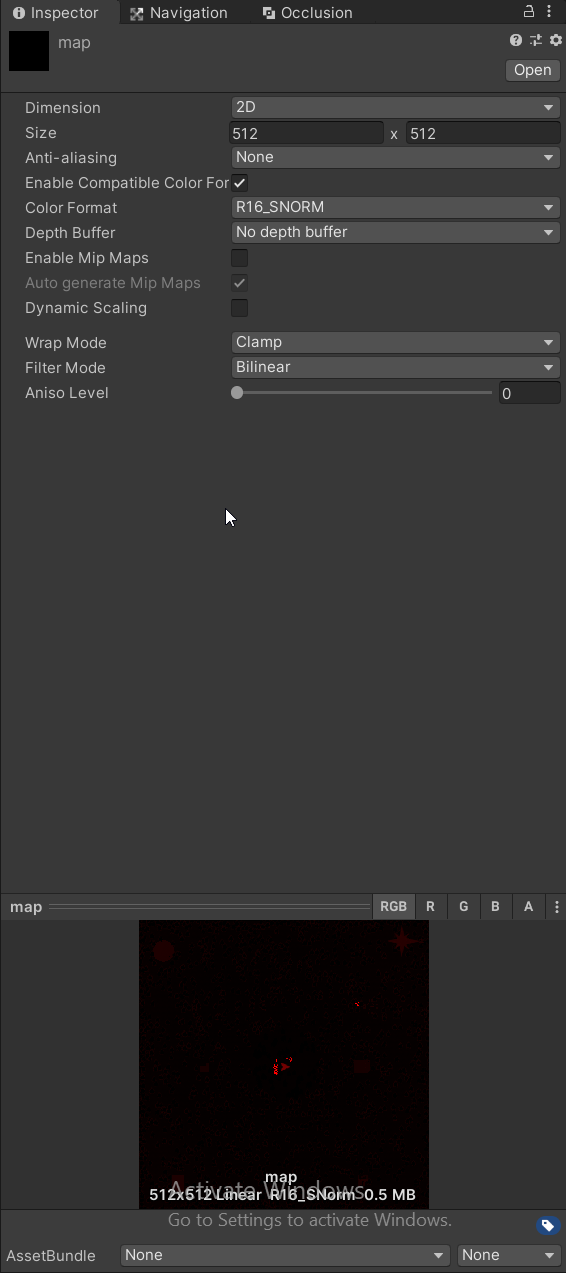
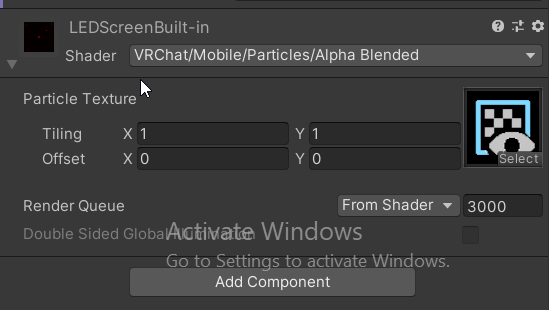
 clear thorn
i cant install the android build platform for quest worlds how can i fix this?

 fresh magnet
clear thorn
i cant install the android build platform for quest worlds how can i fix this?
fresh magnet
clear thorn
i cant install the android build platform for quest worlds how can i fix this?
close unity related processes, you will need to install the module manually using the module stand alone installer https://download.unity3d.com/download_unity/bd5abf232a62/TargetSupportInstaller/UnitySetup-Android-Support-for-Editor-2019.4.31f1.exe
if you using Mac the module should be available here too https://unity.com/releases/editor/whats-new/2019.4.31
Unity
clear thorn
@fresh magnet i downloaded that and after i confirm i want to run it, it does nothing. I'm on windows 11. i also tried rebooting and running it again but still nothing
fresh magnet
Weird that is not installing even the modules should detect it and no close by themselves, maybe your uity hub and editor got corrupted in that case meh try clean reinstall them.
clear thorn
I had to disable mandatory ASLR in my exploit and malware protection settings and reboot. after that, installing the module worked in unity hub
vital lance
anyone have a problem i have uploaded a world and it is not showing up in game
gritty trout
tysm that fixed it 
gritty trout
vital lance
anyone have a problem i have uploaded a world and it is not showing up in game
did you try restarting? you can also try to go to the website and invite yourself
vital lance
yeah it is not showing up on the website but unity said it uploaded
 ebon cape
is the limit for triangles in a vrchat worlds 50,000 or 100,000? i read 50k on one site, but 100k on other sites
atomic merlin
ebon cape
is the limit for triangles in a vrchat worlds 50,000 or 100,000? i read 50k on o...
There is no "limit" on Quest worlds.
atomic merlin
ebon cape
what about a recommended budget though?
For that I would refer to the Quest's own documentation.
VRChat is probably above being a "Busy Simulation", but those are the numbers I'd at.
https://developer.oculus.com/documentation/unity/unity-perf/?locale=en_US
Overview of performance requirements and recommendations for Meta Quest Unity apps.
The important thing is that you take into consideration that people's avatars also have to fit inside that budget
So making the world as optimized as possible is best.
ebon cape
gotcha 👍
ebon cape
atomic merlin
For that I would refer to the Quest's own documentation.
VRChat is probably abov...
thank you
 fresh snow
Hi! what’s the best way to build - i saw with unity, where can i download the vr chat sdk ? and can anyone build for free?
 idle stone
well that last part no, also u need the creator companion to make VRC content as the SDKs are on there now for convenience
balmy raptor
fresh snow
Hi! what’s the best way to build - i saw with unity, where can i download the v...
Learn, create and share using our tools and documentation.
Uploading content to VRChat is free
fresh snow
balmy raptor
Uploading content to VRChat is free
ok great! and is it possible to make it public for everyone or what is that process for approval like?
balmy raptor
fresh snow
ok great! and is it possible to make it public for everyone or what is that pro...
https://creators.vrchat.com answers both of those questions and a lot more
Learn, create and share using our tools and documentation.
fresh snow
balmy raptor
https://creators.vrchat.com answers both of those questions and a lot more
thank you! diving it! looks pretty straightforward
 knotty finch
fresh snow
ok great! and is it possible to make it public for everyone or what is that pro...
knotty finch
fresh snow
ok great! and is it possible to make it public for everyone or what is that pro...
uploading is free and goes through a very very short verification/upload process, it shouldn't take any more than about at max an hour for your world to be uploaded and joinable if it isn't already off the bat
 granite hazel
zenith pagoda
Does anyone know if LTCGI works on quest fine?
granite hazel
zenith pagoda
Does anyone know if LTCGI works on quest fine?
No, if you see the LTCGI effect, you should already know it's too much for quest. Answer is no. Not even possible with nice reflections.
zenith pagoda
granite hazel
No, if you see the LTCGI effect, you should already know it's too much for quest...
well ltcgi functions off of the specular map and diffuse map on materials, so i wasn't sure if it was too intense on quest or if it even functioned on quest as the world I am putting together is quite optimized.
but someone already said it isn't functional on quest, so i'll just plan on using a regular TV screen for quest.
granite hazel
Ok
If you even use it on Quest, your fps drops hard and everything is shaking so hard even there is no effect visible.
zenith pagoda
that is good to know, I won't use it on quest then as it isn't necessary to. thank ya!
granite hazel
Make sure LTCGI component is totally removed from scene.
Can set as Editor Only with Easy Quest switch, works for me.
zenith pagoda
yeah, i build separate scenes for quest and pc usually to keep things in their respective platforms
granite hazel
I just do it in same project, with material swap and editor only. That is enough.
 quiet plover
Hey Can Somebody Help Me With The Video Player That Lets Me Put It In My World For Pc And Quest To See
vital lance
If I upload a Quest world and set shaders to Poiyomi World will quest users be able to see it ? or will it break for quest users?
 foggy harness
vital lance
If I upload a Quest world and set shaders to Poiyomi World will quest users be a...
foggy harness
vital lance
If I upload a Quest world and set shaders to Poiyomi World will quest users be a...
As long as the shader isn’t using features quests just cannot do like grab passes, it should work on quest. Might not be efficient but it should work
zinc bridge
don’t use poiyomi for quest, what they said is true, but it will not perform well at all.
as well as, last time i tried poiyomi on quest, all i had on was the glitter effect, and it was a missing material for quest users
foggy harness
zinc bridge
as well as, last time i tried poiyomi on quest, all i had on was the glitter eff...
I think glitter might use a grab pass… idk tho, really I’m just agreeing with you
vital lance
Anyone got any idea how to fix this for quest users? Seems to be a lighting issue. Would appreciate any help :)


 zinc bridge
set it to color, and make it the color of the sky. see if it changes anything
vital lance
alr
zinc bridge
and for a minecraft world, you should turn Environment Reflections to 0, because it makes dark spots lighter, and it looks bad
vital lance
alr
zinc bridge
(and unless you have reflective materials you don't want reflections anyway)
vital lance
zinc bridge
and for a minecraft world, you should turn Environment Reflections to 0, because...
the intensity in reflections right?
zinc bridge
yeah, Environment Reflections "Intensity Multiplier," set it to 0


 zinc bridge
yeah, it's useful for dark scenes
vital lance
a tad bit dark Ill edit it a bit brighter maybe
 somber prawn
Anyone got any good space worlds
coarse grail
somber prawn
Anyone got any good space worlds

Join us on a once-in-a-lifetime journey as we take you on a chillout adventure to five breathtaking locations in the universe․ You'll have the chance to explore the rugged terrain of a rocky planet‚ …
somber prawn
Thank you
coarse grail

The pagoda sits within the caldera of an extinct volcano․ Speculated as a first exodus terraforming prototype site‚ it is now a monument to remember those lost along the millenia․ This is an Altspace…

A comfy vintage spaceship with a 1950s aesthetic․
 meager bronze
any tips on transferring worlds to a new pc (for context i need to get it off my laptop onto my desktop coputer
autumn pendant
meager bronze
any tips on transferring worlds to a new pc (for context i need to get it off my...
Zip the unity project folder, transfer, you're done 
balmy raptor
My world (wrld_b8f3bd7c-8656-4e56-8471-2d10458f31f9) is very choppy on Quest. I've narrowed it down to being something on the scene itself, as if I recreate the hierarchy in a new scene file, it performs just fine.
 lilac otter
is he saying that's the problem in the connection .
 vital lance
quick question. im uploading the quest version of my map (first quest upload iv done) and i noticed one says "upload last build" and one says "build and upload" do i select build and upload like on avatars, or are worlds different

its... likely the same as avatars where i just build and upload again to merge with the pc version, but i want to verify before
atomic merlin
vital lance
Not sure why Last Build is there, since you can't build and test on Quest.
Would imagine it is an oversight.
And yes, you are supposed to click "build and upload".
vital lance
thanks! i assumed so but for the sake of the first time i figured id verify.
lean fossil
atomic merlin
Not sure why Last Build is there, since you can't build and test on Quest.
Would...
I mean, it's only for uploading. I would assume it's so you can reupload without having to rebuild if something goes wrong in the upload stage.
atomic merlin
lean fossil
I mean, it's only for uploading. I would assume it's so you can reupload without...
Feels like a very rare thing to happen though without needing to rebuild.
lean fossil
I suppose 
balmy raptor
My world (wrld_b8f3bd7c-8656-4e56-8471-2d10458f31f9) is very choppy on Quest. I've narrowed it down to being something on the scene itself. If I recreate the hierarchy in a new scene file, it performs just fine.
 gleaming raptor
is there a quick way to solve this?

i switched all textures in the scene to RGB 24bit (except normal maps because there was no such option), is there anything else i have to do?
zinc bridge
it should have an auto-fix button, just press that
gleaming raptor
nope
zinc bridge
is that in the SDK or the console?
lilac otter
Keep govong same error and there's no code at all and even no any additional library or even now texture
gleaming raptor
zinc bridge
is that in the SDK or the console?
SDK
zinc bridge
not sure why there’s no auto-fix button then, i get one
gleaming raptor
zinc bridge
not sure why there’s no auto-fix button then, i get one
...i restarted its there now... thanks
autumn pendant
lilac otter
Keep govong same error and there's no code at all and even no any additional lib...
Can you show the authentification tab in the SDK panel ?
 silk stream
I got a question
When will the Spookality 2023 world going to be on vrchat so I can go to it
 autumn pendant
That is the builder tab
 autumn pendant
Have you tried logging out, closing unity and logging in again?
Should also try to log in the website just in case
lilac otter
yes I'm in this trouble for a week
autumn pendant
Have you reached out to #vrchat-support as well?
lilac otter
no I didn't
autumn pendant
I would try a new unity project to see if the issue is the same there, if it is, then you should contact the support so that they can help you fix this problem
lilac otter
autumn pendant
I would try a new unity project to see if the issue is the same there, if it is,...
I tried another project and I didnt add any library at or any details but same probem
autumn pendant
Are you creating those projects through the VRChat Creator Companion?
lilac otter
autumn pendant
Are you creating those projects through the VRChat Creator Companion?
yes that too
I'm using the companion
autumn pendant
Definitely reach out to the VRChat support then!
lilac otter
autumn pendant
Definitely reach out to the VRChat support then!
thank you so much for your help
 charred trellis
When I transferred my world to quest I made use of a lot of cutout textures but now they are just opaque. Are they not compatible if so is there a work around
nvm got it
 heavy nest
Hey anyone know any gothic world like appartments/homes?
vital lance
Why can't I see the item? ٍ
 zinc bridge
it has no material
 coral galleon
Does anyone know if YouTube urls are quest friendly now orr... ???
atomic merlin
coral galleon
Does anyone know if YouTube urls are quest friendly now orr... ???
Yes they should work on Quest, every link that works on PC should work on Quest now.
zinc bridge
yeah, it's been working for me
 dawn holly
Anyone have a quest joker avatar
 hollow parrot
Does anybody know why all or most of the VR chat worlds for questions or laging to death?
 gloomy rapids
is there a way to render over stuff on the quest platform?
i have a popup i want to have showing in a certain location that appears briefly and then vanishes
alternatively is there a way i can create something that is anchored to the user that has its relative position modified to be in a direction of a target location?
zinc bridge
you could find a shader with a high render queue, so it’s shown above everything
it’d need to be at 5000 or higher for that
somber prawn
Is there any RAAF worlds?
ebon cape
charred trellis
nvm got it
what was the solution?
i'm making a world with cutout textures but i might have to make them opaque and cut them in Blender if there's no work around
zinc bridge
use the Standard shader
you’re not required to use the VRChat > Mobile shaders for quest worlds, it just helps with performance
so if you have a few things you need to be cutout, it’s fine to use the Standard shader for that
gritty trout
hey guys, im making a quest and PC game world and i need to send a custom network event, but something very weird is happening, the event is sent sucessfully to quest players but not pc players, the code is identical on both side and looks like this
public void SetDifficulty()
    {
        if (Networking.LocalPlayer.isMaster)
        {
            this.SendCustomNetworkEvent(NetworkEventTarget.All, "SetDifficultyGlobal");
        }
    }
 median flume
anyone knows a way to make a metal texture that reflects on quest? or a pre made one that is very light?
zinc bridge
make a material with the standard shader, and turn up Metallic
and you can change how light or dark the metal is, by changing the value of the base color
median flume
nice i did, it was so easy

 heavy musk
need some help. i switched dev platform over from windows to quest and upon testing, none of the udon things in my world work? no pedestals, no video player?
not sure what happened. the lightmaps looks kinda funky and colored weirdly too... can anyone point me in the right direction?
median flume
heavy musk
need some help. i switched dev platform over from windows to quest and upon test...
you should send a screenshot so people can help you easily, was it called "debug mode" and you activated it on the vrchat website?
heavy musk
median flume
you should send a screenshot so people can help you easily, was it called "debug...
sorry not familiar with debug mode? where is that? i dont believe i had any unity errors on build. I'm not sure how i can screenshot a button not even highlighting in-game?
lightmaps i can try to screenshot and compare between desktop and mobile though~ will do when i get home
 inland pendant
Hi! I have a question. If I dynamically destroy an object from the hierarchy and immediately create(instanciate) a new one with the same name and in the same place, does the sync persist?
lean fossil
inland pendant
Hi! I have a question. If I dynamically destroy an object from the hierarchy and...
no
heavy musk
i have another question~ i have a directional light in a scene for lightmapping, but whenever i switch to android, the shadows just disappear from the scene view???? if i try to bake, they still dont show up
so frustrating!
atomic merlin
heavy musk
i have another question~ i have a directional light in a scene for lightmapping,...
Pretty sure no dynamic shadows on Quest.
Annoying that it affects the baker, but at least we can bake in PC build mode.
balmy raptor
gritty trout
hey guys, im making a quest and PC game world and i need to send a custom networ...
make sure they have the same network ID on both platforms? are you using easyquestswitch?
gritty trout
balmy raptor
make sure they have the same network ID on both platforms? are you using easyque...
Nope I'm not , but that was the issue, thanks
heavy musk
atomic merlin
Pretty sure no dynamic shadows on Quest.
Annoying that it affects the baker, bu...
didn't affect the baker the way i thoguht it would.
somehow realtime lights were able to bake on the pc side, but on the android side i had to set the lights to baked for them to cast shadows in the lightmap
 lone chasm
heavy musk
i have another question~ i have a directional light in a scene for lightmapping,...
lone chasm
heavy musk
i have another question~ i have a directional light in a scene for lightmapping,...
are you using the mobile shader?
heavy musk
lone chasm
are you using the mobile shader?
Nope. AutoCAD interactive. I found the issue was my lightsource though. I got it to bake the shadows I wanted
 jagged shuttle
lilac otter
jagged shuttle
lilac otter
the only time this has happened to me, is when i had a plugin that messed with the sdk and broke it so bad it would log me out upon uploading because it screwed w play mode
 sudden falcon
Hello, I have a few questions. I am having issues with porting one of my world to Quest. I'm making worlds since a few years now so I have the experience but am encountering some issues I never had before:
-First off the PC version looks all fine, but on Quest every UI elements and particles system are not rendering. I thought it could be something wrong with some shaders, like SilentLensFlare aka God Rays which is the first thing I removed from the scene before uploading (as well as Post Processing) but the issue still persist. I am using the VRChat Udon Procedural Skybox if it can help, and where the sun would be (although it is disable on the shader) there is a white square in the sky.
-Also I am on Quest 3, and everytime I try to load the world I get sent back to my home world because the system ran out of memory. I have baked lightmaps, 1024 pixel on PC each and I downscaled them to 512 pixels. World size is 29 mbs so I do not understand if it is a VRAM thing, even lowering them to 256 doesn't seems to fix the issue.
heavy musk
sudden falcon
Hello, I have a few questions. I am having issues with porting one of my world t...
What do you mean by UI elements? Do you know of those shaders you are using require post processing? Although you said you removed them already right?
I have a quest 2 and I can load 60mb worlds just fine. I have 2048 lightmaps and I do get sent back to the home world depending on what state the game is in. Usually visiting a normal world then visiting the dev world fixes it for me. Not sure if it's a vram issue? but it doesnt seem correlated with maps size for me, mainly just a world reload type of thing I've experienced
sudden falcon
heavy musk
What do you mean by UI elements? Do you know of those shaders you are using requ...
I see, thank you for your answer. I ended up fixing the UI things by removing a shader that failed compilation, but the reload still happens and I am left unable to load my world on Quest, although it is really lite... I wish the devs would implement a setting to disable this sending home thing, but with a warning of instability
 tranquil burrow
Heyo, does the particules work on quest?
lean fossil
tranquil burrow
Heyo, does the particules work on quest?
yes
tranquil burrow
Alr, cause I added some on my map, soo I wanted to know if it will make my map laggy for quest
vital lance
is there any way to get dithering on Quest builds?
zinc bridge
there’s probably shaders that have it for quest
 hybrid pecan
in an attempt to over-optimize memory performance in my excessively memory-hungry world, here's a shot in the dark: does anyone know if compressing a world's cover image helps at all? like, if i were to compress it in photoshop, would it take up less space in RAM on quest? or does VRChat compress all world cover images using some uniform method like ASTC?
zinc bridge
the world cover image does not affect the world size, unless you captured it in-scene from a plane with the texture. if you did, just delete it from the scene after
hybrid pecan
zinc bridge
the world cover image does not affect the world size, unless you captured it in-...
nono not world download size, RAM size
zinc bridge
i don't think the cover image would affect RAM size either, it's just for the menus
hybrid pecan
zinc bridge
i don't think the cover image would affect RAM size either, it's just for the me...
every image displayed by the game needs to be loaded into VRAM at some point. on the Quest, VRAM = RAM bc it uses integrated graphics. so assuming the image isn't destroyed and reloaded whenever the menu is opened and closed, if VRChat doesn't compress every cover image using a uniform compression algorithm, then compressing it before uploading it WOULD reduce RAM usage on Quest. so that was the question: i'm wondering if and how VRChat compresses world and avatar cover images, and as a result, if compressing the cover photo would help at all
coarse grail
hybrid pecan
every image displayed by the game needs to be loaded into VRAM at some point. on...
I don't think there's any way for you to control what the image format is used for the menu icon
hybrid pecan
coarse grail
I don't think there's any way for you to control what the image format is used ...
correct, I'm just wondering what format they use, and therefore whether or not any pre-emptive compression would make a difference
coarse grail
anything you do on your end is not going to make a difference as it would get converted to whatever GPU format the images are normally stored in
 exotic lion
Hello, I would like a little advice because I am stupidly looking. But in what format should we put a video to be able to read it directly on a quest map? I'm talking about a local video on the map, not a video from a URL. (could this be because I'm checking on a smartphone?)
exotic lion
finally, impossible to play a video directly in the world. I have to go through a URL, which I would like to avoid
 final drift
what was this world called
 copper edge
final drift
what was this world called
copper edge
final drift
what was this world called
Sky Camp by Rocktopus
https://vrchat.com/home/world/wrld_17038008-1d6b-4497-8b82-95a3d39fb56e

Sky Camp
final drift

exotic lion
OK, well, I'll pass the URL...
 craggy jolt
what are the quest world limits? in terms of poly count and world size?
coarse grail
craggy jolt
what are the quest world limits? in terms of poly count and world size?
there's not a hard cap on triangles for Quest Worlds and there's a Max file size limit of 100 megabytes
craggy jolt
coarse grail
there's not a hard cap on triangles for Quest Worlds and there's a Max file size...
Thank you!
 slate badge
can quest use non mobile shaders now?
atomic merlin
slate badge
can quest use non mobile shaders now?
Worlds have always been able to do that, but some shaders just outright do not work because of hardware limitations.
zinc bridge
and usually any shader that uses a grabpass is the kind that won’t work
 gray thistle

 shy sparrow
Im trying to make a vrc world project and i keep getting this


 cedar anchor
meager bronze
where do yall get videoplayer prefabs etc.
cedar anchor
meager bronze
where do yall get videoplayer prefabs etc.

ProTV 3.0 is now in beta: https://protv.dev/news/protv3-beta --- Ready-made video player solution for VRChat w/ Udon. Current Version: 2.3.14 Requires SDK3.0[Udon] and UdonSharp[U#] (tested w/ v0.20.3 & 1.1.x). NOTE: This will be the LAST major version of ProTV that supports U# 0.20.3. ProTV 3.x and
zinc bridge
meager bronze
wanna add it to walmart
try Riskiplayer v3.0
it’s got super fancy animations and looks great
i personally like it much better than other videoplayers

GitHub
Simple and fancy video player for VRChat with an on-screen interface, and simplified layout. - GitHub - RiskiVR/RiskiPlayer: Simple and fancy video player for VRChat with an on-screen interface, an...
shy sparrow
Anybody know of any Quest Friendly materials or like any tips on finding Materials
zinc bridge
Free 3D Assets Never Looked This Good! Get 2000+ PBR Materials, HDRIs and more for free under the Public Domain license.
zinc bridge
 wicked cipher
can someone help me? how to fix this problem
wicked cipher
can someone help me? how to fix this problem
what shaders are you using?
cedar anchor
can you use the water shader for color in quest somehow or something like it
winter quest
wicked cipher
can someone help me? how to fix this problem
Use standart shaders
zinc bridge
cedar anchor
can you use the water shader for color in quest somehow or something like it
i think you need to elaborate a little more, i’m not sure what that means
cedar anchor
this


its not super bad but its not what i want
how do you remove a probuilder mesh filter?
heavy musk
don't know if this goes here or #quest-development but i'm making a world and adding some models...
an fbx that's 987kB and a texture that's 8mb uncompressed and 0.6mb compressed (not using crunch compression)
adds about 22mb to my map...
this is also using the vrchat standard lite mobile shader...
wtf??
why is a 0.6mb texture and 1mb fbx adding 22mb to my map??
oh my god nvm i figured it out... this is stupid.. why do shapekeys add so much file size when the fbx isnt even much larger???
balmy raptor
heavy musk
oh my god nvm i figured it out... this is stupid.. why do shapekeys add so much ...
Where are you getting these size figures?
 kindred talon
someones going to probably stab me for asking this but.
can you use 8k textures on quest?
I only need like 3 or 4 max
possibly 6 if I'm feeling like commiting filesize bloat
zinc bridge
there’s no limit, you can use them, but it’s far better to make them 4K at least, or not use them
coarse grail
kindred talon
someones going to probably stab me for asking this but.
can you use 8k textures ...
why do you need them to be so high resolution
kindred talon
coarse grail
why do you need them to be so high resolution
storeing video in textures instead of streaming them.
works out to 30s 512x256 @15fps
coarse grail
kindred talon
storeing video in textures instead of streaming them.
that is a bad idea
it's worse for vram then just using the video player
kindred talon
yeh but you can't esily have a tun of video players else VRC will kneecap you
coarse grail
what would you be showing that would require multiple video players
kindred talon
random in-world adverts for world building reasons
TBF I could get away with something lower
coarse grail
you could just put the multiple advertisements in the same video and then chop up the video player screen into multiple pieces each one UV wrapped to a different advertisement on the video
 kindred talon
that might work
heavy musk
balmy raptor
Where are you getting these size figures?
checking in-game on mobile
heavy musk
coarse grail
you could just put the multiple advertisements in the same video and then chop u...
wait how would you chop up the video player screen? that soudns super cool at atlas videos together!
 idle lake
I am making a world where I have a camera that has its view shown on a screen in my world. I know the material texture for the camera's view has a resolution setting and this is basically a whole new screen of pixels the user has to render. How impactful is this on Quest user performance? Is it about the same as regular PC VR?
coarse grail
heavy musk
wait how would you chop up the video player screen? that soudns super cool at at...
I don't know how to do that off the top of my head I've just seen it done in several club worlds
winter quest
idle lake
I am making a world where I have a camera that has its view shown on a screen in...
The higher the render texture resolution, the higher the load.
Do it as minimally as possible.
idle lake
winter quest
The higher the render texture resolution, the higher the load.
Do it as minimall...
What if it's just like pointed at a single texture image, no like world geometry, or is the performance hit about the same
winter quest
idle lake
What if it's just like pointed at a single texture image, no like world geometry...
If you are talking about render texture, then this is not one texture, but as many as your fps per second.
 fathom kite
 clear stratus
Yo does anyone know how to fix the video player
vital lance
Yeah because before the update I was able to use video players but now after the last update I can no longer use video players, is there a reason for that?
zinc bridge
 vital lance
zinc bridge
vital lance
zinc bridge
Oh I see
Thank you my dear
Don't know how I missed that
clear stratus
Did they say how long will they have it disabled
 misty portal
clear stratus
Did they say how long will they have it disabled
misty portal
clear stratus
Did they say how long will they have it disabled
you responded at the right time lol look at the last message in #announcements
clear stratus
Ok thank you
heavy musk
zinc bridge
oh frick. this explains things... my world was broken, then i went to go check other streaming quest worlds and those were broken as well...
Anyone notice that transparent/cutout shaders work inconsistently on quest? I have a plant texture that looks fine on my android client, but it looks like an opaque texture on my quest 2.
My other glass materials and such look fine though?
 honest veldt
how to make high quality mirror that doesnt make quest run in 2 fps❔
 little juniper
cedar anchor
honest veldt
how to make high quality mirror that doesnt make quest run in 2 fps❔
little juniper
cedar anchor
honest veldt
how to make high quality mirror that doesnt make quest run in 2 fps❔
im not sure if it works on quest but theres a mirror prefab so it just shows the player and maybe pickups or somthing that can help let me if the prefab
also you can just do this by changing what it reflects
that should help a bit
look up vrchat prefabs and they have a bunch of diffrant mirrors
@honest veldt heres what i use https://github.com/acertainbluecat/VRCPlayersOnlyMirror
GitHub
A simple mirror prefab for mirrors that show players only without any background in VRChat - GitHub - acertainbluecat/VRCPlayersOnlyMirror: A simple mirror prefab for mirrors that show players only...
also make sure your world is optimized for quest
 keen lily
How do I fix this?
 crisp crest
How do i set the world volume for avatars in my world in Unity. They fade off real quick?
winter quest
crisp crest
How do i set the world volume for avatars in my world in Unity. They fade off re...
Players have two sources of audio
crisp crest
winter quest
https://creators.vrchat.com/worlds/udon/players/player-audio/#setavataraudiogain
Thank you where would i find that in unity tho 👨🏻💻
winter quest
crisp crest
Thank you where would i find that in unity tho 👨🏻💻
In udon, section PlayerApi
vital lance
Hei everyone, i'm noob, try to import VRChat SDK and got the same error on import unitypackage or open template-world-main project in Umity Hub:
MacOS Big Sur on Intel Macbook Pro. Unity 2019.4.31f1
New project. Bild is ok before import SDK
UnityEditor.BuildPlayerWindow+BuildMethodException: 3 errors
at UnityEditor.BuildPlayerWindow+DefaultBuildMethods.BuildPlayer (UnityEditor.BuildPlayerOptions options) [0x002b3] in /Users/bokken/buildslave/unity/build/Editor/Mono/BuildPlayerWindowBuildMethods.cs:194
at UnityEditor.BuildPlayerWindow.CallBuildMethods (System.Boolean askForBuildLocation, UnityEditor.BuildOptions defaultBuildOptions) [0x00080] in /Users/bokken/buildslave/unity/build/Editor/Mono/BuildPlayerWindowBuildMethods.cs:95
UnityEngine.GUIUtility:ProcessEvent (int,intptr) (at /Users/bokken/buildslave/unity/build/Modules/IMGUI/GUIUtility.cs:197)
winter quest
vital lance
New project. Bild is ok before import SDK
Have you installed the Windows Build Support addon?
Unity
vital lance
winter quest
Have you installed the Windows Build Support addon?
no, i'm working on MacOS and create project for android (Oculus Quest 2)
winter quest
vital lance
no, i'm working on MacOS and create project for android (Oculus Quest 2)
If you are working on Android, you need to install the Android addon and switch Unity to this mode.
And if for Windows, then install the Windows addon.
vital lance
winter quest
If you are working on Android, you need to install the Android addon and switch ...

 restive cave
Hi everyone! vr chat noob, been on PCVR version a lot, and trying to deploy something i've made to quest version but my status is still set to "visitor" - problem is whenever i go into VR chat its pretty empty (i'm in ireland) - so its hard to meet people and i guess "level up" my status so i can publish. has anyone any tips for getting out there or expediting the process so i can publish and test my world?
vital lance
Empty project. before import VRChat SDK have builded. After: Assets -> import Packege -> VRChat-Worlds-SDK-3.4.1.unitypackage not build and get 3 errors in project
vital lance
restive cave
Hi everyone! vr chat noob, been on PCVR version a lot, and trying to deploy some...
We can add each other to friend list to force "VRChat use experience" for upgreding our lvl in publish possibilitis... Why developers can't have private worlds for own tests?...
winter quest
vital lance
We can add each other to friend list to force "VRChat use experience" for upgred...
Why can't they? Private as much as you like.
But public after some time spent in vrchat.
zinc bridge
vital lance
We can add each other to friend list to force "VRChat use experience" for upgred...
you can have private worlds for tests, just don’t make it public and it won’t be public
vital lance
winter quest
Why can't they? Private as much as you like.
But public after some time spent in...
In Show Control Panel I saw onli publish button but not upload private world on server. In Guidence I see nothin about private world... only publish
zinc bridge
publish to the servers, not to community labs.
when you upload a world, it will always be private by default, and after the initial upload, a button to make it public will appear
winter quest
vital lance
In Show Control Panel I saw onli publish button but not upload private world on ...
Uploading is always private. Then you can make it public through the website.

A little outdated, but essentially the same.
vital lance
zinc bridge
when you upload a world, it will always be private by default, and after the ini...
ok, on MacOS I can't run Android.apk for test and can't run it native -> SteamVR not exist for Mac to sream on Oculus by cable connection. I must run it on Oculus. VRChat android application can import local .apk world for tests without uploading on server?
zinc bridge
no, just upload the world
you have to upload it to play and test it on mac, but just leave it as private
vital lance
zinc bridge
you have to upload it to play and test it on mac, but just leave it as private
but i can't upload with my low experience lvl, and dont know what exactly i need to do for lvlUp... Is some guides for it? How many frien need add and time spend to start develop own worlds?
zinc bridge
you can upload
you just can’t make it public
you’re able to upload worlds, you just can’t publish it to community labs
 royal nova
Hello
When i want to upload my quest world its just quest standalone in vrchat how do i also manage it to be pc compatible
vital lance
zinc bridge
you’re able to upload worlds, you just can’t publish it to community labs
thank you, from guide it not obvious
winter quest
royal nova
When i want to upload my quest world its just quest standalone in vrchat how do ...
Setting up a cross-platform world or avatar is actually quite straightforward! In short, all you have to do is use a duplicate project to build an Android version of the asset, and upload it to the same content ID as the VRChat PC asset. The client will manage which version it needs to download.
vital lance
May someone make link for empty Unity android project for Oculus Quest2 with imported VRChat SDK? I guess I'm stupid and don't understand what I'm doing wrong in importing
winter quest
vital lance
May someone make link for empty Unity android project for Oculus Quest2 with imp...
https://drive.google.com/file/d/19BZomhE9kCBqalUv8TC1jsr6pZH42UcD/view?usp=sharing I already wrote to you what to try.
Install Windows addon.
Google Docs
vital lance
winter quest
https://drive.google.com/file/d/19BZomhE9kCBqalUv8TC1jsr6pZH42UcD/view?usp=shari...
It did not help, errors is the same. I have installed all addons including Windows and except iOS. Errors told about wrong path to VRCCore-Editor.dll: "dll is not allowed to be included or could not be found". This dll is exist in right folder, but builder don't see it. Other errors show strangest paths: Users/bokken/buildslave/unity/build/Editor/Mono/AssemblyHelper.cs... On my MacOS I have not user "bokken" and folder "Users" is not exist, MacOS have other system folders tree. it was tested on macOS at all?
vital lance
UP: I see https://vcc.docs.vrchat.com/vpm/cli Just import packages or open template project is not enough. Need to instal Command Line version of VRChat Package Manager using... command line, but before need to instal .NET 6 SDK... Ehh. too complicated to just make low poly models. guess I'll go see what's in the META. It might be easier to start there.
The VRChat Package Manager is available as a Command Line Interface application, for advanced users and automation.
 near perch
Why do the standard shaders not work well with the quest? I get the yellow caution error and when trying to do standard/transparent it caused a lot of artifacting?
coarse grail
the standard Shader will render fine on Quest it's just more expensive
yellow triangles are more a for your information not a it's going to stop uploading
restive cave
vital lance
We can add each other to friend list to force "VRChat use experience" for upgred...
thank you! i am edinky
heavy musk
I'm going to ask here becuase I don't know if anyone can help me... My world was running at a smooth 40-45fps when I last tested it on quest. But now (post unity 2022 update) I run at 10-15fps? This is also the same on mobile. In unity client sim, I get the same if not better batches (15-150) than when I last tested it on quest.
Is anyone else experiencing performance issues? or did I somehow royally screw up my project in the past week? If I screwed up my project, why doesn't the batches reflect more overhead for running my world?
heavy musk
Found my issue. I have a volumetric direcitonal light setup from VoxelKei. Even with the game object disabled, it seems to suck frames (probably due to it's weird 2 stack shader + camera system somehow)
I deleted it from my scene and the frames came back.
Makes me wonder if I can edit one of the shaders to stop screwing up on quest
restive cave
Hi - I have a new world (a game prototype) and I'm looking for testers - would anyone out there be game? also, is this the best channel to ask?

 lone lark
Hey, I recently reached User rank and the SDK Authentication does tell me I can publish worlds but in the World Visibility section of the Unity VRChatSDK it's locked into Private and is saying I'm not allowed to publish worlds. Does anyone have any idea about this?
zinc bridge
after you first upload the world, you have to press the “Publish to Community Labs” button that will show up
winter quest
lone lark
Hey, I recently reached User rank and the SDK Authentication does tell me I can ...
Community Labs is the new way for you to get your world published and out into the VRChat Universe. When you upload a world, you will be asked if you want to publish the world to Community Labs. If you choose to do so, your world is placed into Community Labs. This is a place where anyone can upload their content (once they've got the appropriate Trust Rank), and allow users to browse and find content to explore. https://docs.vrchat.com/docs/vrchat-community-labs
lone lark
Thanks, I'll check that, I guess I just missed it
 short oak
someone that can test this world from quest? https://vrchat.com/home/world/wrld_bbd2521d-24f1-41d7-8210-5f0877f41521

My first world - a place to chill‚ a place to love
it's also 106mb idk how i've bypassed the 100mb limit 😂
 rapid patrol
Whats the recommend shader for quest? Preferably that looks good with bakery.
 wheat tusk
My Digital Circus map is up on Quest now :)
 wheat tusk
rapid patrol
Whats the recommend shader for quest? Preferably that looks good with bakery.
wheat tusk
rapid patrol
Whats the recommend shader for quest? Preferably that looks good with bakery.
oh I actually used bakery and filamented! I recommend :>
rapid patrol
wheat tusk
oh I actually used bakery and filamented! I recommend :>
Tyty boss and everyone here. ❤️
Already published in pc but not quest yet
 zinc bridge
wheat tusk
My Digital Circus map is up on Quest now :)
zinc bridge
wheat tusk
My Digital Circus map is up on Quest now :)
is it on PC too?
wheat tusk
zinc bridge
is it on PC too?
ye!
lone lark
Hey, I don't get any option to publish my scene to Community Labs. There's no section for it in SDK Control panel. It says I'm allowed to publish worlds but also says im not allowed to publish worlds so I'm very confused. Is this a bug? Should I just contact VRChat for it or you guys have any idea whats going on?

 zinc bridge
have you recently published a world? if so, there’s a week delay between publishing worlds
lone lark
no this is my first world :/
 green jolt
Wheres the channel for questions related to worlds
atomic merlin
green jolt
Wheres the channel for questions related to worlds
This one is for Quest
#world-development is the general one.
green jolt
What about “looking for” certain worlds?
Curious if anyone has made one that looks similar to the environment of this irl area here, its on a rooftop
 turbid jewel
Recently in my Vrchat world I noticed that on quest my grass from a far distance start to go pink and when I look up close to the grass the pink stuff go away showing a weird black frame around my grass texture. It's only happening on quest and I'm not sure why. Does anyone know a fix for this bug of glitch?
zinc bridge
what kind of grass? shader, terrain, billboard, particle system?
 spring atlas
turbid jewel
Recently in my Vrchat world I noticed that on quest my grass from a far distance...
spring atlas
turbid jewel
Recently in my Vrchat world I noticed that on quest my grass from a far distance...
could be a pc rgb thing
turbid jewel
zinc bridge
what kind of grass? shader, terrain, billboard, particle system?
Yes, it is terrain Grass
 wraith coral
Do you guys know the discord for the just dance game?
 steep cloud
whenever i switch over to quest, the Terrian Texture just smooths to the max even thought theres 0 Smoothness

how do i get rid of the smoothness?
 hallow fractal
steep cloud
whenever i switch over to quest, the Terrian Texture just smooths to the max ev...
hallow fractal
steep cloud
whenever i switch over to quest, the Terrian Texture just smooths to the max ev...
Pretty sure it's this:
#world-quest message
steep cloud
hallow fractal
Pretty sure it's this:
https://discord.com/channels/189511567539306508/565256275...
thank you.
 cyan agate
I am only getting this for quest and I don't know how to fix this issue. I have reloaded the sdk and it didn't work
 short oak
steep cloud
how do i get rid of the smoothness?
short oak
steep cloud
how do i get rid of the smoothness?
probably that's the sky reflecting on the ground
 ornate shard
wheat tusk
oh I actually used bakery and filamented! I recommend :>
ornate shard
wheat tusk
oh I actually used bakery and filamented! I recommend :>
Is filimented a shader? Or is it part of Bakery. Just getting started on bakery this week.
wheat tusk
^
twilit shard
So i've made a copy/paste save system but I don't own a quest so I wanted to check if these style save systems can work on quest or if it's too much effort to copy/paste from the device?
 feral token
for some reason the world i'm making needs an avatar descriptor???

 winter quest
feral token
for some reason the world i'm making needs an avatar descriptor???
winter quest
feral token
for some reason the world i'm making needs an avatar descriptor???
Because you added an avatar with all its settings to the scene.
feral token
but i didn't?

 stray mountain
 cedar anchor
is it posable to have a player in annother area but render someone avatar thats in annother?
and there banner above them?
i wanna add quest support but the lighting is a little odd without post prossing i wanted to see if i could put the quest user in annother area and then render anyone else over there aswell so the quest user would see the world better and just make voice chat heard globally
or is there a better way of doing this?
is there any post processing for quest and im just over complicating things
atomic merlin
cedar anchor
is it posable to have a player in annother area but render someone avatar thats ...
Is that area really so bad without post processing that you'd rather have a Quest user not even getting remotely the same experience?
Are you aware that the Quest and PC versions of worlds can be entirely different?
Anyhow, yeah, that is possible to do, but it includes messing around with stations and you'd have to program this system on your own.
cedar anchor
atomic merlin
Is that area really so bad without post processing that you'd rather have a Ques...
what do you mean by entirely different?
atomic merlin
cedar anchor
what do you mean by entirely different?
If you put a table (with colliders) in the PC version but not the Quest version then PC users will appear to be hovering above nothing for Quest users.
The versions can be entirely different.
The singlular thing holding the versions together is the blueprint ID and it can be attached to any world descriptor.
vital lance
So i'm trying to make a world using the terrain tool in Unity. Everytime I switch to android, as I'm making the world for pc & quest, it changes the grass as a glossy color (which I do not want) How do I fix this?
 zinc bridge
cedar anchor
what do you mean by entirely different?
zinc bridge
cedar anchor
what do you mean by entirely different?
the quest and pc builds of a world are practically separate projects to put it simply. the pc version of one world could be a puzzle map, and the quest version of that same world could be a horror game
so you can make the quest version look any way you want, so just do that. don’t try putting quest players in a different part of the same world, if you can make the one part look better for quest
and also, it’s best to not rely on post processing. try to get the world looking how you want with post processing disabled, and add it as the final thing to improve the look by a little bit
 hallow surge
i need help im worried ill fuck smt up
 icy lance
hallow surge
i need help im worried ill fuck smt up
icy lance
hallow surge
i need help im worried ill fuck smt up
You need to remove any avis you're not using from your scene instead of just disabling them or else they will count to the overall performance stats
atomic merlin
icy lance
You need to remove any avis you're not using from your scene instead of just dis...
That isn't true.
atomic merlin
hallow surge
i need help im worried ill fuck smt up
Best to save a copy of the scene (right click the "OPEN ME" in the top left and save as), name it something + "Quest".
Because you will need to remove physbone components.
icy lance
atomic merlin
That isn't true.
oh mb, thought I saw someone mention that being a problem previously
atomic merlin
icy lance
oh mb, thought I saw someone mention that being a problem previously
I think it might have been an issue with some old SDK, but definitely not been one for quite a while.
icy lance
Ah gotya, I've been lurking avi help for a while and must've got wired crossed or something
hallow surge
 hallow surge
someone pls help
 slim ravine
hallow surge
someone pls help
slim ravine
hallow surge
someone pls help
What do you need help with? the error message is pretty clear on what you need to do.
 cedar anchor
zinc bridge
the quest and pc builds of a world are practically separate projects to put it s...
cedar anchor
zinc bridge
the quest and pc builds of a world are practically separate projects to put it s...
ohhhh thanks man
 grim hearth
Is there any specific texture for passthrough in unity? I'm hoping the only solution is not just virtual desktop or alvr using a chroma key...specifically curious if passthrough worlds can be acheived on native quest
zinc bridge
what do you mean passthrough?
like, the kind of passthrough when you double tap the side of your headset?
 astral halo
Hi folks, I'm making a standalone Quest world, and I would like to include this kind of portal/transition effect that 'Five Skies' does.
I'm assuming it changes between skyboxes, but I would like to know how to mask them

 tiny matrix
hey, since i cant seem to find a world help chat, im not sure where to ask about this, but, im having an issue when tryna upload this world, its my first time so im a little new to this
 zinc bridge
you would ask in #world-development usually
tiny matrix
thanks
 quick hemlock
astral halo
Hi folks, I'm making a standalone Quest world, and I would like to include this ...
quick hemlock
astral halo
Hi folks, I'm making a standalone Quest world, and I would like to include this ...
It might not be a single skybox material? I walked around the world and it seems more like separate meshes with a different sky material on each. Like room-sized meshes with holes cut out for the portals.
astral halo
quick hemlock
It might not be a single skybox material? I walked around the world and it seems...
Yes! I did two spheres that are joint on a few faces, each one has a skybox texture and it works like a charm. However, I don't know if this is the optimal solution for Quest standalone worlds, but seems pretty cheap so far
coarse grail
astral halo
Yes! I did two spheres that are joint on a few faces, each one has a skybox text...
sounds like a pretty workable solution
astral halo
Yeah works flawlessy so far!
Another question I have in mind, do Unity terrains work well for Quest worlds? I'm planning to instantiate grass with gpu instancing and trees as well, including impostors on the back
coarse grail
yes you can use Unity terrains on Quest
astral halo
Cool, thank you so much!
feral token
feral token
for some reason the world i'm making needs an avatar descriptor???
I'm still wondering about this. It persisted even when I made another world and none of the discord search results were relevant
 tepid aurora
Are there any good resources for Light Baking Large-ish worlds for Quest? I have a pretty large scene but the colors are coming out super flat. Most of the content I've found is for PC Worlds
feral token
feral token
I'm still wondering about this. It persisted even when I made another world and ...
making the world manually through unity hub instead of creator companion fixed it.. still curious why creator companion caused the issue though

 orchid citrus
Huh
 jovial helm
I used to create avatars and worlds and now this

 prime jewel
tepid aurora
Are there any good resources for Light Baking Large-ish worlds for Quest? I have...
prime jewel
tepid aurora
Are there any good resources for Light Baking Large-ish worlds for Quest? I have...
Same rules generally apply to both, but you'll need to scale down the final output maps to fit. You might want to make sure you disable all PP and then have some Quest only lights or alternate light settings to tweak the overall colouring of the scene.
 queen verge
When I join into my world on quest the video player doesn't work but if I'm PC it works and any quests who join me can see it. How can I make it work for quest as well. I've been using the KineL which is supposed to be quest compatible and it works on quest if the world host is PC
(pls ping me when you reply)
 compact cargo
Hello Everyone! I have a Question. Does anybody know a good Tool to easier convert Worlds to Quest? For Example it contains a List of all Materials to change them to Mobile Shader? i manually change all the Materials per Hand in order to make it compatible. i would love to have it easier!
compact cargo
queen verge
When I join into my world on quest the video player doesn't work but if I'm PC i...
good Evening! u can try ProTV for Example, they made their Player both PC and Quest Compatible
its the only Player i tried so far, never had a Problem with it
@queen verge
 shut latch
is there a list of all the quest supported shaders and what they do
looking for documentation
zinc bridge
compact cargo
Hello Everyone! I have a Question. Does anybody know a good Tool to easier conve...
EasyQuestSwitch
compact cargo
zinc bridge
EasyQuestSwitch
 ahhhhhh nice, thank you my Friend!
shut latch
Also, can the quest shaders handle transparency at all ?
compact cargo
zinc bridge
EasyQuestSwitch
its integrated in VCC.... funny i never saw it anywhere after i went to Android Mode
lean fossil
shut latch
Also, can the quest shaders handle transparency at all ?
transparency is very expensive and you should avoid it
shut latch
will I still have access to things like audiolink, video players, etc in quest?
I'm struggling to find in the documentation anything that emunerates what I can and cannot do
are the features in udon 1:1 for quest and pc? etc
winter quest
shut latch
will I still have access to things like audiolink, video players, etc in quest?
This is all described in great detail in the documentation.
Quest incompatible shaders will at best simply not work, but will usually cause serious problems.
lean fossil
shut latch
are the features in udon 1:1 for quest and pc? etc
udon is the same for PC and quest, except the quest is a mobile phone so you have to pay close attention to how much performance you are using
coarse grail
audio link would be potentially usable for the world but not avatars but that would be some CPU overhead you probably can't afford on Quest
queen verge
compact cargo
good Evening! u can try ProTV for Example, they made their Player both PC and Qu...
How do I add in quest compatible links for the video player?
compact cargo
queen verge
How do I add in quest compatible links for the video player?
They are all quest compatible since an Update
shut latch
winter quest
This is all described in great detail in the documentation.
Quest incompatible s...
I mean I'm having trouble with even quest shaders working
 icy raptor
feral token
I'm still wondering about this. It persisted even when I made another world and ...
icy raptor
feral token
I'm still wondering about this. It persisted even when I made another world and ...
did you find a solution for this?
feral token
I ended up just forgoing creator companion and making the world through unity hub instead which seemed to work
 mellow briar
hi, i have a world that i would like to convert for quest but it saying the assets size is too much, i tried to remove some texture from material, but the size stay the same, what i have to do and i know which is the assets that is most big in the project?

 hallow shale
QUESTION Anyone know any adventure/game/explore worlds where you need to do quests/find things (maybe in a forest, mansion, fantasy world or spooky world) ? Thank you! 🤍✨
winter quest
mellow briar
hi, i have a world that i would like to convert for quest but it saying the asse...
Compress textures and music.
mellow briar
winter quest
Compress textures and music.
there is no music, how i compress?
winter quest
mellow briar
there is no music, how i compress?

 winter quest
For PC, it also makes sense to compress.

 wheat tusk
Quick question!
I'm adding a snow effect to my world as a temporary thing

How many particles can I get away with while being acceptable for Quest?
rn I have it at 2000 with no collision
I'd test myself but no Quest :<
mellow briar
wheat tusk
I'd test myself but no Quest :<
you can test with phone and vrchat mobile
zinc bridge
wheat tusk
I'd test myself but no Quest :<
i could test for you if you want
i have a quest 1 and 2
wheat tusk
Appreciated!
I'd like to just have a rough idea how many particles I should be aiming for
zinc bridge
it really depends on all the settings and texture for the particles
wheat tusk
oki
Worst comes to worst I guess I can just disable the particles outright on Quest
lol
zinc bridge
it should be ok, usually particles perform just fine
wheat tusk
:>
 frozen acorn
Guys ik I shouldn’t ask but can someone make a world for my mate, he’s 100 days sober from self harm and I really want him to feel like it’s a true milestone because it is, from the amount of work he’s put in I really want him to feel good about himself his name is Orion.
Much appreciated 👍
Ps he really likes cats
lean fossil
wheat tusk
https://cdn.discordapp.com/attachments/1039650852144676886/1184719735829565490/i...
 inland rivet
what's the high level steps for testing with the quest 2? just select android on the build screen and then build and upload? then I can log in on my quest and find it under my worlds?
zinc bridge
inland rivet
what's the high level steps for testing with the quest 2? just select android o...
yeah basically
select android as your target platform, sort out any errors or shaders that wouldn’t be quest compatible, and upload the build
in-game, there’s an Uploaded section for your worlds
inland rivet
It worked! Now I just make changes, upload and test with quest over and over? Awesome
blazing fossil
yup
wintry rune
Anyone know how to do this? I want a hexagonal texture overlayed over the original, and detail maps dont seem to show in quest

 uneven comet
If you have it the way you want it in blender, why not bake the texture for quest usage?
 rigid mist
You can use #holoportation and get a #quest3 https://youtube.com/shorts/DS_RcoqtpDw?si=IP53yC-FUpB3g-XC

YouTube is not a sponsor of these Sweepstakes, and by participating in these Sweepstakes, you release YouTube from any liability related to these Sweepstakes.
Sweepstake rules: https://aexa.tech/sweepstakes
#shorts
 dusk field
After upgrading to unity 2022 the smoothness on standard lite materials looks absolutely horrendous
does anyone know how to resolve this or how to apply EQS to change the smoothness on materials?
its quite problematic that even with EQS i have to first save all the smoothness values for both Quest and PC versions, and then manually apply them to all affected materials any time it's changed
i imagine i'm doing something very wrong, any help would be welcome
dusk field
anyone know?
 rich copper
wait so if questies cant see Poiyomi shaders on a avi but they can if its a world?
atomic merlin
rich copper
wait so if questies cant see Poiyomi shaders on a avi but they can if its a worl...
You can't upload a Quest avatar with custom shaders, but you can with worlds, it just is not recommended.
You can escape from a poorly performing world, but can't exactly do the same with friends because of their avatars.
zinc bridge
rich copper
wait so if questies cant see Poiyomi shaders on a avi but they can if its a worl...
not entirely. there’s a bunch of features on poiyomi that use a Grabpass for the effect, and if any of those are turned on, it will either:
look like a missing material
look completely wrong and render terribly
be completely invisible
and, it doesn’t perform well for quest either of course, because it’s made for PC where there aren’t nearly as many limitations
 umbral root
Hi does anyone know how to make camera's properly render onto materials on quest, using a scope shader for a combat world but on quest it doesn't seem responsive and only shows the skybox
winter quest
umbral root
Hi does anyone know how to make camera's properly render onto materials on quest...
Probably only through the UI.
umbral root
I've seen it work on SDK2, not sure if changes were made when it comes to 3.0 worlds
winter quest
At the time of SDK2 there was no quest version yet
umbral root
I'm aware, however worlds exist that were made with SDK 2 and Quest Compatible
 lyric ruin
What is UDON
 bleak kettle
zinc bridge
lyric ruin
What is UDON
bleak kettle
zinc bridge
lyric ruin
What is UDON
VRChat’s version of scripts
it has text-based and visual-based forms
they go by UdonSharp and Udon Graph respectively
UdonSharp is like C#, and Udon Graph is connecting blocks with “noodles,” or lines
they can both do the same things, but depending what you’re trying to create, one might be better than the other, usually udonsharp is best (unless you don’t know how to code with text)
 light hazel
When making a world quest compatible. should i also make sure to switch shaders to VRCHAT mobile shaders for optomization?
winter quest
This is not optimization, but requirements.
The mobile device must have mobile shaders.
light hazel
winter quest
This is not optimization, but requirements.
The mobile device must have mobile s...
so, its shouldnt be ok to leave world shaders as it is
atomic merlin
light hazel
When making a world quest compatible. should i also make sure to switch shaders ...
You can and it is good to use mobile shaders where you can, but you don't have to, worlds can use any shaders technically (but some will straight up not work on Quest, is a Unity and hardware limitation).
light hazel
atomic merlin
You can and it is good to use mobile shaders where you can, but you don't have t...
sorry to bother, but what could help Quest users not lag?
my wolrd has about 5 spotlights (baked) if that matters
atomic merlin
light hazel
sorry to bother, but what could help Quest users not lag?
my wolrd has about 5 ...
How bad is the lag for Quest users?
light hazel
atomic merlin
How bad is the lag for Quest users?
well its hard to explain, but while testing with a quest friend, theres 1 Spot that lags him ALOT
everything else seems about avrage
winter quest
light hazel
sorry to bother, but what could help Quest users not lag?
my wolrd has about 5 ...
Don't use realtime lighting, use only mobile shaders, replace mesh colliders with box colliders. Reduce polygons.
atomic merlin
light hazel
well its hard to explain, but while testing with a quest friend, theres 1 Spot t...
First reaction was that they might be touching a mesh collider for a very high poly object.
atomic merlin
light hazel
well its hard to explain, but while testing with a quest friend, theres 1 Spot t...
Do you use transparency in your world?
Windows, glass, any sort of special shaders effects?
light hazel
Windows uses Standard Transparent
atomic merlin
Pretty much regardless of transparancy used the Quest hardware just doesn't handle it well.
winter quest
light hazel
Windows uses Standard Transparent
There is no need to use transparency on the quest.
I have already written about mobile shaders.
light hazel
so should i make windows just not see trough for quests?
atomic merlin
That is a common solution
light hazel
cuz this is what i use for PC
 atomic merlin
It is impossible for us to correctly guess what is making performance so bad at that spot, but you really shouldn't have any transparency on Quest.
PC hardware has optimizations to handle it, mobile hardware threw that out to be more power efficient, it has to brute force it, which is costly.
light hazel
alr, thanks
light hazel
Im using ProTV 3.0 and the video player doesnt work for Quest users, anyone knows how to fix it
atomic merlin
light hazel
Im using ProTV 3.0 and the video player doesnt work for Quest users, anyone know...
How does it not work?
Is it a single user having issues, who it works for elsewhere, or is it multiple?
light hazel
atomic merlin
How does it not work?
I didnt know they need a Network ID
 charred vector
Solved.
zinc bridge
charred vector
Solved.
it could be the LTCGI, i don’t know if that’s fully quest compatible
 gleaming delta
im trying to figure out how to turn this basic small map in blender i made into a world but i dont even know what these tutorials are talking about
 abstract light
Is UdonSharp compatible for Quest/Android? Or just PC?
 dark light
I've created a world for PC & Quest exactly the same. The PC version has no issues, but the quest version sees many objects clipping through one another, especially at a distance. What's wrong with quest?
zinc bridge
dark light
I've created a world for PC & Quest exactly the same. The PC version has no issu...
quest has a much lower level of precision than PC when rendering objects, so if you have objects that are super close to eachother, they’ll have a lot more visible rendering issues
dark light
zinc bridge
quest has a much lower level of precision than PC when rendering objects, so if ...
Is there any recommended distance apart to place objects, like pictures on a wall, to prevent the clipping issue on quest? Cuz I feel like I already left pretty significant gaps to account for it.
zinc bridge
there isn’t really a specific distance it needs to be, just move it a little and test until it stops showing up
dark light
Developing for quest sucks booty crack 😮💨
final drift
gleaming delta
im trying to figure out how to turn this basic small map in blender i made into ...
Work on it like an avatar for the most part in unity but then add colliders so you dont go through the model
Mesh collider can work but very unoptimized compared to box colliders
Except when using mesh colliders on planes
 fervent sundial
I've been working on making a world for quest using Unity 2022 and when I try and use emissions on the world they don't show up on the actual quest. Does anyone have an idea what could be happening? I've tried selecting the material before building but that didn't make a difference so I'm out of ideas.
zinc bridge
do you mean the bloom effect, or the actual emission part?
if it’s the bloom effect, it’s because quest has no post processing allowed, and if it’s the emission part, you can try a different shader
fervent sundial
it's the emission part itself, I tried using the standard shader in place of standard lite without any luck but I think that possibly using a texture instead of setting a color could work so I'm going to try that when I get the chance
 zenith swan
How can I view my map as a character?
 wind isle
If you're trying to build and test for android, you can't use the sdk build and test. You'd have to upload to a private world ID for testing. If testing in the editor is sufficient for you, ensure you have the client sim installed, though I think it's included in the worlds sdk and then just enter play mode
 wary marsh
I am having this issue on my quest world, please help!

ive never had this ever, sevier performance issues on quest

 tiny ether
wary marsh
I am having this issue on my quest world, please help!
tiny ether
wary marsh
I am having this issue on my quest world, please help!
Missing scripts
zinc bridge
wary marsh
I am having this issue on my quest world, please help!
that’s a warning, not an issue. you could still upload just fine
lean fossil
 ripe forge
im on pcvr and my vrchat keeps sending me into error world
ripe forge
im on pcvr and my vrchat keeps sending me into error world
Is your VRC up to date? Have you tried joining the default home world?
ripe forge
lean fossil
Is your VRC up to date? Have you tried joining the default home world?
i set the homeworld to default which now works, i reinstalled vrc a few times
oh wait its working now, i disabled ipv6
 cerulean shard
What happened to my movie world???
icy lance
Like most, probably dmca'd
 knotty flicker
Hello!
Could you guys suggest me a nice shader for the foliage on Quest compatible please?

 late ember
Why don't written scripts work in a busy world?
 orchid umbra
Anyone know what setting causes the Z-fighting to be so bad on quest?
PC world works happily, as well as in PC connect VR.
But jump into the Quest version and the Z-fighting is horrible.
atomic merlin
orchid umbra
Anyone know what setting causes the Z-fighting to be so bad on quest?
Has half(?), or something, of the precision that PC has.
I don't think there is any way to fix it, you just have to work around it.
atomic merlin
late ember
Why don't written scripts work in a busy world?
What do you mean written scripts?
late ember
atomic merlin
What do you mean written scripts?
All scripts work in the unity editor, but when loading the world into vrchat, the scripts do not work.
atomic merlin
late ember
All scripts work in the unity editor, but when loading the world into vrchat, th...
C# scripts cannot be used in VRChat, you have to use Udon.
Unless the scripts are doing something too fancy, it should be possible to just replace a bit of the scripts to convert them to U# (Udonsharp) scripts.
late ember
Why is everything so complicated?
atomic merlin
late ember
Why is everything so complicated?
Well, they couldn't just allow raw C#, that would mean you could do anything Unity can do to the user's PC, which means you could practically do anything, would be a terrible idea.
late ember
atomic merlin
Well, they couldn't just allow raw C#, that would mean you could do anything Uni...
Logical!
zinc bridge
atomic merlin
Well, they couldn't just allow raw C#, that would mean you could do anything Uni...
i didn’t even think about that actually, that makes a lot more sense why they don’t allow C# now
coarse grail
like they don't want vrchat worlds to act as Bitcoin mining operations
queen verge
Dose anyone know how I can make this quest compatible? When I'm in quest the liquid is just white
 wind isle
atomic merlin
Well, they couldn't just allow raw C#, that would mean you could do anything Uni...
wind isle
atomic merlin
Well, they couldn't just allow raw C#, that would mean you could do anything Uni...
Until people realize Udon2 is just gonna be a C# WASM VM
 tepid hornet
wind isle
Until people realize Udon2 is just gonna be a C# WASM VM
tepid hornet
wind isle
Until people realize Udon2 is just gonna be a C# WASM VM
whats known about udon2?
wind isle
exactly that
 shy plaza
I need help getting a cloud shader visible for quest
 zenith stratus
how fix
 zinc bridge
which part, the warning or the poor performance
either way, that’s an avatar, not a world
zenith stratus
ok
 cerulean citrus
How to fix?@zinc bridge
orchid umbra
atomic merlin
Has half(?), or something, of the precision that PC has.
I don't think there is ...
Has it been made worse lately, have so many things in my world that are close together.
Posters on walls, and lights and such.
Was completely fine in the past.
atomic merlin
orchid umbra
Has it been made worse lately, have so many things in my world that are close to...
Shouldn't be any different, you changed the far clip and or near clip in the world recently and are you using any of the options that forcfully change the far and near clip inside of VRChat?
orchid umbra
atomic merlin
Shouldn't be any different, you changed the far clip and or near clip in the wor...

Tried these settings out.
No luck, I tested it with my quest a couple months back and I could even set the clipping planes even further.
 flint umbra
Hello everyone. I have a shader question. Anyone know of a blur shader that works with quest?
 tepid venture
can vrchat worlds that are android use post processing in any way?
atomic merlin
tepid venture
can vrchat worlds that are android use post processing in any way?
They cannot use any of Unity's post processing and do not have access to grab passes so can't use that to fake post processing.
In theory I think you could use a complicated setup with cameras and render textures to approximate grab passes, which would then allow you to do a sort of post processing, but considering the performance of the Quest, you shouldn't do this.
tepid venture
Dang I have a system that uses a post process volume to fade the players into black when they are about to teleport
atomic merlin
flint umbra
Hello everyone. I have a shader question. Anyone know of a blur shader that wor...
My answers works for you as well.
Basically, you basically can't.
tepid venture
tepid venture
Dang I have a system that uses a post process volume to fade the players into bl...
works perfectly on windows 🥺
and my world just looks a lot better with post processing 😭
atomic merlin
tepid venture
Dang I have a system that uses a post process volume to fade the players into bl...
That could be replaced with a sphere around the players head with a shader that can do the fading.
Alternatively, (assuming they even work, not really sure) stencil shaders would make a "global" fade quite easy, but you'd have to make that shader yourself.
 mellow goblet
queen verge
Dose anyone know how I can make this quest compatible? When I'm in quest the liq...
mellow goblet
queen verge
Dose anyone know how I can make this quest compatible? When I'm in quest the liq...
Hmm probably try a shader like noriben’s quest shader because it has to be a mobile shader.
Hmm is it possible to disable the lightning data for the quest build? It is talking up more space to make the build 102 MB. There’s also 5mb of unity builtin addins or something. Or is it better to split the quest unity project vs pc unity project? Thank you for any thoughts on this!
 autumn grail
Is there any way to use distance based layer occlusion culling?
 plain carbon
I'm getting the error "This file was already uploaded, you should make a new build" when I switch the build target to Android and try to upload
atomic merlin
autumn grail
Is there any way to use distance based layer occlusion culling?
It isn't automatic to setup (but probably a unity script that could do it) however you want to use LOD groups, the LOD in a simple case like this being full quality or no mesh at all.
quick quarry
ive already reinstalled the unity mobile stuff, and remade a whole proj
Switching to Android:AndroidPlayer is disabled
how do i fix this???
wait i might have installed mobile in another unity version
lean fossil
quick quarry
**Switching to Android:AndroidPlayer is disabled**
you should launch through the unity hub, not vcc
quick quarry
thank! but i got it now
i didnt install mobile on the other 2022 ver which is used for vrc
i installed it on the other 2022ver
 karmic tapir
Hey I don't know if this is the right channel to put this in or not but does anyone remember or have seen a world where someone is recreating Dreamworld from gold coast, Australia? I thought I remembered saving the video ages ago but can't seem to find it
 pliant vessel
Is there a way to convert certain material shaders to another shader in bulk?
tepid hornet
Is the unity Standard-Shader working on quest?
Can I just use the Build-Target Settings for the Textures?
zinc bridge
tepid hornet
Is the unity Standard-Shader working on quest?
Can I just use the Build-Target S...
standard works perfectly fine for quest, and also doesn’t cause performance issues unless you have a massive world with a bunch of different materials
tepid hornet
I ran into a problem with the ligthingdata asset, beeing to big
zinc bridge
Lighting Data is the lightprobe data
so, you probably just have a lot of light probes
 wintry olive


 idle stone
hey uh why is my console getting spammed with unity postproccessing errors every frame
(quest)
 idle stone
i thought it auto disabled that
or was that removed for some reason
before it autodisablled post processing
and it seems to still be doing that
but the error remains
@zinc bridge
( i forgor to ping you)
zinc bridge
just delete it
if you have a separate scene or project for the quest version, you might as well delete it from the scene entirely
idle stone
i dont
its the same cause it makes it eisayer
i suppose using easy quest switch would work
if its jsut for the scene
zinc bridge
when you get to making the quest version, you should duplicate your PC scene so you can make changes like deleting post processing, without it affecting the PC version too
idle stone
zinc bridge
when you get to making the quest version, you should duplicate your PC scene so ...
i unno these source maps arnt really complicated enuf to require an entire scene duplicate
altho i see the utility of it for complex maps
just not really here
also
im assuming the audio source thing still isnt fixed
presummably cause is just unity being dumb
i just hope that it spamming that isnt consisterd a memeory leak
in the editor
even if i have much excess ram to spare
idle stone
zinc bridge
when you get to making the quest version, you should duplicate your PC scene so ...
also are u sure i deleted the post proccesing volume and it did nothing
zinc bridge
maybe also remove the post process layer from the camera too
idle stone
oh
that was the problem
the volume was disabled allready
er
is the camera nessisary to be enabled for any version anyway?
zinc bridge
the post process layer makes the post processing work
is there's no camera with a post process layer, the post processing won't work
idle stone
(hm it seems that disableing it makes it disables the antialiasing for somereason)
 agile hound
Does anyone know this world?? 

 zinc bridge
agile hound
Does anyone know this world?? <:vrcAevSip:567580842822467585> <:vrcCatThink:7842...
zinc bridge
agile hound
Does anyone know this world?? <:vrcAevSip:567580842822467585> <:vrcCatThink:7842...
yeah i believe i do, why do you want the name, or?
 fallow ermine
I have been working on this world for a while and it has this mystery lag on quest. The world will be fine then suddenly crash down to 7 fps, and only on the quest. I think I've isolated the issue, and the only time it will appear is when their is a reflection in a window like in the picture. I forgot how I set this up, it's baked relfections or something using the lightprobes, any reason this would cause lag and any way to turn it off?

This is what the settings look like for the window

 dense gull
fallow ermine
This is what the settings look like for the window
dense gull
fallow ermine
This is what the settings look like for the window
Unless I'm misunderstanding I think the reflections would be from a reflection probe not a lightmap
Check to make sure the reflection probes in your scene aren't really high resolution or realtime I guess?
fallow ermine
dense gull
Unless I'm misunderstanding I think the reflections would be from a reflection p...
Yeah it was realtime lights lagging it out, they somehow didnt bake
 stuck gorge
how buggy would using "standard" shader and using the Transparent rendering mode be on quest?
zinc bridge
not
only slightly worse for performance, or a lot worse if you have a lot of objects with that material
but built in Standard isn’t buggy just because it’s quest
 lean relic
So i have just recently made an update for my world, and now when i try to play it on my quest, as soon as i try to enter the world, the screen goes black, and i return to my home world.

would these be the reason for that?
Like, which ones would prevent me from even joining the world?
zinc bridge
none of them
those are just performance warnings, none are direct causes of a crash/kick upon joining
lean relic
So, what would be the reason of it kicking me as soon as i try to join?
i can try to record it for you to show you what i mean?
coarse grail
is the world using a bunch of crunch compressed 4K textures?
coarse grail
okay just wanted to check in case you were running out of RAM