#tech-talk
1 messages · Page 2 of 1
 rare bloom
 brittle hedge
All good, they're just better equipped to help 🙂
 gleaming rose
i'm not getting twitch notifications on my iphone and i don't know why...
 errant dune
How do I move the wireframe over the
image without messing something else
that is for a bit cup
 digital axle
Looking to upgrade my lighting set up, budget of around 200-300 usd, what are some good options
 gusty wagon
digital axle
Looking to upgrade my lighting set up, budget of around 200-300 usd, what are so...
gusty wagon
digital axle
Looking to upgrade my lighting set up, budget of around 200-300 usd, what are so...
Elgato key lights
digital axle
gusty wagon
Elgato key lights
are they really worth it? I dont have a stream deck
brittle hedge
What do you want to do with the lights? Now and in the future.
digital axle
use them mostly for streaming. I stream twitch with a green screen. Maybe vlog podcast
brittle hedge
The key lights are good, they come with a mount and in the future you could control them with a streamdeck, or you can use the Elgato Control Center on your phone (free)
The key light air is good as well
digital axle
That is a good point. I mostly use my phone as my camera using elcapo
gusty wagon
digital axle
are they really worth it? I dont have a stream deck
Yes.
digital axle
could use my tablet though
gusty wagon
If elgato did one thing right, it was buying that app
I now have a mobile camera for cooking and everything
digital axle
its really good.
digital axle
ok I will try and find a deal on some! is the ring light and or keylight air good as well?
gusty wagon
The air is decent for up close. The full key lights are great for lighting a green screen
The mini is “meh”
Haven’t tested the ring light, but if it’s as bright as the key lights it will be good
My personal feeling is that the air isn’t bright enough
digital axle
awesome thank you, going to be keeping my eyes open for a deal on the used market or something
gusty wagon
Black Friday sales
digital axle
just not enough lumens?
gusty wagon
Yeah it is definitely not enough to match the key lights, but if you’re just lighting yourself on a desk, perfect
brittle hedge
If you're not there, the Elgato discord announces deals, as does their twitter.
digital axle
ah i am not in the discord, I will go find it and join. thanks @brittle hedge
brittle hedge
between black friday and cyber monday you should be able to find one
gusty wagon
digital axle
ah i am not in the discord, I will go find it and join. thanks <@351166251445518...
One sec
digital axle
also it will just be on my desk mostly for now @gusty wagon
gusty wagon
Yeah you’ll be fine
Pretty sure it’s just elgato after the discord address
It’s bright up close
Get used to being blind

gusty wagon
I used my key lights to light my green screen and my air for a fill light and my mini as a “close up” light for a Girl Scout video
They work really well
Especially on tripods and the heavy mounts
brittle hedge
Yea :( it's only a desk mount
digital axle
yeah I game close on a desk so probably going to lean towards an air and a ring light or two airs
brittle hedge
If you're using a green screen multiple lights will be better for the chroma keying
digital axle
ok ok for reflection? so the light isn't as crazy right
gusty wagon
Yep
Diffuses the light and provides “softer” lighting
If I point my key lights right at me I have to turn the brightness waaaaaaay down
Otherwise I look like I’m an albino
digital axle
lol got it!
someone locally to me is selling an elgato ring light fo r 50$ so I messaged them
digital axle
Hoping!
gusty wagon
digital axle
Hoping!
🤞
 random turtle
So im having an issue with my se.live obs addon
 peak kite
Can I stream to glimesh via streamelements?
brittle hedge
peak kite
Can I stream to glimesh via streamelements?
I do not believe there is currently any integration between Streamelements and Glimesh, but OBS streams there just fine.
 junior vector
how can i max out the raffle command too 100k
 proper forum
Hi, I'm new to stream elements and I'm currently creating an overlay. For the life of me, I cannot figure out why the scrolling text isn't showing up on my scene. It shows up on a video but not on a regular image.
 scarlet iris
Does anyone happen to know if there is an overlay or widget that has the same effect as the commonly used "tip jar" where a jar is filled with cute icons as tips come in, BUT, I want the entire screen of my scene to fill when ever anyone triggers an icon to appear on screen with a command or phrase?
So for example, every time someone says "happy birthday" a balloon will fall into frame and they will collect at the bottom of the screen and continue to fill up during the course of the stream.
If an overlay hasn't been created to do this sort of thing, does anyone know how it can be created?
 azure geyser
I think it already has been made, but it shouldn't be hard to create if needed, maybe contacting a programmer or an UI designer to create this
A simple link (command - widget) should be enough to do the trick i guess
@scarlet iris Maybe a staff member could help find a solution
Try the #helpdesk-twitch or the #dev-chat section ?
scarlet iris
azure geyser
I think it already has been made, but it shouldn't be hard to create if needed, ...
Thank you!!
 hidden zenith
Hi everyone. I have a problem here. Why does my chat leader always write no date
 mint crescent
is there any stream element bot which can work on discord to?
gleaming rose
my sub on a twitch streamer expires tomorrow cause i wanna use prime. when can i use prime and not let my streak expire!!!
brittle hedge
gleaming rose
my sub on a twitch streamer expires tomorrow cause i wanna use prime. when can i...
gleaming rose
brittle hedge
<https://discord.com/channels/141203863863558144/851543419057864795/103756209928...
ty!!
 wheat anchor
Good evening someone who can help me set , various bots on the twitch chat ( thanks new follower / subscriber and survey / prediction etc ???
 chilly sirenBOT
@wheat anchor ⤵️
If you would like help from the StreamElements support volunteers/staff, please post your question in one of the helpdesk channels and someone will assist you as soon as they are available:
#helpdesk-twitch - Twitch tools issues
#helpdesk-youtube - YouTube tools issues
#helpdesk-facebook - Facebook tools issues
#helpdesk-mobile - Mobile Streaming issues
#helpdesk-selive - SE.Live Issues
#helpdesk-merch - SE Merch issues
#helpdesk-trovo - Trovo Tools issues
Helpdesk channels are only for requesting support! Thank you for being patient.
 supple needle
so i bought a green blanket because i couldnt afford a greenscreen and i added a chroma key to my camera for obs. but im not sure if i set it up correctly. could someone give me more insite into how to accomplish this
 hot gyro
Anyone know why when I upload a png it’s changing to a jpeg?
 obsidian edge
I have a question. My stream PC is a i5-6500, with a 1060 (3GB). Wondering if this makes sense for it only being my stream PC. I have a 1660 i just took out of my gaming PC (upgraded to 2060 Super), and i'm thinking of putting it in my stream PC BUT I would have to upgrade the PSU to get an 8pin for the 1660. Am i better off just trying to sell the 1660 or buy a PSU and swap it then sell the 1060?
 bright inlet
anyone good with audio mixers and can help me out?? bc i got a new condenser microphone and picks up everything
and dont know a lot abt audio
 trail timber
Can anyone help me with this dual pc set up? Please
gusty wagon
bright inlet
anyone good with audio mixers and can help me out?? bc i got a new condenser mic...
Condenser microphones are designed to do that
 torn parcel
not sure where to ask this since it's kinda specific...
i've got an animated background html & css that i'm using, and it's using "animated gradient 6s ease" as the animation, but instead of the gradient moving back and forth, i'm wanting it to rotate in a circle.
does anyone know what the css would be (if any?) to make JUST the colors move in a circle? i can already make the whole frame spin into oblivion lol
 sinful minnow
anyone know how to fix this issue as ive logged out and in and my fb gaming page is still live

 nova panther
when im live and i get the alert that someone followed me...in the chat it says "Thank you for following (username)" instead of the actual person name why is that
 crimson geode
@nova panther are you using parenthesis "( )" or a curly bracket "{ }"? I think curly bracket is the required character.
 quick oar
i wanna stream on twitch but when i click go live on obs stream elements automaticaly forces me to youtube??
whys that
chilly sirenBOT
@quick oar ⤵️
StreamElements menu, on top of OBS > Logout > Login
quick oar
Tried it still didnt work
 pseudo jolt
I tried to do the !song command but it always says "no song is currently playing" How do I set this up?
 tepid patio
its not working on my obs
 sterile rock
Does anyone happen to know why a stream (using streamelements OBS) would disconnect from twitch, then reconnect minutes later? Internet is fine (internet speed test is run every time this happens) any suggestion would be helpful, thanks!
 long crypt
Question: when using the chatbot spam filters, how can I basically block out the usage of anything other than: the standard alphabet, whitespaces, numbers, standard punctuation, smileys and special letters like: ä? In a regular regex this would be quite doable, but I'm not used to the Google RE2 format. Does anyone have any suggestions?
 severe token
Question: Is there an OBS plugin that can mask your camera source to a video playing.. So your camera will move with the video?
 wanton sable
Question: is there a fix to music not autoplaying even if the box is ticked to do so?
 astral hearth
Question : how can you add more payment methods to your donations for the viewers of your livestream? a friend of mine is a novice streamer and now we have only paypall to donate but we want more methods
gleaming rose
my nintendo switch audio is now connected to my desktop audio cause i accidentally messed up some settings, and my audio is very fuzzy…please send help!!!
 hallow void
Hey! I am new to streaming and I use Streamelements overlays and se.live. I was wondering if there is a way to add 7tv emotes on on-screen chat. I would really appreciate any help.
 obsidian plover
Hey sorry if this is the wrong place to ask. Does anyone know how to change font in my alert overlay? I bought an alert pack (stealth alert) and i only see font family in there but it dosent find it there is no option for custom font family. however my chat overlay have a custom font family so I got the font to work there. any clues if I can fix this somehow?
chilly sirenBOT
@hallow void ⤵️
Check out the StreamElements ideas board: https://strms.net/ideas. You'll be able to add ideas, upvote ideas you agree with and track their progress with email notifications. Adding and upvoting ideas also helps the staff know which ideas should be prioritized so please take some time to upvote.
@obsidian plover ⤵️
Google Fonts
More than 900 google fonts are supported at this time. You can preview them here: https://fonts.google.com/
Custom Fonts
Steps:
- Install the font on the streaming PC or choose a pre-installed windows font.
- In the overlay widget settings, select Text Settings
- Click on Enable Custom Font
- Type the name of the font as it appears in the windows font directory (This is usually
C:\Windows\Fonts)
Note: After installing fonts, the browser and OBS must be restarted for the font to appear.
 unborn saddle
Heads up got an account trying to steal info.

 cobalt willow
can someone help me with an audio issue on OBS?
 knotty nacelle
Is there a way to specify a range of bits amount for cheer alert variations?
I don't want 'exact' or 'at least' for these alerts because I would like them to go off with anything between 100-199, or 200-299, etc. but if I use at least it goes forever. I will see the 100+ alerts even if it is above 200, or 300, etc.
gusty wagon
knotty nacelle
Is there a way to specify a range of bits amount for cheer alert variations?
I ...
I believe if you set your variations to <99, <199 it will do what you want
Fairly certain
knotty nacelle
Ohhhh, that's great to know!
knotty nacelle
gusty wagon
I believe if you set your variations to <99, <199 it will do what you want
I tried this, but it does not accept the < or > symbol in the Minimum amount field. It will only accept positive or negative numbers.
 signal latch
Morning all. Does anyone know if it's possible to use the timer module to start a raffle on the stream. Would setting a timer up (say every 30 mins) with the message "/me !raffle 500" work, with the raffle command available to moderators and above?
 pastel crag
so i changed my name on twitch and now my chatbot isnt working anymore can someone guide me to where i can get help fixing this issue
 cobalt igloo
pastel crag
so i changed my name on twitch and now my chatbot isnt working anymore can someo...
cobalt igloo
pastel crag
so i changed my name on twitch and now my chatbot isnt working anymore can someo...
I’m having issue aswell
chilly sirenBOT
@pastel crag @cobalt igloo ⤵️
Go to the Dashboard > Right side > Part channel > Join channel (https://streamelements.com/dashboard) https://i.imgur.com/uYVb8OK.png
chilly sirenBOT
@pastel crag ⤵️
If you changed your name on Twitch, please follow these steps:
- Visit https://streamelements.com/logout and then log in again by connecting with Twitch.
- On the right side of the dashboard page that opens, select Join under bot settings. If it says Part select that and then select Join to send the bot to the chat. Don't forget to mod the bot by typing
/mod streamelementsin your channel if you have not already. - Post your old and your new name here so that we can update your channel's chatstats tracking (must be done by staff).
@cobalt igloo ⤵️
If you changed your name on Twitch, please follow these steps:
- Visit https://streamelements.com/logout and then log in again by connecting with Twitch.
- On the right side of the dashboard page that opens, select Join under bot settings. If it says Part select that and then select Join to send the bot to the chat. Don't forget to mod the bot by typing
/mod streamelementsin your channel if you have not already. - Post your old and your new name here so that we can update your channel's chatstats tracking (must be done by staff).
cobalt igloo
Yes thanks mines working now
 iron sonnet
how do i get streamelements off of my obs studio. i cant figure it out and its not working like the obs i had earlier today. i dont want it connected
 high dust
HI all, I have a question. I was hoping there would be a way to create a new type of alert that keyed off a custom webhook. For example I love the customizability of Stream elements for alerts and I just want to create a custom alert for when someone beats me in a game for instance. Is there anyway to do that
 next knoll
iron sonnet
how do i get streamelements off of my obs studio. i cant figure it out and its n...
next knoll
iron sonnet
how do i get streamelements off of my obs studio. i cant figure it out and its n...
https://support.streamelements.com/en/articles/4-how-do-i-uninstall-the-se-live-plugin <- this will show you how to remove SE.Live from OBS. If you're having issues and want support on trying to resolve them, you can ask for help in #helpdesk-selive
next knoll
high dust
HI all, I have a question. I was hoping there would be a way to create a new typ...
 clear trout
@brittle hedge Gotcha!
gleaming rose
my discord bot is offline in my server. why is that??
brittle hedge
gleaming rose
my discord bot is offline in my server. why is that??
You would need to reach out to whoever made the discord bot.
gleaming rose
brittle hedge
You would need to reach out to whoever made the discord bot.
i can't figure out who, so i'll wait until tomorrow. i did some looking into and i think it's down
 vital notch
Merch Rotator Widget not working. how to fix?
gleaming rose
is anyone here good with dyno bot??
just a feature i'm trying to do
a friend of mine's server had something where you would ping a role and the say a command to confirm the ping. then, a member who with a certain role would get back to you within 1 of 5 rooms
chilly sirenBOT
@brave surge ⤵️
If you would like help from the StreamElements support volunteers/staff, please post your question in one of the helpdesk channels and someone will assist you as soon as they are available:
#helpdesk-twitch - Twitch tools issues
#helpdesk-youtube - YouTube tools issues
#helpdesk-facebook - Facebook tools issues
#helpdesk-mobile - Mobile Streaming issues
#helpdesk-selive - SE.Live Issues
#helpdesk-merch - SE Merch issues
#helpdesk-trovo - Trovo Tools issues
Helpdesk channels are only for requesting support! Thank you for being patient.
gleaming rose
y'all please help, my yagpd bot won't let me put my emoji's in for my roles
 hollow wing
 solemn valley
Hey don't know where to post this but I was checking out the career page and there is a lack of spaces before your links. Kinda jarring. But let me know if a can get brownie points for my application.
 gleaming rose
anyone know how to set up where you type a code to get let into a server??
 next knoll
 fossil walrus
Known issue, devs are looking into it
fossil walrus
Okay
 minor halo
Hi
 lavish geode
i wonder if someone could help me here
chilly sirenBOT
@lavish geode ⤵️
If you would like help from the StreamElements support volunteers/staff, please post your question in one of the helpdesk channels and someone will assist you as soon as they are available:
#helpdesk-twitch - Twitch tools issues
#helpdesk-youtube - YouTube tools issues
#helpdesk-facebook - Facebook tools issues
#helpdesk-mobile - Mobile Streaming issues
#helpdesk-selive - SE.Live Issues
#helpdesk-merch - SE Merch issues
#helpdesk-trovo - Trovo Tools issues
Helpdesk channels are only for requesting support! Thank you for being patient.
 mellow wadi
Hey all, I'm new with building overlays and whatnot. I'm working on an overlay now, and I'm having a hard time with the alerts. I'm trying to have TTS enabled for some of the alerts. I've got the TTS set up for Tips, Cheers, and Resubs, but the text only appears to be showing up for Cheers. Any idea what could be causing the text to not appear in the other two? Any help would be appreciated.
 remote rose
If I need help with Alert set up with SE where can I go to? :3
 buoyant oxide
Setting up TTS on my alerts and it keeps showing things in the box that the TTS is saying like "Hi my name is Bill" or a bunch of other ridiculus stuff, is there a way to get it to stop that, or is that something that is there just during setup so that you can hear the voice longer to determine if you like that voice?
 terse marten
I made a sound command, but any text I want to show when it's redeemed won't show
 wraith rampart
Hi, new here! I'm having difficulty importing my chatbot commands from cloudbot to Stream Elements. SE.Live says successful, but the commands aren't there
 patent drum
been a while that i opened obs+se anyways, how would i get rid of client borders? looked trough the source settings etc but i am unable to figure this out.
PS this might be a dumb question but i cant solve it :/

ignore my question figured it out 😄 shoulda be game capture instead of window capture 🙂
 prime thistle
hi is it posible to miror some overlay elements?

i wanna turn it from left to right
thy for the help^^
 brittle hedge
terse marten
brittle hedge
terse marten
Does the redeem part work?
 normal dirge
hello, i got a little bit of a problem where the cheer/bits alert just doesn't register on my SE, i have set everything up from the animated alert, text, etc. but when i tried to simulate it, i still stays the same, the only thing that changed is the text location, thats it. from the video file, sound, text fonts, colors, nothing else changed despite i have set it up. does anyone knows how to resolve this ? only happens in cheer alert part, other alerts are fine, i have tried restarting browser, obs, refreshing page, etc. but nothing else works.
brittle hedge
normal dirge
hello, i got a little bit of a problem where the cheer/bits alert just doesn't r...
normal dirge
okay thanks
terse marten
brittle hedge
Does the redeem part work?
Redeem works fine. But the text won't pop up.
chilly sirenBOT
@terse marten ⤵️
Text not showing up over your alerts? Go to the Advanced Text Settings and set the top margin to 50, you can work your way to the right position from there.
terse marten
chilly siren
<@589288143442804766> ⤵️
Is this setting for commands? I don't see where to put 50. I need the text to pop up in chat.
brittle hedge
terse marten
Is this setting for commands? I don't see where to put 50. I need the text to po...
This is part of the overlay
terse marten
Screen shot? Still can't find this setting
brittle hedge
Oh, I should have scrolled up further. You can't have a command send text to a channel AND use ${redeem}
 willow crane
Hello, can u help me ? i can see other stats like subs, cheers, item shop correctly ... but main stats (currency - points calls kebabs) are broken and i see only "no data" ... what can i do ? In my dashboard settings, i can see stats without problem (https://streamelements.com/fajt/leaderboard) Thank u ...

 shy ridge
https://imgur.com/a/87IXzVG
Hey I'm having trouble launching this game and I keep getting this error message I have searched online but have not found an answer.
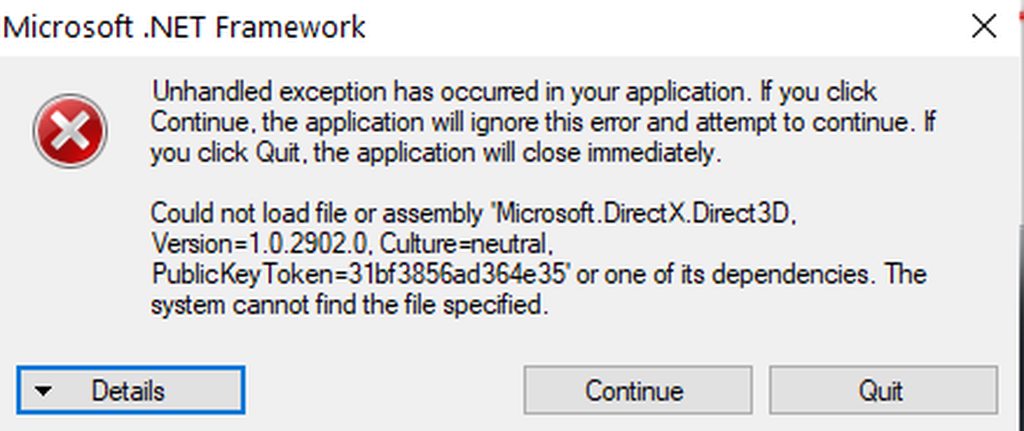 shy ridge
https://www.microsoft.com/en-us/download/confirmation.aspx?id=35
This is the solution to my above problem
terse marten
brittle hedge
Oh, I should have scrolled up further. You can't have a command send text to a c...
This makes me sad
terse marten
brittle hedge
Oh, I should have scrolled up further. You can't have a command send text to a c...
Just realized, I can use TriggerFyre for the sound and use SE to have text sound commands. It works  (I am moving away from Streamlabs Chatbot because it only works if the app is turned on the PC. I can edit SE anywhere, other than my PC, like on mobile or on my laptop).
 tepid ledge
is anyone else having a issue logging into facebook thru stream elements? ive tried contacting facebook 6 times with no response at all and tryin to resolve the issue
 whole spade
Guys, is it possible to enable voice donation in StreamElements, otherwise I can't find it.
gusty wagon
tepid ledge
is anyone else having a issue logging into facebook thru stream elements? ive tr...
Pinned messages in #helpdesk-facebook
 bold basalt
How can this be deactivated?
Recently it happens more often that instead of this login screen, a 502 bad gateway appears for several hours. This makes streaming impossible during this time. a buddy of mine has it

 quiet turtle
Hi everyone!
I was wondering how does the and user.lastmessage work. I did the research but couldn't find anything helpful... I mean how it is coded. If its fetched from somewhere or you can get this data out of tmi.js directly somehow
 night pine
i'm trying to do a custom alert thing with CSS (and i'm terrible at code stuff haha). anyone know why id = username container won't display twice in the same alert? and how to make it work? thanks :S

 hollow tulip
night pine
i'm trying to do a custom alert thing with CSS (and i'm terrible at code stuff h...
hollow tulip
night pine
i'm trying to do a custom alert thing with CSS (and i'm terrible at code stuff h...
You can't have two equal ID in your page, they're designed to be unique, so you should convert them to classes
 mellow flicker
why dose my program keep freazing please can some 1 help ty in advnce @chilly siren
 sick warren
hello ❤️
next knoll
mellow flicker
why dose my program keep freazing please can some 1 help ty in advnce <@60395304...
Please provide a log from your last stream. To do this, in OBS go to Help > Log Files > Upload Current Log File and paste the link to the log file here.
mellow flicker
next knoll
Please provide a log from your last stream. To do this, in OBS go to Help > Log ...
next knoll
mellow flicker
why dose my program keep freazing please can some 1 help ty in advnce <@60395304...
A crash log is required to investigate the cause of your issue. Please upload the last crash log.
- In OBS, click the Help menu
- Select Crash Reports and then Upload Last Crash Report
- Copy the URL and paste it to the chat here.
Note: If you are not able to follow the above steps, open your file explorer and go here: %appdata%\obs-studio\crashes and provide the last listed file.
mellow flicker
next knoll
A crash log is required to investigate the cause of your issue. Please upload th...
chilly sirenBOT
@mellow flicker ⤵️
- Uninstall SE.Live and OBS Studio completely, but leave this unchecked https://i.imgur.com/LBaHgM1.png
- Download and install OBS Studio from https://obsproject.com/
- If it doesn't crash, install SE.Live too.
-
It's fixed? Nice!
-
It crashes again?
- Repeat steps 1 and 2
- Duplicate the current "Scene Collection" at the very top of OBS, call it something like "Backup" and remove all browser sources in that backup
- Install SE.Live and see if it still crashes
- If yes, repeat steps 1 and 2, leave SE.Live uninstalled, tell us that it didn't work and use your old default scene collection again.
mellow flicker
chilly siren
<@127606367166005248> ⤵️
ok ty ill let you know
mellow flicker
@next knoll nope still doing it
hollow tulip
mellow flicker
<@615886582708305932> nope still doing it
Do you have any other browser source apart from StreamElements? If you don't, do you have any complex alert/widget on your overlay?
mellow flicker
hollow tulip
Do you have any other browser source apart from StreamElements? If you don't, do...
no
its obs cus alot of my frends are having the same problem @next knoll can u get a team on a fix plz
hollow tulip
So if you disable the streamelements browser source OBS just runs fine?
hollow tulip
Wait, are you using plain OBS or SE.Live version?
mellow flicker
Both do it
brittle hedge
mellow flicker
Both do it
If plain OBS does it, you will need to talk to them for a fix.
mellow flicker
K
hollow tulip
mellow flicker
K
Btw these are the OBS releases: https://github.com/obsproject/obs-studio/releases, they have an unreleased 29.0, otherwise this is the v28.0.3: https://github.com/obsproject/obs-studio/releases/download/28.0.3/OBS-Studio-28.0.3-Full-Installer-x64.exe
brittle hedge
28.0.3 is fairly old, 28.1.2 is much more recent.
hollow tulip
brittle hedge
28.0.3 is fairly old, 28.1.2 is much more recent.
28.1.2 is the latest version that gives him/her the issue, if they introduced the bug in the latest minor then the 28.0.3 is most suitable to rollback to (?)
mellow flicker
k ty its boith side so both need to fix it i have sent them the email
brittle hedge
hollow tulip
28.1.2 is the latest version that gives him/her the issue, if they introduced th...
I don't think libcef has been updated since 28.0.0, so would have to go back to 27.x.
 neat rivet
someone please help me, my tts is only working on the subs and not the tips nor cheers and im clueless
please helpo
this doesnt make sense
chilly sirenBOT
@neat rivet ⤵️
If you would like help from the StreamElements support volunteers/staff, please post your question in one of the helpdesk channels and someone will assist you as soon as they are available:
#helpdesk-twitch - Twitch tools issues
#helpdesk-youtube - YouTube tools issues
#helpdesk-facebook - Facebook tools issues
#helpdesk-mobile - Mobile Streaming issues
#helpdesk-selive - SE.Live Issues
#helpdesk-merch - SE Merch issues
#helpdesk-trovo - Trovo Tools issues
Helpdesk channels are only for requesting support! Thank you for being patient.
mellow flicker
I have downgraded OBS and this has resolved the lag/freezing. Has resolved the previous bugs in the new version.
mellow flicker
28.0.3
 ancient reef
When I stream, I am often very focused on the game. Is there a way to get a notification-sound when someone writes a new message in chat?. I am using OBS
 topaz pebble
ancient reef
When I stream, I am often very focused on the game. Is there a way to get a noti...
ancient reef
topaz pebble
https://discord.com/channels/141203863863558144/594411246531379220/7475067582805...
topaz pebble
ancient reef
When I stream, I am often very focused on the game. Is there a way to get a noti...
ancient reef
topaz pebble
https://discord.com/channels/141203863863558144/594411246531379220/7475067582805...
clicking on the link discord says: this link leads to a channel or server i have no access to.
 ancient reef
topaz pebble
That
ancient reef
topaz pebble
That
yeah, perfect ... thanks a lot
night pine
hollow tulip
You can't have two equal ID in your page, they're designed to be unique, so you ...
cool okay, thanks! uhh do you happen to know how to do that? 😅
 glossy flame
hey im wondering if its possible to post the info stream elements chat bot gets from one stream into the chat of another. for example, stream elements reacts and puts a message in chat welcoming a new follower, but i want that message to show up in a second account's chat (i own both accounts)
the reason is i use chat messages provided by stream elements to trigger things in unreal engine, but im trying to see if i can avoid having them show up in my main accounts chat while i stream
hollow tulip
night pine
cool okay, thanks! uhh do you happen to know how to do that? 😅
Convert id="username-container" to class="username-container" and in your CSS replace all the #username-container with .username-container
 tall night
Hello Guys, it wonder if somebody can help me here - i renamed my twitch account and my streamelements Chatbot doesnt show in my stream. i logged in serveral times in my obs live and Streamelements Website.
 broken robin
Please can you do something about all these graphic designers coming in and trying to friend me to offer me their services! They are clearly getting info from Streamlabs and StreamElements and spamming people. It is most annoying. If I want help with design work etc. I will search them out on these Discord servers when and if I need them. I am so annoyed by receiving these friend requests daily and sometime, 3x in a day! Please stop this happening.
brittle hedge
broken robin
Please can you do something about all these graphic designers coming in and tryi...
There is nothing the server can do. You can turn off friend requests in your settings though.
 merry obsidian
Whatever was the last update y'all did y'all need to fucking fix. My OBS does not run properly at all now. I can't stream no more than an hour before it disconnects from my internet. It's not my modem and it's not my ISP because I checked with my ISP and it's healthy on their end. So I need a fix before I shut down OBS and Streamelements
chilly sirenBOT
@merry obsidian ⤵️
Please provide a log from your last stream. To do this, in OBS go to Help > Log Files > Upload Current Log File and paste the link to the log file here.
chilly sirenBOT
@merry obsidian ⤵️
A crash log is required to investigate the cause of your issue. Please upload the last crash log.
- In OBS, click the Help menu
- Select Crash Reports and then Upload Last Crash Report
- Copy the URL and paste it to the chat here.
Note: If you are not able to follow the above steps, open your file explorer and go here: %appdata%\obs-studio\crashes and provide the last listed file.
merry obsidian
I don't have this option
I have no crash reports
Ok thanks for the help that I did not receive
gusty wagon
merry obsidian
Ok thanks for the help that I did not receive
https://obsproject.com/tools/analyzer?log_url=https%3A%2F%2Fobsproject.com%2Flogs%2FCwd4XzBJ08d9qfwp
OBS (Open Broadcaster Software) is free and open source software for video recording and live streaming. Stream to Twitch, YouTube and many other providers or record your own videos with high quality H264 / AAC encoding.
Fix all the issues
merry obsidian
gusty wagon
Fix all the issues
In order to stream to twitch I need OBS. But thanks again for the help I did not receive....
 torpid marlin
Is it possible to stream from my Xbox series S to twitch using stream elements?
chilly sirenBOT
@torpid marlin ⤵️
Consoles do not have native support for overlays. You would need a capture card, PS4 remote play or Xbox companion app and a PC with OBS in order to have overlays over your console gameplay.
We have a blog post about how to set up console streaming with our essential tools: https://blog.streamelements.com/how-to-stream-on-console-7b620b1c46c3
 stark quartz
torpid marlin
Is it possible to stream from my Xbox series S to twitch using stream elements?
stark quartz
torpid marlin
Is it possible to stream from my Xbox series S to twitch using stream elements?
Yes, for connecting any type of console to your streaming computer, you'll need a "capture card" (or for video cameras, which aren't originally intented to be a web cam)
 harsh sorrel
Has anyone used Stream Elements with Xsplit GameCaster?
 thorny narwhal
There are people here who can help me and maybe also speak German
gusty wagon
thorny narwhal
There are people here who can help me and maybe also speak German
#🇩🇪︱deutsch ?
 trail portal
idk if this is the right server but is there any way to do a stream boss and have the extra damage carry over to the next boss?
 craggy lodge
last time I checked here, the playback controls for media request on the stream deck were still broken, and someone told me the devs are aware.... this was a few months ago

 celest vale
Hey guys, I am having trouble with my sound alerts on stream, they aren’t playing anymore is anyone able to help me? Xxx
next knoll
craggy lodge
last time I checked here, the playback controls for media request on the stream ...
Unfortuantely, that is still the cause. Apologies for the inconvenience this may cause.
next knoll
celest vale
Hey guys, I am having trouble with my sound alerts on stream, they aren’t playin...
If you are not hearing your alerts and/or Media Request, you are most likely using the Control Audio via OBS option in your browser source properties.
To make sure you hear the alerts and the stream also hears them, follow along the screenshot bellow.
https://cdn.discordapp.com/attachments/199460642975907840/685371800456134686/unknown.png

 oak yew

 urban temple
With the obs studio, is there a way to do a test stream, without going live, where I can test my source layers?
chilly sirenBOT
You can test alerts via the Emulate bell on the lower left side of the Overlay Editor. Simply go to your Dashboard > My Overlays > pencil/edit button on the overlay. Make sure the Preview LIVE on stream option is on to see the alert in OBS/XSplit** https://streamable.com/vtulg9
gusty wagon
urban temple
With the obs studio, is there a way to do a test stream, without going live, whe...
You can do a recording
 worldly night
Hey guys! how are you I'm having troubles with my alerts, I can't see them on my OBS i have reinstalled OBS in another version and also Unistall Se.live, please someone can help me ¡?
brittle hedge
worldly night
Hey guys! how are you I'm having troubles with my alerts, I can't see them on my...
gleaming rose
can someone help me with a dyno custom command??
gusty wagon
gleaming rose
can someone help me with a dyno custom command??
Probably the Dyno discord
 twin light
I have a question about using SE.Live Docks, specifically Media Request. Is there any way to separate that audio from that in obs so i can stream and have music but no copyright stuff in my twitch vods? I already know how to separate the sounds PER audio, video recording channel for streaming though. Just not sure how to separate the Media Request form desk top audio.
chilly sirenBOT
@twin light ⤵️
How to separate Media Request (MR) audio in OBS:
MUTE MR FOR YOURSELF, STREAM CAN HEAR
- Make a new overlay in the editor, ONLY add the Media Request widget.
- Add a new browser source in OBS, add the URL and set the dimensions correctly.
- Tick the box for Control audio via OBS
- Go to Edit > Advanced Audio, set your MR overlay to Monitor Off. Note: This will play through the Desktop Audio, if you mute your desktop audio, it will mute the MR.
CONTROL AUDIO SEPARATELY FROM YOU AND STREAM
- For this you will need a VAC (use command
!vac). - Run your MR either in Chrome or in Ground Control (use command
!gc). Note: Do NOT click on SHOW ON STREAM. - Set Chrome or GC in the VAC as an audio input and output.
- Add the audio output from VAC as an audio input in OBS. Note: This will not be able to show the video in OBS.
How to exclude audio sources for a stream or recording: https://obsproject.com/forum/resources/8/
VoiceMeeter Banana guide: https://obsproject.com/forum/resources/397/
You can download our Desktop App Ground Control here: https://streamelements.com/groundcontrol
twin light
VoiceMetter Banana is a waste of time, completely fucked my audio and i could not get nay audio to go into it.
The other method is also COMPLEATLY non functioning. both the links from explanation point VAC are non functioning
 sacred robin
I rly need help... I cant stream i start my stream and it shows as i am live in the obs but on twitch my channel is offline. Im fighting it for a second month now and cant do anything. I streamed yesterday and it was fine i hoped it was fixed but today its all over again. I press start stream, it goes green but on twitch im offline 😭😭😭😭
chilly sirenBOT
@sacred robin ⤵️
If you are attempting to stream to one streaming platform, but SE.Live is attempting to stream to another, please try the following:
Navigate to StreamElements menu, on top of OBS > Logout > Login
After you have logged back in navigate to File > Settings > Stream > Disconnect > Reconnect
next knoll
sacred robin
I rly need help... I cant stream i start my stream and it shows as i am live in ...
Try those steps
sacred robin
I tried :/ its completly random. It didnt work for almost 2 months or so theeen it worked for 3 days and today it wont work again. Twitch inspector says that connection is stable but 0 fps
Like yesterday i finish my stream and all was good and today it didnt start
chilly sirenBOT
@sacred robin ⤵️
Dropped Frames means that you have a bad connection between your device and the streaming platform and most likely something related to your ISP not handling the connection properly.
Speed tests usually cannot help solve this problem and its best to use this guide: https://obsproject.com/wiki/Dropped-Frames-and-General-Connection-Issues
If you stream to twitch, use the !twitchtest command and do a connection test to your regional servers.
@sacred robin ⤵️
Please provide a log from your last stream. To do this, in OBS go to Help > Log Files > Upload Current Log File and paste the link to the log file here.
sacred robin
I ll do this once i get home
sacred robin
oooo i had to mess up the profile last time - it worked 😄 thank you sooo much i hope it ll keep working from now on 
 steep hill
same
 snow basalt
Can somebody help me i have a problem with my OBS . (Game capture black screen)
 thick sapphire
How do we contact SE regarding feature request such as creating a custom queue for games that use viewer created content like SMM2?
brittle hedge
thick sapphire
How do we contact SE regarding feature request such as creating a custom queue ...
Check out the StreamElements ideas board: https://strms.net/ideas. You'll be able to add ideas, upvote ideas you agree with and track their progress with email notifications. Adding and upvoting ideas also helps the staff know which ideas should be prioritized so please take some time to upvote.
gleaming rose
anyone know how to use icue??
 carmine rock
gleaming rose
anyone know how to use icue??
carmine rock
gleaming rose
anyone know how to use icue??
a thiny bit
gusty wagon
gleaming rose
anyone know how to use icue??
To do what
gleaming rose
how do you switch hdmi inputs on a pc with your keyboard? like is there a short cut?
 rapid minnow
It's possible Windows Key + P might be what you're looking for?
gusty wagon
gleaming rose
how do you switch hdmi inputs on a pc with your keyboard? like is there a short ...
Inputs? You need an HDMI switcher. Outputs there should be a keyboard shortcut for
 native zealot
how do i make the chat box in the overlays become fully transparent and the font/letters the only thing that shows?
 fresh marlin
I am having an issue with harveytoadface's Hype Goal widget. Where would I ask for help with that? D:
gleaming rose
my capture card audio is muted but i can still hear it
brittle hedge
gleaming rose
my capture card audio is muted but i can still hear it
This is probably better in the OBS discord, or, assuming you have an Elgato capture card, their discord.
gleaming rose
brittle hedge
This is probably better in the OBS discord, or, assuming you have an Elgato capt...
i have something else
 silk hollow
hi is there any way of muting spotify to me and have it still on so viewers can still hear it
brittle hedge
silk hollow
hi is there any way of muting spotify to me and have it still on so viewers can ...
New source > application audio capture (beta)
silk hollow
i have done that now but i wanna mute it to my headset so i only hear my game
 frozen lance
Hi, I'm new to stream elements and just tried to get an overlay into obs but when I add a part as a browser source, it doesnt fit and is only shown partly
for example when I try to add a box with facecam and below stuff like latest follower, its cut off and doesnt show all the boxes that should be below as shown in the editor
just for reference, I tried to use the Aspect Animated Super Theme by Own3d
maybe someone in here can help with that?
thats what its supposed to look like

and thats how it turns out in OBS
 brittle hedge
frozen lance
Hi, I'm new to stream elements and just tried to get an overlay into obs but whe...
brittle hedge
frozen lance
Hi, I'm new to stream elements and just tried to get an overlay into obs but whe...
#helpdesk-twitch or #helpdesk-youtube would be a better place to ask.
chilly sirenBOT
@frozen lance ⤵️
To add your overlays to OBS, add a new browser source in your scene. Paste your overlay URL in the browser source properties, set the dimensions to 1920x1080 (unless you changed them on the website) and check Shutdown source when not visible and Refresh browser when scene becomes active, as shown in this GIF: https://imgur.com/a/2JhJD0S
frozen lance
brittle hedge
<#199460642975907840> or <#415814031232991232> would be a better place to ask.
oh okay, thanks
frozen lance
chilly siren
<@459789542766018560> ⤵️
that actually helped already...
brittle hedge
frozen lance
oh okay, thanks
This was mostly for future reference, a lot of the helpdesk people don't monitor this channel, so response times will be a lot longer.
frozen lance
brittle hedge
This was mostly for future reference, a lot of the helpdesk people don't monitor...
good to know
 sharp bough
Im currently streaming through xbox, and using streamelemts for my overlays on lightstream when i post the url into lightstream from streamelemts its coming up with this does anyone know how to fix it?

 lament sail
hello, I need help with the leaderboard extension on Twitch. It shows my Cheers, but no data for my Subs and Chat Stats or Points. Any help? I tried reddit and got redirected here. Yes, I have changed my Twitch username twice in the past before though. I heard that may be a factor in the issue. Though this is my first time using StreamElements add on.
chilly sirenBOT
@sharp bough @lament sail ⤵️
If you would like help from the StreamElements support volunteers/staff, please post your question in one of the helpdesk channels and someone will assist you as soon as they are available:
#helpdesk-twitch - Twitch tools issues
#helpdesk-youtube - YouTube tools issues
#helpdesk-facebook - Facebook tools issues
#helpdesk-mobile - Mobile Streaming issues
#helpdesk-selive - SE.Live Issues
#helpdesk-merch - SE Merch issues
#helpdesk-trovo - Trovo Tools issues
Helpdesk channels are only for requesting support! Thank you for being patient.
torn parcel
i've noticed since i've started merging a lot of my overlays into one, the fps seems to drop. is that a normal thing? no biggie if it is, just means i need to split them up into separate URLs again. i had been told combining them would make them all run much smoother, but maybe i misunderstood how that works within OBS.
 hazy siren
Hello. I am searching a way to show the top gifter in a session for twitch in the overlay. I find this option for bits and donations but not for subs. Is there a way to add the top sub gifter of a session?
chilly sirenBOT
@hazy siren ⤵️
Check out the StreamElements ideas board: https://strms.net/ideas. You'll be able to add ideas, upvote ideas you agree with and track their progress with email notifications. Adding and upvoting ideas also helps the staff know which ideas should be prioritized so please take some time to upvote.
@torn parcel ⤵️
OBS > Settings > Advanced > Scroll down > Enable or disable Browser Source Hardware Acceleration, depending on its current state > Restart OBS
https://i.imgur.com/ggMe9ZE.png
 sly silo
Can anyone help on why my stream deck is still limited with the music options? I still can’t pause, play, or skip music on my stream deck.
@everyone
 inner stratus
@everyone How do i add streamdelay to streamlabs?
next knoll
sly silo
Can anyone help on why my stream deck is still limited with the music options? I...
Known issue, devs are looking into it.
 lavish raven
Does anyone have trouble setting up alerts? It works off stream but when someone follows it still doesn't work
 safe comet
i have a question that maybe someone will be able to help me with, i have recently added a hello sound to my stream store and set the bot command to play it but i want to have the bot post a greeting in the chat but even though i have the text in the response it does not show up in chat it only plays the sound through my stream does anyone know how to get it to put a chat message with it?
next knoll
safe comet
i have a question that maybe someone will be able to help me with, i have recent...
safe comet
next knoll
https://support.streamelements.com/en/articles/122-setting-up-stream-perks
i've followed those steps but it still won't post the chat message in my stream chat. this is what i want it to say for the hello sound. Hello and Welcome to the channel! $[1] thedem78Heart thedem78Heart ${redeem deadpoolhello}
it plays the sound but doesn't put the text anywhere
brittle hedge
safe comet
it plays the sound but doesn't put the text anywhere
Commands can't do two things. You can't have a ${redeem} and a message.
safe comet
brittle hedge
Commands can't do two things. You can't have a `${redeem}` and a message.
ahh ok, i've talked to a few streamers who have commands that do play a sound and put text but i guess they are using something other then the streamelements bot
i thought it was the streamelements bot because it has a custom name lol
torn parcel
chilly siren
<@278441369566183424> ⤵️
this fixed the emote wall working, but made my raid videos stutter horribly. is there a workaround for that?
hazy siren
chilly siren
<@365150649320734730> ⤵️
Same question 4 years ago. So i don't see a reason to ask again. I just take it as no?
https://streamelements.helprace.com/i882-create-a-top-sub-gifter-widget
 warm sparrow
So question, my internet is shit but I can Livestream from the mobile app just fine to show the rabbits and woodworking and such. Is there a way to rtmp or link my PC to to the mobile app so I can use my various regular cameras through my mobile?
I'm in Kentucky now so internet here is balls lol
gleaming rose
i'm trying to connect my pro controller to my pc (which i did) so i can still use my mouse on my second monitor. now the controller is controlling my whole screen AND i can't use my mouse on the second monitor. (the mouse is still being used for in-game use). thoughts and advice??
rapid minnow
gleaming rose
i'm trying to connect my pro controller to my pc (which i did) so i can still us...
Might be Steams Xbox configuration support checked, if you're using Steam
Settings -> Controller -> Desktop Configuration
rapid minnow
I'd ask the question over in #helpdesk-merch !
gleaming rose
rapid minnow
Settings -> Controller -> Desktop Configuration
where is it on desktop configuration??
gleaming rose
@rapid minnow just wanna make sure you got this!!
do you need two computers or just two monitors??
should it look like this??

that still doesn’t work…
rapid minnow
gleaming rose
do you need two computers or just two monitors??
Hey, sorry I'm on the road right now! I think you can just search it up on google to see exactly how to disable it! I believe this is the route my buddy took when the same thing happened to him. I'll try and see if I can get an answer from him before you solve it!
gleaming rose
rapid minnow
Hey, sorry I'm on the road right now! I think you can just search it up on googl...
no worries! i think i did but i'll double check
what should i look up?
so i think i gotta turn off Generic Gamepad Configuration Support. how do i do that?
in steam
 cursive glen
My OBS is detecting my desktop audio as coming from my microphone, any suggestions?

as far as I can tell at least. since it's picking up any noises from chrome as well
 hollow crest
hi. i'm having an issue with obs/streamelements not recognizing my camera. it recently started, and i cannot figure out how to fix the issue. i have disabled/re-enabled my video capture device, removed and added back, removed and added a new video capture device. nothing is working. i have a razer kiyo and have been using it for a while and it never caused a problem until the last 2 months. the problem has become worse to where i used to be able to get it to recognize and turn on after closing and opening the app a few times. now it will not at all. any suggestions?
chilly sirenBOT
@hollow crest ⤵️
SE.live is a plugin for OBS Studio for the best OBS support, please join their Official Discord @ https://discord.gg/obsproject
 smoky pulsar
Hey guys, I am up to date with my OBS. and the OBS.Live plugin..
I can not use the Source record plugin at all. as soon as it activates when I have a game running it just crashes OBS.
Thought I would ask the community first before bugging Exeldro about it.
I was was wondering if anyone has had issues with this since a web search comes up with nothing,.
digital axle
Gang I’m having some issues with obs not picking up any sound from my el gato. I can hear sound via my chat link but OBS isn’t picking anything up. Analog is checked and I followed all of El gatos trouble shooting so I’m thinking about it being obs.live. Should I just uninstall and reinstall it?
 eternal totem
Can someone help me
Im trying to fix how I get all pop ups in obs streamelements
Like the alerts to pop up
 oblique epoch
Hello. I am having a problem with my alerts. I purchased a pack from OWN3D. When I import the videos for the alerts into StreamElements, the video image sits off-center in the box (sits above the center). This causes the message of a new follower or subscriber to appear below the image. Is there a way to move the video image down to the center of the box? If I preview the video image in a video player it is centered. Thanks for any help!
chilly sirenBOT
@oblique epoch ⤵️
If you would like help from the StreamElements support volunteers/staff, please post your question in one of the helpdesk channels and someone will assist you as soon as they are available:
#helpdesk-twitch - Twitch tools issues
#helpdesk-youtube - YouTube tools issues
#helpdesk-facebook - Facebook tools issues
#helpdesk-mobile - Mobile Streaming issues
#helpdesk-selive - SE.Live Issues
#helpdesk-merch - SE Merch issues
#helpdesk-trovo - Trovo Tools issues
Helpdesk channels are only for requesting support! Thank you for being patient.
 chrome skiff
anyone know how to fix frame drop i got a good pc and a kinda good wifi
chilly sirenBOT
@chrome skiff ⤵️
SE.live is a plugin for OBS Studio for the best OBS support, please join their Official Discord @ https://discord.gg/obsproject
 hallow nest
Does anyone know how to move text from one position to another in Stream Elements? I'm trying to have the name of a Subscriber follow this animation that I made.
 plush zephyr
Hey All,
If you need tech help with OBS or Streamelements hit me up with a private message. I have been streaming and modding for a long time and i know how much of a pain it can be when things are not working how you want it too.
Will do my best to get to all of you if i can.
Cheers,
 wide herald
Hey guys, my obs has frozen during my streams for the past week. Its has done it SEVERAL time costing me way to many viewers at a time. is this a known problem or a fixable issue? i have deleted and re download, still locking up and freezing, then crashes.
plush zephyr
wide herald
Hey guys, my obs has frozen during my streams for the past week. Its has done it...
Are you running OBS in administrator mode? Also to you have the priority set to high in settings?
gusty wagon
plush zephyr
Hey All,
If you need tech help with OBS or Streamelements hit me up with a pri...
This isn't recommended. There is a reason that the support channels exist. Please do not provide support via DMs or in this channel.
 neon phoenix
wide herald
Hey guys, my obs has frozen during my streams for the past week. Its has done it...
neon phoenix
wide herald
Hey guys, my obs has frozen during my streams for the past week. Its has done it...
I have been having the same problem brother, I uninstalled streamelements and obs and only reinstalled OBS studio and had no problems after.
Also idk if you run medal.tv or any other recording software outside of obs I would uninstall it or don’t have it running while streaming
plush zephyr
gusty wagon
This isn't recommended. There is a reason that the support channels exist. Pleas...
whats wrong with helping people troubleshoot their issues?
plush zephyr
gusty wagon
This isn't recommended. There is a reason that the support channels exist. Pleas...
wait just had a think about it and i know why now, fair enough. i can understand the reasoning.
 hollow basin
If this isn't the right channel, could someone please direct me to the correct one? I was wondering how to add a !subage command in Stream Elements? I can't find a variable for it
chilly sirenBOT
@hollow basin ⤵️
If you would like help from the StreamElements support volunteers/staff, please post your question in one of the helpdesk channels and someone will assist you as soon as they are available:
#helpdesk-twitch - Twitch tools issues
#helpdesk-youtube - YouTube tools issues
#helpdesk-facebook - Facebook tools issues
#helpdesk-mobile - Mobile Streaming issues
#helpdesk-selive - SE.Live Issues
#helpdesk-merch - SE Merch issues
#helpdesk-trovo - Trovo Tools issues
Helpdesk channels are only for requesting support! Thank you for being patient.
hollow basin
I'm sorry, but that doesn't really help me. She streams on Twitch, but I am just looking for the variable to add individual sub ages into a command
brittle hedge
hollow basin
I'm sorry, but that doesn't really help me. She streams on Twitch, but I am just...
If it's not listed as a variable on https://streamelements.com/dashboard/bot/command-variables then you will need a custom API command for it. There may be one in #command-share.
hollow basin
brittle hedge
If it's not listed as a variable on <https://streamelements.com/dashboard/bot/co...
Thank you!!
hollow basin
brittle hedge
If it's not listed as a variable on <https://streamelements.com/dashboard/bot/co...
I didn't find one but will be checking back like every day to see if one has been posted there! Thank you so much for your help!
 simple wren
what are the best setting to live stream on YT at 1080p? because i constantly drop in quality and it just ends up looking like this. https://youtube.com/clip/Ugkx_U1oW4-3Wy5zAd8oY88FzmKBAdsmoVm4
brittle hedge
simple wren
what are the best setting to live stream on YT at 1080p? because i constantly dr...
https://support.google.com/youtube/answer/2853702?hl=en Is a good starting point.
simple wren
that helped a ton! thanks
chilly sirenBOT
@graceful cape ⤵️
Please go to https://support.streamelements.com/, click the big blue question mark on the bottom left and select SE.Sponsorships Form. Fill that form to submit a Sponsorship related ticket and wait for our Support Team to get back to you. Please do not fill the form multiple times, as that will not speed up the response time.
 nocturne prism
hallow nest
can anybody help me with a coding problem?!
nocturne prism
hallow nest
can anybody help me with a coding problem?!
 graceful cape
chilly siren
<@429402037957033994> ⤵️
graceful cape
chilly siren
<@429402037957033994> ⤵️
ok i sent in a message usually how long til i get a reply
 verbal grove
.
 worldly peak
Hello there! I need some technical help for the mobile App! Is there an Version from the streamelements mobile App that i can use on my lenovo yoga tab 3 with Android 10?
 late spire
question
where can I find a StreamElement widget that welcome new chatters?
 cloud dagger
Sorry if this is in the wrong area but where do I find in SE overlays the old simple donation goal bar (when you have a target to buy a new game etc)
 stark burrow
Hi! Is it possible to change the merch store language to spanish?
rapid minnow
stark burrow
Hi! Is it possible to change the merch store language to spanish?
You found the right place when you asked in #helpdesk-merch !
 robust arch
why im having error login on stream elements, it said localhost error??
 queen hinge
Hello guys can anyone help me with some tech stuff? I was able to stream with 5000 bitrate few months ago, after that for some reason i could only stream with 3000 because abive that i always had lag. Now i cant even stream with 3000 without lagging. Idk what happened, i have the internet speed, specs and everything. I have good specs and a good internet, but it lags even at 3000,and when going above that, that green little box turns to red and idk why. Few months ago i used to be able to stream with 5-6000 bitrate without any issues whatsoever, but now the stream lags even at 3000 and idk why. Please help me out.
 harsh orchid
I got you. @queen hinge
 timid zenith
Is this the correct chat to ask about adding stream alerts to OBS? I have a few issues but I can't seem to find any concrete answers via google.
chilly sirenBOT
@timid zenith ⤵️
Check out this great SE Getting Started Guide: https://youtu.be/XgfswUlk9HU and our playlist with tutorial videos from setting up the basics to in-depth details on how to use our product: https://youtube.com/playlist?list=PLCDDKlFdScbEwdx5AntcQIS1InkFJwHtv
New to OBS? Here is a 4 step quick start guide https://obsproject.com/wiki/OBS-Studio-Quickstart
Want to learn even more? Here is an in-depth overview https://obsproject.com/wiki/OBS-Studio-Overview
timid zenith
Guess I should probably have just asked right off the bat. Basically, when I'm using OBS in studio mode and I use the streamelements site to test out an alert it'll play for both scenes despite each scene having a unique overlay. I've looked into the issue and the most common answer is that the browser links used for the browser source are the same and the suggested solution is to simply copy the orginal source per scene rather than make a new browser source each. The issue lies that each overlay is unique to the scene and I cannot copy one to the other. I don't know if this audio issue is directly related to OBS itself or if this is an issue of having the same browser source links which the streamelements website does not seem to have a way to have each overlay use a unique link per overlay or if it is intended for the website to sent a test follower to every instance of it's overlays.
At the moment I'm trying to see where there issue would lie and go from there.
queen hinge
harsh orchid
I got you. <@419458184907063296>
Wym
gusty wagon
timid zenith
Guess I should probably have just asked right off the bat. Basically, when I'm u...
This question can be addressed in #helpdesk-selive
gusty wagon
queen hinge
Hello guys can anyone help me with some tech stuff? I was able to stream with 50...
I would suggest posting an OBS log from a stream that you have replicated the issue in #helpdesk-selive
timid zenith
gusty wagon
This question can be addressed in <#494513233416421386>
Ah, thank you. Sorry for posting in the wrong channel.
gusty wagon
timid zenith
Ah, thank you. Sorry for posting in the wrong channel.
all good!
trail portal
I have a question about alerts? Is it possible for the viewer to choose which alert they want?
For example say I have 2 variations of 100bit alerts is there a way a viewer can choose which one they want?
chilly sirenBOT
@trail portal ⤵️
If you would like help from the StreamElements support volunteers/staff, please post your question in one of the helpdesk channels and someone will assist you as soon as they are available:
#helpdesk-twitch - Twitch tools issues
#helpdesk-youtube - YouTube tools issues
#helpdesk-facebook - Facebook tools issues
#helpdesk-mobile - Mobile Streaming issues
#helpdesk-selive - SE.Live Issues
#helpdesk-merch - SE Merch issues
#helpdesk-trovo - Trovo Tools issues
Helpdesk channels are only for requesting support! Thank you for being patient.
 gentle rampart
i have a problem with obs and my overlay
am i in the right place?
 halcyon mango
apologies if this is the wrong channel, but I was wondering if there's a performance difference between having multiple browser sources in OBS, each for a different overlay element, or having all of the elements on one browser source?
gusty wagon
halcyon mango
apologies if this is the wrong channel, but I was wondering if there's a perform...
Imagine your browser sources as chrome tabs…now imagine all those tabs were open at once….
That’s why one is better than 400
 limber gust
hell0
im having an issue of my in game audio not being broadcasted in my stream
the only thing audible is my microphone
video in game works great
my camera for my face is working
just no in game audio
gusty wagon
limber gust
just no in game audio
set your default windows audio output to whatever your obs audio output device is, also make sure it is set the same in-game
 dry shard
after launching OBS, no matter what I do, it just closes. Any ideas?
 zinc plaza
after update last version of OBS, its freeze and close livestream when I'm using overlays from streamelements.
removing overlays its works fine, also happens using SE
brittle hedge
zinc plaza
after update last version of OBS, its freeze and close livestream when I'm using...
can you provide both of these?:
chilly sirenBOT
Please provide a log from your last stream. To do this, in OBS go to Help > Log Files > Upload Current Log File and paste the link to the log file here.
A crash log is required to investigate the cause of your issue. Please upload the last crash log.
- In OBS, click the Help menu
- Select Crash Reports and then Upload Last Crash Report
- Copy the URL and paste it to the chat here.
Note: If you are not able to follow the above steps, open your file explorer and go here: %appdata%\obs-studio\crashes and provide the last listed file.
zinc plaza
not atm, happened two times during my live so I just removed OBS and everything and installed again OBS 28.1.2 (not last version) and its working fine.
happened using 29.1.2
brittle hedge
If it works in 28.1.2 wait for 29.0.1 to come out (should be soon-ish) and try it. If it crashes can you send us the current log file and crash log so we can troubleshoot things?
zinc plaza
yes, for sure
digital axle
is there a way to add custom fonts to your overlays? I have a font file and want to add it to my stream so that it has a different feel. Wondering how to go about that , thanks!
chilly sirenBOT
@digital axle ⤵️
Google Fonts
More than 900 google fonts are supported at this time. You can preview them here: https://fonts.google.com/
Custom Fonts
Steps:
- Install the font on the streaming PC or choose a pre-installed windows font.
- In the overlay widget settings, select Text Settings
- Click on Enable Custom Font
- Type the name of the font as it appears in the windows font directory (This is usually
C:\Windows\Fonts)
Note: After installing fonts, the browser and OBS must be restarted for the font to appear.
zinc plaza
brittle hedge
If it works in 28.1.2 wait for 29.0.1 to come out (should be soon-ish) and try i...
happened again using version 28.1.2 now.
tried to do what you said but cant find the file for upload, the folder is empty
empty
 gleaming rose
how do you put emojis next to a role??
 fringe cypress
Nothing pops up once I copy and paste the url in my browser source. Need help asap
 still veldt
so I am having an issue where OBS is closing anytime I try to change scenes or click on any scenes. This happens no matter what I am trying to do in OBS. Has anyone else had this issue?
rapid minnow
gleaming rose
how do you put emojis next to a role??
On Discord? You'd find that in the role settings on Discord!
nocturne prism
fringe cypress
Nothing pops up once I copy and paste the url in my browser source. Need help as...
Hey, try disabling Browser Source Hardware Acceleration in Settings>Advanced.
chilly sirenBOT
OBS > Settings > Advanced > Scroll down > Enable or disable Browser Source Hardware Acceleration, depending on its current state > Restart OBS
https://i.imgur.com/ggMe9ZE.png
 idle mural
Why is it that I can’t get a tab with the stream info up in my obs? I have chat and activity but not the tab where you can’t rewrite the title of the current stream etc and what game I’m playing
It’s a bug I had before with the activity feed and now with the information tab. I did a factory reset so there should be any problems
 crystal breach
I can't remember if I asked this here, I apologize if I have... but I still haven't found an answer...
Is anyone well versed in internet issues?
I use Xfinity and pay for their 1gig service which is the highest amount they have available for residential internet in my area. I use my own Arris Surfboard modem/router and all brand new cables (I use a plugged Ethernet connection). During the day my internet is fine... but the last few months when I stream, anywhere from a half hour in to about 2 hours in my upload speed will fall from 38-45 down to less than 1. Seriously... it will be at like 0.4! I used to stream at 6000 bitrate and 60fps, I have dropped it to 1500 bitrate and 30fps and that hasn't helped.
I have called Xfinity at least a dozen times, had technicians come out to check cabling and the techs all say my side of things is great, even overkill and that the issues must on Xfinity's side. Yet when I call Xfinity they just want to send another tech out. It's an endless circle with absolutely no resolution in sight. I even installed a Nord VPN looking for more options to try and solve it and it hasn't helped either.
It's incredibly frustrating because it destroys my streams and causes me to restart several times. I feel like there's nothing I can do. 😦 There are no other internet companies that offer 1gb speeds so I feel trapped with Xfinity.
Any advice to try and get around this and get back to the awesome streams I used to have?
 solid nacelle
crystal breach
I can't remember if I asked this here, I apologize if I have... but I still have...
solid nacelle
crystal breach
I can't remember if I asked this here, I apologize if I have... but I still have...
i had the same issue with my arris as well i just got xfixity X1 router/modem and my up/down are good now. also can use max bitrate
crystal breach
solid nacelle
i had the same issue with my arris as well i just got xfixity X1 router/modem ...
I used 3 different Xfinity routers before and still had the same problems. The tech actually told me to get my own since Xfinity is known for having crappy modems. Hence I bought the pricey Arris. 😦
solid nacelle
that is strange
brittle hedge
crystal breach
I used 3 different Xfinity routers before and still had the same problems. The t...
What results do you get if you run this:
chilly sirenBOT
Use the Twitch Bandwidth Test to find the best Twitch server to stream to. Set Duration to Medium. You can uncheck any regions you're not near.
After the test completes, click the Share Result button to upload a screenshot, which can then be copied and pasted here.
Get Twitch Test from https://r1ch.net/projects/twitchtest.
crystal breach
chilly siren
I've never tried that. Let me log into my desktop streaming computer and check. Thanks!
crystal breach
brittle hedge
What results do you get if you run this:
Is that safe? It's asking me for my Stream key
brittle hedge
It is
crystal breach
Uploading right now
crystal breach
Upload is taking forever
 unborn beacon
hey yall I have a question that im hoping someone here can answer
I have a RX 470 which is quite in need of an upgrade and struggles a bit and also an i5-1140
I'm wonder if there would be any benefit from using the CPUs iGPU, which is currently unused, for stream encoding?
crystal breach
brittle hedge
It is
It's been in "uploading mode" for over and hour. Stopped and started again and same thing.
 errant bison
I was wondering if its possible to stream with a webcam and record without a webcam (at same time)
brittle hedge
crystal breach
It's been in "uploading mode" for over and hour. Stopped and started again and s...
It shouldn't take more than a few minutes for each server.
gusty wagon
crystal breach
I can't remember if I asked this here, I apologize if I have... but I still have...
If it’s docsis 3.x over coax then yes you will have shitty internet during peak times because it isn’t dedicated fiber
zinc plaza
zinc plaza
happened again using version 28.1.2 now.
tried to do what you said but cant find...
happening everyday now, 2~3x per day during lives or just a offline video.
working fine when I remove everything from streamelements (overlay, alerts etc).
errant bison
So i just got 'Source record'
When i am using it when im live, i get the 'Encoder overloaded' message.
When i am NOT live, i dont get the message.
is there a way to fix this? (i basicly want to record my game seperatly and i would ALMOST never use any footage from my real record (webcam etc etc...) this real recording only obtains my audio tracks in some way,.
 twilit galleon
my sound wont work.. i am new to this
 opal moss
errant bison
So i just got 'Source record'
When i am using it when im live, i get the 'Encode...
opal moss
errant bison
So i just got 'Source record'
When i am using it when im live, i get the 'Encode...
try changing the encoder setting for source record. maybe your GPU is getting overloaded. havent had that issue with source record. its an awesome plugin to do exactly what you want to do.
 median dune
I recently got a hand me down pc from one of my relatives but, I'm having issues getting it to start to bios. When turned on it gives two chirps and nothing pops up on the monitor. I used the JCMOS to see if that was the issues but to no avail. It's an old evga motherboard and its posting 85.
 fading steppe
umm i need help everytimei pressto start campaign on raid it deosnt want to startit just says start again its not fully working
chilly sirenBOT
@fading steppe ⤵️
Please go to https://support.streamelements.com/, click the big blue question mark on the bottom left and select SE.Sponsorships Form. Fill that form to submit a Sponsorship related ticket and wait for our Support Team to get back to you. Please do not fill the form multiple times, as that will not speed up the response time.
merry obsidian
I need help with my OBS studio. The upload kb/s keeps cutting out while I stream causing me to glitch
 mystic matrix
my chatbot is not working how do i reinstall it
brittle hedge
mystic matrix
my chatbot is not working how do i reinstall it
You can't reinstall it, you can only part and join it. Also, #helpdesk-twitch or #helpdesk-youtube would be the best place to ask.
zinc plaza
Should I change priority of OBS/SE for high or normal is ok?
 shadow crane
does anyone know of a marathon timer you can use for fb gaming? LIke to where I can program it to increase when stars or supports are sent? Doesn't have to be stream elements anything at all?
 inland heath
Hi, I'm a complete noob when it comes to coding but I want to learn to make my own custom chat box (for twitch if that matters) does anyone have some good tutorials for that? Especially how to change the graphics of it.
 craggy vigil
Any very very experienced pc builders that can help me with something

 rapid minnow
What mic do you have?
 pale ginkgo
rapid minnow
What mic do you have?
pale ginkgo
rapid minnow
What mic do you have?
Blue yeti
rapid minnow
Is the setting on the mic correct? Like the noisegate filters?
pale ginkgo
rapid minnow
Is the setting on the mic correct? Like the noisegate filters?
Should be when i talk the bar goes up and when i stop it goes back down
But my mic just doesnt capture on video or stream randomly like i recorded fine the other day
Its just weird because when i play a game or play music the top bar moves and when i speak the bottom bar moves but its not recording or streaming
I Think this is the issue that i can only stream on one audio track and i have mine split for when i record, ill give it a try and if it works ill let u all know
 rapid minnow
Also you can check your advanced audio settings to see if those are a bit wonky
pale ginkgo
I Just went live and im pretty sure its working now so for those who are having audio issues heres what worked for me.
I Have my audio set to separate tracks for recording but you can only stream using one audio track so you need to set both your desktop and mic to the same audio track for it to show up on stream/recordings
Ty for the help Dequat really appreciated!
rapid minnow
Ayyy let's gooo! Not sure if I truly helped, but glad it's working for you now!
pale ginkgo
Haha 😛
brittle hedge
<- in a meeting but that's what I meant to suggest, just got distracted.
track 1 = stream
track 2 = twitch vod
tracks 3-6 = whatever you want for recording
 dry ravine
I'm looking for someone that know how to make custom widgets, I have a couple of questions and a possible commission!
 thin skiff
dry ravine
I'm looking for someone that know how to make custom widgets, I have a couple of...
thin skiff
dry ravine
I'm looking for someone that know how to make custom widgets, I have a couple of...
send in #dev-chat
dry ravine
thin skiff
send in <#259680142459142144>
Appreciate it, thank you!
 vale seal
hello! i'm not sure where to post this, but for the past few months now, my alerts haven't had sound. any ideas of what things to troubleshoot?
 cerulean mica
People are saying stream elements has a sub gifter widget I could add to my scrolling bar of "latest (x) sub", "Latest (x) cheer" and "Latest (x) donations" But... I CAN'T FIND IT ANYWHERE?
Please tell me how to get a hold of this wondrous and legendary miracle of technology?
gusty wagon
cerulean mica
People are saying stream elements has a sub gifter widget I could add to my scro...
 opal moss
for anyone thats been having issues with your alerts not going off, click on your alert browser source in OBS, then click the refresh button. that worked for me
if you have multiple alert sources, do it for each of them
chilly sirenBOT
@clever jay ⤵️
You can find your JWT token on your account channels page (Show Secrets to reveal the token): https://streamelements.com/dashboard/account/channels
READ ME: This is a private security token. Do NOT share this token here or other public places, only with a StreamElements staff member in private.
 clever jay
I'm on mobile
cerulean mica
gusty wagon
OK I'm blind, THANK YOU!!! ❤️
opal moss
hey folks, im testing Advanced Information Bar by coocla to have an information bar that cycles through subs, follows, etc.. unfortunately it seems its not compatible with youtube or something cause it doesnt get the data, it gets the twitch data just fine though. does anyone know of any other widgets that do something similar, i believe Alpha Gaming had one, saw it on their videos, havent checked it out though
torn parcel
I made a sound commands tutorial of anyone wants to check it out or give me feedback! KungFuMario on YT, same as here
 heavy birch
Hi guys 🙂 does anyone know how i can trigger an Alertbox (SE) Soundalert by a command in chat and not only by bit cheers ?
 haughty pelican
anyone able to help with a dual pc and the stream is laggy on the stream pc and not laggy on the game pc
 fluid fulcrum
Having issue with naming custom bot. it was working fine until the activity overlay got changed.
now when i click on "connect custom bot name" it opens the obs browser and i login and then the custom bot does not send test messages after i save it
fluid fulcrum
😦
rapid minnow
 stoic ibex
Everyone asking questions but no one answering them
stoic ibex
Everyone asking questions but no one answering them
For the most part, any issues people have SE related should be posted down in the Helpdesk Channels. This channel is for more general tech discussions like PC building and fun stuff like that
unborn beacon
hi, do you guys know how to export overlays from streamelements? im curious as to how nerdordie does the overlays quick import thing
https://nerdordie.zendesk.com/hc/en-us/articles/360043183912-StreamElements-Overlays-Quick-Import
unborn beacon
Hey I need helppp I opened someones twitch via chat in OBS and its playing in my stream and cant find where it disapeared to to close i! I am currently mid-stream
 minor thistle
idk where to ask this question but does streamelements have a twitch chat dock like they do with twitch activity dock? the stream elements twitch activity feed i turned into a dock on obs looks so cool and more modern, i wish they had a chat for twitch that looks just as good that i can use instead of the default twitch chat.
eternal totem
I bought a new cam for the stream and I use more scenes but only 1 scene can show the cam... Someone help me please..
gusty wagon
eternal totem
I bought a new cam for the stream and I use more scenes but only 1 scene can sho...
Are you adding your camera as an existing source to each scene? Or are you adding it as a new source?
eternal totem
gusty wagon
Are you adding your camera as an existing source to each scene? Or are you addin...
alr fixed it, thnx for helping
 calm path
unborn beacon
hi, do you guys know how to export overlays from streamelements? im curious as t...
calm path
unborn beacon
hi, do you guys know how to export overlays from streamelements? im curious as t...
Look up “Install OBS Studio Overlays in One Click” on YouTube
 hoary furnace
i got the artic 9 wireless, how would i connect that to my obs as i stream using a elgato which is connected to my ps5
gusty wagon
unborn beacon
hi, do you guys know how to export overlays from streamelements? im curious as t...
You can’t. If you’re attempting to share an overlay with someone they can grant you editor access to their overlays and you can then duplicate it to their account
 fickle herald
Hey everyone not sure if anyone can help or if this is the right spot to ask but I'm running out of options. I got my first actual mic (shure mv7) along with the wave xlr. I've been trying to set this thing up for about 2 hours and the wave link software is not picking up any input from the mic. I have the xlr cable plugged into the wave xlr and the xlr is plugged into the pc. I honestly do not know what I'm doing wrong. Could someone please help me I would really really appreciate it. (Please DM me if you can)
 ember walrus
Good evening, can I change the watchtime so that it does not update every 10 minutes but every second/minute?
nocturne prism
ember walrus
Good evening, can I change the watchtime so that it does not update every 10 min...
No.
ember walrus
Thanks
fickle herald
is anyone able to help me with setting up vsts on wave link software, would really really appreciate it. I'm so lost
 bright pasture
good day i just want to ask how to fix this...... Could not link StreamElements to Facebook
You may not be connected to the network or we could not establish a connection with our server. Check your connection and try again later. This is the FB account name and no that i was trying to log in on OBS studio Antonio Mabazza 109881695266028
next knoll
bright pasture
good day i just want to ask how to fix this...... Could not link StreamElements...
 wispy plume
hi. can anyone help me figure this out ? here you can see what my SE alert widget is supposed to look like. and how it shows up on stream :S i've tried to reset url. make small changes in both obs ans SE edit page. but nothing seems to change it. for some reason the whole picture is gone outside the boundaries in obs. and i cant find a way to get it recovered

it's not alt clicked either.
and it is the same issue on a brand new overlay aswell
chilly sirenBOT
@wispy plume ⤵️
To add your overlays to OBS, add a new browser source in your scene. Paste your overlay URL in the browser source properties, set the dimensions to 1920x1080 (unless you changed them on the website) and check Shutdown source when not visible and Refresh browser when scene becomes active, as shown in this GIF: https://imgur.com/a/2JhJD0S
wispy plume
That did not work at all. And i have allready triet that multiple times
gusty wagon
wispy plume
That did not work at all. And i have allready triet that multiple times
Screenshot the properties of your overlay in obs
 gusty wagon
wispy plume
gusty wagon
wispy plume
That should be 1920x1080 as described above in the bot response
When it is set at the correct resolution it will display correctly in obs
wispy plume
@gusty wagon hmmm im using a 1440p monitor. and i changed it to that now. but its still ''offset'' in the obs alert box. i can see it now but its way down inside the box there :S

it's not centered
at 1920x1080 i only saw a fraction of the top of the writing
gusty wagon
wispy plume
<@128166843360739328> hmmm im using a 1440p monitor. and i changed it to that no...
Ooh ooh when you’re looking at your overlays in the “my overlays” section click on the … and click settings (?) to change the resolution to 1440p and then set it to 2560x1440 in obs
Also uncrop/unscale your overlay by deleting and re-adding it at a 1440 resolution
I run 1440p and it’s perfect
It has to be added as 1440p when you paste the URL in
After you change the resolution in your dashboard
wispy plume
wohooo!
thats a 95% fix. i think i can finetune the rest here now 🙂 thanks a bunch @gusty wagon
this offset i can live with
 gusty wagon
wispy plume
thats a 95% fix. i think i can finetune the rest here now 🙂 thanks a bunch <@12...
gusty wagon
wispy plume
thats a 95% fix. i think i can finetune the rest here now 🙂 thanks a bunch <@12...
Is it an ultra wide monitor?
Idk remember the exact resolution of a 1440p monitor but it’s something along the lines of 2560x1540
It could be different.
Once you get the overlays sized, adjust positioning of alerts in the overlay editor and you should be good. No adjusting in obs should be required
wispy plume
2560x1440 is mine
i found a fix working. 5% isch offset is no problem. i can see the text and the viewers can aswell 🙂
now i can crop it the way i want it
doing a long stream today so thank you for helping me out 🙂 @gusty wagon
gusty wagon
wispy plume
doing a long stream today so thank you for helping me out 🙂 <@12816684336073932...
Anytime. If your overlay border isn’t all red you might alt+drag the borders out to make sure it’s the correct “scale” for the resolution it’s supposed to be
 formal crow
Anyone recommend a decent camera for streaming, using an avermedia live cam but feel it could do with an upgrade now. Been looking at this but open to other suggestions for around the same price
 calm path
formal crow
Anyone recommend a decent camera for streaming, using an avermedia live cam but ...
calm path
formal crow
Anyone recommend a decent camera for streaming, using an avermedia live cam but ...
I use the Razer Kiyo, has a built in light and is $60 USD. I absolutely live it, don’t need to have secondary lighting with it Al all
gusty wagon
formal crow
Anyone recommend a decent camera for streaming, using an avermedia live cam but ...
The new elgato facecam, the new razer kiyo pro, all good budget webcams that have decent quality.
If you’re looking to upgrade into a mirrorless/DSLR I recommend a Panasonic Lumix. I have a 3-4 year old model that I use and it has no thermal issues that typically happen with the Sony a6100 everyone apparently thinks they need. Biggest thing about getting a mirrorless/DSLR is to go to an actual camera store and have them show you the lenses prior to purchasing. You want to get a feeling for how the lens affects what the camera sees.
formal crow
gusty wagon
The new elgato facecam, the new razer kiyo pro, all good budget webcams that hav...
I've got other DSLR cannon 8D, 7D and a 650D magnitude of lenses but they are big and bulky so looking for a more compact DSLR
gusty wagon
formal crow
I've got other DSLR cannon 8D, 7D and a 650D magnitude of lenses but they are bi...
It's why i recommend the mirrorless Lumix. They're compact enough to use for streaming with the power adapter kit, and lightweight enough to grab & go if you want.
formal crow
gusty wagon
It's why i recommend the mirrorless Lumix. They're compact enough to use for str...
Oh cool, I like to go fishing and taking one of my 3 is a big chore so that Lumix would be handy gonna have a look now thanks bud
formal crow
gusty wagon
It's why i recommend the mirrorless Lumix. They're compact enough to use for str...
Panasonic Lumix G3 any good? Found a second hand for £79
gusty wagon
formal crow
Panasonic Lumix G3 any good? Found a second hand for £79
I have a GH4 personally. I think as long as it supports clean HDMI out it will work fine
opal moss
hey folks, interested in knowing what some of you have your game sound levels at in OBS. i know there are other factors involved, just interested to see how others have it set. im personally the type of viewer that likes to hear the game sounds when i watch others play, so thats pretty much how i have mine set, i have mine set to -2db on the slider + ducking, limiter, and compressor filters. i use a hyperX cloud stinger headset, so still playing with the mic filters to get it to sound good ( a lot of filters lol ) i just downloaded the realplugs VST filters earlier today, definitely made a major difference with those
i have a speech impediment so my voice is a little undeveloped, so it tends to take alot to clean it up on sound recording (from past experience)
rapid minnow
opal moss
hey folks, interested in knowing what some of you have your game sound levels at...
As someone who doesn't stream often, as a VIEWER, I like being able to hear both the streamer clearly, but also the game sounds IF the game sounds are important. Games like CSGO where sound is such a big part of the game, or a story game like TLOU. If I can hear the game and the streamer, I'm happy
 thorn oar
Is there a way to update to obs 29? There's a plug in I want to use but can't because I'm on 28.12. I try to check for updates and it says it's up to date
brittle hedge
thorn oar
Is there a way to update to obs 29? There's a plug in I want to use but can't be...
 gray obsidian
this happens now and again i have to close the dock and reopen it

 ebon sedge
every time i try to add obs keys on my stream deck this comes up.... I've update Obs Live & Stream Deck

 frosty sapphire
Reposting here in hopes someone knows what I'm talking about 🙂 ~
Ok I'm stumped.. I'm trying to create my first custom overlay from scratch. Things are going good and it's fun... however.. I want to be very specific on the placement of some items and it keeps trying to snap to grid or find edges of another element to snap to. Can this be disabled? Thank you so much!
brittle hedge
frosty sapphire
Reposting here in hopes someone knows what I'm talking about 🙂 ~
Ok I'm stumpe...
If you click the widget you're trying to position and click on "position, size, and style" you should be able to position it exactly where you want. I don't think there's a way to do it with dragging the widget around though.
frosty sapphire
brittle hedge
If you click the widget you're trying to position and click on "position, size, ...
What if it's not a widget but an image? And thank you for taking the time to answer 🙂
brittle hedge
frosty sapphire
What if it's not a widget but an image? And thank you for taking the time to ans...
That section should still be there
frosty sapphire
brittle hedge
That section should still be there
Ok gonna give this a shot, thank you! it's been driving me insane when I clicked and dragged it would force itself to where it wanted be.
opal moss
if you click on this box, it turns snapping on and off

 silk cedar
Is there a option to automaticly copy the messages in a discord server and add the content in a command?
gusty wagon
silk cedar
Is there a option to automaticly copy the messages in a discord server and add t...
No
frosty sapphire
opal moss
if you click on this box, it turns snapping on and off
Thank you so much!
frosty sapphire
brittle hedge
If you click the widget you're trying to position and click on "position, size, ...
This worked too and makes very nice for intricate control! Thank you 🙂
 mint merlin
Anybody know a good free editing software that is good for editing YouTube videos
And can work with Mac
gusty wagon
mint merlin
Anybody know a good free editing software that is good for editing YouTube video...
iMovie.
opal moss
question folks, ive got an old HP laptop i use to monitor stream chat and for browsing. not really a gaming laptop, originally bought it for my niece to use in college a few years ago. shes since graduated and gave it back to me. had it stored until recently when i found it in my closet lol so started using it for monitoring the stream and stuff. my question though is would it run OBS? AMD E-300 1.3ghz 4gb Ram, windows 10 64bit. obs system reqs kinda make me believe it will. it definitely runs twitchs studio app. guess nothing to it but to try lol but just wanted to know if anyones run it on something similar. would definitely boost game performance if i get a stream card to link it with the pc
opal moss
check that, OBS's test config answered the question. if it could reach out and slap me in the face for even thinking it, it would lol 450kbs noooooo ill stick with the single rig until i build the new rig later in the year lol
 merry idol
im a console streamer but need to use overlays. can i use a desk top for that part ant still stream via console?
opal moss
merry idol
im a console streamer but need to use overlays. can i use a desk top for that pa...
yep. its how people use 2 pc's to stream, one for gaming, the other dedicated for streaming. same thing for gaming on console and using the pc to stream. youll need a capture card to feed the console output to the pc
merry idol
okay thank you. i accepted a sponsorship but i think im gonna have to let it expire since i didnt know i needed a capture card.
opal moss
merry idol
okay thank you. i accepted a sponsorship but i think im gonna have to let it exp...
if you dont mind second hand, ebay and mercari are good sources to find one cheap if you decide to look around. ive seen them run about $60 usually. a lot cheaper then full price lol
not to mention other stream gear people get rid of
merry idol
opal moss
if you dont mind second hand, ebay and mercari are good sources to find one chea...
thank you, ill do some research and go from there. when it comes to console stuff easy lol computer stuff i gotta get use to. but truly that was very helpful 🙂
 bitter silo
Yello I'm still in my trying wheels so if I'm not posting in the right area sorry, any body run into an issue with android galaxy, as trying to stream going into irig stream directly from mixer and dropping video buffering, making mixer un stable! Just figured I put it out there @livid onyx Thanks 😊 🙏 ☺️
 brisk lantern
Is this the chat where I can get help with commands?
brittle hedge
brisk lantern
Is this the chat where I can get help with commands?
the #helpdesk channels are better.
brisk lantern
brittle hedge
the #helpdesk channels are better.
Thx
 ember raptor
hello, i need some help please, i did an obs update and now i cant log in again when i open my obs up there is a pop up message like error...
brittle hedge
What is the error?
ember raptor
- Its not connecting with my twitch pofile it says Failure to
authentication with twitch 2. Failed to get token remote: requested URL returned error:400 and before i had 401 it changed right now to 400 as i opened up to see it again
and i tried to :logout - log in again in, OBS & Streamelements, Twitch , changed my pw aswell and logged in again and its still same
ember raptor
@brittle hedge
ember raptor
i just want some help please
opal moss
are you using the 2 factor authentication? you need an app for that, itll give you a code that has to match, codes on a timer
ember raptor
opal moss
are you using the 2 factor authentication? you need an app for that, itll give y...
i have and i did but it didnt works i have still the pop up message 🙂
i also tried it with my phonenumber
opal moss
did you happen to change phone numbers or device?
ember raptor
no sir
opal moss
k cause twitch uses tokens, that would require twitch to handle that
ember raptor
just had this update and my last stream is 1 month ago
ember raptor
opal moss
k cause twitch uses tokens, that would require twitch to handle that
mh ok , i dont know what happened i just did the update and yeah
i also thought to reinstall the old version but i even i cant do this because i cant find the old one
opal moss
the old versions are available on the OBS website, they keep them listed. the other thing i would check is maybe your firewall is blocking OBS
run it as admin as well
ember raptor
okay thank you , i will check it . it could be possible i've edited last week an adblocker i will try that too thank you
@opal moss as admin it didnt works, i try to reinstall the old one thanks for your time i appreciate it
opal moss
no worries. another i see in the obs forums that has worked is to unlink the account in obs, then link it again.
ember raptor
opal moss
no worries. another i see in the obs forums that has worked is to unlink the acc...
okay, i gonna try this aswell
ember raptor
it worked @opal moss thank you so much ☺️ 
 blazing token
I can't login my stream element via Facebook , it give an error code " Error Fetching profile from provider
brittle hedge
blazing token
I can't login my stream element via Facebook , it give an error code " Error Fet...
 hazy gale
can someone help me with obs
 harsh yarrow
I am attempting to add in speech bubbles in my stream. I searched up the overlay gallery, but none of the chat bubble overlays are anywhere to be found.
I attempted to customize one, but the options in a tutorial I saw do not show the same options as the ones I have.
Does anyone know the best way to add in chat bubbles?

Here's what this person has:

Here's what I got:

Are these options not showing up due to custom coding?
next knoll
harsh yarrow
Here's what this person has:
Looks like they're using a custom widget. To get this, check the #widget-share . Closest I could find right away was this one: #widget-share message
next knoll
hazy gale
can someone help me with obs
What issues are you having?
hazy gale
i can t go live idk what the problem with it is
next knoll
hazy gale
i can t go live idk what the problem with it is
Do you have the vertical plugin installed?
hazy gale
i uninstalled it
harsh yarrow
If you re-install it, take a screenshot of the error it gives you.
next knoll
hazy gale
i uninstalled it
You didn't have to do that hahaha, You need to uninstall and reinstall OBS and SE.Live if you do plan to use it.
hazy gale
ohh okaiiii
harsh yarrow
next knoll
Looks like they're using a custom widget. To get this, check the <#4579575574708...
So, tell me how you found the chat bubble overlay. When I search for any chat overlays in the Overlay gallery, it doesn't find anything.
hazy gale
so if i reinstall vertical plugin itll fix my obs
i reinstalled vertical plugin and it do anything to my obs
next knoll
harsh yarrow
So, tell me how you found the chat bubble overlay. When I search for any chat ov...
#widget-share is a channel in our discord. it has custom overlays and widgets that you can use, such as the bubble chat widget. to add them, you click the link to add it and it should populate in the "my overlays" section
next knoll
hazy gale
i reinstalled vertical plugin and it do anything to my obs
is it still crashing?
next knoll
hazy gale
It still won’t let me go live
Did you reinstall OBS and SE.Live?
hazy gale
yes
next knoll
hazy gale
yes
try running the SE.Live installer again ( don't uninstall it, just run it)
If it still doesn't work, Then you need you uninstall the vertical plugin unfortunately. The creators have stated that it's not compatible with SE.Live, but this has work around has worked for some creators
hazy gale
ohh okaiii thank you
harsh yarrow
When I copy a layer from one scene and then paste it into another, then any changes made in one scene will affect the layer in the other.
Is there any way to unlink the two layers in both scenes so that way, I don't have to rebuild the layer from scratch?
harsh yarrow
Does anyone know what I'm talking about? When I copy a layer, such as a waveform, and paste it into another scene, then whatever changes I make to that layer in one scene affects it in another scene.
I do I separate these layers without having to rebuild it?
 timid flicker
Hiiii! I was really wondering about slideshow overlay....
So I'm a small streamer and I wanted to show my appreaciation for community of fanartists by pulling out obs slidshow with credits, I was using good old watermarks on most of them but it got messy so I asked for help and some guy made me python script that correlates name of file in slideshow with text source and it worked great!... Till I found out about 250mb issue of obs slideshows....
So basically I can't fit all art in one slideshow so I wanted to try and do SE slideshow but.... How do I possibly put corresponding file names at the same widget with slideshow, any thoughts? tips?
 trim harness
Hi guys! So I saw another streamer have a bot that thanks each person in stream chat that retweets their “going live tweet”… how is this possible?
 low plinth
can anyone help me with this? when i install StreamElements this happens to my OBS
 opal moss
low plinth
can anyone help me with this? when i install StreamElements this happens to my O...
opal moss
low plinth
can anyone help me with this? when i install StreamElements this happens to my O...
wow. try go to docks and pressing reset docks. you can uncheck the ones you dont need if anything. but thats odd. first time using it or had it before?
 wintry storm
I need help. i cant even log in to my streamelements anymore and it tells me
Error fetching profile from provider, you need at least one manageable page. Please contact us for help.
brittle hedge
wintry storm
I need help. i cant even log in to my streamelements anymore and it tells me
 pliant musk
Hi people, new to streaming and streamelements.
I am currently streaming on Xbox and in streaming through Lightstream.
I have a problem with a loyalty store sound effect.
When i simulate a redeem in the overlay editor it triggers the widget, but when i redeem the sound effect in the twitch chat it triggers the widget in the background and i get a sound in the feed but i won't actually activate the redeem widget to popup in the overlay.
Any ideas?
Sorry for long text and not asking in the right Channel
brittle hedge
pliant musk
Hi people, new to streaming and streamelements.
I am currently streaming on Xbox...
Don't ask questions in two places, it only causes confusion and duplicated efforts.
pliant musk
@brittle hedge Sorry, deleted the one in general chat
mellow flicker
still having problems where it keeps frezeing can we just get a team on it and im not the only 1 thats having this as i seen on google and youtube
 haughty tartan
How do I integrate elements to obs itself. Not overlays. I had it set up before but had to reinstall obs and can't remember how I did it
chilly sirenBOT
@haughty tartan ⤵️
SE.Live is a Plugin for OBS created by StreamElements. You can download SE.Live here: https://streamelements.com/selive
Please make sure you have the latest version of OBS installed, Current Version: 28.0.1. You can install OBS here: https://obsproject.com/download
brittle hedge
Ignore the second part of that
haughty tartan
thank you so much
 heady wave
i try to start my stream in obs but it doesnt actuall stream when it says it is
can anyone help me with that lol
chilly sirenBOT
@heady wave ⤵️
SE.live is a plugin for OBS Studio for the best OBS support, please join their Official Discord @ https://discord.gg/obsproject
 weak sleet
yo guys, does anyone know how to set up tts for chat? (I mean !tts message)
 soft forge
Hello, guys my bot stopped working, and is not sending the timer messages, and the chat bot commands are not working either, and have no idea what to do. Help, please!
 quasi prairie
Same problem here..... chatbot worked ok on tuesday and now didnt work today... not sending messages, commands not working....shoutouts, etc.... have joined/parted/joined/parted, logged in and logged out, tried to reconnect custombot deal....nothing....
soft forge
was looking at my chat and one of the commands went through, but i tried again and it didnt work. i sincerely think there's a bug. the commands were working fine on thursday for me
quasi prairie
lovely...thanks...im gonna toss this problem into the helpdesk threads also...
brittle hedge
quasi prairie
Same problem here..... chatbot worked ok on tuesday and now didnt work today... ...
quasi prairie
Awesome thanks... i will just wait it out.... 👍
soft forge
brittle hedge
<#313419268471521291>
thank you, i went to the known issues and didn't find anything there. at least now i know is not something wrong i did
 light barn
I have just discovered there is no hotkey to pause/resume alerts. 
 cinder cloak
does anyone have any links to a website where it shows live stats for mw2 preferably for ranked, I want to make a widget for a live updates on wins / losses and maybe leader board positions 🙂
 dreamy sundial
how i can add text to speech to chat so if someone type something in chat thing gonna read it on stream as tts
 celest nimbus
i have a question.
is there a possibility that i can impliment a python script based mod in the bot?
 royal spire
Does anyone know how to remove the echo????
 nova elk

 toxic zealot
Hello,
I have a question. I want to make custom alerts for a stream on streamelements but im unfamiliar with coding. I want to make the text part of the alerts part of the design like alot of big streamers have instead of the basic fade in fade out stuff on streamelements Does anyone has a good video or tutorial or something where i can learn this?
I made this image for a example what i try to say. It is not that i only want to learn that but i just want to learn how i can do stuff like that to make it more personal. So just coding for alerts basically

 stray pier
is chat widget for youtube different to programming as for twitch
 formal iron
Are you allowed to share projects which use/related to StreamElements here? I remember there being a "share your stuff" related channel that I dont think exists anymore
rapid minnow
formal iron
Are you allowed to share projects which use/related to StreamElements here? I re...
You can post them here if you'd like! Or under #1021522313725874183
formal iron
Not sure if it is of use to anyone, but Strem (A stream/anything automation tool) I maintain has just got an update to support triggers from StreamElements.
https://github.com/strem-app/strem
The tool itself was a side project I started a few months ago due to annoyances with other automation software in this space and since then its become a bit bigger and has been opened up for public use. Its open source and made with easy to extend technologies and most of all is free to use.
I appreciate lots of people probably already have tools in this area, but if you don't it may be worth a look if you are interesting in doing dynamic things on stream based off triggers from other sources (i.e StreamElements, Twitch, OBS etc)
formal iron
Also off the back of this there is an open source StreamElements websocket client which is a fork and update of another one with a Reactive Extensions wrapper for observable support, incase that is of interest to any other devs https://github.com/strem-app/StreamElements.WebSocket.Reactive
 thorny solar
Question I got this pre-built in 2021 I knew the memory was going to be a problem but now I wanna upgrade the memory any recommendations on what to get that I can put into the pc I can’t do external memory hard drive it doesn’t work for some reason
 gusty wagon
thorny solar
Question I got this pre-built in 2021 I knew the memory was going to be a proble...
gusty wagon
thorny solar
Question I got this pre-built in 2021 I knew the memory was going to be a proble...
Just get same speed and double the amount. Should be 2x8 or 1x16 so count how many sticks you have inside and grab double the size. So if you have 2x8 get 2x16…
 winged escarp
Kinda showing my age right now, I’m 04-10 I remember building sites like geocities, angelfire and such. Then Go daddy came out and made all those sites close, is there a site I can sign up to let me build a site for my own personal use? Please DM or reply to this to catch my attention
 cerulean plaza
I need HELP!!!! So I was IRL testing tonight and I have this loud static and crackling on my stream audio when I talk or my truck hits bumps in the road. It has never done this except the last 2 times I was streaming. I have streamed in my truck probably 5 other times with no issues. The first time a few weeks ago I had my S20 FE and the static appeared for the first time. I now have the S23 and it did it again today. I do have an external mic for my Bluetooth radio, but turned the Bluetooth OFF and still no improvement. I also disconnected my charger cord and the noise is still there. The video and sound is great, but just have this annoying static and popping that needs to go away lol. I cant find much about it in google. I had my phone previously on the windshield attached with a magnetic mount. I now have it in a plastic mount that hangs off of the rear view mirror. Do you think its possible that the phone is not grounded properly in the plastic mount. I don't think that the windshield would actually be a ground, but hey I'm no genius lol. Just kind a stumped, because it appeared out of know where and will not go away. Thanks for any suggestions!
 elfin gulch
Uploads / Downloads
Heys
I uploaded vidoes onto SE and I was wondering if their is anyways I can download them back onto my computer as my HDD died and I lost the original files that I uploaded.
Cheers.
 forest pike
i seem to have lost my chat dock and activity feed and cant seem to find a way of getting them back, tried deleting the app on pc an re installing it but its staying the same, can any one help to get them back, it would be much appreciated TAI
 fluid rivet
winged escarp
Kinda showing my age right now, I’m 04-10 I remember building sites like geociti...
fluid rivet
winged escarp
Kinda showing my age right now, I’m 04-10 I remember building sites like geociti...
I hear good things about Squarespace for that sort of thing
 viral glacier
May I ask how much worth of bitcoin do you wish to mine so I can give you a tantetive minned profit once you Bitcoin wallet is been connected to the s9 anti miner software
brittle hedge
viral glacier
May I ask how much worth of bitcoin do you wish to mine so I can give you a tant...
What?
viral glacier
I mine via the aid of Antminer S9 and I have a large founder pool,everyday I add new investors to mine with me because the more the investors the more the nodes and the more the nodes the more the earnings, nodes are where mined or deposited bitcoins are stored,
gusty wagon
viral glacier
I mine via the aid of Antminer S9 and I have a large founder pool,everyday I add...
Wrong discord for that.
 strange trail
hey guys, i’m having an issue where when I start streaming on twitch on my pc, the stream quality lags and skips frames and it doesn’t look as smooth as the actual gameplay?
 quasi ivy
winged escarp
Kinda showing my age right now, I’m 04-10 I remember building sites like geociti...
quasi ivy
winged escarp
Kinda showing my age right now, I’m 04-10 I remember building sites like geociti...
Google has there own system, google sites
 subtle garden
so... having an issue with SE live not showing stream info dock, what so ever. it'll show me my chat, but not the stream info.
 next marsh
hey. im having issues witht he chat bot. first the timers were not working and now both the timers and commands are not. i tried to remove it from the channel and add it again as well as manualy remove itas a mod and add it again. help 🥺
chilly sirenBOT
@next marsh ⤵️
If you would like help from the StreamElements support volunteers/staff, please post your question in one of the helpdesk channels and someone will assist you as soon as they are available:
#helpdesk-twitch - Twitch tools issues
#helpdesk-youtube - YouTube tools issues
#helpdesk-facebook - Facebook tools issues
#helpdesk-mobile - Mobile Streaming issues
#helpdesk-selive - SE.Live Issues
#helpdesk-merch - SE Merch issues
#helpdesk-trovo - Trovo Tools issues
Helpdesk channels are only for requesting support! Thank you for being patient.
 candid dragon
how do i delete my account say its for youtube, so that i can link my other account to youtube and twitch?
 peak scarab
Hey, I am trying to create a custom widget, but when I emulate an event, it emulates it like 6 times and as a result some of my variables are undefined, is it normal to emulate the event 6 times?
gusty wagon
peak scarab
Hey, I am trying to create a custom widget, but when I emulate an event, it emul...
chilly sirenBOT
@candid dragon ⤵️
Did you get a "Channel already claimed" message?
More than likely your accounts need to be merged! - Please note:
- Merging accounts allows for faster ways to switch between accounts
- Merging accounts allows duplicating/sharing overlays between the accounts
- Merging accounts does not allow data sharing between accounts - different streaming platforms, different type of events
If you understand the limitations of merging and want to proceed, please find the JWT tokens (!jwt) from both accounts you want to merge and fill out the form here: http://streamelements.com/contact with each token correctly labelled
 idle socket
Hello, I would like to ask for your help, I made a template in streamelements and I want to share it with a friend so that he can edit it to his liking, how do I share my template with him? I hope you can help me, thank you so much!
 lusty plume
Is there anyway I can make my chat messages slide into the left?
idle socket
lusty plume
Is there anyway I can make my chat messages slide into the left?
depends the chat an d you layout
brittle hedge
lusty plume
Is there anyway I can make my chat messages slide into the left?
You can check #widget-share but there is no way with the default chat widget.
 heady blaze
Hey, all. I'm not getting any useful information from Google searches. Has se.live been updated yet for compatibility with the latest OBS?
brittle hedge
heady blaze
Hey, all. I'm not getting any useful information from Google searches. Has se.li...
There were some issues with OBS 29 but they should be resolved with the beta release of SE.Live.
heady blaze
Any word on when that will be?
brittle hedge
The beta release? You can use it now, you just have to switch to it after installing SE.Live
 forest lintel
will the OBS se.live plugin work for beta.meetme.com ?
*I'm on OBS 29
This is actually slightly different than the above question... Beta.meetme.llive does not use a streamkey among other differences, IDK that it will work with beta, does anybody else know?
*"beta.meetme.com" vs beta "se.live" ?
brittle hedge
There's no StreamElements support for meetme.com, so while it will work, there's no advantage to having the SE.Live plugin installed.
forest lintel
brittle hedge
There's no StreamElements support for meetme.com, so while it will work, there's...
so like it won't import the chat into a dock or anything cool like that?
brittle hedge
Correct
forest lintel
bummer... I kept going to the OBS site and asking for help, but they said I didn't have a log file, I needed astreamkey to make a logfile... and beta.meetme.com doe snot have a streamkey, nor does the app version for the phone... -shrug- so they didn't help me. You were quick to the bat Sir, thank you for the help.
brittle hedge
SE.Live is a plugin for OBS, so if you can't use OBS you can't use SE.Live.
 molten skiff
Hi, is there someone available to chat? 😄
lusty plume
is there a way I can change the colon symbol to be a different color in the chatbox widget?

 spark rain
Trace ID: c68a10136640d53c0e66e3116bbb339e
chilly sirenBOT
@real yacht ⤵️
Please go to https://support.streamelements.com/, click the big blue question mark on the bottom left and select SE.Sponsorships Form. Fill that form to submit a Sponsorship related ticket and wait for our Support Team to get back to you. Please do not fill the form multiple times, as that will not speed up the response time.
 real yacht
I figured it out thanks!
 buoyant ingot
Hey there, any ideas why after latest update OBS CPU usage increased from 11% to 40%?
 lusty plume
Why is my chat color widget not the same as the twitch chat? Its really annoying me
Stream Chat

Twitch Chat

 hasty juniper
Is SE suporting Tiktok live streaming (yet)?
topaz pebble
No
hasty juniper
Are there plans for it?
 fathom quest
Hi, can I talk to a dev support?
brittle hedge
fathom quest
Hi, can I talk to a dev support?
What are you having issues with?
fathom quest
I want to discuss the integration of my product to streamelements via API
brittle hedge
fathom quest
I want to discuss the integration of my product to streamelements via API
Check the topic in #dev-chat
 long monolith
Hello i cant get my Microphone to work in OBS can anyone help me pls i spent lots of hours now without succes
 hot ether
why does everything not get saved scenes anny other thingu setup for obs
to a cloud based saved feature on logged in account
why should i go cracy in trying to understand what im supposed to back up and how to do it
and trying to watch a video
and still not getting it
on obs
uppdate plz
brittle hedge
hot ether
why does everything not get saved scenes anny other thingu setup for obs
to a c...
C:\users\yourusername\appdata\roaming\obs-studio\basic, or %appdata%\obs-studio\basic
That's where all of your OBS personalizations are saved.
hot ether
why cant it be saved on a logged in account insted needs to be a feature uppdate
 modern flicker
is anyone available to help me with sound effects and commands please?
 strange lotus
Is there a marathon timer for youtube? I found one, but it has primarily Twitch settings.
 thorn osprey
hello! I am having difficulties setting up a custom chat overlay using stream elements for my youtube live stream. i noticed that some youtube streamers have a custom chat on their screen (transparent background, font, etc), but so far I have failed to set up one myself. i tried to go to the overlay creation, uploaded my image, added a chat, made a custom background (transparent), but when i tried to test it on obs (i ran unlisted live stream really quickly) message didn't seem to appear.
can someone please guide me through it? i can show my overlay.
 stark crane
any1 knows why discord doesnt say im streaming ? i got stream mode enabled and discord synced with twitch
 spare ridge
are you affiliate?
i tried setting it up last night and its only a affiliate thing
I'm also in need of help. I'm trying to put a browser source in my twitch studio for a chat box. i see that my chats are showing up in the browser but not on my twitch studio stream.
 chrome dawn
Is anyone available to help me with a command?
 random crow
chrome dawn
Is anyone available to help me with a command?
random crow
chrome dawn
Is anyone available to help me with a command?
What sort of command?
 split kraken
hey need assistance, ever since i downloaded the SELive plugin my OBS starts to lag when i click out of it, and if i click into OBS my other applications lag, is this the plugin and if so how do i fix it
chrome dawn
random crow
What sort of command?
Looking to get a random number generator but want to edit with a math formula AND if possible put an IF/ELSE in it.
 dark gulch
Is there any kind individual who can help me with the activity flow. It does not update the latest subscriber as well as followers etc
 junior hedge
Anyone having issues with the latest OBS, for some reason the new Alerts dont show up, just the old style ones 😒
 stray copper
does anyone know why my alerts on obs from streamelements arent centered? the alert is to the right and cut off, i have both obs and the alerts set for 1080
chilly sirenBOT
@stray copper ⤵️
To add your overlays to OBS, add a new browser source in your scene. Paste your overlay URL in the browser source properties, set the dimensions to 1920x1080 (unless you changed them on the website) and check Shutdown source when not visible and Refresh browser when scene becomes active, as shown in this GIF: https://imgur.com/a/2JhJD0S
 peak niche
Does anyone know what happened to the old stat dock? I just updated SE OBS and its no longer there, did they get rid of it with the new update?
It used to say if people made clips, how many subs , viewers etc
 verbal knoll
i need help
chilly sirenBOT
@verbal knoll ⤵️
If you would like help from the StreamElements support volunteers/staff, please post your question in one of the helpdesk channels and someone will assist you as soon as they are available:
#helpdesk-twitch - Twitch tools issues
#helpdesk-youtube - YouTube tools issues
#helpdesk-facebook - Facebook tools issues
#helpdesk-mobile - Mobile Streaming issues
#helpdesk-selive - SE.Live Issues
#helpdesk-merch - SE Merch issues
#helpdesk-trovo - Trovo Tools issues
Helpdesk channels are only for requesting support! Thank you for being patient.
 odd dock
i need help
 fast igloo
Can you stream Kick through stream elements yet?
nocturne prism
No
 stuck onyx
Non of my custom or any of my commands are working at all.
strange lotus
strange lotus
Is there a marathon timer for youtube? I found one, but it has primarily Twitch ...
Anyone have some advice on this?
next knoll
strange lotus
Anyone have some advice on this?
#widget-share would be a good place to look. Seems we have 2 widgets that may work with what you're looking for.
 crude zealot
Hey everyone! i was just wondering if someone might be able to help me figure out why when i add the name for my emote in my streamelements chat alert section for new followers it doesnt show the emote only the name of the emote.... ie' Teejayhi40 instead of the emote?
strange lotus
next knoll
<#457957557470887947> would be a good place to look. Seems we have 2 widgets tha...
Could you provide the links?
brittle hedge
crude zealot
Hey everyone! i was just wondering if someone might be able to help me figure ou...
Is the bot a subscriber?
 hollow oar
I'm trying to add an overlay on to OBS, but when I copy the link and paste it, all i get is a white box where the overlay should be. I've looked online everywhere and I can't find a solution to this.
 proven monolith
hollow oar
I'm trying to add an overlay on to OBS, but when I copy the link and paste it, a...
proven monolith
hollow oar
I'm trying to add an overlay on to OBS, but when I copy the link and paste it, a...
can you share a picture of the issue?
hollow oar
proven monolith
can you share a picture of the issue?
sure, but i just figured out that it was white cause that's where the camera would be. Turns out my issue actually is the overlay doesn't fit correctly into obs
proven monolith
hollow oar
sure, but i just figured out that it was white cause that's where the camera wou...
ahhh ok, good job!
hollow oar
Is there a way to figure out the size of your overlay? I used blue moonstone so I didn't set it up. Even when I look at the preview it is super big and doesn't fit my screen properly
chilly sirenBOT
@hollow oar ⤵️
To add your overlays to OBS, add a new browser source in your scene. Paste your overlay URL in the browser source properties, set the dimensions to 1920x1080 (unless you changed them on the website) and check Shutdown source when not visible and Refresh browser when scene becomes active, as shown in this GIF: https://imgur.com/a/2JhJD0S


 turbid ledge
Guys can someone please explain me overlay size? I need to create correct size for mobile (take iphone SE 2020 example) has height: 1334px and width 750px
so if i want to landscape i have to swap those values.
But problem is when i set this values to overlay resolution, i have problem that if i set alert on bottom, its out of bounds.
What im doing wrong? how to set overlay editor on correct size? any ideas what im doing wrong? thanks.
 prisma wraith
Hey, does anyone know how to stop alerts duplicating across scenes? I've had to use different StreamElements overlays for each type of scene (chatting/game/BRB etc) so that I can keep them all at my native resolution and have the alerts appear in different places for each scene. I could resize the same browser source across scenes but that wouldn't work since I also have an emote wall that fills the entire scene.
So essentially, if I have 3 different browser sources across scenes, is there a way to turn off old alerts triggering when I switch scene? Thanks!
turbid ledge
turbid ledge
Guys can someone please explain me overlay size? I need to create correct size f...
.
chilly sirenBOT
@prisma wraith ⤵️
To add your overlays to OBS, add a new browser source in your scene. Paste your overlay URL in the browser source properties, set the dimensions to 1920x1080 (unless you changed them on the website) and check Shutdown source when not visible and Refresh browser when scene becomes active, as shown in this GIF: https://imgur.com/a/2JhJD0S
gusty wagon
The bold parts are what you want to do
chilly sirenBOT
@turbid ledge ⤵️
If you need to fill out a support ticket, please use the command !ticket in chat, following the subject of your issue! For example, please type "!ticket My chatbot isn't working", and then follow the prompts from our bot!
prisma wraith
gusty wagon
The bold parts are what you want to do
Thank you! i'll try it out, they're not checked currently 🙂
hollow oar
I have a custom command setup, but when I test the command it doesn't work, but when I use a different bot it works. None of streamelements commands work.
gusty wagon
hollow oar
I have a custom command setup, but when I test the command it doesn't work, but ...
Make sure the bot is a mod in your channel
hollow oar
it is
chilly sirenBOT
Go to the Dashboard > Right side > Part channel > Join channel (https://streamelements.com/dashboard) https://i.imgur.com/uYVb8OK.png
hollow oar
thanks
 royal ravine
My bot can't use my custom bot name 😦
 elfin mulch
Hey everyone, I am using the MistaMidi (3D Printed stream deck) but I am having issues where the web socket keeps crashing. Has anyone else had this issue?
 misty furnace
Anyone here familiar with the Elgato Wave 3 mic and the Wave Link software? I've been having this issue all afternoon and I cannot diagnose what's wrong. I've lost all audio input and output from the program. Nothing is being picked up.
elfin mulch
This is the error I keep getting. I can't find anything newer on github and the only other thing that comes with it is an uninstall option so I cant configure it outside of OBS.
 brittle hedge
elfin mulch
This is the error I keep getting. I can't find anything newer on github and the ...
brittle hedge
elfin mulch
This is the error I keep getting. I can't find anything newer on github and the ...
Uninstall obs-websocket, OBS 28+ comes with websocket5 built in.
brittle hedge
misty furnace
Anyone here familiar with the Elgato Wave 3 mic and the Wave Link software? I'v...
I'm a little familiar, but the Elgato Discord is probably a better place to ask.
elfin mulch
Oh! Sweet, I will go back to google and see if I can figure out how to connect it 🙂
Thank you very much!
brittle hedge
elfin mulch
Oh! Sweet, I will go back to google and see if I can figure out how to connect i...
After you uninstall websocket, I would re-run the OBS installer, just to be safe.
sometimes uninstalling 4.x will remove 5.x also
misty furnace
brittle hedge
I'm a little familiar, but the Elgato Discord is probably a better place to ask.
Nobody's answering my questions there and they're like "Just call support on the phone, lol." And I've been on hold for like a fucking hour and then I get hung up on. I'm getting kind of pissed at this thing.
My problem is that my PC suddenly lost power overnight and I had to replace the CMOS battery in it. I just got the PC working about an hour ago, but all my audio devices aren't being picked up in Wave Link. No input or output at all.
So I'm not sure if something's been bricked or the software's just being stupid.
brittle hedge
Do you have audio going through other channels (e.g. spotify through the music one) that is still working?
misty furnace
I can change Windows over to put sound through my headphones normally as a regular device.
And it works.
But Wave Link?
Bupkis.
misty furnace
Aaaand repaired. Gonna reboot now. Back in a few seconds.
Wait, my computer just said "USB resources exceeded?"
...I never had this issue before.
elfin mulch
Can someone point me in the right direction to the built in web socket menu? I keep seeing "Click tools and then this menu" but I dont actually have the option for it in tools. I am on version 29.0.2
brittle hedge
If you have a device that was charging, that's entirely possible.
brittle hedge
elfin mulch
Can someone point me in the right direction to the built in web socket menu? I k...
From your add/remove programs make sure websocket is uninstalled. Run the OBS 29.0.2 installer again.
misty furnace
I have technically 3. A USB-powered key light, my wireless mouse and my wireless headset.
brittle hedge
If the mouse and headset were both charging and the light was on a high brightness setting, that's possible.
A powered USB hub for the key light might be useful at some point.
misty furnace
I moved two things to USB 2.0 ports.
And it fixed itself.
I think I was overloading the uhhh...what's it called?
Endpoints?
brittle hedge
shrug Windows confuses me a lot
misty furnace
Big mood.
brittle hedge
Could also be why the mic wasn't working, but hard to know.
misty furnace
That was the first time I ever experienced that.
brittle hedge
I run everything through powered hubs, which helps a lot. But I also don't have lights or anything.
 devout hamlet
Someone ever had this problem with tipping through dotpay or paysafecard?
 elfin mulch
brittle hedge
From your add/remove programs make sure websocket is uninstalled. Run the OBS 29...
elfin mulch
brittle hedge
From your add/remove programs make sure websocket is uninstalled. Run the OBS 29...
You sir, are a legend!
brittle hedge
Nah, I just had to figure it out myself because I love using beta software and breaking things :)
brittle hedge
devout hamlet
Someone ever had this problem with tipping through dotpay or paysafecard?
Can you submit a ticket for this so the developers can investigate?
chilly sirenBOT
If you need to fill out a support ticket, please use the command !ticket in chat, following the subject of your issue! For example, please type "!ticket My chatbot isn't working", and then follow the prompts from our bot!
devout hamlet
brittle hedge
Can you submit a ticket for this so the developers can investigate?
Of course! I already submited ticket. But i asked because maybe i'll fix this faster 😄
 tall marlin
devout hamlet
Someone ever had this problem with tipping through dotpay or paysafecard?
tall marlin
devout hamlet
Someone ever had this problem with tipping through dotpay or paysafecard?
same problem
devout hamlet
tall marlin
same problem
jesus, good that's not only me...yesterday everything worked fine through dotpay
 hasty torrent
Anyone know where I can get a free St Patrick's Day overlay for my cam or a gif I could fiddle around with?
 frigid dirge
Hey is it possble to see chat and feed on gaming pc's obs while streaming from streaming pc?
 heavy badger
Is there a way to set up a dono goal so it plays a different alert once it's complete?
Like, if 10 people donate $10 to a $100 goal, can I make the 10th person get a different alert from the first 9 for completing the goal?
 weary ruin
Hi guys, I was setting up a new overlay, is there a way to make my latest follower Label to only scroll horizontally if the name is bigger than the box I've set? For example, I set the boundaries for 235 x 40 pixels, I dont want to use dynamic font because that wouldn't look as pretty as I want, So I want to do something like, if its bigger than the boundaries I've set, activate the text scrolling. Is that possible?
 fervent patrol
anything i should change?

 fast frigate
hello my chat stats have never worked and i never thought to join and ask for help 🙂 i get a 404 page not found
rapid minnow
fast frigate
hello my chat stats have never worked and i never thought to join and ask for he...
Hey! try filling out a support ticket! Might be the best way to get that solved for you!
chilly sirenBOT
If you need to fill out a support ticket, please use the command !ticket in chat, following the subject of your issue! For example, please type "!ticket My chatbot isn't working", and then follow the prompts from our bot!
 stark goblet
Hey, does anyone know if it's possible to integrate StreamElement in LiveStream Studio?
 tired thorn
Will streamelements ever do anything with kicks streaming platform?
brittle hedge
tired thorn
Will streamelements ever do anything with kicks streaming platform?
There are currently no plans for it.
brittle hedge
I don't believe they have provided an API for anyone to use for integration; so a lot of it could be waiting on them.
tired thorn
Ah could be. Good point.
Their are so many people asking about streamelements and wanting it their but I don't think anyone reached out here. So ty for responding and I hope in the near future it's able to be used.
 sinful zodiac
Will the NZXT capture card make my main monitor (240hz 1ms) lower quality?
I play competitive and dont want to lose quality
gusty wagon
sinful zodiac
Will the NZXT capture card make my main monitor (240hz 1ms) lower quality?
I pla...
Did you look at the specs?
 vital pelican
Is there a way to download a file which contains our user's loyalty metrics? I.e. total watch time, total amount of subs, hosts etc..?
 sick niche
hey everyone. I'm trying to fix my microphone for use in FiveM (GTA RP). I have downloaded an app called Light Host to try to improve my mic quality, and when I go to change the Audio Device from Windows Audio to ASIO, it crashes. Anyone have an idea what the issue is? Willing to try anything.
gusty wagon
sick niche
hey everyone. I'm trying to fix my microphone for use in FiveM (GTA RP). I have ...
If your interface doesn’t have a valid ASIO driver that would be why it crashes
sick niche
Thank you! So, I installed ASIO4all, and that fixed the issue I think. Now, I’m not sure but it sounds like my mic is worse. Do you know anything about that program? I’m half tempted to just scrap it but I want to improve my mic for my friends.
Uh “light host” being that program
gusty wagon
I would suggest making sure you uncheck the box allowing exclusive control of your audio interface input in the sound control panel. That usually fixes a lot of issues
sick niche
Oh thank you
Actually, could you be a little more clear. Sound control panel of my computer or vb or light host?
 tidal wyvern
Hello, I was offered a sponsorship, I completed the set up and streamed for the required amount of hours. I received my Unique Code, and now the Email Link you sent me is Broken and the sponsorship page is saying there are no sponsorships for me. What is going on? Why was I offered a sponsorship only to have it disappear the next day? Why are all of your help and contact us links telling me that they are Unavailable At This Time, and to Try Again Later? Its been almost a week now with no response or answer.
Sponsorship invitation: make up to $695
TheGamersConclave, you're invited to start a sponsorship with Raid: Shadow Legends and StreamElements is here to help making everything as simple as possible.
VIEW INVITATION
How it works?
Promote Raid: Shadow Legends during your streams
Make up to $695: The more your community participates, the more you make.
Get paid with zero hassle.
To secure your sponsorship, start the campaign before March 27th.
VIEW INVITATION
twitch discord twitter youtube facebook instagram
Click here to learn more about StreamElements sponsorships.
You have received this email as a registered user of StreamElements. You can unsubscribe from these emails here.
Streamelements logo
This is what you sent me.
brittle hedge
tidal wyvern
Hello, I was offered a sponsorship, I completed the set up and streamed for the ...
After completing the set up, did you click the "Start" button for the sponsorship?
tidal wyvern
Yes, I went through the whole setup process, Ive even had followers use my code and claim their "Special Rewards and Unique Hero" . It was a Raid: Shadow Legends Campaign. I can Verify that three of my followers have completed the Lvl 15 goal and one has completed the Level 20-25 Goal. However, my progress tracker on the Graphic I was sent still says no one has completed Either goal.
Now, my sponsoship page isnt showing any campaigns at all and the link you sent me goes to an OOPS page.
brittle hedge
Unfortunately there's not a lot anyone in discord can see as to what may have gone wrong. Can you fill out a ticket?
chilly sirenBOT
If you need to fill out a support ticket, please use the command !ticket in chat, following the subject of your issue! For example, please type "!ticket My chatbot isn't working", and then follow the prompts from our bot!
 mortal trail
anyone else experiencing streamelements alerts going off twice in a row?
just started happening the last week or 2 for me
noticed its happening with other streamers i watch too
 next hazel
Currently working around not having webcam utility for my old Canon and I can do a window capture of the EOS Utility in OBS, but not SE.Live... why would that be? The EOS Utility isn't even an option to choose as a window capture.
 cedar moth
@fresh galleon any plans for kick integration?
chilly sirenBOT
While we welcome all newcomers since it means more options for creators, we do not have the bandwidth to take on any additional platforms at this time
stark crane
any1 having issues with fortnite recording ? i tried game capture and it doesnt capture the game, then i did window capture and it works but as soon as i hit record game crashes, screen goes to black and obs crashes as well.
stark crane
ok so it happens with any game, i thought it was just fortnite. i open obs/hit record/go live and game + obs crashes /:
 solemn nimbus
For the last week and a half I've had issues with my custom bot/SE getting logged out mid-stream. Whether I check the "remember this computer for 30 days" or not, it still logs me out and my bot/commands just stop working and I have to stop midstream and log out of SE and log back in to reconnect my bot (activity feed still shows recent events, but alerts weren't working, no chatbot, etc). Is this a known issue or something I am doing wrong on my end by being a little outdated with SE and OBS (still on 27.2.4 due to a big bug when I tried to update to 28 when it came out which broke all my websockets, duplicated all my buttons, disconnected all my stream deck items. Basically had to fresh install the older version of OBS that I am still currently on, and spent 2 days fixing everything and putting it back in it's place, so it's scary to me to do that again due to the headache involved).
chilly sirenBOT
@solemn nimbus @stark crane ⤵️
If you would like help from the StreamElements support volunteers/staff, please post your question in one of the helpdesk channels and someone will assist you as soon as they are available:
#helpdesk-twitch - Twitch tools issues
#helpdesk-youtube - YouTube tools issues
#helpdesk-facebook - Facebook tools issues
#helpdesk-mobile - Mobile Streaming issues
#helpdesk-selive - SE.Live Issues
#helpdesk-merch - SE Merch issues
#helpdesk-trovo - Trovo Tools issues
Helpdesk channels are only for requesting support! Thank you for being patient.
 bold tulip
solemn nimbus
For the last week and a half I've had issues with my custom bot/SE getting logge...
bold tulip
solemn nimbus
For the last week and a half I've had issues with my custom bot/SE getting logge...
Did you ever get any help with this situation? I've been reconnecting my bot twice per stream and it's making my blood boil. So many auto messages go unsent for my socials and such 
solemn nimbus
bold tulip
Did you ever get any help with this situation? I've been reconnecting my bot twi...
sorry, not yet. I just moved my post over into the #helpdesk-selive channel if you want to seek out a potential response to my message from them there.
lusty plume
Anyone own a Elgato key light air? Just want to know how good it is and if I should get one
 acoustic anchor
Hi everyone,
Stream store question:
How do I setup a stream perk item to only be available to certain users or only for followers?
I would like to have a list of Criteria that the user needs to meet for the item to be available.
Is this possible?
 somber snow
Does anyone know of a way I can make an auto updating subgoal? One that will change the title and number of subs to the next goal, for each one hit. Kind of like this image but I would prefer it all be in one bar rather than a list. I have 8 different goals I need it to update through.

 vagrant willow
hello im trying to currently fix a Mic echo in OBS. i seem to not be able to find any answers. if someone can help thanks!
chilly sirenBOT
@vagrant willow ⤵️
If you would like help from the StreamElements support volunteers/staff, please post your question in one of the helpdesk channels and someone will assist you as soon as they are available:
#helpdesk-twitch - Twitch tools issues
#helpdesk-youtube - YouTube tools issues
#helpdesk-facebook - Facebook tools issues
#helpdesk-mobile - Mobile Streaming issues
#helpdesk-selive - SE.Live Issues
#helpdesk-merch - SE Merch issues
#helpdesk-trovo - Trovo Tools issues
Helpdesk channels are only for requesting support! Thank you for being patient.
 peak lintel
How do I set up sponsorship on obs I'm so confused right now
 devout arrow
I'm currently trying to figure out whether or not you can add a playlist to the media player on stream elements
 cobalt loom
I did a thing 😢 PLEASE SEND HELP lmao

what do i need to do to get rid of SE on my OBS? ty!
just the hogging of my overlay 😛
unborn beacon
Dear team
I have issues about this in coding overload. How do I fix this?

 haughty hare
Has anyone coded a widget to play tiktok videos on the overlay? I see one for Youtube but not tiktok
 plush dew
recently had a name change on twitch is there anything i need to do in stream elemnts now that its done?
chilly sirenBOT
@plush dew ⤵️
If you changed your name on Twitch, please follow these steps:
- Visit https://streamelements.com/logout and then log in again by connecting with Twitch.
- On the right side of the dashboard page that opens, select Join under bot settings. If it says Part select that and then select Join to send the bot to the chat. Don't forget to mod the bot by typing
/mod streamelementsin your channel if you have not already. - Post your old and your new name here so that we can update your channel's chatstats tracking (must be done by staff).
 stable ermine
can anyone help me out im new to doing overlays and i did a free overlay, i dont have a camera and i would like to remove the cam if possible but cant find it?
 mild heart
stable ermine
can anyone help me out im new to doing overlays and i did a free overlay, i dont...
mild heart
stable ermine
can anyone help me out im new to doing overlays and i did a free overlay, i dont...
when you are looking at the home screen, click streaming tools, then overlays, you will see your free one there, edit each on, and click the camera box and hit your delete button!
gusty wagon
unborn beacon
Dear team
I have issues about this in coding overload. How do I fix this?
OBS Knowledge Base. Learn best practices to solve encoding performance issues
 humble sluice
I have a chat stats 404 error, had previously changed my name on twitch from: resik177 to resik77.
Could anyone help me, please?
 spring relic
maybe try relogin
humble sluice
I've tried but it's showing no data, it's working fine with subs,gifts and cheers but not with channel points and chat stats
nocturne prism
humble sluice
I have a chat stats 404 error, had previously changed my name on twitch from: re...
Fixed, there was no old data to import so will start from 0.
 mental folio
Hi guys, I need info on Animated Lower Thirds. Is there a way for me to loop through them automatically without having to turn em on/off manually?
humble sluice
Does anyone know why " filter username can be missing from my streamelements leaderboard? "
I can't filter myself of streamlabs/elements

 spice iron
Is there a way to implement a browser source into streamlabs console? Trying to do a sponsorship but keep failing them due to the “overlay” (there’s no browser source option to add one, only custom component)
brittle hedge
spice iron
Is there a way to implement a browser source into streamlabs console? Trying to ...
For streamlabs you would have to ask them. For StreamElements, you copy the overlay URL and then add it to your streaming software.
chilly sirenBOT
To add your overlays to OBS, add a new browser source in your scene. Paste your overlay URL in the browser source properties, set the dimensions to 1920x1080 (unless you changed them on the website) and check Shutdown source when not visible and Refresh browser when scene becomes active, as shown in this GIF: https://imgur.com/a/2JhJD0S
 crisp rune
I can't see my chat on the chat dock even though i have logged in to my account. I tried changing SE versions, Logged in multiple times, reinstalled but it was still the same. Can anyone give me a solution so i can fix it?
crisp rune
crisp rune
I can't see my chat on the chat dock even though i have logged in to my account....
also when i go to start streaming it used to give me a whole chart where i can put the stream title, description, game name....but now it just says 'Are you sure you want to start the stream?'. why is it? how can i go back?
My activity feed also doesn't work....it's showing the activity that happened a decade ago
unborn beacon
Hey all. New to Stream Elements and have registered my youtube account. I can't see any subscribers (it's 0) and also nothing in the Activity Feed. How do I fix this? Cheers
 brisk bear
Is there a known bug with trying to install the StreamElements live plug in with obs where it doesn't respond for a bit then it doesn't let you choose which folder to install it in and you have to click next or did I mess up somewhere?
gusty wagon
unborn beacon
Hey all. New to Stream Elements and have registered my youtube account. I can't ...
Any data that existed prior to joining won’t be visible. It also may be delayed by a few hours depending on the event.
It should correct after time
 idle narwhal
random crashing while streaming and delayed volume bars in the mixer both s.e and OBS is this a know problem if not then it's on my end thankyou guys.
chilly sirenBOT
@idle narwhal ⤵️
Please provide a log from your last stream. To do this, in OBS go to Help > Log Files > Upload Current Log File and paste the link to the log file here.
 somber geyser
hello everyone, anyone know how to setup a chat command that give the time between the current date and a specific date ? (for example, we are the 04/06 and i want the command to tell me it 2 day, X hours, X minutes X second before the 04/08)
humble sluice
What aren't the streamlabs and I excluded from leaderboard?
what am I doing wrong?

 blazing prairie
Hello 
anyone know how i can change the user chat colour ? 
i cant find a option..
Sorry if this is the wrong chat!

 visual flicker
Im getting overlay visuals but no sound, getting the "emulation sent but alerts are muted" error in bottom right, can anyone help?
brittle hedge
visual flicker
Im getting overlay visuals but no sound, getting the "emulation sent but alerts ...
https://streamelements.com/dashboard/activity Top right, make sure they're not paused or muted.
unborn beacon
Hello everyone, since im new I just wanted to introduce myself... First an Foremost this is not intended as any sort of advertisment... My name is Michael, I am the owner of Siskas Electronics Repair and Cleaning, and I am also a new content creator for youtube and patreon. I joined this server to get to know more content creators, and hopefully learn a few things. Any advice anyone has, please feel free to share... I started my channels with my daughter in hopes of enticing her in the life of tech, so I want to try and make my channels as fun as possible while staying educational
blazing prairie
blazing prairie
Hello <:FeelsGoodMan:722190973832265785>
anyone know how i can change the user c...
?? 
 hybrid radish
Hello! I recently started a twitch charity event and saw streamelements now does twitch charity integration for alerts. I enabled them in my alert overlay and was able to emulate a charity donation. However, when someone actually donates it only shows in my twitch activity feed and the alert doesn’t work. It doesn’t even show the donation in the SE.LIVE activity feed. I am at a loss here
rapid minnow
hybrid radish
Hello! I recently started a twitch charity event and saw streamelements now does...
Did you connect the charity link to the widget settings?
hybrid radish
rapid minnow
Did you connect the charity link to the widget settings?
How do you do this?
rapid minnow
hybrid radish
How do you do this?
https://blog.streamelements.com/tips-and-tools-for-hosting-a-charity-stream-75c8f1dc8b7d This article helps break it down depending on the fundraiser!

Medium
How to add charity fundraising platforms and widgets to your channels
hybrid radish
rapid minnow
https://blog.streamelements.com/tips-and-tools-for-hosting-a-charity-stream-75c8...
Thank you 🙏🏼
 indigo venture
I transfered over my alertbox from Streamlabs to Streamlements, and my Alerts are all messed up, how do I fix this?
chilly sirenBOT
@indigo venture ⤵️
Please provide a proper screenshot with the issue visible. If not sure how to take a screenshot, you can check here: https://www.take-a-screenshot.org
 cursive edge
cobalt loom
what do i need to do to get rid of SE on my OBS? ty!
cursive edge
cobalt loom
what do i need to do to get rid of SE on my OBS? ty!
Did you find the answer, i have the same issue at the moment too!
Question, why is my emulate follower event not working on my OBS?
Its showing on SE but not on my OBS 😦
 chilly sirenBOT
@cursive edge ⤵️
To add your overlays to OBS, add a new browser source in your scene. Paste your overlay URL in the browser source properties, set the dimensions to 1920x1080 (unless you changed them on the website) and check Shutdown source when not visible and Refresh browser when scene becomes active, as shown in this GIF: https://imgur.com/a/2JhJD0S
cursive edge
chilly siren
<@773641951844106250> ⤵️
HOw can i test follower event without having SE open, because it's NOT working unless SE is open to emulate!
gusty wagon
cursive edge
HOw can i test follower event without having SE open, because it's NOT working u...
You can emulate and preview in the editor, and if you want to see what it looks like in obs then when you click the emulate button it will display in obs
You could also emulate an alert by replaying one from your activity feed
In obs
cursive edge
Found the issue! On the SE dashboard there is a muted button. Never knew, never touched it! But fixed it! 💪🏼😉
gusty wagon
cursive edge
Found the issue! On the SE dashboard there is a muted button. Never knew, never ...
Yay! Glad you were able to find the issue! Was it activated when you created the overlay? You might see if you can replicate it and we can get a bug report filed on it
 glacial steeple
Hey gang, I made an overlay to show the top donator for the stream, but it only seems to do it for either Paypal or YT Superchats, not both. Is there a way to make it so that it shows the top donator regardless of which method they use? Thanks!
 peak hawk
hello i already change my image and sound for cheer alert be stills appear default alert during test and on my livestream as well

evrything is all fine its just the cheer alert wont get updated

 latent turtle
my overlays only show the top of them, its randomly cut off :(

in multiple things
chilly sirenBOT
@latent turtle ⤵️
To add your overlays to OBS, add a new browser source in your scene. Paste your overlay URL in the browser source properties, set the dimensions to 1920x1080 (unless you changed them on the website) and check Shutdown source when not visible and Refresh browser when scene becomes active, as shown in this GIF: https://imgur.com/a/2JhJD0S
gusty wagon
@peak hawk did you hit save in the editor? Do you by chance have any variations on your cheer alerts?
peak hawk
gusty wagon
<@723571991470145556> did you hit save in the editor? Do you by chance have any ...
yes i did save it multiple times already, as for variations i didnt add any

 lyric portal
Hello can someone help me? The Bot does not send any Points to my viewers anymore after i changed my Twitch name
gusty wagon
peak hawk
yes i did save it multiple times already, as for variations i didnt add any
Can you make sure the variations don’t have default alerts? Or disable the variations and test again
 elder tiger
im a little annoyed can someone dm me im having trouble hiding my map for rust and keep getting stream sniped and this person has ruinined my wipe
stark crane
any1 might know why when i tweet and put my stream its showing an old profile picture and some old tittle ? its not showing my new profile pic nor my current title and in SE activity feed my profile pic has like some this weird icon like my image is not loading ?

 jolly bluff
anyone know how to get tip link to work mine is just a white screen
cursive edge
gusty wagon
Yay! Glad you were able to find the issue! Was it activated when you created the...
The day of streaming and still the follow alert isn’t working! No sound no image that pops up! …. Again disappointed @heady harbor
unborn beacon
Hello Lovely beings of existence! You might get this a lot yet I'm new here and I need some help with the media request (song request) widget that does not show the video but does play the sound on streamlabs after I create a browse source. Thank you in advance!
unborn beacon
all good, got it solved, cheers
 torn mortar
!restart
Could not figure out ticket. Streamed all day and my sub count and latest sub stayed the same on yt. chat worked fine
 quiet tapir
ticket system down?
 sacred scroll
quiet tapir
ticket system down?
sacred scroll
quiet tapir
ticket system down?
öffnet kein neues Fenster... darum hab ich es auch hier reingeschrieben
 opal flax
is here anyone who had worked with the api of stream elements
nocturne prism
opal flax
is here anyone who had worked with the api of stream elements
#dev-chat is a good place to ask this
unborn beacon
I’m having a problem receiving payment on my laptop
gusty wagon
unborn beacon
I’m having a problem receiving payment on my laptop
Can you elaborate just a bit?
unborn beacon
I recently finished my sponsorship and filled out my tax form correctly, but apparently it’s still not working
 midnight turtle
What technically classifies as promoting cause I've tweeted and I'm streaming but the bar isn't moving?
 wise kettle
hello does anyone know how to make kappagen animate 7tv emotes along with bttv ones?
gusty wagon
wise kettle
hello does anyone know how to make kappagen animate 7tv emotes along with bttv o...
I don’t believe that is supported at the current time…
 winter pine
Hey guys I was wondering if I could get some help with over the ear headphones? I was using razer kraken gaming headset for streaming and they just died and are currently being held together by some tape… I was looking into possibly getting the SteelSeries Arctis 7x, but was wondering if anyone else had some recommendations before I committed to these. Right now I’m currently using the headphone mic but in the future hopefully I can get an actual mic so any help would be appreciated
 rancid summit
Anyone having issues using their personal token for authentication? tried doing something minimalistic but kept getting 403 so copy pasted the exact JS sample from https://dev.streamelements.com/docs/api-docs/ae133ffaf8c1a-personal-access-using-jwt-secert-token-to-access-the-api changing only
- the token to mine
- the channel name to mine
And even just with that i'm still getting a 403 so i'm a bit at a loss? I don't need OAuth / personal token fits my needs
rancid summit
Searching JWT in the discord led to this reply #dev-chat message showing ACCOUNT_ID instead of (as the doc shows) channel as last segment of URL, this now works but i feel like the doc should be updated to reflect that
 gray drum
hybrid radish
Hello! I recently started a twitch charity event and saw streamelements now does...
gray drum
hybrid radish
Hello! I recently started a twitch charity event and saw streamelements now does...
Set up a Twitch charity donation event for April. Followed the instuctions in the SE YT video. The event shows up in my activity feed and in the chat window, but the animation and sound do not trigger within Streamelements. I can emulate the event inside the SE Overlay tool and it will appear correctly on stream, but not when a viewer actually makes a donation. Frustrating to say the least. I can see from various posts that I am not the only one who has experienced this problem. Win11 & latest OBS.
 brave venture
hi what can i do if something like this happens to me

 stiff pond
brave venture
hi what can i do if something like this happens to me
stiff pond
brave venture
hi what can i do if something like this happens to me
Contacting StreamElements 😄
brave venture
I'm conecting and this is what I see
 thorn beacon
hey cuties, do you guys know if a elgato capture card can actually take some load off your pc when you stream on a single pc ? Like i have good parts so im sure i can do it without it, but does an elgato help with the gpu encoder or no? There's rumors the capture card doesn't and it's only for recording footage on a dual pc setup
 tight lily
Hi there, to use stream elements do i need to have a pc? I play on xbox series x, and would like to use stream elements can anyone please help me
 valid gate
!ticket Anyone know why my Stream Alerts keep defaulting to the standard alerts although i have edited them all ?
1st image is to show they have been edited and used to work !
2nd image shows what alert i now get ...
I have not changed any settings here :/ Just turned the PC on and they have changed


 barren orbit
HAs anyone run into the issue with the SE.Live Chat dock where it will not connect to a YouTube stream chat? My OBS Studio Chat dock works normally, but the SE.Live dock just flickers but does not connect to the stream.
 muted basin
hey guys!
more of an OBS or Twit h relalted question, not a StremElements one but maybe someone can help.
my activity feed in OBS is kinda messed up I guess... follower alerts and sub alerts (on activity feed and on stream too) are with a HUGE DELAY, with like 1 hour... for example: someone subscribed today too my channel and the alert came with 1 hour delay, even on the twitch activity feed dashboard :(
I restarted the stream, restarted OBS, logged out and back into Twitch inside OBS but nothing helped. any tips maybe?
 real comet
I tried to submit a ticket, and my message was just..deleted? I'm having trouble with uploading any form of audio file into the overlay editor. .WAV and .OGG are recognized file types, according to the editor, but I can't upload them.
nocturne prism
real comet
I tried to submit a ticket, and my message was just..deleted? I'm having trouble...
What browser are you using?
real comet
Safari on Mac Studio
gusty wagon
Can you try using google chrome?
 calm coyote
hi I just installes strem elements I set up tips and it says its working but how do I / flowers tip
cerulean plaza
Hey, I am setting up a contest and need to use variable numbers. For example How many birdies will golfer make in the first round 1-4, 6-10, 11-15, 16-18. I need those 4 groups for my viewers to just be able to type in !bet 1, 2, 3, or 4 and the amount of points. I can't seem to get it written properly to just have them type 1, 2, 3, or 4 they also have to type in 1-4 6-10 ect. Thanks
quiet tapir
cerulean plaza
Hey, I am setting up a contest and need to use variable numbers. For example How...
try /poll
quiet tapir
cerulean plaza
Hey, I am setting up a contest and need to use variable numbers. For example How...
or /prediction