#helpdesk-twitch
1 messages · Page 682 of 1
 hushed cedar
 strong kernel
No, we can't consolidate it after it's requested.
They're individual bank transfers.
All automated.
hushed cedar
Do you guys have any reps I can talk to or something seems super early beta lol
strong kernel

hushed cedar
I love what you all stand for and want to support you all as much as possible. Just eeek
I know you all are I’m saying I just dunno if you want it to be public etc
My point
strong kernel
Oh, wait, hold on, that's my bad, I read SE.Pay, not SE.Merch, haha.
hushed cedar
Only use merch I’m assuming pay is the twitch tipping
strong kernel
Correct.
hushed cedar
Gotcha
strong kernel
What I can try to do is have your request canceled so you can request the larger amount, but I can't make any promises.
hushed cedar
I’ll just dm if your cool with it I have questions etc
strong kernel
No, asking here is preferred.
strong kernel
Well for starters, how easy was it to talk to staff? 
hushed cedar
Especially since it’s in beta I know it’s a petty question but I’m trying to build a brand and my names on the line here etc:
So it matters a lot to me as you can imagine. I agree service is awesome.
Y’all as staff are great. Just the rest is the part I’m not so sure of but i don’t want to be the guy who asks the staff etc. I feel like these aren’t weird questions. Most should ask them I think
strong kernel
We wouldn't keep SE.Merch operational if we didn't stand behind it. There's of course the occasional issue, growing pains, etc., but we're overall happy with the quality of the merch, and these issues are resolved as they come in.
Also, merch questions should always be asked in #helpdesk-merch - we like to keep things organized. 🙂
hushed cedar
Sure I hit hell it directed me here from merch page my fault man
I can copy paste it there no
Np
strong kernel
Your question's already sorted. Just for the future.
hushed cedar
I’m just torn over se merch vs spread shirt etc.
I realize it’s not your job but I do wonder what you think I guess I’m new here have cold feet etc.
 night cosmos
Hello everyone. I'm trying to get the !kappagen command to work on my twitch channel, but I don't know if I have to configure something extra because nothing happens when I use it.
 royal sable
does anyone know how to enable the !ticket command for giveaways?
 zealous gyro
@night cosmos I've had that problem too but can't find a way to fix it.
night cosmos
😩 it looks so cool on other channels, I wanted to try it 😋
 hard monolith
can someone help me figure out why my latest followers thing won't show when its in the text over image layout, but works for the other layouts? not sure if its a problem with my png or not
 abstract hemlock
@night cosmos did you enable the command ?
night cosmos
@abstract hemlock Yes, it's enabled
abstract hemlock
@hard monolith use the first layout and then go to text settings >advance and margins
@night cosmos did you added the kappagen widget?
night cosmos
@abstract hemlock I have an overlay for kappagen and that works perfect. It's just the command that's not working
 round brambleBOT
@night cosmos Please provide your account ID found at the top of this page: https://streamelements.com/dashboard/account/channels This ID is public info and safe to share here.
night cosmos
I think you mean this: ID ch0fas
strong kernel
Your account ID is a random string of letters and numbers.
 ionic kelp
It's the thing by your email.
night cosmos
Ah, thx! ID 5eb8faa176407ada646f7993
abstract hemlock
wait a sec ..
night cosmos
Thank you
abstract hemlock
@zealous gyro If you have the exact same issue make sure that you have the bot on your channel, commands wont work if you don't have the bot
zealous gyro
Hmmm, I had ground control running when a viewer put in the command but it didn't work, but it just worked when I tried it.
I'll ask someone to try again on my next stream. TY.
 untold tundra
can I have an overlay on my stream without downloading and streamign through the obs?
 restive light
Hello everyone, I'm trying to add soundbites to my stream. I'm having trouble after watching youtube videos. Can somebody help?
abstract hemlock
@untold tundra You can use any streaming software that support browser sources, but we recommend OBS Studio (with obs.live add-on 😉 )
untold tundra
ok thank you
 lament blade
how do i get my veiwer count on obs?? bc i cant find it , plz helppp
strong kernel
@lament blade Menu in top left of activity feed.
 cedar bane
how do i set up a source in streamlabs for donation alerts?
strong kernel
We're not Streamlabs.
cedar bane
I'm asking how can I set up a source showing streamelements donation alerts?
round brambleBOT
@cedar bane To add your overlays to OBS, add a new browser source in your scene. Paste your overlay URL in the browser source properties, set the dimensions to 1920x1080 (unless you changed them on the website), and ☑ “Shutdown source when not visible” https://youtu.be/KDvLynUqXI4
@cedar bane We're not able to troubleshoot issues with using our overlays in StreamLabs OBS (SLOBS) as we don't have the tools to support their software. We recommend using OBS Studio or OBS Studio with our plugin OBS.Live.
 mild mist
How do I set my commands up
round brambleBOT
@mild mist New to Stream Elements?
Check out our YouTube channel https://www.youtube.com/c/streamelements/videos
with tutorial videos from setting up the basics, to in depth details on how to use our product.
New to OBS? Here is a 4 step quickstart guide
https://obsproject.com/wiki/OBS-Studio-Quickstart
Want to learn even more? Here is an in-depth overview
https://obsproject.com/wiki/OBS-Studio-Overview
strong kernel
@lament blade You really, really don't want to do that.
strong kernel
That link would give any random person access to your account.
Don't just paste it anywhere.
lament blade
how do i bring up the fb chat box in obs?
 woven rose
You have to link your FB account and select the webpage of your stream and then create the overlay and add the chat of FB, and then use that overlay on OBS
Why do you want the FB chat on Twitch? Are you multistreaming?
Or do you mean the panel on OBS maybe?
Like the panel for your own visualization and not on-stream?
 sudden anchor
not sure if this is where i go to ask a question but it is related to twitch. but ive been trying to get obs to stream destiny 2 for about 2 hours now and i keep getting a black screen. Ive tried turning off game mode changed the graphics to high performance and nearly everything else i could find on google. please help
woven rose
If you want to bring the FB chat to your own view in OBS then create also the overlay and add the chat with a vertical position (as always), then save it, then on OBS go to View/Docks/Custom browser docks. And then create the dock for chat and use the URL from the Overlay, you have to edit the chat overlay so it can fit perfectly on OBS @lament blade
Which graphics card do you have? @sudden anchor
lament blade
ty
woven rose
@lament blade np
sudden anchor
AMD RAdeon vega 8
imanaged to get warzone to stream but once i switched to destiny it hasnt worked since
i managed*
round brambleBOT
@sudden anchor For the best OBS support, please join their Official Discord @ discord.gg/obsproject
woven rose
Nyx have you tried using the Record Screen option? Or using Record Game and selecting Destiny 2?
sudden anchor
tried both
woven rose
Is it the only game that does that?
sudden anchor
ive only tried warzone so far but i can try with ff and halo to see what it does
woven rose
Check with all games you can to check if it actually is a problem with that game or with OBS
woven rose
Check if Destiny has different graphics config, also check if it works on window mode
sudden anchor
still nothing.it may just be destiny 2
round brambleBOT
@sudden anchor For the best OBS support, please join their Official Discord @ discord.gg/obsproject
sudden anchor
i did windows capture and it works. for some reason it just doesnt wanna do display or game
 small moat
i have a new sub alert and a resub alert. When a new sub subscribes - new sub alert goes off. But if a resub occurs the resub and new sub alerts go off. Halp pls
round brambleBOT
@small moat Please provide your account ID found at the top of this page: https://streamelements.com/dashboard/account/channels This ID is public info and safe to share here.
small moat
just post it here?
strong kernel
Yes.
small moat
595ab5880c027c08ab469f99
strong kernel
First bear in mind that editing one alertbox does not affect any other alertbox.
small moat
yep
strong kernel
I'm unable to replicate the issue. Only one is playing at a time.
small moat
are you going to custom and hitting 2?
for the amount^
because im getting both in overlays and when reloading an old resub akert from my channel
round brambleBOT
@small moat Make sure to ☑️ “Shutdown source when not visible” for all browser sources (all OBS scenes). If using studio mode, uncheck “Swap Preview/Output scenes After Transitioning.” Also keep in mind that sound can play from any overlay loaded in the browser (editor or launched). https://i.imgur.com/6bWXxjR.png https://i.imgur.com/yY0wcFl.png

 small moat
that part is all correct
strong kernel
@small moat Please keep all correspondence in the public channels. Thank you.
 golden steppe
Send help
small moat
ssure didnt want to spam
 sacred grotto
Hello, I would like to know how to setup the Donation Goal Bar with Stream Elements Overlay. I canot seem to find the widget for it. Any help is appreciated.
Thank You.
strong kernel
@sacred grotto It should be called Tip goal.
strong kernel
@small moat That alertbox is set to react when anyone has subscribed for exactly two months, no more and no less.
The one you have on the left is set to react on any sub.
small moat
ah. and how do get the one on the left to go react when i get a new sub only?
strong kernel
The same way you got the one on the right to react only on exactly 2 months.
small moat
ok. so take it off general and turn it into a variation?
strong kernel
Yes.
small moat
will do. ty
an option to turn the general into an exact , at least or general would be nice
ty will test that
strong kernel
Click your link in the setup instructions. Don't highlight it, just click right on top of it.
sacred grotto
Yes i see it now. Thank you @strong kernel
small moat
@strong kernel ok that worked. i have one more issue pls
I set up a single gifted sub and a 5 + community sub . when i emulate a single gifted sub - both alerts go off
when i do community 5 + it does the correct alert
 real root
Hello everyone how us it going
small moat
its one i setup under = Layers > 1 gift and resub > settings > Subscriber Alert (cog) > Variations settings > Subscriber gift
real root
So i am having a issue with the game capture
When i add it shows the screan zoomed in and you can only see half of the game screen
 ebon heart
Hey I'm new to stream elements as of today. Im trying to position my chat box and alerts box in the center of my blank canvas due to having a split like screen with people on either side, when I copy the URL and paste it in OBS it looks nothing like the ways I positioned the boxes. Any help would be much appreciated.
round brambleBOT
@ebon heart The default resolution for StreamElements overlays (theme and custom) is 1920x1080. Please add them in OBS at their full resolution and use CTRL+F to fit to screen if necessary. You can then downscale your stream in OBS settings > Video if you'd like https://i.imgur.com/6bWXxjR.png
ebon heart
They are on the thinner side but nothing crazy and the chat is long and the stacked above the alertbox it just auto goes on the right side of the screen
 red plover
The stream elements website won’t load, is there a way to fix this?
ionic kelp
@red plover what browser are you using?
red plover
Microsoft Edge, should I use chrome?
ionic kelp
Yup
round brambleBOT
Our Dashboard and Overlay editor are Chromium Optimized. We strongly recommend using Chrome. Opera GX and the new Microsoft Edge Chromium might work closest to Chrome as its also Chromium built. FireFox also works, but some things might look a bit different or not work. We do not recommend using Internet Explorer with our Dashboard as it does not support functions.
If the website doesn’t work on chrome, be sure none of your plugins are blocking our website or clear your cookies. You can try if the website works in a incognito tab.
lament blade
I got logged out of stream elements and now when I try to join it says state has expired
 untold sage
Question regarding the alert box: I'm trying to make the jump from streamlabs and one thing that's important to me is my custom made alerts. I have them set up to play a gif I made that plays in unison with an audio file (audio of person talking matches up with the lips of said person in the gif). Does the alertbox not launch the gif from the beginning? Because every time I test it, the gif plays at a different point. Thank you.
Hold up. Just kidding. Just realized I can straight upload a video. Damn, this is so much better. GG StreamElements.
 zenith widget
@lament blade show a screenshot please
@raven stirrup media request from the dashboard?
@untold sage gifs once played are cached by the browsee and loop in the background when hidden. I would recommend converting the gif to webm
 raven stirrup
yea
zenith widget
If you are looking for the overlay widget go to "my overlays" then enter one of the overlays or make a new overlay click the plus button and seaech for "media request" and add the widget
lament blade
I lost all my scenes and overlays in obs
 shy flint
I had a supermod use the "!bot part" command, and now I can't seem to re-activate the streamelements bot, anyone know how to re-activate the bot?
ionic kelp
Need to join it from the dashboard.
 terse sand
im using x264 encoder and streaming valorant at 720p 60fps/ my cpu is hitting 99-100. is there any way to optimize obs so that it use less cpu?
round brambleBOT
@terse sand For the best OBS support, please join their Official Discord @ discord.gg/obsproject
 atomic crystal
Como es para poner una apuesta o bet
No me funciona
My follower put !bet and dosnt bet
zenith widget
@atomic crystal Check if the bet command is enabled
round brambleBOT
@tawdry swift 10 minutes of watchtime are given to those in chat when the loyalty points are handed out (every 10 minutes). Therefore, loyalty must be enabled for watchtime to work properly.
There is no direct link between watchtime and all-time points.
It can’t be calculated from the amount of all-time points a user has because subs may earn points at a faster rate and !bonus all command increases all-time points for users in chat at that time.
Giving points to a single user does NOT affect all-time, only when giving to all in chat.
 tawdry swift
Thank you ❤️
 simple jewel
My Obs says im streaming but twitch says im ofline. Please help
zenith widget
Stop the stream and check your stream key
simple jewel
ok
 glacial kiln
how do i make it so that nobody gets loyalty points from watching, so i can dictate all the point adding
 lusty dragon
@glacial kiln I believe you can set all loyalty points to 0 if I'm not mistaken
glacial kiln
i tried that and people are still getting points in 5 point increments
lusty dragon
Welp that's the extent of my loyalty knowledge 
zenith widget
Part the bot and join it again just in case
glacial kiln
where do i part the bot again? i forgot
round brambleBOT
@glacial kiln Go to the dashboard -> right side -> part channel -> join channel (https://streamelements.com/dashboard)
 lament blade
Hello, I currently Super Mod for my friend Kakes_TV he semi-recently changed his twitch name from Kakes_RS and now his chat stats aren't showing in the Twitch Panel and the Chat Stats page shows a 404 error, any ideas?
lament blade
Thank you @zenith widget ❤️
 old dock
New to streaming. How do I see the twitch chat while playing world of warships?
lusty dragon
Do you only have one monitor @old dock ?
 austere stump
thank you for having me
 clever vault
is it better to have a unique scene/game capture for each game or does "capture full screen window with hotkey" have the same performance?
zenith widget
having multiple game captures can interfere with OBS, yes
so either manually change the source before the stream or use the hotkey
 cosmic swallow
I don't have the option to edit bot. Why?
ionic kelp
@cosmic swallow for puchikunya?
 tawny sinew
@cosmic swallow did you want to make a custom bot name
cosmic swallow
@ionic kelp @tawny sinew yes
ionic kelp
1 sec.
zenith widget
restart GC now
tawny sinew
@cosmic swallow to make a custom bot name i did it in obs.live
@cosmic swallow here is a video on how to make a custom bot name in obs,live
zenith widget
@tawny sinew To save you the trouble to record again -> theres a pinned video in #helpdesk-selive which you can link 🙂
tawny sinew
ok thanks @zenith widget
cosmic swallow
@zenith widget I first tried it several days ago and I just re-opened it today. No difference
zenith widget
I activated the custom bot feature and it should be active if you restart ground control now
cosmic swallow
@tawny sinew I use streamlabs. Is there no other ways or just works in obs? But my friend use streamlabs but she can change it. However she don't know how it can be shown. It just happened, she said
tawny sinew
@cosmic swallow you might have to ask your friend how she did it as i have never tried using streamlabs to stream with a stream elements bot. If i do find out i will tell you
 proven atlas
I'm.lost lol
tawny sinew
why can i help you in anyway
round brambleBOT
@proven atlas If you would like help from the StreamElements support volunteers/staff please post your question in one of the helpdesk channels and someone will assist you as soon as they are available
#helpdesk-twitch | #helpdesk-youtube | #helpdesk-facebook | #helpdesk-mobile | #helpdesk-selive | #651453660810838026 | #helpdesk-merch
Thank you for being patient.
proven atlas
Thank u
cosmic swallow
@tawny sinew yeah as I said, she didn't know how it happened, it just happened. Oki doki, thank you for helping me figuring it out
round brambleBOT
@lament blade Go to the dashboard -> right side -> part channel -> join channel (https://streamelements.com/dashboard)
 rigid star
Hello
tawny sinew
hi what is your problem
rigid star
When I try to configure the last donation, a totally different one appears.
I have already integrated with streamlabs and imported donations plus the most recent donation label does not match what is shown
tawny sinew
in the revenue section of stream elelemnts go to donation history and then click "add a tip" you will then be able to add all your tips and it will read your most recent donation from there
zenith widget
@rigid star Are you testing the alerts?
zenith widget
what account are you looking at?
rigid star
repairgamestv
zenith widget
idk what you are looking at or seeing, but i see only 1 tip in the revenue history currently
zenith widget
Ok I see - you are filtering from way back from 2016
rigid star
i need to change manually?
rigid star
if i reset i still can see the last donation?
round brambleBOT
@proven atlas If you would like help from the StreamElements support volunteers/staff please post your question in one of the helpdesk channels and someone will assist you as soon as they are available
#helpdesk-twitch | #helpdesk-youtube | #helpdesk-facebook | #helpdesk-mobile | #helpdesk-selive | #651453660810838026 | #helpdesk-merch
Thank you for being patient.
proven atlas
I am not on stream elements but stream labs only on tablet how do u show the tips etc and put info up about paying inTo a charity
zenith widget
If you are using Streamlabs for everything, it is best to ask in their discord or support page
rigid star
Guys i need another help, i am moving to streamelements 100% and i am making the integrations
Where i can update my subcount? its seems wrong when i set a subgoal
zenith widget
!resetgoals
round brambleBOT
To reset goals:
- from the overlay editor -> data on top -> goal tab -> reset progress of desired goal
- from the dashboard -> activity feed on the left -> widget data on the right -> goals tab -> reset progress of desired goal
Note: Goal widgets(progress) only counts up and doesn't go down automatically, if you loose followers/subs
rigid star
Great, thanks
 slate sky
hi my chat commands dosent work what i have to do?
round brambleBOT
@slate sky Go to the dashboard -> right side -> part channel -> join channel (https://streamelements.com/dashboard)
 hidden granite
im trying to download stream elements but everytime i pull up the webisite its just all white, how do i fix this?
tawny sinew
i have never heard of that before
round brambleBOT
@hidden granite Our Dashboard and Overlay editor are Chromium Optimized. We strongly recommend using Chrome. Opera GX and the new Microsoft Edge Chromium might work closest to Chrome as its also Chromium built. FireFox also works, but some things might look a bit different or not work. We do not recommend using Internet Explorer with our Dashboard as it does not support functions.
If the website doesn’t work on chrome, be sure none of your plugins are blocking our website or clear your cookies. You can try if the website works in a incognito tab.
hidden granite
okay thank you
zenith widget
@tawny sinew I appriciate you wanting to help, but if you are unsure on something or don't know the answer, please let support staff(me and some other colleauges) or support heroes to help.
 light hamlet
chatstats arrent working on one of my acc -_- the name is kingofedeka and a older name is clientm0ds and the oldest name is king0faldi 🙂
zenith widget
https://stats.streamelements.com/c/kingofedeka - its working fine for me
 peak briar
Hello! How can I use the RegEx at the commands?
zenith widget
light hamlet
and just a question is there darkmode at chatstats possible ?
round brambleBOT
@light hamlet Check out the StreamElements ideas board: https://strms.net/ideas. You'll be able to add ideas, upvote ideas you agree with, and track their progress with email notifications. Adding and upvoting ideas also helps the staff know which ideas should be prioritized so please take some time to upvote.
 timid root
There used to be a few default images you could use for your tipping button in your panels, but I cannot find those anywhere anymore, am I just blind or are those gone?
light hamlet
because my its burning my eyes when im loking
so its not avilable now but i can make a idea on that link there

keizar but i cant see ffz emotes on my chatstats
zenith widget
light hamlet
i am posting a ffz emote
timid root
Thanks a lot ❤️
peak briar
is there a warning system like nightbot has in Streamelements?
light hamlet
can you go to my chat look at it and look at the chatstats
zenith widget
I'm looking at your chat and I don't think Im going to help any further because it looks like you are trying to crash an API or heavy rate limit it
zenith widget
@peak briar we have spam filters if that is what you are referring to
@light hamlet your chat is literally spamming the same emote between a few bots
I prefer not getting involved in that
light hamlet
@zenith widget ? no i mean on my other chat kingofedeka
 valid island
Hello, i keep getting this "no csrf token" message in a red banner when i try to sign in via twitch, or any other platform really. is it just me?
light hamlet
on my chat its spamming ik thats ok and i dont wanne crash anything i swear
peak briar
@zenith widget no, I mean that if somebody breaks the rules that he has one warn, when he breaks it a second time he has two warns, and when he has a particular number of warnings he gets e.g. timeoutet or so?
round brambleBOT
@valid island If you are having an issue with login into our Dashboard and getting "Invalid csrf token", please folow these steps: https://pastebin.com/raw/MZNayFLB
zenith widget
@peak briar no there isn't
light hamlet
keiraz so on that bot message it says that the emote are reloaded
the bot is on german so i can translate
zenith widget
i don't need to know what it says
light hamlet
oh ok
zenith widget
as there is no other response its going to give from that specific command
light hamlet
oh 
zenith widget
making me a mod won't help
light hamlet
ok
zenith widget
anywho i have no idea why its not counting your FFZ emotes
valid island
@valid island If you are having an issue with login into our Dashboard and getting "Invalid csrf token", please folow these steps: https://pastebin.com/raw/MZNayFLB
@round bramble i tried this on chrome and it still doesnt work? have i been banned from streamelements or something?
light hamlet
i enabled them like only 2 hours ago should i wait ?
zenith widget
@valid island try incognito mode
light hamlet
iam just waiting and if its still not working we see us tomorrow i dont wanne waste your time its not that important ❤️
thx anyways 
valid island
@valid island try incognito mode
@zenith widget i did and i still got the same issue. on chrome btw
zenith widget
What if you clear all your cookies?
peak briar
https://i.imgur.com/VBgyQTL.png I don't get it, why does every american Server has a quality while nearly all europe server doesn't have one - should I use the server with the best bandwith or the best quality?
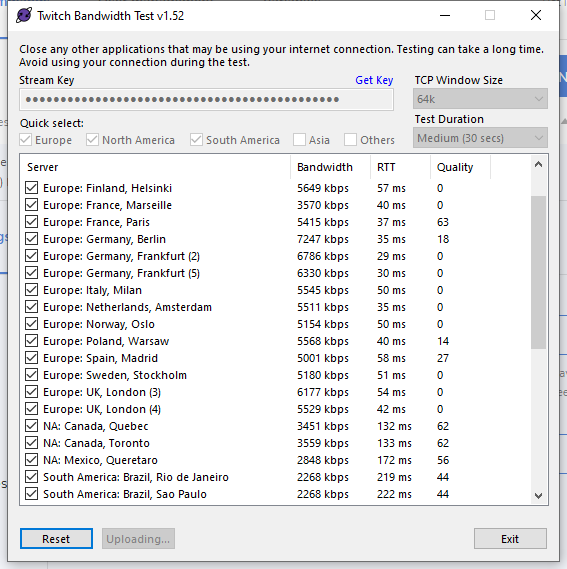 zenith widget
best quality
but if non of the servers are 100 quality
then you have a general issue with your internet
valid island
What if you clear all your cookies?
@zenith widget should i?
peak briar
the best is 63 :(
zenith widget
@valid island why not?
peak briar
how can I fix this issue?
round brambleBOT
@peak briar Dropped Frames usually means that you have a bad connection with the streaming service(Twitch/Youtube/Mixer/Facebook) and most likely something related to your ISP not handling the connection properly.
Speed tests usually cannot help solve this problem and its best to use this guide: https://obsproject.com/wiki/Dropped-Frames-and-General-Connection-Issues
peak briar
okay, thank you...
valid island
well, i wiped cookies, deleted streamelements-related data, cleared all my cache and deleted all cookies, added [.]streamelements.com
[.]cloudflare.net, and... nothing. this token problem persists in firefox and edge as well
zenith widget
Then something in your router or something
valid island
im using ethernet
zenith widget
ok so thats the connection between your PC and your router
valid island
my connection isnt wireless, i dont have a router either. the ethernet cable comes from the outside straight into my laptop
zenith widget
So the actual land line coming into your house is going to your laptop?
There is always a cable from that land line to a modem or router
and no - routers are not Wi-Fi exclusive things
valid island
okay lemme ask this, did anyone else finally get it working after using the instructions in the pastebin?
im really not trying to waste your time btw but it just feels to me like its more of a SE issue than it is mine, i could be wrong though but i followed those instructions without skipping a single step. i can sign into twitch with no issues so i dont get why it wont sign me into SE.
im dying here man. feels like a cure to covid is more likely to come before the token issue is resolved.
zenith widget
Yes, I've had people say it worked for them like a charm
others have said that after removing the cookie it worked
if you are still having hte issue on firefox and chrome, then its something on your side blocking the site.
or making it throw that error message
 blissful axle
how do yuo fix watchtime?
round brambleBOT
@blissful axle 10 minutes of watchtime are given to those in chat when the loyalty points are handed out (every 10 minutes). Therefore, loyalty must be enabled for watchtime to work properly.
There is no direct link between watchtime and all-time points.
It can’t be calculated from the amount of all-time points a user has because subs may earn points at a faster rate and !bonus all command increases all-time points for users in chat at that time.
Giving points to a single user does NOT affect all-time, only when giving to all in chat.
lament blade
when i fisrt open obs i had a live chat box on the side inside obs for fb stream. how do i bring it back when it disappeared after using twitch stream
round brambleBOT
@lament blade Streamelements on top of OBS -> Logout -> login
lament blade
i di re log in to fb but the chat is gone
 queen remnant
Does anyone know how to change the currency in SE pay?
 lean vine
hello! does the chat stats page randomly 404s and comes back? mine disappeared last night but i can see other channel's stats
round brambleBOT
@lean vine If your chat stats aren't working it's most likely because you changed your username! If you can give us your old and new username, we will get a chat stat fix for you.
lean vine
i did not change my username recently
 oblique steeple
I asked internally about your stats
lean vine
thank you!
oblique steeple
@lean vine you should be good now 
 nocturne coyote
hi, is it possible to make a clip with an hotkey while streaming with obs.live?
 past widget
does anyone know if se.pay is available in 🇷🇺 yet?  (not the language, the country)
 soft hill
How do you apply the overlays to your console stream
round brambleBOT
@soft hill Consoles do not have native support for overlays. You would need a capture card and a PC with OBS in order to have Overlays over your console gameplay.
We have an blog post about how to setup console streaming with our essential tools: https://blog.streamelements.com/how-to-stream-on-console-7b620b1c46c3
lean vine
@oblique steeple thank you! have a good day
lament blade
Hey so I was wondering if I set up some overlays on my stream with pc but stream on ps4 do I need to enable the overlay every stream or just once I dont have a capture card
 little oak
once you have set an overlay in place then you add it to obs after that you will not have to activate it cause our overlays stay active at all times unless you turn it off via site but you will have to have obs open and active to see what overlay you created each time you stream
but
since you dont have a capture card you can do remote play wit obs
round brambleBOT
Consoles do not have native support for overlays. You would need a capture card and a PC with OBS in order to have Overlays over your console gameplay.
We have an blog post about how to setup console streaming with our essential tools: https://blog.streamelements.com/how-to-stream-on-console-7b620b1c46c3
 open swallow
hello
 buoyant juniper
How do I put the overlay in my stream
round brambleBOT
@buoyant juniper To add your overlays to OBS, add a new browser source in your scene. Paste your overlay URL in the browser source properties, set the dimensions to 1920x1080 (unless you changed them on the website), and ☑ “Shutdown source when not visible” https://youtu.be/KDvLynUqXI4
 distant thicket
I'm not sure if this would be the best place to ask, but I've looked nearly everywhere and cannot find an answer. When it comes to donations, I found that they were all put on hold because I am a new "seller". Has anyone ever had this issue? I had to manually accept the money and stated that I was providing a service and that the service was completed the day the donation was sent. It then said that the money will be sent after 7 days of verification. I'm unsure if they mean that the donator will have to verify or just 7 days in general.
little oak
you need to contact paypal for that
 spark remnant
OoF i was just about to ask the same thing
 low goblet
I’m trying to go to my dashboard on website and it keeps taking me to logon page
 gleaming crater
where can i paste my streamelement link in to OBS?
round brambleBOT
@gleaming crater To add your overlays to OBS, add a new browser source in your scene. Paste your overlay URL in the browser source properties, set the dimensions to 1920x1080 (unless you changed them on the website), and ☑ “Shutdown source when not visible” https://youtu.be/KDvLynUqXI4
@gleaming crater The default resolution for StreamElements overlays (theme and custom) is 1920x1080. Please add them in OBS at their full resolution and use CTRL+F to fit to screen if necessary. You can then downscale your stream in OBS settings > Video if you'd like https://i.imgur.com/6bWXxjR.png
 glossy widget
Not sure if this is the right channel. So I exported my COmmands from my Streamlabs Chatbot, and wanted to import it like it says in the dashboard .. but they do not appear in my chat command list on stream elements 😦
gleaming crater
lol i did say it wrong. i mean where can i paste the link of Tipeestream? for like notifications
 chrome folio
Not sure if this is the right channel. So I exported my COmmands from my Streamlabs Chatbot, and wanted to import it like it says in the dashboard .. but they do not appear in my chat command list on stream elements 😦
@glossy widget check the file that SL chatbot generate, sometimes the file have empty rows, then delete those and try again.
glossy widget
i jusrt seem to have found the problem it doesnt export as XLS but as .. abcog weird thing @chrome folio and I cant change that lol
i will see if the general export worked
ok for a weird reasone it mixes german and english is the column "Enabled" needed for import export?
ok it also doesnt like xslx
distant thicket
ty 2deaf, will do
 obtuse forum
Hey, i have a 2560 x 1440 Monitor, and want to take your Overlays from the Themen-Galerie, but soon as i do, and activate it in OBS while im Ingame in Rocket League, it stutters and lags so hard in Stream.
If i take your Overlay off, its good.
glossy widget
so in which format do the xslx actually have to be
chrome folio
@glossy widget
glossy widget
eh, I mean how do the lines and columns have to look how to be named and such
ionic kelp
Once you export from SLCB you don't worry about it.
glossy widget
I did and it doesnt work
ionic kelp
The only exception is commands as any SFX commands break on import.
glossy widget
i try to import commands but dont have any sfx in it
ionic kelp
DM me the file.
glossy widget
done
 feral minnow
Hi,
I was wondering if you knew, is there a chat command that I can type in that will show me the name(s) of current viewers during my broadcast, I have 1 repeat viewer and they won’t say anything, so I’m trying to see if I can type in a chat command that will list/show the current viewers and there Username.
ionic kelp
 If I were to have staff nuke your custom commands would that be an issue?
glossy widget
huh?
ionic kelp
For the sake of making sure everything is smooth would you lose any commands not in the spreadsheet if staff were to nuke all your custom commands?
glossy widget
wait ... suddenly it shows x.x several times lul
the only command I currently would use is the merch command which isnt bad I can redo it
ionic kelp
So go ahead and  it?
it?
glossy widget
yes please
now I just dont know which import was the succesful one the one with the abcocg file or the one that said unsuccsessful with the XLSX lol
ionic kelp
And before i tell them which account it's mastapetz right?
glossy widget
yes
 solar obsidian
I’ve just made a new overlay for the first time and added the alert bit for new follower, how do you edit what the alert looks like and what sound is used? Thanks
round brambleBOT
@solar obsidian We've released our new Overlay Editor revamp. You can check out the changes and how to work with it here: https://youtu.be/X5VzXjqAsjk
Check out our blog post as well: https://blog.streamelements.com/streamelements-overlay-editor-just-got-even-better-c22cb5b4853e

We are thrilled to announce the launch of the remastered StreamElements Overlay editor!
https://p.strms.net/newoverlayyt
Why StreamElements Overlays are better?
😎 Simple: Load your entier setup using only 1 link
⚡ Fast: Cloud-powered Overlays arrive in real-time, say goodb...
 south geode
Hi, I changed my name on twitch and gave the new and old name here but the chatstats are still not working.
chrome folio
@south geode tell us your old name and the new one
 long violet
español alguien?
chrome folio
@long violet > #🇪🇸︱español
 topaz hatch
Can you tell me how to add the title editor back into ObsLive?
because i got rid of it on accident
chrome folio
@topaz hatch View > Docks > Stream information
topaz hatch
thanks!
south geode
@chrome folio old name is djfloyd5 and the new name is dj_floyd
chrome folio
Ok. One minute..
south geode
ty
 tidal arch
hey guys, how are you? is there a way to switch all of my SOUND alerts back to default? i cant find the regular sound alerts I had when i just used it.
glossy widget
@ionic kelp soo just nothing suprising happens, when will the nuking of my custom commands happen ^^
ionic kelp
Leg might've been pulled previously. Asking.
little oak
@tidal arch we have default alerts in the pin messaged, are them the ones you need?
ionic kelp
@glossy widget I might've had my leg pulled and the person who could explain how it isn't available for another 3 hours.
tidal arch
@ionic kelp talking about the sound only not the image
ionic kelp
@little oak 2blind2see
glossy widget
tilts head well in 3 hours I can deleted the unneeded one myself, unless the nuke codes have allready been entered and cant be stupped ^^ @ionic kelp
ionic kelp
@glossy widget You can either manually click delete from the dashboard or delete them slightly quicker in chat with !cmd remove commandname
Yeah. No button pushed
glossy widget
well ... when I do it with the cmd .... will it delete all with the same name? xD
lament blade
Hey can someone help me set up a overlay ?
 grave lion
its saying im not live when im using StreamElements OBS and it says Stop Streaming in right hand corner of it
ionic kelp
@glossy widget repeat for multiple copies.
I'd swap between commands to bypass twitch spam prevention.
glossy widget
good idea ^^
ionic kelp
Do you have a streamdeck by chance?
glossy widget
yep
ionic kelp
@glossy widget know my next suggestion?
glossy widget
hmm .. nope xD
lament blade
Hey can someone help me set up a overlay ?
ionic kelp
@glossy widget connect twitch account and send message. Flip between commands.
 left haven
I'm having a problem. None of the streamelements extensions work for me for some reason. For inastance, streamelements leaderboards - I can install/uninstall, but if I try to configure the whole configure screen is empty. There's NO options. It also doesn't display anything on it when it's on my page. Another example - Stream Avatars doesn't load at all; https://i.imgur.com/6Xs6EZH.png
I can click to authorize & nothing happens at all.

Could anyone hook me up?
chrome folio
@south geode done. Check it please.
glossy widget
that currently might even take longer than seperately clicking on all ^^
south geode
@chrome folio i still get 404 page not found
lament blade
Hey can someone help me set up a overlay ?
glossy widget
ok I managed to clean all duplicates ^^
I found another question what would be the streamelelments equivalent to show the twitch link and gamecategory they had for shoutouts?
glossy widget
I am on that list but can't fight that particular thing
ionic kelp
1 sec.
glossy widget
I still wonder though, which of the imported files was taken ^^
glossy widget
thaaank you ^^
chrome folio
@south geode Ok. A moment, please.
left haven
Does anyone know how to fix this?? https://i.imgur.com/629o7sT.png
 chrome folio
@south geode fixed 🙂
south geode
@chrome folio yay thank you all working
 tame crystal
my bot isnt working and it was working 1 day then it stopped working still not working pls help
hi
my bot isnt working and it was working 1 day then it stopped working still not working pls help
my twitch is flexyplayingfn im live rn
round brambleBOT
@tame crystal Please follow our community rules:
- No advertisement or stream promotion
- Respect ALL server members
- No NSFW/NSFL
Thank you
@mossy wasp Please follow our community rules:
- No advertisement or stream promotion
- Respect ALL server members
- No NSFW/NSFL
Thank you
 untold galleon
Hi for some reason my shoutout command will not work and I was wondering if you knew how to fix this by chance?
ionic kelp
round brambleBOT
@tame crystal Go to the dashboard -> right side -> part channel -> join channel (https://streamelements.com/dashboard)
left haven
😐
 rustic mica
Can anyone help me with setting up timers to go off more smoothly?
I have 5 timers, only 2 out of the 5 keep popping up. I need help with finding the right timing to use.
 rustic vortex
i just started trying to make my channel not look boring and i have no idea what i'm doing. im using the purple universe animated super theme. i dont know how to properly configure it and its a mess. please help
 earnest frost
How can I set up a web cam in an overlay?
untold galleon
so I have moded my streamelements and tried the shoutout command !so but it still doesn't do anything does anybody have any clue of what's going on?
earnest frost
Nvm.
 weak delta
What do you have as the command response @untold galleon
 open merlin
can someone help me, how do i disconnect my twitch account from stream elements and replace it with another platform
i would just make a new account but i need my streamelements url to remain
round brambleBOT
@open merlin There is no easy way to unlink 2 owner type accounts from each other. The only way is to make a closure request from here: https://streamelements.com/dashboard/account/security
WARNING: In submitting a closure request you will delete both linked accounts and loose all data from both accounts. This includes overlays, custom commands, timers and past data(tips, subs, etc). You can still relogin with the deleted account, but you are essentially starting fresh.
open merlin
so how would i keep my url?
im assuming once i relogin it will be logging in via twitch?
 sweet socket
if you logout via
round brambleBOT
Please logout of StreamElements at https://streamelements.com/logout and then login again to your account (Twitch/Youtube/Facebook/Mixer)
sweet socket
you can log in with another account
open merlin
it changes the url when i do this
i have a twitch account and this is linked to - streamelements.com/rinse_gg but i am no longer using twitch, i would like to use the same URLas above but with mixer
is this possible?
@sweet socket
sweet socket
I would have to ask a staff member for that @open merlin
open merlin
could you do this? and when would i be likely to know?
sweet socket
I'm asking for you now
sweet socket
not yet, either me or another support hero will get back to you about this
left haven
Can I get a support hero to help with my issue? I've kinda been ignored for a few hours lol
open merlin
Cool, Thank you for helping me @sweet socket
sweet socket
hey @left haven could you quote the issue for me and I'll see what I can do about it
and now worries Rinse
left haven
I'm having a problem. None of the streamelements extensions work for me for some reason. For inastance, streamelements leaderboards - I can install/uninstall, but if I try to configure the whole configure screen is empty. There's NO options. It also doesn't display anything on it when it's on my page. Another example - Stream Avatars doesn't load at all; https://i.imgur.com/6Xs6EZH.png
I can click to authorize & nothing happens at all.
@left haven
sweet socket
@lament blade that is not possible at the moment
left haven
So I made him a mod on the channel but I still can't see anything in regards to configuring streamelements. I appreciate you helping me btw, I had almost given up lol
 nimble dune
@left haven You mean to access from the StreamElements page to dashboard?
left haven
No no, the streamelements leaderboard extension.
I can't configure it in any way - and it displays nothing.
sweet socket
I think this is a Twitch issue
do you have issues with non-StreamElements extensions?
nimble dune
Oh sorry 😀 not readed
left haven
I do for some - they simply don't react or can't be configured. Some that are simpler are able to be configured, since they're easy... like just displaying text.
Thing is nobody else has this issue that I've spoken to - so have haven't a clue whats wrong...
left haven
I use Chrome, I've disabled adblocker, and my bot is Mod level.
sweet socket
I do for some - they simply don't react or can't be configured. Some that are simpler are able to be configured, since they're easy... like just displaying text.
@left haven if this is not only for StreamElements extensions, I would shoot a shot and ask for support with Twitch
left haven
Alright I'll try to get in touch with them.
sweet socket
@open merlin okay so a staff member would need both JWT tokens from the Twitch and Mixer account linked with StreamElements
round brambleBOT
@open merlin You can find your JWT token on your account channels page ("Show Secrets" to reveal the token): https://streamelements.com/dashboard/account/channels
READ ME:
This is a private security token. Do NOT share this token here or other public places, only with a StreamElements staff member in private.
past widget
@strong kernel apologies for the ping, but do you know anything about this?
round brambleBOT
@past widget SE.PAY is available for streamers who are atleast 18 years old, with bank account under their name in one of the following countries and have at least 101 Follower (Twitch) / 101 Subscribers (Youtube):
Austria, Belgium, Czech Republic, Denmark, Finland, France, Germany, Ireland , Italy, Netherlands, Poland, Portugal, Slovakia, Spain, Sweden, Switzerland, United Kingdom, United States.
If you meet these criteria and don’t see SE.Pay, let us know.
For information on SE.Pay payment methods, their fees, and settlement times see https://streamelements.com/dashboard/tipping/fees.
past widget
oh well
open merlin
@sweet socket I'll send them to you now
sweet socket
only with a StreamElements staff member in private.
You can DM @strong kernel with your JWT tokens @open merlin
sweet socket
nw o7
 cold cove
Hello guys and girls, i have a issue. In my OBS the Chat dosnt Work, the Activity Feed is fine but i don't see messages in chat and can't chat via OBS anymore. I changed my Name a day ago and since then it didn't work anymore. I logged in and out but it still dosn't work.
 sly mountain
hey, please can i have some help. i am trying to edit my tipping page. I have added it to my twitch, but i want to customize it. can you give me the link to the website as i cant find it through dashboard
nimble dune
@sly mountain Here is-> https://streamelements.com/dashboard/tipping-settings

StreamElements
The Ultimate All in One Platform for Streamers
round brambleBOT
@cold cove If you changed your name on Twitch please follow these steps:
🔹 Visit https://streamelements.com/logout and then log in again with by connecting with Twitch.
🔹 On the right side of the dashboard page that opens, select "Join" under bot settings. If it says "Part" select that and then select "Join" to send the bot to the chat. Don't forget to mod the bot by typing /mod streamelements in your channel if you have not already.
🔹 Post your old and your new name here so that we can update your channel's chatstats tracking (must be done by staff).
@cold cove Streamelements on top of OBS -> Logout -> login
open merlin
@strong kernel ive sent the details you need
cold cove
i allready set the bot up and running again and loged out and in again on obs and streamelements, so i have to give my old and new name to whom?
 raw pewter
What would cause the media request to repeat the last song in the queue? ie: after a few songs get requested, when the last song requested plays it plays it again immediately again
not 100% of the time, but enough to be annoying
cold cove
so for Chatstats updating, the old name was definitivnichpeddavfrosta and the new name is pedda_von_frosta
do i have to logout and login again after the updating is done?
sweet socket
do the steps in the order it says with the bot response
 daring carbon
how can my viewers gain points
sweet socket
be sure to check the loyalty settings over at the website, will send you a link
daring carbon
thanks
sweet socket
https://streamelements.com/dashboard/loyalty < check here
StreamElements
The Ultimate All in One Platform for Streamers
cold cove
ah ok, will i get notified if the staff is done with the Updating? so i know when to log out and in again?
 charred crag
I'm trying to make sure that my Amazon Music extension is working properly within OBS Live so that no unauthorized users can listen in accordance with the recent copyright crackdowns on Twitch. Can someone assist in making sure that I have OBS set up properly?
round brambleBOT
@charred crag New to Stream Elements?
Check out our YouTube channel https://www.youtube.com/c/streamelements/videos
with tutorial videos from setting up the basics, to in depth details on how to use our product.
New to OBS? Here is a 4 step quickstart guide
https://obsproject.com/wiki/OBS-Studio-Quickstart
Want to learn even more? Here is an in-depth overview
https://obsproject.com/wiki/OBS-Studio-Overview
 stoic brook
Hello I am having an issue with one of my over lays. I am trying to show the biggest donation on my stream. However, the amounts are all off. It looks like they are getting counted 3 times. So there was a donation for $5.00 but it is showing that this user donated $15.00. Somehow it is counting if 3 times. Any ideas?
strong kernel
Did you import 3 times?
stoic brook
Hm... I have no idea. Probably
strong kernel
Check your revenue history.
stoic brook
I have been trying to get this set up and I have moved from obs to streamlabs now back to obs studio and stream elements. LOL
I removed all of the duplicate revenue history but it is still showing $15.00 for that user on my overlay.
strong kernel
@open merlin A ticket was created. The devs will address the issue, but we cannot provide an ETA. An instant solution is not possible.
stoic brook
Seems like the overlays are pulling from other source
open merlin
@strong kernel no problem thanks for the update
stoic brook
Oh this might help. I just changed to monthly on my overlay and it now show correctly. But I should not have to do that correct?
I should be able to leave it set to all time.
So there is something somewhere that needs to be corrected.
strong kernel
Unfortunately not. This is a known issue when importing multiple times.
stoic brook
It would require a query on the database to clear this out. And most likely they are not going to take the time to do this for me correct?
strong kernel
A more permanent solution to the issue is being looked into.
stoic brook
Ok well for now I will set it monthly and hopefully they will address the issue in the future.
 remote grove
Hey I was just looking to get some assistance from the staff on changing my donation page and store page. It says my old alias instead of my current one.
round brambleBOT
@remote grove If you changed your name on Twitch please follow these steps:
🔹 Visit https://streamelements.com/logout and then log in again with by connecting with Twitch.
🔹 On the right side of the dashboard page that opens, select "Join" under bot settings. If it says "Part" select that and then select "Join" to send the bot to the chat. Don't forget to mod the bot by typing /mod streamelements in your channel if you have not already.
🔹 Post your old and your new name here so that we can update your channel's chatstats tracking (must be done by staff).
lament blade
How do I use overlays?
remote grove
old name: quebean
new name: kaibean
round brambleBOT
@lament blade To add your overlays to OBS, add a new browser source in your scene. Paste your overlay URL in the browser source properties, set the dimensions to 1920x1080 (unless you changed them on the website), and ☑ “Shutdown source when not visible” https://youtu.be/KDvLynUqXI4
 fast heron
hi i am trying to remove the song request !play command from my stream due to the new guidelines aand i do not not how
strong kernel
Default commands are disabled in the Chat commands section of your account.
clever vault
is there a way to make a custom command where my bot will give points to the user upon request?
i have !addpoints ${user} ${random.1-1000}, and a number pops up, but my StreamElements bot doesnt execute the add. it just replies with the command
 quartz girder
yes sir
lament blade
does anybody know the new twitch banner dimensions
clever vault
pretty sure its 1920x400
 unreal stirrup
I have code for a social media Popup, but I don’t know where to paste it so that it shows up on my stream, any help?
fast heron
thanks @strong kernel i didnt see it at 1st
 hidden wave
Is any one else having trouble updating properties on overlays? I keep trying to set it to custom (or any other res for that matter) but it just don't update.
lament blade
they have changed it havent they @strong kernel and moved all our pannels into a sub section
sweet socket
@hidden wave we only do 1920x1080, you can change it in OBS studios, but 1920x1080 is the base resolution
hidden wave
For the website, not on OBS
sweet socket
I understand
we only do 1920x1080 on the website
you can change it afterwards when adding to OBS
hidden wave
Under "My overlays" for the settings for my overlay, in properties, I can change the overlay resolution - "1440p, 1080p, 900p, 720p, and Custom"
I'm trying to reset the canvas size in the overlay by choosing Custom and manually typing in 1920x1080
But it's not working
I imported my overlays from Streamlabs so they weren't in the correct size, that's why I was trying to manually fix them.
strong kernel
@hidden wave Changing the canvas size does not change anything in the overlay itself. Nothing is repositioned or resized. You will need to manually adjust things.
hidden wave
If I go into the Overlay and edit an image, the image size is 1920x1080 but doesn't fill the whole canvas. If I go back out into properties for the overlay, it says the size is 1080p.
strong kernel
Just because the image is 1920x1080 doesn't mean the widget holding the image is the same size.
lament blade
it looks whack what were twitch thinking
 cunning raft
recently i received some donations through streamelements, this afternoon I could finally withdraw the money, so I did that. Still no money added on my bank account. Does it take a while to actually add it on my bank account or is there something going wrong?
hidden wave
What are the rules for posting images/screenshots? Cuz I'm getting frustrated over here. I don't think I'm able to properly illustrate my issue until you see it.
sweet socket
@hidden wave you can post screenshots that are support related
 safe hatch
cans omeone tell me what the command is to give everyone points in chat is it !addpoints username points value? ie !addpoints @gilded elmledupp 1000?
 karmic spade
Hello, do anyone know if host alert do not work? it didn't show up today
clever vault
@safe hatch !addpoints all XXX, xxx being the amount of points you want to give
round brambleBOT
@karmic spade Due to changes to Twitch API, we have filtered out hosts and will only show these ones on your activity feed:
- All hosts coming from an online channel with at least 1+ viewer
- Auto host events with at least 1 viewer - only from a channel that just went offline
Note: If you see "X channel has hosted you" with no viewers on the back, that is considered an offline host or a host with 0 viewers, we do not show these.
Note for Mixer streamers: The above 2 filters currently apply for Mixer and we are aware its actually not how Mixer hosts work. We do plan on changing it, but no ETA on when.
safe hatch
@round bramble shayanpepper thank you verymuch
 slim cosmos
I recently started streaming yesterday and i was getting solid frames and a non-laggy stream but today the fps had been lowered by a lot and i am having a laggy stream. Does anyone know how to fix this?
clever vault
@slim cosmos what fixed laggy streams for me was running obs/obs.live as admin
slim cosmos
Ok i will try that
clever vault
@slim cosmos you can set this if you right click the shortcut for whichever you use, under properties > compatibility > run as administrator
if you do this then you dont need to run it as admin everytime, it does it automatically
slim cosmos
Wow this fixed it thank you!
clever vault
@slim cosmos glad to hear that 🙂
 charred quartz
how do I mask my webcam?
@topaz hatch u mean remove the background?
green screen?
topaz hatch
no like make the shape of my webcam the shape of the mask
i looked up a yt video
but it didnt work
charred quartz
can u screenshot what u are tryin to?
 winged lily
MochiGG Nutty on youtube has a good tutorial that takes that Harris Heller mask and actually explains it. I don't work here but I saw that recently
charred quartz
if u are talking about just setting up a cam overlay u just need to put the webcam source behind the overlay and it has to be transparent pixels of course @topaz hatch
charred quartz
still unclear what u are trying to achieve does u have the alpha input file?
winged lily
I had a question re: stream elements and resizing text within widgets but I wasn't sure if this was the right place to ask
charred quartz
your path is empty
round brambleBOT
@winged lily Welcome to the helpdesk! Please let us know how we can assist you today and a support volunteer or staff member will assist you as soon as they are available. Thank you for your patience.
 bright hearth
Is there a way of removing items from my activity feed? Someone who used to harass me decided to come back and I had them banned from tipping on Streamlabs but hadn't banned them from SE yet. I'd rather not have to see their nonsense in my activity feed. I blocked the user from donating again but the alert they sent is still in my activity feed.
charred quartz
does you have a photo of harris heller did or something close to that thing u are trying to do @topaz hatch?
quartz girder
how do i make a support comamd
 trail void
I can't get stream elements to pickup my latest donator and top donator. Any idea how to sort this?
topaz hatch
@charred quartz no i dont have a photo
its the webcam frame and corresponding mask
in the discord
strong kernel
@trail void StreamElements and Streamlabs don't communicate. You haven't received any tips in StreamElements, nor have you imported your tipping history from Streamlabs. In addition, tips received via a Streamlabs link will not play an alert in StreamElements.
charred quartz
how do i make a support comamd
@quartz girder
topaz hatch
@winged lily can u send the link to the video?
quartz girder
ok
 scarlet quail
How Do I fix my stream elements so I doesnt keep saying im recording. (It randomly turns on and fills my recording folder.)
charred quartz
How Do I fix my stream elements so I doesnt keep saying im recording. (It randomly turns on and fills my recording folder.)
@scarlet quail u probably has turned on the auto record livestream
"Record livestream automatically"
winged lily
anyone have any insider knowledge on how to fine tune font size for widgets, in this example a chat feed widget, using the editor in streamelements as the widget itself does not seem to be responding correctly when I change font size there
scarlet quail
kk
charred quartz
anyone have any insider knowledge on how to fine tune font size for widgets, in this example a chat feed widget, using the editor in streamelements as the widget itself does not seem to be responding correctly when I change font size there
@winged lily the editor chat feed widget can change the font size as normal, idk what u are trying to achieve lul
quartz girder
i need help
 viscid pebbleBOT
Hi @quartz girder, Please ask your question(s) or describe the problem you're looking to solve so staff or a support volunteer can assist you as soon as they are available.
scarlet quail
@charred quartz Thank you so much, I had the hotket to enter lmao
charred quartz
XD
winged lily
I change the font size using the widget settings, save page, even update source on obs but when i send any test font in my chat they show up as the smaller font size
which is why i want to use the editor
ty
 amber gorge
Is there any way to use streamelements without obs? I've been trying to find a way to use it with my El gato capture software and all the guides seem to be implementing obslive
charred quartz
try setting a very very high font size and try it out
winged lily
i set it to 100, 200, 400, 1000
charred quartz
also u didn't has to save or anything, u can troubleshoot it inside the editor
winged lily
no change
charred quartz
when u send text msgs in the chat it will work inside the editor as in the preview and in the OBS at the sam itme
winged lily
its based on a nerd or die widget
winged lily
just asking for help lol
charred quartz
u have to get in contact with them
abstract hemlock
@amber gorge You can use any streaming software that support browser sources but we recommend OBs Studio (with obs.live add-on 😉 )
amber gorge
So how would I get the overlay to work without obs?
round brambleBOT
@amber gorge To add your overlays to OBS, add a new browser source in your scene. Paste your overlay URL in the browser source properties, set the dimensions to 1920x1080 (unless you changed them on the website), and ☑ “Shutdown source when not visible” https://youtu.be/KDvLynUqXI4
amber gorge
Gee thx mr bot
 silver hornet
Razer ripsaw device not showing up in device pulldown bar, please help
clever vault
is there a standalone streamelements program for commands/bot control?
strong kernel
There is not.
silver hornet
@round bramble Raver ripsad not showing up in device pulldown bar, please help
razer ripsaw lol
im a super noob at this stuff lol
ill take anyones help honestly lol
clever vault
@silver hornet you might have better luck talking to Razer. are you using 64 bit or 32 bit obs
round brambleBOT
@silver hornet For the best OBS support, please join their Official Discord @ discord.gg/obsproject
 wispy kettle
I honestly don't know what to search for; but my TTS alerts are not always "working". It's almost as if some alerts are skipped for TTS, but not the alert sound. So while I hear the alert go off, when the user adds a message with a bits transaction—it doesn't always play the TTS message. Is there something I have setup wrong that messages are being skipped?
silver hornet
@clever vault 64bit
clever vault
@wispy kettle I had a problem with this, my alerts had a "variation" in which the TTS was disabled. either turn on TTS for the variations, or turn off variations
strong kernel
TTS is also subject to the (extremely oversensitive) profanity protection in your tip moderation settings.
clever vault
@silver hornet maybe try 32-bit OBS version. When i was looking at capture cards, i heard some dont work nicely with 64-bit, though it is a rare case. worth a shot if no one has any specific help
@strong kernel can you explain what the "wildcards" are for the profanity custom filter? Trying to set it up to auto-filter racist remarks without going through and filtering every iteration
strong kernel
Wildcard is partial matching. Like if I put in ham* it'd match on ham, hamburger, hamster, etc.
clever vault
okay perfect, thats what i thought but wasnt too sure. thank you
wispy kettle
So if I change it to the replace with happy words, then the alerts should still TTS?
strong kernel
Correct.
 fast pebble
Hey guys, quick question... how do I share my overlay with a friend?
Can he import what I amde for him?
 supple pagoda
The video I am setting for my sub alert is not the video that's being shown when I test the alert. Anyone know what's wrong here?
strong kernel
No, the only way to copy overlays between channels is if you have manager access to all relevant channels.
@supple pagoda Edit your variations, not just the main alert.
Also, if you're not using custom CSS, don't enable it.
fast pebble
What does that mean Nethyr? Is there a way he can give that to me?
supple pagoda
Didn't even see that was ticked. Thanks!
 stark temple
why do my messages keep getting deleted?
strong kernel
@stark temple We do not edit channels by the request of viewers.
stark temple
??
wispy kettle
We just tested it and the TTS still seemed to not work. I'm wondering if I have something else setup incorrectly… All my variations do have TTS enabled though; with the filter set to replace bad words with happy words.
lament blade
my channel will not start streaming on stream elements, why is that
round brambleBOT
@lament blade Please logout of StreamElements at https://streamelements.com/logout and then login again to your account (Twitch/Youtube/Facebook/Mixer)
 crystal meadow
hey i'm trying to edit some stuff in my dashboard on the website and its not loading in. only a blank white page. i tried ctrl+shift+r and it didn't work...
 south parcel
My leaderboard was just blank about 5 minutes ago, but I forced refresh and it loaded now
round brambleBOT
@crystal meadow Our Dashboard and Overlay editor are Chromium Optimized. We strongly recommend using Chrome. Opera GX and the new Microsoft Edge Chromium might work closest to Chrome as its also Chromium built. FireFox also works, but some things might look a bit different or not work. We do not recommend using Internet Explorer with our Dashboard as it does not support functions.
If the website doesn’t work on chrome, be sure none of your plugins are blocking our website or clear your cookies. You can try if the website works in a incognito tab.
crystal meadow
ive been using microsoft edge, you think that might be the problem?
crystal meadow
oh ill try chrome then
wispy kettle
Wow, ok. A message without any profanity is clearly not doing TTS… I'm stuck on what else to troubleshoot. 😦
strong kernel
@wispy kettle Which message?
crystal meadow
seems to be working fine with chrome thanks for the help 
wispy kettle
The text included with a bits alert did not play the TTS for the message text.
 jolly cipher
Greetings, i moderate for another Twitch channel and we are having some issues with the media request, it seems that at random times the source just shows a blue screen instead of the videos requested.
strong kernel
@jolly cipher Screenshot please.
jolly cipher
it happened 3 times this week
i don't have any since i'm not in charge of the streaming software
 fleet cairn
My chat commands aren't working such as "!watchtime" and "!points" I have loyalty settings enabled and all chat commands required enabled also I don't know what the issue is
strong kernel
Make the bot a moderator.
round brambleBOT
@mental dawn Please follow our community rules:
- No advertisement or stream promotion
- Respect ALL server members
- No NSFW/NSFL
Thank you
 sharp river
So, I have the chat stat extension and it worked fine for a while but I checked it now and it says no data. I did not change my username and even cleared my cache. Any way to help?
 limpid fjord
I'm having problems with text over image when creating my own custom alerts. The other two layouts work fine but I can't see text when it's supposed to be over my alert
round brambleBOT
@sharp river Please provide your account ID found at the top of this page: https://streamelements.com/dashboard/account/channels This ID is public info and safe to share here.
strong kernel
@limpid fjord Text settings>Advanced, play with the margins.
wispy kettle
@strong kernel should I post a picture of the messages from the dashboard? Or do you have access to them?
 flat jasper
How do I change me SE.Pay bank account
wispy kettle
Just had a bits message and the text was simply "testing testing" and nothing. Just the sound for the alert. 😦
strong kernel
@wispy kettle I have access.
round brambleBOT
@flat jasper Please contact us via email for support with SE.Pay. You can use our contact form here: https://streamelements.com/contact Thank you
sharp river
my account ID is 5db77ddf4401ab25ba362ebf
wispy kettle
Of all the bits alerts with text, only like… one worked. I've double and triple checked the TTS settings and checked the filter as I mentioned, but it's still being moody. 😵
strong kernel
@sharp river There's a known issue going on. We can't provide an immediate fix.
sharp river
@strong kernel alright cool to know its just not me, thanks
limpid fjord
Thanks @strong kernel that seems to have worked
 wild crown
I'm having trouble with multiple channels on Twitch. Stream Elements says I can't be found, and that I have no points on any of the channels I'm in.
 stiff dock
Using Stream Elements and Stream Elements OBS and was using the media request feature but it has disappeared from the Stream Elements drop down menu in the top left of OBS and I can't figure out how to open the Media Request feature now
round brambleBOT
@stiff dock Streamelements on top of OBS -> Logout -> login
wispy kettle
Well, they seem to be playing now… is there a way to "skip" the TTS when it's long? 😬
 jaunty agate
Not sure if I'm posting in the wrong channel, but does anyone know how to link my Twitch to the "My Channel" options on the dashboard? I log in with Mixer, linked my youtube and facebook, but my twitch channel says it's already been claimed.
round brambleBOT
@jaunty agate Account Merging - Please note:
- Merging accounts only allows faster ways to switch between accounts
- Merging accounts does not allow data sharing between accounts - different streaming platforms, different type of events
- Merging accounts allows duplicating/sharing overlays between the accounts
If you understand the limitations of merging and want to proceed, please find the JWT tokens (!jwt) from both accounts you want to merge and you will be directed to DM them to a staff member.
@jaunty agate You can find your JWT token on your account channels page ("Show Secrets" to reveal the token): https://streamelements.com/dashboard/account/channels
READ ME:
This is a private security token. Do NOT share this token here or other public places, only with a StreamElements staff member in private.
 heavy wagon
Hey I need help on mobile with streamelements to get custom sounds for followers etc on twitch
 still sphinx
I can not seem to get this horrible buzzing abs feedback of my stream.
round brambleBOT
@still sphinx For the best OBS support, please join their Official Discord @ discord.gg/obsproject
still sphinx
Just started today and my stream is just unbearable
ionic kelp
@heavy wagon I would highly recommended doing anything related to our services on a desktop as it is not easy/possible to do such on smaller screens.
@wispy kettle in our activity feed there's the 🔔 in the top right that can at least mute it.
But that mutes all.
strong kernel
Skipping the alert will skip the TTS as well.
ionic kelp
⏩ button right?
round brambleBOT
@still sphinx Please ask your question in one helpdesk channel only. A support volunteer or StreamElements staff member will assist you as soon as they are available. Asking in multiple places will only result in confusion, not faster answers. Thank you for your patience.
 molten yarrow
found it kinda hard to get a response here. My overlays keep failing after a few hours of streaming, notifications etc no longer showing, media share frozen. tried readding to obs and remaking entirely. not sure what else to do orther than trying an alternative service :/
round brambleBOT
@molten yarrow OBS -> settings -> advanced -> scroll down -> enable/disable hardware accel.
https://i.imgur.com/ggMe9ZE.png

 knotty pike
hey guys, i was wondering how i can get an alert in chat for when somebody follows?
round brambleBOT
@knotty pike New to Stream Elements?
Check out our YouTube channel https://www.youtube.com/c/streamelements/videos
with tutorial videos from setting up the basics, to in depth details on how to use our product.
New to OBS? Here is a 4 step quickstart guide
https://obsproject.com/wiki/OBS-Studio-Quickstart
Want to learn even more? Here is an in-depth overview
https://obsproject.com/wiki/OBS-Studio-Overview
 unborn loom
eu preciso de suporte
referente ao stream elements
i need help men, my language is BR
Hello, I would like to report a bug. I was watching @nobrutv's live. An error occurred, due to the quality, there was an oscillation on the internet. That affected the quality, decreasing it to 160. From the moment the registered points were not registered. Occurred between the period 21 pm to 22 pm today 11/06.
strong kernel
We do not interfere with any streamer's loyalty points. If you believe there to be an issue with your points or a redemption, you need to reach out to the streamer or one of their moderators.
unborn loom
And when the moderators do not respond? Can you tell me if there really is an error regarding the quality of 160px
chrome folio
@unborn loom > #🇵🇹︱português
lament blade
What is revenue
strong kernel

www.dictionary.com
Definition of revenue from Dictionary.com, the world’s leading online source for English definitions, pronunciations, word origins, idioms, Word of the Day, and more.
lament blade
Bruh
strong kernel
What? You asked.
If you'd like to be more specific with your question, I'd be happy to assist.
lament blade
hello, i disable link on my chat and i dont know how to enable them again
can somone help me with that please
strong kernel
@lament blade Can you explain what you mean?
wild crown
I'm having trouble with multiple channels on Twitch. Stream Elements says I can't be found, and that I don't have points. No one can give points to me (moderators or the streamer), nor am I earning points in their channel.
 urban leaf
I'm testing StramElements alerts on OBS and I can hear them but I can't see them. I tried messing with the dimensions already and it isn't helping. They're on the top layer. I created a new scene to make sure nothing else was interfering.
*StreamElements
round brambleBOT
@urban leaf To add your overlays to OBS, add a new browser source in your scene. Paste your overlay URL in the browser source properties, set the dimensions to 1920x1080 (unless you changed them on the website), and ☑ “Shutdown source when not visible” https://youtu.be/KDvLynUqXI4
urban leaf
I did all of that
round brambleBOT
@urban leaf Please provide a proper screenshot with the issue visible. If not sure how to take a screenshot, you can check here: https://www.take-a-screenshot.org/
ionic kelp
Do Ctrl F
urban leaf
Still can hear the alert but can't see it
round brambleBOT
OBS -> settings -> advanced -> scroll down -> enable/disable hardware accel.
https://i.imgur.com/ggMe9ZE.png
urban leaf
I could literally kiss you right now. You sweet sweet angel. I have been trying not to throw my desktop out of my window all day. ❤️ ❤️ ❤️ ❤️ ❤️
Thank you so much
 hallow island
Someone help me pls
round brambleBOT
@hallow island Welcome to the helpdesk! Please let us know how we can assist you today and a support volunteer or staff member will assist you as soon as they are available. Thank you for your patience.
hallow island
Anyone here ??
strong kernel
We can't help if you don't ask your question.
proven atlas
I only use a tablet and phone how can I get my tips up on my screen and raise money for charity I dont use stream elements I use the other one
strong kernel
You should ask the other one, then.
proven atlas
Wats the other one
strong kernel
 shut crag
I got problem with SE pay, my balance wasnt cleared, since 29th of 5th...
round brambleBOT
@shut crag Please contact us via email for support with SE.Pay. You can use our contact form here: https://streamelements.com/contact Thank you
shut crag
Thanks ^^
 brave terrace
@round bramble como personalizo minha stream ?
 night grove
hi people, I have a doubt about loyalty and leaderboard, where should I ask?
round brambleBOT
@night grove Welcome to the helpdesk! Please let us know how we can assist you today and a support volunteer or staff member will assist you as soon as they are available. Thank you for your patience.
night grove
I justo want to know how to turn off all those bots on my leaderboard, not mean the actual bots that you can remove from the leaderboard using their names, but all those fake names that appear with no reason on the leaderboard
I mean all these fake names that appear onthe leader board over the real ones
 wheat remnant
Good Evening @viscid pebble. I am needing to know how to make links on the Twitch chat not get masked out with asterisks, please?
 sacred kiln
I am in need of some help
lament blade
Hello. Streamelements has not been working right my last two streams. The timers werent firing, the !youtube !twitter commands were doing nothing. Streamelements was modded. Is there something I can do to repair this?
it works not that the stream is offline but not working live with the chat popped out
 hybrid pond
hello. I did !bot remove in my twitch chat and I don't know how to take the bot back, someone can help me please?
round brambleBOT
@hybrid pond Go to the dashboard -> right side -> part channel -> join channel (https://streamelements.com/dashboard)
hybrid pond
thank you so much for your help. have a good day ❤️
sacred kiln
Last night is the first time I have started to use StreamElements, everything went smoothly with no problems. However, I tried streaming today, and it would take forever to even load my stream, but when it does it's unstable and wont even show my screen. I take a look at obs at it shows [Picture Below] And when I try to stop the stream because it won't work, it just freezes.
round brambleBOT
@sacred kiln Dropped Frames usually means that you have a bad connection with the streaming service(Twitch/Youtube/Mixer/Facebook) and most likely something related to your ISP not handling the connection properly.
Speed tests usually cannot help solve this problem and its best to use this guide: https://obsproject.com/wiki/Dropped-Frames-and-General-Connection-Issues
round brambleBOT
@slim mulch Due to changes to Twitch API, we have filtered out hosts and will only show these ones on your activity feed:
- All hosts coming from an online channel with at least 1+ viewer
- Auto host events with at least 1 viewer - only from a channel that just went offline
Note: If you see "X channel has hosted you" with no viewers on the back, that is considered an offline host or a host with 0 viewers, we do not show these.
Note for Mixer streamers: The above 2 filters currently apply for Mixer and we are aware its actually not how Mixer hosts work. We do plan on changing it, but no ETA on when.
 slim mulch
thank you
 proper path
how can i remove the media request chat command from my stream?
ionic kelp
@proper path Disable it in default commands.
proper path
thank you.
 halcyon lily
Hi i am having problems with capturing minecraft on streamelements obs. i can capture every other game just fine but im trying to speedrun minecraft and i cant get minecraft nor live split to show up
ionic kelp
Laptop?
halcyon lily
no im on a pc
round brambleBOT
@brave terrace New to Stream Elements?
Check out our YouTube channel https://www.youtube.com/c/streamelements/videos
with tutorial videos from setting up the basics, to in depth details on how to use our product.
New to OBS? Here is a 4 step quickstart guide
https://obsproject.com/wiki/OBS-Studio-Quickstart
Want to learn even more? Here is an in-depth overview
https://obsproject.com/wiki/OBS-Studio-Overview
slim mulch
I setup a sound command in store and then i setup a custom command to redeem the sound.....how can i stop the bot from saying "user so and so redeemed so and so
slim mulch
thanks
 lilac hearth
Hey everyone. I made a custom overlay and in my overlay I changed some settings in the alert box, mainly I uploaded my own videos and sounds but when I emulate a subscriber alert the video doesn't play and when I emulate a cheer alert neither the video nor the sound plays. I am not sure how it is the actual stream but I am a bit worried. Any info?
 jaunty lintel
 hard plover
the SE.Pay for my twitch account says bank details invalid and to contact support. Can anyone here help me?
round brambleBOT
@jaunty lintel For the best OBS support, please join their Official Discord @ discord.gg/obsproject
@hard plover Please contact us via email for support with SE.Pay. You can use our contact form here: https://streamelements.com/contact Thank you
zenith widget
@lilac hearth check the variations of the alerts
lilac hearth
Thanks that worked
 warm surge
Hey Guys i have a new Question to Streamelements. When i want that Streamelements will spam my Emote after a follow. It needs to be Subscriber but can i make this Bot Subscriber on my Chat without to pay for the Subscribtion ?
ionic kelp
@warm surge Unless you're partner someone has to pay for it.
warm surge
some other Bots who can do it ?
 dry hare
If you let the bot masquerade as you then you don’t need a subscription
 mild ridge
Is there something preventing media request from playing?
Nevermind just had to refresh the page.
 fresh spear
Question does anyone know how to get a full list of your followers to import. Trying to do a raffle giveaway
 prisma relic
pfff.... that is a great question 🤔
zenith widget
@fresh spear https://twitchinsights.net/followlist
Twitch Insights is a 3rd-party tool which gives you insights about twitch.tv. Ever wondered how a game performs on Twitch or who the Twitch Staffs are? This is your answer! This tool allows you to see who got the most followers among the list of channels you follow.
oh wait thats a list of who you follow
prisma relic
i know https://dashboard.twitch.tv/u/USERNAME/settings/channel/followers-list is there.... but that doesn't actually give a "work-able" list
 pallid saddle
i changed my twitch username and now stream element bot wont work 😦 anyone know how to fix it?
round brambleBOT
@pallid saddle Go to the dashboard -> right side -> part channel -> join channel (https://streamelements.com/dashboard)
prisma relic
@fresh spear ... yes; but not easy...~~ https://dev.twitch.tv/docs/v5/reference/channels~~ https://dev.twitch.tv/docs/api/reference
~~GET https://api.twitch.tv/kraken/channels/<channel ID>/follows ?limit=25 (max 100) ~~
deprecated, use GET https://api.twitch.tv/helix/users/follows?to_id=<user ID>
how many followers do you have?
fresh spear
Just hit the 1k mark doing $50 giveaway
prisma relic
for 1k viewers i can try to get them. jump over to #dev-chat ? i'll need your Twitch username or Twitch ID
 storm tendon
is there a way to export alerts and overlays from streamelements to streamlabs?
and how?
ionic kelp
Can't help with that.
zenith widget
Have you looked into Streamlabs website perhaps?
zenith widget
Do you want to import out stuff into the streamlabs dashboard or just add our overlay to SLOBS?
storm tendon
2nd option
zenith widget
!add
round brambleBOT
To add your overlays to OBS, add a new browser source in your scene. Paste your overlay URL in the browser source properties, set the dimensions to 1920x1080 (unless you changed them on the website), and ☑ “Shutdown source when not visible” https://youtu.be/KDvLynUqXI4
storm tendon
thanks so much
lament blade
what is a jwt token
round brambleBOT
@lament blade You can find your JWT token on your account channels page ("Show Secrets" to reveal the token): https://streamelements.com/dashboard/account/channels
READ ME:
This is a private security token. Do NOT share this token here or other public places, only with a StreamElements staff member in private.
lament blade
thanks
storm tendon
@zenith widget question does it work if someone follows or does anything?
if not how can I make it work?
prisma relic
you'll need to ask Stream Labs?
zenith widget
@storm tendon If the overlay has an alert widget form us, then it should trigger on its own
you can test your alerts like so
!alerts
round brambleBOT
You can test Alerts via the Emulate bell on the lower left side of the Overlay Editor. Simply go to your Dashboard -> My Overlays -> Pencil/edit button on the overlay. Make sure the "Preview LIVE on stream" option is on to see the alert in OBS/Xsplit https://streamable.com/vtulg9


 storm tendon
thanks
 blissful birch
Hello there! Does we still need to write old and new twitch nicknames for streamelements statistic link fix or any workaround has been released ?
if there is no workaround already, could you change the link to statistics page please?
old twitch name: itashi_ttv
new twitch name: itashi
zenith widget
The page is fixed currently
fresh spear
@prisma relic it's just unicornrahblah lol
 jaunty plank
Hi
fresh spear
@prisma relic I've just been manually typing them to a note pad for the last half hour 😭
prisma relic
ya... don't do that 🤣 .... well maybe; give me a minute 🤞
jaunty plank
I live in turkey. paypal is not used here. I broadcast on youtube and I have no other option for donation. I can do it nr.
fresh spear
@prisma relic any help is muchly appreciated 💜
prisma relic
so it won't be a list of just names... it will be all Twitch data.... so like username and data followed....
fresh spear
That's ok i can't delete the added info once copied @prisma relic
 stable egret
Hello there!, I need help. It turns out that months ago I changed the name of the account, but I have a problem and it is that apparently in stream elements to delete the account it indicates that the name is not correct. I have changed for the first one I had and it turns out that it is as if I had been saved in the database and my old name is still there
prisma relic
can I DM you the file @fresh spear ?
fresh spear
@prisma relic of course
 half wedge
hi i just set my overlay but my video cam doesnt fit to the overlay column cam
 viscid sand
i have a question about the giveaway function in the streamelements dashboard
I started a giveaway with a ticket cost of 500 but it takes 1000 from every person wich buys a ticket
zenith widget
are they buying 2 tickets?
@half wedge right click your webcame source -> properties -> change the video settings
viscid sand
No they buy one and have 500 Points but after buying them they have -500
half wedge
ok thanks i'll try @zenith widget
just get in to the video settings but no idea what to change
 obsidian beacon
Hello, how do I remove the "Request clip to share with your tip" section from my tipping page?
zenith widget
Media request -> settings -> change "via tip" or "both" to "free"
obsidian beacon
Where is the media request option?
zenith widget
obsidian beacon
Thank you so much!!
zenith widget
@half wedge depending on your webcame, but usually OBS can control the size via the resolution option
@viscid sand I'll try and enter your giveaway and see if i can reproduce the issue you are describing
hmm interesting
viscid sand
@viscid sand I'll try and enter your giveaway and see if i can reproduce the issue you are describing
@zenith widget thank you
zenith widget
@viscid sand Ok I was not able to reproduce on my side but did on your giveaway
what i'd suggest is to part the bot and join it again
then disable and enable the !ticket/!enter command
obsidian beacon
In what countries is SE Pay available?
round brambleBOT
@obsidian beacon SE.PAY is available for streamers who are atleast 18 years old, with bank account under their name in one of the following countries and have at least 101 Follower (Twitch) / 101 Subscribers (Youtube):
Austria, Belgium, Czech Republic, Denmark, Finland, France, Germany, Ireland , Italy, Netherlands, Poland, Portugal, Slovakia, Spain, Sweden, Switzerland, United Kingdom, United States.
If you meet these criteria and don’t see SE.Pay, let us know.
For information on SE.Pay payment methods, their fees, and settlement times see https://streamelements.com/dashboard/tipping/fees.
daring carbon
can someone check if my stream is lagging
prisma relic
https://inspector.twitch.tv/ will give you some good feedback
sly mountain
Please help
I go onto the streamelements website
It auto logs on
I click my dashboard
It loads but then kicks me back to where it was when I first logged in
round brambleBOT
@sly mountain Please logout of StreamElements at https://streamelements.com/logout and then login again to your account (Twitch/Youtube/Facebook/Mixer)
sly mountain
Ok
zenith widget
You've not set the proper aspect ratio on the webcam
or just the proper resolution
viscid sand
is there a way to create a command for the top 10 people with the highest watchtime?
And to display the watchtime in hours not in days
what i'd suggest is to part the bot and join it again
@zenith widget how does that work?
round brambleBOT
@viscid sand Go to the dashboard -> right side -> part channel -> join channel (https://streamelements.com/dashboard)
viscid sand
but when i type in this command it only shows the leaderboard
And where do i find the ticket command i can only find the !enter command wich costs 500
When i type !ticket it costs 100
zenith widget
ah well there you have it
the !enter command is the default name while ticket is an alias to it
and since you've set a command cost, its taking twice the loyalty points
or 500 + ticket cost
zenith widget
remove the command cost
viscid sand
now you cant type !ticket anymore tho 😄
zenith widget
if you remove the alias you won't be able to, no
viscid sand
okay now it works
!top online
@zenith widget but that still does not work, it just shows the leaderboard when tiping the command
zenith widget
I see - you have a custom command that is named !top
which is returning the link
here is how it looks like when the default !top command is enabled 🙂
viscid sand
Oh thanks
is there a way to display the minutes in hours?
Since my viewers tend to like this more
sorry if im stressing you out but is there a way to translate the default commands like !top into german?
zenith widget
for translation @winter cradle
his the community manager in charge of the translation 🙂
As for minutes to hours - i think the !watchtime command shows in hours as well
viscid sand
shows in days unfortunately
Do i DM @winter cradle ?
Also big props, switched from streamlabs to elements and its sooo much better in my opinion!
prisma relic
.... just asking as a lurker ... why are hours better than showing days?
viscid sand
i dont know, i personally dont care
Its just that the viewers got used to see the top hours
open merlin
Hi @strong kernel any update?
viscid sand
okay thank you so much for your help!
open merlin
@zenith widget its regarding my stream elements url
zenith widget
is it linking 2 accounts together?
open merlin
Um sort of, I've changed stream platform and now I have 2 stream elements accounts i just want to use the one with the correct url but link it with my mixer nd not have my old twitch on it @zenith widget
zenith widget
Then simply email us here: support@streamelements.com with the name of the mixer and twitch account. We will then set a task with the devs to swap the links, if you want your Twitch to be without numbers on the back
if I'm understanding the thing you want correctly
open merlin
The twitch one is streamelements.com/rinse_gg and thats the one I'd like to use, just not with twitch... the mixer one has a bunch of numbers
zenith widget
so you want the mixer to be with no numbers on the back?
open merlin
Yeah thats right
zenith widget
then emails us with the account name here: support@streamelements.com
so that we can notify you later when its changed by the devs
open merlin
Okay thank you, how much should I fill them in, in the email
zenith widget
I'm gonna be the one who is gonna see it
so as I said just the request to change the links and the account name
the rest is up to me
you have 5 minutes before i  for the day
 night trail
Hello all. Not sure this is the right channel for this but I'm going to put it here. I'm starting to transfer everything from stream labs to stream elements. What I'm wondering is currently I run the stream labs chat bot on a different computer that allows me to watch chat and interact with the macro buttons. Is there something similar with the stream elements chat bot?