#helpdesk-twitch
1 messages · Page 28 of 1
 unkempt hawk
 crude pecanBOT
The default resolution for StreamElements overlays (theme and custom) is 1920x1080. Please add them in OBS at their full resolution and use CTRL+F to fit to screen if necessary. You can then downscale your stream in OBS settings > Video if you'd like https://i.imgur.com/6bWXxjR.png
unkempt hawk
Thank you!!
 lofty bronze
Can you use stream labs with a Xbox series s on twitch?
 ionic kelp
You'd have to ask them.
 lament blade
Hello, I deleted the Activity Feed dock panel, please tell me how to return
 green rose
Does anyone know the answer to this?
green rose
lofty bronze
Can you use stream labs with a Xbox series s on twitch?
this is stream elements discord not stream labs 🤣 but you can use anything you want if you run it to pc with capture card. I doubt its actually built into x box other than whatever the xbox streaming thing is
green rose
lament blade
Hello, I deleted the Activity Feed dock panel, please tell me how to return
 green rose
Does anyone know how to prevent the size of a scrolling text bar from changing sizes automatically depending on the length of the text?
- I've installed "Snip" to capture now playing from spotify
- I've added the text (GDI) source
- Ive added scroll filter
- Ive chose the text file to get the information from (which is an artist and track name
- I've set up the size of the text box i want to display this information in
However:
- If the Artist and trackname is longer/shorter, the text (GDI) source inscreases and decreases in length
How do I prevent this from happening and lock it to one size?
ionic kelp
That's something you'd actually wanna ask on the OBS server since that's more of a thing they'd handle.
 steel girder
Has there been any update on this?
green rose
ionic kelp
That's something you'd actually wanna ask on the OBS server since that's more of...
thanks
lofty bronze
Sorry, wrong name. I am using stream elements.
ionic kelp
steel girder
Has there been any update on this?
Fixed.
 proud beacon
Hi all! Please add the maximum bet to roulette. I set up a cool economy with bot coins and the roulette is perfecting and introducing interactive chat. But the unlimited maximum bet in roulette ruins everything. Some viewers become millionaires in just hours. I really don't want to abandon this module. There are many topics where they ask to make a limit on the maximum bet. I will be waiting very much. thank you!
crude pecanBOT
@proud beacon ⤵️
Check out the StreamElements ideas board: https://strms.net/ideas. You'll be able to add ideas, upvote ideas you agree with and track their progress with email notifications. Adding and upvoting ideas also helps the staff know which ideas should be prioritized so please take some time to upvote.
 twilit vapor
Hi 🙂 Where I can reach out the support team? I'm new to this campaign thing and got a few questions which weren't answered somewhere else in FAQ
crude pecanBOT
@twilit vapor ⤵️
Please go to https://support.streamelements.com/, click the big blue question mark on the bottom left and select SE.Sponsorships Form. Fill that form to submit a Sponsorship related ticket and wait for our Support Team to get back to you. Please do not fill the form multiple times, as that will not speed up the response time.
twilit vapor
Can we play background music during a running sponsorship stream?
 blissful crater
Hey, does anyone know if it's possible to have a seperate chatbox for twitch and youtube that shows up on-stream?
twilit vapor
blissful crater
Hey, does anyone know if it's possible to have a seperate chatbox for twitch and...
Not sure, but I think it might work out with an in-between provider: There are some providers where you can stream from OBS to that provider and the provider then streams simultaneously to both platforms. There, at the in-between provider it should be possible to place StreamElements widgets for YouTube and Twitch
 tiny sleet
Hi I'm trying to get a widget for the overlay to show sub POINTS not count. so the number weighted by tier 2 and 3 subs. is that possible?
 keen crest
hello, someone has hacked my streamelements account an changed payment details i need help please!
crude pecanBOT
@keen crest ⤵️
Please create a support ticket by filling out the form here: https://streamelements.com/contact This will ensure staff can track and resolve your issue in a timely manner.
lament blade
green rose
thanks
 fluid crypt
Please help fix the chat stats.
When I open the link https://stats.streamelements.com/c/imbalobster I get a 404 error.
My twitch account https://www.twitch.tv/imbalobster
 toxic wind
Hi!!, so I am kind of new on this, I setup my alerts on streamelements, if I do the preview it sounds good in the alert editor as also in OBS. But during the stream, the alert sound is choppy, any tips on how to fix it?
 teal bolt
Hi. Been having an audio issue for awhile now. Whenever someone follows me (and only when someone ACTUALLY follows me), my follow alert ALSO plays my bit alert sound (as if they're on top of each other). Been happening for months.
 tawdry cedar
Hey, we've recently started using the Viewer Queue on Twitch; is there any way of allowing users to rejoin the queue after they have been picked?
 dry hare
tawdry cedar
Hey, we've recently started using the Viewer Queue on Twitch; is there any way o...
dry hare
tawdry cedar
Hey, we've recently started using the Viewer Queue on Twitch; is there any way o...
Nope. It has definitely been provided as feedback though
 bleak bluff
Hello everyone, I'm having trouble with User Management it's not updating, I disconnected the bot and log out/log in again but still nothing. also the chat stats shows to my old name twitch. the new name is not even in user management as (broadcaster).

How can I ask the bot to update this?
tawdry cedar
dry hare
Nope. It has definitely been provided as feedback though
thanks, so best practice is to close the queue and restart it?
dry hare
tawdry cedar
thanks, so best practice is to close the queue and restart it?
Unfortunately yes
tawdry cedar
dry hare
Unfortunately yes
ok, thanks I'll pass that on 🙂
 high merlin
Hey y'all, chatbot isn't working for me on my channel nor someone for whom I moderate. Commands I have connected to sound effects in the stream store work, but anything that is supposed to produce a text response does not.
lament blade
Hey there - just wondering if anybody knows how to limit characters or words in TTS messages?
 lone wave
Hey I hope someone can help me. I recently changed my channel name and now the chat in the overlay doesnt work. In preview everything is well but nothing happens in obs
 hushed tiger
does anyone know how to reset the advanced goal widget? I am trying to start from zero
 zenith hemlock
Hi, my alerts are a bit wonky as well with the activity feed. I get follow alerts normally but if its a special alert such as sub/resub/prime i have not gotten any alert for it nor does it pop up in the activity feed, it only shows up as a chat message. (twitch)
 native kraken
None of my overlays are receiving info to update (chatbox, alerts, bits, subs..) after a clean SE live install, how could I fix this?
 foggy heart
native kraken
None of my overlays are receiving info to update (chatbox, alerts, bits, subs..)...
foggy heart
native kraken
None of my overlays are receiving info to update (chatbox, alerts, bits, subs..)...
Where they working before? Re-installing the plugin shouldn't change the data for the overlays
crude pecanBOT
@zenith hemlock ⤵️
Users can choose to make the channels that they subscribe to public or private. By default, all settings are set to private.
Private: When a user's subscriptions are set to private, no other user can see what channels they subscribe to. A user's account does not show in a channel's Subscribers List, even if they are subscribed.
Public: When users subscriptions are set to public, another user can see what channels they subscribe to. User subscriptions are listed on their channel page and their account is listed in the Subscribers List for any channel they subscribe to.
If a user has it set to Private they will not show up in the activity feed. More info: https://support.google.com/youtube/answer/7280190
native kraken
foggy heart
Where they working before? Re-installing the plugin shouldn't change the data fo...
Yes, I'm not sure what's up
foggy heart
native kraken
Yes, I'm not sure what's up
Is the activity feed in the web browser showing as normal?
native kraken
Yes
crude pecanBOT
@native kraken ⤵️
StreamElements menu, on top of OBS > Logout > Login
foggy heart
Try this and see if it updates
zenith hemlock
crude pecan
<@988587022484643870> ⤵️
is this for when i stream on youtube or also twitch? Cause I stream on twitch and overall i normally got an update from the activity feed and also an alert box if someone subbed but it just broke ? Not sure how to fix it tried uninstalling re installing and also refreshing session data.
 hot kite
 wintry sail
Hey SE team, I'm trying to figure out an issue that started when I tried making multiple variations for subs and gifted subs. I don't want the message to play for every single sub, I just want it to play once, but it seems like I'm getting stuck in a loop where I can't cancel the sub message and where it's playing for every single gift (ex. 5 gifted = 5 plays of the message)
Ideally I'd like to have 3 messages that play once:
- One for subs
- One for gifted subs
- One for Gifted subs total exceeding 50
I was going with the default configuration and it was working fine, but "broke" as soon as I edited it. Any help?

 latent plinth
wintry sail
Hey SE team, I'm trying to figure out an issue that started when I tried making ...
latent plinth
wintry sail
Hey SE team, I'm trying to figure out an issue that started when I tried making ...
I think you will need one more variation for community gifts less than 50
 left otter
hi i linked my twitch account to my chatbot to give a unique name but once i send a test messege nothing happens, why?
wintry sail
latent plinth
I **think** you will need one more variation for community gifts less than 50
Okay, let me try that RQ
crude pecanBOT
@left otter ⤵️
If your commands recently stopped working and you're using SE.Live and a custom bot name do the following:
- In SE.Live, click on the hamburger menu (three stripes) at the top left of your activity feed
- Click on Stream Settings > Custom bot name
- In the Custom bot name field select Set custom bot name, not your already existing username (with capital letters). Note: If you already connected an account that way, the third entry will show as the account name (see image https://i.imgur.com/re4theQ.png).
- Scroll a bit down and click on the purple Connect Custom Bot Account button
- Log in as usual and Authorize the custom bot name
- Back in the Activity feed, click on the Send Test Message button and check if your custom bot name starts working again
 steel glade
is there a way to make it so follow alerts on the overlay and in chat module don't go off for refollows. I am switching from another service and this was never an issue.
latent plinth
steel glade
is there a way to make it so follow alerts on the overlay and in chat module don...
I do not believe so.
left otter
This one doesn't work (don't know why my Real channels username is between it and the regular bot name) so what i've done 4 times now is removed it and added it back, still doesn't work. am i missing a step?
 steel glade
latent plinth
I do not believe so.
steel glade
latent plinth
I do not believe so.
wow.. what a basic feature missing
 plucky mauve
Can someone help me fix my chat stats?
Channel Name: Tintiiio
Account ID: 615a5b8a7bfa2d6c1eff9d5c
please?

 dense patio
Good evening! I've been using Streamalerts for a while and trying to figure out how to pop the image on OBS when a sound command has been redeemed. Sounds work fine once command is inputed but no image shows up on OBS. However, when I emulate it from item redemption from the Steamelements Overlay page, both sound and image play on OBS which was a bit odd. Looking for a fix and thank you so much for your time!
zenith hemlock
Hi, again
I use twitch but whenever a sub or a resub or a gifted sub happens the activity feed doesn't update it nor show it. It doesn't even show the alert for those subs even though I have had the settings set to show and also it worked perfectly fine in the past. All of a sudden only the follow alert box shows and only shows who followed on the activity feed but not the subs. Thank you again!
ACCOUNT ID: 628ff8f99458f67039506b23
 sacred silo
using the credit roll tool, how do i reset the donator category data? its displaying a test donation for some reason and wont go back to what it was prior to
 pseudo jewel
sacred silo
using the credit roll tool, how do i reset the donator category data? its displa...
pseudo jewel
sacred silo
using the credit roll tool, how do i reset the donator category data? its displa...
You can check the tabs in https://streamelements.com/dashboard/session and remove or reset what you need

StreamElements
The Ultimate All in One Platform for Streamers
sacred silo
I did that and it's not refreshing it
It changed the labels but it's not changing the credit roll
pseudo jewel
sacred silo
It changed the labels but it's not changing the credit roll
Check the Session Data tab
pseudo jewel
dense patio
Good evening! I've been using Streamalerts for a while and trying to figure out ...
Maybe the overlay dimensions on OBS is wrong. Try to change it to 1920x1080 on the OBS source (click twice on the overlay browser source and change the width and height)
pseudo jewel
plucky mauve
Can someone help me fix my chat stats?
Channel Name: Tintiiio
Account ID: 615a5...
Fixed
plucky mauve
pseudo jewel
Fixed
thank youuuu
pseudo jewel
zenith hemlock
Hi, again
I use twitch but whenever a sub or a resub or a gifted sub happens th...
Does the follower information appear on the activity feed on OBS or on SE activity feed?
dense patio
pseudo jewel
Maybe the overlay dimensions on OBS is wrong. Try to change it to 1920x1080 on t...
It still does not trigger the image but does play the sound.
And once I emulate the item redemption from the streamelements overlay screen, it pops up on OBS.
pseudo jewel
dense patio
It still does not trigger the image but does play the sound.
So try this:
- Go to OBS Settings > Advanced
- Check (or uncheck) the option at the end called
Enable Browser Source Hardware Acceleration - Apply and restart OBS. Test again and let us know
pseudo jewel
dense patio
And once I emulate the item redemption from the streamelements overlay screen, i...
Oh, so it is something different, sorry.
You mean the item redemption from SE store, right? The item has to have an image here, otherwise will not show up:

When you emulate from the Overlay screen, it wil show a default test image only
dense patio
pseudo jewel
Oh, so it is something different, sorry.
You mean the item redemption from SE s...
Okay so I checked and un checked the Hardware acceleration and for both tests it still did not pop up the image. I also already have the image uploaded for both the preview and the alert assets and unfortunately did not populate the image during the tests.
Would I have to have an alert overlay and an item redemption overlay on top of it for it to functino?
zenith hemlock
pseudo jewel
Does the follower information appear on the activity feed on OBS or on SE activi...
the follower information appears both on SE and OBS and the follow alert box shows up but the sub stuff doesn't
the sub only shows up as a twitch chat msg
pseudo jewel
dense patio
Would I have to have an alert overlay and an item redemption overlay on top of i...
Yeah, those items from store appears on another widget, called "Store redemptions". Do you have this item on your overlay?
 dense patio
pseudo jewel
Yeah, those items from store appears on another widget, called "Store redemption...
dense patio
pseudo jewel
Yeah, those items from store appears on another widget, called "Store redemption...
I do. I also have an overlay with the alerts as well with the store redemption on top of it. I adjusted the source size to fit the canvas but still doesn't pop up accordingly when the command is called in chat.
pseudo jewel
dense patio
I do. I also have an overlay with the alerts as well with the store redemption o...
I will leave for the other colleagues to try to check on that as I'm going to sleep. But it seems to be correctly configured based on what you said. What is the item name that has the issue? Bonk, Nani or Level Up? Or all of them?
dense patio
It was all the items unfortunately. I created a command for each of them containing Output response: {redeem, (soundchoice)} to play the sound and was hoping for an image. Thank you for you time and hope to hear a solution!
crude pecanBOT
@zenith hemlock ⤵️
StreamElements menu, on top of OBS > Logout > Login
zenith hemlock
crude pecan
<@988587022484643870> ⤵️
I have also already tried that
but the activity feed both on the website and on the app still only shows followers and not recent subs
the alert box for those subs dont play as well
 wintry forge
I've tried looking up a bunch of issues with custom fonts, but i can't find an answer that works. I am trying to use a custom font, it is installed on my PC, i have restarted OBS and my browser as well as refreshed the browser source. The custom font shows up just fine in the editor both while playing the alert and in the text editor under custom fonts (see picture). But it does not show in OBS correctly, it just defaults to a basic one. Any help please?
 crude pecanBOT
@wintry forge ⤵️
Google Fonts
More than 900 google fonts are supported at this time. You can preview them here: https://fonts.google.com/
Custom Fonts
Steps:
- Install the font on the streaming PC or choose a pre-installed windows font.
- In the overlay widget settings, select Text Settings
- Click on Enable Custom Font
- Type the name of the font as it appears in the windows font directory (This is usually
C:\Windows\Fonts)
Note: After installing fonts, the browser and OBS must be restarted for the font to appear.
@zenith hemlock ⤵️
Please provide your account ID found at the top of this page: https://streamelements.com/dashboard/account/channels This ID is public info and safe to share here.
 formal verge
zenith hemlock
the alert box for those subs dont play as well
formal verge
zenith hemlock
the alert box for those subs dont play as well
Have you recently had a sub happen on your channel that should have gone through but did not?
zenith hemlock
formal verge
Have you recently had a sub happen on your channel that should have gone through...
multiple subs that have happened that have gone through only through twitch chat
didn't update the activity feed nor the alert box played
628ff8f99458f67039506b23 my account ID
formal verge
zenith hemlock
multiple subs that have happened that have gone through only through twitch chat
Would you be able to provide a screenshot of an example?
zenith hemlock
formal verge
Would you be able to provide a screenshot of an example?
i shall send you a dm of the screenshot of my streamelements activity feed
 sacred skiff
May I have some help on this?
latent plinth
sacred skiff
May I have some help on this?
Google Fonts
More than 900 google fonts are supported at this time. You can preview them here: https://fonts.google.com/Custom Fonts
Steps:
- Install the font on the streaming PC or choose a pre-installed windows font.
- In the overlay widget settings, select Text Settings
- Click on Enable Custom Font
- Type the name of the font as it appears in the windows font directory (This is usually C:\Windows\Fonts)
Note: After installing fonts, the browser and OBS must be restarted for the font to appear.
sacred skiff
It is not a Google thing, it is an Adobe thing.
 slow raft
Is there a way to have giveaways (where users sign up, then a random user from that pool is chosen) using the Chatbot or some SE widget, without using the SE loyalty point system?
Been trying to look around and google, but haven't found anything so far. Would love to find a solution within the SE ecosystem.
Thanks!
dry hare
sacred skiff
It is not a Google thing, it is an Adobe thing.
Make sure the font is installed on your computer, and if it is an Adobe font, it may not be accessible to obs to render.
sacred skiff
Well, funnily enough, after all these days, it decided to work again. Sorry for the bother!
 coarse shuttle
I have TTS enabled for subs, bits and donos, however whilst this works when testing in StreamElements overlays, it does not work when someone does one of the things live. I use OBS. Any suggestions?
 proud ingot
dense patio
It was all the items unfortunately. I created a command for each of them contain...
proud ingot
dense patio
It was all the items unfortunately. I created a command for each of them contain...
Can you share sceenshot of how the store item is setup
 lilac mica
Hi there, I'm getting 404 on my chat stats page, can you please activate it?
Channel: sunnibae
Account ID:6228fe021192b546ba4e12fc
 coarse pier
Hey guys, I'm changing my Twitch name. After that my streamelements is not working. anyone help me please?
 marsh maple
hi so i have no clue where to pit this but is there a way for me to make the background dark blue instead of it being white on all the alerts? #widget-share message
 nocturne vine
i need overlay help where do i go please? on the stremelements website not on twitch
 hollow obsidian
Looking for some help with alerts not showing videos chosen. I’ve done everything I’ve found in YouTube/google but they don’t show up
lament blade
Can any one help me? When i'M Ingame my Alerts lagging when they got triggerd. MY CPU, GPU All of These are under 30% and i dont get in Trouble with my Performance.....
dense patio
proud ingot
Can you share sceenshot of how the store item is setup
Besides Nani, each sound should have a preview asset and alert asset.

 vapid merlin
Hi does anyone know why streamelements shows the wrong sub count? It would show the streamer has 7 subs when they have around 15k? Trying to get a sub goal on screen but can't do it bcuz of this
 soft pebble
lament blade
Can any one help me? When i'M Ingame my Alerts lagging when they got triggerd. M...
soft pebble
lament blade
Can any one help me? When i'M Ingame my Alerts lagging when they got triggerd. M...
hardware acceleration activated in OBS?
Anyone know of an easy way to use
!customcommand and show the usage of the same command (just the number) on an overlay?
 untold bluff
Hi, I’m having issues with stream elements disconnecting half way through my stream. It happens ever stream. Works for awhile and then randomly stops.
 thick aurora
Hey is there a way to make the Raffle Module give more entries to Subscribers of the channel
 vocal cloak
why won't the bot track my viewers watch time
vocal cloak
nvm i figured it out but what's the point of the helpdesk? is it just for decoration cuz it doesn't seem to be helping anyone
 magic ore
hello! i have a custom chat (built with custom widget in SE) that is working on OBS and in the SE preview and browser preview. however, my client, who uses Xsplit, is seeing a broken version of the widget -- there are some spacing issues and the opacity of a lot of SVGs is not being respected. they do not have custom CSS or JS enabled to interfere with the widget, and turning browser source optimization on and off didn't do anything either. any help is appreciated!
magic ore
ah, i did try googling, and also searching this discord to see if anyone has had a similar issue. no luck either way
 heavy cave
hi i need help with watchtime command
vocal cloak
heavy cave
hi i need help with watchtime command
what's wrong with it
heavy cave
keeps showing up as 0 seconds when a viewer types !watchtime
vocal cloak
heavy cave
keeps showing up as 0 seconds when a viewer types !watchtime
do you have loyalty enabled inside of loyalty settings
heavy cave
yes
vocal cloak
has been it been over 10 minutes since you enabled it
heavy cave
yeah its been enabled
vocal cloak
i'm not too sure then because that's what fixed it for me
latent plinth
heavy cave
yeah its been enabled
Does your stats page show a 404 error?
latent plinth
hollow obsidian
Looking for some help with alerts not showing videos chosen. I’ve done everythin...
Have you disabled browser acceleration in OBS?
hollow obsidian
Yes I have and then restarted obs.
Made sure dimensions are correct and source is on top of all layers. @latent plinth
latent plinth
Do they work when you emulate them?
 dawn swift
hello. i am having a problem updating the alerts. It is not updating the sound or image. see image for reference.
 latent plinth
dawn swift
hello. i am having a problem updating the alerts. It is not updating the sound o...
latent plinth
dawn swift
hello. i am having a problem updating the alerts. It is not updating the sound o...
Did you update the variations as well?
dawn swift
latent plinth
Did you update the variations as well?
thank you for your help. please elaborate on this please. not sure what you are referring to
 torpid crypt
Hi, I've been streaming for my Rise of Kingdom campaign for 2 hours but on my campaign it shows me 0 hours of streaming plus I have a subscriber who downloaded with my links ?
 latent plinth
dawn swift
thank you for your help. please elaborate on this please. not sure what you are ...
latent plinth
dawn swift
thank you for your help. please elaborate on this please. not sure what you are ...
 latent plinth
torpid crypt
Hi, I've been streaming for my Rise of Kingdom campaign for 2 hours but on my ca...
latent plinth
torpid crypt
Hi, I've been streaming for my Rise of Kingdom campaign for 2 hours but on my ca...
How long has it been since your stream ended?
dawn swift
latent plinth
this is what it says now. do I need to change it?
 torpid crypt
latent plinth
How long has it been since your stream ended?
torpid crypt
latent plinth
How long has it been since your stream ended?
I'm streaming right now
latent plinth
torpid crypt
I'm streaming right now
It can take some time after your stream ends for it to update.
latent plinth
dawn swift
this is what it says now. do I need to change it?
You need to click the settings for those and update them as well, or disable them.
dawn swift
oh i think i see it. thank you for your help! @latent plinth
torpid crypt
OK, thanks
dawn swift
latent plinth
You need to click the settings for those and update them as well, or disable the...
sorry. i have a follow up question. I have disabled the variations however I now have the default ping sound and the sound I uploaded. how do I remove the default sound?
latent plinth
dawn swift
sorry. i have a follow up question. I have disabled the variations however I now...
You need to edit the sound for the default/main alert
Or remove it
dawn swift
latent plinth
Or remove it
I have this sound (my uploaded sound) as the main alert. but i still have the default sound with it
 latent plinth
Can you try clearing the sound, saving the overlay, uploading the new sound, and saving again?
dawn swift
latent plinth
Can you try clearing the sound, saving the overlay, uploading the new sound, and...
yes that worked. thank you!!💕
latent plinth
Turn it off and on again fixes more things than it should xD
torpid crypt
latent plinth
Turn it off and on again fixes more things than it should xD
I only have my subscriber who did the dl but not the streamer hours
torpid crypt
Hi, I've been streaming for my Rise of Kingdom campaign for 2 hours but on my campaign it shows me 0 hours of streaming plus I have a subscriber who downloaded with my links ? https://media.discordapp.net/attachments/199460642975907840/1051234815455797329/image.png
 candid oak
torpid crypt
Hi, I've been streaming for my Rise of Kingdom campaign for 2 hours but on my ca...
candid oak
torpid crypt
Hi, I've been streaming for my Rise of Kingdom campaign for 2 hours but on my ca...
Please go to https://support.streamelements.com/, click the big blue question mark on the bottom left and select SE.Sponsorships Form. Fill that form to submit a Sponsorship related ticket and wait for our Support Team to get back to you. Please do not fill the form multiple times, as that will not speed up the response time.
torpid crypt
I have my subscriber who downloaded the game but I streamed 2h30 but it is not displayed. Only my subscriber has downloaded the games that are displayed but not the stream times
candid oak
torpid crypt
I have my subscriber who downloaded the game but I streamed 2h30 but it is not d...
You need to contact us via support ticket to get help. We can't help on discord.
Please go to https://support.streamelements.com/, click the big blue question mark on the bottom left and select SE.Sponsorships Form. Fill that form to submit a Sponsorship related ticket and wait for our Support Team to get back to you. Please do not fill the form multiple times, as that will not speed up the response time.
 vivid nest
Guys ı dont have paypal ı live in turkey and how can ı take payments?
candid oak
vivid nest
Guys ı dont have paypal ı live in turkey and how can ı take payments?
Payments for campaigns or Tips?
 still elk
Hello! Just finished to make my overlays.
While i was testing on my OBS everything was fine, till now.
I added a small video for my webcam animation.
If I change a scene for example the webcam animation video is just disappears. The alerts and the texts are there. If i just hide and bring back the source, it comes back, but the animation is not working.
If i want to make it work again, i have to add the video on the streamelements editor again, and its working untill i swich scenes again.
Any1 knows what could be the issue?
Thanks!
dense patio
proud ingot
Can you share sceenshot of how the store item is setup
hoping to hear for a follow up!
candid oak
dense patio
hoping to hear for a follow up!
https://support.streamelements.com/en/articles/122-setting-up-stream-perks <- this guide should help explain but basically, make sure that the alert asset also has the image attached
crude pecanBOT
@still elk ⤵️
To add your overlays to OBS, add a new browser source in your scene. Paste your overlay URL in the browser source properties, set the dimensions to 1920x1080 (unless you changed them on the website) and check Shutdown source when not visible and Refresh browser when scene becomes active, as shown in this GIF: https://imgur.com/a/2JhJD0S
candid oak
still elk
Hello! Just finished to make my overlays.
While i was testing on my OBS everythi...
Make sure those two options are checked. If they are try the following
crude pecanBOT
@still elk ⤵️
OBS > Settings > Advanced > Scroll down > Enable or disable Browser Source Hardware Acceleration, depending on its current state > Restart OBS
https://i.imgur.com/ggMe9ZE.png
hollow obsidian
latent plinth
Do they work when you emulate them?
when i emulate the alerts it shows the text and video but only on streamelements website. on obs preview i only see the text show up
crude pecanBOT
@hollow obsidian ⤵️
To add your overlays to OBS, add a new browser source in your scene. Paste your overlay URL in the browser source properties, set the dimensions to 1920x1080 (unless you changed them on the website) and check Shutdown source when not visible and Refresh browser when scene becomes active, as shown in this GIF: https://imgur.com/a/2JhJD0S
 keen bison
Can someone explain why when I enable a exact bit amount it plays the next one under that? What I mean is I have a bit amount for 100bits but instead it plays the 101 bits i have. If i disable the 101 bits it plays the next one I have set. If i hit test on my 100 - right side wheel varation it plays whatever is the very next one under it
 keen bison
the other 100 is disabled tho, and if i turn that one on, and the right side off it plays fine
 dry hare
keen bison
the other 100 is disabled tho, and if i turn that one on, and the right side off...
dry hare
keen bison
the other 100 is disabled tho, and if i turn that one on, and the right side off...
This will sound dumb…but what if you delete the first 100?
keen bison
dry hare
This will sound dumb…but what if you delete the first 100?
welp that seemed to fix it, not sure why having it disabled was causing the issue but none the less, thanks for the help!
dry hare
No clue but I would do this and include everything
crude pecanBOT
@keen bison ⤵️
Please create a support ticket by filling out the form here: https://streamelements.com/contact This will ensure staff can track and resolve your issue in a timely manner.
dry hare
Do that and report what you experienced
keen bison
will do
 lapis panther
could someone reset my chatstats since i changed my name
crude pecanBOT
@lapis panther ⤵️
If you changed your name on Twitch, please follow these steps:
- Visit https://streamelements.com/logout and then log in again by connecting with Twitch.
- On the right side of the dashboard page that opens, select Join under bot settings. If it says Part select that and then select Join to send the bot to the chat. Don't forget to mod the bot by typing
/mod streamelementsin your channel if you have not already. - Post your old and your new name here so that we can update your channel's chatstats tracking (must be done by staff).
lapis panther
old: getwheezy
new: Wheezalicious
torpid crypt
I have my subscriber who downloaded the game but I streamed 2h30 but it is not displayed. Only my subscriber has downloaded the games that are displayed but not the stream times
latent plinth
torpid crypt
I have my subscriber who downloaded the game but I streamed 2h30 but it is not d...
Did you submit a support ticket?
 worldly escarp
lapis panther
old: getwheezy
new: Wheezalicious
worldly escarp
lapis panther
old: getwheezy
new: Wheezalicious
should be working now 🙂
 nimble anvil
hi i accept genshin inpact and i play 6 hours between 3 days in to stream but it didnt seems in streemelements you can check my twitch channel you can see my sponsore live
can you help me ?
torpid crypt
latent plinth
Did you submit a support ticket?
I don't do
latent plinth
torpid crypt
I don't do
It should show up within 48 hours, if not, you will need to follow the instructions you were given earlier and submit a ticket.
torpid crypt
Hi I have a question I did my 2 hours of streaming on Rise of Kingdoms but it only counted me 8min of streaming when I did my 2 hours?
 raw horizon
👀 Hey, sorry to bother. I started working on the raid shadowlegends sponsorship campaign, set up everything and now it says it: "Could not start campaign."
ionic kelp
Did you actually hit start or just prepare?
raw horizon
I prepped and just now tried to hit start. Is it because I also took on the fortnite campaign?
I'm assuming it might be because I started the fortnite one first? I figured I could perhaps do both campaigns in a single week since one is shorter than the other.
ionic kelp
If you have an active campaign going you can't start a second one until the other is finished.
 muted tusk
how come people able see sponsorships and for me i dont see none? is it region locked or something
my friend able see fortnite and in USA and im in UK and i see none even not a fortnite 1 too
candid oak
muted tusk
how come people able see sponsorships and for me i dont see none? is it region l...
Please keep in mind that there is no guarantee that you will receive an invitation. There is no direct application for specific campaigns nor is there a formula to get an invitation. Simply using StreamElements and being an active member of your platform will help your chances of getting a sponsorship.
 upper cloud
Alright, so I don't really know if this goes here but I have a good internet connection, and whenever I want to stream on twitch, my bitrate can't keep up with 6000 kbps. I tried streaming on youtube and the bitrate was chilling at 10000 kbps. So it's only twitch. Can anyone tell me why is it happening and if it's a common problem?
crude pecanBOT
@upper cloud ⤵️
Please provide a log from your last stream. To do this, in OBS go to Help > Log Files > Upload Current Log File and paste the link to the log file here.
upper cloud
crude pecanBOT
@upper cloud ⤵️
Dropped Frames means that you have a bad connection between your device and the streaming platform and most likely something related to your ISP not handling the connection properly.
Speed tests usually cannot help solve this problem and its best to use this guide: https://obsproject.com/wiki/Dropped-Frames-and-General-Connection-Issues
If you stream to twitch, use the !twitchtest command and do a connection test to your regional servers.
candid oak
upper cloud
https://obsproject.com/logs/LkPj_RlKYKooVuaO
https://obsproject.com/tools/analyzer?log_url=https%3A%2F%2Fobsproject.com%2Flogs%2FLkPj_RlKYKooVuaO <- this will also break down what's happening
OBS (Open Broadcaster Software) is free and open source software for video recording and live streaming. Stream to Twitch, YouTube and many other providers or record your own videos with high quality H264 / AAC encoding.
 carmine sundial
is the fortnite sponsorship only for na?
 shell pilot
Still need help with chat stats! Old name: madeleinemaex, new name: tetraQx
foggy heart
shell pilot
Still need help with chat stats! Old name: madeleinemaex, new name: tetraQx
Your page should now be setup
foggy heart
carmine sundial
is the fortnite sponsorship only for na?
It is available for a few different regions
 haughty shoal
Hello i would like to speak to a se devloper please regarding point store
crude pecanBOT
@haughty shoal ⤵️
If you would like help from the StreamElements support volunteers/staff, please post your question in one of the helpdesk channels and someone will assist you as soon as they are available:
#helpdesk-twitch - Twitch tools issues
#helpdesk-youtube - YouTube tools issues
#helpdesk-facebook - Facebook tools issues
#helpdesk-mobile - Mobile Streaming issues
#helpdesk-selive - SE.Live Issues
#helpdesk-merch - SE Merch issues
#helpdesk-trovo - Trovo Tools issues
Helpdesk channels are only for requesting support! Thank you for being patient.
carmine sundial
foggy heart
It is available for a few different regions
where i can find that information? 🙂
crude pecanBOT
@carmine sundial ⤵️
Please go to https://support.streamelements.com/, click the big blue question mark on the bottom left and select SE.Sponsorships Form. Fill that form to submit a Sponsorship related ticket and wait for our Support Team to get back to you. Please do not fill the form multiple times, as that will not speed up the response time.
foggy heart
^^ I'd ask there, along with any other questions you may have for the campaign!
lament blade
I'm not sure if this is the place to go for help, but I have a problem with my streamelements bot. I changed names and now it's not working, I'm not able to turn it off and switch it over. would love the help
crude pecanBOT
@lament blade ⤵️
If you changed your name on Twitch, please follow these steps:
- Visit https://streamelements.com/logout and then log in again by connecting with Twitch.
- On the right side of the dashboard page that opens, select Join under bot settings. If it says Part select that and then select Join to send the bot to the chat. Don't forget to mod the bot by typing
/mod streamelementsin your channel if you have not already. - Post your old and your new name here so that we can update your channel's chatstats tracking (must be done by staff).
lament blade
crude pecan
<@456226577798135808> ⤵️
You're the goat! 3. donhardtempire, theedonny
formal verge
zenith hemlock
i shall send you a dm of the screenshot of my streamelements activity feed
Hey there, this should now be resolved for you!
zenith hemlock
formal verge
Hey there, this should now be resolved for you!
gotcha! thank you so much i shall lyk the updates once i stream again thank you again!
 inner burrow
Hey there quick question. So I setup the donations on streamelemnts but when i got a donation I never got an alert on stream
is there a solution or does stream elements not give alerts?
foggy heart
inner burrow
Hey there quick question. So I setup the donations on streamelemnts but when i g...
Does the dono appear in your activity feed on the StreamElements website?
inner burrow
I figured it out turns out I need to make and alert overlay
And I did that tested out and it showed
But I’m hoping if someone donates it’ll show
 dusk anvil
I'm having an issue where I can't connect to twitch using the OBS that is provided when you download SE.live. I get this error message. This error message existed before I changed my name in twitch with no problem. However, after changing my name, chat won't connect, activity feed won't update, and I can't connect to twitch through OBS. This error only exists on the SE.Live OBS
 ionic kelp
2 things
Make sure you properly disconnected and reconnected under stream tab of OBS settings.
crude pecanBOT
StreamElements menu, on top of OBS > Logout > Login
dusk anvil
pardon me, one sec
I see. Thank was easy enough. Thank you for your time!
Actually, that fixed the second problem, but the error message still exists and I still can't connect Twitch without a stream key
ionic kelp
What version is in top left?
dusk anvil
27.0.1
dusk anvil
Oh. that was the version that is given on Streamelements live page... 
I will try again
I did it again, and I see that it's supposed to be a different version. But when I install it and update, it's still 27.0.1
ionic kelp
get it here
crude pecanBOT
SE.Live is a Plugin for OBS created by StreamElements. You can download SE.Live here: https://streamelements.com/selive
Please make sure you have the latest version of OBS installed, Current Version: 28.0.1. You can install OBS here: https://obsproject.com/download
ionic kelp
close OBS then run the installer from the bottom link
dusk anvil
It's still 27.0.1. I see that the SE.Live is the proper one at 22.9.8.69, but OBS isn't using its latest version. Either way, I can't try to log in again, as for some reason, SMS messages are not being sent to me
ionic kelp
If you ran the installer linked in that post then it would've updated to 28.
The reason it's not properly connecting is because you have a version that no longer can connect via account as twitch killed the API for it.
dusk anvil
I did. And yet the OBS still shows 27.0.1 This is the program that opens after I finish installing, given the prompt
ionic kelp
Are you on windows 7 by chance?
dusk anvil
Windows 10
ionic kelp
Lets do this
crude pecanBOT
Please provide a log from your last stream. To do this, in OBS go to Help > Log Files > Upload Current Log File and paste the link to the log file here.
dusk anvil
I was able to update OBS separately. But now I'm in a scenario where I can't sign into streamelements because I'm not being sent my verification key lmao
 gray granite
why wont watchtime work it always says 0 secs
crude pecanBOT
The !watchtime command is directly tied to the Loyalty system. The Loyalty system must be enabled for viewers' watchtime to count up.
To enable Loyalty, please go to the Loyalty section of your account: https://streamelements.com/dashboard/loyalty
Watchtime counts up every 10 minutes alongside Loyalty points, and only while the stream is live. Reruns will not be counted.
Please note that watchtime is not tracked by Twitch and there is no way to retroactively apply past watchtime to viewers.
 tight stump
Servus Leute, ich habe ein Problem und zwar werden meine Donation im Stream nicht angezeigt kann mir da jemand eventuell helfen ? Danke ❤️
ionic kelp
#🇩🇪︱deutsch
 blissful widget
I cant seem to find the command in #command-share
but is there a command like the followage command that shows your followage from before you unfollowed and followed
?
lament blade
hey question. I accepted the Fortnite sponsorship and the link i have open the website with this link https://www.epicgames.com/fortnite/en-US/home?sessionInvalidated=true. is SessionInvalidated cause iam not online and its only working when iam live?
ionic kelp
@blissful widget Not possible.
ionic kelp
Nope.
blissful widget
as i saw someone use it on therr twitch chat
ionic kelp
Ask them in that case.
blissful widget
i tried \
but never got an awnser
it says some shit like, first follow at (1/2/2019) - Latest follow at (20/9/2022)
lament blade
@blissful widget maybe DeepBot who can do this. Will be one of the Bots that exist of the trillions u can use for your chat 😄
blissful widget
Was asking here as the streamer was using streamer elemnts for it
blissful widget
must be, ill keep searching
blissful widget
ionic kelp
It's definitely not something of our own internal thing.
Found it
It’s built into wise bot but there is the underlying code there that works on stream elements etc

Trying to get the underlying code to it so I can add it as a custom command to stream elements which my mate did
But he’s asleep sooo
ionic kelp
Yeah. That would be why it's not part of ours.
 magic lynx
Hey friends, hoping someone can let me know what to expect if I am changing my Twitch handle. How will I login to StreamElements? Are there things I should do to prepare ahead of time? Thanks!
 buoyant jungle
any ider why my streamelment dashboard sayiing im live and i am not live at all but saying that my stream is live
can that be fixed
 west plume
Hey all, I'm looking to add a cmd of "!metar" for my flight sims. They api from checkws I'm using is $(urlfetch https://api.checkwx.com/bot/metar/$(querystring)?x-api-key=123456780) however If I type !metar KATL (Atlanta) I get a response of " $(QUERYSTRING) METAR Unavailable" can anyone advise what I'm doing wrong?
latent plinth
west plume
Hey all, I'm looking to add a cmd of "!metar" for my flight sims. They api from...
Use {, not (
west plume
latent plinth
Use `{`, not `(`
change it and saying its not available the return message is now " ${QUERYSTRING} METAR Unavailable"
west plume
latent plinth
Use `{`, not `(`
Here is how the site says to set it up with NB if this will help
 latent plinth
west plume
Here is how the site says to set it up with NB if this will help
latent plinth
west plume
Here is how the site says to set it up with NB if this will help
${urlfetch https://api.checkwx.com/bot/metar/${queryescape ${1:}}?x-api-key=APIKEYHERE}
I would suggest editing the api key out of your previous messages, if it's something that could get you charged money.
west plume
latent plinth
I would suggest editing the api key out of your previous messages, if it's somet...
Much respect!! Thank you so much for the help.
 hazy wharf
Hey all, just wondering, do I need streamelements bot if i were to use the media request tool?
haughty shoal
how do you download the leaderboad points to csv
pseudo jewel
haughty shoal
how do you download the leaderboad points to csv
You have two endpoints for that. For both of them, replace ACCOUNT_ID for the Account ID found in https://streamelements.com/dashboard/account/channels
To list the top users. This is the default one when you open the leaderboard, tab "Current"
https://api.streamelements.com/kappa/v2/points/ACCOUNT_ID/top
To list the all time users, tab "All Time":
https://api.streamelements.com/kappa/v2/points/ACCOUNT_ID/alltime
Based on that, you can go to any page that converts JSON to CSV.
For example, https://www.convertcsv.com/json-to-csv.htm, click on "Enter URL" and it will give the results to save as CSV file. Just need to download it.
haughty shoal
is there no easy way
pseudo jewel
haughty shoal
is there no easy way
Easier than that? Only if you ask someone to do that for you.
haughty shoal
i mean is there not a export button
torpid crypt
Hello I had a question I wanted to have I have just finished my campaign my payment will arrive in how long @ionic kelp
latent plinth
torpid crypt
Hello I had a question I wanted to have I have just finished my campaign my paym...
❓How do I get paid?
StreamElements is working with an automated invoicing system called Tipalti.

You'll need to follow these steps to ensure that you'll receive your payment on time.

Before starting the campaign, you will be asked to select a region for the bank account to which we will send your earnings. If you previously set up payments, you won't be asked to do so again.
At any point after the initial setup, navigate to the “payment setup” tab (on the right-side navigation) to edit your payment details.
For more details about the setup, follow this guide.
If you’ve set up the payments successfully, your payment will be sent up to 30 days after completing the campaign.
torpid crypt
latent plinth
<#1021518135557369916>
> ❓How do I get paid?
>
> StreamElements is workin...
I put my paypal not my bank account
latent plinth
torpid crypt
I put my paypal not my bank account
If you’ve set up the payments successfully, your payment will be sent up to 30 days after completing the campaign.
torpid crypt
latent plinth
> If you’ve set up the payments successfully, your payment will be sent up t...
Is it quick to send or not?
ionic kelp
We cannot give the exact time frame for the payout.
torpid crypt
ionic kelp
We cannot give the exact time frame for the payout.
But normally how many days is it today tomorrow?
ionic kelp
Again refer to my last message.
torpid crypt
ionic kelp
Again refer to my last message.
I see your message but it will be fast or not
latent plinth
It will be between 1 and 30 days, there is no average and no way to know
torpid crypt
latent plinth
It will be between 1 and 30 days, there is no average and no way to know
Ok thank you very much have a nice day
 torpid seal
crude pecanBOT
torpid seal
crude pecanBOT
@torpid seal ⤵️
The !watchtime command is directly tied to the Loyalty system. The Loyalty system must be enabled for viewers' watchtime to count up.
To enable Loyalty, please go to the Loyalty section of your account: https://streamelements.com/dashboard/loyalty
Watchtime counts up every 10 minutes alongside Loyalty points, and only while the stream is live. Reruns will not be counted.
Please note that watchtime is not tracked by Twitch and there is no way to retroactively apply past watchtime to viewers.
@digital bobcat ⤵️
You can add, remove and make changes to custom commands in chat with !command/!cmd flags:
!command add (commandname) (commandresponse) - allows you to add a new custom command
!command remove (commandname) - allows you to delete a custom command
!command edit (commandname) (commandresponse) - allows you to edit an existing custom command
!command show (commandname) - allows you to see the raw response of a command before variables are used
!command options (commandname) -(flag) - allows you to change settings for an existing custom command
More information here: #helpdesk-twitch message
 fast shadow
Hey, is it possible to change secs and mins of the !watchtime command to seconds / minutes or maybe even display it in another language ?
 forest sonnet
so my chat commands have just stopped working for my chat today during a stream and i cant seem to figure out what caused it or how to fix the problem
 near mantle
hi there, with our team we are creating our own eshop with merch and we want to have an alert showing up every time someone buy a merch. Is there any possibbility to link an existring overlay with our own eshop, which is not a SE.Merch, and create an alert for that purchase?
dry hare
near mantle
hi there, with our team we are creating our own eshop with merch and we want to ...
You’d probably want to hire an API developer….
You can create custom widgets using your own code, but I’m not certain how verbose they can be
 kind palm
Hi is there a way to customize the merch roatator with specific merch
they hit their limit @sinful root same happened to me ]
 sinful root
kind palm
they hit their limit <@285579923320471552> same happened to me ]
sinful root
kind palm
they hit their limit <@285579923320471552> same happened to me ]
yeah but i accepted it before that?
dry hare
sinful root
yeah but i accepted it before that?
Accepting and starting are not equal. Odds are you needed to not only accept but also begin the campaign.
That’s like getting an offer on your house and then buying a new Tesla before the check ever cleared the bank.
Not guaranteed
sinful root
dry hare
Accepting and starting are not equal. Odds are you needed to not only accept but...
no lol i definitely started it and all
added my chatbot commands and timer and also got my overlays and all setup
had it all set
and come to find out i have no progression as iom playing the game
dry hare
sinful root
and come to find out i have no progression as iom playing the game
It most likely will be something to open a ticket about
crude pecanBOT
@sinful root ⤵️
Please go to https://support.streamelements.com/, click the big blue question mark on the bottom left and select SE.Sponsorships Form. Fill that form to submit a Sponsorship related ticket and wait for our Support Team to get back to you. Please do not fill the form multiple times, as that will not speed up the response time.
 limpid mesa
Hi guys A free app to create twitch emoticons?
 molten badge
Is there a way to dock chat to the left or right side of OBS like you see in Streamlabs?
 ripe scarab
My twitch chat was like that by default... so it's definitely possible. Not really an SE question though... unless you're using the SE OBS addon/plugin/whatever
molten badge
its the chat dock from SE
ripe scarab
the chat dock is a stock OBS thing, you should be able to click a button on the (popped out?) chat window, and it should dock it back into OBS
then drag and drop to put it where you want
molten badge
I can't get it to take up the right or left side of the window. only half the height
ripe scarab
The top and bottom may be split... but I thought I had it the way you're asking at some point... lemme load up my OBS
molten badge
like in Streamlabs it takes up the right or left side from top to bottom
ripe scarab
I can't get mine to take up the whole height, so it may not be possible currently... you could ask around in the OBS discord, or maybe post it as a feature request on their github?
limpid mesa
limpid mesa
Hi guys A free app to create twitch emoticons?
...
ripe scarab
after a quick google, looks like there's a few web based things you can use... probably some in the android/ios stores... GIMP (like photoshop but free) if you're computer savvy...
limpid mesa
ripe scarab
after a quick google, looks like there's a few web based things you can use... p...
GIMP isn t free
I look now
ripe scarab
https://www.gimp.org/downloads/ GIMP is free
 unkempt glen
Hello everyone, I add the command ${getcount wins} and ${count wins+1} to the channel of a streamer. Now when the streamer do !win the wincounter will add +1 and the !wincount is for everyone in the stream. That command will show the total wins but we also want a daily wincounter what automatic will reset when the streamday ends is this possible?
 lament whale
Hi all. I have a question. I want to redeem an alert (item store with txt reader), that write in respond the username and a text phrase (has redeem a contest). For esxaple: !contest = username has redeem a contest. Does anybody know the code?
lament blade
when i do my shoutout which always worked theres no text in the channel anymore.. tho the onscreen amazing so from within streamelements does work just the chat text doesnt show
is there somethign wrong with the bot?
nm i fixed it
i had to go to rename the bot and reset it
 modest crag
Anyone able to get the Credit Roll Widget to work successfully? I used it for the first time and all it showed was the people that followed while I was offline, not the followers during the session, subscribers, or cheerers. I waited 24 hours in case it needed to reset and maybe designed to show the previous session but that doesn't seem to be the case. I opened a support case and they confirmed I have all the events set up right and only saying it can't help what is displayed first, however, my issue isn't first, but ONLY.
dry hare
molten badge
I can't get it to take up the right or left side of the window. only half the he...
Obs settings > general > theme > change to Dark Mode
 small vector
Hi, can anyone please suggest why my Multichannel Chat Overlay always shows my Avatar instead of the chatter's Avatar?
ionic kelp
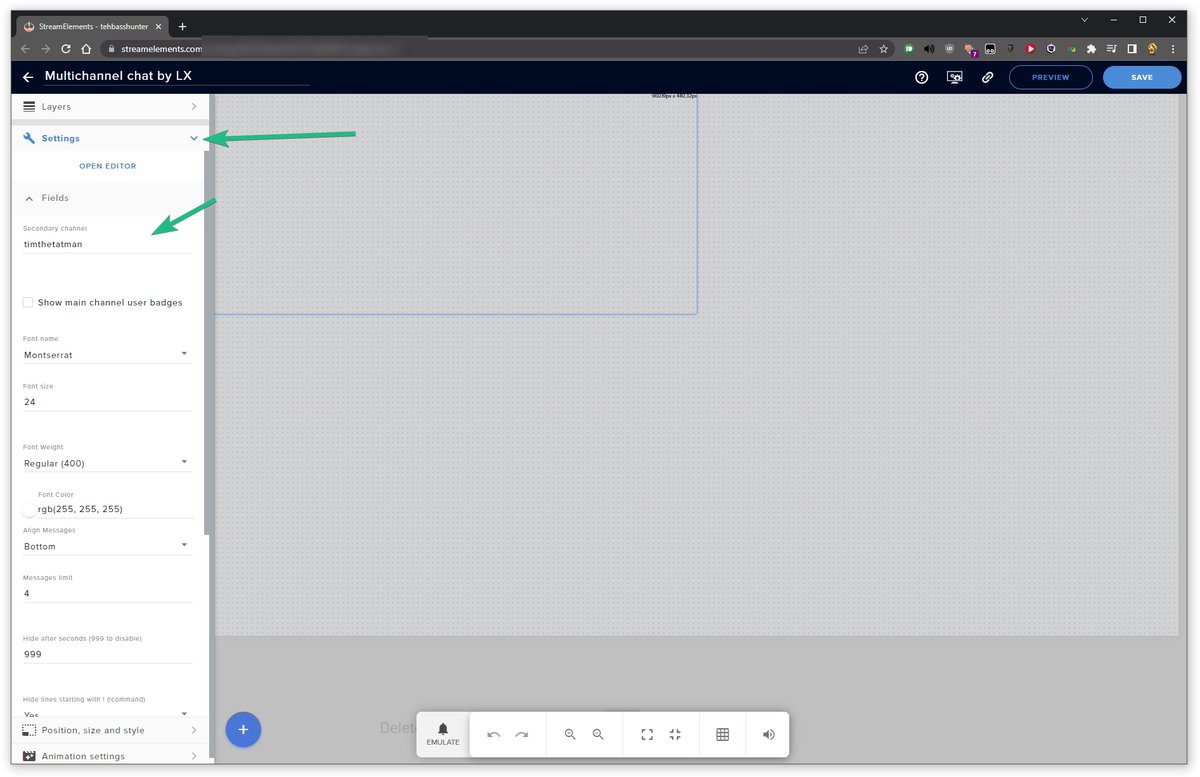
https://twitter.com/tehbasshunter/status/1600935857988505605 probably the option here

@DiiphylleiaG @NanoHoundVT Guten Abend Sanka!
That looks like the multichannel chat widget from Streamelement's custom widgets.
Navigate to this and remove the name from this spot. Should magically make those strange messages disappear.
 Twitter
·
Twitter
·
 muted grove
chatstats not working anyone knoe how to fix ?
my chat stats page just says 404 page not found since i changed my name
 olive widget
My chatstats doesn’t work at all and I never changed my name so I’m confused on what to do
crude pecanBOT
@muted grove @olive widget ⤵️
If you are receiving a 404 error on your chatstats page, please provide the following information:
- Channel name (old and new if changed recently)
- your account ID found at the top of this page: https://streamelements.com/dashboard/account/channels This ID is public info and safe to share here.
muted grove
OLD NAME : 23SHOTSYT NEWNAME: Im23shots channel id : 60564422147d392174396e29
muted grove
crude pecan
<@356471460178427904> <@582852286477238293> ⤵️
OLD NAME : 23SHOTSYT NEWNAME: Im23shots channel id : 60564422147d392174396e29
olive widget
crude pecan
<@356471460178427904> <@582852286477238293> ⤵️
NAME: IAmJuiceCup Channel ID: 62aa503404907d9da9099102
 lone crest
Could someone help me with my command that I change but it doesn't update.
latent plinth
lone crest
Could someone help me with my command that I change but it doesn't update.
What is the command and how is it not updating?
lone crest
latent plinth
What is the command and how is it not updating?
I edit the description of my command but it doesn't change in the twitch chat when I run it
a custom command he and
latent plinth
lone crest
I edit the description of my command but it doesn't change in the twitch chat wh...
Can you screenshot the command in your dashboard and the output from your chat?

 latent plinth
lone crest
latent plinth
lone crest
Can you save the command and then have the bot part and rejoin the channel?
crude pecanBOT
Go to the Dashboard > Right side > Part channel > Join channel (https://streamelements.com/dashboard) https://i.imgur.com/uYVb8OK.png
lone crest
latent plinth
Can you save the command and then have the bot part and rejoin the channel?
Yes
The same thing continues, even if I delete the command it does not deactivate it continues executing
ionic kelp
It keeps repeating the response in chat?
lone crest
ionic kelp
It keeps repeating the response in chat?
No, it doesn't update the answer.
crude pecanBOT
Please provide your account ID found at the top of this page: https://streamelements.com/dashboard/account/channels This ID is public info and safe to share here.
 spice peak
Hello, I have a problem with StreamElements, the fact is that my user does not appear to me as the owner within Bot of the chat> User Management. Some solution? I wouldn't like to have to go over to create another Twitch accounbt or Streamlabs for this..

 robust sedge
is there a way to change the mesage from default commands?
latent plinth
robust sedge
is there a way to change the mesage from default commands?
Generally, no. Which command are you wanting to change?
robust sedge
all, I stream in spanish
latent plinth
Let me ask
robust sedge
thank you
latent plinth
muted grove
OLD NAME : 23SHOTSYT NEWNAME: Im23shots channel id : 60564422147d392174396e29
Fixed.
latent plinth
olive widget
NAME: IAmJuiceCup Channel ID: 62aa503404907d9da9099102
Fixed
latent plinth
robust sedge
thank you
You can change the language here on the right. It should translate most of them into another language.
 robust sedge
thanks, still is there a way to change the message? some of them are not properly translated
spice peak
spice peak
Hello, I have a problem with StreamElements, the fact is that my user does not a...
Any help¿? @latent plinth
olive widget
latent plinth
Fixed
Yooooo thanks it’s actually fixed!!!!
latent plinth
spice peak
Any help¿? <@351166251445518337>
Your user account won't show up there
latent plinth
robust sedge
thanks, still is there a way to change the message? some of them are not properl...
You can submit tickets for them and see if they can get changed
crude pecanBOT
Please create a support ticket by filling out the form here: https://streamelements.com/contact This will ensure staff can track and resolve your issue in a timely manner.
spice peak
latent plinth
Your user account won't show up there
It should appear because in the past it did appear to me. It was changing the username and disappearing.. According to other people, it is a visual bug but I don't know what to think
latent plinth
My name doesn't show up there on my account, never has
small vector
Hi, can anyone please suggest why my Multichannel Chat Overlay shows my host Twitch Avatar instead of the guest chatter's Twitch Avatar? Is there a a place in the overlay settings that controls the appearance of the chat Avatar? Everything else about the overlay works as expected....
molten badge
dry hare
Obs settings > general > theme > change to Dark Mode
that did nothing for letting me place the chat box on the left or right side and take up the full height of the window like you see in Streamlabs
dry hare
molten badge
that did nothing for letting me place the chat box on the left or right side and...
I believe that is a limitation of obs. Streamlabs is a modified obs codebase so any changes they have made are exclusive to their version
lament blade
yo, I seem to have an issue of commands not showing up? ive tried to looks for resolutions but cant find any online. The photos Ive linked shows that I made a new !donate command but Ive made a previous donate command that isnt on =the streamelements web anymore if that makes any sense. anything to solve this would be great cheers.

 crude pecanBOT
@lament blade ⤵️
Go to the Dashboard > Right side > Part channel > Join channel (https://streamelements.com/dashboard) https://i.imgur.com/uYVb8OK.png
lament blade
Is there anyway to set up a timed command through the SE bot? ie: !gamble for 5 mins then after 5, !slotsclosed
lament blade
crude pecan
<@456226577798135808> ⤵️
THAT DONT HELP BREH
there are 2 ! donate commands running but I only see one in custom chat commands
crude pecanBOT
@lament blade ⤵️
Please provide your account ID found at the top of this page: https://streamelements.com/dashboard/account/channels This ID is public info and safe to share here.
lament blade
5e52fa242be09600f9dc6bdf
lament blade
crude pecan
<@456226577798135808> ⤵️
I dont know why its like that ive been looking around dont make sense
candid oak
lament blade
I dont know why its like that ive been looking around dont make sense
It's because you have !tip active. that command has an alias of !donate so it triggers both.
You can remove the command alias under the settings for the !tip command
lament blade
candid oak
It's because you have `!tip` active. that command has an alias of `!donate` so i...
ahhh tysm
 quick creek
where can i enable people can send clips when they donate?
candid oak
quick creek
where can i enable people can send clips when they donate?
Other > Media Request > Settings
quick creek
thanks
 pulsar marlin
Hey everyone
is there a way that StreamElements might be busted in terms of a link to my Twitch profile or something
pulsar marlin
no idea, i keep seem to be missing out on getting offered it
hence im wondering if my profile is busted somehow
candid oak
pulsar marlin
is there a way that StreamElements might be busted in terms of a link to my Twit...
what do you mean busted? what issues are you ahving?
crude pecanBOT
@hexed cipher ⤵️
Please go to https://support.streamelements.com/, click the big blue question mark on the bottom left and select SE.Sponsorships Form. Fill that form to submit a Sponsorship related ticket and wait for our Support Team to get back to you. Please do not fill the form multiple times, as that will not speed up the response time.
pulsar marlin
well, im consistently not getting any sponsorship offers
and no one can explain why
candid oak
pulsar marlin
well, im consistently not getting any sponsorship offers
Please keep in mind that there is no guarantee that you will receive an invitation. There is no direct application for specific campaigns nor is there a formula to get an invitation. Simply using StreamElements and being an active member of your platform will help your chances of getting a sponsorship.
crude pecanBOT
@pulsar marlin ⤵️
Please provide your account ID found at the top of this page: https://streamelements.com/dashboard/account/channels This ID is public info and safe to share here.
pulsar marlin
crude pecan
<@78062366620651520> ⤵️
TEEDSTV
pulsar marlin
candid oak
Please keep in mind that there is no guarantee that you will receive an invitati...
I've been told the same, but I stream consistently and use StreamElements a lot, and I've looked at many other streamers with similar or lower numbers than myself getting this
 warped raptor
hello , i have an issue with my overlays , sometimes they disappear from the layout and the reload button don't resolve the issue
the only way is to reopen streamelements OBS
the issue is more frequent when come more than one alert in the activity feed, on the second alert spawn, obs make a sort of auto refresh of the program and then , some overlays disappear
sorry for my bad english
pulsar marlin
So i'm trying to figure out if something is actually wrong with my account, or just, ya know, y'all are excluding me deliberately for some reason
or if its based on my country
or if i've been blacklisted or something, idk at this stage
Something just seems broken
and the generic "its random" doesn't help me sort if theres an underlying issue
warped raptor
the overlays are all maked with streamelement platform and then imported in obs with URL Soruce
candid oak
pulsar marlin
So i'm trying to figure out if something is actually wrong with my account, or j...
You're not blocked nor is there anything preventing you from getting campaigns. Unfortuantely, it truly is just that, random. There is no formula to get one. and utilizing the streamelements tools is really the only qualifier
pulsar marlin
Is there something in terms of my linked accounts that shows I'm not using it?
I'd like to unlink the youtube and facebook profiles since I just stream to Twitch now
crude pecanBOT
@pulsar marlin ⤵️
There is no easy way to unlink 2 owner-type accounts from each other. The only way is to make a closure request from here: https://streamelements.com/dashboard/account/security
WARNING: In submitting a closure request, all linked channels within the account will be deleted and you will lose all associated data. This includes overlays, custom commands, timers and past data (tips, subs, etc). You can still reconnect with the deleted account, but you are essentially starting fresh.
pulsar marlin
unclear if because I'm not using it there, it now appears like i'm not using SE
candid oak
pulsar marlin
Is there something in terms of my linked accounts that shows I'm not using it?
That won't have an affect either. It really just random, i'm not sure how to explain it further than that
crude pecanBOT
@warped raptor ⤵️
To add your overlays to OBS, add a new browser source in your scene. Paste your overlay URL in the browser source properties, set the dimensions to 1920x1080 (unless you changed them on the website) and check Shutdown source when not visible and Refresh browser when scene becomes active, as shown in this GIF: https://imgur.com/a/2JhJD0S
pulsar marlin
seems like a massive coincidence that i'm "randomly" being ignored for the last 6 months
candid oak
warped raptor
hello , i have an issue with my overlays , sometimes they disappear from the lay...
make sure you follow those steps and have the two options checked. If your overlays still don't display, let us know
 icy brook
I have multiple overlays that are similar for different scenes. When I switch scenes it replays all the alerts again since they are "different" overlays. How to prevent them from happening again?
crude pecanBOT
@icy brook ⤵️
Make sure to :ballot_box_with_check: “Shutdown source when not visible” for all browser sources (all OBS scenes). If using studio mode, uncheck “Swap Preview/Output Scenes After Transitioning.” Also, keep in mind that sound can play from any overlay loaded in the browser (editor or launched). https://i.imgur.com/6bWXxjR.png https://i.imgur.com/yY0wcFl.png
pulsar marlin
Are some country based?
warped raptor
candid oak
make sure you follow those steps and have the two options checked. If your overl...
i have tried with and without these options checked but the issue still here
pulsar marlin
So the only solution for me to resolve an issue with my account or unlink an account is to blow away the whole thing?
 hexed cipher
crude pecan
<@842863850126311435> ⤵️
hexed cipher
crude pecan
<@842863850126311435> ⤵️
I already did that and it still has not been answered, I also posted in the sponsorship forum area, still no answer
pulsar marlin
Is there a way to export/save my overlays
crude pecanBOT
@warped raptor ⤵️
OBS > Settings > Advanced > Scroll down > Enable or disable Browser Source Hardware Acceleration, depending on its current state > Restart OBS
https://i.imgur.com/ggMe9ZE.png
candid oak
pulsar marlin
Are some country based?
Some are region locked
pulsar marlin
Is the Fortnite one?
candid oak
hexed cipher
I already did that and it still has not been answered, I also posted in the spo...
Please keep in mind that it can take up to 48 hours to get an initial reply for tickets. Please allow time for the agents to reply to the tickets in the order we receive them.
candid oak
pulsar marlin
Is the Fortnite one?
Yes.
warped raptor
crude pecan
<@413053813168013312> ⤵️
is active of deafult ? i can't check this now , i don't have touch this setting
pulsar marlin
candid oak
Yes.
I'm in Australia, is that the issue?
candid oak
warped raptor
is active of deafult ? i can't check this now , i don't have touch this setting
If it is currently on, turn it off.
warped raptor
oh okok @candid oak i try when i can
pulsar marlin
would be good to know tbh so I can just stop hoping for it.
candid oak
pulsar marlin
I'm in Australia, is that the issue?
It can be a reason, but again, the campaigns are distributed internationally.
warped raptor
thank you for the help @candid oak
if still the problem ? maybe because i have maked one overlay for one elements and they are too much to load ?
pulsar marlin
candid oak
It can be a reason, but again, the campaigns are distributed internationally.
Is there a way to definitively check?
I'm sorry to be a nuisance, but i've spoken to like 50 people I know that were offered it last time, and this time too, and they all have similar stats to me so "its random" feels like a bit of a lacking answer.
 lament field
why I can not add twitch channel in this account?
It said that the channel has been claimed

I want to use both youtube and twitch as I stream
crude pecanBOT
@lament field ⤵️
Did you get a "Channel already claimed" message?
More than likely your accounts need to be merged! - Please note:
- Merging accounts allows for faster ways to switch between accounts
- Merging accounts allows duplicating/sharing overlays between the accounts
- Merging accounts does not allow data sharing between accounts - different streaming platforms, different type of events
If you understand the limitations of merging and want to proceed, please find the JWT tokens (!jwt) from both accounts you want to merge and fill out the form here: http://streamelements.com/contact with each token correctly labelled
pulsar marlin
How can I enable SE pay?
crude pecanBOT
@pulsar marlin ⤵️
SE.PAY is available for streamers who are at least 18 years old, with bank account under their name in one of the following countries, and have at least 101 followers (Twitch/Trovo/Facebook) / 101 subscribers (YouTube):
Austria, Belgium, Czech Republic, Denmark, Finland, France, Germany, Ireland, Italy, Netherlands, Poland, Portugal, Slovakia, Spain, Sweden, Switzerland, United Kingdom, United States.
If you meet these criteria and don’t see SE.Pay, let us know.
For information on SE.Pay payment methods, their fees, and settlement times see https://streamelements.com/dashboard/tipping/fees
crude pecanBOT
@pulsar marlin ⤵️
Please provide your account ID found at the top of this page: https://streamelements.com/dashboard/account/channels This ID is public info and safe to share here.
pulsar marlin
TeedsTV
latent plinth
That's your channel name, not your account id
latent plinth
Nope, I poked the staff to take a look at it.
pulsar marlin
OK
candid oak
pulsar marlin
OK
You need to be a resident of the country that you have the bank in. If you're using a US bank, you need to be a US citizen and so on
pulsar marlin
candid oak
You need to be a resident of the country that you have the bank in. If you're us...
yeah, I am
fair enough
candid oak
pulsar marlin
yeah, I am
You stated you were in australia
pulsar marlin
That's where my Twitch was originally setup
crude pecanBOT
@pulsar marlin ⤵️
Please contact us via email for support with SE.Pay. You can use our contact form here: https://streamelements.com/contact Thank you.
pulsar marlin
but I'm US based, ive just updated my Twitch documentation
just that generic form?
candid oak
pulsar marlin
just that generic form?
correct
just submit a ticket and an agent will assist you with your issue.
pulsar marlin
Thanks
 vague bear
I am trying to figure out how to be able to hear the notifications for new followers while I am in game. I didn't hear the last one and I like to be able to shoutout when I get the follow. Is this possible?
crude pecanBOT
@vague bear ⤵️
If you are not hearing your alerts and/or Media Request, you are most likely using the Control Audio via OBS option in your browser source properties.
To make sure you hear the alerts and the stream also hears them, follow along the screenshot bellow.
https://cdn.discordapp.com/attachments/199460642975907840/685371800456134686/unknown.png
vague bear
I also can't figure out how to have the notification pop up on my screen.
just pops up in OBS
and does stream elements page need to be opened
crude pecanBOT
@vague bear ⤵️
If you have one monitor and/or would like the chat overlay on the screen, please look at the link below.
Please note this is not a plugin for OBS and not maintained by SE.
https://github.com/baffler/Transparent-Twitch-Chat-Overlay
vague bear
crude pecan
<@700112786272944198> ⤵️
does this work for follower notifications?
 fallow ridge
Hey, a streamer I watch changed his nick in the past (he doesn't remember which nick he used before) to bool01 a while ago, and he doesn't know how many times he changed it or the last time he changed it, but it's been a while. https://stats.streamelements.com/c/bool01 is not working because of this. Can someone help me please?
crude pecanBOT
@fallow ridge ⤵️
If you changed your name on Twitch, please follow these steps:
- Visit https://streamelements.com/logout and then log in again by connecting with Twitch.
- On the right side of the dashboard page that opens, select Join under bot settings. If it says Part select that and then select Join to send the bot to the chat. Don't forget to mod the bot by typing
/mod streamelementsin your channel if you have not already. - Post your old and your new name here so that we can update your channel's chatstats tracking (must be done by staff).
latent plinth
If you don't know the old names, we'll need the account id
crude pecanBOT
Please provide your account ID found at the top of this page: https://streamelements.com/dashboard/account/channels This ID is public info and safe to share here.
 onyx shuttle
619c58774db57a2d18f50f8d
 visual shell
Hello, is there anyone who has knowledge about El Gato hd60 s capture cards? I need some assistance with technical issues
 azure smelt
Kappagen is not showing any BTTV/FFZ emotes for me.
dry hare
visual shell
Hello, is there anyone who has knowledge about El Gato hd60 s capture cards? I n...
What is your particular issue?
Also if I reply in 9 hours it’s because I’ve been asleep
visual shell
dry hare
Also if I reply in 9 hours it’s because I’ve been asleep
Thank you for responding. I recently got a usb mic for my streaming setup, but if I use it as my audio output instead of my elgato and chat link, I won't be able to pick up my Xbox game and party audio. If I use both, my voice audio goes through doubled. I can't figure out how to use both together
dry hare
visual shell
Thank you for responding. I recently got a usb mic for my streaming setup, but i...
Elgato chat link cable. https://help.elgato.com/hc/en-us/articles/360027958712-Xbox-One-Game-and-Chat-Audio-with-Elgato-Game-Capture-HD-

Elgato
When using Elgato Game Capture HD, you can record Game Audio and Chat Audio from the Xbox One if you purchase a few inexpensive cables.
The Best Way - Elgato Chat Link
Starting November 4, 2015,...
Essentially you have to capture both audio sources
visual shell
Hmm, well looks like I have to wait till payday, but I appreciate the article link. Hopefully I can get it working soon, thanks!
 vague berry
Hello, can someone help me? I have a problem with the TTS, it is active in all alert and variable overlays it still doesn't work
 elder steeple
hi! i've been trying to add another bot timer but it's just grayed out no matter what i do and never saves any info i put in. clearly i created one before, i'm not sure why it isn't working now. is there anyone who can help with that? thanks!
elder steeple
it won't let me switch on "enabled," it's grayed out
lament blade
elder steeple
hi! i've been trying to add another bot timer but it's just grayed out no matter...
Hi, I just tried adding a random timer for you and it works, can you log out of your account and log back in? try again and let me know what happens
 steady gazelle
imn having trouble with the stream deck integration of se.live ... i have a kappgen & skip alert button on there but they both dont do anything even tho they are connected and they dont give me an error
 digital egret
Is there any solution to integrate SE with outside donate page cuz I dont have se pay to have all donations option, now I only got poor option by credit card to my PP account? I mean I want to get donate from other site than SE but I want to show it on my overlay who was the last donator. Any idead?
small vector
Does anyone else here use the SE Multichannel Chat? I asked this yesterday & really wondering if I'm the only one who doesn't see chatter's avatars & only see my host avatars when it triggers....
 whole wren
Hi everyone, my alert videos lag out at about 3 seconds. Sounds still play but video just stops.
any known fixes?
crude pecanBOT
@whole wren ⤵️
OBS > Settings > Advanced > Scroll down > Enable or disable Browser Source Hardware Acceleration, depending on its current state > Restart OBS
https://i.imgur.com/ggMe9ZE.png
latent plinth
^ That might work
 robust flower
Would anyone be able to help me with my sponsorship problem? I completed the campaign and had two people buy stuff using my code but I haven't been paid yet nor have I gotten any form of email or confirmation that everything is ok
crude pecanBOT
@robust flower ⤵️
Please go to https://support.streamelements.com/, click the big blue question mark on the bottom left and select SE.Sponsorships Form. Fill that form to submit a Sponsorship related ticket and wait for our Support Team to get back to you. Please do not fill the form multiple times, as that will not speed up the response time.
fallow ridge
fallow ridge
Hey, a streamer I watch changed his nick in the past (he doesn't remember which ...
update post:
Hey, a streamer I watch changed his nick in the past (he doesn't remember which nick he used before) to bool01 a while ago, and he doesn't know how many times he changed it or the last time he changed it, but it's been a while. https://stats.streamelements.com/c/bool01 is not working because of this. Can someone help me please?
the account ID is: 619c58774db57a2d18f50f8d
lament blade
hellooo , got the same issue as Ig0r, changen my nickname and stats dont work anymore.. (https://stats.streamelements.com/c/szaku08)
ripe scarab
@molten badge that image and this link ( https://obsproject.com/forum/resources/source-dock.1317/ ) are suggested to do what you want... haven't tested, but this was suggested in the OBS discord
 elder steeple
lament blade
Hi, I just tried adding a random timer for you and it works, can you log out of ...
elder steeple
lament blade
Hi, I just tried adding a random timer for you and it works, can you log out of ...
I just logged out and logged back in but I'm still having the same issue. But now I'm thinking maybe I need to clear the cache or something? Hmm, any other suggestions?
welp, that didn't work. i guess i could go all in and clear EVERYTHING
 echo yew
Hello and good evening!
I'd like to ask for some help related to my streaming problems.
In short I click on the "go live" button, I go live but my twitch channel stays offline for some reason. Anyone can help me?
I already tried to:
- reset stream key, logged in back
- unistall and reinstall obs
- Switch server stream
Thanks for your time in advance!
crude pecanBOT
@echo yew ⤵️
Use the Twitch Bandwidth Test to find the best Twitch server to stream to. Set Duration to Medium. You can uncheck any regions you're not near.
After the test completes, click the Share Result button to upload a screenshot, which can then be copied and pasted here.
Get Twitch Test from https://r1ch.net/projects/twitchtest.
candid oak
 topaz pulsar
my streamelements bot doesn't appear on my chat
topaz pulsar
my streamelements bot doesn't appear on my chat
Does your bot have a custom name?
topaz pulsar
no i didnt change nothing
candid oak
elder steeple
welp, that didn't work. i guess i could go all in and clear EVERYTHING
Try in a private/incognito window and see if you still notice this issue. If it works, then disable any adblockers or extensions you may have enabled
crude pecanBOT
@topaz pulsar ⤵️
Go to the Dashboard > Right side > Part channel > Join channel (https://streamelements.com/dashboard) https://i.imgur.com/uYVb8OK.png
@lament blade ⤵️
If you are receiving a 404 error on your chatstats page, please provide the following information:
- Channel name (old and new if changed recently)
- your account ID found at the top of this page: https://streamelements.com/dashboard/account/channels This ID is public info and safe to share here.
topaz pulsar
i already did this
crude pecanBOT
@topaz pulsar ⤵️
Please provide your account ID found at the top of this page: https://streamelements.com/dashboard/account/channels This ID is public info and safe to share here.
 low ginkgo
Hi everyone, I need some assistance with my SE bot when it comes to giveaways.
I have changed my !ticket command but when I open a giveaway the text which pops into chat saying a giveaway has opened still specifies enter !ticket to enter. Is there any way to change this to line up with the new command to get into the giveaway?
candid oak
low ginkgo
Hi everyone, I need some assistance with my SE bot when it comes to giveaways.
...
Unfortunately, there is no way to change that as it is hard written into the bot :\
topaz pulsar
crude pecan
<@907716740358750218> ⤵️
what i have to do here?
candid oak
topaz pulsar
what i have to do here?
provide the account id. We need the combo of letters and numbers to look up your account
topaz pulsar
5e225b7e34d847e7f0c28138
candid oak
topaz pulsar
5e225b7e34d847e7f0c28138
Looks like the bot is in your channel and working
topaz pulsar
but he dont work
candid oak
topaz pulsar
but he dont work
What commands are you noticing not work
topaz pulsar
now its working thanks
elder steeple
candid oak
Try in a private/incognito window and see if you still notice this issue. If it ...
Hmm, private window with ad blockers off and I STILL have the same issue!
 unborn flax
My chatstats doesn’t work (getting 404 error - Page not found) and I never changed my name
channel name: PAGOx_
account id: 61f63962ac3bf655fdf016b8
candid oak
unborn flax
My chatstats doesn’t work (getting 404 error - Page not found) and I never chang...
new page created
unborn flax
thanks
 proven vector
Where in the overlay can I put the Top subs gifter in the last 30 days
So like "last 30 days top sub gifter"
candid oak
proven vector
Where in the overlay can I put the Top subs gifter in the last 30 days
So that is actually not a field i believe we track
But you can adjust the labels and data by adjusting the session data.
While in the overlay editor, click the Computer icon in the top right and then under labels/goals you can input data
proven vector
Which data can I put there?
candid oak
proven vector
Which data can I put there?
Labels and session data are the two that you'll most likely be looking to adjust but this is what's available to adjust

 proven vector
Can you ask the devs if they can track that and put it into the overlays like the top donator and stuff like top sub gifter? @candid oak
 stiff marten
Hey folks! Dropping our Community Survey here!
We are making our plans to try and improve the Discord server to make it a more helpful & engaging place for yall, so any feedback would be greatly appreciated!
Complete Survey Here: https://strms.net/CommunitySurvey

Google Docs
Please tell us what you think of the StreamElements Discord Community. Your feedback will help us make the Community better for everyone!
 short cargo
Heyo, I'm having an issue with my alerts. All alerts work fine except for the follows. Follows are not showing up in the activity feed and also not being tracked for labels while all other alerts are working fine. Can someone help me troubleshoot?
 peak gyro
Does anyone know the command code for the !clip command?? 
 burnt kelp
Hello i need to speak to someone about my sponsorship payment
crude pecanBOT
@burnt kelp ⤵️
Please go to https://support.streamelements.com/, click the big blue question mark on the bottom left and select SE.Sponsorships Form. Fill that form to submit a Sponsorship related ticket and wait for our Support Team to get back to you. Please do not fill the form multiple times, as that will not speed up the response time.
short cargo
short cargo
Heyo, I'm having an issue with my alerts. All alerts work fine except for the fo...
Hello?
 compact patrol
Hello does anyone use local bank payout method on twitch? My paypal acct has been suspended and I need to figure a diff option for payout asap
 ebon forum
compact patrol
Hello does anyone use local bank payout method on twitch? My paypal acct has bee...
ebon forum
compact patrol
Hello does anyone use local bank payout method on twitch? My paypal acct has bee...
Hi,
There is the payment method called SE.Pay, it works with local bank accounts. You can check the requirements here:
https://streamelements.com/dashboard/tipping/fees
 amber iron
Hey team I was wondering when have my overlays in OBS, that now when someone subs, follows or even donates bits my notification overlay doesn’t pop up anymore.
 untold skiff
hi , i have a question and wonder if anyone can help : i'm a mod in a channel and i put some redeem items for subs on streamelements but there is this user that changed the name and can't redeem items anymore(even if he still have the sub)
latent plinth
untold skiff
hi , i have a question and wonder if anyone can help : i'm a mod in a channel an...
If the redeem is for subs only, they may have to wait until their sub renews in order to redeem it. They can try !rename OldNameHere
untold skiff
latent plinth
If the redeem is for subs only, they may have to wait until their sub renews in ...
they waited for the renew , we waited to see if it would fix but nothing
and he even did the !rename command
latent plinth
When they renewed their sub, did they click the button to have it show up in chat?
 drowsy egret
untold skiff
hi , i have a question and wonder if anyone can help : i'm a mod in a channel an...
drowsy egret
untold skiff
hi , i have a question and wonder if anyone can help : i'm a mod in a channel an...
ask them to logout/login to our dashboard, that should update their username and sub status and let them redeem again
 mossy orchid
can someone help me whenever i go live and what i say there is always an echo what can i do about it
drowsy egret
mossy orchid
can someone help me whenever i go live and what i say there is always an echo wh...
make sure the correct microphone is selected in your obs audio devices
mossy orchid
got it done had to mute audio output recording
It's the audio output recording what can I do about it
drowsy egret
mossy orchid
It's the audio output recording what can I do about it
do you have the mic selected in obs audio settings or did you add the mic as an audio source?
mossy orchid
I have the mic on the audio input recording
 next bough
 marble ember
not sure where i would post issues with Stream elements overlays and OBS
 dusk ember
im not sure if this is the right spot for this but my overlays keep freezing up like i have the halloween overlay and like the witch girl completely stops and even when i refresh the source its still doesnt do the animation anymore and im on the current verison of obs and streamelements
 tawdry sinew
hello can someone help me?
candid oak
inner burrow
Hey there, quick question how would I make an overlay fit 1080x1920p
To add your overlays to OBS, add a new browser source in your scene. Paste your overlay URL in the browser source properties, set the dimensions to 1920x1080 (unless you changed them on the website) and check Shutdown source when not visible and Refresh browser when scene becomes active, as shown in this GIF: https://imgur.com/a/2JhJD0S
 candid oak
tawdry sinew
hello can someone help me?
candid oak
tawdry sinew
hello can someone help me?
What issues are you having?
candid oak
dusk ember
im not sure if this is the right spot for this but my overlays keep freezing up ...
Right Click the browser source > properties > make sure that the two options here are checked: Shutdown source when not visible and Refresh browser when scene becomes active.
If you still notice the issue, OBS > Settings > Advanced > Scroll down > Enable or disable Browser Source Hardware Acceleration, depending on its current state > Restart OBS
https://i.imgur.com/ggMe9ZE.png
 candid oak
marble ember
not sure where i would post issues with Stream elements overlays and OBS
candid oak
marble ember
not sure where i would post issues with Stream elements overlays and OBS
What issue are you having?
tawdry sinew
i have three commands but when i put them in twhtch chat it doesn't work
candid oak
tawdry sinew
i have three commands but when i put them in twhtch chat it doesn't work
What is your Twitch name?
What commands are they?
Does your bot have a custom name?
tawdry sinew
my name is scadegamer
!discord command, !epicgames, !networks
I don't know what you mean when the bot has a custom name
candid oak
tawdry sinew
my name is scadegamer
!discord command, !epicgames, !networks
I don't know what...
don't see a command for !networks
tawdry sinew
as a command for !networks ?
What does that work for ?
candid oak
tawdry sinew
as a command for !networks ?
What does that work for ?
Did you rename the bot?
tawdry sinew
no
candid oak
tawdry sinew
no
Did you recently change your name on Twitch?
tawdry sinew
Well, I think so, but I had problems with the password and I changed it
candid oak
tawdry sinew
Well, I think so, but I had problems with the password and I changed it
- Visit https://streamelements.com/logout and then log in again by connecting with Twitch.
- On the right side of the dashboard page that opens, select Join under bot settings. If it says Part select that and then select Join to send the bot to the chat. Don't forget to mod the bot by typing /mod streamelements in your channel chat if you have not already.
tawdry sinew
I'll do it
I can't find the bot configuration
I have streamelements banned, I think that's why
 That would be an issue
tawdry sinew
That would be an issue
tawdry sinew
That was the problem, now it works. Thank you very much
 merry condor
I am having an issue with my hellofresh sponsorship. about 20 people from my community are trying to signup, but are all met with the same error. they are completely new users, and i have realized what the problem is. my code is limited to 2 signups a day. no matter what, after my initial 2 signups for that day, EVERYBODY who tries after that, gets an error. i have talked to support who claim my code is working as intended. this is NOT the case. i have contacted hellofresh, and they have been NO help. i can only get 2 signups a day, this is extremely frustrating.
it is extremely frustrating that my code is limited to 2 signups a day. this is making reaching my quota for the campaign IMPOSSIBLE. i only have a few days left, and MANY people from my community are trying to signup. they keep getting the same error. only 2 people a day can use my code
foggy heart
merry condor
I am having an issue with my hellofresh sponsorship. about 20 people from my com...
Were you able to note the 2 signups discovery in the email with support?
merry condor
foggy heart
Were you able to note the 2 signups discovery in the email with support?
yes and i kept getting met with "your code is working as intended. make sure they are legit conversions" when, they are legit purchases. i have stated multiple times in the support emails that my code is 100% limited to 2 signups a day. this behavior has been recreated and tested, no matter who signs up after 2 already did- they always get the error. they are first time users, every requirement for it to be a "legit purchase" is met. it's just that my code is limited to 2 signups a day.
 knotty zodiac
Hi everyone. I am having issues with my custom alerts not playing correctly. Whenever somebody does anything to trigger an alert, only the first few frames or so will play, but will then stop abruptly, no matter how long I set the alert length in SE.
foggy heart
merry condor
yes and i kept getting met with "your code is working as intended. make sure the...
it looks like we are checking in on this with our campaign team, and we'll update the ticket with any new information we get
merry condor
foggy heart
it looks like we are checking in on this with our campaign team, and we'll updat...
thank you so much!!!!
foggy heart
knotty zodiac
Hi everyone. I am having issues with my custom alerts not playing correctly. W...
Do normal alerts play for the correct amount of time?
knotty zodiac
No idea, let me try that.
Normal alerts play normally. I know my custom alerts used to play normally, too, before they stopped working properly recently.
foggy heart
Would you be able to get a recording of that? Also, I would check to see if hardware acceleration is on
knotty zodiac
Where would I check to see where hardware acceleration is on?
The bars are supposed to open further and a "NEW FOLLOWER" message is supposed to appear.
foggy heart
OBS > Settings > Advanced and you should be able to scroll down to the option
 cyan mesa
crude pecan
<@323968963954343936> ⤵️
cyan mesa
crude pecan
<@323968963954343936> ⤵️
Hello, i've got a problem with the custom fonts. I did as written here though it's not working on streamelements (and obviously neither in OBS). Any idea please ? Thank you
(the font is working alone on OBS)


 lyric talon
Hello! I'm trying to run a viewer queue, do those only work while the channel is live ? when someone tries to join they get this message "Hmm. Looks like there was an issue running that command. Try again, and if it’s still not working, contact support. "
latent plinth
cyan mesa
Hello, i've got a problem with the custom fonts. I did as written here though it...
Try it without the (BRK) maybe?
latent plinth
lyric talon
Hello! I'm trying to run a viewer queue, do those only work while the channel is...
It should work when you're offline. It is one user having trouble or multiple?
latent plinth
Were they having trouble joining while you were live as well, or just offline?
lyric talon
I have not tried while i'm live yet
also if size limit is off, means its infinite right?
latent plinth
Yes
lyric talon
I may end up using the giveaway option, but wasn't sure if I can pick multiple winners with that one
beacuse i was planning to run a queue for a week and anyone can enter, online and offline 
latent plinth
channel name? No links
lyric talon
jayhilaneh
latent plinth
stupid bot. :(
lyric talon

latent plinth
Please provide your account ID found at the top of this page: https://streamelements.com/dashboard/account/channels This ID is public info and safe to share here.
lyric talon
5cd2018323c892ba845d0cd4
cyan mesa
latent plinth
Try it without the ` (BRK)` maybe?
without the (BRK) it doesn't detect the font at all :/
i suspect it has something to do with the fact that this font forces capitals ?
latent plinth
It could be? It looks like it might have been working for the text but not for usernames.
At least when you typed in all caps
You could try, in OBS where the CSS is, add * { text-transform: uppercase; }
cyan mesa
actually it's definitely not the same font even for the capitals :/

(i add the correct version on the bottom to compare)
(thanks for this tips anyway : { text-transform: uppercase; } it will be helpful for something else 😄 :D)
latent plinth
cyan mesa
(thanks for this tips anyway : { text-transform: uppercase; } it will be helpful...
Does another font that doesn't force uppercase letters work?
amber iron
I have a question. If I deleted my alert box window on accident, how would I retrieve that from another overlay? If it's not possible I'm assuming I have to start all over with that overlay?
pseudo jewel
amber iron
I have a question. If I deleted my alert box window on accident, how would I ret...
If you have the alertbox in that overlay, you just need to click on duplicate button (the square button next to the trash icon) on the overlay editor. If you don't have the alertbox anywhere else, you have to start it over, unfortunately.
 strange oxide
hey so im streaming ffortnite for the sponorship and it isn't tracking at all
I have the banner active and running
foggy heart
strange oxide
hey so im streaming ffortnite for the sponorship and it isn't tracking at all
If you're currently live, it may delay until a bit after the stream. If it's been a few minutes after and you still don't see the timer count up, send in an email with the VOD we'll take a look
 near urchin
Hello, I have a question, if I complete my campaign in 2 days and I have 7 to do it, can I press the end campaign button, and will I still have completed it?
candid oak
near urchin
Hello, I have a question, if I complete my campaign in 2 days and I have 7 to do...
If you've reached the goals, then you can close it no issue.

 candid oak
near urchin
So can I finish without problem and receive my payment in the same way?
candid oak
near urchin
So can I finish without problem and receive my payment in the same way?
Please go to https://support.streamelements.com/, click the big blue question mark on the bottom left and select SE.Sponsorships Form. Fill that form to submit a Sponsorship related ticket and wait for our Support Team to get back to you. Please do not fill the form multiple times, as that will not speed up the response time.
 little jetty
Hey there. I got a an email claiming to be from Stream Elements saying I had a paid sponsorship available. How can I confirm it's legit and nothing's being sent to a third party site or that the webpage I'm on is fake?
latent plinth
little jetty
Hey there. I got a an email claiming to be from Stream Elements saying I had a p...
All legitimate sponsorship offers will show up here: https://streamelements.com/dashboard/sponsorships/list
little jetty
The email listed my Twitch name, but I feel like this email is outta left field
near urchin
candid oak
Please go to https://support.streamelements.com/, click the big blue question ma...
Ty
little jetty
Okay. Thanks
 steady dome
why i cant login in streamelements via twitch?
latent plinth
steady dome
why i cant login in streamelements via twitch?
Can you go here https://streamelements.com/logout and then try logging in again?
latent plinth
Can you try in a private / incognito window?
steady dome
still the same
latent plinth
Twitch channel name? No links.
steady dome
chulentv
latent plinth
Out of curiosity, are you using google chrome?
steady dome
yes
btw semicolons
i just got logged
i just try again and again
i think you did something
latent plinth
I just poked a couple staff members, they might have or it might have just started working.
steady dome
thanks for the fast reply reallly appreciated ❤️
latent plinth
Just don't log out and you'll be fine xD
steady dome
i used to stream in fb and i want to try twitch again
coarse shuttle
I have TTS enabled for subs, bits and donos, however whilst this works when testing in StreamElements overlays, it does not work when someone does one of the things live. I use OBS. Any suggestions?
cyan mesa
latent plinth
Does another font that doesn't force uppercase letters work?
Yes it does
(sorry for being late to anwser)
 alpine crow
Hi, I have a question but not sure where to place it. It's in regards to StreamElements Giveaways tab. Is it okay to ask here? Thanks
lament blade
crude pecan
<@456226577798135808> ⤵️
1)I think Miedziany2115 and now szaku08
2) 6295125c607d11839a8b22a5
cyan mesa
latent plinth
Does another font that doesn't force uppercase letters work?
i managed to do it by changing the CSS in a custom widget
 woeful pecan
Would anyone be kind enough to help me set up my overlay/sound alerts?
lament blade
Hey, I'm having an issue when trying to change the resolution of my overlays, it doesn't fit the screen anymore. So is there any way to resize everything in one go? It's being difficult to change the size of each widget
ionic kelp
Unfortunately no.
By default overlays are 1080p
Changing that would require adjusting widgets to your liking.
lament blade
ionic kelp
Changing that would require adjusting widgets to your liking.
Aw man, thank you anyway
 regal kelp
hey i have twitch setup on streamelements obs but it still goes to youtube when i click to start streaming as i used to stream on yt, how do i update it?

 crude pecanBOT
If you are attempting to stream to one streaming platform, but SE.Live is attempting to stream to another, please try the following:
Navigate to StreamElements menu, on top of OBS > Logout > Login
After you have logged back in navigate to File > Settings > Stream > Disconnect > Reconnect
regal kelp
thanks
 zealous falcon
Are the hotkeys for media request still broken? Or am I missing something? It's been so long 😂
ionic kelp
Unfortunately still are
 lime laurel
My follower alerts wont show up? when testing out my alerts they show up on the screen. But when I start streaming it shows NOTHING on the screen When I get a follower or subscriber?? ? Does anyone know what I can do.
torpid crypt
Hi I have a question I wanted to know I've been waiting for my payment for my Rise Of Kingdoms campaign for 5 days?
 wind canyon
how old do I have to be to be sponsored?
latent plinth
wind canyon
how old do I have to be to be sponsored?
Could you send an email to support@streamelements.com ?
 barren parrot
Question, a friend of mine has an alert through stream elements to trigger when a hype train has been triggered. Going through my own alerts, I cannot find any such option or alert. where should I be looking to set such a hype train alert up?
 dry shore
I accepted a fortnite sponsorship on me SE dashboard - after one day the sponsorship became expired (after i had accepted it already) can somebody help me get my sponsorship back?
formal verge
dry shore
I accepted a fortnite sponsorship on me SE dashboard - after one day the sponsor...
Please go to https://support.streamelements.com/, click the big blue question mark on the bottom left and select SE.Sponsorships Form. Fill that form to submit a Sponsorship related ticket and wait for our Support Team to get back to you. Please do not fill the form multiple times, as that will not speed up the response time.
 prime elm
I just accidentally wiped my entire SE account it seems? Can someone help me?
It involves deleting one SE account affecting another one, is there a specific channel I should go to?
 languid silo
my chatstats page is showing 404 not found. I haven't changed my username: DrJinx 612ef2d8ec53893d1fa0f6b7
ionic kelp
@prime elm Unfortunately if you requested an account closure with linked accounts it does indeed delete both and not something we can undo.
prime elm
ionic kelp
<@98821761927254016> Unfortunately if you requested an account closure with link...
i was trying to link my youtube account, but instead ended up createing a new SE account with my youtube as a login. so there were two SE accounts. both accounts had the same email, but one was for twitch one was youtube. So I realized my mistake and deleted the SE account linked to youtube.
Then when i logged back into my main SE account, everything was gone.
ionic kelp
That wouldn't be the case then.
If you logged into them both before doing the merge option through the website settings then they'd still both be there as you can't do that after logging into them one at a time.
prime elm
I never merged them. they had two separate JWT tokens
 deep widget
I'm seeing an Overlay/Alerts issue where alerts created using the 'DonorDrive Donation Alertbox' are not playing any sound via the overlay URL/browser source. Has anyone else had this issue?
 frosty meteor
hi i use obs, it has been crashing off late and i looked into the crash logs. my web sources from streamelements have been causing the issue ever since the obs 28. i keep seeing "Refused to evaluate a string as JavaScript because 'unsafe-eval' is not an allowed source of script in the following Content Security Policy directive: "script-src 'none'" . im sharing the log files as well. any help is great appreciated
latent plinth
frosty meteor
hi i use obs, it has been crashing off late and i looked into the crash logs. my...
Crashing in what way?
frosty meteor
latent plinth
Crashing in what way?
obs freezes and does not respond
sadly there is no error message i can follow up on, just freezes
latent plinth
Can you try running it as administrator and see if that helps?
frosty meteor
latent plinth
Can you try running it as administrator and see if that helps?
i have tried it, it crashes randomly. no idea what triggers it
latent plinth
Do you happen to have a crash log from one where it finished loading that you could upload https://obsproject.com/tools/analyzer?
frosty meteor
sadly there is no file in crash log
latent plinth
Do you have SE.Live installed? Can you try uninstalling that and see if it still crashes?
frosty meteor
latent plinth
Do you have SE.Live installed? Can you try uninstalling that and see if it still...
will try that, thank you
 exotic nacelle
Sorry could someone help me with this error ? I want to activate my account I meet the requirements of 100 observations and 18 years old and the only thing that pops up is this write please help quickly ):
 crude pecanBOT
@exotic nacelle ⤵️
Please contact us via email for support with SE.Pay. You can use our contact form here: https://streamelements.com/contact Thank you.
 clever scaffold
Hello I need help with straemelements. Sub count doesnt work and chanell comands like !setgame isnt working as well can someone help me with that please? 😄
 iron fulcrum
clever scaffold
Hello I need help with straemelements. Sub count doesnt work and chanell comands...
iron fulcrum
clever scaffold
Hello I need help with straemelements. Sub count doesnt work and chanell comands...
Setgame and settitle are set to a StreamElements custom user level called "Super moderator". I suggest changing the user level to Moderator in the dashboard. You also do not have a subcount command that I can see currently. You can copy and paste the following into your CHAT to add the command if you like !command add !subcount ${channel} currently has ${channel.subs} Subscribers You can also update the user levels for your game and title commands by copy pasting the following two commands as well into your chat: !command options !setgame -Level 500 !command options !settitle -Level 500
 west barn
Hello! I'm not sure if this is the right place to ask, but my Twitch tips are going to be refunded if my bank details aren't entered. I entered these awhile back, and it keeps saying contact support. I have been trying to get ahold of someone for quite sometime. I really don't want these tips refunded and really need help. Thank you so much.
 cunning idol
StreamEluments bot dosent respond in twitch
chat
i have the SE.Live
instaled an running
but the bot dosent respond
iron fulcrum
cunning idol
StreamEluments bot dosent respond in twitch
First step is to log out of StreamElements.com and log back in....make sure that bot is joined from Dashboard
iron fulcrum
And make sure you click "Join channel"
iron fulcrum
Right hand side of dashboard...if it does not say part channel, then you must click to join
 cunning idol
iron fulcrum
Right hand side of dashboard...if it does not say part channel, then you must cl...
cunning idol
iron fulcrum
Right hand side of dashboard...if it does not say part channel, then you must cl...
thank you
iron fulcrum
YW! Love to help!
Who do we talk to to get the chatbot feature unlocked for a streamer for Ground Control? Your website directs us here to this server. Thanks!
 bronze plover
hey, can you please fix my chatstats. thanks! 1) vlovevs 2) 623ab431d94013042598d78a
crude pecanBOT
@iron fulcrum ⤵️
Please provide your account ID found at the top of this page: https://streamelements.com/dashboard/account/channels This ID is public info and safe to share here.
@west barn ⤵️
Please contact us via email for support with SE.Pay. You can use our contact form here: https://streamelements.com/contact Thank you.
latent plinth
cunning idol
StreamEluments bot dosent respond in twitch
Are you using a custom bot name, or "StreamElements"?
latent plinth
 earnest kraken
Nvenc:function not implemented
earnest kraken
Nvenc:function not implemented
You need to update your NVIDIA drivers. You have 2 ways you can do it:
- Open GeForce Experience if it's installed on your PC. Login, click on DRIVERS, then select Download. Install it fully, then reboot.
OR- Manually download your drivers using this link: https://www.geforce.com/drivers
Make sure to reboot your PC once the drivers are installed.
iron fulcrum
latent plinth
Are you using a custom bot name, or "StreamElements"?
I helped them through it.
latent plinth
bronze plover
hey, can you please fix my chatstats. thanks! 1) vlovevs 2) 623ab431d94013042598...
Fixed.
iron fulcrum
crude pecan
<@640271910999031830> ⤵️
the account ID is for DunkinHOnut and the id is 5a337094f219ba00016af83a thank you!
latent plinth
iron fulcrum
the account ID is for DunkinHOnut and the id is 5a337094f219ba00016af83a thank y...
That's the account you want Ground Control enabled on?
latent plinth
Restart ground control and should be good
iron fulcrum
Boss! Another reason SE is my favorite and most recommended cloudbot!!
 ancient egret
Hello, why there is no subscribers x tickets? Tutorial shows that there should be something for subscribers benefits
 crude pecanBOT
@ancient egret ⤵️
Please logout of StreamElements at https://streamelements.com/logout and then login again to your account (Twitch/YouTube/Facebook).
ancient egret
crude pecan
<@179636478211522560> ⤵️
thats work 🙂 thanks ❤️
latent plinth
It fixed it for me too, for some reason it doesn't always update everything as soon as you have the affiliate options available.
 cyan python
can i please get hellp as a cant claim this sponsher ship as it says this
 quick creek
someone raided my channel but its not showing who raided my channel saying no data how to fix this
 crude pecanBOT
@cyan python ⤵️
Please logout of StreamElements at https://streamelements.com/logout and then login again to your account (Twitch/YouTube/Facebook).
 high mortar
I was suppose to get a sponsorship check by today and it was never sent to me?? any one know what to do?
crude pecanBOT
@high mortar ⤵️
Please go to https://support.streamelements.com/, click the big blue question mark on the bottom left and select SE.Sponsorships Form. Fill that form to submit a Sponsorship related ticket and wait for our Support Team to get back to you. Please do not fill the form multiple times, as that will not speed up the response time.
latent plinth
quick creek
someone raided my channel but its not showing who raided my channel saying no da...
Did the raid show up in the activity feed?


 latent plinth
quick creek
latent plinth
quick creek
Checking.
quick creek
i used neohud it was showing not on panels
crude pecanBOT
@quick creek ⤵️
Please provide your account ID found at the top of this page: https://streamelements.com/dashboard/account/channels This ID is public info and safe to share here.
latent plinth
can you give me the name of the overlay as well?
latent plinth
I'll see if someone can take a look for you.
quick creek
could i still work on that? was creating a new overlay
latent plinth
I believe that should be okay, but save often.
latent plinth
I blame Dequat 🙃
lapis panther
i changed my twitch username.
old:azayche
new:azaywya
lapis panther
also after i changed name, elements wont appear in my chat even after having it rejoin
crude pecanBOT
@lapis panther ⤵️
If you changed your name on Twitch, please follow these steps:
- Visit https://streamelements.com/logout and then log in again by connecting with Twitch.
- On the right side of the dashboard page that opens, select Join under bot settings. If it says Part select that and then select Join to send the bot to the chat. Don't forget to mod the bot by typing
/mod streamelementsin your channel if you have not already. - Post your old and your new name here so that we can update your channel's chatstats tracking (must be done by staff).
latent plinth
I already passed your info on for step 3, you just need the other two.
 cloud basin
Hi, I recently changed my nickname and chat stats doesn't work anymore can someone help?
old nickname: zakolak_35
new: zakoiak
latent plinth
cloud basin
Hi, I recently changed my nickname and chat stats doesn't work anymore can someo...
Fixed
latent plinth
lapis panther
i changed my twitch username.
old:azayche
new:azaywya
Fixed
 lunar valve
hello, I can't seem to get text over my custom alert image. Any ideas on how to fix this? Thank you
crude pecanBOT
@lunar valve ⤵️
Text not showing up over your alerts? Go to the Advanced Text Settings and set the top margin to 50, you can work your way to the right position from there.
 flint raptor
I've removed bots from receiving new loyalty points. Is there a way now to remove their points or do I have to reset the entire leaderboard?
latent plinth
flint raptor
I've removed bots from receiving new loyalty points. Is there a way now to remov...
!setpoints streamelements 0
flint raptor
Ty. That'll take a few minutes but at least it's possible
 dim arrow
I am not seeing the loyalty section anymore on the streamelements web page, is there an issue currently?
crude pecanBOT
@dim arrow ⤵️
Please logout of StreamElements at https://streamelements.com/logout and then login again to your account (Twitch/YouTube/Facebook).
 quasi sage
how do i get this into obs?
 crude pecanBOT
@quasi sage ⤵️
To add your overlays to OBS, add a new browser source in your scene. Paste your overlay URL in the browser source properties, set the dimensions to 1920x1080 (unless you changed them on the website) and check Shutdown source when not visible and Refresh browser when scene becomes active, as shown in this GIF: https://imgur.com/a/2JhJD0S
 fluid basin
Hello. I recently changed my twitch name. My stream store for loyalty point redemptions seems to have to updated but when I create very expensive redemptions so that I can be the only person to redeem what they are, it says I don't have enough coins/points. I thought if im the streamer, I could redeem what I want regardless of point cost. Is there something off?
 glossy moat
Como coloco o Bolt no meu chat da live
ionic kelp
#🇵🇹︱português
 cursive wolf
Im experiencing issues with my stream alerts, the test ones work perfectly fine but as soon as somebody actually follows the alert doesnt seem to appear at all, as well as the obs SE.live plugin doesnt show any activity
 zealous thorn
whats the message that i get the command to say random %
ionic kelp
This'll randomly generate a number between 1 and a 100. Anything higher would need to include a number in the spot following the 1.${customapi.https://decapi.me/random/number/1/}
ionic kelp
Simply add that after the }
 rugged saddle
won't let me log into Streamelements on OBS suddenly?

wasn't allowing me to change my stream title via the stream info tab so i logged out of streamelements, then when I tried to log back in I just keep getting that error
re-installed S.E live plugin but that made no difference
re-installed OBS and made no difference too
latent plinth
rugged saddle
re-installed OBS and made no difference too
What version of OBS do you have?
rugged saddle
latent plinth
What version of OBS do you have?
28.1.2
also tried deleting %appdata%\obs-studio\plugin_config\obs-browser\obs_profile_cookies to see if that would help but also did nothing
latent plinth
Is this the login for trying to connect OBS to twitch?
rugged saddle
latent plinth
Is this the login for trying to connect OBS to twitch?
trying to log into S.E Live plugin in OBS with Twitch login
latent plinth
So OBS is already successfully connected to Twitch?
rugged saddle
latent plinth
So OBS is already successfully connected to Twitch?
yep
should I try and disconnect my twitch from OBS and re-connect that too?
latent plinth
Could be worth trying.
rugged saddle
ughh so
I just VPN'd to America (I'm Australian) and it let me log in
not sure why or how that made any difference
latent plinth
Usually VPNs cause problems not fix them haha
rugged saddle
Yeah I'm very confused
Cuz I didn't even have it open, had to go and open it and log into it and then VPN over to America and suddenly it was letting me log in :S
latent plinth
I asked someone about it, hopefully they know more than me
rugged saddle
everything seems to be working for now at least, but would definitely be good to now what causes it/if there is another solution besides VPNing if it happens again/to anyone else
seems like it may also be an OBS/Twitch specific thing not just S.E though, just tried unlinking and relinking my twitch account and it's giving me the same error (without VPN)
 manic zenith
i minimized obs as i was streaming and it wouldn’t let me open it back up without this showing up and even when i hit launch anyway it wouldn’t load so i uninstalled it and restarted my pc only for the same thing to show up
 rugged saddle
latent plinth
I asked someone about it, hopefully they know more than me
rugged saddle
latent plinth
I asked someone about it, hopefully they know more than me
seems to be specifically Twitch, tried logging in on a few different browsers and got the same error code
cursive wolf
cursive wolf
Im experiencing issues with my stream alerts, the test ones work perfectly fine ...
any help on this would be greatly appreciated, nothing i have tried seems to work
lament blade
I'm having some issues with recording using OBS. Could anyone help?
 echo root
Hey i could use some advice, I have a stream HUD overlay that I want to use that animates closing and reopening between each event that happens. How do I get the stream labels to work with this and disappear and reappear with the animation the same way?
 rustic forum
Hello, my chat stats aren't working and I would appreciate some assistance. My twitch is "veryhappyplayer".
 frail carbon
Hello I’m try to use my command idek how I needed help
 lilac nova
HELLO! ive been banned and now my streamelements in chat doesnt workin. Can you help me?
latent plinth
lilac nova
HELLO! ive been banned and now my streamelements in chat doesnt workin. Can you ...
Were you using a custom bot name or the default one?
ionic kelp
Disable follower mode please.
small vector
Does anyone else here use the StreamElements Multichannel Chat? I don't see the chatter's avatars, only my host avatar whenever it triggers....
lilac nova
latent plinth
Were you using a custom bot name or the default one?
default one
 neon goblet
anyone know if it's there's a multi-goal bar like this? i looked at #widget-share but didn't find anything and i'm not good enough at js to make it yet

 ember fern
lilac nova
HELLO! ive been banned and now my streamelements in chat doesnt workin. Can you ...
ember fern
lilac nova
HELLO! ive been banned and now my streamelements in chat doesnt workin. Can you ...
this happened to me once when I changed my twitch name and all of my streamelements overlays doesnt work anymore. if you recently changed your name or something, relogging in to your streamelements should do it.
 fast rampart
saw a couple other ppl on twitter having this issue as well; sponsorship tab not loading at all. resigning out, changing browsers, doesn't do anything

^if theres a better place to post this message lmk where 
 civic remnant
when i try to copy the link from streamelements to lightstream it is coming up with a white box with a error in the middle is there a issue going on?
 tawdry falcon
Hey, can someone please help me with a big problem? When I get into the game, the widgets from streamelements are starting to lag. It only works if I change the resolution of the game to 720p....
Everything (OBS and Streamelements-Scenes) is set to 1440p....... I have no idea why....
crude pecanBOT
@tawdry falcon ⤵️
OBS > Settings > Advanced > Scroll down > Enable or disable Browser Source Hardware Acceleration, depending on its current state > Restart OBS
https://i.imgur.com/ggMe9ZE.png
@fast rampart ⤵️
Please logout of StreamElements at https://streamelements.com/logout and then login again to your account (Twitch/YouTube/Facebook).
tawdry falcon
Sorry but I love you! Worked for me! Thank you so much
 cedar swift
I get a black screen when trying to stream Portal RTX. What's the matter?
 dusk trellis
Help with chat stats? anyone?
 crude pecanBOT
@dusk trellis ⤵️
If you are receiving a 404 error on your chatstats page, please provide the following information:
- Channel name (old and new if changed recently)
- your account ID found at the top of this page: https://streamelements.com/dashboard/account/channels This ID is public info and safe to share here.
dusk trellis
crude pecan
<@596078020540891230> ⤵️
Old channel name: ExclamationMarkCockSSC / Current Channel name: Guanyy__ / Account ID: 5f74d94238914ff567e1c063
latent plinth
dusk trellis
Old channel name: ExclamationMarkCockSSC / Current Channel name: Guanyy__ / Acco...
Fixed.
 mystic basalt
hey there, trying to set up a chat command that link my latest youtube video. It works fine and is easy enough, however the functionality seems to freak out when there are premiers set on youtube. any ideas?
freakout as in, it link to a premier, but not the premier thats scheduled to release the soonest. kind of just randomly selects any premier regardless of date
 jovial hazel
I am having an issue while using Stream Elements where notification sounds like for subs, bits, followers and raids is behind the visuals by as much as 30 seconds sometimes longer. It's totally possible for me to have a raid I talk to raider ask what they played have part of a conversation and then hear the alert. Does anyone know a way to fix this? The visual component is still operating under normal time it's just the sound is delayed.
latent plinth
mystic basalt
freakout as in, it link to a premier, but not the premier thats scheduled to rel...
Might be better in #dev-chat and post the command.
mystic basalt
ty
latent plinth
jovial hazel
I am having an issue while using Stream Elements where notification sounds like ...
Asked someone about this, you'll get a ping when there's an update.
jovial hazel
Ok great
foggy heart
jovial hazel
I am having an issue while using Stream Elements where notification sounds like ...
When you run them again from the activity feed, do they still take that long?
foggy heart
Does chat announce the events on time (those might be the notifications you mentioned)?
jovial hazel
That one would be really hard to tell because I caught the notification out of my eye but I don't know if that notification is coming in delayed from what the user is doing. I have never noticed it coming in delayed but I really would have no way of knowing.
foggy heart
jovial hazel
That one would be really hard to tell because I caught the notification out of m...
For now, I'd say part the bot from your channel and have it rejoin. If it continues to day live, let us know and we can take a look (preferably while it's happening)
jovial hazel
Alright thank you for your help I will give it a try.
 royal parrot
I'm having some issues with my alertbox. My video (webm) is the same dimensions and everything for all the rest of my alerts but on the donation one, it is very zoomed in and cropped off and even the text isnt showing. is this a bug?
 sweet wadi
Hey there! I'm looking for some assistance with preventing a specific person from donating to a stream. Blocking them on PayPal doesn't seem to have worked
ionic kelp
I assume they've already sent something before via your page?
sweet wadi
they have been banned in many channels and are now using tip messages to try to get unbanned
 ionic kelp
Is this via yours or another?
ionic kelp
Unfortunately I think the way this needs to be done canbonly be done by them but lemme check.
sweet wadi
If I can still pass the process along that would be helpful too!
ionic kelp
Can you access this page when "moderating" as them? https://streamelements.com/dashboard/tipping/list
StreamElements
The Ultimate All in One Platform for Streamers
ionic kelp
In that case it's a them thing.
Under the line where the users thing is has icons on far right. Choose the ban icon for it.
 languid knot
hello, I need help with the leaderboard extension on Twitch. It shows my Cheers, but no data for my Subs and Chat Stats or Points. Any help? I tried reddit and got redirected here. 🤷♂️ Yes, I have changed my Twitch username twice in the past before though. I heard that may be a factor in the issue. Though this is my first time using StreamElements add on.
still elk
Hello! I have no ide what is happening. I was streaming for 6 hours, everything was fine, I started playing CS:GO, everything was fine, when we changed map, the stream sound (only the desktop sound) was started delaying. I thought maybe the Nvidia Broadcast is the issue. I uninstalled, restarted the OBS and same thing again. If i'm playing minecraft, all good. But when I start playing CS:GO on Inferno the sound delays. I have tried to make all the settings low and very low, but same thing. Anyone have a clue what the hell is the issue? I'm willing to pay if somebody can tell me the reason and the solution as well!
Thanks!
 lost pine
HI! i'm having some problem in regards to logging in to twitch on se live. i made sure the password and the username is right and i just kept on getting the "oops! we encountered an unexpected error. please try again" error over and over again. i tried re-installing SE live but to no avail. any help is appreciated.
 tranquil furnace
lost pine
HI! i'm having some problem in regards to logging in to twitch on se live. i mad...
tranquil furnace
lost pine
HI! i'm having some problem in regards to logging in to twitch on se live. i mad...
Yep im having the same issue, i tried changing default browsers also, but it didnt help.... any help would be appreciated , im logged in to SE on the browsers asll well all good, but when i try to connect OBS.SE, itsn ot workighn

 silk path
Hi there, can someone tell me where I add this part on my about section?
I already have the goal it self created but I can't seem to find the location to add it on my about page.
 latent plinth
silk path
Hi there, can someone tell me where I add this part on my about section?
I alrea...
latent plinth
silk path
Hi there, can someone tell me where I add this part on my about section?
I alrea...
I believe it's a Twitch thing that shows up when it gets enabled for you.
silk path
latent plinth
I believe it's a Twitch thing that shows up when it gets enabled for you.
So its in beta or when does it get exactly enabled?
latent plinth
They've been rolling it out the past few days. Last I heard about half the users have it.
silk path
Gotcha. Well hopefully with time it will be available for everyone.
Thank you for the update.
I'm also guessing there is no way to get the concrete data from Twitch to Streamelements regarding Followers / Subs?
latent plinth
It will be available for everyone soon ™️
That data should be available as part of the session data
silk path
Hyped for it. Thank you for the info.
The issue with the data is that i have to constantly keep changing it. It makes it tedious to maintain it.
latent plinth
https://streamelements.com/dashboard/session/totals should have correct information. The "Session Data" I believe only counts up, so if someone unfollows or when subs expire it doesn't subtract.
 turbid birch
hi there can someone tell me why my commands didnt work ? like 2 weeks ago its works
latent plinth
turbid birch
hi there can someone tell me why my commands didnt work ? like 2 weeks ago its w...
Have you changed your name?
turbid birch
yes
crude pecanBOT
If you changed your name on Twitch, please follow these steps:
- Visit https://streamelements.com/logout and then log in again by connecting with Twitch.
- On the right side of the dashboard page that opens, select Join under bot settings. If it says Part select that and then select Join to send the bot to the chat. Don't forget to mod the bot by typing
/mod streamelementsin your channel if you have not already. - Post your old and your new name here so that we can update your channel's chatstats tracking (must be done by staff).
latent plinth
turbid birch
where it is
 latent plinth
Yes
 fathom zodiac
Hey! Is there a way to create a custom alert for sub primes?
nvm, found it! Thanks!
 gray ibex
Hey, my mediashare has a weird bug where it auto skips almost every video from youtube bcuz "this video isnt available in your country" which isnt true at all. Any idea why?
 warped radish
How do I get normal messages to do tts
lament blade
Whenever I tried to set the duel up the max is now only 100k and it won’t work when I put the max amount >100000 “something went wrong” any clue?
 hidden atlas
hello
I have a question. I'm a mod for a streamer and he made me an editor. how do I access his dashbourd?
lament blade
@hidden atlas when you go on your comp and you go to mod view, there’s an option on the right hand side
lament blade
Yep
It will show “creator dashboard” when you are in there stream and in mod view (only on computer”
hidden atlas
what about for his streamlabs though
I knew about that but I need to add some commands through his streamlabs dashbourd
@lament blade
didn't mean to ping
my b
lament blade
No worries and no clue about stream labs
hidden atlas
HECK
lament blade
lament blade
Whenever I tried to set the duel up the max is now only 100k and it won’t work w...
Should I put this in developer help instead?
hidden atlas
I meant stream elements
bro I cant talk
yea I need to find the stream elements dashbourd of his stream
but I can't get to it or at least I don't know how
latent plinth
hidden atlas
but I can't get to it or at least I don't know how
Go here https://streamelements.com/dashboard click your profile picture in the upper right, then click your name, it will take you here https://streamelements.com/dashboard/account/channels
You should be able to see it from there.
hidden atlas
I see
 tough tulip
Hello, I changed my Twitch name a few weeks ago and now SE doesn't register that I am a subscriber to the channel. The name was changed before the subscription was given to me
resolved it on my own
 livid scroll
Hey! I need help trying to log into twitch on Streamelements in channel. It says my Twitch Channel has been claimed
crude pecanBOT
@livid scroll ⤵️
Did you get a "Channel already claimed" message?
More than likely your accounts need to be merged! - Please note:
- Merging accounts allows for faster ways to switch between accounts
- Merging accounts allows duplicating/sharing overlays between the accounts
- Merging accounts does not allow data sharing between accounts - different streaming platforms, different type of events
If you understand the limitations of merging and want to proceed, please find the JWT tokens (!jwt) from both accounts you want to merge and fill out the form here: http://streamelements.com/contact with each token correctly labelled
livid scroll
how does one get twitch JWT Token if I cant sign in on streamelements w twitch?
 mystic crater
anyone had an issue with sound commands? I have all my commands setup the correct way but when the command plays it comes through as all gargley (if that is a word). Sometimes they play just fine??
 tribal beacon
i've noticed since i've started merging a lot of my overlays into one, the fps seems to drop. is that a normal thing? no biggie if it is, just means i need to split them up into separate URLs again. i had been told combining them would make them all run much smoother, but maybe i misunderstood how that works within OBS.
foggy heart
tribal beacon
i've noticed since i've started merging a lot of my overlays into one, the fps s...
Do you have hardware acceleration enabled? I would try checking that first and seeing if things run smoother
lament blade
Whenever I tried to set the duel up the max is now only 100k and it won’t work when I put the max amount >100000 “something went wrong” any clue?
 vivid owl
Can anyone help me fix this issue with this extension not showing any data?
 tribal beacon
foggy heart
Do you have hardware acceleration enabled? I would try checking that first and s...
tribal beacon
foggy heart
Do you have hardware acceleration enabled? I would try checking that first and s...
i had this suggested to me, and i've tried both ways, with not much noticed either way. which is supposed to be the better option?
tribal beacon
foggy heart
Do you have hardware acceleration enabled? I would try checking that first and s...
i guess i had left that disabled, but i'm pretty sure we turned it off because i was told it would help? very confused on that front lol
 full anchor
I need help with se pay. Contact and bank details invalid "contact support"
foggy heart
tribal beacon
i guess i had left that disabled, but i'm pretty sure we turned it off because i...
Generally, having it on should improve performance. Did it change anything?
crude pecanBOT
@full anchor ⤵️
Please contact us via email for support with SE.Pay. You can use our contact form here: https://streamelements.com/contact Thank you.
tribal beacon
foggy heart
Generally, having it on should improve performance. Did it change anything?
we'll see. got another stream tomorrow night, so hopefully that will boost it some. and i'll be doing a new pc build soon anyway, so my hope is a newer gen CPU will just erase this issue lol
foggy heart
New CPU should help! It's likely that there's just a lot of assets being processed at once so it's slowing things down. Separating them wouldn't change much if it's the same assets anyway
 dim pasture
Hey I know this is a basic thing, but I cant manage to increase my stream quality past 260p60. Is there any tips or ways to fix it?
latent plinth
dim pasture
Hey I know this is a basic thing, but I cant manage to increase my stream qualit...
In OBS: File > Settings > Video > Output (Scaled) Resolution
dim pasture
latent plinth
In OBS: File > Settings > Video > Output (Scaled) Resolution
Thanks! I got it finally!
 civic river
So I recently did a sponsorship for raid shadow legends, but I got an email saying there system picked up on abusive activity and they sent me a link to certain things that could mean. But the thing is I didn’t do any of those things that were listed is which is why I’m confused. But it said that if one person does multiple downloads that could be a reason. Which is weird because let’s say a random viewer did more then one then that means the streamer has to lose out on his sponsorship. Idk what to do but this is very annoying.
 odd violet
hello!
I'm not sure if I'm in the right place for this but I had a question about the loyalty settings on StreamElements
I see that for others there's additional settings they can tweak such as a subscriber bonus but for some reason on my loyalty settings I don't have several of those options. How can I make those appear?
this is what mind looks like
 still elk
Hello! I have no ide what is happening. I was streaming for 6 hours, everything was fine, I started playing CS:GO, everything was fine, when we changed map, the stream sound (only the desktop sound) was started delaying. I thought maybe the Nvidia Broadcast is the issue. I uninstalled, restarted the OBS and same thing again. If i'm playing minecraft, all good. But when I start playing CS:GO on Inferno the sound delays. I have tried to make all the settings low and very low, but same thing. Anyone have a clue what the hell is the issue? I'm willing to pay if somebody can tell me the reason and the solution as well!
Thanks!
 gritty eagle
Hiiii is anyone having the same issue as me/or is this a known issue.. I'm getting DMCA warnings for playing Star Trek and I'm concerned that I won't be able to continue or complete my sponsorship as I'll get a strike on my account?
 visual dew
gritty eagle
Hiiii is anyone having the same issue as me/or is this a known issue.. I'm getti...
visual dew
gritty eagle
Hiiii is anyone having the same issue as me/or is this a known issue.. I'm getti...
split your audios you dont have to upload them into your vods
tranquil furnace
Good morning, any solution for this yet ? ( not able to log in stream element using twitch )

 dapper harness
Hello, is there anyone who could help me with an issue that I have. My media request is not showing on Obs. There is just blank box called media request, but I'm not able to play any music etc. It works normally, when I open streamelements media request on the website.
 tranquil furnace
dapper harness
Hello, is there anyone who could help me with an issue that I have. My media req...
tranquil furnace
dapper harness
Hello, is there anyone who could help me with an issue that I have. My media req...
right click and try to refresh
dapper harness
I did that, unfortunately its still not working.
crude pecanBOT
@dapper harness ⤵️
StreamElements menu, on top of OBS > Logout > Login
@tranquil furnace ⤵️
Please logout of StreamElements at https://streamelements.com/logout and then login again to your account (Twitch/YouTube/Facebook).
latent plinth
tranquil furnace
Good morning, any solution for this yet ? ( not able to log in stream element us...
Can you also try a private/incognito browser tab to see if that works?
dapper harness
It helped! Thank you very much  . Happy holidays everyone
 ocean jacinth
civic river
So I recently did a sponsorship for raid shadow legends, but I got an email sayi...
ocean jacinth
civic river
So I recently did a sponsorship for raid shadow legends, but I got an email sayi...
It's happened to me too, I've put in a support ticket and currently waiting on a response
 tropic crow
Hi, i need help. Comand and timer are not working
latent plinth
tropic crow
Hi, i need help. Comand and timer are not working
Have you changed your name recently?
crude pecanBOT
@civic river ⤵️
Please go to https://support.streamelements.com/, click the big blue question mark on the bottom left and select SE.Sponsorships Form. Fill that form to submit a Sponsorship related ticket and wait for our Support Team to get back to you. Please do not fill the form multiple times, as that will not speed up the response time.
tropic crow
latent plinth
Have you changed your name recently?
yes but in streamelements dashboard it's ok
latent plinth
Do you use a custom chat bot name, or the default StreamElements one?
tropic crow
I'm not sure what u mean
crude pecanBOT
@tropic crow ⤵️
If you changed your name on Twitch, please follow these steps:
- Visit https://streamelements.com/logout and then log in again by connecting with Twitch.
- On the right side of the dashboard page that opens, select Join under bot settings. If it says Part select that and then select Join to send the bot to the chat. Don't forget to mod the bot by typing
/mod streamelementsin your channel if you have not already. - Post your old and your new name here so that we can update your channel's chatstats tracking (must be done by staff).