#🆘│community-support
1 messages · Page 79 of 1
 limber portal
 clever sage
limber portal
Dashboard > panel configs > messages > edit panel message > image url
This is a...
clever sage
limber portal
Dashboard > panel configs > messages > edit panel message > image url
This is a...
Thx😊
limber portal
clever sage
Thx😊
Np
clever sage
limber portal
Np
what's the problem?
 limber portal
clever sage
what's the problem?
limber portal
clever sage
what's the problem?
The embed editor may not be able to display it correctly, try sending the panel and see if it works
clever sage
limber portal
The embed editor may not be able to display it correctly, try sending the panel ...
Do you mean other than the picture?
limber portal
clever sage
Do you mean other than the picture?
Not entirely sure what you mean
It could be the editor just cannot display the image, or its an invalid url
 elfin epoch
Ahhh I see thank you very much,, I'm new here
 iron nightBOT
Gave +1 Rep to @slender minnow
 zinc thistle
Solutions
To solve this you can:
Use the /debug command to diagnose which core permissions the bot is using, the permissions marked with ❌ are the ones the bot is missing:
where should I write /debug ??
 jade topaz
is there a way to check ticket logs on who closed or deleted it?
 lapis grove
Can you explain to me in Arabic
 pseudo ravine
zinc thistle
where should I write /debug ??
pseudo ravine
zinc thistle
where should I write /debug ??
Hey there. In the channel that is having issues, just type /debug and Discord will pop-up the slash command for it
 humble sequoiaBOT
With Ticket Tool, you can customize the behavior the bot takes when logging your tickets! For editing these options follow these steps:
Dashboard ➞ Panel Configs ➞ Logging Options
Logging Channel
Here you will define which channel @humble sequoia will save the Logs in (ticket created/deleted/closed, etc.)
Logs you can save:
➞ Ticket Created ➞ Logs when a ticket is created
➞ Ticket Closed ➞ Logs when a ticket is closed
➞ Ticket Opened ➞ Logs when a ticket is opened
➞ Ticket Renamed ➞ Logs when a ticket is renamed
➞ Ticket Deleted ➞ Logs when a ticket is deleted
➞ Transcript Saved ➞ Logs when a ticket is saved
Select with  (disable) or
  (enabled) which logs you would like
Below you can see an example of what the Logging Options will look like:
 pseudo ravine
@jade topaz Read this ^
jade topaz
pseudo ravine
<@456226577798135808> Read this ^
cant i do that before its enabled?
lapis grove
lapis grove
Can you explain to me in Arabic
@pseudo ravine
pseudo ravine
jade topaz
cant i do that before its enabled?
Unfortunately not, you’ll only get logs after it’s enabled
$articket
humble sequoiaBOT

فريق الدعم الفني العربي
عميلنا العزيز ان كنت تبحث عن مساعدة يرجى فتح تكت خاص بفريق الدعم الفني العربي
اذهب الى#🎫│make-a-ticket
ثم قم بلضغط على الايموجي الاتي (🇯🇴)
pseudo ravine
@lapis grove ^
jade topaz
pseudo ravine
Unfortunately not, you’ll only get logs after it’s enabled
well it was really importent so there is no way even if i get in contact with the devs?
zinc thistle
pseudo ravine
Hey there. In the channel that is having issues, just type /debug and Discord wi...
I can’t write, it says I don’t have rights
humble sequoiaBOT
━━ Neonblack444's inquiry has been moved to a ticket ━━
pseudo ravine
jade topaz
well it was really importent so there is no way even if i get in contact with th...
Still, unfortunately not
jade topaz
pseudo ravine
Still, unfortunately not
ah
pseudo ravine
Sorry
humble sequoiaBOT
Hello, we would love to help you, but if you don't tell us what you need help with we can't help you :(
 restive condor
 bright niche
My friend gave me ticket tool premium in gift
bright niche
My friend gave me ticket tool premium in gift
Hey there! Was it through a code?
No need to send it here
If so, please #🎫│make-a-ticket for our billing team to redeem that for you
bright niche
restive condor
Hey there! Was it through a code?
*No need to send it here*
it was authorization code
@timber kernel
ok sorry
limber portal
bright niche
it was authorization code
That’s probably your discord 2fa code
bright niche
yes
limber portal
bright niche
yes
Have you sorted it?
humble sequoiaBOT
━━ User's inquiry has been moved to a ticket ━━
jade topaz
hi
 ionic path
Hello @jade topaz! Do you need help with anything?
jade topaz
I want to make the ticket number start with a certain number and increase each time someone makes a ticket how I do it
Is it possible?
pseudo ravine
Dashboard > Set Count

 jade topaz
yh good ty
pseudo ravine
You're welcome, glad I could help!
jade topaz
I have other questions, when creating a ticket, can I make the bot ask questions such as if the person who created a ticket wants to add someone in it and he gives his ID or username ?
humble sequoiaBOT
A Discord Form lets the user answer individual questions in a pop-up Form, which then displays the answers in the ticket message. This can save time if you already know what you want to ask the user.
Setup Forms
Forms can be enabled under Panel Settings > Form Options > Edit Forms Options. In the new pop-up window, you can now enable and edit your own Form.
Form Options
You can add up to 5 questions in the Discord form. This is a Discord limitation. Each question can have a placeholder in the input field, a minimum and maximum input, multi-line, and also the option to have the answer required.
Options
Question Title ➞ Your Question goes here
Question Placeholder ➞ The placeholder text in the input field
Required ➞ If enabled, the user has to answer this question, to submit the form
Multi-Line Input ➞Allows the user to input multiple lines
Minimum and Maximum Input ➞ Set a minimum and maximum input value for the user
Displaying the Answer
To display the answers from the user, you need to enable Auto display form results on the ticket message as an additional embed
If you don't want a second embed, go into your Panel Configs > Ticket Options > Edit Ticket Message. You use the variable {create.form.x} and replace x with the number of your question. For example, the response to Question 5 can be displayed with {create.form.5}.
 jade topaz
I have other questions, when creating a ticket, can I make the bot ask questions...
jade topaz
jade topaz
I have other questions, when creating a ticket, can I make the bot ask questions...
@pseudo ravine srry for the ping, also I have another question, can I put several buttons in the ticket creation embed? each button redirects to a different category each?
ah mb
humble sequoiaBOT
For more convenient use of multipanels, you can now combine panels on the dashboard. This will allow you to directly send the multipanel from the dashboard or via the $panel ID command.
Where can I find this?
You can find this setting on the Dashboard -> Panel Configs -> Panel -> Attached Panels
Note: if you're attaching all the panels to a panel called English, don't include English in the attached panel's box (If you do this, it will create a duplicate)
This will put all buttons from all of your panels on one message. The message is the panel message from the panel you're combining these panels in.
 jade topaz
If I no longer have the premium version, and I have configured a panel with the premium version, will my ticket system still work?
pseudo ravine
Yes, just premium features won’t work
jade topaz
Yes, but without the premium features
 humble sequoiaBOT
A Discord Form lets the user answer individual questions in a pop-up Form, which then displays the answers in the ticket message. This can save time if you already know what you want to ask the user.
Setup Forms
Forms can be enabled under Panel Settings > Form Options > Edit Forms Options. In the new pop-up window, you can now enable and edit your own Form.
Form Options
You can add up to 5 questions in the Discord form. This is a Discord limitation. Each question can have a placeholder in the input field, a minimum and maximum input, multi-line, and also the option to have the answer required.
Options
Question Title ➞ Your Question goes here
Question Placeholder ➞ The placeholder text in the input field
Required ➞ If enabled, the user has to answer this question, to submit the form
Multi-Line Input ➞Allows the user to input multiple lines
Minimum and Maximum Input ➞ Set a minimum and maximum input value for the user
Displaying the Answer
To display the answers from the user, you need to enable Auto display form results on the ticket message as an additional embed
If you don't want a second embed, go into your Panel Configs > Ticket Options > Edit Ticket Message. You use the variable {create.form.x} and replace x with the number of your question. For example, the response to Question 5 can be displayed with {create.form.5}.
restive condor
 silent atlas
before opening a ticket
silent atlas
before opening a ticket
Hey there! See above
silent atlas
restive condor
Hey there! See above
alr thanks
iron nightBOT
Gave +1 Rep to @restive condor
 warped verge
How do I make the ticket display the user who opened it's name within the ticket?
humble sequoiaBOT
User's issue has been solved in another channel.
 obtuse verge
guys my ticket tool haves a bug he`s remove the message and dont sent
limber portal
 ember hornet
how do you give full permissions?
ember hornet
how do you give full permissions?
You can give ticket tool full perms by giving it the administrator permission
obtuse verge
ember hornet
how do you give full permissions?
yeah
limber portal
obtuse verge
guys my ticket tool haves a bug he`s remove the message and dont sent
Can you please be more specific, not entirely sure what you mean
obtuse verge
he dont sent me message
limber portal
What message?
ember hornet
limber portal
You can give ticket tool full perms by giving it the administrator permission
and how do i do that
limber portal
ember hornet
and how do i do that
Server settings > roles > ticket tool > permissions > administrator > switch on > save
warped verge
I have premium and still can't find where to add the platers name in the ticket id..
limber portal
warped verge
I have premium and still can't find where to add the platers name in the ticket ...
What do you mean by ticket id? The ticket name?
warped verge
Yes
ember hornet
limber portal
Server settings > roles > ticket tool > permissions > administrator > switch on ...
thank you so much
iron nightBOT
Gave +1 Rep to @limber portal
humble sequoiaBOT
The ticket name is the default channel name of all tickets. To edit it, go to your Dashboard > Panel Configs > Ticket. There you can edit the channel name of opened and closed tickets. You can also use variables in there.

 Note: This is a premium feature
limber portal
warped verge
Yes
Note: This is a premium feature
limber portal
warped verge
Yes
^^
warped verge
Got it now, thank you. I had to switch from the Gold Bot to the White Bot within the server for it to work.
Thanks @limber portal
iron nightBOT
Gave +1 Rep to @limber portal
limber portal
warped verge
Thanks <@1065295463089180763>
Np
humble sequoiaBOT
The Drop-down menu or Select Menu replaces the buttons on your panel message and uses a drop-down menu with all of your panels. To set this up, go to your Panel Configs and select your main Panel.
<:Numbericons1:1018864164032225340> Enable Select Style
First you enable Select Style. Then you add an item in the Dropdown Editor. Now you can start editing your dropdown!
<:Numbericons2:1018864168041971712> Dropdown Editor
Each line in the dropdown editor represents a line in the drop down menu on discord. You can add more "Items", by clicking on 

First you select a panel. That's the panel this option will open a ticket for.  DONT select the same panel twice. Each option should have a different Panel
After that, you can put a Display. This is the title of this option and will appear in the drop down menu. The *Description can be set right after that, which will be below the title in grey.
Additionally you can select an emoji, that will be shown in front of each option. You can either manually input the ID of an emoji or select it in the selector.
Common Issues ⚠️
- Panel doesn't send? Make sure you have a valid emoji selected
- Option doesn't show up? Check if two options have the same panel in the DropDown Editor

$dropdown
 cunning frost
How do I change the prefix of ticket tool?
pseudo ravine
Hey there. You can go to the Dashboard > Server Configs > General Options > Prefix
cunning frost
pseudo ravine
Hey there. You can go to the Dashboard > Server Configs > General Options > Pref...
Thanks
iron nightBOT
Gave +1 Rep to @pseudo ravine
pseudo ravine
You're welcome, glad I could help!
 jade harbor
running into an issue here....
Ticket Tool functioned in the beginning when I had set it up & configured everything from tickets being opened, to tickets being visable by certain roles, to the right categories being sent to when closed or deleted as transcripts, but... we're at an Issue now where tickets though they are properly redirected in the dashboard... they are no longer being set to the correct category.
More specifically when a ticket is closed by the Individual or the support team it wont go to the "closed tickets" instead it stays in the "created tickets/opened tickets."
can I get some answers as to why this may be?
 civic wagon
jade harbor
can I get some answers as to why this may be?
civic wagon
jade harbor
can I get some answers as to why this may be?
Make sure that the closed category doesn't have 50 channels. Since that is a discord limit, no new closed tickets will be moved to it
In case you have 50 closed tickets, setup a secondary closed category
 storm scarab
How I can add multiple buttons in one embed of the support?
As you can see that in the 1st image (mee6 support), there are multiple (2) buttons but in 2nd image (my support) there is only one button

 humble sequoiaBOT
For more convenient use of multipanels, you can now combine panels on the dashboard. This will allow you to directly send the multipanel from the dashboard or via the $panel ID command.
Where can I find this?
You can find this setting on the Dashboard -> Panel Configs -> Panel -> Attached Panels
Note: if you're attaching all the panels to a panel called English, don't include English in the attached panel's box (If you do this, it will create a duplicate)
This will put all buttons from all of your panels on one message. The message is the panel message from the panel you're combining these panels in.
 thorny oxide
I'm trying to make multipanels right now, and I'm running into an issue where it's not letting me add the panel I want.
I'm wanting to add the General Support panel as a multi panel, but it isn't giving me the option.


I figured out a workaround.
 vale gust
thorny oxide
I'm trying to make multipanels right now, and I'm running into an issue where it...
vale gust
thorny oxide
I'm trying to make multipanels right now, and I'm running into an issue where it...
It did this to me too all I had to do was refresh my page.
jade harbor
civic wagon
Make sure that the closed category doesn't have 50 channels. Since that is a dis...
Oh my god
YOU ARE SMART, you solved my Issue I have been having
 warm vessel
A user comes in and says they do not have permissions to open a ticket, helpp pls
 idle flint
warm vessel
A user comes in and says they do not have permissions to open a ticket, helpp pl...
idle flint
warm vessel
A user comes in and says they do not have permissions to open a ticket, helpp pl...
Check the permissions on your Create button
humble sequoiaBOT
Button Options
 Enable Button
 Hide or show the button
 Emoji
Emoji
 Select an emoji to show on the button
You can either select one or use a valid Emoji ID
 Button Text
Edit the text that's shown on the button
 Button Color
Select one of four colors for the button. Grey, Green, Red, Blue.
 Support Team Only
Enable this to only let your support team click that button
 Allowed and disabled roles
Edit what roles can use or not use this button
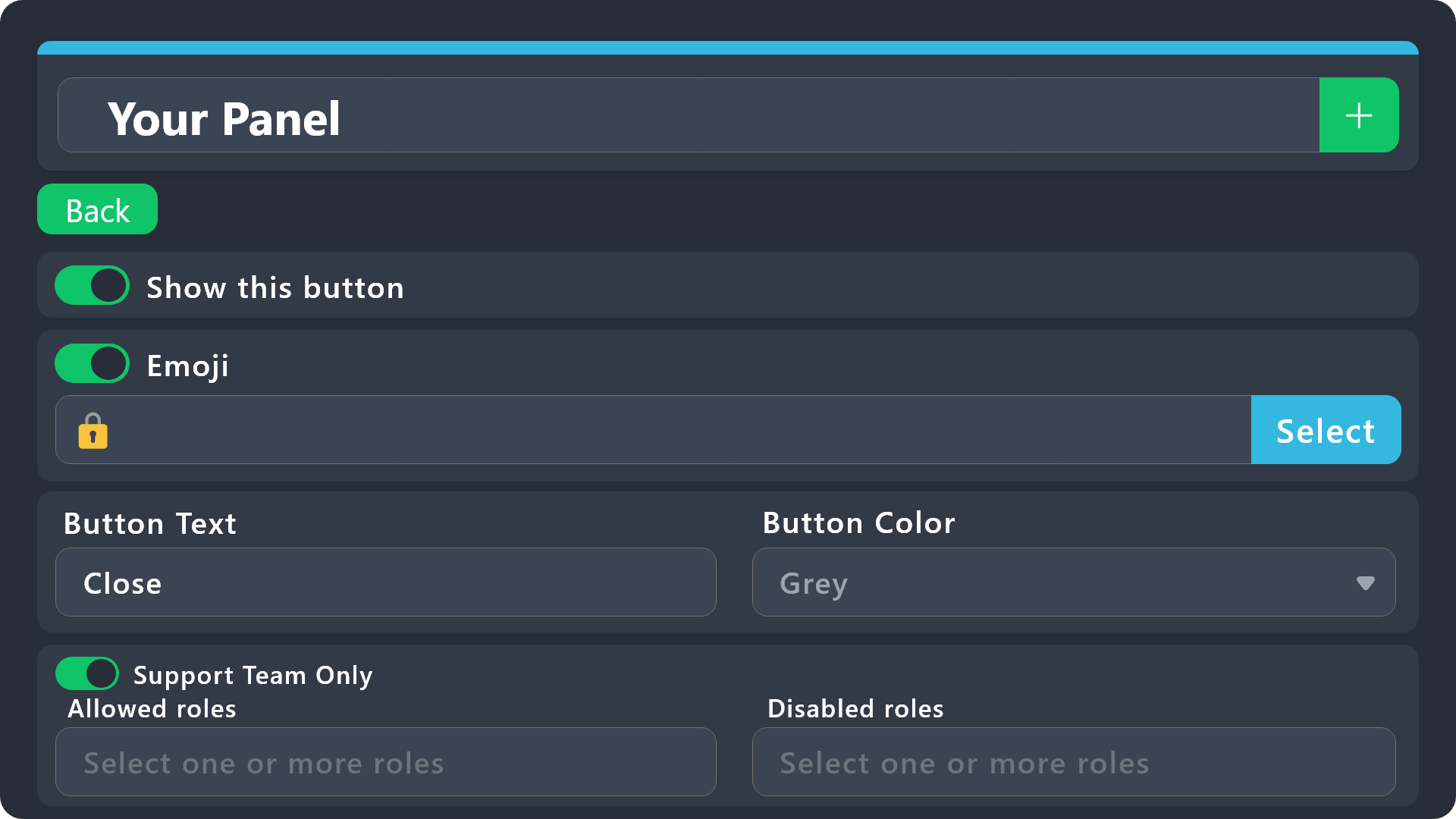
$buttonoptions
 idle flint
warm vessel
help
idle flint
warm vessel
help
That is the “claim” button. You want to be looking at your “create” button
idle flint
That depends on what part you are asking how to make?
Also, some of the parts of the example are Premium features
idle flint
You dont need to use the Ticket Tool Gold bot to use premium features
Here is some info for the Panel Messages:
humble sequoiaBOT
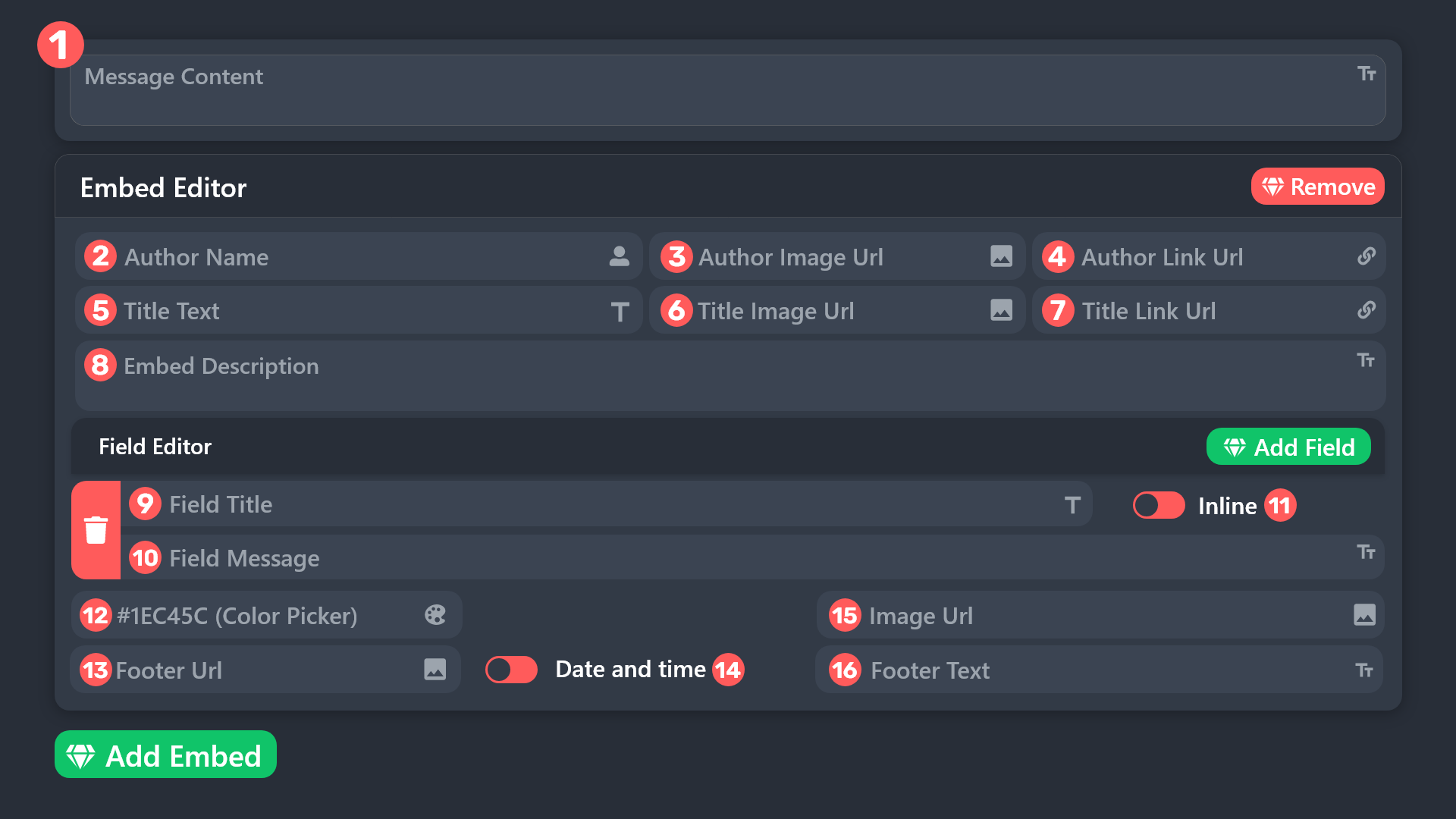
The panel message is where people react to make a ticket. To customize it head over to your Dashboard --> Panel Configs -> Panel -> Edit Panel Message

 idle flint
humble sequoia
idle flint
humble sequoia
For the panel message, as a free user, you are able to edit section 8. Premium users can edit all sections (which includes placing images etc)
humble sequoiaBOT
The Ticket Message is the first message sent by the bot on a new ticket. To customize it head over to your Dashboard ➞ Panel Configs ➞ Ticket ➞ Edit Ticket Message

 rose basalt
yea i see the FAQ but i dont see it
restive condor
rose basalt
how i can ping a role in a massage ticket?
Hey there! See the instructions above on how to edit the Ticket Message
restive condor
rose basalt
yea i see the FAQ but i dont see it
Go to your server dashboard
rose basalt
restive condor
Go to your server dashboard
yea i See the FAQ but i dont see "how to ping a role in a massage ticket"
i want know only how i ping it
restive condor
rose basalt
yea i See the FAQ but i dont see "how to ping a role in a massage ticket"
Once you're there use {roleID} to ping roles
rose basalt
restive condor
Once you're there use ``{roleID}`` to ping roles
thx
rose basalt
restive condor
Once you're there use ``{roleID}`` to ping roles
id is the id role?
restive condor
Correct
humble sequoiaBOT
Within all the messages the bot sends (both embeds and text) you can mention either channels, roles, or even users, these mentions will only send a notification to the user if they are used within a text field, e.g: a role mentioned in an embed won't ping at all the users who have that role.
For mentioning a role you can use one out of three options:
{@Role Name} ➞ Which is Case Sensitive.
{RoleID} ➞ Replace RoleId with the Id of the role you are trying to ping.
<@&RoleID> ➞ Discord's native syntax to ping roles.
<#ChannelID> ➞ Mention a channel by its ID.
<@UserID> ➞ Mention a user by its ID.
How do I get the ID of Roles/Channels/Emojis?
Ticket Tool has a useful command that helps you get the ID of various things like channels, roles, emojis, and your server.
Just use the command </id:1029797400174399546> <#channel/@role/:emoji:>. Now copy everything, including the brackets <...>, to your dashboard (or wherever you want it)
If you want the server ID, just use the command without any option.
Examples:
Server ID: $id ➝
509192800865353738
Roles: $id @Role ➝<@&722196398635745312>
Channel: $id #channel ➝#🤖│bot-spam
User: $id @user ➝@copper owl
Emoji: $id➝

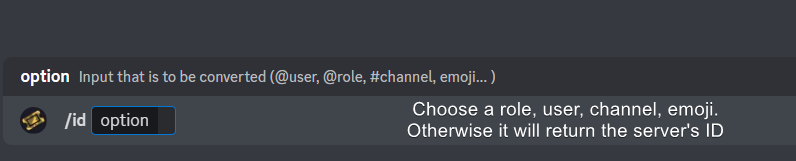 restive condor

rose basalt
thank you
restive condor
No problem 
 ionic path
 crude laurel
This is the support channel, not the right place.
 fading sky
System Failure: Invalid Form Body
data.components[1].components[0].max_length[NUMBER_TYPE_MIN]: Int value should be greater than or equal to 2.
?
limber portal
fading sky
System Failure: Invalid Form Body
data.components[1].components[0].max_length[NU...
It looks like you’ve left a box empty that needs to be filled
I reccomend that you #🎫│make-a-ticket
fading sky
limber portal
It looks like you’ve left a box empty that needs to be filled
I reccomend that ...
what that mean
fading sky
limber portal
It looks like you’ve left a box empty that needs to be filled
I reccomend that ...
They don't respond
limber portal
fading sky
They don't respond
You have to be patient
They’ll respond when they can
fading sky
alright man
storm scarab
How I can change that a user can create multiple tickets instead of 1?
ionic path
storm scarab
How I can change that a user can create multiple tickets instead of 1?
Dashboard → Limits → Open tickets each user
storm scarab
ionic path
Dashboard → Limits → Open tickets each user
okay thanks. I actually know it but forgot that's why I asked 😅
iron nightBOT
Gave +1 Rep to @ionic path
ionic path
No problem!
 slow helm
I dont have any bot on my discord server, and the command "BotSwitcher" doesn´t work.
 limber portal
slow helm
I dont have any bot on my discord server, and the command "BotSwitcher" doesn´t ...
limber portal
slow helm
I dont have any bot on my discord server, and the command "BotSwitcher" doesn´t ...
What about the command doesn’t work?
slow helm
limber portal
What about the command doesn’t work?
The command doesn`t work.. it is possible that Support System could be the problem?
limber portal
slow helm
The command doesn`t work.. it is possible that Support System could be the probl...
What do you mean by ‘doesnt work’? Do you get an error?
 humble sequoiaBOT
━━ User's inquiry has been moved to a ticket ━━
storm scarab
#1185939805037670460 anyone know this issue?
limber portal
storm scarab
<#1185939805037670460> anyone know this issue?
Can you send a screenshot of dashboard > panel configs > ticket please
storm scarab
limber portal
Can you send a screenshot of dashboard > panel configs > ticket please
okay
 restive condor
storm scarab
restive condor
storm scarab
Hey there! Dashboard > General > Ticket Padding > Set it back to 4 (default)
restive condor
How can we help?
 void plaza
Bir tane adres bulmak istiyorum
restive condor
void plaza
Bir tane adres bulmak istiyorum
Neye?
void plaza
Nasıl yani neye
restive condor
tam olarak neyin adresini bulmak istiyorsun
restive condor
⚠️ Yanlış yerdesin
Ticket Tool Discord botu için destek sağlıyoruz ve yaşadığınız sorun ne olursa olsun size yardımcı olamayız.
- Bu sorunu çözmek için hangi Destek Ekibiyle iletişime geçmeniz gerektiğini bilmiyoruz ve ne yazık ki size bunu doğru bir şekilde söyleyemeyiz.
restive condor
burada yapabileceğimiz hiçbir şey yok. Yanlış yerdesin
void plaza
Burası neresi beni Ankara'ya bağlayın
Kardeş youtube den baktım beni buraya yönlendir diler
restive condor
Yine yanlış yerdesiniz.
Yalnızca discord botuna destek sağladığımız için size nasıl yardımcı olabileceğimizi bilmiyoruz. Çok keyifli bir gün geçir
void plaza
Tamam da burası neresi
restive condor
void plaza
Kardeş siz burda ne yapıyoraunuz
restive condor
Hiçbir şey, sadece yardım ediyorum
 thin sorrel
Is there any way to make transcript links non-ephemeral? Any time I try to view an old transcript with the "you're viewing older messages" bar at the bottom, jumping down will "refresh" the chat and the transcript won't be there
It only works if the transcript is recent or you load the entire chat from the bottom to where the button is
(weird audio sorry Dx game in background)
pseudo ravine
Hey there. Unfortunately you cannot make it non-ephemeral yourself
thin sorrel
I see. Do you know if there are any plans to make it an option? It's not a big deal for us right now because the change was recent so we can scroll if we really need to, but as time goes on we basically won't be able to access any old transcripts
 rough ore
I don't see the button to create a request
 limber portal
thin sorrel
I see. Do you know if there are any plans to make it an option? It's not a big d...
limber portal
thin sorrel
I see. Do you know if there are any plans to make it an option? It's not a big d...
Hi
You can always download the html file to see the transcript - you can make a suggestion with s!suggest in #🤖│bot-spam
thin sorrel
Okay thanks! Just wanted to make sure before I did.
Downloading is slightly less convenient but it works, thank you 🫡
 cerulean falcon
it broken
 limber portal
cerulean falcon
it broken
limber portal
cerulean falcon
it broken
Hi, can you run /debug please
 limber portal
cerulean falcon
aight
limber portal
cerulean falcon
aight
The bot is missing the read messages permission in that channel
cerulean falcon
huh
limber portal
You need to give the bot that permission
 silk topaz
restive condor
Hiçbir şey, sadece yardım ediyorum
silk topaz
restive condor
Hiçbir şey, sadece yardım ediyorum
Banada yardım edebilir misin 4 gündür hesabımı alamıyorum
restive condor
⚠️ Yanlış yerdesin
Ticket Tool Discord botu için destek sağlıyoruz ve yaşadığınız sorun ne olursa olsun size yardımcı olamayız.
- Bu sorunu çözmek için hangi Destek Ekibiyle iletişime geçmeniz gerektiğini bilmiyoruz ve ne yazık ki size bunu doğru bir şekilde söyleyemeyiz.
Diğer adama da söylediğim gibi, yanlış sunucu
 unborn gust
hello i need some help..
so im setting up a new server with the basic bot and i cant seem to get my stuff set up right
thorny oxide
Is there a way to make it to where only mods and admins can close tickets and not just the general user base?
 kindred gate
thorny oxide
Is there a way to make it to where only mods and admins can close tickets and no...
kindred gate
thorny oxide
Is there a way to make it to where only mods and admins can close tickets and no...
support team only?
thorny oxide
yeah
kindred gate
give me a second

Buttons > Close ticket

This is what ticket tool will respond with when someone tries to close the ticket by pressing your button
 kindred gate
kindred gate
kindred gate
for this part you need to enable it^ should be green isntead of red
this means its on

and red = off
thorny oxide
thank you @kindred gate
iron nightBOT
Gave +1 Rep to @kindred gate
storm scarab
restive condor
Hey there! ``Dashboard`` > ``General`` > ``Ticket Padding`` > Set it back to 4 ...
Thanks! My problem has been solved 😁
iron nightBOT
Gave +1 Rep to @restive condor
thorny oxide
hol up, is that rep function a part of ticket tool? 👀 that would be handy af in my discord
storm scarab
thorny oxide
hol up, is that rep function a part of ticket tool? 👀 that would be handy af in...
That's actually YAGPDB bot
thorny oxide
Ohhhhhh
Ok cool, yeah, i run a discord for helping people prog and clear ultimates in ffxiv, and we have a channel for questions and help, and having a rep system would be nice
 sly silo
Hii, just asking it's possible to do something like when you click a button (example as the buttons as #📂│information ) it appears an embed that you can only see?
 limpid matrix
@everyone how do i see my ticket dashboard
 agile stream
limpid matrix
@everyone how do i see my ticket dashboard
agile stream
limpid matrix
@everyone how do i see my ticket dashboard

Ticket Tool - Ticketing without clutter - The #1 discord Ticketing bot
iron nightBOT
Gave +1 Rep to @agile stream
limpid matrix
Thanks @limpid matrix
agile stream
limpid matrix
Thanks <@706153469706371153>
You’re welcome, glad to help!
 obsidian trench
I dont have permission to send messages in the channel.
idle flint
obsidian trench
I dont have permission to send messages in the channel.
What channel on this discord server are you trying to send a message?
obsidian trench
Schoolaro? I am trying to work on my homework. The button"Verify" doesn't work. it said the interaction failed.
humble sequoiaBOT

⚠️ You're in the wrong place
We provide support for Ticket Tool Discord bot and cannot help you with whatever issue you have.
- We don't know which Support Team you should contact to get this issue resolved, and unfortunately we won't be able to accurately tell you.
If you don't have any further questions regarding our bot Ticket Tool, please close this ticket
idle flint
obsidian trench
Schoolaro? I am trying to work on my homework. The button"Verify" doesn't work. ...
Have a read of the message above - we can’t help you with your issue 😊
 wraith swift
idle flint
wraith swift
<#776680605517742090>
wraith swift
idle flint
wraith swift
<#776680605517742090>
That is this channel, yes 👍
jade topaz
Hello, now the embeds don't let you make messages that big or are they unlimited?
limber portal
jade topaz
Hello, now the embeds don't let you make messages that big or are they unlimited...
There is a character limit for non premium users
jade topaz
limber portal
There is a character limit for non premium users
If I am not premium, do I start the trial, do I send the big message when the trial ends, will it be deleted or will it stay?
limber portal
jade topaz
If I am not premium, do I start the trial, do I send the big message when the tr...
It will stay, all other premium features won’t work though
jade topaz
limber portal
It will stay, all other premium features won’t work though
Thank you
iron nightBOT
Gave +1 Rep to @limber portal
limber portal
Np
 candid geyser
Can I change the ticket tool name to my community name with profile pic
limber portal
candid geyser
Can I change the ticket tool name to my community name with profile pic
You can change the nickname, not the avatar
humble sequoiaBOT
Ticket Tool Custom Avatar
As of now, you are not able to change Ticket Tool's profile picture, nonetheless, our Development Team is working on the release of white labels, this is your own custom bot!
For the time being, you can change the bot's nickname by right-clicking the bot in the user list on your server and clicking Change Nickname

$avatar
candid geyser
limber portal
You can change the nickname, not the avatar
I have premium package. Can I??
limber portal
candid geyser
I have premium package. Can I??
No, you can only change the nickname
Read the message above ^^
candid geyser
Bro whats the difference betweek ticket gold and white?
limber portal
candid geyser
Bro whats the difference betweek ticket gold and white?
Ticket tool gold is the premium only bot:
-
It’s hosted on separate servers meaning it’s faster
-
it is also usually unaffected by outages that affect the main bot
candid geyser
limber portal
Ticket tool gold is the premium only bot:
- It’s hosted on separate servers mea...
How to add this on my server?
humble sequoiaBOT
The first thing you will need to do is invite the premium bot, an invite can be found here
Once the bot is in your server we will head to the dashboard and manage your server. When you are managing your server, you want to head into "Server Configs" then click the drop down menu under "Select the bot you would like to use on this server" then click "Ticket Tool#6207" and then save.
 limber portal
candid geyser
How to add this on my server?
limber portal
candid geyser
How to add this on my server?
^^
 rough ore
idle flint
Can you explain any more?
rough ore
idle flint
Can you explain any more?
There is no button under the panel
jade topaz
Says I opened two tickets can you cancel please
limber portal
jade topaz
Says I opened two tickets can you cancel please
Is this related to ticket tool?
 tidal kiln
Is it possible to rename ticket channels automatically like to the username of the requester?
humble sequoiaBOT
The ticket name is the default channel name of all tickets. To edit it, go to your Dashboard > Panel Configs > Ticket. There you can edit the channel name of opened and closed tickets. You can also use variables in there.
Note: This is a premium feature
 twin spire
So, I’m having problems with champion interaction. It worked fine with Helen but she is done and I wanted to start on Elizabeth. She doesn’t appear to be working no interaction after several days of restarts and double checking of settings. Is this a current problem?
limber portal
twin spire
So, I’m having problems with champion interaction. It worked fine with Helen but...
You are in the Wrong server, this is for ticket tool support
 chrome beacon
How do I set permission for other roles to see (whenever I open a ticket, the role can see it)
humble sequoiaBOT
1. Go into your Dashboard
2. Open your Panel Configs tab
3. Select the panel you want to grant access to
4. Open the General options menu
5. Select your Support Team Roles
6. Save changes
 limber portal
chrome beacon
How do I set permission for other roles to see (whenever I open a ticket, the ro...
limber portal
chrome beacon
How do I set permission for other roles to see (whenever I open a ticket, the ro...
^^
 gentle rune
How do I update panels?
limber portal
gentle rune
How do I update panels?
You can update or resend the panels with these buttons under the panel name at the top of the dashboard
 iron nightBOT
Gave +1 Rep to @limber portal
 arctic igloo
كيف احط صوره كذا
 humble sequoiaBOT
━━ User's inquiry has been moved to a ticket ━━
 bronze scroll
has tickettool added export to CSV yet
I had created a script to scrape ticket transcripts to export responses but the new embedded button flow makes it impossible, kind of a shame
limber portal
bronze scroll
has tickettool added export to CSV yet
Not currently
jade topaz
How come it won't let me send a panel to a forum post?
civic wagon
jade topaz
How come it won't let me send a panel to a forum post?
Hey, do you not see the forum post in channel list on dash?
jade topaz
civic wagon
Hey, do you not see the forum post in channel list on dash?
Yeah it just doesn't come up
How can i change my age in discord
humble sequoiaBOT
⚠️ You're in the wrong place
We provide support for Ticket Tool Discord bot and cannot help you with whatever issue you have.
- We don't know which Support Team you should contact to get this issue resolved, and unfortunately we won't be able to accurately tell you.
If you don't have any further questions regarding our bot Ticket Tool, please close this ticket
silk topaz
There is a problem with my game account, I think can you help please?
humble sequoiaBOT
⚠️ You're in the wrong place
We provide support for Ticket Tool Discord bot and cannot help you with whatever issue you have.
- We don't know which Support Team you should contact to get this issue resolved, and unfortunately we won't be able to accurately tell you.
If you don't have any further questions regarding our bot Ticket Tool, please close this ticket
civic wagon
jade topaz
Yeah it just doesn't come up
Make sure that the bot has view permissions in the forum.
If yes, try to reload the dash and try again, in case you created the forum post after you were configuring the dash
jade topaz
@humble sequoia How can i change my age in discord??
humble sequoiaBOT
⚠️ Please read the messages previously sent by our team ⚠️
civic wagon
Alternatively, you could also use the $panel or /panel command to send the panel in forum post
jade topaz
civic wagon
Make sure that the bot has view permissions in the forum.
If yes, try to reload...
Just did it from the website since it only shows up there for some reason 👍
 cursive phoenix
jade topaz
<@722196398635745312> How can i change my age in discord??
cursive phoenix
jade topaz
<@722196398635745312> How can i change my age in discord??
You have already been told (more than once) we can not assist you with that here. Please do not ask again.
We are the support server for the Ticket Tool bot only

 fallow ingot
Run $debug in the channel where you sent your panel
 bold owl
how do i add a variable to a ticket?
limber portal
bold owl
how do i add a variable to a ticket?
All variables are just text that you type in where you want the info to go, check out https://docs.tickettool.xyz/dashboard/panel-configs/supported-variables

Description of the variables you can use across your ticket system
bold owl
ive looked through that, i have created a form and want it to display the results into the ticket for moderators. i cant figure out where to put {create.form.x} within the dashboard for it to work
@limber portal
limber portal
You replace the x with the question number’s answer you want displayed, example:
The user answered question one with {create.form.1}
The user answered question 2 with {create.form.2}
@bold owl
bold owl
yes but where do i paste those
within the ticket embed editor
limber portal
bold owl
yes but where do i paste those
within the ticket embed editor
Wherever you want the answer displayed in the ticket message
jade topaz
What's the prefix for? @pseudo glen
pseudo ravine
$
jade topaz
How to redeem premium?
jade topaz
pseudo ravine
Voting?
Yes
pseudo ravine
jade topaz
pseudo ravine
Voting?
To get @humble sequoia
pseudo ravine
Yes, I got that, please #🎫│make-a-ticket
 pseudo ravine
Fill it out
 tulip wave
how do i add the like ticket like this
 humble sequoiaBOT
First you will want to invite the bot to your server. Once the bot is in your server, you can manage your server in the dashboard.

To create a panel we are going to need to head over to the Panel Configs Tab on the Dashboard.
Once at the dashboard we will need to click Create Panel.
Enter a panel name (Fill in any optional settings you want).
Click Create Panel and you are ready to get started with configuring your panel.
An example of a creating a panel is shown below.

Once the panel has been created, use the blue Send button and select the channel you want the panel to be sent to.
The Panel wasn't send
Use the </debug:ID> command to diagnose possible permission issues with the bot.
 idle flint
tulip wave
how do i add the like ticket like this
idle flint
tulip wave
how do i add the like ticket like this
The basic setup guide is above 😊😊
tulip wave
idle flint
The basic setup guide is above 😊😊
o ty!
 empty spruce
 humble sequoiaBOT
⚠️ You're in the wrong place
We provide support for Ticket Tool Discord bot and cannot help you with whatever issue you have.
- We don't know which Support Team you should contact to get this issue resolved, and unfortunately we won't be able to accurately tell you.
If you don't have any further questions regarding our bot Ticket Tool, please close this ticket
 summer whale
Hello. New to discord apps/bots. I am looking to connect discord ticket via this tool to HubSpot (a CRM) tickets. Functions like create a ticket when ticket created. Update when updated, Set to Closed when closed. It is going to require some API calling in HubSpot. Is this feasible with this tool somehow, or am I better to look at a custom Discord bot?
humble sequoiaBOT
1. Go into your Dashboard
2. Open your Panel Configs tab
3. Select the panel you want to ping your support on
4. Open the Ticket options menu
5. Click on Edit Ticket Message
6. In the Message Content use one of the role mention syntax (**{@Role Name}**/**{Role ID}**)
7. Save changes
Note: For this to work properly, Ticket Tool requires the Mention Everyone permission. Or the role must have the Allow anyone to @mention this role setting enabled
idle flint
 neat lotus
I did not catch how I can mention roles in the automated ticket message
neat lotus
I did not catch how I can mention roles in the automated ticket message
Have a read of the info above 😊
idle flint
summer whale
Hello. New to discord apps/bots. I am looking to connect discord ticket via this...
Unfortunately, our main knowledge lies with Ticket Tool and how it functions as an independent bot. We have limited knowledge about how and how well other bots will integrate with Ticket Tool, and a point to note is that if that bot owner should change their settings/configuration, it may break any integration that you have working with Ticket Tool.
Personally, I have never heard of Hub Spot, so I can’t help you with any integration there. You are able to integrate other bots to Ticket Tool, to get TT to execute its functions tho
neat lotus
idle flint
Have a read of the info above 😊
for me there was no info
idle flint
neat lotus
for me there was no info
Hm, well to remove any confusion, here is a screenshot of the info, you should hopefully be able to see it, let me know how you go following the steps 😊
 neat lotus
ty
 hollow chasm
So in my server all tickets so show up as “ticket-001” how do in change it so it does “001. 002.. 003..” yk the number adds up
idle flint
hollow chasm
So in my server all tickets so show up as “ticket-001” how do in change it so it...
hmm, that isnt standard behaviour for Ticket Tool, by default, your tickets would increment up in number each time a new one is opened.
Can I get your server ID (or server name) to check whats going on
 idle flint
hollow chasm
idle flint
hollow chasm
Could they be tickets from different panels? - you have 4 panels, so all would have a ticket-0001 for the first one opened on each panel
idle flint
All good - adjusting the ticket names is a premium feature (to help you distinguish what type of ticket it is), but you could set up different categories for your tickets to open into to help you out? (or just continue as you are, just giving some tips)
gentle rune
How do I get on claim?
humble sequoiaBOT
Claiming allows you to change the ticket name, category and permissions. To use it you have to enable it first on your Dashboard > Panel Configs > Claiming

 Note: This is a premium feature
 slender minnow
@gentle rune
gentle rune
Thanks
 lusty terrace
Hello dear i need a help please
civic wagon
lusty terrace
Hello dear i need a help please
Please state what you need help with, and someone would help you out eventually.
 blazing matrix
How to make this like ticket

 humble sequoiaBOT
The Drop-down menu or Select Menu replaces the buttons on your panel message and uses a drop-down menu with all of your panels. To set this up, go to your Panel Configs and select your main Panel.
<:Numbericons1:1018864164032225340> Enable Select Style
First you enable Select Style. Then you add an item in the Dropdown Editor. Now you can start editing your dropdown!
<:Numbericons2:1018864168041971712> Dropdown Editor
Each line in the dropdown editor represents a line in the drop down menu on discord. You can add more "Items", by clicking on
First you select a panel. That's the panel this option will open a ticket for. DONT select the same panel twice. Each option should have a different Panel
After that, you can put a Display. This is the title of this option and will appear in the drop down menu. The *Description can be set right after that, which will be below the title in grey.
Additionally you can select an emoji, that will be shown in front of each option. You can either manually input the ID of an emoji or select it in the selector.
Common Issues ⚠️
- Panel doesn't send? Make sure you have a valid emoji selected
- Option doesn't show up? Check if two options have the same panel in the DropDown Editor
$dropdown
limber portal
blazing matrix
How to make this like ticket
^^
blazing matrix
limber portal
^^
Yes
limber portal
Check the embed out
blazing matrix
How
limber portal
humble sequoia
Read this
 polar thunder
This might sounds dumb but whenever someone creates a ticket on my server they cant type in it. I did my best with the discord permissions but I cant make it work
limber portal
polar thunder
This might sounds dumb but whenever someone creates a ticket on my server they c...
Dashboard > panel configs > permissions > ticket owner edit opened > set send messages to ✅
blazing matrix
Bro I can't
limber portal
What can’t you do?
blazing matrix
I can't create this Type

 humble sequoiaBOT
⚠️ Please read the messages previously sent by our team ⚠️
limber portal
humble sequoia
I sent you a guide here
 humble sequoiaBOT
A Discord Form lets the user answer individual questions in a pop-up Form, which then displays the answers in the ticket message. This can save time if you already know what you want to ask the user.
Setup Forms
Forms can be enabled under Panel Settings > Form Options > Edit Forms Options. In the new pop-up window, you can now enable and edit your own Form.
Form Options
You can add up to 5 questions in the Discord form. This is a Discord limitation. Each question can have a placeholder in the input field, a minimum and maximum input, multi-line, and also the option to have the answer required.
Options
Question Title ➞ Your Question goes here
Question Placeholder ➞ The placeholder text in the input field
Required ➞ If enabled, the user has to answer this question, to submit the form
Multi-Line Input ➞Allows the user to input multiple lines
Minimum and Maximum Input ➞ Set a minimum and maximum input value for the user
Displaying the Answer
To display the answers from the user, you need to enable Auto display form results on the ticket message as an additional embed
If you don't want a second embed, go into your Panel Configs > Ticket Options > Edit Ticket Message. You use the variable {create.form.x} and replace x with the number of your question. For example, the response to Question 5 can be displayed with {create.form.5}.
limber portal
blazing matrix
How to make this like ticket
^^
lusty terrace
I got a funded account worth 5k and registered via Google email, but unfortunately I cannot open my email due to a problem with Google email, which states that my phone number cannot be used to prove ownership of the account, and for some time now I have been trying to open the email until I receive the inbox from the company.
humble sequoiaBOT
⚠️ You're in the wrong place
We provide support for Ticket Tool Discord bot and cannot help you with whatever issue you have.
- We don't know which Support Team you should contact to get this issue resolved, and unfortunately we won't be able to accurately tell you.
If you don't have any further questions regarding our bot Ticket Tool, please close this ticket
ionic path
@lusty terrace
pseudo ravine
blazing matrix
<@1065295463089180763> <@1065295463089180763>
Next time, please don’t ping anyone for support
lusty terrace
mmm ok what can i do now 😞
pseudo ravine
We don’t know
lusty terrace
okay thank you
pseudo ravine
You’re welcome, glad I could help!
 mortal ravine
Hey I just paid and can’t still get into the discord
limber portal
This is support for the bot ticket tool, not whatever the issue is inside that ticket
Also id advise deleting that cus it contains personal info
limber portal
mortal ravine
So what I’m I supposed to do
Theres nothing we can do here
mortal ravine
Where can I report it to
limber portal
Not in here
humble sequoiaBOT
⚠️ You're in the wrong place
We provide support for Ticket Tool Discord bot and cannot help you with whatever issue you have.
- We don't know which Support Team you should contact to get this issue resolved, and unfortunately we won't be able to accurately tell you.
If you don't have any further questions regarding our bot Ticket Tool, please close this ticket
 dusk wren
Why I can't download the android link it says website not available
limber portal
humble sequoia
@dusk wren
dusk wren
I already tell the support team
limber portal
dusk wren
I already tell the support team
We cant help you with that in this server
dusk wren
Ok
 ionic path
 next holly
Please make sure Ticket Tool has the Administrator permission in both generalized role settings and channel/category role settings.
next holly
ionic path
Please make sure Ticket Tool has the Administrator permission in both generalize...
Could you please tell me how to do it?
I searched for it but couldn't find it
jade topaz
next holly
Hi, we have already answered you in the channel #premium-support
pseudo ravine
admin perms aren’t required for everything
ionic path
Sure thing:
Open your server settings by going into it, pressing the three dots and taping on "settings".
There, you'll see a setting category called "Roles". Press on that.
Scroll down until you find the role "Ticket Tool". When you find it, press on it, press on "Permissions" and enable the permission called "Administrator".
If this doesn't resolve your issue, open the category settings of the category the opened tickets go into by pressing and holding on it for a couple of seconds.
You'll see a menu pop up. When it does, press on "Edit Channel/Category".
Go into "permissions" and enable administrator from there.
next holly
jade topaz
Hi, we have already answered you in the channel <#811478944720355347>
Even I couldn't open it
 ionic path
pseudo ravine
admin perms aren’t required for everything
ionic path
pseudo ravine
admin perms aren’t required for everything
I know, I just do that to be more easy
pseudo ravine
we don’t recommend giving it admin unless it needs it
ionic path
pseudo ravine
we don’t recommend giving it admin unless it needs it
Okay, I'll note that. Thanks and sorry
iron nightBOT
Gave +1 Rep to @pseudo ravine
pseudo ravine
No worries
 grizzled hinge
@limber portal hey!
limber portal
grizzled hinge
<@1065295463089180763> hey!
Heya, can you send the server id
It does seem ticket tool is missing permissions - check out the image I attached and grant those permissions to the bot in the channel and as a role permission, it should then work.
 grizzled hinge
limber portal
It does seem ticket tool is missing permissions - check out the image I attached...
grizzled hinge
limber portal
It does seem ticket tool is missing permissions - check out the image I attached...
hmm I see
 analog grove
hello! what is the best way to manage closed tickets? I had different categories for the closed ones but it was annoying when they category gets full. Is there a way to save the transcripts to a specific channel?
/also open to suggestions. i do have premium!
limber portal
analog grove
hello! what is the best way to manage closed tickets? I had different categories...
Hi, you can set the transcripts channel in dashboard > panel configs > transcripts
Something you could do as you have premium is get ticket tool to change the ticket name when closed, to something such as closed-{user}, which may help to seperate them different (can be set in dashboard > panel configs > ticket)
Alternatively you can enable auto transcripting and skip closing alltogether, and immediately delete
restive condor
 marsh root
why the ticket tool is not working guys
marsh root
why the ticket tool is not working guys
Hey there! What seems to be the problem?
 steady kettle
limber portal
Hi, you can set the transcripts channel in dashboard > panel configs > transcrip...
steady kettle
limber portal
Hi, you can set the transcripts channel in dashboard > panel configs > transcrip...
You and jdog here too, I see y'all everywhere
pseudo ravine
Do you need any support for Ticket Tool?
pseudo ravine
Then please don't chat in here if you don't need any support
humble sequoiaBOT
Hello, we would love to help you, but if you don't tell us what you need help with we can't help you :(
 normal fjord
Ok, when somebody creates a ticket I don’t get the notification
humble sequoiaBOT
Within all the messages the bot sends (both embeds and text) you can mention either channels, roles, or even users, these mentions will only send a notification to the user if they are used within a text field, e.g: a role mentioned in an embed won't ping at all the users who have that role.
For mentioning a role you can use one out of three options:
{@Role Name} ➞ Which is Case Sensitive.
{RoleID} ➞ Replace RoleId with the Id of the role you are trying to ping.
<@&RoleID> ➞ Discord's native syntax to ping roles.
<#ChannelID> ➞ Mention a channel by its ID.
<@UserID> ➞ Mention a user by its ID.
pseudo ravine
Make sure this is in the Message Content of the Ticket Message
pseudo ravine
You need to add the mention inside the Message Content of the Ticket Message
Dashboard > Messages > Edit Ticket Message > The text bot at the very top
normal fjord
I don’t see text bot- OH
 fickle jungle
why won't my image load
restive condor
marsh root
the bot is not working
Again, what exactly is the issue?
marsh root
restive condor
Again, what exactly is the issue?
i cant close the ticket or create a tickt the buttons are not working
marsh root
restive condor
Again, what exactly is the issue?
every single time any one try to open a tickt the bot replies and says
(the instruction failed)
andi dont know wht is the reason?
restive condor
marsh root
every single time any one try to open a tickt the bot replies and says
(the ins...
May you run $debug in the channel where you can create tickets from
marsh root
restive condor
May you run ``$debug`` in the channel where you can create tickets from
doesnt work
restive condor
marsh root
doesnt work
What's the server's name?
marsh root
restive condor
What's the server's name?
BLRP™
marsh root
marsh root
BLRP™
Thats the name
restive condor
marsh root
BLRP™
May you run the /debug command in any channel
marsh root
restive condor
May you run the ``/debug`` command in any channel
i will try
 boreal hound
⚽
marsh root
restive condor
May you run the ``/debug`` command in any channel
i am so sorry man someone band the bot and i didnt realize am so sorry
restive condor
marsh root
i am so sorry man someone band the bot and i didnt realize am so sorry
Was about to say, couldn't see it
Re-invite the bot and let us know if you have any issues
marsh root
restive condor
Was about to say, couldn't see it
thx alot bro and sorry for the Disturbance
iron nightBOT
Gave +1 Rep to @restive condor
restive condor
No worries
marsh root
restive condor
Re-invite the bot and let us know if you have any issues <:PabloTiphat:983791053...
OK
 carmine walrus
Quick question, is there a way to let ticket tool remove x role then add y role once the close button is clicked?
User came in with x role already.
Nevermind, I figured it out. :)
 main swallow
So that direct button link I’m having trouble with it when I try to click it to get the link it scrolls my screen down, but then when I get to the bottom of the channel where the link would be it’s gone
There’s a whole lot of tickets across two days upwards of 20-30
 unkempt canopy
Can I get help on the ticket bot
humble sequoiaBOT
Hello, we would love to help you, but if you don't tell us what you need help with we can't help you :(
unkempt canopy
With The Claiming ticket I'm trying to get it to work
Can I get help with the Claim ticket thing
humble sequoiaBOT
Claiming allows you to change the ticket name, category and permissions. To use it you have to enable it first on your Dashboard > Panel Configs > Claiming
Note: This is a premium feature
idle flint
unkempt canopy
Can I get help with the Claim ticket thing
Here is some info, note: it is a premium  feature
normal fjord
Hello
I need help, I set the ticket thing up, and I can’t seem to figure out how to get a notification that someone created one and I can’t go into their ticket they created. I asked for help before and they helped me, but it was super confusing
humble sequoiaBOT
1. Go into your Dashboard
2. Open your Panel Configs tab
3. Select the panel you want to ping your support on
4. Open the Ticket options menu
5. Click on Edit Ticket Message
6. In the Message Content use one of the role mention syntax (**{@Role Name}**/**{Role ID}**)
7. Save changes
Note: For this to work properly, Ticket Tool requires the Mention Everyone permission. Or the role must have the Allow anyone to @mention this role setting enabled
idle flint
normal fjord
I need help, I set the ticket thing up, and I can’t seem to figure out how to ge...
This info ^^^ should help with how to ping a role when the ticket is opened.
normal fjord
Ok
idle flint
In terms of "going into the ticket" - I am assuming you are not the server owner?
normal fjord
No, but I am a mod/ manager
idle flint
Okay, here is some info to pass onto your server owner (or if you have permissions to edit Ticket Tool yourself, then you can check it too:)
humble sequoiaBOT
1. Go into your Dashboard
2. Open your Panel Configs tab
3. Select the panel you want to grant access to
4. Open the General options menu
5. Select your Support Team Roles
6. Save changes
normal fjord
Ok ty
idle flint
All good, if you have issues, feel free to ask again or head to #🎫│make-a-ticket
iron nightBOT
Gave +1 Rep to @idle flint
 dull ember
Hello helloo... I'm trying to close the ticket but I'm facing this issues, anyone please help
 humble sequoiaBOT
When first invited to your server, Ticket Tool should have the permissions shown below in order to ensure an appropriate functioning:
When customizing permissions for the different ticket participants, you must make sure Ticket Tool has the permissions you want it to grant to others, you can learn more about this here.
Missing Permissions
This error is a direct outcome of the bot missing permissions as depicted above. When troubleshooting this error we suggest you go through these steps:
- Use the </debug:1029783024264564765> command to check if the bot is lacking core role or channel permissions.
- Compare the category/channel's overrides and contrast them with the bot's roles to identify any permission denial that is breaking the functioning
- If you can't still figure it out, let our <@&540295656720302081> know so they can guide you through
Additional Resources
- If you are a server administrator and would like to understand more how to set up your server's permissions, we suggest checking the Discord Support Knowledge Base
- If you are a bot developer and are interested in the internal permission hierarchy we suggest you this part of the Discord Developer Docs
Important Note
- Giving Administrator permissions is NOT required and we do NOT encourage you to do unless you are trying to troubleshoot your permissions setup.
 restive condor
dull ember
Hello helloo... I'm trying to close the ticket but I'm facing this issues, anyon...
restive condor
dull ember
Hello helloo... I'm trying to close the ticket but I'm facing this issues, anyon...
Hey there! See above
If you need anything else please ask or #🎫│make-a-ticket
restive condor
 gentle spindle
Hi
<@795710289425334303>
gentle spindle
Hi
<@795710289425334303>
Yes?
gentle spindle
restive condor
Yes?
Why when i write a message in the panel of the ticket Shows half of it

 restive condor
gentle spindle
Why when i write a message in the panel of the ticket Shows half of it
restive condor
gentle spindle
Why when i write a message in the panel of the ticket Shows half of it
There's a character limit
dull ember
restive condor
Hey there! See above
thanks
iron nightBOT
Gave +1 Rep to @restive condor
 humble sequoiaBOT
Additional Roles are roles that are independent of Support Roles. You can assign unique permissions for roles defined as additional roles in tickets.
To choose your additional roles head to your Panel Configs ➞ General Settings ➞ Additional Roles
To assign permissions for additional roles, go to Dashboard ➞ Panel Configs ➞ Permission Options ➞ Additional Opened/Closed Permissions.
Note: Additional Roles do NOT get affected by the Change other support team permissions when claimed feature under Claiming Options, meaning they don't gain/lose any permissions set in that feature once a ticket is claimed.
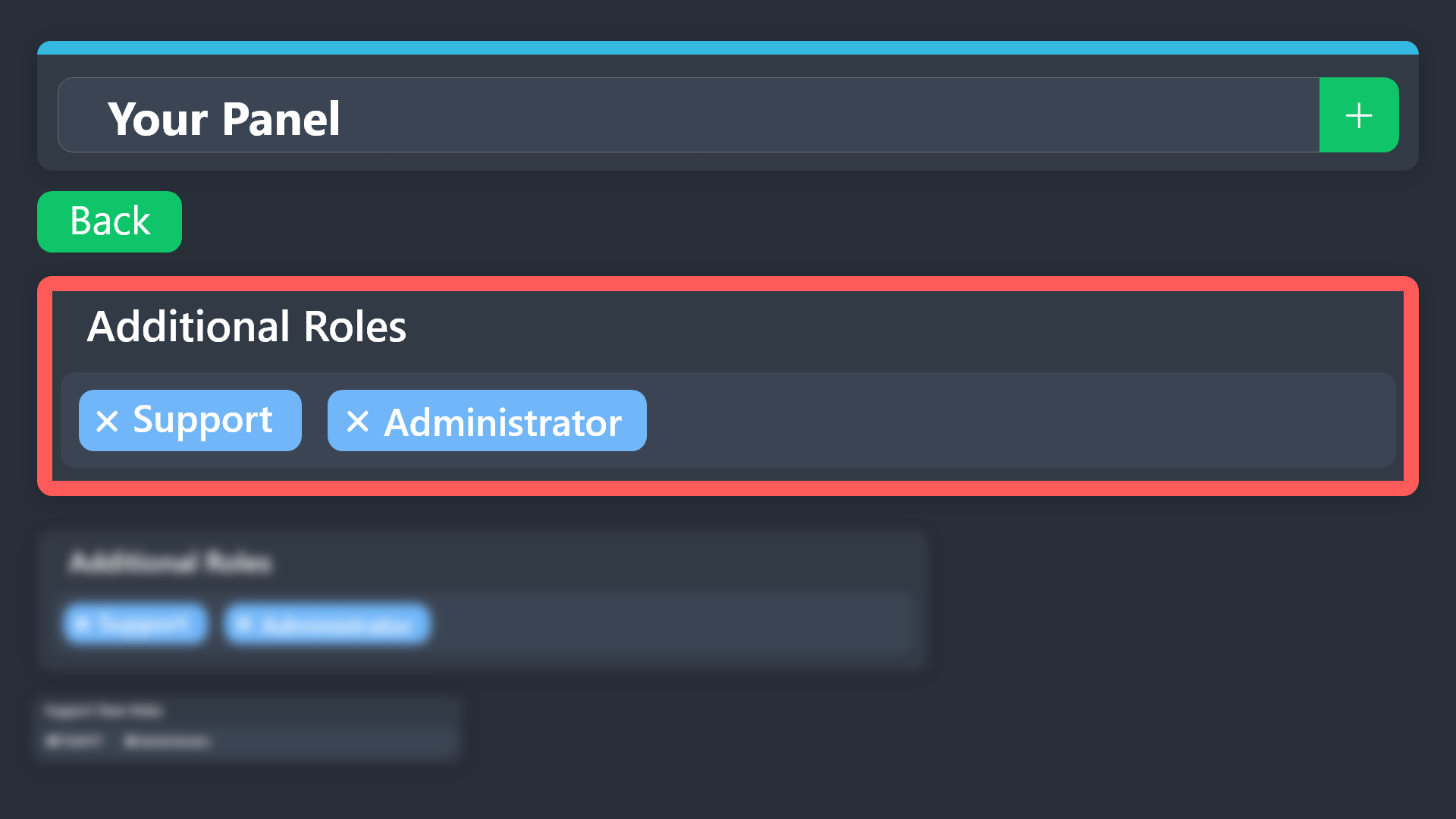
$addroles
jade topaz
@thorny oxide
thorny oxide
so ive done that
but i think for what im wanting to do specifically, it isnt working how i want it to
I'm trying to do something extremely specific and I wish i could just blabber to someone in vc about the dumb idea I had and what I am trying to accomplish
jade topaz
thorny oxide
I'm trying to do something extremely specific and I wish i could just blabber to...
Make a ticket with the support team, they will give you more help 🙂
humble sequoiaBOT
━━ User's inquiry has been moved to a ticket ━━
 restive condor
You can't.
Other than partaking in #🎉│giveaways and events
gentle spindle
 bold bobcat
Question, how do you update this?

I went to setup & changed name but its not reflecting here
jade topaz
bold bobcat
I went to setup & changed name but its not reflecting here
Tried to click on the send option from the dashboard to update
bold bobcat
Yea did that but still shows Keyblade, when I go to setup tho there are no panels with that name anymore
Is there a separate place to update the embeded links?
bold bobcat
I deleted & re-created the panel but now it’s like this lol where do I update the button icons? lol

 keen sparrow

 gilded verge
bold bobcat
Is there a separate place to update the embeded links?
gilded verge
bold bobcat
Is there a separate place to update the embeded links?
links? i think you asked about buttons but if i understand correctly and you want to delete this button from your panel, then Panel Configs->Panel->there you can delete button for this panel you don't want to
after that, as @3v.exe mentioned, you can send your panel again, or use Update button
but if im wrong, then to update your button: Panel Configs->Buttons->Edit Create Ticket Button
keen sparrow
keen sparrow
@gilded verge what's this bro
gilded verge
keen sparrow
<@334671104704774154> what's this bro
Please avoid pinging anyone, you just need to be patient and wait for help...
gilded verge
keen sparrow
Anyway, does this panel still exist in your dashboard?
keen sparrow
gilded verge
Anyway, does this panel still exist in your dashboard?
ye
gilded verge
okay that's good, so you can Clone this broken panel and cloned panel send to your channel
keen sparrow
gilded verge
okay that's good, so you can `Clone` this broken panel and cloned panel send to ...
i'm using dropdown style and the main panel is another one
i tried and it didn't work too
gilded verge
then there will be little more work because now you have to check every panel you included to this dropdown in main panel, but when you find it, you can fix it ^^
ofc there is another way... but in that case you have to create these panels from scratch
what's the id of your panels? becuase you can use /panel id command in your server to find the problem by trying to send it.
example:
 keen sparrow
what should i do when i get the panel id
gilded verge
gilded verge
what's the id of your panels? becuase you can use `/panel id` command in your se...
please read again ^^
keen sparrow
is this the panel id ?
 gilded verge
panel id has max one or two numbers
keen sparrow
how can i find it there's not any command called panel id
gilded verge
could you please show the command you used?
keen sparrow
gilded verge
could you please show the command you used?
it appears when i open a panel

i tried this and i can't solve too
 gilded verge
keen sparrow
how can i find it there's not any command called panel id
gilded verge
keen sparrow
how can i find it there's not any command called panel id
that's not possible
 keen sparrow
gilded verge
that's not possible
keen sparrow
gilded verge
that's not possible
oh then i try numbers ?
gilded verge
only numbers, yep,
for example i want to send panel with name Wybierz rodzaj wsparcia, in that case i have to run command /panel 6 because 6 is id of this panel
 gilded verge
you tried it for all panels?
fickle jungle
why won't my image load
 keen sparrow
gilded verge
you tried it for all panels?
keen sparrow
gilded verge
you tried it for all panels?
ye
gilded verge
if all panels have this problem as you said, then as i mentioned before, you have to Clone them and it should work ^^
gilded verge
fickle jungle
why won't my image load
this can be problem with your discord client or with link you added
fickle jungle
gilded verge
this can be problem with your discord client or with link you added
i went to open image in a new tab then put inn the link how can i fix it?
gilded verge
I'm afraid I don't quite know how to help you, so please wait for someone else or open a ticket at #premium-tickets
jade topaz
How do I fix this?

 native geyser
Having issues with Sapphire.
"Channel to monitor for command $new and $ticket"
Well... the message pops up in the channel from Sapphire but ticket tool doesn't seem to be reading it or opening a ticket. :/
gilded verge
jade topaz
How do I fix this?
you can Clone this broken panel and cloned panel send to your channel
gilded verge
native geyser
"Channel to monitor for command $new and $ticket"
Well... the message pops up i...
make sure you added Sapphire bot's id into Server Configs->Bot
jade topaz
gilded verge
you can `Clone` this broken panel and cloned panel send to your channel
wait how do i do that
gilded verge
in Panel Configs there is Clone button ^^
 native geyser
gilded verge
make sure you added Sapphire bot's id into `Server Configs`->`Bot`
native geyser
gilded verge
make sure you added Sapphire bot's id into `Server Configs`->`Bot`
I did.
gilded verge
if possible, then please confirm it by sending screenshot here from Server Configs->Bot and Panel Configs-> Command Style
native geyser
From ticket tool?
gilded verge
correct

 gilded verge
now please show the message that Sapphire sent
native geyser
I have tried with and without the emoji.
 gilded verge
seems like we found the solution, plesae check again these two screenshots you sent

 native geyser
I'm stupid... Cause I still don't see the issue. 
gilded verge
no you're not so please don't say things like this >.<
but to explain what happened, in this screenshot we can see $ as prefix, correct?
 native geyser
Correct.
gilded verge
now we need to check your screenshot with the prefix you set for server

conclusion is, you changed the prefix from $ to _ (or something) which means that you also have to update it in Sapphire's message ^^
native geyser
Oh. I see.. Let me go make these changes real quick!
OH! That worked. It's always the most simplest of things lol.
gilded verge
I'm glad i could help ❤️
native geyser
Second question. The tutorial I was following said I needed to create different categories for each drop down. Is this something I need to do?
 humble sequoiaBOT
1. Go into your Dashboard
2. Open your Panel Configs tab
3. Select the panel you want to grant access to
4. Open the Category options menu
5. Select the categories of your preference
6. Save changes
 gilded verge
i hope i understand it correctly...
so generally if you want to set category for a given panel, please read above ^^
please note that if the category is not set, then tickets will appear at the very top of all channels
native geyser
I want multiple choice options, but all the tickets should go to one category with custom help messages inside the support ticket based on what someone selected.
Currently I have 4 categories for 4 drop down options. Can I condense this into a single category and keep the different ticket messages? If that makes sense.
gilded verge
correct, even though you added these panels to one main panel, they are still separate because the main panel does not affect those that were added to it, so yes, you can still update them ^^
gilded verge
gilded verge
correct, even though you added these panels to one main panel, they are still se...
// some example required?
let's say that i added all panels (from id 1 to 5) into my main panel (id 6) which is Wybierz rodzaj wsparcia but still i can change settings in (1 to 5) panels like category or ticket message because main panel (id 6) settings does not affect others
 bold bobcat
Sorry I was a bit confusing, I want to edit this icon so it has the club name instead of the generic “Create Ticket” where do I edit that so it’s like the other options there that has club names in place.
 gilded verge
Panel Configs->Buttons->Edit Create Ticket Button but please make sure you selected this panel where you want to update it
example:
 jade topaz
Hello! Is there any way to enable DM to contact support like ModMail?
 scenic plinth
No, we don't support DM contacts.
thorny oxide
Hi, me again, is there a way to make it to where transcripts don't get sent to people's DMs with certain roles?
I want the person who made the ticket to get the transcript, but I don't personally want it in my DMs.
edit: figured it out.
vale gust
After the 7 day trial of premium does everything revert back to normal and mess everything up?
jade topaz
vale gust
After the 7 day trial of premium does everything revert back to normal and mess ...
You lose premium features
vale gust
Well I understand that but does it change your panels back to the limit of non premium?
So say I make a panel with a character limit above the limit of normal users. Does the panel cut off what’s past the normal user limit?
limber portal
vale gust
Well I understand that but does it change your panels back to the limit of non p...
I believe it stays, but everything stops working thats premium related
I will double check though
vale gust
limber portal
I will double check though
Thank you. I just don’t want to do it and then have to redo everything to make it look good again.
iron nightBOT
Gave +1 Rep to @limber portal
slender minnow
vale gust
Thank you. I just don’t want to do it and then have to redo everything to make i...
Embeds sent after the premium subscription ends will be sent as per the regular one. This means that after the sub ends, premium features will not be usable but all old embeds retain their content.
vale gust
slender minnow
Embeds sent after the premium subscription ends will be sent as per the regular ...
Thank you.
iron nightBOT
Gave +1 Rep to @slender minnow
 fierce quail
 robust sandalBOT
Hello someone from brazil could you help me
 Portuguese (pt) → English (en)
Não tenho certeza se há alguém por perto que fale português, mas se você fizer sua pergunta, alguém pode ser capaz de ajudar
English (en) → Portuguese (pt)
idle flint
 distant sigil
Olá alguém do brasil poderia me ajudar
distant sigil
Olá alguém do brasil poderia me ajudar
^^
distant sigil
Ok, vá os lá, alguém hackers minha conta e não estou conseguindo recuperá-la, diz que o e-mail não existe mais e meu login não funciona, tenho contas associadas lá tenho autenticador mais não vale pra nada pq não pede mais qua do vou tentar recuperar alguém me da um Luz ??
robust sandalBOT
Ok, go there, someone hacks my account and I'm not able to recover it, it says that the email no longer exists and my login doesn't work, I have accounts associated there I have authenticator but it's not worth anything because it doesn't ask anymore when I'm going to try to recover someone give me a Light ??
Portuguese (pt) → English (en)
humble sequoiaBOT
⚠️ You're in the wrong place
We provide support for Ticket Tool Discord bot and cannot help you with whatever issue you have.
- We don't know which Support Team you should contact to get this issue resolved, and unfortunately we won't be able to accurately tell you.
If you don't have any further questions regarding our bot Ticket Tool, please close this ticket
robust sandalBOT
Você está no servidor de discórdia errado - Nós somos o servidor de suporte para o Ticket Tool Discord Bot APENAS, não podemos ajudar com contas, jogos ou outros bots.
English (en) → Portuguese (pt)
idle flint
distant sigil
Ok, vá os lá, alguém hackers minha conta e não estou conseguindo recuperá-la, di...
^^^^
distant sigil
Ok obrigado.
 bleak fog
 floral marsh
hello, so: can i view transcript from server where im not an admin(ive opened a ticket, but it was closed and they dont send transcripts via DMs)?
 pale pilot
If the server doesn't send you a transcript, you cannot view it
floral marsh
sad.
gilded verge
 weak sedge
<@334671104704774154>
weak sedge
<@334671104704774154>
Please do not ping anyone for help
just send the question and wait for someone or use #🎫│make-a-ticket then ask and wait for Staff
weak sedge
@gilded verge
I need help please
humble sequoiaBOT
Hello, we would love to help you, but if you don't tell us what you need help with we can't help you :(
weak sedge
Help
gilded verge
stop spamming and ask your question
weak sedge
Ok
When I need to put the tickets in once category
It doesn't work with me
@gilded verge
Iam sorry for mentioning
@gilded verge
limber portal
Stop mentioning him
Can you please explain in more depth
weak sedge
@limber portal
Iam really sorry
I will explain the problem
When I need to put the tickets in once category
The tickets don't need to put itself in the category
humble sequoiaBOT
1. Go into your Dashboard
2. Open your Panel Configs tab
3. Select the panel you want to grant access to
4. Open the Category options menu
5. Select the categories of your preference
6. Save changes
limber portal
weak sedge
When I need to put the tickets in once category
The tickets don't need to put it...
^^
weak sedge
It doesn't work with me
limber portal
What’s your first language?
weak sedge
Arabic
limber portal
weak sedge
Arabic
$articket
humble sequoiaBOT
فريق الدعم الفني العربي
عميلنا العزيز ان كنت تبحث عن مساعدة يرجى فتح تكت خاص بفريق الدعم الفني العربي
اذهب الى#🎫│make-a-ticket
ثم قم بلضغط على الايموجي الاتي (🇯🇴)
weak sedge
They don't respond to me
limber portal
You have to be patient and wait for a response
 limber portal
You’ll get better help in arabic in your ticket than we can offer here
 severe pike
Hello everyone, tell me, is it possible to clone a panel from one server and put it on another server?
humble sequoiaBOT
The Backup and Restore feature allows you to transfer your panels, tags, and all settings to a new server, even if the server the settings were created has been deleted! You will want to copy the whole key.
First, go to your server's Dashboard ➞ then Server Configs ➞ under Config Backup & Restore (Server Owner Only) click on Old version can be found here and generate a new backup key by pressing the green button. Now, a key should be generated in the box above. You may need to refresh the page to see this.
Once you have your backup key, navigate to the same page on the new server. Copy the key on the Restore from backup key field.
Now you can choose what you want to copy. Finally, press the green Restore Configs button.
IMPORTANT NOTE
- We suggest you keep this backup key somewhere safe, in case your server is deleted so you are able to recover your panel's settings.
- This feature is only usable by the server's owner
$backup
limber portal
severe pike
Hello everyone, tell me, is it possible to clone a panel from one server and put...
^^^
You can’t do just a specific panel, this will clone everything
weak sedge
I have made everything correctly
But It doesn't work with me
limber portal
Please wait in your ticket
weak sedge
I have waiting for 7 hours
limber portal
They will be with you as soon as possible
weak sedge
We are waiting 🕜
limber portal
They will be with you as soon as possible
severe pike
limber portal
^^^
You can’t do just a specific panel, this will clone everything
I'm ready to clone everything, how do I do it?
limber portal
humble sequoia
It explains here
severe pike
limber portal
It explains here
And if I am not the one who created the server in the discord, but I am a co-owner?
limber portal
Unfortunately only the server owner can do it right now
severe pike
limber portal
Unfortunately only the server owner can do it right now
Are there any exceptions? 😁
limber portal
Not currently
severe pike
limber portal
Not currently
When will it be available?
unkempt canopy
Hey I'm having problems where I cant add bots to my server
And I dont know what to do
limber portal
severe pike
When will it be available?
I don’t think there are plans to change this
limber portal
unkempt canopy
Hey I'm having problems where I cant add bots to my server
Hey, are you sure this is ticket tool related?
unkempt canopy
Nope I just join the other ticket server
humble sequoiaBOT
⚠️ You're in the wrong place
We provide support for Ticket Tool Discord bot and cannot help you with whatever issue you have.
- We don't know which Support Team you should contact to get this issue resolved, and unfortunately we won't be able to accurately tell you.
If you don't have any further questions regarding our bot Ticket Tool, please close this ticket
 tall iris
I want an emoji indicating the ticket has been closed
 balmy crescent
How do I make the tag tool ask whoever opens the tag before he opens it?
 limber portal
tall iris
I want an emoji indicating the ticket has been closed
limber portal
tall iris
I want an emoji indicating the ticket has been closed
Where do you want the emoji to show?
humble sequoiaBOT
تتيح نماذج الدسكورد للمستخدم الإجابة على الأسئلة الفردية في النموذج المنبثق، والذي يعرض بعد ذلك الإجابات في رسالة التذكرة. يمكن أن يوفر هذا الوقت إذا كنت تعرف بالضبط ماذا تريد أن تطلبه من المستخدم.
إعداد النماذج
يمكنك تفعيل النماذج ضمن Panel Configs > Form Option > Edit Forms Option. في النافذه التي ظهرت، يمكنك الآن تفعيل وتعديل النموذج الخاص بك.
خيارات النموذج
يمكنك إضافة 5 أسئلة كحد أقصى في النماذج، وهو حد من قبل الدسكورد. ولكل سؤال يمكن أن يملك وصف يظهر في خانة الإجابة، حد أقصى وحد أدنى لعدد الحروف، متعدد الأسطر، وأيضًا الخيار لجعل السؤال مطلوب.
الخيارات
Question Title ➞ سؤالك هنا
Question Placeholder ➞ الوصف الذي سيظهر على خانة الإجابة
Required ➞ في حالة التفعيل، سيتوجّب على المستخدم الإجابة على هذا السؤال لإرسال النموذج
Multi-Line Input ➞ للسماح للمستخدم بإدخال نص متعدد الأسطر
Minimum and Maximum Input ➞ تعيين حد أدنى وحد أقصى للنص المُدخل بواسطة المستخدم
عرض الجواب
لعرض الإجابات من المستخدم، تحتاج إلى تفعيل
Auto display form results on the ticket message as an additional embed
إذا كنت لا تريد Embed آخر في رسالة التذكرة، فإنتقل إلى Panel Configs > Ticket Options > Edit Ticket Message. هناك ستستخدم المتغيّر (variable) {create.form.x} وإستبدل x برقم سؤالك. على سبيل المثال، يمكن عرض إجابة سؤال 1 بإستخدام المتغير {create.form.1}. إذا لم تستخدم هذا المتغير، فستفقد إجابة المستخدم على النموذج.
limber portal
balmy crescent
How do I make the tag tool ask whoever opens the tag before he opens it?
^^
balmy crescent
thanks @limber portal
iron nightBOT
Gave +1 Rep to @limber portal
tall iris
limber portal
Where do you want the emoji to show?
On the close ticket button
limber portal
tall iris
On the close ticket button
You can edit the emoji on the button in dashboard > panel configs > buttons > close ticket button
tall iris
limber portal
You can edit the emoji on the button in dashboard > panel configs > buttons > cl...
Ok , you can give me emoji?
limber portal
You can choose whatever emoji you want
iron nightBOT
Gave +1 Rep to @limber portal
bold bobcat
gilded verge
`Panel Configs`->`Buttons`->`Edit Create Ticket Button` but please make sure you...
That was it, thank you!
iron nightBOT
Gave +1 Rep to @gilded verge
limber portal
balmy crescent
How do I add a ROM log?
Is this ticket tool related?
pseudo ravine
balmy crescent
<@1065295463089180763>
Next time, please don’t ping for support
 obtuse trout
how do i delete my previous ticket so i can make a new one? for example in the deepwoken discord
restive condor
obtuse trout
how do i delete my previous ticket so i can make a new one? for example in the d...
Hey there! Only server staff (or allowed roles) can delete tickets.
Regular users can't.
obtuse trout
then how am i supposed to make a new one if im limited to 1 ticket
restive condor
obtuse trout
then how am i supposed to make a new one if im limited to 1 ticket
You'll have to wait for server staff to delete your ticket or you can ask them to increass/remove the 1 ticket limit
jade topaz
Can someone tell me where I can get help my gamepass is gone 😦
ionic path
jade topaz
Can someone tell me where I can get help my gamepass is gone 😦
Is this related to the Ticket Tool Discord Bot?
humble sequoiaBOT
⚠️ You're in the wrong place
We provide support for Ticket Tool Discord bot and cannot help you with whatever issue you have.
- We don't know which Support Team you should contact to get this issue resolved, and unfortunately we won't be able to accurately tell you.
If you don't have any further questions regarding our bot Ticket Tool, please close this ticket
 ember snow
Is the bot offline
ember snow
restive condor
What seems to be the issue?
It's now online but not working
restive condor
ember snow
It's now online but not working
What exactly isn't working?
The whole bot?
ember snow
restive condor
What exactly isn't working?
The whole bot?
Idk whole bot but when I open ticket says something with red
Like it's not working
restive condor
ember snow
Idk whole bot but when I open ticket says something with red
'Interaction failed' ?
 outer trail
Its too dont work close is the bot ofline
cursive phoenix
Please explain what is not working so we can assist you
 zealous plume
I have been trying to login rise of elf I have seen that you can’t login with Facebook so I tried login with normal login the game started me all over i don’t know what to do to get my account back
cursive phoenix
@zealous plume as you were already told in your ticket ( #1187148585586937888 ) we can not assist you with that.
We are the support server for the Ticket Tool discord bot. ( @pseudo glen)
You will need to find the correct support place for what you are trying to get support on
 obsidian flame
Hi , I’m new . I’m trying to open a ticket server but it’s not going through
cursive phoenix
Can you please explain what is not working / any errors you are getting so we can better assist you
 cursive phoenix
Someone will assist you asap please be patient thank you
obsidian flame
No one has answered me yet
cursive phoenix
please be patient someone will asap
idle flint
obsidian flame
I’m here
Is the Ticket Tool bot in your server?
 dreamy charm
having issues figuring out where to find transcripts? The link Button isnt working

 storm stump
 humble sequoiaBOT
Due to an update Discord enforced on their API on December 15, the attachment URLs are valid only for a certain time. In order to ensure you can visualize your transcripts on our website Ticket Tool provides you a Direct Link button that will provide you with the last valid URL for you to see your tickets!
$transcripts
idle flint
dreamy charm
having issues figuring out where to find transcripts? The link Button isnt worki...
Some info is in the embed above. You should be able to click the button, which will generate a link for you in an ephemeral message
idle flint
storm stump
The server has reached the Discord set channel limit. Channels need to be deleted before a ticket can be created (if you are not the server owner/admin, you should let them know, we can’t help you)
dreamy charm
idle flint
Some info is in the embed above. You should be able to click the button, which w...
doesnt seem to be generating the link
Just loads the nothing pops up

 swift panther
Hello guys, am i punished ? I cant verify my account
 humble sequoiaBOT
⚠️ You're in the wrong place
We provide support for Ticket Tool Discord bot and cannot help you with whatever issue you have.
- We don't know which Support Team you should contact to get this issue resolved, and unfortunately we won't be able to accurately tell you.
If you don't have any further questions regarding our bot Ticket Tool, please close this ticket
 golden wigeon
How would i go about setting Ticket tool Premium up where you answer questions when you press "create ticket"
humble sequoiaBOT
A Discord Form lets the user answer individual questions in a pop-up Form, which then displays the answers in the ticket message. This can save time if you already know what you want to ask the user.
Setup Forms
Forms can be enabled under Panel Settings > Form Options > Edit Forms Options. In the new pop-up window, you can now enable and edit your own Form.
Form Options
You can add up to 5 questions in the Discord form. This is a Discord limitation. Each question can have a placeholder in the input field, a minimum and maximum input, multi-line, and also the option to have the answer required.
Options
Question Title ➞ Your Question goes here
Question Placeholder ➞ The placeholder text in the input field
Required ➞ If enabled, the user has to answer this question, to submit the form
Multi-Line Input ➞Allows the user to input multiple lines
Minimum and Maximum Input ➞ Set a minimum and maximum input value for the user
Displaying the Answer
To display the answers from the user, you need to enable Auto display form results on the ticket message as an additional embed
If you don't want a second embed, go into your Panel Configs > Ticket Options > Edit Ticket Message. You use the variable {create.form.x} and replace x with the number of your question. For example, the response to Question 5 can be displayed with {create.form.5}.
cursive phoenix
@golden wigeon see this
 grand magnet
I bought premium for a server I'm in and I want to cancel it but I can't find the subscription
Paid thru discord
jade topaz
grand magnet
I bought premium for a server I'm in and I want to cancel it but I can't find th...
Hi, go to Settings User -> Subscription, Look for Premium Apps and click on Manage Subscriptions
 grand magnet
Preesh @jade topaz I didn't realize I couldn't access all settings from mobile discord
 cloud token
hello guys
i need help, im have active free 7d trial on ticket tool
how to invite ticket tool Premium on my server?
humble sequoiaBOT
The first thing you will need to do is invite the premium bot, an invite can be found here
Once the bot is in your server we will head to the dashboard and manage your server. When you are managing your server, you want to head into "Server Configs" then click the drop down menu under "Select the bot you would like to use on this server" then click "Ticket Tool#6207" and then save.
jade topaz
cloud token
how to invite ticket tool Premium on my server?
^^
humble sequoiaBOT
⚠️ Please read the messages previously sent by our team ⚠️
cloud token
jade topaz
<:this:894279341108772914> ^^
can u give me screen shot on your website on ticket tool and how to invite ticet tool Premium .?
jade topaz
humble sequoia
cloud token
jade topaz
<:this:894279341108772914>
Where can I find this page?
jade topaz
cloud token
Where can I find this page?
just read the embed
 jade topaz
cloud token
look this
jade topaz
cloud token
look this
Go to the Dashboard -> Server Config -> and you will have the option for TT premium guest

 thick magnet
it says that my bot is offline what do i do?
jade topaz
my bot too
thick magnet
ok its online again
jade topaz
yes
slender minnow
Is it still the same?
Try checking the bot status by clicking on it and make sure that it has a green dot indicating that it's online.
 copper blade
is this working for others?

even after adding bot IDs in, ticket tool ignoring them
but it used to work fine, is there a recent change/bug related to this?
slender minnow
copper blade
even after adding bot IDs in, ticket tool ignoring them
It should be working fine. Make sure that you are adding the UID of the bot.
copper blade
yeah, it was added there before, and working fine, but it recently just stopped for some reason
i just cleared the field when pasting screenshot here
unsure, i cleared the field and pasted it back and saved it and it seems fine now...
will see i guess
 frozen matrix
Are you able to add back the direct transcript link instead of using the button? This weird feature is horrible :I
The message gets remove if you're trying to get a transcript from a far distance up in the channel.
please tag me if you respond.
limber portal
frozen matrix
Are you able to add back the direct transcript link instead of using the button?...
no, the button has to exist otherwise trancripts would expire after 14 days
humble sequoiaBOT
Due to an update Discord enforced on their API on December 15, the attachment URLs are valid only for a certain time. In order to ensure you can visualize your transcripts on our website Ticket Tool provides you a Direct Link button that will provide you with the last valid URL for you to see your tickets!
$transcripts
jade topaz
How do I vote for the bot?
limber portal
jade topaz
How do I vote for the bot?
With $vote
It no longer gives free premium

Top.gg
Ticket Tool - Ticketing without clutter. Support, Sales or Suggestions Ticket Tool can do it all. Ticket Bot
 sick dirge
i need help
restive condor
sick dirge
i need help
Regarding?
sick dirge
i bought vanta for fortnite
restive condor
Again, as we told you in the support ticket, you're in the wrong place
We can't help you unfortunately
humble sequoiaBOT
⚠️ You're in the wrong place
We provide support for Ticket Tool Discord bot and cannot help you with whatever issue you have.
- We don't know which Support Team you should contact to get this issue resolved, and unfortunately we won't be able to accurately tell you.
If you don't have any further questions regarding our bot Ticket Tool, please close this ticket
 knotty creek
@limber portal
limber portal
knotty creek
<@1065295463089180763>
?
jade topaz
limber portal
With $vote
It no longer gives free premium
can't get a free copy?
pseudo ravine
No
 empty dune
hello, you don't know why when I set up it says that the application is not responding?
I deployed the version which is free on the new discord server
 spring rose
how can I get rid of a voided ticket?
limber portal
empty dune
hello, you don't know why when I set up it says that the application is not resp...
Hi, can you run /debug please
limber portal
spring rose
how can I get rid of a voided ticket?
Hey, can you clarify what you mean by voided
spring rose
limber portal
Hey, can you clarify what you mean by voided
"Voided tickets should have been marked as deleted, but didn't get marked.
This generally happens if you manually delete tickets without using the bot delete action."
Basically, I manually deleted the ticket
but when I try to create a new ticket, it just says that I have hit the ticket limit
knotty creek
limber portal
?
Supports for my ticket
spring rose
limber portal
Hey, can you clarify what you mean by voided
Thanks for responding btw
iron nightBOT
Gave +1 Rep to @limber portal
limber portal
spring rose
https://discord.com/channels/509192800865353738/571104498483986466/1001885271182...
That announcement was a year ago - not sure I’ll be able to do much, your best bet is to #🎫│make-a-ticket and wait for staff
limber portal
knotty creek
Supports for my ticket
I’m not support so I can’t answer your ticket
spring rose
limber portal
That announcement was a year ago - not sure I’ll be able to do much, your best b...
Alr
Thank you
limber portal
Np
 limber portal
empty dune
limber portal
empty dune
The bot is missing the “send messages” and “read messages” permission in that channel
 limber portal
No worries 
 drifting dawn
I. Need Help
Pls
I Need a ticket tool on my One sever but Its dont work Dome One Van Help me pls
limber portal
drifting dawn
I Need a ticket tool on my One sever but Its dont work Dome One Van Help me pls
What’s your first language?
drifting dawn
German
limber portal
drifting dawn
German
$deticket
humble sequoiaBOT

Deutsches Support-Team
Wenn du Hilfe vom Deutschen Support-Team erhalten möchtest gehe in #🎫│make-a-ticket und öffne durch einen Klick auf den :flag_de: Button ein Ticket.
drifting dawn
Thx
limber portal
Np
 flat heron
Alguien que hable español puede resolverme una duda?
limber portal
flat heron
Alguien que hable español puede resolverme una duda?
$spticket
$esticket
humble sequoiaBOT

Equipo de Soporte Español
Querido usuario, si está buscando ayuda, por favor abra un ticket para contactar al Equipo de Soporte Español. Diríjase a #🎫│make-a-ticket y presione el botón :flag_es:.
flat heron
Eso he hecho, pero no hay nadie disponible ahora y me urge un poco
limber portal
flat heron
Eso he hecho, pero no hay nadie disponible ahora y me urge un poco
You need to be patient
 dawn badger
Hi
 snow heart
Comment rejoindre le serveur
native geyser
Is there a way I can disable the bot list from a support ticket?
 limber portal
native geyser
Is there a way I can disable the bot list from a support ticket?
limber portal
native geyser
Is there a way I can disable the bot list from a support ticket?
No, unless you remove their permissions to see it
native geyser
limber portal
No, unless you remove their permissions to see it
"remove their permissions to see it" You are talking about the actual bot? not the person correct?
limber portal
native geyser
"remove their permissions to see it" You are talking about the actual bot? not t...
Yes
It's how discord works, members with permission to view the channel will be shown on the list. The only way to hide them is to remove said permission
native geyser
limber portal
Yes
It's how discord works, members with permission to view the channel will be...
Thank you! The support from this discord is outstanding. ❤️
iron nightBOT
Gave +1 Rep to @limber portal
limber portal
No worries
native geyser
Going to buy the premium soon because of the support this tool provides 🙂
limber portal
Glad to hear
jade topaz
Pls I have proplem.... how can I fix that .... it say that when I click create ticket (red words)
 limber portal
jade topaz
Pls I have proplem.... how can I fix that .... it say that when I click create t...
limber portal
jade topaz
Pls I have proplem.... how can I fix that .... it say that when I click create t...
__ «This Interaction Failed»__
Are you seeing this message when you try and press a ticket tool button? It may be because the bot is missing permissions in that channel.
Try the following:
- Right-click the channel, select Edit Channel, then Permissions
- Scroll down to Advanced Permissions and add Ticket Tool there
- Make sure that View Channel and Send Messages are
for Ticket Tool
- Save the changes
- In the channel, use the /debug command to check for any other missing permissions
- If needed, go back to the Permissions menu and grant Ticket Tool any missing permissions
- Retry using the command you wanted to use and confirm that it works properly now.
jade topaz
limber portal
__ **«This Interaction Failed»**__
> Are you seeing this message when you try a...
No the proplem is not in my server in another server
limber portal
jade topaz
No the proplem is not in my server in another server
you'll have to get staff from that server to fix the issue
 cloud aspen
Ticket tool isn't allowing me to add multiple options to a select menu. On the dashboard UI, when I create one option to the dropdown/select menu then try to add another one, the ticket panel that I want to link it to doesn't show up.
limber portal
cloud aspen
Ticket tool isn't allowing me to add multiple options to a select menu. On the d...
Is the panel freshly made?
cloud aspen
limber portal
Is the panel freshly made?
Yes
jade topaz
limber portal
you'll have to get staff from that server to fix the issue
Why staff I telling you the problem is not in my server it's in another server and my server
limber portal
jade topaz
Why staff I telling you the problem is not in my server it's in another server a...
Yes, but as its in another server you will not have the permissions to fix the issue
jade topaz
limber portal
Yes, but as its in another server you will not have the permissions to fix the i...
so how can i fix it or i will give up?
limber portal
jade topaz
so how can i fix it or i will give up?
As I said you need to contact staff there
jade topaz
limber portal
As I said you need to contact staff there
in the server?
so there are 1 room and the room is the ticket that i told you
pseudo ravine
We cannot help you unfortunately
 boreal hull
Me too
humble sequoiaBOT
Hello, we would love to help you, but if you don't tell us what you need help with we can't help you :(
humble sequoiaBOT
━━ User's inquiry has been moved to a ticket ━━
 atomic shale
Hi please how long can we keep ticket transcripts for?
jade topaz
Please activ spin my login asssiulka77777
humble sequoiaBOT
⚠️ You're in the wrong place
We provide support for Ticket Tool Discord bot and cannot help you with whatever issue you have.
- We don't know which Support Team you should contact to get this issue resolved, and unfortunately we won't be able to accurately tell you.
If you don't have any further questions regarding our bot Ticket Tool, please close this ticket
jade topaz
@humble sequoia please activ spin my login ja asssiulka77777
limber portal
We can't help
humble sequoiaBOT
Due to an update Discord enforced on their API on December 15, the attachment URLs are valid only for a certain time. In order to ensure you can visualize your transcripts on our website Ticket Tool provides you a Direct Link button that will provide you with the last valid URL for you to see your tickets!
$transcripts
limber portal
atomic shale
Hi please how long can we keep ticket transcripts for?
^^
atomic shale
limber portal
^^
Ok so to be clear we can keep transcripts now for only 14 days? The news confused me a bit.
limber portal
atomic shale
Ok so to be clear we can keep transcripts now for only 14 days? The news confuse...
 Why is ticket tool saying my transcripts will expire?
👉 Recently a change within discord resulted in ticket tools transcript links expiring within 14 days.
👉 To counter this, an update #📣│bot-news message was pushed meaning that ticket tool will now only show the most up to date link. This link will regenerate after 14 days and the transcript will still be viewable.
👉 In short, the link itself will expire after 14 days but at that point ticket tool will generate a new one for you to use
 proud frigate
ayuda
restive condor
proud frigate
ayuda
Hola, como te podemos ayudar?
proud frigate
restive condor
Hola, como te podemos ayudar?
Hola tengo un problema con las credenciales de ingreso y no se como seguir
restive condor
proud frigate
Hola tengo un problema con las credenciales de ingreso y no se como seguir
Las credenciales de ingreso a donde exactamente?
proud frigate
De las segunda fase de desafio de dos pasos para ingresar a MT4
humble sequoiaBOT
⚠️ Está en el lugar equivocado
Brindamos soporte para el bot de Discord Ticket Tool y no le podemos ayudar con el problema que presenta.
- No sabemos a que equipo de soporte debería contactar para solucionar este problema, y desafortunadamente no podremos ayudarle acertadamente.
Si no tiene alguna duda relacionada a nuestro bot, Ticket Tool, por favor cierre este ticket.
proud frigate
me podrian indicar donde ir porfavor?
 azure ocean
So basically I’ve created a discord server and I used this discord bot for the report system but every time someone click the buttons it shows the message below
 jade topaz
azure ocean
So basically I’ve created a discord server and I used this discord bot for the r...
jade topaz
azure ocean
So basically I’ve created a discord server and I used this discord bot for the r...
Hello, the emoji you configured is not valid
azure ocean
does that mean i have to change it
humble sequoiaBOT
This error indicates you have selected an invalid emoji, i.e. an emoji the bot isn't capable of using, in a button field
Which Emoji?
This depends upon which action the error is appearing, the most common cases are the Create Ticket button or one of your Dropdown emojis. You can visit your Button's List to find all available buttons and find the conflicting one by yourself.
Why doesn't the bot accept it as valid?
- You selected an emoji that doesn't exist anymore, i.e. that has been deleted
- You wrote text there, instead of an emoji (or in addition to an emoji)
- You entered a code for a custom emoji from a server that the bot is not a member of
- You entered a custom emoji code incorrectly
- You're on iPhone and entered an emoji using the phone's emoji pad (use the emoji selector in the website instead)
 jade topaz
azure ocean
does that mean i have to change it
jade topaz
azure ocean
does that mean i have to change it
yes, this can help you ⬆️
azure ocean
ok thanks
jade topaz
no worries 
restive condor
proud frigate
me podrian indicar donde ir porfavor?
Desafortunadamente, no sabemos a que servidor deberías ir
warped verge
How do I create different types of tickets (I have Premium). Like General Support/Player Report/Staff Report.....? I want them all connected to the same original message, just different types to open.
humble sequoiaBOT
For more convenient use of multipanels, you can now combine panels on the dashboard. This will allow you to directly send the multipanel from the dashboard or via the $panel ID command.
Where can I find this?
You can find this setting on the Dashboard -> Panel Configs -> Panel -> Attached Panels
Note: if you're attaching all the panels to a panel called English, don't include English in the attached panel's box (If you do this, it will create a duplicate)
This will put all buttons from all of your panels on one message. The message is the panel message from the panel you're combining these panels in.
 crisp jacinth
Ticket tool gold invite link ?
humble sequoiaBOT
The first thing you will need to do is invite the premium bot, an invite can be found here
Once the bot is in your server we will head to the dashboard and manage your server. When you are managing your server, you want to head into "Server Configs" then click the drop down menu under "Select the bot you would like to use on this server" then click "Ticket Tool#6207" and then save.
 charred sun
humble sequoiaBOT
charred sun
humble sequoiaBOT
⚠️ You're in the wrong place
We provide support for Ticket Tool Discord bot and cannot help you with whatever issue you have.
- We don't know which Support Team you should contact to get this issue resolved, and unfortunately we won't be able to accurately tell you.
If you don't have any further questions regarding our bot Ticket Tool, please close this ticket
scenic plinth
I... why in the world are you on Discord.
 dreamy wyvern
Soo uhh, in regards to #📣│bot-news message you can't really get transcripts anymore. My logs channel are full of messages/ticket logs and it's hard to get a specific transcript. When clicking the button, the message is ephemeral in which when clicking "Jump to bottom" or whatever the button is to get to the bottom, the message just deletes itself. In which, I can't get the transcript. Is there a way to get the transcript other than using the buttons?
limber portal
dreamy wyvern
Soo uhh, in regards to https://discord.com/channels/509192800865353738/571104498...
This has been reported by a lot of people, Im sure the dev is aware by now
Downloading the html file should work as it always has
dreamy wyvern
Thank you. 😊
 ionic barn
l.
 thorn quail
humble sequoiaBOT
thorn quail
humble sequoiaBOT
⚠️ You're in the wrong place
We provide support for Ticket Tool Discord bot and cannot help you with whatever issue you have.
- We don't know which Support Team you should contact to get this issue resolved, and unfortunately we won't be able to accurately tell you.
If you don't have any further questions regarding our bot Ticket Tool, please close this ticket
 lament horizon
Haw can I upload image
 limber portal
lament horizon
Haw can I upload image
limber portal
lament horizon
Haw can I upload image
Image are premium only, along with any other field you can’t edit in that section of the dashboard
lament horizon
limber portal
Image are <:premium_red:662032717906444329> premium only, along with any other f...
Ok
 latent ice
Guys can i set my discord to 20 ticket max? thx
limber portal
latent ice
Guys can i set my discord to 20 ticket max? thx
You can set a limit per user, but not a total cap for the whole server
latent ice
okok cause i have 1k menber ppl just open ton of ticket
humble sequoiaBOT
Unlike the regular Ticket Limit, the global limit will limit the amount of tickets a user can create at the same time for ALL Panels. When a ticket is closed again, the limit resets for that user.
To customize it head over to your Dashboard ➞ Server Configs ➞ Global Ticket Limit
Note: This is not a limit for how many tickets a user can open at all times or how many tickets you can have open on the server in total. This is just a limit per user for open tickets.
 limber portal
^^
latent ice
its preoum?
limber portal
Nope, free
latent ice
okok thx sir
limber portal
Np
 dull yew
hello, I am looking into a way to better organice tickets and somewhat "mark" them. I would like to have a button or command to rename a ticket for example "awaiting-response", or "awaiting-appeal". Would that be possible? If so, how would I do that?
limber portal
dull yew
hello, I am looking into a way to better organice tickets and somewhat "mark" th...
Hey, you can use the $rename command to rename open tickets
dull yew
limber portal
Hey, you can use the `$rename` command to rename open tickets
thank you. Are there any examples for custom commands?
iron nightBOT
Gave +1 Rep to @limber portal
limber portal
dull yew
thank you. Are there any examples for custom commands?
Unfortunately custom commands can't currently be used to rename tickets
 ember maple
Hi
limber portal
ember maple
Hi
Hey, do you need ticket tool help?
ember maple
Yed
humble sequoiaBOT
Hello, we would love to help you, but if you don't tell us what you need help with we can't help you :(
ember maple
Can you help me do a giveaway
limber portal
ember maple
Can you help me do a giveaway
is this ticket tool related?
limber portal
ember maple
thank you. Are there any examples for custom commands?
yep, check the pinned message in #🤖│bot-spam, all of those are custom commands we use here
 frail raptor
hello ! is it ok if i speak french to explain my problem ?
humble sequoiaBOT

L'équipe du support Français
Cher client,
Si vous avez besoin d'aide, ouvriez un ticket pour le support Français s'il vous plaît.
Allez au #🎫│make-a-ticket et tapez sur le bouton contenant l'emoji 🇫🇷
ember maple
Bot spam
 humble sequoiaBOT
The Drop-down menu or Select Menu replaces the buttons on your panel message and uses a drop-down menu with all of your panels. To set this up, go to your Panel Configs and select your main Panel.
<:Numbericons1:1018864164032225340> Enable Select Style
First you enable Select Style. Then you add an item in the Dropdown Editor. Now you can start editing your dropdown!
<:Numbericons2:1018864168041971712> Dropdown Editor
Each line in the dropdown editor represents a line in the drop down menu on discord. You can add more "Items", by clicking on
First you select a panel. That's the panel this option will open a ticket for. DONT select the same panel twice. Each option should have a different Panel
After that, you can put a Display. This is the title of this option and will appear in the drop down menu. The *Description can be set right after that, which will be below the title in grey.
Additionally you can select an emoji, that will be shown in front of each option. You can either manually input the ID of an emoji or select it in the selector.
Common Issues ⚠️
- Panel doesn't send? Make sure you have a valid emoji selected
- Option doesn't show up? Check if two options have the same panel in the DropDown Editor
$dropdown
 humble pike
My tickets show up at the top when a new ticket is created even though i have a category for it, how can i fix it?
 sudden nexus
hola ayuda porfavor
ionic path
humble pike
My tickets show up at the top when a new ticket is created even though i have a ...
Dashboard → Category → Category Created/Opened
$esticket
humble sequoiaBOT
Equipo de Soporte Español
Querido usuario, si está buscando ayuda, por favor abra un ticket para contactar al Equipo de Soporte Español. Diríjase a #🎫│make-a-ticket y presione el botón :flag_es:.
ionic path
sudden nexus
hola ayuda porfavor
↑
 hasty pecan
it's have way to see ticket that I already close? but in another server.
limber portal
hasty pecan
it's have way to see ticket that I already close? but in another server.
You can ask server staff for the transcript
 earnest torrent
it wont let me claim tickets and wont let my test account make tickets
earnest torrent
earnest torrent
it wont let me claim tickets and wont let my test account make tickets

@safe prairie
ok
sorry Tiz
limber portal
earnest torrent
Hey,
-
Claiming is currently premium only
-
Can you run
/debugin the channel with the create a ticket panel please
humble sequoiaBOT
━━ User's inquiry has been moved to a ticket ━━
 surreal marsh
Hi, how do I cancel a recurring subscription? I want to pay for this month but not in the future
Nevermind I found it out, thanks :)
 amber ermine
Noting that the bot is rather quick to enact cooldowns / timeouts to avoid being rate limited and very slow at deleting, renaming or otherwise modifying ticket channels.
The bot is online and has all the correct permissions but takes an extreme amount of time to handle any provided action and in some instances (such as closing a ticket) will send the confirmation / control message prompt repeatedly.
Is this a normal issue caused by an outage / downtime or is there something I need to change on my end.
Note: I couldn't find an accurate solution to this in the FAQ nor by searching the same so I do apologize if i missed out on some guideline / etiquitte i was supposed to follow.
e.g. this ticket is pending deletion for at least 5 minutes

right and the debug output
 amber ermine
Noting that the bot is rather quick to enact cooldowns / timeouts to avoid being...
amber ermine
amber ermine
Noting that the bot is rather quick to enact cooldowns / timeouts to avoid being...
Last post for the time being, but here's an example of the control message being delayed (same ticket channel, its showing up now)
 limber portal
amber ermine
Noting that the bot is rather quick to enact cooldowns / timeouts to avoid being...
limber portal
amber ermine
Noting that the bot is rather quick to enact cooldowns / timeouts to avoid being...
Hi,
that is pretty odd, has this been occuring for a long time or has it only started recently?
amber ermine
limber portal
Hi,
that is pretty odd, has this been occuring for a long time or has it only ...
I've only just started to use the bot, mainly aiming to test it on one of my smaller servers before shifting it to the main.
limber portal
amber ermine
I've only just started to use the bot, mainly aiming to test it on one of my sma...
I would recommend you #🎫│make-a-ticket, this is something staff will need to look at
amber ermine
limber portal
I would recommend you <#571706435449257997>, this is something staff will need t...
👍🏻 Alrighty.
Thanks for your time either way.
iron nightBOT
Gave +1 Rep to @limber portal
limber portal
amber ermine
👍🏻 Alrighty.
Thanks for your time either way.
No worries
 next bloom
Can I change the bot image?
thick magnet
i bought premium but still have the normal bot what do i do?
humble sequoiaBOT
━━ User's inquiry has been moved to a ticket ━━
restive condor
next bloom
Can I change the bot image?
Hey there! You currently can't
humble sequoiaBOT
Ticket Tool Custom Avatar
As of now, you are not able to change Ticket Tool's profile picture, nonetheless, our Development Team is working on the release of white labels, this is your own custom bot!
For the time being, you can change the bot's nickname by right-clicking the bot in the user list on your server and clicking Change Nickname
$avatar
 light jackal
I have bought premium, it worked for a few days, but now in the Dashboard it says I don't have Premium. If I try to buy it again, it says I already have premium.
 cunning birch
How do I set the thing to ping my support team when a ticket is made?
restive condor
light jackal
I have bought premium, it worked for a few days, but now in the Dashboard it say...
Hey there! May you screenshot what your dashboard says?
$pc 690358836426571848
humble sequoiaBOT
restive condor
$pc 690358836426571848

Premium Check
I was unable to detect a premium server for @light jackal.
Found 19 servers in total and 0 with premium and permission
restive condor
cunning birch
How do I set the thing to ping my support team when a ticket is made?
Hey there! Add the support role mention (see below) to your Dashboard > Panel Configs > Ticket > Ticket Message
humble sequoiaBOT
Within all the messages the bot sends (both embeds and text) you can mention either channels, roles, or even users, these mentions will only send a notification to the user if they are used within a text field, e.g: a role mentioned in an embed won't ping at all the users who have that role.
For mentioning a role you can use one out of three options:
{@Role Name} ➞ Which is Case Sensitive.
{RoleID} ➞ Replace RoleId with the Id of the role you are trying to ping.
<@&RoleID> ➞ Discord's native syntax to ping roles.
<#ChannelID> ➞ Mention a channel by its ID.
<@UserID> ➞ Mention a user by its ID.
cunning birch
Thanks^^
restive condor
No problem
 restive condor
light jackal
restive condor
light jackal
How did you purchase premium?
light jackal
restive condor
How did you purchase premium?
App Directory
light jackal
restive condor
How did you purchase premium?

 kind ginkgo
Hello. I need help. I have Ticket Tool as a ticket system and when you close a ticket it is closed but also deleted directly and I can't find an option to turn this off in the dashboard. Is anyone familiar with it?
(ping with reply)
restive condor
light jackal
Are you after purchasing it?
light jackal
restive condor
Are you after purchasing it?
I purchased it 3 days ago
restive condor
kind ginkgo
Hello. I need help. I have Ticket Tool as a ticket system and when you close a t...
Hey there! Dashboard > Panel Configs > General > Enable Two Step Ticket 
restive condor
light jackal
I purchased it 3 days ago
Did the status ever update?
light jackal
restive condor
Did the status ever update?
??
restive condor
light jackal
Here, did the premium status change to premium at any point?
light jackal
restive condor
Here, did the premium status change to premium at any point?
yeah it worked till today
 twin coyote
"components[0].components[0].emoji.name[BUTTON_COMPONENT_INVALID_EMOJI]: Invalid emoji`"
 pulsar mica
ich bauche mal hilfe beim fivem tamplete
humble sequoiaBOT
⚠️ Du bist hier falsch
Wir bieten hier ausschließlich Support für den Ticket Tool Discord Bot an und können dir leider nicht mit irgendetwas anderem weiterhelfen.
- Bitte melde dich bei einem, für dein Problem geeigneten, Support Team.
Wenn du keine weiteren Fragen hast, die das Ticket Tool betreffen, schließe bitte dieses Ticket.
twin coyote
"components[0].components[0].emoji.name[BUTTON_COMPONENT_INVALID_EMOJI]: Invalid emoji`"
whats this
 severe path
kind ginkgo
Hello. I need help. I have Ticket Tool as a ticket system and when you close a t...
severe path
kind ginkgo
Hello. I need help. I have Ticket Tool as a ticket system and when you close a t...
 simple dome
Can I be a staff member
humble sequoiaBOT
How do be I become a Support Member?
You can become a support member in 2 ways:
1. You can be really active in #🆘│community-support gain <@&799500225579712543> role and get chosen by a Manager
2. You can apply VIA our applications that would be sent in #📣│server-news
We currently have Support Teams for the following languages:
:flag_us: English
:flag_jo: Arabic
:flag_fr: French
:flag_de: German
:flag_es: Spanish
limber portal
simple dome
Can I be a staff member
^^
 slow quest
ها
 warm zephyr
 simple dome
Ok
kind ginkgo
severe path
<:3v_smile:1187282191630204958>
🏓
context: #834471971089678378 message
restive condor
light jackal
yeah it worked till today
Is it possible you were using the trial period?
light jackal
restive condor
Is it possible you were using the trial period?
No
restive condor
light jackal
No
If you go to your server, to tickettool's profile, do you seethis emoji on it's profile saying ''this server has tickettool premium''
light jackal
restive condor
If you go to your server, to tickettool's profile, do you seethis emoji on it's ...
No but if i try to upgrade it it says it has already premium
restive condor
light jackal
No but if i try to upgrade it it says it has already premium
Have you had premium on that server before?
light jackal
restive condor
Have you had premium on that server before?
Yeah
But it went out and I bought it again
light jackal
restive condor
Have you had premium on that server before?
But it was bougt by another person before
restive condor
light jackal
But it was bougt by another person before
Did the subscription period for which they paid for end yet?
restive condor
light jackal
Yes
Did the payment that you made three days ago, go through with no problems? Or was it declined, or was it cancelled/revoked from/by your credit card?
light jackal
restive condor
Did the payment that __**you**__ made three days ago, go through with no problem...
I had no Proplems
It it also boked on my paypal/bank acc
restive condor
light jackal
I had no Proplems
It it also boked on my paypal/bank acc
If that's the case, you are going to have to contact Discord as it's them who handles these payments
humble sequoiaBOT
If you have purchased a Premium Subscription of Ticket Tool through Discord and want to request a refund, you will have to contact Discord Support.
We unfortunately can't handle any of these cases.
Am I eligible for a refund?
Discords Refund Policy states that you can request a refund within 5 days of your initial purchase date.
A prorated refund (partial) can be requested if the bot has been removed by either Discord or the bot developer.
 Ticket Tool Premium Refund Request
jade topaz
Ticket Tool Premium Refund Request
jade topaz
is it possible to make it so when you click the dropdown menu and pick a panel option it shows the panel embed where its only visible to the person clicking on it? then from there you can open a ticket directly from the embed if that made any sense, kind of hard to explain
jade topaz
@restive condor
restive condor
jade topaz
is it possible to make it so when you click the dropdown menu and pick a panel o...
Hey there! If I'm understanding this correctly, what you are trying to achieve is:
Once someone picks an option in the dropdown menu, a message just visible to the user with information regarding that ticket type, from which they would open the ticket, correct?
restive condor
jade topaz
<@795710289425334303>
In the future if you don't get a response here, please #🎫│make-a-ticket
jade topaz
restive condor
Hey there! If I'm understanding this correctly, what you are trying to achieve i...
yea that's what I was trying to do but couldn't figure out if its possible, is it possible and I'm just not doing it correctly?
restive condor
jade topaz
yea that's what I was trying to do but couldn't figure out if its possible, is i...
No, unfortunately that's currently not possible.
You will have to add the different descriptions in the embed attached or in a seperate mesage.
You can also add a short description to each dropdown option.
You can suggest this feature in #💡│suggestions (See pins on how to make a suggestion)
scenic plinth
Hello everyone! 
As a reminder, ticketing support will be closed for the holidays to allow staff well deserved time off for the holiday season. Pinging or direct messaging staff will result in a 7 day ban from our support server.
If you are in need of support during this time, please ask in this channel and await a fellow members response. Support Team Members are not required to respond to you.
Our server is scheduled to reopen <t:1703595600:F>. See [this announcement](#📣│server-news message).
Thank you for your cooperation, and Happy Holidays from the Ticket Tool Team!