
#🆘│community-support
1 messages · Page 422 of 1
 old cape
 rustic gale
It's a premium feature
 iron nightBOT
Gave +1 Rep to @rustic gale
 serene lily
thank you so much!
iron nightBOT
Gave +1 Rep to @rustic gale
 atomic solstice
they already have a ticket open 😮💨
rustic gale
Under Logging Options, enable Direct Message Transcript and/or Auto Save Transcript
 jade topaz
rustic gale
Under Logging Options, enable Direct Message Transcript and/or Auto Save Transcr...
jade topaz
rustic gale
Under Logging Options, enable Direct Message Transcript and/or Auto Save Transcr...
sometimes when i try to close the ticket it would say interaction failed, is there a certain timeframe of when it must be closed?
or do you know how this issue can be fixed
rustic gale
jade topaz
sometimes when i try to close the ticket it would say interaction failed, is the...
if you try again and it works, it's fine. Unfortunately there will be connection issues or Discord issues that mean not every button interaction gets processed correctly.
jade topaz
oof
rustic gale
If you try over and over and it's consistently failing, it might be a bug.
 sly linden
I opened a desg¹ ticket and it show to all desg
why?
 jade topaz
rustic gale
If you try over and over and it's consistently failing, it might be a bug.
jade topaz
rustic gale
If you try over and over and it's consistently failing, it might be a bug.
aight got it, ty
iron nightBOT
Gave +1 Rep to @rustic gale
rustic gale
sly linden
I opened a desg¹ ticket and it show to all desg
why?
Can you please clarify your issue?
sly linden
rustic gale
Can you please clarify your issue?
I opened designer¹ ticket and the ticket appear to all of designers
It's appear to designer² and desg³ and 4
rustic gale
It's a permission issue
Check which roles are assigned as Support Team Roles and Additional Roles in the ticket's General Options
Also make sure that Everyone Opened Permission has denied Read Messages 
serene lily
atomic solstice
they already have a ticket open 😮💨
My bad bro😂 I’m rn racing to get things fix and done
atomic solstice
serene lily
My bad bro😂 I’m rn racing to get things fix and done
no problem 😆
 magic heath
Thanks, @slender minnow
iron nightBOT
Gave +1 Rep to @slender minnow
magic heath
💀
 dusk ginkgo
Hello
 solid lake
I have a problem, when I closed the ticket and then cacella ticket the embed messages disappeared and the chat was not deleted.
 humble sequoiaBOT
If Ticket Tool support requested this debug give them this link:
https://discordapp.com/channels/509192800865353738/662692902245498910/997968402075365396
Bot Permissions ឵ ឵឵ ឵ ឵឵ ឵ ឵឵ ឵ ឵឵
✅ - Read Channels
✅ - Send Messages
✅ - Embed Links
✅ - Attach Files
✅ - Manage Roles
✅ - Manage Channels
✅ - Manage Messages
✅ - Read History
Channel Permissions ឵ ឵឵ ឵ ឵឵ ឵ ឵឵ ឵ ឵឵
✅ - Read Channels
✅ - Send Messages
✅ - Embed Links
✅ - Attach Files
✅ - Manage Roles
✅ - Manage Channels
✅ - Manage Messages
✅ - Read History
Server Information ឵ ឵឵ ឵ ឵឵ ឵ ឵឵ ឵ ឵឵ ឵ ឵឵
Channel name:
🆘│community-support
Channel ID:
776680605517742090
Channel Count:
217/500
Server name:
Ticket Tool Support
Server ID:
509192800865353738
User Information ឵ ឵឵ ឵ ឵឵ ឵ ឵឵ ឵ ឵឵ ឵ ឵឵
User name:
Elon musk#5540
User ID:
733369998596243516
Permission Level:
0 - User ()
Bot Information ឵ ឵឵ ឵ ឵឵ ឵ ឵឵ ឵ ឵឵ ឵ ឵឵
Prefix:
$
Premium Status:
Lifetime - ["subV2","time"]
Current shard:
11
API Latency:
75
rustic gale
Lol not here
 simple terrace
solid lake
rustic gale
Try using the `$debug` command to see what's going on
simple terrace
solid lake
rustic gale
Try using the `$debug` command to see what's going on
Okey
 rustic gale
solid lake
rustic gale
solid lake
Try using the $close command to close the ticket
solid lake
rustic gale
Try using the `$close` command to close the ticket
Resolved thanks @rustic gale
iron nightBOT
Gave +1 Rep to @rustic gale
 vapid gyro
Wait is there like a list of ticket tool commands for the ticket in my server?
So like I set it up
Is there like a list of commands?
 gilded verge
vapid gyro
Is there like a list of commands?
gilded verge
vapid gyro
Is there like a list of commands?
Im not sure if you mean that but i used this commands on my server and it's working 😊

 next light
Hi, is there a way I can make it so that if the user has (designed role), they cannot open a support request?
gilded verge
Hey, I'd like to help you, but please give an example because I didn't understand the question 😳
next light
Is there a way to make it so that if a user has this role called Ticket Ban, they cannot open a support request
gilded verge
oo yeah, sure! go to Dashboard->Panel Configs->Panel Settings->Expand Button Options->Create Ticket Settings->and to Disabled Roles put role which you want :>
+you don't need to re-send panel ^-^
vapid gyro
gilded verge
Im not sure if you mean that but i used this commands on my server and it's work...
I can’t do that
It doesn’t work for me
 next light
gilded verge
oo yeah, sure! go to `Dashboard`->`Panel Configs`->`Panel Settings`->Expand `But...
next light
gilded verge
oo yeah, sure! go to `Dashboard`->`Panel Configs`->`Panel Settings`->Expand `But...
Sorry for the delay, thanks for the help
iron nightBOT
Gave +1 Rep to @gilded verge
next light
Got it sorted
jade topaz
Hi
rustic gale
'Sup! You need help?
 runic pasture
 humble sequoiaBOT
Update your discord App
Buttons are a relatively new addition to discord and don't work with some older versions of the app.
Please verify that you have the latest version of discord, by going to the app or play store.
Discord for the  App Store
Discord for the  Play Store
 jolly cairn
humble sequoiaBOT
jolly cairn
humble sequoiaBOT
How to let support team see into a ticket
About support roles
A support role lets your support team see into tickets with out having to add them manually to each and every ticket.
You can add as many support roles as you like per panel.
NOTE that the way discord works all admins can see into tickets regardless of this.
How to set a support role
To set a Support role go to the Dashboard -> Panel Configs -> Settings -> General Options -> Support Team Roles.

NOTE that the support role will not be able to see into tickets that are already created..
 cold willow
hey, i have been getting invalid requests when i try to open my ticket transcript links; has there been any issues i should be aware of or?
 shut bolt
cold willow
hey, i have been getting invalid requests when i try to open my ticket transcrip...
shut bolt
cold willow
hey, i have been getting invalid requests when i try to open my ticket transcrip...
Hey there, if the original message in which the bot sent the HTML file was deleted, then the webpage isn't going to be able to render it since Discord deletes the file from their storage in a short period of time
 jade marsh
How does one add TicketTool Premium to my server, I paid for it but cant figure out how to invite it
humble sequoiaBOT
The first thing you will need to do is invite the premium bot, an invite can be found here
Once the bot is in your server we will head to the dashboard and manage your server. When you are managing your server, you want to head into "Server Configs" then click the drop down menu under "Select the bot you would like to use on this server" then click "Ticket Tool#6207" and then save.
 shut bolt
Check this
 quartz egret
Someone help me
When someone makes a ticket
everyone can see it including my members
 quasi cliff
$kv
humble sequoiaBOT
How to hide tickets from everyone
Head over to your Dashboard ➞ Panel Configs ➞ Settings ➞ Permission Options ➞ Edit Everyone Roles Opened Permissions

NOTE that @everyone can type aswell if it has permissions to send messages
quasi cliff
quartz egret
everyone can see it including my members
^
quartz egret
Can u call rq and help me
 graceful horizon
I can't its 3am I gotta get some sleep
quasi cliff
humble sequoia
Did u try this
quartz egret
Yes
graceful horizon
If you open a ticket they can help you personally aswell
quartz egret
They haven’t responded
quasi cliff
humble sequoia
Did u make "Read messages" 
graceful horizon
Yea, its late. Also I recommend the paid bot you'll get almost instant support
quasi cliff
 graceful horizon
Where do I get the premium bot outage tag? @quasi cliff
quartz egret
 quasi cliff
graceful horizon
Where do I get the premium bot outage tag? <@924356699161231410>
quasi cliff
graceful horizon
Where do I get the premium bot outage tag? <@924356699161231410>
All the tags are pinned in #🤖│bot-spam
graceful horizon
I just noticed thank you 🙂
quasi cliff
quartz egret
Just try creating a new ticket in your server and check if they can see
quasi cliff
no
graceful horizon
Really?
quasi cliff
You dont need to resend panel unless u change something on Panel (like message, button)
 buoyant falcon
Hi how do i make the bot give ticket logs to a particular channel?
quasi cliff
buoyant falcon
Hi how do i make the bot give ticket logs to a particular channel?
Head over to your Dashboard ➞ Panel Configs ➞ Settings ➞ Logging Options ➞ Logging Channel
 buoyant falcon
If transcript is on does logging does not work?
quasi cliff
buoyant falcon
If transcript is on does logging does not work?
Both will work
iron nightBOT
Gave +1 Rep to @quasi cliff
quasi cliff

quartz egret
Now my members can’t see their ticket
quasi cliff
quartz egret
Now my members can’t see their ticket
The one who opened?
quartz egret
Yes


 karmic river
hey guys how do i select where the open tickets go instead of to the top of discord?
quartz egret
Thanks @quasi cliff
iron nightBOT
Gave +1 Rep to @quasi cliff
quasi cliff
$help category
humble sequoiaBOT
How to set the open category
To set a open category go to the Dashboard -> Panel Configs -> Settings -> Category Options -> Category Open
 quartz egret
Thanks @quasi cliff x2
quasi cliff
karmic river
hey guys how do i select where the open tickets go instead of to the top of disc...

If you require any further information, let me know.
karmic river
thanks heaps @quasi cliff
iron nightBOT
Gave +1 Rep to @quasi cliff
quasi cliff

 glacial geode
Is there a way to tag a role upon tocket creation? My role is @Staff Go and it has a space in between, how do I manage for it to tag the role specifically?
glacial geode
Role Id beaning the name itself?
glacial geode
The id from dev options?
humble sequoiaBOT
Within all the messages the bot's sends (both embeds and text) you can mention either channels, roles, or even users, these mentions will only send a notification to the user if they are used within a text field, e.g: a role mentioned in an embed won't ping at all the users who have that role.
For mentioning a role you can use one out of three options:
{@Role Name} ➞ Which is Case Sensitive.
{RoleID} ➞ Replace RoleId with the Id of the role you are trying to ping.
<@&RoleID> ➞ Discord's native syntax to ping roles.
<#ChannelID> ➞ Mention a channel by its ID.
<@UserID> ➞ Mention a user by its ID.
glacial geode
Sorry, I mean where can I get the ID of the role?
jade topaz
$idcommand
humble sequoiaBOT
How do I get the ID of Roles/Channels/Emojis?
Ticket Tool has a useful command that helps you get the ID of various things like channels, roles, emojis and your server.
Just use the command $id <#channel/@role/:emoji:>. Now copy everything, including the brackets <...>, to your dashboard (or wherever you want it)
If you want the server ID, just use $id.
Examples:
Server ID: $id ➝
509192800865353738
Roles: $id @Role ➝@humble sequoia
Channel: $id #channel ➝#🤖│bot-spam
User: $id @user ➝@copper owl
Emoji: $id➝

 iron nightBOT
Gave +1 Rep to @sleek bolt
jade topaz
Yw
jade topaz
Alright moment
humble sequoiaBOT
Unlike the regular Ticket Limit, the global limit will limit the amount of tickets a user can create at the same time for ALL Panels. When a ticket is closed again, the limit resets for that user.
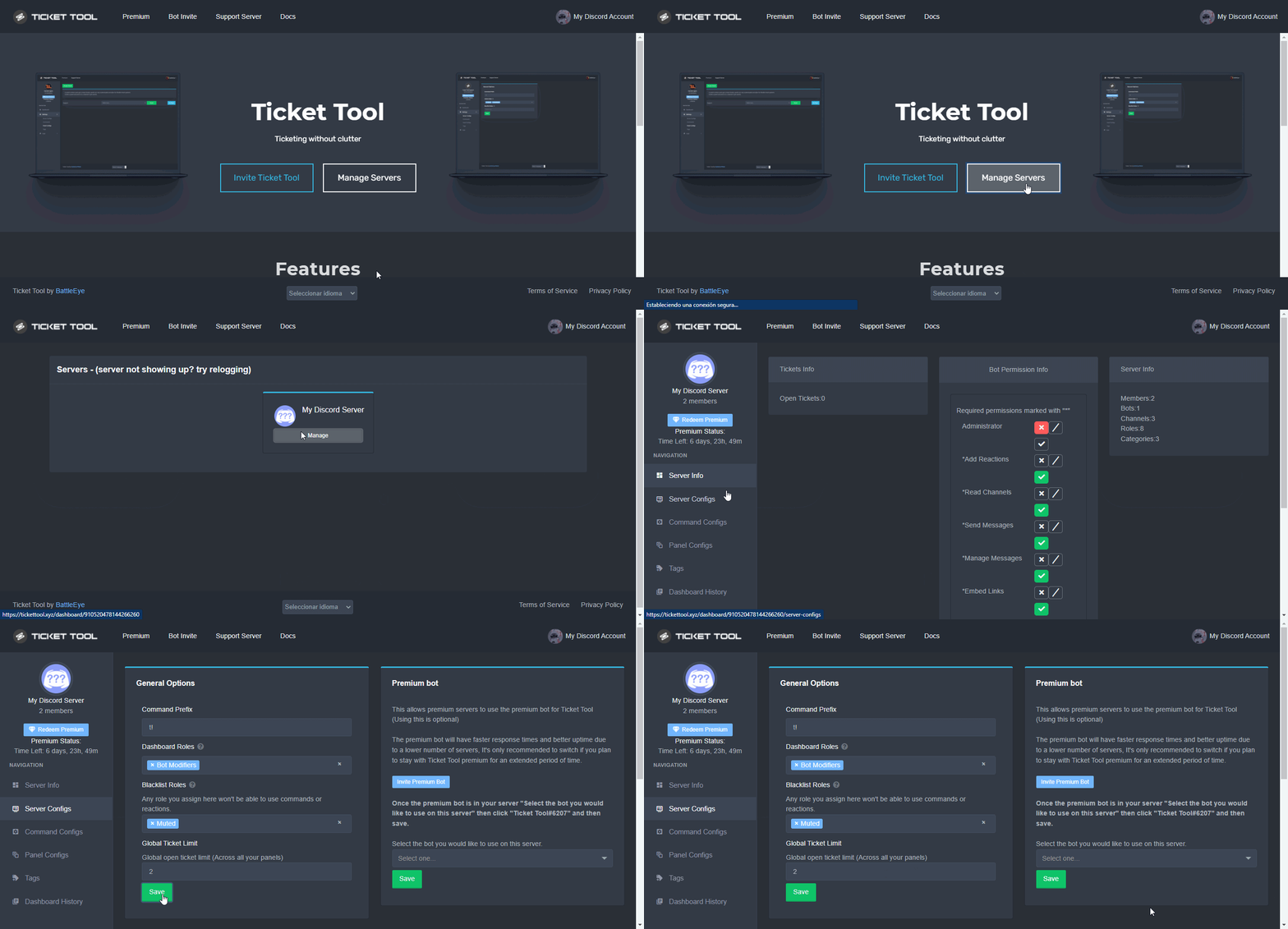
To customize it head over to your Dashboard ➞ Server Configs ➞ Global Ticket Limit
Note:
This is not a limit for how many tickets a user can open at all times or how many tickets you can have open on the server in total. This is just a limit per user for open tickets.
 glacial geode
And if I want a person to not be able fo make 10 tickets in 10 minutes?
 supple tulip
Can it name the tickets like ticket-mrq instead of ticket-0001?
jade topaz
supple tulip
Can it name the tickets like **ticket-mrq** instead of **ticket-0001**?
Thats with premium.
jade topaz
glacial geode
And if I want a person to not be able fo make 10 tickets in 10 minutes?
Not sure you can

 sterile minnow
hello I added the bot to my server but my server does not appear in the dashboard
humble sequoiaBOT
Don't see your server in the dashboard?
You will possibly need to relog. Look below to see steps on how to relog.
How to relog in the Dashboard.
First, you will need to go to the dashboard. Once your there, click on your avatar on the top right. after you clicked it, you will see button that says Logout. You must click that. Once you have logged out, you can log back in.
Note:
You need one of these 3 things to access the dashboard.
1. Server Owner (Level: 6)
2. Server Administrator (Level: 4)
3. Dashboard Role (Level: 2)
:warning: You can check your level using $level on your Discord Server
User permission level with Ticket Tool
@User is permission level: 0 (User)
```» *If it shows that your permission is **0**, you don't have any of the above **3 things** to manage the dashboard.*


**See the GIF below on how to relog:**
 fallow ingot
 urban gust
If you want ticket tool to ping a role make sure it has perms to ping the role. Also, you can get Arabic support in #🎫│make-a-ticket.
$help ping
humble sequoiaBOT
How to make Ticket Tool ping a role
To make ticket tool ping a role when a ticket is opened, go to the Dashboard -> Panel Configs -> Settings -> Ticket Options -> Ticket Message -> Message Text and do this:
{@Role name} This is case sensitive and the role must have @mentions enabled

 dry birch
fallow ingot
glacial geode
And if I want a person to not be able fo make 10 tickets in 10 minutes?
dry birch
fallow ingot
glacial geode
And if I want a person to not be able fo make 10 tickets in 10 minutes?
With the same panel or across different panels?
fallow ingot
supple tulip
Can it name the tickets like **ticket-mrq** instead of **ticket-0001**?
Like bartosz said, it is possible but with premium.
I do recommend premium
jade topaz
Hey guys, i just bought premium and i'd like to know how can i invite the premium bot
I only have the basic one
humble sequoiaBOT
The first thing you will need to do is invite the premium bot, an invite can be found here
Once the bot is in your server we will head to the dashboard and manage your server. When you are managing your server, you want to head into "Server Configs" then click the drop down menu under "Select the bot you would like to use on this server" then click "Ticket Tool#6207" and then save.
quasi cliff
jade topaz
Hey guys, i just bought premium and i'd like to know how can i invite the premiu...
iron nightBOT
Gave +1 Rep to @quasi cliff
glacial geode
fallow ingot
With the same panel or across different panels?
Same panel
 upper flower
quasi cliff
All the tags are pinned in <#910978476536905738>
upper flower
quasi cliff
All the tags are pinned in <#910978476536905738>
They aren’t asking about tags.. They asked about self roles in this server
quasi cliff
Oh my bad, they said Tag so I told them to check pins
jade topaz
I need help 😢
humble sequoiaBOT
We would love to help you, but if you don't tell us what you need help with we can't help you :(
rustic gale
$help category
humble sequoiaBOT
How to set the open category
To set a open category go to the Dashboard -> Panel Configs -> Settings -> Category Options -> Category Open
iron nightBOT
Gave +1 Rep to @rustic gale
fallow ingot
glacial geode
Same panel
Just bring the ticket limit to 1
 high knoll
Anyone know how to make it so a role can't see tickets
gilded verge
im not sure what you mean, can you give an example please?
high knoll
gilded verge
im not sure what you mean, can you give an example please?
Like so a certain role can't see tickets like trial mod
gilded verge
have you added this role to your support team roles? if so, just delete and this role cannot access the tickets :>

and please don't use View As Role because this isn't working with tickets
 spice sorrel
does anyone know when using tags: what is the {} to type to input the user name of the user that opened the ticket. When I use it now as { user } it inputs the mod name that used the tag command
 cloud jolt
Anyone know how to get the message where it has the button
rustic gale
spice sorrel
does anyone know when using tags: what is the {} to type to input the user name ...
author
rustic gale
cloud jolt
Anyone know how to get the message where it has the button
Can you please clarify?
quasi cliff
cloud jolt
Anyone know how to get the message where it has the button
--moved to ticket--
spice sorrel
rustic gale
`author`
thank you so much!
iron nightBOT
Gave +1 Rep to @rustic gale
spice sorrel
rustic gale
`author`
hmmm... {author}, {user_author} didn't work... any other ideas?
quasi cliff
spice sorrel
hmmm... {author}, {user_author} didn't work... any other ideas?
It's not possible as of now, you'll have to wait for the coming update.
spice sorrel
quasi cliff
It's not possible as of now, you'll have to wait for the coming update.
thank you!
iron nightBOT
Gave +1 Rep to @quasi cliff
 glad canopy
hey so for some reason members can see the panel channel but they cannot see the tickets opened
how do i fix that
@quasi cliff
quasi cliff
glad canopy
hey so for some reason members can see the panel channel but they cannot see the...
Hey, head over to your Dashboard ➞ Panel Configs ➞ Settings ➞ Permission Options ➞ Edit User Opened Permissions
glad canopy
 quasi cliff
Does the bot create a channel for them?
quasi cliff
glad canopy
Check from channel settings if the user got same permissions as this
Also this won't work if you're using "View as role" to test
humble sequoiaBOT
View As Role feature
Discord's integrated View As Role feature will allow you to see how different groups of roles will have access to your server's channels. Even though, this feature isn't reliable for thoroughly testing Ticket Tool considering that the tickets are created based on User roles, and that Roles permissions are only used for Support Team Roles, and Additional Roles.
For testing Ticket Tool as a user we suggest you ask a friend to open a ticket for you as a regular member would do, or use an alternative account to simulate the same process to make sure everything is set properly.
quasi cliff
You can test it by an alternate account or with the help of friend
quasi cliff
Sorry but I can't help by joining servers
You can simply create a ticket and check channel permissions if bot added you as the User with Read and Send message, if yes then you're good to go!
quasi cliff
If you require any further information, let me know.
 neat spruce
здрасвтуйте, можно сделать репорт?
quasi cliff
Сделать отчетный тикет в #🎫│make-a-ticket
 scenic silo
How can I blacklist roles from creating a ticket
rustic gale
Dashboard -> Panel Configs -> Settings -> Button Options -> Create Ticket Settings -> add them to Denied Roles
 terse sundial
يخوان من وين اشتري تكت تول بريم يوم
 novel kraken
What’s the difference on the dashboard permission level 2,4,6?
gilded verge
2. Server Administrator (Level: 4)
3. Dashboard Role (Level: 2)

4. User permission level with Ticket Tool
@User is permission level: 0 (User)```Yes I know the levels but do they all do the same thing or is there a difference between them?
gilded verge
When it comes to permissions, the difference is that if someone has a role with level 2, he does not need to have administrator rights on the server to manage the dashboard.
Like... Look, if some of my users have this role, they don't need an administrator to manage the bot :>
 novel kraken
That’s all I needed to know I was just curious cause a few people on my server were asking me
gilded verge
and I am sorry that I did not understand the question at first 🥺
novel kraken
gilded verge
and I am sorry that I did not understand the question at first 🥺
No worries thank you very much though
iron nightBOT
Gave +1 Rep to @gilded verge
novel kraken
gilded verge
and I am sorry that I did not understand the question at first 🥺
Oh and one more thing that I discovered if somebody is to be given a dashboard role somebody cannot make them an admin and then they do it and then remove their admin status it won’t work the owner has to create that role and give it to them on the dashboard
gilded verge
sorry but i am not sure, was that a question? 😳
novel kraken
gilded verge
sorry but i am not sure, was that a question? 😳
No I was letting you know that that’s what I figured out
gilded verge
yup, it's true, the user can get this role completely without permission and it is enough that someone who has administrator perms or is the owner of the server adds a specific role there and the user with the Dashboard Role can manage the entire dashboard
*but please be careful who you give that role 😊
novel kraken
gilded verge
yup, it's true, the user can get this role completely without permission and it ...
Yes I know the role was for me on another server and the owner I couldn’t figure it out and neither could I and till we finally figured that part out he would give me temporary admin and then I would give myself the role and then turn around and add it on the dashboard but it didn’t work so I had to walk him through how to do it
 pseudo nimbus
Just looking to verify something simple, is there ever an instance that ticket tool would show as a user such as this?
 rustic gale
If it doesn't have the BOT indicator next to the username, it's not a bot.
There's more than a few tells that it's an impostor. The lack of the BOT indicator, the discriminator (legit Ticket Tool's discriminator is 4843), the way the pfp is off-center, the mobile icon
It's a very obvious impostor
 lime crown
I got a problem, i can t add Ticket Tool bot to my server, it s not joining, what can I do?
 orchid plank
I want to go to the chat where I can speak in all languages, but I go in with a sign that looks like danger, and every time I try to enter it says that it does not work and other words, but I did not write it because I do not know the English language
And I meant it was on the ticket tool's server, not mine
 glad cloak
lime crown
I got a problem, i can t add Ticket Tool bot to my server, it s not joining, wha...
glad cloak
lime crown
I got a problem, i can t add Ticket Tool bot to my server, it s not joining, wha...
What is it saying? when you try?
jade topaz
hey
how to get multiple ticket buttons at a single panel
uh
sowwy for ping
uh anyone here?
It's pretty urgent
glad cloak
Hello
jade topaz
jade topaz
how to get multiple ticket buttons at a single panel
help
glad cloak
Please give us a moment!
jade topaz
glad cloak
Please give us a moment!
uhok
 prisma pollen
How can I make the @pseudo glen do this for all my server’s???
Btw I’m new here and im just getting started with the Ticket Tool bot.
 prisma pollen
How can I make the <@557628352828014614> do this for all my server’s???
Btw I’m...
prisma pollen
prisma pollen
How can I make the <@557628352828014614> do this for all my server’s???
Btw I’m...
Anyone
jade topaz
prisma pollen
Anyone
just got to web and got to the sevrer u want to manage
glad cloak
jade topaz
uhok
Someone should be with you shortly.
prisma pollen
This is what it shows up when I go to dashboard
 glad cloak
prisma pollen
This is what it shows up when I go to dashboard
glad cloak
prisma pollen
This is what it shows up when I go to dashboard
Are you trying to do this to your server?
jade topaz
prisma pollen
This is what it shows up when I go to dashboard
uh :(
prisma pollen
glad cloak
Are you trying to do this to your server?
Yea
glad cloak
prisma pollen
Yea
Click on invite ticket tool. What does that do for you?
prisma pollen
glad cloak
Click on invite ticket tool. What does that do for you?
Invites the goddamn bot to my server lmao, but on a serious note tho, it invites the bot in my server
Excuse my language
jade topaz
uh i want someone fast :( im in hurry
glad cloak
hmm 🤔 If it's already invited to your server you should be able to manage your server
prisma pollen
Let me try
prisma pollen
glad cloak
hmm 🤔 If it's already invited to your server you should be able to manage your ...
.
 glad cloak
prisma pollen
Let me try
glad cloak
prisma pollen
Let me try
Hmm it should give you the option to manage the server.
 glad cloak
Try relogging
prisma pollen
It don’t do sh*t
prisma pollen
glad cloak
Try relogging
I’ll try
quasi cliff
jade topaz
how to get multiple ticket buttons at a single panel
Using Multipanels
humble sequoiaBOT
Multipanels are panels with multiple buttons attached to them.
How to create a Multipanel
Premium users can combine multiple panels into one multipanel.
First, find the IDs of each panel you wish to combine. You can find them in your Panel Configs in the Dashboard
Next, send the multipanel to a channel using $panel [id1] [id2] {id3} ....
e.g. $panel 1 2 4 17 35 to combine panels 1, 2, 4, 17 and 35.
Up to 25 panels may be combined.
You can also watch this video tutorial.

For a more convenient use of multipanels, you can now combine panels on the dashboard. This will allow you to directly send the multipanel from the dashboard or via the $panel ID command.
Where can I find this?
You can find this setting on the Dashboard -> Panel Configs -> Settings -> General Options
Note: if you're attaching all the panels to a panel called English, don't include English in the attached panels box (If you do this, it will create duplicate)
This will put all buttons from all of your panels on one message. The message is the panel message from the panel you're combining these panels in.
You can also watch this video tutorial.
 prisma pollen
glad cloak
Try relogging
prisma pollen
glad cloak
Try relogging
Aye it works now
glad cloak
prisma pollen
Aye it works now
Awesome 🙂
prisma pollen
Yay 🎉🎉🎉🎉👏🎉😄
prisma pollen
prisma pollen
How can I make the <@557628352828014614> do this for all my server’s???
Btw I’m...
Ok so how do I set it up again help me pls @glad cloak
glad cloak
Click mange server
prisma pollen
Mhm
 halcyon yoke
Good morning, the free mode, how many tickets can be opened? Is there a limit of open or closed tickets? Because at one point I didn't delete the tickets after giving delete the tickets they didn't go away, is there a limit in the free mode?
prisma pollen
glad cloak
Click mange server
And
glad cloak
prisma pollen
Mhm
Do you see this
 prisma pollen
Hol on
prisma pollen
glad cloak
Do you see this
 prisma pollen
glad cloak
Do you see this
prisma pollen
glad cloak
Do you see this
What else
glad cloak
Hold on i'm having brain fart lol
quasi cliff
halcyon yoke
Good morning, the free mode, how many tickets can be opened? Is there a limit of...
There is no limitation on tickets for free bot, you can set a limit on how many tickets a user can create per panel/globally. A category can have max of 50 channels so the tickets will just goto top (you can add another category).
humble sequoiaBOT

You can check our documentation here;
You can also check #📂│information for the basic setup;
You can also watch this video tutorial.
Our documentation contains all the info you need about the bot to be able to setup and configure the bot however you like.
quasi cliff
humble sequoia
@prisma pollen check this out
prisma pollen
quasi cliff
<@920443699081666611> check this out
Ight thx
iron nightBOT
Gave +1 Rep to @quasi cliff
glad cloak
Whoop Rock for the save 🙂
jade topaz
How can I get people to create Tickets on my server?
humble sequoiaBOT
You can check our documentation here;
You can also check #📂│information for the basic setup;
You can also watch this video tutorial.
Our documentation contains all the info you need about the bot to be able to setup and configure the bot however you like.
quasi cliff
jade topaz
How can I get people to create Tickets on my server?
You can setup the bot
 desert drift
where can i get a premium bota panel? I have premium and I can't find the link?
humble sequoiaBOT
quasi cliff
desert drift
where can i get a premium bota panel? I have premium and I can't find the link?
It's on the same website
desert drift
quasi cliff
It's on the same website
ah okay
 opaque terrace
Hey 👋
I have a little question
How can I manage the roles who can see/edit my tickets (I want to add my mods)
I went to "General options", then Support Team Roles
It worked, but they don't have all the permissions I gave them
desert drift
how do I make it say help-0058 when opening a ticket?
 quasi cliff
opaque terrace
It worked, but they don't have all the permissions I gave them
quasi cliff
opaque terrace
It worked, but they don't have all the permissions I gave them
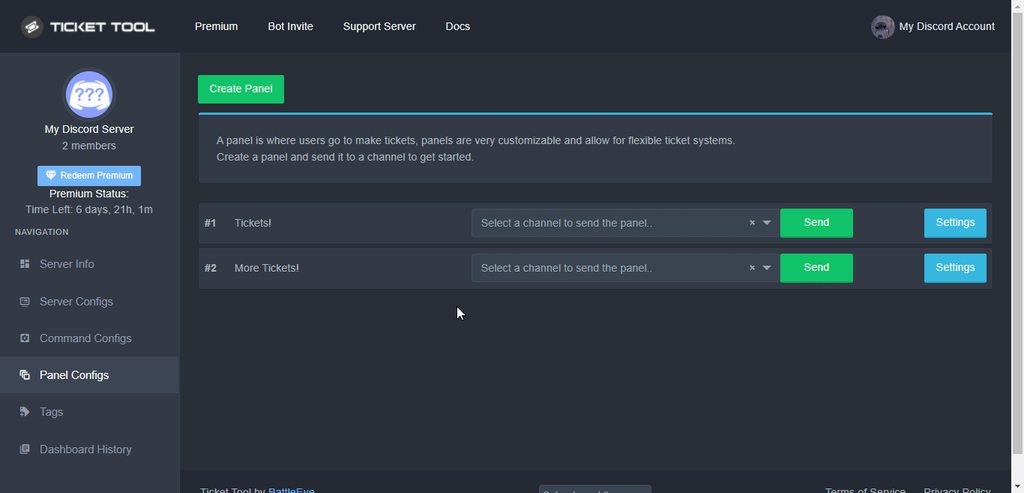
You can do that under the permissions settings:
 opaque terrace
quasi cliff
You can do that under the permissions settings:
https://i.imgur.com/NfwkZBk.gif
opaque terrace
quasi cliff
You can do that under the permissions settings:
https://i.imgur.com/NfwkZBk.gif
Thats what I've done but it is not working :/
quasi cliff
Did you try it on new ticket?
opaque terrace
Do my moderation team have to have all the permissions maybe ?
opaque terrace
quasi cliff
Did you try it on new ticket?
I'm trying rn
quasi cliff
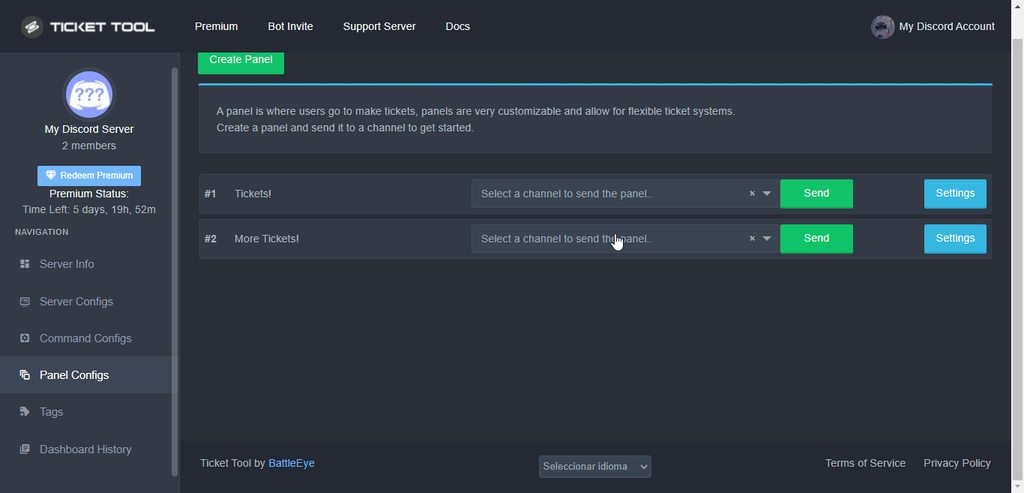
The config you change won't affect old tickets
 desert drift
thanks
 quasi cliff
Run $debug in the channel
 noble grotto
Im did That But Bot Not Send Me Anything
quasi cliff
Check if bot can see that channel
quasi cliff
Try @pseudo glen debug
noble grotto
Ok i will try
 hexed root
Is there a way to customize the premium bot? Change name/avatar?
humble sequoiaBOT

Ticket Tool avatar/status Customisation
@pseudo glen is like another discord user; you can't control its avatar icon or status, and we cannot change it for a specific server.
However, on your server, you can change the bot's nickname
 rustic gale
@noble grotto Look at this
humble sequoiaBOT
How to disable the premium bot
To disable the premium bot you will have to go to the Dashboard ➞ Server Configs ➞ Premium bot ➞ And on the right-hand side select the primary free bot in the drop down menu.
Premium features will still work on the normal bot.

 shut rain
Unsure why but $new does not seem to work, does not provide a error either.
I don’t believe I’ve disabled it somehow, is there something I need to do to have it work?
atomic solstice
shut rain
Unsure why but $new does not seem to work, does not provide a error either.
Hi, did you enable command style tickets in the panel itself?
$commandstyle
humble sequoiaBOT
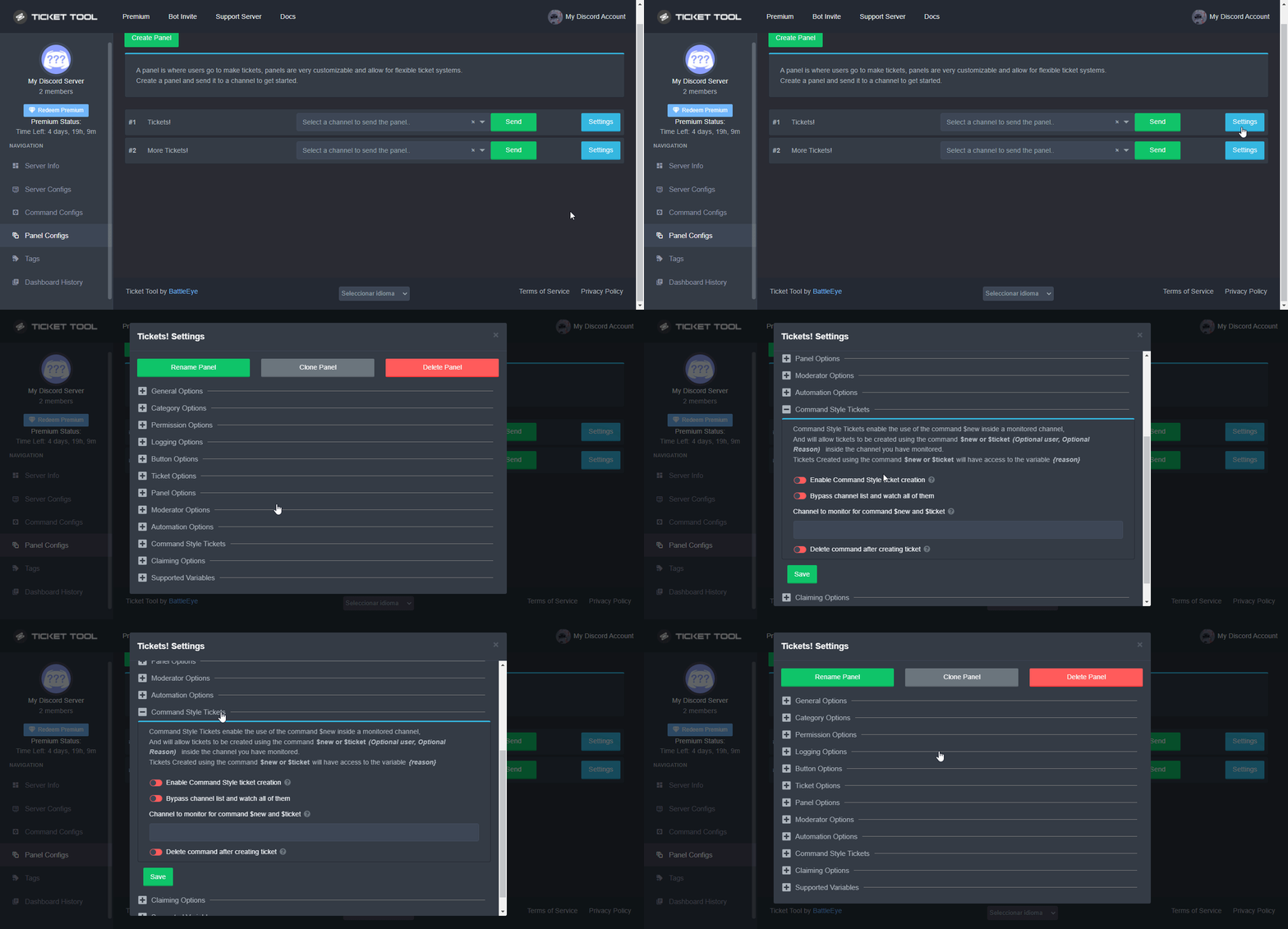
Command Style Tickets allow you to open tickets VIA the $new or $ticket commands. This feature also allows you to open tickets for people, by using the aforementioned commands with the user's ping or ID.
You can enable this feature by heading over to your server's dashboard. Then head over to Panel Configs ➞ Settings ➞ Command Style Tickets. (GIF below shows you how to get to it as well).
This section of the panel settings also contains the following features
- Bypass channel list and watch all of them → when you enable this option, Ticket Tool will create a ticket whenever someone uses the $new or the $ticket command in a channel it has access to .
- Channel to monitor for command $new and $ticket → This is the opposite of the previous option, you can actually select in which channels Ticket Tool should look for the $new command instead of looking in the whole server.
- Delete command after creating ticket → If enabled, Ticket Tool will delete the command (whether it's
$newor$ticket) a few seconds after you run it.
 shut rain
Ah no I don’t believe so!~ I’ll go check that out oops 🙏
atomic solstice
it's not enabled by default
atomic solstice
shut rain
Ah no I don’t believe so!~ I’ll go check that out oops 🙏
above is a guide ^^
😉
 sullen igloo
How do I make it so people have to open a ticket to get into the channels?
 shut tapir
Can you $add someone to a ticket?
gilded verge
sullen igloo
How do I make it so people have to open a ticket to get into the channels?
Sorry but I do not understand. Can you give an example please?
shut tapir
shut tapir
Can you `$add` someone to a ticket?
@gilded verge
humble sequoiaBOT
How to add or remove users on tickets
To add a user to a ticket use $add <user>
To remove a user from a ticket use $remove <user>
shut tapir
Do I need premium?
gilded verge
Nope
iron nightBOT
Gave +1 Rep to @gilded verge
sullen igloo
gilded verge
Sorry but I do not understand. Can you give an example please?
like when you join a server and there is the rules and maybe a few other channels but you can't see all of them and you have to open a ticket to answer questions. Would the support team just have to give the person a role afterwards to see all the channels or is there something the ticket can do to give them that automatically?
gilded verge
Ticket Tool bot does not have any automatic self-role options so your support team would have to manually assign roles to users.
In order for users to open a ticket, do you need to create a panel and send it to the channel. Have you checked the setup yet?
humble sequoiaBOT
You can check our documentation here;
You can also check #📂│information for the basic setup;
You can also watch this video tutorial.
Our documentation contains all the info you need about the bot to be able to setup and configure the bot however you like.
sullen igloo
gilded verge
Ticket Tool bot does not have any automatic self-role options so your support te...
I already have it set up
gilded verge
okay ^-^
 upbeat token
Hello, how can I set that all my co-admins can see that a user has been opened a ticket?
Only I as Discord owner and admin can see these new tickets
 tribal cedar
upbeat token
tribal cedar
upbeat token
do you mean in Dashboard from tickettool ?
upbeat token
thanks for help, works 👍

 humble sequoiaBOT
View As Role feature
Discord's integrated View As Role feature will allow you to see how different groups of roles will have access to your server's channels. Even though, this feature isn't reliable for thoroughly testing Ticket Tool considering that the tickets are created based on User roles, and that Roles permissions are only used for Support Team Roles, and Additional Roles.
For testing Ticket Tool as a user we suggest you ask a friend to open a ticket for you as a regular member would do, or use an alternative account to simulate the same process to make sure everything is set properly.
jade topaz
im adding the role to additional roles?
gilded verge
Hey, the point is, you shouldn't look in View As Role because it doesn't work with Ticket Tool. If you want to make sure everything is working well for you, use your alt account
iron nightBOT
Gave +1 Rep to @gilded verge
 short meteor
Ah so question
Is there a possible way to see who (or said person) opened a ticket
I’m asking this specifically because someone closed one before anyone seen the name
That and I chose here to ask so if anyone else has that problem they could refer to this
 lapis idol
short meteor
Is there a possible way to see who (or said person) opened a ticket
lapis idol
short meteor
Is there a possible way to see who (or said person) opened a ticket
U can edit it with variables via the ticket message where it pings the user who opened the ticket
If that is what you are looking for
short meteor
I see
Yeah I know someone opened it but never opened a new one when it was closed by another member
lapis idol
short meteor
Yeah I know someone opened it but never opened a new one when it was closed by a...
U can also edit the close message to ping the same user who opened it
lapis idol
short meteor
Ok thank uuu
Refer to this:
humble sequoiaBOT
{server.name} ➞ Name of the server
{server.id} ➞ ID of the Server

[#🆘│community-support](/guild/509192800865353738/channel/776680605517742090/) = <#channel> ➞ Channel link of the current channel
{channel.name} ➞ Name of the current channel
{channel.id} ➞ ID of the current channel

{author} = <@user> ➞ Mention of the user triggering this message
{author.name} ➞ Name of the user triggering this message
{author.id} ➞ ID of the user triggering this message
{author.nickname} ➞ Nickname of the user triggering this message
{author.icon} ➞ Direct Url of the profile picture of the user triggering this message
{author.tag} ➞ 4 digit tag (discriminator) of the user triggering this message
{author.full} ➞ username + 4 digit discriminator of the user triggering this message

{panel.count} ➞ The current count number of the panel (Tickets only)
{panel.name} ➞ The name of the panel (Tickets Only)
{panel.ticketLimit} ➞ The current limit of the panel (Ticket Only)

{ticket} = <#channel> ➞ Channel mention of the ticket
{ticket.id} ➞ Channel ID of the ticket

{ticket.user} = <@user> ➞ User mention of the ticket user
{ticket.user.name} ➞ Name of the ticket user
{ticket.user.id} ➞ User ID of the ticket user
{ticket.user.nickname} ➞ Nickname of the ticket user
{ticket.user.icon} ➞ Direct Url of the profile picture of the ticket user
{ticket.user.tag} ➞ Tag / Discriminator of the ticket user
{ticket.user.full} ➞ Username + Discirimator of the ticket user```
Roles can be either
{@role name} or {role ID}
_ _
_ _
Additional variables
{reason}
» works on $close <reason>, $delete <reason>, $new <reason>, $claim <reason>
» displays the reason, you can optionally give with some commands
Transcript Variables
{ticket_name}➞ Name of the ticket
{panel_name}➞ Name of the panel
{transcript_url}➞ File link of the transcript
Hide Link under blue text:
[Click me](https://tickettool.xyz)➞ Click me
Time Variable
Sends the current unix time in seconds. Optinally add or remove seconds
<t:{!time+43200}:R>➞ <t:1658231158:R>
<t:{!time-43200}:R>➞ <t:1658144758:R>
<t:{!time}:R>➞ <t:1658187958:R>
» Remove ! before time
_ _
<t:1641006000>➞ <t:1641006000>
<t:1641006000:f>➞ <t:1641006000:f>
<t:1641006000:F>➞ <t:1641006000:F>
<t:1641006000:D>➞ <t:1641006000:D>
<t:1641006000:d>➞ <t:1641006000:d>
<t:1641006000:t>➞ <t:1641006000:t>
<t:1641006000:T>➞ <t:1641006000:T>
<t:1641006000:R>➞ <t:1641006000:R>
» You can use https://hammertime.djdavid98.art/ to create custom dates/times
lapis idol
short meteor
This should help thanks <@536402184997175296>
Of course anytime
 distant adder
Does Ticket Tool Premium do reaction roles?
gilded verge
distant adder
Does Ticket Tool Premium do reaction roles?
nope
 chrome sedge
how do I make the bot ping the person that created the ticket?
Figured it out. Awesome bot.
jade topaz
Can any one tell me how to do more than one button?
humble sequoiaBOT
Multipanels are panels with multiple buttons attached to them.
How to create a Multipanel
Premium users can combine multiple panels into one multipanel.
First, find the IDs of each panel you wish to combine. You can find them in your Panel Configs in the Dashboard
Next, send the multipanel to a channel using $panel [id1] [id2] {id3} ....
e.g. $panel 1 2 4 17 35 to combine panels 1, 2, 4, 17 and 35.
Up to 25 panels may be combined.
You can also watch this video tutorial.
For a more convenient use of multipanels, you can now combine panels on the dashboard. This will allow you to directly send the multipanel from the dashboard or via the $panel ID command.
Where can I find this?
You can find this setting on the Dashboard -> Panel Configs -> Settings -> General Options
Note: if you're attaching all the panels to a panel called English, don't include English in the attached panels box (If you do this, it will create duplicate)
This will put all buttons from all of your panels on one message. The message is the panel message from the panel you're combining these panels in.
You can also watch this video tutorial.
jade topaz
Mopile@quasi cliff
jade topaz
quasi cliff
<:this:894279341108772914>
Is it premium?
 silent marlin
how to put a picture in the ticket panel?
quasi cliff
jade topaz
Is it premium?
Multiple buttons are free now (with some limitations like emoji)
jade topaz
Ok
 rare cobalt
I m gey bruhh
jade topaz
how to i make it decode a coockie
quasi cliff
jade topaz
how to i make it decode a coockie
what do u mean?
jade topaz
nvm
humble sequoiaBOT
Don't see your server in the dashboard?
You will possibly need to relog. Look below to see steps on how to relog.
How to relog in the Dashboard.
First, you will need to go to the dashboard. Once your there, click on your avatar on the top right. after you clicked it, you will see button that says Logout. You must click that. Once you have logged out, you can log back in.
Note:
You need one of these 3 things to access the dashboard.
1. Server Owner (Level: 6)
2. Server Administrator (Level: 4)
3. Dashboard Role (Level: 2)
:warning: You can check your level using $level on your Discord Server
User permission level with Ticket Tool
@User is permission level: 0 (User)
```» *If it shows that your permission is **0**, you don't have any of the above **3 things** to manage the dashboard.*
**See the GIF below on how to relog:** patent ember
Alo
fallow ingot
patent ember
Alo
Do you need help with something?
vapid gyro
I have a question
 crimson eagle
How may I help
vapid gyro
so for your tickets, you have a message INSIDE the ticket
crimson eagle
Yh
vapid gyro
but I do not and I would like to know how to do that
all it says is this

ohh okay
humble sequoiaBOT
The panel message is where people react to make a ticket. To customize it head over to your Dashboard --> Panel Configs -> Settings -> Panel Options -> Edit Panel Message
 crimson eagle
That?
vapid gyro
Yea I
crimson eagle
Let me double check for you
vapid gyro
Yep!
vapid gyro
lol
crimson eagle
I’m cool now :)
vapid gyro
lol
 quartz token
i need help
crimson eagle
What’s wrong
quartz token
so i have a new mod on my server whenever a player opens a ticket my mod cant manage the ticket or see it
crimson eagle
$perms
humble sequoiaBOT
ᅠ
@pseudo glen requires the following permissions:
Add Reactions
Read Channels
Send Messages
Manage Messages
Embed Links
Attach Files
Read History
Manage Roles
Manage Channels
To change the role permissions, you can go to your Discord Server ➞ Server Settings ➞ Roles ➞ @Ticket Tool
To change the channel permissions, you can go to your Channel Settings ➞ Permissions ➞ Ticket Tool
ᅠ
Note:
You can give Ticket Tool Administrative Permissions instead of all the permissions listed above, but it's entirely optional and NOT necessary.
 quartz token
np
quartz token
$additionalroles
crimson eagle
$additionalroles
humble sequoiaBOT
Any role you put there will have full access to the ticket tool dashboard. The server owner and users with admin permissions already have access to the dashboard.
Be careful of which roles to put here
 crimson eagle
WHAT in the command did you do
quasi cliff
$help support
humble sequoiaBOT
How to let support team see into a ticket
About support roles
A support role lets your support team see into tickets with out having to add them manually to each and every ticket.
You can add as many support roles as you like per panel.
NOTE that the way discord works all admins can see into tickets regardless of this.
How to set a support role
To set a Support role go to the Dashboard -> Panel Configs -> Settings -> General Options -> Support Team Roles.
NOTE that the support role will not be able to see into tickets that are already created..
quasi cliff
^
crimson eagle
Oh
quasi cliff
quartz token
so i have a new mod on my server whenever a player opens a ticket my mod cant ma...
crimson eagle
That was kinda obv wasn’t it and I was just silly
quartz token
ok lemme try
quasi cliff
crimson eagle
That was kinda obv wasn’t it and I was just silly
You'll get to know cmds soon (if u are active here)
crimson eagle
:)
quartz token
so if i add all my staff team roles will they be able to acces tickets ?
iron nightBOT
Gave +1 Rep to @quasi cliff
quartz token
thanks @crimson eagle
 craggy lodge
How to make admin in my server replay to tickets please
humble sequoiaBOT
━━ moved to ticket ━━
 empty violet
Is there a possibility to get like a dropbox where you can decide wich kind of ticket you want wo open?
 covert swallow
There is multipanels, like what we have in #🎫│make-a-ticket
empty violet
That’s exactly what i need, since when is this available?
jade topaz
Not long, recently became available for the free bot. Used to be premium only.
covert swallow
Its been on premium for ages, it was recently added to free
jade topaz
Sorry for interrupting!!
covert swallow
No worries
covert swallow
covert swallow
Its been on premium for ages, it was recently added to free
Recently: #📣│bot-news message
empty violet
Ok thank you Guys. We have the premium one on the Server. I‘ll try to make it and i can‘t make it i‘ll contact you again.
Thanks a lot
covert swallow
No problem!
 marsh nebula
Please, how do I change the name of the Ticket Tool premium bot. Right now the name is "Ticket Tool"
gilded verge
marsh nebula
Please, how do I change the name of the Ticket Tool premium bot. Right now the n...
Right click on bot and choose Change Nickname, like this:
 marsh nebula
tysm!!
 marsh totem
What is this section used for?
 shut bolt
marsh totem
What is this section used for?
shut bolt
marsh totem
What is this section used for?
You add the IDs of the bots you want Ticket Tool to listen commands from
marsh totem
shut bolt
You add the IDs of the bots you want Ticket Tool to listen commands from
Ah got you. I wasn't sure if that was linking a custom bot to ticket tool. Thank you
iron nightBOT
Gave +1 Rep to @shut bolt
 scenic plinth
Don't flood chat with emoji's please 🙂
 nimble mauve
Hello!
 gaunt ledge
I need help
in my server
when a member creates a ticket, they can't see the ticket. When I go to the ticket as the owner, I see that only the owner can see the ticket. I added members and mods and owners as support team members, so why isn't it working?
 sick lichen
gaunt ledge
when a member creates a ticket, they can't see the ticket. When I go to the tick...
sick lichen
gaunt ledge
when a member creates a ticket, they can't see the ticket. When I go to the tick...
have u changed the permissions here?
 sick lichen
gaunt ledge
one sec
sick lichen
gaunt ledge
one sec
should be like this
 gaunt ledge
one sec lemme test it out
sick lichen
gaunt ledge
one sec lemme test it out
ok
gaunt ledge
still doesn't work
gilded verge
~~Hey @gaunt ledge, It is very possible that this will help you: https://cdn.discordapp.com/attachments/979861967936290816/979874986946875412/Panel_Permissions.mp4~~
gaunt ledge
gilded verge
~~Hey <@776056817771872266>, It is very possible that this will help you: https:...
oh no we got it sorted out, but thanks!
gilded verge
Oh no! I have not noticed! sorry 😳
 merry walrus
Hey how do i make that ticket bot closes ticket faster
jade topaz
You cannot im afraid!
merry walrus
There are servers were i've seen tickets close way faster
jade topaz
Must be using other ticketing bots.
merry walrus
meanwhile i gotta wait 5 mins
nope it's ticket tool, th other tickets bot are eh
thats why i chose this one
and how does the redeem premium code works? So if someone buys it he gets an extra code that he can give to someone?
quasi cliff
merry walrus
and how does the redeem premium code works? So if someone buys it he gets an ext...
No, you don't get extra code after buying
jade topaz
Oh i didnt know thats what you mean.
merry walrus
So how does the premium rdeem code work?
jade topaz
You can redeem it here!
 merry walrus
Someone gives it to me?
jade topaz
If someone does give it to you, you can redeem it by pressing the blue button on the dashboard!
merry walrus
Ye i knew that just wa confused how to get the code
i see well thanks for your help might suggest buying it formyself since it's only $6 a month
jade topaz
merry walrus
Ye i knew that just wa confused how to get the code
You have to purchase premium or win a giveaway! (Or, someone could be kind enough to gift it to you for free! :) )
merry walrus
hopefully someone kind enough
i need the claim option badly, that could be lots of help
quasi cliff
By purchasing you get subscription and you can activate it on dashboard
merry walrus
yep i see
jade topaz
merry walrus
hopefully someone kind enough
Sometimes, the billing team drop premium keys in #💬│general-chat so id look out for them!
quasi cliff
jade topaz
You have to purchase premium or win a giveaway! (Or, someone could be kind enoug...
or by voting
merry walrus
And multiple people can redeem that
wait if i vote for server rn i get a code for premium??
jade topaz
No, you have to vote numerous times.
quasi cliff
Not for server, for bot yes
jade topaz
Wait what
merry walrus
yes for the bot
quasi cliff
Each vote is worth 12 hours of premium and can be redeemed once you have atleast 6 votes.
jade topaz
Ah yes!
 graceful finch
Hey pls help
humble sequoiaBOT
We would love to help you, but if you don't tell us what you need help with we can't help you :(
jade topaz
@graceful finch ^
graceful finch
Hi
jade topaz
How can we help?
graceful finch
Yes
jade topaz
What is the issue?
jade topaz
Its alright, for further support feel free to ask!
quasi cliff
You can vote twice (on top.gg and discords.com)
jade topaz
So essentially, you can redeem your premium in 3 days if you vote twice each day!
quasi cliff
humble sequoiaBOT
Ticket Tool Premium
Get premium at https://tickettool.xyz/premium
Manage your subscriptions at https://tickettool.xyz/subscriptions
Why Premium?
Premium lets you customize the bot just how you want it. It also helps keep the bot running.
jade topaz
Your fine! Thanks for using Ticket Tool! :)
merry walrus
thats really time consumin lmfao and it's short period for the premium but i'll still vote i dont mind
jade topaz
Yup! Personally, id just buy it but hey, i cant tell you how to spend your money!
jade topaz
Alright, lets move to #💬│general-chat for furher conversation! Thanks.
graceful finch
Hello
jade topaz
Hey! How can we help?
graceful finch
No
jade topaz
Please direct yourself to #💬│general-chat if you do not require help!
jade topaz
How can i help?
graceful finch
Yes
jade topaz
What is the issue?
graceful finch
What is thit
jade topaz
This is the Ticket Tool Support Server!
humble sequoiaBOT
Ticket Tool is a fantastic bot that deals with Tickets! With an easy to use bot that has a dashboard/website at https://tickettool.xyz/. Ticket tool is one of a kind with its customization and truly is a great bot which is why it has amassed over 200 million users!
The bot offers:
Ticket Tool is currently being used within 1,100,000+ servers, with a total of 295 million+ users, and has created over 99 million+ tickets.
Ticket Tool truly is an amazing bot that has such a big impact on this server!
:globe_with_meridians: https://tickettool.xyz/
 https://discord.gg/tUM9Xcv
:scroll: https://docs.tickettool.xyz/
~ Ticket Tool Team
·
jade topaz
@graceful finch
merry walrus
hello
merry walrus
i am trying to invite the premium bot but it aint joining my server
jade topaz
Are you sure you purchased premium?
merry walrus
 jade topaz
Save it here, then invite.
 merry walrus
oopises i fixed it
jade topaz
Everything good now?
merry walrus
yep thanks
jade topaz
No worries!
merry walrus
it said if bought premium the response time would be faster but when i close ticket it still same time
jade topaz
Thats not a perk of premium!
merry walrus
shit idk how the other servers do it then
jade topaz
merry walrus
shit idk how the other servers do it then
But, you can disable ( ) this to make the ticket close faster!
Find this in the Panel Configs > General Options
Additionally, you would also want to disable 2 step ticket!

@merry walrus
 knotty mango
jade topaz
Save it here, then invite.
knotty mango
jade topaz
Save it here, then invite.
where i get the code after i pay?
jade topaz
knotty mango
where i get the code after i pay?
You would open a billing ticket! I believe!
Yup!
knotty mango
ok i open
jade topaz
Great! Thanks for purchasing premium!
quasi cliff
merry walrus
it said if bought premium the response time would be faster but when i close tic...
What exactly do you mean by close ticket time? Like you said it takes 5min to close for you. Can you send ss?
jade topaz
quasi cliff
What exactly do you mean by close ticket time? Like you said it takes 5min to cl...
I think they mean the support team controls and the Close Confirmation, so i said how to disable them!
quasi cliff
But there's so no 5min thing
merry walrus
quasi cliff
What exactly do you mean by close ticket time? Like you said it takes 5min to cl...
not 5 mins mor elike 5 seconds maybe 10 but on another server it closes like right as the command is placed
jade topaz
As yes!
jade topaz
jade topaz
But, you can disable ( <:offswitch:836268364238290954> ) this to make the ticket...
Follow these steps! @merry walrus
That will resolve your issue.
merry walrus
ye i disabled them still takes 5-10 seconds
jade topaz
Well, i think your thinking of another bot.
Because other bots do that.
But not ticket tool.
quasi cliff
It actually closes asap
 jade topaz
merry walrus
isn't this this bot?
jade topaz
merry walrus
isn't this this bot?
That is the bot yes.
But we dont have INSTANT closing.
merry walrus
quasi cliff
It actually closes asap
Yes on the other server my server takes a second
jade topaz
It closes ASAP.
merry walrus
jade topaz
But we dont have INSTANT closing.
for him it takes 1 sec to close
jade topaz
That must be the Tickets bot that isnt affiliated with Ticket Tool.
quasi cliff
It takes 1s with TT too
merry walrus
quasi cliff
It actually closes asap
u mind joining my server i'll give u mod make a ticket close it
and see what i mean
and then u can leave
quasi cliff
Try $ping
jade topaz
merry walrus
No it closes the ticket but takes like 5 seconds
Thats normal.
jade topaz
quasi cliff
You can switch to Premium bot
They have premium bot.
 merry walrus
quasi cliff
You can switch to Premium bot
merry walrus
quasi cliff
You can switch to Premium bot
i did switch
quasi cliff
It should take about 2s to close
jade topaz
quasi cliff
It should take about 2s to close
I think they mean delete.
merry walrus
u wanan try it out real quick?
jade topaz
Bc it closes fast.
jade topaz
merry walrus
u wanan try it out real quick?
I would be down. But up to you.
merry walrus
ok sure u can join
jade topaz
DM me invite.
quasi cliff
I suggest you to not give permissions to users
jade topaz
quasi cliff
I suggest you to not give permissions to users
Im trustworthy thankyou very much.
merry walrus
quasi cliff
I suggest you to not give permissions to users
its a brand new server
quasi cliff
Ohhk
merry walrus
regardless it won't matter what he does just setting it up before i go public
jade topaz
oop, i got premium role when joining his server lol
merry walrus
wtf lmfaooo
quasi cliff
jade topaz
oop, i got premium role when joining his server lol
That's bcuz I used the cmd to check
fallow ingot
Regardless if new server or not, we do not recommend nor encourage you to allow non-support members permissions. We will not be libel for any damages done in the process by non-support members.
jade topaz
fallow ingot
Regardless if new server or not, we do not recommend nor encourage you to allow ...
great grammar there aaron, furthermore. I have no bad intentions and i would not do any harm to ANYONES server.
merry walrus
fallow ingot
Regardless if new server or not, we do not recommend nor encourage you to allow ...
thanks for heads up but trust me only reason i trusted is cuz server is brand new he cannot do nun to harm it
iron nightBOT
Gave +1 Rep to @fallow ingot
merry walrus
Ik ik lmfaoo u helped me alot i just gotta close this ticket shit faster
let me disconect my vpn rq
fallow ingot
jade topaz
im not a bad person. yk
I’m not… it is my responsibility to inform anyone of this notice. I wouldn’t want something happening and it coming back on us.

 craggy geyser
jade topaz
great grammar there aaron, furthermore. I have no bad intentions and i would not...
craggy geyser
jade topaz
great grammar there aaron, furthermore. I have no bad intentions and i would not...
That is besides the point. It doesn't matter how you are, we treat all people equally. If someone sees you getting perms and us saying that's fine, they might do the same to someone else
jade topaz
merry walrus
enable 2 step ticket, 2 step close
jade topaz
craggy geyser
That is besides the point. It doesn't matter how you are, we treat all people eq...
uh ok
merry walrus
the second message i just wnat it to close fast idfk why it bother me so much
craggy geyser
All Aaron is doing, is making clear our guidance. It's in the channel topic too
jade topaz
merry walrus
the second message i just wnat it to close fast idfk why it bother me so much
you cant alter the speed of how fast it deletes
merry walrus
damn it
gilded verge
Please be patient and wait for help 🥺
jade topaz
The bot isn't responding on my server , neither anyone can open ticket as well OMG
 gilded verge
Please use one support channel, if you have an open ticket, wait there.
jade topaz
jade topaz
The bot isn't responding on my server , neither anyone can open ticket as well O...
Hi there Tempest! Ill help out!
humble sequoiaBOT
Update your discord App
Buttons are a relatively new addition to discord and don't work with some older versions of the app.
Please verify that you have the latest version of discord, by going to the app or play store.
Discord for the App Store
Discord for the Play Store
jade topaz
Refer to the embed above! @jade topaz
jade topaz
jade topaz
Refer to the embed above! <@456226577798135808>
no one is able to do so
jade topaz
jade topaz
no one is able to do so
Update your app.
jade topaz
jade topaz
Update your app.
its already updated , happened after the main owner acc got temed which was my own acc & made this one and still not able to access the dashboard
jade topaz
jade topaz
its already updated , happened after the main owner acc got temed which was my o...
Try resending the panel!
jade topaz
jade topaz
Try resending the panel!
the commands aren't working
jade topaz
jade topaz
the commands aren't working
Are you using the correct bot?
As in, premium vs free.
Send a screenshot of your dashboard.
@jade topaz
jade topaz
jade topaz
Are you using the correct bot?
can you send me the link of premium bot again>
jade topaz
jade topaz
can you send me the link of premium bot again>
Link to what?
jade topaz
jade topaz
Link to what?
premium bot invite
some fuckin bot banned it
I do not have it.
rustic gale
There's no invite link
You invite the basic bot so you can open the dashboard
Then, from the dashboard, in Server Configs, press the Invite Premium Bot button
@jade topaz
jade topaz
I used to have the Regular role but i no longer have it :(
craggy geyser
Not talking enough then
fallow ingot
Yeah there was problems with it but Pablo fixed it.
craggy geyser
If you don't talk enough, it's automatically removed
 slender minnow
So be active, like me
scenic plinth
Bold statement
slender minnow
Ikr
jade topaz
channel misuse? ban
rustic gale
:ban:
 radiant moss
hmm
 scarlet magnet
👳♂️

 gilded verge
So your server don't have premium
jade topaz
^
gilded verge
nope, check #🤖│bot-spam
quasi cliff
 tight lagoon
It says "Free"
 tawdry sentinel
Se puede cambiar el prefix (comando del bot) ?
gilded verge
tawdry sentinel
Se puede cambiar el prefix (comando del bot) ?
[Prefijo de comando] ⬇️
 tawdry sentinel
Y si estoy en celular como llego a esa opción ?
gilded verge
De la misma manera, solo necesitas iniciar sesión y elegir tu servidor 😊
*https://tickettool.xyz/manage-servers
 simple goblet
Is there a way to delete all of the closed tickets?
gilded verge
At once? Nope 😳
simple goblet
bruh I have like 400 closed tickets
 hallow cove
 gilded verge
Propietario del servidor / Administrador del servidor / Acceso al panel, es decir, debe tener un rol que se agregaría a Funciones del panel
 rustic gale
simple goblet
bruh I have like 400 closed tickets
rustic gale
simple goblet
bruh I have like 400 closed tickets
Go through them one by one and type the $delete command
Fastest way
slender minnow
rustic gale
What kind of speedrun contest is this
that's how i delete my tickets lol
rustic gale
As in transcript attachments?
 bronze patio
Hey, i Cant opened a Ticket. Can where help me?
 humble sequoiaBOT
Update your discord App
Buttons are a relatively new addition to discord and don't work with some older versions of the app.
Please verify that you have the latest version of discord, by going to the app or play store.
Discord for the App Store
Discord for the Play Store
bronze patio
Discord is on the newest update
jade topaz
bronze patio
Discord is on the newest update
Resend the panel!
bronze patio
Hey, i Cant opened a Ticket. Can where help me? Discord is on the newest update

Yes
Yes
There is no update
quasi cliff
bronze patio
There is no update
Re-install the app
bronze patio
Ok wait a second
quasi cliff
Anyone who gets access to the transcript file/link
What does it say?
Access denied error?
That's discord's limitation, attachments get removed once they are deleted (this includes when the channel is deleted)
I'm not very sure but there's some sort of backup in premium
yeah
nimble mauve
Hi is any moderators of discord able to help me??
quasi cliff
Help with what?
quasi cliff
We can move to a ticket
nimble mauve
Ok!
quasi cliff
rustic gale
There are no moderators of Discord here
If you need to make a report you should probably use... some kind of official channel...
 cunning musk
Bonjour pourquoi mon cannal du panneau pour le configurer ne s'affiche pas @pseudo glen
rustic gale
Type $level in your server in a channel the bot can view
cunning musk
no channel support
rustic gale
Did you invite the bot?
cunning musk
yes it already on my server
rustic gale
Are you the server owner?
cunning musk
Yes
humble sequoiaBOT
Don't see your server in the dashboard?
You will possibly need to relog. Look below to see steps on how to relog.
How to relog in the Dashboard.
First, you will need to go to the dashboard. Once your there, click on your avatar on the top right. after you clicked it, you will see button that says Logout. You must click that. Once you have logged out, you can log back in.
Note:
You need one of these 3 things to access the dashboard.
1. Server Owner (Level: 6)
2. Server Administrator (Level: 4)
3. Dashboard Role (Level: 2)
:warning: You can check your level using $level on your Discord Server
User permission level with Ticket Tool
@User is permission level: 0 (User)
```» *If it shows that your permission is **0**, you don't have any of the above **3 things** to manage the dashboard.*


**See the GIF below on how to relog:**Try logging out and then logging in again
cunning musk
what I don't see when I create a panel for a support ticket
cunning musk
yes when I want to create the panel for my support ticket I don't see it
fallow ingot
So you created a panel but it’s not appearing?
cunning musk
quand je veux creer le panel le channel ne s'afiche pour pouvoir le creer
humble sequoiaBOT
Creating a panel
To create a panel we are going to need to head over to the panel configs on the dashboard
Once at the dashboard we will need to click Create Panel
Enter a panel name (Fill in any optional settings you want)
Click Create Panel and your ready to get started with configuring your panel
An example of a creating a panel is shown below.
 cunning musk
it's once you click on create panels when I go to channel panel to choose my chanel and bah my chanel support is not displayed
it's good I succeeded
jade topaz
yo how do you put an emoji in a panel?
gilded verge
Hey, but you mean emoji in panel message/embed or in button?
nimble mauve
Is the English support open??
covert swallow
Yes
gilded verge
English Support Team applications are now closed, please allow us 24 hours to go through and review all pending applications. If you do not recieve a response within this time, you have unfortunately failed to make it past stage 1 of the application process.
If your application is currently in stage 2, the above does not apply to you.
covert swallow
nimble mauve
Can I like apply??
Oh you meant for applications, English apps arent open
gilded verge
jade topaz
yea
nimble mauve
Dang it
gilded verge
gilded verge
https://cdn.discordapp.com/attachments/979861967936290816/979875407643955241/ID_...
@jade topaz, Here you can see how to get id of emoji and put this in Message Text or Embed
 gilded verge
Could you please send this emote here?
oh, here you can't, send this emote on #💬│general-chat or #💬│gen-chat-multilingual
wait ... but do you know that emoji must be on your server for this to work?
jade topaz
yea
 torn ermine
Every time I try to open a ticket, it says this interaction failed, and it’s in every single server, I think it was due to having a ticket open when I was kicked from a server once, how could this be fixed?
 covert swallow
Try refreshing your client
torn ermine
covert swallow
Try refreshing your client
These aren’t my servers I can’t
But it happens with every server I’m in
covert swallow
Close and reopen the app
jade topaz
faq
torn ermine
covert swallow
Close and reopen the app
Still failed
covert swallow
jade topaz
faq
Thats in #📌│automated-support
covert swallow
torn ermine
Still failed
Do interactions fail on every bot or just TT?
torn ermine
covert swallow
Do interactions fail on every bot or just TT?
Just the ticket tool bot
jade topaz
covert swallow
Thats in <#977951125674291271>
no i mean the f word
torn ermine
@covert swallow
gilded verge
Please rule 4 on #📂│information
jade topaz
hehehehaw
covert swallow
torn ermine
Just the ticket tool bot
Try to reinstall/update
torn ermine
We’ll still it’s only with the ticket tool
torn ermine
covert swallow
Try to reinstall/update
Reinstall discord on my phone?
covert swallow
Yes
jade topaz
torn ermine
Reinstall discord on my phone?
ye
iron nightBOT
Gave +1 Rep to @covert swallow
covert swallow
No problem!
jade topaz
is swearing even allowed
covert swallow
Yes
jade topaz
smh
jade topaz
covert swallow
Yes
ok
covert swallow
Read #📂│information
covert swallow
Please only use this channel for support for @pseudo glen
jade topaz
real
 broken oracle
How do I set up my tickets to show up at the bottom of the channel lists instead of the top?
humble sequoiaBOT
How to set the open category
To set a open category go to the Dashboard -> Panel Configs -> Settings -> Category Options -> Category Open
 oak thunder
Hello, is it possible to make it so after a set amount of time of the ticket being closed, it will delete
So say I have a archives category, after 15 days of tickets being closed in that cateogry they will auto delete
oak thunder
Sorry I know it seems like a weird thing, just would be helpful and pretty neat!
gilded verge
oak thunder
So say I have a archives category, after 15 days of tickets being closed in that...
Hey, If I remember correctly, there is currently no such option, but it is planned 😊
oak thunder
Alright thanks anyway Lord
crimson eagle
gilded verge
Hey, If I remember correctly, there is currently no such option, but it is plann...
Thx bestie
iron nightBOT
Gave +1 Rep to @gilded verge
oak thunder
Ahh! Alrighty thanks so much Miro! and you too Lord.
crimson eagle
:)
 cursive star
What does the $new command do
rustic gale
It's for creating tickets if command-style tickets are enabled
 knotty crypt
@severe path @Kenzy ツ my ticket tool manage servers says that no servers are active but it is in my server with moderator
 floral pawn
 humble sequoiaBOT
Don't see your server in the dashboard?
You will possibly need to relog. Look below to see steps on how to relog.
How to relog in the Dashboard.
First, you will need to go to the dashboard. Once your there, click on your avatar on the top right. after you clicked it, you will see button that says Logout. You must click that. Once you have logged out, you can log back in.
Note:
You need one of these 3 things to access the dashboard.
1. Server Owner (Level: 6)
2. Server Administrator (Level: 4)
3. Dashboard Role (Level: 2)
:warning: You can check your level using $level on your Discord Server
User permission level with Ticket Tool
@User is permission level: 0 (User)
```» *If it shows that your permission is **0**, you don't have any of the above **3 things** to manage the dashboard.*


**See the GIF below on how to relog:**@knotty crypt, check message
Don't ping Staff, rule 4 on #📂│information
humble sequoiaBOT
How to disable the premium bot
To disable the premium bot you will have to go to the Dashboard ➞ Server Configs ➞ Premium bot ➞ And on the right-hand side select the primary free bot in the drop down menu.
Premium features will still work on the normal bot.
gilded verge
humble sequoia
Hey @floral pawn, check
 severe chasm
gilded verge
severe chasm
<#776680605517742090>
severe chasm
gilded verge
severe chasm
<#776680605517742090>
need help?
gilded verge
?
Afinal, isso não se aplica ao bot Ticket Tool, por que você está escrevendo aqui?
 tawny raptor
gilded verge
tawny raptor
gilded verge
 little ridge
How do I add people to tickets?
little ridge
How do I add people to tickets?
On ticket channel, use command $add @usermention or $add userID
Example:
$add @gilded verge
$add 334671104704774154
little ridge
Cheers :)
nimble mauve
 wheat torrent
Can I do 2 blacklist role for two ticket panel ?
wheat torrent
Can I do 2 blacklist role for two ticket panel ?
Yes I think you can!😄
nimble mauve
nimble mauve
Yes I think you can!😄
I think they don’t have a limit x
jade topaz
Hello, does anyone know how to start the ticket bot?
on a server
humble sequoiaBOT
You can check our documentation here;
You can also check #📂│information for the basic setup;
You can also watch this video tutorial.
Our documentation contains all the info you need about the bot to be able to setup and configure the bot however you like.
gilded verge
humble sequoia
Hey @jade topaz, check 😊
marsh nebula
Hello Everyone! Is it possible to change the profile pic of the bot? (I have premium)
humble sequoiaBOT
Ticket Tool avatar/status Customisation
@pseudo glen is like another discord user; you can't control its avatar icon or status, and we cannot change it for a specific server.
However, on your server, you can change the bot's nickname
marsh nebula
:((
gilded verge
Hey, currently no (check ) but whitelabels are planned ^-^
iron nightBOT
Gave +1 Rep to @gilded verge
 somber belfry
Hey guys, is there something like an info Command, which shows informations about the current ticket.
Like: who created it, who claimed it...
jade topaz
Nope!
 spiral cove
The server I invited the ticket tool to isn’t showing up on the website what do I do?
humble sequoiaBOT
Don't see your server in the dashboard?
You will possibly need to relog. Look below to see steps on how to relog.
How to relog in the Dashboard.
First, you will need to go to the dashboard. Once your there, click on your avatar on the top right. after you clicked it, you will see button that says Logout. You must click that. Once you have logged out, you can log back in.
Note:
You need one of these 3 things to access the dashboard.
1. Server Owner (Level: 6)
2. Server Administrator (Level: 4)
3. Dashboard Role (Level: 2)
:warning: You can check your level using $level on your Discord Server
User permission level with Ticket Tool
@User is permission level: 0 (User)
```» *If it shows that your permission is **0**, you don't have any of the above **3 things** to manage the dashboard.*
**See the GIF below on how to relog:** next crest
Hello, I have a question how can I still see a closed ticket? I closed it by mistake and need some info from it. Thanks
jade topaz
Are you the server owner / admin?
next crest
owner
jade topaz
If its deleted, you cannot bring it back unless you have saved a transcript
next crest
I didn`t save anyting..
jade topaz
Did you delete the ticket?
jade topaz
You cannot bring it back unfortunately, but i think the developers can get you a transcript if it really is important. If you think it’s important then i advise you head over to #🎫│make-a-ticket
next crest
Thank you
quasi cliff
jade topaz
You cannot bring it back unfortunately, but i think the developers can get you a...
We as Ticket Tool don't save any chats/transcripts, all the transcripts are saved as file in the server itself and displayed via links
humble sequoiaBOT
The first thing you will need to do is invite the premium bot, an invite can be found here
Once the bot is in your server we will head to the dashboard and manage your server. When you are managing your server, you want to head into "Server Configs" then click the drop down menu under "Select the bot you would like to use on this server" then click "Ticket Tool#6207" and then save.
 pale pilot
@weary oyster
 weary oyster
pale pilot
<@357936034069217280>
weary oyster
pale pilot
<@357936034069217280>
thx
iron nightBOT
Gave +1 Rep to @pale pilot
 fervent bronze
هلا كيف اخلي كتابه على التكت
 south jacinth
 quasi cliff
Looks like you don't have Manage Server permissions for any server
 honest patrol
Sorry, didn't see this channel before.
Well, our end of the ticket tool seems to be extremely slow currently.
It was starting like 30-60 minutes ago with not responding to close-commands of a ticket, now its taking up to 5 minutes to close or create tickets and I can't paste new Panels at all, as it seems...
Ah, once you address the issue, it seems to be fixed 😄
quasi cliff
Probably a ping issue
 mystic hound
We'll continue to monitor, and alert development if it appears to continue
 mystic socket
is there a auto close after x days for tickets?
scenic plinth
No
mystic socket
ah okay
 vivid crypt
Hello, anyone can help me please?
humble sequoiaBOT
We would love to help you, but if you don't tell us what you need help with we can't help you :(
vivid crypt
I sub to the twitch of Takemi_Live
But i want a villager Biskit and i don’t understand
I’m French so my english is not good but i don’t understand..
I write *order villager:dog03 but after?
gilded verge
Hey, could you explain what this has to do with the Ticket Tool bot?
vivid crypt
The discord give me a ticket and i’m here
gilded verge
You opened the ticket, please wait for a reply there
vivid crypt
I open but nothing
 gusty pine

 humble sequoiaBOT
How to disable the premium bot
To disable the premium bot you will have to go to the Dashboard ➞ Server Configs ➞ Premium bot ➞ And on the right-hand side select the primary free bot in the drop down menu.
Premium features will still work on the normal bot.
gilded verge
You need to disable premium
jade topaz
how do i get my premium key i bought premium
humble sequoiaBOT
━━ moved to ticket ━━
jade topaz
$help category
humble sequoiaBOT
How to set the open category
To set a open category go to the Dashboard -> Panel Configs -> Settings -> Category Options -> Category Open
gilded verge
Hey @jade topaz, are you still having a problem with something? If so, please describe it
So you are not asking how to set the category for tickets, but the category permissions, right? I just wanna make sure ^-^
 gilded verge
You can set the category permissions to private, i.e. for the everyone role, the View Channel permission should be turned off. Example on screenshot:

The rest of the permissions in the category are not important only because the most important permissions can be found in the tab Permission Options, because that's where you set your ticket permissions.
btw, i have these perms and maybe this can help you: https://cdn.discordapp.com/attachments/979861967936290816/979874986946875412/Panel_Permissions.mp4
humble sequoiaBOT
Within all the messages the bot's sends (both embeds and text) you can mention either channels, roles, or even users, these mentions will only send a notification to the user if they are used within a text field, e.g: a role mentioned in an embed won't ping at all the users who have that role.
For mentioning a role you can use one out of three options:
{@Role Name} ➞ Which is Case Sensitive.
{RoleID} ➞ Replace RoleId with the Id of the role you are trying to ping.
<@&RoleID> ➞ Discord's native syntax to ping roles.
<#ChannelID> ➞ Mention a channel by its ID.
<@UserID> ➞ Mention a user by its ID.


 low geode
gilded verge
So put mention on `Message Text`, like this:
low geode
gilded verge
So put mention on `Message Text`, like this:
and this is will work?
thank you soo much dude
gilded verge
If it worked as expected, I'm glad :> Nice ^-^
low geode
xD
gilded verge
If you need help with anything else, let us know
iron nightBOT
Gave +1 Rep to @gilded verge
jade topaz
Hey how can i make the ticket have more then one button?
humble sequoiaBOT
For a more convenient use of multipanels, you can now combine panels on the dashboard. This will allow you to directly send the multipanel from the dashboard or via the $panel ID command.
Where can I find this?
You can find this setting on the Dashboard -> Panel Configs -> Settings -> General Options
Note: if you're attaching all the panels to a panel called English, don't include English in the attached panels box (If you do this, it will create duplicate)
This will put all buttons from all of your panels on one message. The message is the panel message from the panel you're combining these panels in.
You can also watch this video tutorial.
gilded verge
humble sequoia
Hey @jade topaz, check
gilded verge
Hey! Sure, multipanels are free! More info here: #📣│bot-news message
And limit on a multipanel is 25
uhm... where you can see that? 😳
oh... right 😳
 eager olive
how do I make a ticket look like this
 humble sequoiaBOT
For a more convenient use of multipanels, you can now combine panels on the dashboard. This will allow you to directly send the multipanel from the dashboard or via the $panel ID command.
Where can I find this?
You can find this setting on the Dashboard -> Panel Configs -> Settings -> General Options
Note: if you're attaching all the panels to a panel called English, don't include English in the attached panels box (If you do this, it will create duplicate)
This will put all buttons from all of your panels on one message. The message is the panel message from the panel you're combining these panels in.
You can also watch this video tutorial.
eager olive
I have done that already and it got me no where as Its kinda hard to do
can you show me
gilded verge
i have my example here... wait please ^-^
eager olive
ok
gilded verge
eager olive
ok
okay, check this: #🆘│community-support message 😊
eager olive
ok
dude I get that its easy for you but its difficult its like rocket science please help me in a call
gilded verge
uhm.. we do not use voice channels to help 😕
there I explained what and what it looks like, if you have any questions, just let us know ^-^
 oak shuttle
What do you mean by that ?
fallow ingot
Sorry this is not possible.
fallow ingot
That it not possible, no.