#💥┃post-processing
1 messages · Page 5 of 1
 turbid root
 shut sphinx
only one scene ever, it's always active. when the player dies, that same scene is reloaded - and from the second time onwards, everything looks (almost) correct
nope, but I keep debugging and it seems to not be related to post processing
I disabled it on purpose and re-enabled it 5 seconds later - changes nothing during the first scene; after reloading it, it still looks good
I'm checking one by one all the systems in the game
maybe it's a shader that doesn't get loaded the first time
but I have no idea why
nor which one could it be
I'm using custom shaders for deferred and deferred reflections, but I'm not sure how to even check if those get loaded properly
turbid root
shut sphinx
I'm using custom shaders for deferred and deferred reflections, but I'm not sure...
The only thing I'm using is Unitys bump mapping package, I also have some custom PP effects but that isnt the problem either because I disabled them and it was still the same problem
Ive tried creating new pipelines, volumes etc
even going one by one with the builds to see if it was actually one of the pp effects
still nothing
the only thing this shit seems to tell me is "Graphics.CopyTexture could not find source D3D12 texture object. Maybe it is a RenderTexture that is not created yet?" and it doesnt tell me WHAT or where is causing it
But I did build another with a little test scene with the same pp effects and it seemed fine so idk whats wrong with it

 mighty stump
turbid root
The only thing I'm using is Unitys bump mapping package, I also have some custom...
mighty stump
turbid root
The only thing I'm using is Unitys bump mapping package, I also have some custom...
What do you mean by bump mapping package?
turbid root

Use Surface Gradient Bump Mapping Samples from Unity Technologies to elevate your next project. Find this & more Tutorials and templates on the Unity Asset Store.
mighty stump
turbid root
the only thing this shit seems to tell me is "Graphics.CopyTexture could not fin...
Googled the error?
turbid root
yeah
mighty stump
Did you already test if when building a fresh project from a template the post processing works fine?
turbid root
turbid root
But I did build another with a little test scene with the same pp effects and it...
Not a fresh project but I tested with this scene here and it was fine
mighty stump
turbid root
Not a fresh project but I tested with this scene here and it was fine
I'd try a fresh project next
If that works as is, I'd try exporting a test scene with the post processing from your main project
It's the kind of process of elimination that helps me catch the really tough ones
turbid root
okay

 mighty stump
An important clue no less
turbid root
i think i may have found a better one
In the new project, I was just recreating that scene exactly how I did it in my actual project
setting up the lighting then the PP
but when setting up the scene to be all interior
I turned the sky off and things like that since there will never be any time it will be visible in those scenes
mighty stump
Turned off the sky how, precisely?
turbid root
visual environment
so what I did was I went back to my actual game project and made a build of a scene that DID have the sky on
mighty stump
You definitely shouldn't turn off the whole volume since it's responsible for a lot of stuff
Override the sky with a solid black color in the visual environment if you want it gone
turbid root
it seems that scene is perfectly fine
turbid root
mighty stump
You definitely shouldn't turn off the whole volume since it's responsible for a ...
didnt turn it all off, just had visual environment on none for the sky
turbid root
turbid root
it seems that scene is perfectly fine
but this scene here is perfectly fine so I'll change it to solid black as you said and make another build
mighty stump
turbid root
it seems that scene is perfectly fine
You have granted me motion sickness 
turbid root
hehehehe
mighty stump
Turning the sky on/off in my experience doesn't work great anyway if you need some volumes with it on and some with off in one scene, so a better option might be to set its exposure too low to be visible
turbid root
yessssssssss i was right haha!
im so happy but that also took me wayyy longer than i wouldve liked to think of lol 😆
turbid root
mighty stump
Turning the sky on/off in my experience doesn't work great anyway if you need so...
I put it to physically based and it just went black anyway so itll do for now
mighty stump
turbid root
yessssssssss i was right haha!
So what was the culprit ultimately?
turbid root
skybox setting on the visual environment effect set to none
;/
which effected literally everything in the build but not the engine
shut sphinx
@turbid root @vertx I failed finding the error
I debugged everything I could think of, but there's nothing wrong with it
so my fix (more like a terrible hack) is simple: as soon as the scene is loaded, if it's the first time loading it - I just go and reload it right away
the overall "loading process" is only a couple seconds longer, but then from that moment on, everything is correct
I wasted already 4 days chasing this bug or whatever it is, I'm gonna go with this "fix"
turbid root
shut sphinx
<@479381281126219778> @vertx I failed finding the error
Checked exposure or color space? Is there anything in the scene that can modify the light or any of the post processing?
Try and do what I did maybe in another project, just rebuild the scene, lighting, pp.
Doing everything step by step helped me. I had everything right except for one setting that messed mine up in the PP
shut sphinx
pp?
turbid root
Post processing
shut sphinx
I don't think it's the post processing at this point
the project is too complex, I think it might be something messing with certain shaders, but I have no idea which
shut sphinx
the scene IS the whole project 🤣
turbid root
Ah
shut sphinx
there is no baked lighting
turbid root
Tried going with mixed lighting and bake?
shut sphinx
but:
- custom deferred shaders (custom lighting model)
- custom terrain shaders (not mine, but from microsplat)
- custom volumetric fog
- custom shadows (analytic + as a post process effect)
- custom volumetric lights
- custom full screen "old school" post processing effect
- unity post processing stack v2 values are modified on real time (saturation, hue, tint, pretty much everything is changed on the fly)
- custom skybox shader (set on the environment)
shut sphinx
turbid root
Tried going with mixed lighting and bake?
I tried some time ago, even baking with bakery, but there were so many issues and artifacts on the build, that I removed everything and went full real-time. all baked data is deleted
I tried disabling and re-enabling already each one of the components but the problem persists
only by reloading the scene everything looks OK (not entirely as in the editor, but close enough)
turbid root
My first guess would ofc be something with those shaders? Or the custom lighting model? I haven't done much with shaders at all so I can only guess what it could be. Do you get any errors or anything?
shut sphinx
no errors, no warnings. checked the whole log of the build, everything is correct
I gave up already, the "fix" is enough for me 😄
now I have to optimize assets and check what's making it load so slowly
(the first time, that is; afterwards reloading the whole game takes ~2 seconds - and each subsequent reload is always correct)
tried preloading shader variants; tried preloading afterwards; tried everything I could imagine. I believe it could be microsplat messing something up, it's the only new shader I added since the last build (that didn't have this issue)
but I cannot remove microsplat now, so it will have to ship as is
in any case - thank you for the ideas, I think your solution could help others with a less weird setup than mine 🙂
 supple hull
shut sphinx
I gave up already, the "fix" is enough for me 😄
supple hull
shut sphinx
I gave up already, the "fix" is enough for me 😄
You should use Unity frame debugger and you can see every piece drawn in one by one and compare a good scene vs a bad scene and you should see the difference as it’s being built.
Because reloading a scene twice is not a fix
Wait till you get more complex. Loading data setting up persistence etc and loading twice starts to sound terrible
 sage cargo
Does anybody know how I would go about creating a VHS effect, I can get down the Fish-Lens, and the static. But I don't really have any idea on how to add scan lines, and the actual glitching part of it.
 cloud blade
sage cargo
Does anybody know how I would go about creating a VHS effect, I can get down the...
cloud blade
sage cargo
Does anybody know how I would go about creating a VHS effect, I can get down the...
Scrolling sine wave for scanlines, sample a noise texture and apply a horizontal offset for wobble/glitch effect. I'd also recommend raising the black point a little, playing with saturation and contrast as well as adding some color noise. A sharpening effect will also add to the 'vhs' look
 modest spindle
hi, i sent in wrong so i send here.. is there a way to make the bloom more sharp?

Game feels like im watching through a dirty lens
 unreal oxide
Hey, just a question, how do you make a distortion effect for the camera in unity? Like if it was a vhs
 hot flicker
Hey there! Would someone be able to help me get an asset up and running that requires post processing? Trying to get it working, but cannot get the lighting to light up. https://assetstore.unity.com/packages/3d/props/interior/lightup-and-neon-letters-204609#description

Elevate your workflow with the LightUp and Neon Letters asset from Tirgames assets. Find this & other Interior options on the Unity Asset Store.
mighty stump
hot flicker
Hey there! Would someone be able to help me get an asset up and running that req...
You would set up the post processing for your render pipeline using corresponding instructions that you can find in pinned messages, and then enable "bloom"
mighty stump
@hot flicker as I said, you need bloom enabled and turned up
Then turn up the emissiveness on the text meshes either via their material
hot flicker
mighty stump
<@670509425936826369> as I said, you need bloom enabled and turned up
Then turn ...
Yeah Ok cool, I am just a bit confused on where to add the post processing effect
It came with a script for post processing, I am just not sure where to add it
Would I need to do it for each individual letter?
mighty stump
hot flicker
It came with a script for post processing, I am just not sure where to add it
Did you look at the pinned instructions
hot flicker
Yeah I am just a bit confused on where to start with those tbh @mighty stump
I belive the material is using HDRP:
 mighty stump
hot flicker
I belive the material is using HDRP:
mighty stump
hot flicker
I belive the material is using HDRP:
What render pipeline is your project using?
If it's HDRP as well then you start with the HDRP instructions for post processing
hot flicker
mighty stump
What render pipeline is your project using?
Where am I able to confirm that?
mighty stump
hot flicker
Where am I able to confirm that?
Project Settings>Graphics
hot flicker
mighty stump
Project Settings>Graphics
 mighty stump
hot flicker
mighty stump
hot flicker
"HD Render Pipeline Global Settings" means HDRP is in use
HDRP doesn't really work without post processing so if you're in a HDRP template scene and you're seeing things in general, you probably have bloom
Next you need to turn up emissiveness on the letter material
hot flicker
I am not seeing any bloom options on the letter/ letter material it doesnt seem like
mighty stump
hot flicker
I am not seeing any bloom options on the letter/ letter material it doesnt seem ...
Bloom is not a property of the material, emission is
This'd go much smoother if you took the time to read the instructions
hot flicker
mighty stump
Bloom is not a property of the material, emission is
This'd go much smoother if ...
Im just confused on where the instructions are on that link
Ive added the post process volume, but it doesnt seem to do anything

 hot flicker
mighty stump
hot flicker
mighty stump
Yeah, im in that one
mighty stump
hot flicker
Ive added the post process volume, but it doesnt seem to do anything
Wrong rendering pipeline's post processing
Post processing doesn't go on objects
hot flicker
mighty stump
Wrong rendering pipeline's post processing
Sorry, I dont get what you mean by this
Does it go on the main camera?
mighty stump
hot flicker
Sorry, I dont get what you mean by this
Uninstall the Post Processing package from the package manager
It never should've been installed and it'll confuse you
hot flicker
Do you know what the steps like 1-5 to do this would be? Lol. Or are you figuring it out along with me haha. Im just confused @mighty stump
hot flicker
mighty stump
Uninstall the Post Processing package from the package manager
It never should'v...
I went ahead and uninstalled the post processing package
mighty stump
hot flicker
Do you know what the steps like 1-5 to do this would be? Lol. Or are you figurin...
When I tell you the next step it seems you take one or two steps back instead
hot flicker
Step 1: read the article lol. I did that and am super confused based on that article haha
mighty stump
You need the emission in the material
You were close to it before

 mighty stump
hot flicker
Step 1: read the article lol. I did that and am super confused based on that art...
mighty stump
hot flicker
Step 1: read the article lol. I did that and am super confused based on that art...
The article has links
First "post-processing" leads you to a page that tells you what post processing is and which system is for each render pipeline
The second "Volume" explains you how volumes are used in HDRP and what they are, further by the "Volume Override" link
mighty stump
hot flicker
See how it tells you "emission intensity is from the HDR color picker in luminance"
That means you can use the color field there to increase emission intensity
hot flicker
mighty stump
See how it tells you "emission intensity is from the HDR color picker in luminan...
I'm not seeing that in any of the articles
Maybe I am just missing something
hot flicker
mighty stump
See how it tells you "emission intensity is from the HDR color picker in luminan...
Ohhh I see what you are talking about now
I see that making a difference, but it is not adding any glow
 maiden cargo
hey there guys! wanted to ask is the Unity URP compatible with the post processing stack package? or can you only use one or the other?
im trying to use the post processing package volume in a 3d project with URP in it and when i add an effect like the ambient occlusion it tellls me that "scalable ambient obscurance does not work with scriptable render pipelines"
 young sonnet
yes and no, there are a few post processing overrides that work on URP but URP has its own post processing system
 idle swan
maiden cargo
im trying to use the post processing package volume in a 3d project with URP in ...
idle swan
maiden cargo
im trying to use the post processing package volume in a 3d project with URP in ...
Ambient occlusion is a global render feature in URP, not controllable via volumes
maiden cargo
Yeah so basically i have to use a project without urp and only use the post processing package stack in that project for my effects right?
Ambient occlusion is an effect in the post processing package volume and i need it to play around with it and make my scene have a dark/horror style to it
idle swan
maiden cargo
Ambient occlusion is an effect in the post processing package volume and i need ...
Maybe you can find another way achieving your effect. AO is supposed to be a subtle effect that’s not meant to produce meaningfully large dark areas.
 smoky lotus
Hi. I have a question: If I change effects such as: Gamma, To Strength and others to the value: 0, then it will also be equivalent, how easy is it to turn them off? According to the schedule, yes, but the performance will also be the same, right? I'm asking this to make sure.
 young sonnet
maiden cargo
Yeah so basically i have to use a project without urp and only use the post proc...
young sonnet
maiden cargo
Yeah so basically i have to use a project without urp and only use the post proc...
you can achieve that same effect with some vignette and color grading

 mighty stump
 idle stratus
I need an opinion on which of these looks better
idle stratus
I need an opinion on which of these looks better
Both look pretty terrible on account on being photos of a computer screen
idle stratus
mighty stump
Both look pretty terrible on account on being photos of a computer screen
Here I'll take screenshots and send them on my laptop rq
 wanton flint
any way to have different cameras (but used together rendering the same image) each displaying different volumes on different object layers?
i currently use a stacked overlay camera but no matter how i set it up it seems to clear the post processing from main camera/main volume from some objects
basically second camera breaks the post processing effects of the former, regardless of Clear Depth setting
mighty stump
wanton flint
any way to have different cameras (but used together rendering the same image) e...
Each camera in the stack can be affected by its own post processing volume with its own profile
...But with the limitation that each camera below in the stack will be affected as well, as post processing affects the whole rendered image which includes images from previous cameras
If something breaks, your layers or profiles are likely not in order
wanton flint
i cant get the desirect effect even if i reorder the camera stack
mighty stump
wanton flint
i cant get the desirect effect even if i reorder the camera stack
What is the desired effect precisely?
wanton flint
i wanted to have effects from profile 1 and profile2 (using two cameras) on the same objects
and some unique effect on default layer only
i guess perhaps i need to just copy these effects to second volume profile
mighty stump
wanton flint
and some unique effect on default layer only
Note that the layers a Volume effects concerns cameras, not any other type of gameobjects
You have a post processing layer for camera1 and another for camera2
You can't mask post processing on gameobjects by layer
wanton flint
got it to work
 lavish helm
Yo guys i hope i am in the right channel for this. But i have very little experience and just dont get my graphic to work how i want.
I have a Sprite that in scene view looks how i want it, but in game view gets pixelated.
I tried stuff i found online but nothing worked for me (Resolution, Import Settings, MSAA)
Would be glad if somebody could help me

 mighty stump
lavish helm
Yo guys i hope i am in the right channel for this. But i have very little experi...
mighty stump
lavish helm
Yo guys i hope i am in the right channel for this. But i have very little experi...
Pixelation is likely if your Game window is zoomed in or out, but it's hard to tell as the screenshot is cropped
You'll also want "generate mip maps" enabled on the texture's import settings
If you're working with sprite renderers, the correct channel is #🖼️┃2d-tools, if you're working with canvas images the correct channel is #📲┃ui-ux
lavish helm
mighty stump
Pixelation is likely if your Game window is zoomed in or out, but it's hard to t...
TY, with maximazing at play (less zooming) and generating mip maps its alot better. Its still pixelated but its enough for my porpuse anyways. thx👍
wanton flint
i wanted to add blueish tint to the terrain layer only so i went for a PP volume & stacked cameras approach and im getting 100 fps less
doesnt seem to be worth it. are there any other ways i could achieve this? or am i doing something wrong
i guess i can just add another directional light
wanton flint
the light approach is not perfect because it doesnt tint everything, but just the things that are unobstructed enough to get hit by directional light. but it will have to do unless someone knows a better way
 cobalt salmon
wanton flint
the light approach is not perfect because it doesnt tint everything, but just th...
cobalt salmon
wanton flint
the light approach is not perfect because it doesnt tint everything, but just th...
turn off shadows on the light?
or maybe.... just maybe....*** change the color value of your terrain texture***
if you arent using any terrain textures, create one and change the color
also #⛰️┃terrain-3d
 woeful crown
hey I have a question. I activated the bloom but materials have only "emmision true | false" but we cant change the emission for each materials. How to set the emission strength for a material and less strength for other materials? im using Unity 2019 :/
 bronze mural
woeful crown
hey I have a question. I activated the bloom but materials have only "emmision t...
bronze mural
woeful crown
hey I have a question. I activated the bloom but materials have only "emmision t...
Bloom picks up on general color brightness threshold, doesn't have to be emissive. And setting different properties on the material in built-in pipeline you use Material Property Block or instance material in URP
 quick wedge
is there any way I can use post processing without sacrificing performance on low end android devices?
bronze mural
https://docs.unity3d.com/Packages/com.unity.render-pipelines.universal@7.1/manual/integration-with-post-processing.html
Post-processing in URP for mobile devices
quick wedge
bronze mural
<https://docs.unity3d.com/Packages/com.unity.render-pipelines.universal@7.1/manu...
i am using SRP
bronze mural
Some of it probably still applies for BIRP as well
quick wedge
ok
 stray socket
quick wedge
is there any way I can use post processing without sacrificing performance on lo...
stray socket
quick wedge
is there any way I can use post processing without sacrificing performance on lo...
more or less no.
even adding a simple post process that does nothing (just passing the color to the output) adds about 20ms on my galaxy A02.
I'm using post processing stack v2 btw, I havent test using render hooks post processing (I think it should have less overhead, so it should be more performant)
quick wedge
Shoud i just disable post-processing on low end and enable it on high end
 quaint wagon
quick wedge
Shoud i just disable post-processing on low end and enable it on high end
quaint wagon
quick wedge
Shoud i just disable post-processing on low end and enable it on high end
yeah or use urp which is optimized for mobile
quick wedge
will urp work on old mobiles with 2 GB ram
mighty stump
quick wedge
will urp work on old mobiles with 2 GB ram
Probably, but performance and feature availability would depend on how recent the old device's graphics APIs are
If the graphics APIs are old enough to be deprecated, then it's possible only old version of Unity might support them at all
I don't have any concrete info on that though
quick wedge

 floral crane
maybe this is a silly question but... let's say i have a 2d game that happens to have a lot of repeating patterns like a grid of lines and whatever. when zooming, there are a lot of weird artifacts due to moire patterns and generally due to the varying mismatch in visual frequencies between screen pixels and line spacing. is the solution just "that's what AA is for" or can i do something like render to texture and then have the final camera just use a bilinear filter (or some perhaps more complex filter) for the output image (which i guess is a sort of "forced" AA)? what's the "normal" solution to this problem?
mighty stump
floral crane
maybe this is a silly question but... let's say i have a 2d game that happens t...
I don't think there is much of a "normal" solution, besides to avoid patterns like those if you need to zoom or avoid zooming if you have patterns like those
I think usually you'd just use a clear grid with thick lines, and fade it to another different size grid when it's becoming too small or big
There's a variety of remedies for it out there though, if you must have them
This post goes through all of them pretty much: https://bgolus.medium.com/the-best-darn-grid-shader-yet-727f9278b9d8
It's for perspective moire patterns, but I believe it works exactly the same in 2D
floral crane
thanks
 severe slate
Anyone have any ideas on how I can get a VHS like Post Processing effect?
scalines, overlay etc. cant seem to figure it out
 hushed grove
severe slate
Anyone have any ideas on how I can get a VHS like Post Processing effect?
hushed grove
severe slate
Anyone have any ideas on how I can get a VHS like Post Processing effect?
DId you look up some tutorials? There's no built-in effect for that in unity.
mighty stump
severe slate
Anyone have any ideas on how I can get a VHS like Post Processing effect?
It's a combination of many different effects and there's not only one way to make it
In addition to tutorials there are free assets to take inspiration from
As well as paid assets which likely do everything you need them to
 cursive briar
hey quick question, could you mask the post processing to just one sprite? or would you have to do that manually with animation and baking?
mighty stump
cursive briar
hey quick question, could you mask the post processing to just one sprite? or wo...
Post processing is full screen only
 vast flare
Any thoughts on what's causing this crazy jitter when post processing is enabled? I'm out of ideas for what's causing it. I've re-added the cameras, created new everything, and it still vibrating like motion blur is on but it's not on anywhere in the project.
mighty stump
vast flare
Any thoughts on what's causing this crazy jitter when post processing is enabled...
It is motion blur
You are disabling the override on a volume that's not itself active at all so no wonder there's no change there
Note that disabling an override in volume framework simply means "do not override this setting" so if you have another volume component or HDRP default volume profile enabling motion blur, there is no change
vast flare
@mighty stump That was it, thank you so much! Drove me insane.. haha. I didn't realize it would stick on even if off.
 delicate crescent
Hello! I've recently been having issues with the Post Processing package working with URP. Whenever I apply any effect using the package, nothing actually happens. I was wondering if anyone has a way to get around this problem.
 gritty saffron
delicate crescent
Hello! I've recently been having issues with the Post Processing package working...
gritty saffron
delicate crescent
Hello! I've recently been having issues with the Post Processing package working...
URP has it's own post processing solution built in. The PP stack package has very limited functionality in URP
 jagged anvil
Hi , I've a camera which records an avatar at play time and renders it on a side of cube which is made to look like a screen. The camera feed has a background image. The image looks good but the moving avatar is really blurry. My project is in URP. How can I smooth this out?
delicate crescent
gritty saffron
URP has it's own post processing solution built in. The PP stack package has ver...
Ok, thank you. I was wondering if it was possible to change things like vignette in the built in volume via code. I have so far been unable to and haven’t found any resources that say you can which is why I was trying to use post processing in the first place.
gritty saffron
delicate crescent
Ok, thank you. I was wondering if it was possible to change things like vignette...
Not sure, should be possible. Worst case fake it with UI
delicate crescent
gritty saffron
Not sure, should be possible. Worst case fake it with UI
Luckily I just found the solution. I have to use a try get to get the vignette from the volume. Thanks you!
 tacit egret
Hi, can someone tell me how can I change the Vignette in Post Processing to white while still keeping the effect but ensuring it doesn't completely disappear?
 ashen gate
Hi guys, can anyone tell me how to turn bloom on/off at runtime with URP ?
I cannot seem to find this information concisely, just a bunch of maybes or 'once upon a time' etc
 frigid nebula
ashen gate
I cannot seem to find this information concisely, just a bunch of maybes or 'onc...
frigid nebula
ashen gate
I cannot seem to find this information concisely, just a bunch of maybes or 'onc...
if (Input.GetKeyDown(KeyCode.L)){ isBloom = !isBloom; //c# runtime code in webGL game, press inside key: L
sceneVolumeProfile.components[1].active = isBloom; } https://investus.itch.io/train-of-ghost-urp

itch.io
you can be a ghost driver of a ghost train in circle level (n two directions) 64MB
 sturdy cove
got a volume/pp related question in the urp channel: #archived-urp message
 trail kelp
I have a custom post processing effect. That I add as a RendererFeature in URP asset.
It takes the blit texture, and then lerps it to White based on a variable.
I set it to run BEFORE TRANSPARENTS.
The material on the character is set to transparent.
And as expected the character does not get affected by this in the SCENE view.
However in the GAME view or SIMULATOR view, it does not work :(


Ok I have narrowed down the issue.
I went through the frame debugger.
The issue is, I have 2 Cameras. 1 for the world, 1 for the UI
Now the UI Camera renders AFTER world camera.
How do i disable this renderer feature in a particular camera
 daring turtle
post processing isnt working for me, i dont know whats the issue
 trail kelp
I have made a custom Post Process effect.
I made this by creating my own pass, renderer feature and shader.
I then added these all to the volume, forward renderer asset respectively.
However when I see in the frame debugger..
The effect is added under 'Custom Post Processing' Pass

What if I want to add it to the default 'Render PostProcessing Effects' pass???
how would I do that
also, how can I make a single Opaque object render AFTER the custom post processing pass?
I tried editting the RenderQueue of the Opaque object's material.
But it only works if the RenderEvent for the custom post process is .BeforeRenderingTransparents at most...
if I do .AfterRenderingTransparents it stops working
trail kelp
TLDR :
I want to inject a custom pass BETWEEN the 'transparents pass' and one particular Opaque object
severe slate
trail kelp
What if I want to add it to the default 'Render PostProcessing Effects' pass???
You have to modify urp's internal post processing pass because that's where urp handles all of it's built in post processing effects
Though it would be a pain to do that, you actually can't even change it if you installed urp through the package manager
Some time ago I was looking to achieve the exact same thing, and what I had to do was go over to github, look for the urp version branch relative to my unity version, download the repository, and install the urp package locally(unity will then compile all the stuff outside of the package manager, which groups all package's source code and therefore, impossible to change)
After that, you have to look through their source code and try to figure out how they implement each post processing effect, edit said files so you add your own effect, set up the shaders for it
At this point in time, I would recommend sticking with custom post processing being executed outside of urp's built in effects since it is too much of a headache to internally modify urp
Besides all of this, installing the package locally will also make it harder to upgrade to a newer unity version, since local packages don't get updated alongside the other packages installed through the package manager
In order to upgrade, you would have to uninstall the local package, update the unity version, look for the new version on github, download the urp package mathcing the new unity version you upgraded to, and finally re-install it locally
 stark olive
Hi! I am making a post process with render features. If I do things directly to the camera texture in one go and use Blitter.BlitCameraTexture all is good, but I want to apply my changes into a temporary rthandle that I then set as a global texture, to be sampled in a later render feature. The problem I get with this is that using Blitter.BlitCameraTexture to render into a temp buffer it scales the rendered content in the target buffer, and it gets affected by adjusting the editor UI. Using Blitter.BlitTexture gives less scaling issues, but has other glitches like sudden frames of unwanted results, or filling the camera buffer with the wrong colors. Any clues? The gray area up here shows an example of the scaled content inside the buffer.
 stark olive
Hi! I am making a post process with render features. If I do things directly to ...
stark olive
stark olive
Hi! I am making a post process with render features. If I do things directly to ...
In the frame debugger I see now that my new temporary render texture has a different resolution than the camera color texture, so that might be a good place to start looking...
stark olive
It seems the textures created by RenderingUtils.ReAllocateIfNeeded get bigger in y, when making the viewport smaller in x... But the camera target gets the appropriate size always....
 clever quartz
I want only "some" objects in my game to be rendered pixel-perfect. How can I do that?
mighty stump
clever quartz
I want only "some" objects in my game to be rendered pixel-perfect. How can I do...
All sprites are affected by pixel perfect component, but so only sprites are affected by it
So you can use non-sprite objects
Just not with "upscale render texture"
ashen gate
frigid nebula
if (Input.GetKeyDown(KeyCode.L)){ isBloom = !isBloom; //c# runtime code in webG...
This doesn't work 😦
ashen gate
ashen gate
Hi guys, can anyone tell me how to turn bloom on/off at runtime with URP ?
Just reiterating this question. This place is my only hope really.
mighty stump
ashen gate
Just reiterating this question. This place is my only hope really.
You'll want to be more specific
At minimum you only have to disable the gameobject with the override that adds bloom, but maybe you want something more than that
 crimson ruin
anyone know why my volume only is applying in editor but not in game?
added a really really strong vignette to make it obvious and its not applying when the game is actually played
nvm theres just a button u have to check on the camera 
frigid nebula
ashen gate
Just reiterating this question. This place is my only hope really.
switching bloom works just try again its easy with keyboard press L Enter , you see the effect Live (req webg2/openGL3 update driver/hardware) but than if you need some special implemantation (i did in link the cfg added extra cubes to see) strength of light volume, have read more https://docs.unity3d.com/Packages/com.unity.render-pipelines.universal@7.1/api/UnityEngine.Rendering.Universal.Bloom.html?q=bloom
 little moat
heya, sorry if this is a stupid question since I'm relatively new but how on earth do I turn on bloom? Every page online has a different answer ,and none of them have worked for me. I've been told to download udp, hdrp, set up a global volume, set up a post-processing volume, set up a profile, use srp, and so on, and quite frankly I only know what half of those mean. any help would be greatly appreciated :-)
mighty stump
little moat
heya, sorry if this is a stupid question since I'm relatively new but how on ear...
Did you look up what they mean?
It would become much clearer
little moat
mighty stump
Did you look up what they mean?
yeah, but I still can't get it to work lol
mighty stump
Then you know URP, HDRP and the built-in render pipeline are mutually exclusive alternatives
And that each of them has a bit different setup steps for post processing
little moat
I am aware, but I can't figure out how to get bloom to work on any
I'm using hdrp if it helps
mighty stump
Which one is your project using right now?
Then you find the docs link for HDRP in the pinned messages
little moat
alright, will try again and see how it goes. I'm working on something else right now but if I run into any more issues I'll come back here i suppose
mighty stump
HDRP will basically always have post processing enabled, so all you need to do is make sure there's a volume with overrides
little moat
thx for the help ^^
 gleaming sable
I'm having an issue. For some reason, while it works perfectly fine in editor, my Full Screen Pass is not being respected after I build the game in URP

Is there some box I'm not checking, that makes the build actually use my Full Screen Pass Renderer, or some kind of thing I need to set up?
Nevermind, I figured it out. Apologies. Apparently the quality settinngs were interfering
 lost latch

Why cant I change the settings?
also I cant seem to make the auto exposure working
we removed the opengl
mighty stump
lost latch
Why cant I change the settings?
The warnings seem to be telling you that your current build target does not support those effects
 keen delta
Hi everyone,
I need a local fog volume and I watched many tutorials to make it
I was wondeing if its possible to make it without using the sky and fog volume.
is it possibile to use a fog shader and sse the clouds without the sky and fog volume?
I thought to use in some way a local volume to make it. If I use the local volumetric fog it does not work without the sky and fog volume.
But sky and fog volume creates a volume on all the environment. I do not need it!
 flat cradle
how do you make 2 seperate post processing types? (ie. some things have certain effects and others have different effects)
i should mention
in the same camera
 vale plinth
mighty stump
It is motion blur
You are disabling the override on a volume that's not itself a...
vale plinth
mighty stump
It is motion blur
You are disabling the override on a volume that's not itself a...
oh my god thank you, ive been trying to figure this out for so long
lost latch
How do I make the player vision closer or like limit it
So the player cant see that far
Like how a mist pass in blender
 plucky plume
Hi does anyone have knowledge about scriptable render pipeline in URP on Unity, i'm currently trying to get the SSAO as a mask for a hatching texture on it and i struggle for a while on it. Thanks
 shadow harbor
hey everyone
i need help with making my post process shaders work with hdrp
im not really expierenced with hdrp post processing and i have a simple post process volume on my camera but i want to start adding stuff like "CRT scanlines" and visual artifacting because im going for a horror theme
im not sure how i would go about making any of that stuff in hdrp
i've tried to make an hdrp post process shader but when i configure it it does not work and actually disables the rest of my post processing
 sick oriole
i want to add ambient occlusion effect in my urp project. since i cannt use post processing package what way can i add it?
mighty stump
sick oriole
i want to add ambient occlusion effect in my urp project. since i cannt use post...
Don't crosspost
sick oriole
mighty stump
Don't crosspost
its realted to both and i didnt know in which to post
mighty stump
sick oriole
its realted to both and i didnt know in which to post
You choose one
 lyric yew
Hi guys. Perhaps someone can tell me whether it is possible to exclude the influence on the skybox from “bloom”? I want it to be displayed only on materials where I added emission.
I'm using Unity 2022.3.22f1

 austere gyro
lyric yew
Hi guys. Perhaps someone can tell me whether it is possible to exclude the influ...
austere gyro
lyric yew
Hi guys. Perhaps someone can tell me whether it is possible to exclude the influ...
bloom is a screen space effect, it will apply to every pixel on screen by default. If you want the effect to only apply on certain objects, you need to mask those objects out.
 haughty nest
Or dim the sky
you can make a custom procedural sky material and decrease its exposure I think
 bleak dagger
In blender, in the viewport shading tab, there is an option called cavity with a SS/WS sub-option.
How does the SS cavity work under the hood? I'd very much like to reproduce this
 grave arch
I'm working on an unlit emissive shader, however it's not interacting with Bloom like I'd expect.
It's just spreading the color around but there isn't a "white-hot" center that I'd expect from a high intensity HDR color. Is this just how URP bloom works, or could my shader be doing something wrong?


I tried using the standard Lit shader with emission and am seeing the same thing. I guess URP Bloom is just...incorrect?
 gritty folio
grave arch
I'm working on an unlit emissive shader, however it's not interacting with Bloom...
gritty folio
grave arch
I'm working on an unlit emissive shader, however it's not interacting with Bloom...
I think you need to lower the saturation in the colour picker slightly to let it go into white colours. (I don't know if that's necessarily accurate, but it's how the URP bloom works in my experience iirc)
grave arch
gritty folio
I think you need to lower the saturation in the colour picker slightly to let it...
Thanks. Yea I tried that but the outer glow ended up being too pale. However I noticed that when using the standard lit shader if I set the base color to white it had the desired effect. So in my unlit shader I just added 1 to the output color and it gives me the white core I'm looking for.

 random terrace
anyone here know how to make impact frame post processing for URP?
 trail granite
It's possible that the shader isn't getting included in the build
trail granite
gleaming sable
Nevermind, I figured it out. Apologies. Apparently the quality settinngs were ...
ah, whoops, i was scrolled back and didn't see the other messages!
did the other quality settings not have the renderer feature?
 outer plume
For some reason, enabling post processing in my project gives my whole map a red tint? First pic is the texture I want and without post processing and the second is with


I can't figure out what could be causing this
 craggy widget
is it worth URP? I'm frustrated to see many store assets are not URP compatible, and I'm considering reverting to built-in, but I can't tell if I will be able to replicate everything. Is it possible to use Post Processing Stack v2 just like URP post-processing? as in, assigning to different cameras different volumes via layer or whatever
that is the only thing that worries me since I'm using that URP feature, via layers you can assign different post processing to different cameras
mighty stump
outer plume
For some reason, enabling post processing in my project gives my whole map a red...
There's no red tint, but different tonemapping
Post processing enables you to define the look of the rendered image whichever way you want
If you decrease contrast you might get a similar look, though you should consider what you want to use post processing for
outer plume
mighty stump
There's no red tint, but different tonemapping
Post processing enables you to de...
Oh I see, this makes sense. How should I go about fixing my issue? And where would I find the settings to tweak this? Thank you a lot ::)
haughty nest
outer plume
Oh I see, this makes sense. How should I go about fixing my issue? And where wou...
Do you have any effects enabled? Are you using URP?
mighty stump
outer plume
Oh I see, this makes sense. How should I go about fixing my issue? And where wou...
You have implemented post processing, right? That should already have you brought to the post processing overrides
If you don't want to get rid of the washed out look, I wonder what your goal is for using post processing exactly
outer plume
mighty stump
If you don't want to get rid of the washed out look, I wonder what your goal is ...
I’m using a premade template for making modded maps for a game. I didn’t implement it myself and didn’t know it could be removed/modified. I guess it’s the standard look that’s applied to every maps
mighty stump
outer plume
I’m using a premade template for making modded maps for a game. I didn’t impleme...
Well that's up to the game isn't it
We can't really help with modding
outer plume
true.. at least I found what my issue was, thank you a lot :))
maiden cargo
Hey there people! i'm currently doing the post processing and lighting for my project and want to have a similar look to the game "inscryption".
i was wondering if anyone could help me understand how to achieve the same lighting used in inscryption where some elements that are important (like the table, cards ect... are lit or emit a very small amount of light while the rest fades to pitch black
for the post processing my guess is that it's just playing around with glow and grain and maybe having a pixel shader ( i have my idea on what to use for that) and other effects but the lighting part is what is giving me a headache.
i searched alot but could not find much helpful info (i'm very new to post processing so idk what to even look for properly) if anyone has some pointers i would love to hear from you!!

 mighty stump
maiden cargo
Hey there people! i'm currently doing the post processing and lighting for my pr...
mighty stump
maiden cargo
Hey there people! i'm currently doing the post processing and lighting for my pr...
Ambient light is black and there's one point light (possibly with custom distance attenuation but not necessarily)
The sharp cutoff to darkness is a result of color curves or a LUT that implements that kind of threshold for dark tones
Possibly also posterization filter, or a LUT that includes it also
maiden cargo
Thanks for your response!!! I'm pretty new with post processing so i don't know about what you referred to but i will google it!
So basically it's nothing fancy like custom shaders or anything but all possible to be achieved by tweaking urp global volume and lighting right?
Also does the ambient light refer to an effect or is it just a directional light?
mighty stump
maiden cargo
Thanks for your response!!! I'm pretty new with post processing so i don't know ...
Custom light distance attenuation would require a new shader, if needed
Posterization would be a custom post process, but a color LUT override can approximate it
https://docs.unity3d.com/Manual/lighting-ambient-light.html
 hazy light
ive turned on post processing and did some settings, but it doesnt look like it does anything like at all. is anyone able to help
like for my lights i did some bloom and it isnt showing
mighty stump
hazy light
like for my lights i did some bloom and it isnt showing
Make sure you're using the post processing of the cocrrect render pipeline
It's likely best to test with vignette effect because it doesn't rely on any extra buffers or any particular image information to show up
 untold hornet
what is causing that conical artifact that follows the player and is dead centered on camera?
Only goes away if I disable the only lightsource in the scene
mighty stump
untold hornet
what is causing that conical artifact that follows the player and is dead center...
That implies it's related to lighting, not post processing
Might be the normal map of the ground
untold hornet
yeah, might be. I tried to change / switch, adjust every setting in the lighting and it won't help... it only disappears if I switch to some material, that has no "Terrain = true". I may wanna try some different shaders for that
changing shader also helped )
not really, because that shader simply ignores lighting... well... whatever...
hazy light
mighty stump
Make sure you're using the post processing of the cocrrect render pipeline
It's ...
yeah im playing around with the settings and still nothing
untold hornet
mighty stump
That implies it's related to lighting, not post processing
it somehow were related to cinemachine and camera... I think I fixed that.
mighty stump
untold hornet
it somehow were related to cinemachine and camera... I think I fixed that.
How exactly?
untold hornet
mighty stump
How exactly?
idk... I just removed the post-process Layer element from main camera and attached it to cinemachine virtual camera instead and that artifact said bye-bye
I really have no clue what I did ))
mighty stump
untold hornet
idk... I just removed the post-process Layer element from main camera and attach...
That doesn't make much sense
Post-Process Layer component must be on the Camera to function, which Virtual Cameras are not
If changing the shader helps, it was likely texture/material related
mighty stump
hazy light
yeah im playing around with the settings and still nothing
If you want something actionable you'd show what post processing you're trying to install and how, and what render pipeline your project is using
untold hornet
mighty stump
That doesn't make much sense
Post-Process Layer component must be on the Camera ...
well... that artifact wasn't making much sense either... I don't know what I did really. MAybe I removed some stupid post-processing effect that did this.
Basically I wanted to add some camera movement in my main screen... which was like static. Added cinemachine camera and instantly got the same artifact. Which made me think that I have to do some magic with cinemachine. Went back to the "town scene" and changed something... I cant' say what, I have no real idea, were just changing whatever I thought I should and artifact were gone
you are right, attaching that element to virtual camera doesn't really work and it creates another camera component to work though
mighty stump
untold hornet
well... that artifact wasn't making much sense either... I don't know what I did...
Don't worry too much about it
It's just very important to figuring out how stuff works to notice what's having an effect on what
untold hornet
mighty stump
Don't worry too much about it
It's just very important to figuring out how stuff...
sorry for bothering, but is this an issue? 🙂
 mighty stump
untold hornet
sorry for bothering, but is this an issue? 🙂
mighty stump
untold hornet
sorry for bothering, but is this an issue? 🙂
Cinemachine's virtual camera's control the transform of a real camera
It's not really ever responsible for rendering problems, unless coincidentally
severe slate
Hi, im having an issue with my post processing not showing when my scene starts Im on Built in Pipeline and im using PP for a small VR project, never had this issue before and not sure what to do. The scope with the black ring is what im wanting but its not showing as you can see from the photo's


anyone know what could be doing this ?
 ripe valve
hi, i"m working on making a game that has a bodycam POV. im thought of using lens distortion to get that effect along with a vignette and some grain. but when i get lens distortion to the right intensity, during the playtest, everything(terrain) becomes glitchy on the sides of the screen. any fix?
haughty nest
severe slate
anyone know what could be doing this ?
We can't help you without more information on how you're trying to make the black circle.
 silk oasis
ripe valve
hi, i"m working on making a game that has a bodycam POV. im thought of using len...
silk oasis
ripe valve
hi, i"m working on making a game that has a bodycam POV. im thought of using len...
that is how lens distortion works. you could cover it up by adding a strong vignette or reducing the intensity
ripe valve
silk oasis
that is how lens distortion works. you could cover it up by adding a strong vign...
there isnt any way to fix the warping? its kind of game breaking
or is there another way to make a similar effect
silk oasis
ripe valve
there isnt any way to fix the warping? its kind of game breaking
i think theres an option to zoom in on the image
that hides the effect kinda
ripe valve
okay thanks
 subtle bloom
The (ray) tracing option is not available in the screen space reflection override, while it was there in a different project. Is there something else I am missing? (I am using HDRP)


 warm rain
I am getting these errors when trying to render the new materials not really sure what to do
 mighty stump
warm rain
I am getting these errors when trying to render the new materials not really sur...
mighty stump
warm rain
I am getting these errors when trying to render the new materials not really sur...
What do you mean by "trying to render"?
As the converter says you can only convert Unity's material types with built-in RP shaders
If you have assets or packages you should import their URP versions to start with
Not related to post processing
warm rain
mighty stump
What do you mean by "trying to render"?
As the converter says you can only conve...
Ive imported the shaders with the packages but the prefabs and materials still display as pink
mighty stump
warm rain
Ive imported the shaders with the packages but the prefabs and materials still d...
Do your assets support URP?
warm rain
Im not sure
warm rain
mighty stump
Do your assets support URP?
How would i know?
mighty stump
warm rain
How would i know?
If it's an asset, check the store page for compatibility information and if it's a package, check the documentation
warm rain
Alright will do later thanks
severe slate
usless ass Discord
 odd drift
severe slate
usless ass Discord
odd drift
severe slate
usless ass Discord
I'm sorry but looking at your message history it seems you have been posting the same poorly written question all over the server on many unrelated channels. I understand English isn't your first language, neither is mine, but I wouldn't feel confident answering your question because I would have to start by asking for more information and upon receiving it, I might not be able to answer anyways ending up wasting both of us time. If you are not getting answered, it's much more likely the problem is in your question rather than nobody knowing answer or being willing to help. Asking for dm or vc immediately after someone tries to help you is not something we do here either. Starting by reading #854851968446365696 carefully and adjusting your message accordingly could help you immensely, spamming the same exact question all over the places won't, neither does begging for help. Talking about posting on wrong channels, #💥┃post-processing is maybe the worst choice for general feedback you could have picked. TLDR: Be respectful, be patient, and follow the guidelines (#854851968446365696) and you might get helped, otherwise there's no chance
mighty stump
odd drift
I'm sorry but looking at your message history it seems you have been posting the...
That user is long gone, tragically
 queen lotus
Any one know why when I render to a render texture, the render texture has the result but the camera is showing all black?
Removing the render texture from the camera "fixes" it but I kind of need it.
[Serializable]
[PostProcess(typeof(PostProcessOutlineRenderer), PostProcessEvent.AfterStack, "Custom/Outline")]
public sealed class PostProcessOutline : PostProcessEffectSettings
{
}

public class PostProcessOutlineRenderer : PostProcessEffectRenderer<PostProcessOutline>
{
    public static RenderTexture rt;

    public override void Render(PostProcessRenderContext context)
    {
        if (rt == null || rt.width != context.width || rt.height != context.height)
        {
            rt = new RenderTexture(context.width, context.height, 0, RenderTextureFormat.Default);
            context.camera.targetTexture = rt;
        }

        context.command.BlitFullscreenTriangle(context.source, context.destination);
    }
}
 dawn grotto
what are some good effects for realistic lighting?
young sonnet
dawn grotto
what are some good effects for realistic lighting?
ACES tonemapping, exposure, screen space lens flares and bloom are the main ones
 mighty stump
 wind wadi
yes
wind wadi
yes
Which one?
wind wadi
mighty stump
Which one?
nvm got fixed another issue
how to give texture main text property in unity
for my urp special t owork i need a texture to be main how do i do it ?
dawn grotto
young sonnet
ACES tonemapping, exposure, screen space lens flares and bloom are the main ones
yeah bloom is goated
queen lotus
Am I doing something wrong here? Editor play mode displays all objects as white with a black void, however on the Quest 2 it renders like normal.
Why does my effect not function the same from Windows to Android?


 south sentinel
 fierce garnet
anyone know how to fix this?
fierce garnet
anyone know how to fix this?
Go to project settings, double click your used pipeline, enable post processing
fierce garnet
south sentinel
Go to project settings, double click your used pipeline, enable post processing
okay so im in project settings where do I go then?
 south sentinel
Double lmb the reference under "urp global settings" at the top and that should take you to your assets folder
You should unmaximize your project settings just in case
fierce garnet
south sentinel
You should unmaximize your project settings just in case
i tried doing that but like I think it might be a problem with my project

none of my point lights are working
south sentinel
fierce garnet
i tried doing that but like I think it might be a problem with my project
check your lighting and shadow settings in your fidelity assets


should look like these
 tender plinth
Unity 6 installed Post Proccesing requeriment from Asset
https://assetstore.unity.com/packages/p/free-stylized-hand-painted-skybox-265475


Elevate your workflow with the Free Stylized Hand-Painted Skybox asset from BD Studios. Browse more 2D Textures & Materials on the Unity Asset Store.
subtle bloom
I am trying to add clouds using a cloud layer override inside of sky and fog volume, but the clouds don't show up.
Does anyone know what could be causing this?


 loud lichen
anyone know why URP post processing would stop working in the editor? it works fine in builds of the game, just not in the editor itself.
using the frame debugger I can see that it's being processed, but the FinalBlit doesn't include the post processing


 wild hedge
How would i achieve something like the illustrations, the red dotted outline explains how the geometry should render
- The yellow Geometry in the illustration sets the stencil to 1
I have two render object render features (URP) that renders depending on stencil values
- renders "inside" layer when equal to stencil 1
- renders "outside" layer when not equal to the stencil 1.
How would i go about making geometry from outside layer cut the stencil if its in front of the stencil geometry (and not render outside if behind), preferably without directly adding extra materials to them.
Here is the material shader for the stencil cutout.
Shader "Unlit/NewUnlitShader"
{
    Properties
    {
        [IntRange] _StencilID ("Stencil ID", Range(0, 255)) = 0
    }

    SubShader
    {
        Tags { "RenderType"="Opaque" "Queue"="Geometry-2" "RenderPipeline" = "UniversalPipeline"}

        Pass
        {
            Blend Zero One
            ZWrite Off
            Cull Off
            ZTest LEqual
            ColorMask 0

            Stencil
            {
                Ref [_StencilID]
                Comp Always
                Pass Replace
            }

        }
    }
}


 haughty nest
subtle bloom
I am trying to add clouds using a cloud layer override inside of sky and fog vol...
haughty nest
subtle bloom
I am trying to add clouds using a cloud layer override inside of sky and fog vol...
Check the clouds option in your visual environment override
subtle bloom
haughty nest
Check the clouds option in your visual environment override
Yea got it
thx
 ionic torrent
Anyone have any ideas why the object motion blur seems to be restricted to in interior of the object?
 ionic torrent
Can motion blur from one type of object only overlap with the same type?
 obtuse token
Hello. Does anyone have a good resource that explains emission mapping so that bloom applies only to specific parts of specific sprites or specific canvas images? I tried following a few YouTube tutorials but none of them seem to work for me
mighty stump
obtuse token
Hello. Does anyone have a good resource that explains emission mapping so that b...
That doesn't officially exist
Bloom is based on brightness of pixels of the rendered image, it has no knowledge if the materials are emissive or not
HDR colors, if the shader/material supports them can have very high intensity, so with a high bloom Threshold you can usually be sure that only those intense colors will bloom by passing the threshold
obtuse token
mighty stump
That doesn't officially exist
Bloom is based on brightness of pixels of the rend...
I see, thank you for the response!
Maybe I'm going about it the wrong way altogether. What I want is a UI element that is an image, let's say a panel in canvas. This panel has a rim that is a different colour and I want just that rim to have a glow effect. Would you still go about it this way? I.e. setup high intensity HDR colour on the non masked part of the image and setup high threshold for the bloom?
I should mention this is all in 2D
 pliant dew
obtuse token
I see, thank you for the response!
Maybe I'm going about it the wrong way altoge...
pliant dew
obtuse token
I see, thank you for the response!
Maybe I'm going about it the wrong way altoge...
I think TextMeshPro has some built-in glowing features that doesn't require bloom
it's "fake", but looks pretty good.
The issue is that bloom is a fullscreen effect. It just grabs everything it sees and applies it to the pixels above the threshold.
if you want it on only a specific layer you have to do a lot of shenanigans, using extra cameras or RenderTextures combined with custom Fullscreen shaders.
if you don't want bloom anywhere else though, you can just set the text color to be above the threshold and everything else below.
obtuse token
pliant dew
if you want it on only a specific layer you have to do a lot of shenanigans, usi...
Those are all the approaches I tried and yeah, in the end none of it ended up being what I was looking for.
I'm very new to Unity, started about month and a half ago, but this is the first thing I encountered that feels like it should be easy to implement but isn't 🙂 I will keep pursuing this for a little longer before giving up.
OMG I just did it, I'm not even kidding. First thing I tried after I came home from work
Ignore the looks, it's just a prototype, but this is what I needed to accomplish
pliant dew
Ahh, nice. Do keep in mind that this is still bloom in the global sense. Any other pixel on screen go above the threshold and it’s gonna start glowing too
Looks cool though :D
obtuse token
I watched this tutorial step by step https://www.youtube.com/watch?v=WiDVoj5VQ4c&list=PLuSSIruiNG0Eid_PXgpsSYaoRK_xxBjMV&index=5
However, the shader stuff is different, but in comments in the video someone explains how to do it on newer version of Unity.
Then, because it's on canvas, you have to set the render mode of the canvas to Screen Space - Camera and set teh Render Camera to post-processing enabled camera.
And finally, the bit that didn't work that I just fixed: the material on the shader doesn't get updated from the shader like it did for the guy in the video, I had to select the MainTex and Emission and Color manually

Which is strange, because it is setup in the shader, you can see in the video of my project that it is even a different colour than the light blue I setup on the material. For the guy in the video the maintex, emission and color changed on the material with the shader settings
pliant dew
nice though, good that you found a solution :D
obtuse token
pliant dew
Ahh, nice. Do keep in mind that this is still bloom in the global sense. Any oth...
Yes, that I can live with. I can setup the threshold and color intensity quite high and get away with it hopefully. The idea is the rim will be a very fine line, just a subtle LED-like effect to the UI.
pliant dew
obtuse token
Yes, that I can live with. I can setup the threshold and color intensity quite h...
cool beans, I love a lil' bloom.
 coral quail
everytime i go into my game my post processing effects dont work but in the unity studio it works fine
bronze mural
@coral quail Make sure you know what render pipeline you are using and check manual in the pinned messages how to use with a specific one.
 hasty knoll

GitHub
My Unity post processing pipeline and shaders. Contribute to GarrettGunnell/Post-Processing development by creating an account on GitHub.
but I can't figure out how to use it
It has all these scripts and shaders

But they don't show up in the post prosccess volume

I am so lost and out of my element, any help would be greatly apriciated
 inner dew
Can I apply pp to only a selection of layers of objects? For example only text? Talking about volumes in URP
 hard raft
inner dew
Can I apply pp to only a selection of layers of objects? For example only text? ...
hard raft
inner dew
Can I apply pp to only a selection of layers of objects? For example only text? ...
i also want to apply post processing to only a text mesh pro element
hard raft
i am trying to apply post processing but i am not able to make any volume component
its not showing when i right click
i have the post processing package installed and i have unity editor version 2022.3.22f1 installed

i tried creating an empty object and then adding a post processing volume to it
and i also addeda post processing layer in the camera
and set the layer to a PostProcessing layer that i made
i also set the layer to postprocessing for the object i made (to which i had added post processing volume)
and also set the same layer to the components i want to add post processing
it is showing up in the scene view
but when i enter play mode its not showing at all
bronze mural
inner dew
Can I apply pp to only a selection of layers of objects? For example only text? ...
It's a camera effect, if you want a separate effect you need to render it in another camera then stack them
bronze mural
hasty knoll
I downloaded https://github.com/GarrettGunnell/Post-Processing/tree/main
Make sure you are following instructions exactly and using 2021 version it was made for
bronze mural
hard raft
i am trying to apply post processing but i am not able to make any volume compon...
Pinned Manual in the channel top right has a very detailed walkthrough. Make sure you are using the one for the correct pipeline.
hard raft
bronze mural
Pinned Manual in the channel top right has a very detailed walkthrough. Make sur...
ok let me read
inner dew
bronze mural
It's a camera effect, if you want a separate effect you need to render it in ano...
Wait that's so simpel and smart
Thanks!
hard raft
inner dew
Wait that's so simpel and smart
how are you applying the effects to only the text elemetns?
i tried making another camera but it isnt rendering anything
 wet hound
Yo, quick question, do Fullscreen Render pass features support Singlepass VR? I've made a fullscreen flash that works fine, but if I try and do something like a screen wipe, it's rendered in each eye. is there a way aroun this?
inner dew
hard raft
how are you applying the effects to only the text elemetns?
i tried making anot...
You have to make an overlay camera
hard raft
inner dew
You have to make an overlay camera
yeah i did so
and made the culling mask only the "text layer" which is the same layer as the text elements in my project
but its not displaying anything and its just gray
i have my canvas(in which i have my text element) set to ScreenSpace-Camera
and the camera component itst taking is the main camera
the canvas is on the "UI" layer
the base camear has culling mask set to everything except for "text layer"
but it is showing all the layers
and the text only camera which is an overlay has culling mask set to "text layer" which isnt showing anything
inner dew
hard raft
and the camera component itst taking is the main camera
Should be the overlay cam
hard raft
inner dew
Should be the overlay cam
yeah it is an overlay came and it is attached to stack in the base cam
inner dew
Is Text layer and UI the same?
hard raft
text layer and ui the same?
inner dew
You said 2 different words, shouldn't both be UI layer?
hard raft
i have an addition layer
on which i want to apply the post procesing
i hve seperated the text onto that layer
inner dew
Your canvas with UI layer is probably overriding the text layer
Try out until it works
Or make 2 Canva
1 UI layer without pp
And one UI layer with pp
inner dew
Make Overlay cam, let's call it UI cam, only render the both UI layers. Then have the main / base camera not render UI layers
hard raft
ok i think i should try that
hard raft
wait can i have the pp not cam-based too?
i am using URP
inner dew
Yeah with virtual cameras I think
Cinemachine
Idk about built-in
Can't test it myself rn sadly
But you want it to be cam based
To only render text with pp
And the world without/with different pp
hard raft
i came to realise i cant have two different canvases
i am makign a tic tac toe game and the buttons have the text element
i only have UI components in my sceene
and in those i only want the text to have pp
hard raft
inner dew
But you want it to be cam based
as long as itll work i can use it with or without cam based
inner dew
Yeah for the initial approach you would need cam based pp
hard raft
ok then cam-based pp it is
inner dew
You could have all parent objects set to no layer and only the text to text pp layer
But idk how layers work in terms of parents are on a different layer
Just try it ig xD
hard raft
i manually changed the layers of the text component so the canvas layer is not over riding it
inner dew
Okay
hard raft
i have the following layers

the main camera is set to defualt layer
canvas is set to UI layer
the canvas has 9 cells which is set toUI layer
each cell has a text mesh pro componnt which is set to TextLayer
the camera has the main camera as the render camera in screen space - camera

the main camera has the culling mask of everything but the TextLayer
 hard raft
inner dew
Okay
hard raft
inner dew
Okay
still in the game scene it is showing the textmeshpro components
 inner dew
Try experimenting with it
hard raft
inner dew
Try experimenting with it
can a ui element other can a canvas decide how it is to be rendered?
like canvas has the option for render mode
tender plinth
https://assetstore.unity.com/packages/2d/textures-materials/sky/free-hdr-skyboxes-pack-175525
I didn't find a Sun point in that asset, this one does have it and it's also free, I recently used it in my scene (I plan to change it for the one I acquired yesterday as a gift)


Elevate your workflow with the Free HDR Skyboxes Pack asset from BG Studio. Browse more 2D Textures & Materials on the Unity Asset Store.
I have a problem here. I'm trying to use this Render Features (Screen Space Ambient Occlusion) to have shaded outlines. But it has this irregular appearance like spots on the skin (on the neck). and I wanted it to look more uniform. I am using URP Lit on the character. and a Point Light


 zenith ember
Can anyone help me? I have post processing on, and I checked that it worked. I just don't know how to make it show on the editor camera
 brave pendant
zenith ember
Can anyone help me? I have post processing on, and I checked that it worked. I j...
brave pendant
zenith ember
Can anyone help me? I have post processing on, and I checked that it worked. I j...
can you show you camera inspector
you mean the camera or the scene?


 zenith ember
I have all those checked
brave pendant
zenith ember
I have all those checked
can you show the post process settings in the inspector panel

 brave pendant
zenith ember
sry it took so long, literally nothing would respond
brave pendant
zenith ember
sry it took so long, literally nothing would respond
do you have more then 1 camera?
brave pendant
zenith ember
Nevermind, it's fixed now
How
zenith ember
I replaced my First person controller
 chilly pike
Question? Is there a way for a model to let the player be visable behind the wall in a state
this is the example that I want

I want it so that you can see him though the wall and not like this
 brave pendant
chilly pike
Question? Is there a way for a model to let the player be visable behind the wal...
brave pendant
chilly pike
Question? Is there a way for a model to let the player be visable behind the wal...
what do you mean model? so it's 2D or 3D? because the image looks 2D
chilly pike
brave pendant
what do you mean model? so it's 2D or 3D? because the image looks 2D
its 3d
brave pendant
chilly pike
then it's not what you want
there is multiple ways actually
you want the object to fade and be a bit transparent? or you want the player to be completely in front of that object?
what is the perspective of your game? isometric?
chilly pike
brave pendant
you want the object to fade and be a bit transparent? or you want the player to ...
I want it to be in front of the object
In sonic superstars if you were to jump you can see that sonic or whatever is being played can be seen from infront of the model when they are really just inside it
basically you can see them though the wall when they are in a non-grounded state
As of the example I put in the top. The first picture is what I want and the second is what I don't want
@brave pendant In case you don't know what the game looks like here beta 1 https://drive.google.com/file/d/1aOqfxdj3P0OULxtqpEYROzrFZamyEjcI/view?usp=sharing
Google Docs
brave pendant
it's not about post-processing btw
chilly pike
Then what type would this be?
brave pendant
chilly pike
Then what type would this be?
do you mean like this?
 chilly pike
not exactly
Let me go into superstars real quick
But you kinda getting the idea
yoiu can see here where he jumps and appears in front of the object

but if i were to go on freecam then he doesn't have this effect
 brave pendant
chilly pike
yoiu can see here where he jumps and appears in front of the object
brave pendant
chilly pike
yoiu can see here where he jumps and appears in front of the object
if its always in front of them you can easily use 2 cameras
one for the player and one for everything else and overlay the player cam on top of anohter cam
chilly pike
brave pendant
if its always in front of them you can easily use 2 cameras
You know thats what I was thinking
chilly pike
but its not always in front. Its only in front if its not on the ground
Shadows is not a problem for me as of the moment
brave pendant
chilly pike
but its not always in front. Its only in front if its not on the ground
but it looks in front of the ground anyways
there is only like rocks that is in front of the player
chilly pike
brave pendant
but it looks in front of the ground anyways
If he on the air. Once he not on the air thats when he seems ok
brave pendant
btw if you're using urp, it's a urp related question we better keep it there
chilly pike
but I can try the camera trick and make a script to enable and disable it from there
chilly pike
brave pendant
btw if you're using urp, it's a urp related question we better keep it there
Sadly I'm using it
brave pendant
then you can ask your question in urp about rendering layers because it's another way to fix it
 daring orchid
Hi there, I'm using the universal rendering pipeline and none of my two "full screen pass renderer features" apply to the canvas. When i change the "Render Mode" from the "Canvas" to "Screen Space-Camera" and drag my main and only camara the canvas doesn't even render, it becomes invisible. Any solution?


 young sonnet
i dont think fullscreen shaders affect UI
tender plinth
brave pendant
try using 0.5
I think I achieved the desired effect, this pastel tone that dims the light on curved surfaces. But there is still a small defect and that is that if there is an object on top, the softness is lost and creates a line illuminated from below (for example, hair on the skin, creates contours illuminated from below)
Likewise, it is not perceptible, since the camera loses focus when the character is very close thanks to the effects of post-processing.
 coral cedar
Is there a way to build a Custom Render Pass to only Render GameObjects that are in a List, but also use DrawSettings and all the other things? It seems like that should be possible
hard raft
I am makinga tic tac toe game, i have made the actual game but now i want to try to add post processing to only the text elements in the cells in the game. I am using UI elements to make the whole game (canvas, panels, buttons, textmeshproUGUI).
My UI looks like this this

i only want the X and O's that are within the play grid to glow, something like this

i was able to achieve this look in a separate test project in which i only had the board but the other elements which indicate the current player turn were not present so when i apply it to my actual project other light colored elements also start glowing .
I was able to achieve this by using Post processing in URP and setting the RenderMode of canvas to "Screen Space - Camera" and adding the main camera component in the Render camera field.
I created a global volume and added the glow effect, but that also caused other lighter elements to glow up(more than the text in the cells) which i dont want.
What i have tried to isolate the glow of text:
i have made a separate canvas for text named "TextCanvas" which also has RenderMode set to "Screen Space - Camera".
i added a new overlay camera and added it as the camera field in the TextCanvas
i stacked the overlay camera to the MainCamera
The TextCanvas and all its elements are in a separate layer called TextLayer
The culling mask of the MainCamera is set to everything except the TextLayer
and the culling mask of the TextCamera is set only to TextLayer.
All the text elements which i want to glow are in the TextCanvas
The MainCamera has post processing off and the TextCamera has post processing on.
They are rendering the canvas and the text within it properly
But when i add a global volume object, everything starts glowing (even the objects that i dont want to glow) like in picture

And when i play the game, it does something that i cant even describe(glow keeps on increasing) Vid
I have tried looking into it but i cant get to work it properly,
If any info about any other setting is required please tell
mighty stump
hard raft
I am makinga tic tac toe game, i have made the actual game but now i want to tr...
Not possible, unless your text is rendered first by a camera with post processing and then other things are rendered on top it by another camera without
In that case your text will be unavoidably behind other objects
Post processing is always per whole rendered image at that time in the camera stack, including rendering result of cameras rendered before it
The glow "keeps increasing" because your scene has no background and your camera's background is uninitialized, so when "nothing" is rendered to a pixel it just keeps whatever was there previously which in this case means bloom that keeps accumulating
hard raft
mighty stump
Not possible, unless your text is rendered first by a camera with post processin...
so there is no way to keep only the text glowing by any way?
ill try changing the camera background then
mighty stump
hard raft
so there is no way to keep only the text glowing by any way?
Not with post processing bloom
With a HDR text color you could make it brighter while increasing bloom threshold so practically only the text might glow, even if bloom is applied to whole screen
TextMeshPro also has a fake glow effect for text materials
hard raft
mighty stump
TextMeshPro also has a fake glow effect for text materials
oh so i can add a glow material to it?
mighty stump
hard raft
oh so i can add a glow material to it?
It's technically a type of soft outline but may work for you
hard raft
mighty stump
Not with post processing bloom
With a HDR text color you could make it brighter ...
i can try this too
i dont want it to be too much or too many effects
so should i go with adding it from TextMeshPro or try with HDR?
mighty stump
You presumably are already using TMP since the legacy text is deprecated so might as well try that
I also believe that legacy text doesn't support HDR colors for text but TMP does
hard raft
mighty stump
You presumably are already using TMP since the legacy text is deprecated so migh...
yeah i am using TMP only
ill try with outline for now
though in the "Outline" section in the shader tab is only showing color and thickness options
or do i have to do something else?
hard raft
mighty stump
It's technically a type of soft outline but may work for you
yeah i tried that
but it doesnt seem to hitting the mark though
i would like to use the HDR method only
if you wouldnt mind , can you help me with that?
i couldnt understand how can i make the HDR text color britghter?
mighty stump
hard raft
if you wouldnt mind , can you help me with that?
i couldnt understand how can i ...
Any color picker that says "hdr" and has the intensity slider can do that
I don't remember with certainty if TMP supports that by default
But a higher intensity is all it takes, assuming your project hasn't disabled HDR support
hard raft
mighty stump
But a higher intensity is all it takes, assuming your project hasn't disabled HD...
i turned it on
in the player settings
so ig i would be able to use HDR support
hard raft
mighty stump
Any color picker that says "hdr" and has the intensity slider can do that
I don'...
let me see if there is such option
it shows this when i click on vertex color in text mesh pro element
 mighty stump
hard raft
it shows this when i click on vertex color in text mesh pro element
mighty stump
hard raft
it shows this when i click on vertex color in text mesh pro element
Vertex color is always non-hdr
but the TMP shader supports HDR color
 mighty stump
hard raft
So it can change the intensity of a single color right?
mighty stump
hard raft
So it can change the intensity of a single color right?
Every color of the TMP distance field material supports HDR
hard raft
yes it works now

thanks a lot
had been stuck at it for too long
so i really appreciate ya
hard raft
mighty stump
Every color of the TMP distance field material supports HDR
is the face component applied to each and every text mesh pro component?
is their a way to isolate it to only the 9 texts in the cells and not be shown in the text which shows the current side and the win text?

the white seems to be glowing more than the intended color as its intensity is also increased
what to do if i only want to change the intensity of a certain color?
mighty stump
hard raft
is the face component applied to each and every text mesh pro component?
is the...
"face" is a property of the specific material
If you change the material, all texts using that material will reflect that change
hard raft
mighty stump
"face" is a property of the specific material
If you change the material, all te...
so making a new material and giving that specific material to those 9 objects and then changing the intensity of that wont change the intensity of the other texts?
mighty stump
hard raft
so making a new material and giving that specific material to those 9 objects an...
Correct, if other texts use a different material
hard raft
mighty stump
Correct, if other texts use a different material
oka let me try that
mighty stump
Usually you want to duplicate the default one before you modify it for a different purpose
hard raft
mighty stump
Usually you want to duplicate the default one before you modify it for a differe...
yeha i think that would me more useful
coral cedar
I am unsure in what chat to ask, but maybe you can help me.
I build a Post Processing effect, but for that to work, i need to Render GameObjects onto a Buffer. Currently i iterate over a List of Objects and render them with cmd.DrawRenderer ... the problem is, its hundreds of objects, each of them resulting in a new draw call which seems highly inefficient. Anyone has any idea how i could solve this issue? Maybe get them all into a RendererList so i could call only one draw call with them ?
quaint wagon
coral cedar
I am unsure in what chat to ask, but maybe you can help me.
I build a Post Pro...
yeah, use the rendererlist
thats the right way to do it
coral cedar
quaint wagon
yeah, use the rendererlist
yeah but how do i transform a List of GameObjects, or a List of Renderers into a RendererList ?
quaint wagon
coral cedar
yeah but how do i transform a List of GameObjects, or a List of Renderers into a...
you can't, you need to rely on a camera and use the built-in functions in srp
I don't have any resources right now on this, on mobile, but you can take a look at the source for the RenderObjectsRendererFeature thingy
coral cedar
quaint wagon
you can't, you need to rely on a camera and use the built-in functions in srp
so there is no way around it to put all those gameObjects onto an extra layer and render them there? Mhm ..
coral cedar
quaint wagon
I don't have any resources right now on this, on mobile, but you can take a look...
will do once i am back at a desk!
quaint wagon
coral cedar
so there is no way around it to put all those gameObjects onto an extra layer an...
you can
but can't do it manually with a c# list, you have to implement it with the RendererList class
RendererList is like a c++ blackbox
coral cedar
quaint wagon
but can't do it manually with a c# list, you have to implement it with the Rende...
if you have an example or anything how to do that, that would be huge, i couldnt find anything to solve this issue
quaint wagon
all you do is create it with some functions in srp and call other functions on it with srp, no length, no accessing objects in it, no nothing
quaint wagon
coral cedar
if you have an example or anything how to do that, that would be huge, i couldnt...
I would have but I won't be at my laptop until monday evening
it's hard to begin cause the documentation is lacking
coral cedar
yeah it truely is ... i am glad i got my effect to work by now but i am quite far from it being optimized.
quaint wagon
but I would recommend implementing the RenderGraph path if it's supported in your project
coral cedar
quaint wagon
but I would recommend implementing the RenderGraph path if it's supported in you...
need to read up what that is, 1 sec
quaint wagon
there are like ways on how to write rendererfeatures in srp and RenderGraph is the new one which will be supported
the other will be deprecated
btw I think theres a function in RenderGraph itself called createrendererlist, or it's in some other class
then you have to rendergraph.userendererlist(yourlist)
then cmd.drawrendererlist()
for creating it you will have to do some filtering
it's how you decide which layer to render
you can also add a custom pass into your shader which you can render with your feature
coral cedar
i will need to read up on Shadergraph a little more later
quaint wagon
so instead of drawing something like UniversalForward or DepthNormals you can draw for example MyCustomOutline pass
quaint wagon
coral cedar
i will need to read up on Shadergraph a little more later
you cant add custom passes in shadergraph but its kinda unrealted
renderergraph is what u meant I guess
maybe
coral cedar
yeah sorry, i am in bed already and its super late for me so i am a bit ... slow ^^
i meant RendererGraph
quaint wagon
oki, good luck and don't give up, it's hard to get it working without any docs but once its done its worth it
coral cedar
in the development phase, i can let the system run with its hundreds of renderpasses .. it works for now. But there needs to be an iteration to make it better for sure. If you remember me on monday, feel free to ping me how you solved the issue, i will see if i solve it myself udring the weekedn
quaint wagon
sure
coral cedar
thanks already. RendererGraph sounds interesting, will take a deeper look for sure!
 marsh frigate
 wide spear
my post processing is not working
wide spear
my post processing is not working
 meager pasture
I'm working in Unity 2022.13.14f1 and trying to apply separate post processing effects to separate objects, by layer...
I think I understand the right way to do this:
- create a new camera, set it to overlay, set it's culling mask to the layer i want it to render/post-process
- turn on PP on the new camera, set its volume the the layer
- create a new PP volume/profile, set its layer to the same as above
- add the new camera to the main camera's stack
Questions:
- is the above roughly correct?
- is it expected to work in my version of unity?
What I'm seeing:
The post processing effects from both volumes apply to everything.
I'm asking because I've seen some people on the Unity forums mentioning a similar problem, so I want to know before digging in further if I'm chasing a non-workable solution
 little bobcat
heyy uh can you guys help me? I cant seem to be able to find the "post processing" checkbox under the camera...
 mighty stump
little bobcat
heyy uh can you guys help me? I cant seem to be able to find the "post processin...
mighty stump
little bobcat
heyy uh can you guys help me? I cant seem to be able to find the "post processin...
Your project is using the built-in render pipeline but you're looking at the instructions of URP for post processing
mighty stump
meager pasture
What I'm seeing:
The post processing effects from _both_ volumes apply to ever...
You're probably seeing the expected result that applying post processing on just the overlay camera also affects the base camera
That's because the overlay camera is rendered on top of the base camera, so overlay post processing affects both
You can render objects after the base camera's post processing with an overlay camera but not vice versa
 chilly mason
idk wtf is happening but when i build to android my game is so much darker so no reason
2019.4.40f1
Built In Render Pipeline


its way higher contrast
changing blit type to Auto or Never didnt work (its set to Always rn, same result)
 nocturne vigil
does anyone know how to implement floating origin with volumetric clouds unity 2022
without using the unity 6 beta version
 vital lake
I have some problems with setting up custom volume box with full screen shader effect
- It doesn’t respond to fade radius. When increasing the fade radius it just pops out with 100% effect further from the walls of the box
- Am I able to somehow set it up so that it is visible (the volume box) from outside?
 livid parrot
Hey, I decided to add day/night cycle to my game and I wonder how to approach this
I have multiple skyboxes
and I wonder how to smothly change between day/night skyboxes
 haughty nest
 marsh chasm
im trying to add post processing to URP
marsh chasm
im trying to add post processing to URP
check the post processing box on your camera
marsh chasm
haughty nest
check the post processing box on your camera
Thanks 🙏
wind wadi
why is my post processing not working ?


i treid every postprocessing in it with diferent values still did not work
mighty stump
wind wadi
why is my post processing not working ?
Wrong post processing
You're trying to use PPSv2 which is for BiRP
wind wadi
how to fix it ?
young sonnet
remove it and use the built in URP post processing
wind wadi
i got it thanks!
 lean oriole
How do I highlight certain objects in a shader, trying to make a white FLIR/thermal vision shader [heard I can do this with post process]
mighty stump
lean oriole
How do I highlight certain objects in a shader, trying to make a white FLIR/ther...
Ask in one relevant channel at a time, please
severe slate
idk if this is the right channel to ask for help to my problem but, its simple, but i rly idk how to do it, i created a slide bar on a canvas, and then i applied an effect for my camera, but the effect affects the canvas as well, and my slider bar becomes distorted, how can i put a straight bar again?
I am a new in unity sow i rly cant understand much.
lean oriole
mighty stump
Ask in one relevant channel at a time, please
No each one is different
Shader and post process
I was thinking of using a shader to highlight the object and post process to make it black and white
mighty stump
lean oriole
Shader and post process
Post processing is a tool to apply shaders to the whole screen
mighty stump
lean oriole
Ok well can you help lol
Not much, your question is very unspecific
But it may help to know that URP and HDRP also have a "shader override" feature
lean oriole
mighty stump
Not much, your question is very unspecific
But it may help to know that URP and ...
Like I want to make certian objects glow while the others dont
So like a thermal effect where certain things are white and others are gray
 celest furnace
Hey there is this thing I don’t know how to do/don’t understand much about (goldfish memory).
I am currently writing my own pipeline and when applying things such as Tonemapping and bloom, I use a floating point render target. And the way I present it onto the screen is by blitting. But the cameras default textures format is Unorm RGBA8 (horribly explained just now, I know). Which causes the game screen to be less colorful and more bland (likely due to color value clamping?). However the scene view looks normal, having all the values correctly mapped. Can I change the cameras default texture? Or is there a way to fix this? It’s kind of annoying having the scene view look better than the actual game view.
lean oriole
How do I make things shine with post processing bloom? as I see only light shines and I want to make my tracers shine [They only shine when near ground]
wind wadi
how can oyu animate postprocessing making postprocessing changes very smooth
 acoustic plume
Is there a simple tutorial out there for applying a shader to the camera as a PP in URP?
I have a shader that does palette swapping (my game just uses 4 colours, but I want them customizable for the player). The shader works, I've tested it on a Raw Image displaying a render texture, but now I need it for the camera as a whole.
mighty stump
acoustic plume
Is there a simple tutorial out there for applying a shader to the camera as a PP...
There's the tutorial by Febucci that works for older URP versions as well as new
https://www.febucci.com/2022/05/custom-post-processing-in-urp/
And then there's the official one for URP 14 for the full screen pass renderer feature
https://docs.unity3d.com/Packages/com.unity.render-pipelines.universal@14.0/manual/post-processing/custom-post-processing.html
But also one for how to do a full screen blit
https://docs.unity3d.com/Packages/com.unity.render-pipelines.universal@14.0/manual/renderer-features/how-to-fullscreen-blit.html
I don't know what the practical difference between those two is
acoustic plume
mighty stump
There's the tutorial by Febucci that works for older URP versions as well as new...
Thank you! I'll have a look through all of them
 shell maple
In the built in render pipeline, similarly to the _CameraDepthNormalsTexture that lets me get screen depth and normals, is there a texture that gives me what areas are in shadow and what areas are not?
severe slate
no gifs?
severe slate
idk if this is the right channel to ask for help to my problem but, its simple, but i rly idk how to do it, i created a slide bar on a canvas, and then i applied an effect for my camera, but the effect affects the canvas as well, and my slider bar becomes distorted, how can i put a straight bar again?
I am a new in unity sow i rly cant understand much.
 subtle plinth
I have a custom PostProcessing effect that adds blur to the screen. My issue is that it works fine in the editor, but in the build it just clears the screen. Does anyone have a direction for me to debug this in?
mighty stump
subtle plinth
I have a custom PostProcessing effect that adds blur to the screen. My issue is ...
Most commonly when something's different in build is that your build target is not using the same quality level
subtle plinth
mighty stump
Most commonly when something's different in build is that your build target is n...
I have removed all other targets, so that seems to not be the issue
I'm using URP and I'm using a custom post processing effect that is causing the issue, I'm using this shader: https://github.com/daniel-ilett/shaders-gaussian-blur
GitHub
A Gaussian blur post processing effect for Unity 2021 URP. - daniel-ilett/shaders-gaussian-blur
mighty stump
subtle plinth
I have removed all other targets, so that seems to not be the issue
On what build platform?
subtle plinth
mighty stump
On what build platform?
I'm building for Windows 64 bit
I have concluded that it's the blur effect causing it. When in game (without blur) the issue goes away
The main menu has blur in the background and it shows like this in the build

so something with the depth buffer it seems
Changing the rendering path does not seem to change much
mighty stump
The shader may be getting stripped from the build if the build process assumes it's not used
subtle plinth
Does the shader need to be in a resource folder or set to be build?
mighty stump
Graphics Settings has a list for "always included shaders"
subtle plinth
mighty stump
Graphics Settings has a list for "always included shaders"
Yes! You're a legend!
That did the job
 valid apex
Hey, I am yet again looking for a "solution" or an approach for object limited postprocess effects. So basically I want to use the existing "Fullscreen Pass Renderer Feature" in URP but limited to certain objects (preferably by layer). I got that working with using an additional renderer feature called "Render Depth to Texture" (which I found on git) that gives me the depth of objects selected by layer. Then I can use that global texture in a regular builtin fullscreen pass and use the depth texture to do depth comparison and mask out my effect. This seems like a good approach but I would like to create a single render feature that combines the two passes but my knowledge of custom renderer features is very limited so maybe someone can point me in a direction where to look at (tutorials, forums etc.) or even suggest another/simpler approach. Thanks ❤️
 limpid igloo
Temporal Anti-Aliasing is a post-process effect, no?
mighty stump
limpid igloo
Temporal Anti-Aliasing is a post-process effect, no?
Depends on the render pipeline
What what precisely do you mean by post process effect
In SRPs it's a post processing effect technically, but it's not controlled by post processing overrides
Rather by cameras directly
limpid igloo
mighty stump
In SRPs it's a post processing effect technically, but it's not controlled by po...
I'm in URP... the distinction you've made must be a distinction the editor itself makes too... I was surprised to see that using a Render Objects render feature to render my UI after post processing didn't prevent it from being effected by TAA (therefore, jittery UI)

so I'm really scratching my head on how to prevent my UI from being effected by TAA
mighty stump
limpid igloo
I'm in URP... the distinction you've made must be a distinction the editor itsel...
It jitters even in screen space - overlay mode, not just screen space - camera and world space?
limpid igloo
mighty stump
It jitters even in screen space - overlay mode, not just screen space - camera a...
No, it doesn't jitter in overlay, but it does jitter in screen space camera, which I need to use as this game supports split screen.
I wish there was a "Screen space overlay camera" option :/
mighty stump
limpid igloo
No, it doesn't jitter in overlay, but it does jitter in screen space camera, whi...
Hmm might be worth asking in the urp forum about rendering after TAA to hopefully reach a dev
I get the feeling only they may know
I guess your backup options might be to scale the two UIs to the split screen cameras in unified overlay screen space
limpid igloo
mighty stump
I guess your backup options might be to scale the two UIs to the split screen ca...
That seemed plausible, but nightmarish to figure out how to scale/position them appropriately.
mighty stump
limpid igloo
That seemed plausible, but nightmarish to figure out how to scale/position them ...
Nightmarish? Sounds relatively simple mapping on the face of it, especially if your split screen cameras do not change size
Definitely more work than camera space UI
limpid igloo
I had tried working with it previously... having to effectively rewrite the Canvas Scaler seemed a bit out of reach for me at the time
I had considered trying an additional overlay camera, but I am using deferred rendering and they are not compatible
mighty stump
limpid igloo
I had tried working with it previously... having to effectively rewrite the Canv...
I hope that wouldn't be necessary
But I'm not sure
 meager steeple
I'm having an issue in my VR game that's making my game unplayable! Let me explain. I have had Post-Processing in my game for a while but I decided to remove it because it made the game lag. I completely removed it from package manager, all scripts gone. Now, whenever i'm in VR, the game glitches out like crazy (see screenshots). I'm not sure how to fix this. Please help!


 frosty niche
How can I stop text mesh pro from having a bloom effect?

 river flame
frosty niche
How can I stop text mesh pro from having a bloom effect?
river flame
frosty niche
How can I stop text mesh pro from having a bloom effect?
Create new layer and add it to your text, than remove this layer from your camera culling mask, create new camera without post processing that renders only this layer, set clear flags to depth only and set depth to 2
frosty niche
river flame
Create new layer and add it to your text, than remove this layer from your camer...
thanks
river flame
The definition of beauty

 flint cloak
Hi! Anyone using Volumetric Clouds can help me? I have problem with clouds, when i look a them, there's like Film Grain attached on clouds. Any help?
 unreal pine
Hey, I'm wondering - is it possible to apply post processing to a render texture after a camera rendered something to it? If not then how can I apply post processing only to specific cameras? (I am making a CCTV system in a game and want to apply stuff like chromatic aberration and film grain to them, but not to the player camera)
nvm, I figured it out
 dim crag
hi chat! I recently followed the custom post processing tutorial, and I was wondering if there was a way to use a custom volume component instead of a render feature
gritty folio
dim crag
hi chat! I recently followed the [custom post processing tutorial](<https://docs...
You still need a feature, but there are methods to connect it to a volume component. In newer versions there is / will be a template (maybe Unity 6? idk), but otherwise this tutorial explains a similar setup.
dim crag
gritty folio
You still need a feature, but there are methods to connect it to a volume compon...
oh thank you! thankfully i'm using unity 6 for this project so the template is available
thanks for the links
wind wadi
quick question can post processing be animated ?
odd drift
wind wadi
quick question can post processing be animated ?
with the animation system, I don't think so, with code I think it should be possible somehow
mighty stump
wind wadi
quick question can post processing be animated ?
I think Animator can animate pretty much any property, and even assets
Did you try it?
Either way you can animate the properties of a script that in turn controls the post processing with using the correct methods
 gentle umbra
I used a method from the video below to make oulines for my mesh and it's perfect
BUT.. when I try to build and run the game it keeps crashing
any ideas ?
We'll take a look at a Screen Space Outline solution for Unity URP. A great asset from Github, shared for FREE from a fantastic developer. This has outlines for colour, thickness and uses layers to occlude other objects. We'll look at setup and a couple of use cases to make some awesome outlines!
➡️Robins Outline Devlog: https://www.youtube.com...
mighty stump
gentle umbra
I used a method from the video below to make oulines for my mesh and it's perfec...
Have you confirmed the crash is because of this outline effect?
gentle umbra
mighty stump
Have you confirmed the crash is because of this outline effect?
Yes
I tried to remove the effect and the game ran perfectly fine
mighty stump
Any crash logs to offer clues?
 mighty stump
gentle umbra
It gave me this error
mighty stump
gentle umbra
It gave me this error
Did you find this thread yet
https://forum.unity.com/threads/getting-couldnt-switch-to-requested-monitor-resolution-on-windows-build.714257/
It seems to suggest that it's an OpenGL issue
Which editor version are you using
 vivid salmon
gentle umbra
mighty stump
Did you find this thread yet
<https://forum.unity.com/threads/getting-couldnt-sw...
vivid salmon
gentle umbra
mighty stump
Did you find this thread yet
<https://forum.unity.com/threads/getting-couldnt-sw...
2022.3.14f1
mighty stump
gentle umbra
2022.3.14f1
First thing I might do is to update to newest 2022.3. which is .30f1
gentle umbra
mighty stump
First thing I might do is to update to newest 2022.3. which is .30f1
Now I am on the 2022.3.30f1 build and still the same exact problem
gentle umbra
I made a dev build and it is giving this error

@mighty stump
Thank you very much for your help
I found the solution and the problem
the problem : I didn't include the shaders to the build shaders so they weren't available when I build the project
the solution : is just the 5th point in this readme file (https://github.com/Robinseibold/Unity-URP-Outlines/blob/main/README.md)
GitHub
A custom renderer feature for screen space outlines - Robinseibold/Unity-URP-Outlines
 brisk sparrow
Im trying to create a radial offset from noise in shader grapp
When I add the noise to screen UV the result is offset to the down left conner of the screen, how to change that the graph will offset screen uv from center in radial behaviour?
The first image is what I come up with (The screen like move to down left conner)
The second image is what I intend to do (UV offset from the center)

 valid apex
brisk sparrow
Im trying to create a radial offset from noise in shader grapp
When I add the no...
valid apex
brisk sparrow
Im trying to create a radial offset from noise in shader grapp
When I add the no...
Subtract 0,5 from the screen UVs before applying the effect and afterwards add 0.5 to make it go back to the origin. That will make it scale from the center.
brisk sparrow
valid apex
Subtract 0,5 from the screen UVs before applying the effect and afterwards add 0...
Thanks for reply, you mean like this?
 valid apex
Oh, right you are offsetting it by adding the noise. Well in that case either swap the add with multiply and remap the noise from 0-1 to 1-whatever.
Or if you want to use an offset value you would need to create a kind of vector field to tell what direction it should displace in.
brisk sparrow
valid apex
Oh, right you are offsetting it by adding the noise. Well in that case either sw...
tysm, change from add to multiply work 💕
 crude spade
How do I get bloom to affect the alpha channel ? i'm trying to record particle effects with recorder but even with an exr you get an alpha channel that doesn't include the bloom in the alpha... works perfectly fine if you matte it down, but that's kinda useless. (pipeline independent, i've tried it in both urp and hdrp (not birp because im using vfxgraph) in 2022 and u6
 lethal forge
hi, im learning Render Features in URP and i wrote a render feature, it works fine until line 35, i get null reference there, leading somwhere (2nd screenshot), everything else works fine, any ideas how to solve? I guess camera texture not giving apporunity to write to texture (idk). P. S. _sourceTexture = renderingData.cameraData.renderer.cameraColorTargetHandle;

 gritty folio
lethal forge
hi, im learning Render Features in URP and i wrote a render feature, it works fi...
gritty folio
lethal forge
hi, im learning Render Features in URP and i wrote a render feature, it works fi...
If using the Blit overload with RTHandle params, you'd probably want to allocate the RTs using RTHandles.Alloc or RenderingUtils.ReAllocateIfNeeded, rather than cmd.GetTemporaryRT
I have some examples here https://www.cyanilux.com/tutorials/custom-renderer-features/#rthandle
lethal forge
gritty folio
If using the Blit overload with RTHandle params, you'd probably want to allocate...
Okay, but this also works. Problem happens on line 35 when i want to copy back to camera texture
 prisma elbow
hey guys, i suck at programming i don't know how to change postprocessing profile on trigger of "player", can somebody help with that?
 drowsy plank
gentle umbra
<@166982635950702592>
Thank you very much for your help
I found the solution an...
drowsy plank
gentle umbra
<@166982635950702592>
Thank you very much for your help
I found the solution an...
I have had trouble finding an outline + edge-detect post process that is really good (in URP). I went with this asset: https://assetstore.unity.com/packages/vfx/shaders/fullscreen-camera-effects/clean-outline-urp-238328 but it is not perfect. It will work with MSAA but it has hard edges to the lines generally - no built in AA effect which I am sure is possible with a shader adjustment. It does work well if you apply a post-process AA effect like SMAA afterwards. ANy other recommendations welcome!

Add depth to your project with Clean Outline URP asset from CatRabbit. Find this & more VFX options on the Unity Asset Store.
Also I wanted to apply such post process effects on a layer-basis with volumes and it almost works but because a post process like outlines extends beyond an object's drawn area you get a cut-off effect round the edge and so it fails!
 young sonnet
drowsy plank
I have had trouble finding an outline + edge-detect post process that is really ...
young sonnet
drowsy plank
I have had trouble finding an outline + edge-detect post process that is really ...
Here is one from the HDRP fullscreen shader samples which i adapted to URP, see how it works
drowsy plank
HDRP has fullscreen shader samples? damn, does URP also have somewhere?
But doing a 3x3 filter for example is so painful in shader graph, I don't know why they don't have more components to cover such a thing
drowsy plank
young sonnet
Here is one from the HDRP fullscreen shader samples which i adapted to URP, see ...
thanks for that, how do you override the material settings?
ah you make new material because it just includes one for graph I believe... Unity is odd at times
young sonnet
drowsy plank
HDRP has fullscreen shader samples? damn, does URP also have somewhere?
URP has the new shader samples, not the fullscreen ones tough, you can probably get the samples from HDPR and migrate it to URP, it shouldnt be too hard
odd drift
drowsy plank
But doing a 3x3 filter for example is so painful in shader graph, I don't know w...
Shader graph doesn't support loops for example so I'd just create my own Custom Function node for that
drowsy plank
odd drift
Shader graph doesn't support loops for example so I'd just create my own `Custom...
Yes this is true - make a nice custom filter node - but if only they included nodes for common filters - Roberts Cross, Sobel
odd drift
drowsy plank
Yes this is true - make a nice custom filter node - but if only they included no...
HDRP has Sobel atleast. You should be able to convert that to URP as well if you really need to as v0lt mentioned
drowsy plank
ok. I had a shader I am working from for edge detection currently, but I may convert it to shader graph or adapt the one above. But seems quicker to experiment in a shader file still
Ah you can add hlsl to a custom node too right? Maybe that helps
odd drift
drowsy plank
Ah you can add hlsl to a custom node too right? Maybe that helps
that's what Custom Function node is all about no?
drowsy plank
young sonnet
URP has the new shader samples, not the fullscreen ones tough, you can probably ...
The depth detection is nice, I am struggling to get the normal edge detection working on that shader graph!
 gritty steppe
can i bake post proccessing effects?
 grizzled sentinel
I have a scene which is forest at night I wanted to add a moon that lights it up I made a ball and made it emit light with post prossing but how can i make that light up the area?
mighty stump
gritty steppe
can i bake post proccessing effects?
Fundamentally not
But if you specify what you mean by that it might be possible to point you in some direction
mighty stump
grizzled sentinel
I have a scene which is forest at night I wanted to add a moon that lights it u...
Post processing doesn't and cannot make anything emit light
You probably want to add a directional light that lines up with your moon
grizzled sentinel
ok thank you 😄
gritty steppe
mighty stump
Fundamentally not
But if you specify what you mean by that it might be possible ...
well my screen space reflections were acting weird so I thought maybe I had to bake them or something
Idk I kinda suck at unity
mighty stump
gritty steppe
well my screen space reflections were acting weird so I thought maybe I had to b...
Reflection probes would have to be baked but SSR like all post processing is a purely screen space effect
gritty steppe
Is there anyway then to make the flickering stop then?
mighty stump
gritty steppe
Is there anyway then to make the flickering stop then?
What flickering?
gritty steppe
Whenever I moved in the project, whether game or thru the scene view it looked wonky and everything was flickering

The reflections were getting wonky
mighty stump
gritty steppe
The reflections were getting wonky
The wonkiness nor flicker are visible in the still image so it's hard to say much
There are a lot of SSR settings that can be tweaked, though
Also it may be important to know which render pipeline this is
gritty steppe
Deffered
mighty stump
gritty steppe
Deffered
That's a rendering path, not a render pipeline
gritty steppe
oh then URP
mighty stump
gritty steppe
oh then URP
URP doesn't have screen space reflections, at least not officially
gritty steppe
aww
mighty stump
gritty steppe
aww
So what issues you're seeing let alone what reflections you're looking at right now is a mystery to us with this little information
But a stab in the dark you changed your render pipeline to URP and are now seeing pixel light limit being exceeded per object
gritty steppe
huh interesting
 austere tartan
Has anyone used post processing for unity URP, Andriod. I have followed some YouTube videos. But I am not seeing the effects in my viewport and game views
 lone quartz
Im trying to add post proccesing into my game but it doesnt show up on screen and actually in the game. What do i do to fix it?
bronze mural
lone quartz
Im trying to add post proccesing into my game but it doesnt show up on screen an...
Detailed instructions on how to use it are in the manual. It's pinned in this channel.
 crisp pebble
I'm trying to figure out how to smooth the black FOV blocker
I didn't quite know what to google in order to find an answer, so I'd appericiate it if anyone could point me in the right direction

 chrome swallow
in URP's renderer feature stack, RenderPassEvent.AfterRendering appears to occur BEFORE the canvas ui ugui layer assets are rendered
How do I add a render pass AFTER everything is rendered, actually everything-everything, even the canvas layer gui stuff?
drowsy plank
it goes main rendering, pre-post-processing, post-processing, post-post-processing, UI as far as I can see! Although some people have done after UI it may require looking at code
 autumn spindle
What I want:
The whole game to be rendered with a post processing effect applied to it
Some special sprites that get rendered without post processing (World space UI, but I am not using the UI system. I am just using sprites)
It seemed trivial to do so by using camera stacking, but what happens is that the second camera (world space UI) removes the post processing effect from the base layer
Any idea if this is a bug? Or if I am missing some additional setting somewhere?
The expected result should be a yellow-green square with a white circle over the top of it
Unity 2022.3.5f1 URP


 autumn spindle
Ticking Stop NaNs fixed my problem
 daring shuttle
i know screen space reflections aren't perfect but shouldn't i be able to see the desk in this puddle?
 daring shuttle
I guess built-in pipeline screen space reflections don't work on transparent materials?
haughty nest
daring shuttle
I guess built-in pipeline screen space reflections don't work on transparent mat...
Pretty much. SSR on transparent is an option in HDRP though.
daring shuttle
haughty nest
Pretty much. SSR on transparent is an option in HDRP though.
that's lame. Is there an SSR alternative that would work with my puddle decals?
reflection probes do not line up perfectly no matter how much i try
mighty stump
daring shuttle
that's lame. Is there an SSR alternative that would work with my puddle decals?
Could make it a part of the floor material in that area
 magic robin
Post processing is not working for me its like when i make changes it doesn’t apply
odd drift
magic robin
Post processing is not working for me its like when i make changes it doesn’t ap...
Make sure you are using the post processing the right way according to the render pipeline of your choise. If you use URP for example, make sure to follow URP tutorial about post processing and not one that uses the built-in pipeline. Without more information that’s all I can tell you
 river stream
Is it possible to generate a clone of a profile? I have the following code which technically works, in that it creates a instance of the profile with all the components (and I can change the values of those components independent of the asset it was instanced from), but the components have default values and dont reflect the profile it was instanced from, is there any way to get the values from the actual profile onto the instance? My end goal is to be able to create a copy of a profile at runtime so I can animate its values without affecting the actual asset
var profile = ScriptableObject.CreateInstance<VolumeProfile>();
                profile.name = "(instance) " + someProfile.name;

                for (int i = 0; i < someProfile.components.Count; i++) { var c = profile.Add(someProfile.components[i].GetType(), overrides: true); c.active = true; }
 hollow frigate
 bronze mural
hollow frigate
bronze mural
hollow frigate
Did you follow Troubleshooting link in the pins?
hollow frigate
bronze mural
Did you follow Troubleshooting link in the pins?
nah I just realized the vignette was at 0 intensity lol
 slim jetty
how can i make the post procesing affect the text
cuz i tried everything and it dosn't work
bronze mural
slim jetty
how can i make the post procesing affect the text
cuz i tried everything and it ...
Post Processing is a camera space effect, so the canvas has to be in world space or in camera space to be affected.
(as opposed to default overlay that renders on top of everything separately)
slim jetty
you talk about Render Mode
bronze mural
Yes
slim jetty
when i change the canvas to world space or camera space it disappear
bronze mural
In world space camera has to actually look at the canvas. In camera space make sure it is positioned in bounds in front of it. There are tutorials for it
slim jetty
so one last thing what is resize canvas option exactly do on space camera
do i have to enable it or diasable it
slim jetty
bronze mural
In world space camera has to actually look at the canvas. In camera space make s...
one canvas work fine but the other one make every thing bigger
slim jetty
bronze mural
<https://docs.unity3d.com/Packages/com.unity.ugui@1.0/manual/class-Canvas.html>
i forget
thank you very much brother
slim jetty
soo guys any help bruh
so i do everything
and i changed the canvas to space camera
and the post procesing work on the text and everything
but im unable to press the buttons
bronze mural
slim jetty
and i changed the canvas to space camera
Which space is that?
slim jetty
bronze mural
Which space is that?
screen space - camera
bronze mural
Did you set rendering camera there?
And camera still has appropriate raycaster component
slim jetty

 slim jetty
bronze mural
And camera still has appropriate raycaster component
slim jetty
bronze mural
And camera still has appropriate raycaster component
here
i am a beginner that's why
bronze mural
This is the relevant part https://docs.unity3d.com/Packages/com.unity.ugui@1.0/manual/images/UI_CanvasScreenSpaceCameraInspector.png
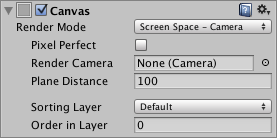 slim jetty
 bronze mural
Right, so because it's in camera space you might need GraphicsRaycaster component on camera. Not sure about that you should test
Might be wrong about that, it could be canvas specific
slim jetty
bronze mural
Right, so because it's in camera space you might need GraphicsRaycaster componen...
to put GraphicsRaycaster on camera i have to put canvas component on camera as well
bronze mural
Just tested it doesn't need anything additional.
You just switch to camera space, assign camera and it works
slim jetty
slim jetty
that's what im on
bronze mural
So if your UI not working either removed/disabled event system or button being covered by panel or text element
slim jetty
wait what
slim jetty
bronze mural
So if your UI not working either removed/disabled event system or button being c...
even when i back it to overlay space screen it doesn't work
bronze mural
slim jetty
even when i back it to overlay space screen it doesn't work
Did you read the message you've responded to? And checked those things?
Deactivate or create a new scene, setup clean new components and test with those make sure simple setup works, then examine what you have and where it is broken.
 devout basin
Does anyone here have a google play console developer account?
 silk vessel
Issue with PostProcessing being reapplied for every single camera on scene, while testing i noticed the possibility of creating multiple Volumes on different layers, is this the fix?
 swift nimbus
im using a code to update my post processing volume settings real time, and the values are increasing (in the inspector), but why dont they apply to the scene?

 honest garnet
Why does UI camera render post processing on main camera?
mighty stump
honest garnet
Why does UI camera render post processing on main camera?
Post processing affects the rendered image at that stage in the stack, not each camera individually
Meaning you can only exclude post processing by applying it before an overlay camera
drowsy plank
I have differences in post processing between DX11 and OpenGL, I think because they may handle their depth and/or normal buffers differently?
 pallid bronze
There are 2 objects in the Scene with overlapping UV's. Please see the details list below or use the 'UV Overlap' visualisation mode in the Scene View or Lightmaps in Lighting Settings for more information.
How can i resolve this problem?
mighty stump
pallid bronze
There are 2 objects in the Scene with overlapping UV's. Please see the details l...
Did you find any info by searching about lightmap uv overlap?
#archived-lighting next time
pallid bronze
mighty stump
Did you find any info by searching about lightmap uv overlap?
I am not able to find the right thing on the internet, i tried changing some settings so i changed the recieve global illumination from lightmap to light probes and it worked. I'm beginner so idk how it worked. It just did
 past sonnet
Can someone help me? I am trying to add post processing to my game, I put the post processing layer and onto the camera and used a profile I made, but it won't show. I made sure the camera has a unique layer along with the post processing layer to say that unique layer, but it won't show in the game. Normally i would go to the camera and click post processing, but it won't show because I don't have urp on it. How do I fix this?
mighty stump
past sonnet
Can someone help me? I am trying to add post processing to my game, I put the po...
URP is not on your camera, it's in your project, if it is at all
See the pinned messages for step by step instructions
You must pick the correct instructions for the render pipeline your project actually uses
past sonnet
mighty stump
You must pick the correct instructions for the render pipeline your project actu...
Thank you
 glossy garden
Hey guys; quick question, why does rendering with the post processing stack onto an "empty spot" (theres nothing to render in that spot, like for example there's meant to be a background thing) just make it freak out?

Just realized i kinda probably don't want my Editor tool to flashbang people 😭
 untold halo
Hey anyone got some good starter resource on the URP render feature and writing your own post processing with that?
mighty stump
untold halo
Hey anyone got some good starter resource on the URP render feature and writing ...
untold halo
mighty stump
<https://docs.unity3d.com/Packages/com.unity.render-pipelines.universal@17.0/man...
Cheers, I'll check it out!
 proper sinew
guys idk if its the correct place for this but
 green siren
Guys why the post process volume component doesn't affect my scene 💔

https://learn.unity.com/project/john-lemon-s-haunted-jaunt-3d-beginner
I did the same steps here but I don't see results noting changes

Unity Learn
Welcome to the John Lemon’s Haunted Jaunt: 3D Beginner Project! In this project, you won’t just discover how to create a stealth game — each of the 10 tutorials also explains the principles behind every step. No previous experience is needed, which makes John Lemon’s Haunted Jaunt the perfect start to your journey with Unity.
proper sinew
heyy
bronze mural
@proper sinew Why didn't you actually post your question here?
bronze mural
proper sinew
oops i was posting it to both locations since these channels arent active
There's no such thing. This is discord. And there's no cross-posting either. So post in the appropriate channel and remove in the other
proper sinew
bronze mural
There's no such thing. This is discord. And there's no cross-posting either. So ...
ok sorry
bronze mural
And to your question. Post processing is a camera space effect. If you want different effect processed for another layer you need to setup another camera. There are guides how to do that pinned in this channel.
(Pick a render pipeline there)
 jaunty elbow
hey guys i wanna create a game where the visuals are similiar to fall guys. notice how the mesh shines and looks kinda like a wet chewy bubblegum?? or more like a shiny colorful assets ? well how to create it?? i want my assets to look just like how fall guys assets are made.
 viscid tide
When adding emissions or bloom effects, don't those effects only work if the environment around them is suddenly darker?
could I create a bloom/glow effect that just...glows when I want it too regarldess of the light around it?
 hidden steppe
jaunty elbow
hey guys i wanna create a game where the visuals are similiar to fall guys. noti...
hidden steppe
jaunty elbow
hey guys i wanna create a game where the visuals are similiar to fall guys. noti...
the asset itself has nothing to do with it just play with the material, the smoothness...
mighty stump
viscid tide
When adding emissions or bloom effects, don't those effects only work if the env...
I'm still a bit mystified by this question
Bloom doesn't consider contrast, only the brightness of each pixel
Have you run into issues implementing bloom, or is this just a hypothetical
My best guess too
If it's HDRP, there's also exposure-independent emission weight
But as you say it'd be important to understand the process first
 devout sandal
Anyone know how to apply post-processing effects (bloom for example) to only objects that are on a specific layer, using URP? Having multiple cameras with different post-processing works fine except that the effects that I want to only apply to specific layers apply to everything.
mighty stump
devout sandal
Anyone know how to apply post-processing effects (bloom for example) to only obj...
There isn't a way to do that exactly
devout sandal
mighty stump
There isn't a way to do that exactly
Yeah I tried a bunch and it seems it doesn't work with URP.
mighty stump
Post processing is always per-camera
And in the camera stack each camera sees the image of the cameras that render before it
devout sandal
yeah
 weary basin
How do you set up postprocessing for a multi-camera scene? I'm working on a mod for KSP which uses several cameras:
- skybox
- distant planets
- local objects
- internal spaces
Each of those is drawn on top of each other. I can assign postprocess settings to each, but some things like color grading and temporal antialiasing seem to get duplicated if they're on multiple cameras. Any ideas?
(oh hey looks like recent discussion is along the same lines, I'll start reading...)
and KSP uses the builtin render pipeline
is Camera.main treated specially in the postprocessing stack?
weary basin
I think what I'm looking for is:
given a set of postprocessing settings, which ones need to be applied to all cameras and which ones should only be applied to the last camera?
 mortal drift
Is it possible to implement in cinemachine to apply post processing to specific items rather than everything being rendered? I have a stacked camera system that does this--main cam renders normally and an effects cam that renders the effects with bloom.
You can accomplish having only certain cameras get postprocessing applied with Unity's normal camera system and having the additional cameras be stacked cameras. I'm wondering since I believe cinemachine only sets one virtual camera active at once if that would remove the ability to have only certain things be affected by post processing. I want certain VFX to receive that pp, but not the regular game.
mighty stump
mortal drift
You can accomplish having only certain cameras get postprocessing applied with U...
Cinemachine doesn't interact with post processing, it moves real cameras
mortal drift
so I should be able to tack on a cinemachine camera component to my camera with stacked cameras and PP will work as before?
/remain unaffected
mighty stump
mortal drift
so I should be able to tack on a cinemachine camera component to my camera with ...
Yes, assuming your overlay cameras aren't loose in the scene
Cinemachine controls the one with the Brain component, but overlay cameras can be parented under it
 dreamy loom
is there a way to fix this pixelated effect on the edges of my objects

Im using SMAA, is that why
odd drift
dreamy loom
Im using SMAA, is that why
SMAA is fine but you could try different anti-aliasing methods such as MSAA and FXAA
mighty stump
It looks like the AA there is working on the geometry against the sky, but not against other geometry
I'm fairly sure it's not intended to do that
dreamy loom
mighty stump
It looks like the AA there is working on the geometry against the sky, but not a...
yeah it worked on the sky perfectly
dreamy loom
odd drift
SMAA is fine but you could try different anti-aliasing methods such as MSAA and ...
i tried temporal and it solved most of the issues
odd drift
SMAA should pick those up as well so I don’t really know why there was the problem to begin with
 untold steeple
Does anybody know how I can blur UI elements using depth of field?
mighty stump
untold steeple
Does anybody know how I can blur UI elements using depth of field?
UI would have to be opaque and in world space or screen space - camera, but afaik by default there are no UI shaders that support opaque rendering nor opaque shaders that support UI rendering
 hard glacier

Elevate your workflow with the Flooded Grounds asset from Sandro T. Find this & other Environments options on the Unity Asset Store.
 sand ivy
hard glacier
https://assetstore.unity.com/packages/3d/environments/flooded-grounds-48529#publ...
sand ivy
hard glacier
https://assetstore.unity.com/packages/3d/environments/flooded-grounds-48529#publ...
I accidentally removed your last message while removing spam
sand ivy
@hard glacier Are you on URP or HDRP? This asset seems old enough that it probably doesn't support anything other than built-in render pipeline.
sand ivy
Materials that use included shaders can automatically be converted to URP/HDRP by selecting the materials and going to Edit -> Rendering -> Materials -> Convert
Materials not using included shaders can't be automatically converted.
You can make a project using built-in render pipeline.

 wide stratus
ok-- is there a reason why my post processing stuff only works on my UI camera? It won't work on my main camera, it'll only work if I add the default layer to my UI camera's volume mask and enable post processing there
I don't want any post processing on my UI camera even
when i inccrease the order layer of my main camera, it works, but then UI camera disappears
It's behaving like the UI camera is rendering stuff the main camera is rendering, but it's not
I can still see the post processing working from scene view, but with the main camera below the UI layer in game view order-wise there is no post processing
so it appears I fixed this by setting ui camera to overlay and adding it to the main camera' stack. only thing is now the colors of my post processing get all weird and discolored when I do that
 plain adder
i want to add bloom to a particular gameobject in 2D game if i set post processing to global it is working but applying on whole scene for particular gameobject tried that same layer too.. but nah its not working for me anyone can help?

or any other sorta things what i really wnat is a dynamically moving glow onto boundary of wall thats it..if it can do any other way then suggest ..What i have tried shader,materials combo then even tried lights which just stucked inside gameobejct not like what i wanna do with them ...
mighty stump
plain adder
i want to add bloom to a particular gameobject in 2D game if i set post processi...
As I pointed before, post processing is not added to any individual object
The layers determine which cameras the volume affects
If a material supports HDR color (such as custom shaders, but not the default sprite shaders), you can leverage bloom Threshold to only glow only with high HDR intensities
That's the only way to do it "per object"
 remote sinew
Can someone help me with screen spaced reflections? I have a post processing volume and a post processing layer on my main camera. Other effects work like Chromatic aberration but the screen spaced reflections dont. Am i doing something wrong?
mighty stump
remote sinew
Can someone help me with screen spaced reflections? I have a post processing vol...
With which render pipeline?
remote sinew
I think the default. I just started a 3d project and im new to unity
Also motion blur is not working too
mighty stump
remote sinew
I think the default. I just started a 3d project and im new to unity
I'm rusty on the built in render pipeline but those post processing effects require features like g-buffer and motion vectors
They may need to be separately enabled in graphics or quality settings
remote sinew
Should i use URP?
mighty stump
remote sinew
Should i use URP?
I always prefer it since it's so much easier to optimize
But it doesn't officially support SSR so that can be a drawback in your case
remote sinew
mighty stump
I always prefer it since it's so much easier to optimize
But it doesn't official...
What is the easiest way to get ssr?
mighty stump
remote sinew
What is the easiest way to get ssr?
It should just work with BiRP as long as whatever graphical settings it requires are ticked on
remote sinew
mighty stump
It should just work with BiRP as long as whatever graphical settings it requires...
What is BiRP? I have only heard about hrdp and urp...
mighty stump
Built-in render pipeline, so the default one if you don't have any of the scriptable render pipelines
It does just work in HDRP, but setting up HDRP itself can be trickier than only setting up SSR for BiRP
There's paid assets that do it for URP that usually try to make the experience smooth and give clear instructions
remote sinew
Can you help me set it up in BiRP?
mighty stump
remote sinew
Can you help me set it up in BiRP?
Since you must be using the Post Processing Stack v2, you would look at its docs on page for SSR, then see if it gives you specific instructions or lists requirements
When testing you should have meshes with Standard material in the scene with varying smoothnesses, since SSR by default is set to ignore materials beyond or below a certain smoothness threshold
It also requires hardware that's g-buffer capable but that's not often a problem
That's roughly all I remember about it
remote sinew
I cant find the docs. Can you provide a link?
remote sinew
mighty stump
https://docs.unity3d.com/Packages/com.unity.postprocessing@3.4/manual/Screen-Spa...
This does not provide instructions on how to setup ssr :(. All the yt vids just show using ssr as a post processing effect and it works for them but not for me.
mighty stump
remote sinew
This does not provide instructions on how to setup ssr :(. All the yt vids just ...
Pay special attention to the requirements
For example "deferred rendering path"
The default rendering path is forward
remote sinew
I give up... This is too confusing. I just started unity. Anyways. Thanks for the help
 shy field
unreal pine
Hey, I'm wondering - is it possible to apply post processing to a render texture...
shy field
unreal pine
Hey, I'm wondering - is it possible to apply post processing to a render texture...
Hey did you ever figure that out?
mighty stump
shy field
Hey did you ever figure that out?
Post processing systems use layers to determine which cameras they affect
shy field
mighty stump
Post processing systems use layers to determine which cameras they affect
Could you explain further? How do i get the post processing on the render texture?
unreal pine
hey, I just added a local volume to each camera that needed it
and I believe you have to change the color format, I don't remember to which one though
 candid crystal
Hey! I posted in another channel but i think its actually this one where i should post...
Hello everyone, before I added a background video, my circles could glow (first image), but right after adding the background video, the glow disappears (second photo shows that if i lower the alpha, the glow can be seen there)

 severe slate
candid crystal
Hey! I posted in another channel but i think its actually this one where i shoul...
severe slate
candid crystal
Hey! I posted in another channel but i think its actually this one where i shoul...
damn how did you design this? that looks awesome
candid crystal
severe slate
damn how did you design this? that looks awesome
Design what sorry? ^^
severe slate
candid crystal
Design what sorry? ^^
the background
candid crystal
im a programmer not designer hahahha
 rocky hearth
Are there any free outline scripts which are able to outline particle trails?
 hidden dagger
I feel you @candid crystal "Programmer not designer"
 obtuse kraken
rocky hearth
Are there any free outline scripts which are able to outline particle trails?
obtuse kraken
rocky hearth
Are there any free outline scripts which are able to outline particle trails?
You'd need to make an outline shader for the trail renderer
 lusty willow
Hi guys,
MotionBlur is only blurring with camera rotation, not translation.
Has anyone encountered this before, and know of a fix?
I debugged the shader "Hidden/HDRP/CameraMotionVectors" and can see that translation is not registered.
 torn minnow
Hi, I am having a problem while using Post-processing to the camera.
I try to add blur to the background, But either it work on everything on the camera or on nothing.
 wanton finch

 tacit pewter

 craggy wigeon
!code
 wild torrentBOT

Posting code
📃 Large Code Blocks
Use links to services like:
https://gdl.space/, https://paste.ofcode.org/, https://hatebin.com/, https://paste.myst.rs/, https://hastebin.com/
📃 Inline Code
Surround code with three backquotes. Not quotation marks.
To format as C#, add cs to the first line:
```cs
// Your code here
```
Add a comment with a line number if there is an error message.