#h2-tech-support
1 messages · Page 2 of 1
 empty valley
From what I read it just said "When you kill an enemy with attack, you restore 5 health"
I had the scorch upgrade on my attack though, so I'm wondering if the scorch damage was killing them instead of the "attack" and that's why it wasn't triggering.
 woeful shoal
it should say (omega symbol)Attack
 velvet palm
that would do it, but also just checked, it is with omega attack it seems
 abstract nacelle
Hey quick question for the hds2 beta so they will send me a steam code through Email ?
 slender swift
abstract nacelle
Hey quick question for the hds2 beta so they will send me a steam code through E...
slender swift
abstract nacelle
Hey quick question for the hds2 beta so they will send me a steam code through E...
You'll receive an email and it'll be available in your library already (if you asked to participate through steam)
sorry thought you meant the technical test lol
 cold fog
technical test is over, they are shutting it down tomorrow
 hollow lynx
it's not over yet 
They're just not really gonna add more people to technical test now they've announced they're winding it down april 29 (US time)
 round bear
Yup https://steamcommunity.com/app/2933700/discussions/0/4357871368309504745/?ctp=2#c4354493882938735763

I pressed the play button and then an error came up saying I need a GPU with DX12 support of feature level 12 :( and I couldn't play the game. Does this mean that the early access and vanilla version of the game requires that, too?
 hazy shuttle
round bear
Yup https://steamcommunity.com/app/2933700/discussions/0/4357871368309504745/?ct...
hazy shuttle
round bear
Yup https://steamcommunity.com/app/2933700/discussions/0/4357871368309504745/?ct...
this is kinda complicated, could please explain it a little bit?
(I have had invitation for over a week now, i still can't play it)
and it's about to end tomorrow
 eager yarrow
ok i cannot seem to type today. anyway. https://steamcommunity.com/app/2933700/discussions/0/4357871368309504745/?ctp=2#c4354494062091336197 this comment from the same thread may help more
hazy shuttle
eager yarrow
ok i cannot seem to type today. anyway. <https://steamcommunity.com/app/2933700/...
not working for me :(
round bear
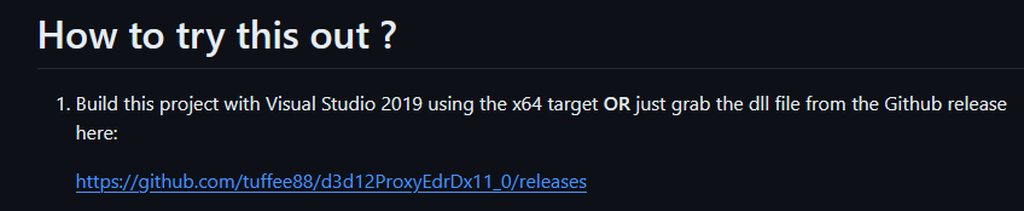
Maybe you did something else? I extracted d3d12.dll file from 03_release_binaries_release.zip to Steam\steamapps\common\Hades II Technical Test\Ship
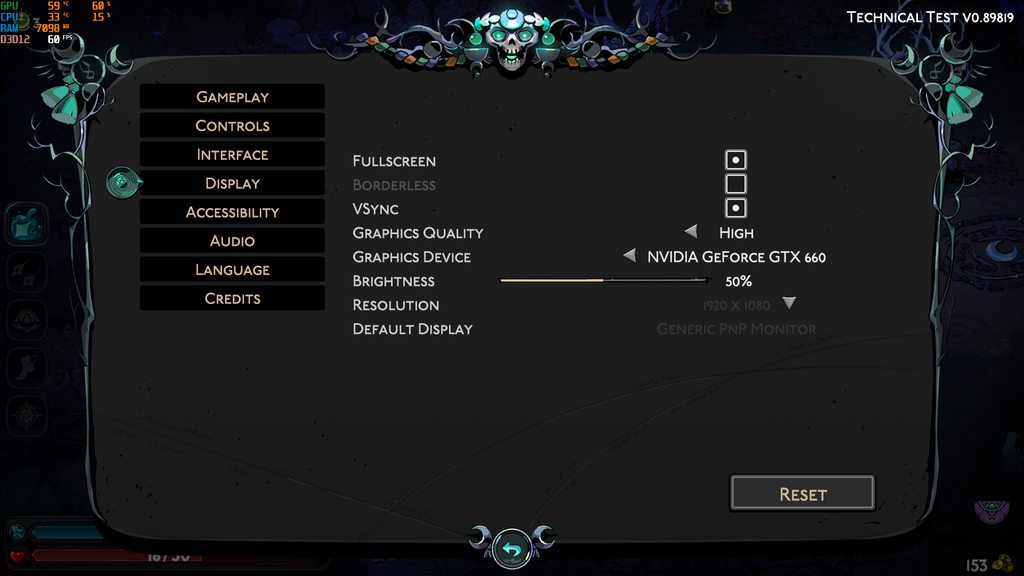
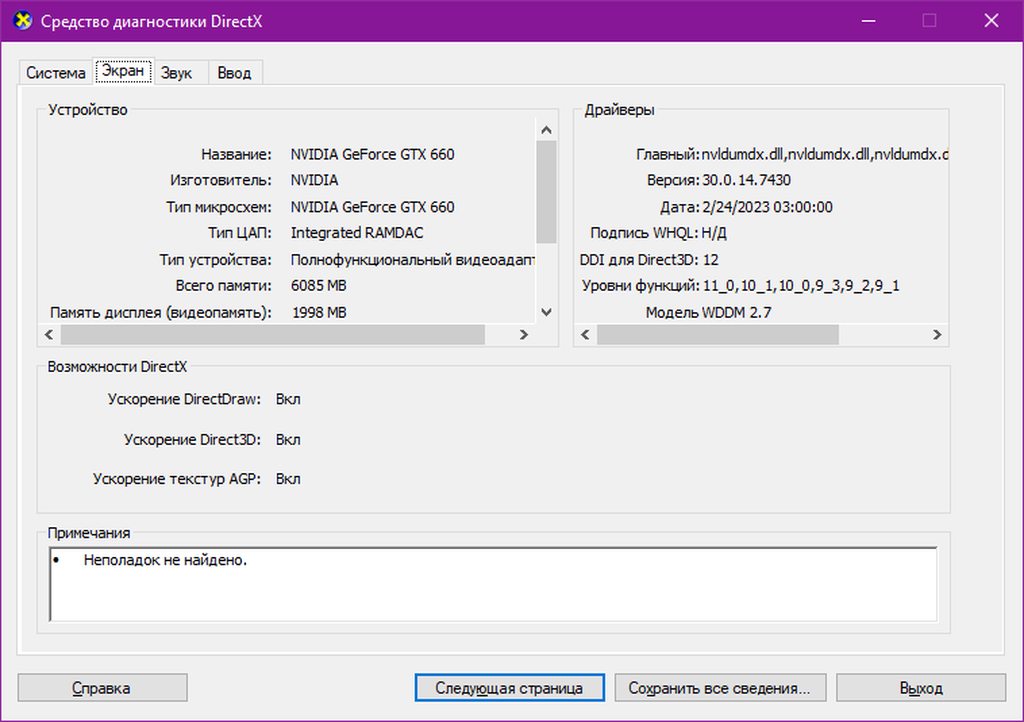
https://imgur.com/a/OPIMUAM https://github.com/tuffee88/d3d12ProxyEdrDx11_0/releases https://imgur.com/a/sPftuQK https://imgur.com/a/0iWIvzT My GPU doesn't support feature level 12 https://imgur.com/a/jZSqtLE
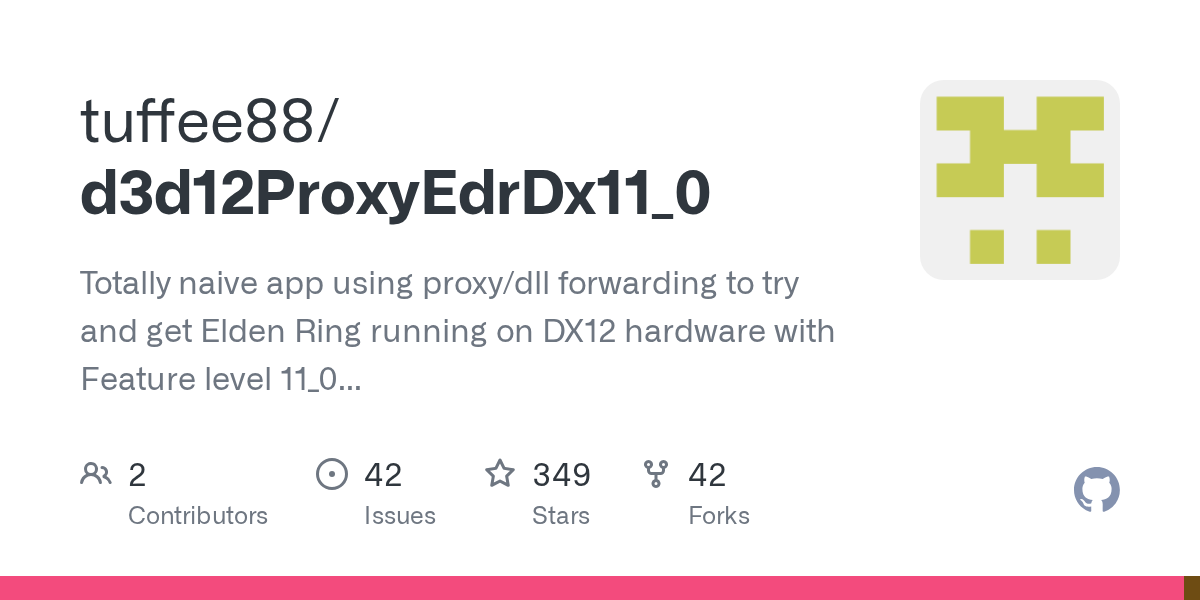
GitHub
Totally naive app using proxy/dll forwarding to try and get Elden Ring running on DX12 hardware with Feature level 11_0 (f.e. Nvidia Kepler GPUs) - tuffee88/d3d12ProxyEdrDx11_0

 hazy shuttle
round bear
Maybe you did something else? I extracted d3d12.dll file from 03_release_binarie...
hazy shuttle
round bear
Maybe you did something else? I extracted d3d12.dll file from 03_release_binarie...
I did the exact same thing.
cold fog
hollow lynx
it's not over yet <:teehee:680057113308823552>
They're just not really gonna ad...
it literally says " We plan to start winding down the Technical Test on Monday, April 29, after which point it will no longer be available in participants' Steam libraries" in the announcement
 graceful knoll
cold fog
it literally says " We plan to start winding down the Technical Test on Monday, ...
graceful knoll
cold fog
it literally says " We plan to start winding down the Technical Test on Monday, ...
which means its over on the 29th, not yet.
cold fog
cold fog
technical test is over, they are shutting it down tomorrow
and i said?
graceful knoll
you said "its over" which its not.
it is shutting down tomorrow, but itsn ot over "yet"
"is ending" is correct "is over" is not
cold fog
they are not taking people in anymore so there's no point waiting for invites = its over
round bear
hazy shuttle
I did the exact same thing.
 hazy shuttle
round bear
Maybe you did something else? I extracted d3d12.dll file from 03_release_binarie...
hazy shuttle
round bear
Maybe you did something else? I extracted d3d12.dll file from 03_release_binarie...
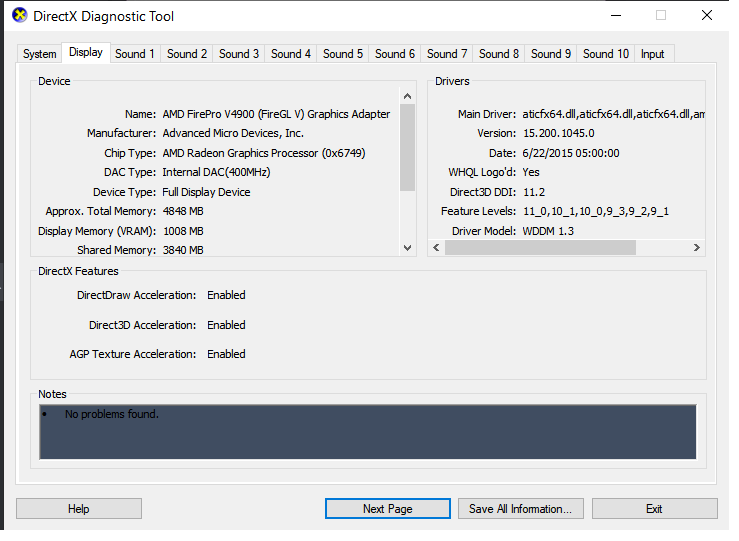
i think i won't be able to play hades 2
😭
graceful knoll
hazy shuttle
https://imgur.com/ZRxvDIU
its perfectly possible that you literally just aren't within the graphical requirements
everything listed is a workaround for if you meet reqs but have issues getting it to launch
if for whatever reason its not detecting your card etc
From a google search it seems like your card only supports up to dx11.2 and hades 2 requires dx12 so no amount of copy pasting files would work but i could be wrong
 nova herald
are there some requirements needed for the "Request Access" button to show up on steam? can't see it for some reason
hazy shuttle
graceful knoll
From a google search it seems like your card only supports up to dx11.2 and hade...
T_T i'm doomed
hazy shuttle
nova herald
are there some requirements needed for the "Request Access" button to show up on...
no, it's over
nova herald
sadge, ty anyways
hazy shuttle
😔 I got the invitation but couldn't play it cuz my GPU old asf
nova herald
i just now figured out there's techincal testing of the game
i'll wait for early access prob
hazy shuttle
i'll just go back to playing Hades
graceful knoll
nova herald
i just now figured out there's techincal testing of the game
for what its worth EA is deemd to come out "very soon" after the tech test ends. we just don't know how long of a metric that is
probably within the next month
optimisitically its literally tuesday
nova herald
shorter than silksong, thats for sure, im willing to wait
graceful knoll
just like how they opened the tech test signups > launched the test the next day
 queen onyx
So
I got the game and i tried to boot it
And it's just a black screen
And the "access the steam community" pop up is bugged out
How can i fix this?
 sonic cosmos
round bear
Maybe you did something else? I extracted d3d12.dll file from 03_release_binarie...
sonic cosmos
round bear
Maybe you did something else? I extracted d3d12.dll file from 03_release_binarie...
thank you, will try
sonic cosmos
It works😭
 sacred rain
graceful knoll
for what its worth EA is deemd to come out "very soon" after the tech test ends....
sacred rain
graceful knoll
for what its worth EA is deemd to come out "very soon" after the tech test ends....
ngl im guessing within the week
graceful knoll
generally speaking games release tuesday/thursday so those are my guesses
 ionic bluff
cant go out anymore, it's sealed. is this because technical test is coming to a close or because ive simply played too much?
velvet palm
ionic bluff
cant go out anymore, it's sealed. is this because technical test is coming to a ...
You won 5 times so you get locked
ionic bluff
aw crepes
when it first told me that i beat ||hecate|| 1 out of 5 times i just assumed it was because id run 5 times and beat her the 5th
 bold lake
You can start a new save and play the technical test that way
There are four save slots, so you can do more testing!
 normal storm
Hi, i'm a french player, no problem during the test but even if my game is in french, if i give  to Hestia, her text is in english
eager yarrow
you can press F10 in-game to report it
normal storm
Thanks !
 rotund fox
hello! I couldnt find it anywhere, but how can I apply to join the tech test as a content creator?
graceful knoll
rotund fox
hello! I couldnt find it anywhere, but how can I apply to join the tech test as ...
too late
rotund fox
really? 😦
graceful knoll
yes. tech test shuts down in 4~ hours
 pine thunder
oh
graceful knoll
you were able to apply at the bottom of this post though
rotund fox
ouch
graceful knoll
no more keys/random invites go out as of friday though
pine thunder
glad I tried it already:]
graceful knoll
though maybe if you qualify you can still get a content creator key?
idk how that site works
rotund fox
yeah I applied to it, I guess I wasnt big enough? haha well, a bit of a bummer but thank you
eager yarrow
its completely random
 wary rock
Hi! I'm playing on Linux through Proton 9. I have an integrated Intel video card and an NVIDIA 3050 mobile. When I started the game, I had about 30-40 FPS, but when I switched from auto to NVIDIA, it increased to about 60 FPS. However, nvidia-smi did not show that it was being used. Overall, everything was great. Thank you for the test.
 cedar flicker
The technical test has ended, so early access will be starting up soon
cedar flicker
No, because the devs haven't given one
 elder magnet
like you dont get it i have an entire collection of roguelikes and hades made me like this genre so much
cedar flicker
I understand, trust me, haha. I'm waiting with you. We just gotta be patient a bit longer
elder magnet
I really wanna know if there is gonna be a collectors edition
 uneven gazelle
 pure frost
has the techincal test already shut down for people that have it?
or is it still up atm?
 tacit wyvern
I still have it
 small ice
I also still have it
 hasty knoll
I still have mine as well
 undone heron
probably wont delete it until like 2-3 hours from now
 sharp bluff
Soon
hasty knoll
 oh fk
oh fk
undone heron
they usually do announcements at 2-3 EST
sharp bluff
let them drink their coffee first they cooked for us
tacit wyvern
kinda debating if I wanna open the game again or not
feel like I experienced what I wanted to but idk how long we'll be without Mel
hasty knoll
tacit wyvern
feel like I experienced what I wanted to but idk how long we'll be without Mel
ya do it if you can since we dont know. and if it's soon then it's no worries u dont lose anything by doing one more run!
tacit wyvern
true!
 summer jolt
I didn't know it was ending today! I'm glad I wrapped up my 5th clear last night ^_^;;
My wife wants to give it a spin too so I'll see what happens when I leave it running.
 tender herald
Hey! Where should I send the completed bug report?
graceful knoll
f10 ingame
 quasi nebula
How to join the testing? It says you have to right click on the store page or something but I cant find it.
 atomic wave
test is over
quasi nebula
ah damn. i literally found out about it yesterday :P
 open iris
Just waiting..for EA..
 half vapor
No news yet?
open iris
maybe tomorrow
 simple dagger
i'm expecting end of the week, maybe?
or end kf next week
doubt they'd release it during the week
undone heron
I dont expect anything until the second week of may maybe
and if nothing comes that week then its probably not until june 7th
 south solstice
simple dagger
doubt they'd release it during the week
south solstice
simple dagger
doubt they'd release it during the week
They released Technical Test in the middle of a week, why wouldn't they do the same with EA ?
simple dagger
idk i just thought it might a bit odd, i'm not saying my words are gospel 
 sonic plaza
simple dagger
doubt they'd release it during the week
sonic plaza
simple dagger
doubt they'd release it during the week
Hades went early access on steam on December 10th, 2019, which was a Tuesday
simple dagger
ahh okay
undone heron
dosnt mean its this tuesday
 glass citrus
 long jasper
It'll probably be at least a week or 2 before EA is released, maybe longer. They have to analyze the data they've gathered during the TT. They've said all along that EA would come out some time during Q2 of this year, which could theoretically be until the end of June and still be true to their word. I think it'll be some time in May, but we don't know what's going on behind the scenes.
 waxen nebula
They’ve been analyzing the data during the TT. While it is possible it’ll take longer, but based on everything they said, I don’t think it’s an extreme assumption that EA going to happen very soon
long jasper
I certainly hope it will, and I agree it could definately happen, but I'm prepared for it to take a little longer too.
graceful knoll
Also reminder that the TT's primary purpose was data collection for different PC builds and finding major bugs. Anything relating to balance/player habits is low value if not outright irrelevant xdd
TT had at least 2 patches during its run and it was already a months old branch cut
long jasper
yeah balance and habits don't even play into yet. It was only the first biome, and what, 5 gods and 2 weapons? So much more is going to be released before they tweak for balance.
 junior nacelle
Hi all - now that the Technical Test has officially ended, we are going to archive this channel. Thank you very much for taking the time to try Hades II and speak with our team about any technical issues you discovered. Your help is generous and invaluable!
This channel is now locked to further discussion, and will be fully archived later today. 🔒
 left sun
Uh, the announcement has the wrong link
 raven comet
left sun
Uh, the announcement has the wrong link
raven comet
left sun
Uh, the announcement has the wrong link
hello! could you elaborate on which link and what you believe the correct link is?
 rough sphinx

Our Game of the Year-winning rogue-like dungeon crawler Hades is now available on iPhone and iPad!
Play Now: https://supergiant.games/hades-ios
All you need is a Netflix subscription, which includes our Game of the Year-winning rogue-like dungeon crawler at no additional charge.
left sun
raven comet
hello! could you elaborate on which link and what you believe the correct link i...
the most recent announcement has the link for hades mobile, not this https://www.youtube.com/watch?v=Miu_akSity4

Take a closer look at Hades II, the first-ever sequel from Supergiant Games. Play now in Early Access on Steam (http://supergiant.games/hades2steam) and the Epic Games Store (http://supergiant.games/hades2egs).
Music: "Sightless Shepherd (feat. Sam Gendel)" by Darren Korb, from the Hades II Original Soundtrack.
Hades II is a trademark of Super...
raven comet
left sun
the most recent announcement has the link for hades mobile, not this https://ww...
thank you, I will raise this up the chain :)
left sun
Blessed be papi Greg K
 spare palm
Norton says Hades II does not have a valid digital signature, just FYI
 graceful drum
Hey y'all I'm trying to connect my joycons to pc for hades 2 but it's not working so
 ornate oracle

graceful drum
I tested it on steam it still work
 humble niche
graceful drum
Hey y'all I'm trying to connect my joycons to pc for hades 2 but it's not workin...
humble niche
graceful drum
Hey y'all I'm trying to connect my joycons to pc for hades 2 but it's not workin...
Hey, there are some things you can try listed here: https://supergiant.games/hades2faq

From all of us at Supergiant Games, thank you for choosing Hades II . If you're experiencing any issues with the game, please check below for a solution. We expect to update this throughout our Early Access. Note: How to Report Bugs While Playing If you run into a bug while playing, please consider pressing F10 to report it to us. (Note this is ...
In Mouse and Controller Input Issues section
 echo path
hi whats the spec needed to run hades 2?? im able to run the first game fine but it says i don't meet system requirements here 
graceful drum
humble niche
In **Mouse and Controller Input Issues** section
Oh it's working now ty
 earnest cliff
echo path
hi whats the spec needed to run hades 2?? im able to run the first game fine but...
earnest cliff
echo path
hi whats the spec needed to run hades 2?? im able to run the first game fine but...
Minimum and recommend requirements can be found on the store page:
https://store.steampowered.com/app/1145350/Hades_II/

The first-ever sequel from Supergiant Games builds on the best aspects of the original god-like rogue-like dungeon crawler in an all-new, action-packed, endlessly replayable experience rooted in the Underworld of Greek myth and its deep connections to the dawn of witchcraft.BATTLE BEYOND THE UNDERWORLDAs the immortal Princess of the Underworld, ...
Price
$28.99
echo path
ahhh its always the ram 
 dim oar
I'm going to try and swap controllers, but on my dualshock 5 controller a lot of my inputs arent registering about 90% of the time I press a button. Idk if its a technical issue on my side or not though.
Okay, it seemed to be an issue with that specific controller, the new one is working fine.
 silent rampart
earnest cliff
Minimum and recommend requirements can be found on the store page:
https://store...
silent rampart
earnest cliff
Minimum and recommend requirements can be found on the store page:
https://store...
Is there any place for Creators to request a key for coverage? Sorry, wasn't sure who/where to ask
 crisp quartz
silent rampart
Is there any place for Creators to request a key for coverage? Sorry, wasn't sur...
silent rampart
crisp quartz
silent rampart
Is there any place for Creators to request a key for coverage? Sorry, wasn't sur...
silent rampart
Thank you!
 hexed junco
@cerulean charm Please don't submit bug reports via #h2-feedback! If you encounter a bug ingame the best thing to do is to report it via F10.
 cerulean charm
Ok sorry
 azure lynx
just started the game, it starts in fullscreen - but it's too large and I can't get to the options - haha, lol.

this is the fullscreen menu.
 mystic linden
en este foro tambien se puede hablar en español o es exclusivo en ingles?
 quaint hornet
Hey everyone, is the EA version of Hades 2 DRM free like the rest of the Supergiant library?
mystic linden
In this forum, can we also speak in Spanish, or is it exclusively in English?
humble niche
azure lynx
just started the game, it starts in fullscreen - but it's too large and I can't ...
Please report it by pressing F10 in-game so it can be investigated. To fix it, try pressing Alt+Enter, so it fits the window, then adjusting the resolution in options.
dim oar
Unsure of how to report this, but I am playing with a controller and under the controls it says that I don't have a key mapped to report bugs. I went to change it to f10 on my keyboard and it just straight crashed my game. I went back in to report it from the main menu, and pressing f10 froze the game again. I don't know if pressing it is supposed to take me to a website or bring something up, but it just freezes my game instead.
humble niche
mystic linden
In this forum, can we also speak in Spanish, or is it exclusively in English?
English, please 🙂
dim oar
Specifically, when I had a controller plugged into my pc, the bug reporter doesn't show up but it does without it plugged in, going to report it now.
crisp quartz
dim oar
Unsure of how to report this, but I am playing with a controller and under the c...
F10 is already the bug report key. Pressing F10 will pull up the bug report window - if you don't see it immediately, you can alt + tab
 silver nymph
idk if its feasable but could the minimum specs be lowered one day? I can't play Hades 2 at all and i could run the first game fine
it's understandable that a game's sequel is more graphics intensive, but it doesn't look it to me, and its a shame i won't be playing it any time soon
dim oar
crisp quartz
F10 is already the bug report key. Pressing F10 will pull up the bug report wind...
Okay I see thank you, for some reason the window itself doesn't show up on my taskbar but alt-tabbing worked.
 scarlet jewel
I, uh, just got a freeze in game, but it's frozen so it can't be F10'd.
humble niche
scarlet jewel
I, uh, just got a freeze in game, but it's frozen so it can't be F10'd.
Have you tried Alt Tabbing to see if any window with error popped up?
scarlet jewel
humble niche
Have you tried Alt Tabbing to see if any window with error popped up?
Tried. It softlocked so hard that was not a thing
crisp quartz
scarlet jewel
Tried. It softlocked so hard that was not a thing
Can you force-quit the game and send the Hades II.log file from \Users\[username]\Saved Games\Hades II\ to support@supergiantgames.com with a description of the issue? Please don't launch the game again before sending the log so we can check for errors. Thanks!
 honest robin
Hey, I'm having some issues running the game through proton 8.0.5. Whenever I launch, I just get a black screen. I've already tried disabling the overlay, and it didn't do anything for me.
crisp quartz
honest robin
Hey, I'm having some issues running the game through proton 8.0.5. Whenever I la...
Are you playing on Steam Deck?
honest robin
No, I'm on a laptop running Arch Linux
scarlet jewel
crisp quartz
Can you force-quit the game and send the Hades II.log file from \Users\\[usernam...
Ack. I unfortunately just ctrl-alt-deleted, closed the game, and rebooted... but if I ever get it again I'll do that. Sorry! Very difficult to just not play Hades II for several minutes, you understand...
crisp quartz
honest robin
Hey, I'm having some issues running the game through proton 8.0.5. Whenever I la...
@shell adder
scarlet jewel
I do have a screenshot and a description, if that helps at all. Should I just post it here anyway (spoiler tagged)?
 sage wren
The Steam Version is not launching for me, any potential fix?
 light hill
there is a setting called "attack at cursor" in Hades that when disabled lets you attack in the direction you're facing - is there such a setting in Hades II?
humble niche
sage wren
The Steam Version is not launching for me, any potential fix?
Have a look in FAQ for potential fixes: https://supergiant.games/hades2faq
 misty scaffold
Hi, i was wondering if i play the game on early access, will it keep my progress and count what i have achieved once the achievements are added
eager yarrow
misty scaffold
Hi, i was wondering if i play the game on early access, will it keep my progress...
yes, and achievements will be unlocked retroactively 
humble niche
light hill
there is a setting called "attack at cursor" in Hades that when disabled lets yo...
There is not from what I know. You can check all available settings in Options.
light hill
to me it feels like something quite useful and necessary, since id like to keep using the control scheme im already used to from Hades 1
earnest cliff
light hill
to me it feels like something quite useful and necessary, since id like to keep ...
Please feel free to suggest that in the #h2-feedback !
 ember meteor
If my pc has 8 gb, will it crash trying to launch hades 2?
 tawdry vapor
Can anyone help me, I’m using a ps5 controller and it’s being registered by steam but when I launch the game none of the inputs are being registered
crisp quartz
ember meteor
If my pc has 8 gb, will it crash trying to launch hades 2?
It shouldn't, though you should verify that the rest of your specs meet our minimum specifications as well: https://store.steampowered.com/app/1145350/Hades_II/
tawdry vapor
It’s a dual sense edge, the normal controller works fine but the edge doesn’t
ember meteor
crisp quartz
It shouldn't, though you should verify that the rest of your specs meet our mini...
The rest of my computer is generally strong. It's just the ram.
humble niche
tawdry vapor
Can anyone help me, I’m using a ps5 controller and it’s being registered by stea...
Try things listed in https://supergiant.games/hades2faq in Mouse and Controller Input Issues section
 halcyon spruce
Is my Technical Test save compatible with EA?
halcyon spruce
That makes no sense, I'll try it I guess
tawdry vapor
humble niche
Try things listed in https://supergiant.games/hades2faq in **Mouse and Controlle...
Thanks that worked
eager yarrow
@atomic spire you can report bugs such as the one you encountered with F10 in-game, as they arent directly feedback :)
 atomic spire
eager yarrow
<@328055764600225793> you can report bugs such as the one you encountered with F...
atomic spire
eager yarrow
<@328055764600225793> you can report bugs such as the one you encountered with F...
ah thank you I couldnt figure out what the key was
 granite plover
my PC keeps shutting down due to overheating
during hades 2 runs. like every 15-20 min
is there anything I can do to reduce the strain on my pc?
earnest cliff
granite plover
my PC keeps shutting down due to overheating
Yes, you can try lowering the Graphics Quality setting in the options to put less stress on your PC
 vale monolith
My Edge is not detected. Going to see if there is any Steam setting I mised.
granite plover
hmm. I set the graphics to low already,,
 coral trout
Upon trying to start the game I get a minimum specs error, despite appearing to meet all minimum specs as listed by steam when looking through settings.
vale monolith
elser I will revert to Dual Sense which works
earnest cliff
granite plover
hmm. I set the graphics to low already,,
You could alsotry lowering your resolution but there might not be much else beyond that unfortunately
earnest cliff
coral trout
Upon trying to start the game I get a minimum specs error, despite appearing to ...
Please feel free to follow the instructions at the bottom of the FAQ pinned to this channel to email us your system specs and we can take a look!
granite plover
earnest cliff
You could alsotry lowering your resolution but there might not be much else bey...
yeah I lowered it let’s see
vale monolith
So I do not think Hades 2 recognize the Edge controller yet . But with "Enable Steam Input" in controller settings, it works.
 lusty swan
is the game locked to 60hz?
 modest marten
my game crashes on the first screen immediately after pressing play with a reference to GPU crash, no matter which GPU (eGPU or laptop onboard) or what graphic settings I use, any ideas?
humble niche
modest marten
my game crashes on the first screen immediately after pressing play with a refer...
There are some things you can try listed here: https://supergiant.games/hades2faq

From all of us at Supergiant Games, thank you for choosing Hades II . If you're experiencing any issues with the game, please check below for a solution. We expect to update this throughout our Early Access. Note: How to Report Bugs While Playing If you run into a bug while playing, please consider pressing F10 to report it to us. (Note this is ...
modest marten
humble niche
There are some things you can try listed here: https://supergiant.games/hades2fa...
Thanks, I appreciate it - though that's steps to make an extensive report, not to fix the problem itself, right? Still happy to do it ofc, just checking
humble niche
There are potential solutions listed there you can try.
 marble swift
Question concerning the Hades II soundtrack release via Steam. Do you get the actual mp3 files (or flacs or something would be super awesome), or some program that just plays the songs in the album?
 high relic
I'malso having a problem while launching the game, it comes up with GPU crash detected. I've tried restearting my laptop but with no change.
eager yarrow
marble swift
Question concerning the Hades II soundtrack release via Steam. Do you get the ac...
IIRC you can get the separate files in a steam folder, but you can also play them from the steam music player
humble niche
high relic
I'malso having a problem while launching the game, it comes up with GPU crash de...
Please check the FAQ for some potential solutions: https://supergiant.games/hades2faq
 rose fox
Do you have to buy the game on Steam to play early access?
marble swift
eager yarrow
IIRC you can get the separate files in a steam folder, but you can also play the...
I didn't even know there was a steam music player lol. I just want to make sure I can get the files to put on my personal Jellyfin server
marble swift
rose fox
Do you have to buy the game on Steam to play early access?
Yes
rose fox
thx
marble swift
For the soundtrack, does anyone know what files you can get from it? Just mp3, or can you get flac files? It's fine if it's just mp3, but I am curious
 vapid tapir
welp, guess i'm one of the unlucky ones who cant play with thei steam controller
 patent raft
hey does anyone know if we can transfer saves from the technical test to the early access game?
humble niche
vapid tapir
welp, guess i'm one of the unlucky ones who cant play with thei steam controller
Have you tried things listed in https://supergiant.games/hades2faq in Mouse and Controller Input Issues section?
 halcyon ice
anyone know how to enable controller on PC early access? Sorry i'm new to pc gaming but really wanted to play the early access
can't seem to get controller to connect while in the game, can during big picture, but once i'm out of that it's not working again
eager yarrow
patent raft
hey does anyone know if we can transfer saves from the technical test to the ear...
no, it doesn't transfer, but saves will be kept throughout early access to the full game
vapid tapir
humble niche
Have you tried things listed in https://supergiant.games/hades2faq in **Mouse an...
i did yea, sadly no avail
halcyon ice
Sorry i'm n ew to PC gaming in general. Normally on PS5
 solemn mist
Hello, I have an issue where the game runs at a reduced framerate when vsync is enabled and / or when the game runs in native resolution (1920x1080). It's not lag spikes or performance issues, it's constant and feels a bit like slow-mo (like it's running at 30fps). The only way for me to fix the issue is to run the game at a lower resolution (1680 x 1050 for example) without vsync enabled
I have an nvidia gpu, drivers up to date, nothing fancy (gtx 950m) but I had 120 fps on the first game and no performance issue whatsoever. Also the game runs perfectly fine with lowered resolution so it seems more like an issue with the software. I have tried most of the basic solutions like toggling fullscreen, borderless, tweaking nvidia settings etc but no luck
vapid tapir
humble niche
Have you tried things listed in https://supergiant.games/hades2faq in **Mouse an...
for me, its probably bcause i'm using bluetooth mode; i lost my dongle and i don't have a cable anymore
humble niche
vapid tapir
i did yea, sadly no avail
Hmm, okay. Could you please send F10 report then with the controller connected so it can be investigated?
granite plover
@earnest cliff turned down resolution and game hasn’t crashed
just beat Hecate for the first time! :D
humble niche
halcyon ice
Sorry i'm n ew to PC gaming in general. Normally on PS5
Have a look at things listed in https://supergiant.games/hades2faq in Mouse and Controller Input Issues section.
halcyon ice
@tiank I'm looking there now, i'm sorry tyo ask a question i know has been asked before. thank you for directing me!
vapid tapir
humble niche
Hmm, okay. Could you please send F10 report then with the controller connected s...
done 🫡 hope the report can be of any help
sadly i was not in the technical beta 
humble niche
halcyon ice
@tiank I'm looking there now, i'm sorry tyo ask a question i know has been asked...
That's alright, feel free to ask as many questions as needed, we'll try to help the best we can! 
vapid tapir
ugh playing with M/K feels soooo 
humble niche
solemn mist
Hello, I have an issue where the game runs at a reduced framerate when vsync is ...
If you haven't already you can check For Hitching / Freezing / Lag / Frame Rate / Performance Issues section in the FAQ which might improve the performance https://supergiant.games/hades2faq
 tall sigil
I'm stuck on a screen that just says "downloadable content (0%)" when I try to launch the game on steam deck and it won't get past that what am I supposed to do
solemn mist
humble niche
If you haven't already you can check **For Hitching / Freezing / Lag / Frame Rat...
Thank you very much. Unfortunately I've already tried everything on here, I'll wait to see if someone else is experience the same issue
high relic
humble niche
Please check the FAQ for some potential solutions: https://supergiant.games/hade...
Hi I've tried all these, also reinstalling the game and I'm still having the issue of "GPU Crash detected" at launch.
 modest patio
@lusty swan if you believe you have encountered a bug in the game, please press F10 from inside the game.
We have removed this feedback for now, please read the guidelines pinned to the channel.
#h2-feedback message
humble niche
tall sigil
I'm stuck on a screen that just says "downloadable content (0%)" when I try to l...
Try things listed in FAQ in If You're Having Issues Launching the Game on Steam Deck section https://supergiant.games/hades2faq
humble niche
high relic
Hi I've tried all these, also reinstalling the game and I'm still having the iss...
Then please send an email as per instructions that are at the bottom of that FAQ post in If All Else Fails section
high relic
Thanks
 balmy solar
I'm on an infinite loadscreen after pausing on it during a run, this save can no longer be progressed 😦
pausing it during a loadscreen i mean
I only did one run so I might just start a new save at this point but it sucks I already borked my save
humble niche
balmy solar
I'm on an infinite loadscreen after pausing on it during a run, this save can no...
You might be able to recover that run as per instructions listed in FAQ in If You Unexpectedly Lose Saved Progress section https://supergiant.games/hades2faq
Try renaming the latest Profile1_Temp.sav file.
Potentially, have also look at For Hitching / Freezing / Lag / Frame Rate / Performance Issues section, and maybe others, to potentially prevent the game from freezing again.
balmy solar
humble niche
You might be able to recover that run as per instructions listed in FAQ in **If ...
I had quit the game and gone back to the crossroads to try to resave and open it again, I think I might have saved over the backup by now
eager yarrow
@stuck sable please report such issues in your feedback with F10, and take a look at https://supergiant.games/hades2faq for hitching / freezing / lag / framerate / performance issues section
balmy solar
humble niche
You might be able to recover that run as per instructions listed in FAQ in **If ...
okay the backup was far enough back but it still gets softlocked at the loadscreen, this is unfortunate
Submitting an email to support
 short acorn
Does Hades 2 support Intel UHD 620?
earnest cliff
short acorn
Does Hades 2 support Intel UHD 620?
That is just barely below the min spec listed on the store page so we can't guarantee it will work but there's a decent chance it will, depending on the other specs of your system:
https://store.steampowered.com/app/1145350/Hades_II/
 neon comet
hey all, excuse my computer ignorance, but i bought hades 2 on steam thinking i could use Parallels to run it on my macbook with an M1 chip. any cloud gaming or other emulation options out there that i could access?
 hybrid flame
Hello,
Does Hades 2 support native 21:9 ultrawide aspect ratio?
earnest cliff
hybrid flame
Hello,
Does Hades 2 support native 21:9 ultrawide aspect ratio?
Yep!
hybrid flame
earnest cliff
Yep!
nice, thank you. Much appreciated.
 ripe pollen
i have to admit, i saw some concerns earlier about the games increase in system requirements but so far its been running like a dream on the same laptop for me
tall sigil
humble niche
Try things listed in FAQ in **If You're Having Issues Launching the Game on Stea...
all i had to do was change the compatability tool to proton 8.05 thanks so much🙏
 inland mantle
Does the game fully support the ps5 dualsense controller
 steel cave
Small graphical bug report :
||In the beginning of (my) first flashback sequence, Child Melinoe's sprite appears behind's Hypnos' sprite and shadow.||
humble niche
steel cave
Small graphical bug report :
||In the beginning of (my) first flashback sequence...
Please report such things by pressing F10 in-game.
balmy solar
balmy solar
okay the backup was far enough back but it still gets softlocked at the loadscre...
I am not actually softlocked I just thought the wrong area was meant to start a run, I was actually just looking at the moon I guess
 flat flax
How can I report a bug ingame ? I got a weird text message on a boon selection screen
Oh its just 2 messages up, nevermind
 shell adder
honest robin
Hey, I'm having some issues running the game through proton 8.0.5. Whenever I la...
shell adder
honest robin
Hey, I'm having some issues running the game through proton 8.0.5. Whenever I la...
Hey, please try our FAQ for potential fixes: https://supergiant.games/hades2faq. If nothing there helps, please locate your Hades II.log file (should be under \Users[username]\Saved Games\Hades II\ under the c_drive folder of your Proton install) and email it to support@supergiantgames.com

From all of us at Supergiant Games, thank you for choosing Hades II . If you're experiencing any issues with the game, please check below for a solution. We expect to update this throughout our Early Access. Note: How to Report Bugs While Playing If you run into a bug while playing, please consider pressing F10 to report it to us. (Note this is ...
shell adder
flat flax
How can I report a bug ingame ? I got a weird text message on a boon selection s...
You can report bugs and such by pressing F10 in-game
I didn't see your second message until I sent it...
flat flax
It doesn't do anything (im on a laptop)
Should it pop some kind of screen or did I just sent 10 bug reports ?
shell adder
It may have popped up behind your game window? It should be called Hades II Bug Reporter
flat flax
Fn f10 did the trick
 pseudo bloom
ran into a bug that froze the game....talked to the broker when hestia was not at her usual area. froze at the meu
 unreal pagoda
Anyone else using Nvidia Optimus graphics cards and managed to make it work on Linux? Even tho game recognizes it, it refuses to use it
junior nacelle
@steep stone Thank you for sharing your experience with the game! For bugs like your controller vibration, please go ahead and report it via F10 while playing the game, which opens up our bug reporter.
I am going to delete your feedback on the vibration bug, but please feel free to report it if it happens again, or press F10 and include the steps you used to reproduce the bug. 🫡
 steep stone
Oh ! Ok. Ty for the information. I do it next time also by the good way
 fallen tusk
The game is reporting my Surface Pro 9 to not have enough memory. It's an i5 8gb model with Intel Xe graphics. I also sometimes get the error DXGI_error_device_removed. I updated display adapters in device manager but to no avail. Though if I update basic display drivers instead of Xe graphics the tablet seems to use this driver instead and I can launch the game without crashing, but then the game runs at 5fps. Does the game maybe not support Intel Xe graphics?
 thorn salmon
hey, just wanted to check' is it possible for me to attack in the direction my character is facing instead of my mouse? on PC, thanks!
 rapid prawn
"Failed to meet minimum system requirements" my pc graphic card is not that strong (Geforce GT 730), is this normal??
 cursive oak
rapid prawn
"Failed to meet minimum system requirements" my pc graphic card is not that stro...
cursive oak
rapid prawn
"Failed to meet minimum system requirements" my pc graphic card is not that stro...
my problem is the same
 raven hollow
can i send a picture here of the game saying essentially graphics not compatible?
rapid prawn
cursive oak
my problem is the same

 sour palm
are regional prices deployed on steam ? ( or will there be any ? like hades 1 and other games are so much cheaper even on full price ) id really like to support devs dont get me wrong but some places in the world its just hard to buy games 😦 )
 balmy crest
Had a bit of a weird boon interaction, not sure if it was intentional or not so I figured I'd report it. I had the Chaos boon that deals damage to you if you don't complete enough encounters in time, and was in Dark Side (impervious to damage) and still got hurt
solemn mist
solemn mist
Hello, I have an issue where the game runs at a reduced framerate when vsync is ...
It seems the issue is caused by vsync. Whenever I go fullscreen it is forced, is there any way to force disable it ? I already tried via the nvidia control panel but it didn't work
earnest cliff
balmy crest
Had a bit of a weird boon interaction, not sure if it was intentional or not so ...
Please use F10 in game to report bugs like this, thanks!
 hearty canyon
hello there,
I might be overlooking something here, but I'm having an issue where the game always uses the nintendo layout of my pro controller despite turning it off and restarting steam. I wanna use regular controls for the menu which does not seem to have a control option setting.
It might be a steam side issue, or just me messing that up tho...
 cedar valley
Hey, tried to turn on the game for the first time but unfortunately steam shows me that the game is on even though i can't see anything (I dont have it on the bar and I dont get a window with a game) might it be steam problem rn or is there any solution? 🥺
earnest cliff
cedar valley
Hey, tried to turn on the game for the first time but unfortunately steam shows ...
Hi, please try out the steps in our Tech Support FAQ and if nothing there helps, follow the instructions at the bottom to email us and we'll take a look!
https://supergiant.games/hades2faq
ripe pollen
fallen tusk
The game is reporting my Surface Pro 9 to not have enough memory. It's an i5 8gb...
I don't think that's the case, the game is running well for me with iris xe graphics so far
fallen tusk
ripe pollen
I don't think that's the case, the game is running well for me with iris xe grap...
Thanks for the info!
 proven tide
idk if this goes here but my ps4 controller turns off when i start the game (i play with cable, not bluetooth)
fallen tusk
I have other games run well on this surface pro 9. This is frustrating
earnest cliff
fallen tusk
I have other games run well on this surface pro 9. This is frustrating
Hi, please try out the steps in our Tech Support FAQ and if nothing there helps, follow the instructions at the bottom to email us with your system info and we'll take a look!
https://supergiant.games/hades2faq
fallen tusk
earnest cliff
Hi, please try out the steps in our Tech Support FAQ and if nothing there helps,...
Thank you, will do!
 agile nacelle
im curious to know if this is just me, but my Medal wont clip Hades 2. is that just a me issue?
 regal sequoia
Has anyone had luck playing on Linux yet?
 full plaza
works perfectly on steam deck if that helps
regal sequoia
full plaza
works perfectly on steam deck if that helps
Honestly, that's good enough for me to at least try.
 alpine peak
Will Hades 2 be available on Mac during early access, or after the full release?
 strange tendon
For being a tech suport chanell i would guess one should be able to sen d pics but ok, i gues is hard to regulate
 jaunty fable
failed to meet minimum system requirements. Cannot run the app.
Someone having the same problem?
junior nacelle
Hey camilo, thanks for mentioning the image upload. I am updating that here now. 👍
strange tendon
jaunty fable
failed to meet minimum system requirements. Cannot run the app.
Someone having t...
30 dolars for the promise of hapines 😭
 vestal arrow
jaunty fable
failed to meet minimum system requirements. Cannot run the app.
Someone having t...
vestal arrow
jaunty fable
failed to meet minimum system requirements. Cannot run the app.
Someone having t...
yes, mine too
 dreamy cairn
Upon launch, I cannot leave the first room, nor interact with any game object. Melinoe also appears to float without prompting. Any assistance?
crisp quartz
The minimum specifications can be viewed on our Steam page: https://store.steampowered.com/app/1145350/Hades_II/
If you're getting a minspec error or are concerned about your machine being able to run the game, you can compare your specs to the ones listed there.
dreamy cairn
Nvm, Solved the issue by revalidating files
strange tendon
crisp quartz
The minimum specifications can be viewed on our Steam page: https://store.steamp...
idk half of what the minimum requirements says but ill chek
 zenith thistle
Got to Hecate first run (the one you start when you launch the game), but I couldn't pass her first line of dialogue with my controller, had to use my mouse to get to the second dialogue box. The issue doesn't seem to appear with the next dialogue box.
crisp quartz
zenith thistle
Got to Hecate first run (the one you start when you launch the game), but I coul...
You can report issues like this in-game using the F10 key!
zenith thistle
crisp quartz
You can report issues like this in-game using the F10 key!
Oh, my bad ! Sorry for that !
hearty canyon
The game always uses nintendo button layout with my switch controller, despite fiddeling with the settings, game and steam restarts. Is this a known thing?
 amber skiff
Hi! Just wanted to check before I move on, but I'm my third or so run, and Schelemeus did not appear in the room with the weapons where he normally does, is this a bug and should I report this or is it intentional?
junior nacelle
Hey Choc, Schelemeus' pop-in is triggered by choosing a weapon at the Pool. If you run straight through, he won't immediately appear. Thanks for checking!
amber skiff
junior nacelle
Hey Choc, Schelemeus' pop-in is triggered by choosing a weapon at the Pool. If y...
ahhh, that did it indeed, thanks a lot! :)
 ember compass
alpine peak
Will Hades 2 be available on Mac during early access, or after the full release?
ember compass
alpine peak
Will Hades 2 be available on Mac during early access, or after the full release?
it currently works with translation layers using d3dmetal. i got it working with crossover with no further setup, i heard people used whisky just fine for the tech test too
strange tendon
crisp quartz
The minimum specifications can be viewed on our Steam page: https://store.steamp...
i concluded that basicly my game does not open because my graphics thing is 50% slower than the minimum requirements (that is the only reason💔 )
 median cliff
I am having a lot of lag/frame rate issues while playing the game- its almost unplayable. I have done all of the recommendation listed out, even put low graphics in the options which I never had to do in Hades 1. When ever I do more than one attack at a time- even without any enemies I have huge lag and the game is unresponsive. I am not the most tech savvy PC owner but I did update my NVIDA graphics card, 'Verify integrity of game files', I disabled G-sync (I think) I have reset my computer as well after each step.
jaunty fable
strange tendon
i concluded that basicly my game does not open because my graphics thing is 50% ...
lol the games didn´t even start broo
strange tendon
jaunty fable
lol the games didn´t even start broo
YYEEEAAHHH, guil, we are F*cked
jaunty fable
I can´t even open the settings to make it better
 full owl
Anyone Else slight Problems on steam Deck? It already Crashed two Times in 20 mins. Or is it just Bad luck?
earnest cliff
 sharp kayak
Im unsure where to post a glitch I came across
sharp kayak
Im unsure where to post a glitch I came across
You can use F10 in-game!
sharp kayak
thank you!
median cliff
median cliff
I am having a lot of lag/frame rate issues while playing the game- its almost un...
NVM I rest my computer one more time and now I am not having the same level of lag issues where the game was basically unplayable!
sharp kayak
its unfortunate that it softlocked my run but oh well, just gotta start a new one
strange tendon
jaunty fable
I can´t even open the settings to make it better
its not even that it runs slow... it does not run lol
 split tide
Do I need to unlock Charon’s shop somehow? Because I’ve already reached the second region and it’s still not showing up. I have no way to use gold during a run.
 split plume
where to report this type of bug ?

 languid ibex
split plume
where to report this type of bug ?
languid ibex
split plume
where to report this type of bug ?
If you press F10 in the game it'll let you report with a screenshot.
 glacial dome
I'm also getting graphics issues? When I get to the crossroads for the first time I get a graphics crash message. I believe its sending a report to Supergiant but any hints on troubleshooting pre-patch or should I just wait?
split plume
languid ibex
If you press F10 in the game it'll let you report with a screenshot.
thx man
 hollow wasp
hey, my controller won't work on hades II
 wild spruce
guys, I have a question, a friend bought the game and shared it with me, he wants to play again in 1 week by technical problems, can I play more than 2 hours as he bought the key?
 light dawn
Had a crash when Scylla hit her 2nd phase. Reset my run as well!
crisp quartz
hollow wasp
hey, my controller won't work on hades II
There are some fixes you can try listed in our tech support FAQ, under Mouse and Controller Input Issues: https://steamcommunity.com/app/1145350/discussions/1/4361248648383659778/
crisp quartz
light dawn
Had a crash when Scylla hit her 2nd phase. Reset my run as well!
Sorry about that! The crash should have either generated a report window that you can click "Submit" to send to us; or, if it crashed to desktop, it will have sent an error report automatically.
We're looking at all the crash reports we get and working on fixes!
junior nacelle
@main lagoon Hey there! If you see a translation error in game, please hit  to open the bug reporter. If you press F10 while looking at the error, we will receive a screenshot of it with your report. Please include details on what the "mistaken" translation is versus the "accurate" translation.
modest marten
Does the game supports HDR? I don't know if I'm missing it in the menu or if it's simply not supported. 😉
 boreal torrent
I had an issue with the cloud save when I tried to switch from my desktop to my Steam Deck. It just says the save is corrupt when I try to load it, but it still loads fine on my desktop.
I did manage to get it working by disabling cloud saves on the Deck, then getting the game to save on the desktop, and re-enabling... But, I thought that it might be worth mentioning.
 timber leaf
hey, i was wondering, where are the game saves at? i was playing the technical test and, when i migrated to the early access my save was gone. The tech test is still installed though, can i access my saves in any way?
timber leaf
hollow lynx
Technical test saves do not carry over I'm afraid
that's sad :((
Thanks anyway
 lucid sedge
hey y'all, I imagine not all controllers are supported with this game so far, and I am getting a lot of errors with my wired 8bitdo ultimate. wondering if this seems to be the case with anybody else?
crisp quartz
lucid sedge
hey y'all, I imagine not all controllers are supported with this game so far, an...
You can try the controller troubleshooting steps under Mouse and Controller Input Issues in our technical support FAQ and see if those resolve the issue: https://steamcommunity.com/app/1145350/discussions/1/4361248648383659778/
 spark bison
Mine had an error when i first opened the game. Just had to close it, re-plug in the controller, re-open the game
spark bison
crisp quartz
You can try the controller troubleshooting steps under **Mouse and Controller In...
But yeah, this if it doesn't work
 limber halo
I was going to mention how something about ram usage felt weird and there was almost rubber-banding feel of framerate issue, but I realize now I still had WoW open in the background too so that might've been the cause 
hollow lynx
@gentle nimbus, appreciate the bug report but please report them using in game as the #h2-feedback is not for that
 gentle nimbus
hollow lynx
<@893533529080729621>, appreciate the bug report but please report them using <:...
gentle nimbus
hollow lynx
<@893533529080729621>, appreciate the bug report but please report them using <:...
Noted! Thanks Aggy!
 lusty forum
I'm trying to skim messages so I don't repeat here, but is this the right place to mention issues with the Xbox controller? If not, I can take it somewhere else just to keep things within expectations 
 silk shadow
Service ticket:
Error: No sound upon game Launch. No menu sounds. No sound when game loaded into initial save
Steps taken
Verified other programs have sound
Checked physical dials on headset
Checked ingame settings
Restarted program 3 times
Checked for OS and peripheral drivers
Opened sound mixer to ensure volume and program listed as audio source
shell adder
lusty forum
I'm trying to skim messages so I don't repeat here, but is this the right place ...
Yes, that's OK here. Depending on the specific issue though, it may be easier for us to diagnose if you submit an
 wanton river
hollow lynx
<@893533529080729621>, appreciate the bug report but please report them using <:...
wanton river
hollow lynx
<@893533529080729621>, appreciate the bug report but please report them using <:...
How can we do this on controller? I missed a tooltip for this, and caught a few minor bugs in our first playthrough :)
shell adder
It's not bound to the controller by default
junior nacelle
Hey @icy sundial if you see the visual error you describe in #h2-feedback again, please go ahead and submit a bug report with - the report will automatically grab a screenshot when you do.
ember meteor
silk shadow
Service ticket:
Error: No sound upon game Launch. No menu sounds. No sound when...
Just asking, did you try to delete and reinstall? Or restart your PC?
wanton river
shell adder
It's not bound to the controller by default
Will have to whip out my keyboard on the side for future sessions ❤️ thanks for the hard work
silk shadow
Just restart. Not reinstall or verify files yet
shell adder
silk shadow
Just restart. Not reinstall or verify files yet
Can you send your Hades II.log file to support@supergiantgames.com? It should be under C:\Users\ [you] \Saved Games\Hades II\
I'd also try unplugging headphones and restarting the game, just to see if it can use your monitor / speakers as an alternative audio device
lusty forum
shell adder
Yes, that's OK here. Depending on the specific issue though, it may be easier fo...
thank you! Just wanted to make sure if an f10 report would be useful for hardware interactions, so I can do that 🙂 thanks for the reply!
 wind rapids
I found a bug, i finished first boss area and the sound of my special and omega doesn't stop even after dying
Edit: closed the game and opened again, noise stopped
shell adder
wind rapids
I found a bug, i finished first boss area and the sound of my special and omega ...
Hi if you still have the game running and can submit an that would be very helpful. EDIT: too slow
wind rapids
Thank you very much, will be pressing F10 on any other bug i find
jaunty fable
failed to meet minimum system requirements. Cannot run the app.
How can I solve it?
The game doesn’t even start to config it properly
shell adder
jaunty fable
failed to meet minimum system requirements. Cannot run the app.
How can I solv...
Please send us your DxDiag info to support@supergiantgames.com. You can find instructions on how to get that information here: https://support.microsoft.com/en-us/help/4028644/windows-open-and-run-dxdiagexe)
Open and run DxDiag.exe
 wooden axle
Anyone else having trouble connecting a controller over Bluetooth (using xbox wireless elite controller series 2)? I know the controller is connected, because I started Hades II using Steam Big Picture mode, also works fine over USB
modest marten
wooden axle
Anyone else having trouble connecting a controller over Bluetooth (using xbox wi...
I get the controller not recognised error after opening the game but the controller works fine if I press A (Gamesir wireless controller)
shell adder
modest marten
I get the controller not recognised error after opening the game but the control...
That prompt may go away if you enable Steam Input, but that depends on your settings and the specific model
modest marten
shell adder
That prompt *may* go away if you enable Steam Input, but that depends on your se...
Thanks @shell adder I submitted an bug report from the game
 compact coral
A question: I want to get Hades II on Steam, but I got the first one on Epic. Will there be any mechanic in Hades II in future that takes into account choices / progress in Hades? I wouldn't want to miss out on that by getting the games on two different stores.
 icy lake
Hi, just bought the game and was trying to play it on my potato laptop, i boot up the game and i hear music in the background but the screen's all black, any tips?
modest marten
been playing on asus rog ally fine. only issue so far is the dash is breaking. either stuck in sprint or no dash at all
shell adder
icy lake
Hi, just bought the game and was trying to play it on my potato laptop, i boot u...
Hi, please try out the steps in our Tech Support FAQ and if nothing there helps, follow the instructions at the bottom to email us with your system info and we'll take a look!
https://supergiant.games/hades2faq
shell adder
modest marten
been playing on asus rog ally fine. only issue so far is the dash is breaking. e...
I think the Ally doesn't have a keyboard, but if there's a way for you to use a virtual keyboard, please submit an F10
modest marten
shell adder
I think the Ally doesn't have a keyboard, but if there's a way for you to use a ...
i have it docked so using like a desktop, will do next time
 dark umbra
Can you do the F10 on a steam deck? Need to report the sound issues
shell adder
I've done it before by mapping the F10 key to one of the back buttons, but the bug reporter itself is really designed for keyboard and mouse
 weary pivot
when using a logitech gamepad f310, the selection keeps "loosing focus" on the boon selection screen after I enter and leave the left arrow menu. work around is to simply use the mouse or replug the controller
dark umbra
I'll install on my pc then and if I can recreate I'll send it
 violet fractal
i found a bug. do i post it here?
hollow lynx
Report it in game by pressing on your keyboard ^-^
 golden thistle
Ahhh guys, so a tiny problem. I can't omega Attack or Special or Run
I can only Omega Cast on controller
On keyboard, everything works just fine
 grizzled bear
yo when is it coming to mac
golden thistle
golden thistle
On keyboard, everything works just fine
Is it a minor bug, I can do something about really quick to fix if anyone is aware of it?
 dense fern
Err bug: coming out of "dark mode" seems to have bugged my dash away
I couldn't dash while outside dark mode for the entire rest of the boss stage lol
sent with f10
golden thistle
golden thistle
Ahhh guys, so a tiny problem. I can't omega Attack or Special or Run
I can only ...
Fixed it, was my controller needing a firmware update :>
modest marten
shell adder
That prompt *may* go away if you enable Steam Input, but that depends on your se...
This worked, thanks!
 atomic creek
limber halo
I was going to mention how something about ram usage felt weird and there was al...
atomic creek
limber halo
I was going to mention how something about ram usage felt weird and there was al...
I'm getting this rubber-banding/framerate issue too after I reach the first boss. I don't have any other programs besides discord open which is strange. I submitted a report in game. I'll have to check my ram usage while in game
 dusk prism
I've been trying to play with my PS5 controller but the game won't recognize the inputs, even though it says that it supports it...any help?
shell adder
@dusk prism you can try to enable Steam Input and then relaunch the game, that may help. Are you using a regular DualSense or the DualSense Edge?
dusk prism
shell adder
<@250414687584387072> you can try to enable Steam Input and then relaunch the ga...
Regular DualSense
It worked! Thank you!
shell adder
I'd also try using a wired connection if you haven't already. If it still persists, please submit an report using your keyboard so we can investigate the log files
Oh, wonderful!
 junior glade
hi sorry for silly question I'm also not sure where to post this 😭 but how do i equip the gathering tool...?
 coral glacier
oh, that's convienient, I'm also having controller input issues lol
Im using a switch pro controller, and as far as I can tell, the enable steam input thing isn't doing anything? It's entirely possible i'm just not smart though haha
 drifting hazel
junior glade
hi sorry for silly question I'm also not sure where to post this 😭 but how do i...
drifting hazel
junior glade
hi sorry for silly question I'm also not sure where to post this 😭 but how do i...
You can pick which gathering tool you want to use (that you've unlocked) down and to the left of the weapon selection
shell adder
We have native support for that controller, but I recommend using it over a wired connection. It should work with Steam Input on as well @coral glacier
 spark birch
dusk prism
I've been trying to play with my PS5 controller but the game won't recognize the...
spark birch
dusk prism
I've been trying to play with my PS5 controller but the game won't recognize the...
This is actually what I joined the discord to report lol. Every input works for me EXCEPT square, it’s weird
 crystal pelican
hey is there a place better than this channel to submit bug reports?
shell adder
It's best to submit them using the in-game bug reporter, accessible via the key
coral glacier
shell adder
We have native support for that controller, but I recommend using it over a wire...
hmm, maybe it's a me issue somehow? its a wired controller and plugged in. it's as if the controller doesn't exist?
shell adder
Is the ring around the home button turned on (should be blue)? You may need to restart the game
 shrewd stirrup
Hello everyone! I am having some problems with tecnical things but everything that I could resolve, no issues, but I wanted to adress this to the team to help them to improve those things,but I am unsure were I should write this to send to them
shell adder
shrewd stirrup
Hello everyone! I am having some problems with tecnical things but everything th...
You can report issues to us directly using the bug reporter available in-game
shrewd stirrup
Thank you very much dear!
 fervent pine
"Failed to meet minimum system requirements" already sent an email to support@supergiantgames.com with my dxdiag, now i just wait for the response or is there another solution?
 junior pawn
Hey team, I am also having controller issues. I have a wired xbox one controller that worked completely fine in the technical test. However even after following the prompted troubleshoots at the start, the game is not registering my controller. My controller is also working fine for other games at the moment.
 fair remnant
tall sigil
I'm stuck on a screen that just says "downloadable content (0%)" when I try to l...
fair remnant
tall sigil
I'm stuck on a screen that just says "downloadable content (0%)" when I try to l...
did you ever get this fixed? running into the same thing
 fair lichen
graceful drum
Oh it's working now ty
fair lichen
graceful drum
Oh it's working now ty
can i ask what you did that got the joycons to work? i'm going through that linked page right now but not really getting anywhere
 shadow fog
junior pawn
Hey team, I am also having controller issues. I have a wired xbox one controller...
shadow fog
junior pawn
Hey team, I am also having controller issues. I have a wired xbox one controller...
Can confirm I have run into the same issue with the same type of controller also wired in.
About 2 hours in according to steam (first time I am meeting Artemis in the same atm) my controller random stopped working, I have loaded up Hades 1 and it is working just fine there.
Game does detect me plugging in and unplugging the controller and pauses
shell adder
shadow fog
Can confirm I have run into the same issue with the same type of controller also...
Hey, if possible, please submit an so we can investigate the log files
Is there a specific button that's not working or is it disconnecting a lot?
junior pawn
can you not do the F10 report from the main screen?
shadow fog
no buttons are working, I navigated to the controls menu and I appears as though it was constantly pressing down? Again not the case in hades 1 which is running at the same time
rapid prawn
"Failed to meet minimum system requirements" my pc graphic card is not that strong (Geforce GT 730) but the rest is pretty fine, is this normal??
shell adder
junior pawn
can you not do the F10 report from the main screen?
You can, the F10 key should work everywhere except possibly the first load (when the Supergiant logo is up)
shell adder
shadow fog
no buttons are working, I navigated to the controls menu and I appears as though...
Can you try tweaking the Dead Zone slider in the options menu? Maybe that will help
junior pawn
interesting, nothing is popping up for me
shell adder
It may appear behind the game too
 bright fog
Hades 2 doesn't seem to detect my controller and is the first game ive had this problem with
shadow fog
shell adder
Can you try tweaking the Dead Zone slider in the options menu? Maybe that will h...
Ok so now the constand down is happening without the controller plugged in, give me one moment while I restart the game
bright fog
bright fog
Hades 2 doesn't seem to detect my controller and is the first game ive had this ...
Nvm after relaunching the game like 8 times its decided to detect my controller 🤔
fervent pine
rapid prawn
"Failed to meet minimum system requirements" my pc graphic card is not that stro...
same here
shadow fog
shadow fog
Ok so now the constand down is happening without the controller plugged in, give...
Restarting the game has fixed everything although I did have to close via staem beacuse I couldnt quit at the part of the game I was in
 mellow meadow
rapid prawn
"Failed to meet minimum system requirements" my pc graphic card is not that stro...
mellow meadow
rapid prawn
"Failed to meet minimum system requirements" my pc graphic card is not that stro...
same
junior pawn
shell adder
It may appear behind the game too
submitted the report, hope it helps.
shell adder
junior pawn
submitted the report, hope it helps.
I checked your but from the logs I don't know exactly which controller model you have. You may need to turn off Steam Input and resubmit the F10 (or generate a new DxDiag and email it to support@supergiantgames.com). Thanks 🙏
jaunty fable
shell adder
Please send us your DxDiag info to support@supergiantgames.com. You can find ins...
just sent it
 radiant glade
I went behind a wall on 2nd realm the pipe area
I also got selection windows that hung after selecting
 violet glade
i unsealed the door then it uh didnt do anything

 prime spruce
graphic design is my passion
 junior pawn
shell adder
I checked your <:f10:588476684609519617> but from the logs I don't know exactly ...
junior pawn
shell adder
I checked your <:f10:588476684609519617> but from the logs I don't know exactly ...
submitted again, it's just an xbox one controller.
 karmic fern
the lunar ray hex targeting seems a little off to me
 lilac wren
someone save me, i wanna kms. getting the error "failed to meet the minimum system req..."
 timid temple
I'm having controller issues as well. Every run so far my controller will randomly stop responding, which causes me to have to complete the floor with KBM, quit out and reload the game for it to work again. Has happened with both an Xbox One controller and Switch Pro controller, both wired.
 indigo junco
Hello i take one upgrade for my weapon and i see this

 hallow verge
Hi everyone! I'm trying to play the game on linux through proton, but on startup I get a warning of "failed to meet minimum system requirements". I guess that's refering to my OS since I should meet all hardware requirements. Is there a way around that?
 solar dove
hey i tried playing with wired ps5 controller but the input lag alone is around 200ms. Tried overclocking and using other softwares aswell. Started Hades 1 with same configs and basically zero input lag, no issues on the first one but basically unplayable on this one
 quiet briar
There's a misspelling in one of the dialogs with Odysseus, where should I report it?
 real adder
Playing game (at Charon in second Biome) and game crashed, leaving this error

can that kind of error be caused by gfx card overheat?
velvet palm
quiet briar
There's a misspelling in one of the dialogs with Odysseus, where should I report...
F10 in game
quiet briar
Thanks!
hallow verge
Does anybody have the game working on Linux? (Although, I guess if it's working people might not be looking in the support tab...)
real adder
Ok, so I'm going to start up my game, gfx temp 42c
 keen kraken
you guys...
 vestal arrow
keen kraken
you guys...
vestal arrow
keen kraken
you guys...
depression
keen kraken
i pass the spec requirements tho
if there's a way someone could remove the spec check it would be amazing
 lofty basin
hallow verge
Does anybody have the game working on Linux? (Although, I guess if it's working ...
lofty basin
hallow verge
Does anybody have the game working on Linux? (Although, I guess if it's working ...
Yes but on deck it just takes 80s to boot. No matter the proton version, but Valve was using 9
real adder
ok, I've been playing for a bit, and my GFX card is only at 56c so it's not an overheat, probably
 misty shard
is this a suitable place to report a bug
misty shard
keen kraken
<:f10:588476684609519617>
what does that mean sorry
keen kraken
misty shard
what does that mean sorry
open the game and press f10
hallow verge
I guess there is some kind of bug causing the "minimum spec" abort then. I guess that's good, since that might be solved in time. I'm glad it's not an intentional block against Linux.
lofty basin
Btw to the mods, you should probably add in the faq that waiting 90 seconds to launch the game might also solve some issues, at least on the deck, though I haven't gotten a hold of anyone with the same issue to see if it works for anyone else
lofty basin
hallow verge
I guess there is some kind of bug causing the "minimum spec" abort then. I guess...
On protondb it's rated platinum
lilac wren
I am getting the error message "failed to meet the minimum system req...".
here are my computer specs.
OS: Windows 10 Home 64-bit
Processor: Intel(R) Core(TM) i5-4460 CPU @ 3.20GHz (4 CPUs)
Memory: 16GB RAM
DirectX Version: DirectX 12
Graphics Card: AMD Radeon HD 7800 Series
anyone know what isnt good enough to run it?
 scarlet oxide
is there an F10 equivalent in the steam deck for me to report a bug?
lofty basin
scarlet oxide
is there an F10 equivalent in the steam deck for me to report a bug?
You might be able to bind it in the steam controller menu to some button
lilac wren
uh vivian got any tips for my issue?
 halcyon forge
vivian, can you help out deeish? hes been asking for help for 10 mins and you ignored him twice
 limber forum
vivian is just a (helpful!) user, not a mod or dev
 half falcon
is the last fight bugged? i got to the last boss dialogue but the stopped coming and i can only hear sounds
 earnest cliff
lilac wren
I am getting the error message "failed to meet the minimum system req...".
here ...
earnest cliff
lilac wren
I am getting the error message "failed to meet the minimum system req...".
here ...
Hi, the issue is your GPU which was released in 2012 and doesn't support the latest DirectX features needed to run the game. You can find the min-spec GPUs on our store page:
https://store.steampowered.com/app/1145350/Hades_II/
lofty basin
lilac wren
uh vivian got any tips for my issue?
I've got no idea, but you do have quite some old hardware. Is it within the minimum specs requirements?
lofty basin
halcyon forge
vivian, can you help out deeish? hes been asking for help for 10 mins and you ig...
And yeah, I'm just trying to fix my inner karma after getting 9 clown medals on my negative review 😭
earnest cliff
lofty basin
And yeah, I'm just trying to fix my inner karma after getting 9 clown medals on ...
We really appreciate your helping us trying to get to the bottom of the issue you and others are seeing on the Steam Deck!
Were you able to send an email with the log Dexter mentioned in the Steam Forum thread?
lofty basin
Oh yeah I totally forgot about that, I'll send them right away
Good thing is that it runs for me on stable and beta + 8.05, 9, experimental and the uwg version
Just that it takes a long time to open and close
lilac wren
earnest cliff
Hi, the issue is your GPU which was released in 2012 and doesn't support the lat...
so am i cooked? do i refund the game?
earnest cliff
lofty basin
Just that it takes a long time to open and close
Yes that's strange, we'd like to get that fixed for sure
earnest cliff
lilac wren
so am i cooked? do i refund the game?
Yes unfortunately the game won't be able to run on this particular PC. You are welcome to refund it now and can always reconsider later if you get another PC or if the game eventually comes to another platform you have.
lilac wren
earnest cliff
Yes unfortunately the game won't be able to run on this particular PC. You are ...
oh wow that is really unfortunate to hear, there is no work around for this? cause no way you need a god pc for a 4gb game right?
earnest cliff
You certainly don't need a brand-new PC, just one that meets these minimum requirements

 lusty zenith
not sure where to post visual bug of some kind by the looks of it
 eager yarrow
lusty zenith
not sure where to post visual bug of some kind by the looks of it
eager yarrow
lusty zenith
not sure where to post visual bug of some kind by the looks of it
you can report such bugs using F10 in game
 near ermine
On my steam deck I can't select boons with the A button. Have to tap them with the touchscreen. A button works for all other selections
lofty basin
earnest cliff
Were you able to send an email with the log Dexter mentioned in the Steam Forum ...
Finally got the file out of the deck and sent it to yalls email! 
keen kraken
oh god i guess i need to get a refund i cant play this game 😭
earnest cliff
lofty basin
Finally got the file out of the deck and sent it to yalls email! <:cathappy:1072...
Thank you!
 nocturne heath
near ermine
On my steam deck I can't select boons with the A button. Have to tap them with t...
nocturne heath
near ermine
On my steam deck I can't select boons with the A button. Have to tap them with t...
Same with my controller on PC. Can't select boons with A, gotta use the mouse.
modest marten
hey! anyone else on steam deck? i'm crashing on launch and wondering if anyone else is too
oh actually reinstalling fixed it for me, nvm!
hallow verge
modest marten
hey! anyone else on steam deck? i'm crashing on launch and wondering if anyone e...
Which kind of error did you have?
eager yarrow
@plain cove you can report bugs with F10 in-game
 plain cove
eager yarrow
<@696756513976614942> you can report bugs with F10 in-game <:shadesmile:52044798...
plain cove
eager yarrow
<@696756513976614942> you can report bugs with F10 in-game <:shadesmile:52044798...
thank you
modest marten
hallow verge
Which kind of error did you have?
i'm sorry i didn't write it down x-x figured i'd reinstall first since it was a crash on launch
 brisk flame
First really bad bug I had. Playing on controller, could not move with the use of joystick except for directional dashing. Walking and sprinting were broken until I entered a new room. Would bug again as soon as I paused, talked to any character, or entered any selection menu. I think it was caused when I paused while right after clicking the dialogue option.
Defintely ruined a run while fighting the second guardian.
Persisted in the main camp as well. Would also make me dash into a wall before it would select the boon or item I would like to choose while in the menu. The selection seemed bugged until Mel could not move in the physcial room.
earnest cliff
brisk flame
First really bad bug I had. Playing on controller, could not move with the use o...
Sorry to hear that, if it happens again please press F10 to send us a report!
brisk flame
earnest cliff
Sorry to hear that, if it happens again please press F10 to send us a report!
Definitely will! Love the game so far otherwise!
 sick linden
Not sure where can I reach out to devs, but Please, for the love of God, apply for Nvidia GeForce Now service.
 velvet magnet
ive followed all of the recommended steps in the faq about performance issues, however whenever i enter into the game proper my framerate still drops significantly. honestly i'm starting to think my laptop is just a potato
sick linden
@earnest cliff Gavin, if you are a part of the team, please forward this to them. Should be an easy entry for a big game like this. Thanks!
 violet zinc
Hi there I am having a weird bug that I pressed quit on main menu and now the game won't shut down at all without resetting my PC. Unable to make a bug report because the game is completly frozen.
 tame crypt
Small translation bug on Nemesis gift, where last enemy that hit you is technical name in English
 sage wren
humble niche
Have a look in FAQ for potential fixes: https://supergiant.games/hades2faq
sage wren
humble niche
Have a look in FAQ for potential fixes: https://supergiant.games/hades2faq
I just restarted my PC and it worked
 odd pagoda
i've been able to play hades on my virtual machine just fine but can't say the same for hades 2, why are the requirements so different 😦
 shrewd nebula
Hi, I encountered a bug when i couldn't move except with dash after i chose a boon from Narciss
It happened again when i got one and bought one before Scylla
But it also made me unable to move except with dash
The issue is not from my controller because i couldn't chose my dashes directions during the bug. I closed the game and it seems to be good but still
shrewd nebula
earnest cliff
Sorry to hear that, if it happens again please press F10 to send us a report!
Dammit i'll delete my message
 dry nymph
I have played 2 hours and everything seems to be positive, but i have 1 problem that is DASH, it seems like the new dash can be hold for further momentum speed which is great, but i have some trouble with trying to dash multiple times and its like if i pressed dash 2-3 or more times the game acknowledge that too and let u dash that many times when the animation ends..... So the concern is, let the number of button mash between the dash animation dont count like the first game hades, it seems like the button mashing dash stack up, which is not best for control of the character, thats just something i have problem.
.
Also the game is kinda hard to play with one hand already so...........
shrewd nebula
dry nymph
I have played 2 hours and everything seems to be positive, but i have 1 problem ...
Having the rush instead of dash is weird for me too i'm used to spam dash to get my rythm in game but i guess it's just Zag's style so Meliinoe has to be played differently
 torpid raft
hey everyone, this is for technical support, if you have suggestions for the game check out #h2-feedback
or want to discuss something, #h2-discussion
dry nymph
torpid raft
hey everyone, this is for technical support, if you have suggestions for the gam...
i dont have access to it
torpid raft
dry nymph
i dont have access to it
 odd wadi
Not sure if this is a bug or not so thought to raise it here. Unlike the first game I don't see any character pages or heart gains for anyone (character pages only for Mel and hecate). Is this intentional?
shrewd nebula
odd wadi
Not sure if this is a bug or not so thought to raise it here. Unlike the first g...
Not a bug happens when u augment the codex with a spell
dry nymph
torpid raft
https://discord.com/channels/456889434672201729/1233146390792896586/123348742838...
ok got it, thats on me
modest marten
Hi all, is there somewhere I can look for existing bugs just so I dont make any duplicates? Also is this the channel for that?
odd pagoda
ram isn’t the issue
i’m running a virtual machine so i’m guessing it’s the graphics card
i have 8gb of ram
but i’m running a vm on an m2 mac
yeah, the other game ran perfectly on the vm forgive me for the expecting the same with the new one
 red mortar
If I understand correctly, to report a bug you need to press F10 in game? Beacuse it deosnt work for me
 plain sierra
Hello I am having issues opening the game. I’m on steamdeck and have followed the instructions on tech-fixes but it is still just showing the steam loading icon…
modest marten
red mortar
If I understand correctly, to report a bug you need to press F10 in game? Beacus...
Also how can we do this on the steam deck?
odd pagoda
yeah my fault
it is what it is
just have to wait for mac in probably a year+
on an m2?
it better
i don’t see any reason why it shouldn’t
rapid prawn
"Failed to meet minimum system requirements" supergiantic help pls
Intel(R) Core(TM) i3-9100F CPU @ 3.60GHz 3.60 GHz 8,00 GB Geforce GT 730
plain sierra
plain sierra
Hello I am having issues opening the game. I’m on steamdeck and have followed th...
Hello it is only opening properly with the steam deck system info also displayed on screen plz help
rapid prawn
but how destiny 2 works (pretty bad but run) and hades 2 dont??
lofty basin
modest marten
Also how can we do this on the steam deck?
Try binding f10 to one of the back buttons for example
hallow verge
It asks only for an Intel HD graphics 630, that seems easy to beat, no?
 eternal wagon
Hey 🙂 I played the game on the steam deck beautifully, but when I wanted to put it on a tv, it stayed 1080p and had a black border
lofty basin
rapid prawn
but how destiny 2 works (pretty bad but run) and hades 2 dont??
Hades 2 requires newer direct x features that your current gpu doesn't support
eternal wagon
eternal wagon
Hey 🙂 I played the game on the steam deck beautifully, but when I wanted to put...
is this am EA thing?
lofty basin
I would highly highly recommend you update your gpu as your cpu is so much more capable
plain sierra
What is this thing on the left and how do I remove it

 grizzled tangle
quit and start again?
lofty basin
rapid prawn
but how destiny 2 works (pretty bad but run) and hades 2 dont??
If you had the non F i3-9100 you could even run it on the integrated graphics
hallow verge
Okay, true
lofty basin
lofty basin
If you had the non F i3-9100 you could even run it on the integrated graphics
Or at least it's within the minimum specs
eternal wagon
plain sierra
What is this thing on the left and how do I remove it
turn off perf overlay
 lofty basin
plain sierra
What is this thing on the left and how do I remove it
lofty basin
plain sierra
What is this thing on the left and how do I remove it
Press the right side "..." button and disable performance overlay
rapid prawn
lofty basin
Or at least it's within the minimum specs
EXACTLY
lofty basin
rapid prawn
EXACTLY <:zagcry:1012805268519780352> <:zagcry:1012805268519780352>
You might find an upgrade for even cheaper than the game is, if you look for used parts!
eternal wagon
lofty basin
You might find an upgrade for even cheaper than the game is, if you look for use...
are you playing on the steam deck?
lofty basin
eternal wagon
are you playing on the steam deck?
Yes
eternal wagon
did you try it on a 4k tv?
lofty basin
eternal wagon
did you try it on a 4k tv?
No dock yet, but on device it runs 90 fps with only 6w
So performance wise it should be fine probably
hallow verge
Do we agree that these specs should work?
CPU: Intel i5-1038NG7, 4 cores, 8 threads, 3.8 GHz
Memory: 16 GB
Graphics: Intel Iris Plus Graphics G7
I'm getting a minimum spec error, and it seems wrong...
plain sierra
eternal wagon
turn off perf overlay
Incredible thank u so much
eternal wagon
lofty basin
No dock yet, but on device it runs 90 fps with only 6w
I tried but it only played in a black border with 1080p locked
lofty basin
eternal wagon
I tried but it only played in a black border with 1080p locked
This is a usual deck problem, have you tried other games?
hallow verge
Unless it's buggy, it's day 1 of launch. Don't expect too much.
eternal wagon
lofty basin
This is a usual deck problem, have you tried other games?
yes, and even the steam home menu working full screen
lofty basin
hallow verge
Do we agree that these specs should work?
CPU: Intel i5-1038NG7, 4 cores, 8 thr...
These support dx12 so idk why the gpu at least wouldn't work
The g7 iris is by far more powerful than the hd630

Based on 205,529 user benchmarks for the Intel HD 630 (Desktop Kaby Lake) and the Iris Plus G7, we rank them both on effective speed and value for money against the best 714 GPUs.
hallow verge
lofty basin
The g7 iris is by far more powerful than the hd630
Agreed, that's what I concluded too. It's 2 years more modern too.
And the CPU is much more powerful than what they recommend.
lofty basin
Mmm. Might be a bug in the drivers if the minimum spec error is determined by a directx feature test?
But you'd have to ask some of the devs for more details
hallow verge
Well, there is one obvious problem: I'm running Linux. It's arch based, so fairly pretty close to a SteamOS, but still that must be the explaination...
 plush sluice
Hey, I had the "minimal requirements not met" error yesterday but this morning I found these launch parameters and now I can play: PROTON_ENABLE_NVAPI=1 VKD3D_CONFIG=dxr11 VKD3D_FEATURE_LEVEL=12_1 %command%
plush sluice
plush sluice
Hey, I had the "minimal requirements not met" error yesterday but this morning I...
don't know if it helps anyone but here you go
lofty basin
hallow verge
Well, there is one obvious problem: I'm running Linux. It's arch based, so fairl...
Well you could try some of those commands below you :D
hallow verge
It's running exactly the same way as on SteamOS.
I mentioned it earlier, but I wanted answers on the hardware.
lofty basin
Well proton not technically an emulator. It's just a compability layer
It's steam deck verified
hallow verge
Yes, but they say it's verified for the steam deck, so it should work here also. Same thing.
lofty basin

Game information for Proton, Linux, Steam Deck, and SteamOS
plush sluice
it does for me on Linux Mint
lofty basin
Where?
The icon is gray
And protondb is usually more accurate than valve's verified system
This is a windows logo
hallow verge
plush sluice
Hey, I had the "minimal requirements not met" error yesterday but this morning I...
@plush sluice, you need a medal!
lofty basin
hallow verge
<@688111471158362112>, you need a medal!
You got it?
plush sluice
hallow verge
<@688111471158362112>, you need a medal!
ah ah I'm guessing it works
thank the forums that's where I found it
hallow verge
It's running!
 plush sluice
let's go !
hallow verge
It'd buy you a beer if we weren't likely to be thosands of kilometers apart.
 spark jetty
Is there any way to get past the minumum requirement problem?
 frosty coral
fellow time killers, I just launched the game and found out my attacks are always towards where my mouse pointer is. I played Hades with only keyboard so I expected it to be same in Hades II.
hallow verge
spark jetty
Is there any way to get past the minumum requirement problem?
If you are on linux, you might want to try some of the launch parameters that Killian suggested. #h2-tech-support message
The spec check appears to fail despite superior hardware unless proton is told what to present the game with.
The devs might want to know that. Could make help them keep their platinum ProtonDB rating...
lofty basin
frosty coral
fellow time killers, I just launched the game and found out my attacks are alway...
Isn't it that way in hades 1?
frosty coral
lofty basin
Isn't it that way in hades 1?
it maybe but I could play hades 1 with just keyboard because the attacks will happen in the direction my character is facing. this is not happening in hades 2
lofty basin
frosty coral
it maybe but I could play hades 1 with just keyboard because the attacks will ha...
Congratulations I guess on being able to play it with just 4 direction keys
torpid raft
this channel is for technical support, if you have suggestions for the game, #h2-feedback is the best place for it
 pure sleet
Where would the best place to report a bug be?
 jade sierra
Does F10 share a Game state aswell ? I took a record if needed aswell
pure sleet
Thank you! Just what I was looking for
 low acorn
Does anyone play on a super ultra wide screen with a controller and notice that they can't reach menu items all the way on the far right of the screen using their controller inputs? I can only select those inputs using my my mouse. My controller can't navigate to them o.O
pure sleet
Haha that is the exact bug I was just reporting
jade sierra
Got the exact same thing aswell
Not super ultra wide screen, but character got stuck on the far right of the screen and couldn't pick a boon
 rocky edge
low acorn
Does anyone play on a super ultra wide screen with a controller and notice that ...
rocky edge
low acorn
Does anyone play on a super ultra wide screen with a controller and notice that ...
Yes. Using 32:9 and having the same issue
hallow verge
plush sluice
Hey, I had the "minimal requirements not met" error yesterday but this morning I...
I just failed my very first run! Thanks so much for the suggestion @plush sluice!
In the name of Hades: Olympus, I accept this sequel!
 dreamy willow
Hi tech support ! Guess there might be a problem with french translation or maybe my boons ?
 humble niche
dreamy willow
Hi tech support ! Guess there might be a problem with french translation or mayb...
humble niche
dreamy willow
Hi tech support ! Guess there might be a problem with french translation or mayb...
Hi, please report such things by pressing F10 in-game when you encounter them, thanks!
dreamy willow
Oh sorry, didn't rememeber which key 😦
humble niche
@random viper To answer your question from here #h1-tech-support message you can find minimum requirements on the Steam page: https://store.steampowered.com/app/1145350/Hades_II/
@karmic compass Regarding your post here #h1-tech-support message, please report such things by pressing F10 in-game when you encounter them, thanks!
Discord
Discord is the easiest way to communicate over voice, video, and text. Chat, hang out, and stay close with your friends and communities.
hallow verge
I tested out which part of the solution above was actually important, so here is the summary:
I am running the game through Proton on an Arch-based Linux install (much like the Steam Deck) where I faced an "fail to meet minimum system requirements" error. This error was itself an error because my hardware far exceeds the minimum spec. It turned it out that the Proton needed to be told to offer the game Direct3D 12 with the launch parameter VKD3D_FEATURE_LEVEL=12_1 %command%.
If other Linux users face minimum spec errors despite sufficient hardware, this might be what they need.
solemn mist
Am I the only one for whom the game is capped at 60fps when in fullscreen? Disabling vsync doesn't change anything
 humble dock
Steamdeck, using experimental (not running otherwise). Played yesterday but now stuck in first screen (early access). Can only press B and then go back to steamgame screen. Saw someone else running the game so not everyone has this.
 wooden harness
hey, I remember in the technical run there was a pin option to get items. I can't seem to find it? or is it something i have to unlock?
humble niche
humble dock
Steamdeck, using experimental (not running otherwise). Played yesterday but now ...
Maybe try moving left stick to the left/right to prompt the selection to appear while on the Main Screen?
humble dock
Moving the stick makes a lot of small beeps but cant get anything to appear or change.
humble niche
wooden harness
hey, I remember in the technical run there was a pin option to get items. I can'...
You need to unlock it.
wooden harness
humble niche
You need to unlock it.
thanks! sorry for bother
humble niche
humble dock
Moving the stick makes a lot of small beeps but cant get anything to appear or c...
Hm, okay. Did you have a look here #h2-tech-fixes message ? Something might help.
lofty basin
humble dock
Steamdeck, using experimental (not running otherwise). Played yesterday but now ...
Wait 90 seconds
I timed mine and it takes bout 80 seconds every time to go from the black steam screen to the game menu
humble dock
Updated, running on 8.0 or experimental does the same thing.
I got no black screen. Its stuck on the first early acess menu.
lofty basin
Ah
humble dock
With the single button to exit that screen on the bottom
lofty basin
Can you use the touchscreen?
humble dock
Nope
lofty basin
Also have you tried enabling steam api
humble dock
The control thing?
plush sluice
hallow verge
I tested out which part of the solution above was actually important, so here is...
thx for the info, I just wanted to play so I didn't really look into it but it's cool to know what was the problem
humble dock
Got past it for a moment but restarting the game puts me on the same screen again, not sure how i got past. Fiddled a bit with turning steam imput on, off, auto.
 round oasis
Anybody experience freezing screen? Already reinstalling the game but the game still freezes, my specs are intell core i9 , rtx 3060 (im using laptop)
 fringe swallow
I'm getting a 'renderer creation error' when trying to launch the game. Would this be an issue relating to the system requirements? The computer I’m using rn is kind of old, so I wouldn’t be that surprised
humble niche
humble dock
Got past it for a moment but restarting the game puts me on the same screen agai...
Could you please send an email describing the issue you have to support@supergiantgames.com with your log file, which can be found in /home/deck/.steam/steam/steamapps/compatdata/1145350/pfx/drive_c/users/steamuser/Saved Games/Hades II/
humble niche
round oasis
Anybody experience freezing screen? Already reinstalling the game but the game s...
Check https://supergiant.games/hades2faq for potential solutions. EDIT: Or #h2-tech-fixes
humble niche
fringe swallow
I'm getting a 'renderer creation error' when trying to launch the game. Would th...
Could be the requirements, unfortunately. You could try things listed in the FAQ, maybe something will work for you #h2-tech-fixes
humble dock
humble niche
Could you please send an email describing the issue you have to support@supergia...
I’ll try. 🙂 On holiday right now so no pc available.
 misty solar
When I press F10 to report a bug, my game freezes and goes to steam. Didn't have this in the technical test. What am I doing wrong?
humble niche
misty solar
When I press F10 to report a bug, my game freezes and goes to steam. Didn't have...
Perhaps you just need to bring the bug reporter window forward by Alt Tabbing.
misty solar
humble niche
Perhaps you just need to bring the bug reporter window forward by Alt Tabbing.
Amazing, thanks! No idea why that didn't show up, but that was literally it 🙂
 wind pagoda
Due to not being able to post in the feedback channel, I will post this bug report here if that is okay.
I came across a hard bug in the last realm before Chronos. My game locked up when i tried to mine/grab a plant during combat. Luckily after altf4 the game reset without a hitch but it did take away a deaths defiance. I don't know if this occurrence is known yet.
humble niche
wind pagoda
Due to not being able to post in the feedback channel, I will post this bug repo...
Please report such things by pressing F10 in-game when they happen, thanks!
wind pagoda
I did try that. But steam window/report crashed upon me. Just trying to help out 🙂
lofty basin
Btw, am offline now on deck and boot took only 5s
 fossil prawn
How can I post in hades 2 Feedback?
humble niche
fossil prawn
How can I post in hades 2 Feedback?
Check #server-roles message
 pulsar zephyr
When i try to run the game i get a black screen and this error message:

 slim gulch
pulsar zephyr
When i try to run the game i get a black screen and this error message:
slim gulch
pulsar zephyr
When i try to run the game i get a black screen and this error message:
we receive all those crash reports and are looking into them 🙂
pulsar zephyr
Alright, thank you :]
humble niche
Could you please send a F10 report in-game for this so it can be investigated?
 hallow lynx
is it possible to play with a stadia controller ? without the input lag of steam input
ok it is, just ignore the message which says the controller isn't supported
 narrow anvil
With old Hades I've never seen this problem...

 ancient trellis
hi, i'm alone with ||introspection ||don't working ? RB do noting, and "I" neither
slim gulch
narrow anvil
With old Hades I've never seen this problem...
Could you check the minspec on the Steam page and let me know what your PC configuration is? https://store.steampowered.com/app/1145350/Hades_II/
 tawdry gull
Hello! Whats the button to report bugs if playing on the steam deck? There’s a rock flickering next to a table early on in my run in erebus, unsure if anyone else has reported this already
narrow anvil
slim gulch
Could you check the minspec on the Steam page and let me know what your PC confi...
My graphic card is very old (GTX 650, other parameters is fine) but I can at least launch every game to setup my settings to low
humble niche
tawdry gull
Hello! Whats the button to report bugs if playing on the steam deck? There’s a r...
I think you need to bind it to something on Steam Deck. It should be in Controls, at the bottom of the list.
humble niche
ancient trellis
hi, i'm alone with ||introspection ||don't working ? RB do noting, and "I" neith...
Please report it in-game by pressing F10 so it can be investigated, thanks!
tawdry gull
humble niche
I think you need to bind it to something on Steam Deck. It should be in Controls...
Good to know, will do that now thank you 🙂
ancient trellis
humble niche
Please report it in-game by pressing F10 so it can be investigated, thanks!
it's already done 🙂
 manic badger
hi, is my ui glitching or is there really no coin count on this screen
 slim gulch
narrow anvil
My graphic card is very old (GTX 650, other parameters is fine) but I can at lea...
slim gulch
narrow anvil
My graphic card is very old (GTX 650, other parameters is fine) but I can at lea...
Unfortunately it's not about the power of the card, it doesn't support the DirectX level that the game requires
manic badger
what is happening
 narrow anvil
slim gulch
Unfortunately it's not about the power of the card, it doesn't support the Direc...
narrow anvil
slim gulch
Unfortunately it's not about the power of the card, it doesn't support the Direc...
Can I fix it somehow? I see players running the game even on the integrated graphics card, is there any way to get it to run through the console?
manic badger
it seems to also be happening every time i enter and exist an encounter
humble niche
manic badger
what is happening
Please report it in-game by pressinf F10, thanks!
 normal shard
when i press x nothing happens, is this a bug orrrr hahaah
 compact lagoon
is there a way to check how many gifts you've given to a certain god, or to see the all the gods and imporant figures that you've encountered so far, like with the book in hades 1? cause i have the book rn but it only shows hecate and melinoe, the bosses, enemies and zones
 stoic jackal
I found that during the boss fight vs. ||Eris||, if the explosive barrels, well, explode, the game crashes.
 severe tulip
shrewd nebula
Hi, I encountered a bug when i couldn't move except with dash after i chose a bo...
severe tulip
shrewd nebula
Hi, I encountered a bug when i couldn't move except with dash after i chose a bo...
have this as well, managed to get through ||the siren boss on oceanus|| at the current moment and whenever i area change it fixes but opening the boon menu or any other menu (dialogue etc) breaks it again
it seems both menu and game are active at the same time
and when menus open "player cant move" but that seems to just happen constantly so all i have is dash and my mouse movements aka attacks and such
pressing space forces movement in that one direction but i cant change it while space is held and letting go of space just stops it fully
im playing on pc without controller btw
so this seems to be a cross controls issue
i genuinely am stuck because of this at the moment
 zinc escarp
Wanted to ask and this is the best place to do it! Does Hades II support a nintendo pro controller? I know steam has an option for it but a lot of games don’t support it
 teal dome
hi, really love the game, but I have an unfixable "Unable to read data" message in Hades 2. I've checked the Saved Games folder and the folder for Hades 2 is simply not being created upon installing/launching the game. The weird thing is, I have saved data for Hades 1 in the same folder and it works just fine, I even re-downloaded the game to check if it'll save a new safe file, and it workded fine.
The only antivirus software I've been using is Microsoft Deender and I've tried turning it off already, the Windows Controlled Folder Access is also turned off. Laucnhing the Hades 2.exe from the install folder as Admin also doesn't help. I'm so confused by this, would really appreciate some advice on this.
lofty basin
narrow anvil
Can I fix it somehow? I see players running the game even on the integrated grap...
Buy a new gpu or if your cpu is new enough, use the integrated graphics
 tidal peak
I know it's an unpopular option and I'm like one of the 10 people in the world who needs this, but I can't find the "Dash at Cursor" option. I literally can't play the game without it, is it in the game somewhere? If not, will it be in the future?
 languid mantle
narrow anvil
Can I fix it somehow? I see players running the game even on the integrated grap...
languid mantle
narrow anvil
Can I fix it somehow? I see players running the game even on the integrated grap...
I remember elden ring had a similar problem at release and ppl found a workaround by tricking the system it had dx12 and the game ran 100% fine

GitHub
Totally naive app using proxy/dll forwarding to try and get Elden Ring running on DX12 hardware with Feature level 11_0 (f.e. Nvidia Kepler GPUs) - GitHub - tuffee88/d3d12ProxyEdrDx11_0: Totally n...
I've read reports it works with other games
eager yarrow
teal dome
hi, really love the game, but I have an unfixable "Unable to read data" message ...
the hades 1 and hades 2 save directories are not in the same place - hades 2 is at %USERPROFILE%\Saved Games\Hades II when hades 1 is at Documents\Saved Games\Hades
is there anything in the hades 2 directory?
teal dome
eager yarrow
the hades 1 and hades 2 save directories are not in the same place - hades 2 is ...
omg, thanks, I feel so dumb. My original Saved Games folder in the %USERPROFILE% was corrupted, so I deleted it and made a new one, and the problem got fixed, thanks!!!
eager yarrow
np!
 opal fable
is there any reason my chronos fight would stop when hes low health and just sit in his bubble and nothing happens
humble niche
opal fable
is there any reason my chronos fight would stop when hes low health and just sit...
Please report it with F10 when it happens, thanks!
narrow anvil
languid mantle
I remember elden ring had a similar problem at release and ppl found a workaroun...
Holy Jesus! It works. Thank you man!
opal fable
i did i have video of it if that would help to
languid mantle
narrow anvil
Holy Jesus! It works. Thank you man!
Np happy to help
If the dx12 can be easily bypassed by tricking the system, is it really necessary?
opal fable
if i restart my game will i be back at the crossroads
humble niche
opal fable
if i restart my game will i be back at the crossroads
If you force quit and restart the game, your run will most likely be lost. You might be able to retrieve the mid-run save by following instructions here: #h2-tech-fixes message
 lilac quiver
Hmm quick bug report: Chaos || gave me a recipe, BUT it didnt showed up on HUB.||
humble niche
lilac quiver
Hmm quick bug report: Chaos || gave me a recipe, BUT it didnt showed up on HUB.|...
Please report bugs with F10 in-game when or after they happen, thanks!
pulsar zephyr
Is there any chance the game will at some point be playable on older graphics drivers? or are the current minimum requirements unlikely to change?
 neon orbit
Has anyone been able to use family sharing? I just added it to family games but can’t find it on my son’s account.
 barren crystal
drivers you mean old graphic cards ?
pulsar zephyr
barren crystal
drivers you mean old graphic cards ?
yes thank you i am not super computer savvy
barren crystal
well i think the minimum requirement for the game is even for 15 years back graphic cards, hades isn't a heavy game overall.
i mean gtx 950 was released back in 2015
pulsar zephyr
yeah i expected as much. like i said i'm not super computer savvy and i do all my gaming on a laptop from like. a long time ago idk how old it is
its the only computer i have and i have been considering getting a dedicated gaming desktop for a while anyways
hollow lynx
neon orbit
Has anyone been able to use family sharing? I just added it to family games but ...
did you login to your account on the same device as your son's steam by any chance?
If no it will not show up
neon orbit
Haven’t tried that. I’m on it.
 hot acorn
Where do I go to report a bug?
Poor lady is stuck in this stone and nothing I do will damage her
 lofty basin
neon orbit
Haven’t tried that. I’m on it.
lofty basin
neon orbit
Haven’t tried that. I’m on it.
You should try the new family beta by steam:
https://store.steampowered.com/news/app/593110/view/4149575031735702628

Hello! We are excited to announce Steam Families, available today in the Steam Beta Client. Steam Families is a collection of new and existing family-related features. It replaces both Steam Family Sharing and Steam Family View, giving you a single location to manage which games your family can access and when they can play. Create a Steam Famil...
 robust oak
i dont know how to get across? is this a bug?

 wheat badger
dash
hexed junco
hot acorn
Where do I go to report a bug?
Poor lady is stuck in this stone and nothing I do...
Press F10 while ingame to report bugs!
neon orbit
lofty basin
You should try the new family beta by steam:
https://store.steampowered.com/news...
I set this up a while ago. It’s been great.
neon orbit
hollow lynx
did you login to your account on the same device as your son's steam by any chan...
I switched logins back and forth, no luck.
lofty basin
neon orbit
I set this up a while ago. It’s been great.
All devices using the family have to be on the beta branch
neon orbit
Then I switched back to my login, installed the game directly, waited for that to complete, but did not launch, and then switched back to my son’s account. Still no luck.
neon orbit
lofty basin
All devices using the family have to be on the beta branch
Yes, I set all that up a while ago.
It’s been working great.
lofty basin
neon orbit
It’s been working great.
I can check my gfs pc later. Does it show up in the family management menu as a shared game?
neon orbit
Good idea. I can check that after breakfast with the fam. 👍
barren crystal
for some reason f10, during gameplay doesnt work. it's just freezes the game and that's it. did i miss something?
eager yarrow
try alt tabbing to it?
barren crystal
nope didnt help, although i see it in my task manager f10 running , i dont see any report bug tab
neon orbit
lofty basin
I can check my gfs pc later. Does it show up in the family management menu as a ...
Yep. Went to Account > Family Management > Library, and searching for ‘Hades’ shows both games. 🤷♂️
humble dock
humble dock
Steamdeck, using experimental (not running otherwise). Played yesterday but now ...
Was fiddling a bit more. Bring up keyboard with shortcut wasnt working, but via the … menu it does. Pressing Enter there gets me to the actual main menu, but the only thing I can do there is press enter again to get to the saves. Cant navigate or select anything. I’ll sent the log when I can but perhaps this helps or someone else got something similar.
lofty basin
Well I tested and it shows up and works on my gfs account/pc. Do the other games show up for you and can you test it on another account/pc @neon orbit
 winter fulcrum
Hey i'm having a bug during the Chronos fight in which the 10 second countdown for the Engraved Pin keepsake starts when i die and once it runs out a bugreport pops up and the game freezes, all i can do is exit out of the game entirely since chronos wont let me open the menu inside the game. Has anyone had a similar issue?
 silk viper
idk if it's because I have the game in french but I know it's there while it shouldn't

and when you take it as an augment the text stays the same
 humble niche
winter fulcrum
Hey i'm having a bug during the Chronos fight in which the 10 second countdown f...
humble niche
winter fulcrum
Hey i'm having a bug during the Chronos fight in which the 10 second countdown f...
Most likely you need to bring the bug reporter window forward by Alt Tabbing in such situations.
humble niche
silk viper
Please report it in-game with F10, thanks!
 kind dew
can we report issues in this channel?
humble niche
kind dew
can we report issues in this channel?
Best way is to report issues when or after they happen in-game with F10.
kind dew
humble niche
Best way is to report issues when or after they happen in-game with F10.
okay thank you
wooden harness
small issue: whenever artemis appears in a garden, all the dialogue during and then after flashes green, like a glitch. applies to even not artemis, say you talk to zeus then, there's a green flash
 slender coral
Hey, no idea if it's from your side or steam or even mine, but i'm having issues with the cloud
seems to be ok now, was probably just on my side
 craggy sequoia
After the cutscene ||in Hades's chambers, where he reminds Hecate of her duties and says goodbye to the young Melinoë||, he keeps on idling like this and I can do nothing to end the cutscene. Restarting the game just restarts the cutscene, ending with the same outcome.
 winter fulcrum
humble niche
Most likely you need to bring the bug reporter window forward by Alt Tabbing in ...
winter fulcrum
humble niche
Most likely you need to bring the bug reporter window forward by Alt Tabbing in ...
Thats not it, I have already filled out the bug report and submitted it and then game still doesnt resume, i can pan the camera around but i cant move and no enemies move either
craggy sequoia
craggy sequoia
After the cutscene ||in Hades's chambers, where he reminds Hecate of her duties ...
this way I have no possibility to play the game any further, and I unfortunately can't press f10 because I'm on Steam Deck.
(sorry for bad photo quality)
lofty basin
craggy sequoia
this way I have no possibility to play the game any further, and I unfortunately...
Bind f10 to one of the back buttons
humble niche
craggy sequoia
After the cutscene ||in Hades's chambers, where he reminds Hecate of her duties ...
Just to check, have you tried ||moving around after Hecate disappears?||
craggy sequoia
humble niche
Just to check, have you tried ||moving around after Hecate disappears?||
Yes, I have pressed all the buttons and moved all the joysticks.
lilac quiver
lofty basin
Bind f10 to one of the back buttons
hmmm the F10 button often freeze the game and no report menu showed
so i kept the game frozen
 worldly aspen
On my latest run there seems to be a stuck loop of very loud wind on the left speaker that wasn't in other runs. Unsure if there's a fix or if it's just a bug!
lilac quiver
Graphic bug: The 3rd head is weird compared to his neck. (F10 button froze my game)
 worldly aspen
On my latest run there seems to be a stuck loop of very loud wind on the left sp...
worldly aspen
worldly aspen
On my latest run there seems to be a stuck loop of very loud wind on the left sp...
turned it off and on again and it went away
 dense vale
worldly aspen
turned it off and on again and it went away
dense vale
worldly aspen
turned it off and on again and it went away
I currently have such a sound after an encounter that is following into every chamber. Kind of sounds like a vacuum-machine 😅 quitting the game and returning solved it
 next seal
little bug there, in deadalus hammer

 delicate python
next seal
little bug there, in deadalus hammer
delicate python
next seal
little bug there, in deadalus hammer
Please report issues like this in-game with F10, thanks!
next seal
right will do !
humble niche
craggy sequoia
Yes, I have pressed all the buttons and moved all the joysticks.
Hm, okay, not sure what happened here... Maybe try loading up that save again and resetting/rebinding controls, especially movement to D-Pad arrows. If that doesn't help, try verifying the game files integrity, and potentially fully reinstalling the game. Then you can also try things listed here: #h2-tech-fixes message
craggy sequoia
humble niche
Hm, okay, not sure what happened here... Maybe try loading up that save again an...
Yes, fiddling with the controls fixed the issue, thanks a lot!
 silver fable
hello came across the same bug

 willow karma
I uses the faith of familiar spirits incantation in the cauldron and used it on Frinos. In the menus it says to make more I have to use beast loved morsel, but that incantation never showed up in the cauldron? Is this supposed to happen?
 silver otter
I can't seem to fill out the bug report on Steam Deck, I can't select any of the text boxes and write in them. Does not work docked with keyboard and mouse either. Anyone managed to do it?
 flint bridge
Hi everyone! Sorry if this isn't the right channel for that, but is Linux support going to be considered at some point? I guess not, since it's apparently not happening for Hades 1 (although available on Android... : /), but I figured I'd request this, to voice the fact that Linux users are a bit disappointed that support had been available for them up until Pyre, but seems to be forgotten now with the Hades games... Thanks anyway!
 rapid iris
don't know if this is the right channel for this, but the price of the game in Poland is currently extremely high compared to other countries

only Switzerland has it "worse" but the average pay there is so high that i don't think it matters for Swiss people
hallow verge
flint bridge
Hi everyone! Sorry if this isn't the right channel for that, but is Linux suppor...
Well, it might be run natively, but it's verified for the steam deck, which means it verified for to run on Linux through Proton. That seems to run very smoothly 🙂
You might need a launch parameter which you find of you search the chat for "Linux", but otherwise I think it runs perfectly.
flint bridge
hallow verge
Well, it might be run natively, but it's verified for the steam deck, which mean...
Oh, I didn't know that, thanks a lot! I'll try that with Hades 1 later today, thanks again! : )
 errant holly
Anyone else had this glitch ? Hammer with the first weapon

 ripe glen
errant holly
Anyone else had this glitch ? Hammer with the first weapon
ripe glen
errant holly
Anyone else had this glitch ? Hammer with the first weapon
got it too
neon orbit
lofty basin
Well I tested and it shows up and works on my gfs account/pc. Do the other games...
Thanks for testing that! And good idea. I don't have any other accounts to test on, but we use separate computers, so I just tried swapping to his account on my computer. Still no luck, but well worth the trying. 👍

 rose viper
humble niche
Hm, okay, not sure what happened here... Maybe try loading up that save again an...
rose viper
humble niche
Hm, okay, not sure what happened here... Maybe try loading up that save again an...
I just got the same bug on PC and resetting the controls fixed it too, thanks !
 faint relic
I've got a game-breaking crash where if you die on the|| Chronos ||fight with the death defiance that only revives you when you kill all enemies in 10 seconds. When the timer runs out the game seems to freeze/crash. It's frustrating as the only way to go back is to give up and lose all my progress from a successful run.
 agile citrus
Hi everyone!
I'm not sure if you are aware of this one, but I just found a bug after ||acquiring the hot springs||.
If you dash against the wall you can dash out of the map like I show in this video
humble niche
rose viper
I just got the same bug on PC and resetting the controls fixed it too, thanks !
If you haven't already could you please send F10 report now mentioning me (Tiank) so that it can be investigated a bit more?
 brisk sky
Sorry, I don't know if this is a technical thing or I'm misunderstanding it, but: How does awakens ||The Seer|| card at the altar work? It just says "||Awakening: Activate each surrounding Card.||" which I have (as far as I can tell), but it won't awaken and I'm not sure if I'm misunderstanding it somehow.
 rose viper
humble niche
If you haven't already could you please send F10 report now mentioning me (Tiank...
rose viper
humble niche
If you haven't already could you please send F10 report now mentioning me (Tiank...
I already sent one sorry, I could DM you my email so you can find it if it helps
humble niche
rose viper
I already sent one sorry, I could DM you my email so you can find it if it helps
Yes, please, DM me.
 crude hinge
brisk sky
Sorry, I don't know if this is a technical thing or I'm misunderstanding it, but...
crude hinge
brisk sky
Sorry, I don't know if this is a technical thing or I'm misunderstanding it, but...
Pretty sure you need the surrounding cards to be selected and active
brisk sky
crude hinge
Pretty sure you need the surrounding cards to be selected and active
Yeah I did that too and it still doesn't awaken, plus as far as the other 0 grasp cards seemed to work I dunno if I needed to have the "requirements" selected/ active, just generally activated

 mystic idol
I try to play the gsme.But I find that the game game is not smooth enough.When I use the weapon to attack enemies.I feel it was not so fast and I don't know why
crude hinge
brisk sky
Yeah I did that too and it still doesn't awaken, plus as far as the other 0 gras...
Then I have no clue
brisk sky
crude hinge
Then I have no clue
Ah well! Hopefully someone else might have an answer, but appreciate the suggestion!
humble niche
brisk sky
Yeah I did that too and it still doesn't awaken, plus as far as the other 0 gras...
You need ||all of the adjacent cards active (selected), so XVi, XVII and XXII||
 magic veldt
anyone else playing on keyboard and having some weird things happening with run/dash? like character sprinting just after dialog?
mystic idol
magic veldt
anyone else playing on keyboard and having some weird things happening with run/...
I feel it is a little slow
brisk sky
humble niche
You need ||all of the adjacent cards active (selected), so XVi, XVII and XXII||
Aaahhh ok the diagonal too. Thank you! I will note, the wording on that doesn't feel great to me as unlocking cards will view the cards directly next to them but not diagonal so it feels like the game would imply that as adjacent vs. all surrounding
humble niche
brisk sky
Aaahhh ok the diagonal too. Thank you! I will note, the wording on that doesn't ...
Feel free to post this feedback in #h2-feedback !
brisk sky
humble niche
Feel free to post this feedback in <#1233146390792896586> !
Ah will do, thanks!
humble niche
magic veldt
anyone else playing on keyboard and having some weird things happening with run/...
Please report such things with F10 when or after they happen, thanks!
magic veldt
humble niche
Please report such things with F10 when or after they happen, thanks!
will do, thanks
 low nest
hey hey! hope everyone is doing well today.
i've been trying to play with my xbox controller on a win10 pc - it's detected in windows, detected in steam, but not detected in game. gave tried restarting steam, restarting the game, and restarting the pc to no avail. any suggestions?
flint bridge
hallow verge
Well, it might be run natively, but it's verified for the steam deck, which mean...
Ok, so I just tried launching H1 on my Linux laptop, and everything works fine, until the moment when I try to plug in a controller, then the game crashes... I've tried with two different versions of Proton, and two different controllers... Any idea what might cause this?
 agile yoke
My game crash with a black screen every time I launch it with this error:
 humble niche
low nest
hey hey! hope everyone is doing well today.
i've been trying to play with my x...
humble niche
low nest
hey hey! hope everyone is doing well today.
i've been trying to play with my x...
Try things listed here: #h2-tech-fixes message
 hollow osprey
I keep getting random controller issues mid game. I mean my controller is still connected to the steam deck but it doesn't recognize any input. Also I have game rumble disabled and vibration turned off in game settings
humble niche
flint bridge
Ok, so I just tried launching H1 on my Linux laptop, and everything works fine, ...
This might help: #h1-tech-fixes message
Also, try plugging in the controller before you launch the game. And please move the convo to #h1-tech-support if those things don't work for you, thanks!
lofty basin
 autumn quest
there is no way to get it to run right
autumn quest
there is no way to get it to run right
@agile yoke
Very very non official, but apparently someone got it working with this kind of fix
https://github.com/tuffee88/d3d12ProxyEdrDx11_0
GitHub
Totally naive app using proxy/dll forwarding to try and get Elden Ring running on DX12 hardware with Feature level 11_0 (f.e. Nvidia Kepler GPUs) - GitHub - tuffee88/d3d12ProxyEdrDx11_0: Totally n...
agile yoke
lofty basin
<@688086893379715123>
Very very non official, but apparently someone got it work...
where I put this fix
lofty basin
agile yoke
where I put this fix
You gotta figure it out yourself (if you're on windows)
There's a much easier fix for linux
 opaque flume
Hello, can any bug in the game be put in this channel ?
crisp quartz
opaque flume
Hello, can any bug in the game be put in this channel ?
Please report bugs in-game using the F10 key
 oblique eagle
agile yoke
My game crash with a black screen every time I launch it with this error:
oblique eagle
agile yoke
My game crash with a black screen every time I launch it with this error:
I'm having the same problem of not meeting the requirements, any solutions
 normal pawn
Not sure thats how you spell 4 in roman ::D unless its meant to be that way
 hallow verge
agile yoke
My game crash with a black screen every time I launch it with this error:
hallow verge
agile yoke
My game crash with a black screen every time I launch it with this error:
Are you on Window or Linux?
 tame flower
 agile yoke
hallow verge
Are you on Window or Linux?
agile yoke
hallow verge
Are you on Window or Linux?
Windows
hallow verge
Okay, there is apparently a bug which prevents sufficient hardware from being recognized by the game under Linux, which is what those feature level parameters are for. If you are on Windows, these suggestions are probably not for you.
Which hardware are you running on? CPU/Memory/GPU?
 empty tartan
Problem: No sound at all in game
Platform: Steamdeck
Info:
- Other games have sound
- Steamdeck menu has sound
- Tried reinstalling
- Tried other sound sources
- Tried other proton version
- Tried desktop mode
- Tried verifying files
not sure what more I can do
agile yoke
hallow verge
Okay, there is apparently a bug which prevents sufficient hardware from being re...
Intel(R) Core(TM) i7-6820HQ CPU @ 2.70GHz 2.71 GHz
32G RAM
Intel(R) HD Graphics 530
NVIDIA Quadro M2000M
 terse lake
Found and reported my first bug, after using the ||Wolf Howl || Hex, my directional input movement was disabled except for dashing and sprinting
I had been using the hex earlier in the run and this was the first time the issue occurred
thankfully, it seems moving to the next room solved the issue, although it occurred again when using the ability
 tribal minnow
humble niche
If you haven't already could you please send F10 report now mentioning me (Tiank...
tribal minnow
humble niche
If you haven't already could you please send F10 report now mentioning me (Tiank...
i've encountered the same bug, do i need to mention you in the report, or were you able to find the previous one?
humble niche
tribal minnow
i've encountered the same bug, do i need to mention you in the report, or were y...
No need to mention anymore, thanks!
hallow verge
agile yoke
Intel(R) Core(TM) i7-6820HQ CPU @ 2.70GHz 2.71 GHz
32G RAM
Intel(R) HD Graphic...
I think the question is whether your graphics card supports Direct3d 12_1, which I think is required (can someone confirm that?). It might be too a GPU old to support that.
This website lists a feature level of 11_0, which I think is not high enough to run the game.
https://www.techpowerup.com/gpu-specs/quadro-m2000m.c2740
It does list Vulkan 1.3, which might be enough to emulate Direct3d 12_1 through proton. Maybe this sounds a bit backward, but it might work?
humble niche
empty tartan
**Problem:** No sound at all in game
**Platform:** Steamdeck
**Info**:
- Other g...
You can try things listed here: #h2-tech-fixes message
Also, try changing volume sliders in game in Options, if you haven't already.
humble niche
terse lake
Found and reported my first bug, after using the ||Wolf Howl || Hex, my directio...
Please use F10 in-game to report it, thanks!
agile yoke
hallow verge
I think the question is whether your graphics card supports Direct3d 12_1, which...
I think it's not because the GPU is to old because i try with an older and it's work
empty tartan
humble niche
You can try things listed here: https://discord.com/channels/456889434672201729/...
Thanks for the reply:
- Did the volume slider change, didnt work
- had a small update for steamdeck, no hurray
- had proton 8 already cause game wouldnt load before
more ideas?
hallow verge
According to Tiank, it's actually only 12_0 that's required. But @agile yoke, your GPU lists as only supporting 11_1, which is not enough.
 humble niche
empty tartan
Thanks for the reply:
- Did the volume slider change, didnt work
- had a small u...
humble niche
empty tartan
Thanks for the reply:
- Did the volume slider change, didnt work
- had a small u...
No more ideas, sorry 😦 Could you please send an email to support@supergiantgames.com detailing what happened and with your log file which you can find in /home/deck/.steam/steam/steamapps/compatdata/1145350/pfx/drive_c/users/steamuser/Saved Games/Hades II/ so it can be investigated?
empty tartan
Will do, thanks for the help ❤️
oblique eagle
Yeah... so this was fun to see
 hallow verge
@agile yoke, I think that your best shot is emulating Direct3D 12_0 though Proton, since I think your card satifies the minimum requirement of Vulkan 1.3 for that. This is what Linux users do as standard, but it is also possible on Windows (I think). I'm not sure how though. I'm not sure this will work for you without enabling something somewhere in Steam, but if you are running trough Steam, try the following:
- Open the preferences window for the game
- Add the following line in the space for launch parameters:
VKD3D_FEATURE_LEVEL=12_0 %command% - Close the prefences window
- Try to run the game again
If the game still fails, try again with VKD3D_FEATURE_LEVEL=12_1 %command%
Otherwise, you might have to figure out how to enable Proton on Steam for Windows...
modest marten
Game loses audio on alt tabbing. I am connected to a bluetooth speaker
 warm mortar
I’m not satisfied how game performs on a steam deck. I can’t even tell what the problem is, it looks kinda blurry when running, but then it’s pretty sharp when you choose boons.
Then it feels like internet connection issues in any online game where your character constantly catches up to it’s real position, but not like every second, but even less, like 0.2seconds.
It’s so weird and hard to explain, but I felt the same until in Cult of the Lamb until I disabled vsync. But then the blurry part, like the game is scaled to 95% or something
 carmine sierra
Hey teams ! Glade to have fun with this aaaaaawsome game ! (I was nearly to beat time)
Anyway !
I'm reporting this bug. Each time the boon apears with this skill
And an english speaking of Poseidon (for no reason, I'm french x) )
Now, a lil brerak 😄
 modest marten
warm mortar
I’m not satisfied how game performs on a steam deck. I can’t even tell what the ...
modest marten
warm mortar
I’m not satisfied how game performs on a steam deck. I can’t even tell what the ...
very weird considering the game is really optimized. Im running at 144 hz 1440p on pc on max settings and absolutely see no frame drops
odd wadi
Ive only ever seen a massive frame drop when I cast and gathered a bunch of those tiny adds from the water area with the aphrodite cast
warm mortar
modest marten
very weird considering the game is really optimized. Im running at 144 hz 1440p ...
Everyone saying it runs perfectly on a deck, but lets say I’m playing Brotato, the game more responsive, and in hades there’s like some sort of small delay
odd wadi
There was like 50 plus though haha
modest marten
warm mortar
Everyone saying it runs perfectly on a deck, but lets say I’m playing Brotato, t...
maybe try resetting your steam deck?
 hot steeple
Hey, I've unlocked two things at the same time in training area and this is what it looks like in my game :
Not very important but still wanted to share
 warm mortar
Maybe it has something to do that game is launched with the help of proton and not from the box
modest marten
warm mortar
Maybe it has something to do that game is launched with the help of proton and n...
not sure what proton is
hallow verge
hallow verge
<@688086893379715123>, I think that your best shot is emulating Direct3D 12_0 th...
Did anybody lacking Direct3d 12 support try this? It would be very cool if it allowed someone to work around the minimum spec requirement!
delicate python
@modest marten @carmine sierra @hot steeple Thanks for your reports, please report bugs in-game with F10!
hot steeple
oops, my bad
hallow verge
modest marten
not sure what proton is
Proton is the translation layer that is required on Linux to interpret the games native Direct3d into commands a linux driver can run. If you are running on a steam deck, proton is what allows the game to run.
carmine sierra
hot steeple
oops, my bad
same ^^
 digital stream
Wanted to bring it up, haven't had it happen again, but 3rd boss, for some reason was unable to dash/sprint unless I was using the hex that makes you invulnerable
 deft geyser
Hello - I have an audio thing and i wanted to check if this was a bug or a feature before reporting it in-game but i just got back from being totally obliterated by ||eris|| and now there's a massive whooshing noise that plays when I'm at the main crossroads hub (but not the weapons room), and when I descend it plays after the music has stopped at each location. Is that like, a plot thing? or should I just f10 it
Edit: I can send a video clip of what it sounds like
 pseudo bison
not tech problem but wanted to make sure it will reach to the top
#h2-feedback message
delicate python
deft geyser
Hello - I have an audio thing and i wanted to check if this was a bug or a featu...
Feel free to F10!
vapid tapir
any updates on the bluetooth controller issues? (yes i did try all fixes from the FAQ)
 vagrant verge
please fixxx 😭 😭 😭 😭
 hallow verge
vagrant verge
please fixxx 😭 😭 😭 😭
hallow verge
vagrant verge
please fixxx 😭 😭 😭 😭
Depending on your situation, it might not be fixable. What hardware are you using? The GPU needs to support DirectX 12. I guess you are on Windows, right?
 long quarry
my controller isnt being registered does anyone have a fix
 novel ibex
dying with the Moross ring that makes you revive makes my game crash
humble niche
Please use F10 to report in-game, thanks!
vestal arrow
hallow verge
Depending on your situation, it might not be fixable. What hardware are you usin...
in my dxdiag it says that my DX is 12 and still the game gives this error
 brittle fog
oh thjank you!
humble niche
long quarry
my controller isnt being registered does anyone have a fix
Have a look here: #h2-tech-fixes message
vapid tapir
ugh,if i can't get the controller to work, i might just refund... how can ya'll have technical tests... and then, controllers being such a big issue
meanwhile the game is teasing me: "Recommended playing with controller"
and yes, all the fixes did not help either
 tepid dove
vapid tapir
and yes, all the fixes did not help either
tepid dove
vapid tapir
and yes, all the fixes did not help either
does even steam recognise the controller?
vapid tapir
yes
i tried all variations now... Bluetooth, USB... with overlay, without overlay... sadlyu cannot disable steam input, bcause actual steam controller needs it enabled always
vestal arrow
here it says that I have DX12 but the game still gives the error
my config:
intel core i5 5200U
8gb
intel HD graphics 5500
Is it because my config is low?

 serene ledge
Every time I try and submit feedback with the keepsake menu open, the game locks up my computer for like 15 minutes before crashing 😦
 fiery moth
Hello! I just wanted to apologize for a bug report I sent..ha..ha.. I was in the middle of a fight and accidently hit a keybinding on my mouse which was F10 and the game froze I thought my game had bugged... I then found out how big of an idiot I was after I clicked submit and my game was fine..! so Ignore my report and stupidity or just laugh at me LOL
 mighty storm
Can I ask nontech questions here?i dont know where should i
 pliant warren
So, I'm on the Steam Deck (original model) and half the time I defeat the second boss the whole Deck crashes (game freezes, blinks, and the Deck restarts) and I lose the progress of the ongoing run. It would crash a couple of unrelated times but at least the progress would remain saved but this latest issue is really stopping me from making progress. Any fixes/something I can do?
 steady copper
has anyone else had the problem of not being able to dash?, i picked up the hex perk where i become impervious and i can dash fine while thats active but after its done i cannot dash anymore ive tried switching the bind. all of my other buttons work like my cast and attack but the dash wont work
fiery moth
vapid tapir
ugh,if i can't get the controller to work, i might just refund... how can ya'll ...
Also Tazz if you're still having issues you can use a program called DS4windows which you can trick an xbox controller into being a ps4 controller or viceversa and a lot of other things I use my ps5 controller as a mouse pad so i can chill back in bed with it but it's great and has always helped me when steam isn't detecting
 fringe zodiac
vapid tapir
yes
fringe zodiac
vapid tapir
yes
Hi @tazz, please check your DMs so we can try to troubleshooting this together
vapid tapir
fiery moth
Also Tazz if you're still having issues you can use a program called DS4windows ...
yea i have a Steam Controller tho 
 turbid vault
Maybe this is a better place to ask... is there a recommended controller or a "best" controller when playing on a laptop? I played the original on the Switch and the controllers I've tried so far are kinda wonky and not very fluid.
lilac wren
vestal arrow
in my dxdiag it says that my DX is 12 and still the game gives this error
I’ve seen these review to fix this, try and lmk if it fixes the issue. Haven’t gotten around to try yet but having the same problem as you, https://steamcommunity.com/app/1145350/discussions/1/4357872738329089827/?ctp=3
Mi notebook does not meet minimum system requirements, so the game just shut down. I know my machine isn't the best, but I hoped the game would let me change some graphic aspects to play in lower quality. I hope this could be patched soon, my heart is broken right now
 copper flint
In hades 1, there was an option for kbm called "dash in the direction of cursor". Is that removed for hades 2 or not yet implemented?
vestal arrow
lilac wren
I’ve seen these review to fix this, try and lmk if it fixes the issue. Haven’t g...
I saw about this, but I didn't understand how to use the Github solution on my Windows
fervent pine
vestal arrow
in my dxdiag it says that my DX is 12 and still the game gives this error
i was having the same problem, there was a small update just now and now the game runs to me (idk if was because of that) im also using in the steam launch properties the following commands: -dx12 -dontForceMinReqs (worth trying again)
lilac wren
vestal arrow
I saw about this, but I didn't understand how to use the Github solution on my W...
They posted documentation to use as well here, https://steamcommunity.com/sharedfiles/filedetails/?id=2775705396

Using DX11 instead of DX12 for people having issues. Please use offline....
Was used for elden ring cause people had the same issue but I guess it was working for hades as well
lilac wren
fervent pine
i was having the same problem, there was a small update just now and now the gam...
Oh fr? Was the mentioned in the patch notes?
And was it ever working for you before?
 median star
the github "solution" gives of another error

could work if u hv a good gpu and for some reason, getting falsely flagged, but if your gpu is bad, prob wont work
lilac wren
Damn, what’s your gpu?
fervent pine
lilac wren
And was it ever working for you before?
No, i was searching for solutions either and even had requested a refund
 icy karma
hello, when i launch the game my sound just stop working until i reboot my pc. Thats never happend in any others game so i dont really understand, does someone have a fix ? (btw i play with airpods pro 2 if that can help)
lilac wren
fervent pine
No, i was searching for solutions either and even had requested a refund
Wow you lucky man haha, what’s your gpu?
fervent pine
lilac wren
Wow you lucky man haha, what’s your gpu?
GeForce GT 730
median star
fervent pine
GeForce GT 730
what, how did u
fervent pine
the other hardware are at the min reqs
median star
i got the same gpu and it gives me another error
fervent pine
fervent pine
i was having the same problem, there was a small update just now and now the gam...
did you tried this launch commands?
median star
let me see
vestal arrow
fervent pine
i was having the same problem, there was a small update just now and now the gam...
It didn't work, but thanks
median star
same error for me, welp
 tough spindle
Is there a way to either change the size or color of the cursor in game? I forget if you could do that in the first game
fervent pine
median star
same error for me, welp
:(
lofty basin
I might have solved the cause long loading issue on deck
median star
idk how u managed to do it, even tho we hv the same gpu, but hope u hv a good time playing the game ig
 azure dawn
ancient trellis
hi, i'm alone with ||introspection ||don't working ? RB do noting, and "I" neith...
azure dawn
ancient trellis
hi, i'm alone with ||introspection ||don't working ? RB do noting, and "I" neith...
don't know if you found out, but i had the same problem : in french the ||introspection|| (or ||insight|| in english) is not correctly labeled, you need to press the X button on your controller (or the equivalent on your keyboard)
oblique eagle
https://www.nexusmods.com/eldenring/mods/150 Here's my take on the d3d12 problem, this solved my case atleast

Nexus Mods :: Elden Ring
DX 12 FIX FOR ELDEN RING
 ashen peak
Is hades 2 so much more graphically intensive than hades 1? It says I don’t meet system requirements for hades 2 (I checked, I have updated drivers, though a crappy ghtaphics card) but my computer runs hades 1 just fine. Help?
lofty basin
@earnest cliff sorry ping, but major kinda? I had the 80s launch issue. If I turn off the wifi it start in 5s. But just going to offline mode doesn't, but straight up walking outside with the wifi disconnected it starts in 5s.
Enabling wifi power management in the settings does not help.
Using a mobile hotspot it starts also in 5s.
So it must be a server checking issue that my router is probably timing out on?
(also quits faster now)
earnest cliff
lofty basin
<@327145250009382912> sorry ping, but major kinda? I had the 80s launch issue. I...
That's very helpful, thanks for the info!
 minor drum
Any way to turn off the version number thats in the top right of the screen? I use an OLED and dont want to risk burn in
 slate vessel
Are the familiars bugged? Frinos just keeps hopping around not doing anything...
lofty basin
earnest cliff
That's very helpful, thanks for the info!
More info. It's my dns. It's blocking events.backtrace.io from the deck when I start the game
earnest cliff
minor drum
Any way to turn off the version number thats in the top right of the screen? I u...
No way to turn it off but the version number is low-opacity so the color of the pixels are still changing behind it as the screen moves and shouldn't cause a burn-in issue
earnest cliff
lofty basin
More info. It's my dns. It's blocking events.backtrace.io from the deck when I s...
Perfect, thanks again, we'll be sure to address this.
vestal arrow
oblique eagle
https://www.nexusmods.com/eldenring/mods/150 Here's my take on the d3d12 problem...
got another error now
 lofty basin
earnest cliff
Perfect, thanks again, we'll be sure to address this.
lofty basin
earnest cliff
Perfect, thanks again, we'll be sure to address this.
Well I do have an adblocker so it probably senses it as spammy telemetry. I'll disable it and try without
 frank umbra
Don't know if this works as intended but : (Boss 2 spoil) She is stuck like that since the end of the fight (it's my summoned monster from selene power)
 lofty basin
earnest cliff
Perfect, thanks again, we'll be sure to address this.
lofty basin
earnest cliff
Perfect, thanks again, we'll be sure to address this.
Yeah. api.gameanalytics.com is also blocked but straight up, disabling the adblocker solved the issue outright. I'll just white-list those two and it's golden. Probably not much you can do with that as your collecting telemetry for the EA. Though you can just add that disabling any adblocks would help (or unblocking those domains)
(this is the list I'm using BTW)
||https://gitlab.com/hagezi/mirror/-/raw/main/dns-blocklists/wildcard/pro-onlydomains.txt||
 wispy pelican
hello guys, is hades II supposed to come on Mac soon ?
earnest cliff
wispy pelican
hello guys, is hades II supposed to come on Mac soon ?
We'll be bringing the game to Mac eventually, though we don't know exactly when
wispy pelican
earnest cliff
We'll be bringing the game to Mac eventually, though we don't know exactly when
That's sad 😦
A lot of mac user played hades the first on mac, we expected to have the second opus as well !
earnest cliff
Yep, we'll definitely get the Mac supported when we can!
wispy pelican
earnest cliff
Yep, we'll definitely get the Mac supported when we can!
But not ETA yet right ? not something in your backlog
we'll have to wait probably the 1.0 version
earnest cliff
No ETA, which means we don't know if it will be before 1.0 or not yet
crisp quartz
frank umbra
Don't know if this works as intended but : (Boss 2 spoil) She is stuck like that...
When you see bugs, please report them in-game with the F10 key!
oblique eagle
vestal arrow
got another error now
Well, that's unfortunate as I've got no true understanding of this. I just tried that from my elden ring files and it worked for me
 worthy glen
Hey, not sure if im in the right place but, i played hades 2 for about 7hrs straight in my first sitting yesterday. Got on today, noticed there was a download assuming it was a patch or a small update. I opened up my game and i have no saved file. Any reccomendations?
earnest cliff
worthy glen
Hey, not sure if im in the right place but, i played hades 2 for about 7hrs stra...
Sorry to hear that! Please try checking #h2-tech-fixes in the sections "If You Unexpectedly Lose Saved Progress" and "If the Game Won't Start or Read/Write Save Data"
median star
vestal arrow
got another error now
Same thing here
high relic
vestal arrow
got another error now
I had this same problem and contacted Supergiant support. Apparently my graphic card did not meet minimum spec. It might be the same for you.
vestal arrow
high relic
I had this same problem and contacted Supergiant support. Apparently my graphic ...
sadness
modest marten
i just need help w something dont know the protocol so im gonna spoiler it. 😅 ||how does the centaur work?? the awakening tthat is. it doesnt let me select the centaur anymore, but all my cards rn are 1-5 grasp, does that mean i dont need to select any since they're all passively acttivated..?||
 hallow verge
Has any of the windows people with direct x 12 tried using Vulkan through Proton yet? I'm curious whether it would work...
opal fable
An update to my issue the game wasn’t refusing to progress it was just progressing in super slow motion so all of the scripted events took actual hours to complete and the second phase of the boss fight chronos just stood there while I sat in one spot and shot him the following scripted event took actually over 6 hours till I was able to reach a spot where I could safely quit without losing progress
crisp quartz
modest marten
i just need help w something dont know the protocol so im gonna spoiler it. 😅 |...
This would be a better question for #h2-discussion!
modest marten
okay sorry, didnt know!
 quartz scarab
Hey does the save game from the technical test carry over to the EA version?
eager yarrow
nope, but saves from early access will be kept throughout to 1.0
 rancid moth
Is there a way to report a bug in-game? I think you could have done it in Hades 1 via pause screen. I can't seem to switch tools and weapons in Crossroads.
eager yarrow
rancid moth
Is there a way to report a bug in-game? I think you could have done it in Hades ...
you can press F10 in-game to report bugs :)
 half garden
i've been playing the EA on my steam deck, but in Desktop Mode (as i'm moving and it's being my stand-in PC for a bit) - occasionally dialogue audio will play twice, but pausing & unpausing fixes it.
(will bind f10 to one of the back paddles in the future; reporting bugs without an attached keyboard is hard :'( )
worthy glen
earnest cliff
Sorry to hear that! Please try checking <#1237195543474606200> in the sections ...
I tried the "If the Game Won't Start or Read/Write Save Data." I whitelisted the game but it wouldn't load my saved file. I tried "If You Unexpectedly Lose Saved Progress" but i dont see any files with any of the following names that were listed: Profile1_Temp.sav, Profile1_Temp.sav.bak, or Profile1.sav.bak1 I only have Profile1.sjson and Profile1.sjson.bak.
earnest cliff
worthy glen
I tried the "If the Game Won't Start or Read/Write Save Data." I whitelisted the...
That's unfortunate it sounds like the game never created them. If you start a new save now and quit after the first time the save symbol appears, does a file show up there?
worthy glen
earnest cliff
That's unfortunate it sounds like the game never created them. If you start a n...
Yes. I have a saved file for night 1 now even after closing the game.
 torpid pulsar
I am currently playing the ea and it doesnt seem as though the display options borderless and fullscreen actually do anything. Moreover it wont let me change the resolution or the display the game is running on
flint bridge
humble niche
This might help: https://discord.com/channels/456889434672201729/675070621075374...
The link helped me to solve it, it now works, thanks a lot! ❤️
fervent pine
high relic
I had this same problem and contacted Supergiant support. Apparently my graphic ...
as i said before, i was having the exact same problem and supergiant also told me my graphic card was below the min req, but for some reason now i can run the game and its super smoothly, no lag at all. i get it not allowing graphic card with dx11 but they should allow people with low end graphic cards that has directx12 play even with lower fps. right now im using this commands at steam launch properties, idk if its doing something but its worth trying (did not work for some people with the same graphic card as me)

 young pecan
Not really a bug, but I noticed a typo in the text when first giving Hecate nectar. It's missing the word "it" between "if" and "isn't."

 digital basalt
Hi everyone, in case anyone is having this specific controller issue : with an xbox series x controller it sometimes disconnects (with full batteries) but only while on the game window (works on desktop and all), replacing the batteries while not in Hades seems to work !
 sick crown
Hi! A little bug here for you guys (not a serious one ofc)

 wanton seal
Hey guys. I have an issue after latest patch. The game just won't load past steam deck game startup screen. It just escapes after few minutes. What is going on? 😦 played today for couple of hours and there was no problem at all.
 radiant hearth
Little UI bug, overlapping tooltips in the path of stars. I'm on a 32:9 monitor if that's a cause
 high relic
fervent pine
as i said before, i was having the exact same problem and supergiant also told m...
high relic
fervent pine
as i said before, i was having the exact same problem and supergiant also told m...
It did not work. But thanks for the help anyways
 undone pasture
small bug with Heracles' pathing AI, in the challenge room I was in just had him standing there the entire time trying to charge forward into a wall. Didn't resolve itself until I cleared the wave of enemies and he had new targets to focus on- making the competition a breeze

wasn't even attacking the guy near him, just staring at my fight
 quasi current
i hit f10 to report a bug and it froze my game without popping up the bug-report screen 😨 i can't click anything or open the steam overlay 🙁
fervent pine
high relic
It did not work. But thanks for the help anyways <:shadesmile:520447982727069737...
thats sad, i hope they change this later
 oak wedge
Uh is it normal that performance on Linux is ass?
oak wedge
oak wedge
Uh is it normal that performance on Linux is ass?
My bad, I had power saving turned on. Works flawlessly
digital basalt
sick crown
Hi! A little bug here for you guys (not a serious one ofc)
got the same minutes ago lol

 stone sundial
Hello. First of all, I'm sharing the bugs I've experienced through the translator.
I've been having fun for 9 hours, but the damage UI and HP reduction UI didn't disappear during stage 1 play with torch weapons, and even if I killed all mobs, the rewards didn't appear and I couldn't move to the next map.
I'm sharing it with a screenshot here.
 fringe zodiac
stone sundial
Hello. First of all, I'm sharing the bugs I've experienced through the translato...
fringe zodiac
stone sundial
Hello. First of all, I'm sharing the bugs I've experienced through the translato...
Hi Uemdam, if you're still on that map, can you send an F10 bug report? It will provide us with the logs to investigate. Thank you!
solemn mist
Helloo, I have input lag when the game is set to fullscreen, is there any known fix?
stone sundial
fringe zodiac
Hi Uemdam, if you're still on that map, can you send an F10 bug report? It will ...
sorry, closed the game now. when i show some bugs then i report press f10. thx
crisp quartz
torpid pulsar
I am currently playing the ea and it doesnt seem as though the display options b...
Please report that in-game using the F10 key!
crisp quartz
young pecan
Not really a bug, but I noticed a typo in the text when first giving Hecate nect...
That's a known issue, thank you - you can report bugs in-game using the F10 key!
crisp quartz
sick crown
Hi! A little bug here for you guys (not a serious one ofc)
That's a known issue, thank you - please report bugs in-game using the F10 key!
crisp quartz
quasi current
i hit f10 to report a bug and it froze my game without popping up the bug-report...
If this happens again, alt + tab should help you find the window!
modest marten
Hey there, I seem to have encountered a bug, the "gift" prompt always show on every NPC, even the ones I have max afinity with.
Also, If a mod or a dev could PM me, I have some question (think I softlocked my save)
fringe zodiac
solemn mist
Helloo, I have input lag when the game is set to fullscreen, is there any known ...
Hi Clamma, I will follow up in DM with you
crisp quartz
stone sundial
Hello. First of all, I'm sharing the bugs I've experienced through the translato...
Jonathan mentioned reporting with F10, though I think the case here is that your game crashed at some point - if you get an error report that shows that the game has crashed, you should close out after submitting the report and reload the game.
crisp quartz
modest marten
Hey there, I seem to have encountered a bug, the "gift" prompt always show on ev...
You can report that in-game via F10 - what's the softlock?