#🔌technical-help
1 messages · Page 146 of 1
 wet dune
 odd wedge
fUcK
 stoic reef
iirc the issue is that the partition table can get corrupted in various ways, and on some even the nand gets destroyed
but with a totally corrupted partition table its not guaranteed or easy to recover that
odd wedge
I've barely used my laptop for a while
This update is one reason, the other is I can't use much power at home
just installed solar panels, still waiting for the utilities people to actually register it and install a new metre or something
I have slept without AC for a week I'm so good kms if they don't come over soon
My baby, my $250 baby
 cosmic lion
wet dune
game drive seems to be on list my c drive is not
cosmic lion
wet dune
game drive seems to be on list my c drive is not
if you want to be safe, uninstall the update and pause them so it doesn't try to install again for some time and hopefully is fixed before that.
then you should be able to install other software updates without issues
stoic reef
odd wedge
just installed solar panels, still waiting for the utilities people to actually ...
 they better not, and i hope you get to use AC more often soon
odd wedge
I'm gonna blast it crazy
 past rivet
Pleeeease Help meeee

It says my account has a security problem. And I can't enter because of that
And also, "Try again later" AAAAAAAAAAAAA
I can play the game, but can't enter the account in the website
stoic reef
past rivet
for that message, you can try a VPN (if you dont have one heres two good free ones #🔌technical-help message ) in case that is related to the server seeing too many logins on your network.
but if its for any other reason (which there are a lot to be honest) then you will need to contact customer support for help with this #how-to-contact-cs has their email addresses
past rivet
stoic reef
for that message, you can try a VPN (if you dont have one heres two good free on...
I'll test it
stoic reef
Ok, fingers crossed!
past rivet
stoic reef
Ok, fingers crossed!
Thanks for your time
stoic reef
Np 
past rivet
stoic reef
Np <:VodkaHug:868141524200865853>
Tested with Proton vpn - EUA

Still the same
stoic reef
then yup it must have been for a different reason then
past rivet
Also with cloudflare here
 stoic reef
I gotcha, if one VPN didnt work then another is not likely to either, its just got that flag on it for some other reason so customer support is going to have to look into it
past rivet
stoic reef
I gotcha, if one VPN didnt work then another is not likely to either, its just g...
I've sent a message for them
Thanks
 tepid kettle
Did anybody ever manage to run the Windows version of the game on MacOS using Parallels?
I tried running it using CrossOver but it seem to be a lost cause to get it working over there
i got myself Parallels because i saw someone saying they're using it to run both Honkai Impact 3rd and Honkai Star Rail on their mac in reddit
but for some reason it keeps crashing after the flash warning for me.
this is a fresh install i've made recently and running the repair doesn't report anything
Wonder if anybody has more experience with this and could possibly lend me a hand
cosmic lion
tepid kettle
Did anybody ever manage to run the Windows version of the game on MacOS using Pa...
What is your device model/specs? Because you could just run the mac ver. of HI3
And about parallels i cant test but i know is a pain to get it to work with different games because you need to enable/disable some settings (like disable parallel memory optimization/enable or disable "game mode" depending of the game /etc.)
A friend after trying to use parallels, just ended up using playcover until the Mac ver. released
tepid kettle
cosmic lion
What is your device model/specs? Because you could just run the mac ver. of HI3 ...
I got a Mac Mini M4
And about the "Mac Version"
I do have it and it runs well but i wanted to use the Windows version because apparently this "Mac Version" doesn't have keyboard and mouse support
and i think the Windows version has better graphics
 cosmic lion
The game have KB+m support as long as you use native/first party ones afaik, but about the graphics is kinda the same the only difference with "pc vs mobile" is that you get "higher" fps settings(Mac get the same max settings), slight better textures on new stuff and that the new CGS come on a better bitrate (old ones still use the "mobile resolution")
But yeah, the Mac ver. is the best option to play hi3 on a m chip devices, about the other HYV game, yeah those have more differences between mobile and PC, so you will need to tweak more the settings on the programs you will use to run windows (keep in mind some have a chance to trigger the anticheat), probably better ask on their discord If someone play on Mac that can help you
tepid kettle
cosmic lion
The game have KB+m support as long as you use native/first party ones afaik, but...
I guess I'm locked to only keyboard support with the mac version since i don't have a native mac mouse and keyboard
Although I'd love this higher resolution in part 2... bunch of stuff look pixelated and sometimes i feel like the rendering is set to a low level (for mobile optimization) so everything from afar looks like a very low poly mesh
My main concern isn't only HI3 though it's also HSR because i heared that it also doesn't work on CrossOver and well i don't see HSR on my app store
past rivet
Hi
I received a message about a problem entering my account on the web, about a "security risk", just like seen in this picture. ( Says:"There's a security risk on your account. Try again later")
The folowing text was their answer
Customer Service Response: Dear Captain,
We sincerely apologize for the delay in our response and any inconvenience this may have caused.
After a thorough review, we regret to inform you that we are unable to provide further assistance with your concern at this time.
We kindly encourage you to follow the provided notifications and take necessary precautions, such as ensuring you are using a secure and stable internet connection.
You may also try again later as the issue might resolve itself.
Additionally, please safeguard your account information and refrain from sharing it with others to protect your account’s security.
To maintain a healthy and fair gaming environment and provide the best possible experience, we kindly remind you to comply with our Terms of Service at all times.
We appreciate your understanding and cooperation. If you have any further questions, please do not hesitate to contact us.
Kind regards,
Honkai Impact 3rd CS Team

What can I do with this information??
They just say they can do nothing? Why??
cosmic lion
past rivet
They just say they can do nothing? Why??
I think i see the issue, you contacted hi3 support, is that issue showing in the game too or just HYLab?
Because if is only HYLab you need to contact their support team, they will have more info about that issue
iirc you can find their email on the bottom of the right column of the site
cosmic lion
tepid kettle
I guess I'm locked to only keyboard support with the mac version since i don't h...
Yeah I was taking about hi3 when talking about the "client" iirc no other game got a mac port yet, and about the graphic issue, could be a problem with the "settings" iirc other chip model had issue with the render and got fix after an update.
About the other games probably better to ask on their respective servers, they will have more info, here we only know more about hi3, but for what I hear only playcover work constantly compared to win "emulators" (not exactly that, but you know what i mean) that sometimes break between updates
past rivet
cosmic lion
iirc you can find their email on the bottom of the right column of the site
Thanks
cosmic lion
past rivet
Thanks
 np, still keep in mind that error show most of the time for like a couple of days, i think up to week for some users, so just waiting could "fix" it if you don't try to login to the site for that time, but hopefully CS can help you
past rivet
cosmic lion
<:TeriCube:672927172633165825> np, still keep in mind that error show most of th...
I'll test to do it, Because this problem has been going on for more than a month or two. Ever since I started playing and then tried to log into my account in the web, this has always happened.


 stoic reef
 harsh pivot
why is this?
harsh pivot
why is this?
I could be mistaken, but that does look like its corrupted, im assuming you were just trying to update/install it from the .apk file? might have to try doing that on a different network or using a VPN (good free ones in this pin #🔌technical-help message ) and just to make sure, the link to get the .apk from is https://sg-public-api.hoyoverse.com/event/download_porter/link/bh3_os/seaapk/default
harsh pivot
stoic reef
I could be mistaken, but that does look like its corrupted, im assuming you were...
I only downloaded incomplete data, and I installed it officially from the Play Store, I didn't download it anywhere else.
stoic reef
harsh pivot
I only downloaded incomplete data, and I installed it officially from the Play S...
Yes the download was corrupted or incomplete and I gotcha, its less common but even Play store downloads can get corrupted too. if you want to try with the link i sent its the one the official website has for the SEA android install/update
harsh pivot
stoic reef
Yes the download was corrupted or incomplete and I gotcha, its less common but e...
If I download from that link, do I need to download the initial data again?
stoic reef
harsh pivot
If I download from that link, do I need to download the initial data again?
no, its the exact same file that the play store downloads.
The only diffrence is that you would be downloading it directly from hoyoverse servers instead of google play servers
harsh pivot
stoic reef
no, its the exact same file that the play store downloads.
The only diffrence ...
oh I see, okay, thanks for the advice hehe
stoic reef
np! if the manual .apk download gets corrupted too then its most likely your network connection so i would recommend trying a different wifi/mobile data network. But good luck!
 eternal sable
Has anybody else encountered the issue for the most recent patch that when you enter the dialogue at the Antares City Library the game crashes? I've tried uninstalling and re-installing the game, and it did nothing for me
 static pagoda
Been a common thing
eternal sable
And how do we fix such issue? I can't move forward in the story due to it
stoic reef
eternal sable
Has anybody else encountered the issue for the most recent patch that when you e...
Could be a few reasons, are you playing it on PC or mobile? And just to refresh my memory, which chapter are you on? (I forget if we entered the library in 9EX  )
)
eternal sable
I'll go look quickly, but I do play on Mobile
stoic reef
I gotcha, what model of phone is it? Some phones have known issues with a couple of parts in the game
eternal sable
It's the first time we head to the Library after meeting the baby dragon.
I play on a Pixel 8
I never had issues playing the game on this phone before
stoic reef
eternal sable
It's the first time we head to the Library after meeting the baby dragon.
I gotcha and had that phones GPU shouldn't be having problems in theory so there's a few possible reasons I can think of.
A network connection issue can someone make the game itself run ok but crash when loading into a specific area. Switching from mobile data to Wi-Fi or visa versa can fix that if that's the issue.
The cache if not deleted properly when reinstalling can also cause this so you can go to settings> apps > hi3 > delete cache (not data, just the cache) and that can fix that
Other possible reason is the Google Pixel phones have their own proprietary GPUs that while not bad, aren't common and sometimes have incompatibilities for specific things so you can try just for this part lowering the graphics to the minimum and trying it again.
If it still doesn't work you'll probably need to contact customer support #how-to-contact-cs and let them know what your issue is and what kind of phone you have so they can look into if they need to push out an optimization fix or something like for your devices GPU
eternal sable
Thank you. I'll try those out
I do normally play on and off from data and wifi, so I know that isn't an issue.
stoic reef
eternal sable
I do normally play on and off from data and wifi, so I know that isn't an issue.
oh you already tried both when entering the library specifically? i gotcha then yeah try the other two things
eternal sable
I have retried WiFi and Data. Tried deleting the cache. Both won't work
stoic reef
yeah those were the less common solutions, but they're quick enough to do its worth trying
eternal sable
stoic reef
yeah those were the less common solutions, but they're quick enough to do its wo...
Restarting my phone did the job! Thank you!
stoic reef
eternal sable
Restarting my phone did the job! Thank you!
 that doesnt even make sense since you already reinstalled but im glad that fixed it
  and im glad you can progress now
eternal sable
It doesn't make sense, but it didn't work earlier when I tried what you did and I thought "Why not try the restart?" And it worked
stoic reef
Ah, hopefully something changed enough for it to matter then 
but shouldnt have that problem again its not that common past that one spot iirc
 kindred basin
is the Manga website on maintenence or does it always run slowly? is there any other site to read the honkai Manga?
 stoic reef
kindred basin
is the Manga website on maintenence or does it always run slowly? is there any o...
stoic reef
kindred basin
is the Manga website on maintenence or does it always run slowly? is there any o...
it doesnt look like its on maintenance and it loaded fast for me. but second eruption is a lot of high resolution images, chapter 00 that you're on is about 27 MB worth of images to download so if you are on a slow internet that could affect it. If you are on a fast internet then i'd recommend restarting your phone and try going to the link directly in your web browser https://manga.honkaiimpact3.com/book/1005/1 (might need to clear the web browser cache too in the settings > apps menu if you're on android
kindred basin
stoic reef
it doesnt look like its on maintenance and it loaded fast for me. but second eru...
I am on an android device with fast internet, I cleared my cache and it's still loading slowly
 stoic reef
 i just tried the mobile version of that link on my phone too just now which is on a different network than my pc and it only took about half a second so im not sure its the site having issues. try shutting your phone completely off, waiting about 30 seconds and then turn it back on and if its still loading slowly try it without a VPN or anything on or also try mobile data instead of wifi to test if its a network connection issue or not. could also be that your wifi internet provider is having a routing issue to the servers the manga website is on
kindred basin
stoic reef
<:BronyaThink:1326977595702775954> i just tried the mobile version of that link ...
I tried reading honkai Manga from webtoon and it loaded just fine, it looks like it's the honkai website that's not working
 stoic reef
kindred basin
I tried reading honkai Manga from webtoon and it loaded just fine, it looks like...
stoic reef
kindred basin
I tried reading honkai Manga from webtoon and it loaded just fine, it looks like...
probably a routing issue yeah, the website itself is ok so it looks like a routing issue is the cause, usually when those happen with your ISP they tend to be fixed within a few days on average 
cosmic lion
kindred basin
I tried reading honkai Manga from webtoon and it loaded just fine, it looks like...
By any chance do you have something that blocks scripts? (Like and ad blocker/your browser settings/etc.)
cosmic lion
stoic reef
probably a routing issue yeah, the website itself is ok so it looks like a routi...

kindred basin
cosmic lion
By any chance do you have something that blocks scripts? (Like and ad blocker/yo...
I disabled them
cosmic lion
Do you disable the scrips or the blocking setting? If is the last one, then yeah like luna said could be a routing problem
 daring tendon
What is this
 stoic reef
daring tendon
What is this
stoic reef
daring tendon
What is this
looks like the graphics completely bugged out. i'd recommend turning your device off and on then if you're on pc then run the repair tool in the launcher as well as the red repair tool in the lower left corner of the login screen. if you're on mobile then since theres no launcher just tap the red repair icon in the lower left of the login screen
after that restart your device again and that should fix it
 left rapids
hello i need help here:
context :
so i jusr hard reset my device,and before that i make a copy of honkai impact not all just the "hi3 data" so after the hard reset is finished i install hoyoplay -> hi3 and then get game,when i try to drag and drop it the hi3rd game is empty no usual format
help :
can i get the usual apps on that folder except the hi3 data
thank you 

stoic reef
left rapids
hello i need help here:
context :
so i jusr hard reset my device,and before that...
you might be able to get it to download the rest from the launcher by putting the bh3 data folder in the hi3 folder and then running the repair tool in the launcher to download missing files
left rapids
i see let me try it,thank you luna i will inform if it work
stoic reef
left rapids
i see let me try it,thank you luna i will inform if it work <:VodkaHug:868141524...
np, if it doesnt work then yeah let me know and i'll upload my files but in theory as long as the launcher is managing the game the repair should get the missing files
left rapids
stoic reef
np, if it doesnt work then yeah let me know and i'll upload my files but in theo...
sorry for ping
i found no game repair
 stoic reef
left rapids
sorry for ping
i found no game repair
stoic reef
left rapids
sorry for ping
i found no game repair
if its available, it should be here

 stoic reef
give me a minute to upload my files
left rapids
its ok
stoic reef
left rapids
its ok <:SakuraLuv:660302348744130560>
its np, heres all the files except for the bh3_data folder https://www.mediafire.com/folder/d3rq8e2twqksk/new

MediaFire
MediaFire is a simple to use free service that lets you put all your photos, documents, music, and video in a single place so you can access them anywhere and share them everywhere.
left rapids
thank you
stoic reef
np! make sure to have the launcher completely closed when you put the missing files in. and then after you open the launcher click on find games again if it still says restore download
left rapids
i just need to drop this to the folder right?
stoic reef
yes put it in the same folder that bh3_data and the config file are in
stoic reef
should hopefully be fine then
left rapids
thank you again
 stoic reef
you're welcome~
 exotic copper
been nearly 3 weeks since the last response from cs which was to rate their service. havent got any updates since then. Should i try and ask them for any updates or just let it be ?

stoic reef
It can't hurt to ask. As long as you're not spamming them daily or anything
stoic reef
exotic copper
been nearly 3 weeks since the last response from cs which was to rate their serv...
It should be fine
exotic copper
stoic reef
It can't hurt to ask. As long as you're not spamming them daily or anything
Nah haven't contacted them and nothing from their either. I just wanted to know if it's fine to ask for updates
I thought it isn't cuz they already got a truckload of work to do and all
stoic reef
even when they're super busy they typically get back to you within a week
stoic reef
exotic copper
Nah haven't contacted them and nothing from their either. I just wanted to know ...
so its fine to touch base with them if its been that long
 summer oak
Hello, it’s me again. I gave up hope of linking my old account to Hoyoverse, so I will create another Hoyoverse account. However, I’m trying to go through the account recovery process and this happens:
I don’t know if it’s a problem with my phone or what’s going on 🙁
stoic reef
summer oak
Hello, it’s me again. I gave up hope of linking my old account to Hoyoverse, so ...
For creating a new hoyoverse account you shouldn't be in the account retrieval, so that might be why it's not working right I think
To create a new game account you can either change the server to Europe and log into an existing hoyoverse account or if you want to create a completely new hoyoverse account then it usually works best if you go to account.hoyoverse.com and register a new account there and then use that new account to log into the game with
summer oak
I think I’m in this case:

My old account is linked to Facebook(2022), and my HoYoverse account is linked as well
But my old account still exists—what happened to it?
 stoic reef
summer oak
I think I’m in this case:
stoic reef
summer oak
I think I’m in this case:
thats a misleading paragraph 
your old account is fine, its just not linked to a hoyoverse account
I just refreshed my memory on what your situation is, did customer support not unlink the accidentally created paragraph im guessing so you're trying to create a new hoyoverse account to link it to?
and its at the account retrieval where the facebook button doesnt progress past the 3rd party confirm right?
if all that is correct, first try restarting your phone and try again
once you get past the facebook mihoyo login and it finds your old account, you can try linking it to the new hoyoverse account im assuming you've already created
summer oak
stoic reef
thats a misleading paragraph <:TeriDerpMelon:1326977159147032607>
your old acc...
Yes, they unlinked the one I created by mistake, but I started the game on the PC, and without asking me for a login method or anything, it logged in with Facebook (I even saw the logo) and took me to the tutorial.
stoic reef
summer oak
Yes, they unlinked the one I created by mistake, but I started the game on the P...
oh that sounds like it auto logged you in from a previous attempt on pc
summer oak
summer oak
I think I’m in this case:
Well, I read what was in the image I sent and thought it applied to my case, which is why a new one was being created for me.
But again, my friend sent me an image showing that my account is still there.
stoic reef
so the reason i say that message is misleading is because your old character is still retained, they dont get replaced, deleted, or anything.
basically what happens is when you log into a hoyoverse account at the games login screen (the elevator) at that moment, it checks if theres a game account on that hoyoverse account. If there is not then it creates one at that moment. if there is one then it pulls up that game account info and you log into it
it sounds like CS unlinked your accidental tutorial account from your hoyoverse account that used facebook for the login. then when you pulled the game up on pc, it auto logged into the last signed in hoyoverse account (the one using your facebook) which created a new game account at that moment.
in the meantime during this whole time, your old account is still there and still sitting on its mihoyo account, not bound to any hoyoverse account
but to link your old account to a new hoyoverse you'll just need to do the following:
- go to account.hoyoverse.com and create a new account with a different login than your facebook (like a new email address or something) if you havent already created a new hoyoverse account.
- open the game on phone or pc, doesnt matter. and then go to account retrieval and do the facebook login for mihoyo and let it find your old account.
- at the next screen it'll ask you to log into a hoyoverse account (the hoyoverse you want to link your old account to) so log in with the hoyoverse account you created in step 1.
- press confirm and so on until you either see link success, or link failed. if you see link success then at the login screen switch accounts to switch to the hoyoverse account from step 1 and then you should be in your old account. if you get a link failed error message then screen shot it and send it here.
summer oak
summer oak
Hello, it’s me again. I gave up hope of linking my old account to Hoyoverse, so ...
When I try to do step 2, that’s when this happens.
stoic reef
mhmm, did you already try restarting your phone?
 stoic reef
summer oak
stoic reef
summer oak
sometimes phones 3rd party login is a bit glitchy, try closing all apps on the phone and then going into settings > apps and clear the cache for both hi3 and facebook and then restart the phone again and try again
if that doesnt work, try logging out of the facebook app on your phone and then try the account retrieval again
(usually this kind of thing is just a cache or app conflict with the game trying to authenticate with it)
stoic reef
Ok I'm waiting
summer oak
Now I got to the screen to enter the HoYoverse account and password, but it doesn’t recognize the email. I tried to do a password reset right there, but it still doesn’t recognize it.
stoic reef
can you on a web browser go to account.hoyoverse.com and log in with that email and password?
stoic reef
the account details shouldnt change, and mobile looks at the same place for hoyoverse accounts
if you're copy pasting anything on mobile, try not doing that, they like to add blank spaces at the end of things so try manually entering it if you've been copy/pasting anything
stoic reef
That's odd it really should. Does it recognize it if you go to a web browser on your phone and go to account.hoyoverse.com?
stoic reef
So it's just the in game one, try restarting the game and if you get the same error message at the hoyoverse login half of the account retrieval then and a screenshot of the error message
Even the account retrieval should look at the same place as the Web browser account site so it's really odd that it'a not recognizing it, hopefully a restart fixes that. Maybe it just needed a few minutes before trying the retrieval
summer oak
They even suspended my account; it says to try again in 10 minutes.
 stoic reef
summer oak
They even suspended my account; it says to try again in 10 minutes.<:HigoIDK:612...
stoic reef
summer oak
They even suspended my account; it says to try again in 10 minutes.<:HigoIDK:612...
That doesn't look like the the hoyoverse login, it should look like this

That might be why it's not working, while waiting for the 10 minutes check out the video guide in this pin for reference. Only difference for you would be that that the first half is Facebook, not mihoyo login #🔌technical-help message
summer oak
I’ll check it out, thank you very much.
stoic reef
Np and good luck!
summer oak
Ok, supposedly my old account is already linked. Where can I check?
I don’t want to log in with my HoYoverse account and be sent to the tutorial again.
 stoic reef
summer oak
Ok, supposedly my old account is already linked. Where can I check?
I don’t want...
stoic reef
summer oak
Ok, supposedly my old account is already linked. Where can I check?
I don’t want...
That screenshot is normal, it's confirming that you want to do this
Click confirm and if you get an account link fail then send a screenshot of that message
If you get a link success message then that means it's successfully linked to that hoyoverse account
summer oak
I tried the process again just in case, and it said that the account has already been linked to a HoYoverse account.
stoic reef
Did it say success the first time?
stoic reef
Then it should be linked to that yeah, if you want to double check then go to hoyolab site and log in with your new hoyoverse account, then after that check the honkai battle Chronicles
sometimes it takes some hours to sync with the site, but it should show any game accounts on that hoyoverse account in battle chronicles section of hoyolab
stoic reef
summer oak
I’ll check tomorrow to see if the account shows up, thank you very much.
no problem! you can also always email customer support with your old accounts UID and ask what hoyoverse account its on and they'll tell you
but you're welcome
 urban grove
Is there any bots to receive honkai updates on your server?
 lunar gust
urban grove
Is there any bots to receive honkai updates on your server?
lunar gust
urban grove
Is there any bots to receive honkai updates on your server?
what do you mean by updates?
twitter feed can be set up via the webhooks
lunar gust
that is posted on twitter, just keep an eye on posts there
urban grove
Ik that. I was asking if there something for get news in servers
urban grove
Fine. Thx you
 twilit plaza
urban grove
Is there any bots to receive honkai updates on your server?
twilit plaza
urban grove
Is there any bots to receive honkai updates on your server?
If you join marisa honkai's server he has a news channel, which you can connect to your own
it hasn't had story spoilers so far
exotic copper
stoic reef
so its fine to touch base with them if its been that long
turns out theyd given a response long back - on the id i provided and it got rejected again
idek what went wrong this time i even provided the bills for purchases id made
any ideas what else couldve gone wrong?
also if i apply for this again do i use the same case no or a fresh new application?
 heavy geyser
how do i set the cutscenes to cn dub? its all jp by default 
i use cn dub for dialogues
 shell shell
click the message link i sent
stoic reef
exotic copper
turns out theyd given a response long back - on the id i provided and it got rej...
I'm not sure, something was either wrong, missing, or both. Id the payment receipts weren't the first ones then the first ones cab help, but it might have gotten rejected for another reason But I'm just a captain like you so I don't have any special access to look anything up with your account. If you want you can DM me and I can try to help jog your memory or clarify what a question is talking about
But i think you can use the same case number
exotic copper
Will they open another request with the same case number?
exotic copper
stoic reef
I'm not sure, something was either wrong, missing, or both. Id the payment recei...
I found the payment receipts on mail recently and so decided to fill the form. I gave them the ss of the oldest receipt
lunar gust
no the case no is different for each one
and they won't actively open anything for you, you have to submit it yourself
exotic copper
lunar gust
and they won't actively open anything for you, you have to submit it yourself
So if I wanna try again, when they ask me this do I say no or do I give them the case number?
 lunar gust
the case no is only useful if the result was a success
otherwise not useful, can skip
exotic copper
Alr thanks
 gritty summit
cosmic lion
gritty summit
gritty summit
cosmic lion
gritty summit
Sounds like a connection issue, try the stuff here #🔌technical-help message
gritty summit
Omg thank you! it worked 🙏🏽
 unkempt vale
odd wedge
unkempt vale
odd wedge
What are you up to this time?
 fathom vine
Good night everyone!
A silly question does anyone knows if playing ZZZ, star rail and Genshin on emulators like mumu player can ban you? I want to come back to those games, but, specifically genshin, consumes a lot of hd/sdd size
i read a little bit the eula but i am still not sure if its safe or not
stoic reef
fathom vine
Good night everyone!
A silly question does anyone knows if playing ZZZ, star rai...
android emulators should be fine, I know its fine for hi3 so i assume it would be fine for the others, you can ask in their servers though if you want to be extra sure.
one thing to keep in mind though is that while it saves on space, performance will take at least a little bit of a hit, but thats how just how emulators are.
fathom vine
stoic reef
one thing to keep in mind though is that while it saves on space, performance wi...
Thank you!
 young rose
Anyone know why HI3 is having such low FPS recently? I'm on PC with specs that should be more than enough for HI3 (5090, i9-14900, 64gb ram).
I get as low as 11fps at bridge screen with 60 framerate in settings. With 120 framerate in settings I seem to cap at 60fps. My gpu usage never goes past 20%, cpu usage even less.
My Monitor/desktop refresh rate is at 120fps.
I tried lowering all settings to minimum, but there is no change.
It seems like this all started with v8.4, before this I would sit at 120fps all the time without any issue.
Another interesting thing is, if I switch focus to another application (click on something in my second monitor) HI3 does reach max fps. However as soon as I click back to HI3, the fps drops terribly again.
I'm seeing fps via Nvidia overlay
stoic reef
young rose
Anyone know why HI3 is having such low FPS recently? I'm on PC with specs that s...
sounds like some of the game files got bugged out during the 8.4 update, i havent heard anyone with this specific issue since 8.4. If you havent already I recommend running the repair in both the hoyoplay launcher and the red repair icon in the lower left of the login screen for HI3,
If that doesnt help let me know, reinstalling might fix that too but idk if you have unlimited internet or anything like that so i always hesitate to ask people to try that
young rose
stoic reef
sounds like some of the game files got bugged out during the 8.4 update, i haven...
I'll give it a shot, thanks
stoic reef
young rose
I'll give it a shot, thanks
np and good luck! I know for a fact they didnt dramatically change anything with the graphics of the game so it shouldnt be taking that much of a hit performance wise unless something was bugging out
young rose
stoic reef
np and good luck! I know for a fact they didnt dramatically change anything with...
Well, on both utilities it said no broken files were found, however it appears to running perfectly at 120 fps now 😂
Thanks for the help 👍
 sand scroll
im playing on ios, none of the cutscenes play some just show the first frame and they’re completely frozen
 stoic reef
young rose
Well, on both utilities it said no broken files were found, however it appears t...
stoic reef
young rose
Well, on both utilities it said no broken files were found, however it appears t...
yeah sometimes it'll say no broken files found but fixes it anyways
glad its working now :3
stoic reef
sand scroll
im playing on ios, none of the cutscenes play some just show the first frame and...
first thing to try is restart the game and tap on the red repair icon in the lower left corner of the login screen and repair your assets and then restart your phone once thats done, if that doesnt help then what model of iphone are you using?
 dusty sierra
hi!
does anyone know what the approximate size this game is on mobile?
Planning to download soon but I might have no storage
static pagoda
dusty sierra
static pagoda
40 gigs...
ok ty for the info
static pagoda
That's full assets
cosmic lion
 jovial crest
connection failed. try again later is the prompt
jovial crest
connection failed. try again later is the prompt
Try the stuff from this pin #🔌technical-help message
jovial crest
aight
 valid hamlet
is it just me or anybody else getting some high pings since past few days?'
stoic reef
I havent, no
 bitter ravine
luna just to clear things up,can u change the email that u use?
valid hamlet
its not only hi3 but all other hoyo games are getting higher pings.
this wasant the case till now'
120 ping is common but now its 250+ since past few days'
stoic reef
if its all hoyo games then its your ISP thats causing the issue
they're all on different servers so the only common denominator is your ISP
valid hamlet
i also raise requst to them and my internet is fully fine'
no issue in other gacha games like wuthering waves, infinity nikki'
they are far rich and heavy games than hoyo games'
today i checked noping app its paid app'
it cut down half ping'
cosmic lion
then is your ISP, is giving you a bad routing to the server
afaik some subsea fiber got damaged or something like that, so any connection going to that will have issues
 wind lichen
valid hamlet
no issue in other gacha games like wuthering waves, infinity nikki'
wind lichen
valid hamlet
no issue in other gacha games like wuthering waves, infinity nikki'
some providers have issues with hoyo games specifically, could try switching to a vpn like the ones suggested here #🔌technical-help message
(assuming noping is a subscription model you don't want to pay forever)
your solution was pretty much just that
its weird for some isps though, like mine only had this issue for a couple of days
stoic reef
valid hamlet
i also raise requst to them and my internet is fully fine'
then they only checked the network in your local area and didnt check any routing to an IP address
because your issue is perfectly describing an IIX routing issue
valid hamlet
This issue occured since past few days
just like one day wake up at the morning.and high ping
At first I thought something wrong with the pc but it's the same result in mobile internet, wifi hotspot
120 is the highest ping I have seen in hoyo games and now it's constant 250+
valid hamlet
Any solution?
stoic reef
contact your ISP or wait, usually the problem fixes itself within a few days to a few weeks, but might need your ISP to do something
This is sort of a dumbed down version what what IIX routing issues are #🔌technical-help message
your ISP can fix it by adjusting their routing but typically they just tell people to wait if you can still access stuff
valid hamlet
Now that i remember i once logged in my router port and changed some setting
But reverted it back too
 pure citrus
Hello! Does anyone have a fix for the CG freezing at the exact same spot? I already have identified 4 different CG where it freezes and only thing i can do is to skip it . Also it only happens on PC client, on my ipad it works fine but yeah I prefer to play and watch on my pc as much as possible
cosmic lion
pure citrus
Hello! Does anyone have a fix for the CG freezing at the exact same spot? I alre...
try to run a repair both in the launcher and in-game (🛠️ on the login screen) if that doesnt fix it, contact CS #how-to-contact-cs
pure citrus
Gotcha, already have reinstalled thrice and still encountering the same issues so might as well file a ticket. Thank you
valid hamlet
It's videos from streaming assets folder
stoic reef
pure citrus
Gotcha, already have reinstalled thrice and still encountering the same issues s...
yeah if the repair doesnt work, then basically what needs to happen is customer support will send you a file to replace in your game installation folder and once you replace it it'll fix the freezing at the same spot issue
unfortunately, getting the file from another captain doesnt work, me and Iho went down that rabbit hole a while ago and defininitely tested that it does not work so you'll need to let customer support send you the video file
pure citrus
Got it, seems like a hassle but i guess it’s the only way. Thank you!
 wary temple
I will restart but can anyone read this
 stoic reef
wary temple
I will restart but can anyone read this
stoic reef
wary temple
I will restart but can anyone read this
usually means something accidentally went outside of its normally assigned boundaries. almost always this is just a glitch and gets fixed with a restart or a repair depending on what went outside its designated zone
so if restart doesnt work, try repairing next and even if the repair tools in the launcher and/or login screen depending if you're on pc or mobile say no broken files found, it might have still fixed it. For some reason it'll say nothing was fixed but still fix it anyways
wary temple
stoic reef
usually means something accidentally went outside of its normally assigned bound...
thank you. I am very sure I am inside the normally assigned boundaries but it is beta v_v
stoic reef
wary temple
thank you. I am very sure I am inside the normally assigned boundaries but it is...
oh yeah for sure, its nothing you have the ability to cause :3
its almost always a corrupted file having buggy code or the game putting something in a RAM location where windows/android didnt expect it to be
valid hamlet
wary temple
I will restart but can anyone read this
It simply means array elements have index(positions) and elements that you tried to access is not the one in that array
Funni error
More specific it is very common error in unity
probably as luna has stated it's a memory corruption
static pagoda
Did they forget to voice Mei in To the Flawless?
Or well- at the point where I'm at anyways
stoic reef
static pagoda
Did they forget to voice Mei in To the Flawless?
her JP VA was not available for a period of time around then so yeah part of that is not voiced for JP VA
static pagoda
Ah
Guess same could be said for a bits of ER, though with certain bits
stoic reef
yeah i think it was the same deal with recording those, and i forget when she starts being voiced again in that arc but it is at some point, most people either switched to CN voiceover for that arc or just dealt with it. Not sure why they never went back to record but thats how it is for that part of the story arc 
 stoic reef
mhmm, JP VA is a bit hit or miss with the game over the nearly last decade but thats how super long running and dramatically change in size over time games go
static pagoda
I see 
cosmic lion
fun fact, the first chapters had JP VA, but because of the "rework/rewrite" they did yrs ago, the new lines didn't got voices, so for those chapter everything got muted 
and for a couple of months the new cgs of those chapters had only cn voices, later those just got "muted" too
cosmic lion
stoic reef
mhmm, JP VA is a bit hit or miss with the game over the nearly last decade but t...
stoic reef
cosmic lion
<:VodkaHug:868141524200865853>
yeah, despite its upsides, the reburn rework made a lot of issues too lol
static pagoda
 vale crow
If I download the japanese version of the game can I still log into my america server account?
cosmic lion
vale crow
If I download the japanese version of the game can I still log into my america s...
no, that one only connect to the JP servers
lunar gust
valid hamlet
Omae wa mau shinderu
mou* 
 deft peak
Hello It’s been a week since my phone died and i finally have a new phone but i forgot my email password and can’t get them and since my honkai account was with one of them i can’t get my account back but since my discord account is linked with my honkai account i was wondering if i could get it back through it
odd wedge
deft peak
Hello It’s been a week since my phone died and i finally have a new phone but i ...
Naur you can't do it with Discord 😔
Can't recover your email?
deft peak
Ok i recover my email for the honkai account so my problem is resolved but i can’t do it with the hsr one but it’s another server so i'll not talk about it here
 cunning grove
Hey, so my genshin account is linked to another hoyoverse account that's not my honkai impact one, can I link them both to the same hoyoverse account? So both using the same email for login for example
stoic reef
cunning grove
Hey, so my genshin account is linked to another hoyoverse account that's not my ...
unfortunately no you cant merge two hoyoverse accounts together, at least they wouldnt do it as of like a year ago, can always try in case that policy has changed by contacting hoyoverse customer support at support_os@hoyoverse.com
cunning grove
Thanks so much
stoic reef
np and good luck!
 random dirge
Can anyone help me? Im stuck at chapter 33 part 2 noble records, I stop half way but when I re-enter open world I no longer see story pointer(suppose at picture 2 location), story indication is shown when I return back to sanctuary, is there a way to switch bck to story mode?

 stoic reef
random dirge
Can anyone help me? Im stuck at chapter 33 part 2 noble records, I stop half way...
stoic reef
random dirge
Can anyone help me? Im stuck at chapter 33 part 2 noble records, I stop half way...
iirc if you tap on the quest marker on the map you need to then tap enter story or something like that to go into the story mode
random dirge
stoic reef
iirc if you tap on the quest marker on the map you need to then tap enter story ...
Thanks, finally found it, it's hidden in UI, story track is the one that will pop up switch to story mode option
stoic reef
random dirge
Thanks, finally found it, it's hidden in UI, story track is the one that will po...
thats what its called! sorry its been a while since someone asked that so i forgor what it was called off the top of my head but yeah that OW map has that sort of annoying quirk but im glad you found it!
 devout sluice
i need help
with signing into my hi3 account
i keep on getting too many requests on hoyolab and the app (jp)
cosmic lion
devout sluice
i need help
with signing into my hi3 account
i keep on getting too many requests...
Your connection is getting flag by the server
if you don't want to wait, you can try to use a vpn, that can work for some users (#🔌technical-help message)
if that doesn't work for you, the only option is to contact HYLab support (hoyolab@hoyoverse.com)
devout sluice
cosmic lion
Your connection is getting flag by the server
if you don't want to wait, you can...
is proton free in some way?
cosmic lion
Yes, depending of the device where you enter the free option can be more hidden, but its always near the subscription options
cosmic lion
Then your only option is to contact cs, or you can wait for a couple of days and try again
 nova mason
i play through steam. i have 50 bucks in my account but it's not letting me purchase, it just does this "loading" thing which goes away after a minute. any thoughts? i want the hofi costume
 stoic reef
nova mason
i play through steam. i have 50 bucks in my account but it's not letting me purc...
stoic reef
nova mason
i play through steam. i have 50 bucks in my account but it's not letting me purc...
if the store page isnt loading you can usually fix that by restarting your computer or by fixing any network related connection issues with the stuff in this link #🔌technical-help message
but its probably just steams wallet/store page not loading up so i'd recommend first trying to restart your pc and maybe put the game in windowed mode to see if steam is opening up behind it or something funky like that
 south walrus
stoic reef
but its probably just steams wallet/store page not loading up so i'd recommend f...
south walrus
stoic reef
but its probably just steams wallet/store page not loading up so i'd recommend f...
Hi luna!
stoic reef
south walrus
Hi luna!
hihi~
 dapper sparrow
Hi, how can I unlock this with a new device? Or how long do I have to wait for it to identify it as my own?
 cosmic lion
dapper sparrow
Hi, how can I unlock this with a new device? Or how long do I have to wait for i...
cosmic lion
dapper sparrow
Hi, how can I unlock this with a new device? Or how long do I have to wait for i...
you have to play the game (aka use stamina) for a couple of days and then they become unlocked, if you enable the "device lock" setting on your profile you can unlocked instantly by using the password when trying to unlock the items
dapper sparrow
cosmic lion
you have to play the game (aka use stamina) for a couple of days and then they b...

I tried it xd
cosmic lion
is because you had to set it before playing on a "new device", is for security reasons so you have to wait, once you are able to convert/salvage the items, enable that option
dapper sparrow
Well I didn't know about that function xd
lunar gust
nobody does at first as it's a security measure, it's hidden on purpose
nova mason
stoic reef
if the store page isnt loading you can usually fix that by restarting your compu...
tried everything you said
stoic reef
nova mason
tried everything you said
did anything work?
stoic reef
nova mason
i just want the space cat costume... please game...
then maybe try verifying game files with steam, and if that doesnt work might need to try contacting the in game support to see if they know if its an issue with the game or an issue with steam itself
cosmic lion
nova mason
i just want the space cat costume... please game...
by any chance did you disable the overlay for the game? that can cause some issues with in-game purchase
nova mason
cosmic lion
by any chance did you disable the overlay for the game? that can cause some issu...
i dont think anything's changed since i last bought something. at least, i haven't done anything
cosmic lion
and just in case, if you are on the beta client, they sometimes change some stuff and can break some calls to the api
nova mason
i have no idea what any of those words mean in that order. i think i'll just contant support
cosmic lion
just double check that you didn't disable the steam overlay for the game (on both steam config and on the "steam game properties")
and in short for the last message, if you are on the steam beta, some stuff will not work
stoic reef
cosmic lion
just double check that you didn't disable the steam overlay for the game (on bot...
cosmic lion
stoic reef
<:VodkaHug:868141524200865853>
nova mason
cosmic lion
just double check that you didn't disable the steam overlay for the game (on bot...
okay so it says "shift+tab" for steam overlay and that it's turned on, but when i do that nothing happens
whats steam game properties
stoic reef
nova mason
whats steam game properties
when you right click the game in your steam library, click this

and then make sure this is turned on
 nova mason
okay, it is. lemme see if this will work
shift+tab still does nothing
buying still doesn't work
stoic reef
just as long as its turned on. if it was turned off then it of course would not allow the steam store checkout page to pop up when you clicked purchase in the game because the steam store checkout page is part of the steam overlay so if that was disabled for hi3 then it wouldnt allow it to come up basically
nova mason
yeah okay i think it's an issue w/ steam because i cant open the overlay on any game
hang on. i closed hi3 and opened terraria and now it's letting me open overlay
stoic reef
if you go into your steam settings and then the in game section, if the overlay is turned on here too then its not a settings issue
 nova mason
no they're both on
but when I open hi3, i don't get the prompt in the corner says "open steam overlay with shift+tab" even though it is on for both steam in general and hi3
stoic reef
then its not a settings issue
if you have the available internet data for it, you could always try reinstalling but if you havent yet then please make sure to contact customer support
nova mason
stoic reef
if you have the available internet data for it, you could always try reinstallin...
yeah ill try that
whelp. this is gonna take a while
should i play hsr or genshin while waiting
stoic reef
playing another game shouldnt hurt the download unless your internet isnt very stable to begin with
nova mason
yeah i just cant decide
stoic reef
ah i see, idk i dont play either of them
nova mason
fair
hi3 on its own is time-consuming enough. at least i know longer play zzz or wuwa, i don't think i can balance five gacha games
 woeful schooner
hihi, i've tried to fix this since 2022 but i still have no luck, even when emailing and reaching out. everytime i attempt to login via username it say's incorrect so i of course go to forgot password to try and fix it. when i enter my username it shows my account is not associated with any information that can be used for identity authentication.. i'm quite stumped because my username works on jp but not naeu
stoic reef
woeful schooner
hihi, i've tried to fix this since 2022 but i still have no luck, even when emai...
what did customer support say when you contacted them? and when you are logged into the game on the jp server can you go to your account profile and then user center. does it take you to your hoyoverse account or wondering else?
 balmy current
guys i need some help
i cant play my hi3 and hsr while using wifi
its just like this, always got stuck
what kind of technical issue is this
wind lichen
balmy current
i cant play my hi3 and hsr while using wifi
try a vpn, its probably your internet provider's fault
#🔌technical-help message
both vpns suggested in that message are free
balmy current
wind lichen
try a vpn, its probably your internet provider's fault
https://discord.com/chann...
which vpn do you reccomend ?
balmy current
what about the free one
wind lichen
protonvpn is alright, i tested it for the same purpose
wind lichen
you're welcome

 stoic reef
 toxic merlin
why do i keep getting this
toxic merlin
why do i keep getting this
usually that means a hotfix or file update happend after you logged into the game. if it happens like more than 3 times in one day then try running the repair tool in the bottom left corner of the login screen as well as the hoyoplay launcher if you play on pc

 stoic reef
toxic merlin
trying repair now
stoic reef
toxic merlin
trying repair now
I hope it works! If not then you will probably have to contact customer support #how-to-contact-cs to see if they know how to get it to stop
toxic merlin
update
it didnt stop

It might be something network related
ill check it tomorrow
stoic reef
might be yeah 
cosmic lion
toxic merlin
It might be something network related
could be some data corrupted on the cache too, you can find here the steps for android/pc #🔌technical-help message
for iOS need a reinstall
nova mason
stoic reef
if you have the available internet data for it, you could always try reinstallin...
it didn't work :(
stoic reef
hopefully customer support has heard of this then and they get back to you soon
nova mason
should I ask steam customer support or hi3 customer support
stoic reef
hi3 customer support first
wind lichen
nova mason
should I ask steam customer support or hi3 customer support
steam doesn't have much to do with hi3 itself
they probably wouldn't be able to answer and just redirect you to hi3 customer support anyway
 warm coyote
when is next patch dropping
nova mason
wind lichen
steam doesn't have much to do with hi3 itself
but it's steam overlay
 languid helm
nova mason
should I ask steam customer support or hi3 customer support
languid helm
nova mason
should I ask steam customer support or hi3 customer support
do you encounter this only on hi3 or others?
if only on hi3, def something wrong with it, if you encounter same on others, contact steam if not, contact hi3cs
 ionic valve
Hello, does anyone know how to uncap fps on pc?
 fringe burrow
search registry or reggedit, dont know how it will apear on yout pc on the app searcher, then search for "miHoYo"- "Honkai Impact 3rd" - and then, search for this exact fileand change "TargetFrameForInLevel:" to the desire new cap, then reset honkai if you had it open, new cap should show as "30" in the configuration ingame, but on level should show whatever you pc can/the limit


remember to have your configuration on the actual gpu program to a number not limited
like, not have it to "max frames 120" or smth like that
ionic valve
fringe burrow
search registry or reggedit, dont know how it will apear on yout pc on the app s...
Thank you
I set my max fps to 120 in the Nvidia control panel haha
fringe burrow
then uncap it if you want more
cause its going to do 120 anyways even if you reggedit it to 20000

ionic valve
I have a 165 hz monitor, so I'm going to set it to 165 fps
that should be enough for me
 upper parcel
ionic valve
I have a 165 hz monitor, so I'm going to set it to 165 fps
upper parcel
ionic valve
I have a 165 hz monitor, so I'm going to set it to 165 fps
Gotta commit lah
More frames is still better
ionic valve
I'm not sure if my gpu can handle it
fringe burrow
the thing is, even if screen doesnt process them, honkai does
ionic valve
unless I turn down my graphics
upper parcel
ionic valve
I'm not sure if my gpu can handle it
If that's a concern then fair enough ofc
Just play around
ionic valve

ionic valve
fringe burrow
search registry or reggedit, dont know how it will apear on yout pc on the app s...
I have two files

 ionic valve
got it
fringe burrow
should show like this

remember to not change it ingame again
cause if you do you will have to do this again
cause its going to reset to 30
ionic valve
fringe burrow
should show like this
Yes I got it
I'm getting 140 fps on the bridge and 100% gpu usage now
I set the max fps to 165
fringe burrow
i recomend you to set the of level one to 60
like this

to not stress so much the gpu unnecesarily
ionic valve
Ok I will do that
I changed it to 60, but the registry editor changed it back to 165
@fringe burrow
TargetFrameRateForOthers
fringe burrow
yes that one
youhave to hit accept or save or whatever
like
just changing it does nothing

 ionic valve
 fringe burrow
i mean... if you dont care its not that much of a deal, but thats it, less load for the pc
ionic valve
it happens after I launch the game
 ionic valve
before I had my fps set to 120 and 90
I'm going to change it back
I appreciate the info
 grim nexus
How is that even possible ? How can i miss 1 day ? (The pass is expired)
 lunar gust
grim nexus
How is that even possible ? How can i miss 1 day ? (The pass is expired)
lunar gust
grim nexus
How is that even possible ? How can i miss 1 day ? (The pass is expired)
if you don't log in your day gets burned and you don't receive the crystals
so you lose crystals you paid for if you don't log in
grim nexus
lunar gust
if you don't log in your day gets burned and you don't receive the crystals
Oh okay, so for the rest of my life, i will still miss that 1 day ?
lunar gust
no, you can buy the card again
grim nexus
Yeah, but if i don't buy it .....
lunar gust
then yes
grim nexus
T_T
lunar gust
yes so you would need to miss more days to get the number back lol
 stoic reef
 lilac ermine
is it not showing up in your emblems list either? I didnt see anything showing that it'll show up the next day or anything and i havent played enough to get the emblem yet
lilac ermine
oh it is there
stoic reef
oh nice
lilac ermine
im blind
stoic reef
sometimes if you dont have to click on something to claim it then theres not a popup or anything
static pagoda
Was about to say maybe it's bugged for certain people, nevermind though 
stoic reef
I mean it might be bugged and the popup saying you got it doesnt show up, or its not supposed to. idk the event is in the middle of my work hours and works busy and keeps making me forget to do it before i cant so im not super close to getting it yet
static pagoda
wind lichen
been forwarding this because i never had it happen sometimes..
so i didn't know what to say
stoic reef
@near hearth ISP being spotty with its routing 
still only the main thing to do is like this pin says, try data instead of wifi, restart router, use one of the VPN's in it if possible, etc. #🔌technical-help message
if none of that helps then you gotta complain to your ISP and tell them to fix their IIX routing to be more stable
stoic reef
wind lichen
so i didn't know what to say
its all good  regardless of it only happening sometimes its still the same cause as always, just a little on the weird side because its intermittent but that doesnt inherently change anything
stoic reef
 near hearth
gthanks for help
near hearth
gthanks for help
np and i hope it goes away soon This kind of IIX routing issue usually clears up within 1-3 weeks on average when whoever is causing the issue fixes their stuff
 jovial bough
is possible to change the email linked to an hoyoverse account and dun lose data?
stoic reef
jovial bough
is possible to change the email linked to an hoyoverse account and dun lose data...
Yes, you can go to account.hoyoverse.com and change the email. It's just a login method like your password and stuff so changing it does not delete anything
You just need access to both the email it currently is set to and the one you're going to set it to, and the one you're going to change it to can't already be in use by another hoyoverse account
jovial bough
nice ill copy paste this someone in my armada is getting hacked by indonesian ppl
stoic reef
jovial bough
nice ill copy paste this someone in my armada is getting hacked by indonesian pp...
if they're getting hacked, they need to put 2fa on their email, change its password and log it out of all signed in devices
the hackers cant change their hoyoverses accounts email without access to their gmail or whatever they use
wind lichen
@half night
are you 100% sure you used the same email for both pc and mobile?
and that pc doesn't involve steam
 half night
wind lichen
and that pc doesn't involve steam
half night
wind lichen
and that pc doesn't involve steam
No I don't use steam Caz it slows my laptop alot
half night
wind lichen
are you 100% sure you used the same email for both pc and mobile?
And I'm 101% sure Caz I used that account for 1 year
My laptop not strong enough to play the game on 40 or 60fps so I download it in phone and used that hoyoverse account and select EU server and I got hit with a brand-new level 1 account
wind lichen
half night
I didn't think much of it so I deleted the game from my phone I thought maybe my pc account data cannot be transferred to my phone so I downloaded back in my laptop and when I logged in my account yah I got the same account I got in my phone
 wind lichen
half night
I didn't think much of it so I deleted the game from my phone I thought maybe my...
wind lichen
half night
I didn't think much of it so I deleted the game from my phone I thought maybe my...
how far in was your previous account?
wind lichen
half night
I didn't think much of it so I deleted the game from my phone I thought maybe my...
read this and follow all of it through #🔌technical-help message
half night
wind lichen
how far in was your previous account?
Don't remember it was 2 years ago
wind lichen
especially the account retrieval process
half night
I reach high enough where they asks you if you wanna go more higher
Tho I don't know the limits since I didn't accept it
half night
wind lichen
especially the account retrieval process
That didn't work I tried it
wind lichen
half night
I reach high enough where they asks you if you wanna go more higher
oh, that still sounds like it's worth more to just restart on a new account, assuming you still have the starter manual
half night
wind lichen
oh, that still sounds like it's worth more to just restart on a new account, ass...
The only thing I want is my Kianas T-T
I don't mind as long as they give me Kiana hofi with her summer outfit
wind lichen
||hofi will be available in the reserve works bp starting next patch||, the summer outfit is gacha only though
did you contact customer support about this already?
half night
wind lichen
||hofi will be available in the reserve works bp starting next patch||, the summ...
Who has the patience to farm
half night
wind lichen
did you contact customer support about this already?
When I open the site it gives error
Idk why
wind lichen
half night
Who has the patience to farm
everyone needs to have some patience, especially when they're f2p
wind lichen
half night
When I open the site it gives error
then follow the instruction at #how-to-contact-cs
half night
wind lichen
then follow the instruction at <#862844286260609064>
I will once I get free time
wind lichen
but through the same email you use for hoyoverse
make sure you include as much relevant information as possible
maybe also some payment receipts if you ever paid for your previous account
half night
I don't even have info about my username since I never bothered to change it from player
wind lichen
but you know the email
half night
wind lichen
maybe also some payment receipts if you ever paid for your previous account
No I don't pay for games
half night
wind lichen
but you know the email
Yes
half night
This happened when I logged in with my phone
wind lichen
half night
This happened when I logged in with my phone
so
- you used to play on pc only ~2 years ago on EU
- you started playing again now on mobile
- you logged in through the same email and password
- it threw you into a new player account, also in EU
- logging in on PC also only shows the new player account
half night
wind lichen
so
- you used to play on pc only ~2 years ago on EU
- you started playing again ...
YES
wind lichen
half night
YES
like i said already, i believe this can only be solved with customer support if the retrieval process failed
really try to ask them. they might send you a form to fill out afterwards where you have to enter a few infos, so try to remember as much as possible about your time back then
i think they should be able to see that you had a previous account from back then if you tell them what you told me here
half night
Just tell me this will there be next rerun for hofi summer outfit that I can get with crystals?
If yes then I might just start a new account
wind lichen
half night
Just tell me this will there be next rerun for hofi summer outfit that I can get...
there used to be one a few weeks ago...
https://marisaimpact.com/calendar84
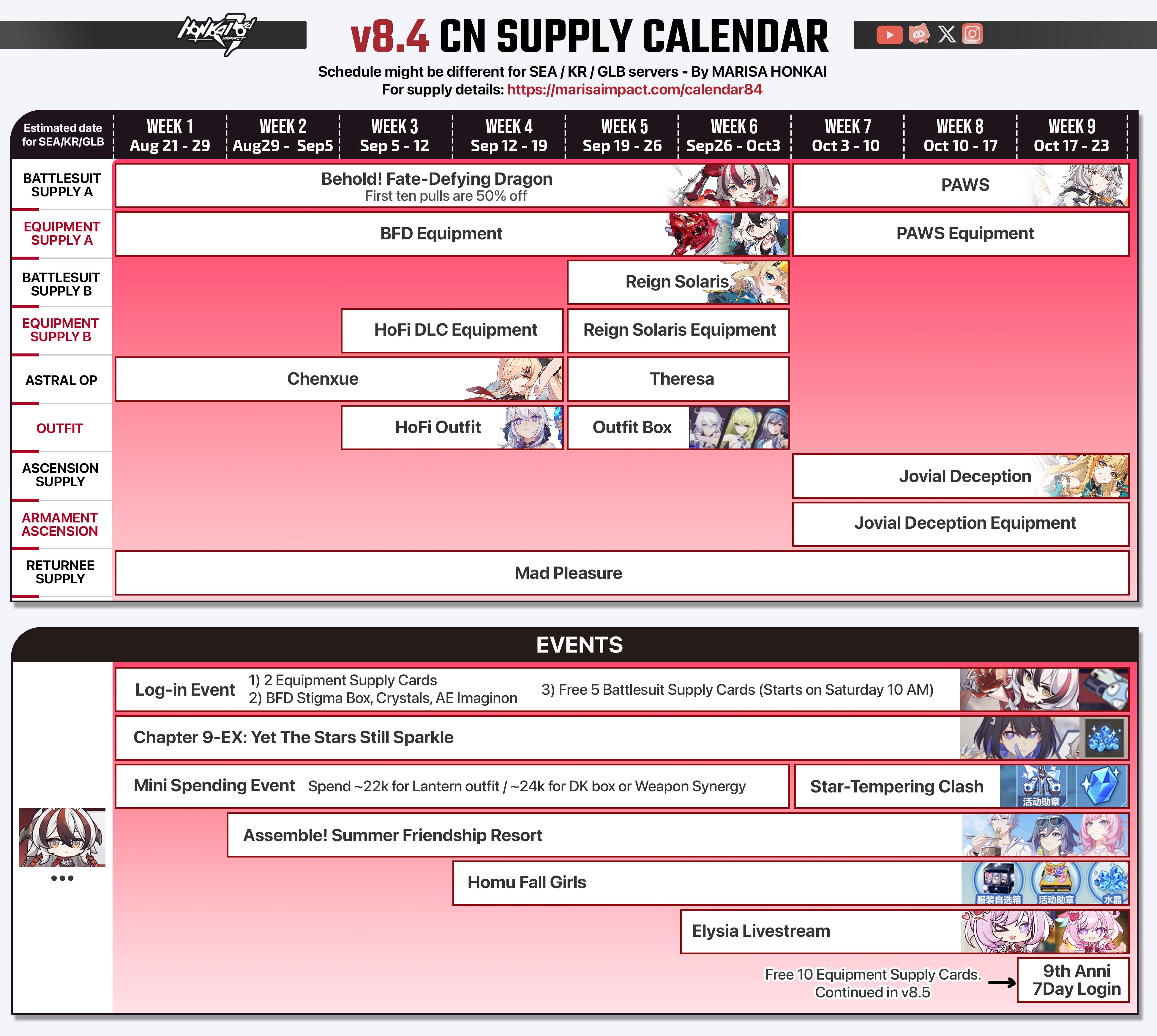
Version 8.4
you missed it
the outfit box out now has flamescion's time runner outfit
my recommendation would be to just restart regardless if your current ongoing account doesn't have time to get rewards out of the starter manual anymore
it will be a long while until the outfit reruns and there won't be any ways through banners anymore to get hofi
wind lichen
wind lichen
||hofi will be available in the reserve works bp starting next patch||, the summ...
again, referring to what i said previously
half night
Yah I think I will just start over
half night
wind lichen
there used to be one a few weeks ago...
https://marisaimpact.com/calendar84
I don't mind as long as there will be reruns
wind lichen
half night
Yah I think I will just start over
check out this guide in the #👶beginner-help pins for infos

just so you know what unlocks when nowadays
half night
wind lichen
just so you know what unlocks when nowadays
What
wind lichen
the other guides are also very helpful. and be open to ask away
wind lichen
half night
What
like, at what captain level which gamemode unlocks
the entire early game is a level rush basically
half night
wind lichen
the entire early game is a level rush basically
Yah
It's very easy to get level up
 thin zealot
Hi I'm new. Why does the game lag on the valkyrie screen? It's usually pretty smooth, around 60 FPS even in combat but I get an FPS drop when I open the valkyrie interface. (I tried lowering my setting to the lowest and still...)
lunar gust
thin zealot
Hi I'm new. Why does the game lag on the valkyrie screen? It's usually pretty sm...
what is your device model?
thin zealot
lunar gust
what is your device model?
You mean my phone?
lunar gust
yes
thin zealot
OPPO A96 (Android 13). CPH2333 to be specific
lunar gust
yea this device is on the low end
sorry but your phone is just not powerful enough
official specs list snap 835 as the minimum and 855 as recommended
yours is 680
thin zealot
Is it gonna be fine for the rest of the stuff? Because it only seems to lag on the valkyrie screen
lunar gust
I guess you shall find out
but it may crash
with a below minimum spec device no stability is guaranteed
thin zealot
Doubt. Even on other games, it doesn't usually crash (despite being clearly more graphic-intensive)
I'll fuck around and find out
 mortal zealot
thin zealot
I'll fuck around and find out
mortal zealot
thin zealot
I'll fuck around and find out

 earnest geode
hi guys i have a very serious issue with my cn account.
basically, i have not logged into my account for roughly a year or less, and today when i finally logged in, all of my progress was wiped. like straight back to beginner, i havent even unlocked bronya, mei or kiana. however, they gave me returner player rewards and i still have the event photo albums from 2018. yes my account is that old. this is genuinely really heartbreaking because i grew up with honkai, spent literally weeks of my life playing this game and have also spent a lot of my pocket money on it.
one issue that might have caused this is the fact that my chinese number bound to my account is out of service, so is my email account. could that be the reason? if so, is there any possible way i can get my account back? i have emailed hoyoverse's honkai impact support team today as soon as i realized i did not log into a potential accidental account that i have made.
this is genuinely so heartbreaking.
mortal zealot
earnest geode
hi guys i have a very serious issue with my cn account.
basically, i have not ...
@stoic reef , is this the mihoyo account issue?
lemme see 1 sec
mortal zealot
earnest geode
hi guys i have a very serious issue with my cn account.
basically, i have not ...
yeah you'll have to wait till the experts get online since it is late for them rn
try again later ig
@wind lichen u know anything about this?
earnest geode
mortal zealot
yeah you'll have to wait till the experts get online since it is late for them r...
thank you so much, this is so so sad for me
mortal zealot
dont thank me whn i havent even done anything  , i hope u get your problem fixed
earnest geode
mortal zealot
dont thank me whn i havent even done anything <:HimekoDead:632367996404498452> ,...
youre trying to get attention for my issue and i really appreciate that, the emails will take a while to solve my problem..
mortal zealot
np
stoic reef
mortal zealot
<@277721591012655105> , is this the mihoyo account issue?
no, forgetting to bind a mihoyo account to a hoyoverse account only applies if you havent touched the game in a little over 3 years now
stoic reef
earnest geode
hi guys i have a very serious issue with my cn account.
basically, i have not ...
for your issue, it is either one of two things.
wrong server or wrong hoyoverse account, game accounts dont get deleted so your progress is still there, you're just logging into the wrong server or the wrong account. If you know your UID then customer support can tell you what to use to log in.
it sounds like though that you dont have access to your email that its linked to so yes you would need to work with customer support to recover your account
they can definitely help, but you'll need to work with them
stoic reef
didn't they already say they contacted customer support?
stoic reef
mortal zealot
yeah i dun know anything abt this then
its all good. basically the tl;dr of everything you need to know with account issues is that game accounts dont get deleted, thats not a thing. Not even deleting the hoyoverse account deletes a game account. So if someone has touched the game even once since the mihoyo migration in july 2022 then they have to be on a hoyoverse account so for any account issues it looks like this:
If you have played the game even once since July 2022 then: Either wrong server or wrong account. Its one of those two (hacked account issues is wrong account too obviously, since if you had access to the hacked account you could log into it with the right credentials)
If you havent played the game even once since July 2022 then you need to do account retrieval at the login screen
mortal zealot
hmm
earnest geode
stoic reef
didn't they already say they contacted customer support?
i did but i was told that this email: honkai3rd_cs@hoyoverse.com, might not work for a cn server account
earnest geode
stoic reef
for your issue, it is either one of two things.
wrong server or wrong hoyovers...
I also do not know my UID
mortal zealot
earnest geode
i did but i was told that this email: honkai3rd_cs@hoyoverse.com, might not work...
maybe this one? honkai3rdcn_asia@hoyoverse.com
stoic reef
earnest geode
i did but i was told that this email: honkai3rd_cs@hoyoverse.com, might not work...
I'm not sure if they will refuse, if they will then they'll tell you within a few business days so i recommend to not flood them with requests, if you were clear that its for a CN account and they cant help with those then they'll tell you who to email about it.
for your UID, do you have any friends in game that you can contact out of game? or any pictures of your profile page in the game? or did you share an invite code to anyone ever?
earnest geode
stoic reef
I'm not sure if they will refuse, if they will then they'll tell you within a fe...
i will check for that
stoic reef
earnest geode
i will check for that
ok, best of luck!
earnest geode
stoic reef
ok, best of luck!
found my account, still intact from my friend's view. what may this mean?
stoic reef
earnest geode
found my account, still intact from my friend's view. what may this mean?
that should give you your UID number that you can provide to customer support to help them in recovering your account
earnest geode
stoic reef
that should give you your UID number that you can provide to customer support to...
okay got it thank you. do you have any clue what may have caused this?
my friend also showed that my last login was a year ago, not today
stoic reef
earnest geode
okay got it thank you. do you have any clue what may have caused this?
assuming your old account is on the CN server, and you installed the CN server, then like i said earlier it has to be that you're using the wrong account to log into the game with
wrong email, 3rd party login, or something. but the short answer is that its one of two possible issues.
wrong server or wrong account. If you installed the correct server and are logging into the right server, but are getting a different in game account. Then the issue is that you're using the wrong hoyoverse account to log in with
earnest geode
stoic reef
wrong email, 3rd party login, or something. but the short answer is that its one...
hey sorry i fell asleep
i downloaded the game via the chinese mihoyo website, the version seems to be the correct one (8.5), and i have always been logging in with my phone number and password. i have never binded another number or email to this account. i didnt even have a hoyoverse account until yesterday (i made it to contact hoyoverse service).
i can see my old account logging in with this one, so i guess it is a wrong account?
stoic reef
earnest geode
hey sorry i fell asleep
i downloaded the game via the chinese mihoyo website, t...
Sorry for calling it hoyoverse account. That's a habit since every other server requires a hoyoverse account and CN only players are very very very rare in this discord server. I just meant it's the wrong account. I don't know what happened to your old one, I can guess a lot of different things but there's no way to actually know so I will repeat
game accounts don't get deleted, you can still see your old one in game and everything. You're just logging into the game with the wrong account and customer support are the only ones that can really help with that
 robust cypress
why is there no controller support for android devices? but for IOS there is?
wind lichen
robust cypress
why is there no controller support for android devices? but for IOS there is?
We don't know the actual reason for sure, only speculations. There are some very few controllers that are supported on android, but only because they had a collab before with HI3. Technically it is possible.
robust cypress
i got this fine easysmx m15 and cant use it for this game which is unfortunate.
wind lichen
Also PC has controller support for the most common ones
3rd party should also work fine
robust cypress
wind lichen
Also PC has controller support for the most common ones
yes luckily on the pc it works
wind lichen
i even saw them adapt button layouts properly for Switch Pro controllers
robust cypress
im downloading genshin right now to test if it works on there
wind lichen
sure. I only do know that hsr has proper controller support on android
robust cypress
wind lichen
sure. I only do know that hsr has proper controller support on android
i think ill get it working now even in hi3, i downloaded this mapping app, so it simulates pressing the touchscreen. works very good in genshin
wind lichen
robust cypress
i think ill get it working now even in hi3, i downloaded this mapping app, so it...
i wouldn't recommend using such software for that as it can trigger the anticheat
there were bans in the past
robust cypress
hm if it happens it happens, i never bought anything in the game so its kind of whatever
but still thanks for the heads up
wind lichen
best of luck
 sly plover
Does anyone know why I can't log in to my account? I enter everything correctly and log in but my account doesn't appear. I've tried many times but I can't. Could someone help me?
stoic reef
sly plover
Does anyone know why I can't log in to my account? I enter everything correctly ...
When you say doesnt appear, do you mean you've logged into a new or a different account?
sly plover
@stoic reef I put the account that I linked but the beginner mission appears and when I finish the mission but it does not appear
stoic reef
sly plover
<@277721591012655105> I put the account that I linked but the beginner mission a...
got it so a new account. This pin should apply to your situation then, please give it a read #🔌technical-help message
sly plover
@stoic reef Thanks
stoic reef
np and best of luck finding your account
young rose
Hi guys. I messed up today and accidentally used a little yellow rubber duck stamina object that I've been saving for years. The damn interface puts the duck for use FIRST, and it couldn't be locked in inventory. So after avoiding using it for so long, I accidentally used it. I contacted support and of course they gave me the stock "...any actions done or changes made in-game are irreversible and not able to refund or exchange...".
Is this really all there is to it? I'm very particular about collecting certain things and this little duck was one of them.
cosmic lion
young rose
Hi guys. I messed up today and accidentally used a little yellow rubber duck sta...
as CS tell you, they cant do anything about it, once you use an item is gone forever
if you are collecting consumable items you just have to be careful next time
stoic reef
yes, there is no way to undo that
young rose
I was careful for years 
Thanks for the replies, but it's a ridiculous policy
Especially for something that has no real benefit used.
stoic reef
its less of a policy and its just not coded into the game to undo consuming a thing iirc
young rose
I could see that, but surely they must be able to just in-game mail another copy? They do that all the time with other objects; it would just be a different object ID
stoic reef
I imagine its more complicated than that, but regardless theres unfortunately nothing that can be done
young rose
So sad
If I could pay someone to get it back, I would
I'd pay more than the crazy amount it costs to buy outfits and valkyries
cosmic lion
stoic reef
I imagine its more complicated than that, but regardless theres unfortunately no...
 last lotus
So uh
If you switch from an android device to ios, latter doesn't seem to have a google login. How am I supposed to enter my account then?
stoic reef
if you go to account.hoyoverse.com on a web browser you can use your google login to login. and then link another login method to that hoyoverse account and use that to sign into the game on iOS
(or just see what else is linked if theres more linked and use that once you know what else is attached to that account)
last lotus
IstG
last lotus
stoic reef
if you go to account.hoyoverse.com on a web browser you can use your google logi...
I already tried with username, mobile phone etc. Stupid game won't let me login
mortal zealot
pls only blame apple
 stoic reef
last lotus
I already tried with username, mobile phone etc. Stupid game won't let me login
stoic reef
last lotus
I already tried with username, mobile phone etc. Stupid game won't let me login
just to clarify, you went to account.hoyoverse.com and double/triple checked that you have a username set because its not the same thing as your in game nickname, and when you go to login with your username and your account password, whats the error message you get?
last lotus
It says something along the lines of wromg username/password. Yes I doublechecked
stoic reef
make sure that you're manually typing in the username and password, copy/paste can sometimes add a blank space at the beginning or end which will mess it up, but if that still saying wrong username/password the only thing I can think of is you need a password reset, or since the website does not show the full username there might be something in the middle part that is censored that you're mistyping (this is assuming the error is username/password of course)
mortal zealot
now triple check
stoic reef
i personally just recommend linking an email address to it and using that since that generally is the hardest to have problems as long as you remember which email address you're using
last lotus
stoic reef
make sure that you're manually typing in the username and password, copy/paste c...
Yeah I always manually type. I'm sure I haven't got the username wrong when I've tried logging in with my mobile number too. Gosh this is frustrating. I'll check again.
last lotus
stoic reef
i personally just recommend linking an email address to it and using that since ...
See that's the problem. I don't have a hoyoverse account. I always logged in using gmail to quickly get it done with. But now it's not accepting the gmail when I use it to enter in the hoyoverse account. Ios doesn't have the google option. Also I tried making a hoyoverse account with the SAME gmail account I'm using on android but it doesn't let me saying email is already in use. I'm stuck in a limbo
stoic reef
last lotus
See that's the problem. I don't have a hoyoverse account. I always logged in usi...
i guarantee you have a hoyoverse account unless you have not touched the game since july 2022. hoyoverse accounts are the only way to log into the non CN servers since 2022.
just to clarify, google account login is a 3rd party login and is not the same thing as using your gmail email address. you can have your gmail linked to a hoyoverse account, and not a google account and visa versa.
sounds like you have 2 hoyuoverse accounts, one linked with your email, and one linked with a google account
last lotus
stoic reef
i guarantee you have a hoyoverse account unless you have not touched the game si...
Sorry I'm a little dumb.
Okay so when I'm on my android device and use my gmail social media to login, I'm basically in the game with my hoyoverse account?
And then when I go to User Centre IN GAME, then I see my email first thing. And a google account in my linked accounts. Both have like the same gmail address because for me well it's the same google account.
So what now? How am I supposed to shift this ios? Cuz when I open the game in Ios, it shows a hoyoverse login. And it seems to be accepting nothing. Cuz I've already tried the google account and gmail info

stoic reef
just to confirm, when you log in on android its with the google icon right?
last lotus
stoic reef
just to confirm, when you log in on android its with the google icon right?
YES
stoic reef
ok so you have a few options
** option 1:** if you dont have other hoyoverse games linked to that email address (NOT google login, but email address) or your are fine with any hoyoverse games linked to that hoyoverse account to have a different email address.
ok, so first if you dont have a second email account. Create one.
Then go to account.hoyoverse.com and log in with your email, do the forgot password if you need to.
then change its linked email to the secondary email address and log out of account.hoyoverse.com
then log back into account.hoyoverse.com with the google account icon and link your gmail address to that account.
then reset the password too and use that email/password combo to log into iOS
**option2: ** If you have something like facebook or x then you can log into account.hoyoverse.com with your google account and link one of those to it, and then use that to sign into iOS. or make/use a different email to link to your google accounts hoyoverse and then use that to log in on iOS
stoic reef
last lotus
Sorry I'm a little dumb.
Okay so when I'm on my android device and use my gmail...
but yes, since july 2022 the only way to log into hi3 was with hoyoverse accounts, so any way that you log in with on your phone (even if its just a google account/facebook/other 3rd party option) that is still a full fledged hoyoverse account. It shows your email because that is the info its pulling from your google account 3rd party login. that doesnt mean that the email itself is linked to the account as you can see when you tried to link your gmail to your google accounts hoyoverse account
last lotus
stoic reef
** option 1:** if you dont have other hoyoverse games linked to that email addre...
This is doable. I'll try this tomorrow morning then. Thank you so much!
stoic reef
np
last lotus
stoic reef
** option 1:** if you dont have other hoyoverse games linked to that email addre...
Um luna, about the "then log back into" part here, which account am I logging back into? Like after I change the linked email to the secondary email address? Like the final combo I'm using is of the second email and it's password?
stoic reef
mortal zealot
ios is stupid
In this case it's just competing platforms. It's the same reason Android doesn't have an Apple account login option
mortal zealot
stoic reef
In this case it's just competing platforms. It's the same reason Android doesn't...
ic
still tho apple does alot of weird shit
to promote its own products ik but way to restrictive of non apple things on ios
stoic reef
last lotus
Um luna, about the "then log back into" part here, which account am I logging ba...
So for option 1 what you're doing is essentially swapping the emails being used. So you'll log into you email accounts hoyoverse and change it's email to something else which free's up your Gmail email because it's not being used by a hoyoverse account.
After changing it's email to something else you sign out, then sign in with you Google account (the one that has your hi3 game data on it) and it'll let you link your Gmail email to that since it's not being used anymore
stoic reef
mortal zealot
to promote its own products ik but way to restrictive of non apple things on ios
Well sure, but Google does the same thing to an extent. It's just Android has more variety to it's ecosystem to begin with than Apple and allows for more user customization with custom os and package installing through unofficial means.
The main difference is that android is an OS, that a lot of companies install on their own brand of phones, whereas Apple is both an os and a single brand of phone so they keep everything in house
stoic reef
Well sure, that's why I don't use Apple phones lol but it's not anything is personally say is sketchy or weird and all that. But it is annoying and I like having more control for a more hands on user experience so I don't go with Apple
mortal zealot
same
last lotus
I mean it's so sad my parents bought me an ipad as a bday gift and they've asked me plenty of times why I'm not playing the game on it and I couldn't explain to them I'm having an account issue for days 😭
 stoic reef
poor parents, at least you'll be back in soon :3
mortal zealot
last lotus
I mean it's so sad my parents bought me an ipad as a bday gift and they've asked...
damn nice parents

 digital plaza
I know this isn't the right place to ask but are you able to adjust the FPS in Star rail the same way as Impact or no?
stoic reef
digital plaza
I know this isn't the right place to ask but are you able to adjust the FPS in S...
i forget if it can the same way tbh, can always just try and see if it works, theres probably a registry setting called graphicssetttings or something like that that has it if its t here
(i'd check but i dont play HSR so i dont have it installed)
 stoic reef
HSR is in hkey_current_user\software\cognosphere
digital plaza
 stoic reef
if its there then one of those will have an FPS setting in there
digital plaza
I think I've found and done it
stoic reef
digital plaza
Booting up now to see
digital plaza
lunar gust
max 120
120 is max for HSR?
digital plaza
🤷♂️ might as well
mortal zealot
lunar gust
max 120
imajin setting it at like 300 only for it to crash
or vsync idk
 keen pecan
i dont play Hi3 anymore and thought i deleted it. Can i delete this file or does that also delete my entire progress in the game aswell
 lunar gust
your progress is on the servers lol
this is just the game client
you can safely delete
keen pecan
lunar gust
your progress is on the servers lol
Okay thanks :)
south walrus
stoic reef
<:TeriStonks:1009416806898868254>
Hi luna
stoic reef
south walrus
Hi luna
south walrus
stoic reef
<:VitaWave:1296466772454674514>

 errant trout
im having trouble with my game
in the first few minutes of the starting point
there's barely any dialogue in the story

theres no voice acting
is this a technical difficulty?
cosmic lion
errant trout
theres no voice acting
is normal for the first chapters to not have JP VA, some time ago those got a rework and the new voicelines/CG didnt got re-recorded
on later chapters the voices will reappear
errant trout
what chapters are those that the voices will later appear
cosmic lion
iirc on chapter 3 or 4
odd wedge
You can tryyyyyy CN VA
fringe burrow
cn va is actually very good
i also didnt want to play on cn va and it ended up liking me more than jp va
 primal pasture
^^ I swapped since HoS
 covert girder
Is my event bugged it won't progress to lvl 8 been spamming comment and heart nothing happening for 3 days already

Nvm I needed to click the heart at least 30 times
 amber mango
i deleted hoyoplay cuz for some reason hi3 in my pc is not loading and its says it uninstalled it, but when i checked my setting it says hi3 and hsr are still there even though they are suppose to be gone, then i decided to re-install hi3 to see if that will fix it but it just ended up with 2 hi3

anyone know whats up?
cosmic lion
amber mango
i deleted hoyoplay cuz for some reason hi3 in my pc is not loading and its says ...
did you uninstalled the games manually or just hoyoplay?
if is this last one, did you check the box to delete the games too?
amber mango
cosmic lion
did you uninstalled the games manually or just hoyoplay?
if is this last one, di...
i deleted them manually
cosmic lion
amber mango
i deleted them manually
then that could be the issue, by deleting manually there are still files on your pc in different places (like the appdata folder, the win registry,...) so like any other program, by deleting that way windows still think you have the program installed. you can try to uninstall from that window, it should give you an "error" and update the program list after checking the app doesn't exist anymore
and about the issue, did you fix it or you are still unable to run the game?
amber mango
welp even hoyoplay got the treatment
 amber mango
cosmic lion
and about the issue, did you fix it or you are still unable to run the game?
amber mango
cosmic lion
and about the issue, did you fix it or you are still unable to run the game?
i wanna make sure hi3 and hsr are fully deleted before i try to install it again
cosmic lion
amber mango
welp even hoyoplay got the treatment
that is normal if you just delete the files instead of running the provided uninstall executable
if you deleted the files then the games are "uninstalled" most of the things left on your device is mostly "login info" and some cache stuff
you can just install again, but if you dont want them to show on the windows program list, run the "uninstall" before so the list get updated
amber mango
do they take space though? cuz i dont mind them being there if they dont take space
cosmic lion
the "leftover" files? they take like 1gb approx. but those get replace constantly, while using the games
if you mean the "game files" if you deleted them from your drive, then there are gone (unless windows didn't think there are big enough and they are on the recycle bin instead, you can delete them from there)
amber mango
so the ones in the pics are just "hollow shells" of the games in a way?
cosmic lion
yeah you can say that, windows doesnt know the files are gone so still show them as they exist, as i said before you can run the uninstall, its going to "fail" because cant find the files and will remove the app from the list after seeing that
sometimes you have to use "control panel" to uninstall the app to get that "failed" msg and get the list updated
for next time, keep in mind that HoYoPlay is just a launcher, you don't have to uninstall it to fix problems with the games or viceversa, if the launcher have issues you can uninstall it without deleting the games.
and if you have an issue try to ask on the discord channels before anything, some know issues have solutions that most of the time will skip a full reinstall
amber mango
cosmic lion
sometimes you have to use "control panel" to uninstall the app to get that "fail...
i got it thanks for reminding me of control panel lol

 sleek ruin
is there a up to date version of this ?
cosmic lion
sleek ruin
is there a up to date version of this ?
its up to date, since part 2 new cg already have CN VA
sleek ruin
will there a way to have eng suptitles with cn voice ?
or is that not possible
cosmic lion
sleek ruin
will there a way to have eng suptitles with cn voice ?
or is that not possible
its not impossible but its a time consuming process, Slothy had try but failed to make it work(program not working/not all cgs fit "perfectly"/...)
if you play on the GLB client, you can try to use the ones that cactism made (#🔌technical-help message) idk if they still work, i know some files change slightly some time ago, but i only check the part 2 ones
 mint sail
is there a way to change basic attack input to mousebutton on mac?
iirc there was on windows but here, no
mortal zealot
@odd wedge can u help me with something
my friends trying to boot thru his usb but PC's not letting him
he goes to boot menu and selects the usb and it boots windows(SSD) anyway
USB boot is enabled(i think) from his bios settings

u think u can help?
odd wedge
mortal zealot
go to boot order
mortal zealot
odd wedge
go to boot order
did that

what from here?
we did accept it
still booted to windows
mortal zealot
win11
odd wedge
to install fresh windows?
odd wedge
how large is your usb drive?
mortal zealot
odd wedge
how large is your usb drive?
the usb is UEFI but pc is on legacy
could that be reason?
wait...
surely this pc isnt too old to support uefi
odd wedge
Download the .iso
https://www.microsoft.com/en-us/software-download/windows11
Download rufus
https://rufus.ie/en/
Run rufus:
Device: (your drive)
Partition scheme: GPT,
File system: NTFS
Insert the drive to PC, and then turn it on.
If you don't see the setup screen, your PC might not be set up to boot from a drive.
Check your PC manufacturer's website for info on how to change your PC's boot order, and then try again.
Rufus: Create bootable USB drives the easy way
odd wedge
uwu you guys drive set to UEFI, right?
mortal zealot
we want to
but usb wont boot
the pc is HP Z400 workstation
does it even support uefi?
odd wedge

mortal zealot
cuz then how do we upgrade to win11 with mbr?
odd wedge
idk is this what you want?
https://www.youtube.com/watch?v=aUzUXOZjKH0

How to Upgrade Windows 10 (MBR) to Windows 11 (GPT) Without Data Loss
The EASIEST Way to Upgrade Windows 10 MBR to Windows 11 GPT (No Wipe)
How to Safely Upgrade from Windows 10 Using MBR (Master Boot Record) to Windows 11 on a GPT (GUID Partition Table) Disk without Losing Any Data. Windows 11 Requires UEFI Boot Mode & GPT Partition Style, So ...
ngl i lowkey fear doing anything with bios
mortal zealot
odd wedge
ngl i lowkey fear doing anything with bios
same
mortal zealot
odd wedge
idk is this what you want?
https://www.youtube.com/watch?v=aUzUXOZjKH0
basically yes, but the damn thing has to support UEFI to even get GPT windows booted
I mean u could use a boot loader for GPT windows ig but idk how to do that
odd wedge
yeah idek anymore, only did this on my own new-ish laptop so it's fairly simple
twice lmao
mortal zealot
so now i have to find a way to bypass secure boot requirement
for win11.iso file
any ideas?
mortal zealot
odd wedge
yeah idek anymore, only did this on my own new-ish laptop so it's fairly simple
The Z400 lacks TPM and UEFI, so you must bypass the hardware checks.
There are two methods:
🧰 Option A — Registry Method (Simplest, Safe)
Before running setup:
Open Notepad and paste this:
Windows Registry Editor Version 5.00
[HKEY_LOCAL_MACHINE\SYSTEM\Setup\MoSetup]
"AllowUpgradesWithUnsupportedTPMOrCPU"=dword:00000001
Save as Bypass.reg → double-click it → click Yes to add to registry.
Then:
Run setup.exe from the mounted ISO.
Choose:
✅ “Upgrade this PC now”
✅ “Keep personal files and apps”
Windows 11 will install without wiping data.
i just chatgpt'd lmao
does this work?
odd wedge
Yeah the boot drive can install windows 11 without clearing data
mortal zealot
odd wedge
Yeah the boot drive can install windows 11 without clearing data
I mean the bypass
odd wedge
That I do not know 😔
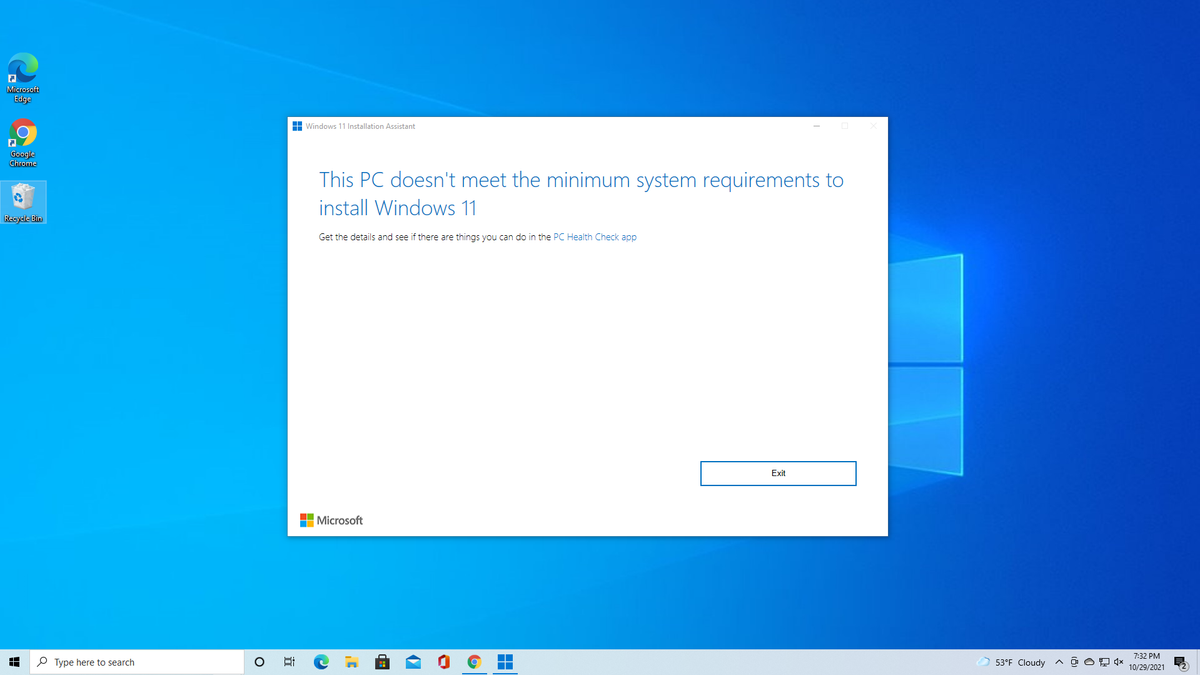
Tom's Hardware
Use simple utilities to install Windows 11 on any PC.
oh lmao registry method mentioned here
@stoic reef where you goin'?
stoic reef
mint sail
iirc there was on windows but here, no
Iirc it can do the kb+m that Windows does but it only works for the m devices using first party mouse if I'm not misremembering. Otherwise there's not a way that I'm aware of
stoic reef
odd wedge
<@277721591012655105> where you goin'?<:ElysiaGrab:1099324478007296000>
I literally just woke up you'll have to give me a bit to back read
odd wedge
first party mouse? 
mortal zealot
rise and shine
odd wedge
stoic reef
I literally just woke up you'll have to give me a bit to back read <:FuHuaDistre...
saw you typin', wanted YOU to come say hi
stoic reef
odd wedge
first party mouse? <:KianaHuh:456636250347274240>
Apple Brand mouse
stoic reef
odd wedge
saw you typin', wanted YOU to come say hi
Hihi senpai~
mortal zealot
stoic reef
Hihi senpai~ <:VitaWave:1296466772454674514>

I read that in ely voice kek
mortal zealot
mortal zealot
luna i need to upgrade to win11 on MBR and need to bypass requirements
I have a bypass cmd file for TPM and CPU but not secureboot
any bypass you know for secure boot?
@stoic reef where u go
stoic reef
I didn't know it off the top of my head and was looking it up to confirm a few things 
But how willing are they to have a Windows 11 installation that may be unstable and may not receive updates?
mortal zealot
um a non-genuine copy?
stoic reef
Because one of win 11 key components is having secure boot and UEFI enabled. If the computer doesn't support that then if you bypass that to install win 11 then because it's missing the key components it may just be unstable and possibly won't ever do any windows updates
mint sail
stoic reef
Iirc it can do the kb+m that Windows does but it only works for the m devices us...
the issue is that i’m a MAC user.
and
uh
yeah the Magic Mouse isn’t exactly.. the…

mortal zealot
stoic reef
Because one of win 11 key components is having secure boot and UEFI enabled. If...
hmm
mint sail
does KB+m retain if i quickly use the magicmouse to trigger it then plug another mouse back in
stoic reef
mint sail
does KB+m retain if i quickly use the magicmouse to trigger it then plug another...
Yeah Mac version is annoying like that, and that I don't actually know. I don't have a Mac to test it out on and my friends don't either. might need to go to customer support since at least they would know
mortal zealot
stoic reef
Because one of win 11 key components is having secure boot and UEFI enabled. If...
you know how ventoy(another rufus basically if u dont know) allows u to bypass all the win11 requirements and install win11 anyway? is that what your saying?
mint sail
stoic reef
Yeah Mac version is annoying like that, and that I don't actually know. I don't ...
#🎮honkai-chat message is the pop-up on the right windows exclusive?
the one their cursor’s over
stoic reef
mint sail
https://discord.com/channels/418652140454674432/446011203244916747/1427596456499...
No, if it detects the intended kb+m it'll do that on Mac too iirc
stoic reef
mortal zealot
you know how ventoy(another rufus basically if u dont know) allows u to bypass a...
Not with ventoy, this is what I found that might work but it might make your windows not update and be unstable https://learn.microsoft.com/en-us/answers/questions/2121461/install-windows-11-without-secure-boot-on-an-unsup
So I honestly don't recommend it if there's a chance of never being able to update or Windows crashing semi frequently. Maybe as a test thing but not as a daily use pc
mortal zealot
man
mortal zealot
I thought a optiplex 9020 was bad but at least it supports UEFI
mint sail
ive tried mashing most of my bottom line keys (same row as space) and nothing turned up
odd wedge
stoic reef
Apple Brand mouse
Lmao 😭
mortal zealot
stoic reef
So I honestly don't recommend it if there's a chance of never being able to upda...
question whats better? a windows11 that is unstable and might not have updates or a windows 10 which is EoS'd
odd wedge
I had the opportunity to be tortured by use an Apple Magic Mouse
not bad actually, swipe swipe, kinda cool
The most ass thing is the charging port is on the bottom 💀
Forget to charge? Yeah you're cooked
mortal zealot
odd wedge
Forget to charge? Yeah you're cooked
and since its apple i bet its not a replacable battery
mortal zealot
ye expected as much
mortal zealot
odd wedge
and unlike a phone and a regular mouse
u cant use it while charging
odd wedge
You won't be able to use it when it's attached to its cable haha what that's crazy
mortal zealot
apple being apple alright
stoic reef
mint sail
supposedly it’s right alt but
the right alt hotkey to switch them would be windows exclusive, i think mac doesnt have a switch hotkey, or at least not one that i've never heard of
mortal zealot
mortal zealot
question whats better? a windows11 that is unstable and might not have updates o...
so luna
win10 not gonna get updates either right
mint sail
odd wedge
Forget to charge? Yeah you're cooked
I THINK I LOST TS
like i unironically just put it somewhere else in favour of a standard logitech mouse
stoic reef
mortal zealot
question whats better? a windows11 that is unstable and might not have updates o...
at the moment probably windows 10. it has the current security updates and stuff and EoS just means it wont get new security updates by default
mortal zealot
wont win11 have security updates by default?
or do u need to update after upgrading to 11
stoic reef
you mean included in the installation package? a lot of them im sure yeah
mortal zealot
so would they not be equal to or better than the win10 security updates since its the latest windows 11 version ?
stoic reef
i dont know the answer to that. i dont know which security updates are included in the installation if its all of them or some/none of them.
mortal zealot
I see
stoic reef
i guess as long as you backup everything important you could try it and always go back if needed
mortal zealot
the guy's microsoft stores broken and he cant use the apps
mortal zealot
stoic reef
i guess as long as you backup everything important you could try it and always g...
another question if u have the answer. would that mean that dism will be unusable as well?
if upgrade to win11 i mean
since dism used windows update utility iirc
stoic reef
probably? i wouldnt touch that command if you mess with the windows image since the point of that command is to repair the windows image
stoic reef
mortal zealot
since dism used windows update utility iirc
and theres offline and online command parameters
odd wedge
Woah someone else actually uses the Microsoft Store
mortal zealot
stoic reef
probably? i wouldnt touch that command if you mess with the windows image since ...
the only file we're touching is the appraisal.smth file iirc
stoic reef
mortal zealot
thats really bricked smh <:HimekoDead:632367996404498452>
think of it this way, if you modify a file for a game, and then run the repair in the launcher the game will unmodify itself lol
mortal zealot
stoic reef
think of it this way, if you modify a file for a game, and then run the repair i...
yeah but that point win11 would be installed no?
stoic reef
windows checks for its requirements past installation though, like on startup and stuff iirc
mortal zealot
really?
my win11 is working fine on UEFI(my CPU is too oldge)
i bypassed requirements as well
for CPU and TPM
is working fine
and regular updates
granted im on UEFI
stoic reef
mortal zealot
my win11 is working fine on UEFI(my CPU is too oldge)
windows 11 is fine with UEFI
mortal zealot
yeah
then if u do a fresh win11 install with ventoy/rufus to bypass requirements will windows still be unstable?
if ventoy is set to MBR
not GPT
stoic reef
oh it bypasses the partition type for the installation media
might be misremembering on it checking the installation requirements on startup, but anything that assumes you have secure boot enabled and uses that will not work because its not enabled
 mortal zealot
stoic reef
might be misremembering on it checking the installation requirements on startup,...
mortal zealot
stoic reef
might be misremembering on it checking the installation requirements on startup,...
but will the overall win11 be stable + updates?
or no
stoic reef
mortal zealot
but will the overall win11 be stable + updates?
i personally dont think so, but i havent tested that.
if you really want to, just make sure to back things up and have a windows 10 install media and can always just try it out and all that
mortal zealot
hmm maybe there are other ppl who did this, i'd like to see their reviews on downloading win11 on MBR
stoic reef
but i think it will be unstable and may not recieve updates, so i wouldnt personally try it on a daily use pc, thats my personal opinion on if you should or not. but its not irreversible so if you wanna try it then try it
mortal zealot
weather they get updates or no
mortal zealot
stoic reef
but i think it will be unstable and may not recieve updates, so i wouldnt person...
well thats my friends decision, its his PC.
to bad i dun have a lab rat PC/laptop
mortal zealot
stoic reef
but i think it will be unstable and may not recieve updates, so i wouldnt person...
you know a site where i can see this#🔌technical-help message ?
if u do can u link
stoic reef
you mean like the microsoft forums?
stoic reef
pretty much the only two places you'll hear a variety of people talking about their experiences would be that or reddit
mortal zealot
ah yes reddit
stoic reef
i dont think theres a MBRWin11 .org site or anything
mortal zealot
i barely use it
mortal zealot
stoic reef
i dont think theres a MBRWin11 .org site or anything
i dont particularly see windows update problems but there is this

the user is using a third-party antivirus instead
stoic reef
mortal zealot
i dont particularly see windows update problems but there is this
yeah that is like a dealbreaker for me personally, even if i dont use it i'd worry too much
mortal zealot
makes sense, but thats only for no UEFI support
say
as an alternatives how long does win10 long term support last?
stoic reef
mortal zealot
as an alternatives how long does win10 long term support last?
wasnt that the 14th?
mortal zealot
14th october was for winxp - win 10 in general iirc?
there should be win10 versions thats still have some time of support
stoic reef
Oct 14th was microsofts end of support for windows 10
mortal zealot
like enterprise or am i misremembering?
stoic reef
you're probably thinking of buying an extended security update license for money
mortal zealot
no
but whatever
i'll check anyway
I think ram might know something abt this, he mentioned it when he was helping me upgrade to win11
stoic reef
oh are you thinking about the LTSC verisons?
stoic reef
the latest version from 2021 should be 2027 but you'd need to reinstall to that version
mortal zealot
stoic reef
the latest version from 2021 should be 2027 but you'd need to reinstall to that ...
yeah, good as alternative
which version was that anyway?
enterprise?
home/pro dont have LTSC iirc
stoic reef
mortal zealot
which version was that anyway?
LTSC 2021 is what its called, you'd need to purchase a license for it too iirc
stoic reef
mortal zealot
ofc u do screw u microsoft
its a seperate product designed for enterprise use
mortal zealot
stoic reef
its a seperate product designed for enterprise use
makes sense
stoic reef
dont copy paste chatgpt responses in here please
if i want to know what it says i'll ask it
mortal zealot
I see 
anyway u can manually download upgrades with iso right?
i think my friend is kinda excited for win11
wanna check every possibility
stoic reef
yes you can manually update
mortal zealot
so besides being a hassle to update, it should be fine then?
I mean hes gonna have to learn to update manually, but its his decision in the end
stoic reef
thats up to them 
mortal zealot
mortal zealot
stoic reef
thats up to them <:BronieStare:1196158822495035473>
I mean in terms of windows 11 working fine
stoic reef
you just listed a bunch of things that wouldnt work, then said "other t han updates it should be fine?" thats up to them y'know if they're fine with that
mortal zealot
yeah
well in any case i got my answers
at best if hes lucky he'll get a windows defender-less and security settings-less windows 11
otherwise manual updates it is
thanks luna
mortal zealot
yeah
odd wedge
stoic reef
dont copy paste chatgpt responses in here please
I love seeing those, makes me go crazy (I hate it so much)
stoic reef
odd wedge
owo?
you helped too you get a thanks :3