#🔌technical-help
1 messages · Page 90 of 1
 fair steeple
I've followed the steps but still stuck at logo, any help? 
 strong hamlet
my account is in sea version but im in americas region, i had it downloaded from xiaomi app store before and no problem but now this message shows up

 gilded birch
strong hamlet
my account is in sea version but im in americas region, i had it downloaded from...
gilded birch
strong hamlet
my account is in sea version but im in americas region, i had it downloaded from...
Try downloading and installing the apk directly from miHoYo instead: #🔌technical-help message
gilded birch
fair steeple
I've followed the steps but still stuck at logo, any help? <:TeriRip:11942160398...
I’d recommend downloading one of the 3rd party launchers (see the bottom of the linked message) and using its repair function: #🔌technical-help message
 silver urchin
Yeah, since I'm using huawei and I don't want my honkai to connect to the app store (it will auto link to my huawei account) I deny a permission of something, and it still doesn't work with a reinstall, anything I could do?
It's still here btw
I can tap it to go away but it's annoying
gilded birch
silver urchin
Yeah, since I'm using huawei and I don't want my honkai to connect to the app st...
if you’re saying that you don’t want to use your Huawei account to login to the game and you have a HoYoverse account you want to login with, just download the official apk directly from mihoyo instead: #🔌technical-help message
silver urchin
gilded birch
if you’re saying that you **don’t** want to use your Huawei account to login to ...
Yeah I did that already, but then the "can't connect to app store" still there
Usually the b-chips will get a "null" price
gilded birch

silver urchin
But when I updated to 7.2, the shop wouldn't show anything
Wait, I'm going to send the shop pic
 gilded birch
have you tried using a VPN by chance? a free one is provided in the pins: #🔌technical-help message
silver urchin
So, I have to play with vpn all the time?
Yeah, idk


Thanks for the vpn recommendation tho
gilded birch
hmm, i have a theory that it may because it’s trying to contact with google play services, something that isn’t installed on huawei devices (due to trade disputes with the US and China) and is used for transactions/payments on the large majority android devices which do have the google play store
for the time being, you can use other methods to top up: #🔌technical-help message
@silver urchin forgot to reply 
and if you’re not planning on buying anything, i’m afraid you’re just going to have to deal with it (or install google play services from and outside source, but idk if they work)
strong hamlet
gilded birch
Try downloading and installing the apk directly from miHoYo instead: https://dis...
didn't work, i still get the same message
 frosty holly
i accidentally created a new account with a salted version of my main account's email address and now whenever i try to sign into my main account on mobile, it logs me into the alt. I can access my main on pc just fine, but i'm afraid if i log out it'll log me into the alt
what should I do
 cosmic lion
strong hamlet
didn't work, i still get the same message
cosmic lion
strong hamlet
didn't work, i still get the same message
did you disable the auto-update from the xiaomi store before installing the apk?
if you didn't then probably the store just reinstall the wrong ver. again #🔌technical-help message
frosty holly
wait i think i might've logged into the wrong server
yeah nevermind i pulled a stupid
cosmic lion
frosty holly
wait i think i might've logged into the wrong server
i was about to say that 
strong hamlet
cosmic lion
did you disable the auto-update from the xiaomi store before installing the apk?...
i did, going to try again one more time but i think ill have to use a vpn
frosty holly
i'm surprised that it took me that long to figure out given that i'm a programmer
i can't believe i'm that much of a moron
cosmic lion
strong hamlet
i did, going to try again one more time but i think ill have to use a vpn
you only need to download the correct ver, if you download the SEA apk from the link Cactism send you, then you should be able to play,
but if you have any other store you should disable the auto-update, and you only need the VPN if you have connection issues with the game, or you really really want to download the app from the playstore only
cosmic lion
frosty holly
i can't believe i'm that much of a moron
 dont say that, everyone can make a mistake, and in here many captains had made that mistake and asked about that "issue"
strong hamlet
cosmic lion
you only need to download the correct ver, if you download the SEA apk from the ...
i downloaded from the link cactism sent but still got the same message even having the auto-update disabled
i restarted my phone and going to download it again
 dense aspen
since i purchase with epic games on honkai, will it allow me to use this money? i never knew an epic games wallet existed. or would hyv not accept it?
 cosmic lion
dense aspen
since i purchase with epic games on honkai, will it allow me to use this money? ...
cosmic lion
dense aspen
since i purchase with epic games on honkai, will it allow me to use this money? ...
It should let you use it on anything that uses the epic store payment, iirc the only thing where you cant use it is on "subscriptions", but hi3 don't have those anymore
cosmic lion
dense aspen
so it wouldnt refund/fail if i try?
Afaik works like any other payment method, so the only times will not works is if the payment system is not working, and then the money go back to the wallet. But I never use epic after the store release so I can't say for sure
silver urchin
"as far as i know"
dense aspen
?
 lunar gust
dense aspen
?
lunar gust
dense aspen
?
As Far As I Know
dense aspen
so its unsafe?
silver urchin
^
cosmic lion
dense aspen
so its unsafe?
Is safe, don't worry
dense aspen
alr
 gaunt lotus
my main account is on mobile and i just downloaded the steam version of it and i want to link up the account to the steam version is there anyway to do that?
cosmic lion
gaunt lotus
my main account is on mobile and i just downloaded the steam version of it and i...
Sadly you can't
#🔌technical-help message
 normal axle
Hello, my game keeps crashing on this screen and when I go to the analysis section, it shows bug type 109. What does it mean?
 gaunt lotus
isee
silver urchin
normal axle
Hello, my game keeps crashing on this screen and when I go to the analysis secti...
mobile? give device name/model
and does the game stuck there or completely quit
normal axle
silver urchin
mobile? give device name/model
Iphone 8 plus
normal axle
silver urchin
and does the game stuck there or completely quit
It crash into home screen
silver urchin
hmm i think iphone 8 was on the min requirements last time not sure if new updates made it not enough to play yet
you could try reinstalling but its most likely need a better device now
normal axle
I try reinstall several time but it doesn't work
silver urchin
then its the latter unfortunately
 indigo valve
Why’d they just end the thread after not giving me an answer?? WTH??

Just casually takes my money like
cosmic lion
normal axle
Oh
by any chance you have the battery save mode enable on your phone?
because yeah iphone 8 plus is the min to run the game but with some graphical issues so if you have stuff that limit the "power" of the devices is going to get worse
normal axle
cosmic lion
by any chance you have the battery save mode enable on your phone?
because yeah ...
It didn't work 
cosmic lion
indigo valve
Why’d they just end the thread after not giving me an answer?? WTH??
looks like you send not enough info about, that is why they send you a guide so you can start again now giving them the info they need
cosmic lion
normal axle
It didn't work <:KianaBeg:585551010521546766>
then yeah if after you reinstall, looks like you cant run the game anymore, hopefully you can for the next ver. with the engine update:
#🔌technical-help message (keep in mind those specs can change)
normal axle
cosmic lion
then yeah if after you reinstall, looks like you cant run the game anymore, hope...
Thankyou for telling me
cosmic lion
normal axle
Thankyou for telling me<:GriseoBox:1187111698621014057>
 , still you probably start looking for a new device... yours still is on the min in that list so could stop working again any moment
 odd wedge
HI3 has been close to (if not completely) unplayable on iPhone 8 series for the past year. But if they say it's min req for new engine then there should be better optimisation
Better to get new phone to play or we welcome your iPhone 8 Plus to return in v7.3 
 grizzled rampartBOT
Compensations for Inability to Update to v7.2 on Huawei App Store
Dear Captains,
Captains were unable to update the game to v7.2 on the Huawei server after its release on the 18th. This problem has been fixed. Ai-chan is so sorry for the inconvenience! HQ will compensate every Lv. 9+ Captain on the Huawei server with 300 Crystals and Stamina Potion x 12. Please log in to the game between 20:00, JAN 19 and 20:00, JAN 26 to claim the Crystals and Stamina Potions in the in-game mail.
Besides, every Lv. 20+ Captain can claim 600 BP. Please log in to the game between 20:00, JAN 19 and 03:59, JAN 22 to claim the BP in the in-game mail.
======Compensations======
- Bundles: Captains on the Huawei server who have purchased a Stamina Weekly Card or other continuous items will receive the items due to them via mail.
- Monthly Card: Captains on the Huawei server who have purchased a Monthly Card can claim the Crystals due to them on the Monthly Card screen.
The above compensations will be issued within 7 working days. Please claim them from the mailbox or Monthly Card screen.
Should you encounter any problems in-game, please report them to our customer support team.
normal axle
odd wedge
HI3 has been close to (if not completely) unplayable on iPhone 8 series for the ...
Sorry but this was my last version

 stoic reef
 woven zenith
Can i revert this? I need to do the quest
woven zenith
Can i revert this? I need to do the quest
sorry but this isnt the place to ask that, we can only help with hi3 issues. ~~plus very few people in here can play that game after they shut the global server down, i havent played since then and i dont remember any way to revert a level up. could always ask their customer support  ~~
~~
 stoic reef
^
 stoic reef
 hollow bluff
you have to tune it first then you can forge it in the forge screen, the reason the forge option doesnt show up is because you cant forge it as is since it has to be a tuned weapon first
stoic reef
change which one was tuned? not that i know of but this question belongs more in #💁gameplay-help
hollow bluff
ok thanks
 raw flint
Guys my new phone (Samsung S23 FE) has some lag issue during fights, exploring etc.
stoic reef
what are the graphics settings set to and do you have battery saving mode on or off?
 turbid anchor
I followed your advice but it still doesn't work 😭
raw flint
stoic reef
what are the graphics settings set to and do you have battery saving mode on or ...
I am using battery save mode on Honkai settings
My phone is not using battery save mode for any app
stoic reef
raw flint
I am using battery save mode on Honkai settings
try turning it off and make sure the graphics settings are set to the lowest possible. battery saver decreses performance and your phone is near the minimum requirements so making sure the graphics are set to minimum and turning off battery saver is about all you can do
stoic reef
turbid anchor
I followed your advice but it still doesn't work 😭
hmm, and you updated your graphics drivers with the link i sent right?
 cyan cargo
my mobile account is different from my account on pc is there any way to change this?
stoic reef
cyan cargo
my mobile account is different from my account on pc is there any way to change ...
just gotta log into the same server and the same account, is the app on your phone called honkai impact 3 or 3rd?
cyan cargo
3
raw flint
"Quality" option?
 stoic reef
cyan cargo
3
stoic reef
cyan cargo
3
and do you have a server selection in the game at the tap to login screen? or is there no server selection?
turbid anchor
stoic reef
hmm, and you updated your graphics drivers with the link i sent right?
yes I used your links
cyan cargo
stoic reef
and do you have a server selection in the game at the tap to login screen? or is...
no server selection
stoic reef
raw flint
"Quality" option?
lowest possible, so scroll up. your phone cant handle quality tbh
stoic reef
cyan cargo
no server selection
and you arent using the steam version right?
stoic reef
turbid anchor
yes I used your links

and nothing happens when you double click on bh3.exe either right?
stoic reef
cyan cargo
only server selection on pc
oh so there is a server selection on the pc one right? is it americas/europe?
stoic reef
cyan cargo
yea
then thats the issue right there. your phone account is on teh SEA server and on pc you installed the global client which only has NA/EU servers. gotta uninstall that and install the SEA client on pc to get to the SEA server. the links for that are in the second pin, just get the SEA pc launcher (or use one of the custom ones they run a little better tbh) #🔌technical-help message
cyan cargo
aa ok ty
turbid anchor
stoic reef
<:HoSHmm:979832783562231878>
and nothing happens when you double click on bh3....
Yes
stoic reef
do you have any honkai or bh3.exe showing up in the process tab of your task manager? (please make sure the launcher is closed when you check)
 stoic reef
raw flint
Thanks Luna, it goes a bit better but I haven't tested exploring and some other...
stoic reef
raw flint
Thanks Luna, it goes a bit better but I haven't tested exploring and some other...
thats good to hear, unfortunatly your phone is close to the minimum requirement so some lagging is not gonna be unheard of depending on the stage and special effect spam and stuff but glad it got a little better!
raw flint
stoic reef
thats good to hear, unfortunatly your phone is close to the minimum requirement ...
Before the update my Samsung S20 fe was doing fine
Just some heat issues
stoic reef
well its a live service game, the requirements go up pretty much every patch as they add new lighting/effects and so on. just a few patches ago some phone models just quit being able to run the game entirely even though they could before
raw flint
Which phone should be good? Let me be a bit specified
I changed phone in December
I thought the Exynos 2200 that has my new phone was the problem
stoic reef
the only model i know of that you have is the s20 fe and the s23 f3, neither of t hose have an exynos 2200
er wait mb i was looking at something else
raw flint
S20 fe has snapdragon I used it to play Honkai for 2 years (no problems) till I changed it for s23 fe
stoic reef
so your old phone was the s20 and the new one is the s23 right
stoic reef
is your s23 the international or the usa version?
raw flint
International I think
stoic reef
that might be it then. the s23 fe international version has an xclipse 920 gpu which is is less common brand (or at least i've never heard of it) so the game might not be optimized for its gpu
odd wedge
It's Samsung's own GPU me thinks
raw flint
Yea, samsung now uses a Exynos for some brands like my new phone no Snapdragon
stoic reef
yup thats what a quick google search says. so i think the game just isnt optimized for that GPU like it is with the s20 fe's and the s23 fe's (usa version) adreno GPU which is pretty common gpu
raw flint
odd wedge
Then again Snapdragon 8 Gen 1 also not good anyways
raw flint
So get the S23? Get one phone that doesn't use Exynos
odd wedge
Is Samsung your only choice?
raw flint
I think so, I used it for Honkai 2 years till I changed in December
odd wedge
Not too sure but heard Samsung's Xclipse GPU is good
But well it's Samsung
S20 FE can run the game, just not fast
stoic reef
mhmm, lag is to be expected and all that
odd wedge
What's your FPS set to in-game?
odd wedge
raw flint
I would prefer not get an Iphone
same, i just can't get used to it iPhone 13 Pro Max was the first to get 120FPS support in Honkai btw
 dusty linden
hey guys, does anyone else having the problem that the login is not remembered? i'm now entering my hoyo credentials for the 5th time. last time this happened i was advised to delete the whole regedit tree, i would not like to do that again
stoic reef
honestly if you're on a budget, Poco phones are pretty good deal for the hardware they have
odd wedge
did the regedit thingy work tho? just wondering
dusty linden
it did yeah.
so i wonder if anyone knows the concrete reg key responsible for that or if theres another fix that doesn't dump all my settings,
odd wedge
stoic reef
honestly if you're on a budget, Poco phones are pretty good deal for the hardwar...
I'm waiting for F6 series to release 
raw flint
All low settings
 odd wedge
raw flint
All low settings
odd wedge
raw flint
All low settings
FPS put at least 60
Everything else you can play around
what's the highest fps available btw?
also does your S23FE heat up easily or nah?
odd wedge
dusty linden
so i wonder if anyone knows the concrete reg key responsible for that or if ther...
not on PC rn, will see if I can find
Other one? 
stoic reef
dusty linden
so i wonder if anyone knows the concrete reg key responsible for that or if ther...
Honestly i'm not sure if there is a specific registry key that is the issue and im not aware of any other fix. if you havent you could try properly uninstalling (by either running the uninstall.exe or from the apps and programs in the windows settings) and reinstalling the game since i think the core of the issue is that its not reading the registry properly but maybe slothy or me will find something if you wait a bit
dusty linden
sure i can wait. the thing is i already uninstalled it quite often, i honestly don't want to do that just because of a login issue. if there's a specific regedit key saving some credential ticket then maybe i could force it in there by hand or so. or maybe there is some kind of expiration date configured of the auth ticket.
first of all did anyone else ever have this issue?
stoic reef
yup plenty of people had and clearing the regedit is what fixes it but im not sure about what specific key is missing/bad
nvm just found it
dusty linden
i mean if deleting the registry fixes it it's more likely that a specific key is there that should not be there.
stoic reef
Close the game and open your registry (Windows Key + r and then type regedit) and go to the Computer\HKEY_CURRENT_USER\SOFTWARE\miHoYo\Honkai Impact 3rd and delete just the GENERAL_DATA_V2_Account_hxxxxxxx key and nothing else.
that will make it "forget" you. j ust click the hoyoverse logo to login and it should remember your credentials from the lasloginuserID and lasloginuseractive keys and auto log you in, you may need to do this for a few days before it goes back to normal.
stoic reef
dusty linden
i deleted the key but instead it remembered me now
probably part of that key was broke
raw flint

dusty linden
stoic reef
probably part of that key was broke
maybe... but why is it remembering me when i delete the auth ticket 🤣
odd wedge
stoic reef
Close the game and open your registry (Windows Key + r and then type regedit) an...
Thanks Lunana
stoic reef
dusty linden
maybe... but why is it remembering me when i delete the auth ticket 🤣
did it auto remember you or did you have to click the hoyverse logo?
stoic reef
odd wedge
Thanks Lunana
Np bestie 
dusty linden
i had the hoyoverse logo but when clicking it it said i was already logged in
stoic reef
dusty linden
i had the hoyoverse logo but when clicking it it said i was already logged in
yup so like i said earlier, your actual login credentials are in the lasloginuserID and lasloginuseractive keys (i think) so it'll pull it from those
dusty linden
aaaaah thanks 🙂 okay at least it works now, so thank you very much!
if it really works i will see tomorrow becuase usually it disappears after one day, so i will be back if it's broken again tomorrow. worst case i will just write a reg script that deletes this stuff before launching honkai 🤣
odd wedge
stoic reef
Np bestie <:VodkaHug:868141524200865853>
Throwback to me sending my registry to help user and they logged in to surprise surprise it's not their account!
#🔌technical-help message
stoic reef
know that im looking, that account key has the email address used to login, if someone is forgetting what they used to log in that could be looked at to get their account email at least then they can do forgot password
stoic reef
odd wedge
Throwback to me sending my registry to help user and they logged in to *surprise...

unintentional sharing
dusty linden
hacking accounts is pointless either way since you can't transfer anything
raw flint

odd wedge
Some people hack precious accounts to sell, and that's not good 
raw flint
Slothy
odd wedge
KAIAK
dusty linden
hah... okay yeah you can sell the whole account, that's true... but as the previous owner, couldn't you at least report it?
like the previous email on this account is definitely yours, so they could send a confirmation link and block the account, or even restore the password
dusty linden
since account selling or account sharing is officially not supported, every email in the list, even if changed, should officially be connected to one person, so the tech team should be able to block or restore accounts on that base
odd wedge
raw flint
The app Discord - voice settings was the issue
Omg discord overlay
Cursed fr
odd wedge
dusty linden
since account selling or account sharing is officially not supported, every emai...
Often times the hackers hacked the Google account, and since they have the Gmail they can change the email.
raw flint

 dusty linden
odd wedge
Often times the hackers hacked the Google account, and since they have the Gmail...
dusty linden
odd wedge
Often times the hackers hacked the Google account, and since they have the Gmail...
okay but then you could link your phone number. and if this also gets hacked okay, then you're doomed ^^
odd wedge
Devs probably can't check history of email change, only current details.
stoic reef
yup but luckily the account recovery form asks questions only the genuine account owner could know and they have to know it from memory so if you know a lot about your account you can get it back ezpz
dusty linden
not a fan of security questions... security questions are just passwords with less security requirements.
stoic reef
its not even that, its stuff like what device did you very first play the game on, like phone model or computer specs. stuff like that
dusty linden
i lost my paypal account because they suddenly wanted to know security questions that i completely forgot 🤣
odd wedge
Most of the time if users can't recover their account, they either:
- Didn't link anything else
- Don't remember anything about the account
- All of the above and more
But CS can help recover hacked accounts if sufficient information is provided by player
stoic reef
sometimes all they know is they had "that one herrscher that was in the animation" or they know at least 5 characters they had so clearly thats enough to narrow down that account
dusty linden
hey, i lost my account, i had all S-Rank Valyries with full gear, can you please get it back for me? 😛
stoic reef
legit heard that more than once. or something very similar
odd wedge
dusty linden
i lost my paypal account because they suddenly wanted to know security questions...
yeah i really need to renew my security questions and write them down on paper cuz holy shit i got them all wrong the last time i called the bank
stoic reef
real talk, writing things down on physical paper is probably the most secure way these days to remember questions/emails/usernames and stuff
assuming you dont have snoopy family or somethin
odd wedge
"Mother, what are you doing playing my Abyss?"
stoic reef
but you also get the people that reroll so often that they have 20 salted emails and some of them are temp emails that arent even accessible and want that one account back for some reason and they literally cant do anything about it
dusty linden
odd wedge
yeah i really need to renew my security questions and write them down on paper c...
yep, writing passwords down on paper is really a good way to increase the account security, that's why i'm not a fan of such extended measures. the more you annoy people with security the more they find ways to cheat out of it making it in fact more insecure.
stoic reef
odd wedge
"Mother, what are you doing playing my Abyss?"
inb4 mother is better 
dusty linden
i mean honestly. password managers are for hackers basically an all-for-one offer 🤣 hack one password, get all.
writing down in paper in private might be a good idea, but when you have a friend over who accidentally sees it or you are in the office, or imagine your mother cleaning your room, seeing it and throwing it away.
so just use PoopyBag501! as your general password and all good 🤣
odd wedge
stoic reef
but you also get the people that reroll so often that they have 20 salted emails...
There was this app I login via Google Play, they don't provide any account recovery service. Google wasn't letting me login cuz I'm logging in from a different country after 2 years 💀
dusty linden
yeah this is so annoying...
odd wedge
dusty linden
i mean honestly. password managers are for hackers basically an all-for-one offe...
Found your password haha
dusty linden
sometimes i wish those hackers would just die. only because of them everything got so complicated with 2FA and all that crap.
like our company for example 90% of the services don't need password anymore. and we still need to change it every 3 months. then i needed to use this ONE service that still needs the password, my password manager didn't save it because apparently the Microsoft Password Change UI was not compatible with my password manager, and so.... i needed to reset it 🤣
odd wedge
I have more than 10 passwords 😭
dusty linden
i have the feeling that it's a global norm that the more annoying it is for users to connect to your service for a long time, the more secure it is 🤣
odd wedge
dusty linden
sometimes i wish those hackers would just die. only because of them everything g...
Ah yes my uni forced us to change passwords every 6 months, that's where all the weird password ideas came from
dusty linden
odd wedge
Ah yes my uni forced us to change passwords every 6 months, that's where all the...
now i'm using the auto generated passwords from firefox, that's quite a huge help, but for games like honkai it's annoying as hell... once i made a mistake and my general password was leaked... i was using the same password for every app...
you can't imagine the pain i went through 🤣
 rancid acorn
How much the full size HI3 on phone? Thanks thr answers!
odd wedge
!faq gamesize
grizzled rampartBOT
odd wedge
!faq gamesize
v7.2 approx. install size
- Mobile
basic assets ~ 19 GB
full assets ~ 27 GB
- PC
basic assets ~ 25 GB
full assets ~ 33 GB
(Event files that come out after are not counted here)
odd wedge
 rancid acorn
Thank you!
odd wedge
thanks to Luna, they reinstall every patch to check game size
rancid acorn
if I use basic assets thats only voices for the new chapters?
stoic reef
i have good internet so the real struggle is reinstalling it fast enough to update the command after maint to make sure theres no post maint extra's that affect the size
stoic reef
rancid acorn
if I use basic assets thats only voices for the new chapters?
its just the basic ones needed to open the game and character models and stuff. if you try to go into a stage/map/chapter that requires something you're missing it'll prompt you download the missing assets
most of the extra stuff is cg's and audio files
stoic reef
odd wedge
~~thanks to Luna, they reinstall every patch to check game size~~
ihofox helps too but they let me do most of it since their internet is not daijobou
~~my internet on the other hand... lets just say that i pay extra for true unlimited which is good because my house burns through an average of 2-3TB per month  ~~
~~
 worldly cipher
A TB of data per month 
stoic reef
its not really topical here but its largely due to both me and my partner having a twitch stream open on average 20+ hours a day
stoic reef
I use more than that just downloading honkai impact 3 every month
odd wedge
stoic reef
~~its not really topical here but its largely due to both me and my partner havi...
yo why 
stoic reef
odd wedge
yo why <:CeciliaConfused:671131529258205195>
we're addicted to side monitor content for something to have on the side at all times for sound/something to look at while we're thinking or playing a not super active game
and people raid other people so its pretty rare to not have a stream going when i wake up
odd wedge
ah yes just like me turning on tv just to not watch it
stoic reef
mhmm or having music/radio on on the side, its the same concept
 hearty hawk
Can i use controller on android while playing
odd wedge
hearty hawk
Can i use controller on android while playing
Nope 
 gaunt rampart
You think we'll ever be able to map actions to our mouse?
Or if anyone knows a workaround to do so
silver urchin
gaunt rampart
You think we'll ever be able to map actions to our mouse?
yes next patch
gaunt rampart
silver urchin
yes next patch
Really???
silver urchin
yes
gaunt rampart
oh em gee I've been sending them emails through bug reports for that since last year 
silver urchin
as of workaround you will need a 3rd party key mapper, i dont suggest that option as it may be flagged as cheating tool by the anti cheat
gaunt rampart
No point for a workaround if it's coming next patch officially
gaunt rampart
silver urchin
yes next patch
By the way do you know if it's all mouse buttons or just left/right click?
silver urchin
nop will have to wait the update
gaunt rampart
 fossil terrace
 dire jolt
is this safe?
dire jolt
worldly cipher
It won't be pinned / command if it's not
im aware but i have pretty bad trust issues
thank you for answering
worldly cipher

dire jolt

silver urchin
Tried controller but arrow button seems to just change the cam angle. Game setting error or my controller problem?
 hidden niche
Can I show the video instead
gilded birch
sure 
gilded birch
silver urchin
Tried controller but arrow button seems to just change the cam angle. Game setti...
i'm not much knowledgeable on how controller works with Honkai Impact 3rd, but if you're playing on PC, i'd recommend turning off any "controller assistance" programs (like steam's controller assist ||not sure what it's called lol||) first and seeing if that fixes the issue
btw, afaik only older PS and Xbox controllers are officially supported, so it also depends on what type of controller you have
gilded birch
lol no worries
i thought it was funny hehe
i've never seen that happen before, so i'm not quite sure on what it could be, but it would be helpful if you could send your PC's specs: #🔌technical-help message
hidden niche
Intel hd graphics 4400
Old dell PC box
Monitor AOC
Idc if it's lag I just want to play
gilded birch
do you have your CPU model name?
hidden niche
Where should I look it?
gilded birch
gilded birch
i've never seen that happen before, so i'm not quite sure on what it could be, b...
send the screenshots as directed in the linked message from above
 gilded birch
hidden niche
Cactism
gilded birch
hidden niche
Cactism
lets try updating your graphics driver first and see if that fixes the issue: https://www.intel.com/content/www/us/en/download/18424/intel-graphics-driver-for-windows-7-8-1-15-36.html
Intel
This download installs the Intel® Graphics Driver for 4th Gen.
gilded birch
your computer is really out of date though, so it may not even fix it however it's worth trying
hidden niche
kk what ever it takes
however i did play genshin impact and it pretty wheni played it
like a bit well
something pop out
{(This computer does not meet the minimun requirements for installing the software)}
gilded birch
thats odd since the download link was literally on the product page of your CPU
gilded birch
for that specific error message, I don't believe so, but we can try an older driver: lets try an older driver: https://www.intel.com/content/www/us/en/download/18369/intel-graphics-driver-for-windows-15-40.html
Intel
This download installs the Intel® Graphics Driver for Braswell, 4th and 5th generations.
hidden niche
i literally waste time of effort downloading this game
alright is here
i keep pressing yes
 hidden niche
gilded birch
for that specific error message, I don't believe so, but we can try an older dri...
hidden niche
gilded birch
for that specific error message, I don't believe so, but we can try an older dri...
dude it didn't work at all
 sacred schooner
Hey its been a while, i just wanted to tell you i kind of got bored and got back to it, it seems that just renaming does indeed work
My current workflow is as such:
get the sea files up to 6.6 (available in this channel) and install normally
get cg files from 6.6 to 7.2 (latest version) for glb, and extract it all to a suitable folder
i use win merge to see which files are different, the identical files can be copied over directly
files with similar names will be renamed before being copied
however, there are many more files with unidentical names that i cant find the corresponding files to
but all in all, it seems to work at least up to seven kala pharma story cgs, im happy that i got it to work
if anyone is interested in even better quality files, they could download the cn client directly and use winmerge to check filenames
its important not to copy over from cn client to sea direactly, as the subtitles are also cn
for that, you need to copy cn client cgs to a folder, rename them to glb, and then use the usm audio tool (also in this channel) to only copy the audio files
unfortunately there's about 1.5 thousand files you'll have to manually rename, so i gave up and used this workflow instead
i hope to find a better workflow soon!
odd wedge
I'll get to it when I have the time orz
odd wedge
sacred schooner
Hey its been a while, i just wanted to tell you i kind of got bored and got back...
btw are chapters 1 and 2 in CN or JP after applying CN dub files?
hidden niche
odd wedge
I'll get to it when I have the time orz
sir can you help mine as well
sacred schooner
is still in cn with en subtitles, bare in mind for these chapters i just used the sea cn cg files in this channel
cn kiana cool kiana
odd wedge
Okay that's good, those chapters sometimes get mixed up when I upload
Probably wrong folder
odd wedge
Wait I'm looking
hidden niche
cactismy gave me the requiremnt to download a graphics driver but it didnt work at all
and i tried to uninstall the game and reinstall
odd wedge
Your PC doesn't meet the minimum requirements, not even close. I really don't expect anything to work 100%
Intel
This download installs version 15.40.7.64.4279 of the Intel® Graphics Driver for Windows® 10, 64-bit.
hidden niche
again?
odd wedge
It's a different driver
And it's pretty much all you can do that's not playing on a different device tbh
hidden niche
i see
odd wedge
or just download and run this, everything auto http://www.intel.com/support/detect.htm
Intel
The Intel® Driver & Support Assistant helps keeps your system up-to-date by detecting when updates are available.
Less hassle
Back to sleep
 dense axle
I logged into pc and I only shows eyrope and americas
Can anyone help me log in to Asia
cosmic lion
dense axle
I logged into pc and I only shows eyrope and americas
You downloaded the wrong client, you need to download the SEA launcher
check this pin for the link: #🔌technical-help message
dense axle
cosmic lion
You downloaded the wrong client, you need to download the SEA launcher
check thi...
I can’t find the uninstaller
gilded birch
dense axle
I can’t find the uninstaller
- Windows Key + 'I' Key
- "Apps" either on the left panel or the center panel (for Windows 11 and 10 respectively)
- "Installed Apps"
- Search for "Honkai"
- Uninstall
- Profit
stoic reef
or if you installed via steam/epic, then uninstall from teh steam/epic launcher
gilded birch
steam/epic installs the glb version though right
stoic reef
mhmm, which would have the eu/na server selection
gilded birch
oh right
dense axle
thx
odd wedge
gilded birch
oh right
bro lagged
 strong thistle

cosmic lion
@strong thistle@odd wedge@gilded birch@stoic reef
gilded birch
odd wedge
bro lagged
brain could not compute 🤖 
gilded birch
cosmic lion
<@704463706771423293><@720942543118008371><@507316897377812480><@277721591012655...
stoic reef
cosmic lion
<@704463706771423293><@720942543118008371><@507316897377812480><@277721591012655...
 worldly mural


I can only open the game if i delete that incontrolnative.dll from hi3 folder
Why? Can i play hi3 native with xbox controller
stoic reef
worldly mural
I can only open the game if i delete that incontrolnative.dll from hi3 folder
W...
maybe that .dll doesnt affect the controller? or something else is breaking duing when the game is using that .dll. totally uninstalling and reinstalling should fix it. or if you want i can take a look at the output log of the last time the game crashed and see if i see anything else if you dont wanna reinstall yet (if you do send it, please try making the game crash as fast as possible so that the output log is shorter and then get the log and send it)
Heres how to get it:
1.Press Windows Key + R in your keyboard
2.type %userprofile%\Appdata\LocalLow\miHoYo
3.Send the output_log.txt here
cosmic lion
stoic reef
maybe that .dll doesnt affect the controller? or something else is breaking duin...
that dll is need it for detecting controllers and config them afaik... and i had that same issue years ago in another game, and was my AV having issues with it, so i made an exclusion
So if is not a "corrupted" dll, could be the same here
stoic reef
ah, could be
 wanton hare
how does one play in the CN server via mobile? im currently in SEA
strong thistle
wanton hare
how does one play in the CN server via mobile? im currently in SEA
Mainland China server have its own Client
https://www.bh3.com (You will need Chinese ID and Phone for Verification)
https://bh3.biligame.com/ (You can send your ID and your photo to the bilibili teams to verify your account)
wanton hare
strong thistle
Mainland China server have its own Client
https://www.bh3.com (You will need Ch...
thank you
worldly cipher
What's the reason why CN server has a lot of processing todo just to play on their server?

stoic reef
gaming laws
have to connect game accounts to your real identity and all that
but those laws dont apply outside of china so its only CN that needs to do that
 stoic reef
mhmm, theres quite a few articles about it online if you wanna know the specifics and/or why's of it and all that
 hallow viper
ok, i might be pepega for asking this, but is the issue of missing CG Voicover still in the game?
cus i was playing through chapter 20 and the CGs have no sound
 willow falcon
What's the program are you using to build USM?
silver urchin
@willow falcon #🔌technical-help message
willow falcon
silver urchin
scroll a bit under for luna response
willow falcon

silver urchin
 scenic jackal
Guys, I'm planning on upgrading my Samsung A50 phone to Samsung Galaxy S22, 5G, 256GB, Green hopefully after 7 years using the former.
In terms of playing genshin impact, honkai impact, and codm can Samsung Galaxy S22 handle these games?
cosmic lion
scenic jackal
Guys, I'm planning on upgrading my Samsung A50 phone to Samsung Galaxy S22, 5G, ...
Well depends of what ver. of the S22 you are going to get the different pro and cons
If you get the Exynos SoC is a good one but the GPU have some issues with the game afaik
And the SD 8 Gen 1 is a good SoC but with a horrible heat management, so the phone will get hot really fast, even on "easy" tasks.
Still, probably others can give you a more detail info if you still want to go for that phone or to get a better recommendation
gilded birch
willow falcon
It only extracts from the USM. I need to convert to USM
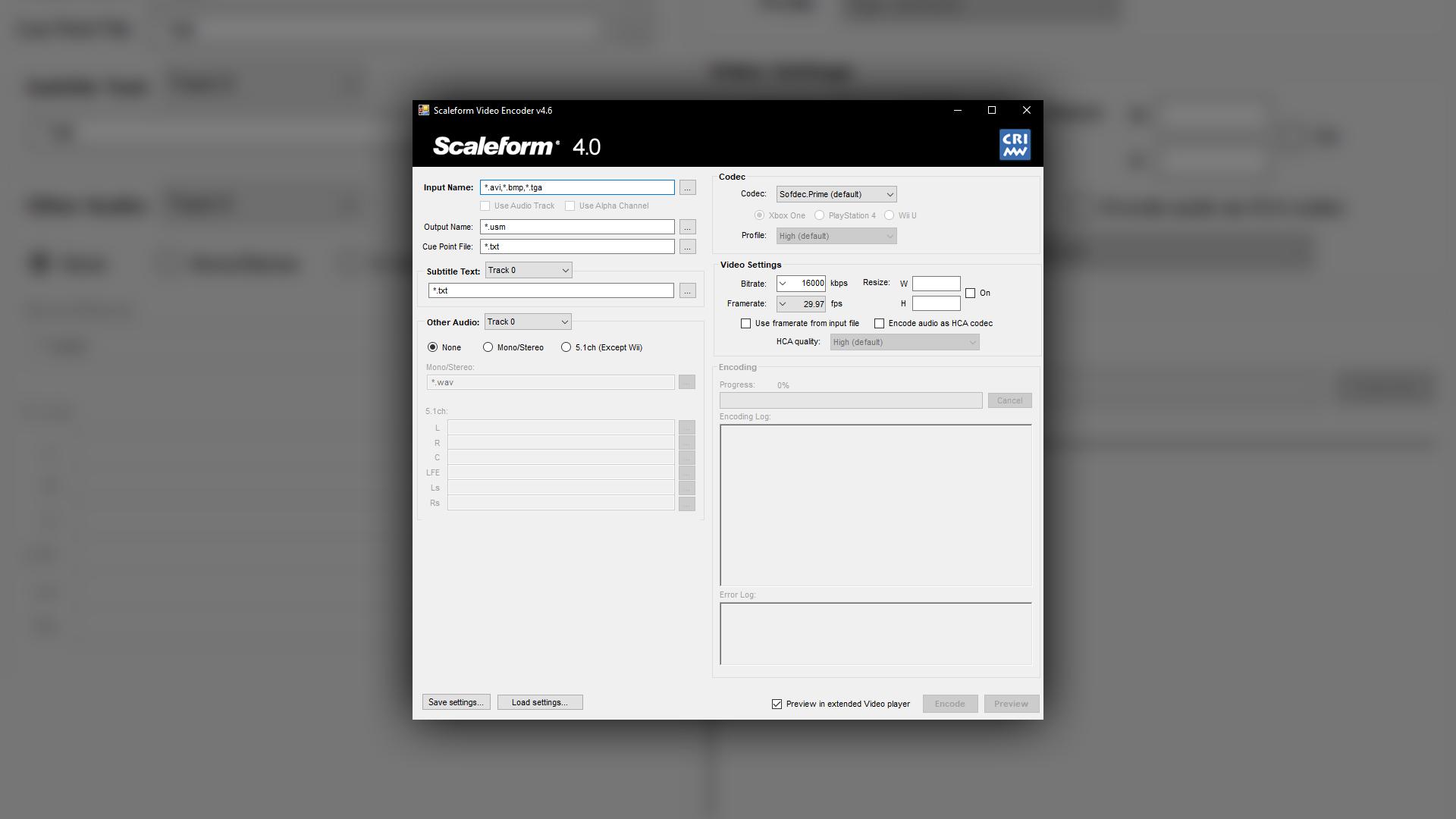
you can do that via Scaleform Video Encoder: https://tekkenmods.com/guide/46/creating-custom-usm-files
you don’t need to have the video and audio file split like the article says, but you will need to convert your video file into a compatible format for the video encoder
to do this, use ffmpeg and use the following command:
ffmpeg -i [input_video_file.xxx] -c:a pcm_s16le -ar [audio sample rate in Hz] -b:v [bitrate] output.avi
(example command: ffmpeg -i input.mp4 -c:a pcm_s16le -ar 44100 -b:v 20M output.avi)
this command above turns the video input file into an .avi file with the pcm_s16le audio stream at 44100hz (44.1kHz) with 20 megabits per second video bitrate (20000 kibps)
after doing this command, you can input the video file into the ScaleformVideoEncoder.exe GUI, and boom, .usm file
in my experience encoding takes forever, but that could just be because my computer sucks
if you prefer a command line interface with more customization, in the same folder where you extracted ScaleformVideoEncoder.exe, you can open up a command line and refer to its usage at: https://help.autodesk.com/view/SCLFRM/ENU/?guid=__scaleform_help_video_cri_encoder_basic_usage_html
more scaleform encoder documention for your reference: https://help.autodesk.com/cloudhelp/ENU/Scaleform-Help/scaleform_help/video.html
TekkenMods
This guide will lead you through the process of creating custom USM files.
willow falcon
 👍
👍
I just made 2 bat-files for mp4 to avi and avi to usm
and it converts all files in the folder
gilded birch
what is it really that easy 😭
willow falcon
But I made it for loop videos (without sound) to increase quality
You can add commands to bat files to extract and export audio too
gilded birch
oh oh yes that’s right
i just automatically assumed that you didn’t use any 3rd party apps and just did the whole conversion using .bat files
gilded birch
gilded birch
what is it really that easy 😭
i said this before i opened the bat files 💀
willow falcon

 compact flame
my mouse is none existant in honkai, how do i fix this?
cosmic lion
compact flame
my mouse is none existant in honkai, how do i fix this?
are you playing on Epic?
compact flame
cosmic lion
are you playing on Epic?
yup
cosmic lion
compact flame
yup
is a common issue with the Epic Overlay on many games there, check if this can help you:
https://www.reddit.com/r/reddeadredemption/comments/dwhc6b/epic_store_mouse_cursor_fix_for_new_114_patch/
compact flame
cosmic lion
is a common issue with the Epic Overlay on many games there, check if this can h...
uh
i dont have those files
the ones they are telling me to delete
cosmic lion
compact flame
the ones they are telling me to delete
then try to run the game without the launcher, go to the game path and run the bh3.exe
if you don't have issues, then you have those overlay files but probably on another folder
compact flame
cosmic lion
then try to run the game without the launcher, go to the game path and run the b...
idk where my drive letter is ;=;
 heady quail
a friend of mine wants to link their gmail acc (phone) to hoyoverse acc to be able to login with the same account on PC
But before they linked, they already made a new hoyoverse account and noticed they started over (wasnt the same acc)
If he tries to link his gmail acc to hoyoverse now, will it reset him to the hoyoverse account progress, or will it let him choose between the gmail acc progress and the hoyoverse acc progress
cosmic lion
compact flame
idk where my drive letter is ;=;
if you want to find the files you can on the epic launcher / library / click on ••• and manage (idk how is in english) / Click on the folder icon at the side of the uninstall option
then close the launcher and run the bh3.exe
cosmic lion
heady quail
a friend of mine wants to link their gmail acc (phone) to hoyoverse acc to be ab...
okay first, he login on the phone via google account or via email?
heady quail
google acc I believe, not hoyoverse
compact flame
cosmic lion
if you want to find the files you can on the epic launcher / library / click on ...
i dont have the files that are supposed to be deleted, but when i run on bh3.exe the mouse cursor still doesnt show
cosmic lion
heady quail
google acc I believe, not hoyoverse
okay, when you login via Google account, you are using/creating a HYV account, so you cant link it because its already a HYV one.
what he need to do is to go to the game on the phone, go to profile / account / user center and link an email to the account and create a password, then use that info to login
if you dont have access to the phone right now, you can go to account.hoyoverse website and login using the Google icon, and follow the same steps
and when login to another devices, check that is login to the correct server to see the correct account
cosmic lion
compact flame
i dont have the files that are supposed to be deleted, but when i run on bh3.exe...
did you fully close the epic launcher before running the game?
compact flame
cosmic lion
did you fully close the epic launcher before running the game?
yes
i closed it by clicking the close window button lmao
cosmic lion
compact flame
i closed it by clicking the close window button lmao
do you have disable the minimize to the tray on the epic config? if not then is not close, just minimize
compact flame
cosmic lion
do you have disable the minimize to the tray on the epic config? if not then is ...
how do i minimize it?
cosmic lion
compact flame
how do i minimize it?
the epic launcher come with the "minimize to tray" (idk if that is the eng name) option enable by default
so when you click the close button, the launcher is not really close, it just minimize so is still running
check on the epic launcher that you have that option disable and then go to close it, or just force the close with the windows task manager
and then try to run the BH3 exe
if after that you still have issue with the mouse than looks like another program could be causing the issue, probably another overlay
 south walrus
how long does ingame customer service take to respond
cosmic lion
compact flame
ty for the help tho
 If you want you can try to install the launcher directly from the official site or Google Play PC but obviously the payment options it's going to change
cosmic lion
south walrus
how long does ingame customer service take to respond
Is 1-3 business days for the first response.
After that can take less or more days depending of the "issue"
 maiden pilot
Why it says the current network is at risk
silver urchin
restart router or vpn or just wait it out
 foggy otter
how big is honkai rn(like size/storage space)
lunar gust
foggy otter
whats the difference between basic adn full assets btw
full downloads everything, including all story CGs
the difference is only in what you download before you are able to play
foggy otter
lunar gust
the difference is only in what you download before you are able to play
ah so u still download everything eventually full downloads just does it at the beginning
lunar gust
foggy otter
ah so u still download everything eventually full downloads just does it at the ...
if you play through the story, yes
worldly mural
stoic reef
maybe that .dll doesnt affect the controller? or something else is breaking duin...
here my error log
foggy otter
how do you download with the launcher should you just open it?
gilded birch
foggy otter
how do you download with the launcher should you just open it?
yes, you open the launcher and there would be a big yellow download button on the bottom right of the user interface
stoic reef
worldly mural
here my error log
yeah im not seeing anything new in that error log that your last one didnt have and only customer support can do anything to those crash dump files. Without your output log all i can suggest is either reinstall, exclude that from your antivirus like iho suggested right below the message you replied to or contact customer support #how-to-contact-cs
 glacial glen
hey guys just wondering how long is it till elysian realm opens?
odd wedge
glacial glen
hey guys just wondering how long is it till elysian realm opens?
Every Monday 10:00 GMT+8
In 45 minutes.
worldly mural
stoic reef
yeah im not seeing anything new in that error log that your last one didnt have ...
Here cs answer, and yes i havent tried reinstall from scratch
 stoic reef
ah thanks for sharing their response, i hope it helps!
worldly cipher
So planning to upgrade my dads phone (possible switch) it's a Infinix Hot 40 Pro Helio G99 wondering if it can run Honkai on Low - Mid settings in the current ver and upcoming
stoic reef
i think it can run it on low but thats with a big i think cuz i forget how the mali g-57 handles but thats still near the low end
 worldly cipher
stoic reef
i think it can run it on low but thats with a big *i think* cuz i forget how the...
worldly cipher
stoic reef
i think it can run it on low but thats with a big *i think* cuz i forget how the...

odd wedge
worldly cipher
I shall summon <@720942543118008371> for more info
What Luna said, low uwu
It's like the minimum requirement of v7.3 list
scenic jackal
cosmic lion
Well depends of what ver. of the S22 you are going to get the different pro and ...
I forgot to mention it's pro
Sorry about late reply
stoic reef
Samsung s22 pro?
those dont exist
did you mean the plus or the ultra?
tbh they have the same chipset and gpu. both should run the game fine at low settings and 60fps
might get a little laggy if you turn on battery saver or go to quality or higher settings
worldly mural
stoic reef
ah thanks for sharing their response, i hope it helps!
Turns out its the 2nd step of suggestion from cs, after i deleted my bluetooth pairing from my generic controller mocute-050, error gone, and now i can use my xbox controller
Thanks everyone for answer before
stoic reef
ah nice! thanks for letting me know. now the real challenge will be remembering it in a year from now when someone else gets it
 rugged cave
If i unlink my honkai account from my email, will my genshin and star rail account also get unlinked?
silver urchin
no, and you cant unlink only cs can do that
and they offer this if you have level 1 acc made by accident
rugged cave
silver urchin
no, and you cant unlink only cs can do that
I know that im not the one who unlinks, my question is focused on the part of the other games
silver urchin
it wont affect other games
 timber cargo
What do i do when it says i have no internet connectivity? I just got back my old honkai account and when i tried to open it it said i had no internet. i double checked my wifi was good
gilded birch
have you tried using a VPN by chance? a free one is provided in the pins: #🔌technical-help message
timber cargo
gilded birch
have you tried using a VPN by chance? a free one is provided in the pins: https:...
i havent actually ill test it out
gilded birch
i'm so confused i didn't send that message just now but i guess it fits in this context maybe my discord bugged out
 silver urchin
odd wedge
Witch!
 wind shard
Hello, i am trying to play on my old account, and for some reason the pc version doesnt load it, so i am doing tutorial again each time i try to link again to my old account
 upper parcel
Are you sure you have chosen the correct server?
It could be set to EU (assuming you want to play on NA server)
 keen delta
Bruh
upper parcel
Or you could've downloaded the wrong client
cosmic lion
keen delta
Gamecenter isn’t working either
What you mean with this? And when was the last time you played the game?
cosmic lion
wind shard
Hello, i am trying to play on my old account, and for some reason the pc version...
When was the last time you played the game?
wind shard
cosmic lion
When was the last time you played the game?
Uh... 2 years ago?
I had a pink hair bunny girl from a event i did
On some kind of japanese town at night
wind shard
upper parcel
Are you sure you have chosen the correct server?
I think so, i recall i didn't changed servers on the mobile phone, so it should be NA
cosmic lion
wind shard
Uh... 2 years ago?
Okay so you didn't link your miHoYo account to HYV, follow the guide that luna shared here #🔌technical-help message
Keep in mind that you can only link the account to a HYV account without a HI3 account on it, so probably you will need to create a new HYV account
or if you want to use an existing one, talk to CS and ask for the unlink of the HI3 (Only for accidental accounts, so new ones, with the tutorial unfinish)
keen delta
cosmic lion
What you mean with this? And when was the last time you played the game?
Nvm everything is okay now
I fidgeted with the game and it worked
wind shard
cosmic lion
Okay so you didn't link your miHoYo account to HYV, follow the guide that luna s...
I am comfused
Because in hoyolab app
It shows my account and toons
But in the guide says you need to link it to hoyoverse
So i already have that part done
wind shard
Nvm, its not linked

This is my acc, but idk how to access it


I tried using facebook hoyoverse login, but nothing happens, it still opens the tutorial account
 gilded birch
its a completely different app 💀
gilded birch
no, just download the sea client here: #🔌technical-help message
gilded birch
Bronya?
gilded birch
all of her battlesuits are farmable
you should ask in #👶beginner-help for more info
her name is yae sakura though
wind shard
Oh, so its like yae miko of genshin?
gilded birch
they are similar, but they are not the same characters
indigo valve
How much gb is hi3 with fully downloaded in game resources on Samsung/android
gilded birch
indigo valve
How much gb is hi3 with fully downloaded in game resources on Samsung/android
check here: #🔌technical-help message
foggy otter
what should you do if the apk download isnt compatible with your device
 haughty flare
i'm trying to make a purchase in game with a gift card i got but it keeps declining. does honkai not work with giftcards?
cosmic lion
foggy otter
what should you do if the apk download isnt compatible with your device
if is incompatible, then sadly you cant play there.
just to be sure, what is your device model?
gilded birch
haughty flare
i'm trying to make a purchase in game with a gift card i got but it keeps declin...
what type of gift card do you have? which device are you trying to use it on?
haughty flare
gilded birch
what type of gift card do you have? which device are you trying to use it on?
i have an iphone and a pc. i tried both. its a visa gift card
gilded birch
haughty flare
i have an iphone and a pc. i tried both. its a visa gift card
apple's payment methods have been spotty for me in the past, and according to [this](#🔌technical-help message) message, the PC client's payment merchant can also be problematic, so it could not be your problem at all
i would suggest downloading the google play client on PC and see if the gift card works using google pay, or try contacting apple support to see if they can get something done on their end
the google play client can be found in the same linked message btw 
foggy otter
cosmic lion
if is incompatible, then sadly you cant play there.
just to be sure, what is you...
galaxy A13
samsung
cosmic lion
foggy otter
galaxy A13
yeah that device cant run the game anymore, sorry but you only option is to use another device with better specs
foggy otter
cosmic lion
yeah that device cant run the game anymore, sorry but you only option is to use ...
my macbook should have the specs with more then enough storage but i couldnt find any emulator for the game
haughty flare
gilded birch
apple's payment methods have been spotty for me in the past, and according to [t...
alright thank you
foggy otter
foggy otter
macbook air 13
^
gilded birch
foggy otter
^
do you perhaps know what generation it's in? or what type of CPU is inside it?
you can find out here:

since the 13 in the name you mentioned is just the screen size
foggy otter
gilded birch
you can find out here:
 gilded birch
foggy otter
gilded birch
foggy otter
you have two options:
- Using an Android emulator: Bluestacks is one you could probably use (you can probably find an alternative online)
- Install Windows on your Mac natively: https://support.apple.com/guide/bootcamp-assistant/install-windows-newer-mac-boot-camp-bcmp173b3bf2/6.1/mac/13.0
foggy otter
gilded birch
you have two options:
1. Using an Android emulator: [Bluestacks](https://support...
if i install windows how would i play it from there
gilded birch
foggy otter
if i install windows how would i play it from there
after following the official guide and booting up into windows, you can just treat it like any windows computer, and install the game with the official launcher
foggy otter
alright ill go try windows ig ty
gilded birch
foggy otter
alright ill go try windows ig ty
no problem! just keep in mind to set the windows partition of your drive to ~80gb as this size cannot be changed later, according to the guide (any less than this and you might not even be to have enough space to install honkai impact) more is obviously better just to be safe, but it appears that you don't have much storage left on your drive anyways
foggy otter
gilded birch
no problem! <:TeriCube:672927172633165825> just keep in mind to set the windows ...
for some reason bluestacks keeps on downloading but downloading a damaged version forcing me to delete it is it not working or am i doing smth wrong
gilded birch
foggy otter
for some reason bluestacks keeps on downloading but downloading a damaged versio...
could you go here, scroll down to bluestacks 4, and use the download link provided there?
foggy otter
gilded birch
<:HigoThink:585629884630695948> could you go [here](https://www.bluestacks.com/d...
yea for some reason it wont finish the download
gilded birch
could you try another web browser?
foggy otter
alright ill try and find one
gilded birch
i don't know why it wouldn't let you finish the download
 young aspen
sorry if this is the wrong channel ... is there any way i can recover my account 😭 i think i still have my uid but i completely forgot which email and password i used, would cs be able to help at all?
stoic reef
young aspen
sorry if this is the wrong channel ... is there any way i can recover my account...
if you have your UID then yes they can help #how-to-contact-cs
young aspen
thank you!
worldly cipher
odd wedge
What Luna said, low uwu
I see well that's good news
strong thistle
worldly cipher
I see well that's good news
get a phone with Dimensity 7050 (its Refreshed Dimensity 1080) 
worldly cipher
strong thistle
get a phone with Dimensity 7050 (its Refreshed Dimensity 1080) <a:bcaCoy2EvilPla...
If I had the budget sure
Sadly it's not my budget but dad I just asked him if we could switch
Saving my money for that 1660s since I'm not usually a phone gaming kind of guy
 mild relic
Does anyone know why when playing this CG it stops itself? (sea launcher version)
I tried downloading the steam version and there was no problem playing the cg. It seems that only those using the Launcher are having problems.
stoic reef
mild relic
I tried downloading the steam version and there was no problem playing the cg. I...
sometimes they freeze like that, all i can recommend is going to the Honkai Impact 3\Games\BH3_Data\StreamingAssets\Video and deleting the 2.3_cg_08_mux.usm file and then running repair in the launcher to redownload teh cg file since sometimes they break, if that doesnt fix it then contact customer support about the issue #how-to-contact-cs
mild relic
OK, I'll try
mild relic
stoic reef
sometimes they freeze like that, all i can recommend is going to the Honkai Impa...
it's still frozen, well that's the last option left
stoic reef
I hope customer support has an easy fix
 stoic reef
 untold widget
It's been stuck like this for an hour now
untold widget
It's been stuck like this for an hour now
are you on data or wifi?
untold widget
Wifi
stoic reef
try on data and see what happens. this is a connection issue and maybe your wifi is having issues connecting to honkai specifically
untold widget
Well problem with that is where I live has horrible cell services
I'll try that tomorrow on work
And if that doesn't work the?
Then reinstall I assume?
stoic reef
theres other options, you can try a VPN even on wifi, VPN almost always fixes connection issues. if you dont have one theres a good free one in this pin #🔌technical-help message
untold widget
Ok
untold widget
Ok so the VPN works
However I noticed something
I used the VPN to get into the game
And then i turned off the VPN while in game
And the game kept working like normal
No connection issues nothing
It's only when I'm opening the game and it's checking for settings update, is when it gets stuck
Confusing I must say
upper parcel
Can relate, experienced the same in the past
untold widget
Could a router restart fix this?
upper parcel
Possible
untold widget
Could also be something that I changed in the router settings that's caused this maybe
stoic reef
untold widget
Confusing I must say
its because the update/login server is different than the game data server and in your case whatevers causing the issue is only affecting your connection to the first one, not the second one
untold widget
So it possible that's is is a problem on the honkai server?
upper parcel
It's most likely a problem somewhere in the middle
upper parcel
Works again*
stoic reef
untold widget
So it possible that's is is a problem on the honkai server?
not really, if there was a problem with the server itself there would be over 100 people in here right now. its either a router, ISP, or routing issue
untold widget
stoic reef
not really, if there was a problem with the server itself there would be over 10...
Guess I'll poke around in my router settings and see what's up in there
Ok
I tested it on my uncles wifi which he uses the same service provider as me
And it works just fine
So it must be something in my router settings then but I have no idea what it might be
Any ideas?
stoic reef
could be just buffer bloat and a restart helps, might also be a firmware thing. Could also still be ISP routing. they decide what path your device takes based on the milisecond that you go to connect so even on the same wifi you can take two different routes to a server if you try even on the same device and within 2 minutes of each attempt so its hard to say. I do know that this issue usually tends to go away on its own after 1-10 days so theres that at least
untold widget
Well guess I'll wait and hope it goes away
If not there's also the option of restore default router settings
stoic reef
mhmm true
 quaint lagoon
how i fix this it happening after update
 quaint lagoon
willow falcon
Did you try to ask in **Honkai: Star Rail** server? <:SeeleSweat:843946435271852...
quaint lagoon
willow falcon
Did you try to ask in **Honkai: Star Rail** server? <:SeeleSweat:843946435271852...
no replies
cosmic lion
quaint lagoon
no replies
still, in here you are not going to find answers... we only know about HI3 issues.
if the people of HSR server don't know/didn't answer, you should contact CS.
you can find a channel with the info on how to contact CS on the HSR discord
willow falcon
quaint lagoon
how i fix this it happening after update
Did you try to check game resources?
 quaint lagoon
willow falcon
Did you try to check game resources?
quaint lagoon
willow falcon
Did you try to check game resources?
yes twice
willow falcon
quaint lagoon
yes twice
Open registry (WIN +R, regedit)
Open branch Computer\HKEY_CURRENT_USER\SOFTWARE\Cognosphere
Delete directory Star Rail

After that you need to log in again using your email/password
These actions will reset game settings such hash of downloaded content, audio and graphics settings
Or just rename to Star Rail 2 instead deleting

 gloomy cosmos
 long kiln
I am so dumb I am failing capthcas 😭
long kiln
I am so dumb I am failing capthcas 😭
afaik you don't need to click the small hexagons.... just the entire big one in order they specified
just 2 clicks
gloomy cosmos
2 patterns/big hexagons. Click in order, press ok.

idk what you mean by holding the screen
long kiln
gloomy cosmos
idk what you mean by holding the screen
Sorry I'm just tired or stupid I thought if u hold the screen for a second you can select more
odd wedge
ChatGPT spotted
silver urchin

silver urchin
finally fixed that screenshot issue with lightshot not being able to ss if the game was on focus
seems permissions issue just had to make lightshot run as admin in the compatibility section
incase anyone have that issue
 white summit
which controllers does the game support on pc?
willow falcon
DualShock (PS4), Xbox One... Any controllers (with xbox drivers) that compatible with Windows. I'm tried Nintendo Switch, but it turned out to be incompatible.
white summit
do you mean dualshock cause dualsense is ps5
white summit
okay thanks
 lost pasture
Would I need to redownload the entire client every patch if I use the apk from here?
Or does it handle major updates as well
Or is there a way to tell what region the download on playstore is?
silver urchin
lost pasture
Or is there a way to tell what region the download on playstore is?
if the name is
Honkai Impact 3rd then its GLB
if its
Honkai Impact 3 then its SEA
lost pasture
ah
stoic reef
lost pasture
Or does it handle major updates as well
the .apk is what the google play store download is so it works for both the initial installation and updates
but it doesnt totally reinstall everything
 mortal garden
EU died or just me?
lags are immense
false alarm ig, restarting game seems to fix it all
 green plank
anyone know a fix for creating accounts and getting the request failed bad network deal?
silver urchin
green plank
anyone know a fix for creating accounts and getting the request failed bad netwo...
long kiln
long kiln
I am so dumb I am failing capthcas 😭
AFTER DAYS I FOUND OUT I HAD TO CLICK THE MIDDLE
😭
upper parcel
AI is evolving
silver urchin
gpt 4.5
gilded birch
behind a 100$ per month pay wall

 whole otter
Help. My hi3 launcher did not respond when i press launch and keep coming back to the launcher screen
 flint frigate
If im playing from NA and I make an account for EU is that gonna make me lag or is the difference not noticeable
stoic reef
whole otter
Help. My hi3 launcher did not respond when i press launch and keep coming back t...
what happens when you go to your games installation folder and run bh3.exe?
(default location for that file is c:\program files\honkai impact 3\games)
stoic reef
flint frigate
If im playing from NA and I make an account for EU is that gonna make me lag or ...
nah not really
flint frigate
stoic reef
nah not really
I can p much play and not even tell im playing from that far away right?
stoic reef
flint frigate
I can p much play and not even tell im playing from that far away right?
should be able to yeah, if there is lag then it'll be your ISP causing that, not the server really.
whole otter
stoic reef
what happens when you go to your games installation folder and run bh3.exe?
(def...
Nothing happen
stoic reef
whole otter
Nothing happen
are you on windows 10 or 11?
whole otter
11
stoic reef
whole otter
11
okie, try to restart your computer and then to go to the bh3.exe file and right click it and click properties, then go to the compatability tab and run the compatability troubleshooter and then try to open bh3.exe and if that doesnt do anything again then go into task manager and end the honkai/bh3.exe process if its there and go back to bh3.exe and go to compatability and try to set it to windows 8 compatability mode and try that
if none of that helps then contact customer support #how-to-contact-cs
whole otter
Okay
cosmic lion
stoic reef
okie, try to restart your computer and then to go to the bh3.exe file and right ...
iirc one user said that solve the issue by clearing the cache... But I could be remembering wrong
grizzled rampartBOT
stoic reef
!faq pcclearcache
- Please, close both game and launcher.
- Press Windows + R, input
regedit. - In the opened window, please locate
\HKEY_CURRENT_USER\Software\miHoYo\Honkai Impact 3and delete it. - Press Windows + R, and input
%userprofile%\Appdata\LocalLow\miHoYo\in the opened window. Delete all the files in the Honkai Impact 3/3rd folder. - Restart your PC.
Do note that doing this will require you to login again. Linking account is highly recommended.
*also refer to system requirements:
#🔌technical-help message
stoic reef
can try that too ^
gilded birch
stoic reef
okie, try to restart your computer and then to go to the bh3.exe file and right ...
btw on my Win. 11 laptop where this specific problem occurred again, opening the compatibility troubleshooter via the properties menu opened up the Get Help app instead, where it oddly didn't fix the problem for me - i had to use the old troubleshooter by opening the windows run dialog, and running msdt.exe /id PCWDiagnostic
really weird, but it could also be a just-my-pc type pf problem just something to keep in mind perhaps
 stoic reef
that is really weird, i never heard of the troubleshooter opening a new "get help" unhelpful thing
but thanks for the knowledge of what to do if somethings misbehaving
gilded birch
yeah it's a change that i noticed a month ago, thought to share it in case it might help someone else
stoic reef
oh yeah you're right
stoic reef
cosmic lion
<@507316897377812480> <@277721591012655105> <@456226577798135808>
<:SakuraLuv:6...
gilded birch
cosmic lion
<@507316897377812480> <@277721591012655105> <@456226577798135808>
<:SakuraLuv:6...

silver urchin
cosmic lion
<@507316897377812480> <@277721591012655105> <@456226577798135808>
<:SakuraLuv:6...
whole otter
still wont work
stoic reef
even after clearing the cache?
whole otter
yea
whole otter
stoic reef
okie, try to restart your computer and then to go to the bh3.exe file and right ...
actually when i tried this one it worked once but afterit it back being broken again
stoic reef
hmm then yeah might have to try customer support and see if they have any new ideas
whole otter
whre can i contact them?
stoic reef
 tacit crow
#🔌technical-help message I used this method to uncap my fps and set it to 240 in combat, when i reopen honkai and check my settings it says my fps in combat is 30 (it was 120 before), is this expected behavior?
stoic reef
tacit crow
https://discord.com/channels/418652140454674432/427673685026013184/1079220277801...
well the game wont display fps values higher than what it can have it set to in the settings
like theres no option for that so it would not show it that, probably just defaults to 30
tacit crow
stoic reef
well the game wont display fps values higher than what it can have it set to in ...
yeah i assumed this was the case, just wanted to check to make sure it was all good, thanks for confirming
stoic reef
stoic reef
theres a pc client
 warped patrol
Is there a link to it?
stoic reef
warped patrol
Is there a link to it?
to clarify, it uses the windows google play store version but heres their news announcement for it that its now playable on pc without an emulator https://www.houkai3rd.com/news/110151?source=v1 and it comes with a link
warped patrol
Also one more thing has jp had anniversary already?
 solid lodge
uh before i had a tech issue where i was unable to buy anything in game because of fussy things related to different regions and currency and stuff like a while back and recall someone telling me to ask hoyo customer support for help me but i do not know what sorta email/message i should write much less where to contact customer support so im asking here now
uh
warped patrol
I don't think anyone is on right now
worldly cipher
solid lodge
uh before i had a tech issue where i was unable to buy anything in game because ...
Title: Currency problems / Transaction problem
Choices:
- I would like to ask .....
- Is it possible ......
- I'm encountering something any helping guidelines ....
- I'm having transaction problems .......
As for contacting CS you can do it in game but you can also #how-to-contact-cs
They respond quick but that may differ on weekends and holidays
worldly cipher
warped patrol
I don't think anyone is on right now
Iirc not yet but for more confirmation go to #💁gameplay-help or #🎮honkai-chat
odd wedge
solid lodge
uh before i had a tech issue where i was unable to buy anything in game because ...
Hello Captain, I'm wondering if you're comfortable with sharing what countries you are from and the Apple IDs you were using, just wanna know more so I know if I (or someone) can help/advise.
*You may DM if you don't want to share publicly, if not I'll advise on how you should contact CS.
worldly cipher
Surprisingly the Helio G99 can run HSR / Honkai / Genshin on the Low settings with some drops 
I kinda was expecting on the lowest with a lot of drops
I could say the Helio G99 is equivalent to AMDs A8-7600
solid lodge
odd wedge
Hello Captain, I'm wondering if you're comfortable with sharing what countries y...
I'll dm u
solid lodge
worldly cipher
Title: Currency problems / Transaction problem
Choices:
1. I would like to ask ...
Aight thanks will save this somewhere
I apologise to both y'all for late response btw

 knotty cloud
I've re-install the game twice but i still get this. anyone know how to fix this issue?
 stoic reef
knotty cloud
I've re-install the game twice but i still get this. anyone know how to fix this...
stoic reef
knotty cloud
I've re-install the game twice but i still get this. anyone know how to fix this...
i'd recommend installing one of the custom launchers from t his pin and running the repair function #🔌technical-help message
knotty cloud
stoic reef
i'd recommend installing one of the custom launchers from t his pin and running ...
if i use betterHI3 i need to uninstall the game first?
stoic reef
nope you dont have to uninstall, it should auto detect your game isntallation if its installed in teh default location, if you've installed it not in the default place you might need to tell it where your game is installed
knotty cloud
stoic reef
nope you dont have to uninstall, it should auto detect your game isntallation if...
so if i install the game the F disk then i need to put install in F disk?
like this?
 stoic reef
knotty cloud
so if i install the game the F disk then i need to put install in F disk?
stoic reef
knotty cloud
so if i install the game the F disk then i need to put install in F disk?
make sure that its set to the games folder where bh3.exe is
so honkai impact 3\games\
is what it should be
worldly cipher
knotty cloud
I've re-install the game twice but i still get this. anyone know how to fix this...
This happens on a slow connection right?
knotty cloud
stoic reef
make sure that its set to the games folder where bh3.exe is
its looks like this


is it wrong??
stoic reef
your installation is a little weird, because the game is installed on F:\games and the honkai impact 3 folder is just kinda there, existing
normal folder structure is Honkai impact 3\games\bh3_data\ and so on
might consider reinstalling but if you dont want to then just set the better launcher location to be where bh3.exe is
knotty cloud
stoic reef
might consider reinstalling but if you dont want to then just set the better lau...
if reinstall do i need to delete everything and download it in new folder?
stoic reef
knotty cloud
if reinstall do i need to delete everything and download it in new folder?
if you decide to reinstall what i would do is go to your windows settings and go to the apps section and unisntall honkai impact from there. then go to F:\games and make a new folder called honkai impact 3
then open better launcher and set the installation folder to F:\games\honkai impact 3
odd wedge
knotty cloud
its looks like this
Just wanna confirm, what kind of disk is your F disk? Is it like an external disk?
 ebon scarab

This isn't really technical but idk where else to ask Lol. Does anyone know how to use this
 silver urchin
 halcyon heath
just try after few mins
halcyon heath
i have been try for the past 3 hrs
silver urchin
try restart your router or use a different network
could try a vpn aswell
last resort is #how-to-contact-cs
 severe cipher
some of my progress was just removed, what is the reason that this happened?
gilded birch
severe cipher
some of my progress was just removed, what is the reason that this happened?
your device probably wasn’t able to connect to the servers after completing a stage/whatever you were doing, and therefore your data wasn’t saved
mihoyo cannot/will not reverse data and/or delete data (even if you ask them via customer service), so that’s my theory
severe cipher
gilded birch
your device probably wasn’t able to connect to the servers after completing a st...
but not only story, i also lost a character and the beginner reward which should stay for 60 days but it vanished and i play for like 30 days and got return rewards
like it makes no sense
 west relic
我是那个被找回系统给finessed的玩家、现在有没有一些办法可以找回我的账号 账号是用game center做的
yo I’m one of those people that got grilled from the account recovery thing, is there a way to retrieve the account now from account made on Game Center
cosmic lion
severe cipher
but not only story, i also lost a character and the beginner reward which should...
- just in case, check that you login on the correct server.
can you explain better, because you can only get return rewards after you didn't play for 15 days (first time)/45 days (next times)
and the started event go only for 90 days since the day you enter the game, so even if you enter the game but didn't finish the first stage, the timer still start
and about the character, the only ones that can "disappear" are the trial ones that you can get from the trial cards the game give from time to time
cosmic lion
west relic
我是那个被找回系统给finessed的玩家、现在有没有一些办法可以找回我的账号 账号是用game center做的
yo I’m one of those p...
yeah you can, read the guide that Luna shared here: #🔌technical-help message
 narrow fulcrum
which reddit is the main reddit for HI3? i see theres a houkai3rd and a honkai impact3 reddit
cosmic lion
narrow fulcrum
which reddit is the main reddit for HI3? i see theres a houkai3rd and a honkai i...
check #social-media-links
narrow fulcrum
Why do we have multiple subreddits?
gilded birch
one is official, one is not
 mystic spoke
Just double checking that theres no way to logon steam HI3 from the phone?
cosmic lion
mystic spoke
Just double checking that theres no way to logon steam HI3 from the phone?
sadly no, your only option to use the Steam Account could be remote play, but that is just streaming your PC to the phone, and idk if work for the game tbh
mystic spoke
Thanks assumed as much but hoped it had updated or so
 naive flume
I was trying to reroll but this message has been popping up for a few hours

 dense aspen
is this safe to use?

 narrow fulcrum
what is the houkai 3rd reddit used for? compared to the official reddit
cosmic lion
dense aspen
is this safe to use?
yes is safe
dense aspen
alr r u sure bc i don’t want it getting refunded or anything
even tho i have enough
and it’s not directly coming from my wallet
cosmic lion
narrow fulcrum
what is the houkai 3rd reddit used for? compared to the official reddit
you can enter and check, like most games probably is just a reddit created before an official one was created, so probably is the same
cosmic lion
dense aspen
and it’s not directly coming from my wallet
if you selected that option is going to only use the "rewards" no another payment its going to be use.
its like money you have, but you can only use it on epic
dense aspen
ok so it IS safe and won’t get refunded by hyv???
i mean didn’t they officially partner w epic
cosmic lion
dense aspen
ok so it IS safe and won’t get refunded by hyv???
its safe
its just a payment method, and HYV don't make refunds by themselves
and the game is on epic, so its an official payment option. if it wasn't, the game wouldn't be there.
dense aspen
alr
😭
just making sure bc i don’t want my acc to get banned or deleted bc of a purchase refund
well i bought it and it seemed to work
i even got a receipt email. ig im so cautious bc i never purchased anything before that wasn’t with a card
cosmic lion
dense aspen
just making sure bc i don’t want my acc to get banned or deleted bc of a purchas...
even if by any chance the payment fail, they still don't do that immediately, they ask you do x stuff so the account don't get banned, most of the time buy x crystals, so you only need to use the refund money to buy that
cosmic lion
dense aspen
i even got a receipt email. ig im so cautious bc i never purchased anything befo...
and is just a payment method, other payment merchants have similar options but with more steps
dense aspen
oh ok
cosmic lion
google have something similar with the point system, you get some by buying, and you can get a cupon to use on HI3, but for most countries is like 1 dolar per purchase 
dense aspen
oh
 river timber
where i can download full game manually?
stoic reef
river timber
where i can download full game manually?
its in the pins #🔌technical-help message
stoic reef
 silent herald
I want my old acc back 🥲
silent herald
I want my old acc back 🥲
how long has it been since you last were able to log into it?
silent herald
stoic reef
how long has it been since you last were able to log into it?
since December 2021
and I tried logging in again last year, around August
stoic reef
so the main games hoyoverse login has the facebook option but you'll probably need to do account retreival first to link your old account to a hoyoverse account
silent herald
How? :'
stoic reef
at the login screen, theres an account retreival button
you can find more info about account retreival on this pin #🔌technical-help message
silent herald
Okay, i will
stoic reef
okie, good luck!
 lethal plover
is keeping the game running in the background bad for my pc?
stoic reef
lethal plover
is keeping the game running in the background bad for my pc?
yeah for a long time, same goes for any game for extended periods of time. its just more wear and tear on your hardware
if you're doing something for half an hour occasionally thats no big deal. but dont leave it on every day when you sleep or anything, plus you dont earn stamina faster when you're in the game so theres no real benefit to leaving it open
 vagrant ore
Hi
I got an issue related to honkai impact of per-app volume feature of android.
This feature used to work fine the last time i tried to listen to some music while doing abyss and memorial arena but i just tried it yesterday and the option isn't working for hi3
This feature

The last time i used it, it was working fine. And that was around 2 patches ago iirc
stoic reef
so the download cg is set to max volume becuase at that point you cant go into the game and adjust the settings so its just max
in the actual game it should work as intended
vagrant ore
I deleted the audio assets and redownloaded them and it's still the same
vagrant ore
stoic reef
in the actual game it should work as intended
It doesn't decrease in the game too
stoic reef
oh i see, your screenshot made me think you had not gone in teh game yet
vagrant ore
I checked punishing gray raven and it was working on it so
stoic reef
and people have complained about the download cg volume before
vagrant ore
My bad
I didn't have the other (in-game) screenshot saved rn so that's why i shared this one
One curious thing is it starts working when i do screen recording
stoic reef
hmm, is that per app volume thing built into the phone or is it a 3rd party app?
vagrant ore
But as i stop the screen recording and minimize the game and then open it again, it stops working again
vagrant ore
stoic reef
hmm, is that per app volume thing built into the phone or is it a 3rd party app?
Built-in
Also tried a 3rd party one and it's the same
Works with screen recording but reverts back after i stop the recording and open the game from recents tab again
stoic reef
hmm, as far as i know no one else has complained about that issue, im testing it on my end rn but im guessing you've tried shutting your phone totally off, waiting about 10 seconds and turning it back on?
vagrant ore
Yup, already tried that
Just a reboot though.
Gonna test with 10 sec of it being off and will report back in a while.
stoic reef
so i just tried it and it works for me so there shouldnt be anything in the game that is blocking it or anything like that
i'd recommend if the restart doesnt work maybe reinstalling the game or trying a different app or something, and i know you probably did this but i should point out that in your screenshot the honkai volume slider is set to max as well. a less wild option is maybe just turning the in game volume low in the in game settings.
vagrant ore
Yeah, seems like a reinstall is the only way to check now.
stoic reef
vagrant ore
Yeah, seems like a reinstall is the only way to check now.
Could always contact customer support too #how-to-contact-cs
but the app i tested with is called app volume control if you want to try that (looks like a equalizer bars) and it worked flawlessly.)
its possible the volume control apps lost their premissions to the game or something
vagrant ore
I have reported it via the in-game support option
vagrant ore
stoic reef
Could always contact customer support too <#862844286260609064>
but the app i ...
Can you send the link of the app?
stoic reef
vagrant ore
Can you send the link of the app?
its on the google play store, just looks like this

 dire vortex
got an error code of 10030 on pc can anyone help ?
stoic reef
dire vortex
got an error code of 10030 on pc can anyone help ?
10030 error codes are usually connection issues, try the stuff in this pin #🔌technical-help message
vagrant ore
stoic reef
its on the google play store, just looks like this
This doesn't work either
So I'll fresh install when i have some free time
And just for the record, what android version are you on?
stoic reef
14, im on a samsung S21
vagrant ore
I'm on Android 11
So maybe that could be the issue?
I'll reinstall to be sure
stoic reef
possibly, im still not sure its an honkai app thing since if it was an inherent issue with the game it shouldnt have worked for me either so im going with maybe its a permissions thing or something
vagrant ore
It's a built-in feature of ROM so i don't think there should be a permission issue
And punishing gray raven (the only game i have on me besides hi3) also seems to work fine with it
worldly cipher
Have you tried reinstalling?
I really do think it's a bug but not in the game but your OS instead
 fierce tulip
Hello, is it possible to change my Linked account?
dense aspen
fierce tulip
Hello, is it possible to change my Linked account?
how so? wdym by that?
like email?
dense aspen
you just go to account security/info then just re link the email
fierce tulip
Would try it, thanks
dense aspen
alr that should help
vagrant ore
worldly cipher
Have you tried reinstalling?
Currently reinstall and it's behaving like before (not fixed) for now
At this screen rn

@stoic reef the volume "should" be changeable on this screen, right?
(Sorry if i wasn't supposed to ping)
It's just that i don't have a good speed internet so downloading it all will require 2-4hrs of time
So if it's gonna behave the same then I'd prefer to not waste time on this and instead do a reset of the phone or let it be
 young grail
How do i top up on the website? It keeps saying my account is invalid
upper parcel
Afaik it's only available for SEA
dense aspen
young grail
How do i top up on the website? It keeps saying my account is invalid
is it not letting you top up in game?
ebon scarab
Does anyone know how this works??
 dense aspen
nope
lunar gust
ebon scarab
Does anyone know how this works??
it's a 3 GBP discount
a simple as that
you buy smth you get a discount
ebon scarab
Oh
young grail
dense aspen
is it not letting you top up in game?
No I just wanted to use the website
young grail
upper parcel
Afaik it's only available for SEA
This would make sense, thx
stoic reef
vagrant ore
<@277721591012655105> the volume "should" be changeable on this screen, right?
(...
Sorry I went to bed but yes that's the screen I tested it on when it worked
 red fern
How do login on different device?
I used the same email and password as Genshin but it didn't work
silver urchin
make sure you downloaded the right server
the game name should be Honkai Impact 3
not Honkai Impact 3rd cuz thats for GLB server
 vagrant ore
stoic reef
Sorry I went to bed but yes that's the screen I tested it on when it worked
vagrant ore
stoic reef
Sorry I went to bed but yes that's the screen I tested it on when it worked
Np
Aaaaa, guess I'll need to reset the device and then reinstall and hope for the best
stoic reef
red fern
This is the only one available
thats because of where you live, honkai has a specific server for VN. if you want to log into the sea server you'll have to manually install the SEA .apk from this pin #🔌technical-help message
so you'll have to uninstall the one you have, then download and run the SEA .apk from that pin to install the SEA server client
gilded birch
how to confuse the entire player-base by having 1000 different servers/apps with some only accessible on certain devices and some others only available in certain regions ‼️
stoic reef
i mean yeah its a little bad, though for the VN server that was more of to comply with tax laws iirc and they had to split it off from the SEA server
some games i've played they just have server 1-99 and when one server fills up it just creates your account on another one so if you took a break and dont remember what server you played on then good luck ever finding out if you were on server 7 or 29
gilded birch
oh i never knew that was a thing for vietnam
i wonder how they complied with genshin and star rail then
gilded birch
stoic reef
some games i've played they just have server 1-99 and when one server fills up i...
yeah this would be a pain to manually find out 💀 imagine accidentally starting the game 99 times before finding your server
stoic reef
gilded birch
oh i never knew that was a thing for vietnam

Honkai Impact 3 Official Site - In this Honkai-corrupted world, the Valkyries, brave girls with Honkai resistance, have been fighting for all that is beautiful in the world.
well that doesnt mention the reason but i heard from a few people that it was for tax reasons
red fern
gilded birch
oh i never knew that was a thing for vietnam
funtap also for genshin
stoic reef
gilded birch
yeah this would be a pain to manually find out 💀 imagine accidentally starting ...
I did have to start over roughly 27 times and go through the unskippable opening so that took like 4 hours. i know from personal experience 
red fern
and there's always a big 18+ mark to remind you that you shouldn't play more than 180 minutes
Cause that's what we know "18+" stands for, am I right
I play in sea on laptop. But I'm having it fixed so I have to go on mobile. And funtap is the only on available
stoic reef
makes sense mhmm
stoic reef
red fern
Cause that's what we know "18+" stands for, am I right <:HimekoLMAO:119421530923...
never heard that meme but thats really funny
 sonic bison
having issues on my iOS iPad with trying to top up on honkai... or even connect to apple account/purchases...
basically shows failed connection and prices change to japanese currency
stoic reef
sonic bison
basically shows failed connection and prices change to japanese currency
Are you using a VPN or anything like that?
If you are make sure that you're connecting to your same country as your Apple account. if you arent then maybe try switching from mobile data to wifi (or visa versa) and double check what your appleID country is set to
 patent solstice
is it possible to "replace" my main hoyo's HI3 account which is dummy with my main HI3 account but it's in dummy hoyo account?
stoic reef
patent solstice
is it possible to "replace" my main hoyo's HI3 account which is dummy with my m...
No it's not possible
patent solstice

stoic reef
You can't merge or swap game accounts on a hoyoverse account. The best you can do is change the login details from one account but that'll effect everything else on it too and two hoyoverse accounts can't share the same email
patent solstice
i mean i don't mind having 2 hoyo acc, but it'd be a hassle to just doing a checkin in hoyo app
stoic reef
Fair, but yeah it's not possible to move game accounts like that unfortunately
patent solstice
is this because of the complicated account retrieval process?
 olive cobalt
MY GAME GLITCHED AND I FELL OUT OF THE MAP LIKE ROBLOX
stoic reef
olive cobalt
MY GAME GLITCHED AND I FELL OUT OF THE MAP LIKE ROBLOX
please send that to customer support along with what caused it if you can replicate that #how-to-contact-cs
should be fine the next time you do it though. most map falling bugs like that are one time only
red fern
stoic reef
i mean yeah its a little bad, though for the VN server that was more of to compl...
Wait does that mean there's also a separated VN server version for PC?
stoic reef
red fern
Wait does that mean there's also a separated VN server version for PC?
i dont think so, if you read the announcement i linked it just mentions "on google play"
red fern
Well if a player starts on mobile in VN then that person basically stuck playing on mobile only, since there's no VN server on PC
odd wedge
red fern
Well if a player starts on mobile in VN then that person basically stuck playing...
VN is not a separate server, it's just exclusive mobile app. It's still SEA server.
stoic reef
^
red fern
Well now I can't play my account on mobile even though I play in SEA on PC
So it just works one way

 odd wedge
red fern
Well now I can't play my account on mobile even though I play in SEA on PC
odd wedge
red fern
Well now I can't play my account on mobile even though I play in SEA on PC
Can't login? Does it say account doesn't exist/wrong password or something?
or it start new account
red fern
Yeah like that
stoic reef
mhmm you just play the normal SEA client on pc and on mobile it'll just be the VN app but still teh same account
red fern
I used the same email and password as Genshin
stoic reef
maybe your honkai account is on a different hoyoverse? what happens when you go to hoyolab.com and login with what you think your honkai is, then check the battle chronicles for the SEA server. if you dont see your account then log out and log in with what else you think it might be and check again
slothy, you know apple stuff sort of right?
odd wedge
red fern
Yeah like that
Like what? I'm asking which 😭
red fern
I chose Hoyoverse
odd wedge
odd wedge
Can't login? Does it say account doesn't exist/wrong password or something?
This
odd wedge
odd wedge
or it start new account
Or this
red fern
odd wedge
Like what? I'm asking which 😭
I don't remember. I already delete it
odd wedge
stoic reef
maybe your honkai account is on a different hoyoverse? what happens when you go ...
Then try this
odd wedge
stoic reef
slothy, you know apple stuff sort of right?
Ummm maybe
stoic reef
odd wedge
Ummm maybe
just wondering if you had any ideas about this #🔌technical-help message
red fern
I tried both Mihoyo and Hoyoverse and both gave same result
stoic reef
i assumed VPN but maybe not
stoic reef
if you uninstall the VN app and download and install that it'll be just the normal SEA client and def let you into your pc account
red fern
stoic reef
maybe your honkai account is on a different hoyoverse? what happens when you go ...
I'll try it later
red fern
odd wedge
https://api-os-takumi.mihoyo.com/event/download_porter/link/bh3_os/seaapk/defaul...
You mean this? @stoic reef
odd wedge
That's right
stoic reef
yup
odd wedge
It's official SEA APK direct download link
odd wedge
stoic reef
just wondering if you had any ideas about this https://discord.com/channels/4186...
Ahh I was familiar with this case
WAS 😭
Need to check my old messages, haven't seen this since early 2022
I think
stoic reef
i gotcha, no rush or anything but just thought i'd ask while you were on
i think i found it here, but it looks like not using a VPN would fix that #🔌technical-help message
stoic reef
mhmm, not replied yet
odd wedge
If using VPN, please don't
Otherwise worth trying to:
- Restart router/switch connections blah blah blah (refer to pin EXCEPT VPN)
- Logout and back in to the proper Apple account on App Store
- Restart device
stoic reef
makes sense mhmm, apple thinks they're in japan, thanks for the tips
odd wedge
I forgor what exactly the solution was back then but this should work
Discord mobile is not letting me search anything istg
stoic reef
yeah the big mobile update really messed with searching