#installation-archived
74689 messages · Page 93 of 75
 high token
 heavy cypress
 humble mirage
See the pins in the #zigbee-archived channel
 steep latch
Yeah, i have files from 23rd, 26th, and 28th of june and my install died on the 29th of june, as an electrician was here and fiddled with the main power supply to my house, resulting in my nuc killing my SSD.
So they are up 2 date in regards of recent changes, i just havent had time to spend on troubleshooting this the last week.
 valid lion
Hi Tinkerer. Yesterday you recommended Visual Studio Code and I have tried to set it up. Unfortunately any changes on configuration.yaml will be denied due to missing permissions. Usually I am using with my user Christian "sudo". What settings do I need change?
valid lion
humble mirage
Over SSH?
yes
humble mirage
Then I'd bet the user doesn't have permissions to edit the files
Add your group to the files you want to edit, and then add group write to the files too (you'll probably have to give group write to the folder too)
valid lion
so group "adm" isn't enough to have general permissions?
humble mirage
Well, depends on what you mean, but probably no
If you just added your user to that group, then your user now has anything that group has access to
Doesn't give you root like powers
valid lion
ok thanks. I thought that also adm has enough rights and I thought I did another mistake.
humble mirage
Nah, adm is just a group like any other group, it's not special
 trail pike
I am having issues with with my HA not connecting to my network, it was working, and then I updated the core and when it rebooted it was no longer working (please ping reply to my messages)
 viscid python
i'm having a similar issue but with HA on pi granted its my first time using it but when ever i try and go to http://homeassistant.local:8123 it says ```DNS_PROBE_FINISHED_NXDOMAIN
most likely a similar issue to me where it don't have an IP address and isn't connected to your local network
humble mirage
It means it can't resolve the domain
viscid python
trail pike
most likely a similar issue to me where it don't have an IP address and isn't co...
it plugged in to my router
trail pike
viscid python
it plugged in to my router
yeah, but mine is connected too and is still not properly getting an IP
(BTW, I am using proxmox install for mine)
viscid python
hmm
i did figure out that its on my 5g network because when i use my other one (same router) it just refuses connection
 abstract hearthBOT
@trail pike posted a code wall, it is moved here --> https://hastebin.com/powovaqasi
@trail pike [Rule #6](#rules message): Please do not post codewalls (text longer than 15 lines) - use sites such as https://dpaste.org/ (pick YAML for the language), https://www.codepile.net/ (pick YAML for the language), or https://paste.debian.net/ (pick YAML for the language).
Please take the time now to review all of the rules and references in #rules.
Command '~codewall' was invoked by: Tinkerer
viscid python
damn
humble mirage
It's either not finding a link, or not getting a DHCP lease
trail pike
well nothing changed in proxmox between the core update, and i have tried restarting several times
what I did right before this happened is:
- Update z-wave to latest version
- Update OS to latest version
- Update Core to latest version...
After updating the Core it restarted and fails to connect to the internet
viscid python
ok so i know have the ip address but it still wont let me go to the site
so what should i do next
 crude inlet
check logs
trail pike
anyone know how to fix my issue? or steps I can take? I luckaly don't have a smart home set up, but I would like to get the issue resolved
 serene charm
hey - I'm also running into a similar issue with my install.
iPhone app: Cloud connection status hanging, never finishes
Macbook app: The request timed out. Error Code: NSURLErrorDomain -1001
Browser (http://homeassistant.local:8123/): ERR_CONNECTION_TIMED_OUT
viscid python
WAIT i think i got it
it take about 20 mins to fully install
but i also just updated my browser
viscid python
serene charm
hey - I'm also running into a similar issue with my install.
iPhone app: Cloud ...
if u wanna join vc i think i can walk u through it
serene charm
I think mine started after trying to setup the adguard addon - did you try that?
serene charm
sort of, I think it is installed, but I can't access it outside of the iphone app
and can't connect to HA Cloud
crude inlet
you think HA is installed?
This needs to be confirmed before anything will work
There is no cloud instance. Your HA instance is THE instance
serene charm
to clarify, it is installed, but there seems to be something missing
for example: on the mac app, I see the server, but when I try to connect I get the NSURLErrorDomain -1001 error
crude inlet
test with browsers only
serene charm
Browser (http://homeassistant.local:8123/): ERR_CONNECTION_TIMED_OUT
crude inlet
whatever_the_ip_address_is:8123
serene charm
that's where I get the ERR_CONNECTION_TIMED_OUT or ERR_CONNECTION_CLOSED error
high token
steep latch
Yeah, i have files from 23rd, 26th, and 28th of june and my install died on the ...
If it's HA Core you mainly care for and not the addons you can always extra the file from the tar and override the current files to get your HA back
 proud nymph
hi everyone, I have been having some trouble with my home assistant installation. Does anyone knows how to access back ups directly from the VM please ?
steep latch
high token
If it's HA Core you mainly care for and not the addons you can always extra the ...
That is ofcourse better then nothing, but i have ALOT of integrations and addons running to make everything work as i want it to.
steep latch
proud nymph
hi everyone, I have been having some trouble with my home assistant installation...
Assuming the file structure is the same as on an Nuc, you have a backup folder in the top folder, where you have your config folder too.
steep latch
steep latch
That is ofcourse better then nothing, but i have ALOT of integrations and addons...
And this also makes it hard to trust the backup system, as there is no real way to validate a backup other then actually restoring it.
high token
@steep latch perhaps open up an issue in the Supervisor repo. I'm not exactly certain what's happening in your case
steep latch
high token
<@538632607576096788> perhaps open up an issue in the Supervisor repo. I'm not e...
Thanks, ill try that 🙂
 exotic wyvern
ran the upgrade for the supervisor upgrade the latest and now it wont start. Im running supervised on my ubuntu box. Right now it appears the homeassistant/amd64-hassio-supervisor docker container is going through reboot loops
any suggestions for troubleshooting?
i was only 1 version off. so not a huge update
exotic wyvern
hmm, looks like my install was pre os-agent. this is required now to install supervised?
when i installed it, it completely screwed up my networking
exotic wyvern
got the network installed. So since it doesnt like aufs anymore and overlay2 is required. It fails to mention that you cant just convert to overlay2. none of the existing storage/containers will work that way
woo hoo, more breaking changes....
 cyan hamlet
i am having this spammed into the console on a virtualbox vm https://i.imgur.com/5Ld32X3.png
 crude inlet
@cyan hamlet Nothing can be written to the host system, but I don't know what is attempting to do that
Is there something you recently configured?
cyan hamlet
no i just remade the vm with a fresh file because i was having issues before and it was running fine last night
 wet geyser
I have a Linux running that has docker instances on it. I'm wanting to do a full os install though so that it supports add ons. I was thinking a virtual machine. What are your guys thoughts on that, is there a better way?
 vagrant glade
Hi all i was sent here from #general-archived since i have a serious issue with disconnects happening every few seconds..
everything apart from the frontend (the web admin) seems to (kinda) work but every few minutes i loose connection to HAS both from web interface on PC and all companion apps on phone/tablet
it seems when the disconnects happen i can still ping the machine
these are the specs
have it installed on a nuc, running latest HAS 2022.6
Home Assistant Core 2022.6.7
Home Assistant Supervisor 2022.06.2
Home Assistant OS 8.2
im leaving on holiday soon so im a bit stressed since i want access to HAS when im away relaiably 🙂
 sage kestrel
Hi all. My VirtualBox/Home Assistatnt OS keeps rebooting somewhere after the Docker engine is started. I am running Virtualbox on Mac OS. I cannot find the exact point in the logs where it reboots itself...
My VDI file has about 2 Gb extra space, maybe it needs to be extended?
It´s set to Dynamically allocate storage.
 twilit plume
hrmm, I run HA in a docker container. I stopped the container and restarted it and I'm only getting /onboarding.html now - no login page. I start the container with: "-v hadata:/config" and I jsut checked that all my config.yaml files seem to be in place inside /config - e.g. /config/home-assistant_v2.db is 1.7G - so I didn't torpedo my config directory. Nothing obvious in the logs (other than login errors coming from the HA iOS app). Any other ideas?
bit hard to tell what precise version HA is without being able to get into the UI. I pulled the image 2 weeks ago. Was working well till I stopped and restarted
twilit plume
backed up my config, then went through onboarding - so my lovelace config is all gone/recreated. and obviously users were torpedo'd somehow
confirmed I'm using ghcr.io/home-assistant/home-assistant:stable -- rolling back to 2022.6.5 (unsure if I was using an old version and my original restart pulled the new latest stable)
no dice. feels like some kind of permissions issue on the DB. but all of /config is root:roo. and ps aux inside the container shows me all processes are run as root
high token
@twilit plume you might also want to look into docker compose so you don't have to be using one command with multiple flags
twilit plume
this is all docker compose based
twilit plume
sorr,y i dont know what that is 😦
high token
still not working by the way?
twilit plume
full docker compose was this: https://gist.github.com/josh-m-sharpe/c8e48d79f2f1734b51d35a8f404effdc -- I've since moved the volume to be - ./config:/config to mount directly from the FS
yea, still can't get it to work
high token
the DB is unrelated to this issue though for sure
that can even be deleted. HA doesn't care. It's just history
twilit plume
the *db file? really?
high token
the database file just contains the history for all your entities
and any potential long term statistics for energy
no HA configuration exists in there
 storm sluice
oh so you moved the stuff from a volume to a directory?
 grand pivot
twilit plume
sorr,y i dont know what that is 😦
grand pivot
twilit plume
sorr,y i dont know what that is 😦
sorry, just being silly:
but all of /config is root:roo
storm sluice
all the stuff like its entity registry and your users live in files in /config/.storage/ maybe you didnt copy that and thats why its all missing?
twilit plume
@storm sluice to debug/fiddle. this issue cropped up while still using the volume
there's all kinds of fun stuff inside .storage on the volume
so not sure why it would've come up and not been able to read any of that?
like... .storage/auth I can see my username
 carmine kestrel
Hey all, I'm running a supervised install on generic debian via VirtualBox and this morning my supervisor started going nuts. It keeps erroring out and restarting. Hoping to get some suggestions
carmine kestrel
high token
no HA configuration exists in there
This is the log I'm getting
I do notice I have 2 supervisor images
It seems I have 3 versions of the supervisor in docker somehow. All updated 8 days ago. Seems there may be an issue with that
carmine kestrel
i'll give it a go
yeah doesn't look like it will run
it just keeps reloading itself
is it possible to just re-install the supervisor?
crude inlet
you could re-run the install script
carmine kestrel
Its the script on the linux platform installation page correct? It's been a long time since installing this
crude inlet
right
 naive meadow
After a power outage my HAOS vm on proxmox is getting some wierd ip starting with 172.30.x.x. I can't remember what the IP was before but my guess would be 192.168.x.x. I don't know how to connect to it now. And I'm not really sure what to google here. Can anybody help? 😬
crude inlet
@carmine kestrel you might check this <#general-archived message>
@naive meadow where are you seeing that?
crude inlet
Is HAOS running? The terminal is available?
naive meadow
yeah the console is available
crude inlet
what does ha network info show?
naive meadow
docker: address: 172.30.x.x
I've tried rebooting but that didn't seem to help :/
@crude inlet any ideas? 😅
can't copy the text and it seems I can't paste an image here 😅
ipv4: method: disabled
could that be why?
 shy harness
Hi everyone, let me introduce myself : I'm a big noob regarding linux and all that stuff and I am trying to install HA in docker so that I can still use my raspberry for other purposes and I'm having trouble getting supervisor and/or HACS (I don't know the difference between the 2) working
Could someone explain to me during a quick call how to do it and what are the nuances that I'm not able to understand ?
Thanking you all in advance
carmine kestrel
crude inlet
<@437128641449689088> you might check this <https://discord.com/channels/3309442...
Thanks. Looks like docker is the issue and needs to be updated.
naive meadow
@shy harness I fried 2 or 3 sd cards trying to get HA working on my PI. I know it's probably not what you want to hear. But do yourself a BIG favour and buy a micropc and use that instead instead(they're cheap).
here is an awesome guide on how to get going https://community.home-assistant.io/t/installing-home-assistant-os-using-proxmox-7/201835
besides that I would recommend not running HA in docker
because then you loose the add-on store
Someone recommended buying a dell optiplex
there should be a lot of those on ebay
crude inlet
naive meadow
could that be why?
yes
naive meadow
@crude inlet i tried deleting the network device and creating a new one but that didn't help :/
humble mirage
shy harness
Hi everyone, let me introduce myself : I'm a big noob regarding linux and all th...
The Supervisor is for add-ons, with your chosen install method you don't get them
HACS is for custom components, you can have them 😉
abstract hearthBOT
Home Assistant Community Store is the successor to the old Custom Updater, and can do so much more - you should check it out. They even have a Discord server for issues with HACS itself.
Command '~hacs' was invoked by: Tinkerer
naive meadow
Ok so here is how I solved it:
From the console
ha network info
note the name of the interface
and then ha network update <theinterfacename> --ipv4-method auto
 frigid crane
i had a power outage today and my HA is not booting up, i connected a monitor to the computer and it is at the debian login screen, never had a problem before
running supervised
anyone know where i could start to get it booted up again?
naive meadow
@frigid crane well, how's your setup?
frigid crane
its been so solid for so long now, i dont ever fucking remember how i set it up
 gleaming osprey
Check what version of docker you have by running docker -v. If its not 20 or above then there is an issue with the latest supervisor. You need to update docker
grand pivot
this is a clever way to flush out all the Supervised users
frigid crane
yea, gonna have to make the jump to OS soon
grand pivot
from that thread:
I will switch to HASS OS after this incident. But just need to get the house functioning first and makes some notes
gleaming osprey
I've been debating moving to Proxmox and HA OS for about six months now. Just worry about losing something, I need to get a new drive so I can swap between Supervised and HA OS whilst I make sure it's all transferred over
frigid crane
wife home in 45 min, i cant take her giving me shit about it~
ok, i updated in and rebooted
grand pivot
How come you're still using Supervised? You should have moved to HA OS a long time ago!
crude inlet
I think Proxmox is better if you have a dedicated drive for the VMs. I had issues with it on a NUC with one drive for both the hypervisor and VMs
frigid crane
thank god, having flashbacks to old dashboard change config errors which would mess everything up, circa 2018
gleaming osprey
They shouldn't really force supervisor updates. I never upgrade HA on the first day of release for this very reason
frigid crane
i still can't bring myself to do a restart without checking yaml, regardless of any changes
gleaming osprey
I tend to give it a few days then check the forums & reddit to see if there are any known problems. I then hit update when I have time to fix anything that could break
 viral pebble
I'm on HA supervised. I rebooted my host today, HA came up, all was good, then I needed to restart HA and it won't start. I get the following error:
Error response from daemon: Cannot restart container homeassistant: failed to create shim task: OCI runtime create failed: runc create failed: unable to start container process: error during container init: error mounting "/usr/share/hassio/audio/asound" to rootfs at "/etc/asound.conf": mount /usr/share/hassio/audio/asound:/etc/asound.conf (via /proc/self/fd/6), flags: 0x5001: not a directory: unknown: Are you trying to mount a directory onto a file (or vice-versa)? Check if the specified host path exists and is the expected type
This doesn't seem to be the issue others are having with docker
 golden walrus
I'm currently running a RPi3 using MQTT and z2m. All HAOS, no dockers, etc. All is good. I'm about to migrate to a RPi4+SSD. I'd like to continue keeping it simple. I like the idea of HOAS because it'll keep everything (including linux) updated, etc. I don't want to have to maintain and tinker all the time. Is there any reason i should reconsider and use Docker or something more complicated?
humble mirage
If you're happy with what you have, don't change it for the sake of change
viral pebble
viral pebble
I'm on HA supervised. I rebooted my host today, HA came up, all was good, then I...
I've tried running the scripts to reinstall HA and still have this issue. Its like docker cant make the bind
 hushed token
Hi guys, i need your assistant, i'm locked outside the HA and my entire home is depends on it
humble mirage
hushed token
i've done that
i've manage to connect with a monitor
and i am prompt with "homeassistant login", but my credentials don't work...
hushed token
and then?
humble mirage
Well, first enter that
hushed token
it prompt me with [WARN] Home Assistant CLI is not running! hump into emergncy console...
humble mirage
Do you have backups you can use to recover with?
hushed token
on my ssd probably, allthough i am not sure how updated they are 😦
humble mirage
That's sadly pretty normal, nobody cares about backups until it's too late
hushed token
is it really the only way?
humble mirage
I've got to go, hopefully somebody else will be able to help you
 kindred temple
This info seemed to answer my Q. I proceeded with the restart in the UI without issue 👍🏼
hushed token
if anyone here is available to assist me, it would be amazing
storm sluice
do you get into a shell?
hushed token
for some reason, i am unable
storm sluice
it should try running the haos cli and eventualy fail and drop you into a shell if that doesnt work
after some time
probably docker doesnt work if it cant run the cli, i asume ha doesnt start either? or can you just not login?
hushed token
i am currently prompt with the "welcome to Home assistant" followed up with "homeassistant login:" (all cli, connected to the PI4 with a monitor)
storm sluice
and what happens if you try to login? it should work with user root and no password
golden walrus
does a home assistant backup include my mqtt (mosquito) and zigbee2mqtt installs? They're addons and integrations.. does it all work as expected? Im migrating to a new RPi
hushed token
if i type "root", i am prompt with [WARN] Home Assistant CLI is not running! jump into emergency console...
storm sluice
golden walrus
does a home assistant backup include my mqtt (mosquito) and zigbee2mqtt installs...
if its a full backup it includes all addons and their data
storm sluice
hushed token
if i type "root", i am prompt with [WARN] Home Assistant CLI is not running! jum...
but it doesnt drop you into a shell?
hushed token
umm, i am not sure how can i say that... i do prompt with #
i mean, it changes, i am able to type "help" and recieve a list of supported commands
when i try to cd. i am able to go though a file called .ssh
golden walrus
storm sluice
if its a full backup it includes all addons and their data
when migrating to a new/different RPi, ive read you shouldn't backup the "core", but do include the integrations adn addons. so i think that should work, eh?
storm sluice
why wouldnt you backup core? pretty sure you want to have your homeassistant data or not?
hushed token
looks like i have 1 docker -> ghcr.io/home-assistant/aarch64-hassio-observer:2021.10.0 (command /init)
any idea?
hushed token
i see 100% only on /dev/root
storm sluice
yeah thats normal, if nothing else is full then thats not our problem
try docker ps -a
then we can check the logs of the containers that failed to start using docker logs container_name
guess "docker logs hassio_supervisor" would be a good start
hushed token
i dont have such docker :/
but when i try to do it on homeassistant (docker name) i get lots of errors related to telegram_bot.polling
but it might be related to unsuccesfull start up
my entire issue start from the supervisor, i was unable to load the plugin pages on the web client (like node-red)
and i've read that after an hard reset it should solve it, since then i am stuck
by the way, the status of all the conainters (beside the hassio_observer) is Exited (255) 2 hours ago
hushed token
nope
golden walrus
storm sluice
why wouldnt you backup core? pretty sure you want to have your homeassistant dat...
i think the reasoning is that if the new system is a different device, some of the old "core" might not work?
storm sluice
golden walrus
i think the reasoning is that if the new system is a different device, some of t...
but thats what contains all your homeassistant config and data..
golden walrus
yeh.. i'll make several types of backups.. and start with the full
storm sluice
hushed token
nope
try running hassos-supervisor
hushed token
as command?
hushed token
you have reach your pull rate limit. you may increase the limit by authentication and upgrading: https://www.docker.com/increwase-rate-limit
it's not all the messages i've got, but it's the last one
i will type the flow:
storm sluice
weird, is this some sort of shared internet connection?
hushed token
hassos-supervisor
Error: no such object: hassio_supervisor
[Warrning] Supervisor container did not remove the startup marker file. assuming container image or container corruption.
Error: no such container: hassio_supervisor
Error: no such image: sha256.........................................................
[Warning] supervsior image missing, downlading a fresh one: 2022.06.2
error response from daemon: toomanyrequests: you have reached your pull rate limit. you may increase the limit by authentication and upgrading: https://www.docker.com/increwase-rate-limit
[Warrning] supervisor downlading failed tryong: latest
error response from daemon: toomanyrequests: you have reached your pull rate limit. you may increase the limit by authentication and upgrading: https://www.docker.com/increwase-rate-limit
wdym?
i guess it is
well, i am not sure about the definition but my connection is not direct to the ISP
i'm so frustrated =/
storm sluice
can you start the hassio_cli container?
hushed token
how can i do that?
storm sluice
try docker start hassio_cli
storm sluice
try hassos-cli as command and see if you can get into rhe cli
hushed token
i did, it says Waiting for Supervisor to statup...
and it blinks
nothing changed... =/
storm sluice
yeah guess it doesnt work without the supervisor
storm sluice
ah cool
hushed token
it did write just before:
Get "http://suerpvisor/network/info": dial tcp 172.30.32.2:80: connect: no route to host
so i am not sure if we are ok
high token
doesn't that download the image again though?
hushed token
Post "http://supervisor/supervisor/repair": dial tcp 172.30.32.2:80: connect: no route to host
hushed token
could it be that i am not connected to the network? even though i am connected by cable
hushed token
yea i get same "no route to host" issues as i get with the other cmds
high token
If it's a rate limit could he maybe make a docker hub account and then use docker login in the host to authenticate to increase the limit?
hushed token
i can try
hushed token
this one right? https://hub.docker.com/
storm sluice
yeah you can make an account and then login using docker login command
hushed token
it doesnt really prompt me with autentication when i try to docker login
it tell me that i have 2 available commands, info and registries
hushed token
no, ha >
high token
login
storm sluice
if your back in the # prompt try docker login and then hassos-supervisor again and see if the error goes away
storm sluice
nice
hushed token
ok so, i've done docker logs hassio_supervisor
there is bunch of logs
i see s6-svwait: fatal: supervisor died
and also another error (unclosed client session)
and some python stack error
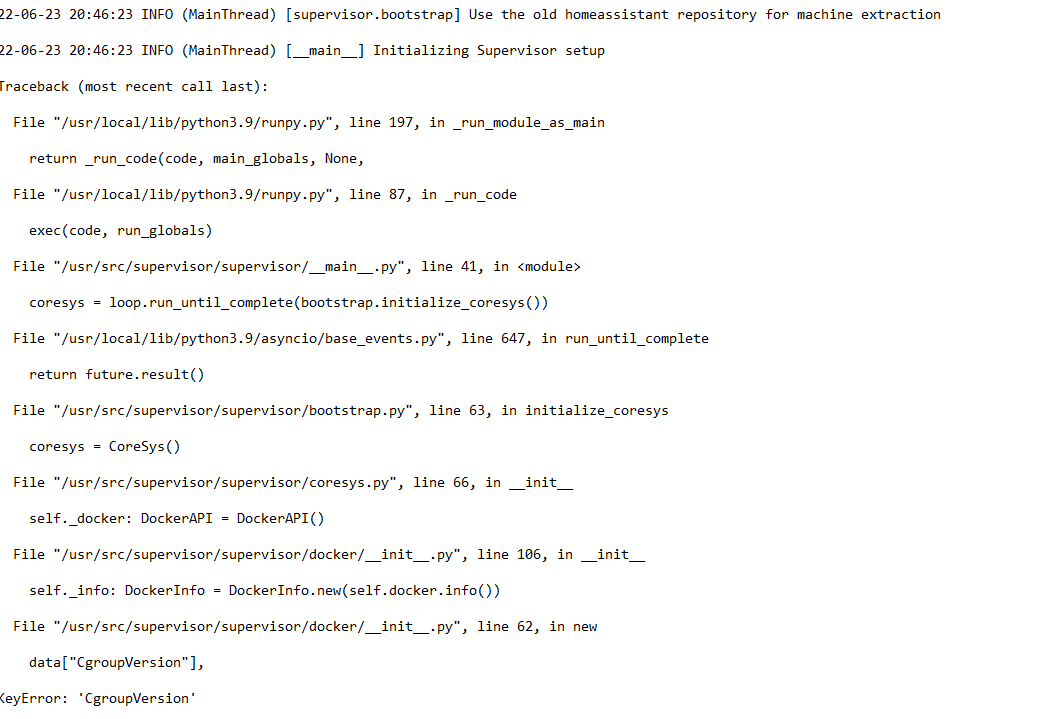
keyError: CgroupVersion
(key error related to the python stack)
 supple ridge
I'm watching this with interest, thanks - having exactly the same problems - could it be related to this? https://community.home-assistant.io/t/latest-supervisor-wont-start/437311/57
Seems that you need docker 20 for the latest supervisor to work. I have docker 19 but can't figure out how to update it in this hassos vm
storm sluice
you cant unless you update hassos
hushed token
supple ridge
I'm watching this with interest, thanks - having exactly the same problems - cou...
looks exactly like the error i get
hushed token
whats the command to update the os? os update?
storm sluice
yeah if you are in the hassos-cli (ha > prompt) you can just use the command "os update"
supple ridge
From the # prompt i'm doing docker start hassio_cli and then ha os update but I'm getting the tcp dial error like you did. Seems like the updater needs the supervisor to be running?
if I try to login after I start the hassio_cli container, it just says "waiting for supervisor" endlessly
hushed token
supple ridge
From the # prompt i'm doing `docker start hassio_cli` and then `ha os update` bu...
i get the same result as you do... 😭
supple ridge
I don't know if I'm reading these error mesages right, but it looks like supervisor won't run on current version of OS/Docker, but supervisor is also needed to update OS/Docker. Catch 22
hushed token
some dude in your link suggest doing the following:
sudo apt-get install docker-ce docker-ce-cli containerd.io -y```yeah that doesnt work in hassos
supple ridge
yeah I'd love to but my hassos doesn't have apt or any of that stuff
storm sluice
we can try finding which older supervisor still works with your os version
or try updating the os manualy
 obtuse olive
Supervisor update to 6.2 hosed my system. The docker won't start, and can't find a way to downgrade back to 5.3 which did work.
hushed token
supple ridge
yeah I'd love to but my hassos doesn't have apt or any of that stuff
why do we have that limitation, i am failrly new with linux os
supple ridge
If I do docker image ls I still have supervisor 2022.05.3 as well as the 2022.06.2 ("latest"). Is there any way to roll back to that mgolisch?
I assume the 06.2 is the one causing problems
storm sluice
whats the name of your supervisor image?
supple ridge
homeassistant/amd64-hassio-supervisor
and I also have ghcr.io/home-assistant/amd64-hassio-supervisor but they both have the same image ID
I have two versions of the supervisor as mentioned previously
hushed token
supple ridge
homeassistant/amd64-hassio-supervisor
and I also have ghcr.io/home-assistant/amd...
i am exactly in the same position as you
storm sluice
systemctl stop hassos-supervisor
docker pull homeassistant/amd64-hassio-supervisor:2022.05.3
docker tag homeassistant/amd64-hassio-supervisor:2022.05.3 homeassistant/amd64-hassio-supervisor:latest
systemctl start hassos-supervisor
that works for me it downgraded the supervisor to 2022.05.3
high token
it won't last of course
storm sluice
no but would potentialy allow to make a new backup and download it and then update the os
high token
weird for Supervisor to be cause all these issues. Especially if it's tied to Docker update
surely SU wouldn't just update to a version where it's not supported by docker 20
hushed token
storm sluice
systemctl stop hassos-supervisor
docker pull homeassistant/amd64-hassio-supervis...
i still receive the same error 😦
storm sluice
are you on a amd64 machine?
supple ridge
Even worse for me, it won't even boot now lol
hushed token
i think for me is aarch64
supple ridge
I have a proxmox backup from yesterday though so I'm going to roll it back and see if I can do the OS update with a supervisor that works
high token
so you must be before OS 8.0 huh?
hushed token
i have manage to set set the 2022.05.3 as latest (i think that what it does) and after i tried to re run the start command docker start hassio_supervisor and recieved the same errors, and re run docker image ls i see the the "latest" is back to the 2022.06.2
storm sluice
you need to do the systemctl commands
storm sluice
ah i see
obtuse olive
Jul 06 17:17:34 hassio-supervisor[13924]: [WARNING] Supervisor container did not remove the startup marker file. Assuming container image or container corruption.
Jul 06 17:17:35 hassio-supervisor[13924]: Error: No such container: hassio_supervisor
Jul 06 17:17:35 hassio-supervisor[13924]: Error: No such image:
Jul 06 17:17:35 hassio-supervisor[13924]: [WARNING] Supervisor image missing, downloading a fresh one: 2022.06.2
Jul 06 17:17:35 hassio-supervisor[13924]: 2022.06.2: Pulling from home-assistant/amd64-hassio-supervisor
Jul 06 17:17:36 hassio-supervisor[13924]: 8663204ce13b: Already exists
Jul 06 17:17:36 hassio-supervisor[13924]: 786f8dc47315: Pulling fs layer
storm sluice
try again but before systemctl start hassos-supervisor do the following: rm /run/supervisor/startup-marker
supple ridge
Not sure about OS version @high token I can't see it now. The initial hassos OVA I installed was ancient (4.something) but pretty sure I kept it updated via the web UI. I'll find out after this VM restore happens
storm sluice
it checks that file and if its present asumes something is wrong and fetches the latest version again
obtuse olive
docker image list | grep super
ghcr.io/home-assistant/amd64-hassio-supervisor 2022.06.2 5803863b44da 8 days ago 348MB
ghcr.io/home-assistant/amd64-hassio-supervisor latest 5803863b44da 8 days ago 348MB
homeassistant/amd64-hassio-supervisor 2022.05.3 1f8c765adbaa 6 weeks ago 347MB
homeassistant/amd64-hassio-supervisor latest 1f8c765adbaa 6 weeks ago 347MB
so how do I force it to use the 05.3?
hushed token
docker tag homeassistant/aarch64-hassio-supervisor:2022.05.3 homeassistant/aarch64-hassio-supervisor:latest
rm /run/supervisor/startup-marker
systemctl start hassos-supervisor (should it be hassio-supervisor?)```no the name of the systemd unit is hassos-supervisor
 quick hornet
hi. i've got a supervised install. stock debian with the only thing other than ha being the usboverip client i need to get my zigbee stick into the hyper-v host. For some reason after restarting the host OS ha won't start. I've ssh'ed into the server and tried running sudo ha which tells me a container isn't running. using docker ps -a i can see that the container it wanted was the hassio_cli container so i used docker container start hassio_cli to start it. that worked and the cli container is working but it doesn't seem to be able to bring up the hassio_supervisor container, i can see that it keep retrying but the supervisor quits after a few seconds. Can anyone help me work out why the supervisor isn't starting?
hushed token
OK! so after i ran the commands, i've docker logs hassio_supervisor and everything is green!
storm sluice
cool
did it start your other containers too?
like can you do a backup in the ha ui now?
quick hornet
hushed token
OK! so after i ran the commands, i've `docker logs hassio_supervisor` and everyt...
useful command, thanks.
hushed token
like suervisor.core (system is running in an unhearly state and needs manual intervention!)
yes! i am able to login via web ui
things looks abit grim there
but i guess i should backup
 dapper sparrow
Hi
storm sluice
but yeah make a backup and then try updating the os, as the supervisor might update itself again
obtuse olive
Error: No such object: hassio_supervisor
[WARNING] Supervisor container did not remove the startup marker file. Assuming container image or container corruption.
storm sluice
and also downlaod the backup
dapper sparrow
Sorry It started after a minutes sorry
hushed token
backup takes forever 😩
obtuse olive
No matter how many times I pull the 05.3 image, and tag it as latest, and rm the startup marker file...
When starting the service, it always says hassio-supervisor[21788]: [WARNING] Supervisor image missing, downloading a fresh one: 2022.06.2
obtuse olive
docker pull homeassistant/amd64-hassio-supervisor:2022.05.3
storm sluice
if you not on a amd64 machine it might be different
obtuse olive
docker image list | grep super
homeassistant/amd64-hassio-supervisor 2022.05.3 1f8c765adbaa 6 weeks ago 347MB
homeassistant/amd64-hassio-supervisor latest 1f8c765adbaa 6 weeks ago 347MB
supple ridge
Thanks @storm sluice , it's working again! Even my proxmox backup still had the 06.2 supervisor enabled but your commands worked. Maybe it had installed the new super but didn't reboot yet. I'm going to try bringing the OS up to date now.
obtuse olive
uname says x86_64
hushed token
ok, i've download the backup, i will try to repair, wish me luck
obtuse olive
Status: Downloaded newer image for ghcr.io/home-assistant/amd64-hassio-supervisor:2022.06.2
I believe amd64 is the correct arch
supple ridge
Doing the same thing @hushed token , I'll meet you back here later when it all goes south lol
storm sluice
obtuse olive
> Status: Downloaded newer image for ghcr.io/home-assistant/amd64-hassio-supervi...
yeah looks correct
try tagging the ghcr.io image too
hushed token
ok repair didnt solve anything but at least it didnt broke anything
storm sluice
cool maybe just try updating the os then
 dawn flame
And this is why I love my Docker install. No issues with the supervisor shitting itself....
hushed token
wish i could paste a photo of my supervisor
quick hornet
what keeps the hassio_supervisor being restarted? i've stopped it but it keeps restarting failing and restarting.
obtuse olive
yep, I needed to pull the ghcr.io image and tag it as latest, otherwise the systemd service did not find a suitable image to create a container
storm sluice
quick hornet
what keeps the hassio_supervisor being restarted? i've stopped it but it keeps r...
probably same problem, newer supervisor not compatible with old docker version
quick hornet
i hope not. i haven't updated anything for a long time, not the host nor the ha itself.
though looking at it if this is the image name ghcr.io/home-assistant/amd64-hassio-cli:2022.06.0 and that's a date then something has been updating itself without telling me
reading back it does look like the same issue others are having.
so i have 2 questions. 1) how can i copy my config from inside the container it's in so i can keep a safe copy. 2) if i apt-update docker (since i'm supervised i can) will that "fix" it?
storm sluice
quick hornet
though looking at it if this is the image name `ghcr.io/home-assistant/amd64-has...
i guess you can try updating docker or maybe rerun the supervised installer and see if that fixes it
 midnight vapor
If I can get to HA cli how can view logs? Form posts say cd /home but I don't have that.
Running HASS OS in a VM.
storm sluice
midnight vapor
If I can get to HA cli how can view logs? Form posts say cd /home but I don't ha...
"core logs" for the homeassistant logs
midnight vapor
Thanks, I got waiting for supervisor to startup 😦 VM has been booted for 25 minutes+ now
Hey it finally worked
Well logs finally showed up
obtuse olive
This rollback process is what worked for me:
docker pull ghcr.io/home-assistant/amd64-hassio-supervisor:2022.05.3 docker tag ghcr.io/home-assistant/amd64-hassio-supervisor:2022.05.3 ghcr.io/home-assistant/amd64-hassio-supervisor:latest rm /run/supervisor/startup-marker systemctl restart hassio-supervisor
But that is temporary fix, because supervisor loves to auto update and break things.
Permanent solution is to upgrade docker
For me, on Ubuntu, this worked:
https://gist.github.com/mcmaur/5a0659c10af7bab9ab930e1531a82c2f
quick hornet
updating docker and restarting the host os got me back into the HA ui. Thanks for the link and info there @storm sluice
What i don't understand is why the docker image got updated when i didn't update either ha or the host os.
storm sluice
i think if something goes wrong it just downloads the latest supervisor
quick hornet
implying something else went wrong, not sure what that would be. I only restarted the host because i was getting weird responses from the connected devices, missed input or commands. Perhaps something else is wrong and i need to keep investigating.
hushed token
i am off to sleep, its 3am here, things look better (my node red broke). i want to thank you @storm sluice for your help. tomorrow a new restore adventaure will begin 😅
storm sluice
hushed token
i am off to sleep, its 3am here, things look better (my node red broke). i want ...
good night
quick hornet
if it's any help to let you sleep easier once i got the supervisor fixed the update to the latest ha went smoothly
storm sluice
also you guys might want to look into an addon like this: https://github.com/sabeechen/hassio-google-drive-backup
quick hornet
a good suggestion
storm sluice
it makes daily backups into my google drive, so issues like that are alot less scary
supple ridge
Turns out I was on a very old OS (5) it took me 3 updates to get to current. Maybe I was thinking I was updating the OS but needed to click a bit more
midnight vapor
I'm getting dumped into emergency console mode. No more ha commands. I'm just lost not sure what I can do.
Reboots do nothing.
I tried docker pull latest supervisor and it said it pulled and docker ps says it running.
Actually it's looping. Said exited and now running.
midnight vapor
ERROR (MainThread) [asynciol Unclosed client session client_session: Calohttp.client.ClientSession object at 0x7143872e1ca0
WARNING: Halt Supervisor
s6-rc: info: service legacy-services: stopping
Not super helpful imo
quick hornet
it looks the same as the stack trace i had, that was the cgroup error.
midnight vapor
I tried docker pull latest to no avail
quick hornet
try docker --version and see what it is
midnight vapor
unknown-version, build unknown-commit
storm sluice
odd does docker version show the same?
storm sluice
cat /etc/os-release
what does version say
probably same issue, latest supervisor requires a newer docker version
midnight vapor
HassOS 4.12
storm sluice
yeah thats stoneage
midnight vapor
Yeah I tried to update once and borked everything so restored and never upgraded.
storm sluice
if you have a current backup its probably easiest just to reinstall using the latest version 8.2 and restore your backup
storm sluice
what does supervisor_arch say from that os-release file?
midnight vapor
amd64
storm sluice
try this:
systemctl stop hassos-supervisor
docker pull homeassistant/amd64-hassio-supervisor:2022.05.3
docker tag homeassistant/amd64-hassio-supervisor:2022.05.3 homeassistant/amd64-hassio-supervisor:latest
docker pull ghcr.io/home-assistant/amd64-hassio-supervisor:2022.05.3
docker tag ghcr.io/home-assistant/amd64-hassio-supervisor:2022.05.3 ghcr.io/home-assistant/amd64-hassio-supervisor:latest
rm /run/supervisor/startup-marker
systemctl start hassos-supervisor
that should hopefully temporarely downgrade the supervisor
storm sluice
do you have any of the ssh addons installed?
midnight vapor
Yes but is not running
or wont run
You have reached your pull rate limit. wtf? That's a new one. Didn't know docker had limits
storm sluice
try with only the ghcr.io commands
and see if that works
if not you might want to add: docker tag ghcr.io/home-assistant/amd64-hassio-supervisor:2022.05.3 homeassistant/amd64-hassio-supervisor:latest
midnight vapor
lols okay it's super borked now. After VM POSTs I get a froze curser
Restoring from snapshot and trying again.
Well now that's interesting, snapshot doing the same behavior.
Best options looks to be a new VM from aprils backups.
Don't trust snapshots lession learned.
storm sluice
hope that works out for you
midnight vapor
I haven't installed hass in like 4 years so might be back in a bit.
supple ridge
@midnight vapor I got the same froze cursor as you after trying the first time. I restored snapshot and tried it again, it worked the second time. Might be worth a shot
midnight vapor
Okay tried two different TUTs followed and can't get it to boot right.
I get PCI errors?
https://i.imgur.com/0IbjFcl.png

Figure that out ^ unselect pre-enroll keys.
midnight vapor
storm sluice
hope that works out for you
Mostly did. Thanks for your help.
midnight vapor
supple ridge
<@454298642509987840> I got the same froze cursor as you after trying the first ...
Yeah tried it like 4 times. That VM is all sorts of messed up. Other 3 VMs were fine. Something went super wrong with that install.
 light oxide
Came here for what I guess is the same Supervisor issue others have described. Am running on debian 10 fine for years. Broken this morning. Docker update appears to have fixed it - but have to remember to add the docker repo or it doesnt update.
Now to backup and move to HassOS ASAP.
 jagged dock
Is mariaDB still recommended over the default SQLite DB and other than I see it recommended all over youtube, why is it?
crude inlet
@jagged dock it's going to be faster and better suited. Many improvements have been made so the SQLite db might be fine for you. If you think you are outgrowing it, mariadb is a good move
jagged dock
I only ask as I'm on a 3B+ and moved to mariaDB about 2 weeks ago and my isntall has become unstable, with containers becoming non-responsive almost daily, having to power cycle to reboot.
Today the core update wouldn't go through, so removed MariaDB and it then worked right away. Coincidence maybe?
 azure flame
So I got bit by the Supervisor bug today while trying to install hassos directly onto a NUC
anyone have an idea on what to do?
 junior vortex
is there a way to automatically deploy ha on proxmox?
i saw a script the other day, but that failed
exotic wyvern
how can i stop supervised from trying to use ipv6? i have it disabled on my network and debian host
its really made a wreck of my network configs on the host
junior vortex
 wooden smelt
https://tteck.github.io/Proxmox/
wooden smelt
https://tteck.github.io/Proxmox/
- Creating HAOS VM...‼ ERROR 5@324 Unknown failure occured.
that's why i asked 🙂
neither the lxc or the hassos one works
wooden smelt
What file system are you using? BTRFS?
wooden smelt
run pvesm status -content images | awk 'NR>1' in the Proxmox Shell and share the results
junior vortex
local-lvm lvmthin active 1311555584 196339870 1115215713 14.97%
junior vortex
what is pimox?
Kernel Version Linux 5.11.22-4-pve #1 SMP PVE 5.11.22-8 (Fri, 27 Aug 2021 11:51:34 +0200)
PVE Manager Version pve-manager/7.0-11/63d82f4e
wooden smelt
little old
wooden smelt
run the post install script
junior vortex
which one is that?
wooden smelt
Proxmox VE 7 Post Install
high token
azure flame
using this image: https://github.com/home-assistant/operating-system/releases/do...
that is a **very ** old version by now. We are on OS 8.2 and you're trying to install 5.10. Try with the latest image. How did you even find that one?
junior vortex
wooden smelt
Proxmox VE 7 Post Install
i'm not sure i follow
wooden smelt
from the linked repo
junior vortex
which linked repo?
i have installed proxmox.. i've had it running for nearly a year
and i have 4 vms running
i'm not in the process of installing it
wooden smelt
The script will give options to Disable the Enterprise Repo, Add/Correct PVE7 Sources, Enable the No-Subscription Repo, Add Test Repo, Disable Subscription Nag and Update Proxmox VE.
junior vortex
yeah, but where is that script and how do i run it?
wooden smelt
@junior vortex #installation-archived message
wooden smelt
@exotic wyvern find your answer?
exotic wyvern
@wooden smelt not at all. having a hell of a time trying to get the supervisor docker container running again. I only deleted my question as i realized i had already asked it 45 minutes prior and didnt want to spam the channel
exotic wyvern
what is that for? i already have it disabled on my debian server and its disabled on all my docker networks
wooden smelt
you said that you wanted to disable IPv6 in the supervisor
exotic wyvern
for the supervisor. Right now i cant even get that container. I mistakenly updated to the latest version of it after being prompted in the gui and it broke everything. Right now im trying to walk back the changes and see if i can get a fresh supervisor container setup again, but not having any luck
exotic wyvern
thanks. read the fun snarky responses about supervised as well.
 brave hawk
Hi Hi my HA died this morning ..its Home Assistant Operating System. on RPI4....when i logging on screen there is only:
[WARN] Home Assistant CLI is not running! Jump into emergency console…
Now i've managed to bring hassos-cli up...what to do next ?..
 austere isle
crude inlet
Update docker
austere isle
crude inlet
Update docker
thanks for your input yesterday about running containers for HA and plugins , I have a NUC that i want to run HA and Plex on and Supervised was the recommended path back then ... after yesterday's scramble maybe it is time to revisit the installation , Can someone tell me what is the preferred way to run HA on Intel NUC ?
 runic mango
brave hawk
Hi Hi my HA died this morning ..its Home Assistant Operating System. on RPI4.......
runic mango
brave hawk
Hi Hi my HA died this morning ..its Home Assistant Operating System. on RPI4.......
Not sure if this will help but try this thread - https://community.home-assistant.io/t/warn-home-assistant-cli-is-not-running-jump-into-emergency-console/303548/8
 rain orbit
hi i am new to home assistant
i can acces home assistant on my pi via my computer that is connected via a wire to my network
but i cant acces it via wifi
can somebody help
pls
humble mirage
That sounds like maybe you have client isolation enabled on your WiFi router/AP/whatever
wooden smelt
austere isle
thanks for your input yesterday about running containers for HA and plugins , I ...
Can someone tell me what is the preferred way to run HA on Intel NUC ?
https://community.home-assistant.io/t/installing-home-assistant-os-using-proxmox-7/201835
as for Plex
#installation-archived message
rain orbit
humble mirage
That sounds like _maybe_ you have _client isolation_ enabled on your WiFi router...
my father told me the same but wouldnt disable it ill try and convince him again
 exotic laurel
So, I've just installed HAOS onto an old asus laptop, and it's booted up. but I can't access it from my desktop. I have an ethernet cable connecting it to the network, but it's not showing up on the router's connected devices list. When I run ha net info, it doesn't list any interfaces, and lists a docker address. Am I missing something?
humble mirage
rain orbit
my father told me the same but wouldnt disable it ill try and convince him again
Well, it sounds like you know the problem, the only solution is disabling it...
 rocky yew
hi, i'm running HAOS-64bit on a raspberry Pi 4 with a 32Gb SD-card but the card is only for 16Mb used how can i increase the size because i'm getting out of memory atm.
crude inlet
The space is allocated during setup. Where are you seeing this?
 frosty quartz
I believe I have recent common issue with an update to home assistant and now home assistant is not booting. I have read in the forums that I need to update docker from v19 to v20 using apt-update. I can't reach hass via ssh or web so I am at the local console. But this is not a normal shell so things like sudo and apt don't work. How do I 'break out' to a normal shell. Or is there another recommended resolution? https://ibb.co/C9tvMG5
crude inlet
@frosty quartz that issue is for "supervised" installations and you wouldn't update docker yourself on a HAOS installation
So this does not fit with the console you are seeing. Sounds like HAOS and not another OS
crude inlet
That is an old version of the OS
frosty quartz
Agree
frosty quartz
Ok thx
rocky yew
crude inlet
The space is allocated during setup. Where are you seeing this?
under system -> System Health -> hassio i see: Disk Total 14.1 GB
high token
frosty quartz
It is 5.13 , I beleive
As far as I know though people haven't been able to go directly to 8.x from such an old version
you might need to update to intermediate versions first
ha os update --version 6.0 for example then 7 then 8
high token
Yeah indeed edited it 😄
frosty quartz
Ok that makes sense. There was an issue after 5.13 with external SSD on rpi so I was scared to update beyond 5.13, but I'm already having an issue so it's time to take the risk
high token
As long as you have a recent backup made and downloaded off HA, there's nothing to worry about
rocky yew
rocky yew
under `system -> System Health -> hassio` i see: Disk Total 14.1 GB
Oeps, there is just a 16GB SD-card inserted, not a 32 GB
 bronze anvil
I'm getting a number of filesystem errors. Using x86 HAOS. Is there a way to do a fsck? I read a couple of thread and no matter what services I stop I always get "filesystem busy". I also looked for a way to do a fsck on boot but could not find anything. It's a SSD drive.
 worn hedge
Hello. I am running a HASSIO VM under Virtualbox on Win 10. After a reboot, I can no longer connect to the web interface at all. The network is up and I can ping the host IP, but my only access into the system is via the console. On the console I get the "Home Assistant CLI is not running! Jump into emergency console..." message, and none of what I have been able to find in google helps. Due to illness this install has been neglected for some time, and is surely way out of date. I can't even figure out where to begin. How do I begin figuring this out?
 cedar oracle
Good morning. i have a pi4 running an SSD via a very old method like 4 years ago (so old I'm not even sure how I did it back then). I believe the essential files run on sd card still but all the rest runs on the SSD. Anyway I recently saw an update and I believe it was 2022.6.7 and I thought I updated it. I couldn't see the new 2022.7 update so I rebooted the pi. Now it won't come online via interernal or external IP but I can SSH in to the raspbian OS. Can anyone help?
crude inlet
@worn hedge create a new VM using the latest images and restore a backup?
worn hedge
Good thought. Do older backups typically work with newer versions?
crude inlet
the backups are of your HA config and the addons you have, along with their configuration.
That would be fine
bronze anvil
bronze anvil
I'm getting a number of filesystem errors. Using x86 HAOS. Is there a way to do ...
To reply to my own message, I found an answer:
From console:
systemctl isolate rescue.target
systemctl stop systemd-journald
umount -A /dev/disk/by-label/hassos-data
fsck.ext4 /dev/disk/by-label/hassos-data
Source: https://github.com/home-assistant/operating-system/issues/1426#issuecomment-865088023
rain orbit
I ve managed to connect a esp32 Is there a way to have many esps connectés to différent
WiFi Routers that are connectés to thé sam network
?
humble mirage
That's more a topic for #diy-archived or the ESPHome or Tasmota Discord servers
It's got nothing to do with installing HA
 wind acorn
are there any common issues with new hassio updates? my dockers stopped working tonight
humble mirage
Do you mean Home Assistant OS?
There's been issues with Supervised installs, but not generically HAOS
storm sluice
i believe supervisor 2022.06.x requires a newer docker version , you might end up with an unusable system if you are on an old os release and update to that. There were a number of people yesterday with that problem
frosty quartz
high token
you might need to update to intermediate versions first
So I just tried this and I get "error response from daemon: Container b415...[many numbers] is not running
frosty quartz
wind acorn
are there any common issues with new hassio updates? my dockers stopped working ...
Same and I am on haos. I have a. Old haos which as mgolisch eludes too below is likely the issue
wind acorn
i think i have hassio
frosty quartz
Yes same
wind acorn
strange issue, it started last night
i didnt update it or anything i only rebooted my VM
abstract hearthBOT
Hass.io was the old name for the appliance like install option, that uses Docker. It was renamed in January 2020 and is now called Home Assistant OS.
Command '~hassio' was invoked by: Tinkerer
humble mirage
It hasn't been called Hassio in about 2 and a half years...
wind acorn
wow 😄 times fly
humble mirage
If your install is from then, and you've not updated it since, you're way out of date
humble mirage
No, HAOS/Hassio use an embedded OS
If you have Debian then you're not running HAOS/Hassio
wind acorn
i think i run debian
humble mirage
Debian would mean Supervised, which means you fell for the trap
wind acorn
debian with docker containers
humble mirage
Do you have add-ons?
humble mirage
Then you screwed up and used the Supervised installer
That means you have to ensure that your host is kept fully updated, in line with the requirements
wind acorn
what should you use that for?
humble mirage
It's under a stack of warnings, that people ignore
It used to only have a bunch of warnings, but more were added after people kept ignoring them
wind acorn
but why would it stop work tonight?
humble mirage
Time to fully update your OS, and update all packages - particularly Docker
There was a Supervisor update, and old versions of Docker no longer work
If you'd been keeping updated you'd not have noticed
humble mirage
Grab a backup, install HAOS instead, get back up and running?
wind acorn
my backup was from mars
so im trying to get it working again because i installed some lamps after it
humble mirage
Hopefully somebody can get you up and running, but the standard fix so far has been to update Docker
Assuming you're on Bullseye
wind acorn
i can be on 9
need to check after my restore
progress 88% (read 47244640256 bytes, duration 4267 sec)
progress 89% (read 47781511168 bytes, duration 4312 sec)
humble mirage
Well, if you're not on Bullseye, you screwed up
Supervised has required Bullseye for months now
wind acorn
i guess i can upgrade then XD
humble mirage
August, last year in fact
humble mirage
humble mirage
An old backup won't help, since the Supervisor will auto-update
wind acorn
wtf autoupdate shit
hate it
re-stored after cutting network to the VM?
should work
humble mirage
And then how are you going to update the OS and Docker?
wind acorn
i have 2 picks
restore my VM from mars without internet access and grab backups
or try update my VM to debian 11
 humble mirage
You need to update it to Bullseye anyway
wind acorn
ye
humble mirage
wind acorn
i will
but its still fucked up that it updates randomly without me wanting it to update
humble mirage
The Supervisor updates automatically, and by picking that method you agreed to keep your system updated in compliance with the requirements
That you clicked through all that and ignored it ... 
storm sluice
yeah thats unfortunate but then again hasos is meant as an appliance, just have regular backups and if something breaks just reinstall with latest version and restore your backup
wind acorn
it says Linux hassio
so i guess i have that
based on debian
Description: Debian GNU/Linux 9.13 (stretch)
oh well, lets update and test it 🙂
ty everyone
humble mirage
Yeah, you've been out of compliance for years now 
wind acorn
haha yes 😄
storm sluice
then again it seems the same problem exist for hasos
frosty quartz
How do I update haos from 5.13 to something newer so that I can get myself out of this hole?
This is what I see on the console. No web or ssh access
I do have backups saved separately
humble mirage
Flash a fresh HAOS image
wind acorn
@humble mirage 😦
humble mirage
If it doesn't, it's not too late to move to HAOS
humble mirage
Backups work
humble mirage
Backups include add-ons
humble mirage
wind acorn
😂
wind acorn
but if it works now i should still move to haos?
wind acorn
dont fix something that arent broken and localy :D?
humble mirage
Well, by not "fixing" it, you broke it
wind acorn
Operating System: Debian GNU/Linux 11 (bullseye)
'
😍
lets see if it boots up hassio now
humble mirage
Now, please read the requirements that you've been ignoring, and ensure you're actually complying
You don't have hassio either 😉
wind acorn
yeye 😄 hassoS?
wind acorn
Linux hassio 5.10.0-13-amd64 #1 SMP Debian 5.10.106-1 (2022-03-17) x86_64 GNU/Linux
'
humble mirage
Hassio became HAOS, you don't have that
You have the bastard install method from hell
 frosty quartz
humble mirage
Flash a fresh HAOS image
frosty quartz
humble mirage
Flash a fresh HAOS image
How do I do that? It's been a long time since I've need to flash this rpi physically. I have an external SSD connected via USB so it's not as simple as flashing a micro SD card
humble mirage
cedar oracle
Can anyone help me get my HA running again? I can SSH into the Raspbian image on the pi4 but I don't know what to do from there. internal and external access isn't working
humble mirage
Do you have add-ons?
Or are you using either pure Docker (Container) or pip (Core)?
@cedar oracle ☝️
cedar oracle
humble mirage
Or are you using either pure Docker (Container) or `pip` (Core)?
I installed HA like 4 years ago on this pi4 and did a SD card hack where the base OS ran on SD and I did something whre the rest ran on the SSD. I don't even know how to answer you questions.
``pi@raspberrypi:~ $ cat /etc/os-release
PRETTY_NAME="Raspbian GNU/Linux 10 (buster)"
NAME="Raspbian GNU/Linux"
VERSION_ID="10"
VERSION="10 (buster)"
VERSION_CODENAME=buster
ID=raspbian
ID_LIKE=debian
HOME_URL="http://www.raspbian.org/"
humble mirage
Did you have add-ons?
cedar oracle
Yes lots
storm sluice
wind acorn
seems like its re-creating itself every 5 seconds
https://github.com/home-assistant/supervisor/issues/3692 maybe try updating docker or just reinstall supervised using the latest script from github
cedar oracle
duck dns, mosquitto, zwave js etc
humble mirage
Well, then you (too) have the problem that you're running an unsupported, broken, Supervised install
Supervised isn't supported on Raspbian
It's also not supported on Debian Buster, even if you were on Debian
cedar oracle
so a wipe and fresh install is where I'm at?
humble mirage
Wipe, and fresh install of HAOS
Then you can use the datactl command to move all the data to the SSD
cedar oracle
I probably should have moved this way a long time ago but when everything works why mess w/ it.. Will I have to re-add all my zwave stuff manually again or will it recognize the pairing to the same usb stick and auto populate?
humble mirage
By restoring a backup it should all be there
high token
frosty quartz
How do I do that? It's been a long time since I've need to flash this rpi physi...
Do just that. Flash the SSD like it was an SD card. Plug in on USB3.0, and see if ti boots or not
If it does just restore from snapshot
if not, you can find an SD card to flash that and do the datadisk move
wind acorn
@humble mirage
humble mirage
@wind acorn
humble mirage
Now... ensure you keep it current in the future
wind acorn
yes sir
humble mirage
And, better, plan a move to HAOS 😉
wind acorn
will move to HAOS asap
frosty quartz
high token
If it does just restore from snapshot
if not, you can find an SD card to flash t...
Assuming you mean backup when you say snapshot?
Are backups os dependent? (Since I've been running on an old one)
high token
no hint of OS included
Ah yes old habits die hard
backups are hardware agnostic even
can go from Pi to VM and anywhere inbetween
wind acorn
backing mine up now INFO: 6% (3.0 GiB of 50.0 GiB) in 2m 1s, read: 32.2 MiB/s, write: 32.2 MiB/s
 floral spoke
Hi there im a noob and could really use some assitant with installing on external ssd any help would be most appreciated thank you 🙂
frosty quartz
I just used balena etcher to flash home assistsnt to an external USB. Plugged it into pi and it booted home assistant
USB SSD*
floral spoke
i kind of got lost with trying to download the Raspberry Pi OS imager
high token
To be in the safe side I'd first update the bootloader on the pi with the Pi OS imager
(misc utility images --> Bootloader --> USB boot)
flashed to an sd card --> SD card on the pi --> boot --> wait a minute or two --> done (green screen if monitor plugged in)
then flash HAOS onto the SSD and boot the Pi (no SD card in Pi anymore)
cedar oracle
I freshly installed HAOS now on my pi4. Trying to login via SSH and connection refused.
humble mirage
You have to install and configure the SSH #add-ons-archived
cedar oracle
its been so long.. wow.
floral spoke
Thanasis thank you but you are using terms that im not familiar with ....sorry if i didnt explained my self right i am trying to install from scratch and i guess i need moe "hand in hand" guidness
more
 dawn sage
My home assistant was not updated for years and now it will not load the supervisor page. I cannot ssh and forgot how to access it through my linux docker. Could anyone help me through this I am in a bind and would appreciate it.
humble mirage
I'm guessing you too use the Supervised installer?
Make sure to update the OS to Debian Bullseye, and then update all packages - particularly Docker
dawn sage
okay i will attempt to do that, i only learned linux to install it. I forgot everything now.
humble mirage
You really shouldn't be using Supervised then
Grab your backup, flash HAOS, and save yourself pain
dawn sage
I know, i did this like 5 years ago
humble mirage
Even then it came with warnings...
high token
floral spoke
Thanasis thank you but you are using terms that im not familiar with ....sorry i...
Try like documented here perhaps with Balena instead. Just use the SSD instead of the SD card. If it works all good. If it doesn't we see then
dawn sage
okay my bad then i was experminetning, next time i will do haos and do more stability
floral spoke
@high token thank you i will try
dawn flame
humble mirage
Even then it came with warnings...
Why does everyone want to run supervised???
grand pivot
They don't understand it and think it's something other than it is
dawn sage
I am not sure if I can update my containers, because all of my stuff is outdated, so if i update it will break everything
You guys have to also understand things were different 5-6 years ago. There were a lot of versions and things werent as streamlined
grand pivot
Sure, but it's been 2 years since the Supervised requirements were established
dawn sage
i have been lax, i was hoping that was one of the strengths of ha, set it and forget it since its separate. But i guess i see now i do have to keep it up to date
golden walrus
i have a setup running on a RPi3 off SD. I plan to migrate to a RPi4 w/ SSD tomorrow. what's the best way to go? Clean new install and then use a backup to restore? Should i do a "full" backup?
rocky yew
that sounds as how i should do it as well.
how could i enable a cooling fan that i have installed on my HAOS running on my Pi4?
 brazen herald
golden walrus
i have a setup running on a RPi3 off SD. I plan to migrate to a RPi4 w/ SSD tomo...
brazen herald
golden walrus
i have a setup running on a RPi3 off SD. I plan to migrate to a RPi4 w/ SSD tomo...
Yup. Depending on the size of your backup you may need to set it up, install the Samba add on (or similar), transfer over your backup and then restore that.
brazen herald
rocky yew
how could i enable a cooling fan that i have installed on my HAOS running on my ...
frosty quartz
high token
If it does just restore from snapshot
if not, you can find an SD card to flash t...
So I flashed latest, booted then uploaded last backup to hass via web. web disconnected and now doesn't respond. How long does the restore take?
The console looks different. Is there some trouble shooting I can do there?
Ok I tried ha supervisor restart and that seemed to do the trick
high token
@frosty quartz all good then?
frosty quartz
high token
<@746852985828671518> all good then?
Yes, thx for your guidance
 sacred quiver
Whenever I try to update to Home Assistant 2022.7.0, I get 'The system cannot restart because the configuration is not valid: Unexpected error calling config validator:', any ideas?
crude inlet
@sacred quiver bad configuration.yaml edit?
trail pike
(Please ping me when helping me)
I'm guessing that this goes here...
So after HA core the other day, I couldn't get HA to get an IP address, restarted HA several times and even tried restarting proxmox which is what it is being hosted on, that didn't work either...
A few days later, I went on a 2 day trip, so I turned the server and my pc entirely (to save power) and I booted it back up and now it was able to connect to my network again... I don't understand why, but ok that's just tech sometimes...
But, the reason I am posing, now for some reason "http://homeassistant.local:8123/" isn't working to access home assistant but using the local ip directly does work... Anyone know why this is?
rocky yew
frosty quartz
So I flashed latest, booted then uploaded last backup to hass via web. web disc...
i was using the rpi_gpio_pwm HACS integration but it stopped working after upgrading and now i get the following error.
abstract hearthBOT
@sage swan posted a code wall, it is moved here --> https://hastebin.com/gidiwawoco
@sage swan [Rule #6](#rules message): Please do not post codewalls (text longer than 15 lines) - use sites such as https://dpaste.org/ (pick YAML for the language), https://www.codepile.net/ (pick YAML for the language), or https://paste.debian.net/ (pick YAML for the language).
Please take the time now to review all of the rules and references in #rules.
Command '~codewall' was invoked by: Tinkerer
humble mirage
I'd expect you can ignore that
 sage swan
Thanks, all went well 🙂 Even though my pulse was high waiting during the update :D:D
 devout lotus
Hi all, suddenly my rpi with HaOS isn't getting its ip anymore. Don't have micro hdmi cable so can't check what's happening. But zigbee is still functioning with ZHA so it is booting fine. Is there a way to set a static ip through the boot config on the SD card?
cedar oracle
I have my pi4 running again after formatting and installing HAOS. I have a ssd plugged in usb and I want to try datactl command but the drive isn't showing mounted. I'm not very good at linux/unix can someone help me find and mount it and run that command
cedar oracle
yes I have HAOS on the SD. did with Balena Etcher yesterday. Yes there is junk on the ssd from my previous HA install that was unsupervised but I don't need any of that data
I see something in /dev/sda /dev/sda1 but they're not directories
at least sda and sda1 aren't directories
high token
potentially it's seeing you have a previous HA partition on the SSD
it prevents you in that case so to not accidentally override a HA installation
just need to wipe the SSD first
cedar oracle
ok. attempt that from ssh or easier to just bring it to laptop here.
high token
For you probably easiest to just use balena and flash something that isn't HA on it
cedar oracle
wiped it.. plugged it back in.. see just /dev/sda now .. need to mount it I guess
though I'm out of my league now.. not sure how or what to do
high token
You can do it from the UI! 😄
cedar oracle
no way
cedar oracle
omg mind blown
this was such a hack together from like 4 years ago when I originally ran a pi3 with ssd. so much has changed with onboarding
high token
should have seen trying to do SSD boot on the rpi4 a few years back. at least with rpi4 you get the USB speeds too
abstract hearthBOT
@arctic bronze posted a code wall, it is moved here --> https://hastebin.com/nicidekeya
@arctic bronze [Rule #6](#rules message): Please do not post codewalls (text longer than 15 lines) - use sites such as https://dpaste.org/ (pick YAML for the language), https://www.codepile.net/ (pick YAML for the language), or https://paste.debian.net/ (pick YAML for the language).
Please take the time now to review all of the rules and references in #rules.
Command '~codewall' was invoked by: Tinkerer
cedar oracle
high token
should have seen trying to do SSD boot on the rpi4 a few years back. at least wi...
Yes I remember when the pi4 came out and the bootloader from pi institute didnt' even have the ability baked into the firmware. My pi4 probably still doesn't
humble mirage
abstract hearth
The package requires the Cargo feature called
edition2021, but that feature is not stabilized in this version of Cargo (1.55.0).
Looks like you need a different (newer?) Cargo version
 arctic bronze
humble mirage
> The package requires the Cargo feature called `edition2021`, but that feature ...
arctic bronze
humble mirage
> The package requires the Cargo feature called `edition2021`, but that feature ...
How do I update / install new Cargo version?
humble mirage
However TrueNAS Core manages that
arctic bronze
humble mirage
However TrueNAS Core manages that
Ough
 placid sage
hello folks
I was wondering how i can install a specific image that contains core version 2022.5.5 ??
humble mirage
https://www.home-assistant.io/common-tasks/os/#run-a-specific-version
(and please don't crosspost)
placid sage
thank you and forgive me
this is exactly what I did, but it gives many errors (clean install)
abstract hearthBOT
Please don't say I have an error or describe an error. Share the whole actual error message so we can help you.
Command '.error' was invoked by: Tinkerer
humble mirage
Remember to use a code share site if it's over a dozen lines
placid sage
when install specific version 2022.5.5 (After clean install 2022.7.1)
devout lotus
devout lotus
Hi all, suddenly my rpi with HaOS isn't getting its ip anymore. Don't have micro...
Anybody who knows?
placid sage
I get the following errors
- [548219213136] Received invalid command: energy/get_prefs
- Setup failed for raspberry_pi: Integration not found.
- This zigpy release uses database schema v8 but the database is v9. Downgrading zigpy is not recommended and may result in data loss. Use at your own risk.
- <QueueManager> Repository structure for 0.0.3 is not compliant
high token
what's the reason for wanting to downgrade?
those are HA Core errors. Updating/Downgrading is handled by Supervisor. You need to look at those errors
At least I'm understanding you are saying the command is not working or?
placid sage
because I have a very stable setup with this version
high token
Ideally you'll want to slowly update one small version at a time and work through the errors
so you did ha core update --version=2022.5.5 but it errors?
high token
devout lotus
Anybody who knows?
It's a bit trickier but theoretically can have the right file in a USB drive that HAOS will read on boot
placid sage
high token
so you did `ha core update --version=2022.5.5` but it errors?
yes, as soon as I did ha core updater --version 2022.5.5 many integrations throw errors
high token
but HA did go to version 2022.5.5? I don't understand if you mean it won't downgrade or that it does downgrade but it has errors
placid sage
(such as zigbee home automation, raspberry pri, energy, queee manager)
placid sage
high token
but HA did go to version 2022.5.5? I don't understand if you mean it won't downg...
sorry Thanasis, it did downgrade to version 2022.5.5 but after restart integrations throw errors
updating to 2022.6.0
high token
where the errors that bad in later version?
placid sage
(this is as far as I can go )
high token
and after 6.0? What happens?
placid sage
after 6.0 I have big problems with a custom component which I use a lot
and I don't want to loose it (alexia media player)
humble mirage
Have you reported the issues to the developer?
placid sage
I have about 200 TTS automations playing among 6 alexa
placid sage
humble mirage
Have you reported the issues to the developer?
yes, but some issues are not solved yet.
many users have the problem with "reauthenticate"
high token
I have Alexa but no such issues
placid sage
high token
I have Alexa but no such issues
thanasis, what core version?? do you use alexa for TTS ??
high token
maybe you're not using the right authentication method?
Occasionally some TTS
It will ask me maybe to authenticate once every few months or so
high token
Everything is on latest versions
placid sage
https://github.com/custom-components/alexa_media_player/releases
as per version 4.0.0 legacy login has been removed
high token
yeah because legacy was the one to cause the most issues
build in 2FA usually worked best
high token
you mean it logs you out or the error with the multiple reauthentication messages?
placid sage
i need to re-login every hour
I think it is related to the number of the api requests I make every day
placid sage
high token
Oh because of your so many TTS right
exactly!! Just to double check it, I disabled some automation, which caused to have less TTS requests and didn't have such a problem
placid sage
high token
Sell 6 Echos and buy 6 Google Homes 😛
I'm thinking of it ....
but we love Alexa .....
(alexa family - sorry)
thanasis, is this the right place to ask about hassio-cli won't start, jump to emergency mode ????
placid sage
this happended to another instance I am running, after last update
after reboot I was getting "hassio-cli won't start, jump to emergency mode"
many containers had no started
and hassio-supervisor was missing
** don't worry because I already re installed 😦
what I want to know is if there is a way to export HA configuration on such a scenario ?
are you with me ?
crude inlet
What do you want to know about it?
placid sage
crude inlet
What do you want to know about it?
what I want to know is if there is a way to export HA configuration at emergency mode ?
crude inlet
Emergency mode is just the host console
You have access to the host system and the files are at /mnt/data/supervisor/
How you get them off of there is up to you.
placid sage
ok - let me rephrase the question
on which container the configuration is stored ???
crude inlet
All containers put their files somewhere
Not in the containers. Containers only exists when they are running
I explained where the configuration is stored above
high token
Ideally you'd be regularly making backups and downloading them off the HA hardware
many addons can do this
so you wouldn't care if HA dies on you with the config stuck inside it
 jade spade
Anyone noticed big RAM usage after todays upgrade?
Could be related to MariaDB upgrade I did early today.
Did full server restart. Kind of got spooked as Zigbe2Mqtt didn't start at first.
Now it seems to be stable.
Can not paste images here to show you.
Uploaded here: https://gcdnb.pbrd.co/images/pBia7YuDD6Sv.png?o=1
 high token
The proxmox RAM usage reports always near maximum to what you allocate
doesn't mean HA is actively using all of that
 reef breach
Having issues with HAos on a RPi 3. Stuck at Preparing and checking the supervisor logs nothing jumps out at me.
Can ping the internet, not undervolting, seems okay.
Manually flashed SD card with
cat image.img.xz | xz -d | dd of=$blkDev
Instead of the suggested tool, however.
I did follow some instructions to change the DNS, but it was pinging the outside just fine.
Gonna try a reflash. Maybe bungled something.
Seems a bit more active now. Looked away and it rebooted. I suspect it grew the SDcard
Now back at the same couple of lines in the supervisor logs. Observer is green.
No errors, no warnings aside from IPv6 not being available.
Seems like I'm a haOS version behind. Gonna try the latest from the GitHub.
high token
one minor or one major behind? 😅
reef breach
Minor. I was watching top to just stare at for ideas until the CPU flared up. Looks like it's doing something all of a sudden.
Oh. Cool. I was just impatient. It's working now.
Wouldn't be a bad idea to show more stuff in the logs to indicate progress for people like myself thinking they did something wrong.
 modest lake
Since HA 2022.6 I have an error at every restart:
2022-07-08 20:51:53 ERROR (MainThread) [homeassistant.core] Unable to remove unknown job listener _FilterableJob(job=<Job HassJobType.Callback <function async_setup_entry.<locals>.async_finish_startup at 0x7f2c27d9c1f0>>, event_filter=None, run_immediately=False)
Traceback (most recent call last):
  File "/usr/src/homeassistant/homeassistant/core.py", line 1038, in _async_remove_listener
    self._listeners[event_type].remove(filterable_job)
KeyError: 'homeassistant_started'
I haven't noticed any problems, it is just looking bad in the log and I can't find any tips on Google or in the forums.
Suggestions?
reef breach
high token
There is the downloading image and installing part that shows
The user facing 'Preparing' page has that pulsing button. Showing the logs you'll just see it paused on some system check finishing for a long, long while.
But, eventually it'll continue. I was assuming "No progress for a while, start investigating"
golden walrus
Hi all, im in the process of migrating from a RPi3 to RPi4. I made backups (both partial and full) of the old system. I booted the new RPi4 with fresh HAOS image. I'm at the onboarding screen. I select to restore from backup and selected my partial backup and checked the two boxes, but not the HA core. I can browse to the backup file and click restore, it asks if im sure i want to restore, i say yes, but then nothing happens. No confirmation or message or anything. ?
also, im using backups, not snapshots. what's the difference?
humble mirage
Snapshots are the old name for backups
golden walrus
oh i see, that's good to know. ive been stressing not having snapshots
still, nothing is happening wiht the backup
golden walrus
30min now :/
think i should jsut create the account and let it setup and then try to restore from a backup? is that possible?
crude inlet
That was the only way previously
So yes it's possible
Why would it not be possible? You can only ever restore a backup during a fresh install?
golden walrus
you know what they say about assuming
 vast vortex
Guys, I have installed Proxmox on my computer and HA on VM. I need to add storage with data to HA so what is the best way to do that with this environment?
golden walrus
i have a feeling this is some kind of web browser cache issue. seems to be the case 90% of the time
golden walrus
well, i made an account. some old add-ins are here.. like zigbee2mqtt.. but it doesn twork. terminal and file editor are also there
my dashboard is gone
z2m isnt working
configuration.yaml is default/empty
wtf
can ij ust start copying contents of yaml files or is this too borked?
@crude inlet any ideas?
crude inlet
You started over and made an account?
golden walrus
it seemed the restore option at the onboarding screen wasnt working. i. gave it 30+min and its a fresh small system. so i just created the account
crude inlet
What do the supervisor logs show?
storm sluice
it should show if the restore finished
golden walrus
Error on load tts: be5b786677c817d41b48be2948586245f1bb197b_en_-_google_translate not in cache!5:43:45 PM – (ERROR) Text-to-Speech (TTS) - message first occurred at 5:19:29 PM and shows up 2 timesError handling request5:38:30 PM – (ERROR) components/frontend/init.py - message first occurred at 5:22:19 PM and shows up 9 timesEnded unfinished session (id=3 from 2022-07-08 20:18:32.463863)5:19:19 PM – (WARNING) RecorderThe system could not validate that the sqlite3 database at //config/home-assistant_v2.db was shutdown cleanly5:19:19 PM – (WARNING) RecorderCLEAR REFRESHLOAD FULL LOGS
four total entries
thats one
Logger: homeassistant.components.recorder.util
Source: components/recorder/util.py:476
Integration: Recorder (documentation, issues)
First occurred: 5:19:19 PM (1 occurrences)
Last logged: 5:19:19 PM
Ended unfinished session (id=3 from 2022-07-08 20:18:32.463863)
storm sluice
thats the ha logs not the supervisor logs
golden walrus
oh where are supervisor?
storm sluice
settings->System->Logs select supervisor from the dropdown at the top right
also you said something about partial restore, if you didnt restore core its no wonder none of your dashboards were restored
golden walrus
i see. i read that if the old RPi was 32bit and the new Rpi is running 64bit, i could not do a full restore with core. is that true?
storm sluice
pretty sure that doesnt matter
golden walrus
ah. both are on the same OS version fwiw
maybe i'll reimage this disk new and try a full restore again
high token
just try restoring again a full backup