#installation-archived
1 messages · Page 57 of 1
 toxic bramble
 wanton axle
Just updated my HA Docker, and getting multiple errors. Is there a way to rollback to previous version just before the latest?
 raven forge
What errors? Sure, just switch the tag from latest to something else like 2023.12: https://github.com/home-assistant/core/pkgs/container/home-assistant/versions?filters[version_type]=tagged
wanton axle
thank you.
my localtuya fails to connect to some devices
was working fine before the update
I'll test further
 small folio
Suppose I wanted to use HASS in docker in bridge mode, is there a comprehensive list of ports I need to expose? Obviously 8123, but after that I can’t seem to find anything that is explicit.
 lean lava
max@ubuntu:/opt$ docker-compose up -d
Pulling homeassistant (ghcr.io/home-assistant/home-assistant:stable)...
ERROR: Get "https://ghcr.io/v2/": dial tcp 140.82.121.34:443: connect: network is unreachable
what iam dooing wrong ?
small folio
Can that host get out to the internet? Post your compose file
 humble scaffoldBOT
@lean lava I converted your message into a file since it's above 15 lines :+1:
small folio
not seeing anything immediate as an issue in the compose. can the host get out to the internet?
lean lava
how can i check this ?
portainer running totaly fine
and the server is connected to lan
small folio
curl https://www.google.com
or if you don't want to use google, put in a different site, then post the output (if it's a bunch of HTML just say it instead of posting the html plz lol)
lean lava
its worked got the html
small folio
ok, so it's not a reachability issue.
try the compose up again, maybe it was a temp issue with resolution?
DNS haiku bb
lean lava
no its the same issue
again
max@ubuntu:/opt$ docker-compose up -d
Pulling homeassistant (ghcr.io/home-assistant/home-assistant:stable)...
ERROR: Get "https://ghcr.io/v2/": dial tcp 140.82.121.34:443: connect: network is unreachable
lean lava
same issue every try to run home assistant
raven forge
Does the same happen with the image from the docker hub?
Does networking in general work?
ping 1.1.1.1
nslookup google.com
I kinda expect it because it got the right ip but still.
lean lava
max@ubuntu:/opt$ ping 1.1.1.1
nslookup google.com
ping: connect: Network is unreachable
Server: 127.0.0.53
Address: 127.0.0.53#53
Non-authoritative answer:
Name: google.com
Address: 142.251.36.206
Name: google.com
Address: 2a00:1450:4001:810::200e
lean lava
raven forge
Does the same happen with the image from the docker hub?
Does networking in gene...
network in general work fine i think
raven forge
Please validate with the commands I gave you and answer all the questions.
humble scaffoldBOT
@wild valve I converted your message into a file since it's above 15 lines :+1:
 grand pivot
what does that IP address point to?
 steel flower
Is there a way to verify my Pi is actually connected to my wifi network?
steel flower
Yeah i cannot get my Pi connected wifi with HA. I installed Raspberry Pi OS and it connected no issue. I dont have ethernet but i should be able to set the credentials in the flasher and be fine?
 crude inlet
@steel flower you can do it, but not by using the rpi imager. And it only goes downhill from here if you have no Ethernet option at all. This is a server and not a mobile app. With all the communication that’s going to be happening, the other wireless protocols you are likely to start using, and no physical access to your own network hardware. Does Ethernet actually not exist if only for the initial setup?
 placid sage
Can users not post images? I've spent hours across multiple days trying to set up my home assistant to be reachable over https and I'm getting errors in my configuration.yaml and can't for the life of me figure out why I'm getting a path error after uploading my origin.pem and privkey.pem files from cloudflare. Was hoping I could upload the images of the config file and the error message
crude inlet
That sounds like it would be easier shared as text
You can share a link to images. Too many images of text flood these channels otherwise
placid sage
http:
server_port: 8443
ssl_certificate: /supervisor/homeassistant/origin.pem
ssl_key: /supervisor/homeassistant/privkey.pem
Configuration errors
Invalid config for 'http' at configuration.yaml, line 15: not a file for dictionary value 'http->ssl_certificate',got'/supervisor/homeassistant/origin.pem'
Invalid config for 'http' at configuration.yaml, line 16: not a file for dictionary value 'http->ssl_key',got'/supervisor/homeassistant/privkey.pem'
This is for home assistant core running on a VM
grand pivot
Where did that path come from?
placid sage
I was looking through files with PowerISO and that seemed to be the path where the standard files were. In home assistant using file editor all it shows is "/homeassistant" and I've tried that along with /config and just about everything else I could find online or think of myself
 humble mirage
That error says that the files don't exist at that location
humble mirage
placid sage
I was looking through files with PowerISO and that seemed to be the path where t...
So... how are you generating ssl certs?
 narrow silo
So very strange thing happened after a power cut my ha install size is 66gb, can find why, I do run frigate, but that is disabled on reboot and checked the folders
its normally 33gb
backup is only 3.1 and restore does not fixe issue, with nas unmounted frigate folders are non existant
 wild valve
humble scaffold
<@178874596928258049> I converted your message into a file since it's above 15 l...
wild valve
humble scaffold
<@178874596928258049> I converted your message into a file since it's above 15 l...
It's my desktop, I run a virtual machine with HAOS to test it
steel flower
crude inlet
<@714866925330497640> you can do it, but not by using the rpi imager. And it onl...
I really just want to use it to monitor my 3D printer, not much else. I bought a pi 3 a+ not realizing it didn’t have Ethernet. I’ve got a BTT PI coming in today I was going to return. Would you suggest I use the BTT pi as it has Ethernet instead?
humble mirage
The 3A isn't supported for HAOS, due to a terminal lack of RAM
placid sage
humble mirage
So... how are you generating ssl certs?
On cloudflare I am going to the SSL/TLS tab and then going to the origin tab. Then I click create which generates the two keys. I go to home assistant file editor and create a new file and paste the first key and then I do it with the second key naming them origin.pem and privacy respectively
humble mirage
Ok, so those will exist under /config/... wherever under there you put them
You need to get the right path 😉
placid sage
I've tried /config/origin.pem as well as /config/homeassistant/origin.pem and it's the same error
I feel like /homeassistant has to be in there somewhere as that's the directory that file editor shows, but I suppose I'm wrong since it's not working
humble mirage
No, /homeassistant is a red-herring
placid sage
It seems that /config/ does seem to not spit any errors when I verify the config, which is a good start. My only concern is I swear I've tried before and I ended up not being able to connect. Could be dns or port forwarding issues, but what makes me think otherwise is that I couldn't even connect locally anymore and was forced to run a restore point. I'll try it again after work and see if I'm missing something. Can you think of any reason that code would prevent me from connecting locally?
steel flower
humble mirage
The 3A isn't supported for HAOS, due to a terminal lack of RAM
so i cant use it at all? I was considering just using a usb to ethernet adapter to give it internet that way
humble mirage
For not HA you can use the 3A
steel flower
okay I did see where it said model 3 didnt have enough ram, I thoiught the 3A+ had more memory
steel flower
So the BigTreeTech Pi is equivalent to a 3b so that should be fine as long as i dont add too many add ons?
humble mirage
Well, except it probably won't run HAOS
steel flower
and also has an ethernet on the board
humble mirage
HAOS supports specific boards, and that's not one
HA in Docker (aka Container) will be fine, but you don't get add-ons
steel flower
someone had reached out to me about using the BTT board specifically, maybe thats how they did it? with Docker?
humble mirage
Docker, yes
steel flower
will i be able to install HACS? or is that what you mean by no add ons
raven forge
See options here: https://hacs.xyz/docs/setup/download
And FAQ here: https://hacs.xyz/docs/faq/addons
humble scaffoldBOT
#integrations-archived integrate Home Assistant with devices or services, or provide functionality within Home Assistant.
#add-ons-archived provide additional software or services, which an integration could possibility integrate with. Add-ons are for Home Assistant OS and Supervised only, other install methods can install software other ways.
steel flower
the whole reason im even getting into HA is to support and esp board thats being overloaded. the developer told me ill need to install HACS, would that be considered an add on?
sorry its a little confusing
steel flower
okay, so i can run HACS in docker as its an integration not an add on
thank you that makes sense. I also see on the HA page reguarding add ons it says most can be added manually so i may be able to add them if i need them depending on the add on?
humble mirage
Well, not the add-on, but the software
You can't, for example, run the Mosquitto add-on manually, but there's countless container images
(there's a handful of exceptions, add-ons that can be run in Docker, but they really are the exception)
 queen onyx
what is the ibeacon tracker, and why does my home-assistant automatically discover this device?
i am running my setup in a container on a raspberry pi 4 running ubuntu. everything else behaves normally (i think), but i don't understand where this intergration is coming from.
steel flower
humble mirage
HA in Docker (aka Container) will be fine, but you don't get add-ons
would i be better off setting up a VM on my laptop and trying to run HA off of that? would that be more reliable and give me full access?
 wind solar
steel flower
would i be better off setting up a VM on my laptop and trying to run HA off of t...
wind solar
steel flower
would i be better off setting up a VM on my laptop and trying to run HA off of t...
I would run it on a standalone device unless you have a home server you can run the docker on. Relying on your laptop to always be running could be unreliable unless you essentially always keep it plugged in 24/7. Even running it on a Pi would be a cheap and cheerful way to do it
wind solar
queen onyx
what is the ibeacon tracker, and why does my home-assistant automatically discov...
I see the same thing, and I am running HA on a standalone Lenovo Tiny 720, so its not pi related
steel flower
wind solar
I would run it on a standalone device unless you have a home server you can run ...
My laptop stays plugged in all the time so that would be fine. The only pis i have are not supported so i would have to run in a docker and wouldnt get any benefits from add ons which is why i was thinking the VM
raven forge
VMs are awesome. Just make sure you use a good hypervisor.
steel flower
I’m gonna have to do some more research on that lol
I’ve never set up a vm before lol
wind solar
queen onyx
what is the ibeacon tracker, and why does my home-assistant automatically discov...
I figured this out, I should have googled it first!
What you are seeing is a BLE device of some type. It could be an Apple AirTag (which is a tracker) or Tile (sorta like a tracker) or an iBeacon (not a tracker) or any other BLE device such as headphones or whatever (not trackers).
The iBeacon integration can be used for triggering automations based on iBeacon proximity. So the HA is tracking the iBeacon; the iBeacon is not tracking anything.
Back to your issue: try to download a free app called LightBlue onto your phone. Be sure Bluetooth is turned on, then open the app and use it to scan for BLE items. See if you can find the same item on that screen. The name will be the same name as shown in your post. Once you find it, take a look at the signal strength shown on the app screen. It will be a negative number like -79 or whatever. Try walking around with your phone to see how that number changes. It will get higher as you get closer and closer to the mystery BLE item. Higher means closer to zero, so for example, -45 is higher than -79. Once you get really close to the mystery item, you can figure out what it is.
queen onyx
wind solar
I figured this out, I should have googled it first!
What you are seeing is a ...
I'm currently away from home, but I'll check it out when I get back there.
could it be my case of Bose quietcomfort earbuds? I think it uses ble
wind solar
queen onyx
I'm currently away from home, but I'll check it out when I get back there.
could...
Probably! I have Bose 700s and I am seeing a bunch of random devices. I tried the app to work out what they are but its not very reliable.. I ended up manually deleting some of the old devices and then just disabled the integration for the time being,
queen onyx
wind solar
Probably! I have Bose 700s and I am seeing a bunch of random devices. I tried th...
yeah, I kept having more and more devices turning up over there, and then become unavailable. I deleted them all + the integration.
today, the integration popped up again, so I decided to ask around here.
thanks for your help. I guess I'll just disable it, and forget about it.
wind solar
queen onyx
yeah, I kept having more and more devices turning up over there, and then become...
I'm newish to HA, and when I saw you had the same question it got me to go hunting, glad you asked!
 empty smelt
I just bought an NUC with an Intel i3. Is there any huge advantage to installing HA OS instead of Linux with HA app? Maybe it's better to install Linux in case I want to run other processes later on, right?
steel flower
can you really create a VM through windows with a windows app? Hyper-V manager? i find this hard to believe it would work lol
raven forge
If virtualization support is enabled in BIOS/UEFI, yes, but it's not necessarily a good choice. HA's docs suggests VirtualBox, I'd recommend installing proxmox VE in place of windows.
steel flower
Proxmox VE is its own operating system? Im hoping to maintain use of windows to some degree on the laptop if possible
 sturdy marten
Has any got a guide or a working HA in Docker Swarm?
 neon grove
empty smelt
I just bought an NUC with an Intel i3. Is there any huge advantage to installing...
neon grove
empty smelt
I just bought an NUC with an Intel i3. Is there any huge advantage to installing...
Depends on how expert you are in Linux. Personally I installed HAOS and then installed Add-ons for everything I needed. Others recommend proxmox , but then you need to learn about running Docker and VMs.
empty smelt
neon grove
Depends on how expert you are in Linux. Personally I installed HAOS and then in...
I'm good with Linux, but never had a NUC and I have no idea about HAOS. Just wondering if it's a big difference.
Probably will go with HAOS for my first try with HA though, just to see how it is.
neon grove
The containers take a bit of getting used to, but once you work with it rather than fighting against it, I find it very good.
empty smelt
neon grove
The containers take a bit of getting used to, but once you work with it rather t...
Yeah, I have no problem with docker&VMs. Just wondering if HAOS was a better option...
 brave osprey
/solved/
humble mirage
#zigbee-archived can help with Zigbee
steel flower
I'm having trouble installing HA with docker.Using the cmd prompt I downloaded the latest container image, but when trying to start the HA container im getting an errror
unknown shorthand flag: 'n' in -name=homeassistant
docker run -d -name="homeassistant" -v C:\homeassistant:/config -net=host homeassistant/home-assistant
that was my command
raven forge
It's --name: https://docs.docker.com/engine/reference/commandline/container_run/
I suggest you use docker compose and follow the docs. You'll find commands there. Note that docker on windows does not support host networking.
steel flower
ok great I got it installed, thank you
 cyan flume
empty smelt
I just bought an NUC with an Intel i3. Is there any huge advantage to installing...
cyan flume
empty smelt
I just bought an NUC with an Intel i3. Is there any huge advantage to installing...
I would say yes, install Debian and then install Home Assistant Supervised on Debian. I think HAOS is fantastic for SBCs, but if you have something with more horsepower, such as a NUC, you probably want to allow yourself the freedom to leverage it for other things. A Debian/Supervised install will give you that option, with the only real down side being that it requires a bit of basic Linux knowledge to setup and maintain. I would recommend investing the time to learn though, I learnt a lot about Linux thanks to HA and I am thankful for that, as it has been very useful in other areas too! 🙂
grand pivot
You can't install Supervised and then use the machine for other things
That's a misunderstanding of the requirements
empty smelt
cyan flume
I would say yes, install Debian and then install Home Assistant Supervised on De...
Then I'll go with Linux. Since I already know how to set it up x) Do you recommend docker compose over the other options?
But tbh, it's for my parents house, so maybe they don't really need to do anything else. Might be good to add a media server or something later on though, so better to install Linux which will be more flexible.
cyan flume
grand pivot
You can't install Supervised and then use the machine for other things
Yes you can 😅
humble mirage
empty smelt
Then I'll go with Linux. Since I already know how to set it up x) Do you recomme...
Compose is good, and better than a run command
You can back up a compose file, you can't back up a run command 😉
humble mirage
cyan flume
Yes you can 😅
Well, you can, but that's against the requirements doc and will lead to problems
Don't suggest to people that they do that
cyan flume
humble mirage
Well, you _can_, but that's against the requirements doc and _will_ lead to prob...
Citation?
humble mirage
No additional software, outside of the Home Assistant ecosystem, is installed.
But then, if you're running Supervised, you already read that... and probably ignored it
cyan flume
humble mirage
But then, if you're running Supervised, you already read that... and probably ig...
exactly 😅
humble scaffoldBOT
@cyan flume When using Discord's Reply feature it defaults to pinging the person you reply to, which can get frustrating for the target. Use Shift + click on the Reply option, or click @ ON to @ OFF to stop this - on the right side of the compose bar.
You have to change this every time (thank the Discord devs for that).
cyan flume
but sure, I don't wanna give any bad advice, perhaps not a good idea to do so then if someone is not pretty familier with Linux
humble mirage
Even if they are.... if they're already at home with Linux then using Docker is smarter
cyan flume
No add-ons store with Docker installation though, no?
humble mirage
No, but so what?
People seem to feel add-ons are some magic that can't be reproduced, when they're far from it
Even the pretty UI for installing them can be done many other ways
cyan flume
A lot of people like to have it, but each to their own
humble mirage
Sure, but a lot of people treat it as if it's the only way of installing software
That's blatantly bollocks, but it doesn't stop people thinking that
cyan flume
Sure, there is a lot of misinformation out there, plenty of idiots telling people stuff like they can go ahead and run other things along side a HA supervised installation on Debian... 😬😅 you're probably right tbf, Docker + self manage the add-ons
humble mirage
The two sane installs (for most people) are HAOS and Container (aka Docker). Core is for *nix greybeards, and Supervised for those who don't have enough pain and frustration in their life
cyan flume
I'll drink to that 🍺 very glad I narrowly avoid the *nix greybeard category 😂
 scenic jasper
Hello all and greetings from Ireland.... I'm totally new to Home Assistant... and just wondering... how easy is this system to install into a residential home... with me... a non electrical type person.... lol
Will I need a professional electrician...?
 tender wren
General technical interest is needed, but no special electrical knowledge (for Home Assistant itself).
https://www.home-assistant.io/getting-started/
https://www.home-assistant.io/installation/
scenic jasper
Does this system monitor your electricity usage..?
scenic jasper
tender wren
General technical interest is needed, but no special electrical knowledge (for H...
Thank you for those links @tender wren Very much appreciated... 🙂
 timber adder
Morning everyone. Are we able to assign a static IP to HA in docker or must it use host networking?
tender wren
scenic jasper
Does this system monitor your electricity usage..?
No. It would need power metering devices, which are integrated into HA
tender wren
timber adder
Morning everyone. Are we able to assign a static IP to HA in docker or must it u...
Host networking is a requirement
scenic jasper
tender wren
No. It would need power metering devices, which are integrated into HA
Would you recommend or know of any reliable power metering devices that would work with HA ?
tender wren
#hardware-archived or #energy-archived can help with device recommendations
timber adder
tender wren
Host networking is a requirement
Bummer. Was hoping to use a static assigned IP. Regardless, thank you for the info!
tender wren
You can set a static IP on your host
timber adder
tender wren
You can set a static IP on your host
Absolutely. And what about hosting on Kubernetes?
tender wren
In that case, the load balancer should get a static IP
timber adder
tender wren
In that case, the load balancer should get a static IP
Unerstood. I'll be considering that as well. Thanks again for the info.
tender wren
(Well... HA is not designed to run clustered)
timber adder
tender wren
(Well... HA is not designed to run clustered)
I've been seeing that. If I were to set it up in Kubernetes, I would make sure that I don't have any replicas set.
@tender wren would you recommend using Docker over HAOS?
tender wren
It depends. It's mostly a preference thing.
If you want add-ons and the convenient update through the HA UI stuff - use HAOS.
If you want direct control and less overhead - use Container.
Also how comfortable do you feel maintaining stuff from the CLI (and/or how much are you willing to learn)?
timber adder
I'm well versed in Docker and it's intricacies. CLI is almost preferrable. Some of the stuff that I'm testing in HAOS aren't functioning and I'm still learning how to troubleshoot with HAOS. Seeing the logs and building blocks makes it easier in my opinion.
 carmine girder
'press esc in 4 seconds to skip starrtup.nsh'
the vm box doesnt work
it booting into uefi schell
frustrating
raven forge
More details required. How are you virtualizing?
carmine girder
virt-manager on my ubuntu 22.02 LTS
via ssh -X from my ;aptop
followed this:
imma start again
its working
i think
raven forge
It's possible that secure boot was enabled.
carmine girder
the tutorial says to select a bridge
i dont have a bridge?
Under Network Selection, select your bridge.
i dont have time to deal with this today lmao wish my old setup would just work
im now at a 'HA' shell in the VM but cant reach the :8123
raven forge
You need to create one then. I don't use ubuntu nor virt-manager so I can't give you specifics. I believe ubuntu uses either Netplan or NetworkManager. You have to figure out how to create a bridge with them. Maybe the DE has an option for this as well.
carmine girder
i cant find it online
still pisses me off how the stupid install script being fixed could solve this for me
but no i gotta stop running ubunt
used to just use this https://github.com/home-assistant/supervised-installer
raven forge
Not to fan the flames but if you're talking about supervised
This method is considered advanced and should only be used if one is an expert in managing a Linux operating system, Docker and networking.
https://github.com/home-assistant/supervised-installer
carmine girder
i am
thats the thing
im a unix admin for my job
but when you try to actually use that method you get this:
[warn] [warn] If you want more control over your own system, run [warn] Home Assistant as a VM or run Home Assistant Core [warn] via a Docker container. [warn] [error] Ubuntu 22.04.3 LTS is not supported!
raven forge
No I meant that if one fits that criteria creating a bridge shouldn't be an issue. Debian is indeed the only officially supported distribution: https://github.com/home-assistant/architecture/blob/master/adr/0014-home-assistant-supervised.md#supported-operating-system-system-dependencies-and-versions
I'm not a real developer so I can't tell you why these choices are made.
carmine girder
and that specific error pisses me off cus i just want a --i-know-im-stupid-just-do-it-anyway option
cant even restore from backup because the supervisor isnt there
raven forge
If you really want to:
carmine girder
how do i actually bypass that then
humble mirage
raven forge
No I meant that if one fits that criteria creating a bridge shouldn't be an issu...
The problem is/was that Ubuntu does stupid shit with dev versions of packages, which breaks shit left right and centre
carmine girder
thanks btw ❤️
carmine girder
humble mirage
The problem is/was that Ubuntu does stupid shit with dev versions of packages, w...
completely understand but if i can just bypass the OS check then i'll be golden lmao
raven forge
BYPASS_OS_CHECK=true apt install ./homeassistant-supervised.deb or
export BYPASS_OS_CHECK=true
apt install ./homeassistant-supervised.deb
I haven't tested it but I'm fairly certain both should work.
carmine girder
im going to marry you
i promise i will get my VM with HAOS working when i have more time lmao
<3<3
it worked
tender wren
carmine girder
im going to marry you
You know, this is a legally binding contract now?
 torn bridge
ok, question for anyone watching...im new to home assistant and recently installed HAOS in my home server under a kvm instance, the systems running fine however im noticing a strange cpu spike from the guest, i can see it on the host side of running ~20% cpu, yet inside HAOS it shows low utilizaton....not sure if others have seen it? ive tried adding an rtc device per searching to my vm but theres no change in guest behavior....
only integration running is HACS and the wyzecam integrations, but i saw the elevated cpu before those...and oh an ssh tool to allow ssh access
how can i track down what in HA is causing the cpu spike so i can address accordingly? nothing seems ot show off in HA logs
 primal garden
can someone help me to setup home assistant
ı have raspberry pi 3 model b and ı already downloaded imager and upload to the sd card the ı put sd card to the pi and started but ım stuck at the command list screen ı dont have a lan cable ı need to use it with wifi but ı cant connect
torn bridge
i made some progress....looks like ha had some weird sound issue with docker
i was able to adjust by removing the audio device (no need for this guest to ever have sound) and its fine
 runic warren
Hi friends. I currently have my HA running on Windows via VirtualBox. I'd like to migrate it over from my internal SSD to my external SSD. My experience with HA is pretty limited, so I'm curious if there's a guide anyone would recommend?
humble mirage
For VBox you can do that migration in Windows - moving the VM files to the external SSD and running from there. HA won't ever know.
runic warren
humble mirage
For VBox you can do that migration in Windows - moving the VM files to the exter...
Is it really just as simple as straight up moving the files?
 river drum
Hey there!
I think my HomeAssistant died after a few repeated Power Outages in a few minutes
it seems like it just doesn't boot to anything anymore
I'm using Generic x86/x64, so I went to grab a fresh install setup, but I"m trying to find the existing configs/etc so thaat I can back them up/migrate them
if anyone can help me figure out where/what I should back up, that would be awesome
also, if anyone has an idea on just repairing the boot, that would also be great!
I'll be digging around in the meantime, but just in case anyone knows of a guide I haven't found or is more familiar and might be able to help!
humble mirage
Is it really just as simple as straight
 thorny arrow
Ok so I just installed ha on a mini PC and it boots into the ha cli but it's not connected to my network, what do I do?
im getting "This site can’t provide a secure connection" when i try and connect to https://homeassistant.local:8123/
river drum
river drum
also, if anyone has an idea on just repairing the boot, that would also be great...
Figured out my issue!
My cmos battery died, and during the power outages, apparently the BIOS changed/reset to legacy mode, not UEFI
This messed up the boot sequence
When I booted up in Ubuntu Live USB, I could see all of the HAOS drives/partitions still there and access them just fine.
river drum
river drum
Figured out my issue!
My cmos battery died, and during the power outages, appar...
I was able to rebuild the EFI entry in the BIOS options with this information / paths
https://www.home-assistant.io/installation/generic-x86-64#start-up-your-generic-x86-64
raven forge
It's always great when someone comes back to share the solution to their problem 👍
 spring lily
Hi team, I am getting a crash in CLI after initial setup of Home Assistant - The part before you create an account, I am getting Out of Memory errors, I have tried different SD cards and a couple of fresh installs
Installing on Pi Zero 2 w
grand pivot
That isn't supported
spring lily
Using pi installer Home assistant 11.4
Ah, great! No worries that's a quick easy answer
spring lily
Ah perfect! Thanks Rob - Appreciate the quick answer
 haughty cosmos
is there any reason for which I should not follow the instructions under "Install Home Assistant Core" ? will I lose any functionality?
my main concern is that i want to be able to install addons/etc
while also being able to manage the machine myself
grand pivot
You get no addons with that method
That's clear from the table on the installation page
Install HAOS in a VM if that's what you want
haughty cosmos
grand pivot
Install HAOS in a VM if that's what you want
oooooh. i didn't realize this was an option
so i want to run this on rpi5. does it mean i have to build an image manually for "generic_aarch64" so I can use it in qemu?
haughty cosmos
https://github.com/home-assistant/operating-system/releases/ ah, latest rc1 has it. whew.
 chrome onyx
heya, im trying to setup hass on a truennas scale server thru a vm, and when i go to the 8123 port i get this error "An error occured while installing Home Assistant, check the logs below for more information." and here are the logs https://hastebin.com/share/yarijazoke.yaml if anyone could help that would be great
raven forge
Temporary failure in name resolution
You can try to enter the VM, enter login and then see what nslookup ghcr.io 1.1.1.1 and ping 1.1.1.1 say.
chrome onyx
Thanks so much! and i tried too, and it pinged properly, and when i looked back at my other screen it ended up just dumping me at the login screen! but unfortunately i forgot the username to the account, (or it says i did when i try to reset the password thru cli) is there a way i can reset the username for the account or create a new account? (i don't care about anything on the instance, so if there's a form of a reset for it that's fine, i just really dont want to go thru the process of reinstalling it, cus i cant find iso file i used)
fixed! for anyone else with this problem, i found it using "grep username .storage/auth" in the configuration.yaml direcotry (got to it with cd from cli)
raven forge
cant find iso file i used
That's no surprise since HAOS doesn't have them: https://github.com/home-assistant/operating-system/releases
i forgot the username to the account
You already fixed it but there's instructions for that here as well: https://www.home-assistant.io/docs/locked_out/
Maybe you can contribute yourgrepsolution to the docs.
 zenith shard
river drum
Hey there!
I think my HomeAssistant died after a few repeated Power Outages in ...
zenith shard
river drum
Hey there!
I think my HomeAssistant died after a few repeated Power Outages in ...
do you have the vzdump backups?
empty smelt
You guys recommend installing HA on ubuntu as a docker container or as an app (core)? Regardless of core installation being a bit more difficult, I don't really care. Just wondering which is better to maintain, I guess core goes through apt?
neon grove
Docker I would think, otherwise you are going to have to manage Python Versions etc.
tender wren
And HA Core itself would be installed with pip, not apt.
 near quiver
I installed HAOS but I do want to edit the yaml files... how do I do that ??
 north venture
near quiver
I installed HAOS but I do want to edit the yaml files... how do I do that ??
north venture
near quiver
I installed HAOS but I do want to edit the yaml files... how do I do that ??
You can install an addon that allows you to edit the yaml files in homeassistant
Go to addons and it's there is an addon called file editor
 gloomy reef
I am thinking of moving my dedicated HaOS installation to Proxmox. Will the HaOS snapshots have all the containers or his the HA container? Beside HA, I have a container for frigate and another one call hassio_observer
 coral sable
My HA gets reset to Onboarding on each system reboot
my compose file is just this
version: '3'
services:
  homeassistant:
    container_name: homeassistant
    image: "ghcr.io/home-assistant/home-assistant:stable"
    volumes:
      - /PATH_TO_YOUR_CONFIG:/config
      - /etc/localtime:/etc/localtime:ro
      - /run/dbus:/run/dbus:ro
    restart: unless-stopped
    privileged: true
    network_mode: host
 dire horizon
hi. i have a minipc with home assistant OS running. how do i install this again? my current install has a serious issue and restoring a backup did not do anything.
so basically re-installing the whole OS and then restoring backup.
 vernal hound
my HAOS also has a problem. I got a power outage, and now its in a boot loop.
On boot it says:
No filesystem could mount root, tried: ext4
Kernel panic - not syncing VFS: unable to mount root fs on unknown block(179,2)
CPU: 1 PIG: 1 Comm: Swapper/0 Not tainet 6.1.63-haos-raspi #1
Hardware name: Raspberry pi 5 model B rev 1.0 (dt)
Rebooting in 5 seconds
vernal hound
I also can't access the sd in my pc because it doesn't recognise the card
river drum
zenith shard
do you have the vzdump backups?
I'm not familiar with where those are
I think that ultimately it was just the bios of my machine that was acting up though, not so much the operating system
crude inlet
@vernal hound you need something that can read Linux ext file system. A linux pc, Linux reader for Windows or osxfuse for Mac
vernal hound
crude inlet
<@230389785947013120> you need something that can read Linux ext file system. A ...
How can I then access my card? It's showing up as 6-7 partitions
tender wren
coral sable
my compose file is just this
```
version: '3'
services:
homeassistant:
con...
You have adjusted the /PATH_TO_YOUR_CONFIG part to your systems HA config directory, haven't you?
crude inlet
vernal hound
How can I then access my card? It's showing up as 6-7 partitions
Yes, it’s the data partition you want
coral sable
tender wren
You have adjusted the `/PATH_TO_YOUR_CONFIG` part to your systems HA config dire...
well umm
nooo
but it worked before as /PATH_TO_YOUR_CONFIG
it just created a folder in root dir
vernal hound
crude inlet
Yes, it’s the data partition you want
I will check it out!
tender wren
coral sable
it just created a folder in root dir
I'm not 100% sure, if Docker can write to that directory without root privileges 🤔
 mighty aspen
It is possible to install hass on a rpi5 with the availability of addons?
Or in other words: is it possible to install hass supervised on the rpi5? I currently have the hass container version running but I can not install add-ons.., or is there a way to manually install add-ons?
humble mirage
Home Assistant OS is in beta for the Pi5
Supervised should be avoided unless you hate yourself
Add-ons aren't special magic though, they're just one way of running software
mighty aspen
humble mirage
Add-ons aren't special magic though, they're just one way of running software
Oke thanks for your reply, is there anyway where I can find how to install add-ons without the Home Assistant OS?
mighty aspen
humble mirage
Supervised should be avoided unless you hate yourself
Haha oke, any easy way to uninstall the supervised version?
vernal hound
crude inlet
<@230389785947013120> you need something that can read Linux ext file system. A ...
what do I check for in the linux reader?
crude inlet
vernal hound
what do I check for in the linux reader?
I assume you want to recover your data by copying it off of the SD. It is the supervisor directory which contains homeassistant, backup, share, ssl, media, etc
vernal hound
I see, thats good because I think thats the only folder the linux recovery was able to recover
vernal hound
so how do I fix my HA? I just do a new install, open it with Linux reader and then copy the supervisor directory?
crude inlet
Did you recover the backup directory?
I would reflash HAOS, set it up, upload backups if you have them and then restore backup
vernal hound
I recovered a docker file, logs, lost+found, supervisor, .hassos-supervisor, rauc.db and swapfile
theres one backup file with a .tar file
crude inlet
What’s in supervisor
vernal hound
a lot of folders are in supervisor, jsons, folders, addons, but then also the backup folder with a .tar file
vernal hound
crude inlet
I would reflash HAOS, set it up, upload backups if you have them and then restor...
okay ill do that!
 rose cloud
hey, i am trying to figure something out. I had to rebuild my homeassistant hsot machine. Got HAOS up and running again (Fedora IOT -> KVM -> HassOS).
I have a full backup that i made before. I am trying to restore it but it's been sitting there for 8h showing Restoring in Progress and a spinner.
0.1 - "GET / HTTP/1.1" 200 -
Feb 03 19:23:52 homeassistant hassio_supervisor[453]: 24-02-03 11:23:52 WARNING (MainThread) [supervisor.addons.addon] Timeout while waiting for addon Z-Wave JS to start, took more than 120 seconds
Feb 03 19:24:13 homeassistant homeassistant[453]: 2024-02-03 11:24:13.597 ERROR (MainThread) [homeassistant.components.hassio.handler] Timeout on /addons/core_zwave_js/start request
Feb 03 19:24:13 homeassistant homeassistant[453]: 2024-02-03 11:24:13.597 ERROR (MainThread) [homeassistant.components.zwave_js] Failed to start the Z-Wave JS add-on:
This is what I see in journalctl -f logs continously pop up.
Is it possible it is stuck in an invinite loop here. Since it is trying to startup; does that suggest the restore is complete? If so, i can maybe restart and try to fix manually wahteer is getting in the way of zwave js not starting.
Thoughts?
 hazy wigeon
I'm trying to repair my HomeAssistant installation by using core check and su repair but both result in errors like
Post "http://supervisor/core/check": Client.Timeout exceeded while awaiting headers
and
Post "http://supervisor/supervisor/repair": Client.Timeout exceeded while awaiting headers
For the rest http://homeassistant.local:4357/ is working fine, but I can't reach the website on 8123
Does anybody know what I can do to check why these timeouts occur?
humble mirage
Haha oke, any easy way to uninstall the
 fluid saffron
Hey there. Quick question. I am running HA Supervised on Debian. I see per GitHub, the latest supervisor is 2024.01.1... However I'm on 2023.12.1. I tried running:
ha supervisor update
and it states:
Error: No supervisor update available - 2023.12.1
Why would this be?
vernal hound
crude inlet
What’s in supervisor
The "restore in progress" screen is showing up for >1 hour already, should I continue to wait or just restart?
tender wren
fluid saffron
Hey there. Quick question. I am running HA Supervised on Debian. I see per G...
That version has not been rolled out yet.
fluid saffron
Got it. I just assumed since it was on GitHub under released, it was the latest release... I suppose maybe that's for developers/beta users?
humble mirage
fluid saffron
Thank you for the clarification 🙂
vernal hound
i cant do automatic backup recovery with the built-in UI. But I got access to all the files and I dont have that many (Tuya and Mosquitto), can I just do a manual backup instead by replacing the files on the sd card with the addons core from my backup?
its only 40 mb but its >2 hours going already
raven forge
That should work for core. Make sure you don't miss the . files/directories.
vernal hound
what application should I use for that? I think linux reader is only reading
raven forge
You could live boot ubuntu/mint.
vernal hound
could i install a VM with ubuntu?
im trying to upload my backup and restore that way, we'll see how that works
in the meantime im downloading ubuntu
setting up Tuya and MQTT has been a pain in my ass, i dont want to redo that again
raven forge
If your hypervisor allows you to pass through the storage device sure.
 hollow musk
so with home assistant can you put on 3 or old prime number system and over failover
humble scaffoldBOT
@vivid ermine I converted your message into a file since it's above 15 lines :+1:
 ember basalt
Whoops. My bad
 balmy crescent
Hi. How can install a beta version of home assistant on my new raspberry pi 5 ?
 thin mantle
Hi all! Is it possible to remove the dependency on ha-av and it's subdependencies?
humble mirage
Disable default_config and only enable the things you need, that don't require those
No camera streams for you, or other image services
humble scaffoldBOT

Default Config
The default configuration integration will initiate a default configuration for Home Assistant.
Quality scale
IoT Class
Integration type
Documentation
Source
Issues
thin mantle
Not needed at the moment. I'll look into these dependencies when I'm interested in anything image-y.
thin mantle
My OS is very modern. Docker is not going to happen, I already have to deal with that shit at work. Not going to let stuff like that into my own house.
humble mirage
Then work has done something very wrong
thin mantle
If you knew how right you are about that 😄
But seriously, there's far too much dependence on containerisation.
humble mirage
Far less than when installing from source
I'm old enough to have known source as the One True Way, then package managers. You can pry containers out of my cold dead fingers.
thin mantle
Why? The installation from source was quite nice and simple.
humble mirage
Hell, I build my own images or stuff
Because containers remove all those dependencies
Need FFMPEG 6 for one thing and 5 for another, no problems
thin mantle
So many levels of indirection extra on top of all the ones that are already there. For things which I don't need nor want [at the moment]...
humble mirage
Also, upgrades and downgrades are so damn easy
thin mantle
True, but then again, there's sometimes virtue in just leaving it be for a while.
humble mirage
Not for HA there's not
thin mantle
Hmm, which of these is the dependency on audio-video things? stream? And what's ssdp and my?
humble mirage
New major version monthly, point releases in between
humble mirage
thin mantle
Hmm, which of these _is_ the dependency on audio-video things? `stream`? And wha...
RTFM? Just look up the integrations
thin mantle
Yeah, I think I'll just leave the major version be once I'm happy with the setup 🙂
raven forge
I once accidentally upgraded my OS and forgot my octoprint venv. That was painful to fix. I figure it's similar for HA.
thin mantle
Sorry, shouldn't have asked. Already RTFM.
humble mirage
Well, if you don't update monthly expect the next upgrade you to do be an utter nightmare
You can probably get by every other month, but more than that and upgrades risk breaking
thin mantle
So you throw out the update from last month, every month?
humble mirage
Every month is a new major version
With X point releases through the month
Last month X=6
thin mantle
And the old ones get archived. So what prevents me from going from major version to major version?
humble mirage
Nothing, other than time
thin mantle
See, no harm, no foul.
humble mirage
Well, you'll also find the docs no longer reflect your reality, but if you're happy with that...
thin mantle
Oh YES, this was a good decision. So many things I can get rid of now!
I appreciate the guidance, by the way, Tinkerer. It's just that some things are for me and some others aren't.
Hmm ... ... the sqlite3 database at //home/jrs/.homeassistant/home-assistant_v2.db ...
Do you know where that double / might come from, @humble mirage?
humble scaffoldBOT
@thin mantle Discord isn't like IRC, you don't have to tag people on every response. Keep in mind that every time you tag somebody, they get a notification ping. That can very quickly become annoying and people may block you.
When using Discord's new Reply feature it defaults to pinging the person you reply to, click @ ON to @ OFF to stop this - on the right side of the compose bar.
humble mirage
I'd guess something you did when you defined the path, if you did
if not... somewhere in the code
thin mantle
Apologies for the tag 😦
I never defined it, hence the question. Grepping for something like this isn't easy.
raven forge
https://www.home-assistant.io/integrations/recorder/#sqlite
Might have something to do with this.
 full geyser
How should I restore a backup on a HA container setup?
raven forge
Stop the container, extract the backup to the right place, start it again.
 latent thistle
how can I find the correct docker container ip as mentioned in this https://theprivatesmarthome.com/how-to/set-up-nginx-proxy-manager-in-home-assistant/
humble mirage
Check your HA log and then list the /24
latent thistle
humble mirage
Check your HA log and then list the `/24`
HA core log?
humble mirage
What else?
humble scaffoldBOT
@latent thistle When using Discord's Reply feature it defaults to pinging the person you reply to, which can get frustrating for the target. Use Shift + click on the Reply option, or click @ ON to @ OFF to stop this - on the right side of the compose bar.
You have to change this every time (thank the Discord devs for that).
latent thistle
it will on these lines invalid authentication from supervisor (172.30.32.2) ?
issues I am trying to fix with ssl certificate
is this the correct channel to discuss that?
humble mirage
So, you need to list 172.30.32.0/24 then
latent thistle
but when I try to access using my domain https://mydomain.duckdns.org I get a ERR_CONNECTION_REFUSED error
currently it is configured as ```http:
use_x_forwarded_for: true
trusted_proxies:
- 172.30.0.0/24
 humble mirage
Well, what's in the proxy log? What's in HA's log?
latent thistle
NPM logs 2024/02/05 18:16:18 [error] 205#205: *1 connect() failed (111: Connection refused) while connecting to upstream, client: 192.168.18.126, server: nginxproxymanager, request: "GET /api/ HTTP/1.1", upstream: "http://127.0.0.1:3000/", host: "lifxha.duckdns.org:81", referrer: "http://lifxha.duckdns.org:81/nginx/proxy
another error [error] 202#202: *1 SSL_do_handshake() failed (SSL: error:0A00010B:SSL routines::wrong version number) while SSL handshaking to upstream, client: 192.168.18.126, server: *.lifxha.duckdns.org, request: "GET /favicon.ico HTTP/2.0", upstream: "https://172.30.32.1:8123/favicon.ico", host: "lifxha.duckdns.org", referrer: "https://lifxha.duckdns.org/"
humble mirage
Well, only one of those is relevant, but progress at least
Now... Why the hell are you using https://172.30.32.1:8123?
latent thistle
no I am using https://lifxha.duckdns.org/
humble mirage
Sigh
another error
[error] 202#202: *1 SSL_do_handshake() failed (SSL: error:0A00010B:SSL routines::wrong version number) while SSL handshaking to upstream, client: 192.168.18.126, server: *.lifxha.duckdns.org, request: "GET /favicon.ico HTTP/2.0", upstream: "https://172.30.32.1:8123/favicon.ico", host: "lifxha.duckdns.org", referrer: "https://lifxha.duckdns.org/"
There... in the proxy config you're using https:// for HA
That's wrong
Very wrong
latent thistle
oh You meant this is how it should be in ngix https://i.ibb.co/Hhf1Ppb/image.png
without the https
humble mirage
Scheme http and no SSL
 toxic dust
I installed Supervisor ---> https://imgur.com/bFQOd8S.png and its doesn't work
Log ---> #general-archived message
 plain grail
I followed the instructions on the home assistant website to install it on a docker container.
I got it successfully runnning but am unable to access home assistant on http://homeassistant.local:8123
Any help is appreciated.
Thanks
humble mirage
plain grail
I followed the instructions on the home assistant website to install it on a doc...
That won't work unless you use HAOS
Just use the IP of the host
humble mirage
toxic dust
I installed Supervisor ---> https://imgur.com/bFQOd8S.png and its doesn't work
L...
how did you install the Supervisor?
plain grail
Ok I'll try that thanks
 fallen lichen
toxic dust
I installed Supervisor ---> https://imgur.com/bFQOd8S.png and its doesn't work
L...
fallen lichen
toxic dust
I installed Supervisor ---> https://imgur.com/bFQOd8S.png and its doesn't work
L...
What is w/ the mixed aarch64 and x86-64 installs?
toxic dust
With debian package
humble mirage
Ah... Supervised got another victim
latent thistle
current error [05/Feb/2024:19:00:07 +0500] - 400 400 - GET https lifxha.duckdns.org "/favicon.ico" [Client 192.168.18.126] [Length 16] [Gzip -] [Sent-to homeassistant] "Mozilla/5.0 (Windows NT 10.0; Win64; x64) AppleWebKit/537.36 (KHTML, like Gecko) Chrome/122.0.0.0 Safari/537.36" "https://lifxha.duckdns.org/"
plain grail
humble mirage
Just use the IP of the host
That doesn't work either.
Also under ports in docker desktop, it doesn't show anything
toxic dust
humble mirage
Ah... Supervised got another victim
Full log https://dpaste.org/NffZa
plain grail
This is the screenshot of the docker screen:
https://imgur.com/r1Q3nCK
humble mirage
plain grail
That doesn't work either.
Also under ports in docker desktop, it doesn't show an...
Docker desktop?
What OS?
plain grail
windows
humble mirage
Well... there's your problem
You didn't actually read the Windows install guide, did you?
https://www.home-assistant.io/installation/windows doesn't show Docker as supported
plain grail
Oh ok I see.
My bad.
Thanks for the help
humble mirage
That's because Docker on Windows is missing key features
humble mirage
toxic dust
Full log https://dpaste.org/NffZa
What operating system and what hardware?
toxic dust
toxic dust
Full log https://dpaste.org/NffZa
I will try to reinstall zeroconf on Portainer
humble mirage
Step back ...
stop trying to use Supervised
This is just going to cause you pain as you've ignored the requirements
You system will be flagged as Unhealthy and things won't work
toxic dust
oh
humble mirage
If you're going to run Supervised you actually have to read the requirements and follow them
latent thistle
on windows try using virtualbox method instead
toxic dust
You see? healthy https://imgur.com/NAApF1I.png
humble mirage
Unsupported
What operating system and what hardware?
And have you actually read the requirements?
humble mirage
You keep not answering:
What operating system and what hardware?
toxic dust
Running on RPi 5 *8GB
toxic dust
Debian 12
humble mirage
Actual Debian?
toxic dust
yep
humble mirage
So, all you have to do is:
- remove all the other containers
- remove all the other software
- remove the Home Assistant container
- Ensure you used the right
debfor your arch
You need to remove all the kasmweb stuff, and redis, and postgres
fallen lichen
Or... create a VM for Kasm and a VM for HA OS and save your headaches
toxic dust
It's another night to wait for the installation (I have slow internet)
I'm going to download virtualbox
latent thistle
latest error 202#202: *16 connect() failed (111: Connection refused) while connecting to upstream, client: 192.168.18.126, server: nginxproxymanager, request: "GET /api/ HTTP/1.1", upstream: "http://127.0.0.1:3000/", host: "lifxha.duckdns.org:81", referrer: "http://lifxha.duckdns.org:81/nginx/proxy"
humble mirage
Port 3000 isn't HA
latent thistle
yes that is strange
why it is pointing to this port when I have clearly selected 8123
plain grail
humble mirage
That's because Docker on Windows is missing key features
I tried the same thing on ubuntu but am still not able to connect....
I'm using this url to try to connect: http://ip-address:8123/
latent thistle
https://i.ibb.co/60vxtZ4/image.png connection is secure but still 400: Bad Request error
latent thistle
[05/Feb/2024:20:28:19 +0500] - 400 400 - GET https lifxha.duckdns.org "/favicon.ico" [Client 192.168.18.126] [Length 16] [Gzip -] [Sent-to 192.168.18.165] "Mozilla/5.0 (Windows NT 10.0; Win64; x64) AppleWebKit/537.36 (KHTML, like Gecko) Chrome/122.0.0.0 Safari/537.36 Edg/122.0.0.0" "https://lifxha.duckdns.org/"
``` tried in edge to differentiate, same issuesomething in HA logs too ```Logger: homeassistant.components.http.forwarded
Source: components/http/forwarded.py:125
Integration: HTTP (documentation, issues)
First occurred: 21:01:13 (8 occurrences)
Last logged: 21:14:06
Received X-Forwarded-For header from an untrusted proxy 172.30.33.5
Looks like you found the IP range to list
latent thistle
it should be http: use_x_forwarded_for: true trusted_proxies: - 172.30.33.0/24 ?
humble mirage
Probably
 restive epoch
Hi! I just tried to update to the latest supervisor, but I'm running into issues
docker logs of my supervisor gives:
s6-supervise watchdog: warning: unable to spawn ./run (waiting 60 seconds): Exec format error
s6-supervise supervisor: warning: unable to spawn ./run (waiting 60 seconds): Exec format error
Anyone got an idea why the supervisor is giving these errors?
Running HAOS on Pi4
docker ps gives:
CONTAINER ID   IMAGE                                                      COMMAND               CREATED          STATUS          PORTS                                   NAMES
9d55c27f2345   ghcr.io/home-assistant/aarch64-hassio-supervisor:latest    "/init"               55 minutes ago   Up 26 minutes                                           hassio_supervisor
ada2580c7d32   ghcr.io/home-assistant/aarch64-hassio-observer:2023.06.0   "/usr/bin/observer"   32 hours ago     Up 26 minutes   0.0.0.0:4357->80/tcp, :::4357->80/tcp   hassio_observer
 pale imp
is there any way to verify that the operating-system images I downloaded are the expected ones? ie no data corruption, no tampering, ...? could not find shasums/gpg sigs/...
 foggy brook
I am attempting a fresh install of HA OS in virtualbox. once I start the Vm http://192.168.1.12:8123 says 500 Internal Server Error Server got itself in trouble? My supervisor says everything is healthy. Why can't I access the HA UI?
raven forge
Check ha core logs
foggy brook
says httpserver error handleing request
raven forge
Share the logs so someone can look at them.
humble scaffoldBOT
@foggy brook I converted your message into a file since it's above 15 lines :+1:
raven forge
You might want to take a screenshot instead of... this.
humble scaffoldBOT
Please use imgur or other image sharing web sites, and share the link here.
Image posting is blocked in most channels to discourage people from sharing text as images. Sharing text as images assumes that everybody sees the world as you do, which isn't the case. Some people are colour blind, or have visual impairment that means they can't make sense of an image of text.
raven forge
Kinda hard to read too. I'm not sure what causes this but I'd research it more with this: https://www.google.com/search?q="\x16\x03\x01\x02"+home+assistant
 orchid urchin
I don't think I understand how I set up my network.
I've got my mqtt set up in a docker container with it's own IP, (192.168.144.4) but then my mqtt integration points to mqtt://192.168.0.2:1883
Everything works fine with zigbee etc. but I can't get other devices (tasmota) to play nice and find my mqtt server
did I do it wrong?
raven forge
How does your compose file look like?
orchid urchin
one moment
version: ‘3’
networks:
vpcbr:
ipam:
config:
- subnet: 192.168.144.0/16
gateway: 192.168.144.1
I assume this is the important part
I don't suppose there's a clean way to get external devices into the subnet?
zigbee2mqtt uses mqtt://192.168.0.2 but tasmota devices hate that
I'll let the bot handle this one
humble scaffoldBOT
@orchid urchin I converted your message into a file since it's above 15 lines :+1:
 dense trail
Hello friends, for the first time i am trying home assistant. I ended up with too many errors. Its PI4 with 2GB RAM. Tried to reimage multiple times. Rebooted multiple times. No luck. As per docs i can only enable ssh if i can login. Not sure how to fix this. My internet has no issues. I was able to download images from sam repo on my Mac
[supervisor.store.git] Cloning add-on https://github.com/home-assistant/addons repository [supervisor.store.git] Can't clone https://github.com/home-assistant/addons repository: Cmd('git') failed due to: exit code(128) cmdline: git clone -v --recursive --depth=1 --shallow-submodules -- https://github.com/home-assistant/addons /data/addons/core stderr: 'Cloning into '/data/addons/core'... fatal: unable to access 'https://github.com/home-assistant/addons/': Could not resolve host: github.com '. [supervisor.store] Can't retrieve data from core due to [supervisor.resolution.module] Create new suggestion execute_remove - store / core [supervisor.resolution.module] Create new issue fatal_error - store / core [supervisor.store.git] Can't clone https://github.com/hassio-addons/repository repository: Cmd('git') failed due to: exit code(128) cmdline: git clone -v --recursive --depth=1 --shallow-submodules -- https://github.com/hassio-addons/repository
[supervisor.docker.interface] Can't install ghcr.io/home-assistant/aarch64-hassio-supervisor:2024.01.1: 500 Server Error for http+docker://localhost/v1.43/images/create?tag=2024.01.1&fromImage=ghcr.io%2Fhome-assistant%2Faarch64-hassio-supervisor&platform=linux%2Farm64: Internal Server Error ("Get "https://ghcr.io/v2/": net/http: request canceled while waiting for connection (Client.Timeout exceeded while awaiting headers)")
[supervisor.resolution.module] Create new issue update_failed - supervisor / None
[supervisor.supervisor] Update of Supervisor failed: Can't install ghcr.io/home-assistant/aarch64-hassio-supervisor:2024.01.1: 500 Server Error for http+docker://localhost/v1.43/images/create?tag=2024.01.1&fromImage=ghcr.io%2Fhome-assistant%2Faarch64-hassio-supervisor&platform=linux%2Farm64: Internal Server Error ("Get "https://ghcr.io/v2/": net/http: request canceled while waiting for connection (Client.Timeout exceeded while awaiting headers)")
CRITICAL (MainThread) [supervisor.core] Can't update Supervisor! This will break some Add-ons or affect future versions of Home Assistant!
To format your text as code, enter three backticks on the first line, press Enter for a new line, paste your code, press Enter again for another new line, and lastly three more backticks.
```yaml
example: here
```
Don't forget you can edit your post rather than repeatedly posting the same thing.
 tepid rain
Hi, i don't know why but my HA won't update. It's been stuck on HA 2022 version for a while and whenever i update it just spins forever. Also whenever i try to make a backup it says it can't because HA is starting up, it says this after it has been running for hours and is fully started
 tidal kite
dense trail
```
[supervisor.store.git] Cloning add-on https://github.com/home-assistant/addo...
tidal kite
dense trail
```
[supervisor.store.git] Cloning add-on https://github.com/home-assistant/addo...
Sounds like your device can't connect to the internet, either bacause it's not connected or because your router prevents it to do so
 proud oxide
Hi, I installed HACS on a pretty empty HA. (HAOS 11.1, Core ver. 2023.11.3). After restart, Home assistant came back on saying that it is unhealthy and Supervisor update failed.
At the same time ghcr.io is resolvable and pingable.
humble scaffoldBOT
@proud oxide I converted your message into a file since it's above 15 lines :+1:
proud oxide
Dns is not broken
[core-ssh ~]$ dig +short ghcr.io
140.82.121.33
dial tcp: lookup ghcr.io: no such host
is 😉
That it's working from another container doesn't mean that DNS isn't broken elsewhere
proud oxide
Well, that might be 🙂
Is there a way to mitigate it or flush it and restore from backup?
humble mirage
Yes, though I don't remember the details - somebody else will know though
proud oxide
The only thing i did was HACS install from
 cunning gust
If want to install something like "nanoleaf" or "hyperion" HA always wants an IP or server name. Where do i find it? Or how do I install it?
humble scaffoldBOT
@cunning gust Please do not cross post. Read the channel description, post it and wait for folks to respond. Crossposting wastes people's time as they're unaware of the help you're getting elsewhere.
If you don't get any responses after an hour or more, and your message is no longer on screen, it is fine to re-post or post a link to it.
 shy epoch
No Ping request from HA after Sytemupgrade Yesterday
shy epoch
Hello no one around could give me any advise?
dense trail
tidal kite
Sounds like your device can't connect to the internet, either bacause it's not c...
Last night i figured something. Installed HA on virtual box and noticed:
- While selecting “Shared Network “ the HAOS is only reachable to the host computer however it can start service and able to download anything from internet. HAOs Cannot be accessed from Local network .
- Bridge network- can be accessed from anywhere in the local network but here is the problem. HAOS unable to reach internet or say unable to connect to github
neon grove
The most likely reason is you have some firewall rules somewhere for the host IP to let it access the internet, but not for the IP address allocated for the bridged VM.
 ancient oriole
I attempted an update and now I am getting "Dependency failed for home assistant OS data partition migration" and a hung waiting for CLI to be ready message
neon grove
Have you looked through: https://github.com/home-assistant/operating-system/issues/2272
ancient oriole
I did not thanks for that
ancient oriole
I think https://github.com/home-assistant/operating-system/issues/2272#issuecomment-1600300443 did end up working thanks
humble scaffoldBOT
@alpine relic I converted your message into a file since it's above 15 lines :+1:
 olive iron
Can anyone help me out with what is Raspberry pi 5 default password on boot up for the first time
 brazen herald
olive iron
Can anyone help me out with what is Raspberry pi 5 default password on boot up f...
brazen herald
olive iron
Can anyone help me out with what is Raspberry pi 5 default password on boot up f...
What is installed on it? You need to provide the information people need to help you.
olive iron
what ever The PiHut installed onto it. I no clue its suppose to be plug and play. I did not install it. And nothing in the box either
brazen herald
Well that's nothing to do with home assistant then. But usually the default username is pi and the password is raspberry.
olive iron
Ya I tried these so no clue at all I have emailed the PIHUT but just thought to ask just in case I was going to install HA onto it but no need with my New Ikoolcore R2 coming and yellow up and running now! 🙂 Thanks!
olive iron
brazen herald
What is installed on it? You need to provide the information people need to help...
I also cannot give you information if a company does not give it me 🙂 Other wise I break the warrenty on it! 🙂 Blame them! lol But its a good excuse to install Ha onto it now under there warrenty if they cannot fix it with a password for it 🙂 Why Me! 🤣 🤦🏻♂️
orchid urchin
So if I want to connect devices not on the host machine to the mqtt server I don't want to set it up on a docker subnet?
 long wyvern
What's a warranty?
Oh, it's that thing thats supposed to make people scared to work on their own stuff
 exotic shuttle
Hello, I just solve a major install issue with at least 3 variations from the HA guide. Now, I'm nervious to add my 1st device, a Zigbee Thermometer and a Zigbee USB stick. Is there are guide or do I just stick the Zigbee USB stick in the computer and cross my fingers?
 harsh hawk
How long, typically, does it take to restore an image in home assistant?
So I just migrated my setup from running in a VM... to running on bare metal. All the integrations are greyed out
harsh hawk
Ahhh nevermind
I needed to link the Tuya Smart devices back into the Tuya Smart app
Problem is... Zigbee is still down
harsh hawk
Got it back up nevermind
raven forge
A restore usually requires a reboot. I assume that's what you did? It's common courtesy to mention how you fixed your problem(s).
 brittle star
exotic shuttle
Hello, I just solve a major install issue with at least 3 variations from the HA...
brittle star
exotic shuttle
Hello, I just solve a major install issue with at least 3 variations from the HA...
Stick the USB in, reboot home assistant (so restart the machine you're running it on, this depends on how you've hosted it). And then setup ZHA or Z2MQQT. You can find videos about this or ask for help in the #zigbee-archived channel
raven forge
Reboot shouldn't be necessary.
 dire sundial
Howdy everyone.
I have a nice nuc coming and I'd like to build a home automation device with it. I already have aptv and homekit.
I have an ancient pi0w running homebridge/pivpn/pi-hole/airprint server.
Looking to move the autommation stuff to the nuc from the pi.
Better to install ubuntu sever.. Then docker and all the other bits...
or do the the os version of home assistant and then add docker for the other things.
humble mirage
Well, you can only "add docker" if you run HAOS in a VM, and "add docker" elsewhere - HAOS can't run random Docker images
So, Ubuntu (if you must) + VM software for HAOS
dire sundial
I don't want to do vm
humble mirage
Then either run HAOS and stick with add-ons that exist, or don't use HAOS at all
HAOS doesn't allow you access to Docker to run random stuff
dire sundial
Ok...that seemed to be what I was seeing.
I offically started with the Homebridge pi image which is basically just a normal whether then I added the print server, pivpn, etc
humble mirage
You can run HA in Docker (aka HA Container) and do what you want
raven forge
Any reasons for avoiding VMs?
humble mirage
You just don't get add-ons (which are just special container images for HAOS)
dire sundial
I know dick about them lol and it seems that it was a pain to do it.
raven forge
If you have a minute I'd recomming you search youtube for proxmox. Maybe you get interested. Otherwise my recommendation aligns with what tinkerer laid out.
dire sundial
I was starting to play with ha on vm in my notebook but it was like no wifi support in vm so I thought ok for $130 I can get the nuc with a Tb and 32g
dire sundial
I have found proxmox 🙂
I mean I can plug my notebook in the router but no reason not to use a tiny box.
I also currently run the "arrs" and plex server so I thought I'd move it all over to this
I'm just making the plan figured a real person is quicker than Google
humble mirage
Plex and HAOS isn't a great combo, you're 100% better off with native Docker there
(or Proxmox + a VM for Docker)
 lean pasture
So I'm running HA Core in Docker and my container logs are loaded with gc (guessing garbage collector) messages. It seems like it just started this morning and just won't stop. Any clue as to what's going on?
gc: collecting generation 0...
gc: objects in each generation: 700 3012 1257126
gc: objects in permanent generation: 0
gc: done, 0 unreachable, 0 uncollectable, 0.0001s elapsed
I've killed and removed the container, deleted and repulled the image, but it's still doing this. I can't tell when it started because it only shows up in the Docker logs.
humble mirage
What hardware? How much RAM?
raven forge
Is it possible some integration is enabling debugging gc logs?
lean pasture
That would be my first thought but these are only showing up in the Docker logs. The HA logs don't record it at all.
raven forge
You could try grep -sRl "gc.set_debug" pathtoha but I'm not a python dev and there might be other invocations to enable it.
I can't find anything in my installation so it might be something custom. Not quite sure, just guessing so only try if you have some time to waste 🙂
lean pasture
raven forge
You could try `grep -sRl "gc.set_debug" pathtoha` but I'm not a python dev and t...
Well...
I added the Profiler integration yesterday and that imports gc.
Unfortunately I can't get rid of it. I removed Profiler and it still is being logged. I removed the container and it still comes back. I deleted and repulled the image and it still is there.
raven forge
grep to the rescue again. grep -sRl "profiler" pathtohaconfig should show an entry in .storage/core.config_entries.
You generally want to avoid spelunking in there though.
lean pasture
It didn't, unfortunately. Nothing in the config directory for profiler.
 raw hedge
More like WiFi does not play well with exposing virtual computers to the lan… driver limitations with some manufacturers
 alpine relic
Maybe you guys can guide me to - what log file (if any) should I be looking at to diagnose my issue? Basically after signing in from external address only I'm getting "Unable to connect to Home Assistant...". This is after it accepts my credentials, and only from external.
I'm 98.6% positive nothing should be impeding external access, I have set it up a number of times... but something is maddeningly stopping it, and looking in the standard log i don't see anything.
(running on Pi, as is Nginx Manager)
humble mirage
Start with the proxy log and the core log
99% likely you skipped past the part in the http docs about remote access
alpine relic
humble mirage
99% likely you skipped past the part in the `http` docs about remote access
I definately missed something ...
lean pasture
I think I found it. Looks like it's the custom integration valetudo_vacuum_camera.
I set HA logs to info and removed all filters and adjustments. It always was getting set up right before it changed. Go to the repo and I can see that the maintainer has been trying to fix a gc issue.
alpine relic
humble mirage
99% likely you skipped past the part in the `http` docs about remote access
thing is, it's not a new setup.... i was running with Nginx Manager as an add on, and then when it reently went to 1.0 it required all setup to be redone. No config could be ported. When I re-set up all the duckdns certs + paths ... while all other services on my home worked, HA no longer did. And the http stuff hadn't changed on HA side, it's the same address and everything....
humble scaffoldBOT

HTTP
Offers a web framework to serve files.
Quality scale
IoT Class
Integration type
Documentation
Source
Issues
humble mirage
Check the docs, check the logs already mentioned
Something changed, and that has all the answers
alpine relic
lol maddening, but thanks for your help i will....
lean pasture
lean pasture
I think I found it. Looks like it's the custom integration `valetudo_vacuum_came...
Rolling back the custom integration stopped the logging. I'm going to report the issue so it can be fixed.
alpine relic
humble mirage
Check the docs, check the logs already mentioned
OK I think this is the error here in the core logs.... i also tested with VPN because i noticed it was from http.ban and even tho i have ip ban disabled, I wondered if it somehow was banning my ip or whatever. Maybe the name? if it's http.ban bringing the hammer, is there a xml or something with all the banned addresses? (i swapped out my actual ip address here)
Logger: homeassistant.components.http.ban
Source: components/http/ban.py:129
Integration: HTTP (documentation, issues)
First occurred: 10:54:28 AM (9 occurrences)
Last logged: 11:04:23 AMLogin attempt or request with invalid authentication from [my-ip-address].cpe.teksavvy.com ([my.ip.address)]. Requested URL: '/auth/token'. (Mozilla/5.0 (Windows NT 10.0; Win64; x64) AppleWebKit/537.36 (KHTML, like Gecko) Chrome/121.0.0.0 Safari/537.36)
Login attempt or request with invalid authentication from 153.92.40.164 (153.92.40.164). Requested URL: '/auth/token'. (Mozilla/5.0 (Windows NT 10.0; Win64; x64) AppleWebKit/537.36 (KHTML, like Gecko) Chrome/121.0.0.0 Safari/537.36)
 hot pumice
 quartz wing
Quick sanity check if I can...
I am finally getting around to allowing my HA container to float between docker swarm nodes, the blocker until now has been the sqlite database
If I do the basic mariadb setup for HA, and store all the rest of the configuration on an NFS location, I will be fine with no sqlite database right?
I see mentions in the documentation of recorder but also logbook, and I see people talking about mariadb + influx - is this just an even more advanced setup?
humble mirage
There's a lot written to the config folder, the database is the least of it
quartz wing
Yeah I understand that - but the only thing I am concerned about over NFS is sqlite, so from what I can tell if I solve that (move it to a sql service that is happy with NFS) then the config is an easy thing to serve directly from NFS
Not my ideal but I could run mariadb on the NAS so that there is no NFS for the sql server to worry about, but from some reading I think I can get away with mariadb mounting the db over NFS
 ebon shard
2024.2.0 fails to install update just returns to say update avaliable
 granite thunder
mangler hjælp til og flytte home assistent til min server🤪
humble mirage
English please @granite thunder
https://community.home-assistant.io/t/getting-help-in-languages-other-than-english/618900 lists places that do other languages
granite thunder
need help to move my home assistant to my server qnap 832
quartz wing
humble mirage
There's _a lot_ written to the config folder, the database is the least of it
Outside the database is there anything else that is unlikely to be sad being accessed over NFS? I mostly see yaml files etc..
Backups I already route elsewhere
humble mirage
There's a mass of stuff in .storage
Should all be fine, as long as your NFS isn't treacle slow
quartz wing
Never looked in there, thanks!
I think it should be fine. It's not the fastest but will be getting a nice SSD and 5gbe upgrade soon.
 manic lantern
Alright I’m having issues setting the static ip info from cli
I’m running network update end0 —ipv4-address 192.168.0.182 —ipv4-gateway 192.168.0.1 —ipv4-nameserver 192.168.0.1
Says it completed successfully but nothing changes in network info.
 versed vapor
did you try and restart after making those changes
manic lantern
Yeah
I tried changing it from the main screen and after typing “login”
There’s another router between the main router and HASS but it’s only being used as an AP, computer also plugged into that router works fine
Basically just using the middle router as an AP and switch.
versed vapor
is there anything suspicious on the supervisor/other logs
 fallen saddle
Does anyone else have bootloops on HAOS on a raspberry pi 5 when you use a USB 3 NVME enclosure as data disk?
raven forge
Is it plugged into a powered USB hub?
 heavy flame
I'm trying to update my home assistant server, I press install, and it spins for awhile, then nothing happens and it just stops processing, any clue whats going on?
crude inlet
@heavy flame supervisor handles this in HAOS, so check supervisor logs
heavy flame
crude inlet
<@92055566347698176> supervisor handles this in HAOS, so check supervisor logs
ah, out of space. was planning on moving to a 64gb SD anyways, might as well now I suppose
 feral yarrow
Greetings all... I took a power failure about an hour ago that has caused my HA instance to refuse to reboot. The UPS on my PC did not cover power long enough for me to gracefully shut down the VM and PC before power died. So - my HA VM is now booting into rescue mode. I can get the log from journalctl if someone would be willing to help me look at it and figure out what is killing the system and keeping me from getting everything back to running condition. Many thanks for your assistance!
A little more context here. In fact, I was in the process of doing an ACPI shutdown in the VM when the power died. HA was going through its shutdown process which was stopped right in the middle. Evidently, that really made it upset. Both slots at the startup screen show 3 tries at booting. Typing "reboot" in the rescue mode will force a reboot try, but the boot fails and it goes back to rescue mode again.
feral yarrow
Looking through the file generated with the journalctl -xb command, I can see that there are 8 errors created that say "Invalid Checksum for backup superblock".
Watching the boot process, I can tell that there is also a FAILED response, but it scrolls off the screen very quickly before I can see exactly what it says (although I know it's a dependency of some sort), and I don't seem to see that information in the file above.
feral yarrow
Continuing on with my troubleshooting (hoping I'm hitting the right notes here)... Because I'm not overly familiar with the rescue screen or with Linux, it looks like the boot process is reporting 8 different superblock checksum errors for sda8. From what I read, it looks like I should perhaps want or need to run the e2fsck command?
feral yarrow
And even if I wanted to run e2fsck, /dev/sda8 is mounted - and I cannot unmount it.
 dire estuary
Hi guys. im seriously running my head against the wall now... Got HAOS running on VirtualBox on a debian server. Had it running for quite some time but after i updated to the newest core, my vm wont start and returns with following error: **
Waiting for VM "homeassistant" to power on...
VBoxManage: error: The virtual machine 'homeassistant' has terminated unexpectedly during startup because of signal 6
VBoxManage: error: Details: code NS_ERROR_FAILURE (0x80004005), component MachineWrap, interface IMachine
**
Anyone have any ideas of what could be wrong?, been through some pages on google but with no luck.
Ive tried completely purging VirtualBox and reinstalled, but stuck with same error. Any ideas?
 queen bronze
dire estuary
Hi guys. im seriously running my head against the wall now... Got HAOS running o...
queen bronze
dire estuary
Hi guys. im seriously running my head against the wall now... Got HAOS running o...
I wouldn't think just updating core would completely stop even the operating system to stop working
If you have a backup you could start on a fresh haos image
I also run HAOS in vbox (haven't updated core to latest though)
feral yarrow
Any other thoughts? I'm still searching for a solution, but so far, I haven't found a lot of help on the web.
crude inlet
Everyone running VMs: They are disposable. They aren't worth spending more than 30 minutes looking into. Throw up another one and restore a backup. That's the whole point of VMs. They are not precious.
You could in fact have more than one VM always at the ready, never starting it. Occasionally updating it when needed.
tender wren
crude inlet
Everyone running VMs: They are disposable. They aren't worth spending more than ...
But VMs have feelings too 
brittle star
crude inlet
Everyone running VMs: They are disposable. They aren't worth spending more than ...
Tell that to my boss... Spend 2 hours trying to get a VM back to life because they didn't want me to restore a backup from the night before lol
feral yarrow
crude inlet
Everyone running VMs: They are disposable. They aren't worth spending more than ...
That indeed makes the most sense. There's just one fly in the ointment... while I was letting HA make backups for me, I hadn't figured out (until today, researching this problem) that I should have been actually sending that backup somewhere else. So while I'm staring directly at what may likely be a blow up / rebuild situation, I'd love to at least find a way to get my latest backup, if possible.
 opal panther
I'm reinstalling proxmox, so i will be removing my HA installation and then add it back on a fresh install. I was going to install from a back up I'd create right before i delete everything. Is there anything i should know before i do anything? Will everything start up and run as before, or is there a bunch of configuring and setting up before its back to normal?
 wooden smelt
Should be good.
raven forge
opal panther
I'm reinstalling proxmox, so i will be removing my HA installation and then add ...
Just out of curiosity. Why are you reinstalling?
opal panther
@raven forge sorry just saw your message. I fked a bunch of stuff up and one annoying one was i wanted to fix my storage on my HA and i accidently add 500gb instead of 50gb. But i didnt end up reinstalling proxmox entirly, i fixed my local storage, spun up a fresh HA, backed up my old one, threw the new one in the new VM, cloned my mac addy and fired it up. Seems way more snappier. But yeah, lesson for the kids, do more backups. (and dont fk with things you have no idea what they do)
raven forge
Shrinking storage, especially LVM thin, can be quite frustrating (or impossible) indeed. Last time I ran into this I added another smaller disk and cloned the bigger one. I believe I used clonezilla. I recommend PBS (Proxmox Backup Server. Can run as VM) for backups as it's fast and uses very little space so you can do a lot of them.
I combine it with automatic snapshots: https://github.com/Corsinvest/cv4pve-autosnap.
opal panther
youtube helped me set up everything last year. it can be great, but if your following along with steps and not know what those steps are doing, it can be dangerous. So tonight, bout 4 hours ago, i was following a video to shrink the vm and i ended up with no access to my HA. VM was running but i couldnt connect. So i had to run a backup from proxmox, create a temp VM, open that and do all the updates again, then back that up, save it to my HD and then i could start a fresh VM install. I followed a step that didnt even apply to what i was doing... So yeah lol oops
had i read a bit i would of figured out to just make a new VM and go that route
opal panther
raven forge
Shrinking storage, especially LVM thin, can be quite frustrating (or impossible)...
I'll read more on that, looks like it'll save my ass the next time i mess things up
 lucid hinge
Hi everyone, I have a problem integrating the beta version of Smart life into 2024.2 version. After entering the user code I receive an "Unknown Error" and cannot get the QR code. Can anyone shed a light on this please?
humble scaffoldBOT
@lucid hinge Please do not cross post. Read the channel description, post it and wait for folks to respond. Crossposting wastes people's time as they're unaware of the help you're getting elsewhere.
If you don't get any responses after an hour or more, and your message is no longer on screen, it is fine to re-post or post a link to it.
 hot eagle
I've got two network interfaces on my mini PC runnig HaOS. Will I run into problems, if I use one of these to connect my WiFi based devices (mainly Shelly) in a seperate IoT network, and use the other one for external and web frontend communication?
humble mirage
Doing that leads to pain 99% of the time, and lots of frustration the rest of the time
Put HA entirely on the network with all the IoT stuff, and allow access to HA from the main network (and to the internet)
 empty bloom
You can have them on separate networks, but discovery may not work and you'll need to know the hostnames or ip addresses. I.e. more work.
and some devices have dumb requirements that make my statement also not true
hot eagle
humble mirage
Put HA entirely on the network with _all_ the IoT stuff, and allow access to HA ...
Thanks! Can you give a few hints what the main pain points are? Main reason for wanting to seperate out the IoT net is, that I want to test going native IPv6 on the main lan, and there is no chance I'll teach the Shellies IPv6. Except for the Shellies/IoT crap I think I've only got one printer that does not work well in a pure IPv6 net, but that is mainly what I want to find out 😉
With Matter coming up, of course I want HA to also be in the IPv6 native net, if possible.
humble mirage
The main point is that you put everything on one flat network
Otherwise many things won't work - HA's various discovery options, many integrations, Matter, and more
empty bloom
why ipv6 on your internal network?
humble mirage
I've had that on my network for at least a couple of decades now
empty bloom
I just don't see the point


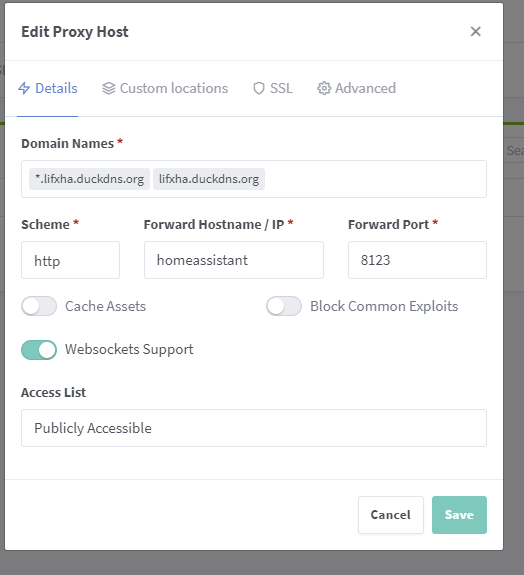
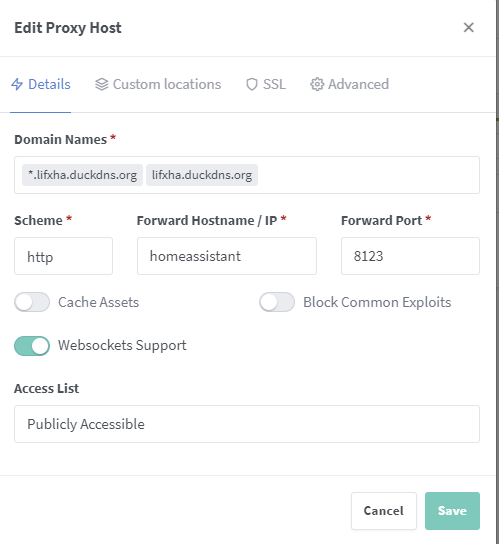
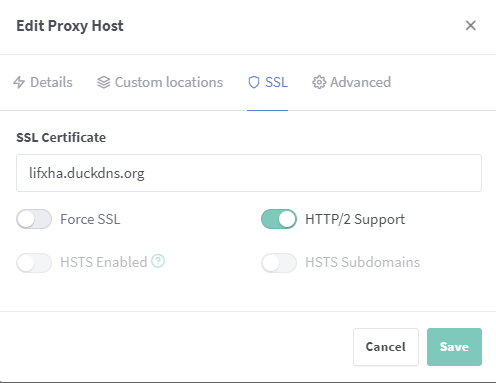


 empty bloom
ah, ok
humble mirage
(you just need it enabled though, not native IPv6 from your ISP)
empty bloom
just seems like more of a pain point when you're never going to go above 4.3 billion addresses on your internal network
humble mirage
Thankfully I've had full support for the last decade, and via a tunnel for the previous god knows how long
Well, it's also about what you can communicate with 😉
empty bloom
ah, apparently it does have different functionality
 eager trail
Depending on your ISP and your Router - may have to turn it on in multiple places. I have had it from my ISP a little over 5 years now. I use 'my own' modem, and it supports IPv6, and my router is pfSense - which also supports it (once enabled and setup properly) - all my devices in my home which are capable of grabbing an IPv6 address pull one from the DHCPv6 Service on pfSense. I am not using Matter yet - but found out the latest update to my Z-Wave Dongle adds support for it (and apparently Thread), I just no idea how to use or set it all up...yet.
hot eagle
humble mirage
The main point is that you put _everything_ on one flat network
Well I hoped I could do two directly connected "legs", one for the "legaciy" devices, one for the rest. no static routes etc just two directly reachable (on Layer2) networks. But if you say that it makes problems, oh well ...
hot eagle
empty bloom
why ipv6 on your internal network?
for learning and testing, mainly. For now I've got a IPv6 only WiFi, and it works well, but now I am getting more adventurous, wanting to migrate more complicated stuff (like HA and all the smart home devices) over.
hot eagle
is there a typo? that is a downgrade?
tender wren
 candid parcel
Was ?
candid parcel
Was ?
Keep it in English, please
candid parcel
sure
i dont wanna DOWNgrade, i wanna update
i heard of uninstall HACS
but it still not update
 vagrant sphinx
The update from 2024.1.6 to 2024.2.0 didn't work for me. Neither has 2024.2.1. @candid parcel . I've disabled almost all integrations... nothing seems to fix it.
candid parcel
aww
i thought about new install
and restore of backup
How do i see the logs of upgrading ?
vagrant sphinx
Should be in supervisor logs.
candid parcel
do i look from ui or cli ?
vagrant sphinx
Or from cli do core check, core logs, supervisor logs
 rose quest
After updating v2024.2.1 my hass has stopped rebooting constantly. Thanks
 old moat
hi all, i just added a smart light switch to my house....
i believe i wired everything properly, and I was able to connect the linked switch to my home assistnat... but even though home assistant is showing the switch as working... the lights are not turning on or off.
 static current
Hi. So I wanted to add two-factor authentication to my HA but I can't seem to find where to enable it.
static current
raven forge
<https://www.home-assistant.io/docs/authentication/multi-factor-auth/>
OK, thanks. So I do have it on my first profile I created for HA but that one could not login to Nabu Casa, as it was not a recognised account. Let me check if I can login to the new account on that page and enable it.
Oooh. I completely misread.. Found it, under my profile in HA local setup. Thanks!
One last question: am I reading it correctly that Nabu Casa does not have 2FA available?
grand pivot
static current
One last question: am I reading it correctly that Nabu Casa does not have 2FA av...
 proud stump
https://ghcr.io/v2/home-assistant/home-assistant/manifests/stable
should this be saying unauthorized
alternatively, do you get unauthorized for that? I could be IP banned
github docker registry is such a PITA
I remember messing with this before
proud stump
anyone who could help me get my Zooz Z-Wave Stick going on a fresh docker install?
 dense zenith
I just received my Intel NUC and would like to install HAOS for the very first time. I followed the X64 instructions and made a bootable USB drive with the image. I then booted to the USB drive. Step three says, go to the browser and go to home assistant.local which initially look like it was working fine. However, the HAOS is still residing on the USB drive and it has not been installed on the SSD drive. I don't know what to do differently. I started to set it up and realized that I hadn't rebooted and when I took the USB drive out, it didn't know what to do of course. Could somebody point me in the right direction?
crude inlet
@dense zenith That's not quite how you do it. The bootable drive should be Ubuntu. Then from within Ubuntu download the HAOS image and use the built in disks utility to write that image file to the internal drive of the NUC.
crude inlet
uhh...first time I've seen that method, but it looks to me to be one which assumes you want to boot from the usb device. If this is a usb flash drive you wouldn't want to do that. If it was a usb SSD or NVMe drive that would work out better.
A flash drive is going to be slow and likely get hot
crude inlet
The image is not an installer. So you're either writing it to the internal drive by booting into ubuntu, or you are using it as described in method 2.
dense zenith
does that wipe out Ubuntu after its done?
crude inlet
Or, you can take out the internal NUC drive, connect it to your pc with an adapter, write the image, put it back in the NUC.
Ubuntu would be running from the USB drive. You are using it as a tool to write the HAOS image to the internal drive
dense zenith
I guess I might as well start on step method 1 and see if that works better
crude inlet
What you do with the flash drive after that is up to you
It isn't used once you have written the image to the internal drive. You remove it and do what you like with it
dense zenith
does Ubuntu stay as the OS ? or does HAOS wipe it out
crude inlet
Ubuntu is on the flash drive. It is only used as a tool
crude inlet
If you try method 1 it will probably make more sense as you go along
dense zenith
so I basically need to have two USB drives set up. One with the image of HAOS and one with Ubuntu.
 next phoenix
Hi, after upgrading my install to Home Assistant OS 11.5 i have a breaking error which doesn't let me boot home assistant at all.
It is giving me the following error in supervisor logs: Error on call http://172.30.32.1:8123/api/core/state: [Errno 104] Connection reset by peer"
In the console it is also printing the following error:
Out of memory: Killed process 1791 (python3)
Tried to restore a backup (made with OS 11.5) on a fresh install still gives me the same error.
Do someone have any ideas? Thanks
proud stump
chugging my way through setup.. found a random guide that is showing me how to set up a Zooz Stick in ZWave JS. Does anyone know if I need to keep track of the S2 Authenticated Keys, etc, that I am generating from the ZWave UI?
There's a note in the Zooz Stick paperwork mentioning that it can only be factory reset by the Host Software. What I am wondering is if I can accidentally brick my device if I lose some config value for ZWave JS, or wipe my docker containers, etc
ok cool it works
 warm wyvern
Hi. I have HA running on a RPi but its a tad behind. Rather than update it I thought I would start from scratch on second RPi with all updated widgetry. I am running from Docker (preferred) and spent a few hours setting up, including HACS and thence onto the schedular and config editor. I had also installed the BOM weather component. So, I had to edit configuration.yml to get the config editor up. I opted to docker-compose down/up rather than resetting the server, and was surprised that my previous work had been wiped and was taken back to "Onboarding"? I am probably rusty on docker, jumping in an out only as needed. Should I have expected the setup to persist? I installed HACS using "docker exec -it homeassistant bash" and then "wget -O - https://get.hacs.xyz | bash -". I assume that only persists if container is running (not in image otherwise)? If so, is there permanent way of setting up HACS when using docker based HA please? Is there an example docker-compose.yaml that solves this please?
grand pivot
did you map a directory to /config as part of your docker-compose.yaml, as shown in te docs?
warm wyvern
Yep
warm wyvern
grand pivot
did you map a directory to `/config` as part of your `docker-compose.yaml`, as s...
Sorry yep. Just looking at that now. Config suspiciously empty.
warm wyvern
grand pivot
did you map a directory to `/config` as part of your `docker-compose.yaml`, as s...
Hang on! Hmm. May be a typo in that docker-compose.yaml.
warm wyvern
grand pivot
did you map a directory to `/config` as part of your `docker-compose.yaml`, as s...
Yep, I missed the volume "TARGET", ... DOH! Thanks for your prompt.
orchid urchin
does using "ghcr.io/home-assistant/home-assistant:stable" not let me update past 2023.1.7?
grand pivot
No, you will get 2024.2.1
candid parcel
does anyone know how to update to 2024.2.1 ?
the logs says only "crashed, rollback"
raven forge
You should share the full logs but here's the CLI way to update things: <#general-archived message>
 unborn wind
Hi everyone 👋 , I'm trying to set up mu HA yellow but after the installer finished installing Home Assistant Operating System, only the red LED is on like it should be. But once I remove the USB stick and then power it on again it just shows the red and green LED permanently on. I've already tried to flash my USB again but nothing changes. What am I doing wrong?
raven forge
The folks at #yellow-archived are probably more experienced with #yellow-archived specific things such as its leds, how to USB boot and so on.
 tardy stag
When I copy my HAO installation to a new HDD, can I retrigger the partition gegrow somehow?
candid parcel
raven forge
You should share the full logs but here's the CLI way to update things: <https:/...
how to get full logs ❤️ ?
error raised from ota webserver 404
raven forge
I'd try ha core logs and ha supervisor logs via SSH.
candid parcel
i use vm - how to get ssh? 😄
because its disabled atm ?
the ssh addon doesnt work atm too
ah, worked now xD
ha os update --version 2024.2.1 --log-level debug
DEBU[0000] Adding homedir to searchpath                  homedir=/root
INFO[0000] No configfile found
DEBU[0000] Debug flags                                   apiToken=123123123123 cfgFile= endpoint=supervisor logLevel=debug noProgress=false rawJSON=false
DEBU[0000] os update                                     args="[]"
DEBU[0000] [GenerateURI]                                 base=supervisor command=update section=os
DEBU[0000] [GenerateURI] Result                          uri="http://supervisor/os/update" url="http://supervisor/os/update" url(string)="http://supervisor/os/update"
⣾ Processing... DEBU[0000] Request body                                  body="map[version:2024.2.1]"
⣽ Processing... DEBU[0000] Response                                      body="{\"result\":\"error\",\"message\":\"Error raised from OTA Webserver: 404\"}" fields.time=214.011943ms headers="map[Content-Length:[67] Content-Type:[application/json; charset=utf-8] Date:[Sat, 10 Feb 2024 11:04:41 GMT] Server:[Python/3.12 aiohttp/3.9.3]]" received-at="2024-02-10 12:04:41.417944314 +0100 CET m=+0.218319992" request="&{POST http://supervisor/os/update HTTP/1.1 1 1 map[Accept:[application/json] Authorization:[Bearer 11233123] Content-Type:[application/json] User-Agent:[go-resty/2.9.1 (https://github.com/go-resty/resty)]] 0xc00016c150 0x6e9780 22 [] false supervisor map[] map[] <nil> map[]   <nil> <nil> <nil> 0xc0000d0040}" status="400 Bad Request" statuscode=400
Processing... Done.

Error: Error raised from OTA Webserver: 404
well, i should do that with "core" instead of os 😄
ha core update --version 2024.2.1 --log-level debug
DEBU[0000] Adding homedir to searchpath                  homedir=/root
INFO[0000] No configfile found
DEBU[0000] Debug flags                                   apiToken=1236512354234 cfgFile= endpoint=supervisor logLevel=debug noProgress=false rawJSON=false
DEBU[0000] core update                                   args="[]"
DEBU[0000] [GenerateURI]                                 base=supervisor command=update section=core
DEBU[0000] [GenerateURI] Result                          uri="http://supervisor/core/update" url="http://supervisor/core/update" url(string)="http://supervisor/core/update"
DEBU[0000] Request body                                  body="map[version:2024.2.1]"
⣻ Processing... DEBU[0136] Response                                      body="{\"result\":\"ok\",\"data\":{}}" fields.time=2m16.821426835s headers="map[Content-Length:[25] Content-Type:[application/json; charset=utf-8] Date:[Sat, 10 Feb 2024 11:10:32 GMT] Server:[Python/3.12 aiohttp/3.9.3]]" received-at="2024-02-10 12:10:32.379831302 +0100 CET m=+136.824445088" request="&{POST http://supervisor/core/update HTTP/1.1 1 1 map[Accept:[application/json] Authorization:[Bearer 234234234234234234] Content-Type:[application/json] User-Agent:[go-resty/2.9.1 (https://github.com/go-resty/resty)]] 0xc00016e150 0x6e9780 22 [] false supervisor map[] map[] <nil> map[]   <nil> <nil> <nil> 0xc0000d0040}" status="200 OK" statuscode=200
Processing... Done.

Command completed successfully.
but still on 2024.1.6
tardy stag
@candid parcel How much free space do you have? x86_64 image?
candid parcel
umm, good question
candid parcel
sure
i do have 12gb add
rebooting
how do i check free space @tardy stag
oh, have 35 gb free space
tardy stag
candid parcel
how do i check free space <@542034024949088276>
Settings / Systems / Storage
candid parcel
candid parcel
oh, have 35 gb free space
.
tardy stag
candid parcel
but didnt update
Maybe there's something useful. My problem not enough free space.
candid parcel
nope all uninstalled still no update 😄
next phoenix
next phoenix
Hi, after upgrading my install to Home Assistant OS 11.5 i have a breaking error...
Hi! I still have no clue on how to fix this problem. I've digged a bit and this is what i've found:
- I'm still able to use the HA cli (already checked supervisor logs, nothing helpful there)
- Addons still work, it seems just a Core issue. It stays on for like 30 seconds and then crashes giving the
Out of memory: Killed process 1791 (python3)error - It seems to be a memory leak on Core, stopped pretty much all addons, removed automations with repeats that could be the cause, nothing helped
next phoenix
Update: i've managed to top the host machine. The process that makes the RAM skyrocket is inside python3 -m homeassistant --config /config
There was a child process of this that said like setuptools that rapidly made the RAM go high, so i think it is an install of something. Unfortunately i have no idea on how to debug this
raven forge
Follow this and show what it says: <#general-archived message>
To debug you need this: https://www.home-assistant.io/integrations/profiler/
next phoenix
Follow this and show what it says: <
 midnight nacelle
I'm a really new user in Home Assitant and i'm just forget my username. Serching for help in thw web i've found that the only way is to reinstall HA again. It's that true?, in that case, is it possible to get some information inorde to restore or restart the aplication?, thank you
raven forge
 languid fog
RPI4 model B then?
I understand where you're coming from; judging by the pi3
but is the pi4 an equally bad choise?
raven forge
I'm just not a fan of pis and most SBCs: #installation-archived message
 brittle sail
languid fog
but is the pi4 an equally bad choise?
brittle sail
languid fog
but is the pi4 an equally bad choise?
by the time you buy a pi, psu, microSD (endurance ideally), ssd, usb to sata adapter, case/case+fan you end up spending more money than just buying a decent mini pc
basically the only reason to buy a pi for this purpose is because you dont know any better
languid fog
I actually bought it all already.. and can't return it
brittle sail
sad
languid fog
I mean
brittle star
I'm running on a pi4 and it works perfectly fine
languid fog
if an USFF or Mini PC is still the better way to go, I'll use the Pi4 for something else
so that's totally fine
but I just want to understand whether it's truly shit/not futureproof
the pi4
brittle sail
it depends on use case
raven forge
If you already have a pi 4 I would use it.
languid fog
sounds good..
I'm also thinking to get the Home Assistant Green + Odroid n2+ package
the odroid seems to be better than the rpi4
 dusty heath
Hello, i've installed 2 weeks ago on a VM Home Assistant and runned it without trouble. But now i wanna make it run on a rapsberry pi 3 B and i have this error at the first boot :
Can't install ghcr.io/home-assistant/aarch64-hassio-supervisor:2024.01.1: 404 Client Error for http+docker://localhost/v1.43/images/ghcr.io/home-assistant/aarch64-hassio-supervisor:2024.01.1/json: Not Found ("No such image: ghcr.io/home-assistant/aarch64-hassio-supervisor:2024.01.1")
Which totally stop the first boot...
Any idea why this doesn't work ?
fallen lichen
How's your disk usage
dusty heath
Well it's a 32GB Sd card fresh install
languid fog
languid fog
I'm also thinking to get the Home Assistant Green + Odroid n2+ package
what do you think? @raven forge
raven forge
All I'm comfortable to truly recommend buying are (U)SFF/tower or Mini PCs. Just my opinion.
Many people are happy with the green and it's good for Nabu Casa I just don't like these kind of devices. Better ask someone who actually uses them.
languid fog
Could you please recommend a specific product for me?
languid fog
raven forge
All I'm comfortable to truly recommend buying are (U)SFF/tower or Mini PCs. Just...
In this case, would I need an USFF/mini PC + I need to buy Yellow?
Realistically, what else would I need to buy, aside of USFF or a mini pc
brittle sail
languid fog
Realistically, what else would I need to buy, aside of USFF or a mini pc
a mini pc is a USFF they are both the same thing
raven forge
@languid fog No as this depends on a lot of things. I made some rough suggestions here: <#general-archived message>
No, a yellow is none of these things. Well you might be able to describe it as a Mini PC but hmm.
Nothing. Maybe a zigbee stick if you want to use that.
brittle sail
there's a guy who posted some stats on his n100 mini pc in #cameras-archived a while back. (super low power and cpu usage with like 10 cameras and frigate running)
languid fog
brittle sail
a mini pc is a USFF they are both the same thing
gotcha, will I be able to do more (add use cases) to my minipc, if I fully set it up with HA etc?
brittle sail
in that case you'd install proxmox https://www.derekseaman.com/2023/10/home-assistant-proxmox-ve-8-0-quick-start-guide-2.html following a guide like this
languid fog
What if I'd want a ipad sized screen in my living rome, connected to HA
brittle sail
the only thing the yellow has that this doesnt is a built in zigbee coordinator but the yellow uses an efr32 based coordinator that i dont personally use or suggest so no loss there
brittle sail
languid fog
What if I'd want a ipad sized screen in my living rome, connected to HA
then you'd buy a fire tablet or android tablet and run fully kiosk on it
you're worrying about weird stuff lol
languid fog
I'm just wondering whether it'd be possible
brittle sail
i mean the tablet has no correlation to mini pc or yellow or w/e
languid fog
Use a android tablet for HA and still have other use cases/stuff for the Mini PC
languid fog
brittle sail
i mean the tablet has no correlation to mini pc or yellow or w/e
Gotcha
Haha
brittle sail
mini pc or yellow or w/e sits in a closet or something centrally located in your house
tablets would just be controlled over wifi
languid fog
Gotcha, perfectly clear now!
brittle sail
https://www.youtube.com/watch?v=kKYe3UZjqGw decent older tutorial
languid fog
Want to understand why a mini pc/usff would be better than rpi4/odroid n2+
brittle sail
https://www.home-assistant.io/integrations/fully_kiosk/ integration you'd use with home assistant
languid fog
Only point to understand before I make a final decision
brittle sail
because they are more powerful and are around the same price as worse options like SBCs
languid fog
Gotcha
raven forge
And you can more things on it. Not everything supports ARM.
dusty heath
dusty heath
Hello, i've installed 2 weeks ago on a VM Home Assistant and runned it without t...
well i don't know what happened, but i've left it run for an hour and now i can start the configuration
Weird
 warped epoch
I have set up Home Assistant on a PC at home using Hyper-V, which is always running. I've configured port forwarding on both the firewall and my Fritzbox. Unfortunately, it hasn't worked yet. I can access Home Assistant on the PC where it's installed, but it doesn't work on my phone or tablet. The server cannot be found. In my Fritzbox settings, I noticed that I have a DynDNS. I'm not familiar with this stuff; do I need to set up port forwarding or something similar there as well?
 deep cedar
Hello, I guess stupid question, but does the supervised version overwrite CasaOS or will it be its own port?
foggy brook
I just migrated my home assistant to a new VM, which was working fine locally. I had the ports forwarded for Duck DNS remote access. However, when I went to the external URL, it wasn't working. Then I went to the hardware section enabled external access, and entered the domain; now I can't access it from the the local IP or the domain name.
correction, I can access it locally again now
still no luck with the domain
 novel galleon
Getting started with HA this weekend. I have a Pi 4 4GB that I can put it on, but I'm wondering how that will limit my HA install. What will I be unable to do on the Pi4 vs something like a HP Elitedesk SFFPC that has more processing power and 16GB of RAM? All of my searches just yield results saying the Pi 4 will work, but nothing about what the Pi 4 can't do vs a stronger machine
Also new to the server. sorry if this is being asked in the wrong channel.
novel galleon
Is it relatively painless to take a snapshot on the Pi4 installation and restore it to a stronger machine when I reach that point?
brittle sail
Pretty much yea
brittle sail
You backup, you restore, you’re done
brittle sail
novel galleon
give it the same static IP, machine name, etc?
That too
novel galleon
Right on. The Pi will only be running HA. I already have a standalone MQTT Pi 3 that handles my existing home auto setup
Trying to keep the system as modular as possible, while also finally using all these old Pis I have collecting dust on a shelf
brittle sail
I prefer to keep all my smart home stuff on the same box
Hass separate from network separate from cams separate from hvac
novel galleon
Separate hardware for each network, or are you using VLANs on one router to keep them separated?
brittle sail
I mean if I lose my server I don’t lose my smart home
If I lose my smart home I don’t lose my cameras, etc
I have some stuff segmented but not all
novel galleon
right on. that's smart. I've been needing to revamp my homelab setup. This is as good a reason as any to go over the whole thing and make it more robust and remove single points of failure
brittle sail
I basically have a trusted ssid and lan subnet / vlan and an untrusted IoT one
I was gonna overcomplicate it a while back and decided life’s too short
novel galleon
Sweet. Well, time to get started. After coffee. Lots of coffee. Thanks for the help!
 sly root
new install: HAOS error installing Home Assistant. check the logs, its an error 500 for the docker local host (client timeout exceeded while awaiting headers). swapped bare metal machines, same error. tried it in QMEU, same error. tried swapping DNS on the router, same error. tried a different router, same error. tried changing DNS in CLI, same error, left it running for 2 days, no change. uninstalled and reinstalled at least a dozen times, no change. i can access github repositories from every other machine on the network in any of the above configurations. any idea what i could possibly be doing wrong that has gotten me locked in purgatory?
login
deep cedar
Just wanted to double verify, HOAS Supervisor runs alongside any OS correct? It does not override it? I am using ubuntu + casaos rn
raven forge
Supervised only supports debian bookworm at the moment. Did you not read my links? <#general-archived message>
deep cedar
Did not see that. My bad.
placid sage
Hi I am reinstalling my Nabu Casa green because for some reason the Zwave add-on did not install properly and I could not see the data when attempting to make a dashboard. Is there a given sequence of installation ?
 gray bobcat
HI all updated to 2024.2-1 and nur my device in in an endless initializing cant connect someone knows how to fix it
gray bobcat
Fixed it my self
shy epoch
gray bobcat
Fixed it my self
how you fixed
raven forge
It's so sad this has to be asked. Don't be the "NVM fixed it" guy.
gloomy reef
Just moved my HAOS to Proxmox. Did a backlup on the old system, installed proxmox and went throught he tutorials to install HAOS and then restored from the backup.
Everything seems ok but I cannot get USB Passthrough to work. I looked at the console and passthrough the 2 USB devices to the VM however it keeps on disconnecting. I need Coral TPU and Conbee 2 to be passed through. Any suggestion?
raven forge
Check dmesg -T in the VM (enter login first). Maybe it says why it disconnects. What hardware is this running on?
gloomy reef
i5-9500
gloomy reef
raven forge
Check `dmesg -T` in the VM (enter `login` first). Maybe it says why it disconnec...
It's actually disconnecting on the node. I dont think it is a VM issue
raven forge
Ah, then run it on the node.
gloomy reef
[Sun Feb 11 21:48:51 2024] cdc_acm 1-5:1.0: ttyACM0: USB ACM device
[Sun Feb 11 22:07:59 2024] usb 2-1: USB disconnect, device number 3
[Sun Feb 11 22:08:05 2024] usb 2-2: new SuperSpeed USB device number 4 using xhci_hcd
[Sun Feb 11 22:08:05 2024] usb 2-2: New USB device found, idVendor=1a6e, idProduct=089a, bcdDevice= 1.00
[Sun Feb 11 22:08:05 2024] usb 2-2: New USB device strings: Mfr=0, Product=0, SerialNumber=0
[Sun Feb 11 22:10:00 2024] usb 1-5: USB disconnect, device number 15
[Sun Feb 11 22:10:02 2024] usb 2-2: reset SuperSpeed USB device number 4 using xhci_hcd
[Sun Feb 11 22:10:04 2024] usb 1-5: new full-speed USB device number 17 using xhci_hcd
[Sun Feb 11 22:10:04 2024] usb 1-5: New USB device found, idVendor=1cf1, idProduct=0030, bcdDevice= 1.00
[Sun Feb 11 22:10:04 2024] usb 1-5: New USB device strings: Mfr=1, Product=2, SerialNumber=3
[Sun Feb 11 22:10:04 2024] usb 1-5: Product: ConBee II
[Sun Feb 11 22:10:04 2024] usb 1-5: Manufacturer: dresden elektronik ingenieurtechnik GmbH
usb 2-1 is the Coral. usb 1-5 is the conbee 2
sorry thats a bad example as I manually disconnect that coral and change the port 🙂
[Sun Feb 11 22:10:13 2024] usb 2-2: reset SuperSpeed USB device number 4 using xhci_hcd
[Sun Feb 11 22:10:47 2024] usb 2-2: reset SuperSpeed USB device number 4 using xhci_hcd
[Sun Feb 11 22:10:49 2024] usb 2-2: reset SuperSpeed USB device number 4 using xhci_hcd
[Sun Feb 11 22:10:49 2024] usb 2-2: LPM exit latency is zeroed, disabling LPM.
[Sun Feb 11 22:10:49 2024] usb 2-2: device firmware changed
[Sun Feb 11 22:10:49 2024] usb 2-2: USB disconnect, device number 4
[Sun Feb 11 22:10:49 2024] usb 2-2: new SuperSpeed USB device number 5 using xhci_hcd
[Sun Feb 11 22:10:49 2024] usb 2-2: LPM exit latency is zeroed, disabling LPM.
[Sun Feb 11 22:10:49 2024] usb 2-2: New USB device found, idVendor=18d1, idProduct=9302, bcdDevice= 1.00
[Sun Feb 11 22:10:49 2024] usb 2-2: New USB device strings: Mfr=0, Product=0, SerialNumber=0
 digital dove
hey I get the following error when running HA on a docker container in true nas "The following integrations and platforms could not be set up: zeroconf, default_config" Anyone know what's wrong?
 distant jewel
Hi All
Very new to discord. My house was broken into and device stolen.
Trying to desperately install a fresh copy of HA on my older Pi3B and getting an error on start up
[supervisor.core] Update '2024.01.1' of Supervisor '2023.12.1' failed!
s6-supervise watchdog: warning: finish script lifetime reached maximum value - sending it a SIGKILL
[supervisor.host.sound] Can't reload PulseAudio modules: Failed to load module: b'module-udev-detect' b''
[supervisor.host.sound] Can't update PulseAudio data: Failed to connect to pulseaudio server
[supervisor.homeassistant.core] Watchdog found Home Assistant failed, restarting...
[supervisor.supervisor] Can't fetch AppArmor profile https://version.home-assistant.io/apparmor_stable.txt: Timeout
[supervisor.docker.interface] Can't install ghcr.io/home-assistant/raspberrypi3-64-homeassistant:2024.2.1: 500 Server Error for http+docker://localhost/v1.43/images/create?tag=2024.2.1&fromImage=ghcr.io%2Fhome-assistant%2Fraspberrypi3-64-homeassistant&platform=linux%2Farm64: Internal Server Error ("Get "https://ghcr.io/v2/": net/http: TLS handshake timeout")
[supervisor.homeassistant.core] Error on Home Assistant installation. Retrying in 30sec
 umbral swallow
Hello Everyone. I want to install HomeAssistant on Proxmox preferably as a HAOS istallation. Could somebody point me to a tutorial?
grand pivot
The installation page goes through it
umbral swallow
Is there a dedicated proxmox tutorial?
umbral swallow
thx
 random river
hey guys an idead why i cant connect to the home assitant website? home assistant itself wokrs does its auotmatios still but cant acces the website
raven forge
Check the core logs (ha core logs) via SSH or keyboard and monitor.
random river
unfortuilty dont have a keyboard and monitor to plug in my pi
raven forge
Then use SSH. I don't have a better idea right now.
random river
what if i reinstall HA? but then all my configs etc are gone right?
raven forge
Depends on the installation method but I'd say yes. You can restore one of your backups though.
raven forge
Kind of.
random river
because i dont think i have a backup of HA
😅 ikd that i can do that xD
thought its like snyced or so
humble mirage
Don't know what made you think that
random river
ikd anyway so there is now way i can make a backup right? and not any other ideas why i cant connect to the website but automations still work?
random river
used this http://homeassistant.local:8123/lovelace/0 works like for since i have it now xD chnaged nothing onyl thing is made a regular update
humble mirage
Try the IP instead
humble mirage
Yes, that
humble mirage
http://ipaddress:8123/ ain't gonna work 😄
random river
just tryd it xD
tried
i see HA in my router and can also ping it
dont know if i wan to post that ip idk
humble mirage
LAN addresses aren't secrets
random river
in my router its says
192.168.178.52 and for home assitant but that dont works
so can i do a backup somehow?
so oly way is getting a monitor and a keyboard? and then? what do i have to do then?
doesnt HA makes a backup when it updates? cant i somehow use that?
when i plug the sd cad in my computer all files a relativly new from 8.2.24
humble mirage
random river
doesnt HA makes a backup when it updates? cant i somehow use that?
Only if you can get the backup off the SD card - until then you don't really have a backup
random river
is there a way i can plug the sd card in my computer but idk wich file might be the backup
humble mirage
You'll need to install ext2 drivers
random river
on my pc or on the pi?
humble mirage
On the PC, to read the SD card
humble mirage
Now plug the SD card in to the PC
random river
yeah i did
humble mirage
Then... somebody who knows the layout for HAOS will need to help you
random river
ah ok but nothing changed see the same files like befor
can i somehow run it or so?
https://www.heise.de/download/product/ext2fsd-57713 installed this
humble mirage
You should have more partitions now
random river
dont see any extra ones under my pc
only when i open ext2 volume manager
ok see it now but cant open it because its RAW and not FAT
 zinc barn
Can I easily go back from version 2024.2.1 to 2024.1.6, since I have figured out a bug with displaying icons in mushroom-entity-cards.
random river
idk i dont see a partition with HA on it or so
i can only see a partition with only 32mb wich i could also see befor the programm and the other like 29gb is not used acordingly to windows partition manger
humble mirage
Then you don't have ext2 drivers working yet - there should be multiple partitions showing
random river
random river
https://www.heise.de/download/product/ext2fsd-57713 installed this
maby that is the wrong progamm idk
the onylo thing that appears is hassos boot where are files in with like 32mb and with windows show under partitions that 29gb are not "used" with the programm i linked i can see some extra partitions but there is only one withe like 1000kb
i dont want to reinstall HA xD why does this f... website dont work i changed nothing
humble mirage
Well, your other option is a keyboard and monitor
random river
and then i can surly acces something? do i need a password or something then?
i ordered an hdmi to hdmi mini adapter so gona try that in lik 2 days when it arrives
humble mirage
No, no password required
random river
i hope that works xD if it does i idk have to find a way to make automatic backups and safe them on ym pc or somewhere xD
random river
nice also when i have the backup could i reinstall HA to change the ssh name etc?
and then use the backup to get back my automatiuons etc?
humble mirage
Well... step #1 is getting access
random river
yeah yeah i know xD i am a optimist xD
hope thats gona work
when i have the monitor adapter what do i have to do then do i just can open the folder or do i have to type something in or so?
humble mirage
Well, then you'll have a console where you can type commands
humble mirage
https://www.home-assistant.io/common-tasks/os/ has a lot of stuff that's relevant and useful
random river
ok thx
gona come back when i set up everything have a nice evening or morning or day idk wich time is for u xD
shy epoch
Hello @all it seems the HA Servers are overloaded, and the connections never work nicer.
Thins 2 day i cannot update core to 2024.2.1
 desert mauve
Hi everyone, I installed HA on a generic x86-64 system but not able to connect it. I tried to acces HA using http://homeassistant:8123/ homeassistant.local:8123 and with IP address but the browser says "homeassistant refused to connect". However http://homeassistant:4357/ works. I also ping the IP and ping goes. The system on which HA is install is connected to router using lan cable. please help.
shy epoch
desert mauve
Hi everyone, I installed HA on a generic x86-64 system but not able to connect i...
do you have acces with a screen on HA CLI?
desert mauve
yes I can add monitor.
desert mauve
ok. I am connecting a monitor.
shy epoch
to me it's same i never can cross complete the core installation. thins 2 days now all for nothing
[supervisor.docker.interface] Can't install ghcr.io/home-assistant/raspberrypi4-64-homeassistant:2024.2.1: 404 Client Error for http+docker://localhost/v1.43/images/ghcr.io/home-assistant/raspberrypi4-64-homeassistant:2024.2.1/json: Not Found ("No such image: ghcr.io/home-assistant/raspberrypi4-64-homeassistant:2024.2.1")
[supervisor.homeassistant.core] Error on Home Assistant installation. Retrying in 30sec
[supervisor.docker.interface] Updating image ghcr.io/home-assistant/raspberrypi4-64-homeassistant:landingpage to ghcr.io/home-assistant/raspberrypi4-64-homeassistant:2024.2.1
[supervisor.docker.interface] Downloading docker image ghcr.io/home-assistant/raspberrypi4-64-homeassistant with tag 2024.2.1.
[supervisor.docker.interface] Can't install ghcr.io/home-assistant/raspberrypi4-64-homeassistant:2024.2.1: 404 Client Error for http+docker://localhost/v1.43/images/ghcr.io/home-assistant/raspberrypi4-64-homeassistant:2024.2.1/json: Not Found ("No such image: ghcr.io/home-assistant/raspberrypi4-64-homeassistant:2024.2.1")
[supervisor.homeassistant.core] Error on Home Assistant installation. Retrying in 30sec
[supervisor.docker.interface] Updating image ghcr.io/home-assistant/raspberrypi4-64-homeassistant:landingpage to ghcr.io/home-assistant/raspberrypi4-64-homeassistant:2024.2.1
[supervisor.docker.interface] Downloading docker image ghcr.io/home-assistant/raspberrypi4-64-homeassistant with tag 2024.2.1.
my origin HA not works, and i did on other RPI4 2GBRAM with 250GB usb SSD a new RPI image and never finish
desert mauve
Hi Gandalph365, I did run su info and su log. What do you want me to check? Sorry I am new in HA.
raven forge
Also try ha host logs and use code blocks
humble scaffoldBOT
To format your text as code, enter three backticks on the first line, press Enter for a new line, paste your code, press Enter again for another new line, and lastly three more backticks.
```yaml
example: here
```
Don't forget you can edit your post rather than repeatedly posting the same thing.
Please use a code share site to share code or logs, for example:
- https://dpaste.org/ (select YAML for the language, and consider picking a longer expiry)
- http://pastie.org/ (select YAML for the language)
- https://paste.debian.net/ (you guessed it, select YAML as the language)
Please don't use Pastebin, since it can randomly add spaces to the main view. Please also don't share text as images since it makes it harder for people to help you. Remember that others may have colour blindness, impaired vision, etc.
 drifting ocean
Heya, I'm planning to move my HA database to the NAS, where all my other databases reside anyways (a QNAP with OS-built-in MariaDB on a performant SSD-Raid, scheduled backups etc). HA runs as a VM on the same NAS.
Q: Is it still required to switch MariaDB from myISAM to InnoDB, or has this been fixed in the mean time? Found contradictory statements on this on the net.
raven forge
The database engine must be InnoDB as MyIASM is not supported.
https://www.home-assistant.io/integrations/recorder/#mariadb-and-mysql
Why not use SQLite?
drifting ocean
Thanks! 🙂 I read that doc before, but wasn't sure if it is up-to-date, as there was a PR merged more than 1.5 years ago that should have solved the dbISAM issues. Other users were also reporting they were running HA with non-ISAM MySQL / MariaDB.
Why not use SQLite?
As mentioned before, amongst other reasons I want to have all my databases at the same place and manage them within ONE tool (phpMyAdmin - there is much more in my network than just HA).
Enabling InnoDB on a QNAP NAS is a bit of a struggle, but doable. Just not sure if the changes will survive OS/App updates, so maybe I have to repeat them from time to time.
 dire hornet
How can I get the supervisor up and running from the emergency console? Only the observer is running after I had some weird behaviour with lights turning on/off randomly. I took the HA off the internet as I was suspecting some hack (as I got some failed login attempts over the last month and some banned ips)
 dark silo
hey quick question. I had my reverse proxy working it works for other webapps i run such as jellyfin, polaris, nextcloud, ect. But for some odd reason ha is giving me 400 erros when trying to load. i will past my yamal. im using caddy, a vps for my static ip, and a hyper-v vm with a static ip dedicated to the vm, and tailscale to the vps for my static ip. basically i have this setup because i cant port forward on my isp so i use a vps as that static ip instead.
grand pivot
are you using a URL of the form ha.xxx.xx or xxx.xx/ha?
grand pivot
and did you review the HA logs?
dark silo
grand pivot
and did you review the HA logs?
how can i view the logs?
grand pivot
base_url is deprecated
dire hornet
dire hornet
How can I get the supervisor up and running from the emergency console? Only the...
Got the core up and running with docker start <container-id> but the supervisor exits immediately with log: exec \init: input/output error - what am I doing wrong/is wrong with the supervisor? is this a i/o problem?
grand pivot
home-assistant.log in your config directory
dark silo
i i may see a familiar error