#hardware-archived
1 messages · Page 125 of 1
 undone haven
 drifting grove
Well, when I searched, this was the only place heim vision was spoke about.
Then I saw #cameras-archived
undone haven
Camera is prob better, yes
drifting grove
Care to continue there??
 hasty yacht
so after my Home Assistant VM bit it, my wife got me an Odroid N2+ with HA pre-installed. Arrived today, I got some work ahead of me to rebuild everything from scratch!
hasty yacht
Ameridroid
https://ameridroid.com/products/odroid-n2-home-assistant-blue-bundle-limited-edition?variant=33022365630498 top right choose the 'Standard' variant
 hot sun
Oh Ameridroid OK. The way you said it it seemed like it was some random person off Facebook marketplace or sth 😆
hasty yacht
psst. you want blue? amber? opens coat or just vanilla?
now i just have to remember everything i ever did and try and replicate it - or it's a good opportunity to set it up properly this time
hot sun
no back up of your files?
hasty yacht
yeah pretty stupid error, I did regular backups, thought I was backing them up to the NAS but they were only on the VM volume, and then that crashed....
 frigid dove
Hi, I'm considering buying a Mini PC, should I run Home Assistant inside a VM, or use the operating system?
frigid dove
hasty yacht
yeah pretty stupid error, I did regular backups, thought I was backing them up t...
Similar problem here, my server PC died, I tried to move the VM to a new PC, won't work, so I have no way of retrieving my backups
I've been looking for a solution, but seems like if you can't use your VM, you can't access your backups
So I've just given up at the point, I'll just have to start fresh again
I wish HA had an option to save backups onto either a local server or the cloud
drifting grove
Hi everyone, is there any “small” outlet for outdoor use (WiFi or zigbee) that works with home assistant without hardware modification
European connection I forgot to write
 shell hatch
frigid dove
I wish HA had an option to save backups onto either a local server or the cloud
frigid dove
shell hatch
https://github.com/sabeechen/hassio-google-drive-backup
shell hatch
frigid dove
I wish HA had an option to save backups onto either a local server or the cloud
frigid dove
shell hatch
https://github.com/sabeechen/hassio-google-drive-backup
Thanks
shell hatch
frigid dove
Thanks
welcome.. works like a charm auto backs on a sched off site and you its free if you only need a few gigs.
shell hatch
frigid dove
Thanks
also if you're using a vm you should, personal opinion, set up a backup schedule for the vm as well to gDrive
frigid dove
shell hatch
also if you're using a vm you should, personal opinion, set up a backup schedule...
Okay
 noble drift
Wireless/Remote Zigbee / Zwave radio. Help. Hey all I want to add Zigbee Zwave to my home assistant but my HA runs a Virtual Machine and does not have a accessible USB. Is there a way to add a Nortek Zwave hooked to a raspberry pi that is connect to the same network via WiFi. It does not have to be a raspberry pi but I already have a few spares. I also do not wish to move my HA to a pi either. Thanks
 peak talon
You can run a Z2M is a docker container in RPI and connect the USB based zigbee co-ordinator. In the Z2M config just provide the MQ broker which is HA is using
 split frigate
I am switching over to HA after my Smartthings Hub v2 died. I am finding that the Nortek Zwave/zigbee USB works, but not with the range my Smartthings Hub had. I never had Zwave connection issues before and now I have nodes that drop and others that seem too far out of range to connect. Any suggestions?
 winged knoll
#zwave-archived can help there I'm sure
hasty yacht
frigid dove
I wish HA had an option to save backups onto either a local server or the cloud
yeah it sucks big time. I'm looking into an SMB backup option where the backup folder on the machine/VM gets backed up to another machine
drifting grove
I am using Proxmox on Intel Nuc with a HomeAssistant VM. This is working fine. You can take a backup of the VM with Proxmox. This backup is stored in Proxmox. Anyone has an approach to save/download the backup file to a Windows machine?
 elder oracle
I need something battery powered switch for my air-conditioning and it would just be used to send signal from open to close. So it would be only for connecting NO to NC. I'm looking something that uses zigbee. Does anyone know if there's something what I'm looking for
It's switch for my fireplace that the air-conditioning makes home over pressured
winged knoll
There's known working hardware lists pinned in the #zigbee-archived channel
elder oracle
I only was thinking is there like battery powered zigbee relay ? Does things like that even exist
elder oracle
That's odd. Anything else that would work for my purpose ?
 zealous dune
why is it odd? a wired relay would work fine
elder oracle
Just was wondering that it would be simple little thing and very common type of relay in home automation
zealous dune
battery powered is a constraint for the type of hardware you can design
elder oracle
Okey, thanks anyway !
elder oracle
Tuya Zigbee Jog Inching Switch Module ,USB 5V 7-32V DIY Smart Switch. How about this ? It looks like just what I need
zealous dune
its DC powered so i guess
shell hatch
hasty yacht
yeah it sucks big time. I'm looking into an SMB backup option where the backup f...
https://github.com/sabeechen/hassio-google-drive-backup for gDrvie backup. If you're using unraid you can use a user script to back the VM up to an unassigned drive or if using some other nas there are scripts out that will you an schedule a shut down of the vm/backup/reboot to a external drive.
shell hatch
drifting grove
I am using Proxmox on Intel Nuc with a HomeAssistant VM. This is working fine. Y...
if you can access the proxmox share via SMB you could schedule a robocopy processin sched tasks in Windows?
hasty yacht
shell hatch
https://github.com/sabeechen/hassio-google-drive-backup for gDrvie backup. If yo...
nice one thank you! I've now got the odroid so not hosting it on a VM anymore, but this will be super helpful
shell hatch
hasty yacht
nice one thank you! I've now got the odroid so not hosting it on a VM anymore, b...
noble drift
peak talon
You can run a Z2M is a docker container in RPI and connect the USB based zigbee ...
Thanks I will give Z2M a look
@peak talon Does that Z2M only do zigbee or does it also do Zwave?
winged knoll
Zigbee2MQTT is only Zigbee
There's ZWaveJS for Z-Wave
See #zigbee-archived and #zwave-archived
noble drift
winged knoll
Zigbee2MQTT is only Zigbee
Thanks. I think I will try and get that setup
 dark berry
so i'm trying to find a switch.......
my ceiling fan has only one switch, from the breaker hot runs direct to the switch, neutral runs direct to the fan, there are only two wires and a ground behind the switch.
i want a single gang switch using either zigbee or zwave and a fan control module similar to the innovelli red fan and light switch (except they seem to be impossible to get).
i've found a handful of fan control modules that would work fine, and zigbee bulbs are a thing so that's easy.
the problem is the switch. i really like the look of the lutron caseta switches, but they need all three wires behind the switch and they seem to want to control the load directly, also i'm not too keen on having to buy a separate hub. in my head, the switch and lights/fan module could be wired in series to complete the circuit (should only be a few amps load), and the switch only needs to send signals to my hub to control the lights and fan.
 lament tide
hi all !
i've a question, i use a rapsberry pi3 to automate my camping car/mobil home and i also use a google home. Everything works fine but when both are working, the power consumption is too high and take a lot of power from the 92 Ah battery 😦 . For you, what is the device with the least energy consumption to replace the pi3. I tried a xiaomi gateway v3 but he can't work without internet. I have a xiaomi hub (not the aqara) but i have to put it on 12v to see if it works without internet too keep automation always up ...
winged knoll
For Home Assistant, you're not really going to get lower power and functional
You could try a Pi2, but it'll be slow
Probably you'll save 0.1A or so
lament tide
i tried also openwrt on my router with domoticz but my router dont have any zigbee or bluetooth protocol
winged knoll
Bigger battery
winged knoll
https://www.pidramble.com/wiki/benchmarks/power-consumption should give you some guide, but your WiFi is likely a good part of your power draw
There are forums that specialise in automotive PC installs, likely you'll have more luck there optimising your entire system
lament tide
yes, great, i didn't think that it exist !
i'll have a look to see how they handle the problem of autonomy and without internet automation on the road or in the hood
Thank you
 ivory lily
Does anyone know if a Hikvision DS-HD1 wifi doorbell will work with HA?
peak talon
lament tide
i've a question, i use a rapsberry pi3 to automate my camping car/mobil home and...
I run rpi4 8gb and it's power is about 7W. so it'll be about 34 Ah for full day. Not sure how much does GH take, but if you are using GH for mostly basic commands - try Rhasspy, you just need a USB mic and a speaker directly connected to rpi. The above I stated includes the USB mic - ps eye
Rpi is cable connected to router
peak talon
ivory lily
Does anyone know if a Hikvision DS-HD1 wifi doorbell will work with HA?
In my opinion all the door bell are way overpriced. If you can do some DIY, all you need is a good but cheap webcam like Tapo c100 and a esp with a nice looking button. You can put the contraption in nice 3d print. On the receiving side you can have any kind of media player / speaker connected to HA to play any sound. Might not look as nice as your WiFi, but will function much better
shell hatch
peak talon
In my opinion all the door bell are way overpriced. If you can do some DIY, all...
im waiting maybe in vain for a local storage doorbell camera that will work with homekit
that i can also integrate in HA.
peak talon
shell hatch
im waiting maybe in vain for a local storage doorbell camera that will work with...
Ypu don't need to work with homekit, you just need to work with HA
winged knoll
ivory lily
Does anyone know if a Hikvision DS-HD1 wifi doorbell will work with HA?
#cameras-archived is the better channel, but it has an RTSP feed so the camera will work - the audio won't though
 little flare
Hello everybody !
Is anybody using thermostats from Tellur ?
 jovial dirge
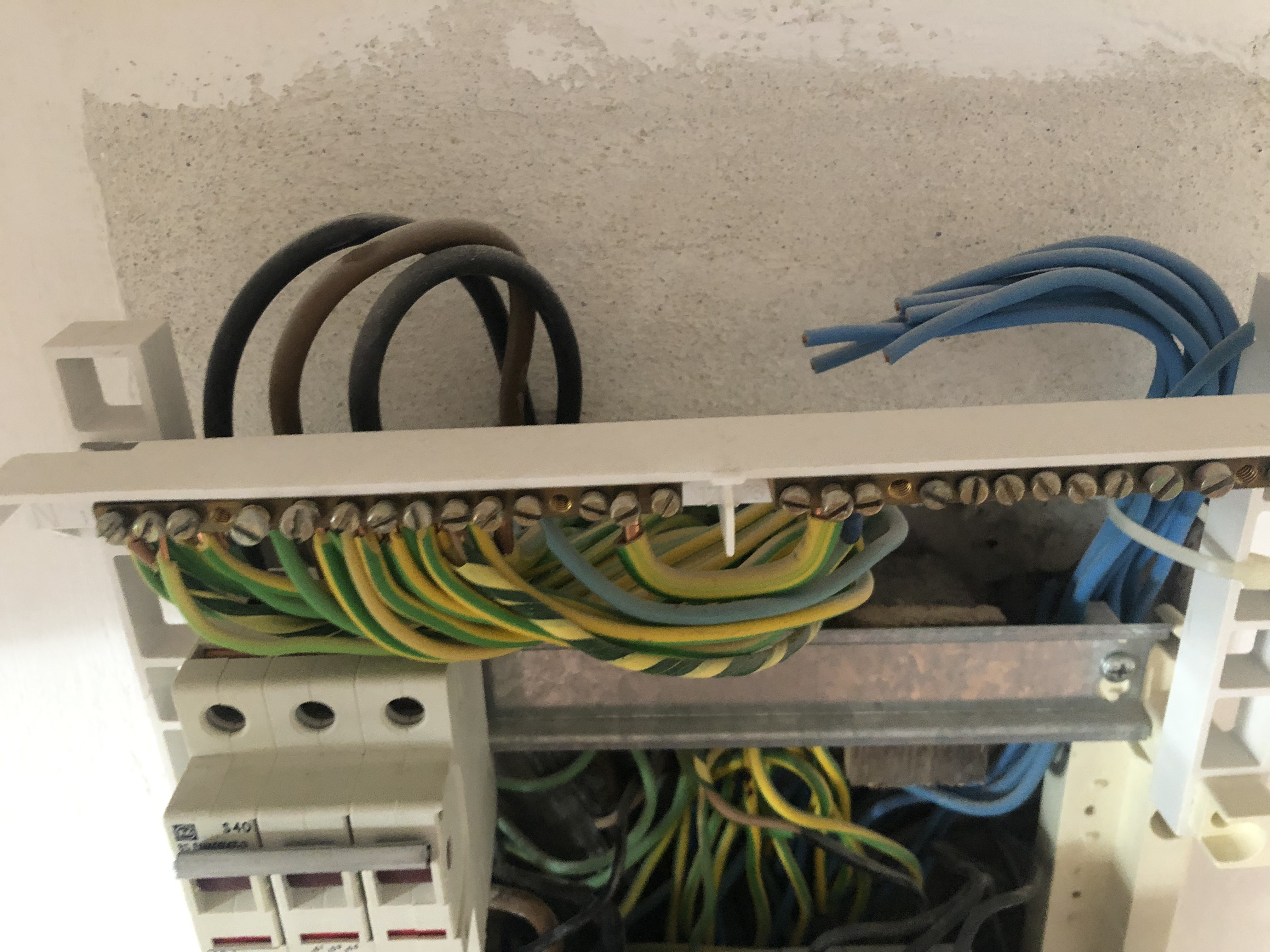
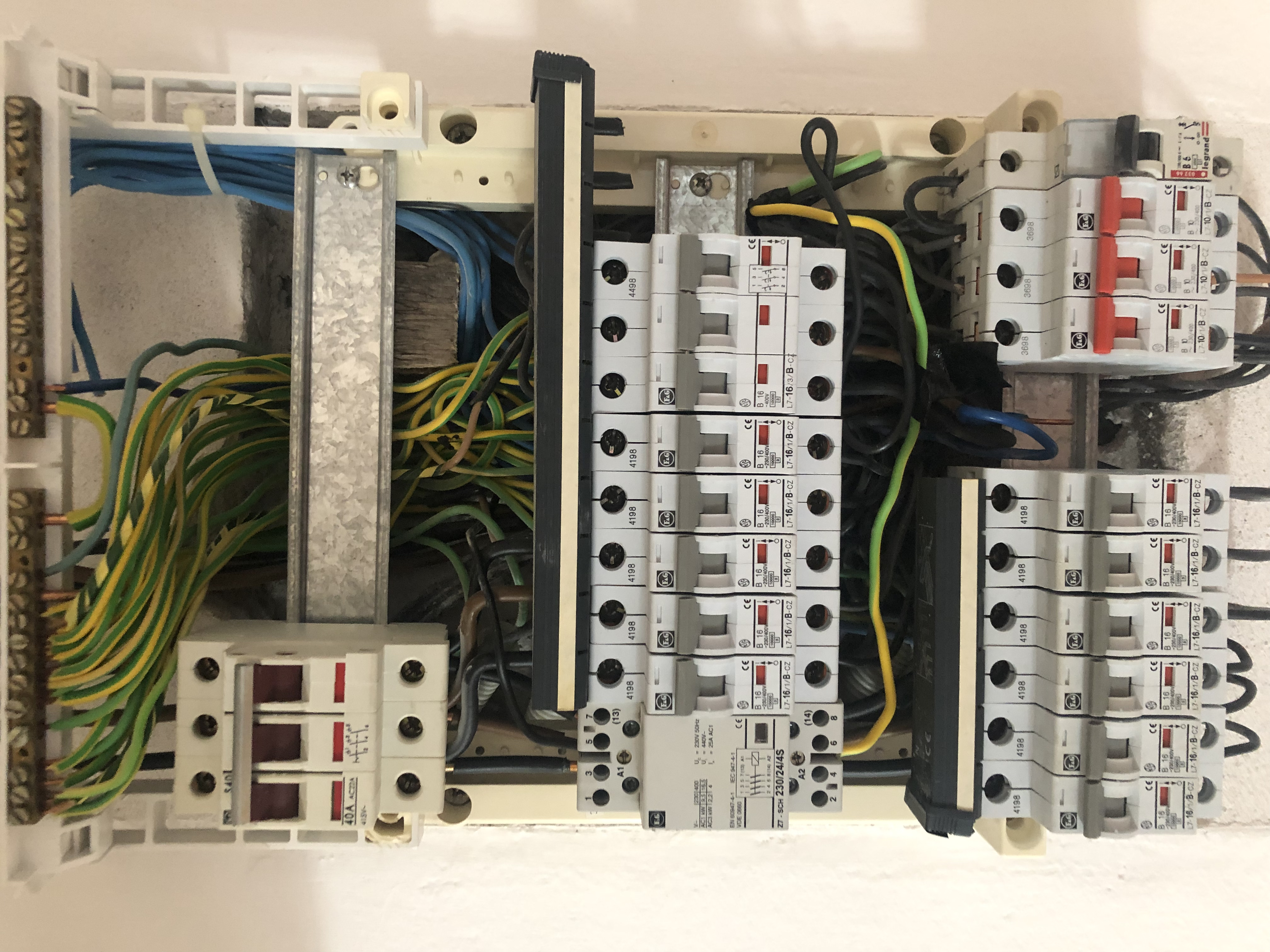
Hey guys, I'm about to install a Shelly 3M and I've noticed something strange in my electric installation. Basically, all the blue neutral wires, aside from one, are not connected to anything. Is that normal or super strange? https://share.numli.net/file/numshare/IMG_3267-GTSfu5.jpg
That's a top down view, the front view looks like this - https://share.numli.net/file/numshare/IMG_3266-YIptDs.jpg and it seems that all ground wires are connected to the railing. It's a 3phase EU setup, approx 20yrs old
zealous dune
to me that image looks disturbing 😛 might be best to consult a professional
jovial dirge
well, that's what I'm trying to figure out here, I don't really know any people that deal with home installs like this :/
surely someone somewhere knows 🙂 but yeah, I'll probably have to do that eventually
zealous dune
you need an electrician
 valid spindle
While it boggles my 2-phase 230VAC mind, is that one connected neutral completing the circuit for all those breakers?
I'm not qualified to say whether that is true, safe or unsafe but it rubs my gut wrong way :S
zealous dune
glad its not only me 😛
 heavy oracle
I'm looking for a way to detect my presence when I am sitting in my office. I don't want to use my phone because I dont always take it around with me. Would I be right in thinking I need some sort of PIR sensor? My only concern with that is that although I could probably make a input boolean from it when movement is detected, I could sometimes be "motionless" (according to the PIR) for long duration's, and setting up a input boolean to stay on for anything more than 10 minutes doesnt seem intuitive. Has anyone got any ideas?
zealous dune
pressure sensor on your chair
heavy oracle
hummm
heavy oracle
these are great suggestions @zealous dune 🙂
zealous dune
you can also double up on PIRs 😄
heavy oracle
- pressure sensor sounds the best (i just need a nice looking small/hidden version)
- microwave sensor doesn't sit well with me, and the battery will probably die often
- camera is a bit overkill, but i'll give it some thought in the future because I dont have cctv in my office yet
- doubling up on PIR's? not sure what you meant here?
zealous dune
more PIR's more detection possibilites
heavy oracle
oh
zealous dune
a sensitive vibration sensor might also do the trick on the chair
heavy oracle
unless it can detect me breathing or blinking - even my wife thinks im asleep in my office. lol
jovial dirge
@gentle fossil glad it's not just me. I live in Slovakia, that install is around 20 years, I'm not sure what kind of animal installed it
zealous dune
ah those former eastern block electricians
jovial dirge
btw going against @zealous dune 's advice, I managed to install the Shelly without killing myself (sorry @zealous dune 😐 ). Everything's fine, but it's not turned on, since I suppose it really needs the neutral line
I might have to go and talk to a pro after all
zealous dune
it definitely needs the neutral line
jovial dirge
yeah but I'm not sure whether the ground railing is considered neutral or what, it just looks stupid
zealous dune
which might or might not be the blue wires
jovial dirge
well, I suppose every device in the house needs the neutral line in some way, which would likely mean it's the railing (correct me if I'm wrong)
zealous dune
our oldschool electricians also don't care much for color coding wires
jovial dirge
yeah, I'm thinking it's likely the green/yellow ground ones
but that one single blue one baffles my mind
zealous dune
its can be many things in a wide range of harmfulness and potential fire hazard
 gentle fossil
looking at that fuse box... I'd say you live in a metal cage and every metal in your wall is grounded
hint: don't trust me. I like to live dangerous
jovial dirge
well, what do I know, I might be living in a metal box prison
heavy oracle
If I purchase a Zigbee sensor, do I need a Zigbee bridge or something? Is it only WiFi that doesn't need that middle man?
winged knoll
You need a bridge, or better a coordinator and #zigbee-archived integration
heavy oracle
Thanks for confirming.
So I guess a "WiFi" sensor is the only one that doesnt need a bridge per se?
winged knoll
Correct
Battery life of them sucks by comparison, and you can run into issues of a lack of IP addresses
heavy oracle
ah ok. IP addresses shouldn't be an issue because my LAN is using a class A range. But battery is something I should be aware of.
Can anyone point be to any recommended WiFi sensors (HA Compatible) ?
winged knoll
Class A... what is this, the 90s?
Sorry, 80s 
A classful network is a network addressing architecture used in the Internet from 1981 until the introduction of Classless Inter-Domain Routing in 1993
heavy oracle
lol, clearly I am from that era and so is my networking knowledge 😛
 rare lodge
I managed to setup a sonoff sv with tasmota to be discovered in home assistant..it has main switch and reed switch send its state as on or off but I need it to be showing open or closed in lovelace on for closed off for open..please help
winged knoll
rare lodge
I managed to setup a sonoff sv with tasmota to be discovered in home assistant.....
That'd be a topic for #integrations-archived - but it'd need to show as a binary_sensor, at which point you can set the device class (https://www.home-assistant.io/integrations/binary_sensor)
 vague tartan
I bit the bullet after thinking a long time about fire detectors and went with nest protect. Its limited how much smart i want the fire alarms, and nest got a good feature set vs a zwave one at same price. They will rather live their own life
 next solstice
I have a light switch powering an outlet and the line is at the outlet. Can I use a shelly1 to smartify that outlet while allowing the switch to continue to toggle it on and off?
I think it's something like: use the shelly1 to directly control the outlet, and use the I/O on the shelly to detect the status of the switch and toggle the outlet when the switch changes? if i'm not mistaken you can configure a shelly to operate that way?
 civic kraken
Should be possible yeah. Just make sure you have both the live and the neutral wire there
The switch only connects to the shelly which then controls the outlet
drifting grove
Hey all. Just bought a conbee 2. I was hoping to pair this with a temp sensor. Was looking aat the hue motion sensor. Anyone have ine?
winged knoll
Lots of people do - but the #zigbee-archived channel is likely the best place for help with that
drifting grove
Ok. Thanks.
rare lodge
winged knoll
That'd be a topic for <#672220541343760384> - but it'd need to show as a `binary...
@winged knoll Its discovered as binary sensor this is its Entity ID
binary_sensor.gateswitch2
 hollow lance
have any Australian users picked up one of the Arlec GRID Connect light switches lately? do they still work with Tuya Convert, or do you have to pull them apart and flash them manually?
 jade agate
any Dutch fellows around with a Split Airco system to be controlled in HA? Need some buying advice 😉 Cant find anything on some of the more popular systems (Mitsubishi) in the HA integrations
 real canyon
jade agate
any Dutch fellows around with a Split Airco system to be controlled in HA? Need ...
real canyon
jade agate
any Dutch fellows around with a Split Airco system to be controlled in HA? Need ...
haven't found any, my bets are on hacking wall control panel or IR 🙂
jade agate
too bad really, seems an opportunity for a great add-on ...
and maybe even better (local vs cloud polling): https://community.home-assistant.io/t/mitsubishi-aircon/37454/4
real canyon
jade agate
unless.... https://www.home-assistant.io/integrations/melcloud/
i refuse to buy stuff i have to run via some third party 'cloud'
 livid island
Is Bluetooth enabled by default on Raspberry Pi 4 with Home Assistant OS?
winged knoll
Well, yes, but for use with the various #integrations-archived that use it
 deep rose
I'm looking for an outdoor plug that is wifi connected and locally controlled. I think Tp-Link used to be a fairly good option for something cheap but as I understand it they pulled local control. Anyone know of any other good options?
hot sun
outdoor as in waterproof too?
 bold flax
Looking for a ceiling fan/light controller that works with HA if anyone has recommendations
deep rose
@hot sun - Weather resistant, IP64ish. Not sitting in water but exposed to weather.
 vestal pier
is there a de facto standard z wave dongle / hub? trying to add some basic things like turning power on / off.
looking at Aeotec Z-Stick Gen5 Z-Wave Hub now
 lone charm
I have what looks like a newer (mains PCB v1.2, MCU PCB is still v1.0) revision of the sonoff S31 US (ETL Listed not UL despite what others are saying). Looking at blogs about the older revision, people were saying the mains ground wasn't isolated from the digital ground. I'm trying to disprove that on this newer revision. Thus far I haven't found any continuity between the digital IO and the mains. Has anyone else here looked into this? I'd like to try to use the exposed extra GPIO if I can and not do something stupid.
 bright jacinthBOT
@rotund socket posted a code wall, it is moved here --> https://hastebin.com/ulanepacif
@rotund socket Rule #6: Please do not post codewalls (text longer than 15 lines) - use sites such as https://www.codepile.net/ (pick YAML for the language) or https://paste.debian.net/ (pick YAML for the language).
Please take the time now to review all of the rules and references in #rules.
Command '~codewall' was invoked by: Tinkerer
winged knoll
Looks to be a topic for #449717345808547842 though
 rotund socket
winged knoll
Looks to be a topic for <#449717345808547842> though
rotund socket
winged knoll
Looks to be a topic for <#449717345808547842> though
Oh sorry. Thank's. I move to.
 valid frigate
@deep rose there is a zigbee outdoor plug if I remember rightly (if its just an extension your after) if its a wall mounted one you can buy any of the outdoor std sockets and replace the faceplate inside with zigbee or wireless one.
 little ginkgo
Hey guys. So as the heating season approaches I'm looking into some diy stuff. My main question is how do you find those "wax motors" that are used for radiator valves. No idea what to look for to find em on the cheep
All i can find is already a full on unit with iot built in...that's not what i want though
valid frigate
were you based @little ginkgo because the wiser kit is defo good value for the money and probably does not work out that much more than diy and the integration through the hacs repo works well
little ginkgo
Poland
I want to go diy for the reason that i don't have radiators to put em on directly. It's floor heating
valid frigate
ah ok
little ginkgo
I was thinking of an esp, a relay board and a set of those motors
And I'd need 3 sets of that
bright jacinthBOT
Ready to use custom firmware for ESP8266 devices (including Sonoff)
Docs:
https://tasmota.github.io/docs/
They have their own Discord server or you can ask in #diy-archived
Command '~tasmota' was invoked by: Tinkerer
winged knoll
Their Discord is likely the best bet, but if not try #diy-archived
 wintry thicket
What are you guys using for a doorbell? Non cloud.
I have been using a Xiaomi ZigBee button, but I have always had issues with the stability of my deconz, so I would like to look for another solution
winged knoll
https://frenck.dev/diy-smart-doorbell-for-just-2-dollar/ or similar seems to be quite popular
wintry thicket
Should have probably mentioned that it needs to be wireless and battery powered
zealous dune
I use a Xiaomi door sensor
 white hemlock
I know it's been a year but what device did you get for traccar?
 analog oar
Hi, I'm new with home automation. I've found, that some people recommend CC2531 as device to connect all the devices, but other ones don't recommend this, because it can only handle 20 devices.
Question: If I'll got 21 devices, would it also work to add an second CC2531, or wouldn't this work as expected?
gentle fossil
you only have one controller in a zigbee mesh
you get detailed answers in #zigbee-archived
analog oar
@gentle fossil ok, thanks a lot
 stiff wyvern
hoping someone can help. I have a tasmota Athom SW131US Module which i can control through it's web interface just fine, but the physical switch i cannot get to control the light. Any ideas what I am missing on this????
zealous dune
is it a fresh install or did you configure some things?
stiff wyvern
new switch, i just installed
Hassio can control it 100% also. Just the physical button seems to not work at all
zealous dune
that sounds like a case for customer support
drifting grove
I have a bunch of blinds to control. I do not have any hardware bought yet (except rPI with installed HA). What would be the best choice? I see some Tuya/LoraTap wifi modules, but it does not seem to be easy to use those in HA -or- at least you still need Tuya cloud. What would be an alternative?


 zealous dune
All my Tuya devices work fine locally with Tasmota
drifting grove
Tasmota -> TasmoAdmin or you have something else in mind?
drifting grove
Ok, I'll try that, thanks!
Thanks also for aqara hint, but my blinds already have motors, I just need to have a "smart switch" or better a control unit, where I would be able to put in cables of multiple blinds.
winged knoll
 pine apex
Can anyone assist me with identifying the RAM amount of two Raspberry Pis?
I don't currently have the ability to get them plugged in to check and my RAM modules don't match up with eith of these codes https://support.thepihut.com/hc/en-us/articles/360006049318-Which-Raspberry-Pi-4-RAM-option-do-I-have-
I was gifted them and would like to see if either of them are better than what I have to move my Home Assistant onto
next solstice
any reason I can't automate a ceiling fan with a shelly1? asking because i've seen some wall switches suggest they shouldn't be used w/ ceiling fans. haven't seen any warnings like that from shelly
US based, 110V. pretty standard ceiling fan (pull string to toggle speeds, etc)
zealous dune
For starters you can't toggle speeds with Shelly 1
next solstice
understood - yes, was just trying to turn it on and off.
 steel lion
Are there any good options for monitoring soil moisture that arent bluetooth based? (wifi, zwave, zigbee, something else?)
drifting grove
anyone running a Pi4 using a USB thumb drive for HA? Samsung makes these small 64 / 128gb USB3 drives & was wondering if they would actually work (for more than a month..) as opposed to an external USB attached SSD..
 gloomy spoke
They will likely be slower and last a shorter period of time than an equivalent SD card
drifting grove
gloomy spoke
They will likely be slower and last a shorter period of time than an equivalent ...
Thanks, yep my thought too.. may give one a try & even run influx on it to see how it holds up. Speed-wise it should be fine for most everything I need for HA
gloomy spoke
They’re mainly designed to read and write large files quickly, rather than regular Linux filesystem use, including a database
drifting grove
gloomy spoke
They’re mainly designed to read and write large files quickly, rather than regul...
I had good luck running Mint on one.. did the noatime etc in fstab to help reduce writes..
 ruby badger
is a i7-7700k op to run HA on? XD
analog oar
Does the size of an antenna matters, if the dpa is the same?
Example.. .this two antenna sizes: https://i.ibb.co/K9dwHQD/Screenshot-hkidbp.jpg"
 analog oar
I've found RGB-Lights, who don't have the zigbee-logo.
https://i.ibb.co/b2cKD5M/Screenshot-nof49i.jpg

Is there a chance to use this lights without google or alexa... fully offline (from internet) ?
I've ordered an CC2652RB, and I do have a Fritz!box as Router. (This are my first steps with home automation)
winged knoll
They're WiFi based
If they support the Tuya (cloud) platform they'll work - mostly, probably
If they can be flashed with Tasmota/ESPHome they'll work locally
Generally speaking anything that mentions Google or Alexa is a WiFi device using a cloud platform
analog oar
@winged knoll Ok, good to know. I thought there might something like an general plugin which is able to connect via WLAN and trigger the commands which are needed. So I'd better go with zigbee zertified devices to have less trouble?!
winged knoll
There's no general plugin, Tuya is the closest it gets, but that's still cloud based
If you want local control buy devices that are local
steel lion
hoping the tuya v2 integration gets local control soon. would always be nice to have more alternatives than just zigbee or z-wave basically
winged knoll
Who knows... 😄
 sharp plank
ruby badger
is a i7-7700k op to run HA on? XD
sharp plank
ruby badger
is a i7-7700k op to run HA on? XD
I'm running on a virtual machine on a E5-1410 and Home Assistant is a drop in the bucket. Restarting is almost instant. Your i7 will blow that out of the water. I do recommend working in a virtual machine though. It makes future transitions much easier.
 quaint bay
Hi guys, i have an Wemos D1 Mini that i want connect to a electricity meter using the S0 port of the meter, i'm using esphome with the pulse_meter. The thing is that with a multimeter in diode mode i tested the S0 port and is working OK, between the meter and the Wemos are 10m of distance +-, so i made this connection... Put to the S0+ the 5v and digital D3 the S0- with a 10k resistor to GND... the problem is that the wemos dont register any pulse... if i change to a 1k resistor then get an infinite spike of pulses....
 pastel vault
@ruby badger I'll second @sharp plank and also add my two-bits. I've recently switched running HAOS from a RasPi3B+ to a Lenovo Mini PC, i5-3470t @ 2.90Ghz, running HA in a virtual machine within Proxmox on that box. Compared to the RasPi it's blisteringly fast! I've gone from 40+ seconds to ~6 seconds reboots. And it's rock solid. Drop HAOS on an i7 and you'll be set for years to come.
 gray garden
Hey all, do any of you have a variable power supply to experiment with LEDs. I've gotten myself in a situation where I don't have a power source for my LED's again. I just want to have one for tinkering so that I can order a power supply in a later fase. If you do: any recommendations?
gentle fossil
how many LEDs are we talking?
gray garden
250 LEDs
 tribal star
Is there a favourite WiFi streaming camera which doesn't need a cloud service in order to get connected to me completely off-cloud HA-centric house? Thanks.
winged knoll
#cameras-archived would be able to advise you
tribal star
Ah. I didn't even know there was one. Thanks.
 sand crypt
Hi all. Installed in a pi4 and when trying to connect to wifi I only can find 2.4GHz SSID but not 5GHz SSID (I send different from my Fritz!Box for both). Is that normal?
No other way round: only find 5GHz but want to connect to 2.4
drifting grove
pastel vault
<@!641834890907877376> I'll second <@!92428993998905344> and also add my two-bit...
How did you setup the whole thing? I want to replace my PI3 for a NUC/Mini-PC
analog oar
Are there any good ZigBee based aroma diffuser ?
zealous dune
No
sharp plank
drifting grove
How did you setup the whole thing? I want to replace my PI3 for a NUC/Mini-PC
I'm running unraid on my machine and it was as easy as following these steps. https://www.juanmtech.com/how-to-set-up-home-assistant-on-unraid/
ruby badger
pastel vault
<@!641834890907877376> I'll second <@!92428993998905344> and also add my two-bit...
And @sharp plank thanks dudes, works out cause just upgraded to a amd 5600x so I have the old 7700k and motherboard laying around lol
 obsidian juniper
I've ordered multiple Shelly 1L switches. Does anyone know whether cables for wiring are included in the package?
I'm assuming that i need additional wires to wire the Shelly to the light switch
 toxic dirge
hey, 1st time messing with tasmota, what can i use to flash if i dont have an ftdi adapter?
or im reading they have sonOTA?
anyone used that with success?
drifting grove
toxic dirge
or im reading they have sonOTA?
It depends on what you're flashing. 'Some' devices can do the OTA, others require an adapter. The adapters are cheap on Amazon & the process really isn't too bad. Tip: 'If' you need to solder, get very thin solder and a proper soldering iron where you can adjust the temp (along with a small pointed tip) also buy/use flux to help with the adhesion. Would also suggest getting some 'helping hands' clips to help hold the wires and device for soldering.
drifting grove
obsidian juniper
I've ordered multiple Shelly 1L switches. Does anyone know whether cables for wi...
Nope, I don't believe they do. Would suggest just buying a small amount of electrical wire that matches the gauge of the existing wiring & cut to size needed.
toxic dirge
drifting grove
It depends on what you're flashing. 'Some' devices can do the OTA, others requir...
s31
from what i was reading the sonOTA works with older version of firmware, but not new one
no idea if these are old or new
bought off amazon
drifting grove
toxic dirge
s31
Ok, for those I had to solder & flash. There are some great guides out there that detail the whole process. I bought 8 of them and set up a mini assembly line - knocked them all out in about 20 mins..
drifting grove
toxic dirge
bought off amazon
Guessing these are the new firmware.. as the ones I got about 2 weeks ago were.
toxic dirge
word
yeah ill have to nab the adapter then
it seems like using a arduino or pi is alot more effort
drifting grove
toxic dirge
yeah ill have to nab the adapter then
This is the one I bought: https://www.amazon.com/gp/product/B00IJXZQ7C/ref=ppx_yo_dt_b_asin_title_o00_s00?ie=UTF8&psc=1
I never flashed one before & at first thought it was a bit of work.. but after doing the first one, it's really not bad at all.. and I have all the stuff to do more of them etc.
toxic dirge
almost just want like little metal clips for the ends of the wire
could just clip instead of soldier
drifting grove
Yeah I tried that.. the little bastards kept falling off and the flash would fail
drifting grove
no one seemed to have them in stock or knew what I was talking about
possibly.. if you could securely hold it in place.. hell I tried a hot-glue gun etc.. finally just went to a local Microcenter and bought a proper soldering gun etc
I then used it to flash a Sonoff wifi/zigbee coordinator.. then re-wired an epiphone les paul.. so it was a good purchase
toxic dirge
oh for sure
i cant find mine
and it was the basic one
so meh
i now want a ts100
but $80 for an iron is overkill
 autumn kraken
Hi guys, what's the difference between smart ledstrip and a standard ledstrip+Shelly?
What would you buy?
zealous dune
which shelly?
autumn kraken
I have to buy and I was thinking on rgbw2
zealous dune
then no technical difference
smart ledstrip is just a standard led strip with a led controller in the box
autumn kraken
So maybe better smart ledstrip so I have less device?
zealous dune
how is that less?
led strip + shelly = 2; smart ledstrip = led strip + controller = 2
both options need a power supply as well, smart led strips usually come with one
autumn kraken
Ok, thanks a lot
And what about light bulb? It's the same or better smart light bulb vs light bulb + Shelly?
zealous dune
depends on which shelly and which kind of light bulb
autumn kraken
I was thinking about yeelight light bulb or standard light bulb and Shelly 1 for the switch
zealous dune
shelly 1 can only turn on/off your bulb
autumn kraken
So, what is the difference with smart light bulb?
zealous dune
smart light bulbs can have: dimmming, change color temperature, change color or all three
zealous dune
you also need to be aware that when you cut power to your smart bulb it becomes dumb
autumn kraken
Ok, so is there a solution?
zealous dune
don't cut the power...
autumn kraken
Do you have a guide to read how to wire it to not cut the power?
zealous dune
yes: find a skilled electrician to do it
 frosty rose
whats the cheapest and quickest way of adding temp readings for a room?
zealous dune
just readings or you need it hooked into your smart home?
frosty rose
yeah smarthome. I've got a whole bunch of temp reading devices, but none i can use in my office room (too far from smartthings hub)
bright jacinthBOT
Looking for advice about a device to buy? Remember to provide guidance on:
- Which country you're in
- What your budget is
- What protocols you prefer (eg Zigbee, WiFi, Z-Wave)
- Any features you want (such as power monitoring, dimming, etc)
Command '~what' was invoked by: blakadder.com
zealous dune
smartthings hub doesn't work with zigbee routers?
frosty rose
uk, cheap, wifi really, purely temp is all i need
frosty rose
smartthings is zigbee i think, but the two things i have that are smartthings that have temp reading (door sensor and motion sensor) both dont work with the distance to my office
zealous dune
that's why you employ zigbee routers to bridge the distance
frosty rose
ah ok, well i don't use zigbee enough to justify that, just for this one room
hence me looking for a cheap temp monitoring alternative
i have a spare esp32 kicking about so could use that either for bluetooth or some kind of temp componant for it
zealous dune
yeah that can also work
zealous dune
sure
 sly owl
Forgive me for responding to an old answer but do you still recommend the 1ID instead of 2ID?
 coarse spade
Anyone have a suggestion on how I can smart-ify a 2 gang switch in my garage that runs 8 Florescent light fixtures? I have no idea of the amps or watts they pull, I bought a sonoff zbmini x2 to see if I could do that, but not sure if it could handle that much power
I have no neutral wire, from what I can tell. I am not an electrician. 😄
 tepid heart
Flouro tubes draw bugger all current when they are running. The wattage will be written on the tubes, but will probably be around 40W each. For 8 that's 240W total. Or 1 Amp at 240V, or 2A at 110V.
coarse spade
I have an electrician coming on Thursday to check out the wiring and hopefully install the zbmini for me ( I have two, for two switches) but may only need one, the switches seem chained somehow
Goal is to have it so that when someone enters the garage, the lights turn on, no activity, they turn off, to save power and to prevent me from leaving them on by accident at night
But im not even sure if the sonoff's can handle that
reviews for the zbminis show "Great, but only rated for 10 Amps"
 wind mist
Could anyone recommend an IP camera that connects via Wi-Fi and has a video stream thats accessible on the LAN without any 3rd party cloud services/subscriptions?
winged knoll
#cameras-archived is the best place for camera recommendations, though mostly expect people to recommend POE rather than WiFi
HikVision and Dahua come up a lot
wind mist
Thanks. Will check these out
coarse spade
reolink too
 cedar venture
as far as I know, you cant initiate action on Amazon Alexa via any sort of API, it always must be voice initiated. Anyone know if the same is true for the Google one?
winged knoll
See Assistant Relay
cedar venture
thanks, the github seems to be unmaintained now, but might be worthwhile anyway
winged knoll
AFAIK it works, like a lot of unmaintained software
cedar venture
ok thanks
 civic vapor
Not really related to home assistant in general, but will im doing light show, and using smoke machine. Then the smoke detector goes crazy. Are there a solution for this ? I still want to protect from real smoke and fire hazard while being able to use smoke machine. Perhap there are no solution but not worth asking 😄 The only solution I was thinking was if the smoke machine was activated in the last hour then ignore smoke alarm. But this is not perfect as it will not protect during a light show
winged knoll
Sounds like you want a heat alarm
civic vapor
yeah perhap
winged knoll
A smoke alarm that isn't triggered by a smoke machine would be pretty bad smoke alarm
civic vapor
i guess there will be no perfect solution, a smoke detector that ignore smoke generated while working on real smoke probably isnt technicaly possible
hahaha
yeah
i think I will have to put heat sensor near all potential fire hasard ( cuz im using high amp led strip ... )
tepid heart
coarse spade
reviews for the zbminis show "Great, but only rated for 10 Amps"
10A will be plenty, even allowing for the inductive load of the ballast. See my explanation here: <#hardware-archived message>
coarse spade
Can you not pass usb to a hyperv vm?
 cerulean pendant
Hi, not sure if this is the right support chat, but I'm having issues with two Osram+ Zigbee Plugs. Around once a week homeassistant loses connection to one or both of them and won't find them again until I re-pair them.
I have a Conbee 2 USB Stick which is used by the native zigbee intergration in homeassistant.
How could I debug something like this? It shouldn't be range as the plugs are only ~10m away, almost in line of sight.
I used to have a similar issue when I used the deconz software. After I switched to HAs implementation it started happening less, but it's still annoying having to re-pair them
winged knoll
bold flax
Does anyone know how to open these round sp10 smart plugs?
zealous dune
🔨
 solid grotto
I switched from a SD card on my RPi4 to a SSD but the RPi every like 4 hours lose connection to the network. I using Ethernet cable. I need to restart the pi and then it work again for 4 hours. It seems to work good with like Home Assistant because it performes automation on the zigbee network. I use Raspbian so not the Hass io system. But I check if anyone have any idea
drifting grove
Hi Everybody and good evening, i have a small problem, i will try to explain it in the brief and easyest way possible...
i have 2 RaspberryPI (RPI4 as HomeAssistant server) & (RPI ZeroWh as Irrigation system relay in the garden), in this moment im using the RPI Zero in the garden connecting to it remotely and activating the relay switch manually... i would like to integrate it in my HomeAssistant, so i would be able to operate the relay and the irrigation valves directly from lovelace, same as all the other switches.
how to do that? thank you in advance
zealous dune
How exactly are you activating the switch manually?
drifting grove
there is a 3rd part HTTP server for irrigation
and i do it through browser
but there is a login page... so i cannot simulate the switch externally... unless i find the way to disable the login page...
 compact mural
Dilemma: upgrade synology DS214 to DS220+ or to HA Amber?
 waxen raven
Guys I need some pointers. Background windows IT guy, but have starting playing with HA. I had HA running on a Pi4 using a TI zigbee controller and somehow managed to get everything working. Then my SD card failed (no back up of course). So I ordered one of the "approved" 2.5" to usb cables and an SSD and set to rebuilding from the start again. So I can get HA up and running no problem and I know everything is working as I can connect my smart things motion sensors and get motion and temp from them over zigbee, but when I am trying to add some innr SP222 smart plugs they get seen and then fail interview. Any pointers as to what I might be missing? Anything else you need to know to help understand?
additional, I have rebuild a couple of times as I tried this with zigbee2mqtt, and then I rebuilt and tried zha (currently installed and this is what it worked with in the past)
so I am thinking its some kind of device driver type issue...but I am lost. Many thanks in advance
zealous dune
compact mural
Dilemma: upgrade synology DS214 to DS220+ or to HA Amber?
What's the dilemma, one is a NAS, the other an SBC of sorts
 paper creek
solid grotto
I switched from a SD card on my RPi4 to a SSD but the RPi every like 4 hours los...
paper creek
solid grotto
I switched from a SD card on my RPi4 to a SSD but the RPi every like 4 hours los...
Is your power supply sufficient?
waxen raven
paper creek
Is your power supply sufficient?
official psu 15w so I think so
paper creek
A SSD will draw far more current than a SD card. Your power supply needs enough capacity for both your pi and your SSD
waxen raven
bit as I said, it detects some devices and not others that were working previously, it even sees the devices, but just fails during the interview process?
paper creek
How much power budget for USB devices does a Pi have with the official PSU?
waxen raven
honestly, unsure, but all of the guides I checked before getting this said the offcial 15w psu will be fine.
paper creek
That's weird
waxen raven
I guess I should get another sd card and try the build on there to confirm
paper creek
solid grotto
I switched from a SD card on my RPi4 to a SSD but the RPi every like 4 hours los...
This guy needs to check his PSU
replied to the wrong guy
waxen raven
Oh I am sorry
paper creek
no I replied to the wrong guy, it's my fault for causing confusion lol
anything noteworthy in the logs on your setup @waxen raven ?
waxen raven
paper creek
anything noteworthy in the logs on your setup <@!726572697324093614> ?
not really, even after a clean rebuild (literally OS and then ZHA) all green in the logs
paper creek
Try a USB extension cable on your zigbee dongle.
No kidding
USB3 is notorious for causing 2.4 GHz interferrence
waxen raven
paper creek
Try a USB extension cable on your zigbee dongle.
Literally just ran to the shop and purchased two, one for the ssd and one for the controller and have put them as far apart as possible lol
paper creek
Any improvement?
waxen raven
nope 😦
paper creek
At least you did your homework 😉
waxen raven
I think I will try an SD build to confirm its nothing else, just odd it will pick up the sensors and not the plugs
waxen raven
paper creek
At least you did your homework 😉
years in IT, hate users who try nothing first or always claim they have restarted it exactly 3 times lol
paper creek
And then you look at the uptime of their system and determine the reboot was a lie.
winged knoll
Anybody who's worked in IT knows that users lie, by default
Or, if we're being nice, they're "confused"
waxen raven
paper creek
And then you look at the uptime of their system and determine the reboot was a l...
100%
paper creek
I still need to get me a LART.
winged knoll
paper creek
I still need to get me a LART.
I had a colleague at one point who's wife was a woodworker, and she made him a truncheon with the phrase LART engraved into it
Management were rather unhappy when he left it on his desk
paper creek
Any chance your plugs are being pricks and the issue is not in your HASS setup at all?
waxen raven
winged knoll
I had a colleague at one point who's wife was a woodworker, and she made him a t...
thats awesome!!
waxen raven
paper creek
Any chance your plugs are being pricks and the issue is not in your HASS setup a...
totally a chance yes....I do have an old smart things hub, I will bust that out to test the plugs...good shout
paper creek
You know this is a thing right? https://pages.cs.wisc.edu/~ballard/bofh/bofhserver.pl
waxen raven
thats cool, but nothing and I mean nothing beats solar flares on the sun excuse
paper creek
What is the exact make/model of your plugs?
waxen raven
Innr SP222
and have worked on my previous build of HA in the same Pi with the same controller for months
so is there such a thing as device handlers like in smartthings, and is there a chance I just need them for ZHA?
paper creek
Hmm no notes over at zigbee2mqtt.io or zigbee.blakadder.com
My ikea smart plugs caused me some grief to put them in pairing mode, the notes over at zigbee2mqtt really helped me out.
winged knoll
I've had no issues pairing my Innr SP222 plugs
However, if you're running Zigbee2MQTT and you recently upgraded to 1.20 or later... there's known issues
#zigbee-archived can help there
waxen raven
winged knoll
I've had no issues pairing my Innr SP222 plugs
I had no issue in the past, which made me think did I install an extra widget or something lol
paper creek
winged knoll
However, if you're running Zigbee2MQTT and you recently upgraded to 1.20 or late...
is there a list somewhere?
waxen raven
Right chaps, thank you both for the help, I am going to do some further diags, will bust out the old hub too and try an SD card build.
think I need to confirm a few things before I ask for more help 🙂
winged knoll
paper creek
is there a list somewhere?
A list of ...?
I mean, it has a GitHub repo with an issues list...
waxen raven
could there be an innr repo?
winged knoll
Nope
winged knoll
There is a Z2M repo...
waxen raven
will give that a try, but I do know they worked with zha before. Damn back to smartthings now, not sure I even remember my login for it lol
Thank you both so much for your time and guidance
winged knoll
#zigbee-archived can help further with Zigbee stuff
waxen raven
yeah will go there once I do my additional tests 🙂
(plus wife is calling for dinner haha)
pastel vault
@winged knoll LOL We had those when I managed tech support for a fledgling ISP back just prior to the turn of the millenium. Each tech support numpty who lasted three months 'on the front line' was gifted a bat with LART engraved on it, mounted on a plaque.
winged knoll
If you can hook it up to ESPHome/Tasmota, then sure
paper creek
Or take some inspiration to Jeff and his countermeasures for Redshirt Jeff
paper creek
winged knoll
Bonus points for different phases
POW!
Back to on-topic questions: are there any local-first smart thermostats with multi-zones besides honeywell evohome?
pastel vault
@paper creek Hey, if the folks at the IETF can accept an Internet protocol for sending Internet signals via carrier pigeon, why the hell not. Don't believe me? Google RFC 1149 and look it up. What started as an April Fools gag has become part of Internet standards. 🤣
paper creek
I know.
And then there's the madmen who actually implemented it: https://www.blug.linux.no/rfc1149/writeup/
pastel vault
LOL 64 bytes from 10.0.3.1: icmp_seq=0 ttl=255 time=6165731.1 ms
Never let it be said 'sysops' don't have a sensa-hooma. 🙂
paper creek
pastel vault
Never let it be said 'sysops' don't have a sensa-hooma. 🙂
Spotted the aussie
pastel vault
grin
paper creek
Why am I reading your messages in a Dave Jones voice now
cedar venture
pastel vault
*LOL* ```64 bytes from 10.0.3.1: icmp_seq=0 ttl=255 time=6165731.1 ms```
you must be using the 'message in a bottle, tossed in the ocean' routing protocol?
 timber jacinth
Hello!!
At the moment i use sonoff and im very glad, but i am looking if there are any smart switches witch work with powerline and not wifi or RF (in order not to have emf radiation).
Might anyone has tried such a device?
zealous dune
Work with power line?
timber jacinth
zealous dune
Work with power line?
network throught electricity, like tp-link plc
timber jacinth
zealous dune
Ethernet or POE?
Ethernet / POE is an alternative, but for now i am looking if there is a solution with powerline - i have alread google it but did find something usefull till now...
zealous dune
I don't think there are any commercial Ethernet wallswitches
timber jacinth
zealous dune
I don't think there are any commercial Ethernet wallswitches
Thanks again for the reply.
Hope to find a product witch works with network throught electricity..
If anyone has tried such a product i will be pleased to inform us 🙂
 magic ravine
hey. im a total noob and im planning to set up some automation for the first time. I hope this is the right channel for my questions. I want some philips hues and also some buttons/sensors/thermometers that use zigbee. what is the best way to set it up? Should I get a hue bridge and a zigbee hub? and what kind of zigbee hub would be best? a USB one connected to my server or some ethernet/wifi hub like the sonoff one? Or is what im doing here completely stupid?
cedar venture
magic ravine
hey. im a total noob and im planning to set up some automation for the first tim...
If you join the other chan Ive just been recommending a conbee key to someone
the only reason you would need a hue bridge, is to update the firmware for individual bulbs etc. Personally I don't bother keeping Hue firmwares up to date, maybe that will change if I ever have a problem
 finite verge
I am using the august Integration to interact with my door lock. Does anyone know if there is a way to create and remove codes through the HA interface?
I did just find this so going to see where it leads. https://iotrant.com/2019/11/17/lock-code-managment-with-home-assistant-and-node-red/
 deft sparrow
Hello i'm trying to do the pir motion sensor using esphome and nodemcu 8266
i pluged the sensor into the board and flashed it, all gut, but it's not doing anything it is detected
but no changing state
 long charm
is SD card failure really common for raspberry pis running home assistant (or anything else)?
 lyric edge
Hi all, new user here. Hi, do you have a recommendation for adding multiple UPS’ to a Synology so that they can be added to HomeAssistant for monitoring? Currently I have two UPS’ connected to one Synology DS920+ but only one is being detected and added to HomeAssistant via NUT. What is the best way to monitor multiple UPS in HA?
A UPS plugs into a USB port of the Synology and you enable the Synology to act as a NUT server. Then you go into HA and apply the IP and the port # of the Synology and it reads it and then fetches information. I tried my two UPS and it worked and fetched the information. What if I got a USB hub and then plugged all my UPS into it and then used the hub in one of the Synology’s ports. I wonder if it would pull multiple devices.
pastel vault
@long charm SD Cards are not designed for 'continuous access' (That is, the card is accessed over and over again without much of a let-up). They're designed to be used as a storage device, certainly not as the 'hard drive' for an operating system. As such, they have a short shelf life when being used this way.
That being said, using an A2 variant microSD card has been shown to reduce the number of MicroSD card failures; or, at least extend that shelf (use) life.
This is why the folks at Nabu Casa, the 'owners' of HA, strongly recommend you not use a MicroSD card as the hard drive for a system running HA. (Which, I believe, is one of the reasons they developed both the Blue and, recently, the Amber.)
If you want to, though, they certainly won't stop you from doing so.
Up until only a couple of weeks ago, I ran HA on a RasPi 3B+. That meant I was running it on a MicroSD card. However, knowing the card was not designed to be used that way I used to keep two spare cards that were kept up-to-date with a full HA install. Luckily and in the just over two years I ran HA on that Pi, I only had one MicroSD card fail on me while in use. After a quick couple of minutes of switching out the card, rebooting and installing from the latest backup on Google Drive I was good to go again. Then I promptly bought a replacement MicroSD card for the one that had failed.
long charm
This has been a concern of mine lately, and I don't know if a class a2 card would be "good enough" or I should figure out some alternative. I like the Pi 4 that I'm running but worried about the sd card failing and me not having a fallback
winged knoll
Industrial SD cards are the better solution
If not, then one designed for a high write life - like dashcam cards (WD Purple)
Personally, not an SD card is the right solution
A2 cards are still hit and miss. A2 is a speed rating, not a quality rating after all.
pastel vault
@long charm If you want to go the Pi route and you have the extra dollars, get something like an Argo case and run it with a HAT that allows you to plug in an M2 SSD card and run HA off that. However, that system actually costs you more than simply buying a 2nd hand USFF computer off eBay, installing Proxmox and running HA off a virtual machine on that. Hell, there's now even a very decent script some bright code-monkeys have written that'll take just about all of the aggravation of trying to figure out how to do it off you. And, yes, this is what I recently did.
For example: A US$70.00 Dell Optiplex 790 USFF PC Core i3-2100 3.10GHz 8GB RAM 128GB SSD currently running Win 10 Pro. (And, no, I have no relationship with the seller; it's just an example.) https://www.ebay.com/itm/194407250703?hash=item2d43933b0f:g:ycUAAOSwNZFhV2VF
winged knoll
 is the way to go IMO. I moved from a Pi to an old laptop (2012 vintage) and it was night and day - and I still run HA on that laptop
pastel vault
@winged knoll Yes, but the A2 have shown themselves to be less likely to (not definitely not) fail. But... yes... they definitely still do.
winged knoll
Clearly you've not lurked here long enough 😛
I've seen plenty of reports from people who bought an A2 card and had it die within weeks
pastel vault
@winged knoll Wow! I must've really lucked out. As I said, I only had one fail in the two years I ran the 3B+. Admittedly, I did have one that just wouldn't work at all, but put that down to a fail of the factory at the QoS stage.
bright jacinthBOT
@pastel vault Discord isn't like IRC, you don't have to tag people on every response. Keep in mind that every time you tag somebody, they get a notification ping. That can very quickly become annoying and people may block you.
When using Discord's new Reply feature it defaults to pinging the person you reply to, click @ ON to @ OFF to stop this - on the right side of the compose bar.
You have to change this every time (thank the Discord devs for that).
Command '~irc' was invoked by: Tinkerer
winged knoll
Yeah, I've had a few Pi3's running for years without issues, and others that I bought different brands for and have had issues
Since switching to the WD Purple cards though... all good, so far
pastel vault
I'll keep that in mind. I've set the Pi to 'semi-retirement', for the moment. It's currently unplugged and sitting on a shelf. But I've kept it because I may need it in the future (such as .... miracles of miracles... Tuya switches back to allowing OTA flashing.)
bright jacinthBOT
ESPHome is a system to control your ESP8266/ESP32, with a native integration for Home Assistant.
You can find their documentation here, and get help with ESPHome itself here in the #diy-archived channel (#integrations-archived for the Home Assistant side integration with it). They also have their own Discord server too.
Command '~esphome' was invoked by: Tinkerer
 keen hare
hi, im new here with a question how to use ESPHome, in my case i cant select an USB port to provisioning my ESP8266. using a RPi3 with a homeassistant image
bright jacinthBOT
@keen hare ESPHome is a system to control your ESP8266/ESP32, with a native integration for Home Assistant.
You can find their documentation here, and get help with ESPHome itself here in the #diy-archived channel (#integrations-archived for the Home Assistant side integration with it). They also have their own Discord server too.
Command '~esphome' was invoked by: Tinkerer
long charm
I probably have an old laptop I could set up to run as a server. One of the things I liked about the Pi was lower power draw
I also have a usb ssd I was thinking of trying w the pi
 untold narwhal
hi, I can't connect to my HA Blue (The connection was reset) after adding some http infos in config. Any idea what I could do or where to find help?
bright jacinthBOT
The topic of this channel is:
There's a channel for #yellow-archived if you have questions about it.
Questions about a hardware device (not their #integrations-archived with HA, and not the thing that HA calls devices)? Someone might have the same device and be able to help you out! If you've got a Z-Wave or Zigbee devices, see #zwave-archived and #zigbee-archived, #cameras-archived for cameras, and #diy-archived for making your own stuff (or if you're asking about Tasmota or ESPHome).
If you have problems with the Blue see #330990055533576204. If your install isn't responding then see your install method channel above.
If you want to share images, use https://imgur.com/ or similar.
Please use https://www.codepile.net/ or https://paste.debian.net/ to share code or logs
Command '.topic' was invoked by: Tinkerer
untold narwhal
Thanks, HassBot :p
long charm
This is probably a bit off topic but following on the SD card conversation, until I swap out to a different hardware solution, what do folks use for automating backups?
im just thinking if the card does fail, it would be nice to have an image in the cloud or something I could pop in
winged knoll
Depends on their install method
long charm
i'm on homeassistant os method
winged knoll
I use rpi-clone for my Container and Core hosts
For HAOS you've got snapshots "backups"
You can push those to other systems with various add-ons
pastel vault
@long charm I use the HA built-in backup system and add to it with the Google Drive Backups add-on installed via Supervisor -> Add-on Store.
 humble nexus
Hello, I'm looking to build a server racked home assistant server, does anyone have experience or a guide for recommended parts and installation instructions?
long charm
pastel vault
<@!112971768578220032> I use the HA built-in backup system and add to it with th...
I just searched but don't see such an add on. Is it deprecated or something?
winged knoll
#add-ons-archived could help there
 stoic mango
So, I'm currently looking at using raspberry pi zero W. I see all the warnings, but I don't have a different option at this moment. Using imager, do I say it's rpi 4 or rpi 3?
stoic mango
ok
winged knoll
It's going to be a terrible experience
You'd be a lot better off with a virtual machine, or just not bothering
stoic mango
winged knoll
You'd be a lot better off with a virtual machine, or just not bothering
Thank you for the warning, I'm a masochist who's a cheapskate and had it with smartthings...
winged knoll
Well, it's warned about for a reason...
Buy something better, use a VM, or carry on and expect most experienced folks to laugh at you when you ask for help...
stoic mango
I'll try not to ask for help then...
I just need to get a proof of concept up and running so I can suggest that we spend a bit more money on a more powerful system
winged knoll
VM...
Honestly, the install process along is going to be be painful and frustrating, never mind trying to use it
#330990055533576204 may have somebody crazy enough to help you with a Zero
stoic mango
do you think I can get it up and running using a dell d430? Intel Core Duo 1.2 GHz 1GB DDR2 RAM
winged knoll
That's "slightly" better than a Zero 
stoic mango
that's what I thought...
winged knoll
RAM is a touch low, but TBH it should be fine
stoic mango
the pi just uses less power, which is what I'm looking at...
winged knoll
Sure.... but there's a world of difference between low power and performs and brick
stoic mango
no chance you happen to have the correct git repository to pull it from?
winged knoll
#330990055533576204 may have people willing/able to help you there
I don't hate you enough to do that to you
stoic mango
Thank you
 full frost
Evening guys, someone here using Tado radiator valves?
paper creek
winged knoll
I don't hate you enough to do that to you
Lol
stoic mango
paper creek
Lol
not nice to laugh at someone's future misery...
winged knoll
If it's deliberately self-inflicted it is
paper creek
stoic mango
not nice to laugh at someone's future misery...
Says the self-proclaimed masochist 😜
I was laughing about the funy way @winged knoll put it.
For reference, I compiled ruby on a rpi1
Which took multiple attempts.
I had to do it because there was no package available.
It took multiple attempts, of a couple of hours each
Given that the performance of the pi zero w should be similar to a rpi1 I say: Godspeed, brave soul!
winged knoll
It basically is an original Pi
stoic mango
at this moment, I'm just trying to figure out where the wireless info is stored so I can add in my wifi info now and then when I get to plug it in and start the set-up, one less thing for me to worry about
paper creek
I believe this should work https://learn.adafruit.com/integrating-adafruit-io-with-home-assistant/installing-hass-on-raspberry-pi
winged knoll
#330990055533576204 would be the better place to get help with that
stoic mango
just giving a status update...
paper creek
Be sure to keep us posted on your adventure
I'm curious to see whether you will get it working at all
stoic mango
if I don't report back in a few days...
winged knoll
It'll work... eventually, unless it times out
stoic mango
it's not entirely futile...
 fresh willow
My apologies if this is in the wrong place, I'm very new to HA and ESP in general. I have created a configuration under the ESPHome section of Home Assistant Dashboard and am attempting to install to my ESP device (Model: ESP-12F) via the option Plug into the computer running ESPHome Dashboard which is attached to my Raspberry Pi running HomeAssistant OS via a USB to TTL cable. I think I have it wired correctly because 1) the LED on the USB to TTL cable is on and 2) the ESP LED flashes when I press the onboard "RST" button, and 3) when it's plugged in to the Pi, Home Assistant Dashboard prompts me with "Pick a Server Port" which displays the option CP2102 USB to UART Bridge Controller /dev/tyyUSB0. Once I select this option and it compiles, the installation fails with A fatal error occurred: Failed to connect to ESP8266: Timed out waiting for packet header. I noticed that the installation script tries a few different baud rates, but all the trials are higher than the 9600bps that is printed on the bottom of the ESP as a recommendation with 115200 being the lowest baud that it tries. Maybe that's the issue? Any direction is appreciated!
bright jacinthBOT
ESPHome is a system to control your ESP8266/ESP32, with a native integration for Home Assistant.
You can find their documentation here, and get help with ESPHome itself here in the #diy-archived channel (#integrations-archived for the Home Assistant side integration with it). They also have their own Discord server too.
Command '~esphome' was invoked by: Tinkerer
fresh willow
thanks
jade agate
anyone around to please advize me which (fibaro) module I could use to control a regular powercord to my tv (which is hidden in the wall, so no smart switch option possible, I need to cut the cord and put the (fibaro) device in between both ends)
was thinking of these https://www.fibaro.com/en/products/switches/ (and dont need to toggle them with a physical button)
rather not use wifi devices like a Shelly, maybe others would fit the bill too?
pastel vault
@long charm Sorry, I was AFK for a while. The Add-on stands alone, right at the very bottom. You're looking for 'Home Assistant Google Drive Backup Repository'.
long charm
i found it! already did a backup, works great
pastel vault
Yep. Good to hear you got it working. It's going to be one of those things you hope you never have to use, but feel a great deal happier it's there.
long charm
yep. i am also in the process of clearing out an old usb hdd i had. I thought it was SSD but its a 320gb 5400rpm Seagate drive. Not ideal, but maybe still better than an SD card? Presuming I can get the Pi 4 to boot off of it, which I think I can.
long charm
uhg im transferring off some 250gb of media from it and its so freaking slow. maybe i should just not.
you know what else i have is a 64gb usb 3.0 sandisk thumb drive.
pastel vault
Sorry to tell you... but, thumb drives are not that much better than the SD card. If at all
long charm
idk it sounds from my reading that both SSDs and flash drives use flash chips. i don't understand the difference.
 ebon gorge
SSDs employ wear leveling which makes the flash wear out more evenly among other things they do like there is more extra flash in an SSD than a USB drive
long charm
maybe the answer is just take regular backups and dont worry about it too much
ebon gorge
this is why I'm fine with using an sd card I just take a backup every night and rsync it over to another server so if it fails I lose at most a day of data and configuration
 viscid frigate
Thinking about swapping all my tuya to something else. Any hints or ideas on what would be a better option that has the same wide product range?
Adopting and simulating a local tuya server would ofc also be an option but that is time consuming
tepid heart
Zigbee
viscid frigate
tepid heart
Zigbee
Ye I thought about that aswell but I see some flaws in that protocol for private reasons.
Maybe one should wait for a bit since new protocols are scheduled
winged knoll
Flaws? Such as?
Also, there's always going to be a new protocol coming...
If you were waiting for Thread then suddenly there was Matter on the horizon. By the time Matter is rolling out there'll be something else...
I'm also somewhat amused that having used a cloud based service where there's zero privacy, you're worried about the privacy of a 100% local protocol
zealous dune
want more privacy: go wired 😛
 civic dagger
hi, I've been trying to flash esphome on some gosund plugs I had lying around. In the process, I have bricked two of them. Looking at the prices of the tuya module, it looks easier/cheaper to buy more. Any recommendations?
zealous dune
bricked how?
bright jacinthBOT
ESPHome is a system to control your ESP8266/ESP32, with a native integration for Home Assistant.
You can find their documentation here, and get help with ESPHome itself here in the #diy-archived channel (#integrations-archived for the Home Assistant side integration with it). They also have their own Discord server too.
Command '~esphome' was invoked by: Tinkerer
winged knoll
Head over to #diy-archived or the ESPHome Discord
civic dagger
oh ok
winged knoll
They can help you not brick things I'm sure, or possibly unbrick them
civic dagger
hard bricked btw
winged knoll
Personally I'd suggest #hardware-archived message instead
 stoic cedar
Does anyone have OctoPi/Octoprint and HA running on the same Raspberry Pi 3B (not +)? Wonder if that's too much for the pi. I could use an Odroid C2 instead, but that doesn't have wifi or BT onboard and seems to choke on any BT adapter I'm plugging in
 cunning phoenix
Hello any one knows of a large high res touch display? would like to make a large family calendar.
 bronze light
Hello, I am looking for a smart thermostat supporting opentherm, suggestions?
tepid heart
cunning phoenix
Hello any one knows of a large high res touch display? would like to make a larg...
IF the 4K version is a bit $$ there are other models listed lower down on the page.
bronze light
cunning phoenix
Hello any one knows of a large high res touch display? would like to make a larg...
touch lcds are expensive, I would probably buy a tablet (amazon hd?)
cunning phoenix
tepid heart
<https://www.aliexpress.com/item/4000751864511.html>
i am looking for something at least 27 inch.
I foudn this though. no idea if it woulld work with a PI https://www.alibaba.com/product-detail/high-quality-touch-screen-30-inch_60285828790.html?spm=a2700.7724857.normal_offer.d_image.69526fe7rsGFCP
tepid heart
That's the IR touch sensor only, not the display.
cunning phoenix
tepid heart
That's the IR touch sensor only, not the display.
ah oke misleading though
tepid heart
Yeah very.
cunning phoenix
i was thinking of geting a 27-30 inch touch display and use a raspberry pi in kiosk mode for the dashboard
 azure zodiac
Which Bluetooth dongle is well supported for an Odroid N2+ board? So I can connect a Switchbot curtain.
 heady swift
I'm a bit lost in all the Shelly options. Does anybody have suggestions as to which model I'm looking for? Project is to get a couple older flood lights (unsure of wattage) hooked up to an existing light switch to be able to switch them with the physical switch and add remote control/automations with HA. Wiring is in a US home, if that matters.
 tepid scroll
@heady swift 1 circuit or multiple?
heady swift
@tepid scroll 1 would probably be fine, multiple might be a nice option but not a hard requirement.
drifting grove
I want to buy portable heating system thermostats that I can put on a table. Battery-powered. No wiring of any kind. I can find no such products. Does anyone know where to buy such a beast? Thanks!
tepid scroll
heady swift
<@!159483237192695817> 1 would probably be fine, multiple might be a nice optio...
Then either the Shelly 2.5 or the 1PM should be fine.
tepid scroll
drifting grove
I want to buy portable heating system thermostats that I can put on a table. Bat...
what does that even mean? "portable heating system thermostat"
drifting grove
@tepid scroll I am looking for a thermostat, meaning a device that contains both a thermometer and buttons to increase and lower the desired temperature. Like there are millions of them mounted onto walls
What I need is one that doesn't get mounted on the wall, but that I can carry with me around the house.
I.e. a device like this device from Honeywell. But that I can talk to from Home Assistant:
heady swift
@tepid scroll Thanks for the help!
@drifting grove I'm far from an expert, but to me it sounds like what you want is a thermostat (mounted on the wall so it can wire into the HVAC system) that can be controlled from Home Assistant, which you can operate via phone, carried with you around the house. Last I looked there was a popular ecobee model that had an out of the box integration already, but I was still sour over the whole Nest API debacle so I never followed up.
drifting grove
@heady swift Much appreciate the suggestion. Unfortunately, a wall thermostat won't help me: I want the temperature to be measured and controlled from where I am sitting with the portable unit, not measured where the thermostat is mounted on the wall. Also, I have no HVAC system into which I could wire the thermostat: I now live in an apartment and all I can do is adjust the Zigbee valves on the central heaing radiators.
azure zodiac
azure zodiac
Which Bluetooth dongle is well supported for an Odroid N2+ board? So I can conne...
@ashen violet I saw you're name on some forums about this topic. Do you know which one is recommended?
valid frigate
@drifting grove sounds like you need a battery thermostat from aliexpress then
or just a temp and humid sensor and have automations respond to it 🙂
sly owl
For a LED-controller that will sometimes not be plugged into socket, would Z-wave or Zigbee be better?
 slender anchor
Hi I am trying to get a set of Phillips Hue play bar sets to work using conbee/deconz, The lights are geing discovered but the control does not work
Have anybody seen this before ? I am using Raspbee with newest firmware
valid frigate
@slender anchor I had too many issues with tuya zigbee items and just switched over to zigbee2mqtt edge and it works better
slender anchor
@valid frigate tuya zigbee = Deconz ?? not familiar with that ! Have head alot of good thing on zigbee2mqtt but I haven't messed around with it
valid frigate
I have used both deconz and zha and ended up with zigbee2mqtt edge because of huge product library of device support. @slender anchor again personal opinion as I am still a noob at all this.
slender anchor
I have just done some more research on zigbee2mqtt and it looks more direct, I have always thougt that the concept off decons groups vs haas groups was a bit dumb
But I am dreading the recreation of all my automation when i delete Deconz and start with zigbee2mqtt
 karmic cargo
Potentially dumb question and I haven't received an answer from Shelly support 😞 . If I put a Shelly 1 in a box in the wall and wire it in with the regular toggle switch that's already there, does it act like a 3-way switch (US, 2-way, rest-of-the-world)? i.e. trigger the Shelly, the lights go on; flip the switch, the lights go off; trigger the Shelly, lights go on; etc? I see there are modes for the Shelly, but they use words that are confusing me. They describe "Manual Switch Type" as
- Momentary - when using a button
- Toggle Switch - when using a switch
- Edge switch - Change status on every hit
The "Edge Switch" sounds like the one I'd like, to make it 3-way so it doesn't matter whether the light is controlled digitally or physically, it's on or off, but it's not as abundantly clear as I'd like it to be.
heady swift
drifting grove
<@!615228026724286478> Much appreciate the suggestion. Unfortunately, a wall the...
Ah, sounds like an interesting setup. I have had luck measuring temperature and humidity of different areas in my apartment with ruuvitags and a pi, but it sounds like that'd only solve 1 piece of your puzzle, and I don't think it's a terribly cost effective solution. Wish I could be more helpful. I'd be interested to hear what you end up going with when you do find the right answer.
valid frigate
@cinder parcel I might be mistaken, but I thought all the switches that turn dumb switches into smart basically work on the principle that if you turn on smartly then turn off with the switch then turn on smartly the switch then become reversed etc..
 cinder parcel
i think you tagged the wrong person, but shelly devices can work either way. the "edge switch" mode will make it so that every flip of the switch will toggle, so sometimes its reversed and sometimes its not, depending on what state it was in when you toggled it through the shelly rather than the switch. the "toggle switch" mode will keep the switch orientation the way it's originally configured at all times. so if you turn on a light via the shelly that is off on the physical switch, you will need to toggle the physical switch up, then back down to turn it off
valid frigate
yep I did it was meant for @karmic cargo
@slender anchor I am not sure as I was listening to youtube why driving, but I am sure the guy was talking about the new way triggers work now can help with this, look it up (if you change the automations trigger ids or something then it makes it simpler to recreated with the new trigger system) again no expert just what I was listening to.
 hollow shore
Hi, i have a question relating to use home assistant with 2 Modems connected via VPN.
I have a fritzbox (A) at home and HA running on an raspi.
Now i want to connect a fritzbox (B) lte over vpn to the fritzbox (A) which is at my home.
is it possible to setup smart devices on location fritzbox (b) and use them from my home?
i have some land and want to automate watering theire.
sorry for my bad english 😦 hope someone understands my problem
drifting grove
valid frigate
<@456226577798135808> sounds like you need a battery thermostat from aliexpress ...
I looked all over Aliexpress. I can find no battery thermostat. I can find thermometers. I can find up/down button switches. Even a thermometer and an up/down switch together will not solve my problem. Since the display has to also show the temperature to which the thermostat is set, not just what the temperature where I am at right now.
I cannot believe that I am the first person asking for a portable thermostat. Surely, someone is selling those. If you know who, please do let me know
karmic cargo
valid frigate
<@!758733881938804806> I might be mistaken, but I thought all the switches that ...
and @cinder parcel, thanks, that's what I needed to know. We have a few 3-way switches, so having the switch point down when the light is on is not a problem at all. We just need to be able to use the switches and have digital control, especially as I start the automation process. The wife has her phone in the living room about 99% of the time when she's home, so I cannot use that to detect where she is and when to turn lights on for her. I'll have to use some basic PIR for that (which is fine by me). Until the "presence in room" detection is working, she'll hit the wall switch.
heh... just realized, AFAIK, "PIR" means Passive Infrared", but it could also be "presence in room". 🙂
ebon gorge
I've also heard it stands for pyro ir
karmic cargo
because it's on fire, or because it likes to start things on fire?
ebon gorge
Because it detects your heat moving
karmic cargo
Ah. interesting. Hadn't heard that one.
ebon gorge
I heard this from a person irl so take it for what it's worth
karmic cargo
there was a day when "IRL" meant more than "stranger on the internet". Not sure anymore...
ebon gorge
Definitely means more than a random internet person to me but it's second hand random internet guy information to you so...
stoic mango
winged knoll
It'll work... eventually, unless it times out
Fine, I give up. I guess I need to invest in a few outlets for my monitors and I'll create a vm
 polar girder
Does anyone have a recommendation for a scene remote or something similar? I need a remote to trigger some automations. ZigBee or Z Wave preferred
 still maple
Anyone on running HA with a Nibe air source heat pump? I've got modbus over tcp-ip working fine, but can't figure out what address/slave combos to use, most of them don't return any data.
 shy river
drifting grove
<@!615228026724286478> Much appreciate the suggestion. Unfortunately, a wall the...
shy river
drifting grove
<@!615228026724286478> Much appreciate the suggestion. Unfortunately, a wall the...
You want to buy a Shelly 1 and some cheap temp sensor, or whichever you want, I personally bought the Xiaomi Mi Sensor 2, and hook them up to the Generic Thermostat
Shelly 1 relay is dry contact (the relay connection isn't powered) so it can function as a thermostat, and there's an integration for it in HA, from which you get a switch entity. Just make sure you upgrade the firmware first bc some come with outdated firmware that doesn't have HA support
Then if you device on that Xiaomi sensor you want to install passive BLE integration with hacs (it's available from HACS itself but here's the link: https://github.com/custom-components/ble_monitor) and hook it up to your HA device, which is probably a Pi with builtin Bluetooth
You add the temp sensor and the shelly switch to configuration.yaml and tada you have a virtual thermostat
  - platform: generic_thermostat
    name: Test
    heater: switch.study_heater
target_sensor: sensor.study_temperature```I have the exact same setup it works great. My boiler has thermostat contacts so I hooked those up to shelly and powered it it from AC contacts on the boiler itself. It sits neatly inside and has a wi-fi good connection despite being inside the unit, which is metal.
Be aware that not all smart relays have dry contacts so it has to be shelly 1
shy river
The downside is that there's no physical thermostat to interface with but I do everything with my phone as it is and for me it's an non issue. Not like i change the temp on it a whole lot
still maple
Anyone know of a good way to sniff modbus over tcp (on linux/macos)? Not sure I want to add 1k entities to HA, but need to sort out what registers are producing data ...
 mystic mauve
Hey Guys,
Apologies, I'm very new to this 🙂
I have a HA VM with ESP32 module plugged in. Where the server is physically it appears I am unable to connect to BLE Xiaomi devices at the other end of the house.
From what I've read i think?? you can have multiple ESP32 boards integrating? If so what would be the best way to go about it?
Can I just buy another one, plug it in to my current server, connect it to WiFi , Install .yaml file with config and move it to another end of the house and power? Or would i need say a raspberrypi with ESPHome, basically a copy of main server and leave that at the other end of the house?
drifting grove
shy river
The downside is that there's no physical thermostat to interface with but I do e...
Thanks. Having buttons on the thermostat to lower and raise the temperature, as well as a display that shows the target temperature and not just the current temperature, is a must have. Just like any wall thermostat would have those features. Suggestions remain appreciated!
shy river
drifting grove
Thanks. Having buttons on the thermostat to lower and raise the temperature, as ...
You can maybe make a display with touch control out of some raspberry pi
And open a Home assistant page with just that thermostat
If you need a physical thermostat because you live with someone else and it would be hard for them to adjust they can just interface with through a Google Home speaker
or an alexa
zealous dune
mystic mauve
Hey Guys,
Apologies, I'm very new to this 🙂
I have a HA VM with ESP32 module p...
you install esphome on the ESP32 then move it wherever you need and it'll talk to HA over wifi. assuming you configured your wifi correctly and it has range to that location
mystic mauve
zealous dune
you install esphome on the ESP32 then move it wherever you need and it'll talk t...
Thank you!
Can I do this with 2 esp32s?
zealous dune
you can do it with 32 if you want
mystic mauve
Perfect! Thanks mate!
valid spindle
zealous dune
you can do it with 32 if you want
is 32 an actual limit or just a convenient number in the context of the preceding conversation?
valid spindle
That is sort of what I think, but I never gave much thought to how 32 fits in, so who knows 🙃
zealous dune
limit is how many devices your router can handle
valid spindle
nois; just add a beefy router; pepper and heat while stirring. good stuff
 runic sinew
Can someone help me understand why the motion sensor for my camera goes UNAVAILABLE after my system is running for just a few mins?
drifting grove
shy river
You can maybe make a display with touch control out of some raspberry pi
OK. Sounds like the product that I am looking for doesn't exist commercially... was hoping to avoid the DIY on something this simple.. Please do let me know if you ever come across a device like that.
shy river
drifting grove
OK. Sounds like the product that I am looking for doesn't exist commercially... ...
your situation is quite niche so I am not sure if there is a product like that out there
and DIY approach is not that hard tbh
it's all commercially available with easy configuration and setup
i know for sure none of it would require soldering for instance
valid frigate
drifting grove
Thanks. Having buttons on the thermostat to lower and raise the temperature, as ...
or you could just pick up a cheap used tablet and use that for this and have dedicated lovelace for it
 snow phoenix
Hey guys, quick question,
i got a bunch of Xiaomi Mi door sensors but do i really need a hub to get them to work or is there a work around ?
winged knoll
Mijia door sensors?
If they're Mijia, they're Zigbee and you can use your choice of #zigbee-archived integration
snow phoenix
Gotchs ill see if can get em to work thanks!
winged knoll
If that's them, they work
Try the #zigbee-archived channel, or the docs, rather than DMing me for one on one support 😉
zealous dune
Not necessarily ZigBee so it's best to reveal which ones exactly you got
compact mural
What’s the best light switch that works with HA and Google Home?
So that someone in the house can use it as “normal” switch and still can turn the light on/off by Google Home voice Assistant.
winged knoll
Well, any smart switch for your country, whatever that is
compact mural
@winged knoll do you think sonoff will do? https://www.sonoff.nl/a-57659180/welkom/sonoff-wifi-rf-enkelpolige-schakelaar-wit/#description
winged knoll
If you have 100% local control, sure
Making your "local" smart device depend on the cloud is un-smart
I do prefer Zigbee over WiFi, since you're sure it's local
compact mural
Than I will have to search for something else cause this one doesn’t have Zigbee
winged knoll
The #zigbee-archived channel has lists of known working hardware
Plenty of it is for the EU
tepid scroll
Anyone have a suggestion for a Shelly like relay, but connects via Zwave?
My wife hates the wall switches I bought from inovelli and that’s one battle That’s not worth it to me.
winged knoll
I'd suggest something that fits behind your wall switch - a module. Then you can use any switch that meets approval
(there are many other brands)
tepid scroll
@winged knoll you sir are a god for that quick and perfect response.
oof, $71 per switch. ouch
ok, the dual switch is $50... i can live with that. @sick heart do those need to be firmware flashed before hooked into home assistant?
winged knoll
No, you just need a #zwave-archived stick and integration
There are many other options, the #zwave-archived channel can likely advise more if you mention where on this planet you live
Z-Wave, and electrical standards, being regional
 blissful comet
So while I wait for Amber, I currently got a rpi 4 running zwave and zigbee. But it feels a bit overkill using a rpi 4 for that. Is that a correct assumption?
could easily replace it with a rpi 3b 1.2 instead and use the pi 4 for something else?
blissful comet
ok:D
tepid scroll
winged knoll
There are many other options, the <#332357267364249621> channel can likely advis...
yea, i have the zwave / zigbee combo stick. Just need to move it to the correct HA instance
Thank you btw
winged knoll
Don't worry, there's better options out there 😛
tepid scroll
winged knoll
Don't worry, there's better options out there 😛
better? You got my attenion?
winged knoll
The Nortek stick is older generation on both sides
If you're starting fresh, buy a 700 series #zwave-archived stick, and a CC2652 based #zigbee-archived stick
tepid scroll
not starting fresh... just restarting it... my zwave stuff got boogered after the zwave changes
in ha
for 700 series zwave... what should I be looking for?
winged knoll
They can advise you in the #zwave-archived channel - not sure what the options are in your part of the world
tepid scroll
understood. ty
 gentle yew
Hi. Need some ideas here. What would you recommend to monitor energy consumption of electric hob? It's connected to its own circuit with 30A fuse, so we're talking here of up to 7200W flowing through the cable...
 heavy jungle
I'm a straight noob, I've got some things working for myself, but I'm trying to figure out if I can use Voiceitt (buddy is quadriplegic with heavy speech issues) Voiceitt works with Alexa. With repetition It trains a phrase or word you want to use, then when it hears you say it, it issues a text command to Alexa. Thinking if I can use voiceitt directly to homeassistant I could avoid the external ip which he's just on free wifi in his care home. This may be too much to ask as I don't know how I could get voiceitt to communicate directly with home assistant. and sadly voiceitt only works on apple devices currently.
jade agate
jade agate
rather not use wifi devices like a Shelly, maybe others would fit the bill too?
for reference, ordered a Sonoff POW R2 for testing purposes, but I was quite disappointed tbh. flakey build quality, chassis bending and connections really insecure. Not the thing one would hide in the wall and forget about. Had it configured via the EweLink app, and setup the CC https://github.com/AlexxIT/SonoffLAN which worked fine btw. Still, one is never sure it doesn't connect to the cloud servers I guess? anyways, returned it. Why is this such a popular device (family)??
winged knoll
Popular because it's cheap, works with a cloud service, and at least the older models can be flashed to work 100% locally
But mostly because cheap
jade agate
right, to each his/her own I guess. forgot to mention it took 0.5 W standby (switched-off). Pushing me to the point I need to re-evaluate the remote switching options of the house (considering it all started with reducing/eliminating standby power usage). Sometimes an old fashioned wall switch is, well, simplest and cheapest in the true sense of the word
winged knoll
There are plenty of other options out there
jade agate
Powercalc integration https://github.com/bramstroker/homeassistant-powercalc really is insightful how much power the house uses on all these devices (lights, switches, covers etc). Remote connection == standby usage. No option there?
winged knoll
WiFi, for instance, will generally be a lot higher power draw than Zigbee (or Z-Wave)
Somebody did a review of a bunch of smart bulbs and the result was that WiFi bulbs had a higher standby draw than Zigbee, with some of the Zigbee devices drawing so little power they measured as zero
jade agate
that depends on your definition of 'a lot'. I have m all, and while zigbee/z-wave devices are a bit more economical, the difference in standby mode mostly is only 0.2 watt. There's no such thing a measuring zero. Measurement gets difficult below the 0.5 watt threshold and need special tools to be precise
but yes, wifi plugs/bulbs use more than the Z's
winged knoll
Sure, maybe I should have said so little power they were below the ability of the device to measure 😛
jade agate
haha, ofc. but just to have an idea what that totals to heave a look at this
o wait no screenshot possible here..
winged knoll
You've been here long enough to know that
Most channels block it to stop people posting code as images, or otherwise spamming junk in channels
jade agate
and thats only the devices themselves
given the current energy costs, reason enough for me to switch the Hue/Ikea lights off during the night (they made it easy and now all have a manageable power-on state). No need to power the bulbs that wont be needed anyways.
valid frigate
@jade agate I just saw that are you lighting the albert hall or something or is that over months and months
jade agate
no, not really. the watt sensors are what they are, measuring the power all combined devices use at the moment. the Energy kWh sensors are made the last few weeks since I started using the integration.
valid frigate
you must have a lot of lights for that much usage over a few weeks 😛
jade agate
yeah, well maybe. It is because of the realization I posted the above. I don't think many HA users will grasp the true energy cost of their installs. Of course having 14 halogen down spots in your ceiling rated 50W each or having these replaced with Hue gu spots rated max7 is a nice idea. But you really should add their standby power.
winged knoll
Or, replace those 14 with 14 dimmable LEDs and a single smart dimmer
jade agate
Would those (which ones btw) consume less power?
winged knoll
Well, even if individually they consume the same power, replacing 14 with one means they'll total less power
As for which...
bright jacinthBOT
Looking for advice about a device to buy? Remember to provide guidance on:
- Which country you're in
- What your budget is
- What protocols you prefer (eg Zigbee, WiFi, Z-Wave)
- Any features you want (such as power monitoring, dimming, etc)
Command '.what' was invoked by: Tinkerer
jade agate
Mm, I think I don’t follow. Sorry. On the matter at hand, there are 14 fixtures , so need 14 dimmable leds. The ones I tried, Hue, ikea and Lidl (….) are all close in standby power consumption.
winged knoll
Dumb bulbs have no standy
Your choices of smart dimmer depend on where in the world you are
jade agate
O I see , yes of course. There s functionality demands too ofc. Grouping, coloring, etc etc. Don’t think I can do without my Hue Hub for that matter…
 jovial oxide
Country: USA
Budget: whatever works
Protocols: preferably MQTT, but not opposed to other protocols
Features: nothing special
Looking for motion sensors and smart light bulbs to add to my smart home setup. I already have quite a few as Sonoff switches I flashed with Tasmota. Since I live in an apartment I'm limited in what I can do and replacing the light switches is not an option for the remaining lights. As far as motion sensors go in looking for something preferably battery operated with a fast response time.
Any suggestions are appreciated. Please @ me or DM me if you have any suggestions.
cunning phoenix
Hello is there a piece of hardware which is small and simple i can add in multiple places in my house. To get voice activation? A bit like Google home but without the Google garbage
winged knoll
Other than Echo/Google Mini... you're largely in DIY territory
#voice-assistants-archived can probably help you better
shy river
i couldn't find anything online, but maybe someone here knows if one of those cheap teckin 1080p cameras can be reflashed?
TC100 they are called i think
i bought one for 12 bucks on amazone a while ago and it seems like it's an app only thing with no open ports
 cunning garnet
Hi, If I order an odroid n2+ and an emmc module, does the emmc needs to be blank? They only have a 128gb with Linux on it
shy river
cunning garnet
Hi, If I order an odroid n2+ and an emmc module, does the emmc needs to be blank...
if it's not empty, can't you just format it?
cunning garnet
That's my question. I think so, but I dont have any experience with odroid and emmc
shy river
cunning garnet
That's my question. I think so, but I dont have any experience with odroid and e...
well it's just flash memory. boot it up via a live usb with some linux on it and erase it
 patent perch
any recommendations for solid outdoor IP Camera (for security)
nvm I'll try #cameras-archived
 spice dagger
Any recommendations for a smart light switch - with also a smart motion sensor? I noticed the enbrighten z-wave 26931, however to my understanding the motion sensor portion is not "smart" nor programable.
bold flax
Anyway to open a SP10 plug without destroying the housing? Want to flash
 narrow elk
With Christmas around the corner - I was curious if anyone had exterior light recommendations. Looking for full control. I’m in the states and price or connection type isn’t really a concern.
PS, twinkly seems too mini for what I’m looking for. Can’t find many photos of it outside.
 spice kraken
Hey all, I have been following @zealous dune 's brilliant Tasmota template for a Deta Grid Connect Ceiling Fan (https://templates.blakadder.com/deta_6914HA.html), the rules all work, with Tasmota I can control the fan as expected at it's 3 gang control panel.
However in HASSIO it shows up as the 4 basic toggles.... which isn't the easiest for people to use, in (both old and new) YAML configs for HA I see a Low/Med/High "speed:" definition... are these entities/device supposed to show up like my pic below? Or should it show as something.. more "low/med/high" that can be toggled/selected?
I've obviously renamed the switches here, but what I notice is when I turn it on it runs at max speed, then I press either of the other switches I named 1/3... and it drops the speed by 1/3 step, like pressing the physical button does.
 mighty shoal
any advice for a leak/water sensor (wifi) in the US that would work with HA ?
tepid heart
I use ESPHome for mine but if you are not into DIY there's this: https://shelly.cloud/products/shelly-flood-smart-home-automation-sensor/
mighty shoal
thanks! ill take a look
 shadow egret
If you were to build from scratch today, what would you use as the server? From what I have found, the OS version seems to be the favoured install method, But that could be via pi, nuc, vm (in windows, Mac, synology, etc.) but now there are first party hardware based on odroid, HA blue and HA amber.
So many options now, curious what the community would do if they were starting fresh today?
bold flax
proxmox
shadow egret
bold flax
proxmox
On any particular device? Seems that’s just A Linux os that can deploy VMs, would you do that on a nuc for form factor reasons, or on a full pc? Any technical reason why? Just for versatility of having a system that can deploy multiple VMs?
bold flax
Hard to say. I do a lot of other stuff so I'm running an older dl380.
shadow egret
Got it, so you wanted to have other vms that you can spin up, that’s fair. I should explore vms, not something I’ve ever considered. My test HA is in a synology docker, but should try a VM test
spice kraken
spice kraken
Hey all, I have been following <@!124585352177516546> 's brilliant Tasmota templ...
Is this the right channel for this? Just wanted to use the right channels. Or perhaps just the timezones not working for me (I live in the Upside Down/Australia 😂)
hollow lance
Is anyone else seeing significantly higher CPU usage on their Pi under 2021.10.3?
I was idling at 10% on .2, now at 20-30% on .3
hollow lance
spice kraken
Hey all, I have been following <@!124585352177516546> 's brilliant Tasmota templ...
How did you get Tasmota onto this switch? I picked one up and haven’t had the time to tinker with it yet.
spice kraken
@hollow lance I opened it up and used an FTDI (USB to Serial board), held GPIO0 to GND during boot and sent the FW over with Tasmotizer.
hollow lance
I also haven’t been game to try. I didn’t want to risk bricking a $60 piece of kit.
zealous dune
always backup original firmware... twice... then you're safe unless you release the white smoke
spice kraken
hollow lance
I like to live dangerously
So dangerously that you haven't done it yet? 😋
I've done 5 now, each went fine. Each time the backup also failed.. even though I tried every single ROM size... on every single device... and had to eventually just send it. 🤣 probably doing something wrong but couldn't work out what.
spice kraken
spice kraken
Hey all, I have been following <@!124585352177516546> 's brilliant Tasmota templ...
@zealous dune As the oracle of all things... this... could I possibly ask for your opinion here please? I paid my electrician 3 hrs today to help me make a Wheatstone bridge of load cells work with an HX711+ESP8266 and failed, so I need a win here.
zealous dune
first you do flash_id then backup using that information
electrician or electronician? 😄
spice kraken
He's literally an electrical engineer who does load cells, PLCs etc for a living on an industrial scale. And these weird 3 wire ones from AliExpress seem to be broken, or, I dunno, broken.
zealous dune
i got those and had no issues connecting them, the accuracy tho...
spice kraken
Sigh
I can see resistance across them increase by 1000ohms, and can confirm a closed circuit in the wheatstone bridge, but didn't get any mV increase across A- and A+ when load was applied. http://imgur.com/a/shlrxb9
tepid heart
Load cells that change by 1k Ohms ?
spice kraken
4 x 50kg load cells, from 1000 to 2000 Ohms with 20kg applied.
I.e a full keg of beer.
To populate this dashboard, which turns out, was the easy part. http://imgur.com/a/g3GIEWT
zealous dune
how are you reading the load cells?
spice kraken
Just with a multimeter between the White and Red wires, those are the only ones that change with load applied. It has red green and white
zealous dune
i got these https://www.aliexpress.com/item/4000789573861.html and tried them with Tasmota
spice kraken
Did you use a load cell amplifier between them and Tasmota?
zealous dune
just the hx711 module
spice kraken
Ah yours also included the hx711
zealous dune
well yeah
spice kraken
Also 3 wires it looks like, curiously the video I watched on The Hookup in YT also had a black wire, and mine has a green. Not that it should really matter, but yours and his do work lol.
This is what I expect it to need to be... and I have wired it this way too. It's very frustrating. http://imgur.com/a/4t7OD3s
Sigh, anyway, I have a few packs, suppose I'll start again and build a 2nd one in the hopes it's a problem with the units, or me, that doesn't reoccur lol.
Yours even has a wiring diagram which is fancy, my aliexpress one didn't.
zealous dune
i only buy from fancy sellers
there's wiring diagrams all across the internet, i just used some random guide for arduino
spice kraken
Ok so I came here to ignore that issue, and I keep bringing it up. About that Deta template you made.. the switches that show up in HA as 1/3 steps, isn't the most user friendly. I note your HA yaml has a Low/Med/High definition, is that meant to surface in an HA entity?
zealous dune
i didnt make it
spice kraken
Mine looks like this after a copy pasta of that yaml.
zealous dune
its someone elses idea of "usable"
spice kraken
Ah I see.
zealous dune
on first glance seems overly complex
spice kraken
So..... is there some reading I can do to rejigger that? I don't see why it even mentioned a Low Med High if it doesn't surface it in HA tbh.
spice kraken
Hmm please define manual config. I know it didn't just show up in HA, I used your (someone's?) Tasmota definition, and Rules, and that worked a treat. It's just the HA yaml that seems to produce this odd 4 switch setup.
zealous dune
manul config = adding it using configuration.yaml
 buoyant pawn
Hello everyone. I'm looking for some recommendations for Zigbee TRVs (thermostats). I'm using Home Assistant and Phoscon-GW with a Dresden Electronics stick.
I initially looked at Eurotronic Spirit, but they seem to be a no-go because of the borked firmware. Danfoss Ally seems like a good option, can anyone weigh in?
spice kraken
Yeah ok just checking, since I did that, using my copy pasta credentials, and still looks funny. Hmm.
zealous dune
i wonder if using the iFan as template base would work better
spice kraken
I'll take a look at it tomorrow and experiment, ta
azure zodiac
azure zodiac
Which Bluetooth dongle is well supported for an Odroid N2+ board? So I can conne...
Anyone experience/recommendations with it?
pastel vault
zealous dune
always backup original firmware... twice... then you're safe unless you release ...
An old joke that was even old when I worked for an ISP 'back-in-the-day' pre-21st Century. The fix for releasing the white smoke is to enter whitesmoke=null on the command line. If that doesn't work, then the device is irrecoverable via software and just became a 'cute' paperweight. 😋
 boreal bluff
has anyone come across a plug in thermostat? I have plenty of spare power sockets around the house and want something reliable and fast to act as a simple thermometer, I am thinking someone must have made something which literally just plugs into a socket to fulfill this task? and if it can act as a zigbee extender.. then great, but also open to wireless
^I am finding my TRV's a bit slow / low resolution
 lime acorn
One of my Tuya devices still works in the Tuya app on my iphone, but Home assistant says it's unavailable. It's still on my HA but "grey-ed out." I have restarted the server. Not sure what else to do.
bold flax
I bought that new sonoff kickstarter. We'll see how it works out
 lavish sandal
I'm looking for a motion sensor that's all I need it to do and I live in the US budget don't really care but anything under 35 would be nice I don't care about protocols I'm new so I can get into anything and one that would preferably be local and not cloud
And obviously works with home assistant
 glossy prism
Zigbee or zwave are solid choices for that sort of thing
lavish sandal
Any product recommendations?
glossy prism
i'd choose a protocol first. i run all zigbee, but you might prefer zwave
lavish sandal
why do you run zigbee?
glossy prism
why do i run it over zwave you mean? or just why in general?
lavish sandal
Zwave
glossy prism
Zigbee devices are generally much less expensive than zwave
lavish sandal
@glossy prism
 green locust
I was planning to get Hue 4 inch full-color downlights, since I already have a Hue hub, but they appear to be out of stock everywhere. I don't mind switching away from Hue particularly, but ... there's a lot out there. I'd love some clear recommendations for HA-compatible (with a hub of some kind is fine) options for this if anybody has any!
glossy prism
@lavish sandal the hue motion sensors are very nice but are also very expensive. the gen 3 iris motion sensors are still good and are much cheaper but are very hard to find nowadays
hollow lance
spice kraken
<@!869126635243307029> I opened it up and used an FTDI (USB to Serial board), he...
Turns out the one I’ve got doesn’t have any labeled pinouts
glossy prism
photo pls
hollow lance
Guess I’m soldering some leads directly to the chip
glossy prism
i'd share a photo first before doing that. lots of manufacturers have been moving away from ESPs, so there's a chance it's not flashable
lavish sandal
@glossy prism does it require the hub (philips hue)
glossy prism
well no, but it does require a zigbee adapter of some kind
take a look at the three zigbee integrations in the channel topic in #zigbee-archived , see which one you'd like to use, and choose your zigbee adapter based on that
hollow lance
@glossy prism https://i.imgur.com/G8C6ONB.jpg
 glossy prism
ah, whew. that's an ESP
glossy prism
people make jigs for that which you can use with electronic test leads
are there really no pads anywhere on the board though?
 glossy prism
yeah. did you see what i said about the header though?
glossy prism
i've gotcha. just requires a multimeter with continuity mode
glossy prism
🎅
hollow lance
bought myself a pinecil, which finally arrived last week
i'm pretty happy with it, my first soldering iron is way too bulky
hollow lance
yeah
i have an issue with the screen on mine, which i assume has to do with the power supply i'm using
spice kraken
@hollow lance check out this - there's a lot of common pinouts for the TYWE3S on the web.
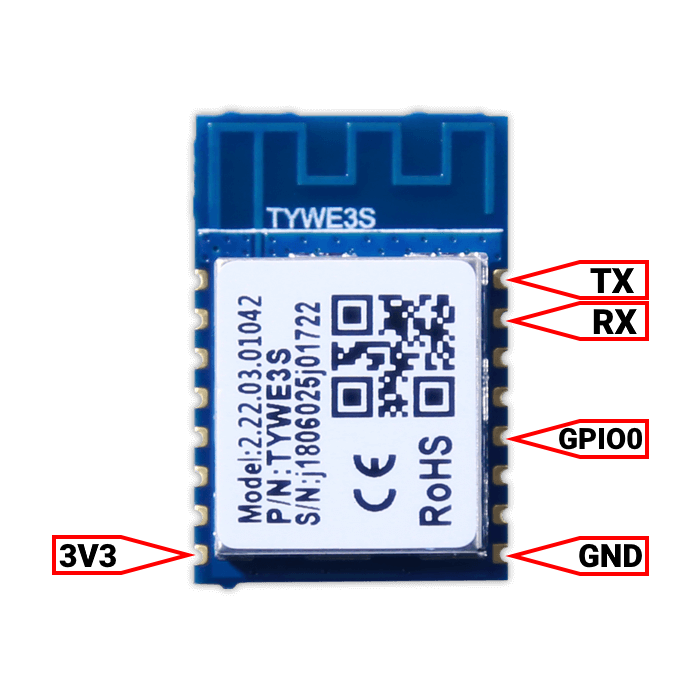 glossy prism
although i started soldering with the cheap iron that comes in this kit: https://www.amazon.com/gp/product/B07S61WT16
hollow lance
spice kraken
<@!869126635243307029> check out this - there's a lot of common pinouts for the...
ha yep found that exact image 10mins ago 🙂
spice kraken
Sorry for the delay, I'm "working".
Top left is reset btw which isn't mentioned there. https://user-images.githubusercontent.com/26872898/39893768-1cddd5f6-54a5-11e8-8d5b-014e61d1eb3f.jpg
 hollow lance
yeah same
glossy prism
RST isn't needed for flashing though
hollow lance
does reset need to be grounded as well? i recall seeing that somehwere, but couldn't find where i'd read it
ah thanks
i saved an image that suggested RST had to be grounded
glossy prism
IO0 needs to be grounded, but not RST
hollow lance
yep
glossy prism
maybe what you saved was for flashing a device with a secondary tuyaMCU which does require nRST on the secondary mcu to be grounded in order to flash the ESP
hollow lance
possibly
i'd left the images open in firefox on my phone, but had closed whatever guide i'd been reading
so no context
anyway, i'll give it a go when i'm officially off the clock
thanks
@glossy prism what power supply do you use for your TS-100?
hollow lance
i've been trying to use my macbook supply, but it must have some smarts built into it to auto-sense what kind of device it's connected to
the pinecil doesn't like it
glossy prism
NovelLife NL-72W
hollow lance
yeah the voltage (i assume) is all over the place
glossy prism
May🅱️
hollow lance
just needed a firmware update, it seems
 crimson tulip
glossy prism
Zigbee or zwave are solid choices for that sort of thing
crimson tulip
glossy prism
Zigbee or zwave are solid choices for that sort of thing
Hi
hollow lance
👏
 split ledge
iam searching for these light bulbs that change color temperature if they get dimmed. somebody know how they are called?
zealous dune
afaik there's dimming = adjusting brightness of the light and then there's color temperature = changing light "warmth"
winged knoll
Philips Warmglow is what you're looking for
split ledge
winged knoll
Philips Warmglow is what you're looking for
are there any other manufacturer that produce those? the warmglows only have a range of 2200k-2700k
2200k to 4000k is what I am looking for
glossy prism
i don't think those exist unfortunately
stoic cedar
I'm running an Odroid C2 with HassOS. I'm trying to get a wlan stick recognized by the system.. it shows up via lsusb, but there's no wlan0 interface anywhere, and I don't see any means to activate it (along with eth0, not instead)? Can anyone help?
stoic cedar
Turns out it just doesn't like that specific stick (which is working fine on a raspberry)
 tender aurora
i'm looking for a light that i can use to simulate the sun.. so that it "rises" and "sets" with the same color and tone..
it's for a hen house
i know i can do this with LED strips.. but i was more looking for a light bulb solution
maybe lifx?
winged knoll
Any smart bulb and Adaptive Lighting
stoic cedar
is anyone aware of any cheapish rgb wifi strip controllers on aliexpress that actually still use an ESP 8266/8285?
zealous dune
H801
tender aurora
winged knoll
Any smart bulb and _Adaptive Lighting_
do you have any recommendations for smart bulbs? i want wifi
winged knoll
WiFi ... 
tender aurora
i only have wifi at the remote location.. i don't have z-wave or zigbee there
winged knoll
As always, choices do depend on where in the world you live... not that people ever remember that
tender aurora
norway
tender aurora
any thoughts about Lifx?
glossy prism
winged knoll
WiFi ... <:blobnauseated:396521401902694410>
Hey man, tasmota bulbs and a tasmota switch/dimmer in a device group is pure magic
 obsidian ice
Any suggestions for a Zigbee outdoor outlet so I can control holiday decorations? Seems like there’s a lot of WiFi options, but I’d feel weird putting a network device like that outside
winged knoll
As always, choices do depend on where in the world you live... not that people ever remember that
obsidian ice
Sorry, I’m in the US
 karmic lagoon
I should be okay going with a 32gb SD card for HA and a few add-ons, right?
I'm running it on a pi 4
gloomy spoke
Based on the size? Yes
karmic lagoon
Awesome
tender aurora
Anyone used lifx?
civic kraken
just keep backups @karmic lagoon in case the SD card decides to die (it will)
karmic lagoon
civic kraken
just keep backups <@!265873441280884736> in case the SD card decides to die (it ...
I mean, why would it die? Because I'm using a Pi? Storage too low?
civic kraken
SD cards don't like constant writing which is what HA does
karmic lagoon
Ah
Think I could use an SSD? I've got a USB adapter for one
@civic kraken
Or will a pi not boot off that?
civic kraken
I think SSD on a Pi is relatively common. I'm sure there are people here who can give advice on that. There's also ways to limit the burden on the SD card, but it's definitely something to keep in mind and backups are a crucial part in it
karmic lagoon
Hmm... at this point it almost sounds better to build a PC
Meh. I'll do this for now
civic kraken
Nuc is what I went with to avoid most of the issues. Similar price (used) but x86 is still quite nice and SSD support doesn't cost extra
karmic lagoon
civic kraken
Nuc is what I went with to avoid most of the issues. Similar price (used) but x8...
is there something similar to nuc for people who hate intel?
I guess a more apt question would be is there a pi 400 minus the keyboard
er... wait. That'd probably have the same issue
 stable scaffold
Can I ask questions about setting up my NodeMCU in ESPhomeFlasher here or would that go better somewhere else? Thanks in advance
I think I figured it out. Problem was serial port wasn't showing in software. I downloaded a driver and now it is listed
spice kraken
@zealous dune fixed my Wheatstone loadcell bridge, you will be pleased to hear lol, just thought I'd share that it was because these ones appear to be wired up differently, and the green (black in other models) wire was the excitation and voltage instead of red.. simple solve, lots of time wasted, but happy camper.
valid frigate
obsidian ice
Sorry, I’m in the US
I have a outdoor socket on my wall (standard weather proof one) but its wired in via normal cable in house to traditional socket (I made it this way so I could unplug it when I go on holiday) but since I started on this smart home experience I now have a ZigBee plug before it turning both the outside std weatherproofed sockets into smart ones
drifting grove
Hey. I have a Pi4 and recently updated to the latest HA version and something is running in the background that is spiking my Pi's CPU temperature. I can't find anything that might be causing this. Ideas?

nothing out of the ordinary that would raise the temp on the CPU

only a reboot brings it back down to normal at around 55C but then something kicks and you can see it hit the 74C unless I trigger a reboot.
 static beacon
Ik searching for an esp32 with a better wifi connection. I have tried allot of them but I come to the conclusion that there is a terrible difference in quality of these boards. Some keep connection very good others are close to a router and disconnect all the time. I have been looking for esp32's with a separate antenna but I can only find esp8266 ones with such an antenna. Does anyone here have experience with good boards. And maybe found an esp32 with external antenna?
 sand marsh
@static beacon - If you have the capability to use it, ESP-7 has external antenna port, but I don't think you can get it as a full development board (i.e you will need a serial programmer and work out how to deliver 3.3v to it)
Sorry noticed you are specifically after esp32
static beacon
Maybe this one
https://a.aliexpress.com/_mPuULMQ
But I'm not sure if an external antenna really is this much better
I have experienced that a wifi antenna on a circuitboard works better when it is free from the mainboard
 mint night
Hi all! I have TKB Home switches, TZ66D and after we got back from vacation I notice that one of them is just blinking it's lights and does not respond to pressing buttons. I think it stopped working with original ZWave integration. So I migrated to ZWaveJS and thought I'd just re-add it and maybe it would fix the issue. However it showed up with ZWaveJS, but something weird happens now. It still does not work when pressed, it still blinks, but if I try to turn it on through Hass - it turns on for a moment and turns off immediately. Not in Hass - the switch itself clicks like it would normally, it turns on the light and then immediately shuts off.
It was not touched by anyone ever since it was initially installed. Any ideas? Is it dead?
sand marsh
Temp spikes
tepid heart
static beacon
Ik searching for an esp32 with a better wifi connection. I have tried allot of t...
High quality, low price https://shop.allnetchina.cn/collections/quinled/products/quinled-esp32?variant=39253005795430
static beacon
And small form factor! Thanks
tepid heart
If you are in the US there is another store (and more info here) https://quinled.info/quinled-esp32/
tender aurora
anyone tested the lifx bulbs?
 little gorge
From what I gather the shelly pro like doesn't have both NO and NC connections for relays?
I'd love to keep standard switching capability that is in no way dependent on the electronics
tepid heart
tender aurora
anyone tested the lifx bulbs?
Yes.
little gorge
Basically I'm looking for sth I can wire up like this
Wait I can't put an image
Well this
 uneven dirge
Hello!
I'm brand new to HA I've ordered an amber kit but since it's not delivery until spring I'd like to start learning now.
I have ordered a compute module 4 that I will have to amber kit now is my question if I can put it on an IO card for so long and be able to run HA on this and then transfer the compute module to Amber when it comes? Like this or simpler
https://se.rs-online.com/web/p/raspberry-pi/2064868/?cm_mmc=SE-PLA-DS3A-_-google-_-PLA_SE_SE_Raspberry_Pi_%26_Arduino_%26_Development_Tools_Whoop-_-(SE:Whoop!)+Raspberry+Pi-_-2064868&matchtype=&pla-338638495366&gclid=Cj0KCQjwqp-LBhDQARIsAO0a6aLppUzgQed5tLBoU7vjaAPeqlCSHsgEFrSOlD0nyuSXMSQ0mOamvqgaAiDaEALw_wcB&gclsrc=aw.ds
frosty rose
I'm needing new motion sensors. i have smartthings hub, what is better zigbee or zwave?
civic kraken
zigbee can be quite cheap with stuff like the xiaomi sensors
frosty rose
cool. thanks i'll take them into consideration 🙂 think its going to be one of those two by the looks of it. what hub are you using?
zealous dune
don't buy sonoffs, you'll regret it
civic kraken
I use a CC2531 module from Sonoff. Works just fine for my small apartment
 trail dawn
@tender aurora I have been using lifx bulbs for about a year, those are very stable and integrate well with homeassistant. Very happy with them.
@tender aurora the integration is local so +1 for avoiding the cloud.
 sick sable
Does a Coral accelerator have a better false positive (for lack of a better word) rate than what Frigate uses by default? I've noticed some false negatives (IE doesn't record a person when one shows up)
I'm not sure which accelerator to get since I don't know what the port is called in my NUC, it used to have some sort of ssd (not the 2.5" style)
tepid heart
tender aurora
happy with them?
HA integration works very well, no issues. The lights themselves are very bright and have good colour and reasonable CRI. The only minor issue I have is that the GU10 globes have pretty weak wifi. One or two (of dozens) sometimes are not found straight after Home Assistant starts. However they are all eventually found within a minute or so. The A60 and BR30 lights don't seem to have this issue.
Don't pay full price you can always find them on sale if you wait a month or two.
snow phoenix
Question,
a P1 reader the "SlimmeLezer" would it be able read the data of my solar panels aswell as its connected to my smart meter?
 echo gate
how should i place my hue motion sensor to get accurate light levels and use this for automations? My lights turn on and off bcuz the lights changes the light level too much
(an i still want to use motion sensor in some way ofc
 grand cedar
What is a good motion detector to use with Home Assistant? Is there a place listing recommended hardware actually?
I am in Japan and currently using a Tradfri gateway with a few lights + a Nature Remo IR blaster that I just did the integration for
The motion detector I can get the easiest way is the Ikea Tradfri motion detector. How hard is it to interface it with Home Assistant for automation?
Would that need a ConBee II + running the deCONZ add-on? If I use the Ikea Tradfri gateway, is it impossible for me to use one its sensors for my own automation?
undone haven
echo gate
how should i place my hue motion sensor to get accurate light levels and use thi...
Can’t you adjust your automation instead of changing the placement? I would place it for motion and adjust my automation accordingly.