#zwave-archived
1 messages · Page 141 of 1
 high spindle
 terse zodiac
high spindle
i have to actually press the wake up button if one exists or w/e right?
terse zodiac
high spindle
i have to actually press the wake up button if one exists or w/e right?
yes
most of the time it's the same button logic to include the device
high spindle
zse40 motion sensor had a little button to press
terse zodiac
excluding door locks, those are special battery devices 😉
high spindle
zcombo smoke alarm i had to pull battery tray out then hold test button
it pulled in all three kwikset locks
terse zodiac
yup those don't need any button pressing 😛
high spindle
hmm
guess i should have a list of what each node is...
i have one that is still going.. all others completed
terse zodiac
i label them in zwavejs2mqtt
high spindle
i'm not sure which device this could be shit
terse zodiac
example:
 high spindle
it shows the ZZZ sleeping but i dont think i have any other wireless devices...
terse zodiac
just keep going down the steps
terse zodiac
eventually you enable the integration again and then you'll see what's having issues 🙂
high spindle
ye
high spindle
wait why wouldnt i copy over the zwave-js files to z2m?
high spindle
i'll just reinterview any that arent setup right?
terse zodiac
yup
that step is mostly for those who have sensors like 20-30 feet in the air for some reason
lol
terse zodiac
there you go lol
high spindle
i cant get the zse40 multisensor to wake up 😦
terse zodiac
did you ask it nicely?
high spindle
thought so
docs say to push the button once and that should do it..
i even tried removing battery to see if it woke up when it powered back on
easier to just remove and factory reset?
terse zodiac
did the led go blue or orange when you pressed the button?
high spindle
no but i think i turned that off in parameters
terse zodiac
well it's suppose to sleep, did the interview complete?
high spindle
interview shows complete but it's still showing undefined
and no entities are available in hass
and it wont reinterview cuz it wont wake up lol
terse zodiac
try maybe a heal node?
terse zodiac
if you factory reset it should auto remove from zwavejs
but if it doesn't you could do a replace failed node
that way the node # stays
and you don't have to rejig anything in HA
high spindle
as long as i rename entities the same i dont think it matters
high spindle
i might have to reach out to zooz.. this damn thing wont include
terse zodiac
pull the battery?
high spindle
i even scanned the s2 qr code
took battery out and in
got it to blink blue
still nothing
high spindle
it's already gone
i factory reset it (or at least i clicked the button 10x fast)
then removed failed node
terse zodiac
sometimes zwave gear is weird and still wants to be excluded
 somber shuttle
Damn. Took apart my switches. I don't think I have a neutral available
Bad part is I destroyed one of my switches (screws wouldn't come off
high spindle
it finally added but added with unknown shit.. so i reinterviewed and we're golden
what a finnicky damn sensor
bummer with no neutral
none of the light switches i've removed from my house even had ground hooked up
1970s texas home
somber shuttle
I can't figure out how to post to imgur from mobile.
 spring gazelle
Lol. The whole point of my switching guide was to avoid rebuilding the cache.
somber shuttle
https://ibb.co/WPXjrn7 those white wires though.
It feels like they're neutrals but no switch connects to them.
terse zodiac
spring gazelle
Lol. The whole point of my switching guide was to avoid rebuilding the cache.
doesn't that occur on step 4 tho?
spring gazelle
No
terse zodiac
somber shuttle
It feels like they're neutrals but no switch connects to them.
normal switches don't use neutrals, they should just be all bundled together
spring gazelle
terse zodiac
spring gazelle
<https://community.home-assistant.io/t/switching-z-wave-js-addons-with-minimal-d...
right but you have this line:
"If all your nodes are at Complete, congratulations! You can skip the backup modifications and restore steps, and go straight to reconfiguring the integration."
spring gazelle
Doesn't sound like that was the case.
terse zodiac
all his nodes said complete 😛
somber shuttle
terse zodiac
normal switches don't use neutrals, they should just be all bundled together
Right. These white wires are. Next step is to figure out what these unlabeled black wires are: https://ibb.co/qBft9BC
spring gazelle
Well, when you wake up all the battery devices manually, yeah. The point of the guide is to not require that.
terse zodiac
somber shuttle
Right. These white wires are. Next step is to figure out what these unlabeled bl...
one is load, one is HOT, load will be in the romex going up to the light
hot will be the in the romex with the ground and neutral (white) this goes to the breaker panel
usually all your hots are tied together as well
also I hate wirenuts 😛
your LOAD and LINE/HOT should be labeled on the switch you tore apart
somber shuttle
terse zodiac
your LOAD and LINE/HOT should be labeled on the switch you tore apart
They're not
terse zodiac
fun
you'll need to trace the wires
usually the romex FROM the breaker panel comes in from the bottom of the blue box
ymmv due to local electrical code
somber shuttle
terse zodiac
_usually_ the romex FROM the breaker panel comes in from the bottom of the blue ...
Yeah there are three big cables all of which come from the top
terse zodiac
find the one with a white, copper, and black
it'll likely be all bundled together with most of the others in that mess lol
also this is bad mojo here
 high spindle
maybe a good idea to watch a couple videos if you arent used to working with this kinda stuff
terse zodiac
ya
high spindle
buy some wagos and a no contact tester while you're at it
terse zodiac
there's tons of vids on youtube to review too
somber shuttle
Yeah videos make it seem easier than it is.
high spindle
it really is easy tho.. but videos can point out what not to do and why
that's how a lot of mine have looked lol
terse zodiac
i'm not against it, just I've not seen it done that way
well on a single switch i should say
somber shuttle
Guess I'm gonna end up yoloing this
high spindle
 grim raptor
yolo and electrical dont go together. or maybe they go together too well....
my brother calls those contactless testers widow makers
terse zodiac
i use them in conjunction with flipping the switch 😛
grim raptor
heh, that'll cover half the wires
terse zodiac
i little 120 never killed too many people....
grim raptor
i remember getting briefly shocked once as a little kid, was dark and i was plugging in a lamp and i think my fingers were on the prongs - man i saw a flash of white
terse zodiac
yikes, I accidentally shorted a transformer on my dialup modem (still plugged into the phone line) with my finger before... got a good tingle outta that
grim raptor
thats what 48v?
 civic bone
240V is quite enough to spot weld with, I know, because I once did by accident 😄
terse zodiac
grim raptor
to make a phone ring? or did you mean the power adapter for the modem
dunno, was a xformer on the internal modem board
grim raptor
ah ok
terse zodiac
gave me a good poking
grim raptor
i bet
terse zodiac
when I open my breaker panel, I make sure to wear gloves and long sleeve shirt 😛
the PPE rating is only level 0 🤷♂️
somber shuttle
Alright so I'm assuming the hot is the one next to the LED hooked up in series and the negative is the other one.
terse zodiac
there is no negative
somber shuttle
OK. Line.
terse zodiac
it's honestly really hard to tell from your images 😦
somber shuttle
Now I think it's opposite :(. Another switch here has a red wire which I think is hot. But that doesn't make sense as what I think is the hot on the switch I'm trying to replace connects to what I think is the load on this other one.
somber shuttle
Hmm? This switch has 2 wires + exposed ground.
terse zodiac
ground is always bare copper
somber shuttle
Or green
terse zodiac
so if your wire starts melting it shorts out and pops your breaker
somber shuttle
On the zen77 manual, this setup looks like the second one.
somber shuttle
alright, the switch is getting no power
posibility one: neutral not hooked up properly. possibility two: lne and leader are swapped
these instructions confuse me. three switches for a single light?
high spindle
somber shuttle
these instructions confuse me. three switches for a single light?
you mean for a 4 way config with smart bulbs?
somber shuttle
Yeah
high spindle
you wouldnt even use traveler wires if you have all smart switches
you'd just use an automation with smart bulb mode on each switch
 azure marlin
is there an easy way to set the same parameters on multiple devices?
spring gazelle
Use a service call and pass multiple devices.
If you need multicast, I think the multicast_set_value service will do it. https://www.home-assistant.io/integrations/zwave_js/#services
 neon ermine
Hey guys, hoping you can help here. I'm trying to upgrade from the old deprecated zwave to zwave js. I'm running on hassio on a raspberry pi. I've installed the z wave js add-on, but when I go to install the integration, it just says failed to connect.
I'm not ENTIRELY sure if I have the right USB selected, mine doesn't show up in the dropdown, but I'm hoping there's a way around that...
terse zodiac
type it in
neon ermine
I don't know how to find the correct port
terse zodiac
 -> System -> Hardware ?
 digital jackal
Just a newbie Q. what real world advantages does zwave have over zigbee? I ahve HAos running now and I have a handful of sensors but just wondering before I get serious if other networks like zwave are better?
terse zodiac
zwave devices that use batteries usually last longer, have further range due to the lower frequency
digital jackal
ah ok...so a use case might be there....I have some uses like a letter box zwave might be best on then.
terse zodiac
depends
digital jackal
I need to test
I need to layout my network so positioning the kit now needs thought
terse zodiac
zwave devices form a mesh so positioning usually isn't a big problem
as long as you're house isn't a bunker
digital jackal
yes but I have a few long ie 10m I'd link to cover if I can
neon ermine
Okay, so I'm still getting failed to connect on trying to install the integration
terse zodiac
neon ermine
Okay, so I'm still getting failed to connect on trying to install the integratio...
what's the actual error
digital jackal
neon ermine
Okay, so I'm still getting failed to connect on trying to install the integratio...
you cant find the device?
neon ermine
@terse zodiac literally says "Failed to connect" when I try to add the zwave js integration with the supervisor add-on checkbox checked
terse zodiac
what's in the ws URL box?
neon ermine
@digital jackal I'm not entirely sure which device to use. It's an aotec gen5, I know there's an issue with that listed in the integration, so that MIGHT be the issue, but I only have two usb devices attached to the pi, and I've tried both of them
@terse zodiac it doesn't ask for one when you use the supervisor addon
terse zodiac
it does
neon ermine
Oh crap, it worked now. magic of trying to get help
azure marlin
I made the mistake of enabling mqtt in z2mqtt and now have an MQTT version of every device. Is there any easy way to remove all of those?
 lyric sapphire
azure marlin
I made the mistake of enabling mqtt in z2mqtt and now have an MQTT version of ev...
lyric sapphire
azure marlin
I made the mistake of enabling mqtt in z2mqtt and now have an MQTT version of ev...
try turning off MQTT discovery in the zwavejs2mqtt settings
azure marlin
lyric sapphire
try turning off MQTT discovery in the zwavejs2mqtt settings
No luck unfortunately. Guess I'm stuck manually deleting all 70+ devices
lyric sapphire
use mqtt explorer to look for the discovery messages
delete the topic for those devices
then restart home assistant
@azure marlin
azure marlin
lyric sapphire
use mqtt explorer to look for the discovery messages
Thank you!
azure marlin
any thoughts on if we'll see 800 series controllers anytime soon?
spring gazelle
 candid summit
Nortek combo HUSBZB-1 stick zwave not recognized
azure marlin
spring gazelle
<https://atrim.co/zwave/stick-hub/>
interesting had no idea they were out already. Wonder when zooz and aeotec will have their sticks
spring gazelle
Doesn't actually appear to be for sale quite yet.
somber shuttle
so for switches, is the 120V wire supposed to go on Line or Load?
booklet implies Line
terse zodiac
somber shuttle
so for switches, is the 120V wire supposed to go on Line or Load?
you'd have to be more specific, all the lines are 120v except ground, if you mean the line coming FROM the breaker panel, yes that would be your LINE/HOT
your LOAD will be the black wire that goes to the light fixture
somber shuttle
terse zodiac
your LOAD will be the black wire that goes to the light fixture
so I wired it right. cool. only problem is this switch is not powering on
which means it's either defective on the neutral wire is not hooked up right.
 storm wren
Smart switches takes power feom the neutral, so yes, your neutral might be either wired up badly, or not be a neutral
Make sure that you identified correctly the neutral from the ground wire
 naive cypress
somber shuttle
so for switches, is the 120V wire supposed to go on Line or Load?
naive cypress
somber shuttle
so for switches, is the 120V wire supposed to go on Line or Load?
incoming power goes to Line, device that is to be switched goes on Load Neutral must absolutely be connected to the switch or it wont work. The very first Zwave switch i installed was a dud, and instantly popped my circuit breaker the moment i turned the breaker back on. Replacement switch worked fine for like 2 years before a thunderstorm killed it.
azure marlin
i've got a zooz 32 stuck trying to update firmware now for the past 48 hours. Tried restarting home assistant, zwavejs2mqtt and the switch without any luck. Any other ideas?
terse zodiac
azure marlin
i've got a zooz 32 stuck trying to update firmware now for the past 48 hours. T...
logs?
azure marlin
terse zodiac
logs?
oddly enough nothing in there about the firmware update for the node and if I try and reinitiate says node has already started a firmware update
 mossy spindle
Hello All, I had zwave js working with HA core and zwavejs2mqtt running for a good while. But decided to move over to an rpi 4 and HAOS. In doing such I read that the zwave stick itself contains the network. So I thought alright back up and restore core on the new rpi, plug the stick in, install zwave js add on and move on. Seems like more complicated than that.. Anyone got time to assist?
storm wren
You should at least mention what's the issue
high spindle
i moved from a vm to haos on a pi and it automagically found my usb stick and it justworkedTM
 bold frigate
I have a number of Zwave switches & devices and would like to migrate from an Aeotec Gen5 to a Zooz S2 700 controller. I am using zwavejs2mqtt in HA, supervised. I would like to back up the cache & device files on the Aeotec and move them onto the Zooz stick so I don't have to re-pair everything. I was able to export the nodes.json file without any problem. However, when I try to backup the Aeotec's non-volatile memory I get the following error: NVM Management Backup error while calling api backupNVMraw: Could not turn off the zwave radio before creating the NVM backup Error: Zwave0203.. How do I turn off the radio while keeping all of the stick's contents intact and keeping the stick powered up? Not sure how to proceed & all assistance is appreciated greatly. Thanks!
bold frigate
Had to update the Aeotec stick to newer firmware. Then it worked.
azure marlin
bold frigate
I have a number of Zwave switches & devices and would like to migrate from an Ae...
Just curious, why did you want to do this? Were you having issues with the network? 700 series controllers seem to have quite a few issues
 rose ocean
I just got a Zooz Z-Wave 7 adapter and 6 smoke alarms, 5 of the smoke alarms added perfectly with no hiccups but the last one isn't being picked up. Where'd be the best place to start looking? I see it under Provisioned Devices with an X next to it. Using z-wave.js
azure marlin
rose ocean
I just got a Zooz Z-Wave 7 adapter and 6 smoke alarms, 5 of the smoke alarms add...
try excluding and reinclude?
rose ocean
azure marlin
try excluding and reinclude?
I unprovisioned, reinserted batteries in the smoke detector, then readded it to Z-Wave
Still not detected
It detected the first time I tried pairing it but was stuck reading 'Node 7' for like 20 minutes before I gave up and removed it.
I don't see anything logged by z-wave.js
The manual for the smoke detector says pulling the batteries for 5s should make it try to pair again
"Do not use the silence feature in emergency situations. It will not extinguish a fire."
Heh
lyric sapphire
what firmware is the stick on
rose ocean
7.17.2
rose ocean
Got it to connect. I let it sit for around 10 minutes after re-provisioning and it showed up.
 thorn lichen
Is there a way to run an automation based on timeout acks from zwavejs? I'm having an issue where every few days zwave devices stop responding and I accumulate a lot of timed out acks that I can view from the controller statistics. If I restart the zwavejs server, everything works again.
I'd like to create an automation to notify me when timeouts start accumulating so I can 1) track better when/how often it's happening and 2) can log in and restart the zwavejs server.
Not sure if there is an event I can listen to or a way to expose sensor(s) with the controller statistics
 compact anvil
Not sure if it is exposed in HA, but each node has a "statistics" event
terse zodiac
afaik it's not passed on to HA just yet
thorn lichen
terse zodiac
afaik it's not passed on to HA just yet
"just yet" is promising 🙂
I'll check out what events are there and see if there's anything I can use.
terse zodiac
i know the controller stats get consumed, but not sure if it's an event you can listen to
 thorn lichen
Yeah, that's what I'm looking into now, how those statistics are being pulled. Hoping I can consume it in a script or something so I can monitor that. Probably won't burn too many cycles on it, really just a bandaid until I can figure out why the timeouts are occurring and fix the actual problem
Easiest thing, think I'm going to set up a new SD card. This one's been in for quite a while, might be starting to go out
terse zodiac
SDcard issues won't cause a timeout ACK
high spindle
No ssd for pi to boot to?
terse zodiac
high spindle
No ssd for pi to boot to?
netboot ftw 😛
high spindle
Vm on good hardware is best imo
terse zodiac
my pi runs all my USB radios
it's net booting, less power load on the USB port/power supply
high spindle
I ordered a yellow that I’ll be moving to but eventually I’ll use a nuc I think
spring gazelle
thorn lichen
Yeah, that's what I'm looking into now, how those statistics are being pulled. H...
I would expect the zwave_js.event event would expose them. https://www.home-assistant.io/integrations/zwave_js/#zwave_jsevent
terse zodiac
high spindle
I ordered a yellow that I’ll be moving to but eventually I’ll use a nuc I think
the yellow should be good enough for quite a bit of HA stuff, unlikely you'll need to move to a NUC, or if you wanted, use the NUC for other docker containers 😉
that's all my Pi does is run docker containers
 atomic stump
Hello, I'm using a Z-wave plus Aeotec Z-Stick 7 to control serveral Aeotec ZW100 sensors. Firmware: 1.15
Since the latest Home Assistant update all sensors are reporting the batteries as being 100% full. I know this to be not correct. What can I do to rectify this.
terse zodiac
100% full what?
atomic stump
Batteries, have edited original. Cheers
terse zodiac
refresh the entity
service: zwave_js.refresh_value
full example:
service: zwave_js.refresh_value
data:
  entity_id: sensor.chime_siren_battery_level
 late adder
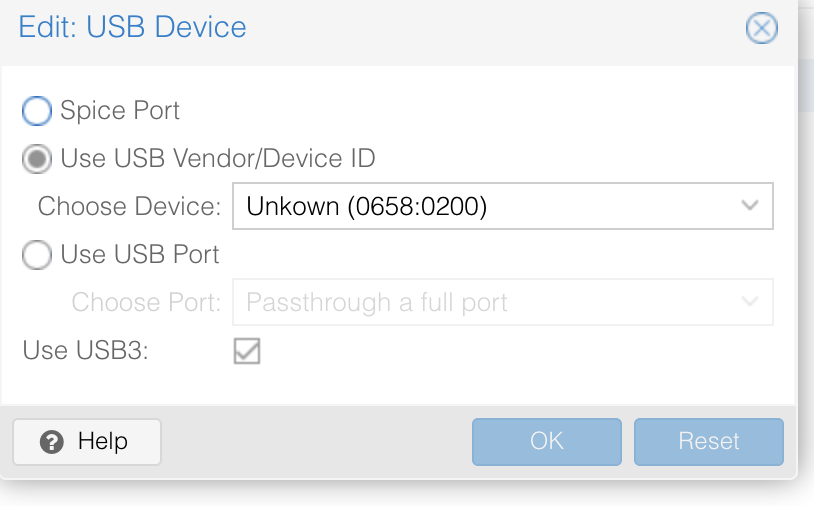
What was the method to avoid the soft reset bug with proxmox and zwavejs2mqtt?
I have this in my docker compose file devices: - '/dev/serial/by-id/usb-0658_0200-if00:/dev/ttyACM0'
spring gazelle
The hypervisor would need to be configured to dynamically re-assign the device to the VM
late adder
this is what i have in proxmox https://quad.pe/e/rUudnhG7Cc.png
terse zodiac
i don't think you'll ever be able to with proxmox
terse zodiac
that keeps the device name, but I think the hypervisor won't re-associate the USB device to the VM/container without user intervention
atomic stump
terse zodiac
`service: zwave_js.refresh_value`
Thank you. Have tired on all four sensors and they're still at 100%. Battery sensors from my radiator TRV's are working fine so I think it's just Aeotec.
spring gazelle
Did you wake up the devices after issuing the command?
atomic stump
Yes
spring gazelle
How'd you wake them?
atomic stump
Pressed the wake button at the back of them. I removed a battery out of one of them and it did reduce to 50% but as I already said I know that all sensors batteries are not 100% full.
 viscid birch
So weird, restored from a backup and am on 2022.7.2. My zwave door lock is showing up as unknown in HA now, however, the codes I put in Keymaster (updated to the latest update) are working on the lock, however, I can't unlock/lock the lock in HA. Anyone have any idea next steps to fix this?
zwave js
terse zodiac
So the "official" addon then?
viscid birch
Yes.
It was working, when I restored from a back up I had to reinstall zwave js in supervisor but it was already in integrations. I installed zwave js in again and lined it up with my usb stick and it enabled what I had paired already.
terse zodiac
restart the addon
viscid birch
I've restarted core a few times since then, does that restart the addon as well or no?
civic bone
No
viscid birch
Ok, restarting now.
🤞
damn, still unknown.
trying to stop and then start it back up
still unknown 😦
terse zodiac
sounds like maybe your S0 or S2 keys got lost
viscid birch
Highest Security says S0 Legacy
terse zodiac
yes, but in your addon config is the S0 key present?
viscid birch
There is an S2 Access Control Key, S2 Authentication Key and S2 Unauthentication Key in config
oooh and S0 Legacy Key
terse zodiac
all are populated?
viscid birch
Yup
I wonder since the other zwave sensors aren't "secure" they are working because of that and I just need to reinterview the lock?
terse zodiac
you can try to re-interview the lock
viscid birch
trying that now
terse zodiac
50/50 chance of it working
viscid birch
I think maybe the S0 key didn't get transfered over.
viscid birch
I wonder if I can restore it some how from a back up?
viscid birch
huh
terse zodiac
I don't use HAOS like you do so I haven't a clue if doing a restore will help
viscid birch
ahh ok
 honest solar
If your backup included the addon, it should be in there and you can restore it
If you're resourceful, you can also just untar the backup and find it yourself without restoring
bold frigate
@azure marlin Zwave has been very unreliable for me, especially in the past 2-3 weeks. Had to completely re-provision my network twice (never happened before in 5+ years). I started wondering if the stick was fried somehow. Did multiple factory resets on the stick. Got the Zooz from Amazon & figured I could return if it proves unhelpful/awkward. Not sure if I'm even going to provision it, but I was trying to get things ready & I didn't want to re-pair the world yet again.
viscid birch
Interesting. I was able to find an article to retrieve my network key from a back up. I changed it to that in zwave add on. Now all my zwave stuff is unavailable even my lock.
terse zodiac
bold frigate
<@808128046837661747> Zwave has been very unreliable for me, especially in the ...
is your stick connected via a USB extension cable?
terse zodiac
viscid birch
Interesting. I was able to find an article to retrieve my network key from a bac...
sounds like the addon isn't running anymore
viscid birch
It is, I switched the key back and theya re back to normal
but lock is still unknown
terse zodiac
make sure you're running the latest addon
you may need to re-pair the lock, and since it's using S0 that means taking it off the door and bringing the inside bits near the zwave stick
(usually)
bold frigate
@terse zodiac It is not connected with an extension cable and never has been. Do they increase reliability? I can add one this evening if it will help.
honest solar
Yes
terse zodiac
yes, you'll want it to get the stick away from the USB ports and outside any kind of server rack
metal is bad for RF
noisy USB ports are bad for RF as well
civic bone
(and USB 3.0 ports are murder)
bold frigate
I have some 6' extension cables at home so I will move the stick away from the PC. Those darned Faraday cages of doom.
terse zodiac
6ft or 6 inch?
bold frigate
6 foot
bold frigate
I may have shorter ones, but not 6"
Too much signal degradation in the cable, I assume.
terse zodiac
voltage drop over distance
bold frigate
Got it. Thanks for the tip!
bold frigate
Easy enough to experiment with.
terse zodiac
i have mine on a USB hub that has about 3-4" of cable between the usb ports and my hub/sticks
works great
bold frigate
👍
bold frigate
Found a 3' USB extension cord & threw it into the mix. 🤞
 zenith turtle
Anyone else attempt to pair the new Zooz Zen20 power strip? Mine paired on the second attempt but the lights are still blinking as if the power strip were still in pairing mode.
zenith turtle
Fixed it myself. Just power cycled the power strip at the physical switch
That said, I see the setup is still an absolute cluster fuck.
Very difficult to differentiate between the various W, V, A, and kWh entities.
 lime delta
Anyone successfully use the new firmware update feature on ZwaveJS installs? It is not working for me and it seems the file I pick to upload isn't being transferred to the Pi. No traffic on my ethernet after hitting update. It also just spins away where the progress bar should be.
lyric sapphire
are you updating a battery powered device?
lime delta
Yes
Zooz moton sensor. I have tried setting it off before and after triggering an update
lyric sapphire
you have to wake it up
the manual should say how to do it
triggering it is different from wake up
lime delta
lyric sapphire
triggering it is different from wake up
Was just about to ask that.
Firmware in route. Thank you
 still wing
This is more of a placement/theory question - I have a 700 series zooz switch that I intended to replace a (i believe) 500 series Jasco switch, but I got that Jasco to start working. So now I would like to optimally replace an older switch somewhere else in the house.
Would it be better to go to the furthest 500-series switch and replace that? Or would it be better to put it closer to the ZST-10 in my office? Possibly somewhere in between (like in a cluster in the garage)?
I don't have a lot of dead zones or anything - everything can connect and works as is
compact anvil
You can try and use the health check tool in zwavejs2mqtt. Test each node and if one has higher latency, or bad SNR margin it might be worth putting a repeater between it and the controller.
terse zodiac
My Jasco devices, before they failed completely, would stop working then suddenly start working again, then a bit later blow up
be prepared to replace it
somber shuttle
There are 700 series devices?
high spindle
I’m almost all 700 s2 devices
 sturdy juniper
Anyone know if the Zooz 700 switch
https://www.amazon.com/Network-Control-Controller-ZEN34-Required/dp/B08TMWLY74/ref=sr_1_3?crid=3HQNKIGHKGH05&keywords=zwave+button&qid=1657646705&sprefix=z+wave+button%2Caps%2C129&sr=8-3
works with the aeotec z-stick?
"The ZEN34 is supported by: SmartThings (with a custom handler, instructions included with the product), Hubitat, Home Assistant, and HomeSeer. Please do NOT buy this device if your hub isn't listed here, it will not be recognized correctly by your system."
spring gazelle
It would be compatible with any USB stick
high spindle
That’s the beauty of using home assistant and zwave js
No being tied to hubs and shit
sturdy juniper
sweet, thanks - first time messing with zwave and didn't want to deal with returns
spring gazelle
depending on your version of the Z-Stick, you may or may not be able to use Smart Start for inclusion. Otherwise, it works. The hub comment refers to functionality provided to the application.
sturdy juniper
gotcha
yeah it's the Aeotec Z-Stick Gen5 Plus
spring gazelle
That version is the latest 500, so it's good.
high spindle
Zooz 700 sticks are on sale on Amazon for prime day btw
sturdy juniper
is it as good as the aeotec? I can cancel that order and swap it if so
high spindle
I think I’ve read here that the aeotec has a slightly better antenna design but both use the same chipset
terse zodiac
the 700 series sticks should be able to support ZwaveLR once it's ready too
spring gazelle
There have also been reports that the Z-Stick 7 has worse range than the others, despite the supposedly better antenna design.
YMMV
high spindle
Ya but aren’t those reports from dummies like me that don’t understand much about zwave and it’s usually a config issue or lack of decent network?
somber shuttle
Epic fail. So the reason my switch wouldn’t turn on is because my neutral wire was hooked up to traveler on the switch
terse zodiac
so you connected the neutral wire to the traveler spot on the switch?
still wing
sturdy juniper
is it as good as the aeotec? I can cancel that order and swap it if so
Once I updated the firmware to my ZST 10 (that 700 series by zooz), it's been really solid. If I had to choose again, I'd stick with Zooz. In fact, most of their product line has been impressive and the price is perfect - I think I spent $25 on the last switch and those Jasco go for 50-60.
high spindle
Their sales are pretty significant drops in price from standard
somber shuttle
terse zodiac
so you connected the neutral wire to the traveler spot on the switch?
Yep. Now that I switched it, works.
sturdy juniper
still wing
Once I updated the firmware to my ZST 10 (that 700 series by zooz), it's been re...
I just bought 5 jasco dimmers on the Amazon sale - am I going to regret not getting zooz instead?
high spindle
i was told to run from ge/jasco and lots of people seem to agree here + on the forums
spring gazelle
I haven't had any issues with mine.
high spindle
you just missed a huge zooz sale for memorial day.. not sure how often they slash prices down that far
i think black friday was last time i saw them have huge discounts
spring gazelle
Pretty sure they have the same discounts every holiday sale
high spindle
ya just saying they arent that often
sturdy juniper
One thing I specifically want is to be able to set dim light at night, full bright during day - does either switch do that better?
spring gazelle
For a manual switch toggle?
sturdy juniper
Yeah
high spindle
you'll most likely be doing that with an automation with hass but it depends on if you use smart bulbs
spring gazelle
My Zooz has min/max brightness. Doubt GE/Jasco do, you'd have to check the config params.
GE/Jasco are pretty light on the configuration options. Zooz and Inovelli have a lot in comparison.
sturdy juniper
Grr going to want to cancel that order aren't I lol
high spindle
did you order dimmer switches?
i decided to go non-dimmer switches with smart bulbs so i get the best of both worlds
spring gazelle
Check the config options
This GE has brightness settings. https://devices.zwave-js.io/?jumpTo=0x0063:0x4944:0x3235:0.0
sturdy juniper
high spindle
i decided to go non-dimmer switches with smart bulbs so i get the best of both w...
Yeah dimmers
sturdy juniper
spring gazelle
This GE has brightness settings. <https://devices.zwave-js.io/?jumpTo=0x0063:0x4...
Perfect, I see a default brightness for manual mode
Thanks!
spring gazelle
Yeah. That was for the first GE Z-Wave switch I saw on Amazon
somber shuttle
terse zodiac
most of the time that'd blow up the switch
uhhh wow.
if a switch blows up, how would I know?
terse zodiac
the magic smoke would be released
 sweet herald
Guys for the zwavejs integration, I ran a heal network on some of my aeotec devices to make sure they have the best path back to the controller (as some are not taking firmware updates due to it timing out). The heals worked, but I was very surprised to see my main pc which was playing youtube videos in the living room (a hefty 16core 5950x pc), start to freeze/stutter. Its on a wired connection back to the main house router, which is also how HA connects back to the main router. Any ideas how a zwave heal can cause such a 'storm' on the ethernet network? I thought zwave heal / storm wouldn't affect wired ethernet devices.
terse zodiac
zwave doesn't do anything to ethernet
still wing
sturdy juniper
I just bought 5 jasco dimmers on the Amazon sale - am I going to regret not gett...
I've owned jasco switches for years and they have been very reliable. But Zooz is giving then a run for their money as inexpensive as they are.
I'd definitely go to www the smartest house.com to see if they have a better deal than what you have on Amazon
somber shuttle
terse zodiac
zwave doesn't do anything to ethernet
hrm haven't seen that.
terse zodiac
somber shuttle
hrm haven't seen that.
you should be fine then
somber shuttle
so this switch is on firmware 10.10
sweet herald
I am initiating the heal from the same PC, unless its the home assistant tab, while the heal is running, somehow receiving tons of traffic? Very strange for sure. Let me try a heal from my phone and see if the pc freezes. If not I'll check the chrome network tab on the HA window to see whats happening at that moment while a heal is ongoing.
somber shuttle
website says 10.20 is available as OTA. anyone know what that means?
terse zodiac
you don't need to update unless you're looking for a feature they've added or some kind of bug fix
terse zodiac
sweet herald
I am initiating the heal from the same PC, unless its the home assistant tab, wh...
if you have the zwavejs logs tab open chrome's gonna eat RAM like candy
sweet herald
I have a 10 aeotec multisensor zwave devices. Some are showing firmware 1.15, some 1.14. I'm trying to update the older firmwares to the newer version to fix an issue where some sensor readings are crazy from time to time. Many of the firmware updates are very slow, probably due to the distance, but they are progressing. The firmware update is reporting a timeout though. Is this a zwavejs enforced timeout or coming from the device? I can of course move them closer to the controller if its something I can't get past? Some of the sensors don't show a firmware version at all in the UI, even after re-interviewing. Does anyone know why this might be the case.
sweet herald
You were right, I moved the device closer and the firmware update process completed. After restarting one of the sensors and reinterviewing it, it still shows the old version of the firmware. Does zwavejs re-ask for the firmware version, or is it only on initial discovery of a sensor?
sweet herald
Ah right, I must have done something wrong. I used the .hec firmware update files provided by aeotec, it said firmware update completed, pending restart, but the reinterview still seems to show a version of 1.14, not 1.15 hmm
 deft pumice
I'm running an older Aeotec 5 Zwave Stick. I'm looking to upgrade to the Zooz 700 Series stick. Is there an easy way to migrate, or do I need to rebuild from scratch?
terse zodiac
if you update it's firmware to 1.02 you can do a NVMbackup and restore
somber shuttle
funny when I wanted to buy my zwave stick, I was debating between the zooz and aeotec stick. the aeotec seemed better but the zooz was cheaper.
high spindle
sweet herald
Ah right, I must have done something wrong. I used the .hec firmware update file...
did you reload the integration?
mine didnt show the new version until i reloaded zwave-js
so since i moved over to z2m i'm a bit confused with best practices now.. do i still edit parameters with the gui of zwave-js or only in mqtt gui?
spring gazelle
whichever you prefer
high spindle
is there anything i should do preemptively such as a nvm backup in case my usb stick dies?
does it help to add names and locations within z2mqtt if they're already set in home assistant devices?
deft pumice
@terse zodiac Upgrading the firmware on Aeotec or the Zooz? @somber shuttle I wanted to go with the Aeotec 7, but it has been in stock on Amazon and wanted to tryout some of the newer Zwave devices and features that are only available with 700 Series of Zwave.
spring gazelle
what features are only available with 700?
somber shuttle
deft pumice
<@144243879695220736> Upgrading the firmware on Aeotec or the Zooz? <@3591828170...
not upgrade. my first zwave stick. lol.
yeah, $29 vs $60
terse zodiac
deft pumice
<@144243879695220736> Upgrading the firmware on Aeotec or the Zooz? <@3591828170...
firmware on the stick
aeotec
deft pumice
@terse zodiac Thanks. I'll give that a shot. @spring gazelle My understanding was it increases the range, reduce energy by optimizing device communication, at the same time, it had more accurate battery life readings. (Though I'm skeptical), but more importantly, after per-ordering one of the Innovelli 5 button switches that has been significantly delayed, the features that they wanted to release on that device were not possible with Gen5. Where Zooz released a similar switch, but on the 700 series, so it would appear that in order to have more functionality with some of the newer devices, that the 700 series would be required. --- Could be wrong about all of this though.
terse zodiac
700 series devices are backwards compatible with 500
a 700 series sensor/device will talk to a 500 series stick
spring gazelle
Yeah, the controller isn't relevant to all those features.
still wing
When looking at the network graph in zwave2mqtt, does the RSSI score indicate what kind of signal that device is getting? ie does that mean the lowest RSSI is the device I should change? Or does that mean I need to replace one hope before that one?
and is it possible to change a route? I have a lot of bulbs that are acting as repeaters and it seems like if it loses power, that other device has one less route? I would think the bulbs would primarily be an end device
spring gazelle
Wouldn't you want to leave power to smart bulbs, otherwise, if they're off they aren't smart anymore?
terse zodiac
ALL zwave nodes are repeaters, you should never be turning off a smart bulb technically
deft pumice
terse zodiac
a 700 series sensor/device will talk to a 500 series stick
Thank you. I thought it was only that 700 sticks were backwards compatible with 500 devices. Didn't know a 700 device could work with a 500 stick. Are there any known limitations outside of the S2 security?
terse zodiac
500 series support S2
deft pumice
Well - From my understanding, the newer Gen5 Aeotech sticks do, but my older version on the Gen5 does not. Maybe that Firmware fixed that though.
honest solar
it will
spring gazelle
I think the Gen5 supports S2, just not SmartStart. Have you had a problem including with S2?
because it's zwave-js that implements S2
deft pumice
@terse zodiac @honest solar Thanks. Going to work on an update when I get home from work. JS reports Aeotec is on Firmware 1.1 right now. @spring gazelle Just bought a newer Kwikset Zwave Door Lock maybe 2-3 months ago and S2 was not successful.
deft pumice
I went through JS to do the pairing process and failed both times, even when I had the failover to just basic encryption. I believe I ended up telling it just to use the basic encryption during the pairing process and it worked.
I only have Kwikset Zwave Locks. The others are the older gen.
spring gazelle
There's only one model of Kwikset lock that supports S2, AFAIK, the HC 620.
deft pumice
Well - That would make sense then. Thought it had something to do with Zwave+. Thankfully I needed a new lock, and wasn't just purchasing solely for that.
Thanks for letting me know! Headed home.
somber shuttle
hrm so does home assistant support firmware updates or is that a zwavejs2mqtt thing?
spring gazelle
both do
deft pumice
In Zwave-JS, Click the Device > Click Advanced > You'll see the Firmware Update on that popup screen. Though, I've never used it before.


 somber shuttle
oh
I need to update the container I guess
https://i.imgur.com/zMEsOIv.jpg <-- is what mine looks like
 zenith turtle
So I received an interesting response from Zooz support when I mentioned that entity naming for the Zen20, which creates 22-25 entities when added, is all over the place and needs improvement. Their response was Home Assistant sets the naming for the channel entities. We do not have much input as far as how the device displays within the interface, unfortunately. Is this true?
spring gazelle
HA gets the info from Z-Wave JS. Zooz, nor any vendor, has no control over any of that.
Naming is standardized and not specific to any particular device
zenith turtle
Interesting. It's really a challenge in so far as the "default" entity names are quite similar to one another and in no way discernible up front.
As I'm sure you can imagine, a five port power strip with energy monitoring results in 20+ entities all with similar names and none of which correspond to the name printed on the outer shell of the power strip. 🙂
I had to grab a couple laptops and plug them in to the strip so I could correlate HA entities to the specific port being used.
spring gazelle
In your case, probably this issue: https://github.com/zwave-js/node-zwave-js/issues/3183
 red rampart
Hi, I recently had to swap out my "remote" rapsberry and did a restore (on the same lan as my main HA instance) The zwave-JS integration then have the wrong ip to the remote instance and cannot connect. No new integration is popping up. Is there a way to change the IP of the Zwave JS integration? (The remote HA is the same as the previous one without any changes except for the IP)
still wing
I've gone through my devices and wrote down the RSSI values - i have a range of -58 to -89, so I would think I would want to replace that -89 (500 series Jasco) with a zoon 700 series? Would it be better to find something between the hub and the -89 switch?
terse zodiac
zenith turtle
I had to grab a couple laptops and plug them in to the strip so I could correlat...
they're labeled with CH1 or CH2 etc this correlates with the outlets labeled as 1 or 2 (last time I had added it to the network)
terse zodiac
still wing
I've gone through my devices and wrote down the RSSI values - i have a range of ...
the RSSI values are not static, it could also just be that your switch is in a location that's shielded
terse zodiac
red rampart
Hi, I recently had to swap out my "remote" rapsberry and did a restore (on the s...
why on earth would you run two instances of HA on the same network?
 plush scroll
red rampart
Hi, I recently had to swap out my "remote" rapsberry and did a restore (on the s...
plush scroll
red rampart
Hi, I recently had to swap out my "remote" rapsberry and did a restore (on the s...
Just add the integration again without removing it
red rampart
terse zodiac
why on earth would you run two instances of HA on the same network?
Because the barn is too far away from the house to be able to use one zwave network 😉
red rampart
plush scroll
Just add the integration again without removing it
Thanks, seems like it is sorted now, had some issues with heat on the RPi causing the remote instance to hang
spring gazelle
You don't need two HA instances to run two z-wave networks
 surreal swift
Anybody have any idea why I would be able to control z-wave devices via the Z-Wave JS web UI but they don't show up in my devices?
spring gazelle
web UI, as in zwavejs2mqtt?
surreal swift
Yes, sorry. It's zwavejs2mqtt
spring gazelle
did you install the z-wave js integration?
surreal swift
I had it installed. But it was running into issues after the update so I deleted it. If I try to add it now it says "failled to get z-wave js addon info"
I thought zwavejs2mqtt and zwave js couldn't run at the same time
spring gazelle
The add-ons can't run at the same time. There's only one integration.
If you have the official add-on still installed, you should remove it.
surreal swift
I did remove the Z-Wave JS integration
spring gazelle
add-on is not the same as integration
You removed the integration, so no devices.
surreal swift
I don't have the integration. Just the JS to MQTT integration
sorry, addon
the only z-wave addon I have is JS to MQTT
spring gazelle
Then install the integration by following the add-on docs (or the docs linked above)
Do not check the "use supervisor" option
surreal swift
if I don't uncheck that option, it defaults to ws://localhost:3000, which doesn't work. What should be in that line?
*don't check
spring gazelle
Did you read the docs?
surreal swift
I thought I did but I see that I missed a link that gives more instructions. I'll follow that and report back
spring gazelle
surreal swift
That URL was what I was stuck on. It's stuck on the spinning ring so I assume it's installing. I'll give it some time
Thanks for your help. Sometimes I just need someone to tell me "check again"
honest solar
get yourself a rubber duck
surreal swift
honest solar
get yourself a rubber duck
Hey I get that reference!
honest solar
they have all the answers
 turbid knot
is there any easy way to add custom config (device configs) files to zwavejs2mqtt addon ?
terse zodiac
yes
turbid knot
terse zodiac
yes
what am i missing, i dont see any exposed data for the container ?
terse zodiac
then you didn't map a path
    volumes:
      - /home/pi/.zwavejs_cache-700/store:/usr/src/app/store
you need a persistent storage location like that
for my example, custom config goes in /home/pi/.zwavejs_cache-700/store/config/
pi@friday:~/.zwavejs_cache-700/store/config $ ls -l
total 12
-rw-r--r-- 1 root root 9704 Nov  9  2021 lzw30-sn.json
like so
turbid knot
yes, but i cant define this when i use the "addon" can i? when running core and seperate containers this is easy enough.
The addon only allows for a few parameters
terse zodiac
oh sorry missed the 'addon' part
I guess you can try the store tab in the UI
might work
turbid knot
i can access the container and do a curl/wget to the file, so i can fix it that way. Was just hoping for better way 🙂
terse zodiac
part of the freedom you give up when doing addons
turbid knot
yeah, is there anyway to get the sidebar reverse proxy when doing core? one of the selling points i gues
spring gazelle
store UI does work
turbid knot
spring gazelle
store UI does work
doesn´t allow me to upload a file does it, only download and create files ?
spring gazelle
Can do both
Click the yellow folder icon to make directories
click the blue file icon to make files
copy / paste / write text in the right panel
terse zodiac
turbid knot
yeah, is there anyway to get the sidebar reverse proxy when doing core? one of ...
I reverse proxy without HAOS/Supervised just fine 🙂
turbid knot
terse zodiac
I reverse proxy without HAOS/Supervised just fine 🙂
Yeah, i did to with subdomains and traefik, but the sidebar is harder to replicate, so it you dont have to use multiple auth sources
high spindle
turbid knot
Yeah, i did to with subdomains and traefik, but the sidebar is harder to replica...
what do you mean?
i still get the hass sidebar when exposing hass via nginx to a subdomain
turbid knot
high spindle
i still get the hass sidebar when exposing hass via nginx to a subdomain
Was thinking about zwavejs2mqtt panel as sidebar, where it is exposed from the home-assistant entrypoint where auth is then handled from ha
high spindle
you mean expose z2m via nginx instead of just accessing it through hass?
i dont see the point but even if you want to it should be fine with an ACL
turbid knot
@high spindle what do mean with expose it trough hass?
high spindle
turbid knot
<@237771007228641292> what do mean with expose it trough hass?
better if you explain your end goal
turbid knot
hass-os lets you add zjs2m as sidebar, where hass it self does tunneling for you(?). so if you example use nabucasa you can access everything from that endpoint and auth is controlled from hass.
I can sidebar and iframe my self, but that wont do any tunneling for me.
high spindle
do you not have any server equipment at home?
if not then why not just use nginxproxymanager and cloudflare

that is from my subdomain not local with no nabu casa subscription
turbid knot
yeah, i can do that in several ways. Just trying to avoid multiple moving parts, ha is one those thing that i just want to work.
high spindle
all nabu casa subscription does is gives you ddns basically
you can just do that yourself
terse zodiac
high spindle
all nabu casa subscription does is gives you ddns basically
there's some extra perks too
terse zodiac
nah there's that nabuacasa TTS stuff too
high spindle
never looked into it much tbh. the attitude of the dev team and mods here prevent me from suggesting their revenue streams 😉
great overall community though!
terse zodiac
🤷♂️ I've always had good interactions with everyone so I can't say
high spindle
my one on one interactions with >50 people in this very server contradicts that lol
honest solar
turbid knot
Was thinking about zwavejs2mqtt panel as sidebar, where it is exposed from the h...
That is called "Ingress"
and it's a function of the Supervisor, and unrelated to how you access HA in the first place - via Nabu Casa remote, NGINX, or direct connect
turbid knot
Yeah, but i dont see any way to replicate with let’s say traefic as ingress controller
terse zodiac
turbid knot
Yeah, but i dont see any way to replicate with let’s say traefic as ingress cont...
you could, but you're already setup with HAOS
honest solar
you can always create a panel_iframe to point to a website as long as it's accessible
if they're already running HA OS, then Ingress should work fine regardless of the path to HA
turbid knot
Yeah, with iframe I basically have to do my own auth protection
terse zodiac
turbid knot
Yeah, with iframe I basically have to do my own auth protection
I think zwavejs2mqtt can do it's own auth if you want to set that up as well, just some ideas
but i say if it's working for you now, no need to "fix" it
high spindle
if he's already using haos and no server or anything else then why not host nginx on haos
or authelia yea
terse zodiac
I'd use a middleware in traefik to oauth my login if i wanted zwavejs exposed externally
right now it's only exposed on my internal lan via traefik
high spindle
i'm still wondering if cloudflare argo tunnel isnt the way
they have all the IXPs so pretty fast when proxying through their servers
you dont even have to expose ports if you let them man in the middle
terse zodiac
i don't expose ports with traefik either, except 443
high spindle
ya but these days you can let cloudflare MITM and literally not even expose ports
great for CG-NAT too
terse zodiac
ya I could... but since my ISP doesn't block any ports I figured why 😛
 terse zodiac
ya I'm gig symmetrical too 😛
somber shuttle
Unable to update firmware on Z-Wave Plus 700 Series S2 Dimmer Switch: Invalid Firmware Target.
<-- boooooo
spring gazelle
pick the right target?
somber shuttle
I did. Anyway, different issue now
the paddles do not work at all
which means I can't exclude it
i can't do a factory reset either
fixed by killing power to it
POS
 topaz bloom
HA does not find Zooz Z-wave stick
 open estuary
Trying to upgrade some Inovelli switches using Z-Wave JS version: 0.1.64 and I keep getting this error: "Z-Wave error 1501: Failed to start the update: Firmware target #0 is not upgradable! (ZW1501)"
terse zodiac
open estuary
Trying to upgrade some Inovelli switches using Z-Wave JS version: 0.1.64 and I k...
which device is it? LZW30?
high spindle
is it worth buying name brand cr123a batteries for stuff like motion sensors?
terse zodiac
high spindle
is it worth buying name brand cr123a batteries for stuff like motion sensors?
usually when I get batteries for things, I try to find the best deal in bulk quantities, not usually caring about the brand
open estuary
terse zodiac
which device is it? LZW30?
LZW31, LZW31-SN
terse zodiac
open estuary
LZW31, LZW31-SN
0 should be the correct target, try a heal node on one of them first, then a re-interview, then try the firmware upgrade
also if i recall on the -SN models you also update target 1
zenith turtle
So if I have access to a couple of Configuration Parameters for a given device that are missing from the ZwaveJS ConfigDB Browser, how do I go about sharing that information so that these parameters can be added to the config?
compact anvil
As an issue in the node-zwave-js repo, or even better as a PR there
 hearty vigil
so I was browsing the issue tracker a bit... is the general consensus that if we have a flat network graph, it really doesn't matter? assuming my z-wave network is working as intended.
terse zodiac
correct the graph means very little
hearty vigil
all my end devices have neighbors, it's basically just the controller that doesn't show neighbors.
mmk 🙂
spring gazelle
which controller?
sturdy juniper
So I'm a little unimpressed with my first zooz product
I need to dig through their changelog to figure out if there's newer firmware
Then they don't even provide it there, I need to reach out to support with an order number just to get the file
spring gazelle
Better than 90% of z-wave vendors
sturdy juniper
that's pretty pathetic to be honest
spring gazelle
Z-Wave JS's upcoming firmware auto-updates will forego the need to do emails (assuming Zooz is on board, which I think they are). Providing an order number is hardly an inconvenience, IMO.
sturdy juniper
Reaching out to support in the first place is the inconvenience
spring gazelle
Stick to Aeotec, Jasco (now), or Inovelli (can't buy), if you want public downloadable firmware.
sturdy juniper
should just be a download link on the product page, or manual page, or changelog page
storm wren
How do people find firmware updates for their devices? Do k need to look on some specific place? Currently owning some leviton DZ6HD-1BZ and DZ15S bot at version 1.20
spring gazelle
Usually with the manufacturer
Some Leviton version were posted here https://github.com/zwave-js/node-zwave-js/discussions/4087
sturdy juniper
Grabbed Z-Wave JS to MQTT
You add the node within the addon control panel?
or within the integration?
Also re: the earlier conversation
from Zooz:
"We are currently working on a customer portal to allow direct access to firmware files as well as optional notifications regarding firmware updates, and the portal is scheduled to go live next week. "
spring gazelle
You can add nodes however you prefer, z2m let's you pre-fill names and locations, which might get populated in HA w/o restarting.
storm wren
Interesting
spring gazelle
I was assuming Zooz is talking about the z-wave js firmware service
Or maybe they're doing their own thing
sturdy juniper
z-wave js to mqtt
Anything I can do with this node?
Been spinning all day - no idea what it is
https://i.imgur.com/YvXXcC8.png
to my knowledge I only have one zwave device, which I've already added

 fringe trout
having a sudden issue with my FGS 223 Fibaro double switch (attached to my pond pumps). toggling always switched between on/off. while currently it has changed to some reverse mode. seems the direction changes upon toggle. I havent changed anything in the configuration, but do see Param 20 set to 'Toggle switch (device changes status...)'
seems the correct choice, the others are Momentary, or Toggle switch (contact closed - On, contact opened - Off).. nowhere can I find a setting that reverses the direction...
ofc, it could also be that my pumps are seeing the end of days.... but still it would be odd for them to suddenly start acting up like this?
compact anvil
Can you put a light bulb in place of the pump to test?
fringe trout
smart! yes I guess I can. ive got those pumps on an outdoors socket 😉 I'll be back
So, a quick test reveals the light actually turns on/off according to the Switch toggle correctly
fringe trout
fringe trout
smart! yes I guess I can. ive got those pumps on an outdoors socket 😉 I'll be b...
But! I just realized it might be the balancing of the waterlevel causing the reverse flow… hmmm seems not a Zwave issue after all then ;
plush scroll
spring gazelle
Z-Wave JS's upcoming firmware auto-updates will forego the need to do emails (as...
Zooz is also in the process of posting their files online generally
zenith turtle
2022-07-15 09:50:29.788 INFO ZWAVE: Node 26: has returned from the dead - I really need to update my 700 stick firmware...
high spindle
zenith turtle
`2022-07-15 09:50:29.788 INFO ZWAVE: Node 26: has returned from the dead` - I re...
do-it.gif
 onyx cobalt
i am planning to slowly build out my home assistant stuff for my small apartment, but im not sure what i should do re zwave or zigbee. will the "GoControl" hub on amazon work for me? it says it does both zwave and zigbee. or should i just get something else that only does one of those and stay in that eco system?
if it matters, i run my HA via a docker container via a linux server, and my apartment is not so big
civic bone
It's a not awesome controller, older generation on both Zigbee and Z-Wave
Now, pragmatically you probably want to pick one and start with it, and then maybe get into the second one
onyx cobalt
i suppose the key things im looking towards in the future are just some smart switches/plugs, sensors of various kinds and motorized blinds
civic bone
Both are mesh networks, they're built by the mains powered devices
So, building two overlapping meshes is expensive
 cedar shuttle
My system has meshes for both, but only due to smart bulbs not coming in Z-Wave variants, at least from personal experience...
Z-Wave is the primary mesh though, with only enough Zigbee gear to establish a mesh range over the entire home...
high spindle
i've got both here, but my zigbee mesh sucks until i move off my hue hub. really happy with my zooz 700 series stuff for zwave
 olive shell
Trying to transition from ZwaveJS to zwave2mqtt with only partial luck. I've completely removed ZwaveJS (the addon and integration) and done a few restarts. Zwave2mqtt says "Drivers Ready" and it sees my devices, even successfully interviewed one. But I can't get the data back into HA. Re-adding the Zwave integration keeps failing at the URL. Thoughts?
spring gazelle
zwave2mqtt or zwavejs2mqtt?
olive shell
spring gazelle
zwave2mqtt or zwave**js**2mqtt?
zwavejs2mqtt
spring gazelle
how is it installed? is it the correct url? what's the error?
olive shell
spring gazelle
how is it installed? is it the correct url? what's the error?
The add-on is installed with no extra changes. Port 3000 is listed in the settings. When I go to add the ZwaveJS integration (making sure to uncheck the supervisor box), the URL fails.
spring gazelle
you specified the addon url?
the default is localhost, which isn't correct for the add-on
olive shell
Yeah I specified it. I figured it out. Under the addon config I needed to specify the port. The wording is really weird, I had to "show disabled ports" before I could specify the port I wanted to use.
spring gazelle
you don't need to set any ports
zenith turtle
How does one go about restarting the zwave network these days? Short of rebooting my VM, of course.
spring gazelle
restart the software?
zenith turtle
Ended up restarting my VM. Entire zwave mesh disappeared as a result. I knew something screwy was going on...
compact anvil
zenith turtle
How does one go about restarting the zwave network these days? Short of rebootin...
Either restart the addon or pull the stick and put it back
zenith turtle
Welp, whoever said the Zooz firmware would work with the Silabs 700 stick was wrong
zenith turtle
TIL an NVM backup does naughty things to a 700 series setup.
 cosmic island
Double relay switch - is there a way to name S1 and S2 in zwavejs2mqtt or how do you guys document what's on each output?
spring gazelle
zenith turtle
Welp, whoever said the Zooz firmware would work with the Silabs 700 stick was wr...
the silabs and zooz firmware files are bit-identical, i.e. the same file
oh, silabs stick... never heard anyone say the files are compatible. silabs stick uses the other chipset, different file
high spindle
I followed aeotec directions to update my si labs stick
sturdy juniper
Is there a trick to getting the zen34 to use direct association in zwavejs2mqtt?
I thought I had it set up correctly but I just can't get the switch to do anything
https://i.imgur.com/km9XNsC.png
 spring gazelle
any difference if the target endpoint is None?
sturdy juniper
Set up like so
doesn't seem like it
https://i.imgur.com/LD6RE4h.png
 spring gazelle
same security level? e.g. s2 authenticated and s2 authenticated
sturdy juniper
oooh you got me
one is s2 unauth, one is s2 auth
Is there a way to change that on one of the nodes?
spring gazelle
re-include
sturdy juniper
working now
thanks!
high spindle
i'm still confused with direct association and how to play around with it
 queen patrol
anyone running UZB on raspberry Pi here? When i plug it in the pi it does not pop-up under notifications, like it aint recognized by the rpi?
compact anvil
high spindle
i'm still confused with direct association and how to play around with it
That's probably because the whole topic is super confusing
high spindle
i've tried to google and find examples and it's usually not home assistant related and hard to extrapolate
high spindle
i need a bit of help.. i have a zse40 multisensor from zooz which used to be node33. it stopped responding and i didnt even think to try a new battery so instead i removed a failed node (not excluded) with zwave-js then tried to factory reset my zse40 since i cant exclude it anymore
i'm following the instructions online yet keep seeing 2022-07-17T20:08:47.426Z SERIAL » [ACK] (0x06) 2022-07-17T20:08:47.885Z SERIAL « 0x012300a81401211a9f03fa00b53ad3a34c505f16f1804741aaf79204621ecf260 (37 bytes 99500d5f6 2022-07-17T20:08:47.888Z DRIVER Dropping message with invalid payload 2022-07-17T20:08:47.890Z DRIVER « [Node 033] [REQ] [BridgeApplicationCommand] │ type: broadcast │ target node: 255 │ RSSI: -43 dBm └─[Security2CCMessageEncapsulation] [INVALID] error: Duplicate command
that means it is still trying to talk to the controller and isnt actually factory reset, right?
i got it.. it wanted my reset button pushes more firmly and faster https://www.support.getzooz.com/kb/article/71-how-do-i-perform-hard-reset-on-my-zse40-4-in-1-sensor/
 winged stone
Anyone here have experience with a zen32?
spring gazelle
what's the question?
somber shuttle
out of curiousity, has anyone successfully updated their device firmware with HA?
spring gazelle
yes
terse zodiac
try a heal node first, then do the firmware upgrade
somber shuttle
it basically goes to 100% and then tells me it failed
might be some zwavejs2mqtt odditity
terse zodiac
check the driver log
 uncut fog
Hi all. I have home assistant OS installed on a rPi 4 and I’m trying to get zooz switches set up. I am using the officially supported zwave JS addon and integration and have also tried the Zwavejs2Mqtt add on. I have tried both zstick2 and aeotec 700 stick. Both were updated to firmware 7.17.2. When I go to do the inclusion of my new switches the integration just sits and spins. I have factory rest the stick to no avail. This whole setup is brand new. Any help is very appreciated.
Email zooz support and they said the don’t have a HA setup to help with trouble shooting and directed me here. IMO feels like a cop out.
terse zodiac
scan the QR code and enter it
spring gazelle
If you're not using the QR code, you have to physically activate the device to include it.
uncut fog
When I do that it sits in a limbo state I forgot what it’s called.
terse zodiac
make sure your zwave stick is on an USB extension cable so it's away from your USB ports
uncut fog
When you say physical activate it you mean putting the device in pairing mode? I do that by pushing a button on the switch 3 times and it blinks for 30 seconds
spring gazelle
yes
uncut fog
terse zodiac
make sure your zwave stick is on an USB extension cable so it's away from your U...
Oh yea? Ok I’ll try that
uncut fog
spring gazelle
yes
So the HA OS is searching and the switches are searching but no pairing up. I tried to do it manually and HA put it into a state that basically said when the switch comes online it would include it but that never happened
terse zodiac
do the extension
uncut fog
Ok I’ll report back thank you.
somber shuttle
terse zodiac
make sure your zwave stick is on an USB extension cable so it's away from your U...
I assume this only applies to USB3 ports
terse zodiac
all
somber shuttle
why would it be all?
terse zodiac
EMI/EMF
somber shuttle
I know USB3 is a large source of that
terse zodiac
all usb ports are noisy
and next to noisy other bits too usually
the main reason is many put their sticks next to sources of noise inadvertently or behind servers with metal chassis or inside metal server racks, metal and RF are a bad combo
(that's my reasoning for recommending, other than the EMI)
somber shuttle
what about something like this? https://www.amazon.com/Z-Wave-Me-RaZberry2-Plug-Raspberry-frequency/dp/B01M3Q764U
crazy that a GPIO module is more expensive than a USB one
compact anvil
You'll want the 700 series version though
fringe trout
just to be sure: if I want to move the zwave-js add-on from a dedicated Pi Ha instance to my new mini pc, can I simply pull the usb and attach it to the mini pc, install the add-on and we're set? The zwave-js integration on the mini pc is now connected to the add-on on the pi, I only need to re-direct that?
high spindle
fringe trout
just to be sure: if I want to move the zwave-js add-on from a dedicated Pi Ha in...
i moved my whole haos from vm to pi and restored from backup and it brought everything back (including zwave-js) so i think you can do that with just the addon no problem
plus it shouldnt break everything on old install even if it doesnt work on new mini pc
terse zodiac
or nuke the HAOS on the Pi, install the Pi OS slap in docker and use that for your radio sticks 😛
fringe trout
Yeah but then I’d still have a second device… what would be the advantage there?
Other than my reason I used the device in the first place : spread your risk…
fringe trout
well.Ive made the move, see all devices and entities. but the only entities alive are the Ping button and node status.... all other entities are unavailable
Network Connected says 32 devices (31 not ready)...
spring gazelle
Sounds like you didn't restore the add-on backup?
fringe trout
uhm, no, I installed the add-on for the first time on my new mini pc.
spring gazelle
well, time to re-interview the nodes then
why not restore a backup?
of the add-on
fringe trout
can I dl that from the one instance and copy to the second (new)?
fringe trout
haha, probably yes... didnt think of the partly backup tbh
spring gazelle
the add-on stores all of the driver cache files. w/o those, it has to re-interview everything. powered nodes re-interview automatically, although it might take time on a full network.
battery nodes interview on wake up, which may take some time
fringe trout
ok thanks. let me see if I can find that...
MAGIC!!
everything is back 😉
now let's see where this takes my mini pc processor usage, having killed two other dedicated Z-wave and Mqtt instances and migrated those to the 1 mini pc production instance..
uncut fog
terse zodiac
do the extension
That did it! I think that’s crazy!
I got one to adopt but the other switch I think is frozen. But I know the stick works!
terse zodiac
uncut fog
I got one to adopt but the other switch I think is frozen. But I know the stick ...
you can pull the air gap tab to "reboot" it without throwing your breaker
high spindle
uncut fog
I got one to adopt but the other switch I think is frozen. But I know the stick ...
i had the same issues and it was a mixture of stick not on a usb extender + expecting magic with long range and no repeaters for my door locks.. once i put a few zooz light switches in and added a usb extender i realized how bad my initial "mesh" was lol
 proven glen
Anyone have the Zooz Z-Wave Plus 700 Series Remote Switch ZEN34 (Battery Powered)
spring gazelle
Recommend you just ask the question
proven glen
What’s the battery life on it
spring gazelle
That's a tough one to answer 😅. Depends on how often you press the button I suppose.
proven glen
If you have one how long have you gone before replacing the battery
Just want a ballpark estimate
spring gazelle
I don't have one, I know others do. Maybe you'll get an answer later.
 fading pumice
Hey all, would appreciate any feedback on this. Running zwavejs2mqtt latest versions of everything. I have a few zwave devices, specifically GE/Jasco outdoor lighting control modules 45604 (I know they are old but they are reliable) that go unavailable randomly (looks like when I apply system updates and perform a reboot). Manually clicking the button on these devices to power cycle them magically makes HA see them again. Thoughts, or do I need to replace these devices?
 full echo
Anybody else running a Zooz Zen32 Scene Controller? Works fine, the only odd thing is when you do a 2x/3x press (haven’t tried 4x/5x but imagine same scenario), is that it ALWAYS triggers the 1x press first, and then does whatever was your 2x/3x scene. No matter how fast you double click. Anyone else have this scenario or know of a way to get it to not do the 1x scene trigger first?
high spindle
full echo
Anybody else running a Zooz Zen32 Scene Controller? Works fine, the only odd thi...
I don’t have that but ran into the same issue. It’s because you’re using the wrong trigger

Use that instead of the device triggers
Obviously change to your node id and scene and value
full echo
I’ll have to check that out. I’m not 100% sure what I’ve set - don’t want to try to adjust it fro phone right now.
high spindle
You probably clicked device then chose the z wave device then chose the scene that way, which is what the logical thing to do is, which is wrong lol
Welcome to home assistant
spring gazelle
I don't see that with a non-Zooz
high spindle
#zwave-archived message <- me asking for help in #zwave-archived
#automations-archived message <- my post in #automations-archived
including logs posted in my second link
spring gazelle
Set my automation to "queued", and it gets double executed
I don't see different keypresses, as mentioned above, just multiple of the same
definitely a bug
high spindle
so tinkerer's suggestion to use zwave events instead of device trigger was just a workaround and not "the proper way"?
spring gazelle
yeah
happens when you have multiple triggers
device triggers have always been a little tricky in zwave-js. i'm not sure there are other integrations that go as far.
high spindle
it would be nice if there was a guide of sorts instead of me having to just stumble forward and hope i ask the right questions / talk to the right guy until i figure out how to do basic things lol
although i feel like i'm already at the end of my stumble at this point
excluding direct associations, because that's still magic to me and very little info seems available online and is very much device specific
i.e. one zooz device actually talks about control groups and others just.. dont
compact anvil
high spindle
excluding direct associations, because that's still magic to me and very little ...
You could start by explaining what you want to solve with the direct association and share manuals of both the controlling and controlled device
 spark rampart
How critical is it to get devices paired with security? I just installed a motion sensor and it won't pair with any form of security.
It works fine, just has a red icon
spark rampart
I wasn't sure if I should unpair it and retry again. I think I'll just leave it.
terse zodiac
does it say it supports S2?
high spindle
compact anvil
You could start by explaining what you want to solve with the direct association...
bit of confusion here: https://www.support.getzooz.com/kb/article/549-zen76-s2-on-off-switch-700-advanced-settings/ regarding these parameter 7 options exposed via zwave-js: https://cdn.discordapp.com/attachments/743144302334443622/999395063325007942/IMG_2801.png and then how i'd actually use control group 2 once i understood how these settings changed things. their reply about them being used for direct association: https://cdn.discordapp.com/attachments/743144302334443622/999394792507183276/IMG_2800.png


@compact anvil this was pointed out before: https://github.com/zwave-js/node-zwave-js/pull/1564#issuecomment-772645235 would I need to reach out to zooz to ask them to add documentation to their site to reflect their support for the parameter 7 and associated control groups for it?
plush scroll
Well, we can’t add documentation to their site so if documentation is needed, then yes.
compact anvil
bit of confusion here httpswww support
 icy storm
Just installed a supervisor instance. What's the recommended zwave addon?
Is it still zwave js?
I see zwave js to mqtt is a thing.
high spindle
most here suggest z2mqtt
terse zodiac
i agree zwavejs2mqtt
 formal basin
can not seem to get them back
high spindle
What have you tried
high spindle
Did you try manually waking them up, heal on the node, restarting zwave, etc?
plush scroll
So when things like this happen, there is no way to figure out if it’s a bug and to fix it if you delete the devices before contacting anyone
 reef halo
One thing I've learned about ZWave (especially 700 series) is the more you poke at it and mess with things the less reliable it gets. Leave a problematic network without changing anything for a few days and suddenly it's really reliable lol.