#udon-general
59 messages · Page 69 of 1
 tacit pasture
Awake is yeah
 spare kindle
oof
tacit pasture
its called once during the scripts runtime, so either in start or when it becomes active
spare kindle
its only called once ever?
tacit pasture
yes
spare kindle
ah okay, so that wont be affecting this
whatever ill just set them all as public
that fixed it
LMAO
god thats so scuffed
 desert grove
private requires you to define the objects at Start. Awake is not supported.
spare kindle
if i modify the variables later in the script will that void them
on entering playmode
desert grove
if they are public. Cannot modify private variables.
spare kindle
im meaning within the script
desert grove
yes
spare kindle
so the only way to keep these modifications is to set the variables as public?
or am i missing something? sorry for the ignorance, never coded for unity
desert grove
if all your changes happen within the script you can modify the private variables at runtime. If you need to update them using another script they need to be public.
 fiery yoke
desert grove
if they are public. Cannot modify private variables.
fiery yoke
desert grove
if they are public. Cannot modify private variables.
You can. Just not really in U#
spare kindle
just to ensure all the info is out there:
right now i am assigning values to these private variables when you press a button in my custom inspector (in edit mode, not play mode)
when i enter playmode all of these private variables are voided
i dont want them to change at all on entering playmode
setting them to public seems to make my script* behave as I'm intending, but that kinda feels like a bandaid
desert grove
fiery yoke
You can. Just not really in U#
using global variables? I havent touched those in forever. Just gotten used to publics/serialized and linking scripts.
fiery yoke
@spare kindle what you need to do is add the [SerializeField] attribute to the variable
tacit pasture
any idea why a non master player cant set this?
are [UdonSynced] variables only editable by world masters?
spare kindle
fiery yoke
<@!140802472326332416> what you need to do is add the [SerializeField] attribute...
gotcha, do i add [HideInInspector] too? the private variables are now showing up in my inspector when i use that
tacit pasture
thats the point of [SerializeField] variables
spare kindle
(im using DrawDefaultInspector();)
fiery yoke
spare kindle
gotcha, do i add `[HideInInspector]` too? the private variables are now showing ...
uhh yeah I think so, depends what you want
desert grove
tacit pasture
are [UdonSynced] variables only editable by world masters?
only the master OR owner of the object can update variables. So you need to assign the owner of the keypad before they set anything. Then it "should" update.
tacit pasture
ooo that could work
fiery yoke
desert grove
only the master OR owner of the object can update variables. So you need to assi...
only owner, master is irrelevant
spare kindle
ok great, that fixed it
thanks
 grand temple
master is just the default owner
tacit pasture
fiery yoke
only owner, master is irrelevant
gotcha, its only as i run 2 clients to test and the first one i enter on works whereas the second doesnt
but i think owner transfer is the fix here
grand temple
exactly, because the first is the master so they are also the owner
grand temple
but as soon as it transfers to someone else, the master will be unable to change it
tacit pasture
finally go the networking side sorted i forgot about ownership
tacit pasture
grand temple
but as soon as it transfers to someone else, the master will be unable to change...
i can just swap ownership on button press thats fine
desert grove
you'll need a proper ownership transfer. if is owner, else set owner.
tacit pasture
yup
 shy notch
I have two different lights on my lantern, where am I supposed to put the event_start at?
 tacit pasture
desert grove
you'll need a proper ownership transfer. if is owner, else set owner.
tacit pasture
desert grove
you'll need a proper ownership transfer. if is owner, else set owner.
ive either done it wrong or it didnt work :(
 public void Save(VRCPlayerApi player)
    {
        Networking.SetOwner(player, this.gameObject);
        Password_OBJ.GetComponent<Password>().Keypad_Password = _input;
        _input = "";

    }
I think I figured it out
 tacit pasture
hoping this works
void TakeOwnership()
    {
        if (Networking.IsMaster)
        {
            if (!Networking.IsOwner(gameObject))
            {
                Networking.SetOwner(Networking.LocalPlayer, gameObject);
            }
        }
    }

    public void Save()
    {
        if (Networking.IsOwner(gameObject))
        {
            Password_OBJ.GetComponent<Password>().Keypad_Password = _input;
            _input = "";
        }
        else
        {
            TakeOwnership();
            Save();
        }
    }
you're calling save inside of save?
also you're not able to take ownership if you're not the master
tacit pasture
if your not the owner then it will set as owner and recall
grand temple
right but if you're not the master, it will just cause an infinite loop of trying to take ownership and then doing save again
and you won't be able to take ownership so it will just keep trying to take ownership
grand temple
the thing about udon is that it runs on the main thread with zero inherent delay. Which means that by looping like that, it's not just going to keep trying in the background over and over. If you tell it to do an infinite loop, it will keep calculating millions of times over and over and you will stop doing anything else, including rendering frames. You'll just freeze immediately
tacit pasture
now that sounds fun
grand temple
udon has a built in safeguard against this where if it detects an infinite loop happening for more than 10 seconds, it will forcibly crash the behaviour to stop it
tacit pasture
who needs crasher avatars
tacit pasture
grand temple
udon has a built in safeguard against this where if it detects an infinite loop ...
okay well the ownership transfer didnt work
grand temple
what do you have now?
tacit pasture
it shouldnt matter that im using 2 clients launched from unity that are basically the same account right?
grand temple
yep that will work if the script is set up correctly
tacit pasture
aight well thats not the issue then
void TakeOwnership()
    {
        if (!Networking.IsOwner(gameObject))
        {
            Networking.SetOwner(Networking.LocalPlayer, gameObject);
        }
    }

    public void Save()
    {
        if (Networking.IsOwner(gameObject))
        {
            Password_OBJ.GetComponent<Password>().Keypad_Password = _input;
            _input = "";
        }
        else
        {
            TakeOwnership();
            Save();
        }
    }
doesnt change ownership
grand temple
yeah just get rid of this whole loop thing
tacit pasture
lmao
grand temple
??
grand temple
maybe it didn't like that it wasn't in a code block
    public void Save()
    {
            Networking.SetOwner(Networking.LocalPlayer, gameObject);
            Password_OBJ.GetComponent<Password>().Keypad_Password = _input;
            _input = "";
}```is _input a synced variable?
tacit pasture
no
grand temple
then why are you taking ownership at all?
tacit pasture
should i sync it?
tacit pasture
keypad_password is a synced variable from another gameobj
that syncs fine
the problem is when saving this variable
only the owner can save it currently
grand temple
if you want to modify that then you need to take ownership of that object, not this object
tacit pasture
gotcha
tacit pasture
grand temple
if you want to modify that then you need to take ownership of that object, not t...
its not worked
grand temple
SendCustomEventDelayed
 pallid remnant
so you have to use customevent even though you might not need it?
grand temple
yes, it needs to know where to go to
pallid remnant
alrighty, thank you!
tacit pasture
for anyone who cares, only took 10 hours but its all working as intended now :)
 scarlet lake
Hello there, does anyone know how I can add a video player or crayons when using the sdk3 for my world? I have tried using some from the booth and tried installing udon sharp, but the test along with build becomes inaccessible. Could they be outdated or am I doing something wrong? I am new to unity.
 floral dove
scarlet lake
Hello there, does anyone know how I can add a video player or crayons when using...
floral dove
scarlet lake
Hello there, does anyone know how I can add a video player or crayons when using...
the UdonExampleScene included with the SDK download has an example pen you can use
you can also find more extensive examples with how to use them in the info from our first jam: https://itch.io/jam/vrchat-sketchbook-jam
The example scene also has a video player, with info on how it works here: https://docs.vrchat.com/docs/udon-example-scene#udon-sync-player
scarlet lake
floral dove
the UdonExampleScene included with the SDK download has an example pen you can u...
Awesome; ThankYou very much!
 stark adder
Anyone figured out already why quest video player screen is white after migration from 2018 to 2019 ?

Turns out to be HTTP problem  intentional ? That HTTP doesn't work on quest? Momo ?
 fresh lichen
Anyone here experienced with Udon worlds that knows how to sync animations between players? Like syncing the startframe of an animation so that everybody in a lobby is on the same page?
 rapid echo
If i make pickupable false on VRCpickup and the player drops the game object, does it fire onDrop() for that game object as well?
 vapid bough
is there any udon scripts for a blacklisting or whitelisting system?
desert grove
vapid bough
is there any udon scripts for a blacklisting or whitelisting system?
in what context?
 cold raft
probaly players, and while you can prevent them from entering the world, you teleport them to some corner of the map where they do no harm
desert grove
There are several prefabs for getting players names in the server, also Foorack has a keypad at this link as well that uses a whitelist. You can use either method for getting player names on player join and if their name is on the list teleport them. https://docs.google.com/spreadsheets/d/e/2PACX-1vTP-eIkYLZh7pDhpO-untxy1zbuoiqdzVP2z5-vg_9ijBW7k8ZC9VP6cVL-ct5yKrySPBPJ6V2ymlWS/pubhtml# Nothing on the community prefab list is specifically designed for this action tho.
There are situations where a whitelist will fail. Such as a player having special characters in their name.
 dapper lion
who needed whitelist?
desert grove
Artorias
dapper lion
vapid bough
is there any udon scripts for a blacklisting or whitelisting system?
graph or usharp?
 acoustic delta
vapid bough
is there any udon scripts for a blacklisting or whitelisting system?
acoustic delta
vapid bough
is there any udon scripts for a blacklisting or whitelisting system?
Also this is a rabbit hole. First of all I think it's a gray-zone, if not directly against ToS, to do this kind of gating. Moderation should be up to the moderation team.
Secondly, if you are doing this to stop hackers/crashers then it will generally be futile, as those people can usually teleport to any player and prevent Udon from being executed locally.
dapper lion
stark adder
https://feedback.vrchat.com/sdk-bug-reports/p/quest-video-not-working
whats goin on with your quest media?
desert grove
acoustic delta
Also this is a rabbit hole. First of all I think it's a gray-zone, if not direct...
yep, probably best to wait on the Groups update for proper gating on a VRC level.
 tacit harness
Hey question is there a way to check if there is a player in a specific area
I dont think i can use a collider to check cuz the player get teleported into the area
Is there a way ?
stark adder
Trigger area
 naive lagoon
How do I fix this?
I've imported the latest version of UdonSharp and I'm still getting the errors.
 floral dove
naive lagoon
How do I fix this?
I've imported the latest version of UdonSharp and I'm still g...
floral dove
naive lagoon
How do I fix this?
I've imported the latest version of UdonSharp and I'm still g...
for UdonSharp-specific help, you can check out the UdonSharp GitHub and Discord
naive lagoon
floral dove
for UdonSharp-specific help, you can check out the UdonSharp GitHub and Discord
There's a Discord server for it? Where do I find the link to it?
floral dove
naive lagoon
There's a Discord server for it? Where do I find the link to it?
we can't link it here but you can find the link through its wiki: https://github.com/MerlinVR/UdonSharp/wiki
naive lagoon
Thanks!
 tropic tangle
Hey folks. I was just wondering how I could teleport an object?
 stone kelp
tropic tangle
Hey folks. I was just wondering how I could teleport an object?
stone kelp
tropic tangle
Hey folks. I was just wondering how I could teleport an object?
Specific object or player?
@floral dove Are we allowed to hide Mature content behind a Udon protective script that forces so only verified users I approve are allowed to access that is in a public published world?
In my eyes that would be no different to having it as a private world, as only people I choose can access
 broken bear
Whitelist programming is not a guarantee. malicious users may cause those protections to be bypassed and potentially enable that content for public joiners
stone kelp
broken bear
Whitelist programming is not a guarantee. malicious users may cause those prote...
Are modders / hackers able to activate / deactivate any gameobject because I can easily make 5 different checks on request
broken bear
I can only talk from experience (not nsfw stuff, just in-world moderation objects), things get enabled when they should not.
stone kelp
I've seen people being able to activate gameobjects that requires certain checks (Example is just to look at Jar's Murder game mode) to be made, but not bypassing a whitelist feature
 boreal kite
anyone know if theres a way to get corrective shapekeys/blendshapes working? i hate weight painting
floral dove
stone kelp
<@!98313818857275392> Are we allowed to hide Mature content behind a Udon protec...
🤷 I'm not a moderator
 fallow bronze
can i play udon maps on quest?
floral dove
fallow bronze
can i play udon maps on quest?
yes, if the world has been published for Quest
thx for the name change btw 😉
floral dove
haha no worries
boreal kite
can i drive a shapekey/blendshape by bone rotation useing udon
tropic tangle
stone kelp
Specific object or player?
Yes. Specific objects.
stone kelp
tropic tangle
Yes. Specific objects.
U# or Graph?
tropic tangle
stone kelp
U# or Graph?
Graph.

 slim hound
tropic tangle
Graph.
slim hound
tropic tangle
Graph.
If it has ObjectSync there is a function for telling it to respawn
Otherwise you can just set its position directly through transform.position
tropic tangle
Okay. I'll try that. Thanks, Superbstringray!
tropic tangle
Thanks! Worked perfectly. 🙂
Is it possible to set a component as active or inactive in Udon?
floral dove
tropic tangle
Is it possible to set a component as active or inactive in Udon?
yes, you should be able to set .enabled for most components
tropic tangle
floral dove
yes, you should be able to set .enabled for most components
Thanks momo, I think I'm having trouble with the flow.
I shall look online. Don't want to bug you guys too much. 😛
Ugh. Yeah, having trouble figuring out how to referance the component.
Also, could I get a simple example of delays?
Like, a simple timer?
 toxic glen
Hi all, not sure where to ask this, but I'm trying to figure out how to make a button that raises the player up. Notably like in Spirits of the Sea where the player can toggle to see over the pool table. From what I can gather, its almost like there's an invisible platform that the player stands on? Maybe I should code up a button press to spawn an invisible collider that pushes the player upwards? Would this be an option or would that cause some issues with clipping through it and etc.?
desert grove
yep, simple object toggle that reveals a platform typically local only. The vrcsdk example scene should have an object toggle in it.
a simple toggle would be ideally located outside the range of the hidden platform so the player presses it and then walks up to the area. However if you want to push the player up you will need to set the platform to be under the surface and move upwards. Adding a rigidbody set to kinetic to the platform will reduce the chance of the players avatar being slightly inside the platform.
toxic glen
Got it. Thanks 
desert grove
hehe in addition your two movement options are a) animation b) transform position. option A is simple to setup, plenty of animation tutorials. Option B you can setup to change the height of the platform via a slider so even the tiniest players can see. With a slider you just set your height to be equal to the value of the slider without using whole numbers and set the min value to 0 and max to 1 which will force very small changes making the transition smoother.
toxic glen
hmmm. i see. i think an adjustable one with the slider would be best for a wide range of player sizes, so no matter what avatar someone is they can slide it to where they can see. So i would create a slider UI, and in my coding tell it what to do and tie that to a certain object to transform its position?
desert grove
Exactly. There are udon UI tutorials if needed on youtube, plus plenty of people here proficient in graph when the time comes.
toxic glen
Yeah, i can find a lot of tutorials on animating, but not the transform variant that I'd like to do. Might need help doing that haha.
broken bear
https://architechvr.booth.pm/items/2668806 check the ui slider here for an example on changing the float value by slider. You would use your Y transform animation.

Touch Controls Prefabs for VRChat w/ Udon. Requires SDK3.0[Udon] (last tested w/ v2020.4.4p1) and UdonSharp[U#] (last tested w/ v0.18.8). View the README.md file in the package for more information. Models by Yodokoro (source https://booth.pm/en/items/2458051) The model is included with their
toxic glen
I have no idea what I'm looking for in this ^ I have 0 experience with coding. This all looks like a foreign language to me.
floral dove
tropic tangle
Ugh. Yeah, having trouble figuring out how to referance the component.
this page shows how to get a reference to any component: https://docs.vrchat.com/docs/udon-node-graph#drag-and-drop-for-gameobjects-and-components
tropic tangle
floral dove
this page shows how to get a reference to any component: https://docs.vrchat.com...
Thank you. I'll take a look. 🙂
shy notch
Is there a way to make an emissive effect only turn on when a spotlight is shining on the object?

I'm making a horror game that's disguised as a "sleep world" in VRChat. It's only a horror game if you wander away from the campsite. I want to make a bear that wanders around, and it'd be great if the eyes could glow when you shine your flashlight toward it. Anyone know how I could make that possible?
tropic tangle
@floral dove The 'Udon Node Graph' page specifically?
floral dove
tropic tangle
<@!98313818857275392> The 'Udon Node Graph' page specifically?
The specific section to which I linked
desert grove
shy notch
I'm making a horror game that's disguised as a "sleep world" in VRChat. It's onl...
Yes, using Raycast https://docs.unity3d.com/ScriptReference/Physics.Raycast.html
 shy notch
desert grove
Yes, using Raycast https://docs.unity3d.com/ScriptReference/Physics.Raycast.html
shy notch
desert grove
Yes, using Raycast https://docs.unity3d.com/ScriptReference/Physics.Raycast.html
Thanks, you rock!
tropic tangle
@floral dove Alright, I'll read it shortly and take notes. Thank you.
toxic glen
desert grove
Exactly. There are udon UI tutorials if needed on youtube, plus plenty of people...
Just wanted to let ya know i decided to make a stool item thats a local spawn instead of confusing myself to death.
desert grove
toxic glen
Just wanted to let ya know i decided to make a stool item thats a local spawn in...
🙂 whatever works right? You'll get to more complex setups if you keep your development interest. No need to rush it.
tropic tangle
Is there a document with a rundown about every node? Thats more what I was looking for.
The link I was given, seems to just tell me the basics.
This is Space.Dot.Man btw. 😛 Just a different account.
desert grove
Just this https://docs.vrchat.com/docs/event-nodes
not even Unity has detailed breakdowns. Makes it hard starting out I suppose.
VRChat
This is a list of Udon Nodes that are considered "Events". Events are used to detect actions and set off chains of action or logic. Input Events have their own special page. All below nodes have flow nodes where logic requires it. Interact Fired when a VRChat player interacts with this object. OnDr...
tropic tangle
Ah yes. I took a lot of that...
Wish there were examples for each type of node.
floral dove
Yeah - most of the nodes are just wrappers for Unity methods and properties, so you can look up the Unity docs for that. For VRC-specific nodes, you can check the docs linked to above, and/or open up "Assets/Udon/ReferenceDocs/index.html" in a web browser
We include examples for many of the typical nodes in the UdonExampleScene: https://docs.vrchat.com/docs/udon-example-scene
tropic tangle
@floral dove Thats perfect!
Thats what I thought. I'll have to look through the Unity stuff.
Yeah, I tried the example in Unity, but I honestly had no idea where to even start.
floral dove
tropic tangle
<@!98313818857275392> Thats perfect!
Thats what I thought. I'll have to look t...
I'd recommend you start by running a Build & Test on that scene to load it into the VRChat client, then go through each example where you can see the effects. Then return to the docs and read through the descriptions, poking through the graph to see how things are wired up.
tropic tangle
floral dove
Yeah - most of the nodes are just wrappers for Unity methods and properties, so ...
@floral dove Thank you. I will try that.
tropic tangle
floral dove
I'd recommend you start by running a Build & Test on that scene to load it into ...
Okay yeah. After playing the example, I just wanted to say that you guys did a great job. One could probably make a full game with everything you can do in it.
Quite impressive.
Excited to go through the different prefabs and figure out how to use some of this.
tropic tangle
A lot to unpack here.
Where is 'Get time' getting the 'time' from?
Is this what creates delay?
What does 'Single' mean in this case?
 grand temple
time is the number of seconds since you launched the application
"Single" means "single precision float" which is just another way of saying "a number with decimal points"
tropic tangle
Okay,.Thanks, @grand temple.
tropic tangle
Managed to figure out how to set enable components and I'm having a blast.
Thing is, I'm trying to enable gravity on an object since, when its out of the world, it just falls and I figure thats not great on performance.
I (Mostly) got it working. But, the gravity seems to be moon-like. No gravity, even.

Figured out it just wasn't working after all. XD Not sure why I didn't figure that out.
Nevermind. I'm a dummy. Lol Got it working.
 shadow idol
how i can *use the BetterPlayerAudio?
tropic tangle
^ Not sure if thats an Udon thing. 😛
But I'll do some research in the morning.
 winged estuary
can someone help we were trying to initiate a vote kick against this toxic host and its saying unable to start a vote kick?
tropic tangle
winged estuary
can someone help we were trying to initiate a vote kick against this toxic host ...
You can't kick a host...Just make a new instance?
winged estuary
u used to be able to thats so dumb...
 lilac hatch
eyop ; anyone could point me to a way to use trigger areas using either graph ? I'm finding a lot of stuff but everything seem to be "outdated" without any links / references to an updated version sadguh
( I guess it's the event OnTriggerEnter ? but I can't boot up vrchat to test right now )
tacit harness
lilac hatch
( I guess it's the event OnTriggerEnter ? but I can't boot up vrchat to test rig...
You need a collider where the is trigger button is checked and then you can use OnTiggerEnter to get signal out of it
Also you said you cant boot vrchat just use cyanEmu and you can test everything in unity
lilac hatch
yush, did that right now
what I was looking for was OnPlayerTriggerEnter tho :) got it working perfectly now
Thanks !
lilac hatch
:D
vapid bough
acoustic delta
Also this is a rabbit hole. First of all I think it's a gray-zone, if not direct...
My community was harassed for 2 and a half weeks straight with reports and proof to the dev team and nothing happened
lilac hatch
Black listing in a world is hardly doable because you can't just kick someone with udon itself I believe.
Best would be to turn on a gameobject that then teleport them away or something when their name is set but as Foorack said, the most annoying kind can just disable udon on their end or just world crash anyways.
Would be enough for the script kiddies I guess but eh
dapper lion
home portals are usually used to kick users
scarlet lake
I'm new to world development, how can I learn how to make things using Udon?
I'm working on my first proper Udon world and want to create things such as menus, teleportation based on standing on an object, and more things in the future
I don't really know where to start, I also have no experience in programming
I also want to look into NPCs and such in the future
fiery yoke
scarlet lake
I'm new to world development, how can I learn how to make things using Udon?
I'...
Udon creates a virtual environment that acts as a sandbox to run limited C# instructions in. Therefor I would advise to look at C# tutorials especially those specifically regarding Unity.
scarlet lake
fiery yoke
Udon creates a virtual environment that acts as a sandbox to run limited C# inst...
Thank you ^^
fiery yoke
scarlet lake
Thank you ^^
One important thing to note is that when you're working with the graph, almost every C# instructions will corespond to a node in the graph. You should probably look at the examples provided in the SDK first and foremost.
 cunning basin
scarlet lake
I'm new to world development, how can I learn how to make things using Udon?
I'...
cunning basin
scarlet lake
I'm new to world development, how can I learn how to make things using Udon?
I'...
if you have no experience in programming, this is a pretty good place to start.....udon graph abstracts away the C# syntax so you can focus on your program/game logic
that being said...you still have to do a bit of reading (and experimenting) to get your money's worth
scarlet lake
Is there a way to debug and test udon graphs without building and testing and hoping for the best each time?
To see where errors might be
 mighty fjord
Is there currently no way to find an inactive GameObject by name?
cunning basin
scarlet lake
Is there a way to debug and test udon graphs without building and testing and ho...
cyan emu
dapper lion
mighty fjord
Is there currently no way to find an inactive GameObject by name?
like: “case gameobject “A1” get!activestate”? (i can’t remember the exact way to type this out)
mighty fjord
I'm sorry, but I think you've lost me x)
Mostly wondering if there's any alternative to GameObject.Find(string name) that would let me get inactive GameObjects aswell
dapper lion
oh. well thats how i would go about getting specific objects
slim hound
mighty fjord
Is there currently no way to find an inactive GameObject by name?
Transform.Find can get disabled GameObjects but requires that it be a child of the GameObject you are searching from
mighty fjord
Yeah, that does mean I'd need the root object or something...
broken bear
Can you reparent the gameobject in runtime before disabled, assuming it’s enabled at start, just to sort it for searching later ?
mighty fjord
Cant reparent if I dont have it in the first place
If I did then I wouldn't need to find it anyways
desert grove
I know one of the search methods is not exposed, I'm pretty sure searching by layers is permitted. Either way, why not just define the game object in the script?
grand temple
Gameobject.Find does not require a root object
mighty fjord
Yeah, but GameObject.Find only yields active objects
Defining the GameObject in the script wouldn't be possible since I'm just trying to allow the user to search for a GameObject by a name at runtime, and it could've been instantiated by some other UB
Ultimately not a super important feature for this though
mighty fjord
But since I'm not in control of it, I can't really do that, thanks anyways though
 unreal grail
Can you get VRCPlayerApi from a raycast hit?
grand temple
no you cannot
but you can make a system that adds colliders to all the players and then if you raycast against that you can store whatever information you need on it, including the playerapi
unreal grail
Dangit all to heck. Okay.
floral dove
unreal grail
Dangit all to heck. Okay.
You can download the Udon Obstacle Course example scene and checkout the PlayerDataManager and PlayerData objects, which do this: https://docs.vrchat.com/docs/uoc-how-stuff-works#playerdatamanager
unreal grail
Oh, that's great
 spare parrot
How can I have an animation constantly playing in my world?
floral dove
spare parrot
How can I have an animation constantly playing in my world?
set the animation to loop
spare parrot
didnt work
floral dove
spare parrot
didnt work
you can post in #world-development with some more details on what you're trying to do, this doesn't seem like it's related to Udon
scarlet lake

Does anyone know why activating my mirror also activates post processing and why post processing also actives the mirror ? qwq
dapper lion
you would need 2 interactibles which im not 100% sure if thats even possible
i would seperate the pp and mirror toggles into their own script
lilac hatch
some uh, stupid questions but ; Are synced variables synced with late joiners aswell ?
I believe it is the case but I am unsure so i'd rather ask.
broken bear
Yes, easily with manual synch and using it’s serialization methods
floral dove
lilac hatch
I believe it is the case but I am unsure so i'd rather ask.
As Fooma said. More info here: https://docs.vrchat.com/docs/udon-networking#bonus-concept-late-joiners
lilac hatch
Thanks a lot ! :)
tropic tangle
I udon capable of deleting or 'destory'-ing objects in game?
lilac hatch
UnityEngine.Object.Destroy seem to be exposed
so it should be doable using that I believe ?
floral dove
Note that Instantiating and Destroying local objects is fine, but not Networked Objects. For that, you want to use an Object Pool.
lilac hatch
Using Networking.Destroy isn't doable in this case ? I see it there aswell
Sorry for the questions, just trying to understand how it work correctly since i'll surely have to use it soon enough
tropic tangle
Thank you guys. Really big on saving processing power or whatever the term is.
tropic tangle
floral dove
Note that Instantiating and Destroying *local* objects is fine, but not Networke...
Does that mean if I have an 'Object sync' component, I won't be able to destroy within the game?
floral dove
You can destroy it, but its destruction may not be synchronized (not sure), and you will not be able to recreate it
that's why we built the Object Pool: https://docs.vrchat.com/docs/network-components#vrc-object-pool
tropic tangle
@floral dove okay thanks. I'll check it out.
How do I reference a object from a vector3 output?
Trying to make the value a prefab that I intend to reuse.
 floral dove
tropic tangle
How do I reference a object from a vector3 output?
floral dove
tropic tangle
How do I reference a object from a vector3 output?
not sure I understand but - if you're creating a Vector3 somewhere in your graph, then you want to reuse that value, then you want to use a "Set Variable" node to set it, and then a "Get Variable" node to get it.
 verbal socket
i have a weird question
is it possible to have an item that when you hold it
you fall slower ?
think like marry poppins / slow falling in minecraft
but with a mushroom umbrella
floral dove
scarlet lake

I'm trying to use Udon Sharp to make it so that when my player collides with a certain collider it will teleport me to another location on the map and I can't figure out what terms I should be using
Does anyone know?
grand temple
it doesn't tell you what object it collides with because you already know that it's colliding with the object the script is running on
also onplayercolliderenter is probably not what you want. That's for when a collider physically moves and touches a player.
If you want to detect when a player walks into a trigger volume, set the collider to istrigger and use onplayertriggerenter
also you'll need to check if player.islocal because onplayertriggerenter will happen when anybody touches it
scarlet lake
Thank you ^o^
 grand temple
that error can happen if you have folders with spaces
 quick basin
grand temple
that error can happen if you have folders with spaces
quick basin
grand temple
that error can happen if you have folders with spaces
spaces?
quick basin
grand temple
change that to something like my_cinema or my-cinema
oh ive uploaded it like that before but iwill try that
quick basin
grand temple
change that to something like my_cinema or my-cinema
hi its still happening
grand temple
and what's the error now?
 grand temple
that clearly still has a space
quick basin
this is gonna sound VERY dumb but how do i rename it..
grand temple
I think this should do it https://support.unity.com/hc/en-us/articles/115000086383-How-do-I-change-my-Project-s-name-
Unity
Symptoms:
My Project's name is incorrect.
I have misspelled my Project's name.
I need to change my Project's name.
Cause:
Resolution:
To edit Projects with Unity Services enabled (Ads, Collabor...
actually no that's not the problem. I've definitely had projects with spaces
it's some specific folder, I'm not sure exactly
quick basin
oh damn i have loads of folders lol
 trim sapphire
Is there any way to get the subdirectories of a directory within the project folder at runtime? In native Unity, it looks like this can be done using System.IO.DirectoryInfo, but this doesn't get exposed in Udon. Here's what I was trying to do:
System.IO.DirectoryInfo metadata = new System.IO.DirectoryInfo("Assets/Metadata");
foreach (System.IO.DirectoryInfo folder in metadata.GetDirectories())
{
    Debug.Log(folder.Name);
}
If I can't get information about directories & their contents at runtime, is it possible for me to load assets from file if I somehow already know their path relative to the Assets folder?
trim sapphire
Yeah, it doesn't seem like Udon has access to Resources.Load, either. I'm trying to load plain-text XML files. Maybe I'm misremembering, but I think people have loaded assets from files in Udon before. Is there some other way to do it?
scarlet lake
When using the unity udon video player; I've set a YouTube link in but it won't autoplay the video when I start the test. Is there a way to fix it so I don't have to type it in every time? The Autoplay is checked too.
 plain night
@scarlet lake There is a sync box option that has to checked marked. Im not a unity expert but we ran into a similar problem, and checking that option helped out a little.
this is my current problem...any help would be nice. this is for the wolf video player

@ me if possible
please and thank you.
plain night
@scarlet lake https://www.youtube.com/watch?v=CQdjyHFxwK4 Hope this helps.

Check out Universe for VR development courses in VR! Use code "VOWGAN" to get $25 off any course when you enroll.
https://tryuniverse.com/
While there's no actual programming in this tutorial, there's still plenty to cover with the new Video Players being released! More tutorials will come soon with specifics on playlists, in-world URL changing...
fiery yoke
trim sapphire
Yeah, it doesn't seem like Udon has access to `Resources.Load`, either. I'm tryi...
You need a TextAsset variable. You can then read its text content with the .text getter
 lusty elk
i'm having a problem teleporting players to assigned teleports
I have a button that on interact gets the API's of all the players in the room (up to 6 for this case) and then goes through a for loop that should teleport player[i] to their proper teleport spot, but it only teleports the local player instead of everyone
its only teleporting player[0] but not player[1-5]
fiery yoke
lusty elk
i'm having a problem teleporting players to assigned teleports
I have a button t...
For some reason (good or bad) VRChat disallows teleporting remote clients. You instead either have to run the same logic individually on every client, or send every client a message to teleport themselves somehow. That second options only works in specific scenarios, and the first method is hard to get right in certain other scenarios.
lusty elk
ah, got it, thank you!
trim sapphire
fiery yoke
You need a `TextAsset` variable. You can then read its text content with the .te...
Thanks for the response! Follow-up question: Is it at all possible to load the TextAsset from a file path (within the project folder) at runtime as opposed to setting it as a public variable on the Udon Behaviour? I may be handling hundreds of XML files, so I'm not sure if it's feasible to give them each their own variable.
fiery yoke
trim sapphire
Thanks for the response! Follow-up question: Is it at all possible to load the T...
Only assets that are actually referenced somewhere in the scene are uploaded to VRChat. So no they have to be referenced before hand. You can put them in a large array by hand or using an editor script tho.
trim sapphire
Ah, gotcha. Thanks!
tropic tangle
Starting to get the hang of this, I think. Managed to get a cube to rotate towards the player.
Now how do I set it to move forward with transform?
I prefer not to use the physics engine for this as, I imagine its more intensive.

 hushed gazelle
Is there no way to set the startColour of a Particle Emitter with a Colour rather than a MinMaxGradient?
cunning basin
is there already a way to have multiple udon tabs open?
 scarlet lake


I'm still trying to create a teleportation system based on collision with a box collider, haven't got anything working so far
Oh
Crap
I just realised I used collision enter instead of trigger enter
But does anyone know what the compiler error is ?
 stray junco
hi
is this combat system compatible with current udon world sdk?
because when i import it to my project folder
it show's a bounch of console errors
idk if this is because i have many assets in my project folder or it's simple a problem with my sdk and i need to reimport it
or it's actually problem with this asset
here:
https://github.com/Toly65/UdonCombatSystem
any idea what colud be?
please help me
GitHub
A simple combat system designed for VRchat. Contribute to Toly65/UdonCombatSystem development by creating an account on GitHub.
floral dove
stray junco
hi
is this combat system compatible with current udon world sdk?
because when i...
every GitHub repo has a place to file issues to the author, try reporting your issue there: https://github.com/Toly65/UdonCombatSystem/issues
floral dove
cunning basin
is there already a way to have multiple udon tabs open?
sorry, the Window system that the Udon Graph uses only allows for one graph at a time right now. What is it that you'd like to do with two graphs open?
floral dove
scarlet lake
But does anyone know what the compiler error is ?
the issue is that you're calling base.OnPlayerCollisionEnter, which is a Base type. You can remove that call.
scarlet lake
Thankies ^^
cunning basin
floral dove
sorry, the Window system that the Udon Graph uses only allows for one graph at a...
i just want to have more than one open 
stray junco
@floral dove
so there is no any vrchat support for combat system
like download already made asset made by vrcdevs
because i just can make it in udon
i dont understand coding😢
at least it will be nice that someone can show in his video tutorial
how to connect weapon to something in udon idk what a hell it is
floral dove
cunning basin
i just want to have more than one open <a:vrcLabs:620766836061110315>
but why? If you can explain what is enabled by having two windows open, we'll understand how important the feature might be
floral dove
stray junco
<@!98313818857275392>
so there is no any vrchat support for combat system
like d...
we don't offer support for the specific combat system that this random person made, no
stray junco
great thanks
now i can happily suffer 🙃
desert grove
floral dove
but why? If you can explain what is enabled by having two windows open, we'll un...
For me it is efficiency. Having all my script tabs up is faster than navigating to a script and opening it when needed. It is also beneficial when learning because you can compare your script(graph) to a working one instead of copy and paste. But I use U# so I have the benefit of Visual Studios supporting multi tab and multi window display.
cunning basin
basically what kev said....i'm not too worried about it tho it would be a nice to have -- i'll dip into U# when i feel it will be more efficient but i think the meta would be to code everything you can w the visual graph before getting into the weeds w rider or vstudio
 silent mortar
Can anyone verify this bug? UtcNow on quest headsets is 1 hour slow. On PC it works as expected and gives the proper utc time.
desert grove
silent mortar
Can anyone verify this bug? UtcNow on quest headsets is 1 hour slow. On PC it wo...
Try #quest-general as this isnt related to vrc. Google results suggest factory reset btw.
silent mortar
im referring to the udon node getting utcnow

on pc it returns the "correct" utc, but quest users in my world report the time is 1 hour off.
however, get "now" works fine. I need both to calculate the proper timezone offset to apply to a series of dates to convert to a user's "local" time. I'm making a schedule.

 tacit gust
Hey! I cant seem to get video players to work correctly. Is this the right place to ask?
floral dove
silent mortar
on pc it returns the "correct" utc, but quest users in my world report the time ...
have you verified this issue on a Quest headset yourself? Just need to make sure it's not an issue with the user's clocks
silent mortar
floral dove
have you verified this issue on a Quest headset yourself? Just need to make sure...
I don't have a quest headset myself, but i've asked several users
floral dove
tacit gust
Hey! I cant seem to get video players to work correctly. Is this the right place...
Have you tried the Example Video Player in the UdonExampleScene?
https://docs.vrchat.com/docs/udon-example-scene#udon-sync-player
floral dove
silent mortar
I don't have a quest headset myself, but i've asked several users
sounds like a good candidate for Canny if you'd like to verify whether it's an issue
silent mortar
does it go under udon alpha or quest creators?
floral dove
If it's an issue specifically with Udon worlds, then Udon Alpha.
tacit gust
floral dove
Have you tried the Example Video Player in the UdonExampleScene?
https://docs.vr...
I meant ingame, Im just a player.
floral dove
tacit gust
I meant ingame, Im just a player.
this channel is for discussion of Udon, you can visit the #faq to learn where to ask other questions
tropic tangle
hey folks. Still trying to figure out how to get an object to approach the player api.
Which node in the 'transform' is the best for that? I tried 'Set Forward' but that only seems to rotate the object when the player moves.
floral dove
tropic tangle
hey folks. Still trying to figure out how to get an object to approach the playe...
have you looked at the "FollowPlayer" program included in the UdonExampleScene? It lerps towards the player with adjustable smoothing: https://docs.vrchat.com/docs/udon-example-scene#choosercontainer-1
tropic tangle
@floral dove oh cool! I'll check that out.
floral dove
the program negates the YOffset in order to stay on the ground but that's easily modified
tropic tangle
Didn't know that was there. Thanks. 🙂
floral dove
Sure thing! Since you're just getting started with Udon and looking to learn what's possible, I highly recommend you go through all the examples in that Scene and the associated online document.
 wintry radish
Hey peoples. I have an issue where I create an array via the CreateInstance node and save it to a variable and I can read the length of it just fine right after I created it, but apparently if I access the GetLength node later (for example with a button press) it returns null.
Am I forgetting something or what's happening there?
grand temple
don't use CreateInstance, use constructor
wintry radish
Where would that be? I'm using udon graphs btw
grand temple
go into the array type's folder like float[], then search for constructor
or if you're ever not sure what folder something is in, you can always press tab to do a full search
wintry radish
And why is CreateInstance bad? Just asking so I understand it
grand temple
it's probably something automatically generated that is never meant to be used
fiery yoke
CreateInstance is a static method of System.Array that creates an array of a given type with a given length. In theory that should work just the same. But I would also advise to use the constructor instead...
wintry radish
Well @grand temple and @fiery yoke thanks for that tip, but that sadly didn't solve my problem
fiery yoke
Then youre doing something wrong :P
grand temple
could you share your code?
wintry radish
Oof ehm. Give me a sec
The second Log in the bottom right returns Null (triggered by the Interact Event)
 grand temple
huh? I'm pretty sure ints cannot be null
or do you mean the behaviour crashes because the array is null?
wintry radish
No it just returns Null
grand temple
can you show the logs?
wintry radish
 wintry radish
Yeah I did
That's the reason why I'm so confused. I have been struggling with this for a few weeks now and can't figure it out
grand temple
ohhh it's because you combined multiple flows together

don't do this
it's not that the value is null, it's that combining flow together screws up the graph and it doesn't know where to pull from anymore
use a block node instead to do one thing, then do another thing afterwards
or make an event and then sendcustomevent
wintry radish
That could be it... and kinda makes sense, but why do they allow it if it causes issues?
So you mean if I wanna put a flow together again I should rather use a custom event on both things?
wintry radish
But a block only splits flows... How would I put them together with a block again?
Or did I misunderstand that?
grand temple
I mean split it before you do the isvalid
 pallid mango
wintry radish
That could be it... and kinda makes sense, but why do they allow it if it causes...
pallid mango
wintry radish
That could be it... and kinda makes sense, but why do they allow it if it causes...
It can be done in most cases but it has side effects that you need to keep in mind
It’s analogous to goto command. Useful in the right hands messy in the wrong hands
wintry radish
Okay understood. I'll try to use it less ^^
Also now I have another issue xD
If the cube gets destroyed by anything other than the button press the array apparently breaks and the behavior gets halted before it even checks if it's valid.
So the graph breaks at the Is Valid Node and Idk how to do it different
pallid remnant
hey guys i'm trying to add a volume slider to an audio source and i just cannot get it to work
it works in the unity editor but stops working in the vrc client
using cyanemu to test
the little blue ui interaction lightray does not show up
grand temple
setting an audio source volume is probably one of the many events that gets removed from unity events
this is for security reasons
instead you can send a custom event to an udonbehaviour, then the udonbehaviour can be set up to read the value of the slider and set the volume of the audio source
pallid remnant
i parented it to the same canvas as the url input of the video player i'm trying to change the volume of
pallid remnant
grand temple
instead you can send a custom event to an udonbehaviour, then the udonbehaviour ...
i think thats what i'm doing
grand temple
can you share a picture of the slider?
pallid remnant

the code

slider
i have it set to the default layer so it should be able to collide with the player
and i added a ui shape but that didn't help eather
either
grand temple
are you unable to move the slider? Or does the slider move but do nothing?
pallid remnant
unable to move it
pallid remnant
pallid remnant
it works in the unity editor but stops working in the vrc client
it does work in the unity editor
maybe my canvas is not large enough?
 night viper
Doesnt the UI shape needs to be where the canvas component is? or can it be anywhere?
pallid remnant
i think so its on the canvas by default but because i couldnt touch the slider i thought maybe it needed one too
pallid remnant
okay it was the canvas
it covered only the url input, not the slider
thats why i couldnt collide with it
thanks guys
grand temple
ah that would do it too
 floral dove
scarlet lake
floral dove
scarlet lake
_PlayerLocal.TeleportTo(AvatarTPEnd.transform.position, AvatarTPEnd.transform.rotation)
it may help to learn the basics of Unity GameObjects and Transforms: https://docs.unity3d.com/2019.4/Documentation/ScriptReference/Transform.html
scarlet lake

Is there a way for me to change that big green collider at the top of my screen position and scale?
I made custom avatar pedestals
 fading cipher
Since Unity has a limit of 32 voices playing at once, does a player's VOIP count as one of these voices?
If my world is expected to host a hard limit of 16 players does that mean I would only want to play up to 16 other sounds at once?
tropic tangle
Just wanted to say, @floral dove thank you for the information! I managed to get an enemy to follow the player. 🙂
I actually surprised myself with how easy it was to read, understand, and put into practice.
All hail the vrc dev team!
tropic tangle
I have more of a programming question if its okay.
I was wondering if there's a way to determine when an object reaches from A to B with LERP.
I want to make a path finding system, and I'm starting with creating a patrol behavior.
Now, I know what you're going to say, 'Why don't you just use NavMesh' ?
Well, its my understanding that using Nav mesh is more intensive on cpu, and I want to develop for quest as well as pc. Every quest compatible world I've played that uses a nav mesh system for npc's or enemies seem to run poorly (Could be just because I'm a Quest 1 User, but even so. :P).
So, I want to make node objects that the enemy object takes information from to figure out path finding.
I believe its called A * pathfinding.
Sorry, I know its a big question. I'm just wondering if there are any alternatives to using Nav mesh in Udon and if there are any resources for me figure out how to get started.
 cinder marten
I'd like some assistance if possible
Trying to learn some Udon stuff and I currently have a premade Udon script that lets me turn items into buttons to toggle things on and off
but I want to make it so say
if someone has the HD mirror turned on, when they turn on the other mirror, it will disable the HD Mirror
 floral dove
tropic tangle
I have more of a programming question if its okay.
I was wondering if there's ...
floral dove
tropic tangle
I have more of a programming question if its okay.
I was wondering if there's ...
FYI Udon is slow when compared to C# or native code due to the way it sandboxes things for security. So NavMesh is likely to be much more performant than anything you can make directly in Udon.
floral dove
tropic tangle
I have more of a programming question if its okay.
I was wondering if there's ...
for your basic question, though, you can compare two floats, and check whether the difference is below a given threshold in order to determine when you're nearly at the end of a lerp
tropic tangle
floral dove
for your basic question, though, you can compare two floats, and check whether t...
I'm embarrassed that I didn't think of that. Bahahaha. Thanks, Momo!
floral dove
sure thing! Here's the approach in c#: https://csharp.2000things.com/2011/09/21/416-use-an-epsilon-to-compare-two-floating-point-numbers/
it's a good way to go since floating point numbers can be almost-but-not-quite equal (like 1.0000001 vs 1.0000002 are not equal but probably close enough)
tropic tangle
floral dove
sure thing! Here's the approach in c#: https://csharp.2000things.com/2011/09/21/...
Yeah, it would probably hard to have transitions work if the npc is having a hard time getting to the exact point. Am I understanding that correctly?
tropic tangle
cinder marten
I'd like some assistance if possible
Trying to learn some Udon stuff and I curr...
Can you elaborate a bit? I might be able to help.
tropic tangle
cinder marten
I'd like some assistance if possible
Trying to learn some Udon stuff and I curr...
Oh wait, I think I understand. One sec.
tropic tangle
cinder marten
I'd like some assistance if possible
Trying to learn some Udon stuff and I curr...
I would use a booleon and a branch. Otherwise known as a 'If' statement.
I'll see if I can make a screenie a for you.
tropic tangle
cinder marten
I'd like some assistance if possible
Trying to learn some Udon stuff and I curr...
Pardon me, as I'm relatively new. But I could probably cook something up.
grand temple
There's no need to do any branching, you can just make it so the LQ mirror button always disables the HQ mirror. Just add a new gameobject target and setactive false
 hushed timber
im confused what exactly is udon
grand temple
?whatisudon
 hidden martenBOT
VRChat Udon is a programming language built by the VRChat Development Team for use in VRChat worlds! It enables complex behaviors and logic in VRChat worlds. Read more about Udon in our documentation: https://docs.vrchat.com/docs/what-is-udon
VRChat
What’s this Udon thing anyways? VRChat Udon is a programming language built completely in-house by the VRChat Development Team. It is designed to be secure, performant, and easy to use via the VRChat Udon Node Graph, a built-in visual programming interface that uses nodes and wires (we call them “no...
hushed timber
oh nice. thank you
toxic glen
I thought Udon was a type of noodle Kappa
fiery yoke
toxic glen
I thought Udon was a type of noodle Kappa
It's called Udon because the connections between nodes in the graph used to look like Udon noodles. However the design changed slightly due to the upgrade to a newer graph framework in Unity.
 scarlet lake
Why did the invisible man turn down the job offer?
He couldn’t see himself doing it.
 narrow stratus
here's the trigger

and the teleport

do i have to make another variable for the private string in the trigger to get the "enable" part to work?
actually i figured it out
i add a variable of a string and name it enable

i guess that's how it works?
hushed gazelle
Is there a reliable way to identify how tall a player's avatar is?
tacit harness
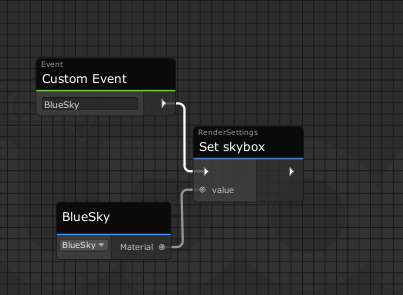
Hey so i made a skybox change in my world but i have noticed it dosent change the light color to the one that normally gets generated by the skybox how can i change it so it changes properly with the skybox
Pls dm me or ping me if you know how to fix it (https://i.imgur.com/sXhSi0k.png how i currently have it)
 scarlet lake
Is it possible to make something toggle on or off if a player respawns manually?
unreal grail
I am trying to create a camera that takes "photos" by turning a render texture on and off. It is not seeming to work. Any suggestions?
dapper lion
unreal grail
I am trying to create a camera that takes "photos" by turning a render texture o...
have you tried turning off the camera instead?
unreal grail
Yes, that is what I meant.
I turn the camera on, I get the target player's tracking data, I move a camera to their head location + an offset, I have the camera LookAt the player's head, and then I turn the camera off
dapper lion
ok that sounds overcomplicated. what are you trying to do exactly?
unreal grail
Take a 'photo' of a player, no matter where they are in the world.
dapper lion
ok so you can do the tracking data on a parent of the camera. and disable only the cam
unreal grail
So I have to get the player's location data, then have the camera look at them, then turn the camera off to take the photo
Yes, that's the idea.
This is what I have in U#, but it's not working. https://pastebin.com/MQK8vXXq
Pastebin
Pastebin.com is the number one paste tool since 2002. Pastebin is a website where you can store text online for a set period of time.
The camera is offset from the parent's position
dapper lion
so whats breaking/misbehave?
unreal grail
It doesn't do anything when activated.
TakePhoto is called, but it doesn't do anything.
dapper lion
what is your void/trigger method?
i dont see any in the pastebin
oh wait. this is it
so youre doing all of this in one event?
 plush stump
May I ask why the first method(above) works and the second method(below) didn't? both use interact as trigger. It seems that the object spawn by the second method is auto-disabled.
 slim hound
plush stump
May I ask why the first method(above) works and the second method(below) didn't?...
slim hound
plush stump
May I ask why the first method(above) works and the second method(below) didn't?...
Objects assigned in an object pool get automatically disabled at runtime and need to be enabled/spawned with VRCObjectPool.TryToSpawn
Also instantiate creates a new non-networked game object and likely isn't what you want to be using
slim hound
unreal grail
It doesn't do anything when activated.
You are enabling and disabling the camera component in the same update so the camera will never render
Instead of enabling and disabling it use Camera.Render
plush stump
slim hound
Objects assigned in an object pool get automatically disabled at runtime and nee...
Thanks
Is there a function to add or remove elements from array?
slim hound
for the object pool you start with a set amount of objects in the pool that you can access
fiery yoke
plush stump
Is there a function to add or remove elements from array?
Arrays are fixed-length. They have "slots" that can hold a value.
 indigo finch
Hi, I'm having a little problem... any idea why I can't disable station exit? Is this the correct way of steal controls for a car?

whenever I run it deselects again...
slim hound
indigo finch
whenever I run it deselects again...
Station components will always reset to their prefabbed values
You will need to unpack it so its not a prefab
indigo finch
slim hound
You will need to unpack it so its not a prefab
aah... never would have found that. Thanks!
fiery yoke
Im pretty sure that that is not the case and not the problem.
The value isnt properly saved, because it isnt marked as "dirty". Set the boolean, then change something else in the scene like the name of a gameobject or something then save.
unreal grail
slim hound
Instead of enabling and disabling it use Camera.Render
You are a hero
 autumn birch
Anyone have an udon script to disable an object at the end of an animation or at a specific time in the scene? Specifically a camera.
tropic tangle
Hey, folks! I have another udon/programming question if it's alright.
So, in my world, I plan to have flash lights.
Problem with that, is real time lighting is super intensive.
So, I was wondering if there was a way to implement lighting with, perhaps an object (a plane, maybe) that's just a transparent image texture with a bright color.
Would that be possible with some sort of ray-majjibby (can't remember the name right now.).
What are some ways lighting can be impliment without making my quest get slow? :P
floral dove
yes, an interesting problem, and appreciate that you're building with Quest users in mind! One thing to try first is whether Quest can decently handle a single realtime light - in which case you can make only the local player's flashlight actually work to limit things to one realtime light, and turn off realtime shadows.
dapper lion
could use a projector for the light or if you must use a realtime light, set it to the layer that your meshes are set to and nothing else
floral dove
you can use a particle material with additive blending, which will make things lighter but it won't look like real lighting. Another way I could think of would be to Raycast from the flashlight to objects, and either change the tint of an object when the flashlight is pointing at it, or swap its material.
dapper lion
so for example, you have a wall on the reserved4 layer. tell the light to only cull on the reserved4 layer (and dont do shadows like momo said)
floral dove
it would feel more like highlighting / selecting objects than lighting them since it would be constrained to their mesh
tropic tangle
floral dove
yes, an interesting problem, and appreciate that you're building with Quest user...
I considered making the lighting local. But, my issue with that is that I want the players to be able to use light to help each other.
I'm using Udon to make a prototype of a horror game with some basic combat and such. Think no-budget silent hill.
Anyway, I think it would be cool if players can use the flash light to point out various things to each other.
 worn moss
Slowly learning Udon toggles and was wondering if anyone can direct me to how to make toggles to turn on 1 gameobject but then turn off multiple gameobjects, all within the same toggle.
 tropic tangle
floral dove
you can use a particle material with additive blending, which will make things l...
tropic tangle
floral dove
you can use a particle material with additive blending, which will make things l...
Ooo thanks! That's a great idea!
tropic tangle
dapper lion
so for example, you have a wall on the reserved4 layer. tell the light to only c...
That's a great idea too! Was planning to use culling extensively for the project. So that may work too.
tropic tangle
floral dove
you can use a particle material with additive blending, which will make things l...
I actually came up with a similar idea once. But I didn't think to use a particle system.
Is it possible to use raytracing to change the size of an object based on how close it is to an object (a wall for example)?
Because that raises another problem : the light on the flashlight might go through walls.
dapper lion
i can’t remember if projectors go thru walls but could try projector
tropic tangle
I'll have to look up projector. Not too familiar.
scarlet lake
how do I make a teleport?
tropic tangle
scarlet lake
how do I make a teleport?
Use the 'set position' node and make sure the instance is the player API.
Oh and make sure it's not public.
I would make you a screenie but I'm headed to work and not neat a computer.
scarlet lake
idk how udon works lol its my 1st time
fiery yoke
worn moss
Slowly learning Udon toggles and was wondering if anyone can direct me to how to...
The way you solve this is by first toggling all objects off, and then only toggling the object you want on.
scarlet lake
nvm smith got my back
tropic tangle
For what I want to do, would it be wise to seperate all environmental meshes, and apply occlusion culling to them all individually?
Or, are there potential issues with that?
dapper lion
occlussion culling is usually a good way to save performance
tropic tangle
dapper lion
occlussion culling is usually a good way to save performance
Yes. That's correct.
I'm asking, is it wise to seperate my world mesh in blender, so that as seperate objects, they can be culled out more seamlessly (I assume objects as individuals get culled out, not so much the parts of the mesh.)
Might also culling things out manually myself with the flashlight. But it might not be necessary.
dapper lion
ye. that would work
 neat flicker
If I were to make a sliding door (a door that a player must physically grab to slide open) would it utilize animations?
fiery yoke
neat flicker
If I were to make a sliding door (a door that a player must physically grab to s...
Probably not. But instead I would use Maths :P
neat flicker
fiery yoke
Probably not. But instead I would use Maths :P
This is part of Udon or Unity?  (Sorry, still new to Udon)
fiery yoke
neat flicker
This is part of Udon or Unity? <:vrcThinking:585749770547757086> (Sorry, still n...
Math is part of reality.
In particular Vector Math and Linear Algebra. Those sound like big words, but the basics are realtively simple, and unfortunately if you actually want to make your own systems, you will need to know at least the basics of those things.
neat flicker
fiery yoke
Math is part of reality.
In particular Vector Math and Linear Algebra. Those sou...
Thanks! I'll get to researching!
fiery yoke
neat flicker
Thanks! I'll get to researching!
https://www.youtube.com/watch?v=MOYiVLEnhrw I can personally recommend this Channel. Its a 3 hour video, but its very in depth and will give you a lot of insight into whats important in Linear Algebra for game developers.

Welcome to my four part lecture on essential math for game developers 💖 I hope you'll find this useful in your game dev journey!
This course will have assignments throughout, if you want to maximize your learning, I recommend doing them!
If you are enjoying this series, please consider supporting me on Patreon!
🧡 https://www.patreon.com/acegik...
autumn birch
Having some real issues with post processing in the new version...
When attempting to upload my world VRCSDK and VRCSDKCAM remove my post processing camera effects... toggling those on/off proves that... Why is VRchat removing my post processing?
and it also properly displays post processing when just hitting play instead of uploading. So it's specifically the VRSDK that's removing my post processing since that is added after hitting build & publish for windows.
anyone know why?
broken bear
It will remove it for quest, is it doing it on pc?
autumn birch
broken bear
It will remove it for quest, is it doing it on pc?
PC
I've tried everything now.. making the depth different, every setting in a camera that could be tinkered with to fix the issue has been tinkered with >_>
dapper lion
make sure the post processing is set in the post process layer
autumn birch
dapper lion
make sure the post processing is set in the post process layer
I was told to put it in the water layer.
Is a post processing layer something new?
dapper lion
thats a new one. thats usually for cameras and recording data im pretty sure
dapper lion
autumn birch
Is a post processing layer something new?
no. its a been a thing forever for vrcsdk
autumn birch
also there is no post processing layer
dapper lion
do you have only 8 layers?
autumn birch
14, 3 reserve layers
dapper lion
one of them should be labeled post process or something close
autumn birch
Nope, but I just made one and attempted to upload, crashed unity XD
dapper lion
that was most likely unity being unity unless you did something weird after
autumn birch
nope, swaped layers to post processing and hit build & publish'
dapper lion
hmm ok well
https://github.com/oneVR/VRWorldToolkit/releases this comes with a post processing set up
GitHub
Unity Editor extension for making VRChat worlds. Contribute to oneVR/VRWorldToolkit development by creating an account on GitHub.
autumn birch
will try
 foggy knoll
So I uploaded my first 3.0 avatar this week. I've been used to doing stuff in 2.0, so I kinda feel like I'm relearning the whole process again, Anyways I use FBT and I have noticed that my view point drops below my neck when I sit down. So the only thing I can see is the inside of my chocker. How do I fix this?
 fiery yoke
foggy knoll
So I uploaded my first 3.0 avatar this week. I've been used to doing stuff in 2....
fiery yoke
foggy knoll
So I uploaded my first 3.0 avatar this week. I've been used to doing stuff in 2....
How about you ask that in #avatar-help and not #udon-general ? :P
foggy knoll
fiery yoke
How about you ask that in <#730948173379535022> and not <#657394772603830360> ? ...
Sorry I
ill ask there.
fiery yoke
Just people with more experience with avatars in those channels than here.
quick basin
what would the graph be to change url of video player from UI button i have this so far
 floral dove
quick basin
what would the graph be to change url of video player from UI button i have this...
floral dove
quick basin
what would the graph be to change url of video player from UI button i have this...
there's a fully working example of a Synced Video Player included in the SDK, with documentation here: https://docs.vrchat.com/docs/udon-video-sync-player
shy notch
Oh yeah I heard something about that
floral dove
this channel is for discussion of Udon, try #faq to learn where to ask other questions
quick basin
floral dove
there's a fully working example of a Synced Video Player included in the SDK, wi...
so this is the graph i need?
 floral dove
quick basin
floral dove
quick basin
that's the part that has the player become the owner of the video player and update the URL, yes. You should be able to hook that up to a UI button with a baked-in URL with a few changes - have the UI Button fire the "OnURLChanged" event, but you can get the VRCUrl from that variable you've already got instead of getting it from the VRCUrlInputField
 tawny sapphire
Hi guys, I'm new to VRC and would like to start learning Udon graphs. Is there a central documentation of all the API/Nodes and descriptions of what they do? I am looking to search through it and read off them in list fashion if possible. Thank you very much.
floral dove
I've got a pinned message with a suggested docs reading guide for getting started with Udon: #udon-general message
Most of the nodes are wrappers for Unity classes, methods and properties so there would be thousands of them to read through, but you can find info on those in Unity's docs.
tawny sapphire
floral dove
Most of the nodes are wrappers for Unity classes, methods and properties so ther...
I see, I will follow these guides then. I also watched all your videos and they are a good start as well. Thank you very much!
 bright onyx
I assume 2019 unity requires we make udon worlds instead of using the 2.0 sdk?
bright onyx
ah okay
I keep having errors saying that there are broken scripts but nothing is showing that there is a certain script broken and i can go into play mode just fine. it forces me to reolaod the scene and then doesnt upload. so i thought maybe it was an sdk issue
grand temple
Can you show your error console?
 rapid vale
i am having similar issues with the new sdk
was fine until i updated to latest

removed and installed latest cleanly but still vrc tab wont show up or anything
for sdk2
grand temple
did you upgrade straight from unity 2017 to 2019?
rapid vale
nopee its 2018
grand temple
the latest SDK is probably not compatible with unity 2018
you should use unity 2019.4.29f1
and you also need to follow the migration guide
rapid vale
ohhhh okk
yeah i was following it and it said to add the 2019 sdk before migrating
i was like dam i broke it lool ok lemme import project to 2019 then seee if it works
thx
indigo finch
worn moss
Slowly learning Udon toggles and was wondering if anyone can direct me to how to...
Here's one I made when I was starting out that does just that. Check over it and see how ya go. It does however require there to always be at least one thing being selected and deselected, though back then if I didn't want one of those fields I would just toggle an empty gameobject. Nowadays, I would add an if statement to check if an array was empty (array.length == 0), but for simplicity's sake, I didn't add that in here
 onyx owl
Definitely not an Udon question, but yall are smart..
I'm writing a script for a prefab im building
In the standard 3.0 descriptor, when you edit your viewpoint, a PositionHandle is drawn and you are able to move around your viewpoint without actually having any gameobject selected.
I'm looking through their editor code now, but preemptively does anyone know how to recreate this?
plush stump
can you interact with a button whose owner is set to someone else?
grand temple
sure, ownership only determines who can set the synced variables. It does not prevent the interact event from happening
but of course if you want to lock something to just the owner, you could check if the localplayer is owner after the interact
plush stump
thanks.
anyone use setplayertag and getplayertag to assign roles? Shall I create my own variable to store roles or shall I just use the tag system?
grand temple
tags are useful if you have some udonbehaviours that need to access the values from anywhere and you don't want to bother with giving those udonbehaviours a reference to some central object that stores the value
it also might be useful if you're not familiar with working with arrays
but tags aren't really magical, they don't sync, they're just a place to store some values
if you want to sync roles you could actually use the obstacle jam's starter kit. That comes with a system that distributes a unique object to each player, and you can put synced variables on those
plush stump
I prefer using arrays but I only knows how to store roles based on playerID, which is a string and that don't sync
I'm thinking about using Array like [PlayerNum, PlayerID, Role, Cooldown, etc] to store all information about the player
grand temple
yeah, you could totally do that. Players wouldn't be able to own their own information though, they would have to communicate with the master and the master would sync the array
There's nothing wrong with that, if anything it would be more secure. But it would have more latency
plush stump
I get stuck at how to get to the correct array for my player.
if PlayerA is interacting with the button, how should it communicate with the master to get PlayerA's role? My plan is to give each player a numberb between 1-40 based on their IDs, so it can direct to the right array when the program get their ID.
grand temple
You don't have to communicate with the master to get anything if the master is already syncing the array whenever it changes. Just access the array
plush stump
Will string store in the array sync as well?
grand temple
Yes
 thorny silo
why does my vrchat client not open up when trying to build and test my udon world?
indigo finch
thorny silo
why does my vrchat client not open up when trying to build and test my udon worl...
thats... strange. As a sanity check, you can start vrchat normally (aka via steam) right? Also, how old is the sdk your using? consider updating it to the latest if it's not currently
thorny silo
I just got the newest sdk
Sorry I'm like extremely new to udon, I just placed the VRCWorld within the model and pressed build and test

these are the errors i'm getting
indigo finch
the fix is rather dumb
you cant have an apostrophe in the file name. its a unity thing
indigo finch
yup. should work. the error is saying it cant find the file, and ive had the same problem with naming
thorny silo
it didn't work, but i'm gonna try transferring the unity package with everything in it to another file
indigo finch
ah, okay. yea... unity can be a pain sometimes. let me know if that doesn't work
thorny silo
will do
 viscid reef
it looks like you had compiler errors in your console, need to scroll up to see what's the offending scripts/errors
 indigo finch
hmmm... could you click on the top red message and let me have a look at what it says?
thorny silo
 indigo finch
feel free to jump in @viscid reef
thorny silo
the visual studio one?
indigo finch
the next one. that's just a warning, not a critical warning
thorny silo
 indigo finch
yea... im not entirely sure whats mucked up. on the console tab (the one with all the errors), in the top right there is three dots. mind clicking on that and maximizing? there are quite a few errors
thorny silo
indigo finch
ah, I ment..
 thorny silo
ohhhh my bad
indigo finch
no worries
thorny silo
 indigo finch
okay, would be best if someone else jumped in as i don't exactly know whats going wrong. that being said, I do have some basic things to check. first of all, what sdk are you using? 2.0 or 3.0?
thorny silo
3.0
viscid reef
go to packagemanager and make sure cinemachine is installed
indigo finch
are you use to sdk2.0, or are you knew to map making in general?
thorny silo
I'm used to 2.0
indigo finch
ah, gotcha
thorny silo
figured it out, simple light probe placer was making errors
indigo finch
wow... that would have been some digging to find. glad ya good now
thorny silo
thanks man
indigo finch
no prob
indigo finch
Is there a way to call the buttons on a VR controller? I know you can do
Input.GetButton("Oculus_CrossPlatform_Button4")
to get the left menu button, but what would be the others? I tried doing button3, but it just gives errors. Do I need to set it up somewhere? Is it protected and not available? Thanks
 dim wharf
indigo finch
Is there a way to call the buttons on a VR controller? I know you can do
Input....
dim wharf
indigo finch
Is there a way to call the buttons on a VR controller? I know you can do
Input....
VRChat
You can read the input of a Player's controller in a unified way across all platforms by using Udon Input Events. These events will work correctly even when the player has remapped their controls. There are currently two types of events - Button and Axis, which include boolean and float values. Each...
i mean..
the buttons on the vr controllers have their functions for opening the menu and muting and stuff
so i dont think you should rlly do that
scarlet lake
👁️ 👄 👁️
indigo finch
dim wharf
https://docs.vrchat.com/docs/input-events
there are times where their intended use doesn't really work (aka, trying to use a menu while in a car is completely pointless right now)
dim wharf
well, i dont think theres any input for what youre looking for srry
indigo finch
ah, all good
 cobalt trail
This is a question from my BF whos question either got lost in chat or wasn't seen. In his recent world a quest user and a pc user cannot be in the same instance and he has no idea why? He's tried deleting literally everything from the Quest side and the quest people still just instantly crash out. Pc users are totally fine?
 wary kernel
cobalt trail
This is a question from my BF whos question either got lost in chat or wasn't se...
wary kernel
cobalt trail
This is a question from my BF whos question either got lost in chat or wasn't se...
Possible a quest crashed only
cobalt trail
wary kernel
Possible a quest crashed only
We think it's from a quest update or whatever, we don't know, only an assumption. Only quest people are the ones crashing when in an instance with pc users.
What could be causing this issue or rather what can be done about it? this is the first time a world he's made has done this to him and I have no idea why lol. It's an SDK3 world btw.
 vague agate
Hello 🙂 , is there a way to compile only when you want instead of auto-compiling when programming with Udong Graph?
As graphs are automatically compiled, even small changes take time, slowing the work down. So I was wondering if there is a way to compile only when I want. Thank you for your reply.
floral dove
cobalt trail
This is a question from my BF whos question either got lost in chat or wasn't se...
There can be networking issues if there are any differences in the object hierarchies between the Quest and PC versions of the world. If you submit a support request with this info and the world ID, we can try to reproduce the issue on our side where we can generate some Quest Crash info.
floral dove
vague agate
Hello 🙂 , is there a way to compile only when you want instead of auto-compilin...
There is currently no option to turn off compiling. It can help to keep your graphs smaller when possible. FYI, compiling is not typically the step that takes a lot of time, but rather reloading the graph when you make certain changes like connecting new flows or adding/removing variables.
Can you share a picture of a graph that takes a long time?
 warm blade
Does any one know about a good window rain shader ? or something like that? xD
cobalt trail
floral dove
There can be networking issues if there are any differences in the object hierar...
Uhhh where would the support request be?
floral dove
warm blade
Does any one know about a good window rain shader ? or something like that? xD
you might have better luck in #shaders or #world-development, this channel is specifically for Udon
warm blade
floral dove
you might have better luck in <#534472629013315606> or <#361741445352259584>, th...
oh shit sorry forgot xD
vague agate
floral dove
Can you share a picture of a graph that takes a long time?
here 🙂
 cobalt trail
I'm guessing the actual request page is what you mean? so I don't do a derp over here ;p
floral dove
vague agate
here 🙂
yeah, that's a lot of nodes to reload. It can help to break down your graph into smaller, reusable or connectable parts
floral dove
cobalt trail
Uhhh where would the support request be?
You can find all the support info at #vrchat-support
cobalt trail
floral dove
http://help.vrchat.com/hc/en-us/requests/new
Yeah I figured, just clarifying is all, thank you.
cobalt trail
floral dove
http://help.vrchat.com/hc/en-us/requests/new
He submitted a request, thank you for replying.
vague agate
floral dove
yeah, that's a lot of nodes to reload. It can help to break down your graph into...
okay 🙂 thank you for the reply.
Is it okay if I ask you one more thing?
When there is a bug that compiles incorrectly differently from the logic shown in the right-hand node graph, is there a way to rewrite it while maintaining the objects connected in the inspector to public variables as much as possible?
Since I am dealing with notes related to the piano, it is very difficult to connect many audio objects every time.
floral dove
vague agate
okay 🙂 thank you for the reply.
Is it okay if I ask you one more thing?
When th...
Hm, I'm sorry I don't understand what you mean.
Your inspector variables should stay connected unless you rename them. I see that you're working on a Midi piano, which is awesome! I love playing piano and I'm glad to see you're working with Midi. I wonder if there's another way to build what you're making without needing to connect so many audio objects.
vague agate
floral dove
Hm, I'm sorry I don't understand what you mean.
Your inspector variables should ...
I'm sorry my English is not good because I use it with a translator.
Thank you for saying that. I'm a beginner piano, but I love to play the piano and I'm happy to be able to play music on vrchat,thanksyou for your work 🙂 .
Can you tell me again what you mean by this verse? Are you saying there is a way? ("I wonder if there's another way to build what you're making without needing to connect so many audio objects.")
What I originally wanted to ask is that the graph doesn't work as it is in the current state of the graph and it seems to work a little differently, so I'm going to create a new graph file and try to run it. However, I wonder if it is possible to create a new udon program file while maintaining the existing inspector state without reconnecting the 88 note and piano animation objects in the inspector. (The udon behavior does not recognize when multiple objects are dragged at once.) I can't seem to.)
floral dove
Hm - you can try this:
- Make a backup of your project first in case this doesn't work
- Delete everything in this graph except the Variable nodes you want to keep.
- Redo the rest of the graph
If you don't delete the Variables, they should stay populated in the inspector
Connecting 88 objects by hand sounds tedious! Perhaps you could make it easier. If the notes are all children of a single parent object, maybe you can simply reference that parent object as a variable, and then use a 'For' loop to get the 88 children in the graph.
vague agate
floral dove
If you don't delete the Variables, they should stay populated in the inspector
Oh I understand. It took me a while to understand English. Thanks for the advice. As you said, first, after erasing the nodes except for the variables, rewrite the graph, and as you said later, we will arrange the contents by listing the audio, etc. under the parent object in order, and then loading them.
Thanks for replying today.
floral dove
vague agate
Oh I understand. It took me a while to understand English. Thanks for the advice...
No problem at all, you write english much better than I write Korean 😛
Good luck with your project!
vague agate
floral dove
No problem at all, you write english much better than I write Korean 😛
Good luc...
thankyou~! 🙂
 lavish wadi
Hey, i've found an udon graph that allows me to reset a deck of cards back to their original position, but at the moment the button will only reset the cards that the person pressing it touched. So if I pick up two cards, and another person picks up two, and I press the button, only the two I picked up will reset. I want them all to reset regardless of who presses it. I could use some help fixing this problem if anyones willing!
 floral dove
lavish wadi
Hey, i've found an udon graph that allows me to reset a deck of cards back to th...
floral dove
lavish wadi
Hey, i've found an udon graph that allows me to reset a deck of cards back to th...
if the cards have VRCObjectSync on them, then you can use the .Respawn() method of that class to restore them to their original positions instead of managing your own locations variable. Either way only the owner of an object can update its variables, so you'll want that person to become the Owner of all the items first. You can learn the basics of Networking and Ownership here: https://docs.vrchat.com/docs/udon-networking
VRChat
The three main concepts used for networking in Udon are Variables, Events and Ownership. Variables are containers for values - like a number, a set of colors or a 3D position.Events are things that happen at a moment in time.Ownership is the system that decides which user can update a variable, whic...
lavish wadi
Thank you! Super new to this stuff, i appreciate the response
 hazy galleon
in 2019, can we add dependencies using Unity's Package Manager instead of copying in the binaries yet?
granted not really an Udon question, but it does relate, because I would like to be able to get updates more smoothly
floral dove
hazy galleon
granted not really an Udon question, but it does relate, because I would like to...
You can do that for any third-party packages that support UPM, yes. We'll offer support for our own SDK Packages through a separate VRChat Package Manager, coming soon to a Closed Beta near you
 knotty bison
"copying in binaries"? Do I even wanna know what that means in terms of potentially trying to learn how udon works? Or should I just turn around now and forget I even looked in here before I potentially go mad?
floral dove
knotty bison
"copying in binaries"? Do I even wanna know what that means in terms of potentia...
You don't have to worry about that yet. Hakanai just means that you import our SDK package the usual way for now.
By dragging-and-dropping it into your project
If you want to learn about Udon, I suggest this reading order: #udon-general message
plush stump
How can I set an object only visible to certain player?
narrow stratus
narrow stratus
i guess that's how it works?
unfortunately i can't get the teleportation to work at all
i knew this tutorial would be outdated
like is there like a new way to get the teleportation to work instead of using a private string to put "enable" in it
tacit harness
https://i.imgur.com/hLAP4Ed.png
I have this canvas i have set it up exactly how i did with all the other ones i used but idk why but it looks like the layer i interact with is way to far to the front
like here you see that it still shows the interact blue dust or whatever thing even when im not pointing at it
https://i.imgur.com/og5bQrI.png
In unity it looks completly fine to me
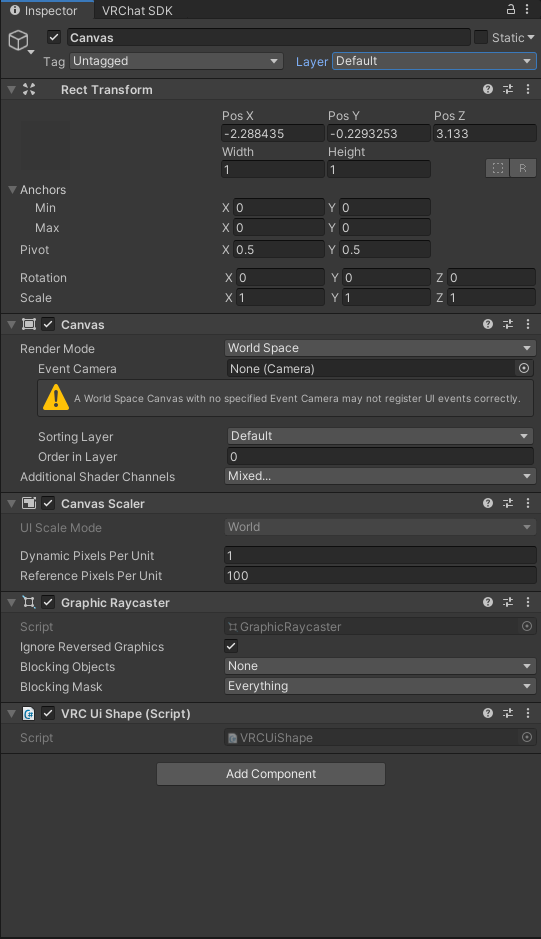
if anyone is able to tell me why or how to fix it please dm me or ping me in here
narrow stratus
narrow stratus
like is there like a new way to get the teleportation to work instead of using a...
turns out i forgot to turn on the trigger thing from the collider
hopefully it works this time
narrow stratus
narrow stratus
turns out i forgot to turn on the trigger thing from the collider
welp it only turns off the collision
looks like i can't even to get the trigger to work at this point
there's probably no way to get it to work until vrchat makes a dedicated component of it
toxic glen
How do i make pickups global?
I don't know anything and want to be able to bean someone with a Blitzball
tacit harness
toxic glen
How do i make pickups global?
add a object sync to the object
its a script
so click on the object press add component and search for object sync
tacit harness
narrow stratus
looks like i can't even to get the trigger to work at this point
When you use a collider for a trigger make sure Is Trigger is enabeled on it and then inside of the udon script use a OnPlayerTriggerEnter asa event starter
toxic glen
😅 It's just as easy as adding that one thing? No fiddling with Udon Graph or anything? Wow i feel stupid
tacit harness
toxic glen
😅 It's just as easy as adding that one thing? No fiddling with Udon Graph or an...
xD no worries i thought it was hard too at the beginning
toxic glen
I appreciate it
narrow stratus
tacit harness
When you use a collider for a trigger make sure Is Trigger is enabeled on it and...
box collider or udon?
tacit harness
So for an example :
this is how my collider looks

and inside of udon you wanna use this event to start whatever you are trying to do with it
narrow stratus
alright
tacit harness
Or wait sorry i might have understood you wrong
narrow stratus
oh
tacit harness
you want it to be a clickable button or like a area you walk into ?
narrow stratus
yeah
tacit harness
wich on of the two ?
narrow stratus
i kinda wanted to walk to it instead as entrance
tacit harness
Oh yeah then i did understand you right
narrow stratus
while the exit is clickable
this is how i set the trigger teleportation using a outdated tutorial from 10 months ago

i don't think this is the right way to actually set up the trigger
nor this when you spawn from the teleport

i just wanna make sure i'm actually doing this correctly from the old tutorial
or actually where do i put the "OnPlayerTriggerEnter" then?
i'm very new in using udon which is why i'm having issues with the teleportation
like i'm into more onto the art side of things than coding
yeah i think i'll had to start over
i don't know how to add a trigger to teleport
if a tutorial of this existed after the 2019 unity update i would've already got it working
sorry for the tiny vent though
quick basin
Does m3u8 work on quest?
scarlet lake
Does anyone know how to setup the 8ball table
night viper
@worn shadow This is the setup you could use. When a player interacts (clicks) they will set the bool "IsOpen" on the animator "FrontFloor1" to the opposite of what it already is (UnaryNegation) Every time you click (interact) it will do the opposite. From true to false and so on

 worn shadow
I tried that one too. that was the first one I did.
Someplace I am going wrong and can't find it
night viper
Did you reference the animator on the Udon Behavior? (public variable)
worn shadow
yes, trying it again
night viper
Also, with Interact events, you have to put the Udon behaviour on the same object the collider is on. (it needs a collider to players can click it) You would put it where the knob collider is
 worn shadow
@night viper were in the world do I find the Get bool
night viper
Search for: "Animator" enter, then search "getbool"
 scarlet lake
 night viper
worn shadow
<@!297116482599518208> were in the world do I find the Get bool
night viper
worn shadow
<@!297116482599518208> were in the world do I find the Get bool
Try dragging from the node itself, much easier to find them.
worn shadow
The add nod look up as a mess
fiery yoke
I agree. But how do you think it could be improved?
worn shadow
Not sure just yet still learning. @night viper Just showed me something I did not even know you could do.
night viper
There are some settings you can change. To do what i showed on video make sure this setting is turned on
 worn shadow
@night viper yeah saw that in the little video you sent, that definitely makes it easier. Now how do I get the variables to show back up in the Udon Graph? I have it set to show but it's not showing
Think I may have deleted when I started over.
night viper
Im not sure. Even if you delete all the variables the box should still be there.
worn shadow
Humm, it's gone, Always said I can only script errors
@night viper And still not working in test build. not even the "Use" showing up when I hover over it
night viper
Do you have a box collider on the same gameobject as the UdonBehaviour? (not sure if mesh colliders work, or if you need to set them as convex first) Can you show a picture of the gameobject where the udon behaviour is?
worn shadow
@night viper https://gyazo.com/c89e66b26b00ff479ac9da94d54c8bd6

@night viper Mesh Collider on the door none on the door knob at the moment.
night viper
The Interact event needs a box collider to work. You can add one. Add Component -- Box collider. Then you should be good.
worn shadow
@night viper Was gonna ask would the fact the the door knob is parented to the door and the door is parented to an empty that has all the doors parented to it?
night viper
That should not be a problem on your case. Only when moving objects. If you move the parent, their children will move with it. When the door opens, the knob should move with the door since it is a child of the door.
worn shadow
@night viper Thank you got it working finally. Now this should work with the windows too but I need to add an additional bit to it the windows have locks on them that need to work too , but I think that may be a bit more complicated. Thank you so Much Squall
 spring moss
Can anyone help me change all player avatars on world entry? I need all players to be a specific avatar ID.
 night viper
worn shadow
<@!297116482599518208> Thank you got it working finally. Now this should work wi...
night viper
worn shadow
<@!297116482599518208> Thank you got it working finally. Now this should work wi...
You are welcome, if you need help setting it up ask here! People will help you, even if looks complicated!
worn shadow
Thanks. Will make the Animations and get what I can set up before doing the Script part.
 inland sail
Anyone know a prefab for beerpong ? Would be helpfull 🙂
dapper lion
inland sail
Anyone know a prefab for beerpong ? Would be helpfull 🙂
GitHub
Compilation of VRC UdonSharp scripts and prefabs to assist VRChat world builders - Udon/Games/Beerpong at master · VrcUdon/Udon
inland sail
dapper lion
https://github.com/VrcUdon/Udon/tree/master/Games/Beerpong
using this but it isnt really nicely done, the ball is infinite bouncing and increasing height by it self and the ball is so bouncy its just to hard to hit a cup
dapper lion
this us literally the only udon one. fixing the ball is a world creator thing. in fact: pretty sure its written in there
find physics material -> set bounciness to wanted level -> ctrl+s
the only other ones were sdk1 and 2
unreal grail
I have a very weird question. I have a camera that takes a photo of a target with Camera.Render. However, if the target is not actually in my field of view, they are always a-posing—I think it has to do with the camera rendering before the model snaps into position. Any way to fix?
grand temple
yeah, I've seen that issue as well. I haven't bothered fixing it though. A normal camera doesn't have that problem, so you could just enable a normal camera and let it do it's thing normally instead
unreal grail
What do you mean? Render a normal camera first, and then take the picture?
grand temple
no I mean enable the camera for a frame so that it's able to render normally instead of telling it to render
unreal grail
I see, ok.
grand temple
it might also be that you need to render twice. The first would make the objects visible, then the scripts involved would set the bones. Then you wait a frame and take another picture. That might work
unreal grail
Awesome. Thank you so much.
 honest night
hey, I was curious if anyone could point me in the right direction to a tutorial or resource for creating a toggle for a light?
I found a tutorial that kinda touched on it at the end but it was for SDK2 and I can't follow along with it 😦
 cunning mist
honest night
hey, I was curious if anyone could point me in the right direction to a tutorial...
cunning mist
honest night
hey, I was curious if anyone could point me in the right direction to a tutorial...
If you have the light as a gameobject, you can do a little toggle like this
desert grove
GameObject local toggle.
 hushed gazelle
I'm trying to get a video player to output its current time as hh:mm:ss, and I think I've got all the right pieces but the output's looking off. Is this how the nodes should be laid out or do I need milliseconds for the current video time?
 hushed gazelle
I got that working properly, but different question now; How am I meant to use the Slider OnDrag node? They're not Events to start from, at least as far as I can discern.
 idle hull
I'm having trouble with teleportation I made this script but instead of teleporting me to my spawn(tele) it flings me backwards
 tacit harness
Im still having an issue where the collider or whatever of my canvas is way to far to the front and i dont know why
 fiery yoke
hushed gazelle
I got that working properly, but different question now; How am I meant to use ...
fiery yoke
hushed gazelle
I got that working properly, but different question now; How am I meant to use ...
Are you talking about UI Sliders?
hushed gazelle
Yes
fiery yoke
There is no OnDrag event. Instead you use the OnValueChanged event in the Slider component, to send a custom event to the UdonBehaviour
 nimble root
On interact this removes 4 planes but it doesn't seem to return them after the delay. What am I missing on this? Thanks
 mighty fjord
I don't believe the use of multiple custom event nodes in the same graph are supported
Are they?
nimble root
It seems to be multiple custom events with the same name is impossible. I did just figure out my problem. By attaching the last Set Active on the left group to the SendCustomEventDelayedSeconds it properly returns all the game objects.
mighty fjord
Good job 👍
 last junco
anyone now if its posable to get a players avatar rank from vrchat ?
or if its posable to read the text on there name tag ware there avatar rank is ?
fiery yoke
last junco
anyone now if its posable to get a players avatar rank from vrchat ?
or if its p...
Not possible.
scarlet lake
Can anyone help me?
I don't know anything about Udon, I would like to make a triggher that when you go against a collider triggher, a sound is activated.
desert grove
scarlet lake
Can anyone help me?
I don't know anything about Udon, I would like to make a tri...
There are loads of examples in the sdk sample scene. Take a look https://docs.vrchat.com/docs/udon-example-scene
indigo finch
Having a weird UI issue with text mesh pro. It looks fine when the cursor is to the left of it, but when I move it past the beginning, it suddenly turns all blocky. Any idea what's going on? It only happens in-game, and not with CyanEmu
 desert grove
Did you try testing in Unity? Using CyanEmu you can press the play button and just test your content in Unity without uploading. The benefit is that if something goes wrong you can check the console or inspect the element for changes. But here is a thread about other people and their fix for blocky letters https://forum.unity.com/threads/what-causes-text-to-be-rendered-as-blocks-instead-of-letters.555085/
 chilly crater
I had a tester crash last night when the master left my test private upload instance. Can that be caused by objectpools having items without an objectsync component?
indigo finch
desert grove
Did you try testing in Unity? Using CyanEmu you can press the play button and ju...
Thanks for the advice.. I guess?... my last sentence was literally "it only happens in-game, and not with CyanEmu".
Thanks for the link though. I'll check it out
chilly crater
Did you mess with the sorting layer?
indigo finch
yeah nah, the link's a dud. These guys are having issues on launch, where as for me it shows up fine, just that when the cursor goes to the right of the text it goes all blocky. if i keep it on the left, it appears completely normal. also doesn't seem to be a problem for any on the other buttons. tried duplicating text from one of the other buttons, but it doesn't seem to help
indigo finch
chilly crater
Did you mess with the sorting layer?
kinda. from the package it was set to 0, but that caused problems with the background, so I put it to 1 which new 'text mesh pro' texts are set to by default
never mind, got it happening in cyanEmu too. though further away
 broken bear
it was happening to me on one of the interim-2019 sdks, make sure you have the latest
scarlet lake
desert grove
There are loads of examples in the sdk sample scene. Take a look https://docs.vr...

it still doesn't work because I don't understand the basics, even if I watch the tutorial.
isn't there something easier to understand?
desert grove
🤷♂️ Kind of hard to know how another person learns. If tutorials and examples don't do it I have no idea. Maybe someone will break it down further for you... What I can tell you is that Unity is not MarioMarker, or any other drag n drop development engine. You need to do your homework to gain any understanding.
If you want to know what Udon is and how it works consider reading the whole document which the first link was pulled from https://docs.vrchat.com/docs/what-is-udon
indigo finch
scarlet lake
Udon can be hard, expecially with the lack of biginner tutorials. The last thing we need is someone being elitist and saying 'just look at tutorials' or 'just read the documentation', as that stuff is so criptic when you first start out, so feel free to post you questions here. there are those that are willing to help newbies. As for your question, it seems you got lost, and the answer is rather simple, though there are some quick and dirty ways to do it too. Here's definitely the better one:
 scarlet lake
i love u man
worn shadow
Morning all. I am working on a lockable door set up, I found a good video but it's outdated and not using Udon. I am having trouble translating the out dated parts to udon. Any help would be great.
indigo finch
While I wouldn't recommend it, you could also have a gameobject that 'plays sound on awake'. that would look like so:
 scarlet lake
i have to make mario kart game on vrchat
indigo finch
And last but not least, you could have an animator with an animation that plays a sound. also can do things like 'open a door' or something
 scarlet lake
So I need the sound of the coin to be activated when it is taken, the coin is deactivated and reappears 30 seconds after the last collision.
indigo finch
scarlet lake
i have to make mario kart game on vrchat
hmmm... not gonna lie, you should probably hold off until you know a bit more. make a basic hangout would with toggleable mirrors and what not. coins included. cars are a whole beast of their own
scarlet lake
indigo finch
hmmm... not gonna lie, you should probably hold off until you know a bit more. m...
for now i'm strotturando the map, but i want to start with udon
 indigo finch
scarlet lake
So I need the sound of the coin to be activated when it is taken, the coin is de...
indigo finch
scarlet lake
So I need the sound of the coin to be activated when it is taken, the coin is de...
you would probably want an animation that hides the collider (and probably the coin), and make the animation take 30 seconds. otherwise you could do a timer
scarlet lake
I am using a box pickup to test the collision between coin and box collider in udon
 indigo finch
gotcha... welp, here would be how to do the timing of it. you can certainly play around with these kinda things while your learning. Perhaps ignore the cars and just do players? that would be fun an a tonne easier to code
 indigo finch
worn shadow
Morning all. I am working on a lockable door set up, I found a good video but it...
indigo finch
worn shadow
Morning all. I am working on a lockable door set up, I found a good video but it...
im asumming you just need a bool check to do a lockable door, right? is this tutorial using udon or sdk2?
worn shadow
@indigo finch It's not using Udon at all it's from 2018. Let me get a screen shot of it. Sorry if it's hard to see there UI ia really small in the video
desert grove
scarlet lake
i have to make mario kart game on vrchat
There is a kart prefab that you can play with. Requires UdonSharp though https://github.com/kurotori4423/KurotoriUdonKart
scarlet lake
I'm reading even if I don't answer, however I wanted to do it with cars, because the position of collisions on go-karts has a lower latency
worn shadow
@indigo finch https://gyazo.com/4b6c0a94089d9ec5b6646094813f1daa
 indigo finch
desert grove
There is a kart prefab that you can play with. Requires UdonSharp though https:/...
indigo finch
desert grove
There is a kart prefab that you can play with. Requires UdonSharp though https:/...
I've tried it, it's pretty broken. certainly not where i would send a beginner
scarlet lake
the players if they are assigned a capsule to each, you see the capsule go late, and I preferred a more mariokart system. the time it will take me to make it doesn't matter to me, I just want to learn and test for now.
indigo finch
worn shadow
<@!228024927054331904> https://gyazo.com/4b6c0a94089d9ec5b6646094813f1daa
yea sorry, that's sdk2, not udon. i started world making when udon was released, so i wouldn't know. if you try and use it on an sdk3 unity file, it will just spit errors
indigo finch
scarlet lake
the players if they are assigned a capsule to each, you see the capsule go late,...
sure, sound all good to me. personally, I've been looking for a good car prefab to use for fun, but haven't found anything yet. Just thought i would let you know
worn shadow
@indigo finch Yeah so trying to translate that to what it would be in Udon; The Equivalent. But not finding the right trigger.
 ebon wyvern
indigo finch
While I wouldn't recommend it, you could also have a gameobject that 'plays soun...
ebon wyvern
indigo finch
While I wouldn't recommend it, you could also have a gameobject that 'plays soun...
Hi, I'm ENKY's helper for map creation, I'm trying to learn Udon too. Can you make it make a sound when you take the coin?
worn shadow
@indigo finch Here is an screen shot of the Animator if that helps. https://gyazo.com/048f02892af69fddb1bcce47de6ed004
 scarlet lake
indigo finch
sure, sound all good to me. personally, I've been looking for a good car prefab ...
scarlet lake
indigo finch
sure, sound all good to me. personally, I've been looking for a good car prefab ...
most likely me and pavel will be using existing go karts for the moment, Pavel knows C # so he is more advantaged making and editing C # scripts for me.
indigo finch
worn shadow
<@!228024927054331904> Yeah so trying to translate that to what it would be in U...
so sdk3 uses udon, which is basically c# (with saftey restrictions) and completely overhalls and replaces the trigger system of old. so a bunch of scripting like stuff would have to be done. it shouldn't be hard, but a little daunting if you haven't used it
desert grove
scarlet lake
most likely me and pavel will be using existing go karts for the moment, Pavel k...
With the kart prefab there is a bug that can trap the user in the kart. I do not remember the fix, but in the script there is a function that locks the player to the kart itself. I converted it to an if/else to fix it. Pavel should have no issues tracking it down if they understand C#. And if I had the fix/or remembered it fully I would share. Other than that, the kart system is effective and "functional".
worn shadow
@indigo finch Daunting is ok. This can't be as complex as what @scarlet lake is attempting. I have doors working took a day to find out what I did wrong but I finally got it with help from yall here. This really this is for the windows that have a lock on them. The animations are done but making it all work is another story. LOL But I think it's the next step, Doors work now make locks right?
indigo finch
worn shadow
<@!228024927054331904> Daunting is ok. This can't be as complex as what <@456226...
in udon, you would likely just toggle the collider, but if you look at the 3rd pic i sent for IEMKYI, i showed how to call a variable in an animator
worn shadow
@indigo finch the doors and windows are interaction on click or touch, not auto open when the player hits a trigger box if that makes a difference in how it is done.
indigo finch
@scarlet lake, here's a rough draft of how to do a coin collection system. hopefully i got my greater than and less than symbols right, but at the very least it should show you kinda where to look
worn shadow
@indigo finch I pulled that one up, that how I will get the sounds to work as well right?
scarlet lake
indigo finch
<@456226577798135808>, here's a rough draft of how to do a coin collection syste...
for now we have tested your first example, but it doesn't seem to work. Yet it is the same identical.
 indigo finch
do you have a trigger coldier on the model? aka, box collider with the 'is trigger' selected. the object with the script will need it
ebon wyvern
 indigo finch
ebon wyvern
indigo finch
ebon wyvern
can i see the model in the scene?
ebon wyvern
 indigo finch
worn shadow
<@!228024927054331904> I pulled that one up, that how I will get the sounds to w...
indigo finch
worn shadow
<@!228024927054331904> I pulled that one up, that how I will get the sounds to w...
yea... if you do it by animation that is. you could always do it via script. unforntunately, it seems to be slipping my mind exactly how you just do one call of an animation... i could do it with a timer to bring back the bool to default, but im sure there was another way...
indigo finch
ebon wyvern
... that should work... unless I'm missing something. is the object making the sound got both a: audio on awake, and b: is un-active beforehand?
scarlet lake
by default the audio is deactivated so as not to start it when join in game
indigo finch
it is currently active in the image you sent. you want to deactivate it before playing for that script
worn shadow
@indigo finch The idea for the doors is to play the opening and closing sounds next. For the windows they will need that as well but they have the addition of a toggle-able lock. The lock is a separate mesh and is a child of the window pane it's self.
Show here with the lock open. https://gyazo.com/61f5bad42d117a260d1d15b3b4ae48ff
 indigo finch
worn shadow
<@!228024927054331904> The idea for the doors is to play the opening and closing...
indigo finch
worn shadow
<@!228024927054331904> The idea for the doors is to play the opening and closing...
yea... that needs to be done with an animation. think you can just call it but...
worn shadow
And I'm sorry if I ask a lot of questions or don't understand at first, the Door was the first time doing anything with Udon, This is my first project for VRC
indigo finch
worn shadow
And I'm sorry if I ask a lot of questions or don't understand at first, the Door...
no no no, its completely fair enough. I'm just working on the script alongside the rounding out of Pavels and IENKYI draft script too
worn shadow
@indigo finch It's all good I'm fooling around in udon seeing if I can make heads or tails. I will say Udon is much easier for a non scripter to use then trying to learn LSL
indigo finch
indigo finch
worn shadow
<@!228024927054331904> It's all good I'm fooling around in udon seeing if I can ...
Welp, that's good. cause you may need to debug this if i've missed anything. hopefully it will give you an idea of where im going with it
worn shadow
@indigo finch Thank you! At least it will give me something up to date to work with.
indigo finch
worn shadow
<@!228024927054331904> Thank you! At least it will give me something up to date ...
No worries. glad i could help
worn shadow
@indigo finch Oh boy; Looking at it now. Not sure what I need to change in the Animators to get this all to work lol. Or were this script goes, the main part or the lock that is the child?
indigo finch
yea... just looking over it i can see it's broken... give me a sec
indigo finch
worn shadow
<@!228024927054331904> Oh boy; Looking at it now. Not sure what I need to change...
Here... I even added some much needed comments. Will need to click door once to open, and once to close. dunno why I was trying to do it on a timer
indigo finch
worn shadow
<@!228024927054331904> Oh boy; Looking at it now. Not sure what I need to change...
okay... so... shouldn't have rushed the code out...
here are three parts, with some changes. first, the manager that has just had a custom event added. second the locking button that i forgot to make a variable public and third: another script for telling the door to open. in case you wanted a button for that too. will work without it
indigo finch
worn shadow
<@!228024927054331904> Oh boy; Looking at it now. Not sure what I need to change...
and just to answer your question as it seems i didn't (whoops), the animator needs to have a bool, that when true makes the door open, and when false makes the door close.
The door_manager goes on the door, and it needs to see the animator and needs to know the name of the animator's bool variable.
The door_locker_button goes on the button that locks and unlocks the door. Currently, if you click it it will make it locked, and if clicked again it will unlock it. It needs to see the door manager script, but that is the only variable it needs.
Next is the newly added Door_interact_Button; that simply needs to see the door_manager script to tell it to open the door (if not locked).
pallid remnant
hello, i'm having a strange problem where the udonsync player syncs youtube videos fine, but when i try to play something from a webserver it plays too but it doesn't synchronize for the other players, only locally. what could be causing this? i'm using the unityplayer
indigo finch
scarlet lake
by default the audio is deactivated so as not to start it when join in game
Not the audio source. You want that to be active, but the gameobject as a whole should be deactive, as that is what the script toggles on. The other script I sent (as a file, let me know if you just want an image (will be big) ) would be more suited to what your doing. Can't say that it's bug free though, as I didn't check it much
indigo finch
scarlet lake
I am using a box pickup to test the collision between coin and box collider in u...
Oh dear, should have read this a bit further back. There is a difference between 'object to object collision' and 'player to object collision' (onTriggerEnter vs onPlayerTriggerEnter). I would get cyanEmu, a free prefab that let's you play test in unity with a player that you can control (and triggers onPlayerTriggerEnter and what not). You will need to also get udon# for it to work, but both are free and you won't have to change how you code if you have them, just that all my examples will work in-editor.
floral dove
pallid remnant
hello, i'm having a strange problem where the udonsync player syncs youtube vide...
do the other people have 'untrusted urls' turned on?
pallid remnant
floral dove
do the other people have 'untrusted urls' turned on?
If there's one person who has them turned off would that stop it from syncing for everyone else too?
floral dove
only if they're the owner
pallid remnant
hm i see, i guess i'll have to do some more testing then.
i thought they did have it enabled but i would not know how to explain in otherwise
floral dove
pallid remnant
i thought they did have it enabled but i would not know how to explain in otherw...
you can add a VideoError event node and have it show any errors on-screen
verbal socket
how do you make a toggle sync to everybody ?
is it adding a sync thing to the thing your toggling or the button itself ?
cunning mist
verbal socket
how do you make a toggle sync to everybody ?

So this took me longer than it should have.
Time to toggle objects again, but this time, for everyone! You'll see that syncing is a little bit more complicated than it was in SDK2, so to set everything up we have to tell every player to toggle that object, but also catch up anyone who joins in after the button was pressed!
All assets are availab...
There's lots of different ways, and this doesn't make use of the networking update unfortunately, but this should work fine for you.
floral dove
verbal socket
how do you make a toggle sync to everybody ?
you can read about how networking works in Udon here: https://docs.vrchat.com/docs/udon-networking
the UdonExampleScene shows how to sync a Toggle: https://docs.vrchat.com/docs/udon-example-scene#toggle
cunning mist
 shrewd heart
I can’t change my avatar
shrewd heart
I can’t change my avatar
While this isn't the channel for it, you can use the website via this link and press "Reset to Default Avatar" to load out of an avatar that is causing issues.
https://vrchat.com/home/avatars

VRChat lets you create, publish, and explore virtual worlds with other people from around the world.
shrewd heart
cunning mist
While this isn't the channel for it, you can use the website via this link and p...
I signed on with oculus account
shrewd heart
cunning mist
While this isn't the channel for it, you can use the website via this link and p...
And what’s the right channel
cunning mist
You can try either Avatars Help, General, or creating a support ticket via the VRChat-Support channel's links.
shrewd heart
cunning mist
You can try either Avatars Help, General, or creating a support ticket via the V...
Thx
 tepid raven
Would anyone be able to help me make a simple Udon script that plays a sound when you click something?
I haven't the foggiest idea of how to get that to work
 glass shoal
Your first issue was using Udon
tepid raven
Not helpful, but thanks
I'm already on Udon, so what do I do?
I have an Udon graph that LOOKS like it should work, but then I can't define what sound I want it to play
grand temple
you need a public audiosource variable. You can tell the audiosource to play. Then in the inspector of the udonbehaviour, you would drop in what audiosource you want
tepid raven
I started over from scratch. I've got this much

Making a new Udon Behavior Script

I got this far
Does this seem right at all?
grand temple
yep
the playoneshot function requires an audio clip though, so you can plug in an audioclip from anywhere but you probably just want to grab the existing audio clip that the audiosource already has
so search for an "audiosource get audio clip" node

 grand temple
yeah that's it
tepid raven
So like this?
 grand temple
yes, but you disconnected the audiosource from the playoneshot. You still need that
tepid raven
So like this instead?
 grand temple
you need both
tepid raven
Oh lol ok
grand temple
at the same time


 grand temple
yes
tepid raven
Wew!
Time to test I guess?
Hmmm
It says I can click on the object, but no sound plays, and it also has no hitbox anymore
grand temple
is the audiosource assigned in the udonbehaviour's inspector?
tepid raven
Oh- derp...My Audio Source was unchecked

That did it!
Thank you so much @grand temple!
I've literally been trying to get help for this for months
You're the first person to give me a straight answer 😛
grand temple
😬
where have you been asking? I try to watch these channels when I can
also the ask forums
tepid raven
I would always get MOST of the graph but I was missing that last bit about the Get Clip node and how to arrange it
I usually asked in here or the world development channel, but I've admittedly been quiet for a month or so working on other things
But I'm getting back into my world dev again
grand temple
oh yeah I mostly watch the udon channels, not the world or avatar channels
tepid raven
I'll just pop in here more often then. And the forums of course
thorny silo
anyone have any ideas as to how to fix these errors?
 grand temple
try reinstalling udonsharp
 chilly aspen
I have a U# script and a C# script in my project. Is there a way the regular C# script can call a function on the U# script and get a value returned from it?
Currently in the C# script, I execute the following code:
int number = U_Sharp_Script.GetNumber();
But I get an error. NullReferenceException: Object reference not set to an instance of an object
grand temple
are you talking about editor scripting? If you're wanting this to function ingame, then everything has to be udon
chilly aspen
Only for the editor. The C# script has methods not exposed to Udon, so I need to compile some data in there first. Was looking for a way however where the C# script can communicate with the other U# scripts in the scene.
grand temple
I think you need trygetprogramvariable
chilly aspen
Okay I found a solution.
 astral sluice
how do i stop a song from playing after it starts?
grand temple
if you're just telling an audiosource to play, you can also tell it to stop
astral sluice
idk how to do that i just started
indigo finch
astral sluice
idk how to do that i just started
 astral sluice
thank you
indigo finch
np
stray junco
hi
i have some issue that prevent's my UDON world to be uploaded to VRCHAT
here is the UCEL-(UnityConsoleErrorLog):
System not supported exception udon does not support variable of type "image" yet
what does this mean?
and how to resolve this error?
🤔
thanls in advance.
cold raft
i think some of your udon scripts make a variable of type Image and that is not supported
stray junco
@cold raft
yeah that's correct
but it's not mine it's from github asset simple UDON C...S... StartManager.cs
so there is no way for me to code it?
...like for example that i can replace some syntax or something
because i'm not able to find any resolution to this particular thing
cold raft
can you link the github?
stray junco
i will
please hold on...
nope not that one sorry
GitHub
A simple combat system designed for VRchat. Contribute to Toly65/UdonCombatSystem development by creating an account on GitHub.
cold raft
do you have udonsharp installed?
stray junco
yup
without that UCS it works
but with it i can't upload my world
so u# is not the problem
as you can see
and yes i did all vrchat's ,u# instrructions but no use
cold raft
i dont see anything wrong, this can happen if you got like an older version of udon sdk
stray junco
nope