#open-beta-discussion
19 messages · Page 14 of 1
 abstract trench
 lyric bough
well nvm I just uploaded avatar only to PC version
and I was on Quest
I had an idea and my whole idea was ruined. I wanted to make a head that can be taken with PhysBones
;-;
or maybe not whole 🤔
if neck can be grabbable
 dense gyro
You can do it on a puppeted PC avatar
 finite trellis
er, how do i exit the beta?
ive swapped back to the live version but it uh
didnt work
 hollow hatch
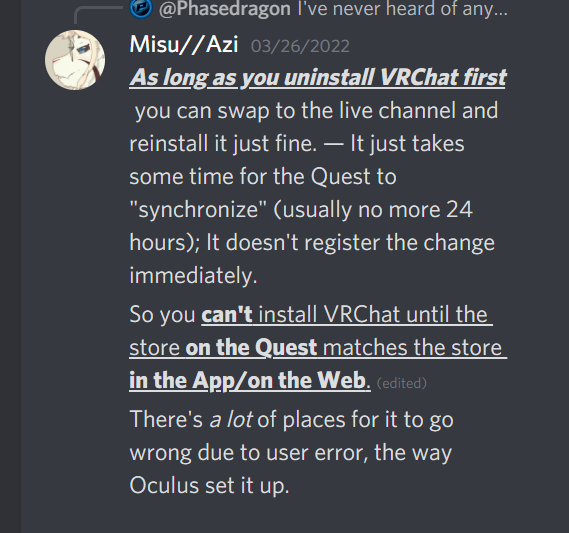
You are on Quest probably. Remove VRChat from the Quest, wait maybe an hour, reinstall
Make real sure you are switched to the live channel before you reinstall, also restart your Quest
finite trellis
i am not on quest, actually </3*
hollow hatch
Quest is the only one that has that issue. Steam is just do the reverse you did to get in. If it doesn't work, restart steam, try again
finite trellis
weird
alright
hollow hatch
If it really doesn't work, just uninstall the game
finite trellis
okay, thank you :'o)
 signal condor
so i havent tested this, but is there a way for other users to interact with your bones with more colliders than just hands, or a way for your bones to interact with more colliders than just hands on other users avatars?
 grim epoch
how do i give the quest avatars physbones
signal condor
grim epoch
how do i give the quest avatars physbones
convert them in unity
signal condor
did you download the beta sdk or the normal sdk
signal condor
did you get it from the channel in the discord
signal condor
also the avatar needs to have dynamic bones already for the auto-convert to work, if not you have to add them manually
grim epoch
i think i found it, i had to look for the actual script lol
signal condor
¯_(ツ)_/¯
grim epoch
im stillpretty new to unity
 stable mantle
signal condor
so i havent tested this, but is there a way for other users to interact with you...
stable mantle
signal condor
so i havent tested this, but is there a way for other users to interact with you...
Nope. Only custom cross-player interaction is contact senders/receivers.
signal condor
contact senders/recievers and the colliders that come on everybodys hands
 timber jewel
Player to Player interaction:
Contacts:
- Hands
- Fingers
- Foots
- Head
-Torso - custom ones (depending on if the tags match)
Phys Bone Collider:
- Hands
- Fingers
- no custom colliders
stable mantle
Unfortunately.
I wonder though if the PhysBone limitation is a performance thing or a safety thing?
If it were safety you'd think they'd give PhysBones optional contact tags like senders/receivers.
 hearty ore
How do I fix?

 warm cedar
hearty ore
How do I fix?
warm cedar
hearty ore
How do I fix?
I have a feeling you're running out of ram there
hearty ore
Yeah
Ima check my ram when I do this again
Oh yeah and It crashes unity when I upload it
warm cedar
keep task manager open at all times, this could be a memory leak
stable mantle
hearty ore
How do I fix?
Oi mate, Well There's Your Problem.
 stable mantle
Unity is trying to fill 790.274GB of RAM.
signal condor
uhhhh
stable mantle
I have no clue. Both why Unity is requesting that much nor how to fix.
@warm cedar might be right though: could be a memory leak or something.
hearty ore
Im pretty new to this kind of error.
stable mantle
Same
hearty ore
so HOLY Im pretty screwed
stable mantle
That's, like, NASA in 2040 levels of RAM.
stable mantle
Oh?
hearty ore
I broke it worse.
 mental marsh
Nah just get terabytes worth of ram
stable mantle
A link I found says that it's related to "temporary assets" that get created at build time: https://stackoverflow.com/questions/67933471/memory-allocation-error-unity-at-compile-time

Stack Overflow
Quite frequently I get a memory allocation error in unity at compile time.
Afaik this can be due to a very high number of assets, or due to an asset that might be too large.
I observed that most of...
hearty ore
and replace em
stable mantle
Temporary Assets in this case would probably mean, like, the VRC upload plane, the VRC camera, the Luna AV3 emulator controls, etc.
Anything that's creating assets on the fly that get destroyed later on.
If I'm reading correctly.
hearty ore
Ok
THAT
May mean that this dumbass bandage asset I made for this cally3d model Is fucking me over OR
Sorry for the language.
Its creating prefabs.
Everytime I upload it.
A ton of prefabs
hearty ore
Ok Ima remake the main prefab
stable mantle
Because the VRCSDK creates a prefab, singular.
But if yours is generating a TON of assets it's probably hitting Unity too hard as it tries to manage them all.
warm cedar
stable mantle
<@!283993918708645890> might be right though: could be a memory leak or somethin...
Look I program in c++ daily, I know a memory leak when I see one
But holy crap, up to 700GB+? that's new
stable mantle
To me it sounds almost as if it's creating assets recursively, and just erroring out at the biggest number Unity can hit.
stable mantle
warm cedar
Look I program in c++ daily, I know a memory leak when I see one
Lmao.
stable mantle
Did you try prefabing your model and putting it in a fresh scene with nothing else?
Drag the root model, the object with the VRCAvatarDescriptor, from the Hierarchy to a folder in the Project explorer to create a prefab.
Then create a new scene and drag the prefab from the project explorer into the scene.
It should retain all the features and parts of your model, anything nested inside, etc.
stable mantle
hearty ore
Ok Ima package up the main avatars
Do you have multiple avatars in your scene?
hearty ore
No
Its a avatar package and I have one scene with the main and the other scene with secondary
Ima crash unity one more time
since that project will probs be deleted
This should fix it?
Yeah IT DID
is the contacts editor important?
stable mantle
hearty ore
is the contacts editor important?
Contacts Editor????
hearty ore
Hey
Yeah VRC SDK Dynamics contacts.
Idk cuz my avi uses some contacts
But it’s all preset
stable mantle
If you mean the Contact Receiver/Sender scripts, those define custom contacts.
I don't know of any editor.
stable mantle
hearty ore
is the contacts editor important?
Is this what you meant?

As part of the VRC Avatar Descriptor?
hearty ore
Idk
stable mantle
hearty ore
Idk
Like I genuinely want to know: A) what fixed it, & B) what you meant by the contacts "editor".
hearty ore
I took most of the project to a new one and 2 I am assuming like senders and receivers or maybe colliders idk
stable mantle
I mean if you want custom senders/receivers, yea it is important.
For example, my thumbs have senders on them that send "Finger" "Finger [R/L]" & "Thumb [R/L]" on them.
But if you have no need for custom reception or sending anything on a non-standard part, then no they're not important.
Avatars come with a preset number of senders
hearty ore
I’ll check what broke on pc in a bit
 wheat fjord
Can you make your own recievers that collider with physbones for your own avi or is it only hands and fingers?
stable mantle
wheat fjord
Can you make your own recievers that collider with physbones for your own avi or...
Those are colliders.
Receivers/Senders: Avatar to Avatar interaction.
Colliders: Single-Avatar Collision
If you have PhysBones on your avatar, you can create colliders on the avatar and then add those colliders to the list on the PhysBone of colliders it interacts with.
You can't have your colliders interact with someone else' PhysBones (yet).
—
Receivers/Senders can be used for things like advanced interaction triggers.
E.G. When someone boops my nose with a Finger, my receiver triggers a Float value that sets a "blush" animation state.
Think of Senders/Receivers like invisible tripwires and the items that can trip them.
If a sender & receiver type match, it trips.
 sweet dragon
Good explenation
stable mantle
Defining custom colliders is only useful for preventing clipping on your avatar, or rigging up advanced, self-only dynamics.
E.G. I have a "Torso" capsule PhysBone collider from shoulder to shoulder. — On my ears' root-PhysBone, I have registered the "Torso" PhysBone collider. — This prevents my ears from clipping through the body, and instead they rest on my shoulders.
sweet dragon
stable mantle
Defining custom colliders is only useful for preventing clipping on your avatar,...
Wait so the same i can do with tail to not clip throo my leg or...
stable mantle
sweet dragon
Wait so the same i can do with tail to not clip throo my leg or...
With my tail I cheated and instead set a angle limit on a curve.
sweet dragon
A yes true.
stable mantle
So at the end of the tail it's full range of motion, but where it connects it's about 45º.
But my tail is a goat's tail so it is pretty short.
For a longer, more dynamic tail, a plane collider on the back of the avatar would be best.
Prevents the tail from moving in front of the avi.
sweet dragon
Yep i have at least 9 bones in tail. (Avatar from pfp.
timber jewel
I also use a plane collider for the floor
stable mantle
timber jewel
I also use a plane collider for the floor
Clever, but for myself I don't see the use as that's one more collider for VRC to complain about.
 unkempt hornet
hey i need help w sth. i justdownloaded vrchat n i wanted to make my own avatar, i downloaded the sdk but it wont open? can some1 help me
stable mantle
unkempt hornet
hey i need help w sth. i justdownloaded vrchat n i wanted to make my own avatar,...
Are you working with the beta SDK?
unkempt hornet
stable mantle
Are you working with the beta SDK?
yeah
sweet dragon
unkempt hornet
yeah
Basic questions y have Unity?
stable mantle
unkempt hornet
yeah
It's mostly the same as the normal SDK, with the addition of PhysBones & Avatar Dynamics.
 bright jungle
unkempt hornet
hey i need help w sth. i justdownloaded vrchat n i wanted to make my own avatar,...
bright jungle
unkempt hornet
hey i need help w sth. i justdownloaded vrchat n i wanted to make my own avatar,...
If you just downloaded the game, you won't be able to make an avatar as you'll still be Visitor rank
unkempt hornet
sweet dragon
Basic questions y have Unity?
?
stable mantle
unkempt hornet
hey i need help w sth. i justdownloaded vrchat n i wanted to make my own avatar,...
VRChat
Before getting started ensure you have a Unity project with the SDK set up. Step 0 - Create a model! Although most users choose to find a model instead (see step 1), it is TOTALLY possible to create an avatar model from scratch. You can use any 3D software you like, as long as it supports exporting ...
sweet dragon
Unity program for upluoading , edits
stable mantle
unkempt hornet
hey i need help w sth. i justdownloaded vrchat n i wanted to make my own avatar,...
VRChat
Requirements We're going to need a couple things before we can get started. Current Version of Unity. We strongly recommend using Unity Hub, available on that page.VRChat SDK - See the Choosing your SDK page to see how to choose the correct SDK for your use. Step 0 - Installing Unity Check the Curre...
The SDK for VRChat is just a plugin.
unkempt hornet
i alr made the avatar but idk how to upload it
stable mantle
unkempt hornet
i alr made the avatar but idk how to upload it
Did you make it in blender?
The first link I shared details what to do.
bright jungle
Once you're New User rank or above with a VRChat account, you'll need to download Unity 2019.4.31f1, the most recent version of the VRChat SDK, and some modelling software of some kind, likely Blender c:
https://vrchat.com/home/download
https://docs.vrchat.com/docs/setting-up-the-sdk
There's lots of SDK3 tutorials out there (i.e by Sippbox, M.O.O.N, the official VRChat learning channel, and etc), along with channels like #avatar-help, #avatar-rigging, #3d-modeling and etc
stable mantle
unkempt hornet
yeah
I'd recommend not working with the beta SDK if this is your first avatar upload. Get used to the process, and how the SDK works, before trying out the new toys.
unkempt hornet
alr thx yall :)
stable mantle
@hearty ore Just in case you don't know (IDK if you do), PhysBones require PhysBone Colliders, not regular colliders. Just wanted to differentiate those. — Not sure if this is related to what was going on.
hearty ore
I do, I am kinda planning to make a to add a guitar strap to a model that I have and idk how I should do it.
Now I got a question
Ok avi one has a gun with a contact that says shot. another avi has a contact reciever that is called shot. will it work? or no?
 stone rapids
Can anyone point me in the right direction or help me out with having an item be able to be picked up off an avatar with the new SDK? I know how to make a physbone able to be grabbed, but how do I make it where it can just be freely dragged around and carried as one pleases?
The idea is my avatar holds out and item and another user can pick it up and then hand it back
stable mantle
hearty ore
Ok avi one has a gun with a contact that says shot. another avi has a contact re...
The contacts will, if they both use the same contact type. So if both are labeled "Shot" then it'll trigger as long as the contact is registered. — Just up to you what you do with the receiver's parameter at that point.
stable mantle
stone rapids
Can anyone point me in the right direction or help me out with having an item be...

In all seriousness though, the best you could do is have a chain of bones connected to the object, that way it could be moved within X radius of the avatar.
But it'd be like a dog on a chain, @stone rapids. Even with "stretch" at the max, it'd only go so far from the avatar.
 glass cloud
dont be shy put some more
stone rapids
stable mantle
_In all seriousness though_, the best you could do is have a chain of bones conn...
Certainly an idea! I remember the example avatar they have where you can take your phone off your hip and move it around. That was why I was curious.
stone rapids
stable mantle
But it'd be like a dog on a chain, <@!166771169259814912>. Even with "stretch" a...
That’s okay! Doesn’t need to go far
stable mantle
stone rapids
Certainly an idea! I remember the example avatar they have where you can take yo...
My pendant can move on my avi like this, so i can pick it up and look at it.
stone rapids
I appreciate the info!
stable mantle
With stretch values you can make it go pretty far with minimal bones too.
stone rapids
I haven’t touched the stretch values. That’s just the slider on the physbone settings, right? (Not at the computer at the moment)
stable mantle
stone rapids
I haven’t touched the stretch values. That’s just the slider on the physbone set...
Yeah. It bases the stretch length based on the base bone lenght, so smaller bones stretch less at the max (5).
You'd also need to probably use 2 root physbones, @stone rapids: One on the object at the end of the "chain" and one at the start of the chain.
Setting a radius on the bones makes them grabbable, but based on my knowledge, you can't use curves to make some bones grabbable in the chain and some not: it'll still have a radius throughout, it'll just be microscopic in places.
By using 2 definitions, one at the chain start, that isn't grabbable, and one on the object that is, you can make the object grabbable without having people messing about with an invisible chain.
stone rapids
Got it! I much appreciate all the details, my friend!
lyric bough
lyric bough
if neck can be grabbable
yeah
there is only 1 thing I miss
single bone grab
just if I give head to front of my body it's looking down and rotate cause it's connected with neck
stable mantle
lyric bough
just if I give head to front of my body it's looking down and rotate cause it's ...
Right now the solution I think is to set a separate bone on the grabbable parts, and set the root bone to "ignore" those grabbable child bones.
E.G. The neck and head would both have PhysBone components, and the Neck PhysBone would be set to ignore the Head Physbone (so it doesn't duplicate bones).
IDK if it'd work with bones so close together though.
I haven't really tested this myself. Just what I've heard around.
lyric bough
stable mantle
Right now the solution _I think_ is to set a separate bone on the grabbable part...
so set PhysBone to Neck and Head?
🤔
stable mantle
I think?
stable mantle
lyric bough
so set PhysBone to Neck and Head?

You'd set this on the neck to "1" and drag the head to the empty element slot below it that appears.
(After you add the bone to the head)
Im not sure how that will effect physics though. It depends on the desired effect.
lyric bough

well this will turn off grab radius
completely

that's why I said I miss single bone grab
well cause it's work like that if you set it in neck you can grab everything that is child of a neck if you set it to head you can grab everything that is child of head
so if I choose neck set ignoring head and set head ignoring other it's childs it will just end with only dynamics without grab
lyric bough
hearty ore
but work in the scene
do you upload avatar on right platform?
hearty ore
yeah
Its on andriod rn
and I go to play with my ears and they failed to work
and my bandage wrap also failed
lyric bough
are you on beta version on Quest?
stable mantle
lyric bough
completely
Yeah like I said for your case with the two bones so close together in a chain I wasnt sure how it'd work.
There is feedback on the canny for many more Dynamics features, and you can file your own if you cant find relevant feedback in the list.
stable mantle
hearty ore
and my bandage wrap also failed
Make sure you are on the test/beta channel on Quest. Open the store on the Oculus App or website linked to your Quest (make sure you're signed in), and click the version number.
stable mantle
lmao
hearty ore
if they are fondlable then Im in beta
That is the quickest test to see if I am in beta
stable mantle
le-mao
hearty ore
Ok I fixed one of the things
stable mantle
 lapis ivy
how im confused
lapis ivy
how im confused
?
stable mantle
lapis ivy
like how do you get avatar dinamiscs
You need both an avatar dynamics avatar and the beta client.
stable mantle
lapis ivy
how
I literally linked you to #open-beta-info
It describes how to join the beta on all platforms.
And theres an official world with test avatars.
lapis ivy
ok
stable mantle
hearty ore
Ok I fixed one of the things
BTW: Are you restarting VRChat between uploads?
stable mantle
hearty ore
They fixed that a while back
Not for me
hearty ore
Oh
stable mantle
lapis ivy
but how do you join
Join what???
hearty ore
weird?
stable mantle
lapis ivy
beta
🤦

 real bridgeBOT
┬──┬ ノ( ゜-゜ノ) There you go
 stable mantle
If you followed the instructions in #open-beta-info you should be on build 1184 (as of current) — You can check that in the Launch Pad, under the ⚙️ icon, on the "debug info" section.
After you install the beta client, you need an avatar that supports dynamics to really test it out. By default, avatars only have basic dynamics that do nothing on their own. — There should be an official world labeled Avatar Dynamics in the thumbnail in one of the top lists.
Note: You can only play with people on the beta, in the beta. You cannot play with "live" users.
lapis ivy
(im on oculus)
stable mantle
lapis ivy
(im on oculus)
Check your build version as I note in my last message.
stable mantle
If it's 1171 or 1173 you are not on the beta.
lapis ivy
still confused
how
im still confused and dont hnderstand how to become a beta
understand*
stable mantle
lapis ivy
im still confused and dont hnderstand how to become a beta
If at this point you're having this much difficulty, you probably shouldn't join the beta. It's very difficult to exit and you can't play with other people on it (outside of beta testers).
#open-beta-info literally lays it out step by step on how to join. And I laid it out step by step on how to check your build version.
 near grove
Go to your web browser on oculus and go to the oculus website then sign in then go to the top left corner and scroll down to store then search vrchat note: it will bring up the oculus store just click out of it and pull up the oculus browser again then scroll down to version and click beta
near grove
Follow what I just said step by step
lapis ivy
near grove
Go to your web browser on oculus and go to the oculus website then sign in then ...
hold up slow down
near grove
There isn't any other way to explain
stable mantle
lapis ivy
i understand but which link do i use

It literally tells you which one to click based on your platform.
stable mantle
||reading comprehension: crit fail 🎲||
It lays it out step by step
As easy as it possibly can be.
Do 1. then 2. then 3. then 4.
If you can't figure it out still, you are best waiting for Avatar Dynamics to be released.
E.G. if it says "log in to Oculus___.com___ it is probably telling you to use a web browser.
The beta is not for everyone, as it wont magically give you avatar dynamics, and it is fairly frustrating to uninstall on Quest.
lyric bough
stable mantle
BTW: Are you restarting VRChat between uploads?
well avatar change when you switch to other and back to this what you do
you don't need to restart whole game
stable mantle
lyric bough
well avatar change when you switch to other and back to this what you do
Doesn't work for myself.
Only for others.
lyric bough
🤔
stable mantle
Why I asked.
lyric bough
interesting
stable mantle
I think it's a caching bug.
It's pulling the locally cached version of the avatar, rather than reloading.
stable mantle
Sometimes switching avatars → switching worlds → switching avatars back works. Sometimes.
stable mantle
lyric bough
maybe try to clear cache or idk
That's unnecessary if restarting VRChat works.
A good force of habit on Quest is just to quit VRChat between uploads is all I was trying to say to @hearty ore.
lyric bough
stable mantle
That's unnecessary if restarting VRChat works.
but it take too more time
🤔
stable mantle
lyric bough
but it take too more time
Clearing cache and reinstalling doesn't fix it for me. So you're wasting even more time with those suggestions.
VS. maybe 15 seconds loading in.
lyric bough
yeah
stable mantle
It's just about 15 seconds to a minute depending on your homeworld.
So it's not a major inconvenience.
And it ensures you're not testing an "old" avatar and thinking it's broken.
I've been stung by that too many times on Quest.
lapis ivy
what fi i did ehat the steps did
made my verison open beta
then what
and it didny change?
stable mantle
lapis ivy
and it didny change?
Did you check you build version inside VRChat like I told you to?
stable mantle
lapis ivy
yes
What number is it?
lapis ivy
1172
stable mantle
lapis ivy
1172
Then your Quest hasn't refreshed yet to install the update.
lapis ivy
ohim installing it
stable mantle
Can I ask why you want to use the beta, @lapis ivy ?
hearty ore
I am going to reweigh the rig on one of the models to create moveable limbs
How would I beable to make that work?
stone rapids
Is there not a way to prevent another player from grabbing a physbone, while being able to grab it yourself?
bright jungle
disable interactions in the quick menu settings/set to friends only
 plucky owl
nobody has to go into the SDK's plugin folder and reimport all the plugins?
hearty ore
Ok
stable mantle
plucky owl
nobody has to go into the SDK's plugin folder and reimport all the plugins?
?
 dim cloak
@warm cedar I can't remember if it was you, or someone else that asked my how I did the motion for my lightsaber and leaving it in the world. But, I did just post my video explaining how to make the lightsaber and it runs through how I attach it to my hip, hand, and drop it in world space. If you didn't ask me this and it was someone else then sorry for the ping, but I was pretty sure you asked lol.
hearty ore
Oh eya
That reminded me
Most of my contacts are completely buggy
actually all.
Lets say two people are in the same world, one enables to contact but on there end it doesnt work, or it doesnt get put away.
dim cloak
You need to network sync them if you aren't already.
hearty ore
Net what?
Im using a prefab avi and pretty new to these
How do I network sync them or is it a checkmark thing.
I am stupid
@dim cloak May you explain what you mean?
dim cloak
hearty ore
Net what?
https://www.youtube.com/watch?v=raQRXfH_GZE Here is a video I made explaining how to make a network synced variable for the contacts system, if ya have more questions after watching it just let me know.

SDK DOCUMENTATION: https://docs.vrchat.com/v2022.1.2/docs/contacts
In my last video explaining senders and receivers, I did not do a good job clarifying that network synced parameters are useful in certain scenarios, so I wanted to clarify that in this video.
If you have any questions about contacts, network syncing, or would like me to do a m...
hearty ore
Thank you.
grim epoch
where do i put bug reports?
 balmy egret
grim epoch
where do i put bug reports?
balmy egret
grim epoch
where do i put bug reports?
read pinned message
grim epoch
balmy egret
read pinned message
thank you
gonna see if the same thing happens on pc as quest before i make the report
hearty ore
Is there a way to limit movements on a vr player?
Like have joints be animated but unable to be fully controlled by a player.
stable mantle
I think non-humanoid joints can but humanoid bones get overridden unless you use a VRC Tracking Control component in an animation state.
And even then, even with non-beta stuff, what you can limit is, well, limited.
E.G. i have to reposition my avatar on the Y axis after moving pose space (the camera) on my lying down animation: head tracking also rotates the body. — There's no option to lock the upper chest/body rotation, as VRChat links that to the head in standard VR.
— If I don't reposition the body AFTER moving the camera, the legs are flattened and the body contorts. Despite the legs/feet being locked to animation.
hearty ore
Im first going to do this port rq
Cuz I got a idea of using physbones
since they do resist movement
Question
nvm this is a avi rigging thing
near grove
quick question, do i have to reinstall to switch back to the live version?
hearty ore
On quest yes.
If this does not work 1 you did it wrong, or 2 some data from beta is in your headset and requires a factory reset for it to work again, BUT only do this if you loose vrc when you install it and it deletes itself.
stable mantle
near grove
quick question, do i have to reinstall to switch back to the live version?
On Steam, i think it can overwrite to the live version.
On Quest, you gotta follow these steps:
- Uninstall VRChat
- Go to the Oculus App or Website, and pull up VRChat (Quest) while logged in
- Scroll to version under details and select it/click it
- Switch to the LIVE branch
- Open the store on the Quest
- Go to VRChat's store page
- Confirm the version number matches the website/app under More Info.
7a. If it does, install.
7b. If it doesn't check back until it does. Do not install until the version matches LIVE.
 jovial thorn
Anyone know how to add physbones to parts of a model like hair? I converted one of my avatars and all the physbones work except for the hair
dim cloak
Functions the same as dynamic bones, just add a component where you want the physbones script to be and tweak the settings.
near grove
Wheres the best place to go to meet people
 sand ember
Does anyone know when the official update for Avatar dynamics is coming out ???
stable mantle
sand ember
Does anyone know when the official update for Avatar dynamics is coming out ???
Probably not too soon.
sand ember
Ahh got you I tried it out but I don't like staying in the beta alone with out my friends
stable mantle
near grove
Wheres the best place to go to meet people
On the beta? Depends on who you know on the beta, since it's not net-compatible.
 next spire
jovial thorn
Anyone know how to add physbones to parts of a model like hair? I converted one ...
next spire
jovial thorn
Anyone know how to add physbones to parts of a model like hair? I converted one ...
add the component to the root bone(s) of the hair
jovial thorn
Ah okay, thank you, I’ll try that
 keen nova
Does anyone have the link to the docs page that goes over performance ranking with the new physbones?
bright jungle
keen nova
Does anyone have the link to the docs page that goes over performance ranking wi...
https://docs.vrchat.com/v2022.1.2/docs/avatar-performance-ranking-system - you can switch to the beta docs at the top-left of the docs page c:
timber jewel
VRChat
The Avatar Performance Ranking System allows you to see how much a user's avatar is affecting performance via analysis of the components on that user's avatar. You can also use it on yourself to see how performant your avatar is. This system is provided to inform users what is likely the most perfor...
well, I suppose you were faster 😅
timber jewel
I actually didn't even do that on purpose xD
bright jungle
lmao
keen nova
Ah, useful info, For as much as I've looked at the docs, never seen this button before lol.

 urban salmon
@dim cloak Hey can I dm you?
I'm doing something a little similar to the forcefield you did but I'm just curious what you used in poiyomi to show the bullet indent.
warm cedar
my question would be how in the world you would do that on quest, given there is no transparancy
near grove
stable mantle
On Steam, i think it can overwrite to the live version.
On Quest, you gotta fol...
Or you can just switch to live uninstall and install it again and login
near grove
near grove
quick question, do i have to reinstall to switch back to the live version?
Or you can just switch to live uninstall and install it again and login
stable mantle
near grove
Or you can just switch to live uninstall and install it again and login
I take it you didn't mean to reply to me?
stable mantle
warm cedar
my question would be how in the world you would do that on quest, given there is...
Probably can't. Best idea i can think of is, like, a wireframe mesh, or possibly an inverted sphere — due to Unity's backface culling, the inside of the sphere will be visible whilst the outside will not. This would allow the sphere to appear around you, rather than in front of you.
Only problem though is that would look great outside the sphere, but inside the sphere visibility would be limited to the edge of the sphere. And you wouldn't be able to do any special effects for when it's hit since those typically require shader tricks.
Realistically, a wireframe would be the way to go if you wanted something "clean".
Though if you, say, only showed the inverted sphere temporarily, that could work. — You could even possibly get some "hit" effects this way.
E.G. you could either have a gesture set to spawn the field, or you could have the field's contact active at all time, and activate its mesh on hit.
With the latter, the field would be visible for a few seconds with each hit, before disappearing again.
dim cloak
urban salmon
<@!217419255577182210> Hey can I dm you?
Sure ^.^
 cinder lotus
 shrewd heron
IS there any news on Open beta being natwork compatable with Online in Quest?
 mortal plume
that will happen when AD is out of beta and pushed to live
shrewd heron
is there any spesific time when that will happen
mortal plume
nope
shrewd heron
is it possible to tell how far we are to the open beta.
mortal plume
we're already in the open beta lol
closed beta was 3 months iirc, then open beta started
and at some point it will be out of beta
warm cedar
I'm giving it 3-5 more weeks
could be hell lot more
but That's my personal prediction
shrewd heron
i will possibly say that i might take maybe a month. Personaly i have no clue i just think it may take that long.
warm cedar
4-5weeks IS a month smartass xD
 final ferry
 shrewd estuary
i expect a bit more than that
timber jewel
I expect a new beta this week, but a release? no clue
signal condor
yeah cuz there wasnt a new iteration last friday
a release id say in 1-2 week cuz a lot of the stuff seems to work pretty well
although i would want avatar to avatar colliders other than the hands
 mossy python
I highly doubt 1-2 weeks
I’d say between 1-2 months lol
Specifically thinking around 5 or 6 weeks
They still haves some stuff to fix lol
 timber jewel
mossy python
They still haves some stuff to fix lol
timber jewel
mossy python
They still haves some stuff to fix lol
Have you made a canny for that?
mossy python
timber jewel
Have you made a canny for that?
I have no idea how I did it or how to replicate it, so not worth making one
keen nova
Hey guys, is there a standard world most people on beta are using.
I kinda want to test stuff, but don't want to have to explain to people how to get on the beta branch.
keen nova
Thanks bud.
 rain niche
when are they gonna make it so we can join none beta people?
 molten cobalt
rain niche
when are they gonna make it so we can join none beta people?
molten cobalt
rain niche
when are they gonna make it so we can join none beta people?
the code changes between the regular version and the beta means that's not possible
rain niche
oh ok im just stuck in beta whenever i try to reinstall the normal version it wont install
molten cobalt
https://i.gyazo.com/81355a065bdc5a227aa278c64fbffd7b.png not sure if it's help but doing some searching for the quest problem
 stable mantle
molten cobalt
https://i.gyazo.com/81355a065bdc5a227aa278c64fbffd7b.png not sure if it's help b...
stable mantle
molten cobalt
https://i.gyazo.com/81355a065bdc5a227aa278c64fbffd7b.png not sure if it's help b...
You can also just link to the message :P — Though there's a better one of mine that step-by-steps it.
molten cobalt
stable mantle
You can also just link to the message :P — Though there's a better one of mine t...
good point. Thanks for the better link
near grove
when will phys bones be released to the public?
molten cobalt
open bettas usually don't have a concrete release date for when they go live
shrewd estuary
mossy python
They still haves some stuff to fix lol
gotta love the default unity skybox
oh yeah pretty sure the button behind you in the loading screen still isn't updated to the new ui
mossy python
I think that’s intentional
Just as a sort of Easter egg if you turn around and ‘look back’
shrewd estuary
it's just always looked off because of how it's never been updated imo
 mighty glacier
mossy python
They still haves some stuff to fix lol
mighty glacier
mossy python
They still haves some stuff to fix lol
no light source loading screen 💀
timber jewel
shrewd estuary
oh yeah pretty sure the button behind you in the loading screen **still** isn't ...
I hope we are getting a new Loading screen at some point, cause the current one is kinda meh
shrewd estuary
i like the song.
shrewd estuary
timber jewel
I hope we are getting a new Loading screen at some point, cause the current one ...
wait wait hear me out
old loading screen environment, with new loading theme.
or do those two not go well together
timber jewel
hmm what if there was no loading screen :o
So we would just download the next world while being in the current one
and then just swap over
shrewd estuary
the original creator of the new vrchat loading theme made a piano version of it so if the new theme doesn't work on the old environment they could use it's piano version and that could probably work
shrewd estuary
timber jewel
So we would just download the next world while being in the current one
this would be cool too but what would the login menu look like
or would the login/startup menu be unchanged
timber jewel
hmmmm
shrewd estuary
id imagine itd be unchanged
timber jewel
idk probably
For safety also make it so the Home world would load the same way as it does now
so you can quickly leave a lobby
shrewd estuary
yea
or you could just toggle world downloading in background on or off
so that people who like the loading screen could have the option of keeping it while people who wanna download the world in the backround can also have the option to do that
timber jewel
true
shrewd estuary
timber jewel
For safety also make it so the Home world would load the same way as it does now
this would be unchanged though, you'd still go to the home world the same way and the startup/login menu would still be the same regardless of what you have it set to
timber jewel
yup
shrewd estuary
this would be a pretty interesting feedback post, pretty sure one already exists though. not sure if it goes as much into detail as this conversation did though.
timber jewel
It probably already exist, at least I think I have seen one about this kind of thing before
shrewd estuary
yeah i remember seeing one too
shrewd estuary
timber jewel
It probably already exist, at least I think I have seen one about this kind of t...
i wonder how the "progress bar" would look when you decide to download the world in the backround.
would it look the same as the progress bar in the loading screen, but itd be in the bottom center of your field of view?
like itd be on the hud above the mic icon
shrewd estuary
shrewd estuary
would it look the same as the progress bar in the loading screen, but itd be in ...
or would it be on the bottom left or bottom right
shrewd estuary
oh yeah like a notification
timber jewel
with a download icon in the middle
shrewd estuary
and the more the world downloads the circle would fill up clockwise
stable mantle
shrewd estuary
oh yeah pretty sure the button behind you in the loading screen **still** isn't ...
wait wat
timber jewel
shrewd estuary
and the more the world downloads the circle would fill up clockwise
yup
shrewd estuary
stable mantle
wait wat
yeah go to a world with a large file size and look behind you while in the loading screen
shrewd estuary
timber jewel
yup
if the canny about this topic that does exist doesn't go into as much detail then we can try making a feedback post or something
timber jewel
maybe a bit better looking than that xD
 stable mantle
Why not make the loading screen an elevator?
Play the generic jazz music that all the YouTubers play.
shrewd estuary
timber jewel
maybe a bit better looking than that xD
there'd be no inner circle, and the progress bar and download arrow would both be white. the circle around the arrow turns green clockwise
stable mantle
Maybe throw in a few whispered "Stanley"-s
stable mantle
shrewd estuary
that's what i have in mind
I'm talking this but unironic: https://www.youtube.com/watch?v=qdR9dqnLC1k
This took too long to render, hope you enjoy!
Twitch: http://www.twitch.tv/meigs2
shrewd estuary
embed failure
 stable mantle
u happy
shrewd estuary
yes
stable mantle
stable mantle
I'm talking this but unironic: https://www.youtube.com/watch?v=qdR9dqnLC1k
Have this, with tips displayed as those in elevator framed posters you sometimes see.
Have a "cancel and go home" button on the panel.
shrewd estuary
this would make every world seem like a separate floor to this comically large building called "vrchat"
i like it
definitely wouldn't fit too well with the blue and yellow space aesthetic vrchats going for in their banners and stuff though
stable mantle
shrewd estuary
definitely wouldn't fit too well with the blue and yellow space aesthetic vrchat...
Just recolor the elevator, make it glowy. Neon lights at the top and bottom.
shrewd estuary
oh shit
maybe have the walls of the elevator transparent so you can see the vast emptiness of space
stable mantle
shrewd estuary
maybe have the walls of the elevator transparent so you can see the vast emptine...
Transparency might be a bit much for a loading zone, since you have to remember Quest is a thing.
shrewd estuary
how about the walls of the elevator except for the doors and the panel and also the floor and ceiling just don't exist then
so you could still stare at the galaxy while being in an elevator
molten cobalt
I do wonder if vrchat loading screen was a elevator if the start spaces for a lot of maps would turn into elevator lobbies
shrewd estuary
thatd be so cool unironically
like how you spawn in an elevator in just b club iirc
molten cobalt
yup
shrewd estuary
ive never seen such a detailed discussions about loading screens in any other game
molten cobalt
I came in late so I probably missed most of it
shrewd estuary
you can scroll up to see the "downloading worlds in background" discussion that'll probably fire up again once i get home and draw my concept of what it could probably maybe look like
molten cobalt
yeah that would be nice to have a download in the background option as I always tend to get a bit of the short end of the stick in World hopping with friends because my is not terribly fast
shrewd estuary
im somehow always the one that loads in first when everyone goes into the portal at the same time
when the ethernet hits
molten cobalt
also would be interesting if World makers had a little more control on how like permanent portals in their worlds look so you could like make them look like they fit the environment better
shrewd estuary
floortals would finally be real.
molten cobalt
floor portals?
shrewd estuary
yea
shrewd estuary
molten cobalt
floor portals?
 molten cobalt
that might be a little disconcerting
shrewd estuary
(image source: ron)
shrewd estuary
proceeds to fire it directly Infront of another player
shrewd estuary
stable mantle
Why not just give us a portal gun at that point.
the portal dropping mode another user mentioned on the canny
stable mantle
For real though, portals could use some feedback so I dont look like a dumbarse standing in a portal thats malfunctioned.
molten cobalt
honestly I was more just looking for like you open a door and a square-shaped portal is behind it
stable mantle
Like maybe have you walk through it into the loading zone?
shrewd estuary
stable mantle
For real though, portals could use some feedback so I dont look like a dumbarse ...
me and the bois repeatedly backing up and going back into the portal multiple times before it finally detects us going into it
(thank god they improved on this)
stable mantle
Improved, not fixed
shrewd estuary
yes
stable mantle
If we use the elevator idea, animate an elevator *door coming through the floor, and it opens, with the portal inside. "floor" sign above would display name, user, privacy, etc.
shrewd estuary
thatd probably take up space but sounds cool
stable mantle
shrewd estuary
thatd probably take up space but sounds cool
If you do it right it'd be as big as the current portals, maybe slightly wider.
Just the doors and frame. Not the whole elevator.
shrewd estuary
that makes sense
shrewd estuary
stable mantle
Just the doors and frame. Not the whole elevator.
ding! your lift to EBoy avatar world has arrived.
stable mantle
shrewd estuary
*ding! your lift to EBoy avatar world has arrived.*
Going... down.
(To hell)
God this elevator idea has me so amused
shrewd estuary
would the elevator go back down into the floor for it's "despawn" animation
or would it just pop out of existence like how portals currently do
stable mantle
shrewd estuary
would the elevator go back down into the floor for it's "despawn" animation
Go back down, with a "whirr"
stable mantle
I wonder if I should through a concept world together
 modest ivy
stable mantle
I wonder if I should through a concept world together
modest ivy
stable mantle
I wonder if I should through a concept world together
I would love to see this
 hard pond
so...new internal beta, for which be good question.
 humble pulsar
Probably gearing up to release a new open beta soon
timber jewel
yup
hard pond
ik or physbone be good question by now. guess. xD
hard pond
ahh clever
hard pond
yeah, unless need urgent patch.
 gritty salmon
hopefully not live, there were avatars outright broken on the current open beta (canny filed but not acknowledged)
shrewd estuary
timber jewel
maybe a bit better looking than that xD
i'd imagine it'd look something like

(just without the black backround, of course.)
(aand maybe make the circle a bit thicker)
whipped up in 2 minutes in the paint.net app
timber jewel
Looks good ^^
timber jewel
gritty salmon
hopefully not live, there were avatars outright broken on the current open beta ...
With Live I meant just a normal patch / Bugfix update for it.
There is no way Avatar Dynamik will go live anytime soon. We haven't even gotten any Release Candidate yet so yeah, really reallly unlikely that it would go live xD
shrewd estuary
timber jewel
Looks good ^^
whipped this up


paint.net can be a good editing tool and for what
shrewd estuary
yee
shrewd estuary
shrewd estuary
whipped this up
just noticed the fact i misspelled background
smh my head
shrewd estuary
the back is round.
shrewd estuary
timber jewel
back*round*
if it makes this even funnier i put this on twitter with the same spelling error.

excellent at typing
timber jewel
xD
bright jungle
back🔵
 muted bloom
shrewd estuary
whipped this up
muted bloom
shrewd estuary
whipped this up
Oh no you’ve been downvoted
shrewd estuary
ripbozo
timber jewel

 arctic rune
just curious, does the open-beta branch also include ik-2?
mossy python
shrewd estuary
whipped this up
For reference the font VRC uses is Dosis, also needs to be fully capped to be consistent with the rest
Otherwise not bad
shrewd estuary
mossy python
For reference the font VRC uses is Dosis, also needs to be fully capped to be co...
oh wait yeah i forgot to get that font
got it now thx
 mossy python
I have tried on multiple occasions to mimic the VRC UI
 shrewd estuary
now i can still misspell background but at least the font will be correct
mossy python
Lol
 lapis urchin
I hate that I can only find people on the Avatar Dynamics Hub, even more so that all servers still show me the live server count, it makes it hard to find instances with people actually in it
mossy python
That is one thing I wish the beta did
shrewd estuary
when the not network compatible hits
mossy python
Prioritize lobbies with other beta players
Or show actual beta player counts
I’ve only seen other beta players in Just B Club and the backrooms
lapis urchin
the only time I see beta players outside of the hub is when someone in a large hub instance drops a portal
that or I'm in a private instance with other people
 candid field
I’m on quest trying to revert back and it’s not working
 tardy mason
Why do we get stuck in beta????
shrewd estuary
tardy mason
Why do we get stuck in beta????
because facebook is shit at managing betas
try uninstalling vrchat, and waiting a bit. then reinstall
tardy mason
Ok thank you
 raw forge
mossy python
I have tried on multiple occasions to mimic the VRC UI
raw forge
mossy python
I have tried on multiple occasions to mimic the VRC UI
I'm more apt to click Hide Avatar instead of show if I see this
mossy python
raw forge
I'm more apt to click Hide Avatar instead of show if I see this
Sounds like a you problem
raw forge
mossy python
Sounds like a you problem
Nah I just like my frames
Not a problem for me if I see a robot
mossy python
No it definitely is a you problem when the avatar is actually very optimized but VRC's performance ranking system blows
mossy python
Polygon limits need to be higher universally
It makes very little impact on performance
raw forge
Not at all. It makes a HUGE impact
mossy python
Are you high
Render calls make the biggest impact
Aka having 3 million material slots
raw forge
mossy python
Are you high

Tip!
Though VRC doesn't count or penalize them like bones, shape keys are expensive. The cost scales with poly and shape count.
If your model is 50,000+ polygons, splitting face and body and removing all keys from body can improve performance for those around you.
#vrchat
Likes
112
 Twitter
·
mossy python
Twitter
·
mossy python
If your avatar is 80k tris and has 1 material it will outperform an avatar with 20k that has 10 materials
raw forge
Render calls actually make less of an impact after the Graphics Jobs update
And no it won't
I promise you
mossy python
Yes the hell it will I have made direct comparisons before lmao
raw forge
In VRC?
mossy python
Yes
raw forge
How can you gauge it
mossy python
With both full and optimized mirrors
mossy python
raw forge
How can you gauge it
Wear an avatar and look in a mirror, record average framerate
It's pretty fucking easy to guage lmao
In some instances VRC's performance ranking actually encourages UNOPTIMIZED approaches to issues
mossy python
Okay here's the key
When you use blend shapes to customize an avatar
Apply them to the basis when you're done
And only use visemes and blinking
Nothing else is necessary
raw forge
Here's the better key:
Use bones to toggle objects, NOT blendshapes
mossy python
I don't
That's horrible for performance
Fun fact, bone scaling objects is almost as bad as shape key scaling objects
raw forge
Okay well you seem to have no desire to actually listen to facts
mossy python
The optimal approach is to disable the game object through an animator layer
But VRChat actively discourages such by making skinned meshes much worse for performance
mossy python
Yes whatever I say because obviously I have a better grasp on performance
raw forge
Guess my 8 years means nothing
mossy python
I would know, I'm a quest creator and optimizing is fucking everything on Quest lmao
mortal plume
bones are better than shapekeys yes, but completely disabling the mesh does help aswell, especially if the thing you're disabling is a separate material anyways
since it's already an extra draw call
mossy python
raw forge
Yet you give 0 craps about PC optimization
Because whatever is optimized on Quest is gonna be damn near perfect on PC
raw forge
mortal plume
bones are better than shapekeys yes, but completely disabling the mesh does help...
Disabling the mesh is better than both however having a separate mesh in itself incurs another draw call vs a bone toggle that could be atlas'd
mossy python
Right
But then the object scaled by bones is never technically unrendered
It varies on a by use case
raw forge
However Shape Keys will hit performance with a multiplier on vertices count. Shape keys is the worst toggle option for performance
mortal plume
it could be atlased yes, but then you're increasing your texture size most likely, and it adds a lot of extra work when you're actively working on the model
so it's a compromise
raw forge
Right but the best comprimise
mortal plume
I personally stick to mesh toggles since it's by far the easiest to work on
raw forge
Nothing wrong with that
mortal plume
and I only ever have like 4 meshes enabled
since a lot of the toggles are clothes, which are mutually exclusive through parameter drivers
stable mantle
tardy mason
Why do we get stuck in beta????
Long Story: Branch Switching is a broken process on Quest and requires "handling with care" unless you are a developer with ADB access.
Short Story: Meta sucks, Follow the Steps Exactly.

 nova raptor
I'm trying to upload an avatar and when I hit the check mark saying I can it gives me this error
Edit: Found out to fix it I needed to enable my camera

 sweet badge
 torn mesa
why is my skirt doing this?
torn mesa
why is my skirt doing this?
make sure that, at rest, no physbones are colliding with colliders.
also the physbones can become jank when placed on poorly scaled bones.
near grove
Man avatar creation seems hard lmao
 old rock
People talking about raising the poly count limit in here and that's already a possible maximum of 5.6 million polys before the world itself if everyone runs at 70k in a full instance
Yeah no, give people an inch and they take a mile
 muted brook
The issue is less the polys themselves, but more blendshapes, mats, meshes, etc.
The performance rating isn't really accurate, especially when you get into more advance features like multiple clothing options. It's more performant to have them on separate meshes so you can hide and show them, but you get a better performance rating if you have them all on one mesh and use blendshapes
old rock
Not so sure people want my 80 or so blendshapes for face tracking, visemes and gestures on a single 70k mesh
warm cedar
I usually ignore the performance system and use actual practical Unity optimisations, disabling objects is the biggest performance improvement. strangely enough
 inner creek
What people seem to forget is nobody is stopping you from making a model with more polygons/ materials/whatever. It's other users that get to choose to see them.
warm cedar
inner creek
What people seem to forget is nobody is stopping you from making a model with mo...
^
inner creek
The 70k limit for good rating is a reasonable amount.
warm cedar
It is, as it teaches people to be optimised, Seriously all those e-girls could be made from 30k or less.
inner creek
Normalmaps work wonders.
warm cedar
Indeed they do!
Don't forget that 512x512 textures are still good, as long as you don't use low quality compression
old rock
I do enjoy these gorgeous looking Warframe models at 10k-20k polys
molten cobalt
warm cedar
Don't forget that 512x512 textures are still good, as long as you don't use low ...
also detailed maps exist
old rock
Normal and AO maps make the world of difference
warm cedar
molten cobalt
also detailed maps exist
Yessers
inner creek
I remember when there was a polygon limit for uploading. 20k was fun.
old rock
Biggest difference back then was the mmd textures
Everyone's avatars at 2MB download
Good times
inner creek
Bro. The first model I ever put in VRChat was a decimated mess that I had to learn to rig myself.
Ended up being like 50 separate meshes or something when I looked back at it.
old rock
Downloading off vrchat's CDN service is horribly slow, large avatars aren't fun to download
80 players pushing 4GB just to load the world
warm cedar
old rock
Everyone's avatars at 2MB download
my public avi is 1.5mb
inner creek
When you look at someone's avatar stats and they are bigger than the world 
molten cobalt
warm cedar
Yessers
also very handy for tiling textures as well
old rock
I aim for 10MB, where possible
molten cobalt
inner creek
When you look at someone's avatar stats and they are bigger than the world <:vrc...
yeah that's terrifying
warm cedar
old rock
I aim for 10MB, where possible
Quest limit ?.
warm cedar
inner creek
When you look at someone's avatar stats and they are bigger than the world <:vrc...
90% of all public e avatars
inner creek
Yup
old rock
Just personal limits, no mesh larger than half floats (65k), 2 skinned mesh renderers, 8 materials
molten cobalt
old rock
Just personal limits, no mesh larger than half floats (65k), 2 skinned mesh rend...
do you have much trouble keeping to those limits
old rock
Easy
warm cedar
I always go over the limits with props, but those are props so meh
old rock
Im medium rated because of 12 dynamic bones
Tempted to see if I can play with constraints with Phys bones to bring that down to 8
warm cedar
Physbonie
molten cobalt
I suppose you could test in the beta if the auto converted physics bones bring you to excellent?
warm cedar
:] Beta
old rock
Stuff like front hair fringes or where you expect similar behaviour between nearby bones could be following a single bone with a constraint
Providing it doesn't look too out of place with colliders and player interaction
 serene crest
is the default physbone transform limit still 32?
timber jewel
serene crest
is the default physbone transform limit still 32?
VRChat
The Avatar Performance Ranking System allows you to see how much a user's avatar is affecting performance via analysis of the components on that user's avatar. You can also use it on yourself to see how performant your avatar is. This system is provided to inform users what is likely the most perfor...
 small surge
Quest one seem abit off , have a good one with 22 transforms = good still , docs say that would be medium

1 component over good too
 stable mantle
When have the docs ever been accurate though?
modest ivy
performance ranks aren't correct for quest this sdk/beta
timber jewel
small surge
Quest one seem abit off , have a good one with 22 transforms = good still , docs...
The current performance ranks on Quest are the same as on PC, it's a bug and will probably be fixed with the next beta update.
hard pond
interesting
timber jewel
Yeah kinda annoying, I updated all my Avatars on Quest yesterday with my new texture and Phys bones, no complaints from the SDK, but they didn't work ingame.
I don't really know why until the SDK tells me, so I guess I have to wait for the fix
hard pond
oh,,,,
timber jewel
(I hope for a new beta today)
humble pulsar
Same, I really want an update of sorts soon
molten cobalt
constrain on quest would be very nice
timber jewel
yeah, that too
serene crest
would anybody happen to know why this isn't working? I'm losing my mind a lil bit


everything is named properly, it just won't detect _IsGrabbed (or any other parameter) in the animation
mortal plume
serene crest
everything is named properly, it just won't detect _IsGrabbed (or any other para...
I asked earlier, are you using Lyuma's emulator?
serene crest
I have it imported, but I'm not really sure what all I should be doing with it all. Is there any documentation for all this so I don't have to keep bothering people?
mortal plume
you have to be using it if you want to be able to test your avatar properly
go to Tools > Enable avatar 3.0 emulator
and hit Play in unity
then click on your avatar to see all of the options in the inspector
 mint rover
mortal plume
I asked earlier, are you using Lyuma's emulator?
mint rover
mortal plume
I asked earlier, are you using Lyuma's emulator?
I've seen a bunch of talk about this emulator thing, what is it and what does it do exactly?
mortal plume
it essentially replicates all of the 3.0 functionality but in the editor, which allows you to test to make sure all of your avatar logic works properly. you can step through everything to see exactly where stuff is going wrong
mint rover
Oh awesome! Sounds really useful
mortal plume
newer versions also have support for OSC and avatar dynamics
stable mantle
mortal plume
it essentially replicates all of the 3.0 functionality but in the editor, which ...
Except Parameter Drivers. I've learned those don't fire still.
mortal plume
they do though
stable mantle
Not for me.
mortal plume
I use them all the time
stable mantle
Wonder if its a Mac bug?
stable mantle
None of the parameter drivers in states fire in testing for me, so I assumed that was a thing it "couldn't do". Everything else seems functional.
¯\_(・–・)_/¯
timber jewel
well... I guess no new beta today
 floral flint

 raw oasis

timber jewel
dim cloak
mortal plume
you **have** to be using it if you want to be able to test your avatar properly
This is 100% not true. While I think Lyuma's emulator is great and I have no qualms with it, I personally don't use it and test my avatars fine without it. It is not a necessity for people to have to test avatars.
mortal plume
it really depends on what you're trying to test. you can't test stuff that is aplit across multiple playable layers easily without it
same for parameter drivers
only much simpler things like testing single animations/state machines in one layer can be done without it
dim cloak
Lol no
mortal plume
also, my original message could be interpreted two ways
1: that person in particular needed to use the emulator
2: everyone needs to be using it
I actually meant #1, but I think you understood #2
dim cloak
The first one might be true, but the second is most definitely not.
You can still simulate parameter drivers without Lyuma's addon, so it's still not necessary in my eyes.
The only time you would need it is to test across multiple controllers.
stable mantle
The emulator isn't necessary but it does make things easier vs. testing in game or driving parameters manually.
dim cloak
Most of the time people aren't doing overly complex things with parameter drivers anyway. I hardly ever have to fully test them and know they'll work in game. Again though, I do think that Lyuma's addon is helpful and can make things easier, I just would refrain from telling people that they have to use it to test, because they don't.
stable mantle
For myself i don't use parameter drivers often but some of the concepts and ideas I've made with physbones do, so for someone doing complex animation logic being able to test them is useful even though YMMV with the emulator.
Though nothing is as accurate as uploading/testing in game.
The emulator is more of a convenience factor.
dim cloak
I've typically found that as long as I understand what I'm building in the animator in regards to the logic, it usually works just fine with parameter drivers. They aren't really even that complex of a component to use, but I can see how they might seem that way for people that aren't as familiar with making animations and such (a large portion of the vrc community lol).
If you build solid logic in your animator and know what it's doing before it even actually does it in the animator, then your parameter drivers are likely just going to make things work more smoothly if anything.
 lavish arch
the tool helps people visualise what they build and test it well before going ingame build test or just uploading it helps them understand what they are working on and should be known to the community
its pretty pog when it comes to testing and its faster to test with it personally never had a difference ingame or emulated if you follow the docs and use write defaults off it should work fine
dim cloak
Never said it wasn't useful or better. I just would shy away from telling people you have to use it to test. That is how misinformation such as, literally everyone thinking you need two keyframes in animations for them to work properly, starts and that's not good. No problems with recommending it to people at all, just don't present it as the only possible option is all I meant.
Heck, when people ask me about stuff when they first get into avatars I almost always recommend that they use Lyuma's addon to test things easier because it does work similar to in game. But, I don't tell them that they have to use it, just that it would be easier to grasp concepts and see how they translate into the game with it. I just personally don't use it, not for lack of thinking it's good or anything of the sort, just used to not using it and haven't had any dire situations causing me to need to use it.
But sacred cleared up the fact that I misinterpreted how they were saying what they said, which is understandable.
stable mantle
lavish arch
the tool helps people visualise what they build and test it well before going in...
Honestly write defaults seems like a contested issue in and of itself. If an avatar is designed for use with it on, then turning them off can be detrimental. Vice if an avatar was designed without them.
But the emulator is a useful tool for intermediary testing when you don't have something fully uploadable or functional, but do need to test something for an idea or to check something.
Same with the 2 frame animations — there are fringe cases where they are more reliable, but it's about the design of the avatar and its setup.
In all, saying anything is necessary is heavy handed; the differences in behavior and methods should be described and weighed, so future devs can decide which works best for them.
dim cloak
stable mantle
Same with the 2 frame animations — there are fringe cases where they are more re...
Oh I 100% agree. There are use cases for things like 2-key framed animation, I use them for some things lol. But the thing is, they aren't necessary for all animation, which A LOT of people that I have talked to seem to think is the case.
mossy python
dim cloak
This is 100% not true. While I think Lyuma's emulator is great and I have no qua...
Agree. Lyuma is great to test and see if my animator layers are working properly, but dynamic stuff and actually getting a feel for how the avatar handles in game really can’t be emulated perfectly without using the avatar in VR.
dim cloak
I just don't want misinformation to be spread is all.
stable mantle
Same here.
mossy python
Also I’ve had some times where Lyuma actually does stuff inaccurately
stable mantle
dim cloak
Oh I 100% agree. There are use cases for things like 2-key framed animation, I u...
This same behavior with write defaults caused me a week of pain trying to fix my avatar because its base was designed for Write Defaults and I blindly turned them all off.
Didn't get much help because "the docs say" ignoring the fact that WD have actual use and disabling it can break some avis.
mortal plume
the VRC face tracking templates all use WD on
turning it off would most likely mess up some things
dim cloak
I've more recently been opened up to the idea that WD on isn't all bad, but I have yet to see any reasons at all for me to swap back to WD on. After my first avatar I learned that WD on can more often be more of a headache than having them off since I have control over everything with them off.
I'm less gung-ho about telling people to not use WD now, but I cannot speak to how well animations and animators work with them on since I haven't used them really at all.
All I know about WD being on is that it essentially is like having a "reset" animation play every time you swap to a new animation, meaning that you can't toggling something on in one animation, then go to a second animation to toggle another object on, without also having that first object toggle on as well in that second animation, otherwise it gets reset to its default state (likely off).
But that is essentially my bounds of knowledge about what WD on does lol.
stable mantle
WD on is good if you micromanage everything in separate layers.
WD off is useful when you want complex mixing of animations in a single layer.
dim cloak
stable mantle
WD off is useful when you want complex mixing of animations in a single layer.
Ah yeah I typically do stuff like this, but multi-layer as well lol.
make it easier because if I want something off, I make an animation to make sure it's turned off when I want it to be.
stable mantle
My avatar there's a layer for everything and every transition is unique and specific, with "null states" that are meant to undo animations. So turning WD off means suddenly everything gets stuck and the avatar slowly becomes a mess.
Like using the emulator, 2 frame animations, and the likes, it really is a matter of your style of avatar configuration and the framework you like to work with.
There's not just 1 way to do things.
dim cloak
For sure
 tender flower
it didn't work how me guessed it would. it be floppy do anyone know to have it to still follow?
 stable mantle
O-oh my
tender flower
can you tell what it is
with dynamic bones it still follows the main bone but the beta no
stable mantle
It looks like a malformed stretch Armstrong
tender flower
yep
stable mantle
So what exactly is the problem you're having?
tender flower
it don't track my arms or legs if the phys bone on the bone you try to move
sweet dragon
?? Did you Apple physbone crript on hands??
tender flower
?? form on arms |VRC Phys Bone (Script)|
sweet dragon
Bc IT IS so wird that IT not trackimg hands...
stable mantle
Do you need the physbone marked as animated for it to work? I was under the impression bones on humanoid bones wouldn't work right with tracking under normal conditions.
tender flower
yeah that fixed it if its part of the humanoid you have to click "is Animated"
stable mantle
Huzzah
 inland fiber
i cant wait for this to be out of beta and implanted into the main version
it gets anoying having to swap between beta and the main version to hang out with friends
 frozen cliff
inland fiber
i cant wait for this to be out of beta and implanted into the main version
frozen cliff
inland fiber
i cant wait for this to be out of beta and implanted into the main version
Do you know when at all that'll happen
 stable wagon
I hope when beta come out. I don't have to rework booping sound. I got cute tiger plushy ready to go🐯
Now thinking about, my cute tiger plushy may make people want to poke me. Lol.
 vast sorrel
me too. two other setting of PhysBone and DynamicBone is boothersom...
 warped cipher
When do you guys think we're going out of beta?
 tacit elbow
I'm about to discuss about the open beta
uh
my avatar is being used by people
end
shrewd estuary
wicked
 quasi bramble
warped cipher
When do you guys think we're going out of beta?
quasi bramble
warped cipher
When do you guys think we're going out of beta?
Probs in about a month or 2
In my opinion I think they are working on optimization with the fact of 60 people in a world with physical bones. and yes 60 player words.
 inner meteor

 simple quartz
is shoulder tracking available for all avatars? i didnt notice it on mine
molten cobalt
the feature is active regardless of what Avatar use but not every Avatar has properly weighted shoulders for it to do anything
inland fiber
who else thinks a toggle for the bones would be good like if you dont want the bones on anymore you would just have to toggle it in settings
 knotty girder
They might've fixed the thing where it's a pain in the ass to leave beta? That or I found a longer alternative way to do it.
A couple days ago I set mine from beta to live but didn't uninstall it or anything (which is how most people go form beta to live), but today when I got on my headset, it was being a bitch so I restarted it and I got on vrchat and now I'm on live?
So either A. If you set it back to live and wait a couple days it might go back, B. If you set it to live and restart the headset it sets it to live, ir C. Its kinda a mix of both? Maybe this is already known and I'm way outta the loop but figured I'd make it known just in case
^this on on OQ2 btw
 jade magnet
simple quartz
is shoulder tracking available for all avatars? i didnt notice it on mine
jade magnet
simple quartz
is shoulder tracking available for all avatars? i didnt notice it on mine
you might be looking for #ik-2 👀
warm cedar
What would be first, Ik2 or AD?
shrewd estuary
AD
shrewd estuary
warm cedar
What would be first, Ik2 or AD?
iirc the devs said that ik2 would still be in the oven for a bit longer after AD releases
warm cedar
As long as I can bonk users in live someday, I'm happy
shrewd estuary
after AD goes live then the ik beta will just have the new features from AD as expected on top of having the funky ik stuff
warm cedar
Hehe, I would imagine IK2 absolutely breaking post AD
But meh I don't think that'll happen
shrewd estuary
warm cedar
Hehe, I would imagine IK2 absolutely breaking post AD
haha funny beta go brr
glass cloud
frozen cliff
Do you know when at all that'll happen
no estimated time yet
warm cedar
shrewd estuary
haha funny beta go brr
Funny dynamic hammer go BONK
stable mantle
knotty girder
They might've fixed the thing where it's a pain in the ass to leave beta? That o...
It actually worked for me too today. I sideloaded a backup of the beta to test something and my Quest said there was an "update"… to a lower version (live), after it installed.
Technologically it's possible to swap without uninstall, but it's up the to the Quest to actually register you're on the live branch, which it tends to have trouble with.
stable mantle
warm cedar
Funny dynamic hammer go **BONK**
But how?
Like I'm curious what contact tags everyone is using.
warm cedar
Head.
sends Damage and Hammer. recieves Head
Shield does the same, send Shield and Damage, receives all body colliders + damage
 gilded tundra
Did they close the beta?
 limber quartz
gilded tundra
Did they close the beta?
limber quartz
gilded tundra
Did they close the beta?
No, still ongoing.
gilded tundra
It’s not working for me🥲
 fiery musk
quasi bramble
In my opinion I think they are working on optimization with the fact of 60 peopl...
fiery musk
quasi bramble
In my opinion I think they are working on optimization with the fact of 60 peopl...
Still probably gonna disable it in club worlds
 zinc marsh
Will osc for the touch parameters be a thing? Or will you always need to send it to your avatar parameter list
zinc marsh
quasi bramble
In my opinion I think they are working on optimization with the fact of 60 peopl...
I hope thay are testing for 80 as that is current max room size
lapis ivy
small surge
*** PhysBoneManager::UpdateCollidersForChain - Max collider records** << is this the limiter thats doing it, cause i have a .txt file thats 1.347 gb of it , dont think ive enabled any of the 'special' arguments for logging
 glass cloud
warm cedar
sends Damage and Hammer. recieves Head
glass cloud
warm cedar
sends Damage and Hammer. recieves Head
’recieves head’
shrewd estuary
warm cedar
sends Damage and Hammer. recieves Head
wording
quasi bramble
glass cloud
***’recieves head’***
What
glass cloud
lmao
finite trellis
I can't get back into the open beta, is sumn happening or?
stable mantle
warm cedar
Shield does the same, send Shield and Damage, receives all body colliders + dama...
What's the purpose of receiving? SFX?
stable mantle
gilded tundra
It’s not working for me🥲
Steam or Quest Stand-alone?
warm cedar
stable mantle
What's the purpose of receiving? SFX?
yip
stable mantle
finite trellis
I can't get back into the open beta, is sumn happening or?
Steam or Quest-Standalone?
stable mantle
finite trellis
Quest
Is the open beta branch listed in the Oculus App or on the website when you log in still?
finite trellis
Huh?
stable mantle
 stable mantle
finite trellis
Huh?
stable mantle
finite trellis
Huh?
The first step(s) to installing the beta on Quest as per #open-beta-info is to change the build channel from the website while logged in or your Quest linked Oculus mobile app.
E.G. that screenshot is from my iPhone, from the Oculus app linked to my headset, on the VRChat store page, after clicking on the version number, and selecting the build channel picker.
 timid fossil
Where can I find info for the beta for quest?
small surge
im not in it, but i can log in quickly , nope still up
stable mantle
timid fossil
Where can I find info for the beta for quest?
Literally the first post in #open-beta-info: #open-beta-info message
mental marsh
stable mantle
Light mode 💀
stable mantle
mental marsh
Light mode 💀
???
timid fossil
stable mantle
Literally the first post in <#449348023147823124>: https://discord.com/channels/...
i'm fucking dumb
 celest cloak
Is open beta still out for quest?
stable mantle
Yes
celest cloak
Because it kicked me out back in to live and I can’t get back in
stable mantle
You're the 3rd person Ive heard say that today.
The Beta still shows up in the update-channel selection, if I go through the Oculus app.
The Quest shouldn't overwrite with LIVE unless you switched the channel back.
Or unless the Quest somehow switched itself back.
celest cloak
it switched back it self and it won’t go back in there any thing i can do to get back in beta?
mental marsh
stable mantle
???
Light mode sucks ass
stable mantle
mental marsh
Light mode sucks ass
Ok why are you telling me this?
mental marsh
stable mantle
Ok why are you telling me this?
Just saying it is
stable mantle
o-kaaay
gilded tundra
stable mantle
Steam or Quest Stand-alone?
I’m on just quest and I’ve done it like a bunch of times before but when I tried doing it now it just keeps me in the live version
stable mantle
gilded tundra
I’m on just quest and I’ve done it like a bunch of times before but when I tried...
It doesn't take immediately. Click the "..." next to VRChat's name, choose the option to see details, and on the store page, go to More Info and check the version.
If it matches the website/app's open-beta info, you're good, and something is wrong.
If not, then the Quest hasn't "synced" yet.
IDK why the Quest takes forever to sync, but I assume it's because Facebook bought Oculus and rebranded as Meta, so there's probably a lot of server hopping going on.
finite trellis
stable mantle
The first step(s) to installing the beta on Quest as per <#449348023147823124> i...
oh, right, yes it is
warm cedar
Huge Idea struck my mind without a  appearing, OSC controlled dynamic colliders, say "Stop touching me" enough and voiceattack will just go "Fuck this" Sets "allowBooping" bool to false
stable mantle
Twitch Plays VRChat: Physbone on the root skeleton, and anything twitch doesn't actively control over OSC just ragdolls.
warm cedar
stable mantle
Twitch Plays VRChat: Physbone on the root skeleton, and anything twitch doesn't ...
This sounds disasterous.
I like it
I WILL MAKE IT! And force my good friend rem to stream it
stable mantle
Lmao
muted brook
we got inside colliders
 ionic bison

muted brook
hallelujah
shrewd estuary
wow update
molten cobalt
muted brook
we got inside colliders
cool
near grove
woo inside colliders (imagine i am excited)
timber jewel

muted brook
I can finally actually port my avi over
 raven laurel
finally stats fixed
 kindred heath

warm cedar
Well blackrat, there went your "friday" prediction
timber jewel
qwq
warm cedar
mehehehe, at least we got an update, that's what counts
timber jewel
I just turned of my VR because I wanted to go to bed earlier today....
I guess I'm not going to bed earlier today
warm cedar
I just opened my unity, ultimate timing for me
 karmic wagon
is there a ETA on the update going to Live?
timber jewel
warm cedar
mehehehe, at least we got an update, that's what counts
I'm mad at my bot for not telling me about the internal beta...
timber jewel
karmic wagon
is there a ETA on the update going to Live?
there is no ETA
warm cedar
timber jewel
I'm mad at my bot for not telling me about the internal beta...
Don't be mad at your bot, we robots do all we can to make y'all happy
lyric bough
Why XD
 warm cedar
Because "No FUn AllOWeD", nah would most likely destroy quest 1 users
 signal carbon
Would be nice if this was addressed before physbones release.. otherwise new system would not work with a lot of cool avatars.
 timber jewel
How do I add inside colliders?
warm cedar
You do not :troll:
 sour epoch
add a regular collider and then check inside bounds
lyric bough
warm cedar
Because "No FUn AllOWeD", nah would most likely destroy quest 1 users
Yeah. But at least I had one patch when I could set Very Poor and not being annoyed with click to every person and Show Avatar 😅
But performance is better way yeah
timber jewel
sour epoch
add a regular collider and then check inside bounds
Intersting I had to restart Unity for that option to show up after importing the new SDK
yay, max angle actually works now :3
lyric bough
lyric bough
Yeah. But at least I had one patch when I could set Very Poor and not being anno...
With Very Poor on worlds with a lot of people I had 16-25 FPS with Poor 20-35FPS so not big difference tor me to be honest
timber jewel
I can finally update my Quest version
and this was why it didn't work before btw xD
 hard pond
often yeah
warm cedar
timber jewel
Quest people can now see me yay xD
Quest players can see you*
*For 5 seconds until they hide your avatar because their e-girl is more important than cool avatars
they lag. they STILL lag.
stable mantle
lyric bough
With Very Poor on worlds with a lot of people I had 16-25 FPS with Poor 20-35FPS...
In optimized worlds I tend to get 30+ FPS with avis on a Q2. Even in worlds with lots of people, if I stay away from the large groups I can hang around 25 FPS or even better. (I noticed Quest does that thing Mario Odyssey does in New Donk, where movement from a distance is animated at a lower FPS than movement nearby).
timber jewel
uhhh my vrc doesn't work
 stable mantle
warm cedar
compression go brrr
stable mantle
warm cedar
compression go brrr
If you're not using Crunch compression then are you even trying?
lyric bough
stable mantle
In optimized worlds I tend to get 30+ FPS with <:vrcPerfVeryPoor:608446622321344...
Yeah true
warm cedar
stable mantle
In optimized worlds I tend to get 30+ FPS with <:vrcPerfVeryPoor:608446622321344...
It alll depends on the avis you show
avoid showing e-girls, even pc users with low specs need to avoid this
I've seen my good friends crash before because an E-avatar appeared XD
timber jewel
timber jewel
uhhh my vrc doesn't work
uhm, does VRChat work for you guys?
warm cedar
Mine is working as is
stable mantle
warm cedar
I've seen my good friends crash before because an E-avatar appeared XD
Honestly this makes a good argument for increasing the Quest limits. — The ranking system sees no difference between an optimized, modular 32k tri model, and the *900k tri e-Boy Express.
 wintry notch
does the SDK work for you all?
timber jewel
wtf even the normal live version doesnt want to work
wintry notch
Mine broke
stable mantle
timber jewel
uhhh my vrc doesn't work
This looks like an issue with the VC++ Runtime?
warm cedar
Hehe, of course c++ is to blame :troll: