#world-development
39 messages · Page 99 of 1
 kind leaf
 sturdy lynx
Movie & Chill
sturdy lynx
kind leaf
oh i see what going on, your world was moderated. see the hammer posts and adjus...
Hammer post?
kind leaf
the bottom 5 tags
sturdy lynx
kind leaf
the bottom 5 tags
Yeah but no
- Enviorment broken - Spam quest reports
Enviorment Malicious - Spam quest reports
enviorment performance - Spam quest reports
Avatars malicious - There are no avatars...
Avatars-nudity - There are no avatars...
kind leaf
you can submit a ticket to get specific information privately. If you play real videos like hollywood sht thats also a risk.
sturdy lynx
Waiting a few days for VRChat support on a ticket for a world that reaches 3000 people a night kinda sucks but I guess I have no other option
 mellow sleet
Is there a way to contact a staff member about getting my world public cause it was supposed to be
kind leaf
It's in community labs until approved. I know I read somewhere where they dont make exceptions via contact but I cant find it on the doc so if you want to risk annoying someone seek the ticket option.
community labs is public btw, you just need to enable community labs in your vrchat settings to find lab content
sturdy lynx
🙂
 quick lintel
I'm making some light sticks and was wondering if the trail can like stick to one transform so it will stay in one place and not rotate depending on your movement
This is how it is now
 amber schooner
hi, i got question regard udon kart, it's not working , i place it and every time i use it it don't move , it feel more like it's stuck, nothing working and can't leave the seat, i got latest udon sharp + sdk3.0
kind leaf
could be busted but it is also finicky. Try testing it in a clean scene with a 50x50 plane set at 0,0,0 xyz and nothing in it but your vrcworld prefab and the karts.
sticking to the seat is common with that kart prefab, you need to play with its configuration
amber schooner
alright thanks! will give it try
 acoustic schooner
South Park world with avatars
 carmine meadow
Having trouble pushing my world to be published to the labs?
Upload did nothing (checked it yesterday, and this morning it's still private)
then the button on the website Publish does nothing when clicked
 errant beacon
Make sure you're at least User rank or higher? o:
carmine meadow
trusted
errant beacon
solved in #user-support-old
 errant beacon
VRChat SDK tab at the top > Build And Test or Build And Publish
 carmine badger
 carmine badger
errant beacon
VRChat SDK tab at the top > Build And Test or Build And Publish
carmine badger
errant beacon
VRChat SDK tab at the top > Build And Test or Build And Publish
I don't see build and test
errant beacon
Show Control Panel first, it'll be at the bottom of the Builder menu
carmine badger
errant beacon
Show Control Panel first, it'll be at the bottom of the Builder menu

always giving me this error when I click Build and test
errant beacon
not sure on that, sorry o:
Check the console for errors/warnings?
carmine badger
no, no errors
carmine badger
errant beacon
not sure on that, sorry o:
Check the console for errors/warnings?

also opens this window
 pastel beacon
I didn't need light probes tbh. I didn't know I added a direction light that only affects avatar layers and made every other light not affect avatar layers


 faint copper
why isnt my mirror working
 errant beacon
 lone frost
not be visible from the other side of the wall
lone frost
not be visible from the other side of the wall
use TextMeshPro
faint copper
carmine badger
how did you get the mirror to work
lone frost
errant beacon
use TextMeshPro
Thanks
errant beacon
yw! c:
errant beacon
faint copper
why isnt my mirror working
Make sure it's facing the right way? iirc VRChat mirrors are one-sided
carmine badger
faint copper
how did you get the mirror to work

YouTube
59 seconds · Clipped by Pedro Bessa · Original video "How to Make a VRChat World in Unity | Tutorial [OLD]" by Sssami - サササミ
look this clip
faint copper
errant beacon
Make sure it's facing the right way? iirc VRChat mirrors are one-sided
omg im a idiot thank you
errant beacon
lmao you're fine, and yw! c:
carmine badger
errant beacon
lmao you're fine, and yw! c:
do you know how can I invite my friends to the map I just made?
I send an Invite but they don't receive
errant beacon
Assuming you built and published the world, that might just be an API issue, wait a bit o:
note that you can't invite people to a build-and-test world
carmine badger
errant beacon
note that you can't invite people to a build-and-test world
oo ok 😦
faint copper
how do i change the skybox png in sk3?
faint copper
errant beacon
Assuming you built and published the world, that might just be an API issue, wai...
how do i change the skybox png in sk3?
errant beacon
same way you change the skybox in Unity lol, import a texture and make it a cubemap/spheremap/etc, make a skybox material with that texture and set it to be your skybox in the lighting settings
faint copper
errant beacon
same way you change the skybox in Unity lol, import a texture and make it a cube...
are you able to screenshare rwq
faint copper
errant beacon
same way you change the skybox in Unity lol, import a texture and make it a cube...
rq*
errant beacon
would rather not, sorry o:
look up some tutorials on how to change the skybox though
faint copper
errant beacon
would rather not, sorry o:
look up some tutorials on how to change the skybox th...
i did and none of them have helped and thats why im here

i made a circle thing and applied the texture to all 6 sides of the skybox texture but no sure what to do from here
 green lagoon
you make a new Skybox material to apply that texture to
errant beacon
Get a cubemap/spheremap image as your skybox (HDRI might be a good search term), and import it into Unity. In the texture's import settings, make the texture shape be a cubemap/spheremap, or whatever's applicable. Make a skybox material and add the skybox texture into it, then go to the lighting settings (top of Unity - Window > Rendering > Lighting Settings) and set the skybox to be your new skybox material
faint copper
are you talking about blender?
iv not used blender once in my life
im not trying to make a big world just a simple small one for avatars with a mirror and a skymap
iv done everything right up to the skybox and i just dont know where to put it
or how to do it if i did it wrong
errant beacon
faint copper
are you talking about blender?
no, I mean in Unity
faint copper
how do i import a cube into unity if tis already in unity ?
errant beacon
you're not making an actual cube, you're importing a cubemap
A cubemap is a term to describe an image with 6 sides, representing a cube
look up HDRI images/cubemaps and get one of those o:
faint copper
im gonna get someone to screenshare with me,- trying to make sense of what your saying is makeing me more confused
thanks for the help anyway
errant beacon
yw lol, hope everything works out o:
carmine meadow
alright, uploading for the 4th time, with this checked.
No errors, and the world works fine with friends+ instances.
 kind leaf
your upload is failing and there should be errors in your console, try installing the toolkit for a better look https://github.com/oneVR/VRWorldToolkit
 shell meadow
Does anyone know the exact requirements Unity has for painting prefab trees on unity terrain... I have a prefab and it won't paint/is invisible[not sure which]
kind leaf
I guess you can look here: https://docs.unity3d.com/Manual/terrain-Trees.html
 shell meadow
Nothing there
kind leaf
are the invisible no matter your distance?
kind leaf
terrain auto handles lods, i wouldnt try using a tree setup with lods.
^because painted objects are scrubbed of all scripts/components so the lod on your prefab is deleted.
shell meadow
but you gotta have one to have the auto rotate work
kind leaf
the terrain handles that in billboard settings
try your shader idea. If it doesnt work take one tree, duplicate it, remove the lod setup so its just the tree, then add that and paint it
SpeedTree Modeler permits LOD's working with terrain but is subscription based. Alternatively you can skip painting trees and use something like easy scatter prefab which also has a price but there are free alternatives for "painting" prefabs.
 graceful quiver
Pleeease tell me someone knows how to add QV pens to the current unity build of 2019.4.30f1 and the SDK3 WITHOUT breaking everything?? im losing my mind over here...
 desert python
did you import udonsharp?
graceful quiver
....... noooo..... ugly sobs
graceful quiver
desert python
did you import udonsharp?
Thank you, is there anything else i should know, that others didnt tell me?
graceful quiver
desert python
did you import udonsharp?
now i have 210 RED errors after importing udonsharp.... heavy sigh
 dusk sapphire
reimport qv pens, preferably delete the entire package first
they should only be imported after udonsharp
next time, run the booth page through a translator, there will usually be requirements/instructions listed, and in qv pens case, it did state to import udon sharp first.
graceful quiver
dusk sapphire
they should only be imported after udonsharp
thank ya restarting my project AGAIN lol trial and error kills me.. but im learning
 stone marsh
Create empty game object, place where u want in world, add gameobject to spawn array on descriptor.
errant beacon
 finite light
@here
finite light
@here
probably shouldn't try to ping over 200k people for that lol
finite light
How do add the spawn array
errant beacon
you can also use the VRCWorld prefab included in the VRChat SDK
finite light
errant beacon
probably shouldn't try to ping over 200k people for that lol
sorry
ill try that, and take the spawn off of it
errant beacon
lmao you're fine
You can use the VRCWorld prefab as the spawn by itself, by dragging it into your scene
finite light
okay
errant beacon
It also sets up jumping and sprinting for you, iirc
finite light
btw, this is the world so far
 errant beacon
cool! c:
 errant beacon
Make sure you only have one scene descriptor in your scene? including the VRCWorld prefab o:
finite light
yeah i only have one
im just very unsure on how to set a world spawn somewhere, i have a spot where i want it, but dont know how to put it in unity
errant beacon
Drag the VRCWorld prefab at the point you want to spawn at, it's position will be your spawnpoint
make sure you only have one scene descriptor/VRCWorld, otherwise I'm not sure, sorry o:
stone marsh
in the descriptor, the section that allows you to place spawn points. If you tell it to have 1 spawn point or 2 or whatever number, but then don't put any gameobjects to act as a spawn point into that array, you'll get that error.
If you add the descriptor component to a empty game object, it will act as a spawn point unless a spawn point is explicitly set. If you just want a single spawn point, you do not need to use the spawn array and just use the descriptor by itself.
errant beacon
^ and yw! c:
 wild mirage
carmine badger
wild mirage
carmine badger

I'm trying to put music on my map but when I add the asset it still like this and I can't drag to the scene
I think it should be like this :

anyone knows how to fix?
 cyan pumice
hey guys i wanted to start building a new world and i cant even start a new project on unity. what should i do? TwT
it says i havent installed an editor, but i did instal the sdk3.
 hoary juniper
where i have to put that script?
sturdy lynx
carmine badger
anyone knows how to fix?
Have you added an audio source?
carmine badger
sturdy lynx
Have you added an audio source?

What should I do now?
I want to put the asset "music"
sturdy lynx
carmine badger
You see where it says audioxlip ow
carmine badger
sturdy lynx
You see where it says audioxlip ow
y, but this is not the sound I want to put
i think it's a normal bug I'm searching on the web
carmine badger
sturdy lynx
You see where it says audioxlip ow
I find the bug, my music file was compressed thx anyway ; )

 woeful junco
Hi. I just uploaded my first world. How do I make it private so only one other person can come? And how do I give access to that person so they can make it their homeworld? Please and Thanks
stone marsh
woeful junco
Hi. I just uploaded my first world. How do I make it private so only one other p...
If you just uploaded it, it's private by default, you have to manually submit worlds to labs to become public.
people can't favorite private worlds. But you can give them the URL to the world via the website and they can use that to join your world instead of favoring it.
woeful junco
stone marsh
If you just uploaded it, it's private by default, you have to manually submit wo...
Great. Thanks
stone marsh
 torpid stratus
need to make an udon behavior for it, or use a premade one. Jetdog has a nice collection of scripts for Assembly or for UdonSharp for free including a movement script "Player Movement" https://github.com/jetdog8808/Jetdogs-Prefabs-Udon

GitHub
A compilation of prefabs and other useful items for vrchat users. - GitHub - jetdog8808/Jetdogs-Prefabs-Udon: A compilation of prefabs and other useful items for vrchat users.
stone marsh
I guess I misunderstood the "I've never used Udon before" thing
torpid stratus
yea and I shoulda been clear about it
I don't think there's a way anymore
oh well
stone marsh
In SDK2 it's by using the script you have in your screenshot.

add script, click "add mod" choose jump and set value
torpid stratus
there's no more add mod button
stone marsh
You should also update to the newest/correct version of unity if possible and the newest SDK.
torpid stratus
It is
stone marsh
what version of Unity are you on?
stone marsh
and you have a white UI? defaults to dark in 19 which is why I asked. We're also on .30f1 now
torpid stratus
Yea my ui glitched cuz I switched projects and didn't go to dark

It made all my folders that light gray but the background not dark lol
...
stone marsh
well, you should consider using UDON if possible, it really is better in every way than SDK2 unless you're doing some really specific thing that is simply not possible in UDON.
Also sounds like you may have some other random issues with unity...
torpid stratus

stone marsh
Could be a UI/editor issue causing specific things not be to shown
torpid stratus
I'll try restarting my unity
stone marsh
reinstalling the SDK may help as well assuming you are indeed on the correct unity version
doing the basic create a new empty scene
Save project
Open empty scene
delete VRCSDK
reinstall SDK
open original scene
May help
stone marsh
you'd be surprised on here. Easy to make mistakes. I'm still confused why the UI would default to white like you're using 2018 or something so I just wanted to be clear.
torpid stratus
my 2018 one is hacked to use dark theme regardless
it just glitched on me today
The only reason I was able to tell you my unity version cuz I was reading it off the top of my unity window..
sorry for my moodyness my roommate keeps screaming
I'm moving next month
stone marsh
no worries, I'm just providing information, do with it as you please.
torpid stratus
he never stops screaming
ever

for some reason it stays light them but the folders go to dark theme
I restarted it and it still brokn
but who cares
This isn't the issue
I guess the sdk updated
I'm like a few weeks behind on that
roommate keeps screaming
stone marsh
yea. It might not be the issue, but it might be a symptom of a bigger issue though like an Editor/UI issue with unity itself. But I'm purely speculating because that's odd behavior and you seem to be missing some UI.
are you able to actually enter play mode or does it error?
 unkempt mauve
How do I export an animation in Blender?
stone marsh
honestly no idea. I don't animate in blender. But I do know this free tool exists and is pretty nifty for using blender animations in unity. https://vowgan.booth.pm/items/2784370

Obj Sequencer is a VRChat UdonSharp Prefab for playing "Obj Sequences" from Blender or other programs. Essentially, you give this prefab an array of Models and it will rapidly replace its Mesh in order of that list to play through an animation. This prefab requires UdonSharp to run:
unkempt mauve
No worries. That's a cool tool! I'll have to try it.
stone marsh
yea, works really well, I've used it on some FBX's with animations that I got on Sketchfab. good luck with your issue though, asking in #3d-modeling might be a better bet
 odd wharf
Does anyone know if there's a good prefab for a music system?
stone marsh
Yea there's a ton. Are you trying to play URLs or actual mp3s?
odd wharf
stone marsh
Yea there's a ton. Are you trying to play URLs or actual mp3s?
Pre-added music
 bold ibex
This may just be me being silly and missing a setting but I tried making a cube as a test pickup and when entering play mode it seemingly disappears. I also made a test version of the world and there it keeps phasing in and out of existence. The table and floor have mesh colliders and I would expect it to at least land on one of them. I made a short recording of what's happening to the axis while the cube is selected. Any ideas on what the issue could be?
odd wharf
bold ibex
This may just be me being silly and missing a setting but I tried making a cube ...
Does the cube have collision
stone marsh
odd wharf
Pre-added music
I'll link a few options when I get off the toilet lol, unless someone beats me.
bold ibex
odd wharf
Does the cube have collision
It has a box collider
odd wharf
stone marsh
I'll link a few options when I get off the toilet lol, unless someone beats me.
I'm shitting rn lmao
odd wharf
bold ibex
It has a box collider
I'm on mobile so I can't see it well. It is floating a little? I try to give them a little bit of space
kind leaf
lol
bold ibex
You can't see it in the video because it disappeared but yes, it is. I've also had friends come into the world who had gravity-based things on their avatars like grenades and the grenades wouldn't show up
stone marsh
Can you send a screenshot of the gameobject that you're trying to pickup instead of a vid
Like the inspector for the pickup
bold ibex
 stone marsh
Uncheck use gravity and try again.
I can bet you're lacking a collider on whatever it's sitting on, or the layers don't collide
odd wharf
Are the mesh collider set "is trigger"?
bold ibex
odd wharf
Are the mesh collider set "is trigger"?
Neither of them are
odd wharf
Ok good
stone marsh
By unchecking use gravity you can test this notion. If the object doesn't vanish, it's actually just falling through the floor
Send screen of the mesh it's colliding with too's inspector
bold ibex
I unchecked gravity. The cube still disappears and its axis are going just as crazy as in the recording
stone marsh
Check Is Kinematic and try again one more time with gravity off
bold ibex
Ok nice but what if I do want to use gravity?
odd wharf
bold ibex
I unchecked gravity. The cube still disappears and its axis are going just as cr...
The stuff is on the cube mesh itself right?
stone marsh
If it stays you prob have intersecting colliders
It's getting launched on spawn
Move the object further from each other. Let the pickup fall onto the floor at spawn
Or whatever object it needs to be on, table or whatever
Also make sure you don't have a box collider that is the size of your world. Like a large volume or something with a collider on it. Because any pickup in this collider would get yeeted
You might not get yeeted but objects that aren't kinematic would
bold ibex
Oh, wait. I think I know why. I followed some tutorial on post processing that told me to make a giant box collider surrounding the entire world
bold ibex
Thank you. I'm kind of pissed lol
stone marsh
Stuff happens. Live and learn. Now u know
bold ibex
Yee
odd wharf
bold ibex
Oh, wait. I think I know why. I followed some tutorial on post processing that t...
Lol yeah that's probably why.
I personally don't use post-processing cause for me it doesn't look much better and it drops frames
bold ibex
Fair enough
unkempt mauve
stone marsh
yea, works really well, I've used it on some FBX's with animations that I got on...
Thanks
stone marsh
https://vowgan.booth.pm/items/2269058
https://booth.pm/en/items/2876742
both paid, but very cheap, one has a visualizer. Good music playlist prefabs.
stone marsh
bold ibex
Thank you. I'm kind of pissed lol
Just pointing this out as well, free tool for working with UDON worlds. has a tool that can auto setup post processing for you, and many other useful tools. https://github.com/oneVR/VRWorldToolkit
GitHub
Unity Editor extension for making VRChat worlds. Contribute to oneVR/VRWorldToolkit development by creating an account on GitHub.
kind leaf
^sdk2 & 3 and avatars 🙂 best tool ever
green lagoon
especially helpful when you're trying to make Quest content so you know what's taking up file size
odd wharf
stone marsh
https://vowgan.booth.pm/items/2269058
https://booth.pm/en/items/2876742
both p...
Thanks mate
torpid stratus
the new vrc sdk has missing scripts..
could someone download the newest sdk2 and confirm that or tell me that something is wrong on my end

im about to give up on this lol..
I've never had issues before til updates
 near escarp
Your console errors are the issue, not the sdk
 near escarp
Close unity, delete the library folder and open your project again
you might also want to update unity
2019.4.30f1
torpid stratus
since when did they change it to .30
kind leaf
#announcements September 15th
torpid stratus
and how long between that and when they went to .29
kind leaf
Unity pushed a fix so it wasnt long, about a month maybe.

 crimson night
Performance issues that this might bring cast aside for this, is there a way to make a mirror render other mirrors, instead of ignoring them?
kind leaf
Mirrors render the layers they are told to render so while I havent tried, you can try just assigning the mirror layer to it, should be in the dropdown unchecked near the player layer.
green lagoon
that would destroy your performing
woeful junco
How do you check the FPS?
crimson night
It's for a very small, private world. So performance isn't specifically an issue. Hence the question ^^'
Mirror's already set to render everything.
kind leaf
woeful junco
How do you check the FPS?
in Unity just enable stats up at the top while in play mode.
woeful junco
kind leaf
in Unity just enable stats up at the top while in play mode.
Thanks.
kind leaf
np, in game just open your menu and look at the bottom right
unless you have overlays to assist
kind leaf
crimson night
Mirror's already set to render everything.
yes but the mirrors default layer is water. Switch it to default and watch all hell break lose. What I just got is an antialiasing nightmare but its reflecting back.
crimson night
Huh. Do you mind telling me how you managed that, if you did anything more than setting it to just the default layer? It's fine if I can manage them to work, the other mirrors in question are already set to low quality, mostly used for dynamic reflections of floor surfaces.
 stone marsh
click "I made a backup. Go Ahead!"
kind leaf
crimson night
Huh. Do you mind telling me how you managed that, if you did anything more than ...
I just put two mirrors facing each other with the base layer reflections of Default and Player and then changed the mirrors layer to Default instead of Water. I suspect you are going to need a custom shader to reduce the effect because it just loops the image "infinitely" so the reflections stack it a way that looks broken af.
like that tiktok crap where you try and capture you pet being still and it stretches 😛 I dunno lol its just bad.
crimson night
Yeah, I getcha. Thank you, I'll just have to look for alternative ways then.
bold ibex
My entire world is gone even after I updated my unity it’s still gone what do I do
errant beacon
Load the default scene, you were probably saving in that
bold ibex
errant beacon
Load the default scene, you were probably saving in that
How do I do that
errant beacon
File > Open Scene, then choose whichever scene (.unity file) is available
torpid stratus
so going from .29 to .30 fixed literally everything..
ffs..

except I'm still not able to add mods IS ROOM PLAYER MODS ADD MODS BUTTON NO EXIST
and dark mode still isn't working properly..
odd wharf
stone marsh
https://vowgan.booth.pm/items/2269058
https://booth.pm/en/items/2876742
both p...
I've been looking forever I can't find any simple ones that are free. I know they are cheap but I can't pay for anything.
green lagoon
torpid stratus
except I'm still not able to add mods IS ROOM PLAYER MODS ADD MODS BUTTON NO EXI...
you might want to clarify what you meant by mods
green lagoon
odd wharf
I've been looking forever I can't find any simple ones that are free. I know the...
if there's any free ones that would be on the vrchat prefab database
odd wharf
odd wharf
I've been looking forever I can't find any simple ones that are free. I know the...
I know I can probably make one I just thought it'd be simpler if someone already made a simple prefab,
green lagoon
odd wharf
green lagoon
if there's any free ones that would be on the vrchat prefab database
The ones I found on there use URLs
I guess I can make a simple selection system but I was trying to be a little fancy
errant beacon
You should just be able to drag in the VRCWorld prefab, that'll set up your spawnpoint and jumping/sprinting
make sure you only have one scene descriptor though, the prefab comes with one
odd wharf
green lagoon
https://docs.google.com/spreadsheets/d/e/2PACX-1vTP-eIkYLZh7pDhpO-untxy1zbuoiqdz...
I found one but I don't really care for the music to sync.
I'll see if I can make it work
 nocturne crown
how do i make my world solid? I fall through everything
torpid stratus
make it static, make sure it has mesh colliders
errant beacon
Add a collider component to your floors/walls/etc
be careful with using mesh colliders on high-poly objects, they can get expensive on performance
nocturne crown
torpid stratus
make it static, make sure it has mesh colliders
ok ill need to add the colliders then
 kind leaf
odd wharf
I'll see if I can make it work
kind leaf
odd wharf
I'll see if I can make it work
without music sync the only thing that makes it fancy is a clean UI, so any Unity UI tutorial and or a vrchat UI tutorial will get you there. To play music you just use an a vrc audio source and append the music file to it. You can setup a slider with ease using most tutorials for volume, script autoplay and when the song ends have it play the next. It's a bit much to walk someone through but if you just make a simple UI with one song you can expand from there.
odd wharf
alright
kind leaf
Using links just saves on space
torpid stratus
I think I figured it out..
odd wharf
kind leaf
without music sync the only thing that makes it fancy is a clean UI, so any Unit...
Currently I'm just gonna keep it simple and just make a more interesting looking button system
odd wharf
ye
kind leaf
you can also use a good video player that comes with a playlist system like wolfe or archiTechAnon and just disable the video 😛 if you opt for urls

 bold ibex
I agree.ignoring works
Um i have a question ?
Ive made previous worlds in sdk2
So i made a new world in sdk 3 and I am pretty much finished but I want to add a player mod ( jump )
When I try searching for it. it dosent exist.
I even tried copying the sdk 2 component jump mod script but it didn’t work.
I used the latest sdk 3 world on vrc website and an older one. I cant seem to add or find the jump mod player script
Kinda lost here 😫
finite light
i did ignore, then it tells me to search for the app in the microsoft store
 peak wing
Anyone know of a free player pickup prefab?
 mild spade
bold ibex
I agree.ignoring works
Um i have a question ?
Ive made previous worlds in sdk...
mild spade
bold ibex
I agree.ignoring works
Um i have a question ?
Ive made previous worlds in sdk...
Udon (sdk3) uses a udon program to add jumping. You can search for "vrcworld" and drag that prefab which contains the jumping settings and scene descriptor, or add a new udon behaviour and search for "VRCWorldSettings" and put it in the program source.
 errant beacon
peak wing
Anyone know of a free player pickup prefab?
errant beacon
peak wing
Anyone know of a free player pickup prefab?
There's the Yeet-O-Matic prefab in VRCPrefabs? o: https://vrcprefabs.com/
peak wing
errant beacon
There's the Yeet-O-Matic prefab in VRCPrefabs? o: <https://vrcprefabs.com/>
That one spawns a gun ^^; were just looking for someone to be able to actually pick up another player
errant beacon
peak wing
That one spawns a gun ^^; were just looking for someone to be able to actually p...
ah kk, there's this? https://reimajo.booth.pm/items/2501847
not free though
 snow crater
I found out why the world upload keeps failing, and it was something so stupid. It was because i was using these prefabs from this asset i bought on the Unity Asset Store. So I deleted the prefabs on the scene, and replaced them using the models it self. Idk how in the hell something that minor would cause it to fail but that's how i fixed it
 worthy horizon
i can point to no such prefab that was added to project ebott that would cause this
am i correct in assuming that once a solution is packaged its contents should be unknown to the server anyway
i did a test and created a new scene then started copying sections of the map one at a time, then attempting to upload
it seems to have been successful until the asset bundle reached a certain size
then the multipart uploader bombs with that error about "cannot update against anything but the latest version of the file"
kind leaf
worthy horizon
then the multipart uploader bombs with that error about "cannot update against a...
sorry if this has already been mentioned but that error is almost always associated with having future proof enabled in the sdk. If it is not enabled you can close unity and remove the library folder from the project and then restart unity. Its important to have unity closed when you do this or the project will be fubar.
worthy horizon
i figured out that future proof causes trouble years ago and have kept it off since
for me it usually crashed unity wholesale
finite light
Now everytime i try to load into my world, it brings me back to my home world
hence, right now im in the VRchat main home world
ping me if you know whats wrong..
 nimble cedar
Can anybody recommend a good parallax shader for Unity? I see one on the Unity store made by Ciconia Studio. Doing research before I spend some cash
worthy horizon
finite light
Now everytime i try to load into my world, it brings me back to my home world
doesnt that happen if the spawn point is undefined or disabled
finite light
oh, well, i cant right now, but later can you walk me through how to set up a proper spawn point
worthy horizon
its one of the required fields in the scene descriptor
it accepts any game object as a transform point
but i just use an empty game object where you want to spawn
finite light
i used an empty object as the spawn point, if i load into the world using the SDK, it works, but if i try to load into it from inside the game, it wont work
worthy horizon
 kind leaf
finite light
i used an empty object as the spawn point, if i load into the world using the SD...
kind leaf
finite light
i used an empty object as the spawn point, if i load into the world using the SD...
toolkit should get you sorted, just import and check the debugger https://github.com/oneVR/VRWorldToolkit/releases
GitHub
Unity Editor extension for making VRChat worlds. Contribute to oneVR/VRWorldToolkit development by creating an account on GitHub.
finite light
Okay, thank you!
worthy horizon
decides to give it a look
bold ibex
why with unity 2019.4.30f1 do i get this and i no longer have VRC_Pickup

and my worlds pickup stuff is local
green lagoon
your screenshot is partially cutting off the error message
green lagoon
bold ibex
why with unity 2019.4.30f1 do i get this and i no longer have VRC_Pickup
and what version of unity did you upgrade from to 2019.4.30f1
green lagoon
the previous 2019
bold ibex
yeah
green lagoon
then that shouldn't be the cause of your errors?
bold ibex
idk
green lagoon
VRChat
If you need to update your SDK, it is important that you follow these steps to ensure the update proceeds properly and you don't have any old/conflicting files. Version Control If you know how to use it, you may find it beneficial to use version control software like Git to manage your project. You ...
bold ibex
i downloaded the worlds sdk from vrchat.com 10 mins ago
i imported that
so unless the devs havent actually changed it there shouldnt be an issue with the sdk
green lagoon
maybe clothes unity and reopen it? as sometimes that helps
green lagoon
not for sure that it would fix it but figured it would be worth a try
 green lagoon
unfortunately I couldn't find that error message searching the Discord
question can you get it to where you delete the vrchat SDK where that error log doesn't show up
before trying a reinstall
bold ibex
there was no errors without the vrsdk and udon folders
green lagoon
I guess another question how much is in your project at the moment
bold ibex
not much
green lagoon
like moving over to a fresh project so whatever baggage is causing that isn't occurring?
bold ibex
yeah
i tried it in a new project with nothing else
also how would one make a pickup item global and not local?
green lagoon
don't know off the top of my head
desert python
add "vrc_object sync" component
worthy horizon
- vrc_special_layers
bold ibex
worthy horizon
+ vrc_special_layers
it doesnt show up
worthy horizon
err might be only in SDK2
mild spade
vrc special layers is a very old component and should not be used or needed, as you can just change the layer to anything you want without needing a special component.
 finite light
Hey does anyone want to check out my world and suggest what i should add.. im going to add Mirror switches, more details, Quest support, and avatars
sturdy lynx
finite light
Hey does anyone want to check out my world and suggest what i should add.. im go...
I'll give it a check
finite light

Future updates coming upǃ Example˸ Mirror Switches‚ Music Selection‚ More detail‚ Avatarsǃ
kind leaf
sure 🙂
finite light
also furniture
and.. pickups too
lol
it took so long just to successfully upload it
worthy horizon
reminds me vaguely of the primary corridor in my undertale map
hah i've been trying to update two worlds unsuccessfully for at least a month now
kind leaf
finite light
Hey does anyone want to check out my world and suggest what i should add.. im go...
Just looking for ideas on content to add or all advice?
finite light
say everything you want that i should add or change
finite light
worthy horizon
reminds me vaguely of the primary corridor in my undertale map
this is all original, i had an image in my head for a chill world. and i built it
i forgot to mention that i will be adding jump mechanic
kind leaf
The overall idea is nice, i like your world. The lights are point lights right? They might be a bit to far from the light source because they radiance effects the wrong section above them near the ceiling and it just looks odd. Consider using emissions for those or moving the point lights in closer maybe. Other than that the only thing I would add are colliders so you cant walk off the world 🙂 You seem to have future additions sorted so I think you'll be fine there. You're off to a good start tho, can't wait to see it when it's completed.
kind leaf
yep, perfect volume for me
finite light
okay, just wanted to make sure.
apparently tho rn, the VRM converter isnt importing into unity right now
is it certain project type i need to use other than 3D
or is it best to just use VRCSDK3 Avatar
kind leaf
What are you trying to import?
kind leaf
as just like a mannequin? prop/npc
finite light
well to start to see if i can successfully upload one, im using a modified VRoid template
 kind leaf
oh, yeah you will need a new project for that using the sdk3 avatar
finite light
oh okay, then i have the SDK3 imported already, i couldnt import the VRM
kind leaf
vrm isnt supported by unity. I dont do avatars so it might be best to check out #avatar-help but from what I can tell is that you need an import/export unity asset to aid in the handling(UniVRM?). But check with the Avatar channel to be sure.
https://docs.unity3d.com/Manual/3D-formats.html
kind leaf
Naw need to participate in all the above to gain rank.
finite light
oh
so im on the right track
VRM is actually supported in unity, i was just importing it wrong
first, i had to bring VRM converter out of the WinRar file on my desktop
then put it in unity
i was skipping a step there

 green lagoon
there's some optimizations you can do in VRoid Studio. that would probably help out for a quest build and optimization in general

Welcome to the first part of my VRoid oriented VRChat tutorials! Today we will do minimal optimization of a VRoid model in VRoid Studio and convert that to VRChat.
Reason to optimize the model is that very often VTuber related VRChat gatherings ban poor performing avatars. VRoid Studio models tend to hit very poor performance by default.
For t...
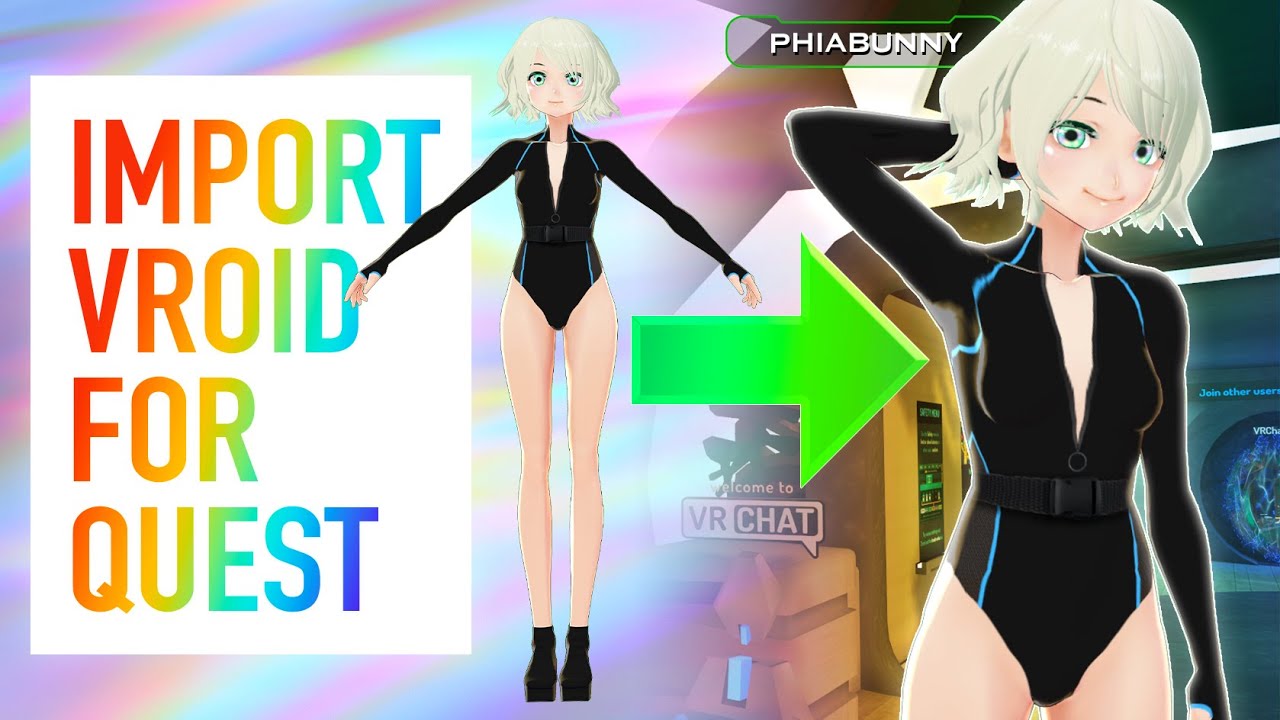
A highly requested tutorial video on how to make VRoid Quest compatible!! Even though the model looks a bit trashy, it IS possible! I’m sure there are better methods that exist that take a lot more effort, but this is what I’ve found works for me. And don’t forget that we finally have MERCH!!! This has been long awaited, and I’m so excited to ha...
finite light
Okay thank you!
can you DM me these
i am putting my avatar on a pedestal now

its in there now
green lagoon
cool
finite light
now i added more bloom

and added more
and fixed Light source to close to the ceiling
bold ibex
mild spade
Udon (sdk3) uses a udon program to add jumping. You can search for "vrcworld" an...
Mwah, kisses cheek
thank u btw it worked
 wooden inlet
I'm about to start a new project, and people here sugests a world template with an Udon utilities already implemented (such as camera clipping, jump force and that) Where could I find it? Thanks!
 modern kayak
wooden inlet
I'm about to start a new project, and people here sugests a world template with ...
modern kayak
wooden inlet
I'm about to start a new project, and people here sugests a world template with ...
The "VRCworld" prefab included in the SDK has those options
wooden inlet
Thanks!!
kind leaf
^ The camera clipping part is where it asks for the reference camera in the VRCWorld prefab. Assign the Main Camera to the reference and that allows VRChat to gather the settings from that camera. Then set the Main Camera's near setting to .01 and you have eliminated cam clipping for anyone that doesnt have a broken avatar.
kind leaf
Find the video player prefab and drag it into your scene
sorry only half at pc right now
 wary birch
One message removed from a suspended account.
desert python
the new Kvideoplayer follows the same organization format as TA (as requested by the distributer) you should find the videoplayer prefab in the prefab folder
desert python
speaking of videoplayers- has anyone gotten a rendertexture to fit into the lightmap slots?
ive gotten mesh to beformed by texture data. and everything is atlased off of a texture from discord. but all i need now is a way to play lightmap data into the world and it will be complete
kind leaf
wary birch
One message removed from a suspended account.
https://vrcprefabs.com/ click database and check the shaders tab. You will find common water options there that work well in VRC. Don't forget to bookmark the site, lots of useful content.
wary birch
One message removed from a suspended account.
worthy horizon
the return of "failed to start part upload: Cannot start an upload against anything but the latest version of this file: 1, 0"
wary birch
One message removed from a suspended account.
kind leaf
usually you just extract it and move the extraction into the asset folder. Only safe with a shader though, dont move a master to something more complex like that without checking the folder structure or you can mix things up.
wary birch
One message removed from a suspended account.
One message removed from a suspended account.
kind leaf
yeah i have it still just double checked, you are safe to drop the master in, or just tthe shader folder its up to you
once it is imported there should be a couple of materials in the folder for you. Just make a quad as your surface and assign the water material to it
wary birch
One message removed from a suspended account.
One message removed from a suspended account.
kind leaf
assets > add (maybe its create or new) > select quad
you can also do it by r-clicking in your hierarchy
same way you would add a cube to your world, quad is just another option and cheap
wary birch
One message removed from a suspended account.
One message removed from a suspended account.
One message removed from a suspended account.
One message removed from a suspended account.
kind leaf
those are the actual shaders, just stick with the materials which already have the shader assigned
wary birch
One message removed from a suspended account.
One message removed from a suspended account.
One message removed from a suspended account.
kind leaf
normally if you dont see it its lighting. But you can also make sure both of these are on. Other than that idk
 wary birch
One message removed from a suspended account.
wary birch
One message removed from a suspended account.
kind leaf
yep
wary birch
One message removed from a suspended account.
woeful junco
Is there a good tutorial video for the video player?
worthy horizon
{breaks desk in half}
 cobalt wing
Is there anyway to to use the vrc player audio overide with out it giving a +20 dB boost it's just too loud (SDK2)
worthy horizon
doesnt that component have parameters for gain, volume, rolloff, etc
 errant beacon
Make the text size larger, then scale the transform down
worthy horizon
apparently call apiFile.GetFileDescriptor() is returning a null value in ApiFileHelper.cs
might be an off-by-one condition server side
i think apiFile.getLatestVersionNumber() might be getting a bad value from db
it looks like my upload is bombing at the point the multipart uploader splits the file and starts the upload of the second part
which explains why my smaller worlds upload fine, they use the simple single file uploader class
guessing this was done due to some file size ceiling on the data store
worthy horizon
what kind of collider does it have
 deft geode
im in bed rn but it has the default one or a mesh collider
cuz its a mesh like different shapes
worthy horizon
that has to be flagged as convex or that will happen
worthy horizon
only on a mesh collider
deft geode
oh ok
worthy horizon
its in the collider component vars
 tired igloo
errant beacon
Make the text size larger, then scale the transform down
tired igloo
errant beacon
Make the text size larger, then scale the transform down
my text gets blurry when i make it large
and the scale just widens/shrinks the text box
nvm that's rectangle transform
 tired igloo
im using text mesh
 finite light
finite light
finite light
It was just like this last night
errant beacon
cool! c:
tired igloo
tired igloo
im using text mesh
which is why i find it weird that my text is so blurry
usually text mesh is pretty clear
kind leaf
Font size vs scale. If you have a smaller font and stretch the canvas it will blur.
finite light
finite light
my world so far currently
Im uploading it to the servers right now and updating the world
kind leaf
Lookin good
finite light
Thanks!
Here is my world link, its now updated

Future updates coming upǃ Example˸ Mirror Switches‚ Music Selection‚ More detail‚ MORE Avatarsǃ
the picture is the same tho, i need to make a new camera
the camera that is used just shows a black screen render
any idea why?
tired igloo
id assume its cause of the material
at one point my world picture was black too
and all i had to do was change the material type and the colour came back
either that or its the lighting in the game scene
worthy horizon
[grumbles about how it must be nice to actually be able to upload a map successfully]
 regal hollow
World Portal Question.....is there a way with world portals in world to have a Fixed Instance with world IDs?
kind leaf
Not sure what you mean but when you add a world portal to your build everyone will always be sent to public.
regal hollow
its more so used for connecting worlds together for RP with world set to friends or invite
so like example
Big World 1 wrld id/ jk115r3458 etc ..... (instance:1934)
small World 1 wrld id/ j3565g8 etc ..... (instance:265)
Big World 1 wrld id/ j2036394j etc ..... (instance:4572)
and use that to link big world 1 to a small world area that leads to another big world 2
Keeping users within those instance when they travel between
more so towards RPG type worlds
wary birch
One message removed from a suspended account.
regal hollow
looks like thanos did that
kind leaf
regal hollow
more so towards RPG type worlds
Yeah, simulating scene transitions. Only public right now which defeats the purpose. Once we have groups you can assign the players to a group when they are in a world and require a specific group to join the connected worlds making it easier.
^assuming they give us access to group management from udon.
regal hollow
it would break the group system when the group slits from one world .... and by then it be 2 instance again =/
kind leaf
Naw groups are going to be a vrchat thing so you can have worlds that require people to be members of Senji's group to join a world.
So its not instance based but if we can add or change a group from within an instance that would solve that issue.
its all hypothetical but world one you have no group, finish the last quest and you auto join Senji1, move through the portal. Complete the last quest in room2 and you auto join Senji2 allowing access to room3's portal
You could use a code system. When completing the last quest you receive a code. Walk through the portal into a transition room with a prompt for the code. Enter the code and get teleported to the play area. So you can have the extra scenes hosted publicly but only a person with the code can actually get into them.
regal hollow
mmmm
wary birch
One message removed from a suspended account.
kind leaf
Polyhaven.com is a good source, no fluffy stuff...
texturecan.com has some fluffy carpet.
wary birch
One message removed from a suspended account.
kind leaf
np, if you need more options you can try searching for PBR Textures, include free to limit those searches.
wary birch
One message removed from a suspended account.
green lagoon

Gist
List of websites for free PBR textures. GitHub Gist: instantly share code, notes, and snippets.
 median vine
so yea, after releasing my first ever VRC world ive now thought of adding in screenshots to make the place not seem like a total bore despite the fact a huge mirror is staring at everyone when they spawn in
tired igloo

i cant seem to upload my world, the button isnt working
would this have anything to do with it?
kind leaf
the above information is accurate and I have the rights to upload this content needs checked to upload. Its a tos agreement confirmation
bold ibex
how do i build and test my vr world in vrchat
near escarp
By pressing the convenient button called build & test in the SDK !
bold ibex
.-. yeah i did and it didnt work
tired igloo
i figured it out i think
apparently its cause i got A VRCworld scene descriptor
and id need an individual scene descriptor
in order for it to work
kind leaf
no, thats not the reason. You should be using the vrcworld prefab as its already setup 😛 when you develop all the time you make use of prefabs.

 kind leaf
not allowed* you aint ranked User yet.
bold ibex
How do I become one
kind leaf
make friends, visit worlds play the game
bold ibex
Oh ok
kind leaf
or cheat and sign up for VRChat +
bold ibex
Lol ok
tired igloo
kind leaf
no, thats not the reason. You should be using the vrcworld prefab as its already...
nvm you're right
the thing is, it doesnt show the community labs logo at the bottom
usually when i upload it shows the green community lab button
at the bottom
(when i click upload it doesnt work)
median vine
anyone know how to stamp 2D text onto a wall in Unity? doing 3D text would probably ruin things for me
just added some images on my world, most of them done in VRC
bold ibex
unity crashes everytime i try to upload. 2019.4.30f1 the new version vrchat devs said. i made sure i have the newest sdk. can anyone help please?
<@&397642795457970181>
tired igloo
everyone has so many questions in the server and the mods are just leaving us hanging lol
worthy horizon
is "future proof publish" enabled
bold ibex
no
i dont enable it. my stuff never worked when it was on
im re checking now. but im pretty sure it isnt on
worthy horizon
generally that causes unity to crash like hell when its enabled, neat feature
bold ibex
it was on for some reason. ima try it again without it on
tired igloo
tired igloo
is that actually supposed to be normal tho?
cause usually when i upload worlds, there's the communiyi labs logo at the bottom of the page
 bold ibex
oki. so it was because the future proofing was on
tired igloo
like this
see that's normal
whenever i see the community labs thing i can upload easily
but idk why for the world im making i dont see it
hence me not being able to upload it
 random owl
https://github.com/oneVR/VRWorldToolkit/releases/latest
That usually indicates something is wrong yes, import this and check VRWorld Toolkit > World Debugger from the top, should find your problem
GitHub
After successfully importing the release unity package the toolkit menu will appear in the Unity top bar as VRWorld Toolkit - If it does not, check Troubleshooting for common problems and solutions...
green lagoon
glad you got it fixed
tired igloo
there were a few errors lol
i just auto fixed them without thinking lol
but i did see one with too many pipelines
so
ya lol
 chilly linden
I'm having trouble exporting a converted .blend > .fbx model into unity as a world prop when i try to extract materials only a few textures go through. Any fix/ workaround I could try?
 finite light
I am about to upload my world for quest!!

i have Jump mod setup, and i have pickups setup
theres only one thing you can pick up for right now
its that

also, i got Known User in under 48 hours
tired igloo
@finite light whats the name of your world?
 red urchin
anyone know how to make a portable video player option for merlins usharp video?
i'm guessing you duplicate the video screen and put it on a rigidbody object?
and audio too?
finite light
More Updates to comeǃ More avatars and optimization․ More detail․ added props and pickups‚ and more musicǃǃ
@tired igloo
it hasnt been updated to what is shown in the picture yet
finite light
finite light
I am about to upload my world for quest!!
->
i am working on it right now
uploading PC version, then i will make it Available on Quest
finite light
oh cool
tired igloo
since i was doing a test publish last week and i didnt know u could only upload one per week
i uploaded it last monday so technically i should be able to again today
but since its every 7 days im guessing they'll just let me tomorrow
finite light
hmmm, i can upload and update it without a time limit
tired igloo
yeah cause you've published yours already im assuming
i published mine last week as a test then took it down
so once i remade the world i was actually gonna upload, it counts as a second publish if i upload it again
also can anyone help me with mirror toggles?
i know its a simple udon concept but ive been losing brain cells over this
ive watched like 5000 videos on it and its still unclear to me how udon mirror toggles work 😦
finite light
lol, im good at following tutorials, tomorrow when i figure that out myself, i will help you with mirrors
tired igloo
personally i find the concept of making worlds is easier than making avatars
even tho supposedly avatars are supposed to be easier
finite light
Also, does anyone know why i am getting a black screen right here as the upload image, i have the VRCCam set in the right place i want it, the Camera preview is good, but i just get this black render
 tired igloo
i feel more comfortable making worlds than avatars
finite light
yeah, but as ive heard, you need to make avatars to get trusted rank
tired igloo
im known and ive uplaoded a few avatars
also about that camera
when you're in that screen did you set the camera there?
what i mean is
finite light
 tired igloo
did you posiiton the camera correctly after you've clicked build and test
 tired igloo
is there more than one camera in your scene?
finite light
no
just the VRCCam
well, actually, there is the Main Camera, and then the VRCUICamera
finite light
neither of them are facing a black space
ight, its uploading, im not worrying about the Upload photo rn
after thats done, imma go to bed
 worthy horizon
<has no words of wisdom to offer>
unless none of the layers are turned on in vrccam
finite light
oh, ill check that tomorrow
also, my whole screen is white and its about to drive me fu**ing crazy

everything works as normal, but the screen being white is driving me crazy
okay, nevermind, i have no idea, dont mind me
worthy horizon
remove vrccam from search
finite light
Yeah thats exactly what i did lmao
im about to upload Quest version, then im off to bed
worthy horizon
i'm about to press upload and watch it fail again for the 10000th time \o/
finite light
lol

for this being my first World at all, its pretty good
but i have an issue with an avatar i uploaded
i know this isnt the right channel tho..
worthy horizon
my "first world" ended up probably being one of the biggest in VRChat history
finite light
XD
worthy horizon
as in it takes hours to reach the end
finite light
but the issue im having with the avatar, is when i put it on in VR, i have the Arms and hands offset in the wrong position, and the FPV camera view is like 2 feet above the avatars proper view point
worthy horizon
that sounds like the view point placement in the descriptor is wrong
finite light
any idea on how to fix it?
im just putting the avatar in the world and putting AvatarDescriptor on it and then uploading it.. am i skipping some steps?
worthy horizon
place the view position in the correct spot in the head
finite light
i dunno how to select the view position object
finite light
oh
worthy horizon
like 0, 1.3, 0.2
finite light
okay
we will talk more about this tomorrow, its officially 1 am, i was suppose to be in bed 30 minutes ago
kind leaf
Silver has an interactive shader on vrcprefabs plenty of other shaders and tools there as well. Always my go to search https://docs.google.com/spreadsheets/d/e/2PACX-1vTP-eIkYLZh7pDhpO-untxy1zbuoiqdzVP2z5-vg_9ijBW7k8ZC9VP6cVL-ct5yKrySPBPJ6V2ymlWS/pubhtml#
dusk sapphire
what exactly is failing when you try to publish your map?
that sounds like you have a compile error in your project, that is not necessarily related to any of those which you imported
check your console, make sure collapse is checked, and scroll up to see the other errors
I know for certain silent's clear water shader works
and unless those other shader's come with editor scripts that are causing errors in your project, i see no reason for them to cause that to happen as well
try to go into play mode
if you updated to 30f, did you get the latest sdk as well?
can you show the full errors in the console?
finite light
i cant upload to quest because of this
 dusk sapphire
sometimes the errors don't properly show up, you just need to restart unity editor
even in play mode? can you show a screenshot?
and what are the errors when you try to publish?
and make sure errors are visible https://nyanpa.su/i/BTfc1xs5.jpg

huh, go grab 1's vrworldtoolkit and see if it spots any issues with your project https://github.com/oneVR/VRWorldToolkit/releases/latest
GitHub
After successfully importing the release unity package the toolkit menu will appear in the Unity top bar as VRWorld Toolkit - If it does not, check Troubleshooting for common problems and solutions...
finite light
dusk sapphire
huh, go grab 1's vrworldtoolkit and see if it spots any issues with your project...
This had helped me so much
dusk sapphire
and this only happens if you include any of the water shaders in your scene?
random owl
Broke a lot of texture?
What was the auto fix you specifically hit?
I can't really see an auto fix causing that unless you used the texture mass importer and your textures had a really specific edge case setup on them
 latent vector
anyone know how to make it look like there's rain on windows?
dusk sapphire
beats me, the prefab you linked is sdk2, the project is sdk2 as well?
legacy sdk? you can find the latest sdk2 on the vrchat download page
you should always install the latest version of the sdk
that particular version is almost a year old and wouldnt work on the current version of unity
 marsh sigil
the icons got like large when i copied it into latest unity to update it fine. its not the worst deal but how to shrink or hide?
 kind leaf
top right of the scene window is a button called gizmos 😉
worthy horizon
that usually happens if no spawn point designated
marsh sigil
kind leaf
top right of the scene window is a button called gizmos 😉
legend 
dusk sapphire
that looks like what happens when you have compile errors, still none in the console?
what other assets did you import with that prefab if I may ask?
does it contain things like standard assets?
 torpid marten
Sorry, I got one really stupid question. If I replace the all the walls in one of my room into mirror, will I crash the moment I load or will I crash when I try to enter the mirror room? Or nothing will happen?
 bitter idol
how do i make an object respawn when its thrown off the map sdk2
i know theres a box that says respawn but in my experience they never do
 rain shadow
bitter idol
how do i make an object respawn when its thrown off the map sdk2
i know theres a...
rain shadow
bitter idol
how do i make an object respawn when its thrown off the map sdk2
i know theres a...
That behavior happens when you have an object sync component
bitter idol
rain shadow
That behavior happens when you have an object sync component
i have an object sync it just says synchronize physics and allow collision transfer, nothing about respawning
are you saying they dont respawn because of the object sync?
stone marsh
if you want to respawn your objects if they fall of the world, they need to not be kinematic. They need to have gravity so they fall, they need the obj sync and a VRC_Pickup. (you probably don't need allow collision transfer if they are just normal random clutter pickups) and you need to set it to respawn in the scene descriptor and they will respawn at whatever height you have set in the "Respawn height Y" section of the scene descriptor. If the obj behavior is set to destroy (default) they will just go away instead of respawning.
 bitter idol
stone marsh
if you want to respawn your objects if they fall of the world, they need to not ...
bitter idol
stone marsh
if you want to respawn your objects if they fall of the world, they need to not ...
i have that but they still dont
oh shit wait nm they do ok
thank you 😄
stone marsh
👌
tired igloo
GitHub
After successfully importing the release unity package the toolkit menu will appear in the Unity top bar as VRWorld Toolkit - If it does not, check Troubleshooting for common problems and solutions...
this is probably one of the best toolkits
that saved me from trynna find my errors
 rough abyss
is there a tutorial for how to use shaders with a cginc file? None of the tutorial I found works for Toocanzs/Vertical Billboard shaders
worthy horizon
a cginc is just an include for another shader to reference
using a shader that utilizes .cginc includes is no different from any other, as long as the .cginc files are present and the reference path in the .shader is correct
wary birch
One message removed from a suspended account.
 narrow geyser
can you use STL files for objects in vrchat worlds?
errant beacon
wary birch
One message removed from a suspended account.
Yes, you'd have to wait a week
narrow geyser
or where can I find out
wary birch
One message removed from a suspended account.
errant beacon
narrow geyser
can you use STL files for objects in vrchat worlds?
maybe not directly, but you could import it into Blender and export it as an .FBX or .dae or etc
worthy horizon
wary birch
One message removed from a suspended account.
uh technically you can upload as many as you want, you cant submit more than 1 per week to the community labs for public trial
wary birch
One message removed from a suspended account.
worthy horizon
you can toss a portal down for others to join
wooden inlet
How can I not teleport back to spawn when going too far? I made a huge tower, but going to lower levels moves me back
Answer to myself: just lift everything in the world a lot above the Y:0
carmine meadow
you can also change the Scene respawn point
but i agree, the ground level should probably be the effective basemets' lowest floor?
woeful junco
So, I usually build for Altspce and in there I set the layer to Navmesh 14 so it can teleported onto. Like stairs. What is it in Vrchat?
 unkempt turtle
wha? stairs in vrchat?
green lagoon
woeful junco
So, I usually build for Altspce and in there I set the layer to Navmesh 14 so it...
vrchat doesn't use Navmesh for Avatar navigation it's all based off of collision detection
 short forum
wooden inlet
Answer to myself: just lift everything in the world a lot above the Y:0
short forum
wooden inlet
Answer to myself: just lift everything in the world a lot above the Y:0
You can go to your scene descriptor (VRCWorld) and change the Respawn height. Its default is -50 and the lower it is, the further you can go down
woeful junco
green lagoon
vrchat doesn't use Navmesh for Avatar navigation it's all based off of collisi...
Nice. Thanks
green lagoon
glad to be of help
green lagoon
woeful junco
Nice. Thanks
if you have any other questions feel free to ask
woeful junco
green lagoon
if you have any other questions feel free to ask
Thanks. So many questions but that's it for now. 🙂 Vrchat is a bit harder to build for.
green lagoon
yeah but it does give you a lot more potential flexibility for some stuff as folks have made full fledged games inside vrchat as it allows for World scripting
woeful junco
green lagoon
yeah but it does give you a lot more potential flexibility for some stuff as fo...
I am looking forward to learning Udon
green lagoon
hope you have fun with that and if you know C# there's a compiler for udon that uses it https://github.com/MerlinVR/UdonSharp

GitHub
An experimental compiler for compiling C# to Udon assembly - GitHub - MerlinVR/UdonSharp: An experimental compiler for compiling C# to Udon assembly
woeful junco
green lagoon
hope you have fun with that and if you know C# there's a compiler for udon that...
Thanks 🙂
green lagoon
glad to be of help what would you be wanting to make once you figure it out
 frosty goblet
 woeful junco
green lagoon
glad to be of help what would you be wanting to make once you figure it out
woeful junco
green lagoon
glad to be of help what would you be wanting to make once you figure it out
With Udon I would be concentrating on more complex animation scenes. Right now I am bringing over my worlds from Altspace. As much as I can because the shaders are so different and not crossing over directly.
green lagoon
you could definitely do a lot more complicated animated stuff in vrchat and does like altspace use Universal render pipeline or something to have the shaders Misbehavin in vrchat
https://docs.google.com/spreadsheets/d/e/2PACX-1vTP-eIkYLZh7pDhpO-untxy1zbuoiqdzVP2z5-vg_9ijBW7k8ZC9VP6cVL-ct5yKrySPBPJ6V2ymlWS/pubhtml also a very useful database of prefabs for vrchat
woeful junco
green lagoon
you could definitely do a lot more complicated animated stuff in vrchat and doe...
They are getting ready to switch to the URP with the new uploader but haven't given a date. I am used to using the Legacy shaders and the standard shaders. Thanks for the link. I will take a look.
green lagoon
yeah you still have the Legacy and the standard shaders in vrchat & vrchat is very unlikely to ever transfer to URP as that would basically break all of the content in the game as people had made tons of custom shaders in vrchat So no Auto conversion would be possible
green lagoon
woeful junco
They are getting ready to switch to the URP with the new uploader but haven't gi...
and it also has a bunch of editor extensions that speed some stuff up and even one that lets you test your world without having to upload in the unity editor
woeful junco
green lagoon
yeah you still have the Legacy and the standard shaders in vrchat & vrchat is...
The uploader yells at me if I use the legacy shaders and the standard ones. Says it will slow performance. Is that not true? I have been trying to convert to the Vrchat ones.
green lagoon
question are you trying to upload a quest build
woeful junco
green lagoon
question are you trying to upload a quest build
Yes
green lagoon
then yeah you would probably want to swap over to the vrchat mobile standard light Shader
for anything using the standard Shader
woeful junco
green lagoon
for anything using the standard Shader
Cool. Thanks
green lagoon
but it won't stop you from uploading using the standard Shader it that yells at you so that folks optimized better as it's a lot easier to end up with low performance in vrchat because arbitrary avatars and mirrors
GitHub
EasyQuestSwitch is a Unity editor tool developed for VRChat world creators, it can automate changes to components within a scene as soon as the build platform is changed from PC to Android (for Ocu...
this tool makes it easier to handle swapping your like shaders between versions
woeful junco
green lagoon
https://github.com/JordoVR/EasyQuestSwitch
Oh man. Super helpful. Thanks so much.
green lagoon
as some folks on vrchat end up making their PC builds of a world nicer than the quest builds as they can be separate
but yeah if you're wanting to make Quest stuff probably building for the quest first and then adding more shiny on pc is probably easier than going the other way around
GitHub
Unity Editor extension for making VRChat worlds. Contribute to oneVR/VRWorldToolkit development by creating an account on GitHub.
GitHub
CyanEmu is a VRChat client emulator in Unity. Includes a player controller with interact system. Works with SDK2 and SDK3. - GitHub - CyanLaser/CyanEmu: CyanEmu is a VRChat client emulator in Unity...
some other helpful World tools
woeful junco
green lagoon
https://github.com/CyanLaser/CyanEmu
Thanks again. So many helpful tools
green lagoon
yeah folks do a lot more editor extensions in vrchat to help automate stuff probably cuz stuff can get a lot more complicated
and if you have any questions about how things differ like what stuff people put in their maps on vrchat feel free to ask
woeful junco
green lagoon
and if you have any questions about how things differ like what stuff people put...
Thanks 🙂
green lagoon
like a good chunk of vrchat Worlds have a mirror you can turn on and like some markers to doodle in the air as an example
and there's prefabs one can grab to handle both of those
kind leaf
stone marsh
GitHub
One-stop shop for people interested in developing content for VRchat - GitHub - madjin/awesome-vrchat: One-stop shop for people interested in developing content for VRchat
green lagoon
yeah those are both definitely very handy lists
woeful junco
You guys are the most helpful bunch. Thanks 🙂
green lagoon
glad to be of help as it's good to encourage new Builders to build
woeful junco
green lagoon
glad to be of help as it's good to encourage new Builders to build
One more question. How long dose it take to go from New User to User ? And is making friends , spending time and uploading the only way?
stone marsh
Everything you do either gains or loses points. Play time is a small part of it. There is no easy "how long will this take" answer. Really depends on how you play, if you get blocked or kicked a lot, friends you make, content you upload, etc. All gains or loses points.
Typically, doesn't take long. But really depends on you and how you play
woeful junco
stone marsh
Typically, doesn't take long. But really depends on you and how you play
Great. Thanks
green lagoon
and basically all the ranks above New User don't have any real functional effects on anything
stone marsh
Muh status symbol lol
But yea. Rank isn't really anything to worry about tbh. Once you can upload that's the only milestone that matters. Everything else is really just clout
woeful junco
green lagoon
and basically all the ranks above New User don't have any real functional effec...
I am just looking to upload to the Community Lab
green lagoon
then you should be able to do that no problem as New User
woeful junco
green lagoon
then you should be able to do that no problem as New User
It says I don't have the trust level yet
kind leaf
woeful junco
I am just looking to upload to the Community Lab
I took the VRChat plus route but you cannot count on that rank benefit to stay as its not even mentioned on the doc. But I got from visitor - new user and then bought the plus to upload.
woeful junco
kind leaf
I took the VRChat plus route but you cannot count on that rank benefit to stay a...
Ohhhhh good tip. Thanks
stone marsh
Yea. They've claimed many times that vrc+ isn't that big of a boost and typically when people rank up from it, they were already close anyways. But who knows. Many people seem to get a rankup from it.
 short gulch
Huh, for some reason I thought you were around a lot longer Kev
green lagoon
you're wondering why the heck the whole upload rank stuff was vrchat to attempt to curtail spam or trolls I forgot which
kind leaf
stone marsh
Yea. They've claimed many times that vrc+ isn't that big of a boost and typicall...
Yeah, my visitor/new user customers just buy and havent heard a complaint yet but you still might be right.
 tepid eagle
Hello! I have a quick question. Has anyone run into the issue of objects in a world when you hold them, make your frames drop really bad?
stone marsh
Is this your world, or just in general? And is it all worlds or just a few?
tepid eagle
It works for a world with nothing in it but a directional light and a floor but as soon as we put it into an optimized world it tanks frames
stone marsh
Do your sync objects have transfer ownership on collision enabled?
And how many sync objects are we talking about?
Also, what are these sync objects?
tepid eagle
I sent you a message. I was gonna show you how this is set up
stone marsh
You should also consider using the Profiler to ensure your performance hit is indeed related to the pickups.
My DMs are disabled sorry. You can share screens here for people to help ya
tepid eagle
Where at
stone marsh
Here
tepid eagle
by Screen grabbing I'm guessing
stone marsh
No, sharing screenshots of your issue items
 stone marsh
But ya should look into turning off collision ownership transfer on the pickups.
Are all those audio sources enabled?

 stone marsh
A lot of audio sources can cause a hit to performance. You'd want to ensure they are disabled by default and turned on when needed if you have that many.
Should really check the profiler to make sure you identify the culprit.
tepid eagle
Where can I find the Profiler to be sure.
stone marsh
Are your pickups kinematic or do they have gravity?
In the Window tab in unity
Frame debugger and profiler
 stone marsh
If you have a ton of pickups it can start hitting performance as well. Kinematic can help reduce collision checks instead of using gravity.
There is also an awesome script by CNLohr that is a much, much faster sync method for pickups. It would work for you if your pickups don't move after they are dropped via collision. It can handle thousands of sync objects and still get 100+ fps. https://github.com/cnlohr/brokeredupdateandsync

GitHub
CN's VRC Tools and Prefabs. Contribute to cnlohr/brokeredupdateandsync development by creating an account on GitHub.
Turn Vsync off too
Vsync is a cursed drain on performance and may be misleading you. I can't tell from the screen if that's greenish or yellow tho
tepid eagle
Does this work for SDK2?
stone marsh
Oh you're on sdk2. No
tepid eagle
Yes at the moment i'm on SDK2
stone marsh
Unless anyone else has any suggestions only thing I can recommend is disable collision ownership transfer and disable your audio sources and toggle them on when needed via animation.
What you're doing would probably, honestly, be easier to do in sdk3 as well but that's up to u. Good luck
tepid eagle
Thank you M E R C
stone marsh
But yea, the profiler will help. Learn to use it. It's very useful
tepid eagle
I will thank you again
 haughty ore
Hiya, can anybody help me with making my grass move in my unity scene? (using sdk3 udon) Ive made some png plants in photoshop ive put on transparent panes. I set a special wind zone and used the speedtree8 shader in unity with the wind set to fastest but nothing in scene moves when i test or upload.
Ive never done this before so very much a beginner, Id really appreciate any pointers.
kind leaf
this is a moving grass and tree shader https://www.dropbox.com/s/1a31uyvgls5xj8f/Moving Tree and Grass Shaders.zip?dl=0

speedtree8 is normally for terrain which is an option just more poly
when you paint grass using the terrain it will respond to the terrains wind settings
you can find more useful shaders/prefabs/tools/tuts here: https://docs.google.com/spreadsheets/d/e/2PACX-1vTP-eIkYLZh7pDhpO-untxy1zbuoiqdzVP2z5-vg_9ijBW7k8ZC9VP6cVL-ct5yKrySPBPJ6V2ymlWS/pubhtml#
haughty ore
oh man thanks a lot!
green lagoon
cool
odd wharf
I don't know if anyone has done this yet but I'm porting a GameCube Dev Kit showcase
It's a nice looking courtyard.
I'm going through and tweaking all the materials to make them look nice (and I replaced the little pond so it used a water shader)
tired igloo
is it normal that worlds cant be published even after a week?
stone marsh
When did you publish last, provide actual date/time shown on world on website
And as a reminder, even if you publish a world, and take it down, you have to wait a week. And it's a full 7 day week, so you need to wait till the 8th day basically.
tired igloo
well the truth is, i published a world last monday as a test to see if it work and it did, so i deleted the world, and made a new one
so obviously i had to wait a week until i could republish
yesterday was monday and i tried publishing the new world and it said i couldnt
so i tried it today and i still couldnt do it
i dont remember what time i did it tho last monday
im guessing 8pm
and now its like 9:30pm
 quaint basalt
does anyone know how i can reach a dev something happened and idk how to feel about it
stone marsh
tired igloo
well the truth is, i published a world last monday as a test to see if it work ...
Wait till tomorrow
stone marsh
If not you'll want to just submit a ticket and it will get fixed
tired igloo
how do i submit a ticket
stone marsh
See #vrchat-support
odd wharf
odd wharf
I don't know if anyone has done this yet but I'm porting a GameCube Dev Kit show...
I should have made sure that the map would actually let me just use mesh colliders :/
pain
Plus I looked it up and it's already been ported before
alwell
 distant pier
I added my friend's map portal in my map but it just says loading world and does not works. I copied the room id from the vrchat log file. What am I missing?
stone marsh
odd wharf
pain
Being first isn't what matters. Having fun and learning new things is where it's at. Don't say screw it because someone beat you to it, do what you enjoy and share it with the people you like.
odd wharf
Well I also don't want to remake the collision lol
stone marsh
Lmao fair nuff xP
odd wharf
I have more places I can port
I like porting places from games I like or that seem interesting.
Already found my possible next one
stone marsh
Nice. Good luck with it



 silent furnace
Anyone know if Audiolink has a discord server? I'm getting compile errors after upgrading to the latest version, despite following all of their instructions
near escarp

GitHub
Audio reactive prefabs for VRChat. Contribute to llealloo/vrc-udon-audio-link development by creating an account on GitHub.
stone marsh
Clear all your errors and attempt to enter play mode and screenshot the errors that persist. Need to see ALL of the red stop sign errors in your console. Might be helpful.
silent furnace
I nuked it all and reverted back to an old version. (rant on) These updates are becoming a serious pain for world development, all I do is constantly update stuff, and get nowhere in actually progressing with the world itself. SDK, Unity, VRSL, Audiolink, and UdonSharp update all in a month....I can't keep up with this.(rant off)
Anyway I'll try to take another stab at this another day when I have more time and patience :)
stone marsh
Audiolink hasn't updated since June tho.
But yea. It's a lot of work making content xP
But, at the end, It can be very rewarding, and you learn a lot in the process. And every time you fail or start over, you'll do it better and better.
odd wharf
Plus updates are usually a good thing in the grand scheme of things
silent furnace
There must be something incompatible somewhere.... I put everything to the latest version, and I'm getting Assets/AudioLink/Scripts/AudioLink.cs(20,0): System.Exception: User type AudioLink could not be found
I have another world that was built from scratch in 2019 and I'm not getting that problem, so I'm at a loss what it could be.
For now I'm just going to leave that world on 2019.29 and the older SDK because it 'works' at this point :)
stone marsh
sending a screen of all your red stop sign errors in your console after you attempt to enter play mode would be helpful. it may or may not have been audiolink. Coulda even been something as dumb as just needing to restart or even a totally different unrelated script, who knows.
silent furnace
Yeah true enough. On a side note (avatars) the VRCCamera when you go to set your avatars picture doesn't work in the latest SDK either (you can't see it), so there seems to be a few glitchy bugs in this last version, so I'm going to wait for the next update before I try it again.
odd wharf
May make things less shiny
 empty fog
So Im having an issue right now.
I had imported an sdk2 prefab into my world and had conflicts with my sdk 3. I got that solved and was able to build and test and even had the option to build and publish. I reimported the prefab cause I needed some stuff from it and then got the sdk conflict again and started to clear it up and at this point im fairly sure I have because it is not throwing errors at me and I can open the control panel.
THE PROBLEM IS that the Builder tab is completely blank. I thought maybe this was because of the update to Unity Version 2019.4.30 but when I installed the new version and brought the project over the problem is still there. The Builder tab is completely blank. Has anyone come across this issue and if so how did you fix it
worthy horizon

yay all that work to port the project to 2019 and what do i win? the same damn error on upload.
random owl
Well the top one is a server side problem with the world id, either use a new one or contact #vrchat-support
worthy horizon
this is a new id actually
i traced this down to likely a server side issue in the multipart upload class
bold ibex
multipart? sounds fancy wonder what that means
 fervent elk
odd wharf
Going to bed
fervent elk
odd wharf
Going to bed
Oh cool, a Mario Kart arena
green lagoon
dumb suggestion you copy paste your current project?
exporting a Unity package containing the map ?
worthy horizon
bold ibex
multipart? sounds fancy wonder what that means
large worlds get their asset bundles divided into multiple smaller files for server storage
[returns to looking for an alternate platform]
kind leaf
First tep in cleaning house is to export your package not including dependencies and then rebuiild from the export. it will get rid of anythign you wernt using
U'll have to reimport the sdk/u#/shaders in the new project.
Organizing is on you. Some things can be moved, some things cant. Stay away from anything SDK related.
no screenshare 😛
kind leaf
in my case pointing at the screen and wondering why the person on the other end isnt moving their mouse there 😛 hahaha
😦 sorry Zva was making fun of myself not you 🙂
 dreamy idol
excuse me anyone know anyway to fix this udonsharp error ?
i tried reinstalling world sdk and udonsharp yet it still remains

 jade sparrow
Is there a way to change the skybox?
green lagoon
yes drag a Sky Box material into the sky
jade sparrow
where can i get sum new skybox materials tho?
green lagoon
supposed search Sky boxes on the unity asset? or https://polyhaven.com/
 kind leaf
No, your only limit is your personal FPS tolerance. Quest has limitations but but they arnt hard caps. 50k poly in render view.
near escarp
That's for quest 1 btw, the quest 2 can handle up to 500k in view
kind leaf
good 2 know. I just stick with quest1 optimization lol. maybe in a couple years when only great grandma uses quest1
near escarp
Might be sooner than we think 🙏
marsh sigil
any idea what causing this? i trying to get my world to x.30 and then all of a sudden having issues or idk if i messed up something along the way. either way, cant upload atm

i dont remember removing anything or changing the probe thing
near escarp
Is your reflection probe realtime ?
near escarp
Nope, just wondering about the warning, it may be nothing though, the error is a bit more worrisome
Might want to google that error message specifically
bold ibex
Um i was wondering if anyone can help me.
So im making a juicy world. Im finalizing it. However i have prefabs like mayonnaise and ketchup and a syringe that dont shoot. I have everything i just cant seem to figure out how to get them to shoot and be visible.
Note i already setted up the pickup, object sync, box collider, rigdbody and particle systems. Idk how to make it shoot
marsh sigil
yeah ok. jus wasnt sure bc its preventing me from uploading, one of those two. was unsure
was fine before so im confused
sturdy lynx
bold ibex
Um i was wondering if anyone can help me.
So im making a juicy world. Im finali...
SDK2 or Udon?
Have you setup anything that allows the player to trigger the particle system?
bold ibex
Udon also no. Im not to sure how to go about that
Ive set up trigger for musics and mirror. Everything except particle systems
These particle systems are food based. Like katchep
I used cyan trigger and udon behavior. I rlly like it. But particle systems are out of my territory of knowledge
And i mean with cyan trigger its okay to work with udon and or sdk 2
Should i post this in udon questions? Im sorry
 fading ginkgo
VRChat now uses the Unity Univeral Render Pipeline correct?
nvm they use build in render pipeline
near escarp
bold ibex
I used cyan trigger and udon behavior. I rlly like it. But particle systems are ...
Pretty sure that works the same as a door, onClick or onButtonPressDown > Enable particle system component or something of that type
 native cobalt
Anyone know why fog is making things disappear in my mirror?
near escarp
Unity's fog ?
near escarp
And the fog is the cutoff point ? Do you have a video of it ?
native cobalt
near escarp
And the fog is the cutoff point ? Do you have a video of it ?
I do not, I'd send ya a screenshot but discord won't let me.
near escarp

native cobalt
swapping to exponential squared fixes the issue
near escarp
ah sweet
woeful junco
Hi. So I have a 20 foot tall staircase. Not to keep bringing up Altspace but that is what I am used to. In Altspace we can fly or teleport onto the staircase. We don't seem to be able to do that in VRChat. The staircase is meant to be climbed. I am not sure how to make that work. I have added a mesh collider to it. I have also seen worlds that have a transport function within the same world. I was wondering how to do that? Or any other suggestions?
red urchin
anyone know how to make a togglable portable video player for merlins usharpvideo?
green lagoon
woeful junco
Hi. So I have a 20 foot tall staircase. Not to keep bringing up Altspace but tha...
https://i.gyazo.com/af54d5006b597eafbcb4d2872433a126.png diagram of how the stairs work and if you're wondering why a angled box Collider. box collider's are considerably cheaper than mesh colliders
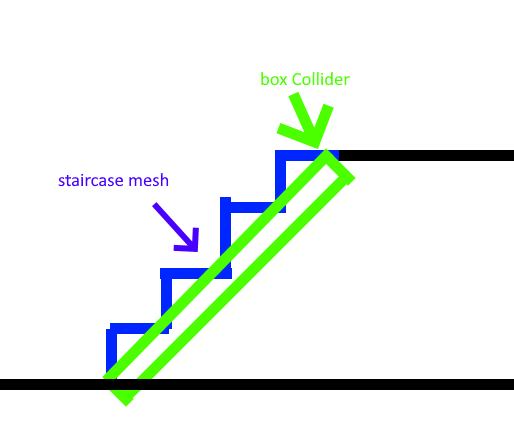
 native cobalt
So I installed Hirabikis swimming asset and put in both the swimming prefab and volume prefab into the scene as instructed but its not working in VRchat.
Anyone know why?
 grizzled bison
I am using unity and when i select build and publish in my control panel for the sdk it says a vrc scene descriptor is needed (i have one) and then it plays the scene, should i wait for a while or is it not working?
woeful junco
green lagoon
https://i.gyazo.com/af54d5006b597eafbcb4d2872433a126.png diagram of how the sta...
Thank you
green lagoon
woeful junco
Thank you
glad to be of help and anything that could be simplified into a box collider or multiple box collider's would be better for performance compare to mesh colliders which have to check each triangle for the Collision detection
woeful junco
green lagoon
glad to be of help and anything that could be simplified into a box collider or ...
I understand. Any idea how to do the transport in the world thing?
green lagoon
someone's probably made teleport pad prefabs but I don't know any off the top of my head
woeful junco
green lagoon
someone's probably made teleport pad prefabs but I don't know any off the top of...
Thanks
green lagoon

UDONワールドを始めたいけど、何から手を付けていいのかわからない。 公式サンプルは分かりずらい。 基本的なところに、あまり時間をかけたくない。 そんなUDONビギナーのための、ごくシンプルなギミック詰め合わせです。 ・シンプルなトグルスイッチ ・プレイヤーが近づくと起動するスイッチ ・プレイヤーをテレポートさせる扉 ・オブジェクトを出現させる機能 ・アナログ時計 ・トランポリン ・拡張メニュー ・乗り物 ・ユーザカウンター ・ジェット噴射型の飛行装置 ・簡単なクライミングシステム ・声を大きくするマイクシステム
found a set of prefabs that have a teleporter door
and this website the prefab is on is what the Japanese userbase uses for Distributing content