#world-development
39 messages · Page 88 of 1
 inland cave
I guessed as much. As a stupid thought experiment - would there be some kind of way that Udon could do something like this?
 pliant sinew
success

 kind leaf
i was reading that spam! lol
not rly
inland cave
I wasn't, more asking if anyone knew anywhere I could start from - sorry if that wasn't clear
It's a good thing I don't need it to be networked, thanks for the tips 👌
kind leaf
inland cave
I wasn't, more asking if anyone knew anywhere I could start from - sorry if that...
lol yeah thats what it sounded like to me. No worries, sorry if I came off like a dingdong. You want to start with an array. Best to set the ground to its onw layer that isnt used like Environment and youll check for that in your if statements before placing.
 vague remnant
Could someone toss a link to how to make Udon buttons please? Teleporting ones, at that?
kind leaf
vague remnant
Could someone toss a link to how to make Udon buttons please? Teleporting ones, ...
Make a U# script and paste this in it
public GameObject teleportPos;
public override void interact()
{
if (player != Networking.LocalPlayer) return;
player.TeleportTo(teleportPos.transform.position,
teleportPos.transform.localRotation);
}```
You can do it with Udon Graphs but don't ask me how.
create an empty gameobject and add that to the inspector of the button where it asks for the teleportPos. that empty gameobject is where the player will be sent to.

if you are using a UI you just rename "public override void interact" to something like "public void PlayerTeleport" and then in the onClick you send a custom event PlayerTeleport.The VRC Starterkit also comes with a collision based teleport script already. Can be modified for buttons. https://gitlab.com/xlwnya/vrc_starterkit/-/releases
vague remnant
Thanks
inland cave
kind leaf
lol yeah thats what it sounded like to me. No worries, sorry if I came off like ...
Online communication is hard sometimes, it's all good! Thanks for the tips, i've got a lot of scripting experience in other apps so knowing the API entrances like that removes a lot of the initial guesswork ^-^
vague remnant
"Assets\EXPERIMENTAL\VRC_button_A_matte1.cs(10,23): error CS0115: 'VRC_button_A_matte1.interact()': no suitable method found to override" Error occured
 serene estuary
for an sdk 2 world i have a spawner that spawns roses and they are synced by object sync, people are reporting some pc users cant pick up the Roses or see them in others hands. i'm wondering where i went wrong. here are my settings!

 shut goblet
So I've been working on my scratch mesh world for months now and I finally have it uploaded as public.. but I just was going through community labs and someone has it ripped and re-uploaded under a different name and claiming they are the creator. I have never sent my world to anyone, so it is guaranteed to be someone using a client or whatever to rip my world and then re-upload it claiming it is their own work.
what can I do to have this world taken down? the report options dont list anything about them not having the rights to use this content
vague remnant
"Assets\EXPERIMENTAL\VRC_button_A_matte1.cs(10,23): error CS0115: 'VRC_button_A_matte1.interact()': no suitable method found to override" Error persists, with compile error "Assets\EXPERIMENTAL\VRC_button_A_matte1.cs(12,6): System.Exception: The name 'player' does not exist in the current context"
vague remnant
Help!
kind leaf
vague remnant
But I get no help.... thanks....

Here I've done a tutorial on creating a simple teleportation system for VRChat using both Udon and UdonSharp. This video was recorded and edited in a different manner, so if you have any thoughts, recommendations, or requests, I'm game to listen! Hope you can find this useful!
VRChat Udon SDK:
https://vrchat.com/home/download
UdonSharp:
https:...
 green ruin
Is there a way to disable audio panning with audio sources? I want the sound playing in both ears at the same volume no matter what way you're facing.
 silk coral
are there any blender gurus here with tips for remeshing a sculpted world model


this is what I have so far.... but it's not remeshed
I've tried multiple methods to get it remeshed and have the polygons down to a reasonable amount but nothing is working
at least of the methods I typically use
this is in blender btw
kind leaf
green ruin
Is there a way to disable audio panning with audio sources? I want the sound pla...
Turn off spatialization in the audio source, set the sound to 2d, and if your audio source has occlusion remove it.
kind leaf
silk coral
this is what I have so far.... but it's not remeshed
I've tried multiple method...
No guru but you need to decimate to reduce poly. Your model is real smooth and smooth is high poly. Not sure what Ramesh is so that's all I got
silk coral
kind leaf
No guru but you need to decimate to reduce poly. Your model is real smooth and s...
decimate?
i'm pretty sure remeshing and decimation are basically the same thing??
??
just different words
so how would you reccomend i decimate the geometry
 green lagoon
actually they're not the same thing as far as how they work
green lagoon
decimate would work fine for that scenario as it's a static piece of geometry so it's being all quads is not terribly important
kind leaf
Oh so thats why decimate destroys my avatars even if its not noticeable in quality... lol
green lagoon
yeah but this isn't an avatar it's a piece of lumpy static geometry cave
avatars have moving Parts so decimate more likely to break it
kind leaf
Thats good to know
silk coral
green lagoon
yeah but this isn't an avatar it's a piece of lumpy static geometry cave
it's... actually monster guts but go off lol
it IS going to be... mostly. static..
..i was gonna rig the walls to move a tiny bit
but that won't be hard with automatic weights
green lagoon
then you should be fine as it's just a bit of Wiggle
silk coral
even if the geometry is decimated
mhm
here look


this is the whole map
so far at least
still needs leggies
green lagoon
how tall is an avatar going to be compare to the monster
silk coral
um
....;;
you'll only be able to hardly wrap your arms around it's teeth
it's fuckin HUGE
you spawn inside that main box it's holding
which it's head is inside of
that part was inspired by Furry Talk & Chill's spawn room
green lagoon
okay so you probably want to use like tiling textures for the inside
silk coral
nah nah it'll be transparent
wait, do you mean for the guts?
silk coral
...I mean i was gonna lazily sorta hand paint some areas and slap a matcap on top but that would work too 🤔
why on earth would I use an 8k texture
;;
lmao Jesus is that common practice
green lagoon
because that would be the naive way to make a big object textured
silk coral
lol nah
I may be new to world creation but I've been using blender for character models for like 6 years
I know how to texture a damn alligator
no matter what size =w=
...the guts are gonna be tough though
they already are
sculpting this was hard enough
I rarely if ever sculpt
I'm used to hard modeling
it was a really fun challenge tho
green lagoon
if it helps you can overlay tiling on top of a uniquely unwrap texture https://docs.unity3d.com/Manual/StandardShaderMaterialParameterDetail.html
 silk coral

👀
...Oh my gosh yes how do I make one
I'll definitely do this for gut like normals
a tiled normal map would work well in here
is it just like. any other regular texture?
and you can set the scaling
for the tiling
Ben ur a genius
green lagoon
silk coral
for the tiling
yes
green lagoon
silk coral
Ben ur a genius
I'm not I just read more of the unity documentation
kind leaf
Are you ever going to be outside the gator as a player? To where the body is visible?
silk coral
uhhhh.
Well
Sort of?
...ehh I didn't want to explain how you can ;w;
I will be Judged
tldr; you can fall out of its butt if you manage to get there,
also the main spawn room is going to be transparent so seeing the rest of the model is actually possible the second you spawn in
that's why the hands are holding it
I wasnt planning on giving it back legs for optimization sake
..also i wanted the world thumbnail to preview the entire model
ty for the input btw
silk coral
;w;
i figured it out
i had to seperate up the internals into sections
it was hard at first but now i'm getting consistent results i'm actually satisfied with -w-
 bold ibex
i bought and imported an apartment asset but when i place the vrc world object and try to test it in vrchat it always just loads the default vrchat home, could anyone help me with this?
kind leaf
silk coral
i had to seperate up the internals into sections
Woops, sry for the delay, that's exactly what I was thinking for optimization. Right on!
kind leaf
bold ibex
i bought and imported an apartment asset but when i place the vrc world object a...
check your console. If you upload or build and test and you get your default home than the build failed which means there's probably a reason why it failed in your console.
 scenic kraken
how do I make the pickup object not interact with the environment (so no gravity and no collision detection)? I tried disabling "use gravity" in the rigidbody but that just makes them float like they're in space...

 rain shadow
scenic kraken
how do I make the pickup object not interact with the environment (so no gravity...
rain shadow
scenic kraken
how do I make the pickup object not interact with the environment (so no gravity...
Enable Is Kinematic on the Rigidbody
 heady otter
Can anybody give me an idea for a world I’m really bored
kind leaf
frogger
 viscid belfry
Does anyone know if we have any capabilities or tools to give users the ability to have some kind of camera control for virtual shoots besides just controlling avatars? Thanks
kind leaf
viscid belfry
Does anyone know if we have any capabilities or tools to give users the ability ...
in VR you get a handheld camera that you can move around yourself
viscid belfry
kind leaf
in VR you get a handheld camera that you can move around yourself
Okay thank you @kind leaf , and this camera can view is recorded using the VR Chat window. Do you know how I am able to access this camera?
kind leaf
If you are in VR its in the main menu. Thats as much as I know (I'm PC only).
viscid belfry
kind leaf
If you are in VR its in the main menu. Thats as much as I know (I'm PC only).
Thats good enough info to get going, thank you
 stuck quiver
Hey- im trying to work on a world but for some reason after i swapped scenes nothing I did edit the project is getting uploaded to VRC?
Bc i've changed the skybox, and a bit with lighting and it hasn't changed anything in VRC or Private Testing- does anyone know how to fix this or whats wrong with it?
 upper pendant
Is the button in the Vket worlds that redirects you to a website in your browser a Udon thing or is this a trigger in the 2.0 system ?
 lyric acorn
Special function for Vket events not available for normal world creation
kind leaf
stuck quiver
Hey- im trying to work on a world but for some reason after i swapped scenes not...
check your console for errors
bold ibex
Having some issues doing this SDK3 test build, I'm updated to the latest version of VRChat on steam and the Unity version I'm using is 2018.4.20f1, does anyone by chance know how to fix this?
kind leaf
bold ibex
Having some issues doing this SDK3 test build, I'm updated to the latest version...
what does your console say?
bold ibex
This is newest line inside the console from what I'm reading

And this is screen I see everytime I view the test build
 stuck quiver
This is the line of Errors its showin me
 kind leaf
bold ibex
This is newest line inside the console from what I'm reading
kind leaf
bold ibex
This is newest line inside the console from what I'm reading
That error in particular can occur if your project's sdk is corrupt but usually just restart Unity to clear it. If you have red, dont try to build.
kind leaf
stuck quiver
This is the line of Errors its showin me
remove the scripts folder in Allsky
kind leaf
bold ibex
This is newest line inside the console from what I'm reading
After you restat Unity, if the errors persist, re-import the sdk. make sure you are not combining sdk2 and 3 and use the latest version.
bold ibex
kind leaf
That error in particular can occur if your project's sdk is corrupt but usually ...
Oh okay, I've tried restarting a few times and it's had the same error, would it be best to find a different SDK?
kind leaf
only ever use the latest sdk. You can keep using old version but its not recommended.
silk coral
What's a good material setup for a quest-compatible transparent texture?
Or transparent solid color
I saw this furry little bird avatar that was completely flat, transparent blue
and I was on my quest
it blew my mind
I want to make something like that
I know its probably possible in the default VRC materials but I want to know how I would set that up before I hop on unity to go try
kind leaf
silk coral
I know its probably possible in the default VRC materials but I want to know how...
honestly, i use particles or the sprite shader. but the #quest-development might have something better.
kind leaf
think its in the mobile category under vrc called sprite.
shut goblet
For the world that I’ve been working on I’ve been keeping everything to one object thinking that would make things more optimized having fewer skinned mesh renders, am I wrong with my assumption or would it be more optimal to have different parts (eg furniture and decor) as separate objects, and further should I break up the entire room mesh be be separate as well? Because I know that if it’s one giant object none of it can occlude but I don’t know if my low as heck poly count mesh occluding will even make a difference or is it more optimal
kind leaf
shut goblet
For the world that I’ve been working on I’ve been keeping everything to one obje...
normally only objects that are grouped together should share a mesh. A whole build is a little extreme but I dont know what the end poly is and there isnt really a cap on the end poly. But if the final poly is bellow 50k then you should be safe. Should be... Thats just not a very practical approach in most cases. Thats just my opinion, development is full of em 😉
*3 cups on a table would be good for sharing a mesh.
Use an atlas to further optimize. Setup your scene to use two shaders (1 transparent for glass, the other for opaque) both using only the atlas. You'll see a huge increase in performance.
 placid cobalt
Hey guys, I'm developing a world and I can't seem to walk anywhere with a roof/block above it
 near escarp
Is it taller than 2m in height ?
kind leaf
^ drop a block in your scene and make its y scale 2. That is your prototype player for testing scale.
 robust sparrow
you can also use cyanemu to test player movement in editor. It's not guaranteed to match exactly but it's usually pretty close
 fossil wolf
Can I copy a line from the VRChat Debug Menu in game?
I seem to be able to move my mouse around there and scroll, But not to actually copy anything?
kind leaf
I think the detailed version is selectable. When you click the message it shows below. if not, use a snip tool.
placid cobalt
VRChat world compiled for both windows and android sends me back to the main vrchat home
No infact it just doesn't work
huh
 kindred locust
what wants to play
 dreamy blaze
so what would i do if i put in a new sdk and i dont see vrcsdk at the top of my unity?
kind leaf
placid cobalt
VRChat world compiled for both windows and android sends me back to the main vrc...
Check your console for errors
 placid cobalt
uhhhh
kind leaf
dreamy blaze
so what would i do if i put in a new sdk and i dont see vrcsdk at the top of my ...
Restart unity
kindred locust
😫
placid cobalt
my trigger cube for my mirror is not initializing in time
dreamy blaze
kind leaf
Restart unity
already did, still nothing
kind leaf
Re import it
dreamy blaze
kind leaf
Re import it
already did, same thing
placid cobalt
kind leaf
Check your console for errors
this is my mirror toggle cube
 dreamy blaze
this is what i got
 kind leaf
dreamy blaze
this is what i got
kind leaf
dreamy blaze
this is what i got
I can't read that
kind leaf
placid cobalt
this is my mirror toggle cube
Sdk2? I don't even know what a trigger is lol. Udonsharp only with me.
dreamy blaze
this is what it says:
Assets/VRCSDK/Dependencies/VRChat/Editor/ShaderStripping/StripPostProcessing.cs(11,34): error CS1644: Feature `expression bodied members' cannot be used because it is not part of the C# 4.0 language specification
placid cobalt
kind leaf
Sdk2? I don't even know what a trigger is lol. Udonsharp only with me.
huh
yeah sdk2
kind leaf
dreamy blaze
this is what it says:
Assets/VRCSDK/Dependencies/VRChat/Editor/ShaderStripping/S...
Whats your unity version
dreamy blaze
Unity 2018.4.20f1
placid cobalt
placid cobalt
this is my mirror toggle cube
i removed the trigger and its still not letting me go into the world
 random owl
dreamy blaze
this is what it says:
Assets/VRCSDK/Dependencies/VRChat/Editor/ShaderStripping/S...
random owl
dreamy blaze
this is what it says:
Assets/VRCSDK/Dependencies/VRChat/Editor/ShaderStripping/S...
 dreamy blaze
ok
 digital spade
Anyone know how I can soften this sharp line on my LEDs? (On the mipmapping thing)

 upper orchid
How would I report someone reuploading my world?
 dark cedar
how would i remove the blueprint id for a world i bought on gumroad first one i've ran into and my second gumroad world purchase that i thought would make some things easier
upper orchid
inland cave
http://help.vrchat.com/hc/en-us/requests/new
ty
 late ruin
anybody know anything about a movable object for example a ball?
kind leaf
digital spade
You can change your emissions from hard white to something softer. You can edit the texture in Gimp/Photoshop and feather the white on the emission map or create a new emission map and use gradient fill center out. Or use Bakery which makes your emission look good without trying. Or all the above.
digital spade
Oh no it's not the emission, it's the LED mask I'm using
(For context, I'm using the poiyomi shader to achieve the LED mask)
 silent plinth
hey sorry to barge in the middle here but i was wondering if anyone knows about a toggle button for an animation, sdk 2.0 im quite unfamiliar with animations
kind leaf
oh, yeah i was like wtf is an led. that term doesnt exist in the unity engine. Just assumed any texture light source. Poiyomi is not a world shader. You can use it but only pc because damn is it taxing.
digital spade
I meant like the LED board effect I'm using, haha
kind leaf
same principle. the led mask is an image right? soften the edges
digital spade
Yeah it is.
kind leaf
use the same methods I laid out for emissions and you'll be good.
digital spade
Alrighty 👍🏼
kind leaf
silent plinth
hey sorry to barge in the middle here but i was wondering if anyone knows about ...
for avatars?
silent plinth
kind leaf
for avatars?
no no, for worlds
im very familiar with avatar toggles but they seem to be handled differently in maps
kind leaf
silent plinth
im very familiar with avatar toggles but they seem to be handled differently in ...
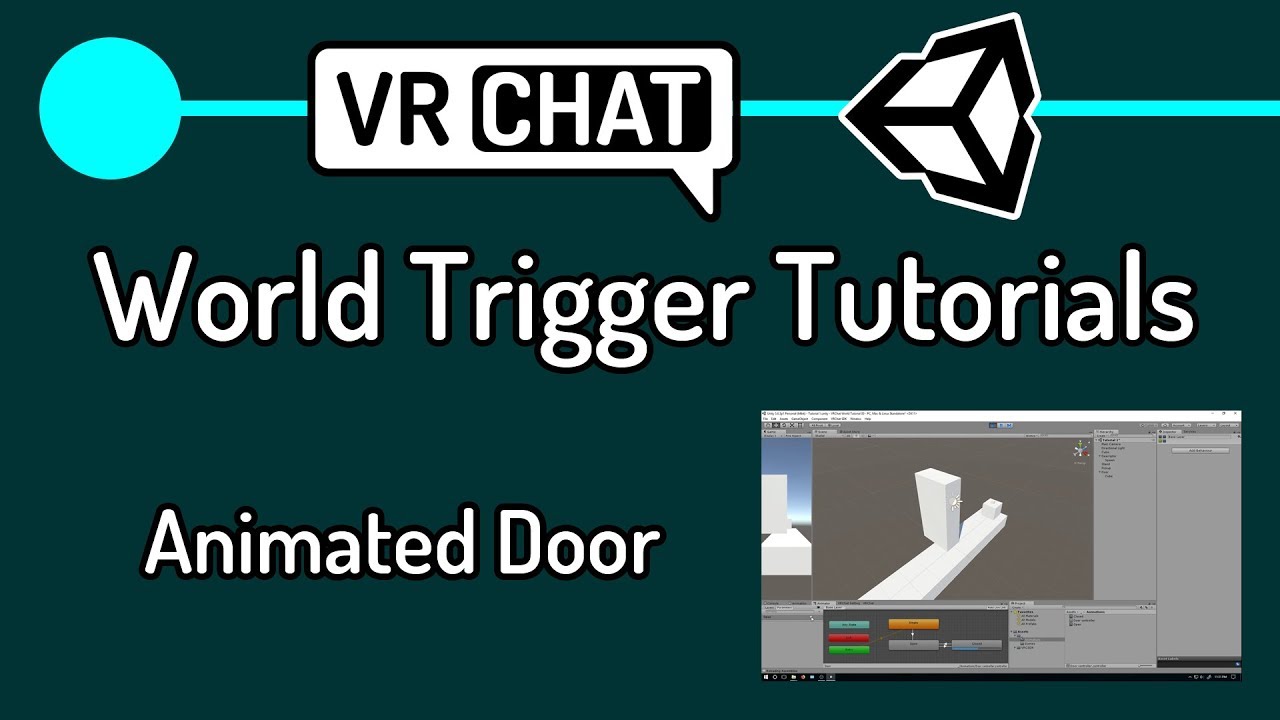
First actual tutorial on VRChat triggers. Goes over creating an object to act as a door, animating the object, adding triggers to make the object open on player enter area, and close on player leaving area.
In the next tutorial, I will go over how to make a lockable door and show how to use an object to unlock it, similar to how my world "Lab E...
silent plinth
thank you very much kev ❤️
kind leaf
🙂
 swift cypress
Might be a stupid question, can a friend put my avatar in his world? Many people want my model and his world would be the best for it
kind leaf
swift cypress
Might be a stupid question, can a friend put my avatar in his world? Many people...
https://www.youtube.com/watch?v=P5qgHgpbWU4 thats sdk3 but you can search for sdk2 if needed

Looking for a download link? Check out my Patreon.
Patreon: https://www.patreon.com/vrcakira
Part 8 of my video series for basic VRCHAT world building with the VRCSDK3 Udon kit. This series will be designed for beginners. I will try to cover every step from start to finish of each vrchat world creation tutorial. The goal of the videos is to all...
 arctic dirge
Does anyone know whats causing this? Ive deleted the world SDK and reimported twice.
 kind leaf
VRChat
Requirements We're going to need a couple things before we can get started. Current Version of Unity. We strongly recommend using Unity Hub, available on that page.VRChat SDK - See the Choosing your SDK page to see how to choose the correct SDK for your use. Step 0 - Installing Unity Check the Cur...
scenic kraken
I can't jump in my world and I have no idea why it's disabeled
I don't remember disabling it
kind leaf
scenic kraken
I can't jump in my world and I have no idea why it's disabeled
Ive found this is quite common. Not sure why, but several worlds I have deployed have jump set to zero on its own during deployment and I have had several friends have the same issue. Open your project in Unity, go to VRCWorld in the hierarchy where you have the player mods and change jump to anything you want (3) is common.
scenic kraken
where's VRCworld?
I just put an empty game object and attached a scene descriptor component to it
kind leaf
Ah, yeah there is a prefab, use that instead. Better than guiding you through it
scenic kraken
alright thanks
scenic kraken
thanks
kind leaf
anytime
scenic kraken
kind leaf
anytime
when I publish it it now thinks I'm uploading a new world instead of updating the old one, how do I fix that?
kind leaf
go to the sdk, go to content click copy id. go to vrcworld, find pipeline manager, paste the id and press attach.
- copy the id of the world it should be
kind leaf
scenic kraken
when I publish it it now thinks I'm uploading a new world instead of updating th...
did you get it sorted? I can post a screenshot if you need.

 scenic kraken
wait nvm I just had to click build & publish instead of last build, thanks
kind leaf
sweet
kind leaf
any software you are comfortable with that exports in .obj or .fbx
 deft geode
kind leaf
any software you are comfortable with that exports in .obj or .fbx
deft geode
kind leaf
any software you are comfortable with that exports in .obj or .fbx
is it easier to make stuff in blender or unity tho
kind leaf
if your good with a particular tool its going to be easier for you. For me, blender changes too rapidly for me to get proficient quickly enough so I model in Unity.
deft geode
kind leaf
if your good with a particular tool its going to be easier for you. For me, blen...
also do you know how to make a texture from the internet (like wood) look better in unity
cause it just stretches it out
if the object is big
kind leaf
in the material you should see a tiling section. thats how you adjust the stretch
kind leaf
🙂
vague remnant
Am I the only one who thinks that all the video tutorials should have a dedicated channel? Like a Quick Reference guide?
kind leaf
😛
vague remnant
I just think it'd be so much easier to have a channel that contains all the tutorial links, and are labeled, so all one has to do, is search within that channel, and search for the keywords for what they need, such as in the channel, they can search "button", and they can find the link(s) to what they need
kind leaf
They are certainly invaluable but Youtube already has that feature... The search bar in the top right is just as useful and neither are used often enough 😛 still, a dedicated Youtube tutorial channel would be cool.
vague remnant
Well true X_X
 stiff solar
I dunno how this became, but the upload menu for the a world I am making became like this
 random owl
stiff solar
random owl
stiff solar
Disable error pause in the console and unpause play mode
 quasi tusk
stiff solar
I dunno how this became, but the upload menu for the a world I am making became ...
quasi tusk
stiff solar
I dunno how this became, but the upload menu for the a world I am making became ...
Drag the hierarchy tab to the far left side (Should look long), then for inspector and game tab, drag them next to scene, if it doesn't fix. Ill make a video showing how if you still need help
stiff solar
I think a video would be very helpful.
quasi tusk
stiff solar
I think a video would be very helpful.
Moving them can be a little fidgety, so its best to do it not too fast
Hope it helps
random owl
All their problem was that they had play mode paused causing the menu not to work?
quasi tusk
Normally that never happens to me, since it pauses right when I hit play
random owl
Sounds like you have error pause on too
 fast python
I have a quick Unity question
I have placed down 12 book shelves
I placed a box collider on each one
I then export the game object as an fbx to merge all of them and reimport them so it's only one material being used
Can I remove the mesh renderer from the unmerged shelves and just keep the box colliders?
rain shadow
fast python
Can I remove the mesh renderer from the unmerged shelves and just keep the box c...
Yes but you could also just disable the mesh renderers
So in future if you ever want to adjust their positions and export again all the components are still there for you to use
fast python
Got it, thanks!
Just wanted to make sure having the mesh renderers there at all wouldn't cause any performance issue
 sweet creek
Hello, does anyone here know how I can remove quest support from my world?
near escarp
You'd have to contact the vrchat support
 fair laurel
Hey, so I'm trying to set up a world and in Unity Hub it keeps telling me license is invalid. any ideas to solve this?
nvm im a dummy
sweet creek
near escarp
You'd have to contact the vrchat support
how do I do this?
near escarp
bold ibex
anyone have a good ocean water shader?
near escarp
You should look at Silent's booth, her water 2.0 shader is great
bold ibex
where do i find that?
near escarp

Unity • VRchat Shaders • Utilities • ??? Welcome to Starlit Wanderings! We provide resources to enrich your Unity life. Most items are free and open-source! Please check the product page for more details. You can join our community at the Secret Shader Facility Discord! •
 short gulch
My God, I feel like I'll spend $100 in no time looking at that booth page. It all looks really useful.
late ruin
best way to make water in vrc world?
kind leaf
two hydrogen atoms and one oxygen atom? Or maybe just use a plane with a water shader 😛
late ruin
kind leaf
two hydrogen atoms and one oxygen atom? Or maybe just use a plane with a water s...
any good shaders you can recommend?
kind leaf
The one above works 🙂
I personally use Red_sim's shader https://drive.google.com/file/d/1r_ONfB_fAdmjZw9C_DQnV_30MGf6sM03/view
late ruin
kind leaf
I personally use Red_sim's shader https://drive.google.com/file/d/1r_ONfB_fAdmjZ...
i'll use this

any way to remove the line?
 kind leaf
should be an option in the skybox to fix seams. I cant more more clear unfortunately, hdd sector repairs 😦
late ruin
kind leaf
should be an option in the skybox to fix seams. I cant more more clear unfortuna...
alrighty
i am also getting bounced around when i walk..
@bold ibex ??
late ruin
late ruin
i am also getting bounced around when i walk..
changed my box colliders hope it helps
this is weird
@kind leaf any ideas?
kind leaf
lol no, check for colliders ha..uuh, thats kinda funny though
i could totally imagine the audio in those clips.
bold ibex
Hey, off topic question. Is there a way to keep a player stable onto a platform?
late ruin
kind leaf
lol no, check for colliders ha..uuh, thats kinda funny though
i have duped terrain but i cant see that hurting anything?
kind leaf
layered ontop of eachother?
late ruin
kind leaf
layered ontop of eachother?
basically merging into eachother?
is.. that bad lol
kind leaf
my silence is me looking at the screen like wuuuut. If its overlapping, its not great
late ruin
like they are all separate

 idle jolt
Is there a way to increase the render distance in a world? I have two large ships that fly in the sky, but on quest they get cut off and it’s really noticeable and bad to look at
late ruin
kind leaf
my silence is me looking at the screen like wuuuut. If its overlapping, its not ...
so they need to be one?
kind leaf
no, ur fine
late ruin
kind leaf
no, ur fine
why am i flying then haha
kind leaf
you said terrain, i was thinking actuall terrain, those are just planes. You good. Think maybe your Avi is just happy?
late ruin
kind leaf
you said terrain, i was thinking actuall terrain, those are just planes. You goo...
well theyre cubes. oh my avatar?
kind leaf
Uusally if the player flys in an direction its because they have collided with a solid object (other colliders) that are moving, or sharp angles like jumping up square bocks.
late ruin
still doing it with other avatars.
late ruin
kind leaf
Uusally if the player flys in an direction its because they have collided with a...
yeah im confused
kind leaf
make sure your planes all same sized colliders and everything matches correctly.
late ruin
@kind leaf is that bad?
kind leaf
can select them all and expand the collider component. should see nice green lines. they should be perfectly alligned.
kind leaf
late ruin
<@!101043607124860928> is that bad?
thats clipping, it wont kill anything just isnt purdy.
 kind leaf
tried looking it up, its always a controller issue which is not your case. One was the terrain being too small but you are using planes.
late ruin
kind leaf
tried looking it up, its always a controller issue which is not your case. One w...
using cubes stretched out
late ruin
kind leaf
tried looking it up, its always a controller issue which is not your case. One w...
its only happened since i made the terrain a little bigger and built a bridge
kind leaf
nope, im bowing out. sry I couldn't help.
late ruin
kind leaf
nope, im bowing out. sry I couldn't help.
all good
late ruin
kind leaf
nope, im bowing out. sry I couldn't help.
i'll probably just build it with planes
but textures look stretched sometimes thats why i did it singularly
kind leaf
in the material is a tiling setting 😉 that will fix your stretch.
idle jolt
How far is the render distance in worlds for quest players? From 0,0,0 how far can I go out?
 minor sail
Is there a way to hide lets say another world underneath you currently world and when people look down they cant see it?
like a room
 desert python
idle jolt
How far is the render distance in worlds for quest players? From 0,0,0 how far c...
desert python
idle jolt
How far is the render distance in worlds for quest players? From 0,0,0 how far c...
itll be the same as the reference camera
stiff solar
I have a question, does anyone know how the cars in that Mcdonalds world work?
kind leaf
minor sail
Is there a way to hide lets say another world underneath you currently world and...
Sure, if your over world has a surface, the players cannot see through the floor unless it's transparent. So anything below would be hidden. Its a 3d environment, feel free to use the space as you see fit.
If the floor is transparent, use the reference camera. Set the view distance to the minimal distance needed to see clearly in the over world. Lets say 100. Then set the hidden room's Y position to -101. Poof, hidden.
minor sail
awesome thank you
 echo flower
Does anyone know by chance what the default world audio settings are? Trying to have similar settings to default but just lower the distance slightly.
Near / Far etc
kind leaf
echo flower
Does anyone know by chance what the default world audio settings are? Trying to ...
Yeah, 0. The gain is added on top of what VRChat adds. So a gain of 0 is the default. a gain of 10 is VRChat Gain + 10.
echo flower
Hmm okay. So 0 gain, 0 near, and what's Default far?
kind leaf
sheee I have no clue, this might be useful though https://docs.vrchat.com/docs/vrc_spatialaudiosource
echo flower
It's not sadly. It makes no mention of the default settings VRChat uses. From what I said
 untold pewter
anyone know what this prefab is?

thought it was connected to USharpVideo in some way but cant find anything
desert python
untold pewter
anyone know what this prefab is?
its like a photon request fob. idk if its public since it requires like a monthly fee
untold pewter
ah jeez, pass on that then lol
desert python
its cool how it works. but im like 80% sure this prefab isnt supposed to be allowed
kind leaf
yep, web requests are forbidden and the support was removed from the sdk for a reason. Only vrc special rooms are allowed to have it.
limited to just a couple video sites and direct link downloads
desert python
👆
short gulch
So, I was wondering. Is it possible to have post processing ignore the menus? In my world which has somewhat extreme bloom (its the look I'm going for) whenever you open the menus the bloom goes nuclear since it's the brightest thing in the scene.
idle jolt
Can you increase the render distance within a world? I have ships that fly by in space, but on quest I can’t see them completely.
desert python
short gulch
So, I was wondering. Is it possible to have post processing ignore the menus? I...
so my suggestion is to use a shader i use called "FakeBloom" it was made by heroshoki tomasota and basically you put it on materials that are sopposed to be emmissives. but downsides: not quest, not AMD friendly. upsides: you can control what has bloom
desert python
idle jolt
Can you increase the render distance within a world? I have ships that fly by in...
set reference camera far distence to an obserd number
idle jolt
The main camera, or the vrc camera?
desert python
idle jolt
The main camera, or the vrc camera?
the reference camera
make sure your scene descriptor got a ref cam
short gulch
Thanks, I'll look into that, but bloom kinda plays a role in lighting the scene to make darker areas somewhat visible
desert python
short gulch
Thanks, I'll look into that, but bloom kinda plays a role in lighting the scene ...
oh you got ambient occullsion?
short gulch
Nope AO is off, the bloom just kinda exaggerates the light of the dimmer areas
desert python
i feel like the same lady who made fake bloom also made a ambient occlusion shader as well. but i dontthink you can combine them
desert python
short gulch
Nope AO is off, the bloom just kinda exaggerates the light of the dimmer areas
ah, well i still suggest fake bloom, you can basically mimic the intensity of it as well
another deal: i heard VR stage lighting (the audiolink adaptive varient) also has like their own fake bloom that looks extremely intense but dont quote me, i never used VR stage lighting
and finally: silent probably has some secret method in controlling post processing somewhere. im only saying this because their public knowledge on vrc lighting is extremely vast and the majority of me learning the 2018 light mapper was from silent
short gulch
For reference, this is what I'm working with. Lots of dark hallways, sewers, some rooms only lit by a flaming barrel, etc.
 desert python
oh my, ok so fourth option: set all emissives to like 5x their original brightness and set bloom divided by 5 and see if the menu looks better and the the world doesnt look too far off
short gulch
Problem is, when you open the menu it's blinding lol, can barely read the text
desert python
ye, i think your bloom is probs what... 1<?
bloom i think is recommended at like 0.15 at most. which is why im thinking maybe lower bloom, but set all emmissives higher so you get the same-ish intensity
short gulch
Can't remember lol, I haven't touched it since last Halloween, but I'm finally revisiting it to fix some stuff after visiting it with some friends last night looking for the most glaring issues
desert python
nice - glaring
short gulch
Oh lol, no pun intended
desert python
too late now lol
 simple arrow
@near escarp Question: I updated my project to 2019. If i were to push an update to my world, would that cause any issues for those on the main branch of vrchat? (I.e people on the beta can join the world but those on the main build can't join the world or something like that)
near escarp
they will see the 2018 version
simple arrow
Ok sweet, thank you!
short gulch
So far the fourth option is seeming like the easiest, so I'll see what happens there. It looks extreme in any screenshots, but it makes more sense when you see it all in motion. The menu is just blinding lol
desert python
the menu is now a weapon lol
short gulch
Press esc to flashbang yourself
idle jolt
For the scene descriptor, do I just drag in the main camera into the reference camera?
desert python
idle jolt
For the scene descriptor, do I just drag in the main camera into the reference c...
ye
idle jolt
Okay, let’s hope I’ll be able to see the ships in their full glory now
desert python
set far to a million
idle jolt
I’m only setting in to 2000 as going beyond 3000 will cause Z fighting
desert python
ah, fair call lad
fast python
Not sure how possible this is but might as well ask anyway
Can you make a button make a sound effect when you hover over it?
(i.e. when your finger laser pointer hits a trigger or it's in the center of your screen on desktop)
viscid belfry
Is it possible to upload a world and only make it available to specific users?
fast python
Yes
viscid belfry
Better yet, is it possible to upload to community labs and only make it accessible to certain users?
fast python
The way I'd go about uploading for specific users is make the spawn outside of the main world with a notice that the world is restricted to select users. Then use a whitelist prefab and put the ids of the people you want to invite into your world on said whitelist
viscid belfry
okay so basically, make a test world public, put a portal to the world I want private and whitelist essentially?
Im sorry thats alittle confusing. I am under the assumption that anything in community labs is public and if its not in community labs, its private
I would like to make it accessible to other users while im offine. (Company project)
dark cedar
hello, been running into a issue with uploading a world i bough, got rid of blueprint id, re-imported the sdk, and few issues not like the past few days where i was stuck in my blueprint id loop and multiple errors. im better at avatars in unity than worlds in all honesty

 errant beacon
viscid belfry
I would like to make it accessible to other users while im offine. (Company proj...
errant beacon
viscid belfry
I would like to make it accessible to other users while im offine. (Company proj...
that may be possible with a prefab, but you'd have to upload it as a public world
VRChat doesn't have an option for only allowing certain people in your private world, only you can create instances
desert python
errant beacon
VRChat doesn't have an option for only allowing certain people in your private w...
or you can send out the private link for it.
errant beacon
o heck, didn't know that worked for private worlds o:
desert python
i had one of my testers take one of my private gizmo testing grounds and they hosted a 50 player party without me
desert python
errant beacon
o heck, didn't know that worked for private worlds o:
yep. otherwise itd be a little harder to test stuff like late join sync and global stuff
viscid belfry
Thank you guys, yeah I have been logging in and placing portals for others to join, but my superiors would like a way to visit without me having to be online. It seems unlikely at this point unless its in vr labs, and making it public is out of the question right now. I really do appreciate the insight so far.
desert python
or in my case. literally anything i make because everything i make usually breaks if im not there lol
viscid belfry
Ha I know the feeling all too well ^
errant beacon
lol
also Gabe, you could prob make an invite link with something like https://thegreatpug.com/vrchat-link-generator/ and send that out?
viscid belfry
Oh wow thats interesting, can you give me a dummy rundown of how this could would ideally? It looks promising
oh wait I see this is for private instances
errant beacon
Select [Custom World ID] and paste your world ID into that, make yourself the instance owner and set the instance type to presumably something besides Public
viscid belfry
which means it may have to be a private instance of a public workd
errant beacon
Don't think so, you can make up to Friends+ instances in private worlds
viscid belfry
ill give it a try anyways, worth checking out, but I have a feeling this is for private instance of already existing public worlds
desert python
yep. and vise versa i believe. im not 100% but i think ive been to some of my privates and theyd be "public" but they arent
however privates are more reliable. especially for master bools... for some reason. but thats like the only benefit
errant beacon
also note you can get your world ID from the world descriptor, or the VRChat website
you might be able to get it from the uploaded content manager tab but I don't remember?
desert python
errant beacon
you *might* be able to get it from the uploaded content manager tab but I don't ...
you can
viscid belfry
yeah its certainly worth a try and if it works, youd have no idea how much youve just helped. so thank you
I do have one more question if you guys just happen to know. I am also tasked with creating mini games, but I have zero idea how to properly go about it. Ive tried finding tutorials on youtube but no avail. Is there a place where I can reference/tutorial you guys may know of on do things like grab active players in a lobby who want to participate, update UI, give points, etc?
errant beacon
SDK3 would def be easier to do stuff like that in, and I'd also vv much recommend Vowgan's tutorials for Udon o:
https://www.youtube.com/c/VowganVR
there's this channel for world development and also #udon-general and #udon-networking for Udon and Udon networking help, respectively
viscid belfry
okay great ive seen him come across a few times, good to know he is a great reference. I also didnt think about going to the Udon channel. Excellent resource, thank you Zivali!
desert python
I highly suggest importing udon sharp if you havent
errant beacon
yw! also ^^^
https://github.com/MerlinVR/UdonSharp it's a compiler for compiling C# into Udon, and it's also used for a lot of prefabs
also speaking of prefabs, https://vrcprefabs.com/ might be p useful too
viscid belfry
I have, just terrified of cluelessly going in to be honest. Wish there was a place I can start which holds my hand a bit more but it seems like were gonna have to dive into the deep end.
I got tasked with an insane high profile project with a one month deadline on these systems ive never used. So once again, I cannot express how grateful I am for the help.
errant beacon
sorry to hear that, but hope everything works out! o:
also, might be worth taking apart some of those prefabs to see how they work, might help a bit along with the tutorials
late ruin
@kind leaf where can i find the tiling thing for material to prevent texture stretch (or anyone else that knows)
i figured it out all good
late ruin
im falling through the planes?
 late ruin
can someone please help me why when i walk for a bit i get bumped and start flying i have re done all my planes over again and nothing worked..
i respawned and this happened.. thats my old player

 shell meadow
I'm trying to find a way to get a set of particle emitters to emit their particles on a random rate over time (using random between two constants) anywhere from 1 per 20 seconds to 1 per 60 seconds but it keeps emitting them in bursts all within a few seconds, am I going about this the wrong way?
late ruin
completed!
 idle jolt
It was a good idea until I realized that there is still a bunch of room left…
What do I add to fill in a lot of room?

 digital widget
I’m trying to put avatars in my world but it’s not working
Ppl are starting to show up to my world with the avatar pedestals not working
I need help ASAP
😥
kind leaf
Looking for a download link? Check out my Patreon.
Patreon: https://www.patreon.com/vrcakira
Part 8 of my video series for basic VRCHAT world building with the VRCSDK3 Udon kit. This series will be designed for beginners. I will try to cover every step from start to finish of each vrchat world creation tutorial. The goal of the videos is to all...
minor sail
Is there a way to stop someones voice from being able to hear them from a distance
like lower it or add something so it stop the voice from going through the wall?
 long token
im trying to set up the pool table for this world im working on and i want to make it so you can walk through it without colliding but now i cant interact with the UI unless im really close to it

anyone know how to make it so players dont collide with the table but can still interact with the ui and cues?
kind leaf
long token
anyone know how to make it so players dont collide with the table but can still ...
Layer collision matrix. https://docs.unity3d.com/uploads/Main/PhysicsSet.png
but if you are using a panda table its already setup not to collide with the player.
https://docs.unity3d.com/Manual/class-PhysicsManager.html
 vague remnant
Quick! Need to make one object with multiple face textures! XP
 late owl
so make it
vague remnant
Yes, but how? X_X
idle jolt
In my world, I have an animation set on multiple ships that lets them fly by. Unfortunately when a person joins late these animations are registered on the client. How do I make the animations global, where the ships travel by at the same speed for everyone?
kind leaf
Hmm thought that was fixed... assuming it hasn't, animations are like that. If you want sync ied script the movement. Thats just me.
idle jolt
You can sync animations? I thought it was only pick up able objects
kind leaf
I'm talking about syncing scripted movement. Not animations. Animations break for late joiners.
idle jolt
Oh…
So there’s nothing I can do…
kind leaf
You can try an onlatejoin and set a variable based on the position of the ships
Set the vector3 of the ship to what it was for the master on late join
Nvm... not going to work with an animation.
See, with a animated door you are just using a bool (on or off) So a latejoin event could match the bool off the master. But these are ships flying about the map and you want the position of the ship synced... If you can get the timestamp of the current animation then you can use that.
 raw vessel
i'm really super struggling to place and align my wall perfectly to other surface i try progrid but idk what value and where to enter
so i need to know how i can align it perfectly and smoothly
and is there any other free UnityPackage asset that can do that
please help

 toxic fulcrum

egg
 swift fable
is there a way to push a player forward? i kinda want to make a snowboarding map
desert python
ye, you can put physics on a player. or more simply - put a collider behind the player
 final radish
requesting backup (i've never uploaded a world before) i have my scene descriptor and spawn point set up, but when I try to test the world it just takes me to vrc home. am i doing something wrong?
kind leaf
raw vessel
i'm really super struggling to place and align my wall perfectly to other surfac...
swift fable
anyone got some vehicle prefabs?
raw vessel
@kind leaf
since that i know the unity basics
i might skip something
hope this help's
thanks
kind leaf
Wait, what? did you just say your going to skip the doc?
 elfin rover
I have a question regarding the usharpvideo by merlin
is there a way to make it autoplay music rather than pasting in what u want to have
like how void club has automated music
raw vessel
@kind leaf
unfortunately there is no any easy way to do it
unless if i make script in my unity like this:
https://answers.unity.com/questions/1226776/best-way-to-move-an-object-smoothly.html
Unity is the ultimate game development platform. Use Unity to build high-quality 3D and 2D games, deploy them across mobile, desktop, VR/AR, consoles or the Web, and connect with loyal and enthusiastic players and customers.
long token
anyone know how to toggle on/off audio on a video player thats using the url stream?
every time i try to toggle it off in game it just shuts it off completely and wont toggle back on
desert python
long token
anyone know how to toggle on/off audio on a video player thats using the url str...
youre not supposed to do that. the response you got sounds like the best response you couldve gotten. the best you can do is setting your audio volume to 0
kind leaf
raw vessel
<@!101043607124860928>
unfortunately there is no any easy way to do it
unless if...
There is a million easy ways to snap objects. If you read the document I linked it covered like 10 ways to snap in editor. If you need to snap during runtime google that instead. Take a c# script and convert it to Udon.
raw vessel
alright
 night yoke
so i have a camera that kind of takes a snap shot of players faces at some point. issue i'm having is that when i use mirror reflection culling mask, when camera moves around, it has traces of the previous frames in the picture. how would i make it so that it doesnt do this? basically the camera follow there face for a couple second then turns off to take the picture but in that time its on, if they move around, you can see the previous frames behind the current one even with slight movement.
long token
does anyone have the old 8ball pool unity package?

 vapid badge
So im using a projector, and this happens. this weird like, banding thing when you get closer. What is this? I use a projector with the same settings elsewhere with no issue
https://cdn.discordapp.com/attachments/844705210479411217/868637151796035594/2021-07-24_19-32-04.mp4
minor sail
Im having a few issues the Post Processing for Bloom isnt working
 rich hatch
im confused how do i setup a simple default button
people use udon but i want to use regular C#
errant beacon
C# scripts aren't permitted, but UdonSharp lets you compile C# into Udon
https://github.com/MerlinVR/UdonSharp
errant beacon
yup, or the vv dilapidated SDK2 lol
would recommend watching Vowgan's Udon tutorials, they're vv helpful: https://www.youtube.com/c/VowganVR/videos
rich hatch
i tried sdk2 and i cant find the interact script
errant beacon
He also shows how to make the tutorial in UdonSharp, if you want to use C# instead of the node graph
would also recommend the VRChat docs, https://docs.vrchat.com/docs/getting-started-with-udon - there's also #udon-general too!
rich hatch
i know how to use udon and c#
but i hate that you have to use udon
thanks for the help
final radish
so i accidentally did something to my world and now it's giving me this... weird perspective. How do i undo this
 errant beacon
Shift-click the cube at the center of the scene gizmo, i.e that cube at the top-right
final radish
tysm boss
 mint steeple
does anyone know how to make pick up object in world?
minor sail
Do anyone know how to fix this, seems like the light-mapper bugged or something

 ebon basalt
so, im tryna setup the vrchat sdk in unity, but its not working. any idea? im importing it right

this what i get
on the import
 tame reef
So I just about done building another world in SDK2. But after uploading it I notice that the game crash every time I leave the world. This also happens to anyone else who joins the world when I have tested it among friends. Everything else works fine in the world. So I really have no idea why the game crashes after you want to live it. Anyone stumble upon something like this aswell?
kind leaf
ebon basalt
on the import
you only have 1 error, but your not showing it to us. Warnings are just that... Show the error, attempt to clear it by pressing clear and if the error persists, show us the error 🙂
ebon basalt
kind leaf
you only have 1 error, but your not showing it to us. Warnings are just that... ...
give me 2 seconds, ill get the screenshoit for you
 kind leaf
and you tried pressing clear? If the sdk wasnt working youed have more than 1 error.
ebon basalt
?
 random owl
Very much doesn't look like the correct unity version
VRChat
This page lists the current Unity version you should use when creating content for VRChat, as well as links to the correct version for both Unity Hub and direct downloads. Current Unity Version The current Unity version in use by VRChat is Unity 2018.4.20f1. Ensure you are using this precise versio...
kind leaf
wouldnt hurt to work on those screenshots. 3 different ones showing different information. Better to be informative than to try and post a clean snip. Also a random error in a tree doesnt show much, usually the cause is the 1st error or within the first 10 errors.
kind leaf
random owl
Very much doesn't look like the correct unity version
lol completely lucky guess. Could have been pro version or hex edited 😛
kind leaf
I havent touched 2020 in over a year. but yeah looking back at the screenshot, the icons are different, well there are additional icons anyway.
ebon basalt
got it sorted. it was wrong unity version lmao
 winter trail
hello, so ive published my world. but i have a little problem cus whenever i join my world it just brings me back to vrchat home world again
 unkempt turtle
correct unity version?
tame reef
tame reef
So I just about done building another world in SDK2. But after uploading it I no...
So after doing my own testing I've concluded it is the video player that breaks the world. When I made a new version without the video player it works. Not sure why though. Anything with my setting that is of?


 inner portal
Hey, does anyone know if those posters alongside others assets in this style are freely available?


Those are two different worlds made by two different people yet they share some assets such as those posters
kind leaf
inner portal
Those are two different worlds made by two different people yet they share some ...
You could try contacting the owner of one of the worlds. Many of the shared assets are a combination between a few popular packs on the Unity Asset store and those arnt free. Those posters look more custom than something on the store. The positioning of the silhouette looks like an fbt avatar.
 latent ridge
I'm trying to get a trigger to fire when a player touches this little ball in any way (so bumping into it, but not necessarily clicking it), I've tried using OnAvatarHit and OnEnterTrigger but neither seems to do anything, does the collider on the ball have to be bigger than the player or something?
I figured it out, I had to set the OnEnterTrigger layer to be Player Local
long token
Does anyone have the unity package for the older version of the 8ball pool?
 peak gale
Having issues with a couple shaders, anyone in here a shader wizard?
fast python
Anyone know of a prefab to make an object follow you?
desert python
long token
Does anyone have the unity package for the older version of the 8ball pool?
how old?
 glacial pond
The old 8ball has really bad/delayed sync
desert python
well its also not manual either. but it has quite a bit extra compared to the pretisesors
 median rover
hey, anyone knows a site with nice, free and high quality skyboxes?
or just 360 pics in general
 olive shuttle
anyone who can help?
 viscid belfry
Hey everyone, me again 😛
I have a question about optimization as I cannot find an answer in the docs. Is there some general polygon count standard that is recommended for non quest worlds? I realize textures, and post processing throw a huge caveat but I wonder if there is an official ballpark estimate. Thank you
near escarp
You can get away with a few million polygons in view easily
But lower is better, obviously
for filesize too
viscid belfry
Thank you, I was reading over the quest standards but I wasnt sure how far we can deviate from that reasonably. Our internal target was about 200k poly's so this helps alot.
kind leaf
median rover
or just 360 pics in general
 median rover
Thanks
kind leaf
long token
Does anyone have the unity package for the older version of the 8ball pool?
If depreciated with no support is what you want the original is toast unless we have a hoarder. But you can go to the maintained fork and scroll all the way to the oldest release and download something that is just about the same as the original. Think version 0.1.0 is the first version https://github.com/FairlySadPanda/vrcbce/releases/

GitHub
VRCBilliards: Community Edition. Contribute to FairlySadPanda/vrcbce development by creating an account on GitHub.
vapid badge
vapid badge
So im using a projector, and this happens. this weird like, banding thing when y...
gonna bump this
viscid belfry
kind leaf
If depreciated with no support is what you want the original is toast unless we ...
Yeah Id like to see what you guys find, the latest version of the tool table is spitting out a few errors I have yet to adress
kind leaf
viscid belfry
Yeah Id like to see what you guys find, the latest version of the tool table is ...
Your getting errors from the FairlySadPanda table? Like their newest release? Mine work fine.
viscid belfry
yeah I pulled it right after their latest release like a week ago.
After importing, I cannot even, build and test locally. I have to upload to VRChat in order to test
went back to see if the latest package on friday would just overwrite any conflicts but still the same issues
kind leaf
i have ht8b.1.0.0 lol sending it to drive now ill post the link in a min
but i also have vrcbce_1.1.3 which i think is a couple patches behind
viscid belfry
looks like they have a new package as of two days ago as well
ill try and pull that one first, if it doesnt work ill try your download
kind leaf
yeah 1.1.3 works for sure, Ive put it in 5 worlds this last month with no issues.
viscid belfry
Oh gotcha, well then I guess thats probably better and worth looking into. Getting a namespace error on the latest one now 😦
cant even clear it hmmm
kind leaf
silly question but you have the latest udonsharp installed right?
viscid belfry
Yeah I have udon sharp in there, says missing VRCPrefabs namespace now
thats a new error
I just need udon sharp installed and then the pool table package right?
kind leaf
SDK + UdonSharp then pooltable
make sure your Unity version is 2018.4.20f1 and you are using the latest sdk and udonsharp releases. if you have that sorted you can use most vrc prefabs without an issue
viscid belfry
Right, Im pretty sure I did that, but I could have missed something. I will start a fresh project now cause the other one broke lol
Will let you know what happens once everything is imported
Did a fresh project with latest World Package -> Then Udon Sharp -> Then the latest pool table package. Here is a list of errors that came up

The namespace error is still occurring, must be new issue in the latest package
 kind leaf
maybe, those are all included references so it should be working. if you try an older version make sure to completely remove that one first.
viscid belfry
Yeah, im going to do a fresh project again, and see if an older version does it.
What is the difference between vrcbce_1.1.3 and ht8b.1.0.0 ? Two diff developers?
kind leaf
vrcbce is a repo of ht8b. ht8bal is abandoned. So naturally over time vrcbce has gotten way better
here is the link if anyone was looking for the original public release https://drive.google.com/file/d/1JL8Rz1oyMhAXR3BNdN9q_2lmcDCA5lTV/view?usp=sharing I'll only keep it up for 1 month so have at it.
Google Docs
 dim veldt
How to get real time in a world?
kind leaf
 dim veldt
kind leaf
https://www.dropbox.com/s/jny0kkguphd1bqj/Digital%20Clock.unitypackage?dl=0
dim veldt
kind leaf
https://www.dropbox.com/s/jny0kkguphd1bqj/Digital%20Clock.unitypackage?dl=0
Ty
 kind leaf
yw plenty more toys to play with here: https://docs.google.com/spreadsheets/d/e/2PACX-1vTP-eIkYLZh7pDhpO-untxy1zbuoiqdzVP2z5-vg_9ijBW7k8ZC9VP6cVL-ct5yKrySPBPJ6V2ymlWS/pubhtml#
dim veldt
Oooo
dim veldt
kind leaf
here is the link if anyone was looking for the original public release https://d...
May i ask what this might be for?
kind leaf
oh thats the original ht8ball prefab. first public release. I wouldnt download it if you want a stable pool table. its more of a niche thing.
viscid belfry
thank you kev
kind leaf
yw Gabe
dim veldt
Oh i see
So it may not be stable anymore i suppose
Are there any other 8bal tables that are more stable?
kind leaf
Yeah that link I sent you with a bunch of prefabs has one. vrcbce is the best table on the market. or get it here: https://github.com/FairlySadPanda/vrcbce/releases/
dim veldt
Oh ok
I clicked the link but not sure how to get the table, can you screenshot it for me?
I would appreciate it
 viscid belfry
@dim veldt If your pool table installation gives you no issues please let me know.
dim veldt
viscid belfry
<@!491094316811550728> If your pool table installation gives you no issues pleas...
Well, it isnt for me
Its for my bf doing his workd but ill let you know if there are or no issues with it
 vagrant shale
Any ideas as to why certain parts of my terrain texture aren't showing up properly? The terrain is large areas of black with patches of greenery and some parts show up fine but others appear completely black in VRChat even though I can see the texture in Unity.
This is the area that's giving me the issue. The trees show up fine but the texture area ends up looking as black as the surrounding areas and this is using textures that display properly elsewhere on the same terrain.

 stone obsidian
Anyone messed with the community pool table prefab before? For some reason I’m able to build and test it but when I actually try to upload it I just get udon sharp errors that prevent me from doing so
viscid belfry
stone obsidian
Anyone messed with the community pool table prefab before? For some reason I’m a...
if its vrcbce latest, I am getting errors as well. The latest, latest, has a namespace error which wont allow you do anything until it is fixed, at least that was the issue for me. The previous version spit out errors but was still useable.
stone obsidian
Oh hm
kind leaf
vagrant shale
This is the area that's giving me the issue. The trees show up fine but the text...
You can try turning up the detail distance on terrain. if you have hard edges its detail resolution per patch that needs lowered on terrain.
kind leaf
viscid belfry
if its vrcbce latest, I am getting errors as well. The latest, latest, has a nam...
If you all are having issues with the vrcbce ied encourage you to join the discord for the project. link should be on the git. There you will be able to sort the issue faster.
vagrant shale
The texture doesn't show up when you're standing on it so would it be a distance issue? The edges are fine elsewhere but this area just shows up as completely black. Let me get an image from inside of VRChat.
kind leaf
Did you try Googling "Unity terrain textures black"?
vagrant shale
Yeah, couldn't find anything useful. Apparently it can happen when a texture has been applied and deleted but it shows up fine in Unity, even using the game view so it would seem to be something that's happening when it's getting published to VRChat.

 gray sleet
please help. when i try to upload my world i get this issue.
vrchat sdk error updating content. asset bundle upload failed. failed to get file record
fast python
Udon Sharp go brrr
 gray sleet
to have the world best set up for quest. do i need to change any of these?
 fast python
Is there any way to change the interact option so it doesn't highlight the collider?
This looks stupid
 desert python
fast python
This looks stupid
desert python
fast python
This looks stupid
idk by heart but there is a prefab that for some reason didnt have the blue highlighter by techanon but i think that was fixed and also udon
near escarp
You can change the mesh filter
kind leaf
gray sleet
to have the world best set up for quest. do i need to change any of these?
no, import the toolkit and apply the quality settings. You shouldnt have to touch anything in the build settings. That is auto completed when you hit convert from the sdk
 gray sleet
kind leaf
no, import the toolkit and apply the quality settings. You shouldnt have to touc...
gray sleet
kind leaf
no, import the toolkit and apply the quality settings. You shouldnt have to touc...
what do i do to the quality settings
kind leaf
you just select Quest 2 or Quest 1 and be done 😛
gray sleet
there are 3 boxes. what one do i do for what
kind leaf
dont tick or untick any boxes you literally just click Quest.
gray sleet
ohh ok. if i click Quest 2 will that also work for people using the quest 1?
kind leaf
those settings dont prevent or enable functionality. it determines what your world permits such as anti-aliasing
makes it more performant*
gray sleet
ok. so for pc worlds, i dont need to do anything?
for quest world just click quest 2.
and that should be it
kind leaf
Depends on what you want. But sure
If I do a realistic build I do PC High, if its styalized I do Low and if its Quest I do Quest 1.
gray sleet
mm alright. well Pc can be the highest. lol.
And for my quest world, you recommend doing quest 1?
kind leaf
Ensures even lat gen have proper restrictions. You still need to do all the other optimization and compatibility changes though.
shaders, compression, texture formats, all that is on you.
gray sleet
alright. so i have a pc world, i copy the file and make it a quest world. (changing the format from windows to android).
once i do that, the texture format, how do i change that. and will it effect everything thats already in the world / file
kind leaf
Texture format should be taken care of automatically, if it doesnt you'll want to google the correct format. I dont recall. 4x4 something... meh. But yeah, the textures in the world will be automatically changed.
gray sleet
alright. cool. ty
so i whent to the vrc sdk and click the add or match thingy and this popped up. what i click now
 kind leaf
replace or add doesnt matter
gray sleet
ok so im at the project settings. why are there so many options XD
 kind leaf
default plus the new ones. You did add 😛
gray sleet
was that right?
kind leaf
again, doesnt matter, you just have more options but the only ones you care about are the VR's and Quests
gray sleet
ok. so i clicked Quest 1. do i need to change any of these?
 kind leaf
nope once you click it, the settings are applied you can just close the window
gray sleet
ok. above on the levels area. I noticed there are green boxes standing out from all the grey boxes. whats that about
kind leaf
Your guess is as good as mine https://docs.unity3d.com/Manual/class-QualitySettings.html
"a green checkbox in a column denotes the level currently chosen for that platform"
gray sleet
lol. so uhh should the green box be on Quest 1 then? since thats what im selecting
So my quest world is on Quest 1.
And my Pc world will be on. Vr High?
kind leaf
if you pressed quest than you have a green check in the android icon slot already
its a table showing you the settings of each platform
gray sleet
this is what it looks like. I clicked Quest 1. But the green thing is still on VrHigh for the first colum and QUest 2 on the second colum
 kind leaf
 gray sleet
ohhhh. so i have to press thoes arrows to change what one is sellected. not click it to high lite it.
my bad. ty
 dreamy prism
I wanted to ask a few questions about making worlds. Can worlds be private so that only selected few people can join the world and also what type of software or app do I need to use to create said world?
 tough rock
I need help I trying to make small visualizer and I having trouble making it because I have no clue how to use unity and I have to make in to a small room on a ship
kind leaf
dreamy prism
I wanted to ask a few questions about making worlds. Can worlds be private so th...
https://docs.vrchat.com/docs/creating-your-first-world
https://www.youtube.com/results?search_query=vrchat+world+creation+sdk+3
VRChat
Before getting started, ensure you have a Unity project with the SDK set up. If you want a great intro to creating your first world with pre-created assets, a tutorial video, and detailed steps, check out the VRChat Home Kit! Step 1 - Setting up a scene The first thing you need is a scene. This can ...
kind leaf
tough rock
I need help I trying to make small visualizer and I having trouble making it be...
music visualizer? https://github.com/llealloo/vrc-udon-audio-link

GitHub
Audio reactive prefabs for VRChat. Contribute to llealloo/vrc-udon-audio-link development by creating an account on GitHub.
dreamy prism
kind leaf
https://docs.vrchat.com/docs/creating-your-first-world
https://www.youtube.com/r...
Ty I'll check it out tmrw
 exotic kraken
Alright. So today is my first day messing around in Unity.
 lost roost
when creating vrchat worlds is the 2019 version supported? because when i go to build and test my world it doesnt load me into the world to test.
lost roost
could someone please tell me what this means
https://gyazo.com/8d7c0057a43c1b0f76ce272af7f923b9
 near escarp
lost roost
near escarp
lost roost
im now running into this error what the heck have i done??

 crystal aspen
Hi There,
Is there a Way when a Player Spawns in my World he will become bigger?
Im working on a world atm but the assets are all really big.. and i dont want so scale everything smaller.. so i thought maybe there is a Way that makes player "bigger" when they spawn in my world. Any ideas?
olive shuttle
Any "quest" supported video players out there?
lost roost
crystal aspen
Hi There,
Is there a Way when a Player Spawns in my World he will become bigger...
you can always just scale the assets down
crystal aspen
Like i wrote... i dont want to scale my entire World down.. this was a complete prefab in which i do changes and i dont think scaling an entire world down is that easy.. or is it... XD?
lost roost
if you select everything in the heirachy theoretically you can scale it all down all at once
crystal aspen
well... goes testing it let´s see if this breaks something.... XD
lost roost
if something goes wrong you can always ctrl z
crystal aspen
nope.. dosnt work.. it scales everything down jeah.. but it also lets everything stand where it is.. and terrain dosnt scale at all
lost roost
is everything set to static?
lost roost
there you go ^_^
near escarp
You can set every object in a new gameobject and scale that
bold ibex
so i just uploaded my world but when i try to enter it it kicks me out anyone know why?
crystal aspen
How can i also Rescale the terrain so everything stays the same? scaling the assets did work.. but now i have problems with the terrain getting it how it was.. or should be
bold ibex
bold ibex
so i just uploaded my world but when i try to enter it it kicks me out anyone kn...
anyone?
kind leaf
bold ibex
anyone?
Can start by looking for errors in the console. Installing the VRC Toolkit and seeing if it has any red flags is good as well. And then you can try using the search bar on the top right and searching "kicks me out" or some variant of your question. Because there are many reason your build could have failed.
bold ibex
kind leaf
Can start by looking for errors in the console. Installing the VRC Toolkit and s...
yeah i fixed it turns out i didnt put a spawn point
kind leaf
😛
dim veldt
Need night/daytime citie with lights skybox
viscid belfry
Added a vrc mirror prefab into the scene. Object on the right.
Then I made a custom model on the left, assigned the same material/script/layer and it wont show whats in front of it.
Any ideas of what I could be missing?
 kind leaf
viscid belfry
Added a vrc mirror prefab into the scene. Object on the right.
Then I made a cus...
kind leaf
viscid belfry
Added a vrc mirror prefab into the scene. Object on the right.
Then I made a cus...
oh its showing. I see the second mirror just fine. makes sure to copy the settings of the other mirror if you want it to reflect the same stuff. Currently it is only reflecting the skybox
viscid belfry
kind leaf
oh its showing. I see the second mirror just fine. makes sure to copy the settin...
Thats what I thought I did and the one on the left (Custom Mesh) should be displaying everything too but its just the skybox.
I have both inspectors in the image as well. They appear identical so im not sure what im missing
Mirror 2 on left and the original prefab on right
kind leaf
new mirror is set to cast and receive shadows, why?
 viscid belfry
Yeah it still doesnt make a difference. However, if I disable the VRC Mirror reflection script it displays properly for about 1 second before going to black
I can keep toggling it repeatedly for the same result. its so odd
Actually I think it might be the UV's
i tried the same method in other primitives and it works fine
however, if it was the UV's then it shouldnt display properly even for a second hmmmm
 dusk sapphire
if you're using a custom mesh for the mirror reflection surface
Make sure the mirror mesh lies on XY plane in the mesh renderer's local coordinate system, and its facing direction is negative Z axis in local coordinate system
viscid belfry
dusk sapphire
if you're using a custom mesh for the mirror reflection surface
> Make sure the ...
Thank you for the insight Temporal. Ill give that a shot!
viscid belfry
@kind leaf Just wanted to thank you for the pool table you provided yesterday. The harry t table is giving me zero issues. The sad panda one appears to need some updates
 proven glade
anyone have like drink prefabs or something like the black cat has
fast python
How do you do fog and is it quest compatible?
kind leaf
fast python
How do you do fog and is it quest compatible?
https://docs.unity3d.com/2017.4/Documentation/Manual/PostProcessing-Fog.html
or use particles. Both should be Quest compatible.
fast python
Would one 4k texture for the entire floor of my map be too hard on Quest users?
green lagoon
you could probably get it smaller with some tiling textures
green lagoon
there's probably cheaper ways to accomplish that then a 4K texture uniquely unwrapped
as you could do an entire map in a 4K texture Atlas
green lagoon
did you make sure you had a tiling grass texture to begin with not a grass PNG
 green lagoon
like a random picture of grass is probably not going to tile correctly
fast python
Yeah I got that
I'm asking because for some reason the tiling doesnt work
This is set to 1000x1000 and there is no difference at all
 green lagoon
could you take a screenshot of your material to see what's up
 green lagoon
that's because you put the 1000 in the secondary map not the primary
fast python
Ah so this is what trying to work at 2 am accomplishes
 fast python
Yeah I got that now lol
Do you know of any programs that allow for tiling?
It seems like a program that just snaps your cursor back over to the other side wouldn't be super uncommon
Oh wait would substance painter work?
green lagoon
yeah there settings you can set in substance painter for like tiling
but honestly there's probably plenty of free grass textures you can grab that's already tiled
fast python
Yeah I remember it doing that by default when I was doing commissions for avatars
fast python
Made a grass texture using the affine filter in affinity designer

Gotta say, pleased with the result

 proud jungle
Hello I am wondering what this specific type of shader is called. The shader will only show texture upon intersection. I notice some vrchat worlds have this effect where upon stepping on the ground the floor lights up which I assume is a shader effect.
 unreal kiln
heyhey ^^", i wanted to create a new world, should i still use unity 2018.4.20f1 or the 2019 version because of the upcoming update
kind leaf
unreal kiln
heyhey ^^", i wanted to create a new world, should i still use unity 2018.4.20f1...
Thats a choice you have to make for yourself. Delays happen. 2018 you know is live. But if it is going to take a while to make your world it wont hurt to start in 2019 just know that the current sdk for 2019 is not a live sdk, so you will have to update again before you can publish.* before you can publish live (not publish to beta)
unreal kiln
kind leaf
Thats a choice you have to make for yourself. Delays happen. 2018 you know is li...
okay, thanks
rain shadow
Unfortunately probably not
If it was the same scene file that comes with the udon examples it would have overwritten it
Doesn't matter if it was in a different folder
Unless you saved a new scene file or duplicated the scene file unity will still reference that same file with it's own ID system
If you rename and move it the file is still the same file to Unity
It's a mistake you only make once
Or twice if you are particularly unlucky
viscid belfry
Anyone encountered an issue where the video player wont auto play when multiple players are in the lobby?
 topaz basin
viscid belfry
Anyone encountered an issue where the video player wont auto play when multiple ...
topaz basin
viscid belfry
Anyone encountered an issue where the video player wont auto play when multiple ...
I had some issues. Sometimes it's not playing, or stuck at 1 frame. It's the sdk3 video player. But i am looking for another player from the community with build-in option like, setting up extra buttons with pictures, that are connected to a youtube video
Didn't found one yet.
viscid belfry
topaz basin
I had some issues. Sometimes it's not playing, or stuck at 1 frame. It's the sdk...
Okay good to know. I was seeing the same issues. Theres also two diff variations, Unity and AVPro have you found one being better than the other?
topaz basin
viscid belfry
Okay good to know. I was seeing the same issues. Theres also two diff variations...
I never used AVPro
viscid belfry
Okay, ill try and use that next, see what happens
topaz basin
viscid belfry
Okay, ill try and use that next, see what happens
This one i found a view weeks ago. It looks not that bad. But you need to install UdonSharp & i don't know how to do that. So i haven't tried the video player yet
https://reposhub.com/dotnet/media/MerlinVR-USharpVideo.html

USharpVideo - a basic video player made for VRChat using Udon and UdonSharp. Supports normal videos and live streams.,USharpVideo
viscid belfry
Udon sharp is a package Ill send link soon

GitHub
This release requires the latest VRCSDK
Features
#85: Support for user defined C# properties on UdonSharpBehaviours implemented by @mika-f
Property syntax with getters and setters is now valid, fo...
at the bottom is a package zip
use that
 slim magnet
Hey yall, long time listener first time caller, I'm able to build & publish, but build & test seems to fail silently; no change in the UI to indicate that it's even trying to go through the process. Running on U 2018.4.20, SDK 2021.7.13.13.39
Anyone else run into this?
actually, i do notice that it makes the tiniest sound, like the audio device is switching off momentarily, but no other acknowledgement of the button being clicked
 gloomy thorn
Do anyone knows how to test a world on unity?
https://twitter.com/Takato_Matsukii/status/1411931891586924547

I uploaded the Bully Dorm recently. I had this up before but deleted it long time, felt like reuploading it.
Bully is an old rockstar game. Its pretty good, if anyone doesn't know about.
Does this mean I'm making more maps? Idk yet. lol
#VRChat #VRChat_world紹介 https://t.co/Vp2OKMRSzF

 Twitter
·
Twitter
·
Like this
near escarp
look at the pins
gloomy thorn
ty
slim magnet
slim magnet
Hey yall, long time listener first time caller, I'm able to build & publish, but...
no build errors or warnings, when running the scene in-editor
gloomy thorn
near escarp
look at the pins
Doesnt work, Im having errors
 near escarp
slim magnet
Hey yall, long time listener first time caller, I'm able to build & publish, but...
near escarp
slim magnet
Hey yall, long time listener first time caller, I'm able to build & publish, but...
Reload your project and check the console then
near escarp
gloomy thorn
Doesnt work, Im having errors
You need to be using the latest version of the vrcsdk
slim magnet
near escarp
Reload your project and check the console then
thanks, result of that: (also, should i take this to user-support?)
 near escarp
slim magnet
thanks, result of that: (also, should i take this to user-support?)
near escarp
slim magnet
thanks, result of that: (also, should i take this to user-support?)
Sample scene with the latest SDK ?
slim magnet
near escarp
Sample scene with the latest SDK ?
SampleAssetsDemoWorld? Let's see
near escarp
Just need to know if it's the latest sdk
slim magnet
SDK 2021.7.13.13.39; latest as far as i know, via the link for SDK3-Worlds
 tender ice
I have a question.
When I try to upload the world with vrchat, I get an error like this image and I can't upload. Please tell me the solution
Unity version is 2019 4.28f1
 near escarp
I'll need to log you out manually to fix this, what's your vrc username ?
near escarp
slim magnet
SDK 2021.7.13.13.39; latest as far as i know, via the link for SDK3-Worlds
I'd suggest making your nothing is preventing unity to run correctly, as in anti virus softwares, if you've got nothing, would suggest a clean reinstall of Unity
slim magnet
near escarp
I'd suggest making your nothing is preventing unity to run correctly, as in anti...
sweet, just installed it today, will reinstall and see.
tender ice
@near escarp
My username is"AKILUX"
It seems that I will be forcibly logged out after my upload fails.
near escarp
Alright, restart unity and it should work
tender ice
@near escarp
Thank you for your support!
I will reboot and try it
topaz basin
Is there something i need to know for making my PC World compatible with quest/android? I know about the Shader. Does size matter or anything else?
kind leaf
topaz basin
Is there something i need to know for making my PC World compatible with quest/a...
VRChat
Creating content for VRChat Quest is a challenge-- you have to create attractive, compelling content all the while keeping the content optimized for a mobile device. These are the same challenges that game developers must deal with while building for mobile. Here, we'll give you some general guidel...
tender ice
@near escarp
The world has been uploaded successfully!
Thank you for your support!
tender ice
Excuse me often, the world that should have been uploaded is not reflected on the vrchat server. Can you figure out what caused it?
Although it is firmly registered in the content manager, the display from the world menu on vrchat has disappeared.
slim magnet
near escarp
I'd suggest making your nothing is preventing unity to run correctly, as in anti...
post-clean-reinstall and the Build&Test button still has no effect; I'm able to publish and kind of 'test' that way but it's tedious 😬
near escarp
Did you click the button multiple times ? There's issues with this
Sometimes takes a few clicks for some reason
slim magnet
Yeah, just tried that to no effect; is there a text log i can check somewhere?
near escarp
If it doesn't show up in the unity console, i'm unsure
tender ice
@near escarp
Thank you for teaching me.
I didn't know that it could only be used in open beta.
I download the open beta version.
slim magnet
near escarp
If it doesn't show up in the unity console, i'm unsure
Dove into the .cs for the panel to put logs in and see where it drops out, does this make any sense?


it quietly gives up at SetNumClients it seems?
near escarp
Am not an engineer so not sure I know what the cause of it is, I'd suggest reaching out to the support at this point because I don't know if it's something that can be easily solved
slim magnet
👍 no worries, thank you!
rain shadow
slim magnet
👍 no worries, thank you!
Just wondering if you have a correct path for the VRChat client in the SDK settings
It should default to the correct path but your issue seems the same as if it wasn't set properly
near escarp
I assumed that's what it was, but if the path is incorrect it usually it just launches the client in VR with no regards to the options selected 
slim magnet
I think I'm on the default path:
 bold ibex
so my vrchat world does not let me jump is there sometype of thing im supposed to add or something? im using sdk3
rain shadow
bold ibex
so my vrchat world does not let me jump is there sometype of thing im supposed t...
I'm guessing you added the scene descriptor component manually to your scene
Remove it and search for VRCWorld in your assets and drag that prefab into your scene
bold ibex
ok done
slim magnet
slim magnet
I think I'm on the default path:
ticket created! looking forward to hearing how this gets resolved
 rain shadow
bold ibex
ok done
rain shadow
bold ibex
ok done
It should have a jump variable you can change
bold ibex
yea i see it thanks
 vivid belfry
Been trying to work out a pipeline between blender and unity to moves/animate the world but keep the camera static
Technically it’s easy but doing iterations of it might be more troublesome than intuitive when you want a specific timing for it
Like you’re in a unmovable box with the world animate around you
near escarp
Keep the camera or player static ?
You can keep the player static, but locking their vision is a big nono
 near escarp
Then there's probably another collider
proven glade
there is only one collider on the object
near escarp
And what about other objects ?
proven glade
no everything else is normal I think
or maybe the script is not working
ive been using this script given to try to make the audio louder because better audio does not work with me or anyone else
near escarp
what does it do ?
the actual behavior
Try removing it to see if the collider behaves as expected
proven glade
Once the player enters the trigger area its supposed to change their voice gain and such and turn off once they leave the area
 frigid estuary
[SDK2] is it possible to use two independent URL video players in a world?
 covert skiff
Hey guys, is it cool if I post a paragraph I made? Looking for some opinions and thoughts from this passionate and active community. Don’t want to just suddenly post random wall of text with no warning
…If this is the appropriate channel to ask for an opinion that may generate a bit of discussion. Seems more relevant to post here with the most devoted rather than to the general channels
It is absolutely related to a singular configurable option while uploading a world
silk coral
 silk coral
silk coral
silk coral
i finished this
silk coral
silk coral
.
well not finished but put it in-game
it's uploaded
but its very barebones rn
near escarp
What is it
silk coral
check the replied images
it's a hangout world in the guts of a monster
er, alligator
silk coral
green lagoon
how tall is an avatar going to be compare to the monster

i didn't make any textures for this world
i only downloaded existing ones
that's why rn the whole thing is solid blue
soon he'll be more properly colored
also the maw opens when you first join the world
clientside effect
near escarp
That's a concept, i guess
silk coral
i need tips
and a bit of help
i don't know how to get the button that opens and closes the mouth to work
right now it just does what i described
how would i go about setting something like that up
hello?
frigid estuary

[SDK2] what does this box do if enabled? (in randomizer trigger)
I'm also getting told the object i want to instantiate is Null. What does that mean?
frigid estuary
hmmm thats odd

thats what the button does

and thats what the prefab looks like
and the spawn empty is on the table
 near escarp
Since it only gives you a single field for the prefab, i don't think you can randomize that action
You might have to do it differently
Might have to randomly enable different objects, and on those objects have an OnSpawn for the respective card to be enabled
frigid estuary
thank you I will try
near escarp
sorry, onEnable, not onSpawn
frigid estuary
ok
same issue still
im using cyanEmu, maybe it only works ingame and not yet in cyanEmu?
near escarp
Should be the same
rain shadow
Your original setup will work
frigid estuary
oh alright, that one time where i didnt expect it to cause issues xD
thank you i will try
rain shadow
Might not be the issue
You could check if they are being properly assigned as prefabs in the scene descriptor
frigid estuary
Yee its still happening
frigid estuary
rain shadow
You could check if they are being properly assigned as prefabs in the scene desc...
how do i look that up
rain shadow
If you changed the name you will need to reassign the reference in the trigger
frigid estuary
i did
rain shadow
 frigid estuary
alright that was the issue
i needed to add them to the list of dynamic prefabs before being able to spawn them at all
thank you!
rain shadow
Strange, they should auto assign when you have references to them in your scene
frigid estuary
references meaning inside the trigger component?
vivid belfry
near escarp
Keep the camera or player static ?
The player will stay in one place, it's the worlds that'll be moving around
kind leaf
vivid belfry
The player will stay in one place, it's the worlds that'll be moving around
this is your friend: https://docs.vrchat.com/docs/player-forces
did something similar with an infinite runner. Timing was the only hurdle. Opted for scripted smooth movement and not animations because it can be synced.
vivid belfry
@kind leaf Appreciate for the reply. I'm thinking more like the players to be in a box roaming freely within the box's size.
gloomy thorn
How I can do an Underwater effect?
I made a trigger, but if you crouches or something on any place where the water isnt really deep, the trigger will not work
 kind leaf
vivid belfry
<@!101043607124860928> Appreciate for the reply. I'm thinking more like the play...
kind leaf
vivid belfry
<@!101043607124860928> Appreciate for the reply. I'm thinking more like the play...
That works as well, it does create another timing issue however. If the player moves forward they catch up to the speed of the animation or script and it can break the illusion. So the box needs to be small and the speed of the animation or script needs to match the players max speed.
frigid estuary
[SDK2] how can i destroy spawned prefabs?
 trim raven
Can anyone link me some tutorials or information on how to create a board game that can have categories and randomized questions on it? been looking but struggling to find the creation info. Super new to udon.
 glad cargo
Does anyone know how to toggle objects in a 3.0 world?
kind leaf
glad cargo
Does anyone know how to toggle objects in a 3.0 world?

YouTube
Environment and Interaction Developer for Social VR | Udon Tutorial Series Creator
glad cargo
Thank youuu
kind leaf
trim raven
Can anyone link me some tutorials or information on how to create a board game t...
Depends on the game but you are going to want to look into arrays and random.range.
https://docs.unity3d.com/2020.1/Documentation/ScriptReference/Array.html
https://docs.unity3d.com/ScriptReference/Random.Range.html
This doesnt help you with Udon nodes but should point you in the right direction. If you want something closer to C# than UdonSharp is the addon you want.
vivid belfry
kind leaf
That works as well, it does create another timing issue however. If the player m...
A fair point, one that I did not put into consideration; player speed. I'll have to test and tweak accordingly.
trim raven
Thank you so much @kind leaf !
 versed garden
Hi, Maybe someone can help me. I am creating a sort of Donkey Kong game in SDK2, you know where the donkey is throwing barrels . I made a prefab from a barrel and set a timer so that every 5 sec a barrel respawns in front of the monkey and then rolls down. Now here is the problem, when the first barrel is down I want it to let it dissapear when, so I made a collider set it trigger and put destroyobject but that doesnt work, I tryed everything but nothing works, has someone a solution for this?
near escarp
Are your layers correct ?
versed garden
Do I have to work with layers in this case?
bold ibex
anyone know why quest gets sent back to vrchat home when they try to join my world?
near escarp
versed garden
Do I have to work with layers in this case?
You do, since that's what the trigger looks for when the object goes through
near escarp
bold ibex
anyone know why quest gets sent back to vrchat home when they try to join my wor...
Have you tried your world on quest ?
versed garden
@near escarp Ok will try that
near escarp
bold ibex
people said they cant join so i tried
Try importing the vrworldtoolkit in your project to maybe solve some basic issues that could be the cause
bold ibex
near escarp
Try importing the vrworldtoolkit in your project to maybe solve some basic issue...
Assets\VRWorldToolkit\Scripts\Editor\DisableOnBuildManager.cs(2,19): error CS0234: The type or namespace name 'Editor' does not exist in the namespace 'VRC.SDKBase' (are you missing an assembly reference?)
now im getting a few missing assembly reference errors
near escarp
Make sure your SDK is up to date
bold ibex
alright
versed garden
@near escarp Here is what I did, made a layer called it Barrel, set the prefab on that layer, set the trigger on that layer. But thats not working. I set the trigger first on entertrigger and the action at destroyobject or should I set the trigger ondestroy and action destroyobject, but anyway both methods are not working.
near escarp
Don't use custom layers, you should rely on the existing layer matrix

GitHub
CyanEmu is a VRChat client emulator in Unity. Includes a player controller with interact system. Works with SDK2 and SDK3. - GitHub - CyanLaser/CyanEmu: CyanEmu is a VRChat client emulator in Unity...
Use this for your project, then you can debug more easily
and take screenshots of how you set up your scene
versed garden
I use it already
bold ibex
hey may i get some help fixing compiler errors with udons 3.0 world sdk
bold ibex

 frosty flicker
bold ibex
hey may i get some help fixing compiler errors with udons 3.0 world sdk
frosty flicker
bold ibex
hey may i get some help fixing compiler errors with udons 3.0 world sdk
Billiard table requires udonsharp. Have you installed it?
frosty flicker
bold ibex
no where can i find that
GitHub
An experimental compiler for compiling C# to Udon assembly - GitHub - MerlinVR/UdonSharp: An experimental compiler for compiling C# to Udon assembly
kind leaf
first link while googling vrchat udonsharp 😛
bold ibex
do i just add this to the project and it should be fine or do i have to do some coding
frosty flicker
Should be fine given you have followed billiard table install instruction
bold ibex
 frosty flicker
bold ibex
frosty flicker
bold ibex
You should download from this page https://github.com/MerlinVR/UdonSharp/releases/tag/v0.20.0
GitHub
This release requires the latest VRCSDK
Features
#85: Support for user defined C# properties on UdonSharpBehaviours implemented by @mika-f
Property syntax with getters and setters is now valid, fo...
And remove the one that you imported
bold ibex
delete the other one?
frosty flicker
Yes. You're supposed to download unitypackage and import.
bold ibex
 frosty flicker
bold ibex
frosty flicker
bold ibex
Same thing goes for billiard table; download unitypackage for billiard table and install. Not download from git repository
frosty flicker
bold ibex
do you have a link for where i can download the right asset
If asset is available via github, click on tags button to get to download page for the released asset

And download latest release version

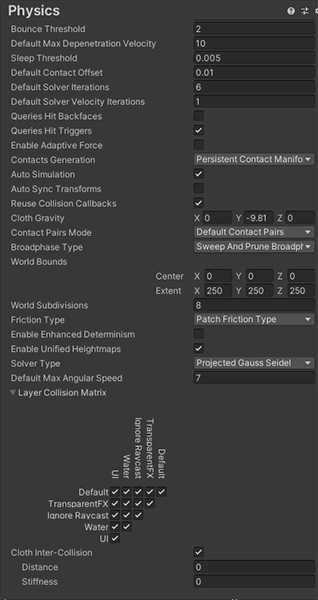


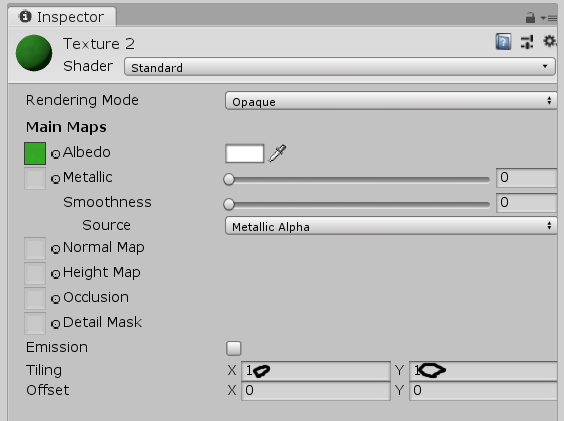 frosty flicker
bold ibex
frosty flicker
bold ibex
Didn't expect the table would require emulator now. So you will have to install this too https://github.com/CyanLaser/CyanEmu
GitHub
CyanEmu is a VRChat client emulator in Unity. Includes a player controller with interact system. Works with SDK2 and SDK3. - GitHub - CyanLaser/CyanEmu: CyanEmu is a VRChat client emulator in Unity...
bold ibex

@frosty flicker
this is my very first world and i did not expect to run into these many problems
frosty flicker
bold ibex
this is my very first world and i did not expect to run into these many problems
My first world didn't even have these problem.
I'm suspecting that you have sdk installed twice.
bold ibex
frosty flicker
My first world didn't even have these problem.
I'm suspecting that you have sdk ...
may i get in a call with you so i can share my screen and we can go more in depth with this
frosty flicker
Sorry I don't accept a call. Let's continue here
bold ibex
ok im guessing remove all the sdks
frosty flicker
All the sdk you said?
bold ibex
sorry meaning the vrchat sdk worlds
frosty flicker
The proper steps are:
- Import world SDK, only the world
- Import udonsharp
- Import other packages.
If you followed this, there should be no problem.
kind leaf
I'm sorry, I don't mean to interrupt but you will save a lot of headache by following the guides provided by VRChat that so many people ignore.
https://docs.vrchat.com/docs/setting-up-the-sdk
https://docs.vrchat.com/docs/creating-your-first-world
follow these exactly and yo end up with a clean install ready for upload
VRChat
Requirements We're going to need a couple things before we can get started. Current Version of Unity. We strongly recommend using Unity Hub, available on that page.VRChat SDK - See the Choosing your SDK page to see how to choose the correct SDK for your use. Step 0 - Installing Unity Check the Cur...
VRChat
Before getting started, ensure you have a Unity project with the SDK set up. If you want a great intro to creating your first world with pre-created assets, a tutorial video, and detailed steps, check out the VRChat Home Kit! Step 1 - Setting up a scene The first thing you need is a scene. This can ...
bold ibex
frosty flicker
The proper steps are:
1. Import world SDK, only the world
2. Import udonsharp
3....
ok i made a new project and imported everything in order but now i have a new problem
 frosty flicker
bold ibex
ok i made a new project and imported everything in order but now i have a new pr...
frosty flicker
bold ibex
ok i made a new project and imported everything in order but now i have a new pr...
You have made prefabs in your previous project. You need to copy them along with your scene file
dusk sapphire
Did your project start off in sdk2? iwasync v2.1 is for sdk2 and cannot be used for sdk3. I'm guessing your missing prefab for vrcmirror is because it was the prefab from sdk2 as well.
you'll want to grab the updated player for sdk3 https://booth.pm/ja/items/2666275
 near spade
Hi everyone. I'm new in VRChat, so I'm sorry if the question have already asked before.
I have to create a new world in which some videos will be played. So I got a template with the SDK3 (2021.07.13.13.39).
I tried the sample scene. When I simulate the game within unity (play button), I managed to see the video in the UdonSyncPlayer (Unity) sample. However, when I test using Build & Test, I can't see any video. Just a blank screen.
I also tried with a video of mine or with a classical Unity Video Player component, but I've always the same result.
Did I miss something in VRChat settings ? Is it normal ? Do you have any hint that could help me ?
bold ibex
hey im having a problem with the quest version of my would it is making it to wear quest players can only see clearly out of the left screen and the right screen is all black how do you fix this
@frosty flicker
frosty flicker
bold ibex
hey im having a problem with the quest version of my would it is making it to we...
What shader you have in quest world?
frosty flicker
I haven't use lightmapped one yet. I have only use StandardLite for quest so far
bold ibex
frosty flicker
I haven't use lightmapped one yet. I have only use StandardLite for quest so far
i changed the shader to that one and im still having the same problem
frosty flicker
bold ibex
i changed the shader to that one and im still having the same problem
Is it fine in PCVR?
bold ibex
frosty flicker
Is it fine in PCVR?
yes
frosty flicker
bold ibex
yes
I will need to see the world myself then
frosty flicker
bold ibex
ok the would name is Alyssa's Chill World in Community Labs
To my surprise, the world can be seen through HQ mirror with both eye
 crystal copper
Anyone else experiencing unity crashes when trying to upload a world?
bold ibex
crystal copper
Anyone else experiencing unity crashes when trying to upload a world?
no im not
frosty flicker
bold ibex
ok the would name is Alyssa's Chill World in Community Labs
Just to make sure. Check if MainCamera has target eye set to Both
 bold ibex
were would i find the main camera @frosty flicker
nvm
its set to both

im uploading it again @frosty flicker
frosty flicker
And set Reference Camera too
 frosty flicker
bold ibex
<@!805875523602481172>its uploaded
frosty flicker
bold ibex
<@!805875523602481172>its uploaded
Are you able to test it yourself using quest?
bold ibex
my boyfriend just checked the would for me and its not fixed still the same problem@frosty flicker
inner portal
Anyone knows how I cna make a dance floor that would react to music?
frosty flicker
bold ibex
my boyfriend just checked the would for me and its not fixed still the same prob...
One more thing I need to test, add a cube with just standard shader(not lite version) in your scene. See if you can see the cube with both eye. The builder will warn about the shader but you can ignore it for now.
bold ibex
ok
@frosty flicker my boyfriend can see the cube through the left eye but not the right still
frosty flicker
bold ibex
<@!805875523602481172> my boyfriend can see the cube through the left eye but no...
Does your world has skybox?
bold ibex
ok do i need to change the skybox shader
frosty flicker
Maybe. What is the current shader for skybox?