#ue4-general
1 messages · Page 1101 of 1
 rotund scroll
 tender ember
yeah I'm terrible at math so using visual things that Blender provides helps me a lot
rotund scroll
I didn't actually look him up but might have seen him on my LI feed
for some reason or other
tender ember
On it thank you💛
oh also one more question
so there's no such thing as UV editor and UV unwrapping in UE afaik right?
 icy mulch
Cause I honestly don't know how to fix it it works fine but I keep getting those errors

Yeah but when ever I exit the game I get that
Im using a wav for the sound wheb the ai chases you I have a sequence thats connected to the event begin play for patrol
Okay I fixed the ai one but now when I go grab the object it reads this cause I have a sound effect to it
 tender ember
oh ok well I saw what UE is capable of so I'm sure I'll do without a UV editor just fine:)
icy mulch


Have the default value set to 4 on set amo
Apparently I fixed it but now It won't stay in once place it keeps flying off
Oh well okay thanks but I do have one question how to add particles over the entire map cause I got a snow effect but I can't get over the whole map
 lament tinsel
okay so actually i wanna add a car in my environment which i made and also wanna add speedometer and trying to connect with the car like how much speed and all so can someone tell me like how
 gloomy reef
Hello! Apologies if this is in the wrong channel. I've run into an issue with landscape material layers, hitting a maximum of 6 before it stops compiling and I get the grid. I've set all the texture samplers to shared which seems to be the only solution I can find but doesn't change anything for me. Is there something else I'm missing to increase the increase the amount of material layers on a landscape?
lament tinsel
lament tinsel
okay so actually i wanna add a car in my environment which i made and also wanna...
can someone help me out a bit?
 torn summit
Hey all have someone get the same issue :Transfer my project to my new Pc with better components rtx 3060 i7 , my Camera in runtime gets flikkering at the part where Actor Face to Actor in BP and if i disconnect i havent this issue anymore, 4.27.1 version .
 sturdy vessel
Anyone know why my 4.27 project doesn't show in the launcher now. It seems to have to do with this string in the project: { "Name": "RTSEditorModule", "Type": "UncookedOnly", "LoadingPhase": "PostEngineInit", I have an editor module. When I remove this string from the .project file, it seems to show up in the Launcher and I can add plugins to it. When I put this string back into the project file, it stops showing up in the launcher and I cannot add plugins to it.
gloomy reef
Nvm, I think I've isolated the cause... a custom MF, just need to work through it. Always works like that after I ask a question 😂
 tiny valley
I see alot of cool free web templates online which look cool for a browser style ui. Can ue4 read these outside of just importing the textures
 kindred depot
anyone know how to fix this with groom? i imported a hair, and this keeps happening 😦 i will add a cap thats fine but the hair keeps like going into the head...
 tiny valley
Im try to create an ios like this https://galaxyempire.fandom.com/wiki/Galaxy_Empire_Wiki

Galaxy Empire Wiki | Fandom
I simply need the equations and math for this game type, if anyone has any resources it would be greatly appreciated
sturdy vessel
After a bunch of testing, it is this: "Type": "UncookedOnly", If I change it to "Runtime" it works
full project portion: "Modules": [ { "Name": "RTS", "Type": "Runtime", "LoadingPhase": "Default", "AdditionalDependencies": [ "Engine", "RTSPlugin", "CoreUObject", "GameplayAbilities", "AIModule", "NavigationSystem", "UMG", "ReplicationGraph", "Niagara" ] }, { "Name": "RTSEditorModule", "Type": "UncookedOnly", "LoadingPhase": "Default", "AdditionalDependencies": [ "Engine", "RTSPlugin", "CoreUObject", "GameplayAbilities", "AIModule", "NavigationSystem", "UMG", "ReplicationGraph", "Niagara" ] } ],
Yeah odd. I am on UE4.27...
I will just try that..
Yeah that works
 half sorrel
not yet
half sorrel
ill post it on the sharing category, thanks
 primal sun
Can anyone tell me what node that is

confused on how to get both those nodes
how do i get it where the cube can flow into it

this is the guys graph

oh thats right, i can just copy and paste 🤣

but now my alphas are red...
 modest trench
That timeline_1 needs two float tracks I guess
Edit it to have the tracks you want
primal sun
How would one do that?
 trail pendant
Hmmmm. How would I model something like this?

 dire cairn
which graphical tablet would you recommend me to begin with? something around 100 euro
primal sun
where do i go from here to add alpha and alpha 1?

Ok, i figured out the alpha and jump alpha issue, but now im getting these two issues


 plush yew
I made this for unity, it tracks the rgb values of your web browser to color a spot light, is something like this possible in unreal engine?
Could raytracing achieve this without my plugin?


 drowsy snow
plush yew
I made this for unity, it tracks the rgb values of your web browser to color a s...
drowsy snow
plush yew
I made this for unity, it tracks the rgb values of your web browser to color a s...
Have you tried using Rect Light?
 dawn gull
What filter is this that separates the colors and shifts them towards the edge of the screen?
 drowsy snow
dawn gull
What filter is this that separates the colors and shifts them towards the edge o...
drowsy snow
dawn gull
What filter is this that separates the colors and shifts them towards the edge o...
Chromatic Aberration.
(anime used it a lot as well)
dawn gull
drowsy snow
Chromatic Aberration.
Thank you so much, I forgot what it was called
trail pendant
Do you story board your creations initially?
 oak shale
hey guys whats the best resource to look for for this specific idea/mechanic. I want a building system based on grid where it can stretch, for example the game starship evo has a building system like this but where do I need to look exactly for information around this?
drowsy snow
trail pendant
Do you story board your creations initially?
To be honest, not really much when it comes to story boarding. I just write the script like writing a film script, then kind of visualise it on the spot.
drowsy snow
oak shale
hey guys whats the best resource to look for for this specific idea/mechanic. I ...
That's going to be difficult, but I wager you could start with looking on procedural meshes.
Though I'd say there's not much information on exactly that (also chances are your search result got polluted by Fortnite's building mechanics recreation)
oak shale
ok thankyou I'll have a look
trail pendant
Hmm. Mine is more quick sketches just enough for me to design levels/cutscenes/etc. My idea is creating a "hearing journey " of sorts
kindred depot
sooo how long was it?
 hollow palm
So
drowsy snow
Though I should adopt manga like storyboard just to nail one scene
hollow palm
I'm adding viewmodels
how would I prevent them from being culled
at all times

they're close to camera
you can see the gap
trail pendant
Main character is discovered to be deaf at birth... goes through a hearing aid phase.... finally ends up with cochlear implants
That's my story that I was thinking about
modest trench
hollow palm
I'm adding viewmodels
try changing your project's near clipping plane distance

 primal sun
anyone got any ideas on how i can fix these errors?
 kindred depot
is the best
kindred depot
also
your clipping out of your capsule 😉
you have to be in your capsule for it not to clip
drowsy snow
hollow palm
You should try shift the arm down a bit.
kindred depot
and your view model might be to far out of your camera.
hollow palm
kindred depot
you have to be in your capsule for it not to clip
I'll use something like what INS does
where the viewmodel goes back dynamically
near a wall
or just use a shader
kindred depot
ahh
 sour tide
So many parts. There's the pawn, the blueprint, the blackboard, and the tree. I feel like at least one of those could be combined with another
 cunning hazel
kindred depot
sooo how long was it?
cunning hazel
kindred depot
sooo how long was it?
1.5h
kindred depot
cunning hazel
1.5h
not to bad!!!! my ryzen 9 3950 would of been like 2-3 hours lol
cunning hazel
It took around 16h on my old 6700k
 fossil basalt
I am trying to move items into another folder and keep getting this message for a blueprint component ... is there anything I can do to move it over?
 rotund scroll
sour tide
So many *parts*. There's the pawn, the blueprint, the blackboard, and the tree. ...
rotund scroll
sour tide
So many *parts*. There's the pawn, the blueprint, the blackboard, and the tree. ...
the power comes a decentralized approach
cunning hazel
fossil basalt
I am trying to move items into another folder and keep getting this message for ...
You probably already have a .uasset copy of it in the actual Folder (check with File Explorer)
fossil basalt
hmmm
cunning hazel
If that's the case, move it to some other folder, try again then if everything is successful, delete it.
It usually happens if the engine crashed during a copy/paste operation that leaves the file permissions set to something that UE4 can't overwrite.
cunning hazel
kindred depot
i love how advanced tech has gotten 🙂
The 3950x is a beast as well.
10-15% slower than the 5950x, which is nothing.
cunning hazel
In a few months, the 5950x will be 15% slower than whatever Zen 3d brings :)).
fossil basalt
when I bought my 3900x is was half the price of the 5900
kindred depot
2 hours making hair in maya >_< lets see how it looks in ue!
cunning hazel
fossil basalt
when I bought my 3900x is was half the price of the 5900
Quite the steal then!
kindred depot
fossil basalt
when I bought my 3900x is was half the price of the 5900
i got my 3950 for like 450 on sale before the up-pricing of everything xD
fossil basalt
omg, trying to move content around and REALLY messed things up for me ... I have multiple files in multiple wrong locations!
kindred depot
This is why you do a advanced copy, then close the editor. Delete the folder manually. make back ups of projects or source control
drowsy snow
hollow palm
or just use a shader
There is a handy Camera Offset function for World Position offset. What it does is pushing the vertices towards the camera, but given how close your viewmodel arm is, I kinda doubt it served its purpose.
You can also rectify perspective warping with panini projection. There's some discussion about it in the forums.

Unreal Engine Forums
Update: I figured out how to do it! I will soon post here how to do it for those who might be interested… Original post: I have read that UT uses this to render FP weapon model with different fov than the world fov and I want to achieve this as well for my project. I googled about this and did not really find how to exactly do it. I know t...
hollow palm
I won't be really using the Panini Projection
 broken socket
any idea whats heppening, idk what is going on
i did some retargeting yesterday and i have been having this bug ever since. idk if its an issue with the set master pose component?. the 2 models shown here have the exact same skeleton that i merged together and its been weird ever since.
 celest hull
Should it be possible to compile a Shipping build at any time, or is a unique identifier or similar required from Epic first?
hollow palm
I'll instead just allow for manual viewmodel offsets
with commands
instead of a viewmodel_fov
hollow palm
drowsy snow
There is a handy Camera Offset function for World Position offset. What it does ...
viewmodels being in your face is normal
and trendy
fossil basalt
why on earth would these assets have like half the file size several hours later? If I have changed them, it's only to add collision boxes to them which would surely increase file size rather than lower it?
 drowsy snow
broken socket
any idea whats heppening, idk what is going on
i did some retargeting yesterday ...
drowsy snow
broken socket
any idea whats heppening, idk what is going on
i did some retargeting yesterday ...
Remux it to MP4 first. I'm hesitant to download MKV files just to delete it afterwards.
kindred depot
this has been like this for like 10 minutes. Any ideas on how long a hair import will be? its only 288,000 kb
 drowsy snow
kindred depot
this has been like this for like 10 minutes. Any ideas on how long a hair import...
drowsy snow
kindred depot
this has been like this for like 10 minutes. Any ideas on how long a hair import...
I won't expect Groom to be fast. Though I forgot how long it took last time I tested it importing hair from Blender.
fossil basalt
how can these file sizes be such a difference?
 kindred depot
drowsy snow
I won't expect Groom to be fast. Though I forgot how long it took last time I te...
kindred depot
drowsy snow
I won't expect Groom to be fast. Though I forgot how long it took last time I te...
dang, i guess ill go buy dinner then
broken socket
drowsy snow
Remux it to MP4 first. I'm hesitant to download MKV files just to delete it afte...
ok
 bright sigil
fossil basalt
how can these file sizes be such a difference?
bright sigil
fossil basalt
how can these file sizes be such a difference?
those 1kb files look like left over redirectors
drowsy snow
broken socket
Either:
- Try disabling the animation BP on the shoulder piece; or
- Use a new anim BP containing just Copy Pose From Mesh in its anim graph. Of course you'd also have to parent the cloth pieces to the head (or body) mesh.
fossil basalt
bright sigil
those 1kb files look like left over redirectors
yeah, I had moved stuff around a little
bright sigil
for big moves, it gets kinda nasty, Unreal doesn't always take redirectors along with it - partly why migrate exists, and also the fix up redirectors option
asset redirectors can be left in the original place, but not show in editor, they will show in file explorer as volod mentioned
broken socket
drowsy snow
Either:
- Try disabling the animation BP on the shoulder piece; or
- Use a new a...
ive tried both and they dont work. the skeletal mesh is already child to body mesh. i think its a glitch in the retargeting as thats what started the issue
i cant figure out why it wouldnt work
kindred depot
i disabled multithreading for valorant, should i turn it back on for unreal workflow?
broken socket
i can see that the bug happens when i set the master pose component
kindred depot
broken socket
ok
is your mesh colliding with your physical body asset?
that what it looks like
try disabling collisions on the sholderpads and see if that works
 marble mist
Do you know of any page where I can download weapons that already have the firing and reloading animation?
kindred depot
marble mist
Do you know of any page where I can download weapons that already have the firin...
only paid, no freebees.
drowsy snow
marble mist
Do you know of any page where I can download weapons that already have the firin...
Sketchfab.
But if you're looking one FOR FREE, I'm afraid there's not much there.
broken socket
kindred depot
try disabling collisions on the sholderpads and see if that works
colision is disabled
kindred depot
marble mist
Do you know of any page where I can download weapons that already have the firin...
best you will get for free.
marble mist
ok thx
kindred depot
marble mist
ok thx
you can animate anything you want in unreal engine as well. If the gun asset comes with for example a trigger, you can create an animation sequence, with the trigger pulled back, hit the key button, put the animation to the next frame and put the trigger back to default. and key frame that. This is a easy method on creating animations for anything. Same thing with arms, you can move the arms around the gun anyway you want with a keyframe.
marble mist
ok thanks, i'm learning how to create a video game and i'm a little new to this
kindred depot
we all have been there 🙂
drowsy snow
Though I do have some animating proficiency, so it's easier for me to just create my own reloading animations as opposed to downloading one.
marble mist
I will look at a tutorial to at least know how to make a basic animation
drowsy snow
I guess it's one of the side effect of watching too many reload animation videos on YouTube...
marble mist
xd
drowsy snow
You could start by watching those made by Ranon "hyper" Sarono, he's one of the more popular reload animators (also worked on Modern Warfare '19), and then go down the rabbit hole with the likes of Sully, MrBrightSide (worked on Insurgency Sandstorm), etc.
marble mist
What Spanish time will epic put the new free things of the month?
drowsy snow
marble mist
What Spanish time will epic put the new free things of the month?
Basically every first Tuesday of the month.
kindred depot
drowsy snow
I guess it's one of the side effect of watching too many reload animation videos...
Do you know how to fix the feet when doing random idles in a random sequencer? Like the feet teleport from one spot to another like he just glides on the ground
marble mist
Okay, I will see it
trail pendant
Hmmm. No models or assets that relate to cochlear implants and sound processors. I guess I'll be the first to model them lol
drowsy snow
Given that we had Tuesday yesterday, I'd estimate it 7 days from now.
marble mist
drowsy snow
Basically every first Tuesday of the month.
a ok
drowsy snow
kindred depot
Do you know how to fix the feet when doing random idles in a random sequencer? L...
Foot locking? I'm fixing it with a simple IK setup.
kindred depot
drowsy snow
Foot locking? I'm fixing it with a simple IK setup.
Ahh so just like glue the feet to the ground with idles and blend upperbody.
 orchid hinge
Hello is there anyone here who works on freelancer website ?
drowsy snow
orchid hinge
Hello is there anyone here who works on freelancer website ?
Most likely none.
primal sun
Anyone have any experience with making traps? im just trying to make a simple spike trap. This doesnt seem to work for me
 kindred depot
primal sun
Anyone have any experience with making traps? im just trying to make a simple sp...
kindred depot
primal sun
Anyone have any experience with making traps? im just trying to make a simple sp...
I mean
this is only 3 bucks to find a solution

Unreal Engine
Death traps animated by curves. The package contains more than 10 ready-made traps.
drowsy snow
kindred depot
https://www.unrealengine.com/marketplace/en-US/product/death-traps-vol
poor Manny got impaled into the spike
kindred depot
drowsy snow
poor Manny got impaled into the spike
LOL reminded me of skyrim
hair turned out awful 😦

8m verts LOL and it looks like crap
primal sun
kindred depot
I mean
If i buy that would i be able to change the texture and mesh to a cone?
kindred depot
primal sun
If i buy that would i be able to change the texture and mesh to a cone?
I have no idea because i do not own the asset. but i mean the texture yeah, and i do not know how the spikes are rigged, so maybe?
 wary wave
primal sun
Anyone have any experience with making traps? im just trying to make a simple sp...
wary wave
primal sun
Anyone have any experience with making traps? im just trying to make a simple sp...
that looks like it should work, so long as the thing colliding is a 'cube' and the collision settings line up
(also #blueprint is the place to go)
primal sun
wary wave
that looks like it should work, so long as the thing colliding is a 'cube' and t...
i cant get it to work, not sure where im going wrong
 jovial stag
quick question. when i test my game, i always have to click into the window to gain control of the character. Is there a way around this? Thanks


 fierce tulip
they are planes, so they end up once-sided. apply a material with "2 sided" enabled.
 fierce tulip
i cant read that, but I assume yes
though underneath it there is a small checkbox for enable two-sided as well
fierce tulip
 lethal light
this?
lethal light
this?
this is just a special shading model for two-sided foliage, like grass, leaves, etc
it'll require you to enable 2-sided as well.
lethal light
ah, truthfully I forgot to put the UE in English, it has a box written on two sides, right?
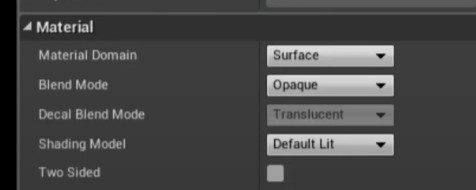 lethal light
worked, thank you : D
fierce tulip
np :)
 pulsar bison
Hey everyone, I'm trying to make a True FPS but multiplayer capable. The way I'm doing it is using a Third Person Controller, then attaching the camera to the head bone. However, when I hide the head mesh, it hides it for everyone. Can anyone point me in the right direction to make this work?
 neon bough
set the mesh to only owner no see
https://docs.unrealengine.com/4.26/en-US/BlueprintAPI/Rendering/SetOwnerNoSee/ also should display as checkbox in the mesh component details
 spring pelican
Im making a model with a skeletal mesh, should I create the bones in unreal or blender?
 bleak zodiac
yu means you want to rig a model? if yes in blender use armature
 fair hornet
So I am following this video https://youtu.be/QBGGeAPWgug?t=502
Its about creating a character model in blender for UR4
I was able to make the mesh then I built the armiture (bones) then paired them to the root bone (torso) But
The Head/leggs/arms work fine and they follow the root bone but the torso part of the mesh does not follow the rootbone
This is what it looks like https://gyazo.com/e5ceda76ed7fb483ada72637cb4cb88e
Anyone know why this is?
In this video you will learn how to make a full fledged character in Blender from start to finish.
This includes creating the mesh, rigging the mesh by adding an armature, creating a walking and an idle animation, and in the end I'll show you the correct export settings so you can import and use your character in Unreal Engine 4.
#Blender #cha...
 kindred depot
holy crap i did it! 🙂 finally my meta human, can add weighted clothing from daz and bring it back to unreal.
 plush yew
kindred depot
holy crap i did it! 🙂 finally my meta human, can add weighted clothing from daz...
plush yew
kindred depot
holy crap i did it! 🙂 finally my meta human, can add weighted clothing from daz...

step by step and your game will truly come to life before your very eyes~
i'm astonishingly proud of you darling
kindred depot
I know 😄 feels good
plush yew
most indubitably~
kindred depot
I spent 4 hours in blender importing from daz... and then thought to myself, wait daz add's the clothing as weights, why not try and get the meta model into daz, add the clothing, export to blender add the skeleton and import back to unreal?
plush yew
yush yush also daz has a weight transfer utility as well that may be useful to you ^^;
its under object and edit iirc
kindred depot
not for meta humans, to the basic ue4 skel which breaks metas 😦
kindred depot
its all good tho, this method will save countless amount of hours.
kindred depot
extremally excited for this plugin! Cant wait 🙂

Demonstrating new features of the 3D Draper UE cloth simulation plugin: attaching UE components, material grip, and a new fabric editor - the tutorial is coming in a couple of days.
Special thanks to @Feeding_Wolves for capturing the mocap with @Xsens & @MANUS
drowsy snow
kindred depot
extremally excited for this plugin! Cant wait 🙂
Am I missing something, or is this just the built in cloth sim?
kindred depot
drowsy snow
Am I missing something, or is this just the built in cloth sim?
with out the bugs
drowsy snow
I was certain built in cloth sim is pretty much bug free, but eh what do I know.
I'm mainly dealing with NPR where clothes are simulated with bones.
primal sun
does anyone know how to change the shape of a hit box?
kindred depot
you do that with the physical asset
drowsy snow
primal sun
does anyone know how to change the shape of a hit box?
You mean changing the box collision area?
primal sun
drowsy snow
You mean changing the box collision area?
ya, like i have spikes and want the collision to be in a cone shape
drowsy snow
primal sun
ya, like i have spikes and want the collision to be in a cone shape
No, there's (somehow) only 2 collision primitives in UE4, box and capsule.
There is tapered capsule, but it's just for cloth sim and not for gameplay.
Also sphere, but practically it's just height-less capsule
 unreal comet
Anyone ever try to export their character out of Unreal as an .fbx and when you open the character in Maya or Blender, it's missing parts of the mesh? I'm missing all the clothes for my character.
drowsy snow
unreal comet
Anyone ever try to export their character out of Unreal as an .fbx and when you ...
Is it a modular character?
primal sun
drowsy snow
No, there's (somehow) only 2 collision primitives in UE4, box and capsule.
There...
so basically im stuck with a hit collision box?
unreal comet
No it's just one mesh. It only exports the head, hands, and feet. No torso or hair.
kindred depot
primal sun
so basically im stuck with a hit collision box?
Create the physical asset of the cone, add the physical asset to the collision in the editor presets, add the collision to the linetrace. character then gets damage.
drowsy snow
primal sun
so basically im stuck with a hit collision box?
Typically you could just get away with a simple box collision (it doesn't even have to actually collide, just overlap)
 placid plover
Any ideas how can i stop this push back behaviour when the character hits another pawn? It seems to be pawn to pawn related because with world static i don't get pushbacks. Simulate Physics is disabled for all characters, and physics interactions are disabled on every character movement component

 hot maple
When working with csv's for data tables, curve tables, etc. is it common practice to store the actual .csv somewhere in your project folder?
or to just delete it and export it from unreal if needed for editting?
bright sigil
hot maple
When working with csv's for data tables, curve tables, etc. is it common practic...
I work in Excel as multiple sheets have data that are easier to reference in one place, I can also keep comments and formatting in Excel. I have a macro that exports each sheet as a csv and I keep those in a folder. They are imported into Unreal and anytime I save over those csv sheets, I use the reimport button to update the sheet in Unreal
hot maple
The folder you are exporting to them, is that inside the project folder?
bright sigil
no
I iterate on project folders, I back them up regularly so I'd rather keep those sheets separate
bright sigil
sure thing, I treat the csv sheets as export objects just like fbx and texture files - in terms of folder management
 charred halo
Hi All, I am trying to get GPU lightmass to work, and have flipped all the buttons required according to the docs, running 4.27.1, rtx 2080super....is there another magic button I need to hit to finally get the button to render enabled? Something in post process?
 thin tendon
Ue4 foliage tool, the fill option does not seem to work with landscapes. Is there a way to enable this option?
pulsar bison
neon bough
<https://docs.unrealengine.com/4.26/en-US/BlueprintAPI/Rendering/SetOwnerNoSee/>...
Sorry for the late reply, but thanks!
 night oar
Hi, guys have a question that when I am packaging my ue4 Game (Size 74Gb) it takes a day and ends up freezing my pc and at the ends fails and the condition the pc is in I cant even open the task manager.
And secondly can any one tell me good optimization techniques to decrease the size
bright sigil
night oar
Hi, guys have a question that when I am packaging my ue4 Game (Size 74Gb) it tak...
fossil basalt
hey guys, I saw red text that suggested I should build
now I have done that everything is white and I cannot see unless I look directly upwards?
even in the editor it's messed up
blinding even
 bright sigil
you don't technically need to have internet to use the engine, so why not?
 hazy berry
You never know, better ask
fossil basalt
Conrad knows best
 stark cedar
ASAP !
Guys how to export png in ue4 through Blueprint code , so its can be opened normally on the desktop ?
 woeful plank
Hallo
i need to help with unreal ungine 5 when i loading textures or models to engine want from mee datatable options
do anyone know how to do/fix it ? Please 🙂

 steady bramble
Hello, I have a question for you.
Does anyone have experience with an external device like a joystick. I would like to buy some joystick for flying games.
Does Unreal have a list of supported devices or can you recommend me some?
drowsy snow
steady bramble
Hello, I have a question for you.
Does anyone have experience with an external d...
Unreal is not designed to just one specific gamepad, you can try use other built in input plugins like Raw Input to get stuff like HOTAS working.
steady bramble
drowsy snow
Unreal is not designed to just one specific gamepad, you can try use other built...
Thak you
drowsy snow
X+
stark cedar

Hey there!
What i am trying to do is , to save texture in the project to my Desktop as an normal image , that can be opened by any image application (photoshop , paint etc)
On the attached images its shown that the code is running with no issues , but actually images isnt gets saved anywhere . Any ideas why ? and how to fix it ?
 teal parcel
Hey All
Trying to design a background for and LED wall. Does not need to camera tracking date just a badass background. Anyone got any interior submarine templates?
 fringe urchin
hey guys, is it possible to output a result of stat commands (stat initview, memorystaticmesh etc.) into log or csv?
plush yew
what's causing those weird reflections from candles? it's only from distance, very close up they are fine


 regal mulch
Was there a keyboard shortcut to open the context menu on a BP graph? 🤔
Welp, I think it's tab
xD But that just checkf'd the editor
Okay yeah tab works
drowsy snow
plush yew
what's causing those weird reflections from candles? it's only from distance, ve...
Looks like SSR acting up.
plush yew
drowsy snow
Looks like SSR acting up.
fix for it? Could it be that the ceiling material affects it too somehow? It happened quite often before with a bit of shiny materials. I'm mostly just simply adding textures to walls and I feel like it's way too cheap lol and probably causing errors most of times.
drowsy snow
plush yew
fix for it? Could it be that the ceiling material affects it too somehow? It hap...
The way I see it is the ceiling might be too reflective
plush yew
I don't have post process added to scene, so it's not SSR.
drowsy snow
Assuming it's marble, it shouldn't be that reflective.
plush yew
yeah, marble
drowsy snow
plush yew
I don't have post process added to scene, so it's not SSR.
Doesn't matter if you have it enabled in Project Settings
plush yew
can I just make material a bit matte?
this lamp has that big ball, idk what is it and now I moved the ceiling high up but it gives this reflection
 drowsy snow
plush yew
this lamp has that big ball, idk what is it and now I moved the ceiling high up ...
drowsy snow
plush yew
this lamp has that big ball, idk what is it and now I moved the ceiling high up ...
That big ball seem to be DefaultRootComponent's billboard. Should not be visible in game view.
plush yew
alright

well, that material is meant for floor so I guess you get what you ask for lol
this looks fine, but those chair shadows go crazy
 lethal light
How do I import the texture from the blender?

 quiet sphinx
anyone knows how to fix that problem, after adding plugin from github? engine modules cannot be compiled at runtime. please build through your ide
 grave coyote
@lethal light , creat a folder just as you have before and drag texture there
lethal light
thx : D
grave coyote
Cool
drowsy snow
quiet sphinx
anyone knows how to fix that problem, after adding plugin from github? engine mo...
As the message said, build the project through your IDE. That is Visual Studio, Rider, what have you.
quiet sphinx
i opened visual studio, but i cant compile it
i literally looked through everything
and i just cant compile it
quiet sphinx
i mean
theres just no button to compile it
maybe im just blind
but i just cant find it
drowsy snow
Build toolbar menu -> Build <your project name>
quiet sphinx
thers just one thing in build, its run code analysis on solution
drowsy snow
In the Solution Explorer, select your project, right click, and choose Build.
quiet sphinx
drowsy snow
In the Solution Explorer, select your project, right click, and choose Build.
i did everything as you said, but i dont have the build button
drowsy snow
quiet sphinx
i did everything as you said, but i dont have the build button
Say what
Screenshot your VS.
(If you're in Windows 10, just press Windows+Shift+S to screenshot)
quiet sphinx
can i dm you?
drowsy snow
 drowsy snow
quiet sphinx
maybe thats because i transported bp project ?
drowsy snow
quiet sphinx
maybe thats because i transported bp project ?
Okay, so the thing with plugins from GitHub with C++ in it is that your project also have to be a C++ project, at least with a single dummy C++ class.
kindred depot
right click on it.
drowsy snow
quiet sphinx
how can i add c++ smth to a blueprint project?
In Unreal Editor: File -> New C++ class
 dusky inlet
Worth noting, it's not enough to create a cpp class inheriting from None in the cpp class creation wizard. It won't be a UObject, so the engine will also not consider the project a cpp project in some code snippets that could be relevant to what you are trying to do. So always do something like an actor, game mode etc. As a dummy class
wary wave
it's literally called 'Timer'
plush yew
I started my project with a blueprint character, but now I need to access the C++ for this character. What is the best approach to do this while still keeping all the work I did in blueprint for this character?
 dawn grove
wary wave
it's literally called 'Timer'
dawn grove
wary wave
it's literally called 'Timer'
It's not but I found it
plush yew
Thanks. Will give it a shot, hopefully will be as easy as it sounds.
 glad loom
My main character is a pawn class, how do I cast to it? Get player controller doesn't allow me to cast to it, get player character gives me an warning saying it doesn't work.
Nvm there's a get player pawn
 river salmon
Been scratching the surface with grooms lately, but have a general question of where documentation would be at in regards to object collision with said hair groom. I.e. If your character is wearing a hat can you make the hat push down the hair?
 vast pine
Anyone ever do a veh where all the wheels are the same but only one collides with the world? lol. and it seems to be a problem ONLY when using the veh class
maybe wheels are backwards hmm
 vast pine
well, gotta say. its nice when problems like this come around. forced me to learn how to see all these axis's and modify them in blender. and now it is working. - thanks for listening 😄
 hidden dew
Just curious, does UE 5 still force comment-area bubbles to display in Materials?
(or is there a way to stop that in UE4?)
fierce tulip
you can disable them on creation, though not many people bother with that.
apparently it was a discussed feature to hide them trough an option, but it seems that never got to fruition
hidden dew
Odd that they just never got the same option in Details as exactly the same thing has in Blueprint graphs
Not sure what you meant by disable on creation. Is that UE5 only? or something I've missed in UE4
fierce tulip
when you create a comment in the mat editor there is a small icon somewhere next to the text that can disable the bubbles.
hidden dew
You mean this?
 fierce tulip
it only works for the bubble you toggle it on though.
Dont know if its only for the user and if someone else sees the full bubble.
yea
hidden dew
Yeah.. that's for individual nodes' comments
But when you make a big comment box.. like this...
 fierce tulip
thats a lot of comments :p
fierce tulip
I agree. dont know if the option is in ue5, if not, might be worth suggesting once more. (on the forums)
hidden dew
aight
 trim geode
helloo people
I have finally decided to embark on 3D art and my first stop is unreal engine. If anyone would be willing to assist me with my nooby questions i'd be grateful
quiet sphinx
i added c++ object to my ue4 project, but i dont get the sln file. why is that happening? Created a new one and it worked perfectly
 grim ore
how did you add it?
quiet sphinx
Open up the New C++ Class Dialog by using File -> New C++ Class...
Choose a new "None" class and hit "Create Class."
oh, in the file it says that i dont have any c++ objects
but i added like 4 of them
grim ore
try using a parent class, not none
you can also try file -> generate/regenerate solution/project file
but that wont work if it doesnt find any valid C++ files
also did you put them in a folder or just the default? that can have issues with 4.26+ and the create class dialog
quiet sphinx
everything worked with previous one with none, ill try another type
grim ore
I have a none C++ and it created the SLN, but nothing will show up in UE4 as expected as none of your classes are children of UObject
 strong schooner
I wish Epic would acquire trello and have a plugin link within the editor to easily take note of stuff while editing.
quiet sphinx
LogVSAccessor: Warning: Couldn't access Visual Studio
Candidate modules for hot reload:
MyProject3
Launching UnrealBuildTool... [C:/Program Files/Epic Games/UE_4.26/Engine/Binaries/DotNET/UnrealBuildTool.exe -ModuleWithSuffix=MyProject3,9266 MyProject3Editor Win64 Development -Project="C:/Users/denis/Documents/Zoom/MyProject3/MyProject3.uproject" -FailIfGeneratedCodeChanges "C:/Users/denis/Documents/Zoom/MyProject3/MyProject3.uproject" -IgnoreJunk]
Using 'git status' to determine working set for adaptive non-unity build (C:\Users\denis\Documents\Zoom\MyProject3).
Creating makefile for MyProject3Editor (no existing makefile)
Parsing headers for MyProject3Editor
Running UnrealHeaderTool "C:\Users\denis\Documents\Zoom\MyProject3\MyProject3.uproject" "C:\Users\denis\Documents\Zoom\MyProject3\Intermediate\Build\Win64\MyProject3Editor\Development\MyProject3Editor.uhtmanifest" -LogCmds="loginit warning, logexit warning, logdatabase error" -Unattended -WarningsAsErrors -abslog="C:\Users\denis\AppData\Local\UnrealBuildTo
ol\Log_UHT.txt" -installed -FailIfGeneratedCodeChanges
ERROR: 'C:/Users/denis/Documents/Zoom/MyProject3/Intermediate/Build/Win64/UE4Editor/Inc/MyProject3/MyPawn.generated.h': Changes to generated code are not allowed - conflicts written to 'C:/Users/denis/Documents/Zoom/MyProject3/Intermediate/Build/Win64/UE4Editor/Inc/MyProject3/MyPawn.generated.h.conflict'
CompilerResultsLog: New page: Compilation - Dec 1, 2021, 8:11:29 PM
CompilerResultsLog: Using 'git status' to determine working set for adaptive non-unity build (C:\Users\denis\Documents\Zoom\MyProject3).
CompilerResultsLog: Creating makefile for MyProject3Editor (no existing makefile)
CompilerResultsLog: Parsing headers for MyProject3Editor
CompilerResultsLog: Running UnrealHeaderTool "C:\Users\denis\Documents\Zoom\MyProject3\MyProject3.uproject" "C:\Users\denis\Documents\Zoom\MyProject3\Intermediate\Build\Win64\MyProject3Editor\Development\MyProject3Editor.uhtmanifest" -LogCmds="loginit warning, logexit warning, logdatabase error" -Unattended -WarningsAsErrors -abslog="C:\Users\denis\AppData
\Local\UnrealBuildTool\Log_UHT.txt" -installed -FailIfGeneratedCodeChanges
CompilerResultsLog: ERROR: 'C:/Users/denis/Documents/Zoom/MyProject3/Intermediate/Build/Win64/UE4Editor/Inc/MyProject3/MyPawn.generated.h': Changes to generated code are not allowed - conflicts written to 'C:/Users/denis/Documents/Zoom/MyProject3/Intermediate/Build/Win64/UE4Editor/Inc/MyProject3/MyPawn.generated.h.conflict'
Lo
i got this error
grim ore
close down the project, right click the .uproject in the projects folder, and generate the project files from there and see what happens
quiet sphinx
this project does not have any source code. you need to add c++ source files to the porject from the editor before you can generate project files.
grim ore
maybe try starting over with it. delete the intermediate, binaries, and source folders (assuming you have no C++ files you care about). then open the project again and try adding a new C++ class
quiet sphinx
grim ore
maybe try starting over with it. delete the intermediate, binaries, and source f...
ill try that in a second
grim ore
if not someone here has a similar issue https://stackoverflow.com/questions/44608957/ue4-error-adding-c-class-classname-generated-h-changes-to-generated-code but that inside the .sln file which you said you dont have
 fathom bone
Can anyone help me? I want to move 15 actors at once to make an animation from it. I want to move the transform center - left-center ( LOOP) ,but i don't want to move them one by one.
I tried to do it with level sequence. I select them all ,but it's not setting the current position for all just for one of them.

 stable path
Swapping the level will unload everything except the GameInstance
You'll have to catch those references again
 storm yoke
hi guys, i havent used unreal for a few update, and today i did update to 4.27 but now i lost the connection between my bridge and unreal, i was trying to export metahuman into the 4.27 metahuman sample project, but it keeps failing, any thought?
 lethal root
is there a guide of how to retarget non human skeletons?
 zinc cipher
When is the player loaded? In the sequence of Main Menu to Loading a Level. At what point is the player class loaded? Does the level have to load first and then the player? If something is on Being Play in the player, can you assume the Level has loaded at that point?
grim ore
zinc cipher
cool. I"m loading some level vars from save and just making sure I can.
plush yew
which post process setting causes this?
grim ore
if its in the PP volume, you can click on the icon on the top right in the details panel and change it to modified properties only and then break it down from there
plush yew
thx
it's color grading
i didn't have post process volume sized properly lol, had it only in that one area
 hidden bloom
so guys in 4.27 I making an open world. I have my persistant and all my sub levels made and placed. however in the 0,0 I added my heightmap but it doesnt give me the option to add a heightmap to my other sub levels. when I click on the sublevel make it current, goto landscape it is like thers already a landscape actor there and give me sculpting options but none for creating a landscape ?


and I am assuming that orange box around my map is the 20km by 20km max area box?
fossil basalt
hey guys, this happened after I rebuilt lighting ... how can I fix please?
 grim ore
did you change anything before you rebuilt?
dawn grove
why tf can you not undo after saving map?
fossil basalt
grim ore
did you change anything before you rebuilt?
nope
vast pine
meh i hate you wheelvehicle
 sturdy trench
Is the only available 4.26 version Chaos one?
 grim ore
no, it should be at the top if its not installed
sturdy trench
Ah, yes. Thanks
I was asking for a friend so I confused when I did not see my own installed version
grim ore
yeppers
lethal light
Can anyone tell me if it is normal to take importing a blender tree to unreal? almost 2 hours or more to import


;-;
is there any way to speed this up?
drowsy snow
lethal light
Had a hunch that the tree isn't well optimised...
vast pine
Tree looks like it has enough geometry for an entire level.
lethal light
grim ore
check your task manager, see what it shows
its normal
 fossil basalt
lethal light
Can anyone tell me if it is normal to take importing a blender tree to unreal? a...
fossil basalt
lethal light
Can anyone tell me if it is normal to take importing a blender tree to unreal? a...
what are your system specs?
grim ore
yeah sounds like its trying to optimize it and its a heavy heavy model
so you need to optimize it in blender, what are the specs of the model in blender?
lethal light
Ryzen 5 2400g
24gb ddr 2800mhz
SSD120gb + HD 1tb
GTX 1660S
grim ore
oh yeah your going to be using a single core on that 2400g probably which isnt very powerful, your going to need to optimize a ton for that machine
fossil basalt

lethal light
;-;
vast pine
I'd take a guess blender is instancing the leaves but on output it is all separate leaves.
bright sigil
if its anything like maya paint effects...
drowsy snow
lethal light
is there how to make it optimized directly from mtree?
Don't use Mtree. If you have some knowledge on Geonodes, consider coming up with your own tree setup.
vast pine
I bet with a good trunk. some vert groups. and then put on some planes on the branches to extend up and off like hair's and optimize the sheets to be thinner branches with alpha textures on em.
lethal light
I don't have this knowledge yet, that's why I started using Mtree, before I used TreeIT
vast pine
I'm no fan of realism in games tho. so i default to those trees that have orbs of planes with the hollow inside 😉
lethal light
I will try it
vast pine
over realistic games are like... stealing the players ability to go hog wild with imagination 🙂
bright sigil
in the past, I had a plugin for max that would make trees, much to the expected density as any other tree maker - every leaf and such - and what i did was treat the leaf generation as branch cards. That way i could generate whatever trunk and then blast it with large poly planes that aligned with branches. I made/used branch textures on those cards
vast pine
Also take into consideration the project. how close can a character get up to a tree. are they going to be up in the branches to notice things etc. the solution should be optimized for its need. and then you can squeeze detail out of it. much like designing a theme park.
lethal light
I intend to create with zelda / genshin style graphics later, I started with realist because you don't need to change a lot in blueprint, just to practice at the beginning
drowsy snow
lethal light
I intend to create with zelda / genshin style graphics later, I started with rea...
Welp, I think it's not a good idea to start with realism, though in some parts you could derive from realistic stuff and "stylise" it down.
bright sigil
lethal light
drowsy snow
Welp, I think it's not a good idea to start with realism, though in some parts y...
is it easier to mess with the stylized than the realism?
i want to learn how to do is stylized somewhat realistic not too simple
I think it would be beautiful : D
like that
 fossil basalt
I am wanting to express a players way of driving on the road such as left in the UK and right in America ... is there a term for this?
or a short expression?
nice, thank you
 marsh canopy
Creating and setting up a new Global shader via a Plugin.
 marsh canopy
When I compile from visual studio it says "ShaderCore" module not found in build.cs
fossil basalt
ouchie
kindred depot
lethal light
like that
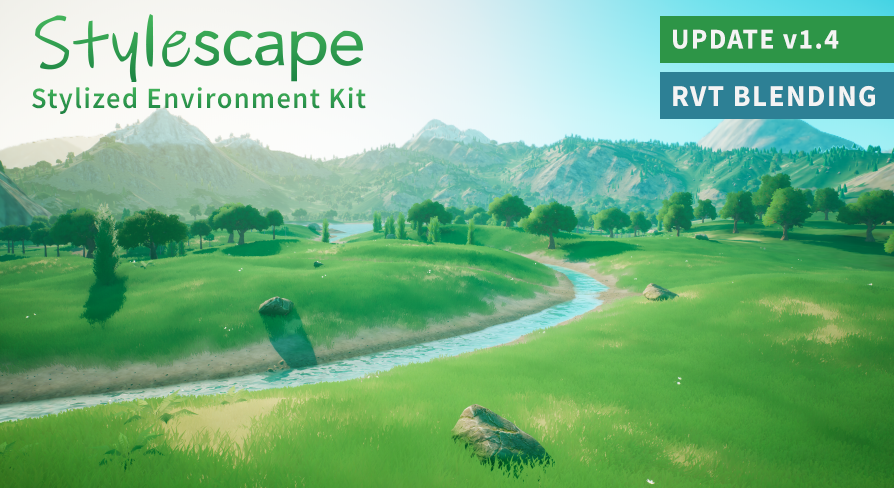
Unreal Engine
Stylized environment kit featuring a lightweight landscape auto material, customizable water actor blueprint, and a variety of optimized nature assets.
i have this and love it.
lethal light
OJO this type I want to do, with a little realism
kindred depot
its a great base to start your world with
kindred depot
EVERYTHING IS CHEAP RIGHT NOW! I spent over 500 dollars in 2 days.. keep me AWAY FROM HERE
I worked last week for free LOL
 marsh canopy
When I compile from visual studio it says "ShaderCore" module not found in build...
marsh canopy
marsh canopy
When I compile from visual studio it says "ShaderCore" module not found in build...
anyone know about this google search says it might have been removed but it is their in ue 4.26 docs
kindred depot
lethal light
in 2 weeks I spent 10 reais, about 2 dollars ;-;
One more mazrketplace post SORRY MODS
this was free last month or the previous
fossil basalt
I visited the market place and am now in a rabbit hole of goodies!!!
kindred depot
fossil basalt
I visited the market place and am now in a rabbit hole of goodies!!!
lol
fossil basalt
I spend ages in there sometimes, lol
lethal light
kindred depot
One more mazrketplace post SORRY MODS
OJO
fossil basalt
why would mods have an issue?
kindred depot
fossil basalt
why would mods have an issue?
they say keep it in #fab
fossil basalt
well, I am glad it was posted, lol
lethal light
.-. 8M
 fossil basalt
hmmm, I really like the idea of the cartoonish stylized packs
lethal light
e.e
kindred depot
So do i they look cute
fossil basalt
buuuuuuuuut
kindred depot
make you feel warm and fuzzy
kindred depot
In the end tho, you can add a post process shader, that does the same thing.
fossil basalt
nice
kindred depot
Ever wonder why valorant runs awful? and heavy CPU usage?
they have a post process per character
everything in that game is all post process.
lol
I may have looked at something i should of not seen 😉 with a key
fossil basalt
kindred depot
https://www.unrealengine.com/marketplace/en-US/product/stylescape-stylized-envir...
hmmmm, the more I look into this the more I wanna buy it
it's not too cartoony
pretty sure most assets could fit well in there
kindred depot
When in motion, your fps go from 200 to 100 depending on where you are looking. Many people on reddit said it is post process.
kindred depot
fossil basalt
hmmmm, the more I look into this the more I wanna buy it
Its a amazing purchase. The creator "nick" will guide you through anything you need help with it on his discord.
fossil basalt
I wonder if that stylized pack can texture rocks appropriately depending upon the biome they're in such as snow, sand, moss, etc
yeah, already watching the demo which spill into how to set it up
he is very good
 zinc shore
so yesterday UE ran perfectly fine but now its runs insanely slow and if i play my project its like im watching it in slow motion. why is UE doing this like no other application is doing this
 violet goblet
Strand based hair:
i have two chars (one subdiv and two subdiv)
i made xgen hair for the "two subdiv" character.
am i able to use the hair in unreal with my "one subdiv" character too??
kindred depot
violet goblet
Strand based hair:
i have two chars (one subdiv and two subdiv)
i made xgen hai...
why wouldn't you? lol just import as groom (.abc)
fossil basalt
ok, I climbed out of the rabbit hole ... back to coding I go! 😄
violet goblet
never have done that :) is that mesh independent then??
kindred depot
fossil basalt
ok, I climbed out of the rabbit hole ... back to coding I go! 😄
yoo me too man i was on page like 300
fossil basalt
lol
violet goblet
always thought you can only use the abc with corresponding mesh? 🙈
kindred depot
Unreal Engine 4.26 Groom Tutorial,Unreal Engine 4.26 Groom Tutorial,ue4 4.26 groom tutorial,ue4 4.26 groom,unreal engine,unreal engine 4.26,ue4 4.26 whats new,unreal engine 4.26 tutorial,unreal engine 4 beginner tutorial,unreal engine 4.26 hair,unreal engine 4.26 physics,4.26 groom,ue4 4.26 gpu lightmass,ue4 4.26 tutorial,unreal engine groom,unr...
works with anything 😛
attach hair to a weapon if you really wanted too
lol
violet goblet
how the heck is ue doing that that it knows where the scalpt is so it moves with mesh when animating?! thats unreal lol
mayas xgen is actually pretty awesome! alot good tutorial out there
kindred depot
fossil basalt
I hear it's very tedious
you buy hair from daz for like 4 dollars import into blender/maya/3ds max, by the tool to fix strands, expoert as abc import to ue. your done.
violet goblet
🤣 ah yes...why not
fossil basalt
yeah, those assets do save a lot of time
violet goblet
indeed
fossil basalt
one of my fav assets is an icon thing
kinda helps to make em all look similar
not explained well at all from me, lol
kindred depot
violet goblet
mayas xgen is actually pretty awesome! alot good tutorial out there
yeah i dabbled into this, it was a long 6 hours.. I know how to do this now tho 🙂 great knowledge for my future characters.
violet goblet
the best tutor for xgen as i find is a guy called jesus on youtube 👍
kindred depot
Oh groom binding, yeah thats just right clicking and binding to your character
fossil basalt
@kindred depot
 kindred depot
fossil basalt
<@!887916264188694578>
kindred depot
fossil basalt
<@!887916264188694578>
got it 😛 lol
fossil basalt
love ways to standardize things
lol, I got that for free, then bought almost all of his other assets
kindred depot
So I am reimporting my metahuman with clothing on... Back from the source with ue. I wonder if i take the sweatshirt, then retarget to the base ue skel. transfer it to blender. Open daz, ue daz script to retarget a clothing to ue4 bone structure, click import to blender, from here merge into the pose of the meta in blender, reimport to ue with ue4 skel retarget to meta.... hmmmm...
fossil basalt
lol, sounds complicated
kindred depot
making custom clothing is no fun man.
i rather buy it
and edit it with substance painter.
fossil basalt
yeah
I can relate
always better to buy than start from scratch
well, to buy a base that can be heavily modified
kindred depot
i mean i bought this tool for 30 but idk, its just a lot of work that i dont care to do.
fossil basalt
be sure to give it a review, lol
kindred depot
im pretty sure, if my game ever got big. some one out there is looking to create clothing for characters. Thats all some people know 😛
All you got to do is export the body and head, open blender select both, CTRL + J save as obj. bam full meta to play around with
violet goblet
just watched the vid, and was asking the same, where does he bind it to the mesh? :-D
kindred depot
yeah you can not reimport the morphs but for clothing the morphs do not matter. its really only the facial rig that is more important.

GitHub
Rename - Remove - Reparent Daz bones to use Unreal Engine manneguin animations - GitHub - GNVR-Dev/DazUERig: Rename - Remove - Reparent Daz bones to use Unreal Engine manneguin animations
renamer for bones 😛
violet goblet
you can make cloths in DAZ?
kindred depot
yeah thats why i said, it should not be hard to reimport the clothing with daz doing the method posted above. I already have my meta as a daz morph, but its buggy.
violet goblet
like really customized cloth? or just predefined stuff?
 kindred depot
violet goblet
like really customized cloth? or just predefined stuff?
kindred depot
violet goblet
like really customized cloth? or just predefined stuff?
daz will auto morph clothing on targets. You can add any custom clothing from blender, or any where and bind it to there skel.
kindred depot
 wooden apex
quick question
wooden apex
quick question
Documents\Unreal Projects
wooden apex
thanks
violet goblet
kindred depot
daz will auto morph clothing on targets. You can add any custom clothing from bl...
ah okay thanks alot
kindred depot
Yeah I just hope the meta human editor gets a upgrade to make this process easier.
zinc shore
LogInit: OS: GenericOSVersionLabel (GenericOSSubVersionLabel), CPU: Intel(R) Core(TM) i7-8750H CPU @ 2.20GHz, GPU: GenericGPUBrand i have a nvidia GPU but the log says this dose that mean its running integrated graphics
kindred depot
zinc shore
`LogInit: OS: GenericOSVersionLabel (GenericOSSubVersionLabel), CPU: Intel(R) Co...

There are not a few processors that come with an integrated graphics (iGPU) that will allow you to be able to use the PC with a monitor even if you do not have a dedicated graphics card; These iGPUs, however, provide the "fair performance" and have a fairly low power, so if you have a [...]
grim ore
check your gpu use to know for sure which one its using
zinc shore
well ok this is weird if i run any of UEs build tools they just crash after a couple seconds
this all seems to have happend after my stsem did a update
kindred depot
zinc shore
well ok this is weird if i run any of UEs build tools they just crash after a co...
make sure you have the proper utilities installed to run it.
zinc shore
like this all ran fine yesterday but now nothing works
i am using a version compiled from source on linux maybe i need to recompile it?
kindred depot
no idea, someone else might know
grim ore
you could check in #linux , see i anyone else has an issue. you shouldnt need to but another driver/system might have broken in the update
zinc shore
whats weird is than no other programs have a problem like if i load godot it runs intensive 3d scenes at 60 fps and says its using my Nvidia gpu
grim ore
restart your machine and try again, who knows
zinc shore
so i tried to package the project to see if packaged builds run fine and now i get this ERROR: Could not find definition for module 'FPS', (referenced via FPS.Target.cs)
 bold holly
yo can someone please help me with the crouching function?
The crouch animation plays but the actual capsule size doesn't.
How should I fix this? I made sure the character can crouch in the inherited character movement but it didnt work.
Anyone got any ideas please?
bright sigil
it's suppose to change based on capsule half height
bright sigil
this fps or tps?
bold holly
fps
bright sigil
what animation is playing then, a skeletal mesh?
bold holly
Just a camera animation
bright sigil
oh weird, so its moving the camera but not changing the capsule
bold holly
yeah exactly
bright sigil
are you overriding the Crouch function?
bold holly
I dont think so
bright sigil
so how do you notice the capsule not changing?
bold holly
I made a sort of tunnel that the player can walk through
then I coudnt fit in
I made it bigger and bigger
until It was taller than the un crouched height
and thats when it worked
bright sigil
is this the default settings for capsule half heights - crouch and uncrouch?
bold holly
My crouch height and crouched eye height is set to 15. The half height is 88
The half height is defaul
while the crouch height and eye height I changed
bright sigil
try a number that's bigger than your capsule radius
bright sigil
and this is all default logic otherwise? are you doing any kind of timelines or variable changes for specific reasons?
bright sigil
well, test without it
bold holly
alright one sec
yeah it worked
but doing this will require for me to change a great deal of blueprints
is there no way of fixing the timeline crouch?
bright sigil
thats a new question. what does the timeline look like


 bright sigil
alright, well zoomed out, obviously im not sure of the details. but i can see that for the timeline, there is a set rel location for the camera
that makes sense then, the camera animation plays but not the crouch
bold holly
ohhh i see
bright sigil
are you calling the crouch function at all?
bold holly
so how should I actually make the capsule change
I dont think so no
but it doesnt exist for my movement graph
Actually nevermind let me try to call it
bright sigil
well, you can add a lerp in addition to the set rel location, this lerp would set capsule half height
actually
if you set capsule half height instead of the camera lerp you have, that should handle the camera
bright sigil
hope it works!
bold holly
bright sigil
hope it works!
works perfectly, thanks
fossil basalt
is there a way to change the camera so that the player feels like they have shrunken down?
kindred depot
imagine not using enhanced inputs xD
Using the Enhanced Input Plugin to read and interpret user input
drowsy snow
fossil basalt
is there a way to change the camera so that the player feels like they have shru...
Just move down the camera.
fossil basalt
lol, didn't think it would be so simple 🙂
drowsy snow
You may also want to adjust the field of view a bit too.

 fossil basalt
lol
kindred depot
the only method i can think of and why have i not thought of this before....

make the daz character the same shape.....
then add clothing. then export... duh.
neon bough
yea, have fun with that...
guess thats not gonna work out with a reasonable amount of after work
what you can do is put everything in blender and try your best with shrinkwrap, but even that is a pita
kindred depot
lol
its been 2 days xD
ill make a method. I got the model in there, but clipping is still an issue
stable path
kindred depot
ill make a method. I got the model in there, but clipping is still an issue
The only method that worked for me was removing the skin under the clothes
No skin, no clipping 🙂
kindred depot
stable path
The only method that worked for me was removing the skin under the clothes
No sk...
I thought about that but i want cloth simulation lol i want realism when it comes to these things 😦 I cant have a static mesh cloth sleeve. Knowing i rigged it like that would drive me insane.
 idle mantle
hey there are a tv serie powered by UE4 but I forgot his name
it's not ZAFARI but the characters are like Fortnite - stylised characters
oh and the story is about video game competition if i'm not mistaken
thanks lol the animation work was great!...
neon bough
there's no real way to avoid clipping with meshs overlapping that close
you would need exactly the same geometry for the cloth + character with the same weightpainting
drowsy snow
idle mantle
hey there are a tv serie powered by UE4 but I forgot his name
Are you referring to that one episodic game about game dev, Three Out Of Ten or something?
plush yew
how do you add particles to air to make it look dusty, foggy, airy and create that classic, vintage vibe?
neon bough
didn't knew that the term airy exists 😄
neon bough
theres multiple ways, you could spawn some niagara particles
plush yew
some projects have some kind of glitter in the air
neon bough
post process shader would probably work, too
plush yew
but it looks weird
idle mantle
drowsy snow
Are you referring to that one episodic game about game dev, Three Out Of Ten or ...
not Three Out Of Ten it's a good quality 3d animation serie
bright sigil
how about a particle system of small specks attached to the player but the particles are spawned in world space
neon bough
i'm not an expert in shaders, but it would have to consider the world position to look good
just an overlay would look weird when you move
kindred depot
bright sigil
how about a particle system of small specks attached to the player but the part...
this is better to be done by trigger. you dont want it running 24/7 and causing cpu/ram/gpu full throttling. (if you add a lot of them)
neon bough
yea, but if you attach it to the player it would probably rotate with the player
"airdust" is stationary, more or less...
bright sigil
kindred depot
this is better to be done by trigger. you dont want it running 24/7 and causing ...
sounds like something that would be constantly happening
bright sigil
neon bough
yea, but if you attach it to the player it would probably rotate with the player
with particles spawned in world space, the particles shouldnt rotate with the player
it would give a sense of moving through the space of the dust
 bright sigil
plush yew
put particle cutout osm alpha to 0
bright sigil
plush yew
put particle cutout osm alpha to 0
its a cutout? not transparent? but i see the soft edges
the other one is a joke, dont worry about it (brain failing)
drowsy snow
That's way too dense for dust speckle anyway
bright sigil
plush yew
i have this dust example, scaled it bigger
you know, if this is just for inside or some specific rooms, it would be better to use a trigger like Ben suggests
neon bough
that looks more like snow
plush yew
yeah i know lol
bright sigil
haha ok cool
bright sigil
didnt mean to link, sorry, meant atomik
plush yew
using this same material with trigger? like place trigger points in map
neon bough
hm, one of the asset packs i have came with some airdust particle system, they use it under street lanterns
if im not wrong it was that big city park asset, which is free
maybe take a look at that
plush yew
ok thx
neon bough
but beware, it's heavy
if you can wait ~30minutes, i can double check, compiling the engine atm
bright sigil
Yo, check out them vector fields though, https://docs.unrealengine.com/4.27/en-US/RenderingAndGraphics/ParticleSystems/VectorFields/
plush yew
I use P_dust from Classic Mansion pack
City Park probably would be better
Vector fields look about right
bright sigil
"The most interesting feature of GPU particles, aside from their efficiency, is vector fields"
neon bough
yea also it was another asset, sorry
plush yew

This is my final major project for university. I designed the mansion myself, with the project taking a little over 3 months to complete. Everything was modelled and textured by me using 3DS Max and Substance Painter.
See the full project at: https://www.artstation.com/artwork/vl0m6
Online portfolio: https://www.artstation.com/jonathon
using that same particle
but it looks out of place a bit
bright sigil
#ue4-general message - yes it does
neon bough
is it niagara? then you could play around with the scale of the particles
plush yew
like not matching colors of environment and blending in
I think yes
just a particle file
neon bough
well, matching color of environment is probably because it's not translucent to keep render costs low
 raven estuary
Does anyone use brushify and know why my foliage is spawning like this
 bright sigil
they are cutout, you can tell at 0:34
 bright sigil
the fog comes from the lights, they're using indirect volumetric scattering
its a setting in the first section of the light
pp can always be used to adjust env
though id imagine it should be consistent
neon bough
wouldn't that also work with height fog?
plush yew
tried, but it was a bit too much at the time
bright sigil
if i can remember the name...
plush yew
volumetric scattering made room brigther
bright sigil
scroll down to where you find this picture

i remember not needing a fog volume though
plush yew
yeah, I dragged that and indirect lighting intensity up too
will try with volumetric only
bright sigil
that
 plush yew
so both?
bright sigil
i dont recall 😅 i think its the indirect
gotta build lights to see it
and i think they cant be static? pretty sure it grays out but still works or something wierd
 bright sigil
should be getting more fog effect, maybe a vol fog is needed and needs to be set to work with volumetric lighting
 stable path
Which is better to use for Inventory Items?
Actors or Objects?
I've been using Actors and just referencing them in an array for the inventory but recently found out that you cannot save references in a SaveGame (which is kinda obvious, but I never thought of that 😐 )
I wanted to have Item specific actions which are implemented as Functions in the actors right now
Blueprint Structs don't allow functions in them
So, I guess, they're out the window (I don't want to go C++ yet)
bright sigil
i am using bp structs, i spawn/destroy the actors
stable path
bright sigil
i am using bp structs, i spawn/destroy the actors
I'm thinking about using Objects
They allow functions inside them
bright sigil
if it works for save data, then all good. I have actors with functions spawned from bp structs, but i dont think it's system you'd want to implement
stable path
bright sigil
if it works for save data, then all good. I have actors with functions spawned f...
why not?
bright sigil
i guess no reason, the bp struct fetches the actor to spawn based on a data table
stable path
Is there a specific reason for not being able to Inherit from Data Asset class in Blueprints?
bright sigil
you can derive from primary data asset
plush yew
yo, thanks for helping, you all the real mvp 😄 now I can't decide between different versions
I guess you just have to go with how it feels at first, if it's good don't mess around with settings too much.
 midnight cloak
Hi, I'm in UE4 why when I place my objects in the sub level they no longer in the persistent scene in PlayMode?
 autumn flame
midnight cloak
Hi, I'm in UE4 why when I place my objects in the sub level they no longer in ...
autumn flame
midnight cloak
Hi, I'm in UE4 why when I place my objects in the sub level they no longer in ...
Right click SubLevel -> Change Streaming Method -> Always Loaded
Else you need to use Blueprint logic to Load / Unload
midnight cloak
autumn flame
Right click SubLevel -> Change Streaming Method -> Always Loaded
YOU ARE A GOD
thanks you!
tiny valley
Can someone explain the math behind this

 exotic thicket
looks like a #blueprint
drowsy snow
exotic thicket
looks like a <#221798862938046464>

bright sigil
i count 7 for each, and 15 total
sour tide
15 nodes. It's the handshake equation.
bright sigil
its missing the shocker
drowsy snow
Correction then
7 * 15 = 105
bright sigil
1, 2, 3, 4,..... 105
sour tide
n=1: 0
n=2: 1 (+1)
n=3: 3 (+2)
n=4: 6 (+3)
Each new person adds as many connections as there were ALREADY people in the group.
 cunning light
Hello! I'm new to unreal and I'd like to know if I can export my project to Android project ( Note: I'm talking about android project export and not generating .apk or .obb files or windows batch files)
I'd really appreciate any help on this front! Thank you 😄
drowsy snow
cunning light
Hello! I'm new to unreal and I'd like to know if I can export my project to Andr...
What do you mean by exporting to Android project? Something that can be opened in Android Studio or what?
drowsy snow
cunning light
Hello! I'm new to unreal and I'd like to know if I can export my project to Andr...
If you're talking about Android Studio project, then no.
 silver oar
I know this is probably a rookie mistake, but ue4 is changing my uv map without me knowing. Is there a way to get around this? Any help would be appreciated.
drowsy snow
silver oar
I know this is probably a rookie mistake, but ue4 is changing my uv map without ...
Probably wrong UV index in your material's TexCoord.
silver oar
Images for reference, and strangely it doesn't happen to other static mesh

 silver oar
drowsy snow
Probably wrong UV index in your material's TexCoord.
silver oar
drowsy snow
Probably wrong UV index in your material's TexCoord.
Is there a way to set it so it would be correct?
Also I double checked the light map coord index and it's set to the right one, which looks the same as it was in blender
 prisma brook
Hi I'm just getting started on my first UE project and want to know if pixel streaming is compatible with most projects?
Is there anything I should be aware of in regards to the limitations with pixel streaming?
drowsy snow
prisma brook
Is there anything I should be aware of in regards to the limitations with pixel ...
To begin with, pixel streaming is, in a sense, cloud gaming. It is not a native game code running in browser.
You'd also have to provide your own servers to run the applications to stream the video out and HID input to the client's browser.
prisma brook
Gotcha, I plan on testing with Furioos
Can I build off any UE 3D template and then use pixel streaming?
Hoping to start with something simple, just like a 3D room I can move around it
sour tide
I got a second monitor. I can't express how nice it is to not have to tab between reference material and the editor, or subdivide the screen between them
exotic thicket
I wonder what's the most cost-effective pixel streaming solution
Running an EC2 instance with a GPU is expensive as shit
prisma brook
If i purchased a asset pack like this (https://www.unrealengine.com/marketplace/en-US/product/modular-exhibition-gallery?sessionInvalidated=true) would I be able to stream it with furioos?
 regal zephyr
Hey guys
Having a problem with SubSurface Scattering. When i bake lighting this is the result.
Do you guys know why is behaving like this?

This is the material i have been using
 drowsy snow
regal zephyr
Hey guys
Having a problem with SubSurface Scattering. When i bake lighting this...
drowsy snow
plush yew
Looking for some help with Replication
drowsy snow
regal zephyr
Hey guys
Having a problem with SubSurface Scattering. When i bake lighting this...
drowsy snow
plush yew
Looking for some help with Replication
#multiplayer should know lots about networking, replication included.
plush yew
brilliant, thank you 🙂
drowsy snow
trim geode
how do i render an image from a cinematic camera?
I'm going with UE4, and there are two ways:
- HighResShot, taking image directly from viewport, but unreliable, missing many effects; or
- Export one frame from Sequencer with active Camera Cut using the cine cam, a bit more involving, but more robust.
trim geode
@drowsy snow ok I'll try this thanks man
prisma brook
prisma brook
If i purchased a asset pack like this (https://www.unrealengine.com/marketplace/...
@drowsy snow Do u think you could give this a look?
hollow palm
my PC crashed a while ago with a project open and now whenever I try to open it I get hit with Assertion Failed: NumBytes == Strings.Num() [File:D:/Build/++UE4/Sync/Engine/Source/Runtime/Core/Private/UObject/UnrealNames.cpp] [Line: 3336]
it's only that project
I tried everything
exotic thicket
Not sure how to fix that but for future to avoid these kinds of issues, you should look into using source control software
hollow palm
I was about to set up SVN

literally
then PC crashes
Okay, so, good news, I moved the content to another project and it's good again
 whole turtle
hey there! Does anyone know how to deal with migration tools issues? I'm trying to migrate quite some assets from a market place pack project into my own. The individual assets seem to be transferred to my project correctly but every input is disconnected - everything form mesh inputs in blueprints, to material inputs in those meshes, texture sampler inputs in the materials, skeletal meshes physics bodies, etc. everything is imported without any input connected. It only imported the assets, every relationship is lost in the migration process, which isn't ideal considering there are lots of assets and going one by one connecting every material to every mesh, texture maps to every material, etc would take ages...:/ Any suggestions?
 real heath
Are you going between projects of the same engine version?
whole turtle
yes
whole turtle
the pack comes in v4.27, my project is the same
whole turtle
yes, everything works fine in the source project
hollow palm
whole turtle
yes, everything works fine in the source project
try using the content browser migration function
whole turtle
hollow palm
try using the content browser
what do you mean?
hollow palm
 whole turtle
hollow palm
try using the content browser migration function
whole turtle
hollow palm
try using the content browser migration function
that's exactly what I'm doing
whole turtle
yup :x
I also tried to simply copy the stuff by hand in the file explorer but things crash etc, so yeah, kinda stuck
real heath
Are you doing it directly into the content folder of the new project, or are you trying to move it to a subfolder? I don't think it'll work right unless you do it to the content folder
hollow palm
oh yeah that's true
whole turtle
I'm selecting the assets I need in the content browser of the source project, picking the migration tool, and pointing it to the content folder of the target project
usually if not targeting the content folder 'root' of the target project it gives an error if I'm not mistaken
real heath
Yeah it does, but double checking, cos something clearly isn't working for ya
I don't know, maybe run a fixup redirectors on the original project and try again
Perhaps a resave all as well
whole turtle
yea actually didn't check if there are any redirector issues with the source project
let me double check that
yup no redirector popping up using the search filter in the root content folder of the original project
yeah even choosing the 'fix redirectors in the folder' tool doesn't do anything, seems to be fine in the source project
drowsy snow
There's a rare chance your project might be cursed. That's sort of a thing with Unreal projects.
real heath
You can try a "resave all" on the first project as a last ditch
whole turtle
real heath
You can try a "resave all" on the first project as a last ditch
what's that? never heard of it
real heath
In content browser you should be able to right click a folder and select resave all
Not in front of a PC so can't get a screenshot
real heath

Unreal Engine Forums
Do you get this error when updating the engine/project? I usually get this error when I change/update to a new engine version and an asset feature was updated. The error usually involves a component or mesh that is part of the environment already gets updated and does not reset the same flag, so save all does not work, but states that you will ...
It's mentioned in the second last comment
now they have it so that you can just right-click the Content folder in the Content Browser and simply click Resave All. Sounds like it’s saved a lot of headaches!
 whole turtle
hah thank you! I'll try that, Just started the content validation tool but nothing pops up with issues
silver oar
I got around my last issue with the uv mapping, but now I've run into another one. For whatever reason there are dark patches on this static mesh, I think it might be a problem with the lightmap, but the lightmap looks fine to me. Is there a way to get rid of them?
This is the mesh in question before lighting was built

This is it after lighting was built

And here are the uv map and light map for reference


Any help is appreciated!
fierce tulip
depending on your uv-map size there might not be enough space between each uv-island
so there is overlapping of the lighting data
silver oar
I will make another uv map with more gap and see how that goes
fierce tulip
if your lightmap is 64, means you have 64x64 pixels to work with.
if you have a uv-island that is 32x32, you need at least one empty pixel around them, resulting in the island taking up 34x34 in space.
(this also goes for the outer border)
because lightmaps gets merged, not having space on the border can result in one mesh its lightmap overlapping lighting data with another.
silver oar
The current island margin is set to 0.03
fierce tulip
0.03 doesnt say anything depending on the lightmap size
silver oar
Is there a way to check the current lightmap size on blender?
fierce tulip
i dont use blender, prolly but i dont know
silver oar
I will try looking into it
fierce tulip
you can actually use that same lightmap uv-channel to let unreal re-generate it for the minimum lightmap size, giving it the right amount of empty pixels around each shell, and then apply the new uv-map into the same channel. it works fairly well.
plush yew
Help, This reference is still in my project, but not such asset exists: https://i.gyazo.com/986ff4d2117a498fdd619f84afafb2bf.png

man how do i get rid of these references
drowsy snow
silver oar
Is there a way to check the current lightmap size on blender?
There's no real way per se in Blender, but the point is that you should be more generous with your UV islands.
Like, the one shown in your screenshot is arguably too dense.
fierce tulip
@plush yew try cleaning up redirectors. if that doesnt work, best way is to recreate the folder structure, and put a file there with the same name. (save) then delete it and clean up redirectors. generally that works.
drowsy snow
silver oar
This is the mesh in question before lighting was built
Also, apologies for being judgemental, but I would at least trying to reduce the polygon in the flatter surfaces.
silver oar
So the lighting map image size is 512, and the margin is 0.1
plush yew
fierce tulip
<@456226577798135808> try cleaning up redirectors. if that doesnt work, best way...
ok, my dear pro friend, please talk to me like im a newborn... What do you mean "recreate folder structure" ... How ?
In .. explorer?
silver oar
drowsy snow
Also, apologies for being judgemental, but I would at least trying to reduce the...
oh no worries, I will see what I can do
fierce tulip
content browser.
check the folder url in that image, recreate every folder until you made the same folder url.
drowsy snow
plush yew
Help, This reference is still in my project, but not such asset exists: https://...
I'm inclined to think this is missing plugin.
fierce tulip
so /twinmotiontounrealcontent/library/furnitures/home/kitchen/tableware/materials/ and make a material instance here called "MI_fabricCotton"
plush yew
fierce tulip
so /twinmotiontounrealcontent/library/furnitures/home/kitchen/tableware/material...
it gives me "Not allowed"
asif the material instance already exists
fierce tulip
@drowsy snow could be, but im not sure
drowsy snow
Usually project's Content folder starts with /Game
drowsy snow
plush yew
it gives me "Not allowed"
Try checking whether you have the Twinmotion to Unreal plugin enabled or not.
plush yew
drowsy snow
Try checking whether you have the Twinmotion to Unreal plugin enabled or not.
truth be told, i removed it
The twinmotion to UE4 plugin was removed
drowsy snow
plush yew
truth be told, i removed it
Welp, I think we found the outlier.
whole turtle
real heath
https://forums.unrealengine.com/t/is-there-a-way-to-resave-all-content/75104/3
so, just finished the reserve all process and tried migrating, didn't work. Also tried migrating to a blank new project and has the same issue
fierce tulip
same applies then though :p
plush yew
drowsy snow
Welp, I think we found the outlier.
yes but, i dont need the plugin and i deleted its assets though
drowsy snow
plush yew
yes but, i dont need the plugin and i deleted its assets though
But your asset is trying to reference something from the plugin's content folder.
plush yew
I replaced all materials in my scene, and removed the offending assets, yet,
references are still stuck there like the assets exist!?
fierce tulip
means there is a redirector in use, linking to it.
drowsy snow
Okay, try fixing up redirectors.
drowsy snow
plush yew
I replaced all materials in my scene, and removed the offending assets, yet,
...
Though usually you'd want to fix redirectors in a folder, before you removing it...

 spiral root
Any reason DetailTextureing detail normal should break baked lighting? I see UV seams now
plush yew
drowsy snow
Though usually you'd want to fix redirectors in a folder, before you removing it...
i did mannnn 😤 ... maybe ill reinstall the plugin
see if that fixes
silver oar
I've made a new lighting map with more margins but it's not cutting it

I will give it another shot with a bigger map size
drowsy snow
silver oar
I've made a new lighting map with more margins but it's not cutting it
Looking at your UV map, the faces/tris could be way too small for Unreal.
fierce tulip
on a 64x64 lightmap, those arent even filling one pixel
plush yew
do i have to download 32 gb data to get a plugin? 🤔 or am i stopid
drowsy snow
silver oar
I've made a new lighting map with more margins but it's not cutting it
Chances are Unreal merged the small faces already before you realise it.
That also reminds me, baked lighting is not possible with Nanite, right? I'm curious.
silver oar
I'm kinda at a loss here since I'm still pretty new to unreal, but can I share with you guys my screen so I can get a better grasp of what to do?
 drowsy snow
silver oar
I'm kinda at a loss here since I'm still pretty new to unreal, but can I share w...
drowsy snow
silver oar
I'm kinda at a loss here since I'm still pretty new to unreal, but can I share w...
I would start lowering the poly count of your mesh (or retopo). Again, huge poly count on flat surfaces is pretty much a waste.
That could be lowered to around few thousands tris and still looking good.
silver oar
I can give that a shot, but what baffles me is I have other mesh with higher poly counts and they would show their materials fine, it's only this mesh that is acting up
I've already rebuilt it once with lower poly count but it's still not working
fierce tulip
it does feel like you have a loooot of islands for such a simple object though
silver oar
Oh also I don't have a screen shot of it but the dark area is from the generated light map from ue4
None of the channels have the generated light map anymore but it's still showing up
fierce tulip
left-over data
silver oar
is there a way to get rid of it?
silver oar
I did rebuild the lighting but it's still showing up, but I will look into the vids
fierce tulip
its still there because the object was probably still there when you rebuild it.
anyways, besides optimizing the topology, i'd suggest to redo the uv-map for the light channel, i think you can get away with it only being 12-20 islands/shells
silver oar
Alright, I will try to rebuild it and report back later. Thanks for the help!
fierce tulip
good luck
lethal light
does anyone know how to put physics on the tree? I couldn't find any video explaining
 real heath
whole turtle
so, just finished the reserve all process and tried migrating, didn't work. Also...
real heath
whole turtle
so, just finished the reserve all process and tried migrating, didn't work. Also...
I'm out of ideas then, sorry mate. It should "just work". Check the log of both projects. The first one when migrating, and the second one when loading one of the migrated assets. See if there is any clues in there

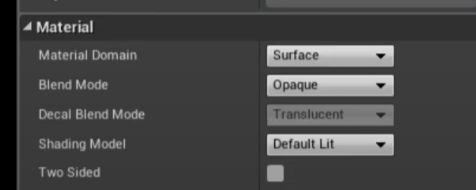
 drowsy snow
I thought you somehow resurrected Windows 7's 3D window switcher lol
plush yew
i had Bsods with 4.26... i updated to 4.27.1... didnt get so much crashing, then this?
drowsy snow
plush yew
This just happened, and i have a rtx2080
I'm not sure about VR specifics, but you said you use RTX 2080.
I'm blaming on the driver.
plush yew
drowsy snow
I thought you somehow resurrected Windows 7's 3D window switcher lol
win10 here, and i updated latest driver 🤷♂️
drowsy snow
That's the problem, newer NVIDIA driver has been notoriously broken with UE4 (at least the editor/unsigned stuff).
plush yew
i checked overclocking, doesnt seem like any settings show that overclock is on
drowsy snow
Pinned messages in this channel has several posts in this regard.
plush yew
drowsy snow
Pinned messages in this channel has several posts in this regard.
ok, ill revert to older driver, somehow
drowsy snow
Also let Jensen Huang know, by saying "nvidia pls fix"
whole turtle
real heath
I'm out of ideas then, sorry mate. It should "just work". Check the log of both...
yeah, thanks a lot for the suggestions!
 potent pendant
Hey! I'd like to ask what are the best sources for learning out there regarding using Unreal Engine for cinematics, environmental scenes, visual effects, animations.
I intend to use Blender with UE for modeling specific models, and After Effects for various stuff like compositing and additional vfx.
 spiral flint
is anyone good with uefy