#ue4-general
1 messages · Page 1059 of 1
 regal mulch
 spare kernel
            ConstantForce->InstanceName = ForceName;
            ConstantForce->AccumulateMode = bIsAdditive ? ERootMotionAccumulateMode::Additive : ERootMotionAccumulateMode::Override;
            ConstantForce->Priority = 5;
            ConstantForce->Force = WorldDirection * Strength;
            ConstantForce->Duration = Duration;
            ConstantForce->StrengthOverTime = StrengthOverTime;
            ConstantForce->FinishVelocityParams.Mode = FinishVelocityMode;
            ConstantForce->FinishVelocityParams.SetVelocity = FinishSetVelocity;
            ConstantForce->FinishVelocityParams.ClampVelocity = FinishClampVelocity;
RootMotionSourceID = MovementComponent->ApplyRootMotionSource(ConstantForce);``` but its just creating a taskWorks fine with rotation, but location I would much rather make sure the CMC moves me
Uh, sexy
I assume I could use that to rotate too?
(on the spot for example)
spare kernel
hmm, never tried that
rotation is normally done by setting the control rotation
via an interp
regal mulch
Yes and no
My control rotation is controlling the camera (third person)
So the Pawn is not bound to it
But I get what you mean
 nocturne warren
I am getting unable to find package for map while cooking and one of my object is not showing up in same map after packaging. Can someone help ? I am creating it for game jam and deadline is near.
regal mulch
I can keep it split between rootMotionSource for movement and ActorRotation for Rotation (as long as one doesn't override the other if they run at the same time)
spare kernel
oh my game (ThirdPerson), the camera follows the pawns control rotation
regal mulch
nocturne warren
I am getting ```unable to find package for map``` while cooking and one of my ob...
Check #packaging I guess
regal mulch
spare kernel
oh my game (ThirdPerson), the camera follows the pawns control rotation
Maybe it makes more sense to say why I even want this:
I have a Montage that has multiple Sections.
Each Section is one Attack Move of a Sword Attack.
Each Section should allow moving towards the current target (current target being something determined in some manager).
For that I want to use an AnimNotifyState, because that allows me to define the Duration and point in time where it should move and rotate towards the target.
nocturne warren
regal mulch
Check <#402958499660955658> I guess
I posted my question there but looks like no-one is online.
regal mulch
Which, for Rotation atm, works quite well
regal mulch
nocturne warren
I posted my question there but looks like no-one is online.
You shouldn't cross post though. That's against the #rules
regal mulch
So you don't spam your question into every single channel
 fierce tulip
^
regal mulch
You do know you can report users for saying something like this to you?
(Given you have visual proof of that)
Well, if someone is answers you in bad manner on this server, ping the moderators.
But that is a different topic.
Crossposting is still not allowed
You shouldn't be insulted for it of course
Yeah, sadly not everyone that wants to help does it in a proper way.
 robust marten
Is it possible to make an exported texture of a scene capture? I already have the scene capture image and I see i can make a brush out of it in a widget but I wanted to export the captured actor
regal mulch
You can update but not downgrate
Well you can always duplicate it when converting
Should be an option when doing it
 magic nebula
hi everyone. Anyone has a link to a tutorial or guide for making a 3d loading level?
All I can find are tutorials for loading 2d screens. An example would be the Mass Effect elevators.
 autumn flame
Not sure Mass Effect changes levels when in Elevator
Feels like more that it's unloading previous level and streaming the new one, so when the new stream is loaded it opens again
regal mulch
@spare kernel Quick question about the RootMotionSource. So it's working, sort of, but I'm not sure how the "Force" parameter is supposed to work. Does it apply the Force for each frame (with deltatime in mind) over the duration?
spare kernel
yes
regal mulch
Because when I further go into the source code, it looks more like it uses that value as an end location
Hm
spare kernel
sec
maybe i am mistaken
ah
so its direction * strength
which gives the end point
and it moves over duration to end point
regal mulch
In the ConstantForce example?
spare kernel
yes
regal mulch
Epic strikes again with misleading naming
spare kernel
yeah
regal mulch
Okay, that's actually useful then. Thanks. I added the code to the AnimNotifyState and now my anim Notify can move the Character. Quite cool
spare kernel
FRootMotionSource_MoveToDynamicForce
allows you to update the end location
but it requires target location
regal mulch
Force is relative, right?
So (500, 0, 0) is 500 along x from current location, not world origin, or?
magic nebula
autumn flame
Not sure Mass Effect changes levels when in Elevator
Feels like more that it's ...
Wait. but which level you think is loading. level 1 is loaded, then it loads the elevator level. and behind the scenes it's either loading level 2 or streaming level 2?
but that was just the example. The Ascent does it too. a 3d level to load something in the backgroudn while you wait
and I can't find any info about it
regal mulch
regal mulch
So (500, 0, 0) is 500 along x from current location, not world origin, or?
Hm, ConstantForce comment says it applys a fixed force to the Actor. Very vague
/** MoveToForce moves the target to a given fixed location in world space over the duration */
USTRUCT()
struct ENGINE_API FRootMotionSource_MoveToForce : public FRootMotionSource
Given I can calculate the location I want to move to, this sounds better actually
@spare kernel Did you mean MoveToForce instead of ConstantForce?
spare kernel
MoveToForce requires a target location vector
which can be WorldDir * Distance
and might be better
regal mulch
Yeah, okay. The COnstant one still puzzles me then though
Cause "Moves Actor with a Constant Force" would mean to me that I give it a force and it moves it by that force for x seconds
spare kernel
yeah that is how i read it..
regal mulch
So if that force is 100, 0, 0, and duration is 5, it would move 500 units or?
Okay then MoveToForce might be better. The "Force" word is annoying
Force is something "physical" in 90% of UE
Or "being forced to do something"
Neither apply here :D
I mean, they do, but not in every source
Ahhh anyway, I shall continue trying
Thanks for the help!
Def something I need to learn abotu so I can make my own if ever needed. Sounds powerful
autumn flame
magic nebula
Wait. but which level you think is loading. level 1 is loaded, then it loads the...
Look into Level Streaming
 steel leaf
Hi, I made a 2d game and wanted to know if there's any way to avoid getting this error ? (I can run the game on my main computer, but I tried to see if it'll work on a worse one (here it's a VM ))
 autumn flame
You card probably doesn't support DirectX 11 and up
 drowsy snow
steel leaf
Hi, I made a 2d game and wanted to know if there's any way to avoid getting this...
drowsy snow
steel leaf
Hi, I made a 2d game and wanted to know if there's any way to avoid getting this...
Level 2 VMs (like VirtualBox and VMware) aren't meant for modern games anyway.
You'd need Level 0 or Kernel Virtual Machine for proper gaming in a VM, and it's only available on Linux.
 wet schooner
Does anyone know how to package a game the second time but way quicker, like do I just package again in the same spot?
drowsy snow
wet schooner
Does anyone know how to package a game the second time but way quicker, like do ...
By doing exactly that.
wet schooner
 Ty hope it works I need a end
steel leaf
drowsy snow
Level 2 VMs (like VirtualBox and VMware) aren't meant for modern games anyway.
Uh okay so do you think it would still work on other computers without GPU ?
drowsy snow
steel leaf
Uh okay so do you think it would still work on other computers without GPU ?
Obviously not.
Though technically/pedantically speaking, modern CPUs have integrated GPUs built in, largely for display drivers and laptops. Those should support DX11 stuff, even though performance is less than stellar.
steel leaf
drowsy snow
Obviously not.
Though technically/pedantically speaking, modern CPUs have integr...
Okay, thanks for the answer!
 plush yew
any tuts like this but for arena games? https://www.youtube.com/watch?v=09r1B9cVEQY

In this 2018 GDC talk, Naughty Dog's David Shaver and NYU professor Robert Yang share techniques that developers like Respawn and Naughty Dog use to establish natural level flow via blockmesh design, environment art, FX, audio and scripting, and delve into one of the most important yet often overlooked means of understanding levels: light.
Reg...
 prime willow
you know whats weird
watching your game slowly but surely come to life
bit by bit mechanic by mechanic o-o
 grim ore

You were reminded that Crossposting is not allowed, not that posting in other channels is not allowed.
you're playing the poor me game and it's not going to get many people to want to help you
you were directed to #animation since people who would have experience with that would want to hang out in there and help out in there for that topic. As for the answer to your issue, if its a humanoid setup it doesnt matter what the names are that is what retargeting is for. If its not humanoid, or it has a different hierarchy then retargeting is not going to work and you need to fix it outside the engine and make the hierarchy more compatible with the UE4 skeleton
 thick herald
<@&213101288538374145>
grim ore
pointing you to the correct channel for the question was helping, you just didnt like it
 ashen brook
fucking hell folks, calm down
 buoyant graniteBOT
:triangular_flag_on_post: Heisenberg#2332 received strike 1. As a result, they were muted for 10 minutes.
ashen brook
You are not entitled to other people's help. If you insult them because you don't like the help that they do give, that makes you look pretty shitty. Please reassess your behavior going forward.
 harsh copper
prime willow
watching your game slowly but surely come to life
harsh copper
prime willow
watching your game slowly but surely come to life
esp when u feel like ur making slow/no progress, but you go back to 6 months ago and ur like holy shit
prime willow
harsh copper
esp when u feel like ur making slow/no progress, but you go back to 6 months ago...
omg literally man ❤️
@grim ore I'm sorry you have to deal with "mature intelligent and coherent" individuals like him, you truly deserve better than this ;-;
 brittle gulch
is there anything new on the water system in 4.27?
prime willow
Dude calm down
you're coming off as a crazy narcisist
and id like to believe youre better than that :3
actually yes
autumn flame
Common sense
Enough said
prime willow
well you go off hinge when you get help that doesnt suit your particular desires
and anyone can see it
you act entitled and ravenous, and front when things you dont like are said; when no one here owes you anything
well you asked in the wrong channel
plush yew
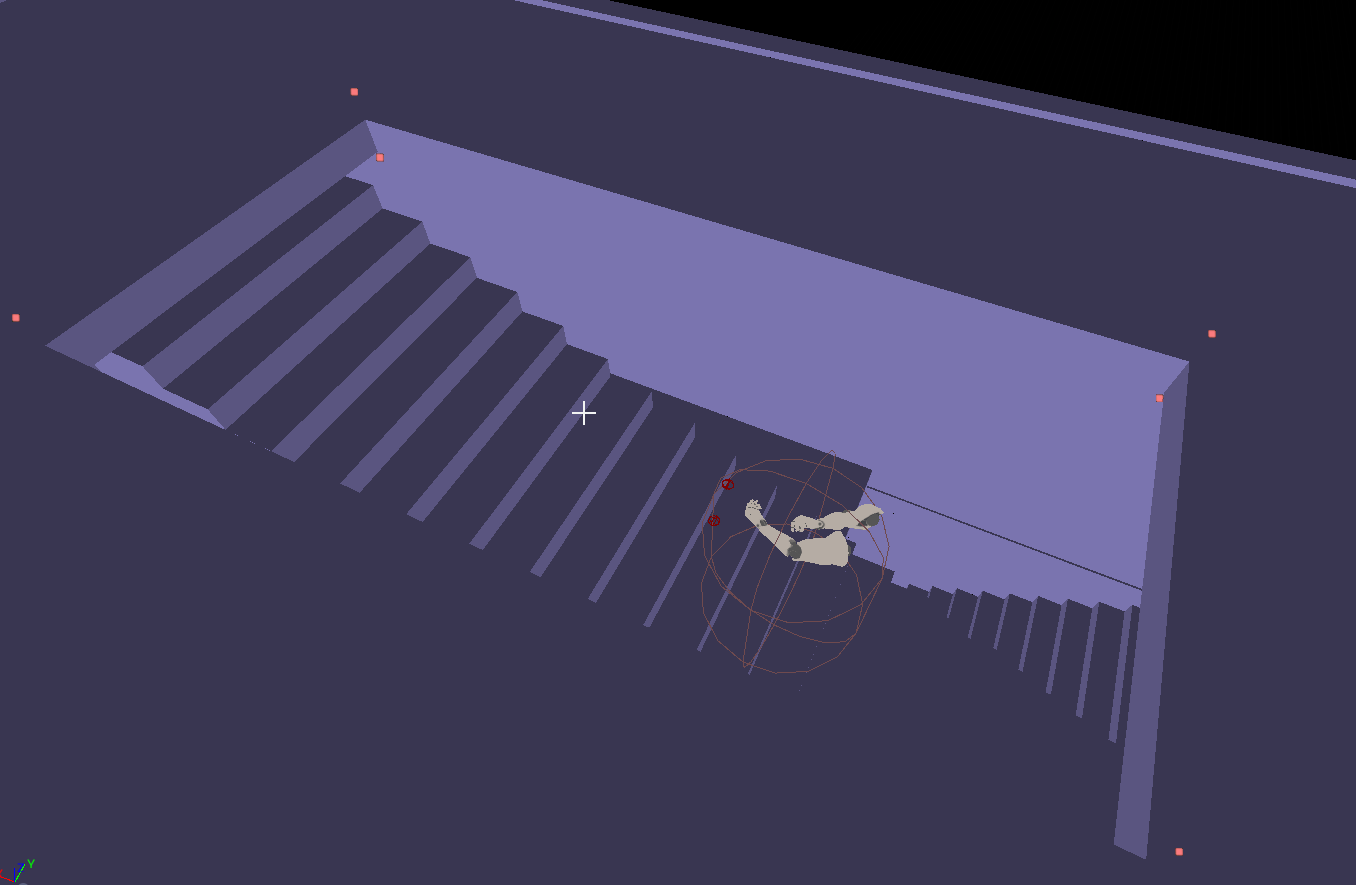
when i wanan go up the stairs i get stuck here. jumping is possible tho. and if i jump and move forward then i get unstuck. https://i.imgur.com/5AGDb6h.png
 prime willow
you reposted your question thrice over
so clearly you didnt even read the rules
idk chief
i wish your game project the best
you have the perfect attitude to be successful long term ❤️
 prime willow
plush yew
when i wanan go up the stairs i get stuck here. jumping is possible tho. and if ...
prime willow
plush yew
when i wanan go up the stairs i get stuck here. jumping is possible tho. and if ...
have you tried moving the stairs
to make an opening for the character?
plush yew
prime willow
have you tried moving the stairs
there is an opening
autumn flame
Can you walk up to that point or for every step you gotta jump?
plush yew
autumn flame
Can you walk up to that point or for every step you gotta jump?
i can walk up there. then stuck
and if i jump and forward then i can walk up. but only walk, stuck
autumn flame
Perhaps use the Player Collision view buffer thingie
plush yew
this is collision view. walking stairs down works too.
autumn flame
So the other stairs down work perfectly?
autumn flame
You using BSP?
Maybe you could look into the Megascans scene creations or just general environment creations, but for sure use Megascans stuff, they have lots of useful assets
Or they can directly do it in UE4 👀
They said they wanna do it in UE4
You could do it in World Machine, World Creator, Gaia
prime willow

relax
no one here wants to fight
we come here to make video games
they were teasing
chill out dude
youre getting crazy defensive
they do the same to me when i ask questions or say things people joke around in the real world
autumn flame
If you get offended by one little reaction, can't imagine in a future when you'll make a game and you'll have haters
prime willow
no no he has the perfect attitude to be succesful long term in any business :3
plush yew
autumn flame
You using BSP?
bsp yes
prime willow
i'm a chimera thank you very much
dont group me in with the fleshbags U:
ouch why do you have to hurt me ;-;
What did i ever do to you mega macho man 69
look you need to relax
autumn flame
plush yew
bsp yes
Could be a problem with BSPs when you subtract 2 BSPs, never know, they are magic
You could try converting into a static mesh or just making the hole bigger for testing
prime willow
youre attacking peoples personal lives
and now youre calling us monkeys
arent you such a nice guy xD
grim ore
I know we shouldnt be arguing and doing stuff like this in general, but #lounge might be a better place to go if you want to keep doing it.
prime willow
^
arent you such a tough guy
wanna take this to lounge buddy
we can talk aabout all of those feelings you hold so close to your chest
grim ore
@plush yewlike suggested maybe remove the roof as well instead of making it larger. have just the stairs? for testing purposes
prime willow
after we talk it out we can do some game design :3
autumn flame
Interactive grass textures are satisfying
plush yew
ur positive
buoyant graniteBOT
:no_entry_sign: Heisenberg#2332 was banned.
fierce tulip
I dont like that kind of attitude here, he was warned before, he did not behave. byebye
 clear estuary
is there a help channel?
prime willow
this is the help channel
clear estuary
i have weird install issues
[2021.09.02-17.41.58:238][305]Manifest Check: 0x0000021FDEF72FE0 ue:3ddb1bad6e004b99a7192c1a29f2318a:UE_4.26:4.26.2-15973114+++UE4+Release-4.26-Windows CPAM Line: 2703 Desc: OnNewAppInstallation
[2021.09.02-17.41.58:239][305]WinReg: ERROR: Could not create registry value SOFTWARE\EpicGames\Unreal Engine\4.26/InstalledDirectory. Error Code 5: Access is denied.
i have the launcher running as admin - it crashes when installing through the launcher in the unreal tab - adding 4.26.2.
fierce tulip
*almost all channels are helpchannels, just pick the one closest related to your issue
clear estuary
it causes a weird issue so that windows doesn't see it being installed.
fierce tulip
prolly not the error, but im always confused about paths using both / and \
value SOFTWARE\EpicGames\Unreal Engine\4.26/InstalledDirectory
clear estuary
i instantly get this screen when installing
 drowsy snow
clear estuary
i instantly get this screen when installing
drowsy snow
clear estuary
i instantly get this screen when installing
It is weird tbh
clear estuary
i've never had this on my personal machine, but my work machine is plagued with issues
autumn flame
Interactivity from Landscape Grass Output no?
I never tried myself but i imagine it's not possible to have it interact like that since it has no collision response at all and Dynamic Foliage is usually based on Pivot Painting where it usually either offsets the foliage in the shader or moves it based on a physics asset (which can cause problems if your world is big enough where you lose physics precision)
drowsy snow
 woeful crystal
hello , how do i make a player attach to a other character?
woeful crystal
hello , how do i make a player attach to a other character?
Can you elaborate on what you're trying to achieve?
woeful crystal
drowsy snow
Can you elaborate on what you're trying to achieve?
so i want to run up the prey and pounce it and attach the pouncing character to the prey and make the pray be able to walk with the pouncer on its side or back
drowsy snow
woeful crystal
so i want to run up the prey and pounce it and attach the pouncing character to ...
One way to approach it is to align the characters into position, and play the animations together.
woeful crystal
animating is the last thing i do for the creatures
autumn flame
Honestly realism is in the first place mostly about lighting, so start looking on how you can setup photorealistic light or environment
Then after that comes the general ground texture and assets, they are probs going for very high quality texture sizes, like 4k-8k with very high quality displacement resulting from it
With UE5 you have Lumen and Nanite to help you make it look right + performance
Wait
Have a look at this

You can learn from it
You can download the project and look at it yourself, they different DefaultEngine.ini settings too for rendering
Then you can try to follow the rural australia environment in UE4
plush yew
autumn flame
https://www.unrealengine.com/marketplace/en-US/product/rural-australia
many people learn 0 from opening such a project and analyzing it.
i mean i dont know if u can learn from it
autumn flame
I mean, there's texture sizes, how stuff is placed, how lighting is setup, rendering settings they use
There's plenty to look into
Even the materials
plush yew
autumn flame
I mean, there's texture sizes, how stuff is placed, how lighting is setup, rende...
u cant remember all the sun and skylight values if they are not default
autumn flame
But if someone has achieved photorealism, you can have a look into how they set it up, it's teaching yourself
grim ore
if they are not default there is an icon showing that
there is this learning path if you want a large amoung of general info on howit all goes together https://www.unrealengine.com/en-US/onlinelearning-courses/constructing-believable-environments
plush yew
autumn flame
But if someone has achieved photorealism, you can have a look into how they set ...
nah. not for me. i dont learn anything open projects from othes. once i close it. i forgot everything.
0 learn value
autumn flame
Not everyone has the same learning methods :p
plush yew
i dont even know mine.
 upbeat tendon
i am wondering if i should review my VAX licence or if i should consider Rider for unreal or something else to make my c++ coding easier
renew oops not review
VAX seems like a lot of money compared to even buying all of jetbrains tools
drowsy snow
I don't even use both, just vanilla VS2019 (formerly VS2017)
upbeat tendon
so pay jetbrains double the first year and get all their tools
and then it goes down each year until it is the same price, but you get all the tools
i still write all my backend in java
and some python etc
VAX however has been great at supporting unreal
 dense wren
hello
how is everyone
im trying to make my character dash to the sides
well actually to F and B too
when i press w+w or d+d
like pressing the key twice
but idk how to make that input
upbeat tendon
a double tap?
dense wren
yep
like running in minecraft
you ever played minecraft? you press ww twice consecutively
and start sprinting
upbeat tendon
not since 2011, but i understand double tap
dense wren
would you do a bluprint and send me ascreenshot? not necesarily now, take a day if you want when you have time, IF you can
im kinda new, sorry
dense wren
okay thanks! if you remember the name or link to the video it`d help me lots
upbeat tendon
i already sent it to you
dense wren
oh yeah thanks
!
one more thing, once i add that w+w=dash, i want to make another input to, dash(w+w) + attack= dash attack forward
 shadow ravine
Hey guys, I'm having an issue with my ALS V4 where my weapons and items aren't spawning in the correct location. Anyone know what might be causing this?

 dense wren
is it a big difference in the location? or just some units
maybe theres something in between making collision
shadow ravine
There's nothing colliding with it as my character was duplicated from the ALS character then re-targeted
 safe rapids
we live in a society
 dense wren
ohh i think i know
go to the attachment blueprint
and snap to target
location and rotation
you know where it is?
shadow ravine
No I don't think I know which one you mean
shadow ravine
Oh the function attach to hand
dense wren
yes, attach to target
you get 3 options, location, rotation and scale
set the location and rotation to snap to target
you also need to check if the socket is well put too
in yout skeleton
attach to actor i meant**
 opal lark
HELLO AGAIN
Sorry caps
Any idea how to make a velocity rain effect ?
with material ?
shadow ravine
The skeleton is the same one from the ALS character so it should have the same set up right?
dense wren
not really
shadow ravine
Hmmm okay
dense wren
you made a humanoid rig exactly like the ue4 mannequin right?
there is a tutorial in yt about als and retargetting that came in handy to me
just search alsv4 retargetting to ue4mannequin tutorial
yes you might have to delete those
 pearl nymph
hello I have 12 years old and I participate to the 2021 epic mega jam and I have somme issues to package the project and not times left pleas help me it is my first game jam and...
im so so sad
dense wren
what is the problem you have?
pearl nymph
someone can help me
dense wren
yikes
pearl nymph
dense wren
what is the problem you have?
pakaging
shadow ravine
Okay it's definitely set to snap to target
dense wren
shadow ravine
Okay it's definitely set to snap to target
you should take a little rest on that, and check the youtube video im telling you
the video i saw that shows how to set the virtual bones
its about methuman retargetting
but i think it works for manny too
maybe your socket is colliding with the vitual ik bones
dense wren
pearl nymph
pakaging
but what is the problem exactly, maybe send a screenshot of what the engine tells you when packaging
shadow ravine
Okay so this is what my skeleton looks like
 dense wren
you see thos blue virtual ik bones?
you might have to recreate them in your other character
or
delete them
here imma send you the video
Discord: https://discord.gg/7hKhSQFaSV
------Chapters------
0:00 - Intro
00:11- Download and export a MetaHuman
02:30 - Skeleton prep
09:04 - Retargeting ALSV4
11:27 - Replacing the AnimMan
24:19 - Fixing the Feet IK
27:41 - Change the default stance
28:07 - Fixing the montages
33:34 - fixing the knee targets
35:02 - Final result
35:20 - Outro
there
he recreate the virtual bones
and he teaches you how to properly attach them to each ik
for the hands foots and calf
feet*
grim ore
@pearl nymphyou can try #packaging but "problems" doesnt help anyone, we cant guess without any info
shadow ravine
Okay I'll give it a watch thanks, hopefully this resolves it. I've been stuck on it for days now 😂
dense wren
im sure it will, dont mind the metahuman, since metahuman has the same ue4mann, skeleton i think?
opal lark
@plush yew Thanks mate
Oh thats for someone else lolk
know
do you know how to do the rain effect
 tawdry oasis
hey peoples
opal lark
Thankyou
Its a velocity effect im trying to do as the vehicle moves faster the rain streaks
 vivid ether
Yo, got a noobie question, but google did not help me nor the documentation.
How to work with Lightmaps when using UDIM? We created a lot of Udim based assets for a work project but we are a bit dumbfounded by the lightmaps, it feels like unreal isnt reading the custom made udim lightmap channel (also UDIM), the bake result was crappy.
Channel 0 is the base texture map, channel 1 udim lightmap and channel 2 i created a 1tile pack of the whole udim and thats the only one that actually bakes, obviously with quite low resolution and the outcome isn't ideal.
Anybody can provide me with some help / links to a good explanation or example? Thank you kindly, Dan
dense wren
the skeleto from my new anim is missing the third spine, that should match the ue4 mannequin spine_03
how do i do?
shadow ravine
Just finished the tutorial you sent over and sadly ended with the same results 😭
 grave pollen
I got problems
 raven nest
why won't my xbox series X/S controller do anything in UE4? neither editor nor game, editor is set to accept input, game has joypad mappings.. they work over USB with old xbox controller. new series S/X is connected over bluetooth and I verified it is sending input and the systems does see it. Unplugged the old controller and restarted even, wtf
restarted the entire system and still nothing
there's a plugin for ps4 controller support so putting this on end users via xboxce is not my idea of acceptible
grim ore
I can say on 4.26 a series s controller over bluetooth seems to work here. I have never had a wired one connected. It shows up as a Buetooth LE XInput compatible input device in windows game controllers
raven nest
hmm interesting
grim ore
I can navigate the viewport when editing, and game controller input works in the FPS template
raven nest
maybe it is confused about the old joypad somehow then
grim ore
in the windows game controller setup thingy, what does it show for controller(s) ?


 grim ore
yep same here, thought maybe it was reading another one
dense wren
shadow ravine
Just finished the tutorial you sent over and sadly ended with the same results �...
ohh man thats sad, i let you know if anything comes to mind
grim ore
so assuming when you test it in there it shows input, it should work
raven nest
poking around and I don't see any reference to the old joypad to remove either
yeah it shows input
shadow ravine
dense wren
ohh man thats sad, i let you know if anything comes to mind
Thanks I have no idea what else might be causing this
grim ore
only thing I can think of is to make a new fps template project, or a blank one, and see if it works when you click in the viewport. If not something is stopping it on the pc, maybe another piece of software
raven nest
yeah kinda wondering if my combo oculus+steam setup is getting hung up, but you'd think then the wired controller would also fail
hmm yeah it does work in a different project file
blast
ah, heh
now it works in the other project where I'm actually working
'huzzah!'
grim ore
I have oculus and steamvr on this one for my quest2 and it works, I dont have them running with UE4 tho
dense wren
guys i have this rootmotiona ttacks
but whenever i attack and the combo is completed
my player goes to the begining point
and the camera dont even follows the character
it stays behind as he goes forward attacking and then the character goes back to the starting point
raven nest
I wonder if plugging the wired controller back in would screw things up again
anyway thanks for the help
the friggen pot on the left stick was going out and it was starting to drive me crazy
grim ore
@dense wrenthat is the way it is supposed to work, if you dont want that you need to adjust it. https://docs.unrealengine.com/4.26/en-US/AnimatingObjects/SkeletalMeshAnimation/RootMotion/
dense wren
grim ore
<@!414924277310160896>that is the way it is supposed to work, if you dont want t...
but is it because the animation does not have rootmotion?
because i enbaled rootmotion, but in the anim sequence the character it still moving forward and not staying in place..
enabled*
grim ore
root motion would only really help with the capsule collision and such seperating. IF you need it to be in place, you might need to reanimate it so it's in place
usually when using animations that move the mesh like that, you have to do some special work
dense wren
i understand.. this is going to be a long day
grim ore
do animation, move camera or lock it as needed, and when the animation is done move the actual character to the new location so it doesnt snap back to the characters location. that animation is moving the mesh only
 humble bay

Anyone know how to take the " preview " material out?
Or remove the " preview " word itself
 grand gate
 shadow ravine
Okay so I thought my best option to try and find a solution to this annoying weapon animation bug was to post a video of my retargeting process. Ignore the montage as I didn't include them here as I just wanted to show what I'm doing. But I've also added a video of my main character which has all the montages included and basically has the same issue. Any help would be incredible appreciated . Thanks guys! 😀
This is my main one with the montages working fine
shadow ravine
My own character has it's own skeleton which was made using the same method
Which menus would you of needed to see
shadow ravine
shadow ravine
Okay so this is what my skeleton looks like
Yeah this is the skeleton for my own one
Okay I'll try changing them to attach to hand_l and hand_r, which bp/function am I changing? The attach to hand one?
Ah I see that actually makes a lot of sense
I've redone them about 5 or 6 times now with the same results, it's been killing me 😂
Okay so this is my attach to hand at the minute

Btw thanks for replying and helping me try debug this, appropriate the help
Okay great I'll give it a watch and see if I can work this out
Is it going to be an issue that the guy in the video's virtual bones are greyed out and mine aren't
dense wren
hi guys, question is, can i use ue4 assets like animal variety or infinty blade stuff, that arent compatible in 4.27, in the 4.27 version by migrating from a 4.26 proj?
or maybe creating a 4.26proj and opening it a 4.27
shadow ravine
Sorry you're right I realized that after I said it 😂 so as my rig has the ik bones he's creating the virtual bones for, is that not going to cause any problems if I create them on my rig or do I need to remove any of the ones I've already got before creating the ones he is
I have just had a thought Lyric-cyst made me think about it. You don't think the engine version could be the issue as the documentation for ALS v4 is for 2.6 and I'm using 2.7
The ALS one's aren't greyed out for me
dense wren
nice thanks
dense wren
shadow ravine
I have just had a thought Lyric-cyst made me think about it. You don't think the...
i had to install .27 since i bought a anim pack without checking it was only compatible in .27
but it opened my project without any problems
so all good
any of you work with 2d pixel art?
shadow ravine
Do they?! I will definitely try fine that if that is the case
Yeah I'm so confused with this bug everything seems to me adding up
It's all good bro you've been so helpful already, thanks for all the advise I've joined the ALS Discord so fingers crossed I can get some help there
 ivory spire
How do i get a graph to do stuff on an material instance
 wary knot
can headless server builds use blueprints (like a game mode blueprint) or only C++ classes?
Unity convert here getting used to everything
 tough thistle
wary knot
can headless server builds use blueprints (like a game mode blueprint) or only C...
tough thistle
wary knot
can headless server builds use blueprints (like a game mode blueprint) or only C...
yes you can use bp in server builds
 balmy chasm
I need helppppp
Does anyone have experience with replication in unreal
 brisk mirage
was told from person That bought asset from to make my landscape not blurry is to (Well, this is because you will need to bake the new material to the textures of the mesh lods.
To do this, simply select the levels you want to bake and hit the "generate" button in the "level details" window.
I recommend that you do this step once you finish editing the landscape, although there should be no problem repeating this step as many times as you need will this work?
 blissful current
Heyo, for some reason my landscape is glitching out whenever I try to add a new square onto it

 pliant junco
i personally rig in blender
 rancid lagoon
i just packeged my project, but in my menu im not able to click anything bc my cursor is not showing up. i have show cursor enabled as well and input mode uI only. but i cant figure out what the problem is
 brave lark
did something kinda cool today. Made it so all my print (string/text) and traces can be toggled by gameplay tag label in my dev menu

I'll take it to c++ later to improve the auto generation so that parent tags can be used and it's sorted alphabetically
 wraith flume
This is an imported static mesh, combined. How do I move these vertices inside the engine?

 pliant junco
well its mostly comes down to practice makes perfect
drowsy snow
It's more of a CPU operation than GPU operation 
drowsy snow
If you want to use automation, you can buy Auto Rig Pro addon.
 compact marsh
Is it possible to change the build directory when compiling UE4 from source? (The default is Engine\Binaries\Win64\UE4Editor.exe) can we change this path so it outputs the binaries somewhere else?
compact marsh
Is it possible to remove unnecessary platform from unreal engine source?
 ripe gull
guys I have an idea
for my solo dev journey that is
what if I make a system that people can contribute to me by either financial support, or doing a super small task?
compact marsh
For example I would like to remove every platform (like Linux, MacOS, Android, iOS, VR, etc) except windows.
drowsy snow
compact marsh
For example I would like to remove every platform (like Linux, MacOS, Android, i...
Yes, you can add -exclude commandline args before executing Setup.bat
drowsy snow
ripe gull
what if I make a system that people can contribute to me by either financial sup...
Patreon exists.
ripe gull
for financial yes, but not for doing the task
compact marsh
drowsy snow
Yes, you can add `-exclude` commandline args before executing Setup.bat
This will stop the compilation of unnecessary platform specific code?
ripe gull
and its gotta be in a way that makes my work less then more
drowsy snow
ripe gull
for financial yes, but not for doing the task
Who said it's not for the task? I've seen semi rare occurences where patrons in Patreon assisting in content production.
ripe gull
huh
compact marsh
drowsy snow
Yes, you can add `-exclude` commandline args before executing Setup.bat
Is there a way to remove platform-specific code from the codebase altogether? Since ue4 is completely modular.
ripe gull
but I think the first step is to get people interested in the game enough to do it
drowsy snow
compact marsh
Is there a way to remove platform-specific code from the codebase altogether? Si...
It shouldn't be your concern anyway, because there are #if for platforms within the engine source code.
compact marsh
drowsy snow
Yes, you can add `-exclude` commandline args before executing Setup.bat
What are the platforms that I can exclude using the --exclude flag?
drowsy snow
compact marsh
What are the platforms that I can exclude using the `--exclude` flag?
Anything, really (except consoles, because it's not included to begin with)
compact marsh
Thanks! 👍
 heavy yew
I would like to save data (ideally CSV table) from the game.
Is this achievable with blueprints?
pliant junco
just search blender weight paint
 late verge
hey everyone!
so, i’m working on a cinematic and cranked up all the shadow related settings on my directional light. unfortunately, i’ve noticed shadows still cull and/or disappear from not very far away. is there a setting or console command i could look into to help eliminate/alleviate this?
heavy yew
heavy yew
I would like to save data (ideally CSV table) from the game.
Is this achievable...
Replying to myself. Apparently no, but the C++ part is easy
see here:
https://www.youtube.com/watch?v=uZPzTN5Debc
Misc:
This playlist is home to my quickfire tutorials and general updates about this channel, Life, the Universe and Everything.
This Video:
In this video, I cover the process of creating saving out string data from a Blueprint as a text file using a C++ function. The main focus is to format this information to create a new CSV file but this ca...
 wide girder
oh man I know it's one of the most powerful softwares
but as a first time user, I did not except Unreal to be this buggy
compact marsh
What is the best unreal version (4.0 - 4.27) for studying the source code?
pliant junco
Bf2?
Well here's what i usually do
i get a skeleton
i pose it to make ue4 manequinn
then i weight paint manuelly
which is a pain in the ass
drowsy snow
Language
Also, if it's not for a game, you can use auto riggers like Mixamo (incompatible with UE skeleton but gets the job done for linear animation)
clear estuary
morning everyone! is there a way to "delete history" so to speak on assets tied to placer/duplicating plugins. In maya for example you can delete history and it remains in place. any ideas?
 cyan bronze
I was trying to open stuff that i closed and tried this "load layout" -> "default editor layout" and it broke some of my animationBP

anything i should know about that?
 pure sorrel
It will be easier right to step by step write down your implementation, sub steps when using blue prints.
shadow ravine
Didn't get any replies in the ALS Discord annoyingly but I did try changing the attached bone to hand_l and hand_r which gave me different results.

 wide girder
I'm following a online course Battle Tank


I got my Tank movement setup like this but only the IntendMoveForward is changing the tank's position
IntendTurnRight did got call but the Tank is not responding at all
well the tutorial did use a controller axis mapping but I don't think that's the issue?
desperate
 gray plaza
When can we expect compatibility btw 4.27 and ue5, is their any chance it will be before UE5 is production ready?
 minor badge
May I ask a question, I used chaos Phoenixfd to create a fluids simulation in 3d max, and exported to .abc file, but import to UE4 doesn't work, why?
fierce tulip
try asking in #niagara or #visual-fx
 strong obsidian
Is there in unreal some command to check current FOV ? (not in blueprint)
pure sorrel
How can i put my character which is in the scene into my pickobject blueprint as a reference
cyan bronze
How do you make animation blueprint to "widget animation class" reference? I need to change the animations depending on the gun i have equipped and i cant figure out how to make the reference out of animation blueprint. And it needs to be "widget animation" type class reference
strong obsidian
@pure sorrel Create actor variable in bp and make it public
pliant junco
yo what model is that thats clean?
 native swift
Can anybody help me please?? How do you get a characters fingers to wrap around a weapon once it's equipped? i'm using a synty polygon character with the advanced locomotion system v4. The hands just stay open in the default position and i'd like them to grip the weapon. Thanks in advance
drowsy snow
native swift
Can anybody help me please?? How do you get a characters fingers to wrap around ...
Short answer: Inverse Kinematics
native swift
drowsy snow
Short answer: Inverse Kinematics
okay that's a great starting point! could you elaborate please?
wraith flume
This is an imported static mesh, combined. How do I move these vertices inside the engine?
plush yew
does ctrl + D is buggy in unreal?
wraith flume
 native swift
I have a weapon that snaps to my characters hand fine, however his fingers wont close around the weapon.. any tips?
drowsy snow
plush yew
does ctrl + D is buggy in unreal?
What's Ctrl+D doing in UE4?
plush yew
let me explain, sorry
drowsy snow
I hope you're not mistaken it with Duplicate, which is assigned to Ctrl+W
plush yew
aswd move player, while when u press ctrl + awsd moving player slowly. When i try to move when ctrl pressed it works when ctrl+a, ctrl+w, ctrl+s but when pressing ctrl + d its not moving
one guy said that is ue4 bug
 steady owl
I'm on the fence about switching to Forward for a PC / Switch title to hit 60FPS on Switch. Would you say forward is a good choice and would there be anything to look out for other than the obvious missing rendering features listed in the docs?
plush yew
when i try first D and then CTRL its working fine, but when i press first ctrl + D its not moving
maybe windows bug?
 kindred viper
@steady owl afaik it's just easier on the hardware and specific techniques used when you have a restricted amount of processing available, hence the promotion of it for VR. But I'm not so sure about that recently as like I said in that post, I've seen people going deferred in VR too these days.
drowsy snow
plush yew
maybe windows bug?
Not a windows bug, that's for sure.
It doesn't even slow down camera as you described.
Just executing the shortcuts.
plush yew
not moving general
native swift
Can anybody help me please?? How do you get a characters fingers to wrap around a weapon once it's equipped? i'm using a synty polygon character with the advanced locomotion system v4. The hands just stay open in the default position and i'd like them to grip the weapon. Thanks in advance
steady owl
kindred viper
<@!461630350095941633> afaik it's just easier on the hardware and specific techn...
Thanks for the answer. From my tests I almost doubling performance on PC and switch so it seems like a huge advantage. Just seems too good to be true so I'm looking out for any reasons NOT to upgrade. I certainly don't need raytracing or anything fancy on Switch, looking for performance over anything else
drowsy snow
native swift
Can anybody help me please?? How do you get a characters fingers to wrap around ...
kindred viper
@native swift have animation close the fingers.
steady owl
And Would like to avoid making 2 versions of the game, one on forward and one on deferred, having to make sure the visuals match for each patch
kindred viper
yeah that would suck for sure
steady owl
It just seems like the forward renderer is always promoted as for VR in the docs
But it seems fine to use for desktop and console too
Just want to make sure that is the case
And it's stable / fine to use
Then will make the big switch
kindred viper
indeed. no problem with using it on desktop either tho. Its just a case of what specs you need rendering wise
steady owl
I'd like the game to scale down to integrated graphics on PC
And doubling frame rate goes a LONG way there
With forward
I suppose my game is a good candidate as it has very little lights
And not a lot of high res geo
So the two things forward are bad at (Small tris and lots of overlapping lights) aren't an issue
Which leaves just a much faster baseline cost it seems anyway
kindred viper
mobile has the edge in optimising with very few dynamic lights. Could find some info in that department too
steady owl
Thanks I'll look for any other console commands or .ini settings that can further drive performance
Sitting at a solid 60FPS on switch now though
Which is a great place to be at, all thanks to forward
I'd also like to see any games other than Valorant that use Forward rendering on PC
I think Batallion does
 idle bear
Sorry to jump in here got a basic question that someone may be able to help with.
drowsy snow
I still preferred deferred over forward, less bitchy with fully dynamic lighting
idle bear
Am little new to UE4 as in just opened it up.
I have added a “Print String” node hooked from event begin play (BP).
I can see the message in the “Output Log” but not in the “Message Log” -> “Blueprint Log”.
Maybe need another type of node, other than “Print String”?
drowsy snow
idle bear
Am little new to UE4 as in just opened it up.
I have added a “Print String” nod...
Output Log would be what you need more than Message Log.
It logs practically everything happened within the engine (that are set to log something) and less abstracted.
steady owl
drowsy snow
I still preferred deferred over forward, less bitchy with fully dynamic lighting
Is there anything that stands out that I should look for here?
I haven't noticed any changes from Deferred
Apart from losing DFAO
Which is to be expected
Same with SSR / SSAO
I'm using fully dynamic lighting too
drowsy snow
steady owl
Is there anything that stands out that I should look for here?
I used SSR, SSAO, Subsurface scattering, Decals and Temporal Upsampling
idle bear
drowsy snow
Output Log would be what you need more than Message Log.
I see, I was aiming for something other than the "output log" due to so much text.
I thought that “Message Log” -> “Blueprint Log” maybe a built in solution to see log data from BP's.
drowsy snow
My scenario is open world, so less reliant on cubemaps is a win.
steady owl
I'm the same. Is there anything else "bitchy" or just missing features that are mentioned in the docs?
Looking for any issues I may encounter other than those
I'd hate to remake many levels and rewrite shaders to find some rare edge case bugs or crashes when using forward shading
But if it seems solid other than the missing features covered in the docs then I'm sold
drowsy snow
I think not much else outside from those mentioned in the docs.
But I think SSGI is also out of the question with Forward Rendering
steady owl
Yeah anything screenspace
Thanks for the help
Sounds like it's a great option then
And a free 100% increase in performance!
drowsy snow
I'm (a bit over) relying on SSGI, because LPV doesn't work well for interiors. And on par with RPG cliches, one must have enclosed dungeons.
steady owl
SSGI is expensive AF
Wouldn't run on integrated graphics that I'm targeting
Also find that SSGI has quite a lot of noise and artifacts, moreso than the other SS post processFX
drowsy snow
Sky Light from Sky Atmo isn't going to cut it either - it just feels wrong in caves and alike.
steady owl
Yeah it's a hard problem
I'd probably just use different PP volumes to change the vibe in caves
But might be a lot of manual work
It's very hard to match exterior and interior lighting with just one global light / PP set
drowsy snow
Though it might be worth it if it isn't procedurally generated (which is not, in my case), but I need more testing in that regard tbh
Also kinda afraid that Forward Rendering's texture sampler limit is smaller than 16.
steady owl
Can just use Shared samplers to work around that no?
drowsy snow
I think not. I didn't use channel packing (at least for the anime characters)
A way to mitigate it is to make separate materials for hair, eyes, skin, clothing, weapons, accessories, and whatnot.
dense wren
hi guys
theres nobody at animation so im gonna ask here just in case someone knows
i want to make my animation turn around completely as if mirrored
i have a boxer stance, with the right hand forward like lefthnded
handed*
i want it to be right handed with the left forward to cross punch with the right thats behind
drowsy snow
dense wren
theres nobody at animation so im gonna ask here just in case someone knows
You're not waiting for it long enough.
drowsy snow
dense wren
i assumed there was noone since a guy asked at 6 am
#rules #2:
- Be patient when asking for help. This isn't an official Epic Games support channel so we can't guarantee a response. Don't ping people unless you're replying to them. If someone can help, they will. If not, come back in a few hours and consider rephrasing your question or adding more details
dense wren
.-.
drowsy snow
Also, time zone exists.
drowsy snow

idle bear
drowsy snow
I think not. I didn't use channel packing (at least for the anime characters)
found it,
"Filters" > "LogBlueprintUserMessages"
Also helped to "Verbosity" the "Messages" only.
fierce tulip
no need for snarks <_<
 woven marlin
Good question, i'm still learning UE. If i'm about to create a character with animation should i go with PAWN or CHARACTER class?
steady owl
Character if humanoid
Can use character for non humanoid too if you are ok with it moving with a capsule
woven marlin
Oh i see
drowsy snow
woven marlin
Good question, i'm still learning UE. If i'm about to create a character with an...
Character is inherited from Pawn anyway.
woven marlin
Yeah but whats the difference
more functionality?
Can i add hands to Pawn? or only Character can?
steady owl
Character has a Character movement component
And more specific functionality
You can add anything to pawn
drowsy snow
Generally Character has everything you need for humanoid characters.
That includes a pair of floating FPS arms.
woven marlin
I see
drowsy snow
As for non-humanoids, like animals, you can still use Character class. It's just a bit more hacky to get the collisions right, due to how the capsule collision is the root component.
woven marlin
Ok i'm thinking of creating a fantasy character (small and oval shape with arms & legs)
is it doable with pawn?
woeful crystal
hello , how do i attach a player to another player?
drowsy snow
woven marlin
is it doable with pawn?
Anything that can be done with pawn is automatically doable with Characters. Pawn is simply possess-able Actor.
steady owl
woven marlin
Ok i'm thinking of creating a fantasy character (small and oval shape with arms ...
Just do it with the Character it'll be far easier to get set up
woven marlin
I see because i'm following a tutorial that created a tank with Pawn
drowsy snow
Character class is in a way extension of Pawn class, providing pretty much all you need for character movements.
woven marlin
so i think Pawns usually not for humanoid stuff
drowsy snow
woven marlin
I see because i'm following a tutorial that created a tank with Pawn
Tank is a vehicle and it's kind of a different story with vehicles.
drowsy snow
Mechas with legs (e.g. Metal Gear, Wanzer, Gundam) falls under characters - in case you're wondering
woven marlin
Oh i see
Is there any good tutorials i could follow?
There's nothing much i could fine suit conventions or good coding
drowsy snow
Pretty much tutorials that uses Character class as the basis.
native swift
kindred viper
<@!631577735281770508> have animation close the fingers.
thank you for the tip! this really helped to figure it out.. it is now done! thanks again
kindred viper
no worries
 calm turret
hello, do UE4 have similar tool like in twinmotion's path tool (character path, especially)?
dense wren
hello guys
im trynna do a w+w= dash i saw the tutorial on a video, but he does a set max walk speed to run when w+w is tapped
i want to make a dash with an anim montage
and i can set it right
this is the blueprint

its what i tried to do, he instead of putting an play anim montage, he sets max walk speed
drowsy snow
calm turret
hello, do UE4 have similar tool like in twinmotion's path tool (character path, ...
Not a ready to use one, but you can make one with BPs.
calm turret
drowsy snow
Not a ready to use one, but you can make one with BPs.
thank you for the reply, I was trying to see if there is tutorial for it online, but so far, no luck here. I'm too new to know how to build BP for it, unfortunately
 loud maple
how do i know if my map is updated?
i'm using UE5 btw
oh wait nvm
i found it
lol
 narrow loom
Hey guys, i have a custom rigged model (robotic)
how can i import to ue4 and make it the starter player without errors
(Ping me when u answer me)
dense wren
drag and drop
into the contetn browser
then you choose wheter you wanna import mesh and skeleton
that depends if you have the mesh in the project already
and if your rigged skeleton matches the ue4 mannequin or whatever skeleton you are previously using
narrow loom
how
dense wren
and to make it the startet player
narrow loom
me new to ue4 so idk much
dense wren
you should check a video, you need to go to project setting>map and nodes> and select a previously game mode created for your character that you also created previously
soooo yeah, a video should help you lots
i recommend you yo watch a begginer`s tutorial in youtube
 narrow mauve
Does anyone know anything about mie scattering, multi scattering, phase functions etc; it's all implemented in the cloud volumetrics system. (though some are highly approximated equivilants to scattering - for real time rendering purposes) it seems the hardest thing to render when it comes to physically based clouds (in real time that is) is to scatter enough light through the medium that you get that dirty popcorn/dark inner edge look. Another approximation can be done through the material graph using very basic multiplier and a power into the Albedo. This a beers powder effect (but it looks terrible and only darkens the edges with a fake approximation (non physically based), not the way that light scattering does). Increase the bounces of the Multiscattering in the.ush file does 'help' but it is in no way suitable for real time. I tried to mask the upward and light facing pixel of the volume to darken those spots (would be a better approximation than arbitrarily darkening the Albedo with a multiplier and power) but I can't seem to 'mask' any part of the volume to achieve this. I am sure there is a way but I have no idea how it could be done. I think the reason it doesn't work is the pixel in a volume is in an arbitrary direction and masking its 'up' vector has no value
narrow loom
dense wren
you should check a video, you need to go to project setting>map and nodes> and s...
can i dm u
dense wren
yes you can
 still breach
Hey guys does anyone know how I can attach the colliders on a pawn to a socket or bone?
I guess I need to do that for root motion to work for animations
But I’m not really sure how to do that
wraith flume
When I click "edit" plugins, my only options are installed and built in
I need to select "all" to search for the modeling tools editor mode
but "all" isn't an option I have. Why is this?
clear estuary
can i really not use swarm agents w/coord and other machines to cook content? (final export to windows)
compact marsh
How the "peek through the time" mechanic is implemented in this game?
https://colourfool.itch.io/timelight

itch.io
Peek through the time with your flashlight. Escape the Mysterious Hotel.
drowsy snow
compact marsh
How the "peek through the time" mechanic is implemented in this game?
https://co...
Render Target is one way to tackle it.
compact marsh
drowsy snow
Render Target is one way to tackle it.
The Meshes also come out of the spotlight area.
compact marsh
drowsy snow
Render Target is one way to tackle it.
It's kinda like the crack in the slab mission from the dishonored 2 but instead of traveling to the "past" it only changes the part of the present scene that is covered by the spotlight area.
 cold meadow
Would I ask for a collab here
 broken heath
How to recover unreal default window layout
I messed up my unreal viewports and all
Figured it out
 sterile acorn
hello guys
i now created a new Ui
added to it an image
in the ditor i see the image fine
but in game it turns to be white
not the image
or in other words in turns to the image component without adding any texture to it
dense wren
cold meadow
Would I ask for a collab here
what type of collab
pure sorrel
What do I need to look for, for collision detecten"?
 stuck linden
does anyone have any idea why my arms dont move with my camera when adsing?
 desert verge
what would you use for creating inventory slots? images and a horizontal box?
 static crystal
Hello. I have a lot of coins which simulate physics. When I play the game the objects are shaking. Anybody got an idea what this is and how to get rid of the shaking?
 bright root
Wondering how to do this setup from the ascent.
Heres what i did so far in the right image....
- disable depth test to make ring go on top of everything
- Custom depth with PP material for xray.
but the ring is on top of the character...
how can i render the character on top of the ring but have the ring in front of everything else?
Maybe something to do with the opacity in the ring?

 blazing violet
Hi, quck question. New dev, small project. UE4 or UE5?
pure sorrel
my logic character < collision < destroy < object
looks up tutorials
ah an little bit more complicated then i thought
cold meadow
dense wren
what type of collab
Well
I need someone that know how to use unreal
I have a dream of this rpg mmo
And I have started. But I need help
dense wren
im not a profesional
but you wont find someone to do the work for you
im doing my best to learn
cold meadow
Dms
Well nvm
I am looking for someone that knows there way around unreal for a mmo rpg
bright root
cold meadow
I have a dream of this rpg mmo
there are so many people who want to be the ideas guy for things like this. 1. a MMORPG is possibly the most challenging type of game to pull of for an experienced team of professionals. 2. unless you have a hell of a lot of money and can run a team then it isnt going to happen. 3. your idea probably isnt that unique or special and even if it is, an idea is nothing without the ability to make it happen.
bright root
cold meadow
That’s very true
out of interest what is roughly your idea?
cold meadow
Ok well. You start off in the beginning at the begining of time fighting bosses and leveling up untill you get to the final boss. Then you enter rifts to get to the next world. Throughout the world there is green rifts which are for dungeons. After the final boss is competed you will enter a blue rift and get teleported to the next zone. After you get to the future you will be taken back to the first time zone. This time is will be harder. As you keep progressing levels get higher better mounts can be obtained.
pure sorrel
how to character and actor collision
cold meadow
cold meadow
Ok well. You start off in the beginning at the begining of time fighting bosses ...
@bright root
bright root
good luck
thick herald
There are currently 16,247 people online here, each and everyone has ideas they want to create into their game. Only way for that to happen is to learn how to do it yourself. A mmorpg is not a good thing to attempt even if you knew what you were doing, never mind as a starting project.
bright root
cold meadow
Coming from you that sounds impossible
it is
thick herald
mmo's require a stupid amount of time and resources to make.
cold meadow
I bet
 mossy wagon
This Skeletal Mesh of Steel comes with a big shield in the back... is this supposed to be or can I remove it? I'm super new to UE
 thick herald
Start with a smaller project, single player rpg. That way you have much more control over who much content and how the player deals with it 🙂
mossy wagon
it went away when I added the animation blueprint 🙂
mossy wagon
pure sorrel
how to add collision
- Double click on your actor from the content drawer
- Then from the detail look for "Collision Complexity"
- Change that to "Use Complex Collision As Simple"
Then make sure to save in the top left
pure sorrel
where do i see detail
mossy wagon
When you open up your Actor they should be on the right side.. or you can select details from the Windows tab at the top
pure sorrel
i just see only collision

 pure sorrel
dont see that here ue4
i jsut want to charactyer to collide with the actor and then destroy the actor, thats it
 elder lion
Hello! I'm following a tutorial on materials and I need Function Input (Scalar) node, but I can't find it. Can you please help me? ❤️
pure sorrel
why the spere is not destroy

 torpid stone
hi my post process volume showing the effects in Editor viewport but when build or play it doesn't show
 broken lily
stuck linden
does anyone have any idea why my arms dont move with my camera when adsing?
broken lily
stuck linden
does anyone have any idea why my arms dont move with my camera when adsing?
Attach the hands to your camera
pure sorrel
can someone help me
 chrome beacon
Hello everybody. Can somebody help me to figure out how to fix a corrupted Engine Starter Content? I made a mess with the animations and I would like to redownload a fresh copy of its content. Can't find online any specific solution to this case.
I'm terrified by the thought of reinstalling the whole engine, which would be absolutely crazy.
dense wren
chrome beacon
Hello everybody. Can somebody help me to figure out how to fix a corrupted Engin...
what happened? you messed up your project?
or the unreal engine program
chrome beacon
usual issue when importing new characters... used the engine original content instead of a copy of it
dense wren
can you migrate the stuff you need into another new project?
chrome beacon
it's the engine StarterCcontent with the mannequin and all its stuff
dense wren
you can create a new project
then select the stuff in that new project
and migrate it
to the project you want to use
then click on over write
so that it overwrites the already messed up content
chrome beacon
it's the engine original content gone broken
dense wren
but how, you always can create a new project
with fresh starter content
and migrate it to the project you messed up
in a folder appart
chrome beacon
doesn't it import in the project the corrupted content!?
dense wren
no because if you create a NEW project, you will get the starter content from scratch
so what you have to do is
chrome beacon
I'm probably explaining myself badly
dense wren
yes
what i do when i mess up the starter contet(mannequin`s animbp mostly) is create a new project and migrate it to the project i messed up
then i delete the messed up content
such as character, skeleton anim bp and whatever i messed up
chrome beacon
what I'm trying to say is that the broken content is this inside the engine.
 chrome beacon
when I create a new project the corrupted files from the engine get loaded in the project
exactly
dense wren
ohhh i get it now
mmm
i think theres an option to repair files in the epic games configuration let me see
chrome beacon
Usually I use a backup copy but I missed that this time
dense wren
maybe you should take the L and reinstall the engine
chrome beacon
I didn't find it. Last time something like this happened I had to redownload and reinstall everything including plugins and all the content from the marketplace I got
dense wren
and back up your projects
it would also be good for you to take a step back, breath and wait
ntil then reorganize your ideas
and it will be much better than dealing with a headache trust me

 unique kraken
hey anyone here knows how i can export custom shapes to control rig?
i know for SURE in some vid somewhere i saw how they did it.
i think they created a seperat asset in the content browser.
but i cant quiet put it together and i dont find the vid anymore
plush yew
ey great news guys
nvidia is releasing rtgi binary for 4.27 !!!!!!!!!!!! yay !!!!!!!
this is an f-ing great news considering all the hustle that used to be in building the source code.
oh is luncher down ? cant login ?
 grizzled carbon
I need to visualize a spline, in game (not debug). The spline needs to show the nav path between the player and the mouse location. So it needs to be done every frame if the mouse doesn't move... What would be the best approach here while looking nice?
 odd ermine
as a solo developer
only want to make mobile games (2d&3d)
is Unreal Engine is my best choice to start my journey?
plush yew
@odd erminetake alook at unity3d then make your choiice
unique kraken
@grizzled carbon particles?
odd ermine
plush yew
<@!620453660513665024>take alook at unity3d then make your choiice
the thing is
I have no coding experience
wanna count on blueprints
can I make 2d&3d mobile games
perfectly with UE ?
unique kraken
as far as i know it should work as well but usually unity is used
odd ermine
unique kraken
as far as i know it should work as well but usually unity is used
you’re answering my question right ?
unique kraken
ye
but i just would do some research
setting up some simple mini game and test it on phone
odd ermine
then why they always say
unity is better for mobile games
since you can do everything in UE
unique kraken
bcs everyone does it
not a fan of doing what everyone does
just test it urself if u want to use ue4
 sterile lichen
blueprints still somewhat programming but with lego blocks rather than text
grizzled carbon
@unique kraken is here anything built in to follow a spline in niagara?
I was unable to find anything
I see people moving their niagara system along the spline but that feels dumb
unique kraken
you defenetly can do a whole ton in niagara.
i didnt do enough to give specific advice.
but when i imagine what you want to do i see a repeated wave of particle flowing over that path
its just a matter of how you adjust them i guess
if you tell the particles to just not move, it would creat a path
for example
https://www.youtube.com/channel/UCN-XH6BI85RG2-Hj7C9oWOw
this channel does a lot of particle system, pretty sure you can put the pieces together

YouTube
Hi, guys I am Ashif Ali. I am a Real-Time VFX Artist and online tutor on youtube I make Unreal Engine Niagara Tutorial on this channel. Below are some social links where you can follow me and also subscribe to this channel, like, share and support to grow my channel so then I can provide you all my files for free.
Unreal Engine Niagara Tutoria...
grizzled carbon
hmm yeah I saw his. I didn't really like it. It seemed like he was spawning particle systems and moving them along the splines. That just doesn't feel right. The particles should have a way to follow the splines from a single system I feel.
unique kraken
he has so many im sure there is something that goes beond that
maybe something from his lightning systems
dense wren
guys is it posible to use 3d animations in the plataformer starter content?
 bronze vault
dense wren
guys is it posible to use 3d animations in the plataformer starter content?
bronze vault
dense wren
guys is it posible to use 3d animations in the plataformer starter content?
Should be, do you mean the SideScrollerExample?
broken heath
Can i use the same physics asset on different skeletal meshes that uses the same skeleton?
unique kraken
intresting question^^
but i think no?
but would like to be proofen different
question is if it scales with the skeleton
otherwhise it doesnt make much sense
dense wren
bronze vault
Should be, do you mean the SideScrollerExample?
yep i mean the sidescroller example
 hidden sparrow
Hey, what is the best way to see if that variable is equal to one of few that I want? Do I have to compare it to every audio separately or can I check it just once?
 bronze vault
dense wren
yep i mean the sidescroller example
bronze vault
dense wren
yep i mean the sidescroller example
Yup you can, but you will need to edit or make a new character or actor that has a skeletal mesh to play your animations.
unique kraken
hmmm
bronze vault
broken heath
Can i use the same physics asset on different skeletal meshes that uses the same...
I just tried this with the male and female mannequin and it seems to work. https://answers.unrealengine.com/questions/782363/retarget-physics-asset.html?sort=oldest
unique kraken
i run a bunch of chars of the ue4 skeleton, but they have different sizes/aditional bones
lets say i make a skirt physics asset, you mean i could reuse it on a different char with a different size?
hmm, that sounds handy
why that? same skeleton, same physics asset
it also transferes the same logic to upper arms etc
stuck linden
can some good soul pls help me with anim offsets im stuck on it the last 4 hours
unique kraken
im not even sure what you show there
never rly done that but wouldnt u need a 3d blend space?
 sinful osprey
hidden sparrow
Hey, what is the best way to see if that variable is equal to one of few that I ...
sinful osprey
hidden sparrow
Hey, what is the best way to see if that variable is equal to one of few that I ...
ForEach with Break is probably the best way, @hidden sparrow
 stuck linden
everyone i saw doing it was doing 1d blendspace and it worked @unique kraken
it should of played the AO_UP and AO_Down animations
unique kraken
hm, yea, idk. thats something that screams "control rig" for me
sinful osprey
sinful osprey
ForEach with Break is probably the best way, <@!284341132576555018>
There's also a ForLoop with Break
bronze vault
@stuck linden This may be a silly question, did you click and drag that dot in the center?
sterile acorn
Placed image in it
stuck linden
bronze vault
<@!220688976527360000> This may be a silly question, did you click and drag that...
yep

idk what im missing
sterile acorn
And i created from the inage i want to show a material and made its material domain user interface and applied it on the image components
In editor can be see fine
broken heath
bronze vault
I just tried this with the male and female mannequin and it seems to work. https...
Thxx
sterile acorn
But when i start game it is not appearing
 dense wren
i already broke my collar bone, but i seemed to not have coded my ish correctly
i splashed like a hot potato
sterile acorn
Any help?
dense wren
maybe any of you can help
i checked if in air, then set variable to true but still hit the ground
unique kraken
what is it ur even trying to do
@sterile acorn @dense wren both of u proper explanations
 twin folio
can someone help me out here? I'm trying to build unreal engine from source, I ran setup.bat and it crashed half way through, and whenever I try to run it again its just stuck at checking dependencies. How can I get this working properly?
 dense wren
dang it i broke my crane brain seems to be coming out how do get it back in
they told me to gtfo
nah im just kidding
i just had a brain melt with my computer and had to get the stress out
im good

i would like to know how to make the ground in my side scroller like rounded
and that it ends up coming together
with gravity
so that i run to the right side and evetually end up in the left side
idk if im explaining my self
like a limited world
sterile acorn
btw guys is there a way to lets the widget images postion alternate when the game is resized
so the widget resize with the same way the screen is resized
so the image positions dont move
autumn flame
Anchoring it the right way
bronze vault
@sterile acorn I think you need to wrap it in a sizebox, but it been a bit since I made some widgets
sterile acorn
what is sizebox?
bronze vault
@stuck linden Hmm. Seems like it should work. I dont have UE5 installed to check, but it works in ue4.
sterile acorn
@bronze vault what is sizebox
bronze vault
stuck linden
im doing it on a aimoffset 1d
doh sorry lol
bronze vault
sterile acorn
<@!218771916742328321> what is sizebox
I think Anchors was probably the correct answer tho https://docs.unrealengine.com/4.27/en-US/InteractiveExperiences/UMG/UserGuide/Anchors/

Using Anchors to keep UI Widgets in fixed locations based on different aspect ratios.
 short mesa
Should I use the Oculus fork or the mainline UE 4.27 if planning to work on a game that would work on Quest/Quest2 ?
sterile acorn


okay this happens
when i try to Alt+Enter
u see the change in positions
i changed the anchors and dont know what to do
mossy wagon
"Texture Streaming Pool Over Budget" what can fix this? Make environments blueprints?
opal lark
Can I have some help please

Thats my simple BP But after the rotation plays it snaps back In not sure why
bronze vault
@sterile acorn Sorry my UMG is a bit rusty, #umg may have some people with better answers, also some screen shots of your Widget setup may help.
 ornate dome
opal lark
ornate dome
opal lark
Which part connects where Im confused, sorry
bronze vault
mossy wagon
"Texture Streaming Pool Over Budget" what can fix this? Make environments bluep...
its not a quick answer, but this may point you in the right direction https://www.techarthub.com/fixing-texture-streaming-pool-over-budget-in-ue4/

The texture streaming system is a vital part of Unreal Engine's ecosystem. Luckily, this warning message is very common and easily fixed.
mossy wagon
I did build -> Build streaming textures and it went away... however I'm also going to star grouping a lot of actors together and making them instances
dense wren
guys, question: posible to set up a side scroller multiplayer? (answer based in your knowledge about multiplayer side scrollers)
mossy wagon
Thanks for the help @bronze vault
bronze vault
dense wren
guys, question: posible to set up a side scroller multiplayer? (answer based in ...
Defiantly possible, but will probably get more difficult depending on how you want it set up. Shared Screen, Split Screen, or Online.
desert verge
how often do you guys buy environment packs?
there's a really nice looking one on sale for $80
opal lark
This move component node just snaps back, i STILL CANNOT FIGUIRE IT OUT
Sorry caps
keys sticks
bronze vault
@opal lark The only thing I can think of is maybe you have something else telling the component to move back.
bronze vault
Is this a multiplayer project? Maybe the door is only moving on the client and the server is fixing it?
bronze vault
Hmm, I ask because it looks like your variable is being replicated.
bronze vault
I was looking at the RelativeLocation
2 spheres?
I think the mail icon is for an Event Dispatcher
opal lark
It looks like it being replicated ?
humble bay
 molten cairn
Can somebody tell me what are the Main Classes of a New Game in Unreal Engine 4?
bronze vault
opal lark
It looks like it being replicated ?
Yeah a variable will look like this if it is being replicated. I don't think this variable is causing the issue necessarily, but it make me think that things may be being set someplace else.

 radiant surge
could someone tell me if the water plugin can work with height maps? if so, how? when I place water body ocean on landscape, the height map disappears, tried all blending modes but still cant get it to interact with the height map correctly. I have a central landmass and want an ocean around it
 rose plume
anyone know how to make a game that is fully control by mouse itself (without player character) ex: the mouse (hand) can grab a sponge by have the mouse hover over the sponge and hold right click to pick up and holding. something like that
 versed wing
cold meadow
Dms
versed wing
cold meadow
Dms
Echoing Ryan_Yates comment what you are proposing is not a trivial endeavor. Consider saying I have a great idea for setting up a base of humans on Jupiter and living in the clouds above the planet where the gravity approximates the Gravity of Earth. Can anyone finance it and build the ships and recruit the people and launch the mission and keep it secure and preserve it while I claim credit for the idea? I have so many ideas every day and know that 99.99999% of them will never see the light of day. But if your passion to create is set to power your idea to completion you will toil in the service your dream until you can see it with your eyes and touch it with your hands.
 light bone

 versed wing
rose plume
anyone know how to make a game that is fully control by mouse itself (without pl...
versed wing
rose plume
anyone know how to make a game that is fully control by mouse itself (without pl...
The hand would be the used instead of the 3D character but i think you could use a 1st person template to get started. But, definitely check out Unreal Learn tab and documentation so you have clear design document laying out what you can do.
plush yew
I dont get the hype over USD
there arent any applications besides substance painter that will work with unreal engine in USD
even the industry standard 3dsmax to USD doesnt work properly with unreal engine
bronze vault
@opal lark Oh, maybe the overlap events are triggering more than once, try adding print nodes to the end of each of the events.
opal lark
ok ill try
bronze vault
@opal lark or maybe the beginning, idk if Completed will fire each time
opal lark
It must be a bug
desert verge
waot
its your time
lol
its moving back in .5
the over time
try putting 5 or something
and for begin check ease out, end put ease in?
i did that and it worked for me
 arctic hare
i got a question im trying to make the enemy teleport to my character without any animation. I've tried to make it work but nothing seems to work anyone know any solutions?
rose plume
versed wing
The hand would be the used instead of the 3D character but i think you could use...
so i would still need to use the "hand" as the player character?

 opal lark
did it work
desert verge
yeah
bronze vault
Just realized that I was way overthinking the replicated variable thing.. for some reason I thought that was a variable you made. 🤦♂️
opal lark
I can,t figuire it out
dense wren
hey guys
im trynna do a side scroller
and i want to set up the aim system
where you look at where the mouse is pointing..
thing is
all the tutorials i saw are about gun weapons
and in my game there will not be such thing as guns since its based in medieval age
how do i set it up easily without needing weapon aim animations
i just want to face where the mouse is pointing
radiant surge
so I managed to get the water working with the height map but it doesnt affect it and the post processing effect depth Z can't be adjusted, keeps snapping back to default, any ideas


I can scale X and Y but not Z
 lyric cedar

is there any way to add box collisions within a mesh?
my character is walking through the windows and door of this mesh
desert verge
lyric cedar
is there any way to add box collisions within a mesh?
open up the mesh and on the top click collision

then add box collision or you can do it more accurately with the convex decomposion
never really used that part though
lyric cedar
desert verge
open up the mesh and on the top click collision
i think convex decomposition might be the one
desert verge
try hull count 8 and the max hull 32
i never really know what to do for that part tbh
plush yew
Hello!
desert verge
hello 😄
lyric cedar
is there a reason why my map might disapear from the content browser by me switching from ue4 to ue5?
i dont understand because other maps went across just not the one I wanna actually use
and in my filing system it's in the project files
but I can't view it from ue5
plush yew
@lyric cedar #ue5-general
lyric cedar
plush yew
<@!214420338191237120> <#846520322642411570>
oh sorry man
plush yew
@lyric cedar also ue5 is very very buggy so its best to stick with ue4 untill ue5 fully comes out