1 messages · Page 44 of 1
 gentle kestrel
 molten kraken
Even if you turn off the antialiasing, motion blur, and call the r.Upscale.Quality 0 ?
 humble warren
I didn't know your command but with AA and motion blur off yes i did
molten kraken
let me know if the command helps you, I had the same issue when upgrading to ue5
 quasi wolf
@mild kiln this tutorial covers that I think https://youtu.be/kLeKe2SHu78
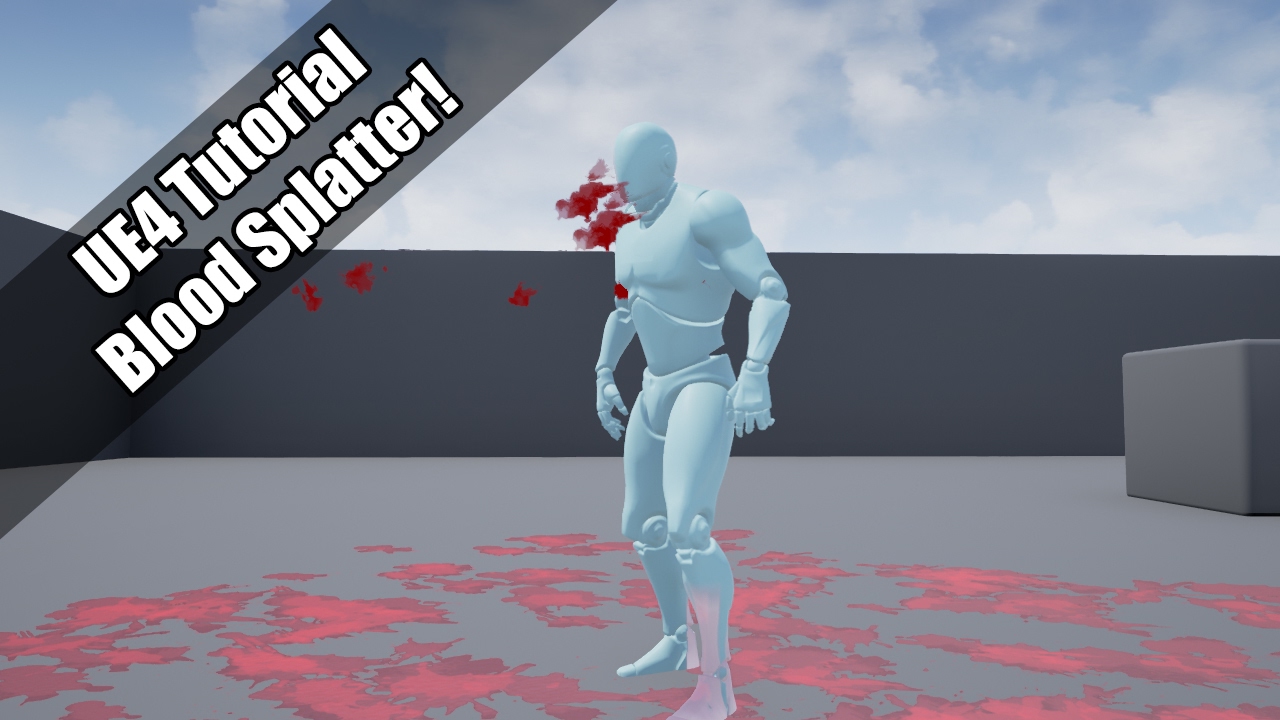
UE4 tutorial on spawning a blood spurt particle, which them adds decals to the environment!
So violent :'(
Request by - "Nickname Surname" (that's literally his handle!)
does anyone know how to recreate this kinda effect? I want everything in the background (even up pretty close to foreground) to be strongly blurred, but depth of field is just being pretty useless, cant have it strong enough without it covering the foreground too

I tried a blurred glass material effect too to just put it in front of the background but it barely blurs it
 unreal thorn
quasi wolf
does anyone know how to recreate this kinda effect? I want everything in the bac...
unreal thorn
quasi wolf
does anyone know how to recreate this kinda effect? I want everything in the bac...
Just use the vanilla DOF effect.
quasi wolf
but I just mentioned the problems with that
unreal thorn
quasi wolf
but I just mentioned the problems with that
Adjust the focal length and aperture then.
Adjust is your keyword of the day.
quasi wolf
thats only on cine camera right? and I had pretty much the same problem with that
unreal thorn
quasi wolf
thats only on cine camera right? and I had pretty much the same problem with tha...
Nope
Regular camera component has similar params
FWIW I'm able to consistently get good results with few adjustments to the parameters.
quasi wolf
they dont seem to do anything
and fov really messes with this too
aperture doesnt go up high enough, because if I make the background as blurry as I want, well it affects the foreground too, and if I adjust it even a little bit the background becomes barely blurred
and the foreground is blurred by practically the same amount
even at 3 focal distance, things that are right up close to the camera are blurred
quasi wolf
ah, this guy helped
 unreal thorn
quasi wolf
ah, this guy helped
unreal thorn
quasi wolf
ah, this guy helped
Those are what I exactly mentioned lmfao
🤣
And those are not even hidden
quasi wolf
Sensor Width is, can’t access that anywhere else
and it’s confusing because aperture width seemed to need to be higher than the maximum it allows you to use, yet having it at 0.5 fixed it, and focal distance is really high which was also causing problems, so I still don’t get it but that exact set up works
 lavish solstice
For making a large gerstner water plane mesh in for UE4, in order to save performance do I need to create LODs in blender? Or will UE4 automatically scale down the gerstner waves geometry in the distance?
unreal thorn
Though to be fair it depends on Landmass
unreal thorn
 celest birch

Any ideas on how to fix this? Occurred after I added a UV channel.
Or even just what this would be classified as.
There was a number of resources for black mesh but haven't found any to try now.
 fossil swan
would need to see the material, as I assume the problem lies in that.
humble warren
molten kraken
let me know if the command helps you, I had the same issue when upgrading to ue5
Sorry I didn't have much time these days. I tried with the uncheck option + your command line + the screenpercentage command and still doesn't work while playing in the editor...
 wanton vector
Hey guys, Im trying to make a spreading gascloud - mechanically a sphere collision that increases in size over time to damage players), and I need to spawn gas particles in the sphere. I'm not very versed in VFX, so would love if someone could break down what I would need to do in order to pull this off. I've heard that using a method to spawn particles within a box with a changeable radius is possible, but how would I change this "changeable radius" from my blueprint? Any input is very welcome! 🙂 🤔
 fringe flare
Can anyone point me the proper direction if I want a mesh to occlude another mesh

ex: I want to be able to put a window on a wall and have it see through the wall
quasi wolf
probably some kinda opacity mask? I’ve done something similar with a radial mask thing to make holes in shapes but idk how much help that would be
 coral fable
Hey there! Any ideas on how to make Distance fields ("Distance to nearest surface") Displacement work in UE5 since displacement/tessellation has been deprecated? Any suggestions?
fossil swan
@midnight forge these kind of vids should go in #released instead :) (if its unreal related)
 midnight forge
allright mate
 fickle coral
Is there a way to add height/WPO to UE4 Decals? Or is there a way to achieve that visual effect with a different approach?

Faking this effect with normals is sadly not a solution for this, as we need actual mesh manipulation
 dense storm
I'm having this problem where in my animation montage, the anim trail looks good but in game, it looks chopped.

In game:

What could be the reason?
 heavy nova
dense storm
I'm having this problem where in my animation montage, the anim trail looks good...
heavy nova
dense storm
I'm having this problem where in my animation montage, the anim trail looks good...
does your montage have a blend in time?
if the trail is starting during that you will get incorrect results. It's also fairly frame rate dependent. Are you using cascade or niagara?
 viral timber
Hey, how do I play sound on mesh collision in Niagara? The UE docs say Set up the Play Audio condition but I have no clue what/where that is?
Trying to create bullet shell effects
viral timber
nvm this helped https://www.youtube.com/watch?v=zANHydk1J60

In this video we'll start to talk about Niagara and Audio in UE4.
UE4 Playlist: https://www.youtube.com/playlist?list=PLomQNLPOWtzbpKLbhlyYYneuoPfMgfE9f
Unreal Website: https://www.unrealengine.com
Chapters:
0:00 Intro
0:22 Setup
1:17 Play Audio - Particle Spawn
1:48 Play Audio Explanation
2:35 Add Audio Cue
3:04 Niagara System Audio Test
3...
 stone vault
Hi Guys. I cant figure out why my decals are blurred out in Standalone or even Shipped game. ( Editor is fine ) Im on forward rendering with DBuffer Decals ON. Thanks for replys


 fervent cloud
how do I make this stop spawning them sooner?
 fossil swan
@fervent cloud depends on the effect, required > loop > reduce amount of loops
lifetime > lower its lifetime.
gentle kestrel
Hi all, i'm trying to make animated mat. Now i have two blurred texture masks lerping one to another and i have if node which kind of clamps the result. But i want to receive blurred edge of mask, is there any node which works with floats?


Or i have to find other way how animate this thing, mb create flipbooks?
quasi wolf
stone vault
Hi Guys. I cant figure out why my decals are blurred out in Standalone or even S...
is it definitely using the same graphics settings
you can test with the commands if you dont have any other way to change the settings in standalone
fervent cloud
fossil swan
<@432643241993568257> depends on the effect, required > loop > reduce amount of ...
Thank you, that worked
fossil swan
np :)
 visual basin
I'm wondering, is there a way to fix the lack of tonemapping when enabling HDR output in the engine? The color output between when HDR is enabled and not look really different.
Case in point, the top is when HDR output is disabled, and that looks correct, but the bottom image looks incorrect, and as far as I'm concerned, you can't use LUTs in HDR mode:

 unreal thorn
visual basin
Case in point, the top is when HDR output is disabled, and that looks correct, b...
unreal thorn
visual basin
Case in point, the top is when HDR output is disabled, and that looks correct, b...
You can't use LUT, however, you can use the colour grading parameters.
visual basin
Alright, I'll have to do some fine tuning to get the HDR output looking correct.
Although, I really should look into getting an HDR10 certified display to do testing with.
visual basin
Yeah, even if I personally can't see a huge difference after adjusting the gamma, saturation, contrast, and temperature, both the highresscreenshot and Windows GameBar screenshots are giving me totally different results from what I'm perceiving in the editor viewport.
stone vault
quasi wolf
is it definitely using the same graphics settings
Yes, it is.
unreal thorn
visual basin
Yeah, even if I personally can't see a huge difference after adjusting the gamma...
Well, it's literally impossible to convey HDR display output in LDR image.
 stray sigil
Hi, got question regarding material.
Can I add material on top of another material? Like lets say I got a character with face material, and I wanted to add painted mask, is there a way to add another material on top of the current material without doing a 1 material with Alpha in it? (What If I got 100 mask design so I can automate)
 zealous fiber
I have a texture that uses a Rectilinear Grid (non linear grid size https://vtk.org/Wiki/VTK/Writing_VTK_files_using_python) from a dataset. I used color curves to apply the mapping to the textures like this:

but that produces rectangular artifacts at the 255-2000km scale i need them.

Any color curve will produce these artifacts. And increasing the resolution on the curve atlas also changes nothing.
Do you have an idea how I can make the texture interpolate properly again with custom UVs?
quasi wolf
stray sigil
Hi, got question regarding material.
Can I add material on top of another mater...
I basically did that once, I think I just put a transparent texture into the main material and lerped it onto it, and it was a parameter that could be swapped out
I can check later how it’s actually set up
stray sigil
ah so thats like material b lending, we can achieve that too with alpha, what I wanted was to blend 2 material (either by layer material or other more efficient way)
is there a way to get what material the object is using then check if what albedo texture it is using and maybe change from there
 olive sail
Is it just me, or is casting a translucent shadow off of 100 Niagara systems each with 1 particle way less performant than casting a translucent shadow off of 1 Niagara system with 100 particles?
 cyan jewel
Is there a way to add trails to particles in Unreals default particle system?
olive sail
Do you mean ribbons?
cyan jewel
Are they one and the same? In Unity I think they're different things?
olive sail
I don't know, but ribbons are basically a bunch of quads that can draw stuff on them, stitched together to form a continuous line/path
that stick to stuff, and are used for trails
 devout tiger
Does anyone know why a fractured geometry collection would just explode every time? After clustering it becomes really unstable for some reason and I can't pin it down.
 fervent merlin
o.O;
 unkempt storm
You can search the Dev Community for tutorials. https://dev.epicgames.com/community/learning

Epic Developer Community Learning offers tutorials, courses, demos, and more created by Epic Games and the developer community.Learn UE and start creating today.
 pseudo rover
im trying to make a dust particle effect and for the most part it seems to work, but while the dust particle is moving around, it has some weird motion blur applied to it. How would I fix this? Ive disabled motion blur everywhere, but no matter what i do there is alsways extremely noticeable motion blur following my particle
pseudo rover
well it seems that it works while anti aliasing is off, but i want anti aliasing on. Is there any other way around this?
unreal thorn
But you did ask others already about this yesterday to the point of spamming
 heady robin
Hey guys, quick question. I have some low poly trees in my Unreal scene which I painted in foliage mode. Is there way to export this as an OBJ or FBX so that I can use this inside another programme? TIA
olive sail
From my tests, volumetric translucent shadows of particles run at an unacceptable cost due to a completely arbitrary constraint, making it impossible to create games with a top tier VFX standard. I posted this on the feedback forums: https://forums.unrealengine.com/t/subpar-performance-of-volumetric-translucent-shadows-arbitrary-constraints/525748 It'd be great if you could vote it up so Epic sees this and fixes it!
Volumetric Translucent Shadows (VTSs) come with an arbitrary constraint that goes exactly against how you’d usually use particle systems to spawn effects. Here is a single system with 5000 particles casting VTSs: It runs great: Here are 500 systems each with just 1 particle casting VT...
celest birch
Hey
I made some vfx and I want to get better making them
Does anyone have any tips

Lightning field I made for fun. If it gets 20 likes i will make a tutorial.
This is probably the best thing I've made so far in niagara
It's invisible particles moving towards the local 0,0,0 with ribbons and particles being emmited from the particles
 analog onyx
@olive sailTo be fair, what you asking for, does not make a lot of sense. I also doubt that not being able to render fourier opacity maps from 500 particle systems is any kind of constraint on path to top tier VFX
celest birch
That's true
Like the best vfx are the ones that say the most with the least amount of effort
 placid lance
Hi everyone, I've also asked this question in the Niagara channel, to no avail. Is there ANY way to set the Niagara mesh render at runtime?
quasi wolf
is anyone here good with world position offset? I want to have multiple points along a cube mesh, and pull them up and down to create waves
no idea how to do it
kinda losing hope because theres barely anything online and Im hardly a genius

fossil swan

In this talk-turial I'm going through the steps to create a bendy flashy wormhole by only using the material editor, heavily using the vertex world posi...
quasi wolf
thanks
man I dont enjoy materials
even when watching the process of making this none of it makes any sense to me
 undone sun
So I'm trying to create a rain simulation and I want my rain to look realistic as possible... so I created a droplet and I want it to have it spawned across the world while still keeping that shape. Does anyone know how I can do this?
 fossil swan
recreate the shape in a texture, put it in a material, spawn that, save 60-ish particle spawns per drop.
undone sun
 I will try that out, thanks!
 wraith hound
quasi wolf
man I dont enjoy materials
wraith hound
quasi wolf
man I dont enjoy materials
whaat materials are the best
quasi wolf
yeah but
it hurts my HEAD
when it comes to maths, Im decent with the geometry side of it which has really helped me with blender (and learning blender has helped me with geometry too) but all that messy gibberish maths in materials just makes me go 
wraith hound
u will learn it someday so its normal, its like Coding/ Blueprinting
quasi wolf
yeah true I can do basic things but not the complicated special effects
 regal sphinx
Does anyone have any tips for programming virtual light shows? I am trying to use sequencer but if i am working with say 30 lights and i want to batch keyframe half of them or all of them at the same time the sequencer doesnt let me multi select and assign keyframes
 cobalt marlin
so im having this problem where when I load up a level I want to be dark its dark for a second but the it just gets super bright and I dont know how to fix this
unreal thorn
regal sphinx
Does anyone have any tips for programming virtual light shows? I am trying to us...
unreal thorn
cobalt marlin
so im having this problem where when I load up a level I want to be dark its dar...
Look into the post process / camera's auto exposure settings. By default the range is extremely wide.
unreal thorn
quasi wolf
yeah true I can do basic things but not the complicated special effects
For reference, even I pull up graphing calculators for working on materials lol
devout tiger
Does anyone know how to activate Chaos Destruction within sequencer?
 hollow quail
Hello guys! Can you answer me - how can I change Spawn Rate by time? With blueprints?
 signal talon
Hope this is the right place to ask but how would someone go about making a effect like this?
Assuming one already has a model and an image
 fossil swan
that... might be the most specific thing ever asked in this channel.
Wonder if its just an object-space-aligned uv
quasi wolf
yeah, is it actually just a specifically placed texture, or does it always seem to face you no matter the angle of the gun? cus there’s a pretty easy way to make a texture always the same place on screen, but I’m not sure how to scale that to a model
unreal thorn
signal talon
Hope this is the right place to ask but how would someone go about making a effe...
Precisely, what effect?
The glowing edge thing, might be fresnel.
The screenspace aligned texture, there should be built in material function for that (though not sure about the runtime cost)
signal talon
unreal thorn
The glowing edge thing, might be fresnel.
The screenspace aligned texture, there...
Yeah the displaying of the image and making it so that the player always sees the image from the same perspective
 deep dagger
signal talon
Yeah the displaying of the image and making it so that the player always sees th...
deep dagger
signal talon
Yeah the displaying of the image and making it so that the player always sees th...
Prolly a screen aligned UV with distortion based on fresnel. Scope lens is doing something in addition to that it looks like.
fossil swan
its basically this
https://twitter.com/jkashaar/status/1047979071609757702

Freebie: Object-stabilized screen-space UVs. Probably useful for VFX, I don't know! :D
With a hat tip to @Ed_dV who made the same thing for Unity, here's an @UnrealEngine version.
Material graph in the replies!
#realtimevfx #gamedev #gameart
736
174
 Twitter
·
quasi wolf
Twitter
·
quasi wolf
does anyone know how to restrict a particle effect to a material? like for example bubbles only showing up in water
and this is 2d so I dont mean with a post process or anything
when bubbles float to the top of water they shouldnt be visible when theyre off of it
quasi wolf
also a dumber question, how would I have a fade at the top of my material, but it doesnt scale with the objects z scale? I have the fade set up with a mask texture rn but idk how to stop it scaling
quasi wolf
oh
 dusty gate
any way to make particles spawn more the faster they're moving?
i'm having the issue of with a smoke trail on a moving object, the particles spawn too little so you can actually see the individual particles instead of a trail, it's not thick
but if i increase the spawn rate, when the object stops and they all spawn in the same place its gonna look awful
fossil swan
there is a spawn per unit
that way it spawns X particles per Y units traveled
dusty gate
fossil swan
there is a spawn per unit
that way it spawns X particles per Y units traveled
i am trying it and it seems to make a massive puff of smoke when it starts moving then go back to default
fossil swan
that depends on your settings
dusty gate
fossil swan
that depends on your settings
I ended up using ribbons to get an effect i'm happy with
btw, is there a "color by velocity" option? can't find any
 copper bone
If I wanted to add particles to my characters fist when he is doing a punch animation should I add it in blender or unreal?
fossil swan
unreal
unreal thorn
copper bone
If I wanted to add particles to my characters fist when he is doing a punch anim...
Unreal, but you can author the meshes and textures that you'll use for the particle in Blender first.
 plucky sigil
I dont know if this goes here. but Ive got an odd thing happening. My volumetric fog (via exponential height fog) is neon green

and I dont know how to fix it.
Nothing that I can find is labeled as this color. When I turn off volumetric fog, the green goes away.
figured it out.
had something to do with my albedo.
unreal thorn
 rapid oracle
is it possible to fix?
rapid oracle
is it possible to fix?
Make sure your materials don't have fade near camera in the opacity
 hexed root
hi guys, what's the equivalent of - operator in HLSL inside the material editor?
for example:
float2 test = float2(10, 4);
float2 test2 = -test;
@hexed root multiply by -1
 delicate creek
Has anyone ever tried linking gesture recognition to sprite manipulation similar to audio visualization but controlled?
hexed root
analog onyx
<@141723821458587649> multiply by -1
Thank you, but as far as I understand from this docs page ( https://docs.microsoft.com/en-us/windows/win32/direct3dhlsl/dx-graphics-hlsl-operators ), the result of - is a number always negative. Is it correct? Maybe using Abs and then multiply by -1 could do that? I was trying to make an SDF cross, but something was wrong translating from shadertoy to material editor and I thought it was this unary minus, but maybe it's not that 🤔

Expressions are sequences of variables and literals punctuated by operators.
https://www.shadertoy.com/view/XtGfzw this is the shader URL by the way, but I'm having trouble translating it to the material editor
 frank epoch
how do I attach a particle emitter to cloth? Im making a molotov and I want a fire particle emitter on the cloth.
unreal thorn
frank epoch
how do I attach a particle emitter to cloth? Im making a molotov and I want a fi...
Just attach them to the bones for the cloth.
frank epoch
this is what happens when I do that
 analog onyx
hexed root
Thank you, but as far as I understand from this docs page ( https://docs.microso...
analog onyx
hexed root
Thank you, but as far as I understand from this docs page ( https://docs.microso...
No, that is not correct.
hexed root
analog onyx
No, that is not correct.
Ok, thank you!
 weak jewel
Can I make post process volumes not add up on each other?
My scenario is like this: I have 1 Volume next to the player and it blends very well. but upon adding another pp volume close to that area it adds to the effect from the other volume... (basically making it look like the player is inside a volume even tho he isn't)
This is important for me because I use this blending for the player to know where are danger areas. and giving the full effect just because he's between 2 volumes isn't what I'd like to have
 errant night
I'm trying to have an object be invisible but still have its reflection render on the ground.. is this even possible?
here is a similar idea but with shadows
 unreal thorn
errant night
here is a similar idea but with shadows
unreal thorn
errant night
here is a similar idea but with shadows
Not with dynamic reflections.
errant night
@grim briar ah I was kinda thinking something like that too .. maybe have a plane with a fake reflection.. but you are right a decal could work for this... I wonder can a decal have an animated sequence playing.. I never tried this sort of thing before
 dreamy sundial
frank epoch
this is what happens when I do that
dreamy sundial
frank epoch
this is what happens when I do that
@frank epoch Hey, i'm having the same issue, did you find a solution for it?
fossil swan
Materials: a technical overview
https://www.youtube.com/watch?v=jyiqY2ycPzw
(this is a gold-mine!)
Materials: Tips and Tricks for optimizations:
https://docs.google.com/document/d/1-guvLUfwk7fcVOuHCTEehJWf7i6AoDoU65jIKwSIG6Q

This was a presentation i was asked to prepare for Beyond-FX's apprenticship program, discussing how the rendering pipeline can be used in VFX materials in Unreal.
Link to the presentation:
https://docs.google.com/presentation/d/1bQBiHrrmwACJhbK89IQOW_J97F37ymjgt-Q3mO7yPYY/edit?usp=sharing
If you have any questions about Game Art VFX or the Un...

UE4/5 Texture/Material/Cascade optimization tips By: Yoeri - Luos_83 - Vleer Tiny foreword: Hello, fellow (UE4/Real-Time VFX) artists! Yoeri - Luos_83 - Vleer here :) Over the past many years I have gathered quite a lot of information regarding (basic) optimizatio...
fossil swan
fossil swan
Materials: a technical overview
https://www.youtube.com/watch?v=jyiqY2ycPzw
(thi...
 marble epoch
fossil swan
Materials: a technical overview
https://www.youtube.com/watch?v=jyiqY2ycPzw
(thi...
marble epoch
fossil swan
Materials: a technical overview
https://www.youtube.com/watch?v=jyiqY2ycPzw
(thi...
Watched it last week, REALLY good material
 uncut mulch
How do I get a BP that has a particle system going between two static meshes within the BP?
Well, how so I set the target within the BP to be the other static mesh's socket I mean?
frank epoch
dreamy sundial
<@330811301423218698> Hey, i'm having the same issue, did you find a solution fo...
Unfortunately no. I tried looking it up for a while but couldn't find anything.
It seems strange that there's no documentation for this though, considering that one of the first things you would want to do with cloth is have it emit particles. Through either water droplets when wet or flames when on fire.
dreamy sundial
It seems that i got it working
 ocean shard
Any advice on doing compute shaders? I've poked around some of the UE systems and it seems like they're using at least two methods
Material Function -> Custom Expression -> Include a .ush file and call into it
Niagara Dynamic Input Script -> Custom HLSL -> Write shader inline
These are pretty good, but I'm trying to examine all my options. Anyone using a different method to encapsulate their compute shaders?
 toxic lance
Hey folks! This could probably be a question that popped up many times in this page. What are the best resources to getting started with Shader design and development in Unreal for someone who has a general graphics background.
analog onyx
@toxic lancehow general is your general ?
toxic lance
analog onyx
<@751535738641711134>how general is your general ?
I have a masters in Computer graphics 🙂 and experience writing shaders in Unity in HLSL. Another way to frame this question would be which resources would be good to get started with shader development in unreal for someone moving on from Unity
analog onyx
toxic lance
I have a masters in Computer graphics 🙂 and experience writing shaders in Unity...
Best bet is to familiarize yourself with Unreal's rendering code. Once you are more or less fluent with architecture of Unreal's rendering and code style, you can get yourself acquainted with rendering dependency graph https://docs.unrealengine.com/5.0/en-US/render-dependency-graph-in-unreal-engine/ Graph will cover by far most of what you would need to work with. For specific example, you can use Unreal's runtime mip map generation code ,as it is the easiest and uptodate example.

An immediate-mode API which records render commands into a graph data structure to be compiled and executed.
toxic lance
analog onyx
Best bet is to familiarize yourself with Unreal's rendering code. Once you are m...
Thanks for your inputs @analog onyx I have been lazy about getting to know the guts of unreal rendering, but I Agree doing that will provide a solid understanding.
 indigo remnant
hi all, with all the fluid hype in niagara, I still cant understand how to let particles be rendered as fluid body? It looks like metaballs effect but I dont know how to do this with millions of particles.
Generally I want to be able to merge millions of particles into a mass, does not need to behave like liquid
uncut mulch
can i define where the source and target of a particle system should be in a BP?
please @ me to let me know. :) thanks in advance. :)
 languid hearth
Do unreal raytraced refl only see opaque n mssked mat?? Many old flames conv into Niagara not working
@languid hearth
 rotund rampart
 versed frost
If I understood correctly, that's a lens flare
should be under CineCameraActor -> lens -> lens flare
versed frost
No not the light itself but the light it casts to the floor
rotund rampart
Just started using UE5 so not sure if this would work but you could try light baking at a super low resolution
 swift magnet
that would be something like vertex lighting, a very old way of rendering things(because that was all they could do)
 leaden vault
toxic lance
I have a masters in Computer graphics 🙂 and experience writing shaders in Unity...
leaden vault
toxic lance
I have a masters in Computer graphics 🙂 and experience writing shaders in Unity...
Learn Niagara. You can write hsls from scratch if needed.
unreal thorn
swift magnet
that would be something like vertex lighting, a very old way of rendering things...
Until Phong came in
 warm scaffold
Trying to use SceneCaptureComponent with PostProcess Material. The PostProcess Material is applied in the settings of the Capture Component. Can't get any working result. Do I need to activate something?
 boreal swallow
hey guys! So basically im looking for a way to pour a drink out of a cup, what woudl you recommand, whats the best way to do that? is there any youtube tutorials for that or anything?
unreal thorn
boreal swallow
hey guys! So basically im looking for a way to pour a drink out of a cup, what w...
Fake it, with premade vertex animations
In games like GTA V single player, when you drink in safehouses, notice how the mesh representing the water moves around the same exact way, and just shrinks into nothing.
boreal swallow
unreal thorn
Fake it, with premade vertex animations
In games like GTA V single player, when...
but the sad part is i want to splash it on something to look epic :/
unreal thorn
boreal swallow
but the sad part is i want to splash it on something to look epic :/
Pardon me, I slightly misread the question. If you're in UE5, you can use the built in fluid sim modules with Niagara.
boreal swallow
unreal thorn
Pardon me, I slightly misread the question. If you're in UE5, you can use the bu...
im kinda new to unreal is it easy to transfer project between ue4 and ue5? is it even possible?
unreal thorn
boreal swallow
im kinda new to unreal is it easy to transfer project between ue4 and ue5? is it...
It's forward compatible, means you can upgrade your project to newer version, but not the other way around.
boreal swallow
unreal thorn
It's forward compatible, means you can upgrade your project to newer version, bu...
is it okay if i add you? i'll prolly haw a few questions in the future if you dont mind
unreal thorn
boreal swallow
is it okay if i add you? i'll prolly haw a few questions in the future if you do...
You can simply ask them away in this server.
boreal swallow
unreal thorn
You can simply ask them away in this server.
sure sure
 jolly stream
Could anyone point me in the right direction to understand why as I zoom out a bit, I start to get visual artifacting here (the big lines) on this VFX?

It is 4 mesh particles that scroll the texture across them via the UVs
fossil swan
that's caused by the mipmapping of the texture, since the resolution is lower, odds are, merged pixels blend with the edge, and it repeats when clamped.
you can try to mask it trough some math, or try other compression settings/mipmap settings and see if that helps
 fallow dune
cascade, if u use GPU type, and collision, and acceleration -980, lifetime long like 12
particles going through floor after some seconds
how to fix?
fossil swan
there are values in the collision module related to that.
fallow dune
all changed nothing helped, which one?
jolly stream
fossil swan
that's caused by the mipmapping of the texture, since the resolution is lower, o...
Thank you!
fossil swan
use distance fields, its a known thing with scene depth.
fossil swan
red message tells you what to do. its a bit costly, but results are --generally-- better.
fallow dune
thanks
 nova willow
Anyone have any ideas on how one might approach reducing the resolution or detail on lights and reflections? For example if you look at this picture, there's a light reflection effect on the metallic door material, and the light effect on the floor is very smooth - I kinda wanted to try and make them more jagged and pixelated - but I have no clue how that could be achieved

I'm guessing it might involve a custom blending mode which handles lights differently, but those seem to be extremely complicated to set up and I have no idea if that's even the right direction :D
leaden vault
Does anyone know how I could get a planer equivalent of the cylindrical intersection node in the material editor?
unreal thorn
nova willow
Anyone have any ideas on how one might approach reducing the resolution or detai...
Aside from faking it with some light functions, I don't think there's a way due to the per pixel lighting
nova willow
Yeah I was looking to build the engine so I could try out what I can do via shading models, but of course the documentation for that too is completely out of date and lacking vital pieces of information such as "you need hundreds of gigabytes of free space" :P
analog onyx
@nova willow a lot depends on how exactly do you want resolution reduction ro be controllable
As a minimum, that needs lighting and reflection shaders modification and quantization of positions they work with.
nova willow
Based on my vague understanding that sounds like something that might be relevant at least :D
Some ideas for it that I had was potentially making the edges of light effects rougher so it's not so smooth as in the image, and reduction of color detail on them
I'm not really an expert on shaders though so we'll see how that goes. I can do some materials stuff and I've done some pixelation post process effects but that's about it... but I think the basic approach would probably be slightly similar to a cel shader, since those reduce the colors for example, so maybe I can just look at one of the guides for those for ideas
fossil swan
@paper merlin job-offers only go in the dedicated job-channels. please read the #instructions channel on how to do so.
( #rules )
 paper merlin
fossil swan
<@585857700777426964> job-offers only go in the dedicated job-channels. please r...
paper merlin
fossil swan
<@585857700777426964> job-offers only go in the dedicated job-channels. please r...
sorry Im new here, thanks!
fossil swan
np!
 analog quarry
oki stupid question second try. If I have a Post process material and want to overlay the scene texture color with the color from the scenetexture custom depth... how do I do that? 🙂 Like the custom depth doesnt have an alpha channel right? so have to mask out the white?
 sterile moat
Is there a way to disable LODs for screenshots in editor?
heavy nova
Hey peeps, with decals that need very strict rules on which surfaces they can apply to (ie certain ones that will be pinned to moving objects, certain ones for static world space grime, others for blood splash etc etc), is there anything that does this other than custom stencil? Disabling decals on certain surfaces is not an option because they need to still apply, but with specificity.
I'm trying to figure out whether I'll have to tweak the engine to create a fake custom stencil setup so that it works with nanite, or if there's some way to do that without relying on custom stencil?
nova willow
Well I can certainly say my light shader modifications did someting lol

it made the two cubes using my shading model extremely reflective lol
nova willow
analog onyx
As a minimum, that needs lighting and reflection shaders modification and quanti...
Would you happen to have any ideas where/how specifically this could be done? I've managed to set up a shading model and I think this could be done in DeferredLightingCommon.ush GetDynamicLightingSplit, since that seems to be where it deals with world pos and such before going into the light calculations, but so far I can't make a whole lot of sense of it :)
 placid rose
hey i was wondering if it is possible to create a particle system which is going to be used to pour sand out onto the level and then stay their so it can be used to traverse the level? if that makes sense. thankyou
nova willow
Actually I might have found it :) Changed stuff in DeferredLightPixelMain in DeferredLightPixelShaders.usf

Regular lit material on right, custom shading model on left
 nova willow
Are there any particular gotchas as of 4.27 for assigning data into GBuffer.CustomData? I'm not having much luck
I updated WRITES_CUSTOMDATA_TO_GBUFFER with my shadingmodel, and I'm writing data into it in SetGBufferForShadingModel, but the value for CustomData.x is always 0 when trying to read it in DeferredLightPixelMain
nova willow
Hmm, SetGBufferForShadingModel for it definitely runs, I tried setting BaseColor to 1 in there and it changed the material to always be white 🤔
But even if I just assigned 1 into CustomData.x it just doesn't seem to be available in the light function...
 waxen yacht
Anyone teased the idea yet of dynamic projection transforms?
eg interpolating from pure orthographic to 80mm perspective (in a single rendered frame)
nova willow
nova willow
But even if I just assigned 1 into CustomData.x it just doesn't seem to be avail...
turns out you gotta update bool HasCustomGBufferData(int ShadingModelID) as well
 nocturne granite
Hi all, anyone successfully rendered niagara particle fx via the sequencer to movie render queue in UE5[.0.1]? struggling to get particles sim shown in viewport visible to/rendered out of either the Moview Render Queue or legacy sequencer movie capture. New to niagara and can find nothing on specific settings required to actually render the particles..any help/insights or sources of learning would be much appreciated!
nova willow
Anyone happen to know what's the default value for CustomData0 and CustomData1 pins, and is there a way to control it? It doesn't seem to be 0 because checking Value > 0 in my shading model always passes when the pin isn't connected...
 blazing cove
Does anyone know if it's possible to set a stencil OP on a material that isnt a post process? I would rather quit early before the pixel shader runs than use a 0 opacity pixel shader to mask
 young canyon
Anyone know why no matter what the start distance is on the fog it won't make a difference? I want to try make it start a bit further back from the camera but not getting any results. Any help would be appreciated.

 chrome pasture
Does anyone know how to create custom shapes in a mask?
these are samples for rectangle and circle, but I need a custom defined shape that is given by a list of points.

 wary basalt
hi there, does someone know how to change perspective of an image in material?
 hollow remnant
Hi, My client wants to change the mesh size from shader. just like that: https://www.youtube.com/watch?t=10&v=RgjW0-vrxuQ&feature=youtu.be
so, Is it possible to change mesh size through material editor using world position node?
If yes then can you point me out to a tutorial so I can impalement the shader

She’s back. Did you miss her?
Widejoy Mode: One day only. Available yesterday, wherever you’re not.
The Accidental Renaissance spray will be available from April 1, 8:00AM PT through April 8, 11:59PM PT.”
Play VALORANT: https://riot.com/3idlntG
Join the Discord server: https://riot.com/3n1xltZ
Follow us:
Twitter: https://riot.com/2HIv1s1
Ins...
unreal thorn
hollow remnant
Hi, My client wants to change the mesh size from shader. just like that: https:/...
Try improvise from this and have fun making the next wide public figure.
https://forums.unrealengine.com/t/material-modifiying-objects-scale-using-objectscale/353662/3
I don't think it works well with skeletal meshes tho

Take the objects world position, subtract the Absolute world position and multiply the result by a value. I use the sine of time to make it pulse back and forth. Wire all that into World Position Offset.
 gleaming ravine
Is it possible to store a list of post processing effects in a datatable so I can call them in a BP? They wouldn't be post process materials, just changes to saturation and vignette.
If so, which datatable type would I select to set this up?
I'm trying to avoid having 5 different Post Process Components in my character BP that I jump between at different health levels.
 austere river
is there a way to stack multiple post process effects in a material?
 somber tundra
hey, im making a beam emitter but i want to give each point in the particle some initial movement (so the beam drifts apart like smoke). How can i do this?
hollow remnant
@unreal thorn thanks alot
hollow remnant
@unreal thorn I successfully changed the world scale but is it possible to change the local scale through material?
 ebon vapor
Hey guys, been trying to sign up with sketch fab after the recent partnership was announced. I signed up with my epic account but it also wants me to link with Facebook. When I try to do that I am getting this error... Any ideas what I can do?

I'm hoping there is a workaround.
chrome pasture
Is there a way to read bitmaps in runtime from a file? I need changing patterns so I can't draw it once and select it, as it will constantly change

 winged girder
Hi! does anyone remember the name of a sample project with a 3rd person Girl with a staff that performs a dash?
leaden vault
chrome pasture
these are samples for rectangle and circle, but I need a custom defined shape th...
IDK about using list of points, but using a texture would be trivial.
 bright patrol
I was looking to have a fresnel effect on objects that are interactable in my game. I came across tutorials talking about the material creation part, but a bit stumped on how I'd actually have this work in conjunction with the existing material on objects since they only have 1 slot. Is there a concept of runtime material layering or a different approach that should be done for something like this?
fossil swan
combine fresnel with a color/whatever, and add this to the existing setup or let it go into the emissive slot. if you want it to fade in/out use a variable multiplied with your fresnel-setup.
 shell oriole
how do i make it so that my particle system follows a skeletal socket around after spawning
chrome pasture
leaden vault
IDK about using list of points, but using a texture would be trivial.
Yes I found this out, but the issue is that the texture is not the same every time, so I have to generate it in runtime based upon the list of points. So far I have managed to make it and save the texture to disk, but I can't run the blueprint function "texture from file" in the mask file because it can't run blueprint code. How can I get variables into the mask file?
shell oriole
shell oriole
how do i make it so that my particle system follows a skeletal socket around aft...
right now it kinda just stays in one place in the world after spawning
leaden vault
chrome pasture
Yes I found this out, but the issue is that the texture is not the same every ti...
By "mask file", do you mean the material?
chrome pasture
leaden vault
By "mask file", do you mean the material?
Yes, the material file looking like (but it's only the mask, the material is being set in another file and just use this mask):
 leaden vault
chrome pasture
Yes, the material file looking like (but it's only the mask, the material is bei...
leaden vault
chrome pasture
Yes, the material file looking like (but it's only the mask, the material is bei...
I believe you can convert the "mask" into a parameter (right click, convert to parameter) and then you can set that parameter in blueprints
leaden vault
chrome pasture
Yes, the material file looking like (but it's only the mask, the material is bei...
Here's a video tutorial for how that's done

A few people wanted to know how you can use blueprints to change materials around. :)
Twitter: https://twitter.com/Play_Ruff
Patreon: https://www.patreon.com/deanashford
chrome pasture
Thanks, will check out!
leaden vault
chrome pasture
Thanks, will check out!
Let me know if this works for you please. If it doesn't work, I want to be able to learn why it didn't too.
I'm by no means an expert ( I have like 2-3 months of experience) so I'm also still learning
 wild rock
I have a post-process shader that I'm using to show meshes when they are behind others, by writing to the stencil buffer. Right now they're just showing as solid blocks of colour, but what I'd like to do is more of a fresnel-y transparent effect.
The problem is that I'm not sure how to get the fresnel node to work in a post-process material. Don't I need access to the normal of the pixel? But it's behind other actors.. is there something else I should be doing?
unreal thorn
wild rock
I have a post-process shader that I'm using to show meshes when they are behind ...
Unfortunately custom depth doesn't carry over any other buffers
wild rock
unreal thorn
Unfortunately custom depth doesn't carry over any other buffers
Could I write the fresnel-y info into another buffer somehow and then use it inside my PP?
quasi wolf
getting a weird effect here with shadows disabled, this weird shadowy fade culls along with the walls, what can I do about that? https://gyazo.com/cf2748996636ad187b2fe16175fee09a
if I enable shadows the dark fade is gone
quasi wolf
also, have a problem with culling on dismembered body parts, like if an npcs head is away from the body, itll disappear when the rest of the body is off screen
 mellow island
Hey, I'm making a game with cleaning in it. Does anyone know how would I be able to make an effect of having a dirty object and making it clean after washing? the point is, I don't wanna clean it all at once, but only change texture where it collides with scrubber. Thanks in advance 🙂
nova willow
You could possibly use render targets or adjust vertex colors, perhaps some other methods as well
chrome pasture
mellow island
Hey, I'm making a game with cleaning in it. Does anyone know how would I be able...
texture masks
celest birch
Hi people. Is this the right place to ask a question regarding materials and material nodes? (graphics and this looks like it)
I have one about a very simple thing, but I fail to implement it.
In short points: I'm creating a "hunter" style game where you're a creature able to "have visions of his enemies once bitten". My effect is you push the ability button and for a brief few seconds you are able to see what your prey sees, but only to some extent. I'm doing this by having the prey camera capture to texture. The capture camera has edge-detect post-process and some actors turned off. I render target to a material applied to an image in the widget and show the image widget for the duration on the "hunter's" screen.
That part works nice, but I fail to achieve to remove the clear color (background) of the rendered and leave only actors seen by the capture capture camera with the FinalColor capture.
Summary: don't know how to make my render target (final color) result sampling material ignore texture background color fill and display only what I've actually captured.
 pseudo turtle
Hi, sorry I don't know if that's the right channel but I would like to know which are the ways to do achieve that goal :
Based on a parameter at runtime (blood, snow, moss, dirt, etc...) having a way to apply this effect on all or part of my meshes in the level, which is certain degree of coverage. I can think about 2 things but I don't know if that's the right way to go and if it is optimize enough
 inner schooner
Does anybody know why my Lerp always outputs B? even when my collection parameter is set to 0...
(you can ignore the saturate node, that was just used to try and fix it but to no avail)
 fossil swan
debug scalar value, see if the values properly change from the mpc
 earnest tulip
All right, I need to pass an array of vectors(Unit positions) to niagara
As Set Niagara Vector Array doesn't work for some reason, I need to find another solution
First thing I thought was baking every unit's position to a Render Target pixel, and I think it's a good idea, I got it to work BUT:
I got it to work by drawing empty texture By UCanvas::DrawTexture on pixel coordinates and setting RenderColor to the vector value
In result, when having 1000 units I get 2000 DispatchCanvasRenderCommands calls and an enormous performance drop
I believe there's a more optimal approach
And I thought I found a solution, Making a a UTexture2D from color array
But textures use FColor, that only has values from 0 to 255, or from 0.f to 1.f (FLinearColor can have higher values and can be converted from position vector)
And I'm out of ideas 😦
 umbral needle
Good morning. Does anyone have some suggestions on how I could make the foam just upstream from the player look like text and then dissipate by the time it gets near the player's position? The water is stylized, so if the foam lettering looks mostly white, that's fine.
I'll keep digging, but my basic lack of knowledge of materials in UE is a bit of a barrier to overcome.
fossil swan
hey hey @faint aspen, next time, please post this kind of stuff in #released :) thanks!
 faint aspen
Understood 🙂
 solid frigate
Hey is there a way to control an emitter in sequencer? like it life and scale etc.?
 clear trellis
How can I get a mesh to rotate only slightly, putting any number in the initial mesh rotation module seems to give me pretty drastic rotation differences. Or just no rotation at all
 cold kraken
Does anyone know if logic operations in HLSL are a slow thing?
I'm using == to identify vertices by storing an index in UVs then doing ((Index==1)*offsetA)+((Index==2)*offsetB)+((Index==3)*offsetC)+((Index==4)*offsetD) in a custom node. I know branching in shaders is bad. Is this also bad ?
fossil swan
some branching isnt that bad, dont worry too much about it. having said that, I dont hlsl, but im sure someone can answer that properly :)
cold kraken
fossil swan
some branching isnt that bad, dont worry too much about it. having said that, I ...
Im wondering, because there are no logic operator nodes built in. Which might be because they are bad..
fossil swan
I think (tagging the person I fall back on when I cant answer things) @analog onyx can probably give some insight on it.
analog onyx
cold kraken
Does anyone know if logic operations in HLSL are a slow thing?
I'm using == to i...
they might be. They might be not. Depends on exact usage case
The code you have is bad for other reasons
float equals comparison is unreliable
whole thing could be refactored to be simpler.
cold kraken
analog onyx
whole thing could be refactored to be simpler.
I'm rounding the float before comparison. How could I refactor it?
analog onyx
that depends on what you are trying to achieve
cold kraken
Im trying to move parts of the mesh seperately. Im passing in a vector with the 4 offsets. Its a sort of timeline with markers.
cold kraken
@analog onyx forgot to make it a reply
analog onyx
cold kraken
<@212357856295518208> forgot to make it a reply
You can just make a mask from UVs of the vertex and multiply those with 4 component parameter at once.
cold kraken
analog onyx
You can just make a mask from UVs of the vertex and multiply those with 4 compon...
You mean make the comparisons, put them in a vector, multiply the two vectors and add the components?
Or what do you mean by Mask?
 uncut trench
hey guys
I'm having a slight problem with a niagara particle system
I want to align it to the forward vector of the player character but it kinda just does its own thing
(its a sword slash fx)
fossil swan
@steady tangle please use #work-in-progress for discussing work in progress :) thanks!
 last juniper
I'm trying to make a simple grid PostProcess material, any idea why it's off center (and why the gird moves slightly when the camera moves)?
Here's the material setup. It looks fine in the viewport here.

 lean pecan
Hi, in UE5 how can I increase the visible range of legacy Cascade particle effects, for example the P_Explosion that comes in the starter content?
celest birch
anyone know how I could better get rid of the artifacts? or do I have to live with these? render target -> texture -> umg brush. this is from 2k texture, worse at lower size.

 unreal thorn
celest birch
anyone know how I could better get rid of the artifacts? or do I have to live wi...
unreal thorn
celest birch
anyone know how I could better get rid of the artifacts? or do I have to live wi...
It's the lighting, not an artifact.
Though if you mean the jagged edges, you'd probably have to go with generating signed distance field from the alpha to smooth it out
 primal cave
Hi guys !
I'm trying to learn how to create Materials, and I can find a ton of tutorials on the Material Editor and on how to achieve a particular effect on another.
But what I'm lacking is the understanding of why the effect is achieve, why we do it that way.
Most of the time, the tutorial is going like "Put that node here, connect it there, then add this one, and voilà !".
What I'm looking for is something that will help me think in Material language : "to do that effect, I will need to do this thing, and this thing is done by doing these operations".
Maybe also a "toolbox" reference : a list of basic combinations of nodes that are commonly used to do part of the effects.
Currently, I can modify an existing effect, but I'm missing something to be able to create one from scratch on my own.
Do you have a link, a reference, an idea to help me ?
fossil swan
check the pinned messages :)
tharle's video is a good resource, and ue4's material compendium helps understanding most nodes.
primal cave
Ok, I'll start with that. Thank you @fossil swan
nova willow
PrismaticalDev on YouTube has good short videos on material topics as well and usually explained in such a way it gives you intuition on how the nodes might be used
fossil swan
^
primal cave
Will check it, thanks @nova willow !
Edit : for those searching the channel, the awesome tutorials are here :
https://www.youtube.com/watch?v=sGuJxr4Bfxw&list=PLUi8nuTUEtTvrcISNaNpZwtxpQbyaBstT

This episode of 5-Minute Materials we look at the Vertex Normal WS Node - one of my personal favourites since it has such great applications in level/environment design.
This is a very quick introduction to this node and the more common methods of using it - I'll be creating videos on the same nodes every so often with new use cases to explore ...
 radiant hemlock
hi guys!
Is it possible to get the height of the mesh a material is applied to inside the material editor?
I'm trying to get these things to look like sky scrapers with every randomly nth "window" lit up
https://i.imgur.com/GPDS8qx.png
So my idea is to take tex coords and divide that by the measurements of the mesh to get a tiling going. I would then run that through some kind of randomizer to get an 0 or 1 value per tile and light that up
 vagrant lily
radiant hemlock
So my idea is to take tex coords and divide that by the measurements of the mesh...
vagrant lily
radiant hemlock
So my idea is to take tex coords and divide that by the measurements of the mesh...
Why not using world position (you can subtract bounding box to get "local position")
celest birch
unreal thorn
Though if you mean the jagged edges, you'd probably have to go with generating s...
yeah thats what it is. Unable to find anything on how to make an sdf out of the alpha. Any suggestions?
radiant hemlock
@vagrant lily I'll try that, thanks
 wet sun
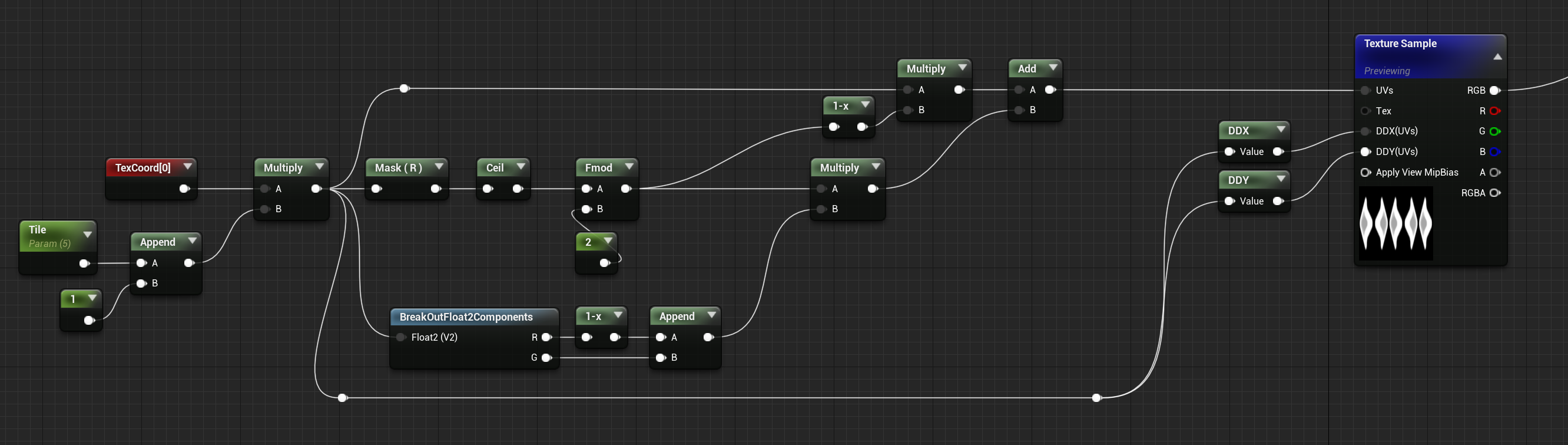
Hi, is there any way to mirror or flip (horizontally) every alternate tile of a texture using material nodes?
 fossil swan
@wet sun only set up for horizontal atm.
https://i.gyazo.com/95bf4328a8ddfe77c156aba37a664f59.png
 wet sun
Fantastic!! Thanks so much. Will try this soon
radiant hemlock
Oh man. Appearently I was on the right track the entire time yesterday! My material worked but the issue was with the instanced meshes, not the material:
https://i.imgur.com/1eEtFdf.png
Anyone know why my tiled material stretches like that on an instanced mesh?
 stable oyster
Can someone tell me how it is called when an actor(e.g enemy) flashes red for a frame on getting hit? I wanna research how to do it but I don’t know what it’s called.
fossil swan
invincibility frame, impact frame, hitframe, hitflash. dont know if there is actually one word for it, as ive heard so many.
all you need to do is set up the effect on your character (in the material), and quickly turn it on/off trough code/blueprint trough a lerp/add or so.
unreal thorn
Or alternatively a hacky custom stencil solution
 charred remnant
hey, does anyone know how to speed up the compilation of volumetric materials? I'm finally delving into them and i can't edit much of it at all at the moment, since it takes 30+ minutes to compile
charred remnant
ruh roh
i am
yeah, that seems to have sped it up quite a bit! What would be a good way to go about generating 3d noises ahead of time? i don't have access to Houdini, which i assume would be the optimal way to go
oooh, sweet! thanks! I'll try that out soon!
fossil swan
you can add a timer to the "world position" if I am correct.
else, use my custom one.
also, please read the #rules as asking the same question in multiple channels is a nono.
 upbeat shell
Hello can anyone please help, I'm making a simple wind trail particle effect and I've been trying to fix this issue for a while, with no success
As you can see, at random moments, a trail will completely glitch out
By snapping back to the start point?

Any help would be appreciated
unreal thorn
Either using particles, or convolution bloom (if you're on UE5)
upbeat shell
upbeat shell
As you can see, at random moments, a trail will completely glitch out
I have a feeling it's something very stupid I'm overlooking. If anyone knows please ping me
regal sphinx
What do I need to do to this water droplet material so that it reacts to lighting? It is using a GPU particle emitter
 olive sail
Does anyone know why my ribbons keep on making weird curves?
I'm using ribbons to give my bullets some trails behind them, but they keep on curving

Red path is the actual bullet trajectory, the white path is the resulting trail, and it only happens sometimes
nova willow
I'm noticing it's kind of annoying to adjust camera post process weighted blendable weight value - is it intended you would instead parameterize the pp effect strength in the material itself to adjust how strongly it applies? 🤔
Actually nevermind. I just found Add or Update Blendable which makes it a cinch
Well, it occurs to me it doesn't really seem to blend very much. At 0 it's off and at >0 it's on, I wonder if it needs to be configured somewhere else for a smooth blend...
So it's clear this is what I'm talking about. What exactly is this supposed to be blending between? 🤔

Ohh okay after googling and literally finding nothing about how it works I just looked at the code
Basically that blends material parameter values - so you have two instances of the same material in that list, one is the "0 point" and the other is the "1 point"
and adjusting that blending value on the second instance will blend between the first one and the second one's values
celest birch
I saw in a gdc video that a heatmap style system was used for physics interactions with the environment. I would like to investigate further how this system works. But I don't know the name of this system. What is this technique called? What is it name?

 fossil swan
render targets

Epic's Chris Murphy explores how Unreal Engine's Blueprint allows developers to create high-end effects that impact many areas of the game environment without necessarily requiring in-depth knowledge in each discipline.
By leveraging Blueprint as a tool to connect particle systems, render targets and modify assets in the world, this session wi...
 feral wing
hello~ I was wondering if anyone here is an expert on setting up cameras in ue4? I'm working on an indie project with 2D backgrounds and 3D characters and we need some help. Ideally we would find a way to render the backgrounds orthographically while rendering the characters normally. but we have no idea how to do something like that. If anyone knows a neat trick for this or is generally interested in giving us some help, please poke me ^^ (I can maybe describe the problem a bit better too)
fossil swan
what we did for Rad Rodgers was just to push back the 2d planes as far into the background as needed to give a sense of depth. (paralaxing)
celest birch
Hey guys, what would the workflow be to create this?
So I want my characters hair and clothing to turn wet to the exact height of the water when I have gone into an ocean, river, lake ect
For example if you are into a lake and up to your boots then just your boots are wet but if you go deeper or under it rises to your hair.
The same with like snow on a character in a blizzard biome
unreal thorn
celest birch
Hey guys, what would the workflow be to create this?
So I want my characters ha...
I'm thinking of using preskinned local position, and do a smoothstep of a linear gradient for the specularity.
Similar to what outlined here
https://www.tomlooman.com/unreal-engine-render-character-wounds/

Earlier this week I tweeted about hit-masking characters to show dynamic blood and wounds. Today I’d like to talk a little about the effect and how it came to be. I’ll talk a little bit...
 dapper dawn
Is there a way to spawn grass meshes on a none landscape mesh?
 golden umbra
dapper dawn
Is there a way to spawn grass meshes on a none landscape mesh?
golden umbra
dapper dawn
Is there a way to spawn grass meshes on a none landscape mesh?
You can use Procedural Foliage Volumes to spawn instances in static meshes, but not the LGT grass.
 safe merlin
Hi everyone; i have done a radial scan that i applied on a granade, the problem is that if the first effect is in play the second granade interrupts the first one and so on...i have watched everywhere for a solution on how to overlap the waves but i'm stuck. Thanks in advance.
 merry rapids
Anyone know if the scale of the spawn system at location node is broken? Doesn't matter if I type 0 or 100 I always get the same
 dapper dawn
golden umbra
You can use Procedural Foliage Volumes to spawn instances in static meshes, but ...
dapper dawn
golden umbra
You can use Procedural Foliage Volumes to spawn instances in static meshes, but ...
Oh nice thanks will try that
 rain whale
merry rapids
Anyone know if the scale of the spawn system at location node is broken? Doesn't...
rain whale
merry rapids
Anyone know if the scale of the spawn system at location node is broken? Doesn't...
if its niagara node then ye u gotta scale things inside the effect
merry rapids
rain whale
if its niagara node then ye u gotta scale things inside the effect
mmmm ok thanks
 spiral vortex
Hello everyone 🙂
I'm kinda noob in UE, but I'm trying to make some cool mechanic in my project. I have a problem, because I have no idea how to achieve washing something (for example brick wall) with pressure water. It's seems easy but here goes the harder part: I want the material from brick wall to make wet but only where the water touch the wall (it looks like painting on the wall). And then the perfect scenario will be if the water will be physical (other example, when I want to wash T-Shirt in game, and then I want to squeeze the water out of that T-shirt - that's why I want physical water like niagara)
I was trying to use niagara in UE5 with decals, and it's kinda works, but it looks bad and after 10 sec UE5 crush so I'm looking for new way.
Good working example: power wash simulator.
nova willow
I do wonder how powerwash sim does it as it seems quite elaborate, but I think it might just be using render targets that you fill to indicated "washed" when you wash something
 tepid sonnet
Hey guys, was wondering if anyone could point me in the right direction to create these kinds of effects in unreal?

This is just a quick thing I made.
I saw this idea in a game somewhere and wanted to see what I could make of it myself.
Made in Unity3D
The idea is simple, the character is blind, so using their amazing hearing they can visualise what they are hearing, even as sound bounces around...
Sort of like a Mental Picture of the world around them.
(...
unreal thorn
tepid sonnet
https://youtu.be/-vrTsaLMHd0
Seems like it can be done with some scene depth based post process trick
Yeah, 2D fluid sim and scene depth post process it seem
somber tundra
does anyone know how to make a material lit but with no normal data?
for use with a particle, if it's in light it's lit, if its in shadow its unlit
unreal thorn
somber tundra
for use with a particle, if it's in light it's lit, if its in shadow its unlit
Not with forward shading, I think
Deferred rendering doesn't expose lighting information to the material
somber tundra
i dont need lighting information, i just need the normal to interact with the light in a different way
unreal thorn
Point stand still
somber tundra
this is actually doable with a translucent material, its only an issue because im using a masked material

volumetric non directional lighting does what i need
so the info is there in the material
quasi wolf
anyone know how to do something like this but with darkness? so like instead of a fog glow colour, itd just be black so I could use it for artificial darkness https://www.artstation.com/blogs/lisavettas/1A1W/fake-volumetric-fog-tricks-for-ue4

A little tutorial about fake volumetric fog in UE4.
 echo oyster
new to effects. how do i change the color of this
 quasi wolf
the ones that say colour 
but chances are that heart is an already coloured image, might not be though
you should try doing some of your own effects from scratch or editing the starter content particles if you have no experience with them
echo oyster
quasi wolf
you should try doing some of your own effects from scratch or editing the starte...
alright thanksi will try. although should i start with niagra or this bcuz i feel this is the old one
fossil swan
yea, this is the old one.
zealous fiber
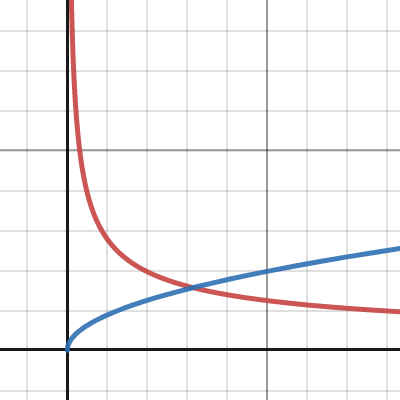
I am confused by water wave speed relation to wavelength. Catlikecoding gives this \sqrt{\frac{9.8}{k}} equation for the wave speed (https://catlikecoding.com/unity/tutorials/flow/waves/). Nvidia gives this equavtion \sqrt{9.8\cdot k} (https://developer.nvidia.com/gpugems/gpugems/part-i-natural-effects/chapter-1-effective-water-simulation-physical-models). Which is the correct one (https://www.desmos.com/calculator/czivsswkse) Do waves get faster with increased wavelength or slower ?
 pine lake
quasi wolf
anyone know how to do something like this but with darkness? so like instead of ...
pine lake
quasi wolf
anyone know how to do something like this but with darkness? so like instead of ...
you cant darken background with additive blend mode, but you could try look around for options that use modulate blend mode
quasi wolf
yeah Im just wondering how else this would be done for that
analog onyx
@zealous fiberLinear speed gets faster, obviously. Phase speed gets slower.
clear trellis
how can i get a particle system to scale in size and stay at a particular size that isn't it's peak size
like if i wanted something that could "charge" and be deployed before its fully charged
 exotic pine
hi guys im new here and i am having some problems with underwater effect can someone help?
When i add a water body custom i get no underwater effect. Even though it is selected and enabled in the details panel

 broken temple
Fluid collisions don't work in lyra sample project, anyone know how to fix this??
pseudo turtle
Hi, I don't understand how to draw my render texture over my actual texture of my object (to produce blood on the object), here's the material
It is working quite nicely actually, but because I'm using white as my clean color for my render texture, my blood layer render texture is overbright

 dapper dawn
is there a way to swap / change mesh data for a particle effect from blueprint?
somber tundra
hi does anyone know how to make dynamic shadows a consistent resolution regardless of distance?
 hushed drum
Any VFX people here that could help.
Im inputting a "rotate around point" in particle update and with the variable "set particle position" ticked it works but spawns it miles away from the system. when unticking this it goes where it should be doesn't work.
 wicked wedge
This is my Masked material in a working project....but the problem is in another project material is not working correctly also the emissive boosting is not working too


Any idea where is the problem in the project settings?
analog onyx
@wicked wedgeAnti aliasing
 drowsy lynx
Just something I found interesting: While working on my latest project (https://www.artstation.com/artwork/5Bbym1) I tried to keep a crispy look because TAA softened everything quite a bit. And in UE4 I was able to just set the AA-Settings to "Medium" to keep it crisp (while TAA was still active) which does not work in UE5 anymore. Not sure exactly why but...I found it interesting and made a little overview 😄
unreal thorn
drowsy lynx
Just something I found interesting: While working on my latest project (https://...
I suppose rendering at larger screen percentage isn't an option?
drowsy lynx
unreal thorn
I suppose rendering at larger screen percentage isn't an option?
interesting suggestion...yes i could render in higher res because i'm using the sequencer to render out single frames. so that would be no problem.
 limber flame
Hello, does anyone know if is it possible to spawn particles equidistant from each other? For example I have a circle on which I spawn 3 particles, is there any way to do this as in the picture +-? (Cascade)
 pseudo turtle
Hey, how would you go to have permanent blood splatter on ground that is scalable and potentially recover an entire level ? Decals seems out of the equation because they are expensive the more they are, and my level can be big.
I've experimented with render target which works great, but gives several problem like :
unreal thorn
pseudo turtle
Hey, how would you go to have permanent blood splatter on ground that is scalabl...

This is an overview of the Mesh Decals feature in Unreal Engine 4.
pseudo turtle
unreal thorn
https://docs.unrealengine.com/4.27/en-US/WorkingWithContent/MeshDecals/
Hey, thanks for the reply, mesh decals does not cause performance issue when it is possible that blood cover an entire level ?
unreal thorn
pseudo turtle
Hey, thanks for the reply, mesh decals does not cause performance issue when it ...
At least not as bad as deferred decals.
Considering it's applied on the surface directly
pseudo turtle
ok, and It is better than a render target approach ?
I mean, the render target approach is quite good, but I'm afraid of limitation in memory space, when the level get really big or detailed, or by UVs restriction
unreal thorn
pseudo turtle
ok, and It is better than a render target approach ?
If you're not minding much on the location, and applying on the entire level from the get go, then yes.
Also FYI meshes can have more than one (or two, including lightmap UV) UV channels
pseudo turtle
You mean, render target would work with a dedicated UV channels for blood purpose, by ensure UVs are unique and in range [0,1] ?
unreal thorn
pseudo turtle
You mean, render target would work with a dedicated UV channels for blood purpos...
Yes, and you can use it if you want to.
pseudo turtle
Alright thanks, I'll try to works around with mesh decals also and figure out what's the best way at the end
analog onyx
drowsy lynx
Just something I found interesting: While working on my latest project (https://...
I assume you are referring to TSR in UE5. Its spatial filter heavily depends on correct velocities and depth. It can be disabled though console.
 tropic pier
How to you make custom trails?
I understand how to add trails in animation montages, but they follow too closely with the skeleton. Like if the arm swings then the trail follows but it's too sharp and too small
I want to make like an effect, not sure if you can call it a trail
What I want to achieve looks like this, the black parts in this screenshot. Is this more like a particle than an animation trail?
Does anyone happen to know any references to create something like this?
 fossil swan
generally custom author swipe/sweep meshes

Keywords: Soulercoaster, Splinemesh, Curvesweep, Zoomie, Geostrip, Swipe, Swoosh.
A mesh consisting of quads (or other shape) extruded along a curve. The UVs are then laid out in a way that if you scroll a texture along the mesh it looks like the texture is following the path of the mesh.
A nice tutorial for creating curvemeshes by Russell Bake...
wraith hound
any Bloom Expert here?
 reef scaffold
how do you import a camera track from NukeX to Unreal?
I tried exporting as FBX from Nuke but then in Unreal I'm not able to select "import" or "import all" in the dialogue

 wanton blaze
reef scaffold
I tried exporting as FBX from Nuke but then in Unreal I'm not able to select "im...
wanton blaze
reef scaffold
I tried exporting as FBX from Nuke but then in Unreal I'm not able to select "im...
Add a camera to a level sequence, right-click the camera track and import from that menu
reef scaffold
wanton blaze
Add a camera to a level sequence, right-click the camera track and import from t...
Will try that!
reef scaffold
wanton blaze
Add a camera to a level sequence, right-click the camera track and import from t...
When I import the camera, there are no keyframes, it seems to just have the same position and frame size
reef scaffold
wanton blaze
Add a camera to a level sequence, right-click the camera track and import from t...
But it's not animated...any idea what's causing that and if there's a way to import the fully tracked camera?
wanton blaze
reef scaffold
But it's not animated...any idea what's causing that and if there's a way to imp...
Does a notification box appear in the bottom right once you import? If so, any warnings? Can you send me the camera?
 inland ibex
How would one go about generating a stripe texture that is increasing in frequency and decreasing in length from one end to the other? I am no casual user of substance designer, but I have tried several nodes with no luck
Do I need to write a custom node?
Or can I do this in Unreal with math?
analog onyx
@inland ibexTexture is not equivalent to doing things with math. Never is.
To generate such texture, you simply generate repeating stripes, but warp domain itself to increase frequency, and in crease/decrease stripe width proportional to domain warp if you need to keep constant stripe width
inland ibex
I did not mean to say texture and math are equivalent, I just needed to generate such an effect some way or another.
So basically there isn't a ready node
that's what I wanted to know, maybe I was missing something
unreal thorn
<@&213101288538374145> crosspost
 sweet raft
Hi everyone, Is there a way to have padding on a material knowing that I'm using it on a 2D plane, id like to have the option to have padding on only the x or y axis if possible.
 torpid palmBOT
:triangular_flag_on_post: VictorVanDope#0321 received strike 1. As a result, they were muted for 10 minutes.
 ebon terrace
Anyone know how to remove the negative value on my normal? so it doesn't become see-through

 timber halo
Two things: From Houdini I get this bad alpha, making a white halo around the explosion. Any ideas how to fix that? 2nd thing: Lowres results, gaussian blurred in Houdini, I need to figure out how to get higher detail. I tried to figure out how to use the UpRes container but failed so far.. I know this is semi-related and not really UE, but it is part of the workflow so I thought to ask here..
 timber halo
Seems Houdini renders with white as color on alpha, so I might have to render the flipbook also as jpg and use the image data and combine it with the alpha from png export..
 timber halo
I just multiplied the color with the alpha for color output, did the trick.
celest birch
Does anyone know how one would make volumetric clouds brighter if the direct light (sunlight) is very dark? When I turn the sun down, the clouds become brown/black. Any other way to illuminate those?
Thing is my boss wants the sunlight less bright, but that essentially ruins my clouds.
hello guys!
I was wondering if you guys could help me out.
I found this tutorial regarding a moving space-like material. i would need to recreate this material for a project of mine but from the video tutorial unfortunately i can't really understand the process.
could someone kindly help me or maybe suggest me a better process
thanks for the help .https://youtu.be/yh8BioH9030 this is the video
 humble crest
How could i make my first person screen look something like this?

(don't know if this is the right place to ask but well)
Like with the black distorted effect on the edges
 cyan cove
Hey, I have a question if anybody knows. I wanna have some kick up dust with my explosion. but if the explosion is of the ground (Imagine it hitting a cliff side or a roof or something) then the dust looks like a weird platform. Does anybody maybe know a way to fade out the particles of they move far away from a surface? like a reverse depth fade


or maybe know how to make the particles stick to the nearest surface like in UE5, but then for UE4
any help would be awesome!
analog onyx
@cyan coveboth are possible
for reverse depth fade, you have scene depth material expression
gleaming ravine
I've definitely reversed a depth face before as well, I'll have to remember how I did that...
unreal thorn
humble crest
Like with the black distorted effect on the edges
seems like strong vignette + slight chromatic aberration
humble crest
I already got the vignette but what's the chromatic aberration?
 shadow cosmos
humble crest
I already got the vignette but what's the chromatic aberration?
shadow cosmos
humble crest
I already got the vignette but what's the chromatic aberration?
slight 3d/blue and red effect
 covert cipher
Sorry for the possibly really simple question, but does anyone know off the top of their head why my particles (cascade) attached to an actor drop their spawn rate down to about 1 per second when the actor is moved a certain distance from its initial position?
timber halo
@cyan cove for reverse depth-fade you can do 1-minus too..
cyan cove
ahhh sick, yeah we are trying with distance fields so we can also keep the depth fade regular for clipping
humble crest
How could i make a wake up animation? Like the player starts the level opening the eyes and standing up
nova willow
Really depends on how detailed you want it to be. You could use a simple UMG widget that blocks the whole screen and then move it up to, or some variation of that, along with camera movement and some kind of fade/blur fx
humble crest
I thought on using a vignette but didn't know exactly how
And also a way of moving the camera up with a bit of swinging to make the effect of standing up
But again, i also dont know how to do that
 hasty plank
I'm wanting to create a material that fades out over a distance want to make this rod look like it fades into nothing can't find anything online any help?

 tulip dome
Anyone know where i can find some sort of a sand based landing VFX for space crafts? or how do i make one?
fossil swan

plucky sigil
got an interesting question here: How would I animate a material over time to change?
I want it to happen once, only during an animation. So sining it wont work
unless it might?
nova willow
I mean you could probably use a scalar parameter which you start updating from an anim notify thing
plucky sigil
Ive got it set up where the transition is in the material, so I can switch the parameters back and forth

but I cant figure out how to animate them on a timeline or even a blueprint, because its still the same material, but the parameter values change.
oh wait I got it
 marble tusk
How do I make a similar effect? I already have a spotlight, but it only shows the pattern on the surface


 opal depot
Hi Everyone. UE5 VR. Same mesh but different shadings. I already cranked the lightmap but still different shadings. any advice?

 rotund salmon
Q: I'm using a opacity mask to remove objects outside of an arbitrary range.
The issue I'm running into is that when viewing the scene in wireframe F1 while playing - some objects are visible as wireframes outside of the range and others are not.
I can't figure out what is making some objects cull and others remain. I feel like I've poked around at everything but I must be missing something, hopefully obvious. Any suggestions would be greatly welcome, even ridiculously obvious ones since I'm hoping I just missed something.
** Update, If I add any World Position Offset to the actors material, it will no longer render a wireframe when outside of the opacity mask.. Can someone explain why this would be?
posted with more details and images on the official forums
https://forums.unrealengine.com/t/q-re-opacity-mask-culling-mesh-in-combination-with-world-position-offset/577545?u=kavan

I’m seeing some behavior and I’m hoping someone can clarify what it is I’m seeing / why I’m seeing this. I’m using a masked material. If the material has an Opacity Mask of 0, the Actor is invisible and still has a mesh wireframe. *top of attached image If the same material has an World Position Offset of anything other than 0 it will no long...
 high jackal
Hey how do I make the default startermap fire smaller is scale? When I edit via scale tool it shrinks each particles
 keen ruin
Is there a way to make a material that have a hole in it? or a widget with a hole in it?
My purpose is to make a UI tutorial, like "here you can see X" "here you can see Y"
which will be the best way to achieve this?
 chrome carbon
What's the best way to achieve this in UE5?
 unreal thorn
chrome carbon
What's the best way to achieve this in UE5?
unreal thorn
chrome carbon
What's the best way to achieve this in UE5?
I think the high level explanation should be clear enough to apply to UE material graph
chrome carbon
unreal thorn
I think the high level explanation should be clear enough to apply to UE materia...
My difficulty is in translating this to blueprint
rain whale
chrome carbon
What's the best way to achieve this in UE5?
I saw this few days ago and it had project files too so could help you out https://www.youtube.com/watch?v=ZwGsv-nrQ28

I made a procedural fluid shader in Unreal Engine 5. Try to remake the bottles in Half-Life Alyx.
project file: https://evenzhang.gumroad.com/l/KkVHw
chrome carbon
rain whale
I saw this few days ago and it had project files too so could help you out https...
Thanks but I had already downloaded that and the liquid isn't reactive to movement. It just spins whether standing still or shaken hard
rain whale
sounds like something that can be solved in code 😄
i havent tried it myself so i dont know how it works ^^
jolly stream
What's the best way to have a particle system not get destroyed when its parent does? I am trying to have a projectile that cracks the ground underneath it as it travels, but when the projectile hits and is destroyed, it's instantly clearing the cracked ground
fossil swan
dont delete the projectile. just disable/stop it, delay its destruction until the crack is faded out.
 umbral hamlet
Is there a way, to have decals on a transparent plane?
Basically the decals will represent a grid on a plane, but the tiles(static meshes) are below such plane, below the grid.
From google I found a way turning off "Render in main pass" of the plane... but no decals are shown then.
uncut mulch
What's the best way to make an explode? Just a particle system with pieces of the mesh combined with an explosion particle system I guess?
jolly stream
Any way to anchor a ribbon to another particle / emitter inside my system instead of the system location?
jolly stream
fossil swan
dont delete the projectile. just disable/stop it, delay its destruction until th...
This worked great by the way, thank you very much
 lucid bobcat
hey i'm trying to create a kind of pseudo-depth of field for object interaction and i've achieved this by giving the paper here a stencil value of 1, grabbing the CustomStencil scene texture, and using a lerp against the background. it's got this weird aliasing that i don't care for, is there any way to fix it?
 unreal thorn
lucid bobcat
hey i'm trying to create a kind of pseudo-depth of field for object interaction ...
unreal thorn
lucid bobcat
hey i'm trying to create a kind of pseudo-depth of field for object interaction ...
Change the blendable location to Before Tonemapping
 quaint anchor
Hello everyone, is it complicated to do this on UE4?
https://youtu.be/2JYRnm2kQs4?t=158 (fx water)

Fire Fighter / Fire Hose Tool - By My Cresta:
https://steamcommunity.com/sharedfiles/filedetails/?id=2789549013 (more info in show more)
Workshop Collection featuring the mods I use:
https://steamcommunity.com/sharedfiles/filedetails/?id=2789639127
 frail laurel
Hey, wanted to ask if there is a way I can delete all attached decals to an object?
 shadow pumice
Hey guys, is there a way to change the mesh of the cable component?
Can someone point me a direction please?
 drifting crow
GROOM . Hi Guys, how can i prevent that if Groomhair gets light on it , that it glows like on fire?
 whole kettle
Hello all! I’m struggling to find a way to generate a dynamic gradient that always faces the player in unreal. 1 would be the point closest to the player, 0 would be the opposite end. Any ideas?
 valid shadow
anyone has gotten waters plugin's simulation for foam and ripples to work in 5.0.2
?
fossil swan
whole kettle
Hello all! I’m struggling to find a way to generate a dynamic gradient that alwa...
pixeldepth?
fossil swan
hey vence! come join voice
 indigo agate
I am using panini projection material on my weapon so It doesn't clip, but the Particle effects clips through objects
analog onyx
Use it on particles too.
 worn crane
Hey! I'm trying to copy over particle systems from a ue4 project to a ue5 project, but after copying, the materials disappear from the system. Any idea why/how I can fix that?
fossil swan
make sure you migrate content to the "content" folder of the other project. in those cases 99.999% of the times it should work with art assets
unreal thorn
fossil swan
make sure you migrate content to the "content" folder of the other project. in t...
That question crossposted to #niagara btw
worn crane
fossil swan
make sure you migrate content to the "content" folder of the other project. in t...
Luos? I think it was actually one of your particle packs lol. Thanks for all the great shit you make!
My b
fossil swan
hey, thanks
but yea, if you dont migrate to the content folder of a project, all the "links" cant find the original folder structure, and go poof
worn crane
fossil swan
but yea, if you dont migrate to the content folder of a project, all the "links"...
Oh, does that include subfolders of content? Like, it has to be copied to the main content folder?
fossil swan
no worries :) and appreciated!
valid shadow
any idea how to fix the ripples as they literally are smushing the water in a weird way
this is the normal map
and it's acting weird
 dense kayak
Is it possible to draw 3D shapes in a shader? Like drawing a simple analytical sphere for example, without using a premade mesh.
analog onyx
@dense kayakYes
dense kayak
analog onyx
<@399310194787745809>Yes
Could you explain how, or link to some resource? I have only found tutorials for 2D shapes
Also would the shape render properly, or would it be more of a "hack" to fake 3D?
fossil swan
there is a node for it iirc, @wary dragon showed me, but i forgot the name.
 raw kayak
@fossil swan
Just some random shout out. Just realized after checking your seller profile, you're the one who make the pew pew pack aren't you?
Thank you for that one, interesting pack, very inspiring.
dense kayak
@grim briar @fossil swan Thanks guys, I was playing around with it yesterday and got something using the sphere gradient node, but it doesn't shade properly. I was wondering if anyone could comment on my use case to see if it's even worth exploring further (aside from the learning aspect)?
Basically, I have a lot of shapes made of many tiny spheres. I could just have them as regular nanite meshes, but I wanted to see if it was possible to optimize the rendering using the fact that everything consists of spheres. I could for example draw all the spheres individually in a shader and bypass using a mesh entirely. The question then is
fossil swan
raw kayak
<@220596777034711040>
Just some random shout out. Just realized after checking ...
aww thanks :)
fossil swan
dense kayak
<@590892218856767525> <@220596777034711040> Thanks guys, I was playing around wi...
this is --if i recall correctly-- a cube rendered in a material trough virtual plane coordinates:
https://i.imgur.com/SW4uyNM.gif
so not an actual 3d cube. so that is about as good a result as you could get.
but that is also about as far as my knowledge about it goes.
analog onyx
dense kayak
Could you explain how, or link to some resource? I have only found tutorials for...
You need to determine how your shape will be defined. Most of the stuff was linked already. Concept is all the same around. Find intersection of a ray, which originates at fragment position, with direction of minus camera vector, with the shape you want, and from there, think how to get color you want.
 wary dragon
dense kayak
<@590892218856767525> <@220596777034711040> Thanks guys, I was playing around wi...
wary dragon
dense kayak
<@590892218856767525> <@220596777034711040> Thanks guys, I was playing around wi...
I don't think distance fields meshes will be cheaper. There is a lot of potential places where it can be even more expensive.
It might look good. But not out of the box. Textures, if you are planning to use any, lighting and shadows might be tricky to implement.
Also how collisions will work in this case if you need any.
All of that possible, just not sure if it's worth it.
dense kayak
@wary dragon Alright, sounds like it will probably be more trouble than it's worth. Appreciate the answer!
dense kayak
I think I'll try the nanite approach as it seems hard to justify the additional work/time when the benefits are uncertain, but thanks anyway!
 hexed finch
Is it possible to set variables like 'Location Amplitude Multiplier' or 'Rotation Frequency Multiplier' for camera shakes in BP?
 wind steppe
How to reduce game thread impact if there is a lot of particle systems in a top down level? Somehow they are impacting performance even if off screen
Upper part doesn't change on zoom in and out (particle draw calls go down, but compute time is still 782)
I must have missed something

 glacial holly
Hello Everybody 😄
I'm trying to get the Z-rotation out of instanced Vegetation. but the node that specifically says FoliageZRotation doesn't seem to work on instanced objects (the black ones are instanced, all with random Z rotations so they should be varying in brightness, and the lighter ones are regular meshes on which the node works.)

 slate grail
Hi all, what's the best resource you can suggest for game ready fog? I have exponential height fog in and volumetric fog on, I'm just also wanting some more dynamic bits. Thanks!!!!
quasi wolf
does anyone know how I could have a water bubbles particle effect that stops at the surface of the water? and also a way to keep the bubbles moving along the surface too if possible, either way I just need a way to stop them raising up out of the water
 burnt yew
quasi wolf
does anyone know how I could have a water bubbles particle effect that stops at ...
burnt yew
quasi wolf
does anyone know how I could have a water bubbles particle effect that stops at ...
add a collision ?
 ripe salmon
is this a better place to ask? :#graphics message
 zinc mica
Hi all! I'm not a UE vfx expert or anything, but I had an idea a way to implement a specific effect, and I wanted to get some feedback on feasibility from more experienced vfx artists. Basically I have a scene taking place on a rigid airship (viewed from FP pov), and I'd like the airship to feel like it's flying through clouds/particles. So rather than simulating the fluid sim in realtime, I was wondering if I could run a fluid sim and bake the motion into a vector field by averaging the movement of fluid particles
 hard venture
zinc mica
Hi all! I'm not a UE vfx expert or anything, but I had an idea a way to impleme...
hard venture
zinc mica
Hi all! I'm not a UE vfx expert or anything, but I had an idea a way to impleme...
You can use a vector field to drive particles, but it's a static vector field. ie: 1 frame.
zinc mica
hard venture
You can use a vector field to drive particles, but it's a static vector field. i...
OK but provided the airship only moves in one direction then a baked vector field is an efficient solution. If the airship were to change it's orientation relative to the air stream then there would need to be a different vector field because the air would be flowing into a different shape
I'm also assuming that there isn't any wind (or the wind is so weak that it's impact is negligible next to the force applied to the air particles by the airship's "movement")
analog onyx
@zinc micayou can represent ships's shape with something simple, a capsule. And apply a force to keep particles outside of this shape
 brazen ravine
SideFX Labs just released a new intermediate FX tutorial series using UE5 & Houdini. Feel free to check it out here ❤️ 🔥 https://www.sidefx.com/tutorials/magical-combat-fx-unreal/
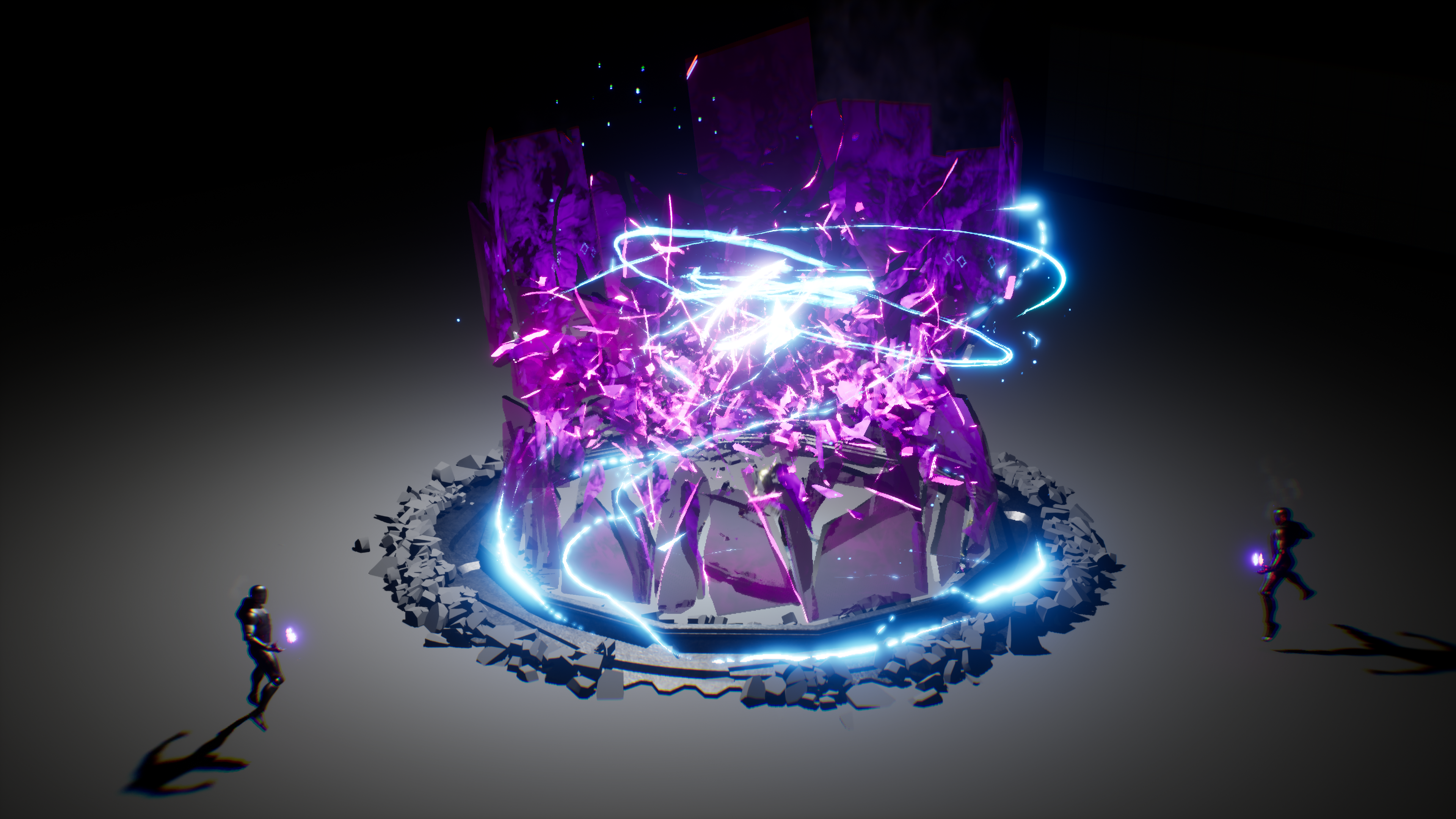
Learn how to generate explosions, smoke, and lightning in Houdini then export these to Unreal. SideFX Labs flipbook textures can be used to generate sprite sheets for dynamic magical explosions, fire, and smoke. SideFX Labs lightning nodes can be used to create lightning with a dynamic remeshing Vat. Falling and breaking glass can be generated w...
 dusty vessel
hey yall, I've got a noobie question to ask anyone whos a shader expert: I was looking for reference art for my game when I stumbled across a league of legends skin with some nice VFX Id like to know how to emulate in Unreal.
Ive got a grasp on a majority of how this effect was made, but the one thing Im struggling with is how they got the binary text to render the way it does across the cube while its mid air
it seems to render facing the camera while also rendering a masked texture over the entire silhouette of the cube.
Any help on how to emulate this effect would be greatly appreciated, thanks!
 drifting relic
broken temple
Fluid collisions don't work in lyra sample project, anyone know how to fix this?...
drifting relic
broken temple
Fluid collisions don't work in lyra sample project, anyone know how to fix this?...
Did you ever figure out what was causing this? My fluid sims stopped being able to collide with static meshes despite these being tagged properly.
hard venture
If the geo doesn't have distance fields, then it won't collide.
 thorny patrol
hey i am doing a mesh with displacement but where the uvs start and ends i have a crack because of that, it is any way i can solve this?
 unreal thorn
thorny patrol
hey i am doing a mesh with displacement but where the uvs start and ends i have ...
unreal thorn
thorny patrol
hey i am doing a mesh with displacement but where the uvs start and ends i have ...
World Position Offset?
thorny patrol
unreal thorn
World Position Offset?
wdym with that?
young canyon
Does anyone know how to make this outer sphere material. I can't get black on the bottom, red in the middle with orange on top. Any advise or answers would be appreciated

 karmic atlas
how can I get post processing to work the same way it does in the editor? I have lumen and exposure so it doesn't look too dark
but when I play the game, it is darker/lighter than it would be in the same place in the editor
 kind walrus
I'm having some problems with alpha channels on my materials. This is how I would like the material to look.

It's imported as a TGA and here's my material setup. It still doesn't read the alpha correctly
 unreal thorn
kind walrus
I'm having some problems with alpha channels on my materials. This is how I woul...
unreal thorn
kind walrus
I'm having some problems with alpha channels on my materials. This is how I woul...
Why not just separating the alpha channel into its own mask texture?
kind walrus
unreal thorn
Why not just separating the alpha channel into its own mask texture?
I supposed i could do that 😁. just thought it should be working with this setup and I missed something small.
marble epoch
question: How do people normally implement screen effects like blood, rain drops or maybe just a swirly glow?
IE (close to 2s): https://youtu.be/Gr3r8iMtsds?list=TLGGFmNqM4hHUiIyNTA2MjAyMg there's a small "shockwave" that i'm pretty sure is a screen effect
analog onyx
@marble epochby rendering a particle
 bright elm
Whats the difference between grid3d and neighborgrid3d?
 eternal echo
How do I create a material which can look both like this:
And that can look roughly like the light effect in the vid? https://cdn-shop.adafruit.com/product-videos/1024x768/2993-03.mp4
I've been following countless tutorials and I'm still not even remotely satisfied... It either gets too transparent or the light effect looks like the whole surface lights up instead of primarily where you look from.
I'm even considering commissioning the material... Its for real time rendering in a game.

 analog onyx
@eternal echoWhat are your results so far ?
analog onyx
@eternal echoIt is pretty simple. Have either strong normal map for corrugated glass. In material, take a ray, starting at fragment world position, having direction of minus camera vector. Refract the ray off the surface and find closest distance between this ray and a sphere, that is placed somewhere in the light. Remap this distance to light intensity, multiply by light color and plug into emissive.
eternal echo
analog onyx
<@151133142537732097>It is pretty simple. Have either strong normal map for corr...
:S Thats a lot of words I've not heard before.
Also, How do I make the normal map stronger than 1?
eternal echo
analog onyx
<@151133142537732097>It is pretty simple. Have either strong normal map for corr...
?
 analog onyx
eternal echo
?
analog onyx
eternal echo
?
Well, general direction is right, but few things are off
First of all, ray direction should be negative camera vector, not camera direction vector
Secondly, the ray needs to be refracted
Thirdly, sphere position should be somewhere in the middle of the object
Lastly, sphere radius needs to be set
Also, distance to the center of the sphere is calculated differently.
eternal echo
analog onyx
First of all, ray direction should be negative camera vector, not camera directi...
I have no "Negative Camera Vector" to pick, nor do I know how to "turn it"
analog onyx
eternal echo
I have no "Negative Camera Vector" to pick, nor do I know how to "turn it"
camera vector is material expression. You make it negative by multiplying by minus 1
 prisma valley
What is the best way to add a post process effect when the players health is low? eg Vignette and chromatic abberation. Do I add it as a component on the blueprint? I am unsure how to achieve this.
analog onyx
@eternal echoYou need to re-read what I wrote and follow it step by step.
analog onyx
prisma valley
What is the best way to add a post process effect when the players health is low...
One way would be to have a post processing material with a parameter to adjust intensity
prisma valley
analog onyx
One way would be to have a post processing material with a parameter to adjust i...
How do I access PP Material? I couldnt find it in the dropdown. I think this way sounds good, could you explain it a bit more ?
analog onyx
prisma valley
How do I access PP Material? I couldnt find it in the dropdown. I think this way...
It is part of post process volume. You need to create dynamic material instance and assign it as a part of post processing settings struct on a post process volume component(or camera)
eternal echo
Like this?
 prisma valley
analog onyx
It is part of post process volume. You need to create dynamic material instance ...
prisma valley
analog onyx
It is part of post process volume. You need to create dynamic material instance ...
Thanks Deathrey, I will research this more
analog onyx
@eternal echohttps://prnt.sc/vtwlOfbqdDdT
 eternal echo
Is there no "Vector parameter"? Except 4-float color?
eternal echo
analog onyx
<@151133142537732097>https://prnt.sc/vtwlOfbqdDdT
That is by no means how I interpreted the text, but I'm not very good with materials yet, so that is on me.
Ty for the example. It helped a lot. Your normal looks better than mine tho, but I'll deal. Just need to figure out how to fix the mapping on this model I have.
eternal echo
Thank you kindly,
I had to re-make the normals in the model after all.
This looks amazing after some tweaks:
 fossil swan
yea, that looks nice.
analog onyx
@eternal echonice
eternal echo
❤️
 turbid python
hey :D i just started messing with post processing materials and i wanted to make something where things have no colour until you walk upto them, im using the scene texture nodes to do all the math stuff but this weird thing happened, it turned my sky red and i cant see why, i would rly appreciate someone lending a hand?


wait shit nevermind i fixed it :D, the depth texture needed clamping between 1 and 0 because it was going over what it should have been thus being fucky wucky
eternal echo
Is there any way to assymetrically scale that RayTracedSphere?
analog onyx
@eternal echoSphere is just example. You can use any shape, for which it is sensible and cheap to compute intersection
eternal echo
analog onyx
<@151133142537732097>Sphere is just example. You can use any shape, for which it...
I know, I just did not find any premade function for it. And I'm not the best at math as stated, but I will look into manually calculating the intersecitions
 raw raven
I got some blood visual-fx's for my multiplayer game that spikes the first time I kill my character. After that I dont get any lag spikes. Is there a way to cache fx or a method so it won't lag the first time the fx shows up?
 limber venture
turbid python
hey :D i just started messing with post processing materials and i wanted to mak...
limber venture
turbid python
hey :D i just started messing with post processing materials and i wanted to mak...
I was wondering, how do I have similar page on my UE5, mine looks little different than this setup
 slate barn
If you had your pick for making the best looking explosions and fx, would you use Unreal 5 or would you use Houdini Fx and import those effects onto Ue5?
hard venture
slate barn
If you had your pick for making the best looking explosions and fx, would you us...
This is really a per-instance question whose answer greatly depends on what you are trying to accomplish? What is your perf budget? What exactly do you mean use houdini or use unreal? You mean for final output? There's really no "right" answer here. You want to use the right tool for the job, so what is the job exactly. Saying explosions isn't really enough. what is the final intended medium?
slate barn
hard venture
This is really a per-instance question whose answer greatly depends on what you ...
Thanks 3dy.
This would be for a video game. The hope is to have cutscene like detail and quality, yet have it occur in real time in an RTS.
The explosions might be from a bomb hitting a bunker, or one tank hitting a weak point on another tank's ammo rack., etc etc.
So looking for the software for final output
bright elm
Anyone know how I can have actors impact a particle simulation? Like if I wanted to add a fan that pivots blows away the particles, and have that fan be movable by the player, how would I do that?
hard venture
slate barn
Thanks 3dy.
This would be for a video game. The hope is to have cutscene like d...
You want an in game cine that's not a prerendered video. Then maybe you want to try Niagara Fluids, if you have the bandwidth, but there's a learning curve there. Same thing as Houdini. I would say Houdini's learning curve is on par with Unreal in it's entirety. There's a lot to learn, and that takes time. If you are a houdini master, maybe you want to try the Hou->Niagara export/inport, works with points and attributes carryover. There's been some recent updates that make it a very attractive solution. Sometimes the "right tool" depends greatly on how quickly you can get up to speed.
hard venture
bright elm
Anyone know how I can have actors impact a particle simulation? Like if I wanted...
I would use a blueprint to pipe the forward vector of the fan into a vector user variable in Niagara and apply that to a cone force module.
bright elm
hard venture
I would use a blueprint to pipe the forward vector of the fan into a vector user...
Would this be generalizable to an unlimited number of fans?
I'll never have that many, just looking for a general method for applying force to a fluid field
hard venture
I'm not sure I understand the question. You are talking about a fluid simulation? I suppose it should work, i've never tried it. If you have multiple fans you would have to pipe the location of the fan in as well and have cone force module per fan. If you have a lot of fans, and you are doing a fluid simulation, I think you are going to hit perf ceiling pretty quickly for even the highest end gpu, but I've never tried, so that's just a guess.
quasi wolf
if Im just using single colours for all parts of some meshes, is there a more convenient way than making a new material instance for every colour I want to use? something like a colour picker within the mesh itself would be so convenient but as far as I know theres nothing like that
 plucky moss
quasi wolf
if Im just using single colours for all parts of some meshes, is there a more co...
plucky moss
quasi wolf
if Im just using single colours for all parts of some meshes, is there a more co...
if you want to create a color picker for each mesh i can help you jaja
And I don't speak english, just a little
quasi wolf
oh really? sounds good
quasi wolf
so like itd be good if I could change the colour alone without having to create a new material instance just for that colour. although now I think of it, Ill be doing some kinda customisation which will be using dynamic material instance anyway so maybe itd work that way anyway
plucky moss
quasi wolf
so like itd be good if I could change the colour alone without having to create ...
you must create a "parameter collection" you must create a vector type variable and multiply it by the part of the material in which you want color, then you call the "parameter collection" in unreal engine and look for a way to assign the color by widgets
quasi wolf
ah yeah, Ill probably end up doing something like that, thanks for the tip
plucky moss
quasi wolf
ah yeah, Ill probably end up doing something like that, thanks for the tip
Dont worry, if u need help u can say me
About materials/Niagara
echo oyster
if i have a texture which says alpha where do i plug it
 unreal thorn
echo oyster
if i have a texture which says alpha where do i plug it
unreal thorn
echo oyster
if i have a texture which says alpha where do i plug it
Opacity or Opacity Mask.
echo oyster
thnx
eternal echo
analog onyx
<@151133142537732097>Sphere is just example. You can use any shape, for which it...
Is it possible to make that light Scatter through the material as well? Not just on the surface? Kind of emulating a cloudy material?
analog onyx
@eternal echoI guess so. But light covers are made of pretty clear glass or plastic, with minimal scattering inside. So, question is, what is it that light is going to scatter in ?
eternal echo
Sure, I can just use a normal lit surface for that 😛
 analog onyx
you can use subsurface shading model for that for this is what it is meant for.
eternal echo
analog onyx
you can use subsurface shading model for that for this is what it is meant for.
Yeah, but it seems like the tracing I got from you ignores SS. None the less, not too important. They are so small anyway
eternal echo
Speaking of that, how do you make normalmaps so fast? Blender + baking?
plucky moss
 sonic hound
why the uv s change
sonic hound
why the uv s change
You need to open the uv of the mesh and look what is the correct chanel, and after send me a screenshot
plucky moss
It's okay
plucky moss
sonic hound
Here is the result
Nice work
sonic hound
Thanks
quasi wolf
is there a way I can access a material on any mesh by its slot name? I know theres Set Material By Name but I need to be able to access the material at that slot name to edit parameters in it
ah, I think that was it
 plucky moss
quasi wolf
is there a way I can access a material on any mesh by its slot name? I know ther...
plucky moss
quasi wolf
is there a way I can access a material on any mesh by its slot name? I know ther...
do you want to edit the parameters of a material from the blueprint?
plucky moss
quasi wolf
ah, I think that was it
hehe
quasi wolf
yeah some of these things seem a little awkward
broken temple
drifting relic
Did you ever figure out what was causing this? My fluid sims stopped being able ...
Unfortunately not, I just had to create a new project and transfer the work.
drifting relic
broken temple
Unfortunately not, I just had to create a new project and transfer the work.
I reset everything, deleted configs and still nothing. Really weird.
quasi wolf
what the hell, opened my project today and my most used material is suddenly just gone, still in the project folder but completely gone in the editor
wtf is wrong with this engine
celest birch
hey where can i learn how to make materials?
 old umbra
 spring flint
Hey, I'm looking for the name of this node, tks 🙂
spring flint
Hey, I'm looking for the name of this node, tks 🙂
That's a Constant
 light cape
Hello just wondering how people switched doing VFX from unreal to unity. Is it a whole new thing if you start with unity again? I started in unreal and it was a bit easy to understand then I tried using unity, there's something new in unity called visual graph and it looks similar to niagara in unreal. Is it almost the same? Will it be hard for me to migrate? I only peeked a little bit in unity since I'm a bit busy with other things so I thought of asking here directly.
unreal thorn
It's kinda weird to see someone migrating the other way around lol
 lilac current
I'd like to modify the default M_MS_Surface_Material created by Quixel Bridge to use WorldAlignedTexture. It's not possible to plug that node into the existing graph since the way Quixel set up their material is with a TextureSampleParameter2D node, which takes UV as input and embeds a TextureObject inside. What Unreal-provided WorldAlignedTexture requires is a TextureObject input. This means I need to create a new parameter node of TextureObject type, which is fine. The only thing I can't figure out is how to make every single material instance inheriting from M_MS_Surface_Material apply the texture assets to my new TextureObject parameters. I'm assuming Unreal is using some internal IDs for the parameters, which are not dependent on names, because simply changing the name of the old TextureSampleParameter2D parameter node from "Albedo" and giving new TextureObject parameter node the name "Albedo" does nothing for every material instance. I hope there is a way to migrate every instance to new parameter, because I have hundreds of instances and I'd really prefer not to manually drag textures into updated texture slots in every single one of them. Does anyone know a solution for migrating from one parameter to another?
 smoky birch
anyone have a guide or something on making snowfall? I wanna make it fall a little slowly (like the snowfall in Mario 64) while making it optimized for mobile
I dont want no like real time stuff, just basic snow fall as a cool effect
plucky moss
smoky birch
anyone have a guide or something on making snowfall? I wanna make it fall a litt...
its very easy, u can do it in niagara
test
smoky birch
is it a software ill have to install or is it preinstalled? or just part of the engine but called that
plucky moss
smoky birch
is it a software ill have to install or is it preinstalled? or just part of the ...
its part of the motor
like a addon
is the particle system of unreal
plucky moss
unreal has cascade and niagara
plucky moss
smoky birch
thank you
dont worry, i'm here to help!
 rancid berry
hi everyone, I've been working on a racing themed game (more so for personal practice than production), and one thing I have been wanting to do is applying a audio reactive visualizer to the car's skin itself. Is there any tutorials on such things? ive found a few but they only covered how to make it as a large seperated asset rather than being applicable to surfaces without heavy distortions
 wind veldt
sonic hound
how do i make transition smoother
wind veldt
sonic hound
how do i make transition smoother
Im Not Sure because I am New But For General Texture Editing I would Put down the Opacity of the grass to make it blend in , again i dont know
 storm knot
How do you convert from screen to world space in a shader?
fossil swan
transform
storm knot
is there an example or any documentation you can give me? it'd be much appreciated 😁
fossil swan
Material expressions that perform operations on vector input values.
storm knot
Thank you!
fossil swan
perhaps matthew wadstein mentions them in one of his wtf is videos on youtube
 cinder saddle
sonic hound
how do i make transition smoother
cinder saddle
sonic hound
how do i make transition smoother
Assuming you didn't make this material, I'd try reducing the contrast on the heightlerps. But all these controls should be available for you to adjust in the material instance, why not try a few of those and see which ones work?
man, just realised that post was from months ago, necro
 wicked zinc
Hey Guys!
I want to add a user variable only on the Z axis (on the Scale Curve at the bottom) but I can't figure out how. Any ideas?
 plucky moss
wicked zinc
Hey Guys!
I want to add a user variable only on the Z axis (on the Scale Curve a...
plucky moss
wicked zinc
Hey Guys!
I want to add a user variable only on the Z axis (on the Scale Curve a...
Vector = Break and u need to take the Z axis and in that axis u add the curve
wicked zinc
Thank you very much my friend that exactly what I was looking for
 glad badger
anybody know how can i get this node?
 fossil swan
component mask is the name of that one
 wanton dove
Hi. I am trying to get Cloth Simularion (just Apex) working in UE4.27.2, however i am using the only tutorial i can find that works, and i'm still missing something. The tutorial is for Maya, however i use 3ds Max, and I could use clarification on what 'drag and move the flag onto the pole' would mean in 3ds mx, is that click and drag onto another object, sub-object or grouping?
for anyone that could help, it's basically just a Maya user's explanation of that is, clicking, and dragging onto another object: (Video starts at the dragging action) :https://youtu.be/kjOq8OB_3AQ?t=43

UPDATED TO 4.25 - https://youtu.be/koWhYESJLiE
Creating cloth simulations has become very easy in Unreal Engine 4. In this video, I show you how to set up a cloth simulation for a simple flag. Topics covered: Exporting assets from Maya, cloth painting, simple wind.
LINKS:
Assets Download - http://www.mediafire.com/file/wa2dpoqu0oqmzay/ClothF...
wanton dove
the creator of the tutorial doesn't explain what drag and drop actually means in terms of another 3d application, ei. Grouping, selecting, sub-object. Not sure which
 flint sable

Bake fluidsim to Flipbooks and Player Materials. Drive Niagara and Volumetric systems with fluid data. Create stylized and realistic fire, smoke and clouds. Make your own VFX assets, inside Unreal.
grab it while it's free dudes
prisma valley
Is it possible to automate post process settings? I basically want to have chromatic aberration to pulse when the health is low, but couldnt find any settings in the event graph for this.
prisma valley
prisma valley
Is it possible to automate post process settings? I basically want to have chrom...
I used set blend weight instead
wanton dove
wanton dove
Hi. I am trying to get Cloth Simularion (just Apex) working in UE4.27.2, however...
Well, issue resolved, turns out that dragging an object onto another in Maya is the same as 'linking' and object to another in 3ds Max. Gotta work on a set of blinds, not sure if it will detect a character mesh (dynamic collision,) and react to its collision and deform that way, but with a wind actor already placed for Volumetric Clouds, from 'Ultra Dynamic Sky' Asset, my cloth material sjhould react to wind already, but also the cloth simulation's weights.
dapper dawn
Does anyone know why my particles act like this? I want a straight line (a stream) but instead I get this jagged always horizontal kind of weirdness
 winter stone
Im really new to the program, Is there a simple way to have a sword model have energy coming off of it
unreal thorn
winter stone
Im really new to the program, Is there a simple way to have a sword model have e...
Define "energy".
 hollow moat
Anyone know a good way of rendering something in front of everything else?
With shaders
without forward rendering it seems to be impossible otherwise
nova willow
afaik it's problematic with the deferred rendering pipeline... depending on what exactly you need to do/why you need to do it there may be workarounds (such as panini projection for fps weapon models)
unreal thorn
hollow moat
Anyone know a good way of rendering something in front of everything else?
One way to do it is with Camera Offset function in WPO.
hollow moat
unreal thorn
One way to do it is with Camera Offset function in WPO.
Here's the problem I ran into with that https://forums.unrealengine.com/t/rendering-a-mesh-in-front-of-everything/576362

I am aware this has been asked before, but I have not found a viable solution despite days of research. I want to render a first person gun model in front of everything to prevent it clipping inside world geometry. I have tried using custom depth and stencils, but can only achieve rendering a flat colour, not the original mesh material. I have a...
When the mesh gets close to the camera parts of it clip through other parts
I'm not sure if this is an issue with the shader logic, this is the BP if you wanted to take a look https://blueprintue.com/blueprint/q-h83rxr/

No description provided
 haughty idol
ok so this seems really basic but somehow i can't figure it out: I want to render a material for a scope that features a crosshair that's always aligned to the center of the screen
there is ofc the screenposition node, which does exactly what i want it to outside of the fact that it stretches the texture alongside with the aspect ratio because it's using screenspace UVs

does anyone know how I would go about countering the distortion? I imagine dividing the axes by the aspect ratio (in like a 1:1.XX format) would do the trick, but i'm not sure how to achieve this in the material editor
 fervent lily
Anyone know a good way to approach a lidar scan/ point cloud style visual effect please?
 pale citrus
Is there a way to put anti-aliasing on a post-process effect?
I've got an object highlighting that's working pretty well except the edges are really rough
 reef scaffold
is there a way to add a reference image into your camera view, such as in Blender?

this would help IMMENSELY with vfx
fossil swan
prolly with some post processing?
or put it on a plane, aim a camera on it, select that camera and click the tiny pin button, so you always have that image in top bottom (or separate monitor)
pale citrus
pale citrus
I've got an object highlighting that's working pretty well except the edges are ...
The fix for this issue, in case anyone sees it again, is tonemapping.
 pale citrus
Uh... so those 4 colored crates at the top of this shot in a line, I use those to test my CustomDepth stencil.
The one in the foreground? I don't. It has no CustomDpeth Stencil Value. It doesn't even have Render CustomDepth Pass enabled! Why is it glowing?!

Hahaha I accidentally copied it at some point. There was a secret hidden copy of the crate in the same place that DID have all that shit enabled
upbeat shell
Hi can someone please help with particle systems? I'm trying to make a leaf falling from trees particle effect, and everything works except that when the leafs drop they don't rotate in depth, they just turn side to side as if it was 2D and the leafs always face the camera. The way it's made is just a leaf texture applied to a basic materials basecolor and that same texture applied as the opacity Mask, then that material is set as the particle. I just want the leafs to not always face the camera and to freely rotate on all axis. Any help is greatly appreciated!
fossil swan
put them on a mesh instead of using a sprite.
upbeat shell
fossil swan
put them on a mesh instead of using a sprite.
You can assign meshes to particle systems instead of the material?
I never knew.. And it'll automatically rotate in all axes?
Thanks for the reply
fossil swan
upbeat shell
I never knew.. And it'll automatically rotate in all axes?
nah, you'll need rotation modules for it to rotate. but yea, you can spawn meshes just like you spawn sprites :)
upbeat shell
fossil swan
nah, you'll need rotation modules for it to rotate. but yea, you can spawn meshe...
Good to know, thank you for helping me out!
 wise rain
any idea how to fix this?
the smoke seems to sometimes be inside the crystal and sometimes outside
fossil swan
@wise rain dont bump questions in other channels. please read the #rules
also, if both are translucent, obviously you'll get sorting errors.
So either change sorting order, or make the ice masked/dither
wise rain
fossil swan
also, if both are translucent, obviously you'll get sorting errors.
So either ch...
this?

or how would i set the sort order in a niagara system?
fossil swan
This document provides reference information for the Renderer group in a Niagara Emitter.
search for sort order
though with two translucent things overlapping eachother, it might never work properly
might
wise rain
fossil swan
search for sort order
i think this only handles the sort order within the niagara system
i tried setting it to 1 and to 1000 but no change
 twin fulcrum
anyone know how to set a lifespan for an emitter
wise rain
twin fulcrum
anyone know how to set a lifespan for an emitter
yes
it depends on a few things
firstly there is this setting in the emitter state which determines its general behavior
 twin fulcrum
im completely new to niagara and youtube is failing me lmao
so any help is appreciated
wise rain
twin fulcrum
so any help is appreciated
sorry i got distracted
so thats the base setting basically, in this case the emitter lifetime adjusts to the particles lifetime

just read the tooltips its self explanatory
 twin fulcrum
wise rain
sorry i got distracted
twin fulcrum
wise rain
sorry i got distracted
gotcha thank you
 spark thorn
How to do glowing UI elements (UI and text)?
There is no info on the internet about that.
https://i.ytimg.com/vi/-JborZ7YY9o/hq720.jpg?sqp=-oaymwEhCK4FEIIDSFryq4qpAxMIARUAAAAAGAElAADIQj0AgKJD&rs=AOn4CLCY7McJVY5mivtBEJw1fWfy9Q_ILg
Something like this but in this case its a mask/texture. It need to be something flexible because its unknown/dynamic what will be glowing, HP bar, text...

 azure jungle
Hey everyone,
I was wondering if someone might know here. I am trying to use the MF_smoothCurveBezier but cant find it. Anyone know what happened to it?

 timber nova
Apologies for the duplicate question from #ue5-general. Is there a way to receive the scene's opacity as an input to a post-processing material? I've tried SceneTexture:Opacity, SceneTexture:SeparateTranslucency, and SceneTexture:PostProcessInput1. None of them did the trick, and the last one actually crashes my UE. Using ray traced translucency if that makes a difference.
wise rain
timber nova
Apologies for the duplicate question from <#846520322642411570>. Is there a way ...
you have to make a dynamic material instance before u apply this
torpid palmBOT
:triangular_flag_on_post: Shaq Sac#9079 received strike 1. As a result, they were muted for 10 minutes.
timber nova
wise rain
you have to make a dynamic material instance before u apply this
Would you mind elaborating? Which one specifically, and why must the material be a dynamic material instance?
I've solved the issue in a different way now, but I'm still curious.
wise rain
timber nova
Would you mind elaborating? Which one specifically, and why must the material be...
 timber nova
Right, I am familiar with dynamic material instances
I've just never seen it being necessary in order to use SceneTexture input
wise rain
well i just use dynamic material instance for everything that needs to be set at runtime
 dim nexus
If i want to add sphere linked to a bone for an effect, Should i spawn them as actors or there is another solution ? Like adding them to the actor then show them when i trigger the effect
upbeat shell
fossil swan
put them on a mesh instead of using a sprite.
It does not let me :(
I can only assign materials
upbeat shell
 fossil swan
@upbeat shell https://www.youtube.com/watch?v=psoTTXS7844
Googling "cascade mesh emitter" would have saved you a lot of time.

We now show how to set up a Mesh Emitter, complete with a custom particle Material and using a Collision module.
(00:04) - Changing the Toy Cow Static Mesh and Material
(03:13) - Inside Cascade
(05:16) - Changing the Particle Color, Rotation, and Acceleration
(07:59) - Adding Collision and Changing the Lifetime
(09:41) - Recap
A link to the wiki...
upbeat shell
fossil swan
<@258785110873079808> https://www.youtube.com/watch?v=psoTTXS7844
Googling "casc...
I didn't know it was called cascade.. I kept looking up set up mesh emitter in particles or something around that and I could only find Niagara results
 finite ice
Hello, can anyone help me? I'm making this boss of my game and I'm trying to find some way to make her mesh move in her direction, like a slime

Does anyone know if it can be done using material? or is there another way?
analog onyx
Flowmap
finite ice
analog onyx
Flowmap
thanks
 dull plinth
anyone know how to fix this?
whenever there is a backwards view of the thruster
or a forwards view
it only shows like a little ring
I didn't want that
I wanted the thruster to still be shown
dim nexus
Is it ok to spawn and destroy meshes for visual effects ? Or I should cache them somewhere maybe ?
 eager mirage
Yes its fine.
 sharp cloak
dull plinth
anyone know how to fix this?
sharp cloak
dull plinth
anyone know how to fix this?
I got 2 things
so when you point the camera straight at it, there just aren't any faces to render
It's probably no.2 tho
dull plinth
sharp cloak
It's probably no.2 tho
okay thanks. I didn't make the effect, how do I make it a cone instead of a cylinder?
sharp cloak
I don't really know how cascade works sorry
but there should be a "mesh renderer" or something like that where you can set the static mesh
 wet condor
Hello im creating a laser with a 2d texture in a particle system, everything good so far but i have one small problem: when the laser hits something it stops at the collison point as it should but the texture is also getting smaller or viceversa bigger (streched) when the laser goes to full lenght again
is there a way to fix this?
indigo remnant
Anyone know if Niagara mesh renderers can write to RVT ?
 dry garden
wet condor
Hello im creating a laser with a 2d texture in a particle system, everything goo...
dry garden
wet condor
Hello im creating a laser with a 2d texture in a particle system, everything goo...
If you could post a pic for example I'm sure I can help you
wet condor
dry garden
If you could post a pic for example I'm sure I can help you
if you prefer i could screenshare it to you, if not tell me and i'll try to show you with pictures
 deep nebula
This may or may not be the proper place to ask but if I wanted to dynamically change the color of a object would anyone have a good example I could see?
{Example: I want to have all the world in gray scale except for surfaces that is hit with direct light.}
 strange tundra
hello. is it possible to export .exr sequence with transparency and emissive glow ?
indigo agate
The particles looks like its half stuck in the mesh
valid shadow
@acoustic cloak it should still be busted and yeah, there is some kind of render target issue, I did find a way to make it work in a specific setup, but most modes are bugged
 silent bay
ello, is it possible to use the "Draw Material to Render Target" node with a post process material as the material? I'm trying to capture current screen/view to a render target
unreal thorn
Don't hold your breath on that one
unreal thorn
Bug report.
Unless you're UDN, it's going to take a long while before being acknowledged, and even then low chance of it getting fixed right away.
 unkempt ember
I'd like to deactivate multiple particle effects that live in one BP, from a totally separate BP. What's the best way to do this? "Get actor by class" multiple times? Or is there a way to do this with something like a Material Parameter Collection?