#ue4-general
1 messages · Page 33 of 1
 stiff notch
 rustic panther
there's nothing inherently wrong with using delay nodes
 oak patio
Granted people do misuse them, but yeah, what Qwigs said
 spice ruin
He makes a good point about "using delay node to fix order of operations stuff" is pretty wrong. You should fix the actual order or use events and such.
But it doens't mean the entire node is wrong.
 hidden dew
I noticed a weird copy paste in my BP, I think.
This isn't meant to be possible, right?
 oak patio
Sometimes it can be handy for that as a super bandaid fix. I remember quite a while ago in ue4 I had a level with world composition, and the player start would spawn the player before the landscape had loaded meaning I'd fall out of the world. I had no idea how to fix it, other than to delay loop activating the character until the world had loaded.
Thinking about it, I have no clue how you'd even handle that now. Probably something in the game mode 😆
Or binding to OnWorldBeginPlay somewhere
oak patio
hidden dew
I noticed a weird copy paste in my BP, I think.
This isn't meant to be possible,...
Why not?
Nothing there looks out of the ordinary
hidden dew
Oh, I thought you couldn't have multiple exe paths from one output
Guess I'm just brain farting
hidden dew
😄
I am guessing I did a Ctrl C Ctrl V without noticing. The nodes were hiding beneath each other
hidden dew
But yeah, now I can add stuff to each exe path and do whatever
hidden dew
hidden dew
I am guessing I did a Ctrl C Ctrl V without noticing. The nodes were hiding bene...
... And this doesn't really work, now that I tried.
Shrug. No idea how it got there. But it's been working for months.
oak patio
I do know you can do some funky things with the node graph in such ways.
You used to be able to break it in certain ways like connecting execution pins to variable pins and such.
hidden dew
ah heh
I know you can force it to break to VS just by making a segment on a line then deleting it (UE 4.27)
 tough thicket
yeah thats how you do it but if i recall i set bone groups and had only that group inside that path
it worked even better but sorta forgot
 full mist
I'm not sure if this is the correct channel to ask so let me know if I need to move the question.
I'm in 4.27 and when I have a planar reflection capture (bathroom mirror) it runs totally fine normally, but when I turn on raytracing it severely drops my framerate. I'm very confused.
Shouldn't planar reflection captures essentially be disabled and not actually do anything if raytracing is enabled?
I can't seem to find any settings to fix this and I'm at the point of jut setting up a blueprint to delete the actor if raytracing is enabled, but that seems like a really silly solution here.
hidden dew
hidden dew
I noticed a weird copy paste in my BP, I think.
This isn't meant to be possible,...
lolll... 4 hours later, I just realised why this seemingly impossible thing was possible
 rich rain
I'm making a top-down shooter game and I want to rotate my character with my mouse, but since my mouse rotates according to the position in the 3D world, it doesn't give me exactly the gameplay I want. My camera angle is 0, -60, 45. It works fine at 90 degrees, but I couldn't find how to solve it at this angle. I tried many different methods. Does anyone have a good solution?
 hidden dew
lolll... 4 hours later, I just realised why this seemingly impossible thing was ...
hidden dew
hidden dew
lolll... 4 hours later, I just realised why this seemingly impossible thing was ...


Been in there for months
hidden dew
rich rain
I'm making a top-down shooter game and I want to rotate my character with my mou...
I do something like this:


Well... not "something like". That's what I do.
Gives me this. The laggy camera is a deliberate setting, and maybe not even applicable to yours anyway unless you have the camera childed to the character in some whay.
The main principle is that I'm just saying "Get me the raw X value from the mouse's movement. Now add that much rotation to the character around its own 'up' ".
I'm avoiding any thought about the camera's orientation.
 plush yew
Hi!
I am creating a global strategy (country governance)
There are almost no necessary manuals on this topic on the Internet.
I have a pixel map with regions of countries and seas.
1.How to make sure that when uploading my pixel drawing, a map divided into regions and borders is automatically created.
-
How to set a certain color value. For example, Black is the border, white is the regions, and blue is the sea.
-
How to make sure that all white regions are not 1 model, and each region separated by a black border is an unrelated object


 spice ruin
1/2/3: you code this yourself?
 livid token
yesterday forcaset was great
 foggy marten
is this where u can ask to have a person to work on a game with me?
 real heath
foggy marten
is this where u can ask to have a person to work on a game with me?
real heath
foggy marten
is this where u can ask to have a person to work on a game with me?
You are looking for the job board. Instructions for posting there are in #instructions
foggy marten
cool thanks
hidden dew
Starting to get this really frequent issue in UE4.27. When editing a blueprint, eventually things like right-click, or dropping in a variable, stop working. It just flicks onto the screen for a split second then disappears. Tooltips do this too.
Getting to the point where I have to restart UE about once an hour. >_<
real heath
hidden dew
Starting to get this really frequent issue in UE4.27. When editing a blueprint, ...
Look in the pinned messages here. There's a fix from Nvidia. Just gotta run a .reg file
hidden dew
real heath
Look in the pinned messages here. There's a fix from Nvidia. Just gotta run a .r...
Oh awesome, ty
Odd that the first pinned message is "Don't use UE4 over UE5 for performance reasons"
UE5's physics is buggered. Need UE4 for performance reasons. The difference is gigantic.
The message should note that exception
 worthy elbow
Hi, I'm a newbie. Anyone knows why the blender "root" is different when I upload the character to unreal engine?
apparently, there's another root bone appearing in my skeleton "rig" thus I can't create root motion animations.

 real heath
worthy elbow
Hi, I'm a newbie. Anyone knows why the blender "root" is different when I upload...
real heath
worthy elbow
Hi, I'm a newbie. Anyone knows why the blender "root" is different when I upload...
I remember something about it specifically needing to be called Armature in blender.
Try renaming the rig
worthy elbow
I successfuly renamed the "rig" to "Armature" and this is Unreal's Error
 worthy elbow
I'm thinking if I should buy Autorig PRO or Eufy for automatic rigging so that I don't have to use Rigify.. Is it worth it? Can anyone tell me if I should get it?

 acoustic coral
Hello, I'm having trouble with game instance not updating the default values during runtime.
I tried compile and save, but nothing works.
Any help would be much appreciated.
edit: problem fixed

 hidden dew
What was the solution?
Always good to put answers to your own questions you put on the internet.
 old sun
yo, once i found the solution but don't remember it. I cannot interact with my editor view (below), what is the reason? any clue?

google is not helping at all 😐
 broken stream
How can I force the editor to pack a mod even when there is an error? It incorrectly thinks the text parameter Name is constant when I know it's not.
 oak patio
You don't. It's an error for a reason.
The code won't compile, that means it won't compile, which means it doesn't work or package
broken stream
Are there any guides on how to automate the "save to mod" (copying a file and it's path into ModOverride folder) in an editor utility blueprint?
 storm lake
hello, my ps4 controller no longer is detecrted by unreal engine, how do I fix this?
I used to be able to move the camera with the controller, but not anymore
oak patio
broken stream
Are there any guides on how to automate the "save to mod" (copying a file and it...
You'd be better off in an actual nodding community
plush yew
how can i turn a texture cube file into just texture
so i can use the texture in a material
 thorny narwhal
Hi, when i use the Anim Dynamics node, my mesh decreases drastically


 hidden osprey
Cool character
thorny narwhal
thxxx ^^
 valid raven
i'm in ue4 on the top down shooter template. i want to replace the character with a cylinder but the game doesn't wanna go easy on me
i can't have a movement component if i don't have a character
and if i add a character i am given these things. the first 2 aren't really an issue but the third one just requires me to have a whole mesh in there and animations

until i find a fix the mesh will just become invisible and i shall ignore it
thorny narwhal
Does unreal engine 4 support Dualsense ?
 steady siren
where do I ask questions related to Perforce issues with ue 4.27?
nvm I asked in source-control
hidden dew
Hmm. I have a BP function I wrote in C++.
When I run my project, the function is fired but execution doesn't make it back to the BP that called it. Return value (just an int32) looks good in the debugger, but then the game closes before BP execution continues. I can continue stepping through the engine between the end of my function and the closing of the game, but it's out of my depth. Appears to loop for a long time.
The function itself does some line tracing. Runs fine with other meshes. Only 1 mesh causes the problem.
The problem mesh works fine in a different project using the exact same function code, to the character.
So I feel like it's not the mesh, or the function that has the problem, but something else I've done wrong.
But with the way it just closes, I don't know how to debug it.
 sturdy star
how on earth do you supress the "errors" message in the editor - like yes i'm aware there is an error, i am not the one fixing it so i don't want to see a giant fkn box every time i test something, holy
plush yew
Hello i need someone who can make a game trailer for my game htmu
 wary sentinel
i got problems with unreal engine 4 and i dont know what else i can do
wary sentinel
i have updated my graphic drivers ive done the TDLR ive allocated virtual memory ive downgraded from dx 12 to 11 in render and i still get this
 wary sentinel
guess no one knows
 fringe drift
Ok, so, random optimization-related question:
I have heard that running C++ is more performance-friendly than running blueprints. I have also read around and found people offering to build custom blueprint nodes.
If I have 'a relatively large amount' of vector math and float shenanigans running in EventTick, then would encapsulating all of that in a single custom-built node be better for performance?
If so, I should probably be organizing and commenting this eldritch monstrosity of a blueprint that I'm building.
wary sentinel
i give up with UE4

 grim flame
They seem to be errors related to the GPU, your machine might be too low spec for Unreal
wary sentinel
I'm running 32gb ram i7 3770k Asus p8z77 with storm x pc gtx 1650 4gb
GPU drivers and directx up to date I can do blueprint after a few mins it crashes
 frigid mauve
Hey guys! Can you please help me with packaging?
I'm testing html build of 4.23. First, the size of the Puzzle template (very simple project) had size 900 mb, what was a nut :) I changed building type to shipping and exclude startet content folder and specify a map to build. So the size of .data file dropped from 500 bm to 20 bm. But there is still .bs file that keep it size of 230 mb. What is this file? How to make it lighter?
livid token
wary sentinel
i give up with UE4
it's a window and nivida problem that is a bug for all of them.
wary sentinel
i think i sorted it caused by gtx 1650 have to undervolt it so it was stable due to bug in hardware with unreal engine software
livid token
wary sentinel
i think i sorted it caused by gtx 1650 have to undervolt it so it was stable due...
upgrade your grapic card too 3070 ti
livid token
wary sentinel
if i had the money i would brother i cant even afford an rtx 2080
yeah that is only way to get it to be stable.
wary sentinel
i know gotta use what i got i guess
livid token
wary sentinel
i know gotta use what i got i guess
go to the project settings and type in windows. you want to change the dx11 or 12 whatever works.
 wary sentinel
gtx 1650 says it supports dx12 but the driver for it is buggy and hates engine
so it runs dx11
livid token
so that is good and fine nothing worries about that.
wary sentinel
nope
livid token
model meshed
wary sentinel
i tried to find a real life version of the model and i cant mesh it O_o
tried import as image came up blank on plane
livid token
wary sentinel
i tried to find a real life version of the model and i cant mesh it O_o
look up a video on that have no knowledge on that
wary sentinel
i might use blender and manually build it take longer
livid token
wary sentinel
i might use blender and manually build it take longer
you can go that route
 tiny zodiac
I imported a fbx with a skeletal mesh to unreal.
Then later imported it to blender and made some changes on the material.
Now i imported it to unreal, and it says the skeleton is not the same.
So I said to "No to All" use the skeleton.
But when i clicked this new imported mesh, it asked me to regenerate the skeleton.
I clicked yes, and it screwed all my other meshes.

This should come with a warning that it can screw all the other meshes
 nimble gust
unreal engine at its finest
 near vine
Can anyone tell me what maximum resolution should be used for texture atlases?
 simple hemlock
I have a plugin that is disabled in the uproject. I need to enable it only when building for a specific platform. What's the proper way to do this? I tried adding PublicDependencyModuleNames.AddRange to the Build.cs but doesn't seem to work. I have seen that you can do a DisablePlugins("PluginName") but I can't do the opposite (as in leaving it on by default and disabling for other platforms)
spice ruin
This should work in your uproject: { "Name": "...", "Enabled": true, "SupportedTargetPlatforms": [ "Win64", "Linux" ] },
simple hemlock
spice ruin
This should work in your uproject: ```
{
"Name": "...",
...
Unfortunately not. This is what I've done prior, but one of the platforms the project is supposed to be built for is built on another engine, that doesn't have the plugin. The engine then goes "idk wtf this plugin is, stop building"
spice ruin
Create a fake plugin just so it can be disabled? 😦
 velvet thunder
how to make decal receive light on mobile ?
I already made r.mobile.ShadingPath = 1, opened DBuffer, and changed decal material's Blend Mode to Color, Translucent, Normal
When I open android preview, decal rendered with light, but it doesn't work on real mobile device
 onyx viper
When i put "BSS HaveMelee" and "BSS HaveGun" in lower Selector they don't give any value and so things not work, but when i put them in upper Selector they work.
So the problem is solved as i can put them in upper Selector but i don't want them there cuz BB Service will run even when there is no use of it, so i want to put them in lower Selector to save CPU usage.
Any suggestion

 wispy relic
Hi all... does anyone know how to reset your landscape material and painted layers back ... in essence to start over?
without having to rebuild and recreate a whole new terrain?
broken stream
How do I limit resource usage of UE4 Editor when packaging? I can't have it pinning my CPU to 99% for 30 minutes.
oak patio
You can and should want that.
Short answer is you dont
Why don't you want it using CPU while you package?
It's an intensive task that takes resources, if you don't want them being used at that time don't do it, or do it on a different machine
spice ruin
You could use task manager to set the process to a lower priority... but yeah.
 mental parrot
I have some inputs set up. When I hold down shift (which I have set up for sprinting), I can't turn on the flashlight which I have mapped to F. But I can turn it on just fine and move around with WASD without shift being pressed. Is there a checkbox I'm missing somewhere?

 eternal ledge
got an annoying issue that makes no logical sense... looking at nothing but the sky in my world, other than uds, frame rate is just as bad as looking at everything else... if i hide levels then the framerate goes up even though not actually changing what can be seen.... what on earth causes that behaviour and whats the best tools to try and work out what is causing it?


 bronze adder
I dont know how your level looks like and what device you are doing this on, but if you have other objects in the scene you might be able to figure out if they impact the performance although they are nog directly seen by the player camera by using the freezerendering command to see if these still get loaded in
bronze adder
eternal ledge
Next to that maybe, I am not that good with UE, soo dont trust me too much with this xD but look at how the performance works out in an empty level to know the max that would be possible, then compare with your level and use stat commands to look at how specific parts of the level are performing/how much time and ressources the different tasks need
Then you could go in and see if you can find the bottleneck, which task is taking up the most time per frame
Thats probably how I would try to figure that out
eternal ledge
a 5950x and a 3080ti, so 120 in empty is simple... not player cam this is editor, and nothing is running as its not in play mode...
once i hide levels then it goes back up, start adding, even though nothing is in view, it goes down
eternal ledge
this is why it doesnt make any sense and cant get across that its litterelty looking at nothing in the world, there littertly isnt anything in that area, so surly it shouldnt be high, what would cause all the meshes that are in competly the opposite direction and not visable make the frame drop,
bronze adder
Hmm that is very weird, not sure if I can help much there, Id say again, try to figure out what aspect of the performance seems to be causing the issue/s with the stats command or other performance tools
Also not sure about this one, but I realised that when testing for that, that at least for final performance of the game, it is way more helpful to test in play mode, that resulted in much more reliable information for me to work with when optimizing performance stuff
could have been for my specific performance problem, but Id say it could deliver more clear results
 errant kindle
hello, hoping someone has any idea how to fix a random issue. in UE 4.27 I have two VR projects from the template, one I got stuck on and the player couldn't move anymore so I started a new VR template and began migrating the assets over. the assets are very simple, grabable objects. they don't do anything, you just can grab them drop them and throw them.
the drop part wasn't working in the new project, I checked all the settings and they seemed the same, simulate physics was all I could think of (except it was off in the old project but dropping worked in that one) but turning it on worked. however, after this the project started** "flashing"**.
the flashing is hard to describe, it's like flashes of the scene I'm looking at. I thought it was textures at first but the flashes are "flat", they're not warping out of objects or anything I can tell. just a flat, 2d flash of imagery.
it also started flashing in the old project. the flashing occurs regardless of where I'm looking, where I move to, or what I do in the project. it just randomly flashes every however many seconds.
the only settings I have changed are turning mobile multi view off, and changing anti aliasing from MSAA to Temporal AA, neither did anything. I also tried turning simulate physics back off on the placed asset, which also did nothing.
I can't find any videos that show any similar issue or any forum discussing an issue like this. I've found flashing and flickering but none are like what I have.
additionally, laptop specs are AAA worthy, headset is oculus 3, and software used to connect is virtual desktop. never had this issue previously and just updated all drivers, so probably nothing to do with my computer.
 viscid grotto
Has anyone here done the Tom Looman Tutorial?
 serene plinth
uhhhh what if i already made like half a game in ue4.27 and wanna transfer it to ue5 would it still run on potatoes like it already does? would i even be able to put it on ue5?
eternal ledge
bronze adder
Also not sure about this one, but I realised that when testing for that, that at...
even more performance hit when running in play, but thats expected as its when stuff is actually running, though when built out of engine and running as an actual game the performance goes up a little but still considerably less, and still when just looking at the sky its poor
 wispy escarp
Anyone used the customized Homeworld 3 editior and if so how was your experience with it ?
oak patio
serene plinth
uhhhh what if i already made like half a game in ue4.27 and wanna transfer it to...
Why wouldn't you?
And why wouldn't it. It's the same engine. The UE4 stuff is still there.
Generally speaking though if you're late into a project stick to an engine version
 pulsar ruin
i really need some developer that have experience with ue4.27.2plus "GitHub source" and android (google play).
oak patio
Post to the job board then or ask your question
tough thicket
Why does it say im missing 1 file

why cant i see the missing file
oh i think im still being trolled
 grand hill
I have a question what's the difference between unreal 4 and unreal 5 with the blueprint I'm trying to create a 2d game but my computer runs only unreal 4.27
I'm trying to do an RPG 2D game


 strange lily
Anyone know how to fix this issue with manny 4 and the blender rigify rig?

 flint moon
Does anyone have any recommendations for what version of unreal I should download?
 jade surge
flint moon
Does anyone have any recommendations for what version of unreal I should downloa...
jade surge
flint moon
Does anyone have any recommendations for what version of unreal I should downloa...
The latest version is pretty good
4.27 was good, I wouldn't recommend 5.0 - 5.2.1 at all
It's been long enough that most if not all active marketplace plugins have also updated to 5.4 by now
flint moon
Thank you!
 muted ether
Anyone got a good yt video on how to make a ai rag doll the main character?
muted ether
I have a question if anyone knows so I’m making a football game and I’m trying to make it so when the ball goes in the net it resets back to the middle so I tried making a collision so when the ball hit the collision it would delete the ball but it won’t work?
 latent warren
muted ether
I have a question if anyone knows so I’m making a football game and I’m trying t...
latent warren
muted ether
I have a question if anyone knows so I’m making a football game and I’m trying t...
check that both the net and ball have its collisions set to overlap each other's type, do on the net, on begin overlap, cast to ball, if ball call a "reset Ball" function you add to it, then call this to reset its physics states and set the world location.
also call the function as run on server, and make sure your ball is set to replicate
 muted ether
latent warren
check that both the net and ball have its collisions set to overlap each other's...
muted ether
latent warren
check that both the net and ball have its collisions set to overlap each other's...
Ok thank you
onyx viper
hey ! i was wondering which one should i use BeginPlay or OnPossess in AI Controller.

 weary ember
im 7 years late but thank you! My OBS recordings were super choppy without setting that
 last loom
The 7-year @ one can truly appreciate
 spare trench
is there a way to recover the corrupted ue project files?
thorny narwhal
My game use the left shift key in keyboard to character sprint in, i want to add a joystick (dual sense) input to run if the player press the L3 key, but with no need to hold this button, how can i do this?
spice ruin
spare trench
is there a way to recover the corrupted ue project files?
Go back in time and use source control.
Or check your Saved folder.
spare trench
spice ruin
Or check your Saved folder.
in the saved folder I have that file which got corrupted but in TMP format, idk how can I recover it from that
spare trench
spice ruin
Go back in time and use source control.
ah they are paid if not then very limited storage
spare trench
spice ruin
Or check your Saved folder.
damn bro you saved my life it worked!
 charred agate
Morning. Still new to UE and learning as I go with all of it. I'm trying to figure out a weird import export issue. I have a Texture that I'm trying to export from one kit then import it to another. It's a texture in one. When I export it only gives me HDR as an option. Which is importing as a Texture Cube. I'm trying to figure out how to prevent that and to get it in as it originally should be. A Texture. Anyone have any ideas on this?
oak patio
spare trench
ah they are paid if not then very limited storage
No, just the shitty hosts are. Azure DevOps is what you want
Or you can host locally
spice ruin
spare trench
damn bro you saved my life it worked!
Np. 🙂
Now get some source control set up!
spare trench
spice ruin
Now get some source control set up!
sure
spare trench
oak patio
No, just the shitty hosts are. Azure DevOps is what you want
can we use azure devops for a small team for free?
spice ruin
Up to 5 people.
spare trench
spice ruin
Up to 5 people.
for free?
spice ruin
Yes
oak patio
Post to the job board
 lilac cipher
I released my own game a few days ago and encountered a strange problem. Some players who have computers with iGUP and dGPU are reporting a problem that the game only uses iGUP. With some the speed is OK, the game starts on dGPU and with iGPU it only uses VRAM(?) and with some it uses ONLY iGPU.
On friends' computers in this configuration, the former is the case, and I have no way to check this version using only iGPU.
I tried forcing the card by adding r.GraphicsAdapter=-2 or r.GraphicsAdapter=-1 in the configuration, but it doesn't do anything.
I am using UE 4.27, have any of you encountered a similar problem?
I don't like to bother people, but I've been sitting on this for a few days now and can't find or advise anything.
You are my last hope.
This is a link to a discussion on steam about this error (the display itself I solved, earlier I read the first GPU in the system, now I read all - patch 0.1): https://steamcommunity.com/app/2096030/discussions/0/4351121256518956352/

So, I have an RTX2060 and when i start this game it says my graphics card does meet the minimum standard, graphics card installed "Intel UHD Graphics". Has anyone else experienced this and/or how to fix this issue? Thanks
onyx viper
is "Chaos Editor" plugin used for chaos destruction ? or is it something else ?
 onyx viper
and ye one more
how can we generate new thumbnail for particle system (cascade) ?
i clicked thumbnail which is on top of ribbon when BP opened but doesnt work
 dark bough
Hey guys, does anybody have info on this bool? Seems to be little to no documentation on what this means and what is best practice?

 pine glen
Hi, sorry maybe dumb question but my viewport start lagging when I reach the 6000 assets for the mapping and finally freezing each time I move the cursor or anything when I reach the ten thousand and more, is it necessary to upgrade the pc or is there something to unlock or to activate to ease it?
grim flame
@pine glen you are most likely running out of Vram, a better graphics card would help.
the only other option is to optimize, make textures and meshes just high rez enough
 tired matrix
Randomly all of the windows that show when you click or hover over something just start flashing and not showing up. Once it happens the only solution I've found is to restart the engine, which is extremely annoying. Anyone know what the issue is?
 vagrant eagle
i want to make a clicker game but making a blank project still has a player controller and stuff how to make a true blank game?
rustic panther
vagrant eagle
i want to make a clicker game but making a blank project still has a player cont...
just change the gamemode?
vagrant eagle
made a new gamemode and player controller and its still the same, you start the scene and theres still a player controller
 rustic panther
oh right you can't have no playercontroller... you need a playercontroller to mouseclick though
vagrant eagle
yeah but how to have it not use the default actions? i dont want that free cam mode
 rustic panther
vagrant eagle
yeah but how to have it not use the default actions? i dont want that free cam m...
rustic panther
vagrant eagle
yeah but how to have it not use the default actions? i dont want that free cam m...
that's the default pawn
you don't need a pawn, you can bind actions in level blueprint if you wanted
and for a clicker you could just use On Clicked event on an object
 inland socket
Hi all. Sorry, if this is wrong place to post this. I do not know where to post it. I did not see an animation section.
Anyway. Hi all. Hope everyone is okay. 🙂
Question: what is happening and how do I fix this?

Background:
I successfully 😄 import a Mixamo animation onto 5.3, onto the SK_manniquin but I get that.
And I do not know what that is called so I do not know how to fix it or what to research to fix it.
thank you.
rustic panther
inland socket
Hi all. Sorry, if this is wrong place to post this. I do not know where to post ...
inland socket
rustic panther
<#221798806713401345>
ty
inland socket
I don't see it. Sorry. Kinda new to Discord
inland socket
rustic panther
this is also UE5
Sorry. How do I acccess UE5? I know stupid quesiton
vagrant eagle
Thanks
inland socket
rustic panther
must be the morning for you
Umm... so I'll just post in ue5-general, eh? lol I do not see #animation odd
rustic panther
inland socket
Umm... so I'll just post in ue5-general, eh? lol I do not see <#2217988067134013...
check id:customize and subscribe to the channel
 lament locust
I was watching a video on how to wall slide (so you go down slower) but when i am for example sliding and the wall is to my left when i press A (the side of the wall) I slow down, which is what is suppost to happen, but when i press D i am still stuck on the wall and i can not move of the wall. Anybody who has some time to help me?
 spark spruce
The only working packaging option for testing in iphone is project launcher is (do not cook)
Cook by the book does nothing it just load a bit and says canceled
While Cook on the fly just loads forever
 surreal ether
How do i extract Dragon ball fighterz models and put them into blender?
spice ruin
You don't.
hidden osprey
It’s only copyright if you were to repost it I wouldn’t bother tbf
broken stream
How do I limit resource usage when packaging a plugin?
 finite bison
How exactly can i add the color4 to the mask?
 real heath
finite bison
How exactly can i add the color4 to the mask?
real heath
finite bison
How exactly can i add the color4 to the mask?
Your first mask has created a float2 or vec2, your colors white node is a float3. You need to either mask the color put the existing masked node into a make float3
finite bison
i also fixed it
real heath
so you need to add same and same
spice ruin
You can't add a float 2 (RG) to a float 3 (RGB)
You have 3 choices:
- Get rid of that mask node (use the RGB from teh texture)
- Use the append node to add a float to teh float 2 (making it a float 3)
- Use another RG mask on the color4 output
 severe glacier
i need help with a ue4 glitch
 kind dew
any reason why a packaged android build would stretch some image widgets? Only happens on android packaged builds. the images are in a scale box
hidden dew
Meshes are importing without colliders. What am I doing wrong here?

Found it... it's this little mofo:

If I untick that, it generates no collider 😐
So clear, Unreal. Thank you
hidden dew
Just some random shapes I feel like sharing...
I have an Actor that moves around a sphere, and the sphere changes shape beneath it.
The sphere is a hexy icosahedron, so everything's a hexagon or pentagon in there.
The purple planet uses a few levels of subdivision within every hexa/pentagon. I call it Smooth Chunky heh.
The reshaping is smooth, but every tri has its own normals causing its lighting to be distinct from its neighbouring tris, so you can see the triangle chonkiness.

The khaki planet uses the minimal tris necessary for its hexa/pentagons. I call it Chunky Chunky.
The reshaping is as chunky as it gets, since there are only 4 tris per hexagon. And while the tris inside each hexagon are admittedly sharing normals and thus 'hiding' some harsh corners, it's still just a chunky sight to see overall.

But the green planet is actually smoother (ie., more subdivided) than the purple planet, yet looks like this: 😄

I call it Chunky Smoove.
The reshaping is smooth; smoother than the purple planet even, with more subdivision. And yet the hexagon borders appear super crisp and chunky, while the internal tri borders are basically invisible.
I just like howit (the green planet) gives this impression of an icosahedron that starts off looking exactly as chunky as the khaki planet, yet morphs around with a smoother shape than the purple planet... while maintaining that chonky look.
Achieved by simply using Simple division in Blender, instead of the default Catmull-Clark, so it leaves the shape in its chunky hexagon-ey form, and it sets all the tris' normals to maintain that lighting even as two neighbouring hexagons smoothly curve the same way.
I did something like...
- Create hex-based icosahedron with Blender's included plugin
- Edge-split all edges first while still looking like a bunch of hexagons.
- Then subdivide, Simple, 3 levels.
- Then Triangulate Fixed or Fixed Alternate.
- Then select all tris and UV unwrap so that every tri is its own island in the UV map.
The last point is necessary so Unreal doesn't bin vertices it thinks are identical during import.
 torpid pivot

 slender bramble
Hello I am a 3D Artist and an Animation student. I will make a game for my thesis project. Which is a game that has stylized graphics and a small map. I also want to develop it to a point where I can release it in the end of it. I want it to be playable for some lower spec pcs. Should I use Unreal 5 or stick with Unreal 4 for that kind of project. Are Unreal 5 games can be optimized like made in Unreal 4?
hidden dew
Regarding UE4 vs UE5, this: #ue4-general message
I use UE4 specifically because it uses a different (faster) physics system than UE5. Otherwise I'd be on 5.
hidden dew
slender bramble
Hello I am a 3D Artist and an Animation student. I will make a game for my thesi...
^
As for styles... I wish I could think of more but the only things I can think of that kind of avoid the mainstream visual styles are things like Antichamber (minimalist look), Breath of the Wild/RIME (elegant cartoony look), No Man's Sky (gaudy retro sci-fi), Journey, ... there's also Tearaway (everything looks paper), Yoshi's Woolly World (everything looks woollen)...
Ufff there's so much more but I can't think of any.
hidden dew
Also this is free atm:

There's an indie game called... Screen Cheat or something... where the character is the same colour and shading as many of the backgrounds, so the gimmick is that you can often hide in plain sight (so two players playing split-screen have to screen cheat to succeed)
 fleet granite
spice ruin
spare trench
spice ruin
<#402958499660955658> ?
fleet granite
spice ruin
spare trench
spice ruin
<#402958499660955658> ?
yo I added you in my yt devlog video
spice ruin
spare trench
yo I added you in my yt devlog video
Added me?
spare trench
spice ruin
Added me?
I mean your messages on discord
spice ruin
Nice!
spare trench
you wanna see?
spice ruin
Why not?
spice ruin
Here is fine, I guess?
spare trench
I think so
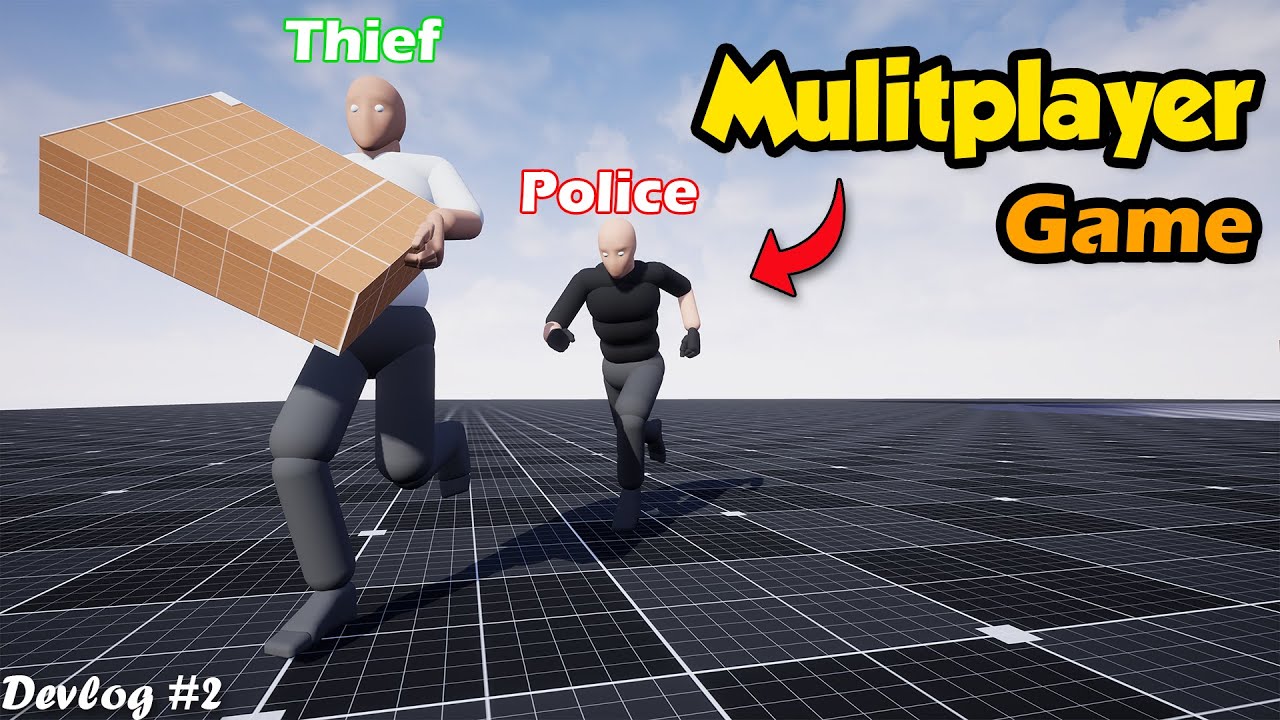
We are making Thief and Police Multiplayer Game for Mobile / Android. Where thieves have steal items and escape from the city successfully, and Police have to handcuff or shoot down the thieves.
We are Adding mechanics in the game like Grabbing System, Item Pickup System, Dropping System, Stamina System and Weight System. This is Devlog Episode...
spare trench
spice ruin
I like that you got my sass in there too.
hahh
Does anybody know how can we setup control rig for our own character in ue4?
torpid pivot
Mulitplayer
 nova canyon
Does anyone know if it's possible to use noise to break up the blending on a Landscape Layer Blend?? The same way you would use it in a vertex blend shader
 ashen jackal
Hi guys, I'm planning to make like this wall in unreal engine. Does anyone know which way should I approach to make like this wall shader?
I'm make this wall using unreal engine 4.27. is this possible?
I think wall feeling like subsurface scattering and little bit of translucent
I have no idea how to make it.

This is what I've tried.

 warped violet
ashen jackal
This is what I've tried.
warped violet
ashen jackal
This is what I've tried.

This tutorial describes how to make milky glass / frosted glass fast and easy.
DOWNLOAD LINK:
https://goo.gl/2g4Mct
Dont forget to like and subscribe for more content like this ;)
Want to support me?
https://www.patreon.com/marvelmaster
or
https://www.paypal.me/marvelmasteryt ...
Does anyone have an older version of advanced locomotion system? Alsv1, 2 ,3?
oak patio
why?
 obtuse stump
Does anyone know a full video to localization? I've no idea on how to do it
 tall tinsel
I use ShooterGame from UE4 Legacy Samples. Compiling even small changes takes 10 times longer than usual. What could be causing this?
 real moon
So, I am an absolute beginner
Are there any yt tutorials that can help me jumpstart making games?
I think I need c++
tall tinsel
real moon
So, I am an absolute beginner
Perhaps the tutorials from Ulibarri on udemy will be suitable.
real moon
tall tinsel
Perhaps the tutorials from Ulibarri on udemy will be suitable.
No something that is free, and basically provide a foundation sort of
I know a lot about java and making apps and guis from it, but I have no idea about making actual games
 dawn heron
real moon
I know a lot about java and making apps and guis from it, but I have no idea abo...
dawn heron
real moon
I know a lot about java and making apps and guis from it, but I have no idea abo...
Look for Unreal Sensei on youtube.
real moon
thank you
 solid holly
There any difference between Maximum Quality and Scalable 2d or 3d?
 quick grove
Out of interest does anyone know what could cause the texture over budget warning to appear. I've noticed within the TSW editor after couple of start and stops of PIE it evetually appears and textures then appear blury. Is there something that can cause memory to build up at all to point where it's too much ?
 digital anchor
quick grove
Out of interest does anyone know what could cause the texture over budget warnin...
digital anchor
quick grove
Out of interest does anyone know what could cause the texture over budget warnin...
the default budget is pretty low, 2-3 sets of 4k textures are enough to make it go over budget
if you already increased it, there is the stat streaming and listtextures commands which may be useful to see what textures are mostly being used
 cunning dew
Hello all of you.
I am facing some issues when trying to load a pak file during runtime into my game.
The code works with desktop build but when I do the same in meta quest 2, everything loads up except the shaders/materials for my uassets/blueprints
I am following this tutorial :

Epic Games Developer
The PakDemo project demonstrates a standalone application created by an Unreal Engine Project that can load assets from a .pak file from the local files...
tall tinsel
real moon
No something that is free, and basically provide a foundation sort of
For blueprint part wadstein https://www.youtube.com/channel/UCOVfF7PfLbRdVEm0hONTrNQ is good.

YouTube
This channel is dedicated to exploring Unreal Engine and the Blueprint programming language that it uses. You can think of it as a companion to the API documentation as I try to cover the how and why for what things are used for when using the Blueprint system.
hidden osprey
You could of asked him to join this server he’s literally in another server I’m in and helps loads of people 🤦🏼♂️
oak patio
?
hidden osprey
I was referring to @tall tinsel
spice ruin
He's in this one too...
oak patio
And it wouldn't have answered the question anyway. He isn't going to give a user a personal foundation, that's kind of the point of making a youtube channel
 fossil thorn
Hey, My pc doesnot support UE5, is UE4 still viable to use in 2024 for small scope projects?
spice ruin
Yes
 bold forge
Question :
Do I need to have internet in order to package 📦 ad exe. In unreal?
 covert sky
I have a source build project. Whats the best way to share my project with a team. Will they all need the source build to work on it?
spice ruin
bold forge
Question :
Do I need to have internet in order to package 📦 ad exe. In unrea...
To make a package? No. To give that package to anyone? Most likely. You can always mail them a thumb drive.
spice ruin
covert sky
I have a source build project. Whats the best way to share my project with a tea...
If they don't have your version of the source, it may or may not work.
covert sky
spice ruin
If they don't have your version of the source, it may or may not work.
darn but good idea with the thumbdrive
what would be the may work scenario? Do they just use for example 4.27 vanilla?
spice ruin
If you have a similar version of the engine, it may work. If you don't, your assets will be incompatible.
covert sky
spice ruin
If you have a similar version of the engine, it may work. If you don't, your ass...
Do I need to send team members the whole folder or can I send them parts of it to reduce size?
spice ruin
What have you changed and what do you have checked out?
If you just checked out thr same version as them from git (using the tag) then changed a few things, it should be fine.
Unless you changed anything crucial.
oak patio
Could always distribute the precompiled binaries via a rocket build if no one else needs to modify the source
 stone lion
Hi, mi games suddenly start to crashing on Shiping mode after changing some assets, when I package on Development this message apears, what can I do? Thanks

 next echo
Hey everyone, is there a way to unload a texture 2d that's been imported at runtime? After importing lots of textures they are never removed from memory, even when they're no longer used, and my texture pool runs out.
tough thicket
Whats better for performance
20 small models with 1 large texture
or 20 textures for 1 model
i guess once its baked inside unreal it doesnt matter
??
 late girder
How do I mod unreal engine games?
oak patio
late girder
How do I mod unreal engine games?
By using their official mod kit distributed via EGL.
Otherwise, we don't discuss it here
late girder
a modkit?
oak patio
Yes. Like Ark does. A custom build of Unreal Engine used specifically for that game
 crystal musk
Hey, does anybody know why my game looks completely different when run in standalone compared to in the editor window, and how I might go about making sure this doesn't happen?
(Left is standalone, right is what its supposed to look like, ignore the outdated copyright date on this screen).


 hasty epoch
Hello. I'd like to ask you a question. I'd like to make a simple VR mode in our game. With the player using VR instead of a monitor. Otherwise, the game would be controlled via keyboard and mouse. Is that possible?
hasty epoch
crystal musk
Hey, does anybody know why my game looks completely different when run in standa...
You need to add exposure to scene.
crystal musk
hasty epoch
You need to add exposure to scene.
Could you elaborate?
hasty epoch
You need to add Post Process Volume to scene and set up manual exposure to similar light like Standalone.
crystal musk
That did not work
The game is still completely washed out while in standalone mode
What's even weirder is that if I go into standalone, then fullscreen the game, it fixes the problem temporarily, but restarting always has the game start off washed out, it's bizarre
crystal musk
hasty epoch
You need to add Post Process Volume to scene and set up manual exposure to simil...
Thanks for the response anyway though
hasty epoch
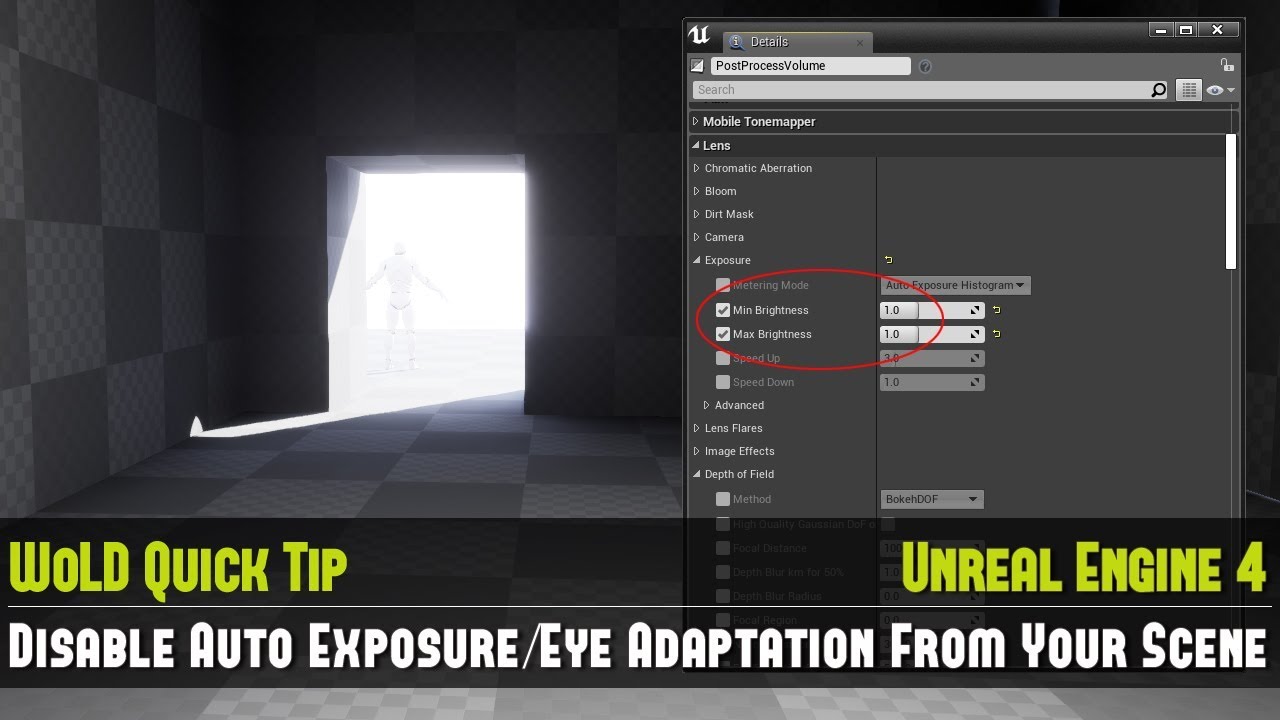
Full UE4 Quick Tip Playlist: https://www.youtube.com/playlist?list=PL_c7yiTIRI8rPQfsNytgjgJh-bssWUczX
Learn how to quickly disable auto exposure, also known as eye adaptation from your scene. This is especially important to do when you are working on creating your environment and not on lighting, as exposure is too distracting in the scene by d...
@crystal musk
crystal musk
hasty epoch
Try this: https://youtu.be/K2kIre_BHgA?si=CrI4VouPdZyFsqET
Nothings changed ):
 hasty epoch
crystal musk
Nothings changed ):
hasty epoch
crystal musk
Nothings changed ):
Build lighting
crystal musk
Already did that but I'll do it again
Did not change anything
I don't think its a problem with the level lighting or post process because it looks fine when the game is played in any other launch mode, the problem is that the standalone launch mode seems to randomly alter the entire games visuals in every level.
Like even "New Editor Window" is 100% correct looking
crystal musk
hasty epoch
Sorry, that I can't help you.
It's fine, thanks for trying anyway, I really appreciate it :)
 golden sundial
Can I get someone to help me in the #blueprint ??
 drowsy turtle
honestly, I feel like c++ in Unreal Engine is a mess, because you still mostly need blueprints to set assets, create an UMG widget etc. 😔

 hidden osprey
RAM ISSUE
drowsy turtle
hidden osprey
RAM ISSUE
erm, no?
serene plinth
you know code wise, the brain is the while true loop, and the spine is just the referencers to the body parts that connect it to the brain
crystal musk
crystal musk
Nothings changed ):
For anybody curious, I did end up fixing this!
I had to have the game automatically set the "Visual effect quality" setting to 2, I have no idea why.

 cerulean pine
I need help. My water plugin isn't working, to the point where the example buoyant object doesn't float in the example water map
How do you reinstall or update a plugin?
eternal ledge
cerulean pine
I need help. My water plugin isn't working, to the point where the example buoya...
is this fluid flux?
if its the project files then just delete and re add them to the project (assuming you havnt made any changes to the files within the folder that you need to keep)
if its an actual plug in, then go to the unreal engine market place folder, delete the plug in in there, then redownload to engine
cerulean pine
@eternal ledge i fixed it. It turned out that the buoyancy simply doesnt start with auto-activate on
eternal ledge
ah makes sense
cerulean pine
That said, my next challenge is figuring out how to make a 2D harpoon sprite fly straight. But that shouldnt be hard to figure out, I just need to watch a video about arrows. While I'm here I'm gonna skip ahead to a more complicated thing, which is: How can I make a rope sprite that extends, and how do I make it so my poncho sprites remain connected when the arms move
I think I can kill two birds with one stone by learning this: How do I make a sprite stretch between two points?
 marble kayak
Is there a safe link where I can download the Unreal 4 mennequin? I have a vehicle project and the 3rd person template is not in it. Thank you 🙂
I just need it for scale reference
Never mind I just added the Animation starter pack to my project issue solved 🙂
 frail river
Hey, does anyone know how to enable "stat gpu" on a game running on UE4 ? I'm playng Conan Exiles, and there's a map that runs at 14 fps, and I got curious what's eating up the ms, but stat gpu isn't working, and r.gpustatsenabled=1 didn't help
Funnily, stat gpu works on other Ue4 games, like Mordhau 😄
spice ruin
We don't really offer support for specific games.
However it's entirely possible they just disabled all the stat commands.
 gilded mason
I'm getting these very weird error messages when I try to build for HTML in 4.27 and google/stack overflow is giving nothing - anyone has any ideas? No errors come up in any of the blueprints either
 oak patio
How are you building for html in 4.27 when it was dropped after 4.24?
spice ruin
Some brave souls did try to carry it on.
oak patio
oh no
 toxic lily
got a question,
Im using a cel shaded outline post processing material, and i have a Exponential Height Fog in my scene with volumetric fog enabled,
Is there a way i can adjust the rendering layer for the fog? like apply after the post process material, or is there a way i can get it to blend with the post process, as you can see here, objects further away have the outline when they should be occluded by the fog

 hazy rose
So I'm making like a boat system where an AI can get ona boat and move from A to B you know.
I am lookign for constructive feedback / alternatives to the following method:
I have a AI Character who, enters the boat by setting collision to query only (img1) and then setting a variable "on boat to true"
Then every tick I do this BS (img 2) just tping the plakyer to the boat location
And to exit the boat I just teleport the AI to the nearest navigable location (img 3) and he can resume walking to his destination
My main worry in this strategy is the need for tping the player to the boat location every tick. I will be having multiple AIs and i'm guessing its gonna be laggy af.


I have tried attaching to component / actor but for some reason No idea why but the attachment always ends up with player A on one half ot he map and player B on the other half of the map.
😭 and i disabled collisions.
Now the nodes are unattached but essentially I've tried every combination and to no avail

Solid 2 hours on this 💀
 noble olive
I'm a passionate 3D character artist, illustrator, sculptor. I have experience in 3D modeling, UE, sculpting, texturing, rigging, and rendering. for games, movies and animation etc. I make use of software like Zbrush, Maya, Blender, UE. I can model 3D Dragon 3D Character model 3D Environment for you base on your ideal with Affordable


Kindly inbox me now
solid holly
How long does it take you guys to compile about 5000 shaders?
oak patio
noble olive
Kindly inbox me now
Kindly read the #rules. To post a job offering you need to use the job board, #instructions tells you how
noble olive
oak patio
Kindly read the <#809148428922781737>. To post a job offering you need to use th...
Ohh thanks you sorry for that
oak patio
No worries!
 shell wren
guys anyone knows whats happen to grass and how to fix this?
spare trench
sometimes when I bake lightning, it doesn't bake properly, some assets looks black or different color compare to if I switch light source to movable. How can we get the same light result when baked?
Also sometimes some assets needs to change thier lightmap values. How can we know how much lightmap value a particular asset needs?
grim flame
@spare trench this mode helps you visualize the lightmap resolution, each square is a pixel
 solid holly
How can I make it so that when I change the text, the slider doesn't change size
 plush yew
Does anyone know how to fix the annoying VS Studio bug that keeps opening the Save As Dialog while the intellisense is running?
I must wait a few seconds/minutes until the analysis finishes in order to Save or Build the code
This is a reported bug btw. I'm gonna link a page of someone going trough the same thing.
https://developercommunity.visualstudio.com/t/Save-As-dialog-constantly-opens-when-a/10617511?sort=active&type=idea


Developer Community
 wild flame
Hi, Im making a multiplayer game with a dedicated server. I normally built my server and launched it and I can perfectly connect to it. When I implement Advanced Sessions Plugin for steam I cant connect to my server it gives a PreLogin failure: incompatible_unique_net_id. How can I fix this can anyone help me? Thanks.
solid holly
solid holly
How can I make it so that when I change the text, the slider doesn't change size
||LoL found out||
covert sky
Has anyone experience this bug where delays don't work print screens don't go away?
 tough bear
can anyone help me - figure why i have this third screen coming at (0,0,0) spawn location.
i have only added 2 player start

 candid sparrow
can anyone recommend an fps tutorial without using templates?
kinda sucks to look up a tutorial for ue4 and they end up using the template
 surreal cedar
candid sparrow
kinda sucks to look up a tutorial for ue4 and they end up using the template
surreal cedar
candid sparrow
kinda sucks to look up a tutorial for ue4 and they end up using the template
i mean whats wrong with using the template
candid sparrow
surreal cedar
i mean whats wrong with using the template
i dont have it
surreal cedar
candid sparrow
i dont have it
its installed with the engine
candid sparrow
surreal cedar
its installed with the engine
i did not install it
i only installed the core engine
plus
i wanna learn how to make it
and not just use a premade one
surreal cedar
well whats a better way to learn then look at how others have made it
and you know the people who made the engine seems like pretty good teachers
candid sparrow
surreal cedar
well whats a better way to learn then look at how others have made it
well where can i downlload only the template?
like as a zip file or whatever

 surreal cedar
well just download the templates then
candid sparrow
surreal cedar
well just download the templates then
still thats like
3gb
sucks
well im gonna try to find the template
as a zip file or whatever
surreal cedar
the template is not going to be any smaller
its still going to be a large size
also how tf do u have network limits in 2024?
candid sparrow
surreal cedar
also how tf do u have network limits in 2024?
idk its like 6gb a day
surreal cedar
candid sparrow
idk its like 6gb a day
why?
candid sparrow
had to split up the ue4 download into 2 days lmao
surreal cedar
also is there any specific reason u are using UE4 over Ue5
candid sparrow
surreal cedar
also is there any specific reason u are using UE4 over Ue5
smaller download size
ue5 would take 4 days to download
surreal cedar
if u care about download size why did u go for the most advanced public engine that is never goign to be small
especially if theres updates etc
candid sparrow
surreal cedar
if u care about download size why did u go for the most advanced public engine t...
dude all i wanted was a tutorial which doesnt use the templates
im not gonna update it
surreal cedar
candid sparrow
im not gonna update it
if theres updates to a specifc version u wont have a choice
candid sparrow
its not like other engines dont have large download sizes
surreal cedar
godot is less than a gig
candid sparrow
surreal cedar
no it doesnt
for my use case it does
surreal cedar
what is your use case
candid sparrow
surreal cedar
what is your use case
photorealism
surreal cedar
and have u ever opened ue4 before and made smaller working projects?
candid sparrow
well i have used unity for a year now
but not ue4
so im just trying to get a working fps controller
and see how the engine has its own ways of creating certain things
wouldnt downloading a template ruin that?
surreal cedar
not really
as the template uses the engine as its made by the people who made the engine its an extremely solid starting point
and any tutorial that doesnt use the template just remakes the template anyway
surreal cedar
candid sparrow
photorealism
wait so your trying to make a photorealistic FPS game... with no experience in unreal
candid sparrow
surreal cedar
wait so your trying to make a photorealistic FPS game... with no experience in u...
im not trying to make a photorealistic fps game.
im just testing things with the engine
and when i have enough experience i will start making that
surreal cedar
yeah so ur probably about 5 years off
candid sparrow
surreal cedar
yeah so ur probably about 5 years off
whatever bro
its as if i cant apply my years of experience into this engine
surreal cedar
well put it this way i have multiple qualifications in epic partnered unreal courses at my college and multiple university years and i still am learning
candid sparrow
surreal cedar
well put it this way i have multiple qualifications in epic partnered unreal cou...
and im still learning too
but seriously, this argument is about an fps??
an fps controller is one of the simplest things to make
surreal cedar
who said its an argument
candid sparrow
surreal cedar
who said its an argument
idk i just assumed
 bleak zodiac
is okay, got both unity and unreal user here
candid sparrow
well i got everything in control now, got the hang of pawns and visual scripting..
didnt need to download 3.5 gigs of data
and my fps controller works just fine
bleak zodiac
what else?
candid sparrow
wdym
 fierce tinsel
hey I have one problem when in the video the character and the camera are in correct position but when I play the game the every thing is mixed up please help

 solid holly
There is no way, grass only spawn at >High Engine Scalability. For the last 2 days I've been trying to figure out why my grass just stopped working

 iron folio
Hey, I have a problem when packaging my project. The Output log shows:
PackagingResults: Error: begin: stack for UAT PackagingResults: Error: === Critical error: === UATHelper: Packaging (Windows (64-bit)): LogWindows: Error: [Callstack] 0x00007ffd3edf71b1 UE4Editor-Niagara.dll!UnknownFunction [] PackagingResults: Error: Fatal error! UATHelper: Packaging (Windows (64-bit)): LogWindows: Error: [Callstack] 0x00007ffdbee438c2 UE4Editor-CoreUObject.dll!UnknownFunction [] PackagingResults: Error: Unhandled Exception: EXCEPTION_ACCESS_VIOLATION reading address 0x0000000000000000 PackagingResults: Error: [Callstack] 0x00007ffd3edf0ff0 UE4Editor-Niagara.dll!UnknownFunction [] PackagingResults: Error: [Callstack] 0x00007ffd3edfd79d UE4Editor-Niagara.dll!UnknownFunction [] PackagingResults: Error: [Callstack] 0x00007ffd3edefd39 UE4Editor-Niagara.dll!UnknownFunction [] PackagingResults: Error: [Callstack] 0x00007ffd3ede4169 UE4Editor-Niagara.dll!UnknownFunction [] PackagingResults: Error: [Callstack] 0x00007ffd3ee2824b UE4Editor-Niagara.dll!UnknownFunction [] PackagingResults: Error: [Callstack] 0x00007ffd3edf71b1 UE4Editor-Niagara.dll!UnknownFunction [] PackagingResults: Error: [Callstack] 0x00007ffdbee438c2 UE4Editor-CoreUObject.dll!UnknownFunction [] UATHelper: Packaging (Windows (64-bit)): LogWindows: Error: [Callstack] 0x00007ffdbeb9549d UE4Editor-CoreUObject.dll!UnknownFunction []
I've tried updating my graphics drivers, verifying my engine version, disabling and re-enabling niagara.. is there any way to tell further information about what could be causing this?
engine version 4.27.2
ashen jackal
I'm testing the playback of a streamable media source in Unreal Engine using the VLC plugin. I'm using this RTSP URL: rtsp://210.99.70.120:1935/live/cctv001.stream. However, the VLC plugin isn't working with RTSP, although it works fine with RTMP. Does anyone know why this is happening?
Engine version is 4.27.2
Error message : LogVlcMedia: Error: mmdevice: cannot initialize COM (error 0x80010106)
 azure shore
candid sparrow
idk i just assumed
azure shore
candid sparrow
idk i just assumed
why do you ping reply to every message immediately above your own
fierce tinsel
Bro In this video when I make our own animation class my animation our not working I have also send the photo of my blueprint please help


 tough thicket
fierce tinsel
Bro In this video when I make our own animation class my animation our not worki...
tough thicket
fierce tinsel
Bro In this video when I make our own animation class my animation our not worki...
few issues
1 idk is velocity default? is Vector length correct? what are you trying to do
what kind of animation is it
also
thats the wrong anim graph
theirs no way the default manequin is using 3 node to output pose unless thats a pose driver thingy but doesnt look like it
azure shore
can I get some help with a light building bug, Ive asked in visual effects and on the reddit but both have been completely silent and this is really slowing me down
azure shore

tough thicket
azure shore
can I get some help with a light building bug, Ive asked in visual effects and o...
posting question might help
azure shore
Ive asked in visual effects
oak patio
Not the best strategy to have people scroll through a different channel every time they need to refer to the original question
azure shore
I said a light building bug, if anyone here saw this and knows anything about light building, they could help, if they dont, thered be no point me describing the whole thing here
Ill just send the link if its easier #visual-fx message but didnt wanna send all the same messages in 2 different channels
and I mean because itd look spammy, not out of laziness
spare trench
isn't there a official way of exporting video of sequence in unreal engine4?
tough thicket
spare trench
isn't there a official way of exporting video of sequence in unreal engine4?
importing into or out of unreal?
spare trench
tough thicket
importing into or out of unreal?
exporting the sequence out of unreal engine
tough thicket
spare trench
exporting the sequence out of unreal engine

Reddit
Explore this post and more from the unrealengine community
i think this is the most informative thing you could read on the subject
some plugins in marketplace too
tldr you cant
spare trench
tough thicket
tldr you cant
thanks dude, I figured it out using a plugin named Movie Queue as I remeber
 last current
Hello everyone) I have a question. When I import a model with a skeleton into UE4 in .fbx format, everything is fine in normal viewing. But as soon as I apply animation the model becomes invisible (most likely it changes size to very small).
P.S. I noticed that this only happens with models that are bound to only one bone, for example head.
tough thicket
last current
Hello everyone) I have a question. When I import a model with a skeleton into UE...
blend issue in anim blueprint or you have messed up keyframes
last current
tough thicket
blend issue in anim blueprint or you have messed up keyframes
No, the animation is fine. It works fine everywhere. I found a similar problem online but couldn't figure out how to fix it.https://forums.unrealengine.com/t/skeletal-animation-mesh-disappears/314641

Epic Developer Community Forums
Hi, I made a rigged character with a skeletal animaton in Blender 2.7.4, and when I import it into Unreal Engine 4, the mesh disappears when I try to play the animation, either as a preview in Persona or in-game. I’m using Unreal version 4.7.5 from the Epic launcher, and importing the mesh as an FBX. The animation seems to import, since it dis...
last current
Reddit
Explore this post and more from the unrealengine community
 proven monolith
Hiii I'm making some render target stuff and I wanted to redraw RT with new values using material and drawing to render target. The problem is I can't seem to use render target in material, that ends rendered intu this same render target
tough thicket
proven monolith
Hiii I'm making some render target stuff and I wanted to redraw RT with new valu...
Yeah theirs a node for that but idk its in the tutorial gimme a minute and ill look for you
tough thicket
sry ppl trying to kill me 1 minute
proven monolith
Don't worry I got plenty of time, hope you'll stay alive
 quasi jackal
Is there a visual studio channel?
oak patio
quasi jackal
Is there a visual studio channel?
This is an unreal engine server, so no
We have a C++ channel but it's not for IDE questions
tough thicket
proven monolith
Don't worry I got plenty of time, hope you'll stay alive
So many are dead... Alright wait are you asking to reuse the render target for another purpose?
Known Limitations
You cannot draw to a render target that is being sampled as a Texture by the Material you specify. Either use alpha blending to modify a render target in-place, or go back and forth between two different render targets.
Taking a high level look at how to use Blueprints and Render Targets togther in UE4.
right at the bottom
proven monolith
tough thicket
So many are dead... Alright wait are you asking to reuse the render target for a...
Exactly, I want to get 2 different render targets (base and mask) and perform MIN on them, which would be drawn do base render target
tough thicket
you would need to set up 2 cameras i guess im not sure if theirs a node for it, says right there you cant change render targets so im assuming that means theirs no node for it for camera component
solid holly
Anybody know any tutorials on youtube
About:
- Change a character's outfit
- Changing facial expresions
tough thicket
solid holly
Anybody know any tutorials on youtube
About:
1. Change a character's outfit
2. C...
All that is done inside a 3d workspace

www.google.com
solid holly
Thanks
gilded mason
iron folio
Hey, I have a problem when packaging my project. The Output log shows:
`Packagin...
did you manage to figure it out?
iron folio
gilded mason
did you manage to figure it out?
Yes, it was an issue with a specific particle system. I had to manually go through each niagara system and try to perform operations on them. Eventually I found a system that crashed the engine with the same error. I had to remove this problematic system using Windows Explorer as I couldn't take any actions on this system in the engine without it crashing. Once I deleted it I was able to build successfully
gilded mason
iron folio
Yes, it was an issue with a specific particle system. I had to manually go throu...
This actually worked!!! Thank you so much!
fierce tinsel
Hey when I try to drag our blueprint interfaces in by blueprint class an error is coming this function was not marked as blueprint capable and cannot be placed in a graph
 sullen star
hey there all! hope everyones day is good and cool. does anyone know of any tutorials (i dont care what lanaguge its in) about how to get a cloth door to work and a blanket for ue4 i have looked at the internet i saw someones tutorial and there was two balls going around hitting cloth and making it move then i down load the example map to find they have removed that information from it now they spin which is great if you need that lol ive tried to figure it out i have tests they fly away or do strange things so i thought i would ask if anyone can help me that would be awesome 😄
 low kiln
hello dumbdumb here. was wondering how to make this work? i want to measure basically clicks per hour but delta time is super fast and i thought that was normal speed? thats what it sort of says when i hover on the green part
 oak patio
that looks like farts per hour not clicks 🤔
oak patio
low kiln
hello dumbdumb here. was wondering how to make this work? i want to measure basi...
delta time is just the time it took the last frame to execute. I'm not exactly sure what lead you down to the delay on tick path, but it's always wrong
You use it to normalize things
If you wanted something to move 10 units a second, you'd multiply 10 by delta time, and use that as the movement value
oak patio
everything in a game moves in frames. That what fps is. The delta time is how long it took the last one to execute. You use it when you want something to move in a specific amount of time.
Say for example, every second you want something to count up by 10. You can't just stick this on a tick itself, as you might be running at 20fps, 100fps, etc.
So instead, by taking the delta time, you can modify that amount to tell you how much you should move up per frame.
You multiply your 10, by the delta time. Say you stay at a stable fps, you take the 10 units per second, then multiply it by 1/60, to know how much you should count by in that single frame. Then all is well when you've counted 60 of them, because you've counted up by 10.
as for the actual maths of counting a certain amount of something per hour, might be better off in #game-math
low kiln
my jaw actually dropped for 30 seconds
tough thicket
sullen star
hey there all! hope everyones day is good and cool. does anyone know of any tuto...
Cloth paint in the mesh settings is easy to you just need to enable complexe collision on the sphere id imagine and thats all
sullen star
yeah i know the settings are easy but it just didnt work when i tried it
sullen star
tough thicket
Cloth paint in the mesh settings is easy to you just need to enable complexe col...
thank you for getting back to me though
fierce tinsel
bro one problem is coming when I change my ue 4 mannique with the character asset and set the animation class the animation is not working in character but working in unreal 4 mannique help please I am a beginner in unreal 4.27
plush yew
do i need to put the reflection captures in the map with the geometry or lighting?
 bitter elm
I'm running into an issue where anim notifies on replicated enemies do not trigger if the host is far away from them (it triggers for clients but not the host). The enemies are still replicated (always relevant) and can move, but no longer receive the anim notifies like usual. As soon as the host moves closer everything starts working again. Is there some kind of net relevancy distance for anim notifies? (UE 4.27)
bitter elm
bitter elm
I'm running into an issue where anim notifies on replicated enemies do not trigg...
I found the setting on the mesh: "Visibility Based Anim Tick Option"
 wraith wadi
hello, i was wondering has anyone here got any experience with the RTS plug in available on github?
spice ruin
The RTS plugin?
wraith wadi
yes
 neon bough
the one and only... RTS plugin
1.) provide a link to the plugin
2.) provide more information about what problem you got
this channel isn't very active, and adding more information to your question may raise the chance of getting an answer at all
wraith wadi

GitHub
Real-time strategy plugin and showcase for Unreal Engine 4. - npruehs/ue4-rts
its this plugin and i am not able to see any of the assets it says will be available, do i have to start using the assets, or will the assets already be ready in place to edit?
spice ruin
How were we meant to know it was that one? 😦
The assets may be in the plugins folder.
And that plugins folder may be hidden in the content browser. There's a settings button on the right... I think. Can't remember where it is in UE4.
neon bough
Show plugin content is what it should say in the content browser options
wraith wadi
where is the content browser option?
neon bough
can you show us a screenshot?
spice ruin
Should be a cog {o} icon somewhere.
neon bough
most of us didn't use UE4 for at least 2 years
wraith wadi
neon bough
can you show us a screenshot?
screenshot of what exactly?
neon bough
your content browser in UE
spice ruin
Don't use your phone.
wraith wadi
 neon bough
i highly suggest removing UE4, installing UE5 and getting familiar with it, and then trying to port that thing to UE5
which should be possible
you aren't doing yourself a favor with UE4 (as beginner)
wraith wadi
i did start a project in unreal engine 5, but came across an issue where i was trying to spawn players with random player colours that were assigned to UV maps in imported models
but unreal engine 5 only allows me to use up to 4 UV maps on imported skeleton mesh
neon bough
and UE4 allows more?!
also i don't think that you need UV Maps for that
sounds like a job for dynamic material instances and/or primitive instance data
wraith wadi
neon bough
also i don't think that you need UV Maps for that
well im importing assets from an old game, i was trying to reuse all the assets from that game because the dev company no longer exists
and i wanted to basically port the game to new a new engine due to stability issues
i know i am new and it can be tedious to teach new people, but a little help would be very appreciated
wraith wadi
neon bough
sounds like a job for dynamic material instances and/or primitive instance data
well i had something like that set up, but i dont know how to apply it to the player spawns
neon bough
well, you have to learn to provide the necessary context to your questions
as with THE RTS Plugin question, we can assume a lot of things when context is missing
wraith wadi
neon bough
well, you have to learn to provide the necessary context to your questions
its this here
neon bough
you don't even have to change UV for that, as all color data is pretty much in one texture, this can be "easy" done in the material
wraith wadi
this is what i have in the material
 neon bough
and to pick a random color, that depends on how random you want it to be, e.g. can colors be used multiple times or only once? if only once you want some global manager which manages the color
yea that's overkill
you can just remap the UV.x range for anything where UV.y is > 0.5 (as all the color stuff is in the lower half)
wraith wadi
neon bough
and to pick a random color, that depends on how random you want it to be, e.g. c...
yeah just picked once for now, until i am able to make a colour selection widget
neon bough
to make it easier you could split it into two textures
wraith wadi
neon bough
you can just remap the UV.x range for anything where UV.y is > 0.5 (as all the c...
its in the lower half and on the arms
and on the male version its on the chest arms and legs
neon bough
in the begin play of the player you would create a dynamic material instance where you set the scalar parameter of UVIndex to a random number
or you would use custom primitive data which you can also update on beginplay, they don't require a material instance
 neon bough
yea the set scalar node is the wrong one
that one is for a material parameter collection, which you don't want to use for that
wraith wadi
like this?
 neon bough
yea, there's also one which set's it by Name
and as target you have to plugin the instance that you created
and then you also have to assign the instance to your mesh

What are Dynamic Material Instances in Unreal Engine 4?
Source Files: https://github.com/MWadstein/wtf-hdi-files
that also applies to UE5
and at this point you may want to bring the convo back to some UE5 channel to leave this out of #ue4-general
wraith wadi
neon bough
and at this point you may want to bring the convo back to some UE5 channel to le...
ok, i will do, just been struggling with this and you have actually helped more than i could have imagined
 warm hill
Good day everyone please I have a question to ask
Have any of you recently uploaded a game on the Google playstore? I am having issues packaging my game with API 34 and 35 which is Google's requirement right now but if I use API 32 or 31 I will be able to package my game but Google console doesn't support any API lesser than 34 please do you have any questions on how to package a game to support API 34 or 35
I am using UE4. 27
noble olive
 cold vessel
Am new here Best regard to everyone
cold vessel
Am new here Best regard to everyone
You're welcome
 modest ice
Hi i am having problems with character movement
Basically my character moves fine, then i enter a car, unpossess the character, and possess the car (which also moves fine). I then exit the car, and repossess the character. Now the character no longer can run/walk or jump but for some reason my punch and dodge inputs still work.
Has anyone seen something like this before? I checked if it is still attached to that car (it was not), I checked whether inputs were being ignored (also no), so not sure what to do.
Thank you!
 crisp moat
warm hill
Good day everyone please I have a question to ask
Have any of you recently uploa...
crisp moat
warm hill
Good day everyone please I have a question to ask
Have any of you recently uploa...
sorry but google sucks if you do not upload a project for a year they will close your account without any refund, i was planning to make a crossplay feature for a unreal project on android and though i'd have a placeholder like on steam, i was wrong
oak patio
That's just not true though. To be inactive you need to be over a year old, have less than 1000 installs combined, not used the play console in 180 days and have unverified credentials.
And you can easily keep your account too. First they email you to warn you, then you just verify credentials and push an update
That fee is also a one time fee of $25
finite bison
Is there a limit to how many active widget indexes there are for the widget switcher?
i can only go up to 3
toxic lily
got a question
working on a save game state, and im trying to store a weapon BP actor store in a player slot

here is the save, pardon the mess
ive tested extensively and it does accurately save the item, it even lists its BP name in a print string, however when i load the save it cannot load that item and acesses none.

im not sure i understand this, how can i get a reference to something that seemingly exists but cant be called?
 raw oak
toxic lily
working on a save game state, and im trying to store a weapon BP actor store in ...
raw oak
toxic lily
working on a save game state, and im trying to store a weapon BP actor store in ...
What you're trying to save is a reference to an actor. That variable is just a pointer to something in memory. Once you close your game and restart, that reference is no longer accurate. You'll need to save specific properties of your actor in something like a struct and then use those properties to update a new actor when loading your save
toxic lily
raw oak
What you're trying to save is a reference to an actor. That variable is just a p...
yeah i read a bit into it and saw making a sttruct was the best method, ive tried it and still no dice,

I wager i probably had set it up wrong


I saved the struct and try to recall it with a spawn actor, but its still reading as a none value
it did get rid of nearly all those errors except that one though so its progress
 candid sparrow
anyone knows why its blank? when i first made it there were some stuff on the right you could edit camera tilt, yaw, etc
spice ruin
Go to the window menu at the top and see if you can open stuff again.
Failing that reset your layout (at the bottom of the window menu)
candid sparrow
interesting, it worked, thanks a ton!
fierce tinsel
Bro when I open unreal 5 and make a project and when project is about to open these error are coming anyone can help me


 azure shore
might wanna ask in #ue5-general then 
covert sky
Is there a way to update the ue4 browser in 4.27. Websites hardly work now....
 sharp marten
fierce tinsel
Bro when I open unreal 5 and make a project and when project is about to open th...
sharp marten
fierce tinsel
Bro when I open unreal 5 and make a project and when project is about to open th...
Are you running on a laptop any chance?
fierce tinsel
sharp marten
Are you running on a laptop any chance?
Ya I am right now running unreal in laptop
sharp marten
Most laptops have two GPUs. One integrated, that is really only good for watching 1080p videos and doing basic work tasks and doesn't use much power, the other is discreet (i think the term might be wrong), which is for hardware accelerated tasks (such as gaming) and uses more power
UE4 is probably using the integrated one. Depending on the laptop vendor, you might be able to set it so that it turns on the discreet GPU for UE4
fierce tinsel
I have an integrated gpu
Bro I'm using ue 4.27 I am using enhanced input action but it is not working help me
oak patio
fierce tinsel
I have an integrated gpu
You won't be able to use unreal with an iGPU
It doesn't work well, you're lucky if it works at all
 ocean pumice
What do you think about my resume ? Thank!
covert sky
anyone's editor freezes up and wakes up if i maximize another window? Its a clean windows 11 and a new ue4 project.

 summer elk
I know it's been a while, but have you had any chance to figure this out?
 blissful girder
Has anyone ever worked with static VBDs to make a cloudy environment and all of the sudden out of nowhere they go from nice fluffy clouds to being sliced up into pieces and rearranged like some sort of weird tiling?
FIX: Not sure what the problem was, must have typed in a weird command because I created a new project, migrated the level, and all the VBDs were how they were supposed to be again.
 warm hill
Good day everyone please has anyone figured how to package unreal engine 4.27.2 project for android using SDK 34 or 35? I can perfectly package my game with SDK 32 but Google console says I should upgrade my game by packaging with SDK 34 or above. Right now I am just stock and confused I don't have any clue on how to make this work please does any one has a clue on how I could package my game with SDK 34 or 35 in UE4. 27.2 please I need help 🙏🙏🙏🙏
 past oxide
is there anyway to connect two integers to one create session node?
candid sparrow
i imported this scene from blender and its too dark.. its as if the sky is not emitting any light and the only source of light is the directional one.. what do i do?
 tough thicket
candid sparrow
i imported this scene from blender and its too dark.. its as if the sky is not e...
tough thicket
candid sparrow
i imported this scene from blender and its too dark.. its as if the sky is not e...
does it have a skybox?
candid sparrow
tough thicket
does it have a skybox?
yeah
tough thicket
if your scene has a skybox like a mesh for the sky then it can obstruct lighting
you can turn culling on and that works but
dont remember exactly
 hot arrow
I just discovered the One File Per Actor in UE5 🤣
Is there a way to implement it for UE4 👀 ?
I don't see how complex it is
 kindred creek
hey, im trying to import 2 skeletal meshes, and 3 anims. it's been about 1 hour and it's still doing this stuff. i exported as an fbx from blender. any help would be good

each anim is 2000 frames
candid sparrow
i actually fixed it, while importing the meshes i also had to check lightmap uvs
tough thicket
kindred creek
hey, im trying to import 2 skeletal meshes, and 3 anims. it's been about 1 hour ...
36,000 keys?
jesus you can reduce those keys somehow but it will reduce anim quality
spare trench
summer elk
I know it's been a while, but have you had any chance to figure this out?
bro literally remembers a message written 3 years ago 🫡
hot arrow
Hello guys, for the ones that use the 4.23, do you know if virtual textures are supported by the HTML packaging ? 👀
 leaden hawk
spare trench
bro literally remembers a message written 3 years ago 🫡
leaden hawk
spare trench
bro literally remembers a message written 3 years ago 🫡
Search function be liken exists
 shy nebula
I know this is a dumb way to do it but im just trying to figure out how to pass a variable to the server. So heres my issue. I am working within a widget and im trying to pass text to an actor that's in the scene. But its not replicating from client to server
and in theory it should heres my setup

when I pass that text variable to the actor which contains NewVar 1 text which has replicated selected in replication" It will only show on the client not the server
rustic panther
shy nebula
not a multiplayer expert here, but user widgets don't exist on server... you need to have the widget interact with a controller or something else that is replicated and have that actor execute to server
possibly check out #multiplayer for a better answer
 hushed moat
Hello, i was new here, and i wanted to ask something about my project, i want to make a hole for my window at my wall (i'm using mesh for window and wall), sorry for my bad english and thank you 🙂

 green acorn
hushed moat
Hello, i was new here, and i wanted to ask something about my project, i want to...
green acorn
hushed moat
Hello, i was new here, and i wanted to ask something about my project, i want to...
how is the wall created?
you need to create wall where the window will be. Typically done in your 3D software.
If you are using BSP, get fammiliar with the boolean operator, that's pretty much how to make a hole when using BSP.
hushed moat
green acorn
how is the wall created?
Well I use wall mesh from starter content, then give material
hushed moat
green acorn
If you are using BSP, get fammiliar with the boolean operator, that's pretty muc...
What is BSP?
hushed moat
green acorn
If you are using BSP, get fammiliar with the boolean operator, that's pretty muc...
So I shoulda make whole building in my 3d software then?
green acorn
hushed moat
So I shoulda make whole building in my 3d software then?
that's the typical workflow
BSP can be used for "sketching" but in the end, you need static meshes
hushed moat
green acorn
that's the typical workflow
I see, then I shall start over again, thanks for the information
finite bison
Hi, Im trying to do the classic thing of having a 3d mesh in my widget so i can customize the object. So far, i cannot seem to get my 2d scene component to capture every frame. As the mesh is playing an animation that i need it to capture. help!
spice ruin
Don't scene captures have a 'capture every frame' option? Is it checked?
finite bison
Yes, its checked
spice ruin
Then I'm out of ideas! 😦
finite bison
I only see the animation playing through the preview
 spice ruin
Maybe it's your ui that isn't updating, rather than the render target.
finite bison
How could I update the ui?
finite bison
Yeah
covert sky
anyone know how to add luoshuang on 4.27.2 source build?
fierce tinsel
when I try to import the punching animation the error is coming please help
 strong lake
fierce tinsel
when I try to import the punching animation the error is coming please help
strong lake
fierce tinsel
when I try to import the punching animation the error is coming please help
thats no error
you got no skeleton in this "object" or mesh
you exported it wrong
Can someone remain me,how evnt tick works? If I dont activate event tick, it will tick in parent actor? and how to call parent tick ?
 strong lake
i can't get parent tick to run 😐

 regal mulch
strong lake
i can't get parent tick to run 😐
regal mulch
strong lake
i can't get parent tick to run 😐
You can get a parent node via the Right click menu of the given node
strong lake
regal mulch
You can get a parent node via the Right click menu of the given node
hey thanks, Ye it took me some time but I actually found it 😄
fierce tinsel
strong lake
you exported it wrong
So how can I fix it please tell me
fierce tinsel
strong lake
you got no skeleton in this "object" or mesh
So how can I get skeleton in this object or mesh please help me
spice ruin
regal mulch
You can get a parent node via the Right click menu of the given node
I always forget how to do this.
regal mulch
spice ruin
I always forget how to do this.
A lot of people do. And even more don't know they have to add them to not break current or future Parent code.
I have lost hours to others not calling Parent :')
strong lake
fierce tinsel
So how can I fix it please tell me
export corectly lol
check in blender if this file is ok
 blissful latch
Can someone tell me why, as listen server I can see the camera rotation, but as client the character doesnt change


the first image is playing as listen server
regal mulch
blissful latch
Can someone tell me why, as listen server I can see the camera rotation, but as ...
Cause the Camera Rotation is usually controlled by Control Rotation, which Clients only have their own of.
Use GetBaseAimRotation for the Anim instead
blissful latch
It made it stop working ?


Nevermind, it was just a mistake i made
It works now. Thanks a lot!
fierce tinsel
strong lake
export corectly lol
I am a beginner so I cannot understand please tell me step by step to that I can under stand it quickly
strong lake
fierce tinsel
I am a beginner so I cannot understand please tell me step by step to that I can...
How did you get that file? its corrupted, generate new one
fierce tinsel
strong lake
How did you get that file? its corrupted, generate new one
I get that animation from Mixamo you means that I will download the animation again
fierce tinsel
Bro please suggest me a best video for retargeting Mixamo animation to unreal engine 4.27 please
tough thicket
fierce tinsel
Bro please suggest me a best video for retargeting Mixamo animation to unreal e...

Bone Mapping: https://bit.ly/3matNVV
Join the fun: https://discord.gg/32qgNwm
??
fierce tinsel
tough thicket
https://www.youtube.com/watch?v=OHBD9YnX-jU
Thanks
strong lake
What is launch for ?
 oak patio
Packaging the game
strong lake
oh f
abandon
😄
im only making mod haha
i can't tell if its squad editor so clunky or just eu 4 things
 wise mist
I tried to install the editor (win 10), uninstall, reinstall, change directory, verify files, with Epic launcher but I always get the error of lights that do not rebuild. how to fix? tnx all
obtuse stump
How do I localize fonts???? I've put a font for this specific language but the game still runs the default one. Am I missing something?
tough thicket
Anyone know why their is so many 2d 2.5d visual effects in JRPGS, i doubt a couple of artists got together for a mediocre game and made thousands of unique effects.. Anyone know what im talking about? thanks
im just wondering what i should use to make the sprite sheets for flames and like magic
must be an easy way to do it is what im saying
i dont have the slightest clue
Years ago i went outside at night with a torch and made my own flames but that cant be it....?


 oak patio
Well you need them all. Games don't just get built into a single file.
solid holly
Where is the option to do that
oak patio
?
Well you clearly have the option to upload multiple there given it says "upload files"
Alternatively you could just zip them up
solid holly
Ok thanks
 valid raven
hey gang, it's me again. i'm trying to move an object using a set relative location on component node. the object is having collision issues. i don't understand why it has collision issues. during level building i can move it into and through objects just fine.
ok nvm fixed it with the right collision settings oml
valid raven
having trouble rotating a rock based on the player's look direction
finite bison
hell yeah
 hot arrow
finite bison
hell yeah
hot arrow
finite bison
hell yeah
When I started using this back in the time (2013) I understood nothing lol, 1 year later UE4 was released with BPs, I should have keep tryharding this lol
strong lake
How do you get value from map by key, to not play with index and looking for it ?
i just want to increase number per key

nvm its find
😐
fierce tinsel
Can Anyone help me when I try to import mixamo animation into unreal 4.27 this error is coming help
 valid raven
is there a way to take 2 vectors (xyz coordinates) and turn that into rotational data?
so like lets say point 1 is at 0,0,0
and point 2 is at 1,1,1
a line trace will draw between the 2 but i was wondering if i could use that data to rotate an object to point toward the second point
strong lake
valid raven
a line trace will draw between the 2 but i was wondering if i could use that dat...
look at ?
or maybe just subtract and get forward vector
fierce tinsel
Can anyone tell me how can I use the character animation into unreal engine 4 Manniqueen
eternal ledge
no idea if this will get an answer but how do draw calls go up when looking at a blank space? as can be seen with levels hidden and levels visible, the draw calls of a blank spot in the sky which doesnt change between just the levels goes up and fps goes down and i really want to understand how to stop it as its dropping the whole project down a lot.... the only thing i can think of is either the way shadows work upwards maybe, or as a lot of the objects are based at origin to put them in the right place in the world based on plan data (so placed at 0 0 0 but could be 180m high, 350-700m in x and y) but i dont get why that should cause draw calls, unless its a very weird thing in unreal thats never been documented....

 spare trench
how to I lock the Constrain in Physics Asset for one direction only?

if I limit the constrails, it limits the angle for both forward and backward direction
spare trench
Oh I got this, just by rotating the constrains hold ALT
strong lake
Construction script for my actors, seems not to work when I switch level.
It triggers(ring material goes to starting point of line tracing), but actors can't find level to properly place itself. so they float way too high.
Its UE4, it has multiplayer component, so I tried enabling replication,
I also have put initial code to BeginPlay, but that did not solved my problem.
I am doing LineTracing by Channel Vision to snap to ground.
I don't know how to apporach this.
strong lake


 chilly sable
strong lake
https://cdn.discordapp.com/attachments/1074682143344705597/1274860415150592062/i...
chilly sable
strong lake
https://cdn.discordapp.com/attachments/1074682143344705597/1274860415150592062/i...
why not just make both your levels at a similar z origin ?
replication is only for networking
your trace isn't long enough and or there is too big a height difference between your levels and your trace fails
marble kayak
If you create an emitter class BP and place a particle emitter in there, it seems to activate with the set activate node in the node graph. However is you set it to not active or deactivate, the particle system continues to be active.
The only way I can get the particle system to turn off or on seems to make it visible and invisible.
Does anyone know what the deal is here?
Fake nodes?
strong lake
chilly sable
why not just make both your levels at a similar z origin ?
??? Why origin matters?
It is multiplayer gamer after all so I though I need replicate cause its not working
What do you mean trace is not long enough or height difference?
I call trace function later, at begin play and again when player spawns on server and starts playing
strong lake
Also Actor is fine when I compile it. Or move slightly and put back, so it kinda refresh itself
but on load it just freaks out
Also levels are different, that are not sublevels
strong lake
hit was detected.
Circles on ground was set to not offset, rest should snap, but it goes way too high 🤷♂️

this is after loading level
oh wait, i know what could be the cause 🤔
i move plane
not material
strong lake
fixed BeginPlay, constructions does not work, but thats fine
 steep solstice
Hello can any one help me?? i downloaded character and animations from mixamo and when i played it in animation sequence the character is floating in air and i need it to align it to ground i tried to retarget animations,skeleton but no use . Thanks for Reading ...
tough thicket
steep solstice
Hello can any one help me?? i downloaded character and animations from mixamo a...
the only way ive ever fixed mixamo issues was to add a keyframe to SCALE and LOCATION at fram 0
i might be wrong though
chilly sable
strong lake
fixed BeginPlay, constructions does not work, but thats fine
ah well there you go... you didn't give enough details for me to guess properly
yeah I think the mixamo rig does not have a root with UE nomenclature in it which might cause those problems
strong lake
chilly sable
ah well there you go... you didn't give enough details for me to guess properly
what do you mean not enough details?
I load level, and line tracing go below terrain, that thich parts are just arrows
 chilly sable
strong lake
what do you mean not enough details?
I load level, and line tracing go below ter...
chilly sable
strong lake
what do you mean not enough details?
I load level, and line tracing go below ter...
but they are not hitting ! your lines are red, when line trace hits landscape it should have a green square
make the traces longer, solved
the trace node has a start and end point, modify that
strong lake
chilly sable
but they are not hitting ! your lines are red, when line trace hits landscape it...
no, its opposite
they turn green, after hiting
chilly sable
yes that is what I'm saying
strong lake
and as I said, this happend only on loading level. When I move actor, it hits properly
chilly sable
they are all uniform red, so no hits
well thats why I spoke of landscape height... maybe this new level is lower no ?
looks like the traces are not long enough
strong lake
chilly sable
well thats why I spoke of landscape height... maybe this new level is lower no ?
What new level?
whats lower?
I don't follow you
chilly sable
you said you had two levels
strong lake
2 separate levels
chilly sable
I see that, thats why I said not enough details
chilly sable
ok... but they spawn procedurally ?
chilly sable
so you think the traces just don't work because its a new level ? makes no sense...
strong lake
chilly sable
so you think the traces just don't work because its a new level ? makes no sense...
you got screen, its proof
chilly sable
I know ! but something is wrong in the setup
strong lake
I don't need to think
chilly sable
your traces seem to traverse the landscape
strong lake
they should work right ?
chilly sable
channel not set to block ? do a test with another trace BP &
strong lake
chilly sable
channel not set to block ? do a test with another trace BP &
IT WORKS IF I MOVE ACTOR or RECOMPILE
No need for further testing
chilly sable
well no need to yell... trying to help you
no its not normal at all
never had this behavior after loading a map
strong lake
trace is way bigger than needed. Actors are spawned on ground
and tracing is around 10k above to bottom
chilly sable
well then your landscape is not blocking the hit, something must happen on construction script that shouldn't be there
indeed it will refresh if you move them or recompile
put the trace on begin play instead... anything construction script is only for level or game designers to make editor changes, its not meant for gameplay
strong lake
thats what I was suspecting, its my only guess, its either something changing level, or landscape is not available for line tracing in first few frames of loading
chilly sable
yeah probably your construction script fires off before the landscape even exists 🙂
simple
you could pull a landscape ref in the actor and then test if valid, if valid then trace
or just change the logic flow on begin play
what happens when you move or recompile is that they will retrace, and then of course it works because landscape is fully loaded
strong lake
chilly sable
you could pull a landscape ref in the actor and then test if valid, if valid the...
👍 i wonder if this works in 5
chilly sable
sure, you mean if it does the same thing ?
tough thicket
am i doing this wrong
the bullets go to the X like coded too but the flash is straight from the barrel

uhhh i guess i can change it but dont think the bullets will hit the X point...
tough thicket
well its a bit better but still fucked dont think much i can do without alligning the camera down the middle and aiming over my head
spare trench
How can I change the root parent? I want the Box to be the parent of Static mesh comp

dragging box to mesh doesn't work
tough thicket
spare trench
How can I change the root parent? I want the Box to be the parent of Static mesh...
what kind of blueprint is it? should be able to delete the top one and replace it except on characters but could be mistaken
spare trench
tough thicket
what kind of blueprint is it? should be able to delete the top one and replace i...
its a actor blueprint, as I could remeber I made it the root component in place of defautsceneroot component and now can't delete it
tough thicket
i also remember being able to change it
 raven nest
check the parent class maybe
spare trench
raven nest
check the parent class maybe
its a base class already
maybe I have to use cpp to assign the root component to box
raven nest
just put an empty transform [scene component]
fierce tinsel
Hey when I add enhanced input action plug-in in unreal 4.27 and make an input action the input action is not working please help
strong lake
Question UE4: Why after adding new parameter to base class, extra sound effect. All child classes have "None" value, and I have to recompile like 4 classes. Is it intended? or its fix in ue5 maybe?
There is arrow to reset to default, a bit confusing behaviour, it took me a while to fix cause its super weird.
https://cdn.discordapp.com/attachments/1074682143344705597/1275469867222437989/image.png?ex=66c60161&is=66c4afe1&hm=aade3c07be2d65efd9dcd1dc17faf78a428f75ed29aea3393ebd501250c2e007& https://cdn.discordapp.com/attachments/1074682143344705597/1275469867851448413/image.png?ex=66c60161&is=66c4afe1&hm=b8e942e095cb0f6b897441058003080fde8b01d1529ff0ee48426f6d73d4f8d2&


 loud berry
this god damn discord does not have the channel I need!!!!! where is rendering help 😭
 compact halo
loud berry
this god damn discord does not have the channel I need!!!!! where is rendering h...
compact halo
loud berry
this god damn discord does not have the channel I need!!!!! where is rendering h...
just ask here
oak patio
loud berry
this god damn discord does not have the channel I need!!!!! where is rendering h...
loud berry
does anyone have experience with pre-rendered backgrounds?
 west cedar
I have a Steam+UE4 question- I have a project that I've reworked the .inis and people returning have to delete all local data (often thinking it's a control bug) is there a good way to reset that local app data .ini for all users?
solid holly
Is there a setting in which I can tell unreal to not load anything on x distance?
Because my game has a constant fog that won't allow you to see far anyway, and it would be better for performance not to load the entire landscape forest
grim flame
@solid holly distance culling
solid holly
Thanks, I will look into it soon
loud berry
okay now i have to find the channel i posted in
solid holly
Ain't nobody told me foliage also had cull distance 😂
valid raven
fellas i did a thing

rocks that spawn moving forward X amount of times, alternating left and right, slightly random rotation
funnnnn
oak patio
We don't help with data mining
strong lake
What was the name of BP block to play animation graph? And can be used in widget
TimeLine is in eu5 right ?
i don't know how to define animation for that

 strong lake
 barren adder
dont use negatives
barren adder
wdym?
strong lake
its unsupported
 old yarrow
a quick question, i understand that some things will be different but can you use the bluepritns froma UE5 project in UE4?
strong lake
old yarrow
a quick question, i understand that some things will be different but can you us...
thats usually not possible
you maybe could use bp4 in 5, and its called backwards compability, but I never heard of opposite way
old yarrow
okay, better question then, is there any reason to use UE4 over UE5?
me and a buddy are starting to draft a game project and ive got expeirence with UE4 but not UE5
tough thicket
old yarrow
okay, better question then, is there any reason to use UE4 over UE5?
left is ue4.27 and the other is 5

'id imagine you might get better performance on a lower end system
i dont see anything about so its up to you
if you look at like old bioshock thats just how the engine looked
old yarrow
aside from extra options there doesnt seem much difference truth be told
tough thicket
no idea im just gonna finish my game on 4.27 then maybe move up
tough thicket
thx
 frail pecan
old yarrow
okay, better question then, is there any reason to use UE4 over UE5?
frail pecan
old yarrow
okay, better question then, is there any reason to use UE4 over UE5?
*no. UE5 has more features and optimizations, and for the most part only benefits over UE4, UE5 does perform slightly worse due to the additional cost of the newer fancy features ofcourse, but you can manually turn all of those off and get similar performance to UE4 with all the added features and options of UE5 still available to you.
* unless you have specific requirements like 32bit support or you make use of code or features that "significantly" changed between UE4/5 and reworking it is too much work for instance.
spice ruin
Don't forget the scalability settings in ue5 are defaulted higher than ue4.
 old canopy
is there a way that i can make unreal 4 use my blender nodes?

 worldly trout
old canopy
is there a way that i can make unreal 4 use my blender nodes?
worldly trout
old canopy
is there a way that i can make unreal 4 use my blender nodes?
nope
 cunning rune
Tfw your Steam account turns old enough to vote 
tough thicket
my steam is like level 7 and had it for 20 years too
spice ruin
My steam level is over 9000.
 vital ether
Quick question is it normal that textures in UE looks a lot more grayish that they should?
 tepid haven
(skip to 28 seconds) Does anyone know what would cause the head to lose collisions when setting all bodies to simulate physics? It works on one skeletal mesh but not the other. They both use the same physics asset and skeleton all settings are the same in the details panel of the skeletal mesh
plush yew
how can i zoom in the editor
tough thicket
plush yew
how can i zoom in the editor
i just use WASD
i think shift makes you zoom zoom faster
west cedar
So one issue users are having is a screen going to black bug in full screen mode (not in windowed) any suggestions on causes? (Drivers?)
It’s using camera controller fade in and seems like only some systems have it “stuck”
 neon isle
plush yew
how can i zoom in the editor
neon isle
plush yew
how can i zoom in the editor
Hold right mouse button and use the C and Z key to zoom in and out
fierce tinsel
When I am packaging my project and when the packaging is going to be finish this error is coming help me in unreal 4.27


 green sphinx
I need help with something that I think is pretty simple to accomplish but i cant find anything helpful online for it specifically. I have a widget blueprint, and I want to "tie" the opacity of it to the player's health (opacity of the image increases as the player's health decreases).
green acorn
green sphinx
I need help with something that I think is pretty simple to accomplish but i can...
You need to pass reference of your player to your widget.
Look for blueprint communication video by matthew, that should help you with references.
 patent quarry
Hi. I am trying to create an ai vehicle for my mobile game. I've tried traces and nav mesh volume but still not getting the results i want. If anybody knows anything on this matter i would be greatly appreciated. Any tips would help. Just give something to create a decent ai vehicle.
tough thicket
patent quarry
Hi. I am trying to create an ai vehicle for my mobile game. I've tried traces an...
i use splines for my vehicles

old but you could easily add logic to get them to do weird shit but maintain the roads
spice ruin
tough thicket
https://i.giphy.com/media/v1.Y2lkPTc5MGI3NjExcHlub2hiZmh6YTExczJ1NGdpY2psZTRpbXl...
Do any of them ever turn?
tough thicket
uh yeah look at the turning lane on right hand side and top left
hmm just on right
tough thicket
i dont drive so idk lol
spice ruin
😛
 tall osprey
Games made with UE4 are more vulnerable compare to UE5?
focusing on security from all sides
patent quarry
tough thicket
https://i.giphy.com/media/v1.Y2lkPTc5MGI3NjExcHlub2hiZmh6YTExczJ1NGdpY2psZTRpbXl...
Thanks for the respond. My ai vehicle need to be a little bit more advanced. Because the path is kind of random and other cars spawn randomly. Basically I'm in ai vehicle as a shooter and I'm shooting at other cars. Theres no saying that where other cars might be relative to my location. Any ideas?
tough thicket
1 sec
tough thicket
patent quarry
Thanks for the respond. My ai vehicle need to be a little bit more advanced. Bec...
how can it be random theirs fucking roads so
if theirs no roads just use the simple navigation
Like twisted metal? i mean id imagine you would add the logic like waypoints maybe goals and strategies
patent quarry
By"kind of random path" i meant there would be two direction that ai could go and it randomly chooses which way
And I've already
Experimenting with splines
I need a way to avoid cars which for that i used trace lines but I'm looking for a batter way
tough thicket
lol it would probably end up looking like sphegetthi either way so dont get bummed out
its what your doing really
 jolly zodiac
Yo guys do you know why the Sky light doesn't seems to work when the exposure is turned off?
green acorn
tall osprey
Games made with `UE4` are more vulnerable compare to `UE5`?
`focusing on securit...
Just make a block chain game 
tall osprey
green acorn
Just make a block chain game <:sweeney_activate:989354162393346048>
perfect idea
 fair meteor
Unbeleivable, just spent a few hours working on a tutorial level and duplicated it. I went into the duplicate and delete abunch of stuff, and it also deleted in the tutorial. Why and how do I make duplicates that dont share properties?
tough thicket
green acorn
Just make a block chain game <:sweeney_activate:989354162393346048>
or just use all the steam features instead of some shitty block chain
Epic version of my game then the Steam version
How hard would it be to like set up tradable Crates like in tf2 on an indie game on Steam?
solid holly
Yo
Is ue4 customizable? Like the nodes and panels?
 sand wyvern
I'm trying to refactor all my character input logic from my class based on ACharacter to the PlayerController but need access to a bunch of bools from the character itself ...what is the best way to access this. I feel like a cast in each indvidual function in ther playerController will be problematic
tough thicket
solid holly
Yo
Is ue4 customizable? Like the nodes and panels?
You can access the code used for alot of the nodes and remake them yourself if you wanted too
but yea do what you want man
solid holly
Hmmm, I hoped there was something build in
I don't wanna break anything so no
tough thicket
solid holly
Hmmm, I hoped there was something build in
I don't wanna break anything so no
well what are you looking for alot of things in unreal are built in
if you mean "can i set up equipment slots and an inventory with just unreal?" then no that would require dozens of custom functions and widget intergration
you would have to buy or find a free template like this

Unreal Engine
jRPG Template provides pack of the systems needed to create your own jRPG game.
this is the sad reality of unreal
 pallid widget
Is it possible to export a particle system(cascade or niagara, by selecting the emitter object in hierarchy and clicking export selected as for example gltf or fbx or whatever) from ue5 and import it in webgl so the particle emitting is continuous?
If not is there a way to change the particle system into a mesh with animations of those particles emitting?
plush yew
Hiya, dumb question but
How would I go about making a simple head bob system that only moves up and down?
tough thicket
idk could use a timeline, a timer a looping animation tons of ways
strong lake
green acorn
Just make a block chain game <:sweeney_activate:989354162393346048>

2 player game with proof of work
 marsh ocean
N/m Problem solved.
solid holly
Hey, can someone send me a youtube tutorial on how to make the player detect on which material he is touching (landscape)
 manic pier
Our team recently upgraded from 4.26 to 4.27.2, previously there were no issues using the Water plugin, but after the upgrade there's a persistent message log warning across all our levels that I've had no luck in tracking down a solution for:
Landscape_WaterBrushManager Water brush Landscape_WaterBrushManager in package ... is out of date and needs updating for water to render properly.
This message has a little "Update Water" button next to it, clicking it does nothing as the message still persists and the button returns after saving/re-opening the level. Does anyone here know a solution for this?
I'm aware the Water plugin was still very experimental in 4.26 and 4.27, however we've been using it for 2+ years without issues.
valid raven
hey all, i've got a very small game i'm making in ue4 and it's done entirely in the hud. i really only need 4 widgets to be made i think, where each one does something different
the others are pretty simple, but the hardest one is the dialogue/choices widget
it's not hard it's just that i'm not sure how to have 4 different "presets" in the widget working
idk how to change the layer order, or disable a layer, etc
for example i have these 2 (i have 4 total but these for now)

how, in my code, can i either change the layer order or disable layers i'm not using while still allowing the player to click on the right layer?
also, for some reason only the dialogue cloud texture is invisible, when i change the texture to literally anything else it's visible again, does anyone know what can cause this?


 reef thunder
Does anyone know the base size for BP_Manny or BP_Quinn?
X,Y,Z?
oak patio
Self promotion goes into #1054845218723209226, remove it here and post it there 🙂
fierce tinsel
Bro help me to solve this problem


