#blueprint
402296 messages · Page 774 of 403
 fluid lance
 trim matrix
oh well i have that
i thought that was only to overide whilst palying in editor not once packed it would still do the same job
 wheat herald
Location 0 on all axis, and radius is 1500
So my target point should be placed in the space by using (x - x0)^2 + (y-y0)^2 + (z-z0^2) = r^2 somewhere in the transform tab ?
cause all i see is tutos showing predefined target positions, but i don't see any random positions into an area
 twilit heath
@wheat herald RandomUnitVector * SphereRadius + SphereLocation
you might also want to save that RandomUnitVector into temporary variable, and then use it to MakeRotFromZ to get the spawn rotation of the Actor (its up vector would be facing away from the sphere center)
wheat herald
i'm trying that right now
 stuck plaza
Are construction scripts supposed to run multiple times when I change position (not drag, type in new coords) inside editor?
 thorn ermine
stuck plaza
Are construction scripts supposed to run multiple times when I change position (...
thorn ermine
stuck plaza
Are construction scripts supposed to run multiple times when I change position (...
typically any change in editor to the properties of the blueprint should cause the constructor to fire. how that "change" is registered depends on how it was implemented, I dont know if it fires as you type, or if it fires onblur for example.
 spark bridge
Greetings everyone. A smol question if I may.
I am getting a small fps spike due to an object getting loaded. I am having hard times about what's causing the spike.
Is there a way to find what Unreal Editor loads into the game recently?
Trying to track down the silly asset...
 odd ember
spark bridge
Greetings everyone. A smol question if I may.
I am getting a small fps spike du...
odd ember
spark bridge
Greetings everyone. A smol question if I may.
I am getting a small fps spike du...
if you give a bit more detail about what happens then perhaps?
 atomic salmon
spark bridge
Greetings everyone. A smol question if I may.
I am getting a small fps spike du...
atomic salmon
spark bridge
Greetings everyone. A smol question if I may.
I am getting a small fps spike du...
stat loadtime should give some indications
spark bridge
atomic salmon
`stat loadtime` should give some indications
Unfortunately it is not telling me why the spike is happening. I need like a list of assets that are loaded into RAM, recently if possible.
spark bridge
odd ember
if you give a bit more detail about what happens then perhaps?
I am loading an asset via "Load Asset Blocking", which is related to a soft reference.
However the first time I load it, I get a small spike.
However I already have the asset preloaded very before that so it shouldn't cause a spike.
atomic salmon
spark bridge
However I already have the asset preloaded very before that so it shouldn't caus...
How do you know you get a spike? Did you profile it already?
You can also try with stat dumphitches
There is a way to profile AddToWorld but it requires recompiling the engine iirc
And why aren’t you loading the asset Asynchronously?
 spark bridge
atomic salmon
And why aren’t you loading the asset Asynchronously?
spark bridge
atomic salmon
And why aren’t you loading the asset Asynchronously?
It is a massive project, ofc I am not loading everything at once, and doing so when its needed.
atomic salmon
Load Asset Blocking causes hitches. I think the documentation mentions that.
spark bridge
It is NOT supposed to cause hitch when the asset is already loaded though.
I know because it never happens again, until I close the editor that is.
It is sad that I can't find out what Unreal recently loaded though, and I am unable to find it. Q_Q
odd ember
spark bridge
It is NOT supposed to cause hitch when the asset is already loaded though.
do you have a debugger running?
because this sounds an awful lot like an ensure message
not that it's relevant to blueprint in the slightest
spark bridge
nope afraid not
spark bridge
atomic salmon
http://sarcasticcoder.com/unrealengine/measuring-startup-asset-load-times-in-unr...
Thanks I will try. However they are giving as little as info to a newbie like me lol
odd ember
spark bridge
nope afraid not
run a debugger. I'm 100% positive it'll throw an ensure at you, and you'll be able to find your issue that way
 runic nest
What is processing exports? Saving my project takes forever when it hangs up on processing exports. I know it isn’t about exported assets because I was saving one asset, a Niagara system.
odd ember
how does this relate to #blueprint ?
runic nest
It happens with everything blueprints included.
spark bridge
I found the culprit. Thanks for the help @odd ember and @atomic salmon
I still wished there was truly a better way of asking Unreal what it has loaded as asset recently for the first time into the memory...
(checked the debugger, didnt find anything much or I couldn't see it for being just a nodelinker myself 😔 )
odd ember
spark bridge
I still wished there was truly a better way of asking Unreal what it has loaded ...
if you load through debugger you will see where it hangs
spark bridge
I know exactly where it hangs.
I can't see how to find what causes the hang exactly.
odd ember
did you run it from IDE?
spark bridge
I have zero clue on how to use Visual Studio etc my friend.
odd ember
spark bridge
I have zero clue on how to use Visual Studio etc my friend.
I mean that's what you need to track down these issues
ensure is a cpp message
that just gets ran once
warning you about something or other, usually in good faith
spark bridge
I know but I don't need a specific warning.
odd ember
the ensure is what makes it hang
spark bridge
A list of loaded items in gametime could just be more than enough xD
spark bridge
I see. I know there are many C++ tricks.
Issue is I only know how to link nodes to each other. :p
odd ember
ask your programmer
spark bridge
I am not in a team. :p
odd ember
I'd encourage you get familiar with the load process if nothing else, for this reason
debugging is a core part of programming, even on the side of blueprints
spark bridge
Mhm.
 tired sparrow
How could I make it so my character turns into a ragdoll when it dies?
odd ember
tired sparrow
How could I make it so my character turns into a ragdoll when it dies?
SetSimulatePhysics
 autumn plinth
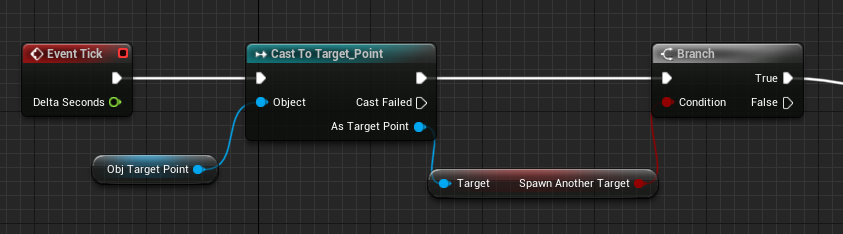
got this https://i.imgur.com/F4Jh4al.png
and this in another blueprint https://i.imgur.com/4ioX0Qh.png
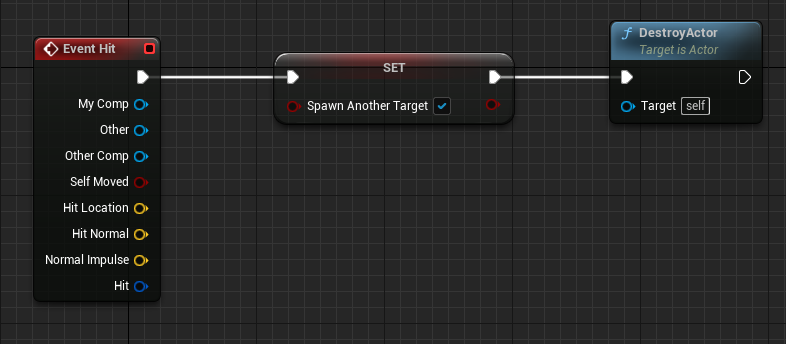
basically im hitting a target and i want it to spawn another target
but it doesn't seem to get past Cast To
idk why
 tight schooner
is that in the same BP?
autumn plinth
no different one
tight schooner
oic
I'm trying to unravel what you're doing. In your second screenshot, you're setting a boolean on that actor but then immediately destroying it, in which case that data gets destroyed too
 brazen merlin
autumn plinth
i tried not destroying it as well
brazen merlin
autumn plinth
i tried not destroying it as well
the question again, what are you trying to do?
autumn plinth
autumn plinth
basically im hitting a target and i want it to spawn another target
.
basically i want it to set a variable to true if the target gets hit
and in another blueprint, if that variable is true, spawn another target
tight schooner
I'm not sure why it's set up the way that it is. Is there a condition where the targets no longer replenish? Or do they replenish to infinity?
autumn plinth
and repeat the process
no im just trying to get them to respawn for now on a hit
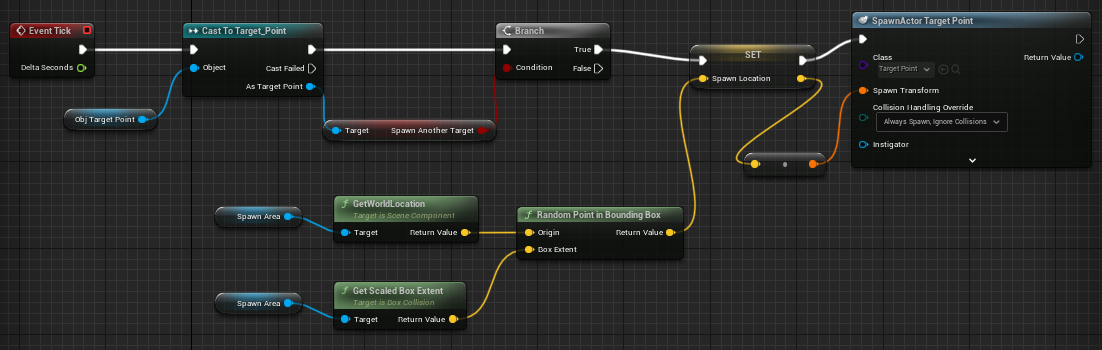
this is the full code https://i.imgur.com/9dFhYmb.png
 brazen merlin
hrm, so you want to spawn an actor on a bp when a different bp gets hit?
brazen merlin
can they not be the same bp?
autumn plinth
it just respawns it every tick
but i want it to check the variable first
they probably could
i could try that
tight schooner
usually checking the state of something on tick is bad practice. Instead you could drive things with events, and have more control over the exact sequence of events.
autumn plinth
yeah i know im just trying to get it to work for now and tidy it up later
tight schooner
I suppose one question is... is it easier to have the targets respawn themselves on hit? Or do the targets need to report back to a different, managing BP?
I suppose the spawner needs to have that "spawn area" reference
tight schooner
If "spawn area" is an actor in the level, you could associate the targets with that actor in some way. If the initial target and spawn area is manually placed into the level, you could have a Spawn Area Object Reference variable on the target, make it public (eyeball icon), and set it in the level editor.
Or if they're dynamically spawned, you can set Spawn Area as the "owner" of the targets, and the targets can Get Owner to retrieve the Spawn Area.
Or have a separate manager BP that spawns the targets which report back to the manager on hit... lots of ways to set it up depending on needs/preferences
 crimson hornet
Just a quick question so I am trying to make dark souls like ai should I use bp or behaviour tree?
brazen merlin
BT
crimson hornet
whats is really the difference?
brazen merlin
crimson hornet
whats is really the difference?
you'll need to learn this
crimson hornet
okay
brazen merlin
crimson hornet
okay
without being longwinded. I am making dark souls similar AI. I started with BP and now I'm using BT.
odd ember
BT is hard to learn but ultimately rewarding as it makes everything super easy
autumn plinth
so i just added the target into the target spawner now https://i.imgur.com/WIC2fkl.png
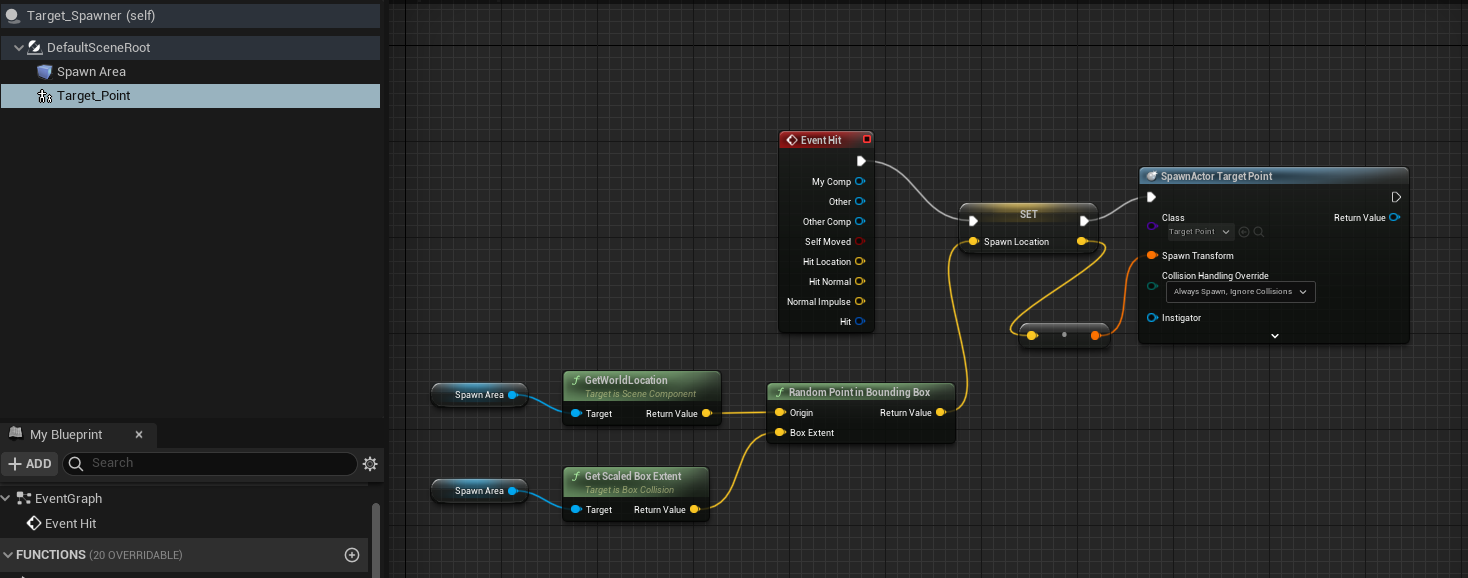
but the event hit never executes when i shoot the target
odd ember
autumn plinth
but the event hit never executes when i shoot the target
have you ticked Generates Hit Events under the collision settings?
 faint pasture
autumn plinth
but the event hit never executes when i shoot the target
faint pasture
autumn plinth
but the event hit never executes when i shoot the target
Projectile or line trace?
autumn plinth
projectile
it worked before when it was its own blueprint
but now that i've put it in one it doesn't
odd ember
now that you what
autumn plinth
i had 2 blueprints before
for the spawn area
and the target
but someone suggested to move them to one
faint pasture
Try the event hit specific to the component it trying to hit. That's the actor level event hit. Not sure if it should also be triggered or if it only triggers on a hit on the root component.
faint pasture
He had a separate target that gets hit and a spawner. Sounds like he rolled them up into 1 actor combining the trigger and spawner.
@autumn plinth Try add the event hit for the specific collider you want to detect
odd ember
yeah I don't know what you've made into one actor, but it sounds like it's something that shouldn't be by the way it's behaving
if it's as simple as a component, then you'll have to do the same for the component on the actor
if it's something else entirely, I'd suggest looking into how the actor-component relationship works in UE4
autumn plinth
faint pasture
<@352132310461710367> Try add the event hit for the specific collider you want t...
what event is that?
i cant find it
trim matrix
is there a way to make sure a level has fully loaded before actually opening it ??
not streaming level as well
odd ember
trim matrix
is there a way to make sure a level has fully loaded before actually opening it ...
not in blueprint
trim matrix
fair enough
faint pasture
autumn plinth
what event is that?
Bottom of properties for the collision component
trim matrix
yeah it will load when called regardless whether level has actually loaded
trim matrix
if I really want to I can fake a load level
odd ember
what do you want to do?
faint pasture
We only do a hard load at game startup and multiplayer join.
 odd ember
yes but what you intending to do with it?
trim matrix
I know it can be do with streaming level you just load a loading screen whilst things load in background
odd ember
are you looking for a restart?
trim matrix
but I'm not streaming here hard loading the level
odd ember
oh you want a loading screen?
autumn plinth
faint pasture
Bottom of properties for the collision component
I only see this https://i.imgur.com/4w5VltW.png
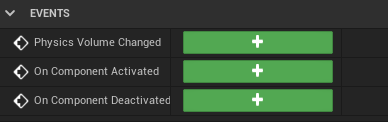 trim matrix
not really just thought i'd throw in a load screen which i can fake th
faint pasture
autumn plinth
I only see this https://i.imgur.com/4w5VltW.png
What component is it?
odd ember
trim matrix
not really just thought i'd throw in a load screen which i can fake th
there's no faking a loading screen in UE4
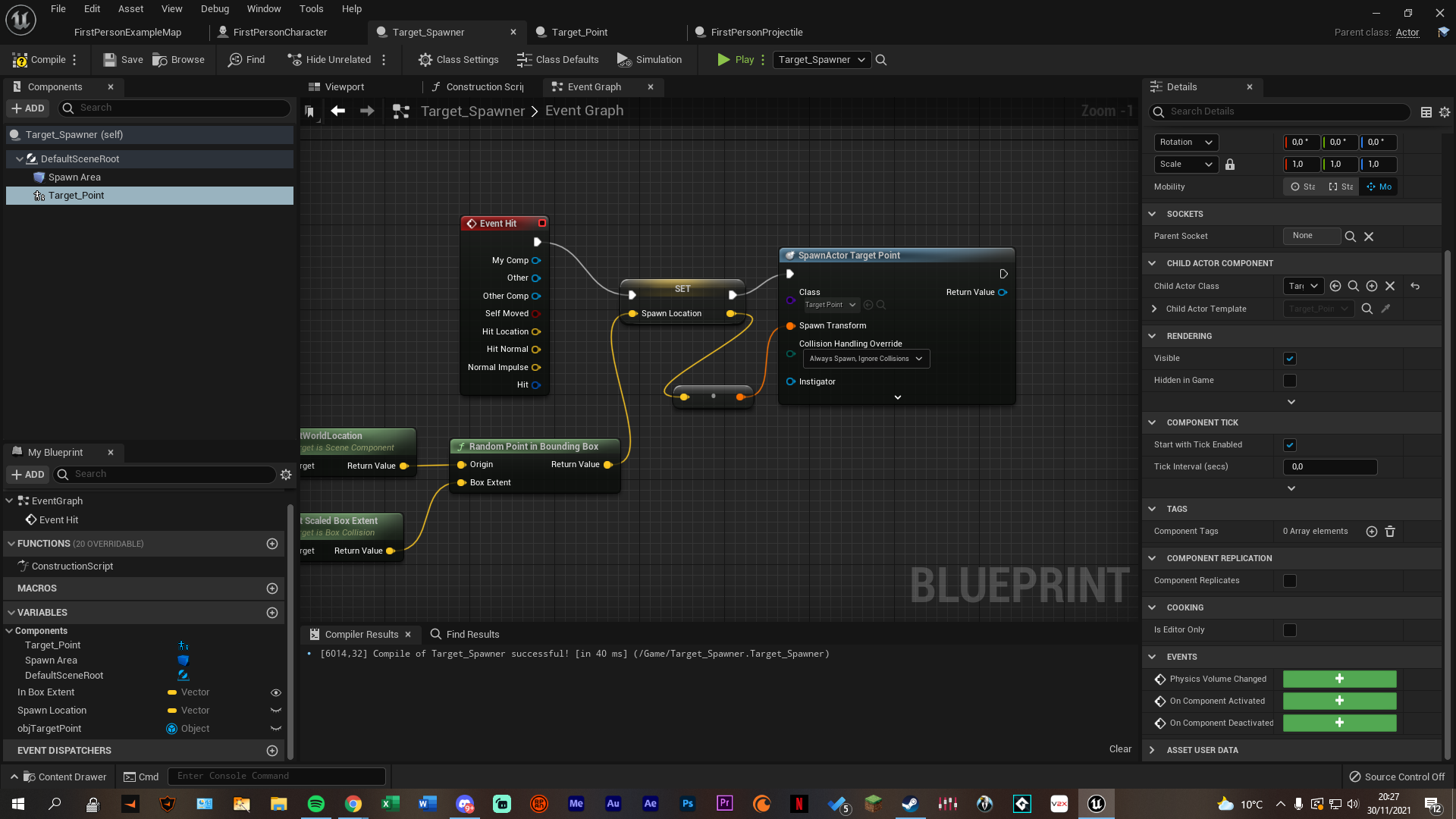 odd ember
and loading screens are off limits for BP
trim matrix
I can just load the load screen level delay by so long then load the needed level.
but for this game it's simple enough it's not like defo needed
faint pasture
trim matrix
not really just thought i'd throw in a load screen which i can fake th
Only hard load an empty map, throw a widget on the screen, stream level, wait, profit?
autumn plinth
i do see it here though https://i.imgur.com/7bCvQr3.png
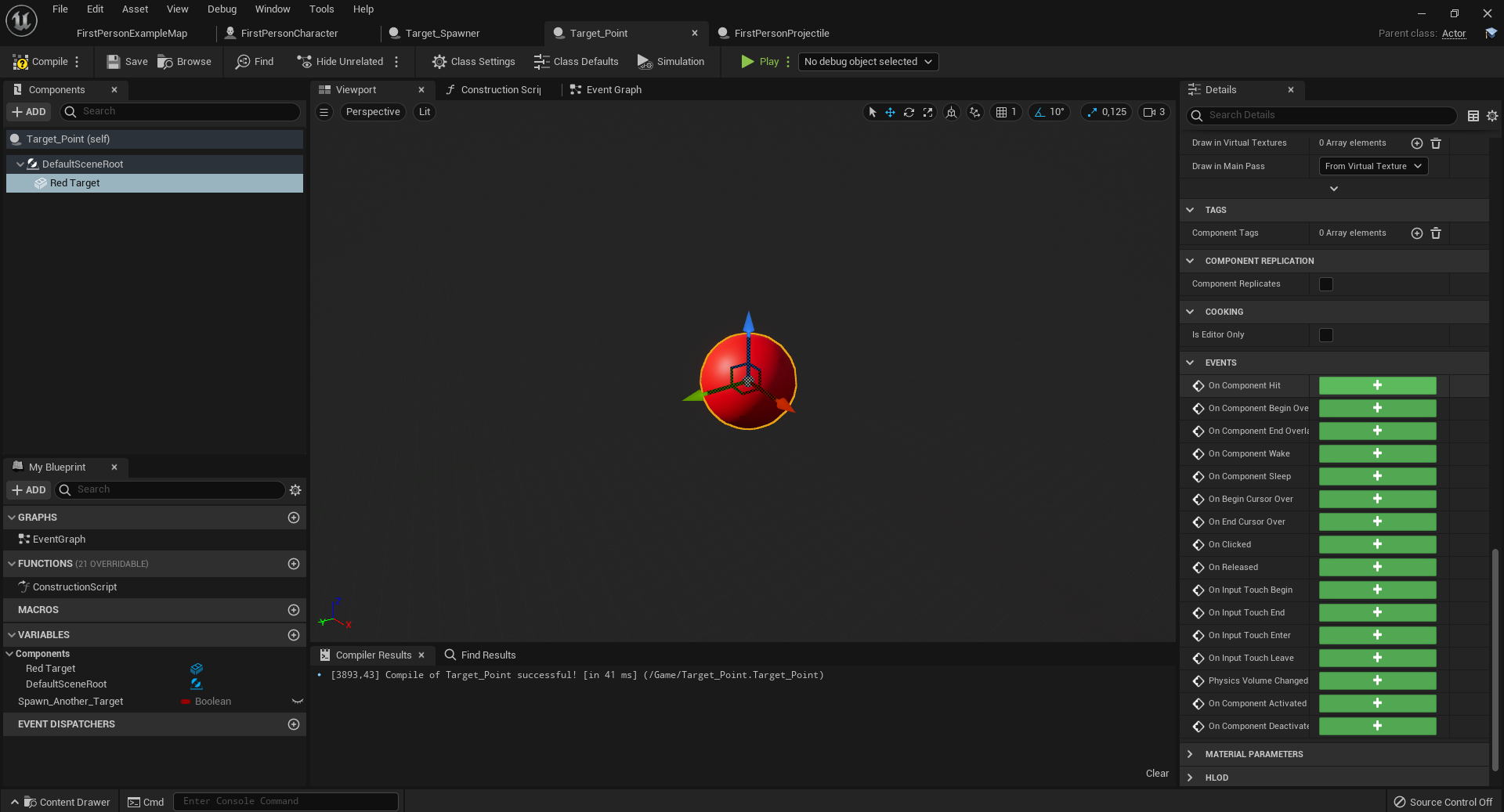
but that's not the blueprint where i want to have the event
faint pasture
@autumn plinth you can't hit a point/scene component
odd ember
trim matrix
I can just load the load screen level delay by so long then load the needed leve...
sure if it's not resulting in anything breaking. you cannot guarantee actor order
faint pasture
Add a collider
trim matrix
faint pasture
Only hard load an empty map, throw a widget on the screen, stream level, wait, p...
when i say fake I mean load and empty level then like has been said above with loading screen widget
 maiden wadi
@trim matrix If you have any basic C++ knowledge, a hard load loading screen is just two functions in GameInstance really.
trim matrix
as i say not absolutly needed for now was just extra feature I wanted to see about adding
C++ no knowladge haha
trim matrix
odd ember
I'd say not worth it
for this agree tbf, was just gonna add it
odd ember
I got loading screens but I got about 500 actors in a level
trim matrix
oh yeah it's tiny in what it is loading so pretty much instantly does it
autumn plinth
faint pasture
Add a collider
i looked up how to add a collider but can't find much, what do you mean?
trim matrix
i'm guessing your streaming level as well
faint pasture
autumn plinth
i looked up how to add a collider but can't find much, what do you mean?
Box or sphere or capsule or static mesh
You can't hit a point
@odd ember Do you know of any way of hiding all hard loads besides initial startup for multiplayer?
maiden wadi
What do you mean by hiding hard loads?
autumn plinth
faint pasture
You can't hit a point
it's not an actual point it is a sphere
faint pasture
Our game involves teleporting from a ship to surface (that's base to dungeon) and joining a mtiplayer game should look like teleporting ship to ship
faint pasture
autumn plinth
https://i.imgur.com/F2vCL3k.png
No sphere in this BP
odd ember
or?
autumn plinth
there it is https://i.imgur.com/P0yTTBc.png
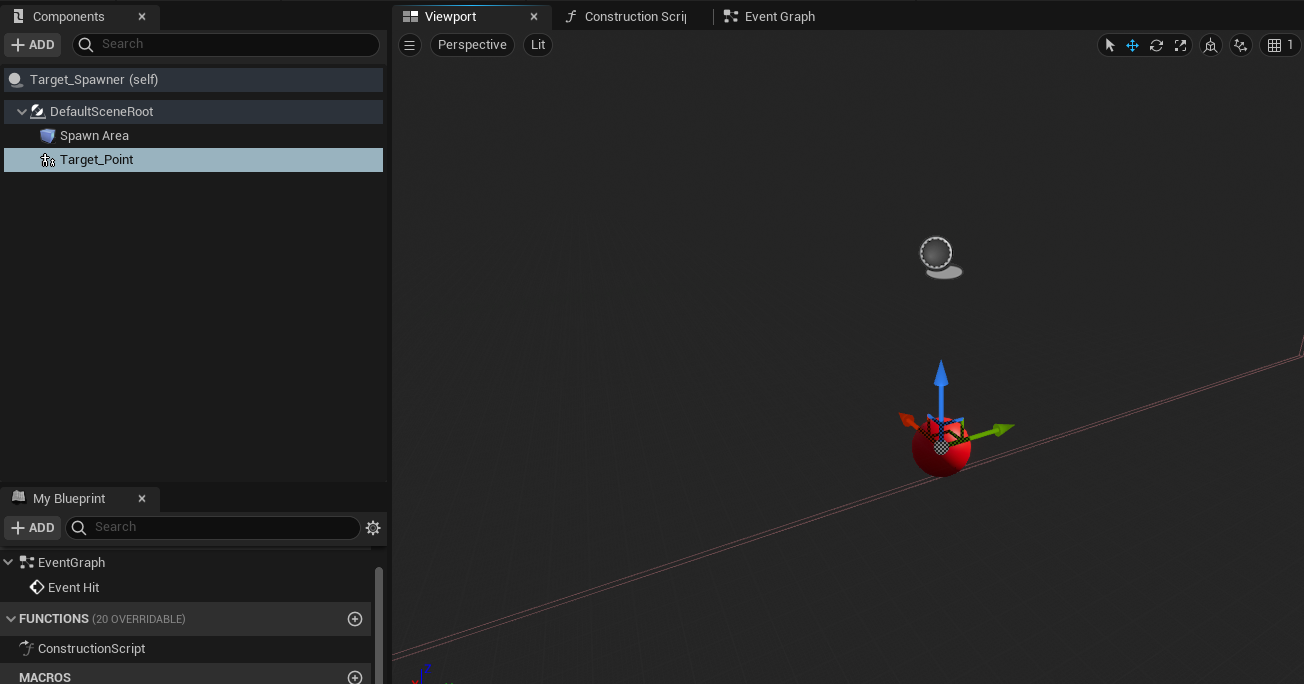 faint pasture
If we can keep everything in 3d that'd be awesome but we'll go with a 2d loading screen if necessary
odd ember
autumn plinth
there it is https://i.imgur.com/P0yTTBc.png
please for the love of all the good on the planet, never use child actors
faint pasture
Fully diagetic UI so everything is in 3d
@autumn plinth you are defeating the purpose of combining those two things into one blueprint.
Just add your red sphere to the other blueprint that does the spawning and you have a combined Target spawner thingy and then you can do your logic.
odd ember
faint pasture
If we can keep everything in 3d that'd be awesome but we'll go with a 2d loading...
I was thinking playing a movie clip of the teleport happening. but it sounds like you want to take control of the player's ship and stream in the next level as it is happening
autumn plinth
autumn plinth
there it is https://i.imgur.com/P0yTTBc.png
this is the blueprint that does the spawning
and sorry i know im super bad at this forgive me
faint pasture
Ship is more like a base or town in Diablo games.
odd ember
oh I see
faint pasture
Or hideout in Path of Exile
odd ember
so just have a transitional map
that's essentially what I do
and use seamless travel
I don't see an issue with this
even for MP
faint pasture
Teleporting to ground = teleporting to dungeon. Joining another game = teleporting to another ship = entering someone's hideout (PoE)
faint pasture
odd ember
that's essentially what I do
Since ships are all identical shaped, just decorated differently, I suppose our transition map would also include the ship, and do some sort of a fade or glare to hide the internals changing?
maiden wadi
Hard loading is pretty much 2D I believe. And as far as I'm aware, gamethread is blocked during load. Movies or material renders in a widget are available though.
faint pasture
maiden wadi
Hard loading is pretty much 2D I believe. And as far as I'm aware, gamethread is...
Maybe just take a screen cap and animate blowing out the contrast on it or something
odd ember
potentially
maiden wadi
Not sure if you can avoid hard loading when joining a game. I know once in a game, you can seamless travel with servertravel.
odd ember
but seamless travel allows for a map to be interspersed between the origin and destination
so perhaps worth considering that
ah yeah perhaps not for joining a game
if that's a hard load
faint pasture
Ye we'll just live with the hard load for now and deal with it later. Just trying to go for as minimal cuts as possible. Theoretically the entire game has zero cuts if you're the host.
faint pasture
It's a rogue like so dying will be a cut, but going to base is just a z transition. It's a top-down rogue like so the entire game map is hidden beneath the ship floor and gets procedurally loaded in for traveling to a new area
Loading a new level = destroy and rebuild km beneath you as the globe circles by. Like the ship is in orbit.
maiden wadi
I have the strangest bug with my loading screen. :/ I add it to screen long before openlevel is called, it's supposed to have a black fade. I have it set up identical to another widget using the same struct in the same way. Breakpoints show it working correctly in all regards, visibility, render opacity, etc. But the black fade never shows.
autumn plinth
can someone tell me what to do to get it working?
i have 2 blueprint classes

i have this

how do i not use child actors?
odd ember
by not using them?
 wooden rapids
Transfer my project to my new Pc with better components rtx 3060 i7 , my Camera in runtime gets flikkering at the part where Actor Face to Actor in BP and if i disconnect i havent this issue anymore, 4.27.1 version
odd ember
forget that child actors exist
autumn plinth
thanks it worked
but i still dont know how im even using them
or how to not use them
i just added the sphere to the spawn area
by dragging
and it did that
how do i unchild actor it
odd ember
ugh fine, but we're talking about the component
odd ember
autumn plinth
how do i unchild actor it
kill the component
well it's a spawner
so technically it doesn't need a relation
just a reference
if even that
odd ember
wooden rapids
Transfer my project to my new Pc with better components rtx 3060 i7 , my Camera ...
faint pasture
faint pasture
It's a rogue like so dying will be a cut, but going to base is just a z transiti...
This is the sort of layout and transition
autumn plinth
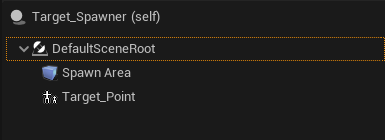
sorry but how do i kill it https://i.imgur.com/EkuTTG3.png
 tired sparrow
odd ember
`SetSimulatePhysics`
tired sparrow
odd ember
`SetSimulatePhysics`
I did that and put it for ragdoll
odd ember
faint pasture
This is the sort of layout and transition
hide everything and make some fancy vfx. seems to work otherwise
faint pasture
autumn plinth
sorry but how do i kill it https://i.imgur.com/EkuTTG3.png
Delete Target_point and add the red sphere
tired sparrow
Then also changed some stuff in the character section but when the player dies the characters keeps running instead of dropping dead
faint pasture
autumn plinth
target point is the red sphere tho
No it's not, it's a child actor component that spawns your old red sphere actor
odd ember
tired sparrow
I did that and put it for ragdoll
and it didn't work? ask in #legacy-physics then
wooden rapids
odd ember
<#821821368017485885>
thanks @odd ember you thing the Hardware cause the issue
faint pasture
autumn plinth
or do you mean add it not as an actor
Yes isn't that the whole point of what you're trying to do?
odd ember
wooden rapids
thanks <@!224571781862653952> you thing the Hardware cause the issue
I don't think it's BP. I would look into other issues before assuming that flickering has anything to do with software
tired sparrow
odd ember
and it didn't work? ask in <#221799426820276226> then
Thanks
wooden rapids
odd ember
I don't think it's BP. I would look into other issues before assuming that flick...
If i disconnect the part with Actor face another Actor its gone , in my older Pc its works fine
odd ember
wooden rapids
If i disconnect the part with Actor face another Actor its gone , in my older Pc...
you're changing hardware
wooden rapids
odd ember
you're changing hardware
yes a new PC
odd ember
so again, why don't you try and see if it's a hardware issue first? make sure that your drivers are correctly installed?
tired sparrow
It’s weird because i followed a tutorial and did exactly what the guy did
wooden rapids
odd ember
so again, why don't you try and see if it's a hardware issue first? make sure th...
ok thanks i will check
autumn plinth
now i can't spawn a new one because this thing only spawns actors https://i.imgur.com/7YwAIui.png
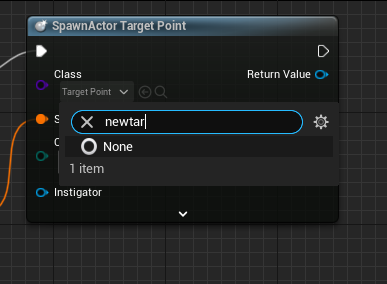
except if there's another thing that spawns non actors
odd ember
autumn plinth
now i can't spawn a new one because this thing only spawns actors https://i.imgu...
you want to spawn actors
not components
in this case
odd ember
tired sparrow
It’s weird because i followed a tutorial and did exactly what the guy did
that's why it's better to ask in #legacy-physics. they'll know what to do
faint pasture
If you want this whole thing rolled up into 1 actor, you put all the components you need into one actor. If you want them split up for some reason (reusing targets for other mechanics or whatever) then you do seperate actors.
autumn plinth
i need to spawn an actor
but i also need to detect if you are hitting that actor
how do i do that
odd ember
I'd look in the pinned topics for this channel and pick up the blueprint communication video
2 hours and it'll explain everything to you in detail
seeing as you said you had code experience before it should be no problem for you picking that up
faint pasture
In the trigger actor, either have a reference to the actor you want to tell when it's triggered or use a dispatcher. But watch the BP communication video, you're lost as hell right now.
autumn plinth
faint pasture
<@352132310461710367> you can't hit a point/scene component
if this is true
then whats the point
i tried doing this one little thing for 2 hours
ive tried suggestions
and nothing is working
odd ember
I think you need to look up some tutorials and how to
faint pasture
First off, do you want 2 separate actors or one actor total?
maiden wadi
@autumn plinth Is Targetpoint actually visual, or just for gameplay mechanics?
faint pasture
Which one do you WANT
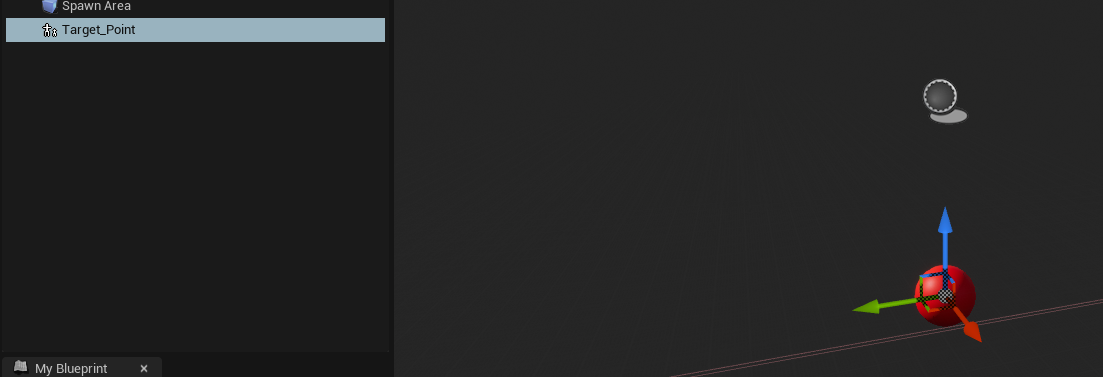 maiden wadi
So visual to the player in game?
autumn plinth
yes
faint pasture
Ok then just add the damn sphere to whatever also has the spawn area.
autumn plinth
"to whatever also has the spawn area." i have dragged the sphere into the Target_Spawner actor
faint pasture
The actor should have a spawn area component, and a static mesh component, and optionally a root scene component if you don't want either of the other 2 as root
autumn plinth
so that's not what i want
faint pasture
Do you understand the difference between a component and an actor?
faint pasture
Yes. What you have right there is a actor with a component that is spawning another actor. Just add the sphere static mesh instead
odd ember
it's pointless trying to give you a step by step given that you don't seem to know the basics yet. IMO just look up some basic tutorials, or use learn.unrealengine.com to get up to speed
beats sitting here arguing over what you want
wooden rapids
odd ember
so again, why don't you try and see if it's a hardware issue first? make sure th...
@odd ember i found the issue it was the Custom Tick loop Time set from 0.01 to 0.001
odd ember
wooden rapids
<@!224571781862653952> i found the issue it was the Custom Tick loop Time set fr...
you have loops on tick?
wooden rapids
odd ember
you have loops on tick?
Sorry i mean set timer by event loop time , it is a custom tick,the funny thing is on the older Pc it works
odd ember
wooden rapids
Sorry i mean set timer by event loop time , it is a custom tick,the funny thing ...
most likely it's a hardware issue still. tick less than DeltaTime aren't really useful as they will collate updates for the next tick
faint pasture
wooden rapids
<@!224571781862653952> i found the issue it was the Custom Tick loop Time set fr...
Y tho
faint pasture
Because they heard it's BAD(tm)
It's like you tell someone "hey stop eating so much fat" so they give themselves a vitamin deficiency by eating zero.
Use it sparingly and when it makes sense
wooden rapids
maiden wadi
Why do people try to get around using Tick?
Ok i can use it but this is my last joker
maiden wadi
@wooden rapids You are aware that 0.001 is one thousand times per second? This still applies. If your game can even run at 400fps(which is rare), you're still saving more than twice as much processing on tick than with that timer.
faint pasture
Does a timer that fast really even do anything?
maiden wadi
It does.
If you have 60fps, you have one tick per frame. If you put a timer for 0.008333 which is 120 times a second, it'll simply run the timer twice every tick when the timer manager evaluates.
faint pasture
So a fast timer MIGHT make sense for certain convergent sims or whatever if you want to maintain a certain number of loops per second
Basically Auto tuning the iterations per frame to match the timer frequency
maiden wadi
Maybe, but at that point I think you're already in some deep coding territory and looking at some lower level C++ to handle this more correctly. 😄
faint pasture
Yeah you'll want something else + interpolation for that unless you like aliasing
maiden wadi
My general rule is that anything that needs to be updated more than 10 times a second should just go on tick, it's not worth messing with timers past that point. And to be fair I don't even bother with it then. Userwidgets don't tick when collapsed or removed from screen, and actors can have their ticks stopped or slowed. Using timers to avoid tick is usually just not the answer.
faint pasture
It'd be cool if we had constant update, but we don't, so live with it. Learn math and use frame time
wooden rapids
maiden wadi
<@!434129980419604480> You are aware that 0.001 is one thousand times per second...
@maiden wadi i see its better to use event tick ,what alternative i have if i use my Joker
maiden wadi
I think I'm missing a conversation. I don't see anything about a Joker?
wooden rapids
sorry i mean if event tick already use in one graph , what`s is your advice what else i can use to save perfomance as an tick i just use these Custom tick
maiden wadi
A sequence on the original tick.
wooden rapids
maiden wadi
A sequence on the original tick.
ok thanks @maiden wadi , but when i must switch the Graph
maiden wadi
Right after the event I would assume. Sequence just runs one thing and then another.
odd ember
maiden wadi
My general rule is that anything that needs to be updated more than 10 times a s...
generally the answer in the past has been that timers could be turned off for actors in BP; whereas tick could not
I do use timers as tick equivalent as well due to for instance the CreateEvent node being able to tick functions for better encapsulation
also avoids weird macro based approaches
 crimson saddle
I have a system where a bunch of items are combined together but players can drag them out of the group. I want an immediate click and drag to move the individual items but if they hold down the mouse before dragging I want them to drag the whole group at once
I know how to drag items around but i have no idea how I would do the logic for dragging just one item vs the whole group
maiden wadi
Save a float of current game time at mouse down. Evaluate that on drag detected. If CurrentGameTime - TimeSaved > HoldTime drag whole stack, if false, drag one.
@crimson saddleI also just assumed you were talking about widget dragging. Is this for UI or some 3d interaction?
crimson saddle
maiden wadi
<@!168451911048101889>I also just assumed you were talking about widget dragging...
3d interaction, but knowing how to do widgets is also helpful since i may need it someday!
maiden wadi
Same concept though. Basically at mouse down on the object however you do that, you save a float of game time and make that comparison when you move the mouse to split the stack I assume.
crimson saddle
time held down would work but im not sure how or when to "lock" the player into dragging one or the other so that it doesnt switch midway
is there a way to make a "deadzone" almost so that players wouldnt have to keep perfectly still
maiden wadi
What is your case for dragging? Mouse movement, or object movement?
crimson saddle
im not sure I quite understand the question
I begin "holding" the item on mouse click
maiden wadi
What triggers the current dragging effect, or do you not have that yet?
crimson saddle
it isnt a widget so im not doing drag/drop operations, but basically the object follows the mouse while you click and hold
maiden wadi
What's the control scheme? FPS, RTS, etc.
faint pasture
This stuff should live in the PlayerController prolly
 fathom cobalt
Can someone please help me? It won't let me save some of the assets for some reason, I don't have multiple versions of unreal running either. Whats going on!?
 maiden wadi
@crimson saddle Hard choice. Personally I'd maybe consider dropping this into a component personally even if it's for this task alone. I'd just have click get the clicked object. Set the component's tick enabled, set the current mouse location into a Vector2D. On tick evaluate if current cursor location - first cursor location distance is > some amount like 5 pixels. If it is, do the splitting logic. Add the save current game time to this, and you can switch on splitting a single object off by making a new actor with the new value or whatever you're doing, or simply moving the full stack.
Definitely in player controller though, but like I said, I'd drop the logic into a component. It's likely going to get complex enough to start cluttering the controller. Who knows what else you'll want to do with it like other hotkey checks, etc.
faint pasture
Integrate your input to detect a drag. Or just check distance vs mouse down location, depends
Then when drag happens check time vs mouse down time and branch on that
 umbral ginkgo
Quick question: How is the game mode blueprint used? Its just a black tab for me
odd ember
reset window configuration
 proper umbra
Hey. I'm setting my navmesh generation to dynamic (so navmesh will form on spawned actors/generated areas.) However, it seems that a red zone in the Navmesh follows wherever my AI goes, causing them to be unable to move.
 umbral ginkgo
odd ember
reset window configuration
umbral ginkgo
odd ember
reset window configuration
huh thats a strange bug
brazen merlin
proper umbra
Hey. I'm setting my navmesh generation to dynamic (so navmesh will form on spawn...
is your AI set to any specific navigation type?
odd ember
umbral ginkgo
huh thats a strange bug
I think you might have killed off the tabs
proper umbra
brazen merlin
is your AI set to any specific navigation type?
Not that I know of
When I set the Runtime Generation to Static though it works fine
Just that the navmesh doesnt generate on stages (Actors) that I make
umbral ginkgo
I have run into another issue, how do you implement interfaces into gamemode blueprints
odd ember
umbral ginkgo
I have run into another issue, how do you implement interfaces into gamemode blu...
class settings, it should be one of the icons above the event graph
umbral ginkgo
odd ember
class settings, it should be one of the icons above the event graph
uhh this is what my gamemode bp looks like
 brazen merlin
umbral ginkgo
uhh this is what my gamemode bp looks like
brazen merlin
umbral ginkgo
uhh this is what my gamemode bp looks like
the blue text 😛
umbral ginkgo
I guess Im blind
odd ember
brazen merlin
the blue text 😛
confirms my theory that people don't read 😅
brazen merlin
umbral ginkgo
I guess Im blind
start at the top left, and read to the right - like all reading
umbral ginkgo
i prob need to start doing that lmao
 sand shore
would be my first suggestion, yes
 tiny vale
does anyone know why the input one works but the begin play one doesnt?
 odd ember
tiny vale
does anyone know why the input one works but the begin play one doesnt?
odd ember
tiny vale
does anyone know why the input one works but the begin play one doesnt?
player controller hasn't spawned
alternatively: player controller has spawned, but isn't hooked up
 icy dragon
I don't think Begin Play is necessarily tied to Player Controller 🤔
And it's Add to Viewport, not Add to Player Screen.
odd ember
icy dragon
I don't think Begin Play is necessarily tied to Player Controller 🤔
begin play on actors happens in arbitrary order. it's likely that this actor isn't the player controller. hence if this actor spawns first, then there is no player controller so it doesn't know for whom to spawn the widget for
odd ember
icy dragon
And it's Add to Viewport, not Add to Player Screen.
that's irrelevant, it works either way
tiny vale
It works when i dont create my main menu
odd ember
what do you mean by this?
tiny vale
i think this is rendering on top of everything

but i did this and it still not rendering on top
 icy dragon
Show the screen in action.
odd ember
tiny vale
but i did this and it still not rendering on top
I don't think ZOrder works the way people think it works
I think it's only when considering them inside an overlay widget
which in most cases isn't relevant
 hard storm
Does anybody know : If I have data (like, for example, niagara Systems) in a data asset, and I load that data asset, does the contents of that data asset get loaded into memory?
 hot lintel
I am having a problem with drawing materials/textures to a render target. I have a texture and material for skin, and a texture and material for a tattoo. The textures are equal in width/height. I am trying to overlay the tattoo over the skin texture, then set the result as a texture parameter in my character material. The tattoo texture is already aligned how I want it to be painted onto the texture, and it is mostly transparent.
For some reason, neither draw material to render target, nor draw texture to render target are working.
I have tried doing so with a canvas and without making a canvas
Anybody have any ideas of what I should try to do to fix my issue?
Or a better way to achieve the result
faint pasture
@hot lintel start with making a material that just displays the render Target on a plane, and then make sure you can get drawing to work
Also make sure the material you are drawing to the render Target behaves as expected
hot lintel
As of right now I am testing by exporting the render material after drawing to it
None of the draw calls seem to be doing anything to the render target though
The export seems to be fine, it just exports the clear color
Wow I think I may have gotten it
I changed the render target format to RTF rgba 16f
Export stopped working, but in engine the render target appears to have been changed properly
 keen basalt
hard storm
Does anybody know : If I have data (like, for example, niagara Systems) in a dat...
keen basalt
hard storm
Does anybody know : If I have data (like, for example, niagara Systems) in a dat...
They do get loaded into memory unless you use soft object references and async load the object
 hard storm
keen basalt
They do get loaded into memory unless you use soft object references and async l...
hard storm
keen basalt
They do get loaded into memory unless you use soft object references and async l...
So if the data asset gets loaded, and it has hard references, those hard references are loaded at the moment the data asset is?
keen basalt
hard storm
So if the data asset gets loaded, and it has hard references, those hard referen...
using a soft reference or interface is the best way to prevent extra content from being loaded into memory
 tropic pecan
Hey there, can someone help me with making spawning actors from map variables with a widget? I want to make a character spawn and de-spawn such as like a Boolean trigger but done by widget. It's a little complicated to explain but I'll try to show.
tropic pecan
I anybody around?
tight schooner
What you're saying is possible but maybe the question is too vague / open ended
 drowsy ridge
Hi all, I am not using a Behavior Tree for this AI but how can you create more distance between each AI? They are too close!
tropic pecan
drowsy ridge
Hi all, I am not using a Behavior Tree for this AI but how can you create more d...
Well, I'm not sure how your party member system works but how I've had mine is this where there are arrow points they follow and my player units are in map variable list.

I cannot say I'm good at helping but I can try. Do you know a setup of selecting units to spawn? I'm trying to do that myself.
 drowsy ridge
Unfortunately I don't know @tropic pecan 😦
tropic pecan
drowsy ridge
Unfortunately I don't know <@!304334748497739777> 😦
It's fine then. If you'd like to know my intentions, I'm trying to recreate a game called Persona 5 with great improvements. I'm trying to look for advice since I'm not an expert in Unreal Engine, if your not interested than good luck on your own projects at least.

 sharp rapids
tropic pecan
I cannot say I'm good at helping but I can try. Do you know a setup of selecting...
sharp rapids
tropic pecan
I cannot say I'm good at helping but I can try. Do you know a setup of selecting...
Would you elaborate?
tropic pecan
sharp rapids
Would you elaborate?
I can try to show the structures but I can't say I can explain very clearly since I'm no expert at this. This is actually work traced and remade from a JRPG blueprint from the market.
sharp rapids
tropic pecan
I can try to show the structures but I can't say I can explain very clearly sinc...
What do you mean selecting units to spawn? Do you mean selecting from a UI or something else?
tropic pecan
sharp rapids
What do you mean selecting units to spawn? Do you mean selecting from a UI or so...
Oh, I though you wanted help with something like the structure of following I was showing the other guy, sorry about that. What I do mean is I'm trying to rig the player unit characters to spawn and de-spawn in from the menu widget I created though I couldn't create a very good control so far. I can make them spawn by the tool using Boolean branch rigs but actually from the menu itself, I can't figure it out very well and I do think I need help on it.
sharp rapids
tropic pecan
Oh, I though you wanted help with something like the structure of following I wa...
Usually, you would have a different BP handling the spawning
Spawning objects from Widget Bluperints is generally considered a bad idea
You can have your menu select the characters you need to spawn, then pass it to the Blueprint handling the spawning which would spawn them accordingly
tropic pecan
sharp rapids
Usually, you would have a different BP handling the spawning
Spawning objects fr...
Well from the game I'm trying to work on, characters following player are selected by the units menu.
sharp rapids
tropic pecan
Well from the game I'm trying to work on, characters following player are select...
You can do that
For e.g. You have your Units Menu and a Spawning BP
Your units menu will only handle showing the UI
When the player selects a character, the units menu will tell the Spawning BP that a certain character was selected, then the spawning BP will handle what to do with that. Whether to spawn it or do something else
tropic pecan
sharp rapids
You can do that
For e.g. You have your `Units Menu` and a `Spawning` BP
Your uni...
Let me see if I can show how I'm trying to pull it off cause explaining by words is complicated.
sharp rapids
You compartmentalize your tasks
The widget BPs only handle the visual parts of showing the UI
any gameplay actions such as spawning, etc. are handled by regular BPs
tropic pecan
sharp rapids
You compartmentalize your tasks
The widget BPs only handle the visual parts of s...
OK, the best I can explain my structures. My player units are a variable map containing the actor and structure for character stats, this should allow me if I want to add more player units or remove them.

This is the function structure I'm currently using to spawn them but I'd like to rig it in a way so we can control the spawning from the widget.

This is how the widget looks like and the ones mostly marketed should be the units spawning and following.

I've attempted to structure out the widget to control the spawning but I just have no clue how to nicely. I guess I need more studying in this stuff.

So, I'm trying to rig it in a way where you can select your member from the menu such as like how a Boolean but from the menu itself. I do understand I could make the structure in a blueprint such as like a controller blueprint like I've done but like how could I connect my widget to such as like a branch for example select it and have access, do you get me?
sharp rapids
So you have a map that tells which character is currently in the party and which one is not?
tropic pecan
sharp rapids
So you have a map that tells which character is currently in the party and which...
Yes, the map does tell you which player units are with you and you see the markers place on them? Those are the ones chosen to follow while the others don't spawn to follow. Should I explain my structure a bit more? I don't have a structure to where I'd like but I can give what and were I've done at least.
tropic pecan
sharp rapids
So you have a map that tells which character is currently in the party and which...
All I need is a way to trigger a spawn for a character using a widget. The original structure I had selected characters in the first row and I didn't want that. I wanted something like a check such as like those markers you saw to be the label for them such as like a true or false if you get me.
I don't require a big structure explanation, I just need a way to make a function trigger to control as I said.
sharp rapids
tropic pecan
I don't require a big structure explanation, I just need a way to make a functio...
I'm guessing the widget already works as you intend, meaning it lets you change their markers
and you only need to connect between the widget and the controller BP
tropic pecan
sharp rapids
I'm guessing the widget already works as you intend, meaning it lets you change ...
Yes, I know that already. I didn't structure it to be connect to the units very well yet cause I don't have a full idea how to.
sharp rapids
tropic pecan
Yes, I know that already. I didn't structure it to be connect to the units very ...
Well, You can create a reference to the Controller BP inside the widget
Then when the player selects a new character, you call the Spawning function in the controller BP
sharp rapids
tropic pecan
I've attempted to structure out the widget to control the spawning but I just h...
I'm guessing this gets called when the player confirms selecting the characters?
tropic pecan
sharp rapids
I'm guessing this gets called when the player confirms selecting the characters?
Let me look into that quickly please.
tropic pecan
sharp rapids
Well, You can create a reference to the Controller BP inside the widget
Then whe...
So, by variable. Do you mean like a cast or set in my JRPGControler blueprint? Do I structure it in any sort of way? I can't quite remember what was the reference.
 sharp rapids
tropic pecan
So, by variable. Do you mean like a cast or set in my JRPGControler blueprint? D...
sharp rapids
tropic pecan
So, by variable. Do you mean like a cast or set in my JRPGControler blueprint? D...
In your Menu Widget, Create a variable for your controller BP
 tropic pecan
sharp rapids
In your Menu Widget, Create a variable for your controller BP
tropic pecan
sharp rapids
In your Menu Widget, Create a variable for your controller BP
Oh, so a variable.
sharp rapids
Then in the Controller BP, you can have a function which handles the spawning

Once the player confirms selecting the characters they want to spawn, you call the 'Spawn Party Members' function from the widget
 sharp rapids
tropic pecan
This is the function structure I'm currently using to spawn them but I'd like to...
sharp rapids
tropic pecan
This is the function structure I'm currently using to spawn them but I'd like to...
You can put this in the 'Spawn Party Members' function
tropic pecan
sharp rapids
Then in the Controller BP, you can have a function which handles the spawning
Well, I've worked with it and it did a little bit of what I wanted just that it took and even could make duplicates of my party members. But still, its a hint of figuring out how to spawn a Player Unit. So, thanks.

 tropic pecan
sharp rapids
You can put this in the 'Spawn Party Members' function
tropic pecan
sharp rapids
You can put this in the 'Spawn Party Members' function
Do you think we can talk further about this later? Or would you rather move on and I find someone else? You already gave me a hint so I'm totally grateful already.
sharp rapids
tropic pecan
Do you think we can talk further about this later? Or would you rather move on a...
I mean i cannot guarantee
But You could just ask it here and if i'm on i'll answer it
sharp rapids
tropic pecan
Well, I've worked with it and it did a little bit of what I wanted just that it ...
You should use a check to see if a certain party member is already spawned
If it's spawned already, don't spawn it again
If it isn't spawned, then spawn it
tropic pecan
sharp rapids
I mean i cannot guarantee
But You could just ask it here and if i'm on i'll answ...
I'm going to log off so that's way I'm asking if we can discuss this again later.
sharp rapids
tropic pecan
I'm going to log off so that's way I'm asking if we can discuss this again later...
We could
tropic pecan
sharp rapids
We could
Alright, I'll search and text to you later if I require more help on this. Now that I have a hint of spawning, now I just need to tweak it for a bit until it's correct. Again, thank you.
sharp rapids
tropic pecan
Alright, I'll search and text to you later if I require more help on this. Now t...
Ask it on this server
The more the number of people seeing your question, higher the chance you'll get an answer
tropic pecan
sharp rapids
Ask it on this server
The more the number of people seeing your question, higher...
Alright, I will.
 sharp oar
My project builds fine, then throws this assertion and closes when i try to load my main level

Only 2 models use blendspaces in the level, i tried removing them both and still got the error
sharp oar
Totally lost, just really don't know what the issue is. Unfortunately this is for a game jam due tomorrow.
 timber knoll
well hard to solve without more context, also not really blueprint related
would be more of an #animation or #packaging thing
 crimson geyser
I've made a blade that rotates on the Z when overlapping with a box. But now I want the same blade to rotate vertically. So I duplicated it and rotated the blade mesh 90 degrees and connected the rotation to the Y. But when i overlap the box it does rotate on the Y, but the blade mesh flips back to the horizontal position before rotating. I think it's something easy I'm forgetting about, but can't seem to find it...
 timber knoll
instead of set relative use add relative
or save the initial relative rotation before using setter
crimson geyser
Saving the initial rotation worked! Thanks!
 light token
Hello. I want to create a dynamic market in my game. Now how do I implement a model like this? Do I just create a blueprint inherited from an actor and throw it in the world?
Or is there some other way to do the calculations?
 earnest tangle
the phrase "dynamic market" could mean quite a lot of different things so you're going to have to explain exactly what it is you want to do, and what the problem is with doing it
light token
I have Trade Goods (like Bananas), I also have warehouses where you can buy and sell your goods. Now I want to run calculations of the prices for the Trade Goods. I think I can do this with a component on the warehouses. But I want to learn UE architecture so I'm throwing this up here.
There is no problem with the implementation of the prices or something. I can handle that I think. I just want to be sure I do it "the UE way" and not some hacky method.
earnest tangle
Right
It probably depends on how you want to approach it. Eg. what sets the price for the specific good
light token
I just go for random values between a range for now.
Nothing really special at this point
The way I think I can do it
earnest tangle
Yeah I mean more as in does the warehouse set the price even if it's a random value currently
If so it would probably make sense for it to do calculations for it as well
light token
Yes I want the prices to differ at different warehouses
The way I think I can do it and please correct me if Im wrong
Is to create a Structure: price and a Structure: TradeGood. Then have a the Price Structure contain the TradeGood structure and a price. Then I have a component on the warehouse which has an array Prices which is of type Price Structure
maiden wadi
Sticking with the OOP method, your warehouses themselves would probably house a float value representing each trade good. You can store the base price in a datatable or data asset and look that base price up, modify it with the float connected to the trade good at that warehouse, and that would be your price.
Component works too if you're blueprint only. C++ structs are better. Much more lightweight for this sort of thing.
light token
Alright thanks a lot. Datatables or Data Assets are new to me so I'm going to dive into that. I'm trying to stick with blueprints for now. This is my second game I'm making so I'm doing it one step at a time.
proper umbra
Isthere a way to break this to get each column?
 maiden wadi
proper umbra
Isthere a way to break this to get each column?
maiden wadi
proper umbra
Isthere a way to break this to get each column?
What do you mean by column? As in another column in the table?
proper umbra
maiden wadi
What do you mean by column? As in another column in the table?
I have a float value inside each row and I wanted to see if I could make a check to see if random float = one of the row's floats
not sure if thats possible tho
sharp rapids
proper umbra
not sure if thats possible tho
Use this
https://docs.unrealengine.com/4.26/en-US/BlueprintAPI/DataTable/GetDataTableRowNames/
Then run a for-loop on the output array
Get Data Table Row Names
maiden wadi
It is, but costly. You would need to iterate over every single struct in the table.
If you're going to be using your data like this, you're better off converting to using DataAssets.
proper umbra
Would there be another way to do it? I only need to use this in one blueprint
I'm just trying to choose a random actor, whereas some have more of a chance to be chosen than others
maiden wadi
It may not hurt performance too much. Use the node SimpleOrComplex pointed out. It'll give you all of the table's names. Use that to loop and call GetDataTableRow, break the struct and compare your float.
proper umbra
Alright yeah I'll try it out. Thank you both
faint pasture
@light token For a dynamic market just have a data structure live somewhere, have functions to update it and interface with it, and you're golden. I'd put it in a component on GameState
faint pasture
proper umbra
I have a float value inside each row and I wanted to see if I could make a check...
It won't unless you do some rounding.
light token
faint pasture
<@586642322884919307> For a dynamic market just have a data structure live somew...
Thanks a lot! Yeah I'm using the architecture you're describing. Thanks a lot!
But what do you mean with "I'd put it in a component on GameState"
I have a DynamicMarketComponent on my warehouses
faint pasture
Are you talking about having the entire market model centralized somewhere or having it exist spread out over all the interacting actors?
Like how are you proposing your market works, what does it actually do?
light token
No not centrilized at this point. Each warehouse has a different market
It's not a complex game, I just want to make first steps on implementing some sort of gameplay
faint pasture
Oh ok, I thought I were talking something like SimCity or Offeorld Trading Company.
light token
Yeah maybe it's going to be more like that, don't know it yet
faint pasture
Like give an example mechanic. What is something the system does?
light token
But I have a tradegood bananas and those prices should differ on different warehouses
You buy low and sell high
later on I want to have different island with different goods
But I want to keep it simple at this point to learn
faint pasture
Oh ok I gotcha. Yeah a Marketplace component on your points of sale would work.
light token
Awesome. Thanks!
faint pasture
Layer if you need some communication between them I'd have some sort of central manager like a component on GameState or GameMode or a subsystem.
light token
Is GameState the same as Level Blueprint?
faint pasture
No. Don't use level blueprint, it's a nub trap.
light token
Hahah oke I'll look GameState up
faint pasture
Level blueprint is a blueprint on the level/map layer, you want to put a central manager in game state, game mode, or in a subsystem. Subsystems are C++ only for now though.
You can even just make an actor if you want, and get actor of class to get it if you wanted to.
light token
Ahh alright, that's one step to far at this point in time. I'm using datatables over data assets for now for the same reasons.
Yeah. Let's get this market component up first.
faint pasture
Remember that data tables are for reading. They aren't for runtime writing. You would list all of the available goods in your game in a data table, but the actual live prices would live in some sort of data structure on the component
light token
Yup I have that
faint pasture
Probably a Map of Names to Floats
light token
My warehouses have a Prices DataStructure array
icy dragon
So in single player, what's the difference between implementing game memory on Game Instance vs Game State?
light token
Alright, is a Map a blueprint type?
light token
Thanks, going to look up a tutorial on that
icy dragon
icy dragon
So in single player, what's the difference between implementing game memory on G...
At the moment my implementation is using Game Instance to serve as the game's memory, mainly keeping track of data to save, and storing loaded save data. Is there any benefit to use Game State in this regard?
faint pasture
icy dragon
At the moment my implementation is using Game Instance to serve as the game's me...
Game State shares lifetime with a level (maybe a match, not sure if it resets with a match) while Game Instance shares a lifetime with the application from start to exit
So it depends. If you were making Mario, your level score might be on game state, while your lives and mushrooms might live on Game Instance.
icy dragon
Got it. In my case, it's an open world single player RPG, with the game world and main menu are separate persistent levels, so my current setup should be fine.
 kindred marsh
Hello guys i need your help! I have a gesture device (Myo Arm Band) and i connect it with my desktop and UE4 so i can make some experiements. This device sends me 8 signals in integers and I print them in a Widget that I have created and I have add it to viewport. It seems to work well but I want to be able to save these values and export them to a csv file. Could you guide me because my experience in Unreal and programming is quite small. Thanks for your time
 faint pasture
kindred marsh
Hello guys i need your help! I have a gesture device (Myo Arm Band) and i connec...
faint pasture
kindred marsh
Hello guys i need your help! I have a gesture device (Myo Arm Band) and i connec...
Writing to data table seems weird but if it works you can output table to CSV
 dusty frigate
Hello everyone, we have issues with weird and seemingly random DataAsset behaviour. First off, we're only reading from them and never writing to them. Now, we have a DataAsset that isn't loading correctly on the client - however the server gets it correctly.
The fix for this is to manually alter a random property and save. We use many of this particular primary data type and they work as expected.
This is one of a couple of weird happenings we've encountered regarding DataAsset blueprints. Any suggestions or help in the matter described? Are DataAssets broken and usually bugs out?
 frank salmon
Hey all, can anybody help me out please? I am in a bit of a dilemma. I have the spring arm and the camera attached to the player character, do you know how I can detach it while in trigger and then move it on spline, and after the character exited the trigger to reattach it and have normal control?
There is this function called target view with blend, but I do not want to have another camera in the level. I only want to use this one from the third person character
 unique wasp
I would like to store a table with how many points different combinations of an enum give. I can do that in a DataTable, but how can I easily read based on said enum? Or should I do this differently altogether? This is the table I have now:

I can read from that using a building type like this, but how can I select a specific output pin based on the type of the other building?
 autumn plinth
How do I execute something every n seconds?
Maybe a better question, how do I make a timer?
 heavy lion
I cant decide if its important for the day night cycle to look different in the morning verses the evening
Like, does the sun look different when it sets to when it rises?
autumn plinth
heavy lion
I cant decide if its important for the day night cycle to look different in the ...
Sunset and sunrise are identical
heavy lion
In real life?

Have a look at this photo and see if you can tell whether it is a sunrise or sunset? Yes, it’s tricky. Sunrises and sunsets…
Could save me a lot of work AND allow for sunset and sunrise to be based on where the sun is in the sky as opposed to what time it is
icy dragon
heavy lion
In real life?
He's right. As far as things goes, sunrise and sunset are pretty identical.
Even with Sky Atmosphere that's physically based AND also allows for day night cycle out of the box.
heavy lion
Awesome. Gonna redo all yesterdays curves! haha
Will make things easier going forward though. And allow for proper timed sunsets and rises
icy dragon
autumn plinth
Maybe a better question, how do I make a timer?
Set Timer By Event or Set Timer By Function Name
unique wasp
autumn plinth
Maybe a better question, how do I make a timer?
More info here: https://www.youtube.com/watch?v=qc5WpNq7RFg

What are the Set Timer by Function and Event Name Nodes in Unreal Engine 4
Source Files: https://github.com/MWadstein/wtf-hdi-files
 finite fulcrum
Is there an updated article on diffing blueprints? This one seems out of date: https://www.unrealengine.com/en-US/blog/diffing-blueprints
Unreal Engine
In an earlier post, we discussed asset diffing in Unreal Engine 4, but only briefly covered our tool specifically for diffing blueprints. We’re back today with a tutorial video designed to further explain the Blueprint diff tool.
icy dragon
The best thing is that it practically just works. Proper lighting colour and all. @heavy lion

 heavy lion
@icy dragon I am using that, but I have a lot of properties I need to change over time
Plus I am using a real calendar and time/date system to control it
 sand wasp
what could be some reason, my AimOffset and some stuff in the AnimBP breaks when playing standalone, but not when playing in editor#
faint pasture
heavy lion
I cant decide if its important for the day night cycle to look different in the ...
In real life, no, but also moonlight isn't blue. Art direction is personal taste.
heavy lion
Thats it. I'm after semi realistic
faint pasture
Can vary by location depending on atmosphere etc but it's pretty much the same. You'll have dustier air to the west vs east if you live at the beach for example.
 worthy drift
does anyone know what could causer the jumping function of a character to not work? I have a third person character which simply won't jump. I switched out the jumping function with another way of working with it due to rootmotion animations messing up the jump, but now I'm trying to switch back to the regular jumping mechanic, but it doesnt work. As in nothing happens. And I'm using the stock input of the third person character. I have double triple checked that everything is in order for my character to jump in the blueprint. Any ideas what else could be making it not work?
 manic river
Hello! How to use soft references with get actor of class?
 unreal quail
can someone explain to me why this isn't showing up on my hit events?


it's never showing anything for some reason
it's working on simple blocking volumes but not with static meshes
am I setting it up in the wrong place?
well I guess the override only works on components that don't have a material
faint pasture
Is the event hit firing?
unreal quail
yup it's printing nothing
I tried changing the phys material of the material used and it works
it's the override that seems to be useless
I guess the override is for the simple collision only and the hits are using complex collisions
that's my wild guess
 rancid steppe
any tutorial of inventory widget to display character preview with all of his equipment pieces

 maiden wadi
That blueprint is a fantastic motivator to love C++. 😄
faint pasture
Can't you just blend weight the post process?
sharp rapids
@maiden wadi
More motivation 😄
https://blueprintsfromhell.tumblr.com
 faint pasture
We need a pin covering what casting is and the fact that function parameters are already local references so no need to spaghet all over the graph
maiden wadi
To be honest, some of those don't look bad at all.
 neat prairie
Ive made a ui widget, how do i add it to the level or game
faint pasture
neat prairie
Ive made a ui widget, how do i add it to the level or game
Create widget, add to viewport.
maiden wadi
Just look up my name with the words "Memory Pointer". 😄
faint pasture
Or if you want it in the world, add a widget component to something
sharp rapids
I just saw the first one having get all actors of class connected to event update animation
faint pasture
I calculate TREE(3) on physics substep
neat prairie
faint pasture
Create widget, add to viewport.
That doesn't work for some reason
neat prairie
@faint pasture

 marsh mantle
would someone know what I need to feed into this ? I'm trying to access my UI from my player character
 faint pasture
@neat prairie That shows literally nothing to diagnose the problem. Show how you're creating the widget and adding to viewport
faint pasture
marsh mantle
would someone know what I need to feed into this ? I'm trying to access my UI fr...
Get controller, cast to YourPlayerController, get ui
Assuming that's where it lives
What spawns the UI?
marsh mantle
faint pasture
What spawns the UI?
the level blueprint
faint pasture
Ya dont
marsh mantle
just spawn it in the player controller ?
faint pasture
Spawn it from pawn or PlayerController or HUD
neat prairie
faint pasture
<@507232357879775263> That shows literally nothing to diagnose the problem. Show...
you can see me trying to drag and drop into the viewport but the mouse is a 🚫
marsh mantle
faint pasture
Spawn it from pawn or PlayerController or HUD
aight will do, thanks
faint pasture
neat prairie
you can see me trying to drag and drop into the viewport but the mouse is a 🚫
That's not how you do that. Create an actor with a widget component and give it that widget BP class
@marsh mantle Level BP is a nub trap unless you're doing level specific stuff in it. Like a scripted sequence.
"Correct" place for UMG handling is HUD, then PlayerController is ok, then maybe Pawn
maiden wadi
I don't even like widget handling in Pawn. Pawn should just exist and have delegates.
I feel bad putting widgets in Controller either. Feels cluttered and bad with all of the networking and non pawn specific controls already there.
faint pasture
maiden wadi
I feel bad putting widgets in Controller either. Feels cluttered and bad with al...
Oh yeah for sure but he's spawning them in Level BP. Baby steps lol.
neat prairie
faint pasture
That's not how you do that. Create an actor with a widget component and give it ...
 faint pasture
Do you want the widget to be in 3D space or on your hud?
 raw karma
Hey all! Any advice on how I can toggle my flashlight on or off while running? I have it setup so F toggles my flashlight on and off, but once I start running F no longer works to toggle it. Any tips? 🙂 Thanks a bunch!
faint pasture
@neat prairie k then create the widget in PlayerController or Pawn and add to viewport
@neat prairie https://docs.unrealengine.com/4.27/en-US/InteractiveExperiences/UMG/UserGuide/CreatingWidgets/

How to create and display a Widget Blueprint in game.
 boreal barn
hi y'all, I have a variable passed to bp as
UFUNCTION(BlueprintImplementableEvent, Category = Attack, meta = (DisplayName = ReceiveAttack))
void BP_ReceiveAttack(const FAttackData& AttackData);
How do I check if is valid? The general IsValid node seems incompatible...
 agile wren
raw karma
Hey all! Any advice on how I can toggle my flashlight on or off while running? I...
agile wren
raw karma
Hey all! Any advice on how I can toggle my flashlight on or off while running? I...
I had that same problem a while back, it on,y is like that in-editor, and if you launch or package the project it should work. My guess is shift + f is an editor command.
raw karma
agile wren
I had that same problem a while back, it on,y is like that in-editor, and if you...
Ahh marvelous, alrighty - thanks a bunch for the insight! Yeah, I reckon it probably is an editor command. Didn't think of that lol, I'm so new I assume I'm doing all the things wrong. Thanks so much!!!
agile wren
No problem!
 magic oak
boreal barn
hi y'all, I have a variable passed to bp as
UFUNCTION(BlueprintImplementableEve...
magic oak
boreal barn
hi y'all, I have a variable passed to bp as
UFUNCTION(BlueprintImplementableEve...
I’m assuming you’re argument is a struct so it’s always going to be valid. Since it’s passing by reference, anything calling it would be required to pass an existing struct
 zealous moth
can you swap cameras and blend through them in the same actor? I cannot seem to get this to work with

this requires 2 actors
ugh looks like i have to use a child actor 🤮
boreal barn
magic oak
I’m assuming you’re argument is a struct so it’s always going to be valid. Sinc...
except it throws an accessed none trying to read property error :V
maiden wadi
zealous moth
can you swap cameras and blend through them in the same actor? I cannot seem to ...
You can, sort of. It requires a second camera actor, and you have to disable/enable camera components
zealous moth
maiden wadi
You can, sort of. It requires a second camera actor, and you have to disable/ena...
sounds like a new marketplace plugin for a free node....
maiden wadi
In short, spawn second camera actor at current camera location/rotation. Set view target to it. Disable all cameras on the actor except the one you want to blend to, set view target to blend back to the original actor.
sharp rapids
boreal barn
except it throws an *accessed none trying to read property* error :V
You could break your struct and check any one property for IsValid
If one of them is valid, then most likely all of them will be
sharp rapids
boreal barn
except it throws an *accessed none trying to read property* error :V
Which property can't it access?
zealous moth
maiden wadi
In short, spawn second camera actor at current camera location/rotation. Set vie...
yeah but there's a lot of issues in doing that. I'm gonna opt to make a new node and make it free instead
maiden wadi
Make it free?
zealous moth
yeah, free plugin on marketplace
looks easy enough to change imo: https://docs.unrealengine.com/4.26/en-US/API/Runtime/Engine/GameFramework/APlayerController/SetViewTargetWithBlend/
Set the view target blending with variable control
boreal barn
sharp rapids
Which property can't it access?
it's an actor reference, so probably I can check if that is valid
thanks mate!
 thorny rover
Hi, is there a way to fake a left mouse click in unreal?
I have a pawn which camera view i can move by left-clicking (Add controller Yaw input for example), otherwise the view stays the same.
Issue is that when i first start the project either in Standalone Game or after compiling and running the .exe, before clicking the camera follows freely according to mouse movement. After the left-click in my case, it starts to work properly
Or any idea how can i stop camera following the mouse, it should not do that
My idea is that if i could fake a mouse click at the beginning of the game, perhaps it solves my issue
Although i think what's going on is that controller somehow has freedom to move however it wants, pawn gets executed later, so the camera movement somehow comes from there..?
unreal quail

does anyone know why the preview isn't working?
even though it's a correct bp with a mesh

 snow harness
unreal quail
does anyone know why the preview isn't working?
snow harness
unreal quail
does anyone know why the preview isn't working?
This what you're looking for?

@unreal quail or https://www.youtube.com/watch?v=vX3gmcPOnYU
 unreal quail
thanks!
unreal quail
snow harness
This what you're looking for?
yep
snow harness
thorny rover
Hi, is there a way to fake a left mouse click in unreal?
I have a pawn which cam...
It's difficult for me to imagine what exactly you're referring to. A clip of the issue you're having might better communicate what you want changed.
 thorny rover
snow harness
It's difficult for me to imagine what exactly you're referring to. A clip of the...
thorny rover
snow harness
It's difficult for me to imagine what exactly you're referring to. A clip of the...
Sorry, my project is classified so i can't share. I'll try to explain one more time. I have a player pawn like this (image), basically just a scene root, springarm and a camera attached to the springarm. I spawn it using Player Start. And i turn the camera around using Mouse X input. Everything works okay, but before making the first click, right after starting the game, the camera turns around without the mouse X input, always following the mouse until I make the actual Mouse X input. It's like before a mouse click is registered, the camera does whatever it wants.. How to fix that?
 snow harness
unreal quail
I don't have this for some reason
snow harness
unreal quail
I don't have this for some reason
https://forums.unrealengine.com/t/capture-thumbnail-is-gone-at-different-bps/119253
"Ok I figured that out…
The “Capture Thumbnail” button is disabled when “Actor hidden in game” option is active
We have several actors that have representation in the editor but are supposed to be hidden in game, it would still be nice for them to have thumbnails though!"
"Found a workaround - if “hidden in game” flag is set on each component individually (as opposed to setting it for the whole actor) the thumbnails still work!"
That helpful?

Unreal Engine Forums
Hi there… following Struggle… In Order to optimise BP selection in the Content Browser, i want to give my Triggers some Custom Thumbnails. Therefore, i change Viewport to Front, Place the BP in the View Center, rightclick the BP Asst in the Content Browser and Select “Capture Thumbnail” in the Asset Actions. This worked well… until one of my ...
thorny rover
snow harness
It's difficult for me to imagine what exactly you're referring to. A clip of the...
Also i noticed that when i run my project in Selected viewport i have no such issue
snow harness
thorny rover
Sorry, my project is classified so i can't share. I'll try to explain one more ...
So if you launch in Standalone, before you click in the window and making the window active, it's already receiving mouse input?
thorny rover
snow harness
So if you launch in Standalone, before you click in the window and making the wi...
it's following the mouse location, not sure if mouse location data is considered a mouse input
thorny rover
snow harness
So if you launch in Standalone, before you click in the window and making the wi...
I've noticed something similar when you have an empty project and you launch the empty level, there's also some inherit mouse following logic, not sure if those are related
snow harness
thorny rover
I've noticed something similar when you have an empty project and you launch the...
Interesting. At least when windowed or play in viewport, I've never had an instance where my mouse is having an effect in game until I click on/in the window.
What if as a workaround you locked the rotation of the camera or springarm until input mouse click is detected?
I'd also ensure your input is only rotating either camera or springarm, and you have the other disabled from receiving input or control rotation.
thorny rover
snow harness
Interesting. At least when windowed or play in viewport, I've never had an insta...
Perhaps the workaround would help. Although i can recreate the issue when i launch an empty unreal project on an empty level in standalone.. so maybe the issue is that something very basic allows free camera movement? Although in empty i can also use WASD.
"and you have the other disabled from receiving input or control rotation. " Interesting, i have no idea if there could be any other things that receive control rotation
 winged sentinel
Im using a menu system where I put my maps in a persistent level (loading screen) and then they’re loaded in. In that case, I’m stuck using a single game mode. What’s the best way to work with this? Could I change the player pawn and stuff right before starting the session?
snow harness
thorny rover
Perhaps the workaround would help. Although i can recreate the issue when i laun...
"and you have the other disabled from receiving input or control rotation. " Interesting, i have no idea if there could be any other things that receive control rotation
I could be wrong. Obviously it's possible for a mouse to rotate a camera, but I thought you could instead not rotate the camera and only rotate the spring arm around it's center point. Haven't tried that before. That may be a red herring anyways.
That's the only idea I have, sorry @thorny rover. If I had UE available I'd look through it more.
thorny rover
snow harness
> "and you have the other disabled from receiving input or control rotation. " I...
It's okay. Do you perhaps know what causes the camera to move in an empty level with player start? probably default pawn?
 snow harness
thorny rover
It's okay. Do you perhaps know what causes the camera to move in an empty level ...
snow harness
thorny rover
It's okay. Do you perhaps know what causes the camera to move in an empty level ...
Yeah DefaultPawn will be the default player character.
thorny rover
snow harness
Yeah DefaultPawn will be the default player character.
anyways thanks, i'll try to dig around a bit but probably will try the workaround you gave me an idea for
 gentle glade
I'm pretty new to Unreal Engine stuff and I think I'm looking at something the wrong way but I'm not sure how to address it.
I want the AI to change their behaviour when the state of another pawn is changed... But getting that variable from pawn 1 to ai seems to be a thing my brain is struggling to understand
I thought you can just cast to... But I seem to be wrong?
snow harness
thorny rover
anyways thanks, i'll try to dig around a bit but probably will try the workaroun...
Yea you might have luck brute forcing something.
unreal quail
snow harness
https://forums.unrealengine.com/t/capture-thumbnail-is-gone-at-different-bps/119...
yup ! thanks
snow harness
gentle glade
I'm pretty new to Unreal Engine stuff and I think I'm looking at something the w...
Is that 2nd AI's state something changing in it's behavior tree (blackboard) or on the actor itself?
gentle glade
Basically, AI is attacking the player, when the HP of the player reaches a value, I want the AI to stop attacking
Or rather to execute a different action
Do I need to link the HP to the UI for the AI to be able to see it?
 mint grove
So I've got a pistol everything works shooting reloading animations. When I drop the clip it falls to the floor and goes away when I pick up the new clip and get it near mag slot it despawns and reloads the gun but when this happens the clip doesn't spawn in the gun it spawn where ot despawned I've gotten it to spawn near the gun but it won't follow the gun if I move the mag just floats in the air how do I fix this?
snow harness
gentle glade
Basically, AI is attacking the player, when the HP of the player reaches a value...
In your behavior tree task for attacking, can you Get Player Character, Cast To [playerActor], get HP. If HP below X, Finish Execute node Success bool = false? (Failing that execution will cause the task to abort, and your Selector will re-choose a task based on the conditions)
gentle glade
Maybe it's because I'm trying to use an existing target without recasting..
snow harness
gentle glade
Maybe it's because I'm trying to use an existing target without recasting..
Is that existing variable from your blackboard? (getting and setting blackboard values is annoyingly complex)
gentle glade
The guide I've been using hasn't mentioned Blackboard, there have been base classes and class defaults but not blackboard?
snow harness
gentle glade
The guide I've been using hasn't mentioned Blackboard, there have been base clas...
Ah okay. So you aren't using Behavior Trees? When I saw the word behavior I made assumptions.
gentle glade
It mentioned animation trees but I am pretty sure that's not what you mean
snow harness
gentle glade
It mentioned animation trees but I am pretty sure that's not what you mean
Is the attacking a single event, or is it something which loops?
gentle glade
It's a for each loop
I guess my biggest thing I'm trying to understand is.. what is the standard way to share a variable from one pawn to another
Is cast to a receiver or a sender? Like.. do I cast from where I want to the variable or do I cast the variable to where I want?
snow harness
Alrighty. You should be able to use a branch of gate to prevent the attack if HP below X.
But you're having trouble getting the HP value from the player?
If you're using a predetermined variable to Get from, and that's not working, you may not be assigning/creating that variable correctly.
But thankfully, getting data from the player is super easy with (on AI actor) Get Player Character, Cast To actor, Get variable.
gentle glade
So I need to do like.. Get Thirdpersoncharacter (or whatever)>Cast to actor>Get variable?
If I'm reading this correct then my issue was I was using Cast To in reverse and that's why it wouldn't work
snow harness
gentle glade
So I need to do like.. Get Thirdpersoncharacter (or whatever)>Cast to actor>Get ...
Sorry I don't have access to UE now otherwise I'd screenshot it.
Get Player Character node (who specifically we're asking)
Cast to [player character actor] (what type of actor we're asking)
compile
from the Cast To node, drag out and then type the variable you want. (what we want from that actor)
gentle glade
I was seeing it as a Cast to is sending the data out when actually it should be see as reaching out for the data.
snow harness
Yeah Cast To is a question/request (thinking about it now, that name implies sort of the opposite)
gentle glade
Which makes more sense from a performance standpoint.. there's no reason to constantly send out a variable to the void when realistically, it should be a query for the status
I saw it as like throwing a ball, when it's really like a fishing pole. :)
snow harness
gentle glade
I saw it as like throwing a ball, when it's really like a fishing pole. :)
Ahhh, yeah it's confusing.
The Cast To node is determining what type of actor
it's input is asking which one
it's output is asking what you want from it
Fair warning, best practice try hards will get upset hearing you use Cast To, because it's technically performance inefficient compared to Interfaces or other methods, but my personal advice is to not to worry about it early days.
gentle glade
Is there a big difference between calling animations vs building an animation tree? I assume it's probably better to build the animation tree as it would provide cleaner transitions..
Well I tried to create a tag on the third person character and then have the AI check for the tag but the tag wouldn't generate
snow harness
gentle glade
Is there a big difference between calling animations vs building an animation tr...
Animation trees are utimately more robust, and better for an actor which needs constant animation. If you're doing one shot stuff, it's probably not needed.
gentle glade
Like an event added the tag
snow harness
For sure. I adore interfaces now that I know how to use them. They're awesome.
gentle glade
Can you give me a light summary of interfaces so I can understand their place?
snow harness
gentle glade
Can you give me a light summary of interfaces so I can understand their place?
So rather than asking a specific question to a specific actor, they allow you to ask premade questions to any actor
gentle glade
Oh that's so much better
That's what I want to do
But I didn't know how
If I would have known they were called interfaces lol
snow harness
gentle glade
But I didn't know how

What is a Blueprint Interface in Unreal Engine 4 Blueprints?
Source Files: https://github.com/MWadstein/wtf-hdi-files
gentle glade
Nice, if you want, I can link the guide I was using
If it would clear up anything haha


 faint pasture
winged sentinel
Im using a menu system where I put my maps in a persistent level (loading screen...
faint pasture
winged sentinel
Im using a menu system where I put my maps in a persistent level (loading screen...
@hoary junco why are you casting a known reference? Do you know what casting does?
 hoary junco
faint pasture
<@802596752447766569> why are you casting a known reference? Do you know what ca...
hoary junco
faint pasture
<@802596752447766569> why are you casting a known reference? Do you know what ca...
Sorry i should have been more clear
The first pic is from my character BP
Which tries to access BP_Material_Wood
faint pasture
What is the variable type of wood?
hoary junco
Second and third pics are from game instance
faint pasture
Show that variable in the game instance
 winged sentinel
faint pasture
<@802596752447766569> why are you casting a known reference? Do you know what ca...
winged sentinel
faint pasture
<@802596752447766569> why are you casting a known reference? Do you know what ca...
Wait what
 dawn gazelle
I think he accidentally had you on reply salzar but was trying to answer Wizurd.
 meager spade
winged sentinel
Wait what
meager spade
winged sentinel
Wait what
He's basically asking why it's an object to begin with
Oh he mentioned the wrong guy ^^
faint pasture
No I thought he was casting a thing to its own class, I've seen that a million times. Yeah I don't know why that cast would fail.
hoary junco
But i can and should use game instance for it right?
faint pasture
It's not exactly easy to tell what variable type a variable with the name of wood is
We don't know what you're trying to do here, but it is weird that that
Are you sure nothing is overriding that at run time? Check what it is during run time
hoary junco
faint pasture
Are you sure nothing is overriding that at run time? Check what it is during run...
How do i do that and does it affect casting succession anyways?
It just fails
dawn gazelle
So you're seeing it print hello on screen?
hoary junco
dawn gazelle
So you're seeing it print hello on screen?
yes
faint pasture
I meant to say over right thing. Over right in. Overwriting. I used to be worried about machine learning but if this voice to text is the best that Google can come up with, we have no worries.
Just print the name of the object for s**** and giggles
gentle glade
snow harness
https://www.youtube.com/watch?v=G_hLUkm7v44&t=79s
Holy Jesus that was so incredibly helpful and useful to know that I makes me requestion so many things.
dawn gazelle
hoary junco
Why cant I get the object to cast from game instance?
I think your cast is probably failing because you're using an object reference - The "BP_Material_Wood" is an object in so far that it's a blueprint class in the game, but it doesn't mean it's an actually spawned object that you can cast to like that.
faint pasture
Wait a second, what is BP material wood? Is it a class?
Cuz it kind of sounds like it would be a material but your naming conventions are kind of screwy
snow harness
gentle glade
Holy Jesus that was so incredibly helpful and useful to know that I makes me req...
Awesome, glad its helpful
hoary junco
It has to be spawned so i can use it as referance?
 faint pasture
Yeah that's your problem. You're trying to cast a class reference to that class. When it expects an object/actor
hoary junco
Its just "object" which is not spawned
dawn gazelle
But that "object" isn't an object in the game.
dawn gazelle
So you can't reference what it is in the game.
This is specifically regarding blueprint objects.... You can't reference them directly, you need to have an instance of them to work with.
faint pasture
Try an object class reference instead of an object reference
It sure is smelly though
dawn gazelle
That would seem to make more sense.
faint pasture
It's like the difference between casting an int to a char versus casting the int type itself to a char
 surreal peak
I'm confused how they managed to set that as a default value
hoary junco
But then im not sure how to use this object class reference to get it connected
 faint pasture
surreal peak
I'm confused how they managed to set that as a default value
faint pasture
surreal peak
I'm confused how they managed to set that as a default value
Maybe a blueprint class is technically a u object, i don't know. This is like some Duff's device s***
dawn gazelle
You'd change your inventory to use classes instead of objects.
surreal peak
It should reset when they compile
winged sentinel
meager spade
He's basically asking why it's an object to begin with
Ohhh lol inwas confused
hoary junco
dawn gazelle
You'd change your inventory to use classes instead of objects.
Oh yea ill try that
surreal peak
I mean, you can use a UObject Reference variable, but you will have to create the object at some point and save it into the varaible
Same as with Actors that you have to spawn and save into the reference/pointer variable
Only thing you can reference from the content browser are assets, like Textures, DataTable, etc.
At least, if we keep things simple :D
gentle glade
Hidden room references, eh?
hoary junco
dawn gazelle
You'd change your inventory to use classes instead of objects.
But i have the inventory created in c++ so i have to figure out how to do actually do that XD
Ill do it tomorrow
unreal quail
snow harness
https://forums.unrealengine.com/t/capture-thumbnail-is-gone-at-different-bps/119...
I just checked, I don't have actor hidden in game enabled :(
in fact I don't seem to have it on any of my actors
 whole dune
is there a way to convert texture 2d dynamic to interchange texture? help is greatly appreciated
raw karma
Hi all!! Super noob question, but that's level of education I have. I have put in a pick up system in my game, where you have to collect X amount of items to win the game, the usual shtick. What I'm wanting to now add on to this however is, each item is different, I'd like to set it up so the player can return to the spawn location and if they press the interact button, an item appears at the spawn. How do I go about adding something like this.. I'm thinking it's a bool of sorts, I'm just not sure how to separate my item pick up system for individual items. I'm confusing myself, sorry.. hopefully this makes a tiny bit of sense.
brazen merlin
raw karma
Hi all!! Super noob question, but that's level of education I have. I have put ...
some sense, yeah. since they're different, you'd need to keep track of how many of each have been collected. An int array could work. Let's say you have 5 different items, array index 0 represents the number item A, index 1 represents item B amount, and so on. If the player wants to spawn an item, you'd be defining which array index, check that index it see how many, then spawn that item based on that index and update the array
faint pasture
raw karma
Hi all!! Super noob question, but that's level of education I have. I have put ...
What do the different items do?
What's the game loop like for item A vs item B? Deliver to different locations or what?
 ebon viper
Hello! I have 2 Editor Utility Widgets and I want to pass variables between the two. I was hoping I could use Cast To rather than Interfaces, but I can't seem to set this up properly. In My Main Editor window I have a Variable for another Editor Utility Widget, but how can I set that Widget in my Blueprint so it isn't set to None? I am thinking maybe I can just Create the other Widget inside my Main widget but I haven't figured out how to do that as well. Any thoughts or ideas on how to best approach this 😄
faint pasture
ebon viper
Hello! I have 2 Editor Utility Widgets and I want to pass variables between the ...
Widgets should share a common parent or one create the other
tired sparrow
Hey how could I create a zone that increases player speed and another that regens health?
For the speed increase I had in mind of representing the zone in green, and as long as you’re inside of it the speed would be increased
Health regen would be that standing in the bonus zone would resplendish 25% of your health over 10 seconds wether or not you’re still in the zone
faint pasture
tired sparrow
For the speed increase I had in mind of representing the zone in green, and as l...
The easy and crappy way is to set run speed on overlap and set it back on end overlap
ebon viper
faint pasture
Widgets should share a common parent or one create the other
Right, I don't know how to make another Widget through a Editor Utility Widget. I tried this, but Editor Utility Widgets don't really have a Begin Play, and don't really "exist" in the world.
 faint pasture
If you have Regen already just set RegenRate on overlap and reset on end overlap. That'll work but it's shitty. The more robust you need to go the more complex it gets.
tired sparrow
It’s for a school project so I can be really basic. As long wow as the speed of the player increases or he regens health it’ll work
faint pasture
ebon viper
Right, I don't know how to make another Widget through a Editor Utility Widget. ...
Can't you just include it in the parent one? Just like a text box or button or whatever
tired sparrow
I’ll try what you recommended
faint pasture
tired sparrow
It’s for a school project so I can be really basic. As long wow as the speed of ...
Yes then begin and end overlap are your keys. If you already have Regen on char then add to it. If not then use a timer to pulse heal or even heal on tick that'll be fine.
ebon viper
faint pasture
Can't you just include it in the parent one? Just like a text box or button or w...
It's another Viewport and I am essentially changing the camera material that renders to that Viewport, so it needs to be it's own Editor Utility Widget. The Variable I need to share is really just a menu for selecting which cameras you want to to show in those Viewports. This will ultimately control more aspects of the scene which is why I would prefer the user to work with that menu rather than on each Viewport, if that makes sense.
ebon viper
faint pasture
This is for design time only right?
I am able to switch that material at run time, but this is for Virtual Production so all in Engine not really a game 😄
tired sparrow
faint pasture
Yes then begin and end overlap are your keys. If you already have Regen on char ...
Thank you
raw karma
brazen merlin
some sense, yeah. since they're different, you'd need to keep track of how many ...
Yeah I figured I may need to leverage arrays on this one, since they are all uniquely "different", which is to say.. they only have different images on them lol. They have no stats or consumption, just pages. Okay i'm copying and pasting your reply and dissecting it to try and put this into play.
brazen merlin
raw karma
Yeah I figured I may need to leverage arrays on this one, since they are all uni...
wait, are they the same class?
faint pasture
raw karma
Yeah I figured I may need to leverage arrays on this one, since they are all uni...
Do you need 5 of A, 5 of B, etc, or just 10 total for example?
 drowsy flame
whats the deal with timelines?
raw karma
faint pasture
What do the different items do?
Right so, this is my first "game" on my own without tutorials.. Trying to break free of tutorial hell. So that said, I'm copying the Slender Man format, which in theory seemed simple enough.. However I'm adding my own flair to it.. So basically the player will obtain 12 pages, each page has their own symbol written on it, the player needs to return to the spawn and "write" the symbol on the ground, the symbols will form a circle, once all the symbols on the ground are present, the player can step inside the circle and, game over you win happens. That's the idea
faint pasture
raw karma
Right so, this is my first "game" on my own without tutorials.. Trying to break ...
No duplicate pages spawn right?
faint pasture
They should be the same class just with an advancing index or enum
raw karma
brazen merlin
wait, are they the same class?
I think righ tnow they are, but I reckon they'll all need to be individual classes. I think
oh okay, well ignore me Conrad, adriel corrected me lol
same class okay
drowsy flame
If I increment a regular float and print it every time timeline updates.
Sometimes it goes up to 28 runs, sometimes 26, 25, 30...
Why are Timelines so inconsistant?
faint pasture
Class Page has field PageNumber
faint pasture
drowsy flame
If I increment a regular float and print it every time timeline updates.
Sometim...
Same time, different framerates
Timelines fire per frame for a duration
drowsy flame
faint pasture
Same time, different framerates
I see.. any way to make it have same result every time?
drowsy flame
booh
brazen merlin
raw karma
oh okay, well ignore me Conrad, adriel corrected me lol
Alright, sounded like it. Same class, different actors with different info
raw karma
brazen merlin
Alright, sounded like it. Same class, different actors with different info
YEah, that's actually hugely valuable for me to know!!! So thank you and @faint pasture ! Let me get to work on this and see if I can figure it out lol. Many thanks!
drowsy flame
faint pasture
Or a timer maybe, what are you trying to do?
im just animating a widget, I press a button and it slides up, also moving a camera component at the same time
faint pasture
drowsy flame
im just animating a widget, I press a button and it slides up, also moving a cam...
Use a timeline. You want constant time, not constant frame count
drowsy flame
the curve timeline gives makes it easier to make the pop effect
faint pasture
Do you want it to take half as long at 120fps as at 60?
brazen merlin
raw karma
YEah, that's actually hugely valuable for me to know!!! So thank you and <@!1279...
Sure thing, but a correction to my suggestion is to use an array of that class instead of int. Since they are all the same class you can find more specific info
raw karma
brazen merlin
Sure thing, but a correction to my suggestion is to use an array of that class i...
Brilliant! Noted, array it is! Time to dig in
drowsy flame
faint pasture
Use a timeline. You want constant time, not constant frame count
do you mean timer?
faint pasture
brazen merlin
Sure thing, but a correction to my suggestion is to use an array of that class i...
Use a map of ints(PageNumber) to bools (page turned in). Evaluate map each time a page is turned in. When all bools are true you win.
faint pasture
drowsy flame
do you mean timer?
No, a timeline with 2 vector tracks will do what you need.
One track for camera movement. The other for widget movement.
A timeline is basically an animation for values
drowsy flame
faint pasture
Do you want it to take half as long at 120fps as at 60?
no, idc really, but the problem arises when i press the button again, it should go back into the previous position, but because sometimes my framerate differs it goes more or less back than forwards
drowsy flame
hm yeah im actually updating camera component not with a timeline i just stuck it after update
ur right thanks a lot
 unreal wing
Hey Everyone! Had a question, is there anyway to increase the player's air control past 1? Or make it seem like the players control is higher while in the air? Im working on a gliding mechanic and in the air it moves generally well, I was just curious if anyone knows if there is a way to boost the air control of a player past 1, or at least make it feel that way. Thanks!

 prisma stag
Hello, small issue. I have it so that there is a name array on my ai and what happens is a random thing is pulled from an array the ai is interacting with and adds it to its own array.
Then at the end just before the ai is despawned, it lists the items in the array. However, the items in the array at the end, dont match up to what was adding previously.
 cerulean mauve
Hello guys, I have a modular character with a mesh component and 4 more sub mesh components. Every time I try to get the skeletal mesh of any of the sub components, it return the skeletal mesh of the parent, do you know how to get the right skeletal mesh based on the component?
I'm thinking I can have a map to keep those values but I don't like that idea since I already have the components there
unreal quail
unreal wing
Hey Everyone! Had a question, is there anyway to increase the player's air contr...
when it's at 1 you move at your regular speed so you can modify the maximum speed to go faster
unreal quail
cerulean mauve
Hello guys, I have a modular character with a mesh component and 4 more sub mesh...
can't you simply drag and drop the component to the bp editor and then from the component do get mesh?
cerulean mauve
that's exactly what I'am doing
unreal quail
can you send screenshots perhaps?
cerulean mauve
sure, one sec
brazen merlin
unreal wing
Hey Everyone! Had a question, is there anyway to increase the player's air contr...
that should give enough control that their movement speed is close to when they're on the ground. With 1 in air control, it should be possible to jump off a platform, move forward, then turn around and return to the original jump location.
cerulean mauve
I made it work using a map, I'm using replication and the components are not replicated, maybe that's the problem
the problem was also, when you set a mesh to none, it fails the execution with no error or nothing, it just doesn't conitnue
 quick lance
I'm using a bunch of sphere traces for melee weapon collision - doing a trace every frame between the last position and the current position. I want to use physical animation to have enemy reactions based on where they were hit. Is that possible with the traces? I can't seem to get a hit bone out of the trace.
brazen merlin
quick lance
I'm using a bunch of sphere traces for melee weapon collision - doing a trace ev...
the melee system i have uses a capsule collider around the weapon. I use anim notify states to turn it off and on. Capsule colliders performs sweeps so fast attacks still register
that will give you impact locations
quick lance
brazen merlin
the melee system i have uses a capsule collider around the weapon. I use anim no...
yeah I had originally had it like that, but was looking for more precise hit locations.
 spice lynx
quick lance
yeah I had originally had it like that, but was looking for more precise hit loc...
spice lynx
quick lance
yeah I had originally had it like that, but was looking for more precise hit loc...
Capsule colliders can be very precise if you want to put in the work for granularity
quick lance
spice lynx
Capsule colliders can be very precise if you want to put in the work for granula...
Yeah I mean if you manually spawn them at intervals along your weapon or whatever, but at that point why not just use a sphere trace?
is the answer only "because it sweeps and sphere trace doesn't"?
spice lynx
Why would you spawn them along your weapon at intervals?
you just have them on the wapon
quick lance
If you only have 1 collider on your weapon, you don't know what part of your weapon hit, you only know that your weapon hit
spice lynx
You have multiple colliders on the weapon if you need that sort of granularity
it's much faster to do and get it right
 lucid lynx
Is there a GetAllActorsOfClass that includes child actors? So if I search for a parent I get the parent and all children.
brazen merlin
quick lance
How is it faster?
If you really want such specific precision you should check Ramas weapon trace plugin
quick lance
brazen merlin
If you really want such specific precision you should check Ramas weapon trace p...
I already have the precision, I just need to know if there's a way to get a hit bone out of a trace.
lucid lynx
quick lance
I'm using a bunch of sphere traces for melee weapon collision - doing a trace ev...

Unreal Engine
A detection system that determines if a collision should have happened.
I use that plugin for my weapon traces.
quick lance
lucid lynx
I use that plugin for my weapon traces.
does it support physical animation?
lucid lynx
I'm not sure what you mean by physical animation.
brazen merlin
quick lance
I already have the precision, I just need to know if there's a way to get a hit ...
quick lance
lucid lynx
I'm not sure what you mean by physical animation.
You can blend the results of physics-based animations to ragdoll your characters.
lucid lynx
Ah, yes. It should work fine for that. You set up the plugin by attaching sockets to your skeleton and it performs traces based on the socket locations over however many frames you want. You toggle it on and off yourself when you want to perform a sweep.
brazen merlin
You probably just need to change the collision channel of the capsule collider so you can detect hit bones
lucid lynx
The plugin I linked uses traces so the hit result includes the bone name.
quick lance
as usual, the problem was PEBKAC
I did end up needing to set the character capsule collision to ignore pawn so that my traces would hit the actual mesh instead of the capsule.
brazen merlin
too smart for your own good
prisma stag
Hello, I am adding items to an array randomly from another array, however at the end when I printed the elements in the main array where items are being added to, the items are not the same as what was added.
Here is when the elements from one array are being added to the ai's array.

And this is just at the end that prints all the elements in the array.

The object reference for the CustomerAI casts are both going to an Receive Execite Ai (Controlled Pawn)
 faint badge
prisma stag
Hello, I am adding items to an array randomly from another array, however at the...
faint badge
prisma stag
Hello, I am adding items to an array randomly from another array, however at the...
Pure nodes (the ones without the white execution line) get executed once per connection to it so the value in the print and the add will be two different values
You're effectively getting a random item, adding it to the array and then getting a new random item and printing it
prisma stag
faint badge
Pure nodes (the ones without the white execution line) get executed once per con...
🤦♂️
Whoops.
faint badge
Hah, it catches everyone at some point sadly
prisma stag
So the second loop I screenshotted is the actual elements in the array?
faint badge
Yep. Those will be your actual elements, just not the same ones you printed earlier
you can either have a local variable after the variable to cache the value and then use that for both the add and the print. Or you could do a get from you array after you add it using the index it returns and print that value
prisma stag
I was just doing it for testing. I really just need to know the amount in the array at the end which I can do. Sorry about that.
umbral ginkgo
What node do I use to check if a variable is true
brazen merlin
umbral ginkgo
What node do I use to check if a variable is true
isEqual
umbral ginkgo
How do you get input from a trigger in a blueprint other than the level blueprint?
 dim robin
in terms of performances is there any difference between populating the scene through the construction script and manually adding things around?
dawn gazelle
umbral ginkgo
How do you get input from a trigger in a blueprint other than the level blueprin...
You could use this node and tag your specific trigger box with a specific tag. Basic but it should work.
 umbral ginkgo
could I link the rest of my code to the output after doing this and it'd work?
dawn gazelle
dim robin
in terms of performances is there any difference between populating the scene th...
Only thing I can think of is that the construction script is executed every time you move something around, so depending on the complexity of your construction script, it could be very slow to move around the actor as it recalculates everything.
dawn gazelle
umbral ginkgo
could I link the rest of my code to the output after doing this and it'd work?
it should, yes. Just don't run this get all actors of class with tag on tick or anything... It's not the most performant thing to be running constantly.
 umbral ginkgo
dawn gazelle
You could use this node and tag your specific trigger box with a specific tag. ...
umbral ginkgo
dawn gazelle
You could use this node and tag your specific trigger box with a specific tag. ...
This is a dumb question but how do you add tags?
dawn gazelle
This is visible on the details tab.
 umbral ginkgo
oh im dumb thanks
 gilded maple
Creating an ios face app similar to the epic livelink one. Cant seem to get the ARKitFaceMesh to move with the location of the performer, will only inherit rotation.. anyone know the setting that i should be using?
 sonic crow
If I spawn an object inside of my character (same location), how do i make it that the item i have spawned does no have an active collision system until my character leaves the collision area of the spawned object and then activates, preventing my character from walking into it thereafter?
brazen merlin
you'd need to check the spawn location before spawning it and make sure it is open for it to spawn
sonic crow
brazen merlin
you'd need to check the spawn location before spawning it and make sure it is op...
Currently when i include a collision capsule (by default there is one on my character) and then I add one to my object, the spawned object spawns half way in the ground. I would prefer to have a collision capsule on my object and use an if else statement to make sure it is deactivated when spawned and only activated when the players collision capsule has left the radius of the object mesh or collision capsule
brazen merlin
you would still need to know when this area is free. Spawn Actor can always try to spawn it, but what you want is to only spawn it when the area is clear. You'd need to run an overlap check for when the player has left this area or entered to, to set the flag on the bp which spawns this object (which could be the same bp)
sonic crow
brazen merlin
you would still need to know when this area is free. Spawn Actor can always try ...
ty i will play around with this info
 spark steppe
you can also disable collision for certain actors
so your item could ignore the player collision but collide with everything else
 burnt trench
where do I ask for help in case of audio in my project?
sharp rapids
Is it ok to use Data Assets for Runtime Manipulation?
I have a function in an Data Asset where an actor is being passed in and an Interface event is called on that actor
It works, but I'm not sure whether to use it or not
I read somewhere that data assets shouldn't be used for runtime manipulation 🤷♂️
brazen merlin
sharp rapids
Is it ok to use Data Assets for Runtime Manipulation?
I have a function in an Da...
"I have it somewhere in the back of my head that you never should set a DataAsset value as I believe that they are not instanced at all, if you, for example, use one DA_ in two different BP’s, set one of the values in runtime, and then read the information from both BP’s you’d get the same value from both of them." https://forums.unrealengine.com/t/data-assets/139952
I also recall something of the sort, that DA are much like structs, in that it's best not to change them at runtime, just access them
sharp rapids
@brazen merlin I'm not changing any values
I'm calling a function in the data asset which calls interface func on an actor.
brazen merlin
ah ok, got confused by "for Runtime Manipulation", can't speak too much more on them
 west schooner
Is there a way to find out which Blueprint functions got called from a crash dump? I can only see the C++ virtual function calls for the Blueprint functions but I can't see the actual names of the Blueprint functions that are called.
icy dragon
west schooner
Is there a way to find out which Blueprint functions got called from a crash dum...
Unfortunately no. Crash handlers can't blame the BPs.
 quaint portal
hi, I'm trying to create a system that allows the 2D player "bend around" 3d objects. right now it's very primitive looking and I don't know how to make it smoother. I want the character to kind of warp around the corner as he walks to the other side. how can I do this? https://gyazo.com/7b055519e4eef03129134f1f1759fc24
 west schooner
icy dragon
Unfortunately no. Crash handlers can't blame the BPs.
west schooner
icy dragon
Unfortunately no. Crash handlers can't blame the BPs.
Thanks
quaint portal
thanks, I'll try it out!
 plucky harness
if i have a bunch of different weapon static meshes and they are randomly assigned on spawn to characters, how do i make sure they are added to sockets with correct position and rotation without creating separate socket for each type?
earnest tangle
It would probably make sense to create actors to represent them so you can give them a root component which has a static mesh child
This way you can just attach it to the socket, and since you can separately orient and position the child static mesh, you can use that in the actor to control it
Otherwise you would need to somehow store a position and rotation for each of the mesh which would need to be applied once the assignment is done
plucky harness
ty, figured something like this might be the case, thought maybe there is an easier option
earnest tangle
I suppose you could also try orienting the model in your 3d editor to the proper angle/position
But that would most likely make it kind of awkward to use for any other purpose
 fringe mauve
Hey I'm a student working on a school project and I'm currently getting stuck on trying to make a predicted path visual for the base gun in the first person template. My question is if someone can guide me the correct way.

got it to work but i think this indication line will not show up since its a debug line right?
If i were to build the project that is
 remote obsidian
Hi all, does anyone know of a way to add my own callbacks to blueprint functions? Would I need to create the function node in C++ to have any chance of getting this to work?

Or are there any methods people have had success with without needing to have dispatchers and multi-functions all over the place
 dark crow
Probs C++ using a dynamic delegate
earnest tangle
There's some janky methods of adding delegate pins in BP's
There's a few nodes where if you drag a line into it, it'll create the pin for it. This way you can create a delegate pin
but as said it's kinda hacky. C++ can do it quite easily
 delicate scroll
Is it possible to add an item to a 'set' in game? It seems like there should be because of the 'add' blueprint for sets, but it's not working and the documentation says that it's not possible after it's created
earnest tangle
@trim matrix I have managed to get it if you first place down a node with a delegate pin, then drag from that pin into for example the function declaration node, or the return node, because those two nodes usually automatically create a new pin of the type of thing you drag into it
it's probably not exactly a good method to use because it seems like it could easily disappear in a future release but yeah... :D
 remote obsidian
I've managed to hook it up with a couple of standard functions in a single place for now to make the initial function call easier, luckily it's not that complicated, would be great to be able to add callbacks to functions as standard tho
 faint condor
remote obsidian
I've managed to hook it up with a couple of standard functions in a single place...
faint condor
remote obsidian
I've managed to hook it up with a couple of standard functions in a single place...
You can use event dispatchers if thats what you looking for
you can also add params
earnest tangle
If you wanted a callback in a function it's probably best to do it in C++ tbh. All it needs there is a dynamic delegate which you then set as a parameter into the function and that's it
remote obsidian
Yeah the use case would be a bit untidy with event dispatchers here though, I've used the "create event" node to hook up my "request" function with a "request returned" function
I'll definitely look into it in future but for now I've got a fairly tidy solution
faint condor
It works just like delegates if its not a delegate in the first place
you bind an event with params if you want and when the event is done (later)
it will broadcast to your custom event when ever its ready
you dont wait for the action to happen
odd ember
whaat, the red rectangles are everywhere. you can even do a select node into red rectangles!
west schooner
Thanks for the hint! Do you know where I could start if I wanted to do this from a build
odd ember
tbh I wish we could have them as variables
faint pasture
delicate scroll
Is it possible to add an item to a 'set' in game? It seems like there should be ...
BP sets are immutable. Any particular reason you're using a Set?
brazen merlin
fringe mauve
got it to work but i think this indication line will not show up since its a deb...
i dont believe so, that looks like a debug sphere. But you can just change it to spawn normal spheres with a timer to delete them. Looks like there are green and red, so you'd also need two simple materials.
 lime ridge
I am experimenting with HTTPHelper and I am trying to get this node to call in editor using an editor utility actor. Are there any flags I can enable that would make this possible? It works correctly in game mode, but ideally I would like this to run in editor!

 left fulcrum
I have a multiplayer project going and want the body to drop when the player dies but I dont want the player to be able to kick around bodies, how do you do this cause if I make it so it doesnt collide the body goes right through the floor

This is what I have currently and it all works but the players can just fling around dead bodies, its funny lol but not what I want
twilit heath
turn off collisions and gravity
left fulcrum
but then the body just sinks right through floor again
faint pasture
@left fulcrum what do you want to have happen when a live player tries to walk through a dead players body?
left fulcrum
I was hoping for just no collision, I am going to have them despawn after a short bit but I didnt want them freaking out while they are still there
I dont want the player to collide with them but I need the collision for the ground
faint pasture
Just make sure that the ragdoll does not block Pawn channel or whatever channel your character is capsule has
atomic salmon
You can cache the ragdoll pose to an animation pose, apply it and turn off the collisions
Animation Pose Snapshots can capture a runtime Skeletal Mesh Pose inside a Blueprint and can be used for blending in or out of additional poses within an Animation Blueprint.
left fulcrum
I got it, I was close but I had changed the mesh to physics body instead of pawn so it wasnt ignoring it
maiden wadi
Why can't you just set it to a channel that the floor blocks and the player doesn't?
left fulcrum
I guess I could, I kinda wanna play around with it cause now the characters can walk through eachother when they are alive
faint pasture
A character has a capsule and a mesh. Just have the mesh not block capsule and leave it as is. It'll respond to everything except for other characters capsules. Also have the mesh not block mesh so when they walk through, their mesh doesn't hit the ragdoll
So basically rag dolls do not respond to rag dolls or capsules. And there you go, they will experience physics but they won't respond to characters
 heavy ibex
My breakpoints keep disabling if the project closes/re-opens. Any way to prevent that?
 civic herald
Anyone know what would cause "Shared Data Cahce not in use, performance is impacted" and your level's then have to do a large shader compile every time you start it up.
 hexed inlet


