#blueprint
402296 messages · Page 610 of 403
 wooden flint
 clever steppe
i use event tick to check which side is up, then you click to set the integer to that side
 proud hull
wooden flint
how would I do that? Cast to player?
proud hull
wooden flint
how would I do that? Cast to player?
Get Player Character > Cast > Then set variables to values stored in save game.
Usually you make a function that does the saving and loading for you.
 elder hornet
So when that integer is set by clicking, call the function that needs that integer
wooden flint
I have booleans set up to do the saving and loading when they press the level select buttons
clever steppe
elder hornet
So when that integer is set by clicking, call the function that needs that integ...
on the level blueprint?
wooden flint
so i cast to the playercharacter and it said warning cast will always fail doe snot inherit
proud hull
What did you try to cast?
wooden flint
save game to player
proud hull
Get Player Character > Cast to Player
elder hornet
clever steppe
on the level blueprint?
Yes, if I understand your logic flow.
The player clicks, and the integer changes, so the door function is called, opening the door
proud hull
Save Game you already casted correctly earlier
wooden flint
where to I link the get player character node?
clever steppe
okay, so that only leaves how to call the function in the level blueprint, starting from the player character
proud hull
More importantly, what do you have inside your save game? What variables do you need and where should they go?
wooden flint
Inside the save game is just level progress I want them to be able to continue on the level they left off on
the saves and everything is set up I just need to know how to load a previous save
proud hull
Do you read level progress directly from the save game?
wooden flint
I don't think so
proud hull
For instance, player goes and collects a star, where would you save that change during runtime?
wooden flint
Oh no it only saves when they complete the level
wooden flint
You access the saves through the level select menu
proud hull
How does the level select menu know what is completed? From what blueprint does it read?
wooden flint
My save game booleans I made for each level
proud hull
So hard to explain this. Save games are essentially like a middle man.
wooden flint
I can send pictures of the setup for them
proud hull
Yes please
proud hull
Ok, so you do load directly from the save game in the widget, that is what I wanted to know, hehe.
Save the result of the cast to MySaveGame in SaveGameReference.
return value from load game slot needs to go in the cast though.
 knotty dirge
Hi, is there any way to showcase curves on the screen by equation ? Ideally what I would want to do is for example showcase a normalized quadratic curve on my screen with a given formula. I haven't found a way to do so
wooden flint
I am very new to this so what you are saying is setting or getting my SaveGameReference and adding it to the last part of my string?
proud hull
elder hornet
clever steppe
okay, so that only leaves how to call the function in the level blueprint, start...
You can do this using an Event Dispatch, take a look here:
Calling the Event Dispatcher executes all of the currently bound events in the events list.
wooden flint
as for the tagret?
proud hull
Target is the widget that is holding the save game reference variable.
clever steppe
elder hornet
You can do this using an Event Dispatch, take a look here:
https://docs.unreale...
thank you! will read it now and try it tomorrow. this is for fixing a game jam entry, so i'm already pretty spent
wooden flint
so in this case it would be what?
proud hull
How you go about getting a reference to it from whatever is calling the load game slot would be up to how you setup your project.
elder hornet
If you want to avoid event dispatches you could setup a timer in the level blueprint to check the player variable once per second
clever steppe
hm, i'll keep it in mind
proud hull
wooden flint
so in this case it would be what?
Whatever widget this is is the target: #blueprint message
clever steppe
thanks to both of you!
 vital ingot
Hi! I've also got a question. How come this doesn't work? 😮 If I make it do the lookat function on event tick (Instead of mouse wheel scroll which is the only time the rotation change should be needed I think) it works fine though. Oops by doesn't work I mean it doesn't work as intended* It does work! Just really strangely. lol
wooden flint
so whatever is setting up my save game reference?
proud hull
Yeah, that is what needs the loaded info since it is using it.
What blueprint is calling the load game from slot node?
wooden flint
LevelSelectHud
proud hull
Is that also the blueprint that has the SaveGameReference variable?
wooden flint
yes it is
proud hull
Then you should be able to simply set it like I showed in the image above.
Set SaveGameReference node should have no target, since it is a variable within the blueprint calling it.
Which other node is missing a target?
proud hull
You don't need to cast to level select hud since you are working out of the level select hud.
wooden flint
here is the level select hud setup
proud hull
That looks correct.
wooden flint
so then what would I make the target of the save game reference?
proud hull
Huh?
wooden flint
proud hull
What blueprint is that now?
proud hull
Why do you need a button to do it, when you already have it happen on construct for level select?
wooden flint
So when people click play they wouldnt go back to level 1
proud hull
Wouldn't it just bring them to level select hud? hehe
That's what I was assuming, haha
wooden flint
Well they would have to load up the pause menu and go back to the main menu to reach it so I thought creating like a "continue game" button would be easier
proud hull
wooden flint
Well they would have to load up the pause menu and go back to the main menu to r...
You can have any widget you make load in however many places you want.
So level select can be a part of the main menu and the pause menu.
wooden flint
thats true I could just implement it in the pause menu as well
proud hull
Either way, you could also just add the save game reference variable to your main menu widget as well.
Or just drag off the result of the cast and "get" the variables needed to figure out what level to load.
The whole confusing part about explaining save game usage is that there are many ways to do it. You can work directly out of the save game like you are doing, or you can use an intermediary, such as game state, to hold all loaded values for easy access without calling a "load game" node every time.
wooden flint
I see what you mean, thank you so much for you help! I think I will add a level select on the settings menu
proud hull
I prefer the intermediary method, so game loads up, game state grabs all info from save game slot, then anything that needs it can access game state for it.
 tame grotto
Hello all. I'm not good at math, how can i add an offset to the hit result vector based on character direction? I have decal that spawns under hit result and player moves to that decal, but he's stopping at the edge and i want him to stop in the middle
proud hull
tame grotto
Hello all. I'm not good at math, how can i add an offset to the hit result vecto...
Are you sure it is not based on acceptance radius?
tame grotto
proud hull
Are you sure it is not based on acceptance radius?
Nope. It's just Simple move to location. I checked unreal's top down template it also has same issue
proud hull
Ah, gotcha, I was thinking of AI MoveTo
tame grotto
I can move the mesh a bit further from the capsule component but it's not a great solution
proud hull
So you want to just offset the decal?
tame grotto
i'd prefer offsetting the stopping point of the player. If i offset the decal it won't spawn at the tip of the cursor and it will also look weird
proud hull
Gotcha. Is the player always stopping at the same point on the decal or is it based on the direction they are facing?
tame grotto
Always at the same offset from the decal center. So just adding offset to the hit result vector based on player's facing will do just fine
proud hull
I might have found an easy solution for you.
tame grotto
i just can't figure the math behind it
proud hull
It is an option you change in the movement component instead.
tame grotto
which option
proud hull
Nav Agent Radius
tame grotto
so it won't mess up other things
proud hull
seeing if it still applies.
This post I found is old.
It is basically the acceptance radius for the simple move to node, heh.
Hmmm nvm, don;t mess with that.
tame grotto
That option?
proud hull
Well, if you do touch it, don't set it lower than the radius of your player's capsule.
tame grotto
Yeah i just tried changing it doesnt seem to do anything
proud hull
tame grotto
Always at the same offset from the decal center. So just adding offset to the hi...
Wait, so they are stopping on that upper left corner every time? No matter which direction the player is coming from?
If it is based on direction player is facing, it isn't as simple as you think. If the player needs to go around obstacles, how will you know when is a good time to compute this?
Or does simple move to not go around stuff?
I never use it, hehe
tame grotto
proud hull
Yeah, that is an acceptance radius thing.
You might be better off adding an AI Controller to your player character and using AI MoveTo. Will give you much better results.
tame grotto
proud hull
If it is based on direction player is facing, it isn't as simple as you think. I...
Yeah it sounds complicated. Not that big of a bother it is actually so maybe i'll just leave it at that
tame grotto
proud hull
You might be better off adding an AI Controller to your player character and usi...
I think it will complicate more things that it actually will solve
Besides i made the decal disappear as soon as the player reaches it, so it's not that noticeable. Some things you just have to learn to live with them lol
proud hull
You should actually be able to use AI MoveTo in the default character.
Just tested it. As long as the character is not possessed by a player controller, it works.
Looks like you use your player more as AI with the camera being the actual possessed player.
Like RTS games, where all the characters in game are AI and the player just directs them around.
tame grotto
It's a topdown RPG and it's a player controlled character, so it will definitely complicate a lot of things
Eh maybe i'll figure out something eventually. Anyways thanks for the help
 twin flicker
What is better implementation for a laser beam from a gun? Spawning a new the Niagara system each time, or keep a persistent niagara particle system on it then input something like "Fire".
Spawning Pros :
-Don't have to worry about overlapping events.
Persistent System Pros :
-Dont have to keep referencing new systems to tell it where EndBeam is.
proud hull
Like I said, you should actually be able to simply swap out the "simple move to" with the "ai move to" and it will work.
@tame grotto It looks like you are not actually possessing the character, so it should be able to use AI move to.
 hazy sandal
Hey guys, not sure if im right here. Im trying to impl force push for boxes. So far i tryed to add impulse (Radial) when hitting a box, but I need like crazy numbers for damange or impulse value...
tame grotto
proud hull
<@!448154870403563521> It looks like you are not actually possessing the charact...
Ok I'll give it a try why not. Thanks
proud hull
Default character gets an AI Controller automatically. Changed this to Placed and Spawned if your character is spawned in the world.
If AI MoveTo also moves your character, then play around with the "acceptance radius" until it feels right. Higher is more performant, so don't get too crazy low.
proud hull
hazy sandal
Hey guys, not sure if im right here. Im trying to impl force push for boxes. So ...
You should also throw your question in #legacy-physics in case someone there knows.
nvm
I see you did, hehe
 rough jay
hazy sandal
Hey guys, not sure if im right here. Im trying to impl force push for boxes. So ...
rough jay
hazy sandal
Hey guys, not sure if im right here. Im trying to impl force push for boxes. So ...
set the kg of ur objects smaller
 tight schooner
@twin flicker there's no single right answer but it's simple enough to have a persistent particle system and use the Activate and Deactivate nodes to control the spawning of particles.
It may also have less impact on the Garbage Collection system but I'm not sure
twin flicker
tight schooner
<@223645383165739008> there's no single right answer but it's simple enough to h...
Thanks, i will look into it. I know know how to call particles via Unity so its been a alittle difficutl with the switch to niagara documentation. Thank you
 prisma iron
can someone help me what i have to do here? i just downloaded a free menu asset and there is an error
https://drive.google.com/file/d/1sH7zmpqC25k-V0lYtBMA6KLKvKP63u7U/view

Google Docs
 dawn gazelle
prisma iron
can someone help me what i have to do here? i just downloaded a free menu asset ...
dawn gazelle
prisma iron
can someone help me what i have to do here? i just downloaded a free menu asset ...
Change that variable out for this.
prisma iron
dawn gazelle
Change that variable out for this.
Can you explain exactly what you mean?
dawn gazelle
prisma iron
dawn gazelle
thank you and sorry, i was confused at first because i had the same but it was something with media player
 honest raven
I have an alarm sound that plays when I press my Activate Alarm button. Plays fine. But when it comes to turning off that same sound I cant seem to find a proper Node to get it to turn off. I'm using Play Sound At Location node to play the sound. I turned off context sensativity and searched around. Found Stop Sound but that node only works for Audio Components which i guess this sound is not. Anyone know of an easy way to just make a sound stop playing once activated? Its a looping sound ( for ambient alarm ) so it would have to be manually shot off i guess.
 static charm
make an audio component and play the sound through that.
honest raven
yeah, never made one before so was just curious if there was just a simple " stop any sound " type node that i could quickly use. But if not ill see how the audio component stuff works. thanks
dawn gazelle
You can also use this which also spawns an audio component, and you have a reference to the sound which you can use with the stop node.
honest raven
oh interesting. So spawn the sound, get the reference and later on with my deactivate button I would use a Destroy node? Is there a destroy Sound node to use later?
wouldnt want to autodestroy i dont think
static charm
if you want to turn the alarm on and off, multiple times. just make an audio component
dawn gazelle
honest raven
the audio component sounds like the better way to learn
ill look at the reference guide and learn about em and how to make em. Thanks to both!
 mortal cradle
Is there a way to navigate in the widget using the mouse wheel? It seems easy to navigate using arrows because it's possible out of the box but I can't think of a way to scroll through the options using a mouse wheel instead of keys.
By saying navigating I mean to switch between buttons
dawn gazelle
mortal cradle
Is there a way to navigate in the widget using the mouse wheel? It seems easy to...
You can override the OnMouseWheel function.
From there you'd probably need to keep an index of what widget you're focused on, and then use the mouse input to increment or decrement the index and set the focus to the next/previous widget.
mortal cradle
Will try, thank you
 proven mason
is there a way to go to a previous tick in blueprints?
let's say I want to know the vector location of a ball in motion
I want to know the previous location in the previous tick before it came to rest.
static charm
there's nothing built in i dont think. but you can just save the last so many locations in an array or whatever
there's also a free plugin that someone just put on the marketplace that i believe does that
and other ones out there as well
took me awhile to find it lol

Unreal Engine
StatsTracer is an analytical tool that enables you to visualize and monitor changes of game stats in real time.
This is overkill though for what you need and not sure it works in a packaged game if thats what you need too.
honest raven
Is there an alternative to EventTick? I have alot of branches that constantly need checking for when the boolean condition changes. Is EventTick the only way to really see that variable change happen the moment it happens?
dawn gazelle
You can create timers
static charm
the other option is to make the boolean changes, cause an event
honest raven
So create a timer set to like .5 in a loop that checks the branch. Sounds alot less expensive lol. I'll take a look at that
@static charm hmmmm ... Ok. That's kind of what I was hoping was possible. Just not sure of the layout. I'll play around with that idea also thanks
static charm
either way has its pros and cons.
but all you would do is just call an event or function update when you are Setting/changing a boolean.
honest raven
Yeah. I just don't want to get into the habit of relying on eventtick. As I'm sure if I have 500 of those running across various objects Ill run into issues eventually
static charm
well yeah even just calling a single update, but happening all at once for 500 objects is still gonna suck performance wise.
but again depends exactly whats going on, etc.
you'll be fine though
honest raven
Maybe I can create an event that is called like ActivateAlarmSet in one blueprint that is called by LeftMouseButton or something in all the other blueprints? And it pings an execution everytime I push the left mouse button? ... Hmm
Trying to think of a more ... Manual way to execute these branches
Think I butchered that explanation lol. But essentially clicking the mouse button is an event that can send out execution pings when the event is called in all my other blueprints. So I think it would then catch when I'm clicking the activate alarm button which turns the boolean true
Maybe lol
 maiden wadi
@honest raven What are you trying to do, exactly? What are all of the branching checks for? Or what are you creating?
honest raven
Creating a logic training area for myself basically. Building it as a kind of infiltration game. First room is just about interactions. So I have an instrument panel with a widget with buttons I can control stuff with. Open / Close the door. Activate / Deactivate the alarm system in the building. Lots of conditions to control whether or not the doors can open or close. Or whether I can push the buttons. I have lights that change color and rotate if the alarm is on. Signs that change text. Stuff like that. Next room has security cameras that look for the player and such. Using arrays and the like to practice with those. The next room will be training myself in A.I with patrolling guards
So there's alot of branches looking for if the alarm is active or if the door is open or closed or if I've hit a button or whatever. Using what I know currently which is branches waiting for the booleans to change. So I'm using event tick to constantly ping em to look for that boolean change
here ill let you guys laugh a moment
maiden wadi
Rather than making all of that stuff check if the alarm is active, you should put something in your GameState, or GameMode like an event dispatcher that has a bool input and call that from anywhere that can trigger the alarm. And all of these objects can register their own events to play from GameState/GameMode's dispatcher. Then it's just a state change. Rather than checking for an alarm every frame, the objects stay dormant until the alarm system sends them a pulse.
honest raven
ill have to read about event dispatchers. first time hearing of them
definitely sounds more efficient lol
static charm
yeah but there's no getting around that it's gonna cost performance if you're notifying 500 objects at the same time
honest raven
my goal was to, by the end of finishing this little logic project, being able to go back through it all and rewrite it just much more efficiently. the cameras room is going to be my learning room for Parent/Child stuff as well. so im sure there is something within that area that can help make this more efficient. like having one parent security light for Hallway 1 and then the duplicates are Childs or something.
that was the idea anyway lol. learn by doing
maiden wadi
Better to notify once than every single frame.
static charm
i know i told him to just use an event update
maiden wadi
But here. Something like this.
honest raven
im going to do them all. the event updates. the timers and now the event dispatchers. may as well learn them all while im at it
static charm
sorry im using the word event update, as a context
like event driven, not an actual thing. just do the timer and event dispatcher, etc.
maiden wadi
 mighty fable
So I am trying to save values for my audio slider in my main menu scene and have those values carry over to the metrics scene. Any thoughts?
maiden wadi
If you did this, then you could drop as many lights into the level as you want and never need to care about them again as long as your level is using that GameState. You could do the exact same thing in any other actor on it's beginplay, and it would work for both multiplayer and level streaming, because it updates it's state on it's own from the known values of GameState and then tell's gamestate to notify it if that changes.
honest raven
ill definitely mess around with that thanks Authaer. That sounds like the most " advanced " method for sure. I'll play around with timers and the .... event driven updates first and then create a room for event dispatchers and see what i can learn there. I love having options. Seeing the seemingly tens of thousands of nodes this engine has I had no doubt everything i was doing was the most inefficient ... ugliest way to do it lol. but im new so wasnt too worried about that atm
static charm
i was saying event driven, before u told us what you were doing.. event dispatcher is the event driven method for ur game situation.
sorry lol
honest raven
i on accident just learned about the DoOnce node lol. Dont want to say how long i have fought EventTick because it would send out too many executions after a branch went true causing all kinds of insanity for everything else running off that branch. Saw DoOnce pop up due to a mistype and was like .... well holy ***
ok cool. I'll start reading about and implementing these Event Dispatchers then. Sounds like something i need to learn pretty quickly
static charm
(Another lazy and very bad way to be event driven, is Get all Actors of Class and then For Each Loop through them and update each manually)
@mighty fable you can save it in gameinstance or gamestate
although if these are user settings, i believe you'll want to save these to file. so you'll either want a save game system or just manually read/write to text file for the user settings.
mighty fable

In this example we show a few ways to save variables in different parts of the map as well as how to save them between maps so we can use them again later.
static charm
yup
mighty fable
thanks
 pine ledge
Hi, I wonder are there any ways to trigger Function in "ActorActionUtility" from a button of "EdtiorWidgetUtility" ? I need that table show up when I press button from WidgetUtility
 chilly jetty
Hi I'm trying to get a condition to be true but for some reason its not working
Trying to get this begin zombie jumper to be set to true
dawn gazelle
chilly jetty
The begin play will fire basically when that actor is spawned into the world. So unless the player is overlapping the trigger box before that begin play is fired, it'll never be true.
chilly jetty
oh
i see
so should I make a new event?
is it possible to link the actor begin overlap to the other part?
 fast orchid
how can I get a random instance of FirstPersonCharacter blueprint? I want to find a random FirstPersonCharacter and make it do something
with its object reference
 dull tree
how can i spawn actors so when i "collect" only one mesh gets collected
right now every mesh gets collected
pine ledge
@fast orchid I guess
fast orchid
thanks
pine ledge
@dull tree not sure what are you gonna made, like collect coins ?
pine ledge
can you descript it from begining ?
dull tree
ok
when i am near rock, i click button on player blueprint and want to decrease health of rock
pine ledge
can I see where is this will call from ?
I think your logic is wrong with check "CanCollect"
but I need to be sure what are you made at the place damage was call
pine ledge
ok surely your logic is fail
dull tree
am i right?
pine ledge
yes
dull tree
ok 😄
pine ledge
you can set variable "Rock" to your player
which rock will allow player collect when near, put node "Is Valid" before Collect because if that rock was destroy will cause error null
pine ledge
Create variable "BP_Rock" in your player
at Function "Collect" target will be "BP_Rock"
In BP_Rock, change the variable "Can Collect" to Set "BP_Rock"
dull tree
ok
pine ledge
pine ledge
pine ledge

 tall pine
how can i deactivate a button next to hiding it? the buttons are hidden but i can still hover over them on their spot on the screen and click them while invisible
https://i.imgur.com/BWswz2b.png
the other visibility states like hidden and not hit testable don't work
pine ledge
@remote cobalt like this ?
if you want more customize, you could use mesh with emissive light
 remote cobalt
pine ledge
<@!603322009211895810> like this ?
remote cobalt
pine ledge
<@!603322009211895810> like this ?
Yes Yes
But Is there an effect of light on the environment?
chilly jetty
Hi how do I convert this back into a vector?
is there a node where i can input the x,y,z?
pine ledge
make vector
chilly jetty
ah thanks
 solemn parcel
Im trying to make a Kill All function by ApplyDamage to all the Spawned actors I want. Is there a way, after Get Actors Of All Class, to get all the actors of that class at once ? Right now I'm just able to kill them one by one.
tight schooner
For Each Loop
tight schooner
(or Reverse For Each Loop if you're destroying)
solemn parcel
Worked thanks !
 visual vigil
guys any1 knows how to make a camera follow two targets
remote cobalt
pine ledge
Yeah That's it
Thank u so much
 zenith scarab
@visual vigil you need to have a seperate camera actor which position will be driven based on the location of the two targets, what "should" work is when you basically get the positions of the two characters and get the distance between those two. That should then be the offset from the targets, or that distance times 1.5, you would have to figure that out.
Setting the camera location is a bit more tricky, you would have to get the middle between both characters, that would be the camera actors location. Camera actor using a spring arm component, the length of that should be the distance between both targets or times 1,5 but a minimum of around 200 units
visual vigil
seperate camera should be as a compmnenet on my character or as a speerate object in scene
zenith scarab
https://youtu.be/VATImPiTj1g i actually found a video about what you are trying to do, he does basically what I said there, there are 2 videos and one for clean up so a total of 3 from him

UE4 / Unreal Engine 4 Multiplayer Playlist:
In this collection of videos, we will cover setting up a project for both local and networked multiplayer projects.
This Video:
In this video, we begin creating our shared multiplayer camera by tracking the distance between a variable number of players and altering the spring arm length to keep all of...
@visual vigil seperate actor
visual vigil
Thanks let me check
 red mural
Is this math Correct?
chilly jetty
Hi how can I make the enemy spawn the health pick up by random?
 keen owl
Somebody knows why the heck i´m not able to move out certain nodes into a material function?
keen owl
Thanks for pointing out, was not 100% sure!
tight schooner
Yeah, BP is a different system even though it uses a node graph
@chilly jetty random boolean or weighted boolean into a Branch node
chilly jetty
tight schooner
<@169336711418085376> random boolean or weighted boolean into a Branch node
good idea, thank you
 sick onyx
hello guys so I m using survival inventory system and ı added a weapon as item and ı want to store the bullet that it doesnt go away when ı drop it but they should be uniqe for each weapon item how can ı do that ?
 olive sedge
can someone tell me why padding in my UMG doesn't apply?
 thorny merlin
not sure where to put this question, can i use an arbitrary object as a navmesh instead of a whole volume ?
olive sedge
so.. about event dispatchers.. Can I dispatch an event on the server, set it to replicate and then assign it on the client?
 trim matrix
hey guys
 rugged spear
Yo does anyone know how to get the exact point of a collision? I'm trying to recreate DK Ropes from Donkey Kong Country and I want my character to "Set Location" at the point of the rope in which he touched.
Im using a box collision overlap btw
 faint pasture
@rugged spear the hit results should have that information
olive sedge
@rugged spear OnOverlap is correct. You get where the collision components of the two actors overlap
faint pasture
@rugged spear you could actually accomplish it just with the overlap. Just on overlap, only zero out the offset. You don't want to move to where the overlap began anyway, you want to move to the center of the rope that is aligned with the current character position.
rugged spear
wow great point lol
Gonna try it, thanks
it works!! I was about to do some fancy capsule trace bullshit
LOL
this took 2 seconds, thanks a ton
maiden wadi
@olive sedge Dispatchers don't replicate. The best you could do is call a dispatch on the server that sets a replicated variable or calls RPCs from the event that it's bound to. But Replication and RPCs are the only forms of network communication.
olive sedge
@maiden wadi ok, thanks.. I want to display a "player x has joined" message.. So
- from the new player I send an RPC to the server
- server sends an RPC multicast
- multicast fires an event dispatcher on the client
- the HUD is assigned to the event and displays
 orchid garden
olive sedge
can someone tell me why padding in my UMG doesn't apply?
orchid garden
olive sedge
can someone tell me why padding in my UMG doesn't apply?
padding should apply on the outside of the UMG object your adding it to.
olive sedge
.. that completely screws up my PlayerController for some reason though.. Doesn't take inputs anymore as soon as I hit that mutlicast event, even if it doesn't do anything
@orchid garden yes, that's what I was expecting but for some reason it didn't.. I'm on something else right now but I might come back to it later
 covert delta
Hmm, I'm having a tough time getting bullets to collide with a player's physics actor and not their capsule. What should I be doing here?
I would be inclined to think I should tell the bullet to ignore the Pawn objects and block the physics body, but then it just passes through the mannequin.
Is the default mannequin physics actor not on the physics body Object collision type?
 hollow drift
How to do a multiplayer interaction on other BP-Objects with click only?
covert delta
edit: nvm I didn't realize the skeletal mesh had its own collision profile settings to tweak. It seems odd to me that by default the skeletal mesh and the capsule are both on the pawn object
@hollow drift "Multiplayer interaction" is incredibly vague.
hollow drift
you click on a cube bp and its color gets red
without a collision box
just with onclick
trying to build something like chess. interaction with the chess objects is my final goal
olive sedge
@hollow drift GetHitResultUnderCursorByX?
hollow drift
jaja
but this is just the beginning
then i get the object. but server client communication? moving object around
have already a working singelplayer. i need advice on the multiplayer part
if i press 2, it scales
olive sedge
@hollow drift looks ok
hollow drift
if i press on to the actor, it does not
this object is a bp and not part of the character
covert delta
well assuming the color change indicates its selected or something, you might have a bool called selected. You set its replication setting to RepNotify. That way whenever the value is changed on the server, it calls the associated notify function on each client. You would put the color change into this function.
hollow drift
in this case i just changed the scale
covert delta
Mostly though you ought to just read up on how replication works. You will have a bad time just trying to find quick answers to individual problems.

Unreal Engine
Blueprint classes can replicate the same way as native C++ classes can. This is a crash course on getting started, though is not a full tutorial on networking gameplay code
Guide to Replicating Functions in multiplayer games with Blueprints.
hollow drift
i have already a repnotify inside of the function
as shown above
and the below image is whats inside
olive sedge
hollow drift
if i press on to the actor, it does not
wym by that?
hollow drift
if i press 2 on the keyboard, it changes size. if i press on IT it does not
even there is a event actor on click
also activated this on the controler
olive sedge
does that click event fire at all?
hollow drift
if i set a print after then actor on click it prints stuff
but everything afterwards does not work anymore
for on click only
can you clarify the handler?
covert delta
does it work in single player
olive sedge
@hollow drift show me your on click event
olive sedge
ah, didn't see.. so if you print something in that onclick, it comes out?
covert delta
its likely because something that is set to run on the server will only run if it's called on the server, or on a client that owns that actor
hollow drift
perhaps i need to do something on the playercontroler side? idk....
olive sedge
I'm wondering though.. that seems like entirely a client thing, why would you want it on the server anyway?
covert delta
Server makes sense if you want everyone to see it
hollow drift
yes
olive sedge
are you changing the actual scale ?
covert delta
Things need to run this way, otherwise, e.g. someone could send inputs for another persons character in games to cheat.
hollow drift
but can replace it with coloring
sorry, bit confusing perhaps. to be precice i have two examples
olive sedge
it should work.. have you put a breakpoint on the server event?
olive sedge
see if it maybe fires but something else goes wrong?
maybe the color or the scale just doesn't replicate
covert delta
Clicking on the object from a client that doesn't own the object will cause the event, which is set to run on server, to not run at all.
hollow drift
i think it dies not run on the server side properly?
covert delta
Because the client does not have the right to call that function
hollow drift
hollow drift
covert delta
Clicking on the object from a client that doesn't own the object will cause the ...
ahh i see
something like that i was looking for 🙂
how to set up that the clients own it?
does you do that over the pawn or over the playercontroler or playerstate
but it must run on server, right?
covert delta
Hmm I haven't done anything where a non-player-owned-pawn is receiving input. I guess I would do the following. Assuming by pawn you mean the thing being clicked...
Pawn (on client): OnClick -> Tell local player controller that it was clicked
Player Controller (still on client): Calls one of its own run on server events
Player Controller (now on server): tells the pawn to change state
Pawn (now on server): state change triggers rep notify which is broadcast to all clients
 spiral verge
noob UE question. If you put breakpoints on blueprints and close the editor the next time you re-open it the breakpoints will be just hollow red circles. Is there any way to re-enable all breakpoints? (or at least know where they are?)
covert delta
Objects have only one owner, and that owner should generally be the server for everything unless its something like the characters pawn. Ownership should not change.
hollow drift
Ah I understand. Good Idea, ill try that out @covert delta . Thank you a lot!
I was looking for the wrong think. didnt thought that owning was such a big deal
 grizzled rain
What're the pool threads on the profiler? And why are these threads appearing to take so much performance on the profiler.
covert delta
Not totally sure but I think its the texture streaming https://docs.unrealengine.com/en-US/RenderingAndGraphics/Textures/Streaming/Stat/index.html
Use the new STAT STREAMING command to report texture streaming metrics
orchid garden
i wouldn't recommend raising the streaming size of the pool past 1/2 of your gpu's memory else you can cause high gpu usage.
there are alot of 'stat' commands you can use to check various things out
static charm
ive never heard this recommendation before
grizzled rain
how can I use stat for mobile?
orchid garden
its from playing with it myself, and seeing whats going on before optimizing the textures. with the poolsize larger then 1/2 i was noticing increased gpu usage, with the poolsize set to 1/2 the gpu video, i could keep the gpu usage below 55%
static charm
interesting thanks
orchid garden
if your having poolsize issues, its most likely texture sizes and shader complexity. by default the poolsize is only 800mb, most pc's today have anywhere from 4-16gb memory, so 800 is abit low for a average pc.
my card has 6gb memory, but i want to make sure its going to look decent even on a 4gb, so im playing with a poolsize max of 2gb. though it will still run nicely with just a 1gb poolsize so far 🙂 (but havent added follage to the scene yet)
during testing as well i have my scalability set to high on all settings too.
i wouldn't of had a clue to finding out what was going on if it wasn't for @dawn gazelle and @maiden wadi help on it though.
covert delta
How does streaming size work? I know I can toggle it with a console command, but that's not baked into the game right? Is this one of the things changing under the hood in graphics settings in many games?
 livid plinth
How do you guys add a slider thing under the play animation node ?
orchid garden
covert delta
How does streaming size work? I know I can toggle it with a console command, but...
the texturepool streaming size effects your gpu and how much memory the gpu has that it can use. its not baked into the the engine and can also be set in the defaults for the engine config for your project.
livid plinth
like this
orchid garden
thats in the animation graph, should automatically do it when you add the animation.
livid plinth
Mine does not..
orchid garden
sequences and blendspaces however are handled differently:
livid plinth
Another question
When a state machine isn't working, what can be the problem ?
When I connect the entry to idle , it does not say "100%"
orchid garden
hrm don't know, haven't had that issue, might get better response to the problem in #animation
 edgy idol
Has anyone run into the issue of not being able to access a function's local variables when overriding that function in a child BP?
orchid garden
expose in editor maybe?
usually when im overriding a function im making a whole new function to replace it including the variables.
edgy idol
Hm. I guess that is the case then. I could have sworn I had accessed these variables before, but I guess not. Seems odd that you can still call the parent function, but not its local variables. Either way, thanks @trim matrix and @orchid garden!
 patent ermine
I have a camera that orbits around a target. When orbiting the camera around a target, id like to know if there is anything in between the camera and viewport, in essence blocking the view of the target. Any tips as to how I can detect if an object is between camera and target?
viewport = target*
orchid garden
two ways i can think of that might work:
- line trace from camera to character
- overlap event on spring arm? (not sure you can do that or not)
- setup a collision object between the camera and character to generate overlap events from if you can't do it with spring arm.
 manic fox
Easiest way would be to just line trace and break the resulting hit I would have thought
orchid garden
easiest but may not be the most efficient
patent ermine
@orchid garden I like #1... yeah @manic fox ... trace a line from camera to target and see if i continuously hit target, if not, do something with whatever I hit...maybe do this one every few frames
Thanks for the input all
manic fox
No worries
orchid garden
depending on how big of a hit area you want, you might want to use SphereTraceByChannel instead of a line trace by channel
manic fox
^This
orchid garden
@patent ermine
manic fox
Was just thinking itll work fairly well with large objects but with small tiny ones its going to be a problem lol
orchid garden
yep had the same thought lol
patent ermine
A bit of context. This is for buildings. I have a target building that I orbit around, but there are other buildings which at times block the view. So i think i'll setup a huge collision box for all buildings, and just trace for those.
orchid garden
i'd just use the sphere trace honestly @patent ermine no need to modify your collision outside of the objects bounds that way
patent ermine
@orchid garden Right, thank you 🙂
orchid garden
manic fox
I actually have a question myself... putting it to the floor lol
ask away, someone might know the answer 😉
solemn parcel
On a particle system where can I find a way to make a particule spawn much faster at start ?
 gusty shuttle
by default is the player controller SetInputMode set to Game and UI or Game or UI only?
 glacial eagle
@solemn parcel In Cascade you can set the systems' "Warmup Time", which will tick it by that time initially
Be careful with it though, it can cause hitches if you abuse it
 primal marsh
Hi, i made a simple crouch here, but there are a few issues like you can spam crouching and also if you are under obstacle you'll remain crouched, but if press crouch button again it causes a flicker crouch etc i can't really figure out how to block crouch button when you're about to crouch and how to make unable to re-crouch again when you're under obstacle
solemn parcel
@brittle sapphire found it ty 😉
orchid garden
primal marsh
Hi, i made a simple crouch here, but there are a few issues like you can spam cr...
add a do once then after the crouch is finsihed, do a reset on the do once
manic fox
@orchid garden Well here goes 😛
I have a Object B parented to Object A (B is child). Object A moves and also rotates on all axis. I am using Set Rotation to Absolute (True) on B so it has independent rotation from A. What I want to do is maintain the World Position of B Relative to A without the rotation moving B's world position. I understand that the relative position hasnt changed but I guess i am trying to offset the relative position - I just dont know how haha 😄
primal marsh
Uh
orchid garden
manic fox
<@!458977415176257536> Well here goes 😛
I have a Object B parented to Object A...
when adding to A's relative roatation, invert what you've added to A's relative rotation and add it to B's relative rotation?
 wild harbor
Hi all! looking i get some advice, Unreal asset integration.
ive recently acquired and integrated multiple system templates such as Dynamic combat system, Advanced Locomotion system V4 and a few others, ive reached my limit capabilities and know how in the integration aspect. Im looking to hire someone to finish setting up my system for the game ive been creating, with my job and
designing landscapes and character creation/dialoging/ animation. i just wont get anywhere with it. does anyone know who i could talk about this getting done or where to ask?
please feel free to DM me
manic fox
Will that work because the local rotation of B is independent from the rotation of A. B's position relative to A is always the same as A rotates - So offset the rotation won't stop B from moving? @orchid garden
 astral yoke
Hey guys. Sorry for maybe kind of a noob question. But I'm having some trouble with Null Pointer - Errors and I was wondering if you could make manual changes to your load order. If yes, how? 🙂
manic fox
@wild harbor MrDuder you might be better off asking in the Job Board 😉
orchid garden
wild harbor
Hi all! looking i get some advice, Unreal asset integration. ...
#salary-jobs #freelance-jobs #volunteer-projects depending on what your looking for
#instructions tells you how to post to them
manic fox
^This
 royal anvil
Someone know how to get a specific NavMesh to plug it into "nav data" for navigation nodes? I can get all recastNavMeshes with GetAllActrosofClass... but how can I filter for a specfifc RecastNavMesh for a specfifc "Supported Agent"?
wild harbor
@orchid garden Thanks just seen that know
solemn parcel
Why this makes the emitter spawn at 0.0.0. and not the hit location ?
 true valve
Is there 3d noise that I could use to spawn spheres all around space?
 lean star
@solemn parcel Shouldn't that be impact point?
solemn parcel
@lean star Tried it too, but still having the same results
I had something somilar when I was using line trace, and the line trace wasn't hitting nothing
 pale pecan
Is there some kind of issue with SetActorTransform when it comes to rotation?
I've got a very simple graph that is using a variable to set the transform and the location works perfectly but there's no rotation at all.
This is for just a camera not a character.
orchid garden
solemn parcel
Why this makes the emitter spawn at 0.0.0. and not the hit location ?
i believe you want this one instead:
solemn parcel
I tried
all of them
@orchid garden I can have a proper emitter spawn on hit location with GetWorldLocation on PlayerCharacter, but when I do GetWorldLocation on the projectile itself I still have the same problem
 surreal peak
The HitResult only has valid info if the FromSweep boolean is true
covert delta
@royal anvil to the best of my knowledge you just need to rely on the correct supported agent being chosen based on the size specifications
But if someone knows otherwise please chime in
solemn parcel
@surreal peak it hit false so you seem right. Why it is hitting false ?
Sweep collision is enabled in the projectile movement. Can it be desactivated if physics are simulated ?
surreal peak
Because it can totally be that the other side was the one that sweeped
:P Welcome to UE4 collision
solemn parcel
now I realised that it returns true and works properly 'most of the time' when my character get's hit will sprinting

 clever steppe
hello, i'm trying to learn event dispatches, but it doesn't seem to be working for whatever reason
any glaring issue?
 opal sinew
When I promote the as third person object to a variable it works
rough jay
simple access errors
opal sinew
But it should without and I need it to distinguish different players
Some trouble shooting shows it works after one cast
but after one loop it fails to retrieve that third person charavter cast object
Upon further inspection, that same code works with my player ammo pickup function
SO unsure why it breaks for this funciton
 toxic salmon
I'm trying to use the "set default pawn class" node to change the pawn that spawns in some levels. I use the node in the beginplay of the level blueprint. However, it's not overriding what's set as default pawn class in the world settings. How is this node supposed to work? Any better ways of doing this?
 twilit heath
tall pine
twilit heath
tall pine
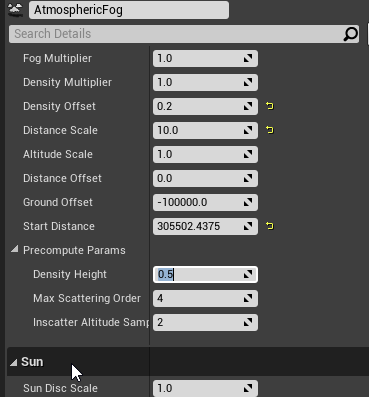
https://i.imgur.com/PEivDFJ.png how can i edit this highlighted value inside the level blueprint? do i cast to the fog component?


 lean thistle
Hey all, I’ve brought an issue here a couple days ago where procedural meshes stop responding to On Cursor Over events after the mesh had been sliced. I’m still having this issue and can not figure out what to do. Could anyone confirm if this is a known bug, or what I can do to fix it?
 stray island
If i want array that has arrays , do i make it structure bp inside structure bp
maiden wadi
@stray island Pretty much.
 marble violet
Is there anyway that I can get player last InputKey?
 west beacon
Hi, I want to get primitive component but I cant find it? What can I do?
marble violet
@west beacon primitive component?
west beacon
Can I share link for tutorial what I'm watching?
marble violet
yeah
west beacon

Use custom render depth to draw outlines.
Pawel's excellent article: http://www.michalorzelek.com/blog/tutorial-creating-outline-effect-around-objects/
Sample project to migrate materials from: http://www.michalorzelek.com/blog/?smd_process_download=1&download_id=297
Twitter: https://twitter.com/vladkodmc
Its from 2017.
I cant find it anywhere
I cant attach this, because I cant get prim. component
dawn gazelle
west beacon
I cant attach this, because I cant get prim. component
You need to change the component class in the drop down to "Primitive Component"
On the Get Components by Tag node
marble violet
hmm... you can make local variable and define it as PrimitiveComponent
west beacon
dawn gazelle
You need to change the component class in the drop down to "Primitive Component"
I cant find it
west beacon
Im making voxel game, and how can I define this all of the blocks?
For example I just have grass for now
royal anvil
covert delta
But if someone knows otherwise please chime in
Thanks, but functions like GetRandomPointInNavigatableRadius have no Input for "supported agent". And also GetRandomPointInNavigatableRadius gives you a location value back, so on which RecastNavMesh it searches for a navigatibale has to be determined before the use and plugged into "nav data".
Still searchig for a answer, nothing found googling for an hour:
-> Someone know how to get a specific NavMesh to plug it into "nav data" for navigation nodes (e.g. GetRandomPointInNavigatableRadius)?
I can get all recastNavMeshes with GetAllActrosofClass... but how can I filter for a specfifc RecastNavMesh for a specfifc "Supported Agent" to plug the reCastNavmesh I want to search a navigatable point on into "nav data"?
dawn gazelle
west beacon
Im making voxel game, and how can I define this all of the blocks?
You'd have this code on a base class and make all your block types children of that base class. So you'd have "Base Block" as a class lets say, and then you'd make "Grass Block" a child of Base Block. If you're not able to see the Primitive Component in that drop down, a restart may fix that.
west beacon
dawn gazelle
You'd have this code on a base class and make all your block types children of t...
How can I make class can you send me an example?
dawn gazelle
Right click in the content browser and select Blueprint class.
To make a child of that class, you right-click on the parent BP and select create child blueprint.
west beacon
Oh that, okey; what should I choose from menu?
dawn gazelle
For your blocks probably just Actor
west beacon
I mean this place
okey
I created the actor, and then what should I do for primitive thing?
stray island
Idk how for loop or for each loop work , like do they loop whats after the node or before the node
dawn gazelle
stray island
Idk how for loop or for each loop work , like do they loop whats after the node ...
Everything on the "Loop Body" path is what gets looped.
stray island
So What ever before , wont be looped
stray island
Ok Great Thanks alot
dawn gazelle
west beacon
I created the actor, and then what should I do for primitive thing?
Try restarting UE to see if the Primitive Component shows up in the drop down.
stray island
I have a struct variable “group of colors” and an array variables “color”
I am struggling to set “colors” to follow the “group of colors” indexes
Idk what I’m doing
 scarlet lava
Hello everyone! I was wondering if anyone here had an Unreal best practice guide to develop a game using C++ and blueprints that could avoid getting lost in blueprints but also use them efficiently.
covert delta
Hmm dumb question. I'd like to pick a random element from an array of sounds. How can I define an array that contains those sounds to pick randomly from? Something along the lines of "Literal sound base object"
nvm. dragging out left from random made the Make Array node typed to sound
tight schooner
thorny merlin
You can try a Select node. Pull out any data input pin (like your Texture input pin in the screenshot) and type Select, and then you can have a boolean, integer or enumerator select data
tight schooner
@scarlet lava probably a better question for #cpp. You can also see if http://learn.unrealengine.com/ has anything. I watched this video once and it has an elementary example of c++/BP integration. https://youtu.be/nVm-DYdAsts
scarlet lava
tight schooner
<@442124465913200641> probably a better question for <#221799439008923648>. You ...
Thanks a lot @tight schooner! I will look into this video 🙂
 normal harbor
Can't find any of those
 unique harness
should be able to drag the sword component into the graph and drag off of it and find one of those
normal harbor
okay im just dumb .d
unique harness
😛
normal harbor
relative rotation just worked fine
unique harness
yea that one too
normal harbor
i was playing around with vectoral directions to get it
buut apperently it was the easiest solution
 royal pagoda
Hey guys
I wanted to ask on how i can get the player mesh from a widget
i want to pass on a variable
unique harness
drag off the cast node and the mesh should be accessible there
There you're trying to cast the controller to the player which is not valid
unique harness
in the first picture, drag off the cast node
royal pagoda
i did that
unique harness
does your class "Player-bluepr" have a mesh component?
royal pagoda
i would say yes
i prefer to send evidence img since im a beginner and mayby i missunderstand something and waste like 50years of ur time
unique harness
so dragging off the cast pin should have a mesh variable
what happens when you drag off and type mesh?
 iron rampart
Guys i want to get level name "Level0001" and add "+1" to it so i can have "Level0002" is it possible?
unique harness
royal pagoda
this image is the one i'm talking about
unique harness
iron rampart
Guys i want to get level name "Level0001" and add "+1" to it so i can have "Leve...
I think you can get the current level name from either game instance or game mode
unique harness
royal pagoda
i dont see at the left a mesh
can you screenshot dragging off the cast node?
iron rampart
Yeah i know, but getting the level name is easy
unique harness
royal pagoda
and having a drag and drop?
put the cast, and drag off the blue pin, then type mesh in the right click menu
unique harness
iron rampart
Yeah i know, but getting the level name is easy
convert it from FName to FString and do your string operations then convert it back to a FName
royal pagoda
iron rampart
Let me explain in detail:
So i have a button to open the next level, but i have multiple levels, instead of making multiple buttons, i wanted a code that would get the current level name, and add +1 to it (EX: Level0001 to Level0002 and then open the Level0002 on button clicked)
unique harness
royal pagoda
now make sure you attach "GetPlayerPawn" to the left of the cast node
iron rampart
unique harness
iron rampart
are you familiar with string operations?
iron rampart
Not much, never done many
unique harness
iron rampart
Not much, never done many
you should be able to do something like ToString so you can use the string methods, you can use SubString to take away the "level" part of the string, convert the end to an integer, then concatenate the incremented integer to the "level" part of the string
unique harness
royal pagoda
yea that looks correct
unique harness
that mesh pin is the mesh for your character
royal pagoda
this works
im sure before i got error
anyways thanks for the help and sorry @-@
unique harness
though, I would suggest creating a method in your player character to change the mesh and call that from the widget rather than doing the logic in the widget
the widget should really only have logic in it that pertains to that widget
you want to organize the logic so it "belongs" to the class it's affecting.
royal pagoda
ohh i think i understand that, and the next time i will do it, but this is just for a little project which just needs to work, shitty is also fine, but the next time i will look over ALOT tutorials etc
iron rampart
I'm gonna try it
royal pagoda
but thanks for your help!
????
wha
i try to set now a 2nd variable
and now its not working
OMFG
I HAD TO COMPILE
I AM SO RETA....
sorry for bothering everyone
iron rampart
Thanks @unique harness i made it, i used GetSubstring to get the number of the level
I also changed all the level numbers "instead of 0001, just 1" so i could easily get the number and add, reconvert to text and join the text "Level"
stray island
So is it true that if i want to grey out public variables , thats only possible on c++
?
 valid garnet
does anyone know why i am not getting an array structure here
its a structure in the documentaton
i am using source 4.25
dawn gazelle
valid garnet
does anyone know why i am not getting an array structure here
There's two different nodes.
The one with the structure can't be used within a function, only within an event graph.
valid garnet
@dawn gazelle oh my bad thank you
iron rampart
What should i use to make variables not being affected by level changing?
 rigid escarp
I think the PlayerController persists between levels, so you could store them there. Or you have the GameInstance which always persists.
iron rampart
Welp, i'll go with GameInstance just in case 😅 Thanks mate
rigid escarp
Still have these notes that I made years ago when exploring networking in UE4. Should be relevant still for the persistence question 😛
iron rampart
Oh wow, that's awesome, i'll keep it as well ahahahah, thanks for sharing 😄
orchid garden
hrm... interesting, every thing i've seen creates the UI in the player character rather then the player controller.
dawn gazelle
orchid garden
hrm... interesting, every thing i've seen creates the UI in the player character...
o_o I've never seen that.
orchid garden
look on youtube lol. every last ui tutorial.
unless of course its 'menu' specific.
does seem more logical to do it on the controller... wish someone would of pointed that out like... a month ago lol...
iron rampart
Yeah it should be on controller, that makes sense, i'm no good example as i have my UI built on the character
iron rampart
orchid garden
does seem more logical to do it on the controller... wish someone would of point...
Same
rigid escarp
I think it mostly matters for multiplayer games however. Creating them on the pawn in single player games is fine (hud/inventory etc). But for menus and whatnot, they could either be tied to the menu level itself, or the controller. There are always more than two ways about it
orchid garden
hrm... thinking about it... im moved the actual hud / inventory creation into components on the player... i could call their creation from the controller rather then the player 😄
rigid escarp
My own preference is keeping UI on controller, since it has access to character and other key classes
orchid garden
just seems more logical, even for a single player game. ty for the tips sheet @rigid escarp
iron rampart
Also whilst changing levels, save the variables from the character on the game instance before exiting the level, then load them again into the character from the game instance in the new level
royal anvil
Still searchig....
-> Someone know how to get a specific (supported agent) RecastNavMesh to plug it into "nav data" for navigation nodes (e.g. GetRandomPointInNavigatableRadius)?
I can get all RecastNavMeshes with GetAllActrosofClass... but how can I filter for a specfifc RecastNavMesh of a specfifc "Supported Agent" to plug the RecastNavmesh I want to search a navigatable point on into "nav data"?
Posted already on Reddit and UE4 Answer hub and googled some hours, no answer. It seems not many devs use "Supported Agent" in project settings to have multiple RecastNavMeshes.
dawn gazelle
royal anvil
Still searchig....
-> Someone know how to get a specific (supported agent) Recas...
If you're going the all actors of class route, couldn't you use all actors of class with tag, and then tag the specific volumes as necessary?
trim matrix
Hello guys! I hope I can get your help! Sorry for asking like this...
I would like to set a new value for a variable in the Blueprint, but actually I don't want to add that value to the variable.
Let me give you an example. I want after a condition to set the value A = B + 10% of C
But I don't want to make a math and add that value to A, I want A from now on be the result of my new assigment.
Would it be possible?
trim matrix
yes but in this case A is gonna give that result but if I increase C is not gonna effect A
dawn gazelle
Correct. You need to set A whenever you need it to increase.
So whatever math you're doing to increase C, you should have a function call to set A as well.
trim matrix
there's no way to set a new value assigment which is gonna be a math of other variables?
orchid garden
this might sound silly but.... couldn't you just have a rep_notify on C, and inside the rep_notify have it do the math to set A? idk, haven't played with rep_notify much.
royal anvil
dawn gazelle
If you're going the all actors of class route, couldn't you use all actors of cl...
thanks, but "Supported Agent" mechanic is creating different RecastNavMeshes with the same volume. You also do not get all actors of nav mesh volumes. The "nav data" plug of navigation bp nodes like GetRandomPointInNavigatableRadius is for a "recastnavmesh", which is the auto generated nav mesh actor in the world itself, not the volume.
Recastnavmesh itself also do not allow tagging, which I think makes sense, because they are generated automatically on "build path" or "build level geometry".
trim matrix
thanks for your support btw
orchid garden
would that work @dawn gazelle ?
trim matrix
orchid garden
this might sound silly but.... couldn't you just have a rep_notify on C, and ins...
I don't even know what it is XD
dawn gazelle
trim matrix
there's no way to set a new value assigment which is gonna be a math of other va...
You have to tell the engine what you want updated.
So like... If you put that set A into a function like so:
Then whenever you update C, all you hvae to do is call Update A
As an example..
orchid garden
@dawn gazelle this might sound silly but.... couldn't you just have a rep_notify on C, and inside the rep_notify have it do the math to set A? idk, haven't played with rep_notify much.
trim matrix
dawn gazelle
So like... If you put that set A into a function like so:
Thank you so much! This is probably going to help me a lot
orchid garden
(Datura's like that, helpful ) 😉
dawn gazelle
orchid garden
<@!218956378654507008> this might sound silly but.... couldn't you just have a r...
Yes, but if it goes into multiplayer, then you may get some unexpected behaviour.
orchid garden
ah so bad idea then gotcha.
dawn gazelle
And, you don't get notified if the value doesn't change.
orchid garden
i got enough unexpected behavior with the engine, i don't need to create some lol 😉
dawn gazelle
I may be wrong, but really, there's nothing wrong with using repnotifies to do something similar, and I think it's only that in multiplayer you don't get notified if the value doesn't change, as it seems to fire the notify every time on single player regardless if the value is the same or not.
trim matrix
dawn gazelle
Can't get this Update "Event". I can't call it neither inside a function nor any of the Third_Person BP pages. 😮
dawn gazelle
You need to create the function /event
Functions can be created on the left side by clicking the +Function button
trim matrix
Yeah that's what I'm doing, I've made a new Function
dawn gazelle
Then you should be able to click and drag it on to the event graph
 ebon sun
Can anyone tell me why thumb-stick input for my motion controllers isn’t being registered on an input axis node? The inputs are listed in project settings, but I don’t know if there is some other setting I must’ve missed. Any help would be appreciated greatly
trim matrix
oh sorry, now I've got it! It was juts a function example that you've called "Update A"
ebon sun
This is a glimpse at the system I am looking to implement for locomotion.
This is for VR - https://www.youtube.com/watch?v=zlzBifkjXDk&t=307s is the tutorial I was using.

How to make advanced joystick locomotion for VR in Unreal Engine 4. This is a similar style of movement seen in games such as Pavlov, Zero Caliber and Skyrim:VR. Topics covered: Blueprint scripting, controller inputs. This tutorial was made using an Oculus Rift S headset, but has been confirmed to work with HTC Vive, Samsung Odyssey Pro, Valve I...
dawn gazelle
ebon sun
This is a glimpse at the system I am looking to implement for locomotion.
What does your axis input binding look like in your project settings?
ebon sun
I started off from the VR Template and didn't touch any of the blueprints in event graph that it came with
I had it working fine off the template yesterday but I decided to do it again for practice
dawn gazelle
🤔 Looks ok
Have you tried putting a print string on the axis with the output from the axis going into the string to output?
ebon sun
Right? I've looked around and made sure things were up to snuff - the only area where I have some concern is in the initial project settings set up for Oculus Quest
dawn gazelle
Just to see that you're getting a value
ebon sun
Not yet but I definitely should have - doing that now!
How do I set that up for VR? Frankly, I'm still fairly new to unreal
dawn gazelle
Plug the axis and execution path from here:
Into one of these nodes and then hit play:
When you move your thumbstick around, you should see a value being displayed that changes with the movement of your thumbstick
ebon sun
Thank you @dawn gazelle I'd be lost rn
Would I see the value being displayed in the output log or on the headset - I dont see it in either. Should I cast to camera actor or something? I know I have a lot of questions and I apologize in advance\
valid garnet
LogScript: Warning: Script Msg: UInAppPurchaseQueryCallbackProxy::TriggerQuery - In App Purchases are not supported by Online Subsystem
i keep getting this error, i followed the steps on the guide on unreal
hazy sandal
Hey fellas, can somebody explain to me if it´s possible to trigger an event with inhertiance? I´ve got a BP called collectible (A). An Ability BP (B) derives from A. In my parent BP (A) I´ve got an event dispatcher, which I also call in that class. My goal is to notify subcribers via the event dispatcher in derived classes. I´m doing this because I ´d like to trigger multiple actions with this event. Otherwise I could have just used functions...
My Subscriber to the event dispatcher
The parent class
I thought, since my subclass is deriving from collectible (A), i dont need a reference in the binding, since its the same base class they are using... but i think I got something wrong.
 winged sentinel
Hi everyone im having a very annoying issue with my anim BP its been working fine then with no changes it wont work anymore
i had it so my weapon would spawn animated and it just doesnt do it
 modern cove
I'm making a menu where the buttons are not in a straight line, thus I needed to use a Preview Key Down function in order to navigate them properly. Problem now is that the Bottom face Button on the Gamepad no longer presses the currently focused button. How would I fix that? Is there a node that replicates what the Bottom Face Button (X on a PS4 controller) does?
winged sentinel
anymore
rigid escarp
winged sentinel
Hi everyone im having a very annoying issue with my anim BP its been working fin...
From looking at the picture, it seems like cast to bp_basecharacter fails?
winged sentinel
it does?
rigid escarp
I don't know, does it? The first exec on the sequence node does not have active "color" on the line after the Cast node
winged sentinel
when i compile it everythig seems okay
says successfull
is there a log or something that i can see in game
to see whats happening
cuz i cant even back track i didnt even change anythign
rigid escarp
Run the game in editor and see if it runs all the nodes as it should
orchid garden
yep and if it does stop there it would still seem fine when compiling because its not actually a error.
simple test - printstring off of 'failed'
winged sentinel
I actually see it, the string is reading of the wrong enum hence wrong weapon anim
but that made it more confusing cuz the same code returns the correct weapon in another project
orchid garden
did you change your enum?
dawn gazelle
ebon sun
Would I see the value being displayed in the output log or on the headset - I do...
I'm not familiar with using UE4 with VR myself, but the text should be printed out in the output log, or on the play in editor screen during runtime.
orchid garden
changing enums and structs can cause things to start breaking.
winged sentinel
im gonna check but im pretty sure i didnt touch any of that
orchid garden
expecially if you reorder a enum
ebon sun
dawn gazelle
I'm not familiar with using UE4 with VR myself, but the text should be printed o...
Okay got it thanks!
winged sentinel
that all seems good im really stumped
is there somethign in the characrer controller that can affect animbp or something
modern cove
Update: It wasn't a question of inputs, but rather, focus. My custom navigator was focusing the entire sub-widget but needed extra instructions to focus the button within it.
dawn gazelle
winged sentinel
that all seems good im really stumped
On the cast failed path, put a print string there, and grab the output from the "Try get pawn owner" and put it into the print string output. This'll give you the class of the pawn that it's grabbing.
winged sentinel
im actually on to something
thank you @dawn gazelle
Setting my variable only works on tick idek why
it so weird the variable always worked where it was
winged sentinel
okay i narrowed it down to this
that variable suddenly only works on tick
i dont get how that can just stop working like that
i think the variable is like slow or something
dawn gazelle
It's failing at the cast node as OyvindAndersson pointed out.
dawn gazelle
So either the BP_BaseCharacter doesn't inherit from Pawn or the TryGetPawnOwner node is returning a pawn that isn't (or inherits from) the BP_BaseCharacter class.
winged sentinel
I connected a string to Cast Failed and it doesnt show in the log
dawn gazelle
What does the blueprint look like now when simulating?
dawn gazelle
Showing that it is failing.
winged sentinel
That red line is from
or maybe
ya waut i see it
Oddly enough I added 0.2 second delay in front of where the variable always worked and it everything works
i dont know why or how
 hot berry
Hey all. So I’ve been trying to create a planet in ue4 but I can’t seem to get the gravity to work. I’m using voxel plugin for the planet and directional & planet gravity plugin for the gravity. I’ve gone through this tutorial but it doesn’t make too much sense to me:
Voxel Plugin Documentation
Directional & Planet Gravity is a plugin available for free on the Unreal Marketplace: https://www.unrealengine.com/marketplace/en-US/slug/directional-planet-gravity
 fierce birch
question, this didnt happen last night and all of a sudden it happens, i have a weapon with a int type variable, im using that variable to drive a characters animation, for some reason the weapon is valid but the value on the variable is 0, any help would be nice
the pickup has a blend space var that is plugged into the int output. i have a weapon base and each weapons that are childs of the weapon base with the overridden variable that changes the animation, but idk why the variable stays at 0
this is the interface
dawn gazelle
fierce birch
the pickup has a blend space var that is plugged into the int output. i have a ...
I'd say check the class on the pickup variable. Maybe it's not set to what you expect.
unique harness
where are you setting the int?
put a breakpoint there and one in the function above. that should help figure out where the issue is
fierce birch
i have the variable in the base pickup class. then have a child class called weapon base, then have children to that class and, i just type in a value in that var
unique harness
so you're setting it in the class defaults for the children?
fierce birch
correct
unique harness
and your print is printing 0
fierce birch
yes
unique harness
add a print to begin play for that class to print the var
see if it's what you'd expect
unique harness
In the class you're expecting Blendspace to be something other than 0, put a print string node in the begin play event and print Blendspace
vital ingot
Quick question. My Actor Has Tag returns a runtime error whenever it hits an actor without a tag (I'm using it as a condition for my branch)
What would be a way to stop that from happening? Since the error doesn't seem to cause any issues.
unique harness
vital ingot
Quick question. My Actor Has Tag returns a runtime error whenever it hits an act...
The OutHitActor is probably invalid
Do an IsValid node before the branch
fierce birch
So on the beginplay?
unique harness
yes
fierce birch
Ok one sec
mortal cradle
What would be the best way to be able to give a control to a widget over just one key? ie. being able to scroll through the widget and move around in the game freely with no choosing between either ui mode or game mode?
unique harness
you can use the built in input settings with ui and game and set your scroll box to always interact or whatever it's called
winged sentinel
ive narrowed the issue down to a variable i just cant get this variable to set
no matter what i do
unique harness
winged sentinel
ive narrowed the issue down to a variable i just cant get this variable to set
I can try to help if you'd like to explain the issue
winged sentinel
So i usually set this weapon variable right when the game starts
but for some reason it only works in game when theres a 0.2 second delay
unique harness
Is there a reason you're storing the same data in 2 places?
unique harness
Can you show the whole function for the above image?
unique harness
winged sentinel
Can you not access Primary Weapon in the anim bp?
unique harness
fierce birch
what class are you implementing the interface in?
unique harness
is it an interface or an event dispatcher?
winged sentinel
@unique harness I cant access it from the AnimBP
fierce birch
and put blendspace in
unique harness
winged sentinel
<@!209383767322656768> I cant access it from the AnimBP
what class is the image you posted in?
winged sentinel
Its in my base character
fierce birch
idk why it says int Pickup
unique harness
winged sentinel
Its in my base character
so in the anim bp, do GetPlayerCharacter and cast it to your custom class and you can access Primary Weapon
unique harness
fierce birch
idk why it says int Pickup
Is it an interface or an event dispatcher?
fierce birch
interface
unique harness
Can you show the whole interface "class" bp
vital ingot
@unique harness Oh yeah you were right. Tyvm!
fierce birch
unique harness
and your BP Weapon Class Base or whatever it's called implements it?
winged sentinel
Yes
unique harness
so the pickup implements it and the weapon is a child of pickup
fierce birch
yes
unique harness
Does it let you override it in your rifle class?
unique harness
winged sentinel
Yes
yes what?
winged sentinel
sorry i thought u were asking me tge last question lol
unique harness
winged sentinel
sorry i thought u were asking me tge last question lol
did you see my message about how to access the variable you need?
fierce birch
i think i found the problem
unique harness
😛
winged sentinel
@unique harness yes but it isnt in there for some reason
unique harness
winged sentinel
<@!209383767322656768> yes but it isnt in there for some reason
show an image please
winged sentinel
wait i do see it now
fierce birch
@unique harness thankyou very much, never knew how that happened?
unique harness
fierce birch
<@!209383767322656768> thankyou very much, never knew how that happened?
Does it let you remove that version or do you need to override it in every child?
winged sentinel
same error every time
it either silently doesnt do what i want it to do or gives me that error
unique harness
you probably need to check to make sure it's valid
mortal cradle
@unique harness Problem is, I'm not using a scrollbox, I'm overriding OnMouseWheel function, it's in terms of your answer about me trying to give mouse wheel an ability to work in a widget while still doing everything in a game
fierce birch
@unique harness removed it, thankyou
winged sentinel
@unique harness if its not valid what happened?
unique harness
mortal cradle
<@!209383767322656768> Problem is, I'm not using a scrollbox, I'm overriding OnM...
A way I've done something similar in the past is by creating a custom input handler for my player controller and doing it that way
Basically create a map of keys and listeners and forwarding the key press/release until something handles it
unique harness
winged sentinel
<@!209383767322656768> if its not valid what happened?
It just means the variable hasn't been assigned yet
winged sentinel
@unique harness I had everything setup and it worked perfectly fine then it suddenly broke
unique harness
I'm not sure, I'm just telling you how it should be done
winged sentinel
hmm
I dont get how the variable isnt assigned when i run it after the variable is set
unique harness
if you just add an IsValid check, it could work fine
winged sentinel
ill try that
unique harness
though I haven't seen your anim bp so I'm not sure exactly what you're doing
winged sentinel
out of curiousity why would that fix it? doesnt it only just check if its valid?
unique harness
Your error is saying the object you're trying to do something to doesn't exist
checking if the object is valid before trying to do something will fix the error
winged sentinel
ah i see itll fix the error but that doesnt mean the issue itself will be fixed
cuz the variable will still be empty
unique harness
You should be using IsValid checks everywhere you're dealing with an incoming object or if the object could be invalid, such as a multiplayer game
winged sentinel
yes i will add it regardless
unique harness
also you can send a picture of the anim bp to see exactly what's going on there
winged sentinel
little messy cuz ive been playing around with stuff
unique harness
that explains a bit, you don't really want to do the logic you're doing in begin play
just do it in the update loop
winged sentinel
So its in the update loop
Youll see in that video
When i spawn the ak looks messed up
Then when I switch weapons it looks fine
So i thought setting the variable in begin play would help
dawn gazelle
Your cast is failing - you need to figure this out..... #blueprint message
unique harness
nah, there's another issue going on
What is the difference between BPBaseCharacter->WeaponName and BPBaseCharacter->PrimaryWeapon->WeaponName?
winged sentinel
So primary is specific to the primary weapon
BPCharacter> WeaponName is that variable thats not working
unique harness
ah ok I get it
winged sentinel
Maybe its setting the variable too slow?
unique harness
What happens if you set WeaponName on the weapon to replicated?
winged sentinel
bro
thats why it worked
i was playing offline
then i test online
and i didnt hit replicate
on the variable
unique harness
yea you basically need to replicate everything lol
Have you read the networking compendium before?
winged sentinel
id say almost 3 hours
unique harness
exi did a great job
winged sentinel
I need to get a little more networking knowledge
I appreciate you helping me with with
unique harness
no problem
winged sentinel
And everyone else that helped me
This discord is great
now i can get rid of all this print stuff lmfao
 potent solstice
Hi all, for some reason my damage event fires fine, but only actually gives the damage level once? its really weird behavior. I have an arrow applying 10Hp damage to the player, but once i fire the arrow again (the second time since level load) it wont apply damage but it does run the damage event. so first time i fire, 10hp lost, second time, 0hp
any idea why this is?
unique harness
Image of your damage event?
potent solstice
one second ill grab that
so this is on the arrow projectile bp my player fires, im working with networking here, so each player fires it on server and its a replicated actor. does this look ok? the damage event will only fire on server
one sec ill get up the event on the player
unique harness
That looks good but I'd add a HasAuthority just for clarity sake.
 weary jackal
You're destroying the actor after applying damage?
potent solstice
yes
it always fires the event damage, but just the damage value after shot 1 goes to 0 no matter what, even tho base damage is 10
so this all runs fine, every time
it fires this event, which fires everything after set health fine too.
unique harness
so if you put a print here before the cast, does it say 0 or 2 on the second arrow?
unique harness
Also, is there a reason you're passing Health into that function? seems redundant
potent solstice
I am passing health through because for some strange reason, it was applying 100hp damage when not going through a run on client event.
its confusing for me, because I have done a tonne of RPCs and network stuff for this project, yet this is the strangest thing ive seen
unique harness
Ok i guess worry about that later then. What did the print test tell?
potent solstice
Trying it now
okay this is strange, the print test worked both before and after fine, if i shoot the server player it works fine as expected, but if the server shoots the client it doesnt work, it takes 10hp then nothing after that, i think i need an RPC function for run on client...
unique harness
well if you're only setting health on client, there's your issue
setting health should happen on server and replicate to clients
Though, the better way is to have server and client handle their own health with a replicated "sync" method that makes sure the client matches the server
the first method is easier though
potent solstice
ah, yeah, i suppose because on damage only fires on server, i need to then make events to fire it just for that clients controller, the health var is replicated btw, so should sync fine!
unique harness
right but it can end up sending a bunch of network data if for instance you have "regen" functionality that changes health on tick
but the easier thing to do is just have a "modify health" server RPC that changes the health and have the health be a rep notify
potent solstice
ah, i see, ok ill keep that in mind, I am not doing anything per tick for the health thankfully, also i think i need to pass through on the function the player controller to apply damage to, makes sense now!
working perfectly now, thanks @unique harness
 tardy hollow
Anyone knows why I cannot rotate my StaticMeshComponent?
I created it like this in the cpp, and when I try to edit the mesh transform in the BP it only allows me to scale it:
maiden wadi
@hushed gazelle Rotators get compressed for network traffic. Each axis gets compressed into an unsigned byte or short, which means non negative, non decimal whole value between either 0-255 or 0-65535. This is okay in the use of rotators because they 'wind-up'. For instance, 360 is the same value as 0, 355 is the same as -5, 185 is the same as -175. 720 is also the same as 0, 715 is -5, etc. Now, the reason you see -180 to 180 are the actual values that functions in unreal uses. You can normalize them yourself in places you use them if necessary, but in general most functions that take a rotator will normalize them anyhow. In this case, BaseAimRotation is a raw rotator and hasn't been fed into a function yet and you're picking apart one of it's axis values from the raw 0-360 data.
So, the TLDR is to Normalize the axis of Pitch before using it.
@tardy hollow Did you hotreload?
 strange igloo
I have a blueprint with a widget component. The widget blueprint contains another widget blueprint. The widget component displays the parent widget blueprint with default values that don't match the parent or child widget blueprints. I'm so confused.
The parent widget blueprint sets the two text blocks to something, and the default values of the child widget are different as well. Both sets of defaults are ignored.
And on BeginPlay, the widget completely disappears.
maiden wadi
How are you setting the values in the widgets?
strange igloo
I've tried directly setting them on the right pane in the "Designer" section, and with the Pre-Construct and Construct events.
In the widget blueprint editor, they show correctly.
I also tried creating a text variable in the parent widget blueprint, exposed it on spawn, then set it in the constructor of the blueprint.
And that still didn't work. And I restarted the editor.
maiden wadi
So if you disconnect everything in Preconstruct or Construct, and set the text manually in the designer, it still doesn't show up?
strange igloo
Yeah, that was originally how I had things.
tardy hollow
maiden wadi
<@!491034733770178570> Did you hotreload?
after closing and reopening UE4, it worked yes, thank you!
strange igloo
I just created an empty class with a widget component, and the same thing happens.
maiden wadi
@tardy hollow Generally avoid hotreloading. It won't end well. http://wiki.hotreloadsucks.com/
Compiling with the Editor Open Do's and Don'ts
@strange igloo Can I see the hierarchy in the designer on your parent widget that is getting added to the WidgetComponent?
strange igloo
Yeah, one second.
This is the parent widget blueprint.
WBP_Project is a container for a title and text body.
maiden wadi
Looks fine. Let me try that really quick with a couple of widgets.
Seems to be working fine.
strange igloo
😱
strange igloo
My parent widget blueprint overrides the defaults, but the actor shows "Text block" which neither of them have as defaults 😦
maiden wadi
@hushed gazelle Rotator has a function for floats that is for that. It's just NormalizeAxis.
strange igloo
The worse problem is that the widget component disappears on BeginPlay 😦
maiden wadi
Where are you overriding it in the parent?
Couple of different ways to do that, want to test correctly.
strange igloo
In the Designer pane; the default variables section for exposed variables. The exposed variables are used to set the text of the child widget blueprint in its Pre-Construct.
Actually, on BeginPlay, the text is set correctly! I only found out after creating a separate test actor, whose widget component doesn't disappear.
*So...the actor had a separate WidgetComponent declared in its parent C++ class. I just got rid of it and I'm gonna rebuild and test it out.
maiden wadi
Huh. Well that's interesting.
I find it odd that in the actor's designer that the parent widget's alterations don't show, but they do on beginplay.
strange igloo
It still disappears, but it's a really simple class and I can just redo it all in blueprint.
I'm going to sleep 😩 thank you for the help.
dawn gazelle
FinterpTo on tick.