#blueprint
402296 messages · Page 609 of 403
 zealous moth
it's called blueprint assist: https://www.unrealengine.com/marketplace/en-US/product/blueprint-assist

Unreal Engine
Adds useful keyboard shortcuts related to Blueprint creation. Auto-format Blueprint nodes as you create them.
in the documentation

GitHub
Contribute to fpwong/BlueprintAssistWiki development by creating an account on GitHub.
check feature "delete and link"
it does just that
 solar sonnet
really cool thanks so much!!
I'm gonna take a look at this tool, might be worth the $15 👍
 rough jay
how do u check if a key is being hold down?
 dawn gazelle
 glacial spruce
@dawn gazelle
do you know how to play an animation on ai?
but only when they see you in distance
 knotty quail
I need to get the primitive object reference from an attached actor's actor object reference
How can I do that
 deep imp
I'm not sure what you mean when you say primitive object reference. Do you mean the root component? Anyways try this
 true valve
Hello - So I have two duplicated actors in my level. If I interact with them they show me widgets that I can submit content. The issue is that if I update one of the widgets all of them get updated.
 maiden wadi
@true valve Sounds like you're updating one widget that all of them share, or your widgets are getting data from one instance of your actor instead of individual ones.
true valve
I duplicated the actors then entered data individually. So my issue could be that I;ve one widget in my main HUD that I toggle its visibility.
I guess I've to create the widget when I interact
maiden wadi
Alternatively. You can pass your reference to the one widget and make that one widget update it's visuals and subwidgets based on the passed in actor. I do the same thing with an inventory transfer window. I call an initialize function on it that passes in the container my player has interacted with, this checks if it's valid, if it is, it populates or overwrites the current stuff to update the widget to reflect what container it's representing, very little new widget creation. Once it's done, it adds itself to viewport.
true valve
So in my controller I've an interface function that calls the event in the placed actor which passes the self ref to the widget to populate data or populate the in its BP then updates the widget every iteration.
THat's what I tried.
@maiden wadi this is the placed actor: https://gyazo.com/37e2e939352733147e65f728d4434647

 tall pine
what is the logic behind this bp? it spawns decal when projectile hits something like the ground though i do not understand how it does it https://i.imgur.com/eejz04j.png
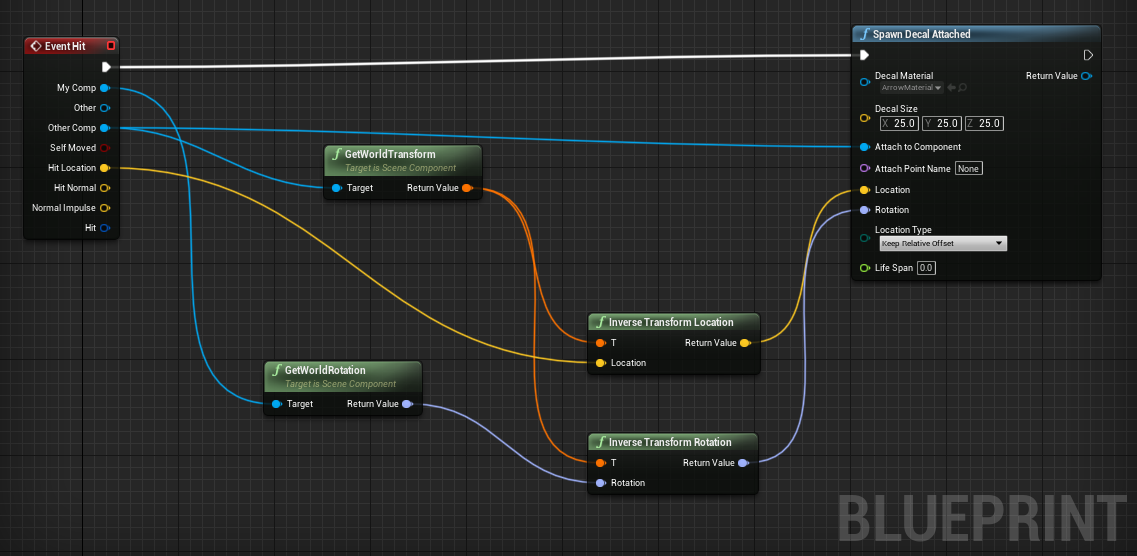
 barren flower
@tall pine its pretty self explanatory. I'm on mobile one second to type the response, ill walk you through it
 round basin
world
Jump
Hello on my world blueprint I want to call an event but it does not work, can you help me ?
barren flower
The event hit fires off when the blueprint you are examining comes into contact (hits) something else. I'm guessing this blueprint is the bullet or something.
That event fires the 'spawn decal' node on the right.
That node pulls in data from two places.
Going down the decals input list, it obtains the reference to what the other object it should be attaching to.
It gets the location of the hit, on the object it needs to attach to, as the location to spawn the decal.
It finally does the same thing with the objects rotation, to correctly rotate the decal to its new hosts rotation.
 tall field
Is there any way to get a hold of the component class FoliageType.InstancedStaticMesh ? I've inherited from that class and filled it with my own variables but there seems to be no way to get ahold of it. From my knowledge with the Procedural Foliage Spawner is that you set the component class of another type of component...
For information, neither GetAllActorsOfClass nor GetComponentsByClass works with this
barren flower
@round basin you need to reference your target directly. You are failing to obtain a valid reference. Use an 'is valid' node behind your get actor class node and print on fail.
@round basin are you trying to spawn this class? Because thats all very wrong if so.
round basin
I want to spawn different obstacles, "jump" is an obstacle. It's the blueprint with the event and "print string". The other blueprint with begin play is the world blueprint.
barren flower
Okay, stop right there
Your blueprint doesn't exist in the world if it doesn't yet exist in the world.
You are asking nothing to spawn itself
You need to understand how references work
Okay so so what you actually need to do is use a spawn actor node
I'm on mobile I don't remember the exact node hang on
barren flower
Yeah it's the top one, spawnactor
All of this happens in your world blueprint, not the jump blueprint
Okay, so you need to select the jump class, and you need to tell it WHERE to spawn, with the transform.
Remember, a blueprint is an object to be placed in the world. It does not exist in the world, and so cannot run code until it does
round basin
I wanted to call the blueprint "jump" to determine if the current theme was for example "winter" or "summer" and then make changes to the actor and then make it spawn. @barren flower
But I guess I can spawn it off the screen and then set the location right ?
barren flower
Any thinking that needs to be done should be done by the summoning blueprint, not the summoned.
But hypothetically, yeah I guess you could
Just spawn it wherever, and have it set itself up in the 'on construct' tab of its blueprints.
Use a branch with an 'issummer' boolean
In your level blueprint
And have the level blueprint decide what it should spawn from there.
Have the 'jump' itself only concerned with whatever it's supposed to be doing.
round basin
Okay yes, thank you ! 👌
barren flower
@round basin so to be clear. It's spawning should be handled by a branch in the level blueprint, NOT in the jumps blueprint
Okay guys HELP MEEEEEE I have my own question. Haha.
How on earth do I manage big data in this engine?
Let's say I have a village simulator, thousands and thousands of little sim people.
Okay, so I only want to render the people out on the streets, not in their houses where I can despawn them.
How do I put them all in a big database or spreadsheet or something so I can keep track of them, change and update them, or even delete or create them on the fly?
What's even the right approach for this?
 turbid tiger
how to make the type itself defined as for example For Each Loop
barren flower
@trim matrix i don't know c++ :(
You can naitivise blueprint though, and it gives only 5% lower performance than c++ code in testing, apparently
Well the idea is to just iterate through the list fairly slowly. That's why I'm struggling with how exactly to do this
Truuee
So c++ isn't a magic bullet either, let's say I learn it and expert mode, okay so what would the actual approach be?
They don't actually have to be simulated real time, just extrapolated. But their data has to exist so if they leave a building I can spawn them correctly with all their attributes
That sounds perfect, never heard of a flat cache friendly array
Want a job? Haha
Yeah that sounds like a good approach though for sure
My idea is basically, yes, it's a giant for loop iterating over the entire population one at a time, make some small decision, and loop over endlessly, constantly updating as you go.
The 'real' ones when they leave on the street get updated in real time, everyone else just gets updates when we get back to you
Can you do a flat cache in BP?
The problem with an array of struts as I understand it, is that it's not searchable
So let's say I have a bank robber enter the bank.
How does the teller know about that whe. It's her time to be iterated over, to give up the money? How do I reference the robber to give it to him?
See I could give them a 'current building' Id, but again, array of struct isn't searchable to find the other people with that same building id
Yeah that's my struggle haha
And that's all fine, but what if I destroy the bank. Then how do I address the occupants to vacate or delete them. They'll get iterated over in a building that doesn't exisy
Can I private message you? I feel like we are doing basically game design in the blueprint help section, people might want to ask for help haha
Yeah I'm just not sure how to actually do data oriented design
But thanks heaps for you help, man!
 somber quail
ight its been fun but im switching to unity
maiden wadi
@hushed gazelle What are you trying to do? Replicate the look direction for animations or something?
 thorny merlin
is there a way to get "all rows of a data table that have value X in column Y" ?
maiden wadi
@hushed gazelle Most times, people rely on BaseAimRotation for animation stuff.
Like.. The Animblueprint uses an aim offset based on BaseAimRotation, the weapon is attached to the mesh that does the aim offset and it gets moved with that mesh, which moves the muzzle on the weapon.
thorny merlin
i can do the filtering myself of course but maybe theres a better blueprint already existing
 dark drum
thorny merlin
is there a way to get "all rows of a data table that have value X in column Y" ?
dark drum
thorny merlin
is there a way to get "all rows of a data table that have value X in column Y" ?
There's not any built in way but you could set a function that checks all the rows to find the value and add it to a list if found.
dark drum
barren flower
See I could give them a 'current building' Id, but again, array of struct isn't ...
Create a manager BP that keeps track of the building ids and what characters have them. If a character needs to know they check with the manager.
maiden wadi
Be careful with that kind of setup. If you're relying on the server's version of the rotation for the weapon firing, it's going to be a little bit off for the player that is firing and it's going to feel bad
To answer your first question, the custom ServerRPC event is the only way for the client to tell the server to set a variable, yes. Clients cannot contact each other and any RPC besides a server rpc will just get played locally and affect no other machine. And they can only server RPC from actors that the server recognizes that they own via the Owner variable in actors. This has to be set to the player controller of that client, or something that is owned by that player controller.
As far as shooting and whatnot, that is a very indepth topic. And the programming highly depends on your design style. For instance in a single player game, a lot of weapons might simply create actors that have projectile movement components which fly, and die. In multiplayer you can't really do this with traditional bullets because they move so fast that they may spawn on the server, and then die before they've even had a chance to replicate to clients, and on clients they would see health go down with no visual effects of why.
How you handle this highly depends on your design style though. For a game with a lot of long range shots, or slower moving "heavy" bullets, you may be able to get away with using actors. A lot of games seem to mimic firing effects though. The visuals are spawned to be relatively but not precisely accurate. They move so fast that it often doesn't matter how accurate they are, it's mostly just for the flashy effect.
Take one instance, an assault rifle firing. On client this could do traces, to test if it hit something locally. This could tell the server "Hey, I hit this at this location and I was standing here". Server can run it's own checks to try to negate cheating and then register the hit as valid. While this rifle is firing, it also increments a replicated integer on the server, and the server replicates this to all non owning actors. Whenever this is incremented, all other clients play the muzzle flash and sound effects for that weapon but don't really do much else.
So for effects along, you have a button click, a timer that plays local muzzle flashes and sounds, and calls an RPC which increments an integer on the server. The server replicates this integer as often as it can to other clients with a skip owner condition(Cause you don't want the owner to play sounds twice). When they receive this, they play an onrep function which plays muzzle flashes and sounds for that rifle. Local clients are perfectly accurate, and other clients are close enough to realize that person is firing.
For actual effect, you have the client doing the button click, doing traces, testing what they hit, and calling a server RPC to say that they hit something, Server runs tests like it's own traces to test out the validity of this shot, and then simply applies damage if it succeeded. Health gets replicated to all, and extra effects get played for that., etc.
 orchid garden
@maiden wadi incase you didn't see my reply about how much the texture changes helped, got +20fps in a area that was lagging abit, cleared up some of the lag there too, so gonna optimize the others like that too 🙂
seems most the textures are 4k textures
 icy mica
So i just followed a tutorial of an older version of the engine. It explains how to generate a grid. If i follow the same steps i get a different result. In a 3x3 grid size it only generates tiles on 1x1 2x2 and 3x3 the others are left empty. Has anyone encountered this before?
orchid garden
im finding that issue with alot of the 2016 and earlier videos @icy mica
 olive sedge
any good way to do an onhover on umg border?
 real garnet
 minor merlin
Hello everyone, I want to have a replicated mesh, and a local one (arms). I have disabled this to check how is my pitch replication, and it's fucked up... Can you help me?
maiden wadi
@orchid garden Wait until you run into the directional light set on static or Stationary causing a 10% frame drop because of a lot of mobile dynamic shadows in screen. That was a fun one too. But yeah. Love a lot of the marketplace stuff, and I definitely understand that it's best just to package that stuff with cinematic quality, but even their "Optimized" versions are not game optimized a lot of the time.
@olive sedge For what use? Like changing it's color or something on mouse over?
olive sedge
@maiden wadi yes.. I have a material for rounded corners but I can pretty much only use that on border
So I use border for buttons :>
I just found IsHovered though so I think I can work with that
maiden wadi
You should be able to do the same thing with buttons and their Appearance/Style settings.
orchid garden
maiden wadi
<@!458977415176257536> Wait until you run into the directional light set on stat...
hrm... all my lighting in my project so far is dynamic, including the directional light, so they'll cause frame drops on statics? (might be part of the problem as well)
i can model stuff... but when it comes to textures... im not very good at them.
olive sedge
@maiden wadi I haven't found anything to do rounded borders.. 90° always looks so harsh
maiden wadi
@orchid garden I think it depends. I was testing out a potential project with a lot of moving AI. Anywhere from 150 to 250 at once. Finally profiled and realized my rendering was the issue... but looking away from them wasn't helping. I don't remember why or the reasoning, but something to do with the way that static vs mobile lights do shadowing against mobile actors. One setting change led from 54 FPS on average to over 65.
orchid garden
maiden wadi
<@!458977415176257536> I think it depends. I was testing out a potential project...
oh? you remember the setting? 😄
maiden wadi
Just changing the directional light's mobility to mobile. I don't even remember why it wasn't mobile in the first place. May have thought static stuff was quicker. I don't remember setting it to static though before I went looking for that.
@olive sedge I mean with the material. You can set materials for a button as well and swap them out based on if it's hovered, pressed, or normal.
 solemn parcel
Hey is there a way to make walking angle direction less steep, more 'large' or slow ?
maiden wadi
Yeah that. Really made me reconsider my view on optimizations, haha.
 steep holly
anyone know how to return a float if the bool = true.
or is it not possible
maiden wadi
From a function you mean?
olive sedge
@maiden wadi oh, you can punch a material into Image.. Thanks!
orchid garden
steep holly
anyone know how to return a float if the bool = true.
or is it not possible
add a return node to the true branch, drag your float onto the return node, off the false branch add a return node , leave the float disconnected.
minor merlin
steep holly
anyone know how to return a float if the bool = true.
or is it not possible
Use select
#blueprint message anyone?
steep holly
Select float is what I needed. For what I'm doing I don't need it inside a function, but thanks everyone for the help!
maiden wadi
@minor merlin Normally you do this by parenting the arms to the camera, and parenting the camera to the capsule, and the third person mesh to the capsule. Arm mesh follows the camera automatically cause it's parented to it, and the third person mesh animates via an aim offset using baseaimrotation.
minor merlin
maiden wadi
<@!207894908063842304> Normally you do this by parenting the arms to the camera,...
That's what I have, but thirdpersomesh is still moving. and actually my biggest wonder is why it doesn't replicate correctly (flickering)
The whole mesh moving was me testing something, which didn't worked
Oh wait I fixed it x)
Ty anyway
 crude dew
Pretty simple question I think, I am Casting to RTS_Marquee which is a HUD what do I plug into the Object pin ?
orchid garden
crude dew
Pretty simple question I think, I am Casting to RTS_Marquee which is a HUD what ...
the reference your casting to the RTS_Marquee?
crude dew
RTS_Marquee Cast
orchid garden
you need a reference (object) to cast to
orchid garden
is As HUD a var?
orchid garden
does it already have a reference to the RTS_Marquee in it?
if it does why are you casting to RTS_Marquee? no need to unless your using the cast to see if the reference is valid
crude dew
Ye it says NOTE : As HUD is already a RTS_Marquee you do not need to cast to it.
orchid garden
use the var to access the functions / events / vars of the RTS_Marquee
crude dew
Ahh ok I thought I had to basically "fill" the variable with the object and then i had access to it.
orchid garden
if you already have the variable filled with a reference you don't need to.
@maiden wadi can probably help you better.
maiden wadi
If you're trying to use a HUD class, don't bother using a variable. Just use GetHUD->CastToTheHudclass GetHUD is fast. Variable is unnecessary and creates an extra thing that you need to manage.
crude dew
I do not fill As HUD anywhere so its an empty declared variable
orchid garden
what are you trying to do exactly Drib?
maiden wadi
I presume that this is for drag selection?
crude dew
Yes I am trying to make a drag selection.
maiden wadi
If it is, you should go the other way around. Let HUD get a mouse location from your player controller.
I do the same thing in an RTS project. I store a "FirstClick" Vector2D in the controller, and use GetPlayerController0 cast to access it and also the same get to get the mouse current location to draw a rectangle on screen.
crude dew
Ahh I got a lot to learn, This is test project for myself to see if i can get like 3 types of units and 1 type of resource, You guys are amazing! Yes it makes more sense to "throw" the mouse values to the HUD and then update the current X and Y locations there as you draw I guess.
maiden wadi
Sec, I can show a small example.
crude dew
I was following a RTS marquee tutorial on youtube but it seemed super convoluted with interfaces, functions and multiple casts.
so i thought to try and find a better way sometimes you learn more from trying things 🙂
crude dew
Thats amazing thank you !
maiden wadi
Which allows you to leave all of your gameplay programming in the controller, and not pollute your UI class with it.
crude dew
Makes sense!
orchid garden
tosses my project at @maiden wadi and watches him scream in agony as he looks at the bp's lol 😉
crude dew
pmsl
orchid garden
hehe my projects been a good learning experience though even though i know everything isn't done the best way it could be.
crude dew
Omg in my learning process I,ve probably made so many bad blueprints that "work"
maiden wadi
Eh. There's best practice, and then there's practical application. And sometimes.. Practical application tells best practice to fuck off in favor of simplicity of design and speed.
 maiden wadi
One thing to really remember while learning, is to find something that is comfortable for you. Find the ways to interconnect your gameplay design in a way you can easily follow and understand. Also do take Youtube with a healthy dose of salt. They make those videos for views, not for teaching.
orchid garden
i've wrote out spaghetti functions just to be able to make sure everything functions properly in them, then opimized them so that repeat things are a single call rather then spaghetti code. You've helped me with that one several times @maiden wadi getting something that looks like a total mess broken down to just a few function calls for the repeat stuff.
maiden wadi
Man, I wish I had one of my old projects still. Was one of my first RTS projects and I think I was like a month into learning, and I had this function that did... a lot of things. It was just this mess of branching logic.
crude dew
I found one person on youtube to be useful to understand because about 6mths ago I opened UE4 and then promptly closed it lol
then one day i decide I AM GOING TO LEARN THIS!! lol
orchid garden
heh sounds like me Drib, got frustrated multiple times, and gave up, then one day just went 'come h*** or high water im gonna make something!'
crude dew
I also bought a couple of Udemy courses.
orchid garden
maiden wadi
Man, I wish I had one of my old projects still. Was one of my first RTS projects...
hehe you helped me with one routine i remember that was branching logic, it was a huge mess and after the tips you gave me it turned into a tiny 3 small branch function.
maiden wadi
Another helpful tip is to just read. Specially here on the discord. There's a lot of subtle tips to pick up. Even if it's stuff that you don't fully get.
And don't fear asking questions. If you're beating your head on a wall, someone can usually tell you why.
crude dew
I have to say that Im super glad to find this discord i posted on the UE forums and didnt find them helpful tbh
orchid garden
it looks good in my image editing program... but once in UE4... even being to scale....
my grid lines are really hard to see... should i make them thicker?
pixel size is to scale.
i litterally need it to work for various screen resolutions though... i.e. 1024 1920, 1600, etc.
crude dew
Grids will cause me another issue but i will be sure to ask xD
orchid garden
least i got the math working 😄 (told ya guys im not great with textures lol)
i think i figured out how to resolve the 'not cented' for the map too... (map size / 2) - world location
er thats backwards... world location - (mapsize / 2)
it might not be right though...
 tight schooner
You can also try making the map dimmer so the white lines stand out, or make the map brighter and use black lines
IIRC Arma III used black grid lines
orchid garden
yeah even with the lines solid i have the same issue @tight schooner
i originally tried doing the grid using borders that were 2 pixel wide, that was a even bigger mess.
thicker lines worked, i basically gave each line a shadow to each side, and now...
hrm... mabye it should be.... world location - ( (landscape size /2) - landscape location) for offset maps....
The reason im trying to figure this out is the world will be comprised of several different landscapes, each landscape (region) will have its own map, and i'll need to be able to show the players location on the map based off the world location, if the map is perfectly centered the math is pretty easy, but being it will be multiple landscapes I have to get the center location of the landscape vs. the players world position so that i can show them properly on the map.
orchid garden
ug no thats wrong too...
olive sedge
In my main menu I have a button. OnHover I want to play a little sound. I do PlaySound2D but it doesn't do anything. Ideas?
It does play it when I do it in Construct.. The hover event triggers (I print) but the sound is not playing
orchid garden
think maybe i got it now... world location - (position + (landscape size /2)
dawn gazelle
olive sedge
In my main menu I have a button. OnHover I want to play a little sound. I do Pla...
There's options to play sounds within buttons themselves.
Under appearance for some reason <_<
orchid garden
cause the sound is based on what appearance is applied to the button
olive sedge
oh sweet, thanks @dawn gazelle
 nocturne flower
I wanna set up a need to poop meter so you have to use toilet, any one know any good tutorials that might point me in right direction 🙂
 sturdy galleon
I want to create a project in blueprints similar to the mini game in this video but I have no idea where to begin to create lines and connect them with other points. Does anyone have any guidance as to how I should go about this? https://youtu.be/BrnY9yEwmYI

storm coast astrarium puzzle 2 of 3 dragon age inquisition
orchid garden
nocturne flower
I wanna set up a need to poop meter so you have to use toilet, any one know any ...
you'd basically use the same methods as doing a stam / health bar
 trim matrix
Hello guys, do you know how I could make a widget interact? Let me explain better: I have a widget with a dot in the center that is always on, I want it to give me an input when that dot is over an item, for example i want that when the dot is over a rifle if I press E I can take it
orchid garden
nocturne flower
I wanna set up a need to poop meter so you have to use toilet, any one know any ...
actually thinking about it... it would be the same as a hunger bar. (ill effect from needing to do #2)
nocturne flower
Basically I want like
jusut as i am playing
something to build up like a timer or bar or w/e
and i will need find toilet
press E
The stuff I don't understand is the making the player use toilet part
Like making something interactable, haven't found any tutorials on anything like that yet :/
Thanks 🙂
orchid garden
nocturne flower
Thanks 🙂
there are a few 'sit in chair' tutorials on youtube as well if you want to learn to make it abit more interactive (the toilet)
could someone explain this to me.... in third person view everything is great (top image) but if i change the camera to first person, i start getting texture stream pooll over budget message (bottom image), all im doing is swapping cameras....
it makes no sense to me....
nocturne flower
orchid garden
there are a few 'sit in chair' tutorials on youtube as well if you want to learn...
That's what I'm lookin for now xD the idea is you have to sit on toilet and spam space bar >:) still looking fo a nice tutorial on sit
maiden wadi
@orchid garden Do a "Stat Streaming". The required pool should show you the difference between the two. Other stats might give a clue there too. But the Required Pool is what that warning is from.
orchid garden
maiden wadi
<@!458977415176257536> Do a "Stat Streaming". The required pool should show you ...
@maiden wadi wanted Mips doubles in first person camera still don't get why.
top is third, bottom is first person
dawn gazelle
Visible mips went up
orchid garden
its still not making sense to me....
i can be on the opposite side of the island where there are no meshes in render range, and it'll still do the same.
seriously though how can just swapping cameras cause that. i can even have the 3rd person camera just 10 units behind the first person camera, and same thing...
10 units shouldn't cause that large of a increase no matter what direction your facing
orchid garden
yep same settings on both cameras
so whats the difference between streaming mips/nonstreaming mips?
i mean... how does one determine if its going to be streamed or not?
doesn't make any sense why visible mips is doubling though for first person vs. third, you'd think it would be the opposite....
all i can find are bandaid fixes that say 'up your poolsize.' yeah that helps abit but doesn't resolve whats causing it in the first place.
dawn gazelle
you were the one that was doing the LOD Bias thing the other day, yea?
orchid garden
yeah i did it to some of the 4k textures, gave a additional 20fps in the area.
dawn gazelle
just completely out of curiosity, try doing it on your character's textures and swap between first and third person, see if you still get the warning.
I know you're probably hiding their mesh, but I'm curious if perhaps the engine is still keeping track of the textures that are supposed to be there, and it's giving you the highest quality ones available.
orchid garden
no noticable difference changing the LOD bias of the character textures. 2x more mips in first person then third size is pretty much the same.
(1k textures vs 2k textures)
dawn gazelle
🤔
orchid garden
yeah... i know... and its opposite of what it should be... should be 2x mips in third person, not first.
.... UE4 is screwing with me again.... i know it for a fact now....
i took off the character armor and....
which shouldn't happen.... and i haven't even touched anything for that... so UE4 is causing some wierd crap again...
 fickle nebula
any ideia of why this overlapping is false?
I click to move the character, but I want check if the place where I clicked is already overlapping the character, but its saying false
this is the box collision
 limber robin
So, i want to avoid the VNPC_MoveTo_Failed from being called after i call another AI MoveTo. Currently VNPC_MoveTo_Failed will be called when the npc is moving and i call another AI MoveTo using the same event, then VNPC_MoveTo_Success will be called after he has finished. I don't understand why my blueprint is not working because when i call the Stop function (AI MoveTo on himself to stop the npc) the VNPC_MoveTo_Failed is not called.
MoveTo Event : https://blueprintue.com/blueprint/xg0wvoqh/
MoveTo function : https://blueprintue.com/blueprint/157pupj3/
Stop_npc event : https://blueprintue.com/blueprint/8ux_ge6l/
Stop function : https://blueprintue.com/blueprint/35y204bx/
BlueprintUE
BlueprintUE
BlueprintUE
BlueprintUE
orchid garden
well the other problem is resolved restarting project but the mip thing is still happening, 2x mips in first person then third person...
orchid garden
dawn gazelle
🤔
@dawn gazelle @maiden wadi reducing the clothing LOD Bias helps some, the only way I can reproduce the first person cams mip count, is if i zoom in enough with the third person camera then make it so that it clips inside the body, once i do that, the mip count doubles.
seems to be some camera issue... if the camera is inside any mesh, it litterally doubles the mip count for that mesh and all visible from inside of the mesh.
rough jay
can you make a rolling ball just by using force? i mean be the rolling ball
barren flower
@fickle nebula instead of set collision enabled use get overlapped
But you haven't showed any code for how exactly you are getting the reference to the target box you are checking
fickle nebula
@barren flower tnx for replying, I saw what I was doing wrong, now its working, in one of my attempts I used set object type to no collision, when the movement is complete, so that was my problem
barren flower
Fair. I assume you are doing this for performance?
It's a good idea, but just fyi you can actually permanently disable colis on all of the boxes, and just do an overlap check when you want to probe one.
Even though no collision exists, you can always ask the engine if two objects are overlapping
fickle nebula
no it wasnt for performance, I was trying to make the begin overlapnot be "listening" until I click on the floor, but then I had another ideia that fits better
I'm making the task mechanic of the sims
barren flower
That's a really clever way to do it, looking for the arrow
fickle nebula
yeah
barren flower
Okay well hang on a second then
If your sims are going to be npcs and move on their own, they aren't going to have arrows?
fickle nebula
the arrow is in the object
barren flower
Oh it doesn't appear when you click as an indicator?
barren flower
Yeah no so it does
 twilit heath
why not make that an actual task then? decision making inside the Pawn, or worse yet - from a third object is suboptimal as your codebase grows?
barren flower
So my concern exists then. This is fine for a player controlled sim, but what about an npc?
fickle nebula
zlo im making a task, but not in a BT
twilit heath
it looks like its in Pawn itself
barren flower
@zlo is there a problem having the decision making inside the pawn, though?
twilit heath
it just doesn't belong there, generally you want the Pawn to know how to execute its actions
and Controller to tell it which action to execute
allows you to use same Pawns as both Player and AI
without any modifications
fickle nebula
hummm, so its a bad practice to let the object decide when the task is done
because in my mind I was thinking to let each object implement itself interaction, cause an oven I need to walk and interact, a floor is just walk..
twilit heath
for interaction you'll generally want an interface on interactable objects
preferably with their own collision object type, so you can just detect interactables via trace
barren flower
Alright, well then well done all, seems like y'all on the right track
fickle nebula
 tnx for helpin
twilit heath
Basically - there is no difference between
1 - You click on interactable, PC tells the Pawn to move there and interact
2 - AI controller's BT decides its Pawn should interact with an object and tells it to do so
in both cases its MyPawn->Interact(TargetInterctable)
but you can only do that as long as decision and high level controls are in the Controllers, in both cases
fickle nebula
My experiences with BT were terrible, I can;t really understand it well
twilit heath
just need to break the ice, they click into place pretty fast
fickle nebula
for actions that they are to happen once, I couldnt do it
because the BT is firing all the time
twilit heath
the idea is to leverage the flow of the tasks that don't complete instantly
if you were to do move and interact as a task - you have 1 main problem if you never worked with unreal BTs before
you click on an interactable, and while you're moving you can click on 10 more and the Pawn will still move towards the first one
you need to be able to abort lengthy tasks with a new command
its a bit much to type it all here and now
fickle nebula
I think it's complex to me, I cant actually follow what are you saying
twilit heath
but i do recommend watching all WTS is? Unreal AI videos on youtube
they are 5-10 min each and are constrained to single node/topic
you can understand it just fine, since you're making ok progress in re-inventing the wheel up there
pinned posts on #gameplay-ai will probably have more useful stuff
fickle nebula
yeah, I watched some of them, enough to make a bird AI, patrolling the nest and if it sees the player it flies to the nest and if the player comes closer the bird attacks him... So in this case I was having trouble to deal with the Flying to the nest and flying back to the patrol cause both of them happens only once
twilit heath
BT starts over when its done
also
there is a Task that runs a different BT
so you'd have a service that detects intruders
then a selector
fickle nebula
I wasnt able to understand the difference between a task and a service
twilit heath
then a decorator gates task that runs AttackBT and aborts lower priority, executing only if there are intruders nearby
and finally the PatrolBT
service runs repeatedly (in most cases) and updates the blackboard
fickle nebula
ahh, so all of this in different BT, I just used one
fickle nebula
let me open this project to show you, my mess
twilit heath
but that makes your data updating dependent on execution of the BT
which is exactly what you don't want in almost any cases
twilit heath
service Tick will execute as long as the node is attached to is currently active - no matter where the exec/what task it is in currently
 lean thistle
Hey all, I'm looking for a way to slice this mesh along a certain line, of any angle 1-67 degrees that I provide. Any ideas on how to go about this?
I'd only need to keep the larger piece
 static charm
make it a Procedural Mesh and then use the Slice node
lean thistle
Very interesting, let me give it a shot I've never used those before
@static charm how do I change a static mesh to a procedural one?
static charm
I would just a find and follow a tutorial for using Procedural Mesh
lean thistle
Okay, thank you
static charm
then come back with any questions if you're having trouble with it
lean thistle
Absolutely. Thank you very much
 cold raft
I worked out how to iterate over a map (of Names > Key Bindings), but for some reason it only works when I use the Name key from the original array list and not the outputted map. Any ideas why?
static charm
does it connect?
cold raft
Yes, connects and 'runs' but not all mappings go through - a bit odd
static charm
I've experienced Find and Contains nodes not working 100% if using a For Loop, although that was a few engines ago.
Do all mappings go through using the Find but connected as shown in ur pic?
cold raft
when I connect the name from the find output (as shown in fail), only the first mapping works - others fail. It's odd
orchid garden
isn't find just basically a loop with break?
lean thistle
@static charm , I've been very successful with your recommendation, but I'm not sure how the Plane Normal works on the slice node. When I set it to (0, 1, 1) it slices the object on a slant into two equal parts, which is expected. I understand that these values are related to the scale of the mesh. What math must be done to determine the Z value of the normal that would result in cutting a 45 degree cut, such as in the image i sent with my original question?
static charm
i believe you want to actually put like .5 for the y or the x
i think Z is more like yaw, aka spin
x and y would be the tilting/angle of the cut
lean thistle
Hmmm when I use 0, 1, 1, it slices on a slant and makes a rectangle into two equal triangles. I experimented with the Z, made it 0, 1, 100, and thats the only coordinate that gave me the expected result
Let me show you my results
The black line represents the normal being 0, 1, 1, and it slices all the way to the bottom. The blue line is when the normal is 0, 1, 100, slicing much higher
So it seems the Z value changes the angle of the slice in the desired dimension, but im looking to find the exact relationship between the scale of my mesh, and the Z value so that I can determine the exact Z value i need to cut 45 degrees (the red line)
static charm
thats not how it works. the values are expected to be 0-1. if greater then 1, it just normalizes them again.
you need to put a position in
for where your slice is starting
static charm
you can use valuves greater than 1, its just you don't need to
start by editing one axis at a time
0, .5, 0
etc
to see it
lean thistle
So, if i understand correctly, would 1 represent the bottom of the mesh when manipulating Z, and 0 represent the top? Aka 0, 1, 0 would mean horizontal from the start location
I will surely try editing one at a time as you said so i can see for myself
static charm
position represents top or bottom of the mesh, or anywhere in the game world.
normal represents the rotation/angle of the slice
lean thistle
I see, let me try
lean thistle
Thank you! It was maniupulating y. To slice at a certain angle, I divide width/height, multiply by the tangent of the desired angle, and thats the Normal y value
static charm
nice!
lean thistle
Now, is there a way to reverse which half of the mesh is kept?
static charm
yes change the normal value to a negative
lean thistle
Sounds beautiful
 mortal cradle
I'm trying to make a mechanic that would work like receiving messages on the phone and I can't think of a good way to do it, I tried using timers and begin play but ofc begin play only checks all the variables once meaning that I would be very restricted and tick doesn't work with timers, also the messages would be received depending on a float rng and a boolean variable. What do you think would be a decent way to go about it thinking that there could be hundreds of messages throughout the game?
dawn gazelle
A timer with a random check?
mortal cradle
by saying random check you mean anything like overlap, any on click etc?
dawn gazelle
Well, you can set a timer to go off however often you like, whether it be every 30 seconds, or every 5 minutes. When it does fire, then have a random % chance of it proceeding.
static charm
don't make it like cypberpunk where random messages go off in the middle of missions lmao
dawn gazelle
mortal cradle
Thank you, will check this out, never thought of using just one timer for some reason I always thought of using a ton of them which would probably be horrible in a long run
lean thistle
How might I make a material tile rather than stretch as it's object is scaled?
static charm
an easy way is making it world aligned
also there is a Graphics chat, if you have more in depth material/rendering questions
although if your object moves in the world, i believe the titled texture stays put while the object moves. so the above wouldn't work
There's other solutions for titling, i just don't know off the top of my head.
lean thistle
thank you very much once again
Do you have any idea why a procedural mesh stops responding to On Cursor Over events after being sliced?
lean thistle
Unfortunately it doesn't respond regardless of whether i make the other half
I'm pretty stumped
static charm
the only thing i can think is that collision is related to it
but ive never used mouse/cursor over events
you can try manually using GetHitUnderCursor
or whatever it's called
and make your own logic for it
unfortunately it's not an event, so you'd have to treat it like a line trace
lean thistle
Okay ill give that a go, thank you
It won't even recognize the actor from that either, once its sliced
Which makes me think the visibility channel, or something with collision, its messed with
static charm
you can generate collision for it again manually
but the slicer is supposed to slice the existing collision and not change any settings
lean thistle
By generate collision, do you mean something other than Set Collision Response to All Channels?
static charm
i mean u can try that first
lean thistle
I tried that node, then did a Set Collision Enabled also, no luck
what other way can i generate collision again?
static charm
does the mesh work with the events before being sliced?
lean thistle
Yes
static charm
as a procedural mesh?
lean thistle
Yes'
I printed the collision responses to each channel before and after, none of them change
lean thistle
The only one i'm seeing requests an array of convex verts
static charm
ah yeah sorry, im using a plugin for a different one. you can Get Mesh Section and use the verts to make a new collision
but i dont think it will work, because it sounds like some kind of bug or something happening
lean thistle
Yeah no luck
static charm
my only other thought is to generate a new procedural mesh from your current sliced one
lean thistle
Is there a node for this?
static charm
well you can have a spare empty procedural mesh component and then just create section for it using the sliced mesh's data
or you can Add Procedural Mesh
which is like spawning
again this might not work either if there's some bug
lean thistle
No luck on 4.25, i'll try 4.26 tomorrow, thank you for all the help tonight
 zinc flicker
Hello, I tryed to figure out how to make a Enemy Scanner that makes them visible through a wall after scanning. I found some tutorials about the individual stuff, but is there like some hints where i can find better tutorial or for what i shold search, since there are barly anything about that topic.
I searched mostly for "enemy scanner" or "radar" or "see through wall", if there is a more accurate searchtherm i shold search?
My goal is to creat binoculars that autoscan enemys if they near the center of bino crosshair and then make them show through walls with a marker above them.
Thanks
 weary jackal
This one @empty canyon
The guy is @quasi frost who is creating the same battlefield you were saying
 empty canyon
@weary jackal okey thanks so much
static charm
Sky, i don't know what you mean you seem to have it working in the video
the only other search term is Outline
 coarse marten
random question.. is there a way to adjust how far a player can walk off an object without the use of blocking volumes?
my player cant fall from stuff which is fine as i'm doing something like classic Resident Evil, but it looks really jarring that they can go pretty much off the edge of things like the screenshot above 🤔 I want to make it so they're limited in that regards
coarse marten
I didn't even notice Ledge Threshold LMAOOO
ty i'll mess with that.
rip that wasnt it 
coarse marten
It might be perch but it doesnt seem to be with the way how im setting it
static charm
set the perch radius
to like 40
and if u want the character to not be able to go off the edge
then turn off the ledge setting too
lean thistle
@zinc flicker in your level add a post process volume, add a post process material to it, then for the enemy actors do a get components by class, get all PrimitiveComponents, and for each use the Set Render Custom Depth node
 royal pagoda
Short question, how can i acess a camera on a different pawn? ive tried to create an global variable with the camera but i cant see the global camera in other bps
zinc flicker
I created a distance marker Widget. It works when i only use one but if i use 2 it will show me the exact same distance, how do i need to fix that? I think i need something like a distance trigger for a current location so i can use the same widget multiple times for example in enemys to show them all in a different distance.
dawn gazelle
zinc flicker
I created a distance marker Widget. It works when i only use one but if i use 2 ...
You probably don't want to do what you're doing on tick currently as getting actors of class can be an extremely intensive depending on the number of actors in your scene. That being said, what you're doing is also only getting the value from the very first actor that is found (the Get 0 you have after the All Actors of Class "Waypoint Actor"), so you're getting the value only from the first one the command is finding. You need to get and store references to each actor that you're trying to get your distance to.
weary jackal
@zinc flicker what you can do is a sphere trace by channel with the filter of actors which implemented an interface which can recieve trace. if it's so you can add those actors in an array and for each elements in that array if they are in range of your player then create the distance widget for them. it will create dynamically so you will get the accurate distance. after constructing the widgets. you must have to calculate the refresh distance on tick so it will change the distance based on player and enemy position
mortal cradle
Is there any way to change the time value on a timer after begin play is fired? I would like that time variable to slowly increase depending on how long someone is in the game but it seems like as long as this timer is on begin play then it will always hold onto this very first value.
maiden wadi
@mortal cradle You would likely need to call the timer again each time it runs with a new input.
mortal cradle
I don't think it's possible when ie I would like that time value to increase every 1 second
mortal cradle
Thank you, I'm trying it out, I thought that I will be forced to use tick
dawn gazelle
Just make sure timer time is > 0 when starting the timer otherwise it won't fire.
mortal cradle
Damn it does work, thank you once more
 edgy halo
Hey, can I toggle visibility of actors for specific players? I want to create a powerup that will allow people to be able to see through boxes in a bomberman styled game?
 sand gazelle
@dawn gazelle I'm late but may I ask that your code is used for?
dawn gazelle
Kelt was looking for a timer that increments every time it fires. That's what the code above would do.
So the first time it fires, it fires after 1 second, the second time, it waits 2 seconds and fires, third time it waits 3 seconds and fires etc.
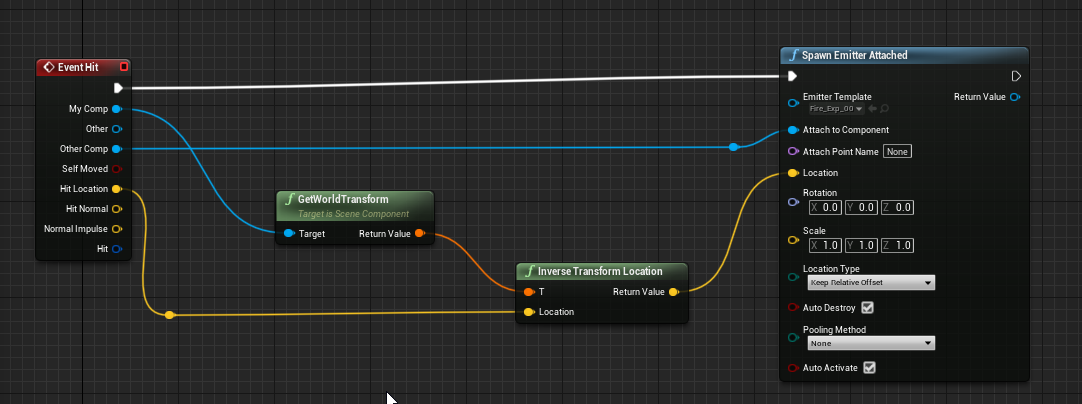
tall pine
why doesnt this work for a sphere projectile im using https://i.imgur.com/PQSzNjk.png
 solemn parcel
Hi, i'm struggling on this since yesterday. How can I select a specific item in an array, and clamp the maximum limit of how many of this item can spawn ?
 stray island
How do i set an array values , based on another array values
 chilly jetty
Hi I'm trying to get the "OnActorBeginOverlap (Triggerbox)" node again after deleting it but it wont show up
is there a way to get it back?
tall pine
chilly jetty
Hi I'm trying to get the "OnActorBeginOverlap (Triggerbox)" node again after de...
select the triggerbox in ur world an then go back to blueprint
chilly jetty
tall pine
select the triggerbox in ur world an then go back to blueprint
right i got it after i played tried it on another lvl lmao
thanks
I actually have another question
I'm trying to get an enemy to jump when it enters a trigger box
is this the right way to go about it?
how to i initiate the overlap event for the enemy
cold raft
stray island
How do i set an array values , based on another array values
I dont know if there is a bulk copy of arrays. I just loop through the source array and append to the destination, like this.
stray island
cold raft
I dont know if there is a bulk copy of arrays. I just loop through the source ar...
Wow , thank u so muchh
chilly jetty
Nevermind I got the answer for the overlap event
stray island
How do i get a specific index of an array
solemn parcel
This picture is an exemple part of my spawning system. In that exemple, I want to know which of the two actors is in the ReturnValue of the SpawnActor. The point, as you can see after, is that each one of them got a counting system (with a Max Number), so I need to recognize which actor is spawned to go to the specified Spawned Entity xxx array.
I know I could branches, with as conditions ReturnValueActor = xxx actor, but it would make tons of branches. Is there another way to do this ?
@stray island with a Get (a copy) and selecting the index you want in the integer part ?
cold raft
stray island
How do i get a specific index of an array
drag off from your array and make a Get Node - this lets you choose the index of the array to get. If you want to get a particular item by name, use Find instead
stray island
solemn parcel
<@!768035735470080000> with a Get (a copy) and selecting the index you want in t...
Thanks but its not what i want i am not able to phrase my question
stray island
cold raft
drag off from your array and make a Get Node - this lets you choose the index of...
I have an array structure type variable , with an integer member in the structure , i want that member to set to its index each time i add new array index
I doubt i made sense lol
olive sedge
Is it possible to completely destroy a widget? I'm only seeing RemoveFromParent here
@stray island pull the array length after you insert
@solemn parcel why not just branch on the class?
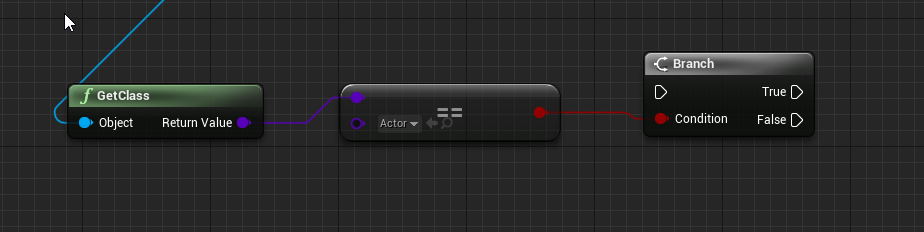 solemn parcel
@olive sedge Just edited the text answering to this the moment you sended it ^^
olive sedge
right
solemn parcel
Well I could, but i'm pretty sure there is something much more reliable and simple to use. And more 'dynamic'
olive sedge
do you have an enum?
solemn parcel
nah
olive sedge
you should, could then switch on the enum
solemn parcel
I didn't got to much the hang of enums still yet, but I would you make the ReturnValue 'recognize' which actor it is then ?
olive sedge
@solemn parcel you should definitely have an enum like that.. you could then build a map of class -> entity type and then switch on that
solemn parcel
@olive sedge I'll go search about that ! Thanks 😉
crude dew
Can you call a InputEvent in a HUD blueprint or is it better to call Input Events in a PlayerController?
minor merlin
It's better to handle every input in the player controller
crude dew
Ok thank you
minor merlin
Np ^^
crude dew
I,m really struggling to understand how you use HUD,s atm lol I know how to put widgets into the HUD like Health Bars and stuff but I am trying to make a draggable rectangle, Someone did try to help me yesterday but I couldnt get it to work xD
Im guessing a HUD is the actual screen area and a Widget is something you place in the HUD in a location ?
So if i wanted to draw a rect would i use a Widget or would it be a HUD ? For example a RTS selection box is a HUD or a Widget?
I know I would use a Draw Rect node and store the 1st click as a vector 2 and then while a user holds the mouse button update a 2nd click variable as a End Location and plug them into the Rect?
tall pine
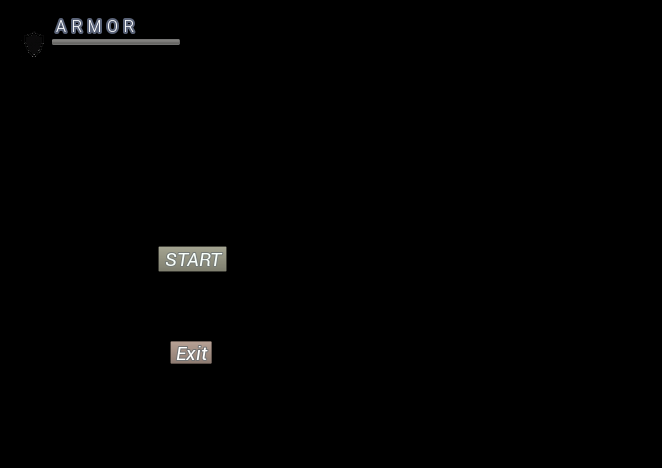
how can i remove a player widget from the main menu
cant figure it out
https://i.imgur.com/HtqsIKg.png
 minor merlin
crude dew
I,m really struggling to understand how you use HUD,s atm lol I know how to put ...
minor merlin
crude dew
I,m really struggling to understand how you use HUD,s atm lol I know how to put ...
You are right, the widget is placed inside the HUD
minor merlin
crude dew
So if i wanted to draw a rect would i use a Widget or would it be a HUD ? For ex...
It's a widget
minor merlin
crude dew
I know I would use a Draw Rect node and store the 1st click as a vector 2 and th...
Oh you want to drow a rectangle like that, well I'm not so good with widget so I can't help you more sorry :(
crude dew
no problem thank you for trying to help ;D
minor merlin
Np :)
olive sedge
@crude dew it's probably possible to do this easier but this is how I do it: https://i.imgur.com/9M7Radc.png
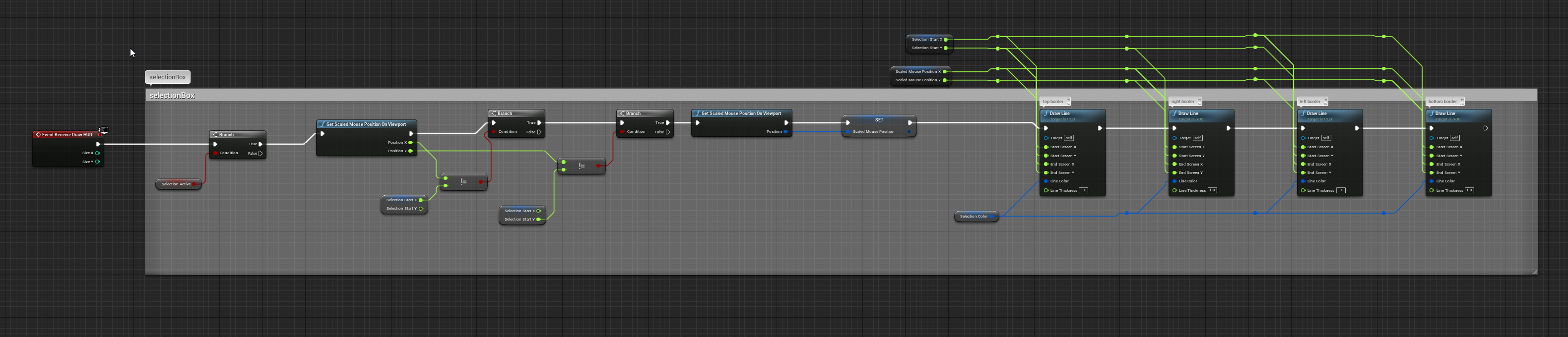
nodes
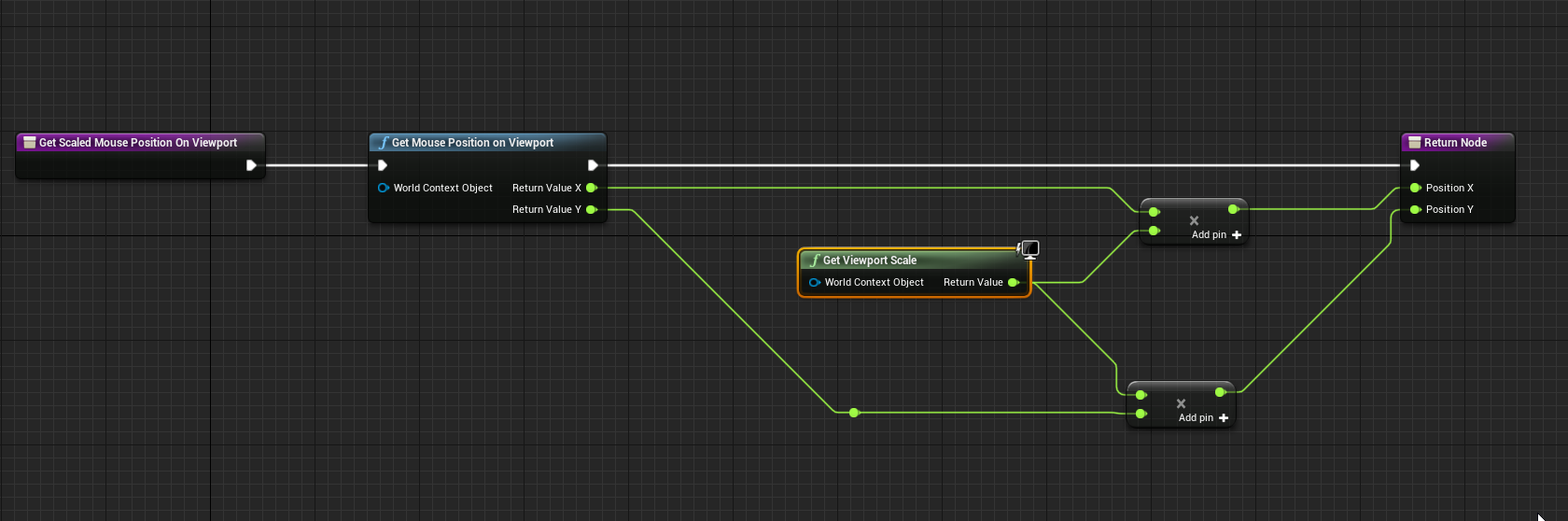
this is some of my first code, I am gonna try to make this better actually
okay, could create a widget, override OnPaint and then do DrawBox but don't fix what isn't broken in my case
crude dew
@olive sedge Thanks! I,ll check it out 🙂
 hearty jackal
olive sedge
https://i.imgur.com/6TpcrXX.png
hearty jackal
olive sedge
https://i.imgur.com/6TpcrXX.png
How did you make reroute straight like that?
orchid garden
hearty jackal
How did you make reroute straight like that?
its a marketplace item, plugin that changes the lines in the editor.
hearty jackal
orchid garden
its a marketplace item, plugin that changes the lines in the editor.
What's its name?
crude dew
lol @hearty jackal I was about to say "How the hell you get such straight lines like that lol
hearty jackal
crude dew
lol <@!408321303486005248> I was about to say "How the hell you get such straigh...
Hahaha, I was kinda impressed too at first.
orchid garden
@crude dew @hearty jackal there's the link for you
page 25 of plugins in launcher
(@ 20 items per page)
hearty jackal
orchid garden
<@!187275454640685056> <@!408321303486005248> there's the link for you
Alright, thank you so much I appreciate it. Stay safe.
 fringe geyser
Is there a way to create scene components that hold multiple children components within them? For example, Add Component -> YourCustomComponent, and it adds a component with multiple children components.
orchid garden
components can have child components? er i thought u meant components inside components, my bad.
olive sedge
this is my player pawn: https://i.imgur.com/jZnDzxp.png
this is my landscape: https://i.imgur.com/MukQWST.png
my playerpawn should collide with the landscape, yes?
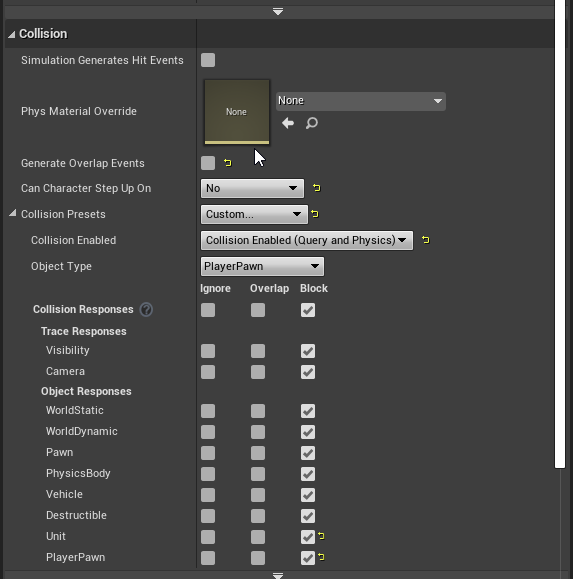
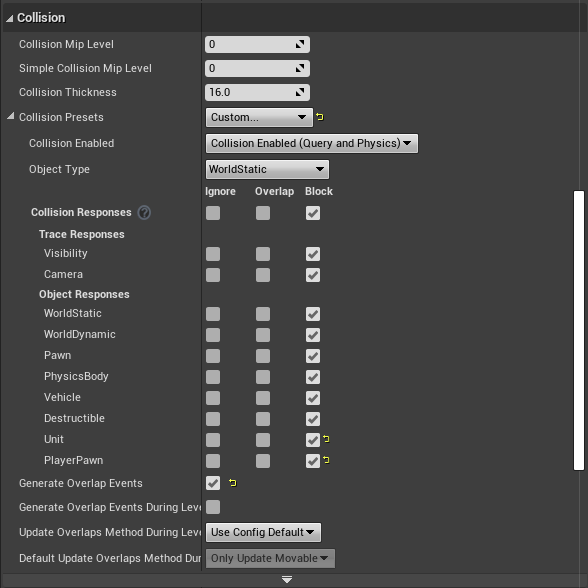
I shouldn't be able to walk through it
Or what am I misunderstanding on how this works
One is object type PlayerPawn and blocks WorldStatic, the other is WorldStatic and blocks PlayerPawn.. I don't understand why it's not blocking
icy mica
@olive sedge https://answers.unrealengine.com/questions/455815/custom-pawn-collision-not-working.html This seems similar. Does the solution they flag there work?
olive sedge
I just saw I can just preset to Spectator but I still want to understand how this works
No, I have sweep enabled
but thanks @icy mica
 past girder
hi I have 2 vectors vector one get the actor location+ getting the forward vector of the camera (The location the player is looking at) vector 2 stores the calculated value of optimal location, how can i get the closest optimal value to where the player is looking at?
orchid garden
past girder
hi I have 2 vectors vector one get the actor location+ getting the forward vecto...
seen you ask this multiple times, but i don't think people are quite grasping what your asking
to me it sounds like your trying to rewrite the "Find Look at Rotation"
is this what your looking for?
past girder
2 vectors, vector 1 stores the value of where the player is looking at. Second vector stores the calculated location where its best for the player to walk towards
How can i do this to get the closest possible location to where the player is looking
orchid garden
a linetrace?
past girder
Ok, i can try that again. Thanks
orchid garden
past girder
Ok, i can try that again. Thanks
you could use linetraceforobjects if you only want the trace to hit certain objects as well
maiden wadi
@olive sedge In your specific case with your one function, you can condense your function calls by 33%. In blueprint, and even more so in material shaders, you want to do operations as few times as possible. Blueprint especially has a large overhead for calling functions.
orchid garden
hey @maiden wadi you have much experience with animations in UMG?
maiden wadi
A little bit. Nothing crazy fancy.
olive sedge
@maiden wadi cool, thanks
orchid garden
im trying to figure out how to fade text from left to right (or right to left)
maiden wadi
Hmm. Let me look but I don't think that's doable with a normal animation. That sounds like shader territory.
orchid garden
ouch
i have a PoI trigger box i setup, which adds a map pin in the umg when its located by the player, what i thought might be nice to do is pop up some text that faded in from the left to right, couple seconds pass, then fades out right to left saying something like "Discovered xxx Location"
right now how it is, they walk into the trigger box and they have no idea they discovered something lol...
its simple enough to add the text to the hud but i thought the fade in / out thing would just be some nice eye candy.
disable it?
maiden wadi
I don't see anything for fading in directionally. Just the default opacity animation or direct visibility stuff. My initial thought on that would be a shader that you can pass a parameter to repeatedly to pan it, and then disable the timer/tick that's panning the material.
orchid garden
yeah i couldn't find any way to apply a opacity mask image to the text in the widgets themselves, even using containers. ug... shaders.
maiden wadi
@trim matrix Do you mean for particle components that come with actors? There should be a setting for the component like "Auto Activates" or something.
Niagara or Cascade particle component?
Near the bottom.
Same setting if it's a Niagara system. Which as a side note, I recommend getting used to Niagara over Cascade.
Speculation is that cascade is likely going to be dropped sometime within the year or very early next year. I'd be surprised if it makes it into UE5.
orchid garden
so... if i use this... and still want keyboard events... do i setup keyboard events inside the widget itself?
maiden wadi
Not too familiar with mobile, but performance wise Niagara is quite a bit better in most aspects. But really it just comes down to the artist.
@orchid garden Yep. The OnKeyDown stuff. Have to be certain that the UI gets focused though.
orchid garden
maiden wadi
Not too familiar with mobile, but performance wise Niagara is quite a bit better...
can i use the project key events? or does it specifically need to be OnKeyDown?
only reason i was asking, was thinking it might be nice if they could close the inventory with the same key that opens it.
i do have a close button but still ... user friendly and all that...
maiden wadi
You can't use the project inputs like that. Not directly, that's why I have a small library of functions that test keys by their project inputs. So for instance I can just input the key from OnKeyDown, and test quickly which input it is and branch on that.
orchid garden
hrm... okay... i'll leave it like it is for now lol.
orchid garden
well i got poi's working, they trigger and add the map icon, but only once per player, and they are translating to the position on the map okay 🙂 even if landscape is offset:
edgy halo
Hey so I have this level where I want to spawn actors but I want the player start to be spwaned using the level blueprint? So can I delay the player spawn done by the game mode a bit?
It spawns the characters on its own at the player starts
 little cosmos
Hey! I am setting the character location in the lvl based on UI widget buttons. But can't get it to rotate like my target point. It keeps its rotation before the button was pressed. tldr: I wanna make character face targer point rotation when teleported.
I tried just getting the actor rotation before doing all this combine nonsense
nothing seems to work
little cosmos
Solved
maiden wadi
@little cosmos Set the Pawn's location, and it's controller's control rotation. Control rotation overrides any sort of rotation done to the character.
little cosmos
Yeah figured that out. thanks
 white crypt
random integer is called once, so at that moment it only picks one number
white crypt
add a print string and you will see that it prints the same number
round basin
so how do I call it 3 times ?
white crypt
for each sprite use a different random integer
round basin
it doesn't work
white crypt
it should
round basin
dawn gazelle
This will generate a new random number for each print string.
white crypt
it would be easier if you made then into arrays
you are using the same random integer
so ofc it will return the same number
dawn gazelle
The issue lies not in the random selection of the object, rather what is happening after.
 dawn gazelle
Accomplishes the same thing
round basin
yes but how do I set my sprites ?
dawn gazelle
Every call to a random node will generate a new random number, so it's important that if you need to use the same random number more than once, you set it before using it.
As far as using the sprites, I'm not familiar with them.
round basin
I want a different number for each sprites
dawn gazelle
But your logic for selecting them randomly should be fine.
white crypt
i think it has to do with the select node
orchid garden
is there a simple way to tell how long a player has bee falling for?
 soft orbit
Just wanted to share this real quick macro for anyone needing Hold button behavior in their games. Check it out:
round basin
This also works
 proud hull
@round basin you really should put all those sprites in array like suggested.
white crypt
if you make an array of your sprites
then it will work
using select it picks the same number, cant say why
round basin
Okay yes I'll try that
white crypt
you could ofc generate a number on begin play for each sprite and promote it to a variable but thats just over complicating stuff
proud hull
See how easy an array makes it:
white crypt
oh they added that in 4.26, good to know
round basin
I'm using 4.25


 dawn gazelle
Do Last Index and you don't need the -1
dawn gazelle
Length by itself like that can cause an error as the largest value will be out of range of the array.
dawn gazelle
Ah, nvm.
round basin
I think the problem is from the set sprite node because when I set the defalut value to none there's nothing
even this doesn't work
proud hull
Sol 1 is set to none you said?
round basin
By default yes
proud hull
Yep, that is the problem, you are setting the target of nothing, hehe
white crypt
as well as getting accessed none errors probably
proud hull
Where do you set Sol 1?
round basin
oh wait it's just because my sprite was set to static not movable
stray island
So i have a structure array variable that is instance editable
The structure has an integer variable that should be numbered exactly like each array index of the structure
For example my array list has the 3 structure with that variable, i want that variable to take each index number as their value so it will be 0 then 1 then 2
proud hull
stray island
So i have a structure array variable that is instance editable
The structure h...
When using arrays of structs that you want to cycle through and edit, I recommend duplicating the ForEachLoop and making a ForEachLoopByReference macro as well. Change the get node shown to a get by ref node:
With that new ForEachLoopByReference, you can do something like this:
stray island
Thank you, will do some testing hope i get it right
What do i have to plug to struct out?
proud hull
With the default ForEachLoop:
Nothing goes with struct out when you use the ForEachLoopByReference. It simply changes it in the array since it is by reference.
Make sure to expose the necessary pins for updating with the "set members" node.
stray island
Oh
But how did u choose what is the var item set to , didnt see
Oh its in the first picture
proud hull
NewVar0? I just made a random struct array to demonstrate, lol
proud hull
Oh, you are not working with an array of structs?
little cosmos
How can I define the xbox controller up and down buttons to actually work properly? right now it's kinda clumsy and unintuitive to move between points
stray island
I am working with array structure but inside it a variable that i want to edit
I think yours will still apply will do some testings
Thanks alot
proud hull
stray island
I am working with array structure but inside it a variable that i want to edit
Once you expose the pin of the variable you want to edit in the "set members" node, it will look like this and you can then feed the ForEachLoop's index into it:
Only expose what needs to change and everything not exposed will remain the same.
 pulsar lion
This is probably common knowledge but is it better to create a widget once and then add and remove it from viewport on button press or to create a widget every time you press the button?
proud hull
pulsar lion
This is probably common knowledge but is it better to create a widget once and t...
Really depends how often you believe that widget will need to be displayed.
pulsar lion
inventory widget
proud hull
If a player can go for minutes without needing to see it, then create it on the fly.
pulsar lion
I see. So what is the difference between these two methods?
proud hull
Mostly HUD related widgets will only be hidden and revealed instead of destroyed and created.
The difference is keeping resources in memory, that is about it.
pulsar lion
The inventory widget from epics Action RPG is created on button press so I was wondering
proud hull
If your menu is very lightweight, then you can hide them and you will be fine.
proud hull
Just make sure you know about "focus". Hiding a widget doesn't mean it loses focus and could screw with your input.
pulsar lion
yeah I've already dealt with that one
proud hull
More than likely you are already utilizing the game only and ui only nodes, etc.
input mode nodes, more specifically I mean.
orchid garden
any easy way to tell how long a player has been falling?
im guessing its going to have to be a custom function, not seeing anything for fall time
proud hull
orchid garden
any easy way to tell how long a player has been falling?
Get the current downward velocity and do the maths based on gravity z?
Either that or set float to game time when falling is set to true (can be done in your animBP since that already checks for change in falling).
orchid garden
yeah most the character movement stuff is going to be handled inside my animation bp to avoid needing to call to a specific animation bp (shared master character)
proud hull
Just be weary of the default ThirdPersonCharacter AnimBP, since it doesn't really set falling perfect. It simply knows when the player is in the air, but you could be going up instead of down.
orchid garden
yep
proud hull
I measure the up velocity and also take that into consideration. Negative up velocity means falling.
orchid garden
i need the fall time to add damage based on how long they were falling for
 unborn maple
im having major issues finish this game ias i have alot of hud bugs. i am storing the variable on begin play in the breakithud widget. i then get a reference to the widget and get a reference to the stored variable to set visibility but i am getting a access none error even after rebuilding from scratch.
proud hull
This way it isn't strictly based on time, like if someone used a parachute it would take a lot longer to fall, but should do less damage.
Measure downward velocity at the moment they hit the ground (can be pulled from a hit event).
orchid garden
yeah when they have x item equipped for slow down a different multiplier is applied.
dawn gazelle
orchid garden
yeah when they have x item equipped for slow down a different multiplier is appl...
I was able to do something like this and seems to work ok.
unborn maple
do i need to store the variables in the same blueprint class of the state of game as it not being access in the hud class for some reason
proud hull
dawn gazelle
I was able to do something like this and seems to work ok.
I wouldn't use Now as it is based on the machine's time.
But you could store the current game time instead.
dawn gazelle
Ah good point 😛
proud hull
Now also stores the entire date/time and that is much more than needed, haha.
Unless you plan to allow a player to fall for days, real life days.
Also, same thing with the falling state again, it isn't really falling, but "in air", so it triggers the moment you leave the ground, whether going up or down.
proud hull
But won't be able to utilize that on change event without using a timer or something.
Something like this works well:
Adjust timer time if you want it more accurate. Basically the time in the timer represents the margin of error.
Gonna make one that also just does math based on gravity z, hehe.
orchid garden
i'll give that a try too
proud hull
Normal impulse is always returning 0 so I can't do any gravity maths. 😢
Anyways, the state change is more efficient than relying on a physics based hit event. At least I would think so since it is already testing for those changes regardless.
orchid garden
proud hull
Normal impulse is always returning 0 so I can't do any gravity maths. 😢
your routine counts upward movement too, tested this by jumping up on a ledge, took 2 seconds to reach the ledge in a upward jump, and it showed the fall time for it.
proud hull
orchid garden
your routine counts upward movement too, tested this by jumping up on a ledge, t...
You sure? I've tested multiple times and it only triggers on downward movement.
proud hull
I added a 2nd float variable to store game time when jump starts and I print that separately here:
You wouldn't happen to be using any sort of time dilation?
orchid garden
found the flaw
proud hull
Might need to also clear timer on false
orchid garden
seems to be related to setting the game time.
i jumped for 0.2 seconds but fell for 2.8
jump was set right after set timer
solemn parcel
So I'm working on the elements between camera and character being invisible. Tho when it overlaps foliage trees, all the trees of the same foliage are going invisible. Is there a way to select a solo actor from a foliage ?
proud hull
orchid garden
seems to be related to setting the game time.
Try using "Get Real Time Seconds" node instead and see if it changes.
orchid garden
proud hull
Might need to also clear timer on false
fall time keeps adding to it looks like...
each time i jump it just keeps going up O.o
proud hull
Falling started print string is never triggered for you.
Meaning it never actually sets the gametime variable.
Somehow you are never getting -Z velocity, heh.
proud hull
Not sure, works perfect on my end, heh. Can't get it to reproduce what you have.
It is printing "Falling Started" for you?
orchid garden
yep
proud hull
That should work then, unless maybe that gametime variable is being adjusted somewhere else too.
orchid garden
onmovementmodechanged is getting called more then once.
ah nm thats when it changes out of fall state (second call)
proud hull
Running around doing multiple jumps:
orchid garden
proud hull
That should work then, unless maybe that gametime variable is being adjusted som...
okay it fails when you jump onto a ledge, normal falling time seems to work fine, walking off or jumping
jump up onto something
royal pagoda
Guys, how can i hide a certain area of a body? i have a mesh which has 3 pieces of clothing on it material etc is different and how can i hide it now?
orchid garden
royal pagoda
Guys, how can i hide a certain area of a body? i have a mesh which has 3 pieces ...
if its not a modular body, you'd need to use a transparency on the skin mesh for the body
royal pagoda
thanks! also ill research modular bodys!
 strange pike
how do i get a reference to an actor in my level from an actor BP?
orchid garden
proud hull
not for me, anytime i jump up on something fall time is always greater then jump time.
proud hull
royal pagoda
Guys, how can i hide a certain area of a body? i have a mesh which has 3 pieces ...
If the clothing uses a separate material like you say, you can simply set the material to something invisible. I believe the engine has a transparent material built-in.
Ah, nvm, I got that backwards.
You probably want to hide a body part sticking throught he clothing.
You can set the bone scale to 0
Or use hide bone node that does the same thing.
orchid garden
its because falltime = 0 when jumping onto a ledge. so its displaying game time in seconds.
proud hull
If that is the case, you may need to set the timer < node to a <= node instead.
orchid garden
yep thats exactly it. i set fall time before setting the timer and its always equalling jump time.
when jumping up on a ledge that is
proud hull
This ledge you jump onto just happens to be the exact height of your jump?
orchid garden
nope its a combination of the timer delay and jump height.
proud hull
If fall time is less than 0.05 seconds, then the timer will miss it since it only checks for -Z within 0.05 seconds.
orchid garden
yep thats whats happening
so... could just do a if falltime < jumptime do something.
proud hull
If you add something like this, then it should clear up that problem.
Also connect the false to your print strings
orchid garden
even walking off a ledge falltime is 0.1 shorter then jump time
 covert delta
How can I get an actor to trigger an event hit/overlap with a skeletal mesh?
I'm using just the default mannqeuin which appears to have a physics actor set up. And if I understand correctly, this is more or less a rigged up collision system that maps hits to bones.
proud hull
You using default animBP?
default TP AnimBP actually does a slight jump when walking off ledges.
orchid garden
i've made a basic animbp for my character
proud hull
If you copied any jump logic from the default animBP, then you may also be experiencing the same slight jump issue.
trim matrix
Hello guys, I have a question: if I add a sequence and in 1 I add a delay the 2 will start only when the delay is done or it will start anyway?
orchid garden
just so i could move around n' jump lol thats all it does right now. haven't added any of my other animation sequences to it (third time redoing entire project) was more focused on getting the inventory system done at the time.
aren't sequences ran like timelines?
that was my understanding of them
proud hull
covert delta
How can I get an actor to trigger an event hit/overlap with a skeletal mesh?
I'...
More than likely you will want to do a trace of some sort.
Something like this:
orchid garden
proud hull
More than likely you will want to do a trace of some sort.
yeah i have a slight jump in my sequence when walking off ledges, uses jump for falling, not doing any check to see if falling or jumping atm. (just looked)
solemn parcel
So I'm working on the elements between camera and character being invisible. Tho when it overlaps foliage trees, all the trees of the same foliage are going invisible. Is there a way to select a solo actor from a foliage ?
orchid garden
proud hull
More than likely you will want to do a trace of some sort.
are those profactory models?
orchid garden
ah yep thats who i meant lol. was looking at some of their critters
i like their turtle heh... but donno bout their models
proud hull
Been working on making an animation blueprint and AI (BT/BB) to bring them all to life.
Making it universal too, so any monster can just make a child of it and use it.
proud hull
I got the whole pack, hehe
orchid garden
so i take it you like their critters pretty well?
proud hull
Yeah, they got a ton of good ones.
orchid garden
yeah i'd seen some in there i'd like to use but didn't know anyone who had used any of their models 🙂
proud hull
A bunch of them brought to life:
orchid garden
lol
orchid garden
lol thats what i was lauging at
looks like you have several different packs of them
proud hull
Another plugin I am working on. Procedurally makes those limbs that fly off. No need to pre-make the limbs and make the monsters modular. Only works in 4.26 though since they exposed a needed function to the engine.
It is the complete monster pack I got. Includes all the other monster packs.
Tried to release the plugin on the marketplace and it was refused for "Not enough content". Friggin 3rd time they told me that for separate assets (the others I just put on my github since I planned for them to be free).
proud hull
The plugin was just one node, lol, so they refused it. Not realizing what it does, I guess.
orchid garden
maybe make a sample scene that shows what the plugin does?
proud hull
I'm like "what the hell, it copies a specific limb from a skeletal mesh, how is that not enough?"
I'll just make some extra useless nodes and resubmit praying someone else looks at it this time, haha.
orchid garden
lol
proud hull
Yeah, I'll also need pretty pictures. It seems like that is all they look at.
Test if it compiles successfully, check out pictures, pictures look great, approved!
It just baffles me that someone can make a simple asset that utilizes the node on the right and that gets accepted multiple times already, but my unique node (on the left) gets denied, hehe.
orchid garden
hrm intresting
i have something thats not really complex but saves alot of time that i was going to submit to the market but... now you got me wondering if it would even be accepted lol...
proud hull
I meant to show this screenshot, lol:
So many slicing assets on the marketplace and most people don't even realize it is one node that does all the work in those assets.
I mean the assets look cool and all, but follow a 5 minute tutorial on how to utilize that node and you can remake over half of those assets.
proud hull
orchid garden
i have something thats not really complex but saves alot of time that i was goin...
Submit it anyways. I plan to do that with my universal monster animation blueprint, just to see if it gets in. Although this is pretty complex, and it is meant to save tons of time.
I chose to include my AI system with it, just so they can't deny me for "Not enough content" lol
orchid garden
thats something else i gotta learn, AI
orchid garden
proud hull
btw, that invalidate timer addition cleared the zero falltime issue
proud hull
orchid garden
btw, that invalidate timer addition cleared the zero falltime issue
Nice, I think that was the last bit of error checking it needed. Hopefully, hehe.
orchid garden
full thing for me looks like this now:
proud hull
That additional branch will always return true in that spot, since that event only runs when the timer exists.
orchid garden
oops i connected something up wrong trying to clean it up lol...
proud hull
Connect the other false to it, yeah
It can still stay there and connect to the set and clear nodes, like you have it. Even cleaner than what I showed you.
orchid garden
lol hrm i fubared something else along the way... now im getting 0 for everything
orchid garden
it did
orchid garden
yeah, i don't get it but while that one doesn't work.... this one does...
proud hull
Weird because that is the same as the other screenshot.
orchid garden
basically yeah, just the true on a seperate set / clear
proud hull
Essentially, if you jump, the timer will invalidate immediately.
If you fall off something, without jumping, then it will work.
At least that is what I see when following the logic there.
orchid garden
with the second i get this jumping up on a ledge:
and this jumping off the roof - this is where it messed...
 sick sapphire
A problem:
Is there a way in blueprint to make it so that even if roll=/=0, when the player moves the mouse in the corresponding direction relative to his view, it will rotate the camera/player according to direction relative to view
proud hull
orchid garden
and this jumping off the roof - this is where it messed...
This is what I got now that seems to work for any situation so far:
orchid garden
yeah just had the false in the wrong branch
there got it all nice n' tidy gain and this time working lol
and now its complete with a comment 😉
proud hull
Sweeeet, I expect royalties! Hehe, jk.
orchid garden
i comment stuffs so i will remember to stick a note in the credits screen 🙂
 lone garnet
If I wanted to have many, many actors in the level, how could I perform an event after a certain length of time without slowing down performance with a bunch of timers?
Like a bunch of trees for example.
proud hull
lone garnet
If I wanted to have many, many actors in the level, how could I perform an event...
Each tree needs to trigger an event?
lone garnet
If i wanted to Regrow the trees after a certain time of them being destroyed
proud hull
Ah, I see.
You need to build yourself some sort of time manager, so it can be one actor that takes care of all of them.
Tree gets destroyed, adds itself to time manager with what time it should regrow, when time manager finally gets to that tree in the queue, it tells it to regrow and removes it from the queue.
Then you can set this time manager actor to do all this stuff on tick, but set its tick interval to something like 1 second, so it is not called every frame.
This is a case where using tick would be ok, but you could also just have it run on a looping timer created on begin play as well.
lone garnet
@proud hull Ah yeh a time manager sounds like the right path. And what about in the situation where there is a very short time period between regrowing trees. For example you cut 20 trees down one after the other so there wont be much time between each regrow event. Will this be much of a hit on performance do you think?
proud hull
Not if the event only runs once per second or something.
proud hull
With some sorting algorithms, you can even sort your time manager to make it more efficient.
lone garnet
In what way?
proud hull
So it won't have to iterate through every object in its queue every time.
You can iterate only what objects currently need to be spawned.
lone garnet
ah i see so like, only do the next and not check them all?
proud hull
I am imagining a Float to Struct map. Or actually Float array and Struct array in parallel.
Struct holds all necessary info to spawn the object.
Float is the game time to spawn it.
So if the map or arrays are sorted by game time to spawn, you can iterate through only what needs spawning during that cycle.
lone garnet
what kind of information would be needed other than just the time destroyed? If i was to do levels of regrowth then sure but other than that...
proud hull
You need to know the class of the object, the location to spawn it, etc.
lone garnet
I could maybe do a priority check. Like have everything that can regrow just have an int value?
ah yeh right sure.
then get last int and +1
proud hull
The struct can hold other values too, like the health of the object.
lone garnet
sounds like a solid foundation
proud hull
If you plan to keep the actor live (not destroying it) and it can be turned on/off, then you can simplify what info you need even more.
lone garnet
like only get it to half health kind of live?
proud hull
More like you harvested the tree, but technically it is still in game, just invisible and no collision, then you can instead have your time manager only store the time and a reference to that actor to turn it back "on" so to speak.
lone garnet
ah right I get you. I think Im gonna try and have like stages of growth so you can also plant trees maybe and check on them
adds some variety to the trees too
currently I destroy the tree after its been cut, then replace it with a stump. From that stump I can have stages of growth until its fully regrown. The values of which I can find in the struct with the priority list and time manager
proud hull
If you want all your objects to always spawn in the exact same spot as where they were harvested, then going with hiding them seems like the best option. An integer or enum to change what stage of growth where one of the stages would be "harvested".
lone garnet
I can spawn them at the stump location right?
proud hull
Sure, you can spawn them wherever you want. If you have a placeholder like that, then that is where you would grab the necessary info.
So time manager would take in the stump actor as a reference when a tree is harvested.
lone garnet
Right that sounds like what Im going for
proud hull
So you could get away with a much simpler map then. Float to Actor, or even more specifically Float to Stump if you want. Personally, I would go for Float to Actor, so it can handle other respawnables too. Then you do a series of casts to figure out specifically what type of object it is.
lone garnet
Yeh that sounds good
orchid garden
or just save the object references to a stuct array where you can set what type they are.
proud hull
Float to Struct would definitely be ideal, like I mentioned earlier. It can handle so much more since the struct can store whatever info you need.
orchid garden
i.e. i have a struct that contains a item row name and the item fuel type, the fuel type is just a enum selection :
that way i can check if the item is the proper fuel for the container so it can be added in.
or if it can consume it.
proud hull
@orchid garden I assume you also do harvesting and respawning of those harvestable resources, how do you go about managing the respawn times of all the harvestables?
orchid garden
haven't gotten to the harvesting setup yet, but was thinking along the same lines for the respawning of the trees / rocks, thinking maybe do it in the game state.
could probably even get away with doing it inside the level blueprint, but gamestate would work for map switching too.
proud hull
Yeah, game state for sure would be a good place.
lone garnet
I'll probably do a separate actor to manage respawning for each level. Saving is a lot easier per level that way I think. If you have separate levels that is
proud hull
I wouldn't really go for inside level blueprint before I just do it in an empty actor that is added to the level.
lone garnet
yeh thats what i mean
proud hull
Referencing a level blueprint from other things is a pain.
orchid garden
the reason why i'd do it via the gamestate or level blueprint is so its persistent across the level with no worries about the actor being in a 'inactive' or 'unloaded' state.
lone garnet
Ill spawn the time manager in each level on begin play then access it that way
but spawn it probably through game state or player controller
orchid garden
nothing like having your respawn manager in a 'unloaded' state and nothing respawning 😉
proud hull
lol, right
lone garnet
If I do it per level then I can save Trees or replenishables per level and then my priority list doesn't get messed up.
cold raft
I have BP_Animals, BP_Farm, BP_Foliage, BP_NPC actors the control spawning which I instantiate in my player character - easy to get to. I dont think it is ideal, but had problems with them in the Game_Instance as they needed a physical map to spawn into
lone garnet
in theory
orchid garden
i supose i could always make a custom skyshphere and use it for management ... hrm... there's a thought....
lone garnet
Well what If when I go into the level after a while, instead of nothing being respawned because it was unloaded, I check how much time has gone by since I left?
I just think it might be unneccessary trying to respawn actors that Are in a dungeon or something Im not close to but have plundered in the past
proud hull
lone garnet
Well what If when I go into the level after a while, instead of nothing being re...
For the most part you should be fine. If the actor is in the level and you don't do anything to it except use it to call out other events, it will work fine.
cold raft
I like the idea of being able to harvest any tree placed by foilage - RainyDay dev did a tute on doing that, though havent tried it yet. https://www.youtube.com/watch?v=amUo82dcDKw&t=11s
Follow SunnySide's development below:Discord: https://invite.gg/SunnySideGamejolt: https://gamejolt.com/games/SunnySide/...Instagram: https://www.instagram.com/rainygamesuk
Just a quick note to this tutorial: Thanks to all the lovely people on Reddit, I've come up with an upgrade to this system that uses Instanced Foliage instead of an array of...
lone garnet
4.26 made actors paintable
proud hull
lone garnet
I just think it might be unneccessary trying to respawn actors that Are in a dun...
Yeah, you will want it more so tied to the level. Game state I would suggest in an open world environment, where you only have 1 very large level.
lone garnet
yeh i thought that would be the case
proud hull
No point managing respawns in a dungeon when you aren't there like you said. You can have it go through all in queue when it is loaded again. As long as you are properly saving your time manager to persist between loading levels.
lone garnet
yeh sounds right
proud hull
Just don't have any visible respawnables near where the player loads in, so they don't suddenly see things pop-up, unless you don't care about that.
lone garnet
I guess thats what loading screens are for XD
proud hull
true
lone garnet
or even a slow fade if you really want to push it
orchid garden
cold raft
I like the idea of being able to harvest any tree placed by foilage - RainyDay d...
looks intresting but all those errors popping during his tutorial
thanks for sharing i'll check out it and the updated one later 🙂
 clever steppe
hello hello, i need to check a player's variable through the level blueprint to affect switches in a level, but it's not efficient to do it through the event tick. apparently i also can't cast to the level blueprint, but is there any way to only check this player variable when it's actually changed? i can do a custom event for it, easy
cold raft
clever steppe
hello hello, i need to check a player's variable through the level blueprint to ...
can you get the thing that changes the players variable to call the event / trigger - more efficient than polling a variable
clever steppe
how would i do that, specifically?
 elder hornet
Can anyone suggest the best way to compare two variables using the same structure, without having to compare each pin
proud hull
elder hornet
Can anyone suggest the best way to compare two variables using the same structur...
Make a function that compares each pin, haha.
For structs, I honestly think you do have to compare each variable in the struct, could be wrong though.
elder hornet
clever steppe
hello hello, i need to check a player's variable through the level blueprint to ...
You can call a custom event from the function that changes said variable, then it will only fire when the variable changes, instead of per tick
clever steppe
do i do this from the level blueprint?
elder hornet
Where you do it all depends on what is causing the player variable to change
elder hornet
proud hull
Make a function that compares each pin, haha.
Lol I did that, though it’s not very elegant
proud hull
@clever steppe how much of your logic for dealing with the switches is in your level blueprint?
clever steppe
the actors themselves have the logic to activate and deactivate, but the level blueprint actually checks the player variable to determine whether the actors are activated
 wooden flint
hey! how do I load a saved game when I click the play button? this is what i currently have set up for it but I cant figure it out.
clever steppe
i have a door, it has the logic to open or close in events, but the level blueprint refers to those events depending on the player variable
elder hornet
clever steppe
the actors themselves have the logic to activate and deactivate, but the level b...
What variable is being accessed, maybe that will help
proud hull
wooden flint
hey! how do I load a saved game when I click the play button? this is what i cur...
Every variable you had in your save game can now be accessed at the values they were saved.
clever steppe
an integer in my player character@elder hornet
elder hornet
clever steppe
an integer in my player character<@326396855330013185>
When does that integer change?
proud hull
clever steppe
i have a door, it has the logic to open or close in events, but the level bluepr...
Ah, just have your player character handle the logic instead of the level blueprint.
wooden flint
@proud hull what does that mean?
clever steppe
it's a die with six sides. when the player is still and clicks the left mouse button, it sets the "active side" integer
whichever number is up
proud hull
wooden flint
<@!291620720243376129> what does that mean?
The save game will just save the variables in it. You then need to transfer those values to whatever needs them, such as your player character.