#blueprint
402296 messages · Page 611 of 403
 dawn gazelle
The "current" value should be whatever the currently registered amount is (the amount that's going to be adding up basically)
The "target" is where you want it to reach, or your new money value.
Inerp Speed changes how fast it reaches that value.
The return value you should set to the variable that contains the "current" value so it constantly updates.
You don't need a delay. It's using Tick + FinterpTo
Here's something better for clarity...
And if you're using this for a widget display, then you can update whatever text widget you're using just after this with the value in money.
 viscid shard
umm how can i reset the YAW on the controller i dont see a variable for it. there is only add YAW but if i go into my Third person view rotate then go back into my Top Down view directions all messed up
dawn gazelle
Then perhaps use a timeline or a looping timer that you can invalidate when it reaches the value or some other event that fires repeatedly to get the effect.
viscid shard
if you dont want it on a tick then timeline or loop like he said. int is perfect for it as you dont want sub currency. if you pick up 10 coins run the loop 10 times and have a delay inbetween each one
 surreal peak
You can't put delays into the Loop Body.
viscid shard
oh true
surreal peak
Unless you build a custom loop sort of
viscid shard
prob still bad because dont you want to breakout of the lop soon as possible ? new to programming but understand somethings lol
surreal peak
There are ways to do that manually
 true valve
I'm trying to use 3d noise to spawn spheres within specified radius which could be selected via sphere/line trace? So as I move through the space the sphere will use noise to keep spawning spheres around me. In my first try I used default UE4 noise but it wasn't infinite. Any idea where to start?
 olive sedge
I'm about to create a blueprint that holds a struct for the level settings.. like how many points are needed for a win etc
is there a better way?
olive sedge
haven't worked with tables before, I'll look into it, thanks
 fringe geyser
Just updated NVidia drivers and getting a lot of screen tearing when navigating blueprint graphs. Anyone ever have a similar issue?
 maiden wadi
@fringe geyser Sounds like your new drivers changed settings of some kind. I'd check out your driver settings. Specifically the Refresh Rate in the resolution settings. Make sure it isn't being ran faster than your moniter's supposed to be.
fringe geyser
Thought the same and checked it, but there's only one option available in the driver settings, 60 hz. I wonder if mine was 59 hz and somehow the new driver removed that option. Either way, thanks for the advice, having someone else also think it's possibly a refresh rate problem encourages me to look into it further. I'll try to hunt down my monitor specs to confirm.
maiden wadi
Hmm. You can test it in the editor I suppose. Try pressing tilde in editor, should bring up a command line. Try "t.maxfps 45"
That should bring it down far past screen tearing.
If it still occurs after that, I'd say driver/monitor settings.
@fringe geyser If the console command works, there are these settings here which should permanently limit the framerate for you without needing to enter that constantly.
fringe geyser
Oh nice, cheers. That drastically reduced the tearing 👍
 glacial eagle
@fringe geyser r.Vsync 1 in console
glacial eagle
Ah yeah for editor that's the one
Probably better long-term solution than fixing project framerate
surreal peak
 shadow saddle
can u change the data inside datatable during gameplay?
shadow saddle
can u change the data inside datatable during gameplay?
You can't. They are meant to be read-only.
You can see them as a texture or sound asset. They provide custom data, but you usually don't change them runtime.
If you need runtime data, you will want to split that off of the DataTable.
 lunar coyote
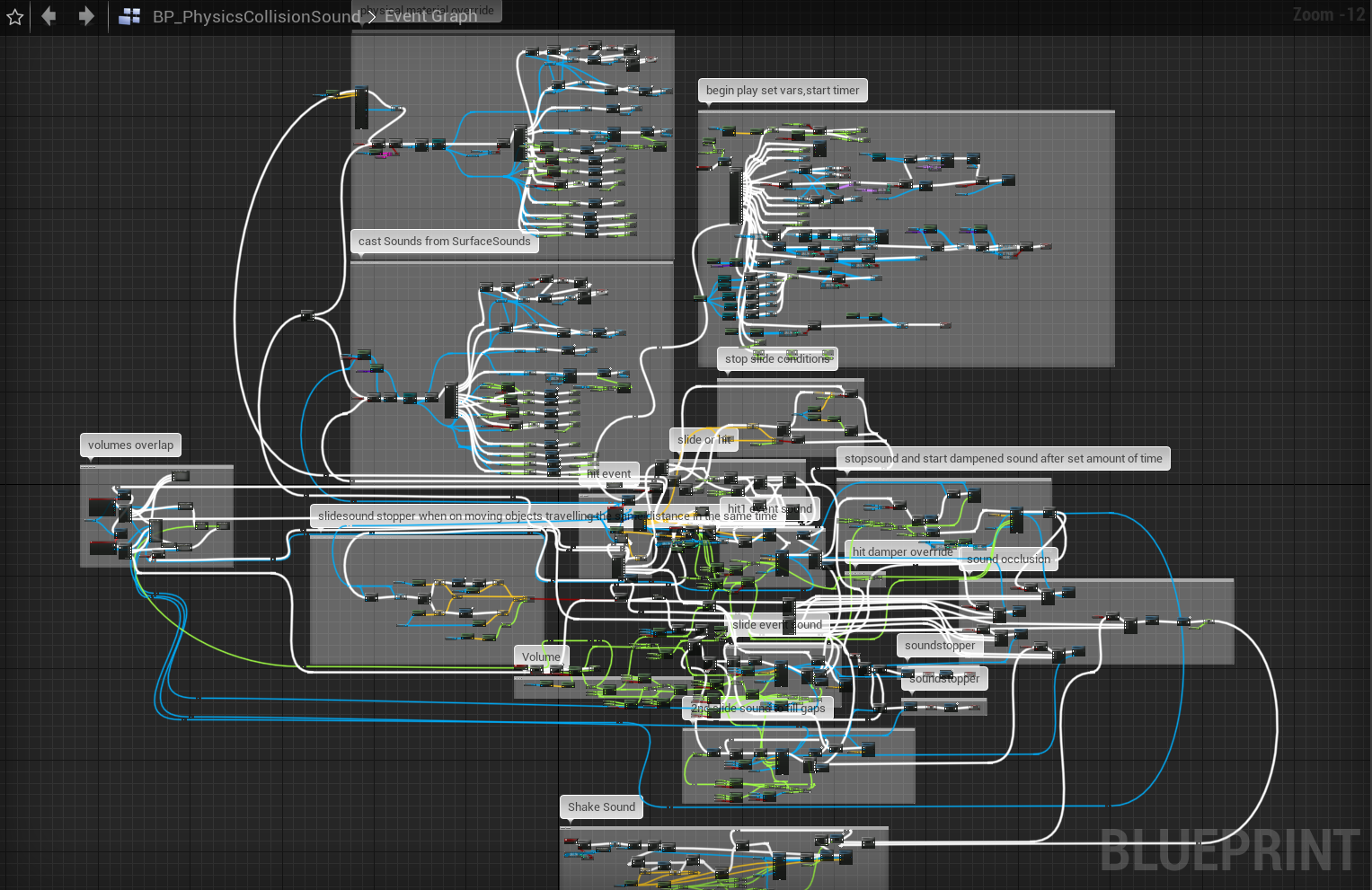
I got the Physics Collision Sound asset from the marketplace. Its quality wasn't really up to par with what I wanted, so I figured at least I can learn how he does it and implement a similar system myself. Opened up the BP and... well...
https://i.imgur.com/PhqJL6O.png
😛
 trim matrix
dawn gazelle
Here's something better for clarity...
trim matrix
dawn gazelle
Here's something better for clarity...
could this be used for smoother cooldown progress bars
?
shadow saddle
surreal peak
You can't. They are meant to be read-only.
so data table is better to record large amount of fixed data like combat damage ?
if i want to store "item to be sell on shop" list
like a lot of them
what is the best solution
i have several ways but im not sure about the most efficient one
item strcuture ? object ? array ? or ?
 velvet pendant
Hello, I'm a high school student who is new to unreal and coding in general. Is there anyone who can help me learn the basics
 orchid garden
viscid shard
umm how can i reset the YAW on the controller i dont see a variable for it. ther...
orchid garden
viscid shard
umm how can i reset the YAW on the controller i dont see a variable for it. ther...
why not just save the yaw, go into top down, move around abit, go into third person, set the cameras yaw to the saved yaw?
orchid garden
shadow saddle
item strcuture ? object ? array ? or ?
use a array with the same struct as the data table that holds the default items, that way you can be consistent with the data.
 rotund basalt
lunar coyote
I got the Physics Collision Sound asset from the marketplace. Its quality wasn't...
rotund basalt
lunar coyote
I got the Physics Collision Sound asset from the marketplace. Its quality wasn't...
Dear god...
velvet pendant
Does anyone know why is it that when I try to make an animation for my third person character, instead of doing the animation, he does the zero pose
lunar coyote
@rotund basalt God has forsaken that blueprint
fringe geyser
GetPlayerController is null when called from GameInstance EventInit. I noticed other odd behaviour with audio when trying to play sounds on EvenInit as well. If I add a hacky delay, it all works. Should we not be using EventInit for nodes like GetPlayerController?
rotund basalt
I'll clean it up for free if you want lmao
fringe geyser
I'm presuming EventInit is too early in the order of execution of the engine, though that's a bit inconvenient as there's a bunch of initialization I was hoping to do there.
rotund basalt
I legit never understand how people manage to create such messy blueprints in the first place, sure if it gets more complex it gets larger but jesus, use collapsed graphs or functions
fringe geyser
An unwieldy cthulu beast like that blueprint? That was purposeful, that's a masochist
rotund basalt
Use a variable? Nah
Drag the connection across the entire blueprint with 500 reroutes? YES!
orchid garden
rotund basalt
I legit never understand how people manage to create such messy blueprints in th...
honestly collapsed graphs and functions for single things, is just a attempt at making spaghetti code look cleaner.
rotund basalt
I saw people use functions and all they had in there was a variable and a branch lol
orchid garden
well some simple macros like that can save time, i.e. ?isValid
if you are going to make something into a function thats part of a larger code, you should try to do that with things that repeat in the larger code.
lunar coyote
I've gotta say, BlueprintAssist has been a godsend in cleaning up messy blueprints
orchid garden
i mean i have one package where someone took a routine, spread it across 4 different blueprints, and they didn't even need to do that, could of all been called from the original blueprint.
lunar coyote
Just mark a section, hit F and watch it align everything more neatly than I would have the patience to do myself
orchid garden
rotund basalt
Use a variable? Nah
Drag the connection across the entire blueprint with 500 re...
and no offense but... even with reroute nodes, you can keep it clean looking:
rotund basalt
Thats still sort of ok but i mean something like this.
orchid garden
yeah super long reroute nodes are kinda overkill.
lunar coyote
caching into variables tends to be better for performance and cause less bugs too, because otherwise it has to go back all the way and redo the same computations to get the same value again
And if there's a rand involved in computing that value, you're gonna get a different result the next time you use what you think is the same value
orchid garden
that all depends on what it is and what your using it for
and all the reroute node is is a visual passthrough, nothing different then doing a direct connect to the orignal.
maiden wadi
@lunar coyote That is only true if it's from a Pure function. Normal functions already have their outputs cached, so storing it in another variable unless you need to modify it is just wasting memory.
 fierce birch
i have this actor and when it hits something i want it to switch based on the physics material. the actor is a bullet and the only problem is that it cant get the physics material
is this how you would do it?
maiden wadi
@fierce birch For headshot style things, you're going to have a lot easier time doing bone checks.
fierce birch
really?
maiden wadi
Polygons on the mesh are associated with the highest weighted bone that can affect them. So if a projectile collides with a polygon associated with a head bone, the HitBoneName would equal whatever your head bone is.
fierce birch
what about the capsule component, should i set it to ignore the bullet
maiden wadi
Probably. Bullets don't usually hit capsules. Would look odd if you shot over someone's shoulder and it registered a headshot.
fierce birch
how could i get the bone name? get the mesh, then?
maiden wadi
the HitResult already has it.
maiden wadi
Come to think of it, I hope that works with overlaps. I'm used to using those with Hit events.
Easy enough to print off the HitBoneName to see if it's registering I suppose.
maiden wadi
Pretty much. You can visualize it for your mesh by looking in the SkeletalMesh itself. There's an option here that will color the polys based on their weights to the bone. For instance this is with head selected in the default Mannequin.
trim matrix
hey guys still struggling with the same problem! There is no function to set the value for a variable as the result of a variable operation. An example A= B + 10% of C. Yesterday i've tried with a function but the problem is the time frequency of the function check. if I call the function on TICK it will add 10% of C to A every frame. If I call the function from a timer it will do the same every timer check. What I would like to do is to permanently set the default value of A as the operation of A plus the 10% of C wich means that each time that C increases it will add that value to A only once.
maiden wadi
You're going to need some sort of variable somewhere if you want it to keep state. Even a hard coded input for the function. But basically you should probably make a variable for A and C at least. Make a function that sets C to a new value, and then gets 10% of that value and does your setting for A as well after C has been set.
fierce birch
thanks @maiden wadi
trim matrix
maiden wadi
You're going to need some sort of variable somewhere if you want it to keep stat...
Thanks for tour answer! would it be possible to set the default value of a variable as an operation of more variable?
I mean from the variable menu not from the blueprint!
so that when you start play you have already set some variable value interection which are gonna effect each others during the gameplay!
 stuck wind
Hello ! Need help to execute (Spawn Emitter Attached) an FX. I've a float coming from the gameplay that correspond to the input ( press E or whatever), but I don't know how to connect it to the spawn Emitter Attached to play the FX. Any idea/tip/tutorial in mind 😅 ?
orchid garden
Spawn Emitter at Location
is that what you need @stuck wind ?
oh my bad i read that wrong :/
if the boolean is for a setting on the emitter, you should be able to set the boolean by dragging a pen from the get 'attached emitter' then 'set myboolean' where my boolean is the one in the emitter
checking reset should make the emitter start from the begining
stuck wind
I like the fact that there is something to stop it, I will need that 👌 But I'm not even at this point 😅 I'll try to explain
In a test project i've setup this that make spawn a shield around my character. That's good. But in our main project, we don't use 'direct input', but float coming from some code.
orchid garden
you don't seem to be attaching it to anything
stuck wind
It's attached to the mesh
orchid garden
oh derp ( i was looking at point name )
orchid garden
okay rather then using a key you use a float
stuck wind
In our main project, yes
But I don't know how to use a float to execut the Spawn Emitter Attached
orchid garden
branch? if float == x then spawn emitter?
stuck wind
Seems interesting, i'll test that !
stuck wind
It's coming from some code/gameplay stuff
Press button => get the float
It's to activate a shield
I can't get the branch in the anim blueprint... For a competence with only FX, i should setup it in the character blueprint ?
stuck wind
I don't know where I should do it, so i guessed in the anim BP yes
orchid garden
if your doing it in a animation bp, and its not done in the event graph but in the animation graph, you'll need to setup a condition for the spawned emitter, you'd check the float in the condition to see if its true, if so then do the emitter and activate it.
the condition would look something like...
if its done in the event graph, you'd connect it up to:
and in there you could use the branch check
stuck wind
In the anim BP, the condition works to activate animation. But then, new question : in the State, at which node should I attached the spawn emitter, so it's added to the animation ?
execut output to animation pose result... ?
orchid garden
hrm im not sure how your creating a emitter in the animation graph, it doesn't let me.
personally, if i were to do it in the animation bp, i'd do it off the event blueprint update animation.
its basically a tick function, so whenever the float = x for the shield it'd make the shield.
stuck wind
Okay, i'll try that, thanks for the explanation !
orchid garden
you could even have the emitter setup as a function / event on the player and call it from the animation bp
if you'd want to call it from the player as a function event you'd need something like this setup in the animation bp:
@maiden wadi may have some better ideas @stuck wind
(he's saved my butt several times now heh)
 faint pasture
Why are you using a float for the input? Is it meant to be an axis?
maiden wadi
Be careful putting stuff in the animation blueprint that isn't for animations directly. I don't know all of the details, but doing certain things in it will force it to run on the gamethread instead of a separate thread. This is okay for smaller projects, but if you use that blueprint more than a dozen times, it'll start to hurt.
orchid garden
maiden wadi
Be careful putting stuff in the animation blueprint that isn't for animations di...
even calling a function from the player bp?
maiden wadi
I'm not sure exactly where the thread difference comes in.
orchid garden
hrm intresting 🙂 good to know at least
maiden wadi
Let me see if I can find any sort of information on that.
shadow saddle
will for each loop with break execute the completed node if i break it ?
orchid garden
when you break it it ends the loop
orchid garden
you'd need to run off 'completed' to continue the node
shadow saddle
so even u break it
orchid garden
yep break or full cycle goes to completed
shadow saddle
ok
orchid garden
if you double click it you can see just how the loop works:
 subtle nova
Question. I'm trying to have a moving platform move between points and once it reaches the end, to reverse the order. I want it to only move to the next position when I push a button. Is there any way to ping-pong an array in some way? Or is there a better way of telling it where to go next? Currently I'm storing the position #, and linking that to an array of Vectors.
 marble violet
what is the best way to apply gamepad to the Widget? I'm having difficulty to focus on child widgets and I don't understand how focus works, can anyone help me with that?
shadow saddle
orchid garden
if you double click it you can see just how the loop works:
tq
and btw
map is considered to be array right
orchid garden
i don't use maps, so couldn't tell you
 rancid quartz
Hello. I have a question about FInterpToConstant. I had thought that the InterpSpeed parameter determined how fast the interpolation was, not how long it takes. Given a different target value but the same speed, will the interpolation always take the same amount of time?
faint pasture
rancid quartz
Hello. I have a question about FInterpToConstant. I had thought that the InterpS...
I'm pretty sure the InterpSpeed is the actual speed. What makes you think it's otherwise?
rancid quartz
I'm trying to move a series of components along a spline while maintaining their offsets to one another. To do this, I add their offsets to the spline length before feeding that into the FInterp's target. However, given a different target with the same speed, the result always seems to be the same.
faint pasture
Ancient message but what do you mean by "let the component register it"? I'm assuming the logic would flow like:
Input Event -> some sort of trace -> call Interact on the target InteractionComponent -> Event Interact calls dispatcher InteractionDispatcher -> Actor specific interaction
Is that right?
rancid quartz
Here's the blueprint so far.
So given two different targets with the same speed, should it take different amounts of time to finish the interpolation?
orchid garden
subtle nova
Question. I'm trying to have a moving platform move between points and once it r...
this is what i did for a door handler, allows opening and closing of the door along with a delay that if set will automatically close the door. The same thing could be done for a platform, you'd just change what axis you'd be moving it along:
faint pasture
rancid quartz
Here's the blueprint so far.
Uh, that looks like a mess. I don't know splines super well but you should be able to get a location on a spline given a time or distance input. Just accumulate the input each frame and it should spit out a point along the spline. For multiple components, just add their offset to the input.
It looks like you're adding an entry to the map every frame
rancid quartz
Not every frame. It's on a timer.
 wooden bloom
I am new to unreal engine, and want to start by learning BP, anyone know any helpful courses?
rancid quartz
@wooden bloom Try GameDev.tv, they have a number of helpful courses.
faint pasture
either way, you should be able to do it like this.
You have components A, B, C with offsets in time or distance of 0, 1, 2
Each frame, call GetPositionAlongSpline(CurrentTime + offset) to get the desired location
wooden bloom
rancid quartz
<@!528658207632261150> Try GameDev.tv, they have a number of helpful courses.
Thanks!
orchid garden
(ignore the get text on the bp, its not needed)
faint pasture
idk if spline use time or distance but you could easily have DistanceAlongSpline = Speed x Time and then just add the offset
orchid garden
i just noticed that was still there lol
wooden bloom
wait, does gamedev.tv have free courses?
rancid quartz
They're not free, but they often go on sale for $15 or so.
rancid quartz
faint pasture
either way, you should be able to do it like this.
You have components A, B, C w...
By GetPositionAlongSpline, you mean GetLocationAtDistanceAlongSpline?
wooden bloom
oh, do you know any other platform?
faint pasture
rancid quartz
By GetPositionAlongSpline, you mean GetLocationAtDistanceAlongSpline?
Yeah that should work. So if you want your components spread 100uu apart, just have a base distance that grows by speed x time, and add the offsets to it to get the output position
rancid quartz
@wooden bloom Actually, wait a second, there was an announcement a couple weeks ago about all of GameDev.tv's Unreal courses becoming free via Epic.
wooden bloom
you mean unreal online learning?
rancid quartz
faint pasture
Yeah that should work. So if you want your components spread 100uu apart, just ...
Thanks, I'll give it a try.
rancid quartz
wooden bloom
you mean unreal online learning?
Yeah, I'd start here: https://learn.unrealengine.com/home/dashboard
maiden wadi
@orchid garden Hmm. Not really finding a lot on that. I don't think it actually applies to the animation blueprint's event graph though. There's a setting to enable in the AnimBP that will tell you if you're using blueprint badly in the animbp.
wooden bloom
I am already there, the problem is I don't know a suitable course, is BP kickstart a good one?
or do I need first hour of UE first?
rancid quartz
@faint pasture Actually, you see, the problem with that is that I need them to all reach the end of the spline. This way, they'll still be offset at the end, eh?
@wooden bloom You must follow your heart.
wooden bloom
okay
maiden wadi
@wooden bloom How much programming experience do you have?
orchid garden
maiden wadi
<@!458977415176257536> Hmm. Not really finding a lot on that. I don't think it a...
ty for the info @maiden wadi 🙂
wooden bloom
I have barely any with unity
i took the first ue4 course, so I know my way around it
faint pasture
rancid quartz
<@!127902729677963264> Actually, you see, the problem with that is that I need t...
maiden wadi
@wooden bloom I mean programming in general. Do you know what floats are, what a function is, difference between passing by value or reference?
faint pasture
It all depends on what happens at the end of a spline, IDK if it loops around or clamps or what. You can do your own clamping
 wise mantle
how to rotate an object once? ive tryed with turning on a "isPlayed" bool, but because the rotation lerps, i doesnt finish the rotation
wooden bloom
yes
wise mantle
i have no idea if that makes sense
wooden bloom
like I might understand at least half of code, my problem is memorizing and using code and bp
faint pasture
rancid quartz
<@!127902729677963264> Actually, you see, the problem with that is that I need t...
Whoops forgot the addition.
rancid quartz
faint pasture
It all depends on what happens at the end of a spline, IDK if it loops around or...
The spline isn't looped. But I need each component to reach the end in its own time and then stop. So they'll pile up on top of eachother at the end if that makes sense.
faint pasture
rancid quartz
The spline isn't looped. But I need each component to reach the end in its own t...
So are the offsets positive or negative? I take it they're all piled up at the start too?
rancid quartz
They don't need to be piled at the beginning, no. And the offsets can be signed or not, whatever works!
faint pasture
rancid quartz
They don't need to be piled at the beginning, no. And the offsets can be signed ...
maiden wadi
@wooden bloom Others may feel differently, but I found the paid courses kind of a waste of time and money. I spent my first week following a multi episode city builder tutorial. Really covered a lot of ground, Enums, Structs, creating custom functions. I didn't really appreciate a lot of it at first, I just did what he did, and after a while I went back and rewatched it to follow what was going on and how to get around the editor. After that it's just getting accustomed to stuff, which is just experience more than following guides.
wooden bloom
so basically follow tutorials and learn concepts frolm tools used?
maiden wadi
Google and reading will be your best friend for a few weeks. The reason I asked if you knew programming in general is because a lot of people just generally don't understand logical processes. That is a huge part of what those guides teach new people. But all of the smaller stuff, like where to find helpful settings, or good tips for how to structure your project, you would need to get lucky in those guides. They're badly stuctured in that manner to help people learn. Much like a lot of college courses. They dump everything in the level blueprints, so that everything has access to everything and it makes it easier. In more realistic terms, you will barely ever touch the level blueprint.
rancid quartz
faint pasture
That works pretty splendidly. Thanks a lot. Now, if I did want them to be bunched at the beginning as well, would that be difficult?
faint pasture
They should already be, assuming they have negative offsets
you can also start with a negative initial position
faint pasture
What's the easiest way to get all scene components of a class that are within a sphere? Does a naked scene component even register at all for any sort of overlap or collision detection?
 coarse forge
wooden bloom
so basically follow tutorials and learn concepts frolm tools used?
coarse forge
wooden bloom
so basically follow tutorials and learn concepts frolm tools used?
A good place to start is try to think about what you are trying to build, then start breaking it down into the smallest possible chunks and learn about how to build each of those pieces.
rancid quartz
Thanks a lot Adriel. You've been a big help.
faint pasture
coarse forge
A good place to start is try to think about what you are trying to build, then s...
And what you want to build is NOT an MMO, or even anything multiplayer at all probably. Start with doing something TINY.
coarse forge
+1
maiden wadi
It is the most amazing thing to comprehend that multiplayer is nothing more than learning RPC and Replication, how they're different and how they work... And then realizing that those two small things change your programming dynamic so very much.
wooden bloom
coarse forge
A good place to start is try to think about what you are trying to build, then s...
thanks, will take note of that
 simple thunder
I am building a tool that takes screenshots of a series of static meshes inside an array. How can I set the camera distance depending on the target mesh dimensions in order to always have the whole object in the frame?
 violet vault
I did this way long ago in a turntable tool for Maya. Get the bounding box of the thing that you're going to take a picture of AKA your static mesh. Find the maximum size by subtracting the opposite corners. You now have a good distance you can pull the camera back at an fov of 90 and still see the entire thing in frame however you might want to scale the distance up a little more to give a better presentation
stuck wind
@orchid garden @maiden wadi With your help, we've found how to activate the FX. Thanks a lot 😄
I have another question then : where would you setup a skill with only FX, if it's not in the anim BP (even the event graph) ? And why ?
velvet pendant
Does anyone know what would cause an animation to instead of playing the animation, would just make you do the zero pose. I am new to blueprints, so please speak to me as if I don't know what I'm doing
This is my current work
After doing the zero pose for that given time, It goes back to doing the normal walking animation
subtle nova
I have an array of Integers, I Get one of them (ref), and I change it. But it doesn't actually change. Am I missing something in working with integer arrays?
velvet pendant
I have no clue what that means
 weary jackal
subtle nova
I have an array of Integers, I Get one of them (ref), and I change it. But it do...
weary jackal
subtle nova
I have an array of Integers, I Get one of them (ref), and I change it. But it do...
Actually there's a node 'set array element'
weary jackal
velvet pendant
This is my current work
Use animation montage instead of animation sequence
velvet pendant
weary jackal
Use animation montage instead of animation sequence
Is there a way to turn an animation into a montage. Because the animation does not show under montage (I'm new to Unreal so I might not know what all of these terms mean)
weary jackal
Right click on the animation you want to create montage, There will be a create tab, inside it
maiden wadi
@subtle nova How are you changing it? If you're getting it by ref, it needs to be set with Set By-Ref Var node.
velvet pendant
I know some people will get very mad at me for even asking... but how do you set up a montage
 rough jay
right click ur animation then click "select" or the top option and select anim montage name it , it has its own node named play anim montage
all u gotta do is create it then play it im sure, atleast what worked with me
 smoky jewel
Hi. I wanna make melee combat like in GTA 4, so I tried to attach physics weapon to hand, but because of physics it falls. Tried physics constraint and physics handle with no success. Can you help me to understand how to attach bat to hand, with enabled physics and locked location and rotation? I need physics for impulse, detecting which bones hitted and to make melee don't fall into walls.
smoky jewel
but gun falls, because of physics. I tried to make attachActorToComponent on tick and that don't help
in my game physics never off for all guns
I can make attach, but there no GOOD constraint, so gun falls
just like GTA 4 and wanna make smth cool like that
for that I maid animation
like in Far Cry 3
so...
how can I lock location and rotation of physics gun?
tried, but I can't find location locking
in physics asset it creates automatically
 sturdy herald
Hello. Is there a method to play a video on a plane without downloading it?
orchid garden
stuck wind
I have another question then : where would you setup a skill with only FX, if it...
my skills are controlled by a player component thats added to the actor
velvet pendant
rough jay
right click ur animation then click "select" or the top option and select anim m...
What would I have to execute the montage into
rough jay
velvet pendant
What would I have to execute the montage into
once u make the montage go where u did the "play animation" replace that with play anim montage
viscid shard
i dont get help often but i been mucking around for hours. how can i make my player character not rotate around when using the ASD keys . like S will make the character face the camera instead of walking backword. i know i can change it in a animation BP but the Rotation of the character is actually turning around and i dont like that ><
 granite rain
viscid shard
i dont get help often but i been mucking around for hours. how can i make my pl...
granite rain
viscid shard
i dont get help often but i been mucking around for hours. how can i make my pl...
You can go to your character, and set useControllerRotationYaw to true.
Then go to your characterMovement component and set OrientRotationToMovement to false.
olive sedge
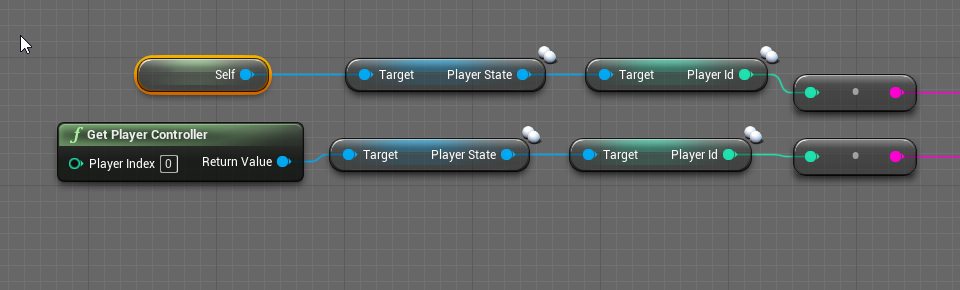
https://i.imgur.com/po8poIQ.png I am in the controller on the server. how can these 2 deliver different values?
 dawn gazelle
olive sedge
https://i.imgur.com/po8poIQ.png I am in the controller on the server. how can th...
dawn gazelle
olive sedge
https://i.imgur.com/po8poIQ.png I am in the controller on the server. how can th...
Because Player Controller 0 refers to a specific player controller on server. Only on the client is Player Controller 0 the local player controller.
 crimson swan
Hey guys i have a small issue i could use some help with if anybody has time
So i'm modifying the top down template to be networked. So only the movement. what's happening is the client moving is seeing the character as a jittery mess whereas every other client sees it smoothly
olive sedge
@dawn gazelle that makes sense. I figured it depends on the context. Thank you
fierce birch
is there a way to run a on component hit without simulating physics?
 proud hull
fierce birch
is there a way to run a on component hit without simulating physics?
proud hull
fierce birch
is there a way to run a on component hit without simulating physics?
With a trace
 distant grotto
anyone got any tips on how to set up a modular character?
granite rain
crimson swan
So i'm modifying the top down template to be networked. So only the movement. wh...
I don't know but try this
https://www.youtube.com/watch?v=RUSIsEEOGuE
Download Project : https://www.patreon.com/posts/46170618
In this tutorial, I am going to show you how to implement multiplayer replication support for the topdown template in unreal engine. Unlike the third person template we get in unreal, the top down template out of the box doesn't support multiplayer replication. If you try to play the top...
crimson swan
ill check it out thanks
fierce birch
@proud hull trying to make a physical bullet hit a player
distant grotto
I just want to set up a scene for portfolio shots, and i'd like to have this modular character play an idel animation and flick through the different parts randomly every second or so
viscid shard
@granite rain anyway not to use controler yaw screws up everything else
proud hull
fierce birch
<@!291620720243376129> trying to make a physical bullet hit a player
The bullet isn't simulating physics?
proud hull
This blueprint is the bullet?
 solemn parcel
Is there a way to make some particle that looks like 2d (view from top being 'lines') to be looking more like 3D ?
View from top
proud hull
fierce birch
because if it is the projectile movement wouldnt work
Can you show your collision settings. Are they set to overlap or block?
fierce birch
proud hull
Should look something similar to this.
set collision enabled.
You can keep your response settings. I think you only need to set collision enabled.
fierce birch
doesnt work if i set collision enabled
proud hull
Oh you had it physics anyways, thought it was query only.
fierce birch
yea, i put a break point at the event and it doesnt fire
faint pasture
fierce birch
<@!291620720243376129> trying to make a physical bullet hit a player
What do you mean by physical bullet and hit the player?
You could do a bullet using physics but that'd be a very bad idea.
fierce birch
just a bullet actor, instead of a trace
proud hull
He wants the projectile to trigger a hit event to get bone name.
fierce birch
yes
 quick imp
So i'm gonna try to describe this the best way I can.
So I want to make a system in which I can morph or move a blob to make a creature like how spore does it.
Would I just look up how to morph meshes? Idk what would go into doing something like this. Anyone able to point me in the right direction?
Example Video: https://youtu.be/ZRr3lgckIAM

Join Spore artist / animator John Cimino as he walks through the process of building a creature with the Spore Creature Creator. Spore available in stores September 2008.
proud hull
I haven't built my ranged system yet, so am only working off of google and logic, hehe
faint pasture
Oh then just use a basic projectile with the stock projectile movement component and have it NOT collide with character capsules, but instead with the mesh
fierce birch
i set mesh collisions to ignore the projectile
quick imp
Cant you just on event hit, within the projectile bp. Can't you just get actor or something, and get bone ?
Idk lol
faint pasture
You need to set up your collision such that bullets ignore capsule but hit the skeletal mesh.
proud hull
quick imp
Cant you just on event hit, within the projectile bp. Can't you just get actor o...
That's what I thought too, haha
fierce birch
oh
faint pasture
quick imp
Cant you just on event hit, within the projectile bp. Can't you just get actor o...
You got to hit the skeletal mesh for that. Or have some way of turning a capsule hit into the mesh hit, like getting closest bone or whatever.
quick imp
lol just having that basic idea, and then running with it, should get your somewhere
proud hull
Ah, capsule is eating up the hit, haha
fierce birch
@faint pasture make a custom collision type for the capsule?
quick imp
Yeah, OR, maybe setup your own custom collisions. That are for the head or arm or butt 😄
Ive seen that
fierce birch
i think getting bone names is a lot easier
quick imp
let me open a project that actually has body part specific damage set up and see how they did it
faint pasture
It depends on how your project is set up, but you will need a minimum of three profiles. Capsule blocks world, mesh blocks bullet, bullet blocks world and mesh
quick imp
True ^
viscid shard
how can i make it so thirdperson character wont rotate with WASD but walk forwad strafe left and right and walk backwords without the use of controller Yaw
fierce birch
lock it
fierce birch
in character movement
viscid shard
then it wont rotate with camera
quick imp
OH
I see, so when the player is moving, you dont want it to rotate but when you are idling, be able too
fierce birch
for your character rotate functionality, rotate the camera instead
faint pasture
@viscid shard how do you want the character orientation to be rotated?
viscid shard
if i use controller YAW it messes up my TopDown camera
to move Forward with W in the direction my Camera is faceing like it currently does. but if i hit AD i want it to strife left n right and S to walk backwards not turn around
while in my third pesron camera only
fierce birch
@faint pasture yea but how can i get the event to trigger
it wont trigger
its not the capsule because nothing that i shoot at triggers the event @proud hull
faint pasture
fierce birch
its not the capsule because nothing that i shoot at triggers the event <@!291620...
Show the collision settings on your projectile blueprint root component
proud hull
I am trying to dynamically create a wedge formation out of spring arms. Ideally, I want to base the spacing off spring arm length and angle, so the left example would work best, however the units only know their index in the formation and the numbers must generate in the order shown, so the left example would be very difficult to create dynamically. The right image shows the alternative, which is very easy to generate dynamically, but it takes angle out of the equation completely. Any suggestions?
 warm ermine
Anyone have experience with dual-wielding with a inventory system?
 fast orchid
I cast to a FirstPersonCharacter bp and set the currentHealth variable to the currentHealth variable - 20. I made it so that this happens whenever the actor is hot by the linetracebychannel. the variable gets set to the original currentHealth which is 100 - 20. so it always equals 80
here is what I wrote
warm ermine
I followed Titanicgames RPG series but it doesn't include dual-wielding
fast orchid
crimson swan
not very familiar with that guy sorry :/
warm ermine
Its ok lol
faint pasture
warm ermine
Anyone have experience with dual-wielding with a inventory system?
A little bit. The cornerstone of it would be to make a function to determine if a slot is empty or to find the first available slot. When finding the first available slot, you say that a weapon is slot one takes up slot two as well if it is not a single-handed weapon
That is, the presence of a two-headed weapon in the first slot also marks the second slot as occupied
proud hull
But if player is beasto warrior, two-handed weapon now does not occupy 2nd slot.
warm ermine
Ah ok thanks for that insight 😮
faint pasture
It got tricky in our case because we had heavy weapons take up three slots, overflowing into your secondary weapon set. We actually ended up giving up on that for balance and art purposes, and now a heavy weapon just also fills the body armor slot
crimson swan
Figured out my problem from earlier. Apparently moving an AI serverside using simple move to with the "Allow clientside naviagtion" in naviation systems turned off causes your character to jump arround because for it the navmesh doesn't exist so you keep getting an update on your position from the server
the more you learn
viscid shard
faint pasture
<@190655192759271426> how do you want the character orientation to be rotated?
do you get what im trying to do lol or am i a crazy person
crimson swan
I mean i can only speak for myself but i didn't quite grasp the idea tbh
viscid shard
i want the character to be pointed the same direction my camera is without the use of control YAW because itll screw up my TopDown camera. so while in third person the character will act like the First person default project character
faint pasture
@viscid shard just have the top-down camera NOT use the control rotation.
 winged sentinel
Hi everyone, Im trying to snap my left hand to my weapon, but i dont want to change the actually position of the hand, i just want it to follow the weapon
Im trying to use the Fabrik node but its requiring me to snap to a socket, changing the location of my hand
I kinda just want it to mimic the right hand so that it does look like the weapon is sliping
viscid shard
@faint pasture if you're talking about just setting the use control Yaw to false for top down so i can use it true on my Thirdperson cam. it would be nice but the Yaw stays screwed up after toggeling it so i cant use it. i spent ours trying to figure out how to set YAW on a controller but all you can do is Add to YAW.
 manic vessel
Anyone Know How I could speed up and slow down a timer based on distance to actor?
faint pasture
@viscid shard you can manually set the rotation of anything. Add controller yaw is just modifying the ControlRotation.
 cold raft
fast orchid
cold raft
fast orchid
It looks like you are setting the current health in the Blueprint you are in, and not the Current Health variable in the FirstPersonCharacter blueprint
 lean thistle
Im not sure if my last message delivered, if it did sorry for the double question. My procedural mesh stops responding to On Cursor Over events after it is sliced. Does anyone know if this is a bug, or how to solve it?
 thorn veldt
Hello there. How can I add a starting point to a for each loop node (pin)?
dawn gazelle
thorn veldt
Hello there. How can I add a starting point to a for each loop node (pin)?
Something like this?
 wicked nest
do yall know how i would go about making the character rotate around a vector in space?
thorn veldt
@dawn gazelle
Your suggestion works! I owe you one 'pal. Thanks a lot!
stuck wind
orchid garden
my skills are controlled by a player component thats added to the actor
Why not directly into the character blueprint ?
 gritty elm
is character possess function is replicated?
proud hull
Finished up my other formations and now about to tackle this one. Just wondering if anyone here had any other alternatives. #blueprint message
 rancid oasis
what does it mean when a variable is out of scope? 
proud hull
rancid oasis
what does it mean when a variable is out of scope? <a:THINK_EXTREME:783656911252...
it has bad breath
distant grotto
Does migrating blueprints just not work or what?
orchid garden
stuck wind
Why not directly into the character blueprint ?
my whole skill system is in a seprate actor component, same with my inventory system, minimap, etc. Each group within its own component.
 stray island
stuck wind
stray island
stuck wind
Okay 🤔 Thanks 😄 @orchid garden
orchid garden
stray island
ummm colors
stray island
How do i make these wires look nice or hide them , is macro and function the only way
orchid garden
this is why reroute nodes come in handy lol
stray island
Oh ya and reroute
orchid garden
you can double click a line to add a reroute node
stray island
Any third workaround beside macro , function and reroute
orchid garden
variables
stray island
When i make a function “pure” it loses some wires and be small , but does that affect the function?
What does “pure” mean
dawn gazelle
gritty elm
is character possess function is replicated?
Possess can only be run on server.
stray island
But , how did pure know its connections
orchid garden
generally your doing something with the 'out' of a pure function
stray island
It does work and look nicer than big function but I’m afraid it loses the connections
orchid garden
the 'out' (i.e. return value in above) links to the execution line via whatever your doing with it, and the engine knows to execute it.
dawn gazelle
orchid garden
some things can't be put in functions, i.e. timelines, timers, delays as examples.
orchid garden
not really, some things you don't want as pure functions.
stray island
Oh
orchid garden
is it possible to make a Cone Collison object? i see UE has Cube, Sphere and Capsule by default but no cone ones... wondering how i could make a Cone Collision object.
 tight schooner
stray island
Any third workaround beside macro , function and reroute
tight schooner
stray island
Any third workaround beside macro , function and reroute
Collapse nodes, or use a custom struct that packs it all into one wire
orchid garden
tight schooner
Collapse nodes, or use a custom struct that packs it all into one wire
i think it all really matters to what your doing to how you want to handle that.
stray island
Oh didnt know about collapse feature , thank u @tight schooner
proud hull
orchid garden
is it possible to make a Cone Collison object? i see UE has Cube, Sphere and Ca...
I will be figuring this out soon myself as I add more to my AI. My theory is a sphere trace which interps distance and radius.
tight schooner
Yeah, struct is a somewhat nuclear option for visual organization but I'm just throwing it out there
stray island
Tbh I already have structues , out of structs inside structs
So i have structs but ruined them too
tight schooner
But yeah I collapse nodes a lot. My event graphs tend to be a series of collapsed boxes... Easier to look at than a series of comment box-ed node graphs IMO
stray island
Because i do break my structure
orchid garden
proud hull
I will be figuring this out soon myself as I add more to my AI. My theory is a s...
you'd thin kthere would be a simpler was, just because ai sensing and what not.
proud hull
orchid garden
you'd thin kthere would be a simpler was, just because ai sensing and what not.
You can do it with AI easily, hehe. In behavior trees you can do a "Cone Check".
orchid garden
proud hull
You can do it with AI easily, hehe. In behavior trees you can do a "Cone Check".
ah, i haven't gotten to behavior trees yet
proud hull
orchid garden
ah, i haven't gotten to behavior trees yet
Something like this was my initial thought
interp the size and location.
dawn gazelle
Technically, couldn't you use a static mesh object with a cone mesh and have it check for overlaps? (I may be wrong)
proud hull
dawn gazelle
Technically, couldn't you use a static mesh object with a cone mesh and have it ...
You could, but i'd imagine a few traces would be way more efficient. Easy to customize too.
Most people aren't familiar with traces though, so an actual cone object looking for overlaps may be their best route.
tight schooner
@stray island it's just how functions are, cuz you can call them from other BPs with a reference to the target. If the function is simple (in terms of data pins) you can fill out the function's shortened name field and it'll give it a simpler visual styling
orchid garden
dawn gazelle
Technically, couldn't you use a static mesh object with a cone mesh and have it ...
yeah but how would you handle the visibility of it? if its set to non visible doesn't that make it basically disabled?
tight schooner
You can totally have invisible complex mesh colliders
tight schooner
Visibility or hidden-in-game doesn't affect collision
dawn gazelle
The only thing I don't think is great about this method is lack of easy control over the size.
orchid garden
i just need it for a fixed size.
proud hull
You may need to adjust the anchor point so you can easily scale it without having to readjust its position every time.
Ah, if it is fixed size, then don't matter.
orchid garden
yeah its for a camera unit thingy
tight schooner
Kind of an aside... but I remember ppl here talking about cone traces here and how that functionality exists in C++, but one would need to write a function to expose it to BP.
That was maybe a year ago
orchid garden
proud hull
You may need to adjust the anchor point so you can easily scale it without havin...
i was just thinking about that (anchor point) so if i need scale it differently i could easy enough
proud hull
orchid garden
i was just thinking about that (anchor point) so if i need scale it differently ...
I think by default it is at the base of the cone, but you would want it at the tip.
orchid garden
default is center of cone
proud hull
Ah, even worse, hehe
orchid garden
making a cone is no problem
proud hull
but same in terms of moving it
stray island
Sorry i will ask this again but is greying out variables only possible through c++ and bps cant do it
Like this greyed out numbers that toggles when the bolean is true
orchid garden
would be nicer if their was a cone simular to this as a collision object, where the sphere side of it could be adjusted for height seprate from the cone itself.
the problem with just a cone, you always end up with dead space:
and if i use a capsule or a sphere to try to negate the deadspace, well, then im doing two collision checks instead of just one.
proud hull
Make a new ice-cream cone shape then.
stray island
If u export that 3d shape to unreal and remove its material , wouldn’t it be equal to having collision?
winged sentinel
Hi everyone, is there a away to do hand Ik without snapping the position of the hand?
orchid garden
not really arche it'd be a material-less object lol.
stray island
I thought collision is a material less object already
proud hull
stray island
If u export that 3d shape to unreal and remove its material , wouldn’t it be equ...
You can just choose not to use a material within the editor, no need to export.
stray island
Oh I thought he made it in another program
dawn gazelle
?
proud hull
Blender pro!
orchid garden
I can make one @dawn gazelle , its just a pain scaling if you do make one cause it has to be to scale for one with spherical end.
im litterally working on my door system, for a reusable multi-purpose door.
 teal pendant
hi guys in the new version 4.26 in UE I work with AR and it has no function "Get All Planes" maybe someone knows what it is called now?)
dawn gazelle
teal pendant
hi guys in the new version 4.26 in UE I work with AR and it has no function "Get...
Mebbe this one?
teal pendant
@dawn gazelle i don't have it
 short bough
This is FPS game in Which I have firstperson arms which is set only owner see to true and full body mesh with owner no see to true.I am using another actor as scope In which Scenecapture2d component is used Ihave set scope actors owner to Player character ...full body mesh is rendering in scene capture 2d how can i hide full body mesh from scope actor?sorry my english is bad
dawn gazelle
teal pendant
<@!218956378654507008> i don't have it
Try unchecking the Context Sensitive checkbox, and failing that, the blueprint you're in may not support the function.
teal pendant
@dawn gazelle i tried it didn't help
 iron axle
i have 2 tree actors that i can set on fire and spread by toggling particle systems, and calling the next actors fire event via overlapped volumes.
thing is, i dont want to cast to tree1 cast fail cast to tree2. and write everything double. is there a way i could use a single, non level, event for 2+ actors?
dawn gazelle
are your tree actors set up in a way that they inherit from the same parent class?
iron axle
i dont think so
dawn gazelle
if so you could create a blueprint interface, implement it in the parent class, and do whatever logic you want in the parent, then the on overlap you just pass the actor into the target for the BPI message, and either tree would execute it.
iron axle
bpi?
dawn gazelle
blueprint interface
iron axle
ah
 tropic horizon
Anyone here knows how to smoothly limit the pitch and yaw of the player camera? Been stuck with this for a while -.-
faint pasture
tropic horizon
Anyone here knows how to smoothly limit the pitch and yaw of the player camera? ...
What do you mean by smoothly?
 lost wolf
once u go over a certain value Rinterp back to it?
 rough blade
Is it possible to disable gravity for a ragdoll?>
tropic horizon
faint pasture
What do you mean by smoothly?
Well if changed the view pitch min/max of the camera manager it'll just snap the current rotation to that range v: but ye @lost wolf , the interp sounds about right :v
 reef turtle
Does anyone one have an idea why these variables are not in scope ?
base chunk and health chunk are in this same blueprint.. created by duplicating one of it.. but one of them showing values, other one is not..
any clue ?
faint pasture
tropic horizon
Well if changed the view pitch min/max of the camera manager it'll just snap the...
Oh you mean to slowly apply the limit?
like it starts out unlimited then the limit changes
iron axle
dawn gazelle
if so you could create a blueprint interface, implement it in the parent class, ...
i guess i dont really understand what you were talking about. do you have doc links or a tutorial on how to do that
also i made a child actor but i cant change the components like i wanted.
faint pasture
@iron axle All of your tree actors should inherit from BaseTree
What is different between any 2 tree actor classes?
 long schooner
Can anyone help me with inventory blueprint, I have an issue that duplicates the array each time I open the menu?
faint pasture
long schooner
Can anyone help me with inventory blueprint, I have an issue that duplicates the...
Show where your open menu code messes with the array
long schooner
faint pasture
Show where your open menu code messes with the array
this is the open menu blueprint, the issue may be with the close option here
 pine ledge
Is your inventory menu was created new each time you open or use the widget already create?
I think your inventory didn't clean the previous list
iron axle
faint pasture
What is different between any 2 tree actor classes?
the static meshes that build them
 icy saddle
how can I assign a texture PNG to a widget image variable?
I want to set my "ability_Icon_A1" to the Ability A1 Image variable
icy saddle
dawn gazelle
thanks! it worked 🙂
long schooner
pine ledge
Is your inventory menu was created new each time you open or use the widget alre...
How do I cleaned it each time?
pine ledge
just get the list and "Clear child"
long schooner
Thanks, will try that
long schooner
pine ledge
just get the list and "Clear child"
Thanks, It worked, I added it on the resume button
pine ledge

 mortal cradle
I asked it yesterday but without much success, does anyone know how can I make a scrollable widget while still not losing mouse and keyboard control in a game? I just need to be able to scroll in a widget while walking and looking around, walking part seems easy but I can't stop losing control over the mouse rotation. (I can already scroll in a widget so it's only about looking around and scrolling in the same time)
pine ledge
If you want something special like that, I guess control by code will do. That mean Scrollbar only the vision for you. And scroll up/down is everytick update
Like update everytick, offset scroll + delta mouse will be new scroll offset. It won't take control from your player
icy saddle
I have a cooldown counter text that should appear when a character's ability is on cooldown and disappear when it's not on cooldown.
Which property should I set? IsEnabled or Visibility?
dawn gazelle
Visibility
mortal cradle
I'm not using a scroll box for this, I'm overriding OnMouseWheel and when mousewheel scrolls up it's +1 and down it's -1 and then it hides or unhides an image which switches on int. So it's basically a question how do I know enable mouse wheel for the widget while being in a game mode/ ui and game mode @pine ledge
icy saddle
dawn gazelle
Visibility
thanks, could you tell me what's the difference between IsEnabled and Visibility?
dawn gazelle
Enabled controls whether or not you can interact with the widgets in question. Eg, buttons set to enabled:
Disabled:
Visibility controls whether or not you actually see the widgets and if they can be interacted with (not-hit testable can prevent clicking for example). The options on visibility also can matter, for example Collapsed and Hidden both make the widgets not visible any more, but collapsed makes it so the hidden widget takes up no space in the layout.
icy saddle
dawn gazelle
Enabled controls whether or not you can interact with the widgets in question. E...
ohh I see, that's really good to know! Thanks!
pine ledge
mortal cradle
I asked it yesterday but without much success, does anyone know how can I make a...
you said you already can scroll widget, but can't control the player when doing so ?
mortal cradle
@pine ledge I can walk and scroll in a widget but not look around
It's because I use game and ui mode when this widget is enabled
proud hull
mortal cradle
It's because I use game and ui mode when this widget is enabled
Why not keep it game only and have your player controller pass on the input to the widget?
When widget is created, save a reference of it in player controller or character and have them handle the input for it.
You then have functions/events in the widget that "do stuff", and then you have player controller/character trigger these functions/events when input happens.
pine ledge
There're the way to allow look around on widget, "On Mouse Move" allow you get "Delta Mouse" then "add pitch/yaw" to your controller
It just weirds is why the player looking in widget like inventory, and still allow them to look around (I don't know just your idea)
mortal cradle
Thank for the ideas @proud hull and @pine ledge I'm trying it out now
proud hull
mortal cradle
Thank for the ideas <@!291620720243376129> and <@!378511234548629504> I'm trying...
You can also keep it game and ui mode if you prefer, just don't give the widget focus. You can even set the widget itself to not allow focus. Then like I said, instead of overriding mouse functions in the widget, you just use your player controller/character to trigger the widget's functions/events.
@pine ledge's alternative is perfectly acceptable too. Just another thing to override and then copy the mouse input from your player character into that.
mortal cradle
Ok it was actually as easy as passing the entire event into Mouse Wheel Up and Mouse Wheel Down in the player blueprint instead of overriding it in the widget
 normal stream
Hopefully quick question: I am trying to get a player pawn to move in a complete circle around a point (think satellite orbiting a planet), or Galaga-style radial shooter). Any pointers towards documentation would be ideal.
pine ledge

In this video i decided to talk about how to go from Local to World space and back and how to handle Locations Rotations and Transforms.
Specifically i mention how to use Transform Location, Invert Transform Location, Compose Transform, Invert Transform and Delta and Combine Rotators.
Lots of these nodes are super useful once you figure out how...
normal stream
thankye
mortal cradle
Is there any difference between this two ways of using references? https://gyazo.com/a751cdb81228da98d658f0412569d4af or https://gyazo.com/7db4d7c2bc31e1a306c7d35965c6040a I mostly mean if maybe the first way calls the reference 1 time and the second one 3 times meaning that it would be worse for optimization or it doesn't matter?

 dawn gazelle
mortal cradle
Is there any difference between this two ways of using references? https://gyazo...
dawn gazelle
mortal cradle
Is there any difference between this two ways of using references? https://gyazo...
Effectively the same. I'd fathom having just the singular reference may save a tiny bit of storage space of the blueprint, but otherwise would be processor/memory indifferent.
mortal cradle
Thank you
 delicate scroll
Hey, I'm trying to set up a Remote bomb that, when thrown if it hits someone it will deal damage but won't explode until triggered, and if it hits a wall it will stop and do nothing until it is triggered. When it's triggered it will explode and deal damage to anyone in the area. I have it built based off of my Proximity bomb that functions identically, but the proxy bomb doesn't arm itself until it hits a wall. (I got a bit of guidance from @maiden wadi last week about it, so thanks for sending me in the right direction with that).
fast orchid
how can I change the value of a variable from another bp?
tight schooner
@fast orchid you need a reference to that actor. There are a lot of ways to get a reference and it's highly dependent on your preference, scenario or architecture. Anyway a quick and dirty way to get a reference is to use Get Actor of Class. It'll work if there's only one of that actor class in your level.
If there are multiple, you might need a different approach. (Also I g2g. You can ask the channel for more help if you need it.)
fast orchid
I tried using the HitActor from the lineTraceByChannel and I could cast to the bp but when I changed the value, the value only changed in my file, not the other FirstPersonCharacters bp
dawn gazelle
fast orchid
I tried using the HitActor from the lineTraceByChannel and I could cast to the b...
Can you show an example of what you've done?
dawn gazelle
drag off from your cast and start typing set current health. You should get a node that has a target and the float value.
fast orchid
that worked
thanks
one more thing though
I have a custom event which gets fired whenever someone gets shot, how can I update the widget which shows their hp
I have it on a bind but it only casts once
and never changes
dawn gazelle
Binds for updating widgets are usually bad as they are basically firing on tick. If you have an event already, you should be able to use that and get into your widget and set the new value in the widget.
Example:
The example won't really work in this instance as the event I'm using is only run on server which would not have reference to any widgets you may have locally, but it gives you an idea of how you can do something like updating a widget.
maiden wadi
@delicate scroll Are you just trying to have it explode also when it hits someone?
fast orchid
if I have a firstPersonCharacter bp how can I get the PlayerController that belongs to the firstPersonCharacter bp
dawn gazelle
GetController
olive sedge
how do you create a color parameter in a material bp?
I know S+LMB and 1/2/3+LMB by now
fast orchid
how can I find every instance of FirstPersonCharacter. i want to split the people in the game into teams of 2 evenly
olive sedge
@fast orchid GetAllActorsOfClass
dawn gazelle
olive sedge
how do you create a color parameter in a material bp?
3+LMB then right click on the node and select convert to Param?
olive sedge
@dawn gazelle ah, right.. thanks!
dawn gazelle
olive sedge
<@!218956378654507008> ah, right.. thanks!
Thank you, as I didn't know about 1,2,3,s+LMB XD
olive sedge
😄
delicate scroll
@maiden wadi No only when it's activated
maiden wadi
Might need more explanation then. When do you want it to activate? Cause you said it only activates when it hits a wall? Are you wanting it to activate somewhere else?
maiden wadi
@fast orchid Sounds like something you'd do with Playerstates since characters are often throw away when they die. But either way, you can get the GameState, and get the Players array from it which is an array of playerstates. Each playerstate also has a PawnPrivate variable for the character linked to that state.
delicate scroll
And it seems to be working properly
For the Remote bomb it goes - I use the ability -> remote bomb gets thrown -> when the ability is pressed again, it detonates.
I want it to (when the ability is pressed again) check if anything is overlapping the box collision (blast) it will do damage to them
maiden wadi
First, put IsArmed(false) before that delay. Otherwise you'll trigger multiple explosions. You probably only want the destroy actor after the delay. May also be better to set lifetime rather than using a delay, but either way.
As for the other. You should take everything past the first two branches in the third screenshot. Everything from PlaySound to DestroyActor and put it in a separate custom event. Then call that after the branches, and also call that on the second ability activate.
wise mantle
can you create a private overlap component?
i have placed multiple of the same blueprint objects, and all of them have an overlap component. the problems is that, when i walk into one of the collision triggers, it doenst only affect one object. it affects multiple
there i thought if there's a way to make the overlap private for one object
delicate scroll
@maiden wadi "As for the other. You should take everything past the first two branches in the third screenshot. Everything from PlaySound to DestroyActor and put it in a separate custom event. Then call that after the branches, and also call that on the second ability activate." - Yeah that's kind of what I was trying to work out earlier. This was sort of what I came up with earlier -
I want it to do a check (when it detonates) to see if anything is overlapping the "Blast" collision box. If I use the "On component begin overlap" it won't detonate if something is already in the box, and only if something enters the box.
olive sedge
@delicate scroll are you searching for https://docs.unrealengine.com/en-US/BlueprintAPI/Game/Damage/ApplyRadialDamage/index.html ?
Apply Radial Damage
or maybe https://docs.unrealengine.com/en-US/BlueprintAPI/Collision/SphereOverlapActors/index.html ?
SphereOverlapActors
delicate scroll
I think maybe the Apply Radial Damage might work. I've never used it before, so I will see about implementing it
olive sedge
https://i.imgur.com/rPP1b5g.png
Is there a way to find the slope of a terrain so I can rotate my actor here?
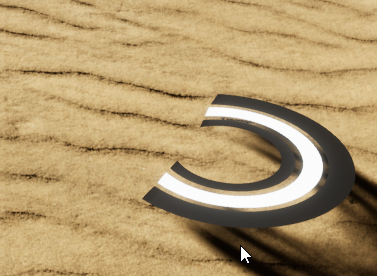
alternatively, make it higher render priority than the terrain so it fully shows
fast orchid
is there a way to teleport half of the players in the game to one side of the map and the other half to another
I though I could with player starts but I don't think that it how you do it
olive sedge
@fast orchid you could do it with PlayerStart, why not?
Or just spawn them where you want them later
 amber marsh
Does anyone here know the proper steps for creating swim able water
fast orchid
I will have minimum 2 people and max 10
amber marsh
I imagine there is something already built in for this to work
fast orchid
I don't know how to make them split evenly
olive sedge
@fast orchid just %2 them
fast orchid
what do you mean
dawn gazelle
amber marsh
Does anyone here know the proper steps for creating swim able water
I haven't used this one myself, but I've watched it before and seems like a decent way of doing water.
https://www.youtube.com/watch?v=hlzGmLcDZ1g
Basically the thing that makes water swimmable is a physics volume placed in your level set to a water volume, everything else is just the sugar on top.

Hey guys, in today's video I'm going to be showing you how to create a body of water, with the material and collision set up correctly, with the effect of looking like you are underwater. As well as animations and functional swimming.
00:00 : Creating the water
01:43 : Creating the volumes
06:10 : Swimming
08:35 : Swimming Animations
Swimming ...
olive sedge
@fast orchid google modulo
olive sedge
oh, that's what you mean by splitting evenly..
well, you could do three things, far as I can see
- take one player start, spawn there and around it
- create 5 player starts per team
- create a spawn zone and spawn in it randomly
 nocturne flower
Can someone help me figure out how to get my characters burping/farting randomly, even just a tutorial that kinda relates to getting the sfx to play randomly. Thanks
I only want the sfx to play btw
dawn gazelle
olive sedge
https://i.imgur.com/rPP1b5g.png
Is there a way to find the slope of a terrain so...
The Top Down example project uses a decal component and does this on tick of the character.
trim matrix
@olive sedge depends what you are going for, what kind of actor is it? Hard to see. If it is very flat, you can use decals, which automatically adjust to floor slope as long as collision is accurate (I think). Otherwise, you should try some kind of line trace system at different points on your actor, and compare distance to the ground to set its rotation. Depends how modular you want to make it .
dawn gazelle
olive sedge
@trim matrix @dawn gazelle I was thinking decals first, yes.. but figured since it's basically attached to the character, would make more sense to have it as an actor
I'll look into top down, thanks
dawn gazelle
Technically that same bit of code should work with an actor too, just won't be quite as stick-to-the-wall as a decal
olive sedge
Yes, I'm trying it out right now
dawn gazelle
Looks like decal would probably work a lot better based on what I'm seeing XD
olive sedge
well, I gotta get the rotation down in any case I guess
 cyan acorn
Hey I m new to ue4 and I am trying to understand blueprints and stuff and was following along a tutorial when that at some point said to add a Event On Possess however I can't find it for some reason. Anyone knows what the problem may be?
dawn gazelle
cyan acorn
Hey I m new to ue4 and I am trying to understand blueprints and stuff and was fo...
I believe it's called just possessed:
dawn gazelle
What type of blueprint are you on currently?
cyan acorn
a player controller blueprint
dawn gazelle
Ok yeah that one is On Possess
maiden wadi
@delicate scroll Apply radial damage will work if you're using the default damage interface in unreal. It looked like you had your own damage interface going on. As for the other thing, you'll need a function to get the overlapping actors at the time of calling. Dragging off of your component and doing GetOverlappingActors will get you all of the actors overlapping your blast radius. You can either just apply damage to all of them, and only the ones using that interface will be affected, or you can filter them how you like.
dawn gazelle
How are you looking for the event?
cyan acorn
right click and typing on possess
dawn gazelle
Do you have the context sensitive checkmark at the top right enabled?
cyan acorn
no
dawn gazelle
You should start to see this when starting to type in on possess within a player controller
fast orchid
how can I split 10 people into teams of 5 each and put them in their teams spawn area
dawn gazelle
With the context sensitive enabled
cyan acorn
this is all that shows up
dawn gazelle
Alternatively, you can also look under the function overrides
At the top right of the blueprint screen do you see this?
cyan acorn
i mean it's written in blue not in white but yeah i see that
cyan acorn
dawn gazelle
Alternatively, you can also look under the function overrides
doesn t show up there either
dawn gazelle
Can you click the wrench beside the blue text
fast orchid
fast orchid
how can I split 10 people into teams of 5 each and put them in their teams spawn...
?
cyan acorn
i don t have a wrench there
dawn gazelle
Doesn't look like this?
cyan acorn
nope
dawn gazelle
Ok, can you find your Player Controller object in your content browser and hover your mouse over it and take a screenshot of the pop up?
cyan acorn
dawn gazelle
🤔
cyan acorn
yeah same
cyan acorn
i m not sure what that is but this is what i did to make it
dawn gazelle
That should give you access to use OnPossess.
It looks like you don't have the parent class set on it or something, somehow.
cyan acorn
huh
dawn gazelle
Can you try creating another player controller object and see if it contains the OnPossess?
cyan acorn
cyan acorn
i m not sure what that is but this is what i did to make it
like this?
dawn gazelle
Yep
cyan acorn
aight i ll be brb for a little then do that and send it here
olive sedge
Anyone an idea how to implement something like this? https://i.imgur.com/en7UcRF.png
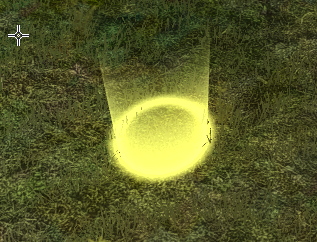
(I want to use that instead of a decal.. Fading light cylinder)
 little cosmos
Hello everyone
I have a few target points that through Widget player can teleport to. But once I package the project they all shuffle mysteriously and the UI widget buttons no longer correspond to their target points.
 hard kettle
How are they defined
little cosmos
in the widget itself
works perfectly in PIE. not in build
First taret point created is index 0, last duplicate is index 6
hard kettle
The order of the array is being moved around as its being lazily generated
That's what I suspect
hard kettle
You have the objects, why do you need to go by array index?
little cosmos
What do you mean?
I get actors of class and make an array of them. Then I Get <index> to teleport my pawn to
Don't know another way
fast orchid
I have this code to split all the players into teams of to and set a variable in their bp to 1 or 2 depending on the side. the variable doesn't save into the players bp for some reason though
viscid shard
im completely new to Unreal but try taking the cast out of the loop and even an event you can call to set the variable of your player see if it works?
also i dont know whats going on with the loop. you're taking a number of players and dividing it by two so if you have 6 players your get 3 - your taking a player number and compairing if its < 3 ?
olive sedge
@fast orchid are you trying to cast an integer to a character?
oh, nvm
@fast orchid does your cast even work though?
and is this multiplayer?
viscid shard
cant seem to get my controller to rotate with camera in thirdpesron cam
tried getting the vector value of different components.
cyan acorn
@dawn gazelle Yeah no same thing happens
fast orchid
olive sedge
<@!679469541167988798> does your cast even work though?
yes it is
it is multiplayer
idk about the cast though
olive sedge
set a breakpoint on it (select and hit F9)
and you're probably either setting this on the client or on the server and it's not replicated
or your cast is just not working
you can also just for each your GetAllActorsOfClass array and modulo the index
and then SelectFloat
hard kettle
little cosmos
I get actors of class and make an array of them. Then I Get <index> to teleport ...
you can use the object's data, such as location, to teleport to the target everytime. If you drag off the GET pin and choose world location, it should give you the vector
fast orchid
olive sedge
you can also just for each your GetAllActorsOfClass array and modulo the index
I divided the length by 2
isn't that the same thing
olive sedge
getting a player character by index and iterating over the array you're getting is different, yes.
I have a widget component on my character but as soon as I set it to screen space, it vanishes.. Any idea why?
fast orchid
my cast keeps failing
this is what I did
I don't want to use Get(a ref) because I can't make any changes to the FirstPersonCharacter bp
when I use it as a ref
little cosmos
hard kettle
you can use the object's data, such as location, to teleport to the target every...
I feel like you didn't understand my issue here
hard kettle
I rellay need more context
little cosmos
That's just what im doing, but the locations shuffle in build
works in PIE, not in build
hard kettle
can you ssend the full code
little cosmos
this is all in BP_Widget_Menu
I first get the target points, then assign buttons to teleport to those target points
It works great but then I build the thing and it gets all messed up
hard kettle
again, lazy loading
first off, holy s***
second off, there's got to be a better way to do this
the first and imo the best option is to store the location within the object
so the object has id 1
little cosmos
sorry, what's lazy loading?
hard kettle
im pretty sure that when the engine builds it its not retaining the specific order because it's loading them only when required
fast orchid
anyone know how to solve my issue?
little cosmos
I was thinking the same, execution order must be different in build.
"the first and imo the best option is to store the location within the object
so the object has id 1" Can you elaborate? No idea what you refer to as "the object".
@hard kettle
hard kettle
fast orchid
anyone know how to solve my issue?
i'll take a look in a second
weary jackal
fast orchid
It can happen for 2 reasons generally. The execution starts on the begin play. But for the first certain frames the 'First person character' is still in construction so the length you are getting must be 0. Try to print the length and debug that. Also the index starts from 0 so for lets say length 5 the loop should be start from 0 to 4.
hard kettle
little cosmos
"the first and imo the best option is to store the location within the object
so...
okay, so the object is the item that you're grabbing information from
in this case, the transform
it's an actor object
little cosmos
I have several Target Point actors ("the objects")
hard kettle
yes
little cosmos
ok then, how'd you approach this?
hard kettle
now in the target point bp
little cosmos
there is no target point BP
little cosmos
Teleporting to them
I use them as containers for transformation data I want to teleport to upon clicking buttons
each of these green buttons send to different location
remember, it's all in a widget
fast orchid
weary jackal
It can happen for 2 reasons generally. The execution starts on the begin play. B...
im testing the game with 1 instance and when I printer it said there was 1 instance of FirstPersonCharacter
weary jackal
@fast orchid the you can get the player character at index 0
cold raft
fast orchid
You haven't connected the Exec line from the get all actors of class to the SET
olive sedge
@fast orchid just foreach the damn OutActors array
https://i.imgur.com/GfaMyvq.gif
I have a widget component on my character that is set to screen space.. anyone know how to avoid it getting distance from my actor like it does here?
 fast orchid
still doesn't work
I made it so when I hit a player it prints their side
it always says 0
which is default
it sets the side, but when the FirstPersonCharacter prints its own side out it says 0 :/
olive sedge
I don't understand what you're thinking with your modulo
array index %2 == 0 is what you want
hard kettle
little cosmos
each of these green buttons send to different location
then make the list within the widget
orchid garden
i've got some oddball light bounces, is this due to the shadow map?
fast orchid
olive sedge
I don't understand what you're thinking with your modulo
I didn't do modulo
I divided the amount of players by 2
DIVIDE
not modulo
olive sedge
right. I see. then use MODULO
fast orchid
listen. Im using the length divided by 2 because I want to see if they are in the first half of the array and give them side 2, and if they are on the other half, side 1
im not seeing if there are an even amount of players
wise mantle
how do you make a blueprint private? can you even make it private? like, i have a blueprint actor, and i have multiple of those in my scene. but the blueprint works for all of them at once. ive already made my variables private. the thing is that when i overlap the actor trigger, it can only overlap for one of the actors
idk if it makes sense what im saying lol
in short: i want a private blueprint or a private trigger
for each copied actor
fast orchid
@olive sedge
maiden wadi
@wise mantle Can you show what you're doing on overlap? Because it sounds like you're using something like GetAllActorsOfClass. Blueprints are already singular instances and one's overlaps won't trigger all of them, but it sounds like your logic is applying to all of them.
wise mantle
orchid garden
... i hate lighting in ue4...
orchid garden
its something with the actor causing the odd banding on the model....
maiden wadi
@wise mantle This is in the actor that you have scattered around the level?
wise mantle
yes. i have multiple of this actor in the level
maiden wadi
How do you enable input in them?
wise mantle
the input does work, but only for the first priority actor. if that makes sense. when i start the game and interact with the first instance of the actor i placed, it works. but when i interact with some of the other actors i placed later, it doenst work
maiden wadi
Right, that's why I'm asking how you enabled input.
wise mantle
im not exactly sure what you mean. i havent used ue for that long, but is this what you mean:
maiden wadi
Normally what you'll do is just do the input for what you want to happen, and on overlap you'll enable and disable.
wise mantle
i tried with enabling a bool on begin overlap, and disabling it on end overlap
like this:
maiden wadi
wise mantle
now i can see that the 'on component overlap' dont even activate on the other actors
little cosmos
hard kettle
then make the list within the widget
Still there?
wise mantle
imma try this
omg
@maiden wadi = da best
man i havent even been close to thinking of that. jeez. you just saved my day dude
little cosmos
Good for you man 🙂 Wish someone saves my day too. I'm so stuck
 vital ingot
Is there an event for if an actor gets hit by a ray? (So like Event BeginPlay, but the BeginPlay is when the ray hits the actor.)
wise mantle
man, i wouldnt be alive if this server didnt exist. they are right about the fact that unity got way more anwers online.
vital ingot
Ah! Got my answer. Sorta. I think event dispatchers is what I'm pmuch looking for.
orchid garden
lighting banding issue fixed on the actor.
little cosmos
Teleport vs Set ActorTransform difference??
orchid garden
static mesh set to movable on the actor, setting it to static resolved the banding.
anyone know how i can toggle a emerisive material coloring on / off via a blueprint?
I have these lights i want to be able to toggle the emersive on / off but don't know how to access that via a blueprint.
i've already got the parameter setup on the material...
just need to know how to access it via a blueprint.
olive sedge
@orchid garden not sure but switch out the material instance?
orchid garden
so swap materials all together?
olive sedge
don't know if there is a better way but I think that should work at least
 wise heath
https://docs.unrealengine.com/en-US/BlueprintAPI/LandscapeSplines/GetSplineMeshComponents/index.html
How can I use this node? I can't find a way to get any LandscapeSplinesComponent
Get Spline Mesh Components
little cosmos
I need help - I have a Widget BP that stores Target Point actors on Initialize . I then get their transform and set the character location to each of the target points respectively upon button click. The problem is - It works perfectly in PIE while in build/standalone game it just breaks and teleports to the wrong locations.
No idea what's going wrong . I tried storing the target points in play controller, game instance, nothing helps.
(Code is from Widget BP of the menu)
Again: works in editor, doesn't work in build.
 odd veldt
I have a "map" variable to store "names" and "ints"
Is it possible to sort the map alphabetically?
olive sedge
https://i.imgur.com/3s0dDv7.png
Anyone know a better way to find normals?
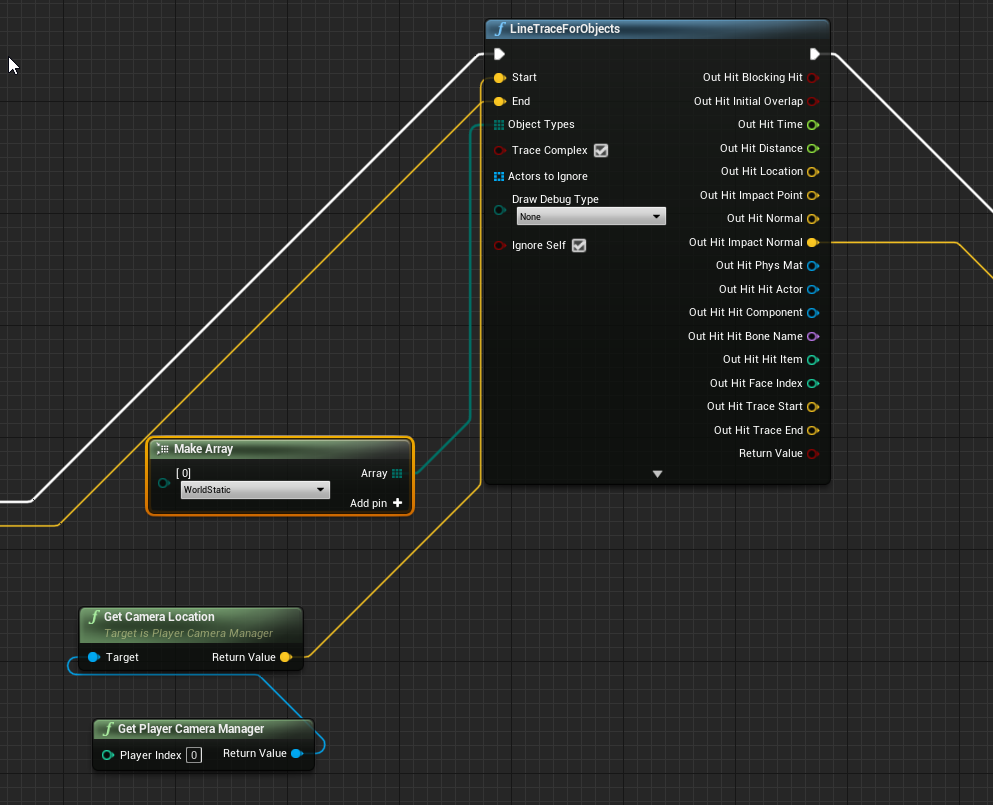 viscid shard
how the hell are you breaking the line tangents ?>
 verbal thunder
viscid shard
how the hell are you breaking the line tangents ?>
verbal thunder
viscid shard
how the hell are you breaking the line tangents ?>
if you mean the diagonal lines, thats a plugin on the marketplace called Electronic Nodes
viscid shard
damn to broke to spend on that lol
i am really stuck and i cant seem to find help >< cry
maiden wadi
@odd veldt That's slightly easier with an array of structs. This is also something that is incredibly easier in C++. But in short for a map, you need a function that breaks the map into an array of names and ints. You need to iterate over the array of names to find the highest alphabetical one, add that index from both arrays into a new map, repeat until there are no more indexes in the names array. You likely also need a function that compares the names to use inside of the loop. It's a heavy computation with blueprint.
viscid shard

i cant find the right way to set up the Right Vector . when hitting the KEys A-D i only go in 1 direction accross the map no matter my camera or character rotation
maiden wadi
@viscid shard What are you trying to do?
viscid shard
while in Thirdperson Camera i want W = Forward to walk in same direction as camera (which works fine atm) A-D i want character to Strife Left or Right while still looking forward with camera. and D i want the character to walk backwards toward the camera
oh and Right mouse button pressed and drag rotates camera which is working.
seems to mostly just be inputAxis Right that doesnt
maiden wadi
First, I'd strongly recommend keeping character movement in the character. Putting movement in the Controller likely that is going to end badly later if you ever decide to incorporate other characters of different classes, or pawns, anything like vehicles, horses, etc. As for the third person thing. You should have your third person look control make sure that UseControllerRotationYaw = true on the pawn. This should keep the character facing the direction the camera is facing rather than turning. As for moving. It's just a simple matter of this for input, in the pawn.
viscid shard
udemy courses said to keep everything in controller for server
orchid garden
found the solution to setting a parameter on a texture applied to a model via blueprints:
only effects the model its applied on, not others
knew there had to be a way
viscid shard
@maiden wadi also having controller yaw enables makes character walk forward toward the cam , not walk backwards
i dont want to rotate the character in the direction of the inputs - i want it to face cameras direction always
vital ingot
Anyone have issues with their isgrounded seeming to stutter on/off when there's lag introduced? Or at-least I assume that's why since it almost never happens.
olive sedge
how do you kill/remove a niagara system after n seconds?
orchid garden
first you take a big hammer and... lol 😉
olive sedge
lulzy
orchid garden
i looked at niagara for a possible solution, it confused the hell out of me.
olive sedge
I only want this system to emit like 5 particles and then stop and remove itself after all particles are killed (lifetime over)
maiden wadi
@viscid shard Not really sure why the Udemy courses would say that for the server. Pawn has as much control to RPC and whatnot from the client. It's fine for learning I suppose, or for a project where there's only ever one single character class that you'll control. 🤷♂️ Guess Udemy isn't much better than youtube in the teaching regard. But either way. It's just a matter of setting up your spring arm/camera with control rotations, and making the character face the control rotations, and then using the inputs like I posted.
viscid shard
@maiden wadi he said because the controller always exists and characters can be destroyed. so in multiplayer he said he keeps it to the controller
 dusk flame
Hey guys! I want to minimize/maximize my application window via Blueprint, but I can't seem to find a good method.
I already used SetSpectatorScreenTexture to make the screen show black, but I want to minimize it as well (VR Preview screen).
 unique wyvern
Why can I not get the game mode inside a blueprint deriving from object?
orchid garden
any idea why this would cause a light to basically turn off?
mk well i found out why.... its ignoring my 'light color alarm' values...
yay got it working 😄
proud hull
Anyone hungry? I just finished cooking up a prototype.
orchid garden
that looks like one of my test bp's lol
proud hull
Yep, test BPs always look like this. 😁
 hollow ibex
"Corporate wants you to find the difference between these two" 🤔
https://docs.unrealengine.com/en-US/BlueprintAPI/Settings/SetOverallScalabilityLevel/index.html
https://docs.unrealengine.com/en-US/BlueprintAPI/Automation/SetScalabilityQualityLevelRelati-/index.html
Set Overall Scalability Level
Set Scalability Quality Level Relative to Max
proud hull
I can clearly see something that needs to be made into a function with a few inputs.
orchid garden
my current test bp:
the door doesn't look like much in the bp lol
looks alot better once its placed in the scene and the vars are set:
rancid quartz
Good morning. I need help refining my spline logic. I'm moving actors along splines using SetActorLocation. However, my actors seem to move more quickly on shorter splines. Can someone give me a suggestion as to how I can change this blueprint here to account for different spline lengths? Each of these functions are being run about once per frame on a timer.
 cobalt bluff
rancid quartz
Good morning. I need help refining my spline logic. I'm moving actors along spli...
cobalt bluff
rancid quartz
Good morning. I need help refining my spline logic. I'm moving actors along spli...
I am not sure about how your spline works but you can try adding a portion of spline for example spline track length/100 instead of adding delta seconds*100
 gusty shuttle
You guys ever have a issue where you are in the blueprint editor and rightclicking to get your nodes, it flashes but goes away. That or the whole UE4 editor goes black?
Never happened before until today. Even stranger, only does it on one monitor, not both. Works good on Monitor 1, but not on monitor 2
rancid quartz
Thanks, @cobalt bluff. I've tried that now and it looks like making that change results in the same situation.
faint pasture
@rancid quartz are they moving at a constant speed or what? Of course if they move 100uu per second they'll traverse a shorter spline faster than a long one.
rancid quartz
Actually, I think it's reversed.
@faint pasture It appears that the actors on the shorter splines are moving faster. Not just because it's a shorter distance.
proud hull
Cleaning up my prototype blueprint and my computer bluescreens on me. This shit never happened until I started using 4.22 to make my project a few version backward compatible.
faint pasture
rancid quartz
<@!127902729677963264> It appears that the actors on the shorter splines are mov...
Are the splines scaled in any way or just naturally longer?
rancid quartz
They are scaled, but by the same amount. Is there a way to freeze transformations on components like splines?
faint pasture
I'd first double check to confirm that they are indeed moving faster than they should be.
rancid quartz
Nevermind, they are scaled differently. I have to find a way to freeze the transforms... Thanks, Adriel. I can't believe you guessed that.
faint pasture
I would suggest not scaling them at all and just naturally setting the spline points at greater distance.
rancid quartz
Yeah, a quick google reveals that "freezing" in Unreal consists of scaling the parent instead. I'll have to rebuild them. Stronger. Thanks again, Adriel!
gusty shuttle
Is this a good way to change opacity for a vingette in a widget. The value changes, so my Event Dispatcher is working, but the opacity is not changing. Any tips?
Like, it seems to not change opacity until I die, then my vingette shows
nvm, found out how
proud hull
Cleaned up a lot of it, but it still looks like a mess. Pretty much condensed as much as it can though. Top was the prototype, bottom is cleaned up:
 valid garnet
question about merge tool inside unreal engine
why are there options to select 3 files, dont we need only 2 to compare the local and depot?
trim matrix
What's the easiest way to make a UI number go down on left click
it's just a text box
 lone wyvern
valid garnet
why are there options to select 3 files, dont we need only 2 to compare the loca...
lone wyvern
valid garnet
why are there options to select 3 files, dont we need only 2 to compare the loca...
Hi
Example,
Current branch master
Merge into master dev
$git merge --no-ff dev
1 window/column: file in dev branch
2 window/column: file in master branch
3 window/column: current local file in UEditor, auto merged
gritty elm
how i can change volume of speaker in unreal engine
not the volume of only specific music, i mean the global audio volume
lone wyvern
gritty elm
not the volume of only specific music, i mean the global audio volume
Use my plugin System Audio Volume (only for Windows)
Can change audio device and audio volume dynamically in the os
https://www.unrealengine.com/marketplace/en-US/product/system-audio-volume

Unreal Engine
Control audio device in the system.
gritty elm
great thanks
maiden wadi
@viscid shard Yeah, but for input, that does not matter. That's actually the reason that you should do it in the character instead of the controller. Input changes for different pawns, and doing all of that in just the controller will end up being a mess of branching logic. All Pawn based input should go in the pawn.
 normal plinth
Ran into a bug when I jump a second time it seems to ignore the fact that I landed on the ground won't play the Jump_Start animation. I've tried a bunch of different things like delaying the jump but can't figure it out...
long schooner
I have an issue with movement, I want it to update to the new perspective just when the player stops getting any input
since I change cameras along the way, But I dont want it to update right in the spot, just when the player stops moving
gusty shuttle
Quick question, is there a way to SET variables from a widget component? If so, how?
maiden wadi
@gusty shuttle Do you mean to affect the actor with the component in it from the widget. Or to affect the widget inside of the widget component from the actor that has the component?
 keen island
Hey! I have a question:
Say I am creating a 2D plane game and the characters move on the Y axis.
Is it possible to prevent the root bone of an armature from going past a certain Y value even if an animation that uses the root bone would have it go past that value?
I am not sure where to ask this so I am sorry if it is in the wrong chat! Please @ me if you can explain it!
proud hull
normal plinth
This event tick logic should be in your animBP update event instead.
 keen seal
Hey, I'm trying to make my enemy run at the player and stop when he gets in a certain range.
Is this a good way to go about it?
proud hull
keen seal
Hey, I'm trying to make my enemy run at the player and stop when he gets in a ce...
What kind of move to node are you using? You can always set the acceptance radius to 50 instead.
keen seal
Oh, just AI Move to
proud hull
AI MoveTo has acceptance radius you can adjust.
This will do your distance calc for you.
AI MoveTo already has to do that test, so might as well utilize it instead of double testing.
normal plinth
I'm using the animBP update event to retrieve the variables from my characterBP @proud hull
proud hull
normal plinth
I'm using the animBP update event to retrieve the variables from my characterBP ...
For anything that needs to update on tick for an animation blueprint, it should be done in your update event. You can have your character blueprint read from the animBP for any testing needed in the character blueprint.
Just get anim instance and cast to the correct animBP.
This is one of those cases where since the animBP will already run on tick, you might as well utilize that instead of doing more tick events.
I can also show you an easy way to test for jumping without even having to set a boolean in your character BP. The is falling test is flawed since it actually only measures if you are in the air (doesn't care if you are moving up or down). You need to also measure your up velocity, and if positive, you are jumping, if negative, you are falling.
proud hull
normal plinth
I'm using the animBP update event to retrieve the variables from my characterBP ...
So your update event should be getting only certain info from your character blueprint. Here I only care about "bDead" from my character blueprint. Everything else is pulled from the pawn variable, which is retrieved using "Try Get Pawn Owner" which is the best way to get the owner of the animBP.
Then the transition to jump.
normal plinth
Yeah I was using isFalling before but I may need to check the Zvelocity like you said. How did you set your Can Jump variable? @proud hull
proud hull
normal plinth
Yeah I was using isFalling before but I may need to check the Zvelocity like you...
You can ignore that, it is set to true if the animBP has jumping animations.
When I initialize I set certain booleans so it knows what that particular enemy can do.
 deft ingot
Hey, how's everybody doing today?
So, I'm working on a Super Mario Bros (NES) clone for practice and I'm running into an issue.
deft ingot
I'm wanting to set a bool based on which way the Character is facing, either + or - in the Y Axis and use that to set the Velocity in the Projectile Movement Component of the Projectile.
Lol! No, it's not Mario's brother.
I just can't figure out the logic to figure out which way he's facing. I know about Forward Vector and such.
deft ingot
No, it's the 3D version of the Side Scroller Template.
proud hull
If it is side scroller, you can simply use rotation, right?
deft ingot
Now, I want the Projectile Movement Component so it can bounce along the floor and it's easier to set the Velocity, so I'd like to keep that.
normal plinth
Thanks for your help @proud hull
deft ingot
I imagine, I'm just not sure the Logic to use that to Set the Velocity in the Y either + or -.
dawn gazelle
Couldn't you get actor forward vector to determine the direction of the character?
proud hull
normal plinth
Thanks for your help <@!291620720243376129>
Not sure if it will solve your issue, but may get you one step closer to actual jump logic. ThirdPersonCharacter example is pretty bad with jump, even walking off a ledge triggers a jump animation, hehe.
dawn gazelle
May need to clamp the value coming out of it so the projectile can only go left or right
deft ingot
It's not the Jump that's the problem, it's the direction he spawns his "Fireball".
proud hull
deft ingot
I imagine, I'm just not sure the Logic to use that to Set the Velocity in the Y ...
I'd just base it off character rotation. If rotation is 90, you know it is a certain direction, if -90 it is the other. So divide Z rotation by 90 and you get +/- 1.
proud hull
Just make sure your level is setup so that the camera looking forward is +X
deft ingot
Then if Value == 1, shoot Left(?) and if -1 shoot Right.
proud hull
Might be swapped, not sure, but yeah that is the logic.
deft ingot
This is why I'm a noob. Lol!
proud hull
1000 different ways to do this though, just seems like rotation is simplest for your case.
Get Forward Vector will also do this, it will do its own even more complicated math to get you the same direction though.
deft ingot
Ok, so now it's going the proper way, it's just spawning and falling.
cyan acorn
guys i ve been trying to fix my issue with Event On Possess not showing up and it still does not
anyone of you knows what might be up?
dawn gazelle
cyan acorn
guys i ve been trying to fix my issue with Event On Possess not showing up and i...
Saw your result trying to create a new player controller, not sure what else to say. If you're creating a Player Controller off of the base player controller class, it should have the On Possess event available. All I could recommend myself right now is try creating a new project and see if it works there. If it still is not working in the new project, I'd say try reinstalling the engine.
deft ingot
Well, it's spawning on the right side of Unreal Mario Clone, yet now it's just falling to the floor.
I mean the proper side, you know, which way he's facing.
I mean, I'm setting the Velocity of the PMC thru a reference stored at Begin Play, and it says it's the Updated Component, just like in the Projectile BP when I set it manually. Idk why it's not flying out like it was before.
deft ingot
Ok, got it.
 sonic cipher
hello, do you know why the cube have strange collisions please ? sometime it does that https://gyazo.com/0ba32cad311ded79c6566f0797148d03

sometimes not https://gyazo.com/f8b044b6686acca0b9d9d76cc8da74b2

https://gyazo.com/e931b0fb0f2b27a120648594f397d7bb it looks like its a bug with the box collision
 deft ingot
I made a Reference to the Projectile and wasn't using it on Begin Play. Figured I didn't need it, got rid of it and did a Validated Get before Getting and Setting the Velocity. Then I just needed to change which direction was + or - and it works. Wooo!
Nvm, didn't even need the Validated Get.
So I want to make it where the Projectile bounces if it hits the floor, but destroys itself when it hits an enemy or a wall. How would I go about telling it that what it hit was either a horizontal or vertical surface?
I am trying to use the Hit Result Struct from Other Actor from OnComponentBeginOverlap.
Specifically the Impact Normal.
sonic cipher
deft ingot
So I want to make it where the Projectile bounces if it hits the floor, but dest...
in your wall add tag "wall" then in your projectile add "on component hit" then drag the "other actor" node and add "actorhastag" and put the wall tag, then after that add the node "impulse"
floor* sorry
deft ingot
Thing is I'm using the same Brick Blocks for the walls and floor.
sonic cipher
 sonic cipher
deft ingot
Thing is I'm using the same Brick Blocks for the walls and floor.
sonic cipher
deft ingot
Thing is I'm using the same Brick Blocks for the walls and floor.
just create a child of the floor and rename it wall so you can set a tag for floor and tag for wall
deft ingot
I'm already using that type of thing for the Enemies, yet would that work? I mean, wouldn't it destroy even if it hit the top of a wall though?
sonic cipher
deft ingot
I'm already using that type of thing for the Enemies, yet would that work? I mea...
no, it detect if it hit a floor then it add impulse, if you want it to destroy an ennemi when it hit that then do that
:


it is very basic, you can maybe set simulate physics if you want them to fall on the ground
like ragdoll
instead of destroyactor
deft ingot
Yeah, I can't get my snipping tool to work to show you pics of what I already have, it's a bit more complex than what you're showing.
sonic cipher
hum okay, can't tell if i can't see haha
sonic cipher
deft ingot
I do appreciate the suggestions though.
no problem ^^
i'm a bit new in ue ahah
deft ingot
Ahhh, I see.
Yeah, I've been immersed in it for a few years, finally attempting something simple instead of my "Dream Game".
Not as simple as I thought though. Lol!
sonic cipher
we alll start somewhere ahah
i got a problem with this i can't fix, the cube stutter when i pick it, looks like a tick problem ? https://gyazo.com/cc23b5dac1d6ba7edf1909ed90926e4d