#blueprint
402296 messages · Page 567 of 403
 icy mica
 faint patrol
icy mica
anyone plz help i want to respawn the player when the player falls of the map
faint patrol
icy mica
anyone plz help i want to respawn the player when the player falls of the map
A How To Guide for respawning a player character through Blueprints in Unreal Engine 4.
faint patrol
icy mica
anyone plz help i want to respawn the player when the player falls of the map
make sure your kill-z is set at a reasonable range
 atomic prairie
Can we call an event BP with a widget?
atomic prairie
I’m trying to set the visibility of my staticmesh in BP actor with the button of my widget
 trim matrix
How do you set a map value at the correct key?
given the key.
Add node hmm what a pain
 weary jackal
atomic prairie
I’m trying to set the visibility of my staticmesh in BP actor with the button of...
weary jackal
atomic prairie
I’m trying to set the visibility of my staticmesh in BP actor with the button of...
button onPressed event
weary jackal
does the widget is isfocusable?
atomic prairie
My bad idk why I set the player character here
weary jackal
eh
 sterile wraith
could some one help me with getting udp messages into Unreal(4.26)?
 lyric gate
I’m trying to work on an idea but I’m not sure what the most efficient way would be. I am trying to make armor for a game but don’t want it to be like armor, just projections of light that overlays the mesh itself with different shades of color to determine the strength of the armor
Any one have any ideas on how I should approach this?
 maiden wadi
@lyric gate Initial thought is use the same mesh, same material, but create a vector parameter in the material applied to the mesh that you can set from your coding. Vector can swap out the colors based on the strength.
trim matrix
What resources did you guys use to learn Blueprint?
I'm a total beginner, just moved my stuff from Unity to UE
maiden wadi
Reading, watching a few videos, reading, following some discord conversations of common problems to not run into them myself, a lot more reading. Haha.
@trim matrix How used to Unity were you? How long were you in the environment?
lyric gate
@maiden wadi but I’m trying to make it so the model/material itself won’t change,
Almost like a second mesh slightly larger suddenly appeared to overlap it
maiden wadi
Right, which is why I mentioned simply changing a vector inside of the material to change the color.
 spark steppe
where do you guys manage user interface related stuff? player controller?
like showing/hiding of menus
maiden wadi
@lyric gate Ah, you mean like an outline style?
trim matrix
@maiden wadi real long, 2 years almost, never used visual Scripting tho
maiden wadi
Well, if you want to change the color of an armor itself, change a vector in a material. If you want a literal outline in 3d space, there might be a material way to do it, but usually it's just a second mesh scaled up a little.
@spark steppe I do HUD class personally. Posted a screen of it last night actually, Sec.
spark steppe
yea i just noticed that something like a hud blueprint exists
maiden wadi
spark steppe
thx
maiden wadi
That's all I do. Makes it reusable for multiple widgets with just a couple macros in the HUD and a new event.
spark steppe
ok, time for refactoring 😄
maiden wadi
@trim matrix Visual scripting is different for sure. If you're coming from a C# place, then just remember that each individual node in itself is a function and mostly what you're doing is passing values or references into each function to make it run. Most important thing to learn is just to follow the white line.
spark steppe
two questions before starting to mess with HUD...
1.) it uses normal UMG stuff?
2.) it supports interaction, e.g.: clickable buttons?!
maiden wadi
HUD is just an Actor class that resides it's pointer in PlayerController. I store all of my UserWidget pointers there for toggling because I don't want to pollute my player controller with them but the HUD actor is very easy to reach with just GetPlayerController0->GetHUD
 last walrus
Hello again
I have 2 questions:
1)how do I delete all meshes of actor? like get all actors of class > for each loop > destroy actor but for meshes
2)how do I detect if actor's mesh = desired mesh? like if actor has cube mesh - do first thing. else do the second
maiden wadi
@last walrus In the entire level, or on a single actor?
spark steppe
ok, so it's not anything special, just a player related actor for the purpose of UI stuff
last walrus
maiden wadi
<@!247300200849342465> In the entire level, or on a single actor?
single actor (both questions)
maiden wadi
Pretty much. Though it does have some draw screen stuff that can be neat. Can draw simple lines or rectancles on screen with it's ReceiveDrawHUD event.
spark steppe
sounds good, going to move over my stuff then
last walrus
@maiden wadi so...?
maiden wadi
Pretty much like this.
last walrus
what is reverse for each loop?
maiden wadi
For each loop in reverse.
last walrus
so it does same actions but from end of array not from start?
maiden wadi
Yep, which you should always do when destroying or altering an array usually.
Basically if you ran what I just posted through a normal loop, and there were three static meshes in that array with cubes, only two would get deleted, and index 1 would remain and be moved to index0
Index 0 and 2 would be deleted.
maiden wadi
Just ==
Drag off of the blue pin from StaticMesh and ==
Pretty much any type has an ==. Not sure how much you know, but in general C++, a single = means to set something. So StaticMesh = OtherStaticMesh would set the StaticMesh to OtherStaticMesh. StaticMesh == OtherStaticMesh is a comparison.
last walrus
I know about simple operations in C++ but its too complicated for me yet
so I started from BPs
my previous programming experience was HTML ;D
maiden wadi
Haha. I feel you. I've gotten pretty comfortable with C++ lately, but I know that feeling. Just worth knowing, because despite blueprint being visual, it's still C++ at it's core. It's just a pretty way to wrap simple function calls and remove the issue of syntax.
last walrus
if I need some C++ code I can just use BP nativization )
maiden wadi
Funny enough. I learned C++ by starting to write simple blueprint library functions to avoid nativization.
trim matrix
maiden wadi
<@456226577798135808> Visual scripting is different for sure. If you're coming f...
Alright thank you very much!
 pastel rivet
So ive currently made a procedural mesh plane, where i can choose size based on cm and density of the mesh.
My issue arise when it comes to the UVS, i cant figure how i can increase UVS size accordingly as i want (By moving slider etc like im doing in the gif)
Any tips?
https://media3.giphy.com/media/lY1CMcxNupGu4230c4/giphy.gif

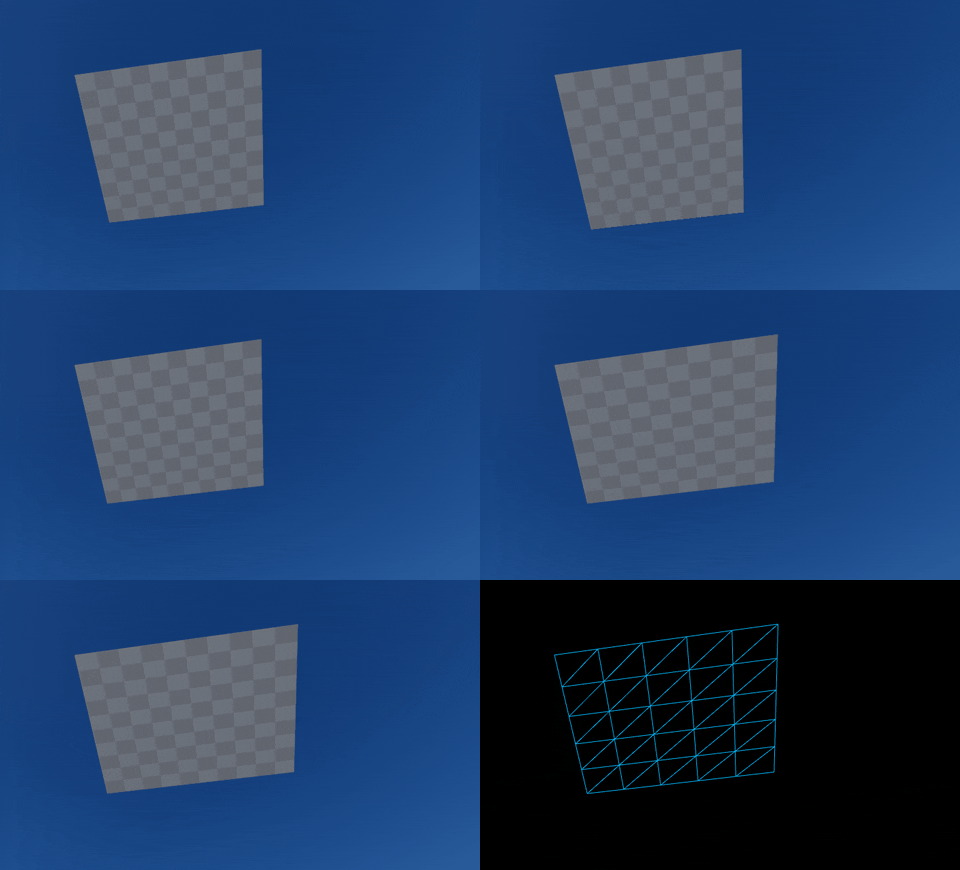
When ever i try to rise the factor above 0 or less than -0.1, it goes all clongy in the uvs
For some reason, when increasing density, the UVS doesnt grow and stays the same, even tough they are used in the UVS calculation for UVS array
spark steppe
why do you want to change the UV?
if you want to scale the material, you should do that probably inside of the material
maiden wadi
Might be trying to make something like the geometry BSP stuff but at runtime. I've never messed with UVs, but I'd assume that they scale. IE, setting a mesh with a length of 100 with a length UV of 1 would be normal. But to get that same tiling UV on a mesh of length 150, the UV would need to be 1.5
 teal burrow
When you're adding the UV structs, multiply them by whatever your panning wants to be
 upper linden
@pastel rivet nice man, i wanna do that too, do you have a tutorial ?
or any guidance on where to start to learn that ?
spark steppe
is there any reference of what gets initialized first when the game starts?
upper linden
what do you need from that ?
spark steppe
well, my hud seems to be not initialized when my character is
both do the things they suppose to do in BeginPlay Event
so, the HUD could notify the character when its ready, but can i be sure that the character is always ready before the HUD? 🤔
upper linden
when you say "hud not initialized", do you mean invisible ?
maiden wadi
There is no promise that any beginplay fires before another at map load.
upper linden
you can initialize the hud in you characterBP-> begin play event
pastel rivet
@spark steppe
I can this within the material ofc.. thanks haha, totalt forgot about the UV node there
@maiden wadi thanks!
spark steppe
@pastel rivet theres also a tiling node iirc, which should suit better
maiden wadi
@spark steppe Are you trying to add a widget to screen at the start of game based on the character?
upper linden
maiden wadi
@upper linden HUD class, not hud userwidget.
upper linden
i dont understand what you're saying
pastel rivet
@upper linden
Well this is just me with my experience setting togheter a method for creating vertices and triangles into an array for create procedural mesh node.
I can maybe at some point put togheter a tutorial on how to set this up!
I'm going to use it for customizing screen layouts, so I still have a challenge of bending this mesh as well
spark steppe
no, the problem is my character grabs the cameraController, sets it to the preferred mode and if its 3rd person it will try to enable the crosshair on the HUD
upper linden
good luck, i'd appreciate anything you'd throw my way, haha @pastel rivet
spark steppe
so character init => camera possessed => toggle Crosshair => hud not ready => call to null
maiden wadi
@spark steppe CharacterInit is Beginplay?
upper linden
ah ok, i thought you were talking 'bout a main HUD on screen
spark steppe
yes
i've now tried to move the camera init in the onPosssessed event, but its the same problem
maiden wadi
HUD class is definitely valid at character's beginplay. It should be created before GameMode calls the first BeginPlay. You're certain you've set the correct hud in the GameMode, GameMode is correct for the map, and that you're casting to the right HUD?
 proud hull
@pastel rivet have you tried using the runtime mesh plugin? I am using procedural meshes to create limbs from skeletal meshes, but was told a runtime mesh would be much more efficient (need to get it to compile for 4.26 though).
spark steppe
the widget that i create in the HUDs onBeginPlay isn't ready, the HUD itself actually is
so onBeginPlay in the HUD is executed later than in the character
maiden wadi
Ohhh. Yeah, no. Beginplays cannot be relied upon to be in order. Cause at start of game, GameMode fires them off randomly for every actor.
You're better off having the Character's Beginplay call an event in the hud that creates the widget and adds it. That's why I set mine up the way I do.
pastel rivet
@proud hull
Is that useable in game?
maiden wadi
What's wrong with it? All it's doing is allowing the character to tell the HUD that it's ready for it's Widget to be displayed.
proud hull
@pastel rivet yeah, lol, it is called "runtime" mesh. 😁
pastel rivet
@proud hull
You got a link?
@proud hull
Is it called Runtime Mesh Component Community?
spark steppe
well ok, it's better than my solution for sure
proud hull
Unreal Engine
Component for rendering procedurally generated meshes!
GitHub
Unreal Engine 4 plugin component for rendering runtime generated content. - TriAxis-Games/RuntimeMeshComponent
Basically has all the same properties and functions of a procedural mesh, but much more efficient I am told.
pastel rivet
Have to try it out, curious if you accualty can choose from where the mesh is created (pivjot) since this is very important
upper linden
can i use this to create a random generated dungeon/building/station ?
proud hull
@upper linden runtime mesh component? You can technically make random generated stuff in just blueprints using any number of pre-created meshes. RMC is to create the mesh from nothing (or copy another mesh if you want).
spark steppe
funny enough, this works in onBeginPlay, but not in the Possessed event
i would have expected the controller to be ready before it can possess something
proud hull
@upper linden RMC has been used in procedurally generated projects though. One example is a project that was used to generate a city from a heightmap. The buildings are created with RMC.
upper linden
i see, i'll learn to use it
proud hull
Unreal Engine Forums
Already posted this on reddit and got a good response there so I'm sharing my procedural cities project here for free as well, including source and the thesis that
That is the city example.
upper linden
i'll check it out
i wanna generate stations interiors randomly
but you're right i can use modular components
maiden wadi
@spark steppe Consider something as simple as this. You can call this from the character with a Self reference for InCharacter. It'll make sure it never doubles up on screen, and if the reference is wrong, it'll just remove itself as well. You could possibly add in a check for if GetPlayerCharacter0 is valid, then use it instead, or whatever.
Right being the hud function you'd call from the character, left being the widget itself.
spark steppe
thats pretty much what i got now, thanks
last walrus
if I use "set visibility" node - component will be physical and collidable or it will just disappear leaving only it's reference on scene?
 earnest tangle
I'm using a Widget Interaction component, and sometimes when interacting with world widgets with the mouse cursor, the mouse1 events stop coming through correctly. The "Pressed" event never happens, with only the "Released" event - you have to doubleclick in order to get the pressed to register
Anyone know what could be the problem here? It feels like something along the input handling chain is eating the mouse event, but none of my own actors have anything that would handle it
 worthy frost
changing visibility does not change its collisions
last walrus
worthy frost
changing visibility does not change its collisions
so... to set object invisible and not collidable I must use 2 nodes?
or there's a way to do so with 1 node?
maiden wadi
You could make a function that calls both. Then it's one node. XD
last walrus
in my language we call methods like this "crutches"
but it seems like it's the only way
earnest tangle
I mean creating functions is literally the way to do it in programming if you want to do a complex thing with less code
It's not really a crutch :P
last walrus
hmmm
but I can give an example
there are nodes "set relative location" and "set relative rotation"
and also they 2 in "set relative location and rotation (or rotation and location I cant remember)"
earnest tangle
yeah, the the "set location and rotation" is basically a function which does the two separate tasks in one
last walrus
🤔
maiden wadi
Yeah. You're free to look at the C++ code. SetLocationAndRotation just calls both of those functions in turn.
earnest tangle
they actually both call MoveComponent
SetLocation simply provides the rotation as the current rotation of the object
SetLocationAndRotation uses the input parameter
(I just checked because I was curious)
maiden wadi
Either way, wrappers are common and should be used. They're not crutches, they're organization and simplification.
earnest tangle
yeah
maiden wadi
If you want to do multiple things in multiple places, and don't want to call those multiple things in multiple places, make a wrapper that does those multiple things and just call the one wrapper.
 ornate cairn
Hey I want to create a dialogue system based on json
is that possible?
I'm going to try to recreate DDLC in its entirety in VR, and it's incredibly dialogue-heavy, so if it could just read the original dialogue from JSON, it would be much more efficient
earnest tangle
Sure, you'd probably need C++ to read it though as I'm not sure if the file reading stuff is available in BP's
maiden wadi
I remember reading somewhere something about importing JSON files as a datatable?
earnest tangle
Oh yeah that might also be possible, if it works that might be a fairly good way to go about it
 odd ember
I mean if you can output JSON to csv. then yeah
 swift mauve
Hey all - quick question. Is there a way I can "sort" the "click" priority of objects in the editor? I've attached an image below as an example - I'd like to be able to select the items within the blue volume while the editor camera is outside of it, but currently I have to fly within the volume to select them, since if I'm outside, it simply selects the entire volume. It is setup as a cube that matches the outer collision volumes 3d scale, and the blue (or red either) isn't rendered while ingame (simply using it for editor utilities to visualize a collision volume easier). Maybe I'm missing something, or maybe there's a better way to set this sort of thing up?
Not sure if this would have been better in editor-scripting channel or here, but these volumes/actors are setup as blueprints
Like, I suppose it's easy enough to turn off transparent selection. But a bit annoying I suppose
 pulsar moss
Are there known quirks with setting entire Maps/Dicts in BP? I tried setting a whole Map var directly but the values don't seem to update. It's a map of Name:Struct
nvm It's some other bug 😐
swift mauve
@pulsar moss that largely depends on how you're updating the struct values, you may want to provide an image of your implementation
 steady apex
What's a good way to do branching dialogue logic in UE? I've cobbled something together using behavior trees, but it's kind of lacking in that the tree is required to be an actual acyclic graph, as opposed to most branching dialogues 😅
I'd love to just use Blueprints to do it, yielding the appropriate dialogue line with some kind of latent node 🤔
 faint pasture
@steady apex you can easily do it in bp. You need to figure out which type of data structure you want to represent the dialogue tree.
steady apex
You misunderstand, I wanted to represent the tree in BP. Hence the usage of latent nodes
UE4 doesn't seem to have a very good support for coroutines, sadly.
faint pasture
@steady apex what do you mean by represented in bp?
steady apex
I mean representing the actual structure of the dialog with the actual structure with the BP.
faint pasture
Oh I gotcha. I think it should be possible, you might just have to write your own wait for response latent node
steady apex
That's what I've been planning on 😁 Hence the last past of my post
I just can't find a decent documentation on latent nodes 😅
faint pasture
It actually might be fully possible in BP only.
steady apex
I'll have to dive deeper into the C++ side of things I guess!
Oh really? I didn't think you could create latent nodes using BP
faint pasture
It'd be a bit of a workaround but you could have the main tree structure call out to "Event Set Response Options" and then have "Event Response Option Selected" call back in
maiden wadi
How is the dialogue data structured?
steady apex
I've got that far, but then failed to figure out how to make an anonymous event inside a macro so I could make this nice and tidy
faint pasture
@maiden wadi he's talking structuring it as a hand built blueprint.
using an actual data structure would be better but I suppose if you have to actually lay out your dialogue and visualize it somewhere, might as well do it in BP
maiden wadi
I mean if we're talking about something as simple as like DragonAge dialogue with choices, make a datatable, and in each table struct, have an integer for an ID to each line. You can add subtitles, and sound all at the same place, and then an array of integers, this array being the choices you can select after each dialogue.
steady apex
Were I making a larger project, I'd definitely make a proper system and import dialogs from a tool like Yarn
maiden wadi
Make a widget that can process it and bam, ya done.
steady apex
But I'm just making a very simple school project and I want to be able to iterate it quickly without using much more external tools
faint pasture
@maiden wadi yeah that's how you do it, but if it's a big enough conversation, somewhere along the line, you have to have a tool where you can visualize the flow.
steady apex
Not to mention that using BPs makes it very easy to check in-world conditions and script other events
faint pasture
He's just basically rolling the tool and the data into one
It's hacky but it'll work.
maiden wadi
Hmm. Fair enough. I think I'm too used to following logic patterns after this last year that I don't even consider that anymore. >.<
steady apex
Actually, I might have an idea, I'll go try it out and see how it works out
Ah, I'd have to dip into c++ anyways to get a node which can accept delegates
 dusky yacht
Does anyone know hot to reference a variable from a widget blueprint to a level blueprint? I'm trying with Cast to in the level blueprint but I don't know what to put in the Object slot
maiden wadi
Classes are not supposed to communicate with the level blueprint usually.
odd ember
@dusky yacht you need to create a widget instance
and it's not entirely correct that the level blueprint doesn't communicate with classes. it's a manager so it manages class delegates, and quite effectively
and you can put in any actor in level as a variable in the level blueprint
dusky yacht
thank u guys
steady apex
What use would the level blueprint be if it didn't communicate with actors? 🤔
maiden wadi
To do things specific to that level and not tie actors to a specific level.
steady apex
I'd say there's a great deal of wiggle room between "communication" and "tying to a specific level"
odd ember
or alternatively spawned actors
the best thing about the level blueprint is its ability to take delegates and present them as events
making object interaction hookups effortless
e.g. you want a button to open a specific door? level blueprint got you covered
even in much more complex instances
steady apex
I load sublevels based on the selected floor in my elevator 🙂
odd ember
I've done tons of things like AI specific patrol changes etc. using level blueprints and player and AI interaction
steady apex
I'm still trying to figure out how to emulate continuations in blueprints using events
I'd basically need to jump to any of a number of nodes in the graph
Is there any way to react to the event created with Create Event? (e.g. make an anonymous delegate)
 small ridge
What gets called after "restart game" is called from the game mode?
odd ember
steady apex
Is there any way to react to the event created with Create Event? (e.g. make an ...
not in BP
but you could probably find a way to expose that functionality to BP
but yeah anonymous delegates would be amazeballs
steady apex
Ah well
steady apex
Is there any way to do inheritance / polymorphism on Structs created in the editor?
 desert juniper
I want to spawn items in the player's hands.
I've set up a socket as well as a static mesh component on the hands
Although I can get the socket name from the mesh, there doesn't seem to be a way of setting the item's parent socket when using BPs
faint pasture
@desert juniper Spawn then attach
@desert juniper
If your sockets are set up right and your actors are as well, you can just snap to target and it'll work beautifully
desert juniper
Thanks @faint pasture Let me give that a shot
Alright, I don't think I'm approaching this quite correctly
It does spawn the actor, but it doesn't seem to attach itself to the correctly. It is just a child of the player in the world outliner
however the satic mesh is still not populated. I'm assuming now that I don't actually need to have a blank static mesh component on the arms, instead I just attach the actor to the arms mesh?
yup that did it.
odd ember
steady apex
Is there any way to do inheritance / polymorphism on Structs created in the edit...
only in cpp sadly
steady apex
Balls
So I started redoing the dialogue system using structs / datatables, but now it seems like I can't get the Nth row of a datatable without getting the Nth row name (AND I have row names), indicating to me I'm probably using the wrong thing
Is there anything like the datatable that's JUST a list of values?
(other than a struct with just an array in it, which won't have an editing UI / search efficiently I presume)
desert juniper
got it. thanks @faint pasture
 crystal kettle
@steady apex what are you trying to do, get a row from a data table by index instead of name?
steady apex
I'm trying to make a dialogue system, meaning I have to jump through a table representing the dialogue
crystal kettle
So what's the problem with getting rows from a data table by name?
I think data tables would be fine for dialogue
Though it does depend on how simple/complex your dialog system is
steady apex
How exactly would I get "the next line" by name? I have to increment the index.
I resorted to just finding the name by index for now
I'll rewrite it in C++ eventually anyways 🙂
crystal kettle
Do you have a data table per npc with all that npcs dialog or one large data table with every npcs dialog?
steady apex
One table per dialog
crystal kettle
Ok, and you assign a data table to your npc's (so they can share dialogue?)
steady apex
yep
Well, I don't have NPCs, but for the sake of the discussion yeah
One thing that kinda bothers me is that I can't type the datatable (so that I can use ANY datatable object in the dialog property)
crystal kettle
If you have a data table property then you should be able to select any datatable?
or do you want to limit it to data tables of a particular struct?
 proud surge
Is there any way to change the game mode blueprint of the level during gameplay?
crystal kettle
You could use a data asset instead of a data table
@proud surge no, not without opening a new level
proud surge
ok, thank you
 next kite
Hey guys, I just to need ask a quick question. What do I cast from "BP_Speed_CHeck" to?
 tacit canopy
what exactly is it? if its a component on your player character you can get it from your first cast, if its in the scene with this object you can set a reference that way too, need to grab it from where it is if that makes sense
tacit canopy
hmm tbh im pretty novice so this might not be the way to do it, but currently the only cast from my main hud is to the player character, so if I were doing what you were doing Id maybe make that blueprint an actor component on your level or character and access it through that class as a middle man
but someone else may have a better way
next kite
that's actually what i was thinking to do
but, the actor itself, is for lack of better word complex enough that id rather have them as seperate classes
ya know?
as i've got a checkpoint actor which counts the checkpoints, laps etc
tacit canopy
yea absolutely
surely there must be a better way than using Get all actors of class as well, seems like player character would be better choice than that
google says to use an interface for it but thats another one I'm just scratching the surface of
faint pasture
@steady apex you should make a struck representing a chunk of dialogue, and it's responses.
faint pasture
@steady apex your master dialogue table should have each row represent an entire node in the dialog tree.
steady apex
It does. I'm not sure how it relates to what I posted?
I still need to jump around.
Dialog "trees" don't even tend to be directed acyclic graphs
 red bough
Hello, so I have two door blueprints in my scene, when I copy one of them, the newest one is only functional, is there any fix for that? consume input is disabled
steady apex
@red bough Can you post the BP with the functionality? 🙂
faint pasture
I would put these in the dialogue struct:
Dialogue Text
Dialogue Responses Array
Responses Next Dialogue Name/index
steady apex
@faint pasture Again, you are describing exactly what I have.
I was talking about indexing DataTables with row indices 🙂
faint pasture
At runtime you can just get all names and slam them in a an array and use an index to look up the names.
steady apex
steady apex
I resorted to just finding the name by index for now
I did.
faint pasture
@red bough that's totally fucky. Each door sets itself as the door reference on the character. So whichever one runs last is going to be the reference door
faint pasture
You need to do it like this.
Open door input pressed.
Character somehow gets closest door. Million ways to do this.
Character calls activate or open on that door.
Door has no need to even know what a character is.
steady apex
There also seems to be some discrepancy between the "Door Target" and "Door Ref" variable
The latter is getting set in the line trace
red bough
actually
steady apex
I'm not sure what the BeginPlay event is supposed to be doing
red bough
I don't think I need door ref
@steady apex just letting player know what door is
it's from BP_Door
faint pasture
@red bough if you want to just open the door that gets hit by some line trace or something, just take out put a line trace, cast the actor to door to see if it's a door, if it's a door, call open on it
faint pasture
What's the desired result, pressing a button to open a door that you're looking at?
red bough
yeah, the door is opened by dragging mouse
next kite
Sorry it just got back
faint pasture
Wait what
steady apex
God damn -- I just spent 15 minutes debugging a bug caused by Data Tables being FRICKING 1 INDEXED
faint pasture
Like you're physically dragging to open? Like how VR would do it?
red bough
no
just setting relative rotation
I tried to do it physically but my model doesn't fit the frame perfectly
faint pasture
@red bough so you click down, and then moving the mouse rotates the door, and then releasing the button goes back to regular behavior?
faint pasture
Aight so you should do nothing on the door on begin play, set no references etc
faint pasture
Yeah that's all totally gross.
red bough
okay, deleted
faint pasture
When you click down or whatever and do your line trace, cast the hit actor to door, if it's door, set door ref
next kite
hey there guys
faint pasture
Also set bHasDoor or whatever if you're using a boolean
next kite
@faint pasture would u be able to help me with the small issue above?
steady apex
Your trace is setting Door Ref and your movement is manipulating Door Target
steady apex
steady apex
There also seems to be some discrepancy between the "Door Target" and "Door Ref"...
☝️
red bough
yeah
faint pasture
@red bough what input opens the door? Do you move a mouse left to right or walk or what?
red bough
@faint pasture left mouse button
functionality is fine
but I just need every door to be separated as one thing
so one door doesn't open another one
steady apex
I was referencing the old screenshot, seems you already fixed it 🙂
faint pasture
@red bough that doesn't make any sense. Is opening the door firing off an event and the door opens over time or are you able to manually open and close the door.
faint pasture
Okay so the mouse x or y is what actually controls the door rotation
red bough
OKAY!
YESSS
it's fixed
BeginPlay in the BP_Door was the problem
@faint pasture god bless you man
desert juniper
am I opening meself up to trouble by setting the ItemToAdd var before the server the event?
or am I better off setting it in the server event?
faint pasture
@desert juniper why is that even a reference.
State should exist on the server and he replicated
desert juniper
how else am I going to pass the item data to the inventory?
faint pasture
@desert juniper as a parameter in the event
desert juniper
so this basically?
I'm just trying to promote the item to add as a variable to keep the BP clean
 celest oar
is there any node that adds a member at tthe BEGINING of an array instead of the end?
faint pasture
@desert juniper yeah but it should be run on server from client.
You do not need to multicast anything. You should just replicate the data and use rep notify if things need to happen when the data changes
desert juniper
let me research rep notify. in the meantime, is this what you mean by running on the server by the client?
(run on server + reliable)
faint pasture
Yup
Then the server can do all the thinking about if there's space and all that stuff and then if it things it should go ahead, it just changes some replicated variable and everybody else will automagically see the servers version of things
desert juniper
ah i think I understand. I think in my case what I need set to rep notify is my CurrentWeight variable then
im assuming that just having it set to rep notify should be enough for it to auto change on the relevant clients?
faint pasture
@desert juniper if something is replicated it will automatically change when changed on the server.
@desert juniper rep notified just gives you a function that can run every time it changes, to update other things that might not be replicated or to play sounds or whatever.
desert juniper
Alright thanks, makes sense. But i'm not quite sure what exactly broke here then
Both of these events to run on the server/reliable however it doesn't seem to have any effect when playing as client
Which runs this event in the inventory component class
it works fine when playing as server, just not as the client
The player object is set to
 low forge
I created an actor that Mesh is damaged by suffering damage.
for example, I have a fence on the Level and I broke it, but when I leave and come back, the fence is still broken, how can I fix it when it's out of my sight?
desert juniper
nvm. my pitch wasn't being replicated, so I was never technically looking at the item according to the server
3rd person models now suffer but I'm guessing that's to be expected 🤣
 sly parrot
Would someone more experienced mind sharing a hint on what to do in this situation?
earnest tangle
Tbh it's probably gonna be easiest to just make it an actor
odd ember
@sly parrot are you acquainted with polymorphism?
sly parrot
I don't think I've ever wrapped my head around it, no
odd ember
well that's what that thing is trying to show you
it's a hierarchy
anyway it has to be an actor due to how UE4 works. if something in the hierarchy needs to be an actor
then the entire hierarchy needs to inherit from actor
or a subclass of actor
sly parrot
OK, so there is not a more elegant way, thanks!
odd ember
I'm wondering if the person who wrote that diagram actually understands that
sly parrot
Understands what?
sly parrot
I made the diagram, and I understand now
odd ember
yeah okay
makes sense then
but
there are other ways to do things than using a hierarchy
e.g. using components
it entirely depends on your use cases
I used to do interaction as a hierarchy but I switched over to doing it with components instead
and it becomes much more versatile
sly parrot
Are you referring to actor components?
odd ember
yeah
well any component really
actor components are a subclass of UComponent
the way you can add them onto an actor to ignore stuff like hierarchy is pretty powerful
sly parrot
OK, I'll look into components online
earnest tangle
I like the flexibility of components and interfaces
But I hate the fact they require more boilerplate than inheritance
lol
odd ember
components dont really
interfaces do
one reason why I tend not to use them if I can avoid it
earnest tangle
Yeah I guess with components you can just do get component of type and it either returns something useful or it doesn't
and the implementation side is more straightforward as well yeah
odd ember
I mean you can just call the component directly if you put it on an actor?
earnest tangle
yeah I mean internally within the actor yeah but if you wanted to use it to expose some shared logic then you'd need to grab it somehow first
odd ember
not sure what you mean
I'd just slap it on an actor and hook it into the actor
or sometimes no hook in is necessary
earnest tangle
I'm trying to think of a good example but not sure lol
odd ember
in the case of interaction you just hook up the actor to respond to the interaction component delegate
and that's it
earnest tangle
Ah so in that case you'd have the component message the actor when an interaction occurs?
odd ember
exactly
earnest tangle
How would you trigger it in the component in the first place though?
odd ember
in my case I'm using a class derived from one of the collision UComponents
earnest tangle
Ah, interesting
proud hull
Very similar to how I do interaction. Have an interaction component that is added to actors that can interact with anything that is implementing interactable interface. Component has the logic to test for interactables (line trace in my case) which then checks if the hit actor is implementing the interactable interface, if it is, call the interact event. Pretty straight-forward.
earnest tangle
I just have a regular line trace and interface call for that atm
proud hull
Same thing as me, except the logic for line trace is in a component.
earnest tangle
might need to redo the items handling at some point tbh because I have a number of other things you can do like pick up, drop, interact with different parts of the item, and inspect the item
odd ember
I mean it depends on what your interaction types are
earnest tangle
since all of that is via their specific interfaces depending on what you can do with the object in question it's a bit cumbersome to implement for new objects
proud hull
Well, many ways to do interaction, hehe.
odd ember
I have 3 different hierarchies that I have to deal with
earnest tangle
pickup and drop pretty much requires the same boilerplate for everything (turn off physics and collision when picked up, turn back on when dropped)
odd ember
characters, static interactions, dynamic interactions
proud hull
Another project I use overlap events for interaction. Since I need icons to display above the object being interacted with, overlap was the best route to take. Can have the overlap show the icon and get the interactable reference.
odd ember
yeah pretty much
overlap also means that you've caught the PC and can request input
imo it's the cleaner way of doing things
but traces are cheaper
earnest tangle
I also have some widget components you can interact with on my objects but tbh they're kind of a pain because the text rendering is so bad with TAA
 frigid ether
I'm trying to get the hit results from the LineTrace ignore my character, I've tried this but it doesn't work
odd ember
you probably need a custom channel
but check where your traces hit
maybe they're not where you think they are
also you probably want complex traces
since you wanna hit meshes and not collision
frigid ether
I've checked what the traces are hitting, and it is hitting the model
It's a part of a movement system so I need it to be able to collide with a bunch of things, but it's trying to climb up it's own model
odd ember
well tbh I'd just set up a custom channel that ignores pawn
and only hits objects that you want it to hit
in case you need hooks to placed in world
faint pasture
@frigid ether Another good side effect of custom channels is it's really easy to just add "climbability" or whatever to something.
 thorny marsh
Ty
 pale blade
Anyone here use Widget Reflector to scale up/down the UE Editor?
 dense mica
Anyone knows how can I understand my input vector is pointing my characters backwards or forward?
I need to play an root motion animation with select
trim matrix
@dense mica what does get forward vector give u?
maybe u can use that value, i dunnoe
just a thought
dense mica
I was thinking to use "Get Last Pending Input Vector" and use "Get Forward Vector" together but I actually stuck at math
Google says dot product etc. but I dont know how to work with them 😅
trim matrix
are u using any locomotion system? or made one ur self from the ground up?
cuz im using Advance locomotion system from the market place
and they got the vector ( in a form of arrow) all the time
dense mica
I am not using any locomotion system, I just use AnimStarterPack for movement anims and some root motion dash/roll animations
But.. I can look at the advanced locomotion system to how they did that arrow actually. Thanks for that
Its the same math in the end
trim matrix
Hmmmm well if u are not using them, maybe just do dot product
what are u trying to figure out again? the direction of ur character?
dense mica
Let say I am looking forward and pressing S
trim matrix
what dot product does as far as i know is calculate the value between 2 vectors
dense mica
I want to play an roll animation towards to backwards
trim matrix
well since i assumed u will be using keyboard (only?) why dont u make a variable to check if the character is pressing W or S?
actually that's not a good solution, i will try to dig some stuff
dense mica
I dont think its a good practice and I am using top-down camera so W or S not always pointing forward or backwards
trim matrix
yeah for sure
@dense mica https://www.youtube.com/watch?v=3uoltzSC0F0&ab_channel=RyanLaleyGames
Get forward vector will give u value between -1 to 1
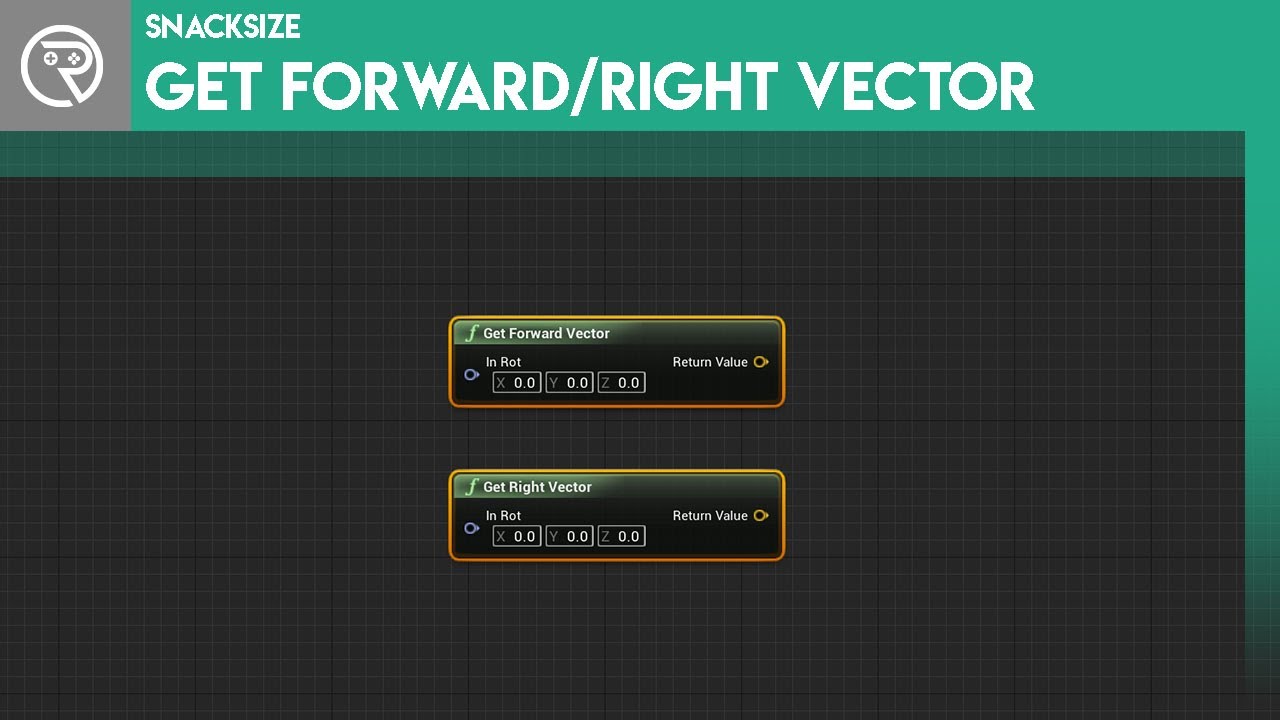
For those completely new to Unreal, follow these short explanation videos to get a better grasp of blueprints and making games. This episode we take a look at the get forward vector and the get right vector; what they mean and how are they used.
Support me on Patreon and get access to videos early, join our developer community on Discord, get e...
Try to do it for your character and see what kind of values it return.
If the value returns 0.1 to 1 for forward and -0.1 to -1 for backward then u can work with those values to select which roll animation to play
I suppose u only need the X
Oh man scrap them nvm
dense mica
I did this, but sometimes it gives higher values than 1 or -1

I cant upload as GIF directly because of the size, sorry
trim matrix
You might have to normalized it, im not sure 😦
im also suck at math
well dude u are doing top down right?
how do u want the roll animation to play?
when u click on a point?
dense mica
With InputAction (when you press space it makes the math and selects animation), but normalizing solved the problem i guess
trim matrix
So a key is pressed but how does it know where it should roll
I guess it's not point to click but wasd movement
dense mica
0,75 to 1 is forward
0.5 to 0.75 is forward left
0.25 0.5 forward right
Like this
I am checking for inRange(float)
trim matrix
I c
yea try normalizing the vector, see what that gives u
the way I see it, u need to do something with 2 vectors (the direction of where u going and the forward vector of the character
trim matrix
looks like u are on the right track, it's just i never use last input vector so I can;'t comment on that
is it?
or do u have to normalize after the dot product
well what ever works I guess, I just work on my stuff with trial and error
it's hard to get help online 🙂
dense mica
trim matrix
or do u have to normalize after the dot product
Nope, dot product alone is enough as far as I can see
 keen atlas
Hello guys.
There's a problem that whenever I make a new blueprint, first time that I open it, it's fine and the bp editor opens and everything's in the right order of it but then when I close the bp editor and I open any instances of blueprints the editor shows me nothing, does anyone have any ideas?
This is what I see when I open any Bps for the second time.
 tight schooner
🤔
if you open the "Window" menu and click stuff
does anything happen?
otherwise no idea
did you enable/install any editor plugins? I'm just stabbing in the dark here
keen atlas
Sorry for the late answer, yea when I for example enable class defaults from window, the class default variables and stuff (the right side bar of the bp editor) shows up and it says You can open the full bp editor and then I have to click on it to open the bp editor. it seems like that the default settings of opening files may have been changed
Here i have to click on the OpenFullBluePrintEditor to open it in the actual editor
tight schooner
well, aside from the Class Defaults panel not being shown by default
that's actually normal behavior
it shows you a "data only BP" editor
until you add nodes to the graph
then it becomes a full-blown BP
tight schooner
yeah, I think it opens like that when you just make it. I don't have a fine sense of the behavior
but if you don't touch the graph and re-open it, it'll show a data-only BP view
keen atlas
Aha
tight schooner
Sometimes you want a subclass that is virtually the same as the parent but with some defaults changed. They call that a data-only BP and it's a normal thing to do. Epic says they use data-only BPs heavily in Fortnite.
keen atlas
Got it, tysm
trim matrix
@tawny tinsel there is mp4
Rotating block around normal goes crazy after rotating full actor and thats not what i want to happen.
I want everything to work like at beginning no matter what rotation of the actor is
 tawny tinsel
it looks like its using camera angle to rotate
im not very sure how and why just try to reread all the code that influences this
trim matrix
this is code of rotation
impact normal comes from hit results.
I have been trying to solve this 6 hours now, but no progress. Always problems come
 frank quest
Hey folks, I was looking to see if I could get any advice with my task;
I'm making a kinda ghost game where you can shoot the ghosts but I really want some kind of system where the part of the ghost that is shot decreases in opacity, kinda like a decal opacity mask (?) - could anyone help point me in the right direction for this?
tawny tinsel
material instances mmight help you
dense mica
Whats the blueprint alternative of the UnwindDegrees in C++?
I need to get angles between two vectors
 velvet nest
trim matrix
trim matrix
velvet nest
trim matrix
trim matrix
How to add offset to grid.
maiden wadi
@velvet nest Use DoesSaveGameExist before loading it and branch off of the returned bool. Print on the false. If it doesn't print, then the SaveGame at that slot isn't of type PlayerSave.
maiden wadi
Plug the PlayerSettingSave string into the SlotName on DoesSaveGameExist.
Is it still printing false?
 sonic pine
Hiho is that ok like that or are the return Values not importent?
Can i work like that or need every State his own funktion?
maiden wadi
@velvet nest Then you have no save game at that slot. You have to create one.
velvet nest
save then load?
maiden wadi
@sonic pine Return values are only important if you want them to be. Since you're setting the stuff in the function, you probably don't need to return them unless you're using those values on the other side of where you're calling that function.
sonic pine
i need them to return to the progressbar
maiden wadi
@velvet nest Well, I assume you're trying to get some values from a client to send to a server. According to this, that client has no savegame to send to the server. So you either need to create a save on that client then call this. Or if you want to create a new set of settings if there's no save, call something different if the savegame doesn't exist instead of trying to load it.
@sonic pine Aren't you setting the progressbar in that function though?
I mean the ReturnNode. It's likely not necessary to return the three percentage floats unless you're using them for something else on the other side of where Update is being called from. Because that function itself is setting the progressbars.
sonic pine
ah ok
maiden wadi
If I understand that correctly, he's saying that the server has the savegame. You're trying to load it on the client. The LoadGameFromSlot needs to happen after the ServerRPC.
 toxic socket
Can anyone recommend some books/videos on programming theory?
velvet nest
@maiden wadi what is serverRPC?
maiden wadi
Something that you really should know if you're trying to make a multiplayer game. https://docs.unrealengine.com/en-US/Gameplay/Networking/Actors/RPCs/index.html
sonic pine
@maiden wadi Thank you 😉
maiden wadi
Read through that link, it's a pretty good and brief resource on the subject.
@toxic socket Hard to say honestly. I'm a non academic, so books weren't really a learning resource for me. Programming theory can differ a lot based on the environment and setting. I assume that you're looking for something very UE4 related though?
 little cosmos
Is there a way to make a BP or something that deletes all meshes that exist inside a volume?
red bough
@trim matrix I can't help that much, I'm just a newbie, but apparently something screws up after rotating the cube, that might be the case
maiden wadi
@little cosmos Depends. Do the meshes need to be entirely inside of the volume or just touching?
little cosmos
Just touching
velvet nest
@maiden wadi Can you walk me through it?
maiden wadi
Easiest method is likely just to create a blueprint with a volume in it. And when you want to delete the meshes, get the volume, get overlappingcomponents, if component == StaticMesh, destroy component.
little cosmos
I'll try that thanks!
maiden wadi
@velvet nest I don't know if I'm understanding your friend very well, but if I am, just move the load game from slot to the other side of the ServerRPC.
velvet nest
which node is serverrpc?
little cosmos
@maiden wadi I've been told in #ue4-general that it's fairly complicated. What do you think about the guy's suggestion?
maiden wadi
First question would be do you mean at design or runtime?
little cosmos
design time
I want to quickly delete meshes from inside buildings I have
from editor
maiden wadi
I haven't done a lot of blueprint utility stuff, but I doubt it's much different, let me check really quickly.
 dim robin
anyone good with maths? I'm trying to make an AI for a physics pawn, a ball. Since this ball has to be shot around a track I was thinking to use some targets to get the right path. I would like to find a good "shot velocity" for the ball for each shot compared to the ball position and the next target position.
Right now im getting ball location, getting next target location, finding the unit direction and multiplying it by some range projectile formulas that I hope I wrote in the good way. I'm pretty satisfied with the result, but still not super precise. Any suggestion?
little cosmos
@maiden wadi Appreciated
maiden wadi
@little cosmos So, part of the problem is the setup. Are you talking about literally deleting static meshes off of buildings, and the buildings are a blueprint with a bunch of static meshes?
little cosmos
The buildings are not BP
dim robin
dim robin
anyone good with maths? I'm trying to make an AI for a physics pawn, a ball. Sin...
right now I'm doing like this
little cosmos
They're just made of a lot of meshes that came in via Datasmith
And I wanna delete the insides
maiden wadi
So they're just meshes placed in the editor?
little cosmos
Yes
maiden wadi
Are the insides a part of the placed mesh?
tight schooner
you could do a BoxOverlapsActors node in that case, I think
maiden wadi
You just drag a static mesh from the content browser to the level and it's a building and the insides?
little cosmos
No
It's imported with Datasmith
Bottom line it's all different meshes
Not a single fbx
Trust me I know why I want that functionality
maiden wadi
Okay. That might be workable. Wanted to make sure you weren't trying to alter a class default or change a literal mesh.
little cosmos
yeah cool
maiden wadi
@little cosmos I haven't imported stuff with Datasmith, so I'm unfamiliar of the hierarchy. How does your level outliner look? Are the insides a different StaticMeshActor than the outsides?
maiden wadi
@little cosmos Best I think I can come up with is likely just a box you could move through the editor with the translation tool. Add the meshes to an array, and if the box overlaps a component with that mesh, it'll delete the actor that the mesh is a part of.
Blueprint Utilities are kind of fun. Might have to look more into them for some level design.
trim matrix
How would I go about getting the center of the screen and spawn a linetracebychannel forward?
maiden wadi
@trim matrix In game?
There are a couple of different methods. If it's within an actor where the camera resides, you just get the camera's location, use that as the start. GetIt's forward vector and multiply that by the desired distance, and then add that to the camera location for the end point.
trim matrix
Ohh right thanks
 high frost
Hi, what is the best approach to save level states? Currently I'm trying to save level states objects (inheriting Object) (i.e. has a key item been collected, etc) in my SaveGameObject, so I made an array of base level state classes (there are different types of levels) and when I'm saving the game I'm populating or updating the array with information about current level. I set every possible variable to be serialized on SaveGame. When I'm executing "Save game to slot" node, in the debug mode I can see that my array of level states has my latest variable, however when I'm deserializing it on "Load game from slot" the array in SaveGameObject holds N nullptr's (None), but it has all the other primitive variables and structs. So it actually kinda saves my level states yet it seems it fails to deserialize them on load. So what can I do about it? Is it even a valid approach to save level states like this in save file?
 fresh jolt
Morning all, i'm new to blueprint and just trying to get raycast to shoot forward from direction player is facing. I'm doign 3rd person and just booted up the default template. Not sure what im doing wrong here to get direction... Thanks!!
 twilit heath
you are basically tracing from somewhere within one unit of 0,0,0 to 0,0,0
@
@fresh jolt
maiden wadi
End point should be CapsuleLocation+(CapsuleForwardVector*Distance)
proud hull
@fresh jolt capsule component location = Start. capsule component location + (forward vector * measuring distance) = End
twilit heath
your start is your muzzle or whatever
fresh jolt
thank you!
twilit heath
your end has to be relative to the muzzle
so you add MuzzleLocation to MuzzleForwardVector multiplied by range
for End
if you don't you end up firing at or near the world origin all the time
fresh jolt
got it, it makes more sense. thank you three for the answer. Let me go give it a shot
maiden wadi
@high frost Are you saving actual pointers? Because you cannot save the pointers. Your objects data has to be saved in a way that a level or some sort of manager actor/object can set it back up on level load.
high frost
I am keeping an array of pointers, yes. I was hoping the saving system would serialize the data under them
I saw that structs are deserializing perfectly fine
maiden wadi
When you save a pointer, all it's saving is a small tiny tag that points to a memory location. So on load, you're telling it to point at that memory location, where nothing is, because it hasn't been created yet.
high frost
Ok I understand it now. So how should I keep this level states in save game? Is Keeping them in structs the only way?
Without custom serialization that is
maiden wadi
Depends on your data setup. If your levels are named, you could just save them to a map and lookup your data from a map. Could save them based on integers, etc.
high frost
Well yes I can think up some workarounds, I was just curious if my initial appoach with some inheritance could work
 worldly edge
hey ive made a billboard material and i have to rotate the plane its on by 90 degrees but that moves the z axis to where x was how would i make it rotate around a different axis ive tried a vector3 in the normalizedRotationAxis but that doesnt seem to work
is there any way i can add 90 to the y value in objectOrientation
or set the rotation i have the object at now as default
maiden wadi
Not exactly following what you're asking for.
worldly edge
i want this object to rotate on z axis but when i put a plane on the level its facing up like a floor and rotating it fixes that but the rotation point is wrong
trim matrix
Is there a way to change the rotation point of a springarm? I want to put it slightly behind the actor but when I do that it rotates around its own point rather than the actor's origin.
maiden wadi
@trim matrix Simplest method is to create a second component like a SceneComponent, attach the spring arm to it, and then offset the spring arm, and then only rotate the scene component when you want to rotate the spring arm around Yaw.
trim matrix
I was trying something like that, but couldn't get it working. I'll have another crack at it.
dense mica
Why could my anim montage is not playing? (its not about replication)
I set animbp already and skeleton is correct
trim matrix
Alright, got it working. Thanks for a push in the right direction @maiden wadi
maiden wadi
@dense mica Hard to say. I know when I was trying to do something like that the first time, I had a weird skeleton setting issue somewhere with the montage I was trying to use.
dense mica
Yeah you're correct it was about skeleton, I'm about to fix now
I made a typo on skeletons, because of thirdparty assets I have 23 other skeletons for default mannequin
But.. even they share same skeleton architecture they dont share animations
And animation retargeting doesnt allow me to migrate them
Do you know any solutions for migrating them?
maiden wadi
Not a clue. I'm a bit of a scrub with animations stuff beyond simple aim offsets or state programming in the animblueprint.
 ember veldt
Is there a way to have a set of blueprints that open, when the editor does? Preferably grouped into separate windows? Similar to how you can open editor windows that were open during the last session.
 pulsar mist
Hello, I had a quick question concerning enums. I'm working on taking my trading card game project and making a digital port for it, and currently I have a structure of booleans that hold what elements the card is. Would that be a suitable solution for that or would it be more ideal to use an array of enumerations?
ember veldt
An enum is just a byte with names attached to it. If you're doing something like a struct with 4 booleans, and you're doing a bunch of branches to make sense of them, you're better off using an enum and switches. @pulsar mist
pulsar mist
Would I just use an array for that enum? Some cards have multiple elements
ember veldt
That's effective
pulsar mist
Ok cool. I just did a test with it and that works way better! Still trying to learn more about UE4, so I appreciate the help
ember veldt
Anytime! glad it's working
upper linden
yo guys, how do i make variable groups ?
spark steppe
you can set the group in the variable details if you want to group them within blueprint
if you want to group them to one variable you have to make a struct
upper linden
like this
spark steppe
yea that what is usually "Default" in the variable details
2 below the highlighted one, "Category"
upper linden
how do i create more categories ? there' are only 3
spark steppe
you just type in the field...
upper linden
oh snap, thank you very much !!
 dusk talon
Hi, i have this event tick (in my picture), i can't figure out why , the Server pawn works perfectly ( when i jump the character will slowly fall down, because the pawn has a default gravity), but in the Client pawn, it keep "fly to the moon", with increasing acceleration, how can i fix it?
proud hull
@dusk talon what is your overall goal behind adding this upward force on tick? Do you simply want slower gravity?
dusk talon
@proud hull i want to make a grapling hook, it simply using add force with event tick, this is just a demo to separate my problem
dusk talon
@odd ember no, the server pawn works fine, only the client has like x2 the force, so it keep going up
odd ember
be that as it may, if that's your logic, it does what your logic intends
if you want it to stop accelerating maybe just do it once instead of on tick
or turn off tick at some point
proud hull
@dusk talon more than likely it is being called on both server (and then replicated to all clients) and on the individual client as well.
Add a has authority check or something similar to prevent the client from also calling add force.
dusk talon
@proud hull i try using switch has authority before the addforce node but not working
@odd ember but the addforce need to use with delta time to make sense, if it trigger once, i can use add impulse instead
dusk talon
if the force smaller than the gravity it wont leave the ground, but if the force big enough ( like x2 in my client pawn) it will leave the ground
proud hull
@dusk talon so if you set the force to 250 instead of 500, that will test your theory.
dusk talon
@proud hull ya i tested, if the force is 250 the pawn almost going up
if the force is high enough the client pawn will start moving up, while the server doesnt
proud hull
How about making a custom event to add force that runs on server and then put that event in tick instead of adding force in tick.
I'm not too experienced with multiplayer, so just guessing here.
Or the standard, multicast event holds the add force, run on server event calls the multicast event and the tick calls the run on server event. I think that is how it is usually done.
 near yarrow
has anyone made tracer ribbons in cascade?
near yarrow
thx
dusk talon
if i click P, the client pawn has some stuttering behaviour but still moving up, while server pawn doesn't
 pulsar surge
does anyone have any idea when you turn your environment intensity all the way down in the lightmass settings and rebuild the lighting why the in flying peanutbutter fudge hell is the screen so bright
hey @dusk talon
odd ember
@dusk talon that's not how you set up a timer
@pulsar surge you're definitely not in the right channel here
maybe #graphics can help
odd ember
who is "we"
pulsar surge
in the last week the 5 different people I have met and worked with debugging
odd ember
read the topic of the channel
pulsar surge
are you a mod here?
odd ember
does your question pertain to blueprints?
pulsar surge
are you an admin?
pulsar surge
Then don't police me please. I have helped and been helped by alot of people here. I don't need to be questioned when I say usually we help eachother here lol
earnest tangle
ah yes, instead of "oh oops", it's much more constructive to begin a big argument 
 nimble vortex
@pulsar surge cranz is right. behave
 clear turtle
good idea, no need to continue down that route
earnest tangle
Graphics questions are kinda hard to get answers to unless it's in the graphics chat I think :)
pulsar surge
I've done my best to help out here when needed. I don't like being questioned when I say I usually get help here for anything and help people here for anything.
 surreal peak
Not really the point
pulsar surge
my apologies if that was bad
odd ember
in general the best way to get help is to go to the appropriate channel
surreal peak
You post questions into the channels that they are about
Not into the channels that "5 times someone helped in"
dusk talon
@odd ember how should i use timer? i want to simulate the tick.
odd ember
@dusk talon https://www.youtube.com/watch?v=qc5WpNq7RFg

What are the Set Timer by Function and Event Name Nodes in Unreal Engine 4
Source Files: https://github.com/MWadstein/wtf-hdi-files
was just about to post that
you can use GetWorldDeltaSeconds
however keep in mind
that on the first frame of the world spawning GetWorldDeltaSeconds is 0.0
proud hull
Wow, I look away for a few minutes and this channel is booming. Everyone likes to post their questions in whatever channel has people talking, but they don't realize that if the people who watch that channel don't know the answer to their question it gets drowned out by helping people who are in the correct channel, haha.
 tulip iris
Any math junkies on here willing to chat? I need to go about calculating the rate of change via a BP function with a given data set. My calculus is very rusty.
odd ember
uff
 static charm
i think only 10 people in all of game dev are actually "good" at math. the rest of us just make it work
odd ember
not down for a chat but if you post your query I can try
proud hull
@tulip iris yeah, give the info you got and I will take a look too. I enjoy me some maths.
tulip iris
Sure thing. I'm trying to think of the best way to share this.
Easy to show than to tell if you feel me.
dusk talon
@odd ember its still not working
odd ember
@dusk talon try with a literal float value of 0.0167 instead of GetWorldDeltaSeconds
tulip iris
Let me share a google doc, 1 moment
proud hull
0.0167? but what if I run at 300FPS 😜
dusk talon
@odd ember still have same result
static charm
is Add force ever called
proud hull
It is called too often is the issue
odd ember
oh is this because a physics tick isn't the same as a frame tick
static charm
oh yeah if its called every tick, this negeates the Timer
it prevents timer from firing
earnest tangle
If you're running a timer at effectively the current framerate, wouldn't it be just the same to run on tick 🤔
odd ember
I mean yeah you want to simulate tick
dusk talon
ya we shouldn't use constant time, but however the result still the same guys
static charm
put a do once before the Timer
proud hull
The timer shouldn't be the issue. The problem persisted when all logic was only on tick.
proud hull
I think the problem is it is being called on server and on client, doubling the add force.
dusk talon
@proud hull u saw the run on server already, can't be call in client
proud hull
Does that custom event tied to the timer also need replication settings? Once again not too familiar with multiplayer.
dusk talon
@proud hull no need, just the first one, im sure about that
odd ember
@tulip iris if you plot all of those points into a graph, what kind of graph does it give you?
proud hull
@tulip iris looks like a simple plot of coordinates, can easily get you a formula for that.
tulip iris
Part of the challenge is I don't have the vocabulary to know what to look up.
Is there an online plotter that will spit the answer out for me?
If I input the numbers
odd ember
I mean google docs has some sort of excel spreadsheet thing right?
just plot them in there and pick a plot diagram with x,y
really what you're looking to see is what shape the plot forms
and from there you can deduce whether it's a linear or logarithmic function etc.
tulip iris
Its not linear so it has to logarithmic?
odd ember
there are more options
tulip iris
exponential
proud hull
@tulip iris I cheated:
odd ember
looks like reverse exponential
proud hull
Equation is at the bottom
odd ember
ah nice
proud hull
Yeah
proud hull

MyCurveFit
An online curve-fitting solution making it easy to quickly perform a curve fit using various fit methods, make predictions, export results to Excel,PDF,Word and PowerPoint, perform a custom fit through a user defined equation and share results online.
tulip iris
Thank you guys for pointing me in the right direction. It's been soo long since I've done this type of math.
proud hull
I just plotted them in order, you can reverse the coords if needed.
tulip iris
I'll have a look and see if the equation works for my intended BP function. As long as I get get the right scale at any given distance then I'm good to go.
proud hull
@tulip iris this is with the coords swapped:
dusk talon
i still need a help guys 😊
proud hull
@dusk talon you should also post your question in #multiplayer to see if anyone who watches that channel knows anything.
dusk talon
okay i will do that
static charm
wait just to be clear, when i use Add force to character component
it does nothing
by default i mean
so unless you changed other settings for the character
dusk talon
ya, because the addforce happen in delta time, you need to use with tick or something like that
its not a burst force like add impulse, which is a instantaneous force
static charm
oh okay yeah
i had to put like 500000 units on tick to make it do anything
and it just slowly slides
dusk talon
@static charm and also the mass affect the force too, if the mass too high you need more force to make it move
static charm
i just copied your setup and it works
proud hull
@dusk talon looks like another grappling hook question is being troubleshooted in #multiplayer at this very moment.
static charm
with same server settings but with only one player
obviously i changed units to work for mine
proud hull
@static charm client and server are both showing same results? The original problem was that the results between client and server were different.
static charm
yup both show same visuals
proud hull
@dusk talon could possibly be looking in the wrong spot then. Can you test the same setup in a new project? Just to verify if the problem exists somewhere else besides replication.
Maybe you override a function that is needed. Just brainstorming possible issues.
static charm
although how where the results different before
it might be a physics replication issue.
static charm
yeah mine just shoots straight up, so its hard to notice any differences
other than it goes up
lol
proud hull
Set it to half the force and see if client still goes up compared to server.
static charm
lmao
client jumps up like 3 times higher
definitely some kind of physics replication issue
might be some easy setting
earnest tangle
afaik physics replication is kinda tricky because physics is nondeterministic
spark steppe
do you by chance add the force on the client AND the server?
you should only add it on one of them
if you add it on the client and the server, the server might replicate it to the client again, and it will double up
but thats just some wild guessing, as i dont know anything about unreal replication 😄
proud hull
@spark steppe that is what we have been troubleshooting, hehe
@static charm Really does look like physics replication then. @dusk talon hope that gives you more of an idea on where it is failing.
dim robin
can I make a math question?
I have a ball with physics enabled: it has to be shot from point A (ball location) to point B (target location) in 3d space. I'm moving this ball with a "SetPhysicsLinearVelocity" and the velocity is the result of the vector direction multiplied by a float (let's call it power). When human controlled, this float is charged up by holding right click mouse button, but now I'm setting an AI to perform this kind of shoot by its own. What is the best way to calculate this float to make the ball go from point A to point B in a quite accurate way? I can post the blueprint screenshot of the formula i'm using now but sometimes it's behaving in a weird way. thanks
 weary jay
Why won't it go forward?
When I do Print from InputAxis it says I'm holding W even though I'm not
So what's happening, ping me if anyone can help. Thank you!
 slender idol
Hey, any idea why an actor containing a cylinder mesh, rotating with RotatingMovement, doesn't push my character if I stand still? If I move against it then it detects the collision but if I stand still the object simply rotates through me.
maiden wadi
@dim robin Are the Z levels relatively level from the start to the target location? Because that math is fairly easy. Majorly differing Z levels becomes difficult.
dim robin
i would like to differ the z for each target, but if it is too complicated i can deal with that and let them all at the same z
i don't need something 100% accurate but a value proportioned to the distance of the target
 vernal wind
Small question about moving instanced meshes (HISM). There are 3 functions:
- Update Instance Transform (index, transform)
- Batch Update Instances Transform (start index, length, transform)
- Batch Update Instances Transforms (start index, array of transforms)
As far as I understood the first one moves a single instance, the second one moves all instances in the same way, but what exactly does the third one? My guess would be that if I specify an start index of 30 and give it 10 transforms it'll update instances 30 to 40 with the given (possibly different) transformations?
odd ember
@vernal wind doesnt the documentation say what they do? otherwise hit up MathewW and see if he has a video about them
last walrus
are there any ways to make "Ai move to" work without navigation mesh bounds value object?
desert juniper
I have an Item Parent BP that doesn't have a mesh.
This is because the children that inherit from this class may have either a skeleton, or static mesh
I'm trying to attach the item to the first person arms that are currently set to 'Only Owner See'
When the item spawns, everyone can see the item, so it looks like Only owner see doesn't propagate its to children
How can I get around this?
vernal wind
odd ember
<@!573477027236151296> doesnt the documentation say what they do? otherwise hit ...
Sadly the official documentation is ... lacking ... https://docs.unrealengine.com/en-US/BlueprintAPI/Components/InstancedStaticMesh/BatchUpdateInstancesTransforms/index.html and I couldn't find any video or other tutorial/guide about the Batch functions. Even using UpdateInstance is used rarely. In general HISM isn't a main topic. Guess I'll just figure it out with some experiments tomorrow.
Batch Update Instances Transforms
odd ember
@vernal wind if you're feeling frisky you could go through the source code if you have VS installed
or ask someone in #cpp to do that for you
faint patrol
I have created a landscape in my project and my character is teleporting on it whenever I try to jump.
This is the map with that landscape. You can try it with the standard Thridperson Mannequin and the teleport would still appear. Can anyone explain why this is happening?
 dusky thicket
Is it possible to have a property that's editable in the editor to call a Blueprint function? Specifically, I have a child actor component that has a text component. I want to spawn it multiple times with different text in each.
Or do I really need to make it inherit from a C++ class and use PostEditChangeProperty?
Or wait would that even work with a ChildActorComponent template?
desert juniper
dusky thicket
Is it possible to have a property that's editable in the editor to call a Bluepr...
I'm just a noob here, but isn't that where the construction script comes in handy?
desert juniper
🙂
tulip iris
@proud hull @odd ember This seem right to you?
 versed stirrup
Ive been following a tutorial on making a maze game and at this point im working on the HUD. The number of keys is supposed to increment when one is picked up but it doesn't change. The hearts are supposed to change to empty ones when 1 damage is taken but all three change to empty ones when 1 damage is taken. I rewatched the vids but I cant find out what im doing wrong. The error im getting is Blueprint Runtime Error: "Accessed None trying to read property"
tulip iris
Show your BP?
proud hull
@tulip iris I think the exponent is needed before adding 1 instead of after.
tulip iris
@proud hull Hmm
dusky thicket
@desert juniper So wait does this mean that Unreal Editor is continually re-constructing objects?
tulip iris
Always returns 0 regardless of the input
proud hull
I also didn't even know a make literal float node existed, hehe. I usually just manually type it in the addition node, hehe.
tulip iris
Yeah, its not really needed. Just makes me feel better 🙂
proud hull
@tulip iris exponent is 1.1xxxxx not a huge number, hehe.
tulip iris
Ahh, that would make a difference. I didnt even see that.
Are my order of operations off?
desert juniper
@dusky thicket I believe it is when one of the properties of the actor has been modified, it will run through the construction script
proud hull
They look correct.
Well besides the exponent before the addition part I mentioned earlier
tulip iris
proud hull
That looks right
tulip iris
When I set the x input from my table I get the wrong scaling factor as an output.
I'm trying to wrap my head around it
Unless I have it reversed...
proud hull
Distance to Scale I think was the first equation I sent. I thought I had it backwards, but I think that one was actually correct.
Try putting in some scale values to see if it spits out the correct distance.
proud hull
You have the correct order of operations, so it should be as simple as changing the numbers now.
tulip iris
Setting a scale value from the table spits out a number but its not the correct distance.
odd ember
@tulip iris you'll have an easier time creating a math expression node I reckon
tulip iris
Math expression node?
odd ember
yeah it'll kind of handle everything automatically for you
replace x with your variable name etc.
proud hull
It'll basically recreate what you just created, haha
Are you doing the initial addition? That is all I see missing from the screenshot, just assumed it was being done.
desert juniper
this only works if the client picks up an item.
If the server picks up an item, everyone can see it
Ideas?
odd ember
it's way easier to modify in a math expression node than it is to individually handle math nodes
I guess that's why they made the node
proud hull
29.18935 + (your screenshot)
desert juniper
(relevant bit)
tulip iris
I forgot to add that
desert juniper
hmm. alright. not sure how to proceed then
odd ember
@desert juniper what is it that you want to do? because if it's something functional it should be on server, but if it's just cosmetic yo ucan put it on client
proud hull
@tulip iris is the number close and does it scale correctly when you test other values? The formula wasn't exact for all the coordinates (as you can see by the graph).
desert juniper
I want to spawn an item in the FP hands on the players when they pick them up.
I want the items to only be visible to the owners since its on the FP hands
odd ember
sounds like it's cosmetic
like there is no functionality in the fact that it is visible in the player's hand(s)
desert juniper
yes, for the most part. but other players need to see the item on the player's hands as well (third person)
the functionality for this item, is that it's a flashlight that the players can turn on/off
tulip iris
desert juniper
I want all players to see the flashlight light
maiden wadi
Use an IsLocallyControlled.
odd ember
@tulip iris you might need a =
tulip iris
@proud hull I'll experiment a bit more and see.
odd ember
the syntax for the math expression node needs to becomplete
maiden wadi
@desert juniper You want it to be added to all clients, but you want it handled differently for the player, vs other players?
tulip iris
@odd ember
desert juniper
no. i don't believe so. should act the same or all players
tulip iris
Forgive my ignorance
maiden wadi
@desert juniper That's not what you said a minute ago. You said first person hands for the player, and third person for everyone else?
tulip iris
desert juniper
oh, i misunderstood. yes
maiden wadi
If IsLocallyControlled = true, add flashlight to first person mesh, else add flashlight to third person mesh.
odd ember
@tulip iris https://docs.unrealengine.com/en-US/Engine/Blueprints/UserGuide/MathNode/index.html follow this
The math expression node allows you to type in a math expression and builds the appropriate sub-graph to create that expression.
odd ember
also check your parentheses
tulip iris
It added more in