#blueprint
402296 messages · Page 566 of 403
 pulsar surge
 worldly edge
yeah
 mossy robin
I’m not near my PC so bear with me
worldly edge
all gucci
 normal plinth
The documentation shows blending them in but I'm not sure how to extract just the root motion @mossy robin
A look at how root-based animation is handled within Unreal Engine 4
mossy robin
So in the construction script
1.Do for each loop
2. Add static mesh in the loop
3. Set the first index to 1 and last you can make it a public variable. Next set the static mesh being used as a public variable too
@worldly edge
 sacred plover
Is anyone able to provide any assistance for getting Steam leaderboards working using BP?
mossy robin
Then for the location of the static mesh take the index that the loop is on and multiply it by what I’m about to tell you next @worldly edge
worldly edge
ok
mossy robin
When you’re done with what I’ve said at the top tell me @worldly edge
normal plinth
Or maybe I could just not use root motion. I just need to bump my character up a few units after a ledge grab but I'm having issues with that too. I've tried "add Movement Input" but I don't think it will work while jumping or falling.
worldly edge
instanced static mesh or no
mossy robin
@normal plinth I personally do not use blend all the time for root motion
@worldly edge not instanced mesh
normal plinth
Okay i'll run some more test. Thank you! @mossy robin
mossy robin
@normal plinth just playing the root motion animation should work fine
But to make a climb system the characters location would have to be set
There are tutorials for it @normal plinth
normal plinth
okay thanks
worldly edge
for each doesnt have a first index
for does
well @mossy robin i used a for loop for each doesnt have first and last index
 hexed inlet
Hi all :)
I'm manually copying a blueprint from a tutorial project, but I have a problem with this ((Target Mesh)) node highlighted here:
ActorToPaint is an Actor.
MeshComponent is a SkeletalMeshComponent and a local variable of this `PaintActor' function.
My problem is that I just don't know how to make this ((Target Mesh)) node.
I don't have experience of a node like this, but I imagine it's just saying something like "Get this field from the input object".
Oh, I've found the answer.
This little devil:
 fossil thistle
Hello, im trying to move my character based on the location of the mouse. The above code happens in Event Tick and should move the player left or right depending on where the mouse is in relation to the player. The issue I am having is the movement is extremely slow. It takes forever for the player to go from one side of the screen to the other. Is there a way to fix this?
hexed inlet
(Just a pic showing what worked in the above problem I had)
Guardian, have you tried playing with those Scale values?
fossil thistle
yea, but I when I looked into them, the min/max is apparently -1 and 1
 subtle pulsar
Anyone?
hexed inlet
You haven't actually said what the problem is Raiden
subtle pulsar
Cant get the aiming to work properly
hexed inlet
Guardian.. hmm.. I would have thought that scaling them up is exactly what they're for. Could give it a try?
Oh, also you're using force? That's another kettle of fish I haven't played with hehe. But perhaps if you just want to see the character move, you don't want to be using force?
I'm not the best for advice on this, just taking guesses here. 🙂
fossil thistle
Thanks for trying, those shouldn't actually be ticked, I was also fooling around with the node trying to get it to do what I wanted. I have made the the float higher numbers but it doesnt seem to change anything. I've also multiplied the Get Right Vector node by a float and that also doesnt seem to work
hexed inlet
Sorry Raiden, it's out of my knowledge. I'd say you definitely want to tighten up your request to increase the chances of someone helping though... like what you've tried, any debugging or print string results you've used... which piece of the blueprint you think has the problem, etc.
@fossil thistle
Damn
Oh
I was thinking you were using different nodes to mine, but it's pretty much a similar thing
subtle pulsar
@hexed inlet is that for the aiming?
hexed inlet
Sorry, that's at Guardian
@fossil thistle I modify that scale value and it changes speed for me. I currently have it on 30.0.
So I think the thing to focus on is why changing that scale value isn't doing anything
Remember UE thinks in centimetres.
Also is it possible you're working in really large scales, so small movements are hard to notice?
fossil thistle
So this is for an endless runner, the player already is being fed constant movement in the forward vector and I think thats whats messing this up. The controller is having a hard time differentiating between which vector to listen to
hexed inlet
Is it possible that whatever you're responding to isn't what you expect?
It's off screen in your pic.. but say, if you're responding to something like "mouse moved" or "mouse clicked", you'd only get tiny input durations
Just another guess 💃
fossil thistle
unfortunately the only other mouse node in the entire script is the set show mouse cursor node on event begin play
the more I fool around with the two different vectors for adding movement the more sure I am that that is whats causing my issue, now I just got to see how to fix it
hexed inlet
Ok cool
That screen you posted, that's happening on Tick?
(which would throw out my above guess anyway)
fossil thistle
correct
and also pretty sure im actually wrong too lol, I tested just removing the function that adds the constant movement to see if my side to side movement would increase but no luck, i even bumped the scale up to 100 in both ways
fossil thistle
not that I can tell
hexed inlet
Ok, next guess:
Since going from mouse to world space can be a bit ambiguous, what about going the other way around?
Convert player position to screenspace
It's probably a better representation of what the player's intent is too. They're likely not thinking "Click on something in the world that is to the character's right in the world", but rather "Click on this screen somewhere to the right of that dude."
 proud hull
@trim matrix You still getting stuck at 90 degrees with your sun? I know a trick to fix this permanently. If you set your initial light source rotation to (1, 88, 1) then when you use add rotation nodes it will never reach 90 or -90 for pitch.
hexed inlet
But that's a see-if-it-works approach rather than a finding-the-problem approach hehe
fossil thistle
right accept there isnt actually any clicking involved. you should simply be able to move you mouse left and the player move left and the mouse right means the player moves right
hexed inlet
Ah yeah. I'd say the same principle still applies though. It's not a sure thing which point in world space that mouse position is being taken as.. even if the scene wasn't moving. With a moving scene it's more uncertain
But going from world-space to screen-space is always gonna give something solid
I gotta get back to work sorry :3 Getting too distracted hehe. But feel free to ping me if it feels important (or you solve it 😄 )
fossil thistle
thanks for the help
subtle pulsar
@hexed inlet got it working now
hexed inlet
ha, nice one Raiden, congrats 🙂
 icy mica
can anyone tell me how to do game over when the player fall offs the map
proud hull
@icy mica Use KillZ and set an event for when your player actor is destroyed. Ignore respawn event, you'd use your game over event for there.
icy mica
so i just need to copy this right???
proud hull
Just the bind part, the event tied to the bind would be your game over logic.
icy mica
because i am new to game development so i dont know some stuff
proud hull
Then you need to set your KillZ value lower than the default so it triggers at a better height for your game.
icy mica
where is that??
icy mica
oh thanks a lot
proud hull
Just make sure kill z is lower than the lowest point in your level
proud hull
Details will tell you the location of anything selected. Find the lowest terrain, platform, object the player can stand on and check out its Z location in the details.
icy mica
ok thanks
proud hull
Make Kill Z lower than that and all should be good.
With default kill z, your player will fall for a long time before they die, hehe.
icy mica
ayeee thanks a lot
subtle pulsar
@hexed inlet thank you, I just redid what I had done before but more accurate
icy mica
ok so i lowed the killz value but now i want whenever the player reaches the killz value it restarts
@proud hull
proud hull
Load the level again? I've never tried loading the same level while it is already loaded.
proud hull
Spawn actor at player start location and possess with player controller.
icy mica
how??
proud hull
Use the respawn logic I posted in the screenshot.
icy mica
so i just copy that right??
proud hull
Yeah, but the location will be different
icy mica
oh yeah thanks a lot
 rough wing
You probably need to go google and type ue4 tutorial
icy mica
ok thanks
does anyone know how to get spawn transform i this picture
@rough wing
@proud hull
just tag me if anyone gets free
proud hull
That is a variable they saved.
The respawn screenshot will work for you, just replace "network player start" with "player start" and the "respawn player" node is a "custom event"
proud hull
From player start node, you can get transform instead of location. You can also split the pin to see location, rotation and scale.
icy mica
from where here
proud hull
You don't need to get player character or use the cast node, just the bind node with target left empty (self).
Right click on the graph and type in "transform", you will see something like "get actor transform", use that, then right click the output pin and select "promote to variable" and connect that to begin play as well.
Use that new variable for the spawn transform.
The original screenshot I showed you was in the level blueprint
icy mica
thabks a alot
 mortal tulip
I have a weird glitch
so, these monsters throw eyes
in the video you can see that "throwing" only affects z
It should throw in the direction of the player
However, this only happens when the eyes are spawned in
if I place them in editor it works as intended
so my question is, what does spawning the actor change versus just placing it in editor
 maiden wadi
Nothing. Except that you don't have access to references until it's spawned vs being able to use them at beginplay from any class when they're placed in the level.
How is your throwing code?
mortal tulip
its kinda messy
the set actor location is to position the eye above the monster
launch velocity is calculated like so:
when I debug it the launch vel has an x and y, so that;s not the issue
here is it working:
nothing obvious i guess?
maiden wadi
Nothing in those would affect it. How does the green one store it's pointers to tell the eye to launch at the player?
mortal tulip
The monster has AI controller with reference to the eye, and the method above is a task which uses the AI controller's reference
this reference is obtained with function getclosesteye
maiden wadi
When is that called?
mortal tulip
on the monster's spawn and each time it throws an eye
it loops through each eye entity and finds the closest one that is not the one it last threw
and updates the reference like that
maiden wadi
Try adding a small delay before calling that after it spawns. See if spawning the stuff in works. If it does, it's likely that your code is being called to find eyes before the eyes exist.
mortal tulip
oh I already did actually
and for some reason this issue doesn't happen with the eyes placed in editor
have a delay of .2s
Oh by the way, the first video has another thing happening in i t
on the right side you can see a mosnter juggling eyes
maiden wadi
I wonder, what node are you using for spawning?
mortal tulip
that is because throwing an eye twice in quick succession actually does launch it
I am using Spawn AIFrom Class
maiden wadi
That's very odd. Nothing should change from placed in level vs SpawnAIFromClass. Nothing except possible references, which you're clearly not having an issue with since it tries to throw them and the other one derps around going after them.
subtle pulsar
anyone help me with this?
 boreal helm
hello guys i have a prioblem where if i have event on landed, and try to duplicate it or make another one of it, it shows me the first event on landed, and doesnt palce another one
subtle pulsar
what should be connected to it
maiden wadi
@mortal tulip Actually, one consideration might be their scale. I noticed you were scaling them down somehow? Do you do that manually in the editor, and in code somewhere else? Could they be hitting something right as they launch by chance?
mortal tulip
I do scale them using SetActorScale3D shortly after spawning, but the collision boxes are the same
I made sure they aren't hitting anything (editer the monster physics to remove all collisions from the top area)
I do not scale them when placing in editor
the scaling works on all eyes in the level, regardless
maiden wadi
@subtle pulsar What should what be connected to? The blue node is just a variable getter wrapped with a branch for whether that variable is pointing to a currently valid object.
@mortal tulip It's hard to say without actually following your spawning events and AI logic. My only issues with level vs spawn have stemmed from using the wrong spawning function, which you're using the right one, or forgetting that I set a value of an instance in the editor and didn't change a class default in the class itself.
@boreal helm Not all events can be duplicated. For those like OnLanded, you'll need to use a sequence to have multiple things happen from the same event at the same time.
boreal helm
intriguing
do you know what would i need to do so that i can use the event landed for multiple scripts?
maiden wadi
I'm unsure of what you're asking? You want multiple things to happen when your OnLanded fires?
boreal helm
i can send picture of what im trying to do later i think
 mild turtle
sooo apparently i cant have a left mouse button event in my rifle blueprint...
subtle pulsar
@maiden wadi sorry ive only just seen this, ive sorted it now thank you anyways
mild turtle
i can only have this in my player class
ah ok i figured it out dw
nvm
why can't i have this in my rifle class
i need it to spawn my muzzle flash
maiden wadi
@mild turtle Your rifle is an Actor?
maiden wadi
It should show up if you're in the Event Graph.
maiden wadi
Ah. By default only the PlayerController has input. It enables this in the Pawn class it possesses as well. But any other actor that needs to have player input has to have it enabled somehow. Usually you do this when you spawn and attach it to the player unless you're doing it in the construction script of like the character. Then you'd do it in the beginplay of the character.
maiden wadi
Where or when are you spawning the rifle?
mild turtle
so i'm spawning it on the characters right hand
and then doing some funny business to get it into the right place
in the construction script
maiden wadi
Construction script of the character class?
mild turtle
contriuskjtrigon srbifpt ye
maiden wadi
If you don't already have a blue pointer variable for the weapon, right click on the blue pin on the right side of the SpawnActorFromClass node and promote it to a variable. Name it whatever, something like EquippedWeapon.
maiden wadi
Yep. Is that being set in the construction script?
mild turtle
ye
it just exists
because i'm basically teleporting it
in the construction
well i mean all i need is how to enable input in my thing
maiden wadi
Getting there. How you spawn the weapon and how you reference it is important.
maiden wadi
In Beginplay inside of your character class' EventGraph, get that Rifle variable, drag off of it and type EnableInput.
mild turtle
oooooooooooooooooooooh ok
child actor object reference is not compatible with something
maiden wadi
Wait, I thought you said you were spawning the rifle in the construction script?
mild turtle
i'm not spawning nothing
i'm teleporting it in the construcitobn
can i cast something
maiden wadi
Ah. Not really a fan of child actors myself, because all they really do is bloat things and make them unnecessarily complicated in most situations. Either way, If Rifle is your child actor component, drag off of it, and do Get Child Actor, and use that instead for the enable input.
subtle pulsar
maiden wadi
mild turtle
ok i'll try that
maiden wadi
@subtle pulsar Most likely scenario is that you never set the pointer.
subtle pulsar
set the pointer?
mild turtle
it works thanks @maiden wadi
maiden wadi
@subtle pulsar Light blue variables like that are called pointers. They're very small memory addresses that point to an actual object in memory. You use them so that you don't have to needlessly copy a huge object around in places just to call functions on it. It's like a look up card for your object. Unfortunately, they don't come prepopulated. All a pointer knows is that it's supposed to point to something of a certain type. Setting that type doesn't actually make it point to anything specific. You have to have a valid, spawned instance of the object, and then get a reference to it and set that pointer as that reference.
TLDR, where are you spawning or creating your equipped weapon?
subtle pulsar
i have like a weapon base bp
and i arent spawning them in at the minute ive just put one on the level to pick up
maiden wadi
@subtle pulsar On overlap, or button press?
subtle pulsar
you mean like when i walk over it or pick it up?
maiden wadi
What event equips it to the character?
 minor merlin
maiden wadi
minor merlin
maiden wadi
Just for the record. This is spawning.
That Weapon variable that you're setting right after the spawn. Why aren't you using it to call events on the weapon?
maiden wadi
Which tutorial?
subtle pulsar

New here? Start at Part 1: https://youtu.be/maG2YnVnIVM
In this video, we’re going to improve the overall pickup and attaching weapon system so that we can equip different types of weapons depending on what the player picks up. After that, we’ll work on the pistol and the grenade launcher to finish things off.
►Subscribe here: https://www.yout...
thats the one im on at the moment
maiden wadi
Lololol
I lost it at that part. "Hmm Maybe this weapon here needs to be replicated."
 spark steppe
yea, those aren't tutorials xD
they should stream on twitch or something, so that their VOD doesn't clog up youtube search results
subtle pulsar
do you think i shouldn't be doing that one?
spark steppe
well you might get the result that the author got, if its a good way to do it is another question
subtle pulsar
like cause i am new to unreal
maiden wadi
@subtle pulsar Either way. I think I see where he confused you. He actually deletes that Equipped Weapon variable and just uses the normal Weapon variable.
subtle pulsar
see at the minute i dont know how to fix any errors in blueprints, well i do some and ive changed that weapon one pal
maiden wadi
Personal advice, ditch multiplayer stuff right now. All it'll do is add to the already exceptionally steep learning curve you have.
subtle pulsar
i was thinking that but to change it all i would have to start again right?
boreal helm
@maiden wadi this is what im trying to do, have the event on landed effect both scripts, instead of jut the top one.
my internet for computer is off untli 11:50 cest so if a screenshot is better i can send then
maiden wadi
I have a terrabyte harddrive that is a quarter full of randomly started projects from this last year since I started with UE4, and I've deleted quite a few. You're learning. You're going to start over a few times. And by few, I mean a thousand. You don't even know what you don't know yet. Mess around with stuff. Design simple easy to follow concepts. Learn some vector math, learn how objects interact with each other and how some of the common functions work. What the main Unreal classes are for. How to sort arrays, etc.
subtle pulsar
are the unreal tutorials good to follow?
maiden wadi
@boreal helm Still semi certain that you're looking for a sequence.
subtle pulsar
like the ones that you do with them if you get what imean
boreal helm
ill tyr that out
subtle pulsar
wow thats a lot of projects, have you got any completed games?
im just asking cause i want to know how far ill be in a years time
boreal helm
it worked thank you
maiden wadi
They can be good, at least for learning to learn. Just remember one serious thing about youtube tutorials. Some of them do it for fun, but mostly they're just there to show off cool stuff that gets viewers. And no I haven't completed any games. Sort of finished a semi fleshed out merchant game. Never worked on the graphics or polishing though.
spark steppe
and you make node setups with 20 nodes just to learn one week later that there is one node that can do it all
maiden wadi
Haha, no kidding.
spark steppe
i'm working on a 1st/3rd person game for over a year now, and i still haven't started with the map really yet
rather prefer to make small steps but good ones, so that i don't have to step back later to fix issues in something i've worked with months ago
maiden wadi
Trying my hand at a squad based RTS/Strategy game. I loved UFO:Afterlight. Wanted to sort of mix that with some Battle Brothers.
 delicate scroll
@subtle pulsar I would say it comes down to scope and probably starting with figuring out the absolute basics. Like breaking it down to what is the least amount you can do, to make a game. The core of the game basically. Like the original Mario games, the core is pretty much just walking and jumping. Everything is built up from that. So really, you can just do walking and jumping, throw together a level or two. Bam, games done haha.
boreal helm
im making monke mania, an epic endless runnner for monkeys alike!
delicate scroll
I think practicing with the basics by setting up restrictions on yourself would help a lot. And looking at Game Jams, everything I've heard of people talking from that, they learn so much from just like a solid 48 hour limit of work, start to finish. And a lot of really cool games come from those too.
@boreal helm Haha, that like it could be super fun and silly. I was picturing like Super Monkey Ball as an endless runner (That was my first thought anyway)
boreal helm
esactly
maiden wadi
Game Jam restrictions are also a great way to get the mind working even if you don't participate. They give a simple vague description that the game has to meet. So you start wondering what you'd create out of that. It's always interesting to see your own simple game prediction in your head vs what the gamejam produces.
 trim matrix
hello
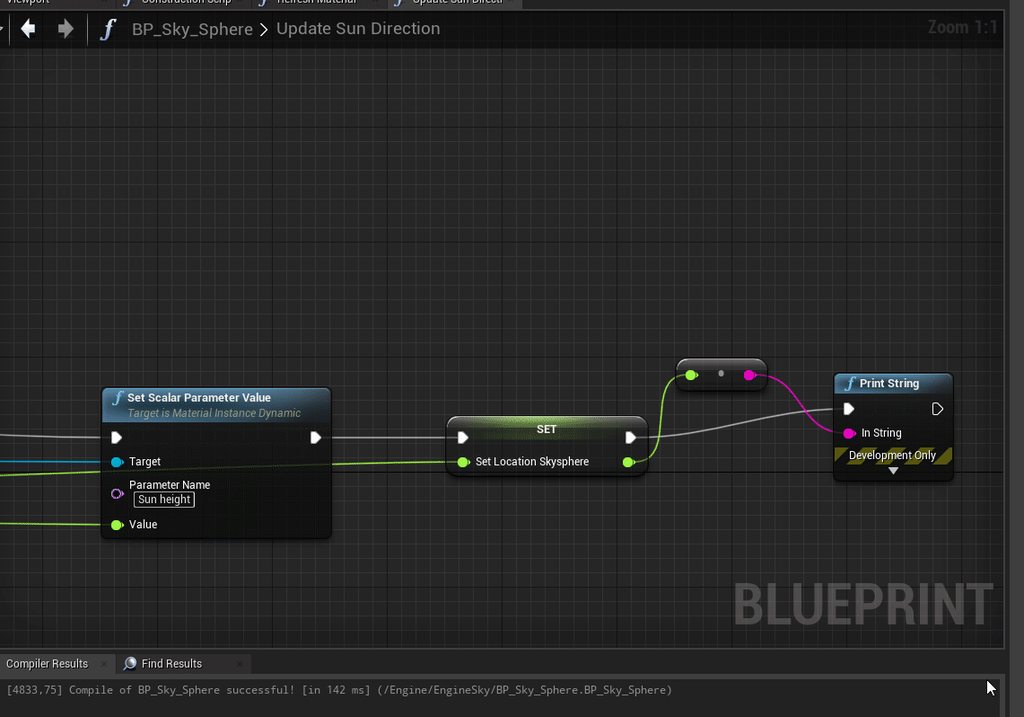
When I load the game with the current time it works!
But instead of doing 84, 85 and go back to -85 -84, it goes up and blocks at 90 I have to alt tab/wait to start again?
What is this magic ?
https://imgur.com/ltJRUTc
 maiden wadi
@trim matrix What is the math you're using to get your numbers?
boreal helm
im takiing inspiration from flying gorilla
trim matrix
in fact it works if I don't load the save
but iam loading with this
@maiden wadi
i use BP_sky_sphere update direction sun
but its work if i dont use the code (screenshot)
maiden wadi
Okay, but where do the values come from? So far all I see are four set value nodes.
trim matrix
oooh yeah i print this :
but look, map range in range B i see the number 90 haha
but its not importance
and simple ALT tab work
maiden wadi
Ah. I'm pretty sure you hit the gimbal lock problem.
Can I see how you're rotating the directional light?
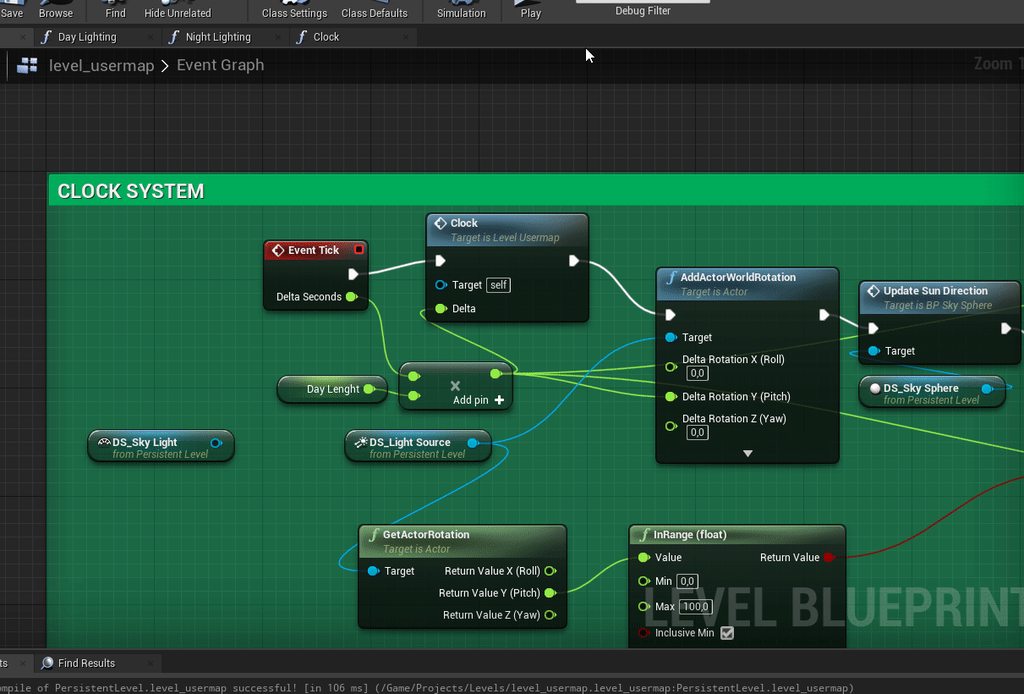 trim matrix
maiden wadi
Can I see how you're rotating the directional light?
trim matrix
maiden wadi
Can I see how you're rotating the directional light?
yeah i'am using update direction sun, from bp skypshere
gimbal lock ?
maiden wadi
But the light itself. The actual literal light actor. How is it rotated?
trim matrix
oh yeah
wait
But I'm telling you if I don't use the save module everything works fine 😄
maiden wadi
This is the light direction being updated from a savegame?
 alpine hill
hey guys! I'm trying to replace one color from the texture with another color and I get the following error when using if with vectors:
If input A must be of type float
This is how my shader looks like:
is it possible to compare vectors? in glsl/hlsl this is the norm...
trim matrix
@maiden wadi go dm if you can 😄
alpine hill
also I want to have only equals and not equals - I don't care about less/greater
maiden wadi
@trim matrix Don't really do DMs. But I'm semi certain that it's something to do with pitch gimbal lock. Very small values into a pitch rotation will get locked between the pitch min max when set because of the math used behind it. Larger values seem to pass through for some reason. I'd wager that if you multiplied whatever you're inputting into AddActorWorldRotation by about 10-30, it would not stop at 90.
TLDR, if you want to use pitch, then just do the math yourself and use SetActorRotation directly. For example. If you GetWorldRotation, Get Pitch, add your pitch value to it, if it goes above 90, then set it to 90-(NewPitch-90), and set your yaw to Yaw + -1
You'll have to do the same thing when it crosses 0 as well just with different math.
trim matrix
mhh
Iam sorry, but can you create me a example for update rotation ?
because iam lost with all math meca :/
maiden wadi
Haha. No worry, what is the day length value float you have?
trim matrix
the timespeed ?
maiden wadi
I guess so, you just have it named DayLength. What's it's value?
maiden wadi
@trim matrix Is your light's Yaw always 0?
 wild moth
Hello everyone,
Has anyone encountered an issue where SplineMeshComponent received mouse events corrently in PIE and Standalone but not in packaged? This is for runtime spawned Actors, I have the same actor, creating the spline in the level with an Editor event and it works fine for them
maiden wadi
@trim matrix I just finished that function and had a realization. I'm fairly certain that AddActorLocalRotation doesn't have that same issue with pitch.
It'd be easier to swap that out from AddActorWorldRotation
trim matrix
maybe, also it happens he doesn't even need to touch the skyphere bp and do it on the clock?
too many possibilities i'm lost there haha, i'm reading docs to understand a little bit
Keep me informed 😄
Thanks you very so munch
maiden wadi
@trim matrix Try replacing your current AddActorWorldRotation with the AddActorLocalRotation. I'm fairly certain that'll solve the issue.
Otherwise, it's something like this, which I haven't tested quite yet.
Doing 'simple' things like that reminds me how much I love C++ for data manipulation.
^ also doesn't work.
 untold fossil
Hello, does anyone know how to change the far shadow cascade count on a directional light from blueprint? https://i.gyazo.com/38b48cf0a43d3c0a45bb6cc980670d29.png

I'd like to make this a a video option, hence the question
trim matrix
i try right now @maiden wadi 🙂
Wait
i need to place all your screen but where ?
Or i need just to replacing AddActorWorldRotation with the AddActorLocalRotation ?
Ok
lets me setup
maiden wadi
Just AddActorWorldRotation with the AddActorLocalRotation.
trim matrix
oh not replace ?
maiden wadi
Replace the AddActorWorldRotation with the AddActorLocalRotation.
spark steppe
i'm really waaaaaaaaaaay to stupid for vector math...
i'm trying to apply an offset rotation to my camera to get the location where it would end up after rotating it there, and i dont understand why this wont work
i'm literary trying for an hour now with all kind of combinations of combineRotator, and whatnot, but i can't figure it out... (had start/target swapped on the FindLookAtRotation Node, but that won't do it)
maiden wadi
@spark steppe In short. if Point is the point you want to rotate around. Get the unit vector from PointToCamera, rotate PtoCUnit based on your rotation, use distance from Point to Camera to multiply your newly rotated PtoCUnit direction vector and you'll have your new location.
Alternatively, be lazy and use a spring arm and disable the collision. XD
 normal rampart
Hey I've got a pretty simple question with a probably pretty simple answer.
I have an Enemy class, that does enemy things. It is a child class of the character class. Most of my enemies just use the standard charactermovement for all of their movement. But this one enemy I'm making I want to not move on it's own but rather simulate physics and be able to be pushed around like a physics object.
However, when I destroy the charactermovement component and set simulate physics to true, it doesn't work like a physics object haha. Any ideas? 😁
 odd ember
you uh will probably need it to not be part of that hierarchy
it's not really a simple solution
trim matrix
yeah I think there's a problem because it works, but if I save a second time the time will deregulate from the clock, I'll try to fix it.
spark steppe
you meant like this? because that neither works 😄
wait a second, it might actually work
the location seems to be correct
but my line trace is doing crazy stuff
maiden wadi
Haha. What is wrong with the line trace? The location should be accurate, but you'll have to update the rotation again with the look at rotation from the new vector to the point.
spark steppe
it's totally tracing on the wrong line for some reason, but the values are correct
maybe i had my nodes right 20 times in the last hour and only the line trace was misleading me -.-
maiden wadi
What's the trace look like?
spark steppe
like its coming from the side to the actor
but it should come from my viewpoint, so i should probably only see the square of the impact point and a small dot
but i see the trace coming from all different kind of angles sometimes
maiden wadi
What's being sent into the start/end of it?
spark steppe
startpoint is the location that we calculated, and endpoint is the player character
maiden wadi
You're not mixing up any local vs world coordinates anywhere?
spark steppe
nope, the traceStart is what we calculated in the screenshot above, the traceEnd is the worldLocation from the parentActor (which is used in the middle of the screenshot)
 dense mica
This is not destroying and setting to "pending kill" and spams my message log, anyone knows how can I avoid this?
maiden wadi
@spark steppe Which vector point messes up? Does it always go from the character to someplace weird, or from the calculated point to someplace weird?
spark steppe
i think its just an renderissue
as i rotate the camera right after the linetrace, so that might cause trouble
maiden wadi
@dense mica Try making sure that it's valid before calling destroy.
maiden wadi
Nah. Happens. Had enough facedesks of my own.
I mean. Look above. I went through all of that pitch/yaw caculating just to realize that I should have just considered converting the current world rotation into relative space, getting a unit vector and finding the new world rotator. Worth noting all of that float stuff didn't work.
dense mica
@maiden wadi issue persists
maiden wadi
The errors as well?
maiden wadi
You have to check if it's valid where ever else you're using it then.
Also, not sure if you are, but if you're calling destroy on an array of pointers, make sure to do it in a reverse loop.
dense mica
Yeah I am destroying them on a ForLoop
What does "reverse loop" means?
Reversing index order?
maiden wadi
Possibly. Where are you getting the list from?
But yes, just reversing the index order.
dense mica
Same as yesterday, instead of ChildActors I am just creating WidgetComponents for each attachment socket (UStaticMeshComponent) and storing them in array on beginplay
Then using that array to remove them or adding icons for attachments
maiden wadi
Are you ever updating the array?
For example, destroy won't remove the array index. It'll just call destroy on whatever is in it and leave you with an empty pointer.
dense mica
Ohh, so I should also remove indexes
maiden wadi
Yep, which is why you should do it in a reverse loop, because removing indexes will shift the array.
dense mica
Yeah, works now 👌
Thanks Authaer
You know what? Prorably that was the issue of yesterday's array
I was having a similiar issue right now, my meshes was setting wrong and reverse looped and its solved magically
I wasnt reverse looping to fix arrays on ChildActorComponent too
proud hull
@trim matrix AddWorldRotation or AddLocalRotation will both still run into the gimbal lock problem. The only way I know of to stop this 100% of the time is to prevent the pitch from ever reaching 90 or -90. This can be done by shifting the angle of the rotation ever so slightly like I mentioned here: #blueprint message
I literally tested every single "workaround" fix (besides any C++ implementation) I found on the internet for this problem. A problem dating back to the release of UE4 and still exists even in 4.26.
Your current saved rotation will need to be updated, but if you start it out at the rotation I mentioned, there is a 0% chance to get stuck at 90 or -90 as pitch will only ever go to 89.9 and -89.9 or very close to these values.
 fickle remnant
guys I have an issue with edge detection. I am trying to do a true fps setup but I'm getting some funny results here. Suggestions??
proud hull
@fickle remnant Maybe the ledge threshold can be adjusted in your character movement? Not sure exactly what it does, haha.
fickle remnant
tried using it but dont seem to get any good results
proud hull
You can possibly fake everything with some collision volumes to test for overlap of your character's capsule. The collision volumes would line the edges of your map and then if they overlap with the player capsule, you can force it to push them off the edge.
fickle remnant
interesting
although tedious for level design
I am planning a marketplace product so I guess I leave it to the user
mild turtle
how can i make a linetracebychannel repeat?
mild turtle
o ok
trim matrix
proud hull
<@456226577798135808> AddWorldRotation or AddLocalRotation will both still run i...
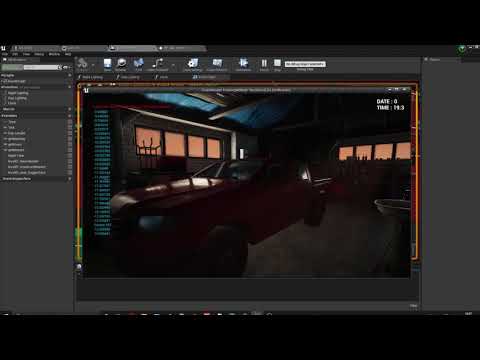
Now I can get / set the value of the day. BUT
The value of the day goes from -84, -83, -82 .... and in day period the opposite, it adds when I save the day the value is good, it saves itself and always goes in the direction of the night, but if I save the night then in night period it makes - the problem when I load benn the night will go from - to + so everything is out of order.
@proud hull
proud hull
@trim matrix you need to save the whole rotation, not just the pitch. When you rotate the directional light, once it hits 90 or -90, then the roll and yaw swap from 0 to -180/180. This is why it starts to count backwards at that point.
trim matrix
oh wait
i see your message
@proud hull so i need to get the pitch and the rotation ?
how i can get the rotation ? 😄
proud hull
Save the roll and yaw along with the pitch.
You can save them all separately or in a single rotator variable.
trim matrix
ohh
i need to get this ?
and then I just have to load the value into the roll and everything will be fine?
look nice lets go try!
proud hull
Both roll and yaw. You need to save all of them (X, Y and Z). Even though you are trying to only rotate on Y, the others have their values change due to Y being a value only between -90 and 90.
proud hull
You can save it as one variable. Use the same output pin you used in the input of that Break Rotator node.
proud hull
When you rotate your sun, you only add to Y (Pitch). When you save the position of the sun when the player closes the game, you save all 3 (the whole rotator).
trim matrix
Yeah lets try!
proud hull
There is also a sun position plugin that is included with the engine, but it is disabled by default. You can also try messing with that too.
trim matrix
Okay position register
Lets go to set the position rn and see ! 🙂
LETS GOOO
@trim matrix / @maiden wadi ❤️
maiden wadi
I was messing around a bit to try and find a simple way to rotate an object only on pitch. Turns out probably the easiest way is just to save a float that gets normalized and added to.
This works beautifully.
Technically I suppose you don't even need to normalize it. It would work forever no matter the size of the float, but it keeps the float from bloating out of control.
 worn nebula
hey guys, I'm trying to work on something and I can't for the life of me figure it out. I'm trying to have it so when this AI comes into a room, if the player is not hiding, a cutscene will happen, if the player is hiding, the AI will just walk out. I can't figure out the way to do it so if the player jumps out while the AI is in the room, the cutscene will still happen
This is what I have so far
maiden wadi
You need something checking. Either tick, timer, or something else that changes if the player is hiding and if so, to start your cutscene.
worn nebula
I have a tick, the check player hiding is connect to event tick. What I'm worried about is if the player is caught, it'll play the cutscene every tick
I guess I could do a do once when the player is caught and the grandma is in the room
 chrome quiver
How can I attach an actor from a SpawnActor to a folder in the World Outliner?
maiden wadi
@chrome quiver If it's not placed in the level, it can't be in a world outliner folder.
chrome quiver
It gets placed into the level
maiden wadi
Are you talking about while you're testing in PIE?
chrome quiver
This is what it looks like
 sterile wraith
Any one got an idea how i can get a UDP msg via Blueprint? using 4.26
chrome quiver
I can AttachActorToActor, but I'd rather attach to a folder
spark steppe
idk if it's possible, but if it is it would probably be something like setParent
or addChild on the folder, if it even gets exposed to BP stuff, i could imagine that it only exists in the editor and not at runtime
chrome quiver
Been trying to figure out if setParent works, no luck yet
 uncut ruin
Hey can anyone help me I'm having this weird line thing happen when I look up and down from the center of my screen https://www.youtube.com/watch?v=XyqA80mfn6c
 proud hull
@maiden wadi that works well for all actors except for the sun position in a sky sphere. The light and the shadows update correctly, but you never see the sun in the sky since -90 represents high noon.
maiden wadi
@chrome quiver But I'm asking if you are seeing it in the world outliner when testing it in PIE, or if you're seeing it all of the time in the editor.
chrome quiver
For some reason GetParentComponent isn't compatable
I dunno what PIE is, lol
The blueprint is on an actor in my scene
 amber marsh
So what method would you guys suggest for me to randomly pick one of these stats and add to them a small amount a specific number of times.
maiden wadi
@proud hull Nah, it works fine. The pitch value doesn't actually go in the rotation. The actual actor's rotation pitch never leaves -90 to 90. For example. If you call set actor rotation and input 100 pitch, it actually sets it facing the opposite Yaw at 80 pitch.
amber marsh
I cant think of a good way to do this in blueprints
maiden wadi
@chrome quiver PIE is the PlayInEditor. The testing screen when you click play.
uncut ruin
Any help?
chrome quiver
The actors that spawn show in the world outliner yes
@uncut ruin Show the blueprint where you think the issue might be stemming from
uncut ruin
I'm new to UE4 I have no idea
maiden wadi
@uncut ruin I'd guess either some form of collision issue with the camera if you're using AddControllerPitchInput for the rotation.
chrome quiver
Usually what were you working on when the issue started @uncut ruin
maiden wadi
@chrome quiver Right. They're not placed in the level though. They show up in the outliner to help you find spawned stuff for testing, but you can't spawn them into a folder. Went looking for that myself a while ago.
uncut ruin
I was following a FPS Tutorial and it happened alittle bit ago and I thought it was something the guy on the tutorial messed up on but he never had the problem and I went back and can't figure out why its doing it
chrome quiver
maiden wadi
<@!172857295292727296> Right. They're not placed in the level though. They show ...
😯 oh strange
maiden wadi
@uncut ruin Is your camera on a spring arm component?
 winged sentinel
Is there a way I can get a camera to have the same animation as another object without having to socket it?
maiden wadi
@uncut ruin Actually, better first question, how are you rotating the camera with mouse input?
winged sentinel
For example if there’s a cube playing an animation, I want the camera to move with with that cubes animation
uncut ruin
idk my camera stuff is all Thirdperson default but I moved and connected the camera to head
chrome quiver
the head probably isn't rotating up and down, making the camera snap back?
maiden wadi
@uncut ruin Can you show your components list in the top left of your character blueprint? And also, do you have this in the character itself?
uncut ruin
This? https://prnt.sc/vmy1r9
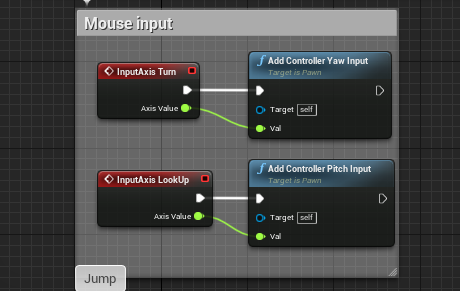 maiden wadi
Yeah. What about the component list?
uncut ruin

 void oak
anyone know if theres a blueprint node that imports / exports csv files?
 teal burrow
I'd recommend checking out Rama's Victory BP library
It had something of the likes IIRC
Or at the worst case, you read a file and make it into a struct/data table
void oak
prob is, i need it to make csv files as well
proud hull
@maiden wadi It is working, you're right. I had logic based on the -90/90 flip that was messing it up. Need to setup new logic for -180 to 180 now, but easy enough. Thanks.
maiden wadi
@proud hull Haha, yeah, that was messing with me for a while too until I realized that it works with larger values because it normalizes the rotator before setting the new rotation. So keeping a larger value around to add to and set it from works.
@uncut ruin The FollowCamera, is that the one you're showing first? Before aiming down the rifle?
uncut ruin
yes
maiden wadi
That is odd. That's a normal looking setup. Cameras don't have colision by default so nothing should be bumping it.
maiden wadi
The Follow Camera has... uh. Need to check the setting name.
UsePawnControlRotation checked?
uncut ruin
what one
maiden wadi
maiden wadi
Do you remember what you were working on when it started?
maiden wadi
Not likely, specially since that's a character call, if you're doing it that way.
uncut ruin
if I aim above the line and crouch it looks normal but if I aim below and crouch he is in his knees
ya
I'm not sure how to fix it
chrome quiver
Good enough, haha
I finally understand how to get a reference to an in game actor, FeelsGoodMan
For some reason that's been my biggest hurdle so far
maiden wadi
@uncut ruin Can you try moving the camera to the Capsule instead? Not parenting it to the mesh.
 fresh jolt
New to unreal, Just trying to get the follow camera to reposition and be above the player. Also tried with C++ but no luck! Any tips here? Thanks
maiden wadi
@fresh jolt How come you don't just move it in the editor if you're going to set it on beginplay?
fresh jolt
Learning 😛 wanted to do as much as i can in C++/Blueprint to learn the engine a bit more
maiden wadi
Fair. Most times people using both with set the camera's attachment in the C++ constructor and then make a blueprint derived class and set it where they need it in the viewport.
fresh jolt
Yeah I tried with "AddAdditiveOffset" in the constructor but that didn't work, then in blueprint I don't see what else i would need to get camera to just reposition. The method i'm using there seems correct no?
maiden wadi
Not sure why that wouldn't set your camera to the right place though. Behind it's parent back a little and looking down.
And above.
fresh jolt
yup,
maiden wadi
Side note, 360 Z rotation is the same as 0.
fresh jolt
good to know. makes sense honestly lol
maiden wadi
You're testing this in the editor, or when you click play?
uncut ruin
@maiden wadi wym
fresh jolt
When I click play
maiden wadi
@uncut ruin Drag your camera to the Capsule. Right now it's parented to the mesh. Parent it to the capsule and see if that problem persists.
@fresh jolt Do you have more than one camera in the actor?
fresh jolt
default 1st person project template
uncut ruin
ok so Now when I aim up the camera goes infront of the gun and if I learn down the camera goes threw his back
fresh jolt
ohh wait, could it be FOV?
uncut ruin
and if I ads still happens
maiden wadi
@uncut ruin Does it do the snappy thing in the normal view though?
 tame charm
is it possible to switch a function input based on an enum selection? so i dont have the inputs for option a displayed when the selection is for option B
maiden wadi
@uncut ruin Is your camera's X and Y at 0 relative location?
uncut ruin
huh?
GREAT
Now I have to recenter the camera again
ugh
since I parented it under capsule
fresh jolt
I got it 😉
maiden wadi
Just a couple of zeros, Haha.
fresh jolt
just had wrong values haha..
maiden wadi
@tame charm Probably just a SwitchOnEnumType?
fresh jolt
thank you @maiden wadi
tame charm
@maiden wadi i might be describing what i want wrong? mind if i pm
amber marsh
Does anyone know a way to modify a specific index on a struct?
Say if its a struct with 23 things
uncut ruin
@maiden wadi still fucked
amber marsh
And I want to only add +2 to thing number 18
maiden wadi
@amber marsh Not really. Structs don't have indexes like arrays, just properties and values for them. If you want to alter a random property in a large struct like that, you'll have to do a switch.
amber marsh
how does a switch work with a struct?
odd ember
it doesnt?
you can use SetStructMembers
in the details pane you can tick what you want to include or exclude
maiden wadi
@uncut ruin Having a hard time guessing what it could be. Unless you're doing something on tick involving the rotation, nothing should bump the camera like that if it's directly attached to the capsule. Have you done anything at all involving the player's rotation somewhere else like the controller or level somehow?
amber marsh
In blueprint? @odd ember I don't see a way to do this. hmm
I might find myself in a situation where I make a set of 23 local variables in a function to do this XD
odd ember
@amber marsh it's a node called set struct members
or set members in struct or something like that
maiden wadi
@tame charm Ah. I see what you mean. I'm not sure how that works in Blueprint. Only used to overloads for that sort of behavior in C++
Cranz is talking about this.
For example.
odd ember
yeah exactly
trim matrix
What would be a good way to do a headbob WITHOUT camera shake?
Like all I want is my camera bobbing up and down and the speed depends on the player's speed
maiden wadi
Little bit of vector math and a tick function that figures it out based on actor velocity.
trim matrix
Thanks
trim matrix
oh timeline is a blueprint?
odd ember
as in, it's a node in blueprint
you still have to do the math
but the timeline takes care of the timing
trim matrix
Ok well can I ask something in unreal chat?
odd ember
best version is newest version
trim matrix
so i'm just supposed to get used to the new layouts of tools?
maiden wadi
Haha.
trim matrix
?
maiden wadi
You're in a development field. You're going to need to get used to getting used to it.
odd ember
trim matrix
so i'm just supposed to get used to the new layouts of tools?
yes, like everything in life, adaptibility is key
if you don't adapt you become a dinosaur
 earnest tangle
you become... Internet Explorer 
amber marsh
so if I use the set members in struct it will only modify the member I specify
ok this is useful I think
odd ember
amber marsh
ok this is useful I think
almost as if there was a reason they created that node 🤔
trim matrix
Can someone tell me what kind of vector math I need to do for headbob?
like you dont need to tell me the math itself just the nodes i need
odd ember
you will want to figure out a pattern
or really
you can kind of cheat
by creating a spline component
and make the camera follow that spline
usually headbobs are figure 8's
maiden wadi
Probably just a sine. Sines are great for back and forth movement.
odd ember
good point, sine then reverse sine
trim matrix
https://www.youtube.com/watch?v=a0585Cevavc What is the possibility of this game using interfaces?
Doomy In The Roomy #01 Playthrough Gameplay (Dave Microwaves Games)
Thanks for watching! If you enjoyed, please Support Us - Like, Comment, Subscribe, Share!
Help us reach 400k subscribers!
Subscribe Here: http://bit.ly/2KJjOYL
#mediagamesguide
#Dave_Microwaves_Games
Or can you not tell?
 subtle phoenix
https://youtu.be/AetsoMdLrjU does anyone know why blendspace does weird stuff. when i check the running forward and strafe right, the feet does weird stuff. but strafing left works fine
 maiden wadi
@subtle phoenix What about the middle point directly below it?
subtle phoenix
yeah same, running backwards as well
but running backwards and strafing left is fine
just strafing right
maiden wadi
Hard to say unless your four over one down is wrong. People in #animation will probably know more.

 amber marsh
I guess this is not the end of the world but here I go repeating this logic 22 more times XD
amber marsh
Random stats saved on items for an RPG
maiden wadi
That was a neat little exercise. I'll have to remember that one for later. Never used Sine outside of materials.
odd ember
you could do it with timelines much simpler, and you can add the sin or -sin on the select as well
makes it much simpler
maiden wadi
I suppose you could stop the timeline in the middle with an event from it. I liked this one though. Just starts bobbing the moment you run from the same direction. And it'll return to height when you stop.
maiden wadi
Not overthinking it. But when you stop running, you probably want the camera to return to it's normal position smoothly.
odd ember
I'm not so sure that's the case, but then headbobbing is usually quite minimal as otherwise it would be barf central
and since it is so minimal a distance you could probably just stop the camera where it is
like would 2uu away from regular camera position make a difference when you're at a scale of a 100uu?
 wild seal
can i look up a datatable with rownumber?
odd ember
yes
wild seal
can't seem to find the function
odd ember
there's a node for it I'm pretty sure
or well, not sure you can look up the data table itself
but you can look up the array that you feed in from teh data table
wild seal
maiden wadi
Datatables don't have row numbers. Just names. You can use the names table for an index though.
wild seal
this is the way that is obvious
but thats too much computation
if i could use just the number would be great
odd ember
data tables are static and external
so that's what you'll have to resort to
you can name them by numbers
wild seal
i mean they are not ordered right?
odd ember
they are?
wild seal
what? they are sorted?
wild seal
yeah thats why i wonder why can't i just access it randomly like an array
amber marsh
aaahhhhhh why the hell cant structs have indexes AAAHHHH
odd ember
because it's an external database
@amber marsh I'm pretty sure there are much better ways of doing this
odd ember
@wild seal but you CAN import them in as an array and store that if that's what you're looking for
at the cost of extra memory
amber marsh
Ill hide it deep in some function library
odd ember
I can see see the technical debt from here
earnest tangle
what the hell is that monstrosity lol
amber marsh
The only way to modify specific index of a struct
earnest tangle
"index" of a struct?
amber marsh
yep, for random stat generation on items
earnest tangle
Oh, so this is basically picking a stat at random (the big switch), and the branches then set that stat value?
fossil thistle
Anyone have an idea why the back half of the snake is still clipping? The capsule/head doesnt go through objects but the every other part does
amber marsh
yeah, each item quality tier has a set amount of times it can dip into this function to modify base stats
earnest tangle
hmm interesting
wild seal
i don't see a blocker of using an index that way either but sure
earnest tangle
I think there might be a C++ way to use reflection to do it by property name or something but not 100% sure on that
maiden wadi
@fossil thistle Movement is based on the capsule. Only the capsule sweeps on movement, not every component.
earnest tangle
the other way would be to make each stat a struct on its own, which are then stored in an array or map of all the stats
but that's probably not super convenient either
amber marsh
that sounds a bit worse imo
earnest tangle
yeah hard to say
fossil thistle
im sorry, I dont understand, what do you mean by the capsule sweeps on movement
maiden wadi
Lol, Array with an enum for the index lookup? I mean, enums are ints.
amber marsh
current system is great for everything else. This edge case is the worst part so far. But having it how it is now is great for quickly tabulating the stats of a character when it has many different equipment and weapon types with armor
maiden wadi
@fossil thistle You're using the character class. When your character moves, the CharacterMovementComponent uses the root component, the Capsule at the top of your components list to sweep to find where it can move. This movement updates all child components without regard to their collision. Only the capsule matters.
amber marsh
I dont have time for perfection either, this is a sprite based RPG I want to begin getting out on steam by end of next month.
odd ember
lol what
fossil thistle
the capsule is set to block all with the exception of visibility trace channel which is set to ignore. the capsule does block everything so why doesnt the mesh? is there a way to ensure the mesh doesnt clip?
odd ember
ambitious to say the least
maiden wadi
Either way, if I had that many stats, I'd seriously consider a simple float array with an enum for a lookup and set table, and write a couple of functions for setting the values of the array and retrieving them based on that enum.
odd ember
yeah that's a way better solution
trim matrix
Question, I have a model, and a house scene, I want the model to walk into the house and sit on the couch, how can i do that?
odd ember
or even FName, as terrible as it sounds
amber marsh
that just makes development more convoluted so not good either. Making the game fun to work on is as important as making it fun to play.
maiden wadi
Well, Enums are already ints, and they're named. Perfect for writing setting and getter functions off of.
odd ember
don't think you can get more convoluted than your current solution
maiden wadi
How is that convoluted? O.o That's standard practice with a lot of properties.
odd ember
and if you want to have a game out by the end of next month, beggars cant be choosers
earnest tangle
I don't think it would be very convoluted to use an array 🤔 You would basically have a function Get Stat(StatEnum) and SetStat(StatEnum, Value)
amber marsh
this is the only convoluted part thus far. the rest is super simple
earnest tangle
it would be fairly similar to just reading the value directly off a struct
amber marsh
well outside of the games stat system which works on a relatively leveling algorithm.
But I already set that up in my last game Revulsion
Using an array would mean having to memorize what index === what stat which is messy
amber marsh
expect tons of bugs where you get the wrong stat index ect
earnest tangle
No you don't, you would just use the enum as an int
amber marsh
oh hmm
odd ember
<FName, float> or <Enum, float> would work
maiden wadi
You can't get the wrong.. I'm just going to showcase this.
earnest tangle
Yeah, a Map would be another option
amber marsh
yeah if this doesnt work for some reason I might have to do that. But either way its setup now.
messy but whatever
odd ember
if only FName was a true reflexive enum as it was poised to be
amber marsh
I just hope this actually works
maiden wadi
@amber marsh These are what I meant.
More or less just allows you to have an empty array on your items that would be the 'basic' stats, and functions that can set those stats. You could even write some that set stuff based on quality, or rarity, etc. Just allows you to change those stats easily via named index.
 carmine prawn
Trying to wrap my head around a wee problem I've got. Lets say I have a spline which is snaking around. How would I go about doing a trace along the spline, across the splines y axis. I'm thinking it has to do with getting the right vector at distance, but I'm not sure how to translate that into a world position to use as end points for the trace.
is it really as simple as multiplying that by a positive or negative amount depending on desired direction?
maiden wadi
@carmine prawn Do you know the values you want to trace along in the spline's local space?
carmine prawn
Yup,
maiden wadi
Try getting the spline's world transform, and transform the points you need into world space with TransformVector.
carmine prawn
Cheers, I'll look into that 🙂
maiden wadi
@carmine prawn This thingy.
Helped me with wrapping my head around vector stuff so much.
 desert juniper
Hello. I'm trying to work out an inventory system.
I'm looking to see if anyone has a recomendation for the architecture of the actual items
Should they just be data assets? or is there another recommended way to create items?
Another idea would be creating each item as a blueprint (child of a base 'Item' actor blueprint), but looking to see if there are better suggestions
maiden wadi
That question is incredibly complex. It really depends on your game setup.
What kind of items are they? What kind of game? What all can items do?
desert juniper
Items can be picked up and placed into users inventory. The items can at some point also be placed visibly on the users hands and used
For now I'm trying to work out a flashlight that a player may pick up form the floor.
In unity I've previously done this with scriptable objects. I've had the items on the floor be a pickup game object that has the item's static mesh
once picked up, it would be destroyed, and the player's inventory would be added to display information about that item
then the item would be spawned in/out of the world when the player is wielding it.
This was all done with scriptable objects, and I know there's not a direct equivilant with unreal, so I'm tyring to determine what a decent architecture is for holding the item data, and spawning them in game as both pickups, and equipped items
 crystal kettle
I used a mix of the two, I had data assets store everything about items (name, description, inventory icon texture, world actor, etc...) then inventory was a simple data structure (Map<PrimaryAssetId, int>). Any references to assets in the data asset such as the texture to use in inventory widget or the actor visible when the item is in the world would be soft object pointers so they can be loaded asynchronously as and when needed
maiden wadi
I dunno. I'm a data person. I love data inventories. Most of my inventories are just a small few values on a struct. Basically an ID for lookup, a stat for durability or uses, and an enum for quality. The structs themsevles get moved around. For example, your flashlight. There would likely be a hand struct that can take a struct from the inventory array and move it to the hand stuct. If I had values there, they'd get sent to the inventory array. The flashlight battery would be represented via the durability property in the struct, and the actual flashlight actor would just be a spawned prop.
The mesh, name, offsets, everything else was stored in a datatable for lookup via the ID tag in the main struct.
desert juniper
@crystal kettle I was also thinking of something similar. I'm assuming the item's struct would also have pos, scale, and rotation vector, as well as socket name fields to tell the object how to position itself in the hands when spawned?
crystal kettle
I then just created some helpful functions for working with that data structure, AddItem, RemoveItem etc... Started simple but over time you will start to add more to your data assets as and when needed, for example If you want to put a max per item constraint in you would just put a InventoryMax (or some better name) on your data asset, then AddItem can see how many you have in your inventory and it can also read the InventoryMax from the data asset to determine if it can be added or not
uncut ruin
@maiden wadi sorry was having to do something. but I only know 2 places maybe thats the animation stuff I did and the speed for crouching and not crouching I did
crystal kettle
@desert juniper Hmm, for equipable items i would have an enum for equipment slots (head, torso etc...) then add that to your data asset
desert juniper
@maiden wadi Thanks! I haven't yet looked into data tables. That's on my list to research. Yeah seems like a convenient way of storing information about the items in a central location
maiden wadi
To be fair, I suppose in single player you don't need two structs. One with all of the data would be fine. I did mine like that because at the time I was considering multiplayer implications and was trying to get the least amount of values to replicate and letting clients and server do major calculations based on their local datatable data.
desert juniper
@crystal kettle Yeah in the past I've created an item wrapper that included the stack size and a max stack size limit in the item itself for handling stacking/max stacks, etc
 tawny bison
https://docs.unrealengine.com/en-US/BlueprintAPI/Utilities/AsyncLoadAsset/index.html Anyone know if I can use this to async load sprite sheets or flipbook assests?
Async Load Asset
uncut ruin
@maiden wadi This is the only thing I know that involves rotation and its in the animations I did https://prnt.sc/vn20zm
 desert juniper
@maiden wadi Yeah I'm working with multiplayer, so I'm guessing I'll need two sets of spawning structs, one ofr SP and one for MP
@crystal kettle My only concern I guess is determining the rotation of the spawned item. for instance a 2 handed weapon may have to be rotated to look good on the player's hands
instead of a single enum dictating the socket, I fugure I'd also need the transforms information
crystal kettle
Depends on your content pipeline and your animations I guess
desert juniper
yeah. im sure
maiden wadi
@desert juniper If it's in the same game, then no. Just do it the same way for both. In fact your singleplayer should just be a listenserver version of your multiplayer game.
@uncut ruin What does that do? Why is it setting roll?
desert juniper
oof. my bad. I meant first person and third person character
crystal kettle
If I'm building lots of single handed weapons for example, i would export with the origin of the mesh being where the characters hand would be grabbing, then you set your socket up once and all weapons just slot right in
desert juniper
though now that I think of it, it may still be the same transforms/sockets anyways
maiden wadi
Probably. Usually just a different mesh. But the same socket and transforms.
desert juniper
oh wait, maybe I can just make the socket for each item type and use the transform of the socket itself. 🤦♂️
crystal kettle
you could do that
desert juniper
okay thanks you two!
crystal kettle
all depends on the content you are working with 🙂
desert juniper
so the big thing from what I can gather is storing the data either in data assets, or data tables
though I'm not familiar with either one, I'm imagining a data table to be something like a centralized place for the item's information (like a CSV or local sql db), and data asset to be an in game asset (file) that exists for each item
uncut ruin
@maiden wadi where ever I look the gunn follows with it and its in the graph on my player AnimationBP and the other rotation thing I go is this https://prnt.sc/vn25o5
 tawny bison
you want to store the data in tables and use save game object to maybe reload things from the tables and use the save game object information to set the data.
uncut ruin
and thats all I got for rotation
desert juniper
alrighty. I'll do some research tonight. Thanks everyone!
maiden wadi
Nah. The datatable should probably be static. You can just leave it alone. Only the array of items would need to change or be saved. That's one reason I did it that way. Keeps the moving data simplified.
crystal kettle
Personally I think DataAssets are better suited for this over data tables, you are going to have references to other assets in there so you are likely going to be editing them in the editor and not in excel, that's not to say data tables are obsolete, you could store some info in data tables, maybe your stack size information could be a data table with two columns: name, max_items. Your data table can define different types of stacks ((small, 5), (medium, 10), (large, 20)) then you item data asset can have a stack size name property (small, medium, large)
tawny bison
yea its static but you set things like color type amount once you get the item from the table.
crystal kettle
@tawny bison that would be editing the struct that was returned but you don't want to edit the table itself
I honestly didn't even know you could edit the table rows directly, I assumed you would get a copy of the row when querying the table
tawny bison
yea the data gets saved to save game object the table is just what has the default variables,
only reason you use the table is so you can pull the variable structure from the id when searching the table
maiden wadi
I did all of that with the three property array. It was an array of structs that was nothing more than an Integer, Float, and Enum. Integer was to look up datatable properties for the item like the name, max stacksize, max durability, transforms, etc. The float was for either stack size or durability based on the item type. Things with a durability were single stack items that could usually be used. Items with a stack were more often used for crafting. The enum was for quality which modified items use stats.
crystal kettle
Data assets also allow you to create a hierarchy of item types (base item, weapon, food, junk) with each type adding the fields it needs whereas if you want all your items in a data table then you will end up with a lot of columns for these different types being null where they don't apply, no?
maiden wadi
But how does your data get replicated generally?
Not used to using data assets, so I don't know how they factor into multiplayer.
tawny bison
When you start getting into building - starting equipment for new game, inventory , All your npcs in game quests ect. The tables have been the way to go for everything for us.
for replication is just your table ids in an array on the server
when getting or setting you have those inventory function run on the server and they are replicated back
crystal kettle
So, you wouldn't be replicating the data asset, it's just there for your game to query just like you do with data tables. Your game save would contain your inventory which in it's simplest form is just a map of asset ids and a quantity you have, when your game starts and you load the save file you now have the information needed to rebuild whatever you need
tawny bison
but you do not want to do that for security if doing muliplayer
you want to use server less functions like lambda
you would need to write an api gateway to communicate you your lambda function that verify the use and get the data from the server data tables.
crystal kettle
Ofcourse, but that doesn't change the inventory at all, you replace the save game file with writes to a database
tawny bison
but you do not want to trust that data
crystal kettle
the inventory is not affected at all by your persistence layer, whether you save to file or use an api the inventory is still the inventory
maiden wadi
Hendore is just saying to replace the datatable with a DataAsset, basically.
tawny bison
ah
crystal kettle
I'm not following you, the changes you make to the inventory in game can be made from the server only to validate
tawny bison
anything you do will be replicated that is the whole issue with save game object
crystal kettle
Yup for the top level items it's what I would do, I would still use data tables where needed though (the data assets can store ids to tables)
tawny bison
that is sweet
crystal kettle
im talking about data tables here not mysql/postgres tables
maiden wadi
I dunno. I found the way I was doing it fairly simple. Just made a datatable in the content browser out of a data struct I have, populated it. Wrote a function in Gamestate to transfer that datatable to an array. Gamestate had a bunch of functions for retrieving data for both the server's use and for client UI. Each machine loaded the datatable on their own with no networking. Then I had an actor component that could be added to any actor like a character or normal actor with a container. Actor component on the player's character did all of the networking with the server to move stuff around between actor components.
 rose hazel
Updated my carbine so that it takes ammo from the magazine
maiden wadi
Actor component only moved around the three property struct array. The larger array in gamestate stayed static.
tawny bison
Very cool. I have never used game state like that. It give me something to look into thanks.
I handle everything with the player controller
maiden wadi
I just figured it was game data that every machine needed, haha. Server needed it for stuff like deciding stack size max, and clients needed it for UI purposes to get Icons, names, etc.
crystal kettle
@tawny bison it's all about whatever works for what you need, theres never a single solution to these sort of things, every game is different. Hell, I've built an inventory in a single struct filled of 10 or so booleans (one for each item that the player can either have in their possession or they haven't found it yet). It's all that was needed in that case, there was no need to get fancy
For an escape game where you know there is X items in the map (blue key card, paper clip, snooker ball) that all lead to the escape of that level then that worked perfectly
tawny bison
Well we are focus on building modular systems and improving our product for other developers. It is cool to learn these other solutions. It is nice to have a place where people are willing to talk about these things.
tawny bison
let me load up a project
maiden wadi
I spawn all of my widgets in the HUD class. Makes it very easy to GetPlayerController0->GetHUD->DoUIStuff.
 hearty gazelle
When you say HUD class, is that a seperate blueprint because I am doing this from the firstpersoncharacter class.
tawny bison
yea make a new blueprint and make it hud class.
then in your game mode set it to use that hud class
rose hazel
I’ve officially reached the point where my blueprint is spaghetti
 swift dome
How to add media sound component, i cannot hear the video when it plays
rose hazel
?
tawny bison
I had spaghetti from 2 years of work and I fixed it all and commented it.
you know what the key was
anything you see with all the lines
make a local variable
and set it then plug that into where all the lines go
swift dome
tawny bison
make a local variable
Thats smart
tawny bison
when you do you casting if possible set that ref on begin play
maiden wadi
Or break down functions into smaller reusable functions.
rose hazel
8bit.exe has stopped working
swift dome
i.e make things modular/abstract and reusable
tawny bison
I like having access to everything at first when making it
rose hazel
My gun being modular is the reason it’s spaghetti in the first place. The good news is that it’ll be obvious if someone somehow tries to copy my work
which would imply my work is worth copying in the first place
tawny bison
are you using inputs and outputs correctly on your functions?
that way you can pass all the data around as it get spawned using expose on spawn for the variables?
rose hazel
At this point, all I know is that it works
tawny bison
haha well i gave ya some tips 😛
maiden wadi
How I toggle widgets. Normally I do this in C++, but I'm avoiding it on this project for a bit.
tawny bison
ok overgod you are on the right track but try this
create a blueprint and make it hud type class
in its begin play put the create widget and add to view port that you are using in that picture
hearty gazelle
Ohh i see
tawny bison
then go back to your picture and do get hud node
 stray rock
Hey Guys help me how to revert a Set All Bodies Simulate Physics thing (if i just set it to not simulate the model isn't parented to the "player" so the player moves away from it)
maiden wadi
You have to reattach them.
tawny bison
and you can collapse them
stray rock
is any of you talking to me?
tawny bison
if it is something that is not on the hud
maiden wadi
@stray rock SetSimulatePhysics dettaches things from what they're attached to in their attachment hierachy, so you have to reattach them after you stop simulating physics.
tawny bison
i have to use a bool to see if it is open or not
maiden wadi
AttachComponentToComponent or AttachActorToComponent
stray rock
oh ok i will try it ty
proud hull
I just had to make a day/night cycle super complicated. All this to allow a lot of customization, such as setting when the sun sets and rises, how long each part of the cycle takes (dawn, day time, dusk and night time), how many hours are calculated in the day, how much game time passes for one complete cycle. See the vars on the left.
stray rock
hm now the models is just a little under the floor
 hushed flame
Tutorial on how I automated the asset work flow in Agora. https://www.patreon.com/posts/how-i-automated-44123259
 proud mauve
What is a good way to make a character slip down the edge in situations like this`?
proud hull
There are 30 hours in the day, right?
trim matrix
Is there any tutorial series on how to make a paper 2d top down game?
 wise salmon
How do I control a player pawn using physics?
I have a detailed question I also posted on reddit https://www.reddit.com/r/unrealengine/comments/jxz3u2/how_to_control_a_physics_pawn/
 faint pasture
@wise salmon force on tick for continuous forces
Impulses for things like rocket jumps.
wise salmon
do I handle input inside the pawn or the player controller
faint pasture
Depending on the context, you'll also want to know what a PID is.
wise salmon
i had a good project doing this a while back but a year passed and im relearning how to configure
i had a 6dof space shooter
 flat raft
What is a good example of a Pure function ?
faint pasture
@flat raft amy of the math functions
flat raft
i tried the example from stackoverflow, but it still works
faint pasture
@flat raft what exactly are you asking? Like how to make a pure function or what would be an example of a pure function?
wise salmon
"PID Controllers are a must have tool for gameplay mechanic and control development. They are used in all kinds of industrial processes and robotic gadgets like quadcopters, hexapods, space craft reaction control systems, aircraft guidance, and more" thanks for the tip
faint pasture
@flat raft not exactly, the get random is the problem. It would probably compile but that's not good practice
@flat raft with a pure function, if you put the same input in, you should always get the same output
flat raft
Yes, but I was expecting it not to make it pure
faint pasture
@flat raft the compiler isn't exactly enforcing strict pureness.
faint pasture
It would probably be no problem. Purity just asserts that the function will have no side effects.
flat raft
i did the same exercise in cpp yesterday, and Rider yelled at me. I was thrown when BP just took it lol
faint pasture
@wise salmon I had a little six dof prototype. Are you going for the space drag model or the realistic ballistic model?
wise salmon
drag
I have a ridiculous amount of 3d models ive made
for such a project
origin shifting kinda ended up being why i stopped working on it, besides losing the project
that and the projectiles started behaving wonky after i got going too fast
faint pasture
@wise salmon I found the easiest way to do drag is just with a curve. Drag equals velocity vector times output of some curve. Then you don't need to modulate thrust, it'll just naturally balance where they cross
wise salmon
that makes sense, same for accell i assume
faint pasture
@wise salmon for projectiles, I wouldn't use physics. Not unless they are big and slow
wise salmon
well, I used an actual 3d model for the "laser" coated in emissive mat
faint pasture
You can still use the model, but I would use either the projectile movement component or the approach I use in my projects, which is equivalent to the projectile movement component but instead of doing shape sweeps, it does a line Trace every frame
wise salmon
Id like to take a look at the project youre talking about, i could learn a lot
faint pasture
That prototype is long gone but I'm using the same projectile system. It's super simple. If you make your projectiles with the root component being a sphere collider and use the built-in projectile movement component, it'll perform very well.
wise salmon
dang, yeah.. understandable. here was my 6dof
wise salmon
@faint pasture okay got it configured and working, what were you saying about pid controllerS? I have constraint z checked but it still rolls around when i play.
 pine trellis
is there like a blank node? If I dont want my child to crouch i use the input action but unless I put something on the node it will still do it, I was thinking print string but it might go away in a packed game and still crouch
hearty gazelle
Hey guys, I tried doing this but its still giving me a problem
I created "HUD" class and did this
wait nvm
So I set up the hud class in the game like so
But nothing is showing up on my screen
pine trellis
I am having problems making my character launch forward its launching backwards instead, what could cause this issue?
im I correct its suppose to jump forward when you press it?
 trail rampart
you need to do "GetActorForwardVector() * Force"
pine trellis
I tried like this but it still jumping backwards
trail rampart
I meant replace Launch Direction with GetActorForwardVector * Value
pine trellis
I tired like this and its moving forward in baby steps and not really going anywhere
 marble tusk
Forward vector is a normalized vector, so length of 1. So your forces are probably just really small
 silent kite
Hi there. Can someone help me with a lighting issue? I've got an actor blueprint and just playing around with turning a light visibility on/off based on a box trigger. The light just doesn't ever turn on, even though the programming flow is proper. Any ideas?
flat raft
@silent kite start by checking if RectLight is Valid.
Then check if the Box Trigger is firing
Also, if the RectLight is a child of another component, make sure the parent is visible.
faint pasture
@pine trellis launch velocity should be actor forward times some float plus actor up times some float
faint pasture
yup that looks good
pine trellis
whats the proper way to make an input action node do nothing, I dont want my alien to throw a granade but unless I put the print strint it throws the granade
but in pack game I think the print string goes away
faint pasture
uh
just don't hook the throw action up to anything on the alien class
show the throw input action in the alien BP
pine trellis
when its not hooked up to anything it still throws
I have to put the print node there to make it not throw
 low forge
I have a problem, a strange problem.
I migrated my character to another project where I have a large map, a map made in Tiles and just in this map everything that is in the socket is flickering, it is strange because in common levels this problem does not occur it just happens in the map that is separated into tiles
I found it strange and decided to migrate my character to another project that also has an open world level, and there the problem was repeated, but if I opened a common level in this same project the problem does not occur.
could someone help me, why does this happen?
it's strange because it looks like the gun and the items are loose, they are shaking
 vast mica
Anyone know if there’s a UE equivalent to a finger pose solver like this? I didn’t find much on the Marketplace but maybe I’m searching for the wrong terms.. I noticed there’s an Oculus Quest plugin (I don’t have one) but maybe the finger posing and collision could be harnessed there? I’m outta ideas https://assetstore.unity.com/packages/tools/utilities/hptk-posing-snapping-177933
Use the HPTK Posing & Snapping from JorgeJGnz on your next project. Find this utility tool & more on the Unity Asset Store.
flat raft
@vast mica https://youtu.be/4sPhLbHpywM

Demo video with the quantitative evaluation of our grasping system using the YCB dataset.
Authors: Sergiu Oprea, Pablo Martinez-Gonzalez, Alberto Garcia-Garcia, John Alejandro Castro-Vargas, Sergio Orts-Escolano and Jose Garcia-Rodriguez.
Project was implemented in Unreal Engine and source code is available at GitHub: https://github.com/3dperc...
I believe he shares the project

In this video i show some early experimentation with walking up and down stairs along with some finger tracking. Both are still not working as good as i want them to, so unfortunately there won't be a download this time. But stay tuned for a new update soon.
Somewhere in Jonas channel is a finger tracking tut
vast mica
@flat raft thank you! That first one looks interesting. Having trouble finding Jonas implantation but will keep looking
flat raft
It's somewhere
The unity one is tracing and IK, Jonas is physics based
@faint patrol using root motion?
 faint patrol
Most likely not, it's just the basic setting coming from the ThridPerson template.
the only thing I changed here is the map
if I make a new surface with a static mesh on the same map, the mannequin can jump on that with no problem. The teleport only happens when he is on the landscape surface.