#blueprint
402296 messages · Page 565 of 403
 dense mica
 earnest tangle
depends on how you're handling it I guess... addunique prevents dupes of same values
 odd ember
Understood. Well, I am going to recode everything from stracth then. But one more question, do you have any alternatives for ChildActorComponent? I am storing multiple arrays and structs in my upgradements, that was why I used them but got disappointed with them really bad 😄
@dense mica ...components? what do you intend to do with child actors?
odd ember
so why not use a class hierarchy and just spawn an actor?
or an interface
or a component
dense mica
Can components have meshes?
odd ember
scene components can afaik
dense mica
so why not use a class hierarchy and just spawn an actor?
Because I cant set their values from editor as far as I know
odd ember
or static mesh components actually exist
 maiden wadi
Can always just inherit from UStaticMeshComponent.
odd ember
yeah basically making your own
Because I cant set their values from editor as far as I know
@dense mica that's flat out untrue
and if you want to spawn on runtime you're not changing values during editor time either way
dense mica
So why ChildActorComponent is made btw? Its not useful
I thought its a dynamic way to achieve what I want
odd ember
probably as an imperfect way to shoehorn in functionality for one particular case or one particular designer at epic who doesn't understand why such functionality shouldn't exist
tbh it should be deprecated and I am still amazed that it isn't
 maiden wadi
It's really kind of useless in the grand view. Just a component that keeps an actor spawned at a location and attached to another actor.
dense mica
I wasted one week for nothing
Okay guys, thanks a lot for helping
I'll try my luck with USceneComponent
maiden wadi
@dense mica Are any of your meshes skeletalmeshes?
dense mica
No, %99 of the time I use StaticMesh
 dim robin
can I spawn the same actor multiple times? I would like to spawn it every N seconds. I tried with sequence, gate, do n, for loop, calling multiple times the spawn actor function, but every time it spawns only once. any help?
odd ember
inherit from StaticMeshComponent and be done with it
maiden wadi
inherit from StaticMeshComponent then. SceneComponent is just a component with a transform.
earnest tangle
I don't know the child actor comp is imo not a bad idea, I don't know why people think it is :P
dense mica
What if I need skeletal meshes? (talking about future)
earnest tangle
If I want to attach stuff to another actor it's kind of a pain to do without a child actor particularly if it needs precise positioning
maiden wadi
@dim robin For loop is immediate. You need to learn to use timers.
dim robin
i tried timelines aswell
dense mica
@dim robin Timer by Event or Function what you're looking for
odd ember
it's expensive, breaks good code practice conventions and performs hacky functionality that could be achieved simpler and easier in other ways @earnest tangle
maiden wadi
@dim robin
dense mica
breaks good code practice conventions
💯
earnest tangle
Where does it break those 🤔
dim robin
thanks a lot guys
 exotic geyser
How do I slow this down?
dense mica
Cant you see my screenshots @earnest tangle lmao
exotic geyser
Changing time doesnt do anything
earnest tangle
@dense mica I can but I don't see anything about "child actor breaks good coding conventions" in them :D
 median jacinth
what shall be the object of this???
dense mica
Oh I didnt show the widget part of ChildActorComponent yet
median jacinth
what shall i connect to object???
odd ember
by just magically attaching an actor to a component when that otherwise is impossible. if you're using child actors it's symptomatic that you haven't thought your hierarchical needs through
maiden wadi
@median jacinth the object that you want to tell the compiler to treat as BPGoodSky.
median jacinth
@median jacinth the object that you want to tell the compiler to treat as BPGoodSky.
@maiden wadi didnt get you, basically i wanted to change a value in bp good sky
so whats the object?
earnest tangle
I don't understand, there's literally a node called attach actor to component - how is that impossible?
maiden wadi
@median jacinth Either place this blueprint in the level and set an exposed pointer, or just use GetActorOfClass on the BPGoodSky class.
odd ember
I don't understand, there's literally a node called attach actor to component - how is that impossible?
@earnest tangle so you agree that it serves no purposes as a separate component? excellent, good talk
earnest tangle
I can't attach in editor using that though
How am I supposed to correctly position something when I can't see it
maiden wadi
Not really much need to be snarky about it.
odd ember
you're supposed to use the hierarchy better with actual components that do what you want
maiden wadi
And you can in the editor. Just use the construction script and an exposed pointer.
earnest tangle
every time I talk about attaching actors people just talk about this vague idea of "use components to do what you want" and they can never elaborate how that is supposed to work in a more complex setup
they seem to always assume that the things I want to attach are somehow so trivial a simple static mesh comp would do
odd ember
because it varies on the context
it's a flawed assumption that there is "one true way" of doing everything
earnest tangle
it kind of sounds like there's a similar assumption about child actor component being bad
odd ember
depending on what you're trying to do it could be anything from using another component, to using a proper class hierarchy, to using interfaces etc.
median jacinth
@maiden wadi Bro can we plss dm for a min
odd ember
child actor is bad because it breaks convention, is a performance hog and enables bad habits
which already is a massive issue in BP
maiden wadi
Don't have dms enabled.
earnest tangle
So if I want to spawn a modular vehicle for example, which has modules that can be separated from it, and are fully functional as stand-alone actors
median jacinth
but i sent u dm man
earnest tangle
How do you propose to achieve that without attaching actors to actors
dense mica
Oh god why didnt I heard this before 😭
earnest tangle
So you're saying that I should repeat all the components from all the individual module actors into the big vehicle actor?
odd ember
what kind of components are necessary for modules in your case?
that can't just be written into the component itself
maiden wadi
Ehh. I picture things like complex turrets having a few different moving parts. Be hard to do sometimes with a single component without making it into a skeletal mesh with animations and such. In that case, it's pretty good to attach an actor to another actor.
earnest tangle
I don't know, let's say that there's a car which has a robot arm which has buttons in it.. you can remove the robot arm and the buttons come with it as well
and then you can use the buttons and the robot arm both if it's attached to the car or if it's not attached to it
maiden wadi
Still not a good use for child actor components. It should just be an actor attached to another actor's component.
But definitely should likely be an actor if it's complex enough.
earnest tangle
Yeah that's true, as a child actor it might not be ideal
since for example if the car was destroyed the robot arm would go as well
odd ember
there is very little reason to use child actors generally, in that the functionality already exists elsewhere
there might be like a single edge case, for which the child actor component was actually created
but for almost all cases they're just creating weird shortcut functionality that shouldn't exist in the first place
earnest tangle
I have a telephone in my game which spawns the handle as a child actor, because the handle needs to be animated separate from the phone and it was way easier than detaching the static mesh every time it gets moved :P
maiden wadi
Honestly. ChildActorComponents are meant for designers that can't use construction scripts. It's meant to connect two complex classes together physically in a user friendly way. Think large end game boss with multiple parts.
earnest tangle
I feel like I had some other reason for using it as well with the phone but I forget lol
odd ember
that could be written in as a static mesh component easy
but w/e
not my project not my problem
earnest tangle
well, if you wanted to attach it to the player you'd have to basically move the component to the player
exotic geyser
How do I slow down the animation?
earnest tangle
or set up some kind of a ticking system to move it with the player to emulate how attaching works
odd ember
why would you want to attach it to a player though
if it's an animation you just use socket locations
earnest tangle
if you pick up the phone you'd hold it next to your ear, and if the player turns it needs to come with it
earnest tangle
you'd have to keep moving it to the new location when the player moves if it isn't attached to it, no?
odd ember
sure you'd have it ticked on a timer or some such, but in the case of a telephone it's a transient action
so it doesn't matter
if it were a gun it'd be a different story but then again you can just attach a gun to a player
earnest tangle
yeah I mean that doesn't really seem like a very simple solution when I can just say attach / detach
odd ember
without a child actor component
I mean you can still attach other components
doesn't need to be a child actor
if it has no functionality
it's just a mesh
earnest tangle
yeah but trying to fake attach it to the player using on tick seems kind of.. .I don't know :D
Not ideal either
maiden wadi
Why not just make the phone a single actor with two static mesh components and a cable component between them? Make an interact function that attaches the receiver to the player's hand socket, and start a distance check on tick. If socket leaves range, remove from player hand.
earnest tangle
how do you attach it to it if it's a component though?
you'd have to move the component from one actor to another which I've never even tried 🤔
earnest tangle
Hmm might be worth a try yeah
odd ember
worst case you can use add component and remove component
which tbh is probably a lot cleaner than attaching and detaching components
and you don't have to worry about potential glitching that could happen
dense mica
Can we have sockets on static meshes to determine the attachment location? @odd ember
earnest tangle
I've actually used child actor component also as a positioning helper lol
earnest tangle
for these types of attaching scenarios
odd ember
yikes
earnest tangle
if I add a child actor comp, I can use it to easily see where an actor would go if it's attached to a certain point
so I'll move the component where I need the attach point
copy its location and rotation, and delete the component
:P
just as a visual assist tool
dense mica
I've actually used child actor component also as a positioning helper lol
that was also my mindset at the beginning
 severe iris
Hello, my Pawn BP suddenly got an error yesterday on old blueprint I didn't touch for weeks, and suddenly the KismetCompiler crashes on start...
Tracestack doesn't really tell me anything of value since it's inside the compiler, and I'm not sure how to recover my project, last commit was last friday 😦 Any idea what caused it or how to fix it?
(By on start I mean when starting the editor, I can't open the project anymore)
earnest tangle
I've had this sometimes happen if I changed a BP and another BP depended on that functionality, eg. a function or a variable
sometimes the error just doesn't come up until you run that particular code that is broken and then it just shits itself
severe iris
The error was on a branch node, something about cyclic dependency, and it's on a piece of blueprint I've used many times in the past 😕
maiden wadi
Course you'd actually attach it to the character mesh at a socket location, but I'm in an RTS project right now.
earnest tangle
@maiden wadi ah cool, wasn't sure if you could do that with comps... I feel like I would have checked 🤔 but maybe it slipped my mind at the time
maiden wadi
Amusingly, when you attach the earpiece to another actor, the cable falls off and you have to reattach it. Doesn't fall off when you reattach it to the actor with the cable though, odd.
earnest tangle
also talking of cable... that thing is super janky at least with collisions enabled lol
maiden wadi
Yeah, that'd take some messing around to get right. Stuff like pulling the receiver via the earpiece through the cable is a bit of extra work. Probably just distance faking through tick.
earnest tangle
I have a power cable system with the cable component, it's not great but after a lot of fiddling it at least somewhat works :D
There seems to be a couple of problems like you can't "reset" the cable, so if you want to move the ends of it or anything like that, the verts that make up the cable itself can remain in their old positions and it just goes really weird
but with careful use you can sorta make it work :P
maiden wadi
Yeah. To be fair I haven't looked into a lot of that. I really need to stop prototype designing and actually get something doooone.
earnest tangle
https://cdn.discordapp.com/attachments/755553022800560128/757240702517248030/unknown.png somehow I doubt this was ever the intended use for the cable component

I feel like I might try something from the marketplace if this feature remains in the game and it needs to become less janky :D
maiden wadi
@dense mica Pretty sure that's a C++ comment.
odd ember
yeah I mean Add Component is the way to add a component...
maiden wadi
@earnest tangle Haha, I mean, it works. Probably could have gotten away with a spline component though unless you want it to be movable by people walking over it.
earnest tangle
well the objects it connects to can be moved around, so with a spline I would have to calculate where the cable goes myself which seems like a gigantic pain
maiden wadi
Ah, fair point.
 delicate scroll
Hey, just a quick question to anyone who can help out.
Is there a way to have a blueprint actor, have a 'subtractive' box geometry?
I can provide more details if needed. (I wrote out a huge explanation of what I'm trying to do, but if it isn't really needed then I won't get too into it lol)
maiden wadi
@delicate scroll Like for BSP brushes you mean?
 quasi robin
Hi all, I purchased an asset which contains an elevator and it only goes down, I have attempted to make the elevator go back up when someone enters it but have failed as I am new to UE4 and an active game dev student, the author's reply to this question was figure it out yourself so I hope that some of you could help me out as I am struggling. Below are the pictures of the original blueprint:
maiden wadi
@delicate scroll In short, I doubt it. That tool wasn't really created for runtime use. BSP brushes take a lot of resources for simple shapes. It was originally just supposed to be used for simple shapes in UDK days, and anymore, it's more or less just a blockout tool for level designers.
delicate scroll
@maiden wadi lol Okay, I'll try to figure something out. Thanks!
maiden wadi
@quasi robin Sounds like a stand up content creator. Can I ask what your intended use with it is? Just being able to walk into it and have it move to the other end? Do you want it to call the elevator if the player is on the side that the lift isn't on, etc?
earnest tangle
Oof that reply from the author ???
I've only emailed a marketplace creator once (EasyMultiSave) and he was very helpful and quick to respond
quasi robin
I just want to be able to walk up to the elevator and both the doors open (outer and inner layer) and once the player walks inside the elevator it goes down to the lower level and once the player leaves and someone else enters the elevator it will go back up or if someone else is at the top and the elevator is empty it will go back up. However, at the moment all it does it open up and go down to the bottom without it being able to go back up when someone is inside it or when someone is at the top and the lift is on the lower level.
maiden wadi
Multiplayer then?
If it's single player, it's easy to solve. Multiplayer is.. semi easy, but complicates things a bit.
quasi robin
Here is a video of the lift in action and as you see it doesn't go back up and once it's on the lower floor and someone else is on the floor above it will not take itself up there so that the player can enter it.
https://youtu.be/eoWYuZmn4Pg

Sorry, only just read the message above, the game will be multiplayer in the end, yes.
maiden wadi
Kay. What the guy has there won't go for multiplayer. In short, you need the server version to query for the logic, do stuff and then more or less tell clients the intended behavior while also not messing up character movement.
Give me a minute to test something and double check.
quasi robin
Alright
 spark steppe
ALS + networkgame = bad idea
maiden wadi
Haha, ALS not good with networking I take it? I have it, but I've never touched it.
spark steppe
yea, the community is working on a version with better network replication, and c++ ports, etc... idk if one of those is in an usable state now
it's a good resource to learn about locomotion stuff and such, but once you reach a point where it wont do the job anymore you'll end up with weeks trying to understand what's going on in it 😄
quasi robin
So I should remove ASL before I finish stuff, what would you recommend instead of ALS, if anything.
spark steppe
also about the elevator asset, i guess rockstar bought their elevator code for GTA V from him 😄
as its a disaster, too
quasi robin
So is his support 🤣
spark steppe
i don't know of any alternative to ALS, im still using it but ripped of most of it and slowly replacing it by my own stuff
it's easier for me to figure out my own failures rather than trying to understand what the author of ALS had in mind when he did the stuff
quasi robin
Alright, my main concern is the elevator as it's a massive part of my game as you cannot reach any other part of the main map without it.
spark steppe
it's just too complex for me to understand as a whole
i'll sell you stairs, they are most likely not to going to fail 😄
quasi robin
Doesn't help that I am a student so I don't know much, if anything.
I mean I already have a lot of stairs so the lift was a massive difference, it adds a lot to the area.
spark steppe
anyways, stay with ALS for now, my comment was just to make you aware of that there's people working on better ALS implementations
you can find that stuff in the official ALS discord
maiden wadi
Alternatively, you could just write your own animblueprint directly for your game. I find them pretty fun to work with, and there's supposed to be some new neat stuff with that for 4.26
quasi robin
If I follow a YT tutorial for an elevator how would I know if it will work on multiplayer or not?
maiden wadi
Haha, if it's on youtube, it probably isn't multiplayer compatible.
quasi robin
Great, where would I find a tutorial then?
maiden wadi
Take me and youtube with a truckload of salt. I hate tutorials. I've found very few of them useful, and I've seen people come in here for months at a time asking the exact same question, because they follow tutorials and don't bother to actually learn anything from them.
spark steppe
there's also a wide variety of shitty tutorials on youtube
quasi robin
That's the thing, I want to be able to do it all myself but I don't have the experience yet so I am reliant on community help and tutorials as my Game Dev course at college is shockingly bad...
spark steppe
probably at least 50% of beginner tutorials teach bad practice, and are made for the sake of making another youtube video
quasi robin
Well the main guy I watch for tutorials is Ryan Laley who is a Game Dev teacher in the UK too so I hope his are good quality.
maiden wadi
As far as useful tutorials go, unless they're a long video series, and you can follow the first two without the youtuber losing you entirely, avoid them. Find the series videos that'll teach you the engine, even if it's not in your intended game style. But keep in mind that they make those videos for views, not to actually be helpful.
quasi robin
And what's your take on Ryan Laley? If you know him.
spark steppe
for your elevator
- add an customEvent to your Elevator Actor which takes an integer as paramter
- add a button on each floor which triggers the event on the elevator actor, and pass the floor number as the integer paramter
- when receiving the event in the elevator, travel to the desired floor
if you got that figured out you are able to proceed further, i haven't worked with networkstuff in unreal yet, maybe its good enough to replicate the elevator actors currentFloorIndex and targetFloorIndex over network
quasi robin
Thanks 🙂 I'll try to do that.
maiden wadi
Can't say I've watched him. I followed this to learn the engine initially. I can't say I remember how good it is since I didn't know that a float and double are two different things, and had no idea what a struct was at the time. But he kind of weaves through some classes, and shows some communication stuff. https://www.youtube.com/watch?v=FZK5T-vAVFA&list=PLDnygpcOYwFW2XtNyiandrLDG__OAZs7Q&index=1
One major thing that I'll mention, is that until you're honestly comfortable with the idea of a single player game, try to avoid multiplayer. All in all, multiplayer is honestly incredibly simple, but it changes your design styles drastically. The shortcuts you can get away with in singleplayer can't apply and you have to start thinking about a multiple machine perspective where the only real place is the server machine that sends values to clients to update them on the real state, but at the same time clients have to predictively do things in a way that doesn't break the game, but doesn't make them feel laggy, etc.
spark steppe
from what you told so far my suggestion is to go with singleplayer first, dont even put multiplayer on the table yet
it's too much to learn if you struggle at the elevator problem now
get rid of the problems in singleplayer, get a feeling for what you are doing, then take the next step
quasi robin
So make the game singleplayer first and then build on top of it so it supports multiplayer once I am comfortable?
spark steppe
then you start a new project because you learned so much that you would do it better next time anyways 😄
and as Authaer pointed out, for multiplayer you must be aware of what the clients can do without affecting the gameplay for others
quasi robin
Well my game is based on SCPRP If you know what that is.
spark steppe
pretty much all gamelogic has to happen serverside, inventories, elevators, doors, whatever while the clients pretty much only tell the server where they move, what button they press, etc. (they mostly are controllers and render the world)
maiden wadi
And while all that is happening server side, you're finding ways to send data in the least amount of bits to fake show the client what is happening on the server.
spark steppe
and if you don't want cheating you have to do plausibility checks and so on (on the server)
maiden wadi
It is fun as hell to play with. I love multiplayer design, but the thought of actually doing a full project like that is daunting.
spark steppe
specially if you just started with developing^
quasi robin
Well I thought this was going to be one of my easier projects but it's turning out to be much harder than I expected and that my other projects I have in mind are going to be impossible for me to make for quite some time.
earnest tangle
it's a good learning opportunity :)
spark steppe
yea, unreal is neat to get good results with minimal knowledge, but at some point you'll most likely hit a wall if you don't understand the basics
maiden wadi
I've probably started five dozen actual serious projects since I started messing with UE4 last year in November. About a year give or take. I've only just this last month finally settled on one that I intend to stick with.
spark steppe
or a vector plane 😛
earnest tangle
My projects kinda get stuck in the fact that I have a great core idea but I fail to flesh it out into an actual game that's interesting :P
quasi robin
Well I'm defiantly sticking with my project as I really want this to be an actual game, It's just going to take me a long time and learning to finish.
maiden wadi
@earnest tangle Haha, no kidding. That or you get stuck in the mindset of "This would be so fun to make!" Couple weeks in you're like. "Man.. no one's going to play this. Why did I even start this?"
earnest tangle
lol
spark steppe
fun thing is that i did mods for another game before but never really used them on my own 😄
spent more time to make them than i did play around with them
quasi robin
I mean the main reason I won't stop my project is I've been planning it on and off around other important stuff for about a year.
maiden wadi
Stick with it. But definitely be prepared for some major refactoring at times. I mean in the end that's all game design is. Perfecting your art by making large terrible mistakes you won't realize you made for a month, and then having the wisdom after realizing it to never make that mistake again.
spark steppe
the end sounds like a dating advice
 halcyon grove
hey so ive made a point and click highlight for units and ive made a flip flop node to turn it on and off but as you can imagine when you click on different units it works but not as intended, an easy fix would be put a boolean in the unit like "is highlighted" and flick that on and off but is there a better place to put it... like a "common function or macro" that can be referenced between blueprints?
spark steppe
you just to want to highlight one at a time?
halcyon grove
kinda a way to keep track of what has been clicked and what has not been clicked
you click the unit once its highlighted you click again its not
spark steppe
store which one is currently selected on your character?!
halcyon grove
the current setup means i click 1 unit its highlighted
maiden wadi
@halcyon grove I did all of mine through my player controller. I get lucky, because I'm just making a simple squad game so my loops are small, but in short, you either need to save a list of selected units and 'deselect' them before selecting the new units, or do what I did, and loop over the whole array of selectable units, and simply set a bool.
halcyon grove
i have to double click the next one
maiden wadi
The bool being a call that sets if the unit is selected or not, and updates visuals based on it.
halcyon grove
@maiden wadi our games would work similarly as in I can do this through the controller as well
maiden wadi
Personally, I like the whole array idea. It's faultless for very little extra cpu cost.
halcyon grove
yea ok im still figuring out my array skills haha
spark steppe
you could make an array of actor references :>
that would also allow for selecting multiple units
halcyon grove
I've followed your does implement interface from before that worked like a charm
maiden wadi
How many units are you planning on allowing the player to select?
 chrome quiver
Where do I view the public variables in my level blueprint? From what I can tell it doesn't exactly have a details panel..
Edit: Ended up using a scene component
Edit 2: Oh, it doesn't show a details panel either
halcyon grove
@spark steppe yea I was trying to select things based on arrays before and that didnt work so i went does implement and now I can array the actors because they are more specific
I think
maiden wadi
I mean, as long as it's not like thousands, the array loop is quick.
spark steppe
i think the question was is it only 1 or 1+N
halcyon grove
1+
spark steppe
yea then your best bet is an array
halcyon grove
cool
maiden wadi
Keep a trusted list of all units you can select, and then a list of selected units. Whenever you set selected units, make a function to call instead of a direct set that calls the loop as well.
spark steppe
guess your units have said bool if they are selected or not
spark steppe
is it singleplayer or multiplayer?
halcyon grove
i want to do 4 player steam
but i am building it for solo to get the gameplay working how i want it
and i'm learning about replication as I go
as im cautious about screwing myself later down the line
spark steppe
yea then you probably have to add an array of player references on the units too
if multiple players can select the same unit at the same time
halcyon grove
ah ok good to know
spark steppe
or are they player bound?
halcyon grove
player bound?
spark steppe
do they belong to a specific player
halcyon grove
both
spark steppe
or could player A select Unit X, while player B could also have the unit selected
halcyon grove
ok so yes they could both select the same unit but
maiden wadi
Well, to be fair, the units would likely be owned by the controller, so anyone could click on them on their own client, but if the client doesn't own them, it might just display their stats or something. No networking needed until the owning client tells them to do something.
spark steppe
fair point
maiden wadi
@halcyon grove As far as the simple implementation for the controller to affect selected clients. I just do this. This is a blueprint implementation of what I'm doing in C++ at the moment. All this does for me is sets the visibility of a circle around them. I use the selected array elsewhere like right click to tell the AI to move to that location, but as far as just selecting on click this is it.
And I call that same ChangeSelectedUnits function for mass selection via dragging on the screen.
halcyon grove
ok thank you
i thought about the invisible circle thingy
i might do it in one form or another, at the moment I quite enjoy the post processing highlight material and changing the stencil depth for different colors
maiden wadi
It's just a placeholder for me at the moment. Wanted something visual to debug. Probably spice it up later with some effects later.
spark steppe
the problem with that logic way is that you dont have any highlight of whats select or not?!
halcyon grove
i was thinking about using the "circle" for click animations
maiden wadi
@spark steppe How do you mean?
halcyon grove
either that or animating the cursor itself
spark steppe
yea i use that for my game, too currently, but its a component on each character
so i have to switch it on/off on the character that got selected
so in authaer's 2nd screenshot before overriding the array, you would have to go through the current array and notify every actor on it, to disable the visual highlight
maiden wadi
Nah. That's what the second array is for.
halcyon grove
haha
maiden wadi
There's two arrays. One is ALL of your units. The second is just the selected ones.
maiden wadi
It's just a foolproof way to make sure you don't leave selection markers somewhere for any reason.
maiden wadi
You done the screen dragging yet?
maiden wadi
I went with a simple click and release for mine. Click sets a screenspace vector and release uses it to select. the HUD class actually draws the screen space selection rectangle based on the first clicked point and the mouse current location. The rest is just projecting the unit location to screen, and checking if the screen projected location is between two box making vectors.
halcyon grove
does the camera have to be pointed straight down for that to work?
maiden wadi
Nah. It's based on the camera's facing.
halcyon grove
ah ok cool
 spark nacelle
hello everyone. can anyone help me?
i try to created function of minimap and inventory system such as equipment system too.
in this case, the item is already inside of inventory. i can equip it and unequip it. but, the problem is.. when i unequip the item, the second stars is coming up
how to fix this?
maiden wadi
What is the star?
spark nacelle
when i press the stop button, then this error is showing up
it because the item is unequipped
What is the star?
@maiden wadi item in the game
maiden wadi
That just means you're trying to access an invalid pointer. What spawns the star on the minimap?
spark nacelle
That just means you're trying to access an invalid pointer. What spawns the star on the minimap?
@maiden wadi a static item that i set in minimap
wait for the video record
this is my project
maiden wadi
@spark nacelle My guess would be that either something to do with an unequip function, foam object destruction, or inventory adding is calling your start creation somehow.
spark nacelle
emm.. this is my first time actually
and, i dont know how i can solve this
i see in the internet, just add "is valid". but i dont know where i must add it
maiden wadi
That's for the error, not the star. For the error, just put an isvalid before you use a blue variable.
spark nacelle
how about the stars? what do you think?
the error is solved btw, thanks for helping
but the stars is still showing up..
 gusty shuttle
Alright folks, I need some options.
I have a pilot station that I need to be interactable in VR. I rigged up the station in hopes that I could flip switches, turn knobs and move the joystick and such to control the ships mechanics. I have no idea how to go about this the right way. Any tips, tricks, research pointers?
 bitter slate
for flipping switches i would say make some constraints and give it collision maybe? or even have it so if it moves a certain amount it moves the rest of the way
gusty shuttle
Aye, I thought about it, I might go that route. What do you think if I put a bunch of box collisions on each flipswitch or knob, that if the player crosses and grabs, it would then tell the bone to move/rotate the way I need to?
Another person suggests I use the Anim BP for it too
bitter slate
honestly, never worked with VR but my brother does all the time. I would say physics constraints pretty much, lock everything but the type of rotation you would need
then physics would probably do the rest
and then you could check if the rotation of your knob or flip-type switches is in the right place and make a sound to start to see if it feels good
I would tune so if its nearly where it should be then move to the correct location
I mean a light switch in real life does that
you hit the half-way to the top/bottom and it flips for you
gusty shuttle
Yeah, I was thinking that too
bitter slate
I'm having my own issue which I dont know how to go about, I have a turret on a vehicle and a camera. It seems when I move my vehicle, the camera moves with it, causing my turret's aim to move up and down.. Not sure if I should just rotate to the center of the screen or how to go about this
gusty shuttle
I just have to make sure these bone collision things don't respond to anything other than the players hands
 swift sedge
Hello! Does someone maybe know a trick to prevent an event from constantly firing?
The event in question is: In a VR game, the player has to grab a quill pen and push the tip of the pen on top of Widget buttons to use those (the pen has a collision sphere and widget interaction component).
Only all the events keep constantly firing, resulting in the button of the UI flickering and debug messages overflowing. Is there a way to get more control over OnComponentEndOverlap nodes? Or is there a different trick?😁
 soft orbit
has anyone used the shootergunsystem on the marketplace? i cant figure out how the heck to disable having the third person camera orientated to the characters aim, meaning, the camera movement is linked to where the character is aiming and I need the character to be able to run in front, back, left or right directions without the camera being locked to his back.
odd ember
message the author
 rose hazel
Any way to check if a socket has a component attached to it?
I’m so close to having my gun’s action fire a round. I just need it to reference the round attached to a socket in the bolt
The blue node is a reference to the bolt mesh, which has a socket named Round
earnest tangle
I'm not sure if the socket really tracks that info
You might need to manually keep track of what's in which socket
There is a Get Attach Socket Name but that needs to be used on the object that is attached to something already
I mean I guess you could probably do Get Attached Actors and loop it with Get Attach Socket for each attached actor... not sure how efficient this is though
 weary jackal
has anyone used the shootergunsystem on the marketplace? i cant figure out how the heck to disable having the third person camera orientated to the characters aim, meaning, the camera movement is linked to where the character is aiming and I need the character to be able to run in front, back, left or right directions without the camera being locked to his back.
@soft orbit turn off 'use controller yaw'. Turn on 'use orient rotation' from character movement component
rose hazel
I fee like I'm on the right track, but missing something
this is honestly starting to piss me off
Surely there’s a way to check for a child actor and cast to it
The actor named 357 is a copy of the actual round that’s attached for testing
I also tested this with PrintString and it printed ‘357’
weary jackal
Is this a single gun blueprint?
rose hazel
It’s the gun’s action. I’ve been able to get the receiver and action working together, and the .357 round works perfectly on its own
All I need is the action to set off the primer when it’s closed
 void oak
Does any know if I can write to a data table I.E. Save certain actors to a data table.
rose hazel
Yes, I just noticed that Primer is still false. Corrected it and it still doesn’t work
rose hazel
Any thoughts?
earnest tangle
What does the warning say on the cast node?
rose hazel
earnest tangle
Yeah so that should be indicative of your problem
 rain peak
@void oak you can save static classes, not sure about saving pointers to actual Actors, you'd have to do it in runtime
rose hazel
It would help if I knew what exactly that meant. Unsurprisingly, Google hasn’t helped
earnest tangle
It means that you're casting a value of type "Scene Component"
but the type you're casting into does not inherit from it
therefore it will never succeed
rain peak
@rose hazel your round357mag class isn't derived from Scene Component or any of its descendants
rose hazel
I assume SceneComponent is the child being referenced?
rain peak
It's the parent
Could you find your 357mag class in the content browser and screenshot the tooltip?
rose hazel
In a minute. Logging into work
What’s pissing me off is that I was able to confirm the reference to the .357 round using PrintString
I dragged off of GetChildComponent and used ToString
The result was ‘357’
earnest tangle
You mean the value you're casting produces that when you print it?
rose hazel
GetChildComponent > ToString > PrintString
The index was set to 1, and the engine printed ‘357’
earnest tangle
Right
rose hazel
Which is the placeholder round
earnest tangle
Is the root component of your Round_357 called that?
rain peak
Uhhh I'm afraid you can only cast this as AActor or the class itself (Round_357Mag)
earnest tangle
Ohh wait I think I understand the problem here...
357 is the child actor component you're using to spawn it?
rose hazel
earnest tangle
If you want to get the actual actor that's spawned by the child actor component called 357, you need to use the function for that
rain peak
Round_357Mag isn't a component, it's an actor - to spawn it within another actor, you'd need to add an Actor Component, then set its Actor property to your 357mag class
earnest tangle
the child actor component has a function like... get actor or something like that, which gives you the actor it spawned
rose hazel
The action won’t spawn a round. It needs to reference an existing round that’s attached to a socket within the action
earnest tangle
why do you have a child actor component in there then?
rose hazel
It’s a placeholder for testing
 trim matrix
How can I make a camera follow an actors rotation? For instance if the actor is rotated upwards, the camera should be under the actor looking up. If the actor is rotated downards the camera should be above the actor looking down?
earnest tangle
okay, well, if you look at the component tree that's what you're getting when you call Get Child Component
that's why it says the name of it is 357, because that's the name of your child actor component
rain peak
@trim matrix I believe there's a bool for that, literally something like "use actor rotation"
rose hazel
I’m aware. This is using EventTick so it regularly updates
earnest tangle
So if you're aware of it being the child actor component, why are you trying to cast it into something totally different?
rose hazel
I’m still new to UE4, so I don’t know how much I don’t know. Add my Asperger’s into the equation, and the result is me trying to work out what each node does with little to no patience for tutorials
earnest tangle
Okay just trying to understand what the goal there was
You need to get the correct object before you can cast it
rain peak
Casting is confusing if you never programmed before, it's understandable
But in this case I'm not even sure if you need to cast anything
rose hazel
I was able to get casting to work between the action and receiver, so I figured casting from the action to the round wouldn’t be too far of a step up
All I need is for the action to set the round’s Primer value to True
rain peak
Replace your GetChildComponent node with... GetActor or something like that
rose hazel
There’s a socket in the bolt named Round
trim matrix
@rain peak I checked Use Pawn Control Rotation which is what I assume you meant. But that doesn't change anything.
rose hazel
My original plan was to find some way to reference whatever’s attached to the socket, but that hasn’t worked out
earnest tangle
Right, so one way to do it would be to create a variable in your BP
when you attach the round to the socket, also set the round to that variable
this way you can easily access it when needed
rain peak
@rain peak can you show me your character class hierarchy? Camera / CameraBoom
rain peak
Place it on a boom, it will be easier to control, you can just rotate the boom then
Instead of doing the math to rotate the camera around a vector pivot
rose hazel
Actor > Object Reference?
trim matrix
I don't see a boom option when I click add component.
earnest tangle
Yeah or you can have it be Round > Object Reference
rain peak
Spring arm component
earnest tangle
or whatever the round class is called
trim matrix
Oh okay
rain peak
@trim matrix if it doesn't work out of the box, you'll have to make some logic (either c++ or bp) to rotate your camera based on input
rose hazel
Here’s what I currently have, which hasn’t given any compiler errors so far:
Round (object reference) > Cast To Round_357Mag > Set Primer
earnest tangle
Yeah that looks right
trim matrix
@rain peak I don't believe it will work out of the box so I do think I need to perform my own logic.
Thank you for the advice though!
rain peak
Actually, with a boom attached to the actor's scene root and the camera attached to the boom
It should be fine out of the box
Use UE4 first person template for reference
You can just copy the logic from there
trim matrix
hey i follow tutorial day cycles
the problem is that when I save my game the time and date are saved but if I save at 00H00 it will be dark, but when I load the position of the skybox and the sun will be reset to 0, how can I do to save the position of the sun and the skybox?
without save or any shit ? 😄
rose hazel
Finally got the action and round to work together
trim matrix
Using the crouch function show use the crouch speed right?
Mine doesn't seem to use the crouch speed or the function doesn't set the speed to the crouch speed variable?
rose hazel
Out of curiosity, is it possible to have a bullet that acts as if it’s traveling inside the barrel?
As in it travels in a straight line until it exits
rain peak
@rose hazel either animate it or use a ProjectileMovementComponent
rose hazel
I’m using ProjectileMovement, although it currently doesn’t interact with the barrel in any way
trim matrix
HEY
Somebody can send me a screenshot from update sun direction BP_Skyphere
I delete something and i can't backup!
spark steppe
is there some node like sine, but linear remap should do
trim matrix
wtf
spark steppe
or rather.. not
spark steppe
no its not
trim matrix
So somebody can send me the function (screen) update sun direction from BP_Skyphere please
spark steppe
so i need a node which gives me for input [0-1] and output of [1-0-1], so for 0.5 i want 0 as output
rain peak
@trim matrix just open any of the ue4 templates, copy the logic from there
trim matrix
@spark steppe What node should I use to update my text?
I have my text as a variable
spark steppe
setText probably
spark steppe
no
trim matrix
@trim matrix just open any of the ue4 templates, copy the logic from there
@rain peak no i think its ovveride all that the probleml
spark steppe
drag the variable in your blueprint and select "get MoneyAmountText"
then you get the node of the variable, drag its pin out and type setText
that should give you the node to update the text
 sudden current
Hello everyone !
I am looking into how I could get my character to jump forward and smash onto the ground, and I am not sure what is the best way to achieve this.
I thought about :
- Using launch character : but I will not have really any control about any timing related matter in the way the character go up and then fall down etc
- Using a spline : which could be interesting since I could animate with curves speed along the way etc
- ? Pretty sure there is some maybe better method to do this, what are your throughts on this ?
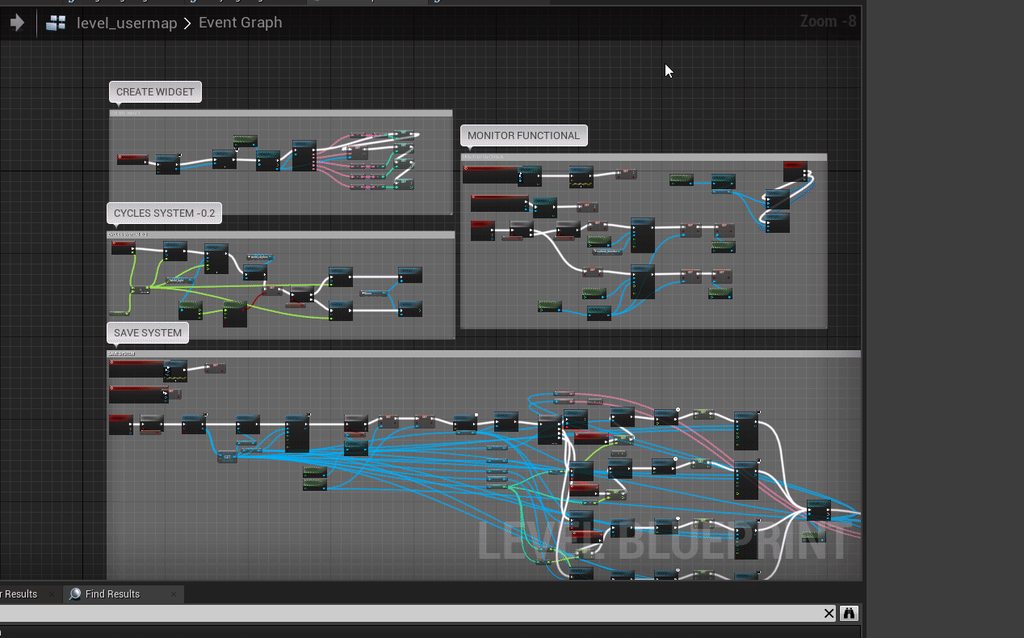 rose hazel
Should I expect hitbox issues with a projectile traveling at 640.08 m/s
 pulsar surge
I’m not 100% but I think that will determine how fast the logic can be processed
Be determined by*
earnest tangle
yeah seems it would depend on framerate, the size of the projectile, and the size of whatever it can collide with
pulsar surge
How are you checking for collision?
earnest tangle
you can enable CCD or continuous collision detection for it if it becomes an issue
rose hazel
I’m still figuring out what exactly I can do with ProjectileMovement, but I considered having the bullet track a hitbox in the muzzle until it collided with said hitbox
pulsar surge
So like a a bullet assist?
Like tracking movement?
I have a projectile code built but it doesn’t have that kind of speed but I find it really reliable
rose hazel
As a crude way to make the bullet travel in line with the barrel
rose hazel
The actual bullet is spawned in the gun’s chamber rather than at the muzzle
pulsar surge
Is it an FPS?
rose hazel
Yep
pulsar surge
So you’re gun could and will be point in a different rotation than your main actor
And are your guns slotted or attached to the models
Or rather part of the actor model
rose hazel
The gun will be attached to a socket in the player character
pulsar surge
Are you using a get forward vector on your gun for the projectile?
rose hazel
I’m trying to make this as realistic as possible. The bullet travels wherever the gun aims
pulsar surge
Yeah
So
Using a get forward vector should accomplish that
I can’t see why it wouldn’t
@earnest tangle can you use a reason to not use a get forward vector on the gun itself?
That’s what I use for projectiles
This way you cna ensure whatever way that gun is facing your gullet with travel
Bullet
earnest tangle
forward vector of the gun sounds like it should work yeah
pulsar surge
The other ones are getworld location
And getworldrotation
this is for multiplayer but her is an example
ah here we are
this is my code for spawning a projectile
rose hazel
To elaborate, the bullet is spawned by the cartridge, which changes its own mesh into a spent case. There’s a socket used for the spawn transform
What I need is for the bullet to act as if it’s traveling through the barrel until it exits
pulsar surge
i had to the forward vector so the projectile spawns more in front
and this to the actor
so you are essentially trying to create a more realistic projectile through the gun barrell itself
rose hazel
Yep
pulsar surge
instead of just spawning an actor inside the gun barrel and shooting it forward
because I would just spawn a bullet at the inside end of the barrell
player would never notice the difference ever
rose hazel
Nobody would notice such a small detail, but I would and I’m the one making the game
pulsar surge
ahhh
labour of love
nothing wrong with that at all your game
Ill say this
weigh out the work vs value on that one
because youll need alot of tracing to get it perfect
 mild turtle
ok so i'm trying to make a fortnite ripoff third person shooter to try and learn unreal and for some reason i can't resize my rifle and when i try and play the game it launches me accross the map
pulsar surge
YYYYYEEEEEETTTTTTTTTTTTUSSSSS
spark steppe
the DCMA Gun
 hallow night
Turn off the collision on the weapon
pulsar surge
lil yeetus
^^
or change it to overlap with pawns
depends on if you know how to do those two things
XD
are you experienced/doing tutorials or just sending it
 boreal helm
hello guys i was thinking about making a game kind of like the game flying gorilla but i didnt know how to make it so that when you click left or right, it moves you a certain distance and no more than that.
left or right
https://www.youtube.com/watch?v=iG23N1Y5BKM like this where you would press a/d to move left and right

just the basic moves for a runner like this
 teal burrow
Everything else is moving
pulsar surge
input action left -> set actor rotation
hard set the rotation variables or promote them to variables if you want to be able to upgrade it
a small check will allow you to reset to centre
profit
with a little bit of extra logic you can have a speed on the rotation and promote the speed to a variable and be able to upgrade that as well
rose hazel
Any thoughts or suggestions? BurstUpdate will be called by the action after it cycles
pulsar surge
does it work?
teal burrow
You know you can have events in timelines right?
And you can call those when a specific time hits
rose hazel
Seems to work so far
Found an issue. The action is calling BurstUpdate every tick until Sear is true regardless of how many times it cycles
It may have something to do with the round not ejecting
That was it
The only thing being deliberately triggered is the sear. Everything else works together
That's the receiver, the action, and 3 individual rounds
rose hazel
What makes this even more satisfying is that I’ve essentially created a Eugene Stoner bursts system with two integers and two bools, meaning the burst can be interrupted and the index will advance once each time the bolt cycles
maiden wadi
@pastel rivet Like on a static mesh, or? What's the use case for needing the tri index?
 pastel rivet
Well, now i currently have made a system to calculate the vertices points based on width, density and height.
Now im to use the create mesh section, but i need the triangles index numbers, and i cant wrap my head around how they are calculated
@maiden wadi
If that makes sense
 obsidian meteor
hey guys, I'm having an issue with a spline BP actor I made. it's a race course, with gates at the spline points. a recent change I made (either to this actors construction script or perhaps to how they're consumed by the GameMode) seems to have deleted all of the spline points on the critical spline in multiple levels.
I know this is something that I've messed up, but what's weird is that when I make new edits to the splines, those are correctly saved and load back up when switching levels. I also have versions of the umaps from last month that definitely still had the correct spline points. however, when I simply copy these into the content folder, the splines do not load with their spline points.
any hint of what might be going on here? I did reparent this blueprint in the past week or two but that's the only apparent thing right now that would cause this
pulsar surge
not honestly sure, however whenever you move/rename or make changes in the folders its a good practice to right click on the main content folder and click fix redirects
I am not sure if this is causing your issue or not, but its a good place to start and see if there were any redirect issues
obsidian meteor
ok. hm
I think since I just overwrote the messed up umap file with one from the past that redirects wouldn't be an issue
pulsar surge
Like I said, not sure. I was just taught that as a best practice when making changes in folders, just thought I would suggest the tip in case it helps.
pastel rivet
obsidian meteor
I see the root component also changed from the spline into a default scene root with the reparent
 signal cosmos
Hi! Can please someone help me with the vehicle system in UE4?
I'm trying to get a vehicle that doesn't slide when steering, but I don't know what to change in the settings at all!
 desert storm
The highlighted branch keeps giving me an error in-game. This is a blueprint for a monster to attack the door the player is behind, when it gets in range. It sets a variable (at door) to true when it enters the trigger. Then with event tick checks for if that variable is true, and then if the door is closed (which is a variable in the door BP), and then plays an attack animation. Everything works until the highlighted branch. Any idea why? Error below:
pulsar surge
whats the error
oh i see it
tiny little guy
its trying to ref something that isnt there
it called for a ref and returned none
that door closed variable may not be getting setup correctly
its trying to read the info from that cast as door
so somewhere from that variable as door -> door closed the info is not correct
 proper breach
hey so i have this quest box widget array that holds all the empty quests (they dont have the quest data in them, its just a template, but will eventually have an "empty quest slot" texture) and for some reason, im not able to enable them, change their text, or anything really. When i create them, it runs an update function for each of them that just sets all the text values to ' ' and disables it. When i go pick up the quest, that same program runs but is supposed to enable the first empty slot and change the text data on it, but it just doesnt. I originally thought that it was because two sets of widgets were created: one that got changed and one that got added to the main widget, but when i check for the uniform grid box's children, it does not come up with empty values (which would mean that a class was assigned to that slot), so i have no idea what is going on
proper breach
thats setting them all to nothing for when it starts
pulsar surge
so is it just looping back that then
proper breach
nope
pulsar surge
have you thrown a print string up after branch
proper breach
its doing the false in the branch
proper breach
yes
that is what i wanted it to do
is the false
i cant figure out why it wont do the enable function though
proper breach
i cant figure out why the object reference wont have its properties changed
its making it to the false in the branch
but it doesnt do any of the things on the bottom to edit the text or enable the widget
pulsar surge
have you tried a print string at the end of one of those set text
and see if its actually doing it
proper breach
yep
proper breach
its returning the correct values, but the set text functions do nothing
proper breach
yes
pulsar surge
are they all doing it/
proper breach
yep
pulsar surge
so the value is set but not the text
proper breach
all parts of the class are making it through
but the text wont get set to it
so im assuming it has to do with maybe the object reference is wrong
pulsar surge
so right before it goes into the set text
proper breach
yes
proper breach
but i got the grid box's child at the index its supposed to be and set that to the target
and nothing happened
everything BUT the visual part of it is working
pulsar surge
yeah thats weird. its hard when I can
cant trace your variables
If i had a guess though it would be the target
sorry man
wish i could be more help on that one
 lime mason
so i made some doors yesterday using a timeline, but i want to have an initial start rotation so is there a way to have that as a variable in the timeline? or is this not what im looking for?
lime mason
i want it to start partially open, but then have the timeline open it up to the full 90 degrees
and then go back down to zero
pulsar surge
wouldnt that just come down to how its spawned in game?
like wouldn't you have it set to spawn at the starting rotation?
lime mason
i made a variable for starting rotation like that
but when the timeline starts, it goes from all the way closed to all the way open and then goes past that and shoots back
pulsar surge
so when you set that rotation variable does it not update the mesh?
lime mason
yea
lime mason
this door im placing partially open
pulsar surge
because doesnt it take the begining rotation and then reset
so its taking that and reseting the rotation to 0
lime mason
hm
pulsar surge
add a check for rotation
if under what you want it to be set it to what you want it to be
so if that rotation variable is less than say 10 -> set rotation to 10
i do similar things with gamepad movement in menus
lime mason
im confused
pulsar surge
so when the door closes
you want a check to see if the rotation returned the original value
or if it reset to 0
if it did reset below your original value then set the value to the original
so if your original rotation value is 10 then you want to check if that returned 10. if its less than 10 set the rotation value to 10
lime mason
im realizing that because i have a timeline from 0 to 90 degrees, this isnt going to work very well
signal cosmos
I think there's a problem with the default vehicle, When I brake, it won't steer. It even seems that it tries to steer in the opposite direction I'm steering to. does anyone experience that as well?
lime mason
i would but this is for every door
pulsar surge
ohhhhhhhhhhhhhhhhhh
lime mason
yea
pulsar surge
you need a base then
lime mason
im doing instance stuff
pulsar surge
and create a parent of that base
because if you are going to have floating variables for rotation
lime mason
that probably makes more sense than what im doing lol
pulsar surge
so for instance
if i had character selection
or multiple characters
i would create a character base for all the base stats and stuff like that that every single player would use
lime mason
Ooo i have an idea
pulsar surge
then create children for each player
oh?
let me know if you get it going. im interested because I dont use timlinig
well properly lol
lime mason
im new to stuff so im just going off of what im used to
pulsar surge
for this
because you want multiple doors with multiple meshes and rotations
create a BP_DoorBase
lime mason
but what if i clamp the door rotation from the timeline if its over the base rotation + the timeline
pulsar surge
have all the basic functionality working in that that you want. just make sure every single thing you want changed is a variable
yep
that could do it
pulsar surge
yeah
well your clamping the information for the rotator
there might even be a clamp rotator function
i think you can call one in c++
i think your rotation is a vector no
pulsar surge
ohh okay
lime mason
takes a rotator lol
pulsar surge
and yeah
you can clamp it
yeah i know haha im not in unreal right now so i cant type the function out and see
 proud hull
Clamp Angle
 hollow panther
Hello, could someone help me with a small problem I'm having with widgets?
I have an actor with a collision box called Engine, when it overlaps with a player I add a widget to the viewport to display the "repair percentage" on the screen. The issue I have is that I don't know how to tell the widget to get the "repair" variable from the actor that created it. Right now I simply get all actors of type Engine, and pass in the index 0, but I run into issues when having multiple Engines in the scene.
pulsar surge
could try what I recomended before
just to see if you can hard set it to work
and then debug it top down
pulsar surge
jesus christmas
lime mason
yea
pulsar surge
thats alot of logic for a door rotation
lime mason
i just need it to start not at 0
pulsar surge
hard set that bastard
pulsar surge
just to see if it works
proud hull
@lime mason you can clean that up a bit with a select node.
pulsar surge
you hard set your max XD
lime mason
yea
pulsar surge
why not the min XD
lime mason
90 degrees
because the min is going to be whatever the instance start rotation is set at
pulsar surge
have you printed out the rotation varibles its getting
and see if its even getting the correct information
pulsar surge
print string is da way
lime mason
well
yes
but
this is on an update of a timeline
so
many print strings
very very fast
pulsar surge
hmmmmm
you should just be able to get one for the rotation value
and just have it spit that out at you
lime mason
but when
lime mason
it updates a lot
pulsar surge
or the branch on there
its just for debugging
all you want to see is when the door closes
what value is it getting for the starting rotation
and what is it actually going to
lime mason
pulsar surge
if you dont have that information its going to be hard to see where its going wrong
yeah
whats the bare min it goes to
lime mason
0
pulsar surge
0?
lime mason
which isnt good
pulsar surge
yeah so its not getting the info
pulsar surge
try away door
lime mason
so it opens
but
i remembered
theres a little thing called i use the reverse on the timeline
so
lime mason
i have idea #2
lime mason
if its a isPeek = true, do the thing, but if not, do it normaly
pulsar surge
so when it complets the reverse its too late
so its already completed before it even processes the logic
man timelines
i know they can be insanley useful
but this is why ive avoided them lmao
because if i were to do what youre looking for I would just blueprint it without a time line XD
pulsar surge
but definitley if you are having multiple doors, and they look different
have a base door
and then children
have all your door variables stored in the base and use an interface to call them
pulsar surge
oh hahaha
all good dude
essentially what im getting at
is you are creating a foundation for doors
like all doors follow this lofic
logic
then for all the things like meshs changes rotation changes etc, the children will handle that. the player will see the child but wont see the parent as its just logic
lime mason
my doors arent closing now lol
pulsar surge
XD
lime mason
and my blueprint looks worse
i know why theyre not closing
its because im dumb
MY DOORS DONT OPEN ANYMORE
ok
its back to square one but
looks like this now
i can feel im closer though
hey i just noticed
what is "Set New Time"
it sounds very useful for my issue at the moment
or does it? now that i think about it i dont really know. my brain is literally a smoldering piece of charcoal by now
trim matrix
hey
Hello I have a small problem at the moment when the player makes a save, I take the value of the rotation of the skyphere which is stored in the value "new location", each time we start the game the skyphere actor is reset to -84, problem of the blow, what I try to do is how I could make so that the skyphere actor starts compared to the location of the backup! thank you very much.
or other way to save sphere/sun location
pulsar surge
When it stores the value have you confirmed it’s storing the correct value
trim matrix
Yes, when I print the value I get the value of time @pulsar surge
Coz if i put the new valeur here
its work, the time has swaped
but the rotation is fix so time is stuck
so i want like replace the value by my value
pulsar surge
So when you go to save the sky sphere location info it is 100% getting the right information
?
I’m just trying to see if it’s a read or write issue
trim matrix
Yes the proof, when I replace it by the value I have saved it is the time I saved it
trim matrix
Basically, it would be necessary, that with the value save that it replaces the default value which is -84 (knowing to each party it goes back to -84) and that it is replaced by my value that I saved (currently 7).
Yeah
Wait
pulsar surge
Yea but you need to ensure that when you load
pulsar surge
That value it’s getting is correct and your logic after receiving the value could be wrong
trim matrix
no value is good
i need just to find how i can replace the current value by my save value
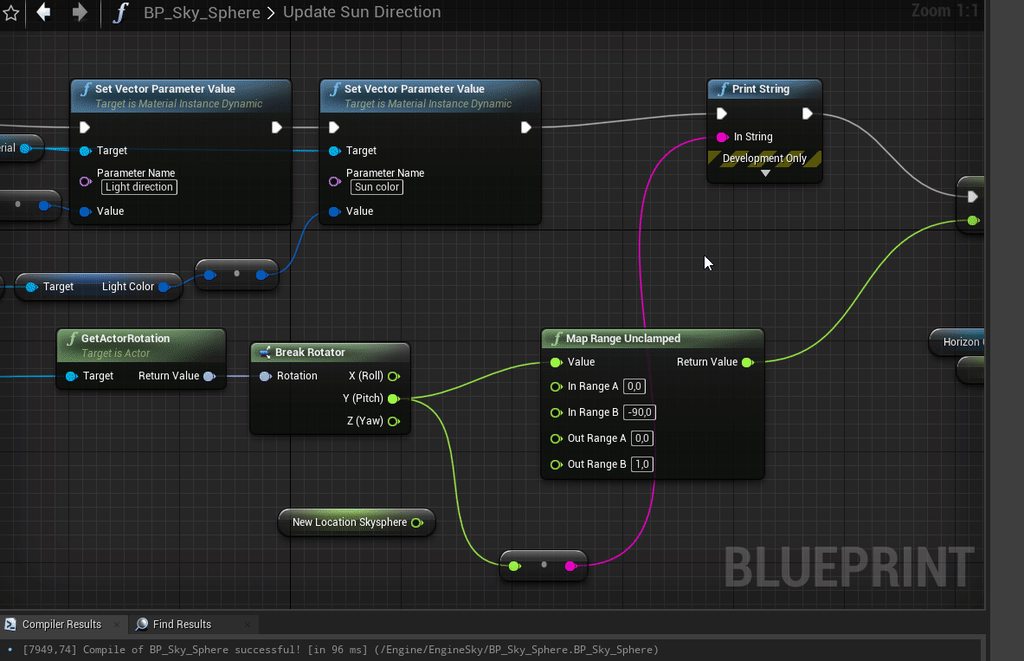
@pulsar surge first value is sky rotation (reset to -84 everytime), second value that my skyphere rotation save
trim matrix
yeah
pulsar surge
So take your stored variable and set it to that
pulsar surge
I’m not super experienced with the skybox rotation but I can give a few suggestions to direct you
Create a blueprint for soup here
 frigid ether
I'm trying to do a dash mechanic, how do I make it so I go in the direction of my input? So if I'm walking backwards, then I dash backwards and so on
pulsar surge
Skysphere
pulsar surge
Get forward vector varian
frigid ether
forward vector from what
pulsar surge
Your actor
You want him to go the direction they are racing yeah
I just built this actually
It’s a dashing ability but does the same thing
frigid ether
you mean facing?
frigid ether
alright
frigid ether
You want him to go the direction they are racing yeah
@pulsar surge but I think you misunderstood
I don't want the character to go in the direction I'm facing
pulsar surge
Oh sorry
frigid ether
in the direction of the input
trim matrix
evan when you are free you can do to my dm ? please
oh sorry
not see you message haha
 thorny mantle
Hi everyone! Does anyone know what might cause an Instanced Static Mesh to be visible in the editor but not in-game?
frigid ether
It sometimes bugs, try restarting the whole engine
Happened to me today, was driving me crazy
thorny mantle
not worry I take all the solution I might not have looked up haha
pulsar surge
go to your static mesh
there are two checkboxes
visbile in editor
and visible
make sure both are checked
if that doesnt work you have an anim or logic automatically setting the visible to false
any luck?
pulsar surge
So it just straight up doesn’t show up in game
It shouldn’t I mean. If you out that mesh right beside your character and you can’t see it then I doubt it’s culling lol
thorny mantle
yeah I know right.
another thing
when I pause the game, eject player and click on the mesh it shows up
weird
 worldly edge
why would my blueprint stop at a for each loop it doesnt continue
 normal plinth
Does anyone have any tips on using root motion? How do I extract the root motion from the animation and apply it to my CapsuleComponent? Even if I turn on root motion on the animation and turn on "Root Motion for Everything" in the AnimBP is still won't work....Any help is appreciated
 halcyon cipher
Does anyone know how to get duration from a 2D sound?
trim matrix
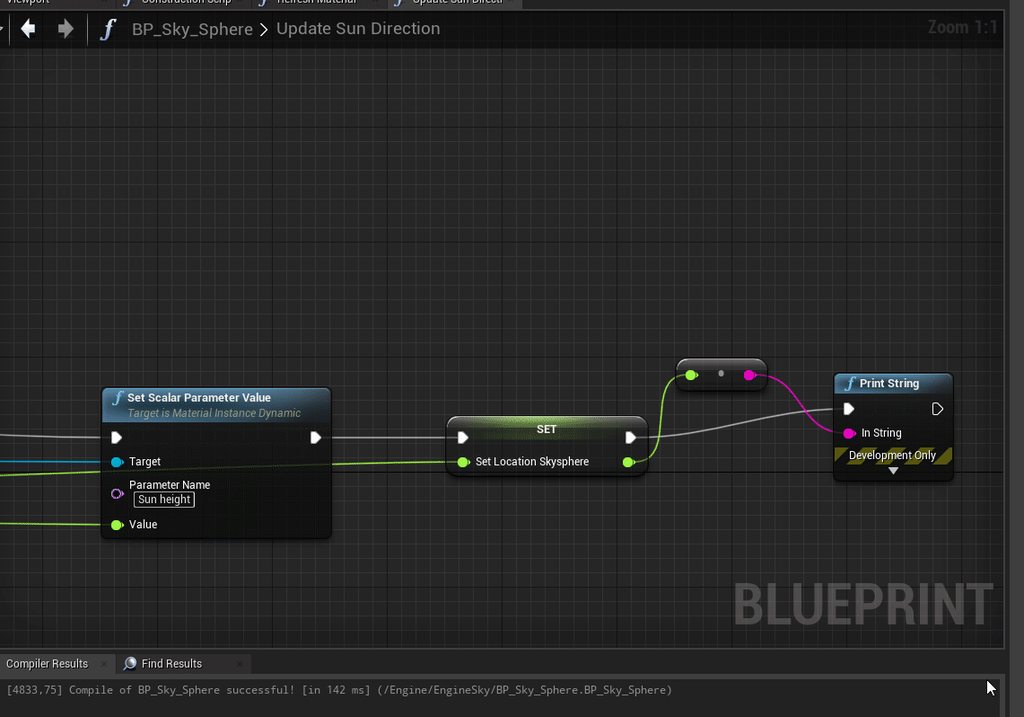
Hello everyone, well here is the update : (for the rotation of the skyphere)
When I load the game with the current time it works!
But instead of doing 84, 85 and go back to -85 -84, it goes up and blocks at 90 I have to alt tab/wait to start again?
What is this magic ?

 mossy robin
@normal plinth 😂
Just check the root motion box
You can then create an Animation montage with those animations in them
And later play the montage, that is after you have added the ‘slot’ in between the default locomotion and the out put animation in the Anim Graph
mossy robin
worldly edge
why would my blueprint stop at a for each loop it doesnt continue
Does it?
Lol I’m sure there is a problem with your code or better still Bp
worldly edge
yeah i know theres problems
im following a tutorial that was kinda abandoned by the creator
mossy robin
frigid ether
I'm trying to do a dash mechanic, how do I make it so I go in the direction of m...
Just get the forward vector of the Actor Velocity multiply it by a variable
And let the system run only when velocity is greater than 0
worldly edge
im close enough tho i think i can piece together the rest
mossy robin
@worldly edge so what do you want to make
worldly edge
procedurally generated platforms connected by rectangles
mossy robin
Can you send me a picture of your animation montage? @normal plinth
pulsar surge
@halcyon cipher GetDuration
mossy robin
@worldly edge lol
I’ve actually done procedurally generated buildings already quite long though
normal plinth
Sure. @mossy robin
worldly edge
i dont have much experience with this all the tutorials build a super complex thing really i just want something simple and easy to build
mossy robin
@normal plinth
And your animation has root motion checked and force root lock unchecked right?
pulsar surge
@worldly edge procedural generation and simple and easy are a bit of an oxymoron
XD
normal plinth
correct @mossy robin
worldly edge
ehh relatively simple im fine with time consumption
mossy robin
@pulsar surge 😂😂😂
You’re right though
worldly edge
literally spent like 6 hours on this alone
pulsar surge
procedural generation is not simple
mossy robin
@worldly edge I’ll send you screenshots of one of my projects later
pulsar surge
there are masssive learning sections on it
mossy robin
@worldly edge and 6 hours on that is not a lot since those kind of systems need more time
worldly edge
oh yeah nothing is being made i cant even make a cube haha