fair enough. the more i think about it now and see prices, would it be better if i just upgrade my current CPU instead? currently on 3700x/3060TI/32gb and the reason why i am contemplating a 2nd pc is because when i stream, i have other apps in the background running such as discord, browser, bot, etc and my game itself takes a performance hit in terms of frames. (this only happens when i stream). i'd like to be able to do all of the above with no or minimal performance hit.
#tech-talk
1 messages · Page 11 of 1
 little sinew
 gusty wagon
little sinew
fair enough. the more i think about it now and see prices, would it be better if...
gusty wagon
little sinew
fair enough. the more i think about it now and see prices, would it be better if...
Could just be encoder settings too
But upgrading to a 3900 or 3950 wouldn’t be terrible
little sinew
gusty wagon
But upgrading to a 3900 or 3950 wouldn’t be terrible
alright.. i might consider that option instead of a whole 2nd system... hmmm
thanks!
gusty wagon
little sinew
alright.. i might consider that option instead of a whole 2nd system... hmmm
I’m running a 3900X with 32GB of ram and a 1080 and have no issues. So you might start there, and you always have spare parts for a second build of needed
little sinew
yes, might consider that... i had tunnel vision and didnt think to consider upgrading my CPU instead of building a whole new system. it would definitely be more cost effective. upgrading the cpu should help with all the background task i want to do while i stream correct?
 stuck snow
is a 3060 ti enough to stream on obs
gusty wagon
stuck snow
is a 3060 ti enough to stream on obs
Plenty
gusty wagon
little sinew
yes, might consider that... i had tunnel vision and didnt think to consider upgr...
Yes. And plenty of ram
little sinew
gusty wagon
Yes. And plenty of ram
Currently have 32@3600/CL18, it's been ok as is, might consider a cpu upgrade instead. It seems a 5900x is cheaper than a 3900x in my area, odd.
gusty wagon
little sinew
Currently have 32@3600/CL18, it's been ok as is, might consider a cpu upgrade i...
Get it
It’s a beast
Such good CPUs
little sinew
gusty wagon
Such good CPUs
Awesome! Thanks for your time/advice!
 shell sonnet
I can also vouch for the 3900x. It's wonderful. Orsuna ain't lyin'.
 past shard
you guys gotta stop talking about good AMD cpu's, i cant afford to upgrade now 
also, ya'll see the 3090 Ti and the 3050 got announced?
 cunning aurora
yay more gpus to not be in stock
but it's good that they didn't go the 1600 route with a dumbed down version for their lower-end models
little sinew
past shard
you guys gotta stop talking about good AMD cpu's, i cant afford to upgrade now <...
😅
Agreed
Although I posted all the above... I didn't day I was actually going to do it lol.... Maybe... Haven't decided yet if I want to drop 600$ lol
 dusty orbit
Does anyone know something about making twitch bots or maybe a server with devs for twitch?
past shard
dusty orbit
Does anyone know something about making twitch bots or maybe a server with devs ...
i dont know of any off the top of my head, but you could ask in our #dev-chat channel 
 pulsar ibex
i need to fix my obs im getting a complete black screen when i try to stream
 chilly sirenBOT
@pulsar ibex ⤵️
If you would like help from the StreamElements support volunteers/staff, please post your question in one of the helpdesk channels and someone will assist you as soon as they are available #helpdesk-twitch | #helpdesk-youtube | #helpdesk-facebook | #helpdesk-mobile | #helpdesk-selive | #helpdesk-merch
Helpdesk channels are only for requesting support! Thank you for being patient.
 ancient parrot
hello when i open obs with strem elements plug in the program is maximized and cant be resized or moved. alt tab will allow me to close it but I cannot access any of the minimize , maximize or close buttons.
nevermind ill ask in the correct forum sorry
 unkempt owl
I have no idea how the Overlays work and am unsure of the correct chat
Can anybody help?
unkempt owl
I really need help
chilly sirenBOT
@unkempt owl ⤵️
Check out this playlist https://youtube.com/playlist?list=PLCDDKlFdScbEwdx5AntcQIS1InkFJwHtv with tutorial videos from setting up the basics to in-depth details on how to use our product.
New to OBS? Here is a 4 step quick start guide https://obsproject.com/wiki/OBS-Studio-Quickstart
Want to learn even more? Here is an in-depth overview https://obsproject.com/wiki/OBS-Studio-Overview
 midnight berry
Hello! SE is fantastic, but i have 1 big problem with boot. I set “sounds comman” and commands working, but if i set on 1 scene more then 1 sound command i hear my command twice and audio is broken? Can somebody help me please?
gusty wagon
midnight berry
Hello! SE is fantastic, but i have 1 big problem with boot. I set “sounds comma...
Go into your browser source properties on every scene and select the boxes for shutdown when not visible and refresh on scene change or whatever it is.
midnight berry
gusty wagon
Go into your browser source properties on every scene and select the boxes for s...
This i have, but problem dont fix 😦 how is posible, if i asd one sound command everything fine, vut if add moore problems starting? 😦
gusty wagon
midnight berry
This i have, but problem dont fix 😦 how is posible, if i asd one sound command...
are you watching your stream or have the overlay editor open while testing in obs?
midnight berry
gusty wagon
are you watching your stream or have the overlay editor open while testing in ob...
No i dont have overlay editor open. I see this problem, if i was online today
If i have moore sound command i must create separatly browse soucre, or i can add moore sounds on one browser souce (one overlay editor) i hope that you understend me, my english isnt good😀
gusty wagon
midnight berry
No i dont have overlay editor open. I see this problem, if i was online today
You can have multiple sound commands in a single browser source.
midnight berry
gusty wagon
You can have multiple sound commands in a single browser source.
So i dont know why i have this problem…:(
gusty wagon
and you have these two boxes checked in every scene on every browser source?
 midnight berry
I must checked it on every browser source on every scene? Like alerts etc?
midnight berry
Ok i can check it for 7hours, now in in work.but i think u have it. Any next advice?
gusty wagon
try to consolidate everything into a single overlay so you don't have 30 browser sources in a scene. the fewer browser sources you have in a scene, the better OBS will perform, and reduce potential issues.
midnight berry
Ok, and sounds? Can be problem there? I tgink audio settigs?
gusty wagon
again, fix the browser sources first and go from there
midnight berry
Ok. Then i fix that, i contact you, if works, or not. Ok? Thank you soo much!!
SE is very good and friendly platfrom i love it, this is only one problem, if i fixed, im really happy.
midnight berry
gusty wagon
again, fix the browser sources first and go from there
Hello i try your advice and problem still working. I set only one web source on scene and sometimes audio commands play normal, sometimes not 😦
 buoyant panther
does anyone have recommendations for capture cards? i'm looking to start streaming off my switch and there's so many options! i'd prefer something under $100 ausd if possible
 lavish quail
Hey guys, i dont know if this is the right channel.. But i would love to switch from SLobs to Stream elements.. I*ve tryt to import my alerts to SE but i always get a Error from the Chrome Plugin.. can you guys help me ?
 hollow hornet
lavish quail
Hey guys, i dont know if this is the right channel.. But i would love to switch...
hollow hornet
lavish quail
Hey guys, i dont know if this is the right channel.. But i would love to switch...
It’s probably cause u need obs or a source for whatever platform ur moving to stream elements isn’t an obs source
gusty wagon
lavish quail
Hey guys, i dont know if this is the right channel.. But i would love to switch...
make sure you're logged into streamelements in one tab, and streamlabs in a second tab
 shut pelican
Idk how often this gets asked here so forgive me if it sounds in any way repetitive 😅
Has StreamElements ever considered making their own OBS fork instead of just working on the plugin? I'm trying to wean myself off of SLOBS, but regular OBS just has too high a learning curve, even if it's easy to import SLOBS setups.
I want an OBS that is as easy to build setups, whether imported or from scratch, as SLOBS was, without any of the ugly plagarism.
 keen patrol
shut pelican
Idk how often this gets asked here so forgive me if it sounds in any way repetit...
keen patrol
shut pelican
Idk how often this gets asked here so forgive me if it sounds in any way repetit...
I mean.. OBS takes a day to learn how to use for most users
As far as "actually" setting up overlays and the such- those are done in SE's Overlay Editor and added via browser source
cunning aurora
given that slobs is obs with a bloated UI and some integration with their service I don't see how OBS Studio has a higher learning curve?
I don't think the world needs another OBS fork to muddy the waters
 ancient jasper
Hey folks, weird odd ball question for ya's
Does anyone know what font this may be? I've seen SO many creators using this one or something super similar lately, anyone know a way to reverse search a font?

I pulled this off the new markiplier video, ive seen smii7y, mark, fitz, and a few others using it
 fallow iris
ancient jasper
Hey folks, weird odd ball question for ya's
Does anyone know what font this may...
fallow iris
ancient jasper
Hey folks, weird odd ball question for ya's
Does anyone know what font this may...
Not sure if you found your answer yet, since it's been 12 hours BUT, actually have an answer for that second question! Only know about it from having Google searched it before.
Quite a few websites have an "Image Search" for font, which try their best to match any image with font to what they have in the libraries they have access to (depending on the website). My personal go-tos have been myfonts, whatfontis, and fontsquirrel.
(I'd link them but uhhh yeah no links in this channel IG, sorry ;;;)
 topaz pebble
@fallow iris Bot dings websites once and either allows or denies following that. You were lucky that it approved on yours 
 vapid mirage
I have a question about Streamelements Emote Combo Widget. Can I talk here about it or not?
 cursive kindle
past shard
you guys gotta stop talking about good AMD cpu's, i cant afford to upgrade now <...
cursive kindle
past shard
you guys gotta stop talking about good AMD cpu's, i cant afford to upgrade now <...
disappears
 shut pelican
cunning aurora
given that slobs is obs with a bloated UI and some integration with their servic...
shut pelican
cunning aurora
given that slobs is obs with a bloated UI and some integration with their servic...
I erroneously made the assumption the learning curve was higher as when I installed OBS with the SE plugin from the SE website, studio mode didn't show up when I opened it. Turns out I have to fullscreen the app to set everything up before I can get to studio mode.
I think I already know how to use it, which should be fine.
ancient jasper
fallow iris
`Not sure if you found your answer yet, since it's been 12 hours` **BUT**, actua...
Thankyou! I really appreciate it, i think i found it but i might be wrong and it is just similar


 trail inlet
Hello, I'm trying to organize my store, and every time I try to change the item's position, it doesn't save and goes back to the place it was before. Can someone help me?
cursive kindle
 torn quest
strecht the source to screen.
100% bet your canvas size is 1920x1080, but the game cap isnt. 
i think it was CTRL+F ?

 toxic remnant
torn quest
toxic remnant
torn quest
StreamLabs?  This is StreamElements server
torn quest
toxic remnant
StreamLabs? <:razW:566835291378286602> This is StreamElements server
yeah im hgih lol
 modern flax
Hello everyone! Can someone help me with a discord private channel issue?
 unborn beacon
 true crypt
Why does all the overlays including my own look like this when you go to edit stuff more superficially the wording on the left side area looks like it has words on top of words you cant make anything out
 gusty wagon
true crypt
Why does all the overlays including my own look like this when you go to edit st...
gusty wagon
true crypt
Why does all the overlays including my own look like this when you go to edit st...
Make sure chrome is at 100% zoom and not anything else
true crypt
tht is not chrome @gusty wagon
gusty wagon
true crypt
tht is not chrome <@!128166843360739328>
Whatever browser you use
true crypt
@gusty wagon it is set at 100. when i go to the my overlay section and hit the edit icon the words on the left look like they are being overlapped by other words and tht was not the case about 2 days agin
to be honest the whole damn thing looks different now like it was done half assed
gusty wagon
true crypt
<@!128166843360739328> it is set at 100. when i go to the my overlay section an...
Try chrome
It’s not an issue with the site
 leaden tartan
But its an amazon link....
 languid nexus
Anyone in here who can create an extern application for me to control my stream and edit the overlay with during the stream?
 fathom delta
so I know streamlabs chatbot has events that can play an audio for a person that says something in chat, but is there a way to have that happen without using streamlabs chatbot?
toxic remnant
fathom delta
so I know streamlabs chatbot has events that can play an audio for a person that...
If you mean StreamElements then yes, there's widgets for that in #widget-share
fathom delta
toxic remnant
If you mean StreamElements then yes, there's widgets for that in <#4579575574708...
I'll scroll through again. Didn't see one before. Thank you kindly
toxic remnant
fathom delta
I'll scroll through again. Didn't see one before. Thank you kindly
Search for Sound by command
 hallow vine
Hello together. So I got my new Pc yesterday and set everything up to be able to stream again today. Since i got a good PC i was happy to play some Apex again (and stream it). While playing offstream I get 180-200 fps on highest settings.
When i start my stream, the nvidia fps counter goes to 33 and stays there and the output to my stream are those 33 fps while on my monitor and ingame I still have a lot of fps (counter says 33 but still feels like more than 120fps). My output in obs is set on 60fps 1920x1080 tho... Does someone knows why obs/gpu/Apex sets the outgoing fps to 60 instead of the reached 140 or the 60 i set up in obs?
Thanks for any help in advance 🙂
gusty wagon
You’re probably overloading your gpu
 gaunt walrus
How do i do in bot settings this will happen messages works also for sony
 bold basalt
why can't I get the twitch chat as shown in the picture can someone help me?
 past shard
bold basalt
why can't I get the twitch chat as shown in the picture can someone help me?
past shard
bold basalt
why can't I get the twitch chat as shown in the picture can someone help me?
if your chat window closed, just go to View -> Docks and click on Chat
unborn beacon
Hi every one, just looking for some advise hopefully some one here can help, I'm streaming on ps4 and keep getting error code ce-35235-8, I got ahead of myself and tried working with obs an conecting the two but laptop crashed an when I tried logging back in got an error code. Since then stream crashes with ce-35235-8 error I re installed obs but that didn't help 🙏 any help would be appreciated 🙌
 clever light
is it possible to stream through a vpn? if so which is the best one?
bold basalt
past shard
if your chat window closed, just go to View -> Docks and click on Chat
okay
unborn beacon
where can i find a professional person to make me a good logo for free/
gusty wagon
unborn beacon
where can i find a professional person to make me a good logo for free/
you can look in #art-marketplace and find an artist whose style you think will fit with your stream and work with them to commission them
 desert mesa
Where can I find a professional adobe character animator user to make me an animation??
past shard
desert mesa
Where can I find a professional adobe character animator user to make me an anim...
same answer as above, check #art-marketplace but for something as specific as that you can try Fiverr or the like or take to Twitter and see who people can recommend
desert mesa
Thank you!
 faint cosmos
can someone help me set up the nightbot?
 brittle hedge
faint cosmos
can someone help me set up the nightbot?
brittle hedge
faint cosmos
can someone help me set up the nightbot?
Unfortunately we can't really help with nightbot. :(
 meager wagon
So i have a hyper x quad cast as my mic and it has 4 main mic settings to record audio however I’ve noticed the setting doesn’t matter anymore. So I have it set to cardioid so only things directly in front of the mic should work however mouse clicks putting things on my desk sometimes people talking in the house the mic will pick it up and I don’t know why
gusty wagon
meager wagon
So i have a hyper x quad cast as my mic and it has 4 main mic settings to record...
It’s a usb mic, it’s gonna pick up everything because the diaphragm is always charged and is super sensitive. You need to lower the gain, move the mic closer to your mouth, and probably look at a noise gate
meager wagon
I’m talking about in general and it used to never do this. when streaming it actually does what it’s supposed to or I’ve worked with it filters so it works at least. My main problem is when I’m not streaming
gusty wagon
What I said still holds true
Lower the gain
Turning up the gain increases the charge to the diaphragm and makes it extremely sensitive to any noise
meager wagon
Yet I raise the gain for obs
gusty wagon
You shouldn’t. Once you set the gain it should stay there
meager wagon
Well wait which gain you talking about
The gain on the mic?
Cause quadcast has the dial
And I don’t have an arm so it’s as close as it can me atm to my face
gusty wagon
So In windows = 100%. The dial should be adjusted so that when you talk normal it picks you up. Unfortunately without an arm you’re going to trigger the mic just by typing or bumping your desk due to the sensitivity of the mic
There’s nothing you can do to fix that one just because of the type of mic it is. They’re great mics, but also so sensitive due to powering the condenser 100% of the time
A usb dynamic mic is less sensitive, but will still pick up background noise
meager wagon
But then what’s the point of the settings on the back like cardioid if they don’t work
gusty wagon
That’s the recording pattern
Has nothing to do with sensitivity or gain
When you turn up the gain you’re gonna get stuff behind the mic
meager wagon
So even though it’s set to only record what’s in front it doesn’t do that
gusty wagon
Because when you crank the gain the pattern says “pretty much anything in the pattern”
And because it’s a condenser mic, it’s more sensitive to any noise. You also have to understand acoustics, and that sound doesn’t just travel in a straight line
meager wagon
Right of course
gusty wagon
The click of a keyboard is going to bounce off the walls and come back to the mic
meager wagon
So where would I go to reduce gain windows sound settings?
meager wagon
It’s already down
gusty wagon
All the way?
meager wagon
I mean do I ignore the dots
gusty wagon
I’ve never used a quad cast so idk what the dots mean
meager wagon
What I assume are the levels
But it can move past them
Idk what the levels below or above first and last circles are though
gusty wagon
You have it on cardioid pattern?

Gain control is the dots on the bottom of the mic
So knob should be second setting from right
And gain should be low enough to pick you up
meager wagon
Yea it’s on that
gusty wagon
And which dot do you have it on?
meager wagon
First or second from the right
gusty wagon
Large or small?
meager wagon
First or second small
gusty wagon
Ok. So when I had my yeti, I had to set it in front of my keyboard and arrange my mic/keyboard so that I had to awkwardly use my keyboard in order to not pick up key clicks
meager wagon
Hmm
gusty wagon
It’s awkward unless you have an arm
meager wagon
I used to have that now I have it like to the side
But I tried front it still picks up mouse clicks less key clicks
gusty wagon
The arm lets you turn the gain down low and talk into the mic. And if you have the arm, you angle it up a little so the pattern doesn’t pick up the keyboard
So essentially you’re talking over the mic
It’s goofy
meager wagon
Guess I have to get an arm
meager wagon
How much is it gonna set me down
meager wagon
But like I feel like I constantly have sound issues whether it’s hearing computer or whether my sound is good stream wise
gusty wagon

I want the low profile one for my SM7B
Like I said, the closer you get the mic to your face, the less you have to raise your voice
meager wagon
I have a razer headset I think one of the krakens and it was a usb mic with a thx mode I had to remove the usb part because sounds were different every time I used it it got annoying I never found that sweet spot
Hmm I’ll look into it
gusty wagon
meager wagon
I have a razer headset I think one of the krakens and it was a usb mic with a th...
I had one of those
meager wagon
For now I’ll just deal with no arm
gusty wagon
I have a Corsair void something or other that’s cheap. I plugged it into my GoXLR because the usb thing was goofy
It was like a $50 headset
gusty wagon
meager wagon
For now I’ll just deal with no arm
Try to find the magic spot on the desk, and angle of mic
You may have to tilt it and do some crazy positioning, but I think it will work
meager wagon
It’s mostly annoying the sounds like down the hall from my room get picked up
Sometimes
gusty wagon
Lolol
I had my roof replaced while I was using a yeti
I heard everything
I heard the roofers eating lunch and the neighbor’s hamster farting
brittle hedge
On the one hand, that's annoying, on the other, that's kind of cool.
meager wagon
Just weird how it says it doesn’t catch it but sometimes it does
gusty wagon
meager wagon
Just weird how it says it doesn’t catch it but sometimes it does
I’m not the CIA
I don’t need to hear it
brittle hedge
haha
meager wagon
Wait you just heard it with your ears
meager wagon
gusty wagon
I’m not the CIA
I meant with my mic
gusty wagon
The mic picked it up
meager wagon
That’s weird
gusty wagon
If you’re actively speaking and people fart in the next room, you’ll probably hear it
meager wagon
And then my friend will say sorry for the dogs barking I’m like what are you talking about
gusty wagon
I have professional composers who are jealous of my microphone
But yeah, find the right angle and it will be fine
It’s all about figuring out how to ensure keyboard and mouse are in the “dead zone” of the polar pattern
The farther you get the mic from the source of background noise the larger the dead zone in the polar pattern
I also put my keyboard on a foam pad to deaden the sound because when I typed it would vibrate the desk
meager wagon
That’s not a bad idea
 split oak
I'm late to this discussion, but you can also arc a piece of foam on the side of your mic that faces the keyboard, preferably with a little distance between the foam and the mic. It would deaden some of the effect. You have to make sure you're not putting it the way of you speaking though.
 verbal compass
Hi
meager wagon
split oak
I'm late to this discussion, but you can also arc a piece of foam on the side of...
Ngl during streaming I’ve gotten it setting wise where I don’t have to worry it’s out of stream that it gets annoying and like I said if there’s like loud sounds it picks it up when it never did
split oak
There's the gain and trim settings that can help with that, but loud sounds any mic should pick up.
brittle hedge
You probably don't want to be sharing your device id or product id.
gusty wagon
Sweet! I have a new copy of windows!
Fixed
With device ID and product code you can literally steal that copy of windows and deactivate yours
I got u tho
brittle hedge
Wait until you try 11
gusty wagon
11 honestly isn’t bad.
Driver support isn’t real in 7 for your cpu
What are you running while checking that?
That’s why
brittle hedge
It always takes me a bit to understand windows screenshots.
gusty wagon
I have a 3900X and it’s never that high ever
I’ve never pegged anything except my network
How many cores/threads is the 5300?
Trust me, with that cpu 11 is fine
Enable uhhh…the thingy in bios for the uhh virtualization
I don’t remember what it’s called
brittle hedge
smt?
gusty wagon
Ok
Get more ram
😉
That always helps
I have been running 11 since release and 10 on my work laptop. Both are fine
On my 3900X and my GTX 1080
I got old parts
I used it for a long time too
I’ve been using windows since 3.1
Soooo
Windows 11 snap is baked into the maximize button
It’s really slick
You can put like 5 windows
I was like 😮
Hover over it and it shows the options
11’s is better 😉
brittle hedge
embraces the dark side
meager wagon
Hey does anyone here have any like internet/network knowledge that maybe could help with an issue?
gusty wagon
meager wagon
Hey does anyone here have any like internet/network knowledge that maybe could h...
what issue?
meager wagon
So basically I’ve been having this network issue it’s hard to explain I guess but like
Ok so if I go on a website it usually needs a refresh or two before I can actually use the site
Sometimes the site will open but without the design so it’s just a black and white page all the text for the site is there just no design on the left side of the screen
If I play a game it will say not connected to internet or if it requires an external login will give me an error message and I have to relaunch it several times
It’s really hard to explain @gusty wagon
gusty wagon
That sounds like you need a better home network
meager wagon
Usually it takes a refresh or a couple restarts
gusty wagon
Are you on wifi?
meager wagon
I was thought it was my wifi dongle that was the reason so I’m hardwired still have the problem
Weird thing is my other devices don’t have this problem
gusty wagon
How many other devices on your network, what firewall do you have, download speed, etc?
Are you running your windows updates and driver updates?
Most network adapter updates come from motherboard website and not windows update
meager wagon
And other people in my house don’t have the issues
gusty wagon
I would start there and make sure you've run all windows updates (including feature updates), then go to your motherboard website and download all of the latest drivers.
meager wagon
Yea I have all driver updates
I used to be connected right to a gateway then I bought a router about two years ago
There’s about maybe 11 devices ? But all on different parts of the wifi like 2.5 and 5
meager wagon
Firewall is just the standard windows firewall
gusty wagon
or fiber?
meager wagon
Umm
I won’t lie I have no idea
And no I have a gateway from the company and then that’s connected to a router
It’s not connected to my cable if that’s what you mean but probably not
gusty wagon
Okay, so your internet connection should be in "bypass" mode where it just sends the internet connection to your router, and your router handles the connection to the ISP.
unless you can connect your new router directly to your ISP, in which case I would recommend that
meager wagon
But yea I’m all updated and I used avast for the driver updates
gusty wagon
I replaced my ISP router with an Amplifi Alien mesh kit and it runs way better
I don't use avast for driver updates. I run the MSI tool that was built for my motherboard
odds are that you're having some sort of conflict between your gateway and your router
and possibly your pc
meager wagon
We apparantly need to have people come in to run other wires or something can’t because of Covid and health things within my household
Just weird my computer is having the issues and nothing else
What’s weird is if I flush dns or restart the gateway it works but not for very long
Would hardwiring into the gateway make it better? Or we just need to get them in
gusty wagon
meager wagon
Would hardwiring into the gateway make it better? Or we just need to get them in
Direct would be best
 south mountain
Hello, I have a problem with donate psc. I activated them on tipply, the viewer paid me money and I have no money on my tipply account and what should I do?
meager wagon
gusty wagon
Direct would be best
Hmm guess I could try that it got so much faster plugging into the router
Or using it in general
meager wagon
gusty wagon
I don't use avast for driver updates. I run the MSI tool that was built for my m...
So should I not use avast and instead use the msi tool
gusty wagon
meager wagon
So should I not use avast and instead use the msi tool
Who made your motherboard?
meager wagon
gusty wagon
Who made your motherboard?
Msi
gusty wagon
Yeah download the Dragon Center app from the Microsoft Store and always run it as Administrator and it will download the correct drivers
meager wagon
gusty wagon
Yeah download the Dragon Center app from the Microsoft Store and always run it a...
Is the only way to download from the ms store
What I was just curious
gusty wagon
meager wagon
Is the only way to download from the ms store
Yes.
meager wagon
Ok thank you!
Also think I found a cause of the issue
My router is a nighthawk has an orange light on it looked it up and that means there’s a connection issue
gusty wagon
Unless you’re using the Ethernet ports on the router it should just be in bridge mode and set up as an AP to provide wireless coverage
meager wagon
@gusty wagon its giving a wireless signal to the rest of the house and im wired into it also
but i was getting the issues before i was hardwired
gusty wagon
Dragon center will help, it will also update your bios which probably is needed
I run mine once a month to make sure everything is updated
meager wagon
oh it auto does bios? that would of helped better then me doing it couple weeks ago
gusty wagon
Bios updates are easy enough with a usb drive
meager wagon
gusty wagon
Bios updates are easy enough with a usb drive
yea
its the msi dragon centre?
everyone says its crap in the reviews
gusty wagon
oh it's a terrible app, but best way to ensure drivers are updated
gusty wagon
because it's poorly written. it's definitely something that hasn't been rewritten in easily over a decade
meager wagon
oh
and everything this app is installing is needed?
or bloat
so i had some updates one said a network thing so might work
then it has things that i dont even have in here like norton
@gusty wagon thanks for the app though
gusty wagon
don't install anything except the drivers
meager wagon
yea it was like the three at the top
it was split into sections
ill say stays at 100 for a damn long time
gusty wagon
told you it's a terribly written app. but it does do the job
meager wagon
gusty wagon
told you it's a terribly written app. but it does do the job
so it installed it also installed realtek audio something and now all three speakers i believe are combine? cause i hear all through my headset
gusty wagon
I doubt they’re combined, they’re probably monitoring
meager wagon
do you know what ledKeeper is?
gusty wagon
It runs led lights or something
 scarlet horizon
Hey guys, can anyone help? I streamed yesterday for 4 hours, with raid shadow legend's as a sponsor, i did really well. But this morning it says declined on the page? Why is this?
 torn iron
small question (feel free to @ me) but when I try now to access to my dashboard on firefox i have a white page, and i gotta ONLY use chrome.
I know SE is more optimized for chrome but damn, do I really need to use another browser to do streamelements changes?
 severe copper
Help me. I installed Streamelements with Obs Studio when I logged in and will use streaming. When pressing Live Stream, send data to Facebook Dashboard Setting, have a hangover, and up Not Responding
I'd like to manage inside the dasboard setting before going live. I don't want to choose a model for the program to go live
meager wagon
torn iron
small question (feel free to @ me) but when I try now to access to my dashboard ...
This might sound stupid you tried refreshing right? Also you don’t have to use chrome I use edge stream elements works perfectly
torn iron
meager wagon
This might sound stupid you tried refreshing right? Also you don’t have to use c...
i tried multiple times, still white screen
meager wagon
torn iron
i tried multiple times, still white screen
Well like I said it works for me on edge
torn iron
meager wagon
Well like I said it works for me on edge
sadge moments then XD
meager wagon
torn iron
sadge moments then XD
This might sound weird
Open a private window
See if that works
torn iron
meager wagon
See if that works
i had to open in anonymous window....
meager wagon
torn iron
i had to open in anonymous window....
So it worked?
torn iron
meager wagon
So it worked?
only in anonymous
meager wagon
Yea
This is gonna also sound stupid but @torn iron do you happen to have an extension that enables dark mode
torn iron
yes, i did also try to disable it and yet didnt work
unborn beacon
does anyone know someone that can make me a good quality logo for free?
meager wagon
scarlet horizon
Hey guys, can anyone help? I streamed yesterday for 4 hours, with raid shadow le...
I would contact a agent there’s a button to do that on the campaign page
scarlet horizon
meager wagon
I would contact a agent there’s a button to do that on the campaign page
I've tried that, but it's not an option for this specific sponsorship. Only the one above
meager wagon
scarlet horizon
I've tried that, but it's not an option for this specific sponsorship. Only the ...
I mean I had a sponsorship for raid shadow legends and contacted an agent last night
Is there two for you?
scarlet horizon
Yeah there's an expired one that says I can contact an agent, but the other one isn't even letting me open it to do anything. It's greyed out and says declined

This is what it's showing me, the apply is greyed out, but I'd already stremed for 4 hours and completed it
meager wagon
Try going on computer
scarlet horizon
Yeah I've tried that aswell, same results unfortunately
It was fine straight after the stream, but after turning my pc off for the night then back on this morning its saying this
meager wagon
I’d say still try that button and explain
scarlet horizon
What button? The contact support or the apply one? As the apply is greyed out so I can't push it and I've sent off a ticket for the contact support
split oak
torn iron
yes, i did also try to disable it and yet didnt work
Did you try clearing your cache? It's possible there is something cached that is causing the issue. CTRL+R will completely reload the page in most browsers.
meager wagon
Hey question adding on to my problem from yesterday could it be my isp or could I need to do fresh windows install
gusty wagon
I would start with running SFC and DISM first
meager wagon
gusty wagon
I would start with running SFC and DISM first
said it found corrupt files and repaired them
 robust quest
Hello 😄 is this where I post for troubleshooting or should I post on #helpdesk-twitch ?
past shard
robust quest
Hello 😄 is this where I post for troubleshooting or should I post on <#19946064...
always best to go for the Helpdesk channels for any help
past shard
@obsidian pewter hey lets continue here: what camera do you have and what app is that?
 obsidian pewter
idek what camera it is
but

and its the normal camera app, omegle, streamlabs desktop, discord ect
it works in everything but streamelements
past shard
and you are sure none of those apps are up and using your camera? have you restarted your PC since this started happening?
past shard
obsidian pewter
it even works in my radeon software
and you only see one entry for your WebCam (its the Creative Live! Cam Sync HD btw) when you click that Device dropdown in OBS?
obsidian pewter

 hidden frigate
hello! can someone help me to understand is there a way to make custom transitions on SE live under Mac OS?
gusty wagon
hidden frigate
hello! can someone help me to understand is there a way to make custom transitio...
You would need to add a stinger which is a video file outside of SE that lives on your hard drive somewhere
hidden frigate
@gusty wagon so I can use any video outside SE, but how? I don't see there is an option for custom transition 😦
gusty wagon
There should be a thing that says “Fade”. Click there and select stinger
obsidian pewter
past shard
and you only see one entry for your WebCam (its the Creative Live! Cam Sync HD b...
it only had the creative live cam sync hd and obs virtual cam
hidden frigate
@gusty wagon yey! it works thank you a lot!
 tame vapor
Hey guys.. i hope everyone is doing great this weekend 💜
If I need help with a widget from #widget-share, where/what should I go/do? 🥺
toxic remnant
tame vapor
If I need help with a widget from <#457957557470887947>, where/what should I go/...
Maybe @ author in #dev-chat
tame vapor
Thank you 😊
 pine python
Good evening everyone! I had a few questions about streaming and setups.
I have been streaming for over twelve years now and I get little to no guests. Is it because I don’t have a fancy overlay or use my webcam? I don’t know what I’m doing wrong. Can anyone offer some advice regarding a decent overlay or if/why I should start using my webcam?
gusty wagon
pine python
I have been streaming for over twelve years now and I get little to no guests. I...
Best advice is to keep a consistent schedule, advertise on social media, and network network network
pine python
What do you mean by network?
gusty wagon
pine python
What do you mean by network?
Meet other content creators, make friends, play games off stream with people, don’t advertise yourself as a streamer unless asked, etc.
pine python
Thank you for the advice!
 acoustic beacon
Hello, is it possible to use á touch panel external on a phone. And connect thit to streamelements OBS?
past shard
acoustic beacon
Hello, is it possible to use á touch panel external on a phone. And connect thi...
Hey @acoustic beacon you can always try out the Elgato Stream Deck Mobile, it runs on your phone

elgato.com
With Stream Deck, take full control of your content and focus on what matters most: your audience.
acoustic beacon
@past shard thank you for your input.. i wil check this...
split oak
You can probably setup something like TouchOSC to do this as well @acoustic beacon. You would just have to configure it.
acoustic beacon
@split oak thanks for your input. I will check it to.🤘🏼👊🏼
split oak
Sorry @acoustic beacon you might want to check touch-portal. com Got my apps confused. Touch-portal is more for streaming stuff. TouchOSC can work but is more for DAWs, etc.
 simple mica
Hello, was wondering if there is a setting in streamelements for twitch to make it so the bot can use the channel's emotes without it having a sub?
 analog thorn
simple mica
Hello, was wondering if there is a setting in streamelements for twitch to make ...
analog thorn
simple mica
Hello, was wondering if there is a setting in streamelements for twitch to make ...
Hey! Technically yes-- if you use the custom bot and change the name to your twitch handle, it would theoretically be able to use whatever emotes that you have available. Though I know there have been some issues as of late with the custom bot not working, especially if the name is changed to the streamer's username.
simple mica
analog thorn
Hey! *Technically* yes-- if you use the custom bot and change the name to your t...
thank you, i will look into it
analog thorn
simple mica
thank you, i will look into it
of course-- If you have any more questions in regard to SE and twitch, def ask in #helpdesk-twitch 😊
 serene adder
Hey can someone help me ? Im using streamelements but in my widets it would say i have 0 followers and all my datat is empy such as recent follower, sub etc...
analog thorn
serene adder
Hey can someone help me ? Im using streamelements but in my widets it would say ...
Hey! For help, find the correct helpdesk channel and ask in there and someone from support should be able to help you shortly 👍
pine python
Hey guys, I'm struggling with tech diffs and I seriously need help resetting my settings. If anyone has a moment, I am desperate for help. I had a seizure on stream yesterday and when I came to hours later I noticed that my settings are wonky and my elgato isn't detecting my game. can anyone help me find out why? :EDIT: I have the video fixed but now I have no game audio.
 desert rain
Hello there I am not sure if I'm in the right area but I'm relatively new to streaming and I've always used a headset with a mic a on a arm for desk gaming but im getting a laptop for travel and I'm wanting to get a headset with a mic for streaming and gaming was wondering if anyone had any tips
 old verge
desert rain
Hello there I am not sure if I'm in the right area but I'm relatively new to str...
old verge
desert rain
Hello there I am not sure if I'm in the right area but I'm relatively new to str...
hi =] how much would you pay for a headset?
desert rain
mainly looking for 150$
old verge
I could recomend you Corsair Void Elite
desert rain
Ok thanks!
old verge
with pleasure
 proper nebula
acoustic beacon
Hello, is it possible to use á touch panel external on a phone. And connect thi...
proper nebula
acoustic beacon
Hello, is it possible to use á touch panel external on a phone. And connect thi...
The Elgato one is infamously buggy. I use Touch Portal as an alternative
acoustic beacon
@proper nebula thanks. I installed the touch portal. It works perfect
 gray quiver
hi i need help with media share
 astral yoke
guys! how do i fix this Valorant error code where i gotta have something 2.0 and a secure boot
im on a lenovo laptop and ive tired everything but it wont let me run it
gray quiver
i need help with media share im running out of time i stream at 2:00
analog thorn
Looks like elgato is going to have a foot pedal now!


Introducing Stream Deck Pedal.
Instant, hands-free control of your apps and tools with 3 customizable pedals.
Available now:
https://t.co/tXN7RILaYG https://t.co/615LkYFjhS
Retweets
425
Likes
3443
 Twitter
·
meager wagon
Twitter
·
meager wagon
so anyone know why in obs sometimes console audio doesnt go over my headphones even in monitor and output
 gilded glacier
can you use streamelements on xbox streams if so how
 raw salmon
Heya, I've been having issues with OBS not being able to stream. It keeps saying Failed to Connect even though I keep connecting and disconnecting my twitch account. Even tried switching servers. I've had this problem for a week now. I have the 21.12.9 Version. Anyone has an idea why this happens? Actually even steam cant connect on my end. I can connect to almost everything except these 2
 blazing kettle
raw salmon
Heya, I've been having issues with OBS not being able to stream. It keeps saying...
blazing kettle
raw salmon
Heya, I've been having issues with OBS not being able to stream. It keeps saying...
Hey! If you need assistance with SE Live I would try asking in #helpdesk-selive so our support team can try and help 😊
raw salmon
blazing kettle
Hey! If you need assistance with SE Live I would try asking in <#494513233416421...
Ohh, gotcha! Thank you
chilly sirenBOT
@obsidian pewter ⤵️
SE.live is a plugin for OBS Studio for the best OBS support, please join their Official Discord @ https://discord.gg/obsproject
 faint current
i dont know if this goes here but im haviong problems with my bot timers on stream elements, they arent coming to my chat. can anyone help me.
chilly sirenBOT
@faint current ⤵️
If you would like help from the StreamElements support volunteers/staff, please post your question in one of the helpdesk channels and someone will assist you as soon as they are available #helpdesk-twitch | #helpdesk-youtube | #helpdesk-facebook | #helpdesk-mobile | #helpdesk-selive | #helpdesk-merch
Helpdesk channels are only for requesting support! Thank you for being patient.
split oak
@faint current I didn't see you post in the helpdesks anywhere. Did you get it figured out?
faint current
i have not, i have been running around today and havent gotten the chance yet
 worthy mortar
faint current
i have not, i have been running around today and havent gotten the chance yet
worthy mortar
faint current
i have not, i have been running around today and havent gotten the chance yet
Try taking a look at the chat message threshold. You can set it so timers start only after a certain amount of messages are sent; it guarantees that people are in chat to see them. If it's too high, they may never start the timer.
faint current
@worthy mortar i have messages set up as bot timers i believe thats whats they are called but only a few decide to go to chat
worthy mortar
faint current
<@!168154100129726464> i have messages set up as bot timers i believe thats what...
This is what my settings are for my channel. So when I'm online, every 5 chat lines in 5 minutes starts my timer. I'm not a huge creator, but it's just enough not to seem annoying.
 faint current
@worthy mortar i have the same setup but not all come to chat
split oak
faint current
<@!168154100129726464> i have the same setup but not all come to chat
But do you have 5 lines of chat that happen between the timer messages?
 dusty hawk
Hello, do anyone here know how I can get the bot to reply to someone in whisper? Like to type !rules (username) and it will send the chat rules to that persons whisper. I've tried -type whisper but it just sends me the whisper instead of the person I type after !rules
faint current
@split oak yes i do
split oak
faint current
<@!327846850403237900> yes i do
As long as those lines of chat aren't from the bot, I'm not sure what the issue would be. You might try the #dev-chat or #helpdesk-twitch channels.
 pallid bison
Hi, I come with such a problem that when I do my best to execute the command! Tts works, all right, until after the first word I give spaces and keep writing, the reader only reads the first word, then after the space he sees nothing, what should I do about it? I can write it all together but then it reads too fast, is there any way to fix it?
analog thorn
pallid bison
Hi, I come with such a problem that when I do my best to execute the command! Tt...
Hey! For assistance with SE, please use the helpdesk channels!
faint current
@split oak okay I’ll write in there when I get home
 livid quarry
Hey I am switching from streamlabs obs to obs and I am unable to setup alerts on obs
split oak
livid quarry
Hey I am switching from streamlabs obs to obs and I am unable to setup alerts on...
Your best bet is to post in one of the helpdesk channels that corresponds to the service you are using.
 modern crag
Hello everyone, tell me how to set up a team
!quote, where to insert the text with quotes + I can’t find the tab where to tune in the POINTS of the channel, for the fact that a person watches the stream, he gets a point
split oak
modern crag
Hello everyone, tell me how to set up a team
!quote, where to insert the text wi...
A team command?
As to Quotes: Usage –
!quote add XYZ – Adds a quote
!quote remove # [number] – Removes a quote
!quote # – Shows a specific quote
!quote – Shows a random quote
Tuning POINTS in SE is done in the Loyalty -> Loyalty Settings menu.
unborn beacon
what is tech
 simple coral
unborn beacon
what is tech
simple coral
unborn beacon
what is tech
Technology
 lime cloak
hi
my chat stats arent working on the stream elements leaderboard extension
can someone help me get this working?
blazing kettle
lime cloak
can someone help me get this working?
Hey, please ask in #helpdesk-twitch so our support team could help with that 🙂
lime cloak
thank you
 wanton pike
Can anyone help me with a problem not related to streaming?
 frank axle
Hi can anyone help, everytime i'm logging in my facebook in StreamElements OBS, it just shows whitescreen
blazing kettle
frank axle
Hi can anyone help, everytime i'm logging in my facebook in StreamElements OBS, ...
Hey, check pinned messages in #helpdesk-facebook 🙂
 hoary berry
is it possible to test my alert box to seee if every thing works i am coming from stream labs and never used this before
chilly sirenBOT
@hoary berry ⤵️
You can test alerts via the Emulate bell on the lower left side of the Overlay Editor. Simply go to your Dashboard > My Overlays > pencil/edit button on the overlay. Make sure the Preview LIVE on stream option is on to see the alert in OBS/XSplit** https://streamable.com/vtulg9
 boreal plover
Hello. I'm reaching out to see if anyone has had similar issues to mine. When I open up Stream Elements and go to my Full Screen scene where it is capture my webcam device, I can see clearly that there is a delay from time I speak/move to when the scene captures it. This delay is further increased when I open a game to play. Anyone with similar issues or advice here?
It might a PC parts issue, which is why I'm dropping it here
unborn beacon
Hey there, a forum told me to post in the discord about this. So I changed up my cheer alert in the alert box, as well as some other alerts. But the cheer one, even in test mode, still shows the generic alert. Any help anyone can offer as to why its doing that? Thank you!
 nocturne prism
unborn beacon
Hey there, a forum told me to post in the discord about this. So I changed up my...
nocturne prism
unborn beacon
Hey there, a forum told me to post in the discord about this. So I changed up my...
Have you checked the variations of the cheer alert?
 eager idol
just had a problem with SE. I reset my goals before stream which reset my sub goal bar but then after stream start I got a 5-pack of gift subs that didn't show up on the bar. The single sub afterward did. Any thoughts? Is this a known issue?
gusty wagon
eager idol
just had a problem with SE. I reset my goals before stream which reset my sub go...
Asking
Staff will most likely reach out to get more details
eager idol
Now having a problem with doubling of audio from alerts imported to OBS as browser sources. I have NO STREAM ELEMENTS TABS OPEN.
This is really problematic and frustrating. Still doing it after a full system restart. Wasn't doing it before this stream.
 digital apex
analog thorn
Looks like elgato is going to have a foot pedal now!
https://twitter.com/elgat...
digital apex
analog thorn
Looks like elgato is going to have a foot pedal now!
https://twitter.com/elgat...
i use this idea 4y already )
unborn beacon
nocturne prism
Have you checked the variations of the cheer alert?
That was the issue! Thank you!
past shard
digital apex
i use this idea 4y already )
ive used a couple USB pedals and its great for stuff like muting\unmuting Discord or activate voice changers
nocturne prism
unborn beacon
That was the issue! Thank you!
You're welcome!
 proud surge
Hi there, not sure if this is the right place to ask, but does anyone know how I can remove / replace the pogchamp emote for redeem store item commands?
 simple coral
proud surge
Hi there, not sure if this is the right place to ask, but does anyone know how I...
simple coral
proud surge
Hi there, not sure if this is the right place to ask, but does anyone know how I...
Modules page > Chat Alerts. Choose the item Redemptions and you can customize your message
https://streamelements.com/dashboard/bot/modules

StreamElements
The Ultimate All in One Platform for Streamers
proud surge
simple coral
Modules page > Chat Alerts. Choose the item Redemptions and you can customize yo...
OMG thank you. My blind self did not see the drop-down arrow before. Thanks bunches, @simple coral. 🙌 🙏
 stone mist
Hello, how can I fit the font size automatically to the alert box from streamelements, if I have nicknames that a big it doesn't fit anymore in the alert box, how can I set a max font size or custom it with css so that it have big nicknames the font get smaller? Thanks.
simple coral
stone mist
Hello, how can I fit the font size automatically to the alert box from streamele...
Not possible with alerts, unfortunately. This option is only available with Labels, where there is the option "Dynamic font size". On alerts, you can only define the maximum of characters that will appear on screen.
stone mist
simple coral
Not possible with alerts, unfortunately. This option is only available with Labe...
Even not possible with custom css? Where exactly can I define the maximum number of characters and if I define that the nickname get cut of or there are "..." On the end? Thanks
simple coral
stone mist
Even not possible with custom css? Where exactly can I define the maximum number...
With custom CSS you would need to code it...
To define the maximum characters it is right above the "Enable Custom CSS" option
 stone mist
simple coral
With custom CSS you would need to code it...
To define the maximum characters i...
stone mist
simple coral
With custom CSS you would need to code it...
To define the maximum characters i...
Thank you, will they only be truncated or "..." On the end?
simple coral
stone mist
Thank you, will they only be truncated or "..." On the end?
"..." on the end

I defined here 4 characters max, for example
 turbid igloo
Looking to discover new things here.
unborn beacon
Have another technical question: I've ran two giveaways now where the !ticket command didn't work, and viewers had to pop onto the SE giveaway site to register for it. Is there a setting somewhere I need to turn on? I did make sure the !ticket command was activated in the chat bot.
nocturne prism
unborn beacon
Have another technical question: I've ran two giveaways now where the !ticket co...
The command is !enter
Ticket is an alias
stone mist
Hello how can i set a "Host"-Command for the Bot, when i type "!host" it exectue the command "/host NICKNAME" ? Thanks
cunning aurora
why not just type /host at that point?
 untold moat
I think he wants it for mods that are not editors?
cunning aurora
maybe
I dunno if the streamelements bot allows sending the host command, but if so simply add it as an editor and add a command that starts with /host
untold moat
@stone mist No, it is not working with StreamElements
stone mist
Nope, I set it as editor but the host command don't work it get send as full text.
 timber junco
hi everyone, my steam dashboard is not showing chatbot, how can I reset my account?
unborn beacon
Hi i wanna upgrade my gpu for gaming streaming i have now GTX 1070 but wanna go for 3060 but what you Guys suggest 8 GB OR 12 so i can play/stream new games too ??
simple coral
stone mist
Nope, I set it as editor but the host command don't work it get send as full tex...
SE bot does not send /host command
stone mist
simple coral
SE bot does not send /host command
There No possiblity to do something similar?
simple coral
unborn beacon
Hi i wanna upgrade my gpu for gaming streaming i have now GTX 1070 but wanna go...
The more the merrier, but you have to check if the difference of money spent is worth based on the games you usually play/stream.
 winter wharf
integration with OBS Studio is automatic, but what about the OBS Studio "Touch Portal" Settings... I Need this
gusty wagon
winter wharf
integration with OBS Studio is automatic, but what about the OBS Studio "Touch P...
You’d need to reinstall the touch portal plug-in
 spring wing
hey i need help
unborn beacon
i have problem with stream elements, my channel have got over 100 subscribers. i need help
 unborn beacon
i have problem with stream elements, my channel have got over 100 subscribers. i...
unborn beacon
unborn beacon
i have problem with stream elements, my channel have got over 100 subscribers. i...
I had this top contact streamelements and then they invited you for the program you. Van send a request on contact when you logged on 👍
modern flax
Anyone down to help with a streamlabs issue involving game capture source not showing my game while streaming?
unborn beacon
pls bal
 wild lily
i dont know where to ask this, but im trying to make a command that both:
a) redeems a stream perk
and
b) Outputs a message in chat.
This is what i currently have:
${redeem sus_} ${user} thinks ${1} is acting a bit sus
Where sus_ is the stream perk which plays an animation on my overlay
 covert merlin
Hey StreamElements Com,
quick question, is there any option to download files from the stream store?
On a channel I'm moderating, we're having plenty sound alerts/effects, however we just realised, that they differ a bit in the loudness and want to adjust the same.
However, we do not have local copy of the sound-files any more. 😦
 eternal mortar
anyone know why media request isnt autoplaying?
 noble tangle
im have an issuing regarding stream elements layovers freezing in obs during stream and then i cant see things like shoutouts or whatever
looking to fix this
analog thorn
@covert merlin @eternal mortar @noble tangle Hey y'all! For questions directly regarding to SE, please ask in the helpdesk channels! You'll be able to get faster and more reliable help in those as those are support channels for SE (where as this is more of a community talk about tech in general). 
toxic remnant
covert merlin
Hey StreamElements Com,
quick question, is there any option to download files fr...
Technically, everything you see in (and hear from) a browser window can be downloaded. Are you talking about files in the library?
covert merlin
toxic remnant
Technically, everything you see in (and hear from) a browser window can be downl...
Yes, talking about the files in the steam store (library).
toxic remnant
covert merlin
Yes, talking about the files in the steam store (library).
Then press Ctrl-Shift-C, click at the item in the library and the link should be somewhere in the Elements tab. For images it's in the Styles for the element which is parent for that is selected, for sounds is in the data-asset-url in the code itself, and for the video, well, it's obvious here


 covert merlin
toxic remnant
Then press Ctrl-Shift-C, click at the item in the library and the link should be...
covert merlin
toxic remnant
Then press Ctrl-Shift-C, click at the item in the library and the link should be...
uff, okay, thank you - very uncomftable for 200+ sounds, but better than clipping all of them new.
Thanks a lot!
toxic remnant
covert merlin
uff, okay, thank you - very uncomftable for 200+ sounds, but better than clippin...
I agree, having a "download" button will be much more convenient. Maybe consider to post a suggestion in #💭︱feedback-and-ideas
covert merlin
toxic remnant
I agree, having a "download" button will be much more convenient. Maybe consider...
Unfortunately, I cannot post there...
covert merlin
thank you @nocturne prism request has been raised
@toxic remnant seems I'm missing an important step.
in my case I do not have the data-asset-url available.
 toxic remnant
covert merlin
<@!163466174523244544> seems I'm missing an important step.
in my case I do not ...
toxic remnant
covert merlin
<@!163466174523244544> seems I'm missing an important step.
in my case I do not ...
Weird
toxic remnant
covert merlin
<@!163466174523244544> seems I'm missing an important step.
in my case I do not ...
another way to download sounds and videos is to go to Network > Media tab, then just click the play button in the library and you should see a new row in the list, right-click it and Open in new tab
 covert merlin
let me give it a try - much appreciated
perfect @toxic remnant this is much easier and working out 😄
 dusk tinsel
I'm streaming on OBS and now of my audio other than my mic is coming out on stream. Does anyone have any suggestions?
I recently downscaled everyting to 1280x720 and reformatted everything to fit to the screen. Not sure if this messed it up
stone mist
I noticed today that on dying light 2 the alerts are very laggy, I noticed that never on other games , nothing has been changed, is this due the weekend because of heavy usage? See here at 02:06:28 - twitch.tv/videos/1287971297 ) thanks in advance.
 surreal rune
Will my stream look okay if I'm downscaling from 1440p to 720p?
gusty wagon
surreal rune
Will my stream look okay if I'm downscaling from 1440p to 720p?
Assuming you set your encoder correctly, yes
surreal rune
I haven't changed it over to a 1440p bas canvas yet; I just didn't want to mess with anything until I had an answer. 😅
 gusty wagon
surreal rune
gusty wagon
surreal rune
Disable look ahead and psycho visual tuning, and bitrate for 720p60 is 3500-4500
surreal rune
I've actually tried having it at 4500 and it looks like 💩 comparatively to 6000.
It doesn't look 'bad' persey just; not as good......
gusty wagon
surreal rune
I've actually tried having it at 4500 and it looks like 💩 comparatively to 600...
It’s not going to be UHD, but those settings are based on a standard that work for pretty much anyone.
cunning aurora
yeah
definitely go 6000
unless you're playing among us
anything with motion needs more bits
gusty wagon
cunning aurora
anything with motion needs more bits
Incorrect
cunning aurora
also lookahead and psycho-visual tuning increase quality at the expense of more gpu power needed so enable them if you have gpu power to spare and for console/two pc streaming but disable if you need every frame you can get out of a one-pc stream
gusty wagon
cunning aurora
also lookahead and psycho-visual tuning increase quality at the expense of more ...
Also incorrect
cunning aurora
it is very much correct
gusty wagon
Ask the obs devs
cunning aurora
my game also looks like crap at anything under 6000
gusty wagon
It is incorrect
cunning aurora
that recommendation exists not because it is good but because twitch is trying to cheap out on bandwidth
gusty wagon
Psycho visual tuning is propaganda
gusty wagon
cunning aurora
that recommendation exists not because it is good but because twitch is trying t...
Incorrect.
I hate to tell you, but pretty much everything you have said is wrong
You can go ask the obs devs
cunning aurora
I'll give you the pvt one but not the rest
gusty wagon
But it’s wrong
I’m glad you think you know better than the developers of the #1 streaming app in the world, but you’re incorrect
You can ask in their discord
cunning aurora
if those settings "don't do anything" they should remove them
cunning aurora
I stand by my words on bitrate.
gusty wagon
You should probably consult with the obs devs
 tired tartan
i want to do something cool like put chat on my right side or something how do i do that
 unkempt cobalt
Where do I go to get assistance with Stream Elements?
shell sonnet
unkempt cobalt
Where do I go to get assistance with Stream Elements?
You can feel free to ask your questions in the #helpdesk channels above or below!
unkempt cobalt
shell sonnet
You can feel free to ask your questions in the #helpdesk channels above or below...
awesome, thank you\
 cursive agate
Hey does anyone know why the website wont let me access the dashboard or anything
unborn beacon
Who uses streamer.bot? Have you found a way to use voicemod with it?
simple coral
cursive agate
Hey does anyone know why the website wont let me access the dashboard or anythin...
When this happens, try to logout and login again from this page: https://streamelements.com/logout
StreamElements
The Ultimate All in One Platform for Streamers
 coarse fulcrum
 nova jay
Hello! I'm looking for a way to setup an overlay on my OBS to show an xp progress bar that I can update manually. I'm really new to all of this and not sure the best way to go about it. I found some html code to set up a loading bar which sort of fits what I need and have put together a html file. I then set up a browser source on OBS and pointed it at that file. However, nothing is coming up. Can someone help guide me with how to do it?
Thanks!
 queen mulch
Ipad pro 11 is good?
unborn beacon
nova jay
Hello! I'm looking for a way to setup an overlay on my OBS to show an xp progres...
be sure to test your html file in the browser by opening it directly. If that works, just double check your file location in OBS.
nova jay
unborn beacon
be sure to test your html file in the browser by opening it directly. If that wo...
okay thanks 🙂
 wooden ether
Hi, today I was testing the alerts on the stream deck but realized whenever I pushed any of them (mute alerts, pause alerts, skip alert, and reload alerts) they did not do anything? I tried to mute alerts but just pushed and did nothing. I have stream elements obs open so I am very confused. Its almost like its broken. Please help!
wooden ether
wooden ether
Hi, today I was testing the alerts on the stream deck but realized whenever I pu...
Anyone here?
 civic wraith
Hi, sorry to bother you all, I just installed the streamelements leaderboard extension and enabled it as panel 1 on my twitch, it says no data and isn't displaying points or how long people have been subbed for, any advice please?
analog thorn
civic wraith
Hi, sorry to bother you all, I just installed the streamelements leaderboard ext...
@wooden ether @civic wraith Hi! For help with StreamElements, please ask in the helpdesk channels. This is channel is more for community discussion, while the helpdesk ones are for support.
wooden ether
analog thorn
<@!688777677855129650> <@!270584729407979520> Hi! For help with StreamElements, ...
Oh okay, a staff member said to say it here.
 ashen ocean
Hello, I am trying to go live on facebook and stream elements keeps freezing and it is not connecting to video source?
chilly sirenBOT
@ashen ocean ⤵️
If you would like help from the StreamElements support volunteers/staff, please post your question in one of the helpdesk channels and someone will assist you as soon as they are available #helpdesk-twitch | #helpdesk-youtube | #helpdesk-facebook | #helpdesk-mobile | #helpdesk-selive | #helpdesk-merch
Helpdesk channels are only for requesting support! Thank you for being patient.
past shard
ashen ocean
Hello, I am trying to go live on facebook and stream elements keeps freezing and...
Hey George, yeah as the bot is saying, its best to post those in one of the helpdesk channels
 ancient lichen
Is it possible to have the StreamElements chat bot interact directly with overlay data? For example if I have custom randomized follower alerts, is it possible for the chat bot to send a custom message in chat based on which follow alert went off?
 loud pawn
ancient lichen
Is it possible to have the StreamElements chat bot interact directly with overla...
loud pawn
ancient lichen
Is it possible to have the StreamElements chat bot interact directly with overla...
Wait you can have randomized alerts... how??
simple coral
ancient lichen
Is it possible to have the StreamElements chat bot interact directly with overla...
It is not possible to the bot send chat message based on the alert unless you create yourself a custom widget
simple coral
loud pawn
Wait you can have randomized alerts... how??
On the alerts widget, there is an option called "Variations settings". You can setup many different alerts for the same event
 loud pawn
simple coral
On the alerts widget, there is an option called "Variations settings". You can s...
loud pawn
simple coral
On the alerts widget, there is an option called "Variations settings". You can s...
Thanks! 👍
 wise mesa
Hello, is this where i can get help setting up my overlay that’s connected to OBS but edited through steam elements
 thick hull
Hey
I have a question ! i don't have sponcership in my Revenue section
How i can solved the problem
Who should i talk
chilly sirenBOT
@thick hull ⤵️
Please contact us via email for support with your campaign or sponsorship. You can use our contact form here: https://streamelements.com/contact Thank you.
simple coral
 brazen apex
How do I convert a League of Leguends .rofl file using OBS? Thank you
brazen apex
How do I convert a League of Leguends .rofl file using OBS? Thank you
You don’t convert it. .rofl files are open on League of Legends only. If you want to transmit it, you would create a source on OBS the same way you would if you were playing.
brazen apex
Thank you.
 serene moat
hello im having a problem with my stream elements cheer on the website I uploaded a gif and keeps showing a picture of a shark when i emulate instead of what i wanted if tried variations but this is the same problem too
simple coral
serene moat
hello im having a problem with my stream elements cheer on the website I uploade...
Disable the option "Custom CSS" in there
serene moat
that works perfectly thanks so much!!
it keeps saying my name is bill after it i just want it to do text of speech with what the user says and cheers
it keeps saying my name is bill after the sub alert as well
 warm tide
Hey
 charred violet
Hello ♡ I'm having some issues with the donation link! When someone donates they receive an email with my full name, is there a way I can remove that without having to make a new paypal account?? Ty ♡
unborn beacon
Hello I don't know if someone can help me but when I pass the videos in transparency they come out with a black background I don't know why
keen patrol
charred violet
Hello ♡ I'm having some issues with the donation link! When someone donates they...
Its actually bannable to not have your real name on your PayPal account
What you have to do is convert your account to a business account
When you do this you can set your business name to your streamer tag or whatever else you may want, hide your name and address from showing, and only show the business name on the receipt they show at the end of the transaction and the one that emails to the user
If you need help setting that up for have any questions in what it entails feel free to DM me-it's a fairly quick process but can be confusing for a user if they've never done it before
keen patrol
unborn beacon
Hello I don't know if someone can help me but when I pass the videos in transpar...
Probably saving the video with a file type that doesn't support transparency
charred violet
keen patrol
If you need help setting that up for have any questions in what it entails feel ...
Perfect, thank you so much! As soon as I can I'll DM you ♡
 hasty junco
hey all.....how do i get my Activity Feed in OBS? i closed it....cant find how to get the window back in
gusty wagon
hasty junco
hey all.....how do i get my Activity Feed in OBS? i closed it....cant find how t...
Streamelements menu > SE.Live Docks > Activity Feed
hasty junco
gusty wagon
Streamelements menu > SE.Live Docks > Activity Feed
Thanks alot!!
 dark bison
Hey my obs game capture or window capture doesnt show my league client(ingame) any ideas on how to fix that peepoLove
MODS
 steep owl
dark bison
Hey my obs game capture or window capture doesnt show my league client(ingame) a...
steep owl
dark bison
Hey my obs game capture or window capture doesnt show my league client(ingame) a...
Maybe need to put settings on Screen Window
 zealous solstice
Hey Hey I keep getting a weird error message when trying to set up my donations tab
not sure what im doing wrong here
 fast dagger
Is there a widget that I can use to set up a scrolling donation bar? similar to the tip ticker from streamlabs x--x/
 simple geode
this server is dead
gusty wagon
fast dagger
Is there a widget that I can use to set up a scrolling donation bar? similar to...
Check #widget-share
 slate jacinth
can anyone help me get these overlays to work ive nbeen trying for 4 hours and am just giving up
 coral talon
anybody know how to go about creating a streamer marker command? Im trying to make one for my chat so its easier for some of my friends to also mark funny moments
gusty wagon
coral talon
anybody know how to go about creating a streamer marker command? Im trying to ma...
/marker in twitch chat. Only the streamer and someone granted editor permissions on the twitch channel can use it
 lime totem
@undone mirage Do you know when SE.Live will get updated with the new version of OBS 27.2 ?
lime totem
@sour relic
chilly sirenBOT
@lime totem ⤵️
Read and follow our server rules:
- We do not tolerate toxicity! Treat the community team, staff, and all members with respect.
- No advertisement or channel promotion, anywhere on the server.
- No NSFW/NSFL
- No unsolicited DMs or friend requests to server members
Make sure to read the #welcome in any server you join.
past shard
@lime totem please don't ping or DM staff members
SE.Live will be updated for the new version of OBS as soon as possible, we're currently testing and will share more soon
 robust merlin
I am trying to convert away from streamlabs chatbot and over to stream elements. When I played sounds in streamlabs bot before, I was able to add a message to the sound command, which in my case, some of my sounds had funny/dad joke style one-liners to them such as when I played an applause sound my bot at the same times said "$tousername is giving you a hand. No, they still have their original 2, just giving you a round of applause." or when a NO! sound was played, the bot also said "OOOPSS! Undo... Undoooooo!".
Currently I am using the redemption store for my sounds with Stream Elements (they are all free / no charge, but it is the only way I have found to make them play) and the store redemption alert on the overlay to do the sound effect. However, I can't see how to make the chat message appear. I thought I could use the variations option, but that doesn't appear to be available on the store redemption widget. I also thought about making a specific alert to specific sounds and using the message line that is in there, but I can't find out to limit the alert to only 1 sound redemption.
Is there any way to make a specific "chat" message appear with specific sound effects being played? I don't mind if it appears on the stream overlay or chat, I just would like to keep as much continuity as I can between the two bots.
Thanks, in advance.
analog thorn
robust merlin
I am trying to convert away from streamlabs chatbot and over to stream elements....
Hi Thaca, for questions specific to SE, please use the designated helpdesk channels!
 tame ridge
 gusty wagon
It’s $10 cheaper on pcpartpicker
 limpid isle
is it possible to emulate a streamelements tts via js?
 north dawn
hi, i use obs on my macOS big sur, and i have a ps5 played in a MSI monitor, i have a HDMI cable in the msi monitor that connects to the back of my mac into the USB-C and when i add a display capture it only shows the desktop of the msi monitor, not the ps5 gameplay. can i get some help?
gusty wagon
north dawn
hi, i use obs on my macOS big sur, and i have a ps5 played in a MSI monitor, i h...
Try window capture
 charred dome
Anyone tech savvy that can help me with OBS?? Pls 💜💜 I’m having trouble with video lag. 😫😫
north dawn
cunning aurora
You need a capture card
I’ve got a capture card but it’s only displaying the rainbow Color’s
cunning aurora
like how
 small brook
cunning aurora
small brook
cunning aurora
yes

 modern otter
Anyone willing to help me with my alerts not popping up when I am live? If so please let me know.
simple coral
unborn beacon
Probably you are in the wrong tab. For example, you clicked on Set Video and you are on the Images tab
 sour bluff
yo how do i remove SE from my obs its given me nothing but lag
i would like it removed
nocturne prism
sour bluff
yo how do i remove SE from my obs its given me nothing but lag
Go to control panel -> programs & features -> uninstall StreamElements SE.Live
sour bluff
nocturne prism
Go to control panel -> programs & features -> uninstall StreamElements SE.Live
thank you
unborn beacon
hello can someone help me from staff I cant fix my bank detail settings only paypal
for my youtube channel
is there any staff atm?
simple coral
unborn beacon
hello can someone help me from staff I cant fix my bank detail settings only pay...
As bank details are private information, the best option would be contacting the support using the contact form:
https://streamelements.com/contact
StreamElements
StreamElements is the leading platform for live streamers on Twitch and Youtube. StreamElements includes Overlay management, ChatBot, Tipping, Alerts & Loyalty
unborn beacon
thanks bro done
 copper nexus
may i ask when will SE fix the dock issue and release a compatible version with OBS 27.2?
 jovial apex
ok i have been having this bug were every time i open obs my stream info dock is not there an i have to disconnect in the setting a reconnect just to get it to come back any the dock is no weres in dock menu before i have to do the disconnect
past shard
jovial apex
ok i have been having this bug were every time i open obs my stream info dock is...
hey @jovial apex please try this:
chilly sirenBOT
@jovial apex ⤵️
If you are not seeing the OBS Twitch integrations and have SE.Live installed, please follow these steps:
- Make sure you are on the latest and greatest version of SE.Live
- Exit OBS (make sure OBS is not running)
- Delete
%appdata%\obs-studio\plugin_config\obs-browser\obs_profile_cookies - Start SE.Live
- Settings > Stream > Disconnect > Connect
jovial apex
try that didnt work
 static zenith
jovial apex
try that didnt work
static zenith
jovial apex
try that didnt work
You can try adding stream information via custom browser docks! You may need to login into twitch THROUGH OBS though for it to work
its a bit of a long work around but it does work
 native linden
Most of you guys are probably already updated but I had to do this today or face OBS’s wrath… https://twitter.com/OBSProject/status/1493351348997398530?s=20&t=24q2WrrNDaP8WKNIMfMGZQ
static zenith
@native linden Funny enough I just got a SE.LIVE update when I just opened obsa
OBS*
gusty wagon
native linden
Most of you guys are probably already updated but I had to do this today or face...
 mild apex
How is this budget build. 1-10. Build Name: Excellent Mid-Range Build
Total Price: $30205.71
Ryzen Threadripper 3990X
$7799.99
ASUS ROG Zenith II Extreme
$1819.99
Titan RTX
$3979.00
Titan RTX
$3979.00
(8x16GB) Corsair Dominator Platinum RGB 3200
$1207.81
Sabrent Rocket Q 8TB
$1299.99
EVGA Supernova 1000 PQ
$598.11
Thermaltake View 91 RGB PLUS
$499.99
Corsair H115i PRO RGB
$613.54
Corsair LL Series LL120 RGB 120mm Dual Light Loop RGB LED PW
$104.99
Apple Pro Display XDR - Nano-Texture Glass
$5869.95
Apple Pro Display XDR - Nano-Texture Glass
$5869.95
SteelSeries Apex Pro TKL Mechanical Gaming Keyboard - World'
$359.99
Razer Naga Chroma - Ergonomic RGB MMO Gaming Mouse- 12 Progr
$310.00
Microsoft Windows 10 Pro USB Flash Drive
$308.94
Generated by BuildCores on 2022-02-24
 vernal forge
Hey guys I am wondering on how to get the best settings for streaming on obs studio, I have been noticing that my stream is being choppy ever since when the update went live for obs and streamelements plugin. I did reinstall obs studio and streamelements just in case
I am using the following specs
CPU: Ryzen 7 5800x
GPU: ASUS STRIX 6700xt 12GB VRAM
RAM: 32GB
and I am streaming it on twitch
I would appreciate anybody helping me out on this!!
faint cosmos
is there a way to use a command and it say a message and play a sound off the same command
 quartz spindle
hey guys i have an external hard drive but i cant seem to find it can anyone help?
 ionic gull
I am a performing DJ, and I have a question about the new changes with Stream Elements and OBS. I received a message about some update that would change my Stream Elements and would not have my information automatically?
just seen the answer in a previous post thanks
analog thorn
faint cosmos
is there a way to use a command and it say a message and play a sound off the sa...
For things like commands-- not bits, alerts, tips, etc-- to link to a sound or visual component, you'd need to use something like triggerfyre or mixitup!
 livid hornet
In latest 27.2.1 'check for updates' tab been removed so how will I get to know that it's updated to latest version😕

 jovial relic
yoo, brand new here, trying to add alerts and scenes. after copying url and adding browser source in obs preview the page just says stream elements can not load page. also my alerts look perfect in the streamelements settings tab, but doesnt play with live preview on either the big layout part of streamelemets or my obs preview (imported from streamlabs)
shell sonnet
Hi, you can jump into one of the helpdesks in this server that matches the platform you stream on, and our team should be able to help @jovial relic
 slim gulch
Hi! I'm making my own alerts and have to export them in AVI if I want them transparant in After Effects. Streamelements doesnt support that. What do I do now??
shell sonnet
slim gulch
Hi! I'm making my own alerts and have to export them in AVI if I want them trans...
Try downloading a free tool called Handbrake and converting the AVI to an MP4 or other file that is more easily readable. I can vouch for how clutch Handbrake can be for quick video conversions.
gusty wagon
slim gulch
Hi! I'm making my own alerts and have to export them in AVI if I want them trans...
Fnordware
They make a webm plug-in
slim gulch
shell sonnet
Try downloading a free tool called Handbrake and converting the AVI to an MP4 or...
it's not transparent then
gusty wagon
slim gulch
it's not transparent then
WebM plug-in for Adobe Premiere Pro and Adobe Media Encoder
😉
FYI the Mac version doesn’t work on M1 in 2022
 wheat thunder
hey wassup guys can you help me?, i recently changed my name on twitch and streamelements chat bot just wont work especially !watchtime and !followage i have tried unmod and re mod, logging in and logging out, watching how to youtube videos and it still wont work, can anyone help me ?
chilly sirenBOT
@wheat thunder ⤵️
Please ask your question in one helpdesk channel only. A support volunteer or StreamElements staff member will assist you as soon as they are available. Asking in multiple places will only result in confusion, not faster answers. Thank you for your patience.
wheat thunder
okay
unborn beacon
hi
shell sonnet
Hi
 proper topaz
can yall help me
analog thorn
proper topaz
can yall help me
For help, please ask in the helpdesk channels!
cunning aurora
you asked in the wrong channel
 cursive creek
looking for a good timer that i can put on my starting soon screen in OBS.
cunning aurora
obs comes with one, it's a lua script
cursive creek
cunning aurora
obs comes with one, it's a lua script
Where in OBS can I find that? And will it switch the screen once it gets to 0?
cunning aurora
go to Tools ->Scripts, click +, pick countdown.lua
you'll need to make a text source that it updates
and no it won't switch scenes, so you'd have to change the script for that
or use something like the advanced scene switcher plug-in perhaps
 glad mango
cunning aurora
go to Tools ->Scripts, click +, pick countdown.lua
glad mango
cunning aurora
go to Tools ->Scripts, click +, pick countdown.lua
I had to download countdown.lua separately from OBS Studio, and I would recommend using advance scene switcher to switch from starting to live. If you grow you will probably need the switcher anyways so why not start now?
cursive creek
cunning aurora
you'll need to make a text source that it updates
text source?
sorry new to this
cunning aurora
as in you add text to your scene
the countdown script then changes the content to the timer
text in obs is a source just like game capture or an image etc
cursive creek
sorry im not following
cunning aurora
have you ever added text to your obs scenes
cursive creek
i have premade overlays for my background of my starting screen and brb screen
cunning aurora
and you've added stuff to those yourself I assume
cursive creek
a friend made em for me. they are an image. used streamelements to place em
cunning aurora
right, so following the same procedure instead of an image your add text
everything (except the black background) you can see in obs is a source
your images are a source
your game is a source
and you can add text as a source
do that, call it 'countdown text' or something, and then in the countdown script settings you tell it to use the 'countdown text' source
and it will change that text source every second to count down from whatever time you set to 0
 proven galleon
привет
 long tangle
Has any development started on a Remote app or adding Start Live from Companion mode, please?
I'd love this functionality as I have my mobile screen pointed away from me as I stream so it's not possible to press the red button without moving the camera. 😦
 worn finch
any chance anybody knows how to add stream information back to obs as a dock since the new update?
gusty wagon
worn finch
any chance anybody knows how to add stream information back to obs as a dock sin...
 steady summit
Can I use A Stream Elements Timer bot to set off a Stream Elements Command bot?
blazing kettle
steady summit
Can I use A Stream Elements Timer bot to set off a Stream Elements Command bot?
Hey! can you please try and ask in #helpdesk-twitch?😊
static zenith
https://i.imgur.com/FdFlElF.png Intergrating my new Wave XLR - A Flow Chart
 shell sonnet
Details. That's what I like to see. 🙂
analog thorn
static zenith
https://i.imgur.com/FdFlElF.png Intergrating my new Wave XLR - A Flow Chart
ooh fancy!!
static zenith
This is the first time I had make a flow chart so I can decide if the Wave XLR* addition is gonna be worth it or not LUL
Also I jsut realized
I ment to say WAVE XLR not Wave 3 in the chart LUL
Also I made this in at like 4 or 5 AM in the morning sooo please forgive me
cunning aurora
does your motu have a mic level out?
I doubt you're gonna have a good time feeding a line level in into the wave xlr mic input
static zenith
cunning aurora
I doubt you're gonna have a good time feeding a line level in into the wave xlr ...
Im having a 1/4" Balanced to XLR delivered so I can send the signal to my wave 3
To be more specific of what model im using its a Motu Ultralite Mk3
cunning aurora
that has you doing the thing you shouldn't be doing
the wave xlr requires a microphone level input on its xlr port
the motu is going to be sending a line level signal to it
static zenith
What do you mean?
cunning aurora
microphones have much much much lower output levels than power audio equipment
which is why microphone inputs have something called a preamp to raise the signal level to something usable
static zenith
Ah okay I know what you mean lol
cunning aurora
a mic level signal is a hundred or more times lower volume than a line level signal
static zenith
You may be right on that one but the reason I have it this way is im not alwyas using my 2nd PC
the Motu operates with its own dedicated power and all the processing is done on there. If my 2nd PC is off my main PC will still have the ability to use my primary mic
So esentially I want to use my Motu as more of a bypass if my 2nd PC is off I can still use my mic on the main PC
Just not with the fanccy bells and whistles that the Wave XLR provides
cunning aurora
well the signal is going to be omegadistorted on the wave xlr
static zenith
I'll guess ill find out and adapt.
Lol
I do need this setup to be able to have some kind of bypass
so that I dont keep my 2nd PC all the time
But ill keep you aprised if you are interseted cause honestly this is more of a experiment for me than anything
Sorry if im sounding fairly blunt with it. I am acknowledging what your saying but I really want to see where this goes and see what solution I can come up with with this kind of setup Cause I really want the kind of control and if I cant seem to achieve it then ill be returning my Wave XLR and sit and wait for something better to come around
@cunning aurora I can always reduce my mic level -10db (It has a switch to switch from 0db to -10db) actually so I could technically still get a mic level even after going through line
cunning aurora
that's only a 10-fold reduction
also that just lowers the output level of the mic which is if no use if you're gonna raise it again in your moto preamp
the only way this works is if you lower significantly both the output volume of the motu and the input gain of the wave xlr
which gives you very little flexibility
alternatively if you insist on going this route you can buy an attenuator
static zenith
Well im only adding like 14db on my gain Motu I can always cut that out and boost through that and use voicemeeter to boost it on my gaming pc
cunning aurora
google Shure A15LA
cunning aurora
it will, that's the point of that product
it lowers a line level signal to mic level
static zenith
Ill pick it up if I need to! Thanks for the suggestion
cunning aurora
you can try without and see
it won't break but it may clip
depending on how much headroom that wave xlr has on its preamp
static zenith
Oh yea
cunning aurora
headroom is the ability for a preamp to accept a loud signal
static zenith
I see what you mean
True
Well im pushing 14DB already on my gain so if I can reduse it to possbily -20db if I flip that swith on my XLR and cut down the gain on my Motu
So it may give me more headroom in that regard
if not ill pick up this guy
static zenith
cunning aurora
headroom is the ability for a preamp to accept a *loud* signal
Appreciate the feedback thanks!
static zenith
If it does it will be a banging setup
No GoXLR required LOL
Im trying to avoid getting that guy like the plague
analog thorn
As someone who can’t wrap their brain around audio stuff— everything here has been so knowledgeable
static zenith
So far I can say im liking the wave XLR because now I can use Wave link
LOL
If wave link was a standalone product I would 100% use it
everyday
gusty wagon
static zenith
If wave link was a standalone product I would 100% use it
This
 manic sorrel

static zenith
cunning aurora
I hope it works out
I hope so too. So far I ran into a barrier with trying to have a separate audio track for music with me ending using VoiceMeeter as a work around. Still waiitng for my XLR to 1/4 to come in so no news on that yet
static zenith
Also I have come to a conclusion I am making my audio setup too complicated for my own good
and I hope to god no ones follows my foot steps and copies my audio setup
Because god knows that its stupid
brittle hedge
That complicated?
static zenith
More like
I can easily simplify the setup I have
But I refuse to do so
To give you an idea
brittle hedge
ahh
static zenith
Im running a Pre-Amp Mixer and EQ (Motu Ultralite Mk3) Going into a Wave XLR mixed with voicemeeter
Essentially
im running 3 mixers
WHICH IS SUPER STUPID
I DO NOT NEED 3 MIXERS
FOR JUST A STREAMING SETUP
static zenith
I could get rid of Motu Ultralite
If only the WaveXLR operated as independent Mixer and not one thats USB powered for starters
Basically if the WaveXLR had the capabilities of my Motu Ultralite Mk3 and the software of WaveLink
then I could get rid of my Motu
brittle hedge
oh, yea, and with wavelink you don't really need voicemeeter
static zenith
But since it only has ONE input and ONE monitor
I can't use it for both of my PCs like I am with my Motu
second waveLink doesn't have a 3rd mix to use so users can take advantage of of the Twitch VOD track feature on OBS
I have to use VoiceMeeter to get around that
brittle hedge
Do you have to use wave link, or can you send it straight to voicemeeter?
static zenith
No not at all in fact I could live without hte wavelink entirely
if it wernt for the fact wave link offers VST as a way to modify your audio signal
brittle hedge
ahh yea
static zenith
It also offers the ease of use with Stream Deck as well
I have essentially made a frankenstien's monster of audio setups
ITs most ugliest but beautiful setup I have ever made
brittle hedge
It sounds complicated, but each piece does something that none of the others can
static zenith
Excatly
Which frustrates me to no end that no one has gotten to that
If anything Elgato has the upper leg
They have the ability to make it happen more than anyone else
They can finally be the GoXLR killers
brittle hedge
I'd love to see an "advanced mode" on wavelink that was more like voicemeeter.
static zenith
Right?
If Elgato collabed with voicemeeter
Imagine the disruption that could cause
brittle hedge
If they could do that and then add wireless headphones / headset that would be great
static zenith
Voicemeeter is leading in the business end of consumers even though its donationware. But they have made such advancements of using Virtual Audio through IP and the likes
Elgato is leading in the consumer/prosumer end of there market offering there wavelink solution which is all means great. But the drawback is that they don't have alot of advanced controls for those people who are power users like I am
brittle hedge
A few small additions and they would basically be THE go to place for streaming hardware/software except computers.
static zenith
GoXLR is unfortuantely the king of Streaming setups because it offers so many features in a somewhat simple fashion but they lack support and stability
brittle hedge
The biggest thing I don't like about wavelink right now is you have to have a wave mic or wave xlr to use it
static zenith
I have lost countless hours of sleep helping streamers get control of there goxlr and there customer support its horrid
@brittle hedge 100% I would gladly pay a subscription or a 1 lifetime license to use wavelink
brittle hedge
oh absolutely
static zenith
Hell Wavelink has made me consider to use VoiceMod again
Cause it didn't play so well with voicemeeter hte first time around im thinking it may fair better with wavelink
and even then
If I could get VST plugins that work with wave link
I wouldnt need voicemod
brittle hedge
I thought they were supposed to work, but I never tried them
brittle hedge
vst with wavelinkl
static zenith
Some do some don't
brittle hedge
ah
static zenith
It depends on the VST
some VSTs are midi base
Basically you would need to find VSTs designed for mixers
not for midi
brittle hedge
That seems rather annoying
 brittle hedge
As convoluted as it is, at least you figured out something that works
static zenith
yes
it works
I feel like a mad scientist atm
and I blame @shell sonnet for putting that suggestion in my head

I will say this wave XLR has given me a challenge and has made me feel like a child in a field of toys
im having fun messing around
with all these settings
I honestly been having ideas of basically pointing out all these issues with each solution
Issues with
-GoXLR
-WaveXLR
-VoiceMeeter
-Other Industry Tools
and make this into a whole video essay
Im hoping by doing this. If it does well it will push the industry to kinda go into a audio industry arms race
gusty wagon
GoXLR isn’t bad.
Most people just don’t check their discord for the instructions or try to overcomplicate things
 solemn void
I just dropped the GoXLR for the Beacn Mic and Mix Create. The only thing I missed was the bleep button. But I fixed that.
static zenith
gusty wagon
GoXLR isn’t bad.
It isn't bad, but I have been on there discord and I have used there volunteer support which is the most immediate support I could get and they are great. Though when I have clients who rely on me to help them with there tech issues and when I need to try to get in contact with TC Helicons support. Their method of customer support wasn't the most straight forward as well as there method feels very hard to reach from what I experienced with other companies.
Though I wouldn't need to reach out to there customer support if there software was a little bit more stable. I have lost so many nights just in the recent months since there most recent update caused alot of hiccups with alot of people and still is. To me the GoXLR is a amazing tool but feels unpolished when it comes to there software.
idk I guess GoXLR has left me with a very poor impression in terms of stability with there software
shell sonnet
static zenith
and I blame <@!179761750390996992> for putting that suggestion in my head
Haha!
static zenith

 solemn void
 arctic glen
Han can i fix the brigthness?
arctic glen
Han can i fix the brigthness?
Right click on the capture source and add a color correction filter. That will allow you to adjust the brightness.
I don’t think Valorant works with Game Capture.
unborn beacon
Cididugdududhfhhfhfhdjldud
past shard
unborn beacon
Cididugdududhfhhfhfhdjldud
you ok there bud?
simple coral
solemn void
Right click on the capture source and add a color correction filter. That will a...
It does work with game capture, maybe will need some ALT+TAB (from OBS and Valorant, back and forth) in order to OBS recognize the game for the first time. Running OBS as admin also helps.
Also, when you are in-game and running Full Screen mode, ALT + TAB will make the game screen black (only hud visible), but returning to normal when you're back in the game.
Those issues are not seen in Borderless mode (however, borderless mode will give you some input lag, as expected). Usually high elo players prefer to keep it full screen mode.
static zenith
https://i.imgur.com/nKNieqY.png
I have simplified my mad scientist setup
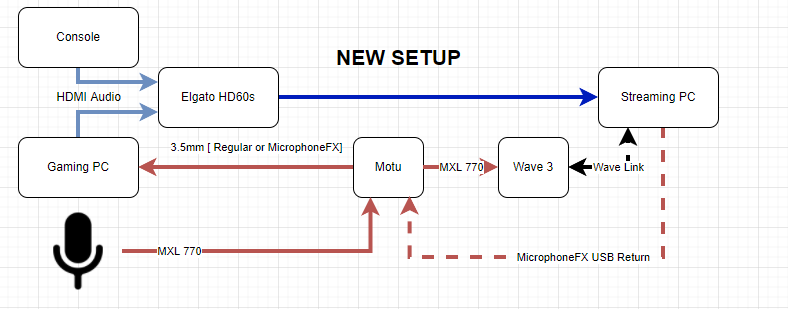
@cunning aurora So you were right as expected good thing Im getting that attenuator you suggested and should be delivered later today
@shell sonnet Am I still a mad scientist?
shell sonnet
You have now evolved into "intense scientist" hahaa

 static zenith
lol
Im just happy I simplified the setup
Cause yea the other way would work but this feels some much more elegant
 amber cliff
Anyone know if it’s possible to get dual 120-144hz monitors for $400 rn?
gusty wagon
amber cliff
Anyone know if it’s possible to get dual 120-144hz monitors for $400 rn?
Pcpartpicker.com will tell you
 dusty sapphire
anyone know why im getting this, i copy and pasted my stream key already and nothing
 gusty wagon
dusty sapphire
anyone know why im getting this, i copy and pasted my stream key already and not...
gusty wagon
dusty sapphire
anyone know why im getting this, i copy and pasted my stream key already and not...
Twitch unplugged from the internet
dusty sapphire
gusty wagon
Twitch unplugged from the internet
so i cant do nothing??? lol
gusty wagon
Twitch can only fix twitch
Until they come back…no idea
I’d give it 15 and try again
dusty sapphire
gusty wagon
Twitch can only fix twitch
everyone is on twitch still thoough?? dont understand haha
gusty wagon
It’s starting to recover
They have servers for ingest, authentication, output, all sorts of things
If authentication shits the bed, streaming still works unless you’re trying to start a stream
 wise cypress
Hi! I need some help...
I'm tryig to fix alert thing on my overlay, I found an already done one and decided to use it but I can't change the text size. I changed the background to the alerts to smaller so the text looks horrible and it doesn't change when I change the settings. I managed to fix the follower one but not the other ones :/
gusty wagon
wise cypress
I'm tryig to fix alert thing on my overlay, I found an already done one and deci...
Screenshot?
wise cypress


(should zoom in hahah, doing that now) but as you can see
problem
@gusty wagon
gusty wagon
Is your alert the tiny little box?
gusty wagon
So what happens?
chilly sirenBOT
Text not showing up over your alerts? Go to the Advanced Text Settings and set the top margin to 50, you can work your way to the right position from there.
wise cypress
it shows up
not the problem
wait

this one is perfect
the follower one
but I can't fix the other ones idk why
@gusty wagon no matter what I do the text doesn't change
static zenith
wise cypress
it shows up
I suggest you pop over to one of the helpdesks more of the people who volunteers and helps out + SE staff look on there more than they do here 🙂
This channel is more of a hangout place to talk about tech and setups and such
wise cypress
@static zenithno one is answering there ;-;
static zenith
I understand but you have a better chance of someone answering on there then here
from my experience
 little anvil
wondering if anybody knows of a fix to a slight issue i have. With my streaming pc when i turn it on for like 20 seconds or so its so laggy and on task manager my disk is at 100% then it gradually goes down
is there even a fix or is it a case of getting a new ssd/hdd?
shell sonnet
That's a new one for me, not sure what the issue is there. Is your hard drive mostly full?
static zenith
little anvil
wondering if anybody knows of a fix to a slight issue i have. With my streaming ...
Issues like this typically devolve from a couple of things. 1. You may be nearing capacity so you may notice a decrease of performance 2. If its a Hard drive sometimes need to be defragmented windows provides defragment tool for this. (ONLY USE THIS ON HDD, using it on SSDs or NVMEs may or will cause damamge) 3. Sometimes Hard drivce cache may be maxing out depending on the files its trying to access if certain files are super large it may be loading all the info on the hard drive cache and then loading it onto the RAM causing decrease in performance
 analog hawk
hello i iknow this a dum thing to ask but how do i go live?
little anvil
static zenith
Issues like this typically devolve from a couple of things. 1. You may be nearin...
cool thank you. i will look into this. my HDD is about half capacity so im not sure what could be causing it
 hoary kite
What do u think, should I upgrade to Windows 11?
 heavy knoll
wont let me log in to twitch i can send code to my email then when i enter code it says failed to load channel url 404 not found can anyone help its so annoying
 ruby lodge
Hey I've been looking for a power supply that's on my budget (around 600w) and I'm currently considering the Corsair VS Series VS600 Watt on amazon. What do guys think? I just wanna be safe.
https://www.amazon.com/dp/B08FNLGGQ2/?coliid=I3VQK7RF68IPQQ&colid=1KIICOZ2V4NII&psc=1&ref_=lv_ov_lig_dp_it
simple coral
ruby lodge
Hey I've been looking for a power supply that's on my budget (around 600w) and I...
It is a good power supply. Unless you are running a very power consuming hardware, it is more than enough for general system. You can use a calculator to check how much your PC is consuming here:
https://outervision.com/power-supply-calculator
Or a more basic version from newegg
https://www.newegg.com/tools/power-supply-calculator/
ruby lodge
 ruby lodge
simple coral
It is a good power supply. Unless you are running a very power consuming hardwar...
ruby lodge
simple coral
It is a good power supply. Unless you are running a very power consuming hardwar...
hm, all right thanks! I appreciate the help a lot
 lapis meteor


 real oak
In the process of setting up multi-streaming with SE - will I be able to use my current (formerly twitch-based) donation page to keep track of all the donos in 1 place?
blazing kettle
real oak
In the process of setting up multi-streaming with SE - will I be able to use my ...
Hey, could you please ask in one of our helpdesk channels? That will be the best place to get an answer about this 😊
 torpid elbow
i was going to go and tweak my alert box but apparently everything is blanked out
is this just me or something is going wrong?
 nocturne prism
torpid elbow
i was going to go and tweak my alert box but apparently everything is blanked ou...
torpid elbow
nocturne prism
torpid elbow
i was going to go and tweak my alert box but apparently everything is blanked ou...
torpid elbow
oh okay so it's not just me then
nocturne prism
torpid elbow
oh okay so it's not just me then
The issue should be fixed, refresh the page.
 marsh dome
Hello
Can someone help me with an issue with OBS please? After updating it says I'm live but nothing on twitch side
 deft canyon
can someone help me with issue in obs please
shell sonnet
Hi all. Feel free to ask your OBS-related questions in our #helpdesk-selive channel (assuming you are running SE.Live!) and our staff might be able to assist there. Thanks.
 graceful island
I am sure this has been asked quite a bit but how do you fix "Uh-oh...
Overlay does not exist" ???
past shard
 forest peak
so i removed SE live and now none of my overlays work
forest peak
so i removed SE live and now none of my overlays work
hey @forest peak best to ask for some help in #helpdesk-selive
forest peak
past shard
hey <@!676950434220474378> best to ask for some help in <#494513233416421386>
yeah the response time is pretty bad but thanks
past shard
forest peak
yeah the response time is pretty bad but thanks
our Support folks are doing the best they can, they will get to your question. 🙏
brittle hedge
Because of course you can't transfer a domain from Google Domains to Google Cloud Domains. 🙃

 spiral stump
Need help