#helpdesk-selive
1 messages · Page 178 of 1
 willow ginkgo
Hey everyone. i need some help with setting multicams on obslive. I basically don't want to always receive the feed of my guests through discord, use capture screen and then crop image to only get the face.
 viral iris
 short chasm
my obs dont pick the screen
short chasm
my obs dont pick the screen
Screen capture or game capture?
 rugged quail
my obs keeps freezing like 2 mins into opening it. how do I fix it
 twilit hemlock
I’m glad your problem got solved @elder sparrow
 full thunderBOT
@short chasm Obs.live is a plugin for OBS Studio for the best OBS support, please join their Official Discord @ discord.gg/obsproject
 light jay
The spitfire theme on the theme store has a webcam widget. What are the dimensions so I can make my cam fit?
 limpid scroll
my obs crashed, every time i boot it up it makes a new scene thats blank and when i try to delete it it crashes
someone help please
 ionic gulch
i have encountered random stream crashes on stream in the render or
on the encode side in the latest version of obdslive, never had problems especially that i have used inside builds for years
 cedar frigate
hello. is it possible to have in the activity feedstwitch and facebook activity's?
 pliant plank
Hello. I was just wondering if it was ok do update to the newer version of obs. i haven't done it because someone from here told me that i couldn't do some things that were on the original obs. just want to know if its ok to update to the 26.0.2
 misty rampart
Hi, I'm having the same issue, I haven't had an alert come up on stream still
is someone able to further help with this?
 honest echo
let me check
misty rampart
just got it!
honest echo

misty rampart
thats odd...
honest echo
I just poke your webhooks everythin should be good now
pliant plank
so i have another question. i am getting all the alerts for the shares and the follows and the donations but no alerts for likes on the stream
full thunderBOT
@pliant plank If you are not seeing likes/shares on your current stream or page, that might be due to how the privacy settings of the person liking/sharing your stream are set.
If they are set to private we won't be able to see the events.
Specifically for shares, if they share in private groups, we won't be able to see the event.
pliant plank
full thunder
<@!736436642130165811> If you are not seeing likes/shares on your current stream...
i can see and hear the shares and follows in obs the only things that i can't hear is when someone likes the stream. Like the same person that likes and shares, i can hear the share but not the like on the stream. Same goes for the follow and like. I can hear the follow from a person but not when they like the stream. And thats kinda weird that you say that we can't see shares when they share to private groups cause some of the groups that im in also get shared to cause i check the shares when im done with the stream to see where they where shared.
 trim ice
Hello, I have been looking in OBS doc and at many places, but couldn't find a good response to my use case and I hope someone here can help me. We want to be able to take a screenshot of the streamer's stream or one of his scene, send it to an API and do something depending on the response. Doing what we want with the API's response is fairly easy, but I am not sure how to get the image from OBS to javascript to then make the API call. Has this been done before, does anyone know where I could look at ?
 slow dragon
overlay widgets are not working
full thunderBOT
@neon dagger Please provide your account ID found at the top of this page: https://streamelements.com/dashboard/account/channels This ID is public info and safe to share here.
 gloomy yarrow
Hi! Just trying to get the media request to come up on OBS LIVE. video works if streamelements is open and as soon as i close it it goes away, the media request widget is blank as well on obs live. Im going wrong somewhere. any help would be awesome thank you.
rugged quail
My obs.live is continuously stopping working mid stream but without notification. My stream will just suddenly F and when I hit end stream the client freeze all together and I have to force quit client and restart it and restart stream to fix it. What causes this?
gloomy yarrow
nvm worked it out
rugged quail
obs.live has dropped streamelements chatbot and no longer appears in chat list or after inputted commands. What can I do to fix this?
full thunderBOT
@rugged quail Please provide your account ID found at the top of this page: https://streamelements.com/dashboard/account/channels This ID is public info and safe to share here.
rugged quail
full thunder
<@456226577798135808> Please provide your account ID found at the top of this pa...
5f2db3e2c87311a0584750aa
honest echo
@rugged quail try this on your twitch chat /unban StreamElements
rugged quail
Lol. That was it. And thank you.
gloomy yarrow
ok nope havnt worked it out. im getting double audio with media requests. i dont have streamelements open on a browser its running from the widget on obs live.
full thunderBOT
@gloomy yarrow Make sure to ballot_box_with_check: “Shutdown source when not visible” for all browser sources (all OBS scenes). If using studio mode, uncheck “Swap Preview/Output Scenes After Transitioning.” Also, keep in mind that sound can play from any overlay loaded in the browser (editor or launched). https://i.imgur.com/6bWXxjR.png https://i.imgur.com/yY0wcFl.png

 gloomy yarrow
nope still gettin double audio
if i show video on stream it doubles when i hide it it goes away
gloomy yarrow
ah ok so i shut down media when not visible it fixed the the audio but now my overlays take a second to load as they are URL overlays. guessing there is no way around that apart from dont use URL overlays?
Ok i got it now, phew what an ordeal
 lost yoke
Hello I need some help with connecting my audio from my elgato hd60s to stream elements.
 granite vessel
hello does anyone know why when someone resubs or subscribe its like a delay before the alert goes off? like i see them resubbing in chat but the alert is like 10 sec delay
pliant plank
Hello. I was just wondering if it was ok do update to the newer version of obs. i haven't done it because someone from here told me that i couldn't do some things that were on the original obs. just want to know if its ok to update to the 26.0.2
 stable karma
G'day I like using SE but I am kind of confuse what is the purpose of obs.live? Without it everything is working well with SE I have what I want. Maybe I do not need much ;-)? But seriously can anyone tell me what OBS.live can do which OBS can't?
honest echo
The OBS.Live add-on was developed by StreamElements to integrate Twitch Chat and activity feed directly into OBS, making stream management effortless.
stable karma
Yes but obs has chat and twitch activity as well what is the difference (maybe I am to dumm to get it sorry)
honest echo
@stable karma With obs.live's activity feed you can setup the custom bot name, you can add the Media Request dock.. You can create cloud backups of your scenes
stable karma
@honest echo Custom bot name is something, indeed. I have cloud backup of my scenes vis SE on web not problem with that. I need to investigate this media dock as well, thanks.
 severe pond
hi admin or anyone! i really need help because when i log into stream elements my media request show's nothing as well as i cant add a song. Then my activity feed says i need to log into twitch, but i want be logged into Facebook idk what to do or what I'm going wrong please and thank you for the help.
full thunderBOT
@severe pond StreamElements menu, on top of OBS > Logout > Login
 old cradle
I'm not 100% sure where this question belongs but i'm trying to make an overlay for a friend to use on their stream, the overlay is finished but my question is do i just send the link to them and they can use it or how do i share it, i havent been able to find anything about sharing overlays online, thanks for the help!
 shy mountain
The overlay needs to be copied over to their account
old cradle
How would one do that? Sorry i only recently started using SE a few days ago 😅
shy mountain
you can do so, when you have editor access to the account
old cradle
Ah so they give me editor access and i can import it from my account?
shy mountain
yes
full thunderBOT
@old cradle "Follow these steps to grant managers/moderators access to your dashboard:
- Click on your channel name at the top of the dashboard
- Create a new invite at one of three access levels (Bot Supervisor, Editor, Full Control)
- Send this invite to a mod/manager to give them access to your dashboard. The link is one-time-use and expires after 72 hours if not accepted
Video tutorial: https://youtu.be/zl_h-ttZDF0"
old cradle
Ah thank you very much!
 glass obsidian
Okay i have a question ive set everything up including my overlays but i stream xbox will it still work
full thunderBOT
@glass obsidian Consoles do not have native support for overlays. You would need a capture card, PS4 remote play or Xbox companion app and a PC with OBS in order to have overlays over your console gameplay.
We have a blog post about how to set up console streaming with our essential tools: https://blog.streamelements.com/how-to-stream-on-console-7b620b1c46c3
 jolly yew
I need some help with chatbot commands
full thunderBOT
@jolly yew If you would like help from the StreamElements support volunteers/staff, please post your question in one of the helpdesk channels and someone will assist you as soon as they are available #helpdesk-twitch | #helpdesk-youtube | #helpdesk-facebook | #helpdesk-mobile | #helpdesk-selive | #helpdesk-merch
Helpdesk channels are only for requesting support! Thank you for being patient.
jolly yew
I am trying to setup my !rank command. I can only get it to display the website link and not the text on the site. I am confused af as to what I am doing wrong or just not getting
shy mountain
I don't understand what rank command you are referring to
jolly yew
so rocket league rank command. to display my rank in chat
shy mountain
I see. edit the command like so: ${customapi.link}
and its going to return the text from the link
jolly yew
so where the "link" word is I enter the link ?
 heady rock
Hey so, what do I do when after editing an overlay and pasting its url on the browser font, the overlay doesn't show and it's all black?
 strange cloud
hi everyone 🙂 i came here because of a problem with my StreamElements installation, it' telling me "Error opening file for writing:
c:\Program
Files\obs-studio\obs-pligin\64bit\obs-streamelements.dll
click retry to try again....
so i've check the folder and the dll file isn't there... how can i do ? thx for your work and help ❤️
full thunderBOT
@heady rock OBS > Settings > Advanced > Scroll down > Enable or disable Browser Source Hardware Acceleration, depending on its current state > Restart OBS (This does not apply for OBS on Mac)
https://i.imgur.com/ggMe9ZE.png
 shy mountain
@strange cloud most likely when using the installer, there is a lingering obs.exe still working
and is still using the .dll
strange cloud
all the obs process were killed manualy in my task manager
heady rock
full thunder
<@!427621853306028043> OBS > **Settings** > **Advanced** > Scroll down > Enable ...
I did that, but still nothing happened. Also if I copy the overlay's url on google, the page won't load, and it's just a blank white screen. Really don't know what's going on.
shy mountain
@heady rock show a screenshot of what you see
@strange cloud are you trying to install or update obs.live?
shy mountain
restart PC and run the installer in admin
strange cloud
all right 🙂 i gonna try ! thx 😉
heady rock
shy mountain
<@!427621853306028043> show a screenshot of what you see
The overlay url is pasted on the right place, it should be working fine, I just don't know why it's not working for me
full thunderBOT
@heady rock The default resolution for StreamElements overlays (theme and custom) is 1920x1080. Please add them in OBS at their full resolution and use CTRL+F to fit to screen if necessary. You can then downscale your stream in OBS settings > Video if you'd like https://i.imgur.com/6bWXxjR.png
heady rock
oh, now its working, thanks for the help, and sorry for being dumb lol
 undone harbor
hi, how i can make my own Scene transition?
full thunderBOT
@undone harbor Obs.live is a plugin for OBS Studio for the best OBS support, please join their Official Discord @ discord.gg/obsproject
 turbid herald
Hey there! I noticed that you can't bind macro keys to the hotkeys in settings, is there a way around this? Steelseries Apex.
 west trench
How do I get my oculus quest 2 gameplay to show up on streamelements for twitch?
rugged quail
Could you tell me how to put 2 overlays and put them in one? For example I have one that is for donations and another for the chat ... could you tell me how I can put them on the same page?
 muted sail
Hey, in my OBS.live there is a problem with my chat, is only says "Error loading data." So my chat doesnt load when im streaming? Any ideas`?
pliant plank
Hello. I was just wondering if it was ok do update to the newer version of obs. i haven't done it because someone from here told me that i couldn't do some things that were on the original obs. just want to know if its ok to update to the 26.0.2
muted sail
Do i have to reinstall everything?
granite vessel
hello does anyone know why when someone resubs or subscribe its like a delay before the alert goes off? like i see them resubbing in chat but the alert is like 10 sec delay
 vestal forum
Does anyone know how to help with delayed audio? Currently I am using an Avermedia 4k 2plus going from my console to Stream elements but the problem is there is a second delay between the audio.
 ruby dirge
vestal forum
Does anyone know how to help with delayed audio? Currently I am using an Avermed...
ruby dirge
vestal forum
Does anyone know how to help with delayed audio? Currently I am using an Avermed...
filters > add the “render delay” filter and pick the delay
vestal forum
So I want to add a delay to get rid of it ?
vestal forum
ruby dirge
filters > add the “render delay” filter and pick the delay
I don't have an option to add that
 lyric summit
Hello, I am trying to connect my custom named chat bot, but when I click authorize it's just bringing me back to the ''log in to twitch''. I've done all the other things. OBS LIVE open tab, streamelements tipping link added to twtich panel, that account for ''custom named bot'' is already moderator in my channel... Just it is not working. When I try to connect custom bot accound, same thing is happening over and over again. Please, if anyone had similar experience, or you can help, let me know! Thank you! Have a nice day everyone! 🙂
 worthy canyon
Hey there, I use to able to use LogiCapture with Streamelements OBS but due to a recent update it has now been removed, is there any reason for this?
full thunderBOT
@lyric summit If your commands recently stopped working and you're using OBS.Live and a custom bot name do the following:
- In OBS.Live, click on the hamburger menu (three stripes) at the top left of your activity feed
- Click on Stream Settings > Custom bot name
- In the Custom bot name field select Set custom bot name, not your already existing username (with capital letters). Note: If you already connected an account that way, the third entry will show as the account name (see image https://i.imgur.com/sO7fWOX.png).
- Scroll a bit down and click on the purple Connect Custom Bot Account button
- Log in as usual and Authorize the custom bot name
- Back in the Activity feed, click on the Send Test Message button and check if your custom bot name starts working again

 stray kernel
Any solution for this ?.
It is not my internet, it works perfect.
 signal anvil
i am having so many issues with my overlays and the website
 noble sleet
I need help with my activity feed in OBS. It’s not showing any stream activity even though I am live.
 kindred fox
@stray kernel rename your profile to something other than "Untitled"
full thunderBOT
@noble sleet StreamElements menu, on top of OBS > Logout > Login
kindred fox
@signal anvil can you elaborate a little bit more? Maybe describe in detail the issues you are having along with screenshots?
stray kernel
kindred fox
<@!239050845319069696> rename your profile to something other than "Untitled"
Currently both my profile and my collection of scenes are called "Ceo", if I leave the name "untitled" it will upload it well, but it won't let me restore.
And changing the name, it won't even let me go up.
kindred fox
Is your scene collection named default as well?
 sudden escarp
Hi there! I have noticed that my activity feed in both OBS and the dashboard through browser are not showing any follows coming in and alerts are not showing for those follows. I logged out and logged back in with twitch and have made sure that follows are checked when filtering
full thunderBOT
@sudden escarp Go to the Dashboard > Right side > Part channel > Join channel(https://streamelements.com/dashboard)
 stray kernel
kindred fox
Is your scene collection named default as well?
stray kernel
kindred fox
Is your scene collection named default as well?
Profile and scene collection are called "Ceo"
kindred fox
Okay. Will it back everything up now?
and when you restore, did you select the profile name and it shows a checkmark?
 exotic citrus
So everytime I start up OBS Studio, I have to logout and login, just to stop this from popping up every minute?
Am I the only person who has this issue? If I disable my SE merch store, will it go away?
full thunderBOT
@azure geode StreamElements menu, on top of OBS > Logout > Login
 azure geode
Did my message go through?
honest echo
Yes, did you already logout and log back in ?
stable karma
In obs folder there are two versions of OBS 32 and 64 bits, which one OBS.loive is going to pick up and be added as plugin?
kindred fox
64-bit
stable karma
Thx that's what I wanted. Cheers
 wheat ice
Hi guys! Trying to update obs.live and getting this https://puu.sh/GRYtN/23e0aa0ebe.png

On retry it just gives the same result
I've checked to see if there are any OBS processes running and there are not 🙂
I've checked that bugsplat64.dll is there and it is
I moved BugSplat64.dll and re-ran the update process and it produced this:

I do not have a \locales\ in \64bit\ let alone an en-US.pak file
honest echo
@wheat ice this happens when you run the installer without admin right
wheat ice
hmm
Okay I'll try that cheers brb
@honest echo is there an updater.exe or something for obs.live?
or should I just download from the website and run a fresh install over the top of the existing obs.live and obs-studio?
I have been running obs.live as admin and it asks me to update, I update but the installer/updater is not running in admin mode
honest echo
@wheat ice restart your PC and try again
wheat ice
@honest echo ok back in 2 secs
kindred fox
That path seems incorrect
wheat ice
@honest echo Okay I'm back and the same result occurs
kindred fox
Shouldn’t it be in program files?
wheat ice
I tend to use the base dir of drives for important software @kindred fox
are you saying I should have it installed in program files?
that filepath is correct for my installation currently
kindred fox
Path may be why because it’s at root level of drive. If you download the latest installer from obs.live and install in the default location does it work?
It will still use your existing %appdata% resources so it should be fine
wheat ice
I haven't tried this yet, I've just been using the updater, but I've backed up all my profiles so I'll give that a try and come back
kindred fox
Yeah it shouldn’t affect profiles because of where they’re stored
Just the application
 granite vessel
hello does anyone know why when someone resubs or subscribe its like a delay before the alert goes off? like i see them resubbing in chat but the alert is like 10 sec delay
wheat ice
@honest echo @kindred fox okay I've downloaded the fresh install from the website, and the same exact window appears talking about BugSplat64.dll
For reference I've run as admin
kindred fox
And obs isn’t open currently? Chrome isn’t open by chance?
wheat ice
Chrome was open, I did a full restart, made sure not even extensions were running, retried and same result
Also I should note that my obs version is 25.0.8 and I'm trying to update to 26.0.2 at the same time
I've made sure obs-studio update option is ticked and it downloads the new version
but still the same result occurs.. should I try and install to a new directory?
kindred fox
I would try to install to program files where it defaults if you can
wheat ice
Okay that seems to have worked mate cheers
So the only cure was a fresh install
all my scenes and sources are untouched and obs has updated to 26.0.2 🙂
thanks heaps @kindred fox @honest echo
Now I have a real stickler, my alerts (sub, follow, raid) all take what seems like 10 minutes to display
one after the other, so I was gifted 5 subs, it took around 50 minutes to display all 5
does this belong here or in the twitch chat helpdesk?
 ornate sail
I'm having an issue getting my stream to start, and I've never had this issue before. I press the start streaming button and this pops up...
 trim trail
Is it possible to update your stream tags using the Stream Elements OBS plugin? Using the Activity Feed menu, the stream title and category can be updated, but not the tags.
kindred fox
@ornate sail obs settings > stream > disconnect/delete stream key > paste stream key/reconnect
@trim trail view > docks > stream information
@wheat ice don’t have that answer
trim trail
@kindred fox wowowowow thanks for the fast reply!
ornate sail
@kindred fox Thank you so much! Sorry if that was a silly question 😅
 undone portal
I'm having some trouble importing scenes from online into OBS Live. I'm currently trying to use SE scenes, but I can't figure out where to paste/import the url!
full thunderBOT
@undone portal To add your overlays to OBS, add a new browser source in your scene. Paste your overlay URL in the browser source properties, set the dimensions to 1920x1080 (unless you changed them on the website) and check Shutdown source when not visible. https://youtu.be/KDvLynUqXI4
undone portal
THANK YOU SO MUCH!!!
 languid whale
I'm having trouble with links displaying in my commands. Is this the right place to ask about that?
 agile rampart
I could use some help please...im using stream elements with obs live. Im not dropping/losing frames but my stream like freezes for a quick second than continues and does this repeatedly.
I can not figure it out
full thunderBOT
@agile rampart Obs.live is a plugin for OBS Studio for the best OBS support, please join their Official Discord @ discord.gg/obsproject
kindred fox
@languid whale make sure you disable auto mod for links on twitch
languid whale
Got it... thanks!
 old mica
How do you put Overlays on in the app
full thunderBOT
@old mica To add your overlays to OBS, add a new browser source in your scene. Paste your overlay URL in the browser source properties, set the dimensions to 1920x1080 (unless you changed them on the website) and check Shutdown source when not visible. https://youtu.be/KDvLynUqXI4
 jade oxide
is there a way to copy and paste things from one overlay to another, for example, i just finished editing the alert box in one overlay, is there a way to copy and paste it so i dont have to re edit everything
nevermind
 lavish parrot
I went to stream live tonight and streamelements wouldnt let me use or change my overlays like normal it made me download a system and NOTHING transfered over! I have tried to use the "browser" source to paste in and it crops my pages in half and wont change no matter what
full thunderBOT
@lavish parrot The default resolution for StreamElements overlays (theme and custom) is 1920x1080. Please add them in OBS at their full resolution and use CTRL+F to fit to screen if necessary. You can then downscale your stream in OBS settings > Video if you'd like https://i.imgur.com/6bWXxjR.png
lavish parrot
Can this be done from the website instead of this downloaded program?
Or did it go to only the program now
shy mountain
So how do you intend to stream?
How do you intend to show the overlays, if not by adding them via a browser source in OBS?
You say you add the overlays as a "browser" - yes that is the correct way to show the overlays in the program you use
But you say it shows half of it - this means you haven't placed the right resolution on the browser source
And I'm actually confused here how you intend to stream and use the overlays 🤔
Purely from your last question
lavish parrot
I spent 4 hours setting this up last week while i was home, i just wanted to get off work and stream to find out that the system has changed and now i practially have to do all this again and its frustrating.
shy mountain
what system?
lavish parrot
StreamElements
My "overlays" i use to open the wed page and change the overlay on the stream screen with a few clicks
now thats not available
it made me download OBS LIVE
shy mountain
Overlays were never been able to be edited in OBS directly
unless you right click the browser source -> properties -> open editor
as long as you have obs.live installed
shy mountain
as long as you have obs.live installed
lavish parrot
well it made me install it tonight i wouldnt even give me the choice
which is why im confused
shy mountain
What made install it? We do not force anyone to install it and only recommend using it
because it adds 3 simple docks to OBS
The only reason it "force" you to install it, if you had it installed previously and you are getting the recent update we had for it
That being said, installing OBS.Live should NOT prevent you from loading the overlays
lavish parrot
When i activated "twitch to stream" i opened my "stream elements" and went to the tab i normally go to that would select the active overlay on my live stream
that tab ONLY had a download display it didnt have the normal display
shy mountain
this button?
lavish parrot
No I'm talking about on the "ttps://streamelements.com"
shy mountain
Ok, so you go to our dashboard and you click "My Overlays" and then I assume you click "Preview" on the overlay you want to add and then?
Trying to understand the steps you are taking here, so sorry if i'm being a pain :/
lavish parrot
Once their edited and ready to go.
I would go from "My Overlays" tab over to the tab to select "starting overlay" i would then start my stream on the xbox let it do its count down and go and click the "live" overlay
right there on the website that tab has DISAPPEARED
I cant do it on there anymore the only OBS LIVE tab take me to the download link
shy mountain
So you clicked this to download obs.live?
Do you stream directly from your Xbox?
Or do you use a capture card and stream from your PC?
also most likely if you don't see "my overlays" then the tab they are in has been collapsed like so
lavish parrot
im gonna phone a friend thank you for trying im just tired its 1am here ive been at this for 2 hours already
I'll post again in the morning if i need more help
shy mountain
👍
 true jackal
full thunderBOT
true jackal
full thunderBOT
@true jackal Obs.live is a plugin for OBS Studio for the best OBS support, please join their Official Discord @ discord.gg/obsproject
 slow sonnet
When i click on "start streaming" it defaults to facebook live, i have setup and changed everything in the settings to go to restream. Once i click on start stream it defaults back. What am i missing?
full thunderBOT
@slow sonnet StreamElements menu, on top of OBS > Logout > Login
slow sonnet
got it, if i use it without being logged in it will stream to all 3 with no issues. My next question is how do i name my stream each time i go live? When i hit start streaming it just starts with no prompts
lyric summit
full thunder
<@!505338720132530176> If your commands recently stopped working and you're usin...
Thank you for your answer but as I already mentioned above, I did all those steps. Problem is when I click "Authorize" it just taking me back on that step where I have to go again on " Connect custom bot account" and to log in again to that account, and authorize... After taking "Authorize" I never see my chat bot account showed above, and I can't click on "Send test message" .
full thunderBOT
@lyric summit "1) Right click on your OBS desktop shortcut and open the Properties
2) In the Target field, add the following to the very end: --remote-debugging-port=40404
3) Open OBS (or restart if it was open)
4) Open your web browser and type in: localhost:40404
5) Click on StreamElements - Activity feed
6) Navigate to the Console tab
7) Type the following into the console and hit enter: store.customBot.removeCustomBotIntegration()
8) Try setting the custom bot name
9) Remove the additional flag in step 2 from your shortcut properties."
lyric summit
full thunder
<@!505338720132530176> "1) Right click on your OBS desktop shortcut and open th...
Could you do a screenshot for step 6 7 and 9 please? I am sorry, I am not so good in this 😄
shy mountain
at least you got past part 1 
most people get stuck on that, because they don't add a space
lyric summit
shy mountain
Before I added space, I was trying this like 10times... 😄 But I found a way at the end, GG 😄 LOL
It is now showing the same like on that short video, so did I typed that where I supposed to, or I need to click somewhere for opening the exact window as in this video? 😄
shy mountain
just expand the right window
cuz you are in elements
see how my window is bigger
and then click on console which is next to elements on the top
lyric summit
shy mountain
just expand the right window
YEEEEEEEEEEEEEEES IT IS WORKING! WOOOOHOOOOOO! 😄
Thank you so so so much! ❤️
rugged quail
hi i am new..i would like to ask how can i sign songs in obs?
 quaint imp
can someone help i chose the cod window but it dosent show up
full thunderBOT
Obs.live is a plugin for OBS Studio for the best OBS support, please join their Official Discord @ discord.gg/obsproject
 vale dew
hi my chat is not working in? error 404?
 undone sail
Hi. Can someone tell me how to implement overlay from streamelements to the obs.live?
full thunderBOT
@undone sail To add your overlays to OBS, add a new browser source in your scene. Paste your overlay URL in the browser source properties, set the dimensions to 1920x1080 (unless you changed them on the website) and check Shutdown source when not visible. https://youtu.be/KDvLynUqXI4
undone sail
How to insert an chat into an overlay?
slow sonnet
My next question is how do i name my stream each time i go live? When i hit start streaming it just starts with no prompts
 odd raptor
 raw vigil
Hey is there any way I can fix my media share in obslive repeating audio
Like whenever I show it on stream it just repeats the audio
But when I play it for myself not on stream just in the dock it's fine
full thunderBOT
@raw vigil Make sure to ballot_box_with_check: “Shutdown source when not visible” for all browser sources (all OBS scenes). If using studio mode, uncheck “Swap Preview/Output Scenes After Transitioning.” Also, keep in mind that sound can play from any overlay loaded in the browser (editor or launched). https://i.imgur.com/6bWXxjR.png https://i.imgur.com/yY0wcFl.png
slow sonnet
Here’s my deal: if I stayed logged out I can stream to all 3 platforms, however. Now that I am logged out of Facebook on OBS I don’t get like/share notifications.
I like the notifications to be interactive with my chat
 modern siren
after the latest update, it just keeps crashing every time I try to start streaming, I'm not sure what the issue could be
 charred lava
it not let me add my new bank to you for much and donates
full thunderBOT
@charred lava Please contact us via email for support with SE.Pay. You can use our contact form here: https://streamelements.com/contact Thank you.
modern siren
modern siren
after the latest update, it just keeps crashing every time I try to start stream...
I have the most recent crash report/s, if that will help
vale dew
Hello my chat is not working in obslive stream activity is but not chat I get 404 error
full thunderBOT
@vale dew StreamElements menu, on top of OBS > Logout > Login
charred lava
i have sorted it thanks
modern siren
I figured it out. It doesn't like the AMD encoder apparently
 wanton nymph
i need help anyone able help me
full thunderBOT
@wanton nymph Welcome to the helpdesk! Please let us know how we can assist you today and a support volunteer or staff member will assist you as soon as they are available. Thank you for your patience.
 wise dagger
I need help please
azure geode
Anyone uses stream elements chat bot and use a custom bot name. I managed to change it a while back but then the custom bot just somewhat disappeared and the regular stream elements bot is back 🤖
wise dagger
@full thunder may you assist me please
full thunderBOT
@wise dagger Welcome to the helpdesk! Please let us know how we can assist you today and a support volunteer or staff member will assist you as soon as they are available. Thank you for your patience.
wise dagger
My stream elements alerts are only playing audio, but no image. The alert is at the top of the sources and im very confused
 hearty moon
hi guys, I need a support here...
I am trying to configure the chatbot here... Its ok, the problem is that I have configured a link inside my custom message, and when that message gets posted, The rest of the message is ok. It goes like:
"Hello, please follow us on twitter: ***"
Just the link that its getting hidden
full thunderBOT
@wise dagger To add your overlays to OBS, add a new browser source in your scene. Paste your overlay URL in the browser source properties, set the dimensions to 1920x1080 (unless you changed them on the website) and check Shutdown source when not visible. https://youtu.be/KDvLynUqXI4
kindred fox
hearty moon
I am trying to configure the chatbot here... Its ok, the problem is that I have ...
Go to your twitch auto mod settings and disable the remove links thing
hearty moon
kindred fox
Go to your twitch auto mod settings and disable the remove links thing
THANK YOU!!!!!
rugged quail
does anyone know how to insert my game capture in obs live?
 gloomy thunder
How do I get the "Broadcast Options" back??? 🤔
 sharp turret
gloomy thunder
How do I get the "Broadcast Options" back??? 🤔
sharp turret
gloomy thunder
How do I get the "Broadcast Options" back??? 🤔
View->Docks->twitch stats maybe? 🤔
kindred fox
gloomy thunder
How do I get the "Broadcast Options" back??? 🤔
View > docks > stream information
gloomy thunder
Definitely not Stats. 😭
slow sonnet
slow sonnet
Here’s my deal: if I stayed logged out I can stream to all 3 platforms, however....
I figured it out. I will cancel my subscription to restream and just stream to FB.
gloomy thunder
I don't have the "stream information" option; that has to be it.....
sharp turret
gloomy thunder
I don't have the "stream information" option; that has to be it.....
Go to OBS settings->stream and disconnect your account and connect again.
kindred fox
You won’t have that unless you directly connect your twitch account in your obs settings. Using your stream key does not allow obs to access that particular dock
sharp turret
then go again View > docks > stream information
gloomy thunder
@sharp turret THE REAL MVP!! ❤️ 🥰
sharp turret


rugged quail
hello why my alerts are not showing on my obs?
full thunderBOT
@rugged quail To add your overlays to OBS, add a new browser source in your scene. Paste your overlay URL in the browser source properties, set the dimensions to 1920x1080 (unless you changed them on the website) and check Shutdown source when not visible. https://youtu.be/KDvLynUqXI4
 spiral basalt
How can I activate my overlay?
full thunderBOT
@spiral basalt To add your overlays to OBS, add a new browser source in your scene. Paste your overlay URL in the browser source properties, set the dimensions to 1920x1080 (unless you changed them on the website) and check Shutdown source when not visible. https://youtu.be/KDvLynUqXI4
 misty cedar
are notifications broken for anyone else?
 wary dew
yes, team is aware and working on it
 dusky terrace
Hi all, unsure why but someone gifted a Tier 1 sub but can't find it in the alert box for Gifting?
Can someone point me in the right direction?
 wet hare
dusky terrace
Hi all, unsure why but someone gifted a Tier 1 sub but can't find it in the aler...
wet hare
dusky terrace
Hi all, unsure why but someone gifted a Tier 1 sub but can't find it in the aler...
Right now streamelements has some problems with the activity feed, and therefore with alerts.
So if you don't see it in the activity feed it's probably just delayed by some minutes.
 wheat glen
i cant see my alerts pop up but on my activity feed it is working
wary dew
Team is aware of the delayed alerts, they are working on a fix
dusky terrace
But does anyone know why I can't find the Community Gifts in Streamelements overlays?
Or what section it'd be under? Looked in alert box
Found it
wheat glen
so is it just with live alerts? because on my overlay i can emulate them just fine/ sorry new here
wary dew
yes
 limpid cove
Anyone know how to disable the loyalty points from Stream Elements in Streamlabs? I have disabled it on the Stream Elements dashboard, but its still showing up in my Streamlabs chat when i type '!points'
 agile matrix
Hi Helpdesk people :), I have a Media Source (audio playlist), when i do a scene transition to VLC Video Source (a short movie), it take a while for the playlist to stop. Can you help where the setting is it fix this (and stop the audio playlist sooner)?
wheat glen
will you let us know when it is fixed?
wary dew
Should already improve from what i've heard
but it takes some time for the alerts to catch up
wheat glen
do i need to restart my obs?
wary dew
nope
 fading stone
hi so I'm having this problem where when I open OBS it makes my mouse and my audio glitch in and out. any fixes?
 sweet remnant
hi so im trying to figure out media share and I got it to work but its playing the audio twice and its very quiet
rugged quail
Where can I clean the cache for OBSLive?
 tribal vessel
Hey does anyone know did they stop the media request function with streamlabs obs?
It doesn't seem to be working anymore and it hasn't for the last couple of weeks
 warped canopy
I have a problem where when I open OBSLive my streamelements chat bot entirely stops working. The only way i could get it to work again in the past was to uninstall OBS and reinstall it. It also causes my overlays to only sometimes trigger. It is happening again and I cant seem to fix it.
full thunderBOT
@warped canopy StreamElements menu, on top of OBS > Logout > Login
@sharp portal Obs.live is a plugin for OBS Studio for the best OBS support, please join their Official Discord @ discord.gg/obsproject
 sharp portal
thanks
 lusty stream
Friends I'm having a problem, my overlays are no longer showing up in the OBS, I've already tried to reset the page cache but it doesn't work, reinstalled the obs and did everything basically, in my notbook they are working normally but not on the pc, until yesterday everything was ok!
full thunderBOT
@lusty stream OBS > Settings > Advanced > Scroll down > Enable or disable Browser Source Hardware Acceleration, depending on its current state > Restart OBS (This does not apply for OBS on Mac)
https://i.imgur.com/ggMe9ZE.png
lusty stream
@full thunder
I did it but it didn't work =/
lusty stream
when I try to edit my overlays it keeps loading endlessly and I can't, I believe this has to do with the problem that they are also not loading in the obs!
 tacit oak
Hi, I'm trying to Import a particular theme onto OBS. The overlay is on the StreamLabs website, but I can't seem to quite figure it out
 tired hollow
@tacit oak You wanna add them in as browser sources
tacit oak
@tired hollow on OBS, do I click on the Scene Selection drop down at the top and choose import?
tired hollow
When on the scene you want to add the overlay to you click the + on sources then click on browser then you go onto Streamlabs website click the 3 dots there should be an option to copy url you paste that into the window that opens up in OBS when adding the browser source
 halcyon ice
quick question i may be dumb
but how to i change titles
i hist start stream and it wont bring up tile or anything
tired hollow
You can either use the build in command !settitle
halcyon ice
can i do it from software
tired hollow
or in OBS you go to the top click view go to docs and enable the stream information tab
halcyon ice
tired hollow
you streaming to youtube or Twitch
halcyon ice
twitch
tired hollow
Then you're not logged jnto twitch in OBS
halcyon ice
do i do the same with restream then just log in ?
tired hollow
I would assume so
halcyon ice
yea it works now thx mate
tired hollow
No problem
 hollow drum
any easy way to send all my SLOBS sources to OBS?
full thunderBOT
@hollow drum In order to import scenes/overlays from SLOBS, you need to have OBS.Live installed.
After you install OBS.Live, click on StreamElements on top, then on Import from other services and then click on StreamLabs - Import Now
Each scene from SLOBS will be imported as a stand alone Overlay here: https://streamelements.com/dashboard/overlays
lusty stream
This problem is very serious, started out of nowhere and I can't get a single light on what to do, in my notbook I'm managing to use overlays normally but on my pc it just doesn't work, nothing was changed just yesterday it was working perfectly = /
kindred fox
Using google chrome?
kindred fox
Chrome on your notebook?
lusty stream
yes]
kindred fox
Use chrome on your desktop
lusty stream
yes i already uninstalled the opera and everything related to it from the pc, but the problem still persists
 hazy hill
 wooden talon
all my scenes are gone after uninstalling obs and reinstalling. are there any backs ups eanywhere? i made sure i saved my profile and scenes but they are not showing up.
 long bobcat
if you exported them you need to import after reinstalling
wooden talon
it does not pull them when i import my profile
quaint imp
can someone help why my transition is late on switching next scene
full thunderBOT
Obs.live is a plugin for OBS Studio for the best OBS support, please join their Official Discord @ discord.gg/obsproject
 torpid oriole
is there obs live for mac? says that mac doe not support the windows product when clicking from streamlabs site
 toxic fern
OBS.Live for Mac is planned but no eta atm.
Not sure why it would be on the streamlabs site anyways.
torpid oriole
do you have any recommendations for similar ease of userability in the mean time
toxic fern
Unfortunately not atm as the closest option is not available in OBS for Mac.
halcyon ice
Is there a way I can change the frame rate and video resolution. And add a viewer count to the program like slobs has
sharp turret
halcyon ice
Is there a way I can change the frame rate and video resolution. And add a vi...
OBS settings->video and viewer count in activity feed settings
Make sure you have installed OBS.Live plugin
halcyon ice
I don't see viewer count
sharp turret
halcyon ice
I don't see viewer count
Which platform do you stream to?
halcyon ice
Restream and or twitch
toxic fern
That's in the activity feed via the streamelements menu.
halcyon ice
Does this not work with restream
sharp turret
StreamElements does not support multistreaming
halcyon ice
Ah ok
 lethal yacht
why does my monitor capture show nothing
this is not the first time this happens
¯_(ツ)_/¯
full thunderBOT
@lethal yacht Obs.live is a plugin for OBS Studio for the best OBS support, please join their Official Discord @ discord.gg/obsproject
 runic mist
Hy, if I use Live I cant use Websocket anymore... is there a workaround ?!
 hot kindle
Hi, I just Changed the Alert video on StreamElements, Put the Text over Image, but the text just doesn't show. I think its stuck under the video.. Some one got a solution? The Row / Column option is working just fine.
full thunderBOT
@hot kindle Text not showing up over your alerts? Go to the Advanced Text Settings and set the top margin to 50, you can work your way to the right position from there.
hot kindle
This bot knows whats up:) Fixed 💯
 glacial mirage
Is there a way i can set up local payments like ideal. I cant seem to find it in streamelements
 shadow zinc
glacial mirage
Is there a way i can set up local payments like ideal. I cant seem to find it in...
shadow zinc
glacial mirage
Is there a way i can set up local payments like ideal. I cant seem to find it in...
I would like that for SE.Merch
tacit oak
I'm trying to import scenes from the streamlab browser into my OBS as a URL but it doesn't show up correctly on OBS as displayed on the Screenshots. Where am I going wrong?
 steep niche
Do width 1920 and height 1080
full thunderBOT
@tacit oak To add your overlays to OBS, add a new browser source in your scene. Paste your overlay URL in the browser source properties, set the dimensions to 1920x1080 (unless you changed them on the website) and check Shutdown source when not visible. https://youtu.be/KDvLynUqXI4
sharp turret
@tacit oak Please delete your second screenshot because your overlay url showing
tacit oak
Thanks @steep niche @full thunder and @sharp turret
So i've tried changing the reso but it's essentially showing the same as the last picture I provided
I went to check on the website if that was the correct res and it is also 1920x1080
Do I need to manually resize it??
sharp turret
@tacit oak In OBS settings>video what you have set for base canvas resolution?
1920x1080?

 lusty stream
Good morning guys, I have a problem with my obs, even before yesterday everything was ok, but now my overlays are not loading at all, on my notebook they load normally, I use the same configuration here on the PC as on the notebook, I believe it is something that is preventing this overlay url from loading on this pc, does anyone know what may be happening and how to solve it?
besides that i have a problem to edit my overlays directly through the streamelements website, when i click on edit it just loads and doesn't open!
glacial mirage
I have the same issue at the moment
 daring stirrup
im having this issue aswell
 dawn fulcrum
Ok stupid question but i would love to confirm before I spend hours trying to get stuff to work... does the overlay work the same in streamlabs as it does in OBS ?
 golden flame
does anybody know how to import a stream overlay from the url?
rugged quail
Hey I have problem with sound on OBS. I'm using streamelements alert layer and I can't hear alerts in obs - can anyone write to me and help me with solving this problem?
full thunderBOT
@rugged quail If you are not hearing your alerts and/or Media Request, you are most likely using the Control Audio via OBS option in your browser source properties.
To make sure you hear the alerts and the stream also hears them, follow along the screenshot bellow.
https://cdn.discordapp.com/attachments/199460642975907840/685371800456134686/unknown.png
 golden flame
So does anybody know how to get the stream overlays from stermeroverlays onto my obs?
when i click import it searches for files i have downloaded
im sorry from streamelements
full thunderBOT
@golden flame To add your overlays to OBS, add a new browser source in your scene. Paste your overlay URL in the browser source properties, set the dimensions to 1920x1080 (unless you changed them on the website) and check Shutdown source when not visible. https://youtu.be/KDvLynUqXI4
golden flame
ah. thanks!
 keen sky
Howdy! I'm trying to change my cheer alert animation, but no mater what I do, your default one keep popping up 😆 the others alerts works just fine, but the cheer one just won't have it 🙂 any idea why that is?
 nocturne hare
I would like to request direct help with some issues im having on OBSlive, was referred to this discord via email telling me i can request this idrect support
rugged quail
help pls
 zinc onyx
need help creating overlays for obs to stream on twitch helpppppp
 unreal holly
hello i have problem with activity feed and media request
full thunderBOT
@zinc onyx New to StreamElements?
Check out our YouTube channel https://www.youtube.com/c/streamelements/videos
with tutorial videos from setting up the basics, to in-depth details on how to use our product.
New to OBS? Here is a 4 step quick start guide
https://obsproject.com/wiki/OBS-Studio-Quickstart
Want to learn even more? Here is an in-depth overview
https://obsproject.com/wiki/OBS-Studio-Overview
@rugged quail Welcome to the helpdesk! Please let us know how we can assist you today and a support volunteer or staff member will assist you as soon as they are available. Thank you for your patience.
zinc onyx
Could I just pay to have someone build me a layout for obs I can use to stream
kindred fox
There are a number of pre-built overlays available in your streamelements dashboard. Or if you want to pay for one, you can check out Nerd or Die, Visuals By Impulse, etc.
zinc onyx
Iv seen the pre built ones I just can’t get it to show up on obs like it dose on previews and today is my first time using it all
Super noob over here
kindred fox
Did you follow the links the bot posted above?
lusty stream
I have a new track, the goals and alerts from streamlabs are getting normal, I created it to test it, it's like something is really blocking the streamlements url
lusty stream
@wary dew unfortunately it is not I tried in anonymous mode, in my note it is also loading infinitely = /
lusty stream
Friends I come here to inform you that I solved the problem and also to help everyone who has a similar problem, the problem was my provider's dns that was blocking the Streamelements URL, I just manually scanned the google dns on my ipv4 network adapter and everything worked again!
runic mist
Hy, if I use Live I cant use Websocket anymore... is there a workaround ?!
 mystic valley
Hello , I was wondering if it were at all possible to export from streamelements to SLOBS?
 stone socket
the widget to tell people what game i'm currently playing isnt working
wanton nymph
anyone free to help me out
wary dew
@stone socket the bot is not a moderator in your channel
also, your stream doesn't work
full thunderBOT
@wanton nymph Welcome to the helpdesk! Please let us know how we can assist you today and a support volunteer or staff member will assist you as soon as they are available. Thank you for your patience.
@stone socket New to StreamElements?
Check out our YouTube channel https://www.youtube.com/c/streamelements/videos
with tutorial videos from setting up the basics, to in-depth details on how to use our product.
New to OBS? Here is a 4 step quick start guide
https://obsproject.com/wiki/OBS-Studio-Quickstart
Want to learn even more? Here is an in-depth overview
https://obsproject.com/wiki/OBS-Studio-Overview
 torn maple
Hello, on the latest update of OBS Live my screen just goes black and does nothing, it was fine before the update. Any help ?
 sleek sphinx
HI I'm having some issues with figuring out media request.. How do you set the video to only show up when someone donates? My widget just has a video constantly showing up on my scene.
 kindred fox
@sleek sphinx Media Request settings
@torn maple make sure OBS is running as admin
torn maple
@kindred fox Still doesnt work
kindred fox
Use game capture instead of window capture
window capture should be used for non-game windows
sleek sphinx
Thanks @kindred fox
stone socket
wary dew
<@!164460646207848448> the bot is not a moderator in your channel
i didnt say it was
stone socket
wary dew
also, your stream doesn't work
it does
 compact belfry
does anybody know how to fix this my game is very zoomed in
kindred fox
select your game source and push CTRL+F
compact belfry
thnak you
stone socket
how do i fix current game label not displaying current game played
 worn eagle
Hello Guys, i need help in Stream Elements Overlay, i got a Labels->Followers->Latest->Latest Follower, but if i get a Follower, no update in Stream, maaybe i dont have a stream acitivity real time, how can i fix that?
 empty flare
is there anyway i can import a whole overlay file into obs like how slobs has it
 tulip hamlet
@empty flare There is no such option, no.
@worn eagle Your webhooks have been resubscribed. You should see follower alerts as normal moving forward.
worn eagle
tulip hamlet
<@!286194090335272970> Your webhooks have been resubscribed. You should see foll...
In Activityfeed -> Filter ... was follower unchecked... i did't filtered anything, but i have the problem fixed. Your answer took me to another place to think, but it helped me. Thank you!
 west sundial
is anyone else having issues with the activity feed feature on S.E.live with OBS? the past week/ week and a half its had trouble loading up or ultimately wont play alerts until much later
full thunderBOT
@west sundial StreamElements menu, on top of OBS > Logout > Login
 quasi fern
Hey guys, I'm having an issue with Media Request where it just shows this blank screen. I've tried removing and adding it back and that did not work, so I had to re-install OBS as well as my delete my local settings file for OBS. That worked for a while (a day or two) before it went back to doing this. Anyone know what's up?
full thunderBOT
@quasi fern StreamElements menu, on top of OBS > Logout > Login
 clear hinge
Hi Guys, i'm trying to add my overlays to some Scenes, but everytime that i insert the overlay link to it, a black screen appears, i already tried to disable Hardware acceleration but nothing changed, another thing, when i try to edit my overlays, a infinite loading screen appears
full thunderBOT
@clear hinge Please provide your account ID found at the top of this page: https://streamelements.com/dashboard/account/channels This ID is public info and safe to share here.
clear hinge
here go 5f9c8e30bc5874cc52ff1fde
tulip hamlet
@clear hinge Your overlays appear to work fine in OBS. Double check your settings and your browser source properties.
clear hinge
tulip hamlet
<@!532577931315380237> Your overlays appear to work fine in OBS. Double check yo...
This is what happen
I can't even open the editor
i've tried this with others domains, like youtube and worked fine
tulip hamlet
Use Chrome.
tulip hamlet
Then something on your computer is preventing it from loading. Perhaps your adblocker; it can register a false positive. Or your firewall.
But this is a local issue.
clear hinge
but for some reason, it started to happen after a peak in streamelements, yesterday it was working fine
rugged quail
does anyone know why my command bot isnt working? i have tried parting and joining back also made sure it was modded but i cant get it to work
granite vessel
Can anyone help me pls, i dont have a stream delay on my my alerts for like bits and subs are delayed
like the TTS
 dusty plover
Hey guys, is amd AVC codec worth using at all? I am using it rn and I feel like I cranked all settings but it looks very pixelated when there's movement. But stream is smooth and I've received no complaints with lag or stutters (which is good), however I want to have a decent looking stream also. Any good settings to recommend? I am using a separate pc with 3400G in it.
tulip hamlet
Movement usually comes down to your bitrate.
dusty plover
I have 1gbps up\down and I set my bitrate to 8k (even though twitch limits it to 6k for non-partners)
Does setting it higher make any difference?
full thunderBOT
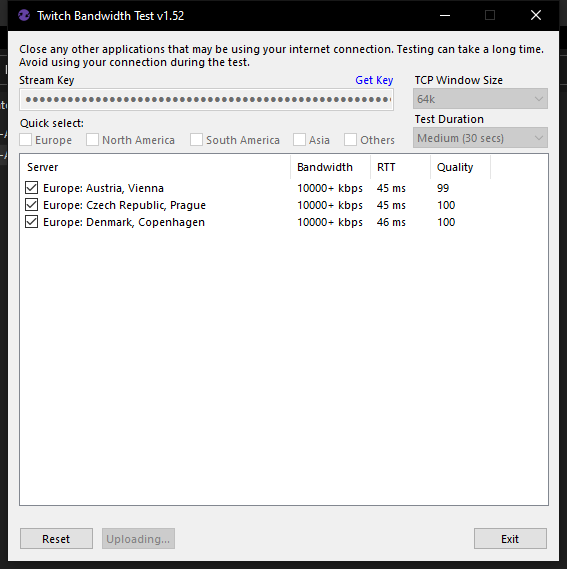
@dusty plover Use the Twitch Bandwidth Test to find the best Twitch server to stream to. Set Duration to Medium. You can uncheck any regions you're not near.
After the test completes, click the Share Result button to upload a screenshot, which can then be copied and pasted here.
Get Twitch Test from https://r1ch.net/projects/twitchtest.
 full thunderBOT
@dusty plover Obs.live is a plugin for OBS Studio for the best OBS support, please join their Official Discord @ discord.gg/obsproject
dusty plover
Should I just ask them the same thing?
 spice pagoda
hi i noticed i no longer have the dock to change stream title, category, add tags, etc. it doesn't seem to be in the dock list either. Anyone experience the same issue or know what to do?
worn eagle
yes
You must connect your OBS with Twitch in Settings/Streams and Connect it with your Account
Then you have Twitch Addons
spice pagoda
ohh lemme try
worn eagle
 spice pagoda
it works now. TYSM!!
worn eagle
No Problem 😉
 prime maple
hi anyone know what to doo media request is just empty
full thunderBOT
@prime maple StreamElements menu, on top of OBS > Logout > Login
prime maple
thank you that was fast works
 wispy tree
Im having issues with streamelements it is not showing me my followers or showing my alerts pop up it stopped working few days ago
shy mountain
is it only follower alerts?
 runic night
Hi, my Activity Feed in OBS Live is pointing to the wrong Twitch account, how do I change it?
full thunderBOT
@runic night StreamElements menu, on top of OBS > Logout > Login
compact belfry
Anybody know how I can reduce delay while streaming? I did my first stream yesterday & it was very delayed so found it hard to talk to viewers I use OBS.live( wasn’t sure weather to put in twitch or obs )
full thunderBOT
@compact belfry Please ask your question in one helpdesk channel only. A support volunteer or StreamElements staff member will assist you as soon as they are available. Asking in multiple places will only result in confusion, not faster answers. Thank you for your patience.
long bobcat
#helpdesk-twitch plz @tired bramble
 silver reef
Hi my game capture not working at all i need help please
full thunderBOT
@silver reef Obs.live is a plugin for OBS Studio for the best OBS support, please join their Official Discord @ discord.gg/obsproject
 still vessel
Is it possible to set the Media Request to a specific Audio channel?
full thunderBOT
How to separate Media Request (MR) audio in OBS:
(Please follow one of the steps for your set up)
MUTE MR FOR YOURSELF, STREAM CAN HEAR
- Make a new overlay in the editor, ONLY add the Media Request widget.
- Add a new browser source in OBS, add the URL and set the dimensions correctly.
- Tick the box for Control audio via OBS https://cdn.discordapp.com/attachments/712428275049431120/716618713998033047/unknown.png
- Go to Edit > Advanced Audio, set your MR overlay to Monitor Off. Note: This will play through the Desktop Audio, if you mute your desktop audio, it will mute the MR.
CONTROL AUDIO SEPARATELY FROM YOU AND STREAM
- For this you will need a VAC (use command
!vac). - Run your MR either in Chrome or in Ground Control (use command
!gc). Note: Do NOT click on SHOW ON STREAM. - Set Chrome or GC in the VAC as an audio input and output.
- Add the audio output from VAC as an audio input in OBS. Note: This will not be able to show the video in OBS.
It is currently not possible to separate audio for yourself and stream if you ALSO want to show the video in OBS.
The only way to do this would be to follow the last set of instructions above and then use Window Capture on GC or Chrome.
Thank you :SEheart:
full thunderBOT
How to exclude audio sources for a stream or recording: https://obsproject.com/forum/resources/8/
VoiceMeeter Banana guide: https://obsproject.com/forum/resources/397/
You can download our Desktop App Ground Control here: https://streamelements.com/groundcontrol
worn eagle
compact belfry
Anybody know how I can reduce delay while streaming? I did my first stream yeste...
And turn in Twitch in Settings your Latenz to Low.
Creator-Dashboard -> Preferences -> Channel -> Latencymode: Low Latency

@compact belfry Look in Advanced Settings in OBS if you have a Stream delay activated.
This is under the Hotkeys Settings.
 wintry heath
quick question, if i export my profile to a usb and import it to another pc, everything should be the same as it was before right? im not loosing any scenes or anything
 plain sonnet
the scenes and sources yes, but if you have any local files then they will need to be in the same place
rugged quail
does anyone know how to show chat in the stream elements obs ? it's not showing for me also good morning
full thunderBOT
@rugged quail StreamElements menu, on top of OBS > Logout > Login
wispy tree
@shy mountain if i go to streamelements website it wont show my followers there i wont show me anything and while im streaming my alerts wont pop up either
worn eagle
@wispy tree look if you have checked all your types (follower,tips...) in the filter
wispy tree
Ya i have all of them checked
 idle bridge
hi, how do i set !time custom chat command on streamelements? I'm in pacific time. when I write this:
Time is $(time.PST)
it doesn't work; it shows the wrong time. I tried PT, PST, same result. When I put MST, it shows the right time for mountain time but it's one hour off my time.
worn eagle
@wispy tree do you have filtered the date with days, or month
 true knot
Hello. Does anyone know how to delete previously used audio sources rather than just hiding them?
I have quite a few different audio sources in the audio mixer window and I'd like to delete them.
 pseudo turtle
I need help with the audio shortcuts, I want to put a key to speak, but it does not detect any when I press it
wispy tree
@worn eagle i have it at this month but also when i am streaming my alerts wont work and started this a few days ago
worn eagle
you have connected streamelements with twitch a few days ago, did you mean that?
@wispy tree
wispy tree
@worn eagle i been using streamelements for months now and it all been fine just few days ago it stopped working not showing my followers and alerts
worn eagle
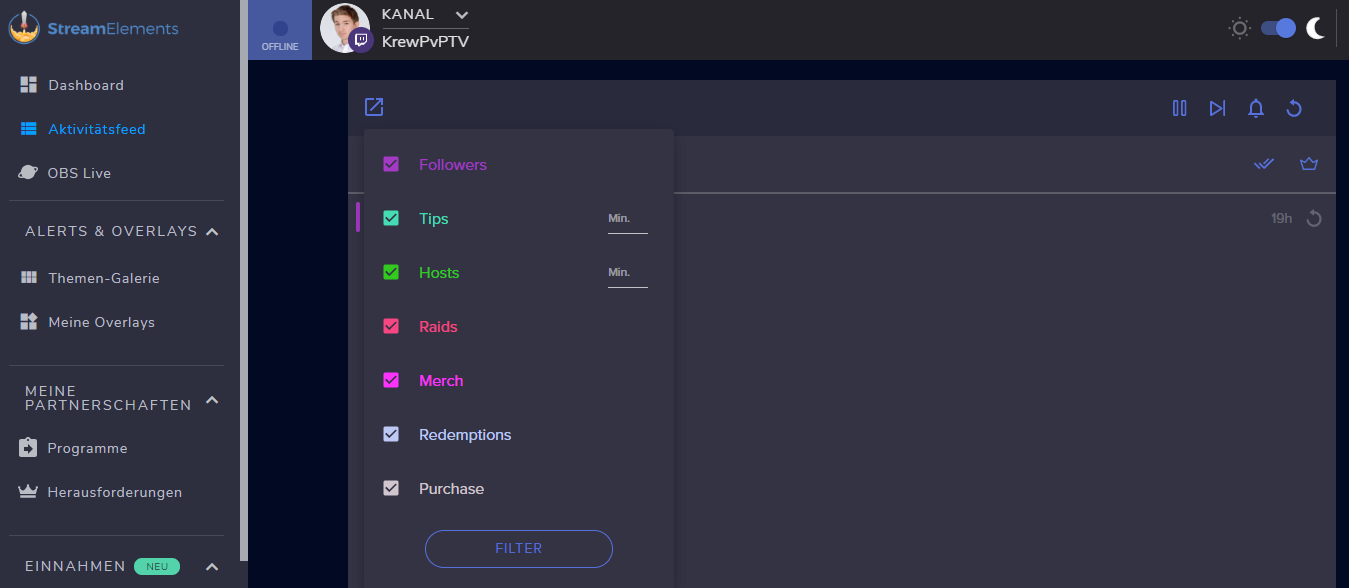
okay, and in activityfeed you have checked all the filter too?
that was my problem yesterday
@wispy tree
 wispy tree
@worn eagle
worn eagle
you are in dashboard? @wispy tree
- edit
okay, i tested what, the filter is correct.
I think i cant help you.
rugged quail
Hi, my browser link for a tip ticker doesnt seem to be working in both OBS and SLOBS. Please can you assist?
 candid hinge
I need some help. When a person tips me on StreamElements, the Tip doesn't show up as a Alert.
 gusty frost
Is there a way to have an alert for people who host you when they are offline? It doesn't show up for me.
rugged quail
Does obs.live have a memory leak possibly?
 lament orchid
why does my sounds on stream sometimes just start lagging? i cant hear any difference on my pc and my discord but the whole stream is lagging until i turn my mixer off and on again. I have a goxlr with a cloudlifter and a shure sm7b. But its not just my voice but all sounds lagging. Help, im going nuts....
full thunderBOT
@gusty frost "Due to changes to Twitch API, we have filtered out hosts and will only show these ones on your activity feed:
- All hosts coming from an online channel with at least 1+ viewer
- Auto host events with at least 1 viewer - only from a channel that just went offline
Note: If you see X channel has hosted you with no viewers on the back, that is considered an offline host or a host with 0 viewers, we do not show these."
pseudo turtle
Does anyone know how to fix the push to talk bug?
 honest scroll
im damn piss with all obs streal labs elements none is working right so im looking for help to get this obs live ready to stream
have a good computer and i have to stream with Gforce experience because the others give error
sorry bro i jusy joined to chanel
i go live using obs live and we devide my stream 3 parts
morer like i have sorces showing lol but i know i dont
 midnight rain
Trying to use stream elements to set up alerts for charity donations, all resources tell me how to do it with slobs but I prefer SE if possible! Any help appreciated
sharp turret
?
rugged quail
there is not chat button
sharp turret
 latent whale
are the overlays currently down? none are showing in OBS how ever they worked fine yesterday nothing on my end changed
full thunderBOT
@latent whale To add your overlays to OBS, add a new browser source in your scene. Paste your overlay URL in the browser source properties, set the dimensions to 1920x1080 (unless you changed them on the website) and check Shutdown source when not visible. https://youtu.be/KDvLynUqXI4
latent whale
they are added...
rugged quail
oh
full thunderBOT
@latent whale OBS > Settings > Advanced > Scroll down > Enable or disable Browser Source Hardware Acceleration, depending on its current state > Restart OBS (This does not apply for OBS on Mac)
https://i.imgur.com/ggMe9ZE.png
rugged quail
im so stupid
compact belfry
worn eagle
https://prnt.sc/vsxtrz
And turn in Twitch in Settings your Latenz to Low.
Creat...
stream lag cant find where to clikc low latency
worn eagle
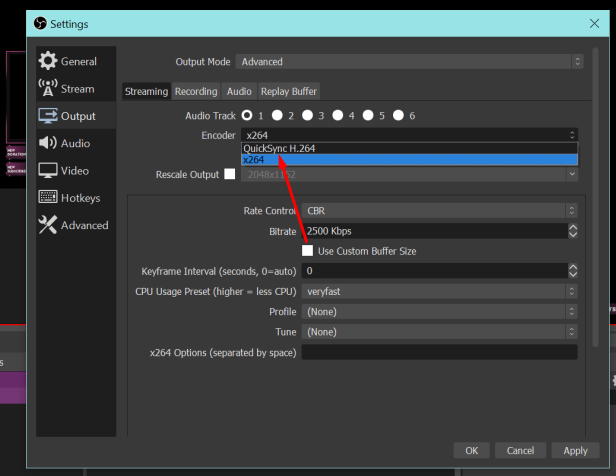
Do you have Encoder NVIDIA NCENC H.264 (new)
worn eagle
Click Encoder
compact belfry
compact belfry
where do i see that?
compact belfry
wheres quicksync haha i think my eye sights gotten worse
 compact belfry
worn eagle
compact belfry
worn eagle
Interresting, can i add you for talk and screenrecord?
compact belfry
ah sure i dont need to call or anything right
worn eagle
call yes? if you dont talk its okay, you can write and turn your mic off
worn eagle
today, tomorrow idk what my time plan is cuz work
compact belfry
oki friend me and give me like 10 mins
 velvet mesa
Hi, i am need to know, how stream in UpLive with OBS
rugged quail
hey how do i set up my overlay? i picked one out from the ones that are suggested on stream elements but i dont know how to apply them
 blazing hound
how uninstall obslive
rugged quail
pc?
obv right lol im not one of the techs but ive been waiting a while and might be able to help
go to control panel
open programs and features
you can search in the top right hand corner of the screen for obs
once it pops up
right click uninstall
that will uninstall any program you need to get rid of
hope i helped
if you cant find the control panel you can hit the windows icon on your keyboard or click the icon on the bottom left of your screen
tap the letter c on your keyboard. on the left you should see control panel as one of the options from there follow the steps provided
full thunderBOT
@rugged quail To add your overlays to OBS, add a new browser source in your scene. Paste your overlay URL in the browser source properties, set the dimensions to 1920x1080 (unless you changed them on the website) and check Shutdown source when not visible. https://youtu.be/KDvLynUqXI4
 quartz lion
anyone else having trouble getting soundtrack to consistently work with obslive?
seems like it worked, but now no longer does


obslive and obs are both up to date, soundtrack is fresh installed, the plugin is still on obs but it's not linking 🤔
 spark gazelle
i am having issues with my HypeCup filling improperly...can someone help with this?
full thunderBOT
@spark gazelle Please ask your question in one helpdesk channel only. A support volunteer or StreamElements staff member will assist you as soon as they are available. Asking in multiple places will only result in confusion, not faster answers. Thank you for your patience.
quartz lion
what's wrong with it @spark gazelle ?
i just tested it and it looks like its working fine
spark gazelle
all the emotes that it fills with are green boxes with a line through them
and it fills with these little "sliver" things @quartz lion
quartz lion
which cup are you using?
spark gazelle
the wine glass cup
quartz lion
a custom?
spark gazelle
no it's a default selection in streamelements
 spark gazelle
yep that one!
quartz lion
do you want them to look like something specific or just not like they do currently?
i have a slight workaround if you're not using custom stuff
spark gazelle
i just want them not to be giant green boxes with a line through them
i want them to be actual emotes, doesnt have to be custom
quartz lion
not sure exactly what you mean, but if you switch cup to christmas tree it uses ornaments and presents and stuff, so you can use that, then switch back tothe cup
actual emotes ?
hm i dunno
quartz lion
odd
spark gazelle
yea it happens every time too
spark gazelle
should it be on?
 solemn fractal
how can i reduce stream delay because its like a 1 min delay is seems
quartz lion
better internet and no delay in obs settings
quartz lion
spark gazelle
should it be on?
no
rugged quail
for me OBS.live keeps saying it cant connect to twitch, etc
gonna try to restart PC
just restarted my PC and it still seems to not be able to connect and also OBS.live loaded up looking completely different in terms of how my interface is arranged.
nvm it's all good now... I think
 sage flame
wispy tree
sage flame
wispy tree
I need help i have no acivity in my activityfeed and dose not show i have new followers and wont show up my follower alerts when someone follows
 waxen charm
Hi! I'Mævis! Can anyone help me?
 icy flicker
Does anyone know how to fix stream elements chat widget in OBS? It works with chat preview or when i type in my chat, but only on the stream elements website. doesnt show in OBS
even with proper broswer source and having it as the only scene
kindred fox
Is the bot moderator in your channel?
full thunderBOT
@rugged quail Read and follow our server rules:
- We do not tolerate toxicity! Treat the community team, staff and all members with respect.
- No advertisement or channel promotion, anywhere on the server.
- No NSFW/NSFL
- No unsolicited DMs or friend requests to server members
Make sure to read the #rules in any server you join.
 green wave
Hey everyone, so I'm new to using stream elements and OBS and I've been trying to get my overlay from stream elements to my OBS on mac which was easy. The problem was that for some reason, every time I transferred the overlay to OBS, the quality got very blurry unless I zoomed in a lot, but then it didn't all fit on my screen. Does anyone know the solution for this? It would help a lot, thank you 🙂
 dire yarrow
Hello Can anyone tell me why my transition is muted in my Obs live an where can i change it?
 wide wyvern
hey how can i use my webm file as an alert o0
 surreal tiger
OBS.live has stopped seeing Logi Capture as a video device and I don't know how to get it to work again. I have tried uninstalling OBS and Logi but this is not working, Please help!
 frigid kraken
Hello everyone. Everytime i open stream labs to stream off my new series X I get a terrible buzzing noise. I unplugged my controller and splitter from my HD60s but the problem remains. It only goes away when I close the app. Any help would be appreciated ❤️
full thunderBOT
@frigid kraken We're not able to troubleshoot issues with using our overlays in StreamLabs OBS (SLOBS) as we don't have the tools to support their software. We recommend using OBS Studio or OBS Studio with our plugin OBS.Live.
@surreal tiger Obs.live is a plugin for OBS Studio for the best OBS support, please join their Official Discord @ discord.gg/obsproject
 tranquil jasper
quick question, I stream to 3 platforms Y,T,F all of which the stream elements support. Can I use the chat bot on all 3 at the same time?
 errant ginkgo
Hey everyone! In the Giveaway Widget, is there a way to remove the bottom row of text below the picture?
 narrow finch
Hello everyone. I can't set my speakers to output in obs live. Yes, I triple checked in both audio settings and advanced audio settings. There's no sound detected in obs when I set it to Monitor and Output. It works for my headphones but not for my speakers. My drivers are up to date, I plugged-unplugged, restart everything. Can't make it work. Please help 😦
 plush jungle
does anyone know why my follower preview alert box is grayed out on stream elements and also not showing up in obs
but subscriber alrts work fine in both
and other alerts as well
literally only follower alerts
full thunderBOT
@plush jungle Please provide a proper screenshot with the issue visible. If not sure how to take a screenshot, you can check here: https://www.take-a-screenshot.org
plush jungle
See here? its showing as gray. The picture and the words
and also not showing up in obs but every other alert works fine
honest echo
@plush jungle your follower alert doesn't have "alert duration"
plush jungle
its at 3 seconds isnt it? i see the 3 right there unless im missing something lol
honest echo
@plush jungle that screenshot is from the sub alert no the follower alert
plush jungle
oh sh*t you right, sweet thank thank you
 hasty tide
idk where to ask but can i make streamelemets alerts works with trovo?
thanks
honest echo
@hasty tide we don't have support for trovo
hasty tide
honest echo
<@!321563757979631616> we don't have support for trovo
so i have to configure it myself?
 heavy hound
is there a way for someone to help me setup my obs live stuff, I drop frames when I'm in warzone
worn eagle
@heavy hound i have a good pc, and it was the same problem, run obs to adminstrator and turn in windows the Game Mode on
 hollow hill
Hello there. I wanted to add destinations in my Overlay Follower. However, only the followers that I have received since I started using SE were included in the calculation. Not the ones I actually have in total on Twitch, which is of course the number I am really interested in.
 undone narwhal
Hey my TTS isn't working but only sometimes, whenever i run a simulation it works perfectly fine where as i got a dono today and the TTS announced [username] donated [x] but didnt continue to say their message
lament orchid
why does my sounds on stream sometimes just start lagging? i cant hear any difference on my pc and my discord but the whole stream is lagging until i turn my mixer off and on again. I have a goxlr with a cloudlifter and a shure sm7b. But its not just my voice but all sounds lagging. Help, im going nuts....
 rigid crane
guys do you know how can i fit my game capture to the overlay?
if you know what i mean?
 wet marten
Cant download Streamelements:(
 sullen ether
Hi, i am trying to import my overlay from streamlabs into streamelements. But if i do it via "streamelements-> import from streamlabs" in obs the uploading media files bar stops at 70% all the time.. any suggestions?
full thunderBOT
@keen sparrow Read and follow our server rules:
- We do not tolerate toxicity! Treat the community team, staff and all members with respect.
- No advertisement or channel promotion, anywhere on the server.
- No NSFW/NSFL
- No unsolicited DMs or friend requests to server members
Make sure to read the #welcome in any server you join.
 mild chasm
stream elements not giving reply to commands
pllz answer
full thunderBOT
@mild chasm StreamElements menu, on top of OBS > Logout > Login
prime maple
its possible to reorder audio mixer items in the order that you prefer ?
 steel mural
No but the OBS team has plans for it. In the meantime you can rename your sources as they're sorted by alphabet.
zDesktop Audio for example would be the last item.
prime maple
@steel mural do u know when to expect that ?
steel mural
Nope. But you can check the ideas board at https://ideas.obsproject.com/
prime maple
@steel mural hope they doo drag n drop alphabet is not werry fast option
steel mural
Okay I was a bit off. They don't have plans for it, it is under consideration https://ideas.obsproject.com/posts/117/add-the-ability-to-reorder-audio-mixer-items
prime maple
@steel mural Ajajaja this will be long waiting
@steel mural man i got it now alphabeticaly
il try something
steel mural
No need to ping me in every message 🙂
When you renamed them, restart OBS. Looks like this on my end
prime maple
man alphabeticaly sorting work just rename then restart
steel mural
yup
prime maple
thanx for help 🙂
mild chasm
full thunder
<@!745592708030267482> **StreamElements** menu, on top of OBS **> Logout > Login...
tq❤️
 deep dagger
hello everybody, having a little curious problem here... dunno why, but when i start obs, in the StreamElements panels, Nvidia Overlay show me the fps counter and activate the instant replay. How can i ''exclude'' obs in nvidia Gaming Experience?
 leaden heart
Hi there, hope everyone is well.
I have a problem with OBS at the minute. I have two TVs plugged into my PC which I use as monitors but is doesnt seem to recognise display 1 as a display capture and is just blacked out in OBS. I tried disabling game mode and the other things the OBS website suggested but nothing. Can any kind person help?
kindred fox
Run obs as administrator
leaden heart
Tried that 😦
kindred fox
Try deleting and re-adding your display capture?
leaden heart
I just figured it out. Dont ask me why but when I changed the swapped the HDMI ports that were going into my PC from my 2 TV displays, that somehow fixed it. It must have been a problem with my PC's HDMI ports maybe???
rugged quail
Is there an update for obs keeps saying there is and stops me going live
rugged quail
keeps saying failed to connect to update servers
but wont let me do anything till I update
 bitter lantern
I am having a hard time getting my overlay set up
 molten spindle
Hey so for the Soundtrack by Twitch Beta, it says it doesn't support StreamElements OBS, anyone know if this is a fact or is there just an update i dont know abt
full thunderBOT
@bitter lantern We've released our new Overlay Editor revamp. You can check out the changes and how to work with it here: https://youtu.be/X5VzXjqAsjk
Check out our blog post as well: https://blog.streamelements.com/streamelements-overlay-editor-just-got-even-better-c22cb5b4853e
 real tusk
Hi, When I try and update stream elements OBS I get this error message, been trying since last night still get same error message! any ideas?
molten spindle
@real tusk you could try uninstalling then it will automatically reinstall the lastest update
rugged quail
how do i activate my overlays on obs?
 honest jasper
I can't import my streamlabs overlay in obs for unknown reasons
full thunderBOT
@rugged quail To add your overlays to OBS, add a new browser source in your scene. Paste your overlay URL in the browser source properties, set the dimensions to 1920x1080 (unless you changed them on the website) and check Shutdown source when not visible. https://youtu.be/KDvLynUqXI4
real tusk
@molten spindle will i lose all my scenes ive created though?
molten spindle
@real tusk Honestly, I dont know, but if you've been using Stream elements then the webiste will still have all of your overlays so you could just plug them back in
rugged quail
Hey guys can anybody help me with store redemption config
the problem:
I set a item with a meme and a sound, but the sound comes first than the imagens meme.
and I disable the voice reader in this item so it should apper at the same time imagem and sound
 deft bridge
Hello! So im trying to enable my custom bot i that made awhile back for my Streamelements, it was working and everything but i recently had to reinstall windows and Streamelements and now it wont register the bot, like it will let me log in and authorize it but it wont actually work. Can i get some help with this?
 alpine wharf
Is anyone else's activity feed just.. not working..?
 rustic flax
yeah
alpine wharf
it acts like a mini browser right?
rustic flax
its like yeah
 wispy nymph
Hey! Don't know if this is the correct chat. I have tried recording my videos in obslive, using .mkv format, for multiple audio trcks in editing. This is, as far as i know, the only format which allows this. I then try to convert to mp4, but it is an unsupported compression type? please help
rustic flax
if i were you id restart everything lol but im no expert just saying what ive done that worked
wispy nymph
i have my output as mp4, and tried converting + importing later
 vestal sail
Does anyone know why when I have the font Mountains of Christmas in the overlay editor it doesnt appear in OBS? It shows the alert preview with the correct font in the overlay editor but in OBS it defaults back to what I believe to be Arial.
 open badge
You said your output was MKV
wispy nymph
Changing filetype in name , cause no free services allowed me more than 5 minutes
wispy nymph
will it still give me multiple audio tracks?
open badge
yup
wispy nymph
aah, thanks 🙂
open badge
👍
 mortal pine
hey how do i reset the layout of my obs i moved some stuff around by accident
open badge
mortal pine
where do i find that?
mortal pine
thanks
open badge
👍
 warm cove
Hey there, today when I logged into OBS I'm unable to update the title of my stream. Has anybody had a similar issue? I've restarted PC as well as running OBS as administrator. Is there a fix for this or alternatively another place where I can update my stream information?
steel mural
Twitch is having issues
warm cove
Oh thank you
vestal sail
Does anyone know why when I have the font Mountains of Christmas in the overlay editor it doesnt appear in OBS? It shows the alert preview with the correct font in the overlay editor but in OBS it defaults back to what I believe to be Arial.
 golden field
Hello everyone i have a big problem. Since a few days my SE OBS dont show me my new follower or subs. Not even in my activity feed is this my fault or is it a bug?
 inner onyx
how do i add a live chat fature in my stream?
i installed a super theme but i canot find out how to add live chat for yt
full thunderBOT
@vestal sail Google Fonts
More than 900 google fonts are supported at this time. You can preview them here: https://fonts.google.com/
Custom Fonts
Steps:
- Install the font on the streaming PC or choose a pre-installed windows font.
- In the overlay widget settings, select Text Settings
- Click on Enable Custom Font
- Type the name of the font as it appears in the windows font directory (This is usually
C:\Windows\Fonts)
Note: After installing fonts, the browser and OBS must be restarted for the font to appear.
@golden field StreamElements menu, on top of OBS > Logout > Login
tulip hamlet
@inner onyx Not available for YouTube.
golden field
I did logout and re log but still nothing happens in my feed or in obs
i also did an reinstall of se obs after deleting everything but still no activity i missed 20 alerts what not so nice
 sweet lantern
Hey all. I set up tipping and the bot and such. But still cannot change the name of the bot. Any suggestions?
full thunderBOT
@sweet lantern Currently renaming the bot fully works with OBS.Live.
You can follow this video guide to set it up: https://discordapp.com/channels/141203863863558144/494513233416421386/561516184718278676
If you don't want to use OBS.Live and want to stick with Ground Control, please let us know your Twitch username.
sweet lantern
FhantomBurger is my twitch name
deft bridge
Hello! So im trying to enable my custom bot i that made awhile back for my Streamelements, it was working and everything but i recently had to reinstall windows and Streamelements and now it wont register the bot, like it will let me log in and authorize it but it wont actually work. Can i get some help with this?
full thunderBOT
@deft bridge "1) Right click on your OBS desktop shortcut and open the Properties
2) In the Target field, add the following to the very end: --remote-debugging-port=40404
3) Open OBS (or restart if it was open)
4) Open your web browser and type in: localhost:40404
5) Click on StreamElements - Activity feed
6) Navigate to the Console tab
7) Type the following into the console and hit enter: store.customBot.removeCustomBotIntegration()
8) Try setting the custom bot name
9) Remove the additional flag in step 2 from your shortcut properties."
 unreal thistle
Hello, I am having an issue with my obslive, whenever I open it, everything is zoomed in. the font is huge and it's not fitting my screen properly. how can i reduce the size?
full thunderBOT
@unreal thistle Please provide a proper screenshot with the issue visible. If not sure how to take a screenshot, you can check here: https://www.take-a-screenshot.org
unreal thistle
kindred fox
Can you adjust font size somewhere in view or settings or somewhere?
unreal thistle
I can't find anything specific. It just booted up like this so i'm not sure why it's so magnified.
 shrewd plover
im a bit confused tbh
kindred fox
No idea. Check windows settings for scaling etc
 dense kettle
I used to have a spot to name the stream and list detail about the stream. I cant find it anymore. Using Twitch
dense kettle
unreal thistle
I can't find anything specific. It just booted up like this so i'm not sure why ...
Check your DPI settings
kindred fox
View > docks > stream information
dense kettle
unreal thistle
I can't find anything specific. It just booted up like this so i'm not sure why ...
check that setting
dense kettle
kindred fox
View > docks > stream information
its not there
unreal thistle
I have it at 100% but it is still booting up zoomed in. is their a scaling/font size tab on obs?
dense kettle
kindred fox
View > docks > stream information
found it.....i disconnected and reconnected twitch account
@unreal thistle then I have no idea
unreal thistle
@dense kettle appreciate your help boss 🤝
unreal thistle
alright just tried it, it's still zoomed in it just took away the chat box media box etc just the stream is still displayed
uninstall reinstall?
dense kettle
then I am out of ideas....
unreal thistle
ill just reinstall it then, thanks again
kindred fox
@unreal thistle it’s probably a setting
Can you push ctrl and - inside obs?
CTRL with + usually increase font size CTRL with - usually decreases it
unreal thistle
Uninstalling obs live fixed it. Gonna reinstall and pray it doesn't come back lol
kindred fox
That was definitely a wonky thing to happen.
testing something
yeah i can't even replicate that
 prime vector
Hey there, I'm trying to to know why Stream elem obs is laggy, was streaming in SLOBS and no lag not sure why, any idea?
kindred fox
probably your encoder settings
prime vector
I did SLOBS has even more, all I see is my GPU is 99% due of the stuff I run in stream, I stream on my CPU idk but OBS sill wants power from my GPU
I'm not sure why
full thunderBOT
@prime vector OBS > Settings > Advanced > Scroll down > Enable or disable Browser Source Hardware Acceleration, depending on its current state > Restart OBS (This does not apply for OBS on Mac)
https://i.imgur.com/ggMe9ZE.png
kindred fox
try disabling that
see if it makes a difference
also make sure your encoder is x264 if you're encoding on your CPU
inner onyx
okay so im having a hrd time streaming to yt
it keeps saying disconnected then reconnected in the right bottom corner of my pc
and it doesnt start
when it does start it lags and freezews thern stops by itself but i have a very good pc
any ideas?
kindred fox
do you have good internet?
inner onyx
yes, i never lag
normally dont lag
wait it started
and says excellent connection
i might have fixed it
nvm
keeps saying its recieiving no data
kindred fox
make sure your obs is configured correctly and connected to youtube correctly
inner onyx
it is i think its my setting on obs
 proper token
Hi there, Ive been trying to add this input logger as a window capture
but it only appears as a static image and doesnt move
full thunderBOT
@proper token Obs.live is a plugin for OBS Studio for the best OBS support, please join their Official Discord @ discord.gg/obsproject
 sinful flint
I just installed a new motherboard in my computer. All my scenes are gone in streamelements even with a linked account, and now my overlays don't show up at the proper size. Please help
 bright sinew
I made some new alerts but when I put the alert box in obs.live they're offcenter and cut off. How do I fix this?
Picture for example
full thunderBOT
@bright sinew To add your overlays to OBS, add a new browser source in your scene. Paste your overlay URL in the browser source properties, set the dimensions to 1920x1080 (unless you changed them on the website) and check Shutdown source when not visible. https://youtu.be/KDvLynUqXI4
 small siren
question I have my stream set up the way I want but it doesn't take up the entire space given on twitch, on obs it does but when I stream on twitch I have space on the top and bottom
anyone know how to fix: Update I have updated my canvas and video output to match but I still have space above and below
undone narwhal
can i get my issue answered please ive asked twice and its been a fair while since the first message
full thunderBOT
@undone narwhal Welcome to the helpdesk! Please let us know how we can assist you today and a support volunteer or staff member will assist you as soon as they are available. Thank you for your patience.
undone narwhal
Hey my TTS isn't working but only sometimes, whenever i run a simulation it works perfectly fine where as i got a dono today and the TTS announced [username] donated [x] but didnt continue to say their message
the tts only announced the action
full thunderBOT
@small siren The default resolution for StreamElements overlays (theme and custom) is 1920x1080. Please add them in OBS at their full resolution and use CTRL+F to fit to screen if necessary. You can then downscale your stream in OBS settings > Video if you'd like https://i.imgur.com/6bWXxjR.png
tulip hamlet
@undone narwhal Please point out the specific alert that did not play its message.
undone narwhal
shirks messager abou the sprinkler
 gilded vine
how do i get twitch chat to show up white in my overlays?
 cloud finch
How do u reset a dono goal bar. Like the amount donated
full thunderBOT
@cloud finch To reset goals:
- from the Overlay Editor > Session data on top right (monitor symbol) > Goals tab > reset progress of desired goal
- from the Dashboard > Activity feed on the left > Widget data on the right > Goals tab -> reset progress of desired goal
Note: Goal widgets (progress) only counts up and doesn't go down automatically, if you lose followers/subs.
open badge
Is this channel the one you'd ask for help about overlays?
kindred fox
Possibly
 sturdy mason
What was the OBS official discord¿?
full thunderBOT
@sturdy mason Obs.live is a plugin for OBS Studio for the best OBS support, please join their Official Discord @ discord.gg/obsproject
shy mountain
@gilded vine Are you asking about the chat widget for the overlay?
gilded vine
@shy mountain I was but I figured it out thanks tho
shy mountain
👍
 crisp sail
Hi there.
I have an issue with my Target Bitrate.
For some reason, it is only letting me select 1 or 0 for this option.
I can't type in the box any number besides 1 or 0. Has anyone seen this issue?
Thanks!
full thunderBOT
@crisp sail Obs.live is a plugin for OBS Studio for the best OBS support, please join their Official Discord @ discord.gg/obsproject
 deft hollow
Hi, somehow my alerts don't work. When I test an alert, it works normally, but when someone starts subscribing, the alert does not run.
long bobcat
which platform @deft hollow ?
 dire kindle
hello
rugged quail
does anyone know why my "start streaming" button doesnt allow me to change the title before going live? it did only once then never did it again
 slim osprey
Hi, the credit roll widget on streamelements does not display my followers and stuff. Can anyone help?
All it says it "Thank you everybody for the stream" and then no data following after
full thunderBOT
@rugged quail StreamElements menu, on top of OBS > Logout > Login
rugged quail
@full thunder it didnt work 😦
slim osprey
Here's a image for more information. At the credits roll. No information about followers, subscribers or anything shows up.
rugged quail
never mind i figured it out! 🙂
long bobcat
@rugged quail what was it?
long bobcat
still curious tho @rugged quail
you pressed start streaming and saw the setup window, but then it stopped, right?
you started streaming right away
what did you do with the docked menus to resolve that?
we're talking about FB, yes?
slim osprey
Can someone help me with the credit roll issue please? Does anyone know 😕
shy mountain
Is it your account?
because i don't see the credit roll widget at all in your account
plus the widget is session based, so if you are adding it now, it won't show anything
compact belfry
if i were to record how would i set where it saves :)?
sharp turret
compact belfry
if i were to record how would i set where it saves :)?
OBS settings->output->recording tab->recording path
 uneven plover
if I download obslive on a separate computer, do I have to reset my stream set up?
compact belfry
what recording format is best? mkv mp4 ect?
 strange jackal
Hi guys, can anyone help me with this ? I can't find an answer on google.
So I have my alerts sound setup on streamelements overlay. I want to be able to hear the alert sound if anyone follows my stream. and I can hear it in OBS, but this is going trough my desktop sound, so I guess the viewers will hear the alert sound 2 times, am I right ?
Cause one is playing trough streamelements overlay and the other trough my obs desktop audio
 twin robin
no they dont
strange jackal
you mean they only play on my obs ? so it's fine having them going trough my desktop output ?
plain sonnet
the default setup of browser (alert) sources play through obs so you and stream will hear them
strange jackal
so I'm good, ok 😄 thank you, sorry for my confusion
honest jasper
I get this error when I try to import my overlay from streamlabs obs even though I am connected on twitch for both.
wide wyvern
Hello @full thunder i didnt get an answer about my problem, using a .webm file as an alert...
 marsh laurel


 still basin
i am having a issue with half my over lay not showing up on screen i want to know what i am doing wrong i resize it and still only see half it?
full thunderBOT
@still basin The default resolution for StreamElements overlays (theme and custom) is 1920x1080. Please add them in OBS at their full resolution and use CTRL+F to fit to screen if necessary. You can then downscale your stream in OBS settings > Video if you'd like https://i.imgur.com/6bWXxjR.png
solemn fractal
Can someone help me take off stream delay
 winged prairie
How do I make it so I have one rotating thing, where once it shows who followed, then to bits, then to subs etc?
solemn fractal
thats a alert box
wary dew
winged prairie
How do I make it so I have one rotating thing, where once it shows who followed...
wary dew
solemn fractal
thats a alert box
no that is a rotating widget
 dense ice
hi, I need some help.
I can't install the update on the obs for some reason
I can send a screenshot of the error if needed
and recently the youtube chat widget in the obs stopped working as well 😦
full thunderBOT
@graceful escarp StreamElements menu, on top of OBS > Logout > Login
 tawny pumice
hello i am trying to put the xmas overlay into obs live. from streamelements. i do everything but it doesnt display the bottom bar with all the recent info.
my text to speech works but the visual stuff doesnt
full thunderBOT
@tawny pumice The default resolution for StreamElements overlays (theme and custom) is 1920x1080. Please add them in OBS at their full resolution and use CTRL+F to fit to screen if necessary. You can then downscale your stream in OBS settings > Video if you'd like https://i.imgur.com/6bWXxjR.png
tawny pumice
ty that worked 🙂
 weary fox
Can someone help me?
full thunderBOT
@weary fox Welcome to the helpdesk! Please let us know how we can assist you today and a support volunteer or staff member will assist you as soon as they are available. Thank you for your patience.
honest jasper
@full thunder I have not recieved any help for the issue I posted earlier.
weary fox
I'm trying to stream to twitch and just linked my account to obs.live streamelements but whenever i click start streaming it tries to stream to youtube
full thunderBOT
@weary fox StreamElements menu, on top of OBS > Logout > Login
honest jasper
Are you logged in via YouTube or twitch?
 zenith rapids
When someone follow me my music just keeps going. how do i get it to stop automaticlly?
tulip hamlet
zenith rapids
When someone follow me my music just keeps going. how do i get it to stop automa...
Can you be more specific about what you're talking about?
weary fox
Ive logged in with twitch but now when i try to stream it says failed to connect to server
kindred fox
Make sure you set your obs settings > stream > connected to twitch
 verbal vessel
hey! where i can show my alerts on streamelemts?
full thunderBOT
@verbal vessel To add your overlays to OBS, add a new browser source in your scene. Paste your overlay URL in the browser source properties, set the dimensions to 1920x1080 (unless you changed them on the website) and check Shutdown source when not visible. https://youtu.be/KDvLynUqXI4
 velvet comet
my obs live stream chat is not working
full thunderBOT
@velvet comet StreamElements menu, on top of OBS > Logout > Login
velvet comet
thanks
 autumn storm
how do you do change accounts on obs live
full thunderBOT
@autumn storm StreamElements menu, on top of OBS > Logout > Login
autumn storm
thank you very much
rugged quail
Dang obs
rugged quail
anyone having issue with kappagen bttv gifs being static not moving on streamelements preview edit screen
full thunderBOT
@timid heath Please ask your question in one helpdesk channel only. A support volunteer or StreamElements staff member will assist you as soon as they are available. Asking in multiple places will only result in confusion, not faster answers. Thank you for your patience.
honest jasper
I posted a screenshot earlier about an issue I'm encountering with importing my stream overlay over to StreamElements from Streamlabs OBS, however I have not recieved any responses yet, if anyone knows how to resolve this issue, that would gladly help.
dense ice
hi, I need some help.
I can't install the update on the obs for some reason
I can send a screenshot of the error if needed
and recently the youtube chat widget in the obs stopped working as well 😦
 gilded lotus
Anyone assist with black screen while doing window capture?
shy mountain
@dense ice open task manager and end task on anything OBS related, then click retry
@honest jasper Import can fail when there are:
- copyrighted assets from Streamlabs in the scenes
- unsupported media files
- media files being bigger then 100MB
full thunderBOT
@gilded lotus Obs.live is a plugin for OBS Studio for the best OBS support, please join their Official Discord @ discord.gg/obsproject
dense ice
shy mountain
<@!291364976797679616> open task manager and end task on anything OBS related, t...
thank you, and as for the YT chat ?
full thunderBOT
@dense ice StreamElements menu, on top of OBS > Logout > Login
 teal pelican
I'm not sure if this is the right chat to ask this, but I'm trying to stream from console, and it's very laggy on the stream. So, I figured I'd get a capture card, and see if that would help. But I'm not sure which one I should get.
I have my overlays and sound alerts all set up and ready on my computer, so it would be a shame if I can't use them.
 noble birch
Hi!
I have a small problem with my StreamElements chatbot. Often my live disconnects and when I come back online, the BOT is no longer working. That is, all commands stop appearing in the chat and there are no more answers. Is there any way to connect again from OBSLive within OBS Studio? Thanks in advance!