#pzwiki_editing
1 messages · Page 2 of 1
 restive adder
 fossil bluff
new speedrun category just dropped
 wide dome
tree branch weight any% is dead now. no one can top that tbh
 worldly remnant
LOL
 stable pond
gonna upload it to speedrun.com
 languid kayak
8 seconds from the creation to edit, top that!

 languid jungle
not sure if this is the right spot for this but have recently discovered that canned food can be used as bait in traps - did not see a mention of this in the wiki article for trapping https://pzwiki.net/wiki/Trapping

 spare zodiac

"You are technically correct - the best kind of correct".
From Futurama season 2, episode 14 - "How Hermes Requisitioned His Groove Back".
spare zodiac
languid jungle
not sure if this is the right spot for this but have recently discovered that ca...
did you test to see if they were also effective? there are some bait types that can be inserted into the traps but do literally nothing except eventually decay
languid jungle
spare zodiac
did you test to see if they were also effective? there are some bait types that ...
i did not - only saw that most of the opened canned food could be used as bait, no further testing
languid kayak
I'm running through the images to see which ones are on Wiki and this one cought my eye; anyone have an idea what's that? Was it supposed to be used for anything? Item_Allsorts.png

 obtuse field
they’re licorice allsorts, a candy popular in England

 tulip kiln
Licorice Allsorts are fucking lit
languid kayak
oh, thanks!
@digital helm do you have a script/way to automatically update the https://pzwiki.net/wiki/PZwiki:Item_List somewhere? I think it originated in your sandbox here https://pzwiki.net/wiki/User:Vaileasys/sandbox_2 and the last update was back in april/may and would be nice to have it updated to the newest 41 build :). Seems it's a parser for the script files.
 cold vigil
Can someone please remove the protein boost article on nutrition, there's no way it's working in current build. I have been eating fish fillets non stop for 3 days and exercising, no exp boost to strength, and my weight has shot up 77kg to 84kg and going up, still no sign of exp boost
im wrong ridai pointed out my mistake
stable pond
you start capped on protein I believe, so perhaps you are remaining maxed?
cold vigil
stable pond
you start capped on protein I believe, so perhaps you are remaining maxed?
thanks i installed mod to check
languid kayak
Leaving a note here in case I forgot, but water bucket on wiki should be changed to metal since it's uniformly metal now; just uploading the icons now 😛
I updated the bucket page, but recipes should be updated too
BTW @restive adder mind updating https://pzwiki.net/wiki/Template:Current_version to 41.78.16 for both stable and unstable? Seems we'll be on that for a while, date seems to be 8 Dec for Unstable and 12 Dec for Stable according to https://steamdb.info/app/108600/depots/

SteamDB
Project Zomboid is the ultimate in zombie survival. Alone or in MP: you loot, build, craft, fight, farm and fish in a struggle to survive. A hardcore RPG skillset, a vast map, massively customisable sandbox and a cute tutorial raccoon await the unwary. So how will you die? All it takes is a bite..
Project Zomboid Steam charts, data, update history.
languid kayak
Hm, I kinda reversed my changes now (kinda, it's messed but whatever, works), but why can't I find PillsBetablocker.png in my extracted images? I only have PillsBetablocker2.png and game still uses the old image for Beta Blockers

 restive adder
languid kayak
BTW <@136497401379815424> mind updating https://pzwiki.net/wiki/Template:Current...
restive adder
languid kayak
BTW <@136497401379815424> mind updating https://pzwiki.net/wiki/Template:Current...
Done!
Wiki will likely go read only for a short bit tomorrow, need to test an update to the AntiSpam module to fix it breaking mediawiki when in readonly mode
Also, thoughts on a new skin for the wiki? Wnat something that works better on mobile if possible. Was looking at possibly testing https://www.mediawiki.org/wiki/Skin:DarkCosmos. Can install them and users can pick which one they want, though images are hard-cached so you'll see default theme on them
languid kayak
Well, just don't get what English Wikipedia does now, as it makes non-mobile browsing worse 😄 Or at least don't make it mandatory
languid kayak
restive adder
Done!
IWBUMS seems to still be off by subversion
 restive adder
languid kayak
IWBUMS seems to still be off by subversion
restive adder
languid kayak
IWBUMS seems to still be off by subversion
should be fixed now?
restive adder
Brief readonly test on the wiki
 cold kettle
Hi all! Someone working on https://pzwiki.net/wiki/Modding page? I want create full guides for modding (pages + video)
restive adder
I’ll look at enabling https://m.mediawiki.org/wiki/Extension:SyntaxHighlight on the wiki tomorrow unless anyone shouts otherwise
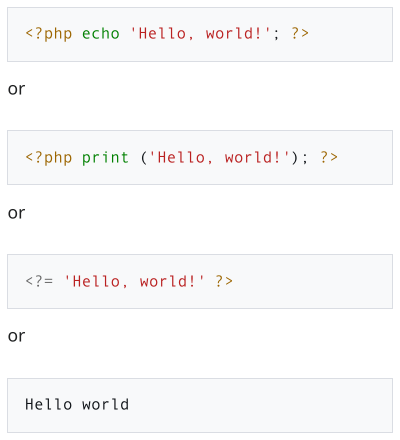
The SyntaxHighlight extension, formerly known as SyntaxHighlight_GeSHi, provides rich formatting of source code using the <syntaxhighlight> tag.
It is powered by the Pygments library and supports hundreds of different programming languages and file formats.
Like the <pre> and <poem > tags, the text is rendered exactly as it was typed, preservi...
languid kayak
I know, and I did that 😛
 steady rain
Hello everyone,
Ive only recently created an account on the wiki and started to extend some articles (focussing on Muldraugh locations for now, easy enough to do). Was wondering if I should remove the "improve" marking if I deem it reasonably well extended, or should I leave that to more senior contributors? Also, any other hints outside of the beginners guide/ help pages I should know about?
languid kayak
steady rain
Hello everyone,
Ive only recently created an account on the wiki and started to ...
I'd say removing the marking as you seem fit is fine, especially as I seen your edits and they seem to be extensive enough (and I like Muldraugh so I'm especially fond of these :D)
steady rain
languid kayak
I'd say removing the marking as you seem fit is fine, especially as I seen your ...
Alright, thanks! Good to hear that I picked a good starting point 🙂
languid kayak
steady rain
Alright, thanks! Good to hear that I picked a good starting point 🙂
Those pages are ones I kinda wanted to touch someday, but always found "more important" things to do :P. I still gotta update the tiles to Louisville ones and add plethora of the ones that were missing from before, but now I started with revamping clothing page and then kinda slowly moved to items; just finished uploading the missing images which are currently grouped on my userpage which fixed some red links while at it, but still got few minor things to do related to that.
 void basin
Tbh we could really use a more unified location page format.
I might make one for other people to use, as I follow basically they same format for all my pages
void basin
what detirmines the autofill in the wiki search bar?
restive adder
Not sure, default media wiki behaviour? Might look at enabling full Ajax/auto search via sphinx or elastic search now we have more ram
Damn, sphinxsearch is unmaintained 😦 why is elastic such a resource hog?
languid kayak
restive adder
Damn, sphinxsearch is unmaintained 😦 why is elastic such a resource hog?
Looks active enough for unmaintained? https://github.com/wikimedia/mediawiki-extensions-SphinxSearch

GitHub
Github mirror of MediaWiki extension SphinxSearch - our actual code is hosted with Gerrit (please see https://www.mediawiki.org/wiki/Developer_access for contributing) - GitHub - wikimedia/mediawik...
restive adder
Mostly automated dependency updating looks like?
languid kayak
yeah 😦 Translations and indeed seems like some dependencies mostly
Though some commits seems more recent than Latest version from 2019-09-17 probably the nature of it still being used and being open source 😄
restive adder
Looks like it's broken from 1.35, there's a patch but it's 'needs work'
We maybe could sponsor someone to work on it, but might be lotta money
restive adder
Installing & maintaining elasticsearch looks like a pain, an extra two extensions. Need to script something to help make upgrading mediawiki easier I think. Maybe after better mobile support can look at that. More for the todolist 😐
void basin
Not sure if this article follows guidelines https://pzwiki.net/wiki/Back_To_The_Nurture_Chiropractic_Services
If I have time I might fix it
 mild acorn
Are the skill shows on life and living random now? The wiki shows it should only start at 12PM, but this one is on 3:40PM

Maybe want to change wiki page on that
 deft umbra
should change the names to be "opened can of ...."
deft umbra
mild acorn
Are the skill shows on life and living random now? The wiki shows it should only...
i found that sometimes there is a random survival show that comes on immediately on the first day if you start at 2am. not sure why but its odd.
mild acorn
Maybe theres a system ingame that makes skill shows you missed come back again? I hadn't seen the 12PM one when I was playing, it could have something to do with it
@deft umbra for the survival show that starts at 2AM, was it the fishing one? Did you check if the 5AM was still there or if changed the schedules for the other shows?
deft umbra
mild acorn
<@944969226232410154> for the survival show that starts at 2AM, was it the fishi...
i dont remember but the 6am cook show aired normal
obtuse field
if the player isn’t nearby a power TV tuned to Life and Living at 6 am, noon, or 6pm, the show will not start playing until the player comes near a TV that is tuned to the channel. So if you’re nowhere near a powered TV until 3 pm, the noon show will start playing at 3 pm
languid kayak
mild acorn
Maybe want to change wiki page on that
They aren't random, they start first time you are close to turned on tv this https://www.reddit.com/r/projectzomboid/comments/ekr5hq/life_and_living_iwbums_41/ should explain a lot, though I agree it could all be added to the page.
(seems TheOddFly explained that before me too, yeah :P)
languid kayak
@restive adder any reason why PZwiki lacks of favicon? Maybe it could be set? https://www.mediawiki.org/wiki/Manual:$wgFavicon
Also, one thing that always got me wondering is how translations are set up, with /xx but still in the main (English) namespace. Guess it's also what mandates the current implementation of link redirects translating the /xx links to the localized names… Other wikis generally have translations the same way as Wikipedia does, i.e. separate MediaWiki instance that's linked with language interlinks, e.g. on Fandom: https://escapefromtarkov.fandom.com/pl – any reason pzwiki is set up so the translations are in the same instance of MediaWiki with the English one or is it a legacy implementation? I guess it'd be lots of possible tedious work, though would be beneficial in the end 🤔

 digital helm
languid kayak
<@136497401379815424> any reason why PZwiki lacks of favicon? Maybe it could be ...
digital helm
languid kayak
<@136497401379815424> any reason why PZwiki lacks of favicon? Maybe it could be ...
I think that it was a legacy thing. I think our version of Mediawiki was a few versions behind, so it didn't have those features yet? Either that, or I didn't know how it worked. I tried a few things with translations, but it was always a lot more work than what I had time for - then got burnt out and moved on.
digital helm
languid kayak
<@109658126805905408> do you have a script/way to automatically update the https...
Sorry for the late reply. I used a custom LUA script with Turbo's ItemZed. Then it stopped working after an update. I haven't looked at it since.
I think this is what I used if you want to take a look
languid kayak
digital helm
I think this is what I used if you want to take a look
Yeah, I'll definitely will, as I uploaded all icons now and would be nice to have it up to date 😄
languid kayak
digital helm
I think that it was a legacy thing. I think our version of Mediawiki was a few v...
I guess it's not the MediaWiki version, as even oldest Wikipedia had separate ones for all languages, though it might be server limitations back then, to not host several instances of MediaWiki but instead put it all in the main namespace
restive adder
languid kayak
<@136497401379815424> any reason why PZwiki lacks of favicon? Maybe it could be ...
Favicon, it just needs setting up I think, have put on todo list. Mainly not setting up a wiki farm because mediawiki is a maintenance nightmare as it is, enabling farm mode adds to the complexity significantly. If you really really really want it, I can put it on my todo list but It'll go at the very bottom low priority because making my life significantly harder is a bad idea with my chronic illness 😉
 little kraken
Forgive me if this is the wrong channel to post this, but I just saw this on the Wiki page. (Also, didn't know there were chainsaws in this game just read it's an upcoming weapon)
 languid kayak
restive adder
Favicon, it just needs setting up I think, have put on todo list. Mainly not set...
languid kayak
restive adder
Favicon, it just needs setting up I think, have put on todo list. Mainly not set...
Nah, probably not wanting to overcomplex things if they work™ just found it interesting, seeing how other wikis does it, then again, compare little pzwiki with behemots such as FANDOM (ex Gamepedia and Wikia) or Wikipedia
languid kayak
little kraken
Forgive me if this is the wrong channel to post this, but I just saw this on the...
Chainsaw is a weapon that won't appear in regular gameplay, but you can spawn it with debug. Don't get your hopes up though, its stats are mostly copypasted from crowbar except the looks 😉
(also an admin on a server can spawn it)
little kraken
But the animation is the one from a chainsaw, right?
cold kettle
We have now some messing up with Lua_Event and Lua_Events. Google show old pages.
I want to write article "Introduction to lua events" and add some tips to event pages. How better to do with old pages? Redirect to new pages?
 dire elm
cold kettle
Hi all! Someone working on https://pzwiki.net/wiki/Modding page? I want create f...
dire elm
cold kettle
Hi all! Someone working on https://pzwiki.net/wiki/Modding page? I want create f...
god bless
languid kayak
btw @digital helm I recently updated the Official News to list all the 6 recent news (5 thursdoids and 1 mod spotlight), but I was wondering, what qualify as an "Announcements"? I was also wondering about the Community News, seeing the last one is from May 2019 (Incorrectly stated as November before; copypasta from the last one), though OTOH I see these were rarely updated in the first place 😄 https://pzwiki.net/wiki/PZwiki:Community_News
languid kayak
Hm, https://pzwiki.net/wiki/Canned_Corned_Beef https://pzwiki.net/wiki/Canned_Sardines and https://pzwiki.net/wiki/Canned_Tuna all correctly list that they can be opened without a can opener, yet they list can opener as an ingredient in recipe?
 acoustic jacinth
Just noticed that the cake recipe is a bit off on the wiki, it doesnt include Canned milk and corn flour, i was about to be worried that i couldnt bake any cakes. I dont want to edit myself cuz i dont know how and i dont know if its enough to warrant a change, but if any experienced wiki editors think its ok, change it for me plz

 acoustic jacinth
Just noticed that the cake recipe is a bit off on the wiki, it doesnt include Ca...
acoustic jacinth
acoustic jacinth
Just noticed that the cake recipe is a bit off on the wiki, it doesnt include Ca...
might want to open the image of the wiki so you can see the whole thing
 rain cave
stable pond
languid kayak
Hm, https://pzwiki.net/wiki/Canned_Corned_Beef https://pzwiki.net/wiki/Canned_Sa...
rain cave
stable pond
languid kayak
Hm, https://pzwiki.net/wiki/Canned_Corned_Beef https://pzwiki.net/wiki/Canned_Sa...
ah that looks easy enough I'll sort it
done
acoustic jacinth
acoustic jacinth
Just noticed that the cake recipe is a bit off on the wiki, it doesnt include Ca...
butter alternatives are also not listed
 digital helm
languid kayak
btw <@109658126805905408> I recently updated the Official News to list all the 6...
digital helm
languid kayak
btw <@109658126805905408> I recently updated the Official News to list all the 6...
Community could be removed. But announcements were things like "Build 40 now in public testing" etc.
stable pond
acoustic jacinth
Just noticed that the cake recipe is a bit off on the wiki, it doesnt include Ca...
what page are you on here, mine looks different to yours (it has corn flower for example)
acoustic jacinth
stable pond
what page are you on here, mine looks different to yours (it has corn flower for...
oh i see now
let me get the page up
stable pond
woa wtf is this
stable pond
yea its using its own recipes rather than the global ones
I can fix up this one https://pzwiki.net/wiki/Cake_Batter, I can see some things wrong with it like you said earlier so it does need fixing
stable pond
acoustic jacinth
looks like a old page
right so that page needs redirecting to https://pzwiki.net/wiki/Recipe_Ingredients#Cake_Ingredients instead, so I'll do that
done, now redirects to the more maintained page that uses the global recipe template
acoustic jacinth
@stable pond Thanks, I didnt want to mess the page up and i just thought i might be good to let future cake bakers know that you can use canned milk or corn flower
languid kayak
digital helm
Community could be removed. But announcements were things like "Build 40 now in ...
So the major builds? Or the small ones too? We do have a build tracker on the side, though I agree it's not much eyecatchy 😄
 finite lintel
Can u tell me if speed modifier is wrong on page or ingame? Military boots, Military Desert Boots
 steady rain
Hej everyone. Was skimming a bit through the community pages and saw the the maps and location project is more or less not maintained (one person in it, no leader). Since im mostly doing that stuff for now I figured I might just as well write myself in there, but I wonder if its smart to take on a leading role (already). Any feedback appreciated 🙂
languid kayak
finite lintel
Can u tell me if speed modifier is wrong on page or ingame? Military boots, Mili...
I'll check when I'll ne at home, but I'll say Wiki is wrong, if you are comparing it with the the latest game version :P. Kinda wish the in-game properties were numbers not bars for easier checking in-game if the values are applied right (sometimes they are specified twice), I even suggested that a while ago to be, possibly an option to change, in the game options in the smalll suggestion thread 😛
languid kayak
finite lintel
Can u tell me if speed modifier is wrong on page or ingame? Military boots, Mili...
oh nvm I'm stupid, the game shows the proper value, so feel free to change it
stable pond
what is the issue with the shoe?
the table simply doesn't show the run speed modifier, maybe because its non functional currently? might be worth adding still
ohh the last column I see now
85%
yeah the wiki is wrong there 100%
stable pond
finite lintel
Can u tell me if speed modifier is wrong on page or ingame? Military boots, Mili...
finite lintel
stable pond
https://pzwiki.net/w/index.php?title=Items/Clothing this page?
Yeah this page.
stable pond
ok all fixed 👍
finite lintel
I was about to change it 😛
Anyway if u change something on wiki, do u have to just change value and thats it or u need to write explanation about it ?
stable pond
ah I'm so used to people just reporting I just fix them haha
I just write a small note on the change
finite lintel
ok then C:
languid kayak
yeah, the box is just for the other editors to know what and why you changed, it's written in the page history but not visible when browing 🙂
thanks for fixing, let me know if anything's still wrong as I recently overhauled the page.
I was thinking whether it's worth alphabetizing the items and splitting some of them as well as unifying tye table but idk 🤔
languid kayak
steady rain
Hej everyone. Was skimming a bit through the community pages and saw the the map...
I don'd mind, the projects could use some spicing up 👌
languid kayak
languid kayak
I don'd mind, the projects could use some spicing up 👌
I went ahead and added you as the project leader @steady rain and updated project pages a little while at it :). The project page could probably use some page listing in it and in order for pages to count in the project hub, they need to be added to this category: https://pzwiki.net/wiki/Category:Locations_and_Maps_(Project)
steady rain
languid kayak
I went ahead and added you as the project leader <@533793267741884426> and updat...
Thanks a bunch for the starting help. I will start looking into it hopefully tomorrow do get an idea of things around there 🙂
languid kayak
steady rain
Thanks a bunch for the starting help. I will start looking into it hopefully tom...
no worries 😄 I also set the category page and change its color to something random to hopefully be unique 😉
There are three projects that don't have their page set up and are not listed btw, though one has pages in category
Wilderness Survival
Guns and Explosives
Template Documenters
Maybe I'll take a second look at refreshing things too when I'll have a minute
languid kayak
Wanted to remove boilerplate template from https://pzwiki.net/wiki/Window but then I realized it has a bit of useful info, so I guess i'd have to do it proper someday 😄
It's currently mix and match of some slightly useful info put into chaoric manner and the old info from the old builds
finite lintel
https://pzwiki.net/wiki/First_Aid on this page it says 1.4
https://pzwiki.net/wiki/Bourbon on this site it's correctly 0.7
So i can change it right :P?

 languid kayak
finite lintel
https://pzwiki.net/wiki/First_Aid on this page it says 1.4
https://pzwiki.net/wi...
languid kayak
finite lintel
https://pzwiki.net/wiki/First_Aid on this page it says 1.4
https://pzwiki.net/wi...
sure
steady rain
languid kayak
no worries 😄 I also set the category page and change its color to something ran...
Love the purple! Thanks!
cold vigil
idk if this is the place to report bug, but the nyala police variant has 480 horsepower

 stable pond
hover over where it says "400 hp"
but does it ever go higher than 400? or just lower
hmm it could be wrong
cold vigil
well other vehicles have listed the entire variations
like the dash bulldriver lists the variants with their respective HP
idk how i can go about editing the wiki, so just gonna leave this here
this is the dash bulldriver page

this is the vehicles page
 stable pond
that means the rest need doing too
so I suppose the police nyala is 480, whats the rest
cold vigil
idk
stable pond
you right tho we can change it to 400-480
cold vigil
id assume more experienced pz players can just spawn all the vehicles in debug mode
stable pond
yea but nobody wants to put the effort in right
just like how you're asking someone else to do it :p
cold vigil
i can do it now
if you know how ot edit the iwki
im not experienced with debug either but i spawned an ambulance once for testing
stable pond
it'd be awesome if you could contribute, we need more hands hehe
there's a message pinned showing how to make a simple edit
cold vigil
to vehicles page? sure
stable pond
yea you can change from 400-480 like you said
cold vigil
isnt the wiki in the midst of some reshuffling, i saw some comments earlier from the owner
something about read-only for a while (no edits) while he shifts to something something, idk
stable pond
it will tell you its read only if you try to edit
don't worry, you can't mess it up this way
I think the wiki is ok at the moment though?
you can't do any wrong if you simply preview your changes before you submit
and if its read-only mode, it simply won't allow you to submit anything I believe, so you just do it later
 cold vigil
idk how to do the GIFs of the changing vehicle variants like the Dash Bulldriver page, but i updated the Vehicles page and the nyala page
restive adder
Even if you mess it up, it's really easy to roll back your changes, so don't be scared!
Getting the visual editor working's on my todo list
finite lintel
Is engine condition affect engine power ?
If not we can change range of engine power on https://pzwiki.net/wiki/Vehicles
(chevalier nyala 400-480)
if affecting we can add information about that on site

 cobalt nimbus
Where do I find the stats of every item?
 pallid cave
cobalt nimbus
Where do I find the stats of every item?
pallid cave
cobalt nimbus
Where do I find the stats of every item?
steamapps\common\ProjectZomboid\media\scripts
stable pond
finite lintel
Is engine condition affect engine power ?
If not we can change range of engine p...
on the individual vehicle pages it says this
maybe its worth adding the same text somewhere on the Vehicles page you mentioned since its not there
 cold vigil
Didn't I update the Nyala page already or it got reverted?
stable pond
I think you misunderstand what we just said
if you only look at https://pzwiki.net/wiki/Vehicles, it doesn't say anything about engine condition affecting the power
cold vigil
Ah. But yeah. I dont think engine condition affects power
Someone needs to actually dive the Lua to be sure because I had a 85% engine condition Nyala with 290 horsepower
cold vigil
Not at my desk right now but doesn't debug always spawn perfect vehicles
stable pond
doesn't need to be perfect
you change the condition and the power changes, what does that tell you
cold vigil
I mean if it always spawn perfect we won't see the low rolls
stable pond
you can perfect repair it also
but are you saying you think the power is rng even at perfect condition?
cold vigil
Yea I am saying that
Doesn't appear to be related since I can find a Nyala with as good an engine health as possible in the wild (80+% is nearly the best I can find, I never find 100% engines) and it somehow lowrolled with 290 horsepower, the weakest one yet
stable pond
oh I see
cold vigil
When I get to my desk I'll open god mode debug and teleport around inspecting every Nyala on apoc settings to see
stable pond
yeah sounds like it might be worth it
stable pond
cold vigil
When I get to my desk I'll open god mode debug and teleport around inspecting ev...
repairing the engine brought it back to 400
however I also found a police variant that stayed at 480 no matter what, perhaps only the base variant changes on condition?

 cold vigil
👍
480 HP Nyala police variant is actually really good. It moves fast, cruises quietly and has big trunk+seats
 cold vigil
Idk lol need an actual Lua or PZ expert to find out
I'm sure car generation is governed by one of those files that you gotta decompile
stable pond
I guess you could find out if it only looks for base variant when changing power
cold vigil
So everytime you repair Nyala the car horpsoe goes back to 400?
stable pond
yea
stable pond
lets find out if theyr'e afflicted too
ya


now lets try with a variant
yea it affects all cars

variants are always max power
I guess that makes variants currently better than standard
cold vigil
Nice
I always gravitate to police/fire/park variant so I guess now I know why, Ty for testing
Wonder if they also generally spawn with higher engine quality. I think so? Always 70+
finite lintel
So after all we should include that information on vehicle page right ?
We could change here information, cuz mostly muffler affects for engine loudness
 void basin
aiteron flooded all the recent changes page with like 80 edits lol
 gentle gulch
Do I need an account to help the wiki? I don't have much wiki writing experience but I'm happy to help
gentle gulch
gentle gulch
Do I need an account to help the wiki? I don't have much wiki writing experience...
I've made an account and I'll probably start filling in empty links soon-ish. Please be patient with me as I figure things out 🙂
languid kayak
Anyone knows if/when the icon for Alcohol Wipes changed and why? I see there's an old design in https://pzwiki.net/wiki/File:AlcoholWipes.png and maybe it's worth documenting it similar to what I did for First Aid Kit? https://pzwiki.net/wiki/First_Aid_Kit#Trivia
languid kayak
Huh, that's interesting, I realized when uploading a zopfli optimized version of https://pzwiki.net/wiki/File:AliceBag.png to the wiki that its size it's 31x32 px instead of the usual 32x32. I exported that using TileZed and it seems there's more of such files.
Is it an issue with TileZed or some game bug? Should I pad these items to 32x32 manually then?
[faalagorn@faalagorn-pc item_all]$ identify *.png | grep 31x32
AliceBag.png PNG 31x32 31x32+0+0 8-bit sRGB 933B 0.000u 0:00.000
DrawstringBag.png PNG 31x32 31x32+0+0 8-bit sRGB 820B 0.000u 0:00.000
HelmetCrash.png PNG 31x32 31x32+0+0 8-bit sRGB 816B 0.000u 0:00.000
[faalagorn@faalagorn-pc item_all]$ identify *.png | grep 32x31
BagOfCarrotsSeeds.png PNG 32x31 32x31+0+0 8-bit sRGB 1559B 0.000u 0:00.000
CarrotsSeeds.png PNG 32x31 32x31+0+0 8-bit sRGB 643B 0.000u 0:00.000
HandShovel.png PNG 32x31 32x31+0+0 8-bit sRGB 1038B 0.000u 0:00.000
@restive adder you may have an idea what causes it, but after I upload some new images, it seems that they take a while to appear. I can force them to appear using ?purge=1 as long as it's used, but when I reload the page (even with Ctrl+F5), they don't appear until a while after. I guess it's something with caching, but do you think it's worth to touch it? It's a tad confusing when you upload new version of images 😛
languid kayak
Also @restive adder do you think you could add
img.pixelart {
    -ms-interpolation-mode: nearest-neighbor;
    image-rendering: -moz-crisp-edges;
    image-rendering: -o-crisp-edges;
    image-rendering: -webkit-optimize-contrast;
    image-rendering: crisp-edges;
}
to https://pzwiki.net/wiki/MediaWiki:Common.css as per https://stackoverflow.com/questions/20085594/mediawiki-applying-css-to-image ? I tested the span method in https://pzwiki.net/wiki/User:Faalagorn/120_px_test and it so far indeed just works on Firefox (both desktop and mobile), having that class working properly would allow us to get rid of the blurry miniatures and need to upload separate versions of images

Stack Overflow
I'm trying to scale up images in the Mediawiki: Pixel Dungeon. The images are pixel art, so I want clean sharp edges when they are scaled. I have tried appling this code:
<span style="
-ms-
languid kayak
languid kayak
<@136497401379815424> you may have an idea what causes it, but after I upload so...
same issue happens when I edit css, for some reason it also appears for me as if I'm logged off, again, purge=1 helps.
languid kayak
languid kayak
Also <@136497401379815424> do you think you could add
```
img.pixelart {
-ms...
Although https://pzwiki.net/wiki/User:Faalagorn/common.css seems not to work for the images class 🤔
restive adder
languid kayak
<@136497401379815424> you may have an idea what causes it, but after I upload so...
Yes the answer is aggressive caching. I need to tune it a little, another todo list entry. Might also have affected common.css. Can try to look Sunday, migraine atm
 meager charm
Colleagues, please tell me how to wipe the server with the preservation of bases. Please help it is very necessary. best in private message.
restive adder
meager charm
Colleagues, please tell me how to wipe the server with the preservation of bases...
This is channel for wiki editing. You might do better in #1019767076094758924 or #mod_support
restive adder
languid kayak
<@136497401379815424> you may have an idea what causes it, but after I upload so...
This might be fixed now -- images not showing up correctly after upload if you're logged in. If logged out will still see from cache, might take a while for the caches to update, but should be better for editors
restive adder
languid kayak
Also <@136497401379815424> do you think you could add
```
img.pixelart {
-ms...
Added the requested class to common.css, and purged cache, should be available now
languid kayak
restive adder
Added the requested class to common.css, and purged cache, should be available n...
Yeah, the class works fine and was applied to https://pzwiki.net/wiki/User:Faalagorn/120_px_test fine, sadly it still doesn't seem work in Chromium and deriviates (Edge) still, I updated the page and see if there's another alternative to be used, as the effect on Firefox is nice and we wouldn't have to upload upscaled copies needlessly
languid kayak
restive adder
This might be fixed now -- images not showing up correctly after upload if you'r...
That works nicely, no need to forcefully purge=1 cache to see what I uploaded 😄
languid kayak
languid kayak
That works nicely, no need to forcefully `purge=1` cache to see what I uploaded ...
oh actually, not 100% 😄 When I uploaded new icon for https://pzwiki.net/wiki/File:Avocado.png it did appear fine in the preview, but when I opened the direct link to https://pzwiki.net/w/images/a/ae/Avocado.png it still shows me the old icon. https://pzwiki.net/w/images/a/ae/Avocado.png?purge=1 shows the new one though

 restive adder
Direct like that uses a different path so might take a while to update. Not a way to easily purge them because it’s cloudflares cache
languid kayak
@restive adder there seems to be an issue when I access this page https://pzwiki.net/wiki/User:Faalagorn/common.css (or the global common.css), until I purge it shows as if I'm not logged.
I also found the issue with the pixel art not working on chromium, it doesn't accept image-rendering: crisp-edges but does accept image-rendering: pixelated;, apparently Firefox used not to accept the image-rendering: pixelated; but it does work for me 🤷.
The -ms-interpolation-mode: nearest-neighbor; is for IE and seems Safari needs caveat too, I wonder if we have users with older browsers to warrant these workarounds for them, but if they work, guess it won't help, I'll just have figure a way that doesn't overrwite the properties 😄
More info: http://help.dottoro.com/lcasdhhx.php and https://css-tricks.com/almanac/properties/i/image-rendering/

Dottoro
Sets the interpolation algorithm for scaling an image. The -ms-interpolation-mode property is useful if you want to set the quality of the images scaled by the browser. Interpolated images produce smoother lines and better-looking pictures than the simple enlargement of the original, small image.

The image-rendering property defines how the browser should render an image if it is scaled up or down from its original dimensions. By default, each browser
restive adder
.css files are hard-cached, since they mostly don't change
languid kayak
pixelated, unlike crisp-edges seems to apply only for upscaled images not the downscaled, though I guess if it works it won't be an issue?
languid kayak
Okay, seems like pixelated is the way to go, though the modified answer from https://stackoverflow.com/questions/3900436/image-scaling-by-css-is-there-a-webkit-alternative-for-moz-crisp-edges/8888964?noredirect=1#comment29827016_8888964 works fine, I applied it to span here: https://pzwiki.net/wiki/User:Faalagorn/120_px_test?purge=1 – Firefox could use crisp-edge, but it does use pixelated, but it shouldn't matter (attached is the screen from my Firefox 109 on desktop).
I'll do soem more testing and fiddling, but if you'll have some spare time you can update the common.css with that @restive adder and I will be able to start using the pixelart class and slowly get rid of duplicated scaled versions of images 🙂
Will also save the work of uploading them, which was not-so-long-ago asked and partially done by @vapid pecan back in September for some items #pzwiki_editing message 😛

Stack Overflow
I have an image that is 100x100 in pixels. I want to show it twice the size, so 200x200 and I want to do it by CSS and (explicitly) not by the server.
Since a few years, images get anti-aliased by...
restive adder
languid kayak
Okay, seems like `pixelated` is the way to go, though the modified answer from h...
I've changed it to pixelated, and flushed the caches
languid kayak
restive adder
I've changed it to pixelated, and flushed the caches
That would work too, the best, to serve all browsers would probably be the modified from here:
https://stackoverflow.com/questions/3900436/image-scaling-by-css-is-there-a-webkit-alternative-for-moz-crisp-edges
That way the most recent Firefox gets served crisp-edges (so downscaling is good too) and current Chromium/Edge gets served pixelated until they support crisp-edges in future versions maybe:
img.pixelart {
    image-rendering:optimizeSpeed;             /* Legal fallback */
    image-rendering:-moz-crisp-edges;          /* Firefox        */
    image-rendering:-o-crisp-edges;            /* Opera          */
    image-rendering:-webkit-optimize-contrast; /* Safari         */
    image-rendering:optimize-contrast;         /* CSS3 Proposed  */
    image-rendering:pixelated;                 /* CSS4 Proposed  */
    image-rendering:crisp-edges;               /* CSS4 Proposed  */
    -ms-interpolation-mode:nearest-neighbor;   /* IE8+           */
}


Stack Overflow
I have an image that is 100x100 in pixels. I want to show it twice the size, so 200x200 and I want to do it by CSS and (explicitly) not by the server.
Since a few years, images get anti-aliased by...
Either way, it works anyway, so that will allow me to safely get rid of the 120px variants over time 🥳
restive adder
I've applied that now
languid kayak
restive adder
I've applied that now
one thing, can you change the order of image-rendering:pixelated; with the image-rendering:crisp-edges; so that the crisp-edge is below pixelated? That way crisp-edges will get applied to supported browsers (currently only Firefox)
restive adder
languid kayak
one thing, can you change the order of `image-rendering:pixelated;` with the `im...
done, may take 30+s to take affect
languid kayak
Thanks a lot, should be fine now 😄
languid kayak
First page using the pixelart class instead of 120px image; seems fine: https://pzwiki.net/wiki/Biscuit 👌. Now just gotta update the rest of the pages 😄
gentle gulch
languid kayak
First page using the `pixelart` class instead of 120px image; seems fine: https:...
Neat, is 120px larger than the older resolution?
When editing an article, should I change the version to the current version (even if I don't update the code/stats)?
languid kayak
gentle gulch
When editing an article, should I change the version to the current version (eve...
yeah, why not? The code have separate version anyway 🙂
languid kayak
gentle gulch
Neat, is 120px larger than the older resolution?
nah, 120 is what it was before, I just replaced the upscaled image with a default one, though I was thinking about 128 potentially having rounder pixels, though I don't see a difference really: https://pzwiki.net/wiki/User:Faalagorn/120_px_test – they all still can be scaled up though 😛
gentle gulch
@languid kayak is there a guideline on when to (not) include a table of contents?
languid kayak
gentle gulch
<@270429416155250690> is there a guideline on when to (not) include a table of c...
Not really, I think it's automatically hidden if below 2 headers, you can also configure it to hide some subheaders when needed
Actually, there might be some impromptu uidelines on other wikis, but nothing I'm aware for PZwiki, I'll take a look, as I found that the clothing one is kinda too long for myy linking on items paze yesterday 😄
gentle gulch
languid kayak
Actually, there might be some impromptu uidelines on other wikis, but nothing I'...
All right. My rule of thumb was to hide it if I could see all the sections from the top of the page
languid kayak
When looking through boilerplate templaes, I noticed this category; probably something worth looking to 🤔 https://pzwiki.net/w/index.php?title=Category:Pages_using_duplicate_arguments_in_template_calls
languid kayak
digital helm
Community could be removed. But announcements were things like "Build 40 now in ...
I initially shrugged it off, but now that I think of, I might write a community news, especially as things move in wiki now, with Aiteron adding all the modding stuff, Pohly managing the location project and some under the hood changes + loose people editing the wiki happened a lot lately 🤔
 slim hemlock
Went through the Skills page and a few of the town pages and expanded them. Didn't touch Muldraugh page since I haven't really checked it out yet
 fossil epoch
Made a significant update to the Plumbing page. I believe this should all be correct as of b41 but would appreciate a second look from anyone with recent plumbing experience:
 fossil epoch
(also opinions on whether this material should actually go under "water" and just be linked from the plumbing page)
languid kayak
fossil epoch
Made a significant update to the Plumbing page. I believe this should all be co...
Yeah, I noticed it yesteday 😛 Seems correct, though I never did extensve testing on that system, guess it can be tested in debug to make sure, but I think it's correct.
I thing that either it's a bug or I don't have knowledge, as I never checked it extensively, but sometimes I have a feeling that water doesn't get used from the sink, but it displays 400/400 when there are 3 or so water barrels connected to it
About the page, they can be transluded; I should get back to giving Tiles some more love again, though I kinda focused myself on items now 😄
fossil epoch
Thanks. Also added a note about the ability to freely add/remove water reservoirs once a fixture is plumbed (who'd guess that would work...)
 iron jackal
Hello all, thank you for having me. I am interested in participating in both an grammar/spelling type of editing, in-game testing, as well as creating new content for the wiki. I came here firstly because I think the it would be cool if the wiki had mod descriptions. I know that is what the steam page is for, but there are a lot of great, and very deep mods out there, that somehow have almost no information on them.
restive adder
generally we discourage mod information on the wiki, unless it's extremely well marked, due to wanting to prevent confusion, people googling things and landing on a mod wiki page
iron jackal
I see, thank you for the information
languid kayak
Well, Hydrocraft got such love before https://pzwiki.net/wiki/Mods/Hydrocraft, so maybe it could be done; though it's a lot of work to set it up proper not to interfere with the main content that is sitll lacking sadly 😦
 frigid cliff
Hi! I would like helping the Wiki translating to Spanish, should i just start or there's anyone who coordinate?
languid kayak
btw, @restive adder @digital helm you may have noticed, but I'm slowly working on some cleaning up recently, and I am wondering, can unused templates from https://pzwiki.net/wiki/Category:Infobox_deprecated or eventually https://pzwiki.net/wiki/Template:RecipeLookup be removed if/when they are not used on any page anymore? RecipeLookup is already broken showing some }} and having them removed would save me having to update them when things change (e.g. https://pzwiki.net/wiki/Template:Baggage still uses a 120px icon and doesn't have the pixelart class) and no page use it. Also, not having them would basically prevent someone from using them accidentially.
Also, when it comes to the languages, when I'll be moving the pages adding {{DISPLAYTITLE}} as per the style guide https://pzwiki.net/wiki/PZwiki:Style_guide#Translations, what's the policy of having original names as a redirect? Should I generally leave the original name behind? E.g. https://pzwiki.net/w/index.php?title=Obrzyn&redirect=no – would it also mean to manually add redirects if no exist though? https://pzwiki.net/w/index.php?title=Objets&redirect=no exist too.
 zenith vale
Is this channel only for people who want to apply to work on the wiki or can anybody say if something is missing or wrong.
restive adder
languid kayak
btw, <@136497401379815424> <@109658126805905408> you may have noticed, but I'm s...
Depreciated pages, can mark them for deletion and we'll get round to it. Or, if they're definitely of no use any more, and never will be, should be safe to delete them.
Not really ever had a policy that I know of of language redirects. Not sure it matters, would only be a problem if there's a conflict, at which point discussion or a disambiguation page?
restive adder
zenith vale
Is this channel only for people who want to apply to work on the wiki or can any...
Anyone can work on the wiki! See the pinned post 🙂 You can say if something is missing, or wrong, but it's just as easy to edit yourself
zenith vale
Okay thank you.
zenith vale
Well anyway im too incompetant on my phone so before i forget, on the wiki in the Hit Vids! section is missing a location for the store in riverside it south/west of the Spiffo's.
languid kayak
restive adder
Depreciated pages, can mark them for deletion and we'll get round to it. Or, if ...
I guess they are needed for regional links to work, I'll take a look today.
I might get around and remove the last instances of these templates and get rid of it, finishing work Vaileasys started I guess. 🙂
At worst case, these pages can be brought back, but I doubt they'll be of any use anymore.
restive adder
I'm looking at upgrading the wiki, and swearing at the upgrade process, which seems to be deliberately designed to be unscriptable, again today. Might put the wiki readonly for a bit later
restive adder
.. update not happening today, reviewing a tool that might make it less irritating
languid kayak
Welp, I removed few templates that were no longer being used, and even updated a few other pages to don't use some old templates, but I don't think I feel up for updating the rest of them, as most are ancient pages (raging to builds like Version 0.2.0p) with the regional variants.
If someone is up for the task of updating the regional variants, here are the 3 remaining templates: https://pzwiki.net/wiki/Category:Infobox_deprecated and I linked the regional variants on each page, not counting the RecipeLookup, but most pages would definitely need to be rewritten from scratchI guess instead of just replacingthe templates.
I can help and may help with Polish from time to time, but I'm mostly focusing on the English; hopefully these will get updated over time though 🙂
restive adder
Might be worth freezing the fishing pages, till 42 is released, since it's gonna have a fishing overhaul?
 worthy igloo
Freeze farming while you're at it then?
languid kayak
restive adder
Might be worth freezing the fishing pages, till 42 is released, since it's gonna...
Well, as long as people correct things such as typos and stuff, I don't think it matters. Beside, not all that will change, pretty much any item can have changed properties (and at least it would require a version bump :P)
restive adder
languid kayak
Well, as long as people correct things such as typos and stuff, I don't think it...
more might be worth a flag as to not overhaul those pages/items, since it'd be wasted work when 42 lands?
languid kayak
restive adder
more might be worth a flag as to not overhaul those pages/items, since it'd be w...
Do we even have a template for that? I'd have to take a look
restive adder
I don't think we have a template for it
languid kayak
BTW, I just found an answer to my question from before, kinda 😛 https://pzwiki.net/wiki/Help:Deprecation
Sadly also found there's more deprecated templates, mostly residing on language pages 😦
languid kayak
BTW, should the model be used instead of 120px icon when possible? For example a lot of food items have models uploaded in gallery, e.g. https://pzwiki.net/wiki/Banana though when it comes to food, it's more complicated since they have rotten/cooked/burnt versions 🤔
restive adder
Don't know, what do you think looks better?
Gonna be interesting when varient overlays come in
languid kayak
I think 3D model looks better than 120px icon, but I'll see later
I already mentioned here once, that what TF2 wiki looks great, though it's probably lots of work 😛 https://wiki.teamfortress.com/wiki/File:Demoman_BLU_3D.jpg
 languid kayak
Huh, now I found an edit that basically reversed that: https://pzwiki.net/w/index.php?title=Candy_Cane&diff=81019&oldid=68257
 vapid pecan
languid kayak
Okay, seems like `pixelated` is the way to go, though the modified answer from h...
vapid pecan
languid kayak
Okay, seems like `pixelated` is the way to go, though the modified answer from h...
Ayy nice, I knew it had to be possible automatically somehow, glad to see that got figured out
languid kayak
vapid pecan
Ayy nice, I knew it had to be possible automatically *somehow*, glad to see that...
Yeah, seems to work fine across the browsers, should even work in some ancient ones, feel free to test 🙂
The only minor issue I have to figure out is what's the best way to apply it to galleries; I believe it should be possible to add a class to Common.css but so far i just added the class.
I'm not sure, if it's possible to apply it to the thumbnals you see on the item pages, e.g. https://pzwiki.net/wiki/File:BaseballBatNails.png for PZwiki the scaling method could be applied globally, maybe the other way around, with exception for some rare JPEGs.
Speaking of which, I found out the handy https://pzwiki.net/wiki/Special:MediaStatistics today, didn't see how much it was before I started compressing and deleting some 120px, let's see how low can it go from now though 😎
 restive adder
Nice. Making the files smaller should help with site speed.. and make the caching more efficient 🙂
languid kayak
I consistently get 40% improvement, it just, it takes time https://www.youtube.com/watch?v=0d6yBHDvKUw (with the extreme zopfli compresison I use; I'll probably use something less extreme for bigger files though).
Although, if you want even more space, you can take a look at webp: https://pzwiki.net/w/index.php?title=User:Faalagorn/.webp_test&action=edit§ion=5 – these are supported in all the modern browsers and offer 10% saving over even the most extreme png compressions, though MediaWiki may still serve pngs for scaled versions last time I checked, which kinda defeats the purpose 😦

These things, they take time!
Gabe Newell's cameo for Clang Kickstarter
Clang is now on Greenlight, I suggest you thumb it up!
http://steamcommunity.com/sharedfiles...
Disclaimer, Gabe is epic and HL3
EDIT
http://kotaku.com/famous-kickstarter-campaign-turns-into-complete-disaste-1352054852
There used to be https://flif.info/ too but it never caught up sadly
Official website for the FLIF image format
Oh, apparently https://en.wikipedia.org/wiki/JPEG_XL includes what FLIF did though, gotta take a look on that
JPEG XL is a royalty-free raster-graphics file format that supports both lossy and lossless compression. It is designed to outperform existing raster formats and thus become their universal replacement.
Though again seems it's chrome being problematic lol https://www.phoronix.com/news/Chrome-Dropping-JPEG-XL-Reasons
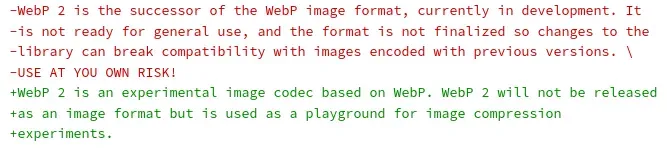
Following yesterday's article about Google Chrome preparing to deprecate the JPEG-XL image format, a Google engineer has now provided their reasons for dropping this next-generation image format.
languid kayak
https://en.wikipedia.org/wiki/WebP#WebP_2 is also canceled, which currently (unles something changes again), leaves just with webp and maybe AVIF, but it's less supported than webp and apparently lacking according to the https://siipo.la/blog/whats-the-best-lossless-image-format-comparing-png-webp-avif-and-jpeg-xl (I can take a deeper look anyway)

siipo.la
In a blog post last year, I took a look at lossy image formats and how they stack up. This time, I thought it might be interesting to do a comparison of lossless image formats.

WebP is an image file format developed by Google intended as a replacement for JPEG, PNG, and GIF file formats. It supports both lossy and lossless compression, as well as animation and alpha transparency.
Google announced the WebP format in September 2010, and released the first stable version of its supporting library in April 2018.
languid kayak
Speaking of which @restive adder (he/him) do the old versions of images affect anything other than taking some space on the server? These shouldn't get cached, right? Technically these can be removed, but it's much hassle. We do have some corrupted images though.
Also, probably question more fitting the
mod_development but anyone have an idea on what format the icons are stored in the game file? I know they are big files that are later cut into pieces, these can be exported as one file with TileZed.
I have an issue with TileZed (version served with the PZ Modding Tools on Steam, I tried compiling my own but for some reason it doesn't work) where some images are not 32x32 px (list here: https://pzwiki.net/wiki/User:Faalagorn#TODO) but I see that some are moved 1 pixel here or there compared to what was uploaded previously (mainly the uploads from Vi back from 2016ish, seems the ones uploaded by Vaileasys are not moved), is it a difference from different TileZed versions?
restive adder
languid kayak
Speaking of which <@136497401379815424> (he/him) do the old versions of images a...
Old images don't matter, don't take up that much space. Don't know about format, probably best to ask in modding
I kinda don't like WebP cos Google is pushing it a little too hard than its benefits warrent IMO. Probably best to not switch to it fully yet, still a lot of older browsers out there
languid kayak
restive adder
I kinda don't like WebP cos Google is pushing it a little too hard than its bene...
Yeah, the new formats sounds promising, but I agree with Google being Google here :/
languid kayak
BTW, handy site:
https://caniuse.com/png-alpha
https://caniuse.com/apng
https://caniuse.com/webp
https://caniuse.com/avif
https://caniuse.com/jpegxl
- According to the data PNG's alpha transparency is 99.89% (Only IE6 doesn't support it, though we don't really use alpha transparncy anywhere in the first place)
- APNG is 96.79% (they work fine on Wiki)
- WebP is 95.27% + 2.14% = 97.41% (though 2.14% is partial support and some oldest browsers with partial support don't support lossless WebP or animations (alpha we don't use anywhere I believe)
- and AVIF is 81.37% + 1.27% = 82.64% (same story here, though I'd have to compare if it's even worth it, as according to the blog it's even worse than PNGs in our use case)
Regular PNGs are safe to assume are close to 100% except maybe some retro browsers that don't even have CSS, GIFs even further; no worries site doesn't track it 😛
I also updated https://pzwiki.net/wiki/User:Faalagorn/.webp_test#Animated a little, seems there's an issue with GIFs being scaled down, I noticed that when replacing animation in https://pzwiki.net/wiki/Items/pl https://pzwiki.net/w/index.php?title=Items%2Fpl&type=revision&diff=89997&oldid=75107 – something I have to take a look at I guess 🤔
languid kayak
I guess all pre-41 info from the wiki, other than some Trivia, can be safely removed if the build 41 are present, especially since 41 is well and stable now.
We have these pages, that list both build 40 (on top) and build 41, so I guess it'd be best to remove the build 40 info altogether?
https://pzwiki.net/wiki/Duffelbag
https://pzwiki.net/wiki/Big_Hiking_Bag
https://pzwiki.net/wiki/Normal_Hiking_Bag
tulip kiln
How do we get the 3D Models for those ingame items though?
Cause aren't there more duffelbag variant types now?
languid kayak
tulip kiln
How do we get the 3D Models for those ingame items though?
Yeah, I'm occupied with editing icons now, but was wondering the same today, I think @digital helm knows and linked some tool here at one point, but I'd have to check
slim hemlock
I assume this info is incorrect?
 digital helm
When I was doing it, models were stored as X files. I would convert it to obj with an online tool then just open it in blender, apply the texture then render. Crop, scale and optimise, then upload.
But since world items were added, I think they're already stored as obj files, or similar that can already be opened in blender
Have a look at the pinned in #modeling I remember seeing backpacks already converted ready for blender, etc.
restive adder
@languid kayak regarding steam depot, we’ve an auto build that compiles versions for testing constantly. Gonna be updated almost every day, probably not worth tracking 😉
languid kayak
Probably, yeah, though 41.78 at 2021 was bothering me :D
 hollow folio
Maybe someone can add a bit of extra detail concerning plumbing on the water page and pipe wrenches having such a functionality on its respective page
 wraith grail
hollow folio
Maybe someone can add a bit of extra detail concerning plumbing on the water pag...
wraith grail
hollow folio
Maybe someone can add a bit of extra detail concerning plumbing on the water pag...
Added a section about plumbing to the pipe wrench, as well as a "See also" section with a link to Tiles/Plumbing :)
same with the water page, added a mention of plumbing to the faucet section as well as the see also section.
 shrewd hedge
https://pzwiki.net/wiki/Modding
the Creating a [] sections are all invalid links
 restive adder
shrewd hedge
https://pzwiki.net/wiki/Modding
the **Creating a []** sections are all invalid l...
restive adder
shrewd hedge
https://pzwiki.net/wiki/Modding
the **Creating a []** sections are all invalid l...
Yup, a dev is working on it slowly, around other tasks, but still a lot to do. Wiki is easy to edit if you wanted to contribute
shrewd hedge
restive adder
Yup, a dev is working on it slowly, around other tasks, but still a lot to do. W...
never done any PZ modding myself, I'd love to but I'm afraid I wouldn't know what I was talking about
 tired sorrel
Hello! I noticed that there is no Hungarian language on the wiki. Can I add the language? 🙂
restive adder
tired sorrel
Hello! I noticed that there is no Hungarian language on the wiki. Can I add the ...
Yup, feel free! 🙂
Shout if you need help with the templates
languid kayak
I think traditional chinese need to be properly added as a separate language too, as it doesn't appear in languages header. I didn't take a deeper look at it yet @restive adder
restive adder
Not 100% sure on how it works, might be just an edit to the template?
tired sorrel
restive adder
Yup, feel free! 🙂
Thanks 🙂
restive adder
Someone just reverted Aiteron’s work on modding page. Thoughts? @languid kayak
languid kayak
restive adder
Someone just reverted Aiteron’s work on modding page. Thoughts? <@27042941615525...
yeah, noticed that yesterday too, though the point about losing some info stays until Aiteron finished their work 🤔 @cold kettle thoughts? I didn't follow the modding area closely, but I guess keeping it as a sandbox until it finishes is viable?
I also noticed it was reverted (though stated clearly), by someone from fresh account, not sure if it's someone from here?
restive adder
Don't think it was someone here, though someone did ask somewhere the other day about it being WIP
languid kayak
Though actually we can keep both actually, as I see the existing (pre Aiteron's work) is mostly a collection of links which could be kept
Or keep both kinda like build 41 items were kept where 41 wasn't stable yet
restive adder
 scenic quiver
how to delete wiki page?
scenic quiver
how to delete wiki page?
Add the deletion template, so we (admins) can do it later for you; https://pzwiki.net/wiki/Template:Deletion Edit: add link, remove incorrect advice
restive adder
languid kayak
Though actually we can keep both actually, as I see the existing (pre Aiteron's ...
Maybe put Aiteron's under the existing on the same page? Aiteron's added a lot of new data to the wiki
languid kayak
restive adder
Add the deletion template, so we (admins) can do it later for you; https://pzwik...
I don't think users can delete pages?
restive adder
languid kayak
I don't think users can delete pages?
I honestly can't remember :/
languid kayak
restive adder
Maybe put Aiteron's under the existing on the same page? Aiteron's added a *lot*...
yeah, that'd be the easiest way to keep both just didn't had time to think of it yesterday 😛
restive adder
languid kayak
I don't think users can delete pages?
You're right, they can't! Will update my reply (edit: just logged in as my monitoring test user to check)
restive adder
languid kayak
yeah, that'd be the easiest way to keep both just didn't had time to think of it...
I'll add a 'please discuss with editors before making large changes' message to new user's talk page
languid kayak
Yeah, noticed you took care of it before me, that's good as Aiteron's work will need to be cleaned up too, I see there's a modding namespace for the mods
restive adder
Finished now, hopefully that looks okay?
Checking deletion queue, only https://pzwiki.net/wiki/File:Smallbarricade.png, but it's used on a bunch of pages yet
languid kayak
restive adder
Checking deletion queue, only https://pzwiki.net/wiki/File:Smallbarricade.png, b...
Yeah, I'll probably get to it eventually, seems to be duplicate of https://pzwiki.net/wiki/File:Barricade.png
languid kayak
restive adder
Finished now, hopefully that looks okay?
Yeah, I'm taking a look too; seems the "Modding:" is not a real namespace? So is the Guide:
restive adder
Aye, I'm honestly not sure how to setup namespaces, I normally just install & update mediawikis, not edit them 😐
Hrm, so it looks like I can setup a custom namespace for modding. Worth looking into further?
Would mean having to move every modding page into the modding namespace
Hrm, might be able to move in bulk. Anyway, here's the documentation if you're curious https://www.mediawiki.org/wiki/Manual:Using_custom_namespaces
In addition to the built-in namespaces, it is possible to add custom namespaces to a MediaWiki installation, to further separate content and allow more logical organization.
Custom namespaces are simple to manage using the $wgExtraNamespaces configuration directive.
It is also possible to define alias names for custom (and also predefined) name...
languid kayak
Yeah, don't rush it 😛 I'd rather clean up the other pages and let Aiteron work at his own pace, then we can always move pages around if we decide so
So far I do some tedious work by hand, but I have to take a look/set up a bot with AutoWikiBrowser or something similar, just didn't have time to do it properly; that's speed up a lot of work, maybe could be used to clearing up the old remnants/languages up to date faster
restive adder
Okay, well, added to the bottom of my todolist, so I'll get to it sometime in the next few years. Can always bump it up later
Saw someone might have been duplicating russian pages today, not sure how to handle that, delete and redirect or leave it or ?
Anyway, evening, heading off to sleep. Have a good night 🙂
languid kayak
restive adder
Saw someone might have been duplicating russian pages today, not sure how to han...
That's what I did? {DISPLAYTITLE:cyrylic} and redirect from the cyrylic one to the /ru page. Seems it's what we follow and Vaileasys started
restive adder
Ahh, hadn't seen you'd fixed it already!
languid kayak
We also have to handle the now two new languages that don't display in the {{language}} bar 😄 one chinese variant and hungrian 😛
restive adder
I.. don't know how to help there sorry!
If you think it worth it I can ask the powers that be if we can get a quote for a specialist to take a look for us?
Also, I'm bad at sleeping apparently
languid kayak
restive adder
I.. don't know how to help there sorry!
no worry, it's somewhere on my TODO to figure it out too 😄
I'm also bad at sleeping, should go too 😄
restive adder
Finished my audit of the extention to make updating extensions less horrible yesterday. Dev patched a infinite loop caught in it today, so will maybe get the wiki upgrade done tomorrow
languid kayak
I just didn't take a look yet, so I think we can wait a few days at least 😛
restive adder
Well, it's an option if you'd like us to look into it
Anyway, I really sleep now. Have a good one!
languid kayak
Good night 😄
 hearty quest
This is probably something that should be automated, but for the moment I created an example of what an entry for a Lua API object might look like. It would be a copy of the javadoc for the most part, but ideally would show the exposed Lua functions and explain any of the more confusing ones: https://pzwiki.net/wiki/Modding:Lua_Objects/IsoPlayer
restive adder
Iirc someone has already imported javadoc into the wiki. Can’t recall where but there’s a category and page for them ?
hearty quest
Would love to see that
wraith grail
So, I was bored scrolling through the decompiled java files for the game, and I noticed First Aid actually has no effect on splint duration or anything of the sort. It purely reduces pain from applying fixes like sutures.
Am I going crazy and missing something or is that real?
Because I've heard from just about everyone that it does heal stuff faster but I dont see the code for that
languid kayak
BTW, I'm kinda too tired to do that properly now, but it seems that Russian wiki editors are active; would be nice to slowly remove the obsolte templates (I saw RecipeLookup being updated now) and follow usage of DISPLAYTITLE uniformly for Russian pages, that would improve things a little 🙂
 arctic root
"Project Zomboid's lore seems to indicate that it takes place in an alternate universe where Romero's concept of the modern zombie never came to be."
https://pzwiki.net/wiki/Zombie
arctic root
arctic root
"Project Zomboid's lore seems to indicate that it takes place in an alternate un...
What does it even mean? Doesn't sounds clear what the author is trying to say.
stable pond
wraith grail
So, I was bored scrolling through the decompiled java files for the game, and I ...
Sometimes you simply miss these things; best revert to the tried and trusted method of testing it in game. I have done exactly this and you will notice SplintFactor is increased with level. With this information you can then see fracture time is based on SplintFactor.


 wraith grail
arctic root
What does it even mean? Doesn't sounds clear what the author is trying to say.
wraith grail
arctic root
What does it even mean? Doesn't sounds clear what the author is trying to say.
It means that the general population has no idea what a zombie is
wraith grail
stable pond
Sometimes you simply miss these things; best revert to the tried and trusted met...
Forgive me but I dont see how health factors in there. Obviously I do see the difference in game now, and thats much appreciated, however I'm just trying to make sense of the codebase a bit more
Does health bump the splint factor down, thus making the splint use less time?
arctic root
wraith grail
It means that the general population has no idea what a zombie is
Or rather "modern zombie" as the author apparently tried to make a possible redundant distinction between the mythological zombies and Romero's zombies.
It just came out very confusing overall.
wraith grail
I can agree thats a bit redundant, yeah. Could edit it to something else
arctic root
Yep, I'm kinda reluctant to make an edit though. Zombies are not my speciality
wraith grail
I feel like you could also make the argument that the "modern" zombie is very different depending on where you look
arctic root
At first I thought it meant to make a distinction between the "traditional" zombie established by Romero and (possible) newer concepts that would be called "modern zombie".
It's just the term "modern zombie" is kinda vague.
scenic quiver
Есть русскоговорящие, которые шарят в Вики? Я хочу заняться переводом статей, но я банально не могу сделать переход на русский язык, научите, кто может.
Вижу, что большинство статей на русском языке выглядят не особо хорошо и пока есть желание, то почему бы и не попробовать 
 rare yoke
Could the vehicle max speed be added to the Template:Infobox vehicle?
restive adder
languid kayak
BTW, I'm kinda too tired to do that properly now, but it seems that Russian wiki...
If you write something out I can ask someone to translate it into Russian for us, for posting on user talk pages?
languid kayak
arctic root
At first I thought it meant to make a distinction between the "traditional" zomb...
yeah, for me "modern zombie" would be something more in lines of Left 4 Dead or 27 days later
languid kayak
restive adder
If you write something out I can ask someone to translate it into Russian for us...
you mean write that in things of the the community? Or even here would work, just not sure where Russian wiki editors gather 😛 OTOH, it's something I can do, ideally not entirely by hand, hence looking for alternatives (AWB or something) for mass edits, though it would be nice if people would already know in the meantime what page standard to follow 🙂 I updated boilerplates though
restive adder
scenic quiver
Есть русскоговорящие, которые шарят в Вики? Я хочу заняться переводом статей, но...
I know there has been some activity on the russian pages recently, but don't think they talk in here. Might be worth asking in #translations , the russian translators might know
google translate; Google Переводчик. Я знаю, что в последнее время на русских страницах наблюдается какая-то активность, но не думаю, что они разговаривают здесь. Может стоит спросить в #translations , может русские переводчики знают
 median knoll
big question idk if anyone can answer. chagning what it says when someone shouts on the server. how do i do that
wraith grail
median knoll
big question idk if anyone can answer. chagning what it says when someone shouts...
you're gonna want #mod_support for that I'd believe
tulip kiln
arctic root
At first I thought it meant to make a distinction between the "traditional" zomb...
I wrote that text, I said it that way because I consider the "modern" zombie to be Romero's. That's how I've heard it a lot throughout my life too. The classic zombie is more the voodoo mind control ones that you'd see in some movies before Romero made his movie.
I don't really think it'd be confusing either if you have at least some idea who Romero is.
And the description at the start of page describes how his zombies were.
So I'd say that gives context.
arctic root
tulip kiln
I don't really think it'd be confusing either if you have at least some idea who...
Well, I didn't have any idea who Romero was.
When I first read the page I searched and the article I find about "Romero's zombies" mentioned them to be somewhat intelligent in some instances disagree in part with what is wrote in the wiki so it contribute to the whole experience being confusing.
tulip kiln
In the later movies, yeah. But in the original, not really too smart.
Plus inspired doesn't mean a complete copy.
arctic root
tulip kiln
In the later movies, yeah. But in the original, not really too smart.
yep, kinda adds more variants so you kinda left to wonder what the "modern zombie" is
tulip kiln
Can't really solve that though. Cause traditional zombies can mean different things to people too.
Some would consider voodoo zombies as traditional.
worthy igloo
tulip kiln
In the later movies, yeah. But in the original, not really too smart.
Speaking of the wiki, I noticed that some important information is missing from this page?
||https://pzwiki.net/wiki/Hoodie||
tulip kiln
worthy igloo
Speaking of the wiki, I noticed that some important information is missing from ...
They patched out the invisibility properties ages ago unfortunately
arctic root
tulip kiln
Some would consider voodoo zombies as traditional.
I think we should try to cleanly convey the idea of that the people of zomboid's universe weren't introduced to the concept of Romero's zombie via media depicting thinking like a zombie apocalypse.
tulip kiln
arctic root
I think we should try to cleanly convey the idea of that the people of zomboid's...
You can edit that part if you want, I can't think of what to change it to. I was just trying to quickly finish that part when I was converting the page from 40 to 41.
arctic root
I will try to think of something.
I'm not a zombie connoiseur, nor am I native so I'm reluctant do it myself
languid kayak
restive adder
I.. don't know how to help there sorry!
I added two new languages (Chinese Simplified/Mainland China) now Hungarian to the template so they should appear fine now, tested on the main page, just might need ?purge=1 for a while. 🙂
I also updated the template doc while at it and got rid of the old table in https://pzwiki.net/wiki/PZwiki:Language_policy#All_suppоrted_languages and instead transcluded the one from the doc I updated as well, less mainteneance burden.
The only "issue" is with the Chinese naming, as the old "chinese" would typically be bumped to "zh-tw" or something in lines of it, but let's not worry about it too much, as it's extra renames for something that's not even technically correct: https://stackoverflow.com/questions/4892372/language-codes-for-simplified-chinese-and-traditional-chinese
Stack Overflow
We are creating multi-language subsites on our website.
I would like to use the 2-letter language codes. Spanish and French are easy. They will get URLs like:
 fiery plaza
Is there any easy way to copy and paste code from the game files to the wiki text editor and make it all look even? For example, when I copy it I get a whole bunch of misaligned spaces and tabs, making the code preview look all disorganized.
Code on the right is clean and pretty. Preview on the left isnt. I figured out its because theres tabs and spaces messing it up, but its a pain to manually align it all by removing tabs and adding spaces to make it match

Nevermind. Used notepad++ to install the code alignment plug in, found and replaced tabs with a single space, and then it looks nice!
languid kayak
fiery plaza
Nevermind. Used notepad++ to install the code alignment plug in, found and repla...
that would work too; I wonder if it's something that should be done to every item 🤔? How many spaces per tab is it?
fiery plaza
languid kayak
that would work too; I wonder if it's something that should be done to every ite...
It would be nice to have some sort of standardization. I ended up copying code from another page and using its formatting. I just found the longest string of text, added a few spaces, then aligned everything else based off that. So the amount varies depending on the length of the original string.
languid kayak
Hm, what's that from? https://pzwiki.net/wiki/File:Rain.png I don't think I ever saw that icon, but it seems to be from old builds of the game?
hollow folio
is this information still true? because it doesnt seem to work. that, or i misunderstood this mechanic
 languid kayak
I added two new languages (Chinese Simplified/Mainland China) now Hungarian to t...
languid kayak
languid kayak
I added two new languages (Chinese Simplified/Mainland China) now Hungarian to t...
Turned out Ukrainian was missing too and had some pages (main page and some template), so now it's added 👍
languid kayak
languid kayak
Yeah, seems to work fine across the browsers, should even work in some ancient o...
Well, I tracked down all the 120/128px icons. Sadly not much improvement image-size (Total file size for all 5,866 files: 848,357,055 bytes (809.06 MB), since I guess more files were uploaded), but the wiki should be a tad cleaner now 👌 (and require less effort of maintained two versions now). Size will get lower as I get to remove extras and compress existing images, too.
languid kayak
Okay, guess my work is done for tonight; have a community news everyone 🙂 https://pzwiki.net/wiki/PZwiki:Community_News#February_2023
languid kayak
I know i had this discussion with Vaileasys not so long ago, I wonder if we should put anything new as an announcement, too, or let it stay at:
December 20, 2021
Build 41 Released to stable!
and update it when build 42 hits (IWBUMS?)
We did had a lot of minor versions in between, though these are, yeah, minor 😛 And version template already tracks i quite good 🤔
languid kayak
I'll be in process of updating gifs to apng (since they are smaller and support more colors), but it seems that currently any (animated) gif that is scaled down, shows this error Error creating thumbnail: convert convert: Unrecognized option (-layers). – seems like some error with imagemagick @restive adder?
languid kayak
Important question, since I'm in the process of doing some animations; which is better 1 second rotation or 2 second rotation?
1 second example: https://pzwiki.net/w/images/c/ce/Bagel_Anim.png
2 second example: https://pzwiki.net/w/images/8/84/Bagel_Anim.gif


apng doesn't seem to work in Discord though 😩. Anyway, let me know if you prefer 2 second over 1 second; I started doing 1 second animations after I saw one being 1 second, but I'm puzzled after I saw the others being 2 second per frame 🤔
fiery plaza
languid kayak
Important question, since I'm in the process of doing some animations; which is ...
I'd personally prefer the 1 second. 🙂
restive adder
languid kayak
I'll be in process of updating gifs to apng (since they are smaller and support ...
We have graphicsmagick installed, so might be missing feature. Can try to take look later, remind me if don’t reply re this , migraine day so fuzzy fuzz fuzz atm
languid kayak
No worriew, thanks! I may not be much of clear mind myslelf lot of eork irl and lack of sleep, maybe I'll spend some tine actually playing instead od editing PZ :P
 uncut minnow
https://pzwiki.net/wiki/Traits
Im pretty sure this is meant to be patient.
 restive adder
uncut minnow
https://pzwiki.net/wiki/Traits
Im pretty sure this is meant to be patient.
restive adder
uncut minnow
https://pzwiki.net/wiki/Traits
Im pretty sure this is meant to be patient.
 brazen perch
hey, I believe this portion of the wiki needs editing, because I found a zombie with a machete dticking out of him pre 20 days. It was the Jason zombie with a hockey mask.

idk if it was a bug or the wiki is wrong, but I wanted to confirm here before I did anything as I'm new
scenic quiver
Hello, how change this to other language? Help pls
 brazen perch
languid kayak
Jeson is separate, so yeah
brazen perch
languid kayak
Jeson is separate, so yeah
thanks for clarifying, 'preciate it.
oops sorry for the ping reply my b
 amber basalt
Researching cooking with poisonous food/bleach/rotten food at the moment as some of the wiki is light on this subject or inaccurate - but I am unable to add bleach to any food. Does anyone know if this has been changed?
Build 41, no mods.
Edit: Oop I think I found the answer, poisoning might have to be enabled to do so.
languid kayak
brazen perch
oops sorry for the ping reply my b
I don't mind 😄
I like pings 😛 @languid kayak
languid kayak
scenic quiver
Hello, how change this to other language? Help pls
I'll take a look, but probably not sooner than tomorrow, as I'm tired sadly
can you link the template you edit until then @scenic quiver ?
Will be easier for me 😄
scenic quiver
Or https://pzwiki.net/wiki/Template:Crafting_header/ru, I don’t know, sorry 🤷🏻♂️
restive adder
languid kayak
I'll be in process of updating gifs to apng (since they are smaller and support ...
Try again now? Replaced graphicsmagick with imagemagick
 wise musk
did they add morbious to the game yet?
 ionic ferry
Hey, I found a clause in the wiki that needs to be updated. The second bullet point about having needed to place the water fixture is wrong. I just plumbed the sink in the rosewood fire station without ever having needed to replace it.
 languid kayak
restive adder
Try again now? Replaced graphicsmagick with imagemagick
languid kayak
restive adder
Try again now? Replaced graphicsmagick with imagemagick
Seems the same,but I'll see again later, might be something else?
languid kayak
@scenic quiver The "one of" is part of this template: https://pzwiki.net/wiki/Template:Crafting/core
scenic quiver
languid kayak
<@509590683909095437> The "one of" is part of this template: https://pzwiki.net/...
can you make screenshot?
im find
languid kayak
ah okay, you found it but just in case 😛
 scenic quiver
thx
languid kayak
@restive adder about the Error creating thumbnail: /bin/bash: line 1: /usr/bin/convert: No such file or directory Error code: 127 Error creating thumbnail: /bin/bash: line 1: /usr/bin/convert: No such file or directory error – can you take a look at the $wgImageMagickConvertCommand? See this post and replies: https://www.mediawiki.org/w/index.php?title=Topic:W1oplq7ipxntpd37&topic_showPostId=w1p02oaew17pj16d#flow-post-w1p02oaew17pj16d – best to see if the command is not speicified twice (I think it's the LocalSettings.php based on https://www.mediawiki.org/wiki/Manual:Wg_variable but it's been ages since I set up a MediaWiki on the server so you should probably know better :D) and that convert binary is indeed in that location and if it has the appropriate permissions maybe?
I think GraphicsMagick should have convert installed too http://www.graphicsmagick.org/convert.html but I'm too baffled about the difference, as these two projects forked and are developed independly. I did take a look before, but I figured i have imagemagick installed here locally too 😄
wg refers to an important non-constant programming element used in the MediaWiki software, and is an abbreviation for "Wikipedia Global" (the naming pre-dates the spread of MediaWiki beyond Wikipedia).
In general, any global variable (variable that has global scope) within the software has this prefix to make it easily identifiable when programm...
 frail fossil
I found something that's almost not worth editing, but it was just something that caught my eye -- apparently the game's Moon cycles are backwards? Not sure if this was ever changed in the past but if someone's bored enough to edit it onto a Trivia note or something in the Weather page, feel free. 🙂
https://pzwiki.net/wiki/Weather
restive adder
languid kayak
<@136497401379815424> about the ` Error creating thumbnail: /bin/bash: line 1: /...
Will take a look on Monday, remind me if I don’t get to it
languid kayak
Hm, seems that restoring pages is somewhat fuzzy? As I tried to restore a page and got a different things resotred that I got to show? Hopefully it's all solved now, but I had to mess a little with some Polish sites and the history might be a tad messed
scenic quiver
cobalt nimbus
What page needs editing?
languid kayak
cobalt nimbus
What page needs editing?
You mean in general? There's a lot of pages that needs editing, but mostly things that aren't updated to Build 41 I guess, see https://pzwiki.net/wiki/PZwiki:Project_Build_41_Update but you can also see https://pzwiki.net/wiki/PZwiki:Community_projects for general overview or generally just browse the wiki to see where you can help :). In general language versions of wiki needs a lot of work too, especially German, French, Norwegian, Polish and Japanese; some needs updating to latest conent too.
I'm mostly spending my time at improving under-the-hood things, especially if they require admin rights, mostly trying to finish what Vaileasys started, as he did an awful good job at bringing some things up to suitable level, but there's a lot of crust from even back as 2012 or so 😄
Also see https://pzwiki.net/wiki/Category:Version to update things that are the oldest. There are https://pzwiki.net/wiki/Category:Boilerplates to start some pages (I need to add more and slightly update the existing, but these are good to start). Generally take a look at the https://pzwiki.net/wiki/Category:Version_41 to see up to par pages too
 granite lion
hollow folio
is this information still true? because it doesnt seem to work. that, or i misun...
granite lion
hollow folio
is this information still true? because it doesnt seem to work. that, or i misun...
did someone get back to you about this? What do you mean by "doesn't seem to work"?
granite lion
ionic ferry
Hey, I found a clause in the wiki that needs to be updated. The second bullet po...
if someone hasn't already changed it on your behalf, please feel free to go ahead and change it. I can vouch for you that plumbing works for at least 1 other location where the sink wasn't moved beforehand.
hollow folio
granite lion
did someone get back to you about this? What do you mean by "doesn't seem to wor...
I thought you could connect multiple rain barrels to one sink in a 3x3 location. Apparently, only one sink can be connected to only one rain barrel, but it can do so in a 3x3 location (though ive not tested this myself)
languid kayak
I have a safehouse with multiple barrels and while the water it used, it showes 400/400 (or whatever the barrel was) for a brief time then goes down, so I guessed it picks it from two barrels, but I'd have to test it. I'll try to do that today evening or somewhere during the week @hollow folio @granite lion (feel free to remind me later if I'll forget, I'm home at 6 or so PM CET, but might be busy/tired today)
Also reminding @restive adder to check the imagemagick I send and reminding myself@languid kayak to set up a bot similar to https://pzwiki.net/wiki/User:VaileasysBot for mundane work, as it takes way too much time for simple tasks :P. Maybe eventually it could be used to parse automatically info such as codes, recipes, chances to find, forage zones from the text files, but I'm not sure, I'll be skilled enough to write it 🤔
hollow folio
languid kayak
I have a safehouse with multiple barrels and while the water it used, it showes ...
In my experience, it just picks one barrel and only one barrel. I tried this with the rain barrel above it. Im not sure if itll try to find a rain barrel in a 3x3 area above the sink when plumbing it for the first time though, or if removing an already connected rain barrel will make the sink autoconnect to a nearby one. Do tell your results though
languid kayak
I always got the impresdion it's just bugged, but maybe it's a mechsnic I fidn't inderstood. Mighy be different on mp and sp too, I'll see!
restive adder
languid kayak
Also reminding <@136497401379815424> to check the imagemagick I send and remindi...
check again now?
languid kayak
restive adder
check again now?
works, thanks 🥳
languid kayak
hollow folio
In my experience, it just picks one barrel and only one barrel. I tried this wit...
Well, while the sink below showed 100, after filling multiple buckets with water, both barrels are 0/400


That's single player debug
hollow folio
so one sink was able to use two barrels?
languid kayak
seems so? Even if the display said otherwise
 signal bough
is it allowed to make new pages? I get message:
Your registration/post has been detected as spam. If it is legitimate, please contact the site administrator by emailing kirrus@theindiestone.com detailing what was happening when you saw this message, your email address/username, and what you were doing at the time.
languid kayak
signal bough
is it allowed to make new pages? I get message:
> Your registration/post has bee...
it is, but maybe a spam filter caught some keywords
Do we get access to that @restive adder?
restive adder
Nope, that's a me thing!
restive adder
signal bough
is it allowed to make new pages? I get message:
> Your registration/post has bee...
Please follow the instructions in the message and i can help you 🙂
Specifically that's cleantalk picking up as spammer
languid kayak
You can also attach the page here in the meantime guess, either as a file or surrounded by three `
restive adder
signal bough
is it allowed to make new pages? I get message:
> Your registration/post has bee...
Thanks for the email! Try again now. If it doesn't work, try clearing browsercache, and trying again
thanks for contributing to the wiki 🙂
 graceful scaffold
Hi guys, I would like to contribute to the wiki by translating the pages into Spanish, but I have no idea of the wiki programming language. Can someone send me a tutorial or similar? Thank you
stable pond
graceful scaffold
Hi guys, I would like to contribute to the wiki by translating the pages into Sp...
https://pzwiki.net/wiki/Help:Contents
specifically "Editing for beginners" may help
graceful scaffold
stable pond
https://pzwiki.net/wiki/Help:Contents
specifically "Editing for beginners" may h...
ty dude, sorry if this is a frequent question, but I was lost with so much information about the wiki
stable pond
no worries, the wiki can be both simple and also quite complex depending on what you're doing, the guide is specifically there to help anyone get started and contribute, the more hands on the wiki the better :)
this channel is always here if you wanna ask literally any question about the wiki
just fire away bud
graceful scaffold
Hello Guys! Im creating a New article for a Challenge in Spanish (You have One day) i can see you can select the languaje on a box at the top of the article, how i add my translated page over there? Ty in advance!
Photo of the box im talking about

 fluid burrow
graceful scaffold
Hello Guys! Im creating a New article for a Challenge in Spanish (You have One ...
fluid burrow
graceful scaffold
Hello Guys! Im creating a New article for a Challenge in Spanish (You have One ...
I'm pretty sure this will help 😌 // https://pzwiki.net/wiki/PZwiki:Language_policy#Languages
 graceful scaffold
fluid burrow
I'm pretty sure this will help 😌 // https://pzwiki.net/wiki/PZwiki:Language_po...
graceful scaffold
fluid burrow
I'm pretty sure this will help 😌 // https://pzwiki.net/wiki/PZwiki:Language_po...
Ty!
 graceful scaffold
It has taken us a while because we are stupid in programming, but we already figured out, ty again for the link!
@south hatch also figured out how to also show the current language on the box
fluid burrow
aw I'm glad you guys could get it done! good luck with your translating 😌
 south hatch
Teamwork is dreamwork
granite lion
languid kayak
Well, while the sink below showed 100, after filling multiple buckets with water...
does this information help you? https://www.reddit.com/r/projectzomboid/comments/vxiukf/comment/ih7dncj/ @languid kayak & @hollow folio ?
reddit
73 votes and 133 comments so far on Reddit
hollow folio
I might try that out once i make my own base. I distinctively remember that the sink refused to tap into the other nearby barrels though. Ill try it again though
languid kayak
graceful scaffold
Hi guys, I would like to contribute to the wiki by translating the pages into Sp...
Hi, I think I saw your edit, basically to translate a page, copy its content to pagenmame/es and start translating
There are quirks, but they can be ironed out, I should probably figure them out someday™ but take a look at https://pzwiki.net/wiki/PZwiki:Language_policy and https://pzwiki.net/wiki/PZwiki:Style_guide#Translations
Just keep in mind you don't edit themain pages at all 😛
languid kayak
granite lion
does this information help you? https://www.reddit.com/r/projectzomboid/comments...
That makes sense and correlated with what I experienced in-game, seems still that placind barrel directly above still don't work though?
Also, I wonder if there are any special quirks when one barrel is connected to two sinks?
graceful scaffold
languid kayak
Hi, I think I saw your edit, basically to translate a page, copy its content to ...
I have already translated a few pages, but that style guide its gonna be really useful, ty for that
 shut bough
At the cooking shows chicken noodle soup episode it says “broiled” instead of boiled lol
obtuse field
broiled is a real word that means grilled
stable pond
shut bough
At the cooking shows chicken noodle soup episode it says “broiled” instead of bo...
ye, it says broil the chicken, which is absolutely fine, think you misread what it says
regarding sinks, barrels CAN be placed directly above the sink now, this WAS a bug that has been patched in the last year
stable pond
granite lion
does this information help you? https://www.reddit.com/r/projectzomboid/comments...
yea pretty much exactly that, except the middle barrel is now working
 shut bough
obtuse field
broiled is a real word that means grilled
shut bough
obtuse field
broiled is a real word that means grilled
Oh. I hadnt known
granite lion
stable pond
yea pretty much exactly that, except the middle barrel is now working
oh thanks for that! You are really living up to your name as sink lord!
stable pond
granite lion
oh thanks for that! You are really living up to your name as sink lord!
we talk about it a lot in #pz_b42_chat when people have trouble plumbing, it is a bit confusing at first but makes sense overall 👍
good images you found there btw
languid kayak
stable pond
yea pretty much exactly that, except the middle barrel is now working
interesting; so if the middle one is working, it'd be the first used, hence "0" on that image?
stable pond
languid kayak
interesting; so if the middle one is working, it'd be the first used, hence "0" ...
I haven't tested that specifically but one would assume so, depends how they 'patched' it I suppose
I'll probably have a play with it when I get 5 minutes if nobody else does before me
get the actual sequence written out and maybe an updated image
been thinking about making some informative images to share in #pz_b42_chat when people need help with things like plumbing, as I've done gifs for car fuelling and such
languid kayak
would be handy to have it on wiki even, you'll probably be the first one to do that though 😄
restive adder
Wiki going read only for a bit for update. Wish me luck, and fewer hours swearing at mediawiki for being obtuse today 🙂
restive adder
Wiki upgrade complete. Please let me know if you spot anything awry
languid kayak
Hm, I didn't get to updating https://pzwiki.net/wiki/Template:Translation properly, but I think the recent Spanish translation kinda break the purpose and the names should be added to the database instead to be fetched instantly? e.g. https://pzwiki.net/w/index.php?title=Items/Food/es&curid=16837&diff=94579&oldid=94485
I wonder if that could be pulled from the database of current translation, I think vaileasys did that before but only for a few languages 🤔
So here directly: https://pzwiki.net/w/index.php?title=Template:Translation/es&action=edit I guess most people don't know it exist and how it works 😛 Seems it's mostly contributions by https://pzwiki.net/wiki/Special:Contributions/Jbzuynew but I don't think they are here in Discord? Might take a look later 👀
 clever relic
languid kayak
So here directly: https://pzwiki.net/w/index.php?title=Template:Translation/es&a...
clever relic
languid kayak
So here directly: https://pzwiki.net/w/index.php?title=Template:Translation/es&a...
yes, i am @clever relic, i merely changed some stuff anyways.
but thanks for noticing
languid kayak
clever relic
yes, i am <@782738475488903169>, i merely changed some stuff anyways.
oh, nice, thanks for responding 😄 I didn't find you through @ for some reason, glad you're watching it here too, saves me leaving a message on the pzwiki :).
Like I said, I didn't move toward getting Translation templates to work, it's on my TODO, but I believe you could basically add the items to https://pzwiki.net/w/index.php?title=Template:Translation/es&action=edit to automatically be applied to all the pages that call the English name (may require purging the site with ?purge=1)
clever relic
languid kayak
oh, nice, thanks for responding 😄 I didn't find you through @ for some reason, ...
Dont know tbh i merely know how to translate, 😅, ill leave that to @graceful scaffold he seems to be more dedicated and he is trying to add the missing Guns, vehicles, etc.. pages that are missing in the pzwiki.net/es
languid kayak
clever relic
Dont know tbh i merely know how to translate, 😅, ill leave that to <@2875476338...
haha, that's enough already 😄 The template is convoluted, I alone had time to grasp it but the intention (I think) is to automatically apply it to all the pages, which is handy if the name changes (and you don't have to update it each time)
There are languages that don't use anything with this template too
clever relic
languid kayak
There are languages that don't use anything with this template too
well it is what it is
 sinful badger
hey guys I'm looking at modifying the Moodles page and was looking for some feedback. Currently for Panic and Stress it says the damage reduction is:
        moodle level
---1------2------3------4---
   0     0.1    0.2    0.3
but I think it should be:
        moodle level
---1------2------3------4---
   0     0.2    0.3    0.4
(similar change also for ranged, at panic level 3 it starts at -0.6 rather than -0.4)
Below is the code for where damage is calculated in SwipeStatePlayer. It shows that the damage reduction is 0.1 * MoodleLevel, but is only applied after level 1. So it wouldn't be applied at level 1, but when it's applied at level 2, it would be 0.2 rather than 0.1. It seems straightforward enough to me, but I'm not sure if there's some part of the calculation that I'm missing that led to the current values on the wiki.
 stable pond
sinful badger
hey guys I'm looking at modifying the Moodles page and was looking for some feed...
stable pond
sinful badger
hey guys I'm looking at modifying the Moodles page and was looking for some feed...
honestly this piece of code has baffled me for a while; it is what the wiki says regarding the moodle level, take a look at these images


the panic goes 0=none, 1= level 1, 2= level 2... etc
stable pond
stable pond
so it says if the panic moodle is greater than level 1, take the moodle level and multiply by 0.1 and remove it from the damage
lets say my moodle level was 2

from this I think that
        moodle level
---1------2------3------4---
   0     0.2    0.3    0.3
is correct for panic (non gun)
but I'm still a bit confused on the damage calculation considering it's using the moodle level and subtracting not multiplying
worthy igloo
Decompiled code can have weird artifacts that the original code doesn't have FYI.
I wouldn't consider it a reputable source in the least.
stable pond
this is true also, but generally its quite accuracte, haven't seen an artifact yet but this could be it
also we were just discussing the plumbing sections on the wiki, it seems there's several places this information has been placed (rain barrel page, a plumbing page, pipe wrench page, etc), I'm going to turn them into links to https://pzwiki.net/wiki/Tiles/Plumbing rather than have lots of outdated information spread across these pages
languid kayak
worthy igloo
Decompiled code can have weird artifacts that the original code doesn't have FYI...
zomboid open source when 👀?
worthy igloo
Well, the thing is I love the wizard of oz, and I know how much pulling back the curtain ruins things?
I don't believe that there should be a conveyor belt for every unicorn to the glue factory. I used to be into stage magic, and don't like the secrets being revealed, personally.
Albeit that is inconvenient for wikis and accountants.
languid kayak
Well, you kinda see all the inner workings now, unlike us mere mortals 😛
worthy igloo
Yeah, and I'm significantly more horrified by decompiler artifacts as a result 😄
I'm also from a weirdo extremist hardcore tabletop rpg background where blackbox design is seen as a feature and not a bug 😄
70s hilarious montage of character death dungeons and dragons.
TBH I'm far more of a tabletop pen and paper rpg design guy than I am a coder IMO 🤪
languid kayak
worthy igloo
I'm also from a weirdo extremist hardcore tabletop rpg background where blackbox...
Well, as long as it's not security through obscurity guess it's fine 😛
stable pond
stable pond
I've been testing this in debug with the provided damage numbers and a modified 1-1 saucepan with no crit, hitting a freshly spawned bathrobe zombie, resetting it after each hit to prevent the subsequent hit damage bonus. I gathered 10 hits for Panic level 0 and Panic level 4. There was a variance of 0.1 damage give/take (I assume because the range dwindled by ~0.2).
4 panic = ~1.1 damage
0 panic = ~1.5 damage
This seems to correlate with my findings above that the moodle level is used for the damage calculation, rather than a simple XX% reduction. The difference between those numbers is 0.4, which is the Panic moodle level 4 I was at, multiplied by 0.1 and deducted from the damage. If it was actually percentage based, I would be losing far more damage.
To this end I believe panic reducing by % is incorrect, it actually reduces by a flat amount based on the moodle level.
And as I've written this I just discovered somebody has changed the moodles page last month to reflect this.
sinful badger
stable pond
I've been testing this in debug with the provided damage numbers and a modified ...
you did more damage with Panic 4? I'm still very confused lol. If they're backwards then the difference being 0.4 would point towards what I said. I guess we have to just test everything in game, unfortunate. I think a non-swinging weapon is probably better for testing because of the way weapon range affects swinging attack damage
its definitely a flat reduction just the values I think are slightly off. I think this causes people to overvalue certain traits that affect these moodles when they have a greater impact than people think.
stable pond
sinful badger
you did more damage with Panic 4? I'm still very confused lol. If they're backwa...
sorry yeah you're right wrote them backwards
sinful badger
then that test, albeit maybe a bit of a small sample size, would seem to imply that it is 0.2/0.3/0.4, no?
stable pond
yeah as I said in that wall of text I think lol
sinful badger
 cant tell if im being gaslighted by devs
I totally believe there are decompiler artifacts, just havent really experienced them personally
so you agree with the change of whats on the wiki then? Does anyone disagree? Devs?
the wiki i assume is based on the code, but it could be testing too i suppose
the "decompiled" code
languid kayak
sinful badger
the wiki i assume is based on the code, but it could be testing too i suppose
Well, depends on what you mean by "based" – the wiki is based on edits from plethora of uses from different versions, so it depends™ 😛 There were some scripts used to automate the process, but they might be prone to errors (both human and software) or use old data so YMMV. Either way, you mean the https://pzwiki.net/wiki/Moodles#Panic or some other page?
 shell quail
The cairn item has no info on its page.
languid kayak
shell quail
The cairn item has no info on its page.
Well, the page doesn't exist, it has to be created by clicking the red link https://pzwiki.net/w/index.php?title=Cairn&action=edit&redlink=1
For the tiles/furniture there's no boilerplate yet though, so you'd have to use another page as reference sadly, these pages need some love, but feel free to create anything if you want, as long as some info is useful, it will get improved on eventually 🙂
 flat raven
This doesn't... seem to make too much sense
https://pzwiki.net/wiki/Cheese_Sandwich
 stable pond
why not?
flat raven
stable pond
why not?
I personally wouldn't find much enjoyment eating a rotten grilled cheese
as apposed to a not rotten grilled cheese
stable pond
ah right, but no wiki problem
flat raven
stable pond
ah right, but no wiki problem
I am almost certain that the numbers are presented wrongly
stable pond
flat raven
I am almost certain that the numbers are presented wrongly
we need the actual data which I assume is why it's like that in the first place, if you can find conflicting evidence it can be replaced
flat raven
stable pond
we need the actual data which I assume is why it's like that in the first place,...
I'm not sure how I would be able to find it's changes after rotting, but at least I can prove that it's cooked variant has a positive change for unhappiness

god I have a test tmr, why am I putting so much effort into CHEESE SANDWICHES?
flat raven
it's 1:30 am and I'm suppose to be studying
instead I spent 15 minutes looking up how to locate the items text document
worthy igloo
Sorry to be that guy, but due to fussy cooking simulation stuff, the values in game do not always match the values in the scripts. (it's complicated, and even if I remembered all the reasons and technicalitiesm explaining them would be difficult and I need to use my time elsewhere as I have a ton of b42 stuff to do that's consuming my attention)
I would suggest always double checking ingame with debug mode.
 tall spoke
Hello there everyone, I am new here but I have been enjoying your game for many years. I saw on your website forum that you are looking for some help with updating the wiki. I would love to assist, but I do not know where to start! If anyone can provide some guidance, it would be much appreciated, and I will do my best to contribute to this game that has contributed so much to me!
languid kayak
tall spoke
Hello there everyone, I am new here but I have been enjoying your game for many ...
If you know wiki editing, go straight to https://pzwiki.net/wiki/PZwiki:Community_projects and choose a project to help (build 41 is close to being finished, but there's other that could use some help), we can set up new projects, too. For minor tasks there are some handy links in https://pzwiki.net/wiki/PZwiki:Community_portal as well. Or obviously, you can just browse wiki and help updating pages to the newest version and/or fix typos or issues as you spot them 🙂
The language versions of pages need lots of love too, they are outdated and use old templates.
If you need help with mediawiki editing in general, https://pzwiki.net/wiki/Help:Contents is the way to go 🙂
tall spoke
languid kayak
If you know wiki editing, go straight to https://pzwiki.net/wiki/PZwiki:Communit...
Thank you!
 keen acorn
Hi @languid kayak. I see you updated some of my recent changes to add the ".16" version number to the build number. I'll make sure I do this going forward.
 feral flame
sorry wrong chan...
languid kayak
keen acorn
Hi <@270429416155250690>. I see you updated some of my recent changes to add the...
Cool 😄 Didn't want to bother you, but I guess it's better to state the minor revision now that we have it, especially as it's also stated at the https://projectzomboid.com/ and the "minor" revision used to bring some changes to the files as well
Project Zomboid is the ultimate in zombie survival. Alone or in MP: you loot, build, craft, fight, farm and fish in a struggle to survive. How will you die?
restive adder
minor is mostly bugfixes and tiny patches afaik, so probably not worth worrying about it too much
 sage badge
Hi all! I was looking to get into contributing to the wiki, and was going to start with something small like the hand-held containers that don't have pages yet. I want to make sure I am formatting the pages correctly and what-not, so I'd really appreciate some help with that! I also noticed that there were two bags, the "Bowling ball bag" and "Doctor bag" that weren't on the wiki anywhere and was going to add them as well.
keen acorn
sage badge
Hi all! I was looking to get into contributing to the wiki, and was going to sta...
Hi @sage badge. Welcome aboard. Let us know if you have any questions, we're happy to help.
If you're new to wiki editing, I find it easier to start with editing an existing page first before creating a new one. Just to get the hang of what the different things do.
sage badge
Yeah, I looked at one of the other container pages to see what was being done to make it look that way, and it was a little intimidating, though I'm willing to learn it.
keen acorn
restive adder
minor is *mostly* bugfixes and tiny patches afaik, so probably not worth worryin...
Interestingly, most of the things I had edited were changed in the latest minor revision.
I think the point was though that including the minor revision is a new addition and that we should be doing that going forward.
keen acorn
sage badge
Yeah, I looked at one of the other container pages to see what was being done to...
The good thing is once you figure it out all of the pages in the same category follow the same format so you'll be an expert in that in no time.
sage badge
I'm also curious about the doctor bag and bowling ball bag, has anyone seen those before? I only found out they existed when looking in the debug item menu. My friend said he found one while foraging, but I've never seen one myself. I thought they might've been a more recent addition since I didn't see them anywhere on the wiki.
keen acorn
You can browse the game files to find information on how these are distributed.
There's a reference to a doctor bag in VehicleDistributions.lua saying it can be found in VehicleDistributions.DoctorGloveBox.
Similarly the bowling bag is in the foraging definitions lua file, so that looks like it can only be found while foraging.
sage badge
ah, thanks
keen acorn
Hi @sage badge. I see you have made your first changes. Nice job!
sage badge
Thanks, I'm working on making a page for the Jockey helmet right now
keen acorn
Awesome
languid kayak
sage badge
Hi all! I was looking to get into contributing to the wiki, and was going to sta...
You can either use the existing page (which is the best way), or use boilerplate https://pzwiki.net/wiki/Category:Boilerplates but there's none for container (yet).
sage badge
I saw a page using "see Item IDs" in place of the item IDs on the infobox panel and had a dedicated section for the IDs, and another that shows all variations in the infobox under technical details. Is there a preferred method between the two?
keen acorn
sage badge
I saw a page using "see Item IDs" in place of the item IDs on the infobox panel ...
Good question. I'm not aware of a preference for either. Doesn't look like there's anything in the style guide either.
@sage badge reading the lunchbox article got me wondering why the pink lunchbox is so rare. Comparing the code for the two lunchboxes, it looks like the pink one doesn't make a sound. I'm not able to test this, but if it's true, it would make a good addition to the article.
item Lunchbox { DisplayCategory = Container, WeightReduction = 5, Weight = 1, Type = Container, Capacity = 4, DisplayName = Lunchbox, Icon = Lunchbox01, OpenSound = OpenBag, CloseSound = CloseBag, PutInSound = PutItemInBag, MetalValue = 15, ReplaceInSecondHand = Bag_Lunchbox_LHand holdingbagleft, ReplaceInPrimaryHand = Bag_Lunchbox_RHand holdingbagright, WorldStaticModel = LunchBox_Ground, } item Lunchbox2 { DisplayCategory = Container, WeightReduction = 5, Weight = 1, Type = Container, Capacity = 4, DisplayName = Lunchbox, Icon = Lunchbox02, MetalValue = 15, ReplaceInSecondHand = Bag_Lunchbox2_LHand holdingbagleft, ReplaceInPrimaryHand = Bag_Lunchbox2_RHand holdingbagright, WorldStaticModel = LunchBox2_Ground, }
sage badge
I'll load into a game and test it, if true, that would make for a good addition for a trivia section 👍
Sure enough, it doesn't seem to make any sounds when accessed unlike other bags
 slow hinge
Hi, I need some help with map_xxxx_xxx.bin files, I want to wipe my mutiplayer hosted game, I have access only to the save.zip file, created by the server once I stop it. My players build their houses only in 1 chunk, but they already explore all the map, so, in order to add a MOD map I need to erase the map.bin files, I only want to KEEP the buildings they do, mabbe their inventory and cars too...
If they are in chunck 40,9 and the coordinates are 12000,2100,0 to 12300,2999,0 ... Can I assume than the files are map_1200_210.bin to map_1200_299.bin and again to map_1201_210.bin to map_1201_299 until map_1230_299.bin? Forgive my bad english, im from Mexico
restive adder
slow hinge
Hi, I need some help with map_xxxx_xxx.bin files, I want to wipe my mutiplayer h...
Hey, best to create a thread in #1019767076094758924
 regal flax
re: Flashlights and Hand Torches - the data is wrong and I wanna fix it. I found 2 places - the Flashlighit page and the Light Sources page. HOWEVER before I did that - it seems like this wiki would work better if these things were built from data, that way it only needs to change in a single place and would get reflected elsewhere.
How big of a task is that?
languid kayak
keen acorn
Good question. I'm not aware of a preference for either. Doesn't look like there...
yeah, noticed that too, I guess there's no preferred way yet indeed, though It'd be best to choose one eventually 🤔
languid kayak
regal flax
re: Flashlights and Hand Torches - the data is wrong and I wanna fix it. I foun...
some things are already like that, but sadly not for items, recipes for example
and translations
sage badge
Maybe for items that have many variations, such as the Jockey helmet should have a dedicated section, but ones with only one or two, such as the lunchbox shouldn't?
For ease of seeing which one corresponds with which variation
 versed epoch
Good day everyone! Can somebody help me with translations, I found that Template:Translation does not include Template:Translation/uk, and translations in other templates doesn't work for Ukrainian language. But Template:Translation has been protected.
versed epoch
no, it is uk. Domain is ua, but language code is uk. It is confusing, but we have what we have.
stable pond
looks like /uk works but it simply isn't listed in the table, perhaps just needs adding to that table so people are aware? front page for example already has it being used
 versed epoch
Yes, it is working in general, but {{Translation|some text}} And {{T|some page}} templates aren't working without uk being listed in Template:Translation.
languid kayak
versed epoch
Yes, it is working in general, but {{Translation|some text}} And {{T|some page}}...
Should be added now, let me know if it works! I wanted to point out that the names have to be added for {{T}} and {{Translation}} to work, but I saw you did edits. Let me know if they work or don't; might require ?purge=1 for it
versed epoch
It works, thanks a lot!
 unreal junco
Hey guys, im currently doing a mall run in each mall, have been playing them on and off for the last few months, Ive noticed the wiki entries for the malls are pretty empty and filled with red text, I was hoping I could help fill out some of the stores and stuff
 drifting seal
I might take a run through the script properties at a point in time and mark case-sensitive properties so people know which one are / aren't.
I believe this is already resolved for B42? Not sure.
Anyways this directly impacts my ongoing work involving scripts and I might do some work on those pages.
 drifting seal
I feel like this entry is way too vague: https://pzwiki.net/wiki/Scripts_guide/Item_Script_Parameters/ExplosionRange
keen acorn
 fading urchin
Hi! I found a duplicates in equipment. Tent kit page
fading urchin
Hi! I found a duplicates in equipment. Tent kit page
Nice spotting. It looks like the pages for those were merged at some point. I restored the names in the navbox to remove the duplicates, but they still go to the same page. E.g. the three pen items are now "blue pen", "pen", and "red pen" but all go to the same page.
drifting seal
There seems to be missing categories for script blocks like animation.
languid kayak
fading urchin
Yeah, it's because the pages currently link to the same item and they are overwritten, it's kinda confusing indeed
btw, I started moving some of the alt images of icons done by @versed epoch to the main image, but now that I think about it, the model should be used as a main image indeed so I might give it a while. I should get back to it one day 😩 Though I see that someone else started uploading some models so that's good
 icy spire
Not sure if you all are already aware but looks like someone changed all the literature to spanish: https://pzwiki.net/wiki/Items/Literature
sage badge
languid kayak
btw, I started moving some of the alt images of icons done by <@7742785944523899...
I started uploading models and adding some stuff to categories to try and help with organising stuff, though the first few images I uploaded might be a bit too big in size. Each time I upload an image I get a little nervous that it might already be there just with a slightly different name 😅
versed epoch
languid kayak
btw, I started moving some of the alt images of icons done by <@7742785944523899...
This was my thought too so I decided to add an icon image to alt images, so in the future model picture will go as the main one. Should I add them as the main picture if there is no model?
 tall kiln
does the wiki still say that thick/thin skinned changes the chance your clothes get torn by trees
oh it still does
that's silly
the way it describes graceful and clumsy's trip chances are also wrong
graceful does not multiply trip chance by 90%
it subtracts -10% from your trip chance
sage badge
a multiplication of 90% is the same as a subtraction of 10%
tall kiln
no it isn't
so if your trip chance is 10% according to your moodles and etc, if you believed the wiki then you would think it drops it to 9%
a difference of 1%
but what would actually happen
is it will subtract 10% from that 10%
that's 0%, you will never trip
same thing for clumsy but the other way around
if your trip chance is 0%, then clumsy will add 10%, that's 10% total
you will trip when you wouldn't trip without it
this is just plainly wrong
 sage badge
Changing it yourself would be a better use of time than going into detail about it here
sage badge
tall kiln
no im lazy

tall kiln
lots of stuff in this page affect trip chance and i cant be bothered to look into all of them
sage badge
Oops, I accidentally uploaded a file with the wrong name, is there a way to change the name, or delete the file so I can upload one with the correct name?
The file name was "AerosolBombTimer_Model.png", it should be "AerosolBombSensor_Model.png" to match with the model's name
😓 I saw Aerosol Bomb w/ Timer when looking at the aerosol bomb's page and it must've been a little brainworm and made me write out the file name wrong
sage badge
AGH I did it again, I'll stop doing this while I'm doing something else at the same time.
versed epoch
sage badge
Oops, I accidentally uploaded a file with the wrong name, is there a way to chan...
There is a dropdown 'more' near the edit tab, and there is 'move' action to rename the page.
sage badge
versed epoch
There is a dropdown 'more' near the edit tab, and there is 'move' action to rena...
Ahh, thank you so much!
languid kayak
sage badge
I started uploading models and adding some stuff to categories to try and help w...
We have a lot of duplicates already, but mostly it's not models :D. Icons should all be there though, I'm slowly ™ working on it, mostly got rid of some duplicates and I optimize and upload the current versions. I do keep track of it at https://pzwiki.net/wiki/User:Faalagorn
drifting seal
@cold kettle Do you have plans to document other areas of scripting such as animation / animationsMesh?
cold kettle
drifting seal
<@460779707797995521> Do you have plans to document other areas of scripting suc...
I think yes
drifting seal
cold kettle
I think yes
Glad to hear. It's going to be used for my VSCode extension.

Links to official sources are provided in the documentation.
keen acorn
There wasn't a medical navbox, so I had a crack at creating one. I wasn't too sure on the categories, so I based it loosely off how the first aid page had them categorised. Happy for anyone to provide some feedback on it if they want. https://pzwiki.net/wiki/Template:Navbox_medical
I've updated a couple of pages to use this navbox and will plan to do more as time allows.
languid kayak
keen acorn
There wasn't a medical navbox, so I had a crack at creating one. I wasn't too su...
Thanks a lot! It was somewhere down on my todo list, glad it's created; it will allow us to eventually get rid of the old pre-41 navboxes 🙂
keen acorn
@languid kayak (Fix typo, we're not that far yet :))
oh dear 🤦♂️
restive adder
Wiki gonna go readonly for security update. Cue swearing at mediawiki's obtuse upgrade process
sage badge
There an estimate of how long it'll be read-only?
restive adder
Shouldn't be too long, up to half an hour, unless something goes wrong, in which case it'll be extended
sage badge
Alright, thanks 👍
languid kayak
Gladly the scope of the wiki is not that large so I can pixk those up one by one 😛
sage badge
I've got a strange issue, for two of the pages that I've uploaded pictures of the models for, the Crafted Trigger, and Scrap Metal, the image is not showing on the actual page. In the preview of the page when editing, however, it displays the image. It is also shown in the file list. I know that it's not only me, since I asked some friends if it didn't show for them either. Is it some weird delay before the image is like fully set in stone on the wiki or something?
stable pond
yea I don't see your change in the changelog?
sage badge
weird
 sage badge
oh, I added an image, not changed the existing one
stable pond
so the page is likely still using the old referenced image
sage badge
Is it something you just need to wait out, or should I save my changes again
stable pond
so what you've done is add a brand new image to the wiki, but not put it anywhere
what are you trying to do? update them to be higher quality? I think faalagorn was looking at that
sage badge
I think you're misunderstanding what I'm trying to say.
I'm uploading pictures of the models of items, and adding them to the infoboxes of their respective wiki pages. When I did so with those two pages, it acts as if the file doesn't exist, it has the red text indicating a broken link instead. Despite the page showing a broken link, when going to the file list that shows every file uploaded to the wiki, the image appears there.
stable pond
ah so you are adding new content to pages, gotcha
sage badge
The file is clearly uploaded to the wiki, as you can follow the link to it: https://pzwiki.net/wiki/File:TriggerCrafted_Model.png
however, the page treats it as if it doesn't exist
stable pond
did you edit the template for the infobox to allow for the new image
sage badge
I replaced what was already there with the new file's link
stable pond
I see, you are trying to put it in the big box here right
 sage badge
yes
stable pond
yeah I see now
what if you change it to a pre existing image, does it work then?
basically, its only new images that aren't working? might need kirrus if so
sage badge
sage badge
I replaced what was already there with the new file's link
the page used to be:
|image = TriggerCrafted.png
It is now:
|alternate_image=TriggerCrafted.png
|alternate_name=Crafted Trigger```The part that's most odd to me is that in the preview of the page that it shows when editing, it displays it properly
stable pond
@restive adder not sure why a pre-existing page won't show a new image change? i copy pasted the page to my own user
https://pzwiki.net/wiki/Crafted_Trigger
vs
https://pzwiki.net/wiki/User:RIDAI
sage badge
Yeah, it's very odd

 sage badge
well, that's linking to the crafted trigger page, it shows as black on the trigger's page because you are already there, pretty sure
stable pond
oh of course yea
restive adder
stable pond
<@136497401379815424> not sure why a pre-existing page won't show a new image ch...
There are elements that are cached, so it can take time for some changes to take effect
stable pond
im on my user page duh
restive adder
especially *images
restive adder
Yeah, if you're actively editing it bypasses cache
sage badge
restive adder
There are elements that are cached, so it can take time for some changes to take...
oh good, so it is just a thing you gotta wait out, good to know
stable pond
its just weird to me the user page is instant and the pre existing is not
restive adder
you can try adding a random query string at the end of the page to see if that fixes it like https://pzwiki.net/wiki/Crafted_Trigger?here=thjd
or in the image itself
restive adder
but yeah, images are typically cached for a long time because they don't change much and we get a lot of traffic
I can purge all the caches.. sec
okay, purged the caches. May take up to 30s to take full effect
stable pond
are user profiles not subject to such caching perhaps?
restive adder
not as much for sure
restive adder
you can add ?action=purge at the end of the page and it'll try to clear all the caches, but don't think it can clear cloudflare
*at the end of the page url, in your address bar
stable pond
CloudFlare's API provides a function which can purge an individual file,[5] but there is currently nothing available to invoke this API automatically from MediaWiki. As a result, a wiki behind CloudFlare will continue to display outdated versions of content until the data expires from cache normally. See bugzilla:62356.
ah
restive adder
And the reason why we have caching.. the wiki had 4,760,000 requests in the last 24 hours. The map dwarfs that significantly but still
stable pond
for sure always have caching
just nice to work around it when necessary, but mediawiki and cloudflare don't integrate too well, but it is what it is, just wait a bit
languid kayak
So @sage badge the issue solved itself? I missed it entirely
sage badge
oh, yeah, was some issue with caching or something, I'm not the most technically litterate
languid kayak
Caching is Kirrus' jobs, it's set up rather on heavy side on the pzwiki for the reasons above 😄
granite lion
unreal junco
Hey guys, im currently doing a mall run in each mall, have been playing them on ...
nice! Yes, please go right ahead (if you haven't already). Your contributions are welcome 🙂
languid kayak
btw @restive adder - can you take a look how spaces/%20 translate in the URLs? Currently when you access https://pzwiki.net/wiki/Main Page (with space) it throws 403 Forbidden while in other Wikis it changes it to _ (e.g. https://en.wikipedia.org/wiki/Main Page. Something with htaccess maybe?
restive adder
languid kayak
btw <@136497401379815424> - can you take a look how spaces/`%20` translate in th...
They might have put an explicit override in. Will put on todo list but gonna be a while
languid kayak
restive adder
They might have put an explicit override in. Will put on todo list but gonna be ...
no worries, thanks!
languid kayak
@quartz bear you still need https://pzwiki.net/wiki/User:Alluseri/Btest ? As I was thinking of removing the page just for the sake of getting rid of old icons, as I update the page each time they change 😛
languid kayak
other pages are fine, it's just that subpage that uses old images 😛
 paper willow
Hello everyone, i see that some pages are not translate in french on the wiki and i think i could do that.
For exemple "Knox infection" page. When i click on it in french (red highlighted) i arrive on a blank page where i can edit the page.
Can i just edit it like that or is there another way to give translation?
I'm not really use to edit wiki so i'm afraid to make mystake.
Thank you!
 plush rock
Hi, I would like to translate some articles in the spanish wiki and write about the lore, what steps or rules I must follow?
languid kayak
paper willow
Hello everyone, i see that some pages are not translate in french on the wiki an...
If the link ends up in https://pzwiki.net/wiki/Knox_Infection/fr then it's the right one, feel free to copy and translate the main page, if not, I'll probably move it to that place since it's the proper place for the style guide 🙂
French isn't the most terrible, but the language variants of wiki are often well behind the English one sadly
languid kayak
plush rock
Hi, I would like to translate some articles in the spanish wiki and write about ...
https://pzwiki.net/wiki/PZwiki:Style_guide#Translations for the most part, but there's some info scattered here and there too
plush rock
thanks!
paper willow
languid kayak
If the link ends up in https://pzwiki.net/wiki/Knox_Infection/fr then it's the r...
Thank you very much! 🙂
plush rock
languid kayak
If the link ends up in https://pzwiki.net/wiki/Knox_Infection/fr then it's the r...
In there, I can find the actual lore?
languid kayak
plush rock
In there, I can find the actual lore?
In the English page? I guess, whatever we have 😄 Some lore is hidden in the radio and TV texts mostly, guess we'll get more in the upcoming patches though
drifting seal
https://pzwiki.net/wiki/Scripts_guide/Item_Script_Parameters
This page has duplicate property entries where generic properties are also on specific item types as well.
(Alcoholic for example)
It's on Food and Normal.
I'm fixing any minor errors when I spot them.
@cold kettle Are these properties supposed to be redundant on this page?
For example, Count is bulleted ~20 times in multiple item categories.
If it's in the Normal item Type, wouldn't it make sense to only list it there?
Soo I shouldn't remove the duplicate bulleted entries on this page?
I'm going to leave this alone on the wiki. My curated and transcribed library of this documentation removes duplicate property entries.
drifting seal
I've modified a couple dozen item-script property pages, cleaning up some broken English and non-consistent punctuation.
restive adder
drifting seal
I've modified a couple dozen item-script property pages, cleaning up some broken...
Thanks!
drifting seal
restive adder
Thanks!
No problem. I told Aiteron that I'd be going over all of this. The work on the wiki is now being forwarded to VSCode via extension I wrote so that users can get the most out of it.
restive adder
Nice!


 drifting seal
@cold kettle Let me rephrase my question. What is the reason why properties listed in item-type categories are redundant? I'm seeing a lot of the same properties that are listed under Normal and that means that every type supports those properties. It seems redundant.
cold kettle
drifting seal
<@460779707797995521> Let me rephrase my question. What *is* the reason why prop...
Hmmm
drifting seal
If I wasn't informed on how things work with item scripts, I'd be confused to think that there's a reason for it being listed under a specific category.
cold kettle
drifting seal
<@460779707797995521> Let me rephrase my question. What *is* the reason why prop...
I will think about changing it in future 🙂
drifting seal
cold kettle
I will think about changing it in future 🙂
Since I have the ability to edit the wiki, would I be able to make this decision or will this need to be yours?
cold kettle
drifting seal
Since I have the ability to edit the wiki, would I be able to make this decision...
You can change it 🙂 It will be cool. Too busy now for do wiki stuff
drifting seal
I'm going to do a run through the properties specifically to note which ones are case-sensitive at some point.
drifting seal
cold kettle
You can change it 🙂 It will be cool. Too busy now for do wiki stuff
Okay cool.
Works well since I'm also transcribing them to my VSCode extension.
Thanks.
 forest flume
hey guys, I just made a server to play with my friends and I had a lot of problems and I believe the wiki dedicated server wiki has some errors. I had already made a local server in my windows computer, so I wanted to make it in my personal linux server, so it could be run 24/7 and me and my friends could play whenever they want. I did all the configuration as the wiki said, the server started, but when I put my custom config with mods, the server didnt want to start. I spent like 8 hours debugging this, and at the end I discovered that the wiki says that you install the server in /opt/pzserver. But if you do this, for some reason, you cannot put mods in the server or the server wont be able to download them. For putting on mods, I had to uninstall the pzdedicated server, and let steam install the tool by itself in the default path. Then it worked flawlessly. This is nowhere around the wiki or any forum (trust me, I did a lot of research)
 fierce turtle
I noticed that Nimble also reducing steps sound while in combat stance.
Checked in debug mode and it's really worked.
No idea about values, maybe someone with decompiled code can check that.
restive adder
forest flume
hey guys, I just made a server to play with my friends and I had a lot of proble...
That’s weird, server in /opt definitely should be able to install mods. Checked permissions? Or do you have a security monitor running?
forest flume
I dont have any security monitor, permissions should be ok as I followed instructions of the wiki
I did everything as "pzuser"
you can tell me wich permissions should I check
drifting seal
@cold kettle This file is definitely subject to change.. however this may be useful for future work for anyone really..
https://github.com/asledgehammer/ZedScript-VSCode/blob/main/src/scope/item/ItemProperties.ts
It's a compilation of the item script properties so far.
Working on fine-tuning multi-category item properties and adding deprecated properties when spotted.
About two weeks of work. Heh.
I'm using categorical sorting for the VSCode extension so only relevant item properties are suggested where it makes sense.
That's why I raised the prior questions.
drifting seal
Huh..
"Not used in game at this moment."
I'm guessing this will be a weapon property.
Also ImpactSound
 naive rock
the wiki has been looking a lot better as late in terms of accurate, detailed, and up to date info. Nice work everyone!
languid kayak
naive rock
the wiki has been looking a lot better as late in terms of accurate, detailed, a...
Yeah, wiki's finally at the point that almost everything is updated for some version of b41 version now, main exception being some language ones which I try to at least clean up and get rid of old crust. There's still some items missing and some guides are slightly inaccurate, but other than that, I was slowly thinking of closing the b41 update project notice at the top of the wiki 😛
languid kayak
Well, did some cleanup for my TODO list on https://pzwiki.net/wiki/User:Faalagorn and now I'm at over 50% of the newest and optimized version of item icons uploaded.
BTW EasyPickens isn't on Discord, but I asked already once about the 32x31 or 31x32 icons that TileZed exports – I see that sometimes the icons are 1 or so pixel off what was uploaded previously and, in extreme cases, for some unused RJ's farming/camping icons they seem to be cropped wrong, I documented that in https://pzwiki.net/wiki/User:Faalagorn/Unused_icons kinda.
I'll probably fill an issue in https://github.com/timbaker/tiled/issues eventually, but if anyone could check if could forward that to EasyPickens or check/explain if it's a game version difference or some bug with exporting PNGs through TileZed, let me know!
I used the most recent version (I think 64-bit) shipped on Steam https://steamdb.info/app/380880/depots/ though I tried to compiling it manually on Linux following instructions on https://github.com/timbaker/tiled#compiling, but couldn't get it to work due to some issue sadly – I might try again to see if that makes any difference…

GitHub
Tiled is a generic tile map editor. Contribute to timbaker/tiled development by creating an account on GitHub.

SteamDB
SteamDB record for Project Zomboid Modding Tools
GitHub
Tiled is a generic tile map editor. Contribute to timbaker/tiled development by creating an account on GitHub.
restive adder
If you can write up a discrete summary, filing a bug works and then ping me, I can pass it to the devs to check for you
languid kayak
restive adder
If you can write up a discrete summary, filing a bug works and then ping me, I c...
I will, maybe not today, as I'm taking break for today's cleaning up of things on wiki, so hard for me to focus to write a detailed bug report and re-test things, if you want you can screenshot this message in the meantime, but if not I will probably remind myself that whenever I'll have some extra free time again 🙂
In the meantime, I cleanup up https://pzwiki.net/wiki/User:Faalagorn/Unused_icons a little too
Probably something I'll move to the main space, similar to Vaileasys' https://pzwiki.net/wiki/PZwiki:Item_List which I have to update too, as it misses few new items added since (bowling bags, gasoline bottles, dufflebags and athletic t-shirts)
(and a few renames)
Anyone can tell what item is this? https://pzwiki.net/wiki/File:TshirtStriped.png Is it removed? I can't find it in the game files and anywhere else, but I might be blind 🤔

 royal sluice
Based on the now-reverted edit that added it, Base.Tshirt_PoloStripedTINT. The page was edited with "Fixed the wrong icon" which changed it to the generic t shirt icon, though
royal sluice
languid kayak
Anyone can tell what item is this? https://pzwiki.net/wiki/File:TshirtStriped.pn...
So maybe the item was not removed, but the icon itself may have become obsolete
languid kayak
it seems not in game files now, so I'd have to try icons from old game version to confirm, but it makes sense
languid kayak
royal sluice
So maybe the item was not removed, but the icon itself may have become obsolete
just found it: https://pzwiki.net/wiki/File:ShirtTwoColour.png
 languid kayak
Anybody have an use for the legacy (pre 41) item page? https://pzwiki.net/wiki/Items/legacy I've been tempted to nuke it, it's been marked for deletion for 20 days now and it requires maintenance with updating images (which in turn get outdated too, and so do links to items) and now that 41 have MP and is stable, I doubt we need build 40 pages anymore?
https://pzwiki.net/wiki/Items page is the current one and has all the items already.
Some language pages are based on the old revisions of the items page, but that's irrelevant and just need to be updated separately
There's also https://pzwiki.net/wiki/Items/legacy/zh
languid kayak
Hm, I just found https://pzwiki.net/w/index.php?title=Broken_Glass&curid=14381&diff=101123&oldid=77759 - on one hand, I wanted to revert it, being sure that the wiki uses UK English as I spotted it (which is slightly different than the game, that tried to use US English mostly, except internal file names, as the game's UK-developed originally), but then I realized there's no such rule in https://pzwiki.net/wiki/PZwiki:Style_guide
I guess one variant should be decided, I'd say a US one would be preferred since item names are US English anyway and for UK English there's https://github.com/TheIndieStone/ProjectZomboidTranslations/tree/master/EN UK somewhere down the line
GitHub
Translation files for Project Zomboid. Contribute to TheIndieStone/ProjectZomboidTranslations development by creating an account on GitHub.
languid kayak
languid kayak
BTW, should the model be used instead of 120px icon when possible? For example a...
BTW, I think we should get back to putting models first in the infobox for food items, for some reason it was reverted for some items and moved to gallery - one reason might be that there's multiple variants for some items (e.g. regular, rotten, cooked, burnt), but in those cases I think the best way would be to put the regular item and all icons to the infobox and other models to the gallery. Pinging you @sage badge as you upload most of the models nowaday 😛
Oh, I see you already did it like that for https://pzwiki.net/wiki/Empty_Jar 😛
sage badge
languid kayak
BTW, I think we should get back to putting models first in the infobox for food ...
👍
It seemed like the most logical way to do it lol, considering most other pages that had models used it as the main image with all the other icons as the alternate images
languid kayak
There are gif (or apng) animations for some items, but I'm rather for the alternative icons/gallery with animations reserved to pages where the space is actually limited 😛
languid kayak
restive adder
If you can write up a discrete summary, filing a bug works and then ping me, I c...
Well, I tried compiling the tilezed from source now to see if I can replicate the issue with the newest version – it seemed I was missing a dependency to compile it, which I figured and made a PR mentioning it here: https://github.com/timbaker/tiled/pull/4 but when I launched the application I encountered this issue: https://github.com/timbaker/tiled/issues/5
GitHub
qt5-tools is required dependency to successfully build the project

GitHub
After running application after compilation, it can't find the Tileset.txt file that's in the root location of the program. It expects it in tiled/bin/../share/tilezed/config/ instead. Howe...
versed epoch
languid kayak
Well, I tried compiling the tilezed from source now to see if I can replicate th...
Just out of curiosity, I spotted that you opened issue and PR to timbaker fork and not in main repo, why is that?
sage badge
Should the large gun case and the small gun case be separated into two different pages? I assumed that they should since on the equipment page only the pistol case's IDs are listed, but I figured I should make sure here first. They do share the same name though, so maybe would want them on the same page?
languid kayak
sage badge
Should the large gun case and the small gun case be separated into two different...
I'd separate them. Not really a fun of combined article for different items, unless they are really really similar 😛
Especially as now they can be similar but then diverge a lot. I've been thinking of separating scarvs for example, as they all differ with properties. I even submitted a PR for translations/item names: https://github.com/TheIndieStone/ProjectZomboidTranslations/pull/939/files#diff-2620535e202cbacb2643cef2532f902fa57785afa8d56c4075300332cb447d57R1435

GitHub
Add names to clothing that always spawn in the set color, also renamed Tights to Pantyhose (US spelling) and Stockings to feature name on front
btw @vital raptor I saw you deleted https://pzwiki.net/wiki/Soviet_Union_Flag so I guess https://pzwiki.net/wiki/Stars_and_Stripes_Flag should be adjusted to (I removed the link to the soviet union flag from the wiki). There's also one page that's been bothering me, https://pzwiki.net/wiki/Achievements - at least it should be moved in case real achievements get added at one point (there's several mods that add them).
Wiki does cover some mods though https://pzwiki.net/wiki/Mods/Hydrocraft https://pzwiki.net/wiki/Mods/Greenfire or https://pzwiki.net/wiki/Modded_Weapons so I wonder if I should outright remove it or move elswhere (though the quality of the page is sadly low and it's mixed with English and Spanish) 🤔.
languid kayak
Gonna redirect https://pzwiki.net/w/index.php?title=Pile_O’_Crepe&oldid=86867 to Pile o' Crepe but it seems we got the same work being done twice, including screenshots 😛
 buoyant swift
nice
languid kayak
languid kayak
Gonna redirect https://pzwiki.net/w/index.php?title=Pile_O%E2%80%99_Crepe&oldid=...
There also seems to be an issue with names having ' and some are written using the simplified ' and some with the proper apostrophe ’, I think I'm gonna move the page names to ' as that's what people will use e.g. https://pzwiki.net/w/index.php?title=Smokey’s_Saloon_%26_Restaurant&redirect=no, though I am a fan of using proper unicode characters such as apostrophes, quote marks, ellipses etc. i.e. https://en.wikipedia.org/wiki/Apostrophe and https://en.wikipedia.org/wiki/Quotation_mark
The apostrophe (' or ’) is a punctuation mark, and sometimes a diacritical mark, in languages that use the Latin alphabet and some other alphabets. In English, the apostrophe is used for two basic purposes:
The marking of the omission of one or more letters, e.g. the contraction of "do not" to "don't".
The marking of possessive case of nouns (a...
Quotation marks (also known as quotes, quote marks, speech marks, inverted commas, or talking marks) are punctuation marks used in pairs in various writing systems to set off direct speech, a quotation, or a phrase. The pair consists of an opening quotation mark and a closing quotation mark, which may or may not be the same character.Quotation m...
Although I'm open for suggestions, can either use {{DISPLAYTITLE}} for proper names or redirect the other way around; from simple ones to the proper ones 🤔
Actually, I'll take a look how Wikipedia does it
Yeah, seems the typewriter is for the actual pages and the proper for redirects 😛 https://en.wikipedia.org/w/index.php?title=Wendy’s&redirect=no
languid kayak
Also @restive adder nothing really to worry about, as my browser keeps the cache and I have to resend it again, but I do sometimes get session loss. I also sometimes do get some cloudflare errors lately, again, nothing to worry about, but just in case you're not aware, pinging you it's happening from time to time briefly when editing the wiki 🙂
languid kayak
@steady rain I just revamped the https://pzwiki.net/wiki/Template:Navbox_businesses and added some existing pages on it, but I wonder, how to split it? I originally thought about splitting them by location (General, Muldraugh, Riverside, Lousiville North etc.) - then we'd have to split Hit Vids to be at multiple locations (currently it's at one). Thoughts?
sage badge
sage badge
Should the large gun case and the small gun case be separated into two different...
I'm also a little conflicted on how the large gun case should be named, I was thinking maybe just "Gun Case (Large)"? or even just "Large Gun Case" but both just don't really feel... right? I was wondering if maybe someone else had a better idea for what to call it, since something like rifle case doesn't really fit since it spawns with rifles and shotguns.
steady rain
languid kayak
<@533793267741884426> I just revamped the https://pzwiki.net/wiki/Template:Navbo...
Think the way you did it now looks good - there is a main location article and then the relevant subarticles for indidual locations of a given chain. Makes good sense to me. Thanks for the work.
languid kayak
Yeah, but with more and more locations it could surely could use splitting like e.g. https://pzwiki.net/wiki/Template:Navbox_equipment - I think having subcategories by location would be the best?
restive adder
languid kayak
Also <@136497401379815424> nothing really to worry about, as my browser keeps th...
Session loss? Cloudflare errors ? Can you screenshot an error and send it to me if you see it again?
sage badge
Just created the bowling ball bag page, wanted to apologize for the fuckery with the image names for the models, was trying to read something else while doing this and messed up when typing out the names, I'm gonna clear my head and return to the wiki later, sorry!
languid kayak
restive adder
Session loss? Cloudflare errors ? Can you screenshot an error and send it to me ...

The session loss I didn't think I took a screenshot of, it's when editing a page and saving, not sure if it's 100% not something on my side, but it happens only on PZwiki I believe
Now I got this

When clicking "Show changes" button when editing. Next click was okay.
restive adder
languid kayak
Can you click the show ip and then send that and the screenshot in a dm to me? will take a look tomorrow/monday, at limit today already
drifting seal
Wait.. why delete the Soviet Union flag?
languid kayak
drifting seal
Wait.. why delete the Soviet Union flag?
Is it vanilla item?
drifting seal
languid kayak
Is it vanilla item?
The way it was worded sounded like it is but I don't know
languid kayak
sage badge
Just created the bowling ball bag page, wanted to apologize for the fuckery with...
haha, np, you fixed it up though, I'll just delete the redirects 🙂
sage badge
Even with the redirects I screwed it lol, they were supposed to all be named in the same way as the black bag, as in BowlingBagBlack, but I think I did BowlingBallBag instead
just had a brain fart when doing it
drifting seal
Sort of scary to think about how much work the wiki will need when b42 goes into beta.
sage badge
All the more reason to try and at least get it fully updated to b41 before that happens lol
drifting seal
I'm doing wiki edits for ZedScript
languid kayak
sage badge
Even with the redirects I screwed it lol, they were supposed to all be named in ...
Fixed that too 🙂
sage badge
Thanks, I'll make sure to pay attention next time I do the image names lol :)
languid kayak
drifting seal
Sort of scary to think about how much work the wiki will need when b42 goes into...
Yeah, was literally thinking about it today, but it's been plaguing my mind before too 😛
Right now I'm trying hard to clear up what we currently have though it's still quite a work.
All the carpentry revamp will be big enough yet we're still stuck with recipes using old templates, especially in regional variants 😩.
The good thing is that I'm close to finish clearing up the item icons, so maybe I'll get onto it, though there's still some things todo https://pzwiki.net/wiki/User:Faalagorn#TODO_–_general_wiki_maintenance
languid kayak
sage badge
Thanks, I'll make sure to pay attention next time I do the image names lol :)
no worries, it's all to be fixed 🙂 Also, I never really settled on a standard way to naming all the things. Vaileasys made some good cleaning up, but it never finished, also I guess it's not that important anyway
languid kayak
sage badge
I'm also a little conflicted on how the large gun case should be named, I was th...
You meant those three? I'd have to see how it is in-game, but I see the lunchbag have one page 🤔
 sage badge
I meant the large gun case which uses the same model as the flight case and has a higher capacity than the smaller one, it uses the IDs of RifleCase1-3 and ShotgunCase1-2
sage badge
languid kayak
You meant those three? I'd have to see how it is in-game, but I see the lunchbag...
So they would be two separate pages as was already considered to be the best choice, I was just a little conflicted on what the call the larger variant. I haven't changed the values to capacity and what-not yet, so those aren't accurate.
 languid kayak
oh, that'd make sense. Definitely worth adding it to the list, since it isn't there
Actually, wait
there are Shotgun and Revoler cases
sage badge
yes,I was just about to comment on that lol
sage badge
Well, the cases are identical, the reason they have the different IDs is because it tells the game what specific gun to spawn them with, at least that's what I assume
The revolver and pistol cases are functionally the same
languid kayak
Might be Gun Case, Gun Case (Rifle) and Gun Case (Shotgun) for now then
sage badge
The rifle and shotgun cases are also identical to each other, it also just tells it what gun to spawn with lol
I suppose I could've been more clear with my previous message
For right now, I'll save the edit with just the bowling ball bag added to the list
languid kayak
sage badge
I suppose I could've been more clear with my previous message
ah, makes sense, probably me being tired and not reading between the lines :D. Though it makes sense indeed, 4 types but two variants
so small/large makes sense
languid kayak
Okay then, all the item icons are optimized and uploaded to the most current version 🙂 Now I'll have to figure out why few are 32x31 or 31x32px and few off by one pixel (is it a game bug or not), maybe find a way to upload old icons (I uploaded most I found, only old Bowl/BowlFull are there) and then off to removing old duplicated ones and replacing them with the shiny new ones :).
Gonna take a closer look at the icons tomorrow, gonna go sleep now
languid kayak
@restive adder Do you have any insight how much traffic goes from the images on the main page? I've been thinking of optimizing them, but I see that they are already scaled by MediaWiki, so I guess imagemagick/graphicsmagick does its work here, and I've been thinking of uploading sizes that are directly used so scaling won't happen. Especially the rounded buttons:
https://pzwiki.net/wiki/File:LocationsImg200.png
https://pzwiki.net/wiki/File:GameModesImg200.png
https://pzwiki.net/wiki/File:VehicleImg200.png
https://pzwiki.net/wiki/File:ItemImg200.png
https://pzwiki.net/wiki/File:FurnitureImg200.png
https://pzwiki.net/wiki/File:Modding200px.png
(these are not scaled by MediaWiki, but instead all 200px scaled using background-size: 100px and then rounded using border-radius: 50px by browser, so they load 1:1)


And icons:
https://pzwiki.net/wiki/File:DiscordLogo64.png
https://pzwiki.net/wiki/File:RedditLogo64.png
https://pzwiki.net/wiki/File:FacebookLogo64.png
https://pzwiki.net/wiki/File:TwitterLogo64.png
https://pzwiki.net/wiki/File:YouTubeLogo64.png
(these are 64px scaled down to 25px)


and
https://pzwiki.net/wiki/File:Steam_icon_logo.png 512x512
https://pzwiki.net/wiki/File:Humble_logo.png 256x256
https://pzwiki.net/wiki/File:GOG.com_Logo.png 250x238; oddly non-square
(these are scaled down to 32x32px (32x30 for GOG) on the main site, but are also used on Infoboxes, but I don't mind having two variants for those so they don't scale for the main site).


I guess it's still worth optimizing for the sake of it, but I also wonder how much traffic is there to be saved in the first place; if you have any metrics would be interesting to share as to where the focus is worth it 😄 – Especially as I wonder if it will have any tangible effects, such as actually faster page loads, less cache hits or lower costs/more bandwidth for other PZ things 🤔
Google's PageSpeed says there's some room for improvements, especially when it comes to the images, especially for mobile folks: https://pagespeed.web.dev/analysis/https-pzwiki-net-wiki-Main_Page/h64i1pco75?form_factor=mobile
 vital raptor
languid kayak
btw <@136498187543379970> I saw you deleted https://pzwiki.net/wiki/Soviet_Union...
vital raptor
languid kayak
btw <@136498187543379970> I saw you deleted https://pzwiki.net/wiki/Soviet_Union...
I think the Achievements page is pretty irrelevant. Making it something like "the game does not have official achievements at this time blabla but here are mods that do it" could work, but not a fan of the wiki endorsing any officially. Pointing to some probably fine
languid kayak
vital raptor
I think the Achievements page is pretty irrelevant. Making it something like "th...
Well, I guess it's best to just remove it then along with the images I guess? As far as I don't want to take away of someone's work, it doesn't belong on Wiki I believe, especially at that quality
vital raptor
Your call
naive rock
Okay so. I think something is wrong with the section on panic. I know that the code says that it should be a 0.6 damage penalty at strong panic, and a 0.8 penalty at extreme panic, but testing has shown thats not the case
Using a gun that I removed the crit chance and random damage from, I tested it at 0.5, 1, and 2 damage
At 0.5 damage it dealt .32 damage at no panic, .13 damage at strong panic, and .063 damage at extreme panic
At 1 damage it dealt .63 damage at no panic, .44 damage at strong panic, and .38 damage at extreme panic
At 2 damage it dealt 1.26 damage at no panic, 1.07 damage at strong panic, and 1.01 damage at extreme panic
This doesnt follow what this segment of the code says it does, but the testing for this is easily repoduceable, and I would like to hazard a guess that there might be another factor at play that hasnt been found yet, resulting in this discrepancy between what actual debug testing shows and what the code seemingly says

The testing was done at level 0 aiming, I just set the guns hit chance to 200 so that it would always hit in testing
languid kayak
vital raptor
I think the Achievements page is pretty irrelevant. Making it something like "th...
Was probably the best idea; the page is pretty blank but I guess it's better as removing it altogether as some will stumble upon it 🤔.
As much as I hate removing someone's stuff, I pulled the trigger and removed the screenshots as well as they didn't brought anything useful really, were just full-size screenshots in other languages slapped on the page that were quite heavy anyway; can't even ping @moitorrecruz81 as it's not a Discord handle and we don't even have anyone like that here I think 😛
The wiki does keep a copy though, and I do have them copied just in case, but the mod wasn't even linking so might as well be outdated at that point anyway and there are (or at least were) other, potentially better/not worse quality mods for achievements out there for PZ
languid kayak
I am going to update remaining Japanese pages using https://pzwiki.net/wiki/Template:RecipeOnly to recipes https://pzwiki.net/wiki/Template:Crafting_see_also as they seem to be used, but before I remove the template, is there a reason to use it instead of the {{Crafting xxx}}} instead? @digital helm maybe you know? (Though it was created back in 2013 by Itok; not sure they are on this Discord 🤔)
languid kayak
restive adder
Can you click the show ip and then send that and the screenshot in a dm to me? w...
Sorry, forgot to take screenshot of that back then; now I got the other error, though It was me doing something in the background with the page open. When I clicked it again, everything saved fine though.
 languid kayak
I am going to update remaining Japanese pages using https://pzwiki.net/wiki/Temp...
languid kayak
languid kayak
I am going to update remaining Japanese pages using https://pzwiki.net/wiki/Temp...
Well, the real last page that uses the template is the Crafting/ja https://pzwiki.net/wiki/Special:WhatLinksHere/Template:RecipeOnly but it's a lot of work and too much translated info to just scrape it 😩. The problem with RecipeOnly template is that by default it uses the image which matches the name of the item, which would be fine, but we went the route of the file names for everything else, so currently it requires two images for that page alone, removing it would allow to remove most of them :P. I could manually add the current image links for items (or make redirects from the autopopularte and keep the template for the time being, but that's a lot of work for the stuff that's going to be replaced eventually anyway, so I'll guess I'll focus on something else; at least not for that moment.
Unless anyone from Japan wants to improve on, then feel free to port it to the new template, the Japenese guys have a lot of the new templates already translated, which is a good start 🙂
Changing topics; I wonder if these will get updated with Build 42 fishing revamp 🤔. Currently there are the same for every fish and duplicated in game files:


 unreal herald
naive rock
Okay so. I think something is wrong with the section on panic. I know that the c...
unreal herald
naive rock
Okay so. I think something is wrong with the section on panic. I know that the c...
I retested this using a box as shown so the zombie was aggroed onto me.

I used an m9 and got identical results

It should also be noted that I did not change hit chance or crit chance, but rather removed any outliers from the data set
fun side note, zombies seem to take ~50% more damage regardless of crit when hit from behind
 icy quarry
hello guys, I'm new over here.. how can i help translating to Portuguese-Brazil?
languid kayak
icy quarry
hello guys, I'm new over here.. how can i help translating to Portuguese-Brazil?
Gonna go to sleep now, I don't think pt-br is implemented in wiki, though you can start translating by doing /pt-br for the pages, similar how https://pzwiki.net/wiki/Main_Page/zh-cn does it 🙂
There's regular portugese at https://pzwiki.net/wiki/Main_Page/pt though
languid kayak
https://discord.com/blog/usernames - I'll have to change the https://pzwiki.net/wiki/Template:User_discord when it finishes 😛

Discord usernames are changing to remove four-digit discriminators. Display Names are being added so how you appear to other users stays the same. Read on for more info.
languid kayak
@restive adder Can you upload it to the to the root folder of the wiki? https://www.mediawiki.org/wiki/Manual:FAQ#How_do_I_change_the_icon_in_the_browser's_address_line_(favicon)?
May not be the best image, as it's the https://pzwiki.net/wiki/File:Pzwlogo.png scaled down using NoHolo on Gimp and compressed using zopfli using https://github.com/optidash-ai/icopack following the https://optidash.ai/blog/optimizing-favicons-for-the-worlds-top-500-websites but it should serve its purpose of being a favicon 😛 It's 18826 bytes which is on the large scale, but no so terrible; maybe I'll come with some smaller icon (without the title?) down the line



GitHub
A simple command line tool to create multi-frame ICO files from PNG source images - GitHub - optidash-ai/icopack: A simple command line tool to create multi-frame ICO files from PNG source images

The Optidash Blog
Okay, who really cares about Favicons? Well, we do and you definitely should too. Our recent study revealed that all Favicons served around the Internet are bloated, unoptimized, uncompressed, and suck up bandwidth way more than they should be. Today we are open sourcing our ultimate remedy for this problem but, before we reveal it, let’s first ...
But would be nice to see it working in the first place 🙂
restive adder
languid kayak
<@136497401379815424> Can you upload it to the to the root folder of the wiki? h...
was thinking of adding the tis piefavicib
languid kayak
restive adder
was thinking of adding the tis piefavicib
might not be a bad idea too; can compress that if needed
drifting seal
This page is innacurate: https://pzwiki.net/wiki/Modding:Lua_Events/OnPreFillInventoryObjectContextMenu
'player' is a numeric value.
The edit link seems to pull up an empty text field.
 flat sun
OnDeviceText and OnWaterAmountChanged are also outdated - i sent a pull request to resolve those but it seems to have been overlooked
languid kayak
restive adder
was thinking of adding the tis piefavicib
Now that I think of, is it possible change $wgfavicon https://www.mediawiki.org/wiki/Manual:$wgFavicon to point directly to https://projectzomboid.com/favicon.ico maybe? - might even save some traffic for the server by doing so 🤔
restive adder
yes, but i'd rather not. leave it with me for a bit
languid kayak
out of cusiosity, that's how it looks like with the both icons on my Firefox, so I guess the small PZwiki logo is not to clear anyway 😛

(with the dev tools)
drifting seal
Is there any way for me to modify the page I listed earlier?
restive adder
drifting seal
This page is innacurate: https://pzwiki.net/wiki/Modding:Lua_Events/OnPreFillInv...
That page is auto generated;
<!--
WARNING: This page is auto-generated. Don't edit directly or your modifications will get lost!
WARNING: To update this page please contact co`#2932 on discord, or make a pull-request directly at:
WARNING: - https://github.com/quarantin/pzwiki
WARNING:
WARNING: The relevant files can be found here:
WARNING: - https://github.com/quarantin/pzwiki/blob/main/data/json/events.json
WARNING: - https://github.com/quarantin/pzwiki/blob/main/data/json/see_also.json
-->
@young patrol 🙂 ⤴️
drifting seal
Hmm..
He doesn't work on PZ projects these days..
That becomes a concern when situations like these occur.
flat sun
yeah, i sent a pull request about some of these issues last year 😅
drifting seal
Partly why I edit the wiki is to keep my documentation in sync with the official documentation. These pages being automated presents an issue or a delay in keeping things synchronized so modders don't become confused or are mislead by faulty documentation.
I don't mind fixing what I see is wrong however If I can't fix then it will likely breed issues for modders going forward.
drifting seal
Soooo is this not an official wiki?
Realizing this wiki is a product of co`
Either way I bump-commented your preq @flat sun
restive adder
If @young patrol isn't able to update or keep it updated we can pull it. Should be able to see the <!-- comment tags in edit, not sure why it's showing up as blank, might need to test with test account
@drifting seal When you're editing the page, what are you seeing? I've logged in with a test account and can see content. We should also wait a little to see if Co is able to come back and fix, or if we should pull/remove autogenerated pages
drifting seal
restive adder
<@183299843240886272> When you're editing the page, what are you seeing? I've lo...
 restive adder
You're editing the template, not the page
drifting seal
I see. How did you get to this?
Another edit button?
Seems confusing to edit a section in a page and it leads to a template. That's probably what got me confused.
restive adder
the page edit button, top right
drifting seal
Thanks. If I edit this now will it be overridden by a generated update?
drifting seal
That's what I thought. Editing this could be a waste of time if that happens.
Thanks for clarifying.
I don't mind waiting on co`. Just concerned for the reasons stated.
restive adder
If the code works could fork the repo, update the relevant scripts, and use it. Would need to create a user and give it bot perms -- co uses cobot -- which overrides rate limits on the API
drifting seal
I'd say that'd be the right way to go since co` doesn't actively work on PZ stuff now.
I plan on writing guides among additions to pages that may be automated.
Since the Typescript modding scene is taking flight again I might add information for it as well.
restive adder
If you wanna take over it, i'm happy to add bot perms on a bot user of your choice, or I can fork and run it, accepting PRs, but my python skills have long since atrophied
drifting seal
IIRC you're retired however wouldn't you want the fork to be on an account for TIS?
I don't mind lending a hand if it helps out the modding community.
restive adder
I'm not retired, I work for TIS, but my specialty is in maintaining systems rather than coding! Been looking into it trying to understand how it works, not sure how the json files are being generated from the class files
drifting seal
restive adder
I'm not retired, I work for TIS, but my specialty is in maintaining systems rath...
Good to know. You don't have a red role tag so that's what I thought.
Yeah maybe on a weekend I can sit down and look at it.
restive adder
drifting seal
Good to know. You don't have a red role tag so that's what I thought.
Aye, I'm not a coder, but basically any problems with the sites or wiki is on me. I deal with upgrading and maintaining pzwiki's mediawiki, which is a PITA because mediawiki
Dropped moderator here for my mental health, being a moderator is a horrible horrible task
drifting seal
restive adder
Dropped moderator here for my mental health, being a moderator is a horrible hor...
Big indie game. Not surprised.
Can't always be lovely.
restive adder
I'm a mod on reddit still though try not to do too much
Can follow the Python okay, it's not too bad, though no comments anywhere. Not sure how well I'll be able to modify it. Apparently I didn't forget all that much! Used to make websites in plone a decade and a half ago. Main thing I'm missing is a class 2 json generator -- converting the java class files into the json files the code is running through. Haven't looked at the mediawiki interface code yet
drifting seal
What exactly needs to be modified in Python?
I sit down and constantly churn away at converting code through languages or writing generated code solutions / tools.
Commenting is unfortunately rare, rarer in hobby projects.
restive adder
Mainly it's about maintaining it into the longterm, doesn't look like it'll need modifying now, looks fine. Depreciation stuff might need tweaking
drifting seal
That's good to hear.
restive adder
There's a few of us who work support/QA/etc tasks for TIS who don't have red tags, mostly red is for committers iirc
drifting seal
Technically I don't mod the game. (Traditional sense for PZ modding). Modders are my players because I always work on tools. This make the documentation much more critical for me, especially getting the right documentation.
That's why I'm poking around the wiki a bit. =)
Aiteron got the ball rolling for script property documentation which is fantastic.
One of the best things to happen for any modding support in several years for sure, along with updating the JavaDocs which wasn't done since 2015 IIRC.
restive adder
Aye, we're trying to update the JavaDocs at least once every major release, if not more now. Can always poke me if you think they need doing again
drifting seal
restive adder
Aye, we're trying to update the JavaDocs at least once every major release, if n...
Noted. Good to know who to talk to about that.
restive adder
Did think about automating it through jenkins but probably overkill
drifting seal
I know your game originally used SVN but it uses a git now IIRC.
restive adder
Well, no, definitely overkill
Went back to SVN, think there was a git merge disaster and everyone decided SVN was saner for the workflow
drifting seal
Huh. I always think of SVN as a dying source control solution but I keep seeing it pop up.
I think BitBucket has SVN as an option.
restive adder
It's surprisingly decent at just doing one thing and one thing well
Git is good, but god can it be a complex piece of shit sometimes fighting with it, especially if you're not using something like github with its GUI helpers
drifting seal
You'd need more rounded knowledge of git to avoid those nuclear moments.
I had all the fair share of those experiences, even with official work.
SourceTree is always a good GUI helper for those just starting.
restive adder
Since most have a lot of good experience with SVN here, and it's got some useful tools, its been fine. I know some IDEs have some useful tools, I liked one of Atom's git helper plugins last time I had to do a lot in git
drifting seal
Yeah. I used SVN for past projects. It's ancient but stable.
Git is wieldy.
It was made for the Linux Kernel.
restive adder
Aye, Linus got annoyed at none of the source control software doing what he wanted for advanced project control. Gits got some nice bonuses. Used its hooks to allow you to deploy to a hosting platform via git&ssh before, not that many people used it afaik, most used SFTP
drifting seal
restive adder
Aye, Linus got annoyed at none of the source control software doing what he want...
I'm curious to know if TIS ever used the blame feature for Git.
I'm still waiting to see it happen in realtime for any project in Git that I'm involved with.
restive adder
drifting seal
I'm curious to know if TIS ever used the blame feature for Git.
Not sure, think we have similar available via SVN tools
languid kayak
drifting seal
That becomes a concern when situations like these occur.
I haven't tested it myself, but it seems there's a script for it though? And it's public https://github.com/quarantin/pzwiki/blob/main/wiki.py

GitHub
A wiki for the game Project Zomboid. Contribute to quarantin/pzwiki development by creating an account on GitHub.
languid kayak
drifting seal
That's what I thought. Editing this could be a waste of time if that happens.
Even though the page says that, the edits have to be done using user (or bot, doesn't matter, though he doesn't have one I think?) account, so your edit would still stay in the history
oh nvm, he does have a bot, yeah 😄
languid kayak
restive adder
Git is good, but god can it be a complex piece of shit sometimes fighting with i...
Can agree, though I'm surprised you didn't find some good Git to SVN tool, though as long as it's backed up I guess it's fine 😄
And indeed, I never got to get all the git quirks, I used an SVN before briefly, but nowadays as pretty much everything's on GitHub, I basically just use the web gui. I do have and sparsly use CLI tools, but all the merges, forks etc. are indeed confusing
drifting seal
@restive adder I went ahead and forked the pzwiki repo here: https://github.com/asledgehammer/pzwiki
GitHub
A wiki for the game Project Zomboid. Contribute to asledgehammer/pzwiki development by creating an account on GitHub.
drifting seal
@flat sun I've manually pushed your pull request as a commit to main on my fork.
restive adder
Thinking about it you might have trouble executing the code due to cloudflare’s security restrictions. I can bypass, so can look at grabbing and executing from this end
drifting seal
restive adder
Thinking about it you might have trouble executing the code due to cloudflare’s ...
I'm looking to have a command I can execute to only update one or a selection of items.
I'll be looking at the code when I'm not dying from whatever cold someone gave me at work this week.
That's what weekends are for I guess..
drifting seal
It must've been a personal decision of co`'s to make this in Python3.
restive adder
Not a bad choice, Python 2 is end of life, not receiving security updates
drifting seal
I try to stick with the same language of the contents so something like Java or something close like JavaScript.
restive adder
Pythons good for rapid development, useful for api interactions
languid kayak
You can try ti make code portable for python2/3, but I wouldn't stretch it indeed, as like Kirrus said Python 2 is EOL anyway. And Python is great for those scripts, not that hard to learn too
languid kayak
BTW, can someone check whtether the dates are correct now? Fuberti had some edits before that were reverted, that's why I'm asking if they didn't mixed something up 🤔 https://pzwiki.net/w/index.php?title=General_John_McGrew&type=revision&diff=103453&oldid=93837
Same with this edit: https://pzwiki.net/w/index.php?title=Knox_Event&type=revision&diff=103465&oldid=99887 and potentially this: https://pzwiki.net/w/index.php?title=Franklin_Valuline&curid=9684&diff=103455&oldid=95555
 neat pier
Hello. Is there someone in charge of the spanish translations?