
#modeling
1 messages · Page 69 of 1
 molten sail
that texture won't really fit in the UV for that one but it should be good enough to test if anything is broken
 fickle lance
I can see one thing is that a lot of the uv islands are different sizes, and since I'm opening this up in 2.7 it does mess with the layout a little bit.
fickle lance
Hard to say, I'm gonna see if moving stuff around will fix it.
molten sail
ok
fickle lance
Okay, did some editing on the uv, and testing the export and it seemed to work fine. Just need to know if it'll stay the same in 2.8 and above.
 molten sail
nice. Do you think the UV on that one is layed out good enough? I kind of like the newer array I made but if I have to stick to the original sizes do you think it could be done better?
fickle lance
I mean it depends on how high depth you want to manga stuff to be seen.
molten sail
as good as possible which is why I made those parts the biggest. Tho I don't mind keeping then the default size if needed
the was I had it when I sent it to you I think was best.
in terms of detail on the cover and pages tho
fickle lance
Also I'm pretty sure the texture is fine, I had to look thoroughly in 2.8 and for so reason it's only invisible when viewing it at a specific angle.
That might be due to it being an fbx.
molten sail
yea I didn't think the texture was the problem but it did only seem to mess up when trying to view it in texture mode
fickle lance
Yea, as you could see in 2.7 it was fine, well besides some small amount of janky uv but I fixed it.
molten sail
fickle lance
That might be due to it being an fbx.
when you sent it to me the first time it was fbx tho
fickle lance
I know, it didn't occur to me that the textures would be fucky with the new versions of blender. Or knew at all
fickle lance
I could toss a 2.7 version of blender for you if you'd think it would be easier?
Personally hate the newer versions.
molten sail
I'm pretty used to 3.0 and hardly know how to use blender
I would hate to confuse myself further
fickle lance
Fair, anyway here's the somewhat edited uv versions.
fickle lance
Welcome
 tired torrent
Bank/Swat Truck

 eternal stag
Hey hey, i'm kinda lost with how static models work. I saw someone say you need to attach a bone via the XML and not Blender, which i did, but the model still comes out like this in the game.
I tried modifying the axis when exporting but it's very confusing

The model looks like this on Blender
 tired torrent
Have you applied all transforms?
eternal stag
tired torrent
Have you applied all transforms?
Yep
tired torrent
Its been like 5 months since Ive done a helmet, try removing excess vertex groups other than head bone, make sure weights are correct for your model, xml looks fine to me. I'm not sure what else is left.
eternal stag
tired torrent
Its been like 5 months since Ive done a helmet, try removing excess vertex group...
Yeah i tried removing all the other vertex groups and it's still the same, the weight paint looks like this, i haven't changed it.

I used the HoodieUP model to make this
What are the normal axis to use when you export ? I messed with them a bit and maybe it could be causing problems ?
tired torrent
I just remembered this, helmets needed a placement like this in space.


Move it like this set origin, apply all transforms again and check if this fixes it


Not sure if these are the fix to your problem though, when I was doing my pilot, head was least problem causer 
eternal stag
Ok, nice ! Now i just need to rotate it the right way

Can't seem to find the right orientation
It's always backwards for some reason
Ok nice, i found the right orientation, thanks a lot 😄 @tired torrent
 tired torrent
No problem, complex hood you got there, good luck on vertex weights 
eternal stag
Ah yeah, i was going to ask, you can't use weight paint like with skinned models ? 
tired torrent
Well you can use this games hood-up version of hoodie and transfer weights to your model
But this will probably need extra work on top of that depending on your topology
eternal stag
Since this i used the hoodieUP model to make this model, the weight paint is already the same i think ? I haven't modified it at all
tired torrent
It should be same

When you are doing weight paint try clicking on vertex selection so you can use that to change weights

That way you can use that assign on right and paint your own gradients by hand
every vertex you have selected will get that weight assigned to it
Imho this gives more precise approach to do them compared to brush weight paint at least for low poly
eternal stag
Wow i think you lost me ahahahah
I click on vertex selection ☑️ I click on assign and nothing happens
tired torrent
Have you selected this and clicked on vertex you want to assign weight to it?
 eternal stag
Ok, yep, it turned all red now
Oh, ok, i see how i can modify it now ahah, i was still trying to paint it x)
tired torrent
 good luck
eternal stag
Thanks 🥲 Thanks again for the help !
molten sail
@fickle lance when you get a chance can you fill me in on how you fixed my model. I had to change some things on it and it is giving me problems all over again
fickle lance
Well what's going on with it now?
molten sail
same thing as before. when I export it it is good but when I reinport it it's messed up.
I had to redo the UV to work how I needed it and now it is perfect but yea issues
fickle lance
That's what I had to do when fixing it up the first time, I'm honestly thinking it's due to the imbedded textures.
molten sail
hmmm
fickle lance
Could have also saved the orginal uv layout somehow as well.
molten sail
any way I could remove the embedded texture? I really don't want to have to change anything on the UV or model
molten sail
fickle lance
Could have also saved the orginal uv layout somehow as well.
nope Uv is just how I made it before exporting
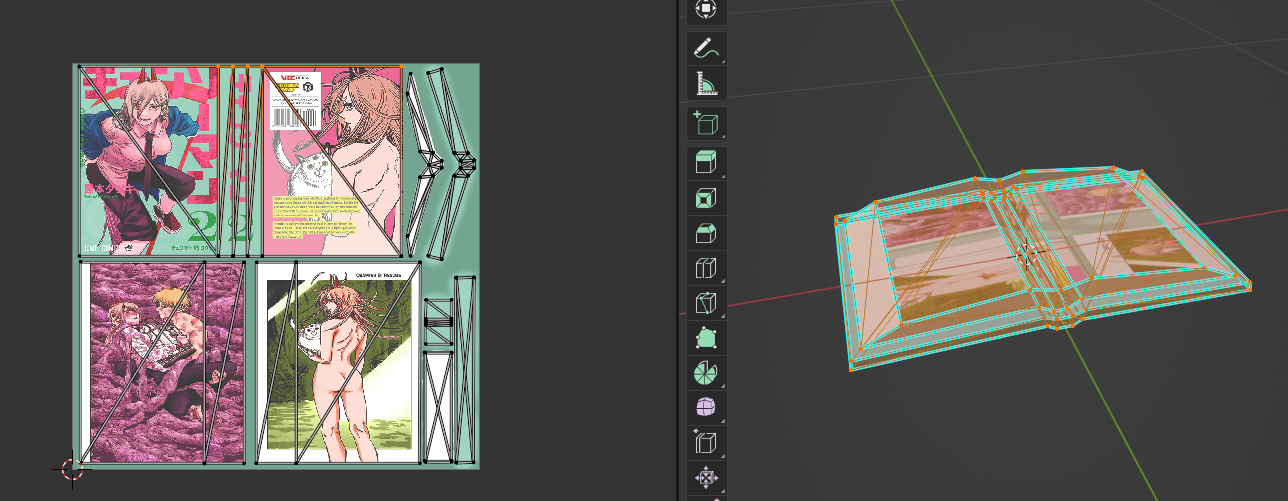 fickle lance
Then it's probably the texture. Unless it's just an issue with blender and it could be fine in the actual game.
molten sail
spoiler cuz minor nsfw
fickle lance
My guess is just test it in-game and see if it's still borked up.
fickle lance
It can be a bitch. I agree.
molten sail
makes 0 sense how it can be gold on export and a train wreck the next time you load it in
also when I reinport it it adds something to the shader editore
if that helps
fickle lance
Before Exporting: 
After Exporting: 
I never messed with the shaders so I have no clue.

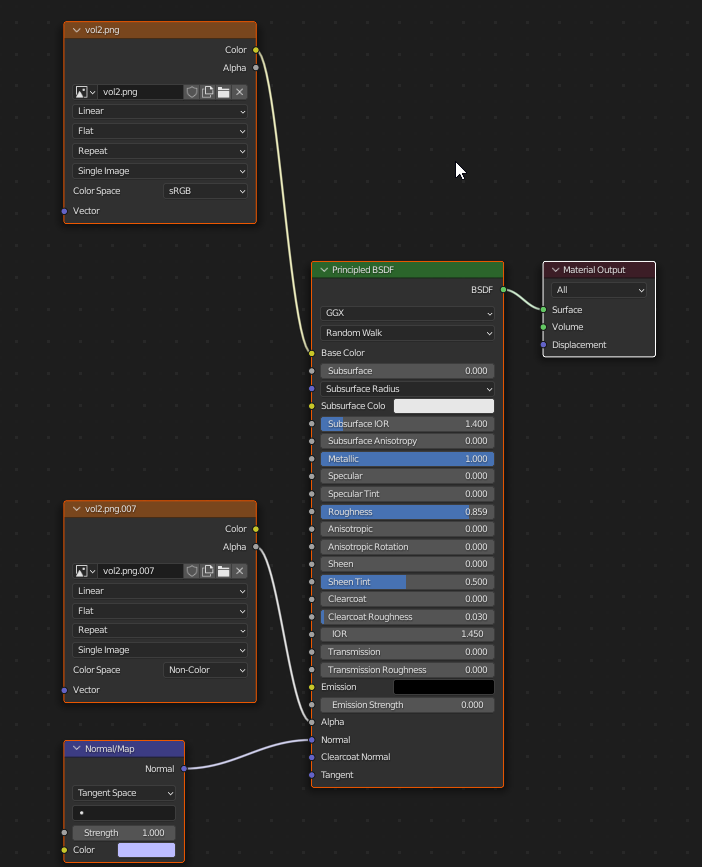 fickle lance
Ooh the nodes, yea since I pretty much use 2.7 religiously I never mess with that.
molten sail
anyone who uses blender 3.0.1 wanna take a look at it and see if you can spot what might be wrong?
 signal parrot
Are you exporting as FBX?
Importing models does have some weirdness with nodes, like the normal map node that's doing nothing
You only need the node going into Base Color to see the texture, so the other two can just be deleted if you didn't add them
 woven garnet
molten sail
anyone who uses blender 3.0.1 wanna take a look at it and see if you can spot wh...
woven garnet
molten sail
anyone who uses blender 3.0.1 wanna take a look at it and see if you can spot wh...
scrolled through quick but couldn't see your issue, what's the problem?
molten sail
woven garnet
scrolled through quick but couldn't see your issue, what's the problem?
Basically I am editing the engame book models UV map and when I export it it's all messed up looking when reimported back into blender. Parts not visible and such.
Before export and after export


And like seen above when I reinport it the shader editor seems to add a new window automatically. Not sure if that is important as removing it does not fix it.
woven garnet
molten sail
Basically I am editing the engame book models UV map and when I export it it's a...
i can't help with anything blender specific, but i could take a look at your fbx and texture
molten sail
Alright. When I get home from work I will send it to you.
molten sail
woven garnet
i can't help with anything blender specific, but i could take a look at your fbx...

 paper zealot
molten sail
paper zealot
molten sail
Did you change the UV mapping or just the textures?
molten sail
uv mapping
and made the texture to fit
the normal book texture dupes both inside pages and I didn't like that
so I changed it
 paper zealot
3.1.0
molten sail
how it looks for me https://i.imgur.com/zdpJM1y.png
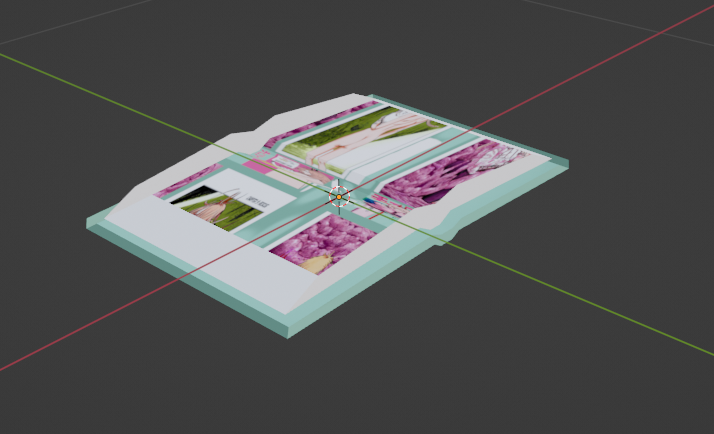
idk how you are getting a different result than mer
well if it works for you It must be a blender issue on my end so maybe it will work in game
makes no sense to me


 sudden shoal
But why San Miguel?
 junior temple
local beer from my place 😎
molten sail
decided to just edit the entire book model. didn't look manga enough.


basically just trimmed the edges and flattened the cover
I'm happy with how it turned out
eternal stag
Not finished yet, but i'm halfway done on my mod 😄
 eternal stag
😏
woven garnet
molten sail
how it looks for me https://i.imgur.com/zdpJM1y.png
On the back side of the paper part of the model, you have some uv's floating off to the side that give that look. i'm not sure how you're getting that result in blender though. normals are fine, so it's not like we're seeing the inside of the pages, only one uv channel. maybe you have something rigged up that's hiding the normally readable pages?
 molten sail
woven garnet
On the back side of the paper part of the model, you have some uv's floating off...
molten sail
woven garnet
On the back side of the paper part of the model, you have some uv's floating off...
that one random UV was there on the normal book model so I left it alone.
funny enough the issue is gone now that I actually edited the model itself
So I guess I'll take that as a win. I get a more actuate looking manga and it's not broken
woven garnet
i'd just delete that inner face, don't need it anyway.
molten sail
Will do
molten sail
How can I convert the Zomboid x file models into usable FBX ones?
 simple bolt
eternal stag
Not finished yet, but i'm halfway done on my mod 😄
simple bolt
eternal stag
Not finished yet, but i'm halfway done on my mod 😄
Lookinggreat! Very vanilla friendly
Once the medivial industry update comes out those outfits will make alot of sense
 fickle geode
nice job on the russian garments! if you're doing a 'russian environment' type props - couple unique pieces that might flesh out a setting - one of those iconic spetsnaz style sidushkas (for butt protection lol), headscarves (for more traditional women or church visitors), some good militisya/politisya uniforms and how about the iconic aeroflot uniforms (orange mandarin and blue) oh and those NBC Chemical suit 'Leggings/Boots' for all your marsh going, cold and wet exploring needs
 feral glade
Hello, i am VFX / CGI artist and player PZ, i search someone would like to work with me for create different mod i search someone can make codes because that not my heavy point. I can make modelisation, texturing, shading, fx, animation etc... if someone is interesting mp me.
molten sail
thoughts on this size for my manga model? trimming the edges of the book resulted in a much smaller size than I expected but I do think it is accurate to irl manga sizes. My only issue is the texture but I don't think increasing the modes size would improve it much.

it in the hands with incorrect rotation
 feral glade
oki great jobs
molten sail
do you think I should make it bigger or do you think that is fine
feral glade
i think is fine maybe you can play on thickness for they look more manga
on size look good vs book but they have more or less same thickness
molten sail
feral glade
on size look good vs book but they have more or less same thickness
the book and manga are the same thickness minus the cover which are ususally paper on manga
closewr view
 molten sail
?
molten sail
I don't understand the question
 regal lake
he asked if you have any future collections you want to make 🙌
molten sail
ah.
yes. I plan on adding a lot more
First I am adding all 11 volumes of Chainsaw man
I am also adding doujinshi
I started with the cursed one for that genre
 feral glade
no one piece 😂
molten sail
geez that would crash the game lol
so I rotated the model but he is still reading it backwards...
nevermind it worked now

cursed? yes
fickle lance
molten sail
what the spiffo doin?

it's the final results like this that make all the suffering and troubleshooting worth it
fickle lance
I'm just suffering with distribution.
eternal stag
simple bolt
Once the medivial industry update comes out those outfits will make alot of sens...
Yeah definitely, I wanted to make a pack with a lot of clothes of different era so people have a way to RP more easily. So I made medieval and now I’m starting to work on some prehistoric/primitive clothing 😄
fickle lance
Me trying to find old packing stuff but can't seem to find an old 24 back box for like soda.
Shame
 cold basalt
fickle geode
nice job on the russian garments! if you're doing a 'russian environment' type p...
cold basalt
fickle geode
nice job on the russian garments! if you're doing a 'russian environment' type p...
thank you!
though right now im mostly making military stuff and some more interesting stuff but more common items may be planned in the future!
 fickle lance
When the scale is set to 10.
junior temple
When the hangover wears off and youre back to reality 

 mild hedge
junior temple
When the hangover wears off and youre back to reality <:cold:721361533539713125>
mild hedge
junior temple
When the hangover wears off and youre back to reality <:cold:721361533539713125>
sit on it
junior temple
I just love it when you get the correct X Y Z coords to get the right drinking angle HAHAHA
 ionic yew
heey everyone, could anyone point me towards a decent resource or tutorial for learning how to create custom sprites please?
 rotund siren
What are you planning to do?
ionic yew
gonna take a crack at creating an apiary, most likely a terrible looking one haha
but just looking at something to help me how to learn the basics to get me started
fickle lance
Could probably go on youtube to learn how to make sprites
 prisma oriole
ionic yew
heey everyone, could anyone point me towards a decent resource or tutorial for l...
prisma oriole
ionic yew
heey everyone, could anyone point me towards a decent resource or tutorial for l...
what kind of custom sprites?
easiest way, or how i do it is to take a picture
select using lasso
ctr x
ctr sfit a
ctr a
ctr del
ctr sfit a
ctr v
resize image 32x32
then i take pen
and make outline

This tutorial video will show you how to make a simple drink in Project Zomboid. I will go into the steps involved from start to finish. Read more below.
0:00 intro
1:08 Start
1:44 Searching for images to use in game
2:30 Searching for the Sound Effect
3:06 Creating mod file directory
3:54 Creating mod.info
4:34 Creating a poster
7:14 Adding ne...
can be usefull
fickle lance
Quickest way to do that is just to add an outer shadow and change up the settings to look solid.
prisma oriole
Well i don’t know (exsacly) where outer shadow filter so i just do it manually, as it ain’t that big diffrence in quality and time spended
 languid hull
okay, figured out how to port my personal model in though the preview does this?

any pointers? 😭
 pearl pendant
languid hull
any pointers? 😭
pearl pendant
languid hull
any pointers? 😭
Well I don't mod this game but I would assume based of this image that the preview system for project zomboid is not adaptive to the model provided but hard coded to the base character model in the vanilla game.
 broken mauve
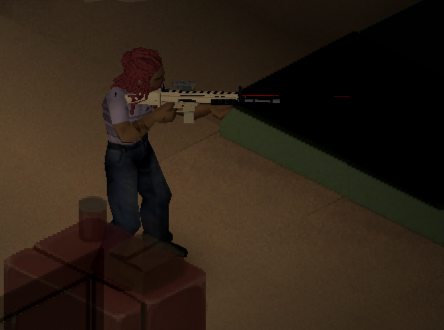
Hey all, Ive been working on a gun model for the game and I've run into an issue. Everything works fine until the gun gets covered in blood, then it displays a weird texture. Has anyone seen this before?

It should look something like this:
https://images-ext-1.discordapp.net/external/3HJVekLGW1mrJBdWh3OiC7WM0fRYbBrX_QwkyBkV6F0/https/i.imgur.com/EeUNWtp.png
 silver cypress
broken mauve
Hey all, Ive been working on a gun model for the game and I've run into an issue...
silver cypress
broken mauve
Hey all, Ive been working on a gun model for the game and I've run into an issue...
what is the model file type? I had similar issues when exporting models into .X
broken mauve
silver cypress
what is the model file type? I had similar issues when exporting models into .X
It was originally .fbx and when we tried with a .x the gun disappeared completely
silver cypress
so its fbx right now?
broken mauve
Yes
I'm wondering if it has something to do with the textures properties. I have no idea how zomboid handles blood splatter. I never use guns to begin with so when I was told about the bug I was surprised lol
languid hull
How do you replace the player model textures? I tried replacing the ones under media/textures but they don't show up in-game
fickle lance
Snag a texture mod from the workshop and look at the file structures for those.
languid hull
fickle lance
Snag a texture mod from the workshop and look at the file structures for those.
How so?
rotund siren
Reverse engineering
fickle lance
^
You can use steamworkshop downloader but you'll need to follow a few steps to do it now due to the site being shot a bit.
rotund siren
...or just subscribe and look in the downloaded workshop folder
languid hull
rotund siren
...or just subscribe and look in the downloaded workshop folder
downloaded workshop folder?
rotund siren
languid hull
downloaded workshop folder?
SteamLibrary\steamapps\workshop\content\108600\xxxxxxx
When you press a subscribe button, Steam will download that mod into this folder automatically.
Then go to that newly downloaded folder and learn how it's done.
languid hull
rotund siren
Then go to that newly downloaded folder and learn how it's done.
Ohh, thank you!
languid hull
rotund siren
Then go to that newly downloaded folder and learn how it's done.
So I think I set everything up correctly... Once it's put together, where do you put your mod?
rotund siren
C:\Users\yourusername\Zomboid\Workshop
languid hull
rotund siren
C:\Users\yourusername\Zomboid\Workshop
Got it, thank you so much! 🙌
 naive hedge
broken mauve
Hey all, Ive been working on a gun model for the game and I've run into an issue...
naive hedge
broken mauve
Hey all, Ive been working on a gun model for the game and I've run into an issue...
we have similar problem. Dont use FBX for a gun mod. FBX is literally sucks. Your texture will be weird. I try fbx in my gun mod before.
broken mauve
naive hedge
we have similar problem. Dont use FBX for a gun mod. FBX is literally sucks. Yo...
I fixed the issue and It works well
As a .fbx
naive hedge
broken mauve
I fixed the issue and It works well
how about the muzzle, when i try use FBX the muzzle didn't appear
broken mauve
naive hedge
how about the muzzle, when i try use FBX the muzzle didn't appear
If you're referring to attachments, everything works and is where it needs to be.
languid hull
Having a weird problem with my skin mod 😅 So I setup the folders how they should be (i'm PRETTY sure), got it uploaded, though now when I try to apply it to my server, I get "Server has stopped working during launch (Normal Termination)"
 viral pumice
I'm done, that's all I'll say.

 hot elk
can somebody help me here? i added a plane in blender and put a texture on it but when i place it in the game it gets kinda darker then the image itself... any ideas why its happening?

model is an .fbx export
hot elk
texture is a .png made in gimp
simple bolt
hot elk
can somebody help me here? i added a plane in blender and put a texture on it bu...
Are the faces showing in the correct direction in blender?
hot elk
u mean like this? yeah they do
 simple bolt
Alright.
There was a Vanilla item which had wrong faces and appeared darker.
Mh...
hot elk
was a real timesink yesterday trying to find a solution so i really appreciate any kinda help 😁 ✌️
viral pumice
If it is shown in a single color, it may be that in the UV you have it in the 3D cursor.
 eternal stag
Ooga booga

 gentle needle
Hey all. I'm getting closer to finishing my map update and I was wondering if there are any step by step guides for modelling for PZ? I'm looking to start off simple by just changing the design of a shirts logo and putting that in as a new item but I would like to eventually get into modeling to make my own mods. Could anyone point me in the right direction on where to start?
regal lake
gentle needle
Hey all. I'm getting closer to finishing my map update and I was wondering if th...
This is what I used https://steamcommunity.com/sharedfiles/filedetails/?id=2648115890

This guide will provide all necessary to create a clothing mod for Project Zomboid.
Get now all clothing models in Clothing Assets !...
For clothes^
 fluid kernel
Can ANYONE here effectively do player animations?
i keep turning them into turtles.
regal lake
fluid kernel
Can ANYONE here effectively do player animations?
@feral glade ?
 hidden fable
Hi! I'm new here and interested in making models for PZ. I looked up AuthenticPeach guide on the forums but I still have some questions. If anyone can help me figure this out that'd be super helpful.
- I know polycount need to be in the 3000 range, or lower, but what about texture size? is there a size I shouldn't exceed or one that is typically used?
- About the scale of things. Can I import a model ( or two ) that are already scaled properly so that I can model accordingly right away instead of playing around after it's done? If so, where could I find those models?
 supple fiber
hidden fable
Hi! I'm new here and interested in making models for PZ. I looked up AuthenticPe...
supple fiber
hidden fable
Hi! I'm new here and interested in making models for PZ. I looked up AuthenticPe...
So I don't have hard numbers here, but it appears from some testing that large/oversize vehicle and clothing textures can cause memory or performance issues for some users? The technical side of the matter isn't in my wheelhouse, and I don't think we have any hard data however. Just try and avoid making vehicle and clothing textures that are much larger than the vanilla ones and you should be good.
As far as importing models, the WorldItems directory in (on my computer) C:\Program Files (x86)\Steam\steamapps\common\ProjectZomboid\media\models_X\WorldItems has a bunch of .FBX files that you can import and play around with.
hidden fable
nice. Ty!
silver cypress
hidden fable
Hi! I'm new here and interested in making models for PZ. I looked up AuthenticPe...
I usually go 512x512 or 256x256 on models that I want to have a bit more detail, 128x128 or 64x64 for models that do not need much detail at all. Optimize where ever you can.
hidden fable
Got it! Thks for the quick reply, both of you! 😁
woven garnet
supple fiber
So I don't have hard numbers here, but it appears from some testing that large/o...
systems with low vram can run into fragmentation issues. textures are generally laid out in memory as if you laid them out in a big grid (huge oversimplification here). so if you've unloaded a 512x512 texture and need to load a 4096x4096 one, but there isn't "clean" space for it, that can often cause issues. Not saying that's what PZ users might be running in to, but it's a thing
supple fiber
woven garnet
systems with low vram can run into fragmentation issues. textures are generally ...
Well, that certainly sounds believable to me?
woven garnet
or if you go OOM and have to pagefile, but i have no idea on that
 light spade
I'm ultra confused on how textures wrap around models. I don't want to get into how to make models and then fail at the texturizing. Is there a way someone could explain it?
 somber ibex
light spade
I'm ultra confused on how textures wrap around models. I don't want to get into ...
somber ibex
light spade
I'm ultra confused on how textures wrap around models. I don't want to get into ...
its usually something you do really late and you can always just redo it so there isnt really a way to fail
silver cypress
light spade
I'm ultra confused on how textures wrap around models. I don't want to get into ...
After you make your mesh you UV map your model - ie placing the polygons/triangles of your model onto a 2d image. There are different ways people make their textures, whether it be through the Texture Paint tool in Blender, through Substance Painter, or the Project-to-View method etc
light spade
Ohhhh alright that makes sense. Just didn't wanna spend hours learning to model correctly just to not be able to finish it. Thanks!
silver cypress
Yeah if you got any more questions, feel free to either ask here or DM me.
light spade
Thanks man. Btw. Love your mods
simple bolt
light spade
Ohhhh alright that makes sense. Just didn't wanna spend hours learning to model ...
If you texture in blender texturepaint or substance its like photoshop. But 3D.
In unwrapping your model surface you might want to do it so you have islands which make sense in your texturing process.
Take Trousers for example, you might want to split the surfaces into seperate islands where the seams are in reallife.
Uv unwrapping is pretty much like tailoring, but backwards.
light spade
hmm alright, i don't think i fully understand but i am more of a visual learner so i think i'll understand once i finish the model and look at it
silver cypress
Take the cardboard box layout for example (for a cube or rectangular prism), you can use some of the automatic tools to make UV maps like this, of course they will be a whole lot more complex than this
 fickle lance
Be careful with PZ's though, you have to follow a specific layout.
somber ibex
light spade
hmm alright, i don't think i fully understand but i am more of a visual learner ...
you have to set some of the edges on your model as seams so that it can be unwrapped without stretching parts of the texture. it can be difficult to wrap your head around but when you get more experience with it it's easier to figure out where to place them
light spade
alright i'll figure it out somehow, gotta make the model first anyways so i'll probably see you guys soon again to figure texturing out
fickle lance
What you gonna try and make?
light spade
i wanted to try making a functioning sheath for the katana, i know scrap weapons and armor has one for swords but i want one i can wear with a backpack to be a late game badass
and i just love katanas lol
light spade
hmmmm, is this too thick for a seath or not (dw i'm still bending it correctly i just want the general shape to be done today)
 feral glade
yes i can but i still working on my mod for moments
feral glade
hidden fable
Hi! I'm new here and interested in making models for PZ. I looked up AuthenticPe...
is on not files of texture more heavy you can use texture 4K if you know make CGI
delete history of your CGI when you have finish that is more important and a lot people forget this
 ornate raptor
Hey just a question
If i made a tank model
is there anyone want to make render and codding?
I will not take any credit from it.
I was trying to add asset on other game and ended up with this.


too many poly for zomboid?
fickle lance
Think you're fine for vehicles.
 eager rampart
Here's my first attempt since highschool (Over a decade) at modeling and texturing something. I'm -okay- with how the model came out, but I don't know what I did wrong to get such a low rez texture. I'm sure it's an easy fix though. And hopefully the file size won't be too big once in there.

 silver cypress
eager rampart
Here's my first attempt since highschool (Over a decade) at modeling and texturi...
silver cypress
eager rampart
Here's my first attempt since highschool (Over a decade) at modeling and texturi...
probably something to do with your UV map
 bronze lark
eager rampart
Here's my first attempt since highschool (Over a decade) at modeling and texturi...
bronze lark
eager rampart
Here's my first attempt since highschool (Over a decade) at modeling and texturi...
This game is forgiving when it comes to models and textures looking like baby's first blender. That gun will never be more than 20 pixels across on your screen.
Honestly it looks better than my early stuff.
eager rampart
@silver cypress I figured it out. I set the margin on unwrapping it too high. Thanks for suggesting that! It's an obvious fix, but I would have spent a day or two messing with it if you hadn't mentioned it. XD
@bronze lark Yeah that's why I chose to actually try my hand at modding. The low poly nature and zoomed out view of it makes it seem like a good starting point. It lets me hide my modelling sins easier. XD And thank you!
eager rampart
Fixed it. Now to do all the other stuff.


 thorny briar
that actually looks really sick
fickle lance
When I want to critique it but want to be nice hnnng
eager rampart
Critique it if you want. Just don't be nasty. I'm aware of several problems with it already, but as already stated it's my first model in a decade, and the first one I've textured.
Also if it's about the texturing, I already had to redo a significant portion of it due to blender not saving it right or something. I saved it, exited out, went back to change some things and a lot of progress was gone, never to return. I'll post the updated version if necessaary.
broken mauve
eager rampart
Fixed it. Now to do all the other stuff.
Time to be a pedantic asshole
The cylinder isnt lined up properly
Other then that (something that wont even be visible in game)
Its good
feral glade
ornate raptor
I was trying to add asset on other game and ended up with this.
yeah tank modelisation is nice and good opti
for gun is nice for first time
molten sail
eager rampart
Critique it if you want. Just don't be nasty. I'm aware of several problems with...
I think the model looks great but a lot of the detail on the texture I think will go largely unnoticed in game.
light spade
i think i'm at a point now where not much needs to be added apart from the texture, now only to figure out how to export the template to actually work on textures
 molten sail
light spade
i think i'm at a point now where not much needs to be added apart from the textu...
molten sail
light spade
i think i'm at a point now where not much needs to be added apart from the textu...
I'm not sure if it is possible but if it is you should make the sheathed katana it's own item entirely and have the game use that over the normal one. I only say this because paws low loot has a sword and sheath but I find the need to manually sheath it to be too tedious for no real purpose besides looks that I never actually do it.
Or make it like a gun holster
That would also be sick
light spade
that was the plan, it's suppost to be a way to store specifically the katana in your hotbar
molten sail
Perfect! Love the idea especially if you can choose it to back or hip mounted
light spade
my idea was more a hip mount since i wanted to add hanging strands to the wrapping, i wanted to look if i could add smth to the model so it looks like you squished it between your belt and your pants so that stuff on your belt doesn't clip through it
molten sail
Gotcha. Still really good idea. Hip mounted katana is a dream combo that is only made better with a cool sheath.
 light spade
yeah, seen mods that add the option to just put it on your belt for no reason which atleast to me seemed stupid since it makes little sense
then there's the scrap collection which adds a sheath but for that you gotta unequip your backpack aka you can't have a backpack with the sheath and i wanted to get a sort of balance inbetween where you need a rare item to hold the katana cause 1 it seems more balanced, 2 it's fucking badass
junior temple
mp5 for all seasons 😛
 eager rampart
broken mauve
The cylinder isnt lined up properly
eager rampart
broken mauve
The cylinder isnt lined up properly
Yeah. I had an issue lining it up properly. It's also more oblong than round. I didn't quite get the cylinder tool as far as making it perfectly round. And by the time I realized it wasn't round I'd already gotten in too deep. XD
eager rampart
molten sail
I think the model looks great but a lot of the detail on the texture I think wil...
Yeah. Like nobody is going to be able to read the text on the side of the barrel, but sometimes I just like to over-do things. XD
molten sail
eager rampart
Yeah. Like nobody is going to be able to read the text on the side of the barrel...
think of it as an easter egg for anyone who decides yo look at it in blender
eager rampart
molten sail
think of it as an easter egg for anyone who decides yo look at it in blender
Pretty much. Haha
naive hedge
Galil Ready for Painting
 fickle lance
Best of luck on painting.
 silver whale
eternal stag
Not finished yet, but i'm halfway done on my mod 😄
silver whale
eternal stag
Not finished yet, but i'm halfway done on my mod 😄
Noiiiiiice
 reef salmon
It just occurred to me and I started modeling using the Pear-Shaped Female Body S as a base, the problem is that I'm good at blender, what I don't know very well is being able to put this in the PZ if anyone knows and want to help please write me, I plan to make a variant of about 4 or 5 more colors and maybe another bikini design (I only speak Spanish I write this with a translator)

 sick iris
Lord have mercy
fickle lance

rotund siren
Project Zexoid
 astral hatch
man had a thanos moment and went "fine, I'll do it myself" when the devs said they won't add sex into the game
 serene jackal
yes sex mod finnally !!!
light spade
it's telling me that it can't unwrap it and that "edge seems may need to be added" can someone explain what's going on? i just want it to not stretch my texture along the length of the cylinder :(

 crisp sonnet
Hello everyone, where can I grab the default male/female body please ?
light spade
crisp sonnet
Hello everyone, where can I grab the default male/female body please ?
https://steamlists.com/project-zomboid-how-create-a-clothing-mod-41-60/
go onto this website, it has download links to both

This guide will provide all necessary to create a clothing mod for Project Zomboid. Downloads Essential files to starting make clothing.
simple bolt
light spade
it's telling me that it can't unwrap it and that "edge seems may need to be adde...
Does something appear in the UV window?
light spade
simple bolt
Does something appear in the UV window?
how do you mean that? the only thing that apears is the uv map itself and the error that says "edge seems may need to be added"
simple bolt
When you select your mesh you might see such a net on the UV window

If there doesnt appear anything then try "smart UV unwrap" to make sure it generally can generate a UV layout
light spade
what i get is this, my problem isn't the uv map itself, but the fact that as you can see, there is a lot of texture stretching along the length of the cylinder, i'm trying to set seems that would help with the amount of stretching since it does stretch the texture a lot which would ruin any detail i try to add to the sheath

it stretches it into it's full length which i want to avoid

since the circles somehow work

also i've heard project zomboid wants textures to be in a certain way, what's up with that?
viral pumice
hello some software to edit animations?
hidden fable
@light spade select the flat part of your UV map (in the UV editor and resize it until the stretching disappear.
cold basalt
Hello everyone!
Right now im working on Soviet WW2 era items for the mod and here are some previews of the headwear i've been making!
(For the Russian Garments mod)
Any feedback on them will be greatly received (good or bad)
 rotund siren
cold basalt
Hello everyone!
Right now im working on Soviet WW2 era items for the mod and her...
rotund siren
cold basalt
Hello everyone!
Right now im working on Soviet WW2 era items for the mod and her...
If you could make cold war era version, it would be more lore-friendly
cold basalt
rotund siren
If you could make cold war era version, it would be more lore-friendly
im working on soviet ww2 and cold war,
right now most of the implemented stuff are cold war era but right now im working on the earlier stuff
simple bolt
light spade
what i get is this, my problem isn't the uv map itself, but the fact that as you...
Did you applied the scales before Unwrap?
(ctrl+a -> rotation & scale. Then unwrap again)
simple bolt
light spade
also i've heard project zomboid wants textures to be in a certain way, what's up...
Thats only for clothes
light spade
simple bolt
Did you applied the scales before Unwrap?
hmm it's just a cylinder i stretched to look like what i want so i didn't have to make the uv map myself but i'll try that
simple bolt
light spade
hmm it's just a cylinder i stretched to look like what i want so i didn't have t...
Yea, if you scratched a cylinder and you havent applied the scale then i am 90% sure thats the problem
hidden fable
is there a tutorial for rigging clothes? the armature looks really funky to me. nothing like I,ve seen before.
a premade model I could study would also work
regal lake
hidden fable
a premade model I could study would also work
you can find all the base game models in the pinned posts above ^
regal lake
hidden fable
is there a tutorial for rigging clothes? the armature looks really funky to me. ...
hidden fable
those are the same as the ones you can find in the game file. they do not have any vertex group to help me understand how to weight paint and join them properly to the armature
regal lake
I swear they must be rigged to work in game
hidden fable
the fbx are just the models you see if you drop them on the ground
afaik
maybe not. aniway I think I figured it out.
one more question tho
if I'm rigging say a hoodie, can I remove the bones that are not being used?
or are they needed aniway?
regal lake
I’m not sure bud, I don’t think it would, if they aren’t being used. But I’m prepared to be very wrong about this lol
regal lake
hidden fable
if I'm rigging say a hoodie, can I remove the bones that are not being used?
Is there any reason to delete them?
hidden fable
just to clean up the visual mess in my file.
I'll save one version with and one without and i'll see for future model ^^
regal lake
hidden fable
I'll save one version with and one without and i'll see for future model ^^
Nice idea
crisp sonnet
light spade
https://steamlists.com/project-zomboid-how-create-a-clothing-mod-41-60/
go onto...
Thanks a lot !
hidden fable
is it possible to get crisp details on textures that are 256x256? mine always comes out blurry :/
crisp sonnet
Hey guys, I have a problem, I have imported the FBX in my blender, but I cannot see the mesh in my scene
 hidden fable
zoom in alot
crisp sonnet
oh my, thanks I see it now
it's also my fault I was pressing the wrong button to focus the camera on a selection
 distant heron
reef salmon
It just occurred to me and I started modeling using the Pear-Shaped Female Body ...
distant heron
reef salmon
It just occurred to me and I started modeling using the Pear-Shaped Female Body ...
Holy moly
light spade
simple bolt
(ctrl+a -> rotation & scale. Then unwrap again)
i don't think i fully understand what you mean, if you mean making all the scale option to 1. that breaks how the object looks
 simple bolt
light spade
i don't think i fully understand what you mean, if you mean making all the scale...
simple bolt
light spade
i don't think i fully understand what you mean, if you mean making all the scale...
Here there should be all "1"

But dont type in there "1". Instead try ctrl-a -> apply scale and rotation
simple bolt
crisp sonnet
Hey guys, I have a problem, I have imported the FBX in my blender, but I cannot ...
Alternatively you can also set the scale in the import screen to "100"
It might cause issues in blender in some cases when you work with very small objects
light spade
simple bolt
But dont type in there "1". Instead try ctrl-a -> apply scale and rotation
Pressing control seems to do nothing. It's a stupid question but is there any way you could show me what you mean?
simple bolt
You also hit "a" ?
simple bolt
Well, you can also select your model in object mode and go on top into "object -> apply"
light spade
Don't know why but a second attempt after restarting blender made the menu pop up
crisp sonnet
simple bolt
Alternatively you can also set the scale in the import screen to "100"
that is good to know actually, thanks
eager rampart
I'm using Blender 3.2 and I've tried using some addons so I can import .x files, but they don't seem to work. Will I have to use an older version of it to get it to work? Or is there a current addon for that that I've missed?
regal lake
eager rampart
I'm using Blender 3.2 and I've tried using some addons so I can import .x files,...
What file do you need to bring in?
naive hedge
for me i stay in blender version 2.79,
rotund siren
regal lake
What file do you need to bring in?
he means .X
regal lake
But I mean specifically clothing or something?
rotund siren
do they work differently?
regal lake
Because in the pinned messages someone has already converted all the clothing files to fbx or something
So if it’s clothing- just get it from there
Save you loads of time too
eager rampart
Oh, yeah I need a gun.
I saw the clothing conversions. Very useful when I start on those.
@rotund siren Thanks! That program looks like what I need.
eager rampart
Okay. I just needed to check the size of my mod vs. the vanilla guns, so I went ahead and converted all the guns, minus the separate addons, .obj, then to fbx. Because I couldn't get that open3dmod to open because I couldn't find a .exe to use it. Is that something I should offer to this channel for others to use?
reef salmon
astral hatch
man had a thanos moment and went "fine, I'll do it myself" when the devs said th...
what??, I did not say at any time that I would do a sexual mod Xd, it's just clothes, nothing else, with a simple aesthetic purpose ahajshhsjaja
somber ibex
hidden fable
if I'm rigging say a hoodie, can I remove the bones that are not being used?
yeah you can get rid of them but i wouldnt recommend doing it manually. in the export settings theres a checkbox called "only deform bones" that will automatically just remove any bones that arent used in the meshes you export
somber ibex
eager rampart
I'm using Blender 3.2 and I've tried using some addons so I can import .x files,...
you need a specific old version to use that plugin but this site usually works for me: https://3d-convert.com/en/
if you want to convert a skinned model like clothes then set the convert file type to .dae and then you should be able to get it into blender with the armature and everything intact but a few models just get an error and wont convert. if its a static model like a hat then you should be able to just convert it to .obj
Convert any 3D files easily and quickly with our free online converter. Whether it's STL files for 3D printing, OBJ files for computer animation or CAD: we can easily convert them all. Give it a try.
eager rampart
somber ibex
you need a specific old version to use that plugin but this site usually works f...
Thanks!
 viscid lake
does anyone know a working forward and up axis setting when importing from Blender as fbx for skinned clothings?
hidden fable
I could probably tell you that but not at home rn. Will hit you up later if no one has answered that yet.
viscid lake
I could use the info. As a band aid solution, I just rotated the model and applied the rotation so it works correct but you can see how it doesn't feel right
 shut mason
Hi everyone, does some one have a good tutorial or can explain a little bit on how to make tiles? Idk if it's #modeling or #mod_development the right channel...
The thing is that I have a model that I did on blender, but it's elaborate and isn't a single object (It's a woodworking table with tools and other objects on it) so I want to render the images and covert it into a tile so I can place it in-game
Sorry for the long text
molten sail
shut mason
Hi everyone, does some one have a good tutorial or can explain a little bit on ...
I can't help with tiles but if you want you could just go the scrap weapons route and make the table an item that you can place using the item placer
It will look a bit off but it does give you a little more flexibility in how you can place it which might be nice
hidden fable
viscid lake
does anyone know a working forward and up axis setting when importing from Blend...
alright so I just checked and for Skinned models I use Z Forward and X Up

I tough you were asking when exporting tho
when I imports models in they usually are the right way up already.
viscid lake
hidden fable
when I imports models in they usually are the right way up already.
Oh yeah it was a wrong choice of words. It was meant to be when exporting from Blender. I tried a lot of combinations and some different combinations gave the same results which made no sense. I'll try this shortly. Thanks for the help!
viscid lake
this is the result im afraid

the helmet looks down and its "up" is the left side of the characters head
if i do -z fwd, x up the helmet goes to right side pointing upwards
-z fwd, y up is on right side pointing forward
etc...
no setting gave me a result that sits on top of his head
other than rotating it before exporting which is not a real good solution
simple bolt
viscid lake
this is the result im afraid
Try: X Forward and Y Up
And dont forget to apply rotation before exporting
viscid lake
simple bolt
Try: X Forward and Y Up
This worked man thanks a lot!
always doing that !
 rigid pilot
do i need to set light mask on model or just can by on image ?
hidden fable
Oh yea, Hats are in Static in the games files. They export different then skinned. At least for me. Sorry for confusion
rigid pilot
have problem with set for vehicle to be able mount all kind of trunks
expl Small trunk for Sport cars/ Normal trunk for Sport cars/ Big trunk for Sport cars
on Gas tank works for trunk not only is able to install normal sport trunk
i set itemType = Base.NormalTrunk,Base.SmallTrunk,Base.BigTrunk but still only normal one works ...
 rare wigeon
rigid pilot
have problem with set for vehicle to be able mount all kind of trunks
expl Smal...
rare wigeon
rigid pilot
have problem with set for vehicle to be able mount all kind of trunks
expl Smal...
Probably because there is overriding/conflicting code somewhere else and so it accepts the first, but I don't know modding that well so i might be wrong.
rigid pilot
yeah only first one
rigid pilot
ok fixed
eternal stag
 regal lake
eternal stag
https://steamcommunity.com/sharedfiles/filedetails/?id=2827080218
regal lake
eternal stag
https://steamcommunity.com/sharedfiles/filedetails/?id=2827080218
Awesome job Yaki! 🤘
eternal stag
regal lake
Awesome job Yaki! 🤘
Thank youu 😄
broken mauve
Hello, If anyone's interested I'll be willing to pay for a mod that adds a kippah (traditional, brimless cap in Judaism and Islam) to the game.
Preferably one that would work in multiplayer.
hot elk
hey guys! is there an guide for making animations in blender for zomboid? i coudnt find one 🙂
tired torrent
For characters or vehicles?
For characters there are some ways to import them into pz in sticky section
Any keyframe anim tutorial will work for blender
hot elk
tired torrent
Any keyframe anim tutorial will work for blender
roger! thanks alot 🙂
tired torrent
Zomboid side is not well documented and prone to headaches good luck
hot elk
haha i thought so 😄 thanks for the info man! 👍
cold basalt
hi everyone,
heres the progress on the M35 uniform!
male model is done and textured but rigging needs some fixing
(for some reason the image was blurry so i resent the message)
 tired torrent

 cold basalt
 regal lake
cold basalt
regal lake
cold basalt
Gonna do any other nations too? 😁
cold basalt
regal lake
Gonna do any other nations too? 😁
i actually thought about it, though right now russian equipment is what im going for
maybe after i will finish the mod i will start working on a different nation!
regal lake
Awesome, you’ve got great skills and the models are looking good! 👍
hidden fable
how do you render those? any specific light setup to reproduce ingame look?
cold basalt
hidden fable
how do you render those? any specific light setup to reproduce ingame look?
no! its an ingame render! i used Yaki's technique, if you enter the game in debug mode and open the map, zoom in on your character, it'll show your character with the background of the map! ( you can also zoom in alot more )
then you just take a screenshot of that and you can edit out the map background
hidden fable
oh nice. ty for the tip!
 sand prawn
How does one get started with making tiles? is it 3D or 2D?
I felt the urge to start trying to work on some walls and assets that actually don't exist in PZ or other tile mods, so I wanted to know if there was a good way to begin
 white condor
regal lake
sand prawn
How does one get started with making tiles? is it 3D or 2D?
I felt the urge to s...
white condor
regal lake
sand prawn
How does one get started with making tiles? is it 3D or 2D?
I felt the urge to s...
depends what you want to do, but try asking more in the mapping channel. this may help too https://theindiestone.com/forums/index.php?/topic/35493-blender-template-for-creating-custom-pz-tiles/
The Indie Stone Forums
Blender template for creating custom Project Zomboid Tiles Hello. Recently been experimenting with creating custom tiles for Project Zomboid, and tried to create some model for it in the Blender software. So ive decided to prepare and share some instructions/template for people who would want to ...
regal lake
sand prawn
How does one get started with making tiles? is it 3D or 2D?
I felt the urge to s...
The Indie Stone Forums
ISOZOID I struggled immensely with trying to make floor tiles for Project Zomboid, no image editor seemed capable of doing what I needed without warping the texture and breaking the seamlessness of the tile... So I made a tool to cleanly map a 64x64 flat texture to an isometric Zomboid tile (2x v...
hidden fable
can someone explain to me why the wide spread.. They are modeled the exact same way the vanilla pants are. also rigged as close as possible to the vanilla.
 cold basalt
hidden fable
can someone explain to me why the wide spread.. They are modeled the exact same ...
cold basalt
hidden fable
can someone explain to me why the wide spread.. They are modeled the exact same ...
if it's not a rigging issue most likely you did not apply all transforms for your model
if you press N in object mode and the model's angle and position isnt zeroed and scale isn't 1 on all axes that's likely the problem. select it, click Ctrl+A and apply all transforms
 torpid laurel
cold basalt
torpid laurel
cold basalt
Oh shoot a FF7 soldier?
viscid lake
Is there a poly limit to clothing items or a preferred safe limit?
 dawn grotto
hidden fable
can someone explain to me why the wide spread.. They are modeled the exact same ...
dawn grotto
hidden fable
can someone explain to me why the wide spread.. They are modeled the exact same ...
Its a show of dominance
Keeping the beta males in line bro
eternal stag
viscid lake
Is there a poly limit to clothing items or a preferred safe limit?
I think it's a limit of 8000
naive hedge
regal lake
also https://theindiestone.com/forums/index.php?/topic/25760-isozoid-tool/
no longer downloadable, do you have a file for this?
regal lake
naive hedge
no longer downloadable, do you have a file for this?
I think you need to make an account on the forum
if not here it is
naive hedge
Thanks bro
viscid lake
eternal stag
I think it's a limit of 8000
thank you 👌🏼
hidden fable
cold basalt
if you press N in object mode and the model's angle and position isnt zeroed and...
I'm 100% sure it's applied.
silver cypress
hidden fable
I'm 100% sure it's applied.
Did you assign the vertex groups?
 formal geyser
https://cdn.discordapp.com/attachments/954411120330960916/993571487653052446/unknown.png plz save my sanity


bones seems to be fine, texture is ok, model itself is ok too, what the heck is wrong
simple bolt
formal geyser
bones seems to be fine, texture is ok, model itself is ok too, what the heck is ...
Why I get a "skinningData is null"?
Check if you linked the model with the Bip01 Armature or if a vertex is assigned with a vertex group that doesn't exist. (Restart the game when you try to make any changes to solve it, the game will not update the model after this error)
This guide will provide all necessary to create a clothing mod for Project Zomboid.
Get now all clothing models in Clothing Assets !...
 soft tusk
For shit and giggles I decided to recreate 3D model of random furniture from PZ. While being somewhat experienced in Fusion 360, I spent more hours in Blender than I would like to admit including but not limited to painfully redoing topology over and over again and fighting with other cryptic bullshit, just to get bevel modifier to work properly.

I have no clue if it's possible to actually use this model as animation friendly sitting chair.
formal geyser
simple bolt
Why I get a "skinningData is null"?
Check if you linked the model with the Bip0...
i checked everything, everything seems to be correct
formal geyser
i think i found the issue, following your guide - when you set a parent to the bip01 and then follow with adding it into the armature it doesn't add vertex groups that relate to appropriate bones

 broken mauve
Does anyone here take commissions?
tired torrent
1985 Honda Accord hatchback wip
 supple fiber
Got a message from on-high for anyone who makes models for PZ mods.
Small request from Spiffo-on-high for those who make models for PZ mods.

Oversized textures for weapons/clothing/vehicles etc within mods are currently becoming more of an issue with mod users - sometimes causing memory leaks and performance issues when mods stack up.

Please try to avoid using model textures that are larger than the ones used in Vanilla PZ for equivalent items.
    Generally speaking vehicles are 512x512.
    Body and clothing textures are 256x256.
    Weapons are generally 128x128 - but vary due to  the variation in sizes.
    Hats are 128x128.

Also in the same ballpark: using tricounts higher than vanilla can also have negative effects on performance too.

We will endeavour to help this situation along code-side, but in the meantime if people could try to keep within these limits we would be super-grateful.
 naive hedge
supple fiber
Got a message from on-high for anyone who makes models for PZ mods.
```
Small re...
naive hedge
supple fiber
Got a message from on-high for anyone who makes models for PZ mods.
```
Small re...
i used 2k textures in my guns.
somber ibex
optimised
 naive hedge
 hallow wind
nice, i am glad someone else is moving on the idea
hallow wind
nice, i am glad someone else is moving on the idea
well im planning to create a mod for my friend server. the mod where you can chop players bodies or zombies it's body parts like hands, legs and head can be displayed in your house or outside like the one game i played " the forest" where you can build effigies.
hallow wind
naive hedge
well im planning to create a mod for my friend server. the mod where you can cho...
yes, i have that entire mod done
its not released because i have zero interest in having another mod ill just make and never maintain so go wild
junior temple
naive hedge
Ive been waiting for something like this for a long time haha
formal geyser
um..why vanilla bulletvest is bent sideways? character is having some form of scoliosys or smth?
 formal geyser
gotcha, thx
hidden fable
on my end I'm still stuck with this issue:
Feels like I tripled checked everything. Vertex groups are all assigned just the same as the vanilla trousers, no loose or unassigned vertex, pose and armature are def ok too since I tried using both the vanilla one and one from a popular mod with the same results.. If anyone has a clue what I could try next..

and the animation works properly ingame, just 'wider'..
actually, the aiming animation looks weird, I think it might be that the idle and aiming pose/animation are inversed.. but idk how to fix it
gentle needle
Hi all, I've been learning modelling and Peach has been showing me a lot of the ropes but tonight I've found an issue where my model had a large gap through the middle of the chest. I have tried pulling the section out to the point where my shirt looked like it had a huge stomach and breasts but still on the game that section would not show at all.
I am at a loss as to what is the issue, the bones look fine, the model itself looks fine but no matter what we've tried the issue continues. Has anyone encountered this or may have an idea what is wrong?

 viral pumice
gentle needle
Hi all, I've been learning modelling and Peach has been showing me a lot of the ...
viral pumice
gentle needle
Hi all, I've been learning modelling and Peach has been showing me a lot of the ...
Those issues may be due to the position of the UV, but try moving the entire skeleton around to see if the clothes follow.
hidden fable
Maybe inverted normals?
check 'Face Orientation'. If those faces are red, go into Edit mode, select them. into the Mesh menu at the top, go Normals/Flip
 gentle needle
I've checked the face orientation and that is fine, the Uv seem good too.
eternal stag
gentle needle
I've checked the face orientation and that is fine, the Uv seem good too.
I had a bunch of problems like that when i messed with the masks in the XML of the clothing
Taking them out helps
somber ibex
yeah its definitely a mask issue
gentle needle
If I remove the masks the problem still persits
gentle needle
So I removed the masks and scaled the model up time after time to see if the issue would go but this is the results


You can see in the second screen that the shirt is clearly in front of the modelof the player but still multiple parts are missing

I honestly cannot see what I've done wrong :/
tired torrent
Can you post UV layout?
naive hedge
guys do you have a guide on how to create custom tiles using blender
gentle needle
tired torrent
Can you post UV layout?
 tired torrent
Uvs are the cause check sticky posts in this section, look for Scavenger's posts there
You will understand whats going on
gentle needle
tired torrent
Uvs are the cause check sticky posts in this section, look for Scavenger's posts...
AH I think I understand it now, although I was told differently so now it looks like I'm rebuilding the whole damn UV mapping 😦
tired torrent
Yeah it happens, good luck 
hidden fable
I was under the impression that the UV map layout only affected blood and holes. (and the masks for the clothes underneath)? I still don't understand why his shirt has a big hole in the middle. care to explain?
somber ibex
the uv map affects the masks that will be applied onto the model
hidden fable
Ahh. So another option could be to just disable the masks and his models would show up just fine?
simple bolt
hidden fable
Ahh. So another option could be to just disable the masks and his models would s...
Static models arent affected by masks if i remember right.
But static is only for static stuff like hats.
You also could give it a clothing "type" like jacket which isnt overlayed by other stuff. But that would break the game a bit.
But its not that difficulty to make the UVs right.
You have to somewhat be in that areas here.
So the shirt should be in turquoise, purple and blue, maybe little bit of green, yellow and red.


This parts can be cut, and put into the upper red

 trail plinth
Hey gang, sorry if I missed this in a channel's pins, but are the models/sprites/tiles(?) currently in-game available anywhere? I'm specifically looking for the bonsai tree item
rotund siren
trail plinth
Hey gang, sorry if I missed this in a channel's pins, but are the models/sprites...
 eternal stag
Hey, does anyone know if it's possible to make your own underlay masks ? I've been using the Jacket_Long underlay masks for some of my clothing but i need one with short sleeves and i don't know how to do it
regal lake
@eternal stag any sneak peak on what youre working on atm 👀 ?
eternal stag
regal lake
<@314882043265810432> any sneak peak on what youre working on atm 👀 ?
I don't like how they look yet, but it's wip 🙂


 ornate berry
Hey guys, does anyone know if it's possible to switch the zombies' models for a custom one?
I'm thinking about making some sort of monster for a horror playthrough, maybe something like the Dog Soldiers movie, but I don't know if that's possible yet
regal lake
ornate berry
I'm thinking about making some sort of monster for a horror playthrough, maybe s...
I'm not sure, but one way would be to find other mods that have replaced zombie models
and look at how they work
reverse engineer it ?
broken mauve
Basque themed map when
ornate berry
regal lake
I'm not sure, but one way would be to find other mods that have replaced zombie ...
Hmm, good idea
regal lake
ornate berry
Hmm, good idea
Good luck Migs 🙂
regal lake
broken mauve
Basque themed map when
You gonna make it 😉
ornate berry
Thanks!
broken mauve
regal lake
You gonna make it 😉
Sure 😤
The only issue is clothing, cant do that at all I fail to understand clothing rigging
regal lake
I'd say don't try and create new meshes
at least when you start making clothing mods
use the vanilla models
which you can find in the pinned posts
and retexture them 🙂

 twilit wolf
Tonk
 cerulean sage

 golden prism

 pseudo radish
 astral turret

 hardy flume
where can i find character base models? 
 supple sedge
hardy flume
where can i find character base models? <:crow:893803298254110730>
supple sedge
hardy flume
where can i find character base models? <:crow:893803298254110730>
Check the pinned messages and scroll down, theres download links for them.
hardy flume
supple sedge
Check the pinned messages and scroll down, theres download links for them.
TY
 main abyss
I wish you could tuck jeans into boots
 unborn brook
ornate berry
Hey guys, does anyone know if it's possible to switch the zombies' models for a ...
unborn brook
ornate berry
Hey guys, does anyone know if it's possible to switch the zombies' models for a ...
afaik zombies and players use the same body models. so exchanging the model just for the zeds could be difficult
ornate berry
unborn brook
afaik zombies and players use the same body models. so exchanging the model just...
Thank you for warning me, I was checking out the game files and I was in doubt whether they used the same or not
unborn brook
ornate berry
Thank you for warning me, I was checking out the game files and I was in doubt w...
i am not 100% sure about that. but with a quick look in the models_X/Skinned folder, I only found the MaleBody.X and FemaleBody.X for body models and nothing else... there are probably people here who know more about that...
ornate berry
unborn brook
i am not 100% sure about that. but with a quick look in the models_X/Skinned fol...
Same here, only found those two
But I'll still see if there's some way to work around it
 unborn brook
ornate berry
But I'll still see if there's some way to work around it
unborn brook
ornate berry
But I'll still see if there's some way to work around it
one possible strategy (not saying there couldn't be better ones): you could try to change the 3d visuals by introducing new clothing items. for example, if you want a zed with 3 arms, make a 3d clothing model looking like an arm and then equip that clothing object. the additional arm will have no function but is displayed in game. not exactly sure how such a strategy will work with zeds but similar things are at least in principal possible for player characters. could also require a lot of coding to make it work properly. so maybe there are better ways doing this...
ornate berry
unborn brook
one possible strategy (not saying there couldn't be better ones): you could try ...
Soulfilcher suggested the same thing, I think it might be possible that way
I'd just have to make all zombies spawn with these clothings
The only problem is that the player character wouldn't receive the clothing once he became zombified and would look like an average zombie (except his animations would be very wonky because I'll make custom anims for the zeds to fit the clothes)
Maybe there's a way to make the game automatically insert the clothes in the zombified player once he's dead, but it's probably gonna be very tricky
unborn brook
ornate berry
Maybe there's a way to make the game automatically insert the clothes in the zom...
just had the same idea! XD
ornate berry
Nice hahah B) great minds think alike
unborn brook
my guess is it would be possible. but ya... coding and keeping things bugfree could take some work
ornate berry
Yeah
 mighty loom
Is possible to make a mod for your character being left handed for single player? ( I hope posted in right chat )
unborn brook
mighty loom
Is possible to make a mod for your character being left handed for single playe...
if the vanilla game doesn't contain any animation for left handed characters (for example, animation for fighting with the left hand), I am afraid you need to make all animations by yourself
mighty loom
unborn brook
if the vanilla game doesn't contain any animation for left handed characters (fo...
It makes sense, thanks
naive hedge
AR-15
 broken mauve
naive hedge
AR-15
broken mauve
naive hedge
AR-15
Disgusting stock choice but good model
naive hedge
broken mauve
Disgusting stock choice but good model
maybe i will try inserting it with MOE stock
 languid laurel
naive hedge
AR-15
languid laurel
naive hedge
AR-15
how did you add the black "holes" at the front part of the gun to the texture?
naive hedge
languid laurel
how did you add the black "holes" at the front part of the gun to the texture?
This is just a paint no holes.
languid laurel
naive hedge
This is just a paint no holes.
ik but how did you add it to the texture
naive hedge
languid laurel
ik but how did you add it to the texture
i only paint my model using blender texture tools.
 languid laurel
naive hedge
i only paint my model using blender texture tools.
languid laurel
naive hedge
i only paint my model using blender texture tools.
thank you, i am still struggling with textures in Blender :P
eternal stag
It's so hard to match this area when doing dresses i never get it right ughhhh

There's always that line separating both parts that throws the whole thing
tired torrent
eternal stag
There's always that line separating both parts that throws the whole thing
I'm not sure how its laid out on uv but you probably have to increase right sides vertical resolution more so it fits
There are some extra warping up on top aswell doing a whole new uv on skirt would be best probably
You are using vanilla skirt right? Maybe do your own skirt and transfer weights off it to your own one
Then you can have more control over uv space
somber ibex
eternal stag
It's so hard to match this area when doing dresses i never get it right ughhhh
are you doing it manually in like photoshop
eternal stag
tired torrent
I'm not sure how its laid out on uv but you probably have to increase right side...
I used the basegame wedding dress as a base but made a new UV for it
eternal stag
somber ibex
are you doing it manually in like photoshop
Yes, the texture is made via Photoshop
somber ibex
oh rip lol fixing those kinds of seams is a nightmare
if the uv is already a bit different than the vanilla one then editing the uv to fix it is probably easier than editing the texture instead
eternal stag
Yeah, i had to re-unwrap the UV because the first one looked horrible with the texture applied
simple bolt
eternal stag
It's so hard to match this area when doing dresses i never get it right ughhhh
This is how i made the seams of a dress once:

I just split it once at the back

Also i generate all folds procedural by 3D coordinates. So they dont look off at seams.
For example i take a noise texture, generate it in a spheric pattern onto the 3D model at this spot here, then i erase it where i dont want to have folds like at the shoulder blade:

Its a workflow which turned out to work very good aspecially for dresses and soft clothing.
broken mauve
Hey all. Me and a few friends are working on a 300-years-into-the-future desert/swamp map. If anyone wants to help with mapping, modding, or modeling, please contact me--we have a lot of resources and time available, as we're part of a dedicated community with 550+ players. ^^
😈
 broken mauve
no idea what channel I should post this in, but if anyone is looking for a really good ERDL/M81 camouflage texture for clothing here you go.

here is the Arctic variant as well

I have an absolute metric load of camos (almost 10gb of image files) so if anyone needs a specific one float me a DM or ping me and I probably have it
eternal stag
simple bolt
This is how i made the seams of a dress once:
Wouldn’t it break the blood mapping ?
simple bolt
eternal stag
Wouldn’t it break the blood mapping ?
Just a little bit 🤏
Blood at grain

Lower torso and neck:

Sure, it wraps a bit around the back like so:

Sometimes i do compromises to make texturing not too painfully
unborn brook
simple bolt
Lower torso and neck:
looks quite acceptable imo!
eternal stag
simple bolt
Just a little bit 🤏
Mh i see yeah, it looks nice, i wonder if it would have the same result on a long dress, i'll try that 🙂
broken mauve
hello, could i commission anyone to make a sombrero model?
 vivid flower
eternal stag
Wouldn’t it break the blood mapping ?
vivid flower
eternal stag
Wouldn’t it break the blood mapping ?
something sticks out
 eternal stag
 regal lake
vivid flower
something sticks out
regal lake
vivid flower
something sticks out

 crimson sand
vivid flower
something sticks out
crimson sand
vivid flower
something sticks out

 solid salmon
vivid flower
something sticks out
solid salmon
vivid flower
something sticks out

 thorn spade
vivid flower
something sticks out
thorn spade
vivid flower
something sticks out
Why...
broken mauve
broken mauve
hello, could i commission anyone to make a sombrero model?
/shrug You could commission me if you weren't rude as fuck in my dms
bro ur a nazi

???
How am I a nazi lmao
Because I dont like genocidal regimes?
tired torrent
Working on an M1117 for non-pz project
 broken mauve
Listen man I'm not gonna have an argument in here over my stuff if you think I'm a shitter then it is what it is
broken mauve
tired torrent
Working on an M1117 for non-pz project
Looks like a Squad tier model
I used to know one of the squad modelers and he made stuff just like that
main abyss
Yo, anyone taking comissions? Wanted to see if I could get someone to make a mod to let you blouse jeans
 torpid elk
is any mod creator taking any suggestions for player models maybe?
 distant ginkgo
Looking for a modeler to make some edits.
Example: Attaching some extra parts, removing some existing parts
silver cypress
torpid elk
is any mod creator taking any suggestions for player models maybe?
well I am almost done with making plus sized female models and a skinny male model for zombies

 hallow wind
silver cypress
hallow wind
silver cypress
smh all this chubby chasing
unborn brook
silver cypress
looks great! do you realize this by tricky clothing models or do you make new body models?
eternal stag
unborn brook
looks great! do you realize this by tricky clothing models or do you make new bo...
From what I’ve seen on his stream, it’s a new body model 🙂
unborn brook
wow! I am always wondering about introducing new body models since I really have no idea how this could be done. afaik, vanilla game has only two models, one for female and one for male and they seem to be used for both, players and zeds. wondering whether it is possible to tweak the game so that it accepts additional models....
unborn brook
eternal stag
From what I’ve seen on his stream, it’s a new body model 🙂
btw you mean authentic's twitch stream?
eternal stag
unborn brook
btw you mean authentic's twitch stream?
He does yes you can check on his profile on Discord :p
torpid elk
silver cypress
well I am almost done with making plus sized female models and a skinny male mod...
alright I have this suggestion to make
 brittle wolf
Is it possible to like, remove the hand rig lol?
this is a clothing item, but it's actually moving the hand to where it's supposed to be, but I don't want it like that, it causes stretching and I'd have to change the model too much to fix it

the red circle is where the actual hand bones are being aligned too

I'm wondering if there's some way to make the game not assume that part is an actual hand or something, so it just makes the hands completely invisible, and the hand remains solely part of the arm
woven garnet
you could simply weight those verts to the arm
distant ginkgo
Posting again with more information this time.
I am looking for a modeler to make some edits to a model.
Because "Mask 0" has been set for the helmet which makes the base head invisible, there is no neck for the helmet, so I need a neck created and attached to this helmet.
The back of the helmet needs to have a hole made solid as you can see through the back of the helmet.
For the front of the helmet, a visor needs to be created at the front of the helmet, as the current visor is not flush against the front of helmet.
Making the Gauntlet the same as in the picture shown.
The other part is removing the two eye parts.
This is a paid request.
 silver cypress
torpid elk
alright I have this suggestion to make
silver cypress
torpid elk
alright I have this suggestion to make
What is your suggestion
 livid coral
silver cypress
What is your suggestion
livid coral
silver cypress
What is your suggestion
cuts in line walking dead outfits! (secretly hoping for a daryl red and beige poncho)
ok, sorry runs away
torpid elk
silver cypress
What is your suggestion
I was thinking about player models like FNAF or Beastars if that's possible lol
Or make Army zombies with modern uniforms
silver cypress
torpid elk
I was thinking about player models like FNAF or Beastars if that's possible lol
Hah no thanks. Never been a fan of any of that.
main abyss
I got a better suggestion. Blouseable jeans
silver cypress
main abyss
I got a better suggestion. Blouseable jeans
I don't know what you mean. Dm me some reference pictures.
main abyss
silver cypress
I don't know what you mean. Dm me some reference pictures.

Pants tucked into boots
Sort of like how military pants are tucked into boots
 magic sapphire
main abyss
magic sapphire
main abyss
some clothing mods already have it
torpid elk
silver cypress
Hah no thanks. Never been a fan of any of that.
I understand
broken mauve
main abyss
Sort of like how military pants are tucked into boots
Technically you dont tuck them in the boot unless you're doing a winter blouse
 granite kettle
silver cypress
granite kettle
silver cypress
I was going to say, why aren't there any overweight zombies in vanilla.
bronze lark
I've suggested several times that if the devs ever rework the zombie models, they should have the rigs scalable like player models in many, many other games.
 cerulean reef
is there some kind of documentation that i can have access to know the process in how modeling works for this game?
somber ibex
cerulean reef
is there some kind of documentation that i can have access to know the process i...
there isnt any like official documentation or anything but this guide is good
https://steamcommunity.com/sharedfiles/filedetails/?id=2648115890
This guide will provide all necessary to create a clothing mod for Project Zomboid.
Get now all clothing models in Clothing Assets !...
cerulean reef
how does the game handle the model rotation and position?
somber ibex
these are the export settings i use for it and it seems to work fine when I use them

i've seen others have weird problems with rotation and stuff though so it's probably just trial and error
cerulean reef
hey guys i was wandering if there was some kind of player rig .blend project i could download
 bronze dawn
Model I commissioned


 broken mauve
No comment
 shadow fiber
How do you find places to get commission to make 3D model for PZ mods?
 boreal chasm
shadow fiber
How do you find places to get commission to make 3D model for PZ mods?
boreal chasm
shadow fiber
How do you find places to get commission to make 3D model for PZ mods?
Not sure, but I am a 3D modeler for VRChat, and zomboid is something I've been moving into since it's what I've been playing as of late
shadow fiber
Yeah same here, sounds fun
boreal chasm
I wouldn't mind doing a few models free myself as I'd like to try a few things out and build a small folder to my model portfolio
shadow fiber
Well if anyone wants some 3D art or whatever done, feel free to message me, pretty broad in what I can do
Hmm yeah, I just want to contribute to the PZ mod scene because I love the game hahaa

 boreal chasm
shadow fiber
Looks higher detailed I think at least haha
boreal chasm
shadow fiber
Looks higher detailed I think at least haha
Nah this was for VRC lol
Zomboid doesn't need nearly as many Tris as this thing does
boreal chasm
Hard
But depends on what you wanna do
Getting it in game ain't horrible, it's when people start wearing your stuff it gets hard
somber ibex
lol avatar stealers
boreal chasm
somber ibex
lol avatar stealers
No matter what you do the pirating game is always gonna be there, best to push and go and move on
somber ibex
yeah some of them are just really funny
i was invited to a server and in one of the channels i immediately saw someone trying to pass off one of my models as his own
broken mauve
boreal chasm
No matter what you do the pirating game is always gonna be there, best to push a...
Oh boy wait till you learn about the shithole that is Roblox modeling commissions
The guy who did the vehicle models for Squads Canadian update was a mutual of mine and he did paid commissions for Roblox games and got paid bank doing it
And it was so easy to just rip and reupload his paid assets he quit the platform and moved to a studio iir
somber ibex
yeah a lot of stuff with roblox development sounds like a nightmare
livid coral
Is there a way in blender to test how a clothing model moves or deforms depending on the body/skeleton position? nothing fancy I just want to move the arms/legs around and see if the clothes follow correctly.
somber ibex
livid coral
Is there a way in blender to test how a clothing model moves or deforms dependin...
select the skeleton and then at the top left you can change it to pose mode and you can move stuff around
 livid coral
many thanks!
somber ibex
cool coat
 simple bolt
shadow fiber
How do you find places to get commission to make 3D model for PZ mods?
simple bolt
shadow fiber
How do you find places to get commission to make 3D model for PZ mods?
If you release cool stuff then commissions will come.
broken mauve
somber ibex
yeah a lot of stuff with roblox development sounds like a nightmare
Its an insanrly versatile platform, but istg if you aren't a dev making the platform thousands a week then they just won't help you or even take your bug reports seriously
There's been a bug with how stuff copy and pastes for the last year and a half and it hasnt even been patched yet
 livid drift
How much time does it typically take to model a vehicle?
I'm wanting to play a hyper realistic solo play through and would love my vehicle modded into the game, can I find someone to do that for me here?
 dusky island
What program do you guys model with?
Can i use unreal5?
boreal chasm
dusky island
What program do you guys model with?
Can i use unreal5?
Unreal is an engine and not necessarily a modding platform, the best modeling software to use and that is free is Blender
dusky island
boreal chasm
Unreal is an engine and not necessarily a modding platform, the best modeling so...
You can model in unreal though yeah? Its also free
boreal chasm
dusky island
You can model in unreal though yeah? Its also free
I mean... You could, but most information concerns blender and unreal modeling is a bit high end / overkill for PZ models
dusky island
Hmm ok
Ill grab blender too thnx
 brittle wolf
Anyone know where hair textures are in the vanilla game files?
somber ibex
brittle wolf
Anyone know where hair textures are in the vanilla game files?
they're loose in the main "textures" folder, these are the ones you'll need to look for
 brittle wolf
somber ibex
they're loose in the main "textures" folder, these are the ones you'll need to l...
brittle wolf
somber ibex
they're loose in the main "textures" folder, these are the ones you'll need to l...
Thank you
Especially for the fast response lol
somber ibex
np lmao
dusky island
brittle wolf
Looks like my grandma
 frozen orchid
Having a little issue with my first clothing mod, I made a medieval helmet and it's the right scale and texture, but the helmet is way off the head

I'm guessing the rigging must be off but the helmet works perfectly with the male_body_10 skeleton in blender
 boreal chasm
Did you apply transformations in blender before export?
frozen orchid
I did, but I'll do that again
Oh I should add this is in fbx format
not sure if that's the problem
boreal chasm
FBX should be fine, as far as I know
frozen orchid
It seems the problem is still there after applying transformations
boreal chasm
Is the helmet bound to the neck or the head, and which clothing is it in game?
A mask or a hat
frozen orchid
The helmet is bound to the bip01_Head bone
As for whether it's a mask or a hat, I'll check my files, not sure exactly if I explicitly wrote whether it's one or the other
I have it set as a FullHat
I'll set it as a hat and see if that fixes it!
No doesn't seem to change whether I set the bodylocation = hat, fullhat or mask
I managed to import an x file from the base game and it might help with my issue, it seems the files in the base game are tilted 90 degrees from the malebody_10.fbx used in this discord

maybe if I rotate the malebody and my helmet and scale it to fit the hat it'll solve the issue
no that didn't do anything
@somber ibex sorry for calling you out but you seem like you've made a few clothing mods, ever run into an issue like this?
 somber ibex
make sure to apply the transforms on both the armature and the mesh in blender
frozen orchid
progress.
I applied the transforms and rotated the whole armature and mesh and applied transforms once again,
Now the orientation is correct but the helmet just needs to be lower

Things are looking good now

But I've found a new issue, when the character puts on pants the visor seems to be warped

I'll check the weight of the visors vertices, cause last I checked it was only bound to the head bone
somber ibex
frozen orchid
But I've found a new issue, when the character puts on pants the visor seems to ...
thats probably to do with masks
frozen orchid
masks?
somber ibex
if your helmet is only weighted to the head then you'll need to make it static in the xml file by copying a hat from the vanilla game

for some reason stuff like that happens if you dont copy the mask part of the vanilla hat files
frozen orchid
I see, so I need to add a "masksfolder"
 frozen orchid
somber ibex
for some reason stuff like that happens if you dont copy the mask part of the va...
frozen orchid
somber ibex
for some reason stuff like that happens if you dont copy the mask part of the va...
I love you man you just fixed it all!
 somber ibex
nice
regal lake
@frozen orchid Are you making medieval armour? 🔥

 frozen orchid
regal lake
<@200767703655383040> woah! incredible job bud! 😄
frozen orchid
regal lake
<@200767703655383040> woah! incredible job bud! 😄
thank you!, now to move on to weapons

 frozen orchid
I tried my best to texture it in blender, but I'm not sure what else I could add

Ignore the clipping at the mail skirt
regal lake
That's pretty nice, I didn't realise all the details
brittle wolf
frozen orchid
what is this menu lol

offtopic but I've never seen it, is it from a mod?
frozen orchid
brittle wolf
what is this menu lol
Yeah it's from a mod let me find you the link
it's called Cheat Menu Rebirth
frozen orchid
Swords and a falchion


 hallow wind
silver cypress
Baby carriage soon for this little green goblin
hallow wind
silver cypress
Baby carriage soon for this little green goblin
chicky nuggies
somber ibex
he need some milk
 tender wing
frozen orchid
Swords and a falchion
tender wing
frozen orchid
Swords and a falchion
oooo whats this mod
nvm i found it, does it spawn naturally in the world?
 frozen orchid
tender wing
nvm i found it, does it spawn naturally in the world?
frozen orchid
tender wing
nvm i found it, does it spawn naturally in the world?
Should spawn naturally in pawn shops, gun stores and there's a small chance for random crate spawn
They should add a museum building one day, would make life so much easier
tender wing
frozen orchid
They should add a museum building one day, would make life so much easier
would be very based yes
regal lake
tender wing
would be very based yes
wip 🙂
 tender wing
👁️ 👁️ very nice...
tender wing
regal lake
wip 🙂
you think it would be empty like in real life?
regal lake
This is the main entrance hall like this -

Have you been the natural history museum in london before? It’s inspired partly by that
regal lake
tender wing
you think it would be empty like in real life?
Also you gotta remember that everything in it so far is custom tiles, which take time to make in my free time 😅
regal lake
Ooooh
I hope it would be a popular museum, and lots of zombies! But currently that’s just inside the mapping tools ^
It’s gonna be tough for people to clear it
But the reward is priceless artefacts


 tender wing
yes..
dinosaur bones fir me front lawn...
 glacial karma
guys, you can throw a link to a complete guide to creating mods for clothes