#🎨-theme-development
1 messages · Page 57 of 1
 echo frost
 hazy fiber
Is there a guide to making my own vencord theme?
 smoky belfry
do you know CSS ?
if no, doesn't matter, you'll learn it
if yes, well just write CSS
and good luck
hazy fiber
smoky belfry
do you know CSS ?
yes
hazy fiber
smoky belfry
if yes, well just write CSS
but I write to a css file and then move it to a folder ??
smoky belfry
basically you write some CSS, you push it to your repo and then you @import it
hazy fiber
okey thx
 tidal heron
or just make a file and put the file in ur themes folder
 clear siren
quickcss is good for prototyping/implementing new stylings and when done, cut and paste to theme file
 spare mural
also works on vscode (at least on windows, lol!):
middle click drag / ctrl + alt + arrow key up/down to summon a new cursor
arrow keys = move cursors
end (sorry non full sized keyboard users!) = move all cursors to end of the line
so the inputs you did there would be:
middle click drag/ ctrl + alt + arrow keys to create the cursors on the lines
end to move cursors to the end of the line
 manic flume
    transition: transform 0.1s ease, filter 0.1s ease, box-shadow 0.1s !important;
}
.listItem__650eb:hover, .vc-ranb-button:hover {
    transform: perspective(800px) translateZ(100px) !important;
    filter: drop-shadow(0 10px 8px rgba(0, 0, 0, 0.3)) !important;
}
.messageContent_c19a55, .container__9271d, .wrapper_d5f3cd, .imageWrapper_af017a, .assetWrapper__31fc2, .embedWrapper_b7e1cb, .reaction__23977 {
  transition: transform 0.3s, box-shadow 0.3s !important;
}
.messageContent_c19a55:hover, .container__9271d:hover, .embedWrapper_b7e1cb:hover, .imageWrapper_af017a:hover, .assetWrapper__31fc2:hover, .wrapper_d5f3cd:hover, .reaction__23977:hover {
  transform: translateY(-3px) !important;
  box-shadow: 0 5px 15px rgba(0, 0, 0, 0.2) !important;
}``` jovial arrow
bumping in case anybody has insight! 
hazy fiber
hey how am i doing my theme and it is not updated in discord and I keep several times someone knows why it is
 burnt sky
hazy fiber
hey how am i doing my theme and it is not updated in discord and I keep several ...
burnt sky
hazy fiber
hey how am i doing my theme and it is not updated in discord and I keep several ...
the what now?
hazy fiber
I'm working on my Discord theme, but I'm changing parameters in the CSS and not seeing any changes. Does anyone know why?
burnt sky
are you saving
hazy fiber
yes
echo frost
jovial arrow
bumping in case anybody has insight! <:birdfeels:508845876064681994>
what is pluralkit
echo frost
oh yeah
clear siren
jovial arrow
bumping in case anybody has insight! <:birdfeels:508845876064681994>
I've done some hacky css relating to pluralkit in the past so what you're asking might not be impossible but not quite trivial either
unrelated to that - it's been a while since I've played around with -webkit-text-stroke and we can now use https://developer.mozilla.org/en-US/docs/Web/CSS/paint-order to make it not suck
this is also kinda cool https://developer.mozilla.org/en-US/docs/Web/CSS/-webkit-box-reflect

oh and we can use https://developer.mozilla.org/en-US/docs/Web/CSS/-webkit-text-fill-color like -webkit-text-fill-color: oklch(from currentColor .8 c h) which solves my issue(s) with my namebrightener snippet :3
that didn't work before
smoky belfry
me when i manage to patch discord a little with CSS
the big brain devs in the meantime :
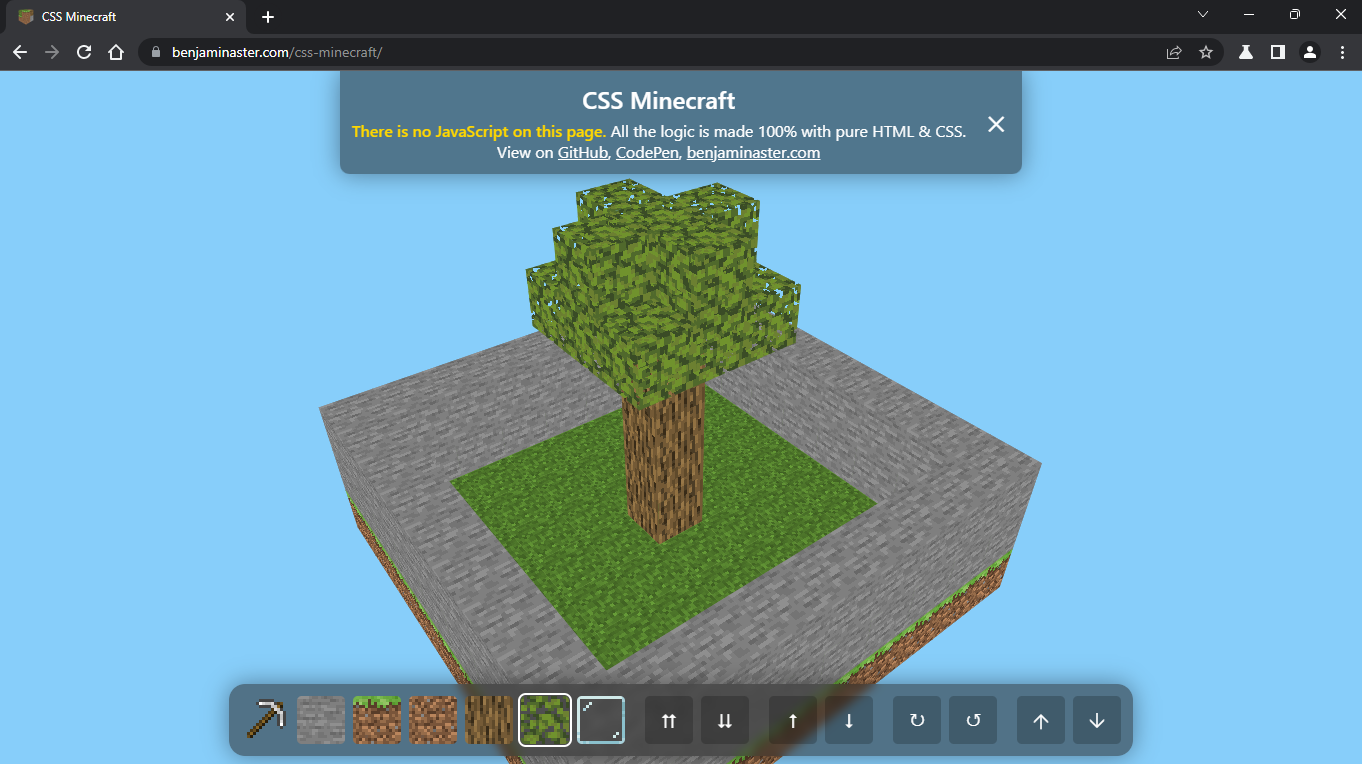
https://benjaminaster.com/css-minecraft/
 clear siren
insane
all the cubes are radio inputs with values of each cube type that get the corresponding value checked, clever
and then there's transform and translate magic to make them into 3d objects
 echo frost
 unborn quest
Is it possible to add the current wallpaper dms like this from discord as a them...
unborn quest
Is it possible to add the current wallpaper dms like this from discord as a them...
 grand surge
smoky belfry
me when i manage to patch discord a little with CSS
the big brain devs in the me...
grand surge
smoky belfry
me when i manage to patch discord a little with CSS
the big brain devs in the me...
 smoky belfry
lmao
 next shard
unborn quest
Is it possible to add the current wallpaper dms like this from discord as a them...
next shard
unborn quest
Is it possible to add the current wallpaper dms like this from discord as a them...
Of course you can.
And you can put any image/gif in dm too.
 real quarry
who wants to help me find the bottleneck CSS rules in here: https://raw.githubusercontent.com/RayDeeUx/raydeeux/main/.vencord/custom.css
-# disclaimer: i'm not passing any of these CSS rules as my own. aside from the font assignment, most of the file is a patchwork of stuff from #css-snippets that i want to use. i keep it in a css file under my github profile because i trest QuickCSS as my own quick-toggle for hiding blocked/ignored messages w/o fully restarting discord. also there's a good chance some of the CSS rules are cryptic as hell bc i kept forgetting to add comments describing what they do
last i recall :has was a major bottleneck
real quarry
oh yeah forgot to mention: ping me if you find the bottlenecks btw
 crimson skiff
real quarry
who wants to help me find the bottleneck CSS rules in here: https://raw.githubus...
crimson skiff
real quarry
who wants to help me find the bottleneck CSS rules in here: https://raw.githubus...
.form_f75fb0:has(.base_b88801)
.form_f75fb0:has(.channelTextArea__74017:focus-within)
[class*="dm_"]:has([class*="linkPlated_"])
these selectors dont have a proper direct children selectors, so it would cause issues
 copper flame
real quarry
who wants to help me find the bottleneck CSS rules in here: https://raw.githubus...
copper flame
real quarry
who wants to help me find the bottleneck CSS rules in here: https://raw.githubus...
div[class^="name__"]:not(:has(div)):not(:has(span)) {
    color: hsl(0, 0%, 85%)!important;
}```

girl...also
youre very inconsistent about your class selectors.. some are reroll resistant and some aren't
husk
 serene grove
is there a practical way to change search bar position when in a forum channel depending on whether a post is open or not? not really happy with it moving like that if there's a way to change where it ends up

 real quarry
copper flame
youre very inconsistent about your class selectors.. some are reroll resistant a...
real quarry
copper flame
youre very inconsistent about your class selectors.. some are reroll resistant a...
clarification: it's bits and pieces of #🎨-css-snippets i want to use
but thx either way
echo frost
serene grove
is there a practical way to change search bar position when in a forum channel d...
do you mean you want this bar to stay where it is when opening a post?

so like this? (except not stretched obviously)
 serene grove
echo frost
do you mean you want this bar to stay where it is when opening a post?
serene grove
echo frost
do you mean you want this bar to stay where it is when opening a post?
I just want the search bar and the notification/member list buttons to move to the right of the section they're in

just don't know what I would need to add to my css for it to change when a post is open
echo frost
echo frost
so like this? (except not stretched obviously)
so like this
serene grove
no I still want it to be left of the post like it currently is, just moved over 80 pixels or so
serene grove
it's probably something with snippets since I've kinda built them up over time tbh
I was just wondering if there's something I could detect with my css to know if a post is open and adjust it based on that so I don't have to refactor all of my shoddily put together snippets
just one 
thanks for the advice tho I was going to have to restrucure this all eventually
echo frost
it's caused by the theme
not the snippets
i'm able to reproduce it with just the theme
serene grove
man
echo frost
serene grove
man
make an issue on the github
echo frost
serene grove
man
here's a temporary fix
.threadSidebarOpen_f75fb0 .toolbar__9293f {
  padding-right: 0 !important;
}
thank you
real quarry
ok i removed the problematic CSS rules and the lag is mostly gone now i'll be back if i get more issues
echo frost
real quarry
ok i removed the problematic CSS rules and the lag is mostly gone now i'll be ba...
probably remove every rule with :has()
 silver shard
next shard
Of course you can.
And you can put any image/gif in dm too.
silver shard
next shard
Of course you can.
And you can put any image/gif in dm too.
how did you hide the channel/message list?
echo frost
silver shard
how did you hide the channel/message list?
there's a lot of #🎨-css-snippets for that
next shard
silver shard
how did you hide the channel/message list?
I have a theme that I modified a bit from an existing code. I can send it to you in pm if you want.
silver shard
next shard
I have a theme that I modified a bit from an existing code. I can send it to you...
yea sure
silver shard
echo frost
there's a lot of <#1028106818368589824> for that
those are old and dont work ..
next shard
silver shard
yea sure
As soon as I get home I'll give it to you.
silver shard
next shard
As soon as I get home I'll give it to you.
thanks
next shard
silver shard
thanks
Np np!
echo frost
next shard
As soon as I get home I'll give it to you.
can you send it here?
i'm kind of interested too
next shard
echo frost
can you send it here?
i'm kind of interested too
Ohh! Yes, I can of course.
I eat then I give you the file
next shard
@echo frost & @silver shard sorry for the wait
https://cdn.discordapp.com/attachments/1361785660985446460/1376956987732135996/d4cXQ7e.webm?ex=6837df60&is=68368de0&hm=faee646a302f9fc45ddb75b82b7b28a84fafe362f1495bba6ac31fd3d3cccc1b&
I don't own the base code, but I do remember making changes to some of the displays to make them look better.
silver shard
next shard
<@683171006717755446> & <@959892027154235405> sorry for the wait
https://cdn.dis...
nice guns.lol thought i was the only person who liked shadymoon
thanks btw
next shard
silver shard
nice guns.lol thought i was the only person who liked shadymoon
Thankssss
And yes I like Shadymoon very much !
next shard
silver shard
thanks btw
you're wlc :D
silver shard
next shard
you're wlc \:D
its so smooth thank you sm
only thing thats slightly annoying is how when hovered the panel doesnt reach the bottom

also is it just me or are the animations a bit laggy?
it doesnt show on my primary monitor but when I have it on my second one its really laggy
any fix for this?
the weird thing is, its smooth when im in dms but on servers it gets laggy
next shard
silver shard
also is it just me or are the animations a bit laggy?
That's why I tried to modify the code. But yes, it lags a little.
silver shard
next shard
That's why I tried to modify the code. But yes, it lags a little.
aw man
 thorn sonnet
does anyone what the selector of the zoom circle from the Vencord ImageZoom-Addon is? it can't be selected in the dev tools

 oak plover
It probably has pointer events set to none you kinda just gotta search for it
 onyx mesa
i enabled all pointer events and it's still not selectable
onyx mesa
thorn sonnet
does anyone what the selector of the zoom circle from the Vencord ImageZoom-Addo...
found the whole thing
 thorn sonnet
onyx mesa
found the whole thing
thorn sonnet
onyx mesa
found the whole thing
thank you!
 austere cloak
Anyone can help me fixing my css :
/* TransitionSSS */
.username__5d473 {
    width: fit-content;
}
[class^="memberInner"]:not(:hover) [class^="username"] {
transform: translateX(0);
transition: all 1.2s linear;
}
[class^="memberInner"]:hover [class^="username"] {
transform: translateX(calc(80% * -3.8));
transition: all 4.7s linear;
overflow: visible;
}
/* set respective widths */
.username__5d473 {
    width: fit-content;
}
.roleName_a930f1 {
    width: 100%
}
/* main stuff */
.memberInner__5d473:not(:hover) .name__91a9d,
.roleNameContainer_a930f1:not(:hover) .roleName_a930f1 {
    transform: translateX(0);
    /* time to get back to original position */
    transition: all 1.2s linear;
}
.memberInner__5d473:hover .name__91a9d,
.roleNameContainer_a930f1:hover .roleName_a930f1 {
    transform: translateX(-100%);
    overflow: visible;
    /* time to scroll through */
    transition: all 4.7s linear;
}
/* give space to breathe */
.roleNameContainer_a930f1,
.roleNameSpacing_db0ee9 {
    flex: 0 0 357px;
}
.memberSpacing_db0ee9 {
    flex: 0 0 0px;
}
[class^="sidebar_"] [class^="panels_"] {
  margin-right: 5px;
  margin-bottom: 5px;
  margin-left: 5px;
  border: 1px solid var(--background-modifier-accent);
  border-radius: 20px;
  box-shadow: 0 0 3px 1px rgba(0, 0, 0, 0.45);
}
[class^="sidebar_"] [class^="panels_"] [class^="container_"],
[class^="sidebar_"] [class^="panels_"] [class^="panel_"] {
  background-color: transparent !important;
}
[class^="sidebar_"] [class^="panels_"] [class^="container_"] [class^="avatarWrapper_"] + [class^="flex_"] {
  margin-left: -10px;
}```
Withe tag release its breaking it ^^what should it do?
austere cloak
Seeing long role name on hover and same for nicknames (witht he animation above) ^^
Iv tried classupdt sites but seems not working/updated idk
austere cloak
thorn sonnet
what should it do?
Ping me in rep plz^^
echo frost
next shard
<@683171006717755446> & <@959892027154235405> sorry for the wait
https://cdn.dis...
ah so it's a modified version of the one in #🎨-css-snippets
echo frost
austere cloak
Seeing long role name on hover and same for nicknames (witht he animation above)...
Do you have a video of it working?
austere cloak
echo frost
Do you have a video of it working?
Hmm no :x
Its partially working if u put in ur css
Just seach for a person thats as ... in name and uwll see the pb
next shard
echo frost
ah so it's a modified version of the one in <#1028106818368589824>
Yes, I have a lot of themes that I got from this channel and then modified them to make them look better. At least for me.
echo frost
austere cloak
Its partially working if u put in ur css
Just seach for a person thats as ... in...
i see the problem. it makes the name slide out whenever you hover over someone's name in member list
austere cloak
echo frost
i see the problem. it makes the name slide out whenever you hover over someone's...
y
echo frost
But i'm not really sure what you want to happen
austere cloak
Actually itts not working
Like if u take a long name its not dissplaying the letters after...
(and should work for long role name aswell)
echo frost
What's supposed to be animated
austere cloak
The name
like the slide
Its an animation '-'
Ican't say better tbh :/
U got the thing but if u try on longname, its nor working properly
- its going on avatar now, before (no)
Should slide on this (see all name/rolename) on hovering

 echo frost
austere cloak
Should slide on this (see all name/rolename) on hovering
echo frost
austere cloak
Should slide on this (see all name/rolename) on hovering
oh the role there not in the member list?
austere cloak
echo frost
oh the role there not in the member list?
I want to make it work for both, its not working since quite a long time rn but Ihave already post a msg, with no answer, so I redo now
But its deprecated since tag get realease for everyone (so few weeks ago)
Idk if due to a class name change or idk
echo frost
So you want it to expand for all of these?

 austere cloak
echo frost
So you want it to expand for all of these?
austere cloak
echo frost
So you want it to expand for all of these?
Yes
thorn sonnet
@austere cloak i fixed the long usernames with this simple snippet:
.visual-refresh .memberInner__5d473:hover {
    padding-right: 0;

    .name__703b9 {
        overflow: visible;
    }
}
I can remove all of the things I sent previously ?
thorn sonnet
it doesn't have animations and emojis at the end are bugged
thorn sonnet
austere cloak
I can remove all of the things I sent previously ?
not all, it only affects the user names
austere cloak
thorn sonnet
it doesn't have animations and emojis at the end are bugged
U mean tag?
echo frost
thorn sonnet
<@387664283598848001> i fixed the long usernames with this simple snippet:
```cs...
does the padding-right do anything?
austere cloak
I don't try it wait
thorn sonnet
echo frost
does the padding-right do anything?
it allows guild tags to not overlab the usernames
austere cloak
thorn sonnet
it allows guild tags to not overlab the usernames
Ok yes it works but, its still hovering on avatar and before it wasn't (like it dissapear before touching the avatar)
Thats not what I have before :/
echo frost
We don't know what you had before
thorn sonnet
oh you only want that you have to hover on the username itself?
austere cloak
I search for a video but I don't have it anymore 😦
austere cloak
thorn sonnet
oh you only want that you have to hover on the username itself?
I want the entire name sliding on username yes
And i want the same thing on role list (serv settings)
Ok I found #🎨-theme-development message
But its partially what I have before
And for role its doing saame slide animation (to permit me to see the entire rolename on hovering)
Its crazy thats discord don't handle this tbh '-'
Even on hoveering u don't have (a lil buble with the entire name displayed '-')
thorn sonnet
@austere cloak this removes the all ... and fixed guild tag position (and uses :has() )
.visual-refresh .nameAndDecorators__91a9d:hover .name__703b9 {
        overflow: visible;
}

.memberInner__5d473:has(.name__703b9:hover) {
    padding-right: 0;
}

.roleRow__5f97b:hover .roleName__5f97b, .role_dfa8b6:hover .overflow__82b15 {
    overflow: visible;
}
i go sleep now
echo frost
do you want the text to scroll back and forth like this?
austere cloak
Not really
echo frost
ok then what do you want
it's impossible to help if you don't explain what you want to happen
austere cloak
austere cloak
Ok I found https://canary.discord.com/channels/1015060230222131221/1134844326933...
Like there but working
As u can see in this video we do'nt see after the ...
and same slide animation for the long role name (in server settinggs role list
echo frost
do you want it to be like this but animated?
austere cloak
Yes
But not go on avatar
Like the video i sent
'Collapse clan tags to icon (with pazazz)'
BTW : I used this snippets aswell for tags so u can ignore them iguess
echo frost
is this what you want? ```css
.nameContainer__703b9 {
overflow: hidden;
}
.memberInner__5d473 .name__703b9 {
transition: transform 2s linear;
overflow: visible;
}
.memberInner__5d473:hover .name__703b9 {
transform: translateX(calc(-100%));
}
.membersGroup_c8ffbb {
transition: transform 1s;
width: fit-content !important;
}
.membersGroup_c8ffbb:hover {
transform: translateX(calc(-100% + 264px));
}
try it again
i forgot to include that part, and just edited it to include it
it doesn't work as well though
austere cloak
Ok
austere cloak
echo frost
is the role working?
No
Its a bit bugged
Possible to have it in role server settings, Like I said previously
echo frost
haven't done that yet
austere cloak
echo frost
try this
.nameContainer__703b9 {
  overflow: hidden;
}
.memberInner__5d473 .name__703b9 {
  transition: transform 2s linear;
  overflow: visible;
}
.memberInner__5d473:hover .name__703b9 {
  transform: translateX(calc(-60%));
}
.membersGroup_c8ffbb {
  height: 18px;
  box-sizing: content-box;
  >span {
    transition: transform 2s linear;
    position: absolute;
    min-width: 240px;
    &:hover {
      transform: translateX(calc(-100% + 240px));
    }
  }
}
.roleRow__5f97b {
  min-width: 240px;
  .roleIcon__5f97b {
    z-index: 100000;
  }
  .roleName__5f97b {
    transition: transform 2s linear;
  }
  &:hover .roleName__5f97b {
    transform: translateX(calc(-75%));
    overflow: visible;
  }
}
Seems good but can u remove the return animation ?
Like when they text go back to original
Cause I don't want it
echo frost
for all of them?
austere cloak
Yes
echo frost
.nameContainer__703b9 {
  overflow: hidden;
}
.memberInner__5d473:hover .name__703b9 {
  overflow: visible;
  transition: transform 2s linear;
  transform: translateX(calc(-60%));
}
.membersGroup_c8ffbb:hover {
  height: 18px;
  box-sizing: content-box;
  >span {
    transition: transform 2s linear;
    position: absolute;
    min-width: 240px;
    transform: translateX(calc(-100% + 240px));
  }
}
.roleRow__5f97b {
  min-width: 240px;
  .roleIcon__5f97b {
    z-index: 100000;
  }
  &:hover .roleName__5f97b {
    transition: transform 2s linear;
    transform: translateX(calc(-75%));
    overflow: visible;
  }
}
Seems to have some issue due to some icons :
Sry for delay PC is so slow asfck for no reason
echo frost
increase this to -80% or -100% or something
 austere cloak
echo frost
increase this to -80% or -100% or something
austere cloak
echo frost
increase this to -80% or -100% or something
Ok !
 upper isle
i do horrific things

 pure cairn
Is that scss?
 plain kelp
Wish css had // comments
 chilly knoll
upper isle
i do horrific things
chilly knoll
upper isle
i do horrific things
How come for L33 you added 2 var's
clear siren
yeah // for comments would be awesome
onyx mesa
echo frost
```css
.nameContainer__703b9 {
overflow: hidden;
}
.memberInner__5d473:hover ....
i tried doing something like this a while back for the channel description but it just did not want to function
chilly knoll
pure cairn
If the first one is not available then the 2nd one comes in clutch
Why wouldnt the first one be available
pure cairn
You think discord uses the same variables for light, classic, dark and darker mode?

If so, then I'm sorry to disappoint you
As it's not the case for every element
oak plover
There’s probably still a group of classes that get their colors from a hex value somewhere
upper isle
chilly knoll
How come for L33 you added 2 var's
that's just how discord does it
i assume its for visual refresh/non visual refresh
i needed to explicitly color it the same as another element
oh its for different themes
upper isle
pure cairn
Is that scss?
yop
chilly knoll
pure cairn
You think discord uses the same variables for light, classic, dark and darker mo...
So rushii is making his theme apply to multiple discord themes (dark, darker classic light?)
chilly knoll
pure cairn
As it's not the case for every element
I used to theme vendetta, i already expected desktop/web to be the same

pure cairn
oak plover
There’s probably still a group of classes that get their colors from a hex value...
Yes, choose your fighter
We have var(--white-500) and var(--white), both are #FFFFFF

pure cairn
chilly knoll
So rushii is making his theme apply to multiple discord themes (dark, darker cla...
Yeah, because the code is doodoo
pure cairn
chilly knoll
I used to theme vendetta, i already expected desktop/web to be the same
I miss Vendetta

clear siren
pure cairn
I miss Vendetta
you're not using stock are you
clear siren
bunny stopped working for me, switched to revenge
pure cairn
I'm still on 277.12 while the current patch is 281.14
pure cairn
clear siren
I just apply via xposed and forget it
That's fair, I use the manager
chilly knoll
clear siren
bunny stopped working for me, switched to revenge
Likewise i have to use revenge for my alpha builds (still using bunny gor heta cuz i haven't updated this app yet)
chilly knoll
pure cairn
Yeah, because the code is doodoo
Sounds about right
pure cairn
Is revenge working fine even for stable builds?
Just so I know what to switch to once bunny breaks
clear siren
I'm on stable
pure cairn
clear siren
I'm on stable
could you please send me a message request? the header in that section is not transparent but I can't get to it as I don't have messages requests rn
so I can make a PR to fix that
or straight up give you the selector as it's just one line
chilly knoll
pure cairn
Is revenge working fine even for stable builds?
Yes
chilly knoll
pure cairn
I'll probably switch to that then
Sorry
chilly knoll
pure cairn
are plugins being maintained/developed?
Plugin's became a mess since vendetta died lmao
Its as good as whatever bunny's is like
chilly knoll
I love matching discord themes


 pure cairn
chilly knoll
Sorry
pure cairn
chilly knoll
Sorry
what for?
chilly knoll
chilly knoll
I love matching discord themes
Oops wrong theme on vencord lol

 chilly knoll
pure cairn
what for?
chilly knoll
pure cairn
what for?
Shrug
crimson skiff
pure cairn
I'm still on 277.12 while the current patch is 281.14
279.13 here, havent updated after bunny went eol
clear siren

 iron smelt
 austere cloak
 chilly knoll


 crimson skiff
 chilly knoll
copper flame
someone inject me with motivation to finish the unbound android loader
chilly knoll
copper flame
someone inject me with motivation to finish the unbound android loader
Unbound dev is deader than my soul
crimson skiff
chilly knoll
Oneplus?
yeah i think so, not sure though
chilly knoll

crimson skiff
planning to switch to nothing 3 because this thing has served me well for 4 years
echo frost
I just use vanilla discord on mobile
 full rover
@echo frost right uh, continuing from #1374819878011277352 yeah i'd love to see those animations back, maybe even the old reactions. idk how super reactions would work
full rover
echo frost
aren't super reactions already animated
yeah they are just not sure how it would co-exist with a quickcss that re-adds the old animations from 2020 discord
 tight edge
What is the class name for when you hover over messages in the chat? I forgot
tight edge
Discord messages arent changing colour for me when I hover over them
echo frost
tight edge
Discord messages arent changing colour for me when I hover over them
You should just be able to set --background-message-hover, unless you're doing something weird in your theme
.theme-dark.mouse-mode.full-motion.visual-refresh .message__5126c:hover, .theme-dark.visual-refresh .message__5126c.selected__5126c {
background: var(--background-message-hover);
}``` tight edge
Was able to get it to work, thanks
grand surge
copper flame
aliucord >>
 fierce haven
I'm a necroposting hero but thanks for the snippet, adjusted it a bit to have more native 'kde-breeze' like look 
 echo frost
base64 encoding svgs pains me
fierce haven
i guess other way around would be mask-image: but base64 svg works well enough for a snippet
echo frost
?
other way around is url encoding or utf8
--censored-server-icon: url("data:image/svg+xml,<svg xmlns='http://www.w3.org/2000/svg' width='120' height='120'><rect width='120' height='120' fill='%2326232b'/><text xmlns='http://www.w3.org/2000/svg' x='50%' y='50%' fill='%23dbdee1' dominant-baseline='middle' text-anchor='middle' style='font-size: 48px'>-</text></svg>");
you can just do that
even this should work
--var: url('data:image/svg+xml,<svg xmlns="http://www.w3.org/2000/svg" width="24" height="24" viewBox="0 0 24 24"><path fill="currentColor" d="M18 12.998H6a1 1 0 0 1 0-2h12a1 1 0 0 1 0 2"/></svg>');
but to be safe, you could use %3Csvg xmlns='http://www.w3.org/2000/svg' width='24' height='24' viewBox='0 0 24 24'%3E%3Cpath fill='currentColor' d='M18 12.998H6a1 1 0 0 1 0-2h12a1 1 0 0 1 0 2'/%3E%3C/svg%3E
urlencoding the < and >
thoughts? (using animation method inspired by https://discord.com/channels/1015060230222131221/1374819878011277352)
oops didn't show off animated shift part very well
it doesn't look quite as smooth on the recording
onyx mesa
echo frost
base64 encoding svgs pains me
i have learned from my mistakes 
grand surge
iron smelt
How did you install the .ipa file on the iPhone?
crimson skiff
grand surge
How did you install the .ipa file on the iPhone?
probably jailbroke the phone
grand surge
I need more details
 hexed imp
 fierce haven
echo frost
other way around is url encoding or utf8
fierce haven
echo frost
other way around is url encoding or utf8
yeah, i've figured and fixed it the next day, 4am brainfarts are cruel 
 errant zenith
fierce haven
I'm a necroposting hero but thanks for the snippet, adjusted it a bit to have mo...
errant zenith
fierce haven
I'm a necroposting hero but thanks for the snippet, adjusted it a bit to have mo...
could u share please :3
fierce haven
errant zenith
could u share please :3
prolly there's still some stuff to fix, atleast it works 
.winButton_c38106:nth-of-type(1) svg,
.winButton_c38106:nth-of-type(2) svg,
.winButton_c38106:nth-of-type(3) svg {
    display: none;
}

.winButton_c38106 {
    width: 26px;
    height: 26px;
    border-radius: 100%;
    margin-right: 6px;
}
/* Minimize button */
.winButton_c38106:nth-of-type(1)::before {
    content: '';
    width: 20px;
    height: 20px;
    background-color: currentColor;
    mask: url('data:image/svg+xml,<svg xmlns="http://www.w3.org/2000/svg" fill="none" stroke="currentColor" viewBox="0 0 24 24"><path d="M6 9l6 6 6-6"/></svg>');
    mask-size: 100%;
    -webkit-mask-size: 100%;
}
/* Maximize button */
.winButton_c38106:nth-of-type(2)::before {
    content: '';
    width: 20px;
    height: 20px;
    background-color: currentColor;
    mask: url('data:image/svg+xml,<svg xmlns="http://www.w3.org/2000/svg" fill="none" stroke="currentColor" viewBox="0 0 24 24"><path d="M18 15l-6-6-6 6"/></svg>');
    mask-size: 100%;
    -webkit-mask-size: 100%;
}
/* Close button */
.winButton_c38106:nth-of-type(3)::before {
    content: '';
    width: 20px;
    height: 20px;
    background-color: currentColor;
    mask: url('data:image/svg+xml,<svg xmlns="http://www.w3.org/2000/svg" fill="none" stroke="currentColor" viewBox="0 0 24 24"><line x1="18" y1="6" x2="6" y2="18"></line><line x1="6" y1="6" x2="18" y2="18"></line></svg>');
    mask-size: 100%;
    -webkit-mask-size: 100%;
} ```tysmmm
 thin obsidian
guys is there any aero looking themes?
 thin obsidian
echo frost
a windows 7 theme?
thin obsidian
echo frost
a windows 7 theme?
yeah, win7
echo frost
this maybe?
 tranquil whale
echo frost
tranquil whale
echo frost
and maybe this
echo frost
tranquil whale
wtf is this
https://raw.githubusercontent.com/Immortal473/Glitchcord/refs/heads...
wtf why is there an import at the bottom
surprisingly useable
thin obsidian
echo frost
and maybe this
yeah, smth like this
echo frost
thin obsidian
yeah, smth like this
that one is 2 years old though, so probably doesn't work anymore
echo frost
echo frost
this maybe?
is this not what you're wanting?
thin obsidian
prob like this but with little changes
yeah
ill probably just make my own from this point
echo frost
 echo frost
is this not what you're wanting?
echo frost
echo frost
is this not what you're wanting?
that's the current version of this

GitHub
we have aerochat at home. Contribute to Blade04208/7.theme.css development by creating an account on GitHub.
thin obsidian
thank you so much
 potent horizon
guys does anyone know how to change the color for platform indicators? I figured out how to change the color for all statuses, but how to change the color for statuses individually?
 chilly knoll
potent horizon
guys does anyone know how to change the color for platform indicators? I figured...
chilly knoll
potent horizon
guys does anyone know how to change the color for platform indicators? I figured...
Idk if there is a better way but this is how i did mine
rect[fill='#82838b'], svg[fill='#82838b'] {
        fill: #75748B;
    }
    .status_a423bd[style='background-color: rgb(130, 131, 139);'] {
        background-color: #75748B !important;
    }
    rect[fill='#43a25a'], svg[fill='#43a25a'] {
        fill: #90b27c;
    }
    .status_a423bd[style='background-color: rgb(67, 162, 90);'] {
        background-color: #90b27c !important;
    }
    rect[fill='#ca9654'], svg[fill="#ca9654"] {
        fill: #C3A260;
    }
    .status_a423bd[style='background-color: rgb(202, 150, 84);'] {
        background-color: #C3A260 !important;
    }
    rect[fill='#d83a42'], svg[fill='#d83a42'] {
        fill: #C4967A;
    }
    .status_a423bd[style='background-color: rgb(216, 58, 66);'] {
        background-color: #C4967A !important;
    }
    rect[fill='#9147ff'], svg[fill='#9147ff'] {
        fill: #8F669C;
    }
    .status_a423bd[style='background-color: rgb(145, 71, 255);'] {
        background-color: #8F669C !important;
    }
    svg>path[fill='#43a25a'] {
      fill: var(--candy-green);
    }
tysm
thorn sonnet
echo frost
thoughts? (using animation method inspired by https://discord.com/channels/10150...
looks nice
tranquil whale
echo frost
wtf why is there an import at the bottom
💀
thats my friend first ever theme
but I did basically most of it
echo frost
imports don't work when they're at the bottom
 half crystal
thin obsidian
thank you so much
half crystal
thin obsidian
thank you so much
Hey, just so you know, dont expect everything to work with this theme. Some menus may be broken
tranquil whale
echo frost
imports don't work when they're at the bottom
gotta tell him
 wanton meteor
I have never tried really working with CSS before but its actually quite fun, i can do some very stupid stuff without really breaking things, i mean who needs Chats anyways? (The code is from the custom loading gif snipped by someone else)
 clear siren
keep doing what you're doing, that's how I also learned css, just throw shit in and see what sticks, can be very fun
pure cairn

 fleet iron
clear siren
keep doing what you're doing, that's how I also learned css, just throw shit in ...
fleet iron
clear siren
keep doing what you're doing, that's how I also learned css, just throw shit in ...
i mean it was kewl to have mdn too
it's really helpful ngl
clear siren
yeah I don't know if I had learned anything without mdn
half crystal
fleet iron
i mean it was kewl to have mdn too
it's really helpful ngl
I think the first time I used MDN was when I started ddex
fleet iron
half crystal
I think the first time I used MDN was when I started ddex
what is ddex ?
fleet iron
clear siren
https://github.com/Blade04208/ddex4
Ooo, cool theme i liek :3
thin obsidian
half crystal
Hey, just so you know, dont expect everything to work with this theme. Some menu...
yeeah, thats okay
 fierce bridge
 crimson meadow
a
crimson meadow
a
v+ no programming
 sterile sluice
i am making a custom plugin but im trying to make a api call to my api, however it keeps getting block by cors
 spring hill
sterile sluice
i am making a custom plugin but im trying to make a api call to my api, however ...
spring hill
sterile sluice
i am making a custom plugin but im trying to make a api call to my api, however ...
that sounds like a #🧩-plugin-development question
chilly knoll
Idk if im a blind bat but does vencord have any design systems like mobile discord? I sometimes find it useful for theming (like seeing button colours)


 vestal field
chilly knoll
Idk if im a blind bat but does vencord have any design systems like mobile disco...
vestal field
chilly knoll
Idk if im a blind bat but does vencord have any design systems like mobile disco...
experiments plugin
 tidal heron
wish i could have modded discord on ios without having to thru bs
chilly knoll
tidal heron
wish i could have modded discord on ios without having to thru bs
iOS bad
tidal heron
chilly knoll
iOS bad
not wrong but im not a fan of android and the eco system
wanton meteor
Understandable. Both bad.
Or rather both are restricted and not giving developers freedom, android more but therefore it's also taking more data bcs google lol
Sad that linux on phones isn't such a big thing, it isn't even hard to support bcs many things are running linux in the back
But thats over the scope of this channel here
smoky belfry
tbh android sucking more and more
like wtf do you mean i'm not admin on my own fucking device and if i become, then it gets out of warranty
wanton meteor
smoky belfry
like wtf do you mean i'm not admin on my own fucking device and if i become, the...
fr
well magisk helps, but warranty is gone
i removed HyperOS from my phone and installed CrDroid, but it took endless because xiaomi wont approve your unlock bootloader request as normal user, so i cant recommend it, i finally used an jailbreak instead of the "official" way
smoky belfry
to unlock my old huawei phone i literally had to write a program to bruteforce the code
i first filtered them based on IMEI
and then i automated the ADB commands to try 4 unlock codes and then reboot
chilly knoll
smoky belfry
like wtf do you mean i'm not admin on my own fucking device and if i become, the...
Not all companies are like that and i feel like in lots of cases its a "who cares" moment
wanton meteor
chilly knoll
Not all companies are like that and i feel like in lots of cases its a "who care...
Every major companies afaik, do you know one which gives you root just free? Would really interest me.
wanton meteor
smoky belfry
to unlock my old huawei phone i literally had to write a program to bruteforce t...
Damn, but at least there is a somewhat doable way, just having to wait for them to approve an request but they never do feels shit
chilly knoll
wanton meteor
Every major companies afaik, do you know one which gives you root just free? Wou...
I know for a fact onepiss isnt like that, u can unlock the bootloader without voiding warranty (unless they have changed this in the last 2 years)
And rooting isnt paid
This is the wrong channel for this convo btw 💀 can we make a thread
smoky belfry
wanton meteor
Damn, but at least there is a somewhat doable way, just having to wait for them ...
crack it
wanton meteor
chilly knoll
I know for a fact onepiss isnt like that, u can unlock the bootloader without vo...
doesnt sound like a knowable brand to me
wanton meteor
chilly knoll
This is the wrong channel for this convo btw 💀 can we make a thread
ikik lets do
smoky belfry
chilly knoll
This is the wrong channel for this convo btw 💀 can we make a thread
goof idea
burnt sky
@chilly knoll i still find this funny lol about how small the mobile icon is
 chilly knoll
burnt sky
<@807170846497570848> i still find this funny lol about how small the mobile ico...
chilly knoll
burnt sky
<@807170846497570848> i still find this funny lol about how small the mobile ico...
half of the times discord is like: fuck your custom icons

 keen sierra
can anyone tell me how this function works and what it changes?
 half crystal
keen sierra
can anyone tell me how this function works and what it changes?
half crystal
keen sierra
can anyone tell me how this function works and what it changes?
it makes the window transparent through electron, but you need a theme that allows transparency for this to work
keen sierra
half crystal
it makes the window transparent through electron, but you need a theme that allo...
please tell me where I can get this theme
half crystal
keen sierra
will any topic do?
half crystal
well, one that has transparency ofc
keen sierra
ok, thanks ❤️
 wicked zenith
Is this list up to date?
https://docs.betterdiscord.app/discord/variables#main-variables

BetterDiscord Docs
User and developer documentation for using and creating addons for BetterDiscord.
seems like a blurple variable is used instead of brand now
is there a better resource anywhere?
spare mural
why would you need a list, just check what variables the elements use which you wanna modify
chilly knoll
wicked zenith
Is this list up to date?
https://docs.betterdiscord.app/discord/variables#main-v...
Idk if its up to date but i found it pretty useful when i made my theme
wicked zenith
spare mural
why would you need a list, just check what variables the elements use which you ...
because i want to change the accent color and i dont want to miss any variables
spare mural
spare mural
why would you need a list, just check what variables the elements use which you ...
the most up-to-date list is always just in your devtools 😊

 mint kiln
i wonder if this still works on other people vencord
SpotifyControl plugin has to be enabled afair
iron smelt
mint kiln
SpotifyControl plugin has to be enabled afair
Look broken to me

 iron smelt
mint kiln
Or are you using another theme on top of it
iron smelt
mint kiln
Or are you using another theme on top of it
No
iron smelt
mint kiln
Theres lyrics now?
mint kiln
iron smelt
<#1281303278008799352>
Could be because of this
iron smelt
mint kiln
Could be because of this
Its not
mint kiln
Because i dont use unofficial plugins and designed it for official
mint kiln
iron smelt
Its not
I mean it looks like the lyrics is the one being "broken"
half crystal
spare mural
why would you need a list, just check what variables the elements use which you ...
Meanwhile discord with 50 billion variables for brand-500:
spare mural
half crystal
Meanwhile discord with 50 billion variables for brand-500:
They have build tools
half crystal
spare mural
They have build tools
Ok, sure, but why the hell would they not use brand-500 instead of button-filled-brand-background, especially when that var just goes straight to brand-500, and brand-500 goes to blurple-50!
Look at this shit
https://github.com/Blade04208/gord/blob/main/import.css#L83-L104
 lunar hamletBOT
half crystal
Look at this shit
https://github.com/Blade04208/gord/blob/main/import.css#L83-L1...
lunar hamletBOT
half crystal
Look at this shit
https://github.com/Blade04208/gord/blob/main/import.css#L83-L1...
import.css: Lines 83-104
#app-mount {
    --brand-200: var(--brand-100);
    --brand-260: var(--brand-100);
    --brand-360: var(--brand-300);
    --brand-400: var(--brand-300);
    --brand-460: var(--brand-500);
    --brand-530: var(--brand-500);
    --brand-560: var(--brand-1000);
    --brand-600: var(--brand-500);
    --brand-800: var(--brand-700);
    --brand-900: var(--brand-1000);
    --control-brand-foreground-new: var(--brand-300);
    --gnome-accent-bg: var(--brand-500);
    --blurple-50: var(--brand-500);
    --text-brand: var(--brand-300);
    --checkbox-background-checked: var(--brand-500) !important;
    --checkbox-border-checked: var(--brand-500) !important;
    --bg-brand: var(--brand-500) !important;
        --button-filled-brand-background: var(--brand-500) !important;
    --button-filled-brand-background-hover: var(--brand-700) !important;
    --background-message-highlight: color-mix(in srgb, var(--brand-500), transparent 80%)!important;
}
the brand variables are rarely used directly (I think) they're usually used to make those other variables
half crystal
echo frost
the brand variables are rarely used directly (I think) they're usually used to m...
I've seen brand be used the most lol
spare mural
half crystal
Ok, sure, but why the hell would they not use brand-500 instead of button-filled...
Because that’s how you make large applications
Using a lot of variables means also easy editing of stuff like colors in the future
chilly knoll
lunar hamlet
**import.css:** Lines 83-104
```css
#app-mount {
--brand-200: var(--brand-10...
(Why are we husking this)
half crystal
chilly knoll
(Why are we husking this)
Something something discord variables something chaos something something line 90 something something invalid argument clown emoji I must send something
chilly knoll
pure cairn
Is this a
> I have no perms and I must react
moment?
Was that direct at me
pure cairn
Nope
echo frost
chilly knoll
(Why are we husking this)
they're setting variables to weird things
like brand-200 to brand-100 etc.
even weirder i just noticed, --brand-560 to --brand-1000 for some reason
at least that's why i ed it
clear siren
discord vars are all husk, pointing to other vars that may or may not be defined (or pointing to yet another var) and all with weird values

spaghetti generator
pure cairn
Fun part is that certain variables don't even work across different themes
They straight up use different ones for no reason
clear siren
reason is that discord devs always create a new var when they create a new element or feature because they're terrible at keeping anything consistent
chilly knoll
Thats so bad
chilly knoll
echo frost
they're setting variables to weird things
like brand-200 to brand-100 etc.
even ...
Why point one brand to another
💀
echo frost
that's why I husked it
echo frost
clear siren
discord vars are all husk, pointing to other vars that may or may not be defined...
that's for color theme
I thought I learned about it from you?
copper flame
clear siren
discord vars are all husk, pointing to other vars that may or may not be defined...
this is smart wdym
if they're undefined the color mix just does what's hardcoded
echo frost
that color-mix is for client theme basically
it allows this

I use this to give my discord a slight tint
  --theme-base-color: #4e194e;
  --theme-base-color-hsl: 300 51% 20%;
  --theme-base-color-amount: 10%;
  --theme-text-color: #6e007f;
  --theme-text-color-amount: 10%;
It's because the gnome color pallette is only 5 colors, and those are already set above this to 100, 300, 500, 700 and 1000, this sets the rest
560 is only used like once and isn't dark enough otherwise
half crystal
chilly knoll
Why point one brand to another
Look up ^
chilly knoll
clear siren
echo frost
it allows this
well yeah bad example, there are others that aren't theme related
vars referencing vars referencing vars with all kinds of weird values and different color syntaxes and stuff
half crystal
clear siren
vars referencing vars referencing vars with all kinds of weird values and differ...
🤑
pure cairn
?remind 9h fix channel activity background and PR it to nvhhr
 sturdy trenchBOT
Alright @pure cairn, in 9 hours: fix channel activity background and PR it to nvhhr
pure cairn
 hasty belfry
Made many changes recently since I finally got around to it. I fixed a bunch of performance issues and made a bunch of tweaks to the way the rain runs/looks.
I was also yelled at for having the rain go over discords UI, so I changed that too .w.
Whatchall think?
 tulip notch
hasty belfry
Made many changes recently since I finally got around to it. I fixed a bunch of ...
tulip notch
hasty belfry
Made many changes recently since I finally got around to it. I fixed a bunch of ...
it's rlly good
hasty belfry
I just wish the video quality was enough for yall to see how the rain was actually refracting things
its alr though
pure cairn
hasty belfry
Made many changes recently since I finally got around to it. I fixed a bunch of ...
Maybe it's just me, but I didn't see any changes when you changed the rain preset 
onyx mesa
pure cairn
Maybe it's just me, but I didn't see any changes when you changed the rain prese...
it changes the ambient sound, pretty sure
pure cairn
Ohhhhhh
I thought it was going to change the rain frequence and density as well
Since, you know, downpouring is heavier than normal rain
And well, I watched the videos without audio so that's on me lol
sturdy trenchBOT
@pure cairn, <t:1749253396:R>: fix channel activity background and PR it to nvhhr


 unkempt silo
thats crazy btw
pure cairn
Have fun
half crystal
half crystal
welp time to build vencord from source to allow localhost
that did not work
my entire fucking theming pipeline is broken
THANKS VEE!
pure cairn
half crystal
worlds greatest security risk but iffohwrpuigbapsiugweabfpg9u
 pure cairn
Lmao
chilly knoll
@pure cairn, <t:1749253396:R>: fix channel activity background and PR it to nvhhr
half crystal
i have removed every instance of csp and now everything is blocked by csp
 pure cairn
Nuh uh
pure cairn
half crystal
i have removed every instance of csp and now everything is blocked by csp
You were supposed to destroy them, not join them
half crystal
pure cairn
You were supposed to destroy them, not join them
I KNOW
half crystal
pure cairn
CSP has the high ground
truly
i cant get this to fucking work
i might just take the commit before's code and like frankenstien it together
are you fucking kidding me
it was a fucking one-liner
average development experience
singlescroller profile
i promise you this is convenient
pure cairn
half crystal
singlescroller profile
i promise you this is convenient
Cursed
Way more than my popouts
half crystal
im making a this
 half crystal
neither its fractal, a libadwaita matrix
pure cairn
Cool I have no idea what that is
All I know is that the design isn't really the best
Too much wasted space
half crystal
hahahahahahaha

@pure cairn here take the wikipedia article for fractal https://en.wikipedia.org/wiki/Fractal_(software)

Fractal is an instant messaging client and collaboration software for the GNOME desktop based on the Matrix protocol.
It is free software under the GNU General Public License version 3.
Fractal can be installed on various Linux distributions via Flathub, which is the recommended installation method, although some distributions provide packages t...
pure cairn
half crystal
hahahahahahaha

pure cairn
half crystal
<@519220048850583567> here take the wikipedia article for fractal https://en.wik...
Written in: Rust
cursed
pure cairn
half crystal
<@519220048850583567> here take the wikipedia article for fractal https://en.wik...
Well ok, sounds good but the design could still be improved
half crystal
basically im basing my theme off of gnome's design language (https://en.wikipedia.org/wiki/Adwaita_(design_language)#Libadwaita) and fractal is the best chat app that follows gnome stadards well so im taking inspo from there

Adwaita is the design language of the GNOME desktop environment. As an implementation, it exists as the default theme and icon set of the GNOME Shell and Phosh, and as widgets for applications targeting usage in GNOME. Adwaita first appeared in 2011 with the release of GNOME 3.0 as a replacement for the design principles used in Clearlooks, and ...
ah yes, button-button
 half crystal
you do noooooooot wanna see the code behind this man
 half crystal
WHAT DO YOU MEAN BOTS USE THE OLD PROFILE MODAL AAAAAAAAAAAAAAAAAAAAAAAAAAAAAAA
 half crystal
yes
echo frost
it looks the same to me?
half crystal
huh
half crystal
yes
echo frost
dev://experiment/2025-04_user_profile_modal_v2
oh
well good because the modal experiment is so ugly
oak plover
“Good” and it’s two modals that have to be themed now cause they can’t just give everything one or the other
I love inconsistency yum
echo frost
well less of this abomination, the better imo
 onyx mesa
that almost looks decent
pure cairn
I'm not ready to fix my snippet to patch that obscenity ngl
oak plover
yeah this is just not that great
echo frost
but i'm pretty sure bot profile modals have always been different than user ones
like always delayed when there's a modal change
oak plover
Yeah there might be a bot version of the experiment later idk
But also I’m thinking about it and it’s probably cause bots don’t have an activity tab
oak plover
echo frost
well less of this abomination, the better imo
my main two issues with it are the abysmal amount of padding and the way the tab bar just kinda floats and doesn’t have a divider below it to properly cut off the scroller below it (unless that wasn’t you adding the divider in here)
echo frost
echo frost
like always delayed when there's a modal change
what i'm talking about (if i remember correctly) is the experiment when the view full bio button was added, and the collapsible roles, and the removal of join date in the mini profile

like it was changed for users, and they forgot to change it for bots
oak plover
Yeah that was bots not getting simplified profiles
So they also still had section headers and I think badges were still in the old position
oak plover
I hate that they removed clutter at first with the experiment and then decided it was just gonna be a reorganization of all the existing sections
but then they removed join date anyways for whatever reason
they just made it an arguably less organized profile popout
echo frost
plain kelp
I hate that they're hiding join date
wdym hiding (present tence)?
they hid it a while ago in the small profile
 edgy sentinel
half crystal
welp time to build vencord from source to allow localhost
edgy sentinel
half crystal
welp time to build vencord from source to allow localhost
localhost is allowed
use 127.0.0.1
half crystal
edgy sentinel
localhost is allowed
use 127.0.0.1
...
well, at least I know how to circumvent the csp if I ever need to
half crystal
plain kelp
Just spin up a http server on localhost that proxies whatever you neef
Yeah. That's what I do
edgy sentinel
why 😭
half crystal
edgy sentinel
why 😭
Because if I need to modify the csp to access a website for theming, then I'm probably smart enough to know that I trust the website I'm doing this for
 quaint sail
omg
half crystal
quaint sail
How are you guys??
if you arent here to discuss themes/css, head to #🧊-off-topic-iceman-only please
hasty belfry
pure cairn
I thought it was going to change the rain frequence and density as well
It did 😭
Its the low quality video I swear
hasty belfry
pure cairn
Maybe
You should be able to tell now. This video switches from "Slow n' Comfy" to "Downpour"
hasty belfry
Tyty
 arctic bison
the original file
and the update one
@pure cairn im stupid. I fixed it. I guess you cannot have a space in the file name, at all
pure cairn
Uh
arctic bison
thanks for your assistance
arctic bison
yeah, adding a hyphen fixes it lol
pure cairn
Lmao okay
I would've never guessed
Oh yeah
I have spaces in the theme name section, not the theme file
Now I remember
Well, you're welcome for nothing I guess lol
 valid jackal
this is probably late but you could only block the entire webhook (so anyone else using it will also be blocked)
 hasty python
anyone know how to make some css snippets with animation not have -4 fps
echo frost
hasty python
anyone know how to make some css snippets with animation not have -4 fps
what's the css?
 normal wharf
I don't appreciate the fact that I'm now forced to use Imgur to host media
I use a customized theme and prefer not to host the background image on there
I get why this was done but I'm really just using my personal cloud storage
burnt sky
pretty sure you can also use github for the images aswell
normal wharf
-# I also don't like GitHub
 upbeat cradle
edgy sentinel
localhost is allowed
use 127.0.0.1
upbeat cradle
edgy sentinel
localhost is allowed
use 127.0.0.1
This just straight up isn't true. I've changed everything from "localhost" to "127.0.0.1" and it still gets blocked.
Just make it a toggle because I shouldn't be forced to build from source just to allow content from domains you don't "trust"
crimson skiff
upbeat cradle
This just straight up isn't true. I've changed everything from "localhost" to "1...
actually, yeah why isn't localhost unblocked
how will you ip log yourself
upbeat cradle
upbeat cradle
Just make it a toggle because I shouldn't be forced to build from source just to...
I've been informed that there was apparently internal discussion of some sort that this would be a bad idea. That's just false.
It's not your fault if some idiot toggles it and then gets screwed.
 subtle rose
(discussion in both #🏥-vencord-support-🏥 and #👾-core-development)
upbeat cradle
And really, now that I think about it. This will just cause the dangerous/sketchy shit to move to these "trusted" domains in some way or another.
echo frost
normal wharf
I don't appreciate the fact that I'm now forced to use Imgur to host media
what are you needing to host media on imgur for
echo frost
normal wharf
I get _why_ this was done but I'm really just using my personal cloud storage
what was done
echo frost
echo frost
what are you needing to host media on imgur for
imgur is super unreliable in my experience
 echo frost
what were you hosting them on before
normal wharf
my own personal cloud storage
echo frost
normal wharf
-# I also don't like GitHub
why?
echo frost
normal wharf
my own personal cloud storage
oh
well if it's just for personal use you can probably modify the whitelist in a dev build
normal wharf
where do I do that?
normal wharf
echo frost
why?
owned by Microsoft
plain kelp
Github is pushing ai slop way too much
But I haven't found any platform that sucks less
normal wharf
what about Codeberg?
chilly knoll
plain kelp
Github is pushing ai slop way too much
Copilot my beloved
echo frost
normal wharf
owned by Microsoft
You could use gitlab or codeberg or something
But what do you even need to import
You can just base64 encode any bitmap images
and if it's svgs (probably not because you said imgur), you just need to urlencode a few characters
I'm pretty sure this is the whitelist https://github.com/Vendicated/Vencord/blob/main/src/main/csp.ts

GitHub
The cutest Discord client mod. Contribute to Vendicated/Vencord development by creating an account on GitHub.
normal wharf
noted, thanks for the help
echo frost
What do you need to import?
normal wharf
oh, it's a jpeg
echo frost
for like a background?
normal wharf
mhm
echo frost
ah
That might be a bit bigger than ideal to base64 encode it and put it in your theme as a data uri, but should work
grand surge
🤤 Gosh I want that
half crystal
grand surge
🤤 Gosh I want that
GitHub
we have aerochat at home. Contribute to Blade04208/7.theme.css development by creating an account on GitHub.
grand surge
Hmm, nicely done. Blends in with the KDE Plasma desktop I've been working on.
 edgy sentinel
arctic bison
<@519220048850583567> im stupid. I fixed it. I guess you cannot have a space in ...
edgy sentinel
arctic bison
<@519220048850583567> im stupid. I fixed it. I guess you cannot have a space in ...
huh?
on vencord?
damn yeah
i will fix
edgy sentinel
echo frost
grand surge
Hmm, nicely done. Blends in with the KDE Plasma desktop I've been working on.
wtf why do you intentionally use win7 look
 fast otter
probably because it looks nice and cozy + nostalgia!
grand surge
I'll need to get the custom titlebar buttons in now
 grand surge
fast otter
probably because it looks nice and cozy + nostalgia!
grand surge
fast otter
probably because it looks nice and cozy + nostalgia!
UwU is nice
Hmm, nicely done. Blends in with the KDE
 blissful ledge
what is css for radius message text box
onyx mesa
blissful ledge
what is css for radius message text box
wym
blissful ledge
onyx mesa
wym
i want to change the radius of the message text box
where you type your message
onyx mesa
blissful ledge
i want to change the radius of the message text box
like the, roundness of it?
blissful ledge
yes
onyx mesa
blissful ledge
yes
something like this?
.channelTextArea_f75fb0, .scrollableContainer__74017 {
    border-radius: 50px !important;
}
hey im looking for which variable themes this bar?
 pure cairn
it depends on the channel type
errant zenith
pure cairn
it depends on the channel type
regular one ig
i assume the only different type might be forum channels
pure cairn
text channels
full screen threads
forum channels
full screen forum posts
voice channels
stage channels
pick your fighter
errant zenith
pure cairn
pick your fighter
prefferably all of them ngl
pure cairn
one second then
errant zenith
tysm
pure cairn
I'll edit this message with the classes next to them
errant zenith
alr
pure cairn
I lied, there's more
errant zenith
also if possible could u tell me what themes this background?
 errant zenith
pure cairn
I lied, there's more
errant zenith
pure cairn
I lied, there's more
damn
pure cairn
I'll give you the full list first
errant zenith
okai
pure cairn
could you just send me a DM request so I can grab the actual class name for that section? thanks
I have it written out as "section" in my theme but actual class name is preferable
errant zenith
pure cairn
could you just send me a DM request so I can grab the actual class name for that...
done
pure cairn
thank you
.chat_f75fb0 > .container__9293f, /* DM requests header */
.title__7449f, /* server guide header */
.chat_f75fb0 > .header__0b563, /* channels & roles header */
.chat_f75fb0.page_c791b2 > .header_c791b2, /* members page header */
.subtitleContainer_f75fb0 > .title_f75fb0, /* text/thread/forum channel header */
.page_c48ade .container__133bf > .container__9293f /* friends list header */
as for this
.messagesPopoutWrap__45690 is the class which themes the background
errant zenith
tysm
 errant zenith
pure cairn
for the header and messages itself there are other classes
errant zenith
pure cairn
for the header and messages itself there are other classes
i might be dumb but it didnt do anything when i tried changing the background to #111111
 pure cairn
you can either add an !important or increase its specificity
to override already existent stylings
errant zenith
pure cairn
to override already existent stylings
okay yeah true
now i just dont know what is the variable for the actual background of the messages
and the header
 pure cairn
you can use ctrl + shift + i to open devtools
then press on the top left corner of the window that opens
to activate the element picker
and click on what you need to find the name of
pure cairn
pure cairn
you can use ctrl + shift + i to open devtools
in case this crashes your client or, even worse, makes you log off, use the NoDevToolsWarning plugin
have you found what you needed?
errant zenith
pure cairn
have you found what you needed?
for some reason changing this doesnt do anything, i might be stupid fr
 pure cairn
 errant zenith
pure cairn
<:wires:1262562427422244874>
errant zenith
pure cairn
<:wires:1262562427422244874>
i figured it out
(i did the same thing i did earlier and it worked for some reason)
no idea what i did wrong but it works so
pure cairn
I wouldn't know either
iron smelt
pure cairn
Why does this look like a big mess made of already existing snippets and personal tweaks?
Oh, because it is
fierce bridge
which is the exact reason it was just denied
pure cairn

 mild patio
Why is this happening??
 pure cairn
Theme conflicts, my favourite
pure cairn
Open devtools and see what's causing it
Can't really help with that since I'm not at my pc
mild patio
pure cairn
Open devtools and see what's causing it
Nothing, they're just not in the right place, and some of them don't show up.
Like this
 pure cairn
¯_(ツ)_/¯
mild patio
pure cairn
¯\_(ツ)_/¯
pure cairn
If it's there then it can't be nothing
mild patio
pure cairn
If it's there then it can't be nothing
Yellow warning?
 mild patio
pure cairn
.
mild patio
pure cairn
.
ok
mild patio
Oh..
pure cairn
I suggest using the F8break plugin to select the popout more easily
mild patio
I didn't understand what was happening, only the class changed.
pure cairn
In this order
Open devtools on the elements tab
On discord, go to the dms list
Right click on someone and hover a drop down menu to make the 2nd popout appear
Without moving your mouse from there, press f8 on your keyboard and go back to devtools
Enable the element picker and select the 2nd popout
mild patio
Yes I did that
pure cairn
Then have fun playing with your client while it's paused
And check for that 2nd popout properties
Because as I said, if it's down there, there's a reason
I don't know said reason though, you'll have to find out
mild patio
Ok thank you, what I understand from the problem is that the 2nd popout does not appear in its specified place, it appears below
pure cairn
Not only below but also more on the right than where it should be
mild patio
Yeah
pure cairn
So check for left/right/top/bottom properties
mild patio
I've really been trying to fix this for hours, I don't understand how
I will try now with the help of F8break
pure cairn
From what I can see it looks like a theme issue since it was working fine on my end earlier
So I would assume it's due to stuff you're using
mild patio
👍🏻
pure cairn
You can do it, it's not too hard
Worst case scenario I find you here, still trying to fix it tomorrow morning when I wake up
mild patio
pure cairn
Worst case scenario I find you here, still trying to fix it tomorrow morning whe...
😭 .
clear siren
backdrop-filter:blur() bug maybe
mild patio
pure cairn
Worst case scenario I find you here, still trying to fix it tomorrow morning whe...
I solved the problem!
I've been using one class all the time, even though doing what I wanted required more than one class linked together.
"This took me 3 hours"
mild patio
Why can't I edit submenu with the main one 😭💔
pure cairn
mild patio
Why can't I edit submenu with the main one 😭💔
Because you said :not(submenu)
So you can't edit the submenu if you tell it not to style the submenu
chilly knoll
pure cairn
So you can't edit the submenu if you tell it not to style the submenu
@amber haven fix
 amber haven
chilly knoll
<@923212189123346483> fix
amber haven
chilly knoll
<@923212189123346483> fix
@pure cairn help
 echo frost
tranquil whale
echo frost
tranquil whale
Im trying to find 3 new discord themes can someone recomend me some
tranquil whale
How do I make discord transperent someone help me pls
fast otter
tranquil whale
Im trying to find 3 new discord themes can someone recomend me some
Not sure this is the place to ask that. Maybe try #🧊-off-topic-iceman-only
half crystal
fast otter
Not sure this is the place to ask that. Maybe try <#1015060231060983891>
No, this is the place to ask that
This is the only theme-related discussion space in this server, so it's on-topic
plain kelp
tranquil whale
How do I make discord transperent someone help me pls
You enable the transparency setting and then find/make a transparent theme
pure cairn
fast otter
Not sure this is the place to ask that. Maybe try <#1015060231060983891>
Why wouldn't it be?
Also what is that channel name lol
plain kelp
It changes all the time
 sand pagoda
can someone give me a simple css that just changes the color of all the backgrounds?
sand pagoda
like separately, chatbox color, guild bar color etc
echo frost
to different colors?
like chatbox to red, guild bar to green?
there's probably some themes that let you do that with just a variable
sand pagoda
ngl i want it to look like this ss
 echo frost
what's that ss from
sand pagoda
carti
sand pagoda
yeah i did but it didnt have the color
sand pagoda
yeah
 cloud joltBOT
echo frost
vp clienttheme
cloud joltBOT
echo frost
vp clienttheme
Recreation of the old client theme experiment. Add a color to your Discord client theme
Authors
Nuckyz
sand pagoda
is it seriously that simple
echo frost
yeah
sand pagoda
i thought it was some css stuff
sand pagoda
i am below super simple
echo frost
:root {
  --base-color: #4e194e;
  --theme-base-color-amount: 90%;
  --theme-text-color: #6e007f;
  --theme-text-color-amount: 90%;
}
clienttheme might have better contrast than using this css
and that's probably what they're using
sand pagoda
yeah probably
well ty for help
@echo frost one more thing, do yk how to get the chatboxes around peoples messages, that wasnt in the css
echo frost
fast otter
pure cairn
Also what is that channel name lol
Realized my mistake, my bad
 silver hound
@pure cairn can you help me
silver hound
pure cairn
Also, don't ask to ask, just ask
but yeah i need help with making a theme discord ones suck
when ur done with work ofc
pure cairn
Do you know anything about css?
This is theme development, not theme spoonfeeding, so you should learn stuff first
Then you can start from an already existing theme and edit things around
And finally make a custom one from scratch
It's not too hard, you just need motivation and willingness to learn new things
pure cairn
Devtools is your friend
silver hound
pure cairn
Devtools is your friend
people keep saying this but for me its clogged
pure cairn
Use element picker
 marble monolith
guys im really stupid and forgot the key combo to open the inspect menu
pure cairn
ctrl shift i
marble monolith
thamks
pure cairn
F12 works on the browser version I think
 civic steppe
hey something went wrong when i updated my discord and i now have permanent flashbang can someone help me please
cloud joltBOT
civic steppe
hey something went wrong when i updated my discord and i now have permanent flas...
My themes broke and now I can't open settings or disable them
open the dev tools with CTRL + Shift + i (Cmd + Option + i on MacOs) and click on the "console" tab at the top. Then paste and run (with enter) the following code.
It will
- disable custom css (you can turn it back on in Vencord Settings)
- copy your current theme links to your clipboard as a backup
- remove all themes
(() => {
    Vencord.Settings.useQuickCss = false
    try {
        const copy = window.copy ?? Vencord.Webpack.Common.Clipboard.copy
        copy(Vencord.Settings.themeLinks.join("\n"))
    } catch { }
    Vencord.Settings.themeLinks = []
    Vencord.Settings.enabledThemes = []
})()
Auto-response invoked by the.rabbit.disabler
half crystal
civic steppe
thanks bot
i invoked the response actually
civic steppe
ah
pure cairn
.fullscreenOnMobile__49fc1 > .modalContent__837b7 > .stack_dbd263 > .stack_dbd263:first-of-type::before {
  content: "";
  position: relative;
  background: url(https://i.imgur.com/AyNnnRO.gif) no-repeat; /* customize here */
  background-position: 50% 0%;
  background-size: contain;
  width: 100%;
  height: 200px;
  margin-bottom: 12px;
}```brings back the banhammer gif on the ban modal, might break other similar modals but idk
haven't found any yet

 echo frost
pure cairn
brings back the banhammer gif on the ban modal, *might* break other similar moda...
echo frost
pure cairn
brings back the banhammer gif on the ban modal, *might* break other similar moda...
Why can't you just use the banger plugin
vp banger
cloud joltBOT
echo frost
vp banger
clear siren
echo frost
It's probably broken, not removed
https://github.com/Vendicated/Vencord/commit/7f2c4a35660002cbf31df72ad43bff67b7026fc0 removed ages ago get with the times
iron smelt
clear siren
https://github.com/Vendicated/Vencord/commit/7f2c4a35660002cbf31df72ad43bff67b70...
ages ago
Bro it was like 6hours
You aren’t getting that old
echo frost
iron smelt
Bro it was like 6hours
(that's the joke)
clear siren
can't even make a joke without getting insulted 😭
iron smelt
echo frost
(that's the joke)
Ik, im going about how old nvhr is
 clear siren
get off my lawn
 echo frost
clear siren
https://github.com/Vendicated/Vencord/commit/7f2c4a35660002cbf31df72ad43bff67b70...
echo frost
clear siren
https://github.com/Vendicated/Vencord/commit/7f2c4a35660002cbf31df72ad43bff67b70...
already was removed ages ago get with the times
echo frost
pure cairn
Because it will be removed
^
pure cairn
Whar
crimson skiff
clear siren
https://github.com/Vendicated/Vencord/commit/7f2c4a35660002cbf31df72ad43bff67b70...
rest in pieces
 dense depot
how do i push the scrollbar up so it doesnt collide
 smoky belfry
dense depot
how do i push the scrollbar up so it doesnt collide
smoky belfry
dense depot
how do i push the scrollbar up so it doesnt collide
reduce the height of the element that contains the scrollbar
echo frost
wouldn't margin-bottom be better
echo frost
dense depot
how do i push the scrollbar up so it doesnt collide
even better probably is
.element::-webkit-scrollbar-track {
  margin-bottom: 64px;
}
there's probably a better selector than this
main.chatContent_f75fb0>div>.scroller__36d07::-webkit-scrollbar-track {
  margin-bottom: 64px;
}
thanks you, what the second line do?
echo frost
echo frost
there's probably a better selector than this
```css
main.chatContent_f75fb0>div>...
this one just has a (bad) selector in case you don't have a selector already
the other one won't actually do anything it's using .element as an example
dense depot
echo frost
this one just has a (bad) selector in case you don't have a selector already
could you also tell me how to push it to the left
margin-right didnt work
echo frost
what are you trying to do
main.chatContent_f75fb0>div>.scroller__36d07 {
  margin-right: 64px;
}
just to sync it with the chat bar lol
echo frost
are you editing a theme?
dense depot
it bothers me a lot 
echo frost
because the scrollbar usually isn't below the chatbar
echo frost
echo frost
```css
main.chatContent_f75fb0>div>.scroller__36d07 {
margin-right: 64px;
}
``...
this does it btw
dense depot
echo frost
because the scrollbar usually isn't below the chatbar
i have edited chat bar and typing bar
dense depot
echo frost
```css
main.chatContent_f75fb0>div>.scroller__36d07 {
margin-right: 64px;
}
``...

perfection now

 burnt lake
Can I get confirmation that someone has at least seen my ticket about the css-snippet range?
3 weeks without a response 
 stoic fjord
how do i edit a themes general font
like change discords font into smth from undertale
aka pixel operator
onyx mesa
stoic fjord
how do i edit a themes general font
easiest way is by using google fonts
if the font is not on google fonts you can host the font yourself on github or something
stoic fjord
wont that mess up the custom emojis
aka where ucan send emojis in any serv
without nitro
onyx mesa
it won't effect system emojis or discord emojis or the fake nitro emojis
onyx mesa
stoic fjord
but how do i add it tho
@font-face {
    font-family: 'PixelOperator';
    src: url('https://files.catbox.moe/clmf2q.woff2') format('woff2');
    font-weight: normal;
    font-style: normal;
}

* {
    font-family: 'PixelOperator', sans-serif !important;
}
github doesn't seem to support font loading actually
clear siren
my font replacer with font size overriding https://github.com/nvhhr/discordcss/blob/main/snippets/fontreplace.theme.css
stoic fjord
onyx mesa
```css
@font-face {
font-family: 'PixelOperator';
src: url('https://file...
if yk how to change it id be the happies person on this dang earth
silver hound
clear siren
my font replacer with font size overriding https://github.com/nvhhr/discordcss/b...
i dont see a difference

 stoic fjord
should be this
u need the raw ver of the stuff
personally i had to add it in my css
so i can change the size
clear siren
silver hound
i dont see a difference
how are you trying to apply it? quickcss is probably easiest but keep in mind that if you use the @import it has to be on top
silver hound
clear siren
how are you trying to apply it? quickcss is probably easiest but keep in mind th...
im using the import
clear siren
🤷
onyx mesa
stoic fjord
if yk how to change it id be the happies person on this dang earth
just add "font-size"
 umbral knot
what's the css of the glowing gradient username? im interested and wanna implement that into my personal site lol
i tried looking through it and there's just a background color that sets it as a linear gradient of 3 colors, but that cant be it right?
because normally that'd just draw a rectangle around the text and put the gradient there, not on the text itself, no?
also still doesnt answer the question of the "glow" effect when you hover over the message/user
spare mural
span {
    background: linear-gradient(to right, lightblue, pink, white, pink, lightblue);
    background-clip: text;
    -webkit-text-fill-color: transparent;
}
the background glow is done by copying the element, doing the exact same thing but applying a filter: blur to it
and putting the opacity down a bit
@umbral knot^
hasty belfry
Oh huh, I suddenly can't use assets that I've uploaded to GitHub? I was able to before, so I'm just wondering if this is a problem on my end or if they changed it...
 copper flame
hasty belfry
Oh huh, I suddenly can't use assets that I've uploaded to GitHub? I was able to ...
copper flame
hasty belfry
Oh huh, I suddenly can't use assets that I've uploaded to GitHub? I was able to ...
@edgy sentinel nobody uses videos 
hasty belfry
hasty belfry
Made many changes recently since I finally got around to it. I fixed a bunch of ...
I did... 😔
To be fair though, making this HabitatRain plugin was basically my attempt at playing with TypeScript and shaders, since I havent really messed with TypeScript too much.
I didn't know how to put the RainShader over the actual screen since its actively changing, so I just applied it to the background video since it would be less taxing anyways.
Normally the video works, but it suddenly does not. 😔
echo frost
umbral knot
what's the css of the glowing gradient username? im interested and wanna impleme...
here's how it does the animation if you need that too
 onyx mesa
oops
half crystal
copper flame
<@343383572805058560> nobody uses videos <:fr:1024751426750132284>
webm my beloved
edgy sentinel
copper flame
<@343383572805058560> nobody uses videos <:fr:1024751426750132284>
themes can't. plugins have their own ways of whitelisting domains, but also we won't allow official plugins to use external links (we never have)
idk why this person is in the theme channel
copper flame
edgy sentinel
idk why this person is in the theme channel
HUSK
edgy sentinel
it's basic knowledge that css can't load videos and audios, you need html/js for that 😭
onyx mesa
why do the profile popups don't wanna cooperate
half crystal
onyx mesa
why do the profile popups don't wanna cooperate
welcome to hell
how the fuck
AGAIN!?
 pure cairn
onyx mesa
half crystal
welcome to hell
it is hell
onyx mesa
masks refusing to work
onyx mesa
discord but teamspeak
pure cairn
Venspeak when
 gray spoke
Is it possible to edit this animation with just a theme alone? It looked to be driven by JS when I looked into it.
oak plover
yeah just override this stuff
 smoky belfry
guys can you feel my pain ?

-# hint : CSS is fooling with me again
-# answer : ||the fucking DnD status of deralious is not centered in the black circle||
manic flume
does anyone know how to fix the fact that gradient flipping only works on other people's messages? it doesn't work on mine




 gray spoke
Another thing I wanted to ask was if there was a list of common selectors that don't get impacted by class rerolling.
gray spoke
oak plover
yeah just override this stuff
Thanks!
pure cairn
gray spoke
Another thing I wanted to ask was if there was a list of common selectors that d...

MDN Web Docs
The CSS attribute selector matches elements based on the element having a given attribute explicitly set, with options for defining an attribute value or substring value match.
gray spoke
pure cairn
https://developer.mozilla.org/en-US/docs/Web/CSS/Attribute_selectors
They know that; but was looking for if someone has compiled a list of selectors that specifically target Discord already, so that duplicate work doesn't have to be done.
pure cairn
I don't think so, because classes are changed every time discord decides to
As well as when discord is working on something new
Open devtools and use element picker, then convert class names into attribute selectors and increase their specificity by adding parent/consecutive selectors to them
gray spoke
That's a good guideline, thanks.
pure cairn
Do note that attribute selectors are slower than regular class names
gray spoke
Am very familiar with userstyling, so aware of all those caveats already.
pure cairn
Godspeed then, and have fun
 brazen quartz
gray spoke
Another thing I wanted to ask was if there was a list of common selectors that d...
brazen quartz
gray spoke
Another thing I wanted to ask was if there was a list of common selectors that d...
the "role" and aria- attributes (except aria-label since it's localized, but it's probably the only good way to target icons in most places), sometimes data- may be present
echo frost
smoky belfry
guys can you feel my pain ?
MINIKLOON
blissful ledge
how to add blur to the message box using quickcss
iron smelt
filter: blur(100%)
blissful ledge
where
 blissful ledge
iron smelt
filter: blur(100%)
blissful ledge
iron smelt
filter: blur(100%)
it doesn't show blur
gray spoke
blissful ledge
it doesn't show blur
Did you add a semicolon?
blissful ledge
gray spoke
Did you add a semicolon?
yes
crimson skiff
blissful ledge
where
.channelTextArea_f75fb0 .scrollableContainer__74017 {
  border-radius: 33px !important;
  filter: blur(100%);
}
```it wouldnt work though iirc, because background is a solid colour so it cant blur the below stuffbut it's not a backdrop-filter, it's just normal filter
crimson skiff
wait whats the difference
echo frost
filter: blur blurs the element
backdrop-filter: blur blurs the stuff behind the element
crimson skiff
oh
blissful ledge
so the css for blurring does not work
echo frost
is this what you're wanting?
 blissful ledge
yes
echo frost
It's kinda scuffed, but here it is
.messagesWrapper__36d07>.scroller__36d07 {
  padding-bottom: 64px;
  &::-webkit-scrollbar-track {
    margin-bottom: 72px;
  }
  ~div {
    bottom: 73px;
  }
}
.formWithLoadedChatInput_f75fb0 {
  padding: 0 !important;
  bottom: 65px !important;
  border-radius: 33px !important;
  opacity: 1;
  height: 0;
  >div {
    backdrop-filter: blur(4px);
    background: transparent;
    padding: 0 8px;
    .channelTextArea__74017, .themedBackground__74017 {
      background: transparent !important;
    }
  }
}
oh it breaks when you're typing multiple lines
whoa multiple lines
 blissful ledge
it’s okay
echo frost
it's even worse if you paste something multiple lines long
it doesn't expand then
blissful ledge
ok
echo frost
I might have a better solution actually
blissful ledge
what
echo frost
I'm working on it
still kinda scuffed, which is unavoidable, but not majorly broken that i can tell?
blissful ledge
ok
echo frost
.messagesWrapper__36d07>.scroller__36d07 {
  padding-bottom: 72px;
  &::-webkit-scrollbar-track {
    margin-bottom: 80px;
  }
  ~div {
    bottom: 80px;
  }
}
.formWithLoadedChatInput_f75fb0 {
  position: absolute;
  padding: 0 !important;
  bottom: 0 !important;
  width: 100%;
  >div {
    backdrop-filter: blur(4px);
    background: transparent;
    padding: 0 8px;
    .channelTextArea__74017, .themedBackground__74017 {
      background: transparent !important;
    }
  }
}
when you're typing, it'll cover the chat, but idk if that's avoidable
 echo frost
when you're typing, it'll cover the chat, but idk if that's avoidable
echo frost
echo frost
when you're typing, it'll cover the chat, but idk if that's avoidable
and same thing with the jump to present bar
blissful ledge
even the text box feels like glass now
 echo frost
when you're typing, it'll cover the chat, but idk if that's avoidable
echo frost
echo frost
when you're typing, it'll cover the chat, but idk if that's avoidable
made a fix for reply and attachments
change it to this
.channelTextArea__74017, .themedBackground__74017,
    .channelAttachmentArea_b77158, .upload_aa605f, .stackedBars__74017


(by it, i mean the part i selected in the image)
@blissful ledge ^
blissful ledge
give me a sec
echo frost
and you can change the color if you want
I think #ffffff05 looks pretty good

the ~div part is to fix the jump to present bar btw
blissful ledge
now i want to change the radius of the attachments too
 echo frost
blissful ledge
now i want to change the radius of the attachments too
echo frost
blissful ledge
now i want to change the radius of the attachments too
.upload_aa605f