#🎨-css-snippets

1 messages · Page 2 of 1

small ridge
#

my css code allows you to add animations for messages when you hover over them

[data-list-item-id*="message"],
[class*="messageListItem"],
[id*="message-"],
li[class*="messageListItem"] {
    position: relative;
    border-radius: var(--wave-border-radius);
    transition: all 0.3s ease;
}
[data-list-item-id*="message"]:hover,
[class*="messageListItem"]:hover,
li[class*="messageListItem"]:hover {
    transform: translateX(6px);
}

-# This snippet was made by me (on1felix) & squeezebtw

azure arrow
#

Make the chat bar transparent.

This snippet makes the chat bar transparent. It also works well with custom discord themes or backgrounds.

div[class*="channelTextArea"]:not([class*="popout"]):not([class*="modal"]) {
    background: transparent !important;
}

form[class*="form"] {
    background: transparent !important;
}

div[class*="textArea"]:not([class*="popout"]):not([class*="modal"]) {
    background: transparent !important;
}

div[class*="channelTextArea"] [class*="attachButton"],
div[class*="channelTextArea"] [class*="emojiButton"] {
    background: transparent !important;
}

div[class*="channelTextArea"] div[class*="scrollableContainer"] {
    background: transparent !important;
}

div[class*="channelTextArea"] div[class*="innerContainer"] {
    background: transparent !important;
}

div[class*="channelTextArea"] [class*="textArea"] {
    color: var(--text-normal) !important;
}

div[class*="channelTextArea"] [class*="placeholder"] {
    color: var(--text-muted) !important;
}

div[class*="channelTextArea"] button[class*="attachButton"]:hover,
div[class*="channelTextArea"] button[class*="emojiButton"]:hover {
    background-color: var(--background-modifier-hover) !important;
}```

-# This snippet was made by me (squeezebtw) & on1felix
small ridge
#

custom background

This theme allows you to make your background custom, you can insert a link to a Gif or image background. I recommend using a custom theme to ensure proper functionality

.chat_f75fb0 .chatContent_f75fb0 {
    --theme-base-color-light-hsl: 227.0588235294118 100% 90%;
    --theme-base-color-light: rgb(204, 215, 255);
    --theme-text-color-light: rgb(0, 28, 128);
    --theme-base-color-dark-hsl: 226.15384615384616 100% 5.098039215686274%;
    --theme-base-color-dark: rgb(0, 6, 26);
    --theme-text-color-dark: rgb(153, 176, 255);
    --theme-base-color-amount: 100%;
    --theme-text-color-amount: 100%;
    --bg-overlay-selected: unset;
    --bg-overlay-hover: unset;
    --bg-overlay-active: unset;

    --background-url: url("https://i.imgur.com/pDmSvbc.gif"); /* link to a gif or image */ 

    position: relative;
    border-radius: 15px;
    overflow: hidden;

    &::before {
        content: "";
        position: absolute;
        width: 100%;
        height: 100%;
        background-image: var(--background-url);
        opacity: 0.5;
        background-position: 100% 100%;
        background-repeat: no-repeat;
        background-size: cover;
        filter: blur(3px);
    }
}

[class*="chatContent"] {
    --theme-base-color-light-hsl: 227.0588235294118 100% 90%;
    --theme-base-color-light: rgb(204, 215, 255);
    --theme-text-color-light: rgb(0, 28, 128);
    --theme-base-color-dark-hsl: 226.15384615384616 100% 5.098039215686274%;
    --theme-base-color-dark: rgb(0, 6, 26);
    --theme-text-color-dark: rgb(153, 176, 255);
    --theme-base-color-amount: 100%;
    --theme-text-color-amount: 100%;
    --bg-overlay-selected: unset;
    --bg-overlay-hover: unset;
    --bg-overlay-active: unset;
    
    position: relative;
    border-radius: 15px;
    overflow: hidden;

    &::before {
        content: "";
        position: absolute;
        width: 100%;
        height: 100%;
        background-image: var(--background-url);
        opacity: 0.5;
        background-position: 100% 100%;
        background-repeat: no-repeat;
        background-size: cover;
        filter: blur(3px);
    }
}

-# This snippet was made by me (on1felix) & squeezebtw

twilit gate
#

Better Transparent Quick Switcher```css
@import url('https://raw.githubusercontent.com/acheronx0577/Transparent-Quick-Switcher-Discord/main/Transparent Quick Switcher.css');

or download css file here https://github.com/acheronx0577/Transparent-Quick-Switcher-Discord
-# This snippet idea was originally by nspg911, and I personalized it (AKA: I have no idea what I'm doing).
GitHub

Contribute to acheronx0577/Transparent-Quick-Switcher-Discord development by creating an account on GitHub.

dark escarp
#

overlay guild list

experimenting and made this, enjoy

.guilds_c48ade {
  position: fixed;
  z-index: 998;
  height: 100vh;
  overflow: visible;
  width: 100vw;
  background-color: rgb(0 0 0 / 0);
  pointer-events: none;
}

.guilds_c48ade:has(.itemsContainer_ef3116:hover) {
  background-color: rgb(0 0 0 / 0.25);
  pointer-events: all;
}

.itemsContainer_ef3116 {
  position: fixed;
  left: calc(0px \- var(--custom-guild-list-width));
  transition: all 0.3s;
  pointer-events: all;
  background-color: var(--background-base-lowest)!important;
  border-right: 1px solid var(--border-subtle);
}

.itemsContainer_ef3116:hover {
  left: 0px;

  &::after {
    opacity: 0;
        left: 0px;
  }
}

.itemsContainer_ef3116::after {
  content: "→";
  width: 40px;
  height: 40px;
  font-size: 32px;
  position: absolute;
  align-content: center;
  text-align: center;
  top: 8px;
  left: calc(var(--custom-guild-list-width));
  cursor: pointer;
  color: var(--button-secondary-text);
  background-color: var(--background-accent);
  z-index: 20;
  transition: all 0.3s;
  border-radius: 0px var(--radius-sm) var(--radius-sm) 0px;
}
oak path
#

in case you just want free shit without mindless consumerism infecting you ```css
/* Hide video quests unless hovering */
[poster^="https://cdn.discordapp.com/quests/"]:not(:hover) {
opacity: 0%;
}

hollow anchor
#

Better version of the new expanded profile

Yeah, Discord released an update where they changed the profiles...
I modified the things that bothered me and made it look a bit nicer I think.

Because I don't have Nitro, you have to copy the whole code from my GitHub and paste it into your CSS if you want to customize it.
You can remove the borders, disable the horizontal layout, add the connection metadata and cut the connection names if you want.
https://raw.githubusercontent.com/Augenbl1ck/Discord-Styles/refs/heads/main/expProfile.css

or only use the import:

@import url("https://raw.githubusercontent.com/Augenbl1ck/Discord-Styles/refs/heads/main/expProfile.css");
opal venture
#

Turns ❤️ into love, 💔 into broken_love and ❤️‍🩹 into mending_love

img[src="/assets/8838f014a5d2ce59.svg"] {
    content: url("https://cdn.discordapp.com/emojis/1384660104699445410.png");
}
button[data-name="heart"] {
    background-image: url("https://cdn.discordapp.com/emojis/1384660104699445410.png");
    background-size: 95%;

    div {
        display: none;
    }
}

img[src="/assets/9af131d0828468bc.svg"] {
    content: url("https://cdn.discordapp.com/emojis/1397254047764840649.png");
}
button[data-name="broken_heart"] {
    background-image: url("https://cdn.discordapp.com/emojis/1397254047764840649.png");
    background-size: 95%;

    div {
        display: none;
    }
}

img[src="/assets/65bd07f950a561c2.svg"] {
    content: url("https://cdn.discordapp.com/emojis/1397705888248369344.png");
}
button[data-name="mending_heart"] {
    background-image: url("https://cdn.discordapp.com/emojis/1397705888248369344.png");
    background-size: 95%;

    div {
        display: none;
    }
}
hollow anchor
#

ABrecolors

Actually, the CSS snippet was only intended for me. But I have now added variables so the colors can be adjusted. Below is an image showing how it is currently set up for me, but you can configure all the colors yourself or if there are specific aspects you dont want, simply comment them out.

-# Btw I copied the category line theme from blade0 and adapted it for myself

@import url("https://raw.githubusercontent.com/Augenbl1ck/Discord-Styles/refs/heads/main/ABrecolor");

:root {
  --rec-locked: var(--status-danger-background);

  --rec-news-1: rgba(255, 166, 0, 0.811);
  --rec-news-2: rgba(255, 68, 0, 0.811);

  --rec-rules: rgba(0, 128, 0, 0.811);

  --rec-stage: rgba(102, 51, 153, 0.811);
  --rec-mic: rgba(181, 16, 16, 0.811);

  --rec-forum: rgba(51, 144, 153, 0.811);

  --rec-help: rgba(255, 255, 0, 1);
  --rec-delete: var(--status-danger-background);

  --rec-ping-locked: var(--status-danger-background);

  --rec-create-channel-locked: var(--status-danger-background);

  --rec-category: rgb(185, 123, 82);
  --rec-category-effect:  rgb(255, 169, 111);
  --rec-roles-category: rgb(255, 169, 111);

  --rec-channel-lines: rgb(185, 123, 82);
  --rec-channel-selected: rgba(185, 123, 82, 0.72);

  --rec-unread-text-color: rgb(255, 180, 130);
  --rec-unread-circle-color: rgb(185, 123, 82);

  --rec-top-boosting: var(--guild-boosting-pink);
  --rec-top-members: rgb(187, 177, 35);
  --rec-search-channels: rgb(38, 166, 106);
  --rec-top-events: rgb(38, 81, 166);
  --rec-top-pin: rgb(167, 85, 51);
  --rec-top-noti-on: rgb(37, 154, 4);
  --rec-top-noti-off: rgb(154, 4, 4);

  --rec-dm-nitro: rgb(226, 146, 170);
  --rec-dm-friends: rgb(187, 177, 35);
  --rec-dm-shop-1: rgb(187, 15, 15);
  --rec-dm-shop-2: rgb(203, 193, 116);

  --rec-threads: rgba(166, 38, 85, 0.625);
  --rec-threads-line: rgb(111, 24, 56);
  --rec-threads-line-effect: rgb(213, 26, 94);

  --rec-message-delay: var(--status-danger-background);
}```
mild niche
#
 * @name macOS-buttons-for-discord
 * @description macOS inspired traffic light buttons for Discord on windows using BetterDiscord or Vencord. Always visible.
 * @version 1.3 
 * @author Caff3in3Add1ctz
 */


/* Hide SVG icons in buttons */
.winButton_c38106 svg {
  display: none !important;
}

/* === Anchor window buttons to always-visible bar === */
.withFrame-2dL45i .winButtons_c38106 {
  position: absolute !important;
  top: 12px !important;
  right: 12px !important; /* adjust for macOS-style */
  left: 60px !important; /* shifted to avoid DevTools icon (~36–48px wide) */
  height: 36px;
  display: flex !important;
  align-items: center;
  justify-content: flex-start;
  gap: 6px;
  z-index: 9999;
}


/* === macOS button style ===*/
.winButton_c38106 {
  width: 12px;
  height: 12px;
  border-radius: 9999px !important; /* force circle */
  margin-left: 6px;
  transition: transform 0.2s ease, box-shadow 0.2s ease;
  -webkit-app-region: no-drag;
}
/* Minimize */
.winButtonMinMax_c38106[aria-label="Minimize"],
.winButtonMinMax_c38106[aria-label="Minimise"] {
  background-color: #FFBD44;
}

/* Maximize */
.winButtonMinMax_c38106[aria-label="Maximize"],
.winButtonMinMax_c38106[aria-label="Maximise"] {
  background-color: #00CA4E;
}
.winButtonClose_c38106 {
  background-color: #FF605C;
  margin-right: 12px;
}

.winButton_c38106:hover {
  transform: scale(1.2);
  box-shadow: 0 0 4px rgba(0, 0, 0, 0.3);
}

/* === Make title bar draggable, except buttons === */
.appMount-3lHmkl,
.withFrame-2dL45i {
  -webkit-app-region: drag;
}
.winButton_c38106 {
  -webkit-app-region: no-drag;
}
dark escarp
dark escarp
#

Colored Embeds

shiny!

.embedFull__623de {
    overflow: hidden;

    &::before {
        top: -1px;
        content: "";
        position: absolute;
        border: inherit;
        border-left-width: 100vw;
        max-width: 100%;
        height: calc(100% + 2px);
        box-sizing: border-box !important;
        opacity: 0.25;
        z-index: 1;
        border-radius: 0px 8px 8px 0px;
    }

    .gridContainer__623de {
        z-index: 2;
    }
}
.withAccentColor__60fa3 {
    background: color-mix(in srgb, var(--background-surface-high), var(--__accent-color) 25%);
}
dark escarp
#

hidden username

hides the ShowMeYourName suffix behind hover. i suggest using Nicknames, Then Usernames

requires ShowMeYourName, enable it

.vc-smyn-suffix {
    font-size: 0;
    line-height: 0rem;
}

.username_c19a55:has(.vc-smyn-suffix):hover {
    font-size: 0;
    line-height: 0rem !important;

    .vc-smyn-suffix {
        opacity: 0.8;
        display: inline !important;
        font-size: initial;
        font-weight: var(--font-weight-medium);
        line-height: 1.375rem !important;
        color: inherit;

        &::before {
            opacity: 0.625;
            content: "@";
        }

        &::after {
            display: none;
        }
    }
}

.username_c19a55:not(:has(.vc-smyn-suffix)) {
    &::before {
        content: "@";
        opacity: 0.625;
    }
}
nova whale
#

Semi-compact mode

A blend between cozy and compact mode with a small avatar but vertically stacked components. Recommended to set the space between message groups to 0px in the settings ```css
:root {
--chat-avatar-size: 1em;
--custom-message-avatar-size: 1em;
--custom-message-margin-left-content-cozy: var(--custom-message-margin-horizontal);
}
[class*="cozy_"] {
[class^="header_"] {
margin-left: calc(var(--custom-message-avatar-size) + var(--space-xs));
}
[class^="repliedMessage_"] {
margin-left: calc(var(--custom-message-avatar-size) + var(--custom-message-margin-horizontal));
}
&[class*="hasThread_"]:after {
left: calc(var(--custom-message-margin-horizontal) - var(--space-xs) - 1px);
width: var(--space-xs);

border-top: 2px solid var(--spine-default);
border-top-left-radius: 8px;
top: calc(
  var(--custom-message-spacing-vertical-container-cozy) 
  + var(--custom-message-avatar-size)/2
) !important;

}
&[class*="hasThread_"][class*="hasReply_"]:after {
top: calc(
var(--custom-message-spacing-vertical-container-cozy)
+ var(--custom-message-avatar-size)/2
+ var(--custom-message-reply-message-preview-line-height)
+ 4px
) !important;
}
[class*="timestamp_"][class*="alt_"] {
width: calc(100% - 4px);
z-index: -1;
}
}

oak path
#

https://shit.post.in/9ujnXpx.png ```css
/* Hide blocked/ignored user information in replies (most of the time) */
[id^="message-reply-context-"]:has([class^="repliedTextPlaceholder_"]):not(:has([class^="repliedTextContentTrailingIcon_"])) :is([class^="replyAvatar_"], [class^="username_"], span:has([src^="https://cdn.discordapp.com/clan-badges/"])) {
display: none;
}

sage mortar
# dark escarp # Colored Embeds shiny! ```css .embedFull__623de { overflow: hidden; &:...

Bordered embeds

need i say more?

@import url("https://nspc911.github.io/themes/vencord/BorderedEmbeds.theme.css");
:root {
  /* Border width for the embeds */
  --wh-border-width: 4px;
  /* Background opacity. The higher it is, the more of the border color seeps through */
  --wh-background-opacity: 0%;
  /* Default background color. Relative color is used for those who use transparent themes */
  --wh-default-background: hsl(from var(--background-surface-high) h s l / 100%);
  /* Whether to keep the Suppress Embed button shown, or hide when not hovered on */
  --wh-always-show-suppress-embed-button: 0;
} 
dark escarp
#

fullscreen folders

-# i can do magic, wanna see?
i was bored and yearning for tabs v2 so i made a lil something to remind me of it
✨ enjoy✨

maiden isle
#

Round Banner Decorations

@import url(https://raw.githubusercontent.com/sadan4/discordStyles/refs/heads/main/src/cleanup/roundedProfileDecorations.css);

before and after

dark escarp
whole steppe
#

Couve Profile Popouts

@import url("https://rinlovesyou.github.io/Couve/snippets/couve-profile-popout.css");

Customization

add this to your custom css

:root {
  --badges-background: var(--redesign-button-overlay-alpha-background); /*adds a semi transparent background behind badges*/
}
dark escarp
#

Profile Modal V1 Back

hi guys. guess who killed god today? that's right its this sick little rabbit disabler (me)
i brought back the old profile modal. its not perfect, clicking off dicord will bring you back to about, and its not 100% accurate (connections) but its as good as i want to do for a professional css criminal.

as always,
✨ enjoy✨

Update in the thread, please use instead of the one here

twilit gate
#

Better Compact Command Menu With Smooth Hover Effect (Made for Frosted Glass Theme but it should work for other theme) ```css
@import url("https://raw.githubusercontent.com/acheronx0577/Better-Compact-Command-Menu-With-Smooth-Transition/refs/heads/main/Better Compact Command Menu With Smooth Transition.css");

or download css file here https://github.com/acheronx0577/Better-Compact-Command-Menu-With-Smooth-Transition
GitHub

Make the command menu more compact and cleaner with transition - acheronx0577/Better-Compact-Command-Menu-With-Smooth-Transition

twilit gate
#

Transparent Activity (Made for Frosted Glass Theme but it should work for other theme) ```css
@import url("https://raw.githubusercontent.com/acheronx0577/Transparent-Activity-Discord/refs/heads/main/Transparent Activity Discord.css");

or download css file here https://github.com/acheronx0577/Transparent-Activity-Discord\
GitHub

Make activity tap transparent. Contribute to acheronx0577/Transparent-Activity-Discord development by creating an account on GitHub.

twilit gate
#

Transparent Code Block (Made for Frosted Glass Theme but it should work for other theme) ```css
/* 🌈 Transparent code blocks with copy support */
.nonVisualMediaItem_f4758a,
.mosaicItem__6c706,
.mosaicItemContent__6c706,
.container__4d95d,
.textContainer__4d95d,
.scrollbarGhostHairline__506b3,
.codeView__4d95d {
background-color: rgba(21, 28, 32, 0.212) !important;
border-radius: 15px !important;
border: none !important;
user-select: text !important;
pointer-events: auto !important;
}

/* ✨ Transparent syntax highlighting */
.hljs {
background: rgba(6, 4, 26, 0.432) !important;
user-select: text !important;
}

/* 🚀 Transparent footer */
.footer__4d95d {
background-color: rgba(21, 28, 32, 0.212) !important;
border: none !important;
}

or use this import link```css
@import url("https://raw.githubusercontent.com/acheronx0577/Transparent-Code-Block/refs/heads/main/Transparent%20Code%20Block.css");
twilit gate
#

Transparent Popup (Made for Frosted Glass Theme but it should work for other theme)```css
/* 🎨 Modal background with glass effect */
.modal_ca6911 {
background: rgba(88, 85, 138, 0.192) !important;
backdrop-filter: blur(10px) !important;
border: none !important;
box-shadow: none !important;
}

/* 🚀 Header styling */
.modal_ca6911 .header__49fc1 {
background: transparent !important;
border-bottom: none !important;
}

/* 🌈 Transparent content */
.modal_ca6911 .content__49fc1 {
background: transparent !important;
}

/* 🖱️ Custom scrollbar */
.modal_ca6911 .scrollerBase_d125d2::-webkit-scrollbar {
width: 6px;
}

.modal_ca6911 .scrollerBase_d125d2::-webkit-scrollbar-thumb {
background: rgba(255, 255, 255, 0.2);
border-radius: 3px;
}

.modal_ca6911 .scrollerBase_d125d2::-webkit-scrollbar-track {
background: transparent;
}

/* 🔗 Link styling */
.anchor_edefb8 {
color: #00b0f4 !important;
}

or use this import link:```css
@import url("https://raw.githubusercontent.com/acheronx0577/Transparent-Mailbox-Popup/refs/heads/main/Transparent%20Popup.css");
shut hull
#

User Area and Activity Panels redesign

Makes it smoother, rounder, and overall comfier :3
Made in collaboration with @wanton basin ^.^

#vc-spotify-player {
    background-color: var(--background-gradient-highest, var(--background-base-low)) !important;
    border-top-left-radius: 20px;
    border-top-right-radius: 20px;
    border: 1px solid var(--border-subtle);
    border-bottom-right-radius: 20px;
    border-bottom-left-radius: 20px;
    height: 130px;
    margin-bottom: 12px;
}

section[class^="panels_"] {
    background: var(--background-gradient-high, var(--background-base-lowest));
    border: 0px;
    border-left: 0px;
}

section[class^="panels_"] div[class^="container__"] {
    background-color: var(--background-gradient-highest, var(--background-base-low));
    border: 1px solid var(--border-subtle);
    border-radius: 20px;
}

section[class^="panels_"] div[class^="panel_"] {
    margin-bottom: 12px;
    border-radius: 20px;
    border: 1px solid var(--border-subtle);
}

header[class^="header_"] {
    border-bottom: 0px;
}

section[class^="panels_"] div[class^="listeningAlong_"] {
    border: 1px solid var(--border-subtle) !important;
    margin-bottom: 12px;
    border-radius: 20px;
}```
twilit gate
#

Transparent Header and Bug Fix (Made for Frosted Glass Theme but it should work for other theme) ```css
/* 🖱️ Resize Handle */
.resizeHandle__01ae2 {
background: rgba(0, 0, 0, 0.664);
}

/* 🖼️ Stream Container - Remove rounded corners */
.container__01ae2 {
border-radius: 0 !important;
overflow: hidden;
}

/* 🖼️ Alternate Container - Remove rounded corners */
.container__f75fb0 {
border-radius: 0 !important;
overflow: hidden;
}

/* 🎥 Video Container - Semi-transparent background */
.container__9293f {
background-color: rgba(0, 0, 0, 0.24) !important;
box-shadow: none !important;
}

/* 💬 Chat Box - Remove rounded corners */
.chat_f75fb0 {
border-radius: 0 !important;
}

/* 🛠️ Toolbar Gradient - Remove gradient overlay */
div.children__9293f.showToolbar__9293f::after {
background: transparent !important;
}

/* 📝 Topic Text - Light white color */
.topic__6ec1a span,
.topic__6ec1a {
color: #ffffffc7 !important;
}

or use this import link: ```css
@import url("https://raw.githubusercontent.com/acheronx0577/Transparent-Header-and-Bug-Fix/refs/heads/main/Transparent-Header-and-Bug-Fix");
twilit gate
#

Frosted Nitro Popup with Smooth Hover Effect (Made for Frosted Glass Theme but it should work for other theme)
Use this import link:```css
@import url("https://raw.githubusercontent.com/acheronx0577/Frosted-Nitro-Popup/refs/heads/main/Frosted-Nitro-Popup.css");

or download the css file here: https://github.com/acheronx0577/Frosted-Nitro-Popup/tree/main
GitHub

Transparent. Contribute to acheronx0577/Frosted-Nitro-Popup development by creating an account on GitHub.

twilit gate
# twilit gate Better Transparent Quick Switcher```css @import url('https://raw.githubuserconte...

Gradient Quick Switcher Button (Made for Frosted Glass Theme but it should work for other theme)```css
/* 🟦 Outer sidebar container */
.sidebarList_c48ade,
.sidebarListRounded_c48ade {
border-radius: 0 !important;
}

/* 🔍 Search bar container */
.searchBar__35e86 {
background-color: rgba(0, 0, 0, 0.205) !important;
box-shadow: none !important;

}

/* 🔘 Search button in sidebar /
.searchBar__35e86 .button__201d5 {
background: linear-gradient(
to right,
rgba(87, 45, 133, 0.3) 0%, /
More transparent /
rgba(45, 52, 139, 0.5) 50%, /
More transparent /
rgba(87, 45, 133, 0.3) 100% /
More transparent */
) !important;
transition: all 0.2s ease !important;
border-radius: 7px !important;
}

/* ✨ Search button hover effect in sidebar /
.searchBar__35e86 .button__201d5:hover {
background: linear-gradient(
to right,
rgba(87, 45, 133, 0.6) 0%,
rgba(45, 52, 139, 0.8) 50%,
rgba(87, 45, 133, 0.6) 100%
) !important;
color: rgb(255, 255, 255) !important;
transform: translateY(-0.5px) !important;
box-shadow: 0 4px 12px rgba(0, 0, 0, 0.2) !important;
}
/
📝 Button contents */
.contents__201d5 {
background-color: transparent !important;
}

Also for everyone who used my quick switcher snippet i already updated the code and import link ([#🎨-css-snippets message](/guild/1015060230222131221/channel/1028106818368589824/)).
nova whale
#

Better image spoilers

  • Unblur by a configurable amount upon hover
  • Remove solid spoiler image background
  • Makes "gif" label appear on top of blur
  • Probably terrible performance
:root {
    --spoiler-blur-hover: 8px;
}
[class*="-attachmentContainer"][class*="-spoilerContent"] {
    background-color: unset;
    &[class*="-hiddenSpoiler"] {
        > [class*="-spoilerWarning"] {
            transition: opacity 50ms ease;
        }
        [class*="-imageContent"] {
            filter: none !important;
            [class*="-imageWrapper"] > [class*="-clickableWrapper"] {
                filter: blur(var(--custom-message-attachment-spoiler-blur-radius));
                transition: filter 80ms ease-out;
            }
        }
        &:hover {
            > [class*="-spoilerWarning"] {
                opacity: 0.2;
            }
            [class*="-imageWrapper"] > [class*="-clickableWrapper"] {
                filter: blur(var(--spoiler-blur-hover));
            }
        }
    }
}
mystic lantern
#

Full Height Gif Picker (also supports horizontal resizing)

/* Full sized gif picker */
[class*='layerContainer_'] [class*='positionLayer__'] {
    height: 100% !important;
    [class*='drawerSizingWrapper__'] {
        top: 3.5em !important;
        height: calc(100% - 9em)
    }
}

Might be buggy I suck at css :3c

twilit gate
#

Hide Nitro and Shop Fixed version ```css
/* Hide elements where data-list-item-id contains "nitro" or "shop" /
a[data-list-item-id
="nitro"],
a[data-list-item-id*="shop"] {
display: none !important;
}

A requested snippet from @brittle magnet
mystic lantern
#

PinDMs Category Modernisation
(Disables forced uppercasing and makes the font size and type match modern discord)

/* PinDMs Fixes */
.vc-pindms-section-container {
    text-transform: unset !important;
    font-family: var(--font-primary);
    font-size: 14px;
    font-weight: 500;
    /* V Uncomment this line to use the default category color. */
    /* color: var(--channels-default) !important; */
}
twilit gate
#

Better Transparent Gif, Emoji, Sticker Picker (Made for frosted glass and other theme, try it to see the diff) ```css
@import url("https://raw.githubusercontent.com/acheronx0577/Better-Transparent-Gif-Emoji-Sticker-Picker/refs/heads/main/Better-Transparent-Gif-Emoji-Sticker-Picker.css");

or downloadd css file here https://github.com/acheronx0577/Better-Transparent-Gif-Emoji-Sticker-Picker/tree/main
GitHub

Contribute to acheronx0577/Better-Transparent-Gif-Emoji-Sticker-Picker development by creating an account on GitHub.

small ridge
final bear
#

[Fix] Screw Discord's Mic hitbox

The damn text that says "mute, Unmute, Deafen, Undeafen" is CLICKABLE WHILE HIDDEN Shushi_ree_FB

stops it from getting in the way of SpotifyPlayer

/* Fix Discord Mic TextBox being Clickable */
.micButtonWithMenu__37e49:after{
  pointer-events: none !important;
}

Before and After of mouse being where "Mute" is stated

lost tapir
#

LED strip tooltips!

with christmas coming up in 3 months this could be a cool way to decorate for the mood!
makes all discord tooltips have a glowy led-strip looking border.

/* LED strip tooltips */
/* Hide tooltip pointer */
[class^="tooltipPointer__"], [class^="caret__"] {display: none !important;}
/* Narrow scope                      Apply the effect     Include profile tooltips    but exclude profile status*/
[class^="clickTrapContainer_"] [class*="tooltipPrimary__"],[role="tooltip"]:not([class^="container_"]) {
    padding-right: 5px;
    padding-left: 5px;
    /* Override for other tooltip type */
    &[role="tooltip"] { padding: 8px 16px; }
    border: solid 4px dimgray;
    border-radius: 16px;
    inset: -3px;
    position: relative;
    &::before {
        content: "";
        position: absolute;
        inset: -3px;
        border: dotted 4px greenyellow;
        border-radius: 16px;
        filter: blur(2px);
        box-shadow: inset greenyellow 0 0 10px, greenyellow 0 0 15px;
    }
}
/* End LED strip tooltips */

RAINBOW AND CHANNEL INCLUSIVE VERSION AVAILABLE IN THREAD! <3

crude musk
#

Blur stuff for privacy

Blurs various stuff you may not want to share. I tried to find a balance between how much is covered and how complex it is.
Edit 1: Didn't want to blur the channel names too

.icon__6e9f8, /* Server Icons */
.icon_f34534 /* Server Icons in folders */ {
  filter: blur(4px);
}

.avatar_c19a55, .svg__44b0c > foreignObject, .replyAvatar_c19a55 /* User Avatars */ {
  filter: blur(4px);
}

.avatarDecoration_c19a55, .avatarDecoration__44b0c /* User Avatar Decorations */ {
  filter: blur(4px);
}

[class^="username_"], .name__20a53, .header__00943 .defaultColor__4bd52, .nickname__63ed3, .userTagUsername__63ed3, .guildTagContainer__63ed3 /* Usernames and Tags */ {
  filter: blur(4px);
}

.accountNameText__9bfb9 /* Usernames on linked accounts */ {
  filter: blur(4px);
}
dark escarp
#

reaction stickers

turns reactions into funny little stickers :DDDDDD
(they blur on message hover for legibility's sake, dont worry)
✨ enjoy✨

lost tapir
#

Per dm user backgrounds

finally! non-nitro users can set their friend's background images to something other than your discord theme.

Setup is simple! follow the instructions in the snippet.

/* Custom dm/gc backgrounds (per person) */ /* make sure chat has avatar wrapper to exclude server chats*/
div[class^="chat_"]:has([class^="children_"] > div > div[class^="wrapper__"]) {
    /* Uncomment this if you *do not* a theme if you want to be fully consistent with normal discord*/
    /* background: var(--background-gradient-chat,var(--background-base-lower));*/
    /* Try commenting this out if you have a theme*/
    [class^="subtitleContainer_"] > [class^="title_"], main[class^="chatContent_"], [class^="subtitleContainer_"]  [class^="children__"]::after
    {background: transparent !important;}

    background-size: cover ! important;
    background-position: center ! important;

    /*Uncomment to specify custom textbar colors. v border                  v background*/
    /*.channelTextArea_f75fb0 {  background: #000000; > div { background: #000000; }}*/

    /*           Duplicate this part per user.                 v ID HERE                                 v URL HERE                                                         TINT HERE IF YOU WANT IT v                                v blur, use with caution of lag*/
    &:has([class^="children__"] [class^="avatar__"][src*="155149108183695360"]) {background: url("https://cdn.discordapp.com/emojis/1258573513250570252.webp"); &::before {background: rgba(0, 0, 0, 0.24);  /*backdrop-filter: blur(10px);*/}}

    /* Tint*/
    position: relative;
    &::before {
        content: "";
        position: absolute;
        inset: 0;
    }
}

img
also see blade's FreeDMWallpapers which has presets for the nitro ones.

lost tapir
#

Sidebar cat

sidebar cat, need i say more?
had it laying around and thought people here would like it <3

/* Sidebar cat */
.user-profile-sidebar::after {
    /* DIscord's color setup */
    --profile-gradient-start:  color-mix(in oklab, var(--profile-gradient-overlay-color) 100%, var(--profile-gradient-primary-color));
    --profile-gradient-end:  color-mix(in oklab, var(--profile-gradient-overlay-color) 100%, var(--profile-gradient-secondary-color));
    /* The cat */
    content: 
   "  ╱|、   \a"
 "  (˚ˎ 。7  \a"
  "  |、˜〵\  \a"
"    じしˍ,)ノ";

    white-space: pre;
    inset: 0;
    padding: 20px;
    color: white;
    /* Also discords */
    background: linear-gradient(var(--profile-gradient-start), var(--profile-gradient-start) var(--custom-user-profile-banner-height), var(--profile-gradient-end));
    text-align: center;
    font-size: 150%;
}
/* End sidebar cat */

Extensions available!

dark escarp
#

Channellist x Serverlist

-# worlds greatest ship
inspired by the glory that is MSN
✨ enjoy✨

@import url(https://blade04208.github.io/css/channellist-serverlist-yaoi.css);
lost tapir
#

Continuing the pattern of css war crimes for the ausies in the vencord server, i introduce to you all

Upside down chat

Just to spite normal ux practices :3
and if you feel like you haven't tortured yourself enough, this snippet is fully compatible with @dark escarp 's Channellist X Serverlist
I recommend using this snippet with @wicked glen 's top bar hug (renamed and updated)

/* reverse message order */ .scroller__36d07, /* and then all elements back */ .scrollerInner__36d07 > * 
{transform: rotate(180deg);}

/* Reverse all of the components */
.message__5126c, /* Message itself */
.contents_c19a55, /* The message text and user elements*/
.chatContent_f75fb0, /* Chat bar and stuff */
.container_b7e1cb /* Embeds */ {
  display: flex;
  flex-direction: column-reverse;
}

/* reverse message bar padding */
.form_f75fb0.formWithLoadedChatInput_f75fb0 { margin-top: 28px; margin-bottom: -16px;}
.message__5126c::after,
/* Reverse the direction of the reaction line */
.repliedMessageClickableSpine_c19a55 {transform: scaleY(-1);bottom: 5px;}
/*fix avatar decorations*/
.avatar_c19a55 { padding-bottom: 4px;}
/* Fix emojis and stuff */
.autocompleteAttached__6b0e0 { bottom: unset; top: calc(100% + 8px);}
/* Fix top bar */
.newMessagesBar__0f481 { top: 8px; }

There is actually one issue with this snippet, the fact scrolling is reversed, unfortunately this cannot be fixed without a js snippet
img

dark escarp
lost tapir
#

"Default discord complete black fartball theme"

I've worked hard for years to bring you all this, stemming from a joke and becoming a world renown discord snippet.
Experience beauty, experience black fartball.

/* Default discord complete black fartball theme */
.themeSelection__36dee.midnightIcon__36dee::before {
    position: absolute;
    content: "";
    inset: 10px;
    background: url(https://cdn.discordapp.com/emojis/1421498028275142756.webp?size=128&animated=true);
    background-repeat: no-repeat;
    background-size: contain;
    background-position: center;
}

.app_a3002d:has(.themeSelection__36dee.midnightIcon__36dee:hover)~.layerContainer__59d0d .tooltipContent__382e7 {
    font-size: 0px;
    position: relative;
    width: 80px;
    &::before {
        position: absolute;
        inset: 0;
        content: "Black fartball";
        font-size: 16px;
        text-align: center;
        line-height: 200%;
    }
}
 
.theme-midnight {
    .content_f75fb0 
    {background: var(--background-gradient-chat, var(--background-base-lower));}
    .chatContent_f75fb0 {
        background: url(https://cdn.discordapp.com/emojis/1421498028275142756.webp?size=512&animated=true) center no-repeat; background-size: 40cap;
        position: relative;
        &::before { 
            position: absolute; inset: 0; content: "";
            background: #0003;
            mask: url(https://cdn.discordapp.com/emojis/1421498028275142756.webp?size=512&animated=true) center no-repeat; mask-size: 40cap;
        }
    }
}

.item_c1e9c4#user-settings-cog-App_Settings--Appearance--midnight {
    font-size: 0px;
    background: url(https://cdn.discordapp.com/emojis/1421498028275142756.webp?size=512&animated=true) center no-repeat;
    background-size: contain; background-position: right; padding-right: 40px;
    &::before 
    { content: "Black fartball"; font-size: 14px; color: white; }
}
/* End default discord complete black fartball theme */

-# @digital crag :3

dark escarp
#

highlight your pings

makes a ping take up the full size of the server on-first-ping, on-load, and on-folder-open
felt a bit quirky today so
✨ enjoy✨

.blobContainer_e5445c>.wrapper_cc5dd2>.lowerBadge_cc5dd2 {
    width: 100%;
    height: 100%;
    /* opacity: 50%; */
    display: flex;
    align-items: end;
    justify-content: end;

    .numberBadge__2b1f5 {
        animation: 0.75s ease 0s ping-anim;
        animation-iteration-count: 1;
        border-radius: 10px;
        transition: all 0.1875s ease;
    }
}

.folderButton__48112>.wrapper_cc5dd2>.lowerBadge_cc5dd2 {
    width: 100%;
    height: 100%;
    display: flex;
    align-items: end;
    justify-content: end;

    .numberBadge__2b1f5 {
        animation: 0.75s ease 0s ping-anim;
        animation-iteration-count: 1;
        border-radius: 14px;
        transition: all 0.1875s ease;
    }
}

.blobContainer_e5445c:hover,
.folderButton__48112:hover {
    .numberBadge__2b1f5 {
        width: 100% !important;
        height: 100%;
        font-size: 16px;
    }
}


@keyframes ping-anim {

    25% {
        width: 100%;
        height: 100%;
        font-size: 16px;
    }

    75% {
        width: 100%;
        height: 100%;
        font-size: 16px;
    }
}

.wrapper__58105 {
    opacity: 0.25;
}
dark escarp
#

better shiki codeblocks

make shikicodeblocks more closely follow discord's codeblocks while keeping very based features (lang indentification, better syntax highlighting)

@import url(https://blade04208.github.io/css/bettershiki.css)
summer turret
#

Discord removed timestamp tooltips, so here's this
-# (it displays the date/time in utc btw, not your timezone)
Normal timestamps are back, so not necessary anymore

time[datetime]:hover::after {
  content: "("attr(datetime)")";
  width: max-content;
  position: absolute;
  z-index: 9999;
  backdrop-filter: blur(4px);
  padding: 0 4px;
  border-radius: 6px;
}
oblique umbra
#

Cleaner message action buttons

i designed this to ressemble the old buttons

[class^=buttonContainer] > [class^=buttons] {
    > [class^=buttonsInner] {
        border: unset;
        padding: unset;
        box-shadow: var(--shadow-low) !important;
        background-color: var(--background-base-low);
        border-radius: 4px;
        > [class^=separator] { display: none; }
        > span {
            > [class^=hoverBarButton] {
                padding: unset;
                height: 32px;
                width: 32px;
                border-radius: unset;
                &:hover > [class^=icon] { transform: unset; }
            }
            &:has(~ [class^=separator]) { display: none; }
            &:first-of-type ,[class^=separator] + & {
                > [class^=hoverBarButton] {
                    border-top-left-radius: 4px;
                    border-bottom-left-radius: 4px;
                }
            }
            &:nth-last-of-type(2) > [class^=hoverBarButton] {
                border-top-right-radius: 4px;
                border-bottom-right-radius: 4px;
            }
        }
    }
}
oak path
#

-# posting since i only recently made it, but also put it in the above snippet too
https://shit.post.in/5pq8MyW.png
https://shit.post.in/APXTa2b.png ```css
/* Replace reorder message with Open DevTools button */
[aria-label="Open DevTools"] {
cursor: pointer;
font-weight: var(--font-weight-medium);
line-height: 20px;
& span {
font-size: 0;
vertical-align: -2px;
& svg {
width: 16px;
height: 16px;
}
}
&:before { content: "Open DevTools "; }
}

and a bonus snippet, prevent yourself from opening the bug report panel when clicking the devtools button top right (you cant use it) ```css
/* Inhibit opening bug report panel from dev button */
[class^="bar_"] [aria-label="Help"] {
    pointer-events: none;
}
summer turret
#

Bring back word count
(also hides the nitro upsell)
Discord fixed, so no longer needed. Just use this to hide the upsell

._795fb60671d128c1-characterCount>:is(._795fb60671d128c1-upsell, ._6c5a1559a27b6653-iconOnly) {
  display: none;
}```~~
-# Discord only removed the word count when you're above the limit for some reason

```css
.characterCount__795fb>.hiddenVisually_b18fe2 {
  height: auto;
  width: auto;
  clip: unset;
  clip-path: unset;
  background-color: var(--background-surface-highest);
  border: 1px solid var(--border-subtle);
  border-radius: var(--radius-sm);
  padding: var(--space-4) var(--space-8);
  user-select: text;
}

.characterCount__795fb>.upsell__795fb,
.characterCount__795fb>.flairContainer__795fb>div {
  display: none;
}
```~~
dim badger
#

Fancy Spotify Invite embed ,Not fixing it since: <t:1776285851:R>

@import url(https://teeenoob.github.io/themes/vencord/extra/SpotifyEmbed.css);```
-# Check the file to change it more for your theme/custom css ![skulLul](https://cdn.discordapp.com/emojis/1216882198175813793.webp?size=128 "skulLul")
sage mortar
#

spyglass image zoom

makes the image zoom plugin use a minecraft spyglass

.vc-imgzoom-lens {
  /* remove prestyles */
  border: none;
  box-shadow: none;
  filter: none;
  margin: 0;
}
.vc-imgzoom-lens::before {
  /* setup element */
  content: "";
  inset: 0;
  position: absolute;
  /* background image */
  background-image: url(data:image/png;base64,iVBORw0KGgoAAAANSUhEUgAAAQAAAAEACAMAAABrrFhUAAAAIGNIUk0AAHomAACAhAAA+gAAAIDoAAB1MAAA6mAAADqYAAAXcJy6UTwAAABIUExURR4/WR4/WC5Qei1OeUtomUVik6Xb/IO6387q/2SCo////////4KjxwkfNWecvT9bjCtMdx0+WPn8/zEeCkApEH1QFLGHO////17z+TAAAAATdFJOU+7uzMx4eCcnDQ0bDQ0NJ3jM7lGLVcWxAAAAAWJLR0QKaND0VgAAAAd0SU1FB+kKFQsmAvFtUg8AAAHHSURBVHja7dxbbgIxDEDRAcqjpWV4dv9L5QdRCZAmVoQDnXMXENtnAekOI69rvUDrALReoHUAWi/QOgCtF2jdFeA4sgAAAAAAAAAA9wBdcpPkTpeu994BTHOb5VYC8JHaPLUygEVmy8xKAVaJfSYGAAAAAAAAAAAAAAAAAAAAAAAAAAAAAAAAAAAAAAAAAAAAAAAAAAAAAAAAAAAAAACA8r4GWg/0XRkAAAAAAAAAAAAAAAAAAAAAAAAAAAAAAAAAAAAAAAAAAAAA4PkAQwcCAAAAAAAAAAAAAAAAAAAAAAAAAAAAAAAAAAAAAAAAAAAAAF4PYDKbLyOP1h4QwX7UT6BNv90BAAAAAAAAAAAAAAAAAAAAAAAAAAAAAAAAAAAAAAAAAAAAAAAAAAAAAAAAAAAAAAAAAAAAAF4PYH8TAAAAAAAAAAAAAAAAAAAAACAfoLbIAY+KzHrKBwoAAAAAAAAAAAAAAAAAAAAAAAAAAAAAAAAAAAAAAAAAAAAAAAAAAAAAAAAAAAAAALwRQGabykLDCgFS6yuLTSsCyG1bWXBcAUByu8qi8wYBTv+830sAAAAAAAAAgD+AW4ixBAAAAAAAAIwY4AxxXxHln5WOZAAAACV0RVh0ZGF0ZTpjcmVhdGUAMjAyNS0xMC0yMVQxMToyNjo1NCswMDowMPFicCAAAAAldEVYdGRhdGU6bW9kaWZ5ADIwMjUtMTAtMTZUMDc6NTQ6MTArMDA6MDBOfbqRAAAAKHRFWHRkYXRlOnRpbWVzdGFtcAAyMDI1LTEwLTIxVDExOjM4OjAyKzAwOjAwI109bgAAAABJRU5ErkJggg==); /* image magick my goat */
  /* prevent it from ninetiles */
  background-size: cover;
  background-position: center;
  background-repeat: no-repeat;
  image-rendering: pixelated;
  /* necessary so it overlays above the zoomed item */
  z-index: 10
}
steel ermine
#

hides the new buttons next to the mute and deafen buttons. enjoy

/* Hide the buttons next to mute and deafen */
div[class*=-micButtonParent] {
  button[role="switch"] {
    border-radius: var(--radius-sm) !important;
    ~ button {
      display: none;
    }
  }
}
twilit gate
#

Black Captcha```css
.captchaContainer_deee3a iframe {
filter:
invert(1)
hue-rotate(180deg)
brightness(1.3)
hue-rotate(230deg)
saturate(1.4)
contrast(1.1) !important;
border-radius: 10px;
}

I forgot if border-radius gonna change anything cause i only check one time so delete border-radius: 10px; if you want
mortal ibex
#

Chat Bar Context Menu

Places the right set of buttons in the chat area in a context menu similar to the upload button.
Import -

@import url(https://davart154.github.io/Themes/Snippets/Chat%20Bar%20Context%20Menu/ChatContextMenuSource.css);

Raw -

https://raw.githubusercontent.com/davart154/Themes/refs/heads/main/Snippets/Chat%20Bar%20Context%20Menu/ChatContextMenuSource.css

A reload may be required upon pasting.

frozen siren
#

basic modal settings thing (enable the ThemeAttributes plugin)

.\_8a031a135bfcb9ba-container.e4491282b6a5364a-modal {
    width: 60vw;
    min-width: 1200px;
    height: 75vh;
}

[data-layer="USER_SETTINGS"].\_960e4207cea8323e-layer {
    width: 60vw;
    min-width: 1200px;
    height: 75vh;
    margin: auto;
    border-radius: var(--radius-md);
    border: 1px solid var(--border-subtle);
    padding: 0;
    box-shadow: var(--shadow-high);

    >.\_23e6b439306f125a-standardSidebarView {
        top: 0;
    }
}

.\_960e4207cea8323e-layer.\_960e4207cea8323e-baseLayer.stop-animations {
    opacity: 0.375 !important;
    pointer-events: none;
    transition: ease-in-out 0.25s;
}

.\_960e4207cea8323e-bg {
    background-color: var(--black-500);
}
naive fractal
#

User & Activity Panels Redesign

Revamps the user and activity panels with a twist to the default design and highlights the Spotify cover art in the music player.
Edit: The spotify player progress bar and active states for the controls are also colored in spotify green now.
More details in my snippets repo: https://github.com/yiruzu/vencord-snippets

Import

@import url("https://raw.githubusercontent.com/yiruzu/vencord-snippets/refs/heads/main/snippets/UserActivityRedesign/import.css");

Raw

https://raw.githubusercontent.com/yiruzu/vencord-snippets/refs/heads/main/snippets/UserActivityRedesign/import.css
naive fractal
#

Bubble Usernames

Adds a clean role color matching background to usernames.
The screenshots show the snippet with the “ShowMeYourName” plugin enabled.
More details in my snippets repo: https://github.com/yiruzu/vencord-snippets

Import

@import url("https://raw.githubusercontent.com/yiruzu/vencord-snippets/refs/heads/main/snippets/BubbleUsernames/import.css");

Raw

https://raw.githubusercontent.com/yiruzu/vencord-snippets/refs/heads/main/snippets/BubbleUsernames/import.css
rigid heart
#

CompactSidebarButtons

-# For some more info and to view some of my other snippets, check out my GitHub Repo

This compacts the lesser-used navigation buttons at the top of the sidebar to icons, and fits them beside the Friends button.

BROKE WITH DISCORD UPDATE, USE #🎨-css-snippets message INSTEAD

REQUIRES DESKTOP LAND-AND-LEARN EXPERIMENT SET TO VARIANT 1

Import:

@import url("https://raw.githubusercontent.com/CeaAPI/vencord-snippets/main/CompactSidebarButtons/CompactSidebarButtons.css");

Raw:

https://raw.githubusercontent.com/CeaAPI/vencord-snippets/main/CompactSidebarButtons/CompactSidebarButtons.css
opal venture
#

😭 -> iSob

img[src="/assets/a6b1ba6fa378a731.svg"] {
    content: url("https://cdn.discordapp.com/emojis/1438128337523441754.png");
}
button[data-name="sob"] {
    background-image: url("https://cdn.discordapp.com/emojis/1438128337523441754.png");
    background-size: 95%;
    div {
        display: none;
    }
}
dark escarp
# opal venture # 😭 -> <:iSob:1423993614777843752> ```css img[src="/assets/a6b1ba6fa378a731.svg...

if nin0 can make jokes i can too

fnaf2 foxy jumpscare

body:has(.message__5126c[data-list-item-id$="22"])::after {
    content: "get foxied";
    position: absolute;
    z-index: 200;
    background: url(https://blade04208.github.io/css/img/fnaf-foxy.gif);
    background-position: center;
    background-repeat: no-repeat;
    background-size: cover;
    width: 100%;
    height: 100%;
    pointer-events: none;
    opacity: 0;
    transition: all 0.6s steps(1, end);

    @starting-style {
        opacity: 1;
    }

}
crude musk
#

Fix "About Me" textarea

Very small snippet, see screenshots below for what it does

.bioTextArea__6a919 {
  height: max-content;
}
steel sapphire
# rigid heart # CompactSidebarButtons -# For some more info and to view some of my other snipp...

venniepeeking More compact buttons

Works with the new "Land and Learn" Experiment Treatment 1 Discord removed the Experiment!

**Online Theme **

https://raw.githubusercontent.com/Krammeth/css-snippets/refs/heads/main/CompactButtons.css

QuickCSS Import

@import url('https://raw.githubusercontent.com/Krammeth/css-snippets/refs/heads/main/CompactButtons.css');

Full Code
-# Sorry, the code got too long :(
-# But don't worry, you can still check it out here!

dark escarp
#

Dribbblish

Inspired by an old powercord snippet, which it in itself is inspired by a spicetify theme

@import url(https://blade04208.github.io/css/dribbblish.css);

KNOWN ISSUES: Voice, search popout

i will fix these soon
✨ enjoy✨

dark escarp
#

Unmodal

now that vencord is on settings modal v2, i can do this
-# the css for this was mad funny to make
will probably break if vencord is toplevel in your settings
also some screens may move around a little, dont expect me to fix that by myself
✨enjoy✨

@import url(https://blade04208.github.io/css/unmodal.css);
analog loom
#

Compact Spotify Design for MusicControls

Note: You **must **toggle ON "Hover Controls" option in MusicControls plugin settings.

@import url("https://raw.githubusercontent.com/Ragnar-es/css-snippets/refs/heads/main/Compact-Spotify-Player/theme.css")```
Compatible with [**User & Activity Panels Redesign**]([#🎨-css-snippets message](/guild/1015060230222131221/channel/1028106818368589824/)) snippet!.
** **
mortal ibex
#

Page Swapper Refresh

Small redesign to the page swapper in search results
-# New button design following the mana design style
-# Now always visible at the bottom of the screen instead of having to scroll
-# Aligned with user panels and chat bar at the bottom of the screen

Import

@import url(https://davart154.github.io/Themes/Snippets/Mana%20Page%20Switcher/ManaPageSwitcherSource.css);

Raw

https://raw.githubusercontent.com/davart154/Themes/refs/heads/main/Snippets/Mana%20Page%20Switcher/ManaPageSwitcherSource.css
grim tiger
#

Compact search field

makes search compact when unused

@import url(https://raw.githubusercontent.com/amozeo/discord-css-snippets/refs/heads/main/snippets/compact-search-button.css);
dark escarp
#

Settings Categories Context Menu

-# We are NOT making it out of the css dungeon with this one
turns settings into a load of categories
-# uh my vencord settings didnt show up so im just gonna guess this shit works
✨enjoy✨

@import url(https://blade04208.github.io/css/settingscontext.css);
summer turret
grim tiger
#

Compact member list

makes member list compact when not hovering over it, good when you use discord on a small monitor oriented vertically.

@import url(https://raw.githubusercontent.com/amozeo/discord-css-snippets/refs/heads/main/snippets/compact-memberlist.css);
```*[or in source form](https://raw.githubusercontent.com/amozeo/discord-css-snippets/refs/heads/main/snippets/compact-memberlist.css)*
frozen siren
#

swap the gif and emoji buttons because the new placement is really annoying
pretty sure this only works when your language is english but it should survive updates
may not work for you because the new placement is probably an experiment

.expression-picker-chat-input-button:has(>[aria-label="Add Emoji"]) {
  order: 3 !important;
  ~div {
    order: 2; 
  }
}

.expression-picker-chat-input-button:has(>[aria-label="Open GIF picker"]) {
  order: 1 !important;
  ~div {
    order: 3;
  }
}
twilit gate
#

Hide win button when open setting only for midnight theme refactor the img is before and the video is after ```css
/* Hide window buttons when Settings modal is visible */
body:has([data-mana-component="modal"]) .c38106a3f0c3ca76-winButtons,
body:has([role="dialog"]) .c38106a3f0c3ca76-winButtons {
display: none !important;
}

twilit gate
#

Compacted Command Menu (Updated From the Last one https://discord.com/channels/1015060230222131221/1404168611873947718)

@import url("https://raw.githubusercontent.com/acheronx0577/Better-Compact-Command-Menu-With-Smooth-Transition/refs/heads/main/Better%20Compact%20Command%20Menu%20With%20Smooth%20Transition.css");

:root {
    /* Container Settings */
    --menu-max-height: 400px;
    --menu-max-width: 450px;
    --menu-border-radius: 6px;
    --menu-padding: 4px;
    --menu-spacing: 4px;
    
    /* Frosted Glass Background */
    --glass-bg-color: rgba(26, 21, 21, 0.904);
    --glass-blur: 12px;
    --glass-saturation: 160%;
    --glass-border: 1px solid rgba(255, 255, 255, 0.1);
    --glass-shadow: 
        0 8px 32px rgba(0, 0, 0, 0.3),
        0 0 0 1px rgba(255, 255, 255, 0.05);
    
    /* Item States */
    --item-bg: rgba(255, 255, 255, 0.03);
    --item-border-radius: 4px;
    --item-transition: all 0.2s cubic-bezier(0.4, 0, 0.2, 1);
    
    /* Hover State */
    --hover-bg: rgba(255, 100, 100, 0.2);
    --hover-border: 1px solid rgba(255, 150, 150, 0.3);
    --hover-shadow: 0 2px 8px rgba(255, 50, 50, 0.15);
    --hover-transform: translateX(2px);
    --hover-brightness: 1.15;
    
    /* Selected/Active State */
    --selected-bg: rgba(255, 80, 80, 0.3);
    --selected-border-left: 3px solid rgba(255, 100, 100, 0.8);
    --selected-shadow: inset 0 0 10px rgba(255, 50, 50, 0.2);
    
    /* Category Headers */
    --category-bg: transparent;
    
    /* Scrollbar/Spacing */
    --scrollbar-padding: 0 6px;
}
sage mortar
#

lil pet viggy

not really sure why i wanted to make this

[class^=chatContent] > form[class^=form_] > div:first-child::before {
  height: 200px;
  position: absolute;
  width: 228px;
  bottom: calc(50% - 8px);
  top: unset !important;
  content: url(https://media.discordapp.net/stickers/1217112512374505613.png?size=320);
  image-rendering: pixelated;
  align-content: center;
  scale: 0.5;
  inset-inline: unset;
  animation: 20s linear 0s infinite left_right;
  left: 0;
  pointer-events: none;
}

@keyframes left_right {
  0%, 2.5%, 97.5%, 100% { left: 0 }
  45%, 55% { left: 75% }
  2.4%, 55% { transform: scaleX(1) }
  2.5%, 54.9% { transform: scaleX(-1) }
}
dark escarp
#

Pet Oneko

-# all you gotta do is squish that cat
note that oneko passthrough is no longer available, but petting oneko is more important anyway

#oneko {
    pointer-events: all !important;
    cursor: grab;

    &:active {
        cursor: grabbing;
        background-position: -96px -64px !important;
    }
}
frozen siren
#

Auto-hide server list

Collapses the server list until you hover over it

/* only show the server list on hover */
.guilds__5e434 {
    width: var(--space-8);
    transition: 0.25s ease-in-out;
    opacity: 0;
    &:hover {
        width: var(--custom-guild-list-width);
        opacity: 1;
    }
}

/* uncomment if the user area is broken */
/*
.panels__5e434 {
    width: calc(100% - var(--custom-panels-spacing) * 2 - var(--custom-guild-list-width) - 1px);
    transition: width 0.25s ease-in-out;
}
.guilds__5e434:hover ~ .panels__5e434 {
    width: calc(100% - var(--custom-panels-spacing) * 2);
}
*/
wheat belfry
#

Fix discord's new role icons in the roles popup

.af3987915705da59-role span:nth-of-type(2) {
  display: flex;
}

.af3987915705da59-role span:nth-of-type(2) img:first-of-type {
  width: 14px; /* 14px and 15px both look good, pick your preference */
  height: 14px; /* Keep in mind the images will be upscaled from 12x12 which may make them look a bit odd */
}

Comparison: https://cdn.discordapp.com/attachments/1015060231060983891/1462113356151390462/btKzOWN.png?ex=696d02ac&is=696bb12c&hm=6c71ced9d100f919d8d5f356948eef080b9aa43caaa4dbd430f47bfdb063f15c& vs https://cdn.discordapp.com/attachments/1015060231060983891/1462113356403183820/mxq58o2.png?ex=696d02ac&is=696bb12c&hm=528a1ed616db472f74e186754e1e24e457159ce4ffa67a9dfe8a9286380998b9&

restive notch
#

Change the apple logo character to the android logo ( - if you're not on an apple device you'll see a box)

@font-face {
    font-family: "Androd";
    src: url("https://vendicated.github.io/random-files/Androd.woff2") format("woff2");
    unicode-range: U+F8FF;
}

:root {
    --font-primary: Androd, 'gg sans', 'Noto Sans', 'Helvetica Neue', Helvetica, Arial, sans-serif;
    --font-display: Androd, 'gg sans', 'Noto Sans', 'Helvetica Neue', Helvetica, Arial, sans-serif;
    --font-code: Androd, "gg mono","Source Code Pro",Consolas,"Andale Mono WT","Andale Mono","Lucida Console","Lucida Sans Typewriter","DejaVu Sans Mono","Bitstream Vera Sans Mono","Liberation Mono","Nimbus Mono L",Monaco,"Courier New",Courier,monospace;
}

https://cdn.discordapp.com/attachments/1033680203433660458/1463345300180570163/image.png?ex=69717e03&is=69702c83&hm=3cbd571ceff4f5e7d1a0152a1546382ed5cc88798d524a5df04351c59c98ded7& -> https://cdn.discordapp.com/attachments/1033680203433660458/1463345300566442135/image.png?ex=69717e03&is=69702c83&hm=eb9f84e4f92b61d335fd91ac3b90da0d1394a77c96cf1d7f6efb0a73e2729ac0&

oblique umbra
#

Fix Discord being ass at UI (fix new roles look in user profile)

Genuinely Discord, i'd pay to be able to fix your code and your design

.vc-permviewer-role-button { padding: 2px }

[class^=roleTag] > [class^=role] {
    border-radius: var(--radius-sm);
    gap: 4px;
    padding: 0 4px;
    > [class^=roleCircle] { margin: unset; }
    > span > [class^=roleIcon] {
        height: 16px;
        width: 16px;
        margin-inline-start: unset;
        vertical-align: top;
        content: var(--role-icon-url-128);
    }
    > [class^=removeButton] {
        position: absolute;
        height: 12px;
        width: 12px;
        opacity: 0;
        &:hover { opacity: 1; }
    }
}
steel sapphire
# steel sapphire # <:venniepeeking:1216969061225730098> More compact buttons > ~~Works with the n...

CompactTabs

Inspired on the scrapped Visual Refresh design venniepopcorn

Online Theme

https://raw.githubusercontent.com/Krammeth/css-snippets/refs/heads/main/CompactTabs.css

QuickCSS Import

@import url('https://raw.githubusercontent.com/Krammeth/css-snippets/refs/heads/main/CompactTabs.css');

Full Code
-# Sorry, the code is too long :(
-# But don't worry, you can still check it out here!

🎛️ Control Panel

Values default to false, so you'll have to add this to your QuickCSS to enable the snippet!

:root {
  --server-tabs: true;
  --dms-tabs: true;
}

⚠️ Note:

The "Channels & Roles" button will not turn into the compact mode if it's the only button

oblique umbra
#

~~### Fix Discord being unable to not roll out broken CSS
this is very easy to find so as soon as discord fix it i'll remove it
until then, Discord, please do your job, it shouldn't be up to us to use a custom client to inject CSS to fix your mess
⁨```css
[class^=clickableSticker] { width: fit-content; }

## Now Useless, Discord fixed it
lost tapir
#

Unobtrusive disconnection popup

Hey everyone! I'm back briefly, i have another stinky snippet to share with you all
this one offers a more compact and unobtrusive disconnection popup that allows you to still browse discord off cache for a little / write a thorough response if the servers go down or if your connection is unstable, love you all!

.container_a2f514 {
    background: #00000080;
    bottom: unset;
    left: unset;
    right: 20px;
    top: 20px !important;
    height: 110px;
    width: 250px;
    border-radius: 8px;
    border-top: 5px solid;
    border-top-color: white;
    transition: border-top-color 1s;
    &:has(> .slideIn_a2f514) {border-top-color: #df3d40;}
}
.spinner_a2f514 {display: none;}
.problems_a2f514 {padding-bottom: 10px;}
digital crag
#

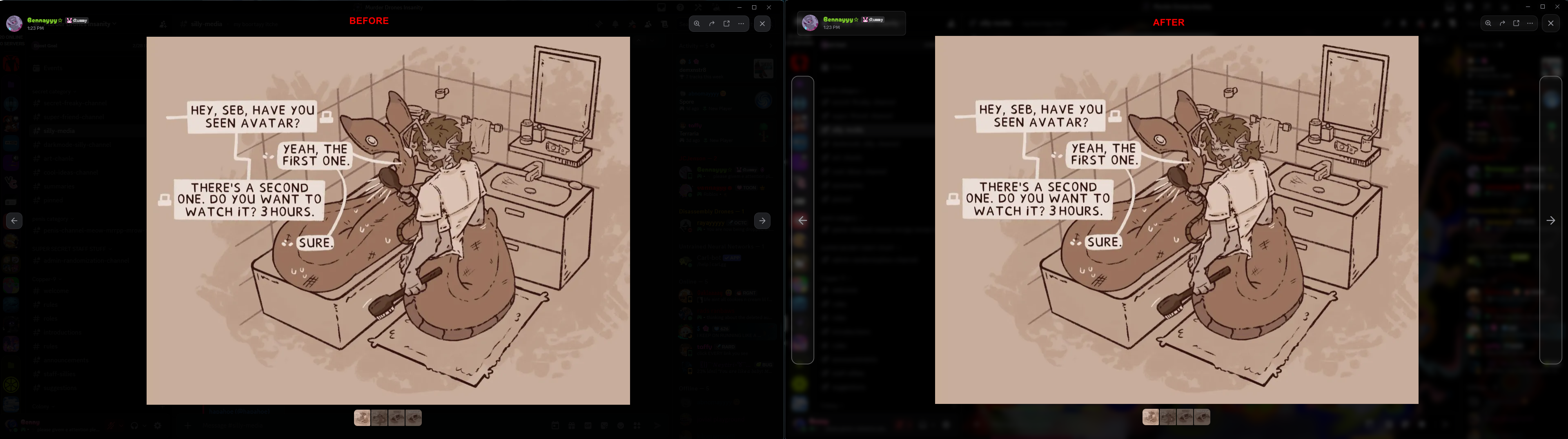
Image Viewer Tweaks

Import Url:

@import url('https://raw.githubusercontent.com/Benzeel/Bennys-Css-Snippets/refs/heads/main/ImageViewerTweaks.css');

Preview

UPDATED TO V5 <t:1771973648:R>
(find new raw version in the thread)
-# removed dependency on dark discord theme

oblique umbra
#

Make the server boost page look a bit better

-# also classic fr*nch be long moment
⁨```css
[class^=powerupContainer] {
display: flex;
> :not([class^=parentContainer]) { display: none; }
}

oblique umbra
#

User Area Redesigned ?v2?

Allow you to see your name and status, doesn't go on top of the server bar and actually integrate into the server list instead of floating
-# this snippet is part of my entire CSS and has been extracted as many people have asked me for it, maybe one day when my whole CSS will be clean i'll put my theme on GitHub

i recommend to additionally do

Vencord.Util.localStorage.setItem("resizable-sidebar-width-2", 312); (window.VesktopNative ?? DiscordNative).app.relaunch();

and to use

[class^=sidebarResizeHandle] { display: none; }
[class^=sidebar] {
   &::after { display: none; }
   > [class^=wrapper] {
      mask: unset;
      margin-bottom: unset;
      > [class^=unreadMentionsIndicatorBottom] { padding-bottom: var(--space-xs); }
      > [class^=tree] > [class^=itemsContainer] > [class^=stack] { padding: var(--space-xs) 0; }
   }
   > [class^=panels] {
      bottom: 0;
      border: unset;
      border-radius: unset;
      --custom-panels-spacing: unset;
      left: var(--custom-guild-list-width);
      width: calc(100% - var(--custom-guild-list-width));
      > [class^=mask] { display: none; }
      > [class^=panel] {
         margin: 8px 8px 0px;
         padding: 0px 0px 7px;
         border-radius: unset;
         border-bottom: 1px solid var(--border-muted);
      }
      > [class^=wrapper] {
         margin: unset;
         > [class^=container] {
            margin: 8px 8px 0px;
            padding-bottom: 8px;
            > [class^=flex] {
               height: unset;
               > [class^=inner] {
                  height: unset;
                  > [class^=rtcConnectionStatusWrapper] {
                     height: unset;
                     > [class^=rtcConnectionStatus] {
                        gap: 4px;
                        height: unset;
                        > [class^=clickablePing] {
                           > [class^=ping] {
                              margin: unset;
                              padding: unset;
                              background: unset;
                              box-shadow: unset;
                              border-radius: unset;
                           }
                        }
                     }
                  }
               }
               > [class^=flex] {
                  margin-left: 4px;
                  > [class^=button]:first-child { display: none; }
               }
            }
         }
      }
      > [class^=container] {
         gap: 4px;
         height: unset;
         margin: unset;
         padding: unset;
         align-items: unset;
         flex-direction: column-reverse;
         > [class^=accountPopoutButtonWrapper] {
            padding: 4px;
            border-radius: 8px;
            margin: 4px 8px 8px;
            > [class^=wrapper] > [class^=mask] > foreignObject > [class^=avatarStack] > [class^=avatar] { content: var(--avatar-url-128); }
            > [class^=nameTag] {
               > [class^=panelTitleContainer] > [class^="text-md/medium"] { font-size: unset; }
               > [class^=panelSubtextContainer] > [class^="text-xs/medium"] > [class^=hoverRoll] > [class^=default] > [class^=container] {
                  > [class^="text-xs/medium"] { line-height: unset; }
                  > [class^=container] > [class^="text-xs/medium"] { line-height: unset; }
               }
            }
         }
         > [class^=buttons] {
            gap: unset;
            margin-top: 8px;
            justify-content: space-evenly;
            > [class^=micButtonParent] > [class^=button] {
               border-radius: var(--radius-sm);
               &:not(:first-of-type) { display: none; }
            }
         }
      }
   }
}
wooden mortar
#

Return of the spotify controls rices Improved Spotify Controls

Going back to my Vencord roots with an overhaul to the spotify controls plugin. this was made to work with Midnight flavors first and foremost, but it works without it.
If you don't like green feel free to change the colors in the variables!

there is a small bug, when you scroll up and down quickly in the channel list it rubber bands sometimes, idk what is dong it. if you have an idea please lmk!

QuickCSS Import:

@import url('https://raw.githubusercontent.com/ISOUL22/rice/refs/heads/main/Vencord/improvedSpotifyControls.css');```

**Online Themes**
```https://raw.githubusercontent.com/ISOUL22/rice/refs/heads/main/Vencord/improvedSpotifyControls.css```

**Variables**
For use in QuickCSS, you can also edit them in the theme if you download the raw file.
variables here: [#1470373806995669022 message](/guild/1015060230222131221/channel/1470373806995669022/) (message got too big and I don't have nitro)
digital crag
#

@lost tapir made this snippet for me a while back and said they didn't mind me posting it for them soooo
here :D

i also modified it a little bit :3

UPDATED <t:1770762587:R>

  • fixed right click menu > add reaction > view more (emoji selector menu)
/* MSG hover anims By Computer Cat & Benzeel*/
.messageListItem__5126c {
  > .cozyMessage__5126c { 
    background: transparent !important;
    transition: transform 0.3s 0s; /* [duration] | [delay] */
    z-index: 1; /* fixes popover rendering under chat dividers */
  }
  &:has(> .cozyMessage__5126c:hover) { 
    > .cozyMessage__5126c { 
      transform: translateX(5px); /*changes how far the message moves when hovered*/
    }
    /* popover animation */
    .buttonContainer_c19a55 {
      transition: transform 0.15s 0.1s ease; /* [duration] | [delay] */
      transform: translateX(9px);
    }
  }
  &:has(> .cozyMessage__5126c:hover)::before {
      display: block;
      content: "";
      position: absolute;
      inset: 0;
      background-color: #ffffff0c;
  }
}

 div.buttonContainer_c19a55 { 
  transform: translateX(450px); /*changes how far right the popover starts in the animation */
}

/* fix emoji menu being offset */
.layer__59d0d:has(.animatorLeft_faf9c0.fade_faf9c0.didRender_faf9c0) {
  transform: translateX(-450px) !important; 
}

Preview

digital crag
#

Custom Dm/Server/Channel Backgrounds

By @digital crag and @lost tapir

_ _

UPDATED TO V4 <t:1770767205:R> !!

  • updated selectors for significantly better performance
/* Created by Computer Cat, Maintained by Benzeel */ /*v4*/ 
/*https://github.com/Benzeel/Bennys-Css-Snippets/blob/main/PerDmServerBGs.css*/

/* --- v Custom dm/server/channel backgrounds (per instance) v --- */
div.chat_f75fb0 {
  /* Uncomment this if you *do not* want to be fully consistent with normal discord*/
  background: var(--background-gradient-chat,var(--background-base-lower));
  
  /* Try commenting this out if you have a theme*/
  div.subtitleContainer_f75fb0 > .title_f75fb0, main.chatContent_f75fb0, 
  div.subtitleContainer_f75fb0 > .title_f75fb0 > .upperContainer__9293f > 
  .children__9293f::after, .wrapper__6c798, .wrapper_fc8177, .container_f369db
  {background: transparent !important;}
  border-top: 1px solid #1f1f1f !important;
  border-right: 1px solid #1f1f1f;
  /* end theme dependent section*/

  background-size: cover !important;
  background-position: center !important;
  /* forum card background tint */
  .mainCard_f369db {
    background: #0000002d;
    backdrop-filter: blur(20px);
  }
  .mainCard_f369db:hover {
    background: #00000057;
  }
  /* Tint */ /* CURRENTLY BREAKS FORUM CHAT WINDOWS */
  position: relative;
  &::before { content: ""; position: absolute; inset: 0;} 
  /*Uncomment to specify custom textbar color.
  .channelTextArea_f75fb0 > div
  { background: #0000001c;}
        
  /* DM's */
  /*                Duplicate this part per user.                                                                                                                   v ID HERE                                      V URL HERE                TINT HERE IF YOU WANT IT V         Blur (May Cause Lag) V */
  &:has(> div > section > div > div.children__9293f > div > div > svg > foreignObject > div > img[src^="https://cdn.discordapp.com/avatars/411305656231133194"]) {background: url("https://m.patchokki.art/m/7i9.gif"); &::before {background: #0008 ; /*backdrop-filter: blur(5px);*/}}

}


/*div[class^="content_"]:has(div[class^="sidebar"]) {*/
.content__5e434 {

    /* Servers/Channel                                    (server id first + channel id after to target a channel) */
    /* Duplicate this part per server.                       v ID(s) HERE                                                  v URL HERE               TINT HERE IF YOU WANT IT v       Blur (May Cause Lag) V*/
    &:has(li.containerDefault_c69b6d [href^="/channels/1145096753301946500"]) div.chat_f75fb0 { background: url("https://m.patchokki.art/m/7i9.gif"); &::before {background: #00000086; /*backdrop-filter: blur(5px);*/}}
    
}
/* --- ^ Custom dm/server/channel backgrounds (per instance) ^ --- */

/* reaction, msg actions popover theming (optional, uncomment if you wish to theme it) 
.popover_f84418 {background: #00000000 !important;} */

/* fix chat date divider text background */
.content__908e2 {background: transparent; backdrop-filter: blur(2px);} 

/* darken top bar */
.subtitleContainer_f75fb0 {background: #0000003d; /*backdrop-filter: blur(5px);*/}

/* fix skeleton loader background */
.wrapper_d852db {background-color: transparent;}

/* jump to present bar blur & tint */
.bottomBar__0f481 {background-color: #0000002f;backdrop-filter: blur(10px);}

/* remove reply badge background */
.replyBadge_c19a55 {background: none;}

Preview

digital crag
#

Translucent Message Box

Created by @lost tapir with tweaks by me :3

created as an addition to the snippet above!

BUGGINESS FIXED!!!!!

Updated <t:1772839898:R>

@import url('https://raw.githubusercontent.com/Benzeel/Bennys-Css-Snippets/refs/heads/main/TransparentMessagebox.css'); 

add this to the top of your css, below the import urls.
if using the import URL, you might need to add !important before the ; for each variable to have it work.

:root { /* config */
  --tm-enable: 1; /* 0 disables */
  --tm-blur: 5px; /* configure blur here */
  --chat-background-default: 0 0; /* Change messagebar color, comment out to undo */
}
/* Created by Computer Cat, Maintained by Benzeel*/ /*v13*/
/*https://raw.githubusercontent.com/Benzeel/Bennys-Css-Snippets/refs/heads/main/TransparentMessagebox.css*/


/* ---- v transparent messagebox v ---- */

@container style(--tm-enable: 1) {
  form.formWithLoadedChatInput_f75fb0 {margin-top: -51vh;}  /* Eat message area's space */
  div.messagesWrapper__36d07 > div.jumpToPresentBar__0f481 {bottom: 52vh;} /* Fix new messages bar*/
  div.messagesWrapper__36d07 > form, /* New messages bar */
  div.autocomplete__13533, /* Emojis and stuff */
  div.channelTextArea_f75fb0::before, div.wrapper__44df5 { /* actual text area */
    backdrop-filter: blur(var(--tm-blur)); /* Configure blur amount here */}

  div.autocompleteInner__13533 { background-color: var(--chat-background-default); }

  div.channelTextArea_f75fb0 { /* actual text area overrides */
    position: relative;
    &::before { content: ""; position: absolute; inset: 0; border-radius: inherit; } /* Set up blur */
> * {position: relative;} /* Fix some stuff */
> div.autocomplete__13533 { position: absolute; } /* Override commands and emoji menu format */
> * {background: 0 0 !important;} /* Text area's internals excluding emojis and commands */
  }

  .chat_f75fb0 {overflow: clip;} /* fix chat bar issues with jumping up */
  ol.scrollerInner__36d07::after { /* Add spacer for the bottom*/
    display: block;
    content: "";
    position: relative;
    height: 50vh;
  }

  div.floatingBars__74017 {.banner__183e8  { background: 0 0;}} /* Override for new member steps */
  div.wrapper__44df5 { background: 0 0;} /* Override for follow channel */

  .chatTypingGradientAtBottom__36d07, .chatGradient__36d07, .chatGradientBase__36d07 { /* hide typing gradient */
    display: none !important;
  }

  /* fix with custom theme */
  :where(.custom-theme-background) .channelTextArea__74017 {background: none !important;}
  /* ---- ^ transparent messagebox ^ ---- */

  /* --- v fix scrollbar v --- */
  .managedReactiveScroller_d125d2,.scroller__36d07 {
    &::-webkit-scrollbar-button:end:increment { height: 35%; }
}
  /* --- ^ fix scrollbar ^ --- */
}

for the thinner scrollbar tweak in earlier versions, select all under fix scrollbar, delete, and then paste the following:

  .managedReactiveScroller_d125d2,.scroller__36d07 {
    &::-webkit-scrollbar {height: 10px; width: 10px; }
    &::-webkit-scrollbar-track, &::-webkit-scrollbar-thumb { visibility: visible; }
    &::-webkit-scrollbar-thumb {
      background-clip: padding-box;
      background-color: var(--scrollbar-thin-thumb); /*change this to change scrollbar colour*/
      border: 2px solid transparent;
      border-radius: 6px;
    }
    &:hover::-webkit-scrollbar-track, &:hover::-webkit-scrollbar-thumb {visibility: visible; }
    &::-webkit-scrollbar-button:end:increment { height: 35%; }
    &:hover::-webkit-scrollbar-track { background-color: #3f3f3f6e; }
  }

Preview

#

Blur More

an (obviously) performance intensive theme addition to me & @lost tapir 's Custom Dm/Server/Channel Backgrounds Snippet!

WARNING: HEAVY USAGE OF BACKDROP BLUR. THIS CAN CAUSE YOUR CLIENT TO FEEL SLOWER.

add the following to the top of your quick css:

@import url('https://raw.githubusercontent.com/Benzeel/Bennys-Css-Snippets/refs/heads/main/BlurMore.css');

add the following to your root or copy paste:

:root {
    --rightclickmenuhovercolour: #96cc004d;
    --memberslistbg: #00000096;
}

Themes Most Surfaces, Including but not limited to:

  • Members list
  • Menus
  • Settings menu
  • Modals
  • Dropdowns
  • Vencord Notifs and Modal
  • And more :3

Preview 1 Preview 2

dark escarp
#

Tiny threads

i cant remember whether i did this before or not

.container__5b40b>ul {
  display: flex;
  flex-wrap: wrap;
  height: auto;
  margin-left: 8px;

  .spineBorder__5b40b,
  .spine__5b40b {
    display: none;
  }

  li {
    position: relative;
    display: block;
    min-width: calc(28px + var(--space-xs) + var(--space-xs) 8px - var(--space-xs));
    min-height: calc(28px + var(--space-xs) + var(--space-xs) 8px - var(--space-xs));
    width: calc(28px + var(--space-xs) + var(--space-xs) 8px - var(--space-xs));
    height: calc(28px + var(--space-xs) + var(--space-xs) 8px - var(--space-xs));

    .wrapper__2ea32 {
      position: relative;
      display: block;
      padding: 16px;
      margin: 1.198142px;

      .link__2ea32 {
        position: absolute;
        /* opacity: 0; */
        inset: 0px;
        width: 100%;
        height: 100%;
      }

      .unread__2ea32 {
        border-radius: 50%;
        width: 6.5px;
        height: 6px;
        right: 0px;
        top: 4px;
        left: unset;
      }
    }
  }
}

.content_d125d2 {
  height: max-content !important;
}
digital crag
#

translucent settings menu

updated <t:1771973272:R>

/* translucent settings menu by benzeel V2 */
/* ------ SETTINGS MENU START ------ */

    /* settings menu scroll shadow */
      .fixedContent__409aa:after {
        border-top-left-radius:  8px;
        border-top-right-radius:  8px;
      }
    /* settings menu main BG */
      .content_e9e3ed {
        background: #00000046;
      }
      .contentHeader_e9e3ed {
        background: transparent !important;
      } 
    /* Security Keys BG */
      .credentialItem__6c75d {background: none;}
      .credentialItem__6c75d:is(:first-child) {border:0px;}
      .credentialList__6c75d {
        background: #0c0c0c83; 
        border-radius: 8px; 
        border: 1px solid var(--border-subtle);
      }
    /* krisp bg */
      .card__73069:not(.outline__73069) {background: none}
    /* keybinding bgs */
      .defaultKeybindGroup__740f2 {background: #2b2a2a63;}
    /* vencord quick actions */
      .vc-card-base {background: none;}
      .vc-settings-quickActions-pill {background: #55555571;}
      .vc-settings-quickActions-pill:hover {background: #7e7e7e71;}
    /* Plugins */
      .vc-addon-card {background: none;}
    /* server boosts */
      .appliedBoostContainer_ceb06a {
        background: none; 
        border: 1px solid var(--border-subtle);
      }
      .guildContainer__5dba5 {background: #3d3d3d52;}
      .boostContainer_ceb06a {background: #141414a1;}
    /* server boost faq */
      .wrapper__5b98e {background: #3d3d3d52;}
    /* Share nitro */
      .expandedProgressBarContainerSettingsPage_a61c56 {
        background: none;
        backdrop-filter: none;
      }
    /* my account */
      .accountProfileCard__1fed1 {
        background: #03030333; 
        border: 1px solid var(--border-subtle);
      }
      .background__1fed1 {
        background: #1818183b; 
        border: 1px solid var(--border-subtle);
      }
      .fieldList__1fed1 {background: none;}
    /* appearance */
      .cardPrimary__73069, .cardPrimary__73069.editable__73069 {background: #03030356;}

    /* "view reactions" popup & settings menu (for some reason)*/
    .container__8a031 {background: #14141494; backdrop-filter: blur(10px);}

/* ------ END OF SETTINGS MENU ------ */

Preview

#

Theme Vencord Notifications And Settings / Update Modal

/* theme vencord update notification by Benzeel V1 */
.vc-notification-root {
  background: #8d063a46;
  backdrop-filter: blur(40px);
  border: 2px solid #b32b5838;
  filter: drop-shadow(0px 3px 8px #000000);
  transition: 0.5s ease;
}
.vc-notification-root:hover {
  background: #c5084765;
  border: 2px solid #b80d46a6;
  transition: 0.3s ease;
  transform: scale(99%) translateY(2%)  ;
}
.root__49fc1:has(.vc-settings-modal) {
  border: 2px solid #df1256c5;
  background: #c71e571e;
  backdrop-filter: blur(50px);
  transition: 0.1s ease;
}
wooden mortar
#

Channel Highlighter

Another update to an old snippet, I've been using this for ages and I honestly can't go back!
You can also use this to easily adjust the channel list spacing :D

Variables
Paste this at the top of your Quickcss, or copy just the variables and paste them next to your other variables, make sure its inside a :root!

:root {
  /*---===< CHANNEL HIGHLIGHTER AND SPACER >===---*/
  --chs-color-1: hsla(277, 59%, 76%, 0.30);
  --chs-color-2: hsla(316, 73%, 84%, 0.30);
  --chs-icon-hover: hsl(267, 84%, 81%);
  --chs-icon-scale: 0.9;
  --chs-channel-spacing: 1px;
  --chs-channel-size: 1px;
  --chs-channel-selected: linear-gradient(40deg, var(--chs-color-1) 30%, var(--chs-color-2));
}```

**Snippet**
*Paste this at the bottom of your QuickCSS*
```css
/*---===< CHANNEL SELECTOR FADE AND HIGHLIGHTED ICONS by Soul >===---*/
.containerDefault_c69b6d.selected_c69b6d .link__2ea32 {
  background: var(--chs-channel-selected);
  border-radius: 8px;
  margin-left: 5px;
}

.modeUnreadImportant__2ea32 .icon__2ea32,
.containerDefault_c69b6d.selected_c69b6d .icon__2ea32,
.containerDefault_c69b6d:hover .icon__2ea32 {
  color: var(--chs-icon-hover) !important;
}

/* channel spacing */
.wrapper__2ea32 {
  padding-block: var(--chs-channel-spacing);
}

/* channel size*/
.link__2ea32,
#channels>ul>li.container__5b40b>ul>li>div>div {
  padding-block: var(--chs-channel-size);
}

/* channel icon scale */
.iconContainer__2ea32>svg[role="img"] {
  scale: var(--chs-icon-scale);
}

/* shift category labels left*/
.wrapper__29444 {
  padding-left: 8px !important;
}

/* dim channel name when collapsed */
.mainContent__29444[aria-expanded="false"] {
  opacity: 50% !important;
}```
dark escarp
#

giant fucking avatars

allegedly the original use for the --avatar-url themeattribute vars

.mask__68edb {
    display: none;
}

.container_ab8609 {
    top: unset !important;
    bottom: -15px !important;
}

.avatar__75742 {
    position: relative;
    width: 100%;
    left: 0px !important;
    aspect-ratio: 1;
    top: 0px !important;

    .wrapper__44b0c {
        width: 100% !important;
        height: 100% !important;
        top: 0px !important;
    }

    .mask__44b0c {
        width: 115%;
        height: 115%;
        top: 0px !important;

        >foreignObject {
            mask: none;

            img.avatar__44b0c {
                border-radius: 0px;
                content: var(--avatar-url-1024);
            }
        }
    }
}
lost tapir
#

PurplePrune

a snippet sized theme!
designed to be lightweight, customizable and maintainable without sacrificing on looks by just not reinventing most of the wheel.

it was mostly a thing for myself because i wanted a theme that showed my workspace background but i made it into a thing anybody can use easily!

the theme has a handful of options and features including

  • (mostly) global blur (feel free to report issues)
    - inspired from @scarlet cove 's ancient acrylic popups CSS snippet from here with their fancy pretty profile backgroundsss (ooooo)

  • easy transparency (its original purpose)

    • just enable transparency in your client mod, put on the theme, remove the background and adjust the tint.
  • default discord theme touchups
    - helps discord where where it fails to theme some parts

add this line to the absolute top of your quickcss file or it wont work.

@import url('https://raw.githubusercontent.com/computer-catt/PurplePrune/refs/heads/main/PurplePrune.css');

and add this block somewhere under it if you'd like to configure it a bit more

/* config header */
:root,
.theme-dark {
    /* if backgrounds are enabled this acts as a background tint*/
    --window-tint: #0005;
    /*--window-tint: #0000;*/

    /* Theme Background, replace with none if you want transparency*/
    --theme-background-image: url(https://github.com/computer-catt/PurplePrune/blob/main/Assets/NightTheme.webp?raw=true);

    /* Works best with background enabled ^ */
    /* Blur  1 for on 0 for off*/
    --enable-blur: 1;
    --blur-strength: 6px;
}   /* end of config header */

see more info on the repository, make sure to report any issues you have either here or on the repository, have fun and stay awesome~ :3
https://github.com/computer-catt/PurplePrune

ALSO check out the cool transparent messagebox snippet <#🎨-css-snippets message> maintained by @digital crag!

oblique umbra
#

Nicer Quest Display

Remove bullshit which take too long to load and make it just nicer to use
-# at some point i wanted to do smth like color based on status with CSS but forgor

[class^=page] > [class^=container] > [class^=scroller] > [class^=contentSection] > [class^=content] {
    max-width: unset;
    > [class^=heroWrapper] { display: none; }
    > [class^=headingWrapper] { margin-top: unset; }
    > [class^=container] {
        max-width: unset;
        > [class] > [class^=container] > [class^=container] { &:has(> [class^=heroAssetWrapper]) , > [class^=rewardDescriptionContainer] > [class^=textContainer] > [class^=subtitleRow] > [role="button"] { display: none; } }
    }
}

-# before | after

mortal ibex
#

Event Notice Refresh

Small redesign to the event notice at the top of the channels sidebar
Import

@import url(https://davart154.github.io/Themes/Snippets/Sidebar%20Notice%20Refresh/SidebarNoticeRefreshSource.css);

Raw

https://raw.githubusercontent.com/davart154/Themes/refs/heads/main/Snippets/Sidebar%20Notice%20Refresh/SidebarNoticeRefreshSource.css
mortal ibex
#

Role-Coloured Mentions

Colours the message bg based on the colour of the first mention to appear.
Import

@import url(https://davart154.github.io/Themes/Snippets/Colored%20Mentions/ColoredMentionsSource.css);

Raw

https://raw.githubusercontent.com/davart154/Themes/refs/heads/main/Snippets/Colored%20Mentions/ColoredMentionsSource.css
dark escarp
#

thingymabobble

bored so i made this
enjoy ig

.card__39ec2 {
    overflow: hidden;

    .imagePosition_ef9ae7,
    .imageContainer_ef9ae7:not(svg) {
        display: contents;

        .contentImage__42bf5 {
            position: absolute;
            top: -4px !important;
            left: -4px;
            width: calc(100% + 8px);
            height: calc(100% + 8px);
            max-width: unset !important;
            mask-image: linear-gradient(165deg, black, transparent);
            opacity: 0.5;
            filter: blur(2px);
        }
    }

    svg.imageContainer_ef9ae7 {
        position: absolute;
        top: -4px !important;
        left: -4px;
        width: calc(100% + 8px);
        height: calc(100% + 8px);
        contain: none !important;
        mask: none;

        >foreignObject {
            mask: none !important;
            contain: none !important;
            width: 200px !important;
            x: -70;
        }
    }

    .header__39ec2 {
        position: absolute;
        right: var(--space-xs);

        .headerText__39ec2 {
            display: none;
        }
    }
}
wheat belfry
#

Hide chat any button

Requires ThemeAttributes plugin
Seeing as there for some reason is no plugin for this, I made a snippet:

.buttons__74017 {
    /* Send a Gift */
    &>.button__24af7[aria-disabled="false"],
    /* GIFs */
    &>.expression-picker-chat-input-button:not(.vc-chatbar-button):nth-last-of-type(4),
    /* Stickers */
    &>.expression-picker-chat-input-button:not(.vc-chatbar-button):nth-last-of-type(3),
    /* App Launcher */
    &>.app-launcher-entrypoint {
        display: none;
    }
}

You can remove/comment out the buttons you'd like to keep, I added all of them

cyan bramble
#

Emoji Folder Icons

Add Emojis as folder icons.
I entered three example lines, where folder name and emoji can be set. The background color is set by discord: right click folder > Folder settings. If the color is set to default, the background will be transparent.

Don't know if anyone else finds it much easier to find the right folder tis way. I really like it, maybe someone else will too. kittyShy

-# This is my first snippet, so feedback is very welcome :3

Import

@import url(https://doppelkomma.github.io/discord-folder-icons-theme/folder-icons.css);

Snippet

:root {
  --folder-emoji-size: 30px;
  --folder-radius: 16px;
  --badge-border: 2px; /* ring thickness around red unread counter */
  --open-icon: none; /* 'none' = discord default open folder, remove to keep custom icon or set custom open emoji like '📂' */
}

[data-dnd-name="Folder name 1"] { --icon: '🎮'; }
[data-dnd-name="Folder name 2"] { --icon: '✨'; }
[data-dnd-name="Folder name 3"] { --icon: '🤖'; }
paper dew
#

Fix ShowTimeoutDuration for Compact Mode

by default, some plugins' css is bugged as shit if u use compact message display, this fixes it for ShowTimeoutDuration

/* ‾‾‾‾‾‾‾‾‾‾‾‾‾‾‾‾‾‾‾‾‾‾‾‾‾‾‾‾‾‾‾‾‾‾‾‾‾‾‾‾‾‾‾‾‾‾‾‾‾‾‾‾‾ */
/* ShowTimeoutDuration - Fix for Compact Message Display */
/* _____________________________________________________ */
/* https://discord.com/channels/1173279886065029291/1487587601249599639 */
/* https://discord.com/channels/1015060230222131221/1495514680721150275 */

/* msg box only (not search sidebar) */
[id^='chat-messages'] .vc-std-wrapper {
  display: inline-flex;
  padding-right: 3px;

  text-indent: 0 !important;
  gap: 0.25rem;
  /* [aria-label*='timed out'] {text-indent: 0 !important;} */

  /* c(l)ock icon */
  .compactCommunicationDisabled_c19a55 {margin: 0;}
}

[id^='chat-messages'] .vc-std-wrapper,
.searchResult__80bf8 .vc-std-wrapper {
  .vc-text-base > span::before {content: ' {'; margin-right: -0.2em;}
  .vc-text-base > span::after {content: '}';}
  .vc-text-base {font-size: 0; color: var(--icon-feedback-critical) !important;}
  .vc-text-base span {font-size: 1rem; margin: 0px;}
}

/* hide c(l)ock icon if not the first compact msg w the timestamp */
/* .timestampVisibleOnHover_c19a55~ * .compactCommunicationDisabled_c19a55 {visibility: hidden;} */
/* hide c(l)ock always */
/* .compactCommunicationDisabled_c19a55 {visibility: hidden;} */
/* thisll show c(l)ock iton hover if u want */
/* .message__5126c:hover .compactCommunicationDisabled_c19a55 {visibility: visible;} */
magic coral
#

Makes show me your name's text only display on hover

.username_c19a55 .vc-smyn-suffix {
    display: none;
    padding: 0 0 0 0.25em;
}

.headerText_c19a55:has(.username_c19a55:hover) {
    .username_c19a55 {
        text-decoration: none !important; /* no underline (optional) */
    }
    
    .newMemberBadge_f80704,.clanTagChiplet_c19a55 {
        display: none;
    }
    
    .vc-smyn-suffix { 
        display: inline;
    }
}
mortal ibex
#

Mana Profile

Redesign to the profile popout made to look cleaner
-# Thing to note: Only your first badge (most prioritised) displays. The rest still show up in the modal version.
Import

@import url(https://davart154.github.io/Themes/Snippets/Mana%20Profile/ManaProfileSource.css);

Raw
https://raw.githubusercontent.com/davart154/Themes/refs/heads/main/Snippets/Mana%20Profile/ManaProfileSource.css

paper dew
#

Keep Message Hover Highlight While Reduce Motion is Enabled

when u turn on reduce motion, discord for some unknown reason turns off the message hover highlight which is 10/10 annoying, this just turns it back on.

- i also added it to the search result and the pin dropdown msgs, which dont have it by deafult
- the highlight can be tinted lighter/darker w the white 0% part, u can change the x% or switch it to black if u wan darker than a white mix

/* ‾‾‾‾‾‾‾‾‾‾‾‾‾‾‾‾‾‾‾‾‾‾‾‾‾‾‾‾‾‾‾‾‾‾‾‾‾‾‾‾‾‾‾‾‾‾‾‾‾‾‾‾‾‾‾‾‾‾ */
/* Enable Message Hover Highlight While Reduce Motion Enabled */
/* __________________________________________________________ */
[id^='chat-messages']:hover, /* chat msgs */
[class^='messageGroupCozy_']:hover, /* pins */
[class^='message__']:hover /* search results */
{background-color: color-mix(in srgb, var(--message-background-hover), white 0%);}