#╟🎑reshades
1 messages · Page 61 of 1
 golden prawn
 blazing helm
itll say its disabled in white text above the effects so im sure youd have seen anyway but just in case
what ver of reshade are you using
did you follow the reshade command from here?
golden prawn
blazing helm
did you follow the reshade command from here?
6.3.3
 void depotBOT
@golden prawn To enable Reshade Follow this: #╭📖faq message
blazing helm
tldr you need to use an older version that gamma already has stored for it not to crash
it also comes with a reshade with full addon support enabled which could be why some effects dont work for you im not entirely sure
golden prawn
blazing helm
it also comes with a reshade with full addon support enabled which could be why ...
gotchya, i will try this,
 frank elk
are there any highly recommended reshade profiles or settings that are like, no brainers
 small needle
aydins grass tweaks with ccon grass and adega with ATO for textures, default gamma sss and atmos with a few added and tweaked effects to default atmos reshade presets. beauty is in the eye of the beholder

 lilac girder
frank elk
are there any highly recommended reshade profiles or settings that are like, no ...
lilac girder
frank elk
are there any highly recommended reshade profiles or settings that are like, no ...
I’ve really come to like adding Holefiller in before any AA effects. Really makes trees look a lot nicer, if you have leaves at least.
 jade river
small needle
aydins grass tweaks with ccon grass and adega with ATO for textures, default gam...
jade river
small needle
aydins grass tweaks with ccon grass and adega with ATO for textures, default gam...
I love that this sentence would look like black speech to anyone else
Looks like Aydins and Adega are already in the Gamma by default, I am correct?
 finite palm
Did Hippos newest Atmos make it into 0.9.3?
 rapid magnet
finite palm
Did Hippos newest Atmos make it into 0.9.3?
rapid magnet
finite palm
Did Hippos newest Atmos make it into 0.9.3?
No
 finite palm
rapid magnet
No
finite palm
rapid magnet
No
Thanks
 rugged vale
a question for instal 0.9.3. when i add reshade back i have to tick delete reshade shaders for the update?
 willow forge
i completely deleted the reshade.ini file from my anomaly folder then reinstall from the reshade setup
worked
rugged vale
So I shouldn't update just like that with reshade activated?
 ashen plaza
yo any sss settings i wanna change so the game looks nicer? or anything else along those lines
 tribal mantle
maybe dumb question, but was there a key bind to enable/disable the reshade effects in game? not talking about restoring reshade
nvm found it - PG UP
blazing helm
tribal mantle
maybe dumb question, but was there a key bind to enable/disable the reshade effe...
you can change it to whatever you want in the reshade settings btw
tribal mantle
makes sense, just wanted a quick way to test on/off effects
 plain wagon
small needle
aydins grass tweaks with ccon grass and adega with ATO for textures, default gam...
plain wagon
small needle
aydins grass tweaks with ccon grass and adega with ATO for textures, default gam...
adega ato priority?
blazing helm
no need to use them both
plus adega doesnt have very optimised bumps so you waste a lot of performance for no reason really
ato 4 covers a lot now
 dull heath

 half magnet
Hey guys, does anyone know a good Reshade to use in base Gamma without changing too much? Mostly just for anti-aliasing.
 late tiger
blazing helm
ato 4 covers a lot now
late tiger
blazing helm
ato 4 covers a lot now
any verdict on ATO vs Rotten?
blazing helm
eh honestly I prefer rotten for summer colours myself with the green grounds but ato for most other stuff, ato is more consistent in my eyes I just like rotten asphalt and I’m lazy
Although I’m probs gonna use vanilla anomaly asphalt anyway
late tiger
Interesting, I've never actually used either of them so I'm trying to decide lol
blazing helm
try rotten, if you don’t like the vibrancy it brings then test ato
Ato 4 at default comes with some 8k textures, mostly grounds but beware just in case while in rotten theyre an optional choice
Ato also does have an unofficisl downscaled pack floating around somewhere
late tiger
I tend to like vibrancy I guess, I play EFT with pretty high saturation and shit lol
 river garnet
blazing helm
Ato also does have an unofficisl downscaled pack floating around somewhere
river garnet
blazing helm
Ato also does have an unofficisl downscaled pack floating around somewhere
first comment on the mod page is a 2k version
blazing helm
yeah it’s not actually 2k tho
It’s a half res downscale
so asphalt is 4k grass ground is 2
Honestly it’s better tho than pure 2k imo
late tiger
Gonna try Rotten 🙏 need to get my hands on the RTGI crap for reshade too
river garnet
late tiger
Gonna try Rotten 🙏 need to get my hands on the RTGI crap for reshade too
https://github.com/Zenteon/ZN_FX/tree/main here's a fast RT shader

GitHub
Zentient ReShade Shaders. Contribute to Zenteon/ZN_FX development by creating an account on GitHub.
late tiger
Oh, ty 🙏 🫡
 marsh sandal
If you use the Weather Expansion for Atmospherics mod, it has a reshade preset called WeatherEX+ GI
plain wagon
good enough?

theres still some weird grain kinda thing in my screen. how can i remove that
 zinc girder
is that something to worry about or just a warning I can ignore? I'm new to using reshade and tfaa
 river garnet
zinc girder
is that something to worry about or just a warning I can ignore? I'm new to usin...
river garnet
zinc girder
is that something to worry about or just a warning I can ignore? I'm new to usin...
dunno if related but DRME needs to go before TFAA
zinc girder
river garnet
dunno if related but DRME needs to go before TFAA
oh good to know, thank you
 stark trellis
blazing helm
try rotten, if you don’t like the vibrancy it brings then test ato
stark trellis
blazing helm
try rotten, if you don’t like the vibrancy it brings then test ato
are these presets in the new update?
 graceful lagoon
hey, is this how the game should look like after the update? Seems like a downgrade to me
 plain wagon

 wild siren
!reshade
void depotBOT
@wild siren To enable Reshade Follow this: #╭📖faq message
 swift robin
Wrong channel
 trim cairn
hey guys, is there any way I could possibly use reshade to make these branches less blurry?

I've been trying with FXAA but not getting great results
 modern heart
so ive used search function around the discord and google and i cant seem to find the COAR reshade preset to go with the .ltx file
see lots of people saying they have the preset enabled but nobody saying where they got it. i have the zonereality preset right now
river garnet
trim cairn
hey guys, is there any way I could possibly use reshade to make these branches l...
yes
 misty echo
trim cairn
I've been trying with FXAA but not getting great results
misty echo
trim cairn
I've been trying with FXAA but not getting great results
tfaa and drme are the go to
ashen plaza
chat is there any immersive camera mods yaall could recommend?
 atomic sierra
willow forge
i completely deleted the reshade.ini file from my anomaly folder then reinstall ...
atomic sierra
willow forge
i completely deleted the reshade.ini file from my anomaly folder then reinstall ...
Where do i find the reshade setup?
trim cairn
misty echo
tfaa and drme are the go to
Alrighty, looks a lot better now while moving, thank you, still looks horrbile while standing still tho
misty echo
trim cairn
Alrighty, looks a lot better now while moving, thank you, still looks horrbile w...
try turning drme to full
trim cairn
Although I'm quite new to this reshade stuff so it might be something Im messing up
misty echo
gonna lose more fps tho
atomic sierra
How do i reinstall the reshade?
misty echo
!reshade
void depotBOT
@misty echo To enable Reshade Follow this: #╭📖faq message
trim cairn
Yeah, throwing it to full doesn't really improve it enough to justify the FPS loss
misty echo
ive just learned to embrace it
i try to avoid winter and autumn and opt for inverno or green foilage
trim cairn
yeah its not that bad with this actually
the worst part was that flickering
which is gone now, so thats a plus
anyway, thanks a lot for the help :)
 untold scroll
I am new here but just finished installing the new update. Do I need to check the delete shader cache button when I launch for the first time or no?
atomic sierra
Alright i installed
river garnet
untold scroll
I am new here but just finished installing the new update. Do I need to check t...
No, that is needed when you install (certain?) graphic mods.
 solid lichen
untold scroll
I am new here but just finished installing the new update. Do I need to check t...
solid lichen
untold scroll
I am new here but just finished installing the new update. Do I need to check t...
nah ur fine
 grand lotus
hot
 untold scroll
grand lotus
hot
untold scroll
grand lotus
hot
what reshade is that?
 hybrid sentinel
guys how can i play game without reshade whe i turn off these like this https://prnt.sc/zuhPGxnxK6dt
 grand lotus
untold scroll
what reshade is that?
grand lotus
untold scroll
what reshade is that?
Norfair's multi
grand lotus
hybrid sentinel
guys how can i play game without reshade whe i turn off these like this https://...
by default the game doesn't use reshade
river garnet
hybrid sentinel
guys how can i play game without reshade whe i turn off these like this https://...
That has nothing to do with ReShade.
If you didn't restore the dlls, you are not playing with ReShade.
hybrid sentinel
2 yars ago i played with these unchecked because my fps was bad https://prnt.sc/zuhPGxnxK6dt
they were all unchecked but now i cant because of darkness
river garnet
Still not related to ReShade.
hybrid sentinel
https://prnt.sc/GZtSfaNEdh0f its like this,uchecked
 grand lotus
hybrid sentinel
2 yars ago i played with these unchecked because my fps was bad https://prnt.sc/...
grand lotus
hybrid sentinel
2 yars ago i played with these unchecked because my fps was bad https://prnt.sc/...
!dx9 | you probably need to downgrade to dx9 if you're getting low fps
void depotBOT
@hybrid sentinel
If you want to play with DX9, follow this guide: #╭📖faq message
hybrid sentinel
im new to this and i donyknow what is what sorry guys
grand lotus
hybrid sentinel
im new to this and i donyknow what is what sorry guys
no worries
hybrid sentinel
i know what i did 2 years ago and it was good
hybrid sentinel
grand lotus
!dx9 | you probably need to downgrade to dx9 if you're getting low fps
ok man
untold scroll
grand lotus
Norfair's multi
did you change anything in it? and what color option did you choose?
grand lotus
untold scroll
did you change anything in it? and what color option did you choose?
drme, tfaa
was using the Wanderer (in screenshot) but too vibrant for me XD, changed to more neutral instead, breeze v2
untold scroll
thank you!
 main halo
anyone know where to get CAPA reshade..?
misty echo
 grizzled orchid
is there a way to reach the reshade files seperately ?
i didn't see any on my fresh reinstall
misty echo
!reshade
void depotBOT
@misty echo To enable Reshade Follow this: #╭📖faq message
grizzled orchid
its not there i checked
 native portal
Hiya! I just got an HDR monitor, and was wondering if I should be turning faked HDR layers in my reshade on or off? I wasnt sure if they fake HDR when in SDR, or fake HDR settings when its actually used.
I am using the AtmosGAMMA preset, if that matters
solid lichen
grand lotus
hot
That looks mint 👌🏻
solid lichen
native portal
Hiya! I just got an HDR monitor, and was wondering if I should be turning faked ...
If your using HDR on your monitor I dont see a need to try and fake HDR unless you like how the image effect turns out afterwards but personally I would not
 uncut pumice
just use the hdr10 setting in the modex section of the settings menu ingame
looks great
native portal
uncut pumice
just use the hdr10 setting in the modex section of the settings menu ingame
How does that play w/ Reshade?
Also, I do not see this setting in the MCM, what is it under?
Nvm, found it
uncut pumice
fine with me
adds to the look, i use the atmos film preset with fxaa cmaa and taa added
 burnt dagger
hybrid sentinel
im new to this and i donyknow what is what sorry guys
burnt dagger
hybrid sentinel
im new to this and i donyknow what is what sorry guys
turn up the gamma in your basic light settings
adjust gamma/contrast/brightness til its to your liking
hybrid sentinel
burnt dagger
turn up the gamma in your basic light settings
shader cache had to be deleted because i turned shaders off at mod organizer
 barren jasper
Are all the presets old or the spreadsheet out of date?
river garnet
barren jasper
Are all the presets old or the spreadsheet out of date?
part so, part so
Some links there are also just broken now.
 bright yarrow
what is the best looking reshade to use on gamma?
river garnet
bright yarrow
what is the best looking reshade to use on gamma?
Probably depends on your personal taste, don't you think so?
 misty lotus
fat
 graceful magnet
cant find the tfaa.fx setting?
 final nebula
 graceful magnet
hey thanks a bunch
 hollow willow
What reshade would you guys recommend to a higher end computer?
 dense anvil
my scopes are all whited out when viewing through them. I have the reshades on how do i fix this?
 steady flint
Is there a way to remove the reshade if i already moved the bin folder into gamma?
river garnet
steady flint
Is there a way to remove the reshade if i already moved the bin folder into gamm...
just rename or delete the reshade dlls
steady flint
Where do i find that? Guessing in the anomaly folder
river garnet
steady flint
Where do i find that? Guessing in the anomaly folder
The GAMMA installer removes the reshade dlls with its base settings, did you even restore them or just think it's running?
They would be at anomaly\bin\d3d9.dll/dxgi.dll.
steady flint
river garnet
The GAMMA installer removes the reshade dlls with its base settings, did you eve...
I restored them yeah
Then i started playing and it ran well, restarted the game and it ran like shit even tho i didn't touch any setting
No idea why
Ran well with shaders on till i restarted
Straight up dropped 35 fps
river garnet
Maybe the effects weren't enabled the first time around.
graceful magnet
my water reflection is a bit janky, anyone have experience with this? just finishing setting up reshade with atmosR preset with tfaa
solid lichen
How can I make the snow a bit more glossy

 stuck cobalt
For HDR10 Shaders, whats the setting that messes with Text coloring? Cause rn it's making it have that red hyper burnt coloring
modern heart
@solid lichen is that project inverno? what reshade preset are you using with it right there?
solid lichen
modern heart
<@768794352536387626> is that project inverno? what reshade preset are you using...
This is just inverno as it is with 1.3 colour sat, and 4k res
modern heart
hmmm your snow is looking way better than mine for some reason...
solid lichen
Oh and SSS set to max on sun
modern heart
mine is super flat looking, but i do have parralax on
solid lichen
still trying to tweak it, hmm lemme look ill send my settings
Yeah I donno I just remember the snow used to pop
its detailed just not as snowy
it'd like if that makes sense
modern heart
mine doesnt pop at all and i need to add footprints back in. im setting up 4 presets for all seasons in mod organizor
and inverno is giving me some issues looking as good as it did before
 modern heart
aydins grass reinstall for spring or summer maybe?
summer preset for grass and trees is very green
solid lichen
modern heart
mine doesnt pop at all and i need to add footprints back in. im setting up 4 pre...
Yeah I used to have it so lovely looking like the sun used to pop and bounce back off the snow
but im having issues getting that snow blind look back
solid lichen
 upper garnet
is it meant to be this grey and dead?
upper garnet
is it meant to be this grey and dead?
Aydins grass reinstall make sure its loading after shaders and I would also maybe try techicolour in reshade or adjust colour correction
Looks very bleak autum though
modern heart
if you do figure it out let me know and tag me. im messing with zone reality/ rotten life at the moment... i would kill to find the original COAR preset 😢
upper garnet
is there different seasons?
solid lichen
Yeah can set mod presets up
I have an spring / autum / winter and a over grown summer
modern heart
but i think im gonna run hunter preset with COAR ltx on aydin summer preset with ZR/Rotten life textures
upper garnet
ah ok ill have a look into that thanks
solid lichen
Once ccon is done for everything
upper garnet
just kinda missing leaves lol
solid lichen
I will be using that basically for everything
modern heart
@upper garnet yeah, just make 4 presets for each season in mod organizer and set it up how you want it, then you can just change when the mood strikes
solid lichen
try ccon
WIP he is updating as he goes a fair chunk of the zone is done
looking amazing imo
And how it is currently its like once you progress up north closer to the CNPP everything slowly starts feeling dead again
its kind of a vibe and has very little LOD issues for something WIP
@modern heart Then i apply some more settings in SSS and it goes to shit

I mean time of day change also
modern heart
but your parralax still looks better than mine... im starting to think something is wrong on my end but everything looks perfect on my zone reality setup
modern heart
and its definitely not my rig
what settings?
im on a i9-14900kf, 64gb, RTX 4080 super so im not lacking the power
solid lichen

just have it overridding with my aa and af
and it seemed to do a lot better then any of the paks
 tight zinc
modern heart
but your parralax still looks better than mine... im starting to think something...
tight zinc
modern heart
but your parralax still looks better than mine... im starting to think something...
do you have parallax on?
modern heart
nothing that would mess with parralax. but maybe ill give nvidias AA a look
tight zinc
and also SSS
modern heart
@tight zinc last i checked i do... its working great on my summer setup... let me fire inverno back up and check
tight zinc
with INVERNO loaded after it
solid lichen
Yeah make sure inverno is last
modern heart
it is
tight zinc
you need to put INVERNO after SSS, clear your shaders cache
modern heart
my texture packs are always last
solid lichen
Hmmm odd
modern heart
this is a brand new install. and i always manually delete shaders before swapping "seasons"
gimme a second
tight zinc
does it apply all the winter stuff? just the texture looking flat?
modern heart
firing up now to take screenshots
solid lichen
I also turned up my shadows so that might be giving the ground more texture depth

like my shadow map is max on sss and the anom launcher
other then that everything basic
modern heart

well its workign now lol
but looks like crap
probably need to get AA running and mess around with the settings
solid lichen
yeah I think just AA for the jaggard edges and smoothing it
and should blend into a decent image
modern heart
i wonder if running reshade on inverno would work despite it not being the recommened way, never tried it
solid lichen
Well I mean
My friend runs reshade with inverno
its 6.2 or whatever though
I have not done it so I dont know how annoying it was
modern heart
the reason im tryin to hunt down the COAR preset is because it has some specially tuned ray tracing effects in it and a good environmental vibe... i think would run great on inverno
but all the links to it around the discord are dead
solid lichen
I think if you can dial lighting in with inverno its the best looking snow mod
modern heart
im gonna play with nvidia and reshade and see what i get
tight zinc
modern heart
try messing around with the SSS settings on MCM too
like increase the terrain shit quality
modern heart
resetting now to see what nvidia does then ill mess from there
blazing helm
upper garnet
i swear i remember it being green lol
it uses winter by default now rather than autumn from before
modern heart
hmmm the depth on the snow parralaxing just looks jagged no matter what i do
upper garnet
blazing helm
it uses winter by default now rather than autumn from before
yea ive changed the trees and grass to summer now im just trying to figure out how to make the sky not completely grey xd
might just be shit weather tho
blazing helm
would just be ther weather
yeah
cloudy weather is like that sometimes, like more of an overcast
theres clear, cloudy, partly cloudy sort of types
fwiw your screenshot looks fine in terms of the actual sky
obv its dark rn
upper garnet
now just gotta find the mod that heals limbs at campfires and im good to go ahaha
stuck cobalt
holy moly, so im guessing there's no reshade/graphics guide so the game doesn't look washed out yet with the new update? My main issue is the intense blurring/DOF and I can't seem to find the setting that fixes it
blazing helm
its in the SSS settings in mcm
stuck cobalt
also Im really new to reshading/graphics and just picked GAMMA back up, is there any channels that I should look at to help me with upping the graphics in general? kind of like those pictures above?
Or I guess walk me through adding/tweaking settings?
modern heart
@stuck cobalt it just takes time and messing with things and the better your rig with more time/patience the better the look you will get. but keep in mind some of these "still photo" shots are not achievable through regular gameplay. people setup specific conditions to show off their presets and mod setups.
for me i like finding setups that make me kinda whimsicle during my slow movements through the zone
you can easily waste weeks chasing setups and miss out on the fun of actually playing, its a balance.
solid lichen
I swear I spent more time making reshade.ini's and just visual mod complimations
then playing but its not that its a bad thing
just love how you can change the game so much and talior it to your mood and feel
modern heart
its definitely alot of fun to jus sit there and play with it. i was more just offering advice from the angle of him being new to doing it lol. i was bad to chase still shot quality during gameplay when i first started screwing with reshade/textures in gamma lol
now i have alot of presets i love to cycle through when i catch good vistas
stuck cobalt
Holy moly I figured out how to open that shaders menu
solid lichen
There are a few preset .inis
I would reccomend selecting something like atmos gamma or neutralzone and then making a copy
and working off one of those ini's as there pretty well already quite set up for gamma
the basic light settings in normal anomaly settings is also another good thing to tweak
you can get amazing lighting with just some dulling of brightness and fake HDR and a bit of colour saturation
stuck cobalt
I accidently overwrote Atmos, but honestly i'm enjoying the AtmosGamma one, and i'll make sure to copy before touching anything this time. This is amazing. Only issue i'm having now is finding out where the DOF is in SSS and making the trees not be so pixely
Yeah I tried HDR10 on and it kinda sucked
solid lichen
Yeah I personally dont like it either
makes a lot of things jaggard
and causes shadow issues
modern heart
i can not make this snow parralaxing look good lol the walls of the snow constantly have the bad aliasing on them no matter what settings i use


 stuck cobalt
solid lichen
stuck cobalt
solid lichen
oml I saw that but figured oh like only while im aiming down sites or something
solid lichen

about the best trees will get
shadow map
is also maxed
but I mean the asset of the trees themselves is kind of bad imo
how my trees look

But I also dont use the tree mod gamma uses
its mainly the bark mod that causes it
my grass is what im working on
stuck cobalt
eh if that's the best I can live
solid lichen
i mean you can get better
just its like eh
Spawn in as mono
go red forest
and mess with trees there
best model
to get a good look or the ones in agroprom
stuck cobalt
I saw earlier does the snow have dynamic path printing or whatever?
solid lichen
I am unsure it is all handled by the mod its like 3.6gb
I dont run reshade or anything with this mod currently
But combined with the lighting with SSS i am having much better looks with this snow mod then the other one
Gamma used to have an amazing mod that you could right click and choose season this was like a year ago now
stuck cobalt
either way it looks fuckin sick and also I appreciate that you're taking time to help me with this, it's already making my game look like a million times better. I think I saw one of those shading overhauls being released on the 11th? I already forgot the name of it
solid lichen
but its since not in the modpack been trying to find it
Anytime
always happy to help
If you want help with reshade and setting one up
stuck cobalt
solid lichen
Gamma used to have an amazing mod that you could right click and choose season t...
I think I remember that one, it's been about a year or 2 since I last played GAMMA
solid lichen

WARNING, THIS TUTORIAL MIGHT BE OUTDATED NOW! USE AT YOUR OWN RISK.
This is an updated and a more in-depth tutorial of the graphical mods I'm currently using.
3DSS USERS REJOICE! It's now compatible with SSS Update 21! But you HAVE to download the latest 3DSS Modded Exes for it to work: https://github.com/Redotix/xray-monolith/releases
REMIND...
this guys video is pretty good in my opinion
solid lichen
stuck cobalt
I think I remember that one, it's been about a year or 2 since I last played GAM...
Yeah you could adjust trees and everything and the trees had a few selections and had like super high res models was lovely mod tbh
stuck cobalt
Hopefully in the coming months then some minor patches come out for the game or mods get added
solid lichen
Well there is this https://discord.com/channels/912320241713958912/1297762722380779541
that I will be trying after I tweak this snow pack
stuck cobalt
OH it was the C-Con grass mod that's coming out that caught my eye
cause the ground/grass is probably the most eye catching part of the game since i'm looking at it constantly
solid lichen
Yeah that mod has me in high hopes when he completes it
its already lovely
and the areas he has completed are stunning
stuck cobalt
Yeah the picture outside the hanger in Garbage is great, actually is the water puddles part of it? or a sperate mod?
 exotic moon
solid lichen
that I will be trying after I tweak this snow pack
exotic moon
solid lichen
that I will be trying after I tweak this snow pack
yo i'm trying to play with inverno but want a reshade preset recommendation ... what you're rocking?
tight zinc
stuck cobalt
Yeah the picture outside the hanger in Garbage is great, actually is the water p...
that's from Screen Space Shaders
exotic moon
Anyone that's rocking reshade presets for winter @ me thanks
 sonic rain
Is there a reshade that works with 3DSS the issue, Im getting is the reticle when zooming it makes it blurry?
 rocky nova
anyone know how to fix stalker not working I did a fresh install and every time I launch the game I hear a windows sound but no error message or anything comes up my game just closes did a fresh install like 3 times
sonic rain
rocky nova
anyone know how to fix stalker not working I did a fresh install and every time ...
blazing helm
solid lichen
this guys video is pretty good in my opinion
out of date, also gamma includes 3d shader scopes which is incompatible with smaa in game, and aa in game does nothing for aliasing and absolutely fucks performance
 haughty yacht
What's like a good shader to make the game darker?
 tidal swan
guys when I turn on Anti Aliasing in ReShade it makes the inventory blurry. Is there a way to fix this.
 west pasture
tidal swan
guys when I turn on Anti Aliasing in ReShade it makes the inventory blurry. Is ...
west pasture
tidal swan
guys when I turn on Anti Aliasing in ReShade it makes the inventory blurry. Is ...
Try a different AA or play with the settings. I don't have that issue on mine
ashen plaza
anyone got perfect SSS settings?
 junior barn
!capa reshade
modern heart
so last night everything worked fine.
This morning all of a sudden a bunch of shader effects fail to compile when i load up the game. before i screw up my install is there something i should try first?
rugged vale
plain wagon
good enough?
tell me your wisdom i had a good computer i will have this reshade gras models etc. and aim to get 140-180fps
rugged vale
zinc girder
is that something to worry about or just a warning I can ignore? I'm new to usin...
whats tfaa and drme ? and how i get it?
untold scroll
are there any mods i need to uncheck in order for adega to work?
rugged vale
west pasture
Try a different AA or play with the settings. I don't have that issue on mine
why aa in reshade when you activat in nvidiass control panel?
i am new at reshade etc. i just try to understand.
misty echo
people really are obsessed with that capa reshade
i see something about it everyday
i tried it and dont get the hype
just added a bunch of saturation to the game
tight zinc
misty echo
people really are obsessed with that capa reshade
I think there's probably an old ahh video somewhere on youtube telling people to download the CAPA reshade cause GAMMA wasn't the best looking game at that time
either that or a post somewhere
cause every single mf asks for it
misty echo
i didnt think about that
tight zinc
mfw you don't need reshade to make your game look good 
misty echo
prob some viral gamma video
tight zinc
misty echo
prob some viral gamma video
yeah absolutely
like one of those
"YOU WANT TO HAVE THESE GRAPHICS TOO??? FOLLOW THESE 5 SIMPLE STEPS!!! DON'T FORGET TO SUBSCRIBE GUYS"
classic
misty echo
SUBSCRIBE AND HIT THE BELL NOTIFICATION FOR MORE VIDEOS LIKE THIS!!!
i hardly watch any gaming content on youtube
tight zinc
I only watch minecraft videos 
misty echo
im either gaming or watching political shit on youtube and twitch
tight zinc
misty echo
im either gaming or watching political shit on youtube and twitch
yea i also watch political shit all the time: https://www.youtube.com/watch?v=EAk8PjCsXQ8
 tight zinc
yea i also watch political shit all the time: https://www.youtube.com/watch?v=EA...
tight zinc
tight zinc
yea i also watch political shit all the time: https://www.youtube.com/watch?v=EA...
@hollow glade every time people ask stupid questions on #1279805292472832101
misty echo
holy shit i love christofascist trump tiktoks. they make me laugh so fucking hard
tight zinc
misty echo
holy shit i love christofascist trump tiktoks. they make me laugh so fucking har...
yeah i lose my shit on both
it's either
the ultra-christian southern redneck that believes his 20k vehicle is getting robbed by the leftist state when Trump loses
vs
the ultra-leftist bissexual 20 yo who thinks an Einsatzgruppen is gonna knock on their door 30 mins after Trump wins the election
misty echo
its funny to me cause i lived in alabama most of my life and these are the people i grew up around. in a weird way it reminds me of home
tight zinc
misty echo
its funny to me cause i lived in alabama most of my life and these are the peopl...
"ah yes, the radical folks... feels like home  "
"
west pasture
misty echo
just added a bunch of saturation to the game
You have to disable stuff.
I use it for AA because I hate nVidia control panel with passion.
Great thing about reshade is that you can customize a lot of things. Once you get into that, you can make some awesome looking things impossible in game or any control panel. It's not meant to be the only source of good graphics, but it can tie together the look
misty echo
tight zinc
"ah yes, the radical folks... feels like home <:happy:600768027729854476>"

The Official Trump Boat Presents: "Cancion de Trump" performed by Los 3 de la Habana and filmed in Miami, Florida
With English subtitles: https://www.youtube.com/watch?v=heplT3PfJaM
Music: Los 3 de la Habana
Video: @MyCoMediaPro
#trump #music #trumpsong
look how happy they are
it makes me happy
rugged vale
tight zinc
yea i also watch political shit all the time: https://www.youtube.com/watch?v=EA...
Trump best ami
your country is fucked sry. my aunt was prof. for music in new jersey. what they tell me is horrible. come to europe its better
not good but much better
 outer latch
hey guys, which reshade should I try first? Is there a recommended one / list?
misty echo
atmos r is the most normal
outer latch
misty echo
atmos r is the most normal

ModDB
Atmos R+ Preset, tweaked for working in dark and bright areas.
outer latch
misty echo
atmosr is included in gamma by default
oh, I thought they removed all reshade several versions ago... how do I enable it then?
misty echo
!reshade
void depotBOT
@misty echo To enable Reshade Follow this: #╭📖faq message
outer latch
thanks a lot
 summer sage
is the reshade hotkey still home by default? and is there any way to change it? I have a 65 percent keyboard and there's no home key
rugged vale
rebind reshade button?
 toxic holly
summer sage
is the reshade hotkey still home by default? and is there any way to change it? ...
toxic holly
summer sage
is the reshade hotkey still home by default? and is there any way to change it? ...
your fn key probably allows home key
i have a wooting 60he and can hit fn + a for home
summer sage
toxic holly
your fn key probably allows home key
ah true, i never even thought of that
@rugged vale cant seem to find a way to rebind it though
outer latch
Which reshade filters can alleviate tree/bush aliasing? It's borderline unplayable since the update
I'm trying included presets but they don't help
misty echo
tfaa + drme
 rigid quail
is reshade enabled in 0.9.3?
Also how do you rebind the menu key (I have a custom keyboard and forgot to flash a home key)
ReShade.ini [INPUT] section?
outer latch
misty echo
tfaa + drme
DRME alone doesn't seem to have any effect. Where can I find TFAA? tried this but it's broken https://github.com/JakobPCoder/ReshadeTFAA
GitHub
This is a work in progress Reshade shader, which acts as an addon to other, non temporal, anti aliasing methods. Only works dx10+ maybe - JakobPCoder/ReshadeTFAA
 quartz seal
Fellas, what reshade settings would you suggest to remove the inevitable jaggies in anomaly?
river garnet
outer latch
DRME alone doesn't seem to have any effect. Where can I find TFAA? tried this bu...
 river garnet
outer latch
DRME alone doesn't seem to have any effect. Where can I find TFAA? tried this bu...
river garnet
outer latch
DRME alone doesn't seem to have any effect. Where can I find TFAA? tried this bu...
DRME is only there to provide information that TFAA needs to work.
outer latch
river garnet
Thank you, now it works and I actually see the effect. It's not ideal but much better than without it
outer latch
 silver sorrel
like, what's the popular one
silver sorrel
like, what's the popular one
There are several presets already included with gamma, you can start with those
untold scroll
im working on a modified capa reshade rn
silver sorrel
Sick. I read that having a reshade can help with the lack of anti-aliasing
The branches are driving me nuts ngl
outer latch
same. Just fixed mine
untold scroll
does DRME need to go above or below TFAA?
river garnet
untold scroll
does DRME need to go above or below TFAA?
above
untold scroll
ok ty
 merry canopy
Do I need to reinstall all my graphics mods after the update or no?
sonic rain
What are some ways I can fix the branches in my game with reshade? Edit: Found it I messed with FXAA
 hollow pagoda
Hey guys is reshade already downloaded by default?
 fathom scaffold
Is default SSR settings in SSS meant to be very low?
 iron jetty
Anybody run into this issue before with zoomed scopes? No zoomed scopes have a reticle for me and they have this weird inversion effect when aimed at the sky
 rigid quail
iron jetty
Anybody run into this issue before with zoomed scopes? No zoomed scopes have a r...
rigid quail
iron jetty
Anybody run into this issue before with zoomed scopes? No zoomed scopes have a r...
have you got a 3d scope mod?
The new update has 3d scopes by default
iron jetty
Would that be this mod? Should I try to disable it?
 rigid quail
no if it's default in gamma it should work, I meant have you installed any mods that mess with scopes
iron jetty
Nope, only adjustments I have made to the modpack was following this vid.
https://youtu.be/Z51uAKqoLQM
added ADEGA and Atmospherics and a Reshade preset. Ive had it installed for a little while but stopped working today I think after I did CFG_load Atmos. Would that effect anything?
OUTDATED OUTDATED OUTDATED OUTDATED OUTDATED OUTDATED OUTDATED OUTDATED OUTDATED OUTDATED OUTDATED OUTDATED OUTDATED OUTDATED OUTDATED OUTDATED
This is an updated and a more in-depth tutorial of the graphical mods I'm currently using.
3DSS USERS REJOICE! It's now compatible with SSS Update 21! But you HAVE to download the latest 3DSS Modded Ex...
rigid quail
also are you using a weird version of anomaly? DX9 or something like that
iron jetty
Im on DX11
rapid magnet
That video is heavily outdated and mostly incorrect in today's day and age..
It's even in his description.. TL/DR: I wouldn't follow it at all
 rigid quail
iron jetty
Im on DX11
rigid quail
iron jetty
Im on DX11
what version of gamma are you on?
can you search for Authentic reticle in MO2 and see if anything shows up
iron jetty
I have this mod and I am on the most recent update of GAMMA v0.9.3
 iron jetty
rapid magnet
That video is heavily outdated and mostly incorrect in today's day and age..
iron jetty
rapid magnet
That video is heavily outdated and mostly incorrect in today's day and age..
Ill revert the changes if I cant figure anything out but It was working correctly the past few days
rapid magnet
iron jetty
Ill revert the changes if I cant figure anything out but It was working correctl...
Go for it.. Not sure what you guys have been chatting about, just wanted to drop my 2 cents in there.. All I can say is:
Atmospherics is included in GAMMA
ADEGA is outdated with unoptimized bumps (ATO 4 fixed that and runs better anyway)
Aydins is included in GAMMA
Arrival is still relevant for the video
CAPA ReShade is older than my grandparents and was made with very old graphics
SSS 20.2 is "included" in GAMMA (on version 21 now with 22 around the corner)
 rigid quail
iron jetty
I have this mod and I am on the most recent update of GAMMA v0.9.3
rigid quail
iron jetty
I have this mod and I am on the most recent update of GAMMA v0.9.3
okay cool
Disable the atmospherics you installed and use the default the default is up to date
Do the same with Screen space shaders as it comes with gamma aswell and is up to date
Do the same with Aydins grass it's in gamma too
and the next time you run the game from the anomaly launcher, tick the delete shader cache box
iron jetty
Ill give these a shot, thanks for the help
rigid quail
the only thing that you should have installed custom is the texture pack and whatever reshade presets you want
rapid magnet
Oh lol I only saw this now.. I had this issue too.. Disabled SMAA and AA in game settings, close the game, clear shader cache, try again
rigid quail
rapid magnet
https://discord.com/channels/912320241713958912/927860562677878795/1313252497611...
@iron jetty da shader god hath spoken; heed their word
rapid magnet
It's an old issue with AA and 3DSS.. Those 2 can't run together..
iron jetty
Haha, tysm. I was playing with game graphic settings earlier too
rigid quail
I'm not bothering with any ReShade presets, I think I'm just going to make a lightweight one on my own
the modded LUT I'm using is doing most of the heavy lifting anyway
rapid magnet
These are screenshots of the issue from many many months ago..
If what I said above doesn't work then:
- Make sure you have the latest modded exes
- Make sure 3D scopes is enabled in Modded Exes settings in-game
- Make sure AA and SMAA is disabled


The lack if AA you can make up with Nvidia Control Panel or ReShade AA
iron jetty
Copy that, thanks again. this is super helpful\
 blissful shuttle
So I'm seeing a lot of absolutely amazing screenshots! Would anyone posting them be willing to show how their SSR settings and Gamma game settings look in the in-game menus?
 golden quarry
how do i delete reshade from stalker?
rigid quail
my doodoo ass shader from 2020 is still going strong. GubGub based gaming

 arctic epoch
ehm do we need to upgrade reshade manually to the newest version or is it not important because i just saw my reshade is on version 5.7
 dim flame
Any reshade suggestions for a gritty look? I'm a fan of PhroZac_Zone79_v3 so far
 normal quest
Is Reshade always enabled, or does it have to be manually enabled?
river garnet
normal quest
Is Reshade always enabled, or does it have to be manually enabled?
!reshade
void depotBOT
@normal quest To enable Reshade Follow this: #╭📖faq message
normal quest
thankyu
merry canopy
What are the best shaders for project inverno?
 empty tundra
rapid magnet
These are screenshots of the issue from many many months ago..
If what I said a...
empty tundra
rapid magnet
These are screenshots of the issue from many many months ago..
If what I said a...
does anyone know a reshade that makes vegetation more green and colors more alive like here, but also doesn't affect performence much?
iron jetty
rapid magnet
https://discord.com/channels/912320241713958912/927860562677878795/1313252497611...
Update, this fixed my issue. Thank you very much!
 compact flame
how much of a hassle is it to get reshade enabled?
void depotBOT
@misty echo To enable Reshade Follow this: #╭📖faq message
 proper wigeon
When installing ATO4, where should I place it in MO2?
misty echo
let the lord guide your load order
proper wigeon
🫡
 versed mirage
hi guys, i see this different hud in a lot of prints in this chat, is this from an external mod or its included in gamma?
 misty echo
proper wigeon
🫡
misty echo
proper wigeon
🫡
with all seriousness, you can just put it at the bottom of your LO
misty echo
versed mirage
hi guys, i see this different hud in a lot of prints in this chat, is this from ...
thats Aydins HUD and UI Tweaks
versed mirage
thanks
arctic epoch
hello got a question should i update resahde ? its on version 5.7 i think or dosnt it matter
 tardy ibex
why is reshade diasbled by default is there a problem? looking to enable it again, if i do whats said in the reshade command is it hippo's reshade? or am i gonna have to get it on moddb
untold scroll
anyone know if anomaly skybloom fix works in gamma?
arctic epoch
tardy ibex
why is reshade diasbled by default is there a problem? looking to enable it agai...
because you didnt untick that option ... if you enable it there are some presets allready in there but i dont think hippos
 misty echo
tardy ibex
why is reshade diasbled by default is there a problem? looking to enable it agai...
misty echo
tardy ibex
why is reshade diasbled by default is there a problem? looking to enable it agai...
!reshade
void depotBOT
@tardy ibex To enable Reshade Follow this: #╭📖faq message
 exotic marten
how do i get rid of shimmering?
misty echo
pretend its not there
lol
you can use tfaa+drme on reshade or get a higher res monitor
blazing helm
Or even use different foliage mods
blazing helm
exotic marten
how do i get rid of shimmering?
If you want winter trees but better aliasing and shimmer (not fixed but way better) try #1303699338312159232
exotic marten
blazing helm
If you want winter trees but better aliasing and shimmer (not fixed but way bett...
what about summer tree mods
blazing helm
And also test out #1279805292472832101
For autumn there isn’t really any upscale ones like these two but https://discord.com/channels/912320241713958912/1287118902031028224 is nice
 craggy hornet
when installing reshade what are the effects I should tick and not tick?
exotic marten
blazing helm
<#1296365727472943158>
thank you much
 plain stone
I enabled reshade, how does one get in the menu of it and tweak some thangs?
misty echo
plain stone
I enabled reshade, how does one get in the menu of it and tweak some thangs?
Home
 desert crag
whats a good reshade
misty echo
atmosr
plain stone
Does updating reshader cause any issues? I put the bin foler into where it needs to go, then when I launched says there is a newer version. Is that recommended? Is updating easy etc?
misty echo
Don't update
 viral vortex
im having issues with enabling reshade on 093, the game wont start unless i am on my monitors native resolution. in previous versions i was able to run whatever res i want, using superres for better sampling. i can change the res to whatever i want in game, no problem, but i have to start the game on my native res. fullscreen doesnt seem to matter. trying to find if theres something in like reshade.ini that forces a certain res, but so far i havent found anything. suggestions?
 forest vault
any good reshades that are comaptible
river garnet
forest vault
any good reshades that are comaptible
depends on your taste
plain stone
after using the reshades a bit, the ones that come default are OKAY. Atmos+ and ++
but what I dont like is that a lot of them add that blurryness which a lot of modern games are plauged with.
I want pure clarity, which when you just use the ingame graphics, are exactly what you get. I'm kind of on the fence.
river garnet
plain stone
but what I dont like is that a lot of them add that blurryness which a lot of mo...
Turn it off then?
plain stone
im just giving my 2C on it stalker.
river garnet
Well the point is that you can just turn off the blurriness-inducing shaders to enjoy the rest of the reshade preset.
No need to be "on the fence" about a preset if your issue is that simple.
forest vault
for the default atmos one do i enable both of them or just one doest have a description
river garnet
Those are seperate presets.
forest vault
mine shadeers wouldnt compile with either one i used
got this on both when disabled fine

neither work for me idk why
any idea why i got this when trying to activate atmos shaders
 gusty cloak
"delete shaders in gamma launcher"
 empty hearth
is there a way to make my game look cartoony using reshade i am thinking a bit like og fortnite or something
or like sifu
gusty cloak
why would u want to do that
empty hearth
so i can get a imersive experinece without blowing up my pc
cause in my opnion it can look good
gusty cloak
dont use reshade if your pc isnt up to the task lmao
 rugged kraken
Reshade is post process so it will make it run even slower
empty hearth
empty hearth
so i can get a imersive experinece without blowing up my pc
the best example i think of is the walking dead game
empty hearth
rugged kraken
Reshade is post process so it will make it run even slower
but if i make my game look a bit more caartony i can turn other settings down
gusty cloak
reshade will make your pc slow as hell
just leave gamma as it is , its good looking and if u want extra tweaks u can change settings in visual and advanced. reshade is added effects which run ur pc through the floor and destroy your fps .
rugged kraken
Well then just click through the filters. there is plenty of stuff that crushes colours or blends pixels together into painterly whatever
I was considering playing with the pixelation shader that comes from the raytracing plugin
Seems like fun for about five minutes until I get sniped and can't see the pixels shooting at me
untold scroll
!reshade
void depotBOT
@untold scroll To enable Reshade Follow this: #╭📖faq message
late tiger
gusty cloak
reshade will make your pc slow as hell
Yeah if you’re on a toaster, or too many intense shaders
 lime echo
i have drme+tfaa on with drme directly above tfaa like recommended but the anti aliasing still looks like this any tips?

it looks good when im moving / looking around but theres a really noticeable pop in of jagged corners when im stood still/not moving the camera
river garnet
lime echo
i have drme+tfaa on with drme directly above tfaa like recommended but the anti ...
You can increase DRME (and TFAA?) to full resolution.
proper wigeon
Where?
 fallow wave
prefetch
misty echo
bro winter trees are just cooked
 safe kelp
lime echo
i have drme+tfaa on with drme directly above tfaa like recommended but the anti ...
safe kelp
lime echo
i have drme+tfaa on with drme directly above tfaa like recommended but the anti ...
DRME TFAA is for movement, enable something like smaa via reshade for stationary jaggediness
 muted rivet
damn

I still got this damn error when try load in the world
shadow got nuke like so dark
forest vault
how easy is it to re remove the reshade if i dont like performance or whatever the case
what settings can i turn on to make tree look better
 royal wedge
Does anyone else get artifacting on the side of certain handguns, in particular the 1911?
safe kelp
in what way?
royal wedge
Little red stripes or patches along the slide? It's fairly subtle until the light hits it
 royal wedge
I see it on yours? Maybe it isn't artifacting, I just used that term based on a google search. I mean those thin red stripes going up the left side.
 royal wedge
I dont know how to describe it, maybe its an issue with my monitor or something, if you zoom in, there are little red stripes up and down the slide. I'll just ignore it, thanks for taking the time to try and help.
safe kelp
I believe it may be a monitor issue
rocky nova
Anyone know if there’s a way to not have your mods you added in to gamma to not get disabled or re ordered after updating gamma
royal wedge
safe kelp
Are using any additional visual mods/reshade outside of those included in gamma?
 dry gust
Hey guys, which settings I shaders options would u suggest enabling in reshades menu for best graphics without losing huge on performance? ( Running on 3070 + 10700kf)
safe kelp
royal wedge
Are using any additional visual mods/reshade outside of those included in gamma?
SSS update 22 RC2 release, atmos beta 2.65 and norfair core v3 reshade with drma tfaa
 plain wagon
muted rivet
damn
plain wagon
muted rivet
damn
Probably need to delete shader Cache and recopy bin folder from gamma patches into anomaly bin
 thin current
where can I download capa reshade
untold scroll
how often do i need to to the cfg_load atmos command? is it like once per save? or every area i go into?
 wind escarp

it does look nice, but something feels off with reshade
like I should change something
 hot plume
the reshade tutorial isnt working
 sacred gazelle
Is there a way to remove the distant fog? or at least increase the distance that it appears?
I'm using the defualt Atmos R++ Reshade
 junior flare
made some Subtle Tweaks (which is how this little project of mine called) to improve Stalker graphics, but without doing it too much
average FPS consumption before-after on my rig is 4-6 FPS
cuts corners? yes, but who wouldn't to keep performance
Breakdown:
FXAA SMAA - Anti Aliasing, no more staircases to heaven
Fake GI - zero-cost AO, HDR-ish, AA and probably some other features that I have no idea about
BloomingHDR - slight bloom (lower than default, so you can tweak it if you want), tonemap, HDR-ish effect
Curves and Clarity2 - super subtle effects, that change contrast and "clarity" of things, you can toggle em on/off to see for yourself, they're like grain of salt
Film Grain - speaks for itself
Vignette - in this case set up to only apply at sky, maybe it's my monitor or LUT or whatever, but sky brighter than anything else, which doesn't allow me to actually make brighter things that matter
Eye Adaptation - debatable feature, speaks for itself again; never tested in night, but I guess you'll need very bright nights in settings so it won't look eyebleeding
no LUTs or any other major mood changers, this subject is up to you
Vignette "color" might require some tweaking


 blazing helm
lime echo
i have drme+tfaa on with drme directly above tfaa like recommended but the anti ...
blazing helm
lime echo
i have drme+tfaa on with drme directly above tfaa like recommended but the anti ...
#1303699338312159232 use these trees instead, much better for winter in terms of aliasing and shimmer
anti aliasing wont fix those things sadly
 oblique pagoda
I did this for re-shade. Do I need to disable Delete Reshade DLLs before I launch?
 digital jungle
cant open reshade with any button ive tried HOME INSERT and END none work, it says to use HOME when the game opens but doesnt work
junior flare
digital jungle
cant open reshade with any button ive tried HOME INSERT and END none work, it sa...
num lock?
digital jungle
bout to head to work ill try when im home
 obsidian gust
hey guys is there something i did wtong during installation that amkes me unable to open the resahde menu in game?
blazing helm
obsidian gust
hey guys is there something i did wtong during installation that amkes me unable...
!reshade
void depotBOT
@obsidian gust To enable Reshade Follow this: #╭📖faq message
obsidian gust
!reshade
void depotBOT
@obsidian gust To enable Reshade Follow this: #╭📖faq message
 shrewd jungle
!reshade
void depotBOT
@shrewd jungle To enable Reshade Follow this: #╭📖faq message
 dark urchin
I press home but the Shader menu does not come up
blissful shuttle
What is a good reshade to utilize to get rid of all the trees antialiasing issues?
 cold blaze
would love to know. the trees are flcikering like crazy for me since the update
its kinda driving me nuts
 lapis heath
how to enable TFAA + drme in reshade ? mine just got blackscreen

 subtle briar
cold blaze
would love to know. the trees are flcikering like crazy for me since the update
subtle briar
cold blaze
would love to know. the trees are flcikering like crazy for me since the update
Same here its so annoying and painful to watch and my main issue right now, the flickering is absolutely insane. Its on any small object too like power lines and such and even though I forced AA through Nvidia it doesn't help it much
Especially the trees are the worst or some of the bigger bushes but trees are 90%
I want a solution so bad I'd eat sand
It reminds me alot for Misery for Call of Pripyat that back in the day also changed antialising and everything was flickering /= I hope there will be a fix soon
 worthy plume
Question about AA has anyone found any reshade AA DLL that works well for gamma,
And another option for those with beefy computers is too super sample, in nVidia control panel you can create custom resolutions for any aspect ratio and any program thinks that it's your display res, so for example if you have a 1080p display you can create a custom res for 2160p and the game will be rendered at 4k and displayed at 1080p works well at reducing aliasing
subtle briar
worthy plume
Question about AA has anyone found any reshade AA DLL that works well for gamma,...
I used to do that alot of years ago and it was really cool
worthy plume
subtle briar
I used to do that alot of years ago and it was really cool
Yeah I play on 1440p Ultra wide so it's not super feasible for me, would be too big of a fps hit haha but yeah I remmeber discovering it and using it in Crisis 1 to play at 4k on a 1080p screen and it was fantastic
subtle briar
worthy plume
Yeah I play on 1440p Ultra wide so it's not super feasible for me, would be too ...
Same here, not on ultra wide but yeah on that resolution its already perfect. To me 2K is the perfect compromise between high FPS/smooth game and visual quality
Also without upgrading the PC every 2 years xD
blazing helm
cold blaze
would love to know. the trees are flcikering like crazy for me since the update
#1303699338312159232 try these instead, @cloud island pls consider switching the default trees out or at least season again since at 1080p even with TFAA aydin winter trees are horrible in terms of aliasing and shimmer :(
subtle briar
blazing helm
<#1303699338312159232> try these instead, <@145883656500543489> pls consider swi...
Even at 2K with antialising forced through Nvidia its horrible, it looks incredible grainy and flickery /=
blazing helm
Yeah because it has a ton of other issues
The midwinter trees are infinitely better, I understand that switching seasons is super easy with aydins and probably the main reason he left it in
But winter trees are terrible for shimmer
digital jungle
junior flare
num lock?
no luck
any other way to get reshade open? it says HOME is the keybing but it just doesnt open...
 solar heath
Tried the on screen keyboard?
misty echo
digital jungle
any other way to get reshade open? it says HOME is the keybing but it just doesn...
did you enable reshade, its disabled by default
!reshade
void depotBOT
@misty echo To enable Reshade Follow this: #╭📖faq message
 cloud island
blazing helm
<#1303699338312159232> try these instead, <@145883656500543489> pls consider swi...
cloud island
blazing helm
<#1303699338312159232> try these instead, <@145883656500543489> pls consider swi...
Just reinstall aydins grass and switch to another season

 blazing helm
cloud island
Just reinstall aydins grass and switch to another season
blazing helm
cloud island
Just reinstall aydins grass and switch to another season
it’s not for me it’s more for all the questions about reshade and anti aliasing to fix the trees because people don’t know how to reinstall/aydins winter trees are scuffed
newer people and such
cloud island
blazing helm
it’s not for me it’s more for all the questions about reshade and anti aliasing ...
The problem is that I can’t add a mod that manages the trees as it would predate the “right click aydins reinstall to change season”
Aydins grass should be updated with these trees tbh
But I’m waiting for CCon grass anyway as it will replace aydins grass down the line
blazing helm
that would be sick if he did 😭
I understand
in the grand scheme of things it takes like two seconds to read the mod or ask about it, but it’s kinda the weird chain of answers with people responding with possible solutions that don’t work
once c con covers all maps we are saved tbh
Although then what happens in terms of trees
digital jungle
misty echo
did you enable reshade, its disabled by default
yea i did the whole tenable reshare process twice and i get the pop up in game to click HOME to open it
but it doesn’t open
swift robin
swift robin
good antialiasing?
are you using this with 3DSS?
 solar pike
can I ask something about my gpu usage in gamma in this chat?
safe kelp
solar pike
can I ask something about my gpu usage in gamma in this chat?
yeah whats up
solar pike
the GPU usage is quite low, it's annoying, like I'm not using actually my graphics card
I just updated both graphics card and game version
from an old rx580 to a brand new 4060, but it feels like the game "remembers" the old graphic card and thinks I'm actually using that

do I have to reinstall the game?
safe kelp
h,,
safe kelp
solar pike
what cpu are u running
solar pike
don't judge me, I'm waiting for a newer one but for now I'm running on a ryzen 2600
safe kelp
no judgement brother, just trying to help find a fix
solar pike
thank you man
safe kelp
lets go to https://discord.com/channels/912320241713958912/912320242301149215 as to not annoy other people and we can talk there
solar pike
fine
can I do that with process lasso
but I don't really think the cpu is actually limiting the gpu
I played stalker 2 and I run the game at 80% with both CPU and GPU
@safe kelp but in gamma, as u can see in the pic, my cpu is just chilling at 20% and lower
solar pike
solar pike
I played stalker 2 and I run the game at 80% with both CPU and GPU
at the moment I can't actually play that game due to cpu limitations, but gamma...
safe kelp
solar pike
at the moment I can't actually play that game due to cpu limitations, but gamma....
i messaged u everything but yeah u can use proccess lasso its waht i use
safe kelp
solar pike
at the moment I can't actually play that game due to cpu limitations, but gamma....
also, stalker 2 is a multi threaded application, stalker anomaly barely knows what to do beyond 1 core, thats why while your cpu isnt being fully utilised, its because stalker is pegging one of your cores, as your cpu single core performance is weak
solar pike
safe kelp
i messaged u everything but yeah u can use proccess lasso its waht i use
sorry, I see now, I'm responding to you in dm
 oak void
why cant i get my reshades to apply? im getting confused about selecting presets
 tidal holly
was messing with reshade and all the HD textures, grass, trees etc... now the game is taking 12gb VRAM adn 22gb RAM with the "prefetch mod patch" BOY IS HUNGRY FOR POWER 😂

 worldly lance
anyone know how to fix this
 marsh sandal
worldly lance
anyone know how to fix this
marsh sandal
worldly lance
anyone know how to fix this
Are you using the reshade provided by Gamma or did you download another version?
 marsh sandal
damn, if it's not the obvious problem, then I'm clueless
swift robin
swift robin
are you using this with 3DSS?
yes for UGP too
swift robin
worldly lance
anyone know how to fix this
thats normal
update your reshade to 6.3.3 its better
 nocturne spear
hoow do i update reshade?
swift robin
nocturne spear
hoow do i update reshade?
install new reshade setup, search for the Anomaly binary you are using and update reshade and effects, check everything and install, overwrite if asked
nocturne spear
i just did but it doesent seem to work, the game says reshade is in the 6.3.3 but im still getting failed to compile rror
 swift robin
nocturne spear
i just did but it doesent seem to work, the game says reshade is in the 6.3.3 bu...
swift robin
nocturne spear
i just did but it doesent seem to work, the game says reshade is in the 6.3.3 bu...
thats normal
nocturne spear
swift robin
thats normal
oh okay
misty echo
nocturne spear
i just did but it doesent seem to work, the game says reshade is in the 6.3.3 bu...
you need to use 5.7
nocturne spear
misty echo
you need to use 5.7
i shoudnt have updated then?
misty echo
def not
swift robin
nocturne spear
i just did but it doesent seem to work, the game says reshade is in the 6.3.3 bu...
btw do u wnat some antialiasing presets
I have some good
it doesnt matter the version
nocturne spear
swift robin
btw do u wnat some antialiasing presets
sure
swift robin
im using 6.3.3
nocturne spear
misty echo
def not
damm
swift robin
misty echo
newer versions of reshade also has a tendency to cause crashes
swift robin
misty echo
newer versions of reshade also has a tendency to cause crashes
happens only when u change graphic options
misty echo
correct
swift robin
its the cost of having better effects and functionality maybe
I use it fine without changing anything
misty echo
also seems like it causes the errors he's having cause everybody i see with them has updated
ive yet to see errors like that with 5.7
swift robin
that always happened to me
since the time I started using reshade years ago
theres always some effects that fails to compile
misty echo
guess im just lucky then
swift robin
misty echo
guess im just lucky then
search for "error" in your effects
mine also doesnt show in red
misty echo
intresting
 fleet crag
Can someone help me find the coar rtx reshade as well as the .itx files?
 odd stream
how do i open reshade?
and any suggested setting to make gamma pretty
more pretty i should say
 quiet imp
does anyone know if 0.93 has updated versions of sss and atmospherics or do i have to install newer versions?
quiet imp
odd stream
how do i open reshade?
its home button on numpad i think
 timid vessel
tidal holly
was messing with reshade and all the HD textures, grass, trees etc... now the ga...
timid vessel
tidal holly
was messing with reshade and all the HD textures, grass, trees etc... now the ga...
buy me new computer parts
odd stream
quiet imp
its home button on numpad i think
I figured it out, forgot to move the bin
 brave ginkgo
anyone know how to fix the slight purple hue on the roads and metal?
 digital jungle
still having reshade issue
cant open menu
i reinstalled it i know its not installed
menu pops up on launch saying click HOME to open but it doesnt open
odd stream
anyone have a preset for reshade settings to make the graphics nicer
 timber bluff
odd stream
anyone have a preset for reshade settings to make the graphics nicer
timber bluff
odd stream
anyone have a preset for reshade settings to make the graphics nicer
There a bunch of them included with Gamme did you follow !reshade steps?
Any of the Atmos reshades keep the same colour pallet but improve things. Also pairing DRME+ TFAA is is good for AA.
What LTX cfg and reshade is great for for a clear visibility (less fog, washed out filter look) with a cooler color pallet?
I was using capazr.ltx with Hunter 2.0, and alternatively badlands, but I dont know I cant get the quality I had prior to updating.
odd stream
Ah so that's what the presets do. I was looking for refinement but I still appreciate it a buch
 pliant eagle
guys, i followed the guide, i copied the bin file from gamma into anomaly folder, but how do i accutaly enable reshade, or to be precise what setting i chose from reshade options?
odd stream
Not perfect but I tried someone further ups setting and is pretty

 wheat scroll
guys please is there any other way to open reshade menu if home/insert is not working for me ?
odd stream
I think somewhere in the file you can change the key bind but idk exactly where
misty echo
wheat scroll
guys please is there any other way to open reshade menu if home/insert is not wo...
"36" is home key the file is "reshade.ini"
 wheat scroll
oh nice, thank you !
misty echo
wheat scroll
oh nice, thank you !
no problem, tho i am curious what key it was bound to
 prisma dagger
hit me with your favorite reshade preset (I got a beefy gaming rig)
wheat scroll
misty echo
no problem, tho i am curious what key it was bound to
so it was bound correctly with 36 same as on your picture, yet changing it didnt help
void depotBOT
@misty echo To enable Reshade Follow this: #╭📖faq message
wheat scroll
misty echo
did you follow the steps to re-enable reshade
ok now I feel really dumb that I didnt try that... it solved the issue, thanks for your time bro @misty echo
misty echo
no problem
 glossy pecan
where are the instructions to change reshade?
digital jungle
still having reshade issue
cant open menu
i reinstalled it i know its not installed
menu pops up on launch saying click HOME to open but it doesnt open
 vapid nexus
what anti aliasing is the best to use?
misty echo
Tfaa + drme
 storm schooner

 misty echo
 meager crest
try cfg_load atmos or delete your shader cache
cold blaze
blazing helm
<#1303699338312159232> try these instead, <@145883656500543489> pls consider swi...
Thank you! that was very helpful. The autumn and spring presets are already looking much better on my old rig. 😁
marsh sandal
quiet imp
does anyone know if 0.93 has updated versions of sss and atmospherics or do i ha...
To my knowledge, 0.9.3. is using the latest atmospherics and SSS.
Update 22 of SSS, which will add parallax textures, in-engine bloom and other goodies, is not publicly released yet. You can get beta access through Ascii1457's KoFi Membership.
Looking at the posts there, he just pushed RC3 16 hours ago. RC means release candidate, so sounds like we can expect it some time soon. Maybe before Christmas.
 faint heath
soooo where do i even start? i wanna make this game look good but i know nothing, i dont even know if i have what i need installed or if i need to go install something else can someone help?
misty echo
suppose beauty is in the eye of the beholder
all i do is use adega trees, autumn aydin grass and atmosr reshade preset
looks good enough for me
 digital jungle
still having reshade issue
cant open menu
i reinstalled it i know its not installed
menu pops up on launch saying click HOME to open but it doesnt open
obsidian gust
!reshade
void depotBOT
@obsidian gust To enable Reshade Follow this: #╭📖faq message
prisma dagger
misty echo
Do you have shadow resolution set at max (4K)?
prisma dagger
misty echo
lol
idk why your screenshots hit different for me than what im seeing in-game for myself 😂 maybe I should install adega trees, autumn aydin grass
misty echo
lot of it comes down to weather and time of day
it was like 10am and i switched it to clear and snapped the pic
prisma dagger
idk if it makes a difference but are you just using plain atmosr , atmosr+ or atmosr++?
misty echo
just atmosr with the budget aa ticked, mxao ticked and ambient light unticked (too bright)
prisma dagger
Sorry for the last question but do you know what the difference is between the three? Is the more plus’s signifying better shading at the cost of more performance?
misty echo
ive never used the other 2 long enough to give an actual opinion. i dont really like the way r+ and ++ look
but as far as performance atmosr only cost me a few fps on average
cant really tell the difference with it on or off
prisma dagger
Appreciate the context! I’ll give the normal atmosr a try and see if I like it more than atmosr++
blazing helm
misty echo
all i do is use adega trees, autumn aydin grass and atmosr reshade preset
I actually really like aydins autumn grass, probably over c con
idk what it is but for some weird reason it just doesn’t fit as well in c con for me
Plus for now comes w the benefit of being in every map already
misty echo
yeah same tbh.
i like ccon summer a lot
but autumn i prefer aydin cause the color variance
blazing helm
I love c con summer and winter grass
But I do get bored of winter theme in general pretty quick
misty echo
the greens and browns in aydin look nice
blazing helm
I think I might actually give aydin autumn a go again when I play next
Although, did you see burns/huhs mixed combo for summer
kinda mix of summer greens and more dead looking autumn grass throughout its really nice
misty echo
thats why i like the adega trees better than aydins cause aydin is like all one color and adega has different browns and greens and reds
misty echo
yeah adega trees and aydin autumn is the perfect combo to me
or at least looks the best to my eyes with atmospherics
misty echo
i saw that it looks amazing
once ccon is in all maps i will prob perm switch
the autumn ccon grass just looks too bright with the atmos cfg and the ccona lightning is a bit to dark
digital jungle
still having reshade issue
cant open menu
i reinstalled it i know its not installed normally
menu pops up on launch saying click HOME to open but it doesnt open
PLSSSSSSS
misty echo
idk how to help you bro, srry.
😭
you could try opening the gamma launcher and untick "delete reshade dll" box the update/reinstall
digital jungle
i did that :(
ive never had issue like this in any other game
or even in gamma
usually works fine
thats y i thought reinstalling would work but idk
i dont wanna like full reinstall but fuckkkk i want reshades
misty echo
misty echo
digital jungle
i did that :(
just uninstall and reinstall with this 5.7 version of reshade
should fix it
hopefully

 misty echo
did you update reshade
tidal holly
misty echo
did you update reshade
i have the newest version from reshade website
misty echo
reinstall 5.7 and the errors will go away
digital jungle
misty echo
should fix it

didnt work now the top msg on launch is perma here with errors and i still cant open
misty echo
bruh idk yall keep doing goofy aah shit with reshade
if you're using somebody elses reshade folder or if your dragging shaders from other places that could cause it
digital jungle
idk bruh i never had issues any previous gamma installation
then i folllowed faq to install and boom
tidal holly
misty echo
reinstall 5.7 and the errors will go away
all fixed, thanks a lot
misty echo
digital jungle
then i folllowed faq to install and boom
try draggin these into bin and let it overwrite
misty echo
tidal holly
all fixed, thanks a lot
nice, glad you got it
digital jungle
nope :(
digital jungle
thats the only thing i was thinking but like fuckkkk thats so much
tidal holly
maybe bit off topic but is there button or setting to toggle/hide the healt system ? even when i toggle off HUD it stays on screen
misty echo
"enter and h" fully hides the minimap and BHS
tidal holly
@misty echo you seems like you know some stuff, i couldn't find any good way to do AA in game, all the AA in reshade don't really do good job with shimmering trees and doing DSR in Nvidia panel doesn't really help. are those all the options ?
misty echo
basically tfaa + drme or higher resolution monitor are your best choices
or both
both is the best
i just use the budget aa
and cope
tidal holly
that's for answering ^^
misty echo
np
tidal holly

This is "1440p 60fps custom reshade" by SoullessRun on Vimeo, the home for high quality videos and the people who love them.
misty echo
try drme full res
tidal holly
misty echo
try drme full res
feels like it didn't really do anything
misty echo
yeah might just make your fps go down lol
tidal holly
misty echo
yeah might just make your fps go down lol
went from 60% GPU util to 90% 💀
misty echo
sheesh
solar pike
how do I updated reshades?
 hushed plank
Playing around with reshade to replicate the Stalker 2 lumen lighting. Think I've gone too far with console settings, I won't know how to get back to default 😆 https://drive.google.com/drive/folders/1ajv53hC75Z0ZETYioJOlfPPJatJz178Z?usp=sharing ADDED SHADERS FOLDER


 tidal holly


 muted rivet
plain wagon
Probably need to delete shader Cache and recopy bin folder from gamma patches in...
muted rivet
plain wagon
Probably need to delete shader Cache and recopy bin folder from gamma patches in...
i do that but it still got the error
Without that setting my game look like a damn cartoon
 copper blade
hushed plank
Playing around with reshade to replicate the Stalker 2 lumen lighting. Think I'v...
copper blade
hushed plank
Playing around with reshade to replicate the Stalker 2 lumen lighting. Think I'v...
Sweet! What version of Reshade are you using?
marsh sandal
Not one of these insanely good screenshots, but for my gameplay good enough.
Reshade is WeatehrEX+ GI from the Weather Expansion for Atmospherics mod, I honestly don't know how to configure this stuff, just increased the RTGI settings a bit in the tab for it, added eye adaptation and turned on some stuff that sounded fancy :>
Doesn't look too different from turning it off though. Everything is a bit brighter, and stronger ambient occlusion shadows in corners and cravices. And a bit more color reflection from RTGI


Nice day to kill mercs, I thought. Then the blowout happened moments after. To me at least, with the right mods and the incredible work done by the modding community, this game still looks better than Stalker 2. And it runs better too.
 open kelp
guys how do i use luts?
marsh sandal
open kelp
guys how do i use luts?
If you installed a lut, you just hit the tilde key ingame, the one to open the console, left of the 1 key, and then type cfg_load nameofthelutfile
Like if you use Atmos I think it's cfg_load AtmosR or something
If you mean within reshade, I have no clue.
open kelp
marsh sandal
If you installed a lut, you just hit the tilde key ingame, the one to open the c...
where do i put the lut files?
marsh sandal
We're talking ltx files, right? Those are luts? Apart from user.ltx and the other settings stuff
hushed plank
copper blade
Sweet! What version of Reshade are you using?
6.2
open kelp
ssfx_lut files
marsh sandal
I think I'm not using any traditional luts then, 😄
open kelp
marsh sandal
I think I'm not using any traditional luts then, 😄
where do i put the files tho
marsh sandal
open kelp
where do i put the files tho
I'm sorry I have no idea, I looked through the entire anomaly folder now and I don't have a ssfx_lut file anywhere. Only the .ltx files (the format used for SSS luts) and the reshade ini files
open kelp
marsh sandal
I'm sorry I have no idea, I looked through the entire anomaly folder now and I d...
ah it was not reshade
open kelp
marsh sandal
I'm sorry I have no idea, I looked through the entire anomaly folder now and I d...
trying to get the game look like this https://www.youtube.com/watch?v=KBklEKaNWes&ab_channel=Venoxium

If you'd like to donate & support me: https://linktr.ee/Venoxium
■Twitch: https://www.twitch.tv/venoxiumofcl
■Twitter: https://twitter.com/venoxiumOFCL
■Discord: https://discord.gg/QQAydt4exC
marsh sandal
Maybe he got a modlist on his discord to share his visuals?
open kelp
marsh sandal
Maybe he got a modlist on his discord to share his visuals?
yea i just asked him on his stream he got the video on it
empty hearth
where can i find more reshade presets to download
 steel marlin
Hey guys, some of my reshade preset settings like AdaptiveFog aren't visible in the reshade menu. Is this because im running an outdated version of reshade? Currently on 5.7.0
odd stream
hushed plank
Playing around with reshade to replicate the Stalker 2 lumen lighting. Think I'v...
Where do I put the shades folder?
 sterile vine
 steel marlin
Hey guys, some of my reshade preset settings like AdaptiveFog aren't visible in ...
steel marlin
steel marlin
Hey guys, some of my reshade preset settings like AdaptiveFog aren't visible in ...
figured it out. Some settings were on a hidden path 😄
swift robin
sterile vine
can I have your user.ltx and reshade?
hushed plank
odd stream
Where do I put the shades folder?
Over the old one
odd stream
That any important @hushed plank

 visual axle
marsh sandal
visual axle
marsh sandal
What's that mod for masks please? 
 spring vault
steel marlin
figured it out. Some settings were on a hidden path 😄
spring vault
steel marlin
figured it out. Some settings were on a hidden path 😄
What’s that hidden path? How do I find that
steel marlin
spring vault
What’s that hidden path? How do I find that
https://docs.google.com/spreadsheets/d/1psiAYFNaGSYs2j5Gbd6p67SyVi6PQvhr9vSUOiyFATw/edit?usp=sharing
Check the last row of the Q&A section

Google Docs
hushed plank
odd stream
same with the bodycam file?
In the bin folder. No, don't worry about missing file. Not used.
odd stream
Got it, thanks
 left lynx
just got back to GAMMA to try the new version. Which reshade is "trending" nowaday? I'm using aydin spring grass
Have not play GAMMA for more than a year so I'm not up to date with reshade development
misty echo
the biggest trend seems to be no reshade
atmospherics and SSS is so good that reshade is unnecessary
 spice mirage
should the shadows be this dark or should i delete shader cache lol

 deft fiber
hello eveyone. how do i open the reshade tab? i downloaded gamma after a long time and the Home button isnt opening the ReShade thingy
 valid sleet
Do you have reshade installed?
GAMMA auto uninstalls it when you update/install a new instance of gamma unless you uncheck that option

 rocky coral
did they remove reshade from gamma? i can't access the reshade menu by pressing the home button 😦
deft fiber
deft fiber
nvm i figured it out
deft fiber
rocky coral
did they remove reshade from gamma? i can't access the reshade menu by pressing ...
yeah you need to download it again
rocky coral
oh thank you
rocky coral
but do i have to add anything on m2?
deft fiber
nope, at least i didnt add anything on mo2
 rain tendon
hey guys, which mod adds the leaves to the trees?
compact flame
reshade default hotkey?
rain tendon
home
compact flame
thx
rain tendon
but reshade is not present in newest until you uncheck "delete shader DLSS" at the launcher
and run update
compact flame
oh i already did another method to get it renabled
how tf do i make the grass and shit green tho, or are there seasons im unaware of
rain tendon
should i upgrade reshade to 6.3.3?
compact flame
uhhh there an easy way to remove reshade? was doing some testing and I want my fps back 🤣
rain tendon
I think you just need to tick on the delete shader in launcher i guess
compact flame
thats shader cache
u talking abt the actual gamma launcher or the anomaly launcher
cause if its the anomaly launcher, yea thats just the shader cache, not reshade
rain tendon
gamma launcher
marsh sandal
rain tendon
should i upgrade reshade to 6.3.3?
Do not upgrade. To my understanding, newer versions of reshade don't work with Stalker Gamma, latest functional build is 5.7.0. which is also included in the Gamma install (found in Gamma.Grok's Modpack Installer\G.A.M.M.A\modpack_patches\bin /// copy the bin folder to your Anomaly folder to activate reshade)
 quick quarry
marsh sandal
Do not upgrade. To my understanding, newer versions of reshade don't work with S...
quick quarry
marsh sandal
Do not upgrade. To my understanding, newer versions of reshade don't work with S...
whats the exact problem with v633? it works for me the same way as 5.7. I mean Im getting compile errors of 2 top effects on the list on both versions. other effects work as they should
 blissful hull
hi. I am using reshades now but I noticed that my fps rate only have 72-80. Is there any ways to increase my FPS?
 blissful hull
really?
 rustic canyon
how yous even get above 50 on average is a mystery to me
blissful hull
lol
for me---68-89 fps
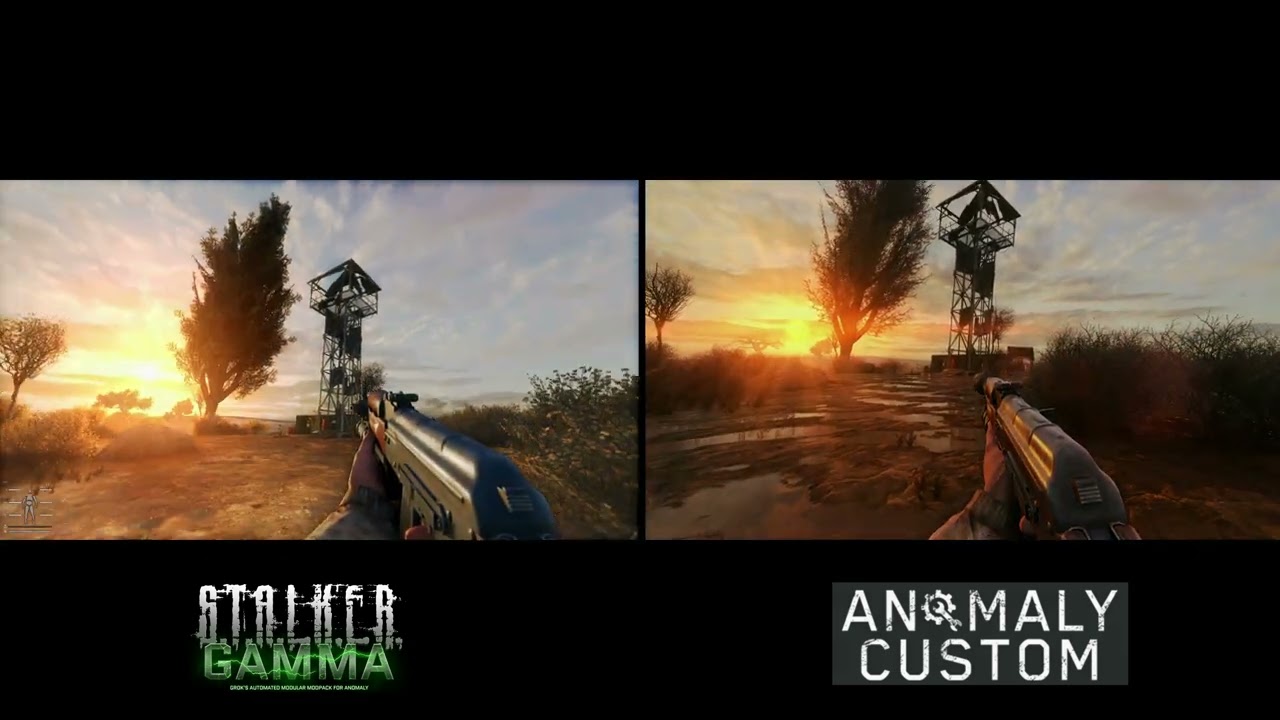
Stock vanilla graphic settings as is installed, GAMMA - default 'GAMMA reshade', Custom - default Custom reshade, 4k resolution, no texture mods, modlist as is by default installation, same or similar hour and weather conditions.
Gameplay from Anomaly Custom mod download link - https://rb.gy/au0frc
Visit the Anomaly Custom mod website - https://...
lol they have 100+fps
marsh sandal
quick quarry
whats the exact problem with v633? it works for me the same way as 5.7. I mean I...
I have no idea, I'm just parroting what I've heard plenty of times. Newer reshade versions apparently cause all sorts of issues, from just not compiling certain effects to reshade crashing to the game crashing. I can't say I have tested it, though. Too much of a hassle and the game looks good enough to me as I set it up now.
exotic moon
dunno what to name this
it's super duper fps friendly... better than TFAA ailising already in there... and... did i mention it fits with every single pack out there?
 shut folio
exotic moon
shut folio
exotic moon
The .zip bomb:
 exotic moon
blissful hull
hi. I am using reshades now but I noticed that my fps rate only have 72-80. Is t...
exotic moon
blissful hull
hi. I am using reshades now but I noticed that my fps rate only have 72-80. Is t...
my dude... i got the solution for you
exotic moon
exotic moon
use mine
blissful hull
exotic moon
If I am using this one, then should uninstall the original reshader from Gamma?
exotic moon
better yeah... but it should be drop and play into anomaly/bin folder
https://cdn.discordapp.com/attachments/1297762722380779541/1314436939738251304/AnomalyDX11AVX_2024-12-06_07-11-38.png?ex=6753c44b&is=675272cb&hm=205d010009da48e9c771ecc634da05441ca9767a81a9b24d4528283abbfb3045&
https://cdn.discordapp.com/attachments/1297762722380779541/1314436940422057994/AnomalyDX11AVX_2024-12-06_07-11-35.png?ex=6753c44b&is=675272cb&hm=263e60a745ed27a2a9bc7107b9c85ad25cc116ec5492e279ac0ec0bb5b22a924&


i haven't taken much pictures but here it goes
it's not really fair to show it in a picture though... this one you gotta try and play with yourself
blissful hull
ok
exotic moon
also some other fun things to do while you're trying it out
in console
r2_tonemap 0
that's going to disable autoexposure... i don't like it personally... and with that... you'd wanan change your light settings:
I liked
r__gamma 1.2
r__saturation 1.0
r__exposure 1.3
don't expect to look as good as mine though... fyi using XTREME graphics... cutsom setttings... custom mods etc
blissful hull
hi
how to disable resahder on Gamma?
I can't find where's the option for turn off reshader

Any ideas?
 stray flicker
I may be wrong, but I think you would need to check the box “delete reshade DLLs” in the Gamma launcher, uncheck “Force ZIP Extraction”, and then click on update/install
blissful hull
ok
marsh sandal
if you just want to turn the reshade off, just hit the PageUp key next to the home key, that will disable the active reshade profile
 marsh jacinth
potentially silly question
how do i turn on tfaa and bloom?
and, what are they lmao
 gaunt grail
!reshade
void depotBOT
@gaunt grail To enable Reshade Follow this: #╭📖faq message
gaunt grail
marsh jacinth
how do i turn on tfaa and bloom?
and, what *are* they lmao
tfaa is temporal antialiasing that uses motion between frames to smooth edges
 mellow edge
misty echo
atmospherics and SSS is so good that reshade is unnecessary
mellow edge
misty echo
atmospherics and SSS is so good that reshade is unnecessary
Do you just not use AntiAliasing? Can seem to get shimmering down
gaunt grail
bloom is leaking light
 gaunt grail
mellow edge
Do you just not use AntiAliasing? Can seem to get shimmering down
gaunt grail
mellow edge
Do you just not use AntiAliasing? Can seem to get shimmering down
with the sss alpha you can totally get away with either nvidia aliasing or upscaling with dlsdr
marsh jacinth
ah hm ok, i already have reshades, i'm guessing i just, press home, and search up "bloom" and other settings inside the preset itself, yeah?
gaunt grail
marsh jacinth
ah hm ok, i already *have* reshades, i'm guessing i just, press home, and search...
yeah I would use a preset that has it already like Atmospherics
marsh jacinth
hm alrighty, tysm
it's my first time doing like 99% of the stuff im doin' so. lmao i appreciate it
gaunt grail
or mess with it yourself it’s a rabbit hole though so much tweaking
marsh jacinth
ya fr
 sand onyx
I have updated the game to 9.3, now when I shoot I get a blurr effect ? Any solution for this ?
 royal maple
gaunt grail
with the sss alpha you can totally get away with either nvidia aliasing or upsca...
royal maple
gaunt grail
with the sss alpha you can totally get away with either nvidia aliasing or upsca...
where do i go to aquire this?
 nova terrace
sand onyx
I have updated the game to 9.3, now when I shoot I get a blurr effect ? Any solu...
nova terrace
sand onyx
I have updated the game to 9.3, now when I shoot I get a blurr effect ? Any solu...
 fringe fiber
Can anyone recommand me a high quality reshade or graphic mod?
 past shuttle
misty echo
atmospherics and SSS is so good that reshade is unnecessary
past shuttle
misty echo
atmospherics and SSS is so good that reshade is unnecessary
Both are really really good but aslong SSS doesnt have a solution for the shimmering grass/trees, Reshade (TFAA + DRME/Motion_vectors or vort_motion) is a mandatory for me and my eyes.
royal maple
past shuttle
Both are really really good but aslong SSS doesnt have a solution for the shimme...
mane that shit steals 10 frames for like barely any improvement
- side of blurryness during motion
past shuttle
you can counter the blurry with adaptiv_sharpen or any sharpening filter. and yeah, it costs around 10 fps but my system can take it. as i said the game looks good without any reshade at all but i personally need the calming effects on trees/grass.
junior flare
mellow edge
Do you just not use AntiAliasing? Can seem to get shimmering down
some objects (like aydin winter trees, which are default in gamma rn) not done properly so even if you jack em with layers of AA filters they'll still suck
tight zinc
mellow edge
Do you just not use AntiAliasing? Can seem to get shimmering down
- run FXAA or a lightweight AA on reshade
- install trees and grass that have better mipmaps (any of these)
check if this makes it any better
 nova frigate
past shuttle
you can counter the blurry with adaptiv_sharpen or any sharpening filter. and ye...
nova frigate
past shuttle
you can counter the blurry with adaptiv_sharpen or any sharpening filter. and ye...
i totally agree, if you have GPU to spare, one of the TAA shaders is a MUST
 supple adder
Hey, guys! What would you say is the best ReShade preset for GAMMA? I've noticed a lot in the folder and have been sorting through them, but can't find one with decent Anti Aliasing :/
gaunt grail
supple adder
Hey, guys! What would you say is the best ReShade preset for GAMMA? I've noticed...
Id recommend starting with AtmosR since it’s tuned off the current weather presets. Enable DRME and TFAA up. Be sure to do this https://imgur.com/GlBCnmg
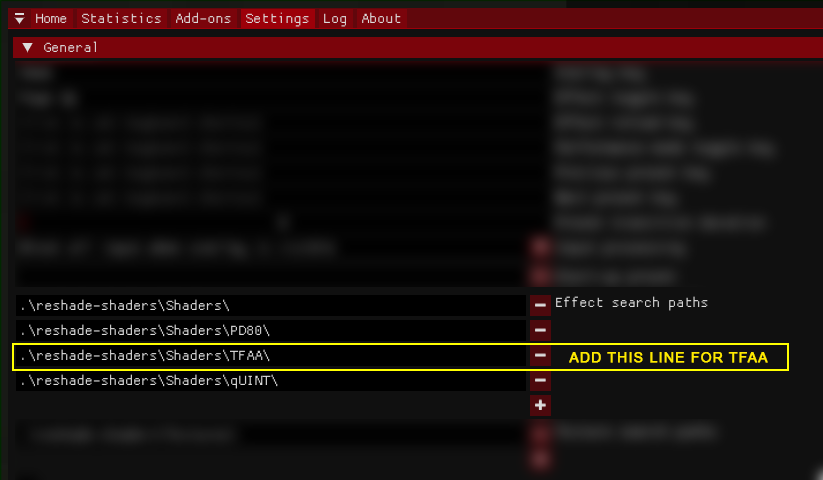 gaunt grail
royal maple
where do i go to aquire this?
gaunt grail
royal maple
where do i go to aquire this?

Ko-fi
Support Ascii1457 On Ko-fi. Ko-fi lets you support the people and causes you love with small donations
supple adder
gaunt grail
Id recommend starting with AtmosR since it’s tuned off the current weather prese...
How do I go about adding specific lines to it, do I just enable the filters?
gaunt grail
TFAA should be up top but disabled by default just hit the check next to it. It requires motion vectors to work (DRME) and FXAA also helps smooth it.
 fierce oasis
Does anyone have a nice reshade ini for usage with the INVERNO winter mod?
I wanted to ask because I am.. hopelessly dumb with reshade, I have NO clue what i'm doing.. lol
supple adder
gaunt grail
TFAA should be up top but disabled by default just hit the check next to it. It ...
I've enabled DRME in AtmosR, but can't find TFAA anywhere :/
fierce oasis
supple adder
I've enabled DRME in AtmosR, but can't find TFAA anywhere :/
I had this issue too. I found it in my anomaly folder
Anomaly > bin > reshade-shaders > Shaders > TFAA
i then just moved it into the shaders folder ngl lmao
ah
i did it dumb, yeah follow sunn's advice not mine, my bad
supple adder
fierce oasis
i did it dumb, yeah follow sunn's advice not mine, my bad
I mean, if it works lol
supple adder
I still have no clue how to add the TFAA tho
Do I click "Add New Preset" at the top right?
fierce oasis
after you do what sunn linked to, it should show up in your list of available effects in the reshade menu
supple adder
gaunt grail
Id recommend starting with AtmosR since it’s tuned off the current weather prese...
Like this?
 supple adder
blissful hull
I can't find where's the option for turn off reshader
supple adder
blissful hull
I can't find where's the option for turn off reshader
The GAMMA launcher - Delete ReShade DLL's"
 dusk spruce
junior flare
dusk spruce
junior flare
Subtle Tweaks V3 - not as subtle as could be, but no LUTs, tonemappers, HDR, etc so you can figure it out yourself and make your game just the right tone
performance hit 4-8 fps on my rig
no TFAA, chain of FXAA SMAA and Fast Effects instead (TFAA has errors for me and people say it's performance heavy)
smart sharpening is in place, so game doesn't look like you have bad eyesight


and this one is as subtle as it goes
AA, sharpening, film grain (reduces eye strain for me)
performance hit same as above


 sharp lagoon
Will i have to renable reshade if I updated to 0.93?
 somber whale
guys any ideas how to fix this?

 oak vault
is there a reshade in the latest gamma? pressing home does nothing
sharp lagoon
oak vault
is there a reshade in the latest gamma? pressing home does nothing
!reshade
void depotBOT
@oak vault To enable Reshade Follow this: #╭📖faq message
oak vault
I'm not looking to add it. I just want to figure out how to get rid of the overly tuned sharpness
sharp lagoon
oak vault
I'm not looking to add it. I just want to figure out how to get rid of the overl...
Oh, mb. Not sure how to fix that as i have the opposite issue (blurry af)
junior flare
oak vault
I'm not looking to add it. I just want to figure out how to get rid of the overl...
it's lack of AA
sharp lagoon
Can anyone help me with enabling TFAA? I enabled DRME but my screen still goes black when enabling TFAA
 fallen apex
junior flare
Subtle Tweaks V3 - not as subtle as could be, but no LUTs, tonemappers, HDR, etc...
fallen apex
junior flare
Subtle Tweaks V3 - not as subtle as could be, but no LUTs, tonemappers, HDR, etc...
What do i need to do to get this effect?
junior flare
fallen apex
What do i need to do to get this effect?
install .ini file, drop it into Anomaly/bin, then in game open reshade with HOME and select this preset
 tardy wharf
!reshade
void depotBOT
@tardy wharf To enable Reshade Follow this: #╭📖faq message
 young sundial
dose someone has the AtmosR file. I was so stupid and unticked all the boxes and now i dont know how it was before
supple adder
 long bane
Nvm fixed it
long bane
Nvm fixed it
W
 brisk shoal
What texture mods would you guys recommend using?
 autumn birch
i think after SSS update dark nights are similar to slightly dark and no long pitch black, im wondering how can i fix it ? i tried manually adjusting atmospherics global modifiers, i tried reshades, but it doesn't fix it from the core
tardy ibex
hey guys i like the atmosgamma and atmos r presets but they both have one problem, for gamma it makes white/greys stand out to much (this is very noticeable at night), and for atmosr it gives the sky like a glowy haze effect. anyone know how to fix these?
 calm moss
how do i get reshade on gamma i just downloaded it
blazing helm
calm moss
how do i get reshade on gamma i just downloaded it
!reshade follow this for instructions - btw dont update reshade to latest ver itll cause game crashing when changing graphics options
void depotBOT
@calm moss To enable Reshade Follow this: #╭📖faq message