
#╭📖faq
1 messages · Page 1 of 1 (latest)
 charred flume
charred flume
charred flume
HOW TO DISABLE CORE 0 - as easy as it gets
A gigantic thank you to @tawny flax for this guide, thanks to this legend we finally have something easy and straightforward for disabling Core 0.
First method: (NOTE: This software involves a third party software but it's COMPLETELY Open Source, available publicly on Github.)
Steps are as follow, check pic attached to see how the program looks like:
- Download "Process Hacker" from Sourceforge or Github: https://processhacker.sourceforge.io/nightly.php (this is the main site) and install it.
It's a "nightly" build because it contains what we need, a proper way to save the affinity. The version I'm personally using is: 3.0.4953 - Run Process Hacker as administrator (there is a setting to make it always run as admin, as well as make the default task manager Process Hacker)
- Run S.T.A.L.K.E.R. Anomaly as normal.
- Right click on AnomalyDX(yourDXversionhere).exe
- Hover over "Affinity"
- Click "Set Affinity"
- Uncheck Core 0 and click on "OK"
- Right click again, go back to Affinity and check "Save for AnomalyDX(YourDXversionhere).exe", by doing so, you will never have to set the affinity again. Of course, the program must be opened before Anomaly.
Done.
Bonus: you can enable dark mode if you want.
- Click on Options
- Scroll to the right
- You'll find "Enable theme support (experimental)", enable it
Done.
Second method: https://winbuzzer.com/2020/07/03/how-to-set-cpu-affinity-in-windows-10-with-task-manager-or-system-properties-xcxwbt/
You can use this if you don't like the idea of using a program, this is pretty much doable also with Windows Task Manager.

 jovial vale
HOW DO I EVEN MAKE PROGRESS IN THIS MODPACK, WHAT DO I DO?
(Thanks to Cr3pis for the icons, and to the other moderators for feedback)
This is a comprehensive visual flowchart showing how to make progress, and how the gameplay loop/logic works.
Any players having questions about repairs of firearms or outfits should read APART in this FAQ as well.
This guide also assumes you are familiar with looting, disassembling, crafting, and inventory management.
Remember to Open Original, zoom in, and ctrl+scroll to fit width to your screen.
ACCOMPANY
 charred flume
Good playlist with lots of guide with many questions answered by @wispy anvil:
https://youtube.com/playlist?list=PLDPlbMWnulB7HPaghsAujILtFACnpt_w1

YouTube
charred flume
HOW TO LAUNCH GAMMA FROM STEAM - as easy as it gets
A gigantic thank you to @tawny flax for this guide, thanks to this legend we finally have something easy and straightforward to add G.A.M.M.A. to Steam and thank you to @bold yew for the tip at the end.
1): Open Steam, in your LIBRARY tab, press "ADD A GAME" (first pic)
2): Press "Add a Non-Steam Game" (first pic)
3): Press "BROWSE..." (second pic)
4): Go to your G.A.M.M.A. RC3 folder and direct Steam to your ModOrganizer.exe (third pic)
5): Press "Add Selected Programs"
6): https://www.youtube.com/watch?v=6_5O-nUiZ_0
You can also add this following line in the Launch option window under Properties for the non-Steam game, with this line, the "Play" button in Steam directly opens the game:
"[YOUR DRIVE LETTER HERE]:\GAMMA\ModOrganizer.exe" "moshortcut://Portable:Anomaly (DX11)" %command%
This is an example with DX11 non-AVX, if you want to use AVX, just put Anomaly (DX11-AVX) instead of Anomaly (DX11)
Same goes if you want to use another DX, instead of Anomaly (DX11) you'll type Anomaly (DX8) and so on.



Taken from The Game, and Forever, 2014.
Click here to buy the DVD with this video at the Official Queen Store:
http://www.queenonlinestore.com
The official 'Play The Game' music video. Taken from Queen - 'Greatest Video Hits 1'.
Subscribe to the official Queen channel Here https://Queen.lnk.to/Subscribe
Watch more: https://Queen.lnk.to/Officia...
charred flume
G.A.M.M.A. in VR - wait, really?
Apparently you can play G.A.M.M.A. in VR. I still can't believe it honestly. 
Many thanks to @bitter hull, he's the author of this nonsense.
CHECK THE DESCRIPTION BELOW FOR ANY/ALL INFORMATION & LINKS!!! Preview of GAMMA in VR:
Thank you for doing the Voodoo that YOU do!!
And as always:
Stay Safe & Fly Right o7
8888888888888888888888888888888888888888888888888888888888
Chachi's Official Discord - The VRse:
https://discord.gg/kJ9RHRuc6j
Come & Troubleshoot VR Issues, get the ...
charred flume
WHY CAN'T I KILL ANYONE WITH GUNS!?!? IT'S 100% CONDITION!!! - originally made by @jovial vale, polished by @prisma sorrel and @thorn kelp
Check which ammo type you're using.
— HP and Buckshot are usually used for mutants (but on occasion works well on lightly armored stalkers).
— AP works best against armored NPCs. Buckshot and HP might only stun those with higher armor and do minuscule damage at best.
— FMJ is somewhere in-between, when your foe is wearing light to medium amounts of armor it can work well for saving AP ammo.
Next, check your weapon details:
(See image)
The worse condition your parts are, the less effective your firearm is (more jamming), and the worse condition your barrel is, the less damage you'll do.
F.A.Q. ABOUT AMMO
Q: Is it better to use AP ammo against high tier armored Sinners?
A: Typically, YES, you'd want to use AP ammo against armored sinners, the same AP vs Armor rules apply to them as it does to other non-sin stalkers, but they (sin) will always be able to tank more bullets than normal stalkers.
/---/
Q: For the player, does BR % work after BR Class is penetrated or if not penetrated? What is the difference between BR Class and BR %?
A: The short answer is that when dealing with the actor (player) BR Class is the armor’s maximum AP resistance, if the ammo can defeat & penetrate the armor BR % will reduce the amount of incoming damage you receive.
The complex answer is that when the incoming bullet doesn't penetrate your armor or helmet, damage reduction will be applied, damage reduction is calculated through this formula "damage reduction = ballistics resistance (aka BR %) * 0.2 + br class * 1.3" only if the bullet doesn't pen your armor.
This formula only applies to resistances coming directly from your helmet/armor and does not account for belt items/buffs. If the bullet does penetrate your armor/helmet then "damage reduction = ballistics resistance (aka BR %)" and you will start to bleed.
/---/
Q: What happens with AP bullet that cannot penetrate?
A: If a bullet is not able to penetrate armor, it will start breaking (dealing damage) to said stalkers armor, once enough damage is done to a specific part of the stalker their armor will break, allowing you to do full damage to that part of the stalker. Additionally, when armor can defeat the AP of a bullet the stalker will still receive concussion damage. To simplify, think of concussion damage as blunt force against armor, it’s affected by bullet size, the larger the bullet, the more concussion damage received. Player armor can technically break, but not the same way NPC armor does, it's just simple armor degradation (condition loss), but otherwise you will still receive small amounts of damage from bullets regardless if your armor stopped the bullet.
/---/
Q: What "breaks" armor better: HP or AP?
A: The only factor that plays into breaking armor is bullet AP. A distinction needs to be made here from AP rounds and the bullets AP, AP rounds will break armor much better than HP rounds, but because HP rounds still have an AP value, they will also break armor (albeit much slower) so use AP bullets to break armor.
/---/
Q: Does AP penetration reduces when shooting at Sinners?
A: No, not at all, the AP penetration of bullets will still apply to sinners, however sinners will take much less damage due to their flat 65% damage reduction.
 jovial vale
HOW DO I REACH THIS STASH/GET THROUGH THIS AREA?
Short, non-commentary videos on how to reach that Agroprom tree stash, and get through the Wild Territory burner tunnel, and more. (More videos to come due to upload limit)
https://youtube.com/playlist?list=PLEYzg90BwsB5Pa4CnSyj9LjVmIpLtgaQO
(Playlist updated Nov 16 17 18 19 21 24 Dec 1 6)
Post your suggestions about stashfinding or anomalous area traversals which you want to see in this thread: https://discord.com/channels/912320241713958912/1041867620766457957

YouTube
Need help finding difficult stashes? Or maybe need to know how to bypass some anomalies? This is the playlist you'll want. Remember to check out the FAQ-sect...
charred flume
CAN'T COMPLETE "CALL FROM THE NORTH"
Thanks to @sweet drum for the post.
Original thread, solution provided by Acemax: https://www.moddb.com/mods/stalker-anomaly/forum/thread/living-legend-call-from-the-north-quest-failedrc22
You'll need debug mode for this, if you don't have it enabled, go in #🤖bot-commands and type !debug.
1) Stand near the location where Gatekeeper usually is (at the hill camp overlooking the Barrier) and press F7 then Object Spawner.
Type stalker_gatekeeper in Spawn by Section and tick the Spawn at player, then click Spawn.
2) Target Gatekeeper before he wanders off and press F7, then Logic/Execute
3) Type the following in each field then click Set Logic:
Active Section = beh@stalker_gatekeeper
Active Logic = logic@stalker_gatekeeper
INI Filename = scripts\military\stalker_gatekeeper.ltx
Save and reload to get him back to his original state.
EDIT: It appears that the corpse of Gatekeeper will despawn and the info portion that he is dead will be added to your save.
When you have spawned a new Gatekeeper and set his logic, use the Function executor at the bottom and type the following (with no spaces) and click execute:
db.actor:disable_info_portion("stalker_gatekeeper_dead")
/---/
Then go to Barkeep or Aslan, the quest will update.
If this guide doesn't work, try this one: #╟🔰☢newbies-chat message
charred flume
I WANT TO DELETE EVERYTHING BECAUSE reasons, WHAT CAN I DO? DO I NEED TO KEEP SOMETHING?
♦️ For Anomaly ♦️
If you need to delete your Anomaly folder, make sure to save your save files, because they're inside this folder.
- Go here:
Anomaly\appdata, you'll find a folder calledsavedgames, make a backup of this folder. - Delete the folder
- Extract Anomaly
- Move the
savedgamesfolder back insideAnomaly\appdata - Launch Anomaly once
- Reach the main menu and close the game
♦️ For G.A.M.M.A. ♦️
🔷 Have you downloaded any mods through the launcher? (if you haven't, go to the next section)
- Open your GAMMA folder
- Move the "
downloads" folder you can find in there somewhere safe, because this folder contains the zipped mods the installer download and install for you. - Delete the entire GAMMA folder (make sure the
"downloads"folder is safe) - You will probably get a warning by Windows about deleting a system file called "
mtab", click on Yes, this file is safe to delete - Extract G.A.M.M.A. again, move the "
downloads" folder back inside again - Open the launcher with admin rights
- Click on First Install Inizialization, follow the whole procedure you already did once (choose Anomaly folder, etc.)
- When you're done, click on Install / Update G.A.M.M.A.
🔷 Haven't downloaded anything yet? (if you did, you need to follow the section above)
- Delete the entire GAMMA folder
- Extract it again
- Open the launcher with admin rights
- Click on
First Install Inizialization, follow the whole procedure you already did once (choose Anomaly folder, etc.) - When you're done, click on
Install / Update G.A.M.M.A.
charred flume
HOW TO "RESURRECT" SPECIFIC NPCs - a work in progress guide so RIP to any emote because I'll delete this post often
THIS GUIDE IS "OPEN" TO ANYONE WHO WANT TO CONTRIBUTE. If you know of a command that is missing in the list, PING ME/LET ME KNOW and I'll add it.
Many thanks to @wary sequoia, to @vale condor and @marshalltreynor for basically the whole guide, it's a huge thing made by lots of people. (if you don't want to be pinged anymore let me know  )
)
Since the guide is really huge and I don't have Nitro, you'll have to download this text file.
You'll need to enable and use debug mode for this one, so rip Invictus players.
Learn how to enable it here: #╭📖faq message
The two pics are basically "what you need to click after you press F7" and "what to do in order following the text guide".

 charred flume
HOW TO CORE 0 - the proper way, the easy way, the no program way, the my privacy is valuable way and I don't trust you but I trust GAMMA dude and his installer, thanks to @dim yacht
(welp the user left)
Follow this guide with this album that I can't add here because it'll turn out in a bad form (it's only for step 1-2-5-6-7): https://imgur.com/a/Ko0X40Z
WARNING: there is a chance that you won't notice any improvement, so don't be disappointed.
Step 0: Open MO2.
Step 1: Go to Modify Executables and Add Empty. (check album)
Step 2: Copy Start in location from Anomaly Launcher into the Start in location of the new empty executables. (check album)
step 3: Copy C:\Windows\System32\cmd.exe into Binary location in the new executables, it should be the same location as your cmd.exe path on your computer.
Step 4: Copy /c start "Anomaly Launcher" /high /affinity FFFE AnomalyLauncher.exe into the arguments bar of the new executables
Step 5: Go to task manager, Performance > CPU, look for Logical Processor count, most people will have 16, but you need the exact amount. (check album)
Step 6: go to this link: https://bitsum.com/tools/cpu-affinity-calculator/
Check the boxes in the calculator table starting from 0. If you have 16 threads (logical processors), check 0-15. Then, uncheck 0 if you don't have a CPU with hyperthreading. If you do, uncheck 1 & 3 instead of 0.
The result in the CPU Affinity Bitmask (hex) box below the table will tell you.
For example, mine is 0x0000000000000FFFE. You only need the last part, not any of the 0's. (check album)
Step 7: take the CPU Affinity Bitmask number it generated, you only need the last several letters, none of the 0's, and copy and paste it to replace the "FFFE" in the arguments bar. (check album)
Check the comments and description of the following link for documentation and other workarounds with MO2 if this procedure doesn't work: https://www.nexusmods.com/skyrimspecialedition/mods/51216?tab=posts
/---/
HOW TO CORE 0 on Windows 11 - the proper way, the easy way, the no program way, the my privacy is valuable way and I don't trust you but I trust GAMMA dude and his installer, thanks to @cedar salmon
Step 0: Open MO2.
Step 1: Start your preferred G.A.M.M.A DX Version like usual
Step 2: Tab out of the game
step 3: Open the Task Manager and search for "X-Ray Monolith Engine" in your process list
Step 4: Right click the process -> go to details
Step 5: Search for AnomalyDX (your DX Version here).exe, right click -> set priority to "high"
Step 6: Search for AnomalyDX (your DX Version here).exe again -> right click and set affiliation
If you have 16 threads (logical processors), check 0-15. Then, uncheck 0 if you don't have a CPU with hyperthreading. If you do, uncheck 1 & 3 instead of 0.
If you dont know where to find your logical proccessors:
Open Task Manager -> Performance Tab -> Bottom right corner -> Logical Cores

Nexus Mods :: Skyrim Special Edition
Instructs how to easily configure MO2 for CPU priority and affinity. CPU priority and affinity setup can improve stuttering.
charred flume
MY GAME LOOKS BROWN AND THE ZONE IS DEAD, IT'S BEEN 84 YEARS FROM MY LAST UPDATE, WHAT'S GOING ON?
1.) Open your mod organizer and find
289- Grass Tweaks (reinstall for different options) - Aydin.
2.) Right click on it and select from the context menu
Reinstall Mod.
3.) In the FOMOD installer that appears, click
Next.
4.) Select the Grass and Foliage you like, then click
Install
5.) Next click
Replace
⠀

 untold raptor
I HAVE A COOL NEW STEAMDECK, CAN I PLAY GAMMA ON IT?
Why yes you can! We've had users reporting a stable 30 - 50 fps (and at least 1 confirmed with 80 fps) on the deck with around 1 - 1.5 hours on battery. Follow this link to get the most up-to-date instructions!
https://discord.com/channels/912320241713958912/1094329707299868774
If you encounter any issues let me know!
Good Luck Stalker! 
charred flume
HAVING PROBLEMS WITH DOF
Why do I have this strange effect in my game? etc.
It's the new DOF (Depth Of Field) effect. You can turn it off by doing this:
1) Open the game.
2) Go in Mod Configuration Menu.
3) Search for SSS Settings.
4) Disable whatever options you don't like and/or move sliders to the left in the Weapons DOF tab.
/---/
2) Still enabled after doing that?
While in game, press ~, type r2_dof_enable off and hit Enter.
/---/
3) If the above steps aren't working:
1) Search and open this folder: [YOUR GAMMA FOLDER]\mods\190- Screen Space Shaders 20 - Ascii1457\gamedata\scripts\
2) Inside there is a file called ssfx_weapons_dof, open it with a text editor like Notepad++
3) Search for the line r2_dof_enable 1 and edit it to say r2_dof_enable 0.
If you have Reshade, you can also try to disable DOF addons in Shaders menu using the Home button in-game.
charred flume
A nice comprehensive HUD guide made by @manic oasis.
 charred flume
HOW TO RF RECEIVER
What exactly is a “RF receiver”? It's a device, similar to a normal artifact detector, but separated from them; its functionality is to find hidden packages containing ammunition, medicine or repair kits around the game world.
These packages are items you can directly see in the overworld, in plain sight.
When you receive the message for the package, you must go to the specific place you were told to and equip the receiver once you're there. The receiver will beep depending on how close or far you are from the package.
By holding down F, you will be able to see the** package name**, if you are close enough. This works for whatever other item in game as well. You can also equip the Lamp artifact (if you have one) to find the package more easily.
And if you have any hearing problems and need a "visual help":
- Go in MCM settings
- NERF Sources
- Accessibility
- Accessibility widget
Inside these packages, depending on their weight, you can find:
- Ammo (over 4kg)
- Repairs/Cleaning kits (1.5-2kg)
- Stimpacks (below 1kg)
You can equip the RF Receiver with 6 (default), it will replace the artifact detector.
To cycle through frequencies, with only the receiver in your hand:
Left Mouse Buttonto increase by 1Right Mouse Buttonto decrease by 1Hold Shiftand click for 10Hold Altand click for 50
Holding buttons listed above and using scroll wheel also works
I'm in X part of the map and I'm still getting this message about finding a package, I don't want to look for it, what can I do?
Drop the receiver in a stash or destroy it (it's craftable), you won't get the message again.
You'll still be able to accept these quests from NPCs, but, obviously, without a receiver, you won't be able to complete them.
If you want to cheat, check this sheet out
charred flume
WHAT THE HELL IS BUSYHANDS?
"Busyhands" is the name of a bug that softlocks your game by stopping you from doing basic game interactions.
Signs of busyhands
- PDA permanently blurry
- Cannot open your inventory
- Cannot use any animated items (e.g. eating/drinking, using meds)
- Stuck if you try to use MCM Keybind(e.g. freezoom, quick melee, ammo check)
- Health HUD in the bottom left corner is hidden, or it appears like it's all red
- Can't identify stalkers on HUD
- Crash on area transition
- Crash on making a new save/loading current save
- Any combination of the above
Busyhands often includes more than one sign. If you see many of these signs at the same time, then you are likely affected by the busyhands bug.
How do I fix it?
Load an earlier save that was made before any of the busyhands signs started happening. However, it is possible to get a version of this bug ("hard busyhands") where reloading saves doesn't work and you are permanently stuck in busyhands. If that happens, it's time to start a new game.
NOTE: If you are using the
Turn this on if you stuttermod in Mod Organizer, or have manually changed theauto_switch_distance_startvalue, you can also follow!busyfixin #🤖bot-commands
It is sometimes possible to fix with a full reinstall, make sure to use !delete in #🤖bot-commands
For a longer, better writeup and busyhands prevention ability, use the Busyhands Watchdog script. This will make your game crash out more.
What causes busyhands?
- Enabling disabled animations and/or adding new animations with custom mods (such as the disabled FDDA animations)
- Animation spam, or constantly trying to animation cancel
- Increasing the
auto_switch_distance_startvalue.- Certain in-game options such as "Press ALT to disassemble"
- Certain mods such as "Angry Chimera Growl"
charred flume
Radio command backup, Nitro is needed
HOW TO ADD YOUR OWN TUNES IN YOUR PDA - thanks to @knotty frost for the guide
(Baby we made it, started from the bottom now I'm here, the long awaited guide, my absolute stain on this server, "Falco radio guide when? Stop being a lazy bastard and post the guide" and the like, NO MORE.)
Follow the Imgur album when you read "(X° pic)", everything is made in order: https://imgur.com/a/e2mngya
1) To begin, you'll want to install Audacity in advance, this will be used to turn an .mp4 stereo audio file into a mono .OGG file: https://www.audacityteam.org/download/windows/
- Next, enter ModOrganizer, and find the mod named "
12 - PDA Radio Extended - Starcry_". - Then, right click the mod, and select "
Open in Explorer", this is the page you should be sent to. (1° pic)
2) Once here, go to: gamedata/sounds/radio, now you should see three folders labeled Playlist 2, Playlist 3, and Playlist 4, respectively.
- Open any of the playlists you wish (I chose Playlist 4) and you should now be met with a large list of songs already in the PDA.
- WARNING: IF YOU WANT TO SAVE ANY OF THE SONGS, MAKE A SEPARATE FOLDER OUTSIDE OF THE ANOMALY FOLDER, AND COPY THEM TO IT.
- Delete all the songs inside of Playlist 4, and hit refresh; this will make sure the game is aware there is nothing inside the folder.
- Now, take any song you wish to use, as long as it is an
mp3, right click it, and open it using Audacity. (You may have to manually tell Windows to do so.) - Upon doing so, if done correctly, it should look like this. (2° pic)
- MAKE SURE THE BITRATE IN THE BOTTOM LEFT IS 44100, IF IT IS NOT, IT MAY NOT WORK PROPERLY.
- Next, you will want to select the name of the song in the middle left of the screen, and select "
Split Stereo to Mono". - Once done, delete the bottom half of the track, and it will now look like this. (3° pic)
WARNING, files of this type:
04 - Paradise (What About Us) (Feat.Tarja).ogg, will NOT work inside the in-game radio.
The file in question needs to be renamed to:
04 - Paradise (What About Us) (Feat Tarja).ogg, notice the missing dot (.) near the "Feat".
Anomaly (or computers in general) has a problem with "special characters" and the like, the dot (.) is actually a special character and the problem stems from that.
So if you have problems with the in-game radio, check your file name, it could be that.
Thanks to @torpid forum for the "tip".
3) Finally, hit File in the top left, and click Export as OGG, then choose where you want the file to go. (I recommend making a separate folder to store OGG files for convenience.)
- Take the new OGG version of the song, copy it, and paste it into Playlist 4, which should now look like this. (4° pic)
- Refresh again, then close all applications except for ModOrganizer, and boot up Stalker.
- Load into any save, head to the radio section, then flip through playlists until you reach Playlist 4, then hit play.
- If done correctly, your song should now be in the game for your listening pleasure, feel free to repeat the process for any other songs you'd like to listen to.
- This is more or less what you should end up with: https://clipchamp.com/watch/mpslh2nZnny
charred flume
HOW TO SAFELY MOVE ANOMALY AND GAMMA WITHOUT DOWNLOADING EVERYTHING FROM SCRATCH - seriously, how can you think or believe that deleting 100+ GB worth of files is the best move?
Certain file locations cause issues with the launcher installation and ModOrganizer 2, follow the guide to learn how to move files properly.
DON'T FORGET THAT THE FOLLOWING FOLDERS ARE NOT APPROPRIATE FOR ANOMALY AND G.A.M.M.A.:
Desktop,Downloads,Documents,OneDrive,Program Files/Program Files (x86), etc.- Folders with CYRILLIC
(а-я), HIEROGLYPHICS, CJKV CHARACTERS (語) or SPECIAL SYMBOLS (.,;?!) in the name - Folders with a LONG name, nested folders (eg.
X:\myGames\S.T.A.L.K.E.R.\G.A.M.M.A. and Anomaly\G.A.M.M.A.\GAMMA RC3, the same for Anomaly, that triggers thefilename too longerror
- ♦️ Moving Anomaly ♦️
1) Move your Anomaly folder to the new location, something like C:/Anomaly is fine but whatever drive you want to use is fine (your save files will be fine as well because they're inside this folder)
2) Go to your G.A.M.M.A folder
3) Delete the ModOrganizer.ini file. It should be below the ModOrganizer.exe application
- ♦️Moving G.A.M.M.A. ♦️
1) Open your G.A.M.M.A. folder and ONLY delete the "mods" folder you'll find inside. Leave the rest untouched, you don't need to delete anything else.
2) Move your G.A.M.M.A. folder to the new location, C:/GAMMA is fine but whatever drive you want to use is fine
- ♦️ When you have finished moving everything to a new location ♦️
- Run the launcher as admin
- Click on
First Install initialization - Select your
Anomalyfolder, as in, DON'T OPEN THE FOLDER, YOU DON'T NEED TO OPEN THE FOLDER, SELECT THE FOLDER - Be sure you're selecting the Anomaly folder without opening it
- Close
ModOrganizer - Click on
Install / Update G.A.M.M.A.
charred flume
WHAT IS THE PSY HELMET AND WHY DO I NEED IT
The psy helmet is a quest item given by Sakharov in Yantar. Pay him 30k (this number can change depending on what difficulty you're playing) for the fully calibrated helm.
UNISG is the only exception since they get the helmet during their questline.
In order to proceed further north (from Red Forest and above), you'll need to disable the Miracle Machine in Yantar.
You CANNOT get the helmet normally if you're playing WITHOUT story mode but (to be confirmed) there are two other ways:
- you can get the helmet by using debug mode (
!debugin #🤖bot-commands) but it's not guaranteed that it will work. - You could kill Sakharov but it's not guaranteed that you'll get the calibrated helmet, since it's the only one that work.
The helmet will stay in your inventory at all time, you can't equip it and you can't drop it.
The helmet DOESN'T give you any extra psy resistance and it CAN'T stop ghosts.
YES, ghosts are enemies, just shoot them (or melee them if you dare), they go down in one hit.
You will need better gear or artefacts with better psy resistance in addition to medication like psy-block pills for dealing with psy mutants (like controllers) and psy anomalies (psy fields).
charred flume
SPREADSHEETS SECTION
Main Database and Item Spreadsheets
- S.T.AL.K.E.R. G.A.M.M.A. DB made by @sinful python and @worldly tree
- Weapons + Armors + Mutants + Artifacts + Food + Drinks + Medicines + Recipes + etc.
Guns
- GAMMA Detailed Weapon Database made by @rocky urchin
- Cheeki's Ballistics and Ammo Archive made by Cheeki Breeki (yes, the youtuber)
- Weapon Drop Sources made by @spark agate - STILL A W.I.P
Quest Guides
Crafting
- GAMMA Crafting Table and Ammo Component Chart made by @exiledmonkey
- Drug Crafting Chart made by @calm yarrow
Miscellaneous
- Aslan Lottery Outcomes made by @quaint path
- [RNG Tool Worldspawns](<https://www.youtube.com/playlist?list=PLSTdsUPUwlxdv5RETiN5LbBClKLNI_oQ-) made by @carmine kelp
- Nimble Weapon Trades
charred flume
G.A.M.M.A. ON MAC, POSSIBLE? - it's more likely than you think
Thanks to @verbal lark for the guide and (quoting from ryn1u): DravenusRex (for Linux guide), Maxastyler (for Steam Deck guide) and user Vybo from Reddit, for the guides I used to make this work
♦️ IMPORTANT! - You will need to download GAMMA on Windows. If you don't have a laptop/PC with Windows installed, you can install it on your Mac using a virtual machine - Parallels Desktop or VMWare; check YouTube for guides on how to do that.
💠 --- WINDOWS PART --- 💠
1. Follow GAMMA Installation posted here -> #🖥️how-to-install
2. When everything is downloaded correctly using the GAMMA Launcher, **combine **GAMMA and Anomaly folders into one .zip using 7-zip; you can call it whatever you want.
💠 --- MACOS PART --- 💠
3. Transfer this archive you just made to your MacOS, an external drive will work, and extract the archive. (I had some problems using "The Unarchavier", but MacOS default uncompressing app did the trick)
4. Download latest PortingKit from https://www.portingkit.com/ and install.
5. Inside PortingKit, navigate to "Library" and use the search bar to search for Anomaly.
6. The installer will show up, proceed with the installation. Keep in mind the location where you want to install Anomaly, you will need that later - default name would be Stalker Anomaly.app inside Applications folder.
7. It can take a while, but eventually you will end up where the installer will ask you to point it to Anomaly.exe, do that. (It will be in Anomaly\bin, where you extracted the zip file). It doesn't really matter at this point to which .exe you will point the installer.
8. When the installer is done, exit PortingKit.
9. Navigate to a place which you choose for installing Stalker Anomaly.app. Right click on Stalker Anomaly.app -> Show Package Contents.
10. Inside, there should be a shortcut called "drive_c", open it; you should be in a folder where you'll find folders like "Windows", "Program Files". Put the extracted folders - GAMMA and Anomaly - here!
11. Go to Anomaly folder and uninstall everything related to Reshade (yes, Reshade WON'T WORK on Mac) - you can find guide on uninstalling Reshade here: https://reshade.me/forum/general-discussion/4398-howto-uninstall-reshade
12. Delete shader_cache folder if you have one inside Anomaly\appdata\
13. Open PortingKit, go to Library, on the left panel there should be Stalker Anomaly now. Right click on it and choose Properties.
14. In the Target: field, change the destination to C:\GAMMA\ModOrganizer2.exe, apply and close.
15. Run Stalker Anomaly.app.
16. Now you should see the familiar ModOragnizer2 window. You need to disable some mods: 188- Enhanced Shaders - KennShade, 189- Beef's NVG - theRealBeef, 190- Screen Space Shaders - Ascii1457, 290- Atmospherics Shaders Weathers and Reshade - Hippobot
17. You need to fix paths to .exe's inside ModOrganizer. Top-right corner dropdown menu -> Edit...; fix the exe you're going to use, just point to to .exe's inside drive_c/ANOMALY/bin.
You should be good to go. This was tested on MacBook Air M1, 8GB's of RAM, runs fine - not great, not terrible; tweak some settings to get better performance.
charred flume
I'VE BEEN HERE FOR MONTHS, BUT I CAN'T CHAT IN #╓☢stalker-chat. WHY?
The reason is that you joined the server BEFORE the rank system was implemented, so you didn’t initially have a role. However, you now have the "Novice" role, which is assigned automatically. This is the "first official role" you receive after the "Newcomer" role. This role only prevents you from chatting in #╓☢stalker-chat, you're free to participate in the rest of the server.
We implemented these restrictions because many newcomers were removing their roles BEFORE even installing G.A.M.M.A., then coming back and asking "how do I install GAMMA?" or similar newbie questions, especially in that channel. After receiving numerous complaints about this, we decided to lock that particular chat behind XP. It’s not too problematic since #╟🔰☢newbies-chat is more active nowadays and many of the long-time members hang out there too.
To be able to talk in the channel, you'll need to reach the "Rookie" rank, which requires reaching level 6 (1,625 XP). You earn XP by chatting, ranging from 5 to 13 XP per message, randomly.
If you have a green name (the Newcomer role) and aren't sure why, check out this link: #⏩start-confirm
charred flume
HOW TO CHANGE YOUR MINIMAP STYLE AND/OR POSITION - round or square, top left, etc.
If you want your minimap to be square (as it was long time ago):
- Enable the minimap mod of your choice (e.g. SquareDOV)
- Right click on it and click "reinstall", choose whatever options you may like, click Replace when asked
- Drag and drop this mod underneath
G.A.M.M.A. Minimalist HUDwhile sorting the mods by Priority. The priority number of your chosen minimap mod should be larger than the priority number of "G.A.M.M.A. Minimalist HUD"
If you want your minimap to be round:
- Reinstall
306- Modular Compass Minimap - lifestorock, choose whatever options you may like, click Replace when asked - Drag and drop this mod underneath
G.A.M.M.A. Minimalist HUDwhile sorting the mods by Priority. The priority number of your chosen minimap mod should be larger than the priority number of "G.A.M.M.A. Minimalist HUD"
If you want only a compass with no minimap:
- Enable the mod
200- Compass instead of minimap (more immersive) - Raven800 - Drag and drop this mod underneath
G.A.M.M.A. Minimalist HUDwhile sorting the mods by Priority. The priority number of your chosen minimap mod should be larger than the priority number of "G.A.M.M.A. Minimalist HUD".
charred flume
**WHAT IS THE BLACK MARKET MOD? ** - thanks to @mystic niche for the original article
This mod allows you to trade weapons in G.A.M.M.A., but with some caveats.
What do you need to do:
- Enable this mod:
340 - Black Market (Buyable Gear) - SalamanderAnder & nox - DO NOT DISABLE
G.A.M.M.A. Economy (don't disable, turn on Black Market to buy gear)andG.A.M.M.A. Economy no BAS injection, disabling them causes G.A.M.M.A. economy breaking and some useful items can disappear from merchants inventories. - DO NOT ENABLE Trader Overhaul, it has not been updated for a long time and is no longer supported.
How it works:
- Weapons and traders are categorized by:
- faction (WP/NATO, type
!buyammoin https://discord.com/channels/912320241713958912/1012510897136222293) - tier (based on weapon base cost/trader location)
Traders tier and sides: #╟🔰☢newbies-chat message
If you want to sell a weapon, you will have to repair it and find a trader who wants weapons of that particular faction and tier. You can see the weapon faction and tier in its description. Traders have a dialog option where they explain their preferences for trading weapons, some factions have traders who will buy both WP and NATO weapons.
Random stalkers are willing to buy any weapon, if they'll trade with you at all, they will offer you the lowest price for your weapon compared to any trader - only 10% of the base cost.
READ THIS before you ask:
- BM does NOT require a new game.
- BM is compatible with Trader Destockifier.
- BM is NOT COMPATIBLE with Trader Overhaul. (just to be sure)
- Not all traders will sell weapons and armors, even with this mod enabled. For those who do, you will have to wait for the next stock cycle; it won't be instantaneous.
- BM is recommended to be used on "Survival" difficulty
charred flume
I TURNED OFF "Accessible Zone" WHEN I STARTED A NEW SAVE, CAN I GO BACK? - thanks to @scarlet steeple
Yes, you can:
- Start the game in debug mode (type
!debugin #🤖bot-commands if you don't know how) - When you're in game, press F7 to open the debug menu
- Click on "show all routes"
 neat bay
Stalker GAMMA zones and factions map - made by @rocky urchin
These maps show where all faction bases, vendors, certain story NPCs and NOTABLE spawns are. The actual factions and stalker spawns you meet in game will be different, this map is meant as a quick reference for people who want to get an overview of the whole Zone. Sin and UNISG bases are unmarked on purpose since they are endgame spoiler factions, and if you really want to find out, just start a new game as them.
Huge spoilers obviously, don't look at this if you don't want to know the general locations of factions.
All maps are 1920x4894px, about 19 MB.
Full map (shows vendors, faction bases, story NPCs, Sin/UNISG potential spawns): https://drive.google.com/file/d/1sCjENxwKv749jEOi6-Wxc8CyF5YeDP5H/view?usp=drive_link
No Sin/UNISG spawn locations: https://drive.google.com/file/d/1S71p3l4D8F3GA9YmJFZQoM49eaKe5kJS/view?usp=drive_link
Vendors only: https://drive.google.com/file/d/1WLiOZRc1ERC8SETd_R5wiMEFYCeG1GFU/view?usp=drive_link
charred flume
HOW TO TELEPORT COMPANIONS made by @golden shale
When in-game press Backslash to teleport companions to the player. This button can be changed in MCM settings, in the "Fair Fast Travel" tab.
If you don't use Fair Fast Travel or the method above doesn't work try this:
Enable a mod in MO2 called Quick Companion Teleport (you can use the filter tab at the bottom of MO2 to search for mod names)
The default button is Numpad 6 and it can be changed in the MCM settings, in the "Companion Teleport" tab.
Be sure to be close to them, 200m is the maximum distance you can be far from them, don't go over 300m.
If their health bar is grey, it mean that you're far from them and they won't "hear" you.
You'll need to be more close to them, sometimes you'll need to be right next to them in order to "teleport" them.
If you don't want to enable the mod, then you can also just tell them to follow you and then go sleep in a bed, it should work. Be sure to be close to them because they still need to "hear you".
charred flume
HOW DO I MAKE STASHES SPAWN LOOT AGAIN? - thanks to @lyric wolf
The mod in charge of populating stashes with loot is ZCP. By default, the options are toggled off so that you only find loot in marked stash locations. If you wish to find loot in ANY stash you'll open again, go to Mod Configuration Menu > ZCP > Loot, then tick all the boxes for the loot you want to reappear - repair kits, minor repair kits and parts, useful items, extra ammo.
Do NOT enable Old Ammo, as that has a small chance to crash your game if it is put into a stash and you open it.
Toggling these options on alone will NOT guarantee loot, as loot spawns are further dependant on the chance slider. Below each option you must select how likely you are to find that type of loot in the stash.
A somewhat balanced list of options can be seen in the image below (ammo and medical items are set to 60-80%, repair and cleaning kits at 10-30%, these options usually guarantee at least 2-3 items per stash).
 charred flume
HOW TO GET RID OF PROF. SEMENOV
- Turn on debug menu: #╭📖faq message
- Launch the game and load your save file.
- Now press F7 and then press on the NPC Logic/Execute button.
- Copy and paste this into the command line:
task_manager.get_task_manager():set_task_completed("yan_ecolog_semenov_task_1") - Click: Execute
- Now aim at Semenov and press F7, then press F
- You should see object info text on the left (as shown in the picture)
- In the same window type:
release_id *xxxxx*(The x's are his id number that you should see under Object info)
- For example as shown in the picture below, the release id would be:
release_id 20445
⠀
 charred flume
HOW TO INSTALL MAIDS ICONS - 2024 EDITION (the pain never ends) - thanks to @normal thistle for the original guide and to @stone prairie for providing a fix that wasn't in the guide
It's a big guide with pics to follow, I only added a new thing and rewritten the whole guide in a better english, the procedure is still the same and SHOULD work, if it doesn't work please let me know, especially if you know what's wrong with it.
The russian version can be found in https://discord.com/channels/912320241713958912/1107001101150081176, it will be updated soon™️
charred flume
HOW DOES "DISGUISE" WORKS? - thanks to @wise compass for the original guide
It allows you to stay hidden among enemy factions, allowing you to run past safely, accept tasks from them, etc.
How to disguise?
You need a fully repaired faction armor and a faction patch, which will need to be attached (attach it away from people where you can't be seen, even your own companions)
To attach a faction patch, press Z (default button), you need to have the patch in your inventory, as tearing the patch off again will not return it to your inventory.
BE AWARE: You cannot attach a Loner patch to a Bandit suit, it doesn't work that way. If you want to disguise as a Bandit, you need a Bandit armor and a Bandit faction patch, same goes for every factions minus Monolith, Sin and UNISG.
I'm disguised but I've been found out anyway, why?
Most of these can be configured under "Disguise" in Settings:
- You need a fully repaired faction suit with its patch attached
- Don't run/jump all over the place in plain sight of the faction or its allies, you attract unwanted attention and get yourself found out faster
- Don't walk too close to a NPC, don't bump into them. Use the Taskboard tab in your PDA to take tasks. If you wish to speak to an important NPC, do so from their back (this works, weirdly enough).
- Do not take out your weapons in an enemy faction base, they'll kill you.
- On that note, be wary of receiving grenades as a task reward when you have none equipped in the slot, they will be equipped and held out in your hands, immediately breaking disguise.
- Wear full-face headgear (a gasmask, a helmet, etc.)
- Don't stand too long in one spot, you'll look suspicious
- Don't sleep in enemy bases, you'll wake up to a gun barrel between your eyes. Find a spot away from NPCs if you do need to sleep.
- Make sure that your inventory is not completely full or too much heavy (yes seriously), this can be tweaked as well.
charred flume
CHANGE YOUR GOODWILL WITH A SPECIFIC FACTION USING DEBUG MODE
You will need to enable debug mode first: #╭📖faq message
- Open the debug menu by pressing F7, then press 0
- Type this command:
relation_registry.set_community_goodwill( "faction name", AC_ID, # )
You'll need to change "faction name" in the faction you want to edit, the # in the command is the amount of goodwill you will need to type and it can range from 0 to 3000, while the maximum "supply level" from traders is 2000 (level 5).
Faction names are:
stalker(Loners)csky(Clear Sky)bandit(Bandits)killer(Mercenaries)dolg(Duty)freedom(Freedom)army(Military)ecolog(Ecologists)greh(Sin)isg(UNISG)renegade(Renegades)monolith(Monolith)
If you can't/don't want to use debug mode, you can also install this mod instead to edit goodwill and faction relations through MCM.
charred flume
HOW TO FIX GUNS - GAMMA 0.9.3 2024 edition, thanks to @golden shale and @rocky urchin
Armors guide coming soon™️, until then, you can follow the old one: #╭📖faq message
 charred flume
GAMMA MULTIPLAYER POSSIBLE???
No.
GAMMA isn't multiplayer and will most likely never be, "most likely" because there's no Anomaly multiplayer project on going.
Beware of scam multiplayer projects that are advertised as being legit and fully functional, most of them are simple cash grab attempts.
Follow the #📢announcements channel for up-to-date informations related to community projects and their possible ties to G.A.M.M.A., all Anomaly mods that are claiming to be "multiplayer" mods will now be heavily restricted, that means no sharing of any Anomaly multiplayer mods, videos or pages.
Announcement made by Anomaly Dev Team: "Anomaly Dev team does not (and probably never will) endorse, support or condone any multiplayer mods. If we do, you will hear about it in the Anomaly announcement Channel, All other groups or individuals claiming to have created a multiplayer version of Anomaly should be treated with suspicion and at engaged with at your own peril."
Here is the only multiplayer project currently under development:
- xrMPE is a 4 player match based co-op experience, with the most solid netcode.
- ModDB page: https://www.moddb.com/mods/x-ray-multiplayer-extension
- Discord link: https://discord.com/invite/F4PQ3m2
charred flume
CAN I TOUCH WHATEVER DISABLED MOD IN THE MOD LIST? or WHY ARE THERE ALL THESE DISABLED MODS?
Mods under the G.A.M.M.A Disabled category and ALSO other disabled mods that aren't under this category are disabled (and still in the mod list) for a variety of reasons, like compatibility, performance, bugs, busy hands, etc.
Okay but like can I enable some of them?
NO. YOU CAN'T. DO NOT ENABLE THEM. SERIOUSLY. DON'T.
What about animations if I see one? Can I enable them?
NO. DO NOT ENABLE ANIMATIONS THAT ARE DISABLED BY DEFAULT, IN MCM SETTINGS IN GAME OR ANYWHERE ELSE IN THE MOD LIST.
They are disabled for the same reasons written above, including the busyhands bug.
(if you don't know what this is, type !busyhands in #🤖bot-commands)
Why do we have these mods in the mod list if we can't activate them?
Because G.A.M.M.A. is STILL IN BETA.
NO, Grok can't simply remove these mods. Version 1.0 will have a clean mod list.
If you really want to use stuff that is disabled by default, forget about #🔨base-gamma-support, you'll have to ask in #🔨modded-gamma-support instead.
_ _
I WANT TO CHANGE HOW MY ZONE LOOKS TO <season>
- Open MO2 and find
289- Grass Tweaks (reinstall for different options) - Aydin - Right click on it and select from the context menu
Reinstall Mod - In the FOMOD installer that appears, click
Next - Select the Grass and Foliage you like, then click
Install - Next click
Replace - Next, do steps 2-5 for the mod
388- Aydins Grass Tweaks SSS Terrain LOD Compatibility - aytabag
This will not work unless you reinstall both Grass Tweaks mods!
 charred flume
I NEED TO COMPLETE A FAILED TASK, WHAT DO I DO? - thanks to @fair basin and @royal heron for this guide
Disclaimer: by completing quests with debug mode you may break other quests in the storylines. Make sure you won't abuse this system frequently and make save files more often, just in case something goes wrong.
_ _
- Enable debug mode:
Follow this guide: #╭📖faq message - Download this mod: https://cdn.discordapp.com/attachments/1218803317485076571/1316804385833222307/Findmeatask.7z, thanks @balmy obsidian for the script

- Install the mod and enable it in MO2
Type
!ctrlmin #🤖bot-commands if you don't know how to install mods.
- In-game, press
M, then press~for the console.
You will see the
task_idof all active tasks at that moment (check at the screenshot below).
- Write out/memorize the
task_id(just like in the screenshot) - Open debug mode by pressing
F7, then open the NPC Logic/Function Execute menu by pressing0or clicking it. - Paste the following command into the bottom line, replacing
task_idwith the one you have memorized or wrote out.
task_manager.get_task_manager():set_task_completed("task_id") - Execute this function. The task should be completed.
 charred flume
ARE YOU HAVING "SOUND PROBLEMS" WITH YOUR GAME? - thanks to @vocal storm
This is a compilation of possible issues and fixes for missing sounds.
- Check the game's volume settings or close and reopen it if you hear nothing.
- Open the Volume Mixer (right-click the sound icon 🔊) and ensure Anomaly's volume is not at zero.
- Sound may be lost when changing devices (e.g. headphones to speakers) ESPECIALLY when the game is running. Close and reopen the game after changing sound sources.
- If you have a sound card, try disabling it and using a different output.
- Download and install the OpenAl driver from https://www.openal.org/downloads/.
- Launch Anomaly Launcher, uncheck Support for AVX CPU, save settings, and run the game via MO2.
- If using Prefetch sounds, disable it, save settings, and run the game via MO2.
- Install/update DirectX from https://www.microsoft.com/en-us/download/details.aspx?id=35.
- Reset settings to default by entering
!defaultin this channel: https://discord.com/channels/912320241713958912/1012510897136222293 - If previous methods failed, update sound and video card drivers from the manufacturer's website or via Device Manager.
- Use the sound problem workaround in the Anomaly Launcher, but be aware it’s experimental and may worsen sound quality.
charred flume
WHERE CAN I FIND THE MUSIC/OST USED IN G.A.M.M.A.? - thanks to @golden shale
-
G.A.M.M.A. Soundtrack made specifically for the mod pack: SoundCloud
-
Ambient Music Pack which has a list of ambient tracks added through a mod.
-
Songs you hear in the radio factions
Path to the mod:
YourDriveLetterHere:\GAMMA RC3 (or whatever you called your GAMMA folder)\downloads\Anomaly_Radios_Extended-_1.5.1.7z\Anomaly Radios Extended - 1.5.1\gamedata\sounds\anomaly_radio_addon
- In case you're wondering if there's a way to revert the removal of copyrighted songs, you can disable the
GAMMA No Copyrighted Musicmod, which removes a significant chunk of these tracks, along with some PDA Radio ones.
Everything else can be found in MO2. (check pic below)
 charred flume
Anti-aliasing in G.A.M.M.A.
_ _
DO NOT USE the in-game anti-aliasing or MSAA options! They don't work well, have a huge performance impact and break 3D Shader Scopes.
Default method for anti-aliasing in G.A.M.M.A. on the DX11 renderer is provided by the Screen Space Shaders mod and its TAA module. However, if you don't use SSS or the DX11 renderer, you have three alternative options.
-
Install and use Reshade for AA (follow
!reshadein #🤖bot-commands) -
Use Nvidia Control Panel to set anti-aliasing for Anomaly exes
NOTE: this does not work for DX11
- Go to Nvidia Control Panel -> Manage 3D Settings -> Program Settings
- Select the specific Anomaly .exe that matches your DX and AVX version - for example, if you use Anomaly DX9 no AVX, pick
Anomaly/bin/AnomalyDX9.exe - Under "Antialiasing - Mode", choose "Override any application setting"
- Under "Antialiasing - Setting", choose any setting you like, such as x8
- Click "Apply" to save your settings
- Use AMD Radeon Settings to create an application profile for Anomaly exes:
- Go to AMD Radeon Settings -> Add -> Browse
- Select the specific Anomaly .exe that matches your DX and AVX version - for example, if you use Anomaly DX11 no AVX, pick
Anomaly/bin/AnomalyDX11.exe, click Open - Under "Profile Graphics", choose
- Antialiasing - Mode, choose Override Application Settings
- Antialiasing - Method, pick whichever option you want
charred flume
HOW TO TURN ON MAGS MANAGEMENT - because seriously I had to at some point
In order to properly enable magazines in GAMMA:
-
DO NOT ENABLE
207- Mags Redux, DO NOT ENABLE THIS MOD. -
Enable these two mods:
Anomaly Magazines Redux (need to disable GAMMA unjam reload same key)ATHI's Mags Redux Mod Madness(in "Realistic Magazines")
- Disable this mod:
G.A.M.M.A. Unjam Reload on the same key(yes, it's a mod, no, it isn't a keybind)
- (this is optional)
EnableAmmo Check(this is a mod as well, the ammo counter will be hidden and you'll get an ammo check function) - While in game, check your keybinds for RELOAD and UNJAM in
Settings > Controls > Bindings, it should be something with F10, look carefully before asking, because it's there. Make sure to check MCM settings as well. - After successfully following all steps, you need to Left-Alt + left click the magazine to add to your loadout, before a reload can work.
WARNING: DO NOT enable Mags Buyable at Traders, it replaces trader profiles with outdated ones.
 charred flume
HOW TO REMOVE MAGS SAFELY WITHOUT LOSING YOUR SAVE - originally made by @sinful karma and originally posted in this server by @velvet matrix
KEEP IN MIND that, once you enable Anomaly Magazines, you can't just disable the mod in your current save file and call it a day, your game WILL crash.
To remove it safely, you'll have to remove them from your save file with the attached mod you can find at the bottom of this post.
- MAKE SURE
Anomaly Magazines Redux (need to disable GAMMA unjam reload same key)IS ENABLED
0a. IF YOU WANT TO SAVE YOUR AMMO MAKE SURE TO EMPTY ALL YOUR MAGAZINES FIRST, DO THIS BEFORE INSTALLING THE REMOVER MOD - Install this mod through MO2 (click the button in the top left under File)
- Make sure it's at the bottom of your load order and enable the mod by ticking its box.
- Start the game and load your save that has
Anomaly Magazines Redux (need to disable GAMMA unjam reload same key)in it. - Save the game. You should receive a PDA message after this telling you how many magazines were deleted from your game.
- Exit the game and disable the
remove_mags_reduxmod,Anomaly Magazines Redux (need to disable GAMMA unjam reload same key),ATHI's Mags Redux Mod MadnessandAmmo Checkif you have that enabled.
5a. EnableG.A.M.M.A. Unjam Reload on the same keyagain. - Your save should now be magazine-free and ready to play again.
charred flume
💻 If you have a laptop with a dedicated NVIDIA GPU and Anomaly won't launch or crashes at startup:
✅ Follow these steps:
- Right-click on your desktop and open the NVIDIA Control Panel.
- Go to
Manage 3D settings→Program Settingstab.
ClickAdd, thenBrowse. - Find and select AnomalyDX11AVX.exe or AnomalyDX11.exe located at:
[YOUR GAME FOLDER]\bin\ - In the field Select the preferred graphics processor for this program, choose:
High-performance NVIDIA processor
Then click Apply.
⚠️ If the game still doesn’t launch:
Make sure all the required libraries (Visual C++, DirectX) are installed.
(Use the command `!deps` in https://discord.com/channels/912320241713958912/1012510897136222293 to check.)
Try temporarily switching to the DirectX 9 version of the game.
(Use the command `!dx` in https://discord.com/channels/912320241713958912/1012510897136222293)
VERY IMPORTANT STEP – PLEASE READ CAREFULLY, especially for those whose game won't launch, crashes, or only runs in DX9:
- First, launch the base Anomaly without using MO2 — run it directly and select the DirectX version you want (make sure it matches what you chose earlier in the NVIDIA settings).
- Close the game.
- Open MO2 and from the drop-down launch menu, select the same DirectX version you need. DO NOT USE THE ANOMALY LAUNCHER!
P.S. Special thanks to @gray cypress for the guide — it will be updated over time.
charred flume
SETTING UP THE MODLIST FOR DX8/DX9 - this also apply for using NVGS
- Close MO2. This will not work with it open.
- Download: https://github.com/veerserif/gamma-dx8-and-dx9/ and follow the instructions there
- Remember to pick the "GAMMA DX8 and DX9 profile" in MO2
- Select the appropriate DX from the drop-down menu on the right and try playing.
https://media.discordapp.net/attachments/1098945649929617478/1313894465789886527/image_1.png?ex=68640313&is=6862b193&hm=9b4b4ff8da3ba2fe8f261fbf7a1c50123b1ab3e0afecfd6d649794d534e17e64&format=webp&quality=lossless&
https://media.discordapp.net/attachments/1098945649929617478/1313894466238808166/Screenshot_2024-12-04_092721.png?ex=68640313&is=6862b193&hm=6faa7d68b6237785ba64c1846d4482c5072d4f2468aa488f173ae2f9e7349c33&format=webp&quality=lossless&
https://cdn.discordapp.com/attachments/709387082241540137/1389329146311741440/image.png?ex=68643918&is=6862e798&hm=02d3830f69c04be96f40cb8ce653164030f6f957daeac092d7621bfde3cd837c&


 charred flume
How to reset MCM settings for a specific mod or a specific option? - made by @low aurora
Do NOT click on the default button in MCM, it is NOT the default value of GAMMA
- Search for the file
axr_options.ltxin MO2 (do!mo2searchin #🤖bot-commands if you don't know how). - Download the default GAMMA setting from this link: https://github.com/Grokitach/Stalker_GAMMA/blob/main/G.A.M.M.A/modpack_addons/G.A.M.M.A. MCM values - Rename to keep your personal changes/gamedata/configs/axr_options.ltx
- Open both up, the structure of mod setting should be [the name of your mod]/[your setting]
- Search for the mod name you wanna change, search WITH a simple word, like if I wanna reset my
Dynamic Dialog UImod setting, I search fordialogand it should show up (like in the pic), if there are multiple same results, look at the setting to tell which is which. If searching your mod name isn't working, try to search your mod options like withDAOwhich isanomalies. - Now you can copy the same setting from GAMMA's default to your
axr_options.ltx, save the file, and you're done.
 charred flume
WEAPON'S STAT CARD: WHAT DO THEY MEAN - made by @thorn kelp
- Accuracy: Measures the amplitude of the weapon's Aiming down sights' aim cone. At 0%, it means the gun has a 1.5° wide spread cone, at 100%, it has a 0° cone.
- Handling: It literally means nothing.
- Fire rate: Is self explanatory enough that you SHOULD know what it is without me telling you what it is.
- Muzzle velocity: Currently, this stat is the result of a formula
((Weapon base bullet speed) x (First ammo listed for the gun's bullet speed modifier)) x 0.7. See the explanation for the damage stat for more info. The0.7xmodifier on the speed affects only the display text and has no impact on the bullet's actual velocity. - Reliability: Relates to the chance of any part of the weapon to take condition damage upon firing. See
!reliabilityin #🤖bot-commands . - Recoil control: Currently, it's the result of a very long and arbitrary formula that doesn't reflect how recoil works in the slightest due to how random it actually is, you should steer clear of this stat.
WEAPONS UPGRADES: HOW DO THEY WORK
- Handling: Reduces inaccuracy modifiers that are present ONLY when not aiming down sights. These include movement and stance (standing/crouched/prone).
- Reliability: Reduces chance of any part of the weapon to take condition damage upon firing. For a in-depth explanation, follow the post below this one.
- Accuracy: Tightens the dispersion cone regardless of firing from the hip or aiming down sights. These aren't as meaningful as you might think because a 0% accuracy gun has a 1.5° dispersion cone.
- Flatness: Increases bullet speed and also improves accuracy by a tiny amount. Damage drop-off is unaffected by these upgrades.
- Recoil: Decreases the camera climb when shooting. However, it does not reduce the camera shake.
- Fire rate: Increases RPM by a flat amount instead of being a multiplicative bonus. This bonus is usually the same number as what's displayed on the upgrade's info. i.e.: a 60% upgrade would be +60 RPM.
WEAPON RELIABILITY: HOW DOES IT ACTUALLY WORK - trigger warning: ALGEBRA - made by @thorn kelp
It's the result of a function: f(x) = 10000 * (1.0 - x - 0.99), the 10000x is for display and x being the weapon's condition_shot_dec field, check its .ltx file to get this number, or you could solve the equation. Remember this value as rel.
When you fire your weapon, if the item's general condition (hint: it's hidden, but locked at 83%) is below a given threshold (by default, this threshold is 85% in GAMMA), you roll a dice that's the result of this formula: (85 - (0.83 * 100)) * rel * 2000.
The resulting number is then compared to a random number between 0 and 1000 (generated on every shot), and if this number is lower than the result of the formula, a part of the weapon will take damage.
For example, a gun that has 93% Reliability would mean that it has:
93 = 10000 * (1.0 - x - 0.99)
93 = 10000 - 10000x - 9900
93 = -10000x + 100
93 - 100 = -10000x
-7 = 10000x
0.0007 = x = condition_shot_dec = rel
This would then mean that your chance for a part to take damage is:
(85 - 83) * rel * 2000
2 * 0.0007 * 2000
2.8
Which is compared to a random number between 0 and 1000, and if this randomly generated number is LOWER than this example's 2.8, a random part will take damage.
Do note:
- The part chosen to take damage is completely random and does NOT depend on any factor.
- The damage a part takes is a random value between 5% and 12%, which also does NOT depend on any factor.
 vocal storm
***If you want to boost FPS and optimize the game on other graphics cards without changing the DX version, do the following: ***
1.) Make sure you have https://discord.com/channels/912320241713958912/977190498420801536 active. If everything is correct — proceed further.
2.) Choose one of the optimization methods (only one!)
✅ METHOD 1 – Recommended (always up-to-date)
- Open MO2
- Enter each name one by one into the left mod search (if you don’t know how to use the search, enter the command:
!mo2searchin https://discord.com/channels/912320241713958912/1012510897136222293) and uncheck the box next to them:
188- Enhanced Shaders - KennShade190- Screen Space Shaders 23 - Ascii1457290- Atmospherics Shaders Weathers and Reshade Latest - Hippobot
- Check the number of active mods — instead of https://discord.com/channels/912320241713958912/977190498420801536 it should be 3 mods less accordingly
- Clear the shader cache (DO NOT use this function in Anomaly Launcher!):
- Go to the folder
Anomaly\appdata - Delete the
shaders_cachefolder
- Launch the game through MO2 using DX11.
6) If your screen gets blurry when aiming down sights, go to the game settings:Video>Advanced>Depth of Field: Off
⚠️ Make sure you did everything correctly and didn’t forget anything
💤 METHOD 2 – Quick (may stop working after updates)
- Close MO2!
- Download the https://cdn.discordapp.com/attachments/934064112760139836/1505759353930776676/G.A.M.M.A_RTX5000.7z?ex=6a0bcb2d&is=6a0a79ad&hm=ae6edf7693ea5c89c98ef02ef69150dcebe089ea4c9c52d1a9006f2656540f28&
- Go to
[YOUR GAMMA FOLDER]/profiles - Extract
G.A.M.M.A RTX5000.7zhere - After that, go to
[YOUR ANOMALY FOLDER]/appdataand delete theshader_cachefolder - Open MO2 and select the
G.A.M.M.A RTX5000 profile— you should have 574 active mods - Launch the game from MO2 using DX11
📌 Method 1 is better for stability, Method 2 — for a quick result.

 charred flume
HOW TO EXTRACT .OGG MUSIC FILES FROM THE S.T.A.L.K.E.R. trilogy (and Enhanced Edition) - thanks to @raw plank and @earnest furnace
DISCLAIMER: PLAYING SOUNDTRACK FILES ON OTHER DEVICES IS AT USERS' OWN RISK.
_ _
This guide shows how to extract the .ogg music files from the S.T.A.L.K.E.R. trilogy (and Enhanced Edition) and organize them into a proper soundtrack with metadata.
- Playback
.ogg files play in VLC, WinAmp, Windows Media Player, Spotify or on your phone/PC. You can also stream them via apps like Jellyfin or Plex (a guide on how to setup those will not be provided as they're used for examples).
- Tools needed (Google them)
- Unpacker: S.T.A.L.K.E.R. Database Unpacker v1.2
- Metadata Editor (optional): Mp3tag
Unpacking
Go to your preferred Steam S.T.A.L.K.E.R. game → Manage → Browse local files.
Copy the gamedata.db5 (SoC) or Resources -> db0 (CoP) file into your “Stalker Unpacker” folder.
Run STK Unpacker, select the db file, set output folder, and click OK to let it unpack.
Once the DB file is unpacked navigate to sounds → music to find the soundtrack.
Delete duplicate .l or .r files (they’re mono).
Copy the cleaned files into a new folder (e.g. S.T.A.L.K.E.R. Shadow of Chernobyl OST).
Done! You now have your .ogg folder and can play them directly. The steps below are for metadata editing, which are completely optional.
**Metadata Editing **
Open Mp3tag → File → Add Directory → select your soundtrack folder.
Fill in fields:
Individual track names if you want (or not)
Album: S.T.A.L.K.E.R. OST
Artist: Vladimir “MoozE” Frey
Year: 2007
Genre: Ambient or any custom genre you want.
Track number: (e.g. 1 , 2 or 3 )
(Optional) Add a cover image via right-click → Add cover -> navigate to any custom cover image you want..
Conversion (Optional)
To convert .ogg files to .mp3 or WAV or FLAC, use Handbrake or similar tools. Convert and modify settings at your own risk!


 vocal storm
How to manually delete squads — follow the instructions below:
- Disable
413 - Milspec PDA - Catspawin MO2 (use!mo2searchin https://discord.com/channels/912320241713958912/1012510897136222293 to learn how to search for mods). - Download the mod from this link: https://cdn.discordapp.com/attachments/1334224155284869242/1437932325630378105/RemoveSquadsRMB.7z?ex=69150a55&is=6913b8d5&hm=5e7a47c48a45777666823712f3757d60dceaa9273d1a129f666481232643d8c6&
- Open MO2 and press
Ctrl + M. Select the downloaded mod archive and activate the checkbox next to it. - Now you need to enable debug mode:
#╭📖faq message - In the game, press
F7 - Debug Map Hud. - Close the Debug menu. Circles representing mutant and stalker squads will now appear on the PDA map.
- Right-click on the squad circle → Delete.
If you continue to encounter a crash when trying to move to a location, keep using the function on all squads in the affected area until the crash stops.
Warning: The mod also works with important NPCs such as Hip, various traders, and others...

 golden shale
_ _
WHERE AND HOW TO BUY AMMO
Traders are either of the WP (Warsaw Pact) or NATO type, this will influence the kind of supplies that they sell (ammo and attachments mostly).
Their stock is influenced by their shop level. For example, 5.45x39 or 5.56x45 will only be sold at shop level 2 and up.
WP factions have 5.45, 7.62x39 and 7.62x54, their factions are:
Loner, Bandits, Duty, Military, Monolith, Renegades
NATO factions have 5.56 and 7.62x51, their factions are:
Clear Sky, Freedom, Mercenaries, UNISG
You can also follow this useful picture made by me 
⠀

 uneven grove
I'M IN GAME BUT I CAN'T SEE ANYTHING, IT'S ALL BLACK or I'M IN GAME, I CAN SEE BUT IT'S ALL BLACK/DARK/WHITE/GREY
First of all, Anomaly 1.5.3 is REQUIRED. IT'S OBLIGATORY. 1.5.2 DOESN'T WORK ANYMORE.
If you're still on 1.5.2, go in #🤖bot-commands, type !rean and send the message.
Also, DON'T disable Shader Based Scopes shaders, YOU NEED THEM.
-
Make 100% sure you're launching Anomaly FROM MO2. Launching Anomaly using the Anomaly Launcher in the Anomaly folder (that's a mouthful) will result in a black screen.
Simply put, be absolutely sure that you're not playing with Anomaly vanilla.
Especially, don't launch the game using "Anomaly Launcher", use DX11, AVX or without is up to you.
If you can't play with 11 and you want to use DX8/DX9, type!dxin #🤖bot-commands. -
Didn't work?
Try to delete a folder calledshaders_cache, you can find it inAnomaly\appdata. -
Still nothing?
When you're in game, open the command console with\or with~or withЁёor the equivalent of this button that you can find in the top left of your keyboard, next to the Esc button and type:
cfg_load atmos_summerand then press "send" -
Still black?
- Go in
GAMMA RC3\.Grok's Modpack Installer\G.A.M.M.A\modpack_patches\appdata - Copy the
user.ltxfile you'll find in there (note that every change made by you in your user.ltx will be reverted to default) - Paste this file in
Anomaly\appdata
- Nothing even with all of this?
- Make sure you have the latest launcher (If you don't have it, grab it here: (#📢announcements message)
- Go to
[YOUR GAMMA FOLDER]\.Grok's Modpack Installer - Extract the
G.A.M.M.A. Launcher.exeandresourcesfolder here - Run the launcher as admin
- Click on Install/Update G.A.M.M.A.
- If even this step didn't worked, you can try this:
- Make sure you have the launcher that you can grab above
- Open the launcher as admin
- Uncheck everything, leave "Delete Reshade DLLs" checked
- Click on Install / Update
⠀
 charred flume
HOW TO CHANGE YOUR MINIMAP STYLE AND/OR POSITION - round or square, top left, etc.
If you want your minimap to be square (as it was long time ago):
- Enable the minimap mod of your choice (e.g. SquareDOV)
- Right click on it and click "reinstall", choose whatever options you may like, click Replace when asked
- Drag and drop this mod underneath
G.A.M.M.A. Minimalist HUDwhile sorting the mods by Priority. The priority number of your chosen minimap mod should be higher than the priority number of "G.A.M.M.A. Minimalist HUD" - If you want to hide the NPC counter, double click on
201- Square DOV (square minimap) RavenAscendantmod and hide the script (follow the screenshot below)
If you want your minimap to be round:
- Reinstall
306- Modular Compass Minimap - lifestorock, choose whatever options you may like, click Replace when asked - Drag and drop this mod underneath
G.A.M.M.A. Minimalist HUDwhile sorting the mods by Priority. The priority number of your chosen minimap mod should be higher than the priority number of "G.A.M.M.A. Minimalist HUD"
If you want only a compass with no minimap:
- Enable the mod
200- Compass instead of minimap (more immersive) - Raven800 - Drag and drop this mod underneath
G.A.M.M.A. Minimalist HUDwhile sorting the mods by Priority. The priority number of your chosen minimap mod should be higher than the priority number of "G.A.M.M.A. Minimalist HUD".

First
charred flume
BACKING UP KEYBINDS, SETTINGS, MOD SETTINGS, ETC.
Disclaimer/Warning/Important
DO NOT KEEP AND/OR USE backups from the previous version (e.g. 0.9.4) when updating to the new version (e.g. 0.9.5), as this WILL results in errors and many settings WILL be missing or incorrect.
DELETE THOSE BACKUPS and make a new one after the update.
/---/
My user settings/my mods settings/my keybinds are constantly reset every time I update or do something and I'm tired of it, why is this happening? What can I do about it?
G.A.M.M.A. has a default mod list and a default list of keybinds and settings, just to make sure everyone has the same things, to make troubleshooting more simple for us.
When you update, everything goes back to default for this reason, so yes, it's normal.
-
USER SETTINGS
Concerning user settings, like keybinds or settings, you can make a backup of youruser.ltxfile that you can find in yourAnomaly/appdatafolder.
When you want to update, take out this file and put it back in when you're done. -
MODS SETTINGS
Concerning mods settings, you simply need to rename a mod called "G.A.M.M.A. MCM values - Rename to keep your personal changes" that you can find in your mod list.
REMOVE "- Rename to keep your personal changes" from the name of the mod, to turn it into "G.A.M.M.A. MCM values".
Simple as that.
Next time you'll update, you'll find two mods:
- the one YOU renamed (
G.A.M.M.A. MCM values) - the old one with the full name (
G.A.M.M.A. MCM values - Rename to keep your personal changes).
If you can't find your renamed mod, check on the bottom of your mod list.
You'll just need to DISABLE the mod with the FULL NAME and ENABLE the mod with the RENAMED NAME.
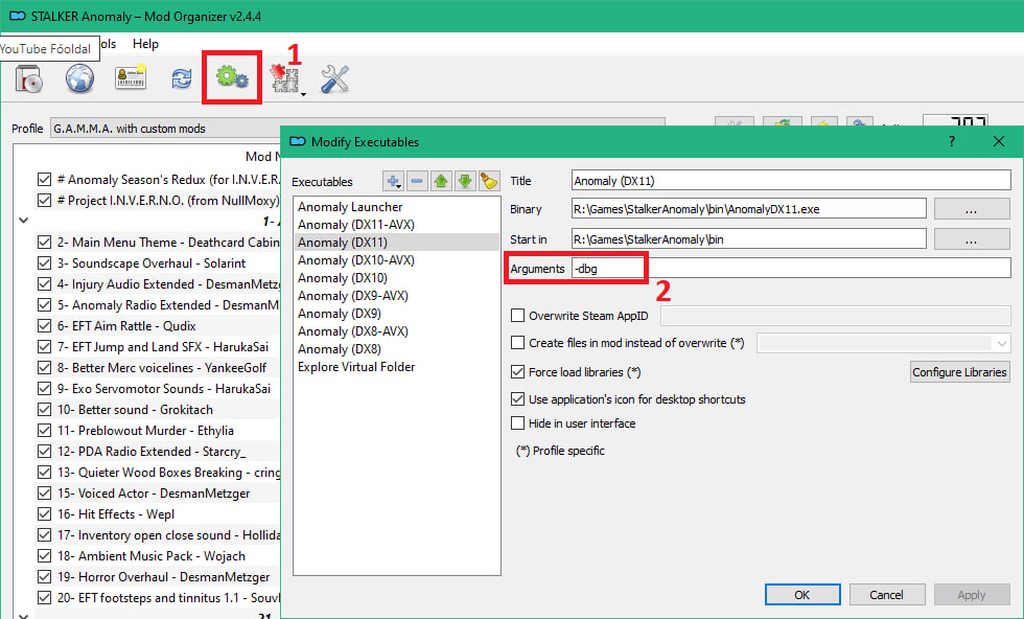
HOW CAN I ENABLE DEBUG MODE? - shamelessly stolen from @patent marlin
- Open MO2
- Follow the pic (it's also down below): https://imgur.com/a/tZfTSQx
In this case, DX11 is being used. If you don't use DX11, select another DX from the list on the left - Launch the game by using your preferred DX
- Once you're in game, press F7 and the menu will open
In case this doesn't work:
- Open the Anomaly Launcher from MO2
- Tick "Debug Mode"
- Launch the game
- Make sure debug mode is actually enabled, when you're in the main menu, check the bottom left of your screen, look for
(Debug mode - Press F1 for help) - If debug mode is enabled, close Anomaly and launch it again with your preferred DX
- Once you're in game, press F7 and the menu will open
How do I turn it off?
Simply follow the same steps you did but in reverse.
WHAT IF I PLAY INVICTUS?
In case you can't click on the link: #⏩start-confirm
 charred flume
HOW TO SEND YOUR MOD LIST
Open MO2, look for that icon (first pic), click on it, in the menu select "Export to csv" (second pic), do the following (third, fourth and fifth pic), save the file and send it where it was asked.
It's a .txt file that you can literally drag and drop, Discord will take care of it for you.


 charred flume
I WANT TO DISABLE YACS BETTER CAMPFIRE SAVE BUT MY GAME KEEPS CRASHING, WHY?
WARNING:
DO NOT DISABLE YACS mid-game (in a loaded save) or your game will crash.
If your game is loaded, press Esc and then click on Quit game. Only then, disable YACS.
- Open G.A.M.M.A., when you reach the main menu, open
Mod Configuration Menu. - Scroll down to the bottom until you find
YACS. - Disable "
Enable Campfire Saving".
KEEP IN MIND that re-installing or updating G.A.M.M.A. bring your mod list back to "default", deleting every change you did to your mod list. Simply put, if you disable YACS and then you update, you'll have to disable YACS again.
Since this mod is handled by MCM, you can keep this choice by doing this: #╭📖faq message
charred flume
I WANT TO ACTIVATE TRADER OVERHAUL BUT I’M NOT SURE WHAT IT DOES EXACTLY AND FOR SOME REASON I BELIEVE I CAN BUY GUNS AND ARMORS - TL;DR at the end
THIS MOD IS HEAVILY OUTDATED. WE WILL PROBABLY REMOVE THIS ENTRY SOONER OR LATER, YOU HAVE BEEN WARNED.
_ _
Trader Overhaul (TO) is a massive mod, which, in essence, overhauls the inventory and progression of almost all traders in game.
Since G.A.M.M.A. has its own economy system, you might wonder how they will work together.
There's no need to create a new save but you will have to wait for the next restock cycle, these changes aren't instant.
This is a list of changes, which TO will make, when enabled:
Sidorovich: Now sells a wider selection of ammo and attachments.
Barkeep: Now sells ammo, low lvl gun attachments in addition to food, as well as low lvl tech items. Basically a bit of everything.
Beard: more of an allrounder now (similar to Barkeep).
Cashier: Now sells more high tier ammo and attachments.
Meeker: Similar to Cashier.
Forester: has his own unique stock, mostly high tier mutant hunting gear.
Bandit traders received own unique stock as well (UNTESTED).
More traders sell junk items now (pretty expensive though).
TL;DR if you can't be bothered to read the changes:
It overhauls useless traders, like Barkeep and Beard, to be more useful while expanding the inventory of most others. It will NOT revert the changes made by G.A.M.M.A. Economy. You still won’t be able to buy or sell guns and armor and random stalker won’t trade with you. There's no need to create a new save but you will have to wait for the next restock cycle, these changes aren't instant.
If you play WITHOUT G.A.M.M.A. Economy, you can simply refer to the description of the mod for its changes, here: https://www.moddb.com/mods/stalker-anomaly/addons/trader-overhaul-complete
(a big thank you to @tidal idol for this guide)


 charred flume
LAST DAWN: SEARCH FOR THE MISSING SCOUT - (check pic)
WARNING: since this quest is timed, you can "fail" it if you don't do it the moment you get it, so basically yes, you NEED to do it AT NIGHT, you need to loot the PDA BEFORE daytime and take it to Spore.
Can I save the scout?
NO, YOU CAN'T. You'll ALWAYS find him dead.
In case you fail this quest due to lack of time, YOU CAN STILL GO GET THE PDA and take it to Spore. The body doesn't despawn until looted and it will reset the quest.
You'll get a notification on PDA/Radio later on from Spore about the PDA being decrypted.
Video proof: #╟🎮stalker-videos📹 message
Thanks to @limber solstice for the video and thanks again to @tawdry blaze for the location 
 jovial vale
I FOUND AN OUTFIT, BUT IT SUCKS CUZ I CAN'T REPAIR IT!!
Remember to Open Original, zoom in, and ctrl+scroll to fit width to your screen.
APART for outfits.

 sly sage
How to fix emissions not happening anymore
 charred flume
CRASHING WITH AMD GPU
DISCLAIMER: THIS GUIDE IS OLD, we don't really know if it is still relevant so take everything as a grain of salt.
This is a "collection" of possible solutions regarding the various crashes you MAY experience using an AMD GPU, again, MAY, reading is important, this doesn't mean that you WILL have problems, you MAY and even then you MAY don't have them at all.
These are reports from various users who also have an AMD GPU and who, thanks to these fixes, were able to solve their problem.
Therefore, we cannot guarantee that they will work; they worked for them but this does not mean that they will work for you.
- Start by putting your Anomaly and GAMMA folder in your antivirus exceptions. (the image is an example of what you should put in the exceptions)
- If you believe that any files have been deleted, the general advice is to delete everything and repeat the Full G.A.M.M.A. Installation. You will need to delete both the Anomaly and GAMMA folders.
WARNING: BEFORE deleting the folder containing GAMMA, move the "downloads" folder you will find inside, to a safe location. That folder contains all the mods that GAMMA downloads and installs for you. DO NOT DELETE IT. - Disable steep parallax
- Fix about the "AMD GPU hardware block": Go into the Anomaly folder and force both
directx11.exeto launch with admin rights, go into Properties, disable "Full screen optimization" and enable "DPI overrule". - Follow this: #│🔧troubleshooting message
 charred flume
I'VE UPDATED GAMMA BUT NOW I CAN'T RUN IT ANYMORE, IT CRASHES WHEN I LOAD MY SAVE
Maybe you're using some optional mod that "sticks" to that specific save.
Unfortunately you can't disable these mods in the middle of your run, you either finish with those mods or you start a new game without them.
These below are the known mods that you CAN'T disable in an ongoing run:
- Mags Redux, you CAN'T load a save without this mod, it WILL crash because the game cannot find what was added by the mod.
- ANUS (yeah I know, I'm serious ), the only thing it messes up are names, the save itself should be safe.
- Body Awareness, but for this one there's a catch: you can disable it in game through MCM Settings, not from MO2.
charred flume
HOW TO REPAIR AND MAINTAIN GUNS AND ARMORS - we also have a written version
Many thanks to @kind stump for the guide, if I hear another "I don't know how to repair!!!" I swear...

Guide to repairing weapons and armor for S.T.A.L.K.E.R. G.A.M.M.A.
charred flume
BASIC HEALING - like really basic, just to understand how heal and post-heal work
Many thanks to @limber solstice for the video 
(Let him know that his voice is beautiful and very chad)
 charred flume
CRASHING ON TRANSITION OR FAST TRAVEL TO A CERTAIN LOCATION OR FROM A CERTAIN LOCATION
- Save your game
- Enable debug mode (click here and learn how: #╭📖faq message)
- Press F7 in-game to open debug
- Delete common squads
- Sleep for 72 hours (you can use sleeping pills, smoke some pot or drink vodka to get sleepy)
- Try transitioning/fast travel
charred flume
A LITTLE SOMETHING ABOUT PROGRESSION, PT.1 - TOOLKITS - by popular demand
When it comes to toolkits or detectors, especially toolkits, there is always some confusion, both for old players and new players, because crafting is a mechanic that is never touched in Anomaly, it's useless, it makes little sense.
G.A.M.M.A., on the other hand, takes the mechanics in stride and makes it vital, important, rewarding and other adjectives that make it intriguing.
So, what exactly do you need in order to do... stuff?
You need to find basic, advanced and expert toolkits in order to be able to craft/repair/maintain everything.
Putting it on a "progression perspective", Basic and Advanced are for the early/mid game, Expert are for the end game.
Where can you find them?
In the south part of the Zone (everywhere directly under Red Forest) is where you'll find Basic and Advanced tools.
In the north part of the Zone, basically from Red Forest and north from there, is where you'll find Expert tools.
You also have the gunsmithing toolkit, which is used to craft ammunition of all kinds and you also have the drug making kit, used to create drugs and medicines.
You can find these tools inside stashes, the difference is in "where" you look for them, it's also a matter of RNG and luck. Imagine a pool with these toolkits inside, the RNG will take one of these items and put it in the stash.
Depending on the location, north or south:
White stashes have a small chance of finding ANY toolkit inside, this means that you can find ONE basic/advanced/expert toolkit **OR **a gunsmithing toolkit **OR **a drug making toolkit.
Yellow stashes have a 100% chance of finding ONE toolkit inside from that pool, so it could be anything, but you'll always find one, guaranteed.
Tip: since it can be difficult to find them, you can create an "Advanced Toolkit" with 5 Basic toolkits, if you already have a basic tool kit to use (obviously).
charred flume
A LITTLE SOMETHING ABOUT PROGRESSION, PT.2 - DETECTORS - by popular demand
Speaking of detectors, the progression lies in what artefacts you can find and "see" with each of them.
For example, the first one (Echo) detects only few of them, so basically, the more "powerful" your detector is, the more artefacts you can find and "see" with it.
This should be the order, hoping I'm not missing one or messing up names:
- Echo - Very simple, very limited, cannot detect a large amount of artifacts. It possesses an intermittent light and a "beep" sound that, when in the vicinity of an artifact, gets louder and louder as you get closer to it.
- Bear - You can see the direction in which the artefact is because of its display; this detector also has a beep, as you get closer it gets louder and louder.
2a) Grizzly - It is almost identical to the Bear detector in terms of its "look", its function is also the same, you have a display and the artefact direction. The main difference is that it detects every possible artifact that can be found in the Zone and can be also be used with NVGs at night. - Veles - The position of artefacts is shown on its display.
- Svarog - It's like an "update" for the Veles but you can see artefacts AND anomalies with it, simply the best. (now you can also see DAO's anomalies as well with it)
charred flume
A LITTLE SOMETHING ABOUT PROGRESSION, PT.3 - FOOD AND HOW TO COOK IT - by popular demand
In the beginning of the game, you have little to no money available and if you can save something, it's always better, also because medications in general are expensive and because you cannot craft water yet.
Why not start by NOT buying canned food or MREs?
G.A.M.M.A. have a new, revamped, cooking system, now eating mutant meat is convenient and useful, it gives buffs and keeps the stomach full for much longer than a can of beans or a MRE.
Let's start talking about WHAT you need to use and HOW you can use it:
We have** two kits** at our disposal that we can use for cooking, which you can see as "Tier 1" and "Tier 2":
- Field Cooking Kit (Tier 1)
- Multi-fuel Stove (Tier 2)
Both have a specific use, different types of fuel and water/vodka used to cook and "purify" your food.
One important thing to remember is that the Field Cooking Kit is a CONSUMABLE item, which means that after a number of uses, it will be "destroyed".
The Multi-fuel Stove, on the other hand, is "INFINITE" and it will be enough to buy one, no need to stock on them.
Depending on the kit used, you have three ways to cook and (if possible) purify the meat:
- Directly "on the fire" without using water or vodka (your food will have less kcal, slightly lower radiation, more drowsiness)
- Stewed with water (your food will have more kcal, less radiation, greater drowsiness)
- Purified, using vodka (your food will have no defects and you'll get buffs as well, it depends on the kind of meat cooked)
Tier 1) The Field Cooking Kit works ONLY with charcoal, which means that you can ALSO directly use a LIT campfire.
Just approach one and be sure to be close to it, double clicking on the kit will open a menu where you can choose what to cook.
This kit allows you to cook only certain types of meat from minor mutants. It does not allow you to completely "purify" the meat but it will "stew" the meat by using water and will remove some of the radiations.
This means that you have less options to cook your meat.
Tier 2) The Multi-fuel Stove, on the other hand, CANNOT use fire as fuel and needs kerosene, gasoline or natural gas.
It is more expensive in terms of fuel but allows you to cook all kinds of meat you can find in the Zone, in whatever way you want.
Double click on it and a menu will pop up, from where you can choose what type of meat you want to cook.
With this kit we can cook any kind of meat in any way: "on the fire", with water and with vodka.
Tips:
- Purchase a Multi-fuel Stove from Butcher in Garbage, he sells it for very little and he's the only one with that price in the Zone. (or craft one if you don't have the money for it)
- When you need to use water for cooking, DON'T use plastic bottles, keep it for yourself. Use canteens instead because they weight more, an empty backpack makes the Stalker happy.
charred flume
A LITTLE SOMETHING ABOUT PROGRESSION, PT.4 - ARTEFACTS - by popular demand
G.A.M.M.A. have a new artefacts spawning system, they can spawn randomly in the current map the player is in, in anomalous fields and laboratories.
Artefacts will spawn with a random low condition (or "quality") to mimic that every artefact is different in their strength, reducing drastically the possibility to sell them at 100% condition, making progression much longer.
This doesn't mean you can't get 100% artifacts at all. Let me introduce an exclusive new toolkit only available in G.A.M.M.A.: The Artefact Melter™️, buyable from Sakharov or Herman's for about 30k RU.
The Artefact Melter™️ works like a toolkit, you can access its crafting menu as you do with all toolkits. You can craft artefacts (Right click -> Fuse artefacts) and empower them (Right click -> Empower artefacts).
Every action you take with the Artefact Melter™️ will consume some uses. You can refill the melter by holding down Left-Alt key and dragging it over any artifact. This will melt the artefact you chose and will give one additional use to the melter.
You can alternatively buy another melter or you can bring one with you in the Zone, you can replenish it with artifacts you don't care about directly on the spot.
-
Artefacts crafting: There will be a new crafting subsection,Artefacts. This will allow you to convert multiple artefacts of a given tier to the tier above:
Junk -> Tier 1 (7mS), Tier 1 -> Tier 2 (12mS), Tier 2 -> Tier 3 (23mS), Tier 3 -> Special. -
Artefacts empowering: combine two exactly similar artefacts to sum their condition/quality. You can combine any junk artefact with any other junk artefact at a reduced rate.
Here you can find a spreadsheet listing the artifacts needed to create a given artifact, thanks to @hushed turtle:
https://docs.google.com/spreadsheets/d/1a9TWVFTlFbxA8edwx-SZcLmyoywZ9TuFy0h-G56hdD0/edit#gid=0
 tough musk
HOW TO GET RID OF THE STUCK TOOLTIP IN THE CRAFTING MENU (like in the first image):
try changing between crafting categories or between the workbench tabs (see the video for explanation)

HOW TO AVOID THE STUCK TOOLTIP IN THE CRAFTING MENU
keep the mouse in an empty spot of the crafting menu before closing it (explained in the video)
charred flume
IS THERE A WAY TO KEEP MY PERSONAL MOD LIST BETWEEN UPDATES?
You can copy/clone your G.A.M.M.A. default mod list (check pic below) by giving it another name. In this case, as an example, I called my custom mod list "G.A.M.M.A. Custom".
From here on, your second mod list will remain as you left it when you update.
If you have enabled or disabled a mod in your cloned mod list, that change won't be reverted.
And also, whenever you update G.A.M.M.A., your custom mod list will ALSO be updated, because the mods are obviously the same, any update will come for both mod lists.
However, there is only one "problem" you will have with your custom mod list:
Let's pretend that there is an update and the default mod list is changed, for example a mod or more mods are enabled/disabled, added/removed or something was moved.
These changes will NOT be reflected to your custom mod list, you will have to implement them MANUALLY.
If you'll need to move a mod that is enabled in the default mod list, you can always find it at the bottom of the mod list. You will just need to move it manually to the correct location by checking the position where it is in the default mod list and then enable it in your custom mod list.
Same goes for disabled mods, but in this case you can just disable them or keep them, if you know what you're doing, it goes without saying that this stuff is for users who actually know what they're doing.
 charred flume
I WANT TO SLEEP WHENEVER I WANT, I DON'T CARE IF IT ISN'T IMMERSIVE!!1! - because remember, this game isn't about reality, it's about immersion
You can do that, BUT:
-
Make sure you NEVER TOUCH "sleep deprivation" OR (while I'm at it) "water deprivation" IN THE GAME OPTIONS.
This basically destroy the whole game and your save, meaning you'll need to start a new one, so be careful. -
Disable these mods in your mod list:
- Immersive Sleep
- G.A.M.M.A. Sleep Balance
jovial vale
I CAN'T FIND ANY OUTFITS FROM MY OWN FACTION!
—Find an outfit.
—Go to your faction leader/quartermaster.
—Exchange the outfit for one of your own faction's within the same outfit category. (Light, Medium, Heavy, Exo) Price tags vary for each category.
Edit: The faction patch must still remain attached to the outfit to be eligible for trading.
charred flume
SOME ICONS JUST DON'T SHOW UP, WHAT SHOULD I DO? (first pic)
- Open GAMMA and go into "Settings"
- Visual, then Advanced (second pic)
- Increase "texture detail" to max (third pic)
Didn't work? Try this fix as well:
#📢announcements message


 charred flume
EXPLAINING WHAT EVERY SETTING DOES IN "VIDEO" - basically a guide to boost FPS, all credits goes to @gaunt shell
I wanted to share with you guys my graphical settings for FPS boost + disable all shaders, except contrast correction & set performance mode.

These are the results: (InGame basic settings: Brightness 1.0 / Gamma 1.0 / Colour Saturation 1.3)


