#🖥️how-to-install

1 messages · Page 1 of 1 (latest)

vernal zinc
#

Non-English

Linux/GNU

Other platforms

=================================
Part 1: PREPARATION

CLEAN, UNMODIFIED COPY OF ANOMALY 1.5.3 IS REQUIRED. THIS GUIDE PROVIDES A LINK FOR IT.

Required for WINDOWS 7: https://www.microsoft.com/en-us/download/details.aspx?id=54616

_ _
♦️ NONE OF THESE STEPS ARE OPTIONAL, ALL ARE HARD REQUIREMENTS, DON'T SKIP THEM.

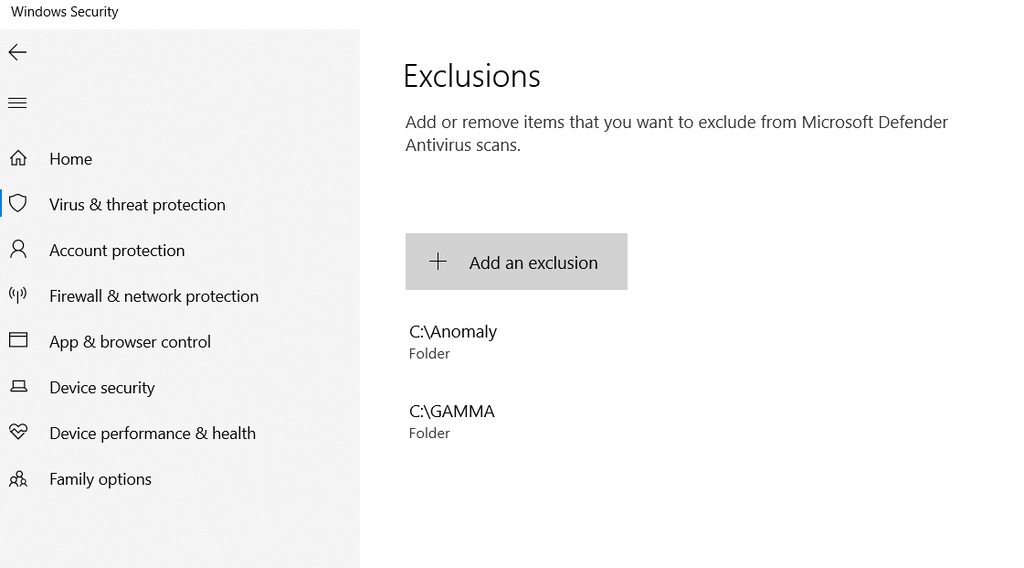
♦️ ANTI-VIRUS NEEDS TO BE OFF AND HAVE EXCEPTIONS FOR ANOMALY AND THE LAUNCHER.

♦️ DON'T CONTACT ME OR ANYONE ELSE IN PRIVATE FOR HELP, YOU WILL BE IGNORED.

♦️ IF YOU HAVE PROBLEMS, ASK IN #1026866080347603065 AND/OR #🔨base-gamma-support

♦️** DON'T INSTALL GAMMA AND ANOMALY ON AN EXTERNAL DRIVE**.

🔷 1. You need AT LEAST 16 GB for Anomaly and 100+ GB for G.A.M.M.A. on your hard drive/SSD, we HIGHLY RECOMMEND to use a SSD.
MAKE SURE YOU HAVE SPACE IN YOUR HARD DRIVE/SSD OR YOU WILL HAVE PROBLEMS.

🔷 2. 7Zip: https://www.7-zip.org/download.html --- If you don’t know which version to get, get the 64-bit Windows version.

If you're wondering why 7zip instead of WinRAR: WinRAR is known to cause extraction issues for files with specific file extensions, in this case .7zip and .7z, this is why.

#

_ _
🔷 3. Create TWO different folders at the root of one of your drives, e.g. C:/, D:/, whatever drive is fine, you're not obligated to use C: if you don't want to or just cannot use it.

One folder will contain Anomaly and the other will contain G.A.M.M.A.
DO NOT create nor place these folders in Downloads, Program Files, Program Files x86, Documents, Desktop, OneDrive.

THIS ISN'T A SUGGESTION, these folders are KNOWN to be problematic with videogames.

DON'T USE THEM.

_ _
For example, you can do this:
C:/Anomaly and C:/GAMMA.

But you can **also **do this:
D:/Anomaly and D:/GAMMA.

DO NOT create something like: D:/Stalker/, with both Anomaly and GAMMA folders inside of it, this only leads to problems, DON'T DO IT. Your OCD will have to vent with something else.

Point is: as long as you have TWO DIFFERENT FOLDERS for Anomaly and G.A.M.M.A on the same root drive, it will be fine.
DO NOT use special characters in any of the folders when you name them, such as: [-,@#$%, etc.

For this guide, we will use C:/ as our preferred drive, so adjust your installation accordingly if you use another drive, the locations of everything are exactly the same, the only thing that will change is your drive letter.

#

_ _
🔷 5. Anomaly 1.5.3 - DO NOT use an already installed and modded Anomaly, you need a clean Anomaly folder.

This is the official Moddb link for it:
https://www.moddb.com/mods/stalker-anomaly/downloads/stalker-anomaly-153

An official torrent is available via this magnet link:

magnet:?xt=urn:btih:205676f90498f2be3900a3eb0d29b9f50a591fa1&dn=Anomaly-1.5.3-Full.7z&tr=udp://bt2.archive.org:6969/announce&tr=udp://tracker.opentrackr.org:1337/announce&tr=udp://bt1.archive.org:6969/announce&tr=udp://tracker.torrent.eu.org:451/announce

We suggest to use QBittorrent if you don't have a program yet: https://www.qbittorrent.org/download

#

_ _
🔷 6. Download the G.A.M.M.A. client GAMMA RC3.7z from the link:

1) Mediafire

2) GoFile

We have mirrors down below if these don't work/are too slow.

#

_ _
🔹6a. If Pixeldrain or Mediafire are too slow, you can use the following providers:

GAMMA RC3 alternate mirrors:

_ _

Mirror 1: MEGA
_ _
Mirror 2: FuckingFast

Before moving on to the Part 2 of the guide, check and be sure you have these files: Click me

#

=================================================
Part 2: INSTALLATION AND DOWNLOADS:

♦️Remember to use 7Zip.

🔹 1. Using 7Zip, extract Anomaly-1.5.3-Full.2.7z into your Anomaly folder you created in the previous section.
You can extract files by right-clicking the file → 7-Zip → Extract files… then selecting C:/Anomaly.
DO NOT copy-paste or drag and drop - this may lead to extraction errors.

On Windows 11, you need to choose “Show more options…” to see the 7-Zip option.

#

_ _
🔹2. Launch Anomaly ONCE by using the AnomalyLauncher.exe file and reach the in-game menu. Then, exit the game.

#

🔹3. Using 7Zip, extract GAMMA RC3.7z into the GAMMA folder you made in the previous section. Use the same method as in step 1 but choose your GAMMA folder this time.

vernal zinc
#

♦️ = = = YOU MUST BE UNBLOCKED ON MODDB.COM TO PROCEED = = = ♦️

"But how do I know if I am unblocked or not? I don't even have an account"
You won't be able to browse the website, that's it, you'll see it clearly, it's a giant warning on a red screen.

In the eventual case you find out that you are indeed blocked, read the message you'll get to see how long the block will be.
Wait for that amount of time and add 40 minutes more. When you're unblocked, proceed with the instructions below.

🔹 4. Go inside C:\GAMMA\Grok's Modpack Installer. Right-click G.A.M.M.A. Launcher.exe, then click on "Launch as Admin". Once the launcher is opened, click the "First Install Initialization" button.⠀⠀⠀⠀

#

🔹5. The error "Cannot open instance "Portable"(...)" should appear. Click OK.
A new window will appear asking you to select the game folder.
Navigate to the Anomaly folder on your C:/ drive and select it, DON'T OPEN THE FOLDER.
After that, MO2 will appear, it will have 0 mods and the profile will be set to "G.A.M.M.A".⠀⠀

#

_ _
🔹6. Close MO2 and return to the Launcher. Make sure all the 4 checkmarks are enabled. Click "Install / Update" and wait for the installation to complete.

♦️The first installation might cause Moddb to flag you as a bot. Go to http://www.moddb.com and check if you have been blocked (entire screen is red). If you get blocked during or after installation, then wait 2 hours or use a VPN, then when unblocked click "Install / Update" again.⠀⠀

#

_ _
🔹7. When it's done, hit the play button and MO2 will launch.
A warning message will pop up, "Default profile was not found, G.A.M.M.A. profile will be used instead", don't worry about it, it's harmless.

vernal zinc
#

🔹8. MO2 should launch with the correct number of mods (#📍577-mods-in-mo2), with no X icons (No valid game data) in the Flags column, sorted by** Priority**.
The image below is an EXAMPLE, the mods number WILL CHANGE in the future.

If this is true, then click on Run, the Anomaly launcher should show again.
Now click on Play, the Anomaly splash screen should appear and then you should see the main menu. ⠀⠀⠀⠀

vernal zinc
#

==============================
Ending, credits, thank you, etc.

At this point you should be able to traverse the Zone.
If everything is up and running and you are able to play G.A.M.M.A. with no issues; head over to the #⏩start-confirm channel and click the 🐢 to gain full access to the server!
(This is ONLY for people who have the Newcomer role or people who just joined the server and haven't done anything yet)
And remember to turn your antivirus back on again!

A huge thanks to @brave thorn for making 95% of this new #🖥️how-to-install and to @fallow prawn for helping behind the scene. 🤝

Srgtofdeath did the whole guide + pics, I did the format, which is nothing in comparison.

And now...

Get out of here, stalker!

Press ➡️ #🖥️how-to-install message ⬅️ to start from the beginning.