#╟🎑reshades
1 messages · Page 36 of 1
 naive vessel
 toxic mural
I tried to fix that idk why not work
Check screenshot channel
I posted some shots of this mod
 lethal ledge
Hello
Anybody here know which one of these mods, when disabled break the graphics
• 188- Enhanced Shaders - KennShade
• 190- Screen Space Shaders 15.0 - Ascii1457
• 290- Atmospherics Shaders Weathers and Reshade - Hippobot
Last time I disabled them together, they kinda broke everything
toxic mural
Access Google Drive with a Google account (for personal use) or Google Workspace account (for business use).


Hi
Thanks for choosing my preset
Installation:
1- download and install reshade app
2- find anomaly launcher DX 11
3- check all effects
4- download my reshade preset
5- drop it on C/Anomaly/bin
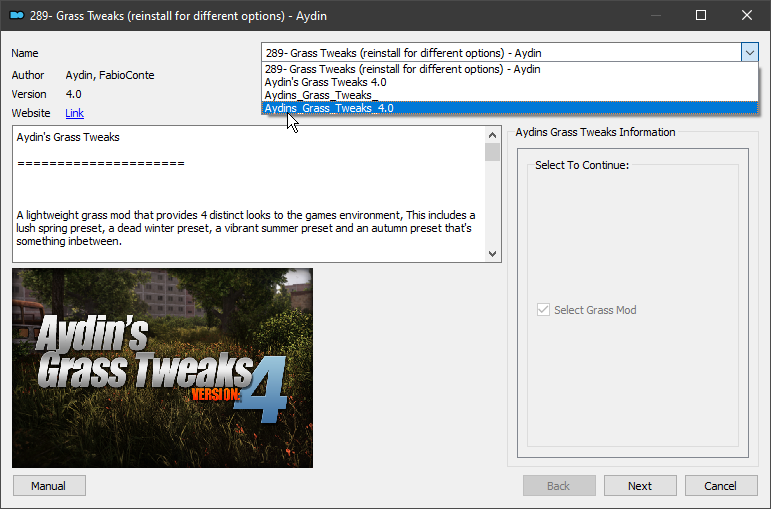
6- at mo2 search for Grass Tweaks (mod number 289)
7- reinstall the mod and check the version of preset
8- replace the mod
1- run the game
10- in game change grass density to max and grass size to 0.8
11- go to MCM sss settings and change grass shadows to ultra
12- use HOME button on keyboard
13- choose C.O.B.A.L.T preset
14- good hunting STALKER
Big thanks to @naive vessel for his help
lethal ledge
toxic mural
https://drive.google.com/file/d/1ln2MIHgvLR0MUjy4dlndxWGzXZ4XPmZj/view?usp=drive...
hows your own performance running this preset?
lethal ledge
alright cool
 hallow mirage
toxic mural
10 FPS drop on 1080p with gtx 1650
hallow mirage
toxic mural
10 FPS drop on 1080p with gtx 1650
what cpu u have and ram ?
whats your acg preformence
 sage elm
toxic mural
10 FPS drop on 1080p with gtx 1650
sage elm
toxic mural
10 FPS drop on 1080p with gtx 1650
for me I only get 10 fps in total when using the preset
naive vessel
What kind of potato are you running this on?
sage elm
me?
sage elm
3080 with ryzen 7 3800x
naive vessel
Well, that's no potato
sage elm
idk maybe I installed it wrong
toxic mural
hallow mirage
what cpu u have and ram ?
12g ram i5 8400
sage elm
naive vessel
What kind of potato are you running this on?
have you tried the reshade?
naive vessel
Yeah
sage elm
naive vessel
Yeah
what fps were you getting?
sage elm
any chance you could run me through your settings?
naive vessel
In-game setting?
sage elm
ye
naive vessel
I'll send screenshots, give me a sec
sage elm
ok ty
naive vessel
also, do keep in mind I'm running this on a 7900 XTX and Ryzen 7 7800X3D
 naive vessel
faster pc than yours but not 12 times faster
hallow mirage
toxic mural
12g ram i5 8400
Avg fps ?
toxic mural
25
hallow mirage
Ah cause I have same specs 16 gb ram and get 45 - 55
toxic mural
If I go to grimwood or red forest it's gonna be 13
naive vessel
These are my settings @sage elm


 sage elm
naive vessel
These are my settings <@1160255701499789343>
sage elm
naive vessel
These are my settings <@1160255701499789343>
hmm, how much lower would you expect it to be? I copied your exact settings, and with the default reshade on(atmos.ini) I am sitting around 60-70 fps
as soon as I turn grass shadows to ultra in sss settings I drop to ~25
naive vessel
Well, my GPU is like 60% faster
sage elm
do you play in 1440?
toxic mural
Grass shadows only for making game looks better but bad FPS drop
naive vessel
because the monolith engine loves the 3d vcache
 placid lotus
@toxic mural your shaders so bad bro
sage elm
hmm ya for example inside clear sky base in great swamps ~55-65 however when I leave ~70-80, the reshade without the grass shadows turned to ultra doesnt seem to really affect it

 toxic mural
placid lotus
<@806951618141880361> your shaders so bad bro
toxic mural
placid lotus
<@806951618141880361> your shaders so bad bro
Thanks for your feedback
 lean nebula
sage elm
hmm ya for example inside clear sky base in great swamps ~55-65 however when I l...
lean nebula
sage elm
hmm ya for example inside clear sky base in great swamps ~55-65 however when I l...
such is anomaly's optimization
naive vessel
sage elm
hmm ya for example inside clear sky base in great swamps ~55-65 however when I l...
Adjust grass density and get rid of grass shadows
lean nebula
many stalkers in one area does that
sage elm
lean nebula
many stalkers in one area does that
ya im starting to wonder if its the stalkers pop affecting it rather than the actually graphics settings
lean nebula
well of course graphics play a part
in dead city inside the merc base for example i get around 50-60fps but when i'm in another area in the same map goes up to 90-120
also just depends on which direction you look in many cases
sage elm
lean nebula
well of course graphics play a part
are you running high-ish settings?
sage elm
naive vessel
Adjust grass density and get rid of grass shadows
if you dont mind me asking, what reshade do you use?
naive vessel
@sage elm , @toxic mural 's spring with some modifications of my own
you can find it if you scroll up a bit
idk if my changes made it to his final version
toxic mural
I just deleted a good reshade by accident just right now 💀
naive vessel
@toxic mural di my watchdogs tonemap stuff make into your final version?
toxic mural
I just dropped that spring with same settings as before
But I did something good to summer version just right now and fuck I deleted this reshade
sage elm
So whats really weird about my fps is that I get around 90-100 fps in the merc base with all of them shooting at me in godmode, but I get 60-70 in clear sky base in great swamps, I truly do not understand this lmao
sage elm
toxic mural
But I did something good to summer version just right now and fuck I deleted thi...
truly unfortunate 😦
naive vessel
sage elm
So whats really weird about my fps is that I get around 90-100 fps in the merc b...
Weak CPU
if you monitor your gpu usage, you will see it tank i clear sky
sage elm
ohhhhh I see that, welp I guess cpu upgrade next lol, I really appreciate all the help @naive vessel , time to finally start my run 🙂
 alpine karma
@toxic mural thank you for the preset my brother
toxic mural
Your welcome I hope enjoy and ...
Good hunting
 flat current
Back in the day I used someone’s preset that saved some fps and looked better than the standard reshade that u use when playing gamma for the first time.
Does someone has something similar?
 swift robin
brother, i downloaded the file named COBALT
what do i do? like where to i extract it to and make it work
toxic mural
Your welcome
swift robin
toxic mural
Your welcome
if i have any issues, i will ask
 bright harness
any good invictus reshades so i could actually see shit?
bright harness
toxic mural
Hi
o wow, is this one heavy on fps side?
 gaunt pawn
In reshade is there a way to manipulate colors in different areas of the game, like the sky vs. the ground/grass areas?
 whole dust
wow
 weak chasm
Anyway to improve the look of Terrain and foliage?
 unkempt estuary
weak chasm
Anyway to improve the look of Terrain and foliage?
unkempt estuary
weak chasm
Anyway to improve the look of Terrain and foliage?
Texture mods. There's lots on moddb and if you know how to do basic modding. Just making your own customised mod by combining other mods into one than you can create one mod with multiple textures. If you don't know how to do any of that stuff I recommend using GTR optimised on moddb and than using green vegetation HD on moddb for grass. And Aydin's spring or summer trees only.
Or you could give Frostys zone reality pack a go if you like. It's a pack he put together for people who don't want to make their own mod or mess with more than like 5 mods etc
unkempt estuary
weak chasm
Anyway to improve the look of Terrain and foliage?
 serene lichen
Hey guys! I am like a newbie in modded stalker so can you please help me with making the game looks a little nicer? Like, what I need to do to install or configure reshade? I don't really want to sit and go deep into that.
lean nebula
serene lichen
Hey guys! I am like a newbie in modded stalker so can you please help me with ma...
does the game run well
?
serene lichen
Like for fps? I have a pretty decent PC but the game is at about 50-60 mostly
At 2k res
lean nebula
if you are willing to sacrifice around 10 fps you could try out capa's reshade
also, you have reshade installed already
comes with gamma
serene lichen
Мой ПК:
Тип ЦП: OctalCore AMD Ryzen 7 5800X, 4625 MHz (46.25 x 100)
Системная плата: Asus ROG Strix G15DK
Системная память: 2x16Гб AMD R9S416G3206U2S (3200)
2x8Гб SK hynix HMA81GU6DJR8N-XN (3200)
Видеоадаптер: ASUS RTX 3070 (8 ГБ)
Жёсткий диск: TOSHIBA DT01ACA100, 1Гб
SSD: WDC PC SN530 SDBPNPZ-1T00-1002, 1Гб
Монитор: MSI Optix MAG321CURV, 4КUHD, 60Гц, (31.5")
Наушники: HyperX Cloud Alpha S
Мышка: Logitech G502
Клавиатура: Logitech G213
Во многие игры гамаю в 4к 60+FPS на ультрах без RTX
RDR2: 2k 60FPS, Высокие~Ультра
CP2077: 4k 60FPS, Высокие~Ультра
COD:MW2 (2022): 4k 70+FPS, Высокие
Тарков играю в 2k с DLSS, большинство карт 70+FPS. Улицы таркова бывает просидает до 50.
You can see my configure
Sorry that it's in Russian but I think you will figure it out what is what
lean nebula
yeah i see
serene lichen
lean nebula
if you are willing to sacrifice around 10 fps you could try out capa's reshade
How can I try it?
lean nebula
serene lichen
How can I try it?
download the reinline.fx, scroll a bit down and download the .ini preset
 bold rain
toxic mural
Hi
Thanks for choosing my preset
Installation:
1- download and install reshade...
bold rain
toxic mural
Hi
Thanks for choosing my preset
Installation:
1- download and install reshade...
Wdym check the version of the preset? https://i.imgur.com/DbXlSav.png
 lean nebula
serene lichen
How can I try it?
lean nebula
serene lichen
How can I try it?
put .ini file in your anomaly's bin folder and reinline.fx in
uhh
reshade-shaders in bin folder
toxic mural
bold rain
Wdym check the version of the preset? https://i.imgur.com/DbXlSav.png
For example if you wanna use fall version then you need use autumn
Or spring preset you need spring grass and trees version
serene lichen
lean nebula
put .ini file in your anomaly's bin folder and reinline.fx in
Thanks
toxic mural
bold rain
Wdym check the version of the preset? https://i.imgur.com/DbXlSav.png
#1160671282799595611 message
Check here
bold rain
toxic mural
https://discord.com/channels/912320241713958912/1160671282799595611/116067128279...
https://i.imgur.com/orBVcVz.png This is what my Anomaly bin looks like with COBALT at the top
 toxic mural
bold rain
https://i.imgur.com/orBVcVz.png This is what my Anomaly bin looks like with COBA...
toxic mural
bold rain
https://i.imgur.com/orBVcVz.png This is what my Anomaly bin looks like with COBA...
No
You need open the folder and choose any presets you need
bold rain
And what drag the config out?
toxic mural
Yea
toxic mural
Your welcome
 static bay
lean nebula
reshade-shaders in bin folder
static bay
lean nebula
reshade-shaders in bin folder
Should i put it in any folder?

Or just in reshade-shaders, sorry for dumb question
toxic mural
static bay
Should i put it in any folder?
Drop on shaders folder
static bay
oh, i see, thanks
lean nebula
@static bay in mo2, look for mod "aydin's grass" right click and reinstall then select spring grass and trees
static bay
Can i somehow get rid of this ugly af film grain?
 bold rain
static bay
Can i somehow get rid of this ugly af film grain?
bold rain
static bay
Can i somehow get rid of this ugly af film grain?
My brother in christ you are being irradiated
bold rain
static bay
Im new , so i dont know all of features
IRL Radiation does the same thing to cameras so its cool to see
static bay
I guess i just have to get used to it
bold rain
Yea, just anytime you see it, go away
lmao
How do i reset my graphics settings, even though im on a 3080 ti i nuked my game to 10 fps
My in-game graphics all saved even when clicking reset in launcher
lean nebula
bold rain
My in-game graphics all saved even when clicking reset in launcher
press restore default user.ltx in the launcer
or whatever it was
you will have to redo your key binds though
bold rain
Didn't change any thankfully
What are settings that nuke FPS? Should i change my graphics through the games settings or MCM settings
lean nebula
that's odd actually, there was another guy yesterday having a similar problem
grass settings are the ones that nukes fps, grass shadows especially
also, do not turn on anti-aliasing
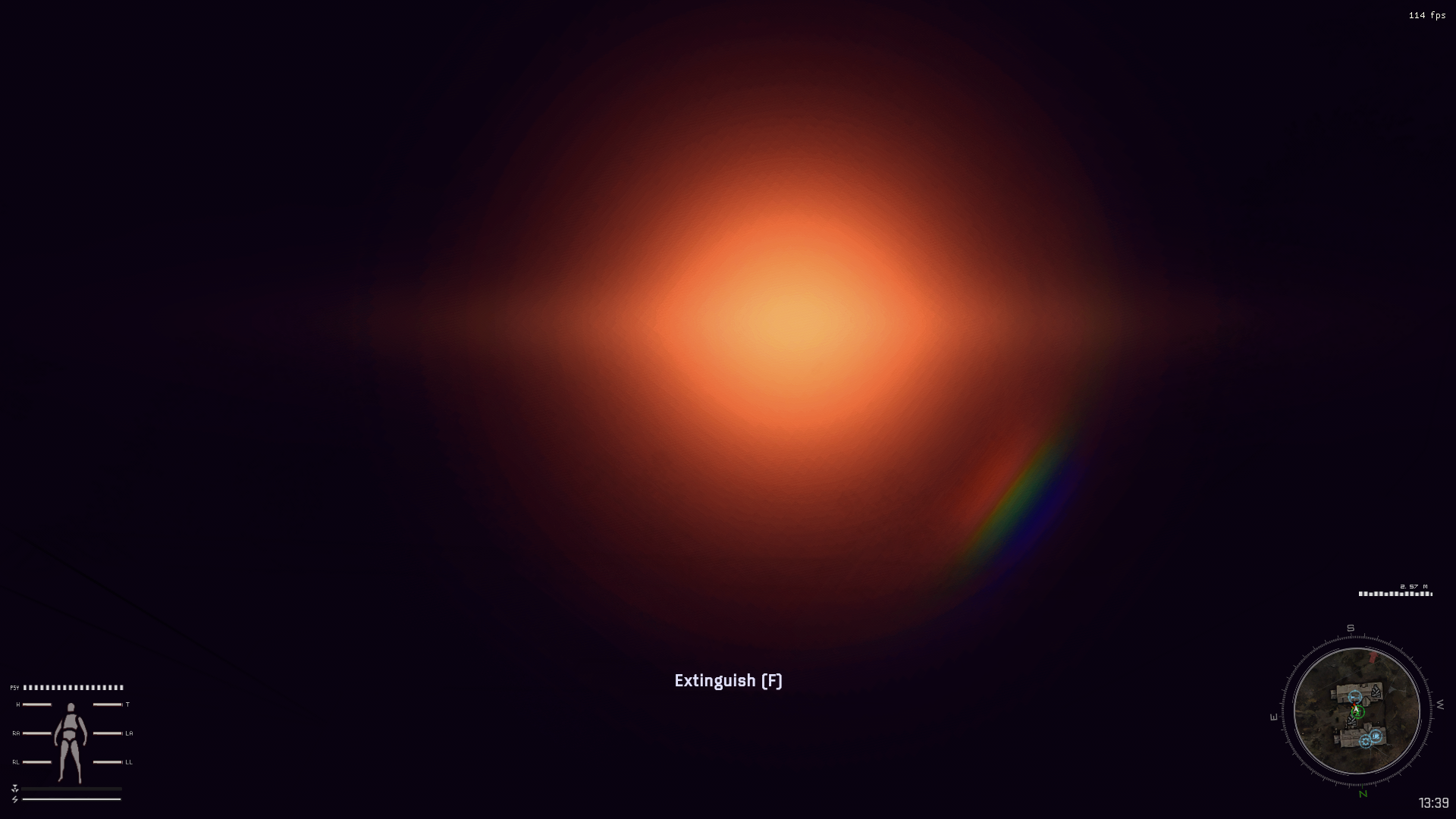 bold rain
Worked
ty
But now theres a weird af sound
nvm
It was the music being all the way up
 viral birch
Guys, which are the best solutions for antialiasing?
I play 4k, but still have those terrible edges
 weary rivet
viral birch
Guys, which are the best solutions for antialiasing?
I play 4k, but still have t...
weary rivet
viral birch
Guys, which are the best solutions for antialiasing?
I play 4k, but still have t...
try 8k
weary rivet
you can also change mip bias
viral birch
weary rivet
you can also change mip bias
Move it down?
weary rivet
try changing it to -0.1 and -1
-0.1 will make it look more blocky and -1 will make it look sharper
viral birch
weary rivet
-0.1 will make it look more blocky and -1 will make it look sharper
Which one?
 weary rivet
r__tf_mipbias
try r__tf_mipbias -0.1 and then -1
could also do r__tf_mipbias 1 but that would make it really blocky
viral birch
With 1 autumn trees looks much better, no shimmering, but grass is really blocky)
viral birch
weary rivet
try r__tf_mipbias -0.1 and then -1
Thanks a lot! -0.1 is a good spot (-0.5 is default), helped little bit with trees shimmering
Which anti-aliasing u use in reshade? @weary rivet
weary rivet
viral birch
Which anti-aliasing u use in reshade? <@272487375777824768>
none
 nova sandal
guys anyone can tell what's causing this? because its kinda dark and I haven't touch anything in reshader


 torpid ore
anyone know how i can make gamma more colourful ?
 left island
torpid ore
anyone know how i can make gamma more colourful ?
left island
torpid ore
anyone know how i can make gamma more colourful ?
Try using any of the included reshade presets and find the shaders that affect color/saturation. Be careful though. You might discover a new hobby 😉
toxic mural
torpid ore
anyone know how i can make gamma more colourful ?
Use the colorfulness effect and if you want it more professional, use the qUINT_ReGrade effect
qUINT best I see so far
left island
nova sandal
guys anyone can tell what's causing this? because its kinda dark and I haven't t...
Looks like you got an incomplete reshade install somehow because those 4 red shaders shouldn't have failed to compile
viral birch
Guys, I have just realized that my game plays much smoothly with Ultrawide Game View (21x9) option on my 4k monitor, and it still has its crisp 4k look because of resolution 3840x1600. Even with those black stripes I want to give it a try
BUT I have this map problem
Should I install some kind of ultrawide mod?
Or GAMMA UI is not optimized for ultrawide?

 swift robin
viral birch
Guys, I have just realized that my game plays much smoothly with Ultrawide Game ...
swift robin
viral birch
Guys, I have just realized that my game plays much smoothly with Ultrawide Game ...
 limber fable
viral birch
Guys, I have just realized that my game plays much smoothly with Ultrawide Game ...
limber fable
viral birch
Guys, I have just realized that my game plays much smoothly with Ultrawide Game ...
yeah i dont think ultrawide is supported, im not 1000% sure but i believe ive heard issues
limber fable
swift robin
https://discord.com/channels/912320241713958912/1041661742620618795 exists
and theres this
viral birch
swift robin
https://discord.com/channels/912320241713958912/1041661742620618795 exists
wow, thanks
left island
viral birch
Curious what your GPU is. Playing at 1600p, right? Reshade on or off? I need answers!
Just to compare with my system lol
viral birch
left island
Curious what your GPU is. Playing at 1600p, right? Reshade on or off? I need ans...
3840x1600
GPU: 3090
Reshade ON


 left island
Looks so crisp
left island
viral birch
3840x1600
GPU: 3090
Reshade ON
Thanks for the stats. I have a 3080 Ti. I think I'll try this on the 4k display as well knowing that a 3090 can get over 100 fps. Was capped to 60hz on my 1440p ultrawide because I'm using a crappy KVM switcher.
 fair root
viral birch
3840x1600
GPU: 3090
Reshade ON
fair root
viral birch
3840x1600
GPU: 3090
Reshade ON
can you please share that reshade preset?
 ashen rune
yo, there's a way to smooth tree edges with shaders?
toxic mural
With AA effects and sharpness effects
viral birch
ashen rune
yo, there's a way to smooth tree edges with shaders?
you can lower map bias in the settings to your liking
lower bias - more blocky image, but tree edges looks better
I recommend 0.1, balanced
you can just type in console r__tf_mipbias 0.1
just in case, default is 0.5
viral birch
fair root
can you please share that reshade preset?
I can share it but its little bit tricky, and its not mine, I find it in Fabio.conte LateFall texture/weather mod
The most of the work with realistic lightning does one effect - Bloomy HDR
And it has its own tonemapper, the problems begin at night, because tonemapper is trying hard to make image brighter:)
So you will get this
#╟📸screenshots message
It means its better to turn it off at night, but it will be really dark
fair root
viral birch
I can share it but its little bit tricky, and its not mine, I find it in Fabio.c...
I see, thanks
viral birch
fair root
I see, thanks
If you see that your image is too bright, I can share with your Fabio.Conte shader setting, they are much darker
But you need to backup your own from User.ltx
I am testing your reshade, its pretty cool
But I don't understand this effect "QUINT_motionvectors"
What does it do? Its draining fps but I don't understand its effect
viral birch
When I was looking for understanding what it QUINT_motionvectors I find sometthing called TFAA, where to get it?
 lavish lake
for me motionvectors if top 1 reshade fps killer
it looks to me that it doesnt do anything except -15 to -20 fps
its like reshade in reshade fps killer
viral birch
But what does is meant to do?)
weary rivet
it does nothing by itself
viral birch
weary rivet
it does nothing by itself
I have read that it helps somehow with antialising
So does it have any sense to be in this combination of effects? as I don't see TFAA for example


 slow star
viral birch
I have read that it helps somehow with antialising
So does it have any sense to ...
slow star
viral birch
I have read that it helps somehow with antialising
So does it have any sense to ...
Motionvectors is used by tfaa. It estimates movement information using the depth map
It works in tandem with tfaa ( you must put motionvectors above tfaa) and it removes most of the ghosting sideproduct by tfaa
To use tfaa in gamma you need to follow step 8 of the mini reshade guide in the atmospherics page by hippo on moddb. It enables reshade to search some other subfolders not found otherwise
Once you do that, force reload all shaders, and try any reshade profile by phroZac. Activate TFAA and put quint_motionvectors above tfaa.
I think phrozac made some tuning adjustments to his tfaa and motionvector settings. It's magic. If you set up tfaa correctly it removes all shimmering from bushes and trees. Its the best AA. Idk how it looks at 60hz but at high refresh there's no much ghosting left. Especially when moving. It also kinda makes lasers realisitc at a distance, imo.
viral birch
@slow star wow, thank you for explanation! I will try it for sure
slow star
Np👍yeah make sure to try it! Once its setup it is really worth it, at least so you can see if it suits your needs!
viral birch
slow star
Np👍yeah make sure to try it! Once its setup it is really worth it, at least so ...
I am playing 4k) So the main reason not to use it could be performance issue)
slow star
Here's what Hippo wrote, if you do this, TFAA and maybe some other shaders will appear in your reshade list
 slow star
viral birch
I am playing 4k) So the main reason not to use it could be performance issue)
slow star
viral birch
I am playing 4k) So the main reason not to use it could be performance issue)
I don't reaally see any kind of drop in FPS when I use TFAA+Motionvectors, at 2k and 4k, same kind of dips. I think it's 2~3FPS less and 1ms+ frametime. At 4k/5k DLDSR I do have a lot of input delay already, though!! Like 20 to 40ms. To take into account
In fact, for some reason, TFAA makes my game smoother. I don't have a GSYNC monitor and tfaa kind of smooths in the frames, compared to no TFAA/reshade, it's not motion blur, it looks like a half accidental version of AMD Freesync in terms of pacing
It's difficult to explain😂
viral birch
slow star
In fact, for some reason, TFAA makes my game smoother. I don't have a GSYNC moni...
great, I was forced to turn off G-Sync on my monitor If I want to switch it to ultrawide
slow star
Oh, make sure to check out the GIRTH mod on ModDB for ultrawide compatibility
It fixes all the UI stuff, minimap, PDA, fonts, everything
you just put it at the end of your load order and done. unless your gamma install is super custom
viral birch
OH MY GUSH! @slow star
Its so crisp and edge free with both my favorite reshades
I am in shock)
I even can get back map bias up


its not ideal, i started to feel some gohsting and even "jelly" moving textures of the walls
but what a ff! its so no-edgy!!!
slow star
You got the TFAA working?! Nice!!!!
Yeah the jelly thing is real
But you can tweak out the TFAA and Motionvectors settings I think
With TFAA enabled I run mipbias -1 to -2
That reshade looks great 
viral birch
I play LateFall mod, those leaves are really thin, so TFAA helps a lot
But what is also great that it influence weapon textures too
I couldn't do nothing with edges on the weapon
slow star
Oh yeah because it looks like you don't run any SSS Weapon DOF blur in your setup, right?
viral birch
slow star
Oh yeah because it looks like you don't run any SSS Weapon DOF blur in your setu...
Yeah, I still have it but on minimum
 modern nova
https://www.youtube.com/watch?v=qEiuq-9_z64 damn, this looks great

Latest user.ltx already on github
https://github.com/TheOldRustyCrown/cleananomaly/releases/tag/pureanomaly
if you have errors with shaders, just install latest visual studio, where you must check the "C/C++ libraries" checkbox to install
viral birch
modern nova
https://www.youtube.com/watch?v=qEiuq-9_z64 damn, this looks great
Yep, its really cool, I wish to achive that with reshade, or with shader edits in user.ltx
toxic mural
I have a question how can I change this things?
I tried to change some of them but after any change they back to default
I mean
I can see change for 2 sec
 glass steppe
So I am finally diving back in after uhhh
a while
Fresh install, new stalker, new vibes
What are some recommended reshades? Is Eden's reshade still viable?
swift robin
You can try those + search for Capa reshade in here
I personally use hunter 2.0 warm+
slow star
toxic mural
I have a question how can I change this things?
I tried to change some of them b...
Dynamic tonemapper on mcm?
 gritty falcon
Hi everyone how do I open the menu to select shaders ingame
glass steppe
"home" button by default
gritty falcon
thank you
glass steppe
if you don't have access to that, there's a guide (self plug baybee) to change the keybind outside of the game lol
toxic mural
slow star
Dynamic tonemapper on mcm?
Thanks buddy
 manic sage
modern nova
https://www.youtube.com/watch?v=qEiuq-9_z64 damn, this looks great
manic sage
modern nova
https://www.youtube.com/watch?v=qEiuq-9_z64 damn, this looks great
Too bad it doesn't use enhanced shaders
left island
slow star
Once you do that, force reload all shaders, and try any reshade profile by phroZ...
Whatever tweaks I made, I completely forgot. This was nearly a year ago. I'm actualy reading all this to refresh my memory lol.
slow star
left island
Whatever tweaks I made, I completely forgot. This was nearly a year ago. I'm act...
Hey man, love your presets! No worries😂

 lime goblet
modern nova
https://www.youtube.com/watch?v=qEiuq-9_z64 damn, this looks great
lime goblet
modern nova
https://www.youtube.com/watch?v=qEiuq-9_z64 damn, this looks great
looks really good, has anyone tried it with gamma yet?
would be a really nice addition for players who choose to remove reshade
lean nebula
lime goblet
looks really good, has anyone tried it with gamma yet?
probably not achievable since he doesn't use enhanced shaders and all that
ES is going to be removed when sss 18 comes out tho
lime goblet
yeah makes sense
lean nebula
hippo could maybe recreate that to some extent though
modern nova
lime goblet
looks really good, has anyone tried it with gamma yet?
that's why i came here to see if anyone tried lol
 mint owl
glass steppe
So I am finally diving back in after uhhh
*a while*
Fresh install, new stalker,...
mint owl
glass steppe
So I am finally diving back in after uhhh
*a while*
Fresh install, new stalker,...
Mine is deeply outdated, Capa's Reshade or Hippobot's Atmospherics (which was and still is default GAMMA I think?) are the way to go these days
Lars' reshade preset is also very good and gives a very specific mood to the game
viral birch
swift robin
You can try those + search for Capa reshade in here
Man, the virus is detected in your folder
manic sage
lime goblet
looks really good, has anyone tried it with gamma yet?
I tried it without gamma and didn’t really see anything special with it. His videos looked better than what I got. I tried it on an anomaly 1.5.2 install per the install instructions.
Not sure if the videos are edited or not
swift robin
viral birch
Man, the virus is detected in your folder
The virus called windows defender is a retarded program? 
Cause everything that is in that zip are reshade presets, nothing more
viral birch
swift robin
The virus called windows defender is a retarded program? <:omegakekw:10161211103...
Ahahah) But I download other presets before, and didn't have defender alarm
swift robin
Again, It's defender's issue, not mine
lime goblet
probably a false positive like the gamma launcher
 spiral mulch
guys I have a 5600x and a 6800xt and am currently playing 1080p, how do I make gamma look photorealistic?
this how mines looking
 slow star
spiral mulch
this how mines looking
slow star
spiral mulch
this how mines looking
Has a full guide and everything on the first pinned message
There's a bunch of other options but for learning, that one is good
toxic mural
I have a question
How Is RadiantGI effect work ?
 fiery chasm
 teal frost
its doing a screenshot of your game. I dont know why but its because of Reshade. If you deactivate Reshade and save the game, there should be a normal screenshot.
The F12 Screenshot in Stalker does the same to me, i have to do screenshots with OBS.
 nova coral
did you post this? looks amazing
 uneven schooner
it really does
 shy knoll
So i just wiped my shaders because my performance was ass, and now when i press the home button the shader menu doesn't pull up, any possible help?
gaunt pawn
nova coral
did you post this? looks amazing
Yes I did, thanks. The preset was based off Autumn Season Redux mod. So whenever I get a chance to share the preset, the game might not look the same. Just a disclaimer heh 🙂
nova coral
gaunt pawn
Yes I did, thanks. The preset was based off Autumn Season Redux mod. So whenever...
okay could you reply to me with a link when you get chance, cheers
 hybrid vale
how do you use presets within base gamma and also can you reset to default atmospherics settings? I want to fuck around but have never touched my home key 
 north sail
Where do you get these?
gaunt pawn
nova coral
okay could you reply to me with a link when you get chance, cheers
with Autumn Season Redux (recommended for similar results).


forgot one 😄
 gaunt pawn
here's the preset for anyone wanting to test it with Autumn Season Redux. Nothing fancy, and very very lightweight. enjoy! feedback appreciated to continue improving on it. 🙂
viral birch
gaunt pawn
here's the preset for anyone wanting to test it with Autumn Season Redux. Nothin...
Hi, so it should be good for LateFall yes?
Which shaders settings do u use? Standart Atmosr or Fabio.conte?
bold rain
Can someone share their graphics settings, (preferably someone on a 3080ti+)
spiral mulch
slow star
Try https://discord.com/channels/912320241713958912/1153770802819383346/11537708...
The visual guide says to look at the txt and disable whats written
I do not have anything past mod number 269
on the guide it says to disable 283 and 289
what shall I do?
I also dont have gamma weathers
edit: found it
I get shader compilation error
even after pasting the backup
spiral mulch
launching anomaly launcher by its exe works, launching anomaly launcher by MO2 doesnt, launching anomaly by its exe works, launching anomaly by MO2 doesnt
I reinstalled GAMMA and updated to latest version
dk whats wrong
 vocal plover
gaunt pawn
forgot one 😄
vocal plover
gaunt pawn
forgot one 😄
ah, is there a mod we can download?
slow star
spiral mulch
dk whats wrong
As for the numbers, he probably means the priority number in mo2. not mod names.
Shader compilation error is just delete your shader cache folder...
if you cant install that mod then i guess a simple improvement is to just reinstall aydin grass tweaks in spring mode and in the game console do each one of these
r__detail_height 0.8
r__detail_radius 150
vid_restart```thanks for the reply but I ended up reinstalling everything from ground up cause something got fucked up 😩
slow star
U didnt need to do that lol
It was just the shader_cache folder needed to be deleted to let it recompile the shaders
slow star
spiral mulch
thanks for the reply but I ended up reinstalling everything from ground up cause...
In any case, you can still try another option, like i said above, find aydin grass tweaks in your mo2 install, right click, reinstall, and select spring trees and spring grass.
Then, in game, enter the commands i said in the console, one by one. You sgould get the look that yo were looking for
That's extremely simple and you'll be happy with the result
 gaunt marsh
Anyone have frosts reshade pack installed rn? Curious what it looks like vs atmosgamma.
spiral mulch
slow star
It was just the shader_cache folder needed to be deleted to let it recompile the...
I tried everything tbh, including deleting the shader cache, nothing was working anymore
spiral mulch
slow star
In any case, you can still try another option, like i said above, find aydin gra...
alright, let me try the whole thing again and I'll update you
thanks so much for the effort
slow star
spiral mulch
thanks so much for the effort
no worries man, sorry you couldnt get it to work. Same thing happened to me with other textures as I was learning how to use them.. Stalker works in weird ways sometimes..
In any case, the reinstalling Aydin and grass settings I told you about, are a very simple approach!
spiral mulch
slow star
no worries man, sorry you couldnt get it to work. Same thing happened to me with...
It's not a bug, it's an Anomaly! 
spiral mulch
slow star
no worries man, sorry you couldnt get it to work. Same thing happened to me with...
also apparently, reinstalling everything made those settings show up, so I GUESS I'm good from now on
I hope so
gaunt pawn
vocal plover
ah, is there a mod we can download?
Yes, this is the one I'm Running. I believe I may have atmos disabled. I'll have to double check later.
S.T.A.L.K.E.R - модификации, аддоны, файлы, программы, патчи, фиксы, читы, трейнеры, коды для игры, торрент
I swith back and forth anyways heh
spiral mulch
slow star
Damn!!
do you know by any chance if this #1153770802819383346 message is compatible with zone reality?
I could use some optimized high quality textures
slow star
spiral mulch
do you know by any chance if this https://discord.com/channels/91232024171395891...
Zone reality already includes that one!
unkempt estuary
spiral mulch
do you know by any chance if this https://discord.com/channels/91232024171395891...
inception 
spiral mulch
slow star
Zone reality already includes that one!
oh nice, thanks
I have lots of aliasing despit me cranking AA up in the settings
any ideas to fix that?
spiral mulch
slow star
Dont use AA!!
why tho
slow star
Basically, the in-game engine AA in this game is BAD
So, we use other techniques
People use various ones from the Reshade menu
For example, some use FXAA + CMAA or SMAA
But a newer approach is TFAA
It's incredibly good, it has some cons, but you gotta test it for yourself
To make TFAA show in the list, you have to do a few things, here

Once you do that, reload your reshade settings you need to make it look like this
 spiral mulch
slow star
So, we use other techniques
spiral mulch
slow star
So, we use other techniques
even smaa in settings?
slow star
Yes, dont use any AA in the options
they're bad
Use the ones I told you
The ones in options are very FPS intensive, like they're gonna tank your FPS
spiral mulch
slow star
Use the ones I told you
thanks so much, sorry to bother
slow star
Once you use reshade antialiasing you can't go back. Maybe TFAA y or SMAA+FXAA, both are good but it's taste
Otherwise upscaling to 2k/4k resolution but that's not something everyone can run
spiral mulch
slow star
Once you do that, reload your reshade settings you need to make it look like thi...
how do I reload the reshade?
slow star
bottom button
spiral mulch
slow star
Otherwise upscaling to 2k/4k resolution but that's not something everyone can ru...
4k with a 6800xt is meh, 2k on a 1080p even worse, I'd rather AA right now
spiral mulch
slow star
Once you do that, reload your reshade settings you need to make it look like thi...
YOOOOOO THANKS SO MUCH
THIS SHIT'S FIRE
fps actually dropped more than the one in settings tho lol
slow star
spiral mulch
fps actually dropped more than the one in settings tho lol
hmmm.. shouldn't be the case though!!! I only 3 or 4 fps less with TFAA enabled,
make sure to restart the game if you disabled any of the AA options in the game pause settings menu, and check again
slow star
spiral mulch
4k with a 6800xt is meh, 2k on a 1080p even worse, I'd rather AA right now
I'm on the same boat. I don't like 4k. I prefer the pixel density and framerate of 2k (im on a 1440p screen, so 1k looks horrendous) + the smoothness of TFAA
slow star
spiral mulch
YOOOOOO THANKS SO MUCH
Glad that it worked👍
slow star
spiral mulch
THIS SHIT'S FIRE
If you need a bump in sharpness after using TFAA,, try putting DELC_Sharp above them
And ALWAYS put quint_motionvectors right above TFAA, or you will get horrendous ghosting and smearing
bold rain
Can i get some help in here https://discord.com/channels/912320241713958912/1043020993687474186
spiral mulch
slow star
And ALWAYS put quint_motionvectors right above TFAA, or you will get horrendous ...
How do I do that? I activate one before the other?
slow star
activate both and order them with dragging
slow star
slow star
Once you do that, reload your reshade settings you need to make it look like thi...
like this pic
spiral mulch
slow star
like this pic
those three at the bottom or top of the chain of effects?
I have them as you said at the bottom currently
slow star
No no
Put these at the very top of your list
Like drag them
But keep them in that order
spiral mulch
slow star
But keep them in that order
better?
 glass steppe
Does anyone have a link to Capa's Reshade? Or a file download?
slow star
spiral mulch
better?
Yep!!
You have duplicated effects just in case want to tell you that those will hinder your performance.
Like twice mxao mxao and clarity clarity.
spiral mulch
slow star
You have duplicated effects just in case want to tell you that those will hinder...
yeah I just noticed that, dont know why lol
I'm unchecking them
slow star
Yep keep only one mxao and one clarity
And restart your game after because you were testing the xray own AA today
slow star
glass steppe
Does anyone have a link to Capa's Reshade? Or a file download?
Do this search
has:file from:Capa
But select his proper username
glass steppe
king
spiral mulch
slow star
And restart your game after because you were testing the xray own AA today
also for some reason the black screen before it actually runs anomaly last like triple the time it lasted before I reinstalled everything. Could it have anything to do with my settings?
slow star
Hmmm
Did you install any texture packs?
When you delete the shader cache folder, it takes like 2 minutes to compile everything.
spiral mulch
slow star
When you delete the shader cache folder, it takes like 2 minutes to compile ever...
could it be that it does it everytime?
slow star
And if you install many high res texture mods, it does take longer, but the big one is deleting shader cache. Of course it has to be done if the guide of the texture pack says so
Not really
Shaders are compiled normally if the folder isnt there, AFAIK
spiral mulch
also for reasons now I have duplicated effects on the "home" menu
 gusty marlin
how do i install a preset
spiral mulch
slow star
Shaders are compiled normally if the folder isnt there, AFAIK
weird
slow star
Very weird that you have duped effects
spiral mulch
gusty marlin
how do i install a preset
I think it's the "bin" folder
slow star
Maybe you should delete your reshade folders and download the one from Atmospherics Moddb file
It comes with like 10 presets and all the shaders we normally use default in gamma
May fix your duped shaders
unkempt estuary
spiral mulch
also for *reasons* now I have duplicated effects on the "home" menu
i had this issue when i was messing with shaders a while ago. forgot what i did to cause it but i ended up deleting everything to do with shaders and update
slow star
There u go
spiral mulch
gusty marlin
how do i install a preset
https://www.youtube.com/watch?v=oCOSpHyUtWg according to this video, you do it by pasting a bin folder to your current bin folder, if I have understood correctly

Zone Reality 0.1 : The Real Way To Play Stalker.
Just A Simple Short Guide On How To Fully Install Zone Reality 0.1 Texture Pack.
WATCH THE TRAILER HERE : https://www.youtube.com/watch?v=cBcXTqlefqE
ZONE REALITY DOWNLOAD (MEDIAFIRE LINK) : https://www.mediafire.com/file/g83zmhak2rk5t5e/ZONE+REALITY+0.1.7z/file
ZONE REALITY DOWNLOAD : https:...
spiral mulch
unkempt estuary
i had this issue when i was messing with shaders a while ago. forgot what i did ...
oh god
pls
not again
unkempt estuary
gusty marlin
thanks ill give it a watch
download and chuck in this folder
 slow star
spiral mulch
https://www.youtube.com/watch?v=oCOSpHyUtWg according to this video, you do it b...
slow star
spiral mulch
https://www.youtube.com/watch?v=oCOSpHyUtWg according to this video, you do it b...
I'll check whats inside the Zone reality bin folder but if i had to take a guess, it pasted all the shaders you already had, possibly on different routes or different name/string name so now you have duplicates.
spiral mulch
slow star
I'll check whats inside the Zone reality bin folder but if i had to take a guess...
oh no dont worry about that message
I was replying to sully
gusty marlin
unkempt estuary
download and chuck in this folder
thanks
slow star
So the preset finds two mxao and activated them both
spiral mulch
slow star
But still you probably have two mxao.fx files and etc
let me check, it'd be weird tho, cause it happened when you asked me to move the AA fx to the top
slow star
Yeah but thats a completely normal thing to do
Enter the reshade-shaders folder and take a picture
I wanna check
spiral mulch
slow star
Enter the reshade-shaders folder and take a picture
there's many files, do I take multiple screenshots? It looks like some of them are duplicate tho, cause they are like:
Name.fx
Name2.fx
or
Name.fx
Name.fxh
glass steppe
where my tfaa settings
spiral mulch
glass steppe
where my tfaa settings
"home" key to open the shaders menu
then type TFAA
slow star
spiral mulch
there's many files, do I take multiple screenshots? It looks like some of them a...
No just a single screenie should do
spiral mulch
glass steppe
It's just not there lol
LMAO
slow star
glass steppe
It's just not there lol
You need to follow a pic i posted a little bit above to make it show up
glass steppe
I hath been abandoned by mine reshade
slow star
Here #╟🎑reshades message
spiral mulch
slow star
No just a single screenie should do
 unkempt estuary
glass steppe
Listen, I am helping Norfair level up in the server
unkempt estuary
glass steppe
Listen, I am helping Norfair level up in the server
true
slow star
spiral mulch
Hmm
Can you search the word MXAO and post a screenie
I wanna see if theres two immerse mxao files
spiral mulch
slow star
Hmm
look at these two tho
 spiral mulch
slow star
Can you search the word MXAO and post a screenie
spiral mulch
slow star
Can you search the word MXAO and post a screenie
sure
spiral mulch
slow star
I wanna see if theres two immerse mxao files
 slow star
Yeah two files found in different folders
So it finds them both and activates from the preset
spiral mulch
slow star
So it finds them both and activates from the preset
MO2 moment?
slow star
No. Reshade naming convention moment. I'll check the zone reality reshade folder give me some time I'm outsude rn
spiral mulch
thanks bro, don't worry, not in a hurry, it's a game
slow star
Easy fix though, we just need to choose between the Zone reality reshade folder or the one from default gamma (atmospherics moddb file)
spiral mulch
it's just a lil frustrating that it's so user unfriendly
slow star
If you wanna save some time choose one of them and backup yours somehwere else for now and test it out JUST from one of those places
spiral mulch
slow star
If you wanna save some time choose one of them and backup yours somehwere else f...
In fear of having to reinstall again, does it bother if we try again in another moment?
slow star
spiral mulch
it's just a lil frustrating that it's so user unfriendly
Yeah ikr but we make do with what we have right? I love stalker and its always quirkiness. I remember the days of Atmosfear and Absolute Nature people mixing stuff for different things i loved it
slow star
spiral mulch
In fear of having to reinstall again, does it bother if we try again in another ...
No problem. But its simply this:
Rename your reshade folder to like reshade-original.
Put the one from zone reality in your bin folder.
Done.
spiral mulch
slow star
No problem. But its simply this:
Rename your reshade folder to like reshade-orig...
this one?
 unkempt estuary
slow star
Yeah ikr but we make do with what we have right? I love stalker and its always q...
unkempt estuary
slow star
Yeah ikr but we make do with what we have right? I love stalker and its always q...
i wanna take textures from atmosfear but i dunno if its possible. some pretty high quality shit in there
spiral mulch
slow star
No problem. But its simply this:
Rename your reshade folder to like reshade-orig...
wait no, the problem here is: they are in the same reshade folders but one is to the root of "reshade" while the other is in another folder inside the "reshade"
 ripe fossil
anyone else having a very strong dithering effect of distant objects? Iam unsure if this is related to some graphics setting or if its coming from a reshade option
spiral mulch
I think the dude from the tutorial might have mistakenly placed them in a subfolder so now when you copy the bin folder from the reality mod to your anomaly bin folder, some effects are duplicated
slow star
spiral mulch
I think the dude from the tutorial might have mistakenly placed them in a subfol...
yeah i just realized what happened , i will tell you in a little bit
it has to do with that
when we fixed the reshade settings to make TFAA appear, we made the "wrong" shaders appear (the duped ones) so you have to "unfix" it by putting back how the screenie guide was
spiral mulch
slow star
when we fixed the reshade settings to make TFAA appear, we made the "wrong" shad...
without recursivity you mean?
yes it was recursivity
GUYS DON'T ACTIVATE RECURSIVE SEARCH OF SHADERS LMAO
oh but without recursivity there's only FXAA and not TFAA or MotionVectors
I think I could move those effects to the root of the reshade folder then
so MO2 would see them
IDK if it's an appropriate fix but I did this

if you add recursivity it shows duplicate shaders, if you don't it doesnt show some of the shaders and have to manually add the path
that's what I figured
If you have any better ideas lemme know
slow star
spiral mulch
I think I could move those effects to the root of the reshade folder then
BTW Luke, I think the way of installing Zone Reality, makes it so you have twice the amount of shaders (dupes) so that is why it was taking so long to start the game.
Try this. Rename your reshade-shaders folder or move it somewhere else in your computer for now.
Download Atmospherics from ModDB(it comes with gamma so no worries, we just need the file for the reshade folders it comes with)
And look at this gif, basically copy these folders to your anomaly folder
1 sec

Then, you can use recursive search, because you now won't have duped shaders
and finally TFAA will show up
I just did this and i don't have duplicated shaders. it's around 174 I think
Then you can simply copy any of the single file presets from Zone Reality and done, no need to copy the entire reshade folder
spiral mulch
slow star
Then, you can use recursive search, because you now won't have duped shaders
aight, thanks, will do tomorrow maybe. I'm trying the game with the AA settings you said, it looks amazing and it's rock solid
spiral mulch
for now I solved by adding the paths manually, but I will do like you say, which is much better
I fear that adding path manually could cause it to duplicate anyway
slow star
Nice
Well, if you have around 180 shaders, then it's fine. if you have like 300 it's gonna draw some FPS away, because they get stored in the memory
I use an option that is inside the reshade settings menu that says "Don't load disabled effects". That one improves fps a little, but then you can't toy around with all the disabled effects, gotta click the force load button
spiral mulch
slow star
I use an option that is inside the reshade settings menu that says "Don't load d...
I'll check that too then
I only have a 71hz monitor tho
slow star
TFAA is great
spiral mulch
so Vsync to 71hz is pretty easy
spiral mulch
what in the actual fuck is this tho
 slow star
That's a bug because the remodelled dogs have diff proportions i think
so that model is like a stock dog skelly rig using the chunky models
toxic mural
You need a new game
slow star
there's a mod in the modlist called new dogs or hd dogs or smth, maybe toggle it off
spiral mulch
slow star
I wouildnt use vsync it has input lag, unless you dont notice it
I mean it's not CSGO, I can deal with it I guess... it avoids tearng
 spiral mulch
slow star
Yeah, true
spiral mulch
slow star
Yeah, true
I honestly always toggle Vsync on because I had some games like Metro or Dying Light having HUGE tearing on my monitor
spiral mulch
slow star
this one is a good one though:
Do I have to look Enhanced Sync in the drivers?
slow star
you have amd right
spiral mulch
slow star
you have amd right
yep
slow star
Yeah its probably there. in the amd panel. i dont have amd so i dont really know
spiral mulch
I played those on a 3080 tho
slow star
for geforce its like an option you just toggle it in the panel
So my guess would be to activate the enhanced sync and disable vsync in game??
spiral mulch
slow star
So my guess would be to activate the enhanced sync and disable vsync in game??
let me try
slow star
Take it with a grain of salt as i havent used AMD settings panel in a looong time!
spiral mulch
slow star
Take it with a grain of salt as i havent used AMD settings panel in a looong tim...
no it's actually there
I was trying to add GAMMA as a game tho
so I could only toggle it there
slow star
Yeah
spiral mulch
slow star
wait this only works if I move the reshade folder right? or if I rename it too?
slow star
spiral mulch
wait this only works if I move the reshade folder right? or if I rename it too?
You need to move/rename/delete it so you can cleanly install the one from the Atmospherics Moddb files, as my gif showed. Because you need to get rid of your current reshade folder bc it has duplicated shaders
spiral mulch
slow star
You need to move/rename/delete it so you can cleanly install the one from the At...
so a rename is enough right?
slow star
Yeah
spiral mulch
just in case I can have a backup
slow star
Name it reshade-backup
Yep
That way the game won't see it
i'm obviously talking about this folder, inside anomaly/bin
 spiral mulch
slow star
That way the game won't see it
spiral mulch
slow star
That way the game won't see it
it gave me a fatal error
T.T
ok it might've been random
now it's working
slow star
spiral mulch
it gave me a fatal error
But you put the folders like in the gif right?
spiral mulch
slow star
But you put the folders like in the gif right?
yep
copied the bin of the shader folders
slow star
right so it looks like this
 spiral mulch
 spiral mulch
 slow star
Yep
spiral mulch
Now I just gotta understand which .exe to flag as "game" in the amd drivers
thanks so much homie
slow star
spiral mulch
Now I just gotta understand which .exe to flag as "game" in the amd drivers
Well, open Mo2 for a sec
take a pic of the thingie on the left of the run button
slow star
spiral mulch
thanks so much homie
no problem man i just want to help
i was lost at one point and got super confused so dont want others to feell te hsame way
spiral mulch
slow star
no problem man i just want to help
wish I was as patient as you are
slow star
so this right here, which one do you use
 spiral mulch
slow star
so this right here, which one do you use
spiral mulch
slow star
so this right here, which one do you use
directx11 avx
slow star
this one
 spiral mulch
slow star
this one
spiral mulch
slow star
this one
yeah that's what I figured, it wasn't working as it should've tho
slow star
Hmm


 spiral mulch
slow star
https://discord.com/channels/912320241713958912/1029824156289732649/109724433033...
spiral mulch
slow star
https://discord.com/channels/912320241713958912/1029824156289732649/109724433033...
yes I have it on "off unless specified" in global settings
cause it was causing me problems in valorant
then when I want to toggle it on I just do it by a specific game
slow star
Weird, maybe it doesn't work on this game
Well hopefully your duped shaders issue got fixed
and TFAA shows up
spiral mulch
slow star
and TFAA shows up
Yup
all working wonders
I thank you again, hope I can help you too one day
I think I'll switch Vsync back on and call it a day
im going to sleep
GN everyone
slow star
Goodnight and have fun
gaunt pawn
Holy coffee I think I've been using in game AA all this time. I'm gonna have to try TFAA. Thanks for the guide. You learn something new everyday lol
slow star
Yeah!! remember to put it like the screen with motionvectors on top of it

fxaa is optional obviously
just some static jaggies get removed
like wall edges and stuff like cables. because TFAA focuses on the moving things like grass and trees
gaunt pawn
Cool. Will do. can't wait to test this out
toxic mural
Damn
Finding best colours for autumn so hard
 daring narwhal
toxic mural
Damn
Finding best colours for autumn so hard
daring narwhal
toxic mural
Damn
Finding best colours for autumn so hard
u ever drop the reshade ?
toxic mural
Autumn version almost down I'm testing for make sure everything looks clean and good
bold rain
@slow star What TFAA Settings do you use or do you just turn it on
bold rain
bold rain
<@264607540430635008> What TFAA Settings do you use or do you just turn it on
also, do you use the in-game Anti-Aliasing as well as TFAA and FXAA?
slow star
bold rain
<@264607540430635008> What TFAA Settings do you use or do you just turn it on
i just turn it on like the pic with Motionvectors on top
slow star
bold rain
also, do you use the in-game Anti-Aliasing as well as TFAA and FXAA?
No no, no in-game antialasing, I just use TFAA+ FXAA
like this on top of my reshade preset
 bold rain
slow star
No no, no in-game antialasing, I just use TFAA+ FXAA
bold rain
slow star
No no, no in-game antialasing, I just use TFAA+ FXAA
Gotcha
bold rain
slow star
No no, no in-game antialasing, I just use TFAA+ FXAA
What about in-game SMAA
slow star
Nope
If I have to use SMAA I use the reshade SMAA.fx
but for me TFAA+FXAA is enough
in-game AA is garbage on xray
bold rain
Word
bold rain
slow star
TFAA needs it
I did the ** thing bc i didn't have TFAA and now im getting this https://i.imgur.com/se9H7Lb.png
 slow star
No problem
Grok said that error is okay
As long as you can see the list of shaders, its okay, he said IIRC
 bold rain
slow star
As long as you can see the list of shaders, its okay, he said IIRC
bold rain
slow star
As long as you can see the list of shaders, its okay, he said IIRC

idk why i have 2 of some
slow star
Ohhh you had the same issue as the other guy
No problem, lemme see
he fixed it like this
make your reshade sttings look like this
the part with the folder paths

After that, the duplicated names will dissappear and you can have TFAA
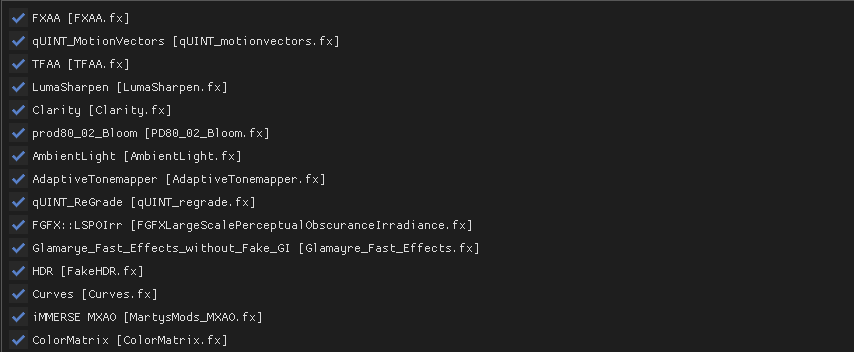 slow star
Niceeee
 tawny chasm
Can anyone tell me if there's anything I could do to stop these shadows from popping in?
Changing the lighting distance to 1.0 did not change it. Using the ATMOS Gamma reshade with a few tweaks
 tawny chasm
Oooohhh interesting I'll mess around with it thank you
lavish lake
I had long time ago kinda similar problem
Fixed it by playing with shadow cascade
Hope it works for ya
tawny chasm
Yea maxing them all out makes everything shaded from the start but im gonna assume it will potentially tank performance when im in a larger/more complicated area
But I screenshotted the default values so I'll run with it until I notice issues
Also i didnt intend for this to be in the Reshade channel, but I'm thankful for the quick and helpful answer 🫶
spiral mulch
hey guys how was RT for amd called in the reshade menu?
I think it's SSR
I don't have it anymore
viral birch
slow star
If I have to use SMAA I use the reshade SMAA.fx
Which resolution do you play?
toxic mural

 brittle kraken
Any ideas on how to fix this? 3 pictures.


 austere raft
Been messing around with some gloomy shiz, feel free
swift robin
any rtgi users who have some tips?
viral birch
@slow star it seems like you are using LateFall, which reshade do u use?
Or maybe you tweaked shaders for realistic image?
slow star
viral birch
<@264607540430635008> it seems like you are using LateFall, which reshade do u u...
Hey man, nono im not using late fall. Im using aydin grass tweaks on autumn mode + Autumn Retexture Desaturated in modDB . Very simple and it looks good
slow star
viral birch
Which resolution do you play?
I play in 3440x1440
viral birch
slow star
Hey man, nono im not using late fall. Im using aydin grass tweaks on autumn mode...
Oh, ok. Good combination
slow star
viral birch
<@264607540430635008> it seems like you are using LateFall, which reshade do u u...
Im using my reshade presets right nowhttps://discord.com/channels/912320241713958912/1162285292070379530
The one called Breeze rn
viral birch
slow star
Im using my reshade presets right nowhttps://discord.com/channels/91232024171395...
So you publish it, great! I will definitly try it
I like latefall very much, its ground textures, and this cold tint, sometimes I can even play without reshade
But Clear weather looks overbrighted most of the time, I always need to play with lumascale
Have you tried Dynavision? Is it worth it?
slow star
viral birch
So you publish it, great! I will definitly try it
I like latefall very much, its...
Yes latefall is beautiful for sure... the probem with the overbrightness in latefall i had to fix it by installing Dynavision (there is a thread for it on this server) and in the game MCM menu setting i go to dynamic tonemapper and disable it. Then i go to dynavision and enable it. Otherwise they fight each other
with the dynavision hotkey you can press it anytime you're playign and tune the brightness of the sun, the hemisphere, etc its great. Then you save it
I press the "save as global button" so i dont have to tune every hour at first
slow star
viral birch
So you publish it, great! I will definitly try it
I like latefall very much, its...
Thanks hope you like the reshades man
viral birch
slow star
Yes latefall is beautiful for sure... the probem with the overbrightness in late...
Its sounds really handy
slow star
Yep, it takes a little bit of time because you have to stop playing to adjust the sun bright but it has sliders so its perfect
viral birch
slow star
Yep, it takes a little bit of time because you have to stop playing to adjust th...
I am doing it all the time via console and not playing ahahah))
slow star
Noo yeah console all the time got me mad
But with it you definetely can fix late falls super brightness
viral birch
slow star
Hey man, nono im not using late fall. Im using aydin grass tweaks on autumn mode...
so u just placed Autumn Retexture Desaturated below grass tweaks?
slow star
Yea i placed it anywhere at the bottom really but yep after grass tweaks
I dont know if im using grass tweaks in autumn or winter mode though, so maybe try both
It helps with some ground textures and other things that arent modified by golden autumn retextured desaturated
The rest is done by golden autumn retexture desaturated
ripe fossil
Can someone tell me if this dithering effect is normal? Iam not sure if I'm getting crazy.

Just wanna know if I see it everywhere now because I inspect the graphics more (and therefore are focused on it) or if its caused by some option that I can't find
slow star
It onyl happens with reshade ON?
Some reshade shaders use dithering and they have a little box to disable it
ripe fossil
I think I found it. It seems to come from sharpening with "iMMERSE sharpening" while the dithering effect seems to be in the game in general but it can get exaggerated by the sharpening and other effects.
Thanks for the suggestions
Using the AMD Fidelity sharpening significantly reduces the pixelation effect, using that for now 🙂
slow star
ripe fossil
I think I found it. It seems to come from sharpening with "iMMERSE sharpening" w...
There is also on MCM menu > SSS > a grass shadow setting, i think that one also gave dithering if on "Low" mode but I'm not sure right now, might be worth to check out.
swift robin

Is this the default shader?
am i the only one who isn't understanding how to install zone reality textures?
unkempt estuary
swift robin
am i the only one who isn't understanding how to install zone reality textures?
whats the problem ? btw prob ask here https://discord.com/channels/912320241713958912/1153770802819383346
 raw isle
Is there a quick way to remove the autumn textures so the game is greener again?
 fringe patio
swift robin
fringe patio
swift robin
appears to be
lean nebula
raw isle
Is there a quick way to remove the autumn textures so the game is greener again?
reinstall 289- aydin's grass and select spring trees and grass
raw isle
When you say reinstall does that mean check it in mod organizer?
unkempt estuary
raw isle
When you say reinstall does that mean check it in mod organizer?


right click to reinstall
raw isle
Thanks!
north sail
How do you add reshades?
gaunt pawn
brittle kraken
Any ideas on how to fix this? 3 pictures.
I got this too after enabling TFAA option.
bold rain
IM using ADEGA and enabled TFAA getting this error https://i.imgur.com/XC7qYtY.png
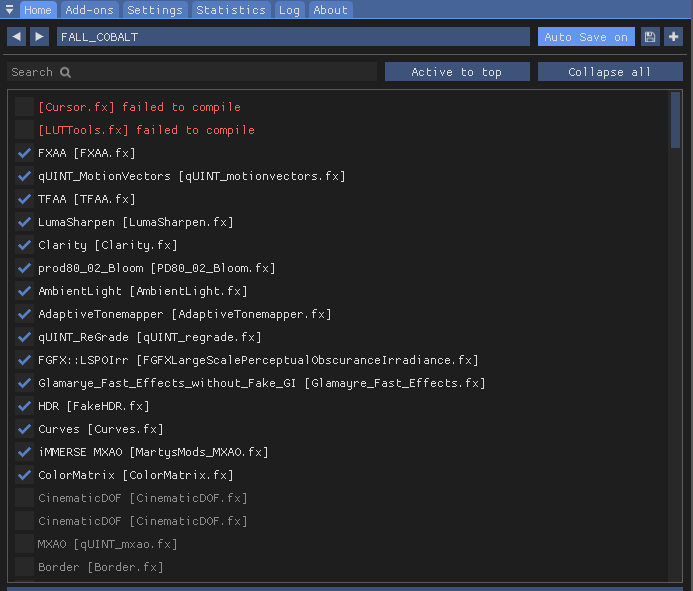
I've reinstalled, multiple times, etc nothing fixes
manic sage
bold rain
IM using ADEGA and enabled TFAA getting this error https://i.imgur.com/XC7qYtY.p...
This isn't an important error anyway
bold rain
manic sage
This isn't an important error anyway
oke
manic sage
literally no reshade preset uses this at the moment
bold rain
W
 flat lion
hy guys, how i download and install reshade and presets ? anyone has any tutorial to send me please ? thx
 neat kite
hello quick question how come the reshade isnt really changing anything for me in my game lol ill pull up the menus and tweak stuff in it and litterally nothing is happening
the effects are on so i really dont kno what the problem could be its a fresh install of gamma to
slow star
flat lion
i downloaded a cinematic preset, how i can install this ?
Drop the preset.ini into anomaly/bin folder and in-game press the reshade menu hotkey.
when you start the game it tells you what hotkey it is. Then just select the preset you want from the dropdown that appears at the top of the menu
You can have mutliple presets by the way they can be changed on the fly
slow star
neat kite
the effects are on so i really dont kno what the problem could be its a fresh in...
Did you press the toggle hotkey?
neat kite
yea i fixed it all i had to do was restart
slow star
Ohh nice
neat kite
might have glitched or somethin
slow star
Yeah weird!!
neat kite
this is my first time back to gamma in so long i had abunch of reshades on my old playthrough
i forgot all of them tho
slow star
Dang
Well for some good ones theres phroZac, hunter, Capa, Oscore
Manfred neutral
Im making a bunch of weird cinematic ones for roleplaying
 slow star
nice
neat kite
any suggestions ?
slow star
im currently making one to roleplay as Sin
neat kite
oooooooo
slow star
hmm let me see
yeah like this is it currently


Called phospor
weird one but I love it
slow star
this is "Wanderer"
 slow star
i'll post them on my thread #1162285292070379530 tomorrow if i can
like they aren't the normal beautiful ones but I like making weird ones. Next is one for duty
slow star
Nope, I only posted one video for an older wip of a reshade but thats my thread ill post every preset there
neat kite
omg bro frfr i just followed the post
slow star
neat kite
<@264607540430635008> this is what mine looks like currentyl
Can you take a screen of your reshade menu? lets see what we can do with it
neat kite
bet
slow star
like press windows+shift+s and it lets you do a pic
 neat kite
wass dat
slow star
Its the best antialasing but you need to "unhide" it, go to the settings tab and there's a little folder icon , this one
press the + and search the folder "TFAA"

theres another way of doing it with recursive search but some guys where having duplicated shaders so this is safer
idk if the folder was there but its basically inside shaders/TFAA
slow star
Nice, so now refresh the list
i think theres a button at the bottom of the home tab
then search for TFAA
drag it below Motionvectors and activate it
TFAA takes like 10 FPS but its really good imho
slow star
Did TFAA appear?
slow star
Okay so activate it and hold click on it and drag it on the list
put it as "3rd"
like if you were moving an icon on windows or smth
neat kite
ok its third now
 neat kite
 slow star
Now that you have it active, the grass and trees should be smoother (shimmering)
some people notice it, others dont
 neat kite
slow star
some people notice it, others dont
neat kite
slow star
some people notice it, others dont
didnt take away any fps
 neat kite
fr ?
 neat kite
ok
slow star
like i7 i9 or ryzen 7 9
neat kite
i got i7
slow star
Rule of thumb for AVX or no AVX is = if your cpu is better than your gpu, go with avx, otherwise, no avx. but it depends
in any case you can test both
slow star
No, you can just plop them in the bin folder
neat kite
omg thank youuuuuu
slow star
If something doesnt work, then you can use my folder, but it should be the same anyways
By the way, I'm going to improve the presets tomorrow, because seems like they look differently in summer seasons. But I think you're on autumn so its okay
Disable RadiantGI from my presets. That thing consumes like 15FPS, I'll remove it in the next update. Someone gave me a heads up
 neat kite
just drag and drop into folder ??
slow star
Yeah the 4 files into anomaly/bin
slow star
You shouldn't need to restart the game. Just pressing reload at the bottom in the reshade menu should work
By the way, make sure to check 0score's reshades too.
Inside his thread there is a google drive link, with a lot of folders for each season, choose one, and you just grab those .ini files and drop them in anomaly/bin like you did with my presets
neat kite
just checked his shit out o my god
 neat kite
thanks yo frfr helped me out today
spiral mulch
any good denoiser?
I have some noise on my pda, probably something to do with the 4 layers of AA
lol
mostly immerse AA and FXAA
 west stirrup
I tried to use TFAA and I got that weird thing that objects wobble when I walk around them. Does anyone know how to fix this?
First image I'm standing still, second image I'm strafing to the right (notice the distortion of blocks I'm aiming at), in motion it looks like they wobble like a gel

 viral birch
west stirrup
I tried to use TFAA and I got that weird thing that objects wobble when I walk a...
viral birch
west stirrup
I tried to use TFAA and I got that weird thing that objects wobble when I walk a...
Unfortunately, its a side effect of TFAA
Have you applied any motion vector effects?
west stirrup
viral birch
Unfortunately, its a side effect of TFAA
Have you applied any motion vector effe...
yes, it helped a lot. Without it I have it much worse and whole screen can distort
viral birch
west stirrup
yes, it helped a lot. Without it I have it much worse and whole screen can disto...
yep... I also feel this wobbling effect, so I still didn't decide do I use TFAA and live with that, or don't use
 strange crescent
I have the same issue, can`t enjoy the game while i´m notice the wooble effect
slow star
strange crescent
I have the same issue, can`t enjoy the game while i´m notice the wooble effect
Looking at the 2nd picture, i can see that the wobble is way too high for tfaa.. seems abnormal. Cna you take a pic of your reshade menu, and the settings for tfaa?
strange crescent

 forest lagoon
Whats the best Ill get the game to look on a 1080 with an i7-8700k?
strange crescent
manic sage
Use DRME instead
Doesn´t change a lot, the effect is kinda the same
 manic sage
Never had that issue on my end
 mortal shuttle
place drme in the same spot as quint motionvectors
manic sage
mortal shuttle
place drme in the same spot as quint motionvectors
Yeah this is correct i didn’t notice that he had it way down there
strange crescent
okay didn´t know that´s matter
strange crescent
mortal shuttle
place drme in the same spot as quint motionvectors
it works thanks!
mortal shuttle

toxic mural
Hey guys
I'm looking for every shader effects for using
Some of them old effects and can't download with reshade app
Can someone send me a link for downloading every single shaders please?
 jade trellis
im looking for phrozacs grim v2 and the one that comes with the retexture mod
 sharp patrol
anyone know a good snow mod?
toxic mural
sharp patrol
anyone know a good snow mod?
Project Inverno
 fierce lion
Hey guys! Is this the right chat for shader issues?
fierce lion
Nice, well, I just have major stutter, plus shader "artifacts"
like 8-15fps at maximum
and I was wondering whether there is a thread for maximising fps
swift robin
hey, how do i install reshades?
unkempt estuary
swift robin
hey, how do i install reshades?
download and put in here
 swift robin
unkempt estuary
download and put in here
swift robin
unkempt estuary
download and put in here
thx
 hybrid sapphire
 novel drum
hey sorry, is hippos now default ? do i have to tell the reshade program which folder to use ;s sry
mortal shuttle
Hippos is the default, yes. You do not need to do anything, if you've correctly installed gamma, reshade is already working as intended
novel drum
ok thank you very much
fierce lion
The game at this moment looks like this... Any way to fix the shaders, or my graphics card is too weak?
 toxic mural
Use HOME button on keyboard
Then you can see some effects
Uncheck all
If not working
fierce lion
funny thing: this also happens when I play vanilla Anomaly
toxic mural
Idk really
fierce lion
I tend to think it is becuase my graphics card cannot handle the graphics
it is a dedicated GPU
toxic mural
Maybe try delete shader cache
If not still working ask here https://discord.com/channels/912320241713958912/922555488665743391
Not gamma problem if you have also on anomaly but maybe they can help you
fierce lion
Looks like disabling the effects from main menu

actually worked
still, fps is crap, but I can handle it
mortal shuttle
brother are you running that on a calculator
fierce lion
nope, on laptop
mortal shuttle

 unkempt shore
jade trellis
im looking for phrozacs grim v2 and the one that comes with the retexture mod
unkempt shore
jade trellis
im looking for phrozacs grim v2 and the one that comes with the retexture mod
Bro saw the video . Its Zone Reality
swift robin
anyone know what the newest version of sss is?
 thorny vortex
swift robin
anyone know what the newest version of sss is?
thorny vortex
swift robin
anyone know what the newest version of sss is?
17.2 but 18 is coming soon
swift robin
ahh ok thanks
manic sage
Very very soon
mortal shuttle
 timid pond
unkempt shore
Bro saw the video . Its Zone Reality
timid pond
unkempt shore
Bro saw the video . Its Zone Reality
I saw it too, where can i find the Zone reality mod?
unkempt estuary
timid pond
I saw it too, where can i find the Zone reality mod?
timid pond
unkempt estuary
https://discord.com/channels/912320241713958912/1153770802819383346
Thank you!
unkempt estuary
timid pond
Thank you!
no worries. you can find mods here https://discord.com/channels/912320241713958912/1035807043933720576
 urban hatch
fierce lion
Looks like disabling the effects from main menu
urban hatch
fierce lion
Looks like disabling the effects from main menu
avoid using reshade if you do 11 fps on a laptop, even with effects disabled it takes away a bit of performance reading the frame buffer
also playing in dx8 or 9 should give you more fps
jade trellis
How do i enter the shaders menu
when i press the home button it doesnt bring it up it brings up another terminal in the top left
jade trellis
unkempt estuary
download and put in here
what do i download?
fierce lion
urban hatch
avoid using reshade if you do 11 fps on a laptop, even with effects disabled it ...
I will try playing on dx9, although I saw from some videos from yt that dx8 is dark af, while dx9 is optimal
unkempt estuary
jade trellis
what do i download?
He was asking about putting people's reshaders he downloaded into his game
urban hatch
fierce lion
I will try playing on dx9, although I saw from some videos from yt that dx8 is d...
yeah try dx9 first, if the fps are not acceptable go for dx8 and edit the gamma slider in graphical options (if it's even possible in dx8, dunno  )
)
jade trellis
how do i get the shaders menu???????????????????
fierce lion
jade trellis
how do i get the shaders menu???????????????????
Press HOME
fierce lion
urban hatch
yeah try dx9 first, if the fps are not acceptable go for dx8 and edit the gamma ...
God save GAMMA, for no one else can
jade trellis
this is what comes up when i press home
 fierce lion
You need to be on the main menu
jade trellis
idk what that is
 mighty dome
anyone know how to fix this?
 jade trellis
fierce lion
Then once you are there, Press home
jade trellis
fierce lion
Then once you are there, Press home
 fierce lion
....
I think you pressed ~
Not home
The one near esc button
Cause this should not appear
jade trellis
I have 60% keyboard its annoying
this is what i type when i press fn and esc `
shouldnt ` take me to the shader stuff?
fierce lion
Dont you have a home key
fierce lion
Yep
fierce lion
What kind of keyboard you have?!
jade trellis
fierce lion
What kind of keyboard you have?!
thankssss i found the key i have a razer mini keyboard
i had to press fn and this button }]
fierce lion
jade trellis
thankssss i found the key i have a razer mini keyboard
But at least you found it 🙂
mighty dome
mighty dome
anyone know how to fix this?
can anyone help?
 craggy topaz
mighty dome
anyone know how to fix this?
craggy topaz
mighty dome
anyone know how to fix this?
are u trying dx8 or dx9
mighty dome
craggy topaz
are u trying dx8 or dx9
dx11
craggy topaz
also #🔨base-gamma-support
mighty dome
craggy topaz
also <#922555488665743391>
im using zone reality
craggy topaz
mighty dome
im using zone reality
u using mod manager right
think u might have to bring it down to dx9 or dx10
completely forgot how i fixed mine
mighty dome
craggy topaz
think u might have to bring it down to dx9 or dx10
whys that?
craggy topaz
to be honest, no idea, but that's how i think i fixed mine
if you can't handle the game with shaders anyways, you shouldn't play dx11.
mighty dome
craggy topaz
if you can't handle the game with shaders anyways, you shouldn't play dx11.
i can easily handle it
no problems, until I tried using zone reality
still shader comp failed, i think imma just delete the mod until something more stable shows up
mighty dome
craggy topaz
zone reality
its a retexture mod
craggy topaz
if you go into settings, does detail texture have a number next to it
craggy topaz
mighty dome
its a retexture mod
do you have any other mods alongside it
mighty dome
craggy topaz
do you have any other mods alongside it
i turned off what the mod author wanted turned off
craggy topaz
weird idk then
mighty dome
yeah imma revert back, glad i made backups
 void depotBOT
@hexed lotus
1.) Go to your
GAMMA\downloadsfolder and deleteScreenSpaceShaders_Updatex.x.zip(x.x. means version number, and yes delete them all if you have multiple of those zip files)
https://www.moddb.com/mods/stalker-anomaly/addons/screen-space-shaders/
2.) Download the mod file from moddb. DO NOT EXTRACT.
3.) Place it into yourGAMMA\downloadsfolder.
4.) Run the GAMMA Launcher as ADMIN.
5.) Uncheck every box, but leave "Force zip extraction" box checked
6.) Click install / update G.A.M.M.A.
mighty dome
i got it fixed
@hexed lotus if you have performance mode on in reshade, turn it off. thats what i did
 cunning thunder
Which reshade is good for medium spec pc
swift robin
anyone recommend some ways to make your game look good on vanilla?
 cinder pike
Is there a list of reshades made by the community? Been looking for phrozacs grim reshade
 cobalt parrot
it's installed with gamma by default
cinder pike
ah, well thats good then lol
 foggy drum
cinder pike
ah, well thats good then lol
foggy drum
cinder pike
ah, well thats good then lol
not yet
hit the home key and it will open up the shader menu
should probably load into the game first though since it won't really change much in the menu
cobalt parrot
yeah should have phrased that better
it's installed by default, but you still need to enable it
 slow star
!shader
void depotBOT
@slow star To clean your "Shader Cache", don't use the option in the Anomaly launcher.
Go in this folder: Anomaly\appdata, you'll find a folder called shaders_cache, delete this folder and launch the game normally from MO2, using your preferred DX.
 verbal hare
ok
slow star
it's gonna take longer to start 1st time after deleting the folder, dw
 sturdy leaf
I have same issue will also try
void depotBOT
@slow star Follow this: #╭📖faq message


 west stirrup
strange crescent
west stirrup
strange crescent
Didn't see your message yesterday, here they are
 west stirrup
When I took that screenshot I had these shaders

 digital elm
void depot
<@264607540430635008> To clean your "Shader Cache", **don't use the option in th...
digital elm
void depot
<@264607540430635008> To clean your "Shader Cache", **don't use the option in th...
Hey, I have the same issue and shader-cache deletion doesnt help.
UI and stuff looks good, just ingame graphics are dark as the night
 copper ermine
guys i dont know if this is the place to ask about it but, does someone has the hippo FILM2 reshade ini file? i lost it when i updated gamma to the new version
 dim bough
digital elm
UI and stuff looks good, just ingame graphics are dark as the night
dim bough
digital elm
UI and stuff looks good, just ingame graphics are dark as the night
Same here... If anyone has managed to fix this, I'm keen to know how
 past shuttle
turn off dynamic tonemapper in MO2
delete shaders_cache folder afterwards
if you have just updated without the new hotfix
or manually installed SSS 18 and atmospheric
dim bough
Just tried turning it off and deleting the shaders_cache folder but unfornunately no luck
past shuttle
ingame via console (^) cfg_load atmos or atmosr
digital elm
dim bough
Just tried turning it off and deleting the shaders_cache folder but unfornunatel...
Same
probably will need to do a fresh install. 😦
dim bough
past shuttle
ingame via console (^) cfg_load atmos or atmosr
Didn't help either 😦
 hexed lotus
past shuttle
ingame via console (^) cfg_load atmos or atmosr
hexed lotus
past shuttle
ingame via console (^) cfg_load atmos or atmosr
What are the difference.?
 harsh estuary
dim bough
Just tried turning it off and deleting the shaders_cache folder but unfornunatel...
harsh estuary
dim bough
Just tried turning it off and deleting the shaders_cache folder but unfornunatel...
same, no change for me. Game is still pitch black, can't even tell I have a flashlight on
swift robin
yep, same done fresh reinstall and game is pitch black
past shuttle
hexed lotus
What are the difference.?
atmos is for without reshade using and atmosr with reshade. R standing for reshade.
sorry guys, maybe you have to do a fresh install.
swift robin
@past shuttle just fresh reinstall the game, disable dynamic tonemapper, and delete shader cache manually, and still doesnt work
past shuttle
hm did you put in the console command?
swift robin
which one? gonna try it now