#🆘│community-support
1 messages · Page 141 of 1
 gentle vale
 restive condor

 humble sequoiaBOT
How to edit `@everyone`'s permissions
Head over to your Dashboard ➞ Panel Configs ➞ Permission Options ➞ Everyone Role Opened/Closed and customize the base permissions for everyone in your tickets.
Note: This set of permissions may be affected by the overrides of Support Team, Additional Roles, and User permissions.
 restive condor
Yes
 fresh gyro
restive condor
Yes
fresh gyro
restive condor
Yes
Hello, I made the form for Arabic support, normally who is responsible for this?
restive condor
fresh gyro
Hello, I made the form for Arabic support, normally who is responsible for this?
You will have to wait
fresh gyro
OK thanks
 jade topaz
hola, necesito ayuda, no me deja poner el panel en el canal que seleccioné, incluso tiene todos los permisos
 restive condor
jade topaz
hola, necesito ayuda, no me deja poner el panel en el canal que seleccioné, incl...
restive condor
jade topaz
hola, necesito ayuda, no me deja poner el panel en el canal que seleccioné, incl...
¡Hola, buenas tardes! Puedes usar el comando /debug en ese mismo canal por favor
jade topaz
restive condor
¡Hola, buenas tardes! Puedes usar el comando ``/debug`` en ese mismo canal por f...
 restive condor
jade topaz
restive condor
jade topaz
Panel de Control > Panel Configs > Buttons > Create Ticket Button
Solo puedes tener un emoji en la sección 'Button Emoji', el texto va en la sección de abajo 'Button Text'

 dire gazelle
Does anybody know how i can costumize my ticket tool bot on my server?
 pseudo ravine
Hey there. Refer to the embed below
humble sequoiaBOT
Ticket Tool Custom Avatar
As of now, you are not able to change Ticket Tool's profile picture, nonetheless, our Development Team is working on the release of white labels, this is your own custom bot!
For the time being, you can change the bot's nickname by right-clicking the bot in the user list on your server and clicking Change Nickname

$avatar
dire gazelle
ok ty
pseudo ravine
You're welcome, glad I could help! Thanks for supporting Ticket Tool!
dire gazelle
Np
 hardy shard
how long do ticket transcripts save for?
restive condor
hardy shard
how long do ticket transcripts save for?
Hey there! The actual transcript file is saved forever, until you delete it
Direct Links do expire after a few days though, simply click the 'Direct Link' button again and a new one will be generated
hardy shard
restive condor
Hey there! The actual transcript file is saved forever, until you delete it
could i send you one of mine that broke?
i know it worked when i sent it
restive condor
hardy shard
could i send you one of mine that broke?
A screenshot will do 😄
hardy shard
restive condor
A screenshot will do 😄
oh wait the links expire
restive condor
Correct
Simply use the 'Direct Link' button again to generate a new link
The actual HTML file does not expire
hardy shard
gotcha
so as long as i have access to the channel where the transcripts are available, i can keep generating a new link for them?
 marsh yacht
is there a way to change the icon/image of the bot itself?
 worldly helm
Hey there!
sadly not, see below for how to change the name of the bot!
humble sequoiaBOT
Ticket Tool Custom Avatar
As of now, you are not able to change Ticket Tool's profile picture, nonetheless, our Development Team is working on the release of white labels, this is your own custom bot!
For the time being, you can change the bot's nickname by right-clicking the bot in the user list on your server and clicking Change Nickname
$avatar
marsh yacht
how do i add multiple dropdown items to the same panel?
worldly helm
Hello!
See below for the full guide
humble sequoiaBOT
The Drop-down menu or Select Menu replaces the buttons on your panel message and uses a drop-down menu with all of your panels. To set this up, go to your Panel Configs and select your main Panel.
<:Numbericons1:1018864164032225340> Enable Select Style
First you enable Select Style. Then you add an item in the Dropdown Editor. Now you can start editing your dropdown!
<:Numbericons2:1018864168041971712> Dropdown Editor
Each line in the dropdown editor represents a line in the drop down menu on discord. You can add more "Items", by clicking on 

First you select a panel. That's the panel this option will open a ticket for.  DONT select the same panel twice. Each option should have a different Panel
After that, you can put a Display. This is the title of this option and will appear in the drop down menu. The *Description can be set right after that, which will be below the title in grey.
Additionally you can select an emoji, that will be shown in front of each option. You can either manually input the ID of an emoji or select it in the selector.
Common Issues ⚠️
- Panel doesn't send? Make sure you have a valid emoji selected
- Option doesn't show up? Check if two options have the same panel in the DropDown Editor

$dropdown
marsh yacht
only one option shows up

 worldly helm
Thats right, you need to select a panel for the second dropdown option.
marsh yacht
can i have two in the same message?
worldly helm
What do you mean?
marsh yacht
can i add screenshots & questions in the same "make a selection" area
like when they click that they have an option to choose either or
worldly helm
You can't put screenshots in the "make a selection" message, BUT you can change it.
marsh yacht
i mean
can i add the second option in that area? if so how
like for the dropdown items, could i add both screenshots & questions?
worldly helm
OHHH i am so sorry! I misread it, i thought you want to add Screenshots into the embed.
As i said yes, you have to select a panel for the "Question" selection
Where it says "Select a panel (req)"

 worldly helm
You have to create another panel then, to create a panel click  at the top of your screen
marsh yacht
thank you! figured it out
worldly helm
No problem
 young zodiac
i need arabic support
humble sequoiaBOT

فريق الدعم الفني العربي
عميلنا العزيز ان كنت تبحث عن مساعدة يرجى فتح تكت خاص بفريق الدعم الفني العربي
اذهب الى#🎫│make-a-ticket
ثم قم بلضغط على الايموجي الاتي (🇯🇴)
worldly helm
young zodiac
how i can do claim button?
Hello! Claiming is a premium only Feature
humble sequoiaBOT
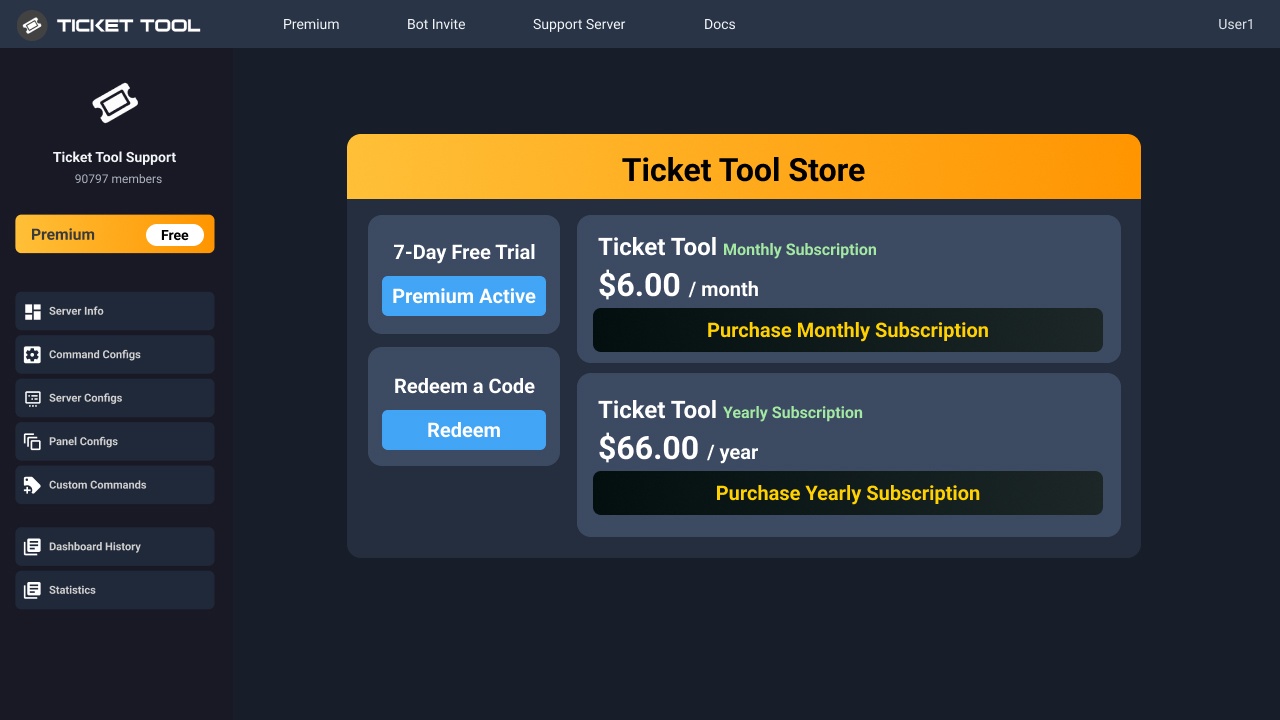
You can purchase Ticket Tool Premium here! Buying it on our website allows you to have full control over your subscription:
 Cancel your subscription at any time
Change your billing interval (yearly/monthly)
Change your payment method
Add or remove server slots to your subscription
 Transfer the subscription between servers
Note: This level of control is only available when purchasing the subscription from our website.
You can manage your current subscriptions here, any billing questions or concerns, feel free to create a Billing Ticket via #🎫│make-a-ticket
<:TTWarning:1034178155872784494> Important Notice <:TTWarning:1034178155872784494>
Starting 
 (October 7th, 2024) Ticket Tool Premium pricing will increase to comply with Discord's new Monetization Policy. You can learn more about the upcoming changes [here](#📣│bot-news message)
 worldly helm
young zodiac
how i can get premium
worldly helm
young zodiac
how i can get premium
See above ^^
young zodiac
worldly helm
See above ^^
thank's
worldly helm
young zodiac
thank's
You're welcome‼️Feel free to reach out again if you have any more questions 🙏
If you think i did good, feel free to do +rep @lias1948 in #📈│reviews
young zodiac
worldly helm
You're welcome‼️Feel free to reach out again if you have any more questions 🙏
I...
done
 twilit thorn
Sorry to bother. I'm having an issue with the bot stating on the dashboard: "You don't have access to this server" and when using the /botswitcher I'm getting "The application did not respond" ~ I have ownership of the server with administrator permissions.
twilit thorn
twilit thorn
Sorry to bother. I'm having an issue with the bot stating on the dashboard: "You...
I've attempted to try with both @humble sequoia and @pseudo glen
restive condor
twilit thorn
Sorry to bother. I'm having an issue with the bot stating on the dashboard: "You...
Hey there! Could I get your server name or ID
twilit thorn
Yes, thank you! 1052028927717154927
restive condor
twilit thorn
Yes, thank you! 1052028927717154927
Are both bots still in the server?
 restive condor
It seems like you have the premium bot enabled. You will re-gain Dashboard access once re-added
humble sequoiaBOT
The first thing you will need to do is invite the premium bot, an invite can be found here
Once the bot is in your server we will head to the dashboard and manage your server. When you are managing your server, you want to head into "Server Configs" then click the drop down menu under "Select the bot you would like to use on this server" then click "Ticket Tool#6207" and then save.
 restive condor
Click on 'here' above to get an invite
twilit thorn
Thank you. I invited the other one. I'm looking to transfer ownership of this server to somebody else and want them to be able to have access. Would I need to do anything else after inviting this one?
restive condor
twilit thorn
Thank you. I invited the other one. I'm looking to transfer ownership of this se...
Are you leaving the premium on the server and using Discord's server ownership transfer feature?
twilit thorn
I'd have to ask them, the subscription is set for a year already. So, probably just leave it for the rest of the year.
But I would be transfering via the server transfer feature
restive condor
Then you don't need to do anything else, they'll automatically get Dashboard access as the owner 😄
twilit thorn
Sweet! I apprciate your help!
restive condor
No problem!
 stark loom
Does anyone know if you can make it so tickets are automatically age restricted?
restive condor
stark loom
Does anyone know if you can make it so tickets are automatically age restricted?
Hey there! Not at this time unfortunately. You would need to manually make them age-restricted.
Somewhat of a workaround, would be making the channel where tickets are created from, age-restricted. But yes, it may not achieve what you're looking for
humble sequoiaBOT

Suggestions for Ticket Tool
To make a suggestion use the s!suggest suggestion command in #🤖│bot-spam. Note that you'll suggestion will be first reviewed by our Support Team before it's posted into #💡│suggestions, channel in which you'll be able to vote for other suggestions!
 iron nightBOT
Gave +1 Rep to @restive condor (current: #1 - 1474)
 dusky ravine
How do I report
restive condor
dusky ravine
How do I report
Hey there! Report what exactly?
dusky ravine
Random killing i just spawned and got killed
humble sequoiaBOT

⚠️ You're in the wrong place
We provide support for Ticket Tool Discord bot and cannot help you with whatever issue you have.
- We don't know which Support Team you should contact to get this issue resolved, and unfortunately we won't be able to accurately tell you.
If you don't have any further questions regarding our bot Ticket Tool, please close this ticket
 quartz kestrel
How to reset the ticket counting to zero?
worldly helm
quartz kestrel
How to reset the ticket counting to zero?
Hello! At the Dashboard, where you send the embed, there is a button called set count! Use it to set the count!
quartz kestrel
worldly helm
Hello! At the Dashboard, where you send the embed, there is a button called set ...
thank you 🙂
iron nightBOT
Gave +1 Rep to @worldly helm (current: #28 - 185)
 reef token
restive condor
Yes
reef token
restive condor
Yes
Do you mind me asking how do I do it ?
worldly helm
reef token
Do you mind me asking how do I do it ?
Hello! Do what exacly?
reef token
worldly helm
Hello! Do what exacly?
Add an image to the ticket message
worldly helm
you have to add the URL of the image. I recomend you use imgur for that (a website)
reef token
worldly helm
you have to add the URL of the image. I recomend you use `imgur` for that (a web...
it did not work
worldly helm
please show me
reef token
worldly helm
please show me
I think the problem might be that i put it in the description instead of the Image Url think

 worldly helm
Put the URL in one of these boxes
 reef token
worldly helm
Put the URL in one of these boxes
reef token
worldly helm
Put the URL in one of these boxes
despite having the premium free trial it wont let me
humble sequoiaBOT
The first thing you will need to do is invite the premium bot, an invite can be found here
Once the bot is in your server we will head to the dashboard and manage your server. When you are managing your server, you want to head into "Server Configs" then click the drop down menu under "Select the bot you would like to use on this server" then click "Ticket Tool#6207" and then save.
worldly helm
See above ^^^^!
reef token
worldly helm
See above ^^^^!
Thank you so much !!
iron nightBOT
Gave +1 Rep to @worldly helm (current: #28 - 186)
worldly helm
No Problem
 knotty warren
i cant find my sever and i have admin
 sinful lake
Hello, ive been using the ticket bot(no premium) for a very long ime in multilple servers btu only one of them has an actual big income of tickets, so for that I tried using the server storage option but it seems to dont work. I alrtedy tried changing categories, turn off turn on but nothing seems to work, could I get any help pls
I can send mroe info if needed
 mental ibex
hello im trying to create a ticket in a different server but its told me this:

i have only created 1 ticket in this server before is it just bugged?
 gilded verge
knotty warren
i cant find my sever and i have admin
gilded verge
knotty warren
i cant find my sever and i have admin
you need administrator permission in your role, not just role with name admin ^^
(also hit this blue button to refresh your servers)

 chilly leaf
mental ibex
hello im trying to create a ticket in a different server but its told me this:
chilly leaf
mental ibex
hello im trying to create a ticket in a different server but its told me this:
Hey! This is because the server has a maximum of 500 channels. Server admins will need to delete some channels before you’re able to make more tickets / channels.
gilded verge
sinful lake
Hello, ive been using the ticket bot(no premium) for a very long ime in multilpl...
Hey, i checked it few seconds ago and it works, could you give the administrator permission for a moment and then check if this problem still exists?
*if admin permission solved, then the problem is in TT bot's permissions in those categories you set as storage so please make sure the bot has there View Channels, Manage Channels, Manage Permissions
worldly helm
 uncut ginkgo
How can I make more than one ticket in A one ticket?
uncut ginkgo
How can I make more than one ticket in A one ticket?
hello!
Look below.
humble sequoiaBOT
For more convenient use of multipanels, you can now combine panels on the dashboard. This will allow you to directly send the multipanel from the dashboard or via the $panel ID command.
Where can I find this?
You can find this setting on the Dashboard -> Panel Configs -> Panel -> Attached Panels
Note: if you're attaching all the panels to a panel called English, don't include English in the attached panel's box (If you do this, it will create a duplicate)
This will put all buttons from all of your panels on one message. The message is the panel message from the panel you're combining these panels in.
 humble sequoiaBOT
━━ ammen's inquiry has been moved to a ticket ━━
jade topaz
Guys this ticket system is VERY Confusing
I dont understand
How do i do this? 😦
I dont understand how to make a panel
 crisp scroll
i want the bot to send a message in the channel in the tiket system when someone opens the ticket
crisp scroll
jade topaz
I dont understand how to make a panel
go to #📌│automated-support and click on faq
 vernal shard
how come i cant invite the bot to my discord
i've got the role
administrator role
nvm got it
 nova wharf
crisp scroll
i want the bot to send a message in the channel in the tiket system when someone...
nova wharf
crisp scroll
i want the bot to send a message in the channel in the tiket system when someone...

Settings related to the Tickets belonging a given panel
crisp scroll
ok thanks @nova wharf
iron nightBOT
Gave +1 Rep to @nova wharf (current: #142 - 4)
 honest notch
Hey! How can i use the transcript command using the prefix?
|| $transcript ||
worldly helm
@cursive gale Look below!
humble sequoiaBOT
Ticket Tool Custom Avatar
As of now, you are not able to change Ticket Tool's profile picture, nonetheless, our Development Team is working on the release of white labels, this is your own custom bot!
For the time being, you can change the bot's nickname by right-clicking the bot in the user list on your server and clicking Change Nickname
$avatar
 cursive gale
Thx a lot! I will try
 glossy heath
how to make the tickets app ping the mods and admins when I open a ticket
humble sequoiaBOT
1. Go into your Dashboard
2. Open your Panel Configs tab
3. Select the panel you want to ping your support on
4. Open the Ticket options menu
5. Click on Edit Ticket Message
6. In the Message Content use one of the role mention syntax (**{@Role Name}**/**{Role ID}**)
7. Save changes
Note: For this to work properly, Ticket Tool requires the Mention Everyone permission. Or the role must have the Allow anyone to @mention this role setting enabled 

 lament prairie
glossy heath
how to make the tickets app ping the mods and admins when I open a ticket
lament prairie
glossy heath
how to make the tickets app ping the mods and admins when I open a ticket
Hey there! see above ^
 lament prairie
glossy heath
lament prairie
glossy heath
you can use {Role ID} OR {@Role Name}
glossy heath
lament prairie
you can use {Role ID} **OR** {@Role Name}
kk
glossy heath
lament prairie
you can use {Role ID} **OR** {@Role Name}
it didn't work
 kindred hollow
glossy heath
it didn't work
kindred hollow
glossy heath
it didn't work
Try with <@&RoleID>
lament prairie
glossy heath
it didn't work
can I have a screenshot?
glossy heath
lament prairie
can I have a screenshot?
I send video

just to make sure the number thats showed on the side of the blue colour is the role id right
lament prairie
glossy heath
this is not a role ID and that's wrong, {ID} not *ID*
glossy heath
lament prairie
this is not a role ID and that's wrong, {ID} not \**ID**
just send me a video
glossy heath
lament prairie
this is not a role ID and that's wrong, {ID} not \**ID**
u mean 0067ef is correct and ** 00676f ** is wrong or {0067ef} is correct.
when i type the stars it just comes out bold
pseudo ravine
That's not the role ID, that's just the color of the role
humble sequoiaBOT
1. Go into your Dashboard
2. Open your Panel Configs tab
3. Select the panel you want to ping your support on
4. Open the Ticket options menu
5. Click on Edit Ticket Message
6. In the Message Content use one of the role mention syntax (**{@Role Name}**/**{Role ID}**)
7. Save changes
Note: For this to work properly, Ticket Tool requires the Mention Everyone permission. Or the role must have the Allow anyone to @mention this role setting enabled
pseudo ravine
Refer to this message on how to ping a role ^
 coarse tartan
how to change message text (like create ticket to smt else)
worldly helm
coarse tartan
how to change message text (like create ticket to smt else)
Hello! What of these two messages do you mean?
 humble sequoiaBOT
The panel message is where people react to make a ticket. To customize it head over to your Dashboard --> Panel Configs -> Panel -> Edit Panel Message
 worldly helm
See above ^^^!
coarse tartan
ok!
worldly helm
NOTE: Update/resend your panel
worldly helm
Click on Embed Editor - 1
coarse tartan
its not letting me
worldly helm
Make sure to edit it here!
 worldly helm
No problem
coarse tartan
btw how do i add another button
humble sequoiaBOT
For more convenient use of multipanels, you can now combine panels on the dashboard. This will allow you to directly send the multipanel from the dashboard or via the $panel ID command.
Where can I find this?
You can find this setting on the Dashboard -> Panel Configs -> Panel -> Attached Panels
Note: if you're attaching all the panels to a panel called English, don't include English in the attached panel's box (If you do this, it will create a duplicate)
This will put all buttons from all of your panels on one message. The message is the panel message from the panel you're combining these panels in.
worldly helm
coarse tartan
btw how do i add another button
See above ^^^!
worldly helm
You can do it with 3 buttons aswell
coarse tartan
i dont understand how to add more buttons
worldly helm
Just follow the guide i sent.
And if you have any questions, please be more specific.
 restive condor
glossy heath
restive condor
glossy heath
Hey there! Please click on "Embed Editor"
 last karma
Hello
The bot on our Discord server automatically deletes the request when you confirm to close the request.
restive condor
last karma
The bot on our Discord server automatically deletes the request when you confirm...
Hey there! Please enable 
TWO STEP TICKET from your Dashboard > Panel Configs > General
last karma
restive condor
Hey there! Please enable <:Switch_enabled:1041734627330625586> ``TWO STEP TICKET...
Thanky
glossy heath
restive condor
Hey there! Please click on "Embed Editor"
how to make mods and admins get pinged when a ticket is opened
humble sequoiaBOT
Within all the messages the bot sends (both embeds and text) you can mention either channels, roles, or even users, these mentions will only send a notification to the user if they are used within a text field, e.g: a role mentioned in an embed won't ping at all the users who have that role.
For mentioning a role you can use one out of three options:
{@Role Name} ➞ Which is Case Sensitive.
{RoleID} ➞ Replace RoleId with the Id of the role you are trying to ping.
<@&RoleID> ➞ Discord's native syntax to ping roles.
<#ChannelID> ➞ Mention a channel by its ID.
<@UserID> ➞ Mention a user by its ID.
glossy heath
I would like to have a screen recording for the tutorial
humble sequoiaBOT
1. Go into your Dashboard
2. Open your Panel Configs tab
3. Select the panel you want to ping your support on
4. Open the Ticket options menu
5. Click on Edit Ticket Message
6. In the Message Content use one of the role mention syntax (**{@Role Name}**/**{Role ID}**)
7. Save changes
Note: For this to work properly, Ticket Tool requires the Mention Everyone permission. Or the role must have the Allow anyone to @mention this role setting enabled
jade topaz
when purchasing VIP and now with the Zen offers (+200 bonus per 1000 bought and so on) and I wonder
 white thorn
How can I update to Vip with a discount 🙌
 lament hawk
white thorn
How can I update to Vip with a discount 🙌
lament hawk
white thorn
How can I update to Vip with a discount 🙌
Hello!
There is no thing called VIP here. Its called premium, and no sadly there arent any discounts.
humble sequoiaBOT
@jade topaz
⚠️ You're in the wrong place
We provide support for Ticket Tool Discord bot and cannot help you with whatever issue you have.
- We don't know which Support Team you should contact to get this issue resolved, and unfortunately we won't be able to accurately tell you.
If you don't have any further questions regarding our bot Ticket Tool, please close this ticket
 slim raft
bot ticket tool
humble sequoiaBOT
Hello, we would love to help you, but if you don't tell us what you need help with we can't help you :(
 crisp peak
Hi!
Is there documentation that explains how slash command permissions work? Which permission is required to show X command?
lament hawk
crisp peak
Hi!
Is there documentation that explains how slash command permissions work? Whi...
Hello. Dashboard—> Command Configs —> You can customize them.
crisp peak
lament hawk
Hello. Dashboard—> Command Configs —> You can customize them.
Oh, I misunderstood how it's implemented. I thought they based it on Discord permissions, but since they implemented role permissions, everyone can see the command.
my bad!
lament hawk
 dreamy vigil
I find it super hard to add multiple buttons to a thing
dreamy vigil
I find it super hard to add multiple buttons to a thing
See below!
humble sequoiaBOT
For more convenient use of multipanels, you can now combine panels on the dashboard. This will allow you to directly send the multipanel from the dashboard or via the $panel ID command.
Where can I find this?
You can find this setting on the Dashboard -> Panel Configs -> Panel -> Attached Panels
Note: if you're attaching all the panels to a panel called English, don't include English in the attached panel's box (If you do this, it will create a duplicate)
This will put all buttons from all of your panels on one message. The message is the panel message from the panel you're combining these panels in.
dreamy vigil
lament hawk
See below!
I'll take a look, thanks buddy .
iron nightBOT
Gave +1 Rep to @lament hawk (current: #205 - 2)
dreamy vigil
humble sequoia
How do I make the attached panels to use
dreamy vigil
lament hawk
See below!
See above
lament hawk
Just follow the guide i sent, and if you don’t understand smth, please be more specific.
dreamy vigil
lament hawk
Just follow the guide i sent, and if you don’t understand smth, please be more s...
Where can i make the user report button Ect
lament hawk
dreamy vigil
Where can i make the user report button Ect
Dashboard > panel-configs > Buttons > edit button > create ticket > change the name
dreamy vigil
lament hawk
Dashboard > panel-configs > Buttons > edit button > create ticket > change the n...
Ok I'll take a look
But what if I want to keep the ones such as open ticket and close....
lament hawk
u can edit every button for its own
 tropic topaz
Ticket tool says i dont have a transcript channel set but i set it up in the dashboard

 lament hawk
tropic topaz
Ticket tool says i dont have a transcript channel set but i set it up in the das...
lament hawk
tropic topaz
Ticket tool says i dont have a transcript channel set but i set it up in the das...
Make sure to set it up for every panel
lament hawk
lament hawk
Dashboard > panel-configs > Buttons > edit button > create ticket > change the n...
.
dreamy vigil
lament hawk
.
But I can't find how to do that as that not working
lament hawk
Please #🎫│make-a-ticket
humble sequoiaBOT
━━ User's inquiry has been moved to a ticket ━━
 balmy plover
if i have multiple servers do i need to buy premium for both
restive condor
balmy plover
if i have multiple servers do i need to buy premium for both
Hey there! Yes, premium subscriptions are per server
balmy plover
restive condor
Hey there! Yes, premium subscriptions are per server
dang alr ty
iron nightBOT
Gave +1 Rep to @restive condor (current: #1 - 1476)
 scarlet folio
I got high end pc Ryzen 5 7600 and RX 7800XT 16GB DDR5 RAM 1TB SSD also Im not having lag in servers. My ethernet is good.
and Im getting crashes per 4 5 sec and deepwoken is freezing like 5 to 10 seconds., fps drops in per 4 5 sec and my game freezes like 5 to 10 second in deepwoken I cannot play and I died a lot of times bc of this. and its ONLY IN DEEPWOKEN Not in Any Other Game. Can i get a support ?
Tried Methos are
. Bloxstrap
. Bios Update
. Driver Update
. Roblox Install/Uninstall
. Overclocking Cpu
. Windows 11 Update
. Priority Roblox
. Virus Test
humble sequoiaBOT
⚠️ You're in the wrong place
We provide support for Ticket Tool Discord bot and cannot help you with whatever issue you have.
- We don't know which Support Team you should contact to get this issue resolved, and unfortunately we won't be able to accurately tell you.
If you don't have any further questions regarding our bot Ticket Tool, please close this ticket
 keen crypt
Is there a way to change the ticket tool website login credentials to a different discord account and password? Trying to avoid re-doing all the settings because we have hundreds of tickets open we don’t want to interfere with.
pseudo ravine
Hey there. You can click on your profile in the top right corner of the dashboard, and select Logout
 tacit raven
how to instal ticket tool in my channel?
pseudo ravine
Hey there. Please refer to the embeds below!
humble sequoiaBOT
First you will want to invite the bot to your server. Once the bot is in your server, you can manage your server in the dashboard.

To create a panel we are going to need to head over to the Panel Configs Tab on the Dashboard.
Once at the dashboard we will need to click Create Panel.
Enter a panel name (Fill in any optional settings you want).
Click Create Panel and you are ready to get started with configuring your panel.
An example of a creating a panel is shown below.

Once the panel has been created, use the blue Send button and select the channel you want the panel to be sent to.
The Panel wasn't send
Use the </debug:1029783024264564765> command to diagnose possible permission issues with the bot.

 violet quiver
 pine tundra
How can I get users to create a ticket? when they try to create it the bot tells them they don't have permission
 native steeple
@pine tundra please kindly send a request for assistance
pseudo ravine
native steeple
<@474758836260175884> please kindly send a request for assistance
Please keep the support to this channel
pseudo ravine
pine tundra
How can I get users to create a ticket? when they try to create it the bot tells...
Hey there. Could you send the server ID in here? I would like to take a quick look at your dashboard
pine tundra
pseudo ravine
Hey there. Could you send the server ID in here? I would like to take a quick lo...
Sure: 1288632963432452118
pseudo ravine
One moment
Seems like this is the reason why
You can go to the Dashboard > Buttons > Create Ticket > Disable Support Team Only & remove the Founder role from Allowed Roles
 pine tundra
Oh, tysm
pseudo ravine
You're welcome, glad I could help! Thanks for choosing Ticket Tool!
balmy plover
how does one remove ticket tool brnading
 gilded verge
balmy plover
how does one remove ticket tool brnading
gilded verge
balmy plover
how does one remove ticket tool brnading
meaning that you can remove/change fields that are locked and contain branding as in the screenshot
 balmy plover
gilded verge
meaning that you can remove/change fields that are locked and contain branding a...
balmy plover
gilded verge
meaning that you can remove/change fields that are locked and contain branding a...
oh
gilded verge
if you don't have access to the transcript channel on that mentioned server, you can't delete it
you need to open a ticket only on this server where it's related, we cannot assist you
transcript is available as long as it's in the transcript channel
but we can't help you, it's not possible, you need to ask their staff to delete it
you mean ticket to the Ticket Tool's Staff? nope, they can't, that's why i mentioned we cannot help you with it 😦
but have you tried to ask on your mentioned server if they can delete it?
because that's the only way 😦
glossy heath
glossy heath
how to make mods and admins get pinged when a ticket is opened
Will the role mention be seen to everyone
how to make the ping not show in the text and make it invisible but get pinged


 vast perch
i have a question if someone can help me out, i am struggling to get the "creat ticket" button/message to appear in a channel that, from what i can tell, is properly set up
vast perch
i actually fixed my problem... my new issue is now this, lol... how do i get the duplicate create ticket issue resolved? i obviously would like just one create ticket button lol

im sure its something simple right in front of me i just cant seem to figure it out
 uneven crown
Unable to install the latest version of modern warship
humble sequoiaBOT
⚠️ You're in the wrong place
We provide support for Ticket Tool Discord bot and cannot help you with whatever issue you have.
- We don't know which Support Team you should contact to get this issue resolved, and unfortunately we won't be able to accurately tell you.
If you don't have any further questions regarding our bot Ticket Tool, please close this ticket
glossy heath
how to make the ping not show in the text

 hallow orbit
/ticket

Please help me. My account is banned and I don't know how to open and create a ticket.
gilded verge
hallow orbit
Please help me. My account is banned and I don't know how to open and create a t...
read this -> #🆘│community-support message
gilded verge
glossy heath
how to make the ping not show in the text
you can move it to the embed or remove it | Panel Configs->Ticket->Edit Ticket Message
gilded verge
vast perch
i actually fixed my problem... my new issue is now this, lol... how do i get the...
most likely you just added the same panel into the same panel | Panel Configs->Panel->Attached Panels (Multi Panels)
glossy heath
gilded verge
you can move it to the embed or remove it | Panel Configs->Ticket->Edit Ticket M...
so if i enter the role id in embid 2 wont see it in message right
 gilded verge
you can have only 1 embed without premium
glossy heath
gilded verge
you can have only 1 embed without premium
So I cant make ping invisible for the role not for the user
gilded verge
you don't have enough space in first embed? 🤔
glossy heath
gilded verge
you don't have enough space in first embed? 🤔
I can

and which bar i have to type the role id for ping
gilded verge
you can use only embed description because other fields are shaded
glossy heath
gilded verge
you can use only embed description because other fields are shaded
how about the field editor, i can edit that
nvm i cant
gilded verge
you can't edit any shaded fields as mentioned before, there is  emoji which refers to premium
gilded verge
it pings the user who created the ticket and you're the one who opened it, the answer was in your video ^^
glossy heath
gilded verge
it pings the user who created the ticket and you're the one who opened it, the a...
I can see the owner role ping, I want all roles i add not be seen but get pinged
gilded verge
ummm.. then i misunderstood completely what you need... okay let's see...
glossy heath
gilded verge
ummm.. then i misunderstood completely what you need... okay let's see...
kk
gilded verge
i wanted to mention about autodetecting and deleting the specified pings with another bot but we need the trigger... i can't think of anything but maybe someone else may know? if not then you can ask the Staff directly on channel #🎫│make-a-ticket
 little lion
I don't want the gold member to be able to open silver category ticket, how can I do that?
I don't want to hide any category, just want them disabled for non-related roles.
 humble sequoiaBOT
Any role you assign as a blacklisted role won't be able to use commands or buttons.
Selecting a blacklisted role
Go to your Dashboard ➞ Server Configs. There you will find the option to select blacklisted roles.
Note: Don't forget to save.
 lament prairie
little lion
I don't want the gold member to be able to open silver category ticket, how can ...
lament prairie
little lion
I don't want the gold member to be able to open silver category ticket, how can ...
Hey there! see above ^
little lion
lament prairie
Hey there! see above ^
Hey, but I want it per panel, not for the whole server.
lament prairie
little lion
Hey, but I want it per panel, not for the whole server.
oh, sorry about that
Dashboard -> Chose the panel -> Buttons -> Create Ticket -> Disable Roles
coarse tartan
how to change this message? and how do i also add the topic that the person selected?

 coarse tartan
??
 short yacht
Hi guys, my server currently is set to open a "welcome" ticket to anybody who joins the server. We're changing the way the server is run and only want to open welcome tickets for select users who will automatically be given a role when they join, is it possible to set this in the bot?
humble sequoiaBOT
The panel message is where people react to make a ticket. To customize it head over to your Dashboard --> Panel Configs -> Panel -> Edit Panel Message
The Ticket Message is the first message sent by the bot on a new ticket. To customize it head over to your Dashboard ➞ Panel Configs ➞ Ticket ➞ Edit Ticket Message
lament hawk
coarse tartan
how to change this message? and how do i also add the topic that the person sele...
Hello look above. You need these guides in order to change that.
lament hawk
short yacht
Hi guys, my server currently is set to open a "welcome" ticket to anybody who jo...
No, sadly its not. Feel free to suggest it though
s!suggest {suggestion} (in #🤖│bot-spam )
short yacht
lament hawk
No, sadly its not. Feel free to suggest it though
Will do, to be honest I can't even find the feature we're using currently to automate a ticket on joining, do you know where that button is?
I set this up a while ago 😅
lament hawk
that is not possible with ticket tool
short yacht
I see, perhaps its a combination of bots then, I'll add both to a suggestion, thank you!
thanks @lament hawk
iron nightBOT
Gave +1 Rep to @lament hawk (current: #143 - 4)
lament hawk
no worries! 🤣
coarse tartan
lament hawk
Hello look above. You need these guides in order to change that.
thanks @lament hawk
iron nightBOT
Gave +1 Rep to @lament hawk (current: #133 - 5)
 lament hawk
 cosmic turret
Not really a support issue just needed to send this stupidity somewhere
cosmic turret
Not really a support issue just needed to send this stupidity somewhere
Thats another discord bot.
cosmic turret
Whoops
 wraith eagle
How i can create this one?

 stark runeBOT
1. Invite Ticket Tool to your server
First you will want to invite the bot to your server. Once the bot is in your server, you can manage your server in the dashboard.
2. Create a Panel
To create a panel we are going to need to head over to the panel configs on the dashboard.
Once at the dashboard we will need to click Create Panel.
Enter a panel name (Fill in any optional settings you want).
Click Create Panel and your ready to get started with configuring your panel.
An example of a creating a panel is shown below.
3. Send the Panel to a Channel
Once you've created a panel on the dashboard you will need to send it to a channel using send on the dashboard.
Select the channel you want your panel to be created in and click send.
For other questions checkout $help faq.
An example of a sending a panel is shown below.
Having a Problem Sending the Panel?
Do $debug in a channel with Ticket Tool and make sure it has all the necessary Discord permissions.
 austere forge
wraith eagle
How i can create this one?
austere forge
wraith eagle
How i can create this one?
Hi there 🙂
follow instructions above
iron nightBOT
Gave +1 Rep to @austere forge (current: #9 - 584)
 versed wing
i need help with making this part of the ticket, can someone please help😓
 humble sequoiaBOT
The Drop-down menu or Select Menu replaces the buttons on your panel message and uses a drop-down menu with all of your panels. To set this up, go to your Panel Configs and select your main Panel.
<:Numbericons1:1018864164032225340> Enable Select Style
First you enable Select Style. Then you add an item in the Dropdown Editor. Now you can start editing your dropdown!
<:Numbericons2:1018864168041971712> Dropdown Editor
Each line in the dropdown editor represents a line in the drop down menu on discord. You can add more "Items", by clicking on
First you select a panel. That's the panel this option will open a ticket for. DONT select the same panel twice. Each option should have a different Panel
After that, you can put a Display. This is the title of this option and will appear in the drop down menu. The *Description can be set right after that, which will be below the title in grey.
Additionally you can select an emoji, that will be shown in front of each option. You can either manually input the ID of an emoji or select it in the selector.
Common Issues ⚠️
- Panel doesn't send? Make sure you have a valid emoji selected
- Option doesn't show up? Check if two options have the same panel in the DropDown Editor
$dropdown
sinful lake
gilded verge
Hey, i checked it few seconds ago and it works, could you give the administrator...
We gave it admin and it still ddnt work. Is there anything else we could do?
gilded verge
sinful lake
We gave it admin and it still ddnt work. Is there anything else we could do?
Unable to proceed, please contact with the Staff on #🎫│make-a-ticket
lament hawk
 stray badge
How do I open a ticket?
stray badge
How do I open a ticket?
Hello. #🎫│make-a-ticket
 kindred osprey
How to ping a role on ticket message? I used <@&role_id>, and on the preview it shows the role like a ping but in the real message on my discord server it won't ping it
humble sequoiaBOT
━━ GZUZ's inquiry has been moved to a ticket ━━
 somber vortex
I've got ann unninvited person who could access the panel from my tickettool.
With that I have 2 doubts:
1- Where (or how) I change the config to allow only who is ADM at my discord to have access?
2- How do I remove this exact person from having access on the panel right now?
humble sequoiaBOT
━━ Trembo's inquiry has been moved to a ticket ━━
 fallen coral
is it possible to mention a Role When i ticket is create ?
humble sequoiaBOT
1. Go into your Dashboard
2. Open your Panel Configs tab
3. Select the panel you want to ping your support on
4. Open the Ticket options menu
5. Click on Edit Ticket Message
6. In the Message Content use one of the role mention syntax (**{@Role Name}**/**{Role ID}**)
7. Save changes
Note: For this to work properly, Ticket Tool requires the Mention Everyone permission. Or the role must have the Allow anyone to @mention this role setting enabled
lament prairie
fallen coral
is it possible to mention a Role When i ticket is create ?
Hey there! see above ^
fallen coral
done that but its not showing in ticket
 lament prairie
fallen coral
done that but its not showing in ticket
lament prairie
fallen coral
done that but its not showing in ticket
try {Role ID}
fallen coral
{979714349457367090} like this ?
lament prairie
fallen coral
{979714349457367090} like this ?
yes
 eternal jetty

 hallow ridge
Is anyone else's tickets suddenly not autosaving to transcripts or did we somehow do something to break it ? /gen
restive condor
hallow ridge
Is anyone else's tickets suddenly not autosaving to transcripts or did we someho...
Hey there! Automatic transcripts are a premium feature, please ensure you have an active premium subscription on the server.
If you do, please #🎫│make-a-ticket and another staff member will take a look
 tepid geyser
Hole time and I know I have 2 more dc because I created some new discord server
 austere forge
tepid geyser
Hole time and I know I have 2 more dc because I created some new discord server
austere forge
tepid geyser
Hole time and I know I have 2 more dc because I created some new discord server
hi there 🙂
can you logout / login and try to see if the 2 new servers appear, if not use the sync button again
tepid geyser
austere forge
hi there 🙂
can you logout / login and try to see if the 2 new servers appear, i...
Ok 1 sec
tepid geyser
austere forge
hi there 🙂
can you logout / login and try to see if the 2 new servers appear, i...
Yes, it worked thank you really much !
iron nightBOT
Gave +1 Rep to @austere forge (current: #9 - 586)
 tender cypress
thanks @lament hawk
iron nightBOT
Gave +1 Rep to @lament hawk (current: #120 - 6)
tender cypress
thanks @lament hawk
tepid geyser
Hello, again me I wanna asked how to change the name from ticket tool to idk maybe SW | Ticket Tool ?
humble sequoiaBOT
Ticket Tool Custom Avatar
As of now, you are not able to change Ticket Tool's profile picture, nonetheless, our Development Team is working on the release of white labels, this is your own custom bot!
For the time being, you can change the bot's nickname by right-clicking the bot in the user list on your server and clicking Change Nickname
$avatar
tepid geyser
Im on mobile ?
austere forge
tepid geyser
Im on mobile ?
click on the bot profile > ⚙️ manage and enter the nickname you want
tepid geyser
Then it’s for all ?
austere forge
you must do this for each server you have
tepid geyser
austere forge
you must do this for each server you have
Yes it worked, thanks!
iron nightBOT
Gave +1 Rep to @austere forge (current: #9 - 587)
tepid geyser
Hello me again last time I hope, I forgot if I wan pt at dropdown emoji id should i do {id} or only id ?
lament prairie
tepid geyser
Hello me again last time I hope, I forgot if I wan pt at dropdown emoji id shoul...
Hey there! only emoji id
 rare turtle
anyone tell me how to send embed to create ticket ?
ok
how to send like this embed in ticket creating channel ?

how to do
anyone tell me
 main pendant
hello, i know that is possible to disable buttons for specific role. to prevent ticket creation for example but how to do that for a Drowdown ? like prevent specific role to see / use dropdown
austere forge
main pendant
hello, i know that is possible to disable buttons for specific role. to prevent ...
Hi there! 🙂
It is not possible to make a specific role / user the dropdown invisible - however you can remove the perms for them to create a ticket.
you can go to Dashboard (choose your panels with dropdown) > Panel configs > Buttons > Create ticket and set Disabled roles
main pendant
I see. when disabled, they can still see it
 austere forge
You're welcome, I'm glad I could help! 
main pendant
xD i hate bot rep.
thanks @austere forge
iron nightBOT
Gave +1 Rep to @austere forge (current: #9 - 590)
 worthy jay
I was thinking... could I use ticket tool simply just ask for users email address?
So someone joined -> went through onboarding -> then I'd ask to input their email address
And that's it. Just to have it stored?
 twilit onyx
How do I fix this?
So I first finish setting up the ticket bot up, all was normal, but then I noticed I did something wrong during the setup, I selected the wrong category for the tickets to go in, so I removed the ticket and tried to redo the setup and then it loaded, and popped up with this message, and yes I kicked and re-added the bot, tried later on and nothing worked, and checked the status and its not down so why is this happening?
 humble sequoiaBOT
━━ Soulcrousher2000's inquiry has been moved to a ticket ━━
austere forge
worthy jay
I was thinking... could I use ticket tool simply just ask for users email addres...
hi there, If your server needs to know users email address, you can do this 👍
worthy jay
austere forge
hi there, If your server needs to know users email address, you can do this 👍
Any chance you could give me a bit of guidance?
Yeah, cuz, I mean now not, but in the future I'm planning to build our server a bit more integrated with our app, and we'd look at using their email address if they have subscription with us or not
so it's kinda "preparing" for the future in that sense
austere forge
unfortunately I can't guidance you on this kind of thing
 hushed oar
found this issue last month when i couldn’t add a role to access new tickets that’s opening, but i didn’t think anything of it till now that i’m revamping the server
it says this to all applications, i did remove the bot from server and add it again and it’s still not working. the server doesn’t require any members to verify anything
 austere forge
hushed oar
found this issue last month when i couldn’t add a role to access new tickets tha...
austere forge
hushed oar
found this issue last month when i couldn’t add a role to access new tickets tha...
Hi there 🙂
Make sure that the bot has : VIEW CHANNEL SEND MESSAGE and READ MESSAGE HISTORY perms in the channel
hushed oar
oh no wonder, thank you!
austere forge
 astral spear
How do I get the ticket tool to make categories
astral spear
How do I get the ticket tool to make categories
Hi there 🙂
Do you want to setup ticket tool on your server?
astral spear
Yes please
stark runeBOT
1. Invite Ticket Tool to your server
First you will want to invite the bot to your server. Once the bot is in your server, you can manage your server in the dashboard.
2. Create a Panel
To create a panel we are going to need to head over to the panel configs on the dashboard.
Once at the dashboard we will need to click Create Panel.
Enter a panel name (Fill in any optional settings you want).
Click Create Panel and your ready to get started with configuring your panel.
An example of a creating a panel is shown below.
3. Send the Panel to a Channel
Once you've created a panel on the dashboard you will need to send it to a channel using send on the dashboard.
Select the channel you want your panel to be created in and click send.
For other questions checkout $help faq.
An example of a sending a panel is shown below.
Having a Problem Sending the Panel?
Do $debug in a channel with Ticket Tool and make sure it has all the necessary Discord permissions.
austere forge
astral spear
Yes please
follow instructions above ⬆️
 austere forge
astral spear
austere forge
astral spear
Make sure that the bot has : VIEW CHANNEL SEND MESSAGE and READ MESSAGE HISTORY in the channel where you want to send the panel.
astral spear
3v u think if I add U to my server u can do it for me?
austere forge
Unfortunately no I can't do it for you.
astral spear
austere forge
Make sure that the bot has : `VIEW CHANNEL` `SEND MESSAGE` and `READ MESSAGE HIS...
Where do I find that?

That
?
 iron hamlet
 austere forge
astral spear
Where do I find that?
austere forge
astral spear
Where do I find that?
on your server discord, on the channel you want to send it to
- Right click (hold down on the channel's name > Edit Channel > Permissions > Add Ticket Tool
humble sequoiaBOT
فريق الدعم الفني العربي
عميلنا العزيز ان كنت تبحث عن مساعدة يرجى فتح تكت خاص بفريق الدعم الفني العربي
اذهب الى#🎫│make-a-ticket
ثم قم بلضغط على الايموجي الاتي (🇯🇴)
 pseudo ravine
Hey there. Please refer to the embeds below
humble sequoiaBOT
First you will want to invite the bot to your server. Once the bot is in your server, you can manage your server in the dashboard.
To create a panel we are going to need to head over to the Panel Configs Tab on the Dashboard.
Once at the dashboard we will need to click Create Panel.
Enter a panel name (Fill in any optional settings you want).
Click Create Panel and you are ready to get started with configuring your panel.
An example of a creating a panel is shown below.
Once the panel has been created, use the blue Send button and select the channel you want the panel to be sent to.
The Panel wasn't send
Use the </debug:1029783024264564765> command to diagnose possible permission issues with the bot.
astral spear
How do I make my ticket tool say welcome and welcome new members
pseudo ravine
Are you referring to when the user makes a ticket? Or when the user joins your server?
astral spear
pseudo ravine
Are you referring to when the user makes a ticket? Or when the user joins your s...
Mb I didn't figure it out
pseudo ravine
That's not something Ticket Tool does unfortunately
pseudo ravine
Ticket Tool doesn't make categories, that's something you have to do
 cobalt rune
Hello
astral spear
What does ticket tool help with
pseudo ravine
astral spear
Well what can ticket tool help me with?
It's used as a ticket system. There are some things that you'll have to do yourself, but Ticket Tool will create the actual tickets
pseudo ravine
cobalt rune
Hello
Hey there. Do you need any support regarding Ticket Tool?
astral spear
Ohh is there other tools?
pseudo ravine
There are a lot of bots on Discord, but we obviously prefer using Ticket Tool
cobalt rune
pseudo ravine
Hey there. Do you need any support regarding Ticket Tool?
I'm from Russia
cobalt rune
I not very well speak English
astral spear
👋🏽
pseudo ravine
astral spear
Like one that writes messages when ppl join my server
Yes, there are multiple bots that can do that
cobalt rune
Вот я из России
astral spear
Can U add me to the servers?
pseudo ravine
No, that's not something I can/will do
cobalt rune
@pseudo ravine как сделать бота тикет чтобы были типо написано как заполнять его?
Помогите!!!!
astral spear
Я не очень хорошо говорю по-русски
pseudo ravine
Please refer to the embed below (We don't have a guide in russian unfortunately)
humble sequoiaBOT
A Discord Form lets the user answer individual questions in a pop-up Form, which then displays the answers in the ticket message. This can save time if you already know what you want to ask the user.
Setup Forms
Forms can be enabled under Panel Settings > Form Options > Edit Forms Options. In the new pop-up window, you can now enable and edit your own Form.
Form Options
You can add up to 5 questions in the Discord form. This is a Discord limitation. Each question can have a placeholder in the input field, a minimum and maximum input, multi-line, and also the option to have the answer required.
Options
Question Title ➞ Your Question goes here
Question Placeholder ➞ The placeholder text in the input field
Required ➞ If enabled, the user has to answer this question, to submit the form
Multi-Line Input ➞ Allows the user to input multiple lines
Minimum and Maximum Input ➞ Set a minimum and maximum input value for the user
Displaying the Answer
To display the answers from the user, you need to enable Auto display form results on the ticket message as an additional embed
If you don't want a second embed, go into your Panel Configs > Ticket Options > Edit Ticket Message. You use the variable {create.form.x} and replace x with the number of your question. For example, the response to Question 5 can be displayed with {create.form.5}.
 cobalt rune
Спасибо
pseudo ravine
Пожалуйста, рад, что смог помочь! Спасибо за поддержку Ticket Tool!
pseudo ravine
Я использую переводчик
pseudo ravine
У вас возникли проблемы с поиском места, где находятся формы?
cobalt rune
Нет уже разобрался
@pseudo ravine а вот такой вопрос если я забыл пароль от акка от дискорда куда зайти чтобы найти пароль!
?
pseudo ravine
Пожалуйста, прекратите пинговать персонал. В Discord будет возможность сбросить пароль, если вы его забудете.
cobalt rune
Простите за пинг. то есть в ближайшее время?
pseudo ravine
В Discord уже есть способ сбросить пароль
cobalt rune
pseudo ravine
В Discord уже есть способ сбросить пароль
Просто не могу залогится
pseudo ravine
Forgot your password?
 pseudo ravine
Вам не нужно пробовать, если вы знаете свой пароль
 knotty blaze
Hi, I've created a dropdown menu with 3 options and each option have a different panel, but these 3 options are creating the same tickets in the same category.
How can I make each option in my dropdown create a ticket in a different category ? (and if possible have a different ticket message for each option)

 cobalt rune
pseudo ravine
Вам не нужно пробовать, если вы знаете свой пароль
cobalt rune
pseudo ravine
Вам не нужно пробовать, если вы знаете свой пароль
Спасибо
pseudo ravine

austere forge
knotty blaze
Hi, I've created a dropdown menu with 3 options and each option have a different...
Salut 👋
Tu doit sur ton tableau de bord, choisir le panel que tu veux changer et changer le texte / category à partir de ce panel

 real canyon
austere forge
Salut 👋
Tu doit sur ton tableau de bord, choisir le panel que tu veux changer...
real canyon
austere forge
Salut 👋
Tu doit sur ton tableau de bord, choisir le panel que tu veux changer...
Please provide a voice channel.
austere forge
real canyon
Please provide a voice channel.
Hi there 🙂
Do you need help with ticket tool?
knotty blaze
austere forge
Salut 👋
Tu doit sur ton tableau de bord, choisir le panel que tu veux changer...
merci
jade topaz
what did i do wrong??
 austere forge
jade topaz
what did i do wrong??
austere forge
jade topaz
what did i do wrong??
Hey there 🙂
__ «You don't have permissions to use this»__
Are your members seeing this message when they try to create a ticket?
You may have accidentally denied them permission to use the Create Ticket button.
Look in the following places in your server's dashboard ⬇️ ⬇️
Server Configs > Blacklist Roles
Any roles there will be unable to interact with the bot in any way, including creating tickets.
If this is enabled
Any roles there will be unable to use the button.
jade topaz
austere forge
Hey there 🙂
__ **«You don't have permissions to use this»**__
> Are your memb...
tysm
 austere forge
 finite kayak
How do I fix this error that my players get?
finite kayak
How do I fix this error that my players get?
Hey there 🙂
follow instructions above ⬆️
finite kayak
thanks
jade topaz
@austere forge
Just copy the variable for first question in the form settings and paste it into channel name settings
A random guy know more than ticket tool support team 🤡
Don't be offend
pseudo ravine
Please stop pinging staff
austere forge
jade topaz
<@225349654974431232>
stop pinging a staff all the time 🙂
lament hawk
finite kayak
Can some staff check out <#956946297087197184>, some kid keeps pinging me
Hello. Feel free to report him at #🎫│make-a-ticket
finite kayak
ty
 distant garden
is there option to autodelete these messages?

 true lava
How can I make the ticket get deleted automatically when closed?
restive condor
true lava
How can I make the ticket get deleted automatically when closed?
Hey there! Please disable 
TWO STEP TICKET from your Dashboard > Panel Configs > General
restive condor
distant garden
is there option to autodelete these messages?
Hey there! The message will automatically disappesr after restarting the app
humble sequoiaBOT
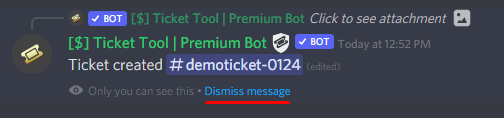
How can I edit/disable the ephemeral message?
These pop-ups can only be seen by the user who triggered a certain action, like creating a ticket. They cannot be edited or disabled, as they are a discord requirement that is set by the developer of any bot. The ephemeral messages can be removed by pressing the little blue Dismiss message text, or by restarting your discord client.
 true lava
restive condor
Hey there! Please disable <:Switch_disabled_neutral:1041734624163934299> `TWO ST...
true lava
restive condor
Hey there! Please disable <:Switch_disabled_neutral:1041734624163934299> `TWO ST...
Thanks alot!
iron nightBOT
Gave +1 Rep to @restive condor (current: #1 - 1479)
distant garden
restive condor
Hey there! The message will automatically disappesr after restarting the app
goat, thanks!
iron nightBOT
Gave +1 Rep to @restive condor (current: #1 - 1480)
 pallid girder
Hi there! I just had the payment for my monthly subscription auto-deducated from my bank account, but my server isn't showing the premium access anymore.
It's been working fine for the last few months, so I'm not sure why it's suddenly showing my subscription isn't active.
pseudo ravine
Hey there. Did you subscribe via Discord?
pallid girder
I did it directly through the website, if I remember correctly
pseudo ravine
What’s the server ID? I’ll take a quick look
pallid girder
1184230959164436631
pseudo ravine
One moment
It seems like I’m not seeing anything on my end
Could you check your receipts when the payment was deducted? It should show either Discord or Paddle
pallid girder
This current one still shows as Pending in my bank account but does have Discord before the transaction ID
pseudo ravine
Then the subscription was made through Discord
pallid girder

I have a monthly transaction going back to April 2 for the premium, based on my bank records
pseudo ravine
You’ll have to get in contact with their Billing Team as there’s nothing we can do about this unfortunately. Please refer to the embed below to find out how to get in contact with them
humble sequoiaBOT
If you have purchased a Premium Subscription of Ticket Tool through Discord and want to request a refund, you will have to contact Discord Support.
We unfortunately can't handle any of these cases.
Am I eligible for a refund?
Discords Refund Policy states that you can request a refund within 5 days of your initial purchase date.
A prorated refund (partial) can be requested if the bot has been removed by either Discord or the bot developer.
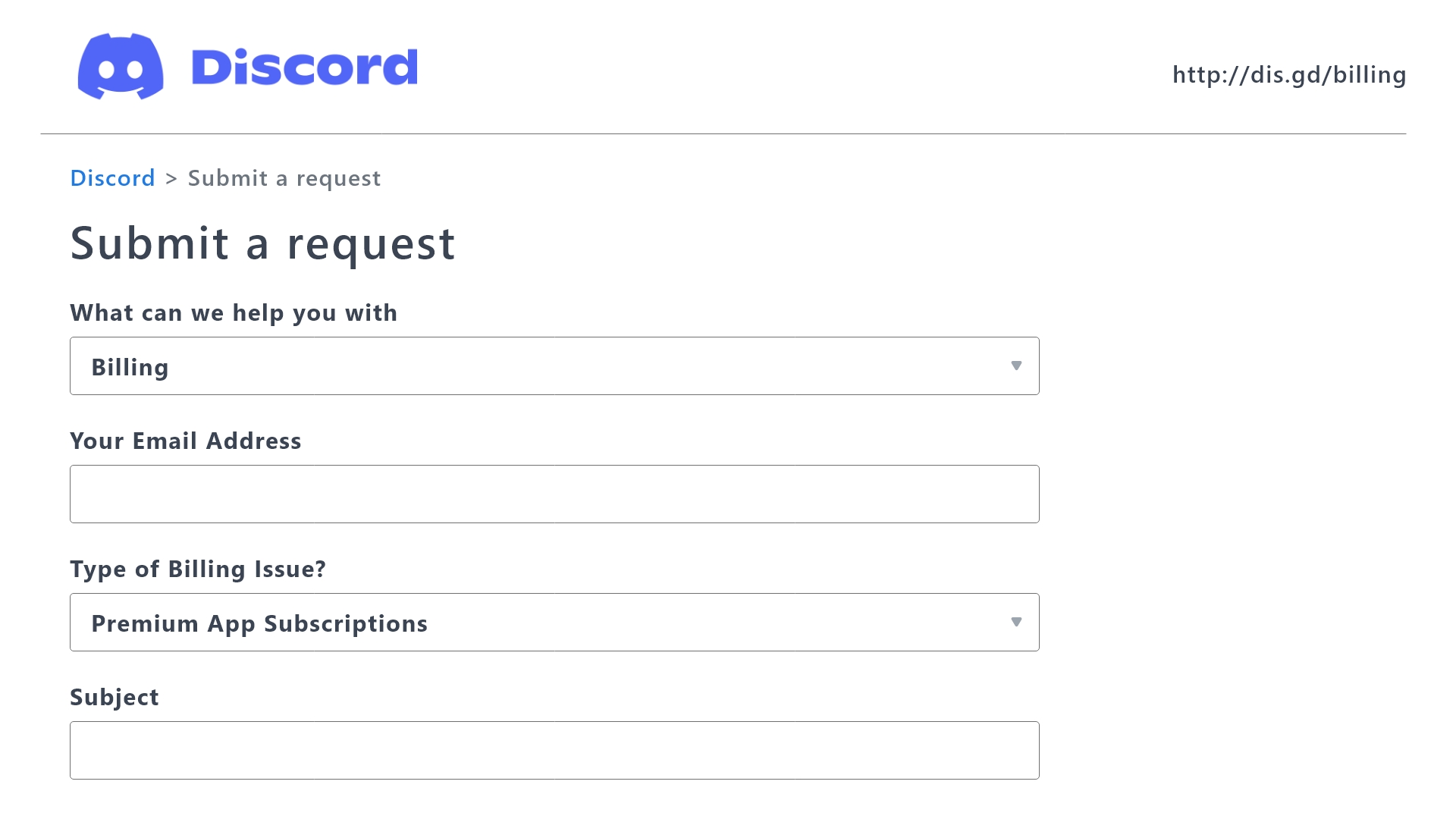
 Ticket Tool Premium Refund Request
pallid girder
Ticket Tool Premium Refund Request
pallid girder
Would it be best to resubscribe via the main ticket tool website at this point too?
pseudo ravine
Yep, that’s the recommended way
pallid girder
Thank you so much!
 latent galleon
Hello everyone, is there somewhere I can open a private ticket here?
pseudo ravine
pallid girder
Thank you so much!
You’re welcome, glad I could help! Thanks for supporting Ticket Tool!
iron nightBOT
Gave +1 Rep to @pallid girder (current: #341 - 1)
pseudo ravine
latent galleon
Hello everyone, is there somewhere I can open a private ticket here?
Hey there. If it relates to Ticket Tool you can make one in #🎫│make-a-ticket
 somber kite
X.X why is not makingthe channel a ticket
restive condor
somber kite
X.X why is not makingthe channel a ticket
Hey there! What exactly seems to be the problem?
somber kite
I want to make a text box for a support channel that says ticket or somethign they cant click to make a ticket room pop up
Ive tried the setup thing and its not working
 pseudo bear
Hello Is the premium ticket bot experiencing issues at the moment? It seems down currently in my server and not responding to any commands but is online.
 winged hare
Good evening
I have a question
Wasn't there even the premium version to buy as a lifetime version?
restive condor
somber kite
Ive tried the setup thing and its not working
Can you try configuring it from the Dashboard. Here are the instructions:
stark runeBOT
1. Invite Ticket Tool to your server
First you will want to invite the bot to your server. Once the bot is in your server, you can manage your server in the dashboard.
2. Create a Panel
To create a panel we are going to need to head over to the panel configs on the dashboard.
Once at the dashboard we will need to click Create Panel.
Enter a panel name (Fill in any optional settings you want).
Click Create Panel and your ready to get started with configuring your panel.
An example of a creating a panel is shown below.
3. Send the Panel to a Channel
Once you've created a panel on the dashboard you will need to send it to a channel using send on the dashboard.
Select the channel you want your panel to be created in and click send.
For other questions checkout $help faq.
An example of a sending a panel is shown below.
Having a Problem Sending the Panel?
Do $debug in a channel with Ticket Tool and make sure it has all the necessary Discord permissions.
restive condor
winged hare
Good evening
I have a question
Wasn't there even the premium version to buy as a...
Hey there! Unfortunately, no. We currently only offer monthly and yearly subscriptions 
humble sequoiaBOT
You can purchase Ticket Tool Premium here! Buying it on our website allows you to have full control over your subscription:
Cancel your subscription at any time
Change your billing interval (yearly/monthly)
Change your payment method
Add or remove server slots to your subscription
Transfer the subscription between servers
Note: This level of control is only available when purchasing the subscription from our website.
You can manage your current subscriptions here, any billing questions or concerns, feel free to create a Billing Ticket via #🎫│make-a-ticket
<:TTWarning:1034178155872784494> Important Notice <:TTWarning:1034178155872784494>
Starting (October 7th, 2024) Ticket Tool Premium pricing will increase to comply with Discord's new Monetization Policy. You can learn more about the upcoming changes [here](#📣│bot-news message)
winged hare
restive condor
Hey there! Unfortunately, no. We currently only offer monthly and yearly subscri...
Wasn't that even an option a few years ago?
restive condor
pseudo bear
Hello Is the premium ticket bot experiencing issues at the moment? It seems down...
Hey there! Discord is currently experiencing some issues with premium subscriptions
pseudo bear
restive condor
Hey there! Discord is currently experiencing some issues with premium subscripti...
Okay yeah just noticed because it says this
 restive condor
pseudo bear
Okay yeah just noticed because it says this
restive condor
pseudo bear
Okay yeah just noticed because it says this
Could you check your user settings to see the current status of the subscription?
humble sequoiaBOT
<:TicketToolOffline:1018980643092312155> Cancel your subscription
We're sorry to see you go!
To cancel your Ticket Tool Premium Subscription, just head over to your User Settings in Discord, then Subscriptions. Look for Premium Apps and click on Manage Subscriptions. There you can cancel your subscription at the end of your billing cycle.

User Settings > Subscriptions > Premium Apps > Manage Subscriptions > Cancel
restive condor
It should like something like that
pseudo bear
It seems like its gone?
restive condor
We can move to a ticket if you wish, so you don't have to post it here 😄
 mystic ether
i have same problem. It took cash but there is no premium
pseudo bear
Says i no longer have premium subscribed
restive condor
winged hare
Wasn't that even an option a few years ago?
Yes, at the very, very start
winged hare
restive condor
Yes, at the very, very start
Could it be that I have lost my lifetime status?
restive condor
winged hare
Could it be that I have lost my lifetime status?
You bought a premium key back in the day?
restive condor
mystic ether
i have same problem. It took cash but there is no premium
The person handling your ticket will get back to you in a second
pseudo bear
this is defiantly the ticket tool one
restive condor
I'll bring you into a ticket
winged hare
restive condor
You bought a premium key back in the day?
I bought one a few years ago
pseudo bear
restive condor
I'll bring you into a ticket
Thankyou
restive condor
winged hare
I bought one a few years ago
Give me too seconds
winged hare
restive condor
Give me too seconds
That was with my old Discord ID before it was changed
restive condor
winged hare
That was with my old Discord ID before it was changed
Do you still have access to it?
winged hare
restive condor
Do you still have access to it?
It's exactly the same Discord account but back then it still had the # behind it
restive condor
winged hare
It's exactly the same Discord account but back then it still had the # behind it
Alright, moving to a ticket
 winged harbor
Is there a way to access a specific panel where a specific word was said?
I have a huge server with hundreds of tickets but I want to find a SPECIFIC one from a SPECIFIC user. is that possible?
restive condor
winged harbor
Is there a way to access a specific panel where a specific word was said?
Hey there! So you're looking for a specific transcript?
winged harbor
restive condor
Hey there! So you're looking for a specific transcript?
yes
maybe like if soimeone said a specific word like their username
restive condor
winged harbor
maybe like if soimeone said a specific word like their username
You can search using Discord's search feature and filter it to your transcript channel while looking up the user ID
https://i.imgur.com/zHkDsMf.gif
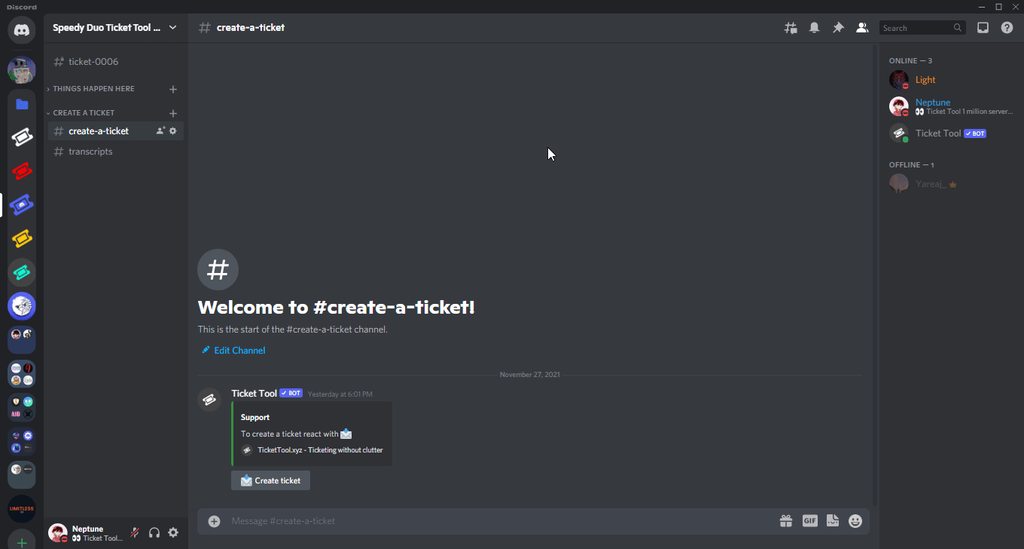
That will show you all the transcripts the user sent messages in
winged harbor
restive condor
You can search using Discord's search feature and filter it to your transcript c...
thanks, appreciate it
iron nightBOT
Gave +1 Rep to @restive condor (current: #1 - 1482)
 fossil lily
hey so the website cant find my discord server, im the server owner and on the right dc acc but its not there. any solutiond?
humble sequoiaBOT
Don't see your server in the dashboard?
Try using the Sync Servers button on your top center of the Dashboard page
You will possibly need to relog. Look below to see the steps on how to relog.
If this doesn't work
You should relog from the dashboard, you can do this by clicking here to log out immediately, and then log back in
Note:
You need one of these 3 things to access the dashboard.
1. Server Owner (Level: 6)
2. Server Administrator (Level: 4)
3. Dashboard Role (Level: 2)
:warning: You can check your level using the </permissionlevel:1029797400174399542> command on your Discord Server
If the bot's response is:
- @User is permission level: 0 (User)
You don't have any of the 3 levels required to access the server's dashboard
 fossil lily
so im blind and didnt see the sync servers, thanks 😭
 gritty hatch
Good afternoon! Quick question. if I bought the year ticket tool for a discord, do I need to buy it again for another or do I get like 2 discords out of it
pseudo ravine
Hey there. A premium subscription is for 1 server, so you'll need to buy another subscription for the other server
pseudo ravine
Sorry about that
 earnest lagoon
hello, can someone please help me figure something out. I have assigned mods permission to view the categories that my tickets funnel to. and I gave them perms on the dashboard, yet the mods still cannot view the channels and categories
gritty hatch
Is there a way to post a link in a ticket message with the free version without it being the entire link and it taking up text count?
pseudo ravine
earnest lagoon
hello, can someone please help me figure something out. I have assigned mods per...
Hey there. Did you add your mod role as a Support Team Role?
pseudo ravine
gritty hatch
Is there a way to post a link in a ticket message with the free version without ...
Hey there. Only if you have a URL shortener that shortens the length of the URL
earnest lagoon
pseudo ravine
Hey there. Did you add your mod role as a `Support Team Role`?
here right?
 pseudo ravine
Yep
earnest lagoon
Yeah they still do not have access to any of the channels
pseudo ravine
Did you create a new ticket after saving the changes on the dashboard?
winged harbor
restive condor
You can search using Discord's search feature and filter it to your transcript c...
what if I want to find a message someone sent in the discord channel?
pseudo ravine
winged harbor
what if I want to find a message someone sent in the discord channel?
You can filter it to that specific channel
pseudo ravine
Ah. Then unfortunately it's not possible
earnest lagoon
pseudo ravine
Did you create a new ticket after saving the changes on the dashboard?
I figured it out, but now I’m having trouble trying to input a welcome message when someone opens a specific ticket. I want a set of rules to appear in each channel once a certain kind of ticket is open. Do you know what I mean? Thank you
iron nightBOT
Gave +1 Rep to @pseudo ravine (current: #6 - 737)
pseudo ravine
Please refer to the embed below
humble sequoiaBOT
The Ticket Message is the first message sent by the bot on a new ticket. To customize it head over to your Dashboard ➞ Panel Configs ➞ Ticket ➞ Edit Ticket Message
 winter talon
how can i use my custom embed for the dropdown style thingy, like i want the dropdown style in an already sent embed
gilded verge
winter talon
how can i use my custom embed for the dropdown style thingy, like i want the dro...
Ticket Tool cannot edit another user/bot's message so you can send the panel with dropdown but from Panel Configs->Panel->Edit Panel Message->remove embed, then just dropdown will be sent
or adjust panel (message, dropdown) that will include everything you want
 brazen niche
@limber portal ?
 limber portal
do you need help?
brazen niche
Yes ,
I'd like to integrate the tool into my server but I don't know him. Could you give me an oral presentation of the tool ?
stark runeBOT
1. Invite Ticket Tool to your server
First you will want to invite the bot to your server. Once the bot is in your server, you can manage your server in the dashboard.
2. Create a Panel
To create a panel we are going to need to head over to the panel configs on the dashboard.
Once at the dashboard we will need to click Create Panel.
Enter a panel name (Fill in any optional settings you want).
Click Create Panel and your ready to get started with configuring your panel.
An example of a creating a panel is shown below.
3. Send the Panel to a Channel
Once you've created a panel on the dashboard you will need to send it to a channel using send on the dashboard.
Select the channel you want your panel to be created in and click send.
For other questions checkout $help faq.
An example of a sending a panel is shown below.
Having a Problem Sending the Panel?
Do $debug in a channel with Ticket Tool and make sure it has all the necessary Discord permissions.
limber portal
here is a basic setup guide.
humble sequoiaBOT

L'équipe du support Français
Cher client,
Si vous avez besoin d'aide, ouvriez un ticket pour le support Français s'il vous plaît.
Allez au #🎫│make-a-ticket et tapez sur le bouton contenant l'emoji 🇫🇷
stark runeBOT
1) **Inviter Ticket Tool sur votre serveur**.
Premièrement, vous devez inviter le bot dans votre serveur. Si le bot est déjà dans votre serveur, vous pouvez le personnaliser dans votre Dashboard.
**2) Créer un panneau**
Pour créer un panneau, merci de vous rendre dans Dashboard > Panel Configs > Create Panel.
Entrez un nom pour votre panneau (Personnalisez tous les paramètres optionnels comme vous les souhaitez).
Un exemple pour créer un panneau est illustré ci-dessous
3) **Envoyer le panneau dans un salon**
Si vous avez créé un panneau dans le Dashboard, vous pouvez l'envoyer par le bouton Send.
Sélectionnez le salon où vous voulez que votre panneau apparaisse.
Si vous avez d'autres questions, utilisez la commande /help > faq > option 1.
Un exemple pour envoyer un panneau est illustré ci-dessous.
Avez-vous un problème pour envoyer le panneau ?
Faite la commande /debug dans un canal avec Ticket Tool et assurez-vous qu'il a toutes les autorisations de Discord nécessaires.
 wild spire
brazen niche
you speak french ?
wild spire
brazen niche
you speak french ?
la meme guide en francais 
 rancid hedge
hey i'm trying to set up ticket tool for my friend and he gave me both administrator and manage server but it doesn't let me go to the server dashboard..
 rancid hedge
 dim hare
How to make ticket tool ping a role when somebody opens a ticket
dim hare
How to make ticket tool ping a role when somebody opens a ticket
u need premium for that
dim hare
rancid hedge
u need premium for that
oh
rancid hedge
rancid hedge
hey i'm trying to set up ticket tool for my friend and he gave me both administr...
@echo yacht
oh ok sorry then
 echo yacht
rancid hedge
hey i'm trying to set up ticket tool for my friend and he gave me both administr...
echo yacht
rancid hedge
hey i'm trying to set up ticket tool for my friend and he gave me both administr...
Whats the name of the server?
rancid hedge
echo yacht
Whats the name of the server?
Spaceyy Studios
echo yacht
rancid hedge
Spaceyy Studios
It seems all is okay, try refreshing the page
rancid hedge
echo yacht
It seems all is okay, try refreshing the page
ok
stilll
lemme try on another browser
@echo yacht i even tried on other browser..
even on my phone
OH FINALLY
I KICKED AND RE-INVITED AND NOW WORKS
@echo yacht thank u so much anyways
iron nightBOT
Gave +1 Rep to @echo yacht (current: #37 - 104)
lament hawk
dim hare
How to make ticket tool ping a role when somebody opens a ticket
Hello. Its not premium, look below!
humble sequoiaBOT
1. Go into your Dashboard
2. Open your Panel Configs tab
3. Select the panel you want to ping your support on
4. Open the Ticket options menu
5. Click on Edit Ticket Message
6. In the Message Content use one of the role mention syntax (**{@Role Name}**/**{Role ID}**)
7. Save changes
Note: For this to work properly, Ticket Tool requires the Mention Everyone permission. Or the role must have the Allow anyone to @mention this role setting enabled
lament hawk
rancid hedge
u need premium for that
Please do not spread lies.
rancid hedge
lament hawk
Please do not spread lies.
wdym since when?
i tried and it said u needed premium
lament hawk
You do not need premium to do that.
 lament hawk
1: do not ping me.
2: Its not premium, the thing you shown is when a ticket is created the "Role" gets added to the ticket creator, which isnt what the user asked for.
rancid hedge
ohhh
sorry i have a discord plugin that translates stuff into my language
and it translated into create instead of ping
lament hawk
No worries at all, if you have any questions feel free to ask 🙏
rancid hedge
well to ping u just need to copy the role ping ID
like ping the role in a message, then copy the message and paste
it should work
lament hawk
humble sequoia
Yes, some people don't know how to do that, thats why we have a full guide on how to.
rancid hedge
lament hawk
Yes, some people don't know how to do that, thats why we have a full guide on ho...
wdym “we” you are a normal member bro
lament hawk
Yes i know, i feel like we all are one community that help each other out.
(We, as the community of ticket tool)
rancid hedge
ok
jade topaz
Hello
 honest bluff
when i use setup the bot says the application didnt respond, how do i fix ths?
restive condor
honest bluff
when i use setup the bot says the application didnt respond, how do i fix ths?
Hey there! Could you use the /debug command in that same channel please
 elfin sun
Hello! I purchased Ticket tool premium for my server through the discord store. I have the payment ID from discord. However, the ticket tool website says it is still using the free bot and I need to purchase a subscription through the website.
honest bluff
restive condor
Hey there! Could you use the ``/debug`` command in that same channel please
says the application did not respond
restive condor
honest bluff
says the application did not respond
Ticket Tool is missing the VIEW CHANNEL permission for that channel
restive condor
elfin sun
Hello! I purchased Ticket tool premium for my server through the discord store. ...
Hey there! You're most likely affected by this issue caused by Discord. #📣│bot-news message
Please make a ticket and we can offer you a temporary olution 😄
 tight lagoon
Hello
my stats are frozen?
humble sequoiaBOT
⚠️ You're in the wrong place
We provide support for Ticket Tool Discord bot and cannot help you with whatever issue you have.
- We don't know which Support Team you should contact to get this issue resolved, and unfortunately we won't be able to accurately tell you.
If you don't have any further questions regarding our bot Ticket Tool, please close this ticket
 wanton python
 humble sequoiaBOT
━━ Jayden's inquiry has been moved to a ticket ━━
jade topaz
anyway to change the ticket number from ticket 0001
jade topaz
restive condor
Hey there! You're most likely affected by this issue caused by Discord. https://...
^
humble sequoiaBOT
The ticket name is the default channel name of all tickets. To edit it, go to your Dashboard > Panel Configs > Ticket. There you can edit the channel name of opened and closed tickets. You can also use variables in there.

 Note: This is a premium feature
jade topaz
Note: This is a premium feature
jade topaz
@austere forge how do i make it the username of the person
austere forge
jade topaz
<@225349654974431232> how do i make it the username of the person
use the {ticket.user.name} variable
humble sequoiaBOT
Hello, we would love to help you, but if you don't tell us what you need help with we can't help you :(
 dapper olive
I have drop down style tickets
But i want the members to open only one ticket now
How ?
austere forge
dapper olive
How ?
Dashboard > Panel configs > Limits - Open tickets each user
dapper olive
austere forge
Dashboard > Panel configs > `Limits` - Open tickets each user

This is the ticket i need the members only to open the first ticket
And when they select another ticket they can’t open it
austere forge
dapper olive
And when they select another ticket they can’t open it
Dashboard > Server configs > Global Ticket Limit - and set 1
dapper olive
austere forge
Dashboard > Server configs > Global Ticket Limit - and set 1
Okay thx
iron nightBOT
Gave +1 Rep to @austere forge (current: #9 - 592)
dapper olive
Excuse me
dapper olive
austere forge
Dashboard > Server configs > Global Ticket Limit - and set 1
The user can open a ticket i don’t want him to open it
 ashen trench
humble sequoiaBOT
ashen trench
humble sequoiaBOT
فريق الدعم الفني العربي
عميلنا العزيز ان كنت تبحث عن مساعدة يرجى فتح تكت خاص بفريق الدعم الفني العربي
اذهب الى#🎫│make-a-ticket
ثم قم بلضغط على الايموجي الاتي (🇯🇴)
austere forge
dapper olive
The user can open a ticket i don’t want him to open it
Dashboard > Panel Configs > Buttons > create button > Support team only
humble sequoiaBOT
━━ okyo Youssef's inquiry has been moved to a ticket ━━
 ebon knoll
How do I set up the ticket thing to where anyone can open a ticket for my server
stark runeBOT
1. Invite Ticket Tool to your server
First you will want to invite the bot to your server. Once the bot is in your server, you can manage your server in the dashboard.
2. Create a Panel
To create a panel we are going to need to head over to the panel configs on the dashboard.
Once at the dashboard we will need to click Create Panel.
Enter a panel name (Fill in any optional settings you want).
Click Create Panel and your ready to get started with configuring your panel.
An example of a creating a panel is shown below.
3. Send the Panel to a Channel
Once you've created a panel on the dashboard you will need to send it to a channel using send on the dashboard.
Select the channel you want your panel to be created in and click send.
For other questions checkout $help faq.
An example of a sending a panel is shown below.
Having a Problem Sending the Panel?
Do $debug in a channel with Ticket Tool and make sure it has all the necessary Discord permissions.
restive condor
ebon knoll
How do I set up the ticket thing to where anyone can open a ticket for my server
Hey there! Here's a setup guide ^
That's just your ticket system/embed
You can customise the messages, buttons, permissions...etc
 tulip oxide
The bots subscription got canceled after this got canceled the bot froze up obviously because the premium portion of it got canceled for some reason, after resubscribing and actually getting it back up I can see that in Discord the premium is active however the bot is just sitting there loading no interactions are going through if I go to the panel I get this


cant invite the other bot either, the only option I have is to enable the bot when trying to enable the bot i get that timeout
 pseudo ravine
Hey there. What's the server ID?
tulip oxide
1151198813671919666
pseudo ravine
One moment
tulip oxide
i really hope i dont loose my panels from this...
pseudo ravine
Is there any reason why you can't invite the premium bot?
 orchid cosmos
Is it possible for members to make a ticket while timed out?
tulip oxide
pseudo ravine
Is there any reason why you can't invite the premium bot?
there is no option? or i just cant find it
restive condor
orchid cosmos
Is it possible for members to make a ticket while timed out?
Hey there! Not possible as per Discord limitations
humble sequoiaBOT
The first thing you will need to do is invite the premium bot, an invite can be found here
Once the bot is in your server we will head to the dashboard and manage your server. When you are managing your server, you want to head into "Server Configs" then click the drop down menu under "Select the bot you would like to use on this server" then click "Ticket Tool#6207" and then save.
pseudo ravine
@tulip oxide Please refer to this ^
iron nightBOT
Gave +1 Rep to @restive condor (current: #1 - 1488)
tulip oxide
was goofy but hey it worked :) thanks @pseudo ravine
iron nightBOT
Gave +1 Rep to @pseudo ravine (current: #6 - 738)
pseudo ravine
You're welcome, glad I could help! Thanks for supporting Ticket Tool!
 odd plume
Is there a ticket system? I'm having billing issues.
lament prairie
odd plume
Is there a ticket system? I'm having billing issues.
#🎫│make-a-ticket then chose Billing ticket
humble sequoiaBOT
━━ Jatho's inquiry has been moved to a ticket ━━
 hardy glacier
How do I make it to where when a member opens a ticket it pings a certain role so that the ticket support team can know there is an opened ticket?
 topaz salmon
Is it possible to get a custom bot?
jade topaz
pseudo ravine
You're welcome, glad I could help! Thanks for supporting Ticket Tool!
Hello I need help
humble sequoiaBOT
━━ User's inquiry has been moved to a ticket ━━
 slim cloak
hi, the bot keeps opening a ticket channel in a random category but i have set it to a certain one so im confused why it does it and how can i fix it?
jade topaz
slim cloak
hi, the bot keeps opening a ticket channel in a random category but i have set i...
Do you have a panel?
 pseudo field
Yo
jade topaz
pseudo field
Yo
Hello
pseudo field
I got a problem bru
jade topaz
What’s the problem?
jade topaz
Do you have administrator perms?
pseudo field
Yes ofc
jade topaz
Just press refresh
pseudo field
I press on sync server and it says whoops moving too fast
And still doesn't show the server
jade topaz
And make sure your logged into the account with the server on it
pseudo field
I am
jade topaz

Ticket Tool - Ticketing without clutter - The #1 Discord support bot
Send a picture here
 jade topaz
Refresh
pseudo field
Done
jade topaz
Is the bot in the server?
pseudo field
Yes
jade topaz
Hm
pseudo field
jade topaz
Refresh
Still the same
jade topaz
Remove the bot
https://tickettool.xyz/invite and add it again
Ticket Tool - Ticketing without clutter - The #1 Discord support bot
pseudo field
Alr
 proven crow
Hi
lament prairie
proven crow
Hi
اهلين تفضل
proven crow
عربي ؟
pseudo field
jade topaz
https://tickettool.xyz/invite and add it again
Still same thing
proven crow
اسمع
lament prairie
proven crow
عربي ؟
صحيح
proven crow
كيف اسوي تكت
lament prairie
pseudo field
Still same thing
try to logout and re-login
pseudo field
lament prairie
try to logout and re-login
Alr
lament prairie
proven crow
كيف اسوي تكت
تقصد كيف تسوي سيت اب للبوت ولا بدك تفتح تذكرة هنا؟
pseudo field
lament prairie
try to logout and re-login
Let's gooo it worked tysm
proven crow
lament prairie
تقصد كيف تسوي سيت اب للبوت ولا بدك تفتح تذكرة هنا؟
ايه انه كيف اسوي تذكرة
في سيرفري
lament prairie
pseudo field
Let's gooo it worked tysm
you're welcome, glad to help 
humble sequoiaBOT
**١- دعوة البوت إلى سيرفرك**
يجب عليك اولاً دعوة البوت إلى سيرفرك من خلال رابط دعوة البوت، بعد ذلك يُمكنك تعديل خصائص البوت عبر لوحة التحكم.
**٢- إنشاء لوحة**
لإنشاء لوحة يجب عليك التوجه إلى لوحة التحكم ، ثم قم بإختيار سيرفرك ، بعد ذلك توجه إلى قسم "Panel Config".
بمُجرد وصولك إلى القسم المذكور أعلاه، يجب عليك الضغط على زر "Create Panel" لإنشاء اللوحة ، ومن ثمها قُم بإدخال اسم اللوحة (يمكنك ملء اي اعدادات اختياريه تريدها).
بعد إدخال اسم اللوحة و ملء الإعدادات ، قُم بالضغط على "Create Panel" لإتمام عملية انشاء اللوحة الخاصة بك بنجاح!
سيتم إرفاق صورة توضيحية لعملية إنشاء اللوحة بالطريقة الصحيحة؛
**٣- إرسال اللوحة إلى روم**
بعد الإنتهاء من عملية إنشاء اللوحة بنجاح ، يجب عليك الآن إرسالها إلى روم بإستخدام زر "Send" على لوحة التحكم بقسم الـ "Panel Config".
بعد الضغط على الزر ، قم بإختيار الروم المفضل لإرسال اللوحة.
بعد إختيار الروم قُم بالضغط على زر "Send" لإتمام عملية إرسال اللوحة!
سيتم إرفاق صورة توضيحية لعملية إرسال اللوحة بالطريقة الصحيحة؛
**هل تواجهك مشكلة أثناء محاولة إرسال اللوحة؟**
قُم بإرسال الامر `/debug" في اي روم يستطيع البوت رؤيته ، ثم تأكد أن البوت لدية جميع الصلاحيات اللازمة لإرسال اللوحة.
lament prairie
proven crow
ايه انه كيف اسوي تذكرة
شوف الشرح الي فوق ^
lament prairie
proven crow
بس اتذكر كان فيه طريقة بلأوامر الي هي /
/setup
proven crow
تمام شكرا يعطيك العافية 🤍
lament prairie
proven crow
تمام شكرا يعطيك العافية 🤍
الشكر لله حياك
slim cloak
jade topaz
Do you have a panel?
yes idk whats wrong tho
 dry iron
Wondering why the whole ticket category would be gone.
jade topaz
hay im trying to buy premium ticket tool with crypto anyone here can help
 violet shadow
proven crow
بس اتذكر كان فيه طريقة بلأوامر الي هي /
violet shadow
proven crow
بس اتذكر كان فيه طريقة بلأوامر الي هي /
/setup
jade topaz
yo I activated the 7d free premium trial and it still doesnt work
 violet shadow
jade topaz
yo I activated the 7d free premium trial and it still doesnt work
violet shadow
jade topaz
yo I activated the 7d free premium trial and it still doesnt work
If you need support with Ticket Tool,#🎫│make-a-ticket 
lament hawk
violet shadow
If you need support with **Ticket Tool**,<#571706435449257997> <:TicketToolGold...
Hello. No they can use this channel aswell. They do not need to create a ticket for support.
lament hawk
jade topaz
yo I activated the 7d free premium trial and it still doesnt work
Hello! Make sure to invite the premium bot into your server! (Ignore this if you opened a ticket already)
humble sequoiaBOT
The first thing you will need to do is invite the premium bot, an invite can be found here
Once the bot is in your server we will head to the dashboard and manage your server. When you are managing your server, you want to head into "Server Configs" then click the drop down menu under "Select the bot you would like to use on this server" then click "Ticket Tool#6207" and then save.
lament hawk
That's the wrong link. Thats from the normal bot.
lament hawk
dry iron
Wondering why the whole ticket category would be gone.
Hello. Please elaborate
 lament hawk
 onyx coral
How do I know who is the bot admin?
onyx coral
How do I know who is the bot admin?
Hello!
What do you mean by that?
onyx coral
I have to change the module setup only I'm not the admin I wanted to know if there was a way to find out
lament hawk
what exacly do you mean "module setup"?
dry iron
lament hawk
Hello. Please elaborate
I had a category for tickets created, and a category for tickets closed. A while back I made a second category for tickets created because the first one was at its max. Recently the category (active tickets) that was the first one is gone.
 sterile dew
Does anyone know how I can make it so when a staff member sends a message in the ticket it pings the person who created the ticket?
also I am a premium user
restive condor
dry iron
I had a category for tickets created, and a category for tickets closed. A while...
Hey there! What exactly do you mean by gone?
restive condor
sterile dew
Does anyone know how I can make it so when a staff member sends a message in the...
Hey there! That's not possible unfortunately. The only way would be to ping the user every time a message is sent
sterile dew
I was hoping to make the bot ping the user
restive condor
Alternatively, you could make a custom command for your staff to use after sending a message
That pings the user
dry iron
restive condor
Hey there! What exactly do you mean by gone?
It’s not there anymore
sterile dew
hmm I was thinking it could be automatic
restive condor
Sadly, no but feel free to suggest it -> #1019685143046279208
sterile dew
aww thanks anyway
restive condor
Although your staff could just reply ping to the user
restive condor
dry iron
It’s not there anymore
You mean it's been deleted?
Or it's not selected on the Dashboard anymore?
sterile dew
dry iron
It’s not there anymore
Try pressing sync servers
dry iron
restive condor
You mean it's been deleted?
Seems to have been. No indication of that in the audit logs
restive condor
dry iron
Seems to have been. No indication of that in the audit logs
Please check the id:customize channel in your server
You might not be following it
dry iron
restive condor
Please check the <id:customize> channel in your server
Omg!!! I had been following all. 🤦♂️😂 thank you @restive condor
iron nightBOT
Gave +1 Rep to @restive condor (current: #1 - 1491)
gritty hatch
How do I @ a specific role when someone opens a ticket
humble sequoiaBOT
1. Go into your Dashboard
2. Open your Panel Configs tab
3. Select the panel you want to ping your support on
4. Open the Ticket options menu
5. Click on Edit Ticket Message
6. In the Message Content use one of the role mention syntax (**{@Role Name}**/**{Role ID}**)
7. Save changes
Note: For this to work properly, Ticket Tool requires the Mention Everyone permission. Or the role must have the Allow anyone to @mention this role setting enabled
restive condor
gritty hatch
How do I @ a specific role when someone opens a ticket
Hey there! See above please ^
gritty hatch
You're amazing
Is there a way to organize/move these around once they are created or do I have to redo it?
 restive condor
You would need to re-do them unfortunately
You can only rename them but not change the order sadly
gritty hatch
Copy
 cold badge
Is it possible that a external bot uses "$close" ?
worldly helm
Hello! Yes you can, just add the bots ID at Dashboard —> Server Configs—> Bots ID
 strange flame
Hi, I'm trying to edit the Ticket Tool's panel throught the web dashboard, but apparently, I can't provide any changes to no fields
My first experience with bots, so might be some issues with permissions, but idk
worldly helm
strange flame
Hi, I'm trying to edit the Ticket Tool's panel throught the web dashboard, but a...
Hello there! Any error messages at the buttom right of the screen?
strange flame
worldly helm
Hello there! Any error messages at the buttom right of the screen?
no, only the basic info like terms & privacy
worldly helm
Could you maybe provide a Screenshot?
strange flame
this is all I can see (cut the side to fit the panel)
 strange flame
or is it like you can only edit the description?
 humble obsidian
how i fix this?
 austere forge
strange flame
this is all I can see (cut the side to fit the panel)
austere forge
strange flame
this is all I can see (cut the side to fit the panel)
Hi there 🙂
This is a premium feature, without premium you can only edit the embed editor description.
austere forge
humble obsidian
how i fix this?
Hi there 🙂
Make sure that the bot has : VIEW CHANNEL SEND MESSAGE and READ MESSAGE HISTORY perms in the channel
humble obsidian
austere forge
Hi there 🙂
Make sure that the bot has : `VIEW CHANNEL` `SEND MESSAGE` and `READ...
it does
austere forge
humble obsidian
it does
could you run the </debug:1029783024264564765> command in that same channel?
 round valley
how to make tickets, wich the bot has created private?
austere forge
Hey there,
Dashboard > Panel configs > Permissions > Everyone Role Permissions - Edit opened > View Channel 
round valley
this is allready done
austere forge
so tickets created by users are already private 🙂
round valley
no, everyone can see them
austere forge
round valley
no, everyone can see them
Can i get your server ID / name pls, not a invite
austere forge
here you're on the Support ticket tool server, so it can't be the same one. What's the name of your server?
round valley
cant write it, de server is blocking the name. idk why
austere forge
on panel 2, View channel permission is granted
 round valley
yeah sry, mb. i looked at the wrong panel...
austere forge
all good
let me know if this works
jade topaz
How do I make it so when they open a ticket there’s like questions
humble sequoiaBOT
A Discord Form lets the user answer individual questions in a pop-up Form, which then displays the answers in the ticket message. This can save time if you already know what you want to ask the user.
Setup Forms
Forms can be enabled under Panel Settings > Form Options > Edit Forms Options. In the new pop-up window, you can now enable and edit your own Form.
Form Options
You can add up to 5 questions in the Discord form. This is a Discord limitation. Each question can have a placeholder in the input field, a minimum and maximum input, multi-line, and also the option to have the answer required.
Options
Question Title ➞ Your Question goes here
Question Placeholder ➞ The placeholder text in the input field
Required ➞ If enabled, the user has to answer this question, to submit the form
Multi-Line Input ➞ Allows the user to input multiple lines
Minimum and Maximum Input ➞ Set a minimum and maximum input value for the user
Displaying the Answer
To display the answers from the user, you need to enable Auto display form results on the ticket message as an additional embed
If you don't want a second embed, go into your Panel Configs > Ticket Options > Edit Ticket Message. You use the variable {create.form.x} and replace x with the number of your question. For example, the response to Question 5 can be displayed with {create.form.5}.
austere forge
jade topaz
How do I make it so when they open a ticket there’s like questions
Hi there 🙂
follow instructions above ⬆️
humble obsidian
austere forge
could you run the </debug:1029783024264564765> command in that same channel?
even the debug is bugged
 jade topaz
humble obsidian
even the debug is bugged
jade topaz
humble obsidian
even the debug is bugged
Does it have Admistrator i had to turn that on for me
austere forge
humble obsidian
even the debug is bugged
the bot doesn't have the perms I told you earlier, make sure you grant these perms in the channel you're run the command
 humble obsidian
jade topaz
Does it have Admistrator i had to turn that on for me
humble obsidian
jade topaz
Does it have Admistrator i had to turn that on for me
let me try
humble obsidian
austere forge
the bot doesn't have the perms I told you earlier, make sure you grant these per...
french?
austere forge
humble obsidian
french?
oui 😄
humble obsidian
im french
austere forge
humble obsidian
im french
Cool !
Assure toi les permissions que j'ai envoyé via l'image sont accordé dans le channel ou tu utilise la commande
humble obsidian
d'accord!
humble obsidian
austere forge
Cool !
Assure toi les permissions que j'ai envoyé via l'image sont accordé dans...
it worked
humble obsidian
jade topaz
Does it have Admistrator i had to turn that on for me
thanks also
iron nightBOT
Gave +1 Rep to @ripe ridge (current: #343 - 1)
 short prawn
.
austere forge
humble obsidian
it worked
content que cela fonctionne à nouveau!
humble obsidian
i dont think i completly understand step 3 of setup why do i need to select a category?
what is it going to do exactly
austere forge
humble obsidian
i dont think i completly understand step 3 of setup why do i need to select a ca...
C'est seulement si vous voulez que les tickets apparaissent dans une categorie spécifique, au lieu d'être tout en haut du serveur 🙂
humble obsidian
compris
sorry for being such a bother but what is the difference beetween ticket and panel and how do i make a button for people to press to make a ticket.
jade topaz
austere forge
the bot doesn't have the perms I told you earlier, make sure you grant these per...
How do i make it so when the ticket opens it pings my specific staff
 grizzled drift
Hey there,
is it possible to not archive the tickets but only save a transcript?
Lol? After switching to the Premium Bot I have no Dashboard Access anymore?
worldly helm
grizzled drift
Lol? After switching to the Premium Bot I have no Dashboard Access anymore?
Hello!
Does it give any error messages?
 restive condor
grizzled drift
Does the regular bot have to stay on the server?
restive condor
grizzled drift
Does the regular bot have to stay on the server?
Hey there! If you're subscribed via Discord, yes
restive condor
That's right
grizzled drift
grizzled drift
Hey there,
is it possible to not archive the tickets but only save a transcript...
Can you help my with that by chance as well? ^^"
restive condor
Of course. What exactly do you mean by archive them?
grizzled drift
Well when a ticket is closed it often (for instance with mee6) gets archived in a category and that bloats up the server
So it should be transcripted and sent to trash ^^"
nova wharf
grizzled drift
Does the regular bot have to stay on the server?
Same problem for me but I didn't subscribe via discord
restive condor
grizzled drift
Well when a ticket is closed it often (for instance with mee6) gets archived in ...
So you're just looking to save and transcript and delete the ticket once closed?
grizzled drift
Exactly!
restive condor
nova wharf
Same problem for me but I didn't subscribe via discord
Hey there! Could I get your server name or ID please
restive condor
grizzled drift
Exactly!
Dashboard > Panel Configs > General > TWO STEP TICKET
Dashboard > Panel Configs > Transcript > Auto-Save Transcript - Closed
nova wharf
restive condor
Hey there! Could I get your server name or ID please
749227245394198553
grizzled drift
Oh and the {create.form.x} is not working. I added it to the Message but its not showing the form text
restive condor
grizzled drift
Oh and the {create.form.x} is not working. I added it to the Message but its not...
Make sure you replace 'x' with your question number.
To display the answer for question 1, please use {create.form.1} and so on
restive condor
nova wharf
749227245394198553
Please make sure to enable the premium bot before kicking the white bot
https://tickettool.xyz/invite to re-invite the white bot, and then enable the premium bot as shown in the image below
humble sequoiaBOT
The first thing you will need to do is invite the premium bot, an invite can be found here
Once the bot is in your server we will head to the dashboard and manage your server. When you are managing your server, you want to head into "Server Configs" then click the drop down menu under "Select the bot you would like to use on this server" then click "Ticket Tool#6207" and then save.
nova wharf
restive condor
Please make sure to enable the premium bot before kicking the white bot
<https:/...
I did that
nova wharf
restive condor
You didn't, the white bot is still active
I had the white bot invited first, then invited the premium bor and activated it and then kicked the white bot
restive condor
Maybe you forgot to save the changes on the Dashboard. Please re-invite the white bot to re-gain Dashboard access
jade topaz
How do i make it so when the ticket opens it pings my specific staff when the ticket opens
nova wharf
restive condor
Maybe you forgot to save the changes on the Dashboard. Please re-invite the whit...
Figured out it doesn't let me save with wifi, worked with mobile data though
nova wharf
jade topaz
How do i make it so when the ticket opens it pings my specific staff when the ti...
You can configure a ticket message that includes a ping to your staff role
humble sequoiaBOT
1. Go into your Dashboard
2. Open your Panel Configs tab
3. Select the panel you want to ping your support on
4. Open the Ticket options menu
5. Click on Edit Ticket Message
6. In the Message Content use one of the role mention syntax (**{@Role Name}**/**{Role ID}**)
7. Save changes
Note: For this to work properly, Ticket Tool requires the Mention Everyone permission. Or the role must have the Allow anyone to @mention this role setting enabled
 dim ocean
why has ticket bot been down for 3 days 😭
pseudo ravine
Hey there. Ticket Tool hasn't been down. Could you send the server ID in here? Not an invite, just the server ID
dim ocean
pseudo ravine
Hey there. Ticket Tool hasn't been down. Could you send the server ID in here? N...
876070919850840065
pseudo ravine
One moment
Could you check now? It seems like your server was affected by a recent Discord bug regarding premium subscriptions, but this should be fixed now
 pale gale
I cant save the changes
 dim ocean
pseudo ravine
Could you check now? It seems like your server was affected by a recent Discord ...
dim ocean
pseudo ravine
Could you check now? It seems like your server was affected by a recent Discord ...
thank you it's working now
iron nightBOT
Gave +1 Rep to @pseudo ravine (current: #6 - 740)
pseudo ravine
pale gale
I cant save the changes
Hey there. Could you try again in a couple minutes?
pseudo ravine
dim ocean
thank you it's working now
You're welcome, glad I could help! Thanks for supporting Ticket Tool!
iron nightBOT
Gave +1 Rep to @dim ocean (current: #343 - 1)
pseudo ravine
 surreal osprey
i had a question, can i make the `$close` command not delete after being used?
surreal osprey
i had a question, can i make the `$close` command not delete after being used?
Hey there. You can go to the Dashboard > General > Two Step Ticket >
surreal osprey
pseudo ravine
Hey there. You can go to the Dashboard > General > Two Step Ticket > <:Switch_en...
i don't want 2 step ticket
pale gale
pseudo ravine
Hey there. Could you try again in a couple minutes?
How many minutes? Like 10?
pseudo ravine
surreal osprey
i don't want 2 step ticket
That's the only way to not make the ticket auto delete when you run the $close command
surreal osprey
pseudo ravine
That's the only way to not make the ticket auto delete when you run the `$close`...
huh?
its not auto delete
pseudo ravine
pale gale
How many minutes? Like 10?
That should be more than enough. You can try around 2-3 minutes
pseudo ravine
surreal osprey
huh?
Are you referring to the command itself being deleted?
surreal osprey
i want the $close command to close a ticket not being deleted
surreal osprey
pseudo ravine
Are you referring to the command itself being deleted?
yes
pseudo ravine
That's not possible unfortunately
surreal osprey
oh ok
surreal osprey
pseudo ravine
That's not possible unfortunately
thanks
iron nightBOT
Gave +1 Rep to @pseudo ravine (current: #6 - 741)
pseudo ravine
You're welcome, glad I could help! Thanks for choosing Ticket Tool!
surreal osprey
pseudo ravine
You're welcome, glad I could help! Thanks for choosing Ticket Tool!
no external emojis here :(
pseudo ravine
The command is +rep
 jolly compass
+rep @restive condor
iron nightBOT
Gave +1 Rep to @restive condor (current: #1 - 1495)
jolly compass
thanks again
pale gale
The same error again
 jade topaz
Anyone know how to make it ping staff when the ticket open?
pseudo ravine
pale gale
The same error again
Are you sure that your network is fine? As it seems to be working fine for me
pseudo ravine
jade topaz
Anyone know how to make it ping staff when the ticket open?
Hey there. Please refer to the embed below!
humble sequoiaBOT
1. Go into your Dashboard
2. Open your Panel Configs tab
3. Select the panel you want to ping your support on
4. Open the Ticket options menu
5. Click on Edit Ticket Message
6. In the Message Content use one of the role mention syntax (**{@Role Name}**/**{Role ID}**)
7. Save changes
Note: For this to work properly, Ticket Tool requires the Mention Everyone permission. Or the role must have the Allow anyone to @mention this role setting enabled
jade topaz
How can i see the ticket logs of the bot
pseudo ravine
Hey there. Please refer to the embed below!
humble sequoiaBOT
With Ticket Tool, you can customize the behavior the bot takes when logging your tickets! For editing these options follow these steps:
Dashboard ➞ Panel Configs ➞ Logging Options
Logging Channel
Here you will define which channel @humble sequoia will save the Logs in (ticket created/deleted/closed, etc.)
Logs you can save:
➞ Ticket Created ➞ Logs when a ticket is created
➞ Ticket Closed ➞ Logs when a ticket is closed
➞ Ticket Opened ➞ Logs when a ticket is opened
➞ Ticket Renamed ➞ Logs when a ticket is renamed
➞ Ticket Deleted ➞ Logs when a ticket is deleted
➞ Transcript Saved ➞ Logs when a ticket is saved
Select with  (disable) or (enabled) which logs you would like
Below you can see an example of what the Logging Options will look like:
 jade topaz
I want to know how to see the messages in a ticket that has already been closed in dm @pseudo ravine
pseudo ravine
Please do not edit pings in your message
The only way you can get a transcript is if Ticket Tool automatically sent it to your DMs, or you contact the staff of the server where you made the ticket in and ask for the transcript
jade topaz
And what If i didn t get anything in dm and the staff doesn t want to gimme transcript?
pseudo ravine
Then unfortunately there's nothing you or we can do

 sick crest
recently added ticket tool to my server but people cant see it in my support tab, ive set all permissions correctly but wont display
thoughts ?
chilly leaf
 austere ferry
I keep getting this error
austere ferry
I keep getting this error
That happens when you have 500 channels on the Discord server. Server admins will need to clear some of them before new tickets / channels are able to be created.
austere ferry
Ow ok thanks man
 pseudo ravine
sick crest
recently added ticket tool to my server but people cant see it in my support tab...
pseudo ravine
sick crest
recently added ticket tool to my server but people cant see it in my support tab...
Hey there. Could you elaborate a bit on "cant see it in my support tab"?
pseudo ravine
 mossy dove
It won’t let me remove “panel_name”
mossy dove
It won’t let me remove “panel_name”
Hey there. You need a premium subscription in order to edit the Embed Title
sick crest
pseudo ravine
Hey there. Could you elaborate a bit on "cant see it in my support tab"?
My screen has it from beginning of server but another account who has joined I’ve had to resend it for them to have access


I’ve been through permissions and fixed everything in there but how do I pin it in chat for everyone to see automatically
mossy dove
This person was able to remove panel name without pro?
 pseudo ravine
sick crest
My screen has it from beginning of server but another account who has joined I’v...
pseudo ravine
sick crest
My screen has it from beginning of server but another account who has joined I’v...
Could you make sure that they have the Read Message History permission in the channel?
sick crest
pseudo ravine
Could you make sure that they have the `Read Message History` permission in the ...
thats already enabled
pseudo ravine
mossy dove
This person was able to remove panel name without pro?
You don't need to have the premium bot to have a premium subscription, it can still work on the white bot
pseudo ravine
sick crest
thats already enabled
Inside the channel?
pseudo ravine
Could you make sure that another role isn't denying the permission?
sick crest
pseudo ravine
Could you make sure that another role isn't denying the permission?
so if to roles clash in permissions it wont load history in channels eg role 1 no message histroy role 2 yes message history. one will deny both ?
pseudo ravine
Yep, as denied permissions override allowed permissions
sick crest
pseudo ravine
Yep, as denied permissions override allowed permissions
your a legend brother fixed it now
pseudo ravine
That's great, glad I could help! Thanks for choosing Ticket Tool!
pale gale
pseudo ravine
Are you sure that your network is fine? As it seems to be working fine for me
I'm with a good internet now and still not working
pseudo ravine
Could you possibly try a different browser?
 long cairn
Hi, how do I buy Robux?
humble sequoiaBOT
⚠️ You're in the wrong place
We provide support for Ticket Tool Discord bot and cannot help you with whatever issue you have.
- We don't know which Support Team you should contact to get this issue resolved, and unfortunately we won't be able to accurately tell you.
If you don't have any further questions regarding our bot Ticket Tool, please close this ticket

 gilded verge
pale gale
Can I acess ticket toll with my phone?
gilded verge
pale gale
Can I acess ticket toll with my phone?
you can't access any bot, your account is not verified via e-mail or phone, check user settings
austere forge
 inland gazelle
Can anyone help?
inland gazelle
Can anyone help?
hi there 🙂
what seems to be the problem? do you have a screenshot?
inland gazelle
austere forge
hi there 🙂
what seems to be the problem? do you have a screenshot?
When I enter a transcript it says "failed : "invalid request"
@austere forge that's the problem
 austere forge
inland gazelle
<@225349654974431232> that's the problem
austere forge
inland gazelle
<@225349654974431232> that's the problem
on the transcript message, can you use the Direct lick button blue again and reclick on the transcript that was provided
inland gazelle
austere forge
on the transcript message, can you use the `Direct lick` button blue again and r...
Umm I tired searching for the direct link button but this transcript is old so I only have the link of it