
#🆘│community-support
1 messages · Page 108 of 1
 humble sequoiaBOT
 spark blade
done - but will they see past tickets or only new ones now?
 austere forge
spark blade
done - but will they see past tickets or only new ones now?
austere forge
spark blade
done - but will they see past tickets or only new ones now?
only new
spark blade
austere forge
only new
thanks, how to get access to old tickets
 iron nightBOT
Gave +1 Rep to @austere forge (current: #27 - 187)
 wraith coyote
Hello! I had 2 tickets open in my server that were open for a while (because they weren’t solved yet). I have Ticket Tool premium and turned on the auto transcripts. However, the 2 tickets just got deleted by Ticket Tool and the transcripts were not saved either. How can this happen?
 austere forge
spark blade
thanks, how to get access to old tickets
austere forge
spark blade
thanks, how to get access to old tickets
with ticket tool not possible, you have to add it manually
wraith coyote
wraith coyote
Hello! I had 2 tickets open in my server that were open for a while (because the...
I could think that maybe someone from my staff closed them, but if they did, it should at least save the transcript, right?
austere forge
wraith coyote
Hello! I had 2 tickets open in my server that were open for a while (because the...
hey there : )
can i get your server id pls
wraith coyote
Yess
wraith coyote
austere forge
can i get your server id pls
1085419660817748028
austere forge
ty, one moment
wraith coyote

austere forge
wraith coyote
`1085419660817748028`
which panel does this concern?
wraith coyote
austere forge
which panel does this concern?
The Patreon issues one
austere forge
alr
austere forge
wraith coyote
The Patreon issues one
Auto Save Transcript option is not enabled
 austere forge
haha 🤪
wraith coyote
I guess that’s my bad then
Now I have to find the staff member to throw a flip flop at
Thank you for your help ❤️
austere forge
You're welcome, glad I could help ! 
 native depot
Hello can i get my all of tickets conversation??
 jade topaz
How do I change this green coloured sidebar?
 austere forge
jade topaz
How do I change this green coloured sidebar?
austere forge
jade topaz
How do I change this green coloured sidebar?
Hey there : )
this is a premium feature
austere forge
native depot
Hello can i get my all of tickets conversation??
hi there, can you elaborate ?
 lavish zinc
can someone help me
lavish zinc
austere forge
hi there, can you elaborate ?
emm
can u help me so that if someone puts an id into ticket tool it pings them
humble sequoiaBOT
1. Go into your Dashboard
2. Open your Panel Configs tab
3. Select the panel you want to ping your support on
4. Open the Ticket options menu
5. Click on Edit Ticket Message
6. In the Message Content use one of the role mention syntax (**{@Role Name}**/**{Role ID}**)
7. Save changes
Note: For this to work properly, Ticket Tool requires the Mention Everyone permission. Or the role must have the Allow anyone to @mention this role setting enabled 
 lavish zinc
austere forge
hi there : )
lavish zinc
austere forge
hi there : )

i dont want it to ping a role
like if i put someones id into tiket tool it pings them
jade topaz
How do I make the ticket visible to the original creator after closing it?
 austere forge
lavish zinc
like if i put someones id into tiket tool it pings them
austere forge
lavish zinc
like if i put someones id into tiket tool it pings them
you can use variable <@ID user> on ticket message, to ping user
lavish zinc
omg ty
austere forge
jade topaz
How do I make the ticket visible to the original creator after closing it?
Go to Dashboard > Panel configs > Permissions > Ticket Owner Permissions - Edit closed - View channel 
lavish zinc
austere forge
you can use variable `<@ID user>` on ticket message, to ping user
like this
 austere forge
lavish zinc
like this
austere forge
lavish zinc
like this
you want to ping the user who opens the ticket?
lavish zinc
austere forge
you want to ping the user who opens the ticket?
no like lets say the person that openes the ticket puts someone id in this box and i want it to ping that id what do i do
 austere forge
lavish zinc
no like lets say the person that openes the ticket puts someone id in this box a...
austere forge
lavish zinc
no like lets say the person that openes the ticket puts someone id in this box a...
not possible unfortunately
lavish zinc
dang
lavish zinc
austere forge
not possible unfortunately
how do they do that do
 austere forge
simply use variable {user}, this pings the owner opening the ticket
as picture shows
lavish zinc
austere forge
simply use variable {user}, this pings the owner opening the ticket

look thats someones else id
austere forge
lavish zinc
look thats someones else id
interesting, can I get the server id of the ticket
lavish zinc
austere forge
interesting, can I get the server id of the ticket
586704051148816385
thats the server id
its the report someone ticket
lavish zinc
ye
austere forge
it uses the variable <@{create.form.1}> to send the ping so that it is mentioned
lavish zinc
austere forge
it uses the variable `<@{create.form.1}>` to send the ping so that it is mention...
where do i paste it
austere forge
lavish zinc
where do i paste it
Dashboard > Panel configs > Ticket - message content
lavish zinc
austere forge
Dashboard > Panel configs > Ticket - message content
this place
 austere forge
yup, go to Edit Ticket message*
austere forge
You're welcome, glad I could help !
lavish zinc
austere forge
You're welcome, glad I could help ! <:3v_smile:1187282191630204958>
sorry if i stressed u
jade topaz
humble sequoia
Like this
austere forge
jade topaz
$permissions
Go to #🤖│bot-spam and watched the message pinned
jade topaz
austere forge
Go to <#910978476536905738> and watched the message pinned
Okk will do tyty
hi

austere forge
Or use /help
jade topaz
how can i buy ticket tool with ltc
austere forge
jade topaz
how can i buy ticket tool with ltc
Hi there, pls make a ticket on Billing Team
jade topaz
austere forge
Hi there, pls make a ticket on Billing Team
link to it?
humble sequoiaBOT
━━ User's inquiry has been moved to a ticket ━━
austere forge
i ping you : )
humble sequoiaBOT
━━ User's inquiry has been moved to a ticket ━━
native depot
@austere forge im a New here.
austere forge
native depot
<@225349654974431232> im a New here.
don't worries, welcome 👋
how can I help you?
jade topaz
austere forge
Go to Dashboard > Panel configs > Permissions > Ticket Owner Permissions - Edit ...
How do I disable this button for the ticket owner?
 austere forge
jade topaz
How do I disable this button for the ticket owner?
austere forge
jade topaz
How do I disable this button for the ticket owner?
Go to Dashboard > Panel configs > Buttons > delete ticket - Support team only
jade topaz
austere forge
Go to Dashboard > Panel configs > Buttons > delete ticket - Support team only <:...
Thank you for all your help today! 
iron nightBOT
Gave +1 Rep to @austere forge (current: #27 - 189)
austere forge
You're welcome, glad I could help !
jade topaz
austere forge
Go to Dashboard > Panel configs > Buttons > delete ticket - Support team only <:...
Does the button show for the support team but not additional roles that you may want to just transcribe tickets not be able to delete them?
For example personally I have trial staff and manager staff.
Put trial staff in additional roles and the managers in support team.
Who can delete them if you enable support role only?
austere forge
jade topaz
For example personally I have trial staff and manager staff.
Put trial staff in...
only managers will be able to use the button
jade topaz
Understood, perfect
 slate coral
I Have two types of tickets in my dropdown
- Claiming a Giveaway
- Support Ticket
How do i make them go into different categories?
And how can i make a certain type of ticket fill out a form?
austere forge
slate coral
I Have two types of tickets in my dropdown
- Claiming a Giveaway
- Support Ticke...
Hey there : )
Go to Dashboard > Panel configs > Category - on each ticket panel and select an opening category
humble sequoiaBOT
A Discord Form lets the user answer individual questions in a pop-up Form, which then displays the answers in the ticket message. This can save time if you already know what you want to ask the user.
Setup Forms
Forms can be enabled under Panel Settings > Form Options > Edit Forms Options. In the new pop-up window, you can now enable and edit your own Form.
Form Options
You can add up to 5 questions in the Discord form. This is a Discord limitation. Each question can have a placeholder in the input field, a minimum and maximum input, multi-line, and also the option to have the answer required.
Options
Question Title ➞ Your Question goes here
Question Placeholder ➞ The placeholder text in the input field
Required ➞ If enabled, the user has to answer this question, to submit the form
Multi-Line Input ➞Allows the user to input multiple lines
Minimum and Maximum Input ➞ Set a minimum and maximum input value for the user
Displaying the Answer
To display the answers from the user, you need to enable Auto display form results on the ticket message as an additional embed
If you don't want a second embed, go into your Panel Configs > Ticket Options > Edit Ticket Message. You use the variable {create.form.x} and replace x with the number of your question. For example, the response to Question 5 can be displayed with {create.form.5}.

 ^^
slate coral
^^
slate coral
I Have these two, say if the user makes a giveaway claim ticket, they will be asked to provide their username and a link to the giveaway, then for the support ticket they'll be asked why their creating it

I Don't want both to be asked to fill out the same thing
same thing with categories, i want these to go into different categories
austere forge
slate coral
I Have these two, say if the user makes a giveaway claim ticket, they will be as...
on each panel, used the forms option, which allows you to create different responses for the 2 panels of tickets
slate coral
Okay so i need to have two different panels one for support tickets and one for claiming giveaways?
austere forge
exactly
slate coral
Alright got you thanks
jade topaz
Does anyone know how I can do so that the category they selected can be seen?
humble sequoiaBOT
━━ User's inquiry has been moved to a ticket ━━
 honest elk
Mai ticket kese create Karu?
 abstract fulcrum
Why could that be that when I click on a transcipt it says "the page is empty...."? I can not take look to my ticket transcript and the admins closed my ticket
jade topaz
transcripts not working?
abstract fulcrum
jade topaz
transcripts not working?
I guess
honest elk
How to create ticket?
austere forge
Hey @abstract fulcrum@jade topaz
the dev team has been informed, they will take care of this issue as quickly as possible, be patient 🙏
austere forge
honest elk
How to create ticket?
Hey there, is this related to the Discord Ticket tool bot?
 solid stream
jade topaz
transcripts not working?
solid stream
jade topaz
transcripts not working?
fixed
jade topaz
solid stream
fixed
sounds good
jade topaz
abstract fulcrum
Why could that be that when I click on a transcipt it says "the page is empty......
Did ur admins delete messages in ur ticket ?
abstract fulcrum
jade topaz
Did ur admins delete messages in ur ticket ?
I just wanted to say, that it works now... I dont know what happened. Thanks for looking into it
iron nightBOT
Gave +1 Rep to @warm herald (current: #191 - 2)
jade topaz
abstract fulcrum
I just wanted to say, that it works now... I dont know what happened. Thanks for...
Oh glad it is working as intended
 delicate merlin
Had a question, trying to make it as where when someone creates a ticket and it comes through our side it will say Tech-0090 for exampe or General-0090 but as of now it just says Ticket-0090 can we change this at all?
austere forge
delicate merlin
Had a question, trying to make it as where when someone creates a ticket and it ...
Hey there : )
This is possible, but it is a premium feature
delicate merlin
austere forge
Hey there : )
This is possible, but it is a premium feature
Ahh okay that makes more sense lemme check that out then see
where do you find the premium section
austere forge
delicate merlin
where do you find the premium section
do you want to buy premium?
delicate merlin
Ope nvm my Dev just got it hes on the website!
austere forge

 ionic helm
Hey I wanted to know how to allow people to have multiple tickets open instead of just one.
austere forge
ionic helm
Hey I wanted to know how to allow people to have multiple tickets open instead o...
Hey there, go to Dashboard > Panel configs > Limits - Open tickets each user, increase this number
ionic helm
austere forge
Hey there, go to Dashboard > Panel configs > Limits - Open tickets each user, i...
ty so much
iron nightBOT
Gave +1 Rep to @austere forge (current: #26 - 190)
jade topaz
I think I'm not the only one asking this, but what's wrong with the dashboard xD
austere forge
jade topaz
I think I'm not the only one asking this, but what's wrong with the dashboard xD
Hey there, do you encounter any issues?
jade topaz
austere forge
Hey there, do you encounter any issues?
now it work lol
thanks @austere forge
iron nightBOT
Gave +1 Rep to @austere forge (current: #26 - 191)
 median wigeon
como posso ajudá-lo?
jade topaz
austere forge
Hey there, do you encounter any issues?
this error

 shut bolt
jade topaz
this error
shut bolt
jade topaz
this error
Have you tried using the Retry button yet?
jade topaz
shut bolt
Have you tried using the Retry button yet?
yesd
shut bolt
jade topaz
yesd
Did that make it work?
jade topaz
no
shut bolt
jade topaz
no
Reload the website and try again
jade topaz
again
 jade topaz
shut bolt
Reload the website and try again
jade topaz
shut bolt
Reload the website and try again
did dont work
solid stream
jade topaz
again
would you mind opening a ticket so I can look into this with you.
The site went through some major changes so we might have a some side cases I'm unaware of.
-- Ping me in the ticket when you open it.
shut bolt
Imma force open one 
humble sequoiaBOT
━━ LennyLee's inquiry has been moved to a ticket ━━
jade topaz
I have a backup server of my current server and restoring backup keys isn’t restoring like everything. No permissions saved is this normal behaviour??
Never been able to get it to work this backup key thing but thought i’d try after this new dashboard update. Still not getting it to backup everything
solid stream
So the backup key is used to transfer your configs from one server to another.
jade topaz
solid stream
So the backup key is used to transfer your configs from one server to another.
Not all these?

On all ur ticket categories?
If it’s intended to save those, it hasn’t. Also didn’t before the update as i’ve tried lots of times
 zenith elk
Anyone know why new tickets no longer show as unread to support team?
solid stream
It should transfer all your settings over, I'll investigate this.
 pseudo ravine
zenith elk
Anyone know why new tickets no longer show as unread to support team?
pseudo ravine
zenith elk
Anyone know why new tickets no longer show as unread to support team?
Hey there. This is something on Discords end, unfortunately there’s nothing we can do about this
solid stream
jade topaz
Not all these?
can I get the server id you're transfering from and the server id you're transfering into?
jade topaz
solid stream
It should transfer all your settings over, I'll investigate this.
Thanks alot. If you see why that happens and manage to fix porting over settings from backup key, maybe give me a ping and I can test it for you
iron nightBOT
Gave +1 Rep to @solid stream (current: #7 - 554)
jade topaz
solid stream
can I get the server id you're transfering from and the server id you're transfe...
My backup server or main server?
I’ll create a ticket hold on
solid stream
jade topaz
My backup server or main server?
both
solid stream
jade topaz
I’ll create a ticket hold on
sounds good.
zenith elk
pseudo ravine
Hey there. This is something on Discords end, unfortunately there’s nothing we c...
Ahh that’s not good. Anyway I can make it send a message to a channel or ping support team roles when a ticket is created?
humble sequoiaBOT
1. Go into your Dashboard
2. Open your Panel Configs tab
3. Select the panel you want to ping your support on
4. Open the Ticket options menu
5. Click on Edit Ticket Message
6. In the Message Content use one of the role mention syntax (**{@Role Name}**/**{Role ID}**)
7. Save changes
Note: For this to work properly, Ticket Tool requires the Mention Everyone permission. Or the role must have the Allow anyone to @mention this role setting enabled
 umbral inlet
I would like to know how to make the bot activate the ticket receipt icon so that the admin receives the ticket and no other admin enters with it.
pseudo ravine
humble sequoia
@umbral inlet You should read through this message as well
umbral inlet
pseudo ravine
<@1010997295573118976> You should read through this message as well
what is this
umbral inlet
pseudo ravine
<@1010997295573118976> You should read through this message as well
Or why read it
pseudo ravine
It allows you to make sure your admins get a ping for when a ticket is created
umbral inlet
pseudo ravine
It allows you to make sure your admins get a ping for when a ticket is created
I am Arab and I cannot understand English well
pseudo ravine
Are you using a translator?
umbral inlet
pseudo ravine
Are you using a translator?
yep
pseudo ravine
That should be good enough to make sure we’re understanding each other
Unfortunately our Arabic Support is currently closed
umbral inlet
pseudo ravine
That should be good enough to make sure we’re understanding each other
I understand some of the words but not all
umbral inlet
pseudo ravine
That should be good enough to make sure we’re understanding each other
But it's nice to meet you
pseudo ravine
humble sequoia
This should be the answer to your original question
 storm crest
The problem is
When i try to close the tecket the bot give me this message :
System Failure: Invalid Form Body
components[0].components[1].emoji.name[BUTTON_COMPONENT_INVALID_EMOJI]: Invalid emoji
austere forge
storm crest
The problem is
When i try to close the tecket the bot give me this message :
...
hey there : )
can i get your server id pls
jade topaz
can i buy premium with robux
humble sequoiaBOT
First you will want to invite the bot to your server. Once the bot is in your server, you can manage your server in the dashboard.

To create a panel we are going to need to head over to the Panel Configs Tab on the Dashboard.
Once at the dashboard we will need to click Create Panel.
Enter a panel name (Fill in any optional settings you want).
Click Create Panel and you are ready to get started with configuring your panel.
An example of a creating a panel is shown below.

Once the panel has been created, use the blue Send button and select the channel you want the panel to be sent to.
The Panel wasn't send
Use the </debug:ID> command to diagnose possible permission issues with the bot.
 humble sequoiaBOT
━━ iz_d's inquiry has been moved to a ticket ━━
storm crest
austere forge
can i get your server id pls
Ok come to the DM
austere forge
storm crest
Ok come to the DM
no, send it here, otherwise you are violating the rules of this server.
storm crest
austere forge
no, send it here, otherwise you are violating the rules of this server.
I sent it, but there is protection that prevents that
 civic wagon
Hey @storm crest, you won't be able to send the server invite link here as it is not allowed. 3v is asking for the server ID instead..
Run $id command in your server and copy paste it here
storm crest
civic wagon
Hey <@819880773447974922>, you won't be able to send the server invite link here...
ohhhhh
Well, I missed the lamb.
Here
873215953268265000
storm crest
storm crest
Here
873215953268265000
@austere forge
austere forge
storm crest
Here
873215953268265000
the error appeared on which panel?
storm crest
austere forge
the error appeared on which panel?
All of it, I think.
austere forge
alr, one moment
solid stream
storm crest
The problem is
When i try to close the tecket the bot give me this message :
...
The emoji you selected ❌️ is not one discord counts as a valid emoji
solid stream
solid stream
The emoji you selected `❌️` is not one discord counts as a valid emoji
You have it set on the Cancel Close button
storm crest
solid stream
You have it set on the Cancel Close button
I'll see if my bot programmer does it.
Thank you
solid stream
use \❌ instead
 scenic plinth
jade topaz
can i buy premium with robux
scenic plinth
jade topaz
can i buy premium with robux
You can buy Roblox game passes with robux, not Ticket Tool Premium.
storm crest
Now when I open the ticket it gives me this message :
System Failure: Expected the value to not be null
shut bolt
storm crest
Now when I open the ticket it gives me this message :
> **System Failure:** E...
What's your server's ID?
storm crest
shut bolt
What's your server's ID?
873215953268265000
shut bolt
storm crest
873215953268265000
Please #🎫│make-a-ticket
storm crest
shut bolt
Please <#571706435449257997>
I'll do it
jade topaz
Can someone help me
 humble sequoiaBOT
This error indicates you have selected an invalid emoji, i.e. an emoji the bot isn't capable of using, in a button field
Which Emoji?
This depends upon which action the error is appearing, the most common cases are the Create Ticket button or one of your Dropdown emojis. You can visit your Button's List to find all available buttons and find the conflicting one by yourself.
Why doesn't the bot accept it as valid?
- You selected an emoji that doesn't exist anymore, i.e. that has been deleted
- You wrote text there, instead of an emoji (or in addition to an emoji)
- You entered a code for a custom emoji from a server that the bot is not a member of
- You entered a custom emoji code incorrectly
- You're on iPhone and entered an emoji using the phone's emoji pad (use the emoji selector in the website instead)
 shut bolt
@jade topaz 
jade topaz
shut bolt
<@456226577798135808> <:This:1026406400777273344>
Idk which one is wrong
shut bolt
Where are you seeing that error? Ticket message, panel message?
shut bolt
jade topaz
If I create a ticket, it comes a error, that the emoji is invalid.
Review your close button emoji then
jade topaz
shut bolt
Review your close button emoji then
Omg it worked thank you, you‘re the best helper
iron nightBOT
Gave +1 Rep to @shut bolt (current: #1 - 1346)
jade topaz
shut bolt
Review your close button emoji then
now it comes a problem with closing ticket, what‘s the next problem? Because transcript etc won‘t appear
shut bolt
jade topaz
now it comes a problem with closing ticket, what‘s the next problem? Because tra...
Same error?
jade topaz
shut bolt
Same error?
Yeah
shut bolt
jade topaz
Yeah
Do you have Two Step Close enabled?
jade topaz
shut bolt
Do you have Two Step Close enabled?
I‘ll renable them
shut bolt
jade topaz
I‘ll renable them
It was a yes/no question 
jade topaz
Yes it was enabled
shut bolt
jade topaz
Yes it was enabled
Then if it's enabled review the Confirm close and Cancel close buttons
jade topaz
shut bolt
Then if it's enabled review the Confirm close and Cancel close buttons
I did It‘s coming the same, Idk what‘s wrong
shut bolt
jade topaz
I did It‘s coming the same, Idk what‘s wrong
Server ID? Also can I have a screenshot of the error you see now?
jade topaz
shut bolt
Server ID? Also can I have a screenshot of the error you see now?
1095300599647576166

When it‘s closed it comes direct this message
shut bolt
jade topaz
1095300599647576166
You disabled two step closing right?
jade topaz
shut bolt
You disabled two step closing right?
no it‘s enabled
shut bolt
jade topaz
It‘s for emojis
You have 2 panels

Which panel is the error taking place on?
jade topaz
shut bolt
Which panel is the error taking place on?
the first one
shut bolt
jade topaz
the first one
https://tickettool.xyz/dashboard/1095300599647576166/configs#pc-menu/pc-buttons/pc-button_delete this one is causing issues for your panel
use the emoji selector to choose the actual emoji
 jade topaz
shut bolt
https://tickettool.xyz/dashboard/1095300599647576166/configs#pc-menu/pc-buttons/...
jade topaz
shut bolt
https://tickettool.xyz/dashboard/1095300599647576166/configs#pc-menu/pc-buttons/...
Looks like you solved my problem, thank you buddy.
iron nightBOT
Gave +1 Rep to @shut bolt (current: #1 - 1347)
 ocean dune
о
 safe folio
Hello, why i can't add more items to same dropdown menu?
If panel is chosen for one item u can't choose it for others... By the way i saw in other servers it works they have like 4 items for one panel
 shut bolt
safe folio
Hello, why i can't add more items to same dropdown menu?
If panel is chosen for...
shut bolt
safe folio
Hello, why i can't add more items to same dropdown menu?
If panel is chosen for...
You can only use 1 panel per each dropdown option
safe folio
shut bolt
You can only use 1 panel per each dropdown option
how then this dude did this:
 shut bolt
safe folio
how then this dude did this:
shut bolt
safe folio
how then this dude did this:
having 4 panels
shut bolt
No, that's what the dropdown style does
safe folio
shut bolt
No, that's what the dropdown style does
Thanks, understood it and fixed
iron nightBOT
Gave +1 Rep to @shut bolt (current: #1 - 1348)
safe folio
Holy, wait one second, i make 3 more pannels (i need 3 more items in dropmenu) then i select panel Cryptocurrency for all 3 and that's it?
i went to panel Cryptocurrency and clicked send
but it didnt have 4 items
shut bolt
safe folio
Holy, wait one second, i make 3 more pannels (i need 3 more items in dropmenu) t...
- Create a panel call it Cryptocurrency
- Create 3 other panels, call it bitcoin, ethereum, litecoin
- Then head back to Cryptocurrent and enable dropdown style
- Select BTC as one option, ETH as the second, and LTC as the last one
- Send the panel
- You'll see a dropdown with 3 items
safe folio
i did this
- created cryptocurrency panel
- enabled dropdown menu
- added item bitcoin
- created 3 more panels called crypto2, crypto3, crypto4
- enabled dropdown menu on all
- added item
- selected panel cryptocurrency
shut bolt
safe folio
i did this
1. created cryptocurrency panel
2. enabled dropdown menu
3. added it...
That's not how to do it
You need to select all the options under a single one, as I indicated before
safe folio
okay got it
 proper wedge
Can we print out a playbook that we've created? There are a couple of members on our team who are old-school.
 near oyster
hey guys , any way to check tickets that i have closed ?
 burnt flume
Is there a way to make a certain roll be able to view all tickets, I cant figure it out. The role doesnt have any high perms but just a support roll that can see the tickets?
solid stream
burnt flume
Is there a way to make a certain roll be able to view all tickets, I cant figure...
You can setup the additional roles to handle those permissions.
https://docs.tickettool.xyz/dashboard/panel-configs/general-options#additional-roles
burnt flume
solid stream
You can setup the `additional roles` to handle those permissions.
<https://docs....
Thank you buddy
iron nightBOT
Gave +1 Rep to @solid stream (current: #7 - 557)
burnt flume
solid stream
You can setup the `additional roles` to handle those permissions.
<https://docs....
Sorry to reply but I keep getting stuck up on https://tickettool.xyz/dashboard/1189451577275207680/configs#pc-menu/pc-permissions/pc-permission_additional_opened
Cause I cant find where to actually have the role get the perms
solid stream
burnt flume
Sorry to reply but I keep getting stuck up on https://tickettool.xyz/dashboard/1...
burnt flume
solid stream
https://tickettool.xyz/dashboard/1189451577275207680/configs#pc-menu/pc-general
I have it added here and saved it but they still cant see the tickets, sorry for being a pain im just really confused lol
 solid stream
So if you've added the roles and set the permissions you wanted, then create a new ticket and you will see it updated.
burnt flume
solid stream
So if you've added the roles and set the permissions you wanted, then create a n...
Ahh thank you buddy 😄
iron nightBOT
Gave +1 Rep to @solid stream (current: #7 - 558)
burnt flume
is it everytiume I say that word u get rep?
solid stream
Every x amount of minutes people are allowed receive rep when thanked or the like.
near oyster
hey guys , any way to check tickets that i have closed ?
 wise grove
hey yall so im having a bit of an issue
my support team cannot find the tickets

i have made sure every ticket panel has the role selected

but for some reason its only showing on the promoters tickets
i think i solved it
by clearing cash
humble sequoiaBOT
View As Role feature
Discord's integrated View As Role feature will allow you to see how different groups of roles will have access to your server's channels. Even though, this feature isn't reliable for thoroughly testing Ticket Tool considering that the tickets are created based on User roles, and that Roles permissions are only used for Support Team Roles, and Additional Roles.
For testing Ticket Tool as a user we suggest you ask a friend to open a ticket for you as a regular member would do, or use an alternative account to simulate the same process to make sure everything is set properly.
pseudo ravine
Hey there @wise grove! Read the embed above
pseudo ravine
near oyster
hey guys , any way to check tickets that i have closed ?
Hey there. You should have a transcripts channel for all of your finished tickets
near oyster
pseudo ravine
Hey there. You should have a transcripts channel for all of your finished ticket...
do i have to add it manually ?
pseudo ravine
If you do not have premium, you will need to manually save the transcript, yes
near oyster
pseudo ravine
If you do not have premium, you will need to manually save the transcript, yes
if i buy premium , will i still be able to see all old tickets ?
pseudo ravine
If you never saved the transcripts, then they’re gone forever. Even with premium
near oyster
ahh okay
 normal parcel
the bot says "you dont permission to use this" when someone who doesnt have the ticket support role tries to open a ticket
 hasty adder
any way to change the green to any other colour?

 idle flint
hasty adder
any way to change the green to any other colour?
idle flint
hasty adder
any way to change the green to any other colour?
Yes, but this would require premium 🙂
hasty adder
How much is it?
humble sequoiaBOT

Premium can now be purchased directly through discord! Either in the app directory (server settings) or directly from the bots profile.
<:TTWarning:1034178155872784494> Important Information <:TTWarning:1034178155872784494>
ONLY purchase premium through ONE of the two Ticket Tool Bots. If you purchased premium on the primary bot (White logo) and plan to use the premium bot, don't kick the primary bot!
What's different?
 The Monthly price changed from
 $6.00 to $5.99

 Yearly subscriptions are not yet available
Don't kick the bot, otherwise, the subscription will be canceled automatically
You'll need to buy the subscription from a computer or on the Application Directory
You might need to run the /premium command on your server to sync the premium status with your dashboard
 A subscription can not be transferred between Servers
 hasty adder
Sorry, I lost my temper
 torn cipher
How do I fix this again

 sonic crystal
Where can I buy a premium ticket if I can't get it through discord?
median wigeon
torn cipher
How do I fix this again
humble sequoiaBOT
PayPal - paypal@tickettool.xyz
BitCoin - 3HhKKAdb9eEvCe2tvzB8bAa8nebHY6qcPA
LiteCoin - MEQX3knLAuotrKnvk3HDNBK5gdRn6PZhHy

Prepay/Direct Payment
To prepay send the payment using your desired method - Available options listed bellow.
⚠️ $18 per 3 months. ⚠️
$66 per year.
(If using the direct payment option, you need to be paying for at-least 3+ months.)
Regular Prices when paying within Discord:
$5.99/per month
Once your payment is sent let us know so we can confirm and get you your key.
- Purchases done with this method are non-refundable.
<:paypal:924596360840372234> Paypal ("Goods and Services" or "Family and Friends")
paypal@tickettool.xyz
<:bitcoin:924638849135689749> BTC - Bitcoin
3HhKKAdb9eEvCe2tvzB8bAa8nebHY6qcPA
<:Litecoin:972176945972383815> LTC - LiteCoin
MEQX3knLAuotrKnvk3HDNBK5gdRn6PZhHy
I sent the payment now what?
After you send the payment, please send a screenshot with proof of payment, our <@&615146349700186112> will verify your payment and will get you setup. For crypto payments, we are waiting for at least ONE verification.

All prices in USD - 3 months min for direct payment
After a successful payment
Provide us with your server ID, where you want your premium key to be redeemed. This has to do be done by us
 strange nacelle
can i buy ticket tool preium with crypto
 stoic moss
how to make sure the user's nickname is mentioned when opening a ticket
idle flint
strange nacelle
can i buy ticket tool preium with crypto
See the message directly above yours for crypto instructions
humble sequoiaBOT
- Note: Remove the ! from all of the variables for proper work
{!server.name} ➞ Name of the server
{!server.id} ➞ ID of the Server
{!server.icon} ➞ Direct URL to the Server's Icon
{!server.banner} ➞ Direct URL to the Server's banner, if available

{!channel} = <#channel> ➞ Channel link of the current channel
{!channel.name} ➞ Name of the current channel
{!channel.id} ➞ ID of the current channel

{!author} = <@user> ➞ Mention of the user triggering this message
{!author.name} ➞ Name of the user triggering this message
{!author.id} ➞ ID of the user triggering this message
{!author.nickname} ➞ Nickname of the user triggering this message
{!author.icon} ➞ Direct Url of the profile picture of the user triggering this message
{!author.tag} ➞ 4 digit tag (discriminator) of the user triggering this message
{!author.full} ➞ username + 4 digit discriminator of the user triggering this message```
```diff
- Note: The variables below are meant to be used within ticket messages, or tags triggered within tickets
{!panel.count} ➞ The current count number of the panel
{!panel.name} ➞ The name of the panel
{!panel.ticketLimit} ➞ The current limit of the panel

{!ticket} = <#channel> ➞ Channel mention of the ticket
{!ticket.id} ➞ Channel ID of the ticket

{!ticket.user} = <@user> ➞ User mention of the ticket user
{!ticket.user.name} ➞ Name of the ticket user
{!ticket.user.id} ➞ User ID of the ticket user
{!ticket.user.nickname} ➞ Nickname of the ticket user
{!ticket.user.icon} ➞ Direct Url of the profile picture of the ticket user
{!ticket.user.tag} ➞ Tag / Discriminator of the ticket user
{!ticket.user.full} ➞ Username + Discirimator of the ticket user```
_ _
_ _
Additional variables
Roles can be either
{@role name} or {role ID}
{create.reason}
{claim.reason}
{close.reason}
{delete.reason}
» Reasons for a given action
Transcript Variables
{!ticket_name}➞ Name of the ticket
{!panel_name}➞ Name of the panel
{!transcript_url}➞ File link of the transcript
Hide Link under blue text:
[Click me](https://tickettool.xyz)➞ Click me
Time Variable
Sends the current unix time in seconds. Optionally add or remove seconds
<t:{!time?m=+43200}:R>➞ <t:1717006857:R>
<t:{!time?m=-43200}:R>➞ <t:1716920457:R>
<t:{!time}:R>➞ <t:1716963657:R>
_ _
<t:1641006000>➞ <t:1641006000>
<t:1641006000:f>➞ <t:1641006000:f>
<t:1641006000:F>➞ <t:1641006000:F>
<t:1641006000:D>➞ <t:1641006000:D>
<t:1641006000:d>➞ <t:1641006000:d>
<t:1641006000:t>➞ <t:1641006000:t>
<t:1641006000:T>➞ <t:1641006000:T>
<t:1641006000:R>➞ <t:1641006000:R>
» You can use https://hammertime.djdavid98.art/ to create custom dates/times
idle flint
stoic moss
how to make sure the user's nickname is mentioned when opening a ticket
Use the {user.nickname} variable instead of just {user}
strange nacelle
idle flint
See the message directly above yours for crypto instructions
1mnth i need sir
idle flint
strange nacelle
1mnth i need sir
Can’t be done with direct (crypto)
humble sequoiaBOT
Premium can now be purchased directly through discord! Either in the app directory (server settings) or directly from the bots profile.
<:TTWarning:1034178155872784494> Important Information <:TTWarning:1034178155872784494>
ONLY purchase premium through ONE of the two Ticket Tool Bots. If you purchased premium on the primary bot (White logo) and plan to use the premium bot, don't kick the primary bot!
What's different?
The Monthly price changed from $6.00 to $5.99
Yearly subscriptions are not yet available
Don't kick the bot, otherwise, the subscription will be canceled automatically
You'll need to buy the subscription from a computer or on the Application Directory
You might need to run the /premium command on your server to sync the premium status with your dashboard
A subscription can not be transferred between Servers
strange nacelle
idle flint
Can’t be done with direct (crypto)
i need 

 idle flint
stoic moss
did not help
idle flint
stoic moss
did not help
ah, sorry, I thought you wanted the person to be mentioned (pinged) in the actual channel. For the Ticket Channel Name, you can use {ticket.user.nickname}
stoic moss
cheers thanks
humble sequoiaBOT
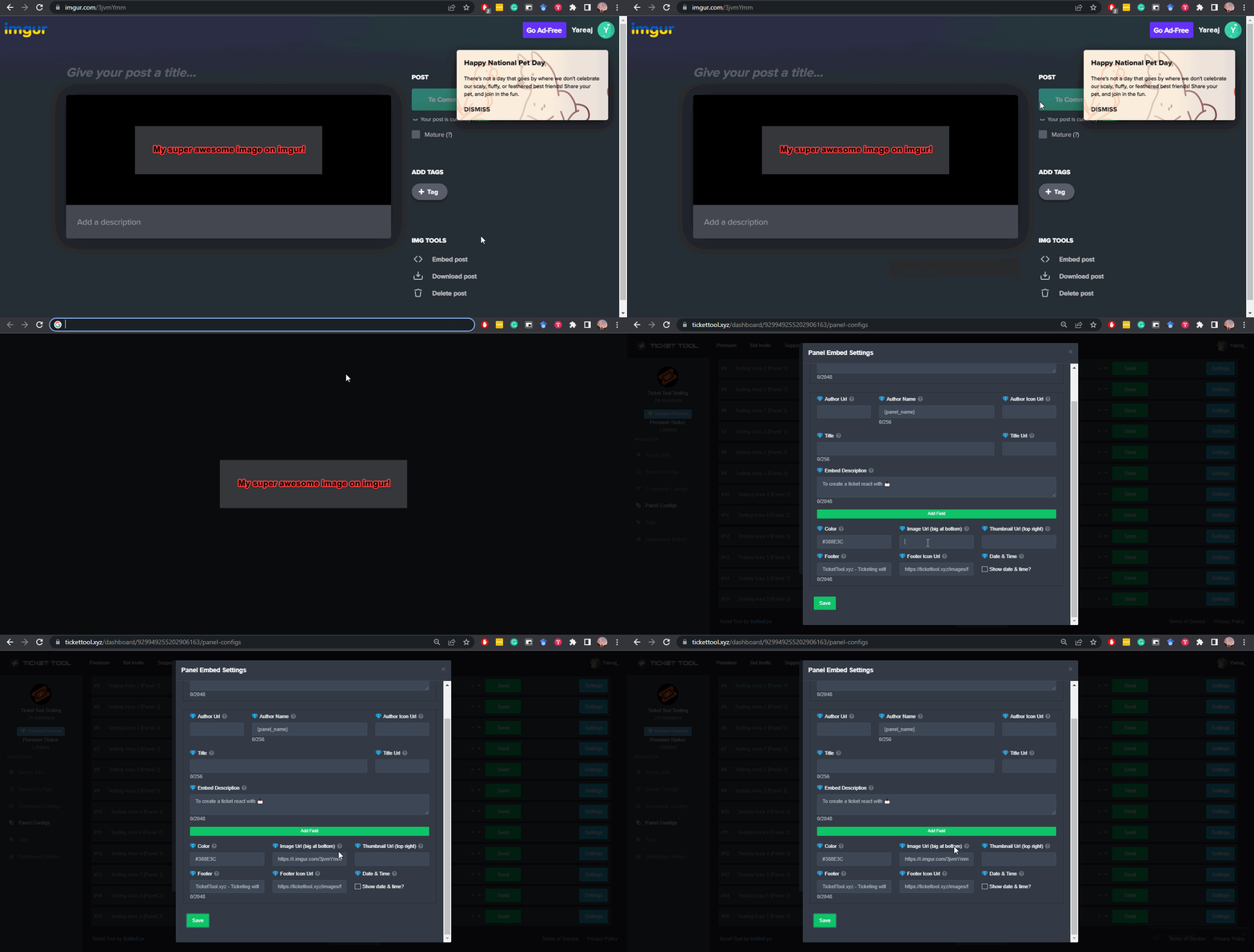
What are the direct URLs?
A direct access URL is an easy to read URL that users can enter to get to a specific item, document, page, category, or perspective, in which our bot TicketTool can read and get it displayed in your 'Panel Message' or your 'Ticket Message'.
Where can I get them?
The recommended way is to use 'Imgur', you can signup within a few minutes and then upload the image you want, and copy the URL of the uploaded image and paste it into one of the four boxes. There are alternatives to this, such as other image or video storing websites or using 'Open Original' of an image and paste it in (please be aware that if your image is deleted, Discord will automatically delete the link to it in a few days). Please note this requires 'Premium'. Imgur
 idle flint
stoic moss
<@679124209909104660>, GIF image is not displayed in the bottom line
idle flint
stoic moss
<@679124209909104660>, GIF image is not displayed in the bottom line
ensure you are using a valid URL as shown above
 brave falcon
 surreal rover
hi im trying to open my ticket but it showing Server at channel limit of 500
stoic moss
You can insert an emoji in this line?
 median wigeon
surreal rover
hi im trying to open my ticket but it showing Server at channel limit of 500
median wigeon
surreal rover
hi im trying to open my ticket but it showing Server at channel limit of 500
Yes than you need to delete channels, there is a discord limit for 500 channels
surreal rover
median wigeon
Yes than you need to delete channels, there is a discord limit for 500 channels
pls tell me how to delete it mate
humble sequoiaBOT
First you will want to invite the bot to your server. Once the bot is in your server, you can manage your server in the dashboard.
To create a panel we are going to need to head over to the Panel Configs Tab on the Dashboard.
Once at the dashboard we will need to click Create Panel.
Enter a panel name (Fill in any optional settings you want).
Click Create Panel and you are ready to get started with configuring your panel.
An example of a creating a panel is shown below.
Once the panel has been created, use the blue Send button and select the channel you want the panel to be sent to.
The Panel wasn't send
Use the </debug:ID> command to diagnose possible permission issues with the bot.
idle flint
 dawn junco
I want add it in my server
dawn junco
I want add it in my server
See above for the basic setup guide
idle flint
surreal rover
pls tell me how to delete it mate
Is it your server or are you just trying to open a ticket in that server ? (ie. you are not the server owner or an admin etc.)
jade topaz
idle flint
ah, sorry, I thought you wanted the person to be mentioned (pinged) in the actua...
Can that be done without premium?
 polar river
How do i ticket bot in my own dc
jade topaz
polar river
How do i ticket bot in my own dc
Invite ticket bot xyz to your server and use the ticket xyz dashboard to set it up
To your liking
humble sequoiaBOT
The ticket name is the default channel name of all tickets. To edit it, go to your Dashboard > Panel Configs > Ticket. There you can edit the channel name of opened and closed tickets. You can also use variables in there.

 Note: This is a premium feature
idle flint
jade topaz
Can that be done without premium?
Note: This is a premium feature
idle flint
jade topaz
Can that be done without premium?
see above (ticket names are a premium feature)
iron nightBOT
Gave +1 Rep to @idle flint (current: #19 - 285)
dawn junco
humble sequoia
Why i can send it
idle flint
dawn junco
Why i can send it
You would need to elaborate, are you getting any errors etc? It is most likley due to the bots permissions, either in your discord server as a whole, or in the specific channel you are trying to sent it to (especially if you have restricted the @everyone role in the channel)
dawn junco
Let me see wait a sec
The boss of the server was put off the permissions🗿any ways thanks you so much
 robust prawn
كيف اسوي كذا 🤔🤔.
 humble sequoiaBOT
تحل قائمة الخيارات محل الأزرار الموجودة في رسالة لوحة التذاكر الخاصة بك وتستخدم القائمة مع جميع اللوحات الخاصة بك. لإعداد هذا، توجّه الى إعدادات اللوحة، وحدد لوحة التذاكر الرئيسية.
<:Numbericons1:1018864164032225340> تمكين نمط الخيارات
أولًا، عليك تفعيل نمط الخيارات. وبعدها يجب عليك إضافة عناصر في محرّر الخيارات. الآن يمكنك البدء بتعديل الخيارات الخاصة بك!
<:Numbericons2:1018864168041971712> محرر الخيارات
كل سطر في محرر الخيارات يمثّل سطر من قائمة الخيارات على الدسكورد. يمكنك إضافة المزيد من الخيارات، بواسطة الضغط على 

أولًا، عليك إختيار لوحة تذاكر. هذه هي اللوحة التي سيفتح لها هذا الخيار تذكرة.
 لا تقم بتحديد نفس اللوحة مرتين. يجب أن يكون لكل خيار لوحة مختلفة
وبعد ذلك يمكنك وضع عرض. هذا هو عنوان هذا الخيار وسيظهر في قائمة الخيارات. يمكن تعيين الوصف مباشرة بعد ذلك، والذي سيكون أسفل العنوان باللون الرمادي.
بالإضافة إلى ذلك، يمكنك تحديد رمز تعبيري (إيموجي) سيتم عرضه أمام كل خيار. يمكنك إما إدخال معرف الرمز التعبيري يدويًا أو تحديده في أداة التحديد.
المشاكل الشائعة ⚠️
- اللوحة لا تعمل؟ تأكد أنك قمت بإدخال رمز تعبيري صحيح.
- الخيار لا يظهر؟ تحقق مما إذا كان هناك خياران لهما نفس اللوحة في محرر الخيارات.

$ardropdown
idle flint
robust prawn
كيف اسوي كذا 🤔🤔.
^^
humble sequoiaBOT

⚠️ You're in the wrong place
We provide support for Ticket Tool Discord bot and cannot help you with whatever issue you have.
- We don't know which Support Team you should contact to get this issue resolved, and unfortunately we won't be able to accurately tell you.
If you don't have any further questions regarding our bot Ticket Tool, please close this ticket
idle flint
 soft meadow
What can i do
soft meadow
What can i do
You are in the wrong discord server for help wth your issue, sorry.
stoic moss
stoic moss
You can insert an emoji in this line?
help
idle flint
stoic moss
help
yes, you can, ensure it is a valid emoji:
humble sequoiaBOT
This error indicates you have selected an invalid emoji, i.e. an emoji the bot isn't capable of using, in a button field
Which Emoji?
This depends upon which action the error is appearing, the most common cases are the Create Ticket button or one of your Dropdown emojis. You can visit your Button's List to find all available buttons and find the conflicting one by yourself.
Why doesn't the bot accept it as valid?
- You selected an emoji that doesn't exist anymore, i.e. that has been deleted
- You wrote text there, instead of an emoji (or in addition to an emoji)
- You entered a code for a custom emoji from a server that the bot is not a member of
- You entered a custom emoji code incorrectly
- You're on iPhone and entered an emoji using the phone's emoji pad (use the emoji selector in the website instead)
stoic moss
idle flint
yes, you can, ensure it is a valid emoji:
Can I add my own?
humble sequoiaBOT
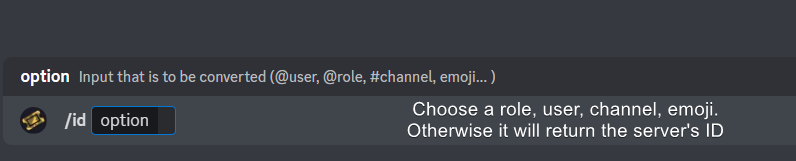
How do I get the ID of Roles/Channels/Emojis?
Ticket Tool has a useful command that helps you get the ID of various things like channels, roles, emojis, and your server.
Just use the command </id:1029797400174399546> <#channel/@role/:emoji:>. Now copy everything, including the brackets <...>, to your dashboard (or wherever you want it)
If you want the server ID, just use the command without any option.
Examples:
Server ID: $id ➝
509192800865353738
Roles: $id @Role ➝<@&722196398635745312>
Channel: $id #channel ➝#🤖│bot-spam
User: $id @user ➝@copper owl
Emoji: $id➝

 idle flint
stoic moss
Can I add my own?
idle flint
stoic moss
Can I add my own?
use the ID command to get a valid ID of the emoji, and ensure the emoji is in the same server, other than that, you should have no issues.
just try it and it should work 👍 (best thing to do is try, try, try. It is always fun to just try things and see what you can make work on your own 🙂 )
 ivory rain
How do I get premium? The bot profile just says add app, but it's in my server 🤔
Got it through the app directory 👌
stoic moss
idle flint
just try it and it should work 👍 (best thing to do is try, try, try. It is alw...
you're right buddy, thanks🙂
robust prawn
idle flint
^^
ما فهمت مافي مقطع ؟
 mortal ivy
.
austere forge
Hey there, /purge
Only server owner to use
iron nightBOT
Gave +1 Rep to @austere forge (current: #25 - 192)
ivory rain
If I've paid for premium, does it take time to update, is there something I need to do to register it?
pseudo ravine
Hey there. It should be automatic. Have you clicked on the Sync button on your dashboard?
ivory rain
Yeah, I did that, reloaded my discord and the web page, but it's still not letting me adjust any of those settings. All I actually want to do is set the ticket names lol
Is it a separate bot?
pseudo ravine
It can be, but if you bought it on the white bot then that's fine
Can you send the server ID here
ivory rain
1229753386258137178
pseudo ravine
One moment
ivory rain
Thank you
pseudo ravine
It seems to be synced with your active Discord subscription now
ivory rain
Ah perfect, thank you
pseudo ravine
You're welcome, glad I could help!
 mystic pine
Hi ticket tool doesnt respond
 lament rivet
How I put the Bot in German?
mystic pine
 austere forge
mystic pine
Hi ticket tool doesnt respond
austere forge
mystic pine
Hi ticket tool doesnt respond
Hi, could you use /debug in same channel on your server pls
austere forge
lament rivet
How I put the Bot in German?
Hey there : )
not possible at the moment, only in English
mystic pine
 pseudo ravine
austere forge
Hey there : )
not possible at the moment, only in English
pseudo ravine
austere forge
Hey there : )
not possible at the moment, only in English
Unless you're referring to the Panel Message, and/or also the Ticket Message @lament rivet
austere forge
mystic pine
Make sure that the bot has: VIEW CHANNEL perms in the channel
 lament rivet
pseudo ravine
Unless you're referring to the Panel Message, and/or also the Ticket Message <@8...
lament rivet
pseudo ravine
Unless you're referring to the Panel Message, and/or also the Ticket Message <@8...
O.K, thanks
iron nightBOT
Gave +1 Rep to @pseudo ravine (current: #9 - 478)
 sterile crag
okay, so im setting this up but i dont find the channel that it should transcript by searching it nor in the dropdown
 sterile crag
resolved
jade topaz
Is there a way to make tickettool function like a modmail?
pseudo ravine
Hey there. Unfortunately not
jade topaz
also is resetting the ticket numbers to 0000 possible?
jade topaz
May I know the method?
pseudo ravine
Dashboard > Set Count button
jade topaz
It worked thanks!
pseudo ravine
You’re welcome, glad I could help!
 barren haven
ticket
median wigeon
barren haven
ticket
barren haven
median wigeon
<#571706435449257997>

How can I put questions like these in the ticket?
humble sequoiaBOT
A Discord Form lets the user answer individual questions in a pop-up Form, which then displays the answers in the ticket message. This can save time if you already know what you want to ask the user.
Setup Forms
Forms can be enabled under Panel Settings > Form Options > Edit Forms Options. In the new pop-up window, you can now enable and edit your own Form.
Form Options
You can add up to 5 questions in the Discord form. This is a Discord limitation. Each question can have a placeholder in the input field, a minimum and maximum input, multi-line, and also the option to have the answer required.
Options
Question Title ➞ Your Question goes here
Question Placeholder ➞ The placeholder text in the input field
Required ➞ If enabled, the user has to answer this question, to submit the form
Multi-Line Input ➞Allows the user to input multiple lines
Minimum and Maximum Input ➞ Set a minimum and maximum input value for the user
Displaying the Answer
To display the answers from the user, you need to enable Auto display form results on the ticket message as an additional embed
If you don't want a second embed, go into your Panel Configs > Ticket Options > Edit Ticket Message. You use the variable {create.form.x} and replace x with the number of your question. For example, the response to Question 5 can be displayed with {create.form.5}.
barren haven
austere forge
Hey there ; )
Where do I press?
 austere forge
barren haven
Where do I press?
austere forge
barren haven
Where do I press?
Forms
barren haven
austere forge
`Forms`
Thanks
iron nightBOT
Gave +1 Rep to @austere forge (current: #24 - 195)
austere forge
You're welcome, glad I could help ! 
stoic moss
how can I make the added roles see the ticket?
humble sequoiaBOT
1. Go into your Dashboard
2. Open your Panel Configs tab
3. Select the panel you want to grant access to
4. Open the General options menu
5. Select your Support Team Roles
6. Save changes
stoic moss
I did the exact same thing, but they still can’t view the chat😵
austere forge
stoic moss
I did the exact same thing, but they still can’t view the chat😵
if they are old tickets, they will not be able to access
only the new ones
stoic moss
on new tickets, they also cannot view the channel
austere forge
stoic moss
on new tickets, they also cannot view the channel
Go to Dashboard > Panel configs > Permissions > EDIT OPENED - View channel
stoic moss
The bot has gone crazy, all the roles are mixed up. and all the emblem colors have changed🤯
median wigeon
stoic moss
The bot has gone crazy, all the roles are mixed up. and all the emblem colors h...
What do you mean?
With the roles are mixed up
stoic moss
All roles got access to the channel, just not the ones I chose. maybe I'm stupid but I don't understand, I did everything according to the guide
 sterile marten
i may just be dumb but i just got this bot and idk where to set the channel for tickets

uh is anyone here
solid stream
sterile marten
i may just be dumb but i just got this bot and idk where to set the channel for ...
As in the category they're created in?
By default they're created at the top of your server
sterile marten
ohh
solid stream
otherwise you can set a category for them under the category options/
 light flicker
How do i change the ticket panel amount. like how many tickets a user is allowed to open at a time
sterile marten
solid stream
otherwise you can set a category for them under the category options/
yeah but this is what it looks like

it doesn't show
solid stream
light flicker
How do i change the ticket panel amount. like how many tickets a user is allowed...
Under each of your panels you can select the all those limits under the limits section.
solid stream
light flicker
How do i change the ticket panel amount. like how many tickets a user is allowed...
 sterile marten
do i need to make a category for this one?
 solid stream
sterile marten
yeah but this is what it looks like
solid stream
sterile marten
yeah but this is what it looks like
This seems like you need a little more help then just setting the category, once sec.
sterile marten
solid stream
This seems like you need a little more help then just setting the category, once...
oh alr, thx
iron nightBOT
Gave +1 Rep to @solid stream (current: #7 - 564)
light flicker
solid stream
thanks. i been sick and didnt see that. now i feel crazy for being blind
iron nightBOT
Gave +1 Rep to @solid stream (current: #7 - 565)
sterile marten
light flicker
thanks. i been sick and didnt see that. now i feel crazy for being blind
hard for me too lol
solid stream
sterile marten
hard for me too lol

Instructions on setting up Ticket Tool in your server.
This might help you get started
sterile marten
solid stream
This might help you get started
thx ill see
solid stream
light flicker
thanks. i been sick and didnt see that. now i feel crazy for being blind
I'm working on adding a search to the dashboard to make things easier.
But I've got a long list of things to work on lol
light flicker
solid stream
I'm working on adding a search to the dashboard to make things easier.
that would def help. we could type in key words and it would pull it from there
light flicker
solid stream
But I've got a long list of things to work on lol
very understandable
sterile marten
solid stream
https://docs.tickettool.xyz/general/setup
les go it worked! i never knew that i had to send it lol
solid stream


 full torrent
في حد يضبط سيرفر
jade topaz
I need help with a premium subscription
austere forge
jade topaz
I need help with a premium subscription
hey there : )
jade topaz
Hi
austere forge
Sure, how can we help you?
jade topaz
So ive been billed since around november for premium and when i go into my premium app subscriptions in my settings nothing shows up
i sent u a couple dms
austere forge
jade topaz
i sent u a couple dms
no dm pls, otherwise you violate the server rules 🙏
jade topaz
sorry!
austere forge
jade topaz
So ive been billed since around november for premium and when i go into my premi...
I will make a ticket for you, one moment
jade topaz
Thank you, sorry about that
humble sequoiaBOT
━━ User's inquiry has been moved to a ticket ━━
 solid badge
does ticket tool provide ticket transcritps automatically?
austere forge
solid badge
does ticket tool provide ticket transcritps automatically?
hey there, it's possible but it's a premium feature
stoic moss
How can I make sure that new channels from tickets are in the category I need?
humble sequoiaBOT
1. Go into your Dashboard
2. Open your Panel Configs tab
3. Select the panel you want to grant access to
4. Open the Category options menu
5. Select the categories of your preference
6. Save changes
 stoic moss
 real roost
Hi, how can i reset ticket counter? i.e it took me roughly 100 tickets to figure out all of the permission stuff and i want next ticket to be nice number 0001. Is there a way to do it?
austere forge
real roost
Hi, how can i reset ticket counter? i.e it took me roughly 100 tickets to figure...
Hi there, dashboard > panel configs > set count button at the top of the screen
real roost
austere forge
Hi there, dashboard > panel configs > `set count` button at the top of the scree...
Much love!
austere forge
real roost
Much love!
You're welcome, glad I could help !
 next sedge
One of my staff members has this idea, is this already possible with Ticket Tool?
 austere forge
next sedge
One of my staff members has this idea, is this already possible with Ticket Tool...
austere forge
next sedge
One of my staff members has this idea, is this already possible with Ticket Tool...
Hey there, this is already possible
Go to Dashboard > Panel configs > Buttons > Close Ticket - Support Team only
next sedge
Thank you
next sedge
austere forge
Hey there, this is already possible
Go to Dashboard > Panel configs > Buttons > ...
it’s already enabled, but regular members can still close tickets

should i do something with the disabled roles? like put all the non-staff roles in there?
next sedge
austere forge
Hey there, this is already possible
Go to Dashboard > Panel configs > Buttons > ...
you there?
 dapper zodiac
is there a yt vid to set this bot up?
 unique flame
ionic helm
unique flame
ionic helm
hi to enable permissions like attach files, embed perms in ticket channels
 crude fox
4f11290a-f4d3-11ed-a05b-0242ac120003
 topaz furnace
 dawn lake
ionic helm
hi to enable permissions like attach files, embed perms in ticket channels
dawn lake
ionic helm
hi to enable permissions like attach files, embed perms in ticket channels
Dashboard >> manage permission >> ticket owner permission >> add attech permission
ionic helm
dawn lake
Dashboard >> manage permission >> ticket owner permission >> add attech permissi...
Ty
iron nightBOT
Gave +1 Rep to @dawn lake (current: #133 - 4)
 hasty dagger

How to enable transcript sending system from bot?
If a real user sends it sends the transcript
But When a bot sends it dosent for me but for other people it works how
hasty dagger
please can someone helpme
civic wagon
hasty dagger
How to enable transcript sending system from bot?
If a real user sends it send...
Dashboard > Server Configs > Bot > Add Bot ID there and save it
iron nightBOT
Gave +1 Rep to @civic wagon (current: #32 - 112)
 chrome drum
I brought gold content but I can’t see it how do I get to see it
Does anyone know or na
 prisma grove
how do i delete a Transcript a staff of mine from another server saved a ticket by accient and want to know if can delete it from the site
next sedge
next sedge
it’s already enabled, but regular members can still close tickets
can i get help?
idle flint
next sedge
can i get help?
whats your server ID (or server name)
next sedge
idle flint
whats your server ID (or server name)
1106974748782628904
idle flint
next sedge
1106974748782628904
I see you have the support team only slider selected, thats fine.
Some additional points:
- This will only take effect on tickets opened after you make the change, any tickets that were already open will still be able to be closed by anyone.
- You have about 9 roles selected as Support Team Roles, so anyone with one of those roles can still close a ticket
next sedge
idle flint
I see you have the support team only slider selected, thats fine.
Some additio...
so what should i do to make it so a non-staff member can’t close tickets?
idle flint
next sedge
so what should i do to make it so a non-staff member can’t close tickets?
Have you confirmed that with a new ticket that has been opened after you set the button to Support Team Only, that a member who does not have one of the 9 roles you have selected can close the ticket? (don't use "view server as" or anything like that, make sure it is an actual account)
next sedge
i’m not sure
idle flint
next sedge
i’m not sure
can I get a server invite please
 coral forge
Вопрос к поддержке: настраиваю вашего бота уже где-то час и обычные игроки на сервере не могут создавать тикеты, как бы я не менл настройки. Что делать?
jade topaz
This is like not related to ticket tool at all, (unless ticket tool could add it ig)
Is it possible to give a role to somebody who left ur server? So like a ticket blacklist if they wasted ur time and left ur server. But don’t want to ban them since you have a public db server.
Struggling to get it to work with bots like carl as when using /role add it will just say smth like ‘user not found’
Tried carl bots support and they didn’t rlly help ;-; and tried another bot support and got no response i just need to know if its possible rlly
Maybe a ticket blacklist feature on dashboard? Add a userID of a discord user = no ticket be able to be made by the user this seems like really useful
Or a command idk. Have tried sooo many bots to do what i just explained and neither do this somehowww
idle flint
If a user isnt in your server, they cant be managed (ie, given roles). The only thing you can do is ban people that are not in your server
dawn lake
.
next sedge
idle flint
can I get a server invite please
i can’t send it here cause of auto-mod, should i DM you it?
jade topaz
idle flint
If a user isnt in your server, they cant be managed (ie, given roles). The only ...
So there isn’t any way that you know of to auto assign a role to a UserID?
Similar to auto assign role to new users ig but just to certain user ids
jade topaz
next sedge
i can’t send it here cause of auto-mod, should i DM you it?
Probably type it like: .gg/invlinkhere
next sedge
.gg/plv3
 stiff sedge
GUYS WHY IS THE CLAIM BUTTON NOT WORKING
- how can i add the golden ticket bot @humble sequoia
humble sequoiaBOT
Ticket Tool Invite & Support
jade topaz
stiff sedge
GUYS WHY IS THE CLAIM BUTTON NOT WORKING
Do you have the claim button ‘Show this button’ enabled?
And also have the roles you’d lime to be able to press claim in ‘Allowed roles’?
humble sequoiaBOT
Claiming allows you to change the ticket name, category and permissions. To use it you have to enable it first on your Dashboard > Panel Configs > Claiming

 Note: This is a premium feature
jade topaz
Note: This is a premium feature
jade topaz
Read that^
 wicked moat
how do i ping a role with the ticket tool bot? normaly what i did was {@Role} but now its not working. or am i just dumb
humble sequoiaBOT
1. Go into your Dashboard
2. Open your Panel Configs tab
3. Select the panel you want to ping your support on
4. Open the Ticket options menu
5. Click on Edit Ticket Message
6. In the Message Content use one of the role mention syntax (**{@Role Name}**/**{Role ID}**)
7. Save changes
Note: For this to work properly, Ticket Tool requires the Mention Everyone permission. Or the role must have the Allow anyone to @mention this role setting enabled
austere forge
wicked moat
how do i ping a role with the ticket tool bot? normaly what i did was {@Role} bu...
hey there : )
see above
wicked moat
Thanks ^^
stiff sedge
ok thanks!
But how do i invite the golden ticket avatar bot (premium bot)
humble sequoiaBOT
The first thing you will need to do is invite the premium bot, an invite can be found here
Once the bot is in your server we will head to the dashboard and manage your server. When you are managing your server, you want to head into "Server Configs" then click the drop down menu under "Select the bot you would like to use on this server" then click "Ticket Tool#6207" and then save.
 austere forge
stiff sedge
ok thanks!
But how do i invite the golden ticket avatar bot (premium bot)
austere forge
stiff sedge
ok thanks!
But how do i invite the golden ticket avatar bot (premium bot)
hey there, see above
 obsidian marsh
How do I remove this embed from the message sent when a ticket is opened? It wasn't there before I made changes to the message and it doesn't show I have any embeds in the message.


 safe veldt
obsidian marsh
How do I remove this embed from the message sent when a ticket is opened? It was...
safe veldt
obsidian marsh
How do I remove this embed from the message sent when a ticket is opened? It was...
edit raw
obsidian marsh
safe veldt
edit raw
and do what exactly?
 real plover
es steht immer das was soll ich machen?

 limber portal
real plover
es steht immer das was soll ich machen?
limber portal
real plover
es steht immer das was soll ich machen?
$deticket
humble sequoiaBOT

Deutsches Support-Team
Wenn du Hilfe vom Deutschen Support-Team erhalten möchtest gehe in #🎫│make-a-ticket und öffne durch einen Klick auf den :flag_de: Button ein Ticket.
safe veldt
obsidian marsh
and do what exactly?
where it says embeds delete all of that bit so
    "embeds": [
        {
            "description": "Ticket Opened by {user}",
            "color": "#1EC45C"
        }
    ]
that bit
 obsidian marsh
safe veldt
where it says embeds delete all of that bit so
```json
"embeds": [
...
obsidian marsh
safe veldt
where it says embeds delete all of that bit so
```json
"embeds": [
...
There isn't anything in there and I can't remove the 'embeds' part entirely because it just comes back after closing it.
 solid stream
obsidian marsh
There isn't anything in there and I can't remove the 'embeds' part entirely beca...
solid stream
obsidian marsh
There isn't anything in there and I can't remove the 'embeds' part entirely beca...
That might be due to some data validation on my part, but as it's empty it won't show.
safe veldt
obsidian marsh
There isn't anything in there and I can't remove the 'embeds' part entirely beca...
thats fine,
try opening a ticket now
obsidian marsh
solid stream
That might be due to some data validation on my part, but as it's empty it won't...
Nope
 solid stream
obsidian marsh
Nope
solid stream
obsidian marsh
Nope
oh, editing Emeds is a premium feature.
You can edit parts of it, but most of it can't be modified.
obsidian marsh
solid stream
oh, editing Emeds is a premium feature.
That is the premium bot.
solid stream
That is both bots, they're both identical bots, except the premium bot is only for premium servers and as such is faster and has better up times.
obsidian marsh
solid stream
That is both bots, they're both identical bots, except the premium bot is only f...
So the one with the gold ticket pfp can be used when the server isn't premium? Because that is the one that is being used and I thought it would just be premium only.

Also shows this
 solid stream
obsidian marsh
So the one with the gold ticket pfp can be used when the server isn't premium? B...
solid stream
obsidian marsh
So the one with the gold ticket pfp can be used when the server isn't premium? B...
$pc @obsidian marsh
humble sequoiaBOT
solid stream
$pc <@254866377087778816>

Thank you
Thank you for purchasing Ticket Tool Premium @obsidian marsh. You have now been given the <@&535595160189403136> role!
Found 27 servers in total and 1 with premium and permission
solid stream
obsidian marsh
So the one with the gold ticket pfp can be used when the server isn't premium? B...
I didn't realize your server was premium, my bad, I'll see what's up with removing the embed.
obsidian marsh
solid stream
I didn't realize your server was premium, my bad, I'll see what's up with removi...
Thank you.
iron nightBOT
Gave +1 Rep to @solid stream (current: #7 - 566)
solid stream
it's possible that's a bug on the new dashboard.
 lusty kernel
Hey how do I add a panel to a channel
humble sequoiaBOT
First you will want to invite the bot to your server. Once the bot is in your server, you can manage your server in the dashboard.
To create a panel we are going to need to head over to the Panel Configs Tab on the Dashboard.
Once at the dashboard we will need to click Create Panel.
Enter a panel name (Fill in any optional settings you want).
Click Create Panel and you are ready to get started with configuring your panel.
An example of a creating a panel is shown below.
Once the panel has been created, use the blue Send button and select the channel you want the panel to be sent to.
The Panel wasn't send
Use the </debug:ID> command to diagnose possible permission issues with the bot.
lusty kernel
Thanks
pseudo ravine
You're welcome, glad I could help!
lusty kernel
😄
obsidian marsh
solid stream
I didn't realize your server was premium, my bad, I'll see what's up with removi...
Any update on this?
solid stream
obsidian marsh
Any update on this?
Working on it now
chrome drum
I need help
humble sequoiaBOT
Hello, we would love to help you, but if you don't tell us what you need help with we can't help you :(
solid stream
obsidian marsh
Any update on this?
Should be fixed now
chrome drum
I brought the gold tier but can’t see any content have I been scammed or what
humble sequoiaBOT
⚠️ You're in the wrong place
We provide support for Ticket Tool Discord bot and cannot help you with whatever issue you have.
- We don't know which Support Team you should contact to get this issue resolved, and unfortunately we won't be able to accurately tell you.
If you don't have any further questions regarding our bot Ticket Tool, please close this ticket
austere forge
chrome drum
I brought the gold tier but can’t see any content have I been scammed or what
hey there : )
see above
austere forge
chrome drum
I got a receipt
As explained above, we will not be able to help you with your issue.
We only help you if you have questions/issues related to the Ticket tool bot :)
 austere forge
chrome drum
austere forge
chrome drum
alright, my apologies for the confusion
how can I help you?
chrome drum
I just wanna see the content but I dunno how
austere forge
chrome drum
I just wanna see the content but I dunno how
the content of what?
 austere forge
chrome drum
austere forge
chrome drum
if it is content purchased on another server, we will not be able to help you
chrome drum
ohhh okay but u can’t text them tho so I dunno what to do
 brazen palm
how can i use my server emojis in the panel message?
 merry stone
How do I send a transcript to the user that opened the ticket after clicking save transcript?
median wigeon
merry stone
How do I send a transcript to the user that opened the ticket after clicking sav...
 merry stone
ah, i do not have premium. thank you!
brazen palm
brazen palm
how can i use my server emojis in the panel message?
how..
median wigeon
brazen palm
how..
 brazen palm
let me try that
 viscid gull
How do I get economy enable in our sim?
median wigeon
viscid gull
How do I get economy enable in our sim?
This is not the right plase
viscid gull
median wigeon
This is not the right plase
can you tell me where to go?
median wigeon
I dont know this is tickettool support
humble sequoiaBOT
⚠️ You're in the wrong place
We provide support for Ticket Tool Discord bot and cannot help you with whatever issue you have.
- We don't know which Support Team you should contact to get this issue resolved, and unfortunately we won't be able to accurately tell you.
If you don't have any further questions regarding our bot Ticket Tool, please close this ticket
 austere forge
 flat sluice
Hey there! Discord has a limit of 50 channels per category. Ticket Tool limits it to 45.
austere forge
flat sluice
?
if this is your server, remove the channels from the Support category so as not to have this limit
If it is not your server you must send a message to the owner to let them know
 quiet heath
How to set up my ticket tool bot
humble sequoiaBOT
First you will want to invite the bot to your server. Once the bot is in your server, you can manage your server in the dashboard.
To create a panel we are going to need to head over to the Panel Configs Tab on the Dashboard.
Once at the dashboard we will need to click Create Panel.
Enter a panel name (Fill in any optional settings you want).
Click Create Panel and you are ready to get started with configuring your panel.
An example of a creating a panel is shown below.
Once the panel has been created, use the blue Send button and select the channel you want the panel to be sent to.
The Panel wasn't send
Use the </debug:ID> command to diagnose possible permission issues with the bot.
 dusky sundial
Hi, could somebody of the support team hop into a ticket or call with me
i have a problem with sending another panel in my server
 austere forge
dusky sundial
i have a problem with sending another panel in my server
austere forge
dusky sundial
i have a problem with sending another panel in my server
Hey there, how can I help you? do you have a screenshot of the issue?
austere forge
jade topaz
Hey there
Make sure that the bot has: VIEW CHANNEL SEND MESSAGE and READ MESSAGE HISTORY perms in the channel
dusky sundial
austere forge
Hey there, how can I help you? do you have a screenshot of the issue?
How do I add that only certain roles can open a ticket?
jade topaz
austere forge
Hey there
Make sure that the bot has: `VIEW CHANNEL` `SEND MESSAGE` and `READ ME...

all
@austere forge
austere forge
dusky sundial
How do I add that only certain roles can open a ticket?
Go to Dashboard > Panel configs > Buttons - Create a ticket > Support Team only et ajouté des allowed roles
austere forge
jade topaz
<@225349654974431232>
pls stop ping staff.
jade topaz
yeah sorry
austere forge
jade topaz
Go to your channel where you are trying to send the panel and do the command /debug
jade topaz
austere forge
Go to your channel where you are trying to send the panel and do the command `/d...
 austere forge
alr, one moment
jade topaz
okay np
austere forge
jade topaz
okay np
can you use the command /panel and select the id of the panel where you encounter the issue, and tell me if you still cannot send the panel
can I also get your server id to check your Dashboard
jade topaz
austere forge
can you use the command `/panel` and select the id of the panel where you encoun...
how can i get panel id ?
austere forge
jade topaz
how can i get panel id ?
I found your problem, in your buttons you have a text in the button emoji box instead of a simple emoji like: 📝
Dashboard > Panel configs > Button - create a ticket
jade topaz
austere forge
I found your problem, in your buttons you have a text in the `button emoji` box ...
 austere forge
jade topaz
austere forge
jade topaz
 jade topaz
ohh
austere forge
you have to put an emoji
iron nightBOT
Gave +1 Rep to @austere forge (current: #24 - 198)
austere forge
You're welcome, glad I could help !
 austere forge
 pine kraken
it shows as online
pine kraken
it shows as online
Hi, could you use /debug in same channel pls

 austere forge
pine kraken
austere forge
pine kraken
Make sure that the bot has: SEND MESSAGE perms in the channel
 pine kraken
i feel dumb
pine kraken
austere forge
Make sure that the bot has: `SEND MESSAGE` perms in the channel
fixed it, ty
iron nightBOT
Gave +1 Rep to @austere forge (current: #24 - 199)
 versed nimbus
The ticket tool bot isn't switching to the white thing
 worn plaza
is there anyway pn how to to snyc the settings of one ticket option to the others
so i dont have to put where to open ticket and close the ticket on 50 diff ticker channels
versed nimbus
@lament sandal How do i do a ping call like the bot pings a role upon a command
humble sequoiaBOT
1. Go into your Dashboard
2. Open your Panel Configs tab
3. Select the panel you want to ping your support on
4. Open the Ticket options menu
5. Click on Edit Ticket Message
6. In the Message Content use one of the role mention syntax (**{@Role Name}**/**{Role ID}**)
7. Save changes
Note: For this to work properly, Ticket Tool requires the Mention Everyone permission. Or the role must have the Allow anyone to @mention this role setting enabled
austere forge
versed nimbus
<@680423367223803943> How do i do a ping call like the bot pings a role upon a c...
hey there, pls don't ping staff
see above
humble sequoiaBOT
━━ Sly's inquiry has been moved to a ticket ━━
pine kraken
is there a way to remove access for usual ticket staff, and only let administrators / the owner of the server see it?
median wigeon
pine kraken
is there a way to remove access for usual ticket staff, and only let administrat...
For all the tickets, or one specific ticket
pine kraken
one specific one
i just want to know if theres a way to do it, since i am going to be using it for reporting ticket staff / staff in general, in which staff have access to tickets
median wigeon
you can use $ remove and the the rolename behind it
but you can also make that specific ticket only accisable for the owner/administrator
pine kraken
median wigeon
but you can also make that specific ticket only accisable for the owner/administ...
how do you do that?
 fallow epoch
i bought ticket tool premium through clicking on the bot
and its not applying to the server
 median wigeon
fallow epoch
i bought ticket tool premium through clicking on the bot
median wigeon
fallow epoch
i bought ticket tool premium through clicking on the bot
Heey, Did you select him on the dashboard?
if not he will not react
fallow epoch
median wigeon
Heey, Did you select him on the dashboard?
wym
 fallow epoch
median wigeon
fallow epoch
median wigeon
I got the free trial and bought it when the free trial had 4 days left
will it give me premium right after?
median wigeon
You have now premium and it will, because you have the premium role here
that means that you have premium
fallow epoch
median wigeon
You have now premium and it will, because you have the premium role here
i mean it still says that premium is gonna last 4 days when those 4 days are up will it give me the other month
median wigeon
yes it will
fallow epoch
alrighty thank you
 prime cloak
Hello i have a question is there any way to have ticket log with ticket tool?
fallow epoch
median wigeon
yes it will
quick question
can i get a refund if i wanted?
not planning to just wondering
solid stream
Refunds are handled by discord, but in general they will grant refunds within the first few days without any issue, but after that requires a reason and possibly more time.
median wigeon
prime cloak
Hello i have a question is there any way to have ticket log with ticket tool?
You can log tickets and transcript them
Head to your Dashboard
Select your server
Go to the Panel Configs Tab
Under Other, click on Logging Options
prime cloak
median wigeon
Head to your Dashboard
Select your server
Go to the Panel Configs Tab
Under Othe...
Ty
iron nightBOT
Gave +1 Rep to @median wigeon (current: #47 - 41)
prime cloak
Huh
 half shadow
how do i set it up in one specific channel
humble sequoiaBOT
━━ User's inquiry has been moved to a ticket ━━
fallow epoch
solid stream
Refunds are handled by discord, but in general they will grant refunds within th...
where should i go?
I didnt need to buy it at the moment i need to purchase it later since im not using it right now
by later i mean like 2 months
solid stream
fallow epoch
where should i go?
 jade topaz
 rapid dagger
It might be because the bot is missing VIEW CHANNEL permission for the category. Check that ticket tool has this permission in your server.
humble sequoiaBOT
━━ User's inquiry has been moved to a ticket ━━
 devout iris
hii i have a problem with the buttons, i already have the label and emoji and it still dont let me close it


 echo yacht
devout iris
hii i have a problem with the buttons, i already have the label and emoji and it...
echo yacht
devout iris
hii i have a problem with the buttons, i already have the label and emoji and it...
Mark as the Button emoji
devout iris
echo yacht
Mark as <:Switch_enabled:1041734627330625586> the **Button emoji**
it still doesn’t let me
echo yacht
It will works on new tickets, not previous
austere forge
devout iris
hii i have a problem with the buttons, i already have the label and emoji and it...
hey there, This is probably the same problem from last time.
the text box is missing which makes an empty button, which sends this error
You must add a text in the Button text
 devout iris
austere forge
hey there, This is probably the same problem from last time.
the text box is mis...
devout iris
austere forge
hey there, This is probably the same problem from last time.
the text box is mis...
i added the text 😭
well I think I did it, idk if I did it wrong

 severe cedar
yo does someone know the ban appeal link for rise of nations?
humble sequoiaBOT
⚠️ You're in the wrong place
We provide support for Ticket Tool Discord bot and cannot help you with whatever issue you have.
- We don't know which Support Team you should contact to get this issue resolved, and unfortunately we won't be able to accurately tell you.
If you don't have any further questions regarding our bot Ticket Tool, please close this ticket
severe cedar
what the link call for hte ban appeals
devout iris
austere forge
it worked, tysm
austere forge
devout iris
it worked, tysm
You're welcome, glad I could help !
severe cedar
yea
austere forge
severe cedar
what the link call for hte ban appeals
as shown above we cannot help you.
We only help you if you had an issue/question with the Ticket tool bot
severe cedar
ow ok
 distant nacelle
The server I invited tickettool to, has tickettool online, but does not appear in this page
 humble sequoiaBOT
Don't see your server in the dashboard?
Try using the Sync Servers button on your top center of the Dashboard page
You will possibly need to relog. Look below to see the steps on how to relog.
If this doesn't work
You should relog from the dashboard, you can do this by clicking here to log out immediately, and then log back in
Note:
You need one of these 3 things to access the dashboard.
1. Server Owner (Level: 6)
2. Server Administrator (Level: 4)
3. Dashboard Role (Level: 2)
:warning: You can check your level using the </permissionlevel:1029797400174399542> command on your Discord Server
If the bot's response is:
- @User is permission level: 0 (User)
You don't have any of the 3 levels required to access the server's dashboard

 austere forge
distant nacelle
Didnt work
austere forge
distant nacelle
Didnt work
Make sure that the bot has: VIEW CHANNEL SEND MESSAGE and READ MESSAGE HISTORY perms in the channel
distant nacelle
let me see
quick question
Do I have to be the server owner to config this bot, or is admin enough?
Because I know some bots require server owner authorization
austere forge
distant nacelle
Do I have to be the server owner to config this bot, or is admin enough?
if you have admin permissions, that's enough
distant nacelle
Could i perhaps screenshare this to you?
jade topaz
distant nacelle
Try $level
austere forge
distant nacelle
Could i perhaps screenshare this to you?
nah sorry
austere forge
distant nacelle
Could i perhaps screenshare this to you?
distant nacelle
jade topaz
Try $level
Doesnt do anything, the bot has also gone offline in the server
it was online for like 3 minutes tops
distant nacelle
ye those dont work
pseudo ravine
$level
humble sequoiaBOT
pseudo ravine
$level
User permission level with Ticket Tool
@pseudo ravine is permission level: 0 (User)
Support Team Title: Support Member
Support Team Level: 0
pseudo ravine
That command?
distant nacelle
yeh that tells me im level 0
humble sequoiaBOT
Don't see your server in the dashboard?
Try using the Sync Servers button on your top center of the Dashboard page
You will possibly need to relog. Look below to see the steps on how to relog.
If this doesn't work
You should relog from the dashboard, you can do this by clicking here to log out immediately, and then log back in
Note:
You need one of these 3 things to access the dashboard.
1. Server Owner (Level: 6)
2. Server Administrator (Level: 4)
3. Dashboard Role (Level: 2)
:warning: You can check your level using the </permissionlevel:1029797400174399542> command on your Discord Server
If the bot's response is:
- @User is permission level: 0 (User)
You don't have any of the 3 levels required to access the server's dashboard
distant nacelle
so the bot is in the server, even though its not appearing in the right
pseudo ravine
humble sequoia
Refer to this embed ^
jade topaz
humble sequoia
Read it
distant nacelle
How do i get a higher user permission level thing then
You'd think an admin has the highest level no?
pseudo ravine
You need the Administrator permission, not just a role named Admin
distant nacelle
I see. So right now, probably only the server owner has that then
pseudo ravine
Yep
distant nacelle
Alrighty, thanks! Ill come back with an answer once thats fixed 😄
pseudo ravine
You're welcome, glad I could help!
distant nacelle
thanks @pseudo ravine
iron nightBOT
Gave +1 Rep to @pseudo ravine (current: #9 - 483)
jade topaz
$level
humble sequoiaBOT
jade topaz
$level
User permission level with Ticket Tool
@patent slate is permission level: 0 (User)
 weary grail
why wont my server pop up in server management]
 paper night
Hi, is it possible to get Ticket Tool to make an API call when someone closes a ticket? Something like a webhook.
 slender minnow
paper night
Hi, is it possible to get Ticket Tool to make an API call when someone closes a ...
slender minnow
paper night
Hi, is it possible to get Ticket Tool to make an API call when someone closes a ...
It is possible to have the logs sent as webhooks, however, it requires premium to be enabled and its highly unstable and there's not enough resources on it 😅
paper night
slender minnow
It is possible to have the logs sent as webhooks, however, it requires premium t...
Ok but no custom code? e.g. make an API call with certain arguments
slender minnow
nope
paper night
Understood. Thanks!
slender minnow
feel free to suggest it as a #💡│suggestions


 hollow folio
i was in 2.5 % drawdown and i got sent an email phase 1 passed even tho it wasn’t and now i cant place a trade
humble sequoiaBOT
⚠️ You're in the wrong place
We provide support for Ticket Tool Discord bot and cannot help you with whatever issue you have.
- We don't know which Support Team you should contact to get this issue resolved, and unfortunately we won't be able to accurately tell you.
If you don't have any further questions regarding our bot Ticket Tool, please close this ticket
 dark kraken
stoic moss
Why is the image not shown in the top embet?
dark kraken
stoic moss
Why is the image not shown in the top embet?
You need premium
stoic moss
dark kraken
You need premium
premium purchased
dark kraken
stoic moss
premium purchased
Go to server config (ticketool dashboard) and invite the premium bot to your server
dark kraken
stoic moss
Why is the image not shown in the top embet?
I can see here that the bot avatar picture is the normal bot picture
stoic moss
dark kraken
Go to server config (ticketool dashboard) and invite the premium bot to your ser...
are you kidding?
dark kraken
stoic moss
are you kidding?<:sacrifice_yee:1181945743733444648>
No
stoic moss
it has been added to the server. it worked but at some point, it stopped displaying a picture when opening a ticket
 stoic moss
buddy, I say that everything worked, but it broke
dark kraken
stoic moss
buddy, I say that everything worked, but it broke
I Know, I'm trying to search for the problem
Can you take a picture of the premium status here?
 stoic moss
 dark kraken
stoic moss
dark kraken
stoic moss
Go to manage servers and take another picture
 stoic moss
 dark kraken
stoic moss
dark kraken
stoic moss
The premium bot isn't in the server
Go to server config in the dashboard ---> invite premium bot
Then back again to server config and choose the premium bot in :
Select the bot you would like to use on this server.
@stoic moss worked?
stoic moss
I just updated the link url and it worked
hollow folio
 hollow folio
hollow folio
hollow folio
Help me
 stone hound
i haven’t had my new match trader login, does anybody know how long this is going to take please? many thanks
 cerulean lagoon
gm guys
How can I give access to moderator to check the tickets?
 hollow flicker
It just says the application did not respond
I’ve tried kicking it
And inviting it again
I’m trying to switch from ticket tool gold to white
stone hound
can somebody explain how this all works?
humble sequoiaBOT
1. Go into your Dashboard
2. Open your Panel Configs tab
3. Select the panel you want to grant access to
4. Open the General options menu
5. Select your Support Team Roles
6. Save changes
idle flint
cerulean lagoon
gm guys
How can I give access to moderator to check the tickets?
see this ^^
cerulean lagoon
idle flint
see this ^^
thank you
iron nightBOT
Gave +1 Rep to @idle flint (current: #19 - 286)
idle flint
hollow flicker
It just says the application did not respond
try running a /debug command
hollow flicker
Still says that
 final moth
help pls : every time i invite the bot and works good then after few minutes the bot go offline and tickets not work and the website says the ticket tool is not in my server
 hollow flicker
idle flint
try running a /debug command
hollow flicker
idle flint
try running a /debug command
Tried kicking it and inviting it multiple times, do you have a ticket tool premium invite link since I’m a premium subscriber and can’t access the dashboard cuz I can’t switch the bots even.

Solved, i just had to give it a higher role
final moth
final moth
help pls : every time i invite the bot and works good then after few minutes t...
anyone here?
 solar bison
I can't get the credentials on pipiads help me
humble sequoiaBOT
⚠️ You're in the wrong place
We provide support for Ticket Tool Discord bot and cannot help you with whatever issue you have.
- We don't know which Support Team you should contact to get this issue resolved, and unfortunately we won't be able to accurately tell you.
If you don't have any further questions regarding our bot Ticket Tool, please close this ticket
jade topaz
hey am trying to add my staff members at my tickket whenever a user opens 1 but i cant do it anyone can hellp me?
hollow folio
I got breached for no reason at all on my funded account. What’s going on? I can’t create a ticket cause it says it’s full. Please can you fix this?


 humble sequoiaBOT
⚠️ You're in the wrong place
We provide support for Ticket Tool Discord bot and cannot help you with whatever issue you have.
- We don't know which Support Team you should contact to get this issue resolved, and unfortunately we won't be able to accurately tell you.
If you don't have any further questions regarding our bot Ticket Tool, please close this ticket
 restive condor
 thin bronze
Hello bot, my server is down, what is the reason?
thin bronze
Hello bot, my server is down, what is the reason?
Hey there! What seems to be the problem? Any error message?
jade topaz
hey am trying to add my staff members at my tickket whenever a user opens 1 but i cant do it anyone can hellp me?
restive condor
jade topaz
hey am trying to add my staff members at my tickket whenever a user opens 1 but ...
Hey there! You can add their role as a support team role, under Dashboard > Panel Configs > General
jade topaz
restive condor
Hey there! You can add their role as a support team role, under ``Dashboard`` > ...
Thanks i will try that!
iron nightBOT
Gave +1 Rep to @restive condor (current: #5 - 693)
jade topaz
Gave +1 Rep to @restive condor
 dire sun
wtf is ticket tool doing
restive condor
dire sun
wtf is ticket tool doing
Hi, what seems to be the problem?
dire sun
restive condor
Hi, what seems to be the problem?

I made it so that doesnt appear
so ye it didnt appear for a while and then it started popping up again
and then I have to redo it and keep on redoing it cuz ticket tool is weird and resets it
restive condor
Could I get your server name or ID?
dire sun
this has never happened before only this week
1083763729449103460
just removed the embed from settings now but I already did that idk why it came back
dire sun
dire sun
just removed the embed from settings now but I already did that idk why it came ...
happened like 3 times now
restive condor
dire sun
happened like 3 times now
3 Times since when may I ask?
dire sun
restive condor
3 Times since when may I ask?
I dont remember the times exactly but it was this week
restive condor
dire sun
I dont remember the times exactly but it was this week
It looks like you have re-added the default embed on more than one occasion.
If it happens again, please #🎫│make-a-ticket so we can take a closer look
 dire sun
restive condor
It looks like you have re-added the default embed on more than one occasion.
If...
dire sun
restive condor
It looks like you have re-added the default embed on more than one occasion.
If...
I never did that
I only removed it when it randomly came back there
I didnt re add it
 north crag
Is there a partnership?
 neon spire
Hello, I have a problem, I haven't had a subscription for 2 months, the server no longer exists but I'm still paying and it's impossible to remove the subscription. I've contacted discord but there's been no reply for 1 month!
 austere forge
north crag
Is there a partnership?
austere forge
north crag
Is there a partnership?
Hey there, we had an apply phase for partners, but currently they are closed.
austere forge
neon spire
Hello, I have a problem, I haven't had a subscription for 2 months, the server n...
Hey there : )
Unfortunately we can't do anything on our side, it's impossible for us to manage discord subscriptions
Try creating a new ticket
neon spire
thx
north crag
austere forge
Hey there, we had an apply phase for partners, but currently they are closed.
Is there any chance I can get?
austere forge
probably not, the apply phases were closed today
try here : #📣│server-news message
north crag
austere forge
probably not, the apply phases were closed today
ok thank you
iron nightBOT
Gave +1 Rep to @austere forge (current: #24 - 200)
jade topaz
Someone gave me the Auth link for this bot

Is this the official premium bot? it does say app with a verified icon but Im not sure
This is the description
 civic wagon
jade topaz
This is the description
civic wagon
jade topaz
This is the description
Yup, it's the official premium bot
hollow folio
Anyone help me@neon spire
 humble sequoiaBOT
⚠️ You're in the wrong place
We provide support for Ticket Tool Discord bot and cannot help you with whatever issue you have.
- We don't know which Support Team you should contact to get this issue resolved, and unfortunately we won't be able to accurately tell you.
If you don't have any further questions regarding our bot Ticket Tool, please close this ticket
jade topaz
civic wagon
Yup, it's the official premium bot
means that I have the perks of it too?
echo yacht
jade topaz
means that I have the perks of it too?
No, you have to buy premium to use the premium features.
 wind jasper
hi
I have a problem because my friend bought premium and I accidentally deleted the bot, how can I get premium back?
pseudo ravine
Hey there. Your friend will have to purchase premium again unfortunately
jade topaz
How to enable the claim button?
humble sequoiaBOT
Claiming allows you to change the ticket name, category and permissions. To use it you have to enable it first on your Dashboard > Panel Configs > Claiming
Note: This is a premium feature
wind jasper
do you know a better substitute?
pseudo ravine
wind jasper
i dont to back premium?
Since the bot was removed from the server, Discord automatically cancelled the subscription
wind jasper
pseudo ravine
Since the bot was removed from the server, Discord automatically cancelled the s...
okay
do you know a better substitute?
pseudo ravine
That's the only way
jade topaz
humble sequoia
It not letting me enable it help mr
pseudo ravine
Do you have premium?
jade topaz
No how i do get premuim
humble sequoiaBOT
Premium can now be purchased directly through discord! Either in the app directory (server settings) or directly from the bots profile.
<:TTWarning:1034178155872784494> Important Information <:TTWarning:1034178155872784494>
ONLY purchase premium through ONE of the two Ticket Tool Bots. If you purchased premium on the primary bot (White logo) and plan to use the premium bot, don't kick the primary bot!
What's different?
The Monthly price changed from $6.00 to $5.99
Yearly subscriptions are not yet available
Don't kick the bot, otherwise, the subscription will be canceled automatically
You'll need to buy the subscription from a computer or on the Application Directory
You might need to run the /premium command on your server to sync the premium status with your dashboard
A subscription can not be transferred between Servers
jade topaz
Hi please I can't play this game and I bought so much game pass
humble sequoiaBOT
⚠️ You're in the wrong place
We provide support for Ticket Tool Discord bot and cannot help you with whatever issue you have.
- We don't know which Support Team you should contact to get this issue resolved, and unfortunately we won't be able to accurately tell you.
If you don't have any further questions regarding our bot Ticket Tool, please close this ticket
 open jungle
Having issues getting drop down menu working, wont show more than one drop down?
humble sequoiaBOT
User's issue has been solved in another channel.
 restive condor
next sedge
why does this keep happening???
restive condor
next sedge
why does this keep happening???
Hey there! Can you please #🎫│make-a-ticket for this
humble sequoiaBOT
━━ User's inquiry has been moved to a ticket ━━
 winter mirage
 humble sequoiaBOT
⚠️ You're in the wrong place
We provide support for Ticket Tool Discord bot and cannot help you with whatever issue you have.
- We don't know which Support Team you should contact to get this issue resolved, and unfortunately we won't be able to accurately tell you.
If you don't have any further questions regarding our bot Ticket Tool, please close this ticket
jade topaz
i need support
humble sequoiaBOT
Hello, we would love to help you, but if you don't tell us what you need help with we can't help you :(
jade topaz
i want to add multi drop down styles
humble sequoiaBOT
The Drop-down menu or Select Menu replaces the buttons on your panel message and uses a drop-down menu with all of your panels. To set this up, go to your Panel Configs and select your main Panel.
<:Numbericons1:1018864164032225340> Enable Select Style
First you enable Select Style. Then you add an item in the Dropdown Editor. Now you can start editing your dropdown!
<:Numbericons2:1018864168041971712> Dropdown Editor
Each line in the dropdown editor represents a line in the drop down menu on discord. You can add more "Items", by clicking on
First you select a panel. That's the panel this option will open a ticket for. DONT select the same panel twice. Each option should have a different Panel
After that, you can put a Display. This is the title of this option and will appear in the drop down menu. The *Description can be set right after that, which will be below the title in grey.
Additionally you can select an emoji, that will be shown in front of each option. You can either manually input the ID of an emoji or select it in the selector.
Common Issues ⚠️
- Panel doesn't send? Make sure you have a valid emoji selected
- Option doesn't show up? Check if two options have the same panel in the DropDown Editor
$dropdown
jade topaz
how to add multi select menu in 1 panel
pseudo ravine
Each option in the dropdown is a panel
 pseudo ravine
You will need to make 2 more panels
jade topaz
but i need it in 1 msg
pseudo ravine
I understand that, and that's possible, but you still need to make the other panels to have it in 1 message
iron nightBOT
Gave +1 Rep to @pseudo ravine (current: #9 - 486)
pseudo ravine
You're welcome, glad I could help!
jade topaz
pseudo ravine
You're welcome, glad I could help!
another help
why when i put photo link
it didnt accept it
 pseudo ravine
Can you send the server ID here
pseudo ravine
One moment
 sharp lark
Hey can you help me?
It won’t let me manage my sever is only showing 1 sever
I have 2 sever that has ticket tool
humble sequoiaBOT
Don't see your server in the dashboard?
Try using the Sync Servers button on your top center of the Dashboard page
You will possibly need to relog. Look below to see the steps on how to relog.
If this doesn't work
You should relog from the dashboard, you can do this by clicking here to log out immediately, and then log back in
Note:
You need one of these 3 things to access the dashboard.
1. Server Owner (Level: 6)
2. Server Administrator (Level: 4)
3. Dashboard Role (Level: 2)
:warning: You can check your level using the </permissionlevel:1029797400174399542> command on your Discord Server
If the bot's response is:
- @User is permission level: 0 (User)
You don't have any of the 3 levels required to access the server's dashboard
pseudo ravine
jade topaz
why when i put photo link
You didnt put one
 pseudo ravine
The link you put in there has a height of 4 pixels
jade topaz
pseudo ravine
The link you put in there has a height of 4 pixels
what is sizes?
pseudo ravine
Use this link https://images-ext-1.discordapp.net/external/n_mzVjGBXkdQOPdvBzJ84mtP5WlcHjuXd9fi0cLNWCw/https/i.imgur.com/IhBnVHkh.jpg?format=webp&width=64&height=64
jade topaz
pseudo ravine
Use this link `https://images-ext-1.discordapp.net/external/n_mzVjGBXkdQOPdvBzJ8...
oh thanks sir
iron nightBOT
Gave +1 Rep to @pseudo ravine (current: #9 - 487)
pseudo ravine
Yep, that should work
jade topaz
thanks @pseudo ravine
pseudo ravine
You're welcome, glad I could help!
sharp lark
humble sequoia
I only see 1 sever that has ticket bot even tho I added 2 ticket bot
 quasi ferry
Hi
dark kraken
quasi ferry
Hi
مرحبا، كيف استطيع مساعدتك ؟
humble sequoiaBOT
The ticket name is the default channel name of all tickets. To edit it, go to your Dashboard > Panel Configs > Ticket. There you can edit the channel name of opened and closed tickets. You can also use variables in there.
Note: This is a premium feature
dark kraken
jade topaz
like user_number
^^
humble sequoiaBOT
- Note: Remove the ! from all of the variables for proper work
{!server.name} ➞ Name of the server
{!server.id} ➞ ID of the Server
{!server.icon} ➞ Direct URL to the Server's Icon
{!server.banner} ➞ Direct URL to the Server's banner, if available

{!channel} = <#channel> ➞ Channel link of the current channel
{!channel.name} ➞ Name of the current channel
{!channel.id} ➞ ID of the current channel

{!author} = <@user> ➞ Mention of the user triggering this message
{!author.name} ➞ Name of the user triggering this message
{!author.id} ➞ ID of the user triggering this message
{!author.nickname} ➞ Nickname of the user triggering this message
{!author.icon} ➞ Direct Url of the profile picture of the user triggering this message
{!author.tag} ➞ 4 digit tag (discriminator) of the user triggering this message
{!author.full} ➞ username + 4 digit discriminator of the user triggering this message```
```diff
- Note: The variables below are meant to be used within ticket messages, or tags triggered within tickets
{!panel.count} ➞ The current count number of the panel
{!panel.name} ➞ The name of the panel
{!panel.ticketLimit} ➞ The current limit of the panel

{!ticket} = <#channel> ➞ Channel mention of the ticket
{!ticket.id} ➞ Channel ID of the ticket

{!ticket.user} = <@user> ➞ User mention of the ticket user
{!ticket.user.name} ➞ Name of the ticket user
{!ticket.user.id} ➞ User ID of the ticket user
{!ticket.user.nickname} ➞ Nickname of the ticket user
{!ticket.user.icon} ➞ Direct Url of the profile picture of the ticket user
{!ticket.user.tag} ➞ Tag / Discriminator of the ticket user
{!ticket.user.full} ➞ Username + Discirimator of the ticket user```
_ _
_ _
Additional variables
Roles can be either
{@role name} or {role ID}
{create.reason}
{claim.reason}
{close.reason}
{delete.reason}
» Reasons for a given action
Transcript Variables
{!ticket_name}➞ Name of the ticket
{!panel_name}➞ Name of the panel
{!transcript_url}➞ File link of the transcript
Hide Link under blue text:
[Click me](https://tickettool.xyz)➞ Click me
Time Variable
Sends the current unix time in seconds. Optionally add or remove seconds
<t:{!time?m=+43200}:R>➞ <t:1717233392:R>
<t:{!time?m=-43200}:R>➞ <t:1717146992:R>
<t:{!time}:R>➞ <t:1717190192:R>
_ _
<t:1641006000>➞ <t:1641006000>
<t:1641006000:f>➞ <t:1641006000:f>
<t:1641006000:F>➞ <t:1641006000:F>
<t:1641006000:D>➞ <t:1641006000:D>
<t:1641006000:d>➞ <t:1641006000:d>
<t:1641006000:t>➞ <t:1641006000:t>
<t:1641006000:T>➞ <t:1641006000:T>
<t:1641006000:R>➞ <t:1641006000:R>
» You can use https://hammertime.djdavid98.art/ to create custom dates/times
dark kraken
@jade topaz Also this one for the variables you can use
dark kraken
I don't think that his is possible , I will try to do it
jade topaz
ok
jade topaz
dark kraken
I don't think that his is possible , I will try to do it
فهمتني؟
عايز احط العدد اكثر
dark kraken
jade topaz
فهمتني؟
يب فاهم عليك
@jade topaz حاولت بس الظاهر انها مستحيلة ، جرب افتح تكت
jade topaz
طيب
jade topaz
dark kraken
<@456226577798135808> حاولت بس الظاهر انها مستحيلة ، جرب افتح تكت
كيف ارسل ب@humble sequoia
dark kraken
humble sequoia
@jade topaz قصدك زي هاي الرسائل ؟
jade topaz
dark kraken
<@456226577798135808> قصدك زي هاي الرسائل ؟
لا
قصدي عايز ارسل التكت بالبروميوم
dark kraken
البريميوم داخل السيرفر ؟
dark kraken
روح لاي روم بالسيرفر واكتب /botswitcher
jade topaz
+ازاي اخليه يظهر مودال لما يضغط على الزر
dark kraken
Dashboard --> Forms --> Enable form
واذا بدك الاشياء اللي بعبيها تظهر على طول ، فعل خيار Auto display form results on the ticket message as an additional embed
dark kraken
dark kraken
Dashboard --> Forms --> Enable form
واذا بدك الاشياء اللي بعبيها تظهر على طول ، ...
شوف ثاني جملة
iron nightBOT
Gave +1 Rep to @dark kraken (current: #191 - 2)
dark kraken
إذا بدك تسويها انت بالشكل اللي بدك اياه والتصميم لازم تتعامل مع المتغيرات ، هي سهلة اذا بدك اساعدك بساعدك فيها
jade topaz
dark kraken
إذا بدك تسويها انت بالشكل اللي بدك اياه والتصميم لازم تتعامل مع المتغيرات ، هي س...
طبعا بشوف بس كيف العمل تبعها لو ماعرفت هكلمك
jade topaz
dark kraken
إذا بدك تسويها انت بالشكل اللي بدك اياه والتصميم لازم تتعامل مع المتغيرات ، هي س...
بعد اذنك
دحين عايز اخلي الكلمات يلي حطهم
يجو لما يفتح

 jade topaz
dark kraken
فعلت الثانية ؟
jade topaz
dark kraken
فعلت الثانية ؟
يب
dark kraken
jade topaz
يب
المفروض انه اشتغل ، جرب افتح تكت تجربة وشوف شكلها لو عاجبك
jade topaz
dark kraken
المفروض انه اشتغل ، جرب افتح تكت تجربة وشوف شكلها لو عاجبك
عايزها داخل الامبد

يلي فوق
@dark kraken
dark kraken
jade topaz
عايزها داخل الامبد
تمام ، أول اشي الغي تفعيل الخيار اللي قلتلك عنه،
بعدين خلي الرسالة اللي فوق هيك:
item : {create.form.1}
Quantity : {create.form.2}
Payment Method : {create.form.3}
وانت ابقى عدل على الشكل بالطريقة اللي بدك اياها
jade topaz
طبعا
dark kraken
@jade topaz كل اشي تمام ؟