#🆘│community-support
1 messages · Page 106 of 1
 calm blade
 brazen dirge
السلام عليكم
 restive condor
calm blade
hey, im using command style and im wondering if its possible to have a command t...
restive condor
calm blade
hey, im using command style and im wondering if its possible to have a command t...
Hey there! No, that's not possible.
You would need to select a different channel/thread/forum for each panel
Hey there! See below
 stark runeBOT
1. Invite Ticket Tool to your server
First you will want to invite the bot to your server. Once the bot is in your server, you can manage your server in the dashboard.

2. Create a Panel
To create a panel we are going to need to head over to the panel configs on the dashboard.
Once at the dashboard we will need to click Create Panel.
Enter a panel name (Fill in any optional settings you want).
Click Create Panel and your ready to get started with configuring your panel.
An example of a creating a panel is shown below.

3. Send the Panel to a Channel
Once you've created a panel on the dashboard you will need to send it to a channel using send on the dashboard.
Select the channel you want your panel to be created in and click send.
For other questions checkout $help faq.
An example of a sending a panel is shown below.
Having a Problem Sending the Panel?
Do $debug in a channel with Ticket Tool and make sure it has all the necessary Discord permissions.
 restive condor
Hi there, they shouldn't have access by default.
Could I get your server name or ID so I can take a look?
calm blade
restive condor
Hey there! No, that's not possible.
You would need to select a different channe...
ya
im using saphire bot and i basically
have two embeds / 2 ticket buttons in 2 different channels and i thought i could just make it so it creates ticket inside that category that the embed is in
so thats not possible?
 humble sequoiaBOT
1. Go into your Dashboard
2. Open your Panel Configs tab
3. Select the panel you want to grant access to
4. Open the Category options menu
5. Select the categories of your preference
6. Save changes

 cursive roost
Any idea what could be causing this?

 civic wagon
calm blade
so thats not possible?
civic wagon
calm blade
so thats not possible?
Follow the above ^
And simply have sapphire run the $new command.
calm blade
civic wagon
Follow the above ^
And simply have sapphire run the $new command.
Thank you
 iron nightBOT
Gave +1 Rep to @civic wagon (current: #32 - 109)
restive condor
cursive roost
Any idea what could be causing this?
Hi there, please disable servers storage mode Dashboard > Server Configs
cursive roost
silly me, thanks dan the man
 vapid moat
No speake english speake brasil
restive condor
vapid moat
No speake english speake brasil
Olá! Como posso ajudar?
 jade topaz
Guys, how can I cancel my premium subscription so that it doesn't renew?
Please ping me!
restive condor
jade topaz
Guys, how can I cancel my premium subscription so that it doesn't renew?
Hey there! See below
humble sequoiaBOT
<:TicketToolOffline:1018980643092312155> Cancel your subscription
We're sorry to see you go!
To cancel your Ticket Tool Premium Subscription, just head over to your User Settings in Discord, then Subscriptions. Look for Premium Apps and click on Manage Subscriptions. There you can cancel your subscription at the end of your billing cycle.

User Settings > Subscriptions > Premium Apps > Manage Subscriptions > Cancel
jade topaz
restive condor
Hey there! See below
Ohh thank you so much!! I've been trying to find it for like half an hour now 😭
iron nightBOT
Gave +1 Rep to @restive condor (current: #5 - 646)
restive condor
No problem 
 mystic tiger
i need help 😭

 austere forge
mystic tiger
i need help 😭
austere forge
mystic tiger
i need help 😭
Hey there, This error takes place when your server has reached the 500 channel limit Discord has per server
 the server owner must delete tickets or channels
mystic tiger
ahhhh i see okay
tyty
austere forge
 barren lance
<@225349654974431232> a question
barren lance
<@225349654974431232> a question
hi, pls don't ping staff
austere forge
barren lance
<@225349654974431232> a question
tell me
barren lance
austere forge
hi, pls don't ping staff
How many members are allowed in the partnership?
austere forge
barren lance
How many members are allowed in the partnership?
Unfortunately I can't answer this question, read the information related to this channel #📣│server-news message
You can also create a ticket to get information.
barren lance
austere forge
Unfortunately I can't answer this question, read the information related to this...
I am a reader of hers but there is no question
 echo yacht
barren lance
I am a reader of hers but there is no question
echo yacht
barren lance
I am a reader of hers but there is no question
Open a ticket and ask in the ticket your question.
Unfortunately the Support Team doesn’t manage the Partnership applys, so in there the operations team will answer all your questions.
 royal radish
how do i edit forms on ticket tool
 restive condor
royal radish
how do i edit forms on ticket tool
restive condor
royal radish
how do i edit forms on ticket tool
Hey there! Dashboard > Panel Configs > Forms
royal radish
@restive condor you able to go into community support and help me
restive condor
This is community support 😄
royal radish
like in vc so i can share screen
restive condor
royal radish
like in vc so i can share screen
Staff are not required nor do we usually provide support in voice channels.
I'll join so you can share your screen but let's keep support to this channel
Sorry, so you'd like to edit the questions in the form? @royal radish
Stay in the forms section and open up the dropdowns with the questions to edit them
Correct
Yep
No problem
 robust prawn
سلام عليكم
 median wigeon
robust prawn
سلام عليكم
median wigeon
robust prawn
سلام عليكم
مرحبا، كيف أستطيع مساعدتك؟
يمكنهم مساعدتك بشكل أفضل عبر #🎫│make-a-ticket
 lapis radish
سلام عليكم
 steel dagger
Hi there, I don't seem to be able to subscribe to Premium. I did the 7-day trial, which ran out, but when I try to purchase Premium, it says I'm 'already subscribed'. Any information on how I can remedy this?
median wigeon
steel dagger
Hi there, I don't seem to be able to subscribe to Premium. I did the 7-day trial...
I think the billing team can help you with that in #🎫│make-a-ticket
steel dagger
median wigeon
I think the billing team can help you with that in <#571706435449257997>
Thanks, appreciate it o7
iron nightBOT
Gave +1 Rep to @median wigeon (current: #49 - 33)
 potent verge
Hello, so I was looking through the variables and I couldn't find variable name for dropdown menu option! Like I am using the drop drop down menu with few options like "report user" "support" and was curious when opening ticket is there some variable name that i can make display so staff know what type it is

 steel basalt
 sharp anchor
hello, how can I repair this?
sharp anchor
hello, how can I repair this?
Could you run /debug in the channel you're trying to send the ticket panel to?
steel basalt
potent verge
Hello, so I was looking through the variables and I couldn't find variable name...
You can use {panel.name}
sharp anchor
 steel basalt
sharp anchor
steel basalt
sharp anchor
Interesting, could you try to send the panel again?
steel basalt
Sounds good. It should work!
sharp anchor
it tells me the same error
steel basalt
Okay. You may want to contact staff via the #🎫│make-a-ticket channel, as they will be able to assist you further than I can.
sharp anchor
ok
 barren elk
I want to change a certain permission on my ticket tool bot. I only want my support team to be able to close tickets rather then the person that opened the ticket. How do I change the permissions for this?
humble sequoiaBOT
━━ User's inquiry has been moved to a ticket ━━
 inner mesa
Hi! Im trying to setup my ticket. I have the channel bot. but every command i try to make says theres an error?
austere forge
inner mesa
Hi! Im trying to setup my ticket. I have the channel bot. but every command i tr...
hi there, can you use a $debug command in same channel
inner mesa
austere forge
hi there, can you use a `$debug` command in same channel
I used it but it still is saying application did not respond
austere forge
inner mesa
I used it but it still is saying application did not respond
Make sure that the bot has: SEND MESSAGE perms in the channel
 inner mesa
austere forge
Make sure that the bot has: `SEND MESSAGE` perms in the channel
inner mesa
austere forge
Make sure that the bot has: `SEND MESSAGE` perms in the channel
Thanks i fixed it!
iron nightBOT
Gave +1 Rep to @austere forge (current: #27 - 169)
 fallen rain
I didn't understand
 austere forge
fallen rain
I didn't understand
austere forge
fallen rain
I didn't understand
Hey there, This error takes place when your server has reached the 500 channel limit Discord has per server
the server owner must delete tickets or channels
fallen rain
I understood you
 finite quartz
Hi, can i Apply to Arabic support?
humble sequoiaBOT
How do be I become a Support Member?
You can become a support member in 2 ways:
1. You can be really active in #🆘│community-support gain <@&799500225579712543> role and get chosen by a Manager
2. You can apply VIA our applications that would be sent in #📣│server-news
We currently have Support Teams for the following languages:
:flag_us: English
:flag_jo: Arabic
:flag_fr: French
:flag_de: German
:flag_es: Spanish
 novel copper
Hi how can I check the history when the ticket is closed and delete?
 wide tide
 viscid parcel
admin i had 500 test msn tokens and 1100 minira and real msn tokens i sent them all via sepolia tesnet to okh exchange and now how to return them back to my metamask wallet thanks


 tawdry salmon
Hi all! If I forgot to add {author} to my ticket and one of the authors is part of the role to receive the ticket, is there any way I can backtrack who submitted it in the control panel?
 sage kite
I need help adding this bot to my server.
I added the bot to the server however it's saying it does not have permission to send to the channel
What permissions do the bot need?
jade topaz
Is there a way to edit this? I can't seem to find it under messages (unless i'm blind lol)

 ripe hawk
How to invite premium bot
humble sequoiaBOT
The first thing you will need to do is invite the premium bot, an invite can be found here
Once the bot is in your server we will head to the dashboard and manage your server. When you are managing your server, you want to head into "Server Configs" then click the drop down menu under "Select the bot you would like to use on this server" then click "Ticket Tool#6207" and then save.

 atomic solstice
ripe hawk
How to invite premium bot
atomic solstice
ripe hawk
How to invite premium bot
here is an explanation of how you can invite it ^^
atomic solstice
jade topaz
Is there a way to edit this? I can't seem to find it under messages (unless i'm ...
Hi, editing that part is a premium feature, you can edit it by following this path:
dashboard > manage servers > manage (on your server) > panel configs (on the left side) > select your panel > moderator > closed message
 humble sequoiaBOT
When first invited to your server, Ticket Tool should have the permissions shown below in order to ensure an appropriate functioning:
When customizing permissions for the different ticket participants, you must make sure Ticket Tool has the permissions you want it to grant to others, you can learn more about this here.
Missing Permissions
This error is a direct outcome of the bot missing permissions as depicted above. When troubleshooting this error we suggest you go through these steps:
- Use the </debug:1029783024264564765> command to check if the bot is lacking core role or channel permissions.
- Compare the category/channel's overrides and contrast them with the bot's roles to identify any permission denial that is breaking the functioning
- If you can't still figure it out, let our <@&540295656720302081> know so they can guide you through
Additional Resources
- If you are a server administrator and would like to understand more how to set up your server's permissions, we suggest checking the Discord Support Knowledge Base
- If you are a bot developer and are interested in the internal permission hierarchy we suggest you this part of the Discord Developer Docs
Important Note
- Giving Administrator permissions is NOT required and we do NOT encourage you to do unless you are trying to troubleshoot your permissions setup.
 atomic solstice
sage kite
What permissions do the bot need?
atomic solstice
sage kite
What permissions do the bot need?
You can follow this ^^
atomic solstice
tawdry salmon
Hi all! If I forgot to add {author} to my ticket and one of the authors is part ...
The only way to find out who opened a ticket via the button is if you have Logging or transcripting enabled.
In logging you need to have the Ticket Created log enabled, or with transcripts it should automatically show the user who created it after a transcript is made
 humble sequoiaBOT
With Ticket Tool, you can customize the behavior the bot takes when logging your tickets! For editing these options follow these steps:
Dashboard ➞ Panel Configs ➞ Logging Options
Logging Channel
Here you will define which channel @humble sequoia will save the Logs in (ticket created/deleted/closed, etc.)
Logs you can save:
➞ Ticket Created ➞ Logs when a ticket is created
➞ Ticket Closed ➞ Logs when a ticket is closed
➞ Ticket Opened ➞ Logs when a ticket is opened
➞ Ticket Renamed ➞ Logs when a ticket is renamed
➞ Ticket Deleted ➞ Logs when a ticket is deleted
➞ Transcript Saved ➞ Logs when a ticket is saved
Select with  (disable) or
  (enabled) which logs you would like
Below you can see an example of what the Logging Options will look like:
 atomic solstice
here is more info about this ^^
jade topaz
What’s the required permission to access dashboard
atomic solstice
jade topaz
What’s the required permission to access dashboard
To access a servers dashboard you need to either be the Server Owner, have the Administrator role or have a role which was assigned by the Owner/Administrator to be a dashboard role
you can check your permission level by using $level in the server
humble sequoiaBOT
Any role you put there will have full access to the ticket tool dashboard. The server owner and users with admin permissions already have access to the dashboard.
Be careful of which roles to put here
 atomic solstice
here is how you can add dashboard roles ^^
iron nightBOT
Gave +1 Rep to @atomic solstice (current: #21 - 271)
atomic solstice
no problem
 latent halo
Hi.Why can't I open an order
 lament prairie
latent halo
Hi.Why can't I open an order
lament prairie
latent halo
Hi.Why can't I open an order
can you show me a picture for the problem?
humble sequoiaBOT

⚠️ You're in the wrong place
We provide support for Ticket Tool Discord bot and cannot help you with whatever issue you have.
- We don't know which Support Team you should contact to get this issue resolved, and unfortunately we won't be able to accurately tell you.
If you don't have any further questions regarding our bot Ticket Tool, please close this ticket
latent halo
???
median wigeon
latent halo
???
Akmal is it about tickettool
 vague olive
median wigeon
Akmal is it about tickettool
vague olive
median wigeon
Akmal is it about tickettool
hello How to delete glitched tickets ?
Manually
median wigeon
Hello,
You can delete the tickets manual
with your left mouse
and than select delete,
 soft marten
how to create a ticket on my server ?
median wigeon
soft marten
how to create a ticket on my server ?
Hi,
For setup look in #📂│information and than select setup guide,
thats the best way for you to start with tickettool,
any further question feel free to ask
median wigeon
vague olive
hello How to delete glitched tickets ?
Or use the command $ delete
vague olive
median wigeon
and than select delete,
Thanks for the help was able to do it and is their a rules channel in here
iron nightBOT
Gave +1 Rep to @median wigeon (current: #49 - 34)
vague olive
median wigeon
Or use the command $ delete
Yep thanks
median wigeon
vague olive
Thanks for the help was able to do it and is their a rules channel in here
What do you mean with rules?
For using this support server or the bot?
almost missed your question there 😆
vague olive
median wigeon
What do you mean with rules?
For using this support server or the bot?
This server rules cause I dmed a head I think I got warnin I didn't knew their was this rule too
median wigeon
vague olive
This server rules cause I dmed a head I think I got warnin I didn't knew their w...
Ouch, yeah thats not allowed, here you go mate
https://discordapp.com/channels/509192800865353738/509239005481664524/1000474167843495968
vague olive
median wigeon
Ouch, yeah thats not allowed, here you go mate
https://discordapp.com/channels...
Thanks for the help again
iron nightBOT
Gave +1 Rep to @median wigeon (current: #49 - 35)
median wigeon
No problem, have a nice day 🙂
vague olive
U too
 median wigeon
Hi, Can you try $ debug and look if the bot has all the right permissions?
 median wigeon
Did you change your prefix?
soft marten
yes
median wigeon
otherwise try to delete the bot from your server and add it again to it
the most of the times it will fix the problem
If you change your prefix use that prefix in stat of the standerd prefix
soft marten
i tried it and it shows again
median wigeon
have you a bot in your server that overrules tickettool?
soft marten
thats probably why it doesnt work because I already had it as a ticket and i had to delete it and it doesnt work again
median wigeon
Can you look in the permissions of the bot again,
I think that the bot can't send a message and can't manage channels.
median wigeon

the one with the red ❌ needs tho be green you can change that in the role from the bot in your discord server
 austere forge
soft marten
austere forge
soft marten
Hi there, This command is only to be used in a channel that Ticket tool creates, and not an ordinary channel on your server
soft marten
okay i go try
 austere dome
The Discord server you are trying to set up is not visible on the homepage Help me
humble sequoiaBOT
Don't see your server in the dashboard?
Try using the Sync Servers button on your top center of the Dashboard page
You will possibly need to relog. Look below to see the steps on how to relog.
If this doesn't work
You should relog from the dashboard, you can do this by clicking here to log out immediately, and then log back in
Note:
You need one of these 3 things to access the dashboard.
1. Server Owner (Level: 6)
2. Server Administrator (Level: 4)
3. Dashboard Role (Level: 2)
:warning: You can check your level using the </permissionlevel:1029797400174399542> command on your Discord Server
If the bot's response is:
- @User is permission level: 0 (User)
You don't have any of the 3 levels required to access the server's dashboard
 restive condor
austere dome
The Discord server you are trying to set up is not visible on the homepage Help ...
restive condor
austere dome
The Discord server you are trying to set up is not visible on the homepage Help ...
Hey there! See above ^^
 echo linden
anyone know how to get the bot to switch channels used to open tickets im overhauling a server of mine and cant figure out how to change it to a new channel lol
restive condor
echo linden
anyone know how to get the bot to switch channels used to open tickets im overha...
Hey there! You can re-send your panel to the desired channel from the Dashboard
You can use the ''SEND'' button
 echo linden
restive condor
Hey there! You can re-send your panel to the desired channel from the ``Dashboar...
echo linden
restive condor
Hey there! You can re-send your panel to the desired channel from the ``Dashboar...
sweet got it thanks!
iron nightBOT
Gave +1 Rep to @restive condor (current: #5 - 648)
humble sequoiaBOT
Hello, we would love to help you, but if you don't tell us what you need help with we can't help you :(
 quasi ferry
Can I how to get ticket tool premium
humble sequoiaBOT

Premium can now be purchased directly through discord! Either in the app directory (server settings) or directly from the bots profile.
<:TTWarning:1034178155872784494> Important Information <:TTWarning:1034178155872784494>
ONLY purchase premium through ONE of the two Ticket Tool Bots. If you purchased premium on the primary bot (White logo) and plan to use the premium bot, don't kick the primary bot!
What's different?
 The Monthly price changed from
 $6.00 to $5.99

 Yearly subscriptions are not yet available
Don't kick the bot, otherwise, the subscription will be canceled automatically
You'll need to buy the subscription from a computer or on the Application Directory
You might need to run the /premium command on your server to sync the premium status with your dashboard
A subscription can not be transferred between Servers
 restive condor
quasi ferry
Can I how to get ticket tool premium
restive condor
quasi ferry
Can I how to get ticket tool premium
Hey there! You can subscribe to Ticket Tool premium via Discord ^^
Alternatively, we offer direct purchases via PayPal or Crypto
restive condor
quasi ferry
Can I buy ticket tool premium for krdt
Sorry, what is krdt?
restive condor
No, you can't use Discord coins for Ticket Tool Premium
Only Credit Cards, Debit Cards, PayPal or PaySafe via Discord
Or BitCoin, LiteCoin or PayPal directly from us
quasi ferry
Ok thanks
 errant patrol
I’m sorry but I submitted my application of my support presenting by mistake without putting the presenting
restive condor
errant patrol
I’m sorry but I submitted my application of my support presenting by mistake wit...
Hi there, so you'd like for your application to be re-opened?
errant patrol
Yes because I didn't finish completing the application
restive condor
That's ok, I've asked a manager. I'll notify you once they're available 🙏
errant patrol
Ok
 pale finch
Q: Hi, is there like a historic of tickets where you can see the entire conversation ?
median wigeon
pale finch
Q: Hi, is there like a historic of tickets where you can see the entire conversa...
You only can see that if you have transcripted the conversation
restive condor
errant patrol
Ok
Re-opened #1242167612683718757 Good luck!
errant patrol
Thank you
 round wing
Bot is offline?

 sly barn
round wing
Bot is offline?
sly barn
round wing
Bot is offline?
same, suddenly stopped working for our server but bot status says everything is working fine
 hot fox
bot is down for me too
 weary folio
Same problem
restive condor
~~Hey there! Management and developers have been notified
Updates to follow 🙏 ~~RESOLVED
 wraith bluff
rip bot 😦
weary folio
it works again
quasi ferry
I want guy arabic
median wigeon
quasi ferry
I want guy arabic
What do you mean, do you need Arabic Support, you can open a Arabic support ticket in #🎫│make-a-ticket
quasi ferry
He say open in 17 may
median wigeon
That the ticket is open sinds 17 may?
quasi ferry
Arabic
median wigeon
what do you need?
quasi ferry
Sorry 19
Wait me translate
Hello I know how to make a a button in jokes like receiving and so on
@median wigeon
Ticket
You can help me how
median wigeon
quasi ferry
Sorry 19
إذا كنت بحاجة إلى مساعدة باللغة العربية، يرجى إنشاء تذكرة #🎫│make-a-ticket
ثم اختر الدعم العربي
 median wigeon
i will ask when it is opening again
quasi ferry
امبارح
In ticket tool server I am want support arabic @median wigeon
How to make this bottoms @median wigeon
N
 wheat solstice
Is there a way to search through transcripts saved by TicketTool to find a specific transcript?
median wigeon
wheat solstice
Is there a way to search through transcripts saved by TicketTool to find a speci...
i think the searching tool from discord, you can than search on date
but i dont think there is any oher way to do so
humble sequoiaBOT
━━ crispy's inquiry has been moved to a ticket ━━
median wigeon
quasi ferry
امبارح
أي أزرار تقصد؟
quasi ferry
Claim
humble sequoiaBOT
Claiming allows you to change the ticket name, category and permissions. To use it you have to enable it first on your Dashboard > Panel Configs > Claiming

 Note: This is a premium feature
median wigeon
Note: This is a premium feature
median wigeon
إنها ميزة متميزة @quasi ferry
quasi ferry
Ok
 quiet portal
How can I invite other members to the dashboard?
median wigeon
quiet portal
How can I invite other members to the dashboard?
You can give members a role, and you add that rol in your dashboard under the dashboard role option
quiet portal
median wigeon
You can give members a role, and you add that rol in your dashboard under the d...
Where can I find this dashboard role option

 strong isle
I think ticket tool bugged out the thing ain’t working no more it keeps coding me
 sinful arch
bot down ??
median wigeon
strong isle
I think ticket tool bugged out the thing ain’t working no more it keeps coding m...
Can you make for this a ticket please in #🎫│make-a-ticket
median wigeon
sinful arch
bot down ??
it should not.
 strong isle
Yea this thing is down
 turbid zephyr
why the bot off
median wigeon
Is the bot still down?
 floral flint
I logged into the dashboard and some servers I know have the bot no longer have the bot. But the bot in the server shows as offline.
turbid zephyr
median wigeon
Is the bot still down?
its showing offline and cannot create a ticket why?
 warm stratus
bot is off?
turbid zephyr
its first time bot is offline
 pearl tapir
Same boat here
turbid zephyr
ig just wait for an hour
median wigeon
 void radish
Can some one help me pls
void radish
Can some one help me pls
whats the problem?
void radish
Some times the ticket don't want to open / close and when I go to dashboard it say that the bot is not in my server idk why
 rain bear
 median wigeon
i think that you are not the only one at the moment, i don't know if the bot is offline right now.
restive condor
Hi, management and developers are looking into it
Thanks for the reports. Your patience is appreciated 🙏
void radish
So what to do
 limber portal
For now please wait for updates 🙂
 raven tundra
bot down?
void radish
Alr
raven tundra
turbid zephyr
its showing offline and cannot create a ticket why?
Same Issue
 lucid stone
Wait patiently for now, it will return soon, honestly this is the first time in the history of me using this bot that its ever gone down far as i know.. cant say that about alot of bots
turbid zephyr
turbid zephyr
ig just wait for an hour
.
limber portal
rain bear
how long its gonna take M
Team Leads have been notified. We can’t give an exact ETA but it shouldn’t be too long
 stable cape
sick
strong isle
limber portal
Team Leads have been notified. We can’t give an exact ETA but it shouldn’t be to...
My new member set up is through the tickets
lucid stone
strong isle
My new member set up is through the tickets
create a temp channel with link that people can access and tag you to start the process. at least you wont miss someone who cant click
raven tundra
I kicked the bot and readded it, would that of fucked my configs?
limber portal
No, settings should save
raven tundra
Thanks
 copper owl
Is the bot currently down? tried editing some of my settings but this showed up
 copper owl
Cool, can we get a status update in #📣│bot-news once theyre fixed?
limber portal
I’ll ask management 👍🏻
 quaint drift
hello
median wigeon
hello where can i help you with?
 final girder
guys bot not working?
 scenic plinth
Hey everyone, we are currently aware of issues with the bot and we are already working on a fix. It looks like our hosting provider forced some changes unexpectedly. Currently we do not have an ETA on a fix, but this should be fixed relatively soon.
final girder
I can't open or close a ticket
humble sequoiaBOT
⚠️ Please read the messages previously sent by our team ⚠️
scenic plinth
We are actively in the process of migrating to backup servers. Please be patient while we work to get services back online. 🙂
stark runeBOT
**Ticket Tool - Restart Notice**
Shards within the Ticket Tool bot(s) are going through a restart at the moment of this notice, the Development Team is fully aware of the possible inconveniences this may cause, thanks for your patience!
To keep track of this restart keep an eye on #📣│bot-news, you can also visit our status page here.
Please do not spam tickets within the support server & do not keep asking in public channels.

 prime bridgeBOT
<:notallowed:660789872600285184> #🆘│community-support has been locked!
You will gain access again once the lockdown is lifted.
scenic plinth
(Also because I don't feel like repeating myself 🙂 )
stark runeBOT
**Ticket Tool - All Systems are now __Online!__**
All Ticket Tool systems are fully online again! We apologize for any inconvenience this may have caused on your server.
If you are still experiencing any problem with Ticket Tool, please reach out to the <@&540295656720302081> within a ticket here, #🎫│make-a-ticket
prime bridgeBOT
<:allowed:660789592647008258> #🆘│community-support has been unlocked!
Everyone now has access to this channel.
median wigeon
Hey, Can you try to use $ debug, everything with the red ❌ needs to be green, and needs the right permission
can you check that en look if it works for you
otherwise you can come back here
 fresh charm
why cant i see my server on the website?
humble sequoiaBOT
Don't see your server in the dashboard?
Try using the Sync Servers button on your top center of the Dashboard page
You will possibly need to relog. Look below to see the steps on how to relog.
If this doesn't work
You should relog from the dashboard, you can do this by clicking here to log out immediately, and then log back in
Note:
You need one of these 3 things to access the dashboard.
1. Server Owner (Level: 6)
2. Server Administrator (Level: 4)
3. Dashboard Role (Level: 2)
:warning: You can check your level using the </permissionlevel:1029797400174399542> command on your Discord Server
If the bot's response is:
- @User is permission level: 0 (User)
You don't have any of the 3 levels required to access the server's dashboard
stark runeBOT
1. Invite Ticket Tool to your server
First you will want to invite the bot to your server. Once the bot is in your server, you can manage your server in the dashboard.
2. Create a Panel
To create a panel we are going to need to head over to the panel configs on the dashboard.
Once at the dashboard we will need to click Create Panel.
Enter a panel name (Fill in any optional settings you want).
Click Create Panel and your ready to get started with configuring your panel.
An example of a creating a panel is shown below.
3. Send the Panel to a Channel
Once you've created a panel on the dashboard you will need to send it to a channel using send on the dashboard.
Select the channel you want your panel to be created in and click send.
For other questions checkout $help faq.
An example of a sending a panel is shown below.
Having a Problem Sending the Panel?
Do $debug in a channel with Ticket Tool and make sure it has all the necessary Discord permissions.
median wigeon
dan saves the day
are you using your own emojis?
something in your formatting is not right, can you check if you put the emojis ricght
if you want other emojis, you can use this
humble sequoiaBOT
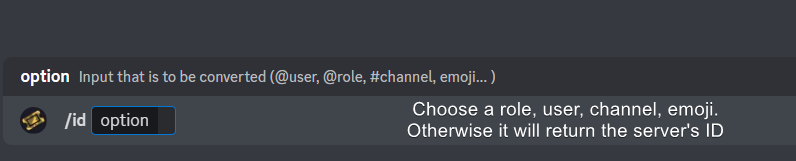
How do I get the ID of Roles/Channels/Emojis?
Ticket Tool has a useful command that helps you get the ID of various things like channels, roles, emojis, and your server.
Just use the command </id:1029797400174399546> <#channel/@role/:emoji:>. Now copy everything, including the brackets <...>, to your dashboard (or wherever you want it)
If you want the server ID, just use the command without any option.
Examples:
Server ID: $id ➝
509192800865353738
Roles: $id @Role ➝<@&722196398635745312>
Channel: $id #channel ➝#🤖│bot-spam
User: $id @user ➝@copper owl
Emoji: $id➝

 median wigeon
Oke, you says thats its working, now if there are further problems
you can ask here
novel copper
Hi how can I check the history when the ticket is closed and delete?
 pseudo ravine
Hey there. The only way is if you saved the transcript before it got deleted
novel copper
pseudo ravine
Hey there. The only way is if you saved the transcript before it got deleted
Noted thanks
iron nightBOT
Gave +1 Rep to @pseudo ravine (current: #9 - 459)
pseudo ravine
You’re welcome, glad I could help!
 humble path
If I switch to the premium bot, do I lose configuration or active tickets?
 earnest river
Can anyone set a ticket on my discord?
humble sequoiaBOT
First you will want to invite the bot to your server. Once the bot is in your server, you can manage your server in the dashboard.
To create a panel we are going to need to head over to the Panel Configs Tab on the Dashboard.
Once at the dashboard we will need to click Create Panel.
Enter a panel name (Fill in any optional settings you want).
Click Create Panel and you are ready to get started with configuring your panel.
An example of a creating a panel is shown below.
Once the panel has been created, use the blue Send button and select the channel you want the panel to be sent to.
The Panel wasn't send
Use the </debug:ID> command to diagnose possible permission issues with the bot.
pseudo ravine
humble path
If I switch to the premium bot, do I lose configuration or active tickets?
Hey there. You do not, but you’ll need to add the gold bot to the existing tickets, and use commands instead of buttons until new tickets are created
You’ll also need to re-send the panel using the gold bot
humble path
pseudo ravine
Hey there. You do not, but you’ll need to add the gold bot to the existing ticke...
Understood, thank you
iron nightBOT
Gave +1 Rep to @pseudo ravine (current: #9 - 460)
pseudo ravine
You’re welcome, glad I could help!
copper owl
quick question, once the free trial for period ends, i assume all premium features that were done revert back correct?
 river ferry
no matter what i do i cant fix this error
 copper owl
river ferry
no matter what i do i cant fix this error
copper owl
river ferry
no matter what i do i cant fix this error
did you close the tickets you have open?
copper owl
i would suggest checking the limits on your dashboard
river ferry
how do i do that
oih nvm
'thx
it brings me here when i click the dashbaord on the doc
 humble sequoiaBOT
Don't see your server in the dashboard?
Try using the Sync Servers button on your top center of the Dashboard page
You will possibly need to relog. Look below to see the steps on how to relog.
If this doesn't work
You should relog from the dashboard, you can do this by clicking here to log out immediately, and then log back in
Note:
You need one of these 3 things to access the dashboard.
1. Server Owner (Level: 6)
2. Server Administrator (Level: 4)
3. Dashboard Role (Level: 2)
:warning: You can check your level using the </permissionlevel:1029797400174399542> command on your Discord Server
If the bot's response is:
- @User is permission level: 0 (User)
You don't have any of the 3 levels required to access the server's dashboard
 verbal topaz
Hello, I have some archived tickets from May 2023 which is before the "Direct Link" function was implemented. Currently, clicking on "Direct Transcript" brings me to a web page which says "Invalid Request". Is there any way to view the content of this archived ticket, or is the content permanently expired?
austere forge
verbal topaz
Hello, I have some archived tickets from May 2023 which is before the "Direct Li...
Hey there, On the transcript message, instead of clicking on the Direct Link link, you'll have to click on the download icon on the html file attached to the message
 verbal topaz
austere forge
Hey there, On the transcript message, instead of clicking on the `Direct Link` l...
verbal topaz
austere forge
Hey there, On the transcript message, instead of clicking on the `Direct Link` l...
thank you! I was worried I may have lost the content
iron nightBOT
Gave +1 Rep to @austere forge (current: #27 - 170)
austere forge
you're welcome
 frank dawn
Hi can anyone tell me how to sell tickets
austere forge
frank dawn
Hi can anyone tell me how to sell tickets
Hey there, can you elaborate on "sell" ticket?
frank dawn
I didn’t understand
 storm gale
how do you cancel premium
humble sequoiaBOT
<:TicketToolOffline:1018980643092312155> Cancel your subscription
We're sorry to see you go!
To cancel your Ticket Tool Premium Subscription, just head over to your User Settings in Discord, then Subscriptions. Look for Premium Apps and click on Manage Subscriptions. There you can cancel your subscription at the end of your billing cycle.
User Settings > Subscriptions > Premium Apps > Manage Subscriptions > Cancel
storm gale
thank you
pseudo ravine
You're welcome, glad I could help!

 pseudo ravine
You'll have to contact Discords billing team then
humble sequoiaBOT
If you have purchased a Premium Subscription of Ticket Tool through Discord and want to request a refund, you will have to contact Discord Support.
We unfortunately can't handle any of these cases.
Am I eligible for a refund?
Discords Refund Policy states that you can request a refund within 5 days of your initial purchase date.
A prorated refund (partial) can be requested if the bot has been removed by either Discord or the bot developer.
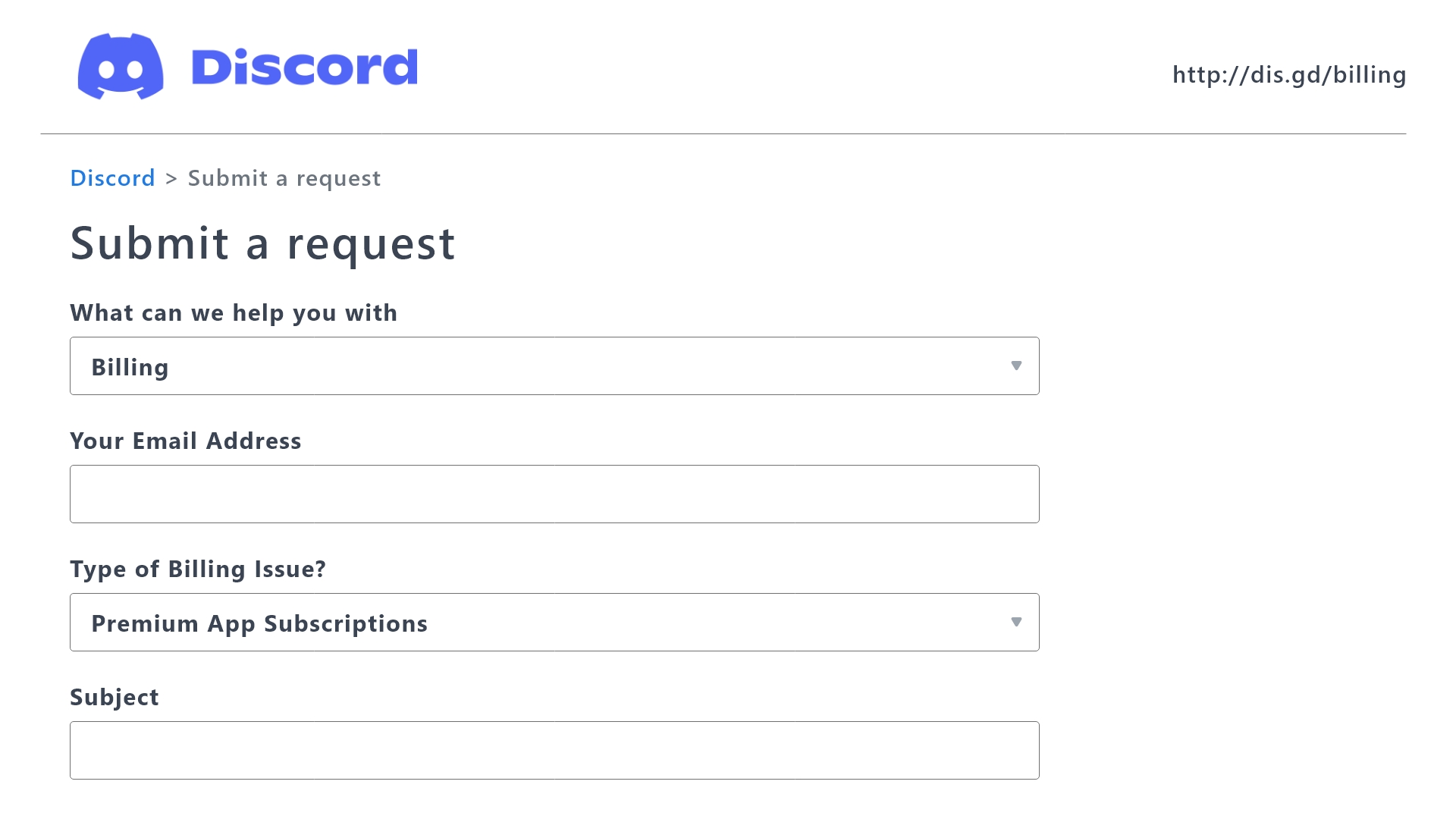
 Ticket Tool Premium Refund Request
pseudo ravine
Ticket Tool Premium Refund Request
pseudo ravine
Use this form to get in contact ^
 humble iris
Is there a way for users to open multiple tickets without premium ? Pls ping and lmk thx
pseudo ravine
humble iris
Is there a way for users to open multiple tickets without premium ? Pls ping and...
Hey there. You can increase the limit for each panel by going to the Dashboard > Limits > Open Tickets > Tickets open each user
humble iris
pseudo ravine
Hey there. You can increase the limit for each panel by going to the Dashboard >...
Even if I can’t got premium
I got it. Thanks @pseudo ravine
iron nightBOT
Gave +1 Rep to @pseudo ravine (current: #9 - 461)
pseudo ravine
You're welcome, glad I could help!
 spark blade
how to create a dropdown with multi options like this
 humble sequoiaBOT
The Drop-down menu or Select Menu replaces the buttons on your panel message and uses a drop-down menu with all of your panels. To set this up, go to your Panel Configs and select your main Panel.
<:Numbericons1:1018864164032225340> Enable Select Style
First you enable Select Style. Then you add an item in the Dropdown Editor. Now you can start editing your dropdown!
<:Numbericons2:1018864168041971712> Dropdown Editor
Each line in the dropdown editor represents a line in the drop down menu on discord. You can add more "Items", by clicking on 

First you select a panel. That's the panel this option will open a ticket for.  DONT select the same panel twice. Each option should have a different Panel
After that, you can put a Display. This is the title of this option and will appear in the drop down menu. The *Description can be set right after that, which will be below the title in grey.
Additionally you can select an emoji, that will be shown in front of each option. You can either manually input the ID of an emoji or select it in the selector.
Common Issues ⚠️
- Panel doesn't send? Make sure you have a valid emoji selected
- Option doesn't show up? Check if two options have the same panel in the DropDown Editor

$dropdown
austere forge
bye
 proper flame
🫡
spark blade
humble sequoia
might be a bug, its enabled and created but does not display correctly
 pseudo ravine
Hey there. You need some text in the “Display” textbox
Which is why it says it’s required
median wigeon
@lapis sand for adding your bot
humble sequoiaBOT

You can check our documentation here;
You can also check #📂│information for the basic setup, or run the </setup:1025379472167403530> command within #🤖│bot-spam to find information on how to setup Ticket Tool.
Alternatively, you can use the /setup command with Ticket Tool in your own server to setup the basics of Ticket Tool!
Our documentation contains all the info you need about the bot to be able to setup and configure the bot however you like.
 lapis sand
median wigeon
<@875523431779663912> for adding your bot
lapis sand
median wigeon
<@875523431779663912> for adding your bot
oh ty
iron nightBOT
Gave +1 Rep to @median wigeon (current: #49 - 36)
 spice pasture
I have an Aethir checker node, installed on Ubuntu on a Macbook. I can run the aethir software and I have connected to my NFT on metamask. I can see the checker node client at https://app.aethir.com/licenses
It says I have got 1 licence which is correct.
when I try to delegate, I specify my burner wallet public address, which I have carefully checked, but I get an error (in red) as follows:
*Not found. Please double check your entry and try again.
It also looks curious that my delegate status is showing as free, but it is in red, with a red exclamation mark in a red circle. I suspect this may indicate an issue, but I do not know how to proceed.
Please can you assist.
Thanks.
This is all on Testnet
humble sequoiaBOT
@spice pasture
⚠️ You're in the wrong place
We provide support for Ticket Tool Discord bot and cannot help you with whatever issue you have.
- We don't know which Support Team you should contact to get this issue resolved, and unfortunately we won't be able to accurately tell you.
If you don't have any further questions regarding our bot Ticket Tool, please close this ticket
quiet portal
How many closed tickets can I have? We need every ticket for further use in the future
Also how to ask people to add logs.zip when opening tickets
 idle flint
Hello, servers are limited (by discord) to 50 channels per category and 500 channels per server.
Ticket Tool has a Transcript feature that will save messages (and images/files if you have premium) to be accessable at a later stage, allowing the ticket channel to be closed and deleted.
quiet portal
idle flint
Hello, servers are limited (by discord) to 50 channels per category and 500 chan...
Oh okay thx you
iron nightBOT
Gave +1 Rep to @idle flint (current: #19 - 282)
quiet portal
But how can I prompt the user to add files to the ticket?
Also a description how to do it
quiet portal
idle flint
Hello, servers are limited (by discord) to 50 channels per category and 500 chan...
Can you check my second question
quiet portal
?
civic wagon
quiet portal
Can you check my second question
You can't make the users upload a file while they're creating a ticket. The most you can do is mention it in the Ticket message as its the first thing they see after creating the ticket
quiet portal
civic wagon
You can't make the users upload a file while they're creating a ticket. The most...
Okay thank you
iron nightBOT
Gave +1 Rep to @civic wagon (current: #32 - 110)
quiet portal
Why does it says that my subscription has ended?

 humble sequoiaBOT
The Drop-down menu or Select Menu replaces the buttons on your panel message and uses a drop-down menu with all of your panels. To set this up, go to your Panel Configs and select your main Panel.
<:Numbericons1:1018864164032225340> Enable Select Style
First you enable Select Style. Then you add an item in the Dropdown Editor. Now you can start editing your dropdown!
<:Numbericons2:1018864168041971712> Dropdown Editor
Each line in the dropdown editor represents a line in the drop down menu on discord. You can add more "Items", by clicking on
First you select a panel. That's the panel this option will open a ticket for. DONT select the same panel twice. Each option should have a different Panel
After that, you can put a Display. This is the title of this option and will appear in the drop down menu. The *Description can be set right after that, which will be below the title in grey.
Additionally you can select an emoji, that will be shown in front of each option. You can either manually input the ID of an emoji or select it in the selector.
Common Issues ⚠️
- Panel doesn't send? Make sure you have a valid emoji selected
- Option doesn't show up? Check if two options have the same panel in the DropDown Editor
$dropdown
limber portal
@fair root ^^
 fair root
limber portal
<@455425618109136896> ^^
fair root
limber portal
<@455425618109136896> ^^
But we need to create panel for each drop down option right ?
limber portal
correct
fair root
I created different sections but i m not able to send a universal panel like above dropdown one
Only one common button one panel appears
 regal trail
Olá
median wigeon
fair root
I created different sections but i m not able to send a universal panel like abo...
Hey,
First make a multipanel
humble sequoiaBOT
For more convenient use of multipanels, you can now combine panels on the dashboard. This will allow you to directly send the multipanel from the dashboard or via the $panel ID command.
Where can I find this?
You can find this setting on the Dashboard -> Panel Configs -> Panel -> Attached Panels
Note: if you're attaching all the panels to a panel called English, don't include English in the attached panel's box (If you do this, it will create a duplicate)
This will put all buttons from all of your panels on one message. The message is the panel message from the panel you're combining these panels in.
 fair root
My data pack lagged it worked very well sry forgot to update
median wigeon
oke no problem have a nice day!
jade topaz
hi! is there an option for automated deletion for closed tickets after 24hrs?
austere forge
jade topaz
hi! is there an option for automated deletion for closed tickets after 24hrs?
Hi there, sure there is an automation option that can check the message, if no message is found with an X time, the ticket will be deleted after a certain duration
Unfortunately this option is a premium feature
humble sequoiaBOT
With Ticket Tool's automation, you'll be able to customize your ticket system workflow! Using the Automation Editor you can:
- Chose out of 6 different triggers
- Set a Message Watcher to wait for a message for a given time, or to wait for the absence of them
- Add delays on the execution of actions after the trigger or watcher finds a message!
Automation Command
Automations can be stopped, by running the /automation stop command inside the ticket you want it to stop in. Restart it with /automation start You'll also be able to view the current status of the automations with /automation.
__Important Notes__
- Automation is on ALPHA TESTING PHASE, things might work unexpectedly or not at all.
- Any automation will run for a maximum of 7 days or until the ticket is closed, afterward, it will stop checking
+ You can have 5 automations per panel

$auto
 dull meadow
i need someone to dm me the steps to stop normal memebrs in my discord server to close tickets and delete them
median wigeon
Go to the Panel Configs Tab
Under Ticket, click on Buttons Options
Support Team Only
Enabling this option will make the button only being actionable by members who have a Support Team Role.
Allowed Roles
Users that have a role from this selector will be able to use this button.
dull meadow
:OOOOO
median wigeon
is this helping you, if you need any more help, feel free to ask
 median wigeon
can you try $debug and look if it is in the channel?
i see that you are a premium user, make sure that you sellected the premium bot in your dashboard?
dull meadow
median wigeon
i see that you are a premium user, make sure that you sellected the premium bot ...
it sonly a free trail
median wigeon
Than you need select the premium bot in your dashboard

You can find it under server Configs
@dull meadow is this working for you?
dull meadow
median wigeon
<@1052368121987612723> is this working for you?
im going to do setup now
the window still didt appear its the same as the i sent
median wigeon
dull meadow
the window still didt appear its the same as the i sent
is the bot in the server and in that channel?
dull meadow
yeah
median wigeon
did you gave him all the permission
dull meadow
yep
humble sequoiaBOT
You can check our documentation here;
You can also check #📂│information for the basic setup, or run the </setup:1025379472167403530> command within #🤖│bot-spam to find information on how to setup Ticket Tool.
Alternatively, you can use the /setup command with Ticket Tool in your own server to setup the basics of Ticket Tool!
Our documentation contains all the info you need about the bot to be able to setup and configure the bot however you like.
dull meadow
if u want i can screen char eand u caan check if u want
 deep sinew
@median wigeon @dull meadow Hey can you tell me how you make the emojis behind your names
median wigeon
deep sinew
<@373199304577384448> <@1052368121987612723> Hey can you tell me how you make ...
i dont know it comes with my roll
@dull meadow please try to send the panel from your dashboard again
dull meadow
deep sinew
<@373199304577384448> <@1052368121987612723> Hey can you tell me how you make ...
lvl 3 server boost so custom role icons
dull meadow
median wigeon
<@1052368121987612723> please try to send the panel from your dashboard again
ok
deep sinew
Okay, thank you, I kiss you heart
dull meadow
median wigeon
<@1052368121987612723> please try to send the panel from your dashboard again
ok that workd
dull meadow
okay i think i sorted it
pseudo ravine
(Please don’t ping for support)
humble sequoiaBOT
For more convenient use of multipanels, you can now combine panels on the dashboard. This will allow you to directly send the multipanel from the dashboard or via the $panel ID command.
Where can I find this?
You can find this setting on the Dashboard -> Panel Configs -> Panel -> Attached Panels
Note: if you're attaching all the panels to a panel called English, don't include English in the attached panel's box (If you do this, it will create a duplicate)
This will put all buttons from all of your panels on one message. The message is the panel message from the panel you're combining these panels in.
median wigeon
@prime grail ^^ Here is your answer
 prime grail
median wigeon
<@740971290730430644> ^^ Here is your answer
prime grail
median wigeon
<@740971290730430644> ^^ Here is your answer
Tank
prime grail
How do I make viewing logs automatically send without clicking the logs button or saving the log?
 austere forge
prime grail
How do I make viewing logs automatically send without clicking the logs button o...
austere forge
prime grail
How do I make viewing logs automatically send without clicking the logs button o...
Hey there, this is possible but it is a premium feature
median wigeon
@unborn peak Hi there, there is a partnership application open until 31th of may.
https://discordapp.com/channels/509192800865353738/509770538051305493/1237817218587168838
Please read the Requirements to apply.
( I am not from the support team, but i know where you need to go)
quiet portal
How can I asign a ticket to someone?
humble sequoiaBOT
Claiming allows you to change the ticket name, category and permissions. To use it you have to enable it first on your Dashboard > Panel Configs > Claiming
Note: This is a premium feature
median wigeon
Note: This is a premium Feature
quiet portal
median wigeon
Note: This is a premium Feature
Mhh okay but like when I see a ticket and someone else should take a look how can I asign it to another member
I mean I can claim it myself but someone else should get pinged by asing it to them
median wigeon
Like its in the picture, you can disable this option, and everyone can claim and unclaim it.

the top option in the picture
median wigeon
quiet portal
I mean I can claim it myself but someone else should get pinged by asing it to t...
you want that support get pinged by opening a ticket?
quiet portal
median wigeon
you want that support get pinged by opening a ticket?
Some kind of so everyone is aware of it. Or I me myself can Assign it to another Discord Staff if he is not watchging the ticket channels
 quiet portal
median wigeon
quiet portal
median wigeon
Thanks but it's under General Ticket Options not under Panel
iron nightBOT
Gave +1 Rep to @median wigeon (current: #48 - 37)
quiet portal
Like this

Can I instead asign it to someone instead of pinging everyone. Claim is not what I mean
median wigeon
No thats not possible
Maybe its possible with the costume command, but i am not sure.
Thats a option where you need to make your own command
humble sequoiaBOT
Custom Commands
Custom Commands are used to send a predefined response to your channels. Commands will only respond if the command itself is used, it will not function if you put the tag into a sentence.
To create commands, go to: Dashboard > Custom Commands > New. After creating and naming one, you can edit the command trigger and behaviors. Tap on the edit message button to edit the response of the command.
 median wigeon
but i dont think thats what you want
quiet portal
Oh okay sad. Would be cool tho
How can I avoid tons of closed tickets. Should I delete them after closing?
median wigeon
For that you can delete them, and if you want to read some tickets back
you can use transcript
quiet portal
Okay thx you @median wigeon
median wigeon
And if you have premium, you can automate the proces.

Automate your ticket system!
 rancid slate
i am having trouble with my ticket tool, whenever i react to its message to open a channel, it doesnt do so
restive condor
rancid slate
i am having trouble with my ticket tool, whenever i react to its message to open...
Hey there! Any error message when you click the button?
rancid slate
nope
restive condor
rancid slate
nope
Could you screenshot the ticket message please, along with the button you're pressing on?
rancid slate
 restive condor
rancid slate
restive condor
rancid slate
It looks like that panel is very old and could not be working.
Also the button could have been removed and that would just be a fake reaction
Please contact server staff for them to fix this 🙏
quiet portal
Hey
Why I dont get pinged when using this
 rancid slate
restive condor
Please contact server staff for them to fix this 🙏
rancid slate
restive condor
Please contact server staff for them to fix this 🙏
server staff of the server i am in?
restive condor
quiet portal
Hey
Why I dont get pinged when using this
Hey there! Make sure you are using the exact same name. Capital letters...etc
If that still not working, you can use the {ID} format
restive condor
rancid slate
server staff of the server i am in?
Correct
rancid slate
restive condor
Correct
i am the owner haha, how would I go about replacing this? is there a way to send the new message?
quiet portal
restive condor
If that still not working, you can use the ``{ID}`` format
Okay thx
iron nightBOT
Gave +1 Rep to @restive condor (current: #5 - 652)
restive condor
rancid slate
i am the owner haha, how would I go about replacing this? is there a way to send...
If you go to the Dashboard, you may find that panel there
(I don't know for sure as it's really, really old)
If it does appear, just edit that one, otherwise see below how to setup a new panel
humble sequoiaBOT
restive condor
There's the dashboard link ^^
stark runeBOT
1. Invite Ticket Tool to your server
First you will want to invite the bot to your server. Once the bot is in your server, you can manage your server in the dashboard.
2. Create a Panel
To create a panel we are going to need to head over to the panel configs on the dashboard.
Once at the dashboard we will need to click Create Panel.
Enter a panel name (Fill in any optional settings you want).
Click Create Panel and your ready to get started with configuring your panel.
An example of a creating a panel is shown below.
3. Send the Panel to a Channel
Once you've created a panel on the dashboard you will need to send it to a channel using send on the dashboard.
Select the channel you want your panel to be created in and click send.
For other questions checkout $help faq.
An example of a sending a panel is shown below.
Having a Problem Sending the Panel?
Do $debug in a channel with Ticket Tool and make sure it has all the necessary Discord permissions.
rancid slate
restive condor
If you go to the Dashboard, you may find that panel there
(I don't know for sur...
sweet thanks so much got it working
iron nightBOT
Gave +1 Rep to @restive condor (current: #5 - 653)
restive condor
Glad to hear 
dull meadow
@median wigeon how do make it i can make more than 1 ticket as a moderator?
humble sequoiaBOT
Unlike the regular Ticket Limit, the global limit will limit the amount of tickets a user can create at the same time for ALL Panels. When a ticket is closed again, the limit resets for that user.
To customize it head over to your Dashboard ➞ Server Configs ➞ Global Ticket Limit
Note: This is not a limit for how many tickets a user can open at all times or how many tickets you can have open on the server in total. This is just a limit per user for open tickets.
 median wigeon
Please dont ping me next time, if i am not online someone will help you, thanx in advance
 plush dagger
can some one help me to setup the ticket tool?
humble sequoiaBOT
First you will want to invite the bot to your server. Once the bot is in your server, you can manage your server in the dashboard.
To create a panel we are going to need to head over to the Panel Configs Tab on the Dashboard.
Once at the dashboard we will need to click Create Panel.
Enter a panel name (Fill in any optional settings you want).
Click Create Panel and you are ready to get started with configuring your panel.
An example of a creating a panel is shown below.
Once the panel has been created, use the blue Send button and select the channel you want the panel to be sent to.
The Panel wasn't send
Use the </debug:ID> command to diagnose possible permission issues with the bot.
austere forge
plush dagger
can some one help me to setup the ticket tool?
hey there. see above : )
austere forge
plush dagger
can you help me in private? <@225349654974431232>
Unfortunately, no, this violates the rules of this server :)
plush dagger
sry for ping
austere forge
go to your Dashboard > Panel configs and then you will see a green cross to create a panel
 austere forge
plush dagger
austere forge
plush dagger
as the message shows, make sure that the channel you want to send it to, Ticket tool has perms to send messages and view the channel
lapis sand
bonjour comment travaillez vous le tableau de bord de l’outil de ticket
dull meadow
median wigeon
Please dont ping me next time, if i am not online someone will help you, thanx i...
ok sorry
how do make it i can make more than 1 ticket as a moderator?
austere forge
lapis sand
bonjour comment travaillez vous le tableau de bord de l’outil de ticket
Bonsoir, c'est à dire ?
austere forge
humble sequoia
@dull meadow : )
dull meadow
didt se eoops
dull meadow
austere forge
<@1052368121987612723> : )
mine is on 100 but says i can only do 1
austere forge
dull meadow
mine is on 100 but says i can only do 1
Go to Dashboard > Panel configs > Limits - Open tickets each user
increase this number
dull meadow
ok ty
lapis sand
austere forge
Bonsoir, c'est à dire ?
je ne sais pas comment gérer le tableau de bord
austere forge
lapis sand
je ne sais pas comment gérer le tableau de bord
j'ouvre un ticket pour vous, pour obtenir une aide plus approfondie : )
plush dagger
austere forge
as the message shows, make sure that the channel you want to send it to, Ticket ...
where can i check it?
austere forge
plush dagger
where can i check it?
in channel permissions
plush dagger
i checked it
i also have a security bot in the server, and he kicks the bot after 2 mins
every time i add him
 devout iris
hii i have a problem when i want to close a ticket, this what appears

and I have the label and the emoji

 stray mural
Hello, how can i set up the ticket to be able to be taken by someone and not just "close" option
I did enable the settings

 craggy trail
Bonjour,
J'essaie depuis 1h de récupérer mon compte sur un ancien téléphone, l'autre ayant grillé. 2 fois seulement j'ai reçu un mail avec un code qui n'a jamais marché. Et j'ai payé l'abonnement double bonus de la semaine et vip de l'événement.
Pouvez m'aider à rattraper ça au plus vite.
Pseudo :
Mr.Darkhool.
humble sequoiaBOT
⚠️ Vous n'êtes pas au bon endroit
Nous offrons un support pour le bot Ticket Tool et nous ne pouvons pas vous aider avec d'autres problèmes hors du bot.
- Assurez-vous de contacter l'équipe d'assistance appropriée, s'il vous plaît.
S'il n'y a pas d'autres éléments en lien avec Ticket Tool en quoi nous pouvons vous être utiles, veuillez fermer le ticket.
craggy trail
Mais où le bon endroit, tout est écrit en anglais et renvoi à une multitude de page.
Il n'y a aucun interlocuteur simple, visible et compétent ?
austere forge
craggy trail
Mais où le bon endroit, tout est écrit en anglais et renvoi à une multitude de p...
Bonjour, malheureusement comme indiqué ci-dessus vous n’êtes pas au bon endroit et on ne pourras pas vous aider avec votre problème ici.
austere forge
stray mural
Hello, how can i set up the ticket to be able to be taken by someone and not jus...
Hi there, this is a premium features
austere forge
devout iris
hii i have a problem when i want to close a ticket, this what appears
Hi there, what command did you use? I see that Ticket tool respond to a message
craggy trail
Merci tout de même d'avoir pris le temps. Je me débrouillerai autrement.
devout iris
austere forge
Hi there, what command did you use? I see that Ticket tool respond to a message
I didn’t use any comand, I just click the close button
austere forge
devout iris
I didn’t use any comand, I just click the close button
can i get your server id pls
 stuck zephyr
Hey quick question, I bought Ticket tool premium how do i invite the premium bot
humble sequoiaBOT
The first thing you will need to do is invite the premium bot, an invite can be found here
Once the bot is in your server we will head to the dashboard and manage your server. When you are managing your server, you want to head into "Server Configs" then click the drop down menu under "Select the bot you would like to use on this server" then click "Ticket Tool#6207" and then save.
devout iris
austere forge
can i get your server id pls
my what, srry?
austere forge
devout iris
my what, srry?
devout iris
austere forge
https://support.discord.com/hc/en-us/articles/206346498-Where-can-I-find-my-User...
1238583272381087774
 glacial spire
How do I make it where when someone open's a ticket it the name tell's me where they opened it from
 dawn lake
glacial spire
How do I make it where when someone open's a ticket it the name tell's me where ...
dawn lake
glacial spire
How do I make it where when someone open's a ticket it the name tell's me where ...
You want that if someone opens a ticket, the panel name should appear ?
glacial spire
dawn lake
You want that if someone opens a ticket, the panel name should appear ?
yea
dawn lake
glacial spire
yea
Go to the dashboard and open the edit message panel, then insert {panel.name}.
{panel.name} = The name of the panel in which the variable is being used
glacial spire
Ily
austere forge
devout iris
1238583272381087774
In the buttons > Button cancel close - the text box is missing which makes an empty button, which sends this error
You must add a text in the Button text
 devout iris
austere forge
In the buttons > Button cancel close - the text box is missing which makes an e...
devout iris
austere forge
In the buttons > Button cancel close - the text box is missing which makes an e...
ohh okey tysm
 lunar phoenix
Any way to find transcripts?
 elder hull
❗
austere forge
lunar phoenix
Any way to find transcripts?
hey there, can you eleborate by "find" ?
lunar phoenix
austere forge
hey there, can you eleborate by "find" ?
I dont have a channel set for transcripts so atm it just dms the user was wondering if their is a find command / lookup maybe through the dashboard
humble sequoiaBOT
1. Go into your Dashboard
2. Open your Panel Configs tab
3. Select the panel you want to grant access to
4. Open the Transcript options menu
5. Using the Transcript Channel selector, pick the channel you want your transcripts to be sent to
6. Save changes
 austere forge
lunar phoenix
I dont have a channel set for transcripts so atm it just dms the user was wonder...
austere forge
lunar phoenix
I dont have a channel set for transcripts so atm it just dms the user was wonder...
see above
lunar phoenix
austere forge
see above
I know thats possible but what about existing transcripts from the server?
austere forge
I don't understand what you mean, sorry
lunar phoenix
austere forge
I don't understand what you mean, sorry
so I have existing transcripts made from closed tickets I was wondering if I can access those transcripts some how
lunar phoenix
nvm you don't understand
austere forge
sorry
median wigeon
lunar phoenix
so I have existing transcripts made from closed tickets I was wondering if I can...
Hey,
Do you mean transcripts from the past, after you made that channel, thats not possible because you dont have that transcript saved in a channel
lunar phoenix
median wigeon
Hey,
Do you mean transcripts from the past, after you made that channel, thats...
Yes correct alright damn this needs to be added asap
median wigeon
Make a suggestion in #💡│suggestions 😉
jade topaz
does anyone know how I can edit the close request message?
austere forge
jade topaz
does anyone know how I can edit the close request message?
Hey there. Go to Dashboard > Panel configs > Messages - edit close question
jade topaz
thanks @austere forge
iron nightBOT
Gave +1 Rep to @austere forge (current: #27 - 173)
 arctic canopy
Hello, i saw ticket premium be used on a discord server where users can fill out a ticket/form and using their steam id, delete their character in the game server. How is something like that set up?
 sick birch
my tichet tool subscription got canceled because my card expired, i need to activate it again but i can't find how to do it?
humble sequoiaBOT
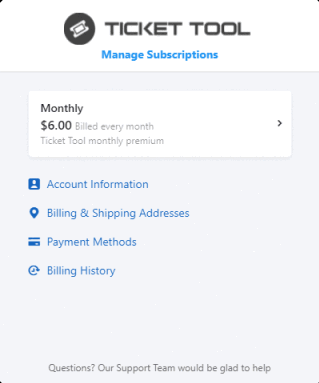
Head over to our subscriptions page and press on Manage Subscriptions. Log in with the email you purchased the premium with. You'll be met with the page shown below:
- Your Subscriptions
Here, your subscriptions will be displayed, you can click on the black arrow to edit or cancel a subscription.
- The Account Information Page
Here, it'll display the email that has access to managing the subscription, as well as the user who has access to assigning the subscription to a server. You can also setup a password.
- The Payment Method Page
Here, you can see and update your payment details. You can pay VIA a VISA card or PayPal if you're purchasing premium through our website
- The Billing History Page
Here, you can check the history of your payments as well as download any invoices you desire.
 median wigeon
arctic canopy
Hello, i saw ticket premium be used on a discord server where users can fill out...
median wigeon
arctic canopy
Hello, i saw ticket premium be used on a discord server where users can fill out...
I dont know, it can that they use it with different bots
sick birch
i tried to upgrade but gives me this error
median wigeon
Please delet this photo (your adress is on it)
Best you can do is making a #🎫│make-a-ticket and than select billing. They can help you the best
Thats the billing support team
humble sequoiaBOT
━━ Andrei Valentin's inquiry has been moved to a ticket ━━
 west mortar
/help
 thin torrent
/help
 ocean star
I want to do this, how can I have more than one button

 wide pendant
A few Questions - We bought premium and applied it:
How can i get ticket tool to ask multiple Modal questions (5).
How can i make a certain panel marked as NSFW so that the channel is created as NSFW
 potent kernel
whats this

 wet storm
Does anyone knows how to add more than 1 button
wide pendant
potent kernel
whats this
One of your emojis has been deleted
potent kernel
wide pendant
One of your emojis has been deleted
oh thanks ill check that out
iron nightBOT
Gave +1 Rep to @wide pendant (current: #308 - 1)
 earnest quartz
From where can I change this text?

 slender minnow
earnest quartz
From where can I change this text?
slender minnow
earnest quartz
From where can I change this text?
Panel config > ticket > edit ticket message > dropdown near embed editor
 wide pendant
A few Questions - We bought premium and applied it:
How can i get ticket tool to...
wide pendant
wide pendant
A few Questions - We bought premium and applied it:
How can i get ticket tool to...
bump
earnest quartz
slender minnow
Panel config > ticket > edit ticket message > dropdown near embed editor
tysm!
wet storm
slender minnow
Panel config > ticket > edit ticket message > dropdown near embed editor
Can u tell me where i can do more than one button in one panel
jade topaz
Bro I am a staff of a server .. players are creating tickets but it's not showing answers of questions in the ticket that the players had answer
@slender minnow
 storm quartz
How do I change the colour of the embed...
restive condor
storm quartz
How do I change the colour of the embed...
Hey there! You can use the embed colour field to edit the colour.
Please note this is a premium feature
storm quartz
Aii
restive condor
jade topaz
Bro I am a staff of a server .. players are creating tickets but it's not showin...
Hey there! Make sure you enable "Auto Display form answers" in the FORMS section.
Otherwise they won't be displayed (unless you are using variables)
Also, please avoid pinging staff
humble sequoiaBOT
━━ User's inquiry has been moved to a ticket ━━
restive condor
wide pendant
A few Questions - We bought premium and applied it:
How can i get ticket tool to...
Hey there! See below how to set up forms.
It's currently not possible to automatically have channels marked as NSFW upon creation.
You will need to manually enable the age restricted option from the channel permissions
humble sequoiaBOT
A Discord Form lets the user answer individual questions in a pop-up Form, which then displays the answers in the ticket message. This can save time if you already know what you want to ask the user.
Setup Forms
Forms can be enabled under Panel Settings > Form Options > Edit Forms Options. In the new pop-up window, you can now enable and edit your own Form.
Form Options
You can add up to 5 questions in the Discord form. This is a Discord limitation. Each question can have a placeholder in the input field, a minimum and maximum input, multi-line, and also the option to have the answer required.
Options
Question Title ➞ Your Question goes here
Question Placeholder ➞ The placeholder text in the input field
Required ➞ If enabled, the user has to answer this question, to submit the form
Multi-Line Input ➞Allows the user to input multiple lines
Minimum and Maximum Input ➞ Set a minimum and maximum input value for the user
Displaying the Answer
To display the answers from the user, you need to enable Auto display form results on the ticket message as an additional embed
If you don't want a second embed, go into your Panel Configs > Ticket Options > Edit Ticket Message. You use the variable {create.form.x} and replace x with the number of your question. For example, the response to Question 5 can be displayed with {create.form.5}.
 wide pendant
restive condor
Hey there! See below how to set up forms.
It's currently not possible to automa...
wide pendant
restive condor
Hey there! See below how to set up forms.
It's currently not possible to automa...
will this ever be a feature? We have under-18 staff and NSFW reports should not be seen by them. For now ill add a role but would be something nice (maybe premium feature?)
restive condor
wide pendant
will this ever be a feature? We have under-18 staff and NSFW reports should not ...
You can suggest this in #1019685143046279208
quiet portal
I used role id in the ticket message but the Admin Role dont get pinged
Also need to Premium Role
restive condor
quiet portal
I used role id in the ticket message but the Admin Role dont get pinged
Hey there! Could you show me what you have put in?
The format must be exact, otherwise it won't ping.
Here's your premium role
humble sequoiaBOT

Thank you
Thank you for purchasing Ticket Tool Premium @quiet portal. You have now been given the <@&535595160189403136> role!
Found 2 servers in total and 1 with premium and permission
 stark schooner
The bot What does it do claim
 stray bluff
I created a new position on my server so that new people could help me with tikets. How do I get them to be able to see old tikets managed by other people? They only see the new tikets that are opened. Categories with old tikets are not visible to them.
stark schooner
Warnings: claim not enable
restive condor
 subtle spruce
how to find my id ?
subtle spruce
how to find my id ?
Hey there! The panel ID is the number attached to the panel name.
Example: This panel's ID is 1
 restive condor
stark schooner
Warnings: claim not enable
restive condor
stark schooner
Warnings: claim not enable
Hey there! You can enable claiming from the Dashboard > Panel Configs > Claiming
subtle spruce
thank you !
humble sequoiaBOT
Claiming allows you to change the ticket name, category and permissions. To use it you have to enable it first on your Dashboard > Panel Configs > Claiming
Note: This is a premium feature
restive condor
stray bluff
I created a new position on my server so that new people could help me with tike...
Hey there! Unfortunately, if you have added new support roles, they won't be automatically added to exiting tickets.
You will either need to close and re-open those tickets or use the /add command to add them
 violet jacinth
Does /purge delete all open n closed tickets or like literally all tickets from like logs n stuff too?
stray bluff
restive condor
Hey there! Unfortunately, if you have added new support roles, they won't be aut...
Thanks!!
iron nightBOT
Gave +1 Rep to @restive condor (current: #5 - 657)
restive condor
violet jacinth
Does /purge delete all open n closed tickets or like literally all tickets from ...
Hey there! It deletes all opened or closed tickets (you must specify which)
It only deletes those, no existing logs or transcripts will be deleted but please note if you use /purge, those tickets won't generate a transcript
violet jacinth
restive condor
Hey there! It deletes all opened or closed tickets (you must specify which)
It ...
Got it is there any way to just straight up wipe it?
restive condor
violet jacinth
Got it is there any way to just straight up wipe it?
Wipe what exactly?
violet jacinth
restive condor
Wipe what exactly?
Like the statistics for tickets
Oh that would just be deleting the panel wouldn’t it?
restive condor
violet jacinth
Oh that would just be deleting the panel wouldn’t it?
That's correct.
Statistics can't be reset at the moment
stark schooner
restive condor
Hey there! You can enable claiming from the ``Dashboard`` > ``Panel Configs`` > ...
Premium?
restive condor
stark schooner
Premium?
Correct, claiming is a premium feature 
violet jacinth
restive condor
That's correct.
Statistics can't be reset at the moment
Gotcha
jade topaz
I'm not sure why only server administrators can use this function
 restive condor
jade topaz
I'm not sure why only server administrators can use this function
restive condor
jade topaz
I'm not sure why only server administrators can use this function
Hey there! Could I get your server name or ID so I can take a look?
quiet portal
restive condor
Hey there! Could you show me what you have put in?
The format must be exact, ot...
Okay and thx you
iron nightBOT
Gave +1 Rep to @restive condor (current: #5 - 658)
quiet portal
restive condor
Hey there! Could you show me what you have put in?
The format must be exact, ot...
 restive condor
quiet portal
restive condor
quiet portal
That looks right to me, could you screenshot how it looks on Discord?
jade topaz
restive condor
Hey there! Could I get your server name or ID so I can take a look?
Hey sorry for the late reply but the issue is fixed now.
restive condor
Glad to hear, have a nice day!
jade topaz
You too sir.
quiet portal
restive condor
That looks right to me, could you screenshot how it looks on Discord?
I can't even click on the role but the color is correct
 restive condor
quiet portal
I can't even click on the role but the color is correct
restive condor
quiet portal
I can't even click on the role but the color is correct
Yeah, you can't click on roles
Please double check that Ticket Tool has ''Mention @everyone and all roles'' permission in its role settings
quiet portal
restive condor
Yeah, you can't click on roles
But I dont see any yellow thing like here when you get mentioned
quiet portal
restive condor
Please double check that Ticket Tool has ''Mention ``@everyone`` and all roles''...
Oh okay
I just see it does not have the perms so I enabled it.
restive condor
Alright, give it a try now with a brand new ticket
 floral herald
hi! im actually new to ticket tool so i dont really know where to start ;w; can someone please help?
humble sequoiaBOT
First you will want to invite the bot to your server. Once the bot is in your server, you can manage your server in the dashboard.
To create a panel we are going to need to head over to the Panel Configs Tab on the Dashboard.
Once at the dashboard we will need to click Create Panel.
Enter a panel name (Fill in any optional settings you want).
Click Create Panel and you are ready to get started with configuring your panel.
An example of a creating a panel is shown below.
Once the panel has been created, use the blue Send button and select the channel you want the panel to be sent to.
The Panel wasn't send
Use the </debug:ID> command to diagnose possible permission issues with the bot.
floral herald
tysm!
pseudo ravine
You're welcome, glad I could help!
 old socket
I want someone to help me how to do this way in the bot
 humble sequoiaBOT
The Drop-down menu or Select Menu replaces the buttons on your panel message and uses a drop-down menu with all of your panels. To set this up, go to your Panel Configs and select your main Panel.
<:Numbericons1:1018864164032225340> Enable Select Style
First you enable Select Style. Then you add an item in the Dropdown Editor. Now you can start editing your dropdown!
<:Numbericons2:1018864168041971712> Dropdown Editor
Each line in the dropdown editor represents a line in the drop down menu on discord. You can add more "Items", by clicking on
First you select a panel. That's the panel this option will open a ticket for. DONT select the same panel twice. Each option should have a different Panel
After that, you can put a Display. This is the title of this option and will appear in the drop down menu. The *Description can be set right after that, which will be below the title in grey.
Additionally you can select an emoji, that will be shown in front of each option. You can either manually input the ID of an emoji or select it in the selector.
Common Issues ⚠️
- Panel doesn't send? Make sure you have a valid emoji selected
- Option doesn't show up? Check if two options have the same panel in the DropDown Editor
$dropdown
restive condor
old socket
**I want someone to help me how to do this way in the bot**
Hey there! See above ^^
Let me know if you have any questions
restive condor
old socket
<@795710289425334303>Can you explain to me through a Video clip
No, sorry but I can walk you through it step by step if you'd like 😄
old socket
restive condor
No, sorry but I can walk you through it step by step if you'd like 😄
😅 OK I want you to teach me step by step
restive condor
old socket
😅 OK I want you to teach me step by step
Alrighty. How many ticket options would you like in your dropdown menu?
 cloud trail
Hey, is there a public api for this bot? or any way to get the transcript of the tickets automatically by requests? I realized the transcript url has the transcript channel id, but the id after this I couldn't realize what it is
old socket
restive condor
Alrighty. How many ticket options would you like in your dropdown menu?
5
restive condor
old socket
5
Go to your Dashboard and create 5 different panels.
Each option must have its own panel
restive condor
cloud trail
Hey, is there a public api for this bot? or any way to get the transcript of the...
Hey there! No, there's no public API.
We do have an Alpha Webhook features for premium users though
old socket
restive condor
Go to your Dashboard and create 5 different panels.
Each option must have its ow...
OK ؟
Go on ؟
restive condor
old socket
OK ؟
Once you have that done, go to any of your panels and into the DROPDOWN STYLE section
 Enable Select style
And use the ''Add Item'' button to add items.
Each panel must have its own item
cloud trail
restive condor
Hey there! No, there's no public API.
We do have an Alpha Webhook features for ...
Alright, thank you
iron nightBOT
Gave +1 Rep to @restive condor (current: #5 - 660)
old socket
restive condor
And use the ''Add Item'' button to add items.
Each panel must have its own item
Go on
restive condor
old socket
Go on
It should look something like this (of course, with five 5 panels)

Once you have that done, you can send that panel (just that panel) to your desired panel
old socket
Can I put my emoji on the ticket icon @restive condor?
restive condor
old socket
Can I put my emoji on the ticket icon <@795710289425334303>?
Yes, in the ''emoji'' section
restive condor
All good?
cursive roost
🤔 is there any way to make ticket names default to [username]-001(number counter)
ah i found it, nevermind
 sour pasture
Hey, I was paying for ticket bot in a server but got my rolles removed. Does the membership then automaticly end or how do i cancle it?
 fluid flame
hello, just put the ticket bot on my server! ive used to before and normally it works with-out any error, how do i setup the bot? please help much appreated <<333
humble sequoiaBOT
First you will want to invite the bot to your server. Once the bot is in your server, you can manage your server in the dashboard.
To create a panel we are going to need to head over to the Panel Configs Tab on the Dashboard.
Once at the dashboard we will need to click Create Panel.
Enter a panel name (Fill in any optional settings you want).
Click Create Panel and you are ready to get started with configuring your panel.
An example of a creating a panel is shown below.
Once the panel has been created, use the blue Send button and select the channel you want the panel to be sent to.
The Panel wasn't send
Use the </debug:ID> command to diagnose possible permission issues with the bot.
<:TicketToolOffline:1018980643092312155> Cancel your subscription
We're sorry to see you go!
To cancel your Ticket Tool Premium Subscription, just head over to your User Settings in Discord, then Subscriptions. Look for Premium Apps and click on Manage Subscriptions. There you can cancel your subscription at the end of your billing cycle.
User Settings > Subscriptions > Premium Apps > Manage Subscriptions > Cancel
pseudo ravine
humble sequoia
@sour pasture Read this embed
pseudo ravine
You're welcome, glad I could help!
jade topaz
.
 gloomy plume
Why does ticket tool put this message?

Im trying to update my button panel and send it but it's saying this.
pseudo ravine
Hey there. Could you send the server ID here
gloomy plume
1111404816980258826
 gloomy plume
ohhh
gloomy plume
Kind of having a diar issue. It keeps saying the same thing and I don't even have a space on the emojis unless the emojis contain a space.
pseudo ravine
You don't have an emoji for the Support Panel panel

 hasty adder
Hi, is there any way to make it that the ticket would close automatically if it’s inactive for a certain period of time?

 steep jacinth
how do i put a drop down menu onto the ticket tool ? my bad im new to it
lament prairie
hasty adder
Hi, is there any way to make it that the ticket would close automatically if it’...
no
lament prairie
 last mural
Try running /debug on that channel
last mural
i did
lament prairie
humble sequoia
@steep jacinth
lament prairie
last mural
i did
The bot is missing all of the permissions marked with an ❌
 last mural
i gave it admin
lament prairie
last mural
i gave it admin
give the bot this permissions
 last mural
lament prairie
give the bot this permissions
last mural
lament prairie
give the bot this permissions
i gave it those perms
lament prairie
last mural
i gave it those perms
did u turn off the administrator permissions?
 inner sierra
how do i buy ticket tool premium using crypto
jade topaz
How do I make the ticket visible to the creator after closing it?
last mural
lament prairie
did u turn off the administrator permissions?
yes but can i ask why t his is necessary
 little lion
Where to add which role can open/create the ticket? ( I have forgotten it a bit)
lament prairie
humble sequoia
@inner sierra
inner sierra
lament prairie
<@1206301915839991830>
we can buy with crypto aswell
i brought few months ago
lament prairie
humble sequoia
@jade topaz
lament prairie
humble sequoia
@last mural
jade topaz
lament prairie
<@456226577798135808>
thanks G
iron nightBOT
Gave +1 Rep to @lament prairie (current: #308 - 1)
lament prairie
@little lion
lament prairie
jade topaz
Where to get help ?
there
lament prairie
inner sierra
we can buy with crypto aswell
yes, you can
lament prairie
jade topaz
thanks G
wlc
 dark trout
In verifying my character X in the ticket tools the interaction failed and is correct I need help please
 humble sequoiaBOT
━━ User's inquiry has been moved to a ticket ━━
lament prairie
dark trout
Try running /debug command
quiet portal
Is there an option to let the people know why the ticket was closed?
lament prairie
quiet portal
Is there an option to let the people know why the ticket was closed?
There is only for the transcript log
lament prairie
quiet portal
Okay
Anything else I can help u with?
quiet portal
lament prairie
Anything else I can help u with?
Mhh maybe later but thx
iron nightBOT
Gave +1 Rep to @lament prairie (current: #191 - 2)
civic wagon
quiet portal
Is there an option to let the people know why the ticket was closed?
Hey! You can do this by using Automations. Head over to Dashboard > Panel Configs > Automation > Send Direct Message when ticket closed
This would send a DM to the user whenever their ticket is closed. Now for them to actually know the reaons, click on Edit DM Message and put the variable {close.reason} in there.
@lament prairie ^
 vestal owl
Anyone know how to fix this? Whenever I send the panel this happens
 austere forge
vestal owl
Anyone know how to fix this? Whenever I send the panel this happens
austere forge
vestal owl
Anyone know how to fix this? Whenever I send the panel this happens
Hey there, can i get your server id pls
vestal owl
austere forge
Hey there, can i get your server id pls
1226977425670275115
austere forge
vestal owl
1226977425670275115
u put text in the emoji button field.
Go to Dashboard > panel configs > buttons > create ticket


 austere forge
 prime storm
How to include this panel here??
prime storm
How to include this panel here??
Hey there : )
Go to Panel configs > Panel - and select your panel on Attached Panels
prime storm
austere forge
Hey there : )
Go to Panel configs > Panel - and select your panel on `Attached ...
why I cant find reward ticket there?
 austere forge
prime storm
why I cant find reward ticket there?
austere forge
prime storm
why I cant find reward ticket there?
You cannot attach your own panel if you selected Rewards Ticket at the top of the page
Make sure to select your reward panel in the Support Ticket panel
 still needle
how to customise the embed ?
 humble sequoiaBOT
The panel message is where people react to make a ticket. To customize it head over to your Dashboard --> Panel Configs -> Panel -> Edit Panel Message
 still needle
how to change ticket tool icon ?
humble sequoiaBOT
Ticket Tool Custom Avatar
As of now, you are not able to change Ticket Tool's profile picture, nonetheless, our Development Team is working on the release of white labels, this is your own custom bot!
For the time being, you can change the bot's nickname by right-clicking the bot in the user list on your server and clicking Change Nickname

$avatar
quiet portal
Can someone show me a how it looks if you have multiple panels
Another thing I pretty need a function to prompt the people to upload files when opening tickets
humble sequoiaBOT
The Drop-down menu or Select Menu replaces the buttons on your panel message and uses a drop-down menu with all of your panels. To set this up, go to your Panel Configs and select your main Panel.
<:Numbericons1:1018864164032225340> Enable Select Style
First you enable Select Style. Then you add an item in the Dropdown Editor. Now you can start editing your dropdown!
<:Numbericons2:1018864168041971712> Dropdown Editor
Each line in the dropdown editor represents a line in the drop down menu on discord. You can add more "Items", by clicking on
First you select a panel. That's the panel this option will open a ticket for. DONT select the same panel twice. Each option should have a different Panel
After that, you can put a Display. This is the title of this option and will appear in the drop down menu. The *Description can be set right after that, which will be below the title in grey.
Additionally you can select an emoji, that will be shown in front of each option. You can either manually input the ID of an emoji or select it in the selector.
Common Issues ⚠️
- Panel doesn't send? Make sure you have a valid emoji selected
- Option doesn't show up? Check if two options have the same panel in the DropDown Editor
$dropdown
dawn lake
humble sequoia
@quiet portal
cursive roost
What is causing this error?

 neat yacht
Is there a way to add a ping or notification that mods/admins can get when a ticket is created?
humble sequoiaBOT
1. Go into your Dashboard
2. Open your Panel Configs tab
3. Select the panel you want to ping your support on
4. Open the Ticket options menu
5. Click on Edit Ticket Message
6. In the Message Content use one of the role mention syntax (**{@Role Name}**/**{Role ID}**)
7. Save changes
Note: For this to work properly, Ticket Tool requires the Mention Everyone permission. Or the role must have the Allow anyone to @mention this role setting enabled
 restive condor
neat yacht
Is there a way to add a ping or notification that mods/admins can get when a tic...
restive condor
neat yacht
Is there a way to add a ping or notification that mods/admins can get when a tic...
Hey there! Yes! See above ^^
restive condor
cursive roost
What is causing this error?
Hey there! Could you run /debug in that same channel please?
 restive condor
cursive roost
restive condor
cursive roost
Looks good, one second while I take a look at your Dashboard
cursive roost
it seems fixed now
restive condor
cursive roost
it seems fixed now
Alright, let me know if it happens again. Could've been a Discord timeout or a connection issue
cursive roost
thanks @restive condor
iron nightBOT
Gave +1 Rep to @restive condor (current: #5 - 663)
 restive surge
Will the platform consider the ability of more than 5 questions in Forms in the future?
restive condor
restive surge
Will the platform consider the ability of more than 5 questions in Forms in the ...
Hi there, unfortunately 5 is the limit set by Discord so we cannot increase it
restive surge
Damn you Discord lol
 sinful turret
can someone help me? ive been banned]
humble sequoiaBOT
⚠️ You're in the wrong place
We provide support for Ticket Tool Discord bot and cannot help you with whatever issue you have.
- We don't know which Support Team you should contact to get this issue resolved, and unfortunately we won't be able to accurately tell you.
If you don't have any further questions regarding our bot Ticket Tool, please close this ticket
pseudo ravine
You were just told that we cannot help you
cursive roost
Is it possible for me to create a ticket with a specific member in my discord added? This would be to loop my coworkers in on a conversation im having with someone
pseudo ravine
Hey there. You can have their role be an Additional Role for that panel
quiet portal
dawn lake
<@293486003245809664>
Okay but what do I need to set it in the other panels then?
Guys Another thing I pretty need a function to prompt the people to upload files when opening tickets
cursive roost
pseudo ravine
Hey there. You can have their role be an `Additional Role` for that panel
i meant to an individual ticket, say i wanted to create a ticket with just you added to it. that way me and my team could see our conversation
pseudo ravine
You can always use the /add command after the ticket is created
But there’s no way to add a single user when the ticket is created automatically
quiet portal
When I reply to the ticket message in the ticket channel will the user who opened the ticket get notified?
civic wagon
quiet portal
When I reply to the ticket message in the ticket channel will the user who opene...
Nope. You'll have to ping the user in the message
quiet portal
civic wagon
Nope. You'll have to ping the user in the message
Oh okay that's bad
quiet portal
quiet portal
Guys Another thing I pretty need a function to prompt the people to upload files...
anyone?
civic wagon
quiet portal
anyone?
There's no way to prompt the users to upload a file. You can only instruct them to do so through ticket/panel message
The only way this could happen in future is if discord allowed us to upload files in modals
Which currently is a limitation..
 soft mango
how much is the premium support bot?
humble sequoiaBOT
Faster Premium Bot
Automatic Transcripts
Full Customization
Direct Messages
Ticket Automation
Thread Style Ticketing
Premium Support
Scheduled Panel Availability
Integrations
Claiming
Advanced Ticket Statistics
You can purchase premium here:
Price
$6 - Monthly
$66 - Yearly (Open a billing ticket in #🎫│make-a-ticket to receive additional information on this matter)
restive condor
soft mango
how much is the premium support bot?
Hey there! It's $5.99/month via Discord
or $6/month - $66/year for direct purchases via PayPal or Crypto
soft mango
restive condor
Hey there! It's $5.99/month via Discord
or $6/month - $66/year for direct purch...
thanks.
quiet portal
civic wagon
https://discord.com/channels/509192800865353738/776680605517742090/1242419083618...
Oh okay sad thx you
What is the best way to prompt the user that they should upload logs?
 shell spear
When someone opens a ticket, everyone can see it. How do I fix that?
jade topaz
ا
 bleak fern
shell spear
When someone opens a ticket, everyone can see it. How do I fix that?
bleak fern
shell spear
When someone opens a ticket, everyone can see it. How do I fix that?
It’s something you have to fix with the channel permissions and roles
shell spear
bleak fern
It’s something you have to fix with the channel permissions and roles
Within the Discord itself?
bleak fern
Yes
restive condor
quiet portal
What is the best way to prompt the user that they should upload logs?
Hey there! You could include a warning in your Ticket Message, but other than that there's no wau to force users into posting their logs
restive condor
shell spear
Within the Discord itself?
Hey there! No, could I get your server name or ID, so I can take a look at your Dashboard?
shell spear
restive condor
Hey there! No, could I get your server name or ID, so I can take a look at your ...
I'll send it in DMs ❤️
restive condor
Please don't DM staff staff in the future, it's perfectly safe to share server IDs here as anyone can obtain then. I got it now 👍
shell spear
restive condor
Please don't DM staff staff in the future, it's perfectly safe to share server I...
Sorry, my bad! Your bio said it was open xc
restive condor
shell spear
Sorry, my bad! Your bio said it was open xc
Do you know which panel this is for? Or all panels?
shell spear
restive condor
Do you know which panel this is for? Or all panels?
All it seems
restive condor
shell spear
All it seems
You have the ''whitelisted'' role as an additional support role for all your panels. Is that correct?
shell spear
restive condor
You have the ''whitelisted'' role as an additional support role for all your pan...
They arent support, they are the people that are allowed to play on our sever
restive condor
shell spear
They arent support, they are the people that are allowed to play on our sever
So they should have access to all tickets, correct?
shell spear
restive condor
So they should have access to all tickets, correct?
No, only the one they create themselves
Admin and Moderator should have access
restive condor
shell spear
No, only the one they create themselves
Please remove them as an ''Additional role'' (which is essentially another support role i.e. access to all tickets)
Dashboard > Panel Configs > General (All panels)
shell spear
I see, thank you so much ❤️
restive condor
No problem
 noble quarry
Hey all!
I'm setting up a tournament server. So I use the tickets as an registration form. Is there a way to give people the role "registered" when they fill out the form?
Thanks in advance. 🙂
restive condor
noble quarry
Hey all!
I'm setting up a tournament server. So I use the tickets as an registra...
Hey there! Yes, it's possible but automatic ticket roles are a premium feature
noble quarry
restive condor
Hey there! Yes, it's possible but automatic ticket roles are a premium feature <...
Ah....I see, thank you so much!
quiet portal
restive condor
Hey there! You could include a warning in your Ticket Message, but other than th...
How can I add a warning?
restive condor
quiet portal
How can I add a warning?
Just edit the ticket message to include something like
 You must include .... in your report
You can use a # at the start to make it bigger

 restive condor
jade topaz
Help
restive condor
jade topaz
Help
Hey there! You seem to have an invalid emoji.
Could I get your server name or ID so I can take a look?
jade topaz
come private
restive condor
jade topaz
come private
Please don't DM staff, it's perfectly safe to send in here
restive condor
jade topaz
Can you speak Arabic?
No, I don't speak Arabic
jade topaz
Sorry we are waiting for someone
restive condor
For someone who speaks Arabic?
jade topaz
restive condor
For someone who speaks Arabic?
Hyyy
Please come and fix the mistake yourself
please
I'm in a hurry
Please come
@restive condor
restive condor
Unfortunately, I can't do that.
For security reasons and as per staff policy I can't join your server and get any permissions
You do have an invalid emoji so if you let me know what your server name is, I can tell you what to edit
jade topaz
its name jungel store
Link shortcut jun-s
That's right
I do not understand you
Want me to take something for you?
Screen shot
@restive condor
؟؟


 restive condor
jade topaz
restive condor
jade topaz
Is this panel 1 | Burn | Order?
jade topaz
No in Five panels
restive condor
jade topaz
5 panels give you this error?
jade topaz
restive condor
Is this panel 1 | Burn | Order?
Yup
@restive condor
What is the solution?
restive condor
jade topaz
What is the solution?
Can you please verify that your selected emojis for all the dropdowns are still valid?
These ones here

 restive condor
jade topaz
restive condor
jade topaz
Alright. I'll join your server so I can check your emojis - Adding you to a ticket
jade topaz
Ok come
restive condor
Please verify me @jade topaz
Rejoining - Just verify me, I don't need the owner role
restive condor
@jade topaz Please verify me

 restive condor
jade topaz
restive condor
jade topaz
I don't have access to any channel
jade topaz
Ok
عندي كم سوال i have a couple of questions I
الاول : اقدر احط صوره مع رساله البوت
First question: can i add image with bot message?
ثاني سوال هل يوجد حد لعدد الحروف المستخدمه
seond question is there a limt for character in a message?
 dark kraken
jade topaz
عندي كم سوال i have a couple of questions I
الاول : اقدر احط صوره مع رساله البو...
dark kraken
jade topaz
عندي كم سوال i have a couple of questions I
الاول : اقدر احط صوره مع رساله البو...
Hey there! ,
You can upload a picture to your message by going to Panel Configs --> Ticket --> Edit ticket message --> Embed Editor --> Image url.
Requires Ticket Tool Premium
The maximum length is 250 character.
If you still have any questions, I'm here to help you . (I can speak Arabic too).
jade topaz
dark kraken
Hey there! ,
You can upload a picture to your message by going to Panel Configs...
can i get more then 250 with premium?
dark kraken
jade topaz
can i get more then 250 with premium?
With premium, You can reach 2048 Character.
jade topaz
ok thanks for help
dark kraken
jade topaz
ok thanks for help
Welcome sir <2
jade topaz
How do i add certain roles to seperate tickets
dark kraken
jade topaz
How do i add certain roles to seperate tickets
Hey There!,
To add a specific role automatically to tickets when they open, Follow the steps:
Panel Configs --> Choose your Panel --> General --> Support Team Roles (They will have the same permissions) / Additional Roles (You can assign different permissions to each role).
jade topaz
dark kraken
Hey There!,
To add a specific role automatically to tickets when they open, Fol...
i appericate it
dark kraken
 modern charm
any1 know why i cant put emojis in embed
modern charm
any1 know why i cant put emojis in embed
Hey There! ,
To use the emoji in your embed you have to use \emoji to get the right format. (As in the picture below).
Also, make sure that the emoji you are trying to use in Ticket Tool Embed exists on the same server.

 dark kraken
 robust reef
Does anyone know how to rename the tickettool bot?
robust reef
Does anyone know how to rename the tickettool bot?
Hey There,
To change the Ticket Tool bot name , You have to change the Nickname of it. You can't change the username / Nickname directly by the bot .
 elder lagoon
how do i setup transcripts?
humble sequoiaBOT
1. Go into your Dashboard
2. Open your Panel Configs tab
3. Select the panel you want to grant access to
4. Open the Transcript options menu
5. Using the Transcript Channel selector, pick the channel you want your transcripts to be sent to
6. Save changes
elder lagoon
humble sequoia
will it be sent to the persons dm's?
pseudo ravine
If you have premium, you can do that as well
elder lagoon
pseudo ravine
If you have premium, you can do that as well
i dont
what will it do if i set it up rn?
pseudo ravine
It'll be sent to the selected transcript channel
But you'll have to click on the Transcript button after the ticket is closed
You should also make sure that Two Step Ticket is enabled, that way you can see the button
elder lagoon
pseudo ravine
You should also make sure that `Two Step Ticket` is enabled, that way you can se...
its not giving me enough details on how to do it
pseudo ravine
Are you currently on the transcripts area?
elder lagoon
 pseudo ravine
Click on Menu > Click on General > Enable Two Step Ticket
pseudo ravine
Alright. That's great
pseudo ravine
No worries
 elfin breach
Can I make it automatically delete closed tickets?
austere forge
elfin breach
Can I make it automatically delete closed tickets?
Hi there : )
You can either disable two step ticket, which I wouldn't recommend for you as it would automatically delete the ticket upon closure, meaning you wouldn't be able to transcript it if you have enable this option
Alternatively, you can use the automations section, but automation is a premium feature
scenic plinth
@quaint oak Você pode configurar seu bot usando o link abaixo e navegando até seu servidor.
 keen nacelle
ticket please
lament prairie
keen nacelle
ticket please
lament prairie
 devout hearth
hi
devout hearth
hi
Hello, how can i assist you?
 edgy wren
Hello I need helo
lament prairie
edgy wren
Hello I need helo
hey what is your problem?
edgy wren
lament prairie
hey what is your problem?
I would like to have a 2 extra buttons (to do: 1st would add specific role to person who opened that ticket and closed that ticket after, 2nd button would add other specific now TEMPORARY role, plus would write into that opened ticket custom written message and would let that ticket opened) in opened ticket under 2 regular buttons
@lament prairie
jade topaz
How do i make more than one ticket option?
edgy wren
4
humble sequoiaBOT
For more convenient use of multipanels, you can now combine panels on the dashboard. This will allow you to directly send the multipanel from the dashboard or via the $panel ID command.
Where can I find this?
You can find this setting on the Dashboard -> Panel Configs -> Panel -> Attached Panels
Note: if you're attaching all the panels to a panel called English, don't include English in the attached panel's box (If you do this, it will create a duplicate)
This will put all buttons from all of your panels on one message. The message is the panel message from the panel you're combining these panels in.
edgy wren
What if I have free version?
pseudo ravine
You can have multipanels with the free version
elder lagoon
hey @pseudo ravine can u help me again?
humble sequoiaBOT
Hello, we would love to help you, but if you don't tell us what you need help with we can't help you :(
elder lagoon
mb
elder lagoon
can someone help me setup transcripts?
humble sequoiaBOT
1. Go into your Dashboard
2. Open your Panel Configs tab
3. Select the panel you want to grant access to
4. Open the Transcript options menu
5. Using the Transcript Channel selector, pick the channel you want your transcripts to be sent to
6. Save changes
elder lagoon
yeah it dosent give me enough details
pseudo ravine
It tells you how to set the transcript channel
elder lagoon
pseudo ravine
It tells you how to set the transcript channel
Why cant i, turn it on
 pseudo ravine
That's a premium feature, which is why I said last night that you need to click on the Transcript button once the ticket is closed
elder lagoon
ah ok
 unborn anchor
I would like to create a ticket system where there would be a form, and after filling in the answers and submitting, it would only create a record of the provided information. Additionally, a response would be sent to the user's DM with all their responses. The intention is for the user to perform some procedure without the need for interaction with the moderation team, thereby speeding up the process. Could you help me or direct me on how to do this?
humble sequoiaBOT
User's issue has been solved in another channel.
jade topaz
How do I make more than 1 ticket option? i want 3
humble sequoiaBOT
For more convenient use of multipanels, you can now combine panels on the dashboard. This will allow you to directly send the multipanel from the dashboard or via the $panel ID command.
Where can I find this?
You can find this setting on the Dashboard -> Panel Configs -> Panel -> Attached Panels
Note: if you're attaching all the panels to a panel called English, don't include English in the attached panel's box (If you do this, it will create a duplicate)
This will put all buttons from all of your panels on one message. The message is the panel message from the panel you're combining these panels in.
 harsh locust
Heyy 🙂 So i have been searching for a solution to my problem but i cannot seem to have any luck, so thought I'd try here 🙂
I want a created ticket to be sent to a specific location, but it keeps sending it to "suggested", meaning everyone can see it.
Appreciate any help ❤️
humble sequoiaBOT
━━ User's inquiry has been moved to a ticket ━━
 near wyvern
so when i put the ticket bot in me gc and i go back to the app and i go to mange and i look for my suerver and its not there
help
 torpid axle
how do i add questions to the tickets?
humble sequoiaBOT
Don't see your server in the dashboard?
Try using the Sync Servers button on your top center of the Dashboard page
You will possibly need to relog. Look below to see the steps on how to relog.
If this doesn't work
You should relog from the dashboard, you can do this by clicking here to log out immediately, and then log back in
Note:
You need one of these 3 things to access the dashboard.
1. Server Owner (Level: 6)
2. Server Administrator (Level: 4)
3. Dashboard Role (Level: 2)
:warning: You can check your level using the </permissionlevel:1029797400174399542> command on your Discord Server
If the bot's response is:
- @User is permission level: 0 (User)
You don't have any of the 3 levels required to access the server's dashboard
A Discord Form lets the user answer individual questions in a pop-up Form, which then displays the answers in the ticket message. This can save time if you already know what you want to ask the user.
Setup Forms
Forms can be enabled under Panel Settings > Form Options > Edit Forms Options. In the new pop-up window, you can now enable and edit your own Form.
Form Options
You can add up to 5 questions in the Discord form. This is a Discord limitation. Each question can have a placeholder in the input field, a minimum and maximum input, multi-line, and also the option to have the answer required.
Options
Question Title ➞ Your Question goes here
Question Placeholder ➞ The placeholder text in the input field
Required ➞ If enabled, the user has to answer this question, to submit the form
Multi-Line Input ➞Allows the user to input multiple lines
Minimum and Maximum Input ➞ Set a minimum and maximum input value for the user
Displaying the Answer
To display the answers from the user, you need to enable Auto display form results on the ticket message as an additional embed
If you don't want a second embed, go into your Panel Configs > Ticket Options > Edit Ticket Message. You use the variable {create.form.x} and replace x with the number of your question. For example, the response to Question 5 can be displayed with {create.form.5}.
austere forge
near wyvern
so when i put the ticket bot in me gc and i go back to the app and i go to mange...
Hey there : )
see above
austere forge
torpid axle
how do i add questions to the tickets?
Hey there : )
see above same
devout hearth
hi
restive condor
How can I help?
 smoky tendon
I need to be the owner for my server?
To manage the ticket?
restive condor
smoky tendon
I need to be the owner for my server?
To manage the ticket?
Hi there! No, you don't need to be the owner
You will need administrator permissions or a Dashboard role
humble sequoiaBOT
Any role you put there will have full access to the ticket tool dashboard. The server owner and users with admin permissions already have access to the dashboard.
Be careful of which roles to put here
smoky tendon
restive condor
Hi there! No, you don't need to be the owner
You will need administrator permiss...
ok
smoky tendon
humble sequoia
is this?
restive condor
smoky tendon
is this?
Those are instructions on how to configure Dashboard roles
smoky tendon
you speak portuguese?
restive condor
smoky tendon
you speak portuguese?
Um pouco, como posso ajudar?