#🆘│community-support
1 messages · Page 62 of 1
 strong relic
 rustic gale
#🎫│make-a-ticket and describe your case so we can take a closer look.
 hasty gust
Hello, is there any help in Arabic?
 pseudo ravine
Yes, you can make an arabic ticket in #🎫│make-a-ticket
 mental lynx
hello, i created a ticket panel for MM service for this game, and i wanted to make it so when someone claims a ticket, only people that can view it are A. ticket owner B. MM that claimed it, and C. STAFF. atm when someone claims only admin/claimer can view
pseudo ravine
Hey there. Is the STAFF role a Support Team Role?
mental lynx
pseudo ravine
Hey there. Is the `STAFF` role a Support Team Role?
what does the premium subscriber role mean
pseudo ravine
It means you manage a server that has Premium Ticket Tool
mental lynx
pseudo ravine
It means you manage a server that has Premium Ticket Tool
if i want to use premium in a diffrent server do i have to pay again?
pseudo ravine
Yes
 vague siren
Friends, what should I do to set the ticket to close automatically after 1 hour?
pseudo ravine
Hey there. Do you have Premium?
vague siren
pseudo ravine
Hey there. Do you have Premium?
yes
pseudo ravine
Alright, go to the Dashboard > Panel Configs > Automation > Add Automation > Make it like this
 vague siren
thank you brother
pseudo ravine
You're welcome, glad I could help. If you have any other questions/issues, don't hesitate to reach out again 
vague siren
Does this setting close 1 hour after the user's last message or 1 hour after the ticket is opened?
pseudo ravine
after the last message sent in the channel
You can make it so it's only the Ticket Owner, or the Support Team, or Anyone's last message
vague siren
oh okey bro thanks @pseudo ravine
 iron nightBOT
Gave +1 Rep to @pseudo ravine
pseudo ravine
You're welcome
 tawny tundra
does anyone know which discord bot will automatic ghosts ping a member in specific channel when they join my server
 wet dove
How do you put a ticket on your own server??
 hardy dust
I did everything on dashboard and still not
Should I kick and add again?
Nahh I miss old one
I will use Tickets bot
I miss this old TicketTool so much
hardy dust
I will use TicketTool but yh without transcript 😒
How this is gonna help my server support
Without transcript
 civic wagon
hardy dust
I did everything on dashboard and still not
civic wagon
hardy dust
I did everything on dashboard and still not
Please make sure that you've setup the transcript channel for the panel you're trying to create the transcript. Furthermore feel free to open a ticket from #🎫│make-a-ticket so that the support team can help you out
hardy dust
civic wagon
Please make sure that you've setup the transcript channel for the panel you're t...
They says transcript with premium right?
civic wagon
Transcript is not a premium feature.
hardy dust
civic wagon
Transcript is not a premium feature.
But someone says that
civic wagon
No. That won't change anything. As i said, make sure you've added the transcript channel for the panel under which you're opening the ticket.
hardy dust
civic wagon
No. That won't change anything. As i said, make sure you've added the transcript...
I did add transcript and trying like 10 times and didn't work
civic wagon
Could you please share a screenshot
hardy dust
When I press the transcript button
hardy dust
civic wagon
Could you please share a screenshot
Ok wait
Wait
I just kick him and add him back
It now work
civic wagon
I guess that solves it then.
hardy dust
They should give me Admin rn
 hallow owl
hardy dust
I just kick him and add him back
hallow owl
hardy dust
I just kick him and add him back
And debug wasn’t your first thought?
 jade topaz
Hi
 humble sequoiaBOT
@ancient plaza, we would love to help you, but if you don't tell us what you need help with we can't help you :(
 silver hound
For some reason i cant use setup command or any other command on this bot. It always says application did not respond

 lunar solar
Hi please run /debug in the same channel
silver hound
lunar solar
Hi please run /debug in the same channel
It still says this
 lunar solar
That’s fine let me take a look
lunar solar
silver hound
It still says this
You need to give ticket tool the following permissions:
 silver hound
lunar solar
You need to give ticket tool the following permissions:
silver hound
lunar solar
You need to give ticket tool the following permissions:
Tysm it worked
hardy dust
W TicketTool
jade topaz
!invites
 rose radish
I am a little confused how to add a user to be able to open a ticket, can anyone help?
humble sequoiaBOT
Ticket Tool Invite & Support
rose radish
I am surprised I must be missing something. I have the ticket all set up, but users can't open the tickets for some reason.
nvm
It was an outside issue, solved
 gilded verge
jade topaz
!invites
gilded verge
jade topaz
!invites
use commands on #🤖│bot-spam, not here
jade topaz
sorry
hardy dust
Is there TicketTool Prefix?
lunar solar
$
hardy dust
lunar solar
$
Ok ty
iron nightBOT
Gave +1 Rep to @lunar solar
 proven vault
Won't let me manage the panel message or the embed creation on the dashboard. i've tried two different devices and dashboard website, and it still won't let me type in those sections, but will let me type in others... 😭
civic wagon
proven vault
Won't let me manage the panel message or the embed creation on the dashboard. i'...
Hey, panel raw message is a premium feature. However, you should be able to edit the embed description for the panel
 candid oyster
I Need A Arabic Support Please
pseudo ravine
Hey there. You can open an Arabic ticket in #🎫│make-a-ticket
candid oyster
pseudo ravine
Hey there. You can open an Arabic ticket in <#571706435449257997>
I Cant
pseudo ravine
Why not?
pseudo ravine
No worries
candid oyster
pseudo ravine
No worries
Im not Subscribed At Premium Why I get The Premium Role?
pseudo ravine
If you manage a server that subscribed to premium, you will also receive the premium subscriber role
candid oyster
pseudo ravine
If you manage a server that subscribed to premium, you will also receive the pre...
I Didnt Have Any Server With It
pseudo ravine
You have at least one that does, otherwise you wouldn't have gotten it
hardy dust
hallow owl
And debug wasn’t your first thought?
I'm not using a commands to fix that
Cus it will be the same
jade topaz
Yo does anyone know how do I change the "you don't have permission to use this" text to something else? thanks for any help
 candid oyster
jade topaz
Yo does anyone know how do I change the "you don't have permission to use this" ...
candid oyster
jade topaz
Yo does anyone know how do I change the "you don't have permission to use this" ...
You Have Adminstrator?
rustic gale
jade topaz
Yo does anyone know how do I change the "you don't have permission to use this" ...
Not possible sadly
 austere forge
jade topaz
Yo does anyone know how do I change the "you don't have permission to use this" ...
austere forge
jade topaz
Yo does anyone know how do I change the "you don't have permission to use this" ...
this option is not changeable
rustic gale
Poor fellow's getting bombarded with mentions
 vital pulsar
 rustic gale
Each server is allocated to a shard
If the bot goes offline in a shard, it might stay online on other shards
That way, only the servers on that one shard lose service, and all other servers can continue using the bot.
 mortal violet
I have a ticket I deleted an hour ago and it’s still there how do I fix this?
humble sequoiaBOT
━━ User's inquiry has been moved to a ticket ━━
 oblique sail
سلام عليكم
pseudo ravine
يا
 wind hornet
oblique sail
سلام عليكم
wind hornet
oblique sail
سلام عليكم
وعليكم السلام ورحمه الله و بركاته ، تفضل كيف اقدر اساعدك؟
 lethal spade
Is the bot down? We are having issues
austere forge
lethal spade
Is the bot down? We are having issues
what's your problem?
 ruby geyser
hey! I can't seem to change the image with link, it won't let me
everytime i try to delete the text, it just won't 💔
 pseudo ravine
Hey there. Which embed is that for?
ruby geyser
sorry wym? 😭
pseudo ravine
What message is that?
pseudo ravine
Could you send a screenshot of the whole page instead?
ruby geyser
yus hold on!
OHH I KNOW WHAT YOU MEAN, IT'S PANEL MESSAGE
like that

i don't get why it's not letting me change it
pseudo ravine
Have you had premium before?
pseudo ravine
You need to have premium in order to change the text, yes
pseudo ravine
You're welcome, glad I could help. If you have any other questions/issues, don't hesitate to reach out again 
lethal spade
austere forge
what's your problem?
Interaction is failing, can’t reply to tickets says we don’t share a server (I’m staff) and some are frozen just blank not responding
pseudo ravine
Could you please run the /debug command in that channel and send the link it gives if you receive one?
jade topaz
can someone teach me how to make a dropdown with my ticket message please
humble sequoiaBOT
The Drop-down menu or Select Menu replaces the buttons on your panel message and uses a drop-down menu with all of your panels. To set this up, go to your Panel Configs and select your main Panel.
<:Numbericons1:1018864164032225340> Enable Select Style
First you enable Select Style. Then you add an item in the Dropdown Editor. Now you can start editing your dropdown!
<:Numbericons2:1018864168041971712> Dropdown Editor
Each line in the dropdown editor represents a line in the drop down menu on discord. You can add more "Items", by clicking on 

First you select a panel. That's the panel this option will open a ticket for.  DONT select the same panel twice. Each option should have a different Panel
After that, you can put a Display. This is the title of this option and will appear in the drop down menu. The *Description can be set right after that, which will be below the title in grey.
Additionally you can select an emoji, that will be shown in front of each option. You can either manually input the ID of an emoji or select it in the selector.
Common Issues ⚠️
- Panel doesn't send? Make sure you have a valid emoji selected
- Option doesn't show up? Check if two options have the same panel in the DropDown Editor

$dropdown
pseudo ravine
@jade topaz Read this ^
 golden crater
How do I get tickets when they open to say it’s a certain ticket? Say If I got a panel up for a rule break ticket, it just opens as “ticket-001 for example-“, I want it to say rulebreak ticket, so then when they press the other ticket option, which is general ticket, I want that to say general ticket when they open. Help?
 zenith turret
Does ticket tool work for people who join my discord through patreon? If I invite someone in the server, the ticket tool works but someone who connects to my discord through patreon they bypass the ticket. Just FYI My patrons are given a role upon entry automatically because of patreon
 outer flare
I already invited the bot to my server but when I click the ‘Manage’ button for the server, it won’t redirect me to the next page
rustic gale
zenith turret
Does ticket tool work for people who join my discord through patreon? If I invit...
What do you mean by “ticket tool works”? What exactly fails for those users?
zenith turret
So when patreon users connect to my discord, all my channels are visible to them. The ticket tool doesn't stop them like a regular invited person into the server
rustic gale
Ticket Tool isn't a permission management bot.
Whatever's stopping people from viewing your server when they join, it's not Ticket Tool.
I recommend taking a look at your server's permission setup and new member workflow.
zenith turret
Got it
rustic gale
If i had to guess
Your server's everyone role doesn't have View Channels, but the patreon role does
zenith turret
Mmm, i'll check that
outer flare
outer flare
I already invited the bot to my server but when I click the ‘Manage’ button for ...
?
pseudo ravine
outer flare
?
Hey there. Could you please run the /debug command and send the link it provides?
outer flare
pseudo ravine
Hey there. Could you please run the `/debug` command and send the link it provid...
pseudo ravine
It looks like you don't have the required permission, follow the embed below
humble sequoiaBOT
Don't see your server in the dashboard?
Try using the Sync Servers button on your top left corner on the Dashboard page
You will possibly need to relog. Look below to see the steps on how to relog.
If this doesn't work
You should relog from the dashboard, you can do this by clicking here to log out immediately, and then log back in
Note:
You need one of these 3 things to access the dashboard.
1. Server Owner (Level: 6)
2. Server Administrator (Level: 4)
3. Dashboard Role (Level: 2)
:warning: You can check your level using the </permissionlevel:1029797400174399542> command on your Discord Server
If the bot's response is:
- @User is permission level: 0 (User)
You don't have any of the 3 levels required to access the server's dashboard
 outer flare
humble sequoia
outer flare
humble sequoia
So how do I increase my level?
pseudo ravine
Either the server owner or an admin with administrator permissions need to add your role as a Dashboard Role
outer flare
pseudo ravine
Either the server owner or an admin with administrator permissions need to add y...
How will that be done please?
humble sequoiaBOT
Any role you put there will have full access to the ticket tool dashboard. The server owner and users with admin permissions already have access to the dashboard.
Be careful of which roles to put here
 outer flare
Okay thanks
 harsh lava
Hello!
Is it possible to have tickets auto populate the name of the person that opened th ticket rather then have a number?
pseudo ravine
Hey there. You can change the name of the ticket when it gets created if you have Premium
jade topaz
Can someone help me if wont let my members of my community creat a tickets it’s saying “you don’t have permission to do this action “
pseudo ravine
Hey there. Can you go to the Dashboard > Server Configs > Blacklist Roles > Send a screenshot please
 frigid crow
what did i done wrong

 gilded verge
frigid crow
what did i done wrong
gilded verge
frigid crow
what did i done wrong
im not sure what you mean, please specify your question
jade topaz
pseudo ravine
<@456226577798135808> Read this ^
i want like 3 selections on one panel
is that possible?
 old steeple
Yes, it is possible.
Check #🆘│community-support message. You can add sections by clicking on Add Item as how shown in the image.
If you're wondering how to add buttons instead of select menu. You can do that in the Panel section at Panel Configs menu.

@jade topaz ^
 granite pier
 still ermine
Help me
 silk roost
How do I reply to the ticket
 restive condor
still ermine
Help me
restive condor
still ermine
Help me
How can I help?
still ermine
How make ticket
restive condor
still ermine
How make ticket
In here?
still ermine
Y
restive condor
still ermine
Y
If that's a yes, head over to #🎫│make-a-ticket
civic wagon
silk roost
How do I reply to the ticket
Could you please elaborate
still ermine
restive condor
If that's a yes, head over to <#571706435449257997>
How
silk roost
civic wagon
Could you please elaborate
Like someone needs help or something I can I reply to the ticket and help them
civic wagon
silk roost
Like someone needs help or something I can I reply to the ticket and help them
In this server? Or your own?
restive condor
still ermine
How
You can use whichever button fits you best
silk roost
civic wagon
In this server? Or your own?
My own
humble sequoiaBOT

You can check our documentation here;
You can also check #📂│information for the basic setup, or run the </setup:1025379472167403530> command within #🤖│bot-spam to find information on how to setup Ticket Tool.
Alternatively, you can use the /setup command with Ticket Tool in your own server to setup the basics of Ticket Tool!
Our documentation contains all the info you need about the bot to be able to setup and configure the bot however you like.
civic wagon
silk roost
My own
Refer to the embed above ^
silk roost
civic wagon
Refer to the embed above ^
?
silk roost
civic wagon
Could you please elaborate
For say if someone is having trouble verifying and they make a ticket I would I Tell them what to do would I just dm them or can I reply to the ticket like modmail
civic wagon
silk roost
For say if someone is having trouble verifying and they make a ticket I would I ...
If they make a ticket, you should be able to respond to them in the ticket itself
silk roost
civic wagon
If they make a ticket, you should be able to respond to them in the ticket itsel...
So I just type in the channel that’s it
civic wagon
Yes
silk roost
Thanks
 flat flint
Wsup
still ermine
Please help i don't speak English
civic wagon
still ermine
Please help i don't speak English
What language do you speak?
still ermine
civic wagon
What language do you speak?
Indonesia
civic wagon
still ermine
Indonesia
Bantuan apa yang Anda butuhkan?
still ermine
civic wagon
Bantuan apa yang Anda butuhkan?
Bagaimana mana bikin tiket
humble sequoiaBOT
A panel is the core of Ticket Tool, so its important to do the adequate process:
1. Go into your Dashboard
2. Open your Panel Configs tab
3. Click on the+or in theCreatebutton
4. Fill in the blanks
5. Create the panel
 civic wagon
still ermine
Bagaimana mana bikin tiket
civic wagon
still ermine
Bagaimana mana bikin tiket
Pertama, Anda perlu membuat panel. Lihat pesan di atas untuk itu.
Setelah itu Anda perlu "send" panel ke saluran teks. Anda harus bisa membuat tiketnya.
Jika Anda masih menghadapi masalah dengan bagian mana pun, silakan bagikan tangkapan layar dan jelaskan masalah yang Anda alami.
 glossy creek
(╯°□°)╯︵ ┻━┻
 tulip apex
Hey guys. I just discovered this tool. My friend sent me good examples of how to set up the ticketing but I need help with creating this type of panel. Anyone can help me? I have screenshots

How would I go about creating this?
humble sequoiaBOT
For more convenient use of multipanels, you can now combine panels on the dashboard. This will allow you to directly send the multipanel from the dashboard or via the $panel ID command.
Where can I find this?
You can find this setting on the Dashboard -> Panel Configs -> Panel -> Attached Panels
Note: if you're attaching all the panels to a panel called English, don't include English in the attached panel's box (If you do this, it will create a duplicate)
This will put all buttons from all of your panels on one message. The message is the panel message from the panel you're combining these panels in.
 tulip apex
okay so each of these is a panel then
 timber kernel
tulip apex
okay so each of these is a panel then
timber kernel
tulip apex
okay so each of these is a panel then
Yes exactly. Create a panel for each button you want to have.
Then attached them to the first panel.
tulip apex
thanks gonna try. and how did they modify the ticket itself to be like this?
 humble sequoiaBOT
A Discord Form lets the user answer individual questions in a pop-up Form, which then displays the answers in the ticket message. This can save time if you already know what you want to ask the user.
Setup Forms
Forms can be enabled under Panel Settings > Form Options > Edit Forms Options. In the new pop-up window, you can now enable and edit your own Form.
Form Options
You can add up to 5 questions in the Discord form. This is a Discord limitation. Each question can have a placeholder in the input field, a minimum and maximum input, multi-line, and also the option to have the answer required.
Options
Question Title ➞ Your Question goes here
Question Placeholder ➞ The placeholder text in the input field
Required ➞ If enabled, the user has to answer this question, to submit the form
Multi-Line Input ➞Allows the user to input multiple lines
Minimum and Maximum Input ➞ Set a minimum and maximum input value for the user
Displaying the Answer
To display the answers from the user, you need to enable Auto display form results on the ticket message as an additional embed
In case you don't want a second embed, go into your Panel Configs > Ticket Options > Edit Ticket Message. In there you use the variable {create.form.x} and just replace x with the number of your question. For example, the response to Question 1 can be displayed with {create.form.1}. If you don't use this variable, the response from the user is lost.
 timber kernel
Here you go.
tulip apex
cheers let me try!
timber kernel

 polar saffron
How do I let the administrators see if the ticket is open or not?
 blazing siren
Hi. I have question about channel renaming. We have panel with opening name general-[numer] and closed name close-general-[number]. If we change name by command durnig ticket for example to membership-[numer] when we close ticket it chage to close-general-[number] or will stay at mebership-[number]?
 hardy viper
how to send webhock message after opening ticket through ticket tool
tulip apex
timber kernel
<:PabloTiphat:983791053842837624>
is there some kind of character limitation here? i cant type any more
 timber kernel
tulip apex
is there some kind of character limitation here? i cant type any more
timber kernel
tulip apex
is there some kind of character limitation here? i cant type any more
The free version is limited to 250 characters.
tulip apex
timber kernel
The free version is limited to 250 characters.
i am in a 7 day trial though
i managed the forms, but this is how it looks when a ticket is created.
i didnt get the info from the form
 timber kernel
tulip apex
i am in a 7 day trial though
timber kernel
tulip apex
i am in a 7 day trial though
Please open a ticket and we will help you in more detail.
#🎫│make-a-ticket
tulip apex
will do, for now would like to set up the ticketing first 😄
would you happen to know why the ticket is not showing the form data?
or do you want me to make a ticket for that?
 harsh breach
Hello! can i see partners of TicketTool?
 torpid yew
Hello 👋 I need some help with a ticket, so I want the ticket message to ping a specific role when someone creates it, for example if I make a ticket and in the ticket message it pings admin role etc, how do I do that?
@scenic plinth
pseudo ravine
Please don't mention the support team
humble sequoiaBOT
1. Go into your Dashboard
2. Open your Panel Configs tab
3. Select the panel you want to ping your support on
4. Open the Ticket options menu
5. Click on Edit Ticket Message
6. In the Message Content use one of the role mention syntax (**{@Role Name}**/**{Role ID}**)
7. Save changes
Note: For this to work properly, Ticket Tool requires the Mention Everyone permission. Or the role must have the Allow anyone to @mention this role setting enabled 
 torpid yew
pseudo ravine
Please don't mention the support team
torpid yew
pseudo ravine
Please don't mention the support team
Alright, sorry my mistake didn’t know.
pseudo ravine
No worries, just note of it for next time
torpid yew
Will do
 craggy geyser
harsh breach
Hello! can i see partners of TicketTool?
craggy geyser
harsh breach
Hello! can i see partners of TicketTool?
We do not have a public list. Why would you like to see them?
 icy hinge
i need help!
humble sequoiaBOT
Hello, we would love to help you, but if you don't tell us what you need help with we can't help you :(
icy hinge
i need help with what happens when i become premume for 7 days what happens when that ends
civic wagon
icy hinge
i need help with what happens when i become premume for 7 days what happens when...
All the premium features will stop working. Lets say you setup the claim feature, it will not show up anymore.
icy hinge
how do i keep it?
civic wagon
However if you post panel messages with characters > 250, they wont be deleted
civic wagon
icy hinge
how do i keep it?
By buying premium.
icy hinge
how?
civic wagon
You may also get premium through voting
humble sequoiaBOT

Premium can now be purchased directly through discord! Either in the app directory (server settings) or directly from the bots profile.
<:TTWarning:1034178155872784494> Important Information <:TTWarning:1034178155872784494>
ONLY purchase premium through ONE of the two Ticket Tool Bots. If you purchased premium on the primary bot (White logo) and plan to use the premium bot, don't kick the primary bot!
What's different?
 The Monthly price changed from
 $6.00 to $5.99

 Yearly subscriptions are not yet available
Don't kick the bot, otherwise, the subscription will be canceled automatically
You'll need to buy the subscription from a computer or on the Application Directory
You might need to run the /premium command on your server to sync the premium status with your dashboard
 A subscription can not be transferred between Servers
 civic wagon
Run the /vote command in #🤖│bot-spam
icy hinge
then i get it for free?
hardy dust
icy hinge
then i get it for free?
.
icy hinge
civic wagon
You may also get premium through voting
so i thought it waws free
pseudo ravine
hardy dust
.
Do you need any support for Ticket Tool?
civic wagon
icy hinge
then i get it for free?
Through voting, it's free.
icy hinge
yaaay
hardy dust
pseudo ravine
Do you need any support for Ticket Tool?
How to make a channel catgory ticket, like when someone create ticket the channel go to catgory
pseudo ravine
You can go to the Dashboard > Panel Configs > Category > Set a Category Opened/Created
icy hinge
civic wagon
Through voting, it's free.
can u help me get it to free?
pseudo ravine
hardy dust
Like I choose the too thing? One to catgory and two one to catgory?
You can set a category for each ticket created for each panel
harsh breach
craggy geyser
We do not have a public list. Why would you like to see them?
there's no reason, just i want to see
humble sequoiaBOT
1. Go into your Dashboard
2. Open your Panel Configs tab
3. Select the panel you want to grant access to
4. Open the Category options menu
5. Select the categories of your preference
6. Save changes
 civic wagon
icy hinge
can u help me get it to free?
civic wagon
icy hinge
can u help me get it to free?
You're using the wrong command. It's $vote or /vote
pseudo ravine
@hardy dust Read this ^
hardy dust
Hello?
icy hinge
civic wagon
You're using the wrong command. It's `$vote` or `/vote`
then what
civic wagon
icy hinge
then what
Then read what it says and follow it.
hardy dust
pseudo ravine
<@912345596881412177> Read this ^
Ok
icy hinge
civic wagon
Then read what it says and follow it.
anything else?
civic wagon
Nope.
icy hinge
civic wagon
Nope.
so how do i know if i got it for free?
civic wagon
icy hinge
so how do i know if i got it for free?
 icy hinge
so i dont get it for free streaght away?
 fallow ingot
No, you have to wait until you have 6 days worth of votes before you are eligible to claim.
icy hinge
errr
 austere spruce
How can I fix the bug of not being able to play trios
 humble sequoiaBOT

⚠️ You're in the wrong place
We provide support for Ticket Tool Discord bot and cannot help you with whatever issue you have.
- We don't know which Support Team you should contact to get this issue resolved, and unfortunately we won't be able to accurately tell you.
If you don't have any further questions regarding our bot Ticket Tool, please close this ticket
civic wagon
humble sequoia
@austere spruce
pseudo ravine
We cannot help, we are not Epic Games
austere spruce
but the launcher is yours
rustic gale
No it's not. We're Ticket Tool
austere spruce
how can i ask for help
hardy dust
pseudo ravine
<@912345596881412177> Read this ^
This is how rewards me
 pseudo ravine
You will need to give Ticket Tool the View Channel permission inside the category
hardy dust
pseudo ravine
You will need to give Ticket Tool the `View Channel` permission inside the categ...
Ok
hardy dust
pseudo ravine
You will need to give Ticket Tool the `View Channel` permission inside the categ...
TYSM
pseudo ravine
You’re welcome, glad I could help. If you have any other questions/issues, don’t hesitate to reach out again
hardy dust
pseudo ravine
You’re welcome, glad I could help. If you have any other questions/issues, don’t...
I will if I have questions or problem
pseudo ravine
jade topaz
I need advice what should I do for partner ship requirements
rustic gale
For Ticket Tool? Partnership applications are currently closed
It will be announced in #📣│server-news when they're open again
jade topaz
old steeple
If you're wondering how to add buttons instead of select menu. You can do that i...


@old steeple
sorry
im confused
old steeple
You've already pinged me. Anyways, you haven't set the panels. If you don't know how to create panels, head to the Panel Configs menu, at the top you'll see a small plus (+) icon.
 hardy dust
pseudo ravine
<@912345596881412177> Read this ^
hardy dust
pseudo ravine
<@912345596881412177> Read this ^
How to make when the user not opened a ticket don't see these catgory
 rustic gale
hardy dust
How to make when the user not opened a ticket don't see these catgory
rustic gale
hardy dust
How to make when the user not opened a ticket don't see these catgory
That's already how they work
You can only see them when they're empty because you can manage them
regular users can't see them unless they can see a channel in it
iron nightBOT
Gave +1 Rep to @rustic gale
hardy dust
rustic gale
That's already how they work
Do everyone role need to be X or ✓ on catgory or they already still work
 rustic gale
Neutral should work
 chrome parrot
Hey! Is there a way I can have a second button that will make tickets go into anotehr category?

Or something similar to doing so
 surreal charm
i have a question, in a server they have the not set up with an embed, now i've looked on the dashboard i have no idea where or how to set that up, everything else im gucci with
humble sequoiaBOT
For more convenient use of multipanels, you can now combine panels on the dashboard. This will allow you to directly send the multipanel from the dashboard or via the $panel ID command.
Where can I find this?
You can find this setting on the Dashboard -> Panel Configs -> Panel -> Attached Panels
Note: if you're attaching all the panels to a panel called English, don't include English in the attached panel's box (If you do this, it will create a duplicate)
This will put all buttons from all of your panels on one message. The message is the panel message from the panel you're combining these panels in.
 wild spire
@chrome parrot see up
wild spire
surreal charm
i have a question, in a server they have the not set up with an embed, now i've ...
hey 👋🏻
wdym with “not set up with embed”? got a screenshot?
surreal charm
i meant they have it set up, i really should of proofread that.
wild spire
and do u mean the panel message or the ticket message? 
surreal charm
This, if that's what it is
 wild spire
oooh dropdown menu
humble sequoiaBOT
The Drop-down menu or Select Menu replaces the buttons on your panel message and uses a drop-down menu with all of your panels. To set this up, go to your Panel Configs and select your main Panel.
<:Numbericons1:1018864164032225340> Enable Select Style
First you enable Select Style. Then you add an item in the Dropdown Editor. Now you can start editing your dropdown!
<:Numbericons2:1018864168041971712> Dropdown Editor
Each line in the dropdown editor represents a line in the drop down menu on discord. You can add more "Items", by clicking on
First you select a panel. That's the panel this option will open a ticket for. DONT select the same panel twice. Each option should have a different Panel
After that, you can put a Display. This is the title of this option and will appear in the drop down menu. The *Description can be set right after that, which will be below the title in grey.
Additionally you can select an emoji, that will be shown in front of each option. You can either manually input the ID of an emoji or select it in the selector.
Common Issues ⚠️
- Panel doesn't send? Make sure you have a valid emoji selected
- Option doesn't show up? Check if two options have the same panel in the DropDown Editor
$dropdown
surreal charm
i feel like such an idiot 😭 asking for support, when i work in one, cheer's homie. ❤️
wild spire
anytime
chrome parrot
wild spire
<@283309967459483648> see up
ah gotcha, ty
iron nightBOT
Gave +1 Rep to @wild spire
jade topaz
Why is the form not working
jade topaz
wild spire
anytime <:PabloTiphat:983791053842837624>
Hey
wild spire
jade topaz
Why is the form not working
whats the error youre getting?
surreal charm
Right.. me again, i've done the drop down, but it still gives me the standard embed, i probably not done something 😃


🥴 this is where i did somethign wrong
rustic gale
surreal charm
Right.. me again, i've done the drop down, but it still gives me the standard em...
Did you enable the switch at the top that says enable select style?
surreal charm
😭 no now i have
im such small brain, thank u outsider ❤️
one last thing, to get the ticket to be named to the name of the drop down menu, what would i need to do there/
surreal charm
ye, so if i click BO2 it would name it BO2 ect.
rustic gale
Just sort them into categories
humble sequoiaBOT
1. Go into your Dashboard
2. Open your Panel Configs tab
3. Select the panel you want to grant access to
4. Open the Category options menu
5. Select the categories of your preference
6. Save changes
surreal charm
right, if i get premium it will name themselves right?
rustic gale
No, if you get premium you can set up custom automatic names
humble sequoiaBOT
The Drop-down menu or Select Menu replaces the buttons on your panel message and uses a drop-down menu with all of your panels. To set this up, go to your Panel Configs and select your main Panel.
<:Numbericons1:1018864164032225340> Enable Select Style
First you enable Select Style. Then you add an item in the Dropdown Editor. Now you can start editing your dropdown!
<:Numbericons2:1018864168041971712> Dropdown Editor
Each line in the dropdown editor represents a line in the drop down menu on discord. You can add more "Items", by clicking on
First you select a panel. That's the panel this option will open a ticket for. DONT select the same panel twice. Each option should have a different Panel
After that, you can put a Display. This is the title of this option and will appear in the drop down menu. The *Description can be set right after that, which will be below the title in grey.
Additionally you can select an emoji, that will be shown in front of each option. You can either manually input the ID of an emoji or select it in the selector.
Common Issues ⚠️
- Panel doesn't send? Make sure you have a valid emoji selected
- Option doesn't show up? Check if two options have the same panel in the DropDown Editor
$dropdown
surreal charm
rustic gale
No, if you get premium you can set up custom automatic names
Oh even better, it works for each panel correct sir
pseudo ravine
ماذا تقصد ب "رئيس"؟
لا تحتاج إلى أداة Premium Ticket من أجل الحصول على Select Menu
wind hornet
إبتع خطوات الي فوق و بتقدر ولا بيحتاج منك نسخة مدفوعة يا بعدي، في حالة واجهتك مشكلة تقدر تجي هنا وبساعدك يا بعدي.
pseudo ravine
Please don't interrupt if someone is helping
wind hornet
pseudo ravine
Please don't interrupt if someone is helping
You are using the translator and you did not understand what he said 🤨
pseudo ravine
Still does not mean you can interrupt
wind hornet
And i only explained to him the purpose because the translator gives you the answer in Arabic, but i used the general language to help him more clearly
pseudo ravine
wind hornet
And i only explained to him the purpose because the translator gives you the ans...
There is still no need to interrupt
wind hornet
and i helped him because from the above words i see there is a mista
fallow ingot
@wind hornet Regardless of whether the person providing support speaks the same language as the user or not, you should avoid interrupting and instead, politely ask if you can assist by mentioning your ability to speak Arabic.
wind hornet
fallow ingot
<@648982930500091907> Regardless of whether the person providing support speaks ...
Alr. But i wasn't aware that there are such rules like this. as in other support servers i know they strictly prohibit providing assistance in a language other than your native language or the languages you are proficient in. And i can see above that there is some confusion in the communication between the client and the person responding 😄
 lament sandal
@wind hornet Is a trusted person, I taught him some things about Ticket Tool and I wanna see him help some people hoping he can become a part of our team one day.
 gritty pier
Is there an option that when the user opens a ticket, a message is sent automatically?
fallow ingot
This is not a feature right now but I believe it has been suggested.
You could create a custom command (tags) which your support team are able to send.
rustic gale
gritty pier
Is there an option that when the user opens a ticket, a message is sent automati...
A message is sent where?
gritty pier
rustic gale
A message is sent where?
inside the ticket that has been opened
rustic gale
That's what the bot already does by default
it's called the ticket message
If you're not seeing a ticket message in every ticket, something's wrong
gritty pier
rustic gale
it's called the ticket message
No, I need a normal message
like this we are typing
rustic gale
With premium you can disable the embed and hide the buttons
Well, you can hide the buttons without premium as well, but you can't disable the embed without premium
gritty pier
rustic gale
Well, you can hide the buttons without premium as well, but you can't disable th...
you didn't get me
rustic gale
No i didn't. Please clarify
gritty pier
rustic gale
No i didn't. Please clarify
This message that I wrote. I want the bot to send one like it, but a big one so I can't put it above the embed or in it. So I wanna it to send a message automatically like I sent. Did you get me?
 rustic gale
gritty pier
This message that I wrote. I want the bot to send one like it, but a big one so ...
rustic gale
gritty pier
This message that I wrote. I want the bot to send one like it, but a big one so ...
With premium you can send longer messages.
rustic gale
jade topaz
ticketool down for anybody else?
It shouldn't be. Are you getting any errors?
But no @gritty pier There's no way to make the bot send an automatic message after the ticket message itself
gritty pier
rustic gale
But no <@694619985712250960> There's no way to make the bot send an automatic me...
ok, Thanks for your help
iron nightBOT
Gave +1 Rep to @rustic gale
 stiff anvil
Hey there, quick question. I have 2 admin roles that basically have the ability to open more than one ticket. I have a role that doesn't have administrator permissions, is it possible to increase the limit for that role?
(The current default limit is 1 ticket per person)
jade topaz
rustic gale
It shouldn't be. Are you getting any errors?
nvm
rustic gale
stiff anvil
`(The current default limit is 1 ticket per person)`
Panel Configs -> Limits
you can set up roles that bypass ticket limits
you can't set different limits for different roles though.
iron nightBOT
Gave +1 Rep to @rustic gale

 pseudo ravine
Hey there. Are you on the correct panel?
 grave sky
Not sure, this is the panel i'm on
 pseudo ravine
Which panel is #ticket-0450 from?
pseudo ravine
Make sure all of the panels have a category set
 surreal sluice
Oi
pseudo ravine
Do you need any support for Ticket Tool?
grave sky
attached the panels & they still don't go into the categories, is this the one you meant?

nvm that's the wrong bit
how do i set categories for panels? i thought that's what the category bit was
pseudo ravine
grave sky
Not sure, this is the panel i'm on
From here
grave sky
Ohh found it
Ok i set all three of them to put new tickets into the category, but they still don't
 pseudo ravine
Current tickets won't move into the category, it will only apply to newly created tickets
pseudo ravine
Hmm, I would make a ticket in #🎫│make-a-ticket and have a Support Member assist you. Perhaps they can find the issue better. Sorry I couldn't be more of a help
pseudo ravine
Applications are closed
grave sky
oh ok
pseudo ravine
أين تريد وضع الإيموجي؟
يذهب حيث يقول "emoji"

تحتاج إلى الحصول على معرف الرموز التعبيرية. قم بتشغيل الأمر /id في الخادم الخاص بك وقم بلصق المخرجات التي ترسلها أداة Ticket Tool بالكامل
ستحتاج إلى إضافة رمز تعبيري داخل مربع النص عند تشغيل الأمر
 forest otter
how do we make it auto delete?
pseudo ravine
Hey there. Are you referring to it auto deleting after clicking the Delete button?
forest otter
pseudo ravine
Hey there. Are you referring to it auto deleting after clicking the `Delete` but...
so i did the $ca cmd
where it asks the user if it wants to delete, but i want it to auto delete after transcripting
pseudo ravine
forest otter
where it asks the user if it wants to delete, but i want it to auto delete after...
Go to the Dashboard > Panel Configs > Transcript > Auto Save Transcript > Set it to Deleted
forest otter
pseudo ravine
Go to the Dashboard > Panel Configs > Transcript > Auto Save Transcript > Set it...
and also, how do we disable staff commands sending?
pseudo ravine
What do you mean by staff commands?
forest otter
pseudo ravine
What do you mean by staff commands?
 pseudo ravine
الصق ذلك في المنطقة التي عرضتها سابقًا
pseudo ravine
forest otter
Go to the Dashboard > Panel Configs > General > Disable Two step Ticket
forest otter
pseudo ravine
Go to the Dashboard > Panel Configs > General > Disable `Two step Ticket`
still wont delete
jade topaz
So in the form option when people types in it i dont know where to see it
pseudo ravine
forest otter
still wont delete
It applies to newly created tickets
jade topaz
how do u create a ticket link thingy
humble sequoiaBOT
A Discord Form lets the user answer individual questions in a pop-up Form, which then displays the answers in the ticket message. This can save time if you already know what you want to ask the user.
Setup Forms
Forms can be enabled under Panel Settings > Form Options > Edit Forms Options. In the new pop-up window, you can now enable and edit your own Form.
Form Options
You can add up to 5 questions in the Discord form. This is a Discord limitation. Each question can have a placeholder in the input field, a minimum and maximum input, multi-line, and also the option to have the answer required.
Options
Question Title ➞ Your Question goes here
Question Placeholder ➞ The placeholder text in the input field
Required ➞ If enabled, the user has to answer this question, to submit the form
Multi-Line Input ➞Allows the user to input multiple lines
Minimum and Maximum Input ➞ Set a minimum and maximum input value for the user
Displaying the Answer
To display the answers from the user, you need to enable Auto display form results on the ticket message as an additional embed
In case you don't want a second embed, go into your Panel Configs > Ticket Options > Edit Ticket Message. In there you use the variable {create.form.x} and just replace x with the number of your question. For example, the response to Question 1 can be displayed with {create.form.1}. If you don't use this variable, the response from the user is lost.
pseudo ravine
@jade topaz Read this ^
pseudo ravine
jade topaz
how do u create a ticket link thingy
Hey there. Can you elaborate on what you mean?
jade topaz
pseudo ravine
<@456226577798135808> Read this ^
Oh
jade topaz
pseudo ravine
<@456226577798135808> Read this ^
I did that already
The messages the guys sent still didnt pop up
pseudo ravine
Did you enable the bottom one?

 little spade
If discord disables your account, does it mean your banned?
pseudo ravine
jade topaz
Fk i didnt
In my opinion, it’s the easiest way to do it. But there is another way to do it
jade topaz
pseudo ravine
In my opinion, it’s the easiest way to do it. But there is another way to do it
??
pseudo ravine
jade topaz
Thanks
You’re welcome, glad I could help. If you have any other questions/issues, don’t hesitate to reach out again
pseudo ravine
little spade
If discord disables your account, does it mean your banned?
Yes
little spade
That’s crazy
pseudo ravine
jade topaz
??
You will have to add {create.form.1} and so forth with the amount of questions you have inside the Ticket Message
Or enable the setting I showed
strong relic
how long will it take for the ticket bot to update permissions to a new role?
strong relic
strong relic
how long will it take for the ticket bot to update permissions to a new role?
when i add a new role to support team on dashboard
civic wagon
strong relic
when i add a new role to support team on dashboard
It won't update the already existing tickets. You can create a new ticket and test and see
strong relic
civic wagon
It won't update the already existing tickets. You can create a new ticket and te...
same wtih closed ticket category?
civic wagon
Yes, existing tickets won't update.
Unless you manually edit the channel permissions for those roles to view them
strong relic
civic wagon
Yes, existing tickets won't update.
Okay yes it worked but i tested a bit and when a ticket opens the role can see the ticket category and same with closed, but when i close the ticket the ticket category dissapears, same when with closed if i delete the ticket
and i have edited the category perms to make the role see the category all the time but its still hidden
rustic gale
That's not related to Ticket Tool.
Ticket Tool does not manage category permissions in any way.
But having said that, the only way to grant a user permission to always see a category, whether it's empty or not
is to grant the user the Manage Channels permission in that category
Which you likely don't want to do.
@strong relic
Also @civic wagon permissions also update if you close and reopen the ticket.
Or any action that manually causes the ticket status to change
jade topaz
It’s been two weeks and no one solved my problems with the account that doesn’t work I talk with everyone and it still no one answers me
lunar solar
jade topaz
It’s been two weeks and no one solved my problems with the account that doesn’t ...
Yes because we provide support for Ticket Tool
You’re in the wrong Discord
jade topaz
lunar solar
You’re in the wrong Discord
Where I can find help?!
lunar solar
No idea, google it
 grizzled plover
Is there a way the bot can "delete all closed-ticket channels"?
civic wagon
grizzled plover
Is there a way the bot can "delete all closed-ticket channels"?
Nope. But it can delete all tickets, closed and open, by using /purge
 split sentinel
i even gave ticket tool admin access

 wild spire
split sentinel
i even gave ticket tool admin access
wild spire
split sentinel
i even gave ticket tool admin access
panel configs > buttons > create ticket.
Your emoji format is either invalid or u put text in the emoji button field.
 brazen pewter
PLEASE HOW DO I REOPEN A CLOSED TICKET
THIS IS URGENT I GOT BANNED FROM A GAME AND IT HAS ALL THE EVIDENCE FOR MY UNBAN THERE PLEASE
would it show the list of previous tickets?
and you choose which to open?
are you dumb
its closed
im asking how to reopen it
civic wagon
brazen pewter
are you dumb
Please be courteous towards users especially who are trying to help you.
civic wagon
brazen pewter
im asking how to reopen it
You cannot unless someone from the support team does.
brazen pewter
civic wagon
You cannot unless someone from the support team does.
could you help me then please?
civic wagon
Not this server's support team, the staff from the server that has your ticket.
Just to make sure, you're talking about a ticket which was made through @pseudo glen, correct?
 civic wagon
brazen pewter
whatever this one is
civic wagon
brazen pewter
whatever this one is
Ask the staff of that server to re-open the ticket in that case.
brazen pewter
civic wagon
Ask the staff of that server to re-open the ticket in that case.
it says ticket deleted
civic wagon
brazen pewter
it says ticket deleted
Unless a transcript was saved, the contents cannot be retrieved
brazen pewter
civic wagon
Unless a transcript was saved, the contents cannot be retrieved
can you enter the server and check rtranscripts
civic wagon
brazen pewter
can you enter the server and check rtranscripts
No.
brazen pewter
we will give you perms since you are premium user
brazen pewter
civic wagon
No.
why? it wont take long at all
civic wagon
We're not allowed to do so.
Transcript is saved in a channel. There's nothing we can do from our end either.
If it's saved, you should be able to look at it just fine
brazen pewter
how do you save it
@civic wagonand doesnt the bot keep logs of EVERYTHING
i mean you should right?
humble sequoiaBOT
1. Go into your Dashboard
2. Open your Panel Configs tab
3. Select the panel you want to grant access to
4. Open the Transcript options menu
5. Using the Transcript Channel selector, pick the channel you want your transcripts to be sent to
6. Save changes
 civic wagon
brazen pewter
how do you save it
civic wagon
brazen pewter
how do you save it
refer to the embed above ^
 robust dust
Is there a way to automatically close a ticket after 12 hours of no response?
pseudo ravine
robust dust
Is there a way to automatically close a ticket after 12 hours of no response?
Hey there. You can set an Automation for that if you have Premium
 autumn nexus
How do I reopen a closed ticket?
timber kernel
autumn nexus
How do I reopen a closed ticket?
/opencommand or click the reopen button if you have it enabled
autumn nexus
timber kernel
`/open`command or click the reopen button if you have it enabled
Is it possible for me to see the history of open tickets?
timber kernel
autumn nexus
Is it possible for me to see the history of open tickets?
If you not created a transcript of them, then not.
jade topaz
I need help.
humble sequoiaBOT
Hello, we would love to help you, but if you don't tell us what you need help with we can't help you :(
jade topaz
I don’t know how to setup ticket tool so the message I’ve setup is in the channel I want it to be.
humble sequoiaBOT
First you will want to invite the bot to your server. Once the bot is in your server, you can manage your server in the dashboard.

To create a panel we are going to need to head over to the Panel Configs Tab on the Dashboard.
Once at the dashboard we will need to click Create Panel.
Enter a panel name (Fill in any optional settings you want).
Click Create Panel and you are ready to get started with configuring your panel.
An example of a creating a panel is shown below.
Once the panel has been created, use the blue Send button and select the channel you want the panel to be sent to.
The Panel wasn't send
Use the </debug:ID> command to diagnose possible permission issues with the bot.
 jade topaz
I need help, I don’t know how to setup ticket tool so the message I’ve setup is in the channel I want it to be.
pseudo ravine
humble sequoia
Read this ^
jade topaz
pseudo ravine
Read this ^
Will it work on mobile?
pseudo ravine
Yes
jade topaz
Are you a support team member?
pseudo ravine
No, but I'm a proficient, and this is the community support channel
jade topaz
Ok.
 vital bobcat
Hello, is there a way to make Ticket Tool work through DMs rather than creating a private channel for the person opening the ticket? Similar to how modmail works where there's a channel but only whoever is responding can see it and then the ticket creator just receives a DM from the bot
 opaque drift
Does anybody know if I can stop tickettool removing a regular user from a ticket when it is closed? We use the thread tickets and I have tried changing some of the settings when tickets are closed so users can still see it but it doesn't work, I think those settings are for when you use channels for the tickets. I want the user not to be removed from a closed thread ticket so I can close it without having to wait for them to see the response.
wild spire
vital bobcat
Hello, is there a way to make Ticket Tool work through DMs rather than creating ...
unfortunately its not possible without creating a private channel.
With premium u can make the bot send a DM when a ticket opens/closes. But thats more so a notification rather than how modmail works
wild spire
opaque drift
Does anybody know if I can stop tickettool removing a regular user from a ticket...
permissions are not changeable in thread style.
 narrow nova
Hello! Does your bot integrate with Slack? I would like to setup a slack notification everytime a ticket is created.
opaque drift
wild spire
permissions are not changeable in thread style.
Thank you for the reply 🤝
iron nightBOT
Gave +1 Rep to @wild spire
wild spire
narrow nova
Hello! Does your bot integrate with Slack? I would like to setup a slack notific...
our only integration is with a roblox bot
im not very familiar with roblox so i’d have to see which one 😂
 tranquil vigil
What command can I use to let other people close tickets?
wild spire
tranquil vigil
What command can I use to let other people close tickets?
$close
Enable it in command configs.
If normal users need to be able as well, just disable support team only
humble sequoiaBOT
A Discord Form lets the user answer individual questions in a pop-up Form, which then displays the answers in the ticket message. This can save time if you already know what you want to ask the user.
Setup Forms
Forms can be enabled under Panel Settings > Form Options > Edit Forms Options. In the new pop-up window, you can now enable and edit your own Form.
Form Options
You can add up to 5 questions in the Discord form. This is a Discord limitation. Each question can have a placeholder in the input field, a minimum and maximum input, multi-line, and also the option to have the answer required.
Options
Question Title ➞ Your Question goes here
Question Placeholder ➞ The placeholder text in the input field
Required ➞ If enabled, the user has to answer this question, to submit the form
Multi-Line Input ➞Allows the user to input multiple lines
Minimum and Maximum Input ➞ Set a minimum and maximum input value for the user
Displaying the Answer
To display the answers from the user, you need to enable Auto display form results on the ticket message as an additional embed
In case you don't want a second embed, go into your Panel Configs > Ticket Options > Edit Ticket Message. In there you use the variable {create.form.x} and just replace x with the number of your question. For example, the response to Question 1 can be displayed with {create.form.1}. If you don't use this variable, the response from the user is lost.
 high elm
will someone help me? the point is that when I want to create a ticket and then send it as if to the server, it shows me this:
 rustic gale
high elm
will someone help me? the point is that when I want to create a ticket and then ...
rustic gale
high elm
will someone help me? the point is that when I want to create a ticket and then ...
Do you see an error message appear on the channel?
If so, what does the error message say?
If not, try sending the panel with the /panel command.
(it asks for an ID, that's just the number of the panel as seen in the dashboard)
Using /panel you should see an error message. Tell us what it says
high elm
failed to send: access denied (ticket tool doesn't have permission to view or send into this channel)
rustic gale
Do you see an error message appear in the channel, on Discord
not the error message from the dashboard
an error message in the channel
high elm
I'll post what it says in a moment
high elm
rustic gale
not the error message from the dashboard
Failed:
Invalid Form Body components[0].components[0].emoji.name[BUTTON_COMPONENT_INVALID_EMOJI]: Invalid emoji
rustic gale
«Invalid emoji»
This means that you entered into an emoji field something that the bot doesn't recognize as a valid emoji.
Which emoji field? It depends on what's the action that causes the error message to appear. It's usually the Create Ticket button, or a dropdown emoji field if you're using dropdowns.
Why doesn't the bot accept it as valid? That depends too. It's possible that
- you wrote text there, instead of an emoji (or in addition to an emoji)
- you entered a custom emoji code incorrectly
- you entered a code for a custom emoji from a server that the bot is not a member of
- you're on iPhone and entered an emoji using the phone's emoji pad (use the emoji selector in the website instead)
In this case, yes, it's likely the Create Ticket button emoji
high elm
thank you i tried to do it for 5 hours and you helped me in less than 20 min xd
rustic gale
👍
 daring fable
hello how can i do like this stuff
 humble sequoiaBOT
The Drop-down menu or Select Menu replaces the buttons on your panel message and uses a drop-down menu with all of your panels. To set this up, go to your Panel Configs and select your main Panel.
<:Numbericons1:1018864164032225340> Enable Select Style
First you enable Select Style. Then you add an item in the Dropdown Editor. Now you can start editing your dropdown!
<:Numbericons2:1018864168041971712> Dropdown Editor
Each line in the dropdown editor represents a line in the drop down menu on discord. You can add more "Items", by clicking on
First you select a panel. That's the panel this option will open a ticket for. DONT select the same panel twice. Each option should have a different Panel
After that, you can put a Display. This is the title of this option and will appear in the drop down menu. The *Description can be set right after that, which will be below the title in grey.
Additionally you can select an emoji, that will be shown in front of each option. You can either manually input the ID of an emoji or select it in the selector.
Common Issues ⚠️
- Panel doesn't send? Make sure you have a valid emoji selected
- Option doesn't show up? Check if two options have the same panel in the DropDown Editor
$dropdown
surreal charm
Hi, me again.
Is their away to add a role for the ticket so when it's opened we get pinged?
 restive condor
surreal charm
Hi, me again.
Is their away to add a role for the ticket so when it's opened w...
restive condor
surreal charm
Hi, me again.
Is their away to add a role for the ticket so when it's opened w...
Hey there!
Dashboard > Panel Configs > Messages > Edit ticket message > Include <@&roleID> in the message to ping roles
restive condor
 teal grail
But they only have 3
teal grail
But they only have 3
Hello! I'd recommend you report this to someone who has actual permission to edit that message.
Best way would be by opening an english #🎫│make-a-ticket
surreal charm
restive condor
Hey there!
``Dashboard`` > ``Panel Configs`` > ``Messages`` > Edit ticket messag...
it didn't work sadly 😦
 restive condor
surreal charm
it didn't work sadly 😦
restive condor
surreal charm
it didn't work sadly 😦
You forgot the & sign after the @
surreal charm
OH YEAH
surreal charm
restive condor
You forgot the ``&`` sign after the @
ty vm sir
iron nightBOT
Gave +1 Rep to @restive condor
restive condor
surreal charm
ty vm sir
No problem, have a nice day
 vernal igloo
anyone knows why my ticket bot doesnt reacts everytime i use an /
pseudo ravine
vernal igloo
anyone knows why my ticket bot doesnt reacts everytime i use an /
Hey there. Do you receive an error saying The application did not respond?
vernal igloo
Yes
pseudo ravine
Could you please run the /debug command?
 coarse sphinx
guys ?
how i can change the picc in primume ?
pseudo ravine
Hey there. What picture are you referring to?
vernal igloo
pseudo ravine
Could you please run the `/debug` command?
It still says application did not respond
pseudo ravine
No worries
It's missing these permissions inside the channel you're running the commands in
 vernal igloo
How do i fix this?
pseudo ravine
Give it those permissions inside the channel
 mild robin
Anyone have any idea why its not giving perms for listed support team roles to see tickets? Only creator and server roles with admin privileges are able to see tickets.
vernal igloo
pseudo ravine
Give it those permissions inside the channel
Done it but still doesnt works
pseudo ravine
Could you rerun the command?
pseudo ravine
mild robin
Anyone have any idea why its not giving perms for listed support team roles to s...
Hey there. Do you have multiple panels?
mild robin
pseudo ravine
Hey there. Do you have multiple panels?
We have two, but both have desired roles in support team.
vernal igloo
pseudo ravine
Could you rerun the command?
Already done it multiple times on 2 accounts
pseudo ravine
mild robin
We have two, but both have desired roles in support team.
Inside the newly created ticket, could you please run the /debug command and send the link it gives?
pseudo ravine
vernal igloo
Already done it multiple times on 2 accounts
It's still saying that Ticket Tool does not have the correct permissions
vernal igloo
Fixed it thanks
pseudo ravine
You're welcome, glad I could help. If you have any other questions/issues, don't hesitate to reach out again
jade topaz
so the ad on top.gg claims that this ticket bot can do suggestions is that true?
i looked through the docs but could not find much relating to making this work
pseudo ravine
Hey there. It means that people can open a ticket to discuss a suggestion, not that it actually does suggestions
jade topaz
ah ok all good still a great bot i just seen a bot that uses a ticket system to send suggestions to a certain channel and thought this could do similar thanks again m8
thanks @pseudo ravine
iron nightBOT
Gave +1 Rep to @pseudo ravine
pseudo ravine
You're welcome, glad I could help. If you have any other questions/issues, don't hesitate to reach out again
 sturdy glen
how to i select what roles can see the ticket
humble sequoiaBOT
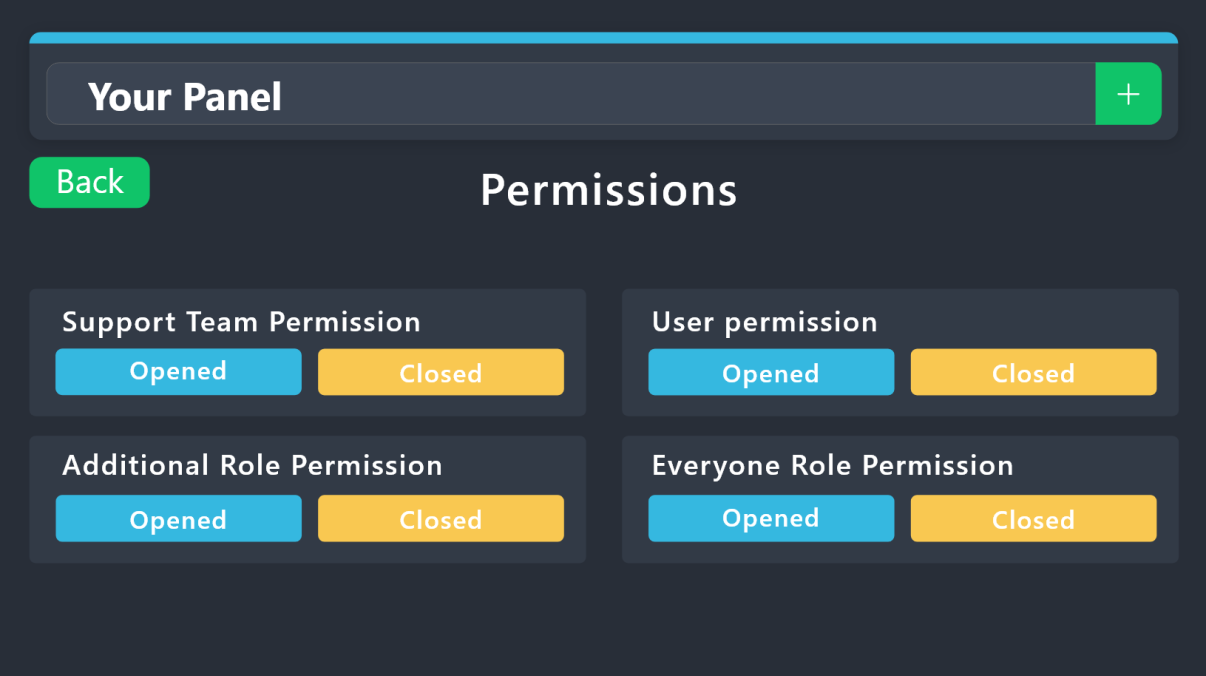
1. Go into your Dashboard
2. Open your Panel Configs tab
3. Select the panel you want to grant access to
4. Open the Permissions options menu
5. Find what role you'd like to edit permissions for
6. Choose if you'd like to edit opened or closed permissions for that role
7. Edit the permissions by tickingor unticking
each permission
8. Save changes
 civic wagon
sturdy glen
how to i select what roles can see the ticket
civic wagon
sturdy glen
how to i select what roles can see the ticket
Refer to the embed above ^
 cunning goblet
How do I change what it says when the ticket is made?
humble sequoiaBOT
The Ticket Message is the first message sent by the bot on a new ticket. To customize it head over to your Dashboard ➞ Panel Configs ➞ Ticket ➞ Edit Ticket Message
civic wagon
cunning goblet
How do I change what it says when the ticket is made?
Refer to the embed above ^
cunning goblet
Okay! Thanks
humble sequoiaBOT
@foggy whale, we would love to help you, but if you don't tell us what you need help with we can't help you :(
 civic wagon
 foggy whale
«Invalid emoji»
This means that you entered into an emoji field something that the bot doesn't recognize as a valid emoji.
Which emoji field? It depends on what's the action that causes the error message to appear. It's usually the Create Ticket button, or a dropdown emoji field if you're using dropdowns.
Why doesn't the bot accept it as valid? That depends too. It's possible that
- you wrote text there, instead of an emoji (or in addition to an emoji)
- you entered a custom emoji code incorrectly
- you entered a code for a custom emoji from a server that the bot is not a member of
- you're on iPhone and entered an emoji using the phone's emoji pad (use the emoji selector in the website instead)
foggy whale
How can i fix it
civic wagon
civic wagon
> **«Invalid emoji»**
>
> This means that you entered into an emoji field somet...
Please read this whole
civic wagon
Is this happening when you're trying to send a panel?
foggy whale
It happens when i push send
civic wagon
Could you please share a screenshot of the button emoji from the dashboard
foggy whale
i dont under stand, what emoji?
civic wagon
foggy whale
i dont under stand, what emoji?
Head over to Dashboard > Panel Configs > Buttons > Create Ticket > Edit Button and share a screenshot of that page
foggy whale
Shows this
 civic wagon
You need to remove the word Test from there since that field can only contain an emoji and not any text.
civic wagon
The Button Text field is where your "Test" goes rather than that long sentence
foggy whale
IT WORKS what text field?
 elfin breach
I want to have ticket categories, like: Billing, Report a user, Bug Reports, etc. So a ticket must be one of those, and a user can just click a button for those. I found this but theres only 1 button there and I cant see how to add more
 humble sequoiaBOT
For more convenient use of multipanels, you can now combine panels on the dashboard. This will allow you to directly send the multipanel from the dashboard or via the $panel ID command.
Where can I find this?
You can find this setting on the Dashboard -> Panel Configs -> Panel -> Attached Panels
Note: if you're attaching all the panels to a panel called English, don't include English in the attached panel's box (If you do this, it will create a duplicate)
This will put all buttons from all of your panels on one message. The message is the panel message from the panel you're combining these panels in.
civic wagon
elfin breach
I want to have ticket categories, like: Billing, Report a user, Bug Reports, etc...
Please refer to the embed above ^
elfin breach
civic wagon
Please refer to the embed above ^
How do I make the bot send the message with the buttons? so i can have it in my #rules channel
civic wagon
foggy whale
How to create a drop down box
Refer to the embed below.
humble sequoiaBOT
The Drop-down menu or Select Menu replaces the buttons on your panel message and uses a drop-down menu with all of your panels. To set this up, go to your Panel Configs and select your main Panel.
<:Numbericons1:1018864164032225340> Enable Select Style
First you enable Select Style. Then you add an item in the Dropdown Editor. Now you can start editing your dropdown!
<:Numbericons2:1018864168041971712> Dropdown Editor
Each line in the dropdown editor represents a line in the drop down menu on discord. You can add more "Items", by clicking on
First you select a panel. That's the panel this option will open a ticket for. DONT select the same panel twice. Each option should have a different Panel
After that, you can put a Display. This is the title of this option and will appear in the drop down menu. The *Description can be set right after that, which will be below the title in grey.
Additionally you can select an emoji, that will be shown in front of each option. You can either manually input the ID of an emoji or select it in the selector.
Common Issues ⚠️
- Panel doesn't send? Make sure you have a valid emoji selected
- Option doesn't show up? Check if two options have the same panel in the DropDown Editor
$dropdown
civic wagon
elfin breach
How do I make the bot send the message with the buttons? so i can have it in my ...
Do you want to display rules and such or users to create tickets?
elfin breach
i want the message from the bot, with the buttons, to be in my #rules channel for users to click on
civic wagon
And after clicking, they create a ticket?
elfin breach
yea
foggy whale
I dont under stand the drop down style
humble sequoiaBOT
1. Go into your Dashboard
2. Open your Panel Configs tab
3. Select the panel you want to send
4. Indicate to which channel it should be sent to
5. Send the panel
civic wagon
@elfin breach ^
elfin breach
ahh thanks
civic wagon
foggy whale
I dont under stand the drop down style
What exactly?
elfin breach
thanks @civic wagon
iron nightBOT
Gave +1 Rep to @civic wagon
foggy whale
civic wagon
What exactly?
I just have no clue...
civic wagon
humble sequoia
Try following the steps here, starting from Enabling Select Style.
If you're facing any issue specifically, you can let know here
You can find the option to enable Select Style from -
Dashboard > Panel Configs > Dropdown Style > Select Style
@foggy whale ^
civic wagon
humble sequoia
Read through the Dropdown Editor to get better understanding of it
 tranquil schooner
How much is the prime version?
gilded verge
tranquil schooner
How much is the prime version?
$5,99 /month
humble sequoiaBOT
 Faster Premium Bot
Automatic Transcripts
Full Customization
Direct Messages
Ticket Automation
Thread Style Ticketing
Premium Support
Scheduled Panel Availability
Integrations
You can purchase premium here:
Price
$6 - Monthly
$66 - Yearly
 Premium
jade topaz
Premium
jade topaz
Is there a way to make it so only a specific person can claim a certain ticket?
tranquil schooner
gilded verge
$5,99 /month
Credit?
 sudden stirrup
tranquil schooner
Credit?
sudden stirrup
tranquil schooner
Credit?
we don't Support Credit's This Coin To any Bot's we don't accepting , we accepting  PayPal,
  BTC or
  LTC Only
restive condor
jade topaz
Is there a way to make it so only a specific person can claim a certain ticket?
Hey there! Dashboard > Panel Configs > Buttons > Claim Ticket
jade topaz
Thank you
gilded verge
tranquil schooner
Credit?
im not sure what "credit" means but these are two ways to pay for premium:
1. if you want to buy via Discord, you can choose any method Discord allows you to
2.as one of the users said, possible with PayPal/BTC/LTC
 wild spire
please dont ping people
 north cobalt
okey
 lone summit
Is ticket tool down!??!?!
wild spire
I’m checking status atm.
Please give me a second but yeah it might be
jeeeep its glitching 
 warped hornet
💀

 jagged tundra
Same
jade topaz
warped hornet
💀
same
 royal plaza
warped hornet
💀
royal plaza
warped hornet
💀
Same
jagged tundra
Bot going haywire
 frail cloak
what is this ?

 onyx sedge
 lone summit

 honest prairie
It's a general problem they will fix it as soon as possible
sudden stirrup
lone summit
and me
 candid brook
lone summit
candid brook
lone summit
 tame notch
What's this?
royal plaza
tame notch
What's this?
We don't now
frail cloak
?
 marble berry
I came here for the same thing
tame notch
marble berry
I came here for the same thing
We all
jade topaz
WHAT IS GOING ON ??????????


 marble berry
what is ticket tool doing, he does this everywhere
royal plaza
Last 5 days Discord do a lot of trobles
tame notch
I think bot is hacked
onyx sedge

timber kernel
We are aware of the problem, we are already working on it.
jade topaz
tame notch
I think bot is hacked
crashed not hacked 0-0
sudden stirrup
honest prairie
It's a general problem they will fix it as soon as possible
i think this problem Only some servers experience
frail cloak
WTF
sudden stirrup
this crazy
iron nightBOT
Gave +1 Rep to @timber kernel

 urban robin
Hey ! What's happening ?
What's that message that Ticket Tool say for each message in a channel that isn't a Ticket Tool ticket ??
 wild spire
The developer is looking into the bot outage.
The System Failure message should be fixed soon.
 prime bridgeBOT
<:notallowed:660789872600285184> #🆘│community-support has been locked!
You will gain access again once the lockdown is lifted.
 scenic plinth
Hey everyone! We are aware of the bot being offline or spamming messages. Our developers are currently working to identify the issue and we will have updates when possible!
Please remember direct messaging team members during this time is prohibited. Refer to #📣│bot-news for updates.
While you wait, here is a Pikachu 
 solid stream
About two hours ago some of our servers went down due to a router issue from our hosting provider OVH.
After some time I've managed to get it fixed, everything should be online in the next 30-40 minutes.
scenic plinth
Both bots should be fully functional at this time. Please report any issues you are experiencing and our support team will assist you as soon as possible. Please do not ping or direct message them for any reason, especially as it is early in the morning for most of our team.
prime bridgeBOT
<:allowed:660789592647008258> #🆘│community-support has been unlocked!
Everyone now has access to this channel.
jade topaz
How do I change the name on my Ticket?
Hello!! May I privately speak to a moderator or anyone else who handles server bans? I couldn’t find a ban appeal form, but this is a more ‘special’ case anyway, and there isn’t a ticket category that really suits what I need. Dm me if possible, thanks!^^
civic wagon
jade topaz
Hello!! May I privately speak to a moderator or anyone else who handles server b...
You may create a report ticket from #🎫│make-a-ticket
jade topaz
ty! <3
 dreamy tiger
I bought a tickettool premium code, where do I put it to get it?
gilded verge
dreamy tiger
I bought a tickettool premium code, where do I put it to get it?
you bought premium via Upgrade button on Discord, right?


 sick gorge
Hi, question! I tried searching in the settings and on the wiki but I'm probably using the wrong terms/words. We run a ticket system for our MC discord to report stuff or request help, however people can just open 1 per time, I wanna set this higher, or unlimited even. Can someone point me in the right direction? I feel like its something so simple but I just didnt drink enough coffee 🙂
 solid wadi
gilded verge
dreamy tiger
I have reedem who can i invite
solid wadi
gilded verge
dreamy tiger
I have reedem who can i invite
ah that's what you meant...
since you redeemed key, you already have activated premium for your server, something is wrong?
solid wadi
gilded verge
solid wadi
<#755487432438448270>
that's not the question for support
dreamy tiger
@gilded verge
 gilded verge
please don't ping, just ask what you need
dreamy tiger
gilded verge
please don't ping, just ask what you need
I made redeem, but how do I get the premium boot?
humble sequoiaBOT
The first thing you will need to do is invite the premium bot, an invite can be found here
Once the bot is in your server we will head to the dashboard and manage your server. When you are managing your server, you want to head into "Server Configs" then click the drop down menu under "Select the bot you would like to use on this server" then click "Ticket Tool#6207" and then save.
 dreamy tiger
Where is the costume of the list
pseudo ravine
sick gorge
Hi, question! I tried searching in the settings and on the wiki but I'm probably...
Hey there. Is it the same panel that they’re getting the error message?
sick gorge
Yes lemme get the error!
pseudo ravine
I know what the error is, I just want to know the context
gilded verge
dreamy tiger
Where is the costume of the list
i don't understand what you mean but...
in server settings you can change to premium bot and invite
 pseudo ravine
sick gorge
Yes lemme get the error!
pseudo ravine
sick gorge
Yes lemme get the error!
Go to the Dashboard > Panel Configs > Limits > Tickets Open > Open tickets each user > Increase the amount
sick gorge
Omg amazing! See i knew it was somewhere so simple i just couldnt find it! Thank you!
dreamy tiger
Where @gilded verge
 pseudo ravine
sick gorge
Omg amazing! See i knew it was somewhere so simple i just couldnt find it! Thank...
pseudo ravine
sick gorge
Omg amazing! See i knew it was somewhere so simple i just couldnt find it! Thank...
You’re welcome, glad I could help. If you have any other questions/issues, don’t hesitate to reach out again
gilded verge
dreamy tiger
Where <@334671104704774154>
please check again because it's there where you are now
but if you don't see it, change your browser 🤔
 gilded verge
probably missing permission, please run /debug on your server *with premium bot
dreamy tiger
Look
 gilded verge
are you sure you switched to premium bot?

 gilded verge
dreamy tiger
Can you help me to change avatar bot <@334671104704774154>
gilded verge
dreamy tiger
Can you help me to change avatar bot <@334671104704774154>
whitelabel is not available yet and please stop pinging
 smoky shoal
someone kicked the premium bot now cuz of that incident
how do i reinvite premium bot?
humble sequoiaBOT
The first thing you will need to do is invite the premium bot, an invite can be found here
Once the bot is in your server we will head to the dashboard and manage your server. When you are managing your server, you want to head into "Server Configs" then click the drop down menu under "Select the bot you would like to use on this server" then click "Ticket Tool#6207" and then save.
 wicked stag
why when sombody open ticket in my server they dont have permision to see the message history
?
gilded verge
wicked stag
why when sombody open ticket in my server they dont have permision to see the me...
Panel Configs->Permissions->Edit opened Ticket Owner Permissions->there you can set
wicked stag
gilded verge
Panel Configs->Permissions->Edit opened Ticket Owner Permissions->there you can ...
thx
iron nightBOT
Gave +1 Rep to @gilded verge
dreamy tiger
Who can i get anther botten @gilded verge
 jade topaz
brought my first premium waiting for the billing team so happy !
jade topaz
gilded verge
i don't understand your question, try again
not 2 interrupt or be rude, but i don’t think they speak very good english
teal grail
dreamy tiger
Who can i get anther botten <@334671104704774154>
Did you want another button?
dreamy tiger
Yep
dreamy tiger
Arbic
teal grail
إنشاء لوحة تحكم أخرى
dreamy tiger
كيف اضيف لها زر ثاني
teal grail
teal grail
إنشاء لوحة تحكم أخرى
.
dreamy tiger
من موقع ولا من ديسكورد
teal grail
موقع
 dreamy tiger
 teal grail
اختر اسمًا
teal grail
teal grail
الآن تكوين في خيار التذكرة
.
 dapper bramble
Hey guys, I paid for premium already and invited the premium bot but why it asking for requires premium from dashbpard
 dreamy tiger
 teal grail
How come you still don't have the premium position?
teal grail
dreamy tiger
هل قمت بتكوين نفسك في خيار التذكرة؟
dreamy tiger
teal grail
هل قمت بتكوين نفسك في خيار التذكرة؟
لا
 sour pond
اقدر غير صورة التيكت بريميوم ؟ @teal grail
pseudo ravine
dapper bramble
Hey guys, I paid for premium already and invited the premium bot but why it aski...
Hey there. Could you go into the dashboard and send a screenshot of the premium status?
dreamy tiger
sour pond
اقدر غير صورة التيكت بريميوم ؟ <@712689282413756417>
شتسوي هنا
teal grail
dreamy tiger
لا
لذلك تكوين
sour pond
dreamy tiger
شتسوي هنا
مايردون تيكت
dapper bramble
pseudo ravine
Hey there. Could you go into the dashboard and send a screenshot of the premium ...
 sour pond
teal grail
لا
sour pond
teal grail
لا
ليه اذكر اني قريتها بالمزايا
pseudo ravine
dapper bramble
Did you buy through Discord?
teal grail
sour pond
ليه اذكر اني قريتها بالمزايا
حسنًا ، سأرى ولكني لا أعتقد ذلك
dapper bramble
teal grail
How come you still don't have the premium position?
Only owner of server or the person who bought premium will get premium role here?
pseudo ravine
Anyone who manages a server that has premium gets the role
dapper bramble
pseudo ravine
Did you buy through Discord?
Not me server owner did. I am Admin and manager there
teal grail
dapper bramble
Only owner of server or the person who bought premium will get premium role here...
Yee
pseudo ravine
dapper bramble
Not me server owner did. I am Admin and manager there
But the subscription was bought through Discord?
dapper bramble
pseudo ravine
But the subscription was bought through Discord?
Exactly thru discord
pseudo ravine
Is @humble sequoia in the server?
dapper bramble
pseudo ravine
Is <@722196398635745312> in the server?
Yes
dreamy tiger
@teal grail
 teal grail
sour pond
ليه اذكر اني قريتها بالمزايا
teal grail
sour pond
ليه اذكر اني قريتها بالمزايا
هذا غير ممكن ، لكن يمكنك إضافته إلى الاقتراحات _ #💡│suggestions
teal grail
dreamy tiger
<@712689282413756417>
"Attached Panels"
dreamy tiger
 pseudo ravine
dapper bramble
Yes
pseudo ravine
dapper bramble
Yes
It seems like Ticket Tool did not find a server that has premium. Are you 100% sure Premium Ticket Tool is in the server?
teal grail
dreamy tiger
لكن انتقل إلى اللوحة حيث تريد إضافة الزر
dapper bramble
pseudo ravine
It seems like Ticket Tool did not find a server that has premium. Are you 100% s...
Yes
dapper bramble
pseudo ravine
It seems like Ticket Tool did not find a server that has premium. Are you 100% s...
Status changed now
 pseudo ravine
Great
 lunar parrot
Is there a way to bypass channel/thread creation and instead post as a message into a given channel?
pseudo ravine
Hey there. Could you elaborate a bit more?
dapper bramble
Hey guys would help me with this?
From which option I can set multi tickets under same panel like this
Multipanel form tickets

 humble sequoiaBOT
The Drop-down menu or Select Menu replaces the buttons on your panel message and uses a drop-down menu with all of your panels. To set this up, go to your Panel Configs and select your main Panel.
<:Numbericons1:1018864164032225340> Enable Select Style
First you enable Select Style. Then you add an item in the Dropdown Editor. Now you can start editing your dropdown!
<:Numbericons2:1018864168041971712> Dropdown Editor
Each line in the dropdown editor represents a line in the drop down menu on discord. You can add more "Items", by clicking on
First you select a panel. That's the panel this option will open a ticket for. DONT select the same panel twice. Each option should have a different Panel
After that, you can put a Display. This is the title of this option and will appear in the drop down menu. The *Description can be set right after that, which will be below the title in grey.
Additionally you can select an emoji, that will be shown in front of each option. You can either manually input the ID of an emoji or select it in the selector.
Common Issues ⚠️
- Panel doesn't send? Make sure you have a valid emoji selected
- Option doesn't show up? Check if two options have the same panel in the DropDown Editor
$dropdown
lunar parrot
pseudo ravine
Hey there. Could you elaborate a bit more?
I'd like to bypass creating a channel, and instead have one channel where tickettool responds with a new message. The goal is to use tickettool to duplicate the information into Jira via the embed message. The service I'm using just looks at message in one channel and not categories.
pseudo ravine
and instead have one channel where tickettool responds with a new message.
For what exactly?
 uncut wren
Failed: Invalid Form Body components[0].components[0].emoji.name[BUTTON_COMPONENT_INVALID_EMOJI]: Invalid emoji
pseudo ravine
You already have a support ticket open, stay in there
uncut wren
pseudo ravine
You already have a support ticket open, stay in there
I'll ask extra
i'm on pc and it gives me this message
pseudo ravine
You already created a ticket, wait there until a support member can assist you
 nimble nest
Anyone what on earth this might mean?
 pseudo ravine
Hey there. There was an issue earlier that was resolved, you may delete the message from your server
lunar parrot
pseudo ravine
> and instead have one channel where tickettool responds with a new message.
For...
This isn't with a sassy tone, but the goal is to use tickettool to duplicate the information into Jira via the embed message. I'm not sure how to rephrase this. :/
pseudo ravine
Yeah, like I said earlier, I'm pretty sure this isn't possible unfortunately
lunar parrot
pseudo ravine
Yeah, like I said earlier, I'm pretty sure this isn't possible unfortunately
was this directed to me? I'm not seeing that message
pseudo ravine
Oh sorry, I thought I sent the message, but it was only in my head 😭
lunar parrot
I need tickettool to put the response in one channel, as a message, rather than creating a new channel with a new message.
in the same way it responds in a channel with the trasnscript
pseudo ravine
But yes, that's not possible unfortunately. It has to be in a newly created channel
lunar parrot
even if I set the name of the channel to the same channel?
can I ask what happens when I have a distinct same of channel?
instead of {user} - {COUNT} ?
pseudo ravine
All new created tickets are channels, even if there is a channel with the same name
lunar parrot
pseudo ravine
All new created tickets are channels, even if there is a channel with the same n...
I forgot to say:
Thanks @pseudo ravine
iron nightBOT
Gave +1 Rep to @pseudo ravine
pseudo ravine
You're welcome, glad I could help. If you have any other questions/issues, don't hesitate to reach out again
 rustic gale
jade topaz
this keeps popping up
rustic gale
jade topaz
this keeps popping up
It's happening right now?
jade topaz
yes today
rustic gale
How long ago?
rustic gale
When was the last one?
jade topaz
well 3 happened at 10:57am in the pic. It's 17:44pm atm
rustic gale
Then it's nothing to worry about
There was a glitch
The developer solved it
It shouldn't happen again
jade topaz
ah thank god
 blissful grove
hi how do you make it so people with certain roles can open tickets but not everyone?
pseudo ravine
Hey there. You can go to the Dashboard > Panel Configs > Buttons > Create Ticket > Allowed Roles & Disabled Roles
iron nightBOT
Gave +1 Rep to @pseudo ravine
pseudo ravine
You’re welcome, glad I could help. If you have any other questions/issues, don’t hesitate to reach out again
blissful grove
1 more question. 1. Can you make the bot auto send the transcript without premium?
pseudo ravine
No, that requires premium
iron nightBOT
Gave +1 Rep to @pseudo ravine
pseudo ravine
You’re welcome, glad I could help. If you have any other questions/issues, don’t hesitate to reach out again
dreamy tiger
.
 celest turret
fallow ingot
celest turret
fallow ingot
You can use the /purge command (server owner only)
 restive flame
How do I cancel the subscription?
 naive ridge
Hey, in logging ticket created, message contains only username, not dc id, can we activate it or is there not this feature, if not, it would be great if you add it.
 stray bobcat
@restive flame
humble sequoiaBOT
<:TicketToolOffline:1018980643092312155> Cancel your subscription
We're sorry to see you go!
To cancel your Ticket Tool Premium Subscription, just head over to your User Settings in Discord, then Subscriptions. Look for Premium Apps and click on Manage Subscriptions. There you can cancel your subscription at the end of your billing cycle.

User Settings > Subscriptions > Premium Apps > Manage Subscriptions > Cancel
The Ticket Message is the first message sent by the bot on a new ticket. To customize it head over to your Dashboard ➞ Panel Configs ➞ Ticket ➞ Edit Ticket Message
- Note: Remove the ! from all of the variables for proper work
{!server.name} ➞ Name of the server
{!server.id} ➞ ID of the Server
{!server.icon} ➞ Direct URL to the Server's Icon
{!server.banner} ➞ Direct URL to the Server's banner, if available

{!channel} = <#channel> ➞ Channel link of the current channel
{!channel.name} ➞ Name of the current channel
{!channel.id} ➞ ID of the current channel

{!author} = <@user> ➞ Mention of the user triggering this message
{!author.name} ➞ Name of the user triggering this message
{!author.id} ➞ ID of the user triggering this message
{!author.nickname} ➞ Nickname of the user triggering this message
{!author.icon} ➞ Direct Url of the profile picture of the user triggering this message
{!author.tag} ➞ 4 digit tag (discriminator) of the user triggering this message
{!author.full} ➞ username + 4 digit discriminator of the user triggering this message```
```diff
- Note: The variables below are meant to be used within ticket messages, or tags triggered within tickets
{!panel.count} ➞ The current count number of the panel
{!panel.name} ➞ The name of the panel
{!panel.ticketLimit} ➞ The current limit of the panel

{!ticket} = <#channel> ➞ Channel mention of the ticket
{!ticket.id} ➞ Channel ID of the ticket

{!ticket.user} = <@user> ➞ User mention of the ticket user
{!ticket.user.name} ➞ Name of the ticket user
{!ticket.user.id} ➞ User ID of the ticket user
{!ticket.user.nickname} ➞ Nickname of the ticket user
{!ticket.user.icon} ➞ Direct Url of the profile picture of the ticket user
{!ticket.user.tag} ➞ Tag / Discriminator of the ticket user
{!ticket.user.full} ➞ Username + Discirimator of the ticket user```
_ _
_ _
Additional variables
Roles can be either
{@role name} or {role ID}
{create.reason}
{claim.reason}
{close.reason}
{delete.reason}
» Reasons for a given action
Transcript Variables
{!ticket_name}➞ Name of the ticket
{!panel_name}➞ Name of the panel
{!transcript_url}➞ File link of the transcript
Hide Link under blue text:
[Click me](https://tickettool.xyz)➞ Click me
Time Variable
Sends the current unix time in seconds. Optionally add or remove seconds
<t:{!time?m=+43200}:R>➞ <t:1690538760:R>
<t:{!time?m=-43200}:R>➞ <t:1690452360:R>
<t:{!time}:R>➞ <t:1690495560:R>
_ _
<t:1641006000>➞ <t:1641006000>
<t:1641006000:f>➞ <t:1641006000:f>
<t:1641006000:F>➞ <t:1641006000:F>
<t:1641006000:D>➞ <t:1641006000:D>
<t:1641006000:d>➞ <t:1641006000:d>
<t:1641006000:t>➞ <t:1641006000:t>
<t:1641006000:T>➞ <t:1641006000:T>
<t:1641006000:R>➞ <t:1641006000:R>
» You can use https://hammertime.djdavid98.art/ to create custom dates/times
jade topaz
is there any guide on custom commands how to use it? like maybe a video guide or anything
restive flame
stray bobcat
<@381885417194127380>
ty
iron nightBOT
Gave +1 Rep to @stray bobcat
 green citrus
if i wanted to rename the ticket once the command is ran how?
 jade topaz
green citrus
if i wanted to rename the ticket once the command is ran how?
jade topaz
green citrus
if i wanted to rename the ticket once the command is ran how?
why aren't these parts comming up when using the command in my discord?

owh, no field title that might be it
 cedar folio
Hello
humble sequoiaBOT
Custom Commands
Custom Commands are used to send a predefined response to your channels. Commands will only respond if the command itself is used, it will not function if you put the tag into a sentence.
To create commands, go to: Dashboard > Custom Commands > New. After creating and naming one, you can edit the command trigger and behaviors. Tap on the edit message button to edit the response of the command.
 pseudo ravine
@jade topaz Read this ^
pseudo ravine
green citrus
if i wanted to rename the ticket once the command is ran how?
Hey there. Unfortunately you cannot change ticket names when using custom commands. You will need to use the /rename command
 queen prawn
How can I do ticket channel
pseudo ravine
Hey there. Are you referring to sending the panel into the channel?
pseudo ravine
cedar folio
Hello
Hey there. Did you need any Ticket Tool support?
queen prawn
pseudo ravine
Hey there. Are you referring to sending the panel into the channel?
Like make a ticket
A Chanel
pseudo ravine
In your server?
queen prawn
Yes
humble sequoiaBOT
First you will want to invite the bot to your server. Once the bot is in your server, you can manage your server in the dashboard.
To create a panel we are going to need to head over to the Panel Configs Tab on the Dashboard.
Once at the dashboard we will need to click Create Panel.
Enter a panel name (Fill in any optional settings you want).
Click Create Panel and you are ready to get started with configuring your panel.
An example of a creating a panel is shown below.
Once the panel has been created, use the blue Send button and select the channel you want the panel to be sent to.
The Panel wasn't send
Use the </debug:ID> command to diagnose possible permission issues with the bot.
pseudo ravine
Make sure Ticket Tool is setup first ^
pseudo ravine
To create a ticket?
queen prawn
Yes
pseudo ravine
You will just need to click on the Create ticket button
queen prawn
No how to start then if I’m done with set up
pseudo ravine
If you want to create a ticket on someone's behalf, you can run the /new command
queen prawn
Like make a ticket
pseudo ravine
Yes, just click on the Create ticket button and Ticket Tool will create a ticket
pseudo ravine
No
 foggy lava
hi, is it possible when someone open a ticket make a sequence of questions every time there is an answer?
civic wagon
foggy lava
hi, is it possible when someone open a ticket make a sequence of questions every...
It'll be somewhat difficult to achieve if you want this to be automatic + it requires premium.
However you can make custom commands on Ticket Tool. Though that'll require someone to send those commands in the ticket whenever there's an answer.
humble sequoiaBOT
Custom Commands
Custom Commands are used to send a predefined response to your channels. Commands will only respond if the command itself is used, it will not function if you put the tag into a sentence.
To create commands, go to: Dashboard > Custom Commands > New. After creating and naming one, you can edit the command trigger and behaviors. Tap on the edit message button to edit the response of the command.
 sage ferry
Hey guys. For some reason my ticket tool stopped moving closed tickets to closed tickets category this morning
It renames them to closed though... any idea what's up?
timber kernel
sage ferry
It renames them to closed though... any idea what's up?
How many tickets you have atm in the closed category?
sage ferry
A lot.
timber kernel
50 is the limit by Discord.
More is not possible and the bot can not move it.
You can configure a second category. Then it will use this if the first is full.
iron nightBOT
Gave +1 Rep to @timber kernel
timber kernel
 serene frigate
Hello what command to create ticket tool?
humble sequoiaBOT
First you will want to invite the bot to your server. Once the bot is in your server, you can manage your server in the dashboard.
To create a panel we are going to need to head over to the Panel Configs Tab on the Dashboard.
Once at the dashboard we will need to click Create Panel.
Enter a panel name (Fill in any optional settings you want).
Click Create Panel and you are ready to get started with configuring your panel.
An example of a creating a panel is shown below.
Once the panel has been created, use the blue Send button and select the channel you want the panel to be sent to.
The Panel wasn't send
Use the </debug:ID> command to diagnose possible permission issues with the bot.
civic wagon
serene frigate
Hello what command to create ticket tool?
Please refer to the embed above ^
serene frigate
Oh so it's in your link?
serene frigate
civic wagon
Please refer to the embed above ^
Do you get paid for this?
civic wagon
serene frigate
Oh so it's in your link?
Pardon?
civic wagon
serene frigate
Do you get paid for this?
huh?
serene frigate
civic wagon
huh?
Do you get paid for being moderator?
civic wagon
No, it's a volunteer position.
iron nightBOT
Gave +1 Rep to @civic wagon
jade topaz
comment on n'a une fennec gratuit
 robust sandalBOT
jade topaz
comment on n'a une fennec gratuit
robust sandalBOT
jade topaz
comment on n'a une fennec gratuit
How you don't have a free Fennec
 French (fr) → English (en)
 lethal vigil
Hello there
how do I make it so specific ticket types via dropdown open in specific folders
civic wagon
Do you have the dropdown set?
lethal vigil
Yeah
humble sequoiaBOT
1. Go into your Dashboard
2. Open your Panel Configs tab
3. Select the panel you want to grant access to
4. Open the Category options menu
5. Select the categories of your preference
6. Save changes
civic wagon
lethal vigil
Yeah
Refer to the embed above ^
lethal vigil
How do I do the third step
like how do I go to the specific panel settings
and then make specific support roles and category for it
civic wagon
Panel Configs > Selecting the panel from the drop-down
 lethal vigil
oh, thanks so much didn't saw that lol
also, one more question
how do I make it without the embed, and for it not to say general support

but only a dropdown
 pseudo ravine
Hey there. Hold your cursor over the embed message, you should be able to see an X to the side, click that and it’ll remove the embed
humble sequoiaBOT
The Drop-down menu or Select Menu replaces the buttons on your panel message and uses a drop-down menu with all of your panels. To set this up, go to your Panel Configs and select your main Panel.
<:Numbericons1:1018864164032225340> Enable Select Style
First you enable Select Style. Then you add an item in the Dropdown Editor. Now you can start editing your dropdown!
<:Numbericons2:1018864168041971712> Dropdown Editor
Each line in the dropdown editor represents a line in the drop down menu on discord. You can add more "Items", by clicking on
First you select a panel. That's the panel this option will open a ticket for. DONT select the same panel twice. Each option should have a different Panel
After that, you can put a Display. This is the title of this option and will appear in the drop down menu. The *Description can be set right after that, which will be below the title in grey.
Additionally you can select an emoji, that will be shown in front of each option. You can either manually input the ID of an emoji or select it in the selector.
Common Issues ⚠️
- Panel doesn't send? Make sure you have a valid emoji selected
- Option doesn't show up? Check if two options have the same panel in the DropDown Editor
$dropdown
pseudo ravine
Also, please don’t mention anyone for support
 low mortar
I can't find the ''Dropdown Style''
pseudo ravine
It’s the 3rd one under Panel Settings
low mortar
Thank you so much, i found it.
pseudo ravine
You’re welcome, glad I could help. If you have any other questions/issues, don’t hesitate to reach out again
 spring thistle
how to delete the timeout from channel being renamed too quickly
pseudo ravine
Hey there. You cannot remove the timeout, it's due to Discord ratelimits
pseudo ravine
No, there is no way you can remove the timeout
spring thistle
ight, how i make the ticket owner cant close the ticket?
pseudo ravine
You can go to the Dashboard > Panel Configs > Buttons > Close Ticket > Support Team Only > Make sure it's
 gleaming vine
If a server has disabled their ticket transcripts being sent in DMs to the ticket opener (or if a person has their direct messages disabled), can the ticket opener still find their transcript somehow/somewhere?
civic wagon
gleaming vine
If a server has disabled their ticket transcripts being sent in DMs to the ticke...
Nope. Unless a staff member provides it to them.
or they have access to the transcript channel but that's something you wouldn't want i guess
gleaming vine
civic wagon
*or* they have access to the transcript channel but that's something you wouldn'...
Not a good idea to do yeah. Thanks.
lunar parrot
Is there a place in the Dashboard to see any currently open tickets? Or is it reliant on them being in just a category?
pseudo ravine
Hey there. It's reliant on them being in the category
lunar parrot
thanks @pseudo ravine
iron nightBOT
Gave +1 Rep to @pseudo ravine
pseudo ravine
You're welcome, glad I could help. If you have any other questions/issues, don't hesitate to reach out again
humble sequoiaBOT

Ticket Tool - Ticketing without clutter - The #1 discord Ticketing bot
jade topaz
hi how do i mention a role when i open a ticket
humble sequoiaBOT
Within all the messages the bot sends (both embeds and text) you can mention either channels, roles, or even users, these mentions will only send a notification to the user if they are used within a text field, e.g: a role mentioned in an embed won't ping at all the users who have that role.
For mentioning a role you can use one out of three options:
{@Role Name} ➞ Which is Case Sensitive.
{RoleID} ➞ Replace RoleId with the Id of the role you are trying to ping.
<@&RoleID> ➞ Discord's native syntax to ping roles.
<#ChannelID> ➞ Mention a channel by its ID.
<@UserID> ➞ Mention a user by its ID.
civic wagon
jade topaz
hi how do i mention a role when i open a ticket
Use the role mention format from the above embed and put it in your Ticket Message
jade topaz
Hello, email support is not responding. I want to delete my account, the account was opened by the studio, I don’t know the email and password from which the account was opened, but I can provide a photo with a face and documents to prove that it’s me
civic wagon
@primal dune please do not share personal information. We do not require any of it.
civic wagon
jade topaz
Hello, email support is not responding. I want to delete my account, the account...
This is Ticket Tool Support. We cannot help you with your issue.
jade topaz
what to do where else can i write to close my account soda
civic wagon
We do not know. But this isn't the place for it.
 finite lagoon
toda vez que vou criar um painel para colocar tickets no servidor, eu clico no servidor que eu quero adicionar mas a janela "atualizou" e depois continuou na mesma coisa (não consigo abrir um painel)
robust sandalBOT
finite lagoon
toda vez que vou criar um painel para colocar tickets no servidor, eu clico no s...
Every time I create a dashboard to put tickets on the server, I click on the server I want to add but the window "refreshed" and then continued on the same thing (I can't open a dashboard)
Portuguese (pt) → English (en)
 noble flame
hey! how can I add a role (on the dashboard) so they can see tickets that are closed?
civic wagon
noble flame
hey! how can I add a role (on the dashboard) so they can see tickets that are cl...
Is the role added in Support Team?
In any case, you can manage these permissions from -
Dashboard > Panel Configs > Permissions
noble flame
Oh my gosh...
didn't remember it was that easy, thank you! The thing is I didn't remember how to, since I configured it a long time ago
civic wagon
@finite lagoon Only server administrators or roles with dashboard permissions can access the dashboard. Ask your server admin to add your role under Dashboard Roles. This can be done by -
Dashboard > Server Configs > Dashboard Roles
finite lagoon
civic wagon
<@1056307911002963978> Only server administrators or roles with dashboard permis...
eu tenho o mesmo cargo do dono do servidor
robust sandalBOT
finite lagoon
eu tenho o mesmo cargo do dono do servidor
I have the same position as the server owner
Portuguese (pt) → English (en)
noble flame
noble flame
didn't remember it was that easy, thank you! The thing is I didn't remember how ...
Well, just one more thing, please. I have two roles in the "support team roles" section, but I just want one of them to have the permissions to see closed tickets. Is there a way to do that? (with exclusively one of them)
rustic gale
finite lagoon
eu tenho o mesmo cargo do dono do servidor
You don't.
Tell the server owner to make a dashboard role for you.
humble sequoiaBOT
Any role you put there will have full access to the ticket tool dashboard. The server owner and users with admin permissions already have access to the dashboard.
Be careful of which roles to put here
rustic gale
noble flame
Well, just one more thing, please. I have two roles in the "support team roles" ...
Make one of them an additional role instead
 hollow reef
Hello. Could you please explain me, why can I not change the panel message?
 hollow elm
Hello. New here, but not really new to the tool. I am having an issue where I am not able to get into the "Manage" panel for a server that I have confirmed I have "Manage Server" permission on. It is in my dashboard as a server with Ticket Tool, and the tool is in the server with its custom permissions role. It just redirects me back to the manage-servers page.
civic wagon
hollow reef
Hello. Could you please explain me, why can I not change the panel message?
Panel raw message is a premium only feature. You should be able to edit the embed description however
civic wagon
hollow elm
Hello. New here, but not really new to the tool. I am having an issue where I am...
Make sure your role is under the dashboard roles.
Dashboard > Server Configs > Dashboard Roles
A server admin should be able to add it there
hollow elm
Sounds good. Thank you!
 slim sail
@mystic hound
if I buy a "premium" membership with the Ticket Tool bot and configure the ticket on my server with the Premium benefits once it isif I purchase a "premium" membership with the Ticket Tool bot and set up the ticket on my server with the Premium benefits once myif I purchase a "premium" membership with the Ticket Tool bot and set up the ticket on my server with the Premium benefits once my "premium" expires The ticket already placed on my server will continue with the Premium configuration?
rustic gale
slim sail
<@413723907619684352>
Don't ping staff
rustic gale
slim sail
if I buy a "premium" membership with the Ticket Tool bot and configure the ticke...
When you lose premium the premium features will become disabled.
slim sail
rustic gale
Don't ping staff
Oh ok sir, sorry