#🆘│community-support
1 messages · Page 38 of 1
 peak crescent
 gray stirrup
Just delete all of your panels, should be a red button labeled "Delete"
peak crescent
gray stirrup
Just delete all of your panels, should be a red button labeled "Delete"
oh right, I'll check
 ebon belfry
how do i get the bot to ping staff roles everytime someone opens a ticket?
 humble sequoiaBOT
Within all the messages the bot sends (both embeds and text) you can mention either channels, roles, or even users, these mentions will only send a notification to the user if they are used within a text field, e.g: a role mentioned in an embed won't ping at all the users who have that role.
For mentioning a role you can use one out of three options:
{@Role Name} ➞ Which is Case Sensitive.
{RoleID} ➞ Replace RoleId with the Id of the role you are trying to ping.
<@&RoleID> ➞ Discord's native syntax to ping roles.
<#ChannelID> ➞ Mention a channel by its ID.
<@UserID> ➞ Mention a user by its ID.
 lunar solar
@ebon belfry ^
 round falcon
More specifically, go into panel configs, "ticket", "Message ticket", and put that role mention into the "Message content" spot it's the big part at the top, not in "embed editor"
 round falcon
Is that the preview? It won't show up in the preview
ebon belfry
 ebon belfry
round falcon
Is that the preview? It won't show up in the preview
ebon belfry
round falcon
Is that the preview? It won't show up in the preview
wym preview?
o ye thats the preview
round falcon
Nevermind not the preview, if you're doing that type then you need to use <>, not {}
{} is if you're doing numbers only
ebon belfry
ahhhh ok
round falcon
Try that out and it should work
ebon belfry
worked thanks
round falcon
Sure thing
round falcon
You need to be in developer mode on discord
Go into your settings, go to advanced, enable developer mode
Your rank/permissions/owner status has nothing to do with it
ebon belfry
ty also is there a way to log scripts i wanna keep track of how my mods are doing
round falcon
Uh yeah you can go into the transcripts section and do what you want from there
Just select a channel to log them to and you can go back to view them any time
ebon belfry
ight bet
round falcon
Yep yep
 keen lava
Hello! Is there a command to see effective people in a channel?
Seems like sometimes when I remove a role there are still people in the ticket, even though there is no other roles attached to it that they have.
round falcon
Remove a role from what? The bot's config or the channel itself
I may have to go before I can fully answer you, if so I apologize
@keen lava
keen lava
All good @round falcon from the ticket itself
I use $remove <role> but they can still be in it for some reason
round falcon
keen lava
Hello! Is there a command to see effective people in a channel?
To answer this part no, you can check the channel's permissions setting to see exactly what the channel is doing. That may give a bit more insight on what the issue is
keen lava
Gotcha, thank you!
round falcon
keen lava
I use $remove <role> but they can still be in it for some reason
I recommend using /remove, more reliable I think, also if they have two roles that are allowed into tickets then you may have to remove both
keen lava
That's the weird part, pretty sure they don't but I will double check
round falcon
What's the exact context? Why are you removing a specific role manually?
keen lava
(not my discord server)
But essentially players open tickets for a group to apply, but sometimes we use the tickets for other reasons
Certain people need to be removed from specific types of tickets due to the nature of the ticket
We are in the process of trying to get the administrators to revamp the ticket system
round falcon
I see, well you can use the multipanel feature to make more specific tickets, it would add multiple buttons that can have different permission based tickets depending on the button pressed
It's what my network uses, could be useful for you too
keen lava
Absolutely, would love if they would move over to the multipanel
it is very helpful. I will see if I can convince them lol
round falcon
Sounds good, it's as easy as copy/pasting the one panel they already have, modifying the messages and permissions, and attaching it to the main one
Not quite sure why /remove isn't working for you, the permission settings of the channel could show you what's happening, but I recommend multipanel or just making more ticket types in general
 abstract socket
How much is premium
 prime trail
Hello
 hot sage
Hi
 gilded verge
abstract socket
How much is premium
gilded verge
abstract socket
How much is premium
5,99$
humble sequoiaBOT
 Faster Premium Bot
Automatic Transcripts
Full Customization
Custom Buttons
Direct Messages
Ticket Automation
Premium Support
Scheduled Panel Availability
Integrations
You can purchase premium here:
Price
$6 - Monthly
$66 - Yearly
 Premium
 stiff anvil
Small question, I've made a form.
How do I display it in the ticket opened?
Currently, it just sends the message ticket, with nothing else.
Ah nevermind, had to enable this.

 trim iron
Hi
I recently paid foor contract deployement and after paying 0.1ETH as fees, it shows payment is successful but i have to start deploying again
Kindly help with the matter''
 trim iron
Yo? Anyone there from community support?
 timber kernel
stiff anvil
Whatever that means, anyway I keep getting this error:
timber kernel
stiff anvil
Whatever that means, anyway I keep getting this error:
Please run $debug in the support channel on your server, so we can check permissions.
There is no outage at the moment of ticket tool.
timber kernel
trim iron
Yo? Anyone there from community support?
Yes Hello 👋
stiff anvil
timber kernel
Please run $debug in the support channel on your server, so we can check permiss...
timber kernel
stiff anvil
https://discordapp.com/channels/509192800865353738/662692902245498910/1082568604...
This looks fine. Please open a ticket via #🎫│make-a-ticket
We need to investigate it further.
About what exactly you are talking?
We don't offer contract deployment. This is the support server for the Ticket Tool Bot.
trim iron
timber kernel
About what exactly you are talking?
We don't offer contract deployment. This is...
Nft-Inator sent me to your server. Seems like there's a confusion
humble sequoiaBOT

⚠️ You're in the wrong place
We provide support for Ticket Tool Discord bot and cannot help you with whatever issue you have.
- We don't know which Support Team you should contact to get this issue resolved, and unfortunately we won't be able to accurately tell you.
If you don't have any further questions regarding our bot Ticket Tool, please close this ticket
timber kernel
trim iron
Nft-Inator sent me to your server. Seems like there's a confusion
True. You are wrong here. We cannot help you with your issue. Sry.
trim iron
timber kernel
True. You are wrong here. We cannot help you with your issue. Sry.
Oh, I see. Thanks for your time though!
 iron nightBOT
Gave +1 Rep to @timber kernel
 winter stag
Hey, I am using tickettool for an educational use-case: students ask for help with a problem by opening a ticket and a support agent comes to help them. I am interested in collecting the data from what students fill out in the form to be able to track the frequency and types of problems they are having. Does anyone know the best/easiest way to do this?
 somber meteor
hey just wondering if anyone here knows if it's possible to get information from the form response and then parse that to do things like add a user, i'm code savvy but can't seem to find a variable anywhere that references forms or their responses
 jade topaz
somber meteor
hey just wondering if anyone here knows if it's possible to get information from...
jade topaz
somber meteor
hey just wondering if anyone here knows if it's possible to get information from...

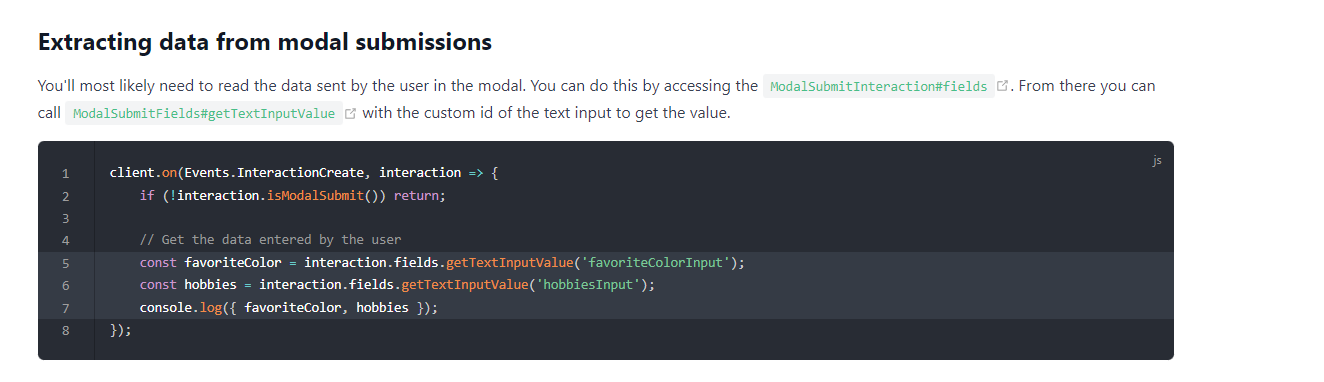
Imagine a guide... that explores the many possibilities for your discord.js bot.
should contain all you want to know
 somber meteor
how would apply that to the ticket message
can this code be run directly from the ticket message or will it require a custome command
somber meteor
so it looks like the getTextInputValue funtion has to take in a Id of type string, what would that be for the ticket bots form just "form1"?
or would that be the Questions title
 weary lynx
how do i select the place where ticket channel appears
somber meteor
panel configs > Category
weary lynx
how to ping a role when someone opens a ticket
round falcon
round falcon
More specifically, go into panel configs, "ticket", "Message ticket", and put th...
Right here my guy
weary lynx
thanks
round falcon
Of course
somber meteor
while your here @round falcon mind helping me with my issue haha
round falcon
What's up
somber meteor
trying to read the string vaule of the form response and then parse that as a tagable username either from Id or string match to make it easier for the officers in my channel to without needing to use slash commands
essential they hit create and then the enter the UserId or the user name and the ticket adds that person
round falcon
I don't think that's a possible thing currently
round falcon
Not that I know of, either way you can't run commands when it opens I believe
You could talk to someone on the support team, maybe I'm wrong, but I've never seen that used before
somber meteor
yeah guess i will wait to hear back from them
round falcon
Sure thing
 supple spear
why i can't send panel
 jade topaz
How do i add another button to a panel
jade topaz
supple spear
why i can't send panel
The bot doesn’t gave permissions
round falcon
jade topaz
How do i add another button to a panel
Panel configs, panel, multipanel
Then resend or update it
abstract socket
Can the ticket tool profile be edited with premium?
humble sequoiaBOT
Ticket Tool avatar/status Customisation
@pseudo glen is like another discord user; you can't control its avatar icon or status, and we cannot change it for a specific server.
However, on your server, you can change the bot's nickname
 jade topaz
hi !
if i buy the premium for 1 server only, another member can manage the paiement or me only please ?
Thanks !
 rustic gale
jade topaz
hi !
if i buy the premium for 1 server only, another member can manage the paiem...
rustic gale
jade topaz
hi !
if i buy the premium for 1 server only, another member can manage the paiem...
Only you.
jade topaz
rustic gale
Only you.
Thanks i'm gonna buy now ! 😄
iron nightBOT
Gave +1 Rep to @rustic gale
jade topaz
Why hi have this message please ? I have the premium in the bot ^^'

 wild spire
jade topaz
Why hi have this message please ? I have the premium in the bot ^^'
wild spire
jade topaz
Why hi have this message please ? I have the premium in the bot ^^'
Can you run $debug somewhere in your server where TT has access too?
abstract socket
Is there a refund policy?
jade topaz
wild spire
Can you run $debug somewhere in your server where TT has access too?
I have ctrl + r my discord and now its good but now, i dont have access for premium room here ^^'
wild spire
jade topaz
I have ctrl + r my discord and now its good but now, i dont have access for prem...
I couldn’t detect any premium on your account here 
jade topaz
wild spire
I couldn’t detect any premium on your account here <:AaronThink:9932339910816686...
Wut ? 😮
wild spire
abstract socket
Is there a refund policy?
Refund Policy with Ticket Tool
wild spire
jade topaz
Wut ? 😮
Can you open a ticket real quick in #🎫│make-a-ticket French or English, ça me manque pas 
abstract socket
It’s saying I need to login to the subscription thing
I tried my discord email and it wouldn’t work
wild spire
abstract socket
It’s saying I need to login to the subscription thing
Have you subscribed to premium before?
If yes via chargbee or discord?
If no, you need to sub via the bot profile
abstract socket
wild spire
Have you subscribed to premium before?
If yes via chargbee or discord?
If no, yo...
It’s my first time but I want a refund because mee6 premium just added a ticketing system !
abstract socket
wild spire
Have you subscribed to premium before?
If yes via chargbee or discord?
If no, yo...
I bought it through discord
wild spire
abstract socket
It’s my first time but I want a refund because mee6 premium just added a ticketi...
ah for refunds you’ll need to open a billing ticket via #🎫│make-a-ticket

 minor stirrup
how i can create this ?
minor stirrup
minor stirrup
how i can create this ?
(buttons set ) ?
humble sequoiaBOT
For more convenient use of multipanels, you can now combine panels on the dashboard. This will allow you to directly send the multipanel from the dashboard or via the $panel ID command.
Where can I find this?
You can find this setting on the Dashboard -> Panel Configs -> Settings -> Panel
Note: if you're attaching all the panels to a panel called English, don't include English in the attached panel's box (If you do this, it will create a duplicate)
This will put all buttons from all of your panels on one message. The message is the panel message from the panel you're combining these panels in.
 minor stirrup
humble sequoia
minor stirrup
humble sequoia
ok
 hollow notch
Not finding good info on character limits in the FAQ, Docs, etc. Seems weird this potential premium perk is so vague.
Ticket message has 250 character limit either way?
Ticket embed can go >250 characters with premium only?
gray stirrup
hollow notch
Not finding good info on character limits in the FAQ, Docs, etc. Seems weird thi...
Not sure about ticket messages, but ticket embeds can go >250 characters with premium as you said.
wild spire
gray stirrup
Not sure about ticket messages, but ticket embeds can go >250 characters with pr...
About +- 4000 characters with premium

gray stirrup
wild spire
About +- 4000 characters with premium
For both messages and embeds?
hollow notch
gray stirrup
Not sure about ticket messages, but ticket embeds can go >250 characters with pr...
thx, my feedback to devs would be yall should specify this perk. the vagueness is turnoff for me but I'll trial and see about premium 🙂
wild spire
gray stirrup
For both messages and embeds?
Embeds I’m sure (4096 to be exact).
Messages I have never bumped into any maximum
gray stirrup
Odd, you would think discord would somehow try to limit message lengths even for bots. Discord Bot Nitro? 👀
wild spire
gray stirrup
Odd, you would think discord would somehow try to limit message lengths even for...
Possibly! Not saying there isn’t any maximum 😂
Just haven’t found it yet.
gray stirrup
omw to paste an essay in a custom command
 gray stirrup
2046 chars
wild spire
gray stirrup
2046 chars
Nice to know
 chrome pagoda
I need help
humble sequoiaBOT
{argument.1}
We would love to help you, but if you don't tell us what you need help with we can't help you :(
@chrome pagoda
We would love to help you, but if you don't tell us what you need help with we can't help you :(
chrome pagoda
I paid for the packs, I sent the receipt but so far it has not been released.
humble sequoiaBOT
⚠️ You're in the wrong place
We provide support for Ticket Tool Discord bot and cannot help you with whatever issue you have.
- We don't know which Support Team you should contact to get this issue resolved, and unfortunately we won't be able to accurately tell you.
If you don't have any further questions regarding our bot Ticket Tool, please close this ticket
 swift estuary
So I'm still having troubles with my messages being sent into the ticket bot I've done embed and just a regular panel message
gray stirrup
swift estuary
So I'm still having troubles with my messages being sent into the ticket bot I'v...
Send button doesn't work?
swift estuary
No I have the ticket bot in my server already but it's embedding the message when I open the ticket
gray stirrup
swift estuary
No I have the ticket bot in my server already but it's embedding the message whe...
Can you elaborate
swift estuary
 gray stirrup
So you don't want it to be in an embed?
swift estuary
I want it embedded
gray stirrup
That is embedded
swift estuary
That is another server that I'm not a mod in
humble sequoiaBOT
The Ticket Message is the first message sent by the bot on a new ticket. To customize it head over to your Dashboard ➞ Panel Configs ➞ Ticket ➞ Edit Ticket Message
 gray stirrup
Add an embed, and change whatever you need from there, there is also a helpful embed visualiser on the page.
swift estuary
So I've done that and this is all that I get

This is the panel message
And this is the message that I get for the in ticket panel
 gray stirrup
Can you send a ss of your panel message page?
swift estuary
Yes
gray stirrup
swift estuary
Yes
Sorry i mean ticket message page
hollow notch
question, so I have a multipanel with buttons and I have both the original and the sub-panel at category "open tickets" and "closed tickets", but when I open a ticket it's going to the very top (not in a category) of the discord? any tips? When closed theyre going to closed tickets correctly, but not currently opening in the right one.
 gray stirrup
Sorry i mean ticket message page
gray stirrup
gray stirrup
Sorry i mean ticket message page
.
gray stirrup
hollow notch
question, so I have a multipanel with buttons and I have both the original and t...
Can you send a screenshot of your Category Settings. Double check you put the right category for opened tickets
hollow notch
it was blank a bit ago, i added open tickets back, thinking i may need to re-send to get it to update?
 gray stirrup
hollow notch
it was blank a bit ago, i added open tickets back, thinking i may need to re-sen...
gray stirrup
hollow notch
it was blank a bit ago, i added open tickets back, thinking i may need to re-sen...
Click on Sync on the side bar
then test ticket opening again
hollow notch
thanks will test
 bronze pasture
gray stirrup
Click on `Sync` on the side bar
bronze pasture
gray stirrup
Click on `Sync` on the side bar
Sync or refresh ur page
swift estuary
@gray stirrup I want the embedded in the ticket
bronze pasture
Both work but sync is made for it and refreshing ur page not really 🤣
gray stirrup
swift estuary
<@239836483966468096> I want the embedded in the ticket
yes, as i said before, send a ss of your ticket message page*
swift estuary
@gray stirrup
 hollow notch
So the original button works in open tickets section but the new panel buttons I'd added at end not going to open tickets yet, do you think i need to sync each panel or does syncing do alll of them?
gray stirrup
swift estuary
<@239836483966468096>
How many panels do you have? Are you sure you edited the right one?
gray stirrup
hollow notch
So the original button works in open tickets section but the new panel buttons I...
You need to change the Category settings for each panel
hollow notch
they're all set properly
swift estuary
gray stirrup
How many panels do you have? Are you sure you edited the right one?
I have 3 panels for different things but yes it's for the right panel
gray stirrup
Oh, weird
wild spire
hollow notch
So the original button works in open tickets section but the new panel buttons I...
You’ve probably reached the max channel limit per category (50)
hollow notch
wild spire
You’ve probably reached the max channel limit per category (50)
I've pruned it down prior to inquiry but will double check
gray stirrup
swift estuary
I have 3 panels for different things but yes it's for the right panel
You have premium for that server? That's all i can think off from that screenshot.
You could also try syncing as well
wild spire
hollow notch
I've pruned it down prior to inquiry but will double check
Try closing one ticket and see if a new one opens in the normal category again 👀
hollow notch
gonna make a seperate category for these and see if that helps, appreciate it
wild spire
hollow notch
gonna make a seperate category for these and see if that helps, appreciate it
you’re welcome 
 supple elk
hi when a new ticket is open. all the staff on my server see
you do not have permission to view the message history of #ticketxxxx
So sometimes they miss the first couple messages. its very strange. they also can not see the close or delete button.
I have read message history turned on for the category.
gray stirrup
Check your ticket permissions, Go to Permissions in your panel config and check staff team permissions
supple elk
ok
gray stirrup
By default, they should have access to message history unless you disabled it for an @everyone role or something
swift estuary
gray stirrup
You have premium for that server? That's all i can think off from that screensho...
Not for this server I don't but I have it for my other server
gray stirrup
Well, you cant have long embed messages like that without premium
gray stirrup
swift estuary
<@239836483966468096>
Also, is this the panel message page?
supple elk
that fixed it. thank you @gray stirrup
iron nightBOT
Gave +1 Rep to @gray stirrup
swift estuary
gray stirrup
Also, is this the panel message page?
Yes
gray stirrup
Right, can you send the ticket message page
humble sequoiaBOT
The Ticket Message is the first message sent by the bot on a new ticket. To customize it head over to your Dashboard ➞ Panel Configs ➞ Ticket ➞ Edit Ticket Message
swift estuary
 gray stirrup
There's your problem, you haven't edited the ticket message. Click the Embed editor and change it there
iron nightBOT
Gave +1 Rep to @gray stirrup
swift estuary
feeling stupid again how do i change the limit on the ticket bot
humble sequoiaBOT
Unlike the regular Ticket Limit, the global limit will limit the amount of tickets a user can create at the same time for ALL Panels. When a ticket is closed again, the limit resets for that user.
To customize it head over to your Dashboard ➞ Server Configs ➞ Global Ticket Limit
Note: This is not a limit for how many tickets a user can open at all times or how many tickets you can have open on the server in total. This is just a limit per user for open tickets.
 gray stirrup
There's global limits, or panel limits. Panel limits are max no of tickets allowed to be opened per user per panel. 🙂
swift estuary
so i already have it set to 100 but it wont let me open another ticket
gray stirrup
Sync your changes, the button on the sidebar
 pulsar coral
question: is it possible to have tickets have names of the person raising the ticket...instead of numbers?
 gaunt spade
hello, I am trying to manage a server that I added the bot to and it is not letting me manage it. Every time I press manage server, the page just reloads.
 stray bobcat
pulsar coral
question: is it possible to have tickets have names of the person raising the ti...
stray bobcat
pulsar coral
question: is it possible to have tickets have names of the person raising the ti...
of course 🙂
humble sequoiaBOT
The ticket name is the default channel name of all tickets. To edit it, go to your Dashboard > Panel Configs > Ticket. There you can edit the channel name of opened and closed tickets. You can also use variables in there.

 Note: This is a premium feature
stray bobcat
Note: This is a premium feature
stray bobcat
You can use the variables
swift estuary
@gray stirrup
 gray stirrup
you need to change any panel limits you set
humble sequoiaBOT
- Note: Remove the ! from all of the variables for proper work
{!server.name} ➞ Name of the server
{!server.id} ➞ ID of the Server
{!server.icon} ➞ Direct URL to the Server's Icon
{!server.banner} ➞ Direct URL to the Server's banner, if available

{!channel} = <#channel> ➞ Channel link of the current channel
{!channel.name} ➞ Name of the current channel
{!channel.id} ➞ ID of the current channel

{!author} = <@user> ➞ Mention of the user triggering this message
{!author.name} ➞ Name of the user triggering this message
{!author.id} ➞ ID of the user triggering this message
{!author.nickname} ➞ Nickname of the user triggering this message
{!author.icon} ➞ Direct Url of the profile picture of the user triggering this message
{!author.tag} ➞ 4 digit tag (discriminator) of the user triggering this message
{!author.full} ➞ username + 4 digit discriminator of the user triggering this message```
```diff
- Note: The variables below are meant to be used within ticket messages, or tags triggered within tickets
{!panel.count} ➞ The current count number of the panel
{!panel.name} ➞ The name of the panel
{!panel.ticketLimit} ➞ The current limit of the panel

{!ticket} = <#channel> ➞ Channel mention of the ticket
{!ticket.id} ➞ Channel ID of the ticket

{!ticket.user} = <@user> ➞ User mention of the ticket user
{!ticket.user.name} ➞ Name of the ticket user
{!ticket.user.id} ➞ User ID of the ticket user
{!ticket.user.nickname} ➞ Nickname of the ticket user
{!ticket.user.icon} ➞ Direct Url of the profile picture of the ticket user
{!ticket.user.tag} ➞ Tag / Discriminator of the ticket user
{!ticket.user.full} ➞ Username + Discirimator of the ticket user```
_ _
_ _
Additional variables
Roles can be either
{@role name} or {role ID}
{create.reason}
{claim.reason}
{close.reason}
{delete.reason}
» Reasons for a given action
Transcript Variables
{!ticket_name}➞ Name of the ticket
{!panel_name}➞ Name of the panel
{!transcript_url}➞ File link of the transcript
Hide Link under blue text:
[Click me](https://tickettool.xyz)➞ Click me
Time Variable
Sends the current unix time in seconds. Optionally add or remove seconds
<t:{!time?m=+43200}:R>➞ <t:1678271860:R>
<t:{!time?m=-43200}:R>➞ <t:1678185460:R>
<t:{!time}:R>➞ <t:1678228660:R>
_ _
<t:1641006000>➞ <t:1641006000>
<t:1641006000:f>➞ <t:1641006000:f>
<t:1641006000:F>➞ <t:1641006000:F>
<t:1641006000:D>➞ <t:1641006000:D>
<t:1641006000:d>➞ <t:1641006000:d>
<t:1641006000:t>➞ <t:1641006000:t>
<t:1641006000:T>➞ <t:1641006000:T>
<t:1641006000:R>➞ <t:1641006000:R>
» You can use https://hammertime.djdavid98.art/ to create custom dates/times
gray stirrup
swift estuary
<@239836483966468096>
Can be found in the Limits tab
pulsar coral
stray bobcat
of course 🙂
are only premium users allowed to edit this?
stray bobcat
pulsar coral
are only premium users allowed to edit this?
Yes, Ticket names is a premium feature.
pulsar coral
oooh
stray bobcat
Premium features are marked with a diamond 
pulsar coral
yep i guessed right...upgrade it is lol
pulsar coral
stray bobcat
Premium features are marked with a diamond <:premium_red:662032717906444329>
success...how do i categorise the tickets? i tried before but didnt work
stray bobcat
pulsar coral
success...how do i categorise the tickets? i tried before but didnt work
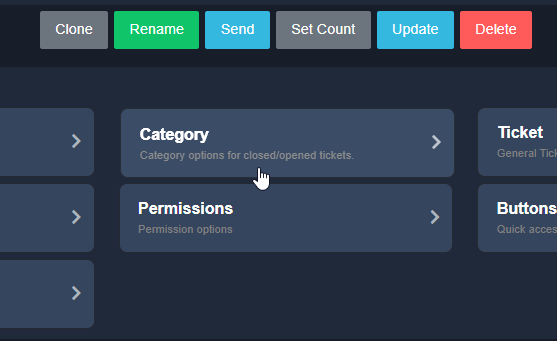 pulsar coral
stray bobcat
https://i.imgur.com/SeJQQl4.png 🙂
pulsar coral
stray bobcat
https://i.imgur.com/SeJQQl4.png 🙂
yes, and then? lol sorry newb abit here
ive selected the support category but still doesnt open in there
stray bobcat
pulsar coral
yes, and then? lol sorry newb abit here
no worries 🙂 click that then you pick the categories
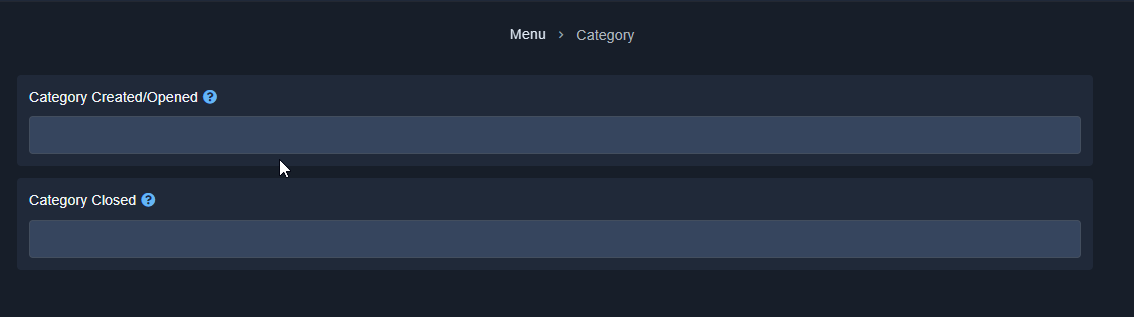
pick the category you want from the dropdown
pulsar coral
stray bobcat
no worries 🙂 click that then you pick the categories
yes. support category is selected but it doesnt open in there...is it because the ticket channel is in the same category?
all tickets are opened in no category at the top of the server
 swift estuary
@gray stirrup thank you i just did the bypass
iron nightBOT
Gave +1 Rep to @gray stirrup
stray bobcat
pulsar coral
yes. support category is selected but it doesnt open in there...is it because th...
Make sure your bot has permission to put tickets in the category.
humble sequoiaBOT
ᅠ
@pseudo glen requires the following permissions:
Add Reactions
Read Channels
Send Messages
Manage Messages
Embed Links
Attach Files
Read History
Manage Roles
Manage Channels
To change the role permissions, you can go to your Discord Server ➞ Server Settings ➞ Roles ➞ @Ticket Tool
To change the category permissions, you can got to your Channel List ➞ Select Category ➞ Options ➞ Permissions ➞ @Ticket Tool
To change the channel permissions, you can go to your Channel Settings ➞ Permissions ➞ Ticket Tool
ᅠ
Note:
You can give Ticket Tool Administrative Permissions instead of all the permissions listed above, but it's entirely optional and NOT necessary.
 pulsar coral
stray bobcat
Make sure your bot has permission to put tickets in the category.
pulsar coral
stray bobcat
Make sure your bot has permission to put tickets in the category.
okay many many thanks fam...appreciate it 🙂
iron nightBOT
Gave +1 Rep to @stray bobcat
stray bobcat
My pleasure!
pulsar coral
shall update
gray stirrup

 dire sierra
When someone sends me a mention which label or tab do I find it in? When I want to respond to a message, how do I do that?
 spice umbra
Where can I find images to use in the buttons
 covert swallow
dire sierra
When someone sends me a mention which label or tab do I find it in? When I want ...
covert swallow
dire sierra
When someone sends me a mention which label or tab do I find it in? When I want ...
I recommend looking at https://support.discord.com for stuff like that
covert swallow
spice umbra
Where can I find images to use in the buttons
Google? the internet overall has a lot of stuff
Not quite sure what the question is, sorry
jade topaz
covert swallow
Not quite sure what the question is, sorry
And I was looking for where I had posted this hahaha thanks for letting me know.
iron nightBOT
Gave +1 Rep to @covert swallow
covert swallow
Np lmao, it felt like it was the wrong place but I wasn't quite sure
jade topaz
Tranks.
humble sequoiaBOT
━━ moved to ticket ━━
The Drop-down menu or Select Menu replaces the buttons on your panel message and uses a drop-down menu with all of your panels. To set this up, go to your Panel Configs and select your main Panel.
<:Numbericons1:1018864164032225340> Enable Select Style
First you enable Select Style. Then you add an item in the Dropdown Editor. Now you can start editing your dropdown!
<:Numbericons2:1018864168041971712> Dropdown Editor
Each line in the dropdown editor represents a line in the drop down menu on discord. You can add more "Items", by clicking on 

First you select a panel. That's the panel this option will open a ticket for.  DONT select the same panel twice. Each option should have a different Panel
After that, you can put a Display. This is the title of this option and will appear in the drop down menu. The *Description can be set right after that, which will be below the title in grey.
Additionally you can select an emoji, that will be shown in front of each option. You can either manually input the ID of an emoji or select it in the selector.
Common Issues ⚠️
- Panel doesn't send? Make sure you have a valid emoji selected
- Option doesn't show up? Check if two options have the same panel in the DropDown Editor

$dropdown
 hexed shuttle
humble sequoia
hexed shuttle
humble sequoia
@tepid siren this should help
hexed shuttle
I think the url from the title may help
https://docs.tickettool.xyz/dashboard/panel-configs/dropdown-style
Using Dropdowns for ticket creation!
 icy sinew
How do I set up the bot? And set up the tickets
hexed shuttle
You head to the dropdown style, and then you add the panels you want in the dropdown
 hexed shuttle
icy sinew
How do I set up the bot? And set up the tickets
hexed shuttle
icy sinew
How do I set up the bot? And set up the tickets
This has a message with the setup guide, #📂│information message
pulsar coral
stray bobcat
My pleasure!
It worked...tx very much
icy sinew
How can I name my ticket whenever I try it does not work
rustic gale
icy sinew
How can I name my ticket whenever I try it does not work
Please clarify. We don't have enough details to understand the issue
icy sinew
rustic gale
Please clarify. We don't have enough details to understand the issue
The title of the ticket I can’t change the name
rustic gale
icy sinew
The title of the ticket I can’t change the name
Use the /rename command
 sand crane
Hi, I have a question about the ticket display. Is there any way that I can hide tickets from others except the issuer? I am having trouble with too many tickets displayed on the channel, and other members find it challenging to locate the apply button.
rustic gale
sand crane
Hi, I have a question about the ticket display. Is there any way that I can hide...
By default, only the user and staff should be able to view a ticket.
If there's unwanted (non-staff) users able to view tickets they didn't create, they may have inadvertently been given permission.
sand crane
rustic gale
By default, only the user and staff should be able to view a ticket.
Thanks for the reply! Currently, only staff and the user who created the ticket can access the ticket and read it. But the problem is that everyone can see the log saying certain users created the tickets and time goes by the logs have been accumulated to the point where people have to scroll up a lot just to see the button for creating a ticket.
iron nightBOT
Gave +1 Rep to @rustic gale
rustic gale
sand crane
Thanks for the reply! Currently, only staff and the user who created the ticket ...
Consider setting up a logging channel that's separate from the channel with the Create Ticket button?
sand crane
rustic gale
Consider setting up a logging channel that's separate from the channel with the ...
Oh, my...That was the problem. Thx a lot!!
iron nightBOT
Gave +1 Rep to @rustic gale
pulsar coral
hello.
is it possible to create different button, for example general help, prize claims, collabs?
how can i do that?
timber kernel
pulsar coral
hello.
is it possible to create different button, for example general help, priz...
You can attach multiple buttons to one panel. You can read here about it:
humble sequoiaBOT
For more convenient use of multipanels, you can now combine panels on the dashboard. This will allow you to directly send the multipanel from the dashboard or via the $panel ID command.
Where can I find this?
You can find this setting on the Dashboard -> Panel Configs -> Settings -> Panel
Note: if you're attaching all the panels to a panel called English, don't include English in the attached panel's box (If you do this, it will create a duplicate)
This will put all buttons from all of your panels on one message. The message is the panel message from the panel you're combining these panels in.
pulsar coral
timber kernel
You can attach multiple buttons to one panel. You can read here about it:
how do we create more panels?
timber kernel
pulsar coral
how do we create more panels?
Klick the green + on the right side
 pulsar coral
timber kernel
Klick the green + on the right side
pulsar coral
timber kernel
Klick the green + on the right side
ive done above steps...but nothing showing...am i missing something?
timber kernel
pulsar coral
ive done above steps...but nothing showing...am i missing something?
Have you send the "Main" panel again?
jade topaz
Hi,
how does the {create.form.x} work?
what im trying to achieve is displaying the results of the form without an embed
(for the use of an auto-responder)
referencing this

its not listed on the docs
pulsar coral
timber kernel
Have you send the "Main" panel again?
oops...i did not...newb here apologies...
thanks it has worked 🙂
iron nightBOT
Gave +1 Rep to @timber kernel
 warm grove
If one pays for monthly premium, and then wants to switch to life time.
Do we need to fully wait out the month to do so?
And if so, when premium ends, will all our premium stuff vanish from the dashboard and we'll have to remake it all again, or will it be saved for when we get premium again?
ping me if you respond to this question please, otherwise I may never be able to thank you for the help
 slender minnow
warm grove
If one pays for monthly premium, and then wants to switch to life time.
Do we n...
slender minnow
warm grove
If one pays for monthly premium, and then wants to switch to life time.
Do we n...
- There is no lifetime plan
2.Once it ends, your premium benefits will be disabled until you subscribe again.
warm grove
slender minnow
1. There is no lifetime plan
2.Once it ends, your premium benefits will be disab...
yeah which ever the longest was, been a while since I read what the plans were.
Thank you. 🙏
Got mixed up with which bot I was thinking of. Had mee6 premium plan in my head.
icy sinew
rustic gale
Use the /rename command
I meant this
 jade topaz
After the ticket closed, I decided.
I want you to dump that ticket on the canal
gilded verge
icy sinew
I meant this
if you see a shaded box then you need premium to change it
 icy sinew
Ok
 karmic mantle
Hello, I have a question for you, where can I edit this panel?

 north rover
hello the ticket all can join it how to fix
gray stirrup
north rover
hello the ticket all can join it how to fix
?
north rover
gray stirrup
?
if the ticket opned it will be like normal channel how to make private
gray stirrup
Well it should be private by default, only ticket owner and staff team can see it
covert swallow
karmic mantle
Hello, I have a question for you, where can I edit this panel?
That message isnt editable
jade topaz
Hi all, quick question. Is there a way to restrict tickets access to one or two accounts without removing admins roles?
Trying to set up a ticket for staff applications but limit access to just server owners. Any assistance would be great 👍🏻
covert swallow
If the role has the administrator permission there isnt anything you can do, the administrator perm supersedes all other perms
icy sinew
Help
 covert swallow
You need to resend the panel with the premium bot
jade topaz
covert swallow
If the role has the administrator permission there isnt anything you can do, the...
@covert swallow thank you for the speedy response. I thought as much. I just thought it was worth the question
iron nightBOT
Gave +1 Rep to @covert swallow
icy sinew
covert swallow
You need to resend the panel with the premium bot
Should I kick the other bot too
covert swallow
It depends on how you purchased premium
icy sinew
covert swallow
It depends on how you purchased premium
On the server
covert swallow
Through which bot
jade topaz
Hi how do i make ticket tool automatically give roles once a user makes a ticket
gray stirrup
jade topaz
Hi how do i make ticket tool automatically give roles once a user makes a ticket
Hiya, this can be done in the Ticket settings on the dashboard
 jade topaz
do i need premium
stray bobcat
Click on the "Ticket" button on your panel. Please note that it is a Premium feature. 
gray stirrup
^
stray bobcat
Change what?
jade topaz
stray bobcat
Click on the "Ticket" button on your panel. Please note that it is a Premium fea...
🙂
premium feature
jk lol
stray bobcat
lol, nope, sadly. You know, running servers for a bot is expensive. The bot is fully functional with the free plan, but some features are Premium only, such as this one. If the issue is cause you can't pay, there are ways to earn Premium credits for free (such as voting).
$vote
 balmy pendant
is there a way of having the support team ticket controls removed?
 hexed shuttle
balmy pendant
is there a way of having the support team ticket controls removed?
hexed shuttle
balmy pendant
is there a way of having the support team ticket controls removed?
You can disable the buttons
And that way the message should go only the message without the buttons
humble sequoiaBOT
Button Options
 Enable Button
 Hide or show the button
 Emoji
Emoji
 Select an emoji to show on the button
You can either select one or use a valid Emoji ID
 Button Text
Edit the text that's shown on the button
 Button Color
Select one of four colors for the button. Grey, Green, Red, Blue.
 Support Team Only
Enable this to only let your support team click that button
 Allowed and disabled roles
Edit what roles can use or not use this button
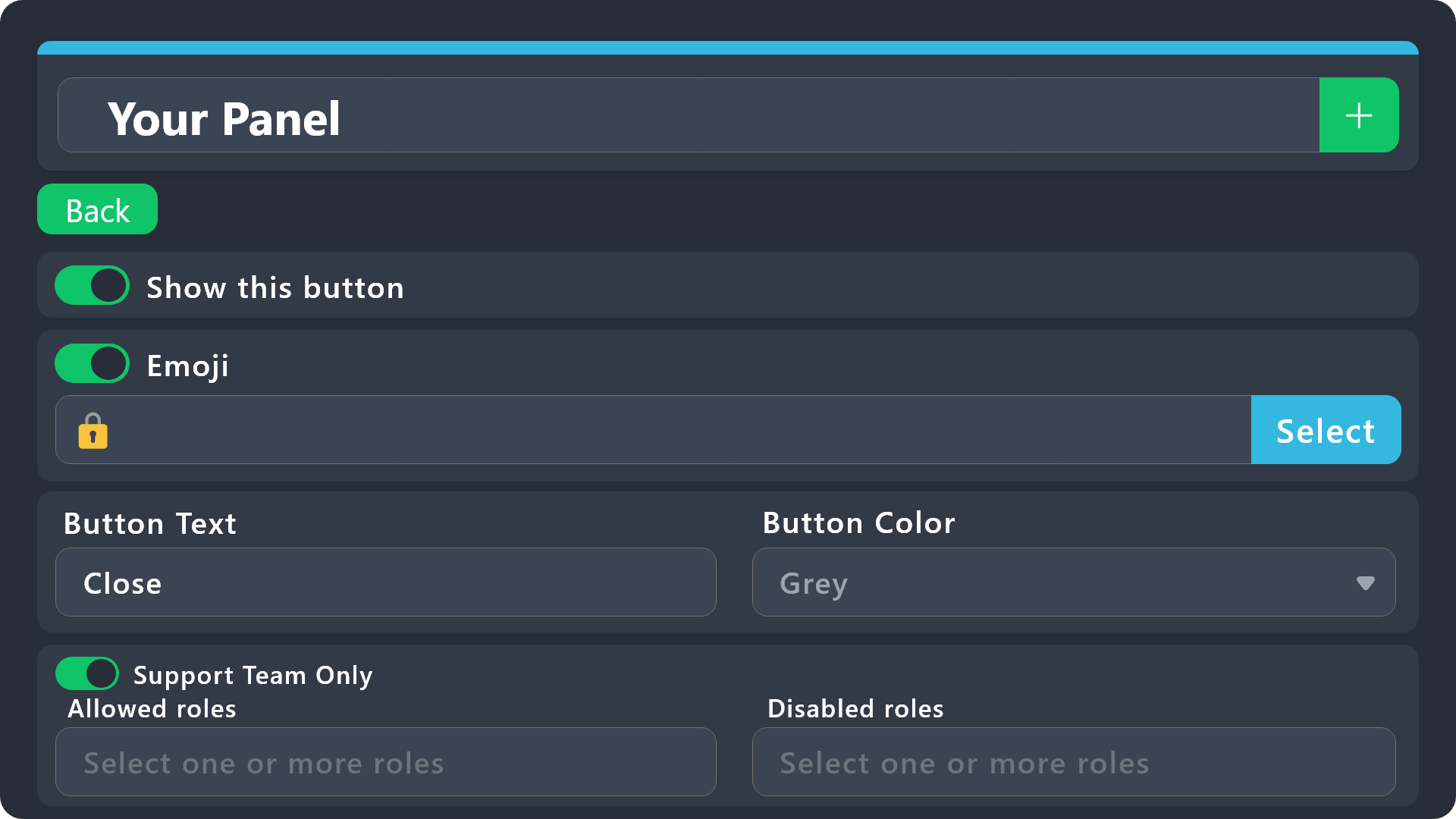
$buttonoptions
balmy pendant
this one i believe?
 gray stirrup
balmy pendant
is there a way of having the support team ticket controls removed?
gray stirrup
balmy pendant
is there a way of having the support team ticket controls removed?
You can. Why you would want it removed though?
hexed shuttle
balmy pendant
this one i believe?
That's right
balmy pendant
gray stirrup
You can. Why you would want it removed though?
not needed in my case
gray stirrup
balmy pendant
not needed in my case
Fair enough, keep in mind you have to give staff roles permission to use commands if you take this route
balmy pendant
still this
 gray stirrup
Try clicking Sync on your dashboard, and retry
balmy pendant
wait i think i have to delete all 3? 💀
gray stirrup
balmy pendant
this one i believe?
Did you do this for the buttons in question?
gray stirrup
balmy pendant
wait i think i have to delete all 3? 💀
yuh
balmy pendant
yeah i should have
am doing the delete button now atleast
well now i can't delete the ticket 👀
 cyan walrus
Where can I see the correspondence of closed tickets?
gray stirrup
balmy pendant
well now i can't delete the ticket 👀
$delete doesn't work?
gray stirrup
cyan walrus
Where can I see the correspondence of closed tickets?
You mean transcipts?
balmy pendant
gray stirrup
`$delete` doesn't work?
that worked, but is there a way to have it auto delete upon closing?
cyan walrus
gray stirrup
You mean transcipts?
When the ticket closes, is the correspondence preserved somewhere?
gray stirrup
balmy pendant
that worked, but is there a way to have it auto delete upon closing?
Pretty sure there is, although it is only possible with automation which is a premium feature
gray stirrup
cyan walrus
When the ticket closes, is the correspondence preserved somewhere?
No, no transcripts are not saved by ticket tool. You have to setup logs yourself
gray stirrup
balmy pendant
So i basically have to have the delete button then or do the command?
yeah
balmy pendant
atleast the buttons are gone 💀
 gray stirrup
balmy pendant
atleast the buttons are gone 💀
gray stirrup
balmy pendant
atleast the buttons are gone 💀
yeah lmao
 hushed zinc
Is there a way for me to get a ticket completely deleted if i click on close
balmy pendant
oh ticket deleted itself now that i added delete button back 💀
hushed zinc
hushed zinc
Is there a way for me to get a ticket completely deleted if i click on close
without going through the delete process
balmy pendant
balmy pendant
oh ticket deleted itself now that i added delete button back 💀
Even better
gray stirrup
hushed zinc
Is there a way for me to get a ticket completely deleted if i click on close
Yup, disable two step close in the general panel settings
hushed zinc
gray stirrup
Yup, disable two step close in the general panel settings
Tyvm
gray stirrup
then go to automation and enable show advanced automation then copy this:

(this is what you would do @balmy pendant if you had premium)
hushed zinc
no delay?
gray stirrup
Depends, do you want it to delete instantly or after a certain time
balmy pendant
Oh I see, well idk what happend there then but it fixed itself to look like this
 gray stirrup
Every panel you have
hushed zinc
Damn.. >.<
Well tyvm ❤️
rustic gale
balmy pendant
that worked, but is there a way to have it auto delete upon closing?
Disable Two Step Ticket in Panel Configs -> General
CC @gray stirrup just fyi
 balmy pendant
Oh tysm!!!
gray stirrup
rustic gale
Disable **Two Step Ticket** in Panel Configs -> General
CC <@239836483966468096>...
Oh neat, never knew this was an option
 sturdy frigate
hi guys i had a question. So i have Ticket tool set up in my discord but i was wondering is it possible to have the tickets that are made to pop up like this?

right now when a ticket is made it pops up at the very top of the discord server which is very annoying and un organizing in my oppinion
is there a way to fix it to look like that image i sent???
stray bobcat
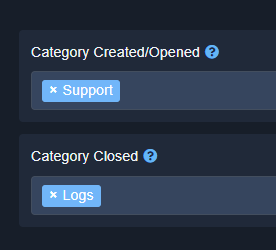
FYI you can have your tickets inserted in specific categories in Discord, so they don't "just stick to the top" https://i.imgur.com/1ho5Jxf.png
 sturdy frigate
stray bobcat
FYI you can have your tickets inserted in specific categories in Discord, so the...
sturdy frigate
stray bobcat
FYI you can have your tickets inserted in specific categories in Discord, so the...
THANK YOU
iron nightBOT
Gave +1 Rep to @stray bobcat
jade topaz
fix?

 scenic plinth
What are you trying to access?
 next oar
Dear Greenville Team,
I hope this message finds you well. I am writing to inquire about the possibility of merging data from two of my Roblox accounts for Greenville.
I have been playing the game on two separate accounts, one of which has a significant amount of in-game currency and game passes, while the other has very little of either. As a result, it has become increasingly difficult for me to manage and enjoy both accounts as I am maining the account with very little in game currency and no game passes.
I would greatly appreciate it if you could merge the data from my two accounts, specifically transferring the in-game currency and game passes from my primary account to my secondary account. This would allow me to consolidate my progress and enjoy the game to the fullest.
Please let me know if this is possible and what steps I need to take to facilitate the process. Thank you for your time and attention to this matter.
Sincerely,
Shuaib
scenic plinth
Dear Sahuaib, you are in the wrong server, and we cannot help you find the right server.
humble sequoiaBOT
⚠️ You're in the wrong place
We provide support for Ticket Tool Discord bot and cannot help you with whatever issue you have.
- We don't know which Support Team you should contact to get this issue resolved, and unfortunately we won't be able to accurately tell you.
If you don't have any further questions regarding our bot Ticket Tool, please close this ticket

 brisk dust
 gray stirrup
are you sure the panel exists? you may have deleted it accidentally
jade topaz
jade topaz
fix?
.
scenic plinth
What browser are you currently using.
jade topaz
chrome
scenic plinth
What is the URL you are trying to access and how are you attempting to access the page? (Ex, command?)
jade topaz
tickettool.xyz
scenic plinth
Well, I would presume you are trying to do so, but thats for generally everything.

Ticket Tool - Ticketing without clutter - The #1 discord Ticketing bot
Try that link and see if anything different occurs.
jade topaz
same
 scenic plinth
Do you have any plugins, extensions, or apps that intervene with your web browsing?
jade topaz
no treally
scenic plinth
What do you mean by not really?
jade topaz
its incognito, theres no extensions
scenic plinth
I have relayed your question in an attempt to get an answer, I believe I know what causes such, although I am not quite sure if you can implement a fix from your side.
jade topaz
okay thanks
scenic plinth
Not really a common error otherwise it would be presumably easier to understand and provide a fix for.
scenic plinth
jade topaz
okay thanks
It has been suggested to try this according to Cloudflare's support forums, although I am not guaranteeing 100% accuracy as it is a completely different support page.

Cloudflare Community
what does it mean, anyone has a solution with this problem.
 wintry lava
Is this one right
 brisk stump
can i buy lifetime subscription for ticket tool?
humble sequoiaBOT
Votes
Current Votes: 0
Lifetime Votes: 7
Linked Votes: 0
Vote Links
Linking Info
Linked User: Not Linked
You can give your future votes to another user by linking with that user.
To link use $vote link (@user or userId)
To unlink use $vote unlink
Redeeming
Each vote is worth 12 hours of premium and can be redeemed once you have atleast 6 votes.
Your current votes are worth 0m
To redeem your current votes use $vote redeem
brisk stump
mistake
jade topaz
I don't want to make the button for people to create a ticket
 lucid shell
Can I make tickets be automatically deleted after a few days of inactivity?
This is how you can avoid Discord
 kind adder
hello sir
lucid shell
kind adder
hello sir
hey
kind adder
why I haven't succeeded in kyc v2
rustic gale
lucid shell
Can I make tickets be automatically deleted after a few days of inactivity?
Thi...
Panel Configs -> Automation
If a message is not found, delete the ticket after (time in seconds)
lucid shell
rustic gale
Panel Configs -> Automation
I use premium for free
Will it return to the previous state after this period of time?
7 day
gray stirrup
lucid shell
I use premium for free
Will it return to the previous state after this period of...
It will just be disabled, nothing will be removed
lucid shell
gray stirrup
It will just be disabled, nothing will be removed
i know
I meant the same
gray stirrup
lucid shell
<:AaronThink:993233991081668648> i know
I meant the same
Sorry, i don't get what you are saying
lucid shell
Can I get 7-day premium again?
for free
gray stirrup
No
lucid shell
nice
lucid shell
gray stirrup
Sorry, i don't get what you are saying
for what?
gray stirrup
The original question
 wheat torrent
How can I choose the category to open the ticket?
gray stirrup
wheat torrent
How can I choose the category to open the ticket?
Panel configs > Category

 gray stirrup
go to the imgur link and right click the image and click copy image link
hushed zinc
bet ty
 nova wharf
brisk stump
can i buy lifetime subscription for ticket tool?
nova wharf
brisk stump
can i buy lifetime subscription for ticket tool?
That’s not possible.
humble sequoiaBOT
The first thing you will need to do is invite the premium bot, an invite can be found here
Once the bot is in your server we will head to the dashboard and manage your server. When you are managing your server, you want to head into "Server Configs" then click the drop down menu under "Select the bot you would like to use on this server" then click "Ticket Tool#6207" and then save.
 slender minnow
@wheat torrent refer above ^
wheat torrent
slender minnow
<@587723303066796043> refer above ^
ok thx
iron nightBOT
Gave +1 Rep to @slender minnow
wheat torrent
how can i set a picture in the panel massge ?
 open rune
@slender minnow
slender minnow
open rune
<@776084862728667156>
what?
Firstly, you are not allowed to ping (either as a cold ping or for support) as it is against the rules.
Second, invite the primary bot and run the bot switcher command
wheat torrent
wheat torrent
how can i set a picture in the panel massge ?
🙂
slender minnow
wheat torrent
how can i set a picture in the panel massge ?
if you click on the embed editor, you should find the option there 🙂
open rune
slender minnow
Firstly, you are not allowed to ping (either as a cold ping or for support) as i...
Ok thanks
iron nightBOT
Gave +1 Rep to @slender minnow
 slender minnow
use a direct url
humble sequoiaBOT
What are the direct URLs?
A direct access URL is an easy to read URL that users can enter to get to a specific item, document, page, category, or perspective, in which our bot TicketTool can read and get it displayed in your 'Panel Message' or your 'Ticket Message'.
Where can I get them?
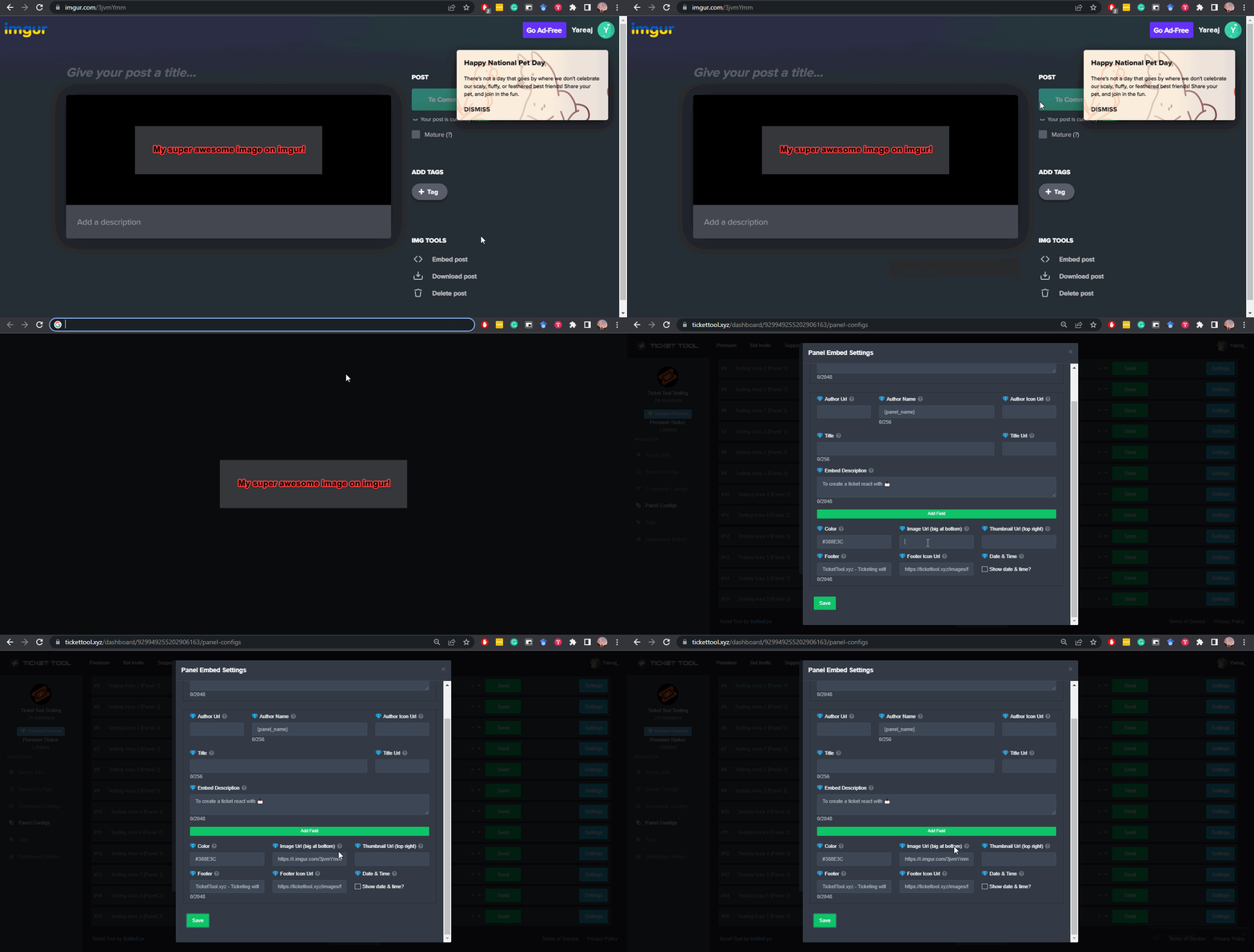
The recommended way is to use 'Imgur', you can signup within a few minutes and then upload the image you want, and copy the URL of the uploaded image and paste it into one of the four boxes. There are alternatives to this, such as other image or video storing websites or using 'Open Original' of an image and paste it in (please be aware that if your image is deleted, Discord will automatically delete the link to it in a few days). Please note this requires 'Premium'. Imgur
 wheat torrent
oh ill try
its work
ok how can i do like this ?

more then option in one panel ?
humble sequoiaBOT
For more convenient use of multipanels, you can now combine panels on the dashboard. This will allow you to directly send the multipanel from the dashboard or via the $panel ID command.
Where can I find this?
You can find this setting on the Dashboard -> Panel Configs -> Settings -> Panel
Note: if you're attaching all the panels to a panel called English, don't include English in the attached panel's box (If you do this, it will create a duplicate)
This will put all buttons from all of your panels on one message. The message is the panel message from the panel you're combining these panels in.
timber kernel
There you go.
 pine laurel
how do i disabled opening a ticket for a certain role
timber kernel
pine laurel
how do i disabled opening a ticket for a certain role
Panel Configs -> Buttons -> Button Create Ticket
On the bottom you see Disabled Roles.

 timber kernel
open rune
timber kernel
open rune
It is very likely a permission issue.
Please run $debug in the channel on your server.
open rune
timber kernel
It is very likely a permission issue.
Please run $debug in the channel on your s...
I will try
pine laurel
thanks
open rune
timber kernel
It is very likely a permission issue.
Please run $debug in the channel on your s...
Thanks
iron nightBOT
Gave +1 Rep to @timber kernel
timber kernel
open rune
Thanks
You are welcome.
 hollow gazelle
 gray stirrup
You put in an invalid emoji
 coarse spruce
is it possible to move a tickets category via command?
rustic gale
coarse spruce
is it possible to move a tickets category via command?
Sadly no
coarse spruce
rustic gale
Sadly no
👍
 candid summit
how do i add a ticket support role a role that can overview tickets
humble sequoiaBOT
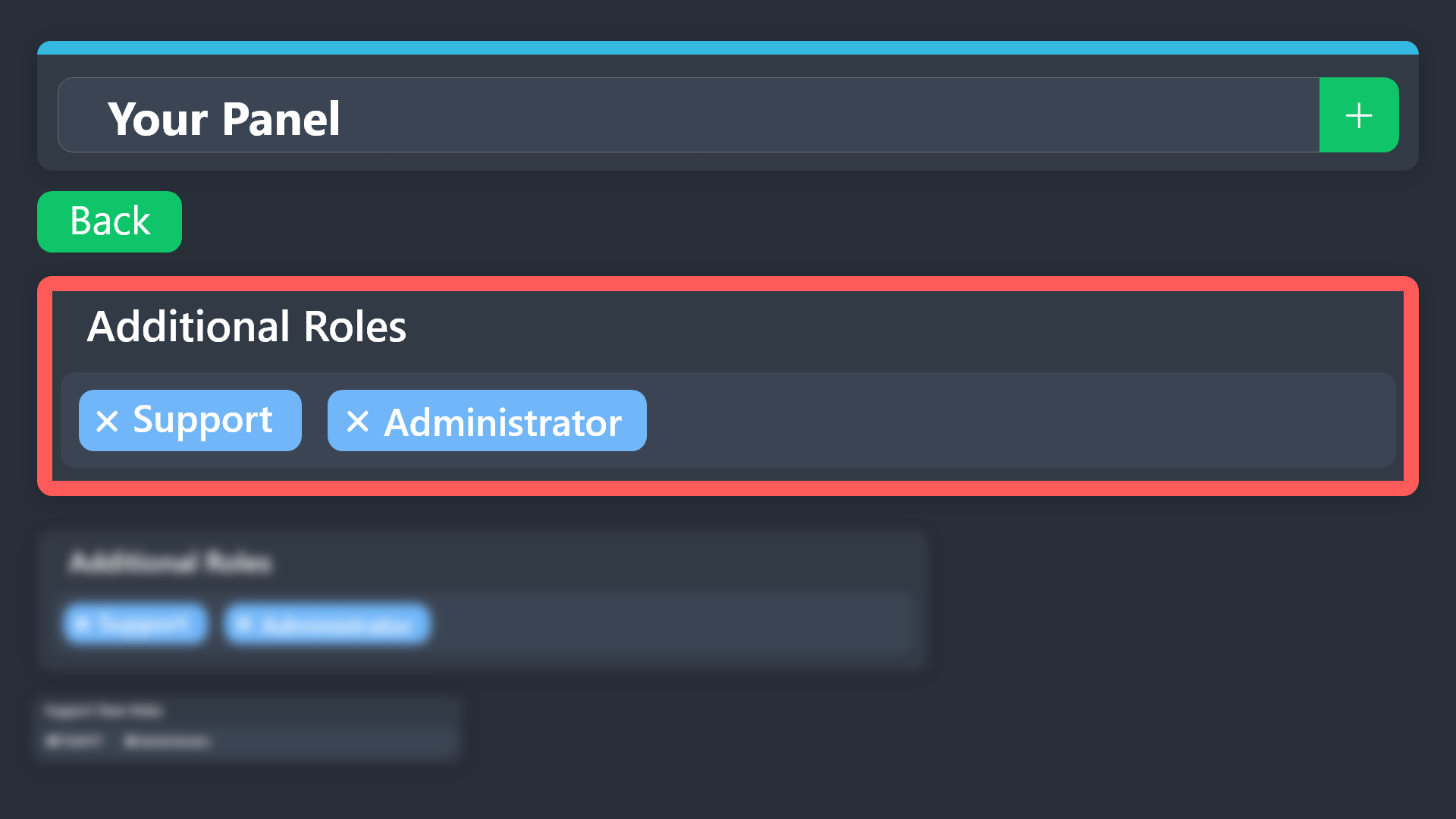
Additional Roles are roles that are independent of Support Roles. You can assign unique permissions for roles defined as additional roles in tickets.
To assign permissions for additional roles, go to Dashboard ➞ Panel Configs ➞ Permission Options ➞ Additional Opened/Closed Permissions.
Note: Additional Roles do NOT get affected by the Change other support team permissions when claimed feature under Claiming Options, meaning they don't gain/lose any permissions set in that feature once a ticket is claimed.
 gray stirrup
^ this is for overviewing tickets
candid summit
tysm
gray stirrup
In the same page you can add support team roles
 gray stirrup
Create a staff role, then add that to the support team roles in the dashboard
go to panel configs > General
then add support team roles
candid summit
k ty
gray stirrup
nws
 simple breach
Any support available?
 torn stump
Anyone know if ticket tool can track how many tickets a staff member completes?
rustic gale
torn stump
Anyone know if ticket tool can track how many tickets a staff member completes?
With premium, yes
You can view claiming stats in the dashboard
Without premium, sort of but not really
You would have to make sure tickets are always transcripted, and check the “Users in ticket” field.
 bitter goblet
Hey
 runic sable
Hello. I have the problem that both the ticket owner and the support team are not authorized to see the channel history. How can that be?
 ornate jay
runic sable
Hello. I have the problem that both the ticket owner and the support team are no...
ornate jay
runic sable
Hello. I have the problem that both the ticket owner and the support team are no...
Head into Permissions > Everyone Role Permissions and check if the permissions are set up well over there
If everything is alright there try checking other permissions aswell, such as the ticket owner's or the support team's
runic sable
Thanks. I've done it now.
ornate jay
runic sable
Thanks. I've done it now.
No worries
 boreal breach
Failed to add Missing Permissions
How to fix this^^
timber kernel
boreal breach
Failed to add `Missing Permissions`
How to fix this^^
When do you get this error?
boreal breach
timber kernel
When do you get this error?
While trying to add user to the ticket
ornate jay
boreal breach
While trying to add user to the ticket
Might be an issue with the bot's permissions. Check if TicketTool has got the proper permissions set up
boreal breach
ornate jay
Might be an issue with the bot's permissions. Check if TicketTool has got the pr...
It has all permissions
wild spire
boreal breach
It has all permissions
could you run $debug in that ticket ?
boreal breach
wild spire
could you run $debug in that ticket ?
wild spire
boreal breach
https://discordapp.com/channels/509192800865353738/662692902245498910/1083648652...
mhh were you trying to add a user manually yourself or were you using a command to add them?
boreal breach
wild spire
mhh were you trying to add a user manually yourself or were you using a command ...
Command
timber kernel
boreal breach
It has all permissions
It should be a permission problem yes.
Please check this, we had a simliar problem here in the past:
#🆘│community-support message
It may help you too.
boreal breach
timber kernel
It should be a permission problem yes.
Please check this, we had a simliar probl...
I just need to enable it too right?
timber kernel
boreal breach
I just need to enable it too right?
Yes enable it and check again please.
 ornate jay
Looks like an issue with the button's emoji, though I might be wrong. However is ther any chance I could see the your Create Ticket button settings?
Also might be because of an issue with the form. And since you're typing Tux. Correct me if I'm wrong
timber kernel
 oblique mauve
It does not find the emoji you configured.
It could be out of sync with your server, so click the sync button in the dashboard and try again.
Or use: <:name:id> in the config instead of selecting one from the select menu.
timber kernel
ornate jay
Also might be because of an issue with the form. And since you're typing Tux. Co...
You are correct. It should be someting with their settings in the dashboard (does not find the emoji)
ornate jay
timber kernel
It does not find the emoji you configured.
It could be out of sync with your ser...
Or maybe they used the wrong ID?
timber kernel
ornate jay
Or maybe they used the wrong ID?
Could also be yes.
boreal breach
timber kernel
Yes enable it and check again please.
Ty it worked
iron nightBOT
Gave +1 Rep to @timber kernel
ornate jay
oblique mauve
any one knows why i get this error?, its when trying to create a support ticket.
Try looking in Buttons > Create Ticket and see if you've used the emojo format properly
timber kernel
boreal breach
Ty it worked
Nice 🥰
oblique mauve
ornate jay
Try looking in `Buttons` > `Create Ticket` and see if you've used the emojo form...
fixed. after i disabled all button emojis, thanks
ornate jay
oblique mauve
fixed. after i disabled all button emojis, thanks
No worries.. Credits to @timber kernel though
timber kernel
Glad to hear it is working.
oblique mauve
thanks! @timber kernel and @ornate jay appreciate the support
ornate jay
oblique mauve
thanks! <@153489496317493248> and <@484761907161726986> appreciate the support
Anytime
timber kernel
jade topaz
how do i make it work
You have any specific question?
jade topaz
yes how can i inject STMOD
timber kernel
jade topaz
yes how can i inject STMOD
About what are you talking exactly? You are here at the support server of the Ticket Tool bot.
 hollow ore
timber kernel
Don't ping staff please.
hollow ore
timber kernel
Don't ping staff please.
Ok im so sorry 🖤
hollow ore
timber kernel
You need help?
Yes
How if anyone open ticket how this ticket will be opened on catgory ?
Because i open Arabic ticket in this server and no one answer me
 idle flint
hollow ore
Yes
How if anyone open ticket how this ticket will be opened on catgory ?
Beca...
idle flint
hollow ore
Yes
How if anyone open ticket how this ticket will be opened on catgory ?
Beca...
Hi there, your ticket is there, one of the arabic support team will respond within 24-48 hours, as it says within your ticket
timber kernel
What Windy Times says.
 subtle lark
Do you guys maybe have some sort of API support for bot? Ticket Tool gives me great coverage for my needs but i kinda need more functionality.
timber kernel
subtle lark
Do you guys maybe have some sort of API support for bot? Ticket Tool gives me gr...
Not atm. Maybe in the future it will be added.
If you like, head over to #💡│suggestions and add it there.
timber kernel
wheat torrent
How can I invite it again?
You kicked it from your server? Or just renewed the supscription?
timber kernel
wheat torrent
I can’t login to the server on the dashboard
Can you try this please:
humble sequoiaBOT
The first thing you will need to do is invite the premium bot, an invite can be found here
Once the bot is in your server we will head to the dashboard and manage your server. When you are managing your server, you want to head into "Server Configs" then click the drop down menu under "Select the bot you would like to use on this server" then click "Ticket Tool#6207" and then save.
iron nightBOT
Gave +1 Rep to @timber kernel
timber kernel
wheat torrent
Thx <@153489496317493248>
You are welcome.
 full crypt
Hi
timber kernel
full crypt
Hi
Hi
you need help?
 sick sage
How do I set this when people open the ticket with the non premium bot
 ornate jay
sick sage
How do I set this when people open the ticket with the non premium bot
ornate jay
sick sage
How do I set this when people open the ticket with the non premium bot
You can do that in the Forms tab
timber kernel
It looks like this:
 sick sage
In the bottom of the dashboard?
timber kernel
sick sage
In the bottom of the dashboard?
 sick sage
Ah, thanks
timber kernel
sick sage
Ah, thanks
👍
 lunar ember
im having a problem w my ticket system . @everyone has access to see all tickets ? why is this happening .
timber kernel
lunar ember
im having a problem w my ticket system . @everyone has access to see all tickets...
Please check the permissions for that role:
Panel Configs -> Permissions -> Everyone opened

And please don't use the everyone ping here.
lunar ember
i mispinged *
meant it as the role i didnt think the ping would be on .
they have view channel permission off but still able to see the tickets .
timber kernel
lunar ember
they have view channel permission off but still able to see the tickets .
Have you by mistake added the everyone role here?
 timber kernel
Or additional role.
lunar ember
no additional roles for everyone .
wait perhaps its because im in the ticket as well .
let me add an alternate account and see if im still able to view it from everyone role .
lunar ember
whew okay yeah i was being paranoid . i believe it was because i was added to the ticket . i cant see the tickets from my alternate account .
timber kernel
if it works or not.
timber kernel
lunar ember
whew okay yeah i was being paranoid . i believe it was because i was added to th...
Perfect.
lunar ember
i assumed since i was testing to see what channels were blocked under a specific role itd be the same for tickets .
thanks for the help @timber kernel
iron nightBOT
Gave +1 Rep to @timber kernel
timber kernel
You are welcome.
lunar ember
specifically it was claiming the ticket that made it bypass the view server as role filter . ive tested it by opening a ticket w the new acc and it was hidden until claimed .
 inland grove
vvvvvvvvvvvvvvvvv


 rigid flint
Peace be upon you, I subscribed to the seven-day free service, where do I add a premium bot?
ornate jay
rigid flint
Peace be upon you, I subscribed to the seven-day free service, where do I add a ...

Go into Server Configs then you should find something like that
timber kernel
- invite the bot first
humble sequoiaBOT
The first thing you will need to do is invite the premium bot, an invite can be found here
Once the bot is in your server we will head to the dashboard and manage your server. When you are managing your server, you want to head into "Server Configs" then click the drop down menu under "Select the bot you would like to use on this server" then click "Ticket Tool#6207" and then save.
 humble sequoiaBOT
The Drop-down menu or Select Menu replaces the buttons on your panel message and uses a drop-down menu with all of your panels. To set this up, go to your Panel Configs and select your main Panel.
<:Numbericons1:1018864164032225340> Enable Select Style
First you enable Select Style. Then you add an item in the Dropdown Editor. Now you can start editing your dropdown!
<:Numbericons2:1018864168041971712> Dropdown Editor
Each line in the dropdown editor represents a line in the drop down menu on discord. You can add more "Items", by clicking on
First you select a panel. That's the panel this option will open a ticket for. DONT select the same panel twice. Each option should have a different Panel
After that, you can put a Display. This is the title of this option and will appear in the drop down menu. The *Description can be set right after that, which will be below the title in grey.
Additionally you can select an emoji, that will be shown in front of each option. You can either manually input the ID of an emoji or select it in the selector.
Common Issues ⚠️
- Panel doesn't send? Make sure you have a valid emoji selected
- Option doesn't show up? Check if two options have the same panel in the DropDown Editor
$dropdown
timber kernel
Like this @rigid flint
rigid flint
- Thank You Very much .
rigid flint
timber kernel
Like this <@737672902085967892>
How copy ticket ?
timber kernel
rigid flint
How copy ticket ?
Copy? You mean to move it to another category after it is closed?
sick sage
Can the forms make a choice option?
rigid flint
timber kernel
Copy? You mean to move it to another category after it is closed?
I mean, I'm doing the same Tect powers as the Tect that he accepted!
timber kernel
rigid flint
I mean, I'm doing the same Tect powers as the Tect that he accepted!
Sry, I do not understand your question. Can you please rephrase?
timber kernel
sick sage
Can the forms make a choice option?
That is not possible because Discord is not supporting this afaik.
sick sage
timber kernel
That is not possible because Discord is not supporting this afaik.
Ah ok, is it convenient to dm you for something?
timber kernel
sick sage
Ah ok, is it convenient to dm you for something?
Please don't. If you don't want to share it public here. Please open a ticket.
sick sage
timber kernel
Please don't. If you don't want to share it public here. Please open a ticket.
Um because that is a little private not convinent to let some supporter see
Will if it is not convinent that is fine though
timber kernel
sick sage
Will if it is not convinent that is fine though
It is not sry.
round falcon
sick sage
Ah ok, is it convenient to dm you for something?
Is it a sensitive issue or something?
timber kernel
I think it should be fine to share it in a ticket if it is related to Ticket Tool.
 clever plinth
Hi. I’m just creating my discord server and want to use Ticket tool to create tickets for racing incidents in my F1 league. I’ve created the panel and added it the channel, when I click to create a ticket and it send me the DM is it possible to edit the DM message it sends? I’ve been trying for soooo long and can’t figure it out
round falcon
clever plinth
Hi. I’m just creating my discord server and want to use Ticket tool to create ti...
Sure is, go to panel configs, "messages", there's a lot of message types you can edit from there
It'll look like this, you can edit what you like from there

 round falcon
Weird, could be a premium thing, but I'm not sure
clever plinth
round falcon
Weird, could be a premium thing, but I'm not sure
Ah possibly!
round falcon
Someone from the support team would know for sure, but that's my best guess
wild spire
Those greyed out are indeed premium
round falcon
Aye look who's support team now, nice one Maud
 gray stirrup
oh nice one 👍
gray stirrup
 wise vale
I have a problem, I want to go back to a non-mahfoud, how is the method
wise vale
I have a problem, I want to go back to a non-mahfoud, how is the method
What does non-mahfoud mean?
gray stirrup
wise vale
Eh, just give me back to him
Sorry, what do you mean by this?
wise vale
I need erased messages from tikt
gray stirrup
wise vale
I need erased messages from tikt
this is not possible
stray bobcat
Make sure he grants dashboard access for your role
Server Configs > General Options

yw 🙂
 near flare
hi i just had a quick question, is there a limit to how many ticket panels you can have on 1 server?
gray stirrup
near flare
hi i just had a quick question, is there a limit to how many ticket panels you c...
Unlimited
near flare
O:
gray stirrup
Multipanels have a 25 panel max i think
humble sequoiaBOT
For more convenient use of multipanels, you can now combine panels on the dashboard. This will allow you to directly send the multipanel from the dashboard or via the $panel ID command.
Where can I find this?
You can find this setting on the Dashboard -> Panel Configs -> Settings -> Panel
Note: if you're attaching all the panels to a panel called English, don't include English in the attached panel's box (If you do this, it will create a duplicate)
This will put all buttons from all of your panels on one message. The message is the panel message from the panel you're combining these panels in.
gray stirrup
^
near flare
ah ok! if ever need those i’ll look into it, but tysm for your help! i was scared i’d have to resort to getting another bot for extra panels 😭
scenic plinth
gray stirrup
Unlimited
Lets be real... who has more than 25?
gray stirrup
scenic plinth
*Lets be real... who has more than 25?*
shhhhhhhhh
near flare
i’ll probably have like 30 💀
gray stirrup
unlimited sounds better
near flare
wait is it not unlimited not im confused 🤨
wild spire
near flare
i’ll probably have like 30 💀
wtf are u doing with so many panels 
near flare
WAHAHAS
wild spire
not my place to judge but goddamn I am curious
gray stirrup
fax 💀
near flare
its a commissions server i recently started, memebers can apply to get their own channel to show their commission stuff and also get own ticket thingy for ppl to hire them from there
but i was like “oh shit wait waht if theres a limit”
wild spire
near flare
its a commissions server i recently started, memebers can apply to get their own...
interesting
stray bobcat
I find it fascinating to hear how people use the tool
gray stirrup
oh i see, i do think there are better ways to implement this though, but fair enough XD
gray stirrup
Fair, good alternative to claiming as well
near flare
anywhos ty for your help! if my pc blows up from having too many panels you’ll see me back here
gray stirrup
But for the love of god please do a dropdown menu not buttons XD
The buttons alone will take half the screen
near flare
PSHSHS ofc ofc
 gentle marten
If I want a ticket to just auto delete after confirmation to close it, where is that setting?
wild spire
gentle marten
If I want a ticket to just auto delete after confirmation to close it, where is ...
disable 2 step close
panel configs > general
gentle marten
TYSM 🙂
jade topaz
Hello can help me please how make a personal emoji in embed ?
scenic plinth
Use the emoji ID. You can find it using $id :emojiname:. The emoji must be in a server Ticket Tool is in or it will not work.
 manic lichen
Can Ticket tools create forms with more than 5 questions?
timber kernel
manic lichen
Can Ticket tools create forms with more than 5 questions?
No that is not possible. This is limited by Discord.
timber kernel
jade topaz
how active per claim
Please don't ping the staff.
You want to use the claiming feature?
humble sequoiaBOT
Claiming allows you to change the ticket name, category and permissions. To use it you have to enable it first on your Dashboard > Panel Configs > Claiming

 Note: This is a premium feature
 tight topaz
I keep getting this when trying to do commands

 pastel grove
what happens with game?
timber kernel
tight topaz
I keep getting this when trying to do commands
Please run $debug on your server in that channel.
timber kernel
pastel grove
what happens with game?
What are you talking about?
timber kernel
pastel grove
connection stopped and since nothing, no way to loggin
I think you are on the wrong server.
humble sequoiaBOT
⚠️ You're in the wrong place
We provide support for Ticket Tool Discord bot and cannot help you with whatever issue you have.
- We don't know which Support Team you should contact to get this issue resolved, and unfortunately we won't be able to accurately tell you.
If you don't have any further questions regarding our bot Ticket Tool, please close this ticket
tight topaz
timber kernel
Please run $debug on your server in that channel.
That displays the same message
rustic gale
tight topaz
That displays the same message
The bot is missing a lot of permissions in that channel.

 half forge
why ticket tool doesn't supports threads
rustic gale
half forge
why ticket tool doesn't supports threads
Because you don't have premium
 mint surge
Is there a reason some users on our server are unable to see the 'create ticket' button?
wild spire
mint surge
Is there a reason some users on our server are unable to see the 'create ticket'...
did you have any disabled roles set in the ‘create ticket’ button?
mint surge
Checking now, but when I mimic their roles I can see it fine
gray stirrup
mint surge
Is there a reason some users on our server are unable to see the 'create ticket'...
Most likely due to your users having an outdated discord version
mint surge
it looks like they are on mobile if that makes a difference
gray stirrup
mint surge
it looks like they are on mobile if that makes a difference
Mobile doesn't autoupdate unless the user enables it, so an outdated discord is most likely
mint surge
Thanks @gray stirrup. Is that the only explanation. There isn't some discord setting I am missing that might disable buttons?
iron nightBOT
Gave +1 Rep to @gray stirrup
wild spire
mint surge
Thanks <@239836483966468096>. Is that the only explanation. There isn't some dis...
Eagle his explanation is most likely.
The only other thing could be here so.
But usually they’ll still see it with this setting and pressing it just wont open a ticket

you could try resending your panel to see if that fixes it. Otherwise its probably on their end.
mint surge

They only see this
everyone else see this

I'll see if outdated client is the culprit. Thanks again
 candid coral
Hi folks
had a question about seting up a ticket tool for my own server
when a Member Enter my server
I want him to type for example apply* then the ticket send to him but in a private channel
how do I do that
Thanks a lot
wild spire
candid coral
when a Member Enter my server
I want him to type for example apply* then the ti...
you can make the $new command available to your members which will open a new ticket.
All settings are in command configs in your dashboard
candid coral
wild spire
you can make the $new command available to your members which will open a new ti...
This would help me a lot
Thanks dude
god bless you
iron nightBOT
Gave +1 Rep to @wild spire

 candid coral
wild spire
ma’am will do <:derp:909830439563309116>
candid coral
wild spire
ma’am will do <:derp:909830439563309116>
oh sorry
Thanks ma'am
rustic gale
candid coral
This would help me a lot
Thanks dude
god bless you
You have to enable it in Command Style in Panel Configs. And set up a channel (or channels) for it.
Merely enabling the command in Command Configs will not be enough.
cc @wild spire
wild spire
rustic gale
You have to enable it in **Command Style** in Panel Configs. And set up a channe...
Whoops sorry.
 tardy beacon
scenic plinth
tardy beacon
scenic plinth
$pc 754374152986558525
humble sequoiaBOT
scenic plinth
$pc 754374152986558525

Thank you
Thank you for purchasing Ticket Tool Premium @tardy beacon. You have now been given the <@&535595160189403136> role!
Found 14 servers in total and 1 with premium and permission
scenic plinth
If you need to check your premium role again, just use the command in #🤖│bot-spam.
 agile stream
how do you log ticket transcripts to a logging channel
lunar solar
agile stream
how do you log ticket transcripts to a logging channel
To do it automatically you need premium
Manually just create a transcript with the transcript button and download the file
Then re-upload it to your desired channel and keep the link
lunar solar
Re-uploading the file is super important as the link won’t work without it if you delete the ticket where you made the transcript
wild spire
agile stream
how do you log ticket transcripts to a logging channel
panel configs > transcripts > transcripts channel? @lunar solar

 wild spire
lunar solar
wild spire
lunar solar
yeah auto save
but wont it go to your selected channel when using /transcript
wild spire
lunar solar
Just not automatically
no no I know. 😂
But it’s easier than downloading and reuploading

lunar solar
Ya
jade topaz
How do I add this bot to my server even if it dosent have the picture to add it to a server?
 humble sequoiaBOT
⚠️ You're in the wrong place
We provide support for Ticket Tool Discord bot and cannot help you with whatever issue you have.
- We don't know which Support Team you should contact to get this issue resolved, and unfortunately we won't be able to accurately tell you.
If you don't have any further questions regarding our bot Ticket Tool, please close this ticket
jade topaz
PleASE
 dim dew
Does anyone know if I will get charged if I got the free 7 days of premium?
rustic gale
dim dew
Does anyone know if I will get charged if I got the free 7 days of premium?
You 100% will not get charged.
dim dew
Does anyone know how to make it show only online members discord? @rustic gale
rustic gale
What do you mean? Also please don't ping people out of the blue. It's rude, it doesn't help you get faster support, and it's against the rules to ping staff
 west tartan
I am trying to setup and it says application did not respond when i do /setup
scenic plinth
On which part of the setup? Or the overall command?
 echo haven
What solved the problem ؟
 slender minnow
echo haven
What solved the problem ؟
slender minnow
echo haven
What solved the problem ؟
You have reached the max channel limit of 500 channels
its a limit by discord
echo haven
slender minnow
You have reached the max channel limit of 500 channels
is there a solution ?
Can I raise the maximum?
@slender minnow
slender minnow
echo haven
is there a solution ?
delete some of the channels
slender minnow
echo haven
Can I raise the maximum?
that's something you'll have to contact discord for
jade topaz
Hey, at first, I have 2 questions: 1. How I can reset the ticket count to zero?
2. How can I create a role (without admin perms), who can see all the ticket channels
 snow robin
can't seem to get custom commands to deploy -- I'm sure I'm missing a step. ideas?
 teal grail
jade topaz
Hey, at first, I have 2 questions: 1. How I can reset the ticket count to zero?
...
teal grail
jade topaz
Hey, at first, I have 2 questions: 1. How I can reset the ticket count to zero?
...
1 - you can clone the ticket and send.
2 - Support Team Roles
teal grail
snow robin
can't seem to get custom commands to deploy -- I'm sure I'm missing a step. idea...
?
jade topaz
teal grail
1 - you can clone the ticket and send.
2 - `Support Team Roles`
Could you explain the second answer a bit more pls?
teal grail
Ok
 sullen jackal
what $claim do?
teal grail
Open Dashboard > Manage Server > go down e see Support Team Roles and add the role. @jade topaz
sullen jackal
🙃
sullen jackal
sullen jackal
what $claim do?
?
teal grail
sullen jackal
?
When enabled, only the ticket claimer and the owner will be able to use all of the ticket actions (open, delete, transcript), this doesn't include the claiming ones.
sullen jackal
this doesn't include the claiming ones.
what does this mean?
 unborn yew
How can I make a ticket tool for submitting a report by phone?
jade topaz
teal grail
Open `Dashboard` > `Manage Server` > go down e see `Support Team Roles` and add ...
Ahhhh
Thanks mate
half forge
how to make/setup modal with ticket tool
half forge
how to setup like this with ticket tool

 balmy heath
السلام عليكم
half forge
half forge
how to setup like this with ticket tool
@rustic gale ?
 severe tendon
Hi, another ticketing bot I used to use had a feature where I could mark a ticket as 'autoclose in 7 days'. If the user did not respond in that time, the ticket was automatically closed. If they do respond, the timer is removed and we pick up the convo.
Is something like this possible with Ticket tool?
Thanks! :)
brisk stump
rip ticket tool
gilded verge
severe tendon
Hi, another ticketing bot I used to use had a feature where I could mark a ticke...
Hey hey, this is possible but Automation is a premium feature (Panel Configs->Automation)
 severe tendon
gilded verge
Hey hey, this is possible but Automation is a premium feature (Panel Configs->Au...
severe tendon
gilded verge
Hey hey, this is possible but Automation is a premium feature (Panel Configs->Au...
Thank you! I'm playing around with it, does this look correct for what I'm trying? I'm a bit confused about the highlighted field, what is that?
 iron nightBOT
Gave +1 Rep to @gilded verge
severe tendon
And does this work retroactively? I have a lot of stale tickets right now 😅
gilded verge
o nice ^^ but you mentioned about ticket user, so you can use Ticket Owner
 gilded verge
severe tendon
And does this work retroactively? I have a lot of stale tickets right now 😅
gilded verge
severe tendon
And does this work retroactively? I have a lot of stale tickets right now 😅
no, but you can close the ticket and reopen it then it will work (so first $close and then $open)
and this highlighted field iis for time you want to set (as you wanted 7d, this will be 604800 seconds)
example:

if I missed something, please ask again 😅
severe tendon
Amazing, thank you very much! I looked for this feature when I initially started using ticket tool but it didn't exist yet then. I've subscribed to premium now.
❤️
(about time I stopped being a leech haha)
brisk stump
Hey! Do you need a standard ticket tool on the server for votes to work? For some reason, the voting link does not work with premium ticket tool
@primal marlin
 paper cypress
For those who are changing time due to daylight savings, will the bot update it's time because my ticket limit schedule is an hour off
gray stirrup
brisk stump
Hey! Do you need a standard ticket tool on the server for votes to work? For som...
No, as you have to login to vote it doesn't matter which bot you use
iron nightBOT
Gave +1 Rep to @gray stirrup

 gray stirrup
You put nothing in the form, so there is nothing to parse
You've put it in the right place though
half forge
gray stirrup
You put nothing in the form, so there is nothing to parse
you mean
gray stirrup
half forge
you mean
I mean, you put nothing in the form, therefore it can't output anything.
half forge
gray stirrup
I mean, you put nothing in the form, therefore it can't output anything.
how to put in forms
gray stirrup
Just write something in the form when you open a ticket, it should work then
half forge
gray stirrup
Just write something in the form when you open a ticket, it should work then
 gray stirrup
Do you understand what i am saying?
half forge
can you explain how to do it?
gray stirrup
Open a ticket as you did and write something in the forms. (The questions you created)
half forge
gray stirrup
Just write something in the form when you open a ticket, it should work then
it's not displaying form panel to write
directly its opening ticket
gray stirrup
half forge
directly its opening ticket
Well, you can't use forms for command style tickets
 vagrant siren
Hello, is there a way to name the tickets of the username who created it?
Instead of #ticket_xxxx
humble sequoiaBOT
The ticket name is the default channel name of all tickets. To edit it, go to your Dashboard > Panel Configs > Ticket. There you can edit the channel name of opened and closed tickets. You can also use variables in there.
Note: This is a premium feature
gray stirrup
vagrant siren
Hello, is there a way to name the tickets of the username who created it?
This is a premium feature sadly
vagrant siren
Oh alright thank you
gray stirrup
You would do something like this
 jade topaz
so im trying to fix everone permision on a server cause they can see the ticket and i dont have perms to use panel but im a mod so idk what perms do i need
timber kernel
jade topaz
so im trying to fix everone permision on a server cause they can see the ticket ...
Hello.
To fix the everyone role, please check this:
Permissions -> Everyone opened
And be sure you deny the View Channel permission.

For your second problem:
Is there a specific button you cannot use ? Like create ticket?
Then check this:
 timber kernel
jade topaz
i cant acces panel thats the issue
timber kernel
jade topaz
i cant acces panel thats the issue
You can't access the dashboard?

 jade topaz
k
 untold jasper
هلا
 neon ginkgo
Hello, I have a question. Is it possible to make the user have to enter a reason before creating a ticket? If so, where and how do I set this up?
wild spire
neon ginkgo
Hello, I have a question. Is it possible to make the user have to enter a reason...
you can enable forms 🙂
then the user gets a questionnaire (1-5 questions) to fill out before opening a ticket
neon ginkgo
Thx, I will try it now
wild spire
neon ginkgo
Thx, I will try it now

 patent willow
Hey @wild spire , what do i need to do next?
 wild spire
patent willow
Hey <@822579606074032178> , what do i need to do next?
wild spire
patent willow
Hey <@822579606074032178> , what do i need to do next?
please don’t randomly ping me. But what are you trying to achieve in ur panel? Otherwise I cannot really say what you need to do
patent willow
wild spire
please don’t randomly ping me. But what are you trying to achieve in ur panel? O...
Hm, sorry for the ping.
wild spire
patent willow
Hm, sorry for the ping.
Still willing to help if u can give some more details what you’re trying to do
patent willow
Yea, Iam sorry. My question now is, how to "equip" a channel where the "mail" comes
 wild spire
patent willow
Yea, Iam sorry. My question now is, how to "equip" a channel where the "mail" co...
wild spire
patent willow
Yea, Iam sorry. My question now is, how to "equip" a channel where the "mail" co...
the form answers get added in your ticket as an extra embed because you turned “auto display form” on 
untold jasper
Hello
wild spire
patent willow
Yea, Iam sorry. My question now is, how to "equip" a channel where the "mail" co...
you can add questions in the “question editor”
untold jasper
How do I do like this
 wild spire
untold jasper
How do I do like this
wild spire
untold jasper
How do I do like this
Thats the panel message you need to edit
panel configs > messages > edit panel message
wild spire
patent willow
Yea, Iam sorry. My question now is, how to "equip" a channel where the "mail" co...
and if u require assistance in German. Go to #🎫│make-a-ticket and select Deutch.
Our German support team will gladly assist you.
jade topaz
hi
How I getback the ticket history if this ticket was delete ? (It's the last ticket make)
 rugged summit
How do you stop the bot from notifying you through an "only you can see this" message every time a ticket is created
like it says "ticket #### was created, only you can see this message"
halp
humble sequoiaBOT
1. Go into your Dashboard
2. Open your Panel Configs tab
3. Select the panel you want to grant access to
4. Open the Transcript options menu
5. Using the Transcript Channel selector, pick the channel you want your transcripts to be sent to
6. Save changes
 gilded verge
humble sequoia
gilded verge
humble sequoia
Hey @jade topaz, we don't store any transcripts, so if you didn't save it before deleting the ticket, it can't be restored. As above, you can set a channel for the transcript and before deleting the ticket, click the button to save the transcript or use the $transcript command ^^
gilded verge
rugged summit
How do you stop the bot from notifying you through an "only you can see this" me...
This is ephemeral message, we can't change it
 tender nest
Guys sorry for the question I’ve been invite to a group that’s is still lock and I need to create a ticket to join it how can I do?
wild spire
tender nest
Guys sorry for the question I’ve been invite to a group that’s is still lock and...
you press their ‘create ticket’ button
Is there no panel message that says to create on there?
tender nest
wild spire
Is there no panel message that says to create on there?
No at all
Any idea guys ?
wild spire
tender nest
No at all
Then I suggest reaching out to any of the server staff to ask where they want you to create a ticket
brisk stump
is it possible to make the ticket bot remind each user separately that they need to vote
 hybrid storm
is there a way to restrict user to create a ticket for set amount of time after their original ticket is closed?
 fallow ingot
hybrid storm
is there a way to restrict user to create a ticket for set amount of time after ...
fallow ingot
hybrid storm
is there a way to restrict user to create a ticket for set amount of time after ...
It's not possible right now, but you could make a suggestion and it might be implemented in the future.
half forge
where i needs to put {create.form.x} in embed or above the embed

it's coming like this
 fallow ingot
It’s up to you where you put the variables.
There is no specific place where you have to put them
half forge
fallow ingot
It’s up to you where you put the variables.
but why the answers are coming at top
scenic plinth
That is where you placed the variables. You have an additional embed configured for your form settings and also placed the form result variables in the top message, so they are appearing twice.
half forge
ok
near flare
surprise im back with another question-
so i want it to mention roles here, and it is but it doing this

and when it’s like that it doesnt ping, the only ping mention that worked is my actual username bc i opened the ticket
if someone could help with this please that would be great ty!
humble sequoiaBOT
Within all the messages the bot sends (both embeds and text) you can mention either channels, roles, or even users, these mentions will only send a notification to the user if they are used within a text field, e.g: a role mentioned in an embed won't ping at all the users who have that role.
For mentioning a role you can use one out of three options:
{@Role Name} ➞ Which is Case Sensitive.
{RoleID} ➞ Replace RoleId with the Id of the role you are trying to ping.
<@&RoleID> ➞ Discord's native syntax to ping roles.
<#ChannelID> ➞ Mention a channel by its ID.
<@UserID> ➞ Mention a user by its ID.
wild spire
@near flare 👆🏻
near flare
wild spire
<@1032331792482566274> 👆🏻
ohhh so i should use <@&RoleId> ?
that makes sense, i think i did it without the & symbol
wild spire
near flare
ohhh so i should use <@&RoleId> ?
near flare
okie dokie ty!
 worldly talon
Hi, i made a ticket system on my server that pings the staff role. The server has been "destroyed" by a dumbass admin and so, the entire server including all of the roles has been revamped, and the staff role has been revamped too. For some reason, and even after modifying the role ID, it keeps pinging the old staff role and it makes the ticket system almost pointless. Help me, i'm so done with this...
wild spire
worldly talon
Hi, i made a ticket system on my server that pings the staff role. The server ha...
You could try {@role name} and see if it pings the new role?
worldly talon
wild spire
You could try {@role name} and see if it pings the new role?
ok, it's worse than that.
The ticket message is slightly different than the actual one, it's the one i toggled 1 year and a half ago after the first server destruction
And i think it just doesn't want to save
Or the bot isn't synced at all for some reason
wild spire
worldly talon
And i think it just doesn't want to save
First if u say first server distruction, be careful who you trust with server permissions 😅
worldly talon
wild spire
First if u say *first server distruction*, be careful who you trust with server ...
nah it's the owner who wanted to stop the server but we took it again, the second one is a friend of the owner who fcked up the mood of everyone
wild spire
worldly talon
Or the bot isn't synced at all for some reason
can u open a ticket in #🎫│make-a-ticket and send a screenshot
worldly talon
and i remember toggling the first message on the old version of the dashboard
the dashboard has been updated since
maybe the problem is linked to this
anyways i'mma open a ticket rq
uh wait a minute i think i found where the problem is
wild spire
worldly talon
uh wait a minute i think i found where the problem is
oh 😅
rustic gale
That sounds like they were editing the wrong panel and didn't notice
 kind iron
algm br?
 candid anvil
humble sequoiaBOT
candid anvil
humble sequoiaBOT
{argument.1}, we would love to help you, but if you don't tell us what you need help with we can't help you :(
jade topaz
how can i change the text inside the box ?
 half forge
I voted for ticket tool but it's not showing in when i user {p}vote why
timber kernel
jade topaz
how can i change the text inside the box ?
Messages -> Edit Panel Message


 timber kernel
jade topaz
değiştirebilirmiyim
timber kernel
jade topaz
değiştirebilirmiyim
Click rename:
 timber kernel
half forge
I voted for ticket tool but it's not showing in when i user `{p}vote` why
timber kernel
half forge
I voted for ticket tool but it's not showing in when i user `{p}vote` why
I don't know what exactly you mean by this. Please rephrase your question.
half forge
timber kernel
I don't know what exactly you mean by this. Please rephrase your question.
i voted in both the websites but it's not counted here
 timber kernel
half forge
i voted in both the websites but it's not counted here
timber kernel
half forge
i voted in both the websites but it's not counted here
mmmh - you have multiple accounts and maybe voted on another one ?
 restive aurora
What is the code of the thing marked in red?

 fierce warren
The ticket tool is offline
 crisp crane
Ah. That explains that.
sturdy frigate
wait did ticket tool actually just go off line? i just did the trial 7 day free trial and was testing stuff in the bot and now i cant do anything.
crisp crane
sturdy frigate
wait did ticket tool actually just go off line? i just did the trial 7 day free ...
Dont panic. 2nd time since the last couple of years this happened.
 devout wraith
yep premiums down
jade topaz
why is the bot keep giving me
This interaction failed
devout wraith
devout wraith
yep premiums down
^
crisp crane
Just bad timing on the trial. I am sire downtime is temporary
 wet notch
Yea same in my server!
fierce warren
wait so ticket tool is only free for 7 days?
wet notch
could be an update of sorts! Not too worried about it!
fierce warren
what an L
jade topaz
how long would it take?
crisp crane
No idea. I bought it as soon as i saw it did what i wanted
crisp crane
jade topaz
how long would it take?
Usually issues with services are resolved when they can get resolved hehe
 mellow sentinel
Bot outage? 👀
crisp crane
Seems like it
timber kernel
**There is a partial outage right now. Please be patient. Developer already works on it. **
 muted coyote
timber kernel
**There is a partial outage right now. Please be patient. Developer already work...
muted coyote
timber kernel
**There is a partial outage right now. Please be patient. Developer already work...
Is it the premium or main?
 hallow temple
e
jade topaz
guys is there a problem with the bot?
crisp crane
Scroll up
muted coyote
timber kernel
**There is a partial outage right now. Please be patient. Developer already work...
^^
jade topaz
ok
jade topaz
timber kernel
**There is a partial outage right now. Please be patient. Developer already work...
please can I know when can we use the bot?
crisp crane
jade topaz
please can I know when can we use the bot?
When the outage is resolved
 trim cove
floris out here doing the most lol
crisp crane
Well. Got time now hehe
timber kernel
I cannot tell any time yet, please be patient.
We are trying to fix it asap.
crisp crane
 pale pilot
Our devs are actively looking into this 🙂
fierce warren
ight
open rune
Is there maintenance?
slender minnow
While the development team is working on fixing the outage, this server has been locked down. Please be patient until the outage is resolved. For more info you can refer to the announcements made in #📣│bot-news
Kindly avoiding dm'ing any support team member. It's against the rules and you will be moderated accordingly.
 oak shuttle
slender minnow
While the development team is working on fixing the outage, this server has been...
oak shuttle
slender minnow
While the development team is working on fixing the outage, this server has been...
 thick nest
Hi 🙂 is it possible to close a ticket after X amount of time? like $close 3h
gray stirrup
thick nest
Hi 🙂 is it possible to close a ticket after X amount of time? like `$close 3h`
Only with automation sadly, and this is a premium feature
 stark runeBOT
**Ticket Tool - All Systems are now __Online!__**
All Ticket Tool systems are fully online again! We apologize for any inconvenience this may have caused on your server.
If you are still experiencing any problem with Ticket Tool, please reach out to the <@&540295656720302081> within a ticket here, #🎫│make-a-ticket

 twilit dawn
hello how to restore some tickets
muted coyote
It isn't down, however there might be an issue still occurring from when it was.
I am not a support member or developer so please don't quote me.
This might help you with double checking the setup.
🔗 https://docs.tickettool.xyz/general/setup
Instructions on setting up Ticket Tool in your server.
sturdy frigate
hey guys does any one know how to set up the auto transcript to only send the transcript when the ticket is closed. right now it send it when its closed and when its deleted. i only want it to send once so i dont have multiples of that ticket.
muted coyote
sturdy frigate
hey guys does any one know how to set up the auto transcript to only send the tr...
Give me one moment.
muted coyote
sturdy frigate
hey guys does any one know how to set up the auto transcript to only send the tr...
Head to this, it'd help you out.
🔗 https://docs.tickettool.xyz/dashboard/panel-configs/transcript-options
Settings for saving your transcripts
Tell me if doesn't, I will try and help you further.
jade topaz
Deez
sturdy frigate
muted coyote
Head to this, it'd help you out.
🔗 https://docs.tickettool.xyz/dashboard/panel...
that doesnt help becuase i know its possible but i cant figure out how to do it
muted coyote
sturdy frigate
that doesnt help becuase i know its possible but i cant figure out how to do it
Have you read it? Read it in depth, I am sure it explains.
gray stirrup
sturdy frigate
that doesnt help becuase i know its possible but i cant figure out how to do it
It does explain. Change these setting to "Closed" only
 muted coyote
gray stirrup
It does explain. Change these setting to "Closed" only
muted coyote
gray stirrup
It does explain. Change these setting to "Closed" only
Thank you Eagle.
iron nightBOT
Gave +1 Rep to @gray stirrup
wild spire
auto transcripts is a premium feature.
gray stirrup
wild spire
auto transcripts is a premium feature.
I think they do have premium, as it works for them.
no its $pc
wild spire
gray stirrup
I think they do have premium, as it works for them.
they do indeed. Was On my way to check 😂
gray stirrup
wild spire
they do indeed. Was On my way to check 😂
Alright XD
jade topaz
Is there a method where I can close the ticket easily with a single command without ever getting to the top message?
sturdy frigate
ye i just misunderstood that part in ticket tool. was a total blond moment
muted coyote
jade topaz
Is there a method where I can close the ticket easily with a single command with...
$close - Or your prefix then close
jade topaz
i don't understand i translate the translation in english